#world-development
39 messages · Page 103 of 1
 misty wave
insta freeze lol
Yeahhhh
in that case you might be best suited to just stick entirely within the confines of Quest, so you don't have to run two versions
 nocturne crown
there are a few populated fnaf pc worlds but mainly quest worlds will get a ton of people on them
misty wave
That makes sense, like you said lots of kjids lol
 feral bobcat
OK thanks... I thought Heat might be how much your headset/laptop is burning up...Lol... like how heavy the world is.
misty wave
feral bobcat
OK thanks... I thought Heat might be how much your headset/laptop is burning up....
I honestly wish that was a thing XD
nocturne crown
misty wave
That makes sense, like you said lots of kjids lol
yeah, i want to be able to go there cause "creator" but also making it on quest will get you all the views
misty wave
nocturne crown
yeah, i want to be able to go there cause "creator" but also making it on quest ...
Are you on a Quest? :0
nocturne crown
I have a quest but I use the charger as a link
I just dont feel like unplugging it just to visit it
misty wave
ohh I see
you totally should get the official link cable, it's much faster and like suuuper long
nocturne crown
misty wave
you totally should get the official link cable, it's much faster and like suuupe...
ehh I may
the charging cord is pretty long, long enough for me
misty wave
mine was only like a metre long? :0
 low quest

Wain
:)
Before it would tank FPS but I made a script so a smaller rain particle system just follows the local player's position
So it only calculates the immediate area
 green lagoon
good idea


 green lagoon
cool
low quest
Thank ya
green lagoon
I'll definitely have to go exploring when it's out and maybe releasing that rain script would be handy
low quest

I have the map open every weekend more or less
Friday will be a drinking night and I think it'll be complete
Or near complete
green lagoon
cool
nocturne crown
im having trouble uploading a world to both quest and pc, and the tutorial vid I found didnt seem to work. I can only upload to quest or pc
 stone marsh
nocturne crown
im having trouble uploading a world to both quest and pc, and the tutorial vid I...
stone marsh
nocturne crown
im having trouble uploading a world to both quest and pc, and the tutorial vid I...
Yes. You upload to one. Then change build to the other and upload again under the same world ID after u make your quest changes. Or use two identical scenes/project but same ID.
nocturne crown
I also am having trouble with the spawn, I set it up correctly and it just boots me from the world, but testing it works fine
This happened to me before with another world, I’m going to try to restart the project and make a new one to see if I can fix it
 slender kettle
why isnt my control panel showing up with the worlds 3 sdk?
I'm using unity 2019.4.31f1 and this is a fresh project
the vrchat dropdown isnt there
I upgraded to 2019.4.31f1 after the same thing happening on 2019.4.29f1
there's an error saying timeout while updating assemblies
slender kettle
I restarted unity now the vrchat dropdown is there but not the control panel option
reimport all didnt fix it 😦
stone marsh
slender kettle
I restarted unity now the vrchat dropdown is there but not the control panel opt...
You have errors in your console or a script thats failing to compile or something. Check your console. Clear errors. Enter play mode. Check errors again for persistent errors
slender kettle
I'll try that thanks 🙂
its saying a bunch of things could not be found
I also just realized my storage space is really low and probably stoppe the sdk from fully importing
I feel dumb now lol
slender kettle
clearing storage and reimporting did nothing
does the sdk update? I'm using VRCSDK3-WORLD-2021.03.22.18.27
cuz the console says a bunch of things dont exist and the play wont run cuz of that
 dusk sapphire
slender kettle
does the sdk update? I'm using VRCSDK3-WORLD-2021.03.22.18.27
dusk sapphire
slender kettle
does the sdk update? I'm using VRCSDK3-WORLD-2021.03.22.18.27
current version is VRCSDK3-WORLD-2021.09.30.16.18
you are 6 months out of date
slender kettle
dusk sapphire
current version is VRCSDK3-WORLD-2021.09.30.16.18
you are 6 months out of date
Thanks
 west rover
This world - https://vrchat.com/home/launch?worldId=wrld_b39c377b-281c-4dd5-8711-762a9335bc14 - has a feature where the photo camera will 'snap' to a perfect alignment of an object when it's inside a certain spherical area - does anyone know how that's done or where I could find it e.g. as a prefab? I'd like to use that idea in my own world to make taking consistently perfectly framed pictures of an object quicker and easier for players

VRChat World Jam Technical Theme˸ Drawing Tools Creative Theme˸ Where Do You Want to Travel?
 winter trail
hey so i need some help cus im trying to add a button and i want to add the VRC_Trigger but i cant find it in the component menu
 ruby jay
winter trail
hey so i need some help cus im trying to add a button and i want to add the VRC_...
ruby jay
winter trail
hey so i need some help cus im trying to add a button and i want to add the VRC_...
are you sure you imported the correct sdk?
winter trail
ruby jay
are you sure you imported the correct sdk?
oh uhm i added the sdk 3 one
ruby jay
winter trail
oh uhm i added the sdk 3 one
there are no triggers (and actions) anymore in sdk 3, you will have to learn udon (https://docs.vrchat.com/docs/getting-started-with-udon) or use sdk 2
winter trail
oh okay, but can i change the sdk 3 to sdk2? xD
nocturne crown
ill try that
I used the vrcworld prefab for another world and it worked before
ill try it without the vrc world and ill see if it crashes
ill try it without the prefab, if it doesnt work im just gonna make a new project
wont be a big deal since its not too hard to remake
I dont think so but i removed the prefab and gonna test it now
 solar dawn
So while popping in to my local test i can rotate my player and seems like it continuously falling down
 pearl scarab
I am planning to add a rooftop area to my world. I mentioned that to a friend and they said 'make sure to instance it'. He said that way you won't hear other peoples audio and won't have to keep the other area loaded while you aren't there. Anybody know what he was talking about? How do I go about 'instancing' areas of my world?
 near escarp
I'm guessing they meant creating that rooftop far away from the main area, and teleport users to it
slight misuse of the instancing word 
stone marsh
pearl scarab
I am planning to add a rooftop area to my world. I mentioned that to a friend an...
Lol yea instancing is wrong there. But as long as you use occlusion culling, you wouldn't really need to do that. It can be helpful to separate each section and TP users depending on your world and how your building is designed, but it's also not strictly required. Depends what works best performance wise for your specific use. You'll want to get used to using the Profiler and frame debugger in unity to test what is best for you.
If you want audio culling, there is a prefab called Better Udon Audio that has audio occlusion as long as you're using UDON
nocturne crown
I made my world quest compatable but now everyone cant see themselves and everyone is pitch black, what kind of baked lights should i use?
if i can post the link to the world so people can see what i mean just lmk, or if anyone knows the fix tell me as well
should I have lightprobes with my reflection probe?
green lagoon
yes you need light probes for baked lighting to work on avatars
nocturne crown
ok thanks
man o man, time for hell and for my pc to burn lol
I dont need light probes everywhere right? just where people will be standing
like on the ground or near the ground?
stone marsh
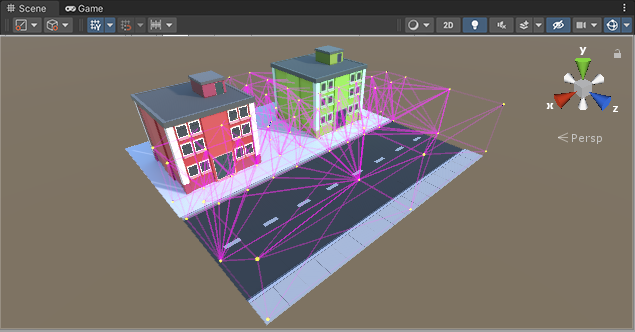
You need to create a volume of probes. I suggest looking at a few videos or something.
There's also a free asset on the asset store that can automatically place volumes of probes but you'll need to delete the script from your project when done as it breaks on upload, but otherwise works great for placing probes.
 stone marsh
https://assetstore.unity.com/packages/tools/simple-light-probe-placer-58290
Here's that asset too. But like I said, you would need to delete it from your project asset folder when you're done using it to setup your volume.

Get the Simple Light Probe Placer package from Alexander Vorobyov and speed up your game development process. Find this & other Tools options on the Unity Asset Store.
nocturne crown
correct or bad?

I think if its like this it would take too long to bake, should I space them out more?
 modern kayak
nocturne crown
correct or bad?
modern kayak
nocturne crown
correct or bad?
you could remove some in the middle where the lighting doesn't change, but it's not going to take long to bake either way
most of the time spent in baking is creating the lightmap for the meshes. Lightprobes are relatively quick
nocturne crown
would this be better?
 modern kayak
probably yeah
you don't need 4 high though
light probes are only necessary in places where lighting changes
nocturne crown
ok so just remove the ones on top and it should be good?
modern kayak
yeah
nocturne crown
cool thanks for the help! 🙂
yeah that isnt long, about 10 minutes to bake, better than when I tried last time it was like 13 hours lol
that was for another world
nocturne crown
have a new issue, when I update my world it doesnt actually update
i update it and it uploads just fine, but it doenst seem to affect the current world
pearl scarab
Fairly new to unity, but I donwloaded this bar prefab with a counter top, hood, etc. However it's all prefab-ed as 1 model. Is there a way for me to break a prefab apart into its separate cubes/planes/etc? I have both the prefab file and the fbx file
Yeah I get that
Ok so I opened the file in blender but the mesh it's showing is just straight up the lights and the entire bar. Is there no way to break that apart?
If I need to pick something else I can do that I was just hoping there was a way to take this thing and break it up so I can assign separate materials

Either that or is there an easy way to edit parts of a .mat file? The bar came with a single material for the entire thing, and I want to change th e colors of portions of it
1 texture, 1 material, 1 mesh
There is
Basecolor?
You mean the albedo?
Not sure where to find the material/texture settings to apply them to the fbx in blender

Don't wanna saturate this chat, can we move to a dm if that's ok with you @bold ibex
 nova locust
I imported the newest QV Pens. Everything's good, but when I tested it out, any pen wouldn't write something. Did I miss something?
 fleet valley
I have a question, how do i make avatar pedistals not wobboly
like im pretty sure ive seen clear ones
 normal lintel
Anyone else have issues trying to run a world in Build & Test? For whatever reason since the .30 update i've been getting booted to my home not the one i'm launching for b/t
 inland cave
normal lintel
Anyone else have issues trying to run a world in Build & Test? For whatever reas...
inland cave
normal lintel
Anyone else have issues trying to run a world in Build & Test? For whatever reas...
Make sure your installed version of VRChat is up-to-date. If you're using a beta version of VRChat with a stable SDK, you need to either switch the SDK or the VRChat client version to match.
 sinful grotto
I saw in the world "Sailing" that, when you press trigger while aiming at your left arm it will show the canvas on the player's left arm. Does anyone know how to accomplish this? I am currently using SDK3 with Udon.
inland cave
sinful grotto
I saw in the world "Sailing" that, when you press trigger while aiming at your l...
My best guess is figuring out what Unity Component will let you access skeleton bones as I "assume" VRChat is using standard components for avatar rigs and overlapping its own tech on top. Im sure someone here has better knowledge however.
If you can identify that GameObject Component, you just need to create an Udon script that'll dig for the specific bone and get it's transform. Then you can do whatever you want with it
stone marsh
sinful grotto
I saw in the world "Sailing" that, when you press trigger while aiming at your l...
Create a menu system and use a bone follower script to parent a game object containing both a interact trigger, and the menu. Interact trigger, triggers the menu.
Pretty sure a bone follower script comes in the sdk. One is also included in jetdogs udon prefabs for free which uses U# alternatively.
Youd probably want to restrict it so it can only be triggered using the opposite hand from where the menu is parented to prevent it from being accidentally pressed with the hand it's parented to. And ensure the interact distance is very low
sinful grotto
Alright, thank you for the quick reply. I will try this.
nova locust
i will ask again. why aren't qv pens working? I've imported the udonsharp first, then the qv pens 3.1.2. But the pens wont work whenever i tried to write something.
sinful grotto
nova locust
i will ask again. why aren't qv pens working? I've imported the udonsharp first,...
Strange... I have imported qv pens 3.1.2 into my world and put only the prefab in and it works like a charm.
nova locust
yeah, thats why i asked.
sinful grotto
Did you import the latest version of UdonSharp? Also, are you using the latest SDK3?
nova locust
yes and yes
 solid wigeon
Every time I try to upload my sdk2 world it forces me to reload the entire scene, it automatically plays the reloaded scene, and automatically logs me out of the sdk console. The only error message is “Trigger on Avatar Pedestal was not initialized in time!” I have no idea what that means. Even the VRWorld Toolkit World Debugger says the “Build result: Succeeded”. Can anyone help?
solid wigeon
I figured it out by reloading the entire project and x’ing out of the reload box. Now it’s taking a long time for it to upload the world to the community labs. Does it normally take longer than 10 minutes?
 quiet plinth
Mesh taking hours to import! PLEASE HELP!!
Sometimes a file will just randomly become corrupted and take about 1-2 hours to import. This FBX is only 2.6kb in size. I've reexported it with a new name and that doesn't work. Only fix has been making a whole new scene and starting the level from scratch.

And Bakery exports and imports files to mess with lightmaps, so I'm waiting hours for every bake. It's so damn annoying.
 late valve
Okay I am so lost rn, I basically tried to import the the pool table and udon sharp into my project and now I am getting errors so I am completely lost on what to do...
I think it's mostly coming from Udon Sharp
 elfin dagger
Hiya, how hard would it be for me to get someone to build a world for me within a time constraint and no money involved and with little effort or help from me.
 unkempt turtle
i guess somewhat hard
elfin dagger
unkempt turtle
i guess somewhat hard
Sadly that is what I thought.
elfin dagger
If it was possible where should I ask
near escarp
If you can't pay someone then i highly doubt anyone would want to help
elfin dagger
near escarp
If you can't pay someone then i highly doubt anyone would want to help
That seems to be the sad state of the situation, although reading what I said I can understand how it would come across I am very literal, so how about I put it this way, My wife died in 2018 after fighting cancer for 20 years (she was disagnosed at 21 and died when she was 42) she was an artist and for the anniversary of her death I would love to have a world on VRChat with all her 300 paintings in a gallery and her story (one of her paintings is in the montreal office of Ubisoft and also in the animus in Assassins Creed Valhalla) The low effort by me part is I am autistic have ADHD and bi-polar it it is win if i can even log on.
near escarp
I'd suggest posting on https://ask.vrchat.com/c/commissions/world-commissions/34

VRChat Ask
Post about commissions for worlds in this category. Requests are not permitted, we only permit posts from those providing services.
Maybe someone would be willing to do it, but I wouldn't hold my breath
 storm scarab
@elfin dagger There is also VRC Traders, its a great discord for commissions. I can DM you an invite if you want.
unkempt turtle
(the link to vrctraders also is in #community-servers-old)
storm scarab
Oh didn't even realize lol, but there ^
elfin dagger
storm scarab
<@!350312847689121804> There is also VRC Traders, its a great discord for commis...
Yes please
 glacial yew
Hey guys, my first world is up and running, will be applying updates to the songlist as they are requested, but any major issues please let me know id love some feedback on this being my first...
also if this is the wrong channel to post in please direct me to the more appropriate
https://vrchat.com/home/launch?worldId=wrld_4387578a-e22d-4d66-b1bf-d2791af6a0ea

Simple 10 pin bowling(beta)‚ karaoke‚ pool tables and a secret green screen studio․ UDON# by KevBal‚
 timber fable
solid wigeon
timber fable
solid wigeon
I just uploaded my world and the link it gives me to view it just doesn’t show me anything and the world isn’t viewable?
Link it gave me: https://vrchat.com/home/world/wrld_49374d9d-6e30-46c4-a4fd-e48fb2f27d87

VRChat lets you create, publish, and explore virtual worlds with other people from around the world.
pearl scarab
I'm looking for a string lights or fairy lights prefab somewhere out there. Anybody know where I can find one?
 indigo fossil
pearl scarab
I'm looking for a string lights or fairy lights prefab somewhere out there. Anyb...
indigo fossil
pearl scarab
I'm looking for a string lights or fairy lights prefab somewhere out there. Anyb...
There is one by red_sim on his patreon for free I believe
I'm currently working on a world making video tutorial series for anyone who is interested
https://youtube.com/playlist?list=PLPdWkxUSZ65Fp6ICrU7mIq1znAfPwMhNZ

YouTube
A comprehensive work-in-progress video tutorial series about how to create your first VRChat World using a Unity-only workflow. This is a project-based cours...
pearl scarab
Thank you!
solar dawn
For whatever reason player is stuck on spawn, like kinda welded to spawn point. Did anybody had issue like that?
 oblique chasm
@solar dawnWhen the player spawns, is it right on the ground
or do they drop a bit?
I think I've had the same problem, and raising the spawn point fixed it for me
solar dawn
Spawnpoint is in air
oblique chasm
hmm, only other problem I might know would be movement speeds on VRC_Player Mods being set to 0
If it's not that, I wouldn't really know, sorry
maybe someone else might
 solar dawn
oblique chasm
hmm, only other problem I might know would be movement speeds on VRC_Player Mods...
solar dawn
oblique chasm
hmm, only other problem I might know would be movement speeds on VRC_Player Mods...
No that's not it either, but thanks for time
oblique chasm
aww, I'm sorry then
but I don't really know much
so someone else can definitely help you fix that
good luck😊
solar dawn
Hopefully someone will
solar dawn
Nope, still same
stone marsh
You should post a screen of your player movement script just to be sure.
Because that honestly sounds like the player doesn't have any movement speed applied. I also didn't see if you mentioned if this was for sdk2 or UDON. Because both could have different issues causing that. But I'd suspect it's related to the player mods or if udon, a script that is conflicting with your movement settings and erroneously setting them to 0 on spawn. Dunno. But sharing some screens could help troubleshooting.
 dry violet


ok does anyone know how to fix this i made a cylinde to make a curved platform and i just hit an invidibel hitbox and float on it
idk why its a capsule
i made it a cylinder
lol i turned off the capsule thing now i fall through it this is halla anoying
whats that
this?

hazaw now i just need to fix railing and make the lights more... like lights

but then its invisible
if i disable
no its a floor i just wanted that pesky hitbox gone
thanks for the help 🙂
 graceful meteor
anyone know the answer to this?

its not Eevee it happens in Cycles too
normal map in substance vs. normal map in blender produces these weird pixel lines across the surface
pearl scarab
Any idea why worlds and avatars are showing this image on vrchat?

Anybody know if re-taking and uploading your world image fixes this?
normal version
 hard rain
Hi
pearl scarab
So I've never worked with area lighting before. I had a world commissioned, and one of the things they did was make area lights below the furniture to light it up. So I copied the exact settings on the area light and then baked my lighting. Nothing rendered. Any ideas what I'm doing wrong?
 hard rain
im a student and i want too learn how to build a new world someone can help me?
 ember drum
baking multiple materials to one set of textures, in blender... trying to do a diffuse and some of it is just mid grey
any ideas why that might happen?


 bold ibex
can someone help me im having trouble uploading a world because of this error
 stone marsh
bold ibex
can someone help me im having trouble uploading a world because of this error
stone marsh
bold ibex
can someone help me im having trouble uploading a world because of this error
Just like it says, you have errors in your console relating to a script. Clear all the errors in your console and attempt to enter into play mode. If it fails, check your console again for hard errors "red stop signs" and take a screenshot of them and post here, or read them and determine what script they are talking about that is having an issue.
 median briar
I don't suppose anyone has an udon script that lets you interact with a game object to switch to an avatar (by blueprint id)?
I don't want the ripply card that comes with the pedestal prefab, and my searches thus far have only turned up scripts from very early udon builds (which don't seem to work anymore)
here's an attempt, but its non-functional in game

 rain shadow
median briar
here's an attempt, but its non-functional in game
rain shadow
median briar
here's an attempt, but its non-functional in game
Where are you getting the Blueprint ID from? Do you just have it assigned in the inspector?
median briar
it's a public string -- I set it in the udon behavior on the object.
(so yes, set in the inspector)
rain shadow
Is it some special setup or do you just want an avatar pedestal that doesn't have the image/ripple effect?
median briar
that's all I'm really after, just no ripple card
rain shadow
Would you want the image if it didn't have the ripple effect? or no image at all?
median briar
definitely no image -- I'm trying to apply this to a 'statue' with a mesh collider
rain shadow
Is there a reason you don't just have the blueprint ID already set for the pedestal component?
median briar
I didn't see it as an option until I made my own string and tried to use the 'set blueprintid' node

VRChat Ask
So, I had the misfortune of trying to learn mapmaking in this gaming probably about two weeks before this major change, so it seems like I’m back to square one. Sorry if I’m asking a totally obvious question, but I can’t seem to make this work at all. When I test this barren wasteland of a world, I’m loading in, and the avatar and pedestal are ...
I came across that one, but wasn't able to get it to work
maybe I just missed something
bold ibex
stone marsh
Just like it says, you have errors in your console relating to a script. Clear a...
ok thx
rain shadow
The udon setup you made should work to change avatar though it's weird to have the get AvatarPedestal component and an AvatarPedestal component variable since they are the same thing
If your VRCAvatarPedestal variable isn't set in the inspector it will crash the udon behavior so that might be why your script isn't working?
median briar

 cunning tide
@tawdry heron you need a post processing on/off toggle in Club Orion!
rain shadow
median briar
Do you have an AvatarPedestal component on that GameObject?
median briar
no, only my udon script... perhaps, that's the issue?
rain shadow
Yes it would be
You would also need to remove the VRCAvatarPedestal variable from your udon behavior and then plug the component from GetComponent into the Set blueprintID node
median briar


like so?
I believe I'd tried this setup in the past, but using the vrc pedestal script generated that jiggle card
I'll give it a build/test to be sure
rain shadow
It will generate the card like that
rain shadow
The avatar pedestal component will always generate the image and other information about the avatar
You could do this though
 median briar
I feel foolish, but I don't understand what that's doing in relation to setting an avatar
or... is it just meant to disable the pedestal card when the world loads?
rain shadow
median briar
or... is it just meant to disable the pedestal card when the world loads?
Yes
median briar
suppose that would do the trick then
shame there isn't a cleaner way to handle this
unless there is and I just suck at udon XD
 lyric acorn
avatar pedestal script instanciates an avatar card object on load? seems like the solution then
 cerulean echo
that looks hard <-<
rain shadow
median briar
or... is it just meant to disable the pedestal card when the world loads?
Actually this doesn't work it prevents the pedestal from being functional
median briar
😮
rain shadow
It should still be possible but slightly more effort to setup
median briar
hmm... I've always meant to make a script for this, but I'm not entirely sure how... Can you forward an 'interact' from one object to another?
like... just put the regular pedestal somewhere in the world (far away and out of sight, maybe even scaled to nothing), and forward a click to it?
cerulean echo
so like you klick on an object and and get from the hiden pedestal the avatar 😮
rain shadow
Yeah you could and if you don't mind having avatar pedestals hidden away somewhere in your world it might be a lot easier than what I'm currently suggesting
stone marsh
Would work. Have done.
Pedestal just wants Interact()
Been a while but I don't see why it wouldn't work anymore
median briar
basically, a fing-longer, like in futurama -- but it can be embiggened infinitely in any direction.
lemme slap something together that forwards an interact()
stone marsh
Just have a script send interact() on interact to the pedestal
There's def better ways of doing it. But yea
Wasn't there documentation on how to set a remote trigger for pedestals too? Been a while
rain shadow
Any sort of custom event would work
stone marsh
Ah yeah there is an RPC for it
Just send "SwitchAvatar" https://docs.vrchat.com/docs/vrc_avatarpedestal
VRChat
Used to display and / or switch to an avatar, often used in combination with a VRC_Trigger. Example can be found in the SDK as VRCAvatarPedestal. RPC's are available via the SendRPC action
So button script would just be on interact sendRPC SwitchAvatar
rain shadow
@median briar The easiest way to achieve this though would be to use this to override the transform position of where the image display shows up

Just make an empty game object and assign it and move it very far away
stone marsh
Is there not a mesh renderer for the pedestal (not the stand)?
median briar
rain shadow
<@!252196404192215045> The easiest way to achieve this though would be to use th...
I tried desperately to do that a few weeks back. Not sure if anything's changed, but I was never able to get working pedestals if the placement was targeting something else.
my current 'solution' is to move the pedestal hundreds of meters down, and the collider the same distance back up.
but it's not elegant
rain shadow
Ah right
median briar
scratch that -- not the pedestal, but the 'statue' origin point
so the card renders at the origin
which is super far away -- thus the inelegance... makes it impossible to move or rotate an object nicely, but it works /shrug
stone marsh
Might not be a big deal, but also wouldn't be a way to cull them and rendering far out things may not be ideal. Just stacking them in a wall or under a floor may be better but also may be pointless. Just speculating.
median briar
I generally push them past the camera's view distance
stone marsh
Fair
median briar
one issue with this method is that you can still see the card's blue outline when reaching into the collider if it's not beyond the camera
(so, blue boxes through walls/floors, etc..)
stone marsh
Why not just have a button sending an RPC then at that point?
median briar
heh... don't suppose someone can give me a crash course in RPC?
it's not something I've done before

my brain is turning to mush
stone marsh
Can send with UI buttons easily. Just a drop down option. I'm not home so can't send screenshot. If using a UI button, you'd add the game object that had the pedestal script on it to the button, then in the drop down a sendRPC option will show.
If using a script, would be easy to do with CyanTrigger.
Use tab to search through udon when using noodles instead of space. Try searching for rpc. I forget what it would be under.
median briar
this needs to be an interact when clicking a game object (avatar statue)

seems silly to send custom event twice, but that should hit the target object
which would be the pedestal
stone marsh
Not custom event. Isn't there a SendRPC exposed to udon? Sorry I'm not home. I can hit ya up later.
median briar
lemme check
median briar
not finding anything by searching rpc with either tab or spacebar
stone marsh
Fair. I forget how it'd be done. Would be easier if I was at my computer. Sorry man.
Wonder if you can trigger a UI button from udon.
rain shadow
Here's my solution from earlier but functional
median briar
witchcraft!
dang
so it just iterates through all child objects and disables them?
rain shadow
Yeah children of the generated pedestal script
median briar
this is probably the most performant too, since it cuts out the bloat.
stone marsh
Nice
median briar
@stone marsh, I'm gonna work with @rain shadow's script, but I would like to get back with you on the RPC stuff at some point. I imagine it would be really handy to have a better understanding of it.
Thanks y'all -- one less bit to stress about XD
stone marsh
median briar
<@!485247584907034628>, I'm gonna work with <@!183779109296537600>'s script, but...
It's pretty much how you setup UI for video players n stuff. I mainly use it with UI but there are a ton of RPCs for various vrc scripts. Tis also how u respawn sync objects.
It may not be exposed to udon. I cant remember. Super def had the best option realistically tho. Nice solution
median briar
a lot nicer than the -/+ origin offset
stone marsh
Lol wat. Yeah. sendRPC Respawn xP
I've switched over to using Brokered Sync entirely for pickups tho so I can't use sendRPC to respawn those and do have to reset rotation and position but was easy af with CyanTrigger. Man I love that script
 modern ridge


 stray oxide
I was wondering if its possible to export a world then import it into another file. (i want to merge my two worlds basically)
near escarp
I haven't heard of anyone doing it before, if you're going to attempt, back up your two projects before trying
I would assume there would be a lot of conflict between the files
If you just want the mesh that would be easy
but anything more might be difficult
stray oxide
Okay forgive me for a sec im rather new to unity but, how exactly do i back it up
near escarp
duplicate the folder, compress it with winrar/7zip and upload it to your google drive
stray oxide
Ah thank you
stray oxide
Its possible. Export every asset on both worlds, new file > import both copy the inside of one scene to another
 barren belfry
help me (im french) mention me , I have already done what they asked me but it did not solve the problem, and I had already made versions before

 random owl
barren belfry
help me (im french) mention me , I have already done what they asked me but it d...
random owl
barren belfry
help me (im french) mention me , I have already done what they asked me but it d...
Sign out and sign back in to the SDK and if that does not help contact #vrchat-support
 untold pewter
So many really nice worlds have the default near clipping distance and its literally the worst, please lower it to 0.01, or 0.001, save us small folks
storm scarab
@untold pewter are you referring to the rendering aspect of objects?
how small avatars are we talking, because ive been in small avatars and never really had an issue
untold pewter
storm scarab
how small avatars are we talking, because ive been in small avatars and never re...
Even at 1m tall it becomes an issue because people's hands will stop rendering before they touch the head, and it only gets worse as you get smaller
If somone touches me on the nose and all I see is their hand being removed from existance it kinda sucks
If I switch to my smallest avatar I have to either quit the game or have a friend make a portal to a world with better culling, because the quick menu and radial menus get culled
storm scarab
short people problems kek
dont really use small avatars that much so ive never had that issue, sounds shitty though
 valid urchin
i need help making an animator play by a button. i watched the video https://www.youtube.com/watch?v=YuWbH5c9CBI already but it didnt seem to work
(Sorry, accidentally recorded this one in 1080p, whoops)
Two of my oldest videos, Contextual Buttons and and Door Animations, have both grown rather outdated, so I've combined the two into a brand new video to go over them!
Full Tutorial Playlist:
https://youtube.com/playlist?list=PLwEtUGCdQX7HMkFCVxiNvO4DS2CmHWbe6
00:00 - Intro
00:42 - Animat...
 mild spade
valid urchin
i need help making an animator play by a button. i watched the video https://www...
mild spade
valid urchin
i need help making an animator play by a button. i watched the video https://www...
Can you post pictures of your set up?


 mild spade
Are those two different graphs? The first graph is calling an event on the second graph right? On the animator, do you have two bools? Or what are you trying to do? (Since you are getting a bool with different names (Play and House)
valid urchin
i fixed a few things and theres a bigger picture
yes, the button is calling the house
the bool is play, the animator is house
mild spade
I see two problems: it seems like you put the wrong script in the wrong behaviour. You want to put the scrip with the "Interact" where there is a collider. So you want to change their script. Put the "EventButton" script where the collider (button) is.

And put the "house" where the other script it.
The second problem, is your reference udon behaviour is referencing itself, rather than the other script. It also has an empty "eventName" You want to type there the name of the custom event, on your case is called "ToggleHouse"
 valid urchin
under public variables behavior doesnt seem to let me choose, how come?
(i fixed them)
mild spade
You can drag the object. Ah ok
mild spade
Im sorry, I could not see your mouse in the video. You can´t drag the "House" gameObject and put it there? There is a more simple script you can use that does not involves calling custom events in your situation. You could do it like this so you dont have to reference other script. Basically you have everything on one script. And you just put this where your button is (with the collider)

 lucid wagon
Hi, i tried to publish my 1st world, unity says it published without an issue but when my friends and i tried to join it loads up, we see black screen and then appear back in our home world
also test build works well, did anyone have to deal with this issue before? (world is unpublished again so people dont try to join it)
 sturdy lynx
lucid wagon
Hi, i tried to publish my 1st world, unity says it published without an issue bu...
sturdy lynx
lucid wagon
Hi, i tried to publish my 1st world, unity says it published without an issue bu...
Do you have a lot of things being loaded in upon joining?
Any error messages in Unity console?
lucid wagon
here are the errors i get, was thinking about trying to remove everything and uploading it bit by bit and seeing when it breaks

 wide citrus
so, i started making this christmas map
and sometime i cant test it for some reason.
it says that "SampleScene.vrcw" is missing.
oblique chasm
https://answers.unity.com/questions/557379/increase-render-distance-for-one-object-only.html
Do either of these 2 solutions work for a vrc world?
I haven't been able to do either successfully
Unity is the ultimate game development platform. Use Unity to build high-quality 3D and 2D games, deploy them across mobile, desktop, VR/AR, consoles or the Web, and connect with loyal and enthusiastic players and customers.
 vivid belfry
Heya, do you guys use audio mixer in Unity when using more than one audio source and does VRChat support such feature?
 brisk spear
are we able to spwn objects and if so how is it done in U# like can't find anything can someone help
ruby jay
brisk spear
are we able to spwn objects and if so how is it done in U# like can't find anyth...
https://docs.vrchat.com/docs/networking#vrcinstantiate is one, the next chapter talks about object pools
graceful meteor
why do all of my bump maps look like shit in blender?

but they look fine in substance
Its like space invaders
correct??

たすけて
pearl scarab
Do you all know if udon touch buttons like in Just B Club and Zixhas Apartment are available for purchase anywhere?
stone marsh
pearl scarab
Do you all know if udon touch buttons like in Just B Club and Zixhas Apartment a...
I don't know which ones they specifically use, but these are about the best. There are push buttons, sliders, and touch buttons (like a quad that senses a finger collision). Comes with PSDs and scripts to rebake the buttons if needed. If you get them, def join the discord, he offers really good support if needed. https://booth.pm/en/items/2906380

This feature enables users to physically interact with buttons and sliders in your world. Multiple buttons (as many as you want) or sliders can be assigned to each other to stay in sync. I was the first person that made UdonSharp-only buttons that work without collider physics over a year ago and
There's also one on Gumroad called "impresive Buttons" however it's much more limited and not as performant, but it is cheaper if that's a concern. I've purchased both, and the one linked is def the best, but depends on what you really need and how many buttons or how complex of usage do you desire.
pearl scarab
stone marsh
I don't know which ones they specifically use, but these are about the best. The...
Style-wise those don't look like they mesh well for what I'm trying to build. I found the credited creator of the Just B Club one's: Kova's PlayerInteraction. I just don't know where to even begin searching for them though cuz there isn't any link.
stone marsh
Eh, I mean it's up to you to make things look how you want xP prefabs are just base examples.
Those ones are super limited tho. But free at least. Here's the link to the download for the ones from Kova. https://bitbucket.org/akovaloid/vrc-physical-interaction/src/master/ They also are not as performance friendly, however, they would work for simple toggles and at least it's free.
Impressive Buttons can look exactly the same, and even has a round button, but is at least more performance friendly and is being actively developed still. But is 10 bucks. If that visual style is a must
Get Impressive Buttons from my Patreon or Gumroad!
https://www.patreon.com/markcreator
https://gumroad.com/l/ImpressiveButtons
Website: https://markcreator.net
Twitter: https://twitter.com/Mark_creator
Twitch: https://twitch.tv/markcreator
#MadeWithVRChat
#MadeWithUdon
graceful meteor
@near escarp is it because I'm using a 2k height map for a 4k image?
pearl scarab
stone marsh
Eh, I mean it's up to you to make things look how you want xP prefabs are just b...
Thanks!
Anybody know if there is a resource or how I would go about creating a lighting toggle with baked lightmaps? I basically went a button to swap the lightmap.
near escarp
graceful meteor
<@!97980768323633152> is it because I'm using a 2k height map for a 4k image?
No clue, i don't use textures in blender
graceful meteor
testing now with 4k height map
I think the geometry of the mesh is just too simple to use with such a stark height map?
So maybe I just need displacement modifier
 kindred void
hi as soon as i get the sdk 3 in unity i have this error that appears

 civic ibex
@kindred void It looks like Cinemachine did not properly install with your VRChat SDK 3. Could you do the following? Search for Cinemachine in Package manager
 kindred void
civic ibex
<@!325079721669033995> It looks like Cinemachine did not properly install with y...
kindred void
civic ibex
<@!325079721669033995> It looks like Cinemachine did not properly install with y...
good thanks you fixed
kindred void
I have this new error that I don't understand

 naive tinsel

Hi i added ladders into my world but I am not sure how to make them climbable, I have added colliders into them but still cant climb them anyone know how to fix this?
They are a solid object, I don't walk through them but I cant walk up them I stop being able to go up after about 1 step
graceful meteor
@near escarp this was the explanation behind my previous question if you're curious

in other words, there's nothing to reflect, so its reflecting the void
near escarp
ah, interesting problem
graceful meteor
the bump map thing I fixed using a displacement map instead
bold ibex
i brokey it, sdk isnt showing properly. i tried to del and reinstall it but that did not workey
 glacial yew
naive tinsel
glacial yew
naive tinsel
Try taking off your collider on your ladder, and placing a steep staircase in line with your ladder and turning off the mesh renderer
naive tinsel
glacial yew
Try taking off your collider on your ladder, and placing a steep staircase in li...
ok thank you
 atomic patio
if I place two cubes intersecting, is there a way to hide one of them, so it also hides the part that is intersecting, like a kind of "negative" option?

 kindred void
I downloaded preset udon and on all the preset I have this error why

 zealous cave
How would i make a sound sound like its just background noise? Becuase when i place a sound, it always comes from that point, and i haven't found a setting to change that
ruby jay
zealous cave
How would i make a sound sound like its just background noise? Becuase when i pl...
try to slide the audio source to 2d and play with the other effects
other than that, you will have to reposition the source for a distant 3d influence
unkempt turtle
atomic patio
if I place two cubes intersecting, is there a way to hide one of them, so it als...
not that i know of, but you should rather do this stuff in blender or any other 3d modelling program anyway, gives you a lot more freedom than just cubes, spheres and cylinders
ruby jay
yes, unity is not intended to be a 3d model editing software
valid urchin
there are only 5 spookality worlds, i have mine in comminity labs, does mine not count?
storm scarab
community labs are (((public))) not public
 ripe geode
the home world comin' along nicely #sheesh
 unkempt turtle
🤔


 grim girder
Does anyone know how to make static portal with VRCPortalMarker?
 wise sedge
Any elements with canvas components in my world are automatically getting assigned a box collider that matches their size
any way to stop this?
 kind leaf
ruby jay
yes, unity is not intended to be a 3d model editing software
kind leaf
ruby jay
yes, unity is not intended to be a 3d model editing software
Thats what modules(Assets) are for. Unity is modular to give developers the freedom to choose the size and resource impact of their software; as opposed to Unreal which strives to be an all in-one. Neither are ideal with their modules or built-in features for modeling but both provide significant alternatives to speed up production. In most cases, unless you are modeling something obscure, using the engines modeling features is suitable. Using an external editor comes with it's own obstacles such as shader compatibility, and scale that might not conform to Unity.
inland cave
Would be nice if Unity did some of the basics with some kind of aptitude though (stares at terrain)
inland cave
If it were not for VRChat I would honestly never use this engine - for smaller prototypes and projects Godot is more agile and every solution to a problem you need doesn't require handing over $50 to some random guy as you cross your fingers it's the thing you actually needed, or Unreal Engine because they actually reinvest the money they get into real tools.
inland cave
kind leaf
Thats what modules(Assets) are for. Unity is modular to give developers the free...
While Blender has a learning curve, there's two tools I use to make import/export between Blender and Unity quick and predictable in a way FBX import isn't.
-
I have a free blender plugin called Capsule that lets you batch export assets in whatever format you wish, and it will automatically center objects in your scene - https://github.com/Takanu/Capsule
-
GLTFUtility lets me export assets in the GLTF format and be readable in Unity, including basic PBR shader support, much faster import times and no busted scaling or transform issues. While the shaders wont look the same as they do in Blender it's great for prototyping as it gets you closer to an end result faster - https://github.com/Siccity/GLTFUtility
cerulean echo
@wise sedge if you dont need the box colider for pressing eny button or slides in the ui look if you addet ui shapes script and remove it if you dont need the boxcolider
cerulean echo
hmm normaly should not wen its removed weard
 empty plover
Hi all 🙂 What are the best tutorials for beginners? I have SDK3. Muchas gracais
nova locust
This series is very helpful to me.
| Subscribe |
| Comment |
| Like |
: Current Video Links & Extras :
: Social Media Links :
Twitter : @itskatr6
Twitch : itskatr6
: System Specs :
ღ PC ღ
CASE : Corsair 275R White
Cooler: NZXT x72 Kraken 360mm
CPU : Ryzen 7 3700x | 4.3Ghz 1.45v
GPU : EVGA FTW2 1070 Ti
RAM : DDR4 Vengeance 3200Mhz CL16 16GB
SSD : WD 250GB SSD & WD...
Now my question for everyone here. Anyone here experienced with making a game world? I wanted to make one, but there aren't many tutorials.
kindred void
hi friends aji this error how can i reduce the size of my fbx on unity or with another software?

 rotund solstice
Is there any prefab for monsters that chase players based on vision? I'm trying to port a level from a game and just need a basic chase system that relies on vision
random owl
kindred void
hi friends aji this error how can i reduce the size of my fbx on unity or with a...
https://github.com/oneVR/VRWorldToolkit/releases/latest
Import this and check VRWorld Toolkit > World Debugger from the top

GitHub
After successfully importing the release unity package the toolkit menu will appear in the Unity top bar as VRWorld Toolkit - If it does not, check Troubleshooting for common problems and solutions...
 wary crystal
does anyone have any info on how strict the avatar optimization rules are on pedestals in worlds because, I keep continuously seeing worlds that have avatars above the max poly count and with other stuff that goes over the limits that are put in "avatars optimization doc" is this still a hard rule that it wont be made public if it violates those limits or has it changed or its more suggestions?
 oak fjord
hi everyone! i'm a vrchat worldbuilder looking for some more people to help mentor participants in a worldbuilding jam 😄 it'll be part of reality fest, a fully virtual hacking event happening next weekend (oct 22-24) in vrchat and altspace!
if you're interested, please fill out this short form:
https://tinyurl.com/realityfestmentor2021
we'll follow up with more info if you submit the form - but you're also more than welcome to shoot me a DM if you have questions ☺️
also, so you know i'm legit - we're the team behind MIT reality hack, one of the world's top AR/VR hackathons, and here's our tweet about mentor recruiting:
https://twitter.com/mitrealityhack/status/1449767786285314056
(also my teammate @unkempt sinew did clear this post with @gloomy fog - hope it doesn't seem like spam 😅 we've been working super hard on this and would love your help - excited to hopefully talk to some of you individually soon!)

MIT Reality Hack Mentor Form

Reality Fest is starting this Friday! As the event gets closer, we're looking to bring on worldbuilding mentors from the VRChat and Altspace communities. If you're interested, let us know at the link below:

 Twitter
·
kindred void
random owl
https://github.com/oneVR/VRWorldToolkit/releases/latest
Import this and check VR...
Twitter
·
kindred void
random owl
https://github.com/oneVR/VRWorldToolkit/releases/latest
Import this and check VR...
in fact i could import my fbx in unity but i can't place it because it's too big for unity of any size
random owl
kindred void
in fact i could import my fbx in unity but i can't place it because it's too big...
Oh that shows up on fbx import? I assumed on build from quick look at the error.
kindred void
random owl
Oh that shows up on fbx import? I assumed on build from quick look at the error.
as soon as I click on the fbx I get this error

I would like to know how to reduce the size of the fbx
random owl
It really depends on what data that fbx has
You might just want to sanity check everything in blender
misty wave
If I publish my world on private so I can test it with friends and then later share it to Labs, will it still show up under the New tab on the explore menu?
near escarp
new is for newly publicly published 
 near escarp
You have console errors
 torpid stratus
What's the most up to date video player for sdk2
glacial yew
which channel is best to share world link for feedback
 stiff solar
Recently, the world I uploaded was fine but my new update I did made it inaccessible - after the world is loaded, it just shows black screen for 1-2 seconds then the loading screen with the button "Return Home" appears.
The thing is, the world didn't ran into any problems when I uploaded it using Unity. I assume that slow Internet during the upload may be the culprit, so could that be a possibility?
rain shadow
Yeah there's a couple of things that can go wrong during the upload process that can cause that
If you don't have any errors in the unity console a reupload is likely to work
stiff solar
I'll try later when my Internet is at the least "stable."
rain shadow
Without? what are you trying to do?
You can use the VRC chair prefab and disable or remove the mesh that is within the prefab
Unless you need something more specific?
That's only visual
the actual thing that the player interacts with is the box collider
Yeah
It's good practice to make the collider a lot smaller than the default however
That would work but the colliders could be even smaller
Aha
You should test and build and see if the chairs actually position the avatar correctly
Afaik the default stations suck super bad actually
They position way too low I think
Yeah I can link you an improved station prefab if its not good
nova locust
I made an animation where a chair would float down and up. I checked the preview and it worked and it looked good. But when I entered the test client, the animation wasn't working. I checked Google, trying many different answers and none of them worked.
Any idea why it won't work in the game, but it worked in the preview?
rain shadow
Are you using an animator or animation component?
nova locust
animation component
rain shadow
Those won't work you will need to recreate the animation with an animator component
nova locust
oh really?
rain shadow
Yeah they are blocked in VRChat for security reasons
nova locust
I thought the animator is for avatar
rain shadow
Yeah they can be fully utilized in worlds too
rain shadow
It's basically identical to how you would with an animation
In fact you likely don't need to animate anything
If you go to the animation file and change the inspector to debug there is a legacy option that you will need to disable there
After that you could just drag and drop it onto the game object that you want animated and it will setup the animator component with that animation for you
nova locust
Aright, I have another issue. Well, it's not exactly an issue. I've set up two scenes. I followed the youtube tutorials for a trigger to teleport the player to another scene. But I couldn't find a good video or the one that used a button to teleport the player to the next scene.
I'm familiar with C+, btw, but I just can't figure out how to make a button that allows the player to move on to the next scene.
ruby jay
you cannot use multiple scenes in vrchat worlds
nova locust
Oh really? I thought it was possible. I mean, are you sure cuz there were some worlds that had different scenes (different skyboxes, different lighting settings, and etc)
If not the scenes, then how did they do it?
For my world, I wanted to do one scene with bright light. Then next scene with darker light and black fog. It’ll also be in black and white.
 winter stump
ight what's the latest video player that works, I'm a bit out of date on this info
I've been using wolfes one
near escarp
techanon made a world that holds all the video players you can test, go check it out !
winter stump
cheers!
ruby jay
nova locust
Oh really? I thought it was possible. I mean, are you sure cuz there were some w...
skyboxes can be changed at runtime
so can lighting settings, especially easy when using dynamic light, which some dynamic worlds do, light changes can also be more or less well faked with post-processing
unity fog can be changed as well
and black-white can be achieved using the colour grading post-processing stack
 royal jay
ive decided that im gonna spend one hour a day on a new world until its finished. This is todays progress. [Day 001] (i know im slow, its been a while since ive made things)
ruby jay
royal jay
ive decided that im gonna spend one hour a day on a new world until its finished...
consider using https://github.com/CyanLaser/CyanEmu for quick testing
ruby jay
it allows for limited testing of worlds within unity, networked testing however still must be done at least in offline builds
royal jay
gotcha!
todays progress was getting the framework in for the spawn location, to the right will be a not-pokemonTM battle room
(i dunno, i think itll be cool) and to the left will be a relaxing area with soft lighting, QV pens (if i can figure those out) a mirror and cozy decorations + furniture
bold ibex
Does anyone know why my skybox doesn't appear in game but it appears in unity
royal jay
show your console/error log
 timid knoll
Hello, I have a question concerning UI events in a SDK3 world: Let's say that I want a cube that once clicked displays on the screen/VR headset HUD Black stripes on top and something like "Chapter One: Text here" that then fades away to add a cinematic feel to the world, where should I place the canvas in the world if I need to use one and how do I setup this? With an Animator and a bool system?
royal jay
timid knoll
Hello, I have a question concerning UI events in a SDK3 world: Let's say that I ...
i would like to know as well
i would assume udon but honestly have no idea
timid knoll
Yes, I think I know how to make it work but I have no idea of where the UI should be: On the reference camera? In the world anywhere and then it automatically shows it on the HUD? I will try and if I find an answer I'll let you know!
royal jay
oh, try on your source(scene?) descriptor, i vaguely remember a line about SD=player vision
could be wrong
easily could be wrong
timid knoll
Alright, I will try. Thank you!
royal jay
lemme know if that works
timid knoll
royal jay
lemme know if that works
I have put a Canvas inside the world, and it's showing on the screen in Desktop Mode. I will have to try VR and aslo scale it because right now it's not scaled properly, But I think it works this way. I will try to animate it later on and see if it works
royal jay
thats awesome! im happy its working!~
timid knoll
Yes! One thing I noticed is that I need to disable "Raycast Target" on the canvas elements, otherwise it blocks the VRChat cursor and for exemple prevents to interact with the menu.
timid knoll
Np!
nova locust
ruby jay
skyboxes can be changed at runtime
so can lighting settings, especially easy whe...
I see. So, how would I do the skybox thing? And how do i apply the color grading to the certain areas where the player walk?
 fossil hull
nova locust
I see. So, how would I do the skybox thing? And how do i apply the color grading...
fossil hull
nova locust
I see. So, how would I do the skybox thing? And how do i apply the color grading...
There is also another way, some skyboxes aren't done in the settings but are just huge inverted spheres. So you have one scene but do this:
 nova locust
fossil hull
There is also another way, some skyboxes aren't done in the settings but are jus...
nova locust
fossil hull
There is also another way, some skyboxes aren't done in the settings but are jus...
Oh I see. That can work out
fossil hull
nova locust
I see. So, how would I do the skybox thing? And how do i apply the color grading...
But if you want to use the lighting settings, you have to find the correct Unity API for that. If you are familiar with coding, maybe that will help, or any other thread: https://answers.unity.com/questions/551826/any-way-to-change-skybox-after-do-something.html
Unity is the ultimate game development platform. Use Unity to build high-quality 3D and 2D games, deploy them across mobile, desktop, VR/AR, consoles or the Web, and connect with loyal and enthusiastic players and customers.
nova locust
Ok thank you
winter trail
Hey, so i need some help with my world. I want to test my world to see if it works but for some reason i cant see the upload button or whatever it called, all i see is utitles and Udon graph in the vrchat sdk
ruby jay
winter trail
Hey, so i need some help with my world. I want to test my world to see if it wor...
check your console logs for errors and fix them
winter trail
ruby jay
check your console logs for errors and fix them
Ok i did have an error, but idk how to fix it Error: Could not load signature of VRC.SDK3.Components.MultipleDisplayUtilities:GetRelativeMousePositionForDrag due to: Could not load file or assembly 'UnityEngine.UI, Version=1.0.0.0, Culture=neutral, PublicKeyToken=null' or one of its dependencies. assembly:UnityEngine.UI, Version=1.0.0.0, Culture=neutral, PublicKeyToken=null type:<unknown type> member:(null) signature:<none>
nova locust
I'm trying to do the text on the screen. Like, when you click on something, the text comes up on your VR-screen. Now, I know how to put the text on the screen, but I don't know how to trigger it and make it stay on the screen for a screen before disappearing. Something to do with C+?
pearl scarab
Anybody got experience purchasing assets from CGTrader? Every FBX I have ever purchased has been missing textures and materials. Any idea why this is?
royal jay
Is there any way to make a world persistent or alternatively, procedurally generating?
stray oxide
Any clue why the shader fails to load in build and test but inside unity it shows it fine?
 near escarp
don't use legacy shaders
stray oxide
near escarp
don't use legacy shaders
Alright thank you
wise sedge
Whenever I attempt to use a low pass filter on a AVPro Speaker it breaks and becomes global audio ~ is this a know issue or is something specifically wrong with my setup?
kindred void
random owl
You might just want to sanity check everything in blender
it's a fbx I found on the web and blender can't open it I would like to modify it
 runic pike
How do you get rid of audio that you drag into the scene, cause I dragged in audio and now it plays at the start of the scene and the audio isn't appearing in the hierarchy.
 pure hornet
Is it possible to adjust the ShadowCascade?
I want to adjust it because I can visibly see the cascade switching.
 long token
is there a way to auto fix everything thats in the vrchat builder

i have a big list and wanted to know if theres a way to do it all at once instead of doing it one by one
unkempt turtle
long token
is there a way to auto fix everything thats in the vrchat builder
head to the top one over auto fix and spam it
long token
yeah ive been doing that it just takes forevr cause theres so many of them lmao
unkempt turtle
they move up
 unkempt turtle
check console for errors
unkempt turtle
press clear and the ones staying cause the problem
royal jay
it was qv pen
sweet, all errors resolved and control panel is showing again
thanks!
really wanted qvpens tho
stiff solar
I ended up re-uploading a new version of my VRC home while deleting the old as the old version cannot be salvaged.
royal jay
royal jay
ive decided that im gonna spend one hour a day on a new world until its finished...
[Day 002] Another hour in, framework is coming along nicely, tomorrow i think ill work on lighting, and lighting fixtures (ofc fixing things as well)

havent even started on the 2nd story yet
royal jay
i fixed the pink walls issue
lyric acorn
did you add any colliders over the world, maybe as a trigger area? the collider needs to be marked as IsTrigger else it will shunt you away which would explain at least that issue
 faint geyser
i need help with vrchat world every time i click "build and test" and "upload to windows" nothing happens the console does nothing
i have tried restarting my pc, making new world, i have gone in to regedit and del evrything that stared with vrc in Unity Editor 5.x, clearing cache, re-import the sdk, made sure that i had the latest version of the SDK
nothing works pls help me
@ me or DM me
royal jay
faint geyser
i need help with vrchat world every time i click "build and test" and "upload to...
Send a screen shot of your sdk control panel
Or just a prntscr
faint geyser
Ok hold
faint geyser
sorry for wasting your time it starting work for now
royal jay
all g

 night anvil
please forgive me
anyone know of a good prefab source for a hangout world. I am having issues putting together fun things to do in world
green lagoon
 ruby jay
click on database
night anvil
this is the best source for prefabs?
thank you very much for helping. it is really apricated
green lagoon
night anvil
this is the best source for prefabs?
yes
lyric acorn
Is it an incompatible shader added since the last build?
Some allow you to upload but have vr issues, could explain it only coming up on quest side
royal jay
nocturne crown
doin a bit of world making. editing textures suck
Facts
nocturne crown
royal jay
Facts
Mainly for quest it really sucks
royal jay
nocturne crown
Mainly for quest it really sucks
I assume building for quest reduces your max polygons and world size considerably?
green lagoon
50 MB file size maximum on the quest
royal jay
Oof
green lagoon
so yeah definitely need to utilize crunch compression on Textures
royal jay
I haven't even added intractable objects or much of the main decorations to my world yet and it's already at 24mb
green lagoon
the quest has no expandable memory whatsoever which is why the rather low file size limit
https://github.com/oneVR/VRWorldToolkit this has a tool that can crunch compress all of your textures on a map and tell you what's taking up file size

GitHub
Unity Editor extension for making VRChat worlds. Contribute to oneVR/VRWorldToolkit development by creating an account on GitHub.
lyric acorn
Is all the geometry under a game object? Could that be unevenly scaled or rotated?
royal jay
Send error log
From my experience it's normally just a single dependency breaking everything
Yikes, gimme a sec to read
near escarp
Can you screenshot the console errors ?
royal jay
^
Makes it easier to understand
Also hi rubick! It's neat seeing a dev in the world dev chat
That's out of my league, it's not an error I've seen before. Hopefully the pro can help
I'll take the risk and just @near escarp
near escarp
Do you use anything in the nice material pack ?
royal jay
2019.?.31f1
royal jay

👍
Only on quest?
Interesting
They're fine in unity tho?
Nani
And it's fine on pcvr?
release the world as PC only 
Idk, could be fixed with the right version install
Welcome to development hell
Felt, I started a long term project recently called the red Sun lounge, making an active effort to make it chill, good looking, interesting and highly optimized. Shits hard fam
It's strange going from working on large scale open world rpg maps to small vr worlds
D&D
Fully modeled worlds so our DM doesn't have to draw maps/use prefabbed 2d maps
technically but it sucks. Much better as the tabletop game
Run?
Yup
Give it time, unity isn't small
And you make worlds?!
is it
Launch it and go make coffee
Eww
Tea
Leaf juice
You're*
royal jay
Tea doesn't have enough flavour
near escarp
Can we keep this channel a bit focused please ?
royal jay
near escarp
Can we keep this channel a bit focused please ?
Sorry, god. I'll be better
 lean radish
Do you think I can order it, im from the Netherlands
near escarp
It wasn't really a suggestion
lean radish
Am sorry
 placid nacelle
Wow, I was just about to talk about devving and the man kicks me
Anyways
Yes
Building
Is fucked
Help
royal jay
Does the build work now?
placid nacelle
Still loading
royal jay
Felt

 royal jay
Delete it and try again
Make a backup
near escarp
Are you on the latest version of the SDK3 ?
 royal jay
Not recent
placid nacelle
God damnit
near escarp
Definitely not the latest
placid nacelle
More shit to download
royal jay
VRC devs go hard
placid nacelle
Before I started developing
I had copious amounts of space
Now
Nothing
So, I'm assuming that you can just
Click in the download
Here?
royal jay
Here?
royal jay
Use sniping tool and ctrl+v
 royal jay
Windows button → snipping →new→drag to select screen shot area →paste in chat
But yes, download that
Sdk3
royal jay
I'm gonna go to bed but when you have the right SDK and unity version it should be working fine
placid nacelle
alr
before you do
really quick
look
at my world


not too shabby for the first Good world ive ever made
its a studio
for my podcast
near escarp
With some roughness masks and light baking that would look nice
placid nacelle
what who where and the what now?
 stoic oak
hello, i am trying to make a vrc world rn and i keep getting the error "Assets\VRCSDK\Dependencies\VRChat\Editor\EnvConfig.cs(416,28): error CS0117: 'PlayerSettings' does not contain a definition for 'SetVirtualRealitySDKs"
anyone know how to fix
?
the error only pops up when i use the vrcsdk3 pack
stoic oak
ok
faint geyser
hey im getting this
Export Exception - System.IO.FileNotFoundException: C:/Users/me/AppData/Local/Temp/DefaultCompany/optimize world/scene-StandaloneWindows64-SampleScene.vrcw does not exist
File name: 'C:/Users/me/AppData/Local/Temp/DefaultCompany/optimize world/scene-StandaloneWindows64-SampleScene.vrcw'
how do fix
near escarp
By checking the other errors in the console
nocturne crown
is there any tool I can use to make world/avatar thumbnails without putting a png on a plane?
kind leaf
Not that I know of, but in the time it takes to ask your plane/png thumbnail could be done 🙂 There is a tool to automatically set your vrccam making thumbnails faster but ctrl+shift+F works just as well
pearl scarab
Any idea why increasing the size of a canvas and its contents made the buttons not clickable?
nocturne crown
kind leaf
Not that I know of, but in the time it takes to ask your plane/png thumbnail cou...
I saw one called pumpkin tools but didn’t know if there was any others
 bleak prism
I hope I'm just being a bit stupid, but I'm trying to just test making a world- and when I hit "Build & Test" Nothing happens. No console output, nothing. Checked that the game was linked properly in settings.
It's quite literally an empty scene with a VRCWorld prefab and a spawn linked
oh restarting it just.. worked. nevermind


 cerulean echo
i got a qustion on the spookality event i Submit a map but i stil dont see it in the list do i need to public it or i do smathink wronk?
 tidal bear

still modeling and putting in basic materials, ill add decorations soon then textures
bleak prism
tidal bear
Is this being done in Blender?
tidal bear
yep
bleak prism
Huh. Is it common for people to make entire rooms in blender?
tidal bear
very much
bleak prism
Interesting. I just made a map in a few hours with Unity but the tools for it are so limited. Blender would probably be a lot more useable in that regard
tidal bear
if you really want everything from scratch you can in blender
bleak prism
Neat. Thanks for sharing that!
tidal bear
no problem
low quest
It's good to establish a workflow between Unity and Blender
Not relying too much on one or the other
misty wave
low quest
https://twitter.com/v0idcakes/status/1449610756236795904?s=20
this looks beautiful
low quest
Thank you!
 neat badger
Is it possible to set up the reference camera in a world to render in multiple passes, so you can render the world in one pass, and players in a second pass, with different post processing effects?
royal jay
low quest
Not relying too much on one or the other
Only unity, no blender
 ionic reef

why do i get this?
the script is for all my mirror toggles and such
my vrc_trigger scripts rely on the event handler
 floral trail
Hi, i want to make a bar world and i would like to know where i can have a tutorial showing me how to put liquid in a cup (like a lot of word have) and have a possibility to "drink" it and if possible quest compatible. I know Starfarer have some drink like this.
Plus if possible a way to create a props spawner and when it reach the maximum it delete the oldest props and maybe a thing when you drop liquid at the ground it make a mark on the ground and you can clean it with a sponge
 cold meteor
anyone here know how to make a trigger disappear as well as toggle another object off? having trouble
 mild spade
cold meteor
anyone here know how to make a trigger disappear as well as toggle another objec...
mild spade
cold meteor
anyone here know how to make a trigger disappear as well as toggle another objec...
So you want on Interact to turn 2 gameobjects off?
cold meteor
if possible
mild spade
cold meteor
if possible
Something like this will do.

 mild spade
Yes, but Unary Negation will flip the active state of a gameobject (if it is on, it will turn it off and the other way around) So if the object calls the Interact event, it will turn both objects on again. But since the button itself turns off (i think) You should be fine (unless the button gets active) It all depends what you are trying to do.
cold meteor
i'll test if it works
 pallid dove
does anyone know why get this because i can't update you new venisoon of unity
 royal jay
hour 4 of working on the new world
 royal jay
pallid dove
does anyone know why get this because i can't update you new venisoon of unity
royal jay
pallid dove
does anyone know why get this because i can't update you new venisoon of unity
says in bottom left i think? could be wrong tho
 mossy onyx
anyone knows how to fix it? before i could with no problem upload the world, but after few changes this text pops up and logs me out from sdk
 faint geyser
how do i add jumping on my world
near escarp
mossy onyx
anyone knows how to fix it? before i could with no problem upload the world, but...
You would have to reach out for the support team to help you fix it
kind leaf
faint geyser
how do i add jumping on my world
Assets>VRChat Examples>Prefabs>Prefabs_UdonProgramSources>VRCWorldSettings. Or just use the VRCWorld Prefab which has the scene descriptor + pipeline manager & the player mods already ready for you.
faint geyser
thx
pallid dove
royal jay
says in bottom left i think? could be wrong tho
ok
pallid dove
mossy onyx
anyone knows how to fix it? before i could with no problem upload the world, but...
Simple fix push play reset the pipeline management or remove it as a component and then try uploading it again
lyric acorn
Using 1s toolkit, “unity built-in” is taking between 11mb in one project and over 40 in another. The /resources folder is empty. How do I reduce this or diagnose what is contributing?
near escarp
static batching usually
lyric acorn
Hmm I had thought it was a good thing to static batch, or this is just representative of that and not really an outside asset to compress or reduce
near escarp
good for optimization ! not good for file size 
lyric acorn
Ah ok, well onward to that 50mb journey.
oak fjord
oak fjord
hi everyone! i'm a vrchat worldbuilder looking for some more people to help ment...
bump on this - i'm part of the org team for one of the world's biggest AR/VR hackathons, and we're organizing a vrchat worldbuilding jam this weekend and looking for a couple more folks to help teach people to make awesome vrchat worlds!!
if you're interested please fill out this short form (or just DM me honestly LOL)
MIT Reality Hack Mentor Form
faint geyser
how do i fix this
Assets\USharpVideo\Scripts\USharpVideoPlayer.cs(114,10): error CS0246: The type or namespace name 'UdonSynced' could not be found (are you missing a using directive or an assembly reference?)
 stark void
Does anyone here know how to make world player audio global? Meaning for voices?
 junior frigate
I bought a premade world to play with, but it needs unity 2018. If I upload it from 2019 it just crashes on spawn. If I try to use the current world sdk3 in unity 2018 I can't get the vrc menu. Where would I get the last world sdk3 for unity 2018 so I can make this work?
near escarp
Why does it need 2018 ?
 amber flint
Anyone have a favorite media player they'd recommend?
kind leaf
I use Nisha Wolfe (meets my needs for every build) but ProTv2 is good and feature rich.
amber flint
thanks, ill check them out
 somber heart
I'm trying to make a meteor shower and wanted to add a fire sound as they fell and an explosion sound upon impact...
Is there a way to connect audio to particles or at least have the explosion play on collider impact?
 severe acorn
is there a reason i load into a world i uploaded then get kicked and sent to my home world, before it used to work but now its like i got vote kicked and i cant even actually load into the world itself
when i do a local build test it works but in game it doesnt
ruby jay
faint geyser
how do i fix this
Assets\USharpVideo\Scripts\USharpVideoPlayer.cs(114,10): error...
are you using the latest sdk?
ruby jay
junior frigate
I bought a premade world to play with, but it needs unity 2018. If I upload it...
it probably emptied all udon asset references, i think re-importing may fix this
faint geyser
ruby jay
are you using the latest sdk?
Yes
bold ibex
near escarp
You would have to reach out for the support team to help you fix it
thats not very agile of you, you already know why this is happening but u decide to add more drawcalls for the support team... shame on u
ruby jay
the support team is equipped to solved this problem, i would assume this is not ruuubick's area
it's also not very nice to talk like this with people
faint geyser
ruby jay
are you using the latest sdk?
This is on the latest sdk
bold ibex
mossy onyx
anyone knows how to fix it? before i could with no problem upload the world, but...
u have 3 options: login to the correct accoumt. Remove the vrc scene descriptor and then add it again. Remove the world ID in the scene descriptor
faint geyser
how do i fix this
Assets\USharpVideo\Scripts\USharpVideoPlayer.cs(114,10): error CS0246: The type or namespace name 'UdonSynced' could not be found (are you missing a using directive or an assembly reference?)
bold ibex
ruby jay
it's also not very nice to talk like this with people
I dont understand, this the world development channel and ruubick is unity god he can solve all problems not only rubik cube problems
unkempt turtle
bold ibex
thats not very agile of you, you already know why this is happening but u decide...
this is a problem only the team can fix. the id is stuck in a place where it belongs to no one, and they have to get it out manually. and they just happen to handle that stuff via tickets
bold ibex
unkempt turtle
this is a problem only the team can fix. the id is stuck in a place where it bel...
Ok I see but rubik could've clarified this, its not very nice way to talk with people just send them to support team and wait for ticket for weeks
bold ibex
slashu cry every nite his world broken.. support ticket in progress for weeks, so sad
bold ibex
He rarely reccomends support tickets for what ive seen in the past month
not a good sign for you if he does heh
 boreal trellis
I have a question.
Does SDK3 have the ability to get images from URLs like VRC_Panorama?
I'm thinking of transitioning, but I can't find VRC_Panorama in SDK3.
ruby jay
boreal trellis
I have a question.
Does SDK3 have the ability to get images from URLs like VRC_P...
no, not supported yet, there is a way to fetch avatar images however
boreal trellis
ruby jay
no, not supported yet, there is a way to fetch avatar images however
Thank you.
I've decided to still continue using SDK2.
faint geyser
hey i cant find any tv for vrchat for sdk3.0
if you know any pls let me know
ruby jay
faint geyser
hey i cant find any tv for vrchat for sdk3.0
if you know any pls let me know

GitHub
A basic video player made for VRChat using Udon and UdonSharp - GitHub - MerlinVR/USharpVideo: A basic video player made for VRChat using Udon and UdonSharp
faint geyser
ruby jay
https://github.com/MerlinVR/USharpVideo
i keep geting this
 dusk sapphire
did you install udonsharp as well?
faint geyser
oh do i need that
dusk sapphire
yes
 dusk sapphire
unity 2019.4.31f1? Latest VRCSDK3?
faint geyser
yes
ruby jay
you should read the site i sent
dusk sapphire
you may want to reimport usharpvideoplayer
ruby jay
they explain how to install
faint geyser
dusk sapphire
you may want to reimport usharpvideoplayer
I did that
stray oxide
Anyone know how to prevent the text from clipping through the walls?
 faint geyser
its still not working @dusk sapphire
dusk sapphire
did you import anything else in your project?
VRCSDK > UdonSharp > USharpVideoPlayer
shouldn't have any issues, provided you are on unity 2019.4.31f1 and using the latest releases of the above
if you scroll all the way to the top on your console, what are the errors there?
faint geyser

Assets\UdonSharp\Editor\UdonSharpEditorCache.cs(146,39): error CS0246: The type or namespace name 'UdonSharpProgramAsset' could not be found (are you missing a using directive or an assembly reference?)
dusk sapphire
what's Gizmos/UdonSharp? nvm thats fine

 stray oxide
Ah sorry i just started lurking haha

 dusk sapphire
I don't see VRChat Examples or Udon folder in your assets
what is the vrcsdk unitypackage you used
 dusk sapphire
yeah.. don't move them around like that

 dusk sapphire
i'd just do a fresh reimport, pretty sure dependencies folder is supposed to be in the vrcsdk folder
 faint geyser
hey how do i have a video autostart when the world opens
unkempt turtle
there should afaik, just no idea how, never worked with video players before
all the movie worlds and even the old home world from 2018 had that feature
faint geyser
when i to upload my world it gos to the upload thing ware you can name it and that i click upload nothing hapend and my vrchat menu dissperes i have to reopen the world to get the menu back how do i fix
nocturne crown
how do I make it so a world toggle can toggle multiple avatar pedestals at once?
 slow rampart
World no longer uploads properly. Not sure of the problem. It's possibly the Standard Vertex Color shader I've been using since Unity 2018, but I'm not sure.

 kind linden
Check the console for any errors
slow rampart
kind linden
Check the console for any errors
I have it displayed in the screenshot. There's only warnings.
kind linden
Try using the standard shader or materials
Or maybe try making a new scene just to try build it
slow rampart
Removing the Standard + Vertex Color did nothing. I'm still getting this error and it won't build.

I created a fresh scene and brought everything over and there's still this error.

This is starting to drive me insane
How on earth was the Pipeline Manager the problem
bold ibex
idk honestly
i also have no clue why that was my first instinct i have no clue what is going on with your world
reading it now
about scenes and such
kind linden
it's asking to reload a scene that's not even open
kind linden
@slow rampart I'd make a backup of your project, then try pressing the reload button
Actually, whatever it's reloading is already in the file.
kind linden
slow rampart
How on earth was the Pipeline Manager the problem
Unless you fixed it and that's what you were saying here.
kind linden
bold ibex
since they have the plus signs on their files
I don't see any plus signs
slow rampart
Yeah it works now, I just did as @bold ibex said: delete the Pipeline Manager and re-add it.
slow rampart
Not sure how that fixed it, but I bet was from when the scene was in Unity 2018 and its version of the SDK
kind linden
who knows ¯_(ツ)_/¯
slow rampart
I had to turn the Pipeline Manager off and on again.
i'm just glad it wasn't the shaders messing it up.
bold ibex
kind linden
I don't see any plus signs
oh wait yeah it isnt on the cloud anymore i guess i was going off of their screenshots from like 10 days ago
slow rampart
It would ruin the look of the world without the Standard + Vertex Color Shader.
slow rampart
slow rampart
It would ruin the look of the world without the Standard + Vertex Color Shader.
.fbx file exported from Blender
bold ibex
well yes but like h o w
slow rampart
Oops wrong reply
 void mauve
am I able to create structs in udon sharp?
sturdy lynx
nocturne crown
how do I make it so a world toggle can toggle multiple avatar pedestals at once?
Sdk3 or sdk3?
Super simple solution, empty gameobject as parent
Place the avatar stools as childs to the parent.
If parent goes inactive, none of the others are visible as childs.
 topaz bridge
added music to my quest world but the audio is so quiet any ideas?
nocturne crown
topaz bridge
added music to my quest world but the audio is so quiet any ideas?
may be the audio range
 stray oxide
faint geyser
stray oxide
faint geyser
Detach blueprint ID then reattach
reimport the SDK
fully reboot pc
try some of those and see if they fix it
Ive had that issue before but mine kinda just fixed its self when i left it alone for a few days some how
Anyone know how to fix this text clipping throughout the map?
 faint geyser
i keep getting loged out tho
mild spade
stray oxide
Anyone know how to fix this text clipping throughout the map?
Does it happen on unity only? Or also in the game?
stray oxide
In game (and unity, but the ss is from the game)
mild spade
Could be the shader. is it a Text Mesh Pro UI? Text Mesh Pro? Canvas?
stray oxide
Uhh lemme figure that out
stray oxide
mild spade
Could be the shader. is it a Text Mesh Pro UI? Text Mesh Pro? Canvas?
Its a 3D text
mild spade
You could use a Text Mesh Pro 3D text instead of the unity 3D text. Looks better and the shader it uses doesnt go trough walls.
 stray oxide
mild spade
You could use a Text Mesh Pro 3D text instead of the unity 3D text. Looks better...
stray oxide
mild spade
You could use a Text Mesh Pro 3D text instead of the unity 3D text. Looks better...
Ah thank you, i didnt realize the 3D text caused that!
mild spade
Is the shader it uses, but Text Mesh Pro is a better text in my opinion than the default Unity Text
faint geyser
when i go to upload my world i get logged out of my acc how do i fix
pearl scarab
Anybody know about this unity_builtin_extra? It's the second largest thing on my project. Found places online saying to remove it from resources but I don't even know how to find the resources folder. Help please!
 white gulch
Does anyone know where to get a blueprint for a world already uploaded?
i lost my old World Descriptor
 vital flame
Uh, any idea why it only says this in my World sdk?
 near escarp
console errors

 near escarp
vital flame
near escarp
vital flame
these are warnings, need to see the errors
vital flame
Oh right.. one sec, deleted and reimported the SDK things to see
vital flame
near escarp
these are warnings, need to see the errors
Ok I did that and now the SDK menu is not there at all....

This one error
dusk sapphire
Delete Standard Assets/Utility/SimpleActivatorMenu.cs
standard assets was never updated for unity 2019 and so some scripts are outdated and incompatible, its safe to delete that one as it has no real use in vrchat
vital flame
dusk sapphire
Delete Standard Assets/Utility/SimpleActivatorMenu.cs
standard assets was never ...
Oo alright, after I delete what do I do?
dusk sapphire
still having errors?
vital flame
Havent tried yet, but I will
 native cobalt
Is there a way to bump up the render que of player UI names using some sort of enabler like depth enablers for volumetric rays? I need to use transparency for a map but it hides player names. Unless someone here knows how to fade in/fade out materials swaps and not just swap without transition.
 split scarab
I have heard of Unity's particle system. Am I able to use it in VRChat World Creations???
bold ibex
split scarab
I have heard of Unity's particle system. Am I able to use it in VRChat World Cre...
yup
and avatars too
Just don't go overboard as they can get expensive to render
split scarab
Alright thanks!!
 nocturne prairie
Does anyone know how to fix this issue?
 ruby jay
check your console log for errors
neat badger
How am I supposed to set up the layers for my world? I've done it before but I either forgot how, or the option to do it is missing. Where is the thing I need to click to configure it?
lyric acorn
When you first try to upload it will ask to generate it for you
After it’s in edit-project settings-physics
 pseudo flower
Hi there! My name is kurara\ kaether (In game name) and I just finished my first VRchat world build today. But I kinda ran into 2 problems, which are glitchy walls due to them being not existing as one object or mesh. Another problem is that I did not take not for the size of avatars before building. Thus the HUGE room. If anyone can help me fix the glitchy wall problem?


 lyric acorn
Can you explain the wall issue, it sorta looks like it’s only displaying on one side and not the reverse, is that what you are seeing?
If they are flickering then that’s an overlapping mesh issue, but I’m not sure from the pictures, if you can give more detail
pseudo flower
yes! I think its the overlapping mesh! I don't know how to unify the mesh so I just slapped them together... hahha...
lyric acorn
You would need to move apart the meshes a bit so they don’t overlap exactly, or edit them so they don’t overlap either back in blender or in unity if you want to adjust the scale
It’s an issue called z-fighting if you want to look it up later, two overlapping meshes and the game doesn’t know which one to render so it tries to render both
pseudo flower
lyric acorn
It’s an issue called z-fighting if you want to look it up later, two overlapping...
Thank you so much ! I'll look up how to fix the mesh problem. Your help is greatly appreciated!
neat badger
lyric acorn
When you first try to upload it will ask to generate it for you
To be more specific, I had to add the VRCWorld prfab to my scene, and only then did the buttons to set up the the layers and collision matrix appear under the Build tab. That's really unintuitive...
vital flame
dusk sapphire
still having errors?
I got the menu back, and tried the option to recompile. After it did, I still get the same menu options..

And uh... a lot of errors...

I didnt make the map btw, I commissioned it and wanted to port from 2018 to 2019 and with the newest SDK... dang
Now its got missing scrips due to the old SDK eventhough I deleted it all u.u
lyric acorn
Vrc doesn’t work well deleting the sdk, even if reimporting. Is this a sdk2 or sdk3 world ?
 chilly grove
Did you replace the SDK2 symbol defines in your project settings with the SDK3 and UDON ones?
lyric acorn
Errors are sdk3 but not sure if they intended to upgrade to sdk3 or just 2019 update
General solution is start a fresh project, import sdk2 or sdk3 (depending on prior sdk used), import udon sharp if it is sdk3, then move over your asset directory but exclude vrchat directories, basically don’t overwrite
chilly grove
Looks like they upgraded from 2 to 3
It's complaining about VRCSDK2 references missing
lyric acorn
There’s a cyantrigger tutorial now on upgrading from 2 to 3 if that’s what they want
vital flame
lyric acorn
Vrc doesn’t work well deleting the sdk, even if reimporting. Is this a sdk2 or ...
It was SDK2, I deleted and put SDK3...which may probably ruined it or smth
yeah
Oh well, I can always start from scratch and just import all assets to a new project
vital flame
lyric acorn
General solution is start a fresh project, import sdk2 or sdk3 (depending on pri...
Yea
 sullen cape
world development is sweet af -- just wanted to say
lyric acorn
Get the project working again as sdk2 first and updated, then migrate to sdk3, let me find the tutorial
sullen cape
buildin' worlds y'all -- jus sayin' that's tight -- we're all hella blessed
vital flame
lyric acorn
Get the project working again as sdk2 first and updated, then migrate to sdk3, l...
I would but it's too heavy, I'd rather just start clean
chilly grove
Go to Project Setings > Player > Scripting Define Symbols and replace VRC_SDK_VRCSDK2 with UDON;VRC_SDK_VRCSDK3
vital flame
I know nothing about worlds, so I would like to learn anyway
chilly grove
Otherwise it'll still try to use SDK2
lyric acorn
All their toggles and stuff will be off, a tutorial was just released in migration using cyantrigger, let me find
vital flame
lyric acorn
All their toggles and stuff will be off, a tutorial was just released in migrati...
It's fine
But alright
lyric acorn

Update 2021-10-11:
Video is missing an important step: When the video asks to open the Project Settings, also verify that in the "Editor" tab, "Asset Serialization" has the "Mode" set to "Force Text". This needs to be done before removing SDK2!
This tutorial will go over how to use my Migration script to easily convert SDK2 projects into U...
sullen cape
@vital flame imagine a few years from now, the whole authoring workflow will be so much more streamlined - it's quite friction laden atm
but that's the price of being on the bleeding edge 🤘🏾
vital flame
Yeeeeeah
naive tinsel

hiii anyone know how to make the floor material look wet
like its raining
i have the puddles but the floor just looks dry stiill
also how to add rain
pearl scarab
Anybody got experience with the SIlVR Water Rig. Can't seem to resize it without it breaking
 supple kite
Yes, did you watch Sil's detail video on how to resize it? @pearl scarab
lyric acorn
there's a few versions out there, the latest version has a setup tool

GitHub
Water rig prefab that comes with an editor script to help set rig up. Added support for Reflection probes (including box projection) in the non raymarched surface shader. Also added a framerate com...
 sacred aurora
So Im trying to upload some changes I made to a world I have already uploaded to community labs but when I click Build and Publish for Windows it will load and then sign me out while running. Its an SDK 2 world with the latest SDK and version of unity
 dim veldt
Anygood horror mqps/worlds in vrchat that can have more than 4 players in it?
 desert python
me and my partner is workin on one that should let you have as many players as you want to play with
dim veldt
desert python
me and my partner is workin on one that should let you have as many players as y...
Will it possibly be out before Halloween or weekend?
 gilded loom
anyone there
My VRchat world in Unity has always updated before. Now it thinks i want to make a new world and that is not what i want. What am i doing wrong how do I use this Copy world ID ? am i supose to paste it somwhere
tidal bear
pseudo flower
i found a place to get PBR textures loyalty free
and they look like this

up to 8k res
 fierce saffron
anyone had this? i was testing some world edits locally then the test feature just... broke. now this is all i get
 tidal bear
 unkempt turtle
fierce saffron
anyone had this? i was testing some world edits locally then the test feature ju...
unkempt turtle
fierce saffron
anyone had this? i was testing some world edits locally then the test feature ju...
oh no, its back
try uploading it as private world
fierce saffron
i have no idea how to fix it, cleared cache etc, reset home
it is a private world
fierce saffron
nope
unkempt turtle
and do you load into the world from your homeworld where you alone?


 unkempt turtle
try going through build and publish
unkempt turtle
i see, thats really odd
fierce saffron
yeah trying to debug a script via publish is actual hell
 muted bloom
I'm trying to get back into making worlds for vrchat and am trying out sdk3.0. I have built a test world and have been following tutorials but I'm stuck on the "Configure world" screen when I try to build the world. I cannot select any options or write anything in the text slots like world name and description. Everything else in unity seems fine but the game window is frozen on build. I CAN edit the camera and it updates in the game window. Using fresh sdk with unity 2019.4.31f1. I can build and test my world no problem, I just can't seem to access the game menu to get it uploaded. Any ideas?
dusk sapphire
are you on open beta?
Known Issues
- The client cannot load into local test worlds properly
fierce saffron
dusk sapphire
are you on open beta?
> # Known Issues
> - The client cannot load into local tes...
ive tried both