#world-development
39 messages · Page 95 of 1
 kind leaf
 lunar nimbus
kind leaf
lunar nimbus
kind leaf
🤷♂️ I collide with all the same shit in a Lucas the spider as I do in my 7ft tall dbd freddy krueger crouching or not. I recon the actual hitbox and the player outline when selecting someone are actually different because that indicator does scale. Doesnt matter because 2 unity cubes tall is the scale that works 🙂
 sleek beacon
thanks for this. So, what about streaming from twitch? Can Quest have a feed stream in from twitch using this same set up?
kind leaf
sleek beacon
thanks for this. So, what about streaming from twitch? Can Quest have a feed str...
nope, but you can with @desert python's setup. Its a custom alt to protv that they are perfecting but if you are real nice maybe they will let you beta test it. Worth a shot anyway.
sleek beacon
kind leaf
nope, but you can with <@!657567702608642078>'s setup. Its a custom alt to protv...
That would be pretty handy. Im finding the addition of quest to the VR line up to be the one they shouldnt have pursued. Its like a side step in a backwards direction. Quest is really making my world difficult atm. Ill reach out and try my luck with literally. Thanks for that
kind leaf
This is true, but money talks. It's not an issue to support Quest, just an issue to merge the two. No/most cross platform AAA is allowing mobile to play along side pc because it's apples and oranges. But it's a learning experience for sure and semi worth it from a development perspective.
 polar dawn
Made a VRChat World! For those who want to support me to help me make this map bigger, better and more optimised!
Check the notice board when you join for more information!
There are also, two links hidden within the map for free avatar accessories for you to find, happy hunting!
Thanks For Playing!
-Miles
https://vrchat.com/home/launch?worldId=wrld_4daf218c-aa71-4528-af95-c21af3f1b5f9

Version 23˸ Check For Updates On The Notice Boardǃ
sleek beacon
kind leaf
This is true, but money talks. It's not an issue to support Quest, just an issue...
Once the cpu gpu tech evolve we wont have any issues like this. In saying that, hasnt apple developed an ultra fast low power mobile cpu in the last year or so?
kind leaf
sleek beacon
Once the cpu gpu tech evolve we wont have any issues like this. In saying that, ...
I Try not to pay attention to what they do until they drop the whole culture act lol. I pay for quality and not image 😛 But seriously, even mobile modern phones can handle more than quest. Quest took a lot of shortcuts to get the price as low as possible and it shows. No cpu/gpu sold by apple is going to have a lower pricetag than the Wish(dot)com chips facebook used.
sleek beacon
kind leaf
I Try not to pay attention to what they do until they drop the whole culture act...
I sent @desert python a message but seems they have messages blocked.
 desert python
kind leaf
nope, but you can with <@!657567702608642078>'s setup. Its a custom alt to protv...
desert python
kind leaf
nope, but you can with <@!657567702608642078>'s setup. Its a custom alt to protv...
we dont technically have a way to auto resolve streaming just yet, like the idea for it is there but in order to do streams can be done with streamlink or ytdl as well
sleek beacon
yeah, im not a big apple fan either....but the tech seems legit
desert python
sleek beacon
I sent <@!657567702608642078> a message but seems they have messages blocked.
oh hi
desert python
ha sorry, been busy recreating the meroom for alt space and in udon while reworking UI for something else lol
sleek beacon
all good 🙂
desert python
sleek beacon
stream link you say?
yep, i believe: "pwn.sh" brings up a hosted version of streamlink, that should be an older version but should work.... for assurence-- highly recommend downloading the latest vers or just downloading ytdl
kind leaf
sleek beacon
all good 🙂
7hdZsFtyxP is the discord id for ArchiTechAnon's community keep an eye on that channel because when a streaming breakthrough is made I'm sure it will be posted there.
 bold ibex
Anyone have a good alternative for 'OnTimer' for UDON? need it to work similar to the sdk 2 version
kind leaf
not sure what the sdk2 trigger does but if you can read script and can figure out how to translate it to graph I can type up a quick timer.
 severe pier
What do you guys usually set your run/walk speeds to in your worlds?
kind leaf
i like 4 & 6
bold ibex
Hellow, i dont know how Ask this but i have a game project and i whant comission somone for make the World if possible <3
sleek beacon
kind leaf
7hdZsFtyxP is the discord id for ArchiTechAnon's community keep an eye on that c...
ok Ill sub to that thanks 🙂
sleek beacon
desert python
yep, i believe: "pwn.sh" brings up a hosted version of streamlink, that should b...
Thanks, Ill look into this too
 hollow moon
👋🏿 Howdy, I am here to ask for help because my brain has been struggling with this for 2+ hours.
I'm trying to get a simple game object toggle working with Unity's base UI toggle. I can click the toggle and the checkmark will come on/off just fine, but it isn't linked to the mirror object and I can't figure out why it's Not Doing The Thing. Here' what I'm workin' with. Any help would be greatly appreciated.

 warm cargo
I'm having a gotcha when trying to apply the skybox to a sphere. It shows up in my scene view, but not in my game view.
Any idea of issues when applying skybox to a 200m sphere?
kind leaf
yes, if it moves, no static
 mild spade
hollow moon
👋🏿 Howdy, I am here to ask for help because my brain has been struggling with ...
mild spade
hollow moon
👋🏿 Howdy, I am here to ask for help because my brain has been struggling with ...
When working with toggles, you select the first option (SetActive) And not the other options (setActive (Bool)
 hollow moon
mild spade
When working with toggles, you select the first option (SetActive) And not the o...
hollow moon
mild spade
When working with toggles, you select the first option (SetActive) And not the o...
Ohoooooo. I see. Thanks so much!
Now to just fix this up and pray that generating lightmap uvs doesn't crash me.
hollow moon
Thanks mods (as in moderators)
waddles back in
Another question!
I've been trying to generate lightmap UVs for a hot minute to no avail. I click Apply, and then it just gives the "Importing" popup window with no progress indefinitely. I just switched to progressive GPU lightmapper, if that affects it at all. Currently watching Unity be deathly still. The world itself is a singular fbx which might have something to do with it - it's small, but the pillows are a little beefy polygon-wise. I guess my main question is, how long do these things typically take?
...This probably should've gone in lighting
 near escarp
beefy how ?
hollow moon
near escarp
beefy how ?
High poly count. Maybe 2k total? I don't wanna open blender and risk making something explode on my computer lol
near escarp
lol 2k is nothing at all
If it was millions yeah it would take a while
2k should be instant
hollow moon
Hmmm, I wonder what's up. My pc parts aren't exactly brand new but I can run vrchat just fine, hypothetically lightmap uv generation should be easy peasy.
near escarp
If it's causing an issue, you can just create an additional UVMap for the object in blender that'll be used for the lightmap
can use smart uv unwrap
hollow moon
🤔 Time to research. Thanks for the tip!
near escarp
If you remove the collider, no one can pick it up
 ancient rain
Hello, I was wondering as to how the entire Mondstadt map from Genshin Impact was brought into VRChat? I have the files I could datamine, but did the person who create the world actually assemble every prop and part of the world? Because they're technically separated into different chunks for optimization. Is there any way I could do it myself without tedious assembly?
I hope I'm not stepping over any line here. I think I am though in terms of ripping files.
 frank rapids
Hey, I just start downloading the VRChat kits, I am try to test play it but how do it? Unity3D game mode don’t do anything.
 mint steeple
is there any working video player right now for unity 2019
 fallen wave
ancient rain
I hope I'm not stepping over any line here. I think I am though in terms of ripp...
fallen wave
ancient rain
I hope I'm not stepping over any line here. I think I am though in terms of ripp...
Rule 9 unfortunately says no discussion of ripped files, so even if I knew how they did it, I couldn’t help you :')
Unless, like, DMs or something.
 loud talon
mint steeple
is there any working video player right now for unity 2019
loud talon
mint steeple
is there any working video player right now for unity 2019
USharpVideo, and probably a couple more
kind leaf
I use Wolfe without complaint. https://vrchat.nishawolfe.com/prefabs/videoplayer

A free Synced Video Player prefab for VRChat. Updated for Unity 2019
 jovial lark
Is there a Udon Ban System?, I've seen people use them in there world's but I can't find it.
bold ibex
so has anyone came accross this problem ? where the build pannel is blank?
 kind leaf
jovial lark
Is there a Udon Ban System?, I've seen people use them in there world's but I ca...
kind leaf
jovial lark
Is there a Udon Ban System?, I've seen people use them in there world's but I ca...
Not really. A ban system is "faked". You have a room away from all activities with a teleport location inside. Get the player name and switch their spawn point to the room. You have on playerjoin check if the player name matches a name on the list and send them back to the room. So respawn doesnt help them. Try #udon-general if you need help with any step in that setup.
jovial lark
Oh alrighty, thank you!
kind leaf
you can also add other effects like player mute if the player name is on the "ban" list
jovial lark
And if the person is malicious is there any way to prevent them leaving said room?
kind leaf
setting their spawn point and checking onplayerjoin for their name permanently locks them to the room away from all until you remove their name from the list
jovial lark
Oh alright, thank you!
 sick drift
is there a simple guide or converter for making world quest ready?
bold ibex
sick drift
is there a simple guide or converter for making world quest ready?
VRChat
Creating content for VRChat Quest is a challenge-- you have to create attractive, compelling content all the while keeping the content optimized for a mobile device. These are the same challenges that game developers must deal with while building for mobile. Here, we'll give you some general guidel...
TLDR at least have the decency to make your avatar better than very poor performance rank and you have to use the vrchat mobile shaders for all your materials on your quest build
and u cant have transparency
ancient rain
fallen wave
Unless, like, DMs or something.
Sorry for being unaware of the rules. And for DMs, mind if we take it there if you know something about how the creator did it? I plan on using the map for an animation and not for publishing. It was just a coincidence that I saw it fully ported into VRChat.
fallen wave
I have no idea how they did it, sorry. I more so said that in case someone else did.
 clear sentinel
is there a gameobjects limit?
 swift trench
in a world with no gravity
if i rotate the player: can i have the player walk up a wall
clear sentinel
no?
 errant beacon
might be something for #udon-general instead o:
you can get the directional X and Y axes, though
 fast python
Question: Any way to rewrite this to be blue instead of black?
I'm not familiar with shaders and the code is very complicated to me
 lost breach
Simple question... is there any way to have two clients launched on the actual game for testing my world? I'm looking for the ability to test with two clients, but I need one of them to join after some time has passed to check sync. Can I just have two accounts and two clients?
(similar to how you can do in the SDK control panel to launch multiple clients, but I need one to show up much later.
lost breach
figured it out. two accounts, launching one from command line with --no-vr works
 woeful wraith
is there a website for assets for world building? i remember i found one but i cant find it anymore
 green lagoon
errant beacon
woeful wraith
is there a website for assets for world building? i remember i found one but i c...
green lagoon
errant beacon
woeful wraith
is there a website for assets for world building? i remember i found one but i c...
There's https://vrcprefabs.com/? o:
heck
woeful wraith
AShhh thats the one thx!
 heady venture
Anyone know where to find a hot tub package to buy?
woeful wraith
also what version of unity do i need now for making worlds?
green lagoon
VRChat
This page lists the current Unity version you should use when creating content for VRChat, as well as links to the correct version for both Unity Hub and direct downloads. Current Unity Version The current Unity version in use by VRChat is Unity 2019.4.29f1. Ensure you are using this precise versio...
woeful wraith
found the other site i was looking for also thx
 clear frost
Anyone else getting problems trying to update 2.0 maps
 uncut schooner
Anyone out there who could help me with Audio Link ? Trying to install the unitypack but already got an error..... "System.Exception: User type AudioLinkMiniPlayer could not be found" any fix ?
desert python
anyone having trouble staying logged in? and logging back in
bold ibex
hi, so im trying to update my u# video player but every time i do it udon has a stroke and dies

and dont say it's because im using unity 2018, this happens with 2019 aswell
now every udon program has this

 karmic totem
Can anyone point me in the direction on how to make a toggle button for camera Post FXs in a world?
desert python
bold ibex
hi, so im trying to update my u# video player but every time i do it udon has a ...
are you updating udonsharp before or after the videoplayer?
bold ibex
im just doing the video player
uncut schooner
USharpVideo doesnt work for me, anyone got the same problem ? No errors at all, just a black screen and i cant play an url
ancient rain
fallen wave
I have no idea how they did it, sorry. I more so said that in case someone else ...
Gotcha. Sorry for bothering and thanks for the info.
bold ibex
@bold ibex@uncut schooner If you haven't already go to the Udon# discord and mention the problems there and anyone else who is going through something similar
bold ibex
Any solutions for broken depth of field visuals from the latest 2019 update?
Doesn't really seem like there's any.
mint steeple
loud talon
USharpVideo, and probably a couple more
i did use usharpvideo
it did work
but the screen is broken
it just a big pink thing
saying shader have something that can't be use
karmic totem
karmic totem
Can anyone point me in the direction on how to make a toggle button for camera P...
It seems like it would be obvious but I can't find much info for this via google. I just need a button to toggle the cameras post FX on/off
 tight tulip
My unity completely broke
bold ibex
tight tulip
My unity completely broke
Elaborate pls
we can't halp unless we know the details
tight tulip
I can’t migrate my projects I do everything correctly and they crash every time I open the project and it dose the same thing when I make a new one
?
 long spruce
Getting this error while trying upload anyone have any advise?
scene-StandaloneWindows64-SampleScene.vrcw does not exist
bold ibex
tight tulip
I can’t migrate my projects I do everything correctly and they crash every time ...
Do you have "cmd.exe" in your system32
this is a serious question btw
last person had unity crashes often and it ended up they were missing essential files in their system32 somehow dont ask me
kind leaf
karmic totem
It seems like it would be obvious but I can't find much info for this via google...
It is obvious, just follow any toggle tutorial . You don't need to toggle the effect if you can toggle the game object the effect is setup on. You can also setup your effects to be one per game object.
tight tulip
bold ibex
Do you have "cmd.exe" in your system32
I’m not sure but I can only open my tower world nothing else
bold ibex
what unity version
and in the one project that works what red errors are showing in the unity console
does it talk about missing a dependency somewhere located in windows files
tight tulip
2019 and nope
tight tulip
?
kind leaf
Sdk3 doesn't use triggers. It uses udon. See youtube for sdk3 tutorials
 runic pike
It says this when I press build and test...
 kind leaf
That hault means scripts were still compiling when you tried to build. Slow down....
tight tulip
I’m having a serious issue it feels like I’m being ignored
I just wanna be able to work on avatar stuff again
kind leaf
tight tulip
I’m having a serious issue it feels like I’m being ignored
Ignored? You have come every day with the same error "unknown platform". Everyday someone has tried to assist you. That is not a world issue or and SDK issue or a vrchat issue, yet kind people have tried to assist you. Try googling the Unity Discord and ask them.
runic pike
runic pike
It says this when I press build and test...
I waited 10 mins and it still saying
kind leaf
aside from that do you have any errors?
kind leaf
If no errors than save and restart unity. or not...
 royal vessel
so is it okay to set everything as reflection probe batch static?
 dusk sapphire
yes
royal vessel
well all the stuff i want to show up which is at this time about everything
dusk sapphire
you will also want to set everything that is static as batching static to take advantage of unity's batching system
and probably read watch a light baking guide at one point, like that in #world-lighting
royal vessel
hmm it didnt work i have the probe scene over the map and batching it aint working
dusk sapphire
did you hit bake after changing it?
royal vessel
yeah i changed it to reflection probe static and that worked but not batch
dusk sapphire
the options are not mutually exclusive, you want both
royal vessel
there isnt 2 but oh well the last one is working
 dusk sapphire
you can select more than one option https://nyanpa.su/i/ouFN1w60.jpg

batching tells unity to batch objects with the same meshes/materials together, like your multiple copies of trees
tl;dr helps with performance
royal vessel
oh well in selecting batching then selecting reflection probe i DID do that, thought it only checked one
cause i went and checked and yeah thats how mine look now also it WORKED
so i guess withotu light probes it didnt like realtime
dusk sapphire
light probes are typically for baked lighting
the cause of your black mirror was because your reflection probe was set to realtime with refresh on awake
royal vessel
yeah lighting is not my forte' its definately one hell of an artform i have respect for
ill probably have to keep my old mirrors on quest as since these are special shaders quest probably cant use it
kind leaf
quest cant use the dummy part no, but the mirror itself is fine
dusk sapphire
if you have any networked/sync'd objects in your map, you'll want to keep the hierarchy between quest and pc identical so make sure you're disabling things and not removing them completely from the hierarchy
 dusk sapphire
just hit ignore
bold ibex
it did not fixed it ;-;
severe pier
After baking my lights, they've all gone completely dark? Anyone know how to fix this?

 round sandal
where can i find the assets for the pens/markers?
round sandal
severe pier
After baking my lights, they've all gone completely dark? Anyone know how to fix...
you could probs go to #world-lighting
severe pier
round sandal
you could probs go to <#534472776841691137>
I posted there first
kind leaf
bold ibex
hi
What is this and how can i fix it?
if ignore doesnt work (it should) a lot of people have found luck just pressing the red x
bold ibex
kind leaf
if ignore doesnt work (it should) a lot of people have found luck just pressing ...
did not fixed it ;-;
it does not even start up
i mean i cannot test it
kind leaf
think its calculated monthly (dont quote me on that). But as traffic increases the heat will go back up. You probably just had an unfortunate down turn on the traffic. As long as you don't delete your world and reupload, all stats remain and continue being analyzed.
but if its always the same or mostly the same people... We dont know what vrchat counts.
kind leaf
bold ibex
i mean i cannot test it
Unfortunately I have yet to see an actual solution to your issue. If you have no errors I would suggest just saving and restarting unity. If you have errors then we have someplace to work. Other than that, that's all the advice I can give you.
dusk sapphire
Heat resets every 2 weeks, starting on the date of the worlds creation, from my observations
Its done intentionally so the "Hot" worlds row is constantly rotated
bold ibex
kind leaf
Unfortunately I have yet to see an actual solution to your issue. If you have no...
thank you @kind leaf anyways 🙂


 bold ibex
wich SDK are you using?
round sandal
sdk3
bold ibex
is it compatible with quest?
bold ibex
cool ok i'll try that out
bold ibex
🐧
round sandal
ive been sitting here the entire day waiting for a response
if somebody doesnt help i am going to
to be sad
the only thing i found was that old ass unity 2018 tutorial which im really unsure if itll work and the booth page for qv pens which is
am i supposed to know what "VRChatのワールド用のペンセットです。消しゴム機能も付いています。" means?
it looks like theres at least 2 writing systems lost somewhere in that line
whatever ill just make a backup and the violently bash the japanese assets against my world project file until it sticks
no i do need to yell mr dyno, you are mistaken

i do indeed feel like all caps is perfectly justified
 kind leaf
did you install UdonSharp?
round sandal
wait is that a whole separate thing?
i thought it was included in sdk3
like the event system in sdk2
kind leaf
no Udon is. UdonSharp is more like C# 😉
kind leaf
Most prefabs use UdonSharp because its what we know.
kind leaf

GitHub
An experimental compiler for compiling C# to Udon assembly - GitHub - MerlinVR/UdonSharp: An experimental compiler for compiling C# to Udon assembly
round sandal
kind leaf
https://github.com/MerlinVR/UdonSharp
thanks
round sandal
yeah i already removed it the moment it started throwing red things
...i hate it here

its got its own tailor made "go to hell" messages too!?
 kind leaf
unity 2019.4.29f1 + Latest sdk3 right?
kind leaf
oh ok so it wasnt U# that gave the 202 errors it was adding qv pens back?
round sandal
kind leaf
oh ok so it wasnt U# that gave the 202 errors it was adding qv pens back?
yeah, no, U# gave the 202 errors, i fixed them, added qv back, and got 21 brand new errors
kind leaf
ah
round sandal
i dont know if theres any weird setup thing im missing because i dont speak japanese
kind leaf
use chrome, has a translate feature 😛
round sandal
i am, it thinks that the page is in english for some reason and is only offering to translate it to hungarian (which is my native lang)
which ive tried

(bot wont let me send it because spam)
round sandal

VRChatのワールド用のペンセットです。 消しゴム機能も付いています。 Unity 2019 SDK2 でStandardAssetsのスクリプトでエラーが発生する場合は以下を参考に該当のスクリプトを削除してください。 https://twitter.com/394VR/status/1423483850454298625 https://www.sbcr.jp/support/48965/ 具体的にはAssets/Standard Assets/Utilityの中のForcedReset.csとSimpleActivatorMenu.csを削除してください。
this bot is a mistake of human technological development
kind leaf
requires
● Standard Assets
https://assetstore.unity.com/packages/essentials/asset-packs/standard-assets-for-unity-2017-3-32351?locale=ja-JP
that as well

Get the Standard Assets (for Unity 2018.4) package from Unity Technologies and speed up your game development process. Find this & other アセットパック options on the Unity Asset Store.
round sandal
fun fact: while all caps may express shouting, it is not actually shouting as it is no louder than a normal text message, it occupies the same amount of characters and screen space and is also just as readable as lowercase, there is literally no reason to ban it other than to piss the users off
round sandal
kind leaf
requires
● Standard Assets
https://assetstore.unity.com/packages/essentials/ass...
isnt that for sdk2?
 kind leaf
maybe, my spacing is off. Standard assets are unity only, have nothign to do with vrchat
round sandal
like standard assets is for 2018.4 and like half the stuff in there throws red errors
kind leaf
but some standard assets will cause errors so beware
round sandal
round sandal
like standard assets is for 2018.4 and like half the stuff in there throws red e...
(or so i recall from using it with unity 2020 back in the day)
btw
 kind leaf
honestly, everyone finding qv pens this past week has had issues. Ied try another
dusk sapphire
standard assets is only for sdk2, and won't run on sdk3 worlds
the qvpen prefab for sdk3 should work by itself with udonsharp installed
round sandal
yeah well it
it doesnt
i have spent my entire day trying to get this to work
i need to work out and do a lot of projects that have deadlines for today
and also have time to rest and game
and i havent because i spent my entire day on this
i am going to go insane
and there was literally no progress made apart from like the 3d model for the pen
bold ibex
ok with SDK3 its working thank you again robo
round sandal
np
bold ibex
Are there any good free pen assets?
 glacial glade
Did anybody know this error?
I cannot fix this error…
I was trying to build and test my map

 lyric acorn
If I have a cube on the mirror reflection layer, does it only cause a draw call when viewed in the mirror, or also when normally looking at it.
 rain shadow
lyric acorn
If I have a cube on the mirror reflection layer, does it only cause a draw call ...
rain shadow
lyric acorn
If I have a cube on the mirror reflection layer, does it only cause a draw call ...
Only in mirrors, or cameras that can see the mirror reflection layer
lyric acorn
Thanks
 raw vessel
is it possible to add cube shape audio source to room
just like AreaLight
i need this because audio cube will cover every angle of the room without audio pollution of another room that is near the first one
 quartz hinge
When I try to upload an old project I get an error about the last build not found. I can test it just fine in a local client but I can not upload it. Is there a quick fix for that issue?

 shut lichen
so i add Position Constraints but i test on vr chat. but not moveing
runic pike
???
 errant beacon
quartz hinge
When I try to upload an old project I get an error about the last build not foun...
errant beacon
quartz hinge
When I try to upload an old project I get an error about the last build not foun...
bit late lol, but check this? o: https://github.com/oneVR/VRWorldToolkit/wiki/Fixing-Build-Problems
 final bronze
Hello, I'm having issues while trying to upload a world. Every time I try to publish it this pops up:

and then I get this error

and when I check I see that I was logged out of the VRCSdk. Any guidance will be greatly appreciated.
Good to point out it's a SDK2 world
near escarp
You'll have to reach out to the support for this issue to be fixed !
final bronze
I'll try a couple more things, if this continues to happen I'll do so. Thanks!
bold ibex
anyone got an idea what could cause the water reflections to behave like this? everytime i move my camera up or down, it flickers. There is only one reflectionprobe in the middle of the water plane so technically it shouldn't be affected by anything else

and i set the anchor override of that plane to the reflectionprobe
using silents clear water shader from github

GitLab
Simple water shader for Unity/VRchat that (ab)uses some Unity features to get a pretty water surface.
 red urchin
@round sandal try deleting udonsharp and the qvpen from your world, see if you have any errors (i didnt) then reimport udonsharp, and then qvpen
that worked for me when i was getting issues with qvpen
none of the scripts were on the objects so it wouldnt work
round sandal
red urchin
<@!421329832421621780> try deleting udonsharp and the qvpen from your world, see...
its already fixed, basically made my own pens
but thanks anyways
red urchin
oki oki
 opal mica
anyone help me with the publish window in the vrc sdk now showing....... I have no errors

 chilly aurora

so i keep getting shown this error
on new worlds i try to make and when i update old ones
does anyone know how to fix this issue?
near escarp
bold ibex
anyone got an idea what could cause the water reflections to behave like this? e...
Do you have multiple realtime lights ?
near escarp
chilly aurora
Press ignore
bold ibex
near escarp
Do you have multiple realtime lights ?
no realtime lights at all. It's all baked lighting baked with bakery
chilly aurora
near escarp
Press ignore
i do, but then when i go to upload unity just crashes
near escarp
bold ibex
no realtime lights at all. It's all baked lighting baked with bakery
Did you bake occlusion in your world ?
near escarp
chilly aurora
i do, but then when i go to upload unity just crashes
Would need to send that crash report to Unity in that case, make sure to check your console when you open your project back up
bold ibex
near escarp
Did you bake occlusion in your world ?
i didn't, no. at least i don't think i did. Got "Occlusion Probes" unchecked in my bakery settings
chilly aurora
near escarp
Would need to send that crash report to Unity in that case, make sure to check y...
yeah ive been told that a few times, ill check again thought thank you
near escarp
bold ibex
i didn't, no. at least i don't think i did. Got "Occlusion Probes" unchecked in ...
Occlusion culling is its own window and a different thing, but if you didn't do it then it'd be something else, i would suggest reaching out to Silent directly, she might know what's up
bold ibex
near escarp
Occlusion culling is its own window and a different thing, but if you didn't do ...
oh, i see. Thank you! might try to contact her directly then. Do they have a discord or is there a way to contact them on github?
green lagoon

Nice to meet you! a VRchat-focused creator. I want to give people experiences they wouldn't be able to have normally. Shaders and RE are my hobby.
Tweets
540
Followers
945
 Twitter
near escarp
Twitter
near escarp
All platforms should work
bold ibex
thank you!
 opal sigil
i was searching on the internet but dont find it to like when you go like in front of a door u dont need to interact with it its just teleporte you to the other place with sdk3 somoene here know how to do this ?
near escarp
 vernal dome
near escarp
<#657394772603830360>
vernal dome
near escarp
<#657394772603830360>
Thank you!
 somber axle


W.I.P pics of my and Magacreo's work. The world will be soon tm online, name will be The Glass House
mild spade
Yes, but if it is local you dont even need to use any udon or triggers. This are all the events allowed without using Udon (local only) https://docs.vrchat.com/docs/ui-events
VRChat
You can use Unity UI events to directly call methods for simple interactions, rather than building an UdonBehaviour.However, we've limited what can be called to this list: Animator PlayPlayInFixedTimeRebindSetBoolSetFloatSetIntegerSetTriggerResetTriggerspeed AudioSource PausePlayPlayDelayedPlayOne...
somber axle
Just the layout
 silent night
Would anybody happen to know why now when I’m importing my FBX file for my world into Unity the import often takes 30 minutes or longer? It’s at best a 15mb (300,000 polys) FBX file for a world and it seems to almost get longer to do the import each time. Any help is appreciated.
I know that deleting the library folder could potentially fix it but I wanna make sure before I do a super long fix for something that may be a simpler solution.
 bitter idol
silent night
Would anybody happen to know why now when I’m importing my FBX file for my world...
bitter idol
silent night
Would anybody happen to know why now when I’m importing my FBX file for my world...
Sounds like errors in the fbx or corruption. Also a 15mb fbx is huge so would take a while
I've had really scuffed fbxs that took forever to import before
silent night
Fair but…I have other worlds that are that large but don’t take even a fraction as long
Although it only seems to occur with projects where I’ve used hair particle systems for grass or rocks
bitter idol
It sounds like errors or corruption. Maybe use a program like noesis to check and fix errors
kind leaf
yep
silent night
I’ll take a check. Have you got a link at all?
bitter idol
No and the website looks kind of weird but I promise it's a legit program aha
silent night
Alright
kind leaf
World Development Life lesson [ALWAYS BACKUP]
Just finished my Jam project, cloned it, and converted the clone to quest. Went back and renamed the pc version to Name_PC for organization. Loaded it back up in unity and it crashed on serialization destroying Unity's ability to load the project again. Fixed it by creating a new project and just importing the assets folder from the corrupt project. But still, 5 hours before I attempted that. It's real easy to forget to backup your projects when you are on a roll.
red urchin

hi! makin a new world from scratch, wondering about polygon count and mesh collider
i know mesh colliders can be bad on a lot of moving objects, but how about on a still mesh like this?
it would be the world, and that tiny purple object is an example avatar for scale
green lagoon
you would probably want a second version of the mesh that's even more low-poly to be your Collision
green lagoon
like you don't need a hundred triangles for a wall for your Collision
 green lagoon
could be lower
red urchin
and i can just remove any polys at cave entrances to make it for sure you can get in too
this works thank you!
green lagoon
glad to be of help and I suppose if you wanted to try even lower poly the decimate by angle could work?
red urchin
i think this'll work, dont wanna go any lower or there'll be a lot of clipping into dirt
near escarp
The first pic wasn't honestly bad for mesh collider, given the size
And if you're worried, you can have multiple mesh colliders that you removed the mesh renderer component's off of
silent night
bitter idol
No and the website looks kind of weird but I promise it's a legit program aha
Hm. This program doesn't really seem to do much besides let me view it...There's a universal debugger but there's zero stuff I can find on how to use it. Any other ideas?
bitter idol
silent night
Hm. This program doesn't really seem to do much besides let me view it...There's...
no as soon as you open it it fixes errors, then go to the top options and re export it
silent night
bitter idol
no as soon as you open it it fixes errors, then go to the top options and re exp...
https://gyazo.com/e6be432a295ed85c67103b63fb08f1b9 Is this what this is supposed to look like?
 runic pike
Is there a way to have different post processing in different rooms?
bitter idol
silent night
https://gyazo.com/e6be432a295ed85c67103b63fb08f1b9 Is this what this is supposed...
yes it should have autofixed stuff upon opening, can you re export it from there?
silent night
I can export it, yeah.
bitter idol
yeah that should help.
its saved my butt a couple times with fbxs that are just broken or dont work correctly in blender due to errors. Noesis fixed them
silent night
bitter idol
its saved my butt a couple times with fbxs that are just broken or dont work cor...
Well, it seems to import a lot faster but...I have to replace ALL of the textures again, and for some reason some of the models like, got changed? I had a few stars and they turned into 4 sided weird things o.o
desert python
anyone know how to make it so when uploading, it doesnt auto pause
severe pier
desert python
anyone know how to make it so when uploading, it doesnt auto pause
I've never had that happen before
what is auto pause?
desert python
me neither, i honestly didnt even knew that was a feature, i think.
near escarp
autopause is useful when trying to get to specific errors
severe pier
Edit -> Project settings -> Player
Check "Run In Background".
near escarp
but in the case of vrc, it prevents uploading
desert python
like its on playmode right, trying to upload and its at "getting file record" and then it puases. and its been doing this for a bit and im not sure what i somehow ticked to get it onto to autopause as its getting pretty saucy
severe pier
severe pier
Edit -> Project settings -> Player
Check "Run In Background".
@desert python this should solve it
desert python
k
ok so problem 2> its stuck on "getting file record"
is there a way to force unpause?
cus i really dont want to TM this lol
severe pier
hitting the play button?
desert python
gets overrided by the "Uploading asset bundle" tab
which isnt progressing, and i cannot cancel it
severe pier
hm. not sure, I'm not familiar enough with unity
desert python
theres also been other randomness occuring, like the inspector is in like perminant locked mode and selecting game objects in the scene doesnt highlight it in the hierarchy
thats alright... i think its time for a reinstall
severe pier
could be fixed with time machine if you have the option
desert python
ye
severe pier
Unity Forum
[ATTACH]
Did you know that organizing your hierarchy under empty GameObjects can have a considerable negative impact on the frame rate of your game?...
Has anyone used these Hierarchy Folders before and does it interfere with VRChat uploads?
kind leaf
runic pike
Is there a way to have different post processing in different rooms?
Yes, when you setup the Post Processing Volume there is a global toggle. If that is not checked, the Post processing is enabled based on the weight scale as you get close to the gameobject the volume is attached to. I'ed suggest looking up youtube tutorials on Unity Post Processing Volumes 2018 .... 2018 because after other pipelines become standard and we don't use a pipeline.
bitter idol
silent night
Well, it seems to import a lot faster but...I have to replace **ALL** of the tex...
Strange o.o but it did do something so... I'm not sure but it's a step in the right direction I think?
 harsh beacon
Hello. I'm looking for a way to amplify the speaker's voice in the world. Any examples of that?
 undone ravine
Hi, I am having issues with my world. I am trying to make a new world so I spent a good 4 hours making it and I want to save it for later. But when I hit save it won't save to any file. What do I do?
 hardy remnant
prob baka, but anyone have the QvPens? i know the download is free, but every time i install it into my project, it is broken, and nothing works, the buttons are shined out, and none of the scripts are imported within the prefab ><
i have no idea where any of the scripts would go either ><
so if anyone could maybe help either by explaining or by DM'ing me a working prefab they have maybe tested or just know that works? im using udon 3.0 world sdk ><
 neon heart
hardy remnant
prob baka, but anyone have the QvPens? i know the download is free, but every ti...
neon heart
hardy remnant
prob baka, but anyone have the QvPens? i know the download is free, but every ti...
QVPens rn are broken, If you search the name you will see a bunch of people having problems. I also had problems with it I would suggest you just wait for a fix or find an alternative.
Does anybody know how to fix this? I was having this problem a few weeks back and it fixed its self but now its back and I'm lost, Its been 2 days of this


This is the console after I hit okay
dusk sapphire
Not sure why people are having issues with QVPens, seems to work for me in 2019.4.29f1 https://nyanpa.su/i/wu2l1wDa.jpg
Might need to do a reimport if you're upgrading a project from unity 2018 that already had them imported to restore missing u# script references.
hardy remnant
neon heart
QVPens rn are broken, If you search the name you will see a bunch of people havi...
tyty ><
neon heart
Yea its a bit of a yikes. I was playing with them earlier this week and I couldn't find a fix. That being said Temporals suggestion might be an option
dusk sapphire
And as always, make sure you're on the latest version of the vrcsdk and udonsharp
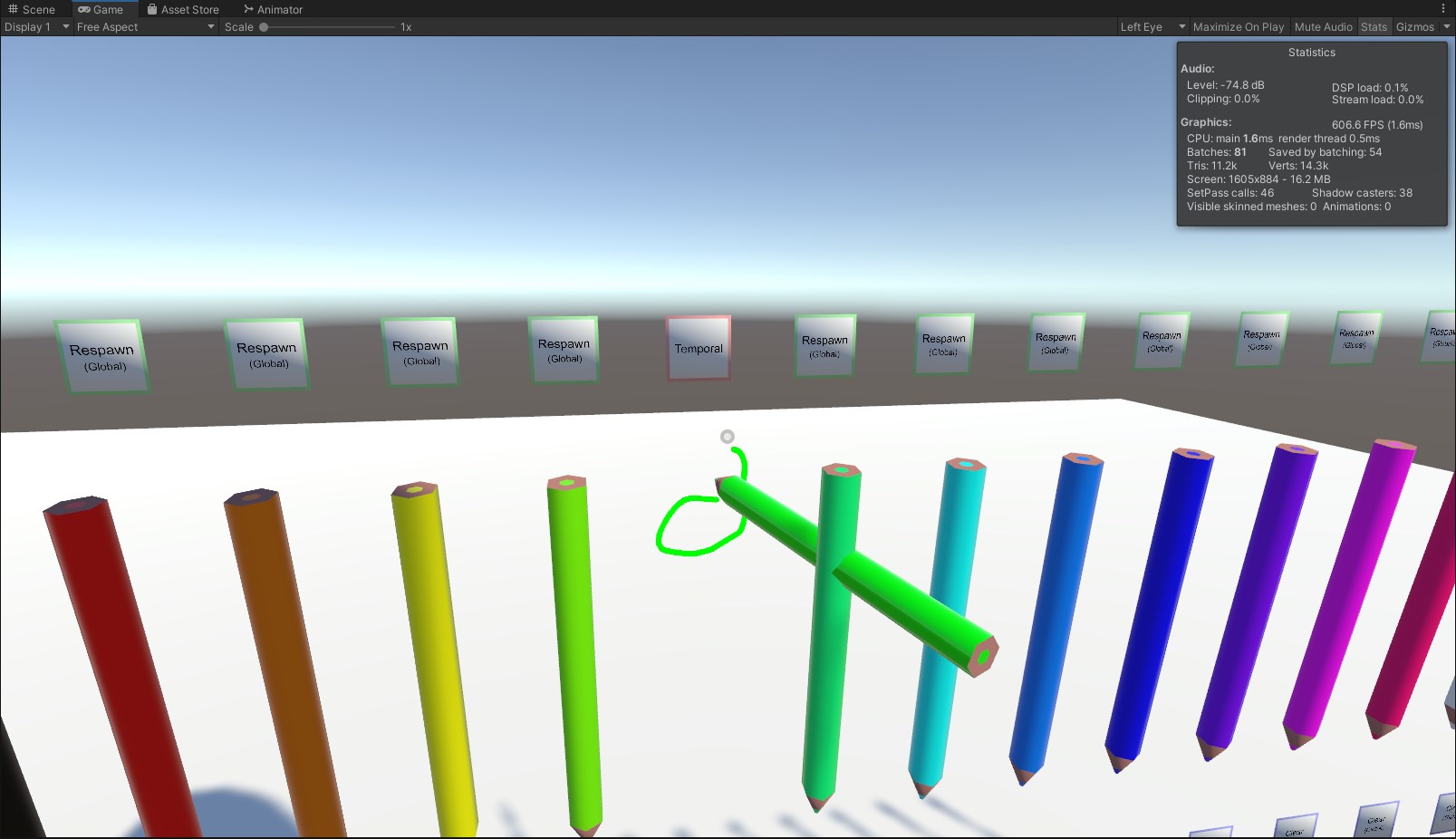
Fresh project, works
neon heart
Hmm
dusk sapphire
you might also need to delete the prefab in the scene and place it back down after a reimport, if the issue was the missing usharp script references
especially if you had unpacked it
neon heart
I did that, I completely removed it from my project then reimported it and still had the issue, I was also in the boat of I did upgrade but I didn't have Udon sharp or QV in my project until I upgraded to 2019 and did a bunch of work on it.
I will have another look at it and try your suggestion again I think if I can ever get past my upload file corrupt problem.
dusk sapphire
I've had them happen like maybe once in a blue moon and just had to try again, not sure what would cause it to be persistent
have you tried uploading to a new blueprint to rule out an issue with that world id?
neon heart
Yes I have, I get the same problem, I had this 2 weeks ago to but it fixed its self and I have no idea how.
I've tried getting rid of all unity cache files, new blue print, reinstalling SDK and Udon sharp, Tried uploading over Wifi instead of Ethernet and still no luck, I've even cleaned up my console so that the only errors I get are related to the failed upload, I had some UI animations that were giving me warnings before but never got in the way and I got rid of the animations for now and still got the error
Genuinely lost

Thats the console after I try and upload, Get a fail and hit ok
This problem started for me around the time the BETA came out for Unity 2019. Ever since then been getting this problem on and off while also having super slow upload times. My world to is only 50mb. Its not particularly big
dusk sapphire
If I had to guess, when the file is uploaded, the sdk checks that the uploaded file hash matches what you have locally, and returns that error if it doesn't match.
 random owl
Can you show the full trace of the error when you select the one that says corrupt file record
neon heart
I certainly can but I would have to upload it again to reproduce the error and follow it. Going by my experience it would be about 20-30 mins from now.
I will start the upload now
neon heart
dusk sapphire
If I had to guess, when the file is uploaded, the sdk checks that the uploaded f...
If that is the case any idea how I would go about sorting it?
dusk sapphire
can you try running https://packetlosstest.com/
neon heart
I know a bit about it but I assume this is a problem?
 dusk sapphire
if your packets are being dropped during upload that could be a problem yeah
 dusk sapphire
you generally don't want to see packet loss, i'm getting 0%
this may or may not be the cause of your upload issues, i'm unsure if the protocol used in the upload process handles dropped packets
neon heart
Hmm, I'm uploading now I will try to look into it on my end in the meantime
 modern python
does what i import into my unity project increase the filesize of the world in vrchat or will vrchat only use stuff in the scene
kind leaf
modern python
does what i import into my unity project increase the filesize of the world in v...
just the stuff in the scene (active or inactive) .
 umbral needle
Hello folks! Is there any way to sync animations in SDK3 yet? And if not has anyone found any workarounds?
kind leaf
umbral needle
Hello folks! Is there any way to sync animations in SDK3 yet? And if not has any...
depends on the complexity of the animation. If its a door you can sync the bool state. Anything complex you will nee to look into animation length and converting the length and position in the length to a float that is synced and setting the position of the animation to match the synced floats.
undone ravine
Hi, could someone please help? I am trying to make my first VRChat world and I spent a good 4 hours on building it and I want to save it. I'm not done yet but I want to save it so I can close the app. But when I hit save, it won't save to any file
umbral needle
kind leaf
depends on the complexity of the animation. If its a door you can sync the bool ...
Aaah alright! Shot in the dark - are there any reference graphs for that? Alternatively as it's a ride I'm trying to animate, maybe I can cheat it by having a "Still" and "Active" animation and sync the boolean between them within the animator
kind leaf
undone ravine
Hi, could someone please help? I am trying to make my first VRChat world and I s...
if there is no star then it is saved. It doesnt open up a save window. When you created the project you created the save file, just pressing save or ctrl s saves it
undone ravine
kind leaf
if there is no star then it is saved. It doesnt open up a save window. When you ...
I know but when I hit save it brings me to my files and then it wont save when I hit save to file. I don't know what to do
kind leaf
no error on save? The only logical issue would be improper drive permissions.
undone ravine
Like I have other projects that I bailed on and they save perfectly fine. Except this one
kind leaf
umbral needle
Aaah alright! Shot in the dark - are there any reference graphs for that? Altern...
not that I am aware of. I only use U#. But with a ride, yes the only part you need to sync is when the car is in bay and not moving. With just that you should have proper functionality. Anything else is just bragging rights.
Late joiners will see weird shit, but as soon as the car is back in bay everyone will be on the same animation again and then it will look right to everyone in the world
undone ravine
kind leaf
if there is no star then it is saved. It doesnt open up a save window. When you ...
Wait what did you mean by "if there is no star"
kind leaf
undone ravine
Wait what did you mean by "if there is no star"
I dont have a screenshot. The Open scene with unsaved data has an astrix * by its name and one at the top in the title. If that * is not there it is saved.
undone ravine
This?
 kind leaf
yep right at the end of Personal is a *. So yes, you project has not been saved lol. Did you try saving to other locations?
nvm, that wouldnt work anyway. Not without issues
undone ravine
Yes I have. It mainly brings me to the new unity project file
kind leaf
Yeah, so ied try the unity discord and ask them. Or google. Their discord can be found by Googling Unity Discord. The only thing I can do/say at this point is hindsight: 4 hours between saves is a good way to lose your hard work. A power outage/flicker can happen any second in countries with excellent power distribution why take the chance.
 vague remnant
Man, looking at these is pretty neat.... makes me wish I could gain motivation to try my hand at my project again...
 hard lance
Is it possible for a single VRC World to use multiple Unity scenes?
red urchin
dusk sapphire
Not sure why people are having issues with QVPens, seems to work for me in 2019....
when this happened to me after updating my world to 2019, i had to completely remove udonsharp and the pens, i reimported the sdk (just in case) then put in sharp and then the pens again and it finally worked for me
hard lance
Yea, I had a thing that used udonsharp and broke with the update. I had to update sharp, then reimport the object to fix the script references.
kind leaf
Looks normal to me, unless I am not noticing something. What makes you think it's wrong?
ok so you setup an event in U# right?
public void ButtonToggle() {} or something like that
On click press the +
drag n drop the button into the gameobject spot that is now present
for the action scroll to custom event
type the event name case matters
this is for a slider and a button, dont pay attention to the U# scripting unless you can get something out of it. Pay attention to the on click setup https://www.youtube.com/watch?v=FWU7ckfkUrw

Interacting with modeled buttons is fine, but when you have a lot of buttons and such all in one place, you may want to integrate them with Unity's UI system. Here's how you go about doing a basic UI setup with custom events!
00:00 - Intro
00:35 - UI Canvas Setup
05:40 - U# Slider Script
10:24 - Slider in VRChat
12:30 - U# Button Script
15:27 ...
Nothing will happen until the On Click is setup. Cant even test for bugs in your script because it's not being called. The screenshot you shared has it as blank.
Also, don't forget the VRC ui shape component that gets attached to the canvas. w/o this the button will function in Unity but not in game.
 willow canyon
Can probuilder be used with VRChat? Since I flipped my normals on the room I'm making and all the textures are visible in Unity, but not visible in Vrchat
kind leaf
probuilder works fine with vrc. Is it the shader you are using?
willow canyon
I'm not using any shaders
Unless we're talking just "standard" unity material shaders
kind leaf
standard is not a double sided shader. If you are trying to see your material on both side of the face it wont happen unless you use a double sided shader.
kind leaf
asset store, google. I think ToonLit has a double sided option.
green lagoon
I would note that double-sided would be less optimal than just duplicating the faces you want to see the back of
 unkempt turtle
or just flip normals to get them on the outside
willow canyon
Wait, so essentially, the most efficient way of rendering a room
doesn't work in a game known for how un-optimised it is
green lagoon
typically walls in games would have the normals facing on the interior not use a two-sided Shader
or have two planes one for the outside and one for the inside if it's a wall piece that you see both sides of
willow canyon
green lagoon
typically walls in games would have the normals facing on the interior not use a...
That's what I'm doing at this exact moment
green lagoon
cool
willow canyon
I can see the textures in unity, they work fine. But not in vrchat for some reason
green lagoon
strange and I'm not too knowledgeable on probuilder to know what's up
willow canyon
Alright, still thanks for trying to help me
kind leaf
if its not the shader then its the probuilder object data. You should export proBuilder objects when you are done editing, if you dont they technically don't exist outside of that editor. https://unity-technologies.github.io/procore-legacy-docs/probuilder/probuilder2-gh-pages/toolbar/object-actions/#export
willow canyon
This fixed the issue, I cannot thank you enough
 sleek swift
is there a music tutorial for udon that allows me to put multiple songs that the user can choose from?
sleek beacon
Hi all! How can I use an API in VR Chat?
I have an API for a webpage which plays music from soundcloud and displays gifs one after another.
How can i make it so I can display this as a texture on a plane to look like a video player with sound?
kind leaf
sleek beacon
Hi all! How can I use an API in VR Chat?
I have an API for a webpage which play...
You can't. Video/Audio streaming links or direct download only. You cannot access say google.com from within vrchat as a standard user. That ability is reserved for special situations(Staff, Partners, etc)
sleek beacon
kind leaf
You can't. Video/Audio streaming links or direct download only. You cannot acces...
But Ive seen url inputs in VR Chat. Are those only for video players?
green lagoon
sleek beacon
But Ive seen url inputs in VR Chat. Are those only for video players?
yes
sleek beacon
green lagoon
yes
😢 thats sad...
kind leaf
yes it is sad. blame the bad guys that made it so.
green lagoon
yeah there's no in-app web browser of any sort like those prefab calendars that show events are basically very very slow video players
sleek beacon
😭
sleek beacon
kind leaf
You can't. Video/Audio streaming links or direct download only. You cannot acces...
When you say "That ability is reserved for special situations", so there IS a way? Its just blocked in some way? How does one become a partner?
kind leaf
not the person to ask lol. If I knew ied have a working browser 😛
Ied imagine it would have something to do with contacting the PR ppl and brining in a ton of players and profit.
sleek beacon
kind leaf
Ied imagine it would have something to do with contacting the PR ppl and brining...
What is the current player base abouts?
kind leaf
I have no clue what vrc demographics look like. Never bothered to look it up or ask.
sleek beacon
about 24k
Im in a group of about 8k and Im sure at least 50% of them will want to see what Im making.
Do you know who I could contact to talk about partner?
kind leaf
nope, not even sure that would work. But if thats your hunt Ied start by searching the vrc contact page.
nope
 jagged mason
I'm making an unpublished world, and decided to try to test it in VR. When I did, however, the hand tracking was off and I could see through my arms. Is this a normal problem, or a test world thing? When I went back to my published home world, everything was fine...
kind leaf
jagged mason
I'm making an unpublished world, and decided to try to test it in VR. When I did...
thats normally cause by camera clipping. Make sure your scene descriptor has a reference camera (Main Camera) and the main camera's near is 0.01.
jagged mason
Oh, thank you! I had no idea that cameras could do that. By the main camera's near, you mean global position?
jagged mason
Cool, thanks! I'll see if that fixed it.
Incredible, thank you!
That had me panicked big time
 nimble geode
so i like put down the vrc world prefab for a world i making in sdk 2 and it keeps saying i don't have a scene desciptor
when i put it there in the spot i wanted on the world
i confused i was able to test the world
bold ibex
nimble geode
i confused i was able to test the world
What red errors are generating in the unity console?
Also what version of unity and did you just dl this sdk off the website?
nimble geode
bold ibex
2019.4.29f1?
the correct one i used unity hub link of the vrc docs
bold ibex
oh good then
nimble geode
yeee
bold ibex
so what errors are in the unity console

 bold ibex
There are no red stop signs? or even yellow warnings?
nimble geode
 bold ibex
hm
nimble geode
imma re enter play mode and see if that finds any errors
bold ibex
try
nimble geode
Hmmm'
bold ibex
still nothing?
nimble geode
nopes
bold ibex
Are you sure the prefab you dragged into your scene has a vrc_scene_descriptor on it
did u check
nimble geode
 bold ibex
seems normal i believe
maybe try removing the pipeline script
and login of course
so u can built and upload
nimble geode
ight removed it and it put another one on
Hmmmm still not working
i tried the unity terrian thing for the land is that not supported?
bold ibex
They changed up terrain a bit but idk what they did
there might be something with the terrain causing problems but it should tell you
either the unity console or VRC control panel in the builder tab
does adding a vrc scene descriptor to any random object in the scene work?
nimble geode
yea i confused it went into test mode just fine
and let me try that
I threw it on a cube it bitched at me for a sec saying i need to add a spawn to the descpitor
then it seemed to add one its self
then went into the publish menu
😕
i guess it work lol
bold ibex
odd hmm well i guess this works???
And yeah if you dont specify a spawn i think it just uses itself
so now just make an empty and add the descriptor onto that and put that where u want the spawn
bold ibex
hopefully the world turns out like youd imagine!!
If you want you can link it to me once its uploaded, if its intended for a public audience
has it ever been successfully uploaded in that unity project before?
what version of unity are you using exactly? and how recently did you dl the vrchat sdk that u are using with this project
in that same project?
are you using sdk2?
oh ok then
bold ibex
bold ibex
what version of unity are you using exactly? and how recently did you dl the vrc...
.
take your time
do you have anymore red errors than the ones you showed?
ahh allsky script
my first error
Just delete the script the error is referencing and it should work
or try to find it
idk it doesnt reallt say where
kinda
 median briar
I'm working on a 2019 update for Fiveskies and wanted to remove realtime shadows entirely, but I still need a depth pass for some effects. I've been testing a DOF post effect to enable the pass, but have an issue where blurry bands are visible even when the settings are basically 0.
Here's my setup:

And here's how it looks in game:

Anyone know why it's making those two bands of blur?
median briar
in game/vr
I've actually seen this happen in other worlds, but never knew it was coming from the DOF effect
for example, just saw this earlier this evening in a world with a blur effect under water:
 bold ibex
Have you tried checking off the 4 checkboxes inside DOF and seeing if it still persists
or it is just always there no matter what settings you set for DOF
bold ibex
Id test out a bunch of stuff hopefully its like one setting you can isolate and be ok with comprimising off with
yeah at least its faster with uploading on 2019
median briar
I don't actually need any DOF, I just want to enable a depth pass
the alternative is to have realtime shadows
which, I think, is less performant
median briar
dang... no luck on unchecking the boxes
I figured setting the weight to '0.0001' would have removed it, so yea... an odd issue there
one other thing I was gonna try was to use an animator to disable the volume after the map loaded. Not sure if it'll work, but why not, right?
though in any case, I wish I knew what the cause is.
bold ibex
how do i make a button wich by clicking it puts a link in the udon video player and starts playing ?
 junior cloak
Unsure of where to ask so i'll put it here aswell
Yop, is there anyways to simply remove the android build of my world ?
The 50mbs limit is just beyond annoying and I don't feel like maintening two differents world version.
bold ibex
delete world and reupload as Windows Only Version
junior cloak
^ Don't want to lose the stats / favs on it.
The website should have a simple button to remove a specific version of a world ; It's a bit annoying to not have full control over a content. :(
jagged mason
Is 2-4 a good default proximity for player max audio distance? I have no way to test this so I wouldn't know
desert python
junior cloak
The website should have a simple button to remove a specific version of a world ...
upload the plane
 main mortar
Hello. WHere is the marketplace that I can ask for a premade world to be made?
kind leaf
main mortar
Hello. WHere is the marketplace that I can ask for a premade world to be made?
junior cloak
yeah plane is a way but meh
i'd like it to just not appear in the world list on quest.
kind leaf
junior cloak
i'd like it to just not appear in the world list on quest.
you can submit a ticket. #vrchat-support
main mortar
kind leaf
for worlds:
https://ask.vrchat.com/c/commissions/world-commissions/34
or https:/...
👍 Thanks.
junior cloak
Alright, hoping i'll get an answer this time 
kind leaf
yeah, busy staff. Longest Ive waited is 3 weeks but I always get a response eventually.
 bold helm
VRC_PlayerAudioOverride so I am trying to find this script in unity 2019 to add to my world but when i go to add component and i search it up I have no results
 nocturne crown
so a friend sent me his unity package, how do I make it so when I import it, its set up the way he had it?
do i import it as open scene and it will load in the way he had it?
kind leaf
Not sure what you are asking. It will not have their layout. If you want it exactly the way they had it you need them to send the project folder. The root folder that contains the other folders like Assets +. Only then will it be identical.
As for importing, drag n drop it into the Projects window of the open Unity or Up top in the toolbar select Assets and Import and navigate to the project. When completed you find their scene and open it.
nocturne crown
kind leaf
Not sure what you are asking. It will not have their layout. If you want it exac...
so not a unity package but them sending me the project folder gives me everything in scene how they had it right?
kind leaf
the scene will be identical in a unitypackage.
nocturne crown
kind leaf
the scene will be identical in a unitypackage.
ok, sorry if I dont understand fully, but, if I do open scene it will do the trick rather than drag and dropping?
im just making sure i understand before I try
kind leaf
you need to import the unitypackage into your current project and then open the scene. Or use their unitypackage to make a new project by double clicking it.
nocturne crown
kind leaf
you need to import the unitypackage into your current project and then open the ...
i double clicked it before but i dont think it even worked, but I will try both of those
kind leaf
really depends on the structure of the package. if dbl click failed then just import
nocturne crown
kind leaf
really depends on the structure of the package. if dbl click failed then just im...
i found the scene
thank you very much
 scenic plover
I seem to be missing the vrc scene descriptor script any ideas on how to fix it?
silent night
Anyone have any idea on how to make the UI bounding box for selecting smaller? You have to sit a distance away to actually click on the text because the UI shape collides with where your cursor is super far away from the actual text. Is there a way of changing this?
(If that sounds confusing, do apologize)
 graceful bane
Sometimes when I use the VRC station component so someone can sit; the avatar is shown several meters upwards from were it is supposed to be, if I get up and sit again it works properly, cannot replicate it reliably but I feel it's usually the first time and then it works ok (not always the case though) Any ideas on how to solve it? I'm testing the world, not published yet.
 cursive quail
Heyo just trying to figure out where the voice falloff settings are on my VRC scene descriptor

From what I read in the docs it should be between the Forbid User Portals and Unity Version

 gloomy thorn
Is there a method for a mesh with a 2D texture to automatically rotate so that it faces the player?
It is a system used in Hotel Dusk Room 215 for Nintendo DS and I have always wondered how to do it, and now I NEED to do it
 whole eagle
man i've been looking for a city skybox for a while and i haven't found one that i was actually able to use. does anyone know a good place to find skyboxs or know a good city skybox i can use?
gloomy thorn
Shibuya, KH3
But its a Night Time sky
Also, is HDR
4k
xdxd (No joking, it is, literally)
whole eagle
would you happen to have a link?
 midnight fulcrum
guys I am using unity 2019.4.29f1 and VRCSDK3 and I dont have the VRC_trigger script. Can someone help me? Ive tried redownloading the sdk and even trying to see if I have it on an emtpy scene/project but it doesnt work.
dusk sapphire
there are no triggers on sdk3, sdk3 uses udon
you'll want to read up on udon, see #udon-info
and if you prefer to the style of working with triggers theres this https://cyanlaser.booth.pm/items/3194594

CyanTrigger is a new way to write logic for SDK3 worlds in VRChat, with an interface that resembles VRChat’s SDK2 VRC_Trigger. CyanTrigger has full access to all of Udon and can work with UdonGraph and UdonSharp. Requirements: - Unity 2019.4.29f1 https://docs.vrchat.com/docs/current-unity-version -
midnight fulcrum
okay thank you!
 gloomy salmon
hey so i have this world and it's basically a tower and i want to fog near the bottom so that it seems like it's going above the clouds, how do i do that type of fog tho? the fog that's in the lighting tab is kinda weak
midnight fulcrum
so how do I test my world in unity, ive seen people just go to game in unity, start the animation and be able to move
yes you can, just make and animation and record changing the skybox material
dusk sapphire
midnight fulcrum
so how do I test my world in unity, ive seen people just go to game in unity, st...
GitHub
CyanEmu is a VRChat client emulator in Unity. Includes a player controller with interact system. Works with SDK2 and SDK3. - GitHub - CyanLaser/CyanEmu: CyanEmu is a VRChat client emulator in Unity...
gloomy salmon
gloomy salmon
hey so i have this world and it's basically a tower and i want to fog near the b...
and also keep it quest compatible? 🥴
near escarp
That won't do on Quest
gloomy salmon
i decided to just do a stack of planes and then increase the alpha as it went down but, idk
 bold ibex
Yeah that method for sure wont work on quest because of transparency
I want to suggest particles but i feel like its gonna be a whole hell of a lot of particles
gloomy salmon
yeah..
hmm
i mean, i've used cutout before and it works on quest
but on these im using fade
dusk sapphire
you can use transparency on quest worlds, you just need to be careful with it for performance concerns
gloomy salmon
yeah
i mean this is a very small world, but each plane has it's own material too tho-
dusk sapphire
I think the best solution for that is to find a skybox that looks like you're on a layer of clouds perhaps
gloomy salmon
hmm
bold ibex
hdri haven time
rain shadow
You could also try make the lower part of the tower a gradient that fades into the color of the skybox
gloomy salmon
how would i do that tho 🤔
rain shadow
With a texture and appropriate UVs
gloomy salmon
hm
i'll stick with the planes this time, i got them to blend nicely with the udon default skybox
 midnight fulcrum
dusk sapphire
https://github.com/CyanLaser/CyanEmu
midnight fulcrum
dusk sapphire
https://github.com/CyanLaser/CyanEmu
thank you so much!
 graceful hull
Hello? I have some questions.
I'm trying to learn about some stuff, but none of the tutorials I find are helping.
kind leaf
What are you trying to learn about?
graceful hull
Trying to get a player to slowly move under a plane without going into a falling animation.
kind leaf
^ you took it to the correct channel. #udon-general 🙂
 untold pewter
do any of the file storage sites work with USharpVideo?
google drive and dropbox both fail to play from the url
desert python
both should work. however- dropbox is easier to get going on vrc
kind leaf
share the dropbox link we will edit it for you so you have a proper working link to test.
untold pewter
kind leaf
that will work if your max characters are set high. I recommend renaming all files to 3 letters max
gives a shorter length
untold pewter
just says "video error, retrying" in game
desert python
Zapier
Read or Download How do you Generate a Direct Download Link to Share a Dropbox File? from our How to Do Anything in Apps e-book for FREE and start learning today!
you may need to allow untrustwd urls
untold pewter
allready am
desert python
https://dl.dropboxusercontent.com/s/2rs6n14xww4d3gh/Motionfield - Injection - 01 Injection 1.mp4 try this without dl at the end
untold pewter
treid shortining the name aswell
still nothing
tried on 3 different players lol
kind leaf
untold pewter
https://dl.dropboxusercontent.com/s/2rs6n14xww4d3gh/MI1.mp4
that link is perfect, nice and slim. need to look at other causes.
untold pewter
its a mp3 converted to H.265+mp3 MP4 via VLC
desert python
hmm h.265 might be the culprit. but if its just audio. you could just use vocaroo.com
desert python
h.264 is less jank
its just bigger size wise
another deal is youre using usharpvid. have you tried playing the video on stream mode? (this switches the videoplayer to avpro)
untold pewter
same issue on stream mode
desert python
i would just upload the mp3 file to either dropbox or vocaroo and see if that works
untold pewter
h264 and mp3 didnt work either, and neither did vocaroo
desert python
right click the download button and copy the link from vocaroo
desert python
ye
untold pewter
such a pain lol
desert python
avpro is the only support for multimedia stuff for vrc
i highly suggest using a videoplayer that uses avpro by default
untold pewter
if i can get that to play in 2d sterio i shall
cant be dealing with 3d audio with music
guess i could all but dissable the left channel source and change the right channel source to a sterio output instead of mono
untold pewter
@desert python is all working perfectly now, got the audio the same in both modes and stuff, thanks for the help!
 scarlet geyser
GitHub
Post Processing Stack. Contribute to Unity-Technologies/PostProcessing development by creating an account on GitHub.
Is this post processing system incompatible with the current SDK, if so, what should I use for post processing?
(I'd rather not import it blindly and break everything)
 chrome jungle
hello i need help with uploading a world could anybody help me im getting a vrchat world.vrcw does not exist error
kind leaf
scarlet geyser
https://github.com/Unity-Technologies/PostProcessing
post processing is installed when you install the sdk. If not it can be found in your asset manager. Don't use the git
 thick granite
chrome jungle
hello i need help with uploading a world could anybody help me im getting a vrc...
thick granite
chrome jungle
hello i need help with uploading a world could anybody help me im getting a vrc...
check for console errors
bold ibex
click the red bar at the bottom it opens the console
and tell us what other errors you get
chrome jungle
thick granite
check for console errors
there is a bunch of them
chrome jungle
bold ibex
so you can get more in one picture
 kind leaf
the first error is your problem. Failed copy. Unless stated otherwise, r click vrcsdk and reimport. Then try restarting Unity. Need to sort out why the copy failed.
raw vessel
@chrome jungle
ok nevermind you win 😦
chrome jungle
what
bold ibex
chrome jungle
are you in Unity 2019.4.29f1 my dude???
chrome jungle
yeah why is that bad
raw vessel
@chrome jungle
what you tell me
ahh it's ok
bold ibex
no thats what its supposed to be
chrome jungle
oh but yeah i am
bold ibex
Did you do what Kev said yet
chrome jungle
no because im new to the whole unity thing so i dont know how to do anything to complicated
bold ibex
Alright then ill tryy to walk you through it
chrome jungle
can you vc
bold ibex
Not at the moment nooooo
chrome jungle
oh ok thats alr
bold ibex
also I need to ask first, what exact version of the sdk do you have
its in the name of the file when you dl it from the vrchat website
bold ibex
ok so thats correct
so you know at the top bar with all the funny stuff, one of them is vrchat so click on it, go to utilities, clear cache
and then do the same thing but click the thing under clear cache that starts with "re-"
chrome jungle
bold ibex
so you know at the top bar with all the funny stuff, one of them is vrchat so cl...
vrchat sdk ?
bold ibex
yup
chrome jungle
ok done
chrome jungle
ok thankx
bold ibex
tell me if it works
chrome jungle
@bold ibexthank you it worked
chrome jungle
very pog
bold ibex
im worried for what problem solar has they have been typing for ages
 nimble hull
does anyone have any pointers for how to work in a way that makes both world customization and optimization easy? initially i was planning on having multiple texture atlas sets for all of my assets, so that way different themes or categories (such as by size) of static props, dynamic props, and environment props would all share the same material. technically i have a world where this is already a thing, which means that I could easily assemble the final scene in unity by duplicating game objects and then later batching them together in order to reduce drawcalls down to as many as there are materials/texture atlases. but apparently, to my understanding, this will not work with baked lighting since lightmaps are saved as textures, and those depend on UVs, which wont work out if copies of multiple objects share the same UV space. ideally i would like to assemble the final scene in unity since it makes the most sense, but the conflict between batching and lightmapping would get in the way of that. are there any alternative workflows that still offer low friction?
ive found multiple example threads of people going to bake their lights and finding that their drawcalls skyrocket, or people trying to batch lightmapped objects only to be told "no lol"
kind leaf
I might be missing the point but a Unity Lightmap is an atlas. So it should be treated no different than your texture atlas. Except for the fact that you cannot have a dynamic lightmap like you can an object.
sick drift
does anyone have same issue? updating world but changes are not showing up in vrc
nimble hull
kind leaf
I might be missing the point but a Unity Lightmap is an atlas. So it should be t...
assume that i have a balloon asset which is completely static. my problem is basically that if i have a world with a shed and there is one balloon in the shed and a copy of the same balloon outside, i can setup a single realtime light with shadows and both balloons will be lit appropriately. i could bake lights to save resources that would have been spent processing realtime shadows, but if both balloons share the same texture, uv space, and material, then what happens inside of the lightmap? one balloon is lit by the glorious sun whereas the other in the shadow of the shed. isn't there going to be a problem when generating a lightmap for these balloons if they have overlapping UVs?
this is also assuming that im managing the balloon asset in unity. so im creating all balloons in unity rather than ahead of time in blender so i can just. move them around in the engine
kind leaf
Think my understanding is flawed because I don't work in blender unless I have to. But take my jam project for example. I used Kubikos asset pack from the asset store and it uses an atlas. I was able to bake my lighting without any issues. The UV map shouldn't tell the object where to get its lighting from just where to display it. The data comes from the light source/probes. But if I am wrong, there is no harm in testing. Blank project add 2 balloons with one under a cube. setup your lighting and statics and bake.
 viscid belfry
Can I get some opinions on what the best/most reliable video player in VR chat is? Thanks!
kind leaf
Wolfe or ArchiTechAnon
I use both without flaw
https://vrchat.nishawolfe.com/prefabs/videoplayer
https://booth.pm/en/items/2536209
viscid belfry
kind leaf
Wolfe or ArchiTechAnon
I use both without flaw
https://vrchat.nishawolfe.com/pr...
Ill check these out! Thank you
errant beacon
sick drift
does anyone have same issue? updating world but changes are not showing up in vr...
Import https://github.com/oneVR/VRWorldToolkit/releases and check what it's world debugger reports? there's likely something preventing your map from compiling o:
 gaunt minnow
how can i make a world portal smaller?
 unkempt mauve
@errant beacon Hello! I'm having issues getting error messages with the VRCToolKit and I don't know how to fix the issue.
It was working fine untill I reopend my project
 bold ibex
try getting the most recent version of that and reimporting it into your project
and then close and reopen your project again
errant beacon
^ also make sure you're using Unity 2019.4.29f1, along with the most recent version of the SDK from the VRChat website?
unkempt mauve
bold ibex
try getting the most recent version of that and reimporting it into your project
Thats what I did, and still got the errors
unkempt mauve
errant beacon
^ also make sure you're using Unity 2019.4.29f1, along with the most recent vers...
Im on that aswell
errant beacon
ah kk
right-click the VRChat SDK in the asset browser and hit Reimport? Reimport All might help as well, though that could take a while depending on how big your project is
unkempt mauve
I'm up to date with both.
unkempt mauve
errant beacon
ah kk
right-click the VRChat SDK in the asset browser and hit Reimport? Reimport...
I could try that and report back to you
@errant beacon I even tried removing the VRCToolKit from the project and reimporting it but that didn't work either
errant beacon
did Reimport All help? o:
unkempt mauve
No
@errant beacon I asked oneVR about it too and he said I didn't have the VRC SDK imported, and I had forgotten.
 worthy mantle
Hello, recently I found myself facing a rather annoying problem, to put it simply, when i updated my map all the pedestals stopped working,
Basically, they are present but we cannot interact with them.
Do you have any idea what could have caused this?
kind leaf
Inspect the pedestal, the interact trigger/graph/or script is probably lacking.
worthy mantle
kind leaf
Inspect the pedestal, the interact trigger/graph/or script is probably lacking.
It's good I found it, thank you for the help
random owl
worthy mantle
It's good I found it, thank you for the help
What was the issue?
worthy mantle
random owl
What was the issue?
Basically I have update my world to the sdk 3 because the two started to be buggy on my side.
And I hadn't seen that something was missing for the pedestals to work well.
I admit that the fact that the element was not on the prefab provided the sdk either increased to my confusion.
Anyway, a friend showed me where the problem was and I was able to solve it.
willow canyon
Any reason to why you can't move when you exit a station that has "Seated" unchecked? Nevermind, I was being a dumbdumb again
 shell bloom
My unity is getting stuck on this screen while uploading, I have tried force closing and trying again a few times and no luck. Does anyone have any suggestions?
 kind leaf
Not a solution just a thought or two.
Unity freezes when trying to build on a 32bit OS. (Doubt thats it)
Unity appears to freeze on big builds with lots of mshes and high res textures.
How long are you waiting before force quitting?
Once you force quit once you risk damaging the cache and or library. The screenshot says this is a backup? Did you force quit on the other version?
shell bloom
It was a backup but i do work to the backup and then make it the main version after I can see it did not break anything. "risk damaging the cache and or library" if this happened what would i do, just clear out a folder or is it screwed completely?
And it might just be taking a long time like you said, I left it about 10 min.
kind leaf
You can clear the cache if that is the case and or remove the library. Cache is safe to clear anytime. Library is risky if not done correctly. see the link for how unity handles imports and proper library handling. Always make a backup before doing anything like this. https://docs.unity3d.com/560/Documentation/Manual/BehindtheScenes.html
But I would wait longer and see. Watch a whole episode of Rick and Morty or something lol.
shell bloom
kind leaf
You can clear the cache if that is the case and or remove the library. Cache is ...
XD rick and morty it is! thanks for the advice!
shell bloom
kind leaf
You can clear the cache if that is the case and or remove the library. Cache is ...
Oh and the reason I quit it out was because it did not seem to be using much system resources, only like 10% CPU and no GPU so I thought it was frozen
kind leaf
Also, next time when you build, before you start the build switch to consol view so you can see if any errors hit. You wont beable to switch while building.
Unity uses about 10-27% for me while not responding and it's always in not responding for a minute or two on big imports, cloning a cubemap or building (for me)
shell bloom
Alright I will try that
kind leaf
when Unity truly crashes you get a nice popup.
severe pier
Anyone know how to make a flashlight toggleable on and off?
kind leaf
I used OnUse.
set a public game object and have it be the light source.
in OnUse set the active state to be the opposite(!) of the active state. (unary negation)
shell bloom
@kind leaf Seems to have worked, I guess I was just too impatient. Its just never taken that long before so I was concerned. Thanks for the help again!
 wanton fern
Does anyone know where I could buy the tokayaki asset and tea asset where you could pour and drink tea?
 ionic ledge
Hey guys, I need help. I've been trying to get a grid system to appear over the terrain in this world, but I'm kinda lost at what to do since VRChat disables the unity script for the TerrainGrid addon. Is there a way to apply a png texture of a grid as an overlay to the terrain? Or any other way acceptable by the SDK?
bold ibex
idk if this is the right place, but i've been putting together a world in unity 2019.4.29f1 and today i put in the sdk (3.0), put in the world prefab from the examples folder, then went to build but my builder tab is just blank, can still log in, can still see my content manager and my content there, settings is fine, just the builder is blank page, when i delete the world prefab it shows the 'scene descriptor needed' and even tried manually adding one to an empty game object, still blank, my console is empty, and i've tried completely reinstalling the sdk twice now, i'm so lost, any help?
if this is the wron gplace just let me know and i'll move it over to the right channel.
sorry about the run on sentences
ionic ledge
@bold ibex I had this same issue. I fixed it by just remaking my world, though I wasn't very far into it. Idk if that's an option for you
bold ibex
damnit, hopefully i don't have to, put a lot into this, i'll try that as a last resort
dusk sapphire
bold ibex
idk if this is the right place, but i've been putting together a world in unity ...
do you have any console errors?
bold ibex
none, if i did i'd have a better idea what i'd need to do
dusk sapphire
tried restarting the unity editor? i've noticed they dont show up sometimes until a restart
bold ibex
i got it, i've done that already, for me reimporting literally everything fixed it
 scenic marten
it should be possible to trigger a video playing when you put a physics object in a specific spot right?
I want to put together a world where you can watch different videos by putting VHS tapes in a VCR
I think I can figure it out, only asking to know if its a non-starter
dusk sapphire
yeah thats pretty straight forward, people have been doing it even in sdk2 long ago
scenic marten
😮 awesome
gonna also try to make one of the tapes a blank tape, where the label on it is actually a text box to paste URLs
dusk sapphire
that's a neat idea
ionic ledge
Anyone know how to make a grid like this visible ingame?
 scenic marten
seen that done with a shader before
ionic ledge
Ok, I'll do some digging as to how to work those. Thank you!
@scenic marten I was under the impression VRChat disables a lot of custom shaders?
near escarp
Only for Quest avatars
scenic marten
someone implemented linux in a shader, you can do a lot
ionic ledge
Lmao kk, thank you!
 drowsy dust
Anyone knows why pick up script doesn't work ?
I do this as some tutorial but nothing change in Game
 kind leaf
drowsy dust
Anyone knows why pick up script doesn't work ?
I do this as some tutorial but no...
kind leaf
drowsy dust
Anyone knows why pick up script doesn't work ?
I do this as some tutorial but no...
Is it set as a static?
drowsy dust
yes
kind leaf
Uncheck it
drowsy dust
Oh if i set static the script would doesn't work ?
kind leaf
Statics don't move
drowsy dust
Thank you XD i am new for doing this
 rough abyss
is Udon SDK and SDK3 compatible?
I saw Udon Sharp Prefab is made for SDK3, can I use it with Udon SDK?
rain shadow
Udon is SDK3
rough abyss
thanks
rough abyss
how do I create an object for joined player like the hat system(which is in SDK2)?
kind leaf
OnPlayerJoined
I suggest reading the doc
https://docs.vrchat.com/docs/what-is-udon
VRChat
What’s this Udon thing anyways? VRChat Udon is a programming language built completely in-house by the VRChat Development Team. It is designed to be secure, performant, and easy to use via the VRChat Udon Node Graph, a built-in visual programming interface that uses nodes and wires (we call them “no...
there is also an examples scene for Udon and UdonSharp if you downloaded it\
simple object pool is like the hat perfab (requires UdonSharp)https://drive.google.com/file/d/16SYuHlhYTQV_hszwqy_OYgou1aFTFDC1/view
you can find more here: https://docs.google.com/spreadsheets/d/e/2PACX-1vTP-eIkYLZh7pDhpO-untxy1zbuoiqdzVP2z5-vg_9ijBW7k8ZC9VP6cVL-ct5yKrySPBPJ6V2ymlWS/pubhtml#
rough abyss
Yeah I imported Simple Object Pool, but I follow the readme File and nothing happened for me. The prefab in Simple Object Pool is using a text UI, do I need to create my own code so it works for object like a cube?
The code in ObjectPoolChild looks like it is for display text only
kind leaf
I'm using it in another build, i did modify mine slightly but I kept the text bit because I used it for a player board. Basically you just replace the objects in the pool with your own, or add yours to one of the objects, delete the rest and then duplicate the modified pool object for the amount of players you need. The text is for debug.
 vestal garden
Can anyone help me? I am now trying to build for android, but 'build and test' is greyed out, and when I click on 'last build' (the other button), it runs vrchat as usual, but brings me to my home world instead of the world I am building?
Is this normal? Do I ignore this and just publish? Thanks
viscid belfry
anyone know where I can get physical push buttons?
vestal garden
viscid belfry
anyone know where I can get physical push buttons?
Physical? Actual push buttons? Just get them from aliexpress.
desert python
vestal garden
Can anyone help me? I am now trying to build for android, but 'build and test' i...
just publish
vestal garden
desert python
just publish
Thank you so much!
viscid belfry
vestal garden
Physical? Actual push buttons? Just get them from aliexpress.
Thank you !
viscid belfry
vestal garden
Physical? Actual push buttons? Just get them from aliexpress.
wait I meant like in VR Chat lol my bad. In B club world for example the buttons can be physically pushed to to speak for functionality
desert python
viscid belfry
wait I meant like in VR Chat lol my bad. In B club world for example the buttons...
viscid belfry
desert python
https://bitbucket.org/akovaloid/vrc-physical-interaction/downloads/ i got you
Thank you @desert python are these actually open source?
desert python
that question can be answered in many ways my dude lol. you just need sdk3 and udonsharp for them to work
viscid belfry
Yeah thats fair thank you!
bold ibex
ive got a problem where object that ive put wont move out of place even though the value is showing the position is changing anyone know why?
vestal garden
How do you guys publish worlds with text in the thumbnails? lol
Can we upload custom images instead of playing with the cam?
bold ibex
vestal garden
How do you guys publish worlds with text in the thumbnails? lol
Can we upload cu...
You can take a picture and put it in unity onto a plane, and then aim the camera at that plane
vestal garden
bold ibex
You can take a picture and put it in unity onto a plane, and then aim the camera...
This is a silly question, but what happens to the plane after publishing? Its now a part of the world, yeah? TIA
bold ibex
If you set the plane and stuff up before building then yeah it will be a part of the world
if you set it up after it built the vrc file then no it wont
dusk sapphire
Just set the plane as editor only tag
dusk sapphire
anything with editor only doesnt get built into the world on upload
bold ibex
Thats convienent
 frozen glade
what was the tool to test sdk2 worlds in unity again?
desert python
frozen glade
what was the tool to test sdk2 worlds in unity again?
cyanemu
frozen glade
thanks
vestal garden
dusk sapphire
anything with editor only doesnt get built into the world on upload
Oh thanks guys!!!
bold ibex
bold ibex
ive got a problem where object that ive put wont move out of place even though t...
anyone ?
 final vessel
I can't build and test my world anymore. I'm using unity 2019 and latest sdk world pack. No issues with scene, trys to open VR chat. Path for VR chat is the client thru steam
Help. Lol
 subtle cradle
Anyone know where I can get a keyboard for worlds
desert python
subtle cradle
Anyone know where I can get a keyboard for worlds

GitHub
A keyboard for VRChat Udon written in U#. Contribute to CampbellCrowley/VRC-UdonSharp-Keyboard development by creating an account on GitHub.
 tropic arrow
My world recently broke and is 2.0 and won't let me just do a simple reupload. Can we no longer use 2.0SDK for worlds?
near escarp
You can, you most likely have console errors
subtle cradle
I added the damn keyboard and now Im getting this..

 pine quail
So I made a world and me and my friend and probably everyone can't join the world.
It just sends me and everyone back to their home world. Any fix?
bold ibex
still working on my world but its comeing along
 pine quail
I got newest SDK 2 and Unity Version.
bold ibex
pine quail
So I made a world and me and my friend and probably everyone can't join the worl...
Where is your spawn located?
pine quail
The world wont even load
pine quail
It'll show loading screen and then kick me back to my home world
Same happens to my friend
bold ibex
does it blackscreen for a split second after loading
pine quail
Lemme see
1 sec
So
It'll show me the download screen then a black screen for 1 sec then another loading screen, another blackscreen and then ill load into my home world
black cat
I found a person with the same issue on google

VRCat: Community-Run VRChat Forums
so i have ran into this issue that when i upload a world to vrchat and when i attempt to go to that world i go threw the loading screen then all the...
bold ibex
pine quail
black cat
Is your scene descriptor/spawn the VRCWorld prefab or did you make it yourself

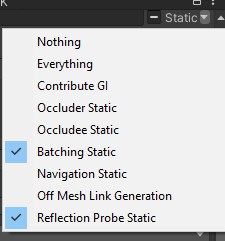

 bold ibex
Try making your own scene descriptor and spawn
pine quail
Making my own scene descriptor?
I usually just search scened and it pops up and i drag it into the hierachy
bold ibex
Well, make your own empty or wahtever and add that script onto it
pine quail
bold ibex
Well, make your own empty or wahtever and add that script onto it
Tutorial for idiots?
I'm new to unity and all
pine quail
yes
I just got the newest unity today cuz I had another issue.
getting the new unity version seemed to fix it but now this is there.
bold ibex
Wait what
newest unity version as in newest compatiable version for vrchat or
newest version completely
pine quail
Yes newest compatible one
bold ibex
oh ok
pine quail

 verbal hare
so i set a mesh collider on a building and i can still walk through it...i had the same thing set up in Unity 2018, and it worked fine. did something change for collision handling in Unity 2019?
these are my settings
 pine quail
Alright so now it tells me I have 2 Scene Descriptors. Where do I find the other one to delete it?
Nvm, I got it.
random owl
verbal hare
these are my settings
You have no mesh in the mesh collider
verbal hare
random owl
You have no mesh in the mesh collider
its not letting me assign the building itself
random owl
Well you most likely are trying to assign the model and not an individual mesh which won't work
If you just add the mesh collider to a object that has a mesh on it it'll get auto assigned
The object you have it on currently does not
bold ibex
pine quail
Nice, now the upload button doesn't work.
Welp, time to check the unity error console then
verbal hare
random owl
If you just add the mesh collider to a object that has a mesh on it it'll get au...
so from what im understanding, if i add a SECTION of the building (ie the basement), because the house is made of seperate pieces, the whole building will have the Mesh Collider assigned to it? or would it just be the basement?
pine quail
This error came up before, if I click Upload theres no new errors coming up.
 random owl
A model can have multiple meshes, single mesh collider can't have a whole model or multiple meshes
pine quail
I think you need this?
 bold ibex
pine quail
This error came up before, if I click Upload theres no new errors coming up.
bold ibex
pine quail
This error came up before, if I click Upload theres no new errors coming up.
I have only seen that when people the wrong unity version and/or sdk and I know you are using the right one so idk
random owl
That error happens when you have multiple pipeline managers in the scene
bold ibex
Ah so when you removed the descriptor for that other one you forgot about the pipeline
pine quail
I removed every pipeline other than 1
Still doesn't work.

That pops up every time I click Build and Publish.
bold ibex
Oh geez I haven't seen that one in ages
random owl
That's just normal
pine quail
That's what my entire error thingy looks like.
 random owl
https://github.com/oneVR/VRWorldToolkit/releases/latest
Just import this and then check VRWorld Toolkit > World Debugger from the top bar
GitHub
After successfully importing the release unity package the toolkit menu will appear in the Unity top bar as VRWorld Toolkit - If it does not, check Troubleshooting for common problems and solutions...
pine quail
What are those?
 bold ibex
When you hit build and publish and you go to that one screen where you type the name of the world/avatar
there should be a box for tags I think
pine quail
Oh lol ok
bold ibex
you are really running into all the problems lol
pine quail
Thanks that worked
pine quail
bold ibex
you are really running into all the problems lol
ikr lmfao
bold ibex
use sdk3 next time for sure
pine quail
Everything fixes but then adds new ones.
bold ibex
the cyantriggers plugin is free now I think and it already has presets for like the stuff you can do in sdk2 but in udon graphs for you
poorly explained but yeah
pine quail
Pretty sure cyantriggers is sdk3 only.
I'll switch to sdk3 next time I use unity for vrc.
Thank you for your help.
Here's hope I'll actually be able to spawn.
Yesssssss it workss
ily
graceful bane
Any way to toggle an animation in an FBX so it only plays when interacted? I want it to not play by default, then play when interacted, then stop and don't play again till it gets interacted again.
kind leaf
when you create animations and the animation controller you setup bools for your transitions. So the animation only plays when the bool is true.
...Then you just setup your interact to set the bool.
verbal hare
[Unity Question]
I'm trying to paint my terrain using a texture, following this video - https://youtu.be/MWQv2Bagwgk?t=600. its saying i need to create a layer, but i don't know where the layer options are to do it. I'm in 2019.4.29f1; this is what my options look like, compared to the video's settings. Does anyone have any solutions?

Let's have a look at the new Terrain System in Unity!
● Learn more: https://ole.unity.com/TerrainTools
● Terrain Samples: https://bit.ly/2Y25AEX
····················································································
♥ Subscribe: http://bit.ly/1kMekJV
👕 Check out Line of Code! https://lineofcode.io/
● Join our Discord: https:/...
my settings

videos settings
 kind leaf
switch paint texture to paint hole and then back to paint texture
because your terrain tool isnt showing up right
 verbal hare
just the Terrain Layers...and switching to and from Holes didnt work