#world-development
39 messages · Page 80 of 1
 mystic leaf
yeah deleted it
lemme test
hmmm now they are hidden but the toggle doesnt do anything
 small canopy
Did you linked it?
small canopy
Ok on the proper udonBehavior I guess?
mystic leaf
yes
 mystic leaf
I have

That boolean variable I made, what was that for?
because all it needs to do is flip the boolean every click
mystic leaf
hmmmm
small canopy
Did you linked the pool?
mystic leaf
yes
the object with the pool is called Trusses
its linked as you can see in the last screenshot
small canopy
I mean
The button is good
But the pool gameobject which has the VRCPool, did you put the variable as public?
And set it to the VRCPool
mystic leaf
 mystic leaf
hmmmmm
small canopy
You forgot the GetLength to the end but if you have 68 objects that should be okish
mystic leaf
when I launch VRC the objects are already toggled off, and pressing the button doesnt do anything
wait
shouldnt this be connect like this?

because the set active didnt have an instance
or is the body what it tries to turn on and off?
@small canopy
mystic leaf
YES
but by default its off
so how do i flip that?
also how do i make it so the button color changes, or should I just use two sprites with diffrent colors?
 quasi anvil
How can I make a trigger that reacts to a player looking at a certain object
 clear cedar
Haven’t really found a horror game for Quest on vrchat, looking for some people that would like to join me on the journey. We might even learn a few more things while we’re at it
 fervent elk
Is there any way to enable udon debugging on Quest?
I need to see the Photon IDs of objects supposed to sync on both platforms since syncing between Quest and PC is failing completely
 severe pier
anyone know how I can use a video in a 6-sided skybox?
small canopy
I need to add a blinking animation with the sound, I definitely want it 🤣
 small canopy
Do I need an audio mixer in order to make sounds work?
It seems that my audio is working in editor but not in build and I don't get why
I did that (in my script) to "PlayOneShot"

Ah maybe PlayOneShot is not working since it's not using the spatialization setting 🤔
Will try another logic
 desert python
what is the script exactly?
small canopy
void OnCollisionEnter(Collision a_collision)
    {
        if(m_audioSource && m_audioClips.Length > 0)
        {
            if(m_audioSource.isPlaying)
            {
                return;
            }

            m_audioSource.clip = m_audioClips[Random.Range(0, m_audioClips.Length)];
            m_audioSource.Play();
        }
    }
It's working in editor (both), I'll just try without PlayOneShot because I think it's the error here
Oh no the sound works in fact but it's like muffled 🤔
desert python
ye, was about to say. my marimba lives on "playoneshot" so if that broke. i wouldve probs be super scared right there
may need louder audio sources/range?
small canopy
I'll check for tutorial tomorroW
 buoyant ledge
Hey all! Do we need to update our worlds with every new sdk release?
desert python
@buoyant ledgedepends what your needs are
if you dont need to, then your safe to use the older sdks
buoyant ledge
Ah gotcha, thank you!
 errant beacon
If MacMashedPotato is wondering why they got pinged here, it was a ghost ping that got deleted
mystic leaf
small canopy
<@!128830635975376896> Just add the event Start
wait what?
small canopy
@mystic leaf Hey! Event Start -> Call the event or force the loop with the boolean to true
In fact I just realized, yesterday, why don't you just use a parent that have all childrens so you can toggle all them once?
(maybe you already mentionned that)
mystic leaf
since they all are under multiple parents
small canopy
Ok so yeah you don't have the choice, understood
mystic leaf
yeah thats why I was asking here
because with a parent I can do it myself
but this was kind shitty
mystic leaf
small canopy
<@!128830635975376896> Hey! Event Start -> Call the event or force the loop with...
I dont fully understand this
doesnt the eventstart fire in the beginning already?
small canopy
Yes but you need to have a logic here
The VRC Pool disable everything by default. Maybe we lack an option (from the devs) to not disable everything
So what you need to do is the same logic (for loop) but force everything to be active
mystic leaf
wait so with the event start it enables it on world launch, and then the button just turns it around or how should I see it?
or should I just have the gameobjects dissabled in the inspector so that the pool turns them on?
small canopy
wait so with the event start it enables it on world launch, and then the button just turns it around or how should I see it?
Yes, the start should do that
mystic leaf
mystic leaf
or should I just have the gameobjects dissabled in the inspector so that the poo...
this doesnt work
small canopy
The behavior of the VRC POol is that it disables everything
VRC Pool is not a toggling (toggle is your logic)
mystic leaf
ahhh yeah they should add an option
does the eventstart call on the load of the world?
mystic leaf
so this should work:
 small canopy
Nah do the whole loop
Your logic in charge to enable or disable all objects is just behind
So you can copy paste (the for loop with the pool) and set the boolean to true as you did
(But there is some way to share the logic in your graph but I'll not bother you with that)
mystic leaf
wait im confused again xD
 small canopy
It worked for my bricks manager on my side
I guess the Pool first disable everything, then your script reenable everything
mystic leaf
yess works great!
thanks!
so how can I make it so the button also changes color depending on the state?
small canopy
Here you need some sync variable
mystic leaf
the button only has to be local really
mystic leaf
since only one person can control it
small canopy
So just do a loop (as you did) and from the gameobject pin, you can **GetComponent **(It requires a type so you need to find the MeshRenderer type)
This component hold information about rendering
And you should be able to **GET the material from the MeshRenderer pin ** and set the Color of your mesh from the material pin
The two inputs should be "_Color" & your color variable
the underscore is important!
Try to find all the nodes then come back to me if you're stuck
mystic leaf
cant I just use
 mystic leaf
small canopy
So just do a loop (as you did) and from the gameobject pin, you can **GetCompone...
mystic leaf
small canopy
So just do a loop (as you did) and from the gameobject pin, you can **GetCompone...
Im lost again...
mystic leaf
sorry Im really bad at this 😅
small canopy
From the gameobject pin -> GetComponent
mystic leaf
Cant I do it like this?

wait
since its a UIImage, cant I just tie this to an IF THEN?
 small canopy
Ohhhhh
Yes, you just need to know the current state and you should rely on one object of the pool (read the activate state)
mystic leaf
small canopy
Ohhhhh
hmmmmm
 small canopy
Yes
Not sure if the color has not an alpha of 0 (looking at the black bar)
It should work here
mystic leaf
ahhh shit thats why the button was black xD
small canopy
Hope it's clearer in your head now, don't hesitate to put comment for your future you
small canopy
ah ah no
Just reuse the same udonbehaviour
And change the pool & button references 😄
@mystic leaf Ping before it's too late D:
And you're welcome!
mystic leaf
Yeha I copied it
because I need my lights and lasers as seperate toggles
within the same udon tho
okay this broke it, FML
nvm fixed it xD
small canopy
I mean, you can have a pool with all your lasers, create a separate button for that and just put the proper references
Why redo the whole logic twice since it's the same?
Your behaviour will act on the reference that you setup
Lights and light toggle
Lasers and lasers toggle
mystic leaf
yeah I see
mystic leaf
small canopy
Your behaviour will act on the reference that you setup
Lights and light toggle
...
for some reason it doesnt?
So I put the udon on the laser button and it still toggles the lights even though I put the lasers and the togglelaser in there
 small canopy
Can you screen me your two Gameobjects that hold your UdonBehavior (with the two pools) ?
Ok sounds good, even if you could rename the variables "Pool" and "ToggleButton"
mystic leaf
yeah
small canopy
be care renaming the variable will break the reference
small canopy
From the VRCPool -> GetPool -> GetLength
mystic leaf
yes got it
dimensions can be kept at 0?
but still the laser button toggles the lights
small canopy
Did you change the button to reference the right behaviour?
dimensions can be 0 if the pool is empty yes
mystic leaf
small canopy
Did you change the button to reference the right behaviour?
how do you mean
they both call for Toggle
wait hmmm
This is the lasers

This is the lights
 mystic leaf
So I forgot that, but now the buttons just dont work at all xD
shit I missclicked and didnt pick sendcustomevent
nope, still not doing anything
mystic leaf
@small canopy any idea whats wrong? I can't figure it out?
mystic leaf
okay now it works, I dont even know why but ok I guess
small canopy
Sorry I was in a very important meeting 😬
mystic leaf
hahah no problem I fixed it but idk how or why xD
mystic leaf
How would I make it so I can use a button to toggle ONE animation, and by pressing another, the other animation gets disabled and a new one plays?
 small canopy
You wrap an int (0 1 2 3 0 1 2 3 ...) (tips: Use set i = (i + 1)%modeMax
And in your animator you use this int to play the proper animation mode
Don't forget to add a transition from each "AnimationMode" to DiscoLightStill if the int changed
@mystic leaf
 nimble pike
Hello! With VRrOOm we're soon releasing a new VRChat world that will be called Knight Of The Wailing Stars, on June 9. Watch this trailer to know more: https://vimeo.com/558462808

Knight Of The Wailing Stars is an immersive and social musical escape ride, a new kind of total experience combining music, escape game, and theme park ride in social…
small canopy
Hi! @nimble pike You can put that in #udon-showoff
nimble pike
Ooops sorry, thanks!
nimble pike
Thanks a lot 🙂
mystic leaf
I made a pool with items I want their animator changed, how do I achieve this exactly?

@small canopy
small canopy
Use an int, not a bool
Use the int as an animation MODE
1 : ballet
2 : Swing
3 : ...
So you can extend the system very easily 😄
And the button just have to set the mode of the animator to a specific number
mystic leaf
ahhh I see
small canopy
 mystic leaf
small canopy
Use an int, not a bool
mystic leaf
small canopy
Use an int, not a bool
how do I add my pool to the setinteger?
small canopy
Should be like this
mystic leaf
small canopy
I have this, but how to get from the pool with light to the setInt idk
small canopy
So what I would do is having a script that has the pool as reference, do a for loop to iterate on all objects and do a **get **component for Animator
With the animator you just have to define the int to use
small canopy
Exactly like yesterday 😄
mystic leaf
hmmmmmmm
small canopy
Create a new script (copy paste, the pool logic)
with the for
And replace SetActive by GetComponent with AnimatorType
And with the animator set the int value to whatever you want
I suggest to create one event per mode.
The mode will first set the int value to 0,1,2 wahatever
mystic leaf
ahhh I was thinking like C# script xD
mystic leaf
hahahah better 🙂
small canopy
Is that enough for you?
If you need to sync the mode then it's a bit more work but in fact, that's ok
Should just be "SendNetworkEvent" from the button and sync the int variable (called animationMode)
- OnDeserialization to load the animation mode for late joiners 😄
 small canopy
Add an intermediary step
mystic leaf
and then a get animatortype?
mystic leaf
like this?
 small canopy
Yep should be
Link everything your Gameobject (on the left) - GetComponent (that you miss here) , GetType and the SetInteger on the right
 small canopy
In code it could be like this 😄
for(int i = 0; i < Pool.GetPool().GetLength(); i = i + 1)
{
  Animator animator = gameObject[i].GetComponent<Animator>(); // Equivalent to AnimatorType
  animator.SetInteger("Mode", 2); // equivalent to your instance
}
So yes
Try to reproduce my code in graph,
small canopy
Pull the wire from the Gameobject pin and look for the function GetComponent
Same pull the wrire from the pin type of the get component and look for animator
It should find the proper node for you
mystic leaf
small canopy
It should find the proper node for you
Like this?
 small canopy
 mystic leaf
and what else should I put in gettype?
small canopy
You should put Animator GetType
mystic leaf
I mean in the instance
 small canopy
instance is probably self at this point
If instance is none, it uses the current context
mystic leaf
ahhh
small canopy
But I think, the instance here is not very important, it will give you the type
mystic leaf
so this should do the trick:
 small canopy
Yes!
The loop is done
Now you need to add an int variable
So you can choose which mode you want (else you will always have 2 here)
small canopy
Hmmm no as I said yesterday
Pool only synchronize the active boolean on the gameobjects
But here it's simple
You just need an int variable, you already have the pool and all the logic to change the mode. Why do you worry?
mystic leaf
Im gonna have to rework some other things probably using this feature 🙂
no was just wondering
small canopy
Ah yes I guess
mystic leaf
I mean the networkevent
mystic leaf
wait huh
small canopy
imagine you are the PC, send custom event will act only on your machine
small canopy
Yes so
You need an integer that you change thanks to a network event
And it will automatically replicates on all other clients
Each time you change the integer, you iterate with the loop and set the integer value of the animator with the synced integer value
small canopy
What is your issue?
mystic leaf
Im trying to understand it
small canopy
Did you understand the loop?
mystic leaf
but it kinda confused me if it now syncs or not
small canopy
Pool don't sync everything (only the active state ON/OFF)
If you need extra synchronisation you need to create the logic
Here you want the laser mode to be sync so it's pretty easy -> You add an integer variable and check "Sync"
small canopy
As I suggest before
1 button = 1 network event (since we don't have yet Event with extra parameters)
 nimble valley
vrc is not support that 😦 is just black for me 😦
 small canopy
RequestModeBallet
RequestModeSwing
RequestNoAnimation
All events set the integer to a value then call the loop 🙂
mystic leaf
wait so I have an Int, and by calling a local "RequestMode" I change the Int value, and that makes it so it syncs?
nimble valley
in vrc is just black for me 😦 that is sad
small canopy
Read my last answer, one button = one specific event
mystic leaf
Yes
small canopy
Hmmm how did you place the thing @nimble valley ?
mystic leaf
I have 3 buttons atm, ballet, swing and still
small canopy
Is that an UI, a texture for a mesh?
nimble valley
small canopy
Hmmm how did you place the thing <@!202505193714221068> ?
in unity is working. but not in vrc
small canopy
Can you give more context, info?
nimble valley
i compressed the texture myself and not over unity
small canopy
And did you use it in the scene?
nimble valley
every texture i compressed is in vrc just black
 small canopy
For anything?
Did you check the other side?
How does it render in the inspector?
It seems you already have textures working
nimble valley
in unity its working
 mystic leaf
I have this now btw
 small canopy
mystic leaf
I have 3 buttons atm, ballet, swing and still
small canopy
mystic leaf
I have 3 buttons atm, ballet, swing and still
So yeah just call the 3 distinct events then
mystic leaf
shit
small canopy
Don't have unity opened
mystic leaf
I didnt select a pool FACEPALM
mystic leaf
ahhhh
small canopy
-> then call the loop but you can reuse the loop
mystic leaf
so just a var called Mode and then have the events do a setint
small canopy
don't copy paste it
mystic leaf
okay
mystic leaf
where did that have to go again?
small canopy
That's an event
Like start
Just link it to the loop
It's equivalent to Start for someone that is joining and loading the world (it's the initial batch of sync data)
It's like take a train between two stations, you will have people inside.
If you miss the OnDeserialization, train will be empty 🤣
small canopy
look for set
mystic leaf
under int?
small canopy
I don't know, as i said I don't have unity opened
Take the reflex to open the VRChat documentation. Basics should be explained

 small canopy
Yeah
Now test, then if it's ready, build and test, publish in private and ask a friend 😄
mystic leaf
or just multiple instances also works
small canopy
Ah yes because you can play "Go" at different moment, I'm wondering if it sync when you press go or before (when world is loaded) 🤔
Still I got new unintended issues online 😄
small canopy
Ok enjoy then 😄
mystic leaf
hmmmmm its not working atm
small canopy
Now you are the udon graph master
uh 😢
You can debug the animator graph then
You can directly set value
to test the transitions
mystic leaf
yeah Im trying again now
small canopy
I'm busy now, wish you good luck
small canopy
Hope you learnt a lot
I strongly encourage you to read the documentation as much as possible
mystic leaf
why do all items in my pool just dissapear xD
 bold ibex
I need some help, Every time I do matrix collision everything freezes
And it shows other options to do now but I'm frozen
 tropic warren
Don't know if this is the right section to post this in, but how do I get the SDK2 to work again? Once I started making/uploading SDK3 avatars (new project for each avatar), when I wanted to make a SDK2 avatar, adding the file to a fresh project would warrent this result and not allow me to access the VRC menu. Since it seems the world I would like to upload requires SDK2, how do I get it working? I have made a fresh project. I have tried recompiling the library in unity. What else do I do??
 mystic leaf
tropic warren
Don't know if this is the right section to post this in, but how do I get the SD...
mystic leaf
tropic warren
Don't know if this is the right section to post this in, but how do I get the SD...
I think you should ask this in #avatars-2-general I cant help you with this one sorry
bold ibex
bold ibex
I need some help, Every time I do matrix collision everything freezes
Yeah I'm still having issues with this collision matrix
mystic leaf
sorry dont know anything about that either :<
bold ibex
mystic leaf
sorry dont know anything about that either :<
You're fine
bold ibex
mystic leaf
sorry dont know anything about that either :<
Is there a way I can just manually do it?
Instead of this https://i.imgur.com/ubRIvfM.png
 mystic leaf
I dont even know what matrix collission is really...
bold ibex
trying upload it
bold ibex
Yeah, Then it switches to another thing but it wont allow me to click anything
mystic leaf
hmmmm weird sorry I dont really know anything about it 😦
 iron verge
hey guys, im going insane idk why i cant test my world now because i was able to do it a few days ago. When i click test on the VRSDK on Unity it just goes to the home world, any idea why?
errant beacon
Import https://github.com/oneVR/VRWorldToolkit/releases and see what it's world debugger says? o:
iron verge
errant beacon
Import <https://github.com/oneVR/VRWorldToolkit/releases> and see what it's worl...
i just import that?
and test the build?
errant beacon
No, import that and go to the VRWorld Toolkit tab at the top, then click World Debugger - that'll tell you if there's an issue in your world that's preventing it from compiling, or if you potentially have VRChat's path set incorrectly
 errant beacon
should be able to! o:
iron verge
wow is really useful
im seeing all kinds of problem that by myself i couldn´t get it to, im also new to this thing so helps a lot. thanks!
errant beacon
yw! c:
iron verge
im assuming i cant spawn in my world because of this
 errant beacon
potentially but mainly fix the four issues that the toolkit listed - having multiple pipeline managers will prevent your world from compiling

 near escarp
screenshot your console
also please auto fix the crunched textures
optimization shouldn't be an afterthought
 hazy pebble
I am not being able to update the quest version of my world, the error says something about not being able to fetch record.
Am I getting rate limited? I did change the description a few times in a row in the website
and now on the website, when I try to edit the world it displays a forbidden sign over the "update world" button
Ok, not changing the description while uploading did allow me to upload the quest version.
iron verge
near escarp
screenshot your console

i optimized the textures as you said
is it the probes?
iron verge
Im using reflective probes, not the light ones. I tried to use the light ones but it crashed my Unity.
 topaz basin
Hey guys, how are you today? So from a file of sketchfab there was a dome/sphere with a 360° image. Its like a skybox from inside. How could i make one? I dont care about the image. All i need is to reverse the material of the sphere from outside to the inside. I can not copy this dome, because somehow all change are also effective on the original
iron verge
i got it fixed fellas, thanks!
 wide pine
I want to change the song in World VRChat and other players can hear the song I changed too. I don't know what to do?
small canopy
Create an integer variable (sync)
Create an AudioClip[] variable
-> Set the integer variable value to anything and replicate that to anyone
-> When serialization happens, change the music to AudioClip[syncInteger]
If you use video player, that's even simpler
 haughty wind
hey i need a tutorial video for world building any one plz
small canopy
VRChat specific or unity can be enough?
bold ibex
bold ibex
Yeah I'm still having issues with this collision matrix
can anyon help?
small canopy
@bold ibex You HAVE to enable this button to setup the layer (required by the VRChat architecture), then if you need to add new layer, it should be simple
near escarp
bold ibex
can anyon help?
Are you trying this in an empty project with the latest SDK ?
haughty wind
small canopy
VRChat specific or unity can be enough?
arnt these the same?cuz i use unity to build
small canopy
Unity is a game engine
VRChat is built over Unity and provide you some tool to help you building logic for your world
But world can be done entirely thanks to the Unity tools only
World building for me is creating assets, level design, lighting, post process
But if you need interactio in your world, you need to learn UDON for sure
haughty wind
small canopy
But if you need interactio in your world, you need to learn UDON for sure
crap ok...so got any starter vidoes lol
small canopy
Crap most are for the recent version of the engine
small canopy
Do you want to use terrain or just meshes?
small canopy
Ok so eh eh
Terrain in Unity 2018 is crap but I'll try to find you one
They did a lot of progress in Unity 2019/2020
But right now, you'll have crap tool 😬
haughty wind
thanks cuz im lost with the new updated stuff
small canopy
https://www.youtube.com/watch?v=IhUYcUwIa48 Got this one?

Use Unitys build in terrain editor to create awesome 3D landscapes in just minutes. Create a first person character to explore the 3D world. No coding needed.
····················································································
♥ Subscribe to Oxmond Tutorials:
https://bit.ly/SubscribeOxmondTutorials
● Download the free Standar...
Lol the clickbait (only 2 minutes but it will take you 1 hour 🤣 )
haughty wind
1000 times thank u this will get me started
small canopy
https://www.youtube.com/watch?v=Mm_zBHw6Unw This one too
https://www.youtube.com/results?search_query=unity+world+building+3d+tutorial&sp=EgIQAQ%253D%253D The Youtube query which gave me those results
haughty wind
okay thank u ima get some papper in start note taking\
 harsh glade
anyone else having unity keep crashing during upload? my friend is saying world uploads are broken on vrc atm
errant beacon
make sure that there aren't too many intensive processes running in the background? o:
i.e open Task manager and make sure your system's resources aren't getting overly used
harsh glade
yeah ive done that lol, it runs fine in build and test but its the actual upload that keeps getting it
bold ibex
near escarp
Are you trying this in an empty project with the latest SDK ?
Full project
bold ibex
small canopy
<@456226577798135808> You HAVE to enable this button to setup the layer (require...
I'm confused
https://i.imgur.com/xn0MjyL.png Its just forzen

Frozen*
near escarp
uh yeah
you have thousands and thousands of the same object
the SDK can't keep up
Join your meshes first, then try again
bold ibex
near escarp
Join your meshes first, then try again
Seems we can't cause theses objects come from the unity store
near escarp
There's plenty assets to merge them in Unity, or export your scene to blender with fbx exporters set to Binary
bold ibex
near escarp
There's plenty assets to merge them in Unity, or export your scene to blender wi...
Thing is it seems everything in the scene was hand place wouldn't a exporter undo that?
near escarp
That's your issue
small canopy
The SDK don't like to have objects with the same names
near escarp
It should be hand place and merged
bold ibex
near escarp
It should be hand place and merged
I mean the scene came like this
near escarp
Yes, it's bad
It's often package sample scenes, they're horrible for performance
They were never meant to be used as is
bold ibex
gotcha
 coral magnet
Anyone wanna help me test my world? [expired]
Trying to track some some networking schenanigans.
small canopy
@coral magnet I'm coming 😄
 maiden magnet
Anyone know why a floor would randomly go invisible without doing anything to it? It shows up in unity but isnt showing up in game.
 sharp bloom
Am i allowed to ask anyone here to convert my SDK2 world to SDK3 here for money
i am to stupid to understand udon
small canopy
@maiden magnet I got that when I was inside a wall, since the material is often one sided, maybe you are inside the geometry so you don't see the mesh anymore?
maiden magnet
Nah it was working fine before and ive been in and out of the build in VR maybe 8 times now and only just now its transparent
Plus if that were the issue I could recreate it in Unity, but in unity It's not disapearing unless I hide the object
 fair sable
OK I have my first private world. Am I correct that someone has to be a friend of mine or a friend of a friend to visit the world (until I can get the next trust level)? That this is true even if I give someone the URL of the world?
 glossy lake
I think so (I'm not sure about friend of a friend) but I think u can also invite them to the world in game also
fair sable
That is my mental model.
 graceful bane
Once a world is uploaded can we edit it as much as we want by doing so using the same ID in Unity?
 carmine stump
How do I make an object (a flashlight for example) stick to the player's side when not held?
At the moment I have the object following the player but it doesn't turn with the player.
small canopy
graceful bane
Once a world is uploaded can we edit it as much as we want by doing so using the...
Yes!
 glacial pond
I have an inverted cube serving as a skybox. How do I make sure it occludes everything outside of it while inside of it?
i have it marked as occluder and occlude, as well as the other inverted boxes, but the camera can always go out and stuff isn't getting culled
 rain shadow
glacial pond
I have an inverted cube serving as a skybox. How do I make sure it occludes ever...
rain shadow
glacial pond
I have an inverted cube serving as a skybox. How do I make sure it occludes ever...
Occluders that are a large distance away from the camera don't work very well if at all
You would probably want to setup occlusion portals closer to your geometry instead of trying to use the skybox
bold ibex
Have a issue, I can build and test a world but the button for build and publish does nothing when clicked. Any ideas?
glacial pond
Are there any console errors?
bold ibex
Nope
glacial pond
make sure none of your layout panels are locked
bold ibex
Only been working with this on and off for a month can you elaborate how to check this?
 dusk sapphire
can you show a screenshot of your console?
glacial pond
The easiest way to make sure nothing weird is going on with panels is Window -> Layouts -> Revert Factory Settings, though, you'll lose any panels you've docked and stuff
but if any of them are locked, the build process will initialize and then just stop without an error, one thing i've noticed.
bold ibex
Still nothing, have some stuff in the console but do not thing these would cause the issue
 dusk sapphire
anything show up if you go into play mode?
bold ibex
-_- Yes got 91 errors seems to be were I miss did a trigger as they are all the same thing. Need to track it down and delete it I guess.
dusk sapphire
if its the trigger not initialized in time error you can ignore those
bold ibex
Yeah it was a bunch of those and something else with them.
dusk sapphire
also go grab 1's vrworldtoolkit https://github.com/oneVR/VRWorldToolkit
it checks for many common issues with worlds
GitHub
Unity Editor extension for making VRChat worlds. Contribute to oneVR/VRWorldToolkit development by creating an account on GitHub.
bold ibex
Ah both triggers
bold ibex
Ah seems to be working now, was a script issue and something in the project settings referencing something.
 thorny zodiac
anyone know how to do chessboard animation
or has chessboard for 2.0
has animation stuff
sharp bloom
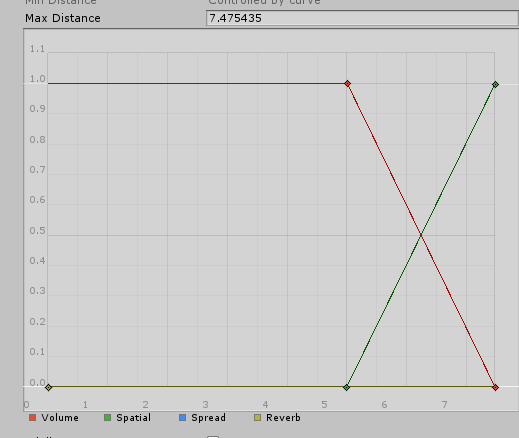
Stupid question - is there a way to set up the audio so its 2d, but its only in an area
I keep trying to google this but pretty much everybody just says set it to 3d
dusk sapphire
you can set a custom curve such that the audio source is 2d until its fall off range like so https://nyanpa.su/i/AWkz1pub.png

 heady oar
So, I have a bit of experience in Blender, but little to no experience with Unity, is it worth me building a world in Blender and then using Unity to optimise and add features, or do I just learn Unity and build it all there?
 brisk bane
Uhhhhh... This keeps happening and idk how to fix the collider other than making a whole load of other shaped colliders

 bitter idol
ive discovered a new bug where if something in vrchat kills you and ragdolls your body, when you change avatars to get out of the ragdoll, youre stuck t posing forever now until you leave the world
just started happening with the new update. always makes me wonder how much do they change behind the scenes haha
but uh yeahhh.. fix pls
iron verge
hey guys, is it possible to put a costum image or skybox in a mirror? A totally separate from the world.
glacial pond
I'm having an issue with switching platfrom from Android back to PC. it it gets marked back to Windows, but no dialog appears to import assets (it's an instant switch) and the top bar still says "Android" and the SDK acts as if i'm building for android.

help
 shell trail
Hey, so I uploaded a world for Community Labs but the Blue Print ID was broken, so I couldn't join etc, so I deleted it and used a new ID but I can't publish it to Community Labs now, so do I have to wait a week just because of a bug?
errant beacon
Might want to contact #vrchat-support about that o:
also to verify that it's a blueprint issue, could try importing https://github.com/oneVR/VRWorldToolkit/releases and see what it's world debugger reports? might've been something in the world that prevented it from compiling so it kicked you back home
shell trail
so, basically I had the world uploaded for a few months by now and I accidentally deleted it in vrc so I tried to re upload it to the same id and checked publish to community labs (because that's the same thing as the one that was uploaded to that id before) and in the end it didn't let me join in vrc and it had no world icon
so then I tried to Build & Test it so it was defiantly the id
but because of me uploading it with publishing it to the community labs I can't publish the one with the new id to the community labs
errant beacon
ah
would def recommend contacting #vrchat-support to see if they can do something about the cooldown, otherwise you might have to wait out the week unfortunately
bold ibex
near escarp
Yes, it's bad
Is there a way to disable the wanrings? The warnings seems to be the problem in general
 storm badger
Is there a way to get mesh colliders to work with objects that have armatures?
Like, I'm able to set the mesh collider onto the object, but the collisions behave like the armature is in its default pose, no matter how I orient the object's armature.
desert python
is it set to static?
storm badger
What does that mean?
desert python
where the object is set to static and cant move
theres a tick mark for it on the inspector
make sure its not tick
storm badger
For the object itself or the mesh or the armature?
desert python
the whole thing
desert python
hmm, what use case are you using it for?
storm badger
I made a hand model with an armature which I'm posing into various platforms.
There are several copies of the hand in the world, all in different poses.
desert python
hmm, im not sure then, usually when using a armature mesh, theonly thing i could think of freezing its colliders is that it was set to static
sorr
dusk sapphire
mesh colliders do not deform with armatures
storm badger
Is there something else I could do then?
storm badger
It looks like folks on Stack Overflow are suggesting putting primitive colliders on the armature bones to approximate the mesh. I'll try doing that...
storm badger
yes, that seems to work well enough.
near escarp
heady oar
So, I have a bit of experience in Blender, but little to no experience with Unit...
Yes absolutely, that is the best way to do it
heady oar
near escarp
Yes absolutely, that is the best way to do it
I assume you mean learning Unity?
near escarp
Sorry, the first part, you shouldn't make a world in Unity since it isn't a modelling software. Make the world in Blender and then add all the features in Unity
heady oar
Ah, I'm happy to hear that, Blender is so much easier!
near escarp
Yes, by far. Unity tricks people into making their worlds with probuilder and it's absolutely terrible
 nova wraith
is there any way to make the VRCCam always appear in the same place, rather than showing up at 0,0,0?
sometimes I want to update my thumbnail with how the world looks now, but I always have to manually position it back to the nice view I had last time...
storm badger
don't think so
nova wraith
I guess I could make an empty gameobject in the right place and just copy the transform values, but that still feels inconvenient for no reason....
maybe I'll file a feature request
small canopy
@nova wraith Or even better, put the VRCam inside this object
nova wraith
I'd still have to then zero out its transform, no?
nova wraith
heh
small canopy
Could be a button to automate that / script
nova wraith
yeah I guess I could just make a component that looks for anything named VRCCam and moves it automatically, heh
still a bit silly that it isn't built in though
iron verge
Hey guys, sorry about being noob, but how do i make reflection probes work? i tried to bake it, and i got my lighting setting as baking, do i need to change anything? when i tried to look into online i always get confused, maybe i need a direct response

all the materials that should reflect something just dont do it in-game, im prob missing something.
 hollow fjord
glacial pond
I'm having an issue with switching platfrom from Android back to PC. it it gets ...
hollow fjord
glacial pond
I'm having an issue with switching platfrom from Android back to PC. it it gets ...
switching between build platforms has a tendency to break things in unity.
It's recommended (I think it's in the docs as well) to make a copy of your project and use the copy specifically to make your Quest compatible version.
small canopy
If we use git could we imagine have a branch dedicated to the Quest version? Or is that breaking specific assets?
 surreal nebula
Would a woman smoking on a lofi livestream be a reason my world got reported?
errant beacon
Every world starts with one report, for some reason
surreal nebula
Ty, kinda assumed people did it for no reason
 deep moat
Okay so I have a question
When I'm trying to upload this world, the Community Labs thing is cut off.

Just a little confused lol
errant beacon
make sure you don't have the scale slider at the top of the viewport turned up? o:
deep moat
It's at 2x
It's the lowest it will go for me
Oh wait I figured it out
Sorry about this
errant beacon
you're fine! c:
deep moat
:)
 earnest storm
Hello, I am having an error uploading world. A test build was fine and successful but when I built to upload, Unity has a pop up says last built vrchat scene could not be found
 idle jolt
Could someone help make an animation for me? I want to have a walking animation for a dwarf spider droid I have in my world, but I don’t know how to make one.
errant beacon
earnest storm
Hello, I am having an error uploading world. A test build was fine and successfu...
Check the Unity console? also, try importing https://github.com/oneVR/VRWorldToolkit/releases and see what it's world debugger reports
earnest storm
errant beacon
Check the Unity console? also, try importing <https://github.com/oneVR/VRWorldTo...
it prompted me to disable future proof option but it was still failed to built for upload. However the toolkit said it was succeeded.

Maybe the SDK lost the completed built after it is done?
errant beacon
not super sure on that unfortunately, sorry - https://github.com/oneVR/VRWorldToolkit/wiki/Fixing-Build-Problems something here might help to find the problem though?
 random owl
earnest storm
it prompted me to disable future proof option but it was still failed to built f...
random owl
earnest storm
it prompted me to disable future proof option but it was still failed to built f...
Where does it take you if you right click the last found build box and press show in explorer?
earnest storm
errant beacon
not super sure on that unfortunately, sorry - <https://github.com/oneVR/VRWorldT...
np thank you for that too
earnest storm
random owl
Where does it take you if you right click the last found build box and press sho...
it leads to a scene-standalonewindows64-main.vrcw
random owl
That sounds like the problem then the file should be named customscene.vrcw
You could just rename the file and do build and publish again which should work as a workaround
earnest storm
random owl
You could just rename the file and do build and publish again which should work ...
that didnt work

The last build for local test was with no problem but the last build button for online shows last built vrchat scene could not be found
The weird part is that it built successfully with the build button below and I can launch it with the last build button for local
random owl
SDK3 or SDK2?
random owl
Hmm I have some ideas what might be happening I'll dm you for better debugging
earnest storm
sure thank you
random owl
TL:DR the path to the file is run trough UnityWebRequest.UnEscapeURL which was stripping + character out of it causing the file not to be found
 gilded basin
trying to upload my first world and for some reason the upload button won't do anything. I am able to test out the world just fine in vr chat but publishing won't work. I double checked my version of unity and i'm also using SDK2. I also noticed that I keep getting a NullReferenceException error. If anyone can help me that would be appreciated.
 random owl
Import this and check VRWorld Toolkit > World Debugger from the top bar and it'll show you the issue
https://toolkit.onevr.dev/
GitHub
Unity Editor extension for making VRChat worlds. Contribute to oneVR/VRWorldToolkit development by creating an account on GitHub.
surreal nebula
If I uploaded my world to labs, can I still update it without waiting a week?
 candid bison
Yup! You can still update the world whenever.
 errant osprey
would anyone care to explain to me how the new vrchat sdk 3 spawns work?
 fossil forge
I haven't had response back from support for 2 weeks is that normal or does it take a bit longer than that I'm happy to wait
errant osprey
Maybe we can help you here? What's happening @fossil forge
fossil forge
I don't have access to the panel I can't login it's not letting me in
errant osprey
You can post it in community support
maiden magnet
Is it normal for worlds to have 1 report when uploading the mto VRC servers?
Seems like its normal then
Cuz I have a world on the servers but its not published to the public yet, all of a sudden today it has a report even though no one can even go there.
Id imagine it would be an auto report to the dev team so they know its uploaded and waiting approval, but mine is a private unlisted world. Maybe its just a bug.
fossil forge
basically I do what I have to do upload the world try and login nothing responds
can someone help me fix this issue
maiden magnet
How many times have you tried?
maiden magnet
Ah
fossil forge
what my password is name is all correct don't know if there's an error in the system of what's going on
maiden magnet
That happened to me before, IDK if its showing that you typed in the right pasword but the actual keystrokes the server gets are wrong or something because I had to put my password in about 5 or 6 times before it actually took it
fossil forge
nope still don't work
maiden magnet
Are you able to log in on the website? maybe change your password?
maiden magnet
Strange. Sounds like this needs to be escalated to the support team.
fossil forge
I've already done a ticket about it but I haven't heard response I'm just going to wait it out and see if they respond
maiden magnet
ok
errant osprey
Question how do you all go about making decent textures IE for a wall
 tardy ridge

 supple drift
errant osprey
Question how do you all go about making decent textures IE for a wall
supple drift
errant osprey
Question how do you all go about making decent textures IE for a wall
Making them? Substance Designer is the standard for material creation, but you can derive decent textures from photos too using something like Substance Alchemist (paid) or Materialize (free + open source)
Think most in VRC source their textures from resources online though!
bitter idol
maiden magnet
Is it normal for worlds to have 1 report when uploading the mto VRC servers?
Yes for some reason every world says 1 report when uploaded lol
tardy ridge
really thought it was one of my friend trolled me lol, alright
heady oar
I'm probably missing something really simple here, I'm trying to add triggers in SDK3 but I don't have the option to add VRC_Trigger component, anybody know why?

 junior cloak
yo i'm having a weird issue right now with unity
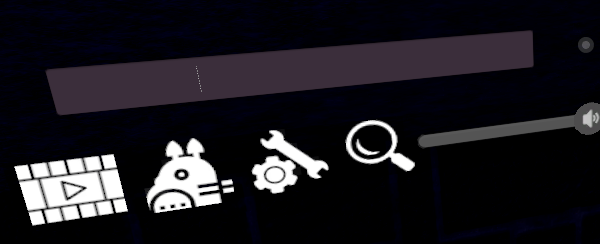
There's a text right there, but anything I type the first time I toggle this is just invisible(? not sure)
if i turn it off and on again

It show up.
And then it work as expected
bold ibex
did the community lab worlds tab disappear?
errant beacon
make sure that you have it enabled in the settings? o:
bold ibex
oh, didn't even know you have to enable it in the settings
near escarp
heady oar
I'm probably missing something really simple here, I'm trying to add triggers in...
SDK3 doesn't have triggers, that's the whole point 
heady oar
Oh
I see
Huh
So say if I wanted to setup an object to move about 4m when a button is pressed, how would I go about setting that up?
I have the animation set, just don't know how to trigger it
near escarp
Probably a question for #udon-general
heady oar
Okay
near escarp
Also worth checking out vowgan/momothemonster tutorials on YouTube
errant beacon
Might want to look into some SDK3 Udon tutorials as well:
VRChat's tutorial on automatic doors: https://www.youtube.com/watch?v=95jRByYHE4Y
Vowgan's tutorial on toggle buttons: https://www.youtube.com/watch?v=ibDu0dCeUE8
heady oar
Much appreciated to the two of you
errant beacon
huehue
 normal lintel
anyone know an in depth tutorial on udons midi related stuff? having trouble understanding what to do here, concept i get but just not implementing it
for example is there a way to setup a 'switch' of sorts with all the various noteon/off messages?
a branch is only 2 outputs i need about 88 at least per noteon/off
hoping i don't need to setup an midinoteon event for every 2 keys
normal lintel
-- nevermind i think i've found my answer
errant beacon
Import UdonSharp: https://github.com/MerlinVR/UdonSharp/releases/tag/v0.19.12
bold ibex
Question so I upload a world, Everything great its uploaded all of that jazz, i got to like delete something anything a mesh maybe unneeded mesh whatever I upload again and for some reason it loads very long and fails to upload?
Does anyone known why?
@near escarp Do you think you have any ideas on whats going on, Sorry to bother you as much I just really need some help.
near escarp
Did you check your console ?
near escarp
Errors
bold ibex
near escarp
Errors
il see once this done its been at this almost a hour https://i.imgur.com/kxzlZeC.png

Even thought its uploaded before faster with more stuff
I removed stuff is the funny thing


 near escarp
Do you have future proofing enabled ?
 bold ibex
near escarp
Do you have future proofing enabled ?
bold ibex
near escarp
Do you have future proofing enabled ?
Do I need that on?
near escarp
nope
GitHub
Unity Editor extension for making VRChat worlds. Contribute to oneVR/VRWorldToolkit development by creating an account on GitHub.


 bold ibex
@near escarp This poping up durnign upload https://i.imgur.com/IMAeMId.png
 near escarp
I've never seen some of these, might have to google general unity issues in this case
random owl
112 error means not enough disk space
near escarp
TIL
bold ibex
random owl
112 error means not enough disk space
?
random owl
?
fossil forge
I'm giving up on this world if I can't get someone to help me fix this problem I've been active for 3 days
bold ibex
 fossil forge
I was honestly so happy with all the work I've been doing I'm mostly about to pull the plug and pull the system down
bold ibex
dont give up man
it's not worth it if you have put a lot of work in
I personally do not understand why more people arent here adding in
but eh it's a niche community
fossil forge
I did a ticket 3 days ago and I still haven't had a response
fossil forge
I can't even login
errant beacon
bold ibex
I personally do not understand why more people arent here adding in
It's v late in the US lol
errant beacon
fossil forge
I did a ticket 3 days ago and I still haven't had a response
Keep the weekend in mind - if you sent the ticket 3 days ago, it'll only have been at VRChat for one or two business days, depending on when you sent it o:
bold ibex
does anyone know why I am randomly getting this right now never has happened it's literally the utility menu
 errant beacon
bold ibex
does anyone know why I am randomly getting this right now never has happened it'...
errant beacon
bold ibex
does anyone know why I am randomly getting this right now never has happened it'...
Right-click the VRChat SDK in the asset browser and hit Reimport? Reimport All might work as well, but that might take a while depending on your project's size
bold ibex
just did that thanks for the tip tho
bold ibex
everything is running great now!
errant beacon
cool! c:
bold ibex
random owl
?
https://i.imgur.com/Al7xzcg.png @near escarp
I'm confused @random owl
https://i.imgur.com/WdncOFT.png

 near escarp
15gb is getting close
it might need to allocate while it makes the assetbundle
so try removing stuff and make space
bold ibex
I got another drive is there just anothere way to put it not on my c drive? @near escarp
near escarp
Up to you, if that's easier
fossil forge
I wondering if you can help me fix my problem
bold ibex
near escarp
Up to you, if that's easier
How?
@near escarp Not sure why its doing stuff with the c drive
near escarp
Because it's on it ?
near escarp
Just now >
bold ibex
@bold ibex just change the path to D
bold ibex
bold ibex
<@456226577798135808> just change the path to D
How?
in unity
here ill send a pic
bold ibex
bold ibex
in unity
Thanks, I never knew there was paths unity goes
nw my c drive is fiilled
so i get it
fossil forge
I wondering if you can help me fix my problem @near escarp
or should I wait for support ticket to be resolved
near escarp
Did you explain your problem ?
fossil forge
for some reason I do not have access to the panel that's not wanting me in I've tried multiple times when it's access declined do not have access
near escarp
the panel ?
fossil forge
to upload world
near escarp
Can you screenshot your unity window
bold ibex
@bold ibex
 fossil forge
 bold ibex
hit the new button and as you can see just set a new location
You have Dev selected
bold ibex
Seems to be in the d drive https://i.imgur.com/LcvWO8f.png
bold ibex
bold ibex
Seems to be in the d drive https://i.imgur.com/LcvWO8f.png
ok cool!
fossil forge
 bold ibex
But my issues still here I don't understand
bold ibex
bold ibex
But my issues still here I don't understand
it appears it is trying to load files from your C drive but cant locate them
bold ibex
bold ibex
it appears it is trying to load files from your C drive but cant locate them
The fuck?
I got nothing in there though
fossil forge
fossil forge
@near escarp
bold ibex
Also makes no sense it uploaded fine before
asset bundle
upload fail
what have you recently added may I ask?
a lot of unity assests will crash a build
I am learning still
fossil forge
??
bold ibex
bold ibex
what have you recently added may I ask?
Nothing I deleted things actutally
but removing them helps
near escarp
fossil forge
??
You have console errors
GitHub
Unity Editor extension for making VRChat worlds. Contribute to oneVR/VRWorldToolkit development by creating an account on GitHub.
bold ibex
yeah use the tool guys
bold ibex
bold ibex
but removing them helps
Thats what I don't understand, I have uploaded the world before I went back change 1 thing and it won't upload
it really helps with things you may be missing
Just change something size idk whats going on
okay if you changed one thing do you remember what your changed specifically
it's always best to make a backup also of the world along the way just in case I never do this but am starting to
I side the floor so theres no hole
it did this 2 when I uploaded the world
change the skybox
then it refuse to upload
yeah some skyboxes dont have built light
so they cant build within game
are any errors referencing specific assets packs in your game right now?
that would be a place to start

Nope
try a build and test
and send the log
Lets see
 fossil forge
this is doing my head
bold ibex
okay I just had this error
you have an asset pack that you got that is interfering most likely
is the debugger installed for you?
bold ibex
bold ibex
you have an asset pack that you got that is interfering most likely
Would have it just never uploaded at that point though? Like at all
bold ibex
bold ibex
Would have it just never uploaded at that point though? Like at all
must have been a recent update you made that caused something to go wacky keep looking for errors for assets "missing" cant be found
bold ibex
bold ibex
must have been a recent update you made that caused something to go wacky keep l...
Building fine its launchign the build

Let me try publishing again

fossil forge
I'm getting so pissed off at there's I can't
bold ibex
take a break and hit it later
fossil forge
I'm just going to get more pissed
I've been at it for 3 days and no one is help me
why does my builder have access to the development panel but me
I contact my builder and see if he can result if you can't then I give up for the month
bold ibex
bold ibex
take a break and hit it later
now it worked https://i.imgur.com/PVGJrWI.png

Legit did nothing
Glad you got it sorted!
Sometimes weird things just happen not the first
 midnight flame
is there fix for SDK 2/3 when SDK errors and build Screen doesnt show then blank page?
1 my friend building world but sees login, and other stuff but not Build screen just gray blank.
no buttons for publish or anything
I know works for me SDK because i used SDK, but idk why my friend unable see build screen?
dusk sapphire
check your console for errors, if the sdk breaks, you very likely have another script in your project from an asset you imported causing compilation errors
fossil forge
nope didn't work
random owl
midnight flame
is there fix for SDK 2/3 when SDK errors and build Screen doesnt show then blank...
Import this and check VRWorld Toolkit > World Debugger from the top bar it might solve it or not depending on what the actual problem is I don't really have time to into it more rn
http://toolkit.onevr.dev/
GitHub
Unity Editor extension for making VRChat worlds. Contribute to oneVR/VRWorldToolkit development by creating an account on GitHub.
 karmic iris
Should i create the world on blender and then like export it to unity or should i build in unity
bold ibex
I'm trying to make some UI elements invisible to the player. I've set the UI gameobjects to a layer and I've culled that layer in the MainCamera. The MainCamera is referenced in the VRCWorld script. However I can still see the UI elements in game. How to fix?
Edit: Ok so I solved it by setting the UI element layers to MirrorReflection, that layer is always culled for the player I guess.
bold ibex
does anyone know a cause for an animated humpback whale moving in unity but not in VrChat
 mild spade
My guess is that it uses an "animation" component instead of an "animator" component, since vrchat does not supports animation components anymore
bold ibex
hmm okay thx
 lean hound
hi dose anyone know were i can find a 8 ball table for 3.0?
errant beacon
errant beacon
you're fine! Go to the Releases button at the right, and download the .unitypackage: https://github.com/FairlySadPanda/vrcbce/releases/tag/1.1.2
lean hound
ahh thanks
 short gulch
So, I was wondering if anyone may have some insight on how to do this. I want players to be able to run each other over with Cars and kill each other in my pvp world... but only when the car is going above a certain speed. If it was as simple as adding a damage trigger I'd just do that, but then you could never touch the front of a car without dying. I want it to at least be moving 30 mph before the damage trigger activates and then turn off when it goes below that. Is this something I would need sdk3 to do?
near escarp
You would need SDK3 for speed detection, to do easily
bold ibex
I'm trying to make my first SDK3 world and I can't download the modules for my Unity :/ https://gyazo.com/c87235f8169f5ede5428e3fee0d799ab
 near escarp
What modules do you need ?
normal lintel
how do i get my hands on the VRC_AudioBank? not something included with sdk3 from what i can tell?
near escarp
audiobank is SDK2 only
bold ibex
near escarp
What modules do you need ?
reinstalled it through the hub and it works now
how do i make the input field not show up through the walls https://gyazo.com/38122118d341369fe4474d43d814d25c

 wanton sandal
is there anyway to remove the circular rings around my player?
 near escarp
What did you set your camera clipping plane distance to ?
errant beacon
As in, the brown circles on the floor? that's color banding and would be fixed by modifying the floor material o:
 wanton sandal
how would I modify a material on a terrain?
 pure kraken
I seem to be having an issue where textures aren't being compressed after I've applied a crunch compression
are there any solutions?
random owl
Do you have a example of that happening?
errant beacon
wanton sandal
how would I modify a material on a terrain?
Could probably fix that with some vv slight color variation in the base color texture, or just adding a normal/roughness map to break up the solid brown color
pure kraken
random owl
Do you have a example of that happening?
I've used the world toolkit to mass crunch compress everything and the build report, reports no change in size from the textures I'm trying to compress
random owl
Did you do a new build afterwards?
pure kraken
random owl
Did you do a new build afterwards?
aye
random owl
You can check on the individual textures to make sure nothing went wrong
Or toggling it on and off and seeing if the value changes
Compression depends fully on the data that is being compressed so hard to say without seeing examples of what is actually happening
pure kraken
random owl
Compression depends fully on the data that is being compressed so hard to say wi...
I've got about 4 textures, 85mb, 85mb, 64mb and 21mb. obviously that isnt ideal. compressing does nothing and I even changed the size down to 1024 on all 4 of them. crunch compression is all the way up to 100 and they are all still the same size.
random owl
100 is the least amount of compression
pure kraken
random owl
100 is the least amount of compression
That makes no sense tbh, but I've changed it to 80, then 40, then 20 and still nothing. I'm still relatively new to unity, but is it possible it's because of how much the texture is being used in the scene?
random owl
The value is the compression quality less quality the more it's possible to compress down, the usage wouldn't really matter
wanton sandal
errant beacon
Could probably fix that with some vv slight color variation in the base color te...
I managed to fix it by changing compression of the floor to max quality
thanks
random owl
Maybe the data you are trying to compress is just not suitable for crunch compression so it doesn't change still can't say much without seeing an example 🤷
Changing the texture max size not causing any changes is weirder though
pure kraken
what sort of example can I give you?
random owl
Proper view of the textures or the file itself just size of them doesn't say much to as what they are and what kind of data it has


 random owl
And show the whole inspector for it


 random owl
Do you have something set in the second tab for the standalone overrides?
pure kraken
oh, the mass texture importer?
random owl
 pure kraken
looks like that was it. didn't know that tab existed. I'll keep it in mind in the future. thanks! @random owl
bold ibex
anyone know how to fix this in udon sharp? ```using UdonSharp;
using UnityEngine;
using VRC.SDKBase;
using VRC.Udon;
public class NewScript : UdonSharpBehaviour
{
public Vector3 targetPos;
public Vector3 targetRot;

public override void Interact(VRCPlayerApi player)
{
    player.TeleportTo(targetPos, Quaternion.Euler(targetRot));
}
}```
bold ibex
Hey,anyone here?
short gulch
near escarp
You would need SDK3 for speed detection, to do easily
Aight cool, thanks. Yet another reason to convert this world over to sdk3 haha. Main thing stopping me at this point is just a lack of scripting knowledge and a fear of learning °~°
It'll happen eventually though.
 severe pier
Hey there! I just made this seamless carpet texture, so if anyone wants to use it feel free!

 last harbor
can anyone give a screenshot for the settings on how to set up a vertical billboard on a particle in a world, that won't follow the camera? so the "particle object" is just stationary/locked into place, no matter the viewing orientation?
or perhaps a suggestion for something other than Unity's built-in renderer for billboard settings on particles?
 gaunt minnow
Are there any prefabs for giving items held items a trace drawing effect?
small canopy
@gaunt minnow There is the pen prefab
bold ibex
Hey is the Set player node in udon deprecated?
 static veldt


 quiet charm
Hey, I recently made a world for VRChat and it's doing quite well but the way I built it didn't facillatate major changes easily, and the project file was getting out of hand so I redesigned it using a new project. How can I push this update to the previous world signature? I'm only allowed 1 Labs upload per week and Voxel Chill was that one for me.
If i were to copy just the scene would The world signiture get carried over?
bold ibex
What kind of scripts are we able to make for vrchat worlds? Most the worlds I join are mostly featureless walking simulators
quiet charm
From what i can tell Udon has C# code support (and probably base VRChat SDK as well?) so as long as it runs I don't see any limitations
I've seen decent recreations of beatsaber done in VRchat so its quite felxible
bold ibex
I'll have to try it out. I've had a lot of ideas for things like mini rpgs but wasn't sure if it was really possible. Is there a world size limitation?
quiet charm
hmm, Depends how optimized i suppose you can get it O.o IIRC the VRChat world SDK reccommends you keep the world under 70,000 tris for PC. 35K tris if you want to target quest. so a large world will need simpler geometry and less detail in the objects if there are many of them
as far as physical size limitations, I dont think one exists
bold ibex
Ahh okay
quiet charm
you could have a 7Km flat plane easily because that'd be like.. 4 tris
16 if its a cube instead of a plane, but you get the gist
quiet charm
I figured it out. For people looking to migrate worlds to new projects (the enough keywords?) You go to the VRC Scene descriptor and copy the blueprint ID. on the new project detach the blueprint ID it has and replace it with the copied ID.
severe pier
Is there a way to have two different skyboxes in one world? I’m making a casino world, and I want to have a ground floor skybox (for the casino) and a high-up skybox for the penthouse suite
quiet charm
Hmm, could you maybe just make a really large cube and use it as a "skybox"?
basically encase the penthouse in a large textured cube
severe pier
Hmm, yes I suppose that would work
Thanks
I’ll probably do the ground floor that way, since I already designed the penthouse
quiet charm
No problem, if it doesn't work out let us know. don't know how much loger ill be awake so i might not be of much more help
 stoic musk
Are there shaders besides the "VRChat" one that can be baked?
We looked out for some low sized textures which basically add some detail with normal/metallic maps or the a like but those are not that well supported by the VRC ones.
In poiyomi it all looks nice and dandy but I could not find out if that one can be baked.
(Mainly for backfaceculling - as I did some oopsies during creating the meshes).
 green lagoon
stoic musk
Are there shaders besides the "VRChat" one that can be baked?
We looked out for ...
green lagoon
stoic musk
Are there shaders besides the "VRChat" one that can be baked?
We looked out for ...
I suppose could just try some testing with a simple map to see what happens with different shaders
errant beacon
 tawdry owl
https://gyazo.com/2892a79c4dd27f852a6d9ea72ca0ab8f
tawdry owl
https://gyazo.com/2892a79c4dd27f852a6d9ea72ca0ab8f
bit late but if this is still an issue, check https://github.com/oneVR/VRWorldToolkit/wiki/Fixing-Build-Problems o:
bold ibex
no clue what happened https://gyazo.com/e8c6c4c1c6ff8b81266b69e5a7295512 im blanking on what i couldve imported that couldve caused this




 karmic iris
Is it better .obj or .fbx for world items made on blender
bold ibex
would not being able to jump in your map be a height issue?
I seem to be able to move fully well but just not jump in testing
errant beacon
Do you have the VRCWorld prefab imported as your spawn, or a VRC_PlayerMods component added? o:
errant beacon
The VRCWorld prefab has a scene descriptor, so delete your old one if you drop that in
bold ibex
seems like I cant put just the vrcworld in
 tardy bison
so i made my first world but my normal sized avatar seemed very big for it, is there a way to make avatars smaller? or do i need to make everything bigger
errant beacon
bold ibex
seems like I cant put just the vrcworld in
should just be able to drag it from the asset browser into the viewport o:
errant beacon
tardy bison
so i made my first world but my normal sized avatar seemed very big for it, is t...
Avatar colliders are always 2 meters tall and 1 meter wide regardless of avatar size, and you can't resize them - you'd have to make the world bigger
tardy bison
errant beacon
Avatar colliders are always 2 meters tall and 1 meter wide regardless of avatar ...
shit could there be a way to load my avatar into that world? it would be easier to see how big it needs to be
bold ibex
nvm
ty Zuvali I'll let you know if that does it
@tardy bison whats the new map called!
errant beacon
tardy bison
shit could there be a way to load my avatar into that world? it would be easier ...
not super sure what you mean, sorry o:
If it helps though, a default Unity cube is one meter in all dimensions, and the average US height would be 1.75 cubes - your door frame clearances should be just slightly over 2 meters tall, as well
errant beacon
bold ibex
ty Zuvali I'll let you know if that does it
yw!
bold ibex
noicee!
bold ibex
if you have a terrain/floor that dips too low below the floor level avatars will seem small among the rest of the world
tardy bison
Oh okay got ya
bold ibex
I would say just work on a cube drop in see how it feels and keep going wont take long to get it just right if so!
had the issue on my first map
felt like an ant
😆
tardy bison
xd
bold ibex
@errant beacon I can Jump now ty
errant beacon
cool! and yw c:
tardy bison
so i did download a few stuff from unity asset can you make them like pickup objects?
errant beacon
yup! Add a collider component to them, then add a VRC_Pickup component to it
depending on which SDK you're using, syncing it's movement between players is done slightly differently nevermind, iirc adding a VRC_ObjectSync component should work? o:
tardy bison
Thank you
bold ibex
Is there an easy way to make a canvas that shows when the player opens the system menu and hides when he closes it ? (i've seen this in some worlds)
Or you have to script this behaviour by yourself?
desert python
bold ibex
Is there an easy way to make a canvas that shows when the player opens the syste...
you using sdk3?
bold ibex
desert python
you using sdk3?
Yes
desert python
i got a script you can use! but my project is building so ill send soon
bold ibex
Oh really ty, i'll wait
I wanna see if you use Update() method or there is something better (for the system menu)
desert python
well if your refering to the quest home theater UI or other worlds i have made, it basically teleports the canvas on a pivot point so it can scale to the player and all that magic
bold ibex
I just checked your world and yeah this is what i wanted to achieve
desert python
cool. ill send you
 median bluff
Has anyone ever experienced world uploading stucking?
Something like this, I've activated future proof 😦
 median bluff
Maybe it has something to do with the fact that I've not added VRC_SceneDescriptor? But I really don't know how to add it nor where, any advice?
errant beacon
Either add the VRC_SceneDescriptor component to an empty gameobject (should be an Add Component button in the inspector), or drag the VRCWorld prefab included with the VRChat SDK into your world o:
median bluff
Ohhh I'm dumb, my VRCWorld already included a VRC_Scene Descriptor lol
Still i'm unable to upload it btw. Gets stuck uploading it. Thanks for your help Zuvali!
errant beacon
odd o:
to clarify, do you mean that have future-proof publishing unticked in the build control panel? Future-proof publishing isn't really supported anymore and just tends to break uploading now
median bluff
I’ve tried uploading with future proof on as I googled and someone managed to solve the world uploading being stuck by turning that option on. But originally I tried without that option and got stuck in a menu where the loading bar didn’t even started. It was a world for 72 people. Maybe that was the problem, I reduced the max users to 40, maybe that was the problem :/
errant beacon
The maximum player cap is 40, though you can get up to twice that many people in the world with invites
Check the Unity console for errors? o:
median bluff
Maybe that was the problem. I hope it uploads now with the 40 ppl cap. I was unable to check the console because when I tried to stop the upload the window won’t go away and had to end the process from the process manager, so I was unable to check console ;P
But I’ll check if this user cap solves it.
Thanks for the help Zuva
errant beacon
yw! I'd def recommend importing https://github.com/oneVR/VRWorldToolkit/releases and checking it's world debugger to see what issues it reports - def check the console when you can, as well
wanton sandal
I'm trying to toggle seats and have it off by default, but seats will only show up and be toggable if default on?
bold ibex
how would one make models that cannot be walked through?
some sort of
"player_collider"
Thats what comes to mind
Also something that oddly comes to mind wouldn't it be cool to be able to map in VR
desert python
could like. put a capsule around the player. but locally turn the collider off but keep it on foreverone else
bold ibex
I was thinking about putting cubes