#world-development
39 messages · Page 78 of 1
 tacit yarrow
 lyric acorn
Nope you can use either 2.0 or 3.0 world sdk
tacit yarrow
I have no idea how to add the avatars yet but, i could let's say add a 2.0 avatar or a 3.0 avatar to the 2.0 world?
 desert python
it does not matter. however its recommended to use sdk3 now but sdk2 is for very simple design world
tacit yarrow
cool thanks guys
 frozen vessel
Any 1 know how to make audio visualizer
desert python
you do audiosource.getspectrumdata and use fftwindow and just mess with values on transform objects
 bold ibex
ok simple question, if i want to sync a button bress via some UI with the whole world how would i do this
wait thats udon let me change channel
 timber frost
Help would be appreciated!
I removed all SDKs from the registry and started a new project after then I downloaded the SDK3 again and it still doesn't show up

I am new to making worlds and stuff
the control panel is missing
if wondering
world used to be made in SDK2
I deleted all of the SDK2 files though
 copper ice
anyone know how to get a working camera wall in vrcsdk2 for a world? I want to be able to put a camera in one place and have it display on a wall near the camera
 inner kernel
Has anyone seen this before?
 inner kernel
Has it managed to hash itself out for you when you reimport?
I didn't get any sort of progress bar when I hit reimport. It just disappeared, and tells me that it is already open when I try to reopen it
 spark portal
I'm working on my first world with a friend of mine (he's doing all the modeling but I'm doing research and design with him). And I just had a few questions mainly about making the world quest compatible.
If I read it correctly the documentation said you could upload a PC and a quest version of the same world and have crossplay between them. Something about having the same upload id.
How would one go about doing that and is there anything I need to be careful of in the pc world that might cause the quest world to break such as the video players that the documentation mentioned.
desert python
@spark portal well 1, where you got that info from isnt technically valid anymore. and basically all you have to watch out for is if your hierarchies for both worlds are the same. think of it as 2 different world that have to be the same
spark portal
desert python
<@!253187393019052032> well 1, where you got that info from isnt technically val...
So it's not as finicky anymore? What do you have to watch out for other than that. Hierarchy seems pretty obvious.
desert python
shaders, make sure they compile correctly. be optimized in the brain. and that should be it
spark portal
So included shaders for the quest version but can I use others for PC?
desert python
yea, mot shaders should compile ok
 idle jolt
Would anyone by chance have an animation of a dead astronaut floating in space?
spark portal
#animation could probably help more
 gilded valley
anyone know how to add a join sound to your world ?
 red urchin
ok am i going crazy here, i'm trying to get a prefab for a brightness slider or something to control brightness in my world, if i could control exposure from the post processing that would be nice. I've searched the discord and everyone says the vrcprefabs list that fionna has pinned has a slider prefab in there but i absolutely do not see it
@gilded valley i just looked though the thing i mentioned in my message above (pinned in this channel that fionna posted a link to a list of prefabs) there is a prefab in there called "Player Chimes" that should be what you're looking for
 dusk sapphire
you make an animation that animates the weight property of the post processing profile, and control that animation from the slider.
red urchin
either would work but uh
this ui slider i've had really bad experience with this ui stuff in the past
namely that the size of these things are like 100 times larger than my world and i cant scale them without losing the ui element

like why is it so big omg lol
yeah i cant even figure out how to make it go where i want it this is the same problem i had last time
udon genuinely makes me feel 1 iq
dusk sapphire
change the render mode on the canvas to world space, then adjust the scale in the transform accordingly
and add a vrc_uishape component
I believe jetdog has ui prefabs for both sdk2 and 3
red urchin
you said i had to make an animation to animate the post processing?
dusk sapphire
post processing isnt white listed in udon yet so you need to do it via an animation that changes the value of the weight
red urchin
god i am
lost
XD
i cant edit the animation i think it needs to be a part of something to create it
dusk sapphire
you animate via the object the post process volume is on
red urchin
i see what you mean with it only controlling the weight
crap my world is not thought out with this in mind
dusk sapphire
just keep what ever post process property you want to adjust on its own volume
red urchin
this is gonna be a bit
this animation, does it need to be like 0:00 and 0:01 frames like avatar stuff?
or anything specific
also how does the slider come into this?
not sure how to throw the animation into it
dusk sapphire
are you on sdk2 or 3
red urchin
3
dusk sapphire
use an udon behaviour to call rebind and update on the animator
red urchin
uh
english?
im sorry ;-;
i know im horrible lol
where does this udon behaviour go, on the slider or the post process object?
and also what does rebind mean
nevermind this is too much of a damn headache
thanks for the help
dusk sapphire
probably easier if you ask in #udon-general, I havent gotten around to using this for sdk3
looks like update is not exposed in udon
so I'm guessing you just make a blend tree in the animator and use udon to update the float parameter from 0 to 1, to blend an animation of weight 0 and weight 1
red urchin
i feel like this sort of thing should be like a prefab we can just plug and play
i just want to throw a prefab for this in my world, plug in my lights/post processing and have it just work lol
i miss making worlds and maps in halo, if i wanted a teleporter i just put one ;-;
dusk sapphire
using UdonSharp;
using UnityEngine;
using UnityEngine.UI;
using VRC.SDKBase;
using VRC.Udon;

public class PostProcessSlider : UdonSharpBehaviour
{
    public Animator animator;
    public Slider slider;

    public void _UpdatePostProcess() {
        animator.SetFloat("weight", slider.value);
    }
}
Animation from 0 weight to 100 weight on frames 0 and 100 respectively, Disable loop time, make a float parameter weight and set it as normalized time for the animation https://nyanpa.su/i/fJmm1plD.png

 dusk sapphire
https://cdn.nyanpa.su/vrc/PPSliderExample.unitypackage example prefab for the above
 crimson condor
Idk to ask this question in the world or avatar tab but my question is very simple I think. How do I attach a animation to a 3D model in my world and when I start up the world it performs that animation in a loop. Example is like a idle animation where the model is swaying back and forth
 quasi rampart
hi, everyone. i'm working on a world, unity runs fine until i click into the VRCsdk window, then unity freezes up almost completely. anyone encountered this problem/knows how to fix it? O:
dusk sapphire
do you have a significant amount of objects in your scene? the vrcsdk scans the scene and if you have a large amount of objects that can happen, just have to give it a bit to finish
gilded valley
@red urchin thanks for the help friend !
gilded valley
hey @loud saffron how do you make curves like the top part of your window in blender ? lol
 lime bronze
the builder doesnt show up anymore?
 dusk sapphire
check your console for errors
gilded valley
you attempted to change your sdk and it is very weird about that you may have to remake your project
well from my experiance
 proven glade
how would one upload a world to quest
desert python
switch your unity build to android and then reupload the world
proven glade
What are the requirements for it?
desert python
what do you mean? are you asking if you need to download the android module?
proven glade
No I mean like requirements for the world on quest
desert python
just be optimized. dont use uncompilible shaders. just follow the same general idea for pc worlds basically
oh, has to be below 50mb
desert python
technically
proven glade
I don't think I have any shaders in the world so yeah
 mystic leaf
How can i make a colorpicker UI element?
 olive glade
relevant to this issue, im trying to publish my world update to pc, and the SDK is telling me that my pc build needs to be below 50mb??
is this a new thing or is my sdk busted?
 maiden bough
Hey there I am trying to figure out how to replicate a full screen effect for Vrc cameras like how is it used over here : https://www.vrchat.net/home/launch?worldId=wrld_100a0fb3-1e66-4cd8-b0cb-47353f10de88 (the red beam ) or in some various MMD worlds

アバターの三面図が簡単に取れるワールド。フルトラ調整などにどうぞ。This world lets you take a picture of your avatar from multiple angles․ Feel free to use it when adjusting your avatar for full body tracking‚ for example․
 random owl
olive glade
relevant to this issue, im trying to publish my world update to *pc*, and the SD...
random owl
olive glade
relevant to this issue, im trying to publish my world update to *pc*, and the SD...
Go to the build setting panel in unity and click to android and back to standalone
olive glade
alright, i'll try that
it already says standalonewindows64 whichhh is just weird and annoying
random owl
olive glade
it already says standalonewindows64 whichhh is just weird and annoying
The problem is a different setting than the one you see there
There's build target and build target group
olive glade
well yeah
random owl
standalonewindows64 is a build target and build target group would be standalone, Unity is just dumb and doesn't realize something is wrong when one is set to something it's not supposed to be
olive glade
why would it randomly change though?
random owl
I wish I knew lol
olive glade
🤷
random owl
Just clicking the things in unity build settings is enough to change the group
olive glade
i don’t touch the build window at all in unity, i keep two totally separate projects for my quest/pc versions
random owl
maiden bough
Hey there I am trying to figure out how to replicate a full screen effect for Vr...
The world you linked uses a screen space shader and mmd worlds usually use a camera set to overwrite the player camera
random owl
olive glade
i don’t touch the build window at all in unity, i keep two totally separate proj...
Yeah that's why I wish I knew because for some people it just changes randomly without reason
olive glade
fair enough lol
mystic leaf
How can i make a colorpicker UI element??
red urchin

I cant play or upload world after updating the SDK, the only error i've been given is this cinemachine error but i'm not using that in my scene anywhere and dont need it
ideas?
maybe i should try re-importing it again?
it is the latest version from the website btw
random owl
Either just restart unity or make sure you have cinemachine imported in the package manager
red urchin
oh looks like restarting fixed that, it took a long time to restart i got scared that everything just broke again lol
 silent night
Does anybody know with Unity, where colliders are interacting incorrectly with player hitboxes, how to get it so that it doesn't aggressively bump into mesh colliders? I have doorways that avatars SHOULD be able to walk through, but it acts like there's a wall there.
 errant beacon
make sure that there's at least 2 meters of clearance under the door? The player collider is always 1 meter wide and 2 meters tall, regardless of avatar height
silent night
Hmm.
Okay.
It's weird because I keep having to shrink some things down to make stuff seem "normal" sized, but if I go any smaller, the boxes start colliding.
 unkempt mauve
Has anyone seen an error like this before and know how to fix it?
 unkempt mauve
Thanks! 👍
errant beacon
yw!
random owl
Did you read the whole guide?
unkempt mauve
I just scanned through it
random owl
Kind of sounds like part of your problem 😛
unkempt mauve
I guess it really depends the main issue. 🤷♂️
random owl
No errors in the console?
errant beacon
would recommend posting a screenshot of any errors/warnings in your console yus o:
unkempt mauve
🛑 EndLayoutGroup: BeginLayoutGroup must be called first. UnityEngine.GUILayout:EndVertical() VRCSDK2.Editor.VRCSdkControlPanelWorldBuilder2:OnGUIScene() (at Assets/VRCSDK/SDK2/Editor/VRCSdkControlPanelWorldBuilder2.cs:173) VRC.SDKBase.Editor.VRCSdkControlPanelWorldBuilder:ShowBuilder() (at Assets/VRCSDK/Dependencies/VRChat/Editor/ControlPanel/VRCSdkControlPanelWorldBuilder.cs:127) VRCSdkControlPanel:ShowBuilders() (at Assets/VRCSDK/Dependencies/VRChat/Editor/ControlPanel/VRCSdkControlPanelBuilder.cs:323) VRCSdkControlPanel:OnGUI() (at Assets/VRCSDK/Dependencies/VRChat/Editor/ControlPanel/VRCSdkControlPanel.cs:200) UnityEngine.GUIUtility:ProcessEvent(Int32, IntPtr) (at C:/buildslave/unity/build/Modules/IMGUI/GUIUtility.cs:179)
random owl
Hmm that shouldn't cause a build to fail
unkempt mauve
 random owl
https://github.com/oneVR/VRWorldToolkit/releases
You can try the world debugger from VRWorld Toolkit > World Debugger and see what it says first
GitHub
Unity Editor extension for making VRChat worlds. Contribute to oneVR/VRWorldToolkit development by creating an account on GitHub.
unkempt mauve
lemme try that and ill get back to you after
This is a really neat tool! I don't know why I haven't used it before. 😆
random owl
Thank you
unkempt mauve
Your welcome!
so, I went though the messages in the World Debugger and I'm still getting the same error message from before. idk what's going on. 🤷♂️
random owl
I can't say much else otherwise except if you clear the console once and show me all that gets outputted into it after pressing the build button once
You can also send me the latest build report from _BuildReports folder in your assets
unkempt mauve
ive never had this issue before
random owl
This just looks like the build is going normally as it should
It even says the build succeeded
Though I wonder if the + or () in the folder path would cause vrcsdk to fail at finding the file
That's really the only guess I got from looking at this
random owl
Project/Scene name
unkempt mauve
I don't have any characters like such in the name. 🤷♂️
random owl
Accounting+ Fire Tree World (Level 9)?
unkempt mauve
oh. Nevermind. 🤦♂️ 😆
ignore what I said. 😆
am I able to change the name
Do you think it would work if I were to change the name?
random owl
Possibly it's the only guess I can really make from that build report as everything else seems to be fine so the problem should be that the sdk can't find the file
unkempt mauve
I don't know why not? 🤷♂️
I was able to test the world in vr chat just fine without any issues.
random owl
So you can test but publish gives the could not find scene error?
unkempt mauve
yes
random owl
That's very bizarre then
Would need to look into a bit more deeper then but I sadly can't at the moment
unkempt mauve
no worries. send me a message when your able to.
random owl
Would most likely be tomorrow but if it's still a problem when I message you sure
unkempt mauve
ok. sounds good
red urchin
I had that pop up on me once before but building and testing it fixed the problem for me
 thick gale
So question.tryin update my world...i have no errors everything is fine.but then hear the bell noise in build-test .n still old world i jump into.even tryed um taking the pipleline off n re attatching
everything is baked all the occolition thingies are good...
 kind leaf
thick gale
So question.tryin update my world...i have no errors everything is fine.but then...
kind leaf
thick gale
So question.tryin update my world...i have no errors everything is fine.but then...
Make sure you are checking your logs. https://docs.vrchat.com/docs/debugging-udon-projects and the VRWorldToolkit debugger is useful. https://github.com/oneVR/VRWorldToolkit/releases
VRChat
What is Debugging? Debugging is how you learn about what's going on under the hood in the VRChat client and your world. It's a key skill to develop for programming in general, and for building your worlds. VRChat Logs When you use the VRChat client, it saves logs about things that happen like worlds...
GitHub
Unity Editor extension for making VRChat worlds. Contribute to oneVR/VRWorldToolkit development by creating an account on GitHub.
 untold pewter
how do you make an audio source be non directional, but also not fill the entire world? I can only seem to get it to be one or the other
desert python
set it to 2d and make sure the bubble is solid and not “faded”
untold pewter
desert python
set it to 2d and make sure the bubble is solid and not “faded”
idk how youd get a "solid" sphere
 untold pewter
they dont seem to change it in any way
desert python
well you have it set to custom
and its not solid
wish i could give you an example of what i mean sorry
but the rolloff has to be as “firm” as possible for youre adking to do
untold pewter
tried setting the min and max as close as possible, doesnt matter what i do, if its in 2d, it just fills the whole world and ignores every radius ive set
desert python
hmm... what if the bubble is ridiculously small? same result?
untold pewter
ill have to check after work, ran out of time >.<
desert python
alright cool. very odd tho if the audio is escaping the bubble
untold pewter
In 3d its fine, but I don't want the audio louder in one ear or the other depending on which way your facing
desert python
true. try like 0.9 from 3d or 2d. see if that does any better
dusk sapphire
if you want 2d audio with a limited range you set up a spatial blend curve such that its 2d, and turns to 3d at its max range
 untold pewter
Ohh, that makes sense
idle jolt
I have a model that I downloaded, but when I exported it into blender as an .obj the model lost all of it’s materials and I can’t figure out why. I have all the textures. Does anyone want to help me?..
desert python
obj needs the .mtl with it as well
idle jolt
I do have the .mtl, but it’s separate. How do I import that?
desert python
i can’t remember, its been so long sorry
thick gale
kind leaf
Make sure you are checking your logs. https://docs.vrchat.com/docs/debugging-udo...
Ill GIVE it a shot i have world tool kit n no errors im overlooking sumthing
 upper pendant
Hi, anyone can recommend good video player for 2.0 ?
desert python
@upper pendant hangout videoplayer
upper pendant
Thanks
 graceful bane
Hello! Question; How do I make worlds public? They show as unlisted. Do I need to check "Publish to Community Labs" tab on the Unity upload screen? Only users with a certain rank can do it? I have published several avatars without any issues, so I figured being a New User was the requisite (New User with 100+ hours XD)
upper pendant
Yeah you need to publish to community labs first. You can only do that once a week
errant beacon
You need to be User rank to upload public worlds (i.e to the Labs), as well
graceful bane
Is there a workaround? Like paying for Vrchat Plus? I enjoy the game, but I do 3D modelling and people ask me for worlds and Avatars.
errant beacon
VRChat+ isn't a guaranteed rank up, it only boosts your trust score a bit
graceful bane
Getting to New User didn't have very clear requisites either
errant beacon
It's enough to get you out of Visitor, but has rapidly diminishing returns
the trust system is deliberately obscure to prevent people from gaining the system, afaik
upper pendant
VRChat+ helps, but you should play the game a lot, make friends and upload content that you can. Also people using your avatars boost you up I think
graceful bane
no idea how to get to the next rank on a timely fashion if I already uploaded content, added friends, and played for 114 hours.
errant beacon
generally, just keep doing that o:
you don't get a one-time boost for uploading content, you get a boost every time you upload content and etc - afaik the same should be true for all other sources of trust
upper pendant
Aroun 140-160 you will get to user I think
errant beacon
There's definitely no time requirements in the trust system though, note o:
some people have gotten New User in 2 hours, some took way longer
upper pendant
Yeah but if he's not a User aroun 150 hours being this active I'd be surprised
graceful bane
I think I got it around 30 hours
errant beacon
ah fair
would probably recommend just making content, adding people (not spam-adding though, which won't help) and playing the game longer like Fuujin said
graceful bane
unlisted worlds or avatars or both?
errant beacon
afaik it shouldn't matter? Having people use your avatars might help though
upper pendant
Yeah man just enjoy the game
I used to speedrun through the ranks aswell so I feel you lol
graceful bane
Love the game, Just don't know how to work towards it given I have been asked for worlds for events that are fairly close.
if I need popular avatars I'll make some
errant beacon
You can make invites and drop portals to private worlds iirc, people just can't search for it in the worlds browser
upper pendant
Maybe have someone upload it on their account then ?
errant beacon
they can also join off of you if you're in an instance that they could otherwise join off of (i.e Friends+, Friends, etc)
graceful bane
I know, tested the unlisted world that way. But it would be a bit unprofessional on my behalf to ask a client to go along with that limitation
upper pendant
I mean if you really want to be a user asap... You r gonna have to pull an allnighter I guess
Get those energy drinks ready
 toxic tendon


 olive glade
oh hum
i'd say if you dont, check out the world toolkit plugin and see if there's something wrong with the setup
 olive glade

GitHub
Unity Editor extension for making VRChat worlds. Contribute to oneVR/VRWorldToolkit development by creating an account on GitHub.
honestly probably one of if not the most useful world building tools for vrc
errant beacon
^
random owl
Might be the case of where the scene view is using a different camera than the one as a reference camera which my toolkit doesn't have detection for rn
bold ibex
How easy is ue4 to unity conversion?
I have a bunch of assets i made for ue4, over the course of years
I want to use them for vrc
 near escarp
There's specific tools for them, but we don't really keep track of that kind of ressource
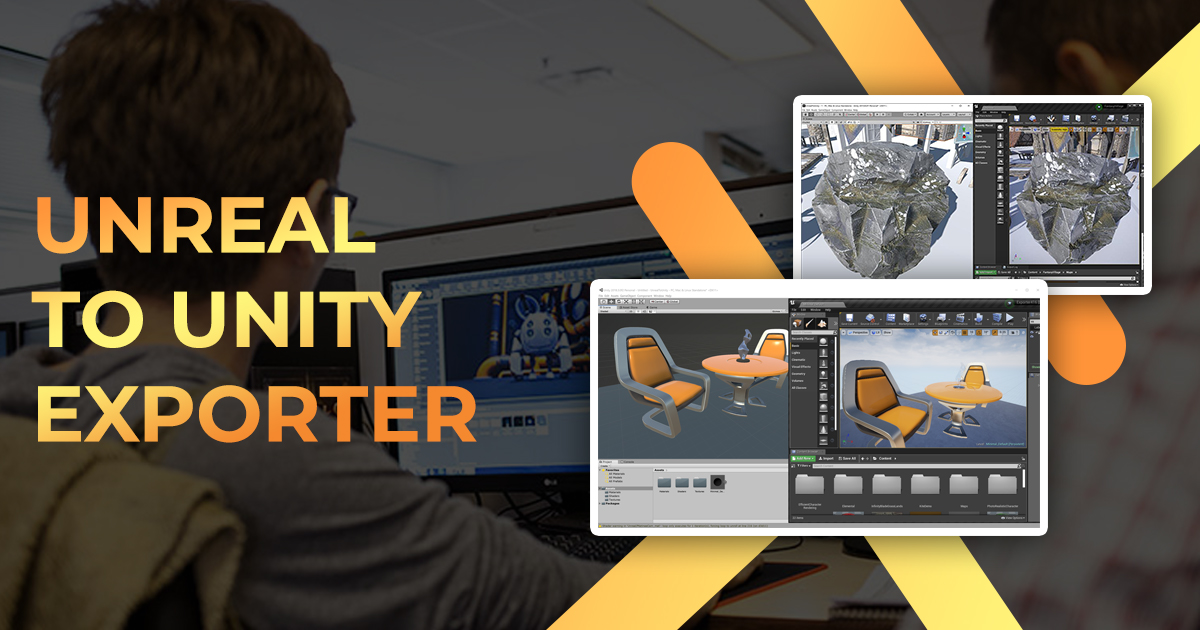
Use the Unreal to Unity Exporter from Ciprian Stanciu on your next project. Find this integration tool & more on the Unity Asset Store.
This might help though
near escarp
What do you need help with ?
graceful bane
@upper pendant You bet! I just hope the barrier is not playing a couple more hundred hours, I'm screwed if that's the case. But I'll give it a few more long sessions
upper pendant
I don't think it will be that long friend
red urchin
oki so i'm trying to do a thing i've seen in a world with mirror quality toggles but i cant figure out how it works on my own and i've looked for tutorials but they all require using multiple buttons to toggle between mirrors
I however want to use the same button that when clicking it, will cycle through different quality options. I've seen it in a few worlds before so i know its possible, i'm just not sure how to implement it with the graph
I know i need to have 2 mirrors with different qualities. The button should be able to go from "no mirror" > "low quality mirror" > "high quality mirror" > "no mirror" and loop
unkempt mauve
How do I use the in game world bebugger?
 languid salmon
how does the spatial audio work? no matter how far i turn up the gain, the audio stays extremely quiet
near escarp
How loud is the audio track ?
unkempt mauve
near escarp
Also need `--enable-debug-gui` in your launch parameters on steam
I use VR Chat on Oculus PCVR
near escarp
In that case you must create a shortcut to the VRChat executable and add that parameter in the properties. After launching Oculus Home, launch this shortcut by clicking its icon. The Oculus launcher does not support launch options natively.
languid salmon
near escarp
How loud is the audio track ?
All audio i use have the issue. If i just have a normal audio source without the spatial, its quite loud. And can be heard over everything. As soon as i add the spatial. Even at 80 gain, it becomes super quiet
near escarp
If it's too loud then it'll be lowered by the compressor
Did you set the correct settings in the spatialize component ?
languid salmon
The only thing i changed in the spatial component was the range, which i set the red sphere to be where i want the audio to be heard, and the gain
near escarp
Did you enable "Use audio source curve" ?
Did you check your actual world volume settings and vrchat volume ?
languid salmon
If its not on by default, the no
languid salmon
near escarp
Did you check your actual world volume settings and vrchat volume ?
Yes, it was set to max. Audio from stuff like video players was fine
near escarp
Then your audio source is probably too loud
languid salmon
Strange, ive tried multipe sfx from multiple asset packs. So how do fix that, pull the sfxs through like audacity,
Or can i just lower the volume on the original audio source?
near escarp
I'm not aware of a way through Unity so yeah it'd have to be audacity
unkempt mauve
near escarp
In that case you must create a shortcut to the VRChat executable and add that pa...
Do I add it in Target:?
near escarp
yep, add a space after the vrchat.exe"
unkempt mauve
gotcha! Do I do anything after, or is that it?
near escarp
That's all you need
Actually you also need to enabled it in your world settings on the website
red urchin
red urchin
oki so i'm trying to do a thing i've seen in a world with mirror quality toggles...
Ok so friend and I took a look and now both our heads hurt halp pls xD
lyric acorn
I really need to go through those new pens. I though it was just like a synched animation but it's much more complex than that. had an idea but I think it may now be beyond me
good learning tool to take it apart though
 coral magnet
The starter project is on the itch.io page, but here's a repository I created:
https://github.com/daalta-org/VRChat-Sketchbook-Jam
It contains some additional packages like CyanEmu, UdonSharp and a .gitignore. Hope this is useful for someone!
Fork it so we can see everyone's progress 😄

GitHub
Template for VRChat's first official world jam with some extra packages. Fork it and get started! - daalta-org/VRChat-Sketchbook-Jam
lyric acorn
I wanted to see if I could enable the mesh collider element to LineRenderers, I think it was added in 2018. Was going to widen the rendering and draw your own way up a climbing map. but not sure of this synching stuff
bold ibex
Hi, if I want to ask a question to the organizers of TLX, anyone knows who I could contact?
near escarp
bold ibex
Hi, if I want to ask a question to the organizers of TLX, anyone knows who I cou...
I can send him your question, what do you need ?
bold ibex
i can DM
hm seems like i cant
I wanted to ask about the shadermotion stream, and whether it could be released publicly perhaps
 bold ibex
Oh I meant the actual stream from the event
near escarp
Ah, the event will be rebroadcasted to other instances live tomorrow during the event, and then he's going to cut each segment and upload it on the tlx youtube channel and website archive shortly after
bold ibex
ah i thought it was also streamed live on youtube
near escarp
I believe it will also be yeah
bold ibex
but my understanding is that the public youtube stream doesnt include the shadermotion part
and my question was whether that part could be made public too
near escarp
Correct, the stream is just going to be the main instance
but the shadermotion data won't be streamed no
I assumed you wanted to maybe host it in your own world ?
bold ibex
The reason is that I'm a researcher exploring the intersection between AI and VR, and have been using Lox's tool for research on uses of mocap data
and events like this are great opportunities to help this research
if mocap data can be made public
near escarp
For this orels would need to ask every participant for their permission afaik
bold ibex
I imagine:P
near escarp
Which i doubt he wants to do now, but i'll ask him if he wants to do that afterward
bold ibex
I would very much appreciate that
and I definitely understand he'd have too much on his plat to do it atm
near escarp
bold ibex
and I definitely understand he'd have too much on his plat to do it atm
he said he was going to give it to lox, but you can reach out to orels on twitter !
bold ibex
ok, will do. Thanks for the help!
 gilded shuttle
how do you add udon audio link to your world?
 misty wave
Does anyone know why a bloom effect on the Post Processing stack would be causing like, a blindingly bright reflection on certain surfaces?
I have a model of a sign I downloaded, for example
And it just glimmers painfully bright
 lusty charm
So I've updated my older world that worked just fine - all I did was add a few avatars to it. Now I get "Triggers was not initalized in time!" error on EVERY SINGLE Trigger. Just to make sure, I switched to the latest SDK2 and am still getting this message.
Anyone know WTF is going on and how to fix it?
dusk sapphire
you can ignore those errors
languid salmon
near escarp
Then your audio source is probably too loud
was able to fix it by turning up the near field
near escarp
Interesting, was it set to default up until now ?
languid salmon
near was set to 0, i increased the range, when im in the near range it sounds good now, when i move out of the near, it starts to fall off in volume drasticly, but thats fine
 rapid basin
Idk Where else to ask but i build myself a simple world in blender only problem beeing is that i can somehow look inside the walls in unity and dont basically see the other side of the wall does anyone know how to fix that ?

in blender it looks fine
 dusk sapphire
looks like you have the normals on the walls inverted
dusk sapphire
surfaces of models are 1 sided, and you have them facing the wrong way. blender is rendering them as double sided but in unity it will be single sided unless you have a shader that has backface culling disabled
I havent touched blender in a while you'll probably have better luck asking in #3d-modeling
 junior cloak
yoyo, quick question.
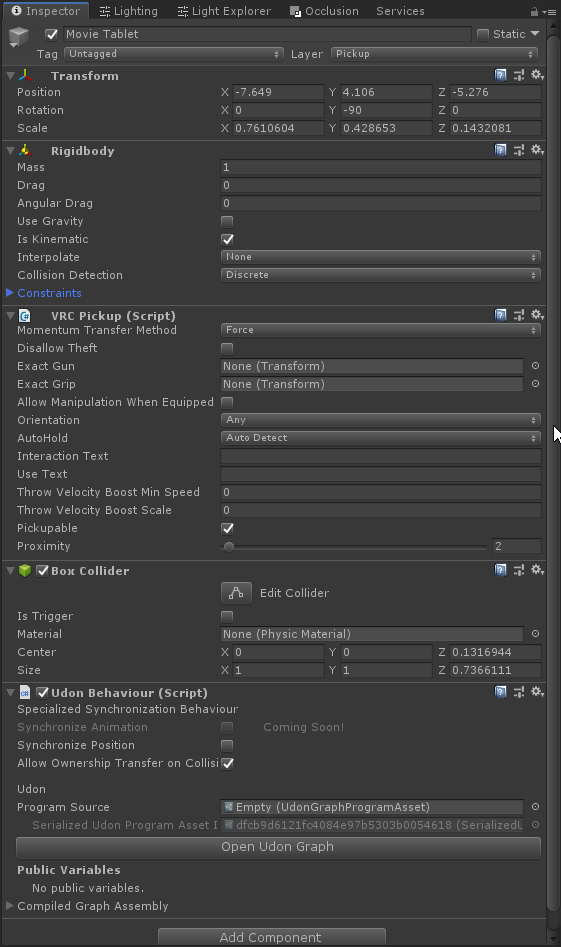
I have a pick-up item right now and i'd like to make it not snap into the hand when I pick it up like it does right now (ranged pick-up kind of thing)
Which setting should I change ?
 tropic ferry
wooo ! blender vr scene inspection is really cool 🙂 just discovered it
 gaunt edge
im looking for a good website to get assets because most of the assets on the unity store arent too good
any ideas?
lyric acorn
so I have a raycast canvas. works fine. however if I rotate it Y90-94 (or negative 90-94) it raycasts but no longer does collission. it works at 89 degrees and 95 degree rotation. it's just that block of angles.
 leaden hazel
Who here is thinking of going to the world building conference later? :)
 valid quarry
is there a world that has rimuru tempest that is quest compatible
junior cloak
Not the right channel to ask this kind of question, #avatar-search-old
valid quarry
it doesnt have life support
junior cloak
nani
valid quarry
yes
 forest elm
errant beacon
forest elm
errant beacon
depends on what you mean o:
kind leaf
If your current sdk is after 2020.3.2 then just dran n drop the new sdk into your open project. Always backup before an update.
What are you trying to update?
Make the changes and click build and publish
@lyric acorn its a depth issue with the camera. Change near clipping to .001.
@bold ibex change build to android in the sdk. Make sure to check vrchat site for quest restrictions
In the sdk control panel under build is a button to switch to android. Press it.
errant beacon
note that https://docs.vrchat.com/docs/creating-content-for-the-oculus-quest might help too! c:
also on the Quest's content limitations, https://docs.vrchat.com/docs/quest-content-limitations
kind leaf
Thats it.
Yep, might want to check vrc docs. Mine worked out of the box but I also used unity for android before I came here.
Hope that helps
Click that material and at the top where it says shader click that and a drop down menu will pop with various other shaders
For what is supported i have no idea. I don't play with Facebook toys
errant beacon
At the vv top of the inspector, which is the right-most tab in Unity by default c:
kind leaf
I don't even know what vv is but its the top of the inspector. Dont take this the wrong way but there are really talented beginner friendly tutorials on YouTube which is ideal for someone that needs to see something in action.
errant beacon
very very, internet shorthand lol
It's at the top of the inspector with a material selected, though
top of the inspector, here
 kind leaf
https://youtu.be/u_GVwd5KiS8 dude covers it all real well

Welcome to a new episode on how to make VRChat Worlds, the tutorial series for my beloved Patrons on https://www.patreon.com/surudoiryu.
Tutorial part 3 - VRChat make Quest World:
In this part we will be converting our existing world to a Oculus Quest compatible world! There are a few things to remember when you make a VRChat World, specially w...
errant beacon
the squares are textures, the spheres are materials
watch the tutorial and follow what they're doing? o:
kind leaf
The shader you want is vrchat mobile. It will be in the list
Skybox can stay.
Yes
You are to only change the standard materials
To something else in the vrchat mobile category
idle jolt
I have a trigger for an asset that is hidden. I want to trigger to make the asset active and for it to play an animation. Which basic event do I use?
kind leaf
both of you 🙂 https://docs.google.com/spreadsheets/d/e/2PACX-1vTP-eIkYLZh7pDhpO-untxy1zbuoiqdzVP2z5-vg_9ijBW7k8ZC9VP6cVL-ct5yKrySPBPJ6V2ymlWS/pubhtml# plenty of working prefabs that meet your requirements. Don't reinvent the wheel. A button is a button.
Mirror prefabs under sdk2 u might want to look at
i mean import the VRC Starter Kit ver.2.02 for your mirror. Then you can look at how the toggle works for having the mirror off. Bit easier than asking for step by step instructions and saves you a lot of time 🙂
 median junco
is midi broken?
when i press a key it plays twice ingame sometimes
found a single midi world that works
nvm its not detecting 50% of the key presses
junior cloak
junior cloak
yoyo, quick question.
I have a pick-up item right now and i'd like to make it no...
my stuff kinda got burried but if anyone got the answer, pl0x halp
idle jolt
I tried to create a toggle in my world for a object that has an animation attached to it but when I went to try it out it didn’t work?
SDK 2, SetGameObjectActive
The object itself didn’t have a mesh render, but I doubt that was the issue
 loud saffron
Is there a way to launch a web page in the user's browser? I know the functionality for launching one inside of VRChat is disabled now...
errant beacon
Not that I'm aware of, VKet had a special method of doing it that was exclusive to VKet iirc
could go with a QR code or something though?
 mild spade
idle jolt
I tried to create a toggle in my world for a object that has an animation attach...
mild spade
idle jolt
I tried to create a toggle in my world for a object that has an animation attach...
does it works on unity? PLAY mode, enable the object, and animation plays?
idle jolt
mild spade
does it works on unity? PLAY mode, enable the object, and animation plays?
Yup.
I went back and made sure it had proper mesh renders and made sure it says local. Hopefully it was just something that slipped through
mild spade
using Animator or Animation components? because animation components dont work on vrchat
idle jolt
What’s the difference?
Are you talking about the controller that is made when you put an animation on an asset or no?
mild spade
yes, those controllers are used on animators. So you are using animators then? are you making sure the trigger actually works? Is your problem that the animation doesnt play? or that the gameobject doesnt toggle?
idle jolt
It doesn’t toggle. When the trigger is pressed it didn’t show up in game.
The trigger is set to setgameobjectactive...
bold ibex
Okay, I have a world that, in blender has like 85k tris and 50k verts, but when I run the world in Unity, the stats say 140k tris and 1.2 million verts
mild spade
ohh, can you post pic? DrFluff
bold ibex
And it's for sure the models that should be 85k tris and 50k verts causing that.
idle jolt
I’m in the middle of switching build targets, so unfortunately not at the moment.
Been about 15 or so minutes. Hopefully it finishes soon.
In unity whenever the object is active it runs the animation perfectly.
In game the object never even shows up
mild spade
you know you can test the world in unity by using CyanLaser´s CyanEmu and see what is going on without having to upload world every time to test? It works for sdk2 triggers. When you can, post the picture of the trigger
idle jolt
mild spade
you know you can test the world in unity by using CyanLaser´s CyanEmu and see wh...
https://gyazo.com/698f699ece76eb1e576cc09152115033
Here you go. I even labeled the panel so I know which one is the right one.
 mild spade
can you show all components in the object?
idle jolt
Well there’s the Event Handler which has nothing to it. The box collider is on and Is Trigger is checked. The mesh renderer and what not should all be good.
Shouldn’t be an issue with the box collider as the other panels work perfectly fine for teleporting players
mild spade
if you test it in vr, maybe there is a trigger collider overlapping the trigger. Or are you able to select it and see the outline and text "summon hydra"? in game or Cyan Emu?
idle jolt
I’ll test it here in a bit. I’ll share my results when I get them.
graceful bane
After some long play sessions I finally reached the User level and can publish worlds. I need to do so via the Community Labs. correct? I did so and in game it says "open to friends"
How long does it take for a world to become public? Do I need to do anything else or just wait?
idle jolt
mild spade
if you test it in vr, maybe there is a trigger collider overlapping the trigger....
Nope. Nothing was overlapping. And it still refuses to work. I don’t understand.
Do I need to use a different basic event?
mild spade
did you see outline and text?
idle jolt
Yup. “Summon Hyena” and the outline was with the panel.
mild spade
try putting the gameobject on a button that works. it is strange that it is not working. you are trying to set it to false, right? I thought you were trying to toggle an object.
idle jolt
Yeah, toggle it on and off. On the screenshot I sent earlier at the bottom is says false. Should it be true or toggle instead?
mild spade
false means it will be turned off, or inactive. True means it will be turned on, or enabled. toggle makes it the opposite, so if it is enabled, it will disable it, then enable, then disable. You have ti put it to toggle if you want it to toggle between enabled and disable every time you press it.
idle jolt
Ah. So that’s the issue.
mild spade
yes, sorry was looking into other common issues like not having colliders or trigger colliders overlapping xD sorry
idle jolt
You’re completely fine.
I didn’t see it either, haha
All of the teleportplayer panels were set to false so I thought that didn’t matter
loud saffron
errant beacon
Not that I'm aware of, VKet had a special method of doing it that was exclusive ...
Ah shame, thanks for the info tho :)
unkempt mauve
How do I change an item so it doesn't float on pickup
I want to make it so that it has some weight.
Is it something to do with Rigidbody?
mild spade
check "use Gravity" and uncheck "IsKinematic" and play around with the settings on the rigidbody
unkempt mauve
ok. thanks!
Also, when I try to publish my current world, I get this message.

Is there a fix? what does this mean?
errant beacon
like before, that error can have many causes o:
could recommend trying https://github.com/oneVR/VRWorldToolkit/wiki/Fixing-Build-Problems again? not sure what's causing it though o:
like 1 said it just might not be able to find the scene somehow?
 median briar
Is there any way to see why someone might have reported one of my worlds?
desert python
should have a report notice, if it gets to a certain amount, i believe you get an email
median briar
got four, including the automatic one that happens on upload. I suppose I haven't hit the email threshold yet.
still... I wish I knew why... can't really fix something I don't know about 😛
oh hang on... I see a tag with a hammer
desert python
after 2 you should get a notice, they must be for different things
 median briar
I tried so hard... it's such a fine line to walk between beauty and frames
desert python
i bet its either a) a wrld spammer or b) someone thinking they are reporting someone but reported the world
median briar
yea, suppose I won't stress about it too much then
 pallid jolt
median briar
got four, including the automatic one that happens on upload. I suppose I haven'...
pallid jolt
median briar
got four, including the automatic one that happens on upload. I suppose I haven'...
Can you elaborate on this "automatic one that happens on upload"?
median briar
pallid jolt
Can you elaborate on this "automatic one that happens on upload"?
I think all maps get 1 report just from being uploaded. -- can anyone verify that?
pallid jolt
It would certainly explain why literally every single one of my worlds has exactly one report, even the ones that have never been public and can't be visited. But.. why... lol
dusk sapphire
yeah worlds start with 1 report
I'm fairly certain you only get an email if a mod checks your world out from the report and actually finds a problem with it
otherwise you can just ignore fallacious reports
thick gale
Ok so another question..
So ive added my 1st video player to my world n my 1st movie seems to work when I press play in the build .then I build n test n the screen is blank no movie....
dusk sapphire
are you just using the default unity video player component with an embedded video file?
you can't do that on sdk3
 graceful yoke
I am having a problem with uploading a world
 mossy harbor
I want to commission a giant collaborative keyboard and text editor. Where is the right place to post commission requests?
pallid jolt
Check #community-servers-old for VRCTraders discord
mossy harbor
Tyvm!
junior cloak
Yoyo, i've noticed that If a pick-up is beyond a certain threshold (internal to VRChat) the object will automatically snap to your hand
Is there a way to disable that natively ? Sadge
near escarp
That's sadly a long standing bug with raycast 
"If the edge of a collider is next to an interact, within the proximity distance, you can reach it from any distance going through that trigger collider first."
So try to build your pickup interaction with that in mind
median junco
is there any working midi world currently?
junior cloak
im unsure of the meaning of that Ruubick but i guess it mean no 
bold ibex
Is there a way of adding bloom to a vrchat world? if so, how?
junior cloak
post processing
 fathom pike
Would love to get help with my world: The Axe Pit.
The axes stick to the targets any way they hit. I only want them to stick when the axe head hits.
Any other feedback is welcome
 hardy mural
i was wondering should i use blender than import to unity for word development or just use unity?
 wraith rapids
fathom pike
Would love to get help with my world: The Axe Pit.
The axes stick to the targe...
wraith rapids
fathom pike
Would love to get help with my world: The Axe Pit.
The axes stick to the targe...
depending on your needs you could:
- have separate colliders on the head and handle. only the head collider makes them stick
- implement a terminal ballistics simulation for the axe and targets
unkempt mauve
how do I change a legacy animation component from being legacy? Is this possible?
The legacy Animation Clip "TreeGuyPopOut" cannot be used in the State "TreeGuyPopOut". Legacy AnimationClips are not allowed in Animator Controllers. UnityEngine.GUIUtility:ProcessEvent(Int32, IntPtr)
thick gale
dusk sapphire
are you just using the default unity video player component with an embedded vid...
ISO video player
 thorn imp
Hey friends, I need a bit of help. So I've been building my first world and everything seems to be going well, everything works, and when I test build my world everything is great.
however, when I try to upload my world, I get to the naming screen and the 'upload' button does nothing. I click it, nothing happens. Unity gives me this error msg:
NullReferenceException: Object reference not set to an instance of an object
VRCSDK2.RuntimeWorldCreation.Start () (at Assets/VRCSDK/Dependencies/VRChat/Scripts/RuntimeWorldCreation.cs:82)
I'm using the SDK3, but the error message mentions the SDK2. anyone know how to fix this?
near escarp
Did you at some point have the SDK2 imported in your project ?
 dusk sapphire
change the import settings of the image to sprite
 drifting patrol
thank you
thorn imp
near escarp
Did you at some point have the SDK2 imported in your project ?
No, it has never been imported
near escarp
Check that you don't have any scripting define for the SDK2
 unkempt mauve
dusk sapphire
thorn imp
Hey friends, I need a bit of help. So I've been building my first world and ever...
unkempt mauve
dusk sapphire
thorn imp
Hey friends, I need a bit of help. So I've been building my first world and ever...
make sure you don't have error pause enabled in your console
unkempt mauve
Is there a such thing as an Auto Fixer for errors in unity out there on the web?
unkempt mauve
errant beacon
not for general Unity errors though
that's what I was aiming for
its like I get these general errors and messages every now and then and I'm unsure how to fix them. 🤷♂️
near escarp
I don't think an autofixer for errors would do well
Since it most often requires deleting or reimporting specific files
unkempt mauve
True
What about creating a bot here in this server that simplifies whatever general errors and messages people get so it's easier to understand? Just a thought.
near escarp
GitHub
Unity Editor extension for making VRChat worlds. Contribute to oneVR/VRWorldToolkit development by creating an account on GitHub.
People fuck up their project in new ways every day still after 3 years
So the bot would have to constantly keep up
unkempt mauve
near escarp
https://github.com/oneVR/VRWorldToolkit/wiki/Fixing-Build-Problems
ive already got that but thanks.
near escarp
This isn't the toolkit btw ^
unkempt mauve
yea
unkempt mauve
near escarp
So the bot would have to constantly keep up
Do you think that's something that would be well manged as a bot?
near escarp
I don't think so, the only times people write their error verbose is when there is already someone helping them, otherwise they don't know why their upload doesn't work
it's hard enough to get a screenshot of the console
so relying on a bot is not something i'd ever trust lol
unkempt mauve
yea
 leaden flume
Question if anyone knows, but My world that I'm making has a problem were all sounds Are muted or can't hear, not even the vrchat menu makes sound when I'm in the world. It work in play mode with cyan emu. But when I upload it all sounds go away. I've tried to detach and re add the vrc descriptor. I'm going to try to do some trouble shooting and see if there is any conflict with scripts but just wondering if anyone had a quick fix solution.
unkempt mauve
@near escarp Maybe you guys would better understand the errors yourself to report back to the person having the errors?
near escarp
Between 1's doc, 1's tool and the fact that we're constantly here to help, i think the bot would be making it more difficult for newbies
Not just for the technical aspect, but you really don't want a bot to help you when you're having an issue you don't understand
That's like getting an answering machine when calling a support hotline
near escarp
leaden flume
Question if anyone knows, but My world that I'm making has a problem were all so...
Can you show your unity scene with one of the sound selected ?
unkempt mauve
So do you guys work for VR Chat like VR Chat officials or something?
leaden flume
Well the sound works in unity but when uploaded to vrchat all sounds are gone even the menu sounds
errant beacon
unkempt mauve
So do you guys work for VR Chat like VR Chat officials or something?
The VRChat Team on the discord are VRChat developers, i.e employees yes c:
unkempt mauve
errant beacon
The VRChat Team on the discord are VRChat developers, i.e employees yes c:
Noice 👌
 frosty goblet
Was there a recent change to what shader effects are allowed on PC? I see these working in editor but it doesn't work correctly in game anymore https://i.imgur.com/wPBnk7Z.png
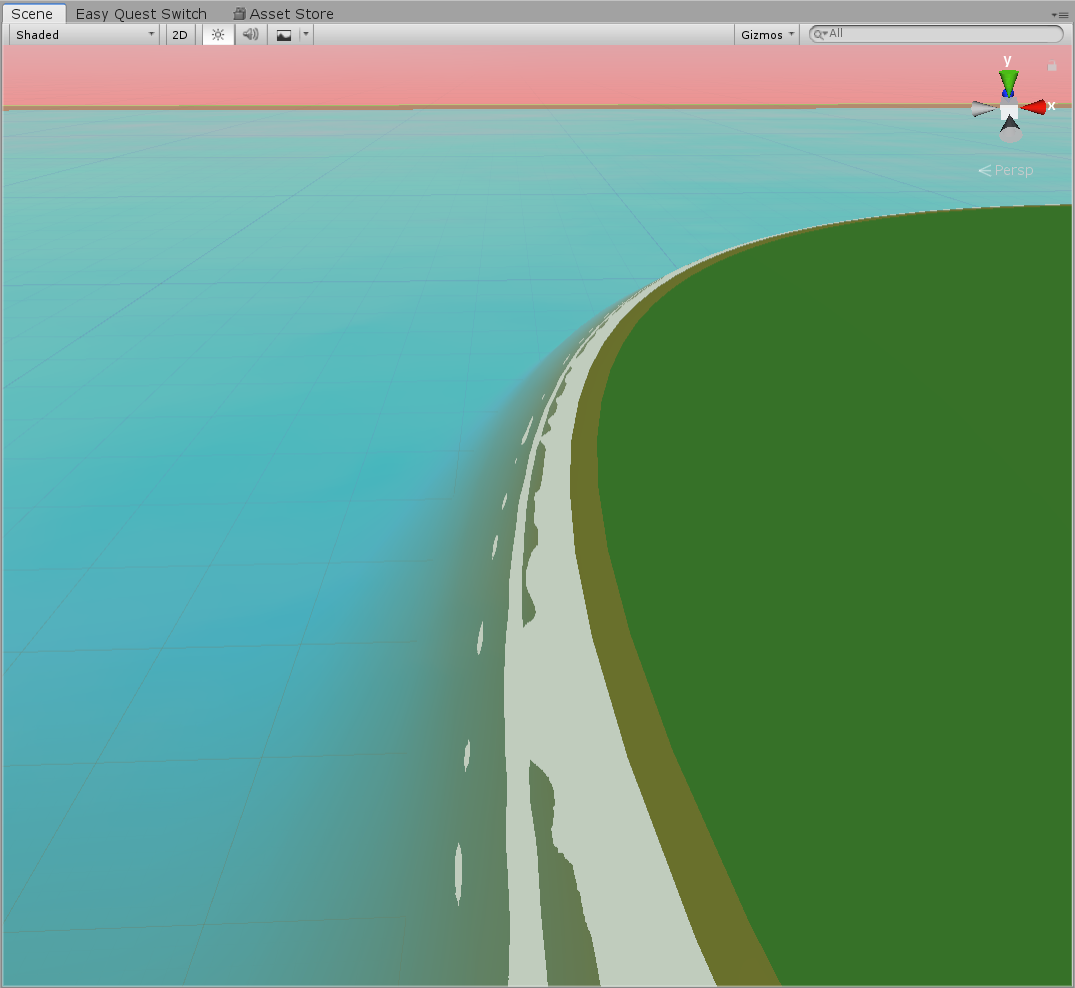
The foam and fog effect apply to player models, but not to the terrain like they used to
And I definitely haven't touched the water shader at all other than duplicating it and making a quest version (because android's shader config makes the foam break so I had to turn it off in a quest version of the water)
unkempt mauve
By disabling cache servers within the project, would that prevent users from collecting cache form worlds?
frosty goblet
It shouldn't. The point of cache servers is just to cache most of your assets and code so it takes less time to swap between android/pc building mode
errant beacon
frosty goblet
Was there a recent change to what shader effects are allowed on PC? I *see* thes...
afaik shaders for PC haven't been affected whatsoever recently, the shader itself might have broken though o:
frosty goblet
I wonder what I did then
It might be an issue with layers but Idk
just weird that it works for players still but not the terrain
Ima swap it to default and reup and I'll check it out later
unkempt mauve
frosty goblet
It shouldn't. The point of cache servers is just to cache most of your assets an...
ok. Is there a way to disable users from collecting cache from worlds?
frosty goblet
I don't think so. It's a VRC thing
errant beacon
afaik you can't prevent someone from caching your world, but optimizing your world as much as you can and bringing the filesize down always helps to reduce the amount of cache space your world takes up o:
unkempt mauve
I only ask because like if someone were to visit a world, then they could rip worlds and reuse other peoples work.
errant beacon
That's not done via caching though afaik
ripping'll always be a problem as long as you have to render the world/avatar locally
unkempt mauve
ok
 green lagoon
and I haven't really heard about anybody complain about their world getting ripped so I think you'll be fine
unkempt mauve
👍
frosty goblet
this is true, never heard a complaint like that lol
errant beacon
It'd be vv hard for someone to try and pass off a ripped world lol, yus
green lagoon
yes and honestly you could probably just have a lot less effort re-uploading Unity asset pack demo scenes for the 11th time
unkempt mauve
yea
green lagoon
https://assetstorev1-prd-cdn.unity3d.com/package-screenshot/0d10c5c6-11e2-43de-bd88-25fef6dfa51b_scaled.jpg like I've seen this map so many times

 heady lintel
Can anyone help me? testing works fine but i can't upload the world the only error i get is trigger not initialized in time.
unkempt mauve
heady lintel
Can anyone help me? testing works fine but i can't upload the world the only err...
I get that issue too
heady lintel
its 3 times the red trigger thing and the rest is the white exclamation
errant beacon
would you mind posting a screenshot of the console? o:
heady lintel
 unkempt mauve
 errant beacon
heady lintel
errant beacon
heady lintel
those errors are normal but what Unity version are you using? o:
heady lintel
2018.4.20f1
errant beacon
kk, was kinda thrown off by the font lol
unkempt mauve
heady lintel
2018.4.20f1
same here
errant beacon
those errors shouldn't prevent you from building though - try importing https://github.com/oneVR/VRWorldToolkit/releases and see what it's world debugger says?
heady lintel
okay
 storm badger
Anyone know how to make sprite particles using the VRC/Mobile/Particles shader not look like squares? I've got a material using that shader with a texture with alpha transparency, but it's ignoring the alpha.
errant beacon
Try using the additive or multipy shaders? o:
unkempt mauve
errant beacon
those errors shouldn't prevent you from building though - try importing <https:/...
Theres no Auto Fix for me for it within the toolkit
errant beacon
I mean for Machiel's build issues, those 'trigger not initialized in time' errors are normal afaik
heady lintel
it said multiple pipelines i clicked auto fix im trying it now
unkempt mauve
errant beacon
I mean for Machiel's build issues, those 'trigger not initialized in time' error...
ok
errant beacon
storm badger
I meant VRC/Mobile/Particles/Additive.
that's odd o:
Does the particle's texture have the Alpha Is Transparency checkbox ticked?
storm badger
yes
heady lintel
it seems to be working yayyy
errant beacon
assuming the texture's alpha source is set to input texture alpha, I'm not super sure what's causing that, sorry o:
unkempt mauve
@errant beacon Also I'm having a little issue with a mesh always falling through the ground even when I try to add any kind of collider to it when on play mode.
errant beacon
what type of collider are you using for the ground?
 hazy pebble
To sync the music in the world, will adding an empty udon behavior script with continuous sync do the trick?
 unkempt mauve
Mesh collider
errant beacon
Try checking the convex button - depending on what your project is, a box collider might work for the floors instead
hazy pebble
(note, audio streams will be toggled on and off by a script in the parent object - which is a button)

thats the script on the parent object
unkempt mauve
errant beacon
Try checking the convex button - depending on what your project is, a box collid...
A small scene
@errant beacon

This is from a game mind you
errant beacon
ah terrain
the convex option for mesh colliders has a limit of 255 tris so that might not be an option, what's the collider type you're using on the mesh that was falling through the ground? o:
If it was also a mesh collider, set that mesh' collider to Convex (or preferably don't use a mesh collider and instead approximate it's shape with a few box/capsule colliders, if possible)
unkempt mauve
the apple with the worm is whats falling through
errant beacon
If it's using a mesh collider, tick it's Convex checkbox
unkempt mauve
ok
mild spade
hazy pebble
To sync the music in the world, will adding an empty udon behavior script with c...
That will not work (assuming it is an audio source) but if you sync the parent so that everyone enables the audio source at the same time then everyone will be synced on the music. There is a channel for Udon questions if you want to ask there #udon-general
unkempt mauve
@errant beacon Still falling through. 🤷♂️
errant beacon
odd o:
Remove the apple's mesh collider and give it a box collider? mesh def might be overkill for it anyhow
unkempt mauve
I tried that aswell. same result
I had added dynamic bones to the worm, idk if that has anything to do with it? It still happened even before I added it.
errant beacon
odd o:
Could try going for a box collider for the ground, if the terrain is flat and is a large square, that's assuming that the boulders aren't a part of the terrain mesh though
afaik DBs shouldn't have anything to do with it
mild spade
Could it be a layer issue? Maybe have it on a layer that does not collide with the floor? A picture of the components used and the gameobject would help a lot (or maybe the object is inside the floor at the start and not risen a little above the ground) ?
 hollow moon
👁️ I have a question for Unity-savvy folks, if anyone has time
errant beacon
which is? o:
hollow moon
So, (please excuse my potential rambles, words are hard)
Essentially I've got a door with opening and closing animations which are decided by a boolean parameter whooziewhatsit. I was wondering if it's possible to toggle that parameter's value using unity's built-in UI button script.
unkempt mauve
mild spade
Could it be a layer issue? Maybe have it on a layer that does not collide with t...
what layer should I have it on so that it doesn't fall through?
mild spade
pickup should be fine, but can you post picture of entire components used? including layer if possible
unkempt mauve
Of which child?
mild spade
where the pickup and collider is
unkempt mauve

 fair sable
I am new to creating VRChat worlds. I have an object in my world that sits on another object. I added a Box Collider, VRC Object Sync and VRC Pickup to that object. The object it sits on has a Mesh Collider. The good news is I can pick up the object with the VRC Pickup. The bad news is that the item that can be picked up no longer sits on the other object but looks like it is sitting on the ground.
How do I make it so that the item that it is sitting in behaves like a solid?
Also the grail is on the Pickup layer. Does it need to be on a different layer?
fair sable
By the way I also tried using a Box Collider on the object that I want to act as a table.
Interesting if I turn off Use Gravity on the Rigidbody of my object it appears where I want it in the world. However as soon as I pick it up and drop it it floats forever off the world.
fair sable
OK I think I figured it out. First I use a box collider. If I do this then I need to make sure that the height of box for the collider is the same as the object it is surrounding (which makes sense since a collider would be calculating the areas that are being bumped into).
hazy pebble
mild spade
That will not work (assuming it is an audio source) but if you sync the parent s...
Thank you
leaden flume
I dont think this is the problem but this is what most of my audio runs off of


but with that the problem is that all sounds I can't here when I upload the world to vrchat
including the player menu sound become muted as well.
mild spade
You have 2D audio but using spatial audio. try moving the slider to 3D (spatial blend)
 lunar nimbus
Does anybody know where to get city skyboxes?
leaden flume
mild spade
You have 2D audio but using spatial audio. try moving the slider to 3D (spatial ...
I could do that but I don't think that explains why all sounds including the vrchat menu being muted
idle jolt
Player Mods isn’t working for me. I have Jumping set to four, but when I test it in game I can’t jump at all
mild spade
leaden flume
I could do that but I don't think that explains why all sounds including the vrc...
oh sorry, didnt read entire problem. It could be that you have so many audio sources running at the same time?m how many do you have?
mild spade
idle jolt
Player Mods isn’t working for me. I have Jumping set to four, but when I test it...
did you make sure you checked "isPlayerMod" (or something like that) in the mod component?
idle jolt
mild spade
did you make sure you checked "isPlayerMod" (or something like that) in the mod ...
I specifically remember that is not checked without being at my laptop. Whoops
fair sable
Another interesting thing in case it helps someone else out. The object I want sold has three sub-objects. If I create mesh colliders for each sub-object and adjust the height of those it works as I expect. This also makes sense.
idle jolt
It’s always a box that needs to be checked lol
leaden flume
mild spade
did you make sure you checked "isPlayerMod" (or something like that) in the mod ...
Uhh I have roughly 75 audio sources not all are on at the same time but there is a lot. that might be my problem.
I did not meant to reply to that comment
idle jolt
A friend of mine gave me a prefab for a helicopter, but I don’t know how to make it work. I want to replace the helicopter itself with a different asset. Could someone take a look at the prefab and help?
 fossil dock
I'm having an issue with hangout player only work with instance owner and I used the public player prefab to. anyone now how to fix that issue I'm using SDK 2
 pseudo trench
help
 errant beacon
Those are normal SDK2 errors, and shouldn't harm anything
pseudo trench
i can't load into my world though
i published it as a private world on both pc and quest earlier and i can't load into the world at all
i play on quest
errant beacon
might be some other issue preventing your map from compiling - try importing https://github.com/oneVR/VRWorldToolkit/releases and seeing what it's world debugger reports? o:
pseudo trench
okay
 serene sable
Hey everyone, I wan't to add a card game into my 3.0 udon world however I've looked far and wide for tutorials/prefabs without success 😦
Can anyone point me in the right direction?
 solemn jewel
Does VRChat support shaders made with Shadergraph?
hazy pebble
@serene sable Unless you find a prefab, I'd say go on the unity store (there should be card packs there). For the mechanics of the thing, I'd watch vowgan's video's (I think it's one of the recent ones that shows how to spawn objects from a pool).
And, try the #udon-general channel
misty wave
Does anyone know if Tsuna's video player is still available for download?? I can't find the package on their github or anything.
 terse adder
im trying to upload my world (which ive uploaded before, so i dont know what the difference is now) and when i click build and test, it just goes black and then the next go button goes to my home world? https://i.gyazo.com/45d0bcfe002fc74e968614096974cdad.gif
i have literally no clue where to go from here to be honest. everything else works?
dusk sapphire
grab 1's vrworldtoolkit which can check for common issues that can cause this https://github.com/oneVR/VRWorldToolkit/releases
also check that you do not have any console errors
 foggy anchor
im getting really mad, I finished the first version of my world and when I click upload, LITERALLY nothing happens.
does anything think we could get into a call so i could share my screen?
im getting mad i wanna upload this so i can just relax...
dusk sapphire
what I said earlier applies to you as well, also check and make sure error pause isnt enabled in console
misty wave
I've experienced this in the past as well, and it's generally a sign that there's some component or code or something that caused the compile to "fail" in terms of what VRchat is accepting of, but Unity allows. It can compile in Unity but fail to work in VRChat. The toolkit is a good starting point. Download and import it to Unity and see what it says
Is my rec as well
foggy anchor
the what
misty wave
It's a Unity plugin with many tools to help in world creation, including tools to pick out common errors that could lead to problems that make your world fail. @dusk sapphire sent it above, but it's:
https://github.com/oneVR/VRWorldToolkit/releases
GitHub
Unity Editor extension for making VRChat worlds. Contribute to oneVR/VRWorldToolkit development by creating an account on GitHub.
misty wave
Oh, I was misreading your problem as someone else's. It doesn't start the upload but the test build works? It might sound silly but have you tried just restarting Unity? I was just trying to test a world and it multiple times got stuck baking and now I restarted unity and it's working fine. Could be a PC memory issue or something
I apologise!
But also a good practice to install that and see to make sure there's not something unexpected happening anyways
dusk sapphire
the toolkit can still check for issues that could cause that, even if you can test and build
foggy anchor
i click upload
it doesnt react
the button presses
but nothing happens
i can just spam click it
also yea ive closed this project like 5 times
dusk sapphire
it checks for many, many things and it is far faster for you to grab it to check for common issues than have someone walk you through all possible causes
misty wave
That's so odd... are you using the latest SDK??
foggy anchor
im using 2.2
dusk sapphire
and once again, check if you have error pause enabled in the console
misty wave
That doesn't really sound like an issue with the world, moreso with the uploader or Unity itself or something though, I do see where Ryzeth is goming from
foggy anchor
not 3.0
i dont like 3.0
i like the all in one
my friend has been just fine
and im getting so mad
at this
i get no error messages or anything
dusk sapphire
screenshot your console
misty wave
I've never experienced that, that's a really odd issue for sure


 dusk sapphire
screenshot the top row of buttons
foggy anchor
 dusk sapphire
can you click collapse, clear on play, then try to go into the upload screen again
dusk sapphire
also make sure you didnt accidentally import the "VRCSDKWorld" prefab into your scene
foggy anchor
should i pub to community labs?
not sure
idrk what it is
its a meme world btw
with some really bad avatars
so it isnt very serious
im just asking if its worth putting it in labs but idk what it is
dusk sapphire
you publish to labs to get your world into labs, which is where worlds go to before being fully public, as sort of a probationary public category
you can only publish to labs once a week
dusk sapphire
you can upload but it'll just be private
dusk sapphire
it goes to community labs immediately
dusk sapphire
and as to how long before it gets out and goes full public that depends on how well your world is received by people
foggy anchor
it works now?...
i didnt have the lab option prior
i guess my version was weirdly outdated in upload
or something
it just let me do a direct public upload
the labs option is new
and now it works
whatever that toolkit thing was worked ig
i had a pipeline error of osm sort
@dusk sapphire its possible for me to join my world and invite buddies yea?
dusk sapphire
yeah
foggy anchor
dusk sapphire
yeah
bruh
It uploaded
it said i successfully uploaded a private worldf
i thought labs made it a public 'probation' thing?? youi know where it goes under review and stuff
foggy anchor
😳
bro
dont go in there please
its a super satirical thing but I dont think youll get it
hazy pebble
Is it possible to set a portal to a creator's worlds at random?
 errant pelican
Does anyone know if there is a way to delete a quest counterpart of a world if it's broken?
 frozen glade
is there any tutorial how to make a world ai in vrchat? Like a simple model that just walks always towards you?
bold ibex
vrc supports 5.1/7.1 audio? i mean if i want to create cinema with surround audio
desert python
i think it supports as far as unity 2018 can
 unreal kiln
quest users only can see on one eye, what was the fix for that again?
desert python
@unreal kiln less reflection probes and using the build settings panel to switch to android, not the sdk panel
unreal kiln
ah, okay ty ^^
coral magnet
Anyone working on a coooool drawing tool for the jam?
desert python
i already had a bunch of drawing stuff. but its all locked down until i do UNU stuff
make a thing to rotate drawings. make a wall that can capture avatar drawing stats. paint stamps. just the basics. but im not really going to enter
more just a fun little thing to mess around with that works on both sdk 2 and 3
desert python
coral magnet
Anyone working on a coooool drawing tool for the jam?
you?
coral magnet
I'm making a drawing game!
But the drawing aspect is bascially the vanilla pens provided in the starter pack. Might add a line counter
coral magnet
Yep, it's a multiple choice thing. So all the 7 drawing choices are related and kinda similar
 coral magnet
desert python
is 1 of the drawing options “brush” lmao
coral magnet
desert python
is 1 of the drawing options “brush” lmao
Feel free to submit your own! https://docs.google.com/forms/d/e/1FAIpQLSexuZZW5XQWxZU0D_AHVGkmJ0uLxNdP6UFtASQkH1ZkCnWJTg/viewform
desert python
well another cool thing i was thinking would be is to be able to scale your drawings. as you made them. but as i said, im not entering. so this idea can be for anyones grab
coral magnet
bold ibex
https://cdn.discordapp.com/attachments/840118503041138698/846052565640413214/unk...
that would be nice, but text input in vr can be difficult
coral magnet
desert python
well another cool thing i was thinking would be is to be able to scale your draw...
Oh yeah that sounds great
desert python
i have had at least 40 people since world jam dm me about drawing stuff. all i can give is “how tos” at this point
coral magnet
Haha well I'm glad that people are working on the actual tools!
I'm hoping to include any publicly created tools in my world, the default tools are a bit too simple
coral magnet
desert python
i have had at least 40 people since world jam dm me about drawing stuff. all i c...
That's... not too surprising. That graph is kind of hard to read :x
desert python
yea. i have about 3.5 worlds dedicated to visual structuring. and i helped make 9ish museum and ASC worlds. so ive done the whole shabang. id rather see what other people might do like buced and nestorboy
even their thing wasnt too much of a tool, it was still a brilliant idea
bold ibex
ahh yes when vrc dont have option to play mp3/ogg/wav files then only way of doing 7.1/5.1 cinema is converting every channel to mp4 file with blank screen, and playing everything in 1 time
video.mp4
front_left.mp4
front_right.mp4
front_center.mp4
back_left.mp4
back_right.mp4
sub.mp4```video.mp4 without audio only video, rest is blank screen and audio of channel
desert python
avpro exposed all 8 audio lines i believe
so you coukd do 1 mp4 or even a fancy .wav and play it
however. im not sure if theres any pre built avpro players that have the full 8 audio source set up. as not many people are looking into this
near escarp
frozen glade
is there any tutorial how to make a world ai in vrchat? Like a simple model that...
In Udon or SDK2 ?
frozen glade
actually i have gotten it to work with sdk2 but idk why the ai spaces out sometimes like running like crazy when the player just rotates
near escarp
Did you set the stop distance to something long enough ?
frozen glade
its 1
the ai follows fine but like when she is close and you rotate she freaks out sometimes

i already have everything disabled besides walk run and turn around
near escarp
Try stopping distance of 2
frozen glade
alright imma try it in a test build
near escarp
Also make sure that the target object of your AI isn't a child object
near escarp
The "target" object is what has followtarget and lookat. It should have a child that the ai is targetting. Neither of these should be children of the ai itself
frozen glade
thats the setup

the ai targets forward
or should i use something else
or any of those? https://gyazo.com/6e6bf36ccff2d4ab48ba09f6035ea953
 frozen glade
https://gyazo.com/f23603ce9c8532c95a36198bcd991c83 yea still this problem
 near escarp
one sec, looking at mine
frozen glade
alright
near escarp


Target has the LookAt Target script as well as FollowTarget which then uses the PlayerHandle
frozen glade
so you have playerhandle in the ai target?
near escarp
nope
frozen glade
still idk why she freaks out
near escarp
Do you have cyanEmu in your project ?
frozen glade
nop
near escarp
You should be testing with that
rapid basin
Hey i already asked in udon help but no luck so far does anyone here know how to make a random bool value in udon ?
near escarp
GitHub
CyanEmu is a VRChat client emulator in Unity. Includes a player controller with interact system. Works with SDK2 and SDK3. - CyanLaser/CyanEmu
near escarp
You press Play and you test in editor
You can change some settings in the top window under VRC Prefabs > CyanEmu
frozen glade
got it
near escarp
frozen glade
the ai follows fine but like when she is close and you rotate she freaks out som...
Just noticed that in your AI Character Control script at the bottom, your target isn't the AI target object
frozen glade
i dont have a target object
 frozen glade
i mean i only used the things in player tracking
near escarp
But you want the AI to track the player no ?
frozen glade
yes thats why it tagerts the player tracking prefab
i just tried to follow https://www.youtube.com/watch?v=ZsWhBwSGhN4&t=10s without a button to activate it

Cover a very basic how to have AI in your vrchat map.
- how to make them follow you.
Standard Asset package for those who don't have access anymore: http://www.mediafire.com/file/rw06r2c3t08to67/Standard_Assets.unitypackage/file
Toybox: https://www.dropbox.com/s/3dm0vfw2a2jlsds/VRCPrefabToyboxV2.2-test.unitypackage?dl=0
-------------------------...
near escarp
Your target should be the object under AI Saiko
frozen glade
so i drag the prefab PlayerTracking under it?
near escarp
No, the object under your object called AI Saiko
frozen glade
theres just body and armature
near escarp
Yeah i think that's the problem

 frozen glade
the model is the AI_Saiko Object, AI_Parent is just a auto cam script
 frozen glade
i dont have these
near escarp

near escarp
The player tracking prefab should be separate
The AI Target > Target > AI Target should be separate
frozen glade
ah
leaden hazel
Does anyone here have experience putting trees in their world? I keep having issues where the wind effects is being applied to the whole tree and its shaking as a whole model in the ground.
near escarp
That's because you need another shader on the trunk
there's usually one for leave, branches and trunk
through speedtree
leaden hazel
This is a tree I got from a free asset pack
Let me take a look at how its made up
Its strange, it only happens in engine, not in the editor
It looks like there's only two shaders...
frozen glade
Ruuubick can you maybe drop your prefab here or something? im dumb xD
leaden hazel
@near escarp Also, why would the number of shaders affect the way the tree behaves?
near escarp
The number doesn't, the type does, foliage shader usually has wind
you don't want foliage shaders on the trunk mesh
near escarp
frozen glade
Ruuubick can you maybe drop your prefab here or something? im dumb xD
Player tracking is just the standard asset stuff
leaden hazel
near escarp
you don't want foliage shaders on the trunk mesh
If I.. remove the shader with the trunk selected.. leaves disappear from the entire tree. Hmm
frozen glade
yea it works but as soon i jump she yeets herself somewhere else like teleporting
should be like that?


u have any ideas why that happens
near escarp
ah, i'm not sure about jumping since i don't have jumping in my world
 keen verge
Hey guys, do you know if it's possible to create an empty world from the vrchat api?
leaden hazel
Also I haven't actually edited these trees they have suddenly gained this behaviour. And all three of these are from the same pack with two textures each. One tree is well behaved and then they get increasingly crazy. So are the small shrubs in the background.
 keen verge
Like: Player clicks button in world, a portal appears to a new instance, you and your friends hop into the instance.
leaden hazel
@keen verge Not currently annoyingly.
keen verge
@leaden hazel Daamn. Ty.
leaden hazel
@near escarp There's my odd tree behaviour above. Again, doesn't happen in editor. :/
frozen glade
near escarp
ah, i'm not sure about jumping since i don't have jumping in my world <:KonCry:6...
its not only jumping also near some other objects ._.
keen verge
How about, is there a way to dynamically change a portal's destination room id?
leaden hazel
The most you can currently do is turn portals on and off. They have to have locked destination codes and they only go to 'highest' security instance for a world and prefer to go to an existing instance if one exists. So you generally end up with portals to existing public instances (uhhhh...). Or if its an unpublished world, a friends+ instance.
It ain't terribly useful :D :|
mild spade
frozen glade
its not only jumping also near some other objects ._.
Did you tested on a flat surface? Could be collision issue and not AI controller issue. maybe locking the Y axis so it doesnt move up and down on the rigid body
frozen glade
i mean she gotta go upstairs so freezing this might mess it up?
mild spade
Ah ok i see.
keen verge
leaden hazel
The most you can currently do is turn portals on and off. They have to have lock...
Whaaat... there goes my super advanced world idea.
leaden hazel
Yeah, I'd love to create something like a cool trap-door that drops someone on to a portal to a thematically connected world. But forcing it to a random public instance would possibly suck if someone was wanting a private protal
I also wanted to put a handy private portal in my home to an instance of the avatar test world too for example but again, dumped me to a public one.
near escarp
leaden hazel
<@97980768323633152> There's my odd tree behaviour above. Again, doesn't happen ...
Yeah that'd be the materials
 chrome basin
@leaden hazel can u make max 2 players worlds?
near escarp
frozen glade
its not only jumping also near some other objects ._.
Might have to change some of the parameters in play mode and see when it works as expected, which is what cyanEmu is made for
leaden hazel
chrome basin
<@!90531942100926464> can u make max 2 players worlds?
I mean, you can consider the total number of players when you upload...?
leaden hazel
near escarp
Yeah that'd be the materials
Actually, I'm just testing out one small thing and if its this I'm going to table flip...
mild spade
frozen glade
i mean she gotta go upstairs so freezing this might mess it up?
Are you using mesh colliders? Or box colliders for walls and floors- That is a strange issue never seen before with Ai. Maybe try making the capsule collider smaller on her head? I noticed on your pictures that your capsule collider for the AI has istrigger checked, do you have another collider that serves as her support? (like another capsule collider)
frozen glade
the world has box and mesh colliders
leaden hazel
near escarp
Yeah that'd be the materials
Solved it! And its mad!
Static. If you set trees, which you figure would be static things apart from their bending in place... to static. They behave like that.
chrome basin
Is it possible to get a list of all players for a specific world from all the instances of that world?
leaden hazel
Instances can't access data from other instances without using some kind of bot system
chrome basin
Bot system? U mean like a server?
leaden hazel
A thing was demo'd yesterday actually at TLX. A computer on like, Amazon EC2 or something, running VRChat in desktop mode, attached to various scripts to read data out of the debug log and send commands back in to control the game world.
 wild vale
hi
chrome basin
Can u not use a server directly with a world? Or do you actually need a user to join the instance to interact with the server?
leaden hazel
The latter. For security reasons, VRC is quite locked down about that sorta thing
chrome basin
I see, thanks for the info
keen verge
@leaden hazel Do you know if it's possible to make http requests from vrc maps? E.g. to query an api, grab the result, and display it somewhere in the map.
 blissful relic
So I got a question about worlds and reports, how many reports exactly do you need before actually getting a world taken down?
leaden hazel
@keen verge The only thing you can grab is streamed video/picture data using one of the video players. Then if you're clever with scripts you can.. read that picture as data. But requires lots of scripts and such. I know the theory but haven't done it in practice. :P
But no, again, security thing, you can't have worlds talk to random servers on the internet.
keen verge
I see, ty @leaden hazel
 nimble valley
is this now supported for quest or not? i am confused xD
 coral magnet
it'll work fine. it's just not whitelisted
if it were an avatar it would be blocked, but on quest you can use whatever you want.
heads up, if you see 'alpha' that means transparency - which is expensive on quest. use it sparingly
 quasi tusk

I fixed the reflection on my window, although wasnt sure If i should keep it bumpy like that or just straight reflection

Like so
leaden hazel
quasi tusk
You mean setting it to Box Projection? That's normally recommended for anything like flat surfaces or windows...
quasi tusk
I fixed my message, meant bumpy or flat for the aesthetic. Im keeping it boxed for better reflections
leaden hazel
ah, I see!
nimble valley
coral magnet
if it were an avatar it would be blocked, but on quest you can use whatever you ...
ahh okay. its for pens in the world.
frozen glade
Ruuubick you know a way to make the red ones blue aswell i tried to bake many times already

 potent girder
so i was trying to use the Auto hold function on a pickup object
according to the documentation its supposed to make you keep holding an object after letting go of the grip button

problem is this doesn't seem to work in VR
not for my oculus controllers anyway...
these are the settings

if anyone knows what im missing here i would appreciate the feedback
mild spade
Those settings look fine. Not sure how the oculus controllers work for grabbing, but for the Index controllers the option to auto hold does not works at all, even with the correct settings since letting go the grip automatically drops the pickup. I think that option only works for controllers that require a press for dropping, rather than releasing grip, like the Vive controllers.
potent girder
yeah the thought had struck my mind....
though it would honestly be kind of a pain to not have that feature working
mild spade
It can be tiresome having to grip for example a gun or a sword on a game while using Index or oculus for the entire time. With udon it can be possible to attach a pickup to the player hands for those using those controllers, really helpful. Not sure if anyone has made that request (or if it even works) on feature requests on the canny. Guess we just have to suffer xD
potent girder
with a bit of time i could probably write a basic udon graph to replace a pickup script and then include the holding function
though that is kind of a lot of work for to gain just one function >__>
cant remember if udon has included controller inputs yet so even that may not yet be possible
guess i will go see if there's a canny for it
mild spade
Yes it has!
And no matter what controller they use, you just need one "InputUse" event (so no more guessing what controllers they use)
VRChat
You can read the input of a Player's controller in a unified way across all platforms by using Udon Input Events. These events will work correctly even when the player has remapped their controls. There are currently two types of events - Button and Axis, which include boolean and float values. Eac...
potent girder
Neat :3
using that solution would entail a lot of other fixes in scripts dependant on this pickup object but its good that the option is there
seems this issue is not exactly a new one either

 subtle relic
how can i make an area that assigns an avatar with udon? are there any tutorials?
 frozen charm
Is anyone else having an issue where held pickups phase through everything? This started happening with the latest update to VRChat itself.
https://vrchat.com/home/world/wrld_6b136098-3575-42f2-8aed-1cd6415a4b44
This world was last uploaded in January and the pickups no longer are able to collide with anything when they're held. Collisions are still detected, but the pickups themselves become very glitchy when pressed against any colliders they're actually supposed to not phase through.

Playable Marimba Insideǃ - Original Concept‚ Initial Implementation‚ & Quest Testing by Akalink - Objects‚ Environment‚ & Current Implementation by Draken Stark - And Very Special Thanks to Bluetoothǃ
bold ibex
Do player tracking and bone tracking work with sdk2 ?(c sharrp script)
errant beacon
No C# scripts are permitted in worlds, but SDK3 Udon scripts are fine
with UdonSharp you can compile a subset of C# into Udon, in case you don't want to use the graph node view
 thorn latch
Does anyone happen to know why a worldspawn interactable gun I have on my world seems to only be able to be used by the person who triggered the spawn? I have another weapon that is exactly the same but has one hand hold instead of two. Now it is set up so that only the person who is holding the gun can grab the front grip, but that shouldn't cause what I'm seeing, right?
 lyric wasp
i'm wondering about the state of streaming audio. i'm still a little frustrated that after all these years we can't stream just audio without video, unless there's been any recent changes? and while youtube is an option, it's clearly not reliable. hosting it on a server i pay for can potentially get pricey. anyhow i'm interested in streaming some vrc radio shows, in a way so that anyone tunes in can listen to the same thing. there's internet radio servers like icecast, i guess those can't work, are there non-youtube options? if i use youtube i'm not sure if i can do a livestream using recorded audio, rather than have obs running live on computers from all the contributers. much easier to just have it made well in advance and stream at a certain time, so if anything like this exists i'd love to know.
dusk sapphire
you can play icecast audio streams on the av pro video players
lyric wasp
oh yes?
@dusk sapphire i haven't used any av player
oh wow, $200? is it doing something nobody else has managed to figure out, including Unity, without charging a fortune?
dusk sapphire
you dont need to buy the asset, i was referring to the vrchat provided video player components, one of which makes use of av pro
on sdk2 its the Sync Video Stream player (though currently has issues), on sdk3 its VRCAV Pro Video Player
any video prefab out there that has a "stream" mode will be using the av pro equivalent player
lyric wasp
ah okay i'd seen the avpro text somewhere before but either not often in the sdk or i've just tuned it out. what are the sdk2 issues currently? i may be using udon for this though.
bold ibex
any reason why videoplayer screen is not working? in game its just normal texture after play
 dusk sapphire
looks like you're targetting the _EmissionMap slot rather than _MainTex
coral magnet
nimble valley
ahh okay. its for pens in the world.
Might I suggest one of the unlit shaders instead?
dusk sapphire
you'll probably want to use the Video/RealtimeEmissiveGamma shader instead as well
bold ibex
same thing for _MainTex
 south orbit
made and published this world from scratch not too long ago feel more than free to check it out and give feedback if u feel like ^^ still a few things i need to adjust but ofcourse this is only the 'first' public release of it (: .

 stable frigate
why this happens??? someone please help :(( im new at this
 stable frigate
the texture of the floor put on top of the other
stable frigate
when use vrchat/sprites/default happen that bug 😦

 ornate turret
are both the floors sprites?
like the carpet/rug and the tiles?
if so, not sure why you would use sprites for the main floor too over using mesh 👀
but if they are sprites, it's probably overlapping due to render/order layer
so you might have to increase/decrease one of them
but i'm only used to this with sprite renderer components and not sprite materials specifically
stable frigate
how i increase the order layer of the walls and that sort of things
when i put sprites of vr chat ocurres
ornate turret
I've never tried building a world out of sprites so I'm not really sure how you can do it via that material specifically
but if you can't get an answer, try using mesh/ regular unity game objects
to make the walls and floor
not entirely sure on the reason for using sprites for an entire world
 median egret

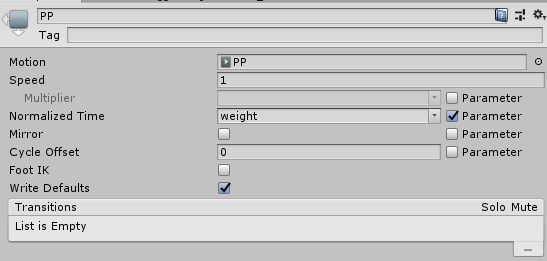
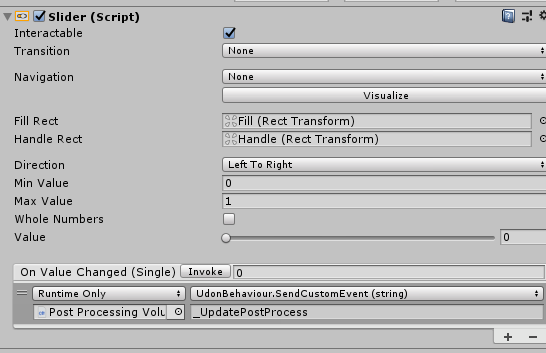
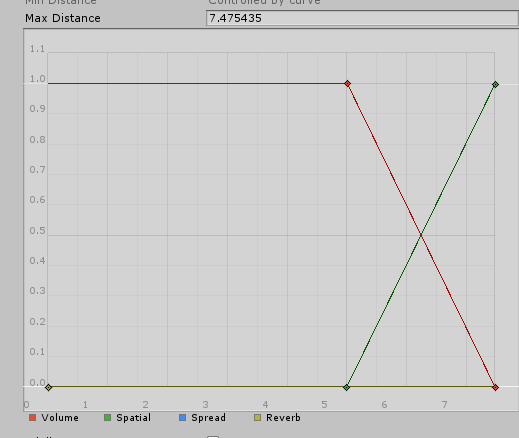


 stable frigate
ornate turret
to make the walls and floor
stable frigate
ornate turret
to make the walls and floor
im using pro builder
ornate turret
oh, ok you don't need sprite material then
stable frigate
is so good to create, but sadly make this type of errors 😦
ornate turret
use standard shader
stable frigate
how i do that
ornate turret
change the material to standard shader from the small drop down at the top
where it says "shader"
is this a pc world or a quest world?
ornate turret
 stable frigate
but if i have the chance i would do it for quest