#world-development
39 messages · Page 67 of 1
 desert python
i dont think so, is it stopping you from entering playmode?
 thick crane

lets me get into play mode
havent put any of the rpefab assets in yet will try now

yeah i can get into play mode
desert python
do you know what/where the missing scripts are?
thick crane
no this is my first time trying to use this prefab
its in the controller for the mirrors prefab
and the button
complains about event camera too
desert python
i dont think that mirror is for sdk3
how did you import? did you import a unitypackage or folders?
thick crane
open the unity package from github
desert python
may i see the github
thick crane

gitlab atleast, asper the vrcprefabs db
might be out of date or i fucked the translation
 random owl
What are the errors in your console?
thick crane
amusingly enough i dont get any errors, i just dont thing the prefab is loaded properlly, or has everything it needs
random owl
Can you show a screenshot of your console?

 random owl
Right click on the vrcsdk folder and press reimport
thick crane
not seeing any changes
random owl
Have you restarted unity yet? That can sometimes help the errors show up.
thick crane
still nothing, getting these usharp errors though
 random owl
Warnings wouldn't really stop scripts from compiling
You are importing the latest version right?
thick crane
the latest i can find
random owl
Did you import anything else except what you specified above?
thick crane
i imported only what was specified and looked at the sample scene in the starter kit, everything still seemed to be missing scripts, i then opened the packae with my world, which at the moment is nothing but 3d models
random owl
Do the prefabs inside the sdk have the script references properly?
thick crane
actually looking now the assets look fine in the sample scene
but the sae ones in the folders all show missing scripts
thick crane
random owl
Do the prefabs inside the sdk have the script references properly?
yeah those ones are fine
random owl
Wouldn't be the first time unity loses prefab references inside the assets folder 🤷
 idle jolt
How do I add audio to my world? I tried to follow this tutorial https://youtu.be/9DcFpsAcz98 and somehow it made the world go over 50MB...
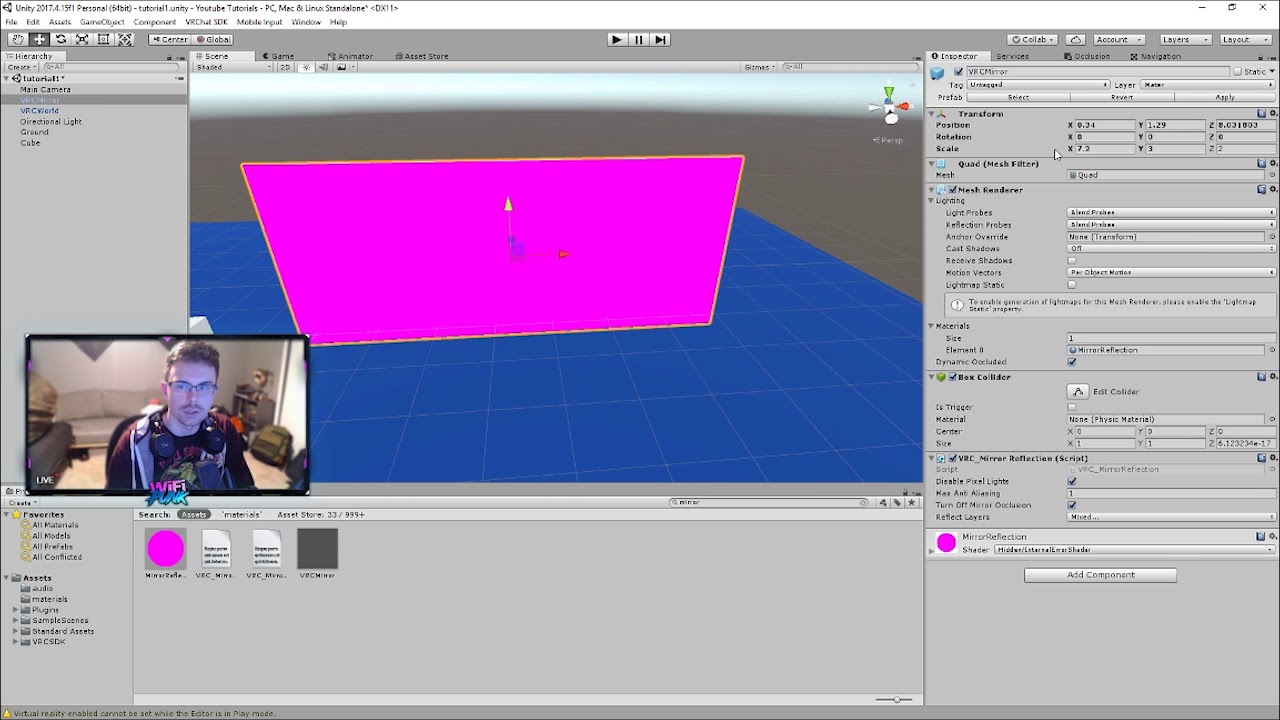
For SDK3 (Udon) see my new series
https://www.youtube.com/watch?v=xlBo_2XbyqA
THIS STILL WORKS WITH 2018.4.20 - REQUIRES VRCSDK 2 (not udon compatible)
Stop by my discord at discord.wifipunk.com
or my twitch stream at http://www.twitch.tv/wifipunk
Download for 2D Audio Prefab (drag/import this into your project)
http://www.mediafire.com/file/1d...
Never mind I find out, and never have I felt more satisfied
 strong jungle
if i try to upload a vrchat world in unity my unity editor crashes
 night merlin
strong jungle
if i try to upload a vrchat world in unity my unity editor crashes
night merlin
strong jungle
if i try to upload a vrchat world in unity my unity editor crashes
Mine has done that before, restarting and trying again has worked for me 🤷
 cerulean echo
@night merlin i found the problem he hatet the future proofing on that was crashing him
 trim cloak
hey! is anyone else having issues uploading worlds today or is it just me? 🤔
 frosty goblet
Is it generally frowned upon to place shader effects on spheres tracked directly on the player's head, like a blue tint/slight blurriness when you go underwater, etc.?
 past raptor
frosty goblet
Is it generally frowned upon to place shader effects on spheres tracked directly...
past raptor
frosty goblet
Is it generally frowned upon to place shader effects on spheres tracked directly...
I'd say it depends on how you do it. You should probably consider using a HUD-like effect instead (since objects tracking bones/parts of a player don't always correspond perfectly).
You can have one or two planes set up (needs to be large enough to cover any headset resolution - if one, or large enough for each eye, and spaced by IPD - if two) under a parent object with a Canvas component that has Screen Space - Camera set as its render mode
frosty goblet
I didn't even think of making it a UI lol that's a good idea
past raptor
that way it's always rendered at the exact same point, with no possible unexpected movement
No problem - I had the same issue!
Plus you can include any effects you'll want as additional planes, that you can enable/disable as the player moves through the environment
frosty goblet
On that note, how do I tell it to be attached to the player camera? I thought most player components weren't accessible by udon
past raptor
It'll use the Main Camera with the Screen Space - Camera setup
and, I think, the VRC Ui Shape component
this is the setup in my world (under construction)

it should also be on the UI layer, iirc (it got set up a while ago 😅)
frosty goblet
Alrighty, then my only other question is how do I test it on/off? I see you're likely toggling it with an animator?
past raptor
Exactly! Alternatively, you can enable/disable through Udon as well (if you're on SDK3)
Just be careful if you're trying to display text (or anything that needs to be properly aligned in both eyes - like you'd want in a HUD, which is my example), since you'll want to make sure the horizontal distance between the planes is adjustable, so all avatar heights are functional (because IPD varies with height and the avatar itself, but there's zero reference for us to use to calculate the distance ourselves).
frosty goblet
Currently I mostly care about visual effects over the player's vision like being underwater and maybe other things in the future...
What exactly am I toggling to make it show up? I'm using Udon because I am in love with programming lol
 dim totem
if i wanna make it so i can walk through my mirror
do i just untick the box colidor
collider
frosty goblet
random owl
You could just do that with post processing volumes
I don't know anything about post processing, so I'm just doing what I can think of :p
I have no idea how anybody does anything here, I'm just figuring it out as I go
random owl

GitLab
A surface shader for Unity providing cel-shading. (Forward rendering only)
frosty goblet
oop, it says I should use it on everything lol
Thanks for the tutorial, I'll devour that after my walk
past raptor
frosty goblet
What exactly am I toggling to make it show up? I'm using Udon because I am in lo...
You enable/disable the gameobject with the shader applied to it.
frosty goblet
Last I checked, I recall post processing being frowned upon in VRChat, I thought, in the way past (pre SDK3 I think)
Maybe that's all changed now though lol
dim totem
can anyone answer my question 🤣 sorry to sound impatient im just in a rush
random owl
Well yeah if you remove the collider or disable there's nothing to collide with
random owl
frosty goblet
Last I checked, I recall post processing being frowned upon in VRChat, I thought...
Never heard anything about that
 remote summit
Anybody know how to set up a video player whitout using udon in the SDK 2?
past raptor
frosty goblet
Last I checked, I recall post processing being frowned upon in VRChat, I thought...
It came up in the world-optimization channel a little bit ago, and there was a great response (with an informative link that you should definitely read).
There are certain effects that have high performance cost for VR, but they generally also look bad with forward rendering/in VR anyway.
random owl
A link I just linked above for them 😄
past raptor
random owl
A link I just linked above for them 😄
You're right, my mistake!
 blissful remnant
I'm trying to push an old sdk2 world and when I enter it in game I..lose the ability to turn with my right controller. I've tried updating to the latest sdk with no changes. Anyone seen this bug before?
 ruby roost
past raptor
https://discord.com/channels/189511567539306508/415412644682661908/8139899925484...
ruby roost
past raptor
https://discord.com/channels/189511567539306508/415412644682661908/8139899925484...
just my 2 cents: i put on color grading & bloom. i informally measured both to have less than a ~3% performance penality. color grading was ~1% (within margin or error for measuring). these cost basically nothing, and gave a really nice visual boost
i have an audio question: i would like to use the low pass filter in one room, but I really wish I could control this from a "zone" object like the AudioReverbZone. whats a good way to do this, if at all? I could programmatically turn it on when someone enters the room, and off when they leave, but I don't want to deal with the edge case like someone hitting the respawn button while in the room. the ultimate effect I'm going for, is just for the audio to be "muffled"
 near escarp
blissful remnant
I'm trying to push an old sdk2 world and when I enter it in game I..lose the abi...
near escarp
blissful remnant
I'm trying to push an old sdk2 world and when I enter it in game I..lose the abi...
Hey Lhannan ! Does it happen to other people as well ? Can you take a screenshot of the world descriptor component
frosty goblet
Tryna figure out post processing but this tutorial is like "you should see this happen the moment you do this!" and I see 0 change xD
near escarp
Also check the pins for CyanEmu tool to test your world in editor to see if the same thing happens there
frosty goblet
aha I found my mistake, a step I didn't read smh
 hard crane
past raptor
this is the setup in my world (under construction)
hard crane
past raptor
this is the setup in my world (under construction)
Did you get this running through a VR Headset? I'm having a horrible time getting it to render. ScreenSpace Camera with linked "Main Camera". UI Layer,etc
past raptor
Yup, it's working fine in a world that's currently under development.
My screen space canvas isn't linked to any camera, and also has a VRCUi shape (most likely important, too).
The actual HUD planes (since I'm doing per-eye) are in the hierarchy beneath that object.
blissful remnant
near escarp
Hey Lhannan ! Does it happen to other people as well ? Can you take a screenshot...
another player lost use of their fingers but could still turn :P I'm on index hands she's on rift. But I think it might have something to do with the avpro media player, when I disabled that I could turn again. But I need avpro media player for low latency VRCDN :(
hard crane

This is what I have-
When I load into my world, i can neither see it on headset or monitor.
near escarp
blissful remnant
another player lost use of their fingers but could still turn :P I'm on index ha...
Try looking at your log from a session where you went to your world and see if anything comes up related to avpro
past raptor
hard crane
The raycaster isn't needed.
Did you include a Canvas Renderer?
blissful remnant
near escarp
Try looking at your log from a session where you went to your world and see if a...
that's a good idea, thanks :D
hard crane
Canvas Renderer?
I dont follow .-.
i have one now lol
All UI text has one, the canvas obj didnt until now-
Yours didnt have it , so i assueed it isnt needed
past raptor
the OverlayUI object is what I posted earlier. The HUD VR object only has a centered rect transform. HUD R and HUD L are just positioned with a rect transform to the R and L sides of this.

There's a text object in HUD R and HUD L that has "test" in red, and it shows up perfectly (it also has a canvas renderer)
past raptor
exactly
hard crane
ok! irs rendeing! but its behind mesh walls
i can see it when o stare nto space, but not looking at an obj.
past raptor
hard crane
Set the Render Mode to Screen Space - Camera
hard crane
it is
past raptor
hard crane
It was here - you changed it?
past raptor
If you have Sorting Layer as an option, it's not rendering as Screen Space - Camera.
hard crane
past raptor
If you have Sorting Layer as an option, it's not rendering as Screen Space - Cam...

mesnt order, switching to vr confused me.
does the canvas need to be closer, or moved in spsce?
past raptor
Make its Z position 0
That's the depth - because it's SS-Camera, the UI is rendered at the given Z distance from the camera.
That's why the walls are being shown first.
hard crane
All transform options are grey.
I switched it to world space, reset transforms - when i swap it back to camera it inputs random values.
After re centering main groups, it is now 0
past raptor
Ok, that's good. I was looking through to see if there was anything that could affect it.
Try it now - it should be rendered on top of everything
hard crane
still through walls, but now its horizongal
instead of flat to my eyes its a thin plane, but if i look straight up, its flat
past raptor
The rect transform has a rotation too. Could that be causing it?
past raptor
The overlay canvas has no parent in the hierarchy, right?
hard crane

It has 2
Well a parent thats a child but both have 0,0,0 , and scale of 1,1,1 with no rotation.
past raptor
Make the overlay canvas object top-level in the hierarchy. See if that changes anything.
 past raptor
What do the components look like now?
Can you include the hierarchy view?
hard crane
So I found that I use another object, "Map" as a general workflow helper. I throw anything Mesh, Light, Etc related under that- for a clean hierarchy
it had a position of -17, so I've taken the Canvas object outside of the ENTIRE hierarchy by itself, and .. no luck
past raptor
welp, I'm not sure what the problem is, then. I guess check the material for the walls and make sure they're in the 2000 render layer and not above the 3000 used for UI?
hard crane
All standard shader.
past raptor
Well RIP, I'm not sure what the problem is then, sorry.
hard crane
Welp, I guess its something random >-< ty , ill keepmtrying
hard crane
past raptor
Well RIP, I'm not sure what the problem is then, sorry.
Foudn issue! It did need the reference main camera & it need the plane distance on that camera on the canvas to be 0.3 instead of 100
idle jolt
Can audio add to the size of the world? If so, then that is ridiculous
desert python
@idle jolt i mean, yea? how that reidculous
idle jolt
It’s just audio though...
How does it add to the world size?.. That makes no sense
desert python
audio has file size, so it is added into the world file size
idle jolt
Still...
Maybe that’s why it took so long for the file size to load into unity, since it was an hour long...
desert python
i mean, you can lower the audio quality and compress it but i mean. audio takes a bit of space. but why are you interested in how big the world gets? do you not like downloading it?
idle jolt
The world was at 7Mb, so I was extremely confused when it told me the file size was too big
past raptor
hard crane
Foudn issue! It did need the reference main camera & it need the plane distance...
Good to know! Not sure what the difference is, but 🤷♂️ glad it's working for you now
 dusk sapphire
you'd be surprised how much of a difference audio and the correct import settings make
this blog goes into good detail about it

Learn how correctly set up Audio Clip Import Settings to make your Unity game consume less memory and CPU.
idle jolt
dusk sapphire
https://blog.theknightsofunity.com/wrong-import-settings-killing-unity-game-part...
Huh, thank you
I hope this comes to good use
 vale inlet
I'm having trouble finding a good tutorial for the 2018 version of Unity that explains how to add a custom texture onto a custom model; I originally used Unity's terrain tool to create the world's base landscape before exporting it over to Blender and utilized Blender's smart UV unwrapping and texture painting tools. Now I'm trying to add that texture to the model in Unity
What's more frustrating is since Unity made the model a high poly count model, I had to use UV smart unwrapping so my UV map was generated at the computer's whim and isn't the easiest to work with
vale inlet


I tinkered around a bit on my own so I'm a step closer but still needing some advice
random owl
Legacy shader diffuse will always appear pink in game
vale inlet
yee im late to mention this but i recently figured it out ;v; good to know though!
ill probably just stick to the standard shader from now on
 lyric acorn
Turn “is kinematic” on
 calm plinth
I have a quick question (Maybe?)
Having a box collider as floor, Does size affect performance?
Will a example 5x5x1 have the same performance as 10x10x1 (When it's just empty space)
desert python
depends. but usually no
calm plinth
desert python
depends. but usually no
Thanks! I had some people asking just to expand the empty space floor so they can move a bit more but I didn't knew if it affected the performance, It's just empty space with nothing in it so not more to things to render (I Box collider has no mesh so invisible floor)
desert python
box colliders are also considered more optimized by default so you should be good either way
 fresh abyss
Not sure if thats the right point to ask but many people seem to use the same way to create those fairy lights that you can find in a lot of worlds at this point. Does anyone know how they're created? they seem to be very similar every time so i'd assume there is a tool/plugin to create them.
edit - they are made from RED_SIM and can be found on his patreon
desert python
what do they look like?
fresh abyss
 desert python
check unity asset store. bet thats where theyre from. if not, try booth
lyric acorn
If you want to go the extra mile, tilt brush has a brush that paints similar strings of lights, can import your boundary there, paint the strings of lights exactly how you want them to be, and export the lights into unity
fresh abyss
turns out it is a unitypackage from RED_SIM that you can find on his patreon. has a free version too. gonna put this to the other post in case people ever search for it.
 tropic crater
hey, how do I sync objects for all players? For example, in the udon example scene there is a toggle button that enables/disables the mirror. Does it automatically enable /disable it for all world players?
desert python
you can. I don’t know what the example scene is but you can
 gentle inlet
does anyone know of a good water shader or package fit for use with quest?
desert python
noriben water shader looks pretty cool on quest
gentle inlet
life saver =3
desert python
kids section
 bold ibex
hi how do i make my world get out of labs... i put it on labs 12 days and still on labs while my friend released a world and it got out of labs 5h later
desert python
i still got worlds in labs from 5 or more months ago
its pretty weird how its set up
bold ibex
i mean its got 853 visits and 6 fav idk if thats good for it being out of labs
bold ibex
desert python
its pretty weird how its set up
very weird indeed
desert python
i usually get like 200 visits and 10-20 favs and then it just goes to the “never return” zone in labs
 neat zodiac
Silly question I am sure, but I do not understand.
What does the room Align mean?
Does it mean that it will TP the persons mesh/collider to that TP point if set to true? To avoid spawning in walls if the player is out of their Playspace?
Also does the Lerp when checked mean you can see the direction someone is being TPed to?

 simple meadow
My world has 8 favorites and 124 visits and hasn't been out of community labs yet
It used to be easier for worlds to be public but nowadays it seems to be much harder
Anyone know an approximate number count for these things?
desert python
its random, sometimes you need 50 visits and 4 favs, sometimes you need 500 and 36
 gilded quail
Hello. Has anyone else ran into this specific issue?
I am using VRCSDK3-WORLD-2021.02.23.11.40_Public to create a world. I have set my VRChat client path to the correct folder in my Steam Library. When I attempt to Build and Test the world, the world loads in, but I am quickly Disconnected with the message "Unusual Client Behaviour". I can play VRChat normally by launching through Steam, and I have no issues being disconnected. I have cleared my cache in AppData, as well as restarted my computer.
 wraith bough
does anyone know about udon update nodes?
gilded quail
that's fair it was quite long
Okay then, abbreviated version
I narrowed down my issue. Checking VRChat logs, it says my world doesn't exist so it kicks me out.
It does load the one Plane and model.
I'll try that. Dunno what went wrong.
Thanks
Should I re-import the SDK first?
VRCSDK3-WORLD-2021.02.23.11.40_Public
Yeah, world.
Not even the default Example Udon World scene tested properly either
Same error
2018.4.20f1
I hadn't created any custom Udon scripts in the world either.
In addition to starting over or
I mean, "completely from scratch" isn't that terrible considering my world consisted of a single Plane and that's it.
Will do
It sounds more like a VRChat spaghetti network issue more than anything to be honest.
Is the test world stored locally on my computer?
Any idea where?
Ok, new error after starting over with a new project, importing SDK, and shoving a VRC Scene Descriptor Component into a game object.
I don't even get to see the world, it's just black, and now the failed world check happens earlier with
"World temporary_ban_check not found"
What even is that
"message":""World temporary_ban_check not found"","status_code":404|
it is status code 404, which I don't know much about, but I remember it's bad.
Ok, I guess I'll build and publish every time I want to test it. Assuming that works...
Well it's a GameObject with the Scene Descriptor, and then the Cube as a floor, and that's it.
Camera and Directional light yes
Unless I can find whatever folder is holding the local world data I think I'll just have to suffer.
Thanks, it'll be my first test attempt at a world.
i
O KAY
I built it and published it
I went to join it
and then I got immediately booted back to home world.
I'll try testing the Sample scene
for Udon stuff
 nocturne dagger
How does one make it so these textures are the same scale? Allie said "thats easy, look in your material shader, then look for Tiling, theres two options X and Y, alter both till you get your desired size" in #udon-general is their a better solution?

this one?

it says standerd
also ok
ok thanks
so yeah they are all moving
yes
I have to make a new texture to do this?
I mean like make a copy
thats cringe
Hammer literally has a tool for textures being continues
 nocturne dagger
what are you talking about?
nocturne dagger
gilded quail
and then I got *immediately* booted back to home world.
this?
gilded quail
Yes that's my issue Carson
Ignore me and continue your conversation, I just about resolved my issue.
Though I hate the solution.
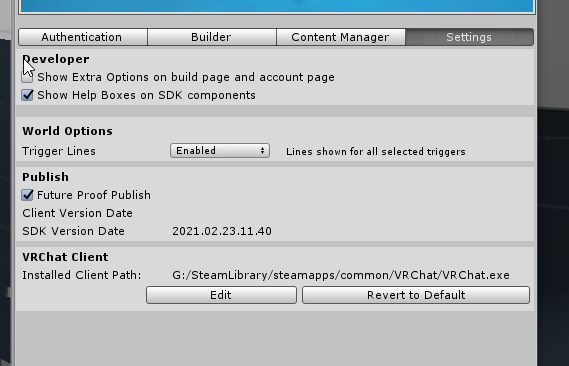 nocturne dagger
I have my unity on c and games on d
so
no
Get an SSD at least
get another one
gilded quail
I have like 5 drives and 7 partitions lmao
nocturne dagger
gilded quail
I have like 5 drives and 7 partitions lmao
why tho?
gilded quail
Not the place to discuss further, but it's because I have had many a computer and I hoard my data because I might need that book report I wrote in 6th grade someday.
Let me install VRChat through Oculus on my D Drive.
Wait why the f
There was a seCOND INSTALLATION of VRChat AlL ALoNG!
in the G DRIVE
scream
i dont. know.
But again this should probably not be droning on and on in World Development
A mod is probably gonna come and smack us.
Is it because directional lights don't go radially
Because think about it
If the light rays are all going down parallel to the Y-axis, how is the light supposed to hit a vertical wall also parallel?
Try a big f@$%-off point light lol
Oh
Oh it's that IKEA
What if you had four directional lights in the same spot but slightly off axis
damn
Quarter the intensity?

woohoo
Same as here
ye
wait
who are ye
Ah ok
I kinda blindly accepted the request without reading
You want me to come test now or some other time?
Would you prefer I test in Desktop or VR
Desktop it is: I'm lazy.
Just make a new instance and invite me again
Probably the easiest way I guess
Ok, tell me when I should join.
VRChat social is slow to update
I sent a request
loading in now
bold ibex
hi how would one disable a specific world object collision with the player? im using sdk3 udon
 zealous coyote
Hey, just a quick question, if I have a prefab and I open it and add an empty object on it then make the original prefab able to be picked up when it's picked up will it move the empty object with it (just to be clear I don't want that to happen, I wanted to use that empty object for respawning/teleportto purposes)
 silver hollow
Hi all, ive got 2 questions. Does anyone have a list of commonly implemented features that are quality of life or needed toggles for a world? ie different variants of mirrors and if so are there any tutorials or the like to create them?
zealous coyote
Most people turn mirrors off and make a button that activates them with 2 existing, one which only shows players and one which shows the world too, there's a tutorial that shows you how to do an easy trigger for one out there, with a little experimenting you can figure how to make them toggle each other and switch between versions without causing them to collide.
I used this at first https://www.youtube.com/watch?v=JbFfjIfFvWE @silver hollow
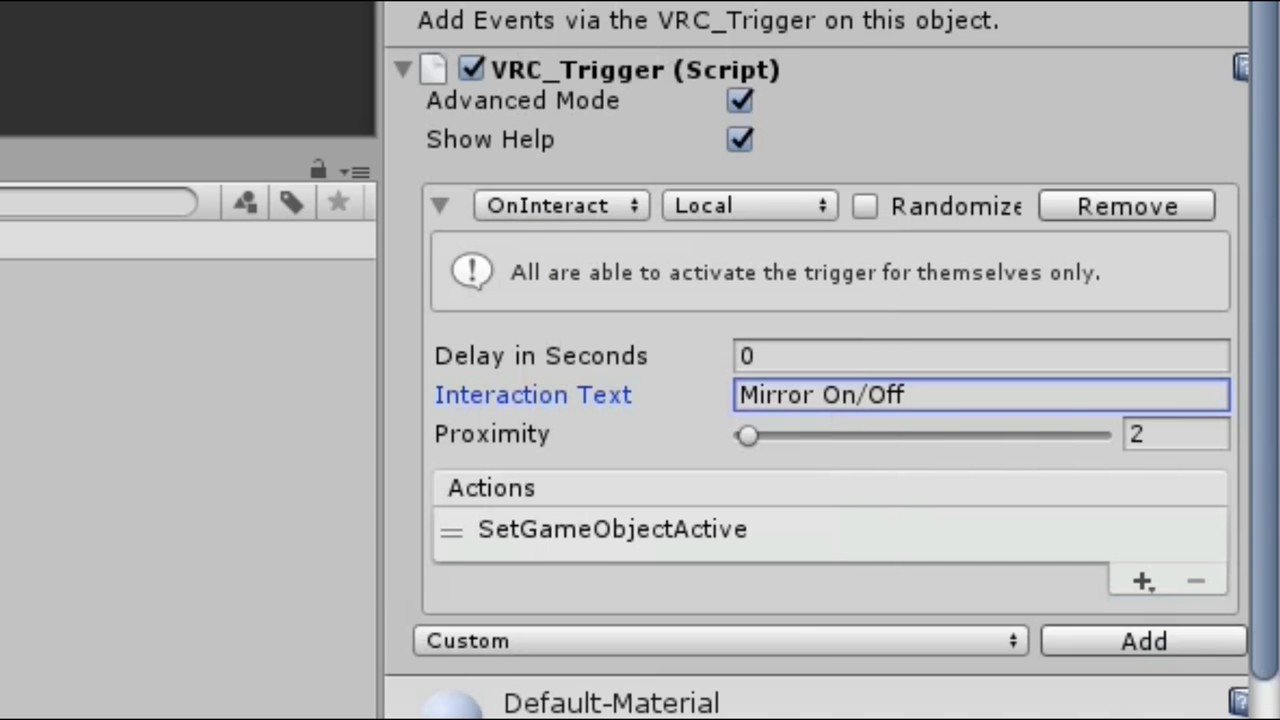
There's probably better stuff but when you're just starting out with it that's what i worked from. ¯_(ツ)_/¯
 grizzled urchin
My world is getting like flase report raided, uh what do I do
zealous coyote
define false report raided...
1 or 2 is perfectly normal from what I hear, I uploaded mine to private and it had a report practically instantly, I don't think it'll be players.
grizzled urchin
I uploaded my world and all of a sudden like 300 people joins saying they were gunna report and now I'm banned-
Litterally nothing was wrong with my world
Joined*
zealous coyote
bizarre.
grizzled urchin
This is fucked how do I contact vrchat
zealous coyote
Figured as much
Is there a way to remove this bubble thingo over a selected object?
 near escarp
Gizmo and light probe
zealous coyote
ohh thank you~
zealous coyote
What's the approach when the sdk just decides to crap itself and just leave you with the option to clear cache and playerprefs?
 dreamy beacon
hey... so I'm currently trying to make a world. I built it for the most part (even though I'm pretty sure that I'm going to have to downsize cause I made it wayyyyy too large), and I dragged the SDK file from the website into my project. I'm trying to find where the player spawn is so I can input it into my world, but I can't seem to locate it anywhere... does anyone know where I'd find that?
Also, when I go to the VRChat SDK tab on the right, then go to builder, it says "A VRC_SceneDescriptor or VRC_AvatarDescriptor is required to build VRChat SDK Content", and doesn't allow me to preview the world in VR. What can be done about this?
 supple drift
zealous coyote
What's the approach when the sdk just decides to crap itself and just leave you ...
supple drift
zealous coyote
What's the approach when the sdk just decides to crap itself and just leave you ...
Check console for errors first, but try right-clicking on the SDK folder and hitting 'Reimport'
supple drift
dreamy beacon
hey... so I'm currently trying to make a world. I built it for the most part (ev...
this should get you on the right track, it's a bit old now but should still be relevant https://youtu.be/xPdlNJ9rUNQ
First in a series of tutorials on creating trigger based worlds for VRChat. This tutorial goes over creating a basic world to upload to VRChat, includes spawns, jumping, and a pickup object.
Unity Download:
https://unity3d.com/unity/qa/patch-releases/5.6.3p1
VRChat sdk:
https://www.vrchat.net/login?from=sdk
Unnecessary timeline!
00:00 - Unity...
dreamy beacon
Okay I’ll give it a look, thank you!
zealous coyote
Reimporting the sdk folder did nothing.
I created a new project, imported the sdk first, the stuff I was using.
Went back to my old project to make some prefabs of the stuff I'd put together, reopened the new project and the sdk is broken again, the only things in the console are related to a few things from packs im using.

 civic ibex
Do you have the same low poly dungeon asset sames in another asset?
random owl
Delete the post processing folder
zealous coyote
I don't even have a post processing folder
dusk sapphire
its in the LowpolyDungeonAssets/Demo Scene
folder as seen in your error
zealous coyote
Oh so there is
that was killing the sdk... fun
was gonna start a new world anyway since I didn't want to use the vrchat home kit this time
can get back to it, thanks folks~
 dull bear
 zealous coyote
Why is it that everything works fine while I'm building but the moment I open the sdk it freaks out then locks up and gives me 999 red warnings of stuff like this

yknow what, im not gonna make much sense of it, im about 40 hours without sleep, if anyone has an answer please ping me so I can read it when I wake up (and yeah I tried reimporting everything)
blissful remnant
damn, the bug is back...anyone ever experienced that your right hand loses the ability to turn in some vrchat worlds? notably the one I'm working on now, sdk2...only thing special about it is using vrcdn's low latency media player
blissful remnant
it works before I enter that world and stays broken after
desert python
ive never seen the vrcdn media player in action before or its hierarchy but im sure thats not the case
@blissful remnant do other players on the map have the same issue?
blissful remnant
@desert python yes another player reported "weirdness" but we're not using the same controllers
desert python
hmm. thats weird but its probably something on a player controller. try reuploading with the player disabled
if the weirdness is gone, then theres something on that mplayer thats causing mobility issues
 gaunt sedge
Hey! Sorry for sounding dumb, just wanted to ask if you believe it will be easy to find people to test a world I'm making once it's done. 

 random owl
gaunt sedge
Hey! Sorry for sounding dumb, just wanted to ask if you believe it will be easy ...
random owl
gaunt sedge
Hey! Sorry for sounding dumb, just wanted to ask if you believe it will be easy ...
Go into a random public and ask around usually doesn't take long as long as you ask the reasonable looking folk
gaunt sedge
makes sense, thanks
 upper gate
random owl
Go into a random public and ask around usually doesn't take long as long as you ...
upper gate
random owl
Go into a random public and ask around usually doesn't take long as long as you ...
Second this. I usually go to Japan Shrine, for some reason people there are a little more helpful.
Just be polite, you might get silence or ignored, but like 2 in 10 people will kinda shrug and say "sure, I'm not doing anything else anyway"
simple meadow
Is there something up with uploading worlds right now? I updated mine and it hasn't updated in game, waited half n hour
random owl
simple meadow
Is there something up with uploading worlds right now? I updated mine and it has...
What's the world id?
simple meadow
let me reupload it one more time
bold ibex
is it possible to have multiple different 2d sounds covering certain areas in a world as opposed to just one 2d sound that can only cover the whole thing
random owl
Sure, for example having some bgm manager udon behaviour running that changes the music depending on where you are
 pure kraken
does anyone know why multiple toggles for the same object would break the function?
random owl
Would need to see how you are doing it
pure kraken
what would you need to see?
random owl
Well I don't know since you didn't really say how you are doing it and and how it's breaking
pure kraken
its just a toggle, theres nothing else to it lol
gameobject.setactive
there is a main toggle and a secondary toggle for a different area
random owl
Well toggle could be done with a trigger, ui or udon and a bunch of other ways I don't really know without you specifying
Is this sdk2 or sdk3?
pure kraken
oh, they are UI toggles. its sdk3. basically, the secondary toggle will work the first time, but if you try to use the toggle again it wont toggle and you have to go back to using the main toggle.
random owl
Can you show a picture of the inspector for the toggle?
pure kraken
 pure kraken
dynamic?
random owl
 random owl
SetActive (bool) vs SetActive is what got me suspecting that 🤔
random owl
Nice
 waxen radish
So I need some help. I have a world I uploaded and It won't let me join it no matter what I do.
It just keeps directing me towards my home or the VrChat Home world..
random owl
https://github.com/oneVR/VRWorldToolkit/releases
Import this and check VRWorld Toolkit > World Debugger from the top bar
waxen radish
I think I found the problem. I think it was the skybox was in a seperate scene and I cannot have 2 scenes at the same time.
Thanks for the help.
Oki so it worked
BUT I am having a problem with my models and building. It makes me go right through it.
like it has no collider.
and I dunno how to fix that.
 random owl
Well does it have a collider?
waxen radish
I added a collider to it I think but, it seems to do nothing.
what collider should it be called becuz I think I have a mesh collider on it.
 random owl
You have no mesh set in the collider
If you add a mesh collider to something that doesn't have a mesh on it it'll just be empty unless you set something manually to it
waxen radish
hmm yah I just realized that was the problem but, why can't I select a whole group and put a collider for it all.
becuz now I have to do it all manually brick by brick
is there a way to save time?
random owl
Well you can select all the gameobjects with a mesh and then add the mesh collider component to them all
 waxen radish
random owl
Well you can select all the gameobjects with a mesh and then add the mesh collid...
waxen radish
random owl
Well you can select all the gameobjects with a mesh and then add the mesh collid...
wdym how would I go about doing that

 random owl
pure kraken
whats this about a GrabPass?
random owl
pure kraken
whats this about a GrabPass?
Having a GrabPass will always incur some more performance cost because it having to grab the whole screen to manipulate but if it's sensibly used it's alright unless you are really starved for performance
pure kraken
what sort of things would happen if I removed the grabpass? would the material/shader act different?
random owl
Water shaders usually use it for the distortion effect
The message is more of a you should be aware of this hence it being "Info" so you most likely won't need to worry about it in this case if that's the only grabpass you have
pure kraken
gotcha ty
waxen radish
How do I make it so jumping is enabled?
random owl
SDK2 or SDK3?
random owl
Add player mods component to your scene descriptor and add the jump component
 waxen radish
also how do I get a seat to work becuz I wanna put a seat on this chair
 random owl
You already have a disabled vrchair prefab in there?
waxen radish
mhm i think, if u can look right under it
random owl
So enable it? 
waxen radish
but how would I make it so i don't see the chair

will this show up in game?
or is it invisible
random owl
The easiest will be to just disable the mesh renderers
waxen radish
Kk thanks, ima publish it and see if it works
 wind wraith
waxen radish
Kk thanks, ima publish it and see if it works
wind wraith
waxen radish
Kk thanks, ima publish it and see if it works
Btw, Look up "Cyanemu" on google and download the latest version on github. It allows you to test your worlds just using unity's play button, without having to do local test or publish to test your world
near escarp
It's all pinned in this channel !
waxen radish
Thanks, no worries. I added some cool particles and stuff now that the world is finally crafted to how I wanted it to be.

Anyways thanks for all the help. ❤️
 terse orchid
Hey Guys. Fairly new to 3D development and built a couple of VRChat worlds. Wanted to learn and start using probuilder in unity, but I can't get past this issue. When ever you approach a probuilder object and press up against it, you can see through the object. This happens as well when I apply a new material. Does anyone know how to resolve this issue? I apologize in advance if this is a stupid question.
nocturne dagger
terse orchid
Hey Guys. Fairly new to 3D development and built a couple of VRChat worlds. Want...
That is probably something to do with the view point of the model not the object
near escarp
If you've already made a couple worlds, i highly suggest you start looking into Blender instead of learning probuilder
terse orchid
nocturne dagger
That is probably something to do with the view point of the model not the object
Thanks. I will research that. Appreciate it.
terse orchid
near escarp
If you've already made a couple worlds, i highly suggest you start looking into ...
I concur. I've been slowly learning blender as I heard and read the same thing. Thanks for the response.
nocturne dagger
near escarp
If you've already made a couple worlds, i highly suggest you start looking into ...
If I could watch videos with out getting really annoyed by something like audio quality or something like that I would
 stable birch
Hey there. I'm trying to upload my first world. But everytime i try to Build and Test it, It just straight sends me back to the Home World. I have no idea how that's possible. I read the instructions on the VRC site. But it still won't work.

 fringe brook
My skybox make my avatars and some textures of my world all black? In quest
Do you guys know whats skybox i can use ?
To fix that
bold ibex
jumprivate world
 unique field
why does it take so long to upload my world
then VRC tells me it can't upload anyways
it really wastes a lot of time
any idea why it is not uploading? i click upload at the part where you select an image and it doesn't do anything

doesn't even show the default image i already uploaded, i'm also using SDK3 and it says SDK2 in there
i could upload it before and now i can't
random owl
Most likely the server problems
 frosty bone
I want add layer to make it invisible for player view but not invisible by camera with special layer enabled. But Physics settings: does it apply also to visuals or only for collidings? Where can i setup to make sure it's invisible for player view?
ah MirrorReflection seems the answer
frosty bone
Hmm, can i make own layer like MirrorReflection, but stay separated from my handheld cam?
Just because it's now visible in my handheld cam.
 unkempt turtle
i think im somewhat stupid, but why doesnt have the android player settings have the lightmap encoding? my lighting has some serious artefacts (Bakery and Unity Lightmaps) and i read that this should fix it. was it added with Unity 2019 or something?

and its this bad if anyone wants to know
 random owl
You'll just need to enable the android override on the lightmaps and set the texture compression to ASTC
unkempt turtle
android override?
random owl
When you select the texture in your assets there's the little android dude in the corner for the compression settings
unkempt turtle
oooooh thanks a lot
random owl
unkempt turtle
oooooh thanks a lot
The higher the block count you select the less space it will take but also lower quality so I would suggest to test out the best compromise of space and quality for your lightmaps
unkempt turtle
thanks a lot! now it works! ^^
 void bison
Hello, I would like the full body tracking calibration balls to be displayed on the mirror, which mirror option is showing this?
random owl
It's on the default layer sadly
 proper blaze
it wont cut that much
I have no idea what kind of size we're talking about here
if I had numbers, I could tell you if its worth it.
vorbis can compress about twice as much as mp3 without losing quality
You should definitely play with the quality target
my recommendations would be Paint.NET and Lunacy
pdn isnt as advanced as gimp, but its also infinitely easier to grasp
proper blaze
and Lunacy is like Sketch on Mac, but Windows and free. And it's sweet for graphics
So if you need to make a lot of consistent signs
 drifting patrol
anyone have free model for DC power supply?
proper blaze
WOOOO you just need to type a longer sentence after it.
unkempt turtle
usually as soon as you have the layer MirrorReflection added, it should reflect
you can try uploading it and see if its still black
 wet furnace
wtf

last night there servers broke causing this bug where there version is "9" even tho im on 6
random owl
You'll need to contact support to resolve it or upload to a new id
wet furnace
and i used my 1 comunity labs on this world
if i was to delete this from my user name
does that refund the comunity lab ?
random owl
Nope
 spring gull
how do i create a world
random owl
VRChat
Before getting started, ensure you have a Unity project with the SDK set up. If you want a great intro to creating your first world with pre-created assets, a tutorial video, and detailed steps, check out the VRChat Home Kit! Step 1 - Setting up a scene The first thing you need is a scene. This can ...
lyric acorn
how do you get the avatar thumbnail to be hidden on an avatar pedestal (udon), have an object with the interact to change, but I don't want the thumbnail displayed
I think the Location transform in the script, I think I can just set an object with y=600 or something so the thumbnail is in space
random owl
lyric acorn
how do you get the avatar thumbnail to be hidden on an avatar pedestal (udon), h...
Set the placement to a transform scaled to zero
lyric acorn
perfect thanks
unkempt turtle
aight, i am loosing braincells again. Why doesnt my Canvas Menu work ingame. I added the UI_Shape component to the canvas object and changed layer to Default already. It wont let me point on it and use my toggles ;-;

I use SDK3 and Udon# btw
these are my toggles (all 3 selected)
 random owl
For one you seem to be using the wrong event if you want the same button to toggle the gameobject on and off needs to be the dynamic one
Second try adding a box collider to the canvas
unkempt turtle
did this change between SDK2 and SDK3? cuz my last SDK2 project had a canvas menu and it did work without any colliders added
random owl
There was something about when you don't have a collider on it the game defines it itself and that can cover the whole thing wrong sometimes if there's weird scaling or something
I haven't investigated this myself that much since I just always reuse my old templates and don't create new UI panels so I don't really need to ever think about what causes these
unkempt turtle
i see, maybe i could try moving the canvas itself back a bit/move the toggles forward a bit?
random owl
I always have the positions zeroed so that shouldn't be the problem
Though I guess that could be the problem 🤔
I'll be going trough all these problems for the next release of my world tools so 1 click fix for these problems soon ™️
calm plinth
If I have a open area, a rectangular area which is open,
The area is maybe medium sized,
How would I add lightprobes around it? Just 2 in each corner? Add some here and there?
random owl
If the light is even trough the area then just adding the 2 probes in each corner one near the ceiling and other near the floor is enough
You mainly need the probes around areas where light is changing
calm plinth
If I don't have a ceiling, What do I do?
I currently have 1 probe above the floor, One below it
random owl
You def shouldn't have one below it the floor unless you are gonna have players under the floor
https://youtu.be/pzbebc0Ryv8?t=197
This should explain pretty well how you should have them set

Unity 2017.2.0 Light Probes Tutorial. In this video tutorial, I will show you how to set up Mixed Lighting (using Baked and Realtime Shadows). How Light Probes work and how to use them. More info about Light Probes: https://www.lmhpoly.com/tutorials/unity-2017-tutorial-light-probes
--DOWNLOADS--
Unity 2017 Tutorial - Light Probes.unitypackage a...
Having no ceiling doesn't really matter
Just cover the area where you except players to be
So like 1 probe a bit above the floor and other like couple meters above it at the same position
calm plinth
So let's say I have a cube like that, Should I place these probes around all the cubes, or just in the corners of the open area? (Looking at video)
random owl
Depends completely on your lighting
If you watch the whole video from where I linked it should tell you the whole thought process on where you should have them
calm plinth
Will do, Thank you
 harsh wagon
Which is better, one material for multiple meshes or multiple materials applied to one mesh?
for context, I'm adding paintings to a room and all the frames are going to look the same
so I can either make one painting model and have various painting textures, or have one atlased painting texture with multiple painting meshes (with the UVs adjusted)
random owl
What's stopping you from doing one material one mesh?
harsh wagon
You tell me, that would be ideal
because of the nature of the map, I need multiple unique paintings
if there was some kind of system to have variants, that would be ideal
like skins in a source game
random owl
If they are not too high poly and in the same room I would most likely do one material one mesh if they are high poly I might separate the meshes for culling and still have same material
harsh wagon
I'd like them to be fairly detailed, mainly because you'd need to be pretty close to them
random owl
Detailed doesn't really need to be high poly
harsh wagon
Would it be possible to use multiple UV maps and select one? that could work
If I make one atlased texture of all the paintings, I could make the painting frame and have a UV Map for each one
random owl
I mean you just need to UV the paintings not to overlap don't really need multiple UV maps
If you want to use multiple UV maps then that needs to be changed in shader which one it is accessing with the limit of 4 maps in unity 2018 which UV2 is dedicated to lightmaps
But I guess could be reused as long as you map it out properly
 split flare
i'm having a weird issue with testing a world, it tries to load the world but then it just resets the loading and loads the home world (sdk3)
random owl
https://github.com/oneVR/VRWorldToolkit/releases
Import this and check VRWorld Toolkit > World Debugger from the top bar
 glacial pond
If I have someone else's world blueprint UUID, is there a way to use that to display their world's blueprint image in my world on a webpanel or etc?
random owl
Not easily no since I assume you mean you want it to be dynamic, closest sure working thing would include running an external server
lyric acorn
so I have an unpublished world. is there a way I can generate a clicklable link to it? I tried on a generator and it just hangs on initializing world
I have it since it's my world, but when I generate link it hangs at initialize when I gave it out
I really don't want to labs this while in development :/
I'm throwing 60 people in there and discord link/join on friends only goes so far, I'd like to do a hard link fo rthem
near escarp
You shouldn't put something unfinished in labs
lyric acorn
I don't want to
discord will fill to 40, then it's "well find someone who you are freinds with" hmm
it works it's just not like the quality I would want to publish
yes adjust the culling to Player and Mirror Reflection, and probibly take down the Anti Aliasing
on the mirror script it has a culling option, it should say Mixed, adjust that to only select Player and MirrorReflection
just the first one, "Player", not Player Local
wet furnace

hey
since this is local id error is therefile that casn be tweaked to fix this
like mannauly changing it to 10 on my side
random owl
It's server side
wet furnace
rlly?
 celest bramble
does anyone have an idea what the error is and how I can fix it?

 steel badger
Every-time I try to make a custom mirror (turning custom geometry into a mirror, as appose to using the prefab) it ends up not working, typically being completely black; what steps are there to making one, as i assume i'm missing something?
celest bramble
steel badger
Every-time I try to make a custom mirror (turning custom geometry into a mirror,...
did you use the shader (FX -> MirrorReflection) and the script (VRC_Mirror Reflection) on your mesh?
steel badger
Yes, I have both
 celest bramble
then the question what exactly is black? the avatars after the upload? or just everything?
 celest bramble
have you looked at the back of your object once
steel badger
Yes, it's fully invisible (backfaces are culled)
celest bramble
hmm... wait give me a second
celest bramble
steel badger
Yes, it's fully invisible (backfaces are culled)
i just tried the same also with different objects. they all have the same problem. What I just don't fully understand is that when I put a normal mirror, i.e. the prefab of vrc into the scene, I then briefly go through the object which mirror should go through, I see in the object which was black the last one reflection of the vrc_prefab mirror. this picture is not updated and is tied to the camera and also very large
In short, no matter what I try, no matter what I use for an object, every object has this problem, no matter how it is shaped or cut
so i guess you have to use some custom shader for that. Unfortunately I can't think of anything else. would have liked to help you
steel badger
Damn that's unfortunate but thanks for the help @celest bramble , IK it's possible as I've seen some worlds with it before but whatever ig. Though do you have any ideas for the other issue I posted in #event-system-sdk2?
lyric acorn
we did fine with just me throwing the discord link then joining off friends in the end, didn't need to publish or hard link to the unpublished world. Had 150+ rotate in over the night too without the map crashing so I guess it worked out! some bugs but nothing that can't be fixed. I really wish I knew more about debug logs to see what udon events potentially added to any lag
 hasty heron
celest bramble
does anyone have an idea what the error is and how I can fix it?
hasty heron
celest bramble
does anyone have an idea what the error is and how I can fix it?
I'm getting this same kind of error all of a sudden when trying to upload my SDK3 world. It worked fine yesterday, as of today, I get this error in a loop. I've even tried deleting everything in that Temp directory.. Still no luck.. I'm stuck :p
Asset bundle upload failed: Failed to delete previous incomplete version! (C:/Users/rfox/AppData/Local/Temp/DefaultCompany/Funday Pawpet/wrld_724b1ffa-ebaa-422a-bd76-d980e2842f90_38_2018.4.20f1_4_standalonewindows_Release.vrcw) => [id: file_aab6c432-f7f8-4377-8385-d680d035097a; name: World - Funday Pawpet Show - Asset bundle - 2018․4․20f1_4_standalonewindows_Release; mimeType: application/x-world; extension: .vrcw; ownerId: usr_ed75ff09-3db3-4ae8-9144-7a972281566b]
UnityEngine.Debug:LogError(Object)
VRCSDK2.<>c__DisplayClass34_0:<UploadFile>b__1(ApiFile, String) (at Assets/VRCSDK/Dependencies/VRChat/Scripts/RuntimeAPICreation.cs:264)
VRC.Core.ApiFileHelper:Error(OnFileOpError, ApiFile, String, String) (at Assets/VRCSDK/Dependencies/VRChat/Scripts/ApiFileHelper.cs:1427)
VRC.Core.<UploadFile>d__22:MoveNext() (at Assets/VRCSDK/Dependencies/VRChat/Scripts/ApiFileHelper.cs:422)
UnityEngine.SetupCoroutine:InvokeMoveNext(IEnumerator, IntPtr) (at C:/buildslave/unity/build/Runtime/Export/Coroutines.cs:17)
and I just even updated to the new SDK from the website that was about a month newer than the version I was running
local testing works fine.
 blazing root
hasty heron
I'm getting this same kind of error all of a sudden when trying to upload my SDK...
blazing root
hasty heron
I'm getting this same kind of error all of a sudden when trying to upload my SDK...
im getting that same error. im glad im not the only one.
blazing root
i think its somthing wrong on their end. as i uploaded this world an hour ago, went to make an update and now im getting that error.
hasty heron
I tried to upload like 4 hours ago and this had started.. (right before VRC crashed)
blazing root
guess all we can do is wait.
hasty heron
interesting.. I Detached the pipeline, and the world uploaded ok..
(private world)
so yeah it's stuck on trying to upload to a previously published world
sigh
dusk sapphire
Its a server side issue that can happen when uploading while theres server issues. Its tied to your world/avatar id, and afaik you need to submit a ticket to have it resolved, or upload to a new id.
hasty heron
definetly don't wanna do a new world ID.. I just got the world out of communtiy lab 😛
so I guess I'll open a ticket 😛
or maybe just wait till tommorrow, to see if it self resolves..
cuz.. bed time now 😛
vale inlet
does anyone know any good Udon unity tutorials involving sand and water simulations?
random owl
steel badger
Damn that's unfortunate but thanks for the help <@!476843351631593472> , IK it's...
If it's a custom mesh it needs to be setup in a proper direction on the meshes local axis otherwise it's easiest to just use a quad
 steady lance
Quick question, are you not allowed to set culling masks for world reference cameras?
id like to have a certain layer to be invisible to the player in this specific way if possible.
When I try to disable a layer from being seen it still shows it ingame but in the editor it works just fine
Idk if there's a different way of doing it in vrc other than udon
random owl
The reference camera only copies certain values
Mirrorreflection layer is usually your best bet for gimmicks like that
steady lance
I dont understand
you mean cull mirrorreflection from the players view?
I have a custom layer with a few objects on it that i want to be completely disabled and gone from the view of the player
its one of the only layers I have set off for the world reference cameras' culling mask.
random owl
Yeah and Mirrorreflection layer by default is not shown in players view
You can't change the layers shown on the player camera otherwise without using janky methods
 boreal trellis
When I tried to update a published world
"Asset bundle upload failed: Failed to delete previous incomplete version!"
and I can't update.
This has been happening since 2/27 when the server became unstable during the update.
I was able to change the world ID and upload a new one.
I tried everything I could by googling (re-installing the SDK, rebuilding the project).
Is there any way to update the world without changing the ID?
 random owl
The problem is server side so you would need to contact support to get it fixed on that ID
boreal trellis
How do I contact support?
random owl
boreal trellis
Thank you
 modern wyvern
Can someone tell me how to make a spawn like if someone press respawn you’ll not go back to the normal Spawn point but a another one
upper gate
modern wyvern
Can someone tell me how to make a spawn like if someone press respawn you’ll not...
https://www.youtube.com/watch?v=vPPpFokmS-Y Vowgan's video on that
oh wait
Are you talking about the Respawn button in the menu?
That one can only ever go to the world's spawn
random owl
Usually you would move the spawn location for example
upper gate
random owl
Usually you would move the spawn location for example
What do you mean?
random owl
Just move the transform that is set as the spawn point to a different location
In SDK2 it was usually done with just animator moving it
upper gate
True, you can do that
but not on the event of a user pressing their Respawn button, since there's no such event
So I'm not sure how you'd apply that in practice in a way that's different than just making teleport destinations
random owl
The only event you would need is check when the player joins the world and move it after they've spawned
upper gate
Oh ok, so that's for a situation where you want to have like a tutorial lobby or something, and then when people get into the game proper the respawn point changes
Smart, thanks 1
random owl
Yeah plenty times and events to move the spawn point when you need it moved after the original spawning has happened
modern wyvern
upper gate
<https://www.youtube.com/watch?v=vPPpFokmS-Y> Vowgan's video on that
I mean with SDK2
I did try ubon it’s confusing alot, so i am using SDK2 alot of people use that too if they don’t know little coding plus it helps
random owl
I mentioned above how it would be done with sdk2
modern wyvern
Oki thanks
 hidden wagon
Hey I'm new to vrchat could I get some help in making my own world.
I've downloaded one of the worlds.
I just don't know how to upload it and use it on vrchat.
Just @me any help is appreciated
 mighty tulip
hi i been getting this error when i try to upload on a world. Does anyone know how to fix it? :3
NullReferenceException: Object reference not set to an instance of an object
VRCSDK2.RuntimeWorldCreation.Start () (at Assets/VRCSDK/Dependencies/VRChat/Scripts/RuntimeWorldCreation.cs:82)
random owl
https://github.com/oneVR/VRWorldToolkit/releases
Import this and check VRWorld Toolkit > World Debugger from the top bar
 wraith field
Hi world devs, I have a UI component that works great except you have to be over a foot away from it in order to use it (in VR). What might be causing this? cc @west blade
random owl
Is the canvas scaling non uniform? That causes the collider to be weirdly sized afaik.

 west blade
👍
 marsh mauve
Hey, Im having some trouble here, Im trying to update my world, but I keep getting this error
 hasty heron
marsh mauve
Hey, Im having some trouble here, Im trying to update my world, but I keep getti...
hasty heron
marsh mauve
Hey, Im having some trouble here, Im trying to update my world, but I keep getti...
many of us have the same issues
marsh mauve
Ah Alright, is this a bug atm?
hasty heron
seems to be.. I've opened a ticket on mine
I wonder.. if I copy my blueprint ID.. then delete all world content from content manager, and then reupload the world with that content ID... Will I maintain the published status?
silver hollow
Hi all, can anyone point me to any tutorials on how to make a bed that people can use to lay down on? in the same manner as chairs are used to sit. I've done some checking and i think i vaguely get the jist of it but not 100% plus it seems i need a anim to force onto the people using it?
wraith field
How can I stop my UI from showing through the wall?
 random owl
Enter and exit play mode
steel badger
random owl
If it's a custom mesh it needs to be setup in a proper direction on the meshes l...
Could you elaborate a bit? In that by "local axis" does that mean it has to be inline with the main "lines/grid" or something else?
random owl
steel badger
Could you elaborate a bit? In that by "local axis" does that mean it has to be i...
"Make sure the mirror mesh lies on XY plane in the mesh renderer's local coordinate system, and its facing direction is negative Z axis in local coordinate system" here's my copy pasta solution which I keep on hand
steel badger
Alright thanks
 torpid sentinel
hello, i really need help, i imported assets / prefabs etc to my vrchat map and it asked me "are you sure to import this without making a backup" so i said no but it does import it anyway. Now I can't upload my world anymore (VRhat SDK) someone can help me save my world please 😢

i manage to get that but still cant build the world in the sdk

 vapid wedge
I got a error that now wont let me set up my world to vrchat
VRCBuildPipelineCallbacks failed to load a type in assembly 'Assembly-CSharp, Version=0.0.0.0, Culture=neutral, PublicKeyToken=null'. If this is Assembly-CSharp it's just Unity being in the middle of loading.
UnityEngine.Debug:LogWarning(Object)
What do i Do?
wet furnace
hey i deleted a world that i used my 1 communitylabs on thx to vrc server breaking for 2 days straight,the server id said version 9 but my unity said version 6 so i couldnt update world ,how do i sebd suport ti have them give me anaother comunity labs use
called hoppou emporium there is a working version id like to publish so i can accauly use the world
cause private world disables the public avatar pedastals
where do i send suport ?
dusk sapphire
wet furnace
sent one in
can they refund or send comunity labs to diff world since they were reason had to delete id and reupload it ?
feb 26 and 27 server broke mid upload causing incomplete upload

sent them proof
 quasi owl
ok so i have a world uploaded to my account on vrchat but i lost the unity project, is there anyway i can re upload the world into a unity project to edit it?
 gritty fossil
Try looking in your recycle bin and see if you can get the project from there
@quasi owl
quasi owl
nope
unique field
any way to stream a spotify playlist rather than youtube for music
would be cool if I could change the playlist without uploading a new version of my world
dusk sapphire
you would have to upload your music tracks to a hosting service or server you own and change them there so that the same urls will play a different track when you change them
 dim yarrow
So I just updated two of my worlds, went to view them and the results are me getting booted back to my home world and one didn't change. Anyone else?
dusk sapphire
grab 1's https://github.com/oneVR/VRWorldToolkit to check for common errors
also look out for any errors in your console that would have caused build issues
dim yarrow
They run fine when I try Build & Test, even updating the map images failed
They now just say No Image Found
I've cleared my cache, reinstalled VRChat, restarted my PC
vapid wedge
I Think Everyone is having a issue with loading their test worlds on vrchat
 gaunt minnow
Is it possible to create a room of "invisible walls" using a single box collider?
im just looking to find out how to keep people from walking off a floating platform using minimal resources/game objects
anyone know?
random owl
Just use 4 box colliders you don't really need to care about the performance of 1 vs 4 colliders when they are just the box colliders
torpid sentinel
@vapid wedge i had the same problem, right click on asset -> show in explorer then close unity, delete the VRCSDK folder and VRCSDK.meta then open your project and reimport the sdk
Hope it works for you
gaunt minnow
random owl
Just use 4 box colliders you don't really need to care about the performance of ...
thx
 cold hound
it's possible to execute a button with another button?
I'm using a video player and i want to use a button to pause the video on global and another one on local
drifting patrol
when i make the 4th (left one) and so light it wont reflect the ceiling like the 3 other before. how to fix it?

 dry vale
It should work if you set it to baked and then bake the lightmaps
I hope you're not planning on running that many realtime lights
bold ibex
so I'm trying to upload the world but when I click the button to do so nothing hapens
I get no errors or anything
desert python
what button exactly?
bold ibex
the Build and publish
desert python
close and reopen the sdk panel
tropic crater
hey, can I test my world locally in goggles? I've unchecked the "force non vr" opition, but my test build still opens with keyboard & mouse. I'm using OQ2 with link cable
 ocean grove
For objects that can be interacted with, is it possible to control where the Interaction Text shows up? I have a tall cylinder and the Interaction Text always seems to show up at the top. I'm using SDK3.
random owl
bold ibex
new problem, I uploaded it but when I try to go to it I get kicked out
https://github.com/oneVR/VRWorldToolkit/releases
Import this and check VRWorld Toolkit > World Debugger from the top bar
random owl
tropic crater
hey, can I test my world locally in goggles? I've unchecked the "force non vr" o...
The client path in the sdk setting tab needs to point directly to the VRChat.exe for the option to work
bold ibex
random owl
https://github.com/oneVR/VRWorldToolkit/releases
Import this and check VRWorld T...
I get no errors
random owl
Can you show a picture of the debugger?
bold ibex
 bold ibex
 random owl
Yeah that doesn't look right
Can you dm me the build report from Assets/_LastBuild/LastBuild.buildreport
ruby roost
bold ibex
new problem, I uploaded it but when I try to go to it I get kicked out
same with me, i suspect VRC has been having issues. i failed uploading several times last night, and when one when through i had the same symptoms, it just kicked me out of the world
random owl
ruby roost
same with me, i suspect VRC has been having issues. i failed uploading several t...
The problem as you can see above was that their build had nothing in it, because a empty scene was being build instead of the one in use most likely not related at all to your problem
dim yarrow
Even still, VRC is having issues at the moment
random owl
Sure? But that doesn't mean the cause for it is that, if you just assume without checking what's going wrong that's just random guessing. Hence I checked above what was going wrong.
dim yarrow
Nono I wasn’t referring to just this situation, sorry.
I know even Jar’s worlds are busted at the moment, so it seems anything uploaded after a certain time is broken
random owl
Yeah I know that one but that's also a completely separate problem to those two
Maybe related to the other problem but only if they uploaded the world for the first time before the world id got busted
dim yarrow
They did say they were using Build & Publish..
Idk, I won’t try to but in, sorry 
random owl
dim yarrow
They did say they were using Build & Publish..
Idk, I won’t try to but in, sorry...
Nah you're alright I'm just saying that similar symptoms is not always the same problem esp in the case jar is experiencing which is a bit of deeper problem that shouldn't happen unless you uploaded at a bad time during the server problems
dim yarrow
I’m experiencing it too, and I’m starting to see others are getting affected by it too, that’s why I said something ^-^”
 chilly oasis
Heyaa =] I wanted to know if it's possible to create a rhythm game to my VRChat world which people can play it using the keyboard arrows =']
 near escarp
Doable in #udon-info
chilly oasis
Oh, yeah
but is it possible to make something similar on SDK2.0?
near escarp
It would be overtly complex

 errant beacon
@runic epoch just to check, are you using Unity 2018.4.20f1 and the most recent version of SDK2 or SDK3? o:
also, def check your Unity console for other errors
 runic epoch
@errant beacon SDK2, 2018.4.20f1
errant beacon
Check your Unity console (top-left of the asset browser) for other errors?
runic epoch
the program closes
runic epoch
yeah
errant beacon
odd then - try importing VRWorldToolkit (https://github.com/oneVR/VRWorldToolkit/releases) and see if it's debugger reports anything?
 astral saffron
A friend of mine is having a problem in getting in his world, so does everyone else. What is the possible fix for that?
runic epoch
already tried, didnt report anything last night

tried reinstalling sdk, now it wont reimport
errant beacon
astral saffron
A friend of mine is having a problem in getting in his world, so does everyone e...
Would recommend adding VRWorldToolkit to the project and seeing if it's debugger reports anything o:
errant beacon
runic epoch
that's odd - I'm not super versed in what could be causing that, sorry
astral saffron
errant beacon
Would recommend adding VRWorldToolkit to the project and seeing if it's debugger...
Got it thanks, i will repass this to my friend
dim yarrow
errant beacon
Would recommend adding VRWorldToolkit to the project and seeing if it's debugger...
I’m the friend, tried VRWorldToolkit already everything compiled fine. Build & Test works but Build & Publish is busted.
errant beacon
Check the console (top-left of the asset browser) and see if there's any errors there? o:
dim yarrow
Legit, nothing has changed since before this whole server stroke
And again, it Builds & Tests fine when I do offline, but when it’s online and published VRC’s not having it
Well.. they just posted an update to the game
errant beacon
Also note, there was just an update yeah, so might want to wait a bit to see if that fixes it o:
dim yarrow
I’m being patient ^-^””
random owl
dim yarrow
I’m being patient ^-^””
What part does the upload fail for you?
dim yarrow
It complete's the upload, says upload complete, but then players are unable to join the world
It's the "VRChat Kmart" map
random owl
Can you show what the world debugger says?
dim yarrow
Let me reboot Unity
I'm gonna do another SDK reimport then run the debugger
So far only warnings, no errors, same as before
random owl
dim yarrow
So far only warnings, no errors, same as before
Show me
I coded the whole thing so the messages tell me a lot more
dim yarrow
It's refreshing, one sec
Sorry my PCs a bit slow running this project ^-^"

Besides the spawn box being further out, no issues that I could find
random owl
Yeah that looks alright can you dm me your output log from trying to load into the world?
dim yarrow
I've gotta get to my class, but afterwards I'll be glad to
random owl
Alright there is couple cases I can't easily cover which would only be seen in the output log
 earnest grotto
How is it possible that in some worlds there's inputs of 1,2,3,4,5,F9,etc.? I've seen this in the Miku Miku Dance world. And how come the dances get injected into any avatar whatsoever? I'm really impressed with how that works, but I'm wondering if any of that functionality could be possibly brought to the avatar system because I'd love to have 1,2,3,4,5 keys control my 3rd person camera rather than my Shift+F combinations and the R-Menu.
pure kraken
is anyone familiar with animations?
i have one created that I'm trying to apply to an object but its not working for some reason
nocturne dagger
How do you make your worlds quest compatable?
Because my "Switch Build Target to Android" doesn't work
errant beacon
Make sure that you have the Android Build Support package installed for 2018.4.20f1 o:
dim yarrow
So uh, tried updating my one Quest compatible world, tried updating the thumbnail and got this recurring error
 random owl
That error is the server side one, need to contact support or upload to a new id
dim yarrow
Think that would have anything to do with the #server-status announcement they made?
Maybe it'd just be best to wait it out?
random owl
To fix it for everyone they would either need to do a batch run of all worlds or release a new sdk and server side patch to fix it
So I mean waiting it out might work but they might also just fix it so that would not happen anymore in new cases and leave the old cases that didn't contact support in limbo
Hard to say
near escarp
pure kraken
i have one created that I'm trying to apply to an object but its not working for...
applied how ? With an animator or animation component ?
pure kraken
@near escarp either, though I may be doing something wrong. I created the animation using a different object just to test but then it ended up working out really well, so I kept it and tried to apply it to a different gameobject
near escarp
Yeah you would have to rename the object that is animated in the animation itself
and use an animator component
nocturne dagger
errant beacon
Make sure that you have the Android Build Support package installed for 2018.4.2...
where is that?
errant beacon
You apparently can just run the Unity installer again and add Android support from there? o:
 sharp bloom
im being stupid and cant solve this very simple thing
im trying to have the sound in this play at max in the distance of 3 while fading to 0 at 5
but cant get it to work with the source and spacial source

 sharp bloom
oh
torpid sentinel
hello i have a lot of lights in my world, like 30 lights in realtime, my game is realy lagy with that, is there a way to improve performances ?
errant beacon
Set the lights to be baked, and then bake the lighting! o:
definitely look into light and reflection probes too
steady lance
is there a reason why vr users can't use UI buttons on my world but desktop users can?
I think its a layering issue but Ive already tried setting the ui's to all possible layers
sometimes it works when their quick menu is out when the layers of the canvases are set to layer UIMenu
errant beacon
@torpid sentinel Is your world all one model, or is it multiple seperate meshes? o:
torpid sentinel
multiple mesh
errant beacon
Are your objects set to static, with "Recieve Shadows" enabled?
also, you could try clearing the lightmapping data - go to Window > Lighting, then try clearing the baked light data from there o:
torpid sentinel
no there are not set to static : o
errant beacon
try setting the objects to be static in the top of the inspector and see if that helps o:
torpid sentinel
oh that froze my unity and at botom right its loading "baking" is it supposed to do that ?
errant beacon
yup! might take a bit for 30 lights though lol
torpid sentinel
okay lol thank you !
errant beacon
yw! Hope everything works out c:
steady lance
Can someone help me with my issue above
torpid sentinel
omg i have 2 hours of baking 😂😭
near escarp
steady lance
Can someone help me with my issue above
Change the layer of your larger colliders around your UI buttons to MirrorReflection
near escarp

steady lance
Ok i will do that
pure kraken
near escarp
<:RuuuThunk:660008559886729226>
I just did some testing and it seems I have to create an empty, parent the object to that and put the animator on the parent, to get the animation to work, but again, it's jittery
pure kraken
thats the only way I've been able to get the animation to work
and its just meant to be floating icons above peoples heads
near escarp
How is it jittery though ? Any video ?
pure kraken
I'm not sure how I would share video
errant beacon
Streamable could work o:
 narrow lantern
so this has started happening out of nowhere, i have no clue what caused it. when everything is filled out and ready, trying to press upload does nothing
 narrow lantern
might have fixed it
 tame wasp
I have a dumb question y'all but i cant seem to get more than 1 mirror to work in a world, anyone have an idea why? i tried google and got nothnig
vapid wedge

I keep having this one problem and it has something to do with the sdk file, cause when i take it off the yellow error is gone, but when i put it back on its back.
Im lossing my mind because no one seems to know how to fix it and i spent 12 hours bulding this
 shut timber
Read the errors. Is Cinemachine installed?
 thorn badge
can you use post processing on worlds or broke?
desert python
you can
thorn badge
okay how tho i dont remeber what thing to use
dusk sapphire
GitLab
A surface shader for Unity providing cel-shading. (Forward rendering only)
silent's guide on post processing is good
also 1's vrworldtoolkit can set it up for you, among many other things you will find useful for worldbuilding https://github.com/oneVR/VRWorldToolkit
dusk sapphire
vapid wedge
uh whats that?
go to Window > Package Manager, and check if cinemachine is installed, and install it if it isnt
Also check for other errors in your console, specifically any other scripts throwing errors. Certain unity store asset scripts will cause errors as well.
If you are using udonsharp, make sure it and the sdk are on the latest version as well.
1 has a good guide fixing build errors https://github.com/oneVR/VRWorldToolkit/wiki/Fixing-Build-Problems
 torn mason
Hey everyone, it has surely been asked before, but does anybody has an idea how to create a title for the world image without it actually being visible in the world itself? I mean glowing titles such as "Cosy Cabin" etc.. appearing on the uploaded image from vrccam...
dusk sapphire
I imagine they took a screenshot and added it in photoshop or some other image editing software
if you add something into the scene in play mode it wont get added into the world when its uploaded so you can just add the edited screenshot onto a quad and point the camera (set to orthographic) at it
torn mason
You are a life saver. I've totally forgotten about it 🙂 Quite embarassing. Thanks a million!
gritty fossil
how do i add a audio source to an object prefab i have with tracks on it? like all the tracks are on the playlist prefab but i don't have a speaker/audio source hooked up to it
how would i hook it up up or connect it if i can't find it in my scene when i know it's in my scene
shut timber
@torn mason just put the image on a quad in your scene anywhere, and set the tag to Editor Only.
Anything tagged Editor Only won’t show during runtime.
gritty fossil
wait @shut timber are you the one that made the eatable food world in vrc? if so how do i apply that to apples in unity? i already have a package i downloaded but i don't know how to use it
shut timber
Which SDK are you using?
You should be able to use the prefab and just replace the visuals in the prefab with your "apples". There is an instructions text file in the package.
gritty fossil
i'm using the sdk2 and i am not fully familiar with unity so i didn't fully understand it completely
like i'm new to world building
torn mason
shut timber
<@793887874785083402> just put the image on a quad in your scene anywhere, and s...
Thank You!
gritty fossil
in the mesh?
shut timber
The entire gameobject that the hamburger or whatever is
just drag yours to where it is in the hierarchy, make sure it is positioned correclty, and delete the hamburger.
I think. It's been years since i made that
If I didn't do it well you replace the mesh in the mesh filter component.
If I did it that way, I apologize.
gritty fossil
what if what i want to use is already an object in my scene? like i already have it as a pickup object
shut timber
Depending on how complicated yours is, it might be easier to re-create it in the prefab.
gritty fossil
would an object go into the mesh? like if i put an apple in the mesh in the prefab?
shut timber
click on your apple. See what object is in the mesh filter component. Drag that one into the mesh filter on the hamburger. Then put the apple material on it.
gritty fossil
Is this correct?

so do i just put the reset location in the place i want it then also put the apple in the same location?
@shut timber
shut timber
unless I open the prefab, sorry I don't remember exactly how that worked. But sounds about right. The text file will be more helpful than me
gritty fossil
okay, thanks for your help with your own prefab lol, i was looking for the tutorial world today but couldn't find it
gritty fossil
i think it does but i'm using the object prefab you provided
the none hamburger one lol
gritty fossil
do i also need to put in the player tracking prefab?
or does the one eatable food prefab already have that?
bold ibex
can i toggle an animation of an object on and of with a button ?
 copper cliff

Not sure if this is the error, but when loading into world for Build & Test through control panel, it cancels loading then sends me home, this is the only error in the console I have, any ideas on what I might be missing or have done wrong?
random owl
Def shouldn't be the only error you have if you have that one
copper cliff
random owl
Def shouldn't be the only error you have if you have that one
Triple checked and retried to see if thats the error that's stopping it from loading, it is, also it's the only error showing up.
random owl
Can you show a non cropped screenshot of your unity window with the error visible
copper cliff
You dont believe me?
random owl
Seeing non cropped pictures will help me find the problem faster, if you don't want help I can just go away.
copper cliff
Not even 100% sure what I did but it fixed it, loaded up, the lighting is very subpar though
Keep seeing all this stuff about baked lighting, is that once learned the best way to go about lighting my world, it's a small room, not sure if something simpler would be better?
random owl
Baked lighting is always ideal as long as it's possible
thick crane
would someone be able to setup a unity package with the sdk3 and sdk3 starter kit prefab loaded properlly? ots been a week and i still cant get it to work
 analog parcel
Are the servers still having issues with uploading worlds?
random owl
Not really except if you tried to upload during the server problems and the ID got broken server side then you would need to contact support or upload to a new ID
random owl
thick crane
would someone be able to setup a unity package with the sdk3 and sdk3 starter ki...
Gonna need some information as to how it's not working
analog parcel
thank god I uploaded my main world to a beta id
It was saying something about old version couldn't be deleted
random owl
If it's just a beta id or something unimportant yeah just upload to a new id and delete the old one
analog parcel
Ok I will check that and see if it works. thank you.
huh as I say that my debug for the beta id is uploading.
thick crane
random owl
Gonna need some information as to how it's not working
just that none of the assets in the prefab work or load properlt, i think theres a script componet missing from the instructions. the starter kit prefab translated prerequisites only lists udonsharp, usharpvideo, vrcdk3 ive gone through it on a new project step by step each time witg no success in my own scene, only the sample scene seems to work
random owl
Gonna need some actual screenshots of what is happening
thick crane
searcg images from me in this channel, there should be a few from a week ago
random owl
Oh yeah it was that problem
The required assets also have pro builder listed but you didn't mention that above?
thick crane
from the package manager? yeah i got al those installed
atleast i think i did, i assume you jsut install them from the window and once they say istalled its all good
random owl
And this was the link you used to download the package?

Importing the package I see that there's two scenes one for the old sdk2 version and one for sdk3 did you open the right scene?

 robust moat
Hi, so I’m trying to add a link into a world. I’m trying to add a discord link into my world that people can just click on and it would take them to the join page on their monitor. Is this possible and how could I do it?
 thin token
ok sooo im setting up a world for my podcast and this are the renders

the problem: i cant get the lighting to look good in unity
 thick crane
random owl
Importing the package I see that there's two scenes one for the old sdk2 version...
thick crane
random owl
Importing the package I see that there's two scenes one for the old sdk2 version...
yeah, how do i get prefabs working in my own scene though
random owl
What's not working with them?
torpid sentinel
hello i have a question, i am baking lights loading rn (2 hours) I wonder if after the loading, i add a light, is it going to reload all of that ?
 lone shard
it's the start of shibuya crossing :P
 errant beacon
thin token
the problem: i cant get the lighting to look good in unity
errant beacon
thin token
the problem: i cant get the lighting to look good in unity
bit late lol, but make sure that the walls and such are all set to Static, and make sure to bake the lighting o:
also, def look into light probes and reflection probes too
thin token
it works! Ty
errant beacon
cool! and yw c:
bold ibex
hey anbody can help me making a toggle for a skybox
i have the button setup
but how do i make the skybox change
errant beacon
keep rule 15 in mind o:
 hexed pond
I have a couple questions about SDK2. In my world model, there are a couple robotic arms. Currently they are just static pieces of the model, but i would like to rig them if possible, and make them have some sort of animation system to move about and do stuff. Is this possible? is there a tutorial for it?
Secondly, i made a button in my world and in the collider settings i saw "is trigger", is it possible to make it so that another object can be placed on this button to make it trigger, rather than using a hand-click?
 crisp crater
hexed pond
I have a couple questions about SDK2. In my world model, there are a couple robo...
crisp crater
hexed pond
I have a couple questions about SDK2. In my world model, there are a couple robo...
sorry, thought you were talking avatar
hexed pond
nope! world
near escarp
That's just basic rigging fr the arms as well as animating, lots of tutorials on youtube
hexed pond
...for arms in a WORLD
near escarp
hexed pond
I have a couple questions about SDK2. In my world model, there are a couple robo...
In SDK2 not really
hexed pond
not on my avatar.
near escarp
Yes, you still need to rig a thing to have it move
hexed pond
ya know, like arms on an assembly line. I just don't know how to do it and was hoping for a tutorial
near escarp
Look up rigging tutorial blender
hexed pond
i mean, i get how to rig an avatar. I have a friend who's shown me that.. i just don't know how i would apply that to a world piece, and make it move from there
near escarp
You bring that piece in blender, rig it, and animate it there, then export back to Unity, duplicate the animation within the object, create an animator, drop the animation in it, add the animator component on your object in your world, add the animator you created inside the component
 fair falcon
Hello, can someone please assist with Quest compatibility ?
I just made my world Quest compatible, but the physics object in my world are not synchronized properly for both PC and Quest users, and i don't have a Quest to test it anytime i want.
Both PC and Quest users now see the game dice and their chess pieces as a different physics object, and it is invisible for the other platform. What could be the issue and possible fix ? Thank you for any assistance.
 random owl
If your hierarchy is not identical on the platforms that happens basically you can't have any gameobjects missing between the platforms
hexed pond
oh that's your game, cool i've been there
fair falcon
random owl
If your hierarchy is not identical on the platforms that happens basically you c...
So any environmental changes are also a thing that break physic objects ?
random owl
Yep
fair falcon
random owl
Yep
Now i know exactly how to fix this, thank you very much !
 upbeat flax
Not sure if this is the right channle for this but here it goes . in my unity the stuff in my world looks good but in the actual vrchat world everything looks over sturated
 frosty flicker
bold ibex
anyone know how i add a inverted sphere
frosty flicker
bold ibex
anyone know how i add a inverted sphere
Set shader to cull front face, maybe?
 iron island
why i can't update my world from unity 2018 to 2017? i want to rollback 😦
near escarp
Not supported
iron island
ahh really hurmm. 🥲
 gloomy salmon
this channel says SDK2 but can i ask about SDK3
near escarp
SDK3 is Udon, it has its own channels
gloomy salmon
ohhh
fair falcon
Hello, anyone experience an issue where some objects in the World cast dynamic shadows, while others don't ? Unity is showing me the ledges should cast shadows, but in-game, they don't.


Solution found: set Shader to Standar (Specular)

 snow ivy
what layer should I be enabling to reflect in the VRC mirror script in order to show tracker balls when calibrating
iron island
why when others player joining my world then my world suddenly start stuttering for a sec?
glacial pond
My particle system works when the gameobject is selected but as soon as I deselect it’s the particles vanish. I have then as play on wake - is something else going on?
glacial pond
fair falcon
Solution found: set Shader to Standar (Specular)
Yeah it’s up to individual shaders to decide to receive unity’s shadow pass and what to do with that data, how to react to them, etc
Many simple ones ignore it
near escarp
@fair falcon Make sure your light is set to Mixed, your environments objects set to Static and adjust the layer culling mask to only Default, Player and PlayerLocal
fair falcon
Thank you sir for your tips, greatly appreciated !
near escarp
Also try to find a wood plank normal map for your floor, so that it looks better
 near escarp
ctrl + A
 near escarp
All transforms is at the top
near escarp
Yep


 near escarp
Any reason you have collections inside of a collection btw ?
near escarp
Make sure your objects are a normal scale and that nothing is too far away
And modifiers applied
near escarp
Yeah i assume it was the one at nan that prevented export
 modern geyser
so uhm anyone able to assist me i got like 999+ errors in my console and idk what todo XD
near escarp
Hold on, i'm using my telepathic super powers to guess which errors you're talking about