#world-development
39 messages · Page 60 of 1
 dusk sapphire
do you have any direct mp4 links you could test?
 desert python
i mean, couldve used like a cached videoplayer instead of a sync, but try on board videos if possible
yea mp4
you could try this

Real 4K HDR Dolby Test ultrahd movie for 4k oled tv (ULTRAHD HDR 10BIT Dolby Atmos)
*** Disclaimer *** YouTube not supports Real Dolby sound and downscale quality of video. But its good enough to fast test your TV. You need to watch on HDR supported device!
You can download Dolby Atmos demo 4k right from here: https://adshr.ink/obvL
Amazing ...
dusk sapphire
thats... not going to help
desert python
this video works on every videoplayer
ignore that, ytdl lowers the res anyway
(sad)
dusk sapphire
the point of playing a direct mp4 file is to see if its a more fundamental issue that they have
sending them another youtube link when they cannot play any right now is not helping
desert python
well i dont seem to have any mp4 or .mov that fact on me
dusk sapphire
i have this playing on one of my quest maps so it should really work on everything
yeah this seems like a more fundamental issue
any video files you play are cached locally
desert python
(quest?)
dusk sapphire
livestreams handled by avpro are likely not cached, at least not in the same manner
i would suggest clearing your cache file, but i'm not entirely sure where the video cache files are
I think the video cache files last i checked were in some temporary internet files folder
something is really wrong though if you cant play a direct mp4 file
most web services use h264 mp4 or vp8 webm of the sorts
but anyway its like past 1am for me, and i gotta head off, good luck solving your issue.
 random owl
I would most likely make sure nothing happened to your installed codecs or reinstall them depending on your os version and such but you seem to be pretty reluctant on going trough my troubleshooting steps
 grim mortar
could someone help me set up a screen in my world for playing videos?
desert python
@grim mortar that video player i sent you should work
 brisk gazelle
Can someone help me figure out what's wrong with my world? It's my first world upload. I watch alot of different tutorials on YT. I just cant seem to figure out why the world won't load and it sends me back to the default vrc home.
https://vrchat.com/home/world/wrld_359cd0eb-7a5c-4a05-aab9-d57dce6e17bf

My first home world․ Learning how to make them un unity befor I move on to uploading larger projects․
desert python
@brisk gazelle console errors?
desert python
@grim mortar you able to import it fine?
grim mortar
yeah
desert python
@brisk gazelle in console
grim mortar
I imported it
brisk gazelle
I don't know of any console for vrc. So please elaborate alittle more than in console. @desert python
desert python
@brisk gazelle i mean, if you can use the vrc console when joining, thats cool, im talking about unity tho
desert python
try reuploading it and see what appears
grim mortar
can i scale up the screen to size if needed?
desert python
@grim mortar yea, just dont delete anything. you can move anything and change the size to whatever you want
desert python
whatever you want, most likely the screen part but you can do the whole thing
grim mortar
alrihgt
random owl
@brisk gazelle
https://github.com/oneVR/VRWorldToolkit/releases
Import this and check VRWorld Toolkit > World Debugger
grim mortar
also, how could i add all wall to the room, since the original model lacked all wall since you could never see the wall at the angle in the game
you could i add a wall?
desert python
@grim mortar define “all wall”
grim mortar
a wall
desert python
where?
desert python
hmm, well that doesnt look too good, is the whole room one big object?
grim mortar
no, it is seperated into multiple polygons, i just took the one which is the main room part
the table and some other stuff are separate parts
I wonder what i should do about it
desert python
what you could do, is spawn a few quads, and try to cover up that wall
grim mortar
what is a quad
brisk gazelle
I don't know what these mean or how to resolve them
desert python
@grim mortar put them around where the wall is missing
grim mortar
alright
desert python
try and angle them so it seems like its rounded
random owl
brisk gazelle
I don't know what these mean or how to resolve them
None of those are abnormal
Doing this should find your problem
https://github.com/oneVR/VRWorldToolkit/releases
Import this and check VRWorld Toolkit > World Debugger
If you aren't sure show a picture of it
random owl
Your sdk is really old
VRChat
If you need to update your SDK, it is important that you follow these steps to ensure the update proceeds properly and you don't have any old/conflicting files. Version Control If you know how to use it, you may find it beneficial to use version control software like Git to manage your project. You ...
Update to the latest sdk2 first
brisk gazelle
How do I see what version I am using within the sdk? @random owl
random owl
Don't really need to see it in this situation those errors tell me the version is over 7 months old
grim mortar
i can't seem the wall and roof to look right
i might make the back of the room square
desert python
make the quads go into each other/ make them bigger
grim mortar
just to make it easier
desert python
sure
grim mortar
i also want to have a space for a portal to connect to the room i made yesterday
desert python
i mean, if you make those quads into a hallway into a portal. that might look better
desert python
huzzah
 wheat kindle
need help
wheat kindle
oh sorry i just need help with unity i uploaded a world and when i try to join it i get put back to vr chat home world
desert python
what are errors for the world?
wheat kindle
none
desert python
are you sure?
wheat kindle
yes
desert python
not even: warnings?
wheat kindle
nope
desert python
is “clear on play” turned on?
wheat kindle
whats that
desert python
console my boy
desert python
plz check for errors in the console
you may find it, in unity
it is a tab that should never be closed
wheat kindle
um would you be able to help in a dm call
desert python
sir, im sorry
dusk sapphire
download one's vrworldtoolkit and check for errors https://github.com/oneVR/VRWorldToolkit
and in the mean time check your output log for errors with https://nyanpa.su/vrchatlog/
A simple VRChat output log parser that shows you user activity in maps you have visited, as well as basic trigger, warning, error and exception summaries
dusk sapphire
you just install it like any other unitypackage
wheat kindle
im new to unity
wheat kindle
so do i download it as a zip
dusk sapphire
download it as a unitypackage
dusk sapphire
go to vrworld toolkit in your menu bar and select world debugger
wheat kindle
wheat kindle
no i set a sawn point
desert python
proof
dusk sapphire
i'd just hit the auto fix buttons
dusk sapphire
if there are no more errors then yeah
 bold ibex
Hey so everytime I try to build and test my world that’s in progress it just puts me into my home world and not bringing me to the world im building in unity. Is something wrong? I put everything I’m supposed to put like the scene descriptor and everything
 thorny storm
I’m having this problem where when I try to update my world it won’t let me it just gets stuck on this one part it won’t let me upload it unless I removed the world ID and publish it as a different world
Same scene
 void bison
Hello, I have a problem with my interactions, anyone can interact from a great distance, it is fine to lower the proximity but nothing changes, I can do how to fix this?
bold ibex
I really need help i made a trigger that turns of and on music but my problem is the button only works if i have the sound set to play on awake which i dont want to do. Is there a way to make it so i can have a button that plays music but it downt have to be set to play on awaek?
bold ibex
anyone???
desert python
why?
bold ibex
So now i have made it so i can turn on the music but when i click the button again to turn it of it just restarts the msuic
@desert python could u help me with this
desert python
im not good with sdk2, but it seems like its doing what its supposed to do, how would you go about making it play on awake if it does automatically even tho its unticked?
bold ibex
so my problem is that when the audio is not on play on awakew i cant turn it of then back on again but when it is i can turn the audio of and on fine
bold ibex
That doesn’t work :((
Idk
i mean the audio should auto be ticked to play on awake, but to keep it playing you should tick loop play
desert python
otherwise, i see nothing wrong
desert python
you usually shouldnt need to have it play on awake (for udon) but for sdk2, you might
@bold ibex try telling it to loop and see if it works
also, what exactly is the trigger doing
bold ibex
Literally do u use sdk 3?
bold ibex
I can switch to that could u tell me how to make it so I can toggle music on that?
change the rolloff to custom
Roll off?
go to the audio source
Yep
below all of it there is a rolloff selection tab as well as a graph
Ahh yep I’m on that
change volume rolloff to custom
I have done that now
then rightclick somewhere on the line to add key and drag that key to the 1.0
also the option above called spatial blend
is that set to 2d or 3d?
hold up
does thw whole line have to be on 1.0
I have a question
I am using cyan emu to test my world before importing
and when hoping into a car prefab and using the wasd keys to move around, I move the car like it should
but then when I go into the worl in pc or quest and mash buttons on my controllers to see what works, the car doesn't move
so if any of you know this, in cyanemu what are the keys wasd mapped to on a vr controller such as the quest?
 smoky ferry
Has anyone made an Ames room world?
 glacial pond
Is there any way to get "Test Non-VR" checkbox to work? it's always launching VR
random owl
https://github.com/oneVR/VRWorldToolkit/releases
Importing this and checking VRWorld Toolkit > World Debugger will help with that and more 😄
Otherwise though setting the client path manually in the vrcsdk settings will fix it
 tropic slate
Noob question: will all libraries from the unity asset store work in a vrchat world? (except scripts) I'm looking to buy some things during the sale but don't wanna waste money if they won't work.
desert python
all object and skyboxes should work, just depends how optimized I guess 🤔, some might crash, some might not
tropic slate
Thanks for the response literally!
 glass river
So im making a item that teleports a player 20 m forward, currently im using a Prefab from ToyBox 2.1V called Player Tracking which basically gives me the position of a player to which i just add 20 m and it teports me just fine ,but there is a small thing that doesn't work. The Player tracker doesn't rotate so that means i cannot teleport nowhere but along the x axis. I have been looking all over the internet , but nowhere is there anything mentioned about the rotation of the prefab or how to add it. Does anybody know how to fix this issue and if so please tell me how to fix it myself?
 gray turret
whenever I try to build & test a world I'm making I just get loaded into the VRchat home instead of my world
desert python
@gray turret is a spawn point set?
gray turret
yes
desert python
import this https://github.com/oneVR/VRWorldToolkit/releases and see what it says
gray turret
ok, will do
I don't know if it just supposed to tell me errors or fix the problem, but its fixed the problem
thanks mate
desert python
good job 👌🏻, sometimes it does
its also supposed to tell you tips and extra errors that might need fixing
gray turret
ah I see
bold ibex
Am I able to update a world after its been uploaded?
desert python
yes\
 south zodiac
I'm trying to add multiple songs to my world, and was told by the VRChat documentation to use an Audio Bank. When I follow the guide it says for setting up an audio bank, and then going into the world, I do not hear any audio playing. None of the songs are triggered by a button as well when attached to a trigger.
Yes, I do have an audio source set up and attached to the bank as well.
bold ibex
How do I have floating visible text in my world?
 hard crane
UI Elements, possibly using Text.
bold ibex
I tried that but when I build and test the text completely disappears
dusk sapphire
did you put the text on a canvas?
bold ibex
Yeah, I decided to go with another option though
Second thing though, how do I update a world that’s already uploaded and published?
desert python
@bold ibex reupload it
bold ibex
Okay thank you
 median egret
has anyone created a userlist prefab of some sorts yet? not exactly sure how to accomplish this.
 mild hamlet
hey any1 know whay some materials get confused when making a test build?
materials just swap material slots out of nowhere
void bison
Hello, for optimization, is it better to light the players with ProbLight or with a Directionnal Light?
desert python
@void bison explain?
void bison
If I replace the ProbLight with a directional light, will the players gain in performance?
desert python
light probes baked would be better, and more better looking, whereas a directional light (assuming realtime) woud most likely increase realtime draw calls
void bison
But if I put directional light only for players, with no shadow, will that have a negative or positive impact on performance?
desert python
negative
void bison
Okay thx
@desert python
And the best it would be to put more ProbLight or as little as possible for optimization?
desert python
@void bison well theoretically you could do with no light probes, as the bake lights will react already as if mixed in game unless deactivated
however, light probes never hurt
random owl
Unless you get to hundreds of thousands light probes they won't affect performance much
For proper baked lighting always do light probes and reflection probes
void bison
So that's what I did, but in VR in some places there are heavy drops in FPS and we don't know where it came from
desert python
possibly have a realtime light active
bold ibex
I love ant to make a world and need help can anyone help me?
 stoic crag
Quick question, I dont have VRC_audiobank as an option in components, is there something else I need to download?
 near escarp
SDK2 or 3 ?
 lethal moss
IS there supposed to be a MirrorReflection Layer here?
i have newest SDK and proper unity version, my other projects have that layer
DOo i just use IgnoreRaycast im guessing
ahh nevermind, i didn't setup the collision matrix and layers yet
dusk sapphire
if you don't mind you can just upload to a new world id, otherwise you'll have to contact support as its a server side issue
 jolly mango
my world is failing to upload.
It always hangs on a part and ive already waited 10 hours since it should be a pretty big world.
Currently it's stuck on Creating File version record
There's no errors in the log or console
jolly mango
upon removing blueprint id and trying reupload now i get an error
jolly mango
Edit: Found the issue
Error: Failed to create file version record.
That file is much too big
dusk sapphire
how big was your world lol
jolly mango
don't know, it just failed to upload
dusk sapphire
install 1's vrworldtoolkit https://github.com/oneVR/VRWorldToolkit
run the debugger and check for errors
it also shows the size of your last successful build
jolly mango
I'll do it after this build attempt.
I removed some stuff and compressed textures
Got it to upload after that step, mostly downscaling textures
jolly mango
So I'm having another issue that im currently troubleshooting.
When I reach a part of the map it simply respawns me.
I've attempted bypassing that point using a teleport but to no avail.
random owl
Is the part below the respawn y height set in your scene descriptor?
jolly mango
Ah!
That could be the issue!
I'll test it
Upon height testing. Yes that would be the issue
My new map part is lower than the rest
Thanks!
 near nova
im looking for a water shader that dosent "fudge" in VR anyone know such shader ? maybe in the Asset store etc.
since the standart asset water dosent work for my world
dusk sapphire
silent's clear water shader is a popular choice and my go to https://gitlab.com/s-ilent/clear-water

GitLab
Simple water shader for Unity/VRchat that (ab)uses some Unity features to get a pretty water surface.
near nova
thanks for the tipp ! @dusk sapphire
median egret
would anyone be able to tell me why my lighting is doing this to the walls
void bison
Hello, I wanted to inquire about something, so here we are, I created a UI where the player must enter his password to enter his private room, basically he enters his password, and he will then be teleported to his private room, but I would like to know if it was possible that when he enters a password that his teleports all players around him within a certain radius. is it feasible in your opinion?
@median egret
You have to put your lighting in an important mod
median egret
is there a way to change post processing bloom with a slider as well?
 fast spindle
median egret
is there a way to change post processing bloom with a slider as well?
fast spindle
median egret
is there a way to change post processing bloom with a slider as well?
Did you checked "Generate Lightmap UV's" in the mesh inspector?
void bison
it's possible ? > #world-development message
 stone hollow
random owl
stone hollow
random owl
Gonna be more work with sdk2 but not impossible
 upper orchid
What would you guys consider to be good "user performance" as far as visits and favorites for a brand new world?
near escarp
Getting out of community labs is already a good indicator
 hot pilot
im able to build and test my world perfectly fine, but i just uploaded it to labs and now every time i join the world in-game and click "go" it just sends me back to the default home world
near escarp
Make sure you have no duplicate spawns in the world descriptor
hot pilot
like this?
upper orchid
near escarp
Getting out of community labs is already a good indicator
Is there actually a label for something that's in community labs vs public? Is it that things in community labs are labeled "system labs" and things that are public aren't?
near escarp
correct
upper orchid
Wait, so my world is already public?
near escarp
@hot pilot Is your world above -100 ?
near escarp
upper orchid
Wait, so my world is already public?
If it doesn't have the labs tag, yep
upper orchid
WELL, that's uh... Rad haha
hot pilot
yeah, its all around the 0,0,0 coordinates
near escarp
What else is in your world ?
hot pilot
it defaulted to -100, should i put it closer to 0?
near escarp
No, check your console in unity for any potential issue
hot pilot
is there a way to check that in-game? because it runs perfectly fine in unity and when i build & test
 tawny lilyBOT
You can find your output log at C:\Users\%Username%\AppData\LocalLow\VRChat\vrchat named output_log.txt
hot pilot
random owl
https://github.com/oneVR/VRWorldToolkit/releases
Import this and check VRWorld Toolkit > World Debugger
near escarp
Yeah so 1's tool will most likely tell you why your upload failed
dusk sapphire
blueprint id mismatch is usually because you have an error/exception in your project preventing your world to build, and by default it will upload the last successful thing you've built, and if this was a different scene or had a different world id, you get this
random owl
Well not usually but also that
hot pilot
how do i run the debugger?
random owl
After you import it from the top menu VRWorld Toolkit and then World Debugger
hot pilot
ohhh i didnt even see that, my bad
alright, it seems to be fixed, is there an easy way for me to reupload this fixed version of the world, or do i have to wait the 1 week before being able to put it in labs again
bold ibex
Is it possible to use video textures in VRChat?
(And would a world using video textures be quest-compatible?)
bold ibex
median egret
would anyone be able to tell me why my lighting is doing this to the walls
Yeah, that's the UVs for your lightmap overlapping
dusk sapphire
by video textures do you mean an embedded video or like an animated image/spritesheet? both are possible on quest as well, but on sdk2 you won't be able to sync the videos on quest.
bold ibex
Either make sure that Unity is set to generate a UV set for the lighting, or that you add a second set of UVs for the lightmap if you're importing from a modelling package.
dusk sapphire
also for quest you're probably better off hosting the video somewhere rather than embedding it as part of the map
bold ibex
dusk sapphire
by video textures do you mean an embedded video or like an animated image/sprite...
Yeah looking to use a video as an animated texture
doesn't matter if it syncs across different users
dusk sapphire
how big of a video are we talking here?
bold ibex
but using a low-res video is quite an easy way of faking lights synced with audio
Hmm, nothing particularly high-res
low resolution with audio playing over the top
used as an emissive to throw light about in time to music
bold ibex
Ahh, that's what I wasn't sure about
I know it can be done in unity, cause I've done it before
just wasn't sure how VRChat—and the quest in particular—would handle it
dusk sapphire
yeah its doable, but i don't think the quest would be able to handle it
bold ibex
I mean even then, a lot can be faked in, just with some clever UV mapping I guess
dusk sapphire
playing the video is fine and all, its not a matter of uv mapping or anything thats the trivial part
bold ibex
I'm assuming the quest doesn't handle dynamic lighting particularly well?
dusk sapphire
for context, when I talk about video emissions, i mean the video affecting the lighting in the map through the use of precomputed real time global illumination that updates map lighting + light probes
I haven't tried it on quest, but it is taxing, even on PC
because with video emissions, you're not just adjusting the intensity of the light, it has to update the gi materials constantly to update the lighting based on whats the texture
you do that with https://docs.vrchat.com/docs/vrc_realtimegiupdate
VRChat
This script is used to apply custom renderer behaviours to an object. Currently, the only supported custom renderer behaviour is "Update GI Materials". This enables the object's GI attribution to be updated in real time. This is useful if you have objects that change their emission attribution and y...
bold ibex
God I can't wait for raytracing to be standard on all platforms 😅
dusk sapphire
if this was udon you could use RendererExtensions.UpdateGIMaterials and set your own custom update frequency so its less intensive
but real time lighting is expensive on quest regardless
so its probably best if you just keep that for the PC versions
bold ibex
Ahh that's fair enough
dusk sapphire
you can still have the video textures on the quest of course
bold ibex
Yeah, I mean I can probably fake most of it with some video textures and bloom
dusk sapphire
haha sorry, no post processing on quest
bold ibex
T_T
okay, I can probably fake most of it with some clever video textures 😂
Don't suppose there's any comprehensive documentation of what you can/can't do on either platform?
I'm a bit out of the loop
last time I looked into making anything for VRChat was well over a year ago
dusk sapphire
VRChat
Want to get started making some content for VRChat on the Oculus Quest? You've come to the right place! This page will consist of navigation to various other pages concerning content creation for Quest, cross-platform setup, and other related guides. Our documentation on creating content for the Ocu...
you'll want to pay particular attention to the documents on optimization and limitations
bold ibex
Ah awesome, thanks
oh god, I'm gonna have to work to a polycount, aren't I?
that's something I'm not used to... 😅
Also, feel like I know the answer here, but
I'm assuming that if I try to upload anything using copyright music, it's gonna get rejected, right?
dusk sapphire
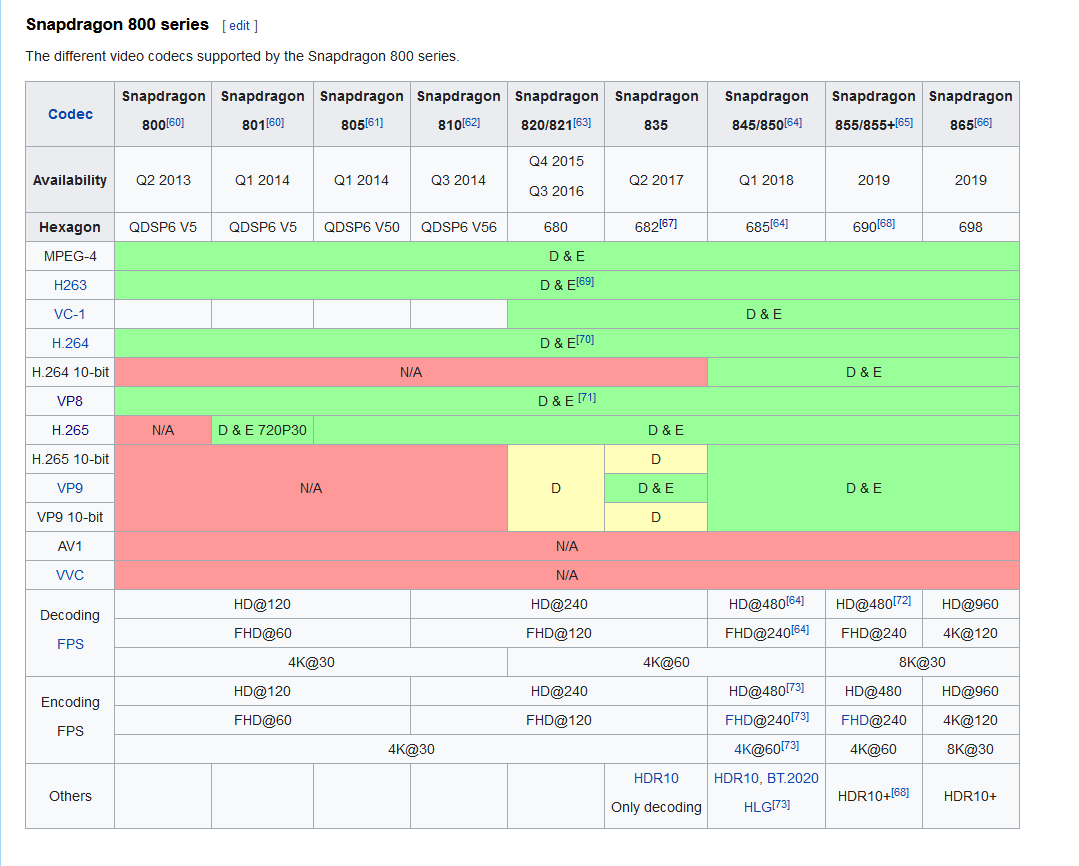
also with regards to video format, quest 1 is snapdragon 835 https://nyanpa.su/i/xAp01PRU.png
 bold ibex
Ah awesome, thanks
Will probably encode to h.264 anyway, just purely cause of how ridiculously small I can make things without ruining the quality
usually a pretty safe bet
dusk sapphire
i'd argue hevc/h265 has better quality/compression ratios but a lot of pc users don't have hevc extensions installed so unity cant play them lol
bold ibex
Haha yeah, in terms of compatibility it's not often I have any issues with H.264
Finally got a few ideas for stuff to make, so... might as well while I'm off work, right?
bold ibex
bold ibex
does sabrecsg work with vrchat worlds
idk if it works
trying to test it just sends me to my home
Anyone knows how to make it so if I click a button, an object will be teleported there?
Working on a Beerpong table and I want to make it so if it goes out of bounds, it teleports to its spawn point
 wise thorn
Wip
bold ibex
ok its not even sabrecsg that kicks me out
i tried with just a floor and build and test kicks me out on load
to my home
random owl
https://github.com/oneVR/VRWorldToolkit/releases
Import this and check VRWorld Toolkit > World Debugger
 tidal ridge
@bold ibex You can usually get away with copyrighted music. According to the ToC, VRChat could take down your world; but they’ll only do so if the copyright holder flags it. In practice, this has almost never happened. The likelihood that a record label would know, care about, or even be able to find your world is next to none.
Hell, a good portion of the avatars & worlds are based on copy-written content (games, shows, OC’s used without permission).
You’re hardly the first person that they’d come after.
 bleak vault
What shader is the best for making worlds?
near escarp
Standard
bleak vault
Even in case of looks?
 warm fjord
 coarse zinc
I saw a great kitchen in the sky. It was full of toasters.
coarse zinc
I saw a great kitchen in the sky. It was full of toasters.
I swear that's the best thing I've ever read in my life
 modern wyvern
Can someone plz tell me how to fix a brush in unity c.cause it’s doing this like stretching
 viscid elbow
hi. I am trying to use vrc_MidiNoteIn with my keyboard. Does anyone know how to get this working?
 analog leaf
Anyone ever get a bug with unity where you can't select materials or the textures directly? Clicking "Select Material" yields nothing now, and my console is completely empty when doing so.
 chilly trellis
Im startin up a project rn, but can anyone help me with somethings? I dont know how to make things pick up-able, i dont know how to use colliders, and there might be other things in the near future. but can anyone help me out?
Also how do i start the project?
desert python
@chilly trellis to add mesh colliders, click on the mesh and go to add component and type in “mesh collider”
to make things pickupable in sdk2, i believ you do the same but this time type “vrc pickup”
dusk sapphire
pick ups require the vrc pick up script, as well as a rigid body and collider
ideally you want to use simple colliders for your pick ups like box colliders, but if your mesh is complex, you can use the mesh collider but do check the Convex checkbox to simplify the mesh, as complicated meshes can be expensive and cause issues on pick ups especially.
if you want pick ups to be sync'd with other players, you need vrc object sync script as well.
chilly trellis
anyone know how to make working pens? i have the obj just not the particle or whatever the ink is.
dusk sapphire
are you using a prefab?
chilly trellis
hm?
dusk sapphire
the pens, did you get them from a package?
dusk sapphire
unless you really want to make one yourself, its easier to just drop in a package
qvpens are a popular choice https://booth.pm/en/items/1555789

VRChatのワールド用のペンセットです。 消しゴム機能も付いています。 Quest向けマテリアルに差し替えた場合はTrailRendererのWidthの値を0より大きい値にしてください(0.005など) 完璧に同期が取れるというわけではなく、速めにペンを運ぶと同期が取れにくくなります。その場合はゆっくり書くなどしてください。 Presentation RoomなどのようなLate Joinerへの同期は取れません。 デスクトップモードの人が書いた文字はVRモードに比べるとあまり同期しません。 ※ExMenu用最小限アセット ExMenu(拡張メニュー) (
requires standard assets from the unity store first
dusk sapphire
you can just replace the model
dusk sapphire
first one
this requires standard assets so make sure you install that first https://assetstore.unity.com/packages/essentials/asset-packs/standard-assets-for-unity-2018-4-32351

Get the Standard Assets (for Unity 2018.4) package from Unity Technologies and speed up your game development process. Find this & other Asset Packs options on the Unity Asset Store.
chilly trellis
the first one will work for both quest and pc right?
dusk sapphire
eh, i wouldnt recommend these for quest but i believe the second download is materials for the quest version
void bison
Hello, for an active game object, can we put more than 2 receivers? because when I put more than 2 and that I test in game, only 2 are counted
 stable tulip
@modern wyvern Did you scaled your terrain in Transform Component?
 nocturne crown
does anyone know how to add vrc world to your world? everytime i use it, I cant upload my world because of a object not a reference to an object error
 ocean sapphire
dose anyone know how can l make sound proof rooms for VRChat as l need help with that ping me
 ruby sonnet
i keep getting booted to the VRC home world instead of the one i have made. why does this keep happening?
dusk sapphire
ruby sonnet
i keep getting booted to the VRC home world instead of the one i have made. why ...
install https://github.com/oneVR/VRWorldToolkit and check for errors, it'll spot common issues that cause this such as duplicate pipelines in your scene
ruby sonnet
ive also got this:
68% of the textures used in the scene have not been crunch compressed. Crunch compression can significantly reduce the size of the world download. It can be found in the textures import settings.
ruby sonnet
im still getting booted to the VRC home world.
idk what the hell is going on so im just leaving the debugger here if anyone can help
dusk sapphire
do you have any errors in your console?
ruby sonnet
idk
this is the only thing that comes up
Cannot add menu item 'VRChat SDK/Utilities/Clear Cache and PlayerPrefs' for method 'VRC_SdkBuilder.ClearPlayerPrefs' because a menu item with the same name already exists.
ruby sonnet
random owl
What's the world id?
how do i find?
random owl
Select your VRWorld/scene descriptor and copy the id from the pipeline manager next to it
ruby sonnet
wrld_a848f459-dad5-4139-bf80-c7b5fb24f399
random owl
You are using the wrong version of unity
ruby sonnet
sdk wouldnt work on 2019 version for me for some reason ._.
random owl
Well 2019 is also the wrong version
VRChat
This page lists the current Unity version you should use when creating content for VRChat, as well as links to the correct version for both Unity Hub and direct downloads. Current Unity Version The current Unity version in use by VRChat is Unity 2018.4.20f1. Ensure you are using this precise versio...
random owl
The page I linked has everything you need to know
void bison
Hello, I would like to put a sound that triggers in the world for everyone when a player connects to this one, it works, but the sound in question is repeating in a loop, however I put on OnPlayerJoined, I would like the sound to run only once, can someone help me please?
void bison
So even if I put it locally, will all players still hear the sound?
In fact it's good I found, it was not the local that was the problem, it is the fact that it is with a Youtube link, when it is a direct source no problem, but with the Youtube link its repeats itself over and over again, it looks like the trigger does not support youtube urls, weird
@dusk sapphire but thanks anyway !
bold ibex
i just uploaded a world and it ends up being a infinite load loop, how do I fix this?
void bison
Hello, I added a trigger with the OnPlayerLeft event, but the event of this one fires when a player joins, can I explain to fix this?
 cloud niche
When I go to check the box saying "Force non-vr" when building and testing, it still launches in VR. I have no idea what to do
random owl
In the sdk setting set the client path to point directly to the VRChat.exe
 lost breach
I know this is the wrong channel, but where is the #worlds-sdk3 channel?
 peak urchin
So uh, any reason the Builder tab of the SDK Control Panel is blank for me? This is a world I upgraded from 2017 and it's already been published previously
random owl
That usually happens when a file in the sdk "corrupts" you can try re importing the sdk but I can't guarantee it will fix the issue, I can also send you a dev version of my world tools which includes a one click fix for that without reimporting.
Just ping me if you want the latter option and I'll package it and dm it to you
void bison
Good evening, do you know where I could find a password prefab with a keyboard attached?
void bison
hello, my research is still relevant if ever, thanks in advance!
 copper quartz
Anyone know of a good guide to sounds for worlds?
dusk sapphire
void bison
hello, my research is still relevant if ever, thanks in advance!
this maybe? https://booth.pm/en/items/1737416

★2019/12/24★ フォントが適用されていない不具合を修正したver.1.01にアップデートしました。 お手数ですが、再ダウンロードをお願いします。 VRChat World用ギミック PasswordLockSystem v1.01 ◆なにこれ 内側の部屋からパスワードを設定することが出来るやつです。 内側でパスワードを打ち込み、同じパスワードを外側から入力することでオブジェクトを出現させることができます。 待合室でグループごとに集合したり、謎解きの問題を出し合ったりする時に使えるんじゃないかなぁと思います。 ◆unitypackageの内容物 ・EventSystem
chilly trellis
how do i create a teleporter to a room?
chilly trellis
also how do i make a button for a mirror
 safe gust
I'm having touble of making my world?
GitHub
A somewhat complete guide for creating your very own room for VRChat - rikeri/vrchat-room-tutorial
I try to fallow the steps but it's a bit outdated.
 green ruin
Haha look it's Nanachi
void bison
@dusk sapphire Hi ! sorry for the late reply I just got home from work, I test what you sent me and I tell you that, thank you in advance for looking it's nice!
bold ibex
i keep getting the error, Cannot add menu item 'VRChat SDK/Utilities/Clear Cache and PlayerPrefs' for method 'VRC_SdkBuilder.ClearPlayerPrefs' because a menu item with the same name already exists. what does this mean?
it shows up in console whenever i import the sdk
random owl
It's normal just ignore it
VRChat is just defining the menu item in two places for whatever reason 🤷
bold ibex
wack, ty
 glossy vapor
how do you measure how big the world is going to be compared to the player?
near escarp
sample avatar in the SDK
 heady jewel
you'd have to find an appropriate sized avatar first to compare with then use that maybe? idk i dont make worlds but it seems sensible to me
heady jewel
near escarp
sample avatar in the SDK
oh yea i sed that but with more words
stable tulip
Open VRCWorld object and add player mods component and then add a new mod called Jump
random owl
UI Menu should be
Or UI can't remember out of memory atm
https://github.com/oneVR/VRWorldToolkit/releases
You can also import my world tools to get this nice information message in your mirror editor 😉
bold ibex
thanks @random owl
 hazy pebble
How do I publish my avatar as a new avatar? (I'm updating to 3.0 and I don't want to mess up my 2.0 published version)
hazy pebble
Thank you so much, will do!
 craggy dragon
would anyone know how to help with my issue? ;w;
ive been fighting with it for days... i have no idea how to code in unity either...
 rain shadow
@craggy dragon Whats the issue?
If its just that error you can ignore it
unless its actually causing broken behavior
craggy dragon
wont allow me to publish... it keeps me frozen at the screen where you name the world and such
ill let it run for a few minutes and nothing will happen. ill try again tho just in case
well it seems to be working this time. hopefully it works when i update it. thanks ^^
 tall trail
I'm trying to upload my first world but when I click "Build & Publish for Windows", it future-proofs my content for a bit, but when the screen for entering the world name and stuff should come up, it doesn't, instead I get an awkward camera view of part of my world, both of the musics play at once (they are in separate regions I've extensively playtested the world and got it how I wanted it) and I can only zoom in and out of that view as if it were an image. Like so:
That's what I see instead of the world naming screen
rain shadow
Find any cameras in your scene and make sure the depth is 0
Also you should just disable future proof publish in the sdk settings
copper quartz
Anyone got any good methods to simulate grass other than using terrain?
 errant beacon
Lights in Source are automatically free to render (baked, as long as they aren't named/spawnflags aren't set), wheras in Unity you'll have to set all of those to Bake manually
 hallow yacht
bro idk what that meansd
i don't own the source engine, it's like $25 to use
i lied
errant beacon
If you have any Source game, you already have the Hammer editor lol
You only have to buy the Havok license if you want to sell a Source game, and even then the Havok money isn't going to Valve
hallow yacht
i really dont know how to use the hammer editor
near escarp
there's plenty documentation and tutorials
errant beacon
^
that said, you could also try porting over a much more simple map to try and figure out the process first, if you don't want to start using Hammer
in TF2's case, something like Itemtest
hallow yacht
i got this
 junior glacier
Does the 'OnParticleHit' Trigger not trigger if it is hit by a subemitted particle?
 tender crow
out of curiosity is it a bad idea to use higher quality images for textures(Floors, counters, paintings etc.) for a vrchat world? I'm not sure if all the worlds I go to use low quality textures as a performance necessity or by choice, and wanna know if I should be looking for lower quality texture images
errant beacon
You can use higher quaility textures but it's definitely a performance and filesize thing lol
also note, crunch compression is great for filesizes but it'll still load the full-size texture in memory
for PBR (in my experience anyway) would probably recommend lower image resolutions (at or lower than 256) for color/albedo maps, and higher (512ish) for normal maps, in my opinion
dusk sapphire
it really depends after all
if your texture's are highly stylized resolution might not have as much of an impact vs something pbr
errant beacon
good point, haven't really worked with anything besides PBR stuff lmao
tender crow
hmm, looks like I have a lot of research to do on texturing. For now, matte colors! Appreciate the help my dudes
bold ibex
Alright, got an Issue. I uploaded an world a few months ago and reuploaded It today at 1.33 AM.
The old world/name Is uploaded and not possible to enter while the new Information of It Is replaced with the old one. Any Ideas?
tall trail
I got my first world uploaded yesterday but I'm confused as to if it is actually gonna show up in searches. It says I don't have enough trust for labs, but I thought that if that was so I wouldn't be able to upload at all?
random owl
You can upload private worlds even though you don't have enough trust to use labs yet
random owl
bold ibex
Alright, got an Issue. I uploaded an world a few months ago and reuploaded It to...
I'm not really sure from your description what the actual problem is?
You are uploading to the same world id but can't change the name/description?
Gonna need some more details on what your steps are and what is fully happening
 onyx leaf
Does anyone know if the one community lab 1 new world a week restriction gets lifted a week after your last world was published? or is it lifted on a certain day of every week at the same time?
 merry oxide
 peak shell
anyone know how to make animations that play on a chair effect an sdk3 avatar?
 opaque chasm
hmm one of the vrchat patches made it so my audio doesn't sound global anymore, instead it's coming from a specific direction (where the audio source is
and i want it to just be global again
desert python
sounds like you need to set it to 2d miss
desert python
correct maam, and make sure the bubble is set to custom and the min and max are the same, covering the whole map miss
remember: the definition of spatial blend is super botched in unity, and will work differently thn expected
opaque chasm
okay so i put down the spatial blend down to 2D and min max both to 60 at the bottom
hmm it was working fine before as 3D all the way up tho, i never touched that
desert python
it probably defaulted to 2d, and all the sudden it mustve changed nd realized it was 3d
 tardy wadi
So I have a question.... is there a prefab or starting point that anyone has that allows you to display a twitch chat in world? Just to display the IRC text stream?
opaque chasm
so what i did was enough yah?
tardy wadi
Read only is fine... I just want everyone to see the chat inworld
desert python
@opaque chasm should be, if it still acts stupid, make sure spread is at 360, and make the bubble very big
@tardy wadi iicr, thats technically an illegal concept
tardy wadi
kk Just wanted to know if that was something doable. Thanks @desert python .
desert python
the best you can do is stream on one video player a stream overlay using a faster stream service (may no work in sdk2) or just stream the whole stream like most people do
tardy wadi
Well I'm working on my TV set and i'm looking for an easy way to have show guests see the chat.
I can throw up a VR overlay but i was just looking for a mutual display
desert python
could also make a quad with the uvs cropped on the chat right. and put that in tyhe world so when you stream, itll so the chat. but ofc, the latency for twitch is swollen, so id use a faster stream servic (may not work in sdk2)
tardy wadi
right
the problem is i'm trying to keep complexity down, so I wont bother for now. That would mean that as I stream I would be running one stream to capture chat and deliver that in world and then an actual stream for my talkshow and that's to many points of failure. Thank you for the advice though @desert python
desert python
very fair, but would be epic tho
tardy wadi
IKR?
 uneven crescent
how do i update an existing world im so confused
tardy wadi
Have you updated your project already?
tardy wadi
@uneven crescent So If you are using the same project that you used to upload the world originally you should be able to go through the same steps and it will upload in place. If you are using a totally new project folder you would need to log into your account to get the world ID to manually set that so it replaces the original world.
uneven crescent
when i go to build and publish and press upload nothing seems to happen
desert python
@uneven crescent you have to wait for it to loa
uneven crescent
alright
uneven crescent
i waited after clicking upload so i dont think thats it
not sure im doing this right
desert python
elaborate
 lone mural
Excuse me. I can not World upload. help and advice. I can not Click.
dusk sapphire
do you have any console errors?
random owl
lone mural
Excuse me. I can not World upload. help and advice. I can not Click.
You have the play mode paused right now, you should also disable Error Pause in the Console and change Aspect Ratio
 vale sigil
Im making a puzzle where you can “mix” potions to activate a animation to spawn a potion and when click on it it removes a game object. I have it working when you do it right but if I were to reset it the animation bugs out
 full sentinel
So I'm currently trying to upload my first world but I keep getting the following error:
NullReferenceException: Object reference not set to an instance of an object
VRCSDK2.RuntimeWorldCreation.Start () (at Assets/VRCSDK/Dependencies/VRChat/Scripts/RuntimeWorldCreation.cs:82)
 storm socket
hi so I only have experience with setting up world scenes in unreal engine, can I add the 3D models to a scene in ue4, export it, and import it into unity to do the final tweaks and such?
 warped idol
hello, yesterday i was trying to build a world in sdk2, and earlier that day i was able to do a toggle button for the mirror, and was able to privately upload, but later that day, i would get lots of trigger on [object] was not initialised in time kind of errors along with a null reference exception, i tried following online tutorials and videos steps by steps even from a fresh reinstall on and it would still throw this error, im at a loss for what next to try. help?
random owl
Yeah those errors are normal they will always happen
random owl
full sentinel
So I'm currently trying to upload my first world but I keep getting the followin...
https://github.com/oneVR/VRWorldToolkit/releases
Import this and check VRWorld Toolkit > World Debugger
warped idol
not sure why but now it uploads, so do i just ignore the nul reference exception and the not intialised in time erros? cus theyre red.
these are the worst kind of times when it works, because i dont understand why it works now
random owl
warped idol
not sure why but now it uploads, so do i just ignore the nul reference exception...
The errors are normal and are caused by the triggers logic not existing in editor in game it will exist any sdk2 world by default will get them for every trigger in the world
 long canyon
Hey all, I'm looking for a little help! I'm creating a world for my friends and I to hang out in, and when trying to upload, I fill out the basics, World Name, player limit, etc, but when I hit Upload, nothing happens? There's no error, just let's me press it with no response. Any ideas?
long canyon
desert python
@long canyon unity version?
long canyon
Unity 2018.4.20f1
desert python
clear the pipeline manager and import vrcworld toolkit and see what it says
long canyon
vrcworld toolkit?
random owl
long canyon
vrcworld toolkit?
https://github.com/oneVR/VRWorldToolkit/releases/
Import it and check VRWorld Toolkit > World Debugger from the top bar
long canyon
random owl
https://github.com/oneVR/VRWorldToolkit/releases/
Import it and check VRWorld To...
How do I import the Zip?
random owl
long canyon
How do I import the Zip?
From github you almost always want to download the unitypackage
random owl
You didn't click any autofixes before taking the picture? 🤔
long canyon
only lighting ones, other thanthat, nothing
random owl
Try to build & publish again and take a non cropped picture after trying to hit upload
long canyon
Seems to be working now, I guess it was a lighting issue with the skybox
Still have these though
random owl
Those are just because the other uploads failed
bold ibex
Is it better to build your world in blender then move it to unity?
 dapper shadow
Hello could someone help me please, I am brand new to making a world, I have an issue with the VRC_Trigger. I am trying to add interaction text to a button which toggles a mirror, simple, but it doesnt seem to be working.
Am I even doing this right lmao?
dusk sapphire
whatever your trigger object is, make sure it has a collider with is Trigger checked
dusk sapphire
yes
dapper shadow
I just tried still no text showing up
dusk sapphire
are you able to interact with it?
dapper shadow
Yeah the button works fine
dusk sapphire
oh huh, that's weird, does it just say Use or nothing at all
dapper shadow
It says nothing at all
dusk sapphire
oh, do you have anything in front or behind the button that's transparent? transparent objects might "overwrite" that text
dapper shadow
No nothing in the way
dusk sapphire
also, there is a setting in the menu i believe for this, you might just have it off
dapper shadow
Which setting
dusk sapphire
"show tooltips"
dapper shadow
Oh wait ivrc?
I think i remember disabling that for some reason lmao
Ill test that now
dusk sapphire
yeah
dapper shadow
Well now I feel DUMB lol
When I saw that setting in vrc, I thought it meant like help tooltips -.-
dapper shadow
I have another question, the tutorial im following says to put a newly created material onto the material part of a sprite renderer for an image on a wall, on the video it makes the lighting interact with the photo, but for me when I do this it completely disappears
bold ibex
random owl
Gonna need some more details on what your steps are and what is fully happening
I solved it, the Issue was the SDK file had to be re-imported so I just deleted the plugin & Imported it agin which made it work.
Thanks
Is there any website where I can find things for Unity?
For example browse around after created items
vale sigil
bold ibex
Is there any website where I can find things for Unity?
For example browse aroun...
Sketchfab if you want props and items
 brazen adder
hi! im looking to make a zero gravity map but i havent seen any tutorial or prefab to learn more about it, does someone knows how to achive that? (plus the idea is to use the climbing prefab to grab to the walls)
bold ibex
How do I make a join audio that plays once for every player joined to everyone
errant beacon
you don't, preferably lol
that said, I'd recommend looking into syncing, https://docs.vrchat.com/docs/vrc_objectsync
VRChat
Used to sync transform values of a game object as well as animations using animatorsActions available via TriggersRPC's are available via the SendRPC action
 frail heron
Anyone know how to fix this pop up. trying to work on world but can't find a fix for this?
random owl
From that message it seems that you downgraded your project from sdk3? Even if not you might wanna double check what scripting define symbols your project has set.
frail heron
@random owl so mine has this for some reason?
random owl
Yeah
frail heron
ok
so now it's looking for udon files even though this project doesn't use udon in it? @random owl
random owl
Ahh yeah you need to also remove the UDON one peeking at the end of it
In the scripting define symbols
frail heron
the smallest things cause thi biggest issues haha
@random owl ok it is all good now. thank you 👍
random owl
No worries
 hidden wolf
Hi, does anyone here know how to limit voices to a certain room in SDK2? I'm guessing it has something to do with VRC_PlayerAudiOverdrive
lethal moss
If the room is seperate, it's usually far away enough from other rooms that voices cant be heard with normal voice range.
 eternal bluff
I played this game with my friends a lot, and we were working on a world project, like a home for us, yes that sounded sweet but my pc got viruses a few days after that, because it's a ransomware so i cannot do anything except reinstalling my Os, twice.
After i reinstalled my Os (windows 10 x64), all the files stored in documents included the unity files are gone. I tried to use 3rd party data recovering software like EaseUS, Crashplan, Polygon, etc. but it seems all the old data were gone.
Can anyone know how can i get this back? even it just the file models, textures, anything so that me and my friends can start the project all over again with the old assets, because we put most of our time on the assets.
 short gulch
I hate to say it but you can't really get your stuff back from the vrc devs unfortunately 😕
My advice for the future would be to invest in cloud storage or maybe even a repository so you know everything is secure.
warped idol
i found the send rpc add URL trigger for the vrc video sync player, but i am unsure how i would enter that url at runtime. so my question is: what tools or workflow do i need to get my video player run urls that are entered by the user at runtime
bold ibex
How would you make a mirror that fades as you get farther away from it?
 wintry oriole
Hello, I'm making a world that I was able to get a rotating skybox working in Unity, but during testing the skybox isn't rotating. I made a C# Script to make it rotate, seems to work fine, but, yeah. Test is a no-go. Any possible world makers who have a rotating skybox have any pointers? Been trying to get this to work for the last week and this is the farthest I've gotten lol (So close)
errant beacon
You could try making it rotate using Udon/UdonSharp instead of a direct C# script, maybe? o:
dusk sapphire
yeah you cannot use c# scripts directly in vrchat, but for sdk3 worlds, there is udonsharp which transpiles from c# with some caveats
if you need it to be in sdk2.. you could probably just modify the skybox shader itself for the rotation if its just constant
void bison
Good evening, I would like to put a sound emitter on my map, in 2D on only one area and not the whole map, my concern is that the sound in question is heard on the whole map, do you know what parameters should I make for correct that please?
wintry oriole
Darn it. Lol Alright, thanks for the advice nonetheless!
near escarp
void bison
Good evening, I would like to put a sound emitter on my map, in 2D on only one a...
If it's 2D, it's 2D. If it should only be heard in an area then you should enable and disable that object locally when entering/leaving that area
void bison
Ok so that's what I thought ... and another question, would it be possible one day to put more than 2 active objects in toggle?
dusk sapphire
what do you mean? you can put as many objects as you'd like
void bison
Not in toggle, on toggle it's only 2
dusk sapphire
are you refering to the toggle operation in SetGameObjectActive or SetComponentActive?
void bison
GameObjectActive
dusk sapphire
you can most definitely add more than 2 https://nyanpa.su/i/q7Mu1av4.png
 void bison
Yes, but only 2 will be taken into account, trial in game you will see
dusk sapphire
I am pretty certain they work, otherwise I would have broken worlds
void bison
I guarantee you its not working, I tried 1000x
dusk sapphire
I don't know what to tell you. I have worlds where I use toggles on more than 2 items at once and they have always been working perfectly fine
tardy wadi
So I don't know what I'm doing wrong... For some reason a volume control just breaks on me and follows my control stick
is there something I'm missing?
dusk sapphire
turn navigation off
 frigid thicket
why does it keep saying this? I have a VRC_SceneDescriptor. Its constantly saying this when trying to test it.
hold up, I think I found the fix
Okay, it works now :/
ruby sonnet
so my world is public, but it enables the mirror for everyone when someone else clicks it. how do i make it client only?
this is the issue and i dont know how to make it client sided ._.
i may have fixed it
lethal moss
change AlwaysBufferOne to Local
frail heron
So i'm trying to compress some image files, but i don't have the confirm button anymore?
random owl
Does that happen if you make a new completely empty project where you just import one texture in?
frail heron
@random owl no it works in a new project for some reason
random owl
Does it work in the original project if you restart unity and go check the settings without touching other things?
frail heron
it doesn't i tried that
not sure if it's a script error or not cause i'm not seeing any prompts
random owl
More likely some script overwriting some styles causing that to happen
I can't name any of the top of my head though
frail heron
do you know if i compress the image in one project and transfer it to another if it will keep the edit?
random owl
You can zip up the project folder and send it to me and I'll have a look
Well if you export it in a unitypackage yeah but that's a lot of effort for something that should be just fixed more preferably
I would also prefer to know what causes that for future reference
frail heron
@random owl so i found this.
random owl
Hmm
Is that the latest version of probuilder from the package manager?
I don't think that would be really related
frail heron
so it wasn't that. i put in project that worked, and it still good
random owl
Yeah there would be a lot more people having that problem if probuilder caused it
Since it's more likely just the matter of styles being overwritten you most likely won't get anything in the console
frail heron
dam
random owl
I can't say much else without knowing everything that is in your project 🤷
frail heron
i'm making a package now @random owl
ruby sonnet
yea so my world basically randomly warps u back to the world spawn. how the hell do i fix that?
desert python
@ruby sonnet can you elaborte
ruby sonnet
like
you join the world, it works fine. then at the most random point it just warps u back to spawn
desert python
thats weird, what does the scene look like? is there any teleport player objects?
ruby sonnet
and no. its just spawn and the world. it just boots u back to spawn randomly and its confusing
desert python
odd
random owl
@ruby sonnet is the random point below the respawn height set in the scene descriptor?
ruby sonnet
i dont believe so.
but where is random point located? im having trouble seeing shit today
 white bison
Trying to make my world using probuilder, but... when I made it, I didn't make everything perfectly square (like in units)
so now things won't line up completely "properly" or whatever, should i just restart...?
kinda just seems too far gone :/
desert python
i mean, you could keep try to fit the seems. itd be nice if unity had a constraining tool of some kind
but unity isnt technically for modeling
white bison
i.e this issue here
Just seems hard to make multi-story worlds properly, like how do you make everything line up perfectly?
and what about when you add stuff on?
guess ill just restart
desert python
try blender or a extrusion program of some kind
 meager garnet
anyone know how to make a pickup have a button, like if I were to put a light on something but only have it toggle on/off but ONLY while somebody presses a trigger while they hold the pickup
@ me if ya know
dusk sapphire
white bison
Just seems hard to make multi-story worlds properly, like how do you make everyt...
you can use progrids with probuilder which lets you do things like snap to grid based on adjustable distances etc which should make lining things up a bit easier
https://docs.unity3d.com/Packages/com.unity.progrids@3.0/manual/index.html
dusk sapphire
meager garnet
anyone know how to make a pickup have a button, like if I were to put a light on...
on the pick up object, set auto hold to yes, then add the triggers OnPickUpUseDown and OnPickUpUseUp which will fire when someone presses the trigger and lets go while holding it
white bison
dusk sapphire
you can use progrids with probuilder which lets you do things like snap to grid ...
How good are you with progrid/probuilder?
dusk sapphire
I don't really use it, but did some prototyping with it and progrids a while back
but having snap to grid certainly made things a lot easier
white bison
What are the best shaders to use for worlds?
dusk sapphire
Standard is the usual way to go
meager garnet
dusk sapphire
on the pick up object, set auto hold to yes, then add the triggers OnPickUpUseDo...
cool, thanks a ton
but im running into a maaaajor issue now with some other stuff, hell i might even need a moderator or somebody who knows world stuff well as I'm very unsure why this is happening NOW and never before
there's a shader I'm using for this plugin called MTree. Basically it allows somebody to generate their own trees with a bunch of elaborate settings and transform those builds into prefabs to place all around a map. They even come with LOD.
I've used the plugin since about early 2019, and I've uploaded TWO worlds which both utilize these trees. I'm heavily remaking an old world of mine, with insane optimization with baked lighting and a lot more features and stuff. But the ONLY issue with it now, is the trees, and their reaction to a directional light. In the editor they look like this:
but i hit upload, and all of a sudden they look like this ingame.
for whatever reason, vrchat is entirely ignoring any directional light shadows for the shading on the trees, this never happened before and I have no idea why it's breaking all of a sudden. I get this EXACT same effect if have "Recieve Shadows" toggled off on any of the affected meshes
and it's only on this shader, I did a test with standard shading, and the shadows work fine.
I have no idea why it's breaking now, as it worked 100% fine about a year ago. I tried updating the unity package from the asset store and everything, nothing. Static settings do nothing, even with baked lightmaps turned off.
I have jsut one guess though- this shader does move slightly, MTree uses something to move their trees around to emulate wind through their shaders. THat's all I can think of.
But, the crazy shit is that I have two worlds currently uploaded that I can look at right now, which have this exact same shader, one with the exact same material even, and they look the same as they do in the engine.
TL;DR: the shaders of MTree for some reason ignore directional light (and possibly all lights) shadows in VRChat exclusively. This didn't happen before, and is only a problem when the world's emulated in VRC. Any word on shadows breaking with semi-custom shading, or am I alone here? Or is there an argument/edit I can make to the shader file to fix this?
i know there's a lot of deets but if there's any info i can get for fixing some weird problem like this please @ me
hell if I need to I can pastebin the shader code or something if somebody needs to look at it
i reaaally want to get this shader working again because it looks spectacular and sacrifices next to no performance compared to other methods of making trees look lifelike
void bison
dusk sapphire
I don't know what to tell you. I have worlds where I use toggles on more than 2 ...
Hmmm weird, what SDK do you use?
dusk sapphire
the latest
void bison
Yes, 2 or 3 ?
dusk sapphire
I mean.. triggers are only on sdk2
void bison
Han okay i see
 minor ocean
Does anyone know why my walls keeps dissappearing like this? x.x https://gyazo.com/885222fa52f8847c8f56e1fb68df92aa
desert python
@minor ocean you have occulsion culling son?
minor ocean
how do i change how sensitive it is?
desert python
occulsion bake settings
minor ocean
okie, thanks!
 viral oak
I made a simple world with SDK2 and I got into the world in VRChat and four problems; I can't move, I can't jump, I can only move my camera angle up and down, and my quick menu only stays for a second once when I'm in the world. How would I got about fixing these issues?
This is in the Hierarchy tab
And this is in the VRC_Scene Descriptor
errant beacon
Add a VRC_PlayerMods component to the world to enable jumping/running, and make sure the spawnpoint isn't inside something
random owl
You have your respawn height set to 1
So the world forces you to continually respawn assuming you have your floor at y 0
viral oak
My floor is at Y 0
random owl
Yeah so you should have your respawn height below a place you want to stand on
viral oak
So I should set it to a negative number?
random owl
Yes the default is -100
viral oak
Okay, I added playermods (jump, voice, and speed), moved the GameObject that I use as spawnpoint, and changed the spawnpoint to -100 and everything works as it should
errant beacon
ayy c:
meager garnet
meager garnet
i reaaally want to get this shader working again because it looks spectacular an...
figured out all this shit from before. Somehow reimporting the entire package for MTree worked out. I guess VRChat was reading something differently that wasn't showing up in Unity??? never seen a shading issue like that before- typically it's visa-versa, where unity has an issue but vrchat does not.
glossy vapor
Why are my mirrors so blurry even though i've enabled everything on the reflect layers
errant beacon
I'd recommend turning up the resolution of your mirror, enabling all the layers just makes the mirror much more expensive to render
glossy vapor
glossy vapor
Why are my mirrors so blurry even though i've enabled everything on the reflect ...
Actually allow me to rephrase, it's not very blurry, but you can definitely still see the pixels
errant beacon
Is it a dropdown, or a textbox? o:
if it's just a textbox, you could just manually type in 2048
errant beacon
You could try setting it to Auto to see if that helps? assuming your VR headset's resolution is higher than 1024
glossy vapor
Yeah
I've set it to auto and I can see the difference, I'm just wondering if it'll be different for other players?
errant beacon
Auto will set it to whatever that user's headset resolution is, as far as I know? o:
Rift DK1 or something would be quite low wheras someone with an Index would have a much higher resolution mirror, etc
glossy vapor
Alright got it! Thanks.
errant beacon
yw! c:
glossy vapor
How do I get it so that the mirror won't be visible when players join
In other words disable it
but they will be able to activate it with a button
errant beacon
SDK2 or SDK3?
glossy vapor
SDK2
errant beacon
https://vrcat.club/threads/basic-button.491/ might help! c:

VRCat: Community-Run VRChat Forums
This is how to create a basic button inside vrchat.
prefab:https://vrcat.club/threads/simple-button-prefab.489/
1.you will need a 3d object that the...
in your case, OnInteract would toggle the Mirror gameobject, and it should be local only
glossy vapor
I know that, but how do I have it disable when you first spawn in?
errant beacon
Disable the gameobject in Unity before you upload I think? There should be a checkbox to the left of the gameobject's name in the Inspector
random owl
Yeah just literally disable the gameobject
 gloomy cipher
im trying to test a world but i cant get the build window to come up in my unity project.
ive redownloaded the 2020.12.09 package twice and im using unity 2018.4.20f1.
any thoughts, or something im missing?
random owl
As in you press the control panel button but it doesn't show up?
gloomy cipher
yep
i stole a working sdk from another project (v2020.4.3), but it might be a bad file in the newest sdk/ bad upload
something to look into
random owl
Well the first would be to check if there's errors in your console with the other sdk
gloomy cipher
there was one, something about the clear cache and playerdata existing
random owl
That one is normal
This is the main thing that comes to mind with your description but since you said it works with another version it's not as likely that it would be the actual problem
gloomy cipher
it may have been bakery/autosaver i had in the project
i forgot how annoying that could be
 gleaming terrace
In Unity my Post processing Settings are good, But when I go to test them, all my bloom is completly gone, reason behind this and how to fix?
random owl
Did you set the reference camera in scene descriptor?
gleaming terrace
I did not let me try that
gleaming terrace
random owl
Did you set the reference camera in scene descriptor?
Thank you very much!
 toxic fulcrum
I'm trying to create a mirror that is transparent aside from the avatars in front of it. I've tried messing with the Reflect Layers of the script... and I've even tried making a camera/rendertexture version but can't seem to get the alpha working on either.
Anyone have any ideas?
near nova
any tipps or maybe even experience with working with Unity terrain in VRC for quest, and how to make it stable and get the worlds under 50mb ? still having functions etc.
lethal moss
toxic fulcrum
I'm trying to create a mirror that is transparent aside from the avatars in fron...
You can do it with a camera and render texture. On the camera you want the Clear Flags to be solid color, and set the color to be fully transparent, moving its alpha slider down to 0. Then change the cameras culling mask to Player layer only, so it only shows the player layer, and the rest is some transparent color. Your screen that shows the cameras view should have a material with the Standard shader set to cutout (or fade i think) or any shader that supports cutout/tranparency. It will cutout everything but the player layer.
bold ibex
hey guys whenever i go to upload my world instead of bringing me to the upload screen it brings me to the game tab like i pressed play normally
desert python
@bold ibex set the main cam to display 2
near escarp
Check your console
desert python
@bold ibex i ment the main cam in the hierarchy
bold ibex
oh
near escarp
Do you have multiple vrcworld/world descriptors ?
random owl
Your main camera has depth over 0 most likely
bold ibex
how do i change that
random owl
Find the camera whichever that on you are seeing on the upload screen is and change the depth value on it
Though I'm a bit confused what your exact steps are after reading the above
random owl
-1 🤔
bold ibex
is that a issue
random owl
Just change it to 0 try to upload again and show a non cropped screenshot
random owl
Ah so the upload screen isn't even getting added
bold ibex
no
random owl
Didn't see that from your first picture
bold ibex
should i try importing vrcsdk again
random owl
https://docs.vrchat.com/docs/updating-the-sdk#sdk2
Yeah this is the rare case where I would suggest starting with that
VRChat
If you need to update your SDK, it is important that you follow these steps to ensure the update proceeds properly and you don't have any old/conflicting files. Version Control If you know how to use it, you may find it beneficial to use version control software like Git to manage your project. You ...
bold ibex
ok thx
 dusky oasis
daddy
random owl
What version of unity are you on?
What's the world id?
So you have nothing set in the pipeline manager in your vrcworld?
What kind of error?
Like what did it actually say
 silk osprey
Was it this https://i.imgur.com/JKYbaKl.png
I just got that after I changed the names, but then I noticed I Was logged out of my SDK somehow.. I'm trying again
I'm in the middle of an upload now... hoping it works this time..
random owl
There has been log out problems past few days so could be related to that maybe(?)
silk osprey
I think so, I've been noticing constantly being logged out
random owl
Apparently they did something to fix that just an hour or so ago but could take a bit before it takes effect
silk osprey
@bold ibex was in here helping me with my upload actually, the problem he describes was mine. I had originally uploaded the world and taken it down to do some adjustments and then it was doing this successful upload without appearing thing.
I can say right now, I got the successful upload notification, but it is not in my Content Manager
errant beacon
Has the world properly updated before, and have you added anything since then?
random owl
That was just server side stuff
errant beacon
could recommend adding VRWorldTools to your project and checking the errors from inside the tool then, it might not be uploading the new version
silk osprey
I think I only messed with lighting, but I did ntoice I had an empty script under a light, which I've not deleted
Also I deleted my world from Content Manager, I didn't know there was a way to update it
errant beacon
yup! If you reupload on-top of the same blueprint ID, it'll update the world
random owl
errant beacon
could recommend adding VRWorldTools to your project and checking the errors from...
https://github.com/oneVR/VRWorldToolkit/releases
You almost wrote it right 😄
That is almost never right
errant beacon
random owl
https://github.com/oneVR/VRWorldToolkit/releases
You almost wrote it right 😄
i tried to be sneaky with the edit, how dare you
lmao
random owl
But you still got it wrong after the edit 😄
errant beacon
ik rofl
also @bold ibex are you running Unity 2018.4.20f1?
random owl
They are that's the first thing I asked
errant beacon
oh pfft
then yeah, that's weird
errant beacon
lmao
but yeah, besides adding VRWorldToolkit to find world issues you could also try completely deleting then reimporting the VRChat SDK to maybe fix that?
assuming the weird update thing is actively a problem lol
silk osprey
I'll probably try that
random owl
The text file the update checker pulls from is almost never updated
silk osprey
This was my first upload and I was finally going to show it to a friend and then it wouldnt work. I thought I was going mad. haha
bold ibex
OOH. I had them in the other animations as markers but forgot to remove them
Ok so that solved the console error, but would you know why the mesh collider be moving and not the actual mesh?
random owl

silk osprey
Haven't fixed the uploading issue yet, but am trying to remove and reimport the SDK. I do have to say this Toolkit is awesome
random owl
Glad to hear, I'm working on trying to get a new version out this week
silk osprey
Thanks a lot for that, as a new user to Unity I am totally baffled by these errors and things
silk osprey
Update- removed and reimported SDK, same thing... uploaded successfully, but nothing there.
random owl
Show a screenshot of your vrcworld?
silk osprey
what specifically do you want in the screenshot?
random owl
Just the whole inspector for it
silk osprey
random owl
Press detach and try to upload again
silk osprey
ok
As a side question, I have the pendesk in my world and I get about 800 errors about them not initializing on time
random owl
That's just how sdk2 is
silk osprey
Am I supposed to fix that? They seem to work in the build and test
lol ok
GUESS WHAT
Detaching the blue print fixed it
I must've junked it up when I deleted it to fix instead of overwriting the update

Thank you, I'm so happy I found this discord.. I was at my wit's end
random owl
Glad you got it working
silk osprey
Thanks to you. I'll be using that Toolkit on all my worlds too
 vale smelt
can anyone send me a video player prefab with a URL player? I have been looking for one but i cant find one that actually works
bold ibex
Does anyone know how to fix sync issue for avatar 3.0 when one or two people dances it does not sync
 placid dagger
Hello - hoping somebody can give me a steer on something. I am looking to either create a very simple PoC myself for a small music venue for streaming performances from Twitch onto the big screen on a stage. Following on from the PoC, I'm looking to potentially commission the services of a software engineer to develop it.
Performances will consist of live music and DJ sets.
Primarily these will be broadcast on twitch.tv/deepradiolondon, from which I want to extract the stream URL and then play this on a media player in a custom world.
I'm wondering if there is something similar that I could pinch for the PoC and then customise for the first release. Depending on the level of moderation available, we could have an instance available to the public, or run ticket sales outside of VRChat, for guests to obtain their invitation.
I saw an old VRChat presentation where they were talking about extra controls geared towards stage performances. I would want to be able to have a VIP room, and a green room for performers.
During a live music event, the plan is also to use another Twitch channel to stream the first person capture of the host's VRChat character, with maybe a couple of other ones for different camera angles within the VRChat environment. I would the use Twitch Squad stream to allow the consumer to choose whether they want to just view the raw performance stream or go through the VRChat video capture. I am hoping that this Hybrid approach will entice more people into VRChat who would normally only view on Twitch.
 cerulean charm
does anyone know how to properly setup physsound on pickup objects?
 radiant marsh
I'm creating my first world, trying to figure out water specifically. I want it to be visibly purple, but it takes the color of the texture it renders over way too easily. Using Unity's built-in water4 prefabs. Any guidance on how to make it look more purple even over this texture?
cerulean charm
dont use those, ever
GitLab
Simple water shader for Unity/VRchat that (ab)uses some Unity features to get a pretty water surface.
i can't remember which one it was but one of the default unity water shaders doesn't work right in vr
 fossil wolf
Hi everyone,
Is it possible to change position of a GameObject?
I have a GameObject with multiple files inside of it,
I want to have a button to reset the GameObject to a default positon (x=0, Y=0, Z=20)
(You can move the GameObject, But not the files inside to clarify)
I have tried adding a button but I can't see anything that has like a name called "Transform Position" etc.
How can I do this?
 visual swan
what video player works with sdk2?
desert python
vsync does
visual swan
desert python
vsync does
is that the default one from the sdk?
desert python
@visual swan oh you want like a nicer vp?
visual swan
desert python
<@!694722691785031780> oh you want like a nicer vp?
just one that i can watch utub vids with
 twilit pumice
hey whenever i log into the world im making, it just sends me to my home world
 thorn latch
I'm using the sdk3 worlds thing, but couldn't find a channel. I'm trying to port a map from 3dsmax to unity
but somehow my textures go from this in 3DSMax
to this in Unity
errant beacon
#udon-general might be close? Udon's a system in SDK3, so pfft
that or #user-support-old
thorn latch
Well I figured since this is model related SDK doesn't matter
errant beacon
ah, in that case #3d-modeling
desert python
@visual swan ill send you one
 wintry ibex
Not sure what channel to put this in so let me know if I should ask this somewhere else:
I'm trying to push out a hotfix for a map I published to community labs, but the upload fails to generate a version record, saying that the version record file "is much too big"
random owl
How big is the build? 🤨
wintry ibex
the build size didnt change between updates, I was just changing some scripts and added a new included layer to a mirror. both builds are 197mb, under the 200mb warning limit
random owl
https://github.com/oneVR/VRWorldToolkit/releases
Can you import this and check VRWorld Toolkit > World Debugger from the top bar and show a picture of it
wintry ibex
but its also not referencing the build sice, its referencing the version log. at least thats my understanding of the debug message
wintry ibex
random owl
https://github.com/oneVR/VRWorldToolkit/releases
Can you import this and check V...
sure, give me a minute
wintry ibex
random owl
https://github.com/oneVR/VRWorldToolkit/releases
Can you import this and check V...
random owl
Do the top auto fix
wintry ibex
that did seem like that could be it
also, your tool found a huge texture I wasnt using that I can now yeet, so cheers!
random owl
Nice 👌
 proven pilot
I got an issue, this is happening with any NEW project i start with/without SDK in , when i do put SDK in nothing happens, i close and open and it only gives me only gives me Utilities > clear cache and playerpref
and says "Cannot add menu item 'VRChat SDK/Utilities/Clear Cache and PlayerPrefs' for method 'VRC_SdkBuilder.ClearPlayerPrefs' because a menu item with the same name already exists."
random owl
On quick look I would just say your file path is too long
proven pilot
mmm ill try moveing my unity hub folder back a bit
random owl
Can't really see anything else that could be wrong in the path
proven pilot
yeah i moved the unity stuff folders back by 2 or 3 and im not getting that errors anymore
short gulch
Does PhysSound still work for vrc?
dusk sapphire
short gulch
Does PhysSound still work for vrc?
last i checked still works for sdk2 for one of my worlds, but its not white listed for sdk3
 lost shell
I can't click the upload button on the SDK2. Nothing happens i got this errors:
NullReferenceException: Object reference not set to an instance of an object
VRCSDK2.RuntimeWorldCreation.Start () (at Assets/VRCSDK/Dependencies/VRChat/Scripts/RuntimeWorldCreation.cs:82)
Trigger on Cube (6) was not initialized in time!
UnityEngine.Debug:LogErrorFormat(String, Object[])
VRC.SDKBase.VRC_Trigger:ExecuteTriggerType(TriggerType)
VRC.SDKBase.VRC_Trigger:OnDestroy()
idk really what to do lmao it's 3 third time I retry doing everything
random owl
https://github.com/oneVR/VRWorldToolkit/releases
Import this and check VRWorld Toolkit > World Debugger from the top bar
 barren mural
Does VR Chat, Altspace or any of the other major VR social apps have a option where your world only shows up in searches for users within, say the same city of your choice? I love meeting people from around the world but sometimes I would also like to make/check out a room where I know everyone in there is likely someone I hang with outside of VR in IRL.
random owl
No
short gulch
Thanks Temporal, I'll give it a try and see. Kinda need impact sounds for cars :)
barren mural
Hmm. Straight "no" for all the popular social VR platforms? Seems like it would be a fairly popular feature. No creative way? For example the low tech way would be to simply name the room by the city or posting a private invite to the room on certain community pages that are somehow related to a common geographic location. However it would more effective if some kind of geographic filter was a option natively Within any of these apps themselves.
 robust moat
hello, so im trying to make a world using sdk2 since i dont know to much about udon, i noticed with the installer thee are all sorts of models, do i need to install anyof them like windows build support or MVSC?
 sour minnow
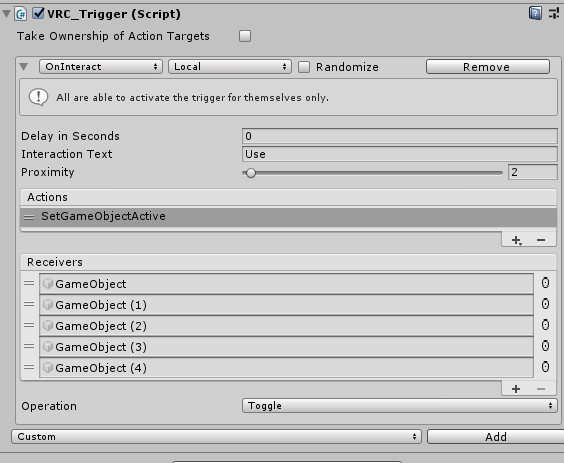
 random owl
You need to look at your console and find/solve the compile errors
random owl
barren mural
Hmm. Straight "no" for all the popular social VR platforms? Seems like it would ...
It's just a bit counterintuitive for a social app to implement some sorta geo blocking for worlds as an official feature. Like sure there will always be certain worlds that you can go to meet people from certain country which there already are a bunch in vrc, and of course the country specific communities that also exist.
barren mural
random owl
It's just a bit counterintuitive for a social app to implement some sorta geo bl...
Cool. Country/language would be the natural filter there for sure. Anyway having the option is nice because sometimes you want VR not to be a replacement for real life but a extension of it. Thats my reasoning.
random owl
It's just highly unlikely a platform will want to implement features to restrict people from content based on their country
random owl
What settings do you have in your scene descriptor?
Well I would just recheck your collider in the world with physics debugger
Yeah it's pretty old at this point
 desert python
desktop is more "still" compared to vr. if ive read correctly, it sounds like theres things that spawn above or near you that may cause to be pushed in a certain direction when you move slightly
however. ive never heard of a "home kit" before. but id assume if its for vrc that it would react normally
random owl
It's the official home kit on asset store

VRChatのワールド制作スターターキットです。ワールド作成でまずほしいPrefabをたくさん同梱しています。 サンプルワールドはこちら↓ https://www.vrchat.com/home/world/wrld_c3f3dd70-2306-4bd4-a74b-6a6ee8d5df6c あらかじめVRCSDK2(2020.08.07.18.21以上)のImportが必要です。 Package ManagerからText Mesh Pro, Post Processing, Pro Builderを導入しておくこと推奨。 GitLabで管理しているので随時更新したい方は導入してみてください。
If you don't mind a bit japanese this one is a much better starter kit
Just import the stuff in the description from asset store first
https://github.com/oneVR/VRWorldToolkit/releases
Also this which is my world tools the world debugger in it help find problems in your scene and other stuff
random owl
Welcome to vrchat content creation lol
random owl
The world above?
That can happen if you use the button inside the sdk to change between pc and android building
desert python
shaders if its happening on quest 1
need standard lite or only the vrc mirror will work
quests done exactly have the proper double rendering like pc or quest 2
correct sir
random owl
Just normal standard as long as you aren't using it with a grabpass wouldn't break rendering as long as you aren't abusing them too much
https://github.com/JordoVR/EasyQuestSwitch
Use this to maintain the quest and pc differences though

GitHub
EasyQuestSwitch is a Unity editor tool developed for VRChat world creators, it can automate changes to components within a scene as soon as the build platform is changed from PC to Android (for Ocu...