#world-development
39 messages · Page 52 of 1
 random owl
Are you testing it trough build & test? Just to make sure you aren't seeing an old version since cache is broken currently.
 lone shell
doing that ye
I know that this is the scene I currently have open tho
I put a random object in my world to indicate if its the new test or old copy
random owl
Yeah in that case it should be fine
random owl
🤔
 simple arrow
Can i see your lighting settings
lone shell
simple arrow
Try turning off bounces and prioritize view
bounces set to none
also if you have a decent GPU, try using Progressive GPU
See what it looks like after the bake
lone shell
could it be lightmap compression?
random owl
Can you select that gameobject with the problem for me and show everything in the inspector for it
simple arrow
compression shouldn't be an issue
unless you are crunching the lightmap
which you shouldn't do
random owl
Press open preview and show me how it looks there
lone shell
 muted finch
anyone having issues with build tests?
it just throws me straight into vrc. it wont build at all.
lone shell
this is the roof part, as you can see its fine, the odd objects only appear when in play mode
@muted finch vrc caching issue, you gotta clear your cache before doing a new test build
random owl
@lone shell that is def a weird issue 🤔
lone shell
when I activate playmode and the random dark spots appear the lightmap still loks the same for the roof
random owl
Scene view and game view?
muted finch
can you tell me how to clear the cache pls? 😦
random owl
@lone shell can you send me just the mesh so I can have a look I'm interested in what's causing it to go that much off
 random owl
VRChat
Why can't I upload content yet? You must obtain at least "New User" Trust Rank in our Trust and Safety system in order to upload content. You can get this by just spending a few hours in VRChat, hop some worlds, and make some friends. Give it some time and you'll be able to up...
Yeah just the main mesh where the problem happens
random owl
https://docs.vrchat.com/docs/updating-the-sdk
Reimport the sdk following the instructions here and make sure you don't have error pause on at the top of the console
VRChat
If you need to update your SDK, it is important that you follow these steps to ensure the update proceeds properly and you don't have any old/conflicting files. SDK3 For SDK3, you should be able to update in-place. This is especially important for SDK3-Avatars, as you may lose...
muted finch
that was the first thing I tried haha
random owl
What about error pause?
muted finch
well now im not getting any errors at all
just still throws me straight into an old version
random owl
You showed me a picture with a page full of errors 🤔
muted finch
I know but they are gone now 😂
this is what I get now
I detached the id and its still putting me into the old version
 merry peak
I have been working on this world https://www.vrchat.com/home/launch?worldId=wrld_b5da184e-1f53-4c74-a4d0-f276cb333c90

working on it
I am planning to make each portal it's own room. Any feedback would be great.
 stoic fractal
There's a new issue that popped up Friday where the Unity Editor is launching the same world over and over. To fix it, manually clear your VRChat Cache, located in C:\Users[Username]\AppData\LocalLow\VRChat\vrchat. You can find it quickly by pasting this into your Windows Explorer address bar: %AppData%..\LocalLow\VRChat\vrchat\
Delete the following folders inside that folder:
- Cookies
- HTTPCache
- Unity
- VRCHTTPCache
- HTTPCache-WindowsPlayer
- Cache-WindowsPlayer
Do not delete other files (like config.json or output_log.txt), you might need those.
stoic fractal
stoic fractal
There's a new issue that popped up Friday where the Unity Editor is launching th...
muted finch
doesnt fix it 100% of the time
 late flume
Does anyone know how to fix this audio problem im having? when i load into the world the music only plays from the bubble that its in and when you walk away it goes away
 faint wren
New Public World out Called Club Massive.
 near escarp
@late flume
late flume
@near escarp , im fairly new to using things like prefabs. Can you explain how to use it ? im sorry to ask
near escarp
you drop it in your assets, put it in your scene and bam you have 2D background audio
you just add your audio source in it
@late flume
near escarp
no don't add it
late flume
woahhh! Thank you So Much!! It was an issue i was really worried about!
 frigid estuary
[SDK2] Any way to switch the skybox with a trigger?
near escarp
nope
frigid estuary
ok, thx
 feral basalt
I'm trying to build a world in unity but it won't update every time I try to test it out, anyone got any ideas on how to fix it?
 lethal moss
check the pins, someone just saved a fix for it
 spiral jewel
@frigid estuary you can make a big flipped uv cube box around your world and use the vrc panosphere with a equirectangular texture to emulate a skybox. skybox environment light won't work with it though
 tame reef
I'm trying update my world but when it comes to upload screen it wants upload it as a new world. But I can't write or click on anything in the upload screen. When I check the pipeline manager it seems like the blueprint id has disappeared. It comes back if I leave playmode and don't upload it. Anyone stumble upon this?
frigid estuary
@spiral jewel thank you!
spiral jewel
This is just one way. there are skybox shader out there too if you look up jetdogs prefabs there should be one in there
 fast compass
i publish my world but it wont appear in vrchat
random owl
You are on the wrong unity version most likely
fast compass
No i cant even get the world id
random owl
So what exactly happens when you try to build & publish
fast compass
i enter the world name and publish and it i let i load and no errors appear when its done i check content manager and its not there
i check on the website and its not there either
random owl
Can you clear your console once then go trough the upload process and screenshot everything that's appeared after the upload is done in the console
fast compass
yeah let me do that
random owl
Also make sure the button at the top of the console called error pause isn't enabled
random owl
That one would look like the problem
I would need to see the extra info when you select it to be able to tell you anything about it though since I haven't seen that one before
fast compass
when i select it where do i look?
random owl
https://github.com/oneVR/VRWorldToolkit/releases
Import this and then check the world debugger under VRWorld Toolkit > World Debugger
Show me a screenshot of that
fast compass
random owl
Yeah that looks alright as well
I wonder there seems to be some api problems currently so that might be the cause of this
 iron viper
Having an issue with shadows appearing through solid objects. It looks fine in editor, but ingame it looks like this:
random owl
@iron viper looks like post processing ambient occlusion?
iron viper
shouldn't be any post processing in this scene. It definitely worked fine at one point though.
messed with materials and other materials don't cause the issue. odd :/
random owl
That looks like a issue that post processing ambient occlusion also causes that's why I asked first
I would guess it's a shader issue most likely with the terrain
 stable tulip
Show me your lighting
late flume
is there a fast way to add something missing to an already published world ?
random owl
You add it and then build & publish again
 floral rune
I've got a quick question. I've been working on a layout build and when I try to build and test, it sends me to an instance that I tested a few hours prior. I used to have this problem before but waiting a day usually fixed it, but its been 24 hours and still shows a previous build. Any suggestions?
random owl
Check the pins
floral rune
theres quite a few regarding the SDK, but I haven't changed anything from the previous version to this so I'm not sure what its missing?
...
im a fool i read that wrong LMAO
ty
random owl
👌
 ashen eagle
Anyone know much about VRC_SyncVideoPlayer black screen on clients OTHER than the master?
I've got 3 video players in my world (I know...) and they're set to fire up at 5, 10, and 15 seconds after OnNetworkReady
Load great for the master
Then my friend comes in on a decent 2017 laptop (gtx 1050ti, i5) non-VR and one or two video players may load, but the third never does, and sometimes none load.
The "fire up" events are Local events that setGameObjectActive, so by the time client #2 is in the world, Master is in and all 3 video players are working fine. Should sync up but instead gets the dreaded black screen
near escarp
Optimize it
fast compass
it was working earlier today but it isnt
ashen eagle
@near escarp talking to me? If so, can you elaborate how to optimize the vrc player?
oh nvm you're talking to him 🙂
 earnest geyser
Is it possible to make those spaceship vehicle thingies in Udon currently?
I found a prefab for it but it was built on SDK2.
earnest geyser
Nevermind, found one for Udon. If anyone is curious, google "VR Chat Udon flight stick"
near escarp
 jolly cape
 bold ibex
Can I have help in the quest world I'm making the right eye is messed up can someone help me fix that
near escarp
Franada answered you already in the correct channel #world-quest
 summer canopy
Dear All, I'm in the process of creating my first world in Unity for VRChat, but I have faced with an issue: the Test Build does not want to update the scene and it puts me back every time into the world of my very first render. I tried a couple of things, created even new worlds, using new files, building from scratch, but whenever I run the Build Test it puts me into the same world without exception. I'm a rookie here, so I bet this is just some silly mistakes I made and I hope you can help me with advice to get it thing fixed... Thanks in advance!
near escarp
@summer canopy Check pins
summer canopy
Thanks, Ruuubick!
 spark inlet
Does anyone have any idea on how to bake shadows for trees that are painted on to terrain within Unity?
I've made a forest map, but using realtime lights kills frames, I'd love to bake them, but as soon as I do I lose shadows for the trees.
I've tried googling and found a few people asking the same question, but never any solution.
near escarp
@spark inlet https://www.youtube.com/watch?v=ESGUg7SKmRU&t=3s

If you want to skip to the gist of it, just skip to the end.
Note: I forgot to mention that you will want to bake occlusion whenever using terrain. Open up the occlusion tab, adjust your settings (5 is too big) and bake occlusion.
I'm going to show you how to bake the can h...
 coral lagoon
Hi everyone. Is it permissible to assets from the unity asset store in public vrchat worlds? I'm trying to confirm if I'd be breaking any licensing agreements if I were to use them.
stable tulip
If they allow you for personal use then you're fine
coral lagoon
@stable tulip thank you
 eternal loom
Good morning, does anyone know how to make that when taking an object you do not have to hold down the click so that it does not fall?
stable tulip
Turn "Autohold" on @eternal loom
 sacred egret
is it possible for a world to kick a player from itself?
 scenic flume
Is world uploading broken?? I've tried to upload a private world several times now, re-dl the SDK so for sure its the latest version.
It keeps crashing on 'Creating file version record..'
Failed to create file version record.
I can't seem to get the console to pull up to see the full error msg as it seems to freeze Unity
Looks like the fix is to disable Future Proofing, as this uploads a copy of your unity package, which can be MUCH larger than the vrcw file
Oh lawd, that'd be several gigs lmao
bold ibex
i just uploaded a world but its not showing up in my stuf - but unity said it laoded my friend tried uploading a avi and it didnt show his anyone know whts going on
bold ibex
what exactly does future proofing do
scenic flume
@bold ibex I mean in theory it sets up you're world based on whats in the assets you're using. That way if you happen to change things around (w/o changing the base itself) it works and/or is easily modifiable with very little effort
If you're using a lot of assets tho, thats seemingly a moot point though.
Would be nice if it was a bit more dynamic to recognize when the assets VASTLY outweigh the world/scene you're trying to upload
Fixed an issue preventing local testing of worlds from working properly
THANK YOU ❤️
 analog leaf
im really happy they fixed that
the cache method never worked for me im assuming because my symlink
scenic flume
It worked for a while for me, then all the sudden it kept loading the last build.... I couldnt figure out wtf was going on at first ><
 winter pond
I'm having trouble with my avatar pedestals, the image doesn't fit how I like it, is there any way to move it or shrink it
bold ibex
Hey, I'm really new uploading things to vrc and this is my first time trying to upload a world but every time I try "build and test" feature it's just takes me back the very first world that I've tried to make
bold ibex
I started a whole new unity project, imported sdk 3 to it, cleared the cache and PlayerPrefs, puts the vrc world prefab into the scene and then clicked build and test and it still took me back to the first world I tried. The online guide says there is a "new" button under the test heading but I can't seem to find it
scenic flume
You cleared this?
Would be in Locallow
Because the only wayit would do that, that Im aware of, is lingering cache shit
Which is also something they recently fixed with the latest release too
*allegedly (I have not tested that yet)
I have faith in the dev team tho
winter pond
my pedistal is slightly off and I don't know how to align it
random owl
Do you still have my world tools imported they should add a highlight for the avatar pedestals for you when selected?
winter pond
I just put the script on a mesh, do I have to put it on another object to move it
because I would rather not clutter the world with extra objects
random owl
You would need to still add a gameobject for the avatar pedestal position if you want to move it separetely
Clutter shouldn't be an issue as long as you organize your stuff well
scenic flume
^ +1
winter pond
empty gameobjects don't add data?
winter pond
hmm okay, then thats easy
scenic flume
Think of it like folders on your PC
A folder isnt going to add data cost, it just helps you be organized
winter pond
If I resize the gameobject it is on will it also resize the avatar pedistal and how do I see the highlight with your world tools
winter pond
:0
scenic flume
Children inherit the parents' sizeing
bold ibex
Alright, I found the files and deleted the ones you had crossed off and then I went into the world and it finally worked but then I went in and made an edit to it and then hit build and test again and it just brought me back to to the new but without the edit, so I'm guessing I'll have to delete all that stuff everytime I want to test a world?
winter pond
it is thanks
random owl
@bold ibex are you on build 984?
scenic flume
@bold ibex you have to do it every single time you build until you have the fix
Im betting your SDK is out of date
random owl
The issue isn't SDK side if it's the 982 build issue
scenic flume
True
bold ibex
Man idk, I just downloaded sdk 3 like 10 minutes ago
random owl
In game
scenic flume
Idk I still delete the local cache just to be safe personally atm
random owl
Check the bottom of the menu and see if it says 984
bold ibex
It says 982
random owl
Yeah that's the old build then restart your steam to make sure you get the new one
bold ibex
Alrighy
scenic flume
Restart would force the new build
winter pond
I wouldn't have been able to make this without help, thanks so much 1
scenic flume
What are you making?
winter pond
worlds, avatars
scenic flume
I mean lol
Obviously, I meant more specifically
Idk Im buzzed and curious to see what peeps are working on and help out where I can
winter pond
A spooky graveyard world full of spooky and meme avatars
bold ibex
Alright, updating fixed the test and build issue, thanks for the help guys!
winter pond
I'll pm you a pic if you want
scenic flume
Why not! Go for it, Id pop in VRC but Im waiting for a massive upload to finish atm
Did a bunch of water stuffs, and various things with veg
bold ibex
So what's the sdk 3 equivalent of a trigger? I can't seem to find a trigger component
random owl
Udon, #udon-info and #udon-general
bold ibex
Alright
 fallen knoll
Every time I launch my world to test it VRchat closes and launches Steam VR theatre
I have it unchecked in the options so I don't know why this is happening. It's really annoying
 lyric acorn
I've been thinking about worldbuilding using Udon, but I'm not sure if my concept can be done without more experience with the system or UdonSharp. Can I run it by someone who knows these things to see if it's possible for beginner level creation?
 vagrant pike
um i have a question when i try to login unity it keep tell me to put my phone number in and when i put it in and send it but it dosent send me the code what should i do ;-; ?
analog leaf
ok so the update didnt help at all with fixing build and local test
at least for me
i completely cleared my cache multiple times manually, and im absolutely positive I got the update from earlier
random owl
What build number does it say at the bottom of your menu?
analog leaf
984
random owl
In that case it's most likely something in your project
analog leaf
im gonna go create a fresh project to see if that solves it
random owl
Clear your console once and make sure the button error pause is not enabled, afterwards try to build & test and check console once it's done
near escarp
Worked for me multiple times in a row when i QAd the fix
random owl
Or that 🤷
near escarp
in multiple projects that i know have no issues though
analog leaf
hmm
random owl
I'm just guessing it's a project problem
analog leaf
it probably is
random owl
Inb4 simple light probe placer
analog leaf
i'm good at breaking stuff
near escarp
it's always simple probe light placer 
analog leaf
i wish it was because i can easily fix that lol
random owl
But still my instructions above apply
analog leaf
i believe i fixed it by removing build size viewer
its no longer instantly finishing and launching vrchat
random owl
Which build size viewer?
analog leaf
the one that was pinned in #world-optimization
everythings working like normal now
no clue what was going wrong with build size to cause that, i didnt exactly bother reading the error, probably should've.
random owl
Huh interesting
There's also the build report viewer from the package manager when you enable preview packages
Window > Open Last Build Report when you have it imported
analog leaf
hmm noted
reinstalled build size viewer and it works fine now
weird
aand it causes the old version build test bug still
random owl
Any errors though?
analog leaf
my smooth brain deleted it without checking again lol
random owl
Most likely a easy fix would just need to see the error 😄
 heavy quiver
Alright so, I have a few objects that all have VRC_Object Sync on the root of them, but whenever I go into the world to test them with a friend, they can't see me holding the object and it acts as if it were local. Sometimes when I change a few things, they can see me holding the object for a bit, only for it to freeze mid air and they become ungrabable. The same goes for my end.
Does anybody know how to fix this?
heavy quiver
Yep
They also have a trigger on them to damage other players as well as particle effects that activate when they hit certain things
near escarp
What are the other components ?
heavy quiver
near escarp
i think there might just be too much to sync on it ?
 mild spade
Try removing the "special layer" component. That should not be used anymore.
 desert raft
I have some particles that seem to get smaller the closer i get, and bigger the furhter away i go.. Where do i fix that?
 bleak moat
max particle size in render settings, crank that shit up
 near escarp
Advertise your worlds to people ? Make a better thumbnail, good world description etc
Hangout/chill is 80% of community labs so you'll have to stand out somehow
analog leaf
yeah i just need to find a better way to market it
what would be a good way to describe this kind of atmosphere/setting
lyric acorn
“World Premier”
bleak moat
What should i put it as?
@desert raft 10, 100, who cares. It just caps the max size of the particle relative to the screen.
 dull crystal
What’s a good adult world to visit?
random owl
Can you define adult?
 solar ember
NSFW probably.
 hard plume
Does any one know if you can put a portal in a world that defaults to a private or invite only instance?
 sullen basin
Looking for any help in finding a texture that best resembles the wood paneling you see in a 1990's basement. Trying to create some decade themed basements and I'm struggling to find a wall for my 90's basement
stable tulip
@hard plume not possible at the moment
Private instances have to be created by user otherwise the game can't detect who is the master of the instance
hard plume
@stable tulip ah darn, well thanks for the info!
lone shell
how come water doesnt get reflected in the mirror while you can enable it in the mirror reflect layers?
even when this is enabled layers with the "Water" tag dont show up in the mirror
bleak moat
@sullen basin If you have some CC0/copyright free images of what you're looking for you could possibly use that as the texture (see CGmatter's texture thief video)
Needs to be fairly large and perpendicular to the surface tho
 strange adder
Can someone please tell me why some of my buttons using VRC_Triggers used to work for everyone, but now they only work for desktop users? Can someone also tell me why SOME buttons using the SAME trigger setup copied over work for VR and desktop users? I honestly don't know what I did to break it. I have tried copying the component from the working button, no luck. Desktop can use it just fine though but VR won't let you hover over it to click it. I have tried making the button trigger from scratch and SOMETIMES that works in SOME instances
near escarp
If you have larger colliders around those button triggers, the larger colliders need to be set on the MirrorReflection layer @strange adder
strange adder
I do have a large collider It's my reset box for spawn to set the map back to defaults... Let me check it out real quick
@near escarp I need to set the VRC_Trigger script to playerlocal or the whole thing?
https://i.imgur.com/nkVdq4W.png
I want the player to be able to interact with the trigger to reset stuff they might have changed when they respawn
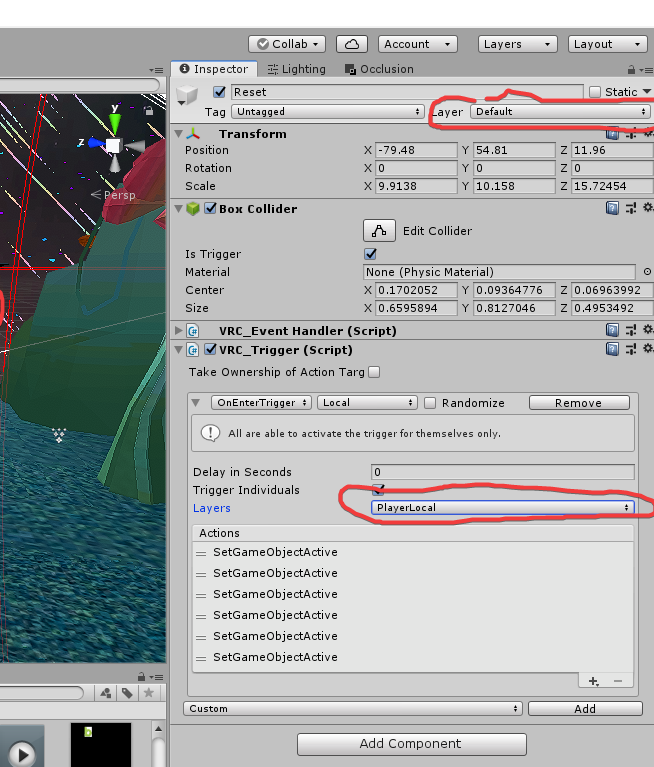 near escarp
The whole thing
MirrorReflection still interacts with the PlayerLocal layer so there's no issue
strange adder
Oh awesome. Thank you. Hopefully this fixes it 🙂
near escarp
This tool is great for letting you know about this kind of thing, and automatically fixes it
strange adder
No way. Gonna add it now! Thank you :)!!
near escarp
And make sure to update to the latest SDK !
strange adder
No luck. Changed the collider trigger to mirror reflection and still is having the same issue. I then thought it was the post processing since apparently that also has a trigger and takes up a big portion of the area I'm working in and still no luck.
The vr toolkit you linked earlier gives me a compiler error as it's looking for bakerypointlight but is unable to find it, which is weird because I don't recall putting bakery in that file. I'll have to do some more messing around in the morning. Thank you for the point in the right direction though! :)
 polar root
Hi can someone please help me im trying to add a videoplayer in my world where you can add an url in vrc and play it like in other worlds
faint wren
this world is pretty much ready waiting for the weekly upload to become active
bleak moat
weekly upload?
faint wren
for me i have to wait a week
before i can upload a new map
let me try
for public uploads its weekly
 short forum
Yes. You can only upload a new world as community labs once a week. But you can always update a world that is already public anytime
faint wren
yep
 sinful cradle
working on making a public avatar, and as such, i want to make a world to showcase it. should i start with 2.0, or just dive straight into udon? i dont have any experience with unity world making, and my only other unity experience is making vrchat and beatsaber avatars.
i know my share of google-fu, so im not looking for help, just opinions from people on if its easier to use 2.0 or udon for your first world
bleak moat
better to start rn with udon so you can do more interesting stuff later if you choose to
sinful cradle
im just worried theres more complexity to the first time if i use udon. is that a fair assessment?
or does the new sdk make it just as easy
bleak moat
Well technically you can make an sdk 3 world without using udon
you use it as much as you want, if you're still new to it then you can just use it a little for some simple elements and not use it for anything else...
 fiery pelican
I am having an issue uploading worlds it just doesnt let me i get to where you can change the image but i cant because its frozen it doesnt let me touch anything my friend is having the same issue
@narrow violet sorry but i really need help^
 narrow violet
try to push play button
fiery pelican
um well that woudnt do crap
that would just exit the thing and id have to just try a 300th time
can you see if someone on the team can help
fiery pelican
boi i did
short forum
@fiery pelican Do you have any build errors?
fiery pelican
im checking the pause button thing again just in case i just broke that somehow
um well it seems to have fixed itself without me doing anything so thank you i guess
eternal loom
@stable tulip thank you 
lone shell
sooo, even when having the "water" layer enabled in the vrc mirror, objects with the water layer dont get reflected. Is this supposed to happen or is it a bug?
near escarp
What shader are you using ?
lone shell
CalmWater
but it isnt a shader thing, even if I grab a standard unity cube and give it the "water" layer it also doesnt reflect
near escarp
Why do you need the water layer on them ?
lone shell
vrchat automatically assigns it to it
 random owl
The prefab they are using most likely has water as default
lone shell
if i change it to default, built & test and then go back into my project it will say "water" again
if there is an option to enable the water layer its kinda odd it doesnt work
 rugged warren
Does anyone of you guys make worlds on commission? And how much would that be like start at?
near escarp
pinned items
bold ibex
does anyone know how to add a collision on a player? Like if something hits them they will bounce back abit?
merry peak
Been working on this world any feedback would be great just finished adding another area to it. https://youtu.be/SDaU1-TjZO4 here is the VRChat link https://www.vrchat.com/home/launch?worldId=wrld_fa9e19e2-5d97-4236-bdaa-ab2096f434b8

This is a world that I am building in vrchat. Currently 3 portals are on more on the way. VRChat link.

Odins Temple is a world with portals that lead to different themed areas based on Norse Mythology․3 portals active ATM more on the wayǃ
near escarp
You should show that at the community meetup on Sunday !
@bold ibex Can't really do that to the players
 vagrant shale
So my world works perfectly fine in testing and seems to publish without issue but when I try to go to in in VR Chat, it sends me right back to the default home world. Any tips? I'm building and testing on a PC and publishing for Quest but it's a really basic world with just a handful of walls so I don't know what would cause it to crash.
Edit: Just tried uploading the Sample Assets Demo World with no alterations and it acts the same way so apparently it's not the world.
near escarp
Make sure your uploads aren't silently failing due to errors in console
vagrant shale
This is all that comes up when I go to upload/publish. Looks like all the errors are related to Mac/iOS/Linux
I don't know why the sample scenes are missing scripts but I haven't made any alterations to the scene.
near escarp
Nothing red ? Are you sure there's a collider below your spawn ?
vagrant shale
Nope, that's it. The floor has a collider that works perfectly fine in testing and if I fell through the world at least that would be progress but it doesn't even get that far. Also it seems like everything I publish requires me to download 20.69 MB of data even if it's a different world I'm accessing so that feels wrong. Are there any dependencies I might have missed? I noticed I didn't have the Oculus Android package installed originally but I do now and it still doesn't work.
vagrant shale
Well, different problem now. Now it tells me the world is uploaded but when I go to the content manager, nothing is there and trying to pull it up in the browser gives me this
And a new red error now. I deleted all my worlds and have a blank content manager now so I don't know how it could be a duplicate key but apparently it is
 woven condor
why dont you show a picture of your scene with the asset folder open in bottom view ? a full screen shot would be nice
near escarp
i believe it's minimum 1.8m
vagrant shale
Like this @woven condor ? I just deleted all my scenes and re-imported the VR Chat SDK, then tried uploading UdonExampleScene.unity so I don't think you'll find anything useful in my assets because I haven't added anything. Same behavior, loads the files and then when I press go, it goes straight to a couple more loading screens and spits me out at the default home world.
Same warnings, no errors
Would changing anything in settings potentially help? What about future proof publish?
vagrant shale
Okay, I can confirm that I can upload a windows build and access it on Windows so that narrows the problem down to something going wrong when I try to upload the quest version.
merry peak
@vagrant shale So you can load the world in build test but can't in vrchat right?
polar root
usualy if you uploaded them and you go to worlds and scroll down they are at "my Worlds"
bold ibex
So I made a world with multiple songs how do I make it so they only play when I press a button can someone help
 tulip arch

Midnight Vibes v1․0 A really cozy place to Hangout‚ Chill‚ Relax‚ Sleep or even Partyǃ A place where you can meet old and new friendsǃ
 gusty trench
@bold ibex have audio source disabled, vrc trigger on the button u want, oninteract toggle, add a collider to button
setgameobjectactive
vagrant shale
@merry peak I can build and test and even upload a Windows build and access it inside of VR Chat on m PC but whenever I try to build for Android and access it on my Quest, even if it's just a camera, spawn point, and a plane, it shows me like a second of black and then it boots me to the default home world.
 manic cedar
any one can tell me how to fix loading when I try join any world ??
I stuck in loading and is say 0/0b
bold ibex
@gusty trench how do I make audio source disabled
short forum
Hide the audio source
vagrant shale
It's not sex or gore so I would think so but I guess it's still possible if you get enough reports.
 verbal stream
i need a direct answer im playing it safe til like a mod says something
 humble blade
Ok I've googled for an hour and tried searching in here and I can't figure this out. I know there's a way to fix UI canvas elements showing on top of everything in the world, but I can't figure it out. I tried making a 3d text shader like google is suggesting but it just makes my text vanish.
I'm trying to make a button to open a powered door, but the button is visible on both sides of the door.
verbal stream
also why does it say my world is private when i upload it
bleak moat
Because it's not public. For it to be public it needs to go through the community labs
verbal stream
gotcha
humble blade
are you kidding me lmao
I've been at this for two days
Why is that a thing
Thanks I feel like an idiot
random owl
No worries it's confused me before as well
humble blade
It's a pride thing man... lol
random owl
Fair 😅
scenic flume
To reiterate an OG question, is PostProcessing something thats still supposed to work? Rn Im not seeing that do much of anything and wonder if it broke, or if theres a new/explicit way you're intended to set it up
near escarp
way hasn't changed

GitLab
A surface shader for Unity providing cel-shading. (Forward rendering only)
scenic flume
Are there any effects in post that dont work?
Ie DOF?
Or should I assume that all of Unity's Post effects work as intended?
bold ibex
Can I have help how do I make it so a music works when I press a button in my world
scenic flume
@bold ibex
bold ibex
How do I get to that
lethal moss
Are you using Udon shaggy?
scenic flume
Setup an Udon asset on an object
bold ibex
we arent using udon.
scenic flume
Basically you setup something like that in Udon, then have a music source object with "Play On Awake" that way when you activate something the sound/music plays
Then thats a mistake in itself, you should use SDK3/Udon
Its unlikely peeps going to be able to help much with SDK2/Non-Udon
I would suggest converting
random owl
This channel is only for SDK2 stuff and general world building you should assume anyone asking on this channel is asking about SDK2 stuff and if not direct them to #udon-general
scenic flume
@random owl Wait, really? I was not aware of that.
I apologize in that case, I assumed "Worlds" was more generalistic in the sense of using the latest SDK and not in the sense that Udon was explicit to the SDK3
Thats not exactly clear honestly
near escarp
changed channel named, will edit description
bold ibex
Ruubick can u help? :3
Can I have help how do I make it so a music works when I press a button in my world
near escarp
that's the most basic thing possible, lots of tutorials for that i'm sure
bold ibex
There outdated I think
near escarp
SDK2 is outdated 
scenic flume
Appreciate it, thats a lot more clear
verbal stream
can i get in trouble for putting a noose in my world
bold ibex
Can someone help me please I can't find any videos
I can't find any video that helps me add multiple songs to a vrc world
bold ibex
How do I make it so when I open a door, I have to pull it open to open it? like I have seen some worlds with doors that has a invisible sphere that you pull on that opens the door. Anyone knows how to do this?
@bold ibex
Can u help me
With?
So I have sdk2 and I'm trying to add multiple songs to my world how do I do that
The way I would do it is use jukebox component
or you can do it like this https://www.youtube.com/watch?v=nAtbBrx5Jlc
Wait, did I say Sinlessrogue? Yes, that's my gaming channel that isn't very active or good but I got to spread the word cause some people enjoy it!
Ok I'ma try ty :3
np
lone shell
is there a way to trigger an audio source when your camera (viewpoint) enters a collider? like with post processing
ashen eagle
Anyone know why I can't search for my community lab world?
random owl
@lone shell yeah you just gotta setup a player tracker and use that to trigger the onentertrigger
@ashen eagle there could be a bunch of reasons depending on how it's named
 slow rampart
Why is my music refusing to play in game despite playing perfectly well with the Unity camera and VRChat SDK?
slow rampart
I've double checked the settings of the audio sources in this and my public world, and yet nothing works
 simple nimbus
so uhhh for some reason my cube button is not working? I have all the correct components and i've done this a dozen times... not sure why it's not working this time? when testing i go the the cube, but don't get any highlight or interaction test. also can't click on the cube
bold ibex
Can someone tell me how to make a jukebox work cause idk please :3
 vale narwhal
Does someone know how the effects in the treehouse in the shade map work?
slow rampart
They use shaders
simple nimbus
i moved by cube a little and it started working...
 lilac path
hii i'd like to know how do i change the player speed and jump power because it used to be here
near escarp
@lilac path That's through the playermods component
lilac path
ty
bold ibex
Can someone tell me how to make a jukebox work cause idk please :3
bold ibex
can I have help I haven't gotten any in two days qwp
lyric acorn
for world tags, do you have to do one in singular then one in plural, or will "avatars" bring in seaches for "avatar"
"3.0" is worth 2/5 tags apparently
@bold ibex someone posted a good video earlier in the day in chat
lyric acorn
Wait, did I say Sinlessrogue? Yes, that's my gaming channel that isn't very active or good but I got to spread the word cause some people enjoy it!
 open thicket
is there a way to reference render textures from VRCVideoStream instead of material override?
essentially want to use multiple materials referencing a render texture
and using the videostream to reference the video
multiple materials are necessary for the different shaders
essentially video players work with the video player component because it allows for render texture referencing
but for streams it's a bit different i imagine
random owl
You're pretty limited when it comes to that particular player
Most I've seen people do is have one screen with a camera pointing at it hidden and then use the output of that camera
open thicket
i'm getting a little help on it now
goal is to not use any sort of outside camera
so now we're actually using material index in the video screen script itself to index emissive values from the shader code itself if i'm explaining correctly
that requires placing the video screen scripts on all meshes that utilize render textures/ materials using it
 hidden wolf
Hi! Does anyone here know how to possibly sync Video color with the lights in your world? A good example of this would be the lights in VOLT Club. Any amount of help is welcome, I've been trying to figure it out for a few days now.
bold ibex
Anyone knows where to get Post Processing Stack? I am reading Xiexe's Lightning Tutorial and the stack is gone
random owl
Package manager right in unity
I recommend this guide for pp stuff
https://gitlab.com/s-ilent/SCSS/-/wikis/Other/Post-Processing
GitLab
A surface shader for Unity providing cel-shading. (Forward rendering only)
bold ibex
Thank you ❤️
 wintry oriole
so, i may need some help with something. if anyone can help with video players, do send me a dm, and i'll fill you in on what's wrong. thank you!
 vague smelt
How can I solve "Trigger .... was not initialized in time" that make uploading error. (Testing seems normal.)
If there's no VRC_Trigger, these error won't occur.
 quick vigil
does anybody have that button prfab that so many worlds use? its like a black switch button for mirrors, lighting, etc
woven condor
@vague smelt that error i have also but does not cause any problems - i think is a bug
bleak moat
slowly adding assets to my map...
https://twitter.com/i/status/1302674783771996161



 shy kelp
Trying to make a world but everytime I try to build and test locally, it downloads my world then I click "ok" but then it puts me in the default home world.
slow rampart
I've tried muliple things but still can't get the music in my world to work when I test it
It's something I've gotten to work in my public world so this is very frustrating
Could someone please help me?
I'm using the exact same settings as I did with my public world so I'm so confused
slow rampart
Okay.... having no Spatial Audio Component made it work just fine???
Is it a bug??? I may never know
 lyric sluice
anyone know how i can get text to show up in game?
If i do 3d text it shows up through walls and i tried text mesh pro and it just doesnt show up in game
 toxic bone
@shy kelp make sure you don't have multiple VRC_Scene Descriptor scripts in your scene
shy kelp
@toxic bone I don't
 echo herald
just spent a few hours doing an animation in my world for the halloween event after porting it to udon...only to find out udon doesnt support video players..... welp time to bring it back to sdk 2 xD
near escarp
@echo herald it does in open beta
echo herald

Perfect
 gilded sorrel
Is there a way to remove the preview from an avatar pedestal?
random owl
Define an empty gameobject as the position and scale it to 0
gilded sorrel
thank you
 uneven depot
which collider is best for a room like world for players to not fall through floor? mesh collider?
near escarp
@uneven depot If it's flat you can do box collider, if not, low poly mesh collider
 outer terrace
THis sounds like a dumb question...but every time i start on a new world I spend way too long setting it up, importing stuff. Do I have to use a different project for each world, or can I (for example) use different scenes for different worlds that use similar assets?
I wonder if i've been making new projects unnecessarily
near escarp
You can. but that's not a good idea
Not only will you project take much longer to open, back up and potentially lose it all at once, but it makes managing assets much more difficult in the long run
better learn how to import only what you need or use less in the first place
 verbal breach
Dumb question, if my world has SFW posters/figurines of NSFW media, is it considered nsfw and can be deleted?
near escarp
Any example ?
verbal breach
give a few secs while the world compiles and I'll post a screenshot
verbal breach
like this @near escarp
near escarp
seems SFW enough
verbal breach
nice
 keen galleon
Hey guys how can I set the thumbnail for my world? I tried finding the VRcam but its not in the prefabs
random owl
The VRCCam get's spawned in when you are uploading the world?
keen galleon
Got it thank you! @random owl
 tidal axle
I just uploaded a world to community labs but it's not showing up in game when i search for it
short forum
You should see a new tab called "My Worlds" in the worlds category
tidal axle
it shows up in there, but not when i use the search bar
does it have to be "public" for it to show up there?
short forum
No the search bar has been bugged for a while
You know your world is public by being able to make a public instance of it
tidal axle
so how will people be able to find it then?
bold ibex
Hello, i have a problem when I want to "build and test" it will not upload the new items it shows the same items when I first time tried to test it... how can I fix it I tried closing and logging out but still has the same issue
short forum
@tidal axle your world shows up on the "Community Labs" portion and will continue to show up as you update it.
@bold ibex Have you tried deleting your cache?
uneven depot
what is this? 0.o https://gyazo.com/f6361c96e2ba1fb912929ccdf9d16563 happened when i added post processing volume, specifically AO and SSR effects cause that
bleak moat
From what I heard SSR and AO are not a good idea in VR
uneven depot
even unity light settings AO? :/
bold ibex
@short forum I did it but still have the same issue 😦
bleak moat
No baked AO is fine afaik but SSAO not so sure
uneven depot
hmm, alright
short forum
Build errors?
short forum
Everything is up to date? Sdk and unity?
polar root
can someone please help me ive downloaded the hangout player prefab (a video player) and when i add an url the sound works but the screen doesnt change
 coarse magnet
Hey would anyone know the reason for me being sent to my home world when i "build & test" my world instead of being sent to my world?
vague smelt
How to solve Trigger ... was not initialized in time that preventing me from publishing world?
It can type data in after unpause and press publish, but actually it did't uploaded .
random owl
Disable error pause in the console
vague smelt
Yes it can be unpaused, but still can't upload.
Is that really an issue?
Hey would anyone know the reason for me being sent to my home world when i "build & test" my world instead of being sent to my world?
@coarse magnet
Check for error that prevent you from building. Maybe some script or something.
random owl
That could also be a null spawn point in their scene descriptor
vague smelt
That could also be a null spawn point in their scene descriptor
@random owl
You mean @coarse magnet
,also check for scene descriptor for 0 spawn element or X element but none transform (IDK it's like SDK3 or not that pop this error up)
random owl
Yep that's why I said their
vague smelt
^^for mine problem let me disable pause on error
(I was unpause after enter play mode before)
@random owl
Can't
random owl
Can't?
vague smelt
I mean can't upload even I disabled Error Pause.
coarse magnet
let me check for those. I think i did have an error with an asset im not using.
not too sure about the null spawn tho ill check that out
random owl
@vague smelt so what exactly happens when you try to upload?
vague smelt
It says, uploaded sucessful popup and then I checked in game but none of my uploaded world is there.
random owl
Which version of unity are you on?
vague smelt
2018.4.20f1
random owl
Are you on the latest sdk?
vague smelt
VRCSDK2-2020.08.07.18.21_Public
I think this is the latest.
Reinstall doesn't help.
random owl
https://github.com/oneVR/VRWorldToolkit/releases
Can you import this and show a screenshot of VRWorld Toolkit > World Debugger
vague smelt
Here @random owl
random owl
Might wanna address that top one as well 😅
vague smelt
That's may the problem, let me try.
random owl
It shouldn't cause the main problem here but it should def be fixed
vague smelt
Forgot,
this is the console error.
vague smelt
I've just cleaned it, let me reupload.
short forum
For some reason, that sdk looks old
random owl
What sdk?
short forum
Oh... nvm... it looked like the vrcsdk
random owl
That's my unity extension 😄
short forum
Oh?
random owl
coarse magnet
Would anyone have any tips for making water that looked like thick black goo? Im trying to go for it being not transparent at all. Im just using standard unity water but any tips would be greatly appreciated. I would love if i could get the Low Poly water to work but it keeps resizing and not working well
short forum
@random owl looks like you made something quite useful. I shall use it as well to help debug my stuff. Thank you!
vague smelt
F**** bots
Still can't @random owl
Console seperated between before upload and after press upload.
random owl
Yeah if that's all those would be the problem then
It might be related to the language you have your unity project in since at least in the past project names in japanese have caused problems
vague smelt
So I should edit the directory(project) name right?
random owl
Where you able to upload the project before with a similar name?
vague smelt
This is the first that I use Thai name.
I always use English before.
random owl
And you haven't been able to upload this project at any point?
If so I'm leaning towards to the Thai characters breaking it
vague smelt
Ok, let me change and reupload.
short forum
@random owl Does your toolkit not work with SDK3?
random owl
As long as your sdk is up to date
short forum
Well that may be the issue... Let me update that
random owl
It uses stuff that was added to the sdk about month ago if you are on an older sdk it won't work
short forum
Ok yep the world I have still uses the sdk from May
short forum
Yes all is fine now. Thank you
random owl
@vague smelt did you have luck with changing the project name?
 simple palm
anyone know why I cant drag and drop assets into unity I have to add all assets manually into the folders.
bold ibex
So I have baked lighting in this room that I have and everything in it is static. It looks good in unity but when I uploaded it. The world is pitch black. Anyone knows what to do to fix it?
 minor mica
so im back again 2 weeks waiting for help with some world uploading stuff because my world will not update itself at all. Ive made updates in the past before had no problems and for whatever reason my world wont update and if i could get help thatd be kewl
ive done everything from fixxing compiling errors and resetting the sdk but literally nothing works at all
 raw yoke
same thing happening to me @minor mica it broke after i changed the skybox but i've reverted all changes and still nothing
vague smelt
@vague smelt did you have luck with changing the project name?
@random owl
Almost not, changed the name doesn't help BUT after I changed the name and detach the ID, it worked.
 fleet quail
Is it posible to get the pro builder unity package for unity 2018?
bleak moat
@fleet quail yes
fleet quail
where can I get it?
bleak moat
Package manager
random owl
Window > Package Manager
fleet quail
Am I going to have lighting or any other type of issues if I do all of the room modeling within unity?
short forum
No. I use it for building my buildings and have no issues
fleet quail
awsome
thank you
 late inlet
Does anyone know how to fix either of these errors?
bleak moat
(Friendly reminder that you can use the snipping tool to make actual screenshots. Other than that good luck with your error)
near escarp
@late inlet These errors are fine
I haven't posted in here in a while, but for everyone that gets errors in playmode using SDK2, you can import this script to get rid of the errors. It is a stub for the client links.
https://github.com/CyanLaser/VRCSDKClientStub/blob/master/VRCSDKClientStub.cshttps://feedback.vrchat.com/sdk-bug-reports/p/vrctrigger-emits-an-error-log-on-editor

GitHub
Add this to your VRCSDK2 project to prevent sdk components throwing null references in playmode. https://feedback.vrchat.com/sdk-bug-reports/p/vrctrigger-emits-an-error-log-on-editor - CyanLaser/VR...
late inlet
@near escarp the errors that you just responded to, are they likely to stop me from publishing my world, because every time I pressed upload nothing would happen
near escarp
then disable Error Pause
 lost breach
How can I make a pickup-able object not have gravity or physics until picked up?
lost breach
Ah! Ok I got it. Needed an OnPickup event on the object to tell it to disable kinematic on the rigidbody, and have kinematic enabled by default
fleet quail
Anyone know how to re-enable the flythrough cam in the unity editor?
outer terrace
I cannot get my Animation overrides to "stick" in my VRC_Stations
every time I set it, it will not save and reverts back to None
mild spade
Did you unpack the prefab? Sometimes it reverts if you dont unpack it first
outer terrace
No, I didn't. But it also reverts even if I modify the prefab directly
unpacking the prefab is terrible opimization-wise
because if I have to make any changes to all these seats I'll have to do it individually
mild spade
But if it get fixed, then you will have to do it for it to work either way. You could try it with one chair just to see if that is the problem.
outer terrace
That's not what I'm saying
I have a bunch of chairs in this scene. If I am forced to unpack each and every one, and then later want to change the chair color, i will have to change the color on every one
rather than just change the prefab
I'm going to try it but if this is the case, then I'll need to submit a bug report
because prefabs don't work like that
mild spade
hmm you could maybe unpack the prefab, make it to your settings, then create a prefab again and use that instead. That way you just need to edit the new prefab. I dont fully understand the purpose of unpacking prefabs and I dont think it was an issue with older unity versions.
outer terrace
usually you unpack prefabs so you can utilize the constituent components individually
unpacking it did fix it. That's both a relief and a frustration. Thanks @mild spade
 median egret
is anyone familiar with bloom?
near escarp
0.01-0.03
median egret
was that for me?
near escarp
What was your question for bloom ?
median egret
I was just trying to figure out the optimal number for bloom for intensity
looking for a nightclub light setting, I may have figured it out but would still like to hear any advice 🙂
 runic epoch
Yo uh
was wondering how to make an object (avatar pedestal) appear only when a user is nearby
lethal moss
@runic epoch put a cube around the pedestal encompassing the distance u want the pedestal to appear. make sure the collider for the cube is set to IsTrigger. then add a trigger component that is OnEnterTrigger that is local and responds to the Player Local layer. it should should set your pedestal game object to active. and have a OnExitTrigger as well that also responds to the player Local layer and disables the avatar pedestal object.
late inlet
So update, I found duplicates of my pipeline manager scripts, after deleting those all of my problems were fixed
 oak elm
does anyone know how to make a gameobject with a collider follow a local players hand/feet bones to allow for direct interaction with other colliders just like in the virtual furence world? i cant think of any other way to accomplish this except with scripting, which isn't allowed
 subtle cradle
So I uploaded a world and Im being told by quest users that its being seen as the same world but separate in both eyes. They have to cross their eyes to see my world
subtle cradle
Hm I dont have water, Im using Vrchat/Mobile shaders. It might be the skybox
 sleek willow
Hi. Does the Unity asset store "volumetric light beam" component work in VRChat?
referring to this.
fleet quail
Anyone know how to re-enable the flythrough cam in the unity editor?
near escarp
@sleek willow Anything that relies on a custom script that isn't part of our whitelist won't work
sleek willow
So it's not in your whitelist? I'm only asking because it's direct from the asset store.
near escarp
yep, not whitelisted, like 99.999% of things on the asset store
sleek willow
So is there a way to do this exact effect WITHOUT this script?
near escarp

GitHub
World of Warcraft inspired Volumetrics that hold up well in VR with small cost to performance. (You have to not be dumb when placing it though :P) - Xiexe/XSVolumetrics
 worthy knot
Probably a stupid question, but how do i update a world? I don't see where to update it, and can't find the answer anywhere online.
near escarp
just reupload
worthy knot
Can't you only upload a world once a week?
near escarp
You can update the same world in community labs
worthy knot
So I upload it to community labs?
near escarp
You just reupload the world you want to update yes
worthy knot
Now the first time I uploaded I think I saw an option for community labs, but now when I click publish new world it's just a frozen prompt of new world creation
 heady dirge
I need some help setting up a mirror for an Oculus Quest world. I need it to be highly optimized.
I've seen some worlds make the mirrors for Quest 2D
heady dirge
Ah sorry
worthy knot
Went into VRCWorld pipeline manager, shows that the blueprint id is accurate, still frozen new world creation screen
 woeful tide
Does anyone knows how to setup post processing, where different areas has their own post processing. Such as above water will have its' normal look while underwater will have a blue hue look?
random owl
Add a collider to the volume and don't mark it as global
woeful tide
Like a box Collider?
random owl
Any primitive collider should work
woeful tide
Won't the collider prevent any players from entering it
random owl
Trigger collider
median egret
how can I make a trigger effect bloom
 lunar sedge
tried upgrading vrc sdk of a project and get this what do
 compact dove
My world no longer shows up Recently Updated nor does the website update to the new update date. Is this a known thing?
The world still uploads fine with the changes made.
compact dove
(Just updated it to the most recent SDK2 - Still showing no change to Recently updated despite the new upload)
 grave breach
There doesn't seem to be a place to post for help with SDK 3 Worlds, so I guess I'll just post it here. It seems that there's no component to sync pickup objects in SDK 3?
median egret
does anyone know how I make it so 2 different box colliders can't hit each other
near escarp
Different layers
 alpine sigil
this may be a stupid two questions - but i have a world that i've been working on where 1. if you go near the pillars in the world you get stuck or sucked up into them and i have no damn clue how it happened. you either need to mod out or respawn to get out. 2. the mirror trigger although it shows up in unity that its outside the pillar, it is either inside the pillar or invisible. how to fix?
near escarp
that would be mesh colliders for the first, and the second would require a screenshot for your setup
alpine sigil
there are mesh colliders so i'll tweak with it a bit more and see if i can figure the issue - here's a screenshot of the trigger setup.
lunar sedge
@near escarp i think you helped me with the same issue but i couldnt find in search how to fix being unable to import SDK properly..
this project was using unity 2017 and an older sdk, i updated to version of unity vrchat now uses and deleted old sdk then imported new one.. when that didnt work i closed unity, deleted the folder (plus .meta files), and restarted the unity project then imported the newest sdk
wait.. what the
I just looked at unity and its automagically fixed 🤔 👍
oh nope
I just cloned the project and opened it up with latest unity
https://docs.vrchat.com/docs/migrating-from-2017-lts-to-2018-lts ill reread this and follow more closely
VRChat
Migrating your project from Unity 2017 to 2018 LTS isn't as difficult as you might think! Here's a guide providing each step in detail.
subtle cradle
How do you enable jump in your world?
keen galleon
@subtle cradle vrc player mods
fleet quail
can someone please tell me how to enable fly through camera in the unity
its stuck on pan/zoom and its unbearable
fleet quail
Also does anyone know how to have vrc mirror turned off by default when a player enters the world?
median egret
I tried layers and they still hit each other? @near escarp
 hexed pond
Can someone help me perhaps? I'm looking for a script to make chairs for a world, like at "the room of the rain" where it doesn't matter how tall you are because you can move the invisible chair to sit anywhere
keen galleon
Also does anyone know how to have vrc mirror turned off by default when a player enters the world?
@fleet quail Uncheck the object at the inspector
can someone please tell me how to enable fly through camera in the unity
its stuck on pan/zoom and its unbearable
@fleet quail Hold right-click and use the WASD and QE to move the viewport
Can someone help me perhaps? I'm looking for a script to make chairs for a world, like at "the room of the rain" where it doesn't matter how tall you are because you can move the invisible chair to sit anywhere
@hexed pond https://vrcat.club/threads/vrchat-customizable-fixed-chair.2546/ is this it?

VRCat: Community-Run VRChat Forums
VRChat Chairs with proper height fixes for small and tall avatars that also allows you to customize the sitting pose, emotes, and right/ left-hand...
hexed pond
That looks right!
fleet quail
@keen galleon It turned out I was in iso mode for days without noticing lol
also what do i uncheck in inspector?
I found it thank u!
 nimble ridge
Hey idk why but when i try to build and test it dont upgrade, like it stay at the last build and test
I also get this message when i wanted to upload the world to vrchat
Please help me:)
near escarp
console errors
fleet quail
have you tried saving the project and restarting unity?
fleet quail
I dunno man that's spooky
anyone know what these funny blue squares are and how i can hide them so i can see the edges of things
 nocturne crown
Maybe look to the left and just start hiding things until they go away
I’m making a sad but peaceful world, and it will just be one tree (better looking than what it is rn) with some terrain in the background. Not sure what else I’ll add, maybe a tiny house
nocturne crown
Not sure, I’ve never seen it
near escarp
Check your gizmos
fleet quail
gizmos?
near escarp
 fleet quail
ah thank you
 sacred warren
"Resource Checker" is very useful but tends to malfunction on larger scenes. Does anyone know of anything that works better and does roughly the same thing? (e.g. lets you see every material and texture in a table with all their info, etc).
median egret
sorry I asked eariler but I never got it to work @near escarp 2 objects set to different layers and still hitting each other
near escarp
Did you check the layer matrix to see why they would collider ?
bold ibex
does anyone know how to fix this? i updated the SDK and this error prevents me from getting the build control panel
bold ibex
i currently cant get any of my triggers to work, it seems like they work in unity but i cant select them in the actual game
near escarp
well there's no collider
bold ibex
is that really the only problem?
near escarp
pretty much yeah
worthy knot
If I lost my uploaded world on my pc, am i able to download the uploaded world back onto my pc? Or is it gone..


 worthy knot
exists, but doesn't at the same time.
near escarp
forever on the vrchat server
 meager anchor
I'm using SDK3 but I've seen this ever since SDK2, does anyone know what the "exact gun" transform slot do?
I mean this pickup is literally on the gun, not sure if I should still reference the object its on to this slot.
 grizzled herald
Player mods aren't doing anything for me
I added it to VRCWorld and enabled IsRoomPlayerMods
Found the problem - The Valve controllers weren't... Controlling right (Sometimes it happens that some functions don't work when I click "test world", Jumping appears to be one of them)
 frozen glade
just wondering but are video players disabled in local testing? I didnt touch it and it wont play in test mode but in the public version it plays.
frozen glade
VideoPlayer cannot play url : https://www.youtube.com/watch?thisisonlyaexample
Cannot read file.

Enjoy the videos and music you love, upload original content, and share it all with friends, family, and the world on YouTube.
 harsh wagon
Anyone here good with interior design? I can't decide on something in my world
I have this corner that I want to fill out with a counter and maybe some kitchen stuff, but I don't know where I should put the counter itself
I was thinking of putting the counter against the window so you face the view, but then you block off a large part of the window
but putting it against the wall would leave a lot of dead space in the middle of the room
median egret
could someone help me with a major issue?
 iron island
how to change my current unity world version from 2017 to 2018?
 glad hedge
Anyone ever experience Realtime reflection probes not functioning once uploaded into VRChat? Functions perfectly fine in unity and when play is turned on, but once uploaded, the world acts like there is no reflection probe. Im assuming this is due to a change since 2018 came out, but Im not sure what it is.
 west flume
Ok, how long might I have to unlock building content? 🙂
near escarp
 faint halo
kk ill move it over
near escarp
Udon has no triggers
 narrow flame
I'm gonna try and build my first world in VRC, lets see how long it takes until I come to a deadend lol
how come there isn't a channel for SDK3 questions? is it under something else?
 toxic fulcrum
Under the Udon section. SDK3 for Worlds = Udon.
 arctic herald
 cedar phoenix
can i ask in world building which is better. Atlas textures or separate?
near escarp
Depends, atlasing is good when the pieces are in the same occlusion group, as in object that should be seen or not together
 wicked crown
Hey all, I'm seeing some sort of de-sync between the indexed information of a map name/desc/thumbnail and the actual map info. Web interface and VRC both show incorrect information about the map unless the map details are pulled up. Could this be some sort of weird cache bug?
I've let it sit for about 12 hours now without any change, as well as attempted to update the map information again in that time
random owl
Other people been reporting the same for couple days as well
wicked crown
👌 ok good to know it's an actual issue
subtle cradle
I want to get a slide show to work in my world, I have auto play but not sure why its not working
lost breach
Is there some weirdness with a world that was a labs world and got published, and publishing updates to that world?
when I upload I'm not seeing the changes in game, though the game downloads it again as though its a new version
wicked crown
I believe it's related to some issues on the VRC side, I've been experiencing the same but announcements says they're looking into it
lost breach
hmm my issue may be different though. it happens with local testing too
just not seeing the same results I have in editor with collision layers
I have a physics object. it's a pickup. On spawn it is kinematic, and onpickup it turns kinematic off. In the editor when I turn kinematic off the object falls and hits the floor
in game, it falls through the floor
both the object and the floor are on the Default layer.
In Editor ^
in-game *
fwiw this was working perfectly before. But I tried to change the park's layer to make it so the player doesnt collide with it, but couldnt get that working, so set everything back to default
but back at default... not behaving the same as it was
all collision objects are set to convex
wait... holy crap yeah its something on vrchat's end
I spent two hours trying to track this down but just now added something very obvious to the scene and sure enough even with local testing it's just not there
its not updating the scene on vrchat's end, or maybe the local package isnt getting overwritten
 glossy shard
You might need to clear the game cache
lost breach
the game cache or unity cache?
and where are those located
and... never mind it randomly started working again
_<
that's annoying
meager anchor
This is going to be a long shot, but does anyone know where I can find the old prefab of the bow mechanism?
Or if anyone knows how to re-create the bow that was used in the Archery VRChat world?
Please @meager anchor when replying! Thank you!
keen galleon
@meager anchor https://www.dropbox.com/s/mi9yp2vawv3qel1/Archery Prefabs V1.3.unitypackage
Im not sure
 meager anchor
Thanks!
fleet quail
Does anyone know why the local build could be stuck on a previous version? I cleared the cache and it persists
fleet quail
sorry if this was already answered I still can't find a solution\
nocturne crown
im unable to upload my world, no error messages clicking uplaod does nothing
 haughty niche
are errors on in the console? I've turned it off and forgot to turn it back on before lol
keen galleon
@nocturne crown Idk my project was also working and I tried building and got this same error
nocturne crown
😦
keen galleon
I tried "reimporting all" and it seemed to worked.
keen galleon
nocturne crown
hoping for the best
got the same error
@keen galleon rip didnt work for me ;/
where did you put the vrcsdk? idk what object it wants to be on
keen galleon
Did you check your objects if their receivers have values?
where did you put the vrcsdk? idk what object it wants to be on
@nocturne crown Root folder
keen galleon
Did you use any vrc triggers etc?
nocturne crown
triggers as in buttons for people to press?
keen galleon
Ye
near escarp
@nocturne crown Are you using the correct unity version ?
nocturne crown
im using 2018.4.20f1
near escarp
Did you import custom asset store assets or packages into your project ?
near escarp
i'm not sure, i can't see how that'd corrupt a project
nocturne crown
this is the error im getting, i reimported and im just getting the vrcsdk object error
near escarp
Try disable error pause in the console
nocturne crown
these pop up when i try uploading it
nocturne crown
its talking about dependecies
 dapper solstice
IM trying to try an upload an unfininshed version of my world to see if it works but its popping up saying you need to install an app to open Vr chat
nocturne crown
my stuff wants runtineworldcreation, god world uploading is tough :/
dapper solstice
IM trying to try an upload an unfininshed version of my world to see if it works but its popping up saying you need to install an app to open Vr chat
stable tulip
Check your execution file path in Unity
dapper solstice
how
stable tulip
If thats missing or wrong path, thats probably the reason why you can't test it
You go to that panel where you can build and test and there is Settings window
stable tulip
You have to find your game folder where it has VRchat.exe
nocturne crown
@stable tulip do you know how to fix this?
stable tulip
Are you using vpn?
nocturne crown
no
stable tulip
Your computer or something is blocking the upload
stable tulip
What kind of assets do you have in your folder
nocturne crown
dapper solstice
is there any easier way to put a spawn down cus damn i cant get it to where i want
stable tulip
@nocturne crown I suggest you make a backup to your project and start removing the folders until you find the bad file
stable tulip
@dapper solstice I use VRCWorld object itself as a spawn and when you change your axis to local, the blue arrow is the direction of what they will see first
Some assets might have scripts that is not compatible with vrchat due to security reasons
You can have scripts in Unity but not in your world
nocturne crown
ok
stable tulip
Except the vrc sdk scripts
You might have a rare bug because I can barely find any person having the same issue
stable tulip
What is that RainMaker folder you got there
Is it all Particles, Shader or a Script?
nocturne crown
i deleted all the files other than the skybox and textures that were being used and still nothing
near escarp
Can you show the upload window when it stops ?
 rough wedge
Slightly odd question, but does anyone know a method to check the exact number of trees/detail objects on a Unity terrain?
Not the number rendered as mesh or anything, just how many there are in total.
near escarp
Do they have a specific name ?
rough wedge
They can. Haven't made anything yet, but the gist is basically I want to have a unity terrain with exactly (or very close to) 20'000 detail objects.
Intending them to actually be candles, but could resort to trees if needed. Bit weird I know.
I could just precisely duplicate objects until I hit 20k, but hand placing all those would be impractical. (probably too performance heavy too)
Hmm. Apparently I can get this information from a regular unity script, which would work fine since I don't need to run or access the info in VR-Chat itself.
https://docs.unity3d.com/ScriptReference/TerrainData-treeInstances.html
But I've no idea how to write even a simple script like that. ._.
near escarp
You can do that in Blender with particle placement
would be much more efficient and performant
and you'd control it more easily
rough wedge
I'll look into that then. Thanks for the suggestion. 🙂
median egret
can I use unity cloud with a vrchat world? just want to see the best way to back it up
arctic herald
anyone know how to use the dart system in the VRCPrefabs?
 azure idol
in unity is actually a terrain editor, where you can brush gras or plants onto the surface. You can set it in there.
its on the terrain under settings, scroll a bit down their are special settings just for grass
 royal lark
Has anyone used the home starter kit as a base environment or used parts of it for a world you have uploaded to VRChat? I'm researching digital domestic spaces for a project and would be interested to hear about how you used it or would love to see to see the world you made!
nocturne crown
I wish my VRChat world worked :/ I just get this stupid error last night when I tried
 versed ferry
Hello everytime when i try to upload my VrChat World nothing happens what to do?
can someone message me and help me?
 sinful moss
@versed ferry Sadly, that's not enough info to go on for making any good guesses. When i had that happen earlier though, it was because i had an outdated script component in my assets that i hadn't noticed.
versed ferry
can i send u the files?
sinful moss
What version of unity and sdk are you using?
versed ferry
Unity Version 2018.4.20f1 and the newest skd2 for Worlds
sinful moss
what do the errors in your console say?
versed ferry
wait
Trying to set empty graphics device types list for platform iOSSupport; setting default list instead
UnityEditor.PlayerSettings:SetGraphicsAPIs(BuildTarget, GraphicsDeviceType[])
EnvConfig:SetGraphicsAPIs(BuildTarget, Boolean, GraphicsDeviceType[]) (at Assets/VRCSDK/Dependencies/VRChat/Editor/EnvConfig.cs:425)
EnvConfig:SetDefaultGraphicsAPIs() (at Assets/VRCSDK/Dependencies/VRChat/Editor/EnvConfig.cs:405)
EnvConfig:ConfigurePlayerSettings() (at Assets/VRCSDK/Dependencies/VRChat/Editor/EnvConfig.cs:281)
VRC.SDKBase.Editor.VRCSdkControlPanelWorldBuilder:OnGUIScene() (at Assets/VRCSDK/Dependencies/VRChat/Editor/ControlPanel/VRCSdkControlPanelWorldBuilder.cs:950)
VRC.SDKBase.Editor.VRCSdkControlPanelWorldBuilder:ShowBuilder() (at Assets/VRCSDK/Dependencies/VRChat/Editor/ControlPanel/VRCSdkControlPanelWorldBuilder.cs:165)
VRCSdkControlPanel:ShowBuilders() (at Assets/VRCSDK/Dependencies/VRChat/Editor/ControlPanel/VRCSdkControlPanelBuilder.cs:319)
VRCSdkControlPanel:OnGUI() (at Assets/VRCSDK/Dependencies/VRChat/Editor/ControlPanel/VRCSdkControlPanel.cs:206)
UnityEngine.GUIUtility:ProcessEvent(Int32, IntPtr)
this
sinful moss
which of these are red flags, all of them?
versed ferry
no one
sinful moss
have you tried deleting the sdk from your unity asset files (while unity is closed to avoid issues,) then relaunching and reimporting it?
that fixes some off bugs
versed ferry
no and i dont know how
i reinstalled Unity 10 times
and deletet all folders
but every time the same error
sinful moss
it sounds like you might be missing something important somewhere, i'd suggest finding an up to date tutorial for full set up, including the world building process. Just follow it though step by step until you figure out where it went wrong. If you still can't then come back here.
versed ferry
okay thank you
frigid estuary
I have a weird problem where people are suddenly able to walk through walls randomly. the colliders or objects themselves are not connected to any kind of interaction what so ever.
pushing a certain button crashes everyones pc also for some weird reason. the object it was referring to wasnt existing for anyone except the master also.
I never had this issue with any world before and really dont get it at all
toxic fulcrum
What's the current best streaming player available? Is it still the MunifiSense Hangout Player?
I'm guessing there's still no streaming player for Udon is there?
 misty timber
is there a way for an animation of something to play randomly with ontimer?
 pliant citrus
my optimized mirror is not showing the local player but the hd one is, i have player and localplayer layers turned on
i can see other players through the mirror but not myself
random owl
You shouldn't have LocalPlayer at all on mirrors, MirrorReflection is the layer you should be using for yourself
pliant citrus
thank you
harsh wagon
Is anyone here good with audio? I've been trying to limit audio to a certain area but without spacial stuff
it's weird to explain
 short gulch
Having a kinda strange issue where sometimes when I load up my project, two specific models keep randomly unapplying certain materials that were assigned to them. One is a brick building with boarded up windows and a concrete platform in front. The concrete and plywood materials keep reverting to no material so its just bright pink, and same goes for the posts for a chainlink fence that surrounds the map. Anyone else run into this before?
faint wren
@harsh wagon Name all the audio sources Audio descriptions then type in hierarchy search Audio shift left click select all adjust audio by the size of the map the bigger the map the bigger the audio sphere needs to be and you need spatial blend audio as well Min distance max distance is the same as gain and far and if you do shift left click highlight all of them you can change the volume settings to all the same number audio level and there all =
@harsh wagon select all hold shift left click top then left click last one
adjust volume.
harsh wagon
I managed to fix the curves and such so that it ends outside the area, but the issue is how the area is shaped
short gulch
Are you trying to limit the bounds of it without spacial stuff because of an irregularly shaped room
Oh okay lol
harsh wagon
let me get a screenshot
short gulch
I hate that you cant have the bounds of it as a rectangle
harsh wagon
here's the map
What I'm trying to do is play a wind sound on a loop when a player is on the roof, but not indoors
near escarp
As soon as sound travels in a rectangle shape in real life, we can add rectangle bounds in the SDK
harsh wagon
You can see what I'm trying to do though, right?
near escarp
can't you do that with triggers ?
harsh wagon
Would I be able to make it gradual?
I don't want it to instantly play the sound the moment someone goes upstairs
Originally I was going to have a soundclip that fades in, but then it wouldn't loop very well.
faint wren
i use a music software program audio for my rendering audio to time it
you will have to render like 30 seconds of silent audio then it plays after the 30 second for example
harsh wagon
it has to be WAV for cue points
faint wren
ah