#world-development
39 messages · Page 37 of 1
 near escarp
 buoyant lark
I do
It's actually the Home Kit
I just modified it slightly but I can't use it.
It doesn't give me any errors
near escarp
Can you show your unity window with the vrcworld is in your scene ?
 rose prairie
@near escarp The game crashes when I try launching now.
near escarp
when was the last time you updated your sdk
near escarp
what are all these random missing scripts everywhere
VRChat
If you need to update your SDK, it is important that you follow these steps to ensure the update proceeds properly and you don't have any old/conflicting files. Simple Update Here's how you update your SDK. If you're just uploading avatars, you can use the following process: ...
buoyant lark
I watched the Home Kit video
And applied pretty much the same thing.
So those tutorials are outdated?
near escarp
the world itself is fine, i'm more worried about the state of your sdk
@rose prairie What do you have in your world
rose prairie
Just some assets, a VRCWorld prefab and a mirror.
And a plane.
Whenever I try to build the world it says this:
near escarp
you have errors in your console
buoyant lark
Should I just import the SDK I downloaded from the website
rose prairie
I'll try re-importing the sdk again.
Well that didn't work. The errors I have are:
No idea how I should fix this, re-importing the sdk didn't help.
near escarp
yeah, you should follow the steps above as well
rose prairie
okay
Still giving me the same error above @near escarp
Followed the guide and reinstalled a fresh version of the sdk as well.
near escarp
on a new project too ?
rose prairie
I haven't tried on a new project
Ah fixed it, was a bad asset script I had.
Also one more quick question, when I upload my world, will it be private until I submit it or is it automatically public?
I'd rather it be private first.
near escarp
you chose on the upload screen
rose prairie
Oh, I don't see an option.
buoyant lark
I updated the SDK but nothing really changed.
I have the 420f1 unity version.
Which should be the correct version as of now.
near escarp
that's the one
near escarp
Check your unity console
buoyant lark
It is so strange
rose prairie
@near escarp this is all I see
I did see a few options under content warnings but they disappeared as soon as it as done loading.
near escarp
yeah that's the correct screen, if you select publish to community labs it'll be public
rose prairie
okay, sounds good then, thanks again.
near escarp
they might be indicative that something is fucked
 wicked crown
If I put a cube on the mirror reflection layer, would I be able to use it as an occlusion object to hide avatars while remaining invisible?
otherwise, what would the most effective way so set up a zone to occlude avatars outside of it be?
 smoky raptor
anyone aware of grass shader that will work? At this point it doesn't even have to be animated, I'm just looking for an alternative to blanketing my terrain in grass sprites since I'm not happy with the results.
near escarp
@smoky raptor which ones have you tried so far ? There's very good paid ones, not aware of free ones though
smoky raptor
I haven't because I haven't seen any free ones. I'm not against paying for a nice one if it's cheap enough/on sale but I want to make sure it plays nice with vrchat/VR in general and isn't going to murder people's performance
near escarp
Well, it's grass shaders, so they will impact performance at least a bit
Look at Xiexe's grass shader on his patreon
Not too expensive and looks nice
Lots of customization
smoky raptor
sure, I just don't know to what degree they will, I just want to make sure I'm not reaching too far only to find out the finished world is murdering people's computers
that shader looks really nice; I'll try it out. Thanks!
near escarp
@bold ibex https://twitter.com/Luche_VRC/status/1253552377900101633?s=20 prefab with sliders if you're still looking for them https://twitter.com/Luche_VRC/status/1253552377900101633?s=20

https://t.co/dmT3TIlaPO
寝部屋ワールドスターターキットのUnity2018 VRC SDK2の対応版のアップデートを行いました。
*Post ProcessingのBloom値を変えるSlider追加しました。
*タッチパッドでSliderが動かないようにしました。

 Twitter
 bold ibex
so how does this work
any instructions
for example
should i tick the lq mirror tick off
smoky raptor
@near escarp Do you have a suggestion for a wavy foliage shader? This grass is looking nice, albeit uniformly green.
near escarp
bold ibex
Ruubick so i got the mirrors down and for the bgm slider, what do i drag in there
do i just drag the audio source?
near escarp
here as in ? I've never used this prefab so i'm not sure how and what is customizable
bold ibex
on value changed
this is to change the volume of the BGM
im also gonna need help with the bloom and the night mode
 knotty portal
is SDK 3 optional when building a new world, or is it required?
If I can I'd like to use the old triggers system
bold ibex
optional
near escarp
SDK3 is for udon specifically
Use the SDK2 if you want to keep using the trigger system
knotty portal
Understood
bold ibex
same problem happening
 maiden thicket
Is there a way to remove a collider set with probuilder on an object? I set it on my entire structure and now I can't remove it.
bold ibex
remove mesh collider?
maiden thicket
Even with the mesh collider removed, I can't remove the greyed out collider. And that's what I need to remove.
 weary vapor
So, I'm fresh to world making, and I'm trying to build a private world to utilize for charity events, but I'm getting snagged up on random issues. I'm working through them as best I can, but I'm working against the clock. Is there anybody in this channel that would be willing to help me with some 1 on 1 support and answering stupid questions?
maiden thicket
What happened?
 white bison
Anyone have an idea why probuilder wont let me select a cube face?
bold ibex
@near escarp you got any ideas?
near escarp
About ?
bold ibex
my entire skeleton of the world dissappreaing
near escarp
What did you do before they disappeared
bold ibex
well i uploaded it and they were gone opened unity again and they were gone
white bison
rubick...after that you have any idea why I cant select faces with probuilder..?
bold ibex
i didnt delete anything or purpouse
maiden thicket
Are you using the right tool Squallz?
bold ibex
near escarp
@bold ibex You tried restarting unity ?
bold ibex
yeah
maiden thicket
I was going to dm you a video Red, but I can't
bold ibex
why not
 frigid estuary
How can I make a post processing become active when someones head (not their body) enters its trigger box? (worlds)
near escarp
Udon ?
frigid estuary
Oh, is it only possible in udon? I'm using the second sdk in my world, not the third
maiden thicket
Privacy settings I guess.
near escarp
i have no idea how could could only get the head of the player, aside from somehow attaching an object to the player's capsule, making the difference of size for height adjustment, but that would only fit avatar who have that exact height ?
With udon that'd be easy, but you should ask in #event-system-sdk2 #development-advanced
frigid estuary
ah, alright thank you very much
 mental iris
Do what I do and use a fk ton of cube's and sculpting them into something. Better to just do it then plan it. I hate busy work so I just do that and end up with
Something presenting
Probuilder is a good way to build with XD. I know it offer's WAY more then what I do with it but it's a good thing to start with of u need basic structure of stuff for a world
20000 cube's and shape em into stuff. Boom got a world
But I'll agree that coming up with a idea of theme for a world is hard
 rain heart
My world cause VRChat to crash upon loading. Anyway I can debug this?
rose prairie
The mirror in my world isn't reflecting anything...is there a way to fix this?
mental iris
If mirror don't work try re adding it. Or check it's settings
mental iris
U know mirrors can be set with layer's right?
white bison
@rose prairie press play to make the mirror show
rose prairie
That doesn't do anything.
white bison
is it white?
white bison
u looking at my soul bruh
rose prairie
probably lol
white bison
are you looking at the wrong side
rose prairie
The other side is just blank
I changed the skybox to the default one but that didn't help.
Oh
okay nevermind
it WAS facing the wrong way...
lol
white bison
oofff
mental iris
If you don't see it reflects in editor then rotate it till you do
white bison
trying to figure out my bakery error.
mental iris
Since it's a one sided plane only one side reflects
white bison
getting an ftrace error with bakery oof
mental iris
thats why i dont bake
just realtime it. if your a potato tough tits get on a high end pc or go home XD
tho theres proly aways a way to fix those problems. thing is unity is not easy to figre out half the time, im only good with avatars worlds idc i real time it
:/
white bison
64gb ram, gtx 1080
mental iris
gives more of the irl feel to worlds coz raycasting
white bison
😐
mental iris
to real vs some cgi looking thing?
what would you rather pick?
realisim at 4khd or raslisim at 1080p something
XD
ah nvm i wont continue on this tangent. to each there own XD
lets get back on topic
 spring linden
can someone tell me how to set up the spatial audio source that the sound is everywhere?
 glad ferry
I've got a major problem. In the Unity 2017 build of VRC, I have money props that worked fine, but after the update to 2018, they act like they have no collision and keep falling through the map, respawning and repeating the process causing major lag.
 hardy tulip
do they have collider components?
 random sage
Hey I'm trying to make a thumbnail for my world but it looks super low resolution, is there some trick to that?
seems like the texture quality is dropping when I move to where the camera is
 scarlet bear
what resources do people usually use for building house interiors? unity packages? probuilder?
frigid estuary
Updated to Unity 2018.4.20f1, deleted VRCSDK folder and the plugins folder and the meta files, closed unity, reimported the current SDK2 from vrchat.com, the panel doesnt show up anymore
 random owl
What errors do you have in your console?
frigid estuary
frigid estuary
thank you. there was one error persisting but it was because of a outdated plugin. deleting it fixed it
smoky raptor
@spring linden Try changing the audio source from 3D to 2D should work. At least, that was my problem where I'd hear an audio source globally that shouldn't be, so the opposite should be true.
 little vector
Im building a world I was wondering where to get some good assets. Like good wall textures and good carpet and floorings textures, etc
smoky raptor
freepbr, cgbookcase, cc0textures
great for rocks and ground, mixed bag for everything else as I always end up falling back to textures.com free textures or generating something myself
I've yet to find a free water pbr texture :\
 vivid brook
Hey guys when I spawn in my first world I cannot move but I can only look up and down
How do you fix that?
I seem to be getting stuck in objects
near escarp
Move the location of your vrcworld object, or move what's blocking you @vivid brook
 frozen glade
 wet moss
Who do I make it so that when I press on my cube the mirror toggles on and off
I have connected them together but I don't know what component to add to my cube
Looks like the SDK changed a lot. The tutorials I'm watching are doing completely different stuff so that's why I'm asking.
wet moss
Which one do I have to pick
VRC_Event Handler is for SDK2 so I won't pick that one. Is it Event Trigger or Event System?
bold ibex
emm guys i did put a plane in unity and put the world spawner on it and changed the size and then the world spawner disapierd i m prete new to world making
okay weard needed to restart unity so it apears again
 tall ginkgo
Does VRC_PlayerAudioOverride still work with the new SDK?
frigid estuary
How can I disable ambient occlusion from post processing that shines through mirrors (without having a same sized plane behind them)? (Unity 2018)
 cold helm
So for some reason, the vrc trigger script has been giving errors everytime I try to upload my world. And when I do upload it doesnt change anything but keeps it at the current version it is. So I get 2 errors for just one button "Trigger on HQ Mirror Button was not initialized in time!" And "NullReferenceException: Object Reference not set to an instance of an object"
 peak pelican
does anyone have a good asset store pack or just tut for grass in worlds for 2017 unity? cause ive got a custom mesh and i could only find a tut using hdrp
 rich trail
Does SDK3 support any kind of bones/rigging stuff within a world?
I would like to make something kind of like rope, but I am not sure if it would be supported
mental iris
i was told the trigger errors are fake and unity just spits them you can ignore those
@rich trail SDK3 does not support avatars so i doubt your idea is supported, tho i would ask someone who actually is well versed in sdk3 to be sure as i use sdk2
mental iris

rose prairie
For some reason, 3D audio isn't working in my world.
smoky raptor
@peak pelican Are you just looking to go the standard route of "cover everything in instances of a grass sprite" or something flashier than that?
random sage
is there any way to preview avatar pedestals in the scene window?
bold ibex
My mirrors are only reflecting my avatar out of the corner of my left eye sometimes. Are there any known explanations or fixes?
little vector
I NEED HELP! I am using the right version and everything but vrchat sdk keeps only showing me clear cache and playerprefs. I cant move projects Ive done too much.
Please ping
I need help like now
peak pelican
Yeah, I got it covered, though I would like to know your way to see if it could save me some time in the future
little vector
That doesnt help. Please this is just dumb and I dont know why this is happening
Bruh I cant do anything
near escarp
ask here ?
near escarp
screenshot ?
near escarp
uh, are you making an SDK3 world
little vector
yes
near escarp
near escarp
just the second screenshot, people will most likely understand
 royal bay
did the newest SDK change how post proccessing stack v2 works? I'm setting it all up like normal and it works within unity but does not work during runtime and I can't figure out why.
royal bay
i admittedly haven't done it in a while so I could be forgetting something. I set up the reference camera, create an empty with the volume component attached, put a layer component on the camera, anything else?
near escarp

GitLab
A surface shader for Unity providing cel-shading. (Forward rendering only)
royal bay
thank
 mystic python
Hey hey, I'm trying to find a video on how to make custom sitting animation on chairs, can't really find anything, anyone here who knows/has some? :)
 sweet elk
What does this setting do in vrc_pickup?
bold ibex
can i build my world meshes completely in blender then put it in unity? i assume so but idk how objects that you can collide into would work.
 rain shadow
@bold ibex You add collider components to the mesh game objects
 jolly heart
Any one know a tutorial to set up the video screen control panel?
rain shadow
@jolly heart https://github.com/ziritsu/SyncVideoPlayer_iws or https://github.com/MunifiSense/Hangout-Player/releases
GitHub
Contribute to ziritsu/SyncVideoPlayer_iws development by creating an account on GitHub.

GitHub
Basically the video player in Hangout House for VRChat - MunifiSense/Hangout-Player
 solid helm
Probably to demonstrate that less content != more optimised
 balmy gate
@balmy relic I think only the first 5 tags get used... but yeah I don't get why they even allow users to insert them in the first place.
bold ibex
so what is the average world size so that people dont lag crazy amounts and it can fit a decent ammount of people?
 brazen juniper
anyone know of some alternatives to unity fog that work with hdr environments better
for context the fog here is supposed to be close to the same color as the sky
near escarp
Tried adjusting the color more ?
If you can afford to change skybox then you could use a fog skybox
brazen juniper
ive tried messing with the colors (here's it set to white for example), but a fog skybox?
balmy gate
@brazen juniper do you have post processing set up in your world with tonemapping? Did you follow Silent's guide?
 balmy relic
fog ?
brazen juniper
im using aces with auto exposure so i can get some nice contrast out of it, also im not aware of silents guide
i wish the fog was additive because all I'm realy trying to do is fake an atmosphere
 lunar gale
So wonder if what sdk i should be using for worlds now since update broke all mine no one can join my wolrds any more
 sand fossil
Am I the only one that have problem with SendRPC ?, when I set to "Owner" everyone can trigger it, when set to "Master" no one can trigger it, not even the Master of the world
 tiny garnet
Did a person now a world with avatars that have custom emotes
balmy gate
@brazen juniper you may actually be better off then with something like XSVolumetrics
Hmm you kind of want it as an overlay rather than a physical mesh - but some technique like that using the depth texture to calculate density
The unity fog is tricky when a skybox is involved because it won't blend into the skybox itself
But the real issue you ran into with unity fog is you didn't set a hdr color. You probably need >1 white for properly color matching the skybox
I see a claim by a unity engineer that hdr is not supported, but it is a Color variable so you can put an hdr color in there
Ooh just tested, and setting m_FogColor to an HDR color (for example 3, 3, 3, 1) by editing the .unity file in a text editor like VS Code seems to work
And it seems to preserve it on save, and even changing HSV values in the color picker preserves the brightness
Did not test scene exporting or uploading to VRChat
 north parrot
So I'm stumped... seems I might have an issue with my lighting, but I'm not sure how to fix it.. every time I look around in my world, all of the shadows flicker.. when I just look at one spot, everything Is fine
random owl
That sounds like you have a dozen real time lights
balmy gate
Yeah I'd definitely suggest baking your lights. they will look way better. Basically, set the lights to Baked, and untick Auto Generate lighting in the Lighting window, and click Generate. You can ask more about light baking in #world-lighting too
smoky raptor
Anyone aware whether a portal-esque asset exists or not? There's a couple in the store but nothing so far that seems to work with VR. I'd settle for just the non-euclidean feature of smooth transitioning between different spaces; the perspective rendering isn't a deal-breaker as I could just obscure the portal with an animated effect instead.
 fading ginkgo
Is there a way to make a place where the voice gets amplified using SDK 2
balmy gate
@smoky raptor If you've ever been to Camera Test by Merlin, that one has a portal you can activate.
One of the challenges is really simple actually - VRChat doesn't give the value of the player's IPD scaled by the avatar you are wearing, so they use a combat system trick in SDK2 to achieve this. If you don't account for this, the depth is wrong everywhere unless you are in a 1.6 meter Y-Bot.
If you're developing something new, I'd suggest using Udon. Doing the math in SDK2 to make portals work is really hard, but it's definitely possible in udon ... except for the IPD issue D-: ...though there might be tricks to approximate the correct IPD value by estimating avatar scale.
There are other approaches you could take -- rather than teleporting the player between different spaces, you can use stencils, as well as other similar shader effects, combined with turning on and off colliders, to achieve the feeling of a new world opening up around you as you walk through
smoky raptor
I've been avoiding Udon as I'm only recently become familiar enough with sdk2 and I don't code in the C languages so I've just been throwing money at scripting solutions or finding a way around them
wish I could decompile worlds to look at how people achieved things instead of hoping theres a (competent) youtube tut on it
 solar stratus
Hi people ! I'm trying to publish my first world, It works great when I built it in local but when I publish it (even tho the SDK tells me everything's good), I can't load it...
It seems to try to load it but then loads my home... My world appear on my account on the VRchat website so I believe somehow it is published...
I'm now using Unity 2018.4.21f1 and the builder send me a warning (that I ignored so far...) telling me tu use the 2018.4.20f1 instead... Could that be the issue ?
Thanks aleady ! Hope to find help or guidance here 😉 !
lunar gale
nope having same issue on 2018.4.20f1 updated my world and now it dosnt work loads then kicks you to home as well my world was a community hub world cause not finished enough for public public
but yes if any one can help me and Rayaa here cause I'm getting complaints that its not working constantly
 timber pecan
is there a way to do a build test without unity launching steamvr and forcing me into vr?
random owl
http://secondstrife.com/vrchat-vbs/
This is what I use
timber pecan
thank you so much @random owl
 proper flume
So I've heard somewhere that people, or at least one person, modeled their room in vrchat for the purpose of being with friends during social distancing. I was wondering how to go about and recreate my room on a 1 to 1 scale. I modeled my walls and a desk to scale, but they didn't really seem to line up in VR. Any tips, tricks, etc. to keep in mind?
random owl
If your avatar is different size from you in real life it's not gonna really match up because the world is scaled differently
solar stratus
Well I'm happy to ear that I'm not alone in this ! So anyone has an idea to help Eenhoorn, MaryWolf01 and I ? (I tried again on 2018.4.20 and indeed, it didn't help. By the way if one of you two (with the same problem), find a way, please send me a message, I'll do the same if I find out 😉
lunar gale
i have even dug out my old unity file of 2017 and uploaded it but vrc seem to think its 2018 still wich clearly my back up in 2017 so its been doing this since the roll back yesturday
solar stratus
Did you published worlds in the past ? Or is this the first one too ? (I'm searching for paterns...)
proper flume
If your avatar is different size from you in real life it's not gonna really match up because the world is scaled differently
@random owl Anyway to make my character the same size as me? (obviously not using large characters that are no where near human size)
random owl
You would need to scale it in blender or unity
I usually use default cubes in unity for scale since those are 1x1 m
balmy gate
@smoky raptor if you run into anything you don't understand, I'd ask. But definitely consider udon if you're working on a new project
A lot of people who frequent discords know how things work or who to ask to find out
lunar gale
so ran atest world and world works fine but still dosnt work on uploading
brazen juniper
@balmy gate hey how were you able to edit m_FogColor, vs code doesn't seem to understand the file 100% (i have barely any coding experience btw)
i can see the variable name but the formatting is messed up
balmy gate
@brazen juniper For example, changing m_FogColor as follows will make intensity 2 fog.
RenderSettings:
  m_ObjectHideFlags: 0
  serializedVersion: 9
  m_Fog: 1
  m_FogColor: {r: 2, g: 2, b: 2, a: 1}
  m_FogMode: 1
  m_FogDensity: 0.01
the problem with HDR is 1,1,1 isn't always white: due to auto exposure settings and tonemappings it will often end up as a dull grey
it's not clear 2,2,2 is right either... probably the correct thing here is you need a fog brightness that represents the scattering of daylight through fog
balmy gate
Oh your asset serialization is set to binary, not text
You could also use an editor script to change it. Probably only a few lines of code
brazen juniper
ah thanks
 stuck holly
After upgrading to VRCSDK2-2020.04.25.12.49, I got the following error.
NullReferenceException: Object reference not set to an instance of an object VRC.SDKBase.VRC_Trigger.Awake ()
Does anyone know how to fix this?
 warm bear
the new sdk doesn't have the old triggers anymore
stuck holly
I see. Thank you for teaching me.
brazen juniper
thanks again @balmy gate
balmy gate
cool! that fog looks better.
wish I could tell that to the unity engineer who said that HDR fog isn't possible, despite it being one line of code for them to fix their color picker in the lighting window
solid helm
Oh, can a script set a HDR colour directly?
Maybe an editor script that just has a HDR colour picker and assigns it to the scene fog colour would work?
 blazing laurel
 humble lance
does anyone have that non vr thing plugin for unity to launch vrchat
for testing
nvm i got it
 sweet atlas
Guys. I am about to create the VRchat map called - Beat Club.
Basically it's a map with Beat Saber theme, combined with Black Cat and VOID. There I want to put dance floor, table games, music player, bar, mirror (:CoolChamp: ) and a lots of interactive objects.
Exclusive of this map (if I can make this) - dance floor with lightshow, which load the information from Beat Saber map (beatsaver) and loads to VRchat :PogU:
What do you think?
 nimble echo
I am trying to make a video player be emissive, any tips on how to do that?
wicked crown
If i reap an object locally with vrc object sync on it, will it reap it globally? Or should I set it to buffered
balmy gate
@nimble echo something about baking realtime GI and the vrc custom render behaviour component: https://thegreatpug.com/vrchat-making-a-theater/

An overview of how the VRChat theater The Vantage works.
@wicked crown i think you should generally broadcast the reap command. The problem is it will remove it from the buffer, but the current master is the one who sends the buffer to new joiners.
So if you reap something on some clients but not others, new joiners might still see the object unless the master changes to someone who did reap it
Don't buffer the reap command. Do AlwaysUnbuffered RPC targets local, or Local RPC Targets All
I forget which works better
wicked crown
👌 perfect
balmy gate
@wicked crown I'd look at the prop spawner v2 from prefab database for reference on stuff like spawning objects and how to detect if you are the owner
wicked crown
Okay I'll definitely do that too thank you
warm bear
does anyone know how to add a squeaky plushie?
wicked crown
Like, a pickup that makes noise ?
warm bear
yep
wicked crown
I would assume just an interactive object with an audio source attached
I'm mobile right now but there's a prefab called cabins beer pong that does something like that
warm bear

wicked crown
Cups have an audio event triggered when a ball hits them
You could definitely check that and repurpose
warm bear
thanks!
wicked crown
👌
warm bear
@wicked crown yay i got it working
for future reference in case anyone is interested these are the settings for a Squeaky Toy/Plushie or for sound object
 mild spade
having the buffer to "always" will make it trigger the event every single time you pressed the sound when someone else joins the world. For your object, I would recommend it to have it as "AlwaysUnbuffered" Since people who join later dont need to hear the sound of previously pressed times. Very cute sound btw!!
 pastel glen
how do i make it so people can jump in my world
warm bear
how do you mean? did you publish it already?
pastel glen
no im building it rn
in the tutorial im watching she said to add the player mods component but i cant find it
near escarp
that's because you didn't read and most likely are using the SDK3
pastel glen
am i supposed to use 2
near escarp
If you don't want to use udon, yes
 restive minnow
Why nobody told me that Unity had this awesome thing called ProBuilder? ;w;
near escarp
It's awesome if you use it well
otherwise you're going to make an unoptimized poor performance mess very quickly
balmy relic
What about have a performance rating on world
warm bear
yes
restive minnow
I'm planning on making a personal world but I still don't know what to add to it besides avatars on the avatar room
And not sure where I should be showing the WIP :v
warm bear
you can show wip here
add screenshot memories of your time in vrc
if anything that is eye catching for any worlds regardless its ugly or not, its screenshots and random quotes or pictures
restive minnow
That's what it looks for now, I think I'm planning to add a small "bedroom" opposite to the garden-ish area.
The middle room are for avatars, which I plan to cycle 5 at a time using UDON.
warm bear
 sleek willow
If I want to play audio from youtube links without a video player (i.e. a set playlist of songs from urls) how would I do that?
please ping me if you answer
mental iris
Ok I don't know how to ask this so I'll do it here. The new tos change is forbidding you from useing portals to other worlds and image that link to your discord servers (owner of world put server link banners in the world? Music is all banned now? I don't understand what there saying with it right now. Or she I day it's very bleak and I don't understand what it's saying
Very confused about the announcement
._.
restive minnow
Can you send me a link?
mental iris
What link? I just need clarification on that the tos announcement changes are saying. s far as I read the part about new item I see something about portal images audio videos ECT. It seems if you don't have rights or permission to use said links or portal links you can't and must not use it. But I'm not sure what the actual rule is. Such as you make your own image's/ banner's I'm your world that display links to your discord servers or yt or whatnot. Is that solicitor act? I don't get what it is and just asking what they are saying.
restive minnow
I mean, the link to where you saw those changes
mental iris
https://www.vrchat.com/community-guidelines it's in the #announcements I'm seriously misunderstanding this announcement. I legit don't get it

VRChat lets you create, publish, and explore virtual worlds with other people from around the world.
All I wanted to know is is stuff like banner's that have links to discord servers that you own allowed and is portals still allowed
Coz it seems like no
restive minnow
For what I'm reading, it's more about "the user who created the content has the rights to it", so you need permission from them to link it on your own world, even considering portals.
If it is your own content/discord and if that discord isn't distributing things that aren't allowed on the TOS, it's all good.
Example: You would need the permission from the Staff here to add a Discord link to this server on your world.
mental iris
No it's just a game chat server
restive minnow
About music it is more about DMCA (hosting stuff under copyright)
If it's your server, there's not a problem. If it's someone else server AND you have permission, there's not a problem.
mental iris
Ok so.its mainly the obvious permission to use and as long as it's not NSFW
restive minnow
Correct.
mental iris
Ok I get it now ty
restive minnow
No worries :D
Now... back at the obviously slowly-progressing world that I'm taking WAY too long to build >:C
I'm just raising walls here ;w;
 halcyon snow
my sdk is saying unpublished vrchat world even tho the vrcworld gameobject has a attached id
😰
 earnest anvil
So i have noticed that for some worlds, the avatar disappears when you place your hand close to your face.
And for other worlds it does not disappear until you are VERY close to them. Is there a way to adjust that ? my hand disappears when its infront of my eyes rather than closer to my face.
random sage
how do I disable the thing where textures get blurry when viewed from a distance?
still trying to make a thumbnail for my world haha can't get it to stop being a blurry mess
restive minnow
I'm trying to figure out what can I add more ;w;
restive minnow
So... by common knowledge, if a default avatar can walk upstairs without hitting his head on the ceiling, it's a good size for a stair corridor, right?
restive minnow
I wonder if my dome should be kept as a dome or a "skybox"...
 green sparrow
Hmmm.... I don't suppose there is a way for me to download my world from the VRChat servers. PC kinda died, and apparently I was dumb and forgot to upload the backup of it to the cloud.
random owl
@restive minnow the player capsule collider is always 2 meters tall
@green sparrow not really sadly
mental iris
pro tip
green sparrow
Ah, well, rip. Thanks.
mental iris
save all your shit into unity cubes aka senes
or the entire project as a .7z every friday
to a offsite cloud like your google drive
this way you have your files
green sparrow
Well, it's more like I missed it when I did my backup when I was finished with it at the time. I thought I included it, but when I went looking for it... well... it wasn't there. lol
random owl
Rip world 😅
mental iris
my project folder is 99.99gb unpacked 197,45gb
restive minnow
Yeeeeah I think I'll go with the fake skybox for the garden lel
mental iris
but in generail in prefabs folder theres like 45,745 prefabs i can build with
restive minnow
Can't find a way to fix the UV at the bottom :c
mental iris
i never figured out how ppl do multi skybox
in worlds ppl said inverted sphere or normal but it just appears black
i gave up on that
restive minnow
It's basically a semi-sphere with Normals inside instead of outside
green sparrow
I always assumed multiskyboxes were just giant boxes in the distances that were enabled and disabled as buttons/triggers were triggered.
green sparrow
Well, maybe that's just my inner bootleg thinking.
mental iris
called azure skys that had realtime light and sky change like irl
when i tryed in game it was a crash fest or black nothingness
so i said to my self screw it
whatever witch craft these guys are doing must be god tier unity skills
.__.
green sparrow
I still gotta figure out this whole Udon thing.
restive minnow
I at least figured on how to make a button cycle between states of a thing
(Like Turn on Light, Dim Light and Turn Off light)
green sparrow
Yeah, my friend was showing me his button, and it seems a bit more complicated than the trigger system.
mental iris
i do it the nooblet way
a trigger for everysingle ode
easy not brains needed
and its a simple on and off
any caveman can toggle a light on and off
green sparrow
Lol.
I will probably download some prefabs and have a look through them.
mental iris
and thats how i do it
green sparrow
Though, does Udon have video player support yet?
restive minnow
When I press my mirror button, it checks if the second (low) mirror is on, if it is, it turns itself off. Else, if the (high) mirror is on, it turns itself off and turns on the (low) mirror. Else it turns on the (high) mirror.
And I don't think so.
mental iris
/init kill bot
restive minnow
lol bot
green sparrow
lol
mental iris
now as ki was saying
udon is rick level shit
i seen what it is its graphical editor
thats a mega learning curve
restive minnow
They already did a darn jukebox on Udon >:V
green sparrow
Didn't Udon used to go by another name? I remember something way back at the beginning of 2019 there was talk of a new trigger/event system for VRC.
mental iris
it dont support avatars so there doing away with avatars
green sparrow
But I know it wasn't called Udon.
restive minnow
Ayanami, if you feel confortable with, there's UdonC# :D
And to be honest, even I think that C# is easier than Udon somehow
And I barely know programming
mental iris
for what its worth it makes worlds look better and does things the triggered worlds dont do
i saw a few udon only worlds
but it makes me so mad that thats now the new norm
and theres no avatar support so thats why we got sdk2 for avatars but there killing off the trigger worlds
like there trying ti kill off a historical creativeness
green sparrow
I guess it always was called Udon, and I am just crazy.
mental iris
is how i saw it that and i dont know a lick of anything other then the trigger systems on sdk2 took me like a month to figure that out
v.v
coz it noodles
thats why
it has these noodle links
least thats what i saw on some editor when i was looking it up
green sparrow
Nevermind.... I'm not crazy. Playmaker, that is what i was thinking of.
restive minnow
Darn pasta programming language ;w;
restive minnow
... yeah I can't use a fake skybox for my dome... it would work if it had a panosphere effect but it doesn't so... sad
mental iris
no more of this ever again. so ill enjoy the sdk2 wile it lasts
hopefully when theres udon avatars its not noodle pasta avatars
restive minnow
UDON is in Alpha yet, and people are already converting their trigger prefabs to Udon for what I know
restive minnow
I don't think it is even possible to change much about avatars anyways. At least for me I mostly use finger expressions
mental iris
i bet to set an animation youll need to ACTUALEY
program shit
and not use some animation clip
restive minnow
Nah... I don't think the animation clip would change at all
mental iris
i have everything automatic
just press buttons
pc does it all
for rigging and avatars all i do is set shaders and
shit for me to actualey sit and learn this crap is gonna be hard without proper teaching
thats why im not looking foward to it
because as soon as triggers are nolonger a thing
i end mt career as a content creator
x.x
restive minnow
There's some tutorials of Udon on Youtube already o_o
mental iris
your talking to someone who has a very small attention span and legit has learning issues
its going to be very difficult for me
is all im gonna say
random owl
Triggers aren't going away anytime soon with all the old content still existing
And if just use pre made udon prefabs your experience will be pretty close to what you were doing with triggers
mild spade
I hope so. What makes vrchat special is that anyone with any level of programing can build something. But with udon you require understanding on basic programing to do something simple as toggling a mirror
and tbat can turn people away
restive minnow
Which I learned in... 30 minutes o_O
random owl
There already is basic udon prefabs which you can add onto buttons and drag the object in that you want to toggle with it
mental iris
i only know java
aka i made mods on mc well my own i never releaced them
ppl said then this is a cake walk
uh no its a different code
XD
mild spade
Yeah, that is why udon is very nice, easy to share it by simply copy and paste, but it is still confusing if someone decides to modify it without basic programing knowledge
random owl
Java and C# which UdonSharp uses as syntax are pretty much the same by how they are written though
mental iris
oh
restive minnow
if Java uses Else/IF, yes it is basically very similar
I love that conditional syntax ;w;
Love how my map is still like 4mb, worked so long and there's so little stuff ;w;
mental iris
well we will see im just hopeing when the day comes im not back at foaming at the mouth and like wtf do i do all over again
a friend of mine said make a brand new project titled just a test and dl sdk3 and just fk arround with it dont actualey upload anything get the kits for it and just get a basic feel if your confident enough try to make a world with it
restive minnow
I'm kinda confident on my world, I just need to know what to put on it XD
It's less about UDON and more about world building
mental iris
he says better to do that then be hit with it some time in the late future
i hate world creation in gen. comming up with an idea is hard enough
random owl
Yeah Udon isn't super hard once you get started with it even though it's different from triggers
random owl
Here's a example of a button prefab in udon
All you need to do is drag the gameobject you want to toggle in the toggle object slot and you are done
restive minnow
Let me see... in this button it plays an audio clip?
random owl
That's just for the audio that plays on the button press
restive minnow
And the "target" is whatever you want to it to do
random owl
The main thing for this is just to toggle gameobjects
restive minnow
I blocked him lel
random owl
Thank you chat mod
random owl
Yeah that looks good
restive minnow
Wouldn't mind to add a "click" tho
mental iris
i see
random owl
Since the prefab I screenshotted is for general use it has differently set up variables
restive minnow
Oh
restive minnow
Ohhhh~ that looks cool
random owl
https://sites.google.com/view/noodlebowlvrc/home
This one's from the noodlebowl pack
random owl
Just reference the audio source and .Play();
random owl
Yeah
I haven't actually done udon yet myself though so any further questions are better at #udon-general 😄
random owl
I think there's something with your interact since it's marked with green
random owl
I would suggest setting it up like this
restive minnow
Hmm
random owl
If the audio still isn't working after that I would suggest checking your audiosource and afterwards asking in #udon-general since again I haven't done any udon myself 😄
random owl
Disable play on awake
random owl
Nice 😄
restive minnow
And changed to a better sound, a goose.
bold ibex
for some reason I can't upload a world I'm working on
upload is clickable but it doesn't do anything
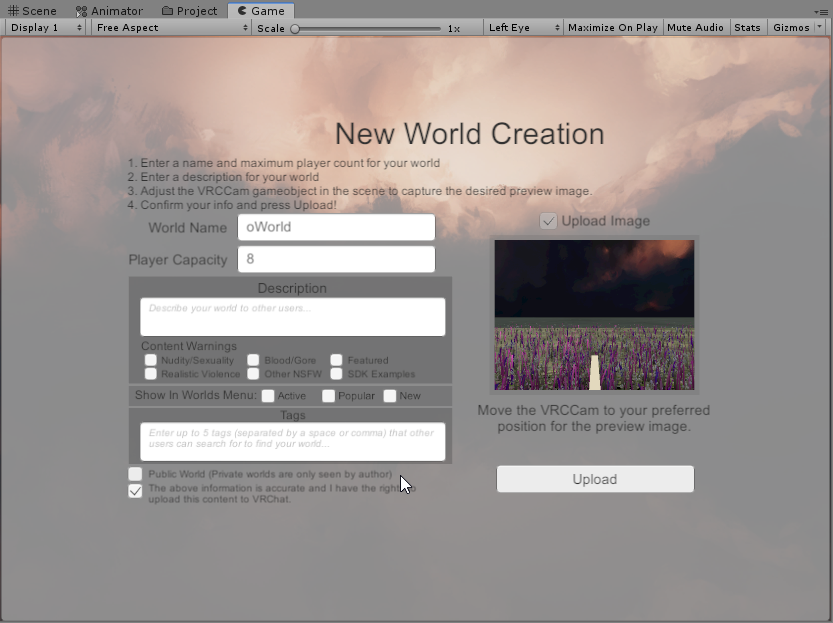 random owl
Show a full screenshot without the crop
bold ibex
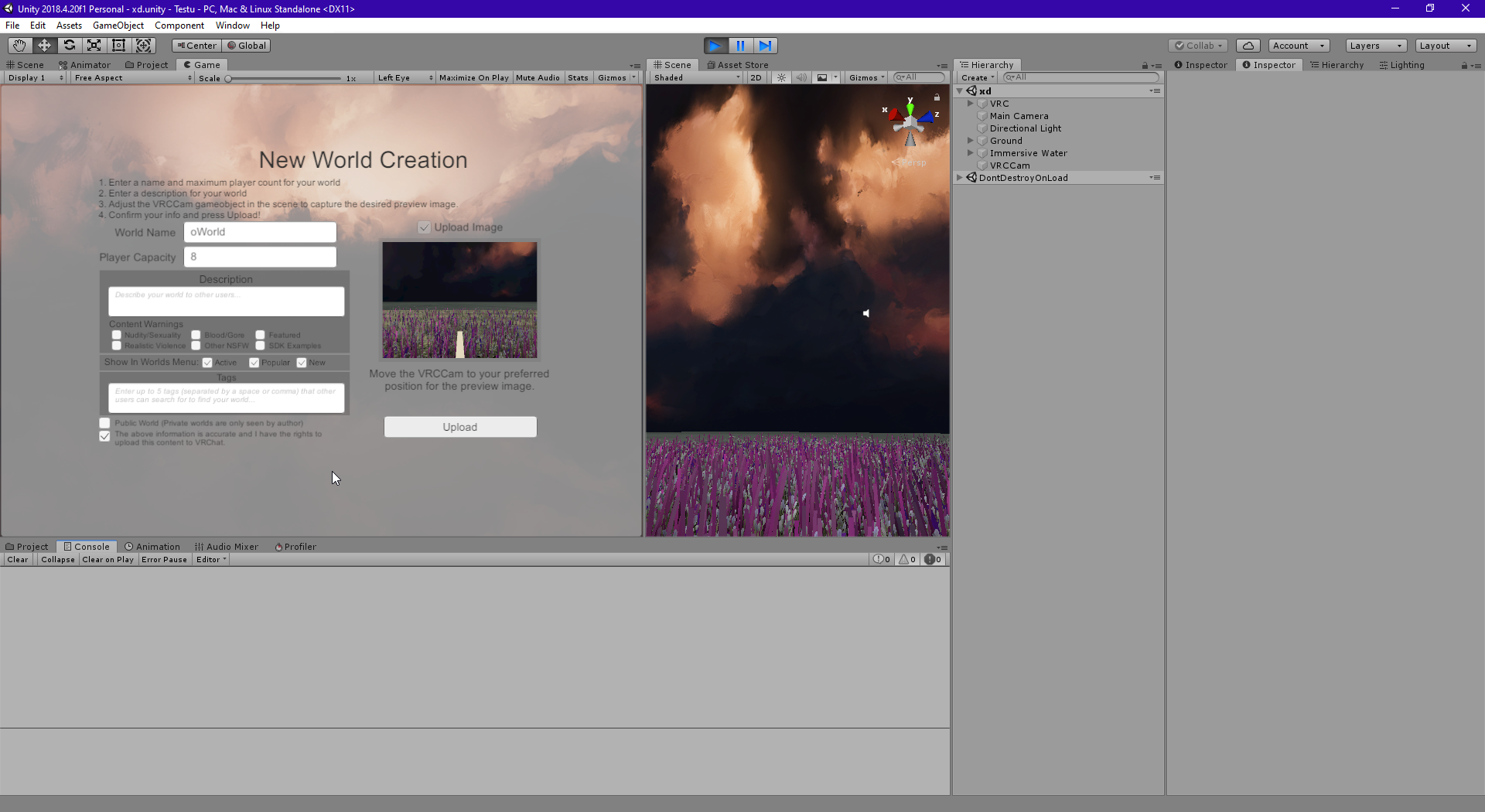 random owl
Delete the modified sdk and get an official one
bold ibex
Anyone know how to add controllable vehicles/aircraft in your world? Google-fu returns nothing useful.
random owl
In the pins you can find the prefabs database where there's atleast one car prefab
balmy gate
@bold ibex you edited your message to waste our time, so I'll edit mine. Don't lie when asking for help. that usually shows up if you had errors or your world failed to build.
However, you or something cleared the console, so the errors aren't there and we can't help you
It's missing the VRChat SDK menu
bold ibex
hmm I have 2 questions.. one is how do I make a toggleable light that affects a pitch black avatar so it's not pitch black.. since I'm using only emissions on static objects I wanted a special light that only affects avatars, and it seems a point light doesn't work
and uh.. I guess I only had that one question actually cuz I think I can figure out the other one
random owl
Is that a mirror?
Mirrors have real time lights disabled by default because how bad they are for performance
And you definitely need to add some light probes for the place
The emissions will affect avatars after you add light probes
random owl
Yep while you are at it add reflection probe/s
random owl
Nice 😄
 verbal stream
I'm trying to create a blood effect with a texture i took from a game, but the game folder, the texture doesnt have a background and only shows the blood where as when I put it into unity, it creates this redish/black background
rain shadow
@verbal stream On the material change it from opaque to transparent or fade
and if they are already what are your import settings?
near escarp
You might need to click the option "Alpha is transparency" on the texture itself
verbal stream
i dont know any answer to that
This is my first unity project
How would I check these settings
 iron viper
Anyone tried to use the plugin 'Peek'? It's got a lot of neat workflow stuff, but it breaks building my world for vrchat. There a way around that?
verbal stream
I turned it so now it looks like this in the project folder
but still looks like this
rain shadow
@verbal stream
near escarp
@verbal stream Click on the texture, it has settings in the top right corner
 noble ether
yes
near escarp
Yes, that should look normal
rain shadow
Fade would probably work better for that kind of texture effect
noble ether
Oh and while people are here. What happened to VRC Object Sync
Does the component have a new name?
rain shadow
If you are using udon it is just the udon behavior itself
Has a checkbox for position sync
verbal stream
is there a way i can cut off the other texture?
i do have probuilder
and polybrush but i have no clue how to use it
 covert trail
Hello, sorry if this has already been answered but I have been browsing the net all day before having to ask this question.
I would love to have a drawing pen in my world I am building, a home for myself, but I noticed that the NeoNeo Pens break the SDK, probably because they are built for the SDK 2, does anyone know of any other pens, or that is someone is making pens to work with the SDK 3?
I am VERY aware that Udon just came out, so this kind of thing may not even be finished.
restive minnow
I didn't find any "trail" thing for Udon yet
(Which is what pens use)
Hmmm...
Now to add "water" to my garden so I can make a portable pool (and justify the "not mario" pipe coming from the center lel
And a "trigger" so it can raise and lower on demand
 wicked forge
So I have a deck of playing cars on a table.. the cards works perfectly but after a few minutes they just fall through the world and even resetting them doesn't help. Anyone know how to fix this?
 native totem
Maybe you could enable continuous collision on the cards? 🤷♂️
Also what sort of colliders do they have?
wicked forge
they have box colliders if that whatchu mean
native totem
Hm, yep. Should work. So yeah I guess try enabling continuous collision.
wicked forge
I'll try it out thx
native totem
I'd try setting the collision detection mode to Continuous or Continuous Speculative.
wicked forge
I'm gonna try Continuous rn
That seem to have fixed it
oh no.. it jsut took longer and they fell into the table
Idk why but this is what they do now instead
hiding from me :o
restive minnow
Maybe it is the table collider?
wicked forge
I changed that one as well. has a box collider and on continuous detection
table is in walkthrough layer and cards are pick up.. could it because of that?
restive minnow
Maybe it is
wicked forge
so.. they should be on the same layer?
amma give it a shot
Nope same thing. It's like they dont even fall. they just decide to have the table rendered ontop of them or something. they just pop and they are inside like this
After a minute they all, at the same time, suddenly inside the top of the table.
rain shadow
@wicked forge are they parented under some weirdly scaled game object?
rain shadow
Whats the transform values of that empty game object
wicked forge
like a meter away from the actual cards
rain shadow
The empty game object is scaled at 1 and has 0 rotation also?
wicked forge
yup
rain shadow
Can you screenshot the card setup
wicked forge
well the cards are rotated 90 degrees if that matters
I moved the empty "gameobject" they where under so its on the cards now
wicked forge
idk why it has that... could be the cause?
rain shadow
It is the cause
wicked forge
Sweet
restive minnow
I need a decent toilet flushin sound effect D:
restive minnow
Nah, it's just a gag for the water draining from my garden
And I still have to make one more room on my world D:
(and populate my avatar room)
Toggable animations on Unity... eww
Ok, my only "problem" is that it defaults on water on
I think it's fixable by inverting the animator
restive minnow
Uhhh... how do I set up the sitting orientation again?
Or better, how do I apply a rotation to default?
bold ibex
some of the blue lights have a glow effect against the wall and others don't even if they're part of the same object.. is there some way to guarantee a glow from the whole object
I haven't uv mapped anything maybe that affects things?
 silent gulch
anyone know how to fix this?
smoky raptor
@restive minnow I could get out my audio recorder and get you a high quality flush while my lights bake if you still need one
restive minnow
Found one already, thanks anyways
Ok, so I've just learned by trial and error to always follow the BLUE arrow, even when setting up chairs
restive minnow
... they're way better than what I have found, thank you
smoky raptor
That's why I offered. Trying to find quality foley for free is annoying; there's so much garbage.
restive minnow
Yeh ;w;
smoky raptor
I need to start making more myself; I need a lot of good clicky/punchy button and switch sounds.
restive minnow
The only sound you can't record by yourself is a goat screaming :V
(which I use as a trigger button on my mirror xD)
smoky raptor
is your trigger button a white square?
restive minnow
Nah
smoky raptor
I see so many white trigger squares; glad to see something else
I made a nice polished wood pedestal with a clicky, animated button on top for my triggers
smoky raptor
restive minnow
Looks awesome, although it looks a bit like a staff from Skyrim and a Button from Portal at the same time
smoky raptor
I'll likely change the button color later; I just wanted something that made it obvious for the moment
restive minnow
That reminded me of a Wabbajack I dunno why
restive minnow
Noice
 trail valley
2
 unborn elk
@bold ibex did you tick "Generate Lightmap UVs" in object import settings?
smoky raptor
I haven't touched jumping yet, but is the player mods script not working on your vrcworlds object?
trail valley
yep the add mod button isnt there
smoky raptor
That's all I got until Unity finished baking and I can check if it's working for me
trail valley
i can't publish stuff cause when i goto the vrchatsdk thingy it just said utilities which only lets me clear cache pls help
trail valley
and where is the console?
random owl
Usually right here
trail valley
oh im blind i looked in the wrong place
random owl
If not then press Ctrl Shift C
trail valley
well this is what appeared
random owl
trail valley
wait i noticed thats on a 2018 version. im on 2017.4.28f1
random owl
Yep that would also cause the error
trail valley
soo i need to change version?
random owl
Yes
trail valley
to the newest one?
random owl
The one shown in my pic
trail valley
gotcha
random owl
VRChat
This page lists the current Unity version you should use when creating content for VRChat, as well as links to the correct version for both Unity Hub and direct downloads. Current Unity Version The current Unity version in use is Unity 2018.4.20f1. Unity Hub To install the cu...
trail valley
so its changed since the last time i did stuff
random owl
Yep not that long ago
trail valley
last time i did anything was in either jan or feb
random owl
https://docs.vrchat.com/docs/migrating-from-2017-lts-to-2018-lts
I suggest going trough this guide while upgrading your projects
VRChat
Migrating your project from Unity 2017 to 2018 LTS isn't as difficult as you might think! Here's a guide providing each step in detail.
smoky raptor
I must've not been paying attention but I thought sdk2 was 2017 and sdk3 was udon/2018. sdk2 can be migrated to 2018 without touching the new sdk? TIL
random owl
SDK2 and SDK3 are a different thing
Both have 2018 versions
And both are being still updated
trail valley
wait i forgot how do i get to my world
random owl
Can you be more specific on what you mean? 😅
restive minnow
Things are going GOO-HOOO-HOOOOD!
trail valley
ingame how do i join it
random owl
It's under the Mine category if you have uploaded it to your account
restive minnow
Now to modify my triggers so my campfire and water doesn't activate at the same time lel
This isn't Spongebob >:V
random owl
Take a picture without cropping it up
trail valley
trail valley
trail valley
okay and now do i have to restart unity?
random owl
Nope just press the pause button
trail valley
https://cdn.discordapp.com/attachments/361741445352259584/704843402545594433/unknown.png still shows this
 restive minnow
Now to find a way to make it so the Campfire doesn't activate while the water is raised :/
random owl
Just back out of the upload by pressing the play button and try again as long as the error pause is actually disabled
@restive minnow triggers or udon? 🤔
restive minnow
Udon
random owl
So two different buttons doing the same thing?
restive minnow
No, One button activates the campfire in the middle of the map, the other raises and lowers the water level
random owl
Show me the button that is not behaving as expected
restive minnow
Nah, I didn't test it yet
I managed to make it so the Water doesn't raise while the campfire is on the map
As such
I think I can use that "GetBool"...
random owl
That's an interesting way of doing it 🤔
Hmm wait I need to read again what you wanted to do
That one is checking if the campfire is active and if it's not it changes the bool on the animator of water?
Is that the correct behaviour
restive minnow
Yes
If it is activate, it will play a Buzz sound denying access.
Now I have to make something like that to the OTHER button, so it doesn't activate the campfire IF there's water.
random owl
Ahh gotcha
 worldly crow
can you make arbitrary HTTP requests from udon?
restive minnow
I facepalm myself
So many C# errors just because I forgot to re add the { after the Interact() >:C
Fixed >:D
Ok... it "works" but it is still turning my lights off somehow
Well... nevermind there's a glaring error there
Wonder how I can make the water better or if it is ok like this
 green lagoon
well I suppose it would help if the bottom of the water wasn't grass
bold ibex
generating lightmap uvs makes it look worse and I tried tweaking settings and nothing really seems to work
so would I have to uv map it in blender first?
restive minnow
I kinda plan to make the texture change to stones but not sure exactly how
Nvm, kinda found it, I just need to blend it better now lel
Because lel
I might have to create a custom blended material for that...
random sage
how can I make a ui always visible even when its behind walls etc
warm bear
in Canvas for the text, change render mode to overlay
well thats for texts anyway, if you want it for image ui's you'll have to apply transparency
or give particle>multiply shader
bold ibex
is there a world that has avatars with keyboard emote or something so my mute friend can type?
random sage
dont know of avatars but there are some mute hangout worlds with pens and keyboards and stuff
cant remember the name offhand but just try searching for mute @bold ibex
restive minnow
Any ideas on what to put on this garden? :V
warm bear
many different kinds of flowers
simple fence, those green trash cans you see at the park
restive minnow
Because I love this shader ;w;
warm bear
same
restive minnow
Wonder where can I find a good prefab
restive minnow
WELP
From 6Mb it went to 15mb 9MB of Prefabs D:
Not sure if it should be called "optimized" :V
restive minnow
Or 9Mb and it is 6mb of Prefabs I can't remember, and yes everything is on Static
 open thicket
what's the normal talkdistance for vrchat?
restive minnow
Not sure myself
I think it's about 4 to 5 meters?
Uhh... now that I noticed a thing...
Baking lights and toggable lights... whoops D:
random sage
oh @warm bear thanks! didn't notice you answered me haha
 undone vapor
Can someone pls tell me how to fix this?
 eager steeple
what is this I'm very confused
balmy gate
@eager steeple Vket4 is a 12 day long market of shops selling avatars and goods. Has beautiful worlds too. But move this subject to #vrchat-general-2
 bronze smelt
You can upload to imgur and link it
sweet elk
What does it mean if the SDK tells you that your scene is outdated? My map's information seems to be all gone now, even though I've been updating my map for a year now
You can't load into my world anymore, it'll just throw you to your home again. Not sure how to fix this
trail valley
please help. how do i fix this it just said this and nothing else and the prepearing for upload dosend move and there is also a tab saying "unity application is running ...
stop it to access the control panel"
 lone epoch
made simple custom shader for mirror in world with dissolve effect, but I can't record animation for it actually, anyone know how to resolve that problem?
wicked forge
I am shuffling a deck of cards but they are placed the exact same order everytime. thou not when they are placed in a circle for some reason. fixed
Anyone know why that is?
warm bear
@sweet elk "Scene" is just your unity screen view on your world. And map information is gone is because your Pipeline is detach or removed at some point some how.
Either you will have to make a new world with new pipeline id, or somehow find your old world's id and copy pasted that into Pipeline..
@bold ibex Same problem as MrComp.
@trail valley Disable future proofing in the vrc sdk settings. You'll see it. Also you have 3 errors.
@lone epoch try not ticking the red record button and just add property then set in the values. To make sure its working just drag your slider thing into the shaded line numbers back and forth.
lone epoch
@warm bear already tried that before, not working unfortunately
warm bear
@noble ether worlds gets out of labs based on activity on it such as people favoriting your world, or over a certain amount of visits
@lone epoch have you tried clicking these diamonds and then change values?
cuz thats what i usually do
it will turn blue when you click on it
lone epoch
animation recorded correctly, I think we just can't record property's of mirror material, it's just staying default
warm bear
i haven't done animation recording for that before so thats probably true if you can't get it to work
lone epoch
tried to record transform of VRCMirror and it's actually works fine
so the only 1 way to do spawn with dissolve for mirror is control dissolve value by world position of mirror object in shader, sad.
warm bear
fair, thats one way. From what just happened i assumed that the dissolve effect is there, just that its on the top of the mirror and hence moving it down works.
 mental verge
i put an animation on some text to make it float around in a world, how can i get the animation to loop?
 hazy temple
click on the animation in project window or in the animator and check loop in the inspector
mental verge
loop pose or loop time
hazy temple
loop time
mental verge
alr thanks!
warm bear
@restive minnow whats your issue
restive minnow
I want to make this dome "invisible" from the outside
And as a bonus to make the outside invisible from inside the dome
Sort of a "Tardis" effect
I THINK I made it work but I don't think I should be uploading the world with that solution...
trail valley
how does one fix this error
restive minnow
(Made it as a VRC Mirror without any reflections)
warm bear
@restive minnow i never done it before, but i may have an idea on how to do it
its similar to setting up a mirror
restive minnow
I did as setting up a FX/MirrorReflection and adding the VRC Mirror component, removing every reflection node from it
warm bear
there you go~
restive minnow
Not sure if it is healthy for VRChat tho
restive minnow
Also, somehow the "north side" of my dome stops the Skybox animation
warm bear
hm...
restive minnow
That's how it "breaks"
restive minnow
Did you add the VRCWorld?
eager steeple
ya
random owl
@eager steeple if you go to the settings page might wanna check that vrchat.exe is set in correctly in the VRChat Client part
restive minnow
You need to edit the Client Patch to the actual place of VRChat (if by Steam it's on your steam folder/steamapps/common/VRChat)
random owl
No that already looks like it's set correctly
random owl
Next you should try going into the VRChat install folder and running the "install.exe" there as an adminstrator
eager steeple
thx
random sage
how can I make a TrailRenderer show up in a mirror?
restive minnow
Wish there was a StarNest version of a cubemap :C
balmy gate
@random sage Change the shader to allow backface culling:
Adding this line after the SubShader { will do it:
Cull Off
@restive minnow you can use this maybe? https://raw.githubusercontent.com/lyuma/LyumaShader/master/LyumaShader/StarNestAvatar.shader
not sure if it's what you are looking for.
 simple nimbus
does anyone have any experience with triggering events on sound hitting certain frequencies/thresholds?
restive minnow
Thanks, but I kinda fixed it by messing with some layers
My buttons won't have its "halo" when over but that's not a problem
(Would have if I knew what layer that glow is or if I could change it)
random sage
@balmy gate is that the shader on the mirror or on the trail? and where would I edit it haha never messed with shaders before
balmy gate
@random sage the shader on the trail. A lot of shaders have an option for cull. But basically go to Edit Shader in the gear menu on the material and add that line after SubShader
random sage
thanks :D
restive minnow
Avatar room populated ;w;
 loud kayak
Hey does anyone know of any good home worlds?
near escarp
That's a very subjective question 😄
warm bear
@loud kayak i put the room of the rain as my home world cuz its short to load in and rainy mood
bold ibex
Iris garden is my home world :> I like loading into something comforting
loud kayak
i agree, i feel like comforting relaxing home worlds are pretty popular
warm bear
get a short home world and you'll be in the game x10 as fast so you can join with your friends easily
loud kayak
that’s also v true
bold ibex
I think iris garden is only 28 mb
loud kayak
yeah it is
bold ibex
Can anyone help me make a world?
 deep parrot
hey im having a issue with destroyObject
i have a spawnobject spawn a prefab and i have destroy object targeting the prefab but on interact the object is not deleted
vivid brook
Anyone know where a tutorial on how to hide mirrors
 wise sedge
After updating a project to 2018, all the UI components are showing up through walls?
warm bear
@deep parrot hi jet! make sure on-interact/destroyObject has the targeted set to True
@vivid brook watch one of the world making worlds tutorial and they'll go through teaching you how to set up a mirror, to hide the mirrors is to do the opposite of making it work so > setting it to false when setting up mirror is how you disable it. That or set it to toggle > on-interact on a cube.
@wise sedge in the Canvas, add the Main Camera from the Hiearchy list and drag it to the camera thing in the Canvas then Play the scene once and exit it. It should update it to fixing transparent ui components that are showing through walls.
deep parrot
o hi fooni
deep parrot
i just did it a different way
warm bear
😮
deep parrot
the destroy object button kept deleting itself
warm bear
D: oh no
i think in the prefab, it needs to have the vrc trigger destroyObject on True for it to work, not sure
bold ibex
hello
bold ibex
After switching ot unity 2018 and SDK2020, I can't upload my updated world. It does the shader compiling and building and then just stops. No message, no nothing. No world information window pops up.
Weird thing is that the only error that pops up is a waer shader material error that was there before and didn't block upload or cause problems
Then, when I build, every single script seems ot break - chairs, avatar pedistals, everything.
this is when I load the world, but this error never caused issues before
random owl
@bold ibex some stuff from standard assets isn't supported by unity anymore I would suggest removing those water scripts that are causing problems and switching to something like Silent's water, also you should disable error pause from your console since that stops the upload from working even with non blocking errors
The errors from triggers are normal currently and can just be left as it is
bold ibex
I already am using Silents clear Water
random owl
Then just remove the Water.cs file
bold ibex
OK, now..where is the editor pause option? Cannot find it anywhere.
random owl
This one
Usually for vrchat purposes you want that off since it can easily mess up the build process
bold ibex
thanks
@1 does the look at/follow script work anymore from standard assets? i was having trouble getting it to work and it's the only simple and operational one i know of
bold ibex
@warm bear you talked about my world id it has one but its called something strawberry
simple nimbus
so i noticed the Video Sync Player can play twitch stream, but not a channel that is hosting a stream. anyone have any experience with this?
warm bear
simple nimbus
what i'm trying to do is have a player and just have it set to my twitch channel, and then host different channels from there. That way it doesn't require any inputs within VRC
warm bear
think i've seen a world with that before, can't remember where
bold ibex
You guys know any PC avatar worlds that have avatars for both platforms?
frigid estuary
How can I have a good guess at how far "gain" and "far" values for the Audio Override component reach?
Also what does "gain" describe?
 supple drift
@frigid estuary Gain on the Spatial Audio Source describes decibels that gets added after the regular audio source. So if you have a sound file that peaks at -10db and is set to full volume (1) on the native audio source, and you have your gain set to 10 on the Spatial Audio Source then it should peak at 0db in the client.
I don't think there's an accurate method to really test distance attenuation without hopping in the client because it's using inverse-square (which is frustrating)
frigid estuary
@supple drift Ah alright. Thank you!
supple drift
I just realized you were talking about the override, and not the spatial audio source - but all of that still applies (except to voices obviously)
sweet elk
@warm bear Thanks for the answer yesterday
But it turns out that importing my map to a newer unity version is what broke it
I'm building & publishing it once more and let's hope for the best (Had a backup laying around) 🦜
bold ibex
added my avatar to the world and my world went from 20mb to 80mb.. anyone knows how to fix this? my avatar isnt that big and its atlased as well
random owl
Enable legacy blend shapes on the import settings that should bring it back down
sweet elk
will do
sweet elk
Works 👌
 silver kraken


 near escarp
you're baking light
trail valley
how does one fix this
hazy temple
uncheck Error on Pause