#third-person-beta
1 messages · Page 1 of 1 (latest)
 dusky mortar
 rustic cedar
hi
 limpid dragon
Mrow
 proven dawn
the game
 celest granite
you just lost.
 somber ridge
.o/
 stiff wasp
yo
 echo hatch
Heya
 pliant solar

 serene thistle

 devout oar
Aww shit, son.
 grave frost
reminds me of the second life camera, i am curious if this was the inspiration
Or was it just general
 devout oar
Sup Doc!
stiff wasp
 wicked delta
*oh no new channel that needs moderation* <a:cat_cry:953224360972419092>
wicked delta
*oh no new channel that needs moderation* <a:cat_cry:953224360972419092>
oh whatever are we gonna do
wicked delta
devout oar
Sup Doc!
Bed time, it’s like 4am lol
 stiff lagoon
So deskies can go third person? 
 urban marten
wicked delta
*oh no new channel that needs moderation* <a:cat_cry:953224360972419092>
urban marten
wicked delta
*oh no new channel that needs moderation* <a:cat_cry:953224360972419092>
rip
 lofty fractal
afaik people are fairly civil in the beta channels
devout oar
wicked delta
Bed time, it’s like 4am lol
 grave frost
lofty fractal
afaik people are fairly civil in the beta channels
grave frost
lofty fractal
afaik people are fairly civil in the beta channels
nots
wicked delta
Oh I know, I was just joking :D
wicked delta
devout oar
https://tenor.com/view/samuel-jackson-sleep-go-to-sleep-go-the-fuck-to-sleep-gif...
I will… in a bit
urban marten
devout oar
https://tenor.com/view/samuel-jackson-sleep-go-to-sleep-go-the-fuck-to-sleep-gif...
wait f* in sleep ? uh ?!

 stray patrol
we should be able to hold cntrl + right click to move the camera left to right
Or "up down left right on a flat axis"
urban marten
i guess im reading it wrongly
 dense raptor
yippeee
stray patrol
stray patrol
we should be able to hold cntrl + right click to move the camera left to right
O...
it being directly above the players head could get a little annoying, some people might want shoulder view
limpid dragon
 🎥
🎥

urban marten
stray patrol
it being directly above the players head could get a little annoying, some peopl...
they might add that later, its still new too
stray patrol
yes
 wicked cradle
hi i dont see 3p-beta on steam, properties, then betas, i just see open-beta
stiff wasp
wicked cradle
hi i dont see 3p-beta on steam, properties, then betas, i just see open-beta
Restart Steam
limpid dragon
Reboot steam, that'll usually make it pop up
urban marten
wicked cradle
hi i dont see 3p-beta on steam, properties, then betas, i just see open-beta
restart steam
dense raptor
It just appeared for me
urban marten
i would like to have third person view in vr
stiff wasp
You are sick
 dense raptor
we have nikke at home
 urban marten
stiff wasp
You are sick
urban marten
stiff wasp
You are sick
im jocking but that would be fun too
dusky mortar
I've seen the request a few times for it to work in VR
it'd probably be sickening for most people if it worked just like desktop... but maybe some kind of dollhouse scale mode or something...
urban marten
dusky mortar
I've seen the request a few times for it to work in VR
let it for a day so we get sick lol
stiff wasp
It just wouldn't be practical though. Isn't holoport movement pretty much that?
dusky mortar
Yeah I suppose so
 sinful stream
dusky mortar
sinful stream
dusky mortar
But yeah, actually orbiting your avatar when you look around would be pretty wild even with the strongest vr legs
stiff wasp
dusky mortar
But yeah, actually orbiting your avatar when you look around would be pretty wil...
I am somehow completely immune to motion sickness, so I wonder how I'd handle it lol.
dense raptor
dusky mortar
But yeah, actually orbiting your avatar when you look around would be pretty wil...
can't be worse than using gogoloco fly mode in vr
 minor bridge
stiff wasp
I am somehow completely immune to motion sickness, so I wonder how I'd handle it...
minor bridge
stiff wasp
I am somehow completely immune to motion sickness, so I wonder how I'd handle it...
I thought I was immune until I tried Thad's Ball world. Instant motion sickness, first time in years
 pseudo sand
Arrow keys to offset camera position would be nice!
stiff wasp
dense raptor
can't be worse than using gogoloco fly mode in vr
Yeah, that doesn't affect me one bit.
pliant solar
I don't like the Roaming Mode because it violates the reason why player cameras placed in the world make their position and direction obvious using red lines. Roaming Mode allows you to essentially bypass this by dropping your world view somewhere, walking else where, and no one knows that you are secretly watching a particular area, as there is zero indicators (as far as I can see) to let others know someone is watching that spot.
sinful stream
dense raptor
can't be worse than using gogoloco fly mode in vr
just don't get dizzy

stiff wasp
minor bridge
I thought I was immune until I tried Thad's Ball world. Instant motion sickness,...
I tried it earlier, I still didn't feel sick.
dense raptor
just don't give consent to getting sick. works for the flu and alcohol
sinful stream
pliant solar
I don't like the Roaming Mode because it violates the reason why player cameras ...
or people do cheat somehow in the game
 crystal olive
Woah
stiff lagoon
it has the same keybind as minecrafts lol
sinful stream
yea'
dusky mortar
Do you feel like that's needed even with the free-rotate mode?
pseudo sand
having an Arma-style free-look where your head turns relative to your body would be cool
pliant solar
dusky mortar
Do you feel like that's needed even with the free-rotate mode?
Are you asking about the need for an indication of where someo0ne is looking?
stiff lagoon
myabe having a shoulder cam would be cool
dusky mortar
pliant solar
Are you asking about the need for an indication of where someo0ne is looking?
Ah I meant, is a reverse view mode needed if free-rotate mode exists
Yeah, I'm interested in the idea of adding a horizontal offset slider for over the shoulder mode (probably not adding during the sidecar beta, but it'll be good to observe how many people say they want that)
stiff lagoon
dusky mortar
Ah I meant, is a reverse view mode needed if free-rotate mode exists
that would be cool
sinful stream
stiff lagoon
it has the same keybind as minecrafts lol
oh this remind me something let me try this
devout oar
Hehehe, I liked that Chad walk into the portal.
stiff lagoon
lmao
this is so awesome
i personally dont like it being above my head, maybe add options to change where you want it to be?
dusky mortar
If there's more options you'd like add a request on the canny feedback board and I'll be observing how those get voted 🙏
dense raptor
just add a slider that moves your entire armature left and right
dusky mortar
But also, we're going to be observing how the actual live rollout goes as far as if people actually use it or the experimental rollout has better results for people who have the feature vs not. If it shows good signs then we'd look at expanding the feature more
 lapis halo
DAG believes this is a good opportunity to talk in third-person :)
dusky mortar
(so during just the sidecar there might not be a whole lot of "feature creep" added, mostly focusing on fixes and stuff, but please share feedback still!)
 crystal fjord
so here is my feedback when I loaded in I didn't get the popup anywhere about how to do the third person so having something on my screen or menu to tell me about it would help I had to look in here to see how to do it
dusky mortar
crystal fjord
so here is my feedback when I loaded in I didn't get the popup anywhere about ho...
Oh hmm, that would be a bug then... it should be showing on the top center of your screen when no menu is open
you can see how it should look in the start of this video shared: #third-person-beta message
crystal fjord
dusky mortar
you can see how it should look in the start of this video shared: https://discor...
yeah didn't see it lol so def a bug
pliant solar
The direction the avatars head is facing doesn't update when you first enter 3rd person mode.
In first person, your head faces the look direction, centered on the cursor.
When you first pop into 3rd by scrolling the mouse wheel out, the 3rd person camera bumps up above your head, which you can tell because the cursor also is no longer on the same spot in the world.
However when this occurs, even though the camera bumped up, causing your center view to not be the same anymore, the direction the face is looking does not update to match that initial change.
dusky mortar
(did anyone else end up with the keybind tooltips not showing at the top of the screen the first time?)
pliant solar
Because of this, the angle of the head is not 100% accurate whenever in 3rd person mode, and is slightly off
 prisma jungle
sinful stream
oh this remind me something let me try this
pliant solar
prisma jungle
sinful stream
oh this remind me something let me try this
pliant solar
I had 2 tool tips appear the first time.
dusky mortar
pliant solar
The direction the avatars head is facing doesn't update when you first enter 3rd...
Hmm yeah, this is intended unless I'm misunderstanding. The center is slightly offset up so you can see what your interaction raycasts will be pointing at
crystal fjord
but def has a lot of potential for vtubeing and I am enjoying it just wished the camera stayed when I had facing my face and I moved it wouldn't move to back of my head
 willow fjord
Something I've noticed, you can move forward, and hit tab to disjoint the camera, so you can keep moving while keeping that angle, but once i move forward again, my character snaps forward, could there be an option to keep the camera disjointed? It'd be useful for like say a vodcast and other things.
dusky mortar
crystal fjord
but def has a lot of potential for vtubeing and I am enjoying it just wished the...
If you hold TAB while you start moving, after you've started you can release tab and it'll stay free-rotate until the next time you start moving
 wispy onyx
We got Third Person View before GTA VI and I’m here for it.
As a Steam Deck user, I am very happy.
dusky mortar
Or simply put, move will cancel free-rotate, but having TAB still pressed prevents that
pliant solar
Yes, but that offset means you're avatars facing direction is no longer accurate, since it wasn't also set to match the new offset
dusky mortar
pliant solar
Yes, but that offset means you're avatars facing direction is no longer accurate...
Yeah, there will be a slighty difference for the head bone orientation especially for very near objects. Do you view that as problematic?
pliant solar
Meaning your avatar will look further down toward the floor than you are actually looking
Well if my reticule is centered on someones face, I'd like to be sure my avatar is actually facing them. I haven't tested this from VR with someone in 3rd person looking at me tho
dusky mortar
I see, yeah that could give a weird shy vibe if you're always looking down. The offset would depend on distance to what you're viewing though
(causing snapping when distance to object changes rapidly)
pliant solar
The distance doesn't matter, because after that initial offset, the cursor stays fixated on a point even after zooming further out
dusky mortar
the angle for the avatar eyeline to intersect a ray cast through the point above the head will be steeper the closer* the intersection takes place
But yeah, a small upward angle* offset could do a bit if this difference proves to be problematic
dynamic offset might get weird
pliant solar
At least it's something to consider and look at just to be safe
dusky mortar
Yeah, thanks for calling it out
willow fjord
Also this beta makes The Sigil of Teleportation that more worth it
Also testing the guns in idle cube, the bullets do seem to aim in the center of the screen in third person

if only veering slightly left to reach the center
willow fjord
I mean i'd be far more invested in a "VRNite" than a fortnite, i can be my own OCs
wispy onyx

I don't seem to find any way to adjust the Vertical Position of the Third-Person Camera. It would be nice if this can be adjusted in the Settings, mainly
willow fjord
If this beta does go through, i wonder if people will make platforming games and obbys that would be designed for it. Also, if there's a way to lock the camera to the side, 2d platformer xD
pliant solar
Ok, I don't want to have to be the person to say this or point it out, but someone has to.
I will no longer trust standing beside desktop players when im in an avatar wearing a skirt.... it is WAAY too easy to get a look of everything, zoomed in and all. Just saying...
And again, no indication to know what someone is actually looking at
willow fjord
I mean uh, if your concern, consider people have access to invisible cameras o-o
dusky mortar
This was always a possible problem with avatar based cameras, but yes third-person does complicate that
pliant solar
It will be so easy and accessible that I can't imagine most guys not doing that at some point. Honestly it doesn't bother me at all, just saying I wouldn't trust that it wouldn't be happening all the time lol
wispy onyx

Currently impossible to enable Third Person through a Gamepad binding on Steam Deck (using OLED model). There should be though!
willow fjord
okay, this beta thankfully doesn't break neoworlds
wispy onyx
wispy onyx
https://feedback.vrchat.com/third-person-view/p/add-gamepad-bindings-for-third-p...
@dusky mortar Should also mention that the message never disappears on Steam Deck unless I attach a physical keyboard and do it. But yeah, add Gamepad support for Third Person please!
Unless there's a Gamepad binding that I'm missing?
dusky mortar
wispy onyx
<@153868400282566656> Should also mention that the message never disappears on S...
Ah, yeah you can get it to dismiss via the (not mentioned in announcement) Main Menu -> Graphics Settings menu page, there's a UI toggle for the feature*
The TAB tooltip will then go away 1min after you've dismissed the F5 toggle
But yeah gamepad may end up being in the realm of "see how the experiment rollout results go" along with other things like mobile support etc too
wispy onyx
To add to this, I will also echo this issue because of Gamepad: https://feedback.vrchat.com/third-person-view/p/dont-use-tab-for-free-look

The tab button is an extremely useful way for desktop users to navigate UI elements in the world. With Tab bound to free-look, it is impossible to interact
pliant solar
Ok, I've tested, EvolvedAnt Arcade works perfectly fine in 3rd person, even with my custom UI that names the tagged player. No changes needed on my part.
dusky mortar
wispy onyx
To add to this, I will also echo this issue because of Gamepad: https://feedback...
There were some separate issues with the free-mouse feature of TAB allowing users to potentially click buttons way off behind the avatar, so it was disabled in 3P for that reason, freeing a bind. But still looking in to if other binds might be good
During closed beta the idea of middle mouse was raised, though not everyone has middle mouse
willow fjord
I would kind of prefer using ~ to free look, because i did use tab to mouse around in world menus
wispy onyx
dusky mortar
There were some separate issues with the free-mouse feature of TAB allowing user...
Yeah, it's just coming from many action adventure games it would just feel natural to me if free look is just always on.
willow fjord
Actually, that said. I wouldn't mind using ~ to free look, and ~+Shift to Lock Detach the Camera
wispy onyx
Personally, add a setting that toggles between Free Look Always On vs Hold TAB.
dusky mortar
wispy onyx
Yeah, it's just coming from many action adventure games it would just feel natur...
Yeah... I'm personally most comfortable with WoW style interaction, which always gives you a free pointer unless actively controlling the camera
dusky mortar
willow fjord
Actually, that said. I wouldn't mind using ~ to free look, and ~+Shift to Lock D...
~ is in use as a binding for some debug menu toggles, but that requires shift being pressed so maybe possible. Though it's also possible worlds are using it for something
wispy onyx
dusky mortar
Yeah... I'm personally most comfortable with WoW style interaction, which always...
Star Wars Jedi: Fallen Order, Batman Arkham Knight, Hogwarts Legacy, Fortnite, even ESV: Skyrim, are all good examples of what I prefer.
dusky mortar
(I wish we could just allow people to make their own custom bindings on PC Desktop, but that's a deceptively huge project because of all the UGC built on static binds)
 royal tangle
Are other players testing the TPV mode unable to use flight systems like go beyond?
wispy onyx
Haven't tested Go Beyond yet in Third-Person.
royal tangle
Even when returning to FP it's borked
willow fjord
dusky mortar
~ is in use as a binding for some debug menu toggles, but that requires shift be...
Ahh, i didn't know it was used for debug...
dusky mortar
willow fjord
Ahh, i didn't know it was used for debug...
https://docs.vrchat.com/docs/keyboard-and-mouse yeah it's referred to as "Backtick" there
We've been updating our debug menus though, I need to check if we're even still using those old ones
wispy onyx
There's a lot of potential for Third-Person view. With VRChat itself, it would definitely be welcome for more customizability of the Third-Person Camera natively.
 crystal saffron
Me personally, I don't see its use. It's pointless.
dusky mortar
One of our motivations for introducing it is just that a lot of new users come from other games where they're used to 3P, and VRC only being locked to 1P might make them feel uncomfortable controlling things, and then they quit. But for plenty of people who prefer* first person, yeah it'd be kinda pointless
I find that I like it when moving around a world, and when viewing avatars if I'm trying them out, but I prefer 1P when actually talking to people
crystal saffron
It's a weird concept to me, not the third person view but the addition of it to VRChat. It's a social platform, and aside from third person uses in game worlds, it feels weird(?)
wispy onyx
wispy onyx
https://feedback.vrchat.com/third-person-view/p/add-controls-for-third-person-ve...
Oh Kung I edited this post. Also asking if you can have Horizontal Cam Position (Left/Right Translation) adjustments as well so that the Character is to the left like this example:
 willow fjord
In a way, 3p also lets us appreciate the avatars we have a bit more. I can see the outfit of my novabeast interact with the music
Without having to fly out a camera
crystal saffron
I always just used my mirror or camera, not much of a hassle but I see your point.
dusky mortar
wispy onyx
Oh Kung I edited this post. Also asking if you can have Horizontal Cam Position ...
Thanks for preparing all that
willow fjord
wispy onyx
Oh Kung I edited this post. Also asking if you can have Horizontal Cam Position ...
You know what this reminds me of, Resident Evil 4 and how it frames Leon
dusky mortar
Yeah, I think there's a lot to consider. There was a poignant comment during our closed beta phase about it meaning nobody will look you in the eye in social situations anymore
But making it really quick to zoom to toggle and adjust, we're hoping that you can just use what's most comfortable for any situation
(and I tend to want to zoom in when talking, but zoom out when exploring, but even exploring depends on the world)
royal tangle
Interesting thing to consider and could see that being the case, but I think I share a sentiment that I'm a little "detached" when I'm in desktop mode as compared to being there in VR
wispy onyx
willow fjord
You know what this reminds me of, Resident Evil 4 and how it frames Leon
Yeah personally, I prefer having a Left/Right translation so that I can see what's in front of me.
willow fjord
Imagine if you could z-target someone in vrchat third person, it'd be kinda funny
crystal saffron
I feel like the idea of VRChat supporting 3PV is a great idea when it comes to worlds, game worlds specifically! Though only for worlds since I believe it ruins the immersion of VRChat, slowly drifting off from what it used to be. From this social platform to just essentially an RPG.
willow fjord
I mean if i read the beta notes right, the world creator has a right to disable 3p?
dusky mortar
willow fjord
Imagine if you could z-target someone in vrchat third person, it'd be kinda funn...
Hehe, new feature: Stagger Bar, when full enemies (your friends) are knocked down
wispy onyx
willow fjord
I mean if i read the beta notes right, the world creator has a right to disable ...
Yes, through the VRChat Home panel for the World.
dusky mortar
willow fjord
I mean if i read the beta notes right, the world creator has a right to disable ...
Yep, world creators can disallow the feature in their worlds
willow fjord
Also oh no, VR Souls
wispy onyx
Third-Person View also opens up wanting to create Locomotion additions to Avatars. Instead of looking still, have a passive idle animation.
But that's for us to do as Avatar Creators!
franada can do the coolest animation addition to GoGo.
willow fjord
Back on track though. I can understand the concern about people becoming disassociated, losing eye-contact, but I've been in other social games before VRChat. I think the more important thing is actually being there with your friends.
wispy onyx
Tupper's Poll says it all. We play VRChat to hang out with friends as the most important thing.
dusky mortar
Yeah, Selfie Expression was an effort to bring more expression and immersion to desktop users
3P is more of an inclusivity thing I think. Some people just don't like the feel of controlling in 1P
wispy onyx
dusky mortar
3P is more of an inclusivity thing I think. Some people just don't like the feel...
This, I can agree with.
crystal saffron
Yeah, no convincing will ever make me think this isn't a disappointing and useless feature. Just my opinion.
wispy onyx
More Accessibility options is always a welcome addition to VRChat.
dusky mortar
crystal saffron
Yeah, no convincing will ever make me think this isn't a disappointing and usele...
Yeah that's valid, you'd just not be the target for it then, since you prefer 1P
wispy onyx
In the past, Accessibility was nearly non-existent natively on VRChat.
crystal saffron
wispy onyx
In the past, Accessibility was nearly non-existent natively on VRChat.
Yet people still found ways to get it to work, and it's that drive that really engages creators.
dusky mortar
Yeah I know some people get motion sick from 1P whereas they don't in 3P, but I think more than full on accessibility, it's more about just an option for wider range of preferences
willow fjord
Actually there's something i need to check with this beta
Can screenshot be replaced with 3p? or can it be set to D+Pad left or right?
oh wait

Forgot i had my wings open
Also yes, sometimes I play VRChat with an XBOX controller. It uh, reminds me of the old PSX Namco Museum Days
Speaking of [oh god tank controls]. Had to hit f5, then tab to get this.

So yeah, F5 to 3P, i had to start moving, and then reach tab to detach it.
dusky mortar
Yeah gamepad isn't really optimal yet. We might not have a chance to polish it until we see initial results from live rollout experiment to know if people use/like the feature
(but for when that chance comes, feedback on it is helpful 🙏 )
willow fjord
Oh i actually like the concept of 3P and using the gamepad, truth is, I'm impaired irl, and sometimes I just want to use a gamepad in vrchat, the idea of being able to see my avatar in world is nice too.
dusky mortar
 yeah I'd like to get gamepad up to par for the feature when we can get some signal to put more into the various options/edge cases etc that need extra polish
willow fjord
Though I don't think people actually know you can use a gamepad for vrchat
Like even the tutorial when you start vrchat for the first time defaults to keyboard and mouse
dusky mortar
Yeah some people don't know... so it's kind of a minority now
Some people don't know you can play VRChat without VR tbh 😅
willow fjord
Maybe the next vrchat dev video should mention it?
dusky mortar
Maybe, I think people who see the dev videos know a lot already. It's more like someone just coming across us on Steam or youtube
err I mean just like youtube clips or something
willow fjord
Ahh
dusky mortar
"What's this "VR"Chat? looks cool, but I don't have vr..." I've seen that interaction a few times
willow fjord
Meanwhile me, save for the few times i was able to borrow a vr rig

But yeah, I used 3P in worlds that have a script for it, but being able to use it anywhere is nicer.
But while this beta is out, I'll definitely be using it
 frozen prism
i have 2 requests for this new feature
1: the ability to remap the key to any key you want (i'd personally remap it to 4 as it's closer to my hand)
2: the ability to also move the third person camera up and down (sometimes i have tall avatars and it's too high with them lol)
also i love this feature, i've been waiting years for this, thank you for adding it
dusky mortar
frozen prism
i have 2 requests for this new feature
1: the ability to remap the key to any ke...
For 2. you can upvote this canny: https://feedback.vrchat.com/third-person-view/p/add-controls-for-third-person-vertical-and-horizontal-cam-position
for 1. general key rebinding is a deceptively large project (which I think would be great to do) but it would need to be done in a way that lets static bindings in worlds still work
(so custom binds are probably way out of scope for this project, but there's gotta be a canny (or a few) requesting it as well)
(I mean outside of the third-person-view canny board)
Here's one, from 2017  https://feedback.vrchat.com/feature-requests/p/custom-keyboard-control-options
 remote gyro
I have a friend who plays 3rd person on desktop in another game. The controls were confusing at first, but need the mouse wheel to move the camera out
Figured it out with rotation, hold TAB and use A or D
Needed mouse with scroll wheel to move in and out of 1st to 3rd person view.
But couldn't use touch pad
 icy sierra
Super VR Ball is really fun in third person, it's almost too similar to Super Monkey Ball now lmao
icy sierra
JetSki Rush works..... okay-ish.
The third person works, but the HUD is tied to the Jetski, and the player physically hold items, so you cannot see the hud nor the items
 blissful mango
I thought the third person with free look would work like the holoport safety setting for vr where your avatar faces the direction you walk in
rather than tank controls
 slate girder
dusky mortar
Yeah gamepad isn't really optimal yet. We might not have a chance to polish it u...
slate girder
dusky mortar
Yeah gamepad isn't really optimal yet. We might not have a chance to polish it u...
I will say the BOT scene for VRChat uses simulated xbox controllers right now! It's very useful for preciser movements.
icy sierra
Btw i've been playing on my Steam Deck and used L to zoom in and R to zoom out
it's great since i don't use gestures
 lime verge
so my main question is: what determines whether or not the camera can back up through a wall
because in some worlds it stops at walls like you'd expect, but in others it just backs up as far as it wants like the walls don't exist, and you see tons of skybox
walls/floors/ceilings
lime verge
I'm speaking about worlds that definitely have world collision
the camera can definitely pull straight out through some walls that I definitely can't walk through
OK sometimes it seems like the camera stops at a wall, until I walk my avatar right up to having their back on that wall, and then their hitbox just clips through the wall slightly enough that the raycast to their head starts behind the wall
so the avatar "pushes" the camera through the wall into the skybox basically
ok yeah that doesn't work on every wall for some reason, but it definitely works on a lot of them
lapis halo
I've been having a great time playing VRC in third-person though.
lime verge
this also kind of raises a question -- can one define a wall that the player SHOULD be able to back their camera through even if they can't walk through it? like an invisible wall around the edges of an island
 next scarab
dusky mortar
Yep, world creators can disallow the feature in their worlds
next scarab
dusky mortar
Yep, world creators can disallow the feature in their worlds
I actually have an app which uses the mouse wheel to send OSC parameters to the avatar. Thats not limited to worlds. Now, it switches every time to the 3p mode when I use the wheel.
Edited: Ok - this is finally solvable from my side. I can simply take the focus to my app instead letting do it on an active VRChat window.
next scarab
The hard-linked camera in 3p mode feels wrong to me when walking/turning. Normally, 3rd person cameras has a sort of delay/rubberbanding/following effect.That would probably feel better 🤔

 nimble meadow
 limber tinsel
https://i.gyazo.com/9386a5193f4399a952c1e1be6bb0e789.gif
limber tinsel
https://i.gyazo.com/9386a5193f4399a952c1e1be6bb0e789.gif
Sick Avatar!
What is it?
limber tinsel
Card soldier without the inside
nimble meadow
limber tinsel
Card soldier without the inside
Dude, that's super gnarly!

Also I'm gonna try out the 3rd person beta rn

 coarse trench

Currently in third person, if you hit tab, your entire body locks as you can continue to orbit the camera. I would prefer prefer an option to only lock below
 ocean cairn
Love the 3rd person camera i've been wanting a universal one for ages and now to finally have it is great
One thing though idk if its been said but it be great if we could control the height of the camera
Feels very high up compared to other 3rd person games or even that prefab some worlds have
 wet spire
Hi, this is a nice start for 3rd person. Now add a toggle button (and script functionnality ?) to separate mouse movement and camera rotation, allowing to move around the mouse without moving the camera and expose Input.mousePosition and we will be able to create a lot of nice games that will work smoothly for both VR and desktop players.
 steep arrow
This is fun, real cool feature
Not sure if this is intentional but i love how you can keep walking and have the camera free rotate around 🔥
 hybrid horizon
testing 3rd person beta, this is super great!
Feature request: right now, mouse zoom in tends to zoom to the top of the head of my avi (regardless of size) -can this be eg eye viewpoint center -ie so that when I zoom in, it zooms onto face?
also, if I want to have 3rd person running with a side-view, tab+shift brings up steam overlay -not sure if I can disable that
pseudo sand
Does the Third Person Beta also have all the Open Beta features like Steam Audio?
hybrid horizon
uwuuuu
even in 3rd person it's super difficult to give good headpats in selfie expression mode
 nimble meadow
 stray hemlock
has anyone made a canny post for an "over the shoulder" view mode
stray hemlock
has anyone made a canny post for an "over the shoulder" view mode
WAIT you can do over the shoulder?!?!?!
stray hemlock
no im asking if theres a canny request for it
nimble meadow
oh! gottcha
stray hemlock
the screenshot is from an old world-based third person system
nimble meadow
stray hemlock
the screenshot is from an old world-based third person system
Gottcha, still tho, I agree it would be a good feature especially for like larger avatars or avatars with external objects
hybrid horizon
nya~ 💞

 somber parrot
Wait what is this?
hybrid horizon
somber parrot
Wait what is this?
open beta sidecar edition: you can now skyrim inside vrchat on desktop
somber parrot
Oh nice can it be also for vr
 nimble hornet
Avatars are showing up as error bots every time on quest
 somber parrot
So it is possible? How?
devout oar
No, it's desktop ONLY.
somber parrot
Oh
nimble hornet
Quest too every time we change world's when we load in every one's Avatar's show up as error bots
devout oar
Wrong channel.
 sullen scaffold
devout oar
Wrong channel.
sullen scaffold
devout oar
Wrong channel.
excuse me?
devout oar
Talking to CHIPTHEDUTCHIE34, their problem isn't TPV-related.
sullen scaffold
devout oar
Talking to CHIPTHEDUTCHIE34, their problem isn't TPV-related.
I see. I'm gonna move my message over.
When there's an obstacle between the target avatar and the camera, is it possible to cull those obstacles without causing software gore? I've seen modern games do this. There must be a way to do this in VRChat too. Basically, have the player see the target avatar AND whatever the player would see in 1st person; everything else is of a lower priority. I'm no shader magician, but I come from a C++ background. So, what do Unity, VRChat SDK and Udon offer here?
 clear canopy
sullen scaffold
When there's an obstacle between the target avatar and the camera, is it possibl...
clear canopy
sullen scaffold
When there's an obstacle between the target avatar and the camera, is it possibl...
Probably nothing stopping the world from implementing a shader like that, but that's not something that could be injected into existing worlds
 tawny plank
IDK if anyone has floated this idea round yet, but I think it would be extremely beneficial & incredibly useful if world creators could get access to the third person view height/location and somehow implement height limits to prevent the camera from going super far away. I'm primarily thinking of this being used in some game worlds, like magic freeze tag, to prevent cheaters from putting their camera super far in the sky to see where everyone is.
kind of like avatar height limits but for the camera
 weak prism
can you not see mutual friends on the third person beta? :( i assumed it would be the same as the steam audio beta before it was implemented into main beta
pseudo sand
weak prism
can you not see mutual friends on the third person beta? :( i assumed it would b...
Yeah I just noticed this too, so I'm switching back to the open beta for now
Nobody answered my question about whether the 3rd person beta has steam audio either
weak prism
pseudo sand
Yeah I just noticed this too, so I'm switching back to the open beta for now
yeah- i love the third person thing however the mutual friends benefit is SO good for interacting, groups are always a good conversation starter however knowing if we're in the same 'circle' is super awesome :')
 spare steeple
will there be a way for me to configure my invisible wall user layer to be ignored by the 3rd person camera, so it can go through them?
I already have it for the purpose of Interact Passthrough (still salty that I can't use the native Physics.IgnoreRaycastLayer for this purpose), so it would be great to also make it work correctly with the 3rd person camera
in free look mode, < and > rotate the camera on a diagonal instead of side-to-side
spare steeple
steep arrow
This is fun, real cool feature
Not sure if this is intentional but i love how yo...
I think it could be cool if you could steer left and right using < and > in 3rd person mode
< and > already do something
steep arrow
Oh true that would be cool ya!
spare steeple
technically you can steer left and right currently but you have to hold Tab the entire time and my hands don't like it (not to mention it activates the LShift+Tab steam overlay really easily)
 steady panther
stray hemlock
no im asking if theres a canny request for it
steady panther
stray hemlock
no im asking if theres a canny request for it
And before vrchat turn into fortnite
spare steeple
world portal info not constrained to the correct thing in 3rd person
 steady panther
Oh lord. I wonder how many world is gonna have this issue
spare steeple
hopefully getting the position of newly exposed Screen Camera will correctly account for the 3rd person
spare steeple
is there a reason why audio directionality is based on the avatar rotation instead of the camera rotation? it makes free look very disorienting
 wispy glacier
tawny plank
IDK if anyone has floated this idea round yet, but I think it would be extremely...
wispy glacier
tawny plank
IDK if anyone has floated this idea round yet, but I think it would be extremely...
This is a really good point and I hope the devs have something like this planned 🙏
tawny plank
Yee
wispy onyx
stray hemlock
has anyone made a canny post for an "over the shoulder" view mode
Yes I did. Here: https://feedback.vrchat.com/third-person-view/p/add-controls-for-third-person-vertical-and-horizontal-cam-position

I don't seem to find any way to adjust the Vertical or Horizontal of the Third-Person Camera. It would be nice if this can be adjusted in the Settings, mainly
lapis halo
wispy onyx
Yes I did. Here: https://feedback.vrchat.com/third-person-view/p/add-controls-fo...
unrelated, but send me your best memes
 light osprey

I think the max distance of the 3p camera should be at least half of what it is now. It's kinda weird that we now have a camera that just can zoom in on people
light osprey
Yeah. That post is heavily just my opinion. I personally think that you still should be kinda attached to the avatar even in third person.
I absolutely can see why it can be nice being further away as well. But it feels kinda silly to me.
light osprey
Yeah. A bit of a different game tho
coarse trench
steady panther
Oh lord. I wonder how many world is gonna have this issue
There's going to be a lot of this since most stuff is referencing your avatar's view position. And it's not something you can/should fix globally since it depends on if the world element is diegetic or not
A holographic display or an NPC gaze would still want to face the avatar's head, but a non-diegetic health bar would face the third person camera
icy sierra
 pine vine
How do I enable third person?
pine vine
How do I enable third person?
You can't on quest sadly for now.
It is currently an exclusive beta on Steam only, which you have to select the "3p" beta. Then you can just scroll in/out with a mouse computer.
It will probably never be available in VR as it would be heavily disorienting.
pine vine
icy sierra
You can't on quest sadly for now.
It is currently an exclusive beta on Steam onl...
Awwwwww thanks for the info tho
 inland wyvern
I am happy that this makes nuke crashers useless.
sinful stream
What do you mean?
inland wyvern
you know these types of avatar that uses physical nuke models or particles that converge into a line to crash a specific person
3p camera completely destroys that ability
sinful stream
inland wyvern
3p camera completely destroys that ability
True
icy sierra
inland wyvern
3p camera completely destroys that ability
good >:3
never heard of this kind of crashers before, but i'm glad to hear
 burnt crag
while the 3P mode in VR would be weird and useless, and probably not something that should go to live, I'd still like to be able to do it purely because it'd be really funny and dumb
stray hemlock
do people actually want 3rd person in vr or are they just suggesting it without actually thinking about it
burnt crag
I want it because it'd be a terrible and disorientating experience
therefore not worth any development effort because I'd laugh at it for like 5 minutes and that'd be it
stray hemlock
you technically already have it with teleport movement
 tidal estuary
i hope third person uses a raycast so it wont phase through colliders
stray hemlock
idk i feel like people asking this just see something new and exclusive to desktop and their first thought is "why cant i have that too?"
and then you actually think about it for 5 seconds and go "oh, thats why"
tidal estuary
stray hemlock
and then you actually think about it for 5 seconds and go "oh, thats why"
thats vrc for you
icy sierra
I love how VRChat also takes care on improving the experiences on Desktop and mobile
... And actually fixed the niche bugs i've found while playing on mobile with a controller!
burnt crag
stray hemlock
you technically already have it with teleport movement
I was just thinking about that actually
this is obviously way out of scope for the current 3P camera, but I wonder what VRChat would be like with a 3P camera like how they do it with 3D platformer games that are playable in VR, like Astro Bot Rescue Mission and the like
icy sierra
Nowaday I spend more time in non-vr than in VR
-# my now 5 or 6 years old Oculus Quest 2 is kinda dying rn
stray hemlock
burnt crag
I was just thinking about that actually
this is obviously way out of scope for t...
sounds like an easy way to cheat in game worlds
tidal estuary
thats why i hope it uses a raycast so it wont phase through colliders
stray hemlock
from when i tested it the other day that seems to be the case
tidal estuary
🙏 good
stray hemlock
icy sierra
Nowaday I spend more time in non-vr than in VR
-# my now 5 or 6 years old Oculus...
quest 2 only came out 4 years ago
icy sierra
The only time i've had the camera clip through walls was when I tested Super VR Balls.
In the Electronics World, the camera go through the fan blades
thaaaat's it
icy sierra
stray hemlock
quest 2 only came out 4 years ago
wait what
i bought it around launch lemme check
October 2020
icy sierra
Yeaaah
Kinda disappointed that my Quest 2 started getting joystick drift and had the foam disintegrate only after 5 years
am i too used of devices lasting a very long time
can't wait for the steam frame
inland wyvern
I've been on the quest for 3-4 months now, rest of my time in vr is spent on an old vive that i got when i was 7-8 at the time.
I still don't know how to fix the issue with the microphone not being able to be discovered as a device.
anyway, i'll later disect this stuff to see if it REALLY does avoid these types of crashes
inland wyvern
inland wyvern
anyway, i'll later disect this stuff to see if it REALLY does avoid these types ...
cannot do anything so I'll just assume.
I think this uses a UI element over the entire screen to render the third person camera, behind that is the first person view.
i might be wrong though.
 ancient tulip
with the popup i thought i had to middle click to go 3rd person initially
its not clear that means when youre in 3rd person, you scroll to zoom in and out
tidal estuary
worlds should be able to define the maximum range the third person can go out to, right now by default the range is kinda insane
 burnt crag
good ol' MMO camera
coarse trench
I suspect smartphones will eventually get third person as well
coarse trench
tidal estuary
worlds should be able to define the maximum range the third person can go out to...
True, though you can use the stream camera to get a view even farther back than that.
coarse trench
tidal estuary
worlds should be able to define the maximum range the third person can go out to...
Worlds can disable third person entirely, though allowing with a range limit is a really good idea. Is there a canny for it?
 tawdry bear
so wait does the 3p beta have steam audio as well?
 weak heath
tawdry bear
so wait does the 3p beta have steam audio as well?
weak heath
tawdry bear
so wait does the 3p beta have steam audio as well?
- same question
I switched to 3rd person beta this Friday but had some issues hearing friends in conversations, so I'm trying to understand if it's steam audio related
dusky mortar
3p-beta doesn't have steam audio. It's based on the current live build 2025.4.1 + 3rd person changes
 honest kayak
if we get third-person on desktop, we should get adjustable crouch height too
so matching eye level is possible without needing to adjust avatar size
same with some more specific sitting stuff without needing gogo on the avatar
pseudo sand
dusky mortar
3p-beta doesn't have steam audio. It's based on the current live build 2025.4.1 ...
That makes sense. I was on the 3p beta and I had quite a few "Wait a second, I can't hear you because everybody else is too loud" moments on it that I never would have noticed before using the steam audio beta. That just proves to me how much better Steam Audio actually is. Though maybe you guys could specify somewhere that the 3p beta doesn't have steam audio because I think there will be quite a bit of confusion otherwise.
dusky mortar
dusky mortar
3p-beta doesn't have steam audio. It's based on the current live build 2025.4.1 ...
 opal rune
Oh my god third person?
I dont think I would want to do that lol I think it takes the whole experience away from the game.
Like being your avatar?
Hard to explain
honest kayak
opal rune
Hard to explain
desktop is a vastly different experience though
pseudo sand
opal rune
I dont think I would want to do that lol I think it takes the whole experience a...
This is why they didn't implement it sooner iirc. I think they felt it was antithetical to immersion.
but enough people asked for it so here we are!
opal rune
honest kayak
desktop is a vastly different experience though
Ohhh its desktop only
 grand geyser
 glossy rapids
I find it really cool I can look at my avatar from 3rd person from all angles
So I do not have to fly a camera around from weird angles
glossy rapids
light osprey
https://feedback.vrchat.com/third-person-view/p/max-distance-for-3p-camera-is-to...
You do not have to zoom out. I also like it and I also thought of FF XIV lol
icy sierra
glossy rapids
You do not have to zoom out. I also like it and I also thought of FF XIV lol
So i'm not the only one!!!!
light osprey
glossy rapids
You do not have to zoom out. I also like it and I also thought of FF XIV lol
Yeah. I know. It's more that I don't like that others can do it rather than I can do it :)
wispy glacier
If that shit doesn’t have a lens I might just avoid deskies altogether cuz I don’t want folks to be able to scroll way far back and just watch me from their super fucked 3p perspective
glossy rapids
light osprey
Yeah. I know. It's more that I don't like that others can do it rather than I ca...
Why
burnt crag
it's not really too much different from someone just using the photo camera and zooming in on someone far away
icy sierra
Or using a drone
glossy rapids
....What
light osprey
Can agree on the camera zoom argument. The drone is quite obvious that it's there tho.
As mentioned. Just my opinion on the matter. Not a hill I'm going to die on tho.
light osprey
You're right. Time to shift gears.
wispy glacier
I think just giving it any kind of object or model like the camera and drone is enough
“I should probably see something behind deskies and pointing at them so I know they’re in 3rd person”
That way if they do anything abusive with the camera everyone can just clearly see
Be it clipping walls for game cheats, or harassing players
That specific request for a model on the camera can probably be a canny post if it’s not already, I wouldn’t mind writing it but it would be later in the afternoon
remote gyro
A 3rd icon would work
glossy rapids
Yeah some kind of an indication would work
remote gyro
The camera can come in from a low angle while I was by myself. I kept it high up when with one group of friends
 cold coral
it took me far too long to realize this meant you could scroll down to activate 3p
 cold coral
for some reason pressing tab only unlocks view for one frame, not sure if this is intended but you can use it to look like a pokemon npc
cold coral
 grand granite
Is this third person beta apart of the normal beta branch?
grand granite
Is this third person beta apart of the normal beta branch?
it's its own branch
grand granite
cold coral
it's its own branch
Interesting, I pray this is a global setting and not just fixed based on world creators choice.
prisma jungle
prisma jungle
prisma jungle
cold coral
world creator would have to have their own agency over its usage as it can break game worlds that are not intended to handle it existing
sure people can use a custom avatar setup but this is something available to everyone
prisma jungle
cold coral
sure people can use a custom avatar setup but this is something available to eve...
as you can see, you can disable it from website anyway if not suit.
grand granite
cold coral
world creator would have to have their own agency over its usage as it can break...
I can definitely imagine it breaking games that require screen space elements to be on the HUD of the first person perspective. Seeing that from 3rd person you will just see a floating element in front of your characters head 😂
I've seen this before
cold coral
people can also use it to slightly corner-peek
grand granite
3rd person will also allow for Top Down perspective desktop games to be implemented
Will be fun
cold coral
if a proper api is implemented for it, yes
Controller bindings for 3PC right now are suboptimal but that makes sense since it's beta. But now my controller is straight-up not working at all?
even in first person nothing works
tawny plank
I'm really advocating for Udon access for 3rd person camera parameters before launch to address some of these points here
Would be nice to set reasonable height/distance limits to prevent cheating in game worlds
I think it's very reasonable to set camera zoom and height limits, much like with avatar scaling limits too
pseudo sand
wispy glacier
Be it clipping walls for game cheats, or harassing players
Didn't really think about it, but yeah, a lot of deskies are probably going to be using this to creep on/upskirt users... Not great.
Hoping there's some kind of counter to this
stray hemlock
there are numerous ways people can do stuff like that already
camera, drone, personal mirror
idk i dont like the idea of having more visual clutter just cause deskies are maxing out their third person view distance
wispy glacier
Camera and drone have a model tho
The argument I posted was for exactly that
Give 3rd person a model
burnt crag
personal mirror doesn't
wispy glacier
Don’t make it an invisible camera
stray hemlock
wispy glacier
Give 3rd person a model
yeah that sucks
i'd rather they just lower the max distance
wispy glacier
I’m fine with either lol
As long as something happens and it ain’t just unrestricted like this 🙏
blissful mango
Tbh the third person having a camera icon/model would make sense
burnt crag
I'd like for it to be a toggle, personally I think it'd be a bit odd to have for people who are using it as intended
you'd see a camera icon just floating way above their head? well why talk at their avatar if their perspective is way up there
if added, maybe make it so the indicator is only visible if it's close to you, but not when it's far away, so it's there to catch people being weird, but is out of the way when people are normal in the brain
blissful mango
burnt crag
I'd like for it to be a toggle, personally I think it'd be a bit odd to have for...
Id think itd just be like the camera in vr
pseudo sand
Maybe the 3P camera model is hidden unless the quick menu is open? Like how the red camera markers work now
burnt crag
that would be nice
pseudo sand
Or (and I don't know if this is possible without shader level access) have avatars that are between your avatar and the camera disappear/fade/dither out like how some games do it (and probably only at certain proximities to the 3P Camera)
This might also have the additional benefit of making sure you can see properly even if people are standing behind you while you are in 3P
Could also fade out all avatars except the player when the camera angle is too low
tawny plank
Max distance lowering quite a bit could also be a very good way to go about it
I don't see why it should be so significantly far out imo unless for some extremely niche cases
good thing it's in very early beta so we can continue to provide feedback & shape the feature before it's live
 icy sierra
spare steeple
my vrchat timed out but I don't know why
too small
icy sierra
spare steeple
my vrchat timed out but I don't know why
too small
oh yeah, had the same issue yesterday, but it wasn't that small
 fervent vessel
spare steeple
my vrchat timed out but I don't know why
too small
fervent vessel
spare steeple
my vrchat timed out but I don't know why
too small
-# unrelated to the third person thing but could i know that Deltarune world at all?
 vagrant lark

I know Gogo Loco is not provided nor supported by VRChat, but because is well known and widely used I just wanted to report that the movement locking toggle
icy sierra
I really think it would be up to Gogo Loco's creator to make a fix
remote gyro
One good thing about 3rd person view is your voice stays with your avatar.
And you can hear others clearly from near your avatar, not the camera view.
 +
+  limber tinsel
icy sierra
I really think it would be up to Gogo Loco's creator to make a fix
limber tinsel
icy sierra
I really think it would be up to Gogo Loco's creator to make a fix
That's just how the script works on the desktop. Don't expect them to do anything av3 change wise.
sinful stream
 rough turtle
So far Gogoloco seems to work fine for me
rough turtle
So far Gogoloco seems to work fine for me
Yeah me too is fine for me
It's just you need to use freezer xD
pseudo sand
icy sierra
I really think it would be up to Gogo Loco's creator to make a fix
Actually, this happens because of the behavior of a VRChat state behavior called "VRC Animator Locomotion Control". So it actually is something that VRChat themselves can fix.
pseudo sand
I know this because I also use it to freeze my locomotion like how gogo does it, but I don't use Gogo Loco
And in desktop (3P or 1P) when its enabled, you cannot turn left and right
pseudo sand

When the state behaviour "VRC Animator Locomotion Control" is active, you are unable to turn your camera horizontally.
ancient tulip
 coarse trench
Option to mirror-reverse selfie expression for if you want to puppet your avatar in third person with camera facing you
 vestal parrot
how do i activate the third person in game?
glossy rapids
vestal parrot
how do i activate the third person in game?
F5
 daring owl
this isn’t available for mobile right?
daring owl
oof
ancient tulip
let me swipe to edit discord i swear
 valid heath
The camera should have a shoulder view as a selectable setting
 marble sphinx
Wait sry of this is random but how do you put third person????

 solemn rapids
daring owl
this isn’t available for mobile right?
solemn rapids
daring owl
this isn’t available for mobile right?
Not for now but will be available in future updates!
 daring owl
real
honest kayak
pseudo sand
Hoping there's some kind of counter to this
besides the fact this is already possible discretely on both desktop and VR
i reckon it might be possible to add support for easy to add privacy features on avatars
3rd person camera would just see black
however then it’s up to the avatar creator
blissful mango
The fact you feel the need to hide something on your avatar is a bit questionable
 maiden hedge
any possibility to get access to change the keybinds for 3rd person? i keep hitting shift + tab and it opens my steam overlay
pseudo sand
maiden hedge
any possibility to get access to change the keybinds for 3rd person? i keep hitt...
I hope they do too, but seeing as how they still don't have any way to rebind any desktop KBM controls, I think it's unlikely...
solemn rapids
I just share this video if you feel impatient for 3P feature, especially for the mobile version.
urban marten
sinful stream
<:OriLaugh:699415887404597259> + https://i.imgur.com/ZWTqJyK.png
wait, if you gift on the map it still give you a badge ? for some reason not for me
sinful stream
urban marten
wait, if you gift on the map it still give you a badge ? for some reason not fo...
This is kinda badges gift how many players I gift them I just get 40 gift 🎁 badge + https://wiki.vrchat.com/wiki/Badges

VRChat Wiki
Badges are icons that appear on a user's profile to signify their contributions to the platform.
urban marten
yeah mistake from me
willow fjord
I should do something to get a badge, besides existing.
Also I'm gonna test out the 3p beta to see how it handles an event, with vket coming up
spare steeple
how do I make 3rd person not bump up against my invisible walls
limber tinsel
solemn rapids
Gogo used to have a third person toggle but it was removed Around the same time as the avatar scaling was natively introduced I think.
 obsidian meteor
finally third person view , been waiting for this feature since i found it on some worlds
coarse trench
locomotion disable and third person camera orbit interact very weird and cause your avatar to bend their head all the way around their body
not sure if this should be a bug or not but these two official features together do end up looking broken
 whole wave
coarse trench
locomotion disable and third person camera orbit interact very weird and cause y...
whole wave
coarse trench
locomotion disable and third person camera orbit interact very weird and cause y...
Wouldn't hurt to submit a canny. Especially if it's pretty simple to set up or showcase. Like if every avi w/ gogoloco exhibits this behavior since it uses locomotion lock.
coarse trench
Yeah gogoloco is how it was found, though a simple locomotion disable toggle should also do the same. checking to make sure it's not gogoloco specific
spare steeple
is this beta up to date with the live build
 earnest ravine
spare steeple
is this beta up to date with the live build
earnest ravine
spare steeple
is this beta up to date with the live build
last i checked, no
nothing posted in https://discord.com/channels/189511567539306508/503009489486872583 either, so very unlikely too...
 spare steeple
I second this, also happened to me
willow fjord
I got disconnected and the display is so far away, but it still behaves as if the UI is close to the screen
I actually cannot click the box xD
spare steeple
fortunately most disconnect errors auto-continue after like 20 seconds or so
spare steeple
spare steeple
how do I make 3rd person not bump up against my invisible walls
this is going to drive me crazy!
it's bumping into my invisible walls! what layer do I have to exclude or whatever to prevent this????
earnest ravine
spare steeple
this is going to drive me crazy!
it's bumping into my invisible walls! what laye...
make a bug report (or is this more of a feature request?) about wanting a way to exclude some walls from the collision logic of the 3rd-person camera... this is a beta version, there likely aren't any solutions to your issue (yet) 🤷
you make a bug report or feature request for this specific beta here: https://feedback.vrchat.com/third-person-view
Share us your Third-Person View bugs and feedback here (one item per post). Non-constructive and off-topic posts will be moved or deleted.
somber ridge
 light nimbus
whats this feature and how do i activate it lol
light nimbus
whats this feature and how do i activate it lol
check the pinned message
light nimbus
i checked 😔
icy sierra
light nimbus
i checked 😔
It is only available on Steam, in desktop mode.
On Steam, right click on the game and go to the properties -> Beta
And then you'll find a beta named 3p-beta
I will install the beta with this feature.
For more information, check the pinned message -> #third-person-beta message
light nimbus
galunga
 river grove
FYI to folks using the 3p beta! We are pulling it temporarily. It will be back when we have a chance to update this branch to 4.2.
prisma jungle
river grove
FYI to folks using the 3p beta! We are pulling it temporarily. It will be back w...
remote gyro
ok. i will change it soon
 short crest
so when it will be back?
 low talon
It will be back when we have a chance to update this branch to 4.2.
short crest
i asked about days or months. i apologize for not specyfiying
minor bridge
Most likely back by tomorrow :)
dusky mortar
Back now! sorry about that
prisma jungle
that's quick
prisma jungle
dusky mortar
Back now! sorry about that
Thank you
dusky mortar
prisma jungle
that's quick
I already had a build with it ready, but was holding it to include more fixes to not spam updates at testers
prisma jungle
ahh
willow fjord
Whoops, steam removed me from the beta, but I'm back on it
spare steeple
having a weird bug with my render distance script where my render distance is not going back up?
update: I think this is because 3p beta is behind Live. the Holidy Gift Event UI and banner renders as "Pride Event" in 3p-beta too. 3p-beta is just busted
ancient tulip
dusky mortar
So this version is just "what was there before + 2025.4.2
yay
dusky mortar
spare steeple
having a weird bug with my render distance script where my render distance is no...
You may need to restart steam to get the update
wicked delta
Just got back on the the 3rd person view beta and I have to say, using Tab for free look feels odd
Especially when you try to walk while pressing it

Issue: Currently to enter free look mode you press Tab once and to exit you just start moving. This how has some weird quirks to it: When enabling free look
wicked delta

Issue: The current 3rd person view does not work well with the new debug UI: Trying to scroll on it moves the 3rd person camera closer / further away Local
pseudo sand
Now that Steam Audio is live, does that mean that the 3P beta also includes Steam Audio? (It didn't before, when Steam Audio was still in Open Beta)
Nevermind, that's what the "2025.4.2" Update was, so I presume that's a yes
minor bridge
Yes ^
 errant karma
what is the point of this?
dusky mortar
you mean having third person perspective at all? or this channel?
(this channel is for feedback on the beta)
having third person view is something we're trying out to help a wider range of players feel comfortable in desktop mode, since some people just don't prefer first person
 tepid vessel
what's the 3rd person bind again?
dusky mortar
scroll wheel down will zoom you out of first person activating third person, scroll wheel up will zoom back to first person, or F5 toggles without altering zoom
tepid vessel
ty
While looking for it I learned there's a bind to hide HUD that I went years not knowing about so that's fun
dusky mortar
Ah yeah, I'll need to remember to update our docs once third-person is fully live
(I assume you were looking here: https://docs.vrchat.com/docs/keyboard-and-mouse )
tepid vessel
dusky mortar
(I assume you were looking here: https://docs.vrchat.com/docs/keyboard-and-mouse...
Exactly this!
yay
 tepid vessel
 jagged hill
uhh is this a known bug
jagged hill
uhh is this a known bug
Can be reproduced
jagged hill
interesting
tepid vessel
tepid vessel
yay
I feel like L-ALT would be a better bind for free rotation, so that way we could potentially still have the TAB button unlock the mouse while in 3rd person.
It's also a bind that a lot of 3rd person games use for free camera rotation.
dusky mortar
Oh, I hadn't come across that camera UI reversing. Thanks. Yeah you could report on Canny if you don't mind. I don't think I'll forget to fix it, but stuff there doesn't scroll away like discord
dusky mortar
tepid vessel
I feel like L-ALT would be a better bind for free rotation, so that way we could...
TAB was intentionally disabled for third person to prevent clicking on things behind the avatar, though there were some suggestions about having the avatar turn to face anything clicked and still have free mouse
Some of the fixes in that last update (the one that fixes misaligned player capsule selection) makes it more feasible to have the mouse freed in 3p
tepid vessel
That makes sense actually, thanks for clearing it up.
jagged hill
slightly off topic
I typed out a report and tried to submit it, but I guess I wasn't fully logged in? So after authorizing my account it went back to the bug report page, but it was empty and I had to retype everything.

It displays fine in first person view, but entering third person view in any way flips the camera's UI.
dusky mortar
wicked delta
https://feedback.vrchat.com/third-person-view/p/free-look-movement-behaves-weird...
I don't want to stifle feedback too much by giving a counterpoint but also don't want to look like I didn't see this so I'll respond on discord rather than Canny so others don't feel like they can't chime in or something with feedback. Anyway, there was some feedback that holding something while wanting to actuate WASD wasn't great. Working as a toggle made the action of the bind less predictable if the freed direction was near alignment with the unfreed. You can consistently turn free rotate off with mouse left click if you don't want to use locomotion to cancel it
dusky mortar
jagged hill
this'll be a nice update imo
I hope people like it! At first it'll be incrementally rolled out as an experiment so when it first goes live not everyone will have immediate access. We might be able to keep the side-car beta up for people stuck out of the experiment (can't promise, but I'd like to do it that way if possible)
light osprey
Will it always throw you into third person if you just scroll? Will you always have to hold down alt now when you want to move items closer to you in desktop?
jagged hill
it's good for a debug tool as well
i didn't know my avatar did this

 restive salmon
thanks for bringing 3rd person view
i couldn't play without anymore
i wouldn't change keybinds either
jagged hill
light osprey
Will it always throw you into third person if you just scroll? Will you always h...
i wouldn't mind the opposite being default, where you'd have to hold alt to move your camera in/out
light osprey
jagged hill
i wouldn't mind the opposite being default, where you'd have to hold alt to move...
That would solve all my problems. Since I can't really hold down alt without moving my hand around on the keyboard.
Handicapped gaming
dusky mortar
light osprey
Will it always throw you into third person if you just scroll? Will you always h...
Ah yeah, at least for this first release third person will likely take the main function of scroll and item distance would be the secondary. It'd probably mess up our ability to get a good signal on running an experiment if people can't stumble on the scroll to use it
light osprey
That is very fair
jagged hill
can that be an option in the settings
i wouldn't mind it defaulting to on but it'd be nice to swap it 😅
dusky mortar
A lot of the suggested "how about an option to X" stuff could be approached if the experiment does well, and alternatively if the experiment shows that nobody uses 3p that'd also be a signal to give priority back to item distance
Other things like configuring sideways offset for over the shoulder etc, or other options would be post-experiment if lots of people like it
Or just in general, getting some of the most important options for the feature
icy sierra
ngl i already love third person a ton, imo it kinda feels more natural when in desktop, and i'll enjoy using it on my phone when it's fully out :)
jagged hill
dusky mortar
Other things like configuring sideways offset for over the shoulder etc, or othe...
makes sense, ye
dusky mortar
But for the first round, we're trying to focus on justifying building on it more by having the experiment show we should (so a lot of edge case stuff like making debug UI work better, or more options would come later... but that doesn't mean not to keep providing the feedback, because if we can get to it then the list of feedback in Canny will be a big help)
light osprey
Yeah.. I'm just trying to voice it early.
dusky mortar
icy sierra
ngl i already love third person a ton, imo it kinda feels more natural when in d...
Ah yeah, support on mobile would also be only if the experiment shows good results
light osprey
As many others...
dusky mortar
Thanks! Yeah, the feedback is much appreciated. Hopefully the experiment is a big success and we can build it out more
jagged hill
I definitely see its usefulness uwu I can use it to line myself up without needing a camera or mirror for example
 light osprey
I'm crossing my fingers it goes well. It's really nice to be able to hop out in third person when world hopping.
dusky mortar
yeah I think for example maybe the worries about needing to hold ALT to move the personal mirror will lessen if people start just using free rotate unstead of personal mirror in first person
I'm sure prefernce will vary on that though
light osprey
I have the mirror attached to my face personally. For me it's mostly moving objects in worlds. Like trying to move mugs and stuff to my face trying to drink them and stuff. And tyring to align stuff to my hand.
dusky mortar
yeah, the supposition is that scrolling in and out of 3p and adjust 3p distance will be used more often than adjusting a held object
But I get why people would want an option to flip the ALT function
light osprey
Yeah. We'll see. Best of luck with the tests.
dusky mortar
thanks!
 proven drift
Excited to try 3rd person viewwwww!
 lethal osprey
Been using it for a week or so, it’s fantastic and makes playing on desktop enjoyable! Good work
proven drift
I love desktop mode and love it so much more since selfie expression.
Im curious If both work at the same time too
dusky mortar
Yep they work together! If you turn the 3p camera around backwards to look at yourself, selfie expression will feel more like looking at someone else rather than feeling like a mirror though, so face mirror is still better for that
dusky mortar
- wɘiV noƨɿɘꟼ bɿiʜT ǫniƨu nɘʜw ƨbɿɒwʞɔɒd ǫniɿɒɘqqɒ ɒɿɘmɒɔ mɒɘɿƚƨ/oƚoʜq ɘʜƚ no ƨnoɔi bnɒ ƚxɘƚ bɘxiᖷ
wicked delta
While I like 3rd person view, with the current implementation I would want to just be able to turn it off... Working on worlds etc is just pain as constantly having to hold alt to not accidentally zoom in / out sucks...
sinful stream
dusky mortar
- wɘiV noƨɿɘꟼ bɿiʜT ǫniƨu nɘʜw ƨbɿɒwʞɔɒd ǫniɿɒɘqqɒ ɒɿɘmɒɔ mɒɘɿƚƨ/oƚoʜq ɘʜƚ no ƨn...

sinful stream
 dusky mortar
wicked delta
While I like 3rd person view, with the current implementation I would want to ju...
dusky mortar
wicked delta
While I like 3rd person view, with the current implementation I would want to ju...
I made a change to address this just now (may need to restart Steam etc to see the change)
- When the new Debug UI is open, if you are in first-person mode, scrolling down will no longer engage third-person. F5 will still function to toggle into third-person
This means you could scroll in and get "stuck" if the debug UI is open. But getting used to popping back out with F5 or just closing the Debug UI should work for now I think. Since we're not feature-creeping options just yet, this is probably how it'll have to be for now.
wicked delta
Thanks for the quick fix I do appreciate that!
dusky mortar
Thanks for the call out, one of the reasons for this side-car beta is to try to make things smoother for world creators (rather than just "surprise! new feature!")
So that call out from world creator perspective is appreciated 🙏
wicked delta
I think my biggest issue in general is still just how inconsistent entering / exiting 3rd person mode feels. There are so many edge cases for everything that you have to add.
The only thing I could think of to make this at least some what better is to disable scrolling while looking at a UI canvas. (and removing all the other extra detections)
For example while now the debug UI works great with 3rd person if you have local movement enabled it is a bit weird that it is still disabling the scroll functionality when you have it positioned in world somewhere.
-# and I don't know how many more edge case detections you are willing to add as that makes everything even more confusing
It's funny how the most complicated thing about a 3rd person mode seems to be figuring out how to do the input handling for it 😅
dusky mortar
The priority right now is to make it feel good for new users rather than load it up with lots of gotcha edge cases where it stops working, so we can get a good strong signal from the experiment rollout (rather than "maybe it would have had bigger impact if XYZ" kinds of questions lingering)
So having it get stuck because you've pointed at a canvas or something is probably not ideal right now
(but of course keep providing different examples of where those edge cases pop up if you find them)
For the Debug UI it's ok for it to "get stuck" because I don't expect new users to be in there at all
(World creators can fully disable it via website option if it really breaks with a lot of things in the world too)
wicked delta
I have a bit more of a general thing I would like to get feedback on.
My UI system offers a spawnable menu that appears in front of the player, currently in 3rd person mode it still spawns in front of the players head. Do you think it would make more sense to then have it spawn in front of the camera?
If so, what would you think is the best way allow them to still click on buttons? Looking around doesn't really work that well since the center of the rotation is still the players head.
dusky mortar
It'd say spawn it in front of the head, and most people will instinctively zoom in on it to use
then you'll have first-person ux mode so it should simplify
spawning near the camera would be bad for pointing to look at it because you'd orbit away
wicked delta
dusky mortar
spawning near the camera would be bad for pointing to look at it because you'd o...
Yeah that's what I was thinking as well
dusky mortar
(if we do decided to later on change stuff up so TAB free-cursor exists in 3p, then constantly syncing to the 3p cam could work maybe... but yeah that adds deeper complication)
it's hard to draw the line on what's adding complication and what's really needed, given the plan is to decide based on experiment if we should dig in deeper on the feature
wicked delta

feature creep my beloved
Feature Creep is also how my World UI System ended up turning into a giant permission management system as well 👍
dusky mortar
feels bad when some things don't make the creep cut, but the unfelt bad feels is the stuff that never sees the light of day because it's creeping away somewhere
wicked delta
Yeah that's vaild
dusky mortar
So this is an example of trying to narrow in and get something out and then see how it goes and go from there
another example of that is I know the world tag is really blunt as a fix, like if there are problems just rip out the whole feature
but that's the simple solution right now
better would be more granular control over the feature from udon
wicked delta
Yeah, I would have imagined something similar to scaling
so being able to just turn it off via a tag and then also control it via udon
prisma jungle
update once again
 vale yew
Tested it today with selfie and 3p at the same time. and that worked well
- did have issues with pressing some UI buttons that were close together. (TEST VENUE and the buttons on the wall was where I was testing that)
- I didn't know how to zoom because I was on a laptop that had no middle click/mouse wheel
- I wonder if there's a place to put the button reminders after the initial tutorial. I did forget which buttons to press (f5/tab) after they disappeared
- I often would switch my angle low in order to look up-down at people and then press tab to "lock" that but would get frustrated when I'd flip 180 because my favorite way to talk to a crowd was shifted to facing me. So when I press tab to look down at someone, I'd actually turn 180. Maybe that means something to easily look up/down would be nice to have while in free cam. Not sure
dusky mortar
vale yew
Tested it today with selfie and 3p at the same time. and that worked well
- did ...
Thanks for the feedback points! It does seem like maybe a 180-mode that still keeps the mouse turning the avatar might be in demand. As for changing distance on machines without a scroll wheel, there's a slider in the main menu graphics settings (around where FoV etc stuff is)
limber tinsel
dusky mortar
- When the new Debug UI is open, if you are in first-person mode, scrolling down...
debug menu have weird interaction since it was implemented. glad it get fix*
tepid vessel
cool

 haughty wolf
Is there a reason why the third person view is so high on the avatar? Like above the head? It gives a very weird angle, and I wish I could adjust it to be by the side of my character
tepid vessel
haughty wolf
Is there a reason why the third person view is so high on the avatar? Like above...
So you can see what you're clicking on, like buttons and items.
 spice orchid
It would be nice if the zoom in for the closer adjustments were more centered around the viewpoint/face 
or an option for it in TAB mode would be great*
remote gyro
I did come across one world with an issue when using this beta while in VR. The world being Jetski Rush. Switching to no beta, fixes it.
 wispy glacier
@daring crag Apologies for direct ping, but have you heard of the above yet? I’ve seen it mentioned 2-3 times here…
 prisma jungle
no PA but slowly but surely get updated. ic.
@dusky mortar I think you forgot to press publish button, or...is this intentional?
sinful stream

dusky mortar
📣
prisma jungle
yeah, some people not always checking that channel so it would be better.
anyway, thanks
sinful stream
yeah
 next hollow
Is there documentation on how to set up colliders so the 3rd person camera doesn't phase through them?
In my world the camera doesn't phase through the floor and, interestingly, toggle buttons, but it does phase through walls even though they're literally copies of the floor collider
next hollow
Actually nevermind, I confused myself with the different versions of the world I have
So for those wondering, to stop the camera from passing through a wall, you have to set the collider to the Environment layer
But it does pass through colliders on other layers, unless it's a mesh collider for some reason?
earnest ravine
next hollow
But it does pass through colliders on other layers, unless it's a mesh collider ...
someone else was asking for an option to have certain (invisible) walls not collide with the 3rd-person camera, but i don't know if they ever made a feature request for it 🤔
next hollow
earnest ravine
someone else was asking for an option to have certain (invisible) walls not coll...
Well, my walls weren't colliding with the camera. Apparently all you need is a box collider that's set to a layer other than Environment
What's really needed is some actual documentation for world devs
earnest ravine
spare steeple
this is going to drive me crazy!
it's bumping into my invisible walls! what laye...
👆
spare steeple
I'm using a mesh collider because each of my rooms have edges that are not a single straight line, and setting up a dozen box colliders would be a waste of my time
I am eventually going to need to create a custom user layer ("Ignore Raycast: VRChat Edition") because the VRC UI Raycast does not respect the Ignore Raycast (Physics.IgnoreRaycastLayer) layer???? and assign it in the Interact Passthrough layer mask on the VRC Scene Descriptor.
does the Interact Passthrough layer mask in VRC Scene Descriptor also modify the 3rd person camera position occlusion layer mask? or will a new layer mask have to be added to VRC Scene Descriptor that separately does that?
I just want to make invisible walls, man, it shouldn't be this hard
also, while we are on the topic of invisible walls, there ought to be a way to prevent particles with collision on Avatars from colliding with my invisible walls. this is currently impossible as VRC is configured
furthermore, I'm very upset that I cannot set Physics.IgnoreRaycastLayer in my Interact Passthrough layer mask and must use a user layer. this seems like a massive oversight
burnt crag
it seems like there are certain layers that the 3p camera doesn't collide with. The Default layer collides with both the player and the camera, but reserved3 only collides with the player and lets the 3p camera pass through; this layer might work if you want invisible walls
But yeah, documentation does need expanding, but I imagine it might not be a priority at the moment as the expectation seems to be that the feature might change a lot while it's being tested out.
remote gyro
I saw this above me, and playspaced up. It is the play area for those using that world's Third Person View. Not associated with the Third Person camera in Jetski Rush
 earnest ravine
spare steeple
also, while we are on the topic of invisible walls, there ought to be a way to p...
earnest ravine
spare steeple
also, while we are on the topic of invisible walls, there ought to be a way to p...
not entirely relevant for this channel, but definitely remember to make a bug report or feature request for this issue and/or suggestion 🙂
https://feedback.vrchat.com/
Give feedback to the VRChat team so we can make more informed product decisions. Powered by Canny.
spare steeple
burnt crag
it seems like there are certain layers that the 3p camera doesn't collide with. ...
that seems ridiculously hardcoded and may be fundamentally incompatible with other collision layer shenanigans I must do on my invisible walls. I wish there was a more dynamic solution
I will have to do more testing
I just want to discuss how it would be way better from a DX standpoint if Ignore Raycast layer, which is meant for invisible walls, did not block the UI laser, third person camera (and maybe avatar particles too but I'm not even sure if that's possible), instead of having to create a custom user layer and configure it by hand and assign in a Layer Mask or whatever
wispy glacier
spare steeple
I just want to discuss how it would be way better from a DX standpoint if Ignore...
If it were a canny, it would surely have my upvote
spare steeple
gonna work on one soon
I've been pushing for this for years and doubt they'll do fa about it
https://feedback.vrchat.com/bug-reports/p/desktop-interaction-raycast-does-not-respect-ignore-raycast-physics-layer

I made a new one anyways
https://feedback.vrchat.com/feature-requests/p/scene-descriptor-setting-toggle-to-respect-to-ignore-raycast-physics-layer
https://feedback.vrchat.com/feature-requests/p/scene-descriptor-layermask-for-avatar-particle-collision

There should be an option in the Scene Descriptor to enable standard, expected Unity "Ignore Raycast" functionality.

I have invisible walls, and avatar particles collide with them! I want a way to exclude Unity layers and user layers from particle collision (ie: excluding
split into 2 because it's 2 things
jagged hill
when are we having a 3p-beta 250+ instance
dusky mortar
Hmm, if we do another overcap test would be a good idea to join on 3p-beta I think due to the network stability updates
I don't know about any upcoming plans for such a test though
jagged hill
@.strasz get on it /s
||me quadruple checking that that wasn't gonna actually ping anyone||
 hearty swan
anyone else exprerinceing the cannot click on popups bug while in 3rd person?
 warped heart
dusky mortar
I don't know about any upcoming plans for such a test though
warped heart
dusky mortar
I don't know about any upcoming plans for such a test though
New years 
 valid citrus
hewo, is it known that you can't turn the camera in fly mode when the camera is in third person?
oh weird, can't recreate it
nvm figured it out, when the rotation is locked via tab it breaks. cant find anything in the canny about it, will make a post

Normally when the camera is spawned out it's possible to hold the mousewheel to rotate and fly around. If in third person view AND having locked the avatar
spare steeple
in one of my test projects, the 3rd person camera does not respect my walls at all???????

how tf does it decide what (not) to collide with????????????????????????????????
icy sierra
not gonna lie
this could be a wallpaper
nimble meadow
icy sierra
not gonna lie
this could be a wallpaper
On God
They should call it: Lost to my senses
 sand vessel
spare steeple
in one of my test projects, the 3rd person camera does not respect my walls at a...
sand vessel
spare steeple
in one of my test projects, the 3rd person camera does not respect my walls at a...
You walls have a collider the monument you place it
You you press the object you can remove it from that object
spare steeple
the wall has collision… for the player
but not for the camera
and I don't know why
 odd dust
spare steeple
in one of my test projects, the 3rd person camera does not respect my walls at a...
odd dust
spare steeple
in one of my test projects, the 3rd person camera does not respect my walls at a...
that would have to do with the surface priority aka normals and has to deal more with how the models are made. it is used normally for optimization as they are not normally seen. something that could be done is maybe add settings to overlay the surface that has normals.
It could also be that the devs intentionally are hiding the walls to make the movement and interactions more seamless
odd dust
spare steeple
but not for the camera
likely just how the camera system is programmed as that might cause seizures for those that have sensitivity to flashing lights as the camera could clip and bounce if moved over varied wall distances.
Maybe check to see if there is a setting for it
it's the only things I can think of
spare steeple
but it does collide with some walls that I don't want it to collide with
and I've looked everywhere I think could have a setting like that
I've been begging for answers for months
spare steeple
odd dust
that would have to do with the surface priority aka normals and has to deal more...
the devs
me, dude. it's my world
I'm trying to make the third person camera behavior act differently than it is and I don't see any documentation anywhere
and nobody's directing me to any documentation
or explaining to me how to change it
it's seemingly random
and in systems design like this, "seemingly random undocumented behavior" is a sign of absolute failure from the designer/programmer
spare steeple
odd dust
that would have to do with the surface priority aka normals and has to deal more...
the third person camera most likely uses Cinemachine, which iirc uses Raycasts to detect the positions of a potentially obstructing environment collision. My issue is most likely with the application of physics raycast layer masking, or some similar conditions or predicates on the nature of the raycast itself.
if I could be sent documentation on this I would be appreciative
odd dust
spare steeple
the third person camera most likely uses Cinemachine, which iirc uses Raycasts t...
I might have been thinking of something else given that you explained that it is the tool you are useing. what I meant by devs was VRC for the 3rd person camera.
The ray casting might be the issue but without looking at the camera system in deapth I wouldn't be able to give a definitive answer
though can I ask how you set it up to view though walls? is that something with the system general?
spare steeple
I literally don't know
that's why I'm here
I'm not about to spend 5 hours trying every possible combination of physics layer and whatever else to brute force how they configured it
so I'm in the #third-person-beta channel to ask how the Third Person camera works
odd dust
fair but considering it is the beta brute force might be the way to go
odd dust
spare steeple
I'm not about to spend 5 hours trying every possible combination of physics laye...
now from what you have tested so far how does it work. is it by proximity? or is it something else?
odd dust
do you have another example of what you are trying to fix?
odd dust
spare steeple
in one of my test projects, the 3rd person camera does not respect my walls at a...
because this is pretty vauge
spare steeple
um yeah
it's vague because I do not know what is going on, or why. I am here to get more information on what is happening. This conversation is meant to help expand upon my knowledge. If I already knew, I would not be here.
the behavior is seemingly random, I'm providing all of the information I have
I need documentation
odd dust
okay so what are you trying to achive with the 3rd person camera let's start with that
odd dust
spare steeple
I need **documentation**
are you trying to do something more like the camera systems in fortnite, mario 64 in maps, and gta where is works with the walls around the character moving closer if there is walls between it and the player?
spare steeple
I want some walls to collide with the camera, and some to not
however there is no documented way to do this
sometimes, for seemingly no reason, my walls don't collide with the camera
and sometimes I do want them to not collide (ie: invisible walls), but cannot, because I do not know how
that is why I am here
I want to be able to control whether or not the Third Person Camera collides with a wall or not
that's it
I've said this like over and over again, I don't know how I haven't conveyed this yet
burnt crag
the main problem is, really nobody knows; there is no documentation yet, it's an experimental feature, and most of the VRChat team is on holiday break and won't be able to address anything until they get back
There's already multiple Canny posts on both clarification for how the layers affect the camera, and requests to make it easier to choose what the 3p camera collides with. Many you yourself have voted on. I think the best you can do at this point is just be patient and wait for development of the 3p camera to continue
spare steeple
I love how VRChat closed my canny post to make raycasts ignore Ignore Raycast layer because "Hardcoded ignoring that layer is not great because it does not give you the flexibility to do what you need if you are forced to use it." but at the same time made the 3p camera raycast hardcoded to ignore "reserved3". I wanna see them make that make sense
burnt crag
y'know what's funny is that reserved3 thing worked in a test project of mine, that's why I mentioned that it worked. but then I tried it in a different project and it didn't work lol
spare steeple
it's working in my text project currently so fingers crossed 🤞 maybe my world with thin invisible wall hallways won't be completely unbearable
also holy cow LEGOS I feel like I'm having a real conversation 🙏 tysm it feels rare around here these days
burnt crag
I try to have at least a couple brain cells spare
Hm since the camera does seem to be raycast based, I wonder if you can just set an object to ignore raycasts? You can do it with UI... and I did it once in a really dumb way in a world project
spare steeple
there's a layer called "Ignore Raycast" that all scripts' raycasts should ignore, but VRChat decided that they're too cool for that I guess
"ignore raycast" is a unity layer, not a vrchat layer. Hardcoded ignoring that layer is not great because it does not give you the flexibility to do what you need if you are forced to use it.
given the new behavior with reserved3 I feel they may have changed their mind on this since 2023, so I made a new Canny post which is exactly the same as the old one but it's togglable so the "it's too hardcoded" reason cannot be used to close it https://feedback.vrchat.com/feature-requests/p/scene-descriptor-setting-toggle-to-respect-to-ignore-raycast-physics-layer

There should be an option in the Scene Descriptor to enable standard, expected Unity "Ignore Raycast" functionality.
I'm trying!!
this Canny could quite possibly fix the whole issue haha
I've updated the post to include mention of reserved3
 whole sable
I just recently tried this beta and wondered, is there a way to shift the center point? Currently it's right above the head which works well in most scenarios, but it could be useful to be able to offset it to be an over the shoulder camera or something - maybe there's a setting for that that I missed or something
ancient tulip
the alt scroll is quite fucky
im not fond of it
i think item scrolling taking priority when holding something, but then controlling camera if not facing ui or holding an item would work better
 cobalt hamlet
https://feedback.vrchat.com/open-beta/p/1770-3p-beta-add-the-ability-to-adjust-the-3p-camera-height
https://feedback.vrchat.com/open-beta/p/1770-3p-beta-allow-the-3p-camera-to-have-a-front-facing-view

The 3p beta is amazing but ever since I started using it when it came out, the one thing that felt weird was the way it was positioned behind your avatar.
This one is pretty straight forward, asking for the 3p camera to have a front view. Best way to put it is like if you were playing Minecraft and you click "F5"
Been on 3p beta for a while now so thought I'd make 2 requests to make it better (posted this in the wrong place earlier :c)

 fallow orbit
Sorry I’m late but okayyy
 meager cipher
ancient tulip
i think item scrolling taking priority when holding something, but then controll...
meager cipher
ancient tulip
i think item scrolling taking priority when holding something, but then controll...
honestly i don't like that scrolling defaults to the camera in general, i feel like it should've been the alt+scroll binding (or at least a setting to do so), alt is the "free look" key on various games
spare steeple
spare steeple
there's a layer called "Ignore Raycast" that all scripts' raycasts should ignore...
OK UPDATE!!
Reserved3 is actually the "Item" layer, its name is just not being set correctly by my SDK...
so currently if you set your invisible walls to the Item reserved3 layer they work correctly????
and you can set Item in the Interact Passthrough layer mask
I feel really gross layering my invisible walls as on "reserved3" as a hardcoded solution to Ignore Raycast not being implemented, but it's what I have to do right now AFAIK
spare steeple
WAIT
reserved3 isn't the item layer? I thought it was
patch notes said reserved3 was renamed to Item but I just checked my list and after manually renaming Reserved3 I had 2 item layers
so I changed it back
I'm so confused
 snow fog
it might have been, reserved3 isnt a thing anymore
but you cant use reserved layers anyway as they are changed to Default
My best guess would be
Default : Player and Camera collision
Interactive: Only Player Collision
Walkthrough: Only camera collision
Havnt tested tho >.<
Im not sure about Walkthrough, the only grounds i have for it colliding with the camera is the stickers raycast works on it
spare steeple
but the behavior for invisible walls set to reserved3 is different from invisible walls set to Default for the 3rd Person Camera?
I specifically tested for that.
 unkempt dock
wicked delta
I have a bit more of a general thing I would like to get feedback on.
My UI sys...
unkempt dock
wicked delta
I have a bit more of a general thing I would like to get feedback on.
My UI sys...
Bro why do you have 64 gb of ram
i think 16 is enough
unkempt dock
Good for you then
 weak flame
its even easy to fill 32
unkempt dock
Mine doesn't and i run great still
weak flame
would probably run better with more
i had 16GB RAM and getting double that gave a big perf boost
because i didnt constantly run out of RAM
weak flame
if the person you mentioned uses creative programs then i can fully understand that much
if they use something like substance painter, that thing absolutely obliterated RAM
its much worse than VRChat in terms of RAM usage
cant even use that program really with 16GB only
it just crashes
for vrchat only, yeah 32 would be enough
wicked delta
unkempt dock
Bro why do you have 64 gb of ram
Because I have a lot of stuff running and wanted more :D
When I work on stuff I’m sometimes using 32+ GBs of RAM
somber ridge
32 is what I recommend as the minimum for any modern gaming rig. if you use creative apps, 64 makes perfect sense. it's what I have, and constantly make use of it.
with 16, you are scraping by. you will not be able to have much else running besides VRC, and even then, good luck going to more populated instances
wicked delta
somber ridge
32 is what I recommend as the minimum for any modern gaming rig. if you use crea...
Yeah same, unless your budget is extremely limited I would always go with 32
16 is okay but only if you never have anything else open while gaming
 brazen idol
cheat code:
get a 1tb nvme and make it one biiiig page file
(this is satire)
i do have my 2tb nvme as a dynamic page file though
minor bridge
I'm hitting the limit on 64 GB when I'm making builds, but the timing for an upgrade is decidedly bad
brazen idol
brazen idol
cheat code:
get a 1tb nvme and make it one biiiig page file
(this is satire)
i meaaaaan your bandaid fix is riiiiiight here.....
minor bridge
I put my pagefile on google drive
Infinite storage
But yeah, unfortunately paging, even to NVMe, is not fast enough for my use case
ancient tulip
unkempt dock
Mine doesn't and i run great still
not quite how ram works
ram compresses more as you near maximum
which uses more cpu time
if you have enough ram to where it doesnt compress, your cpu frametimes go down, meaning higher fps
ancient tulip
unkempt dock
64gb ram is too much for a game like vrchat
i have 96gb and i often hit 50+gb
ancient tulip
minor bridge
I put my pagefile on google drive
i unironically tried this with my old laptop to see if it could run vrc with 4gb ram
wispy onyx
I'm barely getting by with 32 GB because I use a lot of creative apps.
ancient tulip
the system immediately seized
wispy onyx
Also hey look, new 3p-beta.
dusky mortar
Yep! Just bringing it in line with the 2026.1.1 work, as well as updated the bonus network test stuff
unkempt dock
ancient tulip
i have 96gb and i often hit 50+gb
This is why I think ai isn't always the reason ram is so expensive
You must be rich
ancient tulip
seems the powerpoint bug is back
progressive;y getting worse and audio gets cut out after the spam of 3hr
inland wyvern
unkempt dock
You must be rich
Or the chance it was bought way before RAM was in high demand
remote gyro
RAM went up due to the chip companies wanting to charge more to the Ai companies.
 analog kraken
What is this third person beta about, is there like a third person camera being added
burnt crag
check pins
analog kraken
Oo imma do just that
Oh I thought you meant camera pin in game
I see, it's desktop only
Makes sense, thank u
spare steeple
spare steeple
I feel **really gross** layering my invisible walls as on "reserved3" as a hardc...
any update from the devs on what the h this hardcoded reserved3 third person camera behavior means? and if it will be changed in the future? because currently it feels really gross to use, and I'm worried that (given its undocumented nature) all of my worlds that use it may break in a future update.
My proposal to add funtionality to Ignore Raycast so setting up invisible walls is way simpler: https://feedback.vrchat.com/feature-requests/p/scene-descriptor-setting-toggle-to-respect-to-ignore-raycast-physics-layer
ancient tulip
had a random crash today on 3p beta
not sure what caused it, vrc just closed as if i pressed the x
had a look of game log but nothing really stood out of place
dusky mortar
thanks for the report, so far I haven't seen widespread reports of crashing on 3p-beta, but if it keeps happening or you figure out why, please let us know 🙏
dusky mortar
spare steeple
any update from the devs on what the h this hardcoded reserved3 third person cam...
The 3p camera will only collide with the "Default" and "Environment" layers. Are you able to maybe use the Water layer?
It appears like if you have a collider on an object on that layer it should stop the player, but because it's not Default or Environment, 3p camera should pass through
spare steeple
dusky mortar
The 3p camera will only collide with the "Default" and "Environment" layers. Are...
ohhh.
somebody in this beta theorized that it didn't interact specifically with reserved3 and I've been rolling with that information since. because I couldn't find any documentation on intended behavior. maybe I didn't look in the right place? but I kept asking and I didn't get linked to anything :/
I'm trying my best!
dusky mortar
Ah totally not your fault, we don't have documentation yet. This shows we really need to add it to our docs page for layers
But yeah, 3p camera only collides with Default and Environment, so you should have a pretty open set of options for other layers to put a collider on that won't affect 3p camera collision
spare steeple
I'd also appreciate some clarification on where VRChat stands regarding 'hardcoding behavior for Unity layers'? this is the closure message for my canny "Desktop Interaction Raycast does not respect Ignore Raycast physics layer" from '23 for context
-# (I have since recently made a new post that amends to account for this "hardcoded" concern. The link to that is a few posts up if you're interested)

I overall find the Unity physics layer system to be rather obtuse and I fear that without extensive documentation, it may be rather hard for many world creators to properly understand. I think it would be a great value add for the process to be better explained, y'know?
I'm a huge fan of this game, and I really appreciate all the work that goes towards making its silly little janky creator pipeline that much more comprehensible, and I push as hard as I do for the things I believe in because I think it helps take the game in a positive direction for us all. I'm no expert, I'm just really passionate :D
dusky mortar
spare steeple
I'd also appreciate some clarification on where VRChat stands regarding 'hardcod...
Hmm, yeah I don't have any more clarification I can share beyond Phase's response there, but didn't want to not reply since was already in conversation 😁
My recent work has been just about getting 3p up and running, and I haven't been really involved in creator facing stuff regarding unity layers and interaction (other than picking some sane ones for 3p camera collision)
It makes sense to optionally use Ignore Raycast to also ignore internal interaction rays, but Phase's response also makes sense
I'm not in the midst of any world SDK related work though so don't have a lot to add unfortunately
 warm crown
Dear VRC-Team cool thing with the third Person view (I realy like it) but could you please focus a teny tiny bit on maintenance (I talk about the yt-dlp thing that is currently making all the wolds quiet and empty and code 403 everywhere since days) the curent yt-dlp version is 2025.12.08 (working) we are on your 2025.11.12.0 "special" version, is there any chance the ripper will work again soon? Greetings from Germany
ancient tulip
ytdlp works on my machine
oh, @dusky mortar, ive just thunk a thought (dangerous i know). since item dragging has been changed to alt + scroll rather than just scroll, would it not make sense to have a toggle that reverses its behaviour?
i was thinking default should be current live behaviour to not interfere with user muscle memory, and alt scroll zooms you in and out.
a toggle in settings somewhere to invert this behaviour could be great for people who would rather camera control on scroll
dusky mortar
ancient tulip
oh, <@153868400282566656>, ive just thunk a thought (dangerous i know). since it...
a toggle would be a nice thing for expanded options if we can justify it, but as for defaults (and for how 3p goes out first as an AB experiment) we wanna target best experience for a totally new user running into the 3p feature
to be able to measure if the impact of the feature is good or not
In general that's something we're working on finding a balance on too, doing things as an experiment in the way that makes a big enough impact to measure, but then reviewing how that should exist long term after
dusky mortar
warm crown
Dear VRC-Team cool thing with the third Person view (I realy like it) but could ...
I'm pretty sure there are people working on yt-dlp issues but unfortunately I'm not one so I don't have much to add other than 
Other than Canny if you wanted a discord place to chat about stuff maybe #open-beta-off-topic would have a higher chance of more other developers coming across it
this channel is gonna mostly be people checking up on specifically how the 3p stuff is going
ancient tulip
dusky mortar
a toggle would be a nice thing for expanded options if we can justify it, but as...
ah gotcha
warm crown
dusky mortar
Other than Canny if you wanted a discord place to chat about stuff maybe <#12404...
Ok ty, I just hope it will work soon. meanwhile Ive setup a personal CDN for my stuff. Hope to see the third person feature soon in the main build ^^ p.s the link is to the chat is Privat
dusky mortar
warm crown
Ok ty, I just hope it will work soon. meanwhile Ive setup a personal CDN for my ...
oh hmm, that's the open beta off topic channel
I think you have to react for a role or something for that, lemme check
I think this is maybe what adds it? #open-beta-info message
warm crown
dusky mortar
I think this is maybe what adds it? https://discord.com/channels/189511567539306...
yess ^^ ty
spare steeple
when it comes to client side of the feature, I find that you can walk forwards while the free camera is active but only if you hold down at least one movement key the whole time (or something like that), otherwise pressing forwards forces you out of free camera, and it's a wee bit unintuitive. this time I don't have a suggestion on how to improve it 😅 but it might be something to keep in mind lol
but I really appreciate this open dialogue, even if; as you say; you can't do much at this time, it's nice to just chat
remote gyro
I was in GiGi's MMD World, and was able to move the camera around to face me while not moving my avi
meager cipher
dusky mortar
a toggle would be a nice thing for expanded options if we can justify it, but as...
i think the decision to put the camera control on scroll as opposed to alt + scroll is odd, it's quite common in games for alt to be "free look", so i think 3p controls being changed to alt + scroll would tie in better with that
remote gyro
I did noticed the range was closer to the avi, but I can at least have a couple friends on the sides within view.
spare steeple
⚠️ This is NOT an issue with the feature, SDK, or anything!! ⚠️ I just need to change how my code works to account for the new 3p camera
ok so funny thing, I was using Screen Camera position to "reliably" get the player's POV for this 'you ventured too far into the darkness' effect, but now the Third Person Camera is a thing, maybe Screen Camera Position is a bit too reliable of a POV detection
update: it took literally 15 seconds to fix (I changed the player position method from screen camera position to regular player position)
spare steeple
question: is this tooltip behavior intended or a bug? and if it's a bug I'm sure there's a Canny already, so if that could be linked that'd be great. I'm not sure what to search for that
dusky mortar
spare steeple
question: is this tooltip behavior intended or a bug? and if it's a bug I'm sure...
The tooltips are intended to remain the same size on screen when in 3p mode regardless of distance, (so assuming that's what you meant, large tooltips) I don't see any bug in your video
spare steeple
yeah that was it! I figured it was intended behavior but I just wanted to make sure lol
dusky mortar
 thanks for checking! 🙏
grand granite
spare steeple
question: is this tooltip behavior intended or a bug? and if it's a bug I'm sure...
I'm wondering why so far zoomed out
That's mad fov
 rose solstice
dusky mortar
a toggle would be a nice thing for expanded options if we can justify it, but as...
rose solstice
dusky mortar
a toggle would be a nice thing for expanded options if we can justify it, but as...
@dusky mortar could you elaborate on how this is a better behaviour for new users?
dusky mortar
rose solstice
<@153868400282566656> could you elaborate on how this is a better behaviour for ...
The general idea is that gating something behind ALT + scroll is less immediately accessible and harder to learn than just being scroll directly
So if some non-negligible % of new users in the AB experiment get caught up on not understanding the combination of binds needed to use it, it'd mess with our ability to measure the value of the feature itself
dusky mortar
Oh yeah there's always possibility of change for anything depending on community feedback. But in addition to that, depending on experiment results it'll feed in to how much post-release follow up we put on the feature
rose solstice
👍
dusky mortar
Right now the goal is to figure out if we're spending time on something we should even be spending time on, (before putting too much time on it if we're wrong)
rose solstice
i think this a very sought-after feature, esp for contect creators
avatars, worlds, etc
dusky mortar
Yeah, I'm hoping the AB experiment hits well, and then with that justification we can follow up with more
There's lots of great feedback already about potential SDK exposure or options etc that I'd like to be able to dig in on
rose solstice
we've already made base layers (locomotion) for avatars with this feature in mind, it's very satisfying with lots of possibilities for this community
godspeed
👋
 subtle matrix
am i supposed to have this in live branch?
burnt crag
subtle matrix
am i supposed to have this in live branch?
possibly not, I don't see it mentioned in the patch notes
I can use 3P on the live branch now, but I have a friend who can't. Which would mean that 3P might have been pushed to live as an A/B test
dusky mortar
Yep! This is now active on the live version as an AB test (just started a little bit ago). If you didn't end up in one of the test groups with access, the 3p-beta branch will remain available
subtle matrix
dusky mortar
Yep! This is now active on the live version as an AB test (just started a little...
two questions, can we have a option for different prespectives for it? one for over the shoulder view and one where you see behind you, as as for the other, is there a keyboard shortcut to enable and disable it? of not can that possibly be added? as it will definitely improve its usability :>
dusky mortar
subtle matrix
two questions, can we have a option for different prespectives for it? one for o...
Pressing F5 on the keyboard will toggle it, (though you can just scrollwheel all the way in to disable too). If you press TAB it'll engage free rotate mode and you can rotate the view separately from your avatars facing direction
subtle matrix
oh that works, neat
dusky mortar
For over the shoulder and other position options, there isn't a way yet to change anything there. But that'd be looked at for potential follow up if the experiment results go well
People who were on the 3p-beta won't see the keybinding explainer popups again btw, but newly exposed people should
(well actually scratch that, not showing those popups is something we're experimenting with too, so some newly exposed people will see keybind explainer popups)
subtle matrix
the only potential issue i have found is some worlds like placing giant intractable objects behind you and you can see those, eg the minigolf worlds

but thats a world thing, not a game thing
dusky mortar
hmm yeah, we exposed a world tag for creators to fully disable 3p if it's really buggy, it's also possible to discern if someone is in 3p with some VRCCameraSettings stuff
but better world/SDK support is also one of those potential follow ups for if the experiment has good results
subtle matrix
oh you dont even need to press f5, you can just scrollwheel to go third person
a potential lock settings for the client so that if you need to scroll wheel in a world it wont change your cameras position
dusky mortar
if you hold alt it'll prevent 3p scroll from happening
(also holding alt is now required for adjusting held item distance, so basically holding alt makes it work like it did without 3p)
dusky mortar
dusky mortar
hmm yeah, we exposed a world tag for creators to fully disable 3p if it's really...
If any world creator was curious how to detect when 3p is active see the "For World Creators" section in the old announcement: #open-beta-announcements message
 swift tundra
why is my scroll forced to be third person and alt+scroll for what I actually want when I disabled third person -_-
surely at least make a keybind swap setting option so that alt+scroll changes third person distance instead of screwing with muscle memory
rose solstice
swift tundra
why is my scroll forced to be third person and alt+scroll for what I actually wa...
me and kung were discussing this earlier
 versed phoenix
The 3rd person view is pretty neat but I just wish the keybind didn't replace something that's been a core default bind & feature for as long as I can remember 😦
Being forced to hold ALT to change item distance is very much annoying.
honest kayak
i thought 3p was supposed to be a beta but i'm on the main branch and i can do it
blissful mango
honest kayak
i thought 3p was supposed to be a beta but i'm on the main branch and i can do i...
A/B apparently
subtle matrix
for the zoom in and out a toggle option would still be very nice, just a setting to change f5 behaviour from going between 3rd and 1st person to toggle a lock so the camera does not change when mouse wheeling instead of needing to hold alt :>
 chrome berry
i really think there should be
-a way to completely disable third person, no scrolling or anything
-anything that doesnt change pickup scrolling (alt + scroll wheel is weirddd)
-a way to change the third person controls (or, any desktop controls for that matter)
subtle matrix
i dont have access to this today on live, like i did yesterday aswell which is odd?
spare steeple
I've noticed that on a number of avatars the position the camera looks at too high so I'm like only able to see my chin and above when I look at myself
burnt crag
subtle matrix
i dont have access to this today on live, like i did yesterday aswell which is o...
subtle matrix
ah, missed that thanks
honest kayak
3p's pretty nice for specifically my use case actually

makes it easier to see where my body is so i can coordinate desktop head movements and pretty much everything else better
and seeing what animations are playing with which movements
 full vessel
sinful stream
full vessel
sinful stream
how do i get this feture?
burnt crag
sinful stream
how do i get this feture?
in Steam, switch to the "3p-beta" branch
 copper fulcrum
burnt crag
in Steam, switch to the "3p-beta" branch
copper fulcrum
burnt crag
in Steam, switch to the "3p-beta" branch
I've never touched the branches before. But if I do swap to a beta branch. Would it limit what worlds I can go to or something?
copper fulcrum
Ah
 maiden hornet
I wish you could offset the camera to the side
chrome berry
that would be incredible
 desert valley
copper fulcrum
I've never touched the branches before. But if I do swap to a beta branch. Would...
desert valley
copper fulcrum
I've never touched the branches before. But if I do swap to a beta branch. Would...
Sometimes it can limit certain features or functionality to only those with beta. Pretty rare these days, but check the beta notes whenever you do betas. It'll say something like "not network compatible if so.
Currently fully compatible with live iirc
rose solstice
maiden hornet
I wish you could offset the camera to the side
q and e to move it up and down at the very least
earnest ravine
rose solstice
q and e to move it up and down at the very least
a lot of worlds use those buttons though, so would likely have to include the ALT modifier 🤔
 untold leaf
ancient tulip
had a random crash today on 3p beta
untold leaf
ancient tulip
had a random crash today on 3p beta
ive also been having random crashes ever since i switched to 3p beta. it seems to be whenever im in a populated server for a minute or two
works fine when im in an empty world though. not sure why
im going to switch back to the original version for now unless i can help in any way
minor bridge
untold leaf
im going to switch back to the original version for now unless i can help in any...
You can check if you have a crash dump (not log!) and submit it via https://vrch.at/support, that can help us fix crashes
wispy glacier

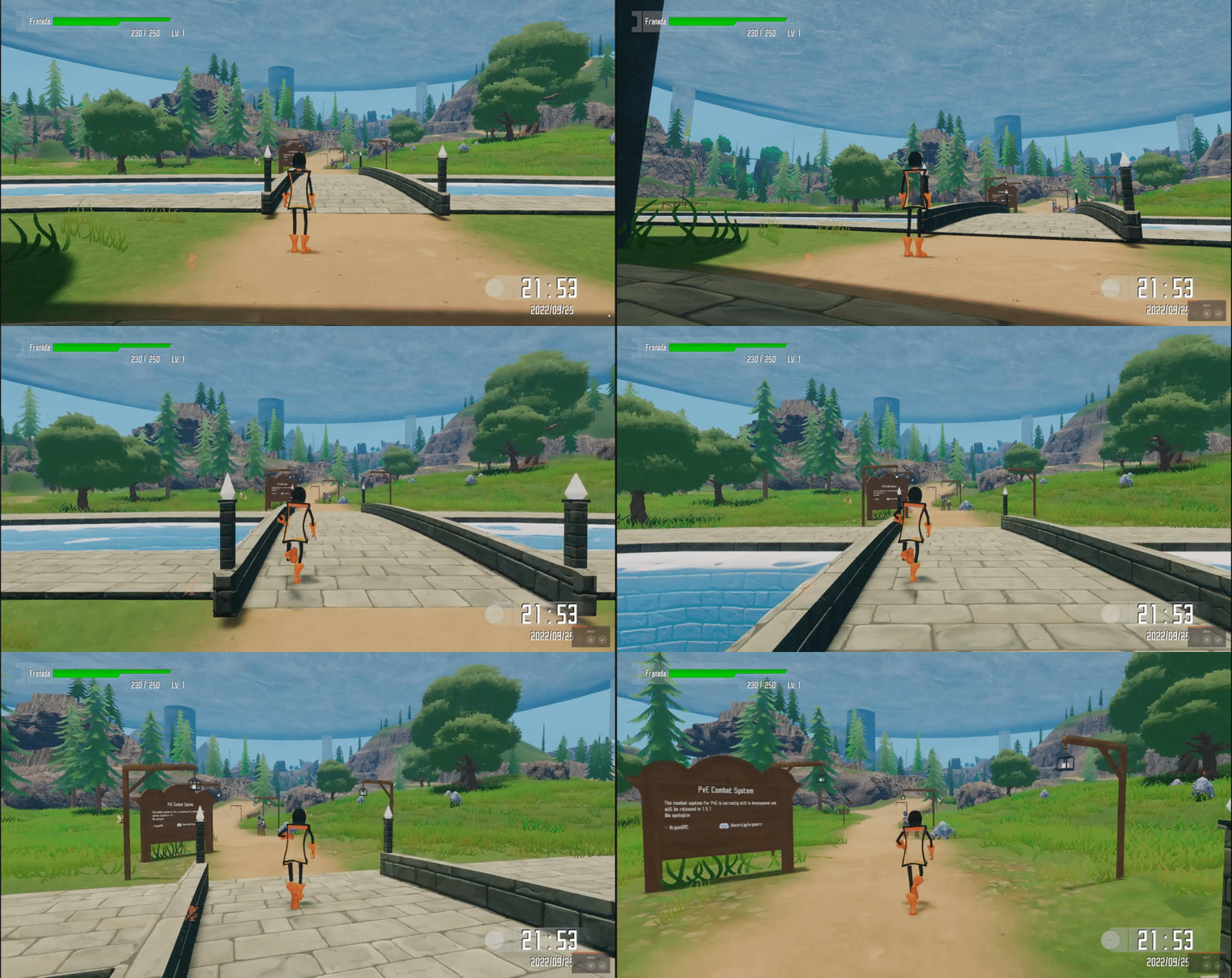


 zealous minnow
I assume 3p will be on all mobile devices too?
 spiral widget
is there an alternate scroll binding for 3p? the scroll wheel on my mouse atm is trashed and hardly works, and i was wondering if there was any other way to control the zoom, i.e. Ctrl+NUM PLUS, Ctrl+NUM MINUS, or other options
dusky mortar
zealous minnow
I assume 3p will be on all mobile devices too?
For now we're focusing on running an AB experiment on PC-desktop, and observing how that goes. If it shows good signs then that gives us reason to expand on the feature
spiral widget
its been hard to test this beta since im still working on getting a new mouse, and i dont know if EAC will detect a hotkey/macro program to remap inputs to a virtual scroll wheel and close vrchat
dusky mortar
spiral widget
is there an alternate scroll binding for 3p? the scroll wheel on my mouse atm is...
You can adjust the distance via a slider in the Main Menu -> Graphics Settings page, and then user F5 to toggle on and off
very dynamic changes in distance aren't really available via another bind right now though
spiral widget
also, is the 3p beta affected at all by this issue? i havent tested or measured if the 3p camera positions are offset in the same way related to this post:

This is a very, very specific issue that I have been wrangling with since at least 2021 or so, and I doubt it's happening for anyone else, or people just don't
I will try to verify it, as I know that my avatar normally exhibits this behavior on desktop and in VR as well (in the first person view)
dusky mortar
spiral widget
also, is the 3p beta affected at all by this issue? i havent tested or measured ...
It may be the case. 3P works relative to where your viewpoint would be in 1P
spiral widget
got it; will try and test this beta sometime later in the week and report back if i can measure it. ive been using the regular open beta since then
zealous minnow
dusky mortar
For now we're focusing on running an AB experiment on PC-desktop, and observing ...
Makes sense
 swift owl
stray patrol
we should be able to hold cntrl + right click to move the camera left to right
O...
swift owl
stray patrol
we should be able to hold cntrl + right click to move the camera left to right
O...
Agreeing with this, several other people have mentioned it as well
It would be nice if I could move the 3rd person camera pivot within the bounding box of my Avatar, instead of being stuck focused above my avatar
 mossy ermine
dusky mortar
It may be the case. 3P works relative to where your viewpoint would be in 1P
mossy ermine
dusky mortar
It may be the case. 3P works relative to where your viewpoint would be in 1P
i have seen a problem with the 3P view botten F5 her is the same botten the reload botten for the video players in vrc so its can be a problem in worlds ?