#world-ui-design
1 messages · Page 1 of 1 (latest)
 leaden shale
leaden shale
leaden shale
a channel for world UI designs and feedback, or when redesigning UIs. Especially important when targeting our new Mobile platforms
 marble pine
Ah thank you
 deep dock
interesting
 mental warren
deep dock
interesting
mental warren
deep dock
interesting
patpat
 grave dune
I'll just use this channel to post random screenshots of UI's I have made:

 misty creek
grave dune
I'll just use this channel to post random screenshots of UI's I have made:
misty creek
grave dune
I'll just use this channel to post random screenshots of UI's I have made:
those look like nice beefy buttons
grave dune
yee
 polar wolf
Aha nice, my suggestion got added
grave dune
I really like UI design and wanna do more with it in the future, I just don't really have projects to work on yet
polar wolf
:3
 spark elbow
 grave dune
(jk, this channel is especially for you to get better at UI design xD)
spark elbow

 polar wolf
So, I have been remaking the sleep tools UI for my world, but can't think of a good way to cleanly do a UI for setting the alarm time
This is the original ui

And here's my current attempts


 spark elbow
grave dune
You will learn it
spark elbow
grave dune
You will learn it
Nah Ill pay someone to do it for me instead
polar wolf
grave dune
*why are the sliders pointy*
We don't talk about that
polar wolf

spark elbow
I|ll post my UI stuff in here later >]
polar wolf
You can see why I wanted this channel yeah xD?
grave dune

polar wolf
@grave dune will be for the treehouse world we were in the other night
polar wolf
Feel free XD
grave dune
I'm tirggered
polar wolf
It's my first attempt at ui
 feral adder
never let me do anything regarding UI
spark elbow
Lemme open up my project to show my amazing UI
grave dune
no worries, we all have to start somewhere ^^
polar wolf
And I think I did better than miner
polar wolf

spark elbow
Ill let you even choose xD Which one.. xD
 grave dune
let me phrase it this way UI isn't where Miners strength are at
polar wolf
grave dune
let me phrase it this way *UI isn't where Miners strength are at*
UI is their passion
grave dune
spark elbow
Ill let you even choose xD Which one.. xD
Tree Defense, cause that's the newest one
spark elbow
xD That has no UI yet actually 😅
feral adder
the blurred one obv
spark elbow
feral adder
the blurred one obv
That's prefab
polar wolf
Sus
feral adder
sure it is
spark elbow
grave dune
Tree Defense, cause that's the newest one
I may not be good at UI but look at my Sexy Editor stuff
 grave dune
yes, that you are good at
 spark elbow
You should see what I did for M&C 
grave dune
I even adjusted my video player UI to fit the one I made
 feral adder
now fit new audiolink panel in
grave dune
urgh
haven't updated AudioLink yet
When I read the channel name I got my hopes up for Udon Hooks / Udon UI in the Quick Menu
polar wolf
grave dune
When I read the channel name I got my hopes up for Udon Hooks / Udon UI in the Q...
 grave dune
but I quickly got disappointing when I noticed that this isn't what this channel was about xD
I wonder what happened to that
haven't seen it in a dev update for a while
 sand venture
Oooo. I have some info I could share here ... 👀
Do any of you work on screen space UIs for VRChat mobile?
polar wolf
sand venture
Do any of you work on screen space UIs for VRChat mobile?
Not quite yet, but planning to
spark elbow
Nope, decided to wait until Mobile's out of VRC+ Only mode and out of Alpha, because I expect there to be more tools provided by VRChat that'll make our lifes easier when it comes to working on VRC Movile UIs and such.
sand venture
If you do, here's how you should set up your canvas scaler!

This will match VRChat's touchscreen UI controls, allowing you to more easily avoid overlaps.
spark elbow
I do wanna eventually figure out a way to make FullScreen UI for Movie&Chill but  From the Server's statistics, not really many users use Mobile as of right now
sand venture
Also: If you add any buttons on the user's screen, try using the top right corner. It's least likely to be occupied by VRChat's user interface.
spark elbow
👌
If you¨re able to reveal any info, are there any plans to add us ability to get X-Y coordinates where the user "taps" ? It's something that would be highly useful for large set of things, and sort of the thing I'm waiting for before I get into any proper Mobile UI shenanigans.
ofc work-around is have ~1mil buttons on the player screen and figure it out from that 🙂
polar wolf
Nicee
It would be nice to be able to get cuttout spots too, so we don't place buttons where a camera hole may be etc, I believe it's exposed in the android sdk somewhere
misty creek
spark elbow
If you¨re able to reveal any info, are there any plans to add us ability to get ...
The request for touch coordinates is definitely heard. We're developing a holistic design to reduce input disparities between all of our platforms, so we want to make sure we can add it in a sensible way that doesn't lead to VR & desktop users getting sub-par experiences in worlds designed mobile-first, which is currently true of the mobile experience (and the desktop experience, to some extent).
spark elbow
misty creek
The request for touch coordinates is definitely heard. We're developing a holist...
👌 Nice nice nice! Yea, Desktop and especially Mobile experiences are indeed at the moment often sub-par, glad to hear that we can expect some improvements in future 🙂
 ashen gust
Is it considered bad practice to use the Unity animator for Canvas UI? From reading online it impacts performance because it constantly dirties the UI but also reading online Unity 2019.3 fixed this? So I'm not sure if I should be using it or manually coding the animation?
Secondary question, how are you guys dealing with prefabs/re-usability and theming? Whenever I create a prefab of a canvas element unity hates it and it's hard to edit the prefab. So currently I'm not using any prefabs for my UI but it does lead to a lot of duplication. From the theming side of things I was thinking of just writing a few UI shaders and controlling all the colours through a few materials, but interested to see how you guys are doing it? See attached video as an example, the group total on the left shows individual user scores and the UI elements are basically the same but I'm currently duplicating the assets instead of using a prefab (and it's a bit of a nightmare updating this UI if I want to make big changes*)
grave dune
ashen gust
Is it considered bad practice to use the Unity animator for Canvas UI? From read...
you can use animators for UI without big problems
While yes, there is a performance impact, it's so minimal that it doesn't really matter
ashen gust
grave dune
While yes, there is a performance impact, it's so minimal that it doesn't really...
Ah phew, a lot of guides I see online were wording it as a big no no so thanks for clarification 🙂
grave dune
I personally code all the UI stuff I do with udon#, but I just do that cause I have fun doing it like that :D
ashen gust
grave dune
I personally code all the UI stuff I do with udon#, but I just do that cause I h...
Kinda same but depending on the animation it's been getting a bit out of control for me lol
grave dune
Because of that I often end up with stuff like this xD


I'm honestly not sure if doing that stuff in Udon is more performant than doing it with an animator at that point 😅
Cause Udon is quite slow
 opaque gorge
 vapid glacier
Ooh, world UI, or 'how do we stop people making buttons out of basic cubes with an Interact() function and calling their worlds done'
vapid glacier
misty creek
The request for touch coordinates is definitely heard. We're developing a holist...
One thought comes to mind of some kind of 'zoom to panel' function for mobile and desktop. I suppose it could be built in Udon but native functions could save time or make things easier.
Think how many first person games, you first interact with a device or complex screen, it first either simulates the player 'sitting down at the console' and teleports them before moving the camera to line up with the screen that might be in world or might just be a screenspace projection that other players can't see, eitherway it will then lock you in to that view point. Or it pulls the camera out of the head for a third person view. Then there an an explicit exit state where you are either left where you were moved to or returned to previous location.
For VR you probably wouldn't want anything like these as restricting player movement doesn't feel good, but for desktop and mobile it could make targeting world-space based UI panels much less painful.
Also, while I can't think of a use for it myself currently, does anyone know how https://vrchat.com/home/world/wrld_ac92e1e8-0059-4249-a5af-18bd4b3e8478 managed to do something I thought impossible and -hide- the personal mirror? It means you can't use it for cheating in the game and that's really clever. Might be good to make a less clunky API thought for world creators to go 'I'd like to turn off these functions please for game mode'.

A multiplayer horror game˸ hide from the hunters‚ or hunt your scared little friendsǃ Don't forget to bring your flashlightǃ Spookality 2023
polar wolf
vapid glacier
Also, while I can't think of a use for it myself currently, does anyone know how...
It's just a different layer iirc, so you can over render it, I have an avatar that does similar to it
vapid glacier
ah, okay, it didn't block access to camera or core system UI, just the mirror. So I'm guessing it lives on its own layer somewhere..?
misty creek
vapid glacier
One thought comes to mind of some kind of 'zoom to panel' function for mobile an...
FYI we are working on exactly this - we call it "UI Focus View". I'll see if we can get it into this week's dev update.
 weary patrol
normalise leaking internal development info
vapid glacier
@misty creek Oooh! Awesome! That sounds like it will help lots! ❤
feral adder
grave dune
I personally code all the UI stuff I do with udon#, but I just do that cause I h...
Meanwhile i just slap the unity toggle script on it, place all game objects in the references and call it a day. Not even using udon lol
Though to be fair worlds ain't my focus
So i hardly have any knowledge about stuff there
Lol

 snow river
grave dune
haven't updated AudioLink yet
snow river
grave dune
haven't updated AudioLink yet
They got a nice 1.0 overhaul of the control panel that I really like :3
grave dune
yee ik
snow river
Wish it was easy to add local hover tooltips to UI for wordless UI panels that just have icons
ashen gust
I wish I could just use good ol css || vertically aligns div ||
 winged knoll
ashen gust
I wish I could just use good ol `css` || vertically aligns div ||
winged knoll
ashen gust
I wish I could just use good ol `css` || vertically aligns div ||
UIDocuments whitelist when? :> /hj
spark elbow
@grave dune you Like UI right ? 
I just open up Movie&Chill project to do few fixes and.. This is Movie&Chill UI 😅


 spark elbow
weary patrol
It👏 Just👏 Works👏
spark elbow
YES! Lol
ashen gust
If the end user doesn't see it, it's not an issue ( insert here all the fragile infrastructure around earth holding us up lol ) 😝
 past void
heres a menu i made for a game world that will never see the light of day https://gyazo.com/d61b0e547048189bf58de1241c134992
i used that menu as a template when i made the one thats in my gta3 world https://gyazo.com/1ecc773dc719cdae760e83d584320f5c

 full veldt
When was this channel made? It seems a bit tone deaf since Udon UI was teased a while ago.
I guess on this topic though: Has anyone found a good workflow/system for component-driven designs in Unity? I figure having template components and just duplicating/creating them with tooling would be easier in the long run, rather than making them from scratch every time. I guess like a bootstrap/tailwind/react component library of sorts.
 jolly umbra

I created this design for ProTV in the ProTV.Extras package.
Big fan of the UI style in Cyberpunk 2077 and felt pretty proud with coming up with this design.
jolly umbra
grave dune
Though I feel like it could use a few more colors
What colors would you like to see?
Currently, it changes to Blue when you hover over the buttons.
jolly umbra
grave dune
Yeah it being fully red is a bit much imo
What colors would you prefer with this? Blue? Or something else in mind?
grave dune
Hmmm not sure, Cyperpunk also makes use of a light blue color

And also white
Right now your menu feels like there is too much red
jolly umbra
Yeah, I wanted to make it as close as possible to Cyberpunk's UI with that light Blue color as well.
But when designing it, it was kinda tricky to iterate the look of those Sliders and whatnot with the limitations of CanvasUI.
There could be something I haven't tried yet, but I'm open to ideas.
grave dune
Yeah Unity UI canvas (especially sliders) can be quite annoying
jolly umbra
grave dune
Yeah Unity UI canvas (especially sliders) can be quite annoying
You have no idea how long it took to get the sliders you saw up there to look like that, with the "block" staying within it's boundaries.
Even at a larger width, like you saw with the Seek slider.
grave dune
grave dune
I'll just use this channel to post random screenshots of UI's I have made:
I was fighting with these sliders for multiple hours... I feel you...
jolly umbra
It's definitely possible to make it work, good thing. Just was damn rigorous to perfect it.
I'm actually working on a prototype for a VCC Repo of Canvas UI Templates that includes this Cyberpunk-like design in it.
jolly umbra
@grave dune What I've made so far in my template Scene.

Think I forgot to mention that these buttons also fire the same Sound Effects you hear when you press those buttons in Cyberpunk 2077 as well.
jolly umbra
Thanks ^^
grave dune
definitely better than it just being purely red
ashen gust
I have a scroll view on my world space canvas. Navigation is set to none. When I move my cursor over the scroll view and press WASD it moves. Anyone know how to stop this?
 gray blaze
ashen gust
I have a scroll view on my world space canvas. Navigation is set to none. When I...
gray blaze
ashen gust
I have a scroll view on my world space canvas. Navigation is set to none. When I...
set the scroll sensitivity to 0 and set navigation to none
ashen gust
gray blaze
set the scroll sensitivity to 0 and set navigation to none
thank you 😄 will try it in a second
jolly umbra
VRWorld Toolkit will indicate to you if there are Canvas elements with Navigation set to anything other than None, and suggest you to Fix Them.
 fickle oak
Hey guys. How are you doing?
I am new to UI making and i was just wondering if there is any tutorial on youtube on how to add a"working" mini map, static health bar etc to someones POV or third person.
gray blaze
fickle oak
Hey guys. How are you doing?
I am new to UI making and i was just wondering if t...
The udon examples included with the world sdk does have a minimap example though it's a pickup object rather than on a HUD.
Not sure about tutorials for this specific thing but basically you will make a world space UI canvas and on PostLateUpdate you'll set it's position and rotation to the local player's head tracking data. You can move a parent object of the canvas and offset the canvas in the +Z direction to adjust the depth (close/far) it is to the player's face.
 fickle oak
gray blaze
The udon examples included with the world sdk does have a minimap example though...
fickle oak
gray blaze
The udon examples included with the world sdk does have a minimap example though...
Thank you. I appreciate it. Will have a look on this
deep dock
does this look good?


 clear hollow
some of the text may be a little small/thin and therefore hard to read on lower resolution headsets like the vive, but hard to tell just from the screenshots how big the actual panel is in the world. other than that, looks good, nice and straightforward
deep dock
alright, thanks
i was thinking that too. i just started using TMP, and the outline seems to be what made it so thin
and if i use the Dilate slider, it makes the mipmaps on the text really badly noticeable. is there a prevention or fix to that?
 stuck loom
deep dock
does this look good?
stuck loom
deep dock
does this look good?
i think your font is too thin, tmp has a built in bold feature, try using that???
sorry i havent used ui in unity in a hot moment 😭
deep dock
probably should’ve mentioned it better, but i’m using the outline feature
so it’s thinner than usual
i guess it probably isn’t necessary though, since the panel is already dark
jolly umbra
deep dock
probably should’ve mentioned it better, but i’m using the outline feature
I typically use a font called Inter for descriptions and non-header areas. It looks great on text and is incredibly readable at small sizes. You might like it for what you are making. It's an Open-Source Font. https://rsms.me/inter/
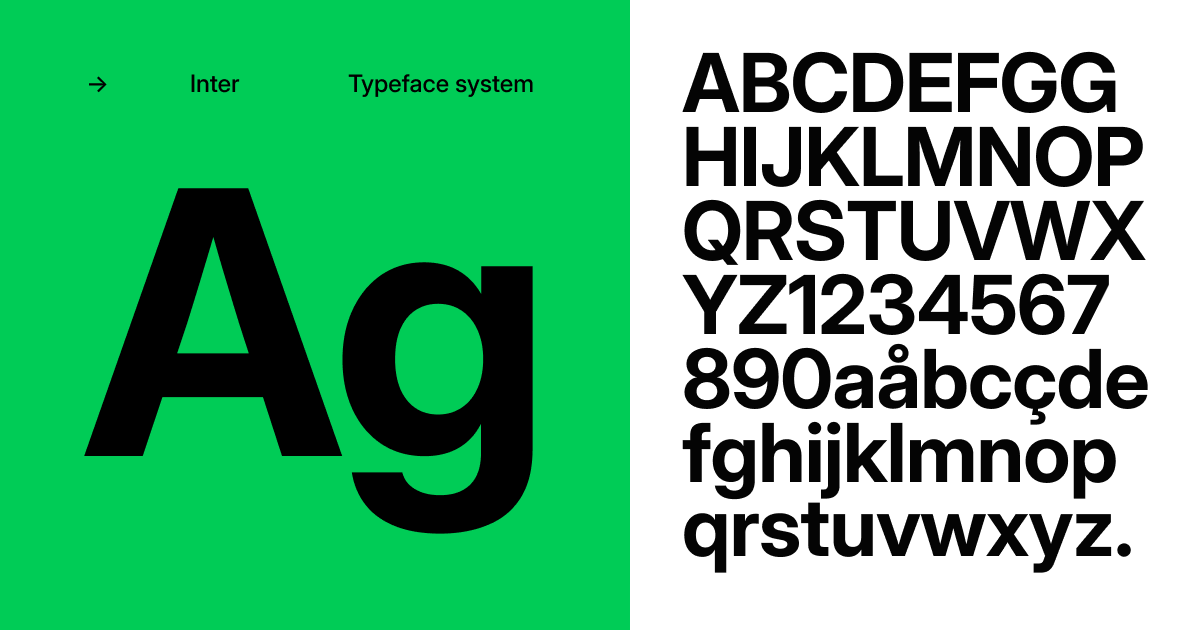 deep dock
oh yeah, i like inter
vapid glacier
misty creek
FYI we are working on exactly this - we call it "UI Focus View". I'll see if we ...
I saw the info on this made it in to this week's update! Looking good so far there! 
 fathom flame
jolly umbra
I typically use a font called **Inter** for descriptions and non-header areas. I...
fathom flame
jolly umbra
I typically use a font called **Inter** for descriptions and non-header areas. I...
Awesome, it’s got all the European characters I need
 rigid shoal
so i have this issue with some ui from a videoplayer prefab, the ui is like visible through objects ( im not in unity, im in vrchat itself ), can someone help me out? i tried to figure it out myself but couldn't do it, its been like this for some months now but i never bothered to fix it until now

 novel pasture
rigid shoal
so i have this issue with some ui from a videoplayer prefab, the ui is like visi...
novel pasture
rigid shoal
so i have this issue with some ui from a videoplayer prefab, the ui is like visi...
Show a screenshot of the canvas in the inspector.
rigid shoal
 novel pasture
rigid shoal
novel pasture
rigid shoal
Not everything is visible, didn’t you change the layer?
Set default.
 novel pasture
rigid shoal
novel pasture
rigid shoal
UI is not default
 novel pasture
rigid shoal
so i set the layer to ui?
novel pasture
rigid shoal
so i set the layer to ui?
No, it was right there.
Most likely you have moved part of the panel. Check the coordinates of all blocks.
rigid shoal
ok
 quasi rock
Is there a good way to get UI hover effects on Desktop? Currently I'm using an Animator and Unitys "Event Trigger" on my UI components, but it looks like that's broken on Desktop (someone already made a canny, but I can't link it). It works in ClientSim as expected, just not in-game. Does anyone know a good workaround?
 jaunty walrus
quasi rock
Is there a good way to get UI hover effects on Desktop? Currently I'm using an A...
jaunty walrus
quasi rock
Is there a good way to get UI hover effects on Desktop? Currently I'm using an A...
If you tell your users to hold TAB while interacting with your menu, it will work as expected.
The other alternative is to make your own UI system from scratch! (Not even joking, some worlds have actually done this lmao)
quasi rock
jaunty walrus
If you tell your users to hold TAB while interacting with your menu, it will wor...
Thanks!
quasi rock
^ I ended up putting a collider, rigidbody, and a UdonBehaviour on my UI elements that I wanted to have a hover effect on desktop and using the OnMouseEnter/Exit events to detect hovering. If the user isn't on Desktop, it just destroys these components and uses the Unity Event Trigger. So far it works pretty well. If anyone else is having the same issue I'd recommend giving this a shot ^^
 barren trellis
okay so im using text mesh pro but every time i press play the text goes off to where i dont want it, fix?
 fading timber
I am using a scroll view to display a list of buttons. everything works fine but when the player uses their movement inputs (W/S keys) it makes it scroll up and down and id like to keep it only scrolling when being dragged instead of key input. i feel like im missing something obvious, but does anyone have advice?
quasi rock
fading timber
I am using a scroll view to display a list of buttons. everything works fine but...
I think there's a "Navigation" setting on your UI components, if you set that to "None" it should be just mouse movement and ignore key presses ^^
fading timber
ahh yes, ive got that set to none on everything q.q
ive also messed with the input system component, the input manager, and made a few wacky scripts to work around it
looking on google i couldnt find anybody discussing something like it, infact i found quite a bit of people discussing the opposite
would a screenshot of my scrollview component help?
quasi rock
fading timber
would a screenshot of my scrollview component help?
Sure. You could also try setting 'scroll sensitivity' to 0 on your Scroll Rect and seeing if that helps
fading timber
ok ill give that a try

ooo changing the scroll sensitivity to 0 did it :D
thanks for the help i appreciate it
quasi rock
No problem ^^
 desert temple
I remade the 2019 loading thingy (won't be posted in a world or anything just though it would be cool to post in here)

 night sphinx
polar wolf
night sphinx
polar wolf
Nice
ashen gust
Hello glorious Unity 2022 friends. UI Toolkit in vrchat yes or no? 🤔 It looks sooo much nicer but I'm not sure if Udon will work with it / workspace UI
jolly umbra
ashen gust
Hello glorious Unity 2022 friends. UI Toolkit in vrchat yes or no? 🤔 It looks s...
Have never tried it myself but it looked promising.
I still create my Canvases the old-fashioned way.
 blazing wind
desert temple
I remade the 2019 loading thingy (won't be posted in a world or anything just th...
blazing wind
desert temple
I remade the 2019 loading thingy (won't be posted in a world or anything just th...
u forgot to round the cancel button
desert temple
blazing wind
u forgot to round the cancel button
cant find the original sprite, do you have it by any chance?
blazing wind
desert temple
cant find the original sprite, do you have it by any chance?
I can get it very easily
You might have to wait tho. I’m not home
desert temple
alr thx just send them either here or dms when you have them
 rare spruce
seems like throwing a TextMeshPro - Text (UI) down, typing your text into the text box, then resizing and moving it doesn't work. What other steps does it take to make the text visible?
 novel pasture
rare spruce
novel pasture
rare spruce
Default layer and canvas scale 0.001
rare spruce
I'll eventually learn these layers. For now I just left everything default thinking the SDK would do a lot of this stuff for me
thanks
novel pasture
It would be more correct to first set up the canvas and then add components to it.
rare spruce
yeah I just added the TextMeshPro directly from the components menu thinking that would do it all for me. /noob
also I just started learning all this two days ago
novel pasture
Make Unity's UI interactable in VRChat. Requires a Unity UICanvas element on the same GameObject.
rare spruce
been writing code since I was 12, messing in CAD for only 5 years (mostly OnShape)
what if I don't have VRC_UIShape listed in my compnents?
this step asks for it: Add a VRC_UIShape component to the Canvas.
looks like if I search for it in the little search bar it finds it even though it wasn't in the navigation menus
 novel pasture
rare spruce
looks like if I search for it in the little search bar it finds it even though i...
novel pasture
rare spruce
looks like if I search for it in the little search bar it finds it even though i...
VRC_UIShape in the SDK, if the interactive is not needed, do not add it.
The rest is all correct.
rare spruce
yeah just need a non iteractive signpost text
novel pasture
Set the Canvas Render Mode to World Space. Reduce the x, y, and z scale of the Canvas. Usually somewhere between 0.001 and 0.005 will work well. This is the size in meters of a single pixel on the canvas. Set the Canvas GameObject layer to Default Add your UI elements to the Canvas using the right-click menu in the hierarchy Set your UI elements to Navigation: None to prevent the UI from moving when pressing keys or moving joysticks.
rare spruce
off to the races!

 round vessel
for some reason whenever I enter play mode, the list of On Value Changed actions on my UI Toggle gets cleared


I tested with a buttons and their list of actions is fine
and with a brand new toggle instance, it the list was still cleared
gray blaze
round vessel
for some reason whenever I enter play mode, the list of `On Value Changed` actio...
use Dynamic bool SetActive, active is blocked
round vessel
that worked thanks!
deep dock
how could i improve this?
 gray blaze
Icons
deep dock
know where i could find some?
deep dock
ok, i've got it looking like this now. any other improvements i could make?
 gray blaze
deep dock
ok, i've got it looking like this now. any other improvements i could make?
gray blaze
deep dock
ok, i've got it looking like this now. any other improvements i could make?
unless you plan on toggling the individual post process layers, i'd connect the square background of the icon to the slider's background so they look connected.
 rigid stone
Very often when i make some UI stuff, interactable buttons have extremely bugged colliders
it's like the button "pops out" invisibly from the surface of the UI, making it hard for VR users to use the UI button where pcvr users have no problems
does anyone know what causes this and how to fix it?
for example this one


as you can see by the cursor appearing, there is some invisible thing popping out from the UI that catches the cursor focus
this has been a problem for years, would be amazing if sombody could help me fix it once and for all
 glass iron
rigid stone
for example this one
glass iron
rigid stone
for example this one
Just a guess, but maybe it comes from the VRCUIShape component? It gives your canvas a collider on Start, which might be bigger than expected.
I usually don't have the problem since I scale my canvas to something like 0.001-0.003, but I remember having similar effects a long time ago when I didn't scale it.
You could just quickly check the canvas scale to know if that might be causing it.
gray blaze
rigid stone
Very often when i make some UI stuff, interactable buttons have extremely bugged...
not bugged, usually means your Z Scale on the canvas isn't small enough. Try 0.001 as the z scale (or just match what you have for x & y if those are also small)
The VRC Ui Shape will look for a box collider on the canvas and if it fails to find one it'll make one.
Then it'll set the box collider size accordingly: x - Canvas Width, y - Canvas Height, z - 1.
polar wolf
deep dock
how could i improve this?
personal taste but i find the thicker sliders easier to use in vr
deep dock
both versions of that UI are actually about the same thickness, just different shaped handles
if anything, the circle is larger
gray blaze
deep dock
both versions of that UI are actually about the same thickness, just different s...
You can always put a small desktop only tool tip that mentions holding Tab for an improved clicking experience.
deep dock
what does that do?
gray blaze
unlocks the mouse cursor from the center of the screen so they can freely click what's on-screen like any other desktop window
makes sliders much easier to use
deep dock
made it only show up for desktop players aswell

think it would be good for the value of the slider to follow the handle?
 arctic silo
How do worlds normally disable movement on desktop when typing in an input field? I have my ui objects set to use navigation: none but that doesn't work.
gray blaze
arctic silo
How do worlds normally disable movement on desktop when typing in an input field...
this should work by default now as long as the vrc keyboard opens, ensure your ui is on a layer that is not UI
arctic silo
gray blaze
this should work by default now as long as the vrc keyboard opens, ensure your u...
I'm using the default layer for the ui. Since you mentioned the vrc keyboard, I'm testing on clientsim. Is that why movement isn't being blocked?
gray blaze
arctic silo
I'm using the default layer for the ui. Since you mentioned the vrc keyboard, I'...
yes
arctic silo
gray blaze
yes
Oh that's inconvenient then. I can disable movement but not crouching / prone which from what I read isn't available. Thank you for clarifying 🙂
gray blaze
arctic silo
Oh that's inconvenient then. I can disable movement but not crouching / prone wh...
You can make U# execute specific udon code only in the editor. Else i would ignore the client sim issue and don't immobilize them manually since it auto does that in vrc. You might cause unintended issues in game if you make "fixes" to your code for ClientSim without making it Editor Eclusive.
arctic silo
gray blaze
You can make U# execute specific udon code only in the editor. Else i would igno...
That's a good point. I'll add an editor text field for now and take input from there when in clientsim.
 ivory galleon
what are some suggested ways for me to learn UI development and udon graph development? I have been trying to make a simple UI that on interaction changes between 5 colors every time it is clicked. I am very new to this and have been struggling to figure out how to get it to work. I thought possibly creating an animation for the UI button could work but I am not sure how to get it to pause on each transformation in the animation. I am also not sure whether to put this in here or udon general.
deep dock
ivory galleon
what are some suggested ways for me to learn UI development and udon graph devel...
the way i’ve made cycling buttons before is that, you create an integer variable which gets 1 added to it every click, and you have a check from 0 - 5 with int.equals, and for example;
if int equals 0, set color to red
if int equals 1, set color to blue
if int equals 2, set color to green
etc.
and if it equals 6, since you don’t want that many options, you can set the variable back to 0 with SendChange enabled, and have an OnVariableChanged connected to the branch for the int.equals set to 0
i can send an example graph later if that was a complicated explanation
ivory galleon
deep dock
i can send an example graph later if that was a complicated explanation
I would love that when you have the time! do you think I could get a little bit more assistance from you in DMs?
deep dock
ivory galleon
I would love that when you have the time! do you think I could get a little bit ...
yeah sure, i’ll be able to help tomorrow, it’s late here right now
ivory galleon
deep dock
yeah sure, i’ll be able to help tomorrow, it’s late here right now
thx!
novel pasture
ivory galleon
what are some suggested ways for me to learn UI development and udon graph devel...
Take a look, and I think you’ll understand everything yourself.
ivory galleon
novel pasture
Take a look, and I think you’ll understand everything yourself.
I-
don't understand what I am looking at
novel pasture
ivory galleon
don't understand what I am looking at
What exactly is there on the graph that you don’t understand?
When you press, an int variable from 0 to 4 is generated, then the number is checked, and if it matches, the desired color is set.
The same can be done through the animator.
Well, it’s almost the same, there’s no randomness there.
 ivory galleon
Its more of I don't really know what I am looking at 'cause I have never really messed with Udon Graphs before. I figured out how to do animations the other day, and have been trying to learn how to use Udon graph only recently.
ashen gust
Hey, anyone know how to include fonts in your project on upload?
For reference in TextMesh Pro > Settings I've included some fallback font assets but upon build and testing in VRChat they're not being included?
I've also tried:
- TextMeshPro stylesheets
- Including the fonts on text assets themselves
UPDATE / SOLUTION:
What I ended up doing was copying the font I want to use to my assets folder & including fallback fonts on the actual font asset itself. This solved the issue 🙂
 sturdy shore
Question does world controls like:
- Tab for UI that shows the below controls to people who do not know of them:
- T for Toggle Camera
- G for roaming
- 1~4 for primary, left shoulder, right sholder, and rear views
- B for blending
- Mouse 2 for zooming
come from some sort of world extension plugin or something that can provide said features.
 swift adder
sturdy shore
Question does world controls like:
- Tab for UI that shows the below controls to...
swift adder
sturdy shore
Question does world controls like:
- Tab for UI that shows the below controls to...
Yeah, it's a system called Insight. (third person camera) https://vowgan.booth.pm/items/1932757

A full third-person camera system that projects to the desktop. It is available on PC only, though can run on VR with desktop rendering. Features a full set of camera controls, shoulder angles, and external controls like Range Regions and specific angles similar to older Resident Evil games. This
sturdy shore
nice
 tough sail
Hi! 
i need help for panel UI.
i have a asset for a panel. In playmode on unity it work but in VRChat it doesn't work.
In VRC I see the pointer but some elements is missing and the menu button don't switch to a other panel.
tough sail
i already do that
EDIT : (btw tnx for the link of the doc) i keep looking the doc to found a fix
tough sail
oh ok yeah its full C# ._." you know a good way to convert C# to U#?
gray blaze
@tough sail this is included in the VRC Worlds SDK provided by the VRChat Creator Companion, just make a U# script from the Create menu in Unity and paste your code nto the new class. Then convert any Invokes with SendCustomEvent and SendCustomEventDelayedSeconds or SendCustomEventDelayedFrames. Most System.Collections and System.Linq have compatible alternatives in VRC.SDK3.Data.
 plain spear
Trying to find and/or make a system, where players in game can set their own speed values for running/walking/jumping/etc...... i dont know what im doing wrong.

is there any prefab out there that has a setup like this?
 jaunty walrus
plain spear
Trying to find and/or make a system, where players in game can set their own spe...
jaunty walrus
plain spear
Trying to find and/or make a system, where players in game can set their own spe...
That looks correct. Maybe you need to plug the local player into the instance slot on GetJumpImpulse?
plain spear
newer problem, but idk what its meaning

Error for each button:
Events on 'IncGrav' were removed because one of them targeted a prohibited type 'UdonGrapghProgramAsset', method 'set_name' or object 'ButtonPlayerSpeed'.
plain spear
jaunty walrus
That looks correct. Maybe you need to plug the local player into the `instance` ...
tried that, and fixed one thing, now this error exists
jaunty walrus
plain spear
newer problem, but idk what its meaning
can you send a screenshot of the inspector on your UI buttons?

 plain spear
the udon's position

error changed....now says:
An exception occured during Udon execution, this UdonBehaviour will be halted
plain spear
got it, was some weird thing i cannt say i know of, but now works! Thank you KitKat for the help!
 cold solstice
is anyone able to tell me how to get current cursor location? i want the handle on the color picker to snap to your current cursor position when you click on it so i dont have to drag in relation to where the handle was previously
you can see at the 0:22 mark how the color picker handle stays at the same distance from the cursor when i start dragging it, but the hue slider actually always centers itself on the cursor
gray blaze
cold solstice
is anyone able to tell me how to get current cursor location? i want the handle ...
you can't get the position of the cursor if they are holding TAB (without a lot of estimation) but you can raycast from the local player's tracking data
cold solstice
gray blaze
you can't get the position of the cursor if they are holding TAB (without a lot ...
Does that work with vr also? I dont have it so i have no idea how ui works with it but i assumed raycasting directly from the player would have some hiccups on vr?
gray blaze
cold solstice
Does that work with vr also? I dont have it so i have no idea how ui works with ...
you'd need to raycast from their hand. raycasting is very cheap
cold solstice
gray blaze
you'd need to raycast from their hand. raycasting is very cheap
Im assuming that means i have to write a desktop AND a vr code variations for that? Shame, i kind of hoped to keep it simple with the ui
gray blaze
cold solstice
Im assuming that means i have to write a desktop AND a vr code variations for th...
yea, i've made a solution here: https://bobystarvrc.booth.pm/items/5007241
just place into the scene and in your script add using BobyStar.DualLaser; and use the GetPointerRay function from a reference to the laser.

A simple Drag-N-Drop prefab that allows players to use two lasers with your World UI. Helpful if you have a keyboard or want to enhance multitasking! Included functions for U# for your own usage.
this handles desktop and VR for you, so all you have to do is run the raycast
gray blaze
cold solstice
oh shit no way? yo dude this is super nice
lmk if you are having issues or have questions about it, i kinda forgot i didn't make full docs/examples about it yet
cold solstice
gray blaze
lmk if you are having issues or have questions about it, i kinda forgot i didn't...
no i think ive figured out what i needed for now! thanks again for the help!
cold solstice
gray blaze
lmk if you are having issues or have questions about it, i kinda forgot i didn't...
oh, i guess i do wonder, do i only need to have one of these or do i need to spawn a new one for each player?
gray blaze
cold solstice
oh, i guess i do wonder, do i only need to have one of these or do i need to spa...
it's local, so it should work for all players locally
cold solstice
oh good to know!
cold solstice
oh im sure i can program that one myself, i just had issues with the rect specifically
its more fun when i do stuff myself but i appreciate the dual pointer thing since vr/desktop stuff is new to me
gray blaze
yee, always fun to make stuff
cold solstice
last year i made an angled ui item list with an angled scroll rect and that was a huge pain but by the end it was so satisfying to use
it also doubled as a horizontal item list and tripled as vertical since i just added an angle field that could go from 0 for vertical to 90 to horizontal and everything in between
gray blaze
wow, curious on what that looks like
swift adder
cold solstice
no i think ive figured out what i needed for now! thanks again for the help!
Oo, this looks fanastic! I had trouble making my own color picker before and ultimately just made separate HSV sliders. Makes me want to revisit mine
cold solstice
a color picker is really just hsv sliders but the saturation and value slider are combined so you were close enough! thank you tho!
deep dock
been working on a game prefab along with Playerbush, and this is the UI i've made for it
 compact grove
Hello, can you please send me a world that I can customize to my liking, I will give you credits, I would greatly appreciate it.
 main harbor
compact grove
Hello, can you please send me a world that I can customize to my liking, I will ...
main harbor
compact grove
Hello, can you please send me a world that I can customize to my liking, I will ...
I have a world you can edit to your liking
Can I share you the video
 copper elm
Any way to lower the range that a UI element's canvas is interactable from? I'm trying to make it so that i can't point my hand laser at a video player (Yama Player) from a mile away
gray blaze
copper elm
Any way to lower the range that a UI element's canvas is interactable from? I'm ...
Create an empty and parent it to the canvas. Give it a sphere collider marked as trigger and size it to the range you want your UI.
Add an Udon Behaviour and create a program.
Add a public (or Serialized) Collider variable. This will be set to the canvas's box collider. If you don't have one add one to the canvas.
Use the OnPlayerTriggerEnter event to check if the player who touched the trigger is local and enable the collider.
Do the same with OnPlayerTriggerExit but have it disable the collider instead.
copper elm
0-0 oh gosh that's a lot harder sounding than I thought xD
gray blaze
It's a lot simpler than it looks, just takes a lot of words....
Sphere trigger turns on/off the collider on the UI
copper elm
Yeah I'm just not used to the udon side of things I don't know how those things would even like... Appear or how to do them? Idk xD
It makes sense in my head
Sphere acts as a distance requirement for the canvas UI so anything outside wouldn't trigger it
gray blaze
It's very easy to program too, so a good start into learning Udon!
 slender bison
How can i use EventTriggers in a built version of my world?
when testing in the editor it works fine, but building a world makes these not work at all. i even put a debug.log() message in the event and it wouldn't print.
 gray blaze
slender bison
How can i use EventTriggers in a built version of my world?
when testing in the ...
gray blaze
slender bison
How can i use EventTriggers in a built version of my world?
when testing in the ...
Pointer Events don't work on desktop unless you hold TAB.
slender bison
gray blaze
Pointer Events don't work on desktop unless you hold TAB.
you saved me alot of headache, thank you very much!!
 inner folio
where do you get this prefab? (or similars)
 gray blaze
inner folio
where do you get this prefab? (or similars)
gray blaze
inner folio
where do you get this prefab? (or similars)
This is not a prefab afaik, rather a simple ui panel with text. String loading is probably used for the server boosters and patreon supporters via something like https://pastebin.com/. The News tab is just written in world or done via the same string loading. Basically on a website they have something like this:```
[ServerBoosters]
CoolGuy1
AweosomeMan!
[PatreonSupporters]
FinTheLegitGal
Seriolisis
Tupper
[News]
02/02/2024
We just made this cool thing!
And in unity they have a string loader and a udon script to handle putting the data on to ui text.
Most of these have a scroll view to handle scrolling.
Pastebin
Pastebin.com is the number one paste tool since 2002. Pastebin is a website where you can store text online for a set period of time.
If you don't know how to do string loading, you can optionally just type them in the world on UI text. You can make one by adding a legacy or TMP text, set the Canvas object layer to Default, set the Canvas to world space, shrink the canvas to 0.01 on XYZ and use Width and Height to adjust the pixel size (like a real life monitor display).

 tulip canyon
I have kinda problem with Japanese text. This uses TextMeshPro and i have NotoSansJP font for it. How can i fix it to make all visible?

Text data is fine, but showing too much blocks even correct font for Japanese. So, who have tips for me to make it correct?
Korean font seems have less problems.
blazing wind
tulip canyon
I have kinda problem with Japanese text. This uses TextMeshPro and i have NotoSa...
Hey MrDummy I was searching for a solution and I came across this video (made by a unity dev!)
https://www.youtube.com/watch?v=NY1xKqCIj3c
hopefully this will help!

This video was created to help a few users and show the improved workflow made possible by the introduction of the Dynamic System with Multi Atlas texture support now available in version 1.5.x of the TMP package for Unity 2018.4.
well he is explaining a lot more than your actual problem but you probably needs a "CJK" font asset
tulip canyon
Oh, CJK font asset? I go try it.
I want keep you in mind i want use stylized font that match better with Europe font.
I see many japanese worlds with different styles, so they have it correct set. I want know what steps are neede to make it correct.
tulip canyon
Ah, i solved the problem by multi-atlas. And sample size can go down a bit.
blazing wind
tulip canyon
Ah, i solved the problem by multi-atlas. And sample size can go down a bit.
yay :)
 distant plinth
does anyone have any possible ideas why my sliders are clickable and dragable only at the top and bottoms of the slider and not the middle?? I cant figure it out for the life of me
it never used to do this

 alpine socket
maybe a z depth issue? Bump the element out like 0.01 and see if it's fully interactable
gray blaze
alpine socket
maybe a z depth issue? Bump the element out like 0.01 and see if it's fully inte...
that only works for 3d elements blocking Ui. otherwise there is probably a child object lower in the hierarchy of the canvas that is in front of the slider handle
gray blaze
distant plinth
does anyone have any possible ideas why my sliders are clickable and dragable on...
Check the hierarchy for any children that occupy the same visual space as the slider. Turn off Raycast Target on any images or text that you don't want clickable
distant plinth
gray blaze
Check the hierarchy for any children that occupy the same visual space as the sl...
thank you, ill give this a try
 misty pendant
qq - vr chat world descriptions - I'm not a fan of how it mushes everything into a single paragraph, is it really just plain text or can I use some kind of markdown to space paragraphs out a bit?
gray blaze
misty pendant
qq - vr chat world descriptions - I'm not a fan of how it mushes everything into...
it is just plain text. there are no markdown options afaik
distant plinth
gray blaze
Check the hierarchy for any children that occupy the same visual space as the sl...
sadly i tried this and it did not work, the slider only remains clickable at the very top and bottom of the slider, but not middle, iv compared it to other things and it looks exactly the same to me :/
 regal star
does somebody know, how this can be fixed? The "touch" does not really work on my tablets
gray blaze
regal star
does somebody know, how this can be fixed? The "touch" does not really work on m...
This is an issue with UI canvases in general, there is a 10 cm dead zone where the cursor must move more than that to start scrolling. The scrollbar on the right should be responsive tho.
I believe it's designed like this to allow you to click buttons without accidentally scrolling.
clear hollow
yeah afaik there is no way around this
the deadzone should really be proportional to the scroll view size or something
i made a finger touch system because of this lol
regal star
I was thinking about this too, but I had issues in the past with the finger colliders offset
deep dock
is there a way to prevent joystick navigation on scroll rects? i have my scrollbar’s navigation set to none, but the scroll rect itself still navigates via joystick
gray blaze
deep dock
is there a way to prevent joystick navigation on scroll rects? i have my scrollb...
on the scroll rect set scroll sensitivity to 0 and on your scroll bars set navigation to none
deep dock
ooh so scroll sensitivity doesn’t affect manually scrolling or the scrollbar?
gray blaze
deep dock
ooh so scroll sensitivity doesn’t affect manually scrolling or the scrollbar?
Scroll Sensitivity set to 0 prevents joystick and scroll wheel inputs from scrolling the canvas if the pointer is over it.
Navigation set to None on the Scroll Bars prevents users from accidentally activating the scroll bar and scrolling manually via joystick or keyboard.
(This second one is more so just preventing future issues, not necessarily fixing the scrolling issue)
 sand plaza
I see a few scroll view questions above, and have sensitivity set to 0. As well navigation set to none, but it doesn't seem to receive any input on desktop build testing. When sliding the vertical scroll value manually it scrolls as it should. Anything look wrong here?


 gray blaze
sand plaza
I see a few scroll view questions above, and have sensitivity set to 0. As well ...
gray blaze
sand plaza
I see a few scroll view questions above, and have sensitivity set to 0. As well ...
The point of setting sensitivity to 0 is to turn off scrolling via inputs. You can scroll like a phone touch screen by click dragging or use the scrollbar.
gray blaze
just know that it's preferred to be 0 since the scroll wheel is extremely slow for world canvases and causes issues where W & S and VR control sticks scroll the panel
sand plaza
gray blaze
just know that it's preferred to be 0 since the scroll wheel is extremely slow f...
Yeah it was only working with W & S previously but now doesn't receive any input :/ Thank you for the info!
gray blaze
sand plaza
Yeah it was only working with W & S previously but now doesn't receive any input...
It not receiving any input IS the goal. you don't want it to scroll via input for VR and desktop.
Scroll via Click Dragging (like a phone touch screen) or the scroll bar
sand plaza
gray blaze
It not receiving any input IS the goal. you don't want it to scroll via input fo...
Understood, clicking and dragging doesn't work either
gray blaze
ensure your canvas is not on the UI layer
it has a VRC UI Shape
and the scroll rect isn't being blocked by another visual element lower in the hierarchy
sand plaza
Ok I'll check that out, thanks!
 misty void
questies cant see my ui pannel, any ideas why?
 gray blaze
misty void
questies cant see my ui pannel, any ideas why?
gray blaze
misty void
questies cant see my ui pannel, any ideas why?
is it on the UI layer?
misty void
gray blaze
is it on the UI layer?
is this the layers your talking about?
 gray blaze
no
gray blaze
misty void
is this the layers your talking about?
select the Canvas gameobject here in this screenshot
then at the top right of the Inspector window, you can change the Layer the gameobject is on.
misty void
so change from default?
 gray blaze
oh default is fine
misty void
gray blaze
oh default is fine
ok, any other ideas why questies cant see then? pc can
gray blaze
not sure why it wouldn't be visible unless you don't have it on the quest version
it is just text mesh pro UGUI text.
that's normally visible
sand plaza
gray blaze
ensure your canvas is not on the UI layer
Hey thanks I this seemed to work! My friend helped me with it and we changed it to a different layer.
It works pretty great but when dragging the text itself it goes on seemingly indefinitely. We tried changing the anchor preset to center, middle and to stretch, stretch but that didnt change it. The content size is also the same size as the text itself. Any Idea how to add a top and bottom boundary?
Content box size
 gray blaze
sand plaza
Hey thanks I this seemed to work! My friend helped me with it and we changed it ...
gray blaze
sand plaza
Hey thanks I this seemed to work! My friend helped me with it and we changed it ...
embed for ya
sand plaza
Thx 🙂
gray blaze
You'll need to add a Content Size Fitter component and a Vertical Layout component on the Content object (the parent of the text). Make sure that Control Child Size is enabled for height on the content size fitter (you can check all the boxes if you are unsure which one will work).
Then set the content size filter's height to be preferred size
that should have it fit the layout's height and limit the scroll to the text
you can also define the scroll area manually but that gets annoying when you want to change the text later
sand plaza
gray blaze
You'll need to add a Content Size Fitter component and a Vertical Layout compone...
Okay! thank you ill try to figure that out now, tho im not the most proficient at unity tbh haha my friend helps me edit the world on vc. its a commission i bought and am editing some if youre wondering why im editing a world but not too familiar with unity
sand plaza
gray blaze
you can also define the scroll area manually but that gets annoying when you wan...
Yeah ill probably do that in the future and use this one as a template for other text i intend on having elsewhere
gray blaze
sand plaza
Okay! thank you ill try to figure that out now, tho im not the most proficient a...
this should be all you need:
 sand plaza
It seem to not have worked, same issue. I tried changing the anchor around too and that didnt seem to work. Is it a problem if i have a textmeshpro - text (UI) component instead of an text object lower in the hierarchy?
 sand plaza
gray blaze
You'll need to add a Content Size Fitter component and a Vertical Layout compone...
sand plaza
gray blaze
You'll need to add a Content Size Fitter component and a Vertical Layout compone...
oh is that what 'child' is in control child size? a text object directly below in the hierarchy?
sand plaza
Still scrolls past edges of text but this feels its in the right direction
gray blaze
You'll need to use Udon to position the image in front of the player.
When doing this it is important to ensure it does go away after a short time or it is clear on how to get rid of it.
You can look into the PostLateUpdate Node for the even to run your code on and Networking LocalPlayer & GetTrackingData (head) nodes.
Btw, ClientSim really helps when testing. You can use it by just clicking ▶️ in unity.
 solar flame
how do i get a button to work
 scenic kindle
What's the best way to create a pop-up with an accept button? before entering a world? Don't see any thing on youtube :0
gray blaze
scenic kindle
What's the best way to create a pop-up with an accept button? before entering a ...
you can make a button that spawns a portal but nothing about pre entering a world.
if you are referring to those messages that pop up when you load into a world that's just a object that gets deactivated when you click the button.
scenic kindle
gray blaze
you can make a button that spawns a portal but nothing about pre entering a worl...
Yes, I was referring to this: if you are referring to those messages that pop up when you load into a world, that's just an object that gets deactivated when you click the button.
scenic kindle
scenic kindle
Yes, I was referring to this: if you are referring to those messages that pop up...
Any advice or tutorials on making one of these 🙂
gray blaze
scenic kindle
Any advice or tutorials on making one of these 🙂
look up any tutorial about Toggles. Then include the button in the toggle so it disappears too.
past void
Looking for critical feedback on the possible GUI for my game world. The colors and font and style will be the same as VRChats GUI. The settings page layout will also match vrchats. And to open this menu you push your right analog stick down.
 gray blaze
past void
Looking for critical feedback on the possible GUI for my game world. The colors ...
gray blaze
past void
Looking for critical feedback on the possible GUI for my game world. The colors ...
I'd avoid matching the VRChat UI menu style and coloring... for less confusion. Idk if there is some tos stuff but generally you don't want stuff you make to look too closely like the platform's UI (this is general advice for any game on like XBOX, Nintendo, Playstation, etc... not just VRC specific).
Design the menu to feel apart of the world! Make it neon if it's a cyber theme, or rough and rugged if it's more like dirt riding, or clean and flat for something calmer.
A bit rough but it's a mockup. It's not clear what tab is active. A bit too much of open negative space between grouped elements and too much text.
Try moving the Saves to a different tab (maybe settings) and reduce the overall width of the menu. It's hard to tell if this menu will be big or small but if it's big then that's fine. If it's one of those "pop in front of you tablets" the buttons and toggles might be a bit too small (The tabs are too large for a big menu but are probably ok for a tablet menu)
clear hollow
i would suggest a gesture a little bit more complex than just right stick down - very easy to accidentally trigger that, and can be problematic for anyone using one-handed mode
bobystar's comments about not maching the vrc UI style are good too. also text size is important. with nested menus like this it's easy to end up with small text, hard to read on older headsets especially if it's combined with bloom or any other post processing
apart from that, it seems intuitive
 narrow willow
i'm having a problem with a UI toggle i'm trying to make for my world. i've managed to make them no problem, but I can't seem to interact with them. they are to toggle game objects on and off.
 dusty surge
Hello, I'm new to creating worlds and my knowledge is almost nonexistent. Does anyone have a guide on how to create a scrollable selection panel like this one?

 opaque rock
dusty surge
Hello, I'm new to creating worlds and my knowledge is almost nonexistent. Does a...
opaque rock
dusty surge
Hello, I'm new to creating worlds and my knowledge is almost nonexistent. Does a...
Right click hierarchy - UI - Scroll View
You prob wanna learn how to use horizontal/vertical layout too
If you looking for something similar from what u sent
opaque rock
opaque rock
Right click hierarchy - UI - Scroll View
@dusty surge A bit more in depth
Your UI needs to be in "World Space" so it can be usable in VRChat, by default it's Screen Space
Your canvas needs a box collider set as a trigger on it and also a VRC Ui Shape script so it can be used!
You prob want to scale the Canvas down to .001 or .01 depending on your need. Do not scale stuff inside the Canvas hierarchy, use the sizes instead.
After adding scroll view delete the horizontal bar, set the interactions to none, or just simply click on the Fix It warning under VRWorld Toolkit!
Make sure the Collider covers everything you want to be interactable
opaque rock
opaque rock
You prob wanna learn how to use horizontal/vertical layout too
For these it's better to search tutorials! I'm sure there's plenty out there!
dusty surge
opaque rock
You prob wanna learn how to use horizontal/vertical layout too
Thank you very much for the help!
polar wolf
narrow willow
i'm having a problem with a UI toggle i'm trying to make for my world. i've mana...
Probably missing the vrc UI shape component
Or whatever the name is
narrow willow
yes I was, I added it and it's working. thank you.
the only other issue i'm having is my toggles. enabling them globally, right now they are only toggling locally, but I want them to toggle globally.
 little junco
narrow willow
the only other issue i'm having is my toggles. enabling them globally, right now...
little junco
narrow willow
the only other issue i'm having is my toggles. enabling them globally, right now...
U using udon graph?
narrow willow
no. just the UI -> toggle
little junco
Ah, im not familier with the ui toggles of unity. I just use udon graphs with a basic shrunk down cube usually :/
dusty surge
opaque rock
<@232738972432990208> A bit more in depth
Your UI needs to be in "World Space" ...
One more question, how do I set it up to be able to scroll with the mouse? Currently, it only responds with the WASD keys, but clicking doesn't move it.
narrow willow
I know with pickups there were 2 additional things you had to add to them, one was an object sync and there was another one but I can't remember. right now my UI toggles ARE working, just not globally, and so far all i'm seeing via youtube are scripts you have to make supposedly to get UI toggles working globally. i'm hoping there's another way, like I said, with adding some sort of object sync.
 smoky plover
narrow willow
I know with pickups there were 2 additional things you had to add to them, one w...
smoky plover
narrow willow
I know with pickups there were 2 additional things you had to add to them, one w...
under most normal disired results : the 4 things you usually need are : ** colliders, rigidbody, VRCPickup, VRCObject Sync **, this does not mean for a thing to be pickup-able, you exactly need those components, here's a break down :
- colliders : used for physics and player contact so a player can pick it up when the player is near enough or somehow the distance can be detected by using collision behind the hood
- rigidbody : VRCPickup requires Rigidbody inorder to make object "moveable", you will also need rigid body if you want your pickup to have collisions or triggers or rolling on the floor. Keep in mind : if an object is using a mesh collider, the collider shape MUST be CONVEX, otherwise it will be treated as no collision at all and will keep fall through the ground.
- VRCPickup : the main script to let a player to pickup an object under the environment that VRChat has provided
- VRCObjectSync : for every short duration, the Server will sync an object's position and rotation and the owner of the object, you will not need this if a pickup is meant to be local, but most of the time, you need it in order for the object to be global for everyone.
narrow willow
I think I made this confusing, I was referencing the syncing globally with all players. i
these are UI toggles i'm using to enable/disable game prefabs and lights and i'm having a problem getting them to work globally.
I was referencing pickups because I had a similar problem before with pickups not showing globally and only for each player who grabbed the object. I can't remember what I added to get it to work globally and that's what i'm trying to figure out how to do.
just wit ui toggles
smoky plover
narrow willow
I know with pickups there were 2 additional things you had to add to them, one w...
and just incase, if you want to SYNC variables on a script, between players, you can use "Request Serialization" and "OnDeserialization".
there is a video where Lord Momo explain it, but here's a short version :
in Udon, there is a type of variable call "synced variable" //I am going to call it syncVar for short
meaning that Variable will be synced when "Request Serialization" is called/triggered
"OnDeserialization" will be triggered when other players received a "serialization change" from the server
here's a small scenario, say in the instance we have player A, B, and C
on A's side, it says : "I have manipulate the syncVar as the way I want, now ask the Server to sync it for everyone (Request Serialization)"
on B and C's side : "oh, got something from the server ~ (OnDeserialization) lemme up date it, ok, then do what ever follows it"
in your specific situation :
in your toggleScript, have one syncVar which is a bool (used for toggling), let's call it "Meow",
so :
Interact -> set Meow to NOT(Meow) -> Request Serialization (ask the server to sync "Meow" for evryone) -> sendCustomEvent("DoYourThang")
in the same script:
CustomEvent("DoYourThang") and OnDeserialization and OnVarChanged("Meow") -> set the GameObjects according to Meow
NOTE:
now you might be thinking "why do we need Request Serialization and SendCustomEvent following it?"
OnDeserialization will only work for those who received a "serialization change" from the server, but the one who pick it up is the sender
So we need that "SendCustomEvent" to trigger what should happen next
also there are some redundant parts, like the "CustomEvent("DoYourThang") and OnDeserialization and OnVarChanged("Meow")" part, but those are just safty measures to ensure that the signal did get across for everyone to be synced
but remember, using booleans is one way, there are other ways to do togglings, there is a type of toggling which i will call it "chain toggling", which uses a slightly different mechanic, but the network part is the same... but let's keep it simple for now OwO/
narrow willow
i'm trying to understand what your saying.
 vernal quest
Me too...
vernal quest
narrow willow
i'm trying to understand what your saying.
I read about your problem with UI toggles not being global. What's your current implementation for the syncing of the UI toggles?
narrow willow
give me a sec to open my project and look.
smoky plover
Is it something like using a UI to toggle pickups ?
vernal quest
narrow willow
i'm having a problem with a UI toggle i'm trying to make for my world. i've mana...
this is their goal
smoky plover
Is it something like you can press it but it did nothing ?
vernal quest
They said it is working locally but not globally
narrow willow
ok, so i'll use one of my UI toggles as an example. I have a canvas with 3 UI toggles in them to turn on'off game prefabs, i'll use Skeeball as the toggle example. it's setup so when people enter the world, the game is off, so no one sees it/can interact with it. if you click the toggle to turn the game on, it will appear. the problem, this only works with the person who used the toggle, it will not show up for anyone else, anyone else needs to toggle it on to see it. I currently have GameToggle->Canvas->SkeeballToggle. i've added VRC Object Sync to that toggle, however, I had AllowCollisionOwnership off. i've switched it on now, and I have also now added VRC Object Sync to the canvas as well to see if that helps.
does that make any sense at all?
vernal quest
Yes. I assume you use the On Value Changed event for the Toggle component that uses SendCustomEvent to your script
smoky plover
can we take alook at a Udon script screenshot ?
VRCObject Sync DO NOT sync activeness
it seems like the Udon script you have is structured for Local toggles
narrow willow
I honestly have no script. in the toggles there's a section where you put a game object, and the action which I have set to GameObjectSetActive (bool)
smoky plover
NOTE : VRCObjectSync will only syns an objects position, rotation and object owner, not activeness and other stuff
vernal quest
ok that will definitely be local only, you will need an udon script for the networking side
smoky plover
narrow willow
I honestly have no script. in the toggles there's a section where you put a game...
are you using default Unity action/function triggers ?
narrow willow
um, I don't know, I haven't changed any settings as far as I am aware.
I DO see a section that shows UdonBehaviour SendCustomEvent(string)
vernal quest
They are using this but with the GameObjectSetActive setting.
 smoky plover
if you don't mind, can I invite you to another server where we can screenshare over there ? I can walk you through it OoO
vernal quest
alright they're pretty eager to help you with the networking so I'll let them take the floor
narrow willow
sure, or if you want, dm me.
smoky plover
invitation sent OwO/
alpine socket
Is there a good way of capturing a given canvas as a rendertexture or something, that can be used for the texture of a material? Trying to do a particle dissolve, but having one flat colour looks weird
jaunty walrus
alpine socket
Is there a good way of capturing a given canvas as a rendertexture or something,...
You can render a canvas directly to a camera and then use that to get a render texture
 alpine socket
So I would need a separate camera that's only used for the render. Would it be best to have one camera that's just moves into position when the render is needed since i have multiple locations that need this, or just give each canvas a permanent positioned camera?
jaunty walrus
alpine socket
So I would need a separate camera that's only used for the render. Would it be b...
The easiest would be to just have a permanent camera per canvas and then just disable the camera when it's not needed.
alpine socket
Cool, I figured this should be possible
polar wolf
Can I get some feedback on these ui's?, I know the queue needs work and I plan to make it match the style of the search page


 gray blaze
polar wolf
Can I get some feedback on these ui's?, I know the queue needs work and I plan t...
gray blaze
polar wolf
Can I get some feedback on these ui's?, I know the queue needs work and I plan t...
the first and second images could use some work.
to match the style of the rest of the UI and the last two images try adding rounded square backgrounds to each of the elements.
for the first image it's a bit confusing on what Search is compared to Video and Playlist when the all say YouTube Search.
for the second image you may want to shrink the icons to fit into the rounded squares and to make them feel more like buttons rather than big icons.
i can agree the que needs a bit of work but not as much as the first two images.
polar wolf
gray blaze
the first and second images could use some work.
to match the style of the rest ...
How's that?, Got rid of the direct video thing for now as I need to implement it anyway

 gray blaze
polar wolf
How's that?, Got rid of the direct video thing for now as I need to implement it...
gray blaze
polar wolf
How's that?, Got rid of the direct video thing for now as I need to implement it...
better, just contrast issues really
polar wolf
Mhm, I am not great at colour stuff lol
gray blaze
take your screenshot and make it greyscale (via removing saturation)
that shows you the general contrast of the elements
for example:

these elements are hard to see
and the other one speaks for itself lol


 polar wolf
Mhm, yeah unfortunately getting thumbnails/extra info there is a mission in itself..
Although it is on my todo list
Heh.. Does onhighlight not work in desktop mode?, works fine in the editor
gray blaze
polar wolf
Heh.. Does onhighlight not work in desktop mode?, works fine in the editor

Canvas UI button/toggle highlights don't correctly fire on desktop mode, and have not worked for years.
 alpine socket
jaunty walrus
You can render a canvas directly to a camera and then use that to get a render t...
alpine socket
jaunty walrus
You can render a canvas directly to a camera and then use that to get a render t...
How would this work with a world space canvas? It changes to just an event camera, and I don't really know how to do the render
gray blaze
alpine socket
How would this work with a world space canvas? It changes to just an event camer...
A world space canvas doesn't have a camera to render to. It's world space.
It has a camera slot for listening to input/mouse events which vrc supplies for you via the VRC UI Shape.
You can't do this trick for a world space canvas because it's in the world, not a screen :). Change it to Screen Space - Camera like kitkat mentioned.
alpine socket
Do things mess up if you change a UI between world and screenspace? Like, initParticalDisolve > change to screen space > assign camera > render > get render texture > change back to world?
The other option is to have a paired screenspace canvas that updates to follow the other's state, and use that instead, I guess
gray blaze
alpine socket
Do things mess up if you change a UI between world and screenspace? Like, initPa...
why are you doing this? yes things change because the canvas width and height change
for that
just get a camera instead
don't use screenspace
position an othorgaphic camera to view the world space canvas
use the Camera.Render function (with the camera always disabled)
then do your thing from there
alpine socket
How would you limit the camera to only see the canvas? Not really sure how layers work
gray blaze
change it's layermask to only include the layers the world space canvas uses.
you may need to make a custom layer
alpine socket
I suppose if I make the max distance super short I shouldn't have to worry about interferance for the most part
gray blaze
jaunty walrus
You can render a canvas directly to a camera and then use that to get a render t...
for what they wanted to do this wouldn't work. you can't change this value in udon.
best case is just to position a camera/parent the ortho camera to it and have it render the texture instead.
alpine socket
The reason why I'm doing it, is because I have a particle dissolve on a handheld personal menu when you dismiss it, but it's a solid colour. I'd like to try to used the current rough visual state as a texture so the particles are matching
It's not super important, but it seemed like it should be easily doable
gray blaze
it is mostly, you can parent the orthographic camera to the ui and use it's render texture (as long as the UI is actually disabled during the effect)
or for more performance, keep the camera permanently off and use the Camera.Render function instead. that way you get only one picture and not multiple frames
alpine socket
Yeah, that's all I'd need
My world is big and stupid and I'm doing my best to keep it performant
 crystal edge
👍
 fathom zodiac
I'm in the early stages of designing this whole tablet ui, so i'm just wondering, what do you all think of it so far, and what could be improved? :]
 alpine socket
That is wonderfully clean looking
I honestly really like that you list the object prefab as well, it's cool to know who made the bits
fathom zodiac
yeah it's nice to give credit and stuff
and thank you for your kind words! I very much appreciate it!
fathom zodiac
added some super duper fancy animations and so much pain that i wanted to rip my hair out
and we have this
fathom zodiac
accessibility! (sort of..)
 alpine socket
Is this something you're making available? Love the style
fathom zodiac
alpine socket
Is this something you're making available? Love the style
the tablet isn't really that modular, especially not the settings menu, but I could consider a rewrite in the future where I could distribute it easier, if it would be something people would want!
alpine socket
I would definitely want to look at it just to see how to do it
fathom zodiac
I could definitely give you a fair amount of the info about how it was made, it's not actually too complex
every single ui element uses a single 9-sliced circle for its background, the majority of animations are just, well, animator components, and the toggles are animated with a custom script that uses the Unity Toggle to determine it's on/off state
it's probably really bad for performance lmao, but if it works it works

it's effectively the same for the categories too, on click, play some animations, and so on
jaunty walrus
Thoughts? 

 frail shuttle
Clean

 alpine socket
What canvas resolution / width height do you tend to use?
gray blaze
alpine socket
What canvas resolution / width height do you tend to use?
I tend to go for standard monitor resolutions (nothing super high) or something close to a power of 2:
1920x1080, 640x480, 1024x1024, 1280x768, etc
The resolution does matter into font size and padding, everything on a canvas is based on pixels and the transform scale determines how big each pixel is. Using a standard monitor res or a multiple of a particular number (2, 5, or 10) helps get you something close to how a website is formatted.
If you aren't using TMP and are using Text (Legacy) you can adjust the render scale of the canvas using the Canvas Scaler (just don't make it too high!). I feel a lot of people miss this and really helps with making regular Text appear sharper without the triangle cost of TMP on android.
To best describe it:
Width/Height = Pixel Resolution
Transform Scale XYZ = Meters/Pixel
Most people do something like 0.001xyz since most monitors and banners lie about 1 pixel per millimeter.
so if you wanted like a super accurate copy of your monitor in game, just get the measurements!
alpine socket
After a few hours, I have learned to hate the default Unity Toggle
It is garbage and has no way to update the visuals without dispatching the UI event again
gray blaze
alpine socket
It is garbage and has no way to update the visuals without dispatching the UI ev...
SetIsOnWithoutNotify?
alpine socket
I'm trying to do the camera.render() thing boby mentioned before, but I'm getting an error
UnityEngine.Texture2D:ReadPixels (UnityEngine.Rect,int,int)```Any idea how to wait until drawing frame?
alpine socket
Fixed it:
Mistake 1: I should have had a script on the camera's gameObject that grabbed the OnPostRender event and just did the ReadPixels in there
Mistake 2: I wasn't getting the OnPostRender event because I had the gameObject disabled, and not just the camera component
feral adder
How do i do that clicking on a UI opens a group page?
polar wolf
jaunty walrus
Thoughts? <:a_abigail_sip:927705407567323177>
Elite dangerous, is that you
feral adder
thx
jaunty walrus
polar wolf
Elite dangerous, is that you
polar wolf
jaunty walrus
niceee
 quick solar
jaunty walrus
quick solar
jaunty walrus
that loading screen brought back memories
 lucid moon
Anyone got any suggestions to simple menu prefabs ? 🫡
 molten timber
I'm looking to create a tablet/PDA system that users can callby holding the right thumbstick down. I can't seem to find any descriptive way of doing this. Would you create an object and have the event call the object, with it being grabbable and have a canvas on it?
clear hollow
yes
 grave cloak
Anyone Know Of A YT Tutorial On How To Make A UI Button That Opens Up Your Own VrChat Menu To The Group To Join/See It.
 deft dock
molten timber
I'm looking to create a tablet/PDA system that users can callby holding the righ...
deft dock
molten timber
I'm looking to create a tablet/PDA system that users can callby holding the righ...
I believe there's an event for the directions of thumbsticks, but I'd recommend changing to based on what platform you're on (desktop vs vr)
Idk what to do for mobile tbh
polar wolf
grave cloak
Anyone Know Of A YT Tutorial On How To Make A UI Button That Opens Up Your Own V...
Use the script I linked above
polar wolf
polar wolf
<@299498486745923585>
.
Put it on gameobject
In the UI button add an event calling the open function in there
Also fix your weird capitalization, it pains my eyes lol
grave cloak
polar wolf
Use the script I linked above
Okay Thanks!
grave cloak
jaunty walrus
I’m Looking To Do Something Similar To This But Just As A PNG Or Etc That’s In You Screen Till You Click, Like That One Bar World, And I’ve Tried Looking For Any Form Of GitHub Or YT Video To Show How It’s Made And Etc
grave cloak
polar wolf
In the UI button add an event calling the open function in there
So I’m new to the fact the UI, I don’t really use it so I’m a little lost I have a canvas with a button on and the stuff setup for the canvas but not sure what to do next, and for what you gave on instructions I dont know what you mean in full, so any form of help is liked and appreciated
polar wolf
grave cloak
So I’m new to the fact the UI, I don’t really use it so I’m a little lost I have...

thats my buttons setup
your canvas will also need a vrc ui shape if it doesn't already have one

 polar wolf
grave cloak
polar wolf
grave cloak
That's the script from above
wait no
thatss the button gameobject
that you should have attached the script onto
from above
 grave cloak
Maybe Not Sure, I Know Graph Stuff
polar wolf
Ok 1m
remove that udonbehaviour and the group opener
Create this

in your assets
"Udon c# program asset"
call it GroupOpener
Press create, also name GroupOpener
and copy the contents of the script above
into that
then add the groupopener component to the button
polar wolf
grave cloak
or your script gameobject i guess?
grave cloak
Okay I believe I got it
grave cloak
Any way to fix this?
 polar wolf
to fix what?
grave cloak
It’s as if there is some sort of collider there
It’s that’s it the canvas collider yet is so far from the actual canvas
 low peak
grave cloak
It’s as if there is some sort of collider there
low peak
grave cloak
It’s as if there is some sort of collider there
I believe when creating a VRC UI Shape for your Canvas, the associated Box Collider must maintain a minimum size of 1. This is ensured by vrchat upon upload.
To make your canvas thinner, scale it using the Rect Transform components.
 wicked palm
hey guys do any of u know how i could start an animation when the player enter the server ? (like an animation in front of the cam, my animation is under .gif extention)
thanks a lot
grave cloak
low peak
I believe when creating a VRC UI Shape for your Canvas, the associated Box Colli...

I set the Z for the scale on the canvas to 0 but yet still didnt work
low peak
grave cloak
I set the Z for the scale on the canvas to 0 but yet still didnt work
what's the size of your Box Collider component?
grave cloak
low peak
what's the size of your Box Collider component?
There is no box collider
low peak
grave cloak
There is no box collider
That might be the issue.
If you haven't. also add a VRC Ui Shape Component (https://creators.vrchat.com/worlds/components/vrc_uishape/)
This should add a box collider to it.
This component allows players to interact with Unity's UI in your VRChat world. It requires a Unity UICanvas element on the same GameObject.
grave cloak

I have one
But ill add a box colliderand see if that fixes it
Tried adding a collider and Unity/VrCSDK didnt like it and wouldnt upload
grave dune
Playing around with bouncy UI animations :D
low peak
grave cloak
Tried adding a collider and Unity/VrCSDK didnt like it and wouldnt upload
? what error did you get?
grave cloak
low peak
? what error did you get?
I’ll redo it in a second
deep dock
grave cloak
Tried adding a collider and Unity/VrCSDK didnt like it and wouldnt upload
UI doesn’t need to have a collider on it anyway
instead of Z scale 0, maybe try 0.001
it may be defaulting back to 1 if you set it to 0, because you can’t give something 0 scale
deep dock
grave dune
Playing around with bouncy UI animations :D
that looks great, how did you make it i wonder?
grave dune
I interpolate between two different values for everything e.g.
- prev button scale > new button scale
- prev text pos > new text pos
- prev icon pos > new icon pos
- prev color > new color
etc
I do this while using two parameters. An animation duration float and an animation curve that I'm evaluating throughout the animation to determine how exactly the everything should behave.


This makes it really easy to tweak the animation
As I use those two for literally everything lol
And because normal Lerp would clamp the values, I switched to using LerpUnclamped
Which allows me to extrapolate everything over 1 and below 0
Note that the current curve is not final and was just an early prototype that I used
deep dock
i think i need to learn how interpolation with Lerp works then, cause it seems fun to mess around with
(and quite useful)
thanks for that explanation, cause it could be helpful when i look into this
 scenic egret
Tweening a lot of values at the same time through code in Udon can cause a pretty big performance tank compared to using an animator so be mindful when you use it
deep dock
well, i only plan on using it for a couple UI panels, like he did
glass iron
Tweening really doesn't have to take that much performance. Usually. it's a one and done type of thing, compared to the overhead of animators
glass iron
deep dock
(and quite useful)
I've personally have been using (with some modfications) https://github.com/nukora/NukoTween
I'm really curious if udon2 will allow us to use more mature libraries like DOTween.
vernal quest
I hope so ;_;
deep dock
udon2 is gonna be crazy
deep dock
how can i tween this slider, so it goes between values smoothly instead of snapping?
the value of it is controlled by an udon script, so it should be possible
scenic egret
public Slider slider;
public float animationElapsedTime = 0f;
public float animationDuration = 3f;
public float startValue = 0f;
public float targetValue = 1f;

void Update()
{
    animationElapsedTime += Time.deltaTime;
    slider.value = Mathf.Lerp(startValue, targetValue, animationElapsedTime / animationDuration);
    // or if the start and target values are always between 0 and 1
    slider.value = Mathf.Clamp01(animationElapsedTime / animationDuration);
}
not sure that would work with the way my slider functions. it's controlled by this script, and it's called progressBar
private void Start()
{
    if ( !Networking.LocalPlayer.IsOwner(this.gameObject) ) return;

    SetTimer();
}

public void SetTimer()
{
    Debug.Log($"<color=purple><b>{this.name}</b></color> <b>Timer was set</b>");

    if (timerActive) return;
    timerActive = true;

    targetTime = Time.time + duckDelay;

    progressBar.minValue = duckDelay * -1;
    progressBar.value = (float)targetTime;

    RunTimer();
}

public void RunTimer()
{
    float timeLeft = (float)(targetTime - Time.time);
    timerActive = timeLeft < 0;

    progressBar.value = timeLeft * -1;

    if (timerActive)
    {
        SpawnDuck();
        timerActive = false;
        SetTimer();
    }
    else
    {
        // if (poolFull) return;

        SendCustomEventDelayedSeconds(nameof(RunTimer), timeLeft % 1);
        Debug.Log($"<color=purple><b>{this.name}</b></color> <color=white><i>There are {timeLeft} seconds until duck</i></color>");
    }
}

public void SpawnDuck()
{
    ducksPool.Shuffle();

    GameObject duck = ducksPool.TryToSpawn();
    if (Utilities.IsValid(duck))
    {
        duck.transform.position = duckSpawnLocation.position;
    }

    Debug.Log($"<color=purple><b>{this.name}</b></color> <color=green>Duck spawned!</color>");
}
it goes from bottom to top, so i multiply the time values by -1 to set its minValue, so it goes from negative whatever the delay is to 0, like reverse of the timer.
and i have it set the minValue again every time SetTimer is called, because i plan on having some way to change the duckDelay, so it is necessary
if it doesn't make it super complicated, i also would like it to be controlled by a curve. but it could also be locked to an exponential out
scenic egret
The main issue that would cause long delays between updates would be the time set in SendCustomEventDelayedSeconds(nameof(RunTimer), timeLeft % 1). If your timeLeft is 3.9 seconds for example, the animation won't be updated again for 0.9 seconds.
While the animation is active you'd want it to run every frame with SendCustomEventDelayedSeconds(nameof(RunTimer), 0f)
deep dock
scenic egret
While the animation is active you'd want it to run every frame with `SendCustomE...
after messing around a bit, i'm still not sure how i can modify my program to use my values with the script you sent previously
i mostly don't know how i can interpolate between the slider's curent value, and whatever value comes next from the timer
 jovial heart
Is this place specifically for ui design in worlds or could I ask world design questions as well? I don’t really see a place to discuss level design other than maybe just #world-development?
 compact finch
world-development would be the suitable channel for level design questions
 undone phoenix
I know I'm doing something wrong, I just don't know what. Adding a basic UI for testing (Currently just text and a text input currently) but the text input is not behaving.
When selected in desktop I can type with the keyboard, but the VRChat keyboard is not shown and WASD still moves the player. (Behaviour is identical between Unity play, and vr chat debug/upload)
I have added the VRC UI Shape component to the same game object as the canvas, set the layers to default and set Navigation to None.
( I do not have the InputField Keyboard Override present on the object that disables the keyboard according to the docs)
Background is I'm trying to make a save/load screen like in ToN for a prefab i'm making to learn how c# udon behaves.
undone phoenix
If anyone else has the same issue:
Unity was only presenting me with "InputField - TexMeshPro", this is NOT the same thing as Inputfield, and I had to remove the InputField - TexMeshPro" component and add just "InputField" it in order for this to work correctly.
 mystic forge
Is there a way I can interact with the 2d UI throw a 3d collider?
deep dock
deep dock
mystic forge
Is there a way I can interact with the 2d UI throw a 3d collider?
you can set Interaction Passthrough layers in the scene descriptor, and put your colliders on whatever layer you set
i believe it works for UI pointers
deep dock
thanks!
 wooden briar
undone phoenix
I know I'm doing something wrong, I just don't know what. Adding a basic UI for ...
wooden briar
undone phoenix
I know I'm doing something wrong, I just don't know what. Adding a basic UI for ...
i do see you encountering some issues with input behavior in your Unity project, particularly when using VRChat. have you ensure that your input settings within Unity are configured correctly. Make sure that the input axis for WASD movement is disabled or modified when the text input field is active.?
undone phoenix
wooden briar
i do see you encountering some issues with input behavior in your Unity project,...
Hi, i posted the fix to the issue I was using below my message, Unity now has the Input Field under 'UI -> Legacy -> Input Field', and the default text input following the instructions on the documentation does not work ("Ui -> Input Field) as unity replaced this with a different class
undone phoenix
The above ( #world-ui-design message ) is now fixed with the release of 3.6.1 of the VRChat SDK
polar wolf
deep dock
Id maybe center/move the buttons on the left to be below the header on the right (main)
Just for visual looks
deep dock
polar wolf
Id maybe center/move the buttons on the left to be below the header on the right...
i’ve added 2, more menus since then, so they all look centered now
polar wolf
deep dock
i’ve added 2, more menus since then, so they all look centered now
Aha nice
jovial heart
I was recently told that using textmeshpros with colliders is hideous and my game/score board UI needs to be a laser pointer… I believe that means I need a canvas or something, but I’m pretty lost on all things canvas. Is there a basic tutorial for setting those things up somewhere?
jovial heart
This component allows players to interact with Unity's UI in your VRChat world. It requires a Unity UICanvas element on the same GameObject.
“Make sure you do not have some other collider blocking the canvas.”
Are there any layers that don’t block UI raycasts, or would you just have to make sure to put your UI in front of physics colliders?
deep dock
jovial heart
Are there any layers that don’t block UI raycasts, or would you just have to mak...
you have to put them in front of colliders, but you can try adding Interaction Passthrough layers in the scene descriptor
i don’t know 100% if that affects UI pointers or not, cause it’s always been broken for me
jovial heart
I'll just put the collision board behind them, that probably won't be an issue in the future anyway
I'm mostly done converting my entire UI to use the canvas now, but I'm not sure how to actually get VRC_UIShape stuff working, I've added that script to my objects but they're still not actually clickable

Anyone got a clue how to get UI Canvas text to be clickable? I'm not even getting a highlight, but I do have the blue cursor when I point at the text
oh might be a broken collider
okay well two quesitons now: why does the collider for my UI object get resized in play mode (bugged box component apparently), and why is it not responding to being looked at in CyanEmu?
scenic egret
The UI shape component only needs to be on the same object as the Canvas component (at the root of your canvas hierarchy)
You also need an Event System component somewhere in your scene
UI shape will resize the collider automatically
Based on the canvas object's rect transform size
You'd also want to use a canvas UI button and use its On Click event to call your udon script instead of using the Interact event
scenic egret
Oh also make sure your canvas layer isn't set to UI or the pointer won't work on it
jovial heart
Thanks for the help!! I've been going through tests and re-tests and found out my issue with collisions was that for some reason the Canvas' collider is forced to a Z thickness of 1 (I guess to match the transform, but I didn't think about that until now?), so I had to manually pull the canvas back a bit from the text under it
All of my questions/issues were answered here tho https://creators.vrchat.com/worlds/components/vrc_uishape/
This component allows players to interact with Unity's UI in your VRChat world. It requires a Unity UICanvas element on the same GameObject.
very well written page
Another big time consumer was realizing I didn't need an Interact component anymore, but a Button
but I noticed that from a Vowgan tutorial
I might have finally beaten this mountain that is UI setup and got it all working :D
deep dock
scenic egret
You also need an Event System component somewhere in your scene
i don’t think an EventSystem is necessary
i haven’t had one since SDK2, and all my UI works just fine without it
jovial heart
It’s the first troubleshooting step in the link tho ^
If the pointer shows up but the UI is not responsive:
The scene must have an EventSystem. This is added automatically when you make the canvas, so don't delete it.
deep dock
strange
polar wolf
jovial heart
If the pointer shows up but the UI is not responsive:
The scene must have an Ev...
A event system is added by vrchat on world load if it's missing
jovial heart
 odd
odd
deep dock
polar wolf
A event system is added by vrchat on world load if it's missing
oh i see, so that must be why i can get away with not having one but my UI works fine
fathom zodiac
What do y'all think of this music player thingymajig i made?
 swift adder
fathom zodiac
What do y'all think of this music player thingymajig i made?
swift adder
fathom zodiac
What do y'all think of this music player thingymajig i made?
super duper slick!
deep dock
fathom zodiac
What do y'all think of this music player thingymajig i made?
it's a great and simple design, love that
 cyan ferry
Do you have a preference between option 1, 2, 3 & 4 ?
(colors might change, this is mostly a test of readability)


 scenic egret
4 looks good though everything could look more readable with a bit more padding
The Enter text in the text field is a bit too close to the left side and icons too close to the top and bottom
cyan ferry
Thanks for the feedback ! After asking in other places I ended up with this design, which is less cluttered (less outlines, separations only when needed)
All values are placeholder, when a slider value changes its number gets more contrasted
 fathom zodiac
cyan ferry
Thanks for the feedback ! After asking in other places I ended up with this desi...
fathom zodiac
cyan ferry
Thanks for the feedback ! After asking in other places I ended up with this desi...
if you're going for fully circular caps, you can use Shaded Wireframe to visualize it, and change the Image component's Pixels Per Unit Multiplier value, whilst keeping the caps squared off like in this picture:

just figured i should throw that out there just in case :)
polar wolf
fathom zodiac
What do y'all think of this music player thingymajig i made?

Although the volume slider looks a bit out of place
fathom zodiac
polar wolf
https://media.tenor.com/lvQpafq9t20AAAAM/go-on-gollum.gif
too thick vertically i think, right?
polar wolf
fathom zodiac
too thick vertically i think, right?
That and maybe align it with the seek bar

fathom zodiac
polar wolf
That and maybe align it with the seek bar
yeah, the design was based mostly off of spotify
which looks like this
 polar wolf
Aha
fathom zodiac
but i suppose vertical alignment requires other elements to make it look right
fathom zodiac
it is indeed
just a hard art to perfect lol
well it's twofold, really
i like designing
then scripting it, i die
i'm in no way inexperienced but holy shit does making UI code look good absolutely suck
cyan ferry
fathom zodiac
i'm in no way inexperienced but holy shit does making UI code look good absolute...
nods
Spent 3 days trying to figure out a modular structure for UI code, happy to report this is what my code for new UIs looks like now
 alpine socket
@gray blaze hi, first off, thanks for making the dual laser prefab. I'm having an issue in clientsim where the dual laser is throwing an error if I open the escape menu. Do you know if this is the same as the VRC menus, or just a clientsim problem?
gray blaze
alpine socket
<@175947572681244673> hi, first off, thanks for making the dual laser prefab. I'...
What error if I may ask? it shouldn't do much on desktop.
alpine socket
gray blaze
What error if I may ask? it shouldn't do much on desktop.
I think I was using it poorly, at this point. I wasn't error checking the raycast return, so the frame I opened the pause menu suddenly the hit return was empty, but I was expecting there to be a transform
gray blaze
Ah, i see. It only returns a Ray not a transform if you are using it correctly.
I'm assuming its something with your raycast?
alpine socket
Yeah, using the ray for my own raycast, and I was just scripting sloppy
But now I have rollover! What a novel concept
gray blaze
alpine socket
interesting use case, the highlight issue was fixed on the client so you can just use an EventTrigger and the PointerEnter event to do that now.
alpine socket
Just going to scream over here... Is there an example for PointerEnter, or a link to a doc? Not having to have constant raycasts would be nice
fathom zodiac
alpine socket
Just going to scream over here... Is there an example for PointerEnter, or a lin...
for how to use it? add an Event Trigger onto your buttons, and add Pointer Enter and assign it to an event in your code:
public void OnPointerEnter_SomeButton()
{
    // Hovered
}
 stoic yoke
made a world with ui what do you guys think is missing here 🙂 ?
https://cdn.discordapp.com/attachments/1169394359356117072/1254048176327888956/bandicam_2024-06-22_15-44-14-163.mp4?ex=667812e0&is=6676c160&hm=a874cf4015c68325c0d38170a9742088674748ecbdf380e6f84f3207ca887a35&
fathom zodiac
pretty cool! i’d recommend making sure things like sliders especially are easily usable in VR, like these look a bit small

maybe it’s perspective or something, but as long as they’re easily controllable in VR, i approve!
stoic yoke
fathom zodiac
maybe it’s perspective or something, but as long as they’re easily controllable ...
thanks i'll do 
polar wolf
stoic yoke
made a world with ui what do you guys think is missing here 🙂 ?
https://cdn.dis...
For the colour selection @gray blaze has a really nice UI you might want to use instead, not sure if it's public yet however
 simple edge
can someone help me make a age verification for my vrchat world {Displays every players name that enters and then you simple click yes or no and if gives them accesses for them to enter} ? or point me in a direction
polar wolf
simple edge
can someone help me make a age verification for my vrchat world {Displays every ...
I think you might have better luck in udon general
 strange sonnet
How can I enable mouse control for a pop-up window PC UI (while disabling avatar control)?
glass iron
strange sonnet
How can I enable mouse control for a pop-up window PC UI (while disabling avatar...
Don't think that's possible.
glass iron
polar wolf
My brain is incompatible with designing ui
Same, I'm pretty much brute forcing it until it looks okay. Hopefully one day I can do it fast enough and not waste a ton of time
strange sonnet
glass iron
Don't think that's possible.
It's possible. For example, in the game QuickDraw and other quizzes, in which it is possible to open a window and type text on a PC, and in VR this is a window in front of players in the space of the world
glass iron
strange sonnet
It's possible. For example, in the game QuickDraw and other quizzes, in which it...
Ah, I think you mean something different, or I just misunderstood.
While there is no way to give players control over their mouse via code, what you can do is just display a world space canvas in front of the player. If that canvas has interactable elements, it will show show a cursor in the center of the screen and allows them to press buttons etc.
deep dock
i'm making a clicker game, and i feel like i can't get this UI quite right. any suggestions?

(vox is the currency name)
ok this is better

third option
 scenic egret
Third option looks nice though I'd opt for tweaking the text and formatting a little to make it easier to read
 deep dock
oh, yeah, that looks nice
deep dock
went for slightly different design (to re-use existing sprites) and re-worded the click speed
 blazing wind
it seems to fit the game idea
 grave loom
Is it possible to link portals in a single world to teleport to another part of it, or a button to do that?
deep dock
grave loom
Is it possible to link portals in a single world to teleport to another part of ...
wrong channel, but no. you can make a regular teleport button, but a real VRC portal will only take you to a public instance in whatever it’s world ID is
grave loom
woops, and yeah I meant reg teleport lol
deep dock
#udon-general would make sense
grave loom
ah, thanks
jovial heart
I’ve managed to set up a scroll view with up to 32 lines for each player, but do I need a script to dynamically update the scroll view to not allow the list to be scrolled unless there’s enough players?
jovial heart
i got the vertical layout group working!
fathom zodiac
pro tip for any UI designers frequently using TMP; you can set custom settings as the defaults for every textmeshpro object you make in Edit > Project Settings > TextMesh Pro > Settings

 simple mulch
Simple Ui Im Working On

 hard grove
anyone know why this is not working?
hard grove
more info
 little junco
hard grove
anyone know why this is not working?
little junco
hard grove
anyone know why this is not working?
this should prolly go in #udon-general by the way, but anyways from what I can tell your scripts look fine and work when i replicate them, one thing i noticed is that your teleport script doesnt have the transform variable as public so you might want to change that, otherwise my best guess is that your object you have the script on doesnt have a collider with "is trigger" checked
hard grove
ahh
hard grove
thank you so much :)
little junco
np
 gritty plover
How can i render a ui object on top of all other objects in the world?
polar wolf
gritty plover
How can i render a ui object on top of all other objects in the world?
Hm.. What exactly are you going for here functionality wise?, quest marker type thing?
 thin flame
What do you guys use for icons? Are there good icon packs for VRC UI?
polar wolf
thin flame
What do you guys use for icons? Are there good icon packs for VRC UI?

SVG Repo
Free Vectors and Icons in SVG format. ✅ Download free mono or multi color vectors for commercial use. Search in 500.000+ Free SVG Vectors and Icons.
For generic stuff
thin flame
polar wolf
https://www.svgrepo.com/
thank you!
deep dock
ooo, that’s cool
i’ve used https://flaticon.com for icons before
by those are PNGs
at least, if you don’t pay they’re PNG
thin flame
deep dock
at least, if you don’t pay they’re PNG
whats wrong with pngs?
deep dock
nothing, SVGs are just a little better since you can make them whatever res you want
cause i usually put images through gimp before unity anyway
polar wolf
deep dock
i’ve used https://flaticon.com for icons before
Aha that's the other one I couldn't remember that I use lol
 gleaming pivot
sometimes less is more imo
 warm mulch
Im currently working through a ui test thing for a world im working on would I be better off to use the Animation controller or using udon for this? (in context of animating UI stuff)
scenic egret
Depends on how much stuff is being animated and how dynamic the animations need to be, but typically animators are more performant over tweening with Udon
If you're using canvases try to split up the animated parts of the UI into its own subcanvas since the canvas will be dirtied every frame when there's an animator component in the hierarchy
Tweening is still useful though, just avoid animating a lot of stuff at the same time
I use both for my UI stuff, like for button transition effects the colors are tweened and transform changes use animators
thin flame
scenic egret
If you're using canvases try to split up the animated parts of the UI into its o...
How do you do that? That is very relevant to what im making rn
thin flame
scenic egret
Tweening is still useful though, just avoid animating a lot of stuff at the same...
Would having inactive menus be on their “idle invisible” animation state work for this?


 scenic egret
thin flame
How do you do that? That is very relevant to what im making rn
scenic egret
thin flame
How do you do that? That is very relevant to what im making rn
Basically just copy all the components that your root canvas gameobject uses into a child of the canvas and everything under that child gameobject will be rendered as part of the subcanvas
thin flame
scenic egret
Basically just copy all the components that your root canvas gameobject uses int...
whats the advantage of doing that over having everything under one canvas animator with layers, or one canvas with one animator on each child?
scenic egret
If your menu isn't visible you should definitely turn off the whole gameobject rather than leaving the animator running on idle since it dirties the canvas every frame even if nothing changes
thin flame
scenic egret
If your menu isn't visible you should definitely turn off the whole gameobject r...
yes thats what im currently doing, but an issue ive noticed is when reenabling the gameobject, it shows for like one or two frames before entering the fade-in animation
i can take a video to illustrate if you need
scenic egret
thin flame
whats the advantage of doing that over having everything under one canvas animat...
If for example you have 999 static UI elements and 1 dynamic element on a single canvas and the dynamic element changes, you have to recalculate layouts and redraw all 1000 elements, but if you split out your dynamic element into a separate canvas you only have to redraw that one element
Animators always dirty canvases regardless of if anything changes so you'd be constantly redrawing all those elements
Splitting the animated stuff into a separate canvas reduces the amount of stuff that is being constantly redrawn
thin flame
scenic egret
If for example you have 999 static UI elements and 1 dynamic element on a single...
then if i understand correctly, the best approach is one root canvas with one animator, and that animator manages each subcanvas with separate animations?
Is it still best to disable the subcanvas gameobjects when they arent being interacted with?
scenic egret
Yep otherwise they're always being dirtied and rendered
thin flame
thank you!
scenic egret
I'd recommend checking out this guy's Unity talk which gives a lot of good info on canvases and what dirties them - https://youtu.be/_wxitgdx-UI?feature=shared&t=1418
Mark and Ian from Unity's Enterprise Support team run through performance best practices drawn from real-world problems. Learn the underlying architecture of Unity's core systems to better understand how to push Unity to its absolute limits.
For more information on Unite Europe and future Unite events visit this page. https://unite.unity.com/
...
thin flame
scenic egret
I'd recommend checking out this guy's Unity talk which gives a lot of good info ...
will do, thank you
I need to use layers to manage multiple animated gameobjects then right?
or should i try without them
scenic egret
That's up to you and how you want to organize things
thin flame
scenic egret
That's up to you and how you want to organize things
Alright, i just wanted to be sure if using layers was more or less performant than not
Ah but wait, if i disable the gameobjects when theyre no longer being accessed, ill have the fade in issue i described earlier, where it pops up for a frame or two
So i guess id have to leave every subcanvas in idle invisible state?
scenic egret
Additional layers used to add some overhead to the animator but I don't know if that's still the case in Unity 2022
thin flame
Im using a Rect 2d mask to do that fade animation, and playing with the smoothness and padding settings
scenic egret
The pop in issue might be down to your state transition settings
You could also set the initial state of the object in code before enabling the animator again
Or set up an animator state with an instant transition that sets the initial state
thin flame
scenic egret
Or set up an animator state with an instant transition that sets the initial sta...
Ah okay, how would it be done?
I remember touching on the animator settings but that never solved the issue
Putting 0 everywhere and with no exit time pretty much
scenic egret
If it's not your default transition the transition settings would be Has Exit Time enabled, Exit Time and Transition Duration set to 0, Interruption Source set to Current State, then under the animator state settings set Speed to a high value like 1000
Then your animation would be one or two frames right next to each other with your default gameobject settings
thin flame
Hmmm, ill try it ty!
scenic egret
You'd probably want to use the same instant transition settings on any transitions that come off of that initial state as well
thin flame
scenic egret
If it's not your default transition the transition settings would be `Has Exit T...
i dont want the speed to be a high value though, otherwise the fade in animation will be instant
this seems to work for the first time the animation is started, but not for any subsequent times
deep dock
:D
 thin flame
deep dock
:D
thin flame
deep dock
:D
nice!
Ive got a quick game design question
So this is what i plan to show to players soon, do you think it would be better to just hide those inaccessible menus that arent made yet?
Ive seen folks be frustrated with being shown inaccessible potential future content, instead of being excited anticipating what will come soon
 deep dock
:D
deep dock
deep dock
:D
for a little context, i decided to make my own HUD system, because modifying Surf_Udon’s every time i need a hud. and i can easily add or stuff since i know how my own system works
thin flame
deep dock
for a little context, i decided to make my own HUD system, because modifying Sur...
looks cool! i like the colors you chose :D
deep dock
thanks! i stole from one of my old designs, cause the blue-ish grey and orange looked good
thin flame
it does
deep dock
thin flame
Ive got a quick game design question
So this is what i plan to show to players s...
also, i’d personally leave them there, but make the text dark aswell
thin flame
deep dock
also, i’d personally leave them there, but make the text dark aswell
oh yeah good idea, tnx!
deep dock
your welcome
i’ve found that darkening everything related to the button tends to look better
 opal crescent
Has anyone noticed their TextMeshPro text edges kind of shimmering / flickering when your looking at it?
I feel like it might be an Anti-aliasing issue on the sharp edges of the text but am not sure.
I can only notice it in VR, on desktop it isnt obvious
I didnt have that issue with the default UI with the same text before swapping it to using TMP
deep dock
deep dock
:D
deep dock
this HUD system can now be used by anyone in the latest update of TycoonKit :)
https://github.com/zSkull162/TycoonKit/releases/tag/v1.6

GitHub
Optimized the conveyor script and changed how it works
Instead of adding force to objects, it now directly sets their velocity.
This means that any shaped collider can now roll on conveyors, howev...
fathom zodiac
Another random UI that I have made
Somewhat inspired by VRChat's own settings UI for familiarity, without causing confusion
 thin flame
Looks good
fathom zodiac
Thank you!
fathom zodiac
made some subtle changes, i wonder if many of them are noticable :3

the descriptions are a bit of a work-in-progress (i don't know how to summarise things that well x3)
 orchid horizon
Hello, im pretty new to the whole Unity UI + VrChat. I wanted to ask how to can i execute a Udon Behaviour with a UI Button? Also can i use something like ToggUltima in the same way?
orchid horizon
Okay i think i got it.
Had to do this in the button.
 hard grove
 thin flame
im having brainfart, how can you execute code on Button hover?
The same way you can use OnClick
like, when it switches to the "Highlighted" color
Do i have to use the sprite swap transition mode?
scenic egret
You could if you use an animation event on the animation played with hover transition trigger, I'm not sure offhand if the Event Trigger component works to use the pointer enter event
I ended up making my own buttons and used raycasting over using the canvas buttons because at the time the hover event wouldn't even fire in desktop mode unless you were holding the tab key but they've fixed it since
thin flame
scenic egret
You could if you use an animation event on the animation played with hover trans...
so using animation transition?
Is there no way to do it using color tint transition?
scenic egret
You could try the Event Trigger component to see if the PointerEnter and PointerExit event works with UI buttons, the component is at least whitelisted
Otherwise yeah I think you're stuck with the Animation transition
thin flame
scenic egret
You could try the Event Trigger component to see if the PointerEnter and Pointer...
it seems to work! at least on initial testing?
Thank you!
today i learned event triggers existed
deep dock
deep dock
it's standalone now
https://github.com/zSkull162/SimpleHUD/tree/main

GitHub
A Simple and customizable HUD system for VRChat. Contribute to zSkull162/SimpleHUD development by creating an account on GitHub.
hard grove
anyone know how to make this work
 thin flame
hard grove
anyone know how to make this work
thin flame
hard grove
anyone know how to make this work
Youre gonna have to be more detailed
hard grove
it's supposed to be a verify thing so when they type there age their vrchat name and their text/age will be up there then there will be 2 buttons for jail or not
gritty plover
hard grove
it's supposed to be a verify thing so when they type there age their vrchat name...
What specifically do u need help with or do u need help with the entire thing?
hard grove
that the only thing i know how to do the teleporting stuff
 silver marsh
I have a slider in my world, the hitbox for the slider button is wonky though. You can only interact with the top/bottom of the circle and not the front. VR testing shows there’s some invisible boundary in front of the button but I made that canvas super thin in the Z axis
silver marsh
silver marsh
I have a slider in my world, the hitbox for the slider button is wonky though. Y...
For anyone who has this issue: first try scaling down the Z axis of the canvas/slider background, then, if you're calling any movement on the slider, be sure to LateUpdate() the movement. Otherwise the slider/canvas hitbox will still constantly get in the way before each frame
blazing wind
silver marsh
For anyone who has this issue: first try scaling down the Z axis of the canvas/s...
Why do you use lateupdate on a slider?
silver marsh
blazing wind
Why do you use lateupdate on a slider?
If you use Update, it calls the transform before the frame is drawn but it's only moving the collider and not the visuals or interactable hitbox.
So during the frame while the ray is cast, the collider gets in the way
LateUpdate fixes that order
blazing wind
I mean, why updating a slider transform in the first place.
silver marsh
blazing wind
I mean, why updating a slider transform in the first place.
the orange button is a slider with a transparent background
blazing wind
Oh yeah that make sens to use lateupdate for that.
silver marsh
:3
blazing wind
Interesting that mask component does not cull your text, hovewer, rect mask 2D does cull your text!
scenic egret
Probably something to do with the mask using a stencil buffer
I guess since you can have irregular mask shapes
thin flame
blazing wind
Interesting that mask component does not cull your text, hovewer, rect mask 2D d...
indeed, this is what im using
 ivory river
hi, im working on a simple menu thing but for some reson the "on click" thing disapears when in playmode

 blazing wind
ivory river
hi, im working on a simple menu thing but for some reson the "on click" thing di...
blazing wind
ivory river
hi, im working on a simple menu thing but for some reson the "on click" thing di...
You can't use GameObject.active, but you can use SetActive instead
ivory river
blazing wind
You can't use GameObject.active, but you can use SetActive instead
yeah i kind of figured that. but ill try what you sugest. thank you for your advice
ivory river
might be a dumb question but, when i enter play mode the box collider to my menu changes size and i have no clue why or what to do about it. please any help?
scenic egret
Set the size on your canvas RectTransform, the vrcuishape component will resize the collider to match that
 teal fulcrum
Is there a way to add buttons to a scrollable view, to make it pageable? Well kind of...
I want to scroll down by a certain number of elements each time
But.. in some lists, I have 100-200 elements
Also, still related to scrollable views.. what is a good way to resize the scrollable view, to give space for more content at the bottom, without moving the content that is already in the scrollable view?
ivory river
scenic egret
Set the size on your canvas RectTransform, the vrcuishape component will resize ...
ooh thank you! ill try that .
ivory river
it worked thank you
scenic egret
teal fulcrum
Is there a way to add buttons to a scrollable view, to make it pageable? Well ki...
Setting normalizedPosition/horizontalNormalizedPosition/verticalNormalizedPosition on the ScrollRect will let you scroll a percentage of the way down the viewport content panel, and SetSizeWithCurrentAnchors on RectTransform will let you set the size of the content panel
Maybe something like this for resizing the panel:
var contentElementSize = 100.0f;
var numElements = 4;
var contentRect = contentPanel.GetComponent<RectTransform>();
contentRect.SetSizeWithCurrentAnchors(RectTransform.Axis.Vertical, contentElementSize * numElements);
contentRect.ForceUpdateRectTransforms();
Assuming all of your elements are the same size
Otherwise you'll have to calculate that yourself by adding up their sizes
teal fulcrum
scenic egret
Assuming all of your elements are the same size
All elements are the same size, with the same spacing
I just want to have a scrollable list with many buttons, that can also be paged basically
teal fulcrum
scenic egret
Maybe something like this for resizing the panel:
```cs
var contentElementSize =...
Ah I see, thanks
scenic egret
You can also use RectTransform's anchoredPosition to set the scroll position of the content panel
In my project I have a scroll view with prepopulated elements and this is what I use to scroll to the center of a specific element's RectTransform
var targetElementRect = content.GetChild(ContentElementIndex).GetComponent<RectTransform>();
ScrollTo(scrollRect, targetElementRect, -targetElementRect.rect.height / 2f);

//...

private void ScrollTo(ScrollRect scroller, RectTransform child, float offsetY)
{
    var endPos = scroller.transform.InverseTransformPoint(scroller.content.position) - scroller.transform.InverseTransformPoint(child.position);
    if(!scroller.horizontal) endPos.x = scroller.content.anchoredPosition.x;
    if(!scroller.vertical) endPos.y = scroller.content.anchoredPosition.y;

    endPos.y += offsetY;
    scroller.content.anchoredPosition = endPos;
}
Oh this is also nice to have
I will have a non-dynamic list as well
All the elements will be added manually in the editor
 dreamy jacinth
I have set up a ui canvas with some functional buttons however these buttons only work once. Is this normal?
The interactable check box of the button isn't changing so I don't think that is the issue.
thin flame
dreamy jacinth
I have set up a ui canvas with some functional buttons however these buttons onl...
Work once for what?
dreamy jacinth
thin flame
Work once for what?
To execute the custom event inside the attached udon behaviour (using the OnClick()). It will work the first time I press the ui button but will stop working after that.
I can’t figure out why.
I’ll probably just switch the buttons for one slider
scenic egret
Do you get any errors in the console after clicking it?
dreamy jacinth
No
scenic egret
Does the OnClick handler change anything about the button or other canvas elements?
dreamy jacinth
It enables images which was blocking them so I turned raycast targeting off on the images and that let me still click buttons I hadn’t previously pressed even if the images were covering them.
But even when I made the code as simple as sending a debug log they still only worked once. It is my first attempt at ui stuff so I assume I messed up something small along the way so I’ll just try remaking it from scratch.
Thank you for your time though
scenic egret
Makes sense, overlapping elements with raycast target enabled would prevent clicks from getting through, also if your button sits too far behind the canvas it can prevent raycasts from getting through
Other than that it would be overlapping canvases, disabled interactable/graphic raycaster or incorrect layer settings
jovial heart
I'm a bit scared because this setting selects so many objects in my scene... is there any chance of something breaking if I auto-fix this issue?
 ivory river
jovial heart
I'm a bit scared because this setting selects *so many objects* in my scene... i...
ivory river
jovial heart
I'm a bit scared because this setting selects *so many objects* in my scene... i...
ied sugest if you are worried of something braking then make a backup and then do it
tho i am pretty sure it would not brake
jovial heart
I'm actually pushing my latest repo update right now so this is a good time to test :3
 pallid pier
Does anyone know how I can make a UI system that has multiple tabs to enable different pages of the menu? I have details of what I have so far in terms of my hierarchy and Udon graph.
 thin flame
jovial heart
I'm a bit scared because this setting selects *so many objects* in my scene... i...
thin flame
jovial heart
I'm a bit scared because this setting selects *so many objects* in my scene... i...
ive had this popup every time i try to build and test, id say its fine
 torpid axle
can someone help me with making a custom script and ui where i can give roles to certan players through a tablet that im holding in vrchat ive made the tablet i just need the ui and script
deep dock
pallid pier
Does anyone know how I can make a UI system that has multiple tabs to enable dif...
i just use an animator and animations, makes it a little simpler and looks nicer too since it can be animated
the basic idea of having an array of the tabs though, would be that you increment the Index number every click, then enable the array object at the current index (so, array node, Get node with the Index variable plugged in, set active true), and after that, with a For loop, check that the current For loop Index doesn’t equal the tab number Index, and for every object that isn’t the current index, set active false
(for that method, you only need one array of the tabs objects, and an index int)
pallid pier
deep dock
(for that method, you only need one array of the tabs objects, and an index int)
I used a custom udon sharp script with 2 arrays and a tab int to enable the correct tab, and then hide all the others.
 warm hinge
Am I doing something wrong with the way I'm setting up my UIs? I can't click my button for whatever reason. Here is the parent element and the button element in the inspector, maybe I have a setting messed up:


On the button, manually running "invoke" successfully triggers the event so at least the code is likely working
scenic egret
warm hinge
Am I doing something wrong with the way I'm setting up my UIs? I can't click my ...
Set the gameobject layer to something that isn't UI like Default
warm hinge
Thank you, I found a previous message mentioning that and to ensure the box collider is enabled on the canvas. Did both and now the cursor shows for the canvas but when i hover over the button, it disappears oddly
Wait, does the button need a VRC UI shape as well?
scenic egret
Nope only the canvas
warm hinge
Hm, does the button need a box collider?
scenic egret
Nah it uses graphic raycasts for hit detection
Your other settings look correct
Only other thing would be making sure that your canvas's RectTransform size is set correctly
VRCUiShape will resize the box collider to fit the RectTransform
warm hinge
scenic egret
Only other thing would be making sure that your canvas's RectTransform size is s...
Definitely looks to be an issue to do with how I've sized my ui elements, thank you! Unfortunately this means I'll need to redo a things to use world units and not just mess with the scale but that's life
thin flame
scenic egret
Nah it uses graphic raycasts for hit detection
Pretty sure graphic raycasts spawn a collider at runtime
scenic egret
GraphicRaycaster uses a UI element's RectTransform and Raycast Target for hit detection on the canvas unless there's a 3D object blocking the way before it gets to a canvas
Normally you wouldn't even need a collider on the canvas but I assume VRC uses one on the canvas to aid with raycasting using VR controllers
Like a Physics.Raycast to find the canvas's collider which also happens to be where the GraphicRaycaster is so they can use GraphicRaycaster.Raycast to raycast further into the canvas
 karmic crater
Hey, I managed to create this simple code with a friend, it means that when it drops below the set value or 1 minute passes after the PROP appears, it simply completely removes itself. So what's the problem? it works in unity, but not in vrchat...


this is the code
 scenic egret
You have to inherit from UdonSharpBehaviour instead of MonoBehaviour and have a U# program asset associated with it (use Create > U# script to handle that stuff automatically)
And Udon doesn't support coroutines
You can use SendCustomEventDelayedSeconds as an alternative
karmic crater
ty ❤️
jovial heart
Has VRC provided the icon they use to represent groups anywhere, or am I gonna have to whip out paint and make my own?
The icon with three white circles pointing toward each other in a triangle?
 austere ledge
I'm struggling with a weird bug if anyone has any idea what could be going on or some tool I haven't checked. For some reason on both desktop and in VR (though it's much more evident in VR) it's like there's an extra box collider around my UI so that the player's selection cursor is offset by a short distance. It's just a canvas and layout grid with child buttons and a small interact collider you can see in the screenshot. The player can walk through this box, the invisible box follows the canvas if I move it and the UI still works through it - but in VR you have to close one eye and aim like a gun due to depth perception. I've scoured every item in the dummy scene and there isn't anything I can see in wire-frames or the child objects to cause this..
 jovial heart
austere ledge
I'm struggling with a weird bug if anyone has any idea what could be going on or...
jovial heart
austere ledge
I'm struggling with a weird bug if anyone has any idea what could be going on or...
Try making your collider 0 on the depth axis instead of slightly thick
scenic egret
Make sure your canvas RectTransform doesn't have a large scale on the Z axis, VRCUiShape fits a box collider around your canvas based on its RectTransform
polar wolf
jovial heart
Has VRC provided the icon they use to represent groups anywhere, or am I gonna h...
Should be one in example central
austere ledge
scenic egret
Make sure your canvas RectTransform doesn't have a large scale on the Z axis, VR...
It was the canvas depth! Omg I can't believe it was just that easy, I've been scratching my head for the past few weeks. Thank you so much!
 slender sorrel
Hello, I am quite new and I have an issue with toggle mirrors.
Currently playing around with Unity, just building a home world, to learn how the tools work.
i hope anyone can help me whit this.
For some reason, my toggles did not work at all. In desktop mode, I can't even click any of the UI at all. I have to get really close in VR for it to work. In the example, I show one mirror to show that they are not stuck in the wall. I followed a few YouTube tutorials and I followed them step by step and it doesn't work. I imported "VRCPlayerOnlyMirror" and it works (if I go in VR really close to it), but the others don't. The buttons just vanish if I use the ones I did myself!
Notes:
-
The 3 mirrors are where the mirror is shown, the empty wall is where I placed the Player's only mirror for testing.
-
The Udon code is almost exactly what I saw in most tutorials, only that I included the cut-out.
-
I use some free assets from the Unity store (walls and the wall console I use are from the Sci-Fi Styled Modular Pack).
Issues:
-
Toggle between the 3 mirrors doesn't work.
-
Proximity for usage is too small.

 swift adder
slender sorrel
Hello, I am quite new and I have an issue with toggle mirrors.
Currently playin...
swift adder
slender sorrel
Hello, I am quite new and I have an issue with toggle mirrors.
Currently playin...
This article might help? Could be one of the "common problems" https://creators.vrchat.com/worlds/components/vrc_uishape/#how-to-set-up-your-canvas
slender sorrel
swift adder
This article might help? Could be one of the "common problems" https://creators....
okay i guess i am looking throw that now as well.
slender sorrel
sadly thats not it like i also lookt befor if it is an udon issue but also negativ.
I just tird it in a new world the distand issue is still ther but the toggel it seelv works i only can assume that it is an world or package related issue.
 sonic yew
Hi sorry i know this is going to be very basic compared to whatever witchcraft you guys are getting up to in here, but i'm perpatually struggling to get ui working in my world. this is my canvas, what am i doing wrong

also my toggle

it's meant to be a super basic toggles menu.
and yet when i load into test, i don't get a cursor at all. what am i missing? i'm copying ui menus from vrchat prefabs one to one and i can't get it to work
scenic egret
Make sure that the canvas isn't blocked by the collider of the wall behind it, and also make sure your canvas recttransform size is correct since the canvas box collider will be resized to fit it




 feral igloo
I'm stuck with a minimap teleporter in my world.
I have a 2D canvas that shows an image, and the image shows the world's map.
I can point and click on it. I'm struggling to create a script that converts the click to the world coordinates so that I could teleport the user there.
I attached udon# script to the Image.
What method do i need to override to catch the "click" event?
How to get the coordinates of the pointer on the image?
Any ideas and suggestions are appreciated, thanks!
 polar wolf
feral igloo
I'm stuck with a minimap teleporter in my world.
I have a 2D canvas that shows a...
polar wolf
feral igloo
I'm stuck with a minimap teleporter in my world.
I have a 2D canvas that shows a...
A simple Drag-N-Drop prefab that allows players to use two lasers with your World UI. Helpful if you have a keyboard or want to enhance multitasking! Included functions for U# for your own usage.