#hardware
1 messages · Page 64 of 1
 full vortex
 median marsh
that thing would really fit into a backpack
 fallen oasis
The screens migt be an issue.
median marsh
and the screen, you might just sell it and get a new one at your new location
 astral shell
Naw VR googles
fallen oasis
The stands tend to be a bitch,.
median marsh
wouldn't invest much in the screen if you already know that you are about to move
fallen oasis
VR goggles, I like it.!
fallen oasis
Get a nintendo power glove and then you can just leave the laptop in your backpack and do everything virtually.

This is a Re-upload, from the 2013 original video. Joshua gives some facts and puts the glove into action.
full vortex
So this would be something more like it then? https://www.amazon.co.uk/ASUS-G513QM-GeForce-9-5900HX-Windows/dp/B09C1VH35S/ref=sr_1_15?crid=1I32NQC79WDRY&keywords=asus%2Brog%2Btuf&qid=1655572339&sprefix=asus%2Brog%2Btuff%2B%2Caps%2C56&sr=8-15&th=1

Creative oriented black gaming laptop PC, the Asus ROG Strix G15 G513QM-HN106T is capable of running recent games thanks to its high-end GeForce RTX 3060 NVIDIA Ampere ray tracing graphics card which also speeds up processing just like the 16 GB of Powerful AMD Ryzen 9 Cezanne Octo Core RAM and p...
median marsh
also only 6GB VRAM
fallen oasis
The one I linked which was just out of your price range had 8gb and a better gfx card and wasn't much more expensive than that.
Well, that's a lie, it kinda was £100 more expensive, but still.
full vortex
im changing the budget. Im learning as fast as i can. Not like i have infinite money but im trying to make the best purchase.
median marsh
which? the one you linked had 6GB?!
full vortex
he linked 2
this is in pre order and for mobile i just checked is 8GB https://www.amazon.co.uk/Acer-Predator-Helios-PH315-55-Gaming/dp/B0B1VQKWJ1/ref=sr_1_8?crid=3AY1KKZIMW9A6&keywords=Predator+Helios&qid=1655572302&sprefix=predator+helios+%2Caps%2C78&sr=8-8

Acer Predator Helios 300 PH315-55 15.6 inch Gaming Laptop - (Intel Core i7-12700H, 16GB, 1TB SSD, NVIDIA GeForce RTX 3060, Full HD 165Hz, Windows 11, Black)
fallen oasis
full vortex
this is in pre order and for mobile i just checked is 8GB https://www.amazon.co....
According to Acer's website, that specific model has 6gb of vram
There is a very similarly named model that has a 3070 instead of a 3060, which has 8gb of vram.
For reference
You'll notice that the 8gb vram model also has a better screen
full vortex
fallen oasis
According to Acer's website, that specific model has 6gb of vram
The HP you linked cant be expanded to 32GB. Do you think thats worth sacrificing for the 8GB vram? thanks
This has a similar specs with 8gb vram https://www.amazon.co.uk/HP-15-en1000na-pixels-GeForce-Windows/dp/B08W8P6SGM/ref=sr_1_5?crid=IFTHJ1VIML3R&keywords=OMEN+15-en1000na+QHD+Gaming+Laptop+-+NVIDIA®+GeForce+RTX™+3070&qid=1655573112&sprefix=omen+15-en1000na+qhd+gaming+laptop+-+nvidia+geforce+rtx+3070%2Caps%2C207&sr=8-5

HP OMEN 15.6" Laptop PC 15-en1000sa, AMD Ryzen 7, 16GB RAM, RTX 3070, 1TB, QHD, Mica Silver
median marsh
i dont know, all the shown laptops look more like they are made for casual gamers
not for productive working on them for hours
full vortex
Wouldnt say casual, but i agree with the argument. Im limited indeed for now, have been working like this for about a decade so im tryin to make the best of the situation
fallen oasis
full vortex
This has a similar specs with 8gb vram https://www.amazon.co.uk/HP-15-en1000na-p...
My apologies, I was looking at the wrong model, that seems a good bet for the price, tbh.
median marsh
thats more like putting all on 0 😄
full vortex
fallen oasis
My apologies, I was looking at the wrong model, that seems a good bet for the pr...
last question: do you think is worth sacrificing the expandable 32GB memory for the 8gb vram then?
i havent found any configuration that includes the expandable and the 8gb on my budget
astral shell
im telling you 8 gigs will run at 99% all the time. Your laptop will always be above 80 degrees.
median marsh
i rather hit 8GB vram usage than 16GB memory usage in UE
but baking lights for example with 16GB memory wont be a fun journey 😄
full vortex
astral shell
im telling you 8 gigs will run at 99% all the time. Your laptop will always be ...
The model you linked doesnt deliver for uk and i havent found something with similar specs, although it is outside of my budget i did look into it
median marsh
astral shell
im telling you 8 gigs will run at 99% all the time. Your laptop will always be ...
it will do 360deg noscopes
video memory usage doesn't correlate with gpu usage
astral shell
they are out of there minds with some of these laptop prices with these shit specs.
full vortex
im not as knowledgeable as you but it does seem to be the case.
I was eager to buy as zoom as possible but after this conversation (and in other servers) i will sit down a try to make it a bigger budget and reconsider my options
Thanks for the patience and for your sharing your knowledge
astral shell
3060 12 gigs vram, 32 gigs memory, 1 tb drive, cpu at least 3.5 ghz
that would be the base recommendation.
full vortex
thank you very much. I really appreciate all of you helping.
astral shell
yeah i did a little research seeing a lot of people compaining on reddit about anything lower than the 30 series
you'll find one
look on facebook marketplace too
even try bidding on ebay
full vortex
I will sit down and plan my budget around what i learned today, that will mean cutting from other plans
thanks
astral shell
np good luck 🙂
full vortex
just to share: im slowly accepting the fact i need at least the itx but leaning onto a desktop. My working assumption is based on the inertia of what has been my life the last 7 years, but it seems is biasing me very heavily. So i guess worst case scenario if the desktop becomes an inconvenience for moving i have to sell it as a collateral hassle. Thanks again to all of you.
 magic carbon
Hi. If I have two sticks x16 GB and I want to add two more but 32gb each. Will it work fine?
 frank glade
full vortex
just to share: im slowly accepting the fact i need at least the itx but leaning ...
frank glade
full vortex
just to share: im slowly accepting the fact i need at least the itx but leaning ...
I've been using mITX for 2 gens already, love it. Current case is very small and I still have 2 SSD's and one HDD + Noctua NH D15
 frail pagoda
should i downgrade to rtx 3060 from 3070 desktop?
frail pagoda
frail pagoda
should i downgrade to rtx 3060 from 3070 desktop?
or get an rx 6800 xt
🤷♂️
 final mortar
magic carbon
Hi. If I have two sticks x16 GB and I want to add two more but 32gb each. Will i...
final mortar
magic carbon
Hi. If I have two sticks x16 GB and I want to add two more but 32gb each. Will i...
that depends on how many dimm slots you've got and your mobo's max memory. And matching those per channel.
Getting the same brand can help for easy XMP if you are already using it
frail pagoda
fallen oasis
Would not advise a 6800 xt.
why wouldnt u?
frail pagoda
well
i can sell my rtx 3070 and buy rx 6800 xt for literally free (trade)
what do you mean?
aight, let's see in a moment
though rx 6800 xt have 16 GB vram and its performance is much better than RTX 3070
but with raytracing i'd say not really much diff, only 5~8%
if i looked to the benchmark for gaming
for rendering such as blender rx 6800 xt matches with rtx 3060, sometimes it gets better or worst.
i wouldn't mind if rx 6800 xt can last for a few years
or even some years : D
frail pagoda
fallen oasis
flickering and stuff
how's that?
frail pagoda
fallen oasis
Stuff flickers in the editor.
can i have a screenshot though?
median marsh
😄
fallen oasis
How can I screenshot things not being on screen?
median marsh

or was it popup/tooltip flickering?
like "do you see the tooltip that is not there?" :>
fallen oasis
Gizmo and any visualizers
frank glade
fallen oasis
Graphical issues
dont forget the driver fiasco last year where substance painter just did not work with amd cards for a few months 😅
what is the issue? I just wanted to upgrade to 11 in a few days 👀
 devout pendant
@frail pagoda You're wanting the 3060 because it has more VRAM?
frail pagoda
devout pendant
<@325258033523458049> You're wanting the 3060 because it has more VRAM?
yes
 wind egret
By that perspective, even a 1080 Ti needs 800W.
frail pagoda
It depends though, i'm using intel's F version
The powerdraw is much lower than the K one

fallen oasis
Still boggles my mind how I can run a TR, 3080 ti and 6800 xt on a 750w...
Long story, but yes.
Well, it's a short story, really, but yeah.
wind egret
Probably not maxing them out at the same time, but if you are then you're certaily boggling the PSU's mind too.
fallen oasis
Likely that all 3 things never max at the same time.
The cards certainly don't work together that efficiently. Just some DX 12 shenanigans the 6800 only gets to about 40% while the 3080 is near 100.
It'd definitely fall over if I did that and ran prime95
wind egret
Probably won't be too long before the Nvidia halo card requires a spec for the wall outlet.
 molten sluice
Hey everyone. I want to bump up my games FPS for some Unreal cinematic animation work. I'm thinking about upgrading my PC but not sure considering new hardware is coming out.
I have an I7, GTX 1080, 2xGB RAM and Hero Maximus VIII motherboard.
Obviously I feel like my ram is a bottleneck (CPU cooler is block one RAM slot so I can't add x4.
What do you think? How about I just replace my 1080 with a 3090? Or I could upgrade the motherboard, CPU and ram and use my 1080 until that's upgraded.
 jagged sleet
Hey guys do you know which desktop is the cheapest but advanced enough for cgi and vfx? Thanks
median marsh
fallen oasis
Likely that all 3 things never max at the same time.
why would they even? something that no one of the 750W+ league can explain 😛
i still wonder what PSU you got, like single or multi rail
fallen oasis
be quiet straight power 11
median marsh
interesting, they are multi rail if i'm not wrong
jack had problems with the straight power 11 850W and a 3090
fallen oasis
I believe so.
median marsh
fallen oasis
Yeah, I watched half of that.
median marsh
that video is actually really good
and here he goes into detail why 750W can be enough 😄
and should be enough
thanks tank for proving my statement 👍
fallen oasis
I have to admit, I definitely cheaped out on the PSU. I should have gotten a more powerful one to be safe. But it seems to be going alright.
median marsh
yea, specially with 2 power hungry GPUs
fallen oasis
That wasn't the original plan.
median marsh
but then as said, most likely only one is doing heavy rendering at the time
fallen oasis
I started off with a 6800 xt because of a nvidia sync issue (i.e. my monitor not workign with it.)
But it was fucked for UE.
median marsh
but those bar graphs... really are for the 99% 😄
i want to see graphs
and wonder how big caps a card would need to flatten the spikes
this could totally be solved on the card
or its a non existing problem (unless for cheap PSUs)
fallen oasis
Just don't buy cheap PSUs. I didn't buy a cheap one. Just a good medium power range one!
fallen oasis
Unless you have a tiny PSU with no capacitors.
median marsh
well, i sucked at capacity calculations 😄
so idk how big it would need to be to catch 50A/600W for 300µS
fallen oasis
Well it doesn't need to catch that.
It only needs to catch the excess.
So it's half that for 300 micro seconds.
0.108W of power
median marsh
yea, but it's still 50A draw
half that? i guess there aren't any extra caps for those spikes, it's just if the regular ones are designed big enough to catch the spikes
the caps usually work all the time to filter the voltage
as spikes in power draw are common, specially for cpus/gpus
fallen oasis
By half that I mean, the regular draw of 300W (or so) is still being supplied happily.
So the caps only have to cover the shortfall.
median marsh
yea possible
i'm not an PSU expert tho 😄
mostly the problem seems to be that a protection kicks in, which should save the whole power supply from turning into flames 😄
but if you had caps big enough on the GPU, the PSU wouldn't even see the spike that hard (they usually get charged slower than they can be discharged)
so it would flatten the spike, from 300µS 300W extra to 1mS 100W extra
median marsh
is it like with liers that one psu noob detects another?
fallen oasis
The problem with the flat Earth theory... it's just not well rounded.
frail pagoda
fallen oasis
But it was fucked for UE.
how was it
 proud helm
frail pagoda
proud helm
frail pagoda
xD
 fickle shoal
I wanna upgrade my pc which one is better ryzen or intel ?? For graphic
fallen oasis
There's no real difference.
What I do when I buy new hardware is look at comparison charts, work out a performance/price and decide where my cut off is for "is it worth paying this much more for this much more performance?"
median marsh
if you can afford DDR5 you might go with intel because you can most likely keep some components in your next upgrade, otherwise it doesn't matter really
fickle shoal
Thanks for you all
That means I’ll buy Z690-A DDR5 for next upgrade in feature right?
median marsh
well, it can most likely run next gen intel
and if you decide to switch mobo/cpu you still have the memory which can be used
fallen oasis
There were graphical glitches in viewports. Flickering or things not appearing entirely (think of it as a indefinite "flicker" as it appeared very occasionally for a split second.)
fickle shoal
Is there big deferent between I9 and I7 ?
 uncut pasture
fickle shoal
Is there big deferent between I9 and I7 ?
uncut pasture
fickle shoal
Is there big deferent between I9 and I7 ?
that question is so utterly vague
fickle shoal
😩because I see lot of friend use Intel I5 so that I ask is there big deferent between Intel I7 and Intel I9 ??
I hope you forgive me I’m not good in pc hardware
uncut pasture
fickle shoal
😩because I see lot of friend use Intel I5 so that I ask is there big deferent ...
you see this question is incredibly vague: just like is there a big difference between ford and dodge?
there are a lof of i7 and i9 processors out there
fickle shoal
To use in blender3d and UE5
uncut pasture
again depends on which specific processors you're looking at
devout pendant
I’d like to follow up on the train of thought where trading in a 8GB 3070 for a 12GB 3060 is “better for UE dev.”
Anyone have benchmarks for something like this? I have the opportunity for this trade, but it seems unusual.
I’m familiar with VRAM for playing at higher resolutions, but is there a UE dev process that is VRAM hungry ??
frank glade
devout pendant
I’d like to follow up on the train of thought where trading in a 8GB 3070 for a ...
There is, check out puget benchmarks. If the vram is full, fps tanks to single digits
devout pendant
I don’t understand though, it sounds like the VRAM is about runtime performance using Nanite/Lumen….
Basically that something like a 10% performance lift in the 3070 isn’t worth the 4GB of VRAM you lose…
You gain a lot of CUDA cores though….

frank glade
not only, for complex scenes too (like the megascans temple/cave) - some take over 12gb depending on resolution
 devout pendant
Interesting
I wonder if RTX4090 will also have 24GB?
Damn that 3060 score is almost 1.7x the 3070
fallen oasis
I'd love to see the amd stats there too!
devout pendant
Damn that 3080 Ti score is almost 3.5x the 3070 
median marsh
i would decide on your project, you can get along with 8GB fine
while others struggle
doesn't nvidia have a tool on windows to check vram usage?
frail pagoda
uncut pasture
there are a lof of i7 and i9 processors out there
i dont think there's a significant performance between i9 and i7 for gen 12
especially i9 extra core is only E-Cores
i mean i9 do have more frequency than i7 though
if your budget is limited i7 would be a decent option i suppose
but i preferably choose over ryzen 5900x or ryzen 9 5950x
they are much better in workload productions, except gaming.
i hope intel is able to make all p-cores like amd do though, it'd be much better for having 32 threads for an i9
if you are not buying DDR5
then consider to buy ryzen 9 5900x instead
or ryzen 9 5950x
median marsh
take a ryzen, declare 8 cores as single thread only, and you got what intel sells you 😛
24 threads and still lower tdp than intel...
frail pagoda
liars 🗿
isn't nvidia making a cpu?
it'd be interesting though, i hope the motherboard is like amd not like intel every 2 generations u have to switch to new one.
median marsh
well, they actually do draw less power in some tasks, but the efficiency thing is just overrated imho
if you want an efficient cpu you have to go for a mobile one
frail pagoda
median marsh
well, they actually do draw less power in some tasks, but the efficiency thing i...
not in our case, which is kinda "heavy workload"
i'm using blender, unreal engine and sort of stuff
median marsh
also if it takes 5% more power but takes only 90% of the time for a task, it's still more efficient
but theres second to none "benchmarks" about that in the wild
devout pendant
I'm building it!


This guy said he'd give me $100 and a 3060 for my 3070. Still not sure about that yet.
frail pagoda
that's a bad deal though
i can sell rtx 3070 for around $650 - $660 for the current market on indonesia
and buy rtx 3060 for $460 - $480
sadly i cant buy these cards for msrp, nearly impossible
frail pagoda
frail pagoda
and buy rtx 3060 for $460 - $480
only basic models like zotac or gigabyte
the 3 fan models or better cooling vrm is around $490 - 540
only if i decided to buy ryzen 9 5950x in the past and save up some money for 1 month to buy rtx 3060
welp
i bought rtx 3070 for $765
still a good deal, if i would have buy rtx 3060 ti
it'd be a shame lol
 timber cobalt
Hey, I am looking for headphones for work/listening music/meetings.
I would like :
- circumaural type
- preferably open back, but closed back is fine as well
- I don't mind wired version
- with active noise cancelling
- built in mic is a plus
- with a more linear frequency response (so without bass boost)
- with a €200-300 range maybe
Any tips ? :)
devout pendant
frail pagoda
i bought rtx 3070 for $765
Congrats
frail pagoda
devout pendant
Congrats
wym
devout pendant
You got a new GPU that’s exciting
frail pagoda
devout pendant
You got a new GPU that’s exciting
It's been 1 month ago, i kinda regret for not waiting the price went lower 30%
devout pendant
Oh I see
frail pagoda
Hmm, should unreal engine fine with SATA 3 SSD?
i wanna grab a 2 TB ssd (v-gen or better)
nvme ssd is pricey to me though
 rugged wedge

The best part is, you can unplug the power switch and the computer keeps running.
rate my air case
rugged wedge
the duct tape fell off :(
and now I can't turn the computer off - if I do I no longer have a power switch to turn it back on
 vernal trench
Hello everyone! I'm going to start working as UE C++ developer from home and I probably will need to upgrade my setup sooner or later. What are the recommended specs for game dev in Unreal Engine?
median marsh
all you can afford
vernal trench
On the Unreal Engine they put this specs as reference, but I don't know if I need that much ram, for example:
Windows 10 64-bit
64 GB RAM

256 GB SSD (OS Drive)

2 TB SSD (Data Drive)

NVIDIA GeForce GTX 970

Xoreax Incredibuild (Dev Tools Package)

Six-Core Xeon E5-2643 @ 3.4GHz
we don't know either, because we don't know what projects you work on
vernal trench
median marsh
we don't know either, because we don't know what projects you work on
Mainly VR experiences
median marsh
but i can assure you that 4GB video memory won't bring you far
so unlit VR where you are in a room with a cube and thats it?
vernal trench
median marsh
but i can assure you that 4GB video memory won't bring you far
That's why I dont trust very much that specs.... And I cant specify more the projects because I dont know yet 😅
median marsh
ok, let me tell you this way, today i looked at 3090 prices because 12GB VRAM isn't cutting it for me....
...and then i decided to wait for 4k series and do something else in the meantime 😄
devout pendant
median marsh
ok, let me tell you this way, today i looked at 3090 prices because 12GB VRAM is...
Yeah, let's go RTX4090 !!
I want to see what they come up with! I have the PSU ready and waiting…
fallen oasis
For the first time, rtx uses the same number for model, price and power consumption!
devout pendant
Lol oh shit
wind egret
They wouldn't create a new type of pcie power connector if they didn't expect to use it.
...Although it's Nvidia, they probably would.
rugged wedge
does anyone have an LG C1 OLED 48" as their main monitor? if so how's game dev on it
frail pagoda
my 3070 is cryin
frank glade
rugged wedge
does anyone have an LG C1 OLED 48" as their main monitor? if so how's game dev o...
I have a 42" LG, love it, can't go back
devout pendant
frail pagoda
my 3070 is cryin
😦
rugged wedge
frank glade
I have a 42" LG, love it, can't go back
how far do you sit from it?
median marsh
i scraped a working 24" LED screen from the electronics trash yesterday 😄
frank glade
rugged wedge
how far do you sit from it?
probably around 90-100cm
4k, no dpi scaling
rugged wedge
thanks
median marsh
probably lovely to do sequence editing, but anything else i would prefer two "small" screens over a big one
frank glade
Honestly a joy to use any software with the screen real estate. I used my two 25 inch screens for a while but everything is so cramped
Can totally recommend 42+" it's like four 21 inch full HD screens
 rich lily
so im saving up for a new computer, whats best for film making on unreal? What would you recommend below 2k euros?
frail pagoda
ryzen 9 5900x rtx 3090 / rtx 3080 ti or rtx 3080 12 gb
if u have more then spend on ryzen 9 5950x : D
use the b series board for cheaper motherboard
 kind talon
frail pagoda
use the b series board for cheaper motherboard
kind talon
frail pagoda
use the b series board for cheaper motherboard
Don't do that with a 5950x, that's just asking for trouble
frail pagoda
kind talon
Don't do that with a 5950x, that's just asking for trouble
I forgot to say dont do that for 5950x
Thanks
 cobalt mist
Can u suggest me a cpu for unreal engine under 700$
 vivid skiff
cobalt mist
Can u suggest me a cpu for unreal engine under 700$
vivid skiff
cobalt mist
Can u suggest me a cpu for unreal engine under 700$
Ryzen 9 5950X
You're going to need the multicore for compiling UE stuff
cobalt mist
So half of money goes into processor
vivid skiff
At least from what I see, 5950X is around $650
Though it doesn't seem to have APU/integrated GPU, so you're going to need a dedicated GPU (or two if you're going to use Linux with KVM and hardware passthrough)
median marsh
well, a 5900x is also good if you want to save some money
 vestal nacelle
Have you tried that card with UE on linux? thinking of buying it
devout pendant
Is i5 5200 + 930M too weak to watch youtube 1080P 60 fps? The video halts a lot, hiccups, it doesn't play smoothly
 zinc ingot
sorry, I try to send the original link than, its not in english sorry 😦
this link works? I am a technical anti talent sorry.
ok sec. thx.
Gaming PC , Intel Core i5 11400F Rocket Lake 4,4 GHz, NVIDIA GeForce RTX 3060 Ti 8GB, RAM 16GB DDR4, SSD 1000GB + HDD 2TB 7200 RPM, Without Optical Drive, Wi-Fi, HDMI and DisplayPort, 2× USB 3.1, 4× USB 2.0, Case Type: Midi Tower, Windows 11 Home
I removed the two links I posted here , as they are bugged.
yes to play just 🙂
maybe I asked for help in wrong channel oopss
thanks for answer, can I post 1 more spec?
Gaming PC , Intel Core i7 10700KF Comet Lake 5,1 GHz, NVIDIA GeForce RTX 3070 Ti 8GB, RAM 32GB DDR4, SSD 2000GB, Without Optical Drive, Wi-Fi, HDMI and DisplayPort, 4× USB 3.1, 2× USB 2.0, Case Type: Midi Tower, Windows 10 Pro
for 2K gaming with ray tracing on it can last for how many years? Thx.
thx for help
Or maybe wait for new nvdia rtx 4000 series and see, at what price they will be in stores?
maybe rtx 3000 gpu prices will drop?
thx, I am a total noob technical non-expert 🙂
One of my friends told me , I should buy rtx 4070, but only rumours are about that card nothing official yet
devout pendant
Mmm, I can't wait for RTX4000 series.
As I understand it, they will launch with the 4090, and later introduce 3080 and 3070. I want to see the VRAM and power draw on that 4090!

fallen oasis
devout pendant
As I understand it, they will launch with the 4090, and later introduce 3080 and...
You don't like the environment, do you? 😛
 vestal nacelle
Have you tried that card with UE on linux? thinking of buying it
vestal nacelle
vestal nacelle
Have you tried that card with UE on linux? thinking of buying it
Bought it anyway lol
 wet ore
devout pendant
I've got the 1.2kW PSU ready and waiting…
wet ore
devout pendant
I've got the 1.2kW PSU ready and waiting…
hx1200 reporting for duty o7
 storm plank
devout pendant
Mmm, I can't wait for RTX4000 series.
storm plank
devout pendant
Mmm, I can't wait for RTX4000 series.
Me too wiating for rtx 4000 series because after that, price of rtx 3000 series will drop so that I can buy a second hand GTX laptop 🤣🤣🤣
 barren goblet
It would make loading from disk and transfers faster compiling is based on CPU and ram
So yeah unreal would load a little faster, games would load a little faster
Now it’s not really an insane difference but yeah
Basically any disk operation
Right yeah nvme are def worth it and faster than an ssd
I have two 1tb that I store unreal and projects on
And it’s wonderful haha
median marsh
all depends on a few factors, like cache and use case
and i would rather go 1tb than 512gb... they get full so quick 😄
frail pagoda
Should i use my nvme as an os or just the projects?
Well windows 11 consumes a huge size of it thoufh
I have used 150 GiBs
median marsh
i would use it for assets and such
stuff that is big and would profit from quick transfer speeds
OS files are usually small and get cached anyways (so you wont notice much difference between sata and nvme ssd)
median marsh
well, you are likely to hit a cpu bottleneck with nvme transfer speeds
but copying a bunch of texture data from nvme to gpu memory should benefit from nvme, so get sure to put unreals DDC on the NVME 😄 (also your windows page file if you have low memory)
 warm agate
Hello, I am a student going into university where I will use Unreal Engine and I need a new laptop
the recommended spec is pretty high, with rtx 3080, 16gb RAM minimum
these are the laptops I have found suitable so far in the price range ~$1500-2000

Google Docs
MSI GE76 Raider vs MSI GT77 Titan Razer Blade 17 (2022) $2,050 2.75kg, 18mm thick 3840 x 2160px, 282ppi, 17.3", anti reflection, 144Hz, OLED, IPS 4800MHz 32GB GB RAM, 16VRAM (Intel Core i9-12900H) GPU Clock Speed - 975MHz (Nvidia GeForce RTX 3080 Ti Laptop) MSI GT77 Titan $1,600 3.3kg, 2...
Thoughts? I haven't had any of the brands
MSI GT77 Titan seems best but MSI GE76 Raider seems like better bang for the buck + should perform better when overclocked in theory
median marsh
those prices are the minimum configuration?
the one you want is most likely >$2k
more like >$4k
 median marsh
i mean the prices you listed in the doc
they are the minimum configuration of that laptop models, not the one which you wrote down
so more like i5/i7 with integrated graphics or something
warm agate
damn, I hope 2000 is not considered a minimum because that is a lot
tho it depends on storage and how much is invested in the monitor
median marsh
also i would say good bye to the idea to overclock a laptop, their thermal design is usually at the limit and even in stock configuration it may throttle due to overheating
you wont find a "good" laptop for unreal under $2k, even for desktop thats a close call
it'll always be a compromise
wouldn't even think about an HDD for unreal
yes, for backups 😄
but thats it probably (in terms of development)
content library does
source control maybe too, depends
 astral musk
that MSI GE76 Raider is $4100 as you configured, but with only 32GB of RAM
astral musk
but to note, Unreal will work on a lower end laptop. the trade off is longer compile times, and less stuff on screen. so If you are looking to do mobile games, you are probably fine. just dont expect to be running the UE5 City sample
warm agate
Well it is a university but we are going to be working with serious graphics
warm agate
warm agate
this is their minimums
median marsh
possible, but not on large scenes
astral musk
thats a big range from 2060 to 3080
warm agate
So from what I gather solid SSD, good graphics card and higher RAM is what I need to look into?
warm agate
astral musk
thats a big range from 2060 to 3080
I would assume 2060 is the barest of minimum
these are some games the students at the uni do https://store.steampowered.com/search/?publisher=Breda University of Applied Sciences
 median marsh
idk why an university has to teach unreal in the first place...
that just makes it expensive for the students for no reason
warm agate
I think they are partnered with Epic
I applied with a Unity game and got in haha
tho it is a simple 2d action platformer
astral musk
none of those are super graphics intensive. try to get a 3000 series card, and figure out how to work around your limitations.
remember, most people on steam dont have that nice of a card anyways, so if you can't run the game, neither can your customers
warm agate
I second that
median marsh
well the thing is, their specs are ok for learning and doing small/medium sized stuff
but you might hit a wall if you want to use it for more advanced things
warm agate
I have heard that Unreal Engine 5 somewhat helps performance with how it manages the polygon count in projects? Hopefully we use 5 and not 4
median marsh
i would rather cut a bit down on the GPU, e.g. take a 3070 instead of 3080
and more towards 2k instead of 4k display (which also reduces gpu load)
and is more than enough for 17" laptop 😄
warm agate
3060 would be doable too?
astral musk
if you are trying to be a programmer, then perspective employers wont care about your graphics. If you want to be an artist, they just want stills, not a full game.
median marsh
3060 has only 6gb vram in most laptops 😭
astral musk
so just play to those strengths
warm agate
I will be in Design and Production so I will be doing a bit of all
warm agate
median marsh
3060 has only 6gb vram in most laptops 😭
same how most are 4k 144hz too
in reality I don't think I need more than 120hz 2k
after all I can get a monitor in the future and not be bothered too much about it at this time
median marsh
indeed
also i9 is nice to have, but most likely an i7 will do
or ryzen equivalent
warm agate
I always try to get AMD but they don't pop up as often
there is the Lenovo Legion 5 pro
but it seems overpriced for what it does
median marsh
well it looks good tho
8core/16thread, 32gb ram, 1tb ssd, 3070 with 8gb
that's not too bad
for around 2k
astral musk
thats solid
warm agate
hmm
oh god
4k
what is this versus.com doing messing me up with these amazon prices
back to 0
median marsh
i told you they show the price for the minimum spec of that laptop
 median marsh
you won't get 3080 + 64gb ram <3k
warm agate
It is weird because I can select the specifications and the price changes, this website is bugged af
ok this changes everything lmao
median marsh
but the lenovo legion 5 is a good choice either ways 😄
the amd one which is around 2k
 median marsh
the MSI has 11th gen intel... and 2gb less vram and slower gpu in general
i think you can get along with 32GB, it's not perfect but neither too bad
astral musk
NP. and good luck in school!
warm agate
Many thanks! 🙏
devout pendant
Hey guys is this lappy good enough for an engine like unreal ?
 vivid skiff
devout pendant
Hey guys is this lappy good enough for an engine like unreal ?
vivid skiff
devout pendant
Hey guys is this lappy good enough for an engine like unreal ?
Not enough for UE5 City Sample but enough for lower scalability game.
Though storage is not going to be enough, so you'd have to have an external SSD attached at all times
frail pagoda
is upgrading to rtx 3070 ti worth it?
though i can sell my second rtx 3070 and buy rtx 3070 ti for free
a second one rtx 3070 ti (3 month used for gaming) should be good aint it
frail pagoda
Well i certainly dont, but i will have more power from the ti version though
But i get them for free to be exact
More cuda cores and rt?
And tflops
But ugh, why it requires like literally 70W more?

 dreamy hedge
🤭 😄

 golden dirge
Would a Gen4 SSD be "worth it"? Looking to speed up CPP compile/linking, and project loads mainly. Keeping in mind that DirectStorage is likely to land for UE eventually too, though IDK how much difference that would make. You certainly stress random IO during game dev, from what I understand.
Raw transfer speeds won't be the bottleneck for sure, but IOPS/ access latencies can cause slow downs that wouldn't show up there. Maybe.
But also constantly loading into the game only gets slower as the project develops further, which sounds like random I/O bottleneck
Oh didn't realise it had an active time too, and not just the transfer rate
Yeah didn't quite get to that stage, but did get from 50-70% at a few points. It's going to look less pretty once I get more RAM too, as current compilation parallelism is usually 1-2 lol
16GB RAM life
But yeah, it sounds stupid and is 100% inefficient, but I just really hate dev friction. Time spent waiting demoralises me a lot more than it should
Oh I'm buying one anyway, just trying to figure out if I should shell out for Gen4 while I'm at it too I guess
😦 Using a laptop, and 64GB is the max I can get
Oh yeah, there's so much to it lol. Even raw speeds are fairly useless, Unreal hardly ever spends long loading one file in, save for Nanite assets I guess. In dev it's mostly just random file accesses
golden dirge
Anyway, I'm an absolute potato. My laptop (or rather all current AMD laptops) do not support Gen4 SSDs, so might as well re-use a 1TB one from my desktop that's just sitting unused
 lilac shore
Not the Necro a old old old conversation but I couldn't help myself

Support our in-depth testing, journalism, and analysis! Grab a Modmat, mouse mat, shirt, or more at https://store.gamersnexus.net/ (through 6/25, 10% of ALL store revenue ALSO goes to a charity handling technology education for kids, e-waste processing, and refurbishing).
Grab a GN Tear-Down Toolkit with 7-year warranty! https://store.gamersnex...
Ben, from within this video it's referenced that gpus can have power draw spikes of upto 150 percent their specced requirements. So a 3090 can draw theoretical 600 watts 😅
golden dirge
Pre-RTX cards topped out at ~200W usually, and the TDPs are spiking hard ATM. It's wack
median marsh
lilac shore
Ben, from within this video it's referenced that gpus can have power draw spikes...
that video was posted, AND if you watched it you should have noticed that he mentions that a good psu is able to handle those spikes
so 750W can supply 950W for those spikes, so there's still 300W left for the cpu/mainboard/etc.
plenty if you ask me
golden dirge
median marsh
that video was posted, AND if you watched it you should have noticed that he men...
My issue with requiring a good PSU is, what even is a good PSU? The SSD market has shown time and again that manufacturers downgrade SKUs post-review quite often, and if the same happens with PSUs, things will go wrong
It just means you need to build in additional overhead for your PSU, as well as shell out for a higher end one.
median marsh
i only noticed samsung do that once, and they are still within their provided specs
what some 3rd party tests is another thing, you can be certainly sure that every hardware product is subject to change
golden dirge
WD, Crucial, etc have all done it, and some of those downgrades brought down reliability ratings too
median marsh
then they changed their spec tho
golden dirge
Sure, but your local retailer's store page won't necessarily reflect that
median marsh
thats why i dont trust them as primary data source
golden dirge
Buying hardware can be a bit of Russian roulette, but doing so with PSUs would be risking some very expensive components severly
median marsh
i've never had the case that a PSU destroyed components, but i had 2 blown up PSUs, still the other components had been fine
i think once i had an pc for repair which was struck by lighting and had defect components, but that was an OEM PSU tho
golden dirge
As someone in a hot state in a hot country (Australia), pls no lol
Either that or I'll move to Norway and swap heating out for a 2 megawatt PSU
Seriously, my fairly mundane desktop (3080, 5800x) put out an insane amount of heat
Isn't it fairly cut and dry? If you can afford it, double your "max" TDP for efficiency's sake, and that deals with transient spike issues... for now
Well here's a 1000W PSU's efficiency curve. American power distribution choices, lol
 fallen oasis
Silly 'murika using 120v
median marsh
here's a curve that i just drew

the part below the 0 line is how many f*** i give about a random efficiency curve
arent you making a prebuilt anyways? just a custom one
finally someone notices
 gray sky
Does anyone have any recommendations for a second/third monitor? i currently have an m27q so i’d probably want something larger to display multiple pages or code
barren goblet
They, at least from the benchmarks I’ve seen, also perform less than nvidia cards
That’s kinda what I’m saying they don’t. Yes they are quieter and consume less but technically they don’t perform the same
Now does that matter to everyone? Probably not
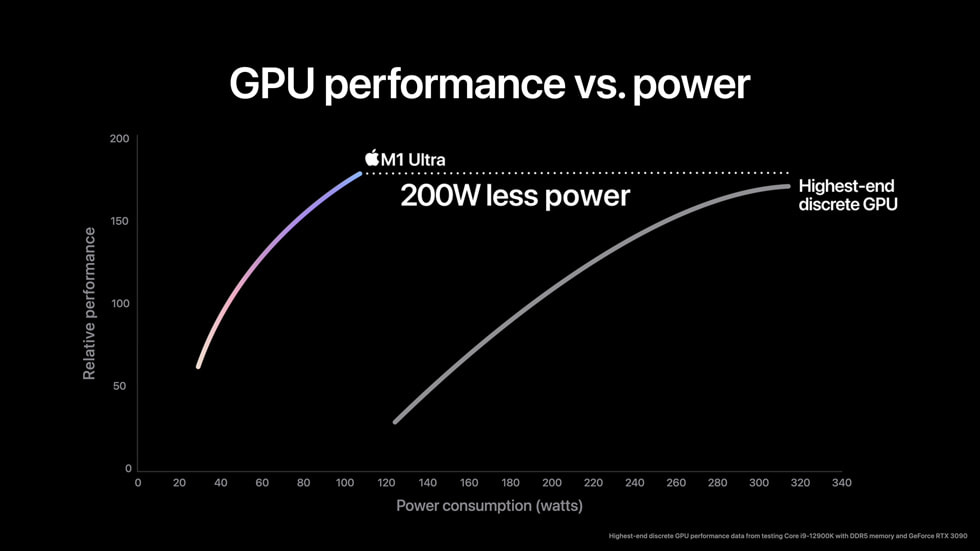
Sure they are. Matter of fact apple claimed their new card is better than a 3090
And it was proven that not only is that false, a 3050 also outperforms it in some cases
Lemme find the video of the guy that did the benchmarks

Which is a better GPU - Apple Mac Studio with 64-core M1 Ultra or Nvidia RTX3090? Was apple lying?
👇Sponsor Message👇
▶Get 2 Months for FREE when joining Artlist below◀
Music & SFX Licensing Site: https://geni.us/TNartlist
Buy the RTX 3090 here: https://geni.us/tuf3090
Get the Mac Studio Here:
⚪️ M1 Max Version: https://geni.us/NA5s
⚪️ M1 Ultr...
He quoted the tech talk that apple did
Apple even showed a graph
And this guy did benchmarks putting it to the test
Then what tech talk was used in the video?
Was the apple live event releasing the Mac studio
Where they showed a graph of their card versus a 3090
wind egret
https://www.apple.com/newsroom/2022/03/apple-unveils-m1-ultra-the-worlds-most-powerful-chip-for-a-personal-computer/
https://www.apple.com/newsroom/images/product/mac/standard/Apple-M1-Ultra-gpu-performance-01_big.jpg.large.jpg

Apple Newsroom
Apple today announced M1 Ultra, the next giant leap for Apple silicon and the Mac.

It definitely says 3090. That's on Apple's own website.
It doesn't specify what they tested. Could be a CPU-limited benchmark that's crippling the 3090 there, and Apple beating Intel would not be much of a surprise at all. They wouldn't have to go much further to beat AMD's CPUs either... I think.
How much of a 3090 goes to waste if you're encoding?
Considering it's a shudderingly huge 5nm chip, it could probably do better.
M2 Ultra when?
median marsh
wait they had a 3090 system which drew 450W? IMPOSSIBLE!!!!
good that they listened to #hardware and went with a 1200W PSU 😄
wind egret
And the 12900k accounts for the other 100w? It probably uses that while idle.
median marsh
no, it uses less (under idle at least)
wind egret
My potato sucks 70w idle (whole system) and it frustrates me.
median marsh
he said it drew 450W from the socket, idk that PSU, but if thats true the components did drew 400W
with ~90% efficiency
and that wasn't a FE card, was it?
Asus TUF RTX3090
wind egret
The graph was only 320w. Did they put it in a case with one fan?
median marsh
well
first of all, we don't know if that PSU really shows socket or component draw
if it's really socket draw, then the above said with ~400W is more likely
did apple claim the 320W for the whole system or just the GPU?
which could be around that 320W if you consider that the 400W include cpu, AIO, etc.
and that's even what they draw from socket
so the components draw around 10% less overall
they can get away with a 250W psu 😛
or 200W
would be interesting what they actually use
on the other hand they do this...
Electrical and Operating Requirements
Maximum continuous power: 370W
wind egret
M2 is 20%ish better than M1
wind egret
Though the M1 is a low end part, with a fraction of a GPU. The M1 Pro doubles the GPU, and the M1 Max doubles it again. Then there's the M1 Ultra (the one being compared to the 3090) that is two whole M1 Maxes stapled together.
The M2 series might be different, but it's still probably not going to be faster than a 3090. Unless the rumor of an M2 Extreme is true. Even if it is, an M1 Ultra is already twice as big as a 3090, so an M2 Extreme....
barren goblet
Right but that isn’t how that works. Because you can’t just “increase the watts” and expect more power necessarily
Not really calling anyone a liar but apple showing a graph that says “we perform better than a 3090” isn’t accurate or at the very least they used a very specific test
And yes that’s the graph I was referring to which is in the video of him going over it
it’s def still impressive hardware. But in the video the guy tested some popular benchmarking and software (names escape me at the moment) and it looked like the 3090 was taking the win in just about every category
golden dirge
FPGAs man, the way forward is efficient hardware that reprograms itself for the task at hand. Or much more single-purpose, dedicated hardware for common tasks
I mean on-board things like GPUs, they already can contain things like hardware video encoders, ray tracing accelerators, matrix processors, decompression engines etc
If you mean for FPGA, then it should do the opposite
barren goblet
Def agree. I do think apple needs to make some software changes as well to support more or convince devs to make apps for apple. If they can do that and continue the trend of good hardware I think they could take over
fallen oasis
Apple aren't going to, though.
golden dirge
Yeah what specific models of each?
barren goblet
fallen oasis
Apple aren't going to, though.
Yeah they probably won’t. Which is why PC really isn’t gojng anywhere
golden dirge
Single core seems pretty weak on the Xeon, but multi-core is a fair bit better. Think you'd be better off with even a 3800X if you can stretch for it
https://www.cpu-monkey.com/en/compare_cpu-amd_ryzen_5_3600x-vs-intel_xeon_e5_2698_v3
(Going off Cinebench R15, which seems to be the only common benchmark between the two)
golden dirge
Pop it in PCPaetPicker TBH, much nicer
 open nova
Thanks didn’t know that was a thing!
open nova
I’m building a pc for unreal engine game development and i need suggestions/tips https://pcpartpicker.com/list/
PC Builder
median marsh
thats not the correct link?!
it has to have some ID in it, so that it links to your list
open nova
Saved Part Lists
median marsh
wth is the 512GB 970 pro so expensive?
PSU is totally oversized for pretty much anything
even laura will agree with me on this 😄
i would drop all 3 SSDs that you picked and go for 2x 2TB m2 pciex ssds
why 3900x and not 5950x?
and i would go for a 3060 over a 3060TI if it is for gamedev
you'll have more benefits of the 4gb more vram
golden dirge
What the chaotic fuck is that storage
PS pretty sure AMD CPUs do not support NVME Gen 4, so you'd just waste your money on the Rocket 4
median marsh
golden dirge
What the chaotic fuck is that storage
dealer: which storage do you want?
customer: yes
golden dirge
Also, been a long time since I saw someone voluntarily pick a spinning rust drive
median marsh
why wouldn't they support them?
golden dirge
AM4 is old
You can use them as Gen 3 ones, but what are you even paying for at that point?
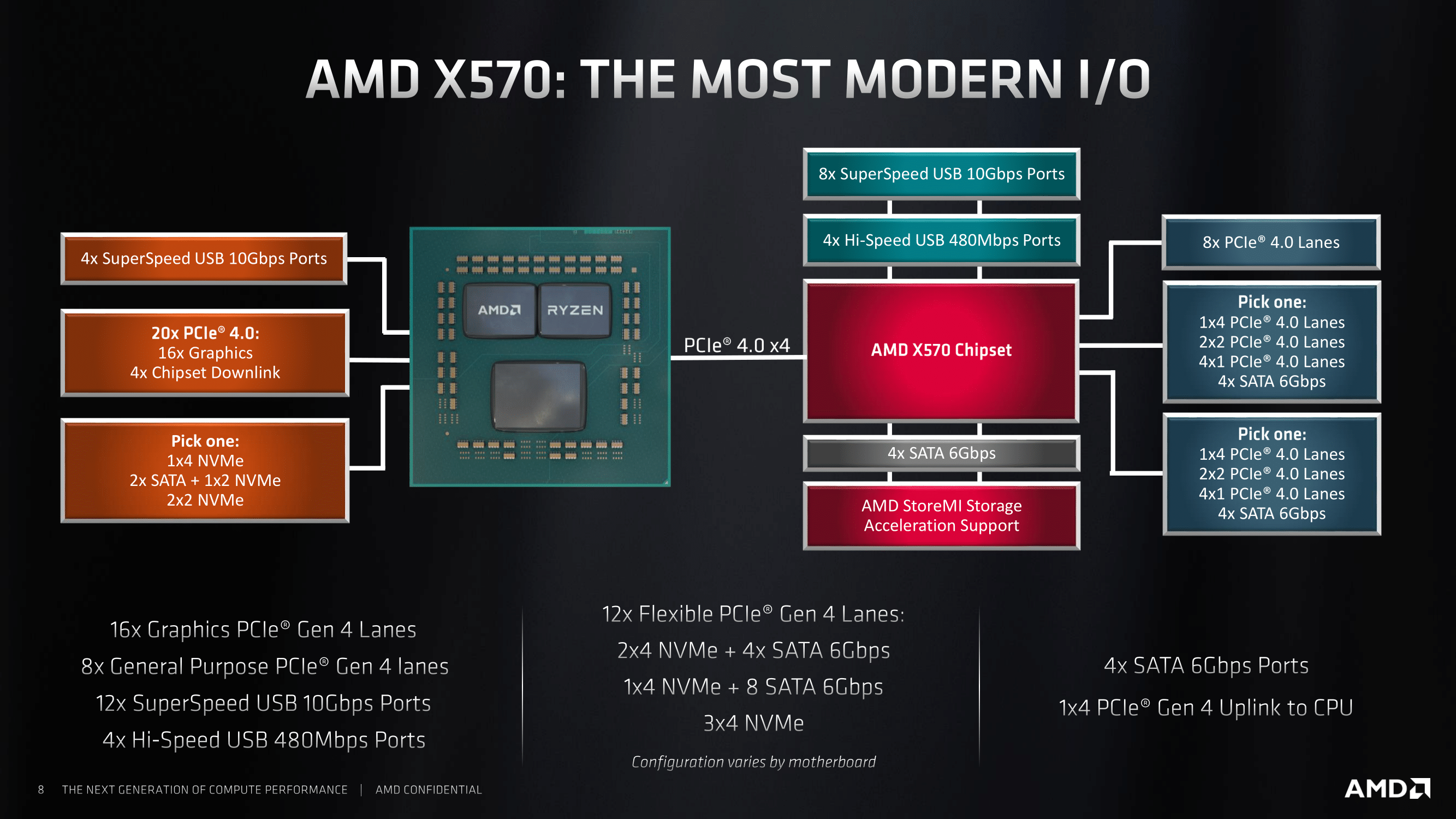 golden dirge
Okay nevermind I'm wrong. That's a laptop thing :|
median marsh
and even the b550 does to some extend
just the downlink to the chipset is pci express 3.0 and so everything that hangs on it
golden dirge
I've gotta look at the build on my PC, but Jesus managing 12 different storage devices would make every single download or install living hell for me
median marsh
so yea even on some desktops theres only one slot which would support 4.0
and drop the 3 other ssds
golden dirge
Yup, could even RAID them
median marsh
thats what i wouldn't do
golden dirge
3900X feels out of place, is the 5900/5950 a lot more?
median marsh
they are fast enough, so raid0 just makes it more likely for a total data loss
and raid1... not worth either imho
golden dirge
And increases latency but also increases bandwidth 🤷
median marsh
yea but they are really fast enough on their own
golden dirge
With UE latency feels pretty important, lots of IO happening all the time
median marsh
i would only raid1 them for data that has to be available 24/7 and where every minute of downtime costs you money
5950x is even less in the US, like $100
and should perform better?!
open nova
i know nothing about building pcs i tried my best lol
median marsh
is that machine for unreal dev, or more for gaming?
golden dirge
I'd bump to 3080 12 GB/Ti if possible, simplify storage to Ben's suggestion, and reduce the PSU to something like an RM 850X at the most. If you're going with the 3060, even 650W should be ok
open nova
median marsh
i would drop all 3 SSDs that you picked and go for 2x 2TB m2 pciex ssds
i cant find the 2TB m2 pciex ssds that youre talking about
golden dirge
open nova
i know nothing about building pcs i tried my best lol
DW, if it was hot trash we'd laugh react and move on hah
median marsh
open nova
i cant find the 2TB m2 pciex ssds that youre talking about
are you in US or where?
open nova
median marsh
are you in US or where?
us
golden dirge
Check out this website as well - https://www.logicalincrements.com/
Helping you build a PC, at any budget.
If your PSU can't handle 4 average 80s familes concurrently, why even bother
Also, the Intel CPUs may be better, aside from having to shell out a few kidneys for DDR5
golden dirge
AM5 for sure, lots of pin schematics and stuff leaking and looks like a more dense or bigger socket
open nova
3000 usd max
golden dirge
$3500 gets you a pretty sick PC
median marsh
including case?
golden dirge
Heck, at $4000 you may even get DDR5 RAM for days
Nah jk but is EOFY a thing for you?
open nova
i don’t need a monitor with it i already have two good ones
golden dirge
Flex, I use my phone screen for game Dev. Remote into my laptop for the keyboard 🥔
median marsh
my 2 cents 😛
if you need a case and want to stay below $3k, drop the HDD and buy it later maybe
you get 4TB instead of 2.5TB SSD space anyways
golden dirge
HDD is just so painfully slow for today's standards. Even compiling code can see a slowdown on them SMH
median marsh
yea, and for backups
golden dirge
I'd drop mobo quality for another 2-4TB SSD TBH
open nova
i’m fine with going over 3000 if needed but not by a lot
golden dirge
Not having to hear that grating noise brings me joy
median marsh
i think that board has the better layout in terms of what hangs on the chipset and what not
golden dirge
I actually had that exact mobo before too, pretty nice but can't say I'd spend the premium again for not much gain
median marsh
i also had to decide back then, and picked the rog strix over the TUF because of that
golden dirge
Not cheap, but Strix is in the exxy side
median marsh
isn't the non-ti 10gb only?
golden dirge
I just remember buying that for like AU$500 1-2 years ago, whenever the 5800X released. Doesn't seem to have had the price adjusted
median marsh
i'd rather save money on the cpu and go for 5900x instead of 5950x if you really want to cut costs
golden dirge
But the core count, imagine compiling shaders on 32 threads. Would go down from weeks to days!
open nova
median marsh
<https://pcpartpicker.com/list/mnfL4s>
what case would you recommend for this
golden dirge
UE5P ruined me, it was constant recompiles for some reason. Seems to have calmed down a lot in proper 5 though
median marsh
honestly it doesn't matter that much, that's mainly a question of personal choice
golden dirge
The Lian Li Lancool II is amazing to build in, and looks cool too. Chunky though
open nova
I dont know the difference 😅
golden dirge
median marsh
honestly it doesn't matter that much, that's mainly a question of personal choic...
Assuming all components fit! RTX cards get looooooooong
golden dirge
open nova
I dont know the difference 😅
Mid Tower: big. Full: big, but more.
median marsh
fallen oasis
I have about 8" behind my RTX card.
median marsh
https://pcpartpicker.com/product/FCK2FT/be-quiet-pure-base-500dx-atx-mid-tower-case-bgw37 that is the fancy version of it
fallen oasis
I have a stupidly large case.
open nova
then mid
 open nova
does the size affect anything
median marsh
but there are many nice and good cases at ~$100
i do like the later posted bequiet because of the mesh front, should give an good airflow
golden dirge
Storage device support, graphics card length allowed, overall cooling (roughly). And size of course
median marsh
and they are really compact, but should fit the 3080
golden dirge
Bigger cases might take bigger fans which cool your PC and output less noise
median marsh
not necessarily
small case, you get good airflow and the hot air gets out quick
the be!quiet comes with 2 fans btw. and you should buy 2 extra 120mm ones
more fans = less noise because they can spin slower ^
golden dirge
can, if you set them up to
median marsh
yea, but asus mainboard makes that kind of foolproof 😄
golden dirge
But fewer, bigger fans also can result in more airflow
median marsh
their bios handles it quite well by default
median marsh
oh i see, i don't have experience with AIO
golden dirge
Stupidly loud in my case, and every BIOS update I had to redo fan curves, especially for front intake fans
I got the knockoff Noctuas too, which push heaps of air even at low speeds, while the high speeds got LOUD. Sometimes I'd worry my desktop was taking off
open nova
i think im gonna choose this case https://pcpartpicker.com/product/kpx2FT/nzxt-h510-elite-atx-mid-tower-case-ca-h510e-w1

NZXT H510 Elite ATX Mid Tower Case (CA-H510E-W1)
golden dirge
If you're going with BQ fans though, they're uh... quiet
median marsh
@open nova just check how much fans are included
and dont forget to order extra ones in case
open nova
2 fans it says
open nova
median marsh
and dont forget to order extra ones in case
wdym
median marsh
would go with 2 extra fans then, so that you have 4 total
yea, thats how my radeon rx570 died 😭
open nova
it says it has 3 fan channels what does that mean
how do i find out how many fans it can fit
that might be a dumb question
open nova
ohhhhh i get it
median marsh
yea wait, the size they can fit differs a lot
like mine couldn't fit 2x200mm in the front
but the page says
Aer RGB 2 140mm Fans
2Aer F 120mm (Case Version)
1Aer F 140mm (Case Version)
1
so maybe it comes with 4? Oo
open nova
should i just get 2 more of the same fans that come with the case or different ones
median marsh
that's what it can fit
Front:2 x 120mm / 2 x 140mm
Top:1 x 120mm / 1 x 140mm
Rear:1 x 120mm
it kinda looks like it will come with 4 fans already
where did you see that it comes with 2?
NZXT level of confusion
open nova
in the amazon description it says
New features: Front I/O USB Type-C Port, Dual Tempered Glass, Vertical GPU Mount, and 2 140mm AER RGB 2 Fans (included)
the elite comes with 4 according to their page
is that amazon page from the elite, too?
it comes with 4, even the questions in the amazon page say that
2x120 rgb front fans
1x120 rear exhaust
1x140 top exhaust
Total of 4 fans
By Amazon Customer on January 30, 2021
golden dirge
Well, just luck if the draw maybe lol. Wait and see what happens
median marsh
i wouldn't order extra fans based on what the nzxt and amazon page says
the thing is, they have different cases from that series which may include less fans, but the elite should have all 4

Specifications Of The Case:Chassis series: C-570Shell size: middle tower(Motherboard support: Mini ITX / Micro ATX / ATX)Material: aluminum alloy / steel / tempered glass/advanced metallic car paintDimensions (length x width x height): 490 x 230 x 500 mmTop handle: for you to move the open game c...
what the ....
@slate blade you have that in pink, right? 😄
with 1600W PSU
golden dirge
Ah yeah, Sandstorm the case
median marsh
Boomfunk MC ghetto blaster edition
@open nova wait before you order anything
Max GPU Clearance:338 - 368mm
idk how long the video card was that was in the list
305mm, allright. nvm
should fit
ah, now i see what you meant by curved glass
open nova
I'm getting a warning on the website
``` what does this meank
median marsh
if it wont boot, DM me
the good thing is you can do the bios update even without a supported CPU, so nothing to worry about
open nova
and what about this
Some physical dimension constraints are currently not checked, such as CPU coolers and RAM clearance.
yea, i bought mine a year ago and it already had the bios which worked with the 5950x
median marsh
open nova
and what about this
```
Some physical dimension constraints are currently not ch...
that means that its possible that some of the memory slots are covered by the cooler, but that should be fine with that cooler
open nova
thanks for all of the help!! 😄
median marsh
that one has 1cm more space between memory and cooler than my combo
and i have the same memory sticks, so it should fit perfectly fine
golden dirge
This is why I unironically do "out of character" Googles in incognito
I had a surprise anniversary trip spoiled by a FB ad. Like yeah sure bro, I'm just going to buy the holiday package again because its on the screen, thanks
fallen oasis
"out of character"
porn
golden dirge
Nah like someone throws a random quote around, you Google it, and then for months you're getting Bible ads. It's annoying
median marsh
it's fun
i had to look at woman shoes lately with a friend, now i'm getting highheels ads all the time 🙂
could be worse i guess 😄
golden dirge
The AI wants you to have a foot fetish, clearly
median marsh
i'm glad it's not showing me feet 😄
fallen oasis
That'd be toe-tally awful.
devout pendant
vivid skiff
Not enough for UE5 City Sample but enough for lower scalability game.
What about animation using lumen and nanite ? , If not talking from a game making but film making standpoint ?
golden dirge
I'm struggling with 16 lol (TBF I have Rider open)
Film making, higher detail assets, more shit to store in RAM. You'd need to upgrade the RAM at the very least
vivid skiff
devout pendant
What about animation using lumen and nanite ? , If not talking from a game makin...
Forget about filmmaking if you want to have it not looking like a machinima
If you want to make machinimas, going with standard game-y scalabilities is fine
devout pendant
vivid skiff
If you want to make machinimas, going with standard game-y scalabilities is fine
What do you mean by machinima
Low graphics ?
vivid skiff
devout pendant
Low graphics ?
If you want to put it harshly ¯_(ツ)_/¯
devout pendant
vivid skiff
If you want to put it harshly ¯\_(ツ)_/¯
So you mean that the above setup is not cut out for it right ?
vivid skiff
devout pendant
So you mean that the above setup is not cut out for it right ?
Not if you want to get ultra cinematic quality.
devout pendant
vivid skiff
Not if you want to get ultra cinematic quality.
Which one wud u reccomend ?
vivid skiff
devout pendant
Which one wud u reccomend ?
Higher end RTX 3080 or stronger workstation
 karmic trout
What model of MacBook is minimum to package and publish game build on iOS?
Development is done on Windows PC. Is it possible to do it that way? Development on Windows PC and use MacBook only for publishing on App Store?
fallen oasis
It is
 opaque dagger
Gut check. The Lenovo Legion 5 Pro 16”. With AMD Ryzen 7 5800H 3.2ghz 8-core. NVIDIA GeForce RTX 3070. There’s also 16GB of RAM and a 512GB SSD but think I can upgrade those pretty easily. It’s $1400 now. Is that good value? Do you think the laptop will be able to carry out most tasks? Another option would be a HP Omen 15 for $1000. Intel Core i7-10870H 2.2ghz with 8-cores. NVIDIA GeForce RTX 3060 Laptop GPU (6 GB GDDR6 dedicated). Same RAM and SSD specs.
median marsh
isn't the legion5 also available with 32gb ram and 1tb ssd?
because if you take 16gb now it may either be single channel, or dual channel with 2x8gb which either means it runs slower than 2x16gb or you would have to replace both sticks later...
 gleaming basin
What do you recommend for you using UE5 between amd and nvidia (like 3080 vs 6800). I have a 5800X and 32Go ram but a 1060 with 3Go :p
frail pagoda
gleaming basin
What do you recommend for you using UE5 between amd and nvidia (like 3080 vs 68...
well some of fellows here who uses RX 6800 and above cards are having some issues, but a safe place to dev you can go with RTX 3080 12 GB
but if you needed more vram (large assets) maybe you can go with rx 6800, but if u have an option between rtx 3090 or rx 6900 xt though i'd prefer rtx 3090
wind egret
There was a 12gb version, but Nvidia recently stopped making it. It was a strange SKU. (Actually 10gb on the 3080 is stranger but maybe they weren't sure about gddr6x availability.)
 upbeat scroll
Will it be worth my time to try and start with UE 5 and work on it for next years while it's installed on an HDD ? (no upgrades or ssd in the foreseeable future)
fallen oasis
Sure.
HDD isn't great, but you can do a lot with UE5 that doesn't involve restarting the engine or compiling code.
Just give it 5m to load up each time.
golden dirge
Is there a VRAM shortage on or something?
Just get a $10,000 3090 Super TI X duh 🙃
I don't think NV engineers listen to reviewers for architecture direction TBH
But wonder when AMD makes another nutty HBM card again
I'd like to keep my kidneys, cheers
devout pendant
golden dirge
Just get a $10,000 3090 Super TI X duh 🙃
eh too exspensive i have the rtx 2070 super
 rough frost
Wondering, if you have 7000-10000$ to spend, and you want to do a PC build for UE, for what you go ?
wind egret
Buy a triple set of OLED monitors and save the PC-buying for next year.
frail pagoda
rough frost
Wondering, if you have 7000-10000$ to spend, and you want to do a PC build for U...
RTX 3090, A threadripper and 128 GB DDR4 RAM 3200 MHz and a 2 TB NVMe SSD (or higher depends) and a 360ML AIO for the cpu and the rest are some ssd and case or else, i'd not use RGB components though i'd prefer usability than looks
though it depends, you might gettin a Quadro RTX 8000 (48 GB vRAM) for a really huge serious project
or an SLI of RTX 3090 lul
i might lower the cpu a bit
rough frost
@frail pagoda ☝️
 fallen bough
I have Ryzen 2600 and RX570 along with Kingston 16x2GB Ram DDR4
I also have an additional 8x2 RAM but I only have 2 slots in my motherboard. I'm thinking to upgrade it to a 4 slot one, as a total noob of #hardware, what can you guys recommend?
golden dirge
fallen bough
I have Ryzen 2600 and RX570 along with Kingston 16x2GB Ram DDR4
I also have an a...
How much RAM are you aiming to get?
golden dirge
Mixing and matching RAM can be a bit sketchy, could force you into single channel mode which Ryzen CPUs don't tend to do well with
If they're different speeds, you'd likely need to settle on the lowest speed between them
fallen bough
I think 8's are 3200 and 16's are 3600 mhz
golden dirge
The timings as well, RAM timings are pretty wacky complicated
If I were you I'd just double up on the 16GB set you have, and run 4 of those. Unfortunately even the same SKU can have compatibility issues, due to component changes down the line...
golden dirge
I don't mean to discourage you, but RAM is just a very mixed bag. Doubly so with AMD CPUs, from my experience.
I think, practical worst case scenario, you're running 48GB at a speed slower than either were specced to. This may still be much better than 32GB if you're running out of RAM though
fallen bough
Haha no worries, I'm actually even fine with going with 32gb only, but just wanted to take advantage of 8x2's too
Thanks for the insights
median marsh
why 2x64GB? :>
most consumer cpus are limited to 128GB anyways
and if you have a threadripper or similar you might want 4x32GB over 2x64GB because of quad channel :>
rough frost
ThreadRipper is really something ?
like worth the price ?
(and if someone said better than incredibuild licence, i will search him, i will found him.... insert taken gif
rough frost


 golden dirge
I accidentally bought 2666 CL18 RAM for the laptop, instead of 3200 CL20... Fuck
Sometimes reading helps apparently
 meager cairn
Can anyone give me some hardware suggestions for UE5? I use a regular Windows laptop running 64GB & 8GB RAM, Intel Celeron processor, but we are installing UE5 on a 128 or 512GB SD card. I plan to use UE5 for film & animation production. Any suggestions or feedback on my idea??
fallen oasis
I'm not entirely sure installing UE5 on an SD card will be... useful.
Do you mean to say you have 64gb of hard disk space? Or 64gb of ram?
meager cairn
fallen oasis
Do you mean to say you have 64gb of hard disk space? Or 64gb of ram?
It's hard disk space, but I'm upgrading to a new device anyways
fallen oasis
I doubt UE5 would even start on such a laptop.
And if it did, it would take a good hour to boot off an SD card. Unless I'm gravely mistaken about the speed of SD cards.
meager cairn
fallen oasis
And if it did, it would take a good hour to boot off an SD card. Unless I'm grav...
100MB/s is high speed
meager cairn
7.3 sec
fallen oasis
What is 7.3 seconds?
meager cairn
fallen oasis
What is 7.3 seconds?
run time
fallen oasis
Run time of what?
meager cairn
fallen oasis
Run time of what?
is sd card
fallen oasis
I wasn't aware SD cards had a run time stat...
meager cairn
fallen oasis
I wasn't aware SD cards had a run time stat...
oh, idk
Would you think this would be enough for UE5?
 fallen oasis
Not a chance in hell.
You are majorly underestimating the system requirements for UE.
meager cairn
My fault, kinda new to this, so we'll keep looking
fallen oasis
You'll want to look int he region of 5-6x that price.
You want (at least) an 8 core processor doing 3.5ghx+, 16gb of ram, 8gb of video ram, a 512gb ssd
And that's entry level
devout pendant
fallen oasis
You are majorly underestimating the system requirements for UE.
Yeah I’m on a beefy pc and I can’t even install it without the epic launcher breaking
So I’m just sticking to unreal 4
 charred notch
I'm using ue5 on my laptop with gtx 1060 without any problems...
But my projects are small so I dunno
 frigid harness
[repost from cpp channel, my bad !]
What's up guys ?
I'm building my dream PC for the next 10 years and have a budget of 5000€
I'm a C++ dev and will be working on a AAA project, I just bought a 3080TI (ouch lol)
I am hesitating between an I9-12900KS and a Threadripper 3960X and need to stop doubting asap to buy the relevant motherboard.
The I9 has a socket that could be used for a processor upgrade (hopefully for at least 2 generations) and has 8 physical cores and runs at 5.5GHz when boosted, while the 3960X has 24 physical cores and runs at 4.5GHz.
I am really struggling to make that exact choice and would greatly appreciate your opinion on this subject.
Which one should I choose ? Will the Single-thread performance of the threadripper give me a noticeable bottleneck compared to the I9?
thank you guys ❤️
okay 🙂 good to know
has been a while since I didn't update myself on hardware trends
 twilit nest
frigid harness
[repost from cpp channel, my bad !]
What's up guys ?
I'm building my dream PC fo...
twilit nest
frigid harness
[repost from cpp channel, my bad !]
What's up guys ?
I'm building my dream PC fo...
Why do you care upgrading the CPU in the next 2 generations if you plan to use it 10 years?
I would chose Ryzen 9 5950X btw.
frigid harness
because I could hahaha
honestly I want to max out budget and I can put 1700€ on a cpu, not more tho
 subtle vigil
i9 runs really hot, so do spend extra on cooling if you go that way. I had to upgrade to a AIO 360mm setup to keep my machine from melting.
frigid harness
my friends are telling me to get an I9
for every other reason than compiling, but they don't know the struggle... xD
Okay
kind talon
Just one note with the i9 is that you'll absolutely want to get DDR5, which could raise the price considerably depending on how much you get
If you are only able to get DDR4 then go with the 5950x
frigid harness
yeah I'm hesitating on DDR4 vs DDR5 for the I9
I'm able to do whatever really 🙂
okay thaks a lot guyz
will post a pic when done 🙂
love yall
Any quick explanation on why choosing "recent technology" DDR5 instead of trustworthy field-tested DDR4 ? I've seen that the latency is higher for DDR5 but the freq is also higher and idk how to compare
- there is a max RAM frequency on processors and I don't get how RAM can be so much faster than max processor recommended frequencies
ah okay
so in the end, how should I choose my ram when I know the "max freq" that my processor can handle ?
ahhhhhh okay
I've seen XMP somewhere but didn't dig through that hole
So if I understand correcly, XMP means my ram is overclocked, and my processor will use it at that new freq ?
I don't get the CPU max ram freq mention on the technical specifications
 fleet mist
frigid harness
So if I understand correcly, XMP means my ram is overclocked, and my processor w...
fleet mist
frigid harness
So if I understand correcly, XMP means my ram is overclocked, and my processor w...
Your ram will run at the marketed frequency or just below it depending. Your cpu frequency is done separately. You can find xmp in your bios settings. For asus boards it's under extreme tweaker tab - Ai overclock Tuner. Switch from auto to xmp. Overclocking your cpu has a benefit-negative gain. If you overclock, you gain performance and lose stability.
golden dirge
frigid harness
I don't get the CPU max ram freq mention on the technical specifications
AMD or Intel CPU? XMP technically is an Intel thing, AMD supports some subset of profiles, and good motherboards will let you apply arbitrary timings (which are pretty easy to fuck up)
golden dirge
fleet mist
Your ram will run at the marketed frequency or just below it depending. Your cpu...
Only if you overclock too much. You can have stable overclocks as CPUs have to keep in mind CPU variation, so they have some margin of safety.
Modern CPUs are trickier to overclock to the point that you just flip the auto OC one if relevant, give it good cooling, and it gets you most of the way there by tuning itself at runtime.
fleet mist
golden dirge
Only if you overclock too much. You can have stable overclocks as CPUs have to k...
Very true 👍
devout pendant
fleet mist
Very true 👍
How are you typing here aren’t you dead
golden dirge
Yeah it's funny, the dissonance between RAM and MB ads/UI.
RAM: "Pay 200% $/GB for super duper fast timings!"
MB: "Either accept shit tier timings, or enable dangerous XMP at YouR oWn RisK"
fleet mist
That's why I suggested just xmp. You gotta check Temps, voltage and other stuff to get a solid cpu overclock. Xmp is pretty easy.
Also I ain't dead. I'm just in another attic playing games
frail pagoda
Do speed really matters? i have 3200 Mhz with cl14 though
devout pendant
frail pagoda
Do speed really matters? i have 3200 Mhz with cl14 though
Speed is kind of important
Do you really want a slow computer
Like sure it’s taking it’s time but still
frail pagoda
yes indeed, but not like to 3200 - 3600 mhz i suppose
below 3200 is kind of effective.
4000 MHz cl20 vs 3200 MHz cl19?
devout pendant
That’s not bad
golden dirge
frail pagoda
Do speed really matters? i have 3200 Mhz with cl14 though
Pretty CPU and workload dependant
frail pagoda
am i able to oc my ram to 4000 mhz?
just curious about it
i got 4 fans on my case, 1 on back 3 on front
and one is an AIO cooler (2 fan)
about temps it should be fine, i live in indonesia the temp is around 32-34c
golden dirge
Maybe if it's Samsung B-Die, but you'd have to bump up timings and voltage quite a bit. RAM OC is just trial and error hell, for usually dubious benefits.
fleet mist
You'll notice a difference in certain gains. But you might encounter an unstable system. Probably not a good idea to go above what's on the box.
golden dirge
3200MHz CL14 is pretty fast, it may be a good die with some overclocking potential. I got mine to 3733 CL17 I think, but for no benefit really
frail pagoda
it's running on 2166 before, i forgot to activate xmp when i upgrade my ram to 3200 mhz
not really an upgrade for the ram but switched the model and motherboard since i upgraded my cpu
it's running unstable with DDR4 Klevv lul, i tried to combine them 8x2 and 16x2
tried to gaming, running literally freezes every 15 secs
median marsh
depends on the TR
more cores = can compile more stuff in parallel (if the system has enough memory)
frail pagoda
median marsh
more cores = can compile more stuff in parallel (if the system has enough memory...
isnt the more threads better?
i mean intel has a weird core architecture
the i7-12700F has 8 p-core and 4 e-cores
technically it has 12 cores
16 threads and 4 threads
but sometimes ryzen 7 5800x can be better for compile stuff
fallen oasis
 soft bloom
i'm on a 10700k
soft bloom
i'm on a 10700k
I have the 3975X (32 core) and it compiles like a dream. Maxes out at around 80gb of memory.
median marsh
well, if you have 16thread 5GHz vs. 32thread 2.5GHz cpu, it will pretty much end up the same
so clock speed also has some influence
a faster clock speed might overall yield a better result, as it may be able to link the code earlier, but that's just an assumption 😄
fallen oasis
median marsh
so clock speed also has some influence
Did you mean to write 2 different clockspeeds there?
 upper goblet
Hey I have no clue where to ask this properly. But does unreal support resizable bar or ssd overflow?
Running into capping my 3090s vram for a scene I am rendering through MRQ.
All my hardware supports resizable bar
median marsh
yes it does kind of (not sure if it's resizable bar actually)
but it can use host memory as fallback
upper goblet
median marsh
yes it does kind of (not sure if it's resizable bar actually)
That's awesome. Is there anything to search for to find out how to setup or enable it?
median marsh
i have no idea, haven't used that feature yet
upper goblet
Ah ok thanks tho I will look into it
median marsh
my guess is that it's on by default
it should show a message that it's using host memory and that performance will suffer
upper goblet
Is that the red notification that deals with memory exhausted in editor?
I dont experience that actually. No issues there
Movie render queue just caps at physical vram max and I feel it should work with overflow.
Maybe I need to update my chipset
median marsh
i don't know if movie render stuff works different than usual gamedev, so maybe better wait for advice from someone more experienced
upper goblet
It is similar to an extent
upper goblet
median marsh
i don't know if movie render stuff works different than usual gamedev, so maybe ...
But actually i think I got it working by tweaking the nvidia driver to force ue5 to work
 kind shore
How good/bad is Unreal when it comes to AMD GPU's ?
I know the one or other game which runs terrible with those GPU's.
I bought a 6700 xt and now i wonder if it was a bad idea (when it comes to unreal)
median marsh
well, nvidia does some work on Unreal, too. Which obviously makes it work well with nvidia gpus, features like DLSS, RTX GI and such...
golden dirge
kind shore
Does unreal even support FSR ?
Not sure if it's (much) better than TSR, but yeah there's a plugin for it.
FYI I'm using an all AMD laptop (5900HX, 6800m) and it's good. Fewer D3D device disconnected crashes than with my 3080 desktop...
Desktop was perfectly stable in everything else, idk what UE's issue was
kind shore
I remember hearing something about that.
Any chance that those bugs were related to the higher end GPU's ?
As in it starts after the 3060 Ti ?
median marsh
well, i guess the majority uses nvidia cards?!
kind shore
win11 lulw
golden dirge
Can't have issues with AMD if no one buys them too though lol
I actually got that with Win10 too though, but more frequent in Win11 I think
median marsh
where i dont experience bugs with nvidia, ironically 😄 (3060)
golden dirge
DXVK rescuing peeps from DX while making some games run faster is pretty funny
median marsh
yea most likely because it's just not supporting the full DX feature set
golden dirge
PS for Nvidia peeps
https://www.reddit.com/r/unrealengine/comments/vvwzwx/new_nvidia_drivers_broke_my_unreal_still_like/
 devout pendant
Anyone swear by ultrawide displays for UE?
 mighty patrol
I use an acer predator ultra wide for dev myself find its nice personally can also be used to help test for ultra wide support if you plan on having that for your project I suppose. Some games seem to lack support for it.
Granted my monitors not amazing but I feel having multiple options for a monitor is also handy.
golden dirge
devout pendant
Anyone swear by ultrawide displays for UE?
Ultrawides are great in general, love them for work
median marsh
for UE4 you need one in portrait mode because the big icons take up half of the screen
devout pendant
I was thinking of picking one up, but they seem ill-suited to streaming :/
I found a lot of threads on Reddit / videos on YouTube re: 21:9 being awkward at best for Twitch
But like y'all are saying, I can see the benefits for a workstation…

 fierce falcon
Radeon RX 6600 8GB for $250-300 worth it?
golden dirge
fierce falcon
Radeon RX 6600 8GB for $250-300 worth it?
Looks alright I guess
 wind egret
A pre-owned 3060 seems like a better deal, because of the 12GB vs 8GB.
But 6600 seems like the best value at retail.
I am amused Discord thinks yours was a spam message
fierce falcon
reddit
8 votes and 11 comments so far on Reddit
golden dirge
I'd just assume most services flag VPN-created accounts in some way. These kinds of heuristics are pretty useful to keep bad actors away.
They even named their company wrong, so...
 wind egret
It's not that bad of a name metaphorically.
devout pendant
If anyone wishes to help me figure out where to get my hardware, please follow this link: https://www.reddit.com/r/pcmasterrace/comments/vx2d5b/i_need_a_laptop_or_portable_pc_for_use_in_the_uk/?utm_source=share&utm_medium=web2x&context=3

reddit
0 votes and 0 comments so far on Reddit
golden dirge
devout pendant
If anyone wishes to help me figure out where to get my hardware, please follow t...
What's a "portable PC"? Like a NUC thing?
Why is your INR budget more than your GBP one? 😄
Your INR one is almost what I got my Strix G15 for - R9 5900HX, RX 6800M. Added a second m.2 SSD to make it 1.5TB total, and swapped out RAM for a 64GB set.
But get a laptop for sure, particularly if you don't live on campus. Much nicer to just be able to pop a screen open and make some progress on whatever assessments you have due.
Lots of down time between session you need to go to, particularly second year onwards.
median marsh
you ask for a recommendation in september? dude, the weather forecast for that timeline is more accurate than the pc market
maybe worth looking at builds like this => https://pcpartpicker.com/b/BTW323

16 Cores, 11 Liters: A Dan A4 H20 Build by braxtonjames - AMD Ryzen 9 5950X, GeForce RTX 3090, DAN Cases A4-H20 X4 Mini ITX Desktop
many people have put good hardware in that case, so maybe an option to change your system in india and transport it in a backpack
 agile lodge
thermaltake have some cool hardware and they new motto "your ultra your way"
devout pendant
golden dirge
Why is your INR budget more than your GBP one? 😄
prices in India are inflated lol
lmao but I'll probably not mine anymore, my earnings are more than enough to compensate I think
also how good is i5 12500? It's way cheaper than i7 12700 and apparently outperforms i7s of 9th and 10th gens and is serviceable but worse compared to 11th gen
can't really ensure that if my laptop is customised per se
customised laptops cost way less than packaged ones based on what I'm seeing in the websites, VAT inclusive
devout pendant
devout pendant
also how good is i5 12500? It's way cheaper than i7 12700 and apparently outperf...
any opinions?
median marsh
probably okayish, would probably rather aim for at least 16 threads
agile lodge
PSUs come PCIe Gen5 ready now
Thermaltake just introduced some new PSU with that readyness
 serene dome
September is quite close to when the new models come out for Intel (Raptor Lake) and AMD (Zen 4) as both are slated for Q4 2022. If you can afford to, then I'd consider waiting (either for the expansion of selections to choose from or perhaps for price adjustments for the older models).
agile lodge
PSU 1650wats seems perhaps next leap as what 1000W PSUs was before
golden dirge
agile lodge
PSU 1650wats seems perhaps next leap as what 1000W PSUs was before
Every W the PC uses in the summer, I have to spend twice cooling the now hot office back down... PC gaming is going to be EU only soon lol
golden dirge
My 850W PSU, max ~60% load already absolutely cooked the room, shit was fucked.
I remember when I was in Europe the room heater had modes like like 1000W or 1200W etc. Now that's just how much PCs use in normal operation, bonkers
golden dirge
median marsh
well, you "save" on heating in winter tho 😄
Where you really need the heating, you likely have communal heating of some sort no? IDK, I've only lived in ex-USSR and hot swamp desert land