#hardware
1 messages · Page 43 of 1

 short bramble
The noctua comes with two fans ?
 wise elbow
@mighty cosmos sorry for the ping! but you have a ryzen9 and high ram right? does your memory training take forever?
 orchid iron
short bramble
The noctua comes with two fans ?
orchid iron
short bramble
The noctua comes with two fans ?
yup, and you can install a 3rd one if you want xD
 grave sundial
You'll see the fan on the left is slightly higher than the fan on the right.
short bramble
Oh the Noctua is the two big blocks ??
orchid iron
short bramble
Oh the Noctua is the two big blocks ??
that's the point of dual tower
short bramble
Damn ok
grave sundial
A third fan for George Lucas.
So, if you have clearance issues, you raise the fan on top of the RAM stick higher.
short bramble
It will take more space in my case than my AIO, so my GPU maybe will be hotter lol
short bramble
grave sundial
So, if you have clearance issues, you raise the fan on top of the RAM stick high...
And I can make it really easily ?
wise elbow
i dont think youll be able to move the fan higher and close the case
wise elbow
isnt there only like 10mm of play?
short bramble
Ok thank you I will try this
grave sundial
wise elbow
isnt there only like 10mm of play?
about 20.
wise elbow
ah
orchid iron
I would upgrade the cpu cooler and case at the same time simply because I'm lazy and I wouldn't want to do more effort than needed xD
wise elbow
idk why you would get a new case
grave sundial
orchid iron
I would upgrade the cpu cooler and case at the same time simply because I'm lazy...
Twue. But proper cases are expensive.
short bramble
I'm wondering if I should buy a bigger case in case of my GPU temp will be higher because of the space the Noctua takes, or if the Noctua is too big for my actual case
orchid iron
yup
grave sundial
short bramble
I'm wondering if I should buy a bigger case in case of my GPU temp will be highe...
You can do that if the fans and air cooler unit don't do the job.
One step at a time.
orchid iron
hot take, reverse all fans, so the case goes from negative pressure to positive pressure
short bramble
grave sundial
One step at a time.
Ok one step at a time but the air cooler will not make my GPU temp go lower than actually
grave sundial
orchid iron
hot take, reverse all fans, so the case goes from negative pressure to positive ...
🤔 would that result in a reverse blower and blast a side panel out?
orchid iron
grave sundial
🤔 would that result in a reverse blower and blast a side panel out?
yeah
grave sundial
short bramble
Ok one step at a time but the air cooler will not make my GPU temp go lower than...
I know. But, right now, you want to fix the CPU temps. If that's fine, you can take your time hunting a proper CPU cabinet.
No need to rush. 53C won't kill your GPU any time soon.
orchid iron
only down side is that the inside will be a bit more dusty because there is no air filter, but it should have better flow
grave sundial
Lord! The dust.
short bramble
grave sundial
I know. But, right now, you want to fix the CPU temps. If that's fine, you can t...
I guess the CPU temps can't be worse than now with my AIO lol
grave sundial
It'll be way better, since the AIO has problems and the air cooler won't. 😄
short bramble
I really want to optimize this at once
Exactly x)
But if I want to buy a new case, I should buy any size ?
orchid iron
I think the case has more problems than the AIO but okay xD
grave sundial
I get how you feel. But, you also have to make arrangements for disposing the old case.
Can't just house a rat inside it.
grave sundial
short bramble
But if I want to buy a new case, I should buy any size ?
Fractal Torrent E-Atx Mid Tower.
orchid iron
short bramble
But if I want to buy a new case, I should buy any size ?
make sure it has good flow, yours is the prime example of bad flow xD
yeah EATX is so nice to work with
short bramble
grave sundial
Fractal Torrent E-Atx Mid Tower.
This case is bigger than mine ?
grave sundial
Slightly bigger.
The inside is better designed though.
You can see the pic I posted before.
short bramble
So my GPU temp issue is not the size of the case but the design of the Airflow ?
grave sundial
Generally, yes.
grave sundial
Fitting won't be a problem, no worries.
short bramble
Ok I trust you !
short bramble
Thank you so much for helping me. So Noctua NH-D15 & Fractal Design Torrent Black E-ATX
I don't trust AI x)
orchid iron
sounds good
short bramble
I'd rather to trust humans x)
 mighty cosmos
wise elbow
<@261183265438695424> sorry for the ping! but you have a ryzen9 and high ram rig...
mighty cosmos
wise elbow
<@261183265438695424> sorry for the ping! but you have a ryzen9 and high ram rig...
yeah have 128GB, training takes good 10 minutes
So any time I change any bios settings it takes 10 minutes to get past memory training
wise elbow
mighty cosmos
yeah have 128GB, training takes good 10 minutes
So any time I change any bios se...
reassuring, thanks!
orchid iron
mighty cosmos
yeah have 128GB, training takes good 10 minutes
So any time I change any bios se...
That is way faster than I thought it would be xD
mighty cosmos
wise elbow
reassuring, thanks!
very nerve wrecking on the first boot when I first built the PC lol
orchid iron
Oh yeah
mighty cosmos
thank god my MB has the status code display so I could check what it was doing
wise elbow
i have 96gb. had issues with it when i first built but then it got faster at it for whatever reason
wise elbow
just installed a gpu tho and it forgort
orchid iron
grave sundial
I left mem training off.
Living on the edge I see
wise elbow
mighty cosmos
thank god my MB has the status code display so I could check what it was doing
i have a status led but no display
 wise elbow
"DRAM" led litup in the asus manual says "hardware failure"
mighty cosmos
wise elbow
i have a status led but no display
in my case the display said 15, which was the code for memory initialization
so I knew it was probably training it at least
wise elbow
i wanted a display but it would have doubled the cost of the board i got which was already insane
mighty cosmos
yeah they are.... pricey
wise elbow
i dont know how youd ever diagnose something without one
like surely it reduces RMAs for dead boards?
mighty cosmos
it's very useful to have that's for sure
grave sundial
No one spotted the illegal immigrant. 😦
wise elbow
there does appear to be a mouse in there
grave sundial
Aha! One person did!
mighty cosmos
grave sundial
No one spotted the illegal immigrant. 😦
lmao
 wise elbow
my friends old pc had several spider nests inside of it
i guess enough bugs were attracted to the dried dr pepper in his pc that it was worth making a web
 median marsh
wise elbow
i wanted a display but it would have doubled the cost of the board i got which w...
median marsh
wise elbow
i wanted a display but it would have doubled the cost of the board i got which w...
that should cost the company like $0.10 to add
median marsh
ok, maybe closer to $1, looked up prices for 7segment led's...
thought they are cheaper on reel
or maybe they are... https://www.alibaba.com/product-detail/0-28-0-36-0-56_1601025589532.html?spm=a2700.galleryofferlist.normal_offer.d_image.7fd913a0oFOjTq

www.alibaba.com
0.28,0.36,0.56,0.8 Inch.1,2,3,4,5 Digits 7 Segment Led Display Led Module Hot Selling Guangzhou Supplier Wholesale Factory - Buy Small 7 Segment Led Display Led Module Large 7 Segment Led Display Outdoor Indoor
2 Digit 3 Digit 4 Digit 5 Digit 6 Digit 1 Digit White Red Green Blue Pink 0.28 Inch 0.36 Inch 0.56 Inch 1 Inch
bath Water Temperature Co...
~20 cents for 4 digits
wise elbow
laughably cheap
grave sundial

When information is excessive.

Oh wow! I didn't know these existed.
Apparently, they're connected via USB. External displays that show you CPU/GPU temps.
Amazon has several varieties.
short bramble
Last question sorry guys
My MB is LGA1200 but the noctua is LGA1700. Is it a problem ?
short bramble
For the Noctua it says LGA1851 / LGA1700
short bramble
This is the Noctua NH-D15
grave sundial
NH-D15 is for LGA1200.
The G2 is for LGA1700.
short bramble
Oh without G2
grave sundial
right.
grave sundial
Different model. For LGA1700.
Since your Mobo is LGA1200, you need LGA1200 compatible air coolers.
grave sundial
yep. Intel LGA1200.
grave sundial
It's a different model than G2. It's dual-tower. It works with your Mobo. Yes.
short bramble
Yes I meant the same performance of cooling lol
Thank you very much for your help !
orchid iron
grave sundial
At this point use a tone of displays instead xD
grave sundial
Also, the display should be powered by a 5090.
grave sundial

Drawing Tablet with Screen GAOMON PD1561 Drawing Monitor Art Tablet with Adjustable Stand, 10 Shortcut Keys, Tilt Support, Battery-Free Pen, 15.6-inch Graphics Tablet for Mac, Windows PC
I am thinking of nabbing this.
Seems cheap AND good.
grave sundial

Gaomon PD1561 display tablet review by an artist with drawing demo. Come on by and sit a while and watch me review this interesting display tablet. Is this a good option for those on a budget? Can you get a good tablet tab this price point? How good is the Gaomon PD1561 15.6" display tablet? Watch and find out! #gaomon #gaomonPD1561 #art #drawin...
Looks like a good drawing tablet.
Doing some additional research before buying.
orchid iron

Whokeys Sale - 25% Off with Code: TS25
Windows 11 Pro – $23: https://biitt.ly/Bfj6E
Windows LTSC – $17:https://biitt.ly/ts25L
Windows 10 Pro – $17: https://biitt.ly/XNQ7G
Windows 11 Home – $22: https://biitt.ly/gHG0u
Office 2019 Pro – $54: https://biitt.ly/Z9VtR
Office 2016 Pro – $29: https://biitt.ly/dtNvb
Get great deals on Windows...
@short bramble oddly enough, it seems very similar to your situation xD
Even talks about the air coolers we mentioned here
grave sundial
Great. Just when I thought I'd be buying JUST the drawing tablet, my brain informed me of the possibilities of dial controllers and the need for a table extension.
More googling and capital investment are on the horizon. 😄
orchid iron
grave sundial
Great. Just when I thought I'd be buying JUST the drawing tablet, my brain infor...
Are you planning to become an artist?
grave sundial
orchid iron
Are you planning to become an artist?
What do you mean 'become'? 😛
I AM an artist.
orchid iron
Yeah, I kinda walked into a wall, my bad
grave sundial
Granted, I am not a Picasso, but a Mecasso. Not a Van Gogh but a Tan Bogh.
orchid iron
As long as you know what you need and are able to actually pick that over what you want, you'll be fine xD
grave sundial

1x Parblo PR-01 Two-Finger Glove
I do not need OR want this. 😄
Apparently, these are cheap as shit, but when they were first created, someone decided to start selling them for $10.
orchid iron
grave sundial
https://www.amazon.in/Parblo-Pressure-Graphics-Drawing-Anti-fouling/dp/B018VASU3...
Lmao, I have one of these
grave sundial
Probably made a million bucks selling this.
--- 3 year update (12/9/2023):
This Tablet is still amazing! I've used it tirelessly this entire time and it still works as if i bought it yesterday! It's incredibly durable and an invaluable tool in my work. There have been 0 issues the entire time I've had it and I couldn't be more grateful! ---
This is the kind of review I value.
Someone who tells me how the damn thing functions YEARS after they bought it.
🤔 I was thinking about buying a dial controller, but they seem to have gone out of stock or fashion.
At least in India.
grave sundial
Roight! So, table extensions are COSTLY.
 undone laurel
Btw is "Intel Core Ultra 9 Series 1 185H" good for unreal engine?
This one to be exact. Is this good enough for heavy work in UE5?
 grave sundial
For being a laptop CPU, I'd say 'slightly yes'.
According to various benchmarks, it's 11-24% inferior to my 7800x3D desktop CPU. That's not much. There are better options, surely, but it's not bad.
AI agrees that it's decent for UE.
What you need to check is whether the processor is having reliability issues, driver troubles, 🔥 problems, etc.
That someone else might have more information about.
 fallen oasis
undone laurel
This one to be exact. Is this good enough for heavy work in UE5?
fallen oasis
undone laurel
This one to be exact. Is this good enough for heavy work in UE5?
I'm getting the AMD 5070 TI version of this.
orchid iron
undone laurel
This one to be exact. Is this good enough for heavy work in UE5?
What's the price?
undone laurel
fallen oasis
I'm getting the AMD 5070 TI version of this.
Nicee
undone laurel
orchid iron
What's the price?
Rs 2,58,000 / $3035
undone laurel
grave sundial
For being a laptop CPU, I'd say 'slightly yes'.
And what about this one?

And this one also
 fallen oasis
undone laurel
And what about this one?
fallen oasis
undone laurel
And what about this one?
They're both pretty good. First one is better.
orchid iron
@undone laurel try to get a Lenovo laptop, they have much better repairability and maintenance than these brands

Sponsor: Hyte Y70 Touch Infinite on Amazon - https://geni.us/yTLj or Hyte Y70 Non-Touch on Amazon - https://geni.us/IgTvHC6
We're visiting Thermal Grizzly's factory to see how thermal paste is made, featuring Roman "Der8auer" Hartung to make Duronaut. This thermal paste deep-dive uses scanning electron microscopes to look at paste particle size,...
Well, guess this is why their pastes are so expensive
undone laurel
orchid iron
<@689474170370785353> try to get a Lenovo laptop, they have much better repairab...
Checking
undone laurel
orchid iron
<@689474170370785353> try to get a Lenovo laptop, they have much better repairab...
This one?
 orchid iron
undone laurel
This one?
orchid iron
undone laurel
This one?
yeah, seems pretty good, what is the price compared to the previous ones?
undone laurel
orchid iron
yeah, seems pretty good, what is the price compared to the previous ones?
Rs 269900 / $3171
orchid iron
undone laurel
Rs 269900 / $3171
that extra 100$ is worth it for a product that is easier to repair and maintain, but that's my personal opinion
out of curiosity, what hardware do you already have?
wise elbow
you should really just get a desktop at that price considering you already have a good laptop
a desktop will have more memory, capacity, and significantly better CPU/gpu
short bramble
orchid iron
<@637453107424395265> oddly enough, it seems very similar to your situation xD
Yeah lol I'm not alone vs the water cooling x) a lot of people have the same issue with water cooling, I read a lot of posts / comments of people in my exact situation
wise elbow
99% of issues are caused by mounting the radiator in the wrong place or getting a bad product from a manufacturer
short bramble
Or getting a very bad case like mine lol
median marsh
open the side and take a picture and show it
maybe your airflow just sucks and can be optimized
or doesn't suck... which may be worse in that case (duh, another unintended pun) 😄
wise elbow
temps that bad from an aio sound like pump failure though that's usually detected by the mobo
short bramble
Yes I know my case is the issue of the GPU temp, but it's kinda funny that MSI set a very very bad case and a AIO in the same product x)
wise elbow
120mm aios are a fucking meme
they outright perform worse than a single tower cooler I'm pretty sure
median marsh
at that point you get the same out of air cooling
median marsh
wise elbow
they outright perform worse than a single tower cooler I'm pretty sure
yea i'm pretty sure that it's hard to make a worse air cooler
short bramble
I agree, they madr me hate AIO
median marsh
you have way better heat conduction by metal than water
as long as you get the heat out of the case that is
wise elbow
well, flowing water will conduct a lot better than solid metal. but a good air cooler vaporizes what's basically refrigerant to move heat faster into the actual radiator
short bramble
I hope that the combo of Noctua + good Fractal case will be enough. I really want to work again
wise elbow
but your main limit will always be how much surface area you have at the end of your system to reject heat
a 120mm and 420mm radiator will cool identically when you first turn them on
short bramble
wise elbow
but your main limit will always be how much surface area you have at the end of ...
The design of the case
wise elbow
very different story after a few seconds to minutes 🙃
i still maintain the opinion that it is silly to buy a whole new case and a 100+ dollar cooler for a 6 year old i7 but that is just me
median marsh
no, i think the same
short bramble
wise elbow
i still maintain the opinion that it is silly to buy a whole new case and a 100+...
It's not like I can't replace my i7 and keep the cooler and case
wise elbow
you basically can't
median marsh
maybe they mounted fans the wrong way?
wise elbow
it won't come with any new mounting hardware
median marsh
like, check if your top/back fan blow air out (because they should)
wise elbow
Intel changes their socket every fucking generation
short bramble
So ok the Noctua maybe I will have to buy another one
But the case will still be good right ?
median marsh
noctua
short bramble
And if I want to change my CPU, I will have to change my MB, no ?
wise elbow
noctua would probably send you mounting hardware if you ask but IDK with the current shipping situation worldwide
yes
so will have to rebuild everything again 🙃
short bramble
So it's a whole new budget if I want to replace my i7
wise elbow
likely all but gpu and PSU?
short bramble
But I'm sure I could keep the same case. I will just have to buy another Noctua
short bramble
The Noctua is 100$
median marsh
you linked one for 180 before
short bramble
Yes but it was not compatible with my MB
median marsh
which one is it for $100? pretty sure there are similar from other companies which are $50
short bramble
median marsh
 short bramble
So you recommend me to change the CPU ? I guess it will be too much for now. Atm, I just want to work again with low temp for my CPU and GPU
median marsh
i think that was Lab and Windus who recommended new cpu and noctua and new case, and new life
wise elbow
not unless you want a new cpu
median marsh
plinyvic and me are for just getting a good air cooler and call it a day 😄
wise elbow
median marsh
https://www.amazon.fr/dp/B0DWZF7K1Y
not comparable to the noctua I think
but still overkill lol
idk man do what you want
short bramble
wise elbow
not comparable to the noctua I think
So I wont get the same temp with this or with the Noctua ?
wise elbow
if budget isn't a concern just buy whatever you want
short bramble
median marsh
plinyvic and me are for just getting a good air cooler and call it a day 😄
Yes but I also need a new case for my GPU temp..
wise elbow
does your GPU throttle?
 short bramble
Yes. When I spend too much time on UE5 I got FPS drop
wise elbow
short bramble
Yes. When I spend too much time on UE5 I got FPS drop
but is your GPU throttling?
wise elbow
median marsh
https://tpucdn.com/review/be-quiet-pure-rock-pro-3-black-dual-tower-cpu-air-cool...
very surprised by that considering they're different sizes
median marsh
their surface area is almost equal i guess
only the noctua fans are larger
which may help with noise level, but not with cooling efficiency
short bramble
wise elbow
but is your GPU throttling?
I don't know but I don't like to work with a GPU at 80/90°C constantly for hours and hours. I feel like my GPU will die faster
wise elbow
temps for components don't matter unless they overheat AFAIK
which they will throttle down anyway unless you remove the safety for whatever reason
short bramble
I'm sure if you work with components at low temps, they will live longer
median marsh
for their warrany time, yea
short bramble
Yes but logically it's better to have low temps for electrical things, I guess..
median marsh
but heat also adds mechanical stress
short bramble
But for now you think the bequiet is good enough ? So no need of the Noctua ? But the temps will be the same for my CPU ?
I mean both differences are 50$
wise elbow
literally anything will work and be better than what you currently have which is essentially no cooler
if the cooler change isn't enough get a new case ig
median marsh
you can save even more by going with something like that: https://www.amazon.com/dp/B0DP23NF7T

Dimension: 125MM135MM155MM
Heat Pipes: 6mm heatpipe*6 units
Material: Aluminium Fin, Pure CopperHeat Pipes and Base, Nickel Plated
Heatsink Weight: 610g
Connector: 4PIN PWM
TL-C12C-X28 V2
Dimension:120MM120MM28MM
Fan Weight:130g
Rated Speed: 1850 RPM+10%(MAX)
Air Pressure: 2...
wise elbow
personally used one of those are they are fine
need to make sure it has hardware for your socket
orchid iron
median marsh
i think that was Lab and Windus who recommended new cpu and noctua and new case,...
I reccomended thermalright phantom spirit 120 EVO and a new case xD
short bramble
Yes it's not written if it's for LGA1200 or 1700 etc..
short bramble
orchid iron
I reccomended thermalright phantom spirit 120 EVO and a new case xD
Yes ! But I'm afraid to not buy something very powerful and have issues again 😦
wise elbow
they are all pretty much the same
median marsh
they all use the same concept
short bramble
So why the Noctua is 50$ more ?
median marsh
main difference will be the noise level, and in my experience with one clone, that isn't an issue at all
because noctua is overhyped and top notch
short bramble
50$ for the noise ?
wise elbow
short bramble
So why the Noctua is 50$ more ?
better fans, lower noise, higher quality, you actually have support
median marsh
it's the prada bag of cooling solutions
orchid iron
short bramble
50$ for the noise ?
50$ for the brand
wise elbow
it's definitely not just for the brand
they'll send you a whole new heatsink if yours gets fucked up lmao
median marsh
for that price you better get 1st hand support from the CEO
wise elbow
yeah
median marsh
wise elbow
they'll send you a whole new heatsink if yours gets fucked up lmao
because you paid for four of them up front 😄
short bramble
We not talking about 1000$ air cooler guys x)
median marsh
he can get 3x thermaltake for this
short bramble
It's just from 60$ to 110$
median marsh
who would even deal with support BS at that price point?
wise elbow
50 dollars is 50 dollars I could use on a lot of things
short bramble
So in the end what you recommend me please ? Bequiet ? Thermaltake ? I just need something compatible with LGA1200 and want to know if they send thermal paste with it or not
median marsh
i would go with the thermaltake most likely
it had good reviews, is popular and cheap
short bramble
So thermalright phantom 120 evo ?
median marsh
i would take the assassin if the looks aren't important
short bramble
Don't care about the looks
Just want something performant and lowest noise possible
wise elbow
that particular model isn't lga 1200 but they make like 4000 variants of the same product and one of them likely has the right socket
orchid iron
short bramble
So thermalright phantom 120 evo ?
if you think about it, the difference from 150$ and 50$ is 100$, for that much money it is basically a better case that comes with fans
median marsh
he got lga1200?
orchid iron
11th gen baby
 wise elbow
🤯
short bramble
orchid iron
if you think about it, the difference from 150$ and 50$ is 100$, for that much m...
You right 100$ to put in my Fractal case
median marsh
wait, the other also had lga1200
just different seller, get the last link, which is directly from thermalright/amazon
short bramble
So assassin is better than phantom ?
wise elbow
unrelated note, but pleasantly surprised with multi frame gen and dlss at 4k
people were acting like they were useless devil technology
median marsh
imho they are magic if they look fine 😄
especially since they are most likely more efficient than rendering a real frame
short bramble
wise elbow
better fans, lower noise, higher quality, you actually have support
So with Noctua lower temps if better fans.. right ? 🫠
wise elbow
man it's all going to be the same maybe within 1 or 2 degrees
median marsh
and some may even outperform the noctua
wise elbow
any of these are absolute overkill especially with a new case
median marsh
they aren't the holy grail of fans...
wise elbow
they're by far the most quiet I have ever seen
short bramble
Ok so thermalright assassin and fractal new case.. thanks !
wise elbow
be quiet is quiet but historically their fans had a max rpm that was half of noctua
not sure about now
short bramble
Oh so Noctua also not make noise
Hmmm I'm hesitating since you told me that if I change my CPU I will have to change everything, case cpu cooler etc..
wise elbow
your CPU doesn't pull enough power for noise to even matter imo
short bramble
Oh ok
wise elbow
median marsh
especially since they are most likely more efficient than rendering a real frame
they look identical as far as I can see
ray reconstruction sucks though
wise elbow
yes
short bramble
It's not in the description
Oh yes TF7 thermal paste
I hope it's good quality
Intel Ultra 9 are the new CPUs ?
700$
 agile lodge

Check out the GN Factory Tour at Thermal Grizzly:
https://www.youtube.com/watch?v=HsIk_mMrt2w
Music / Credits:
Outro:
1998 Beats - Strange Things
Paid content in this video:
- /
Samples used in this video:
- /
der8auer Advert...
short bramble
It seems that the TF7 thermal paste is not something very good quality
I think I will buy the grizzly thing with it
wise elbow
it's just paste...
short bramble
I know but if there is a quality note of the pastes it's for a reason I guess lol it's not only commercial
I want to buy things once and stop thinking about it for long time, it's just that
wise elbow
don't you literally plan on ripping the cooler off and putting it on a new CPU at some point?
short bramble
Not for the moment. If I buy a new CPU it will be the newest, so the Ultra 9 I guess..
And 700$ + new MB etc... not for now
orchid iron
short bramble
Hmmm I'm hesitating since you told me that if I change my CPU I will have to cha...
if you change your cpu, you'd have to change your motherboard and ram
But the case will last for decades
And the cpu cooler will remain among the top choices simply because there isn't that many ways to improve air cooling, and even if there is, it is only a few degree difference
short bramble
And if I buy a new powerful CPU like that I will buy the Noctua I guess
short bramble
orchid iron
if you change your cpu, you'd have to change your motherboard and ram
But the ca...
Yes but if I buy the Noctua for my actual i7, they said it's overkill and I wont be able to use that Noctua for a new CPU in the future because of compatibility
orchid iron
short bramble
And if I buy a new powerful CPU like that I will buy the Noctua I guess
or just tweak some settings to make it not use as much power, thus lowering the temps to the point where you'll easily be able to cool it
orchid iron
short bramble
Yes but if I buy the Noctua for my actual i7, they said it's overkill and I wont...
the only compatibility is just some metal brackets that would need to be made for this case scenario, so idk, they might exist on some niche places
short bramble
So maybe buying the Noctua is worth it
Even if it's overkill
Anyway, I'm not planning to change my CPU and MB and RAM for the next 2 years so...
So 120$ for the Noctua for 2 years seems ok
Even for 1 year
At least I have something top quality with top thermal paste
And the 250$ case will remain with me some more years so it seems ok
wise elbow
isn't that case like 100 dollars?
orchid iron
kinda funny, when I got into part picking, I also wanted to go noctua, because of the exact same arguments
then after about a year of thinking, I kinda changed my mind on what I really want to do, so take your time, explore other options and keep an open mind
Rushed decisions are often regretted
short bramble
wise elbow
isn't that case like 100 dollars?
The Fractal black torrent e atx is 250$
orchid iron
short bramble
The Fractal black torrent e atx is 250$
how much is thermaltake cte c750
short bramble
orchid iron
how much is thermaltake cte c750
200$
orchid iron
short bramble
200$
the air version?
short bramble
Yes
orchid iron
CTE C700 Air?
short bramble
orchid iron
kinda funny, when I got into part picking, I also wanted to go noctua, because o...
So in the end you did not buy the Noctua ? Why ? What you wanted to do ?
short bramble
orchid iron
CTE C700 Air?
CTE C750 Air TG
orchid iron
short bramble
CTE C750 Air TG
that's the glass version, it has less air flow and costs more
TG stands for Tempered Glass
orchid iron
short bramble
Less air flow ?
yeah
short bramble
So it's not good... why is it 40$ more than the without TG ?
orchid iron
short bramble
So it's not good... why is it 40$ more than the without TG ?
less popular ig
short bramble
Less air flow and more dollars. I don't understand this world
So even the Fractal it's better to buy the version withour TG ? Solid panel ?
orchid iron
short bramble
Less air flow and more dollars. I don't understand this world
it has added tempered glass which is more expensive, but looks prettier
wise elbow
tempered glass cool looking
orchid iron
short bramble
So even the Fractal it's better to buy the version withour TG ? Solid panel ?
TG is a thermaltake thing, might be different from fractal
short bramble
Don't want the look x) only performances count
Fractal has TG too
But there is a solid version without TG
And 50$ cheaper and better air flow omg
orchid iron

this is the thermaltake cte c750 air
I wanted a case with a tone of space and as many fans slots as possible
the thing is huge, there isn't any hardware compatibility issue because of how much space the thing has
and since Noctua makes top tier cpu cooler and top tier fans, I wanted to go for a full noctua build
short bramble
The Fractal torrent seems better as it comes with 5 fans already. 2 medium and 3 small
orchid iron
and then, after several months, I just had a moment where I realised, I could just get different products, like the thermaltake cpu cooler and like 20 arctic P14 max
The saved money would get me much better pc components that actually matter like cpu, gpu, ram etc
short bramble
You right I guess for saving money but if I want to have better CPU GPU and RAM, 100$ will not make big differences I think
wise elbow
does your PC have any RGB stuff?
orchid iron
wise elbow
does your PC have any RGB stuff?
mine?
wise elbow
no, sorry, sinoas
short bramble
No I don't have RGB stuff
short bramble
orchid iron
and then, after several months, I just had a moment where I realised, I could ju...
And atm I don't want to build a whole new PC. I have great components already. Maybe I will add some RAM next month if the CPU cooler and GPU cooler (case) work well
So if I save money on the cooler or the case maybe it will be for buying more RAM. But for now I really want no more issues with my temps for a looooong time x)
And 40$ or 100$ for the cooler I think the 60$ difference maybe worth it..
Maybe the thermaltake at 40$ is enough for my CPU but I'm afraid don't know why
orchid iron
short bramble
Maybe the thermaltake at 40$ is enough for my CPU but I'm afraid don't know why
it is very simple, how much power does your cpu use?
short bramble
How can I know ?
orchid iron
online it says it has a tdp of 125w, so let's say a bit over 200 watts

Tom's Hardware
As long as it will fit in your case, this is the air cooler you should probably buy.
he uses a cpu that's 2 generation after yours and it performs really well
short bramble
Ok so basically Noctua or phantom spirit 120 will be the same for my CPU as it's not powerful enough ?
But earlier someone recommended me to buy assassin instead of phantom
orchid iron
short bramble
But earlier someone recommended me to buy assassin instead of phantom
yeah, thermalright has a lot of different of models for many different things, I know it also performs well, like 1 or 2 degree difference, but I don't remember if it is better or worse
short bramble
Oh ok it's just the assassin is cheaper than the phantom lol so I guess it's worse x)
 short bramble
1 slot of RAM can go up to 128gb right ?
(After I take my decision for Noctua or Thermaltake air cooler, I will go about thinking upgrading my RAM x))
grave sundial
orchid iron
<@595262016059605022> omg, the 64gb dimms are out already, how did I miss it
Speak to me, great Laboratory.
What are the benefits?
And do they 🔥?
orchid iron
short bramble
1 slot of RAM can go up to 128gb right ?
these are ddr5 ram sticks, each stick is about 64gb so 256gb total on a motherboard with 4 slots
You have ddr4, so max is 32gb per stick, max 128gb on 4 slots
orchid iron
grave sundial
Speak to me, great Laboratory.
What are the benefits?
they go up to 6400 on the OC version, and there are also CUDIMM versions for even more POWAR
short bramble
Oh ok thanks for infos
grave sundial
orchid iron
they go up to 6400 on the OC version, and there are also CUDIMM versions for eve...
I was about glibly state that my 32x2GB sticks already go to 6000 on OC, but then, I realised I could get 128GB with two sticks instead of four.
Very nice.
Do they explode though? 🔥
orchid iron
grave sundial
Do they explode though? 🔥
only with discord nitro
grave sundial
very well. From now, we shall chat on Truth Social alone.
orchid iron
grave sundial
very well. From now, we shall chat on Truth Social alone.
bruh, use revolt instead xD
grave sundial
Refuse! I have had enough of voltage and electricity for a few years. 😄
orchid iron
hear that? It is the 6090 Ti Super OC Load balancing edition
And it's gonna take all that power away
grave sundial
It'll take a wall or two from your house with it, when it 🤯 .
orchid iron
 short bramble
Any advices for good RAM ? (DDR4)
Corsair or.. ?
(I know I'm asking you help so much, sorry guys..)
(I already have 2 slots taken, 2x 16GB)
Actually my module type is UDIMM but I read that there are UDIMM, RDIMM and LRDIMM
And I don't know what I should buy
And there is also the MHz
It says my PC actually have 1600(3200)MHz. I don't understand if it's 1600 or 3200 lol
I also read that there is a combo of using a number of slots. For example, it's better to use 2 slots of 32GB than using 4 slots of 16GB, or am I wrong ?
My CPU also says it supports 3200MHz speed maximum. So it's without OC I guess. So should I buy only 3200MHz RAM sticks or can I go higher with keeping stability/performance/low temps ?
orchid iron
short bramble
Actually my module type is UDIMM but I read that there are `UDIMM, RDIMM and LRD...
There is only one type of dimm that your mobo supports, so keep using that one
The 3200 MHz is a marketing number, the actual speed is 1600 MHz because DDR stands for double data rate
orchid iron
short bramble
My CPU also says it supports 3200MHz speed maximum. So it's without OC I guess. ...
It is better to stick with what your CPU specifications say for better longevity
short bramble
orchid iron
There is only one type of dimm that your mobo supports, so keep using that one
...
Ok thanks ! So even when I see a Corsair stick with 3200MHz it's in reality 1600MHz ?
But when my CPU tells me it supports 3200MHz it's with DDR in count, right ?
orchid iron
short bramble
But when my CPU tells me it supports 3200MHz it's with DDR in count, right ?
Yup
short bramble
And the number of slots used is affecting performance ?
I know that the Nanoseconds affects it (16, 10 etc..)
But if I want 64GB is it better to use more or less slots ?
orchid iron
short bramble
Ok thanks ! So even when I see a Corsair stick with 3200MHz it's in reality 1600...
This fact is only useful for BIOS settings, because if you don't know it, you'd accidentally set a massive overclock on ram and potentially damage your components
orchid iron
short bramble
But if I want 64GB is it better to use more or less slots ?
Less slots, that way you can upgrade to 128gb in the future
short bramble
orchid iron
This fact is only useful for BIOS settings, because if you don't know it, you'd ...
Ok so if I stay with a 3200MHz it should be perfect?
orchid iron
short bramble
Ok so if I stay with a 3200MHz it should be perfect?
Yeah
Also, keep in mind, if you go for extreme capacity like me at 128gb, you'll have to reduce speed or it'll be more unstable
short bramble
But actually I already have 2x16GB coming with that built PC by MSI. Should I buy just one stick of 32GB to get 64GB and use 3 slots (2x16GB + 1x32GB) or should I replace all of my sticks with the same brand/model? Like buying 2x32GB of the same ?
short bramble
orchid iron
Also, keep in mind, if you go for extreme capacity like me at 128gb, you'll have...
Reduce speed where? From the product itself, like buying less than 3200MHz or reducing speed in BIOS settings ?
orchid iron
short bramble
Reduce speed where? From the product itself, like buying less than 3200MHz or re...
If you have a tone of ram filling all 4 slots, the stock speed will be lowered by default
short bramble
orchid iron
If you have a tone of ram filling all 4 slots, the stock speed will be lowered b...
Oh ok so I don't have to care of that ?
If it reduces itself automatically
orchid iron
short bramble
If it reduces itself automatically
Yeah, stock settings will take care of that
short bramble
Great news thanks. And for my actual sticks, what should I do ?
Remove them or use them ?
orchid iron
short bramble
But actually I already have 2x16GB coming with that built PC by MSI. Should I bu...
So, the CPU has dual channel memory, that means that for its best performance you'd put only one stick of ram per channel
However, you can also put 2 per channel if you are okay with reducing the performance
So that's why you'd always see online either 2 stick or 4 stick configurations
One is for faster ram, the other for bigger capacity
short bramble
So for performance either I use 2x32GB or 4x16GB ? 3x is not really good as the CPU has dual channel memory
And 2x32GB will be faster
orchid iron
short bramble
So for performance either I use 2x32GB or 4x16GB ? 3x is not really good as the ...
3x would set it in a 4 ram stick configuration, so it is reduced performance for just slightly more capacity
short bramble
But why I see some people using 3600MHz sticks with the same CPU I have ?
orchid iron
short bramble
But why I see some people using 3600MHz sticks with the same CPU I have ?
That's an Overclock
orchid iron
short bramble
So for performance either I use 2x32GB or 4x16GB ? 3x is not really good as the ...
The thing with 2x32gb is that in the future you can upgrade to 4x32gb, but with 4x16gb, you'll have to yeet them away if you want to upgrade
Plus 2x32gb is just more performant than 4x16gb by a significant margin
short bramble
Ok so I will go with 2x32GB. Now I have to find this CL18 and CL16 differences x)
And also find the best "brand" of DDR4 RAM
orchid iron
short bramble
And also find the best "brand" of DDR4 RAM
At stock speeds it doesn't matter, better brand is for overcloking min/maxing
short bramble
orchid iron
At stock speeds it doesn't matter, better brand is for overcloking min/maxing
So do you think this is fine for UE5 gaming development etc etc... ? https://www.amazon.com/dp/B07Y4ZZ7LQ/ref=twister_B097B3SRZN?_encoding=UTF8&th=1
I read that Corsair is great for RAM
It's 2x32GB with 3200MHz
orchid iron
short bramble
So do you think this is fine for UE5 gaming development etc etc... ? https://www...
Yup
orchid iron
short bramble
I don't know if it's good
Highly doubt you'd notice the difference
short bramble
Ok it's really for bigger setups like Workstations that could make a difference
orchid iron
short bramble
Ok it's really for bigger setups like Workstations that could make a difference
No, it is for gaming where latency would matter
Workstations usually have a tone of ram capacity and either below stock speeds or at stock speeds
short bramble
Oh ok so for working the CL does not matter. Only the capacity and the MHz speed matter
Thank you so much !
orchid iron
np
short bramble
I love you guys, thank you !
short bramble
They say that Crucial is a brand owned by Micron, which manufactures its own RAM
I guess it's better to buy from a company which makes its own products rather than buying Corsair, no ?
median marsh
which leaves you with one option, which is crucial...
as all the other main dram manufactors don't overclock their own modules
take from that what you want...
short bramble
Hmmmmm
Because I remember when you told me for the SSD that it's better to buy from a company who makes their own products so I just apply the same logic for everything now x)
short bramble
median marsh
as all the other main dram manufactors don't overclock their own modules
Overclock ? Don't need that
wise elbow
crucial is trustworthy
short bramble
Corsair seems like it's for the look the hype etc...
I want something ugly with best perf x)
wise elbow
they are reliable and sell binned memory that will consistently overclock
what memory do you currently have?
median marsh
short bramble
Overclock ? Don't need that
when you buy 3200MHz memory it is overclocked
it's not what samsung or whoever made the dram modules, rated those chips for
nvm, samsung now has 3200MHz modules
short bramble
wise elbow
they are reliable and sell binned memory that will consistently overclock
I currently have a memory from MSI built-in PC
wise elbow
honestly any normal memory brand is fine
short bramble
Don't know what is it
wise elbow
short bramble
Don't know what is it
what's the capacity/speed?
short bramble
wise elbow
what's the capacity/speed?
2x16GB 3200MHz
median marsh
2 sticks from 2 kits failed, and i can't even really RMA them, since they want the whole kit send back first
wise elbow
ive only ever used gskill lmao
short bramble
Crucial is 22 Nanseconds and Corsair is 16 Nanoseconds..
wise elbow
why are you buying new memory?
orchid iron
median marsh
when you buy 3200MHz memory it is overclocked
Isn't ddr4 max stock speed at 3200?
short bramble
I want to upgrade to 64GB
wise elbow
why?
median marsh
yea, maybe it was the 3600MHz that run out of specs
short bramble
Because when I use UE5 or any 3D softwares it takes all of my RAM (almost 100%)
wise elbow
odd
orchid iron
median marsh
yea, maybe it was the 3600MHz that run out of specs
Sounds about right
median marsh
also the only way i noticed is because my engine builds ended up corrupted
wise elbow
well 2x16 sticks will be cheap as shit and you can continue using the memory you have and just add to it
median marsh
and probably some assets, too. which i most likely didn't notice
was somewhere in the high region >64GB
short bramble
wise elbow
well 2x16 sticks will be cheap as shit and you can continue using the memory you...
But I have to use dual channel so if I want 64GB I have to add 2x16GB again, right ?
Then I will have my 4 slots taken
And if later I want to upgrade to more than 64GB, I will have to remove these 4 sticks away
And maybe it's better to have all of the sticks from the same model/brand
wise elbow
be realistic, when will you ever upgrade again? it's ddr4 on a old CPU...
short bramble
I think next time I will upgrade I will change my MB and my CPU
wise elbow
short bramble
And maybe it's better to have all of the sticks from the same model/brand
doesn't matter on ddr4
wise elbow
short bramble
I think next time I will upgrade I will change my MB and my CPU
you will have to get new memory as well
short bramble
wise elbow
you will have to get new memory as well
Exactly, and I will use new DDR5 I think
orchid iron
wise elbow
be realistic, when will you ever upgrade again? it's ddr4 on a old CPU...
I'm pretty you can use ddr4 on 12, 13 and 14th gen
wise elbow
you probably can but that would be stupid
orchid iron
Yeah probably xD
short bramble
So you say it's better to buy 2x16GB to have 64GB already
wise elbow
especially considering how cheap memory is
IMO yes
any new CPU and you will want good speed ddr5...
short bramble
So it's not worth it to have more than 64GB with my actual setup ?
short bramble
Does it impact performance to use 4 slots of RAM instead of 2 slots ?
orchid iron
short bramble
So you say it's better to buy 2x16GB to have 64GB already
In this use case, where you'd upgrade your whole mobo and CPU , having large capacity ddr4 won't be of use for as long as ddr5
wise elbow
not on ddr4 and especially not if you aren't overclockiint
short bramble
orchid iron
In this use case, where you'd upgrade your whole mobo and CPU , having large cap...
Yes, if I upgrade my MB/CPU I will use DDR5 as well and 128GB I guess
wise elbow
if you want large capacity ddr5 it'll probably be 2x48
anything higher than that and you ruin speeds
short bramble
Hmm so 2x64GB will ruin perf ?
wise elbow
i don't know if 64gb dimms
orchid iron
wise elbow
i don't know if 64gb dimms
Crucial made some 64gb dimms clocked at 6400, so maybe some CPU can clock at those speeds xD
short bramble
Ok so now it's better to buy 2x16GB of 3200Mhz from Corsair (as Crucial is CL22 and Corsair is CL16) and add it to my actual memory
It will make my setup 64GB, until I change my whole setup to go for a new CPU/MB and DDR5 RAM
Is it right ?
orchid iron
short bramble
It will make my setup 64GB, until I change my whole setup to go for a new CPU/MB...
Yup
wise elbow
i would try and figure out what memory is already in your PC and buy that exact kit again
or at the very least the exact same speed and timing
short bramble
And you say it does not matter if I use my 4 slots or only 2 slots, and does not matter also if I don't use same model sticks ?
wise elbow
short bramble
And you say it does not matter if I use my 4 slots or only 2 slots, and does not...
might not
i have a franken pc wit 4 different dimms in it and it works fine
but they are the same chip inside
wise elbow
me think it probably doesn't
orchid iron
By the way, when using 2 different kits of 2 sticks
Put the pair in the 2 right slots, and the other pair to the 2 left slots
Because of the dual memory channel thing, makes things more stable
And if things are still unstable, clock down to the lowest value of the sticks and the latency as the highest one
wise elbow
look at the sticker on it
orchid iron
short bramble
I'm trying to find my actual sticks model but can't find it
If it is some cheap OEM sticks, it is better to just check hardware monitor if you don't have a stick on them
wise elbow
or download some diagnostic software and it'll tell you the chip manufacturer and timinga
short bramble
I'm sure they set poor RAM like they gave me bad Case and bad AIO...
short bramble
2500$
wise elbow
tbh if you are in Europe that does not sound bad
short bramble
Why if I'm in Europe ?
orchid iron
wise elbow
tbh if you are in Europe that does not sound bad
Bruh moment
wise elbow
VAT and prices just generally higher
short bramble
Yes very high x)
orchid iron
wise elbow
VAT and prices just generally higher
They put their taxes on the price instead of the US
US msrp is without taxes
short bramble
(I have HWMonitor but can't find RAM infos)
wise elbow
orchid iron
US msrp is without taxes
there's states with no sales tax 🫡
orchid iron
wise elbow
there's states with no sales tax 🫡
I'm sure many people enjoy living there
short bramble
For sure x)
That's why I was thinking about replacing all of the sticks, as I don't trust them anymore x)
With this case and AIO issues
Hmm..
orchid iron
At this point just use the pc for a while and then build a whole new pc xD
short bramble
It says for my RAM sticks : SK Hynix
orchid iron
short bramble
It says for my RAM sticks : SK Hynix
Yup, that's the one who made the ram
wise elbow
try and find a memory kit that is the same speed, timing, and uses chips made by hynix
that would be my recommendation
and same capacity obviously
short bramble
Ok so I downloaded CPU-Z
DRAM Frequency : 1600MHz
CAS# Latency (CL) 22.0 clocks
Uncore Frequency : 800MHZ
So it's not even... 3200MHz.. ? x)
orchid iron
short bramble
So it's not even... 3200MHz.. ? x)
Seems like the true speed that I was talking about
short bramble
Oh ok so it's 3200MHz ok lol
So I have to find sticks from SK Hynix, with CL22 and 3200MHz, right ?
Or.. I throw them away and buy 2x32GB of Corsair with CL16 3200MHz
orchid iron
short bramble
So I have to find sticks from SK Hynix, with CL22 and 3200MHz, right ?
Not necessarily SK hynix, because they are really difficult to find
short bramble
So they gave me CL22 these... damn kind people
I was right, they did not even give me good quality RAM
wise elbow
1600MHz, 3200 MT/s
orchid iron
short bramble
So they gave me CL22 these... damn kind people
See, this is the magic of OEMs, they cheap out on everything
wise elbow
the ram is fine lmao
short bramble
wise elbow
the ram is fine lmao
The ram is fine I know but with the AIO and Case it's just too much for me x)
They try to cheap everything and sell the PC for 2500$
orchid iron
short bramble
They try to cheap everything and sell the PC for 2500$
1000 for the GPU, 500 for manually building the system, and 1000 for the rest
short bramble
Maybe it's worth it ok but
Without good AIO and good Case, I'm sure I did not even use 50% of the power of this machine
As my CPU and GPU are always overheating
orchid iron
True
short bramble
But stop complaining lol, for now I just have to decide if I throw the actual sticks or not
orchid iron
short bramble
But stop complaining lol, for now I just have to decide if I throw the actual st...
Sticks work unlike the case and AIO xD
short bramble
And between Crucial and Corsair I will go with Corsair as for the same speed, I have CL16 with Corsair and CL22 with Crucial
wise elbow
ram is ram
wise elbow
short bramble
And between Crucial and Corsair I will go with Corsair as for the same speed, I ...
are you keeping the old memory?
short bramble
I still don't know. But I'm talking in the case I don't keep the old memory I will go with Corsair
If I keep the old memory, I have to buy 2x16GB of 3200Mhz CL22, right ?
It should be enough for stability/performance safe ?
But it kinda hurts me to spend money to buy the same sticks as they gave me with the PC
orchid iron
short bramble
If I keep the old memory, I have to buy 2x16GB of 3200Mhz CL22, right ?
You can get it with lower latency, and if things get unstable you can always change it...wait, can you change those settings in your BIOS? Some motherboards lock those settings
short bramble
I think I can change. My BIOS has a lot of settings
I think I will go with buying 2x32GB of Corsair for CL16 3200MHz and keep the default sticks on the side
agile lodge

🚀 Meet the 45Professional Line
Our new 45Professional series is engineered for MSPs and small to medium businesses, offering powerful storage solutions that cover everything from ZFS file servers to disaster recovery and Proxmox hypervisor support. Designed to handle your growing infrastructure needs with ease.
Want to learn more?
👉🏼C...
agile lodge
nvidia geforce hotfix fixes some issues
short bramble
There are like 3 types of microfiber cloths.. which one should I take to safely remove my thermal paste please ?
The microfiber of the eyeglasses, or of the kitchen things ?


(Ofc I will buy Isopropyl alcohol with it)
 mighty patrol
Neither of those
You want something like this, https://www.amazon.ca/dp/B0035BTQ06?crid=3BE0F94U6JSIF&sprefix=shop%2Btow&th=1&=&ref_=as_li_ss_tl&language=en_US&linkCode=gg2&linkId=6400d7685d6f068a4c888e7934a90fee&tag=mattscomput0a-20

Scott® is the #1 Shop Towel Brand. So, whether you own an automotive shop (painting, detailing, or cleaning), are a DIY weekend warrior or are simply cleaning the garage, Scott® Shop Towels Original (Blue) in standard rolls are a must in your list of supplies. These utility shop towels are ideal ...
Less microfibres etc that can get onto the cpu or the mobo
short bramble
I saw that microfiber cloths are lint free, it's not true ?
short bramble
mighty patrol
You want something like this, https://www.amazon.ca/dp/B0035BTQ06?crid=3BE0F94U6...
This is not microfiber, right ? It's another texture ?
mighty patrol
short bramble
This is not microfiber, right ? It's another texture ?
Correct
Paper material
mighty patrol
You want Shop towels
Shop towels used for stuff like cleaning grease etc
Because thermal paste is a type of grease
short bramble
So when people say coffee filter or microfiber cloths they are wrong ?
Or it's not 100% safe?
Shop towels has only one brand ? Scott ?
I think I will not find it at the market
mighty patrol
short bramble
So when people say coffee filter or microfiber cloths they are wrong ?
Coffee filters are good too
But microfibers if you look careful at the cloth itself it has basically tiny hooks through-out the entire cloth
If one of those gets caught on any pins on your mobo or cpu by chance
I don't need to say bad things happen
short bramble
Ok thank you so coffee filters and shop towels are both ok ?
mighty patrol
Ye
paper towel is decent too
But they can leave white fibres
So if you do use paper towel
short bramble
But paper towel will leave lint
mighty patrol
Yeah
I was going to say if you use it wipe it with iso after
WIth a alcohol wipe or w.e
I have used paper towel when no other options myself
Last resort
I'd use coffee filter over that though
Linus a few years ago did a what can you use in your household type video for this type of thing, https://www.youtube.com/watch?v=VOd1oN1wPSk

Thermal compound is essential to good cooling - But what's the best way to REMOVE it?
Sign up for Dollar Shave Club today at https://dollarshaveclub.com/linus
Check out G.SKILL's KM570 keyboard on Amazon: http://geni.us/qnl00r
Buy Arctic Silver ArctiClean on Amazon: http://geni.us/LYEN8C
Buy IC Diamond on Amazon: http://geni.us/mwA70
Buy Arct...
short bramble
Anyhow I will use isopropyl to clean the thermal paste
mighty patrol
Always nice to have a sort of myth busters approach to the topic.
short bramble
Ok thank you so much. I guess I will use isopropyl + coffee filter
mighty patrol
Gl!
short bramble
mighty patrol
Always nice to have a sort of myth busters approach to the topic.
Yes you're right !
Thank you !!
Just to be sure, I need to damp the coffee filter with isopropyl alcohol, clean the CPU and the Cooler, and then use another coffee filter to wipe again without IPA, right ?
Because Linus is using a paper towel in the video you linked lol
median marsh
just use a paper towel
short bramble
paper towel is not lint free, no ?
median marsh
a coffee filter wth
no, but neither is the air in your room xD
the whole electric part is covered by the socket brace anyways
short bramble
I'm afraid to leave some fibers / lints with paper towel
median marsh
if they overdid it with the paste before you can use your bank card to scratch off the paste
and? what should the lints do?
short bramble
It says it can makes the CPU hotter because of the lints because it creates some "air" or particles between thermal paste and CPU
median marsh
yea but you would see those and you could just brush them off
short bramble
There are some particles you can't see but they exist
median marsh
also if the paper is soaked with iso it's unlikely that it will leave anything back
and you think those particles are gonna raise your temps?
short bramble
median marsh
and you think those particles are gonna raise your temps?
It can lol
I'm not an expert but I'm trying to maximize my chances
short bramble
To have a correct thing
So why not using coffee filter ? So I'm sure that it won't leave anything
median marsh
yea but you are overthinking that thing
coffeefilter is made of paper, too
isn't it?
short bramble
I'm overthinking everything
short bramble
median marsh
isn't it?
Not same type as paper towel
median marsh
xD oh ffs
short bramble
Sorry I'm kinda crazy I know x)
median marsh
the amount of thermal paste you put onto it has way more influence than some paper lints which are out of your perception...
and you won't get it perfect, because no one does
so the whole paper lint fear isn't worth the hassle
short bramble
Yeah I know.. this is the next step
Watching how to put the exact amount of thermal paste x)
median marsh
please don't...
short bramble
But with the air cooler I will have thermal paste + spatula I guess
short bramble
median marsh
please don't...
Don't what ?
median marsh
i just use my bank card to spread the paste...
gives a nice even thin film of paste
short bramble
Yes but I have to know how much paste I should put before spreading it
Pea size I guess
median marsh
so that you end up with a thin film of paste on the cpu
short bramble
If I remember correctly
Hm ok and everything needs to be uniform, right ?
Some people just put 4 points at each corner and 1 on the center and just put the cooler on it..
median marsh
i can't comment on that other than that i use a thin film
short bramble
It depends of the thermal paste maybe
median marsh
as you don't want air gaps inbetween, which i feel is more likely if you use the drops method
that too
short bramble
This is from Noctua official video https://www.youtube.com/watch?v=gd9ikGVI9_4
median marsh
whatever they say doesn't sum up in my mind
either it spreads as necessary, which would result in too much paste just squeezing out
OR the too much paste can increase temp warning is bullshit
you can't have/claim both
short bramble
So it's better to spread it myself you say ?
So I put a dot in the middle and spread it ?
short bramble
It seems it's an eternal question
mighty patrol
Some people put giant globs
median marsh
it also depends on a lot of factors
mighty patrol
^
Depends on your cpu, cooler, etc
Some are larger and get hotter in specfic areas
short bramble
Noctua made a video especially for my "type" of CPU (size only) and the thermal paste I will buy
But experienced people said to never use "dot", always spread to have a great uniform paste
short bramble
mighty patrol
I personally do sorta an X
So you just do an X and put the cooler ?
mighty patrol
Yup
Havn't had any issues. Normally when I go to repaste its been spread through-out
No spilling over either.
short bramble
Ok I will think about it until I receive the product.. thanks !
Another question but for something else
With the Fractal Design Torrent E-ATX case, should I buy an additional Fan Fractal Design 140x140x25 mm for the back ? And should I buy some cable extensions for my SSD or something else ? Because everything will not be in the same place as my actual case so I'm afraid maybe some cables will be too short.
median marsh
how did that case become an option?
short bramble
Because my actual case is a joke of airflow design. My GPU is constantly at 80°C
I think I will buy this for the back, as the back has no fan actually in the case https://www.amazon.com/Fractal-Design-Ventilateur-boîtier-140x140x25/dp/B07QF33JDW/ref=sr_1_3?__mk_fr_FR=ÅMÅŽÕÑ&crid=261YX2ZID3C27&dib=eyJ2IjoiMSJ9.CEIpRgwlmpr8GUXIzoSK6WU0XgCvQgCxQ3h7_JeMRHXE26CHkKBioalSh9ftsYI69n083J5_tyW0WgNCZ3bhtZPhG3mh9JV3LJ5jUChrRbZl1lTcpdetX5FO-e5whypAD6LoZJLrTQI29WS8VK8YM9-vlC0u_bsYOL76p_De92fn1SQOQ1xNpe9IpRY2cYfWJtmU_ATbq2_4oGeRbQ--VL1vUvU0WjDXxNhwmKyNF0GTdI13eZ_oBKV5DCyQB7uhjbVkERh_JWhPtCeSD8OLhrnY_x6EcvXpX76U7SBnapI.zfKXLWsWU2xKFg5hqQ7egrR08I3FekQbF6UwZBIvv0Q&dib_tag=se&keywords=Fan%2BFractal%2BDesign%2B140x140x25%2Bmm&qid=1745899141&sprefix=fan%2Bfractal%2Bdesign%2B140x140x25%2Bmm%2Caps%2C116&sr=8-3&th=1
What do you think ?
wise elbow
crazy expensive fan and probably not needed
positive pressure will push hot air out of your case
also basically any method of applying thermal paste is valid as long as you dont use too little
orchid iron
short bramble
With the `Fractal Design Torrent E-ATX` case, should I buy an additional `Fan Fr...
For the fan, no, you really don't need to match fans, especially if you could get cheaper ones from an arctic 5 fan pack
orchid iron
short bramble
With the `Fractal Design Torrent E-ATX` case, should I buy an additional `Fan Fr...
Very unlikely SSD cables become an issue, usually they are always located very close to the motherboard
Yeah, I looked online what is the difference between different thermal paste shapes, different cloths used etc
All of it gives a near insignificant bonus that would matter to over clockers but not most people
I just use normal everyday paper towel and make some unholy shape that looks like an X with a big dot in the middle, I probably used too much, but I don't care xD
mighty patrol
Real
mighty patrol
Exactly
mighty cosmos
regular thermal paste is electrically nonconductive
grave sundial
Ze tableto hath been setupO!


Gadomon PD1560, 15 inch display (if I remember correctly), and LOTS of wires.
I ordered a pack of 20 nibs, but I didn't know that the tablet manufacturer had included two packs of spare nibs. Now, I have lots of nibs.
Nib, nib, nib.
Disclaimer: The fizz drink was not included.
Also, I replaced my old arm rest with a new one. The old one broke. 😦
orchid iron
I just noticed, you cool your screen?
grave sundial
orchid iron
I just noticed, you cool your screen?
And occasionally, my face. Yes.
The MSI Optix UQWHD monitor (and maybe ALL ultrawides) has a heating problem.
Some users reported excess heat and in their cases, display failures.
So, I simply turn my cool Chinese USB fan to face it. 😄
orchid iron
I remember in the old days, our screen didn't need cooling xD
 delicate crystal
screens need cooling now?
grave sundial
delicate crystal
screens need cooling now?
ultrawides apparently, if you want the monitor to survive.
mighty patrol
3D-printed PC fan cover with a honeycomb-like structure, designed to be breathable,
Watch this

 X
·
short bramble
X
·
short bramble
@Lab @wise elbow So you say I don't need this additional fan in the back of the case ? And for SSD cables I take extensions or not in case of ? For thermal paste I guess I will do either an X or a dot like Noctua's video, I'm heistating
wise elbow
I think you are over thinking it
wise elbow
delicate crystal
screens need cooling now?
mostly high refresh rate oleds
i recently bought an OLED and it eats like 150 watts
that's as much as my old GPU lol
short bramble
No it's just that in the comments of the case one said that his SSD cable could not reach the MB because of the position in this case
And another said "I recommend you to buy another fan for the back"
For thermal paste I will just damp coffee filter with isopropyl and remove it like that I think
orchid iron
short bramble
For thermal paste I will just damp coffee filter with isopropyl and remove it li...
Yeah, that's perfectly fine
@grave sundial how much difficulty do you have with reaching the SSDs places on your case?
orchid iron
wise elbow
i recently bought an OLED and it eats like 150 watts
Ay yo wtf
grave sundial
orchid iron
<@595262016059605022> how much difficulty do you have with reaching the SSDs pl...
I only have the single Nvme. The SSDs can sit in VERY convenient slots right next to the BIG fans towards the front.
orchid iron
grave sundial
I only have the single Nvme. The SSDs can sit in VERY convenient slots right nex...
And do you think there would be any problems of SSD cables being too short?
grave sundial
#hardware message - referring this picture.
No, the cables won't be short.
The PSU cables are long enough to reach throughout the cabinet.
orchid iron
Well, there you go @short bramble
short bramble
Thank you very much guys Lab and Windus Andar !
Now I don't have to buy sata cable extensions. Thanks !
(And neither fan for for the back of case)
So only air cooler and case. Thank you so much !
grave sundial

@short bramble It'll be like this.
Green - where your SSDs go.
Red - Cables from PSU
Yellow - Cables from SSD.
The non-transparent, steel cover on the other side of the cabinet conceals the SSD drives and wires.
mighty patrol
Did you draw that in paint
grave sundial
In Krita, with my tablet and stylus.
mighty patrol
Ah so fancy
orchid iron
I don't think my handwriting would be any better tbh xD
mighty patrol
Doubt
grave sundial
Let's see how bad my comic strip is going to be.
mighty patrol
It's not that bad really lol
short bramble
grave sundial
<@637453107424395265> It'll be like this.
Ok thanks ! And I see that you have another fan for the back.. is it necessary? What are the benefits ?
grave sundial
short bramble
Ok thanks ! And I see that you have another fan for the back.. is it necessary? ...
It made me feel better.
And made no real difference to the temps.
orchid iron
short bramble
Ok thanks ! And I see that you have another fan for the back.. is it necessary? ...
Wait, can't you use one of your current fans that you have in your pc?
grave sundial
I thought the Arctic fan (white) would suck the air out better, but I was wrong about that. 😄
short bramble
grave sundial
I thought the Arctic fan (white) would suck the air out better, but I was wrong ...
So why you do not remove it x)
short bramble
orchid iron
Wait, can't you use one of your current fans that you have in your pc?
Ah yes I guess I can
grave sundial
Makes me feel better. 🙂 And it looks nice.
grave sundial
Also, there is a nice blast of air on my hand every time I place it behind the PC. 😄
short bramble
If it does not make differences for lowering temps it does not impact performance so I guess it's not necessary but
grave sundial
By the way, Fractal has a very detailed manual telling you everything I just did.
short bramble
Like Lab said, I can use one of my actual fan
grave sundial
Both in print and online.
orchid iron
grave sundial
By the way, Fractal has a very detailed manual telling you everything I just did...
Detailed manuals are the best!
short bramble
grave sundial
By the way, Fractal has a very detailed manual telling you everything I just did...
Oh ok thanks for info. But why someone in the comments said that his sata cable was too short ? Bad installation from him ?
grave sundial
🤷 Maybe his PSU came with a short cable, OR he got a short one with his drive.
OR his mobo was really small... like an ITX.
orchid iron
short bramble
Oh ok thanks for info. But why someone in the comments said that his sata cable ...
Maybe he got one of those OEM PSUs that only work for one specific PC model
grave sundial
There's also the possibility the SATA port was placed in the wrong place on the mobo.
like far away.
short bramble
Because I will have to purchase sata extensions and wait the delivery... lol
orchid iron
short bramble
I hope to not have any issues like that
What is your PSU btw?
grave sundial
short bramble
Because I will have to purchase sata extensions and wait the delivery... lol
That's not really an issue. The case is so big, you can just leave the SSD on top of one of those big fans, while you wait for an extension if necessary.
I have a 3D printed astronaut sitting in there on top of one of the fans.
Very kosher. 😄
short bramble
orchid iron
What is your PSU btw?
750 W 80 Plus Gold
short bramble
grave sundial
That's not really an issue. The case is so big, you can just leave the SSD on to...
Hmm ok thanks !
orchid iron
Cable extensions arent reccomended over just replacing the whole cable (using very specific sites that ask you what PSU do you have to insure maximum compatibility)
orchid iron
short bramble
750 W 80 Plus Gold
That's about as basic as possible PSU, doesn't say much about it
short bramble
Yes I don't have more infos about it sorry
orchid iron
Don't worry, just wondering if it is some model that was marked as unsafe
short bramble
grave sundial
That's not really an issue. The case is so big, you can just leave the SSD on to...
And the PSU in on top in this case. It's not a problem ?
grave sundial
Nope. It's happy so far. 😄
And it's also correct, in my opinion.
The bottom fans suck in cold air.
So do the front ones.
Then it goes out the back.
PSUs should be on top, not the bottom.
short bramble
Because the plugs are most often at bottom lol
grave sundial
what plugs?
orchid iron
Yup, PSUs were designed to be at the top
short bramble
The electrical outlet
short bramble
orchid iron
Don't worry, just wondering if it is some model that was marked as unsafe
Unsafe ?
grave sundial
power strips.... whatever you call them.
short bramble
Oh ok so I can buy another power cord longer it wont be a problem ?
orchid iron
short bramble
Unsafe ?
Well, some PSU have more safety features and more margins for inspected situations than others
grave sundial
If by power cord, you mean extension cord, yes. 😄
orchid iron
Cable mod does some great cable replacements or cable extensions
grave sundial
The device you plug a lot of plugs into and then plug that into the outlet.
short bramble
Yes extension cord lol sorry
Uhh no not extension cord I mean I plug my power cord directly into the electeical outlet
orchid iron
grave sundial
The device you plug a lot of plugs into and then plug that into the outlet.
And the outlet is plugged into a larger outlet
short bramble
Without extension
grave sundial
You should use whatever power cord comes with your PSU.
Just use an extension if needed.
You CAN buy a longer power cord, BUT make sure it comes from the same dudes who made the PSU.
short bramble
Ok I see I have to keep the same power cord I have
Yes ok I got it
I think if it's too short I will just move my case x)
grave sundial
Fiddly bits. Organisation is fun.
orchid iron
Can't you use a power strip and place that on a higher place?
(Don't chain power strips together btw)
short bramble
I rather not using power strip for the PC and plug it directly into the outlet
orchid iron
short bramble
I rather not using power strip for the PC and plug it directly into the outlet
Why?
short bramble
I don't feel good. I feel like I'm losing some electricity x)
Because I think the power strip divides the power among all of its outlet
Maybe it's false but this is my feeling
So I always use the power cord into to outlet without extensions etcc
orchid iron
short bramble
Because I think the power strip divides the power among all of its outlet
Well, some really cheap ones perhaps have a limit on how much power can go through them
But okay ones don't divide the power in an active way
If your pc uses 300 watts, and the power strips supports it, it'll reach your pc
short bramble
Yes I'm sure you're right but I don't like x)
If I really have to use it I will but if I don't it's better for me
orchid iron
Well, as long as it doesn't make you place your pc in an area where it can't make the air flow
 short bramble
orchid iron
Well, as long as it doesn't make you place your pc in an area where it can't mak...
short bramble
orchid iron
Well, as long as it doesn't make you place your pc in an area where it can't mak...
Yes I need to leave space in front and back for airflow right ?
orchid iron
short bramble
Yes I need to leave space in front and back for airflow right ?
Yup, and bottom and top
orchid iron
mighty patrol
Didnt LTT debunk that
Debunk what?
short bramble
orchid iron
Yup, and bottom and top
There is no fan at top
short bramble
For bottom yes the bottom will be on the floor
orchid iron
Oh, we are talking about the whole pc placement
mighty patrol
Ah
short bramble
Yes sorry
mighty patrol
short bramble
Yes I need to leave space in front and back for airflow right ?
I just read this
short bramble
You talk about inside the PC ?
mighty patrol
Yeah nvm
short bramble
I will take care to leave space inside PC everywhere yes
orchid iron
Tbf, the 600 watt high failure rate cables should get as much air flow as possible xD
short bramble
Lol ok but for PC placement it's just front and back and bottom on floor so it's ok
orchid iron
short bramble
Lol ok but for PC placement it's just front and back and bottom on floor so it's...
Didn't notice there wasn't any fans at the top
short bramble
orchid iron
Didn't notice there wasn't any fans at the top
Yes. Is it a problem you think ?
orchid iron
No, not really, a pc case really doesn't need an extreme amount of air flow, just enough to have at least one air corridor which the case has
short bramble
My actual case have fans at top but the airflow is.. a joke x)
orchid iron
short bramble
My actual case have fans at top but the airflow is.. a joke x)
Have you tried reversing the fans at the back?
Because air ain't gonna go through that front xD
short bramble
I did not try nothing since I have this PC lol
I dont have fans at front
And at the back I only have one fan
The hot air was going out from fans at top
orchid iron
short bramble
And at the back I only have one fan
Trust in that one fan! And get your CPU cooler replaced xD
And if you are brave enough, zip tie an extra fan on the back that blows air from the outside to below the GPU
Wait oh right, there are fan dust filters!
Okay, in a theoretical scenario
That one fan at the back reversed with a dust filter
Then another one, placed on the outside of the case, below the GPU hdmi cables with a zip tie and a dust filter!
And an air CPU cooler
Boom, air flow without the dust!
short bramble
So you say I take one of my actual top fan and set it in the back of fractal case ?
Another fan outside of the case ? Did not know that was possible lol
orchid iron
short bramble
So you say I take one of my actual top fan and set it in the back of fractal cas...
Do you have 4 fans on the top, or just two
short bramble
2
orchid iron
short bramble
Another fan outside of the case ? Did not know that was possible lol
With creative zip ties, anything is possible
orchid iron
short bramble
2
Then buy an extra one
That way you have 2 intake and 2 output for more balanced air pressure inside of your case
short bramble
The Fractal case already have 2 fans at front and 3 at bottom
orchid iron
short bramble
The Fractal case already have 2 fans at front and 3 at bottom
Oh you purchased it already?
short bramble
No I will later
agile lodge
alienware case have all intakes for fans and get great airflow
orchid iron
agile lodge
alienware case have all intakes for fans and get great airflow
You mean all outtake?
agile lodge
intake fans
short bramble
orchid iron
Oh you purchased it already?
You meant if I don't buy a new case I could make that right ?
agile lodge
0 exhaust fans
orchid iron
short bramble
You meant if I don't buy a new case I could make that right ?
Yes xD
short bramble
Oh ok lol but with the Fractal case, I just need one additional fan for the back ?
orchid iron
agile lodge
intake fans
I'm pretty sure he has one of those with only outtake and high negative pressure because he has water cooler
short bramble
I guess the Fractal case will be better than my actual even if I do all the things you told me no ?
orchid iron
Yeah
agile lodge
this only intakes fans https://dell.alienwarearena.com/the-return-of-area-51/

Alienware Arena
Alienware is reintroducing the iconic Area-51 back into the family, reanimated in desktop and laptop forms.
orchid iron
But at least your components won't burn like they do right now
orchid iron
agile lodge
this only intakes fans https://dell.alienwarearena.com/the-return-of-area-51/
I'm 99% sure the promotional picture for his case were showing all outtake fans
short bramble
orchid iron
But at least your components won't burn like they do right now
If I do things with my actual case but I think it's better to just wait y new case and don't use my PC until I receive it
orchid iron
short bramble
If I do things with my actual case but I think it's better to just wait y new ca...
Would of been a solution if you were short on money
short bramble
I see thank you !
I hope that with Fractal case and air cooler my CPU and GPU will be 35°C at idle and not exceed 80°C at full
Actually at idle my CPU and GPU are 55-60°C x)
And if all of this work, I think next month I will buy those Corsair CL16 2x32GB 3200MHz
wise elbow
aren't Alienware cases notorious for awful design?
mighty patrol
Not anymore
New ones look amazing Jayztwocents did a recent video and it was modular as fuck.
Had QR codes explaining all the parts.


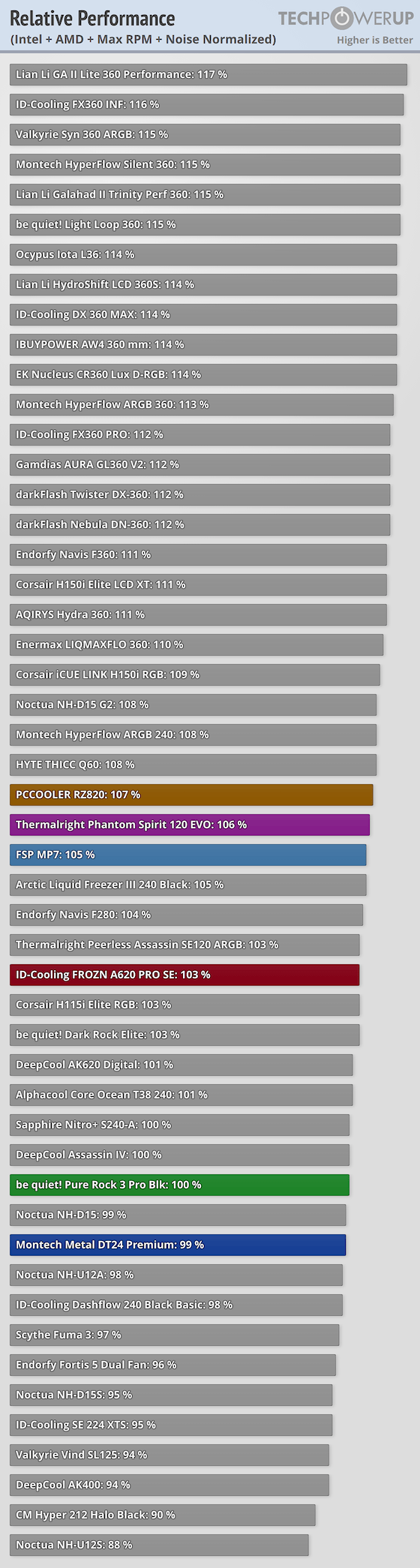
 wise elbow
god that case is so cursed
short bramble
You see, the only air that comes into the case is from the side/front and are very very small x)
wise elbow
does it not have fans in the front?
short bramble
No hahaha 🥲
wise elbow
it would be completely functional if it did
orchid iron
mighty patrol
Why is it a flat front
To look edgy gamer vibe
short bramble
I don't know who made this case but he really do not like PCs
mighty patrol
MSI