#packaging
1 messages · Page 55 of 1
 worn kindle
Thanks 
getting rid of plugins reduced it to 270mb
which gets to 190mb zipped
a step up from 340mb (250 zipped)
thanks for the tips!
 winged moss
I can't believe that gplay still has ridiculous file size limits and expects you to foot the bill for content delivery when they take 30% of every transaction
the plugins part was already mentioned, but there is a docs page on it: https://docs.unrealengine.com/4.27/en-US/TestingAndOptimization/PerformanceAndProfiling/ReducingPackageSize/
 ember widget
Hi, Devs. I am trying to package the UE5 City Sample on Win10 in Shippining config. I started packaging right away in the "Startup" Level (where you are shown the recommended specs).
It fails with "LogAssetRegistry: Error: Failed to open file for write H:/Epic/UE_projects/CitySample/Intermediate/CachedAssetRegistry.bin.tmp", is it simply a disk error from my drive? Should I try package again without any changes?
Has anyone succeeded in packaging the City Sample for Windows platform?
 pearl robin
for ue5, it's not normal to have 0 debug strings being printed or any debug log on a packaged debug game build right
 twilit flame
ERROR: Platform android is not a valid platform to build. Check that the SDK is installed properly
help
 mellow bane
Don't multi post your questions to multiple channels, please
 mellow bane
 rustic cave
This is normal - lots of shader to build. Just wait.
rustic cave
its not, last time we let it go for 10h at nothing happened
when we remove intermediate and binaries its goes fast
but if we do that every time we rebuild game it will take 1 additional hour every time
its a lot
mellow bane
rustic cave
but if we do that every time we rebuild game it will take 1 additional hour ever...
Yeah removing intermediate will literally reset the cooking
You have to let it complete once and it'll be way faster
Though arguably it looks stuck here
IIRC there's a log in this case that tells you which asset is stuck
rustic cave
mellow bane
IIRC there's a log in this case that tells you which asset is stuck
where cna i find this log? i couldnt find it
i was looking for it previously
mellow bane
rustic cave
where cna i find this log? i couldnt find it
Scroll up in the log - in my experience when the cooking time is long you have periodic "here's what taking so long" logs with the 10 slowest packages
I've been on UE5 for a year so maybe that's new though
rustic cave
i cant find anything like that, so maybe thats new
mellow bane
Welp, no idea then - you can try disabling RHIs from the packaging options to see if e.g. Vulkan support is the one that breaks it, etc
rustic cave
thanks, will try that
rustic cave
mellow bane
Scroll up in the log - in my experience when the cooking time is long you have p...
do you have a exact log that is printed there? i could then find a code in ue5 source for that and try to add it to ue4
mellow bane
Nah sorry I don't remember the exact text
 mild shell
is there a way for me to know/set the action/axis mappings of a shipping packaged build? it seems they are not the same as they are in project settings for users who download my project.
mellow bane
mild shell
is there a way for me to know/set the action/axis mappings of a shipping package...
Yeah sure, input bindings should always have a settings menu to customize them and the engine has full support for that
Use UInputSettings
AddActionMapping, etc
mild shell
yeah I use those
it's just that there seems to be some issues regarding some players not being able to use some, it's probably just my crappy programming lol
 simple sparrow
I keep trying to package my game but I am having this issue. I dont understand what this means so any help on what to do would be nice. Thank You in advance.
mild shell
there's been some confusion with it because I was doing experimental tests, it broke some peoples keybinds
 eternal flare
how can I convince UE5 that Visual Studio is already installed when packaging a release build? UE4 has no issues with the same project...
eternal flare
huh... perhaps vs 2017 isn't supported... uninstalling it and installing 2019 seems to have made it work
eternal flare
hmm... it's been 20 minutes now for something that takes UE4 about 3 minutes...
 eternal flare
😭

 devout tangle
ERROR: Non-editor build cannot depend on non-redistributable modules.
getting this error with plugin
 mystic atlas
You have linked to editor-only stuff in a runtime module.
You aren't allowed to do that.
If you link to anything with Editor in it, you need to specifically specify something as editor only in uproject/uplugin file or only use editor modules / includes based on build target
 summer tartan
Is it possible for someone to hide malware in a packaged ue4/ue5 game with a digital signature from Epic Games? In other words, should I trust small developers' games that are shared with me?
winged moss
If it’s signed by Epic then it’s probably a BP only game
 lucid laurel
Hi, I am trying to quick launch my game but its showing me this error: LogPlayLevel: Error: ERROR: Targets cannot be built in the Debug configuration with this engine distribution.
I added the editor symbols for debugging but it's still not working
mellow bane
lucid laurel
Hi, I am trying to quick launch my game but its showing me this error: LogPlayLe...
Quick launch from where? Debug symbols are for debugging, not for using Debug
lucid laurel
quick launch from the engine
 mellow bane
If you're not specifically trying to debug a packaged game from VS you probably want Development
lucid laurel
mellow bane
If you're not specifically trying to debug a packaged game from VS you probably ...
Yes but when I am trying to launch in any configuration it's not letting me
mellow bane
What are the options?
lucid laurel
Debug/Development/Shipping
mellow bane
Probably want it to be Development
No idea what quick launch does anyway, that's a new one
If you're trying to play the game outside editor righrt-click the .uproject file and hit launch
 open rapids
Hi, i have a strange issue, my package game crashes 3-4 times and when launching it the 5th time it starts normally but only for some players, the logs seems strange, there is normal load (like usually) but it stops without any error or warning in the logs, just the window is closed, the logs does not show any close request from game or windows :/ Any tips how can i debug it more or did someone had the same issue ?
As you can see there is nothing about closing the window 😦
 mystic atlas
Is that the last line of the log?
 shut cypress
Hi
I'm using UE5 and I'm unable to package the project for the moment it keeps telling me this : (see screenshots)
After looking on internet, most of answers I've got comes from Visual Studio, but I've downloaded the latest windows SDK and still unable to package the projet
If I clicked on continue it opens Epic games launcher but it does nothing
If you have any ideas I'm lost 😦


 lunar heron
Someone got this error when packaging with UE5 ? (Shipping)
 mystic atlas
I keep seeing it posted around.
Haven't the faintest idea how people fix it, though.
eternal flare
UE5 really doesn't like me, and I reinstalled VS for it and everything 😦

at least it now only takes a few seconds to reach this, instead of an hour like it took yesterday
devout tangle
mystic atlas
If you link to anything with Editor in it, you need to specifically specify some...
thanks man, appreciate it
 eternal flare
 winged dagger
At least your error message gives you a hint (try adding packages in the VS installer)
shut cypress
shut cypress
Hi
I'm using UE5 and I'm unable to package the project for the moment it keeps ...
Already tried to add packages on VS nothing changes
 severe basalt
AWS Gamekit Plug-in package error, also plugin stucks engine for few minutes

Anyone has experience with this plugin?
 glossy mica
Why is so difficult to package stuff..? I thought you just needed to set it to shipping and that's it. No you need need install WindowsDesktop runtime 3.1.15.. Do you need visualstudio too? I also have MS .NET SDK 6.0.201 and still getting errors such as...
LogLinker: Warning: Failed to load '/Game/ThirdPersonBP/ThirdPersonOverview': Can't find file.
LogLinker: Warning: Failed to load '/Game/ThirdPersonBP/ThirdPersonOverview': Can't find file.
LogUObjectGlobals: Warning: Failed to find object 'Class /Game/ThirdPersonBP/ThirdPersonOverview.ThirdPersonOverview_C'
mellow bane
Those are just warnings you can ignore
(that come from content you removed without resaving affected assets)
glossy mica
mellow bane
Those are just warnings you can ignore
Thanks for your help. What does this error mean..?
PackagingResults: Error: Multiple game targets found for project. Specify the desired target using the -Target=... argument.
mellow bane
That you have multiple game modules, apparently, instead of just one
glossy mica
and how would you fix this ? what does multiple game modules mean? what should be looking for can you perhaps give me a example?
mellow bane
No idea what your project looks like, and I've never seen that error, so some context would be helpful
Game codes goes into modules
Normally you have a single game target and as many plugin modules as you want
Sounds like your project has multiple modules marked as game
glossy mica
Thanks for the extra info. I did migrate some stuff from different free packages. Does this help? How could I find those multiple modules?
 mellow bane
Try removing your Intermediate folder - looks like your project was renamed
glossy mica
mellow bane
Try removing your Intermediate folder - looks like your project was renamed
Thanks that could be possible. Do you mean this folder?
 mellow bane
Yeah
lunar heron
lunar heron
Someone got this error when packaging with UE5 ? (Shipping)
I Achieve to fix it, if someone meet this error again : https://forums.unrealengine.com/t/error-games-files-required-to-initialize-the-global-shader-library-are-missing-from/526332/2

Unreal Engine Forums
I achieve to fix it : this is the Shader Modele SM6 (experimental) un project setting. Un check it, and it build.
eternal flare
"unable to start communication" Google hits: 0... great 😵
 round kraken
hey i think it is imposible but just in case i wanna ask so lets say you built an android apk file from unreal project file.
Is there any way to do the reverse and unpackage it? 😄
round kraken
basically create unreal project out of apk
winged moss
not really and the unreal editor has very limited support for opening cooked assets
which was actually for mod support more than any practical development use
round kraken
I see. that helps me sleep at night.
My friend who i was doing the project with decided to dip on me.
I was doing all the project work so all he has is an apk file, was wondering if there's any way he might steal my work.
winged moss
i'm not sure why people get paranoid about that
round kraken
winged moss
i'm not sure why people get paranoid about that
what do you mean?
winged moss
about someone you were working with stealing your work
though I suppose if you were doing this properly you would've had a contract with the person anyway
round kraken
Yeah we didn't sign anything. I though since only I had the project files, he couldn't steal anything even if he wanted to.
 trail hound
hey everyone, not sure if this is the right channel for it but i've seen the same message pop up for people during packaging. i'm getting the following when i try to open a specific level:
Assertion failed: ReaderPos + Num <= ReaderSize [File:D:\build\++UE5\Sync\Engine\Source\Runtime\Core\Public\Serialization\BufferReader.h] [Line: 52]
has anyone had the same issue or can recommend a place to start looking for a fix?
 vernal elm
Anyone know what would be causing this
PhysicsCore: Error: PHYSX: (D:\Build\++Fortnite\Sync\Engine\Source\ThirdParty\PhysX3\PxShared\src\foundation\src\PsFoundation.cpp 180) eINVALID_OPERATION : Foundation destruction failed due to pending module references. Close/release all depending modules first. UATHelper: Packaging (Windows (64-bit)): LogGameAnalyticsAnalytics: Display: FAnalyticsGameAnalytics Destructor
mild shell
is there a way that a user of my packaged, shipping game can delete their input keymappings manually so they reset? Is there a file saved somewhere? maybe in appdata?
 viral mulch
is there a fix to this?
 winged moss
why is BuildCookRun trying to sign the game exe when I've specified -nosign
ah because of -buildmachine but there's -nosign AND -nocodesign
 light urchin
 light urchin
light urchin
light urchin
Can anyone help me with this error pls?
 flint ridge
Does anyone know how to download an unreal file unto the oculus?
winged moss
light urchin
This isn’t an error to do with packaging
 undone ravine
UATHelper: Packaging (Windows): ERROR: Download support for building Win64 Game targets from the launcher.
PackagingResults: Error: Download support for building Win64 Game targets from the launcher.
What the hell is this?
Using UE5.0
undone ravine
The Binaries for this Target Platform are not currently installed, would you like to use the Launcher to download them?
Clicking yes does nothing
Opens the launcher, but doesn't do anything
undone ravine
Verifying the engine doesn't fix this
open rapids
ya im having the same issue rn
i reinstalled the engine to make sure and its still giving me the same error
 maiden cedar
Hey guys I am trying to package my project for android but I am getting this error. I searched on some forums with people that has the same problem as me but it didn't work for me.

PackagingResults: Error: failed writing to 'Z:\app\build\intermediates\runtime_symbol_list\debug\R.txt': The data is invalid. (13).
UATHelper: Packaging (Android (Multi:ASTC,DXT,ETC2)): ERROR: cmd.exe failed with args /c "C:\Users\thijs\Documents\Unreal Projects\EndlessRunner\Intermediate\Android\armv7\gradle\rungradle.bat" :app:assembleDebug
PackagingResults: Error: cmd.exe failed with args /c "C:\Users\thijs\Documents\Unreal Projects\EndlessRunner\Intermediate\Android\armv7\gradle\rungradle.bat" :app:assembleDebug
 eager yoke
Cant package projects in UE5 (full release)
Only after installing it fresh i can package a new project.
Then once i open a different project i cant package anymore.
UE says than its missing SDK and tells me if i want to open the launcher to download them. (Does nothing but open epic launcher)
Going back than to the newly made project the problem persists.
I have googled for 2 days and tried.
A: reinstalling Visual studio 2019 (as said in tutorials)
B: visual studio 2022 instead
C: .Net 3.1 + copying a file from specific folder into automation tool folder (tutorial)
D: verifiy UE5 multiple times
C: remove all plugins (unistall)
E: multiple windows 10 sdk's
F: windows 11 sdk
I have depleated google searches so can anyone help here maybe?
eager yoke
I also read through this section and it seems im not the only one having this issue.
Wonder if you guys found a solution.
 north depot
eager yoke
I also read through this section and it seems im not the only one having this is...
north depot
eager yoke
I also read through this section and it seems im not the only one having this is...
I feel your pain here, trying to accomplish the same.
eager yoke
north depot
I feel your pain here, trying to accomplish the same.
Oh man! Well i hope one of us gets it fixed 👍🏻
undone ravine
Thank god. I thought I was the only one
Still no progress here. Trying to get a test build out to the team and literally can't build lmao
north depot
eager yoke
Oh man! Well i hope one of us gets it fixed 👍🏻
Let's hope so =]
undone ravine
Unreal Engine Forums
So when I first installed UE5 and tried to package a Windows project I was greeted with this message. If I disregarded it and clicked continue, my project would “package” instantly. Except… it didn’t. It just left me with an empty packaged game folder. Luckily I have found a solution! So, if you’ve experienced the same or a similar issue, here’...
I tried this and it didn't work for me
But maybe you'll have better luck
eager yoke
No same, already tried that
north depot
Same here
What have you guys got for your, DOTNET_ROOT, environment variable, set as?
eager yoke
north depot
What have you guys got for your, DOTNET_ROOT, environment variable, set as?
I dont know how or where to set that?
north depot
eager yoke
I dont know how or where to set that?
Type environmental variables in Windows search
eager yoke
north depot
Type environmental variables in Windows search

It seems it does not have anything dotnet related
north depot
eager yoke
I read a post somewhere in relation to the 3.1 dotnet stuff and it stated to ensure this is set. Will hunt for the info again...
Incidently, have you read this post: https://www.reddit.com/r/unrealengine/comments/nm6nuz/are_you_unable_to_package_windows_projects_in_ue5/
Within, Lightshades, states:
This didn't fix it for me, tried most stuff I found out and didn't change anything.
Then I found this tip:
If you're using a x64 system, change the environment variable DOTNET_ROOT to the x64 version one.
So for some reason the targeted folder (by default?) is the x84 version, so I changed that, and now it let's me generate project files

reddit
46 votes and 39 comments so far on Reddit
eager yoke
north depot
I read a post somewhere in relation to the 3.1 dotnet stuff and it stated to ens...
I read that post as well, no luck for me there.
north depot
eager yoke
I read that post as well, no luck for me there.
Really sucks doesn't it!!!
eager yoke
Oh yes! Litterally cant move forward without this fixed
north depot
eager yoke
Oh yes! Litterally cant move forward without this fixed
Same. Did you upgrade your project from UE4?
north depot
eager yoke
From ue4 to UE5 EA, than preview 2 then UE5
Many jumps then.
I held off until 5.0 came out, so only the one jump.
The project packaged fine on 4.27.2
eager yoke
Unreal Engine Forums
You shouldn’t need to reinstall any dotnet core because the 5.0EA already ships with the correct dotnet core. The automation scripts just don’t seem to use it. You can work around this by setting the environment variable DOTNET_ROOT to %ENGINE_DIR%\Engine\Binaries\ThirdParty\DotNet\Windows (replace %ENGINE_DIR% with your 5.0EA install directory)...
This is the post about the DOTNET_ROOT (no succes on my end)
eager yoke
Going to test again from a clean UE5 install, see if the buildconfiguration.xml is different
Interesting find https://www.reddit.com/r/unrealengine/comments/ty5ci0/does_anyone_know_a_workaround_for_ue5_turnkey/
reddit
1 vote and 2 comments so far on Reddit
eager yoke
First thing i get now is this. (lets continue and see)
I removed all visual studio installs and sdk's installed over the past days.
Removed UE5 rrestarted and Installed a fresh UE5.
So if currently there is any sdk installed its done by UE5.

New error log
eager yoke
So after trying this it would try to package ater pressing continue, But i got the known dotnet missing in the log.
So i installed this version.

Found in this video https://www.youtube.com/watch?v=bYukaDZE2qA&ab_channel=Yepkoo

Link: https://dotnet.microsoft.com/en-us/download/dotnet
Unreal Engine 5 - SDK and Packaging bug fix
"The SDK for Windows is not installed properly, which is needed to generate data. Check the SDK section of the Launch On menu in the main toolbar to update SDK"
UE5 'dotnet' is not recognized as an internal or external command
UE5 hostfxr.dll er...
Than i relaunched unreal and it packaged the test project.
It did this twice.
Then i went and tried to package my own project, and got a log output saying: .uproject does not look like uproject file but no targets have been found!
This led me to https://forums.unrealengine.com/t/uproject-does-not-look-like-uproject-file-but-no-targets-have-been-found/500274
So now reinstalling visual studio 2022 again to see the result.
Unreal Engine Forums
I am first time trying to package project. I get this error message and packaging fails: UATHelper: Packaging (Windows (64-bit)): ERROR: C:\Users\janih\Documents\Unreal Projects\SuunnistusTest\SuunnistusTest.uproject does not look like uproject file but no targets have been found! PackagingResults: Error: Unknown Error What can cause this and...
eager yoke
@willow burrow @undone ravine Its working now!
I have managed to package a test and a old project.
1 thing i did not do during this process is click (update project) when asked in UE5.
Dont know if that makes any difference.
So above are the steps i took.
Starting with first getting rid of all previous visual studio installs, and packages i could find in windows remove programs and features. (only removed stuff added last couple of days and ofcourse all visual studio stuff.
The rest of the steps and the links i followed are above starting here: #packaging message
Good luck! And i hope you guys can fix it as well.
eager yoke
Well.. i installed 2 plugins from the marketplace, reopened my project and back to square 1.

Uninstalling those plugins does not help.
north depot
Man, respect your dedication here. Sorry it ended as it started, most frustrating.
eager yoke
north depot
Man, respect your dedication here. Sorry it ended as it started, most frustratin...
Yeah real bummer.
eager yoke
Made a forum post.. lets hope
https://forums.unrealengine.com/t/cant-package-ue5-error-download-support-for-building-win64-game-targets-from-the-launcher/530852
Unreal Engine Forums
What i have already done multiple times: Uninstall all UE versions. Uninstall all visual studio versions. Installed clean UE5 version. Installed visual studio 2022 + recomended sdk’s and dotnet 3.1 (Also tested visual studio 2019) Copied hostfxr.dll and put in automationtool and unrealbuildtool folders Searched google (2days and counting)...
 gentle dome
Any ideas on what action I should take WRT this warning from Rider?
Modules and plugins "cannot be found" when launching packaged builds (even WindowsEditor builds), though the project runs fine in PIE.
I believe this started after upgrading to 5.0 from early access, though I'm not 100% sure about that. Didn't see anything about this in the migration guide.

EDIT: I've repro'd in a tiny repo here https://github.com/Manningham/ReproUE5ModulePackagingIssue
 north depot
@eager yokeIn UE4, when you upgraded to another engine version, it used to flag up the plugin that needed to be recompiled with the new engine version.
What's strange, is that you finally managed to package 2 projects, then added 2 plugins (unsure to which of your 2 projects) thereafter and the package operation failed again.
Most frustrating.
On my PC, I have VS2019 and now VS2022.
VS2019 works fine for UE4.27.2, so I'm reluctant to remove it as yet.
The project, I upgraded from UE4.27.2 to UE5.0, I will remove all the pkugins and try again and let you know.
Best of luck getting your projects packaged.
glossy mica
mellow bane
Try removing your Intermediate folder - looks like your project was renamed
Hi, I removed the intermediate folder and I also fix some renaming default gameengine.ini so it has the right name. But I'm getting this error.
 mellow bane
Warning, not error
 inner solar
People, help me please. (UE4) I got an error that didn't exist before. I did not change the project, everything worked perfectly. Tell me what to do?
UATHelper: Packaging (Android (ETC2)): ERROR: Unable to instantiate module 'UnrealEd': Unable to instantiate UnrealEd module for non-editorn targets.
PackagingResults: Error: Unable to instantiate module 'UnrealEd': Unable to instantiate UnrealEd module for non-editor targets.
PackagingResults: Error: Unknown Error
 exotic canyon
Hey, anyone managed to include Crash Report in UE5? It worked before normally on UE4 but on 5 it doesn't hook anymore on my packaged game
eternal flare
Why do shipping builds in UE5 include on-screen debug messages and the console?
mystic atlas
inner solar
People, help me please. (UE4) I got an error that didn't exist before. I did not...
You're linking to the unreal editor module from a non-editor build. I mean, it's right there.
 vestal wolf
Hi. Can somebody help me to connect device (Android) to pc? I have connection done, but when i try to run game on phone i have error, because it can't install package. The same is when i copy packed file and try to install directly on device.
I don't know what i did wrong with configuration
I used that tutorial: https://www.youtube.com/watch?v=mvnQokX1x2g
And: https://docs.unrealengine.com/4.27/en-US/SharingAndReleasing/Mobile/Android/GettingStarted/
https://docs.unrealengine.com/4.27/en-US/SharingAndReleasing/Mobile/Android/Setup/AndroidStudio/

@codingbanglayt @unrealengine
Power By : Coding Bangla YT
×××××××××××××××××××××××××
SDK + NDK + JDK + Android Studio 3.5.3
Download link
: https://codingbanglaytctgamedevprogramming.blogspot.com/2021/05/ue5-android-export-guide-unreal-engine.html
Lastest Update Android Export Guide
: https://codingbanglaytctgamedevprogramming.blogspot.com...

Setting up for development for the Android platform.
How to set up your Android development environment for Unreal 4.25 and later
 sweet turtle
eternal flare
Why do shipping builds in UE5 include on-screen debug messages and the console?
sweet turtle
eternal flare
Why do shipping builds in UE5 include on-screen debug messages and the console?
I don't think its actually doing a shipping build, I have the same issue of debug messages & console availability.
My Relevant Packaging Settings are:
Build Config: Shipping
For Distribution: True
Set to "Shipping" on "Platforms->Windows->Binary Configuration"
I have a branch checking "IsPackagedForDistribution" with prints on begin play @ controller,
The branch from it is coming out false with the above mentioned settings.
I have tried a full rebuild with no improvement.
eternal flare
sweet turtle
I don't think its actually doing a shipping build, I have the same issue of debu...
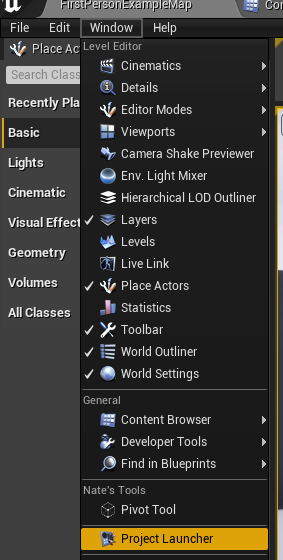
There's a workaround here but no idea where the "project launcher" is in UE5... https://forums.unrealengine.com/t/ue5-shipping-build-still-has-debug-features-and-console/507196/11?u=eobet
Unreal Engine Forums
sweet turtle
eternal flare
There's a workaround here but no idea where the "project launcher" is in UE5... ...
Top menu bars in editor,
Tools->Tools->Project Launcher, is 8 down from the top of that section for me!
Thanks for the workaround!
eternal flare
Right, found it now as well. But no idea how to build anything from that menu...
sweet turtle
eternal flare
Right, found it now as well. But no idea how to build anything from that menu...

Creating a release versioned project with cooked content for distribution.
eternal flare
sweet turtle
https://docs.unrealengine.com/4.26/en-US/SharingAndReleasing/Deployment/Releasin...
Thanks... that's... too weird for me. I'll just wait until they fix the bug. 😅
 small bolt
gentle dome
EDIT: I've repro'd in a tiny repo here https://github.com/Manningham/ReproUE5Mod...
small bolt
gentle dome
EDIT: I've repro'd in a tiny repo here https://github.com/Manningham/ReproUE5Mod...
thx for sharing the project, I'll check it on Monday
sweet turtle
eternal flare
Thanks... that's... too weird for me. I'll just wait until they fix the bug. 😅
Just to confirm the project launcher worked for me, thanks again for sharing the workaround!
eager yoke
north depot
<@450759303817592832>In UE4, when you upgraded to another engine version, it use...
So i currently found that the runtimes in the Engine\Binaries\DotNET\UnrealBuildTool\runtimes\win\lib folder have to do with the issue.
I basically copied runtimes from C:\Program Files\dotnet\ and replaced the ones in the unreal folder.
And it changed the error in unreal engine. So at the very least, its the runtimes in the unrealbuildtool folder that are being used.
Further investigation is needed.
And for enyone wanting to help!
Multiple of us cant package anything in UE5 saying it missed sdk's even when we have it all installed.
undone ravine
eager yoke
And for enyone wanting to help!
Multiple of us cant package anything in UE5 sayi...
Okay. I think I resolved the issue. My project is actually building. It's been going for 10 minutes, and stuff is happening in the log.
Start with installing both the x86 and x64 installers and binaries from:
https://dotnet.microsoft.com/en-us/download/dotnet/3.1
I also fully uninstalled visual studio and reinstalled it, but not sure if it's required

Microsoft
.NET Core 3.1 downloads for Linux, macOS, and Windows. .NET is a free, cross-platform, open-source developer platform for building many different types of applications.
In my case I also found the UE-prerequisites installer in the engine folder, ran that, uninstalled it, and reinstalled.
You HAVE to reboot after doing this
I installed those .net files and didn't reboot, and things didn't work. But once I rebooted everything worked
You may want to verify your editor files, especially if you made changes.
winged moss
why would you install anything but the x64 installer?
it should be enough as long as dotnet --list-sdks lists 3.1
eager yoke
C:\Users\Savvy>dotnet --list-sdks
3.1.409 [C:\Program Files\dotnet\sdk]
C:\Users\Savvy>
eager yoke
winged moss
it should be enough as long as `dotnet --list-sdks` lists 3.1
But i still cant package
winged moss
well you shouldn't be replacing engine files
for a start
at least now you should be verifying your engine installation
eager yoke
winged moss
well you shouldn't be replacing engine files
Its not that i dont know that, but this is day 3 of trying to solve this. So at that point anything goes.
winged moss
so verify your engine installation and share the log
eager yoke
winged moss
so verify your engine installation and share the log
Without copying the hostfxr.dll into the automation and unrealbuild tool folders after that right?
winged moss
how is that anything to do the error in the original link
with the binary engine, it'll look for a .target file for the type of build you're trying to make and if it doesn't exist then it emits that error
eager yoke
winged moss
how is that anything to do the error in the original link
I dont have a answer to that. Ive been following google and forum posts trying o get this to work.
Im happy you are trying to halp as it seems you understand it way better.
eager yoke
Only development and shipping.
Going to try shipping now and share the log
winged moss
does UE_5.0\Engine\Binaries\Win64\UnrealGame.target exist for you?
I'm glad I don't have to deal with this precompiled stuff on a source build
eager yoke
It only shows these
 winged moss
that might be why if shipping or debuggame works
though you shouldn't use the windows search because it sucks
eager yoke
It specifically says the same each time UATHelper: Packaging (Windows): ERROR: Download support for building Win64 Game targets from the launcher.
PackagingResults: Error: Download support for building Win64 Game targets from the launcher.
 winged moss
the log clearly shows development
eager yoke
winged moss
the log clearly shows development
Sorry misread what you meant
I simply set it to shipping like this and hit the package project button
So now im back at the start of the whole bug cycle again.
No matter what i choose it will always show this.

It might be following the launcher settings instead of that menu
As this is still set to development

Ok so using the Project Launcher with a custom profile i can actually Package in shipping mode.
eager yoke
winged moss
the log clearly shows development
Well i think that overal its a UE5 bug.
Because i can Package using the project launcher.
But as soon as i use the little "Platforms" menu and try to package from there its not working.
However for now im helped and i want to thank you for pointing direction.
Your find of it being stuck in development led me to this. 👍🏻
winged moss
I find packaging from UFE or command line is usually a bit easier in the long run anyway
eager yoke
Today i learned
winged moss
Especially when using a source build
Since Test builds can be used quite a lot, which still has some debugging tools available but most of them are stripped out
Then you can get into all kinds of advanced use cases… like buildgraph
eager yoke
@north depot @undone ravine From here you can package your game as well, this worked for me with a fresh install of visual studio 2022 and UE5.
I made a custom profile using the + button in the project launcher and set all the cook and package details there.

Ok im going to leave it at this, and update my post on the unreal forum.
Lets get back to building stuff.
Thanks for all the help!
undone ravine
Sweet. Well, as long as it works.
Glad you figured it out
I'll write up my solution in your forum post too, incase it helps someone
winged moss
Though what you put is probably way too convoluted and it’s probably just one of the things
Like just the .NET Core SDK on its own is likely enough for that step
eager yoke
winged moss
Like just the .NET Core SDK on its own is likely enough for that step
You know this way better than me 👍🏻
Thank you for adding your help to the post. @undone ravine
 violet isle
Hey not sure if anyone can help me here, I've got a fairly specific issue.
I have a hat system in my game, based off of this one here. (https://www.youtube.com/watch?v=hJVeuAZyP3c&list=PL9z3tc0RL6Z5qzQr3AWiMjIuBLAUhfZsI&index=1)
Now, in the editor, everything works fine. I purchase a hat from my store, go into a new level, and my purchased hat is on my character.
but after packaging, I no longer have my hat on the character after purchase.
My funds, and owned hats array saves out, and gets its save information without issue in between levels and play sessions, however with the hat itself, it doesn't appear. This system works 100% flawlessly in editor, but only after packing do I encounter this.
Any thoughts or insight?
winged moss
So did the assets for the hat (BP and/or data asset in addition to the art) package?
How are the references to cosmetics even managed?
violet isle
winged moss
So did the assets for the hat (BP and/or data asset in addition to the art) pack...
Great question. I would assume so, but its possible it didn't. Do you know where I could check that?
violet isle
winged moss
How are the references to cosmetics even managed?
Basically it uses an integer system. Each integer corresponds with a static mesh cosmetic.
winged moss
If you’re using paks you can use UnrealPak.exe to list the files in them
Yeah that sounds like something that wouldn’t have any kind of hard or soft reference to manage it
You can specify directories to always cook from project settings
violet isle
winged moss
If you’re using paks you can use UnrealPak.exe to list the files in them
I will check it out :) Thanks for the pointer. Let me know if you think of anything else too
violet isle
winged moss
So did the assets for the hat (BP and/or data asset in addition to the art) pack...
So, I am little stupid sometimes.
Anyway, the static meshes definitely do package because they are visible in the store. You can select them and buy them like normal. Just not appearing in other levels. Very odd
 worldly sable
what do these warnings mean ?
 gentle dome
small bolt
thx for sharing the project, I'll check it on Monday
gentle dome
small bolt
thx for sharing the project, I'll check it on Monday
Never considered a typo there... just assumed there would have been a compiler error had I gotten that wrong. Lesson learned!
open rapids
anything reguarding the missing Win64 binaries error?
 stray harness
Hey guys, my engine is crashing when trying to build lighting on a large world composition level. Says out of memory. My 32GB of RAM is getting maxxed out. Any tips to prevent this from happening?
mystic atlas
Buy more ram.
 strange ledge
stray harness
Hey guys, my engine is crashing when trying to build lighting on a large world c...
strange ledge
stray harness
Hey guys, my engine is crashing when trying to build lighting on a large world c...
make sure your system drive has enough memory to produce large pagefile
also check windows setting to be sure pagefile is not capped by some value
strange ledge
open rapids
anything reguarding the missing Win64 binaries error?
where? )
stray harness
strange ledge
make sure your system drive has enough memory to produce large pagefile
also che...
Thanks for the reply. Yeah, I've got 32GB of RAM and 65GB of pagefile size set. That to me should be more than enough? I do have a large map though and was planning on mainly using dynamic lighting, so I just set that and now avoid building the lighting for the map. It would be good to know though how to stop large maps crashing.
strange ledge
stray harness
Thanks for the reply. Yeah, I've got 32GB of RAM and 65GB of pagefile size set. ...
this crash is only about memory size. Make sure your total RAM + free system disk space enough for building the light. In my cases sometimes it consumes 300Gigs.
stray harness
strange ledge
this crash is only about memory size. Make sure your total RAM + free system dis...
WTF
What are you building, elden ring?
winged moss
static lighting and a large open world is going to use up your RAM real quick
and then you'll end up with a huge BuiltData file too
 versed patio
hello, Why do i keep having this message "PackagingResults: Error: SDK Not Found" when i try to pack my project?
 soft wing
I got a weird issue, can't find solution on google about it... someone know it all about ???? here the message when I packaging it.... LogSubsurfaceProfile: Warning: Dipole model has already been upgraded to Burley
repetitive message in log, only warning be it flood it.. I use UE5
 round sorrel
Hi Guys!
Can anyone tell me what these are for?

Ive been Multi option for a long time now (some youtube tutorial asked me to).. Want to know if I can safely select anything else?
I see these are texture formats. So if I select multi, are my textures going to be packaged 3 times and then appropriate one is used based on the device?
strange ledge
round sorrel
I see these are texture formats. So if I select multi, are my textures going to ...
https://docs.unrealengine.com/4.26/en-US/SharingAndReleasing/Mobile/Android/PackagingAndroidProject/
https://docs.unrealengine.com/4.26/en-US/SharingAndReleasing/Mobile/Android/Reference/
Taking a look at packaging your final Android project.
How to install different Android SDKs, set environment variables, and work with texture formats.
strange ledge
versed patio
hello, Why do i keep having this message "PackagingResults: Error: SDK Not Found...
log?
undone ravine
strange ledge
this crash is only about memory size. Make sure your total RAM + free system dis...
Not necessarily. I'm having light build crashes on large levels too, and I've got 128GB of RAM, and could build the lightning in UE4 no issue, however not in UE5. They might be having the same issue as me
strange ledge
undone ravine
Not necessarily. I'm having light build crashes on large levels too, and I've go...
log? ))
strange ledge
versed patio
what does that mean?
out of RAM. check the system drive have enough free memory. check the win sys settings -> pagefile should be setup as dynamic ( not capped by curtain value )
versed patio
strange ledge
out of RAM. check the system drive have enough free memory. check the win sys se...
no way 16GBs are not enough...
ok
thx!
mellow bane
16GB is a bit on the low side for gamedev, yeah
versed patio
my problem is that on task manager it seems that i use only the 12 of them
and i have 4 more
strange ledge
versed patio
my problem is that on task manager it seems that i use only the 12 of them
u did't. dont trust it)
versed patio
oooh i see...
well
found the issue
my pagefile couldn't increase itself as i had little disk space
versed patio
Missing UnrealGame binary.
You may have to build the UE project with your IDE. Alternatively, build using UnrealBuildTool with the commandline:
UnrealGame <Platform> <Configuration>
What is Dizz??
i've been waiting 2 hours for the game to be built and then i got this....
mellow bane
versed patio
Missing UnrealGame binary.
You may have to build the UE project with your IDE. A...
Is this a C++ project, or a project using C++ plugins?
mellow bane
Neither do I
versed patio
how can i check that @mellow bane ?
mellow bane
versed patio
how can i check that <@223305281700888576> ?
Start with the full package log here
And I guess check for a Source folder in the project
And in every plugin under Plugins
versed patio
mellow bane
No error in there.
 foggy blade
Digital Foundry discussed on how UE games have shader compiling issues in runtime because of the amount of shader used in the final game. Is there a way of precompiling these shaders on PC when you open the game?
https://youtu.be/9SZLIGTFqiQ?t=2099

With the glut of triple-A releases over, the games industry continues to lull into a state of near-hibernation - not great when you're looking to produce a weekly chat show on the latest gaming and technology news. But we have a bunch of reports/rumours to respond to! The Witcher 3's next-gen upgrade has been delayed and news is starting to emer...
mellow bane
foggy blade
Digital Foundry discussed on how UE games have shader compiling issues in runtim...
Aren't all of Unreal shaders completely precompiled at cook time?
foggy blade
I think the stutter issues in UE games are from shader compiling in runtime
mellow bane
I don't think that's true
foggy blade
for PC, you can't compile them to machine code for the GPU because you don't know the end users GPU
at least that's what I know and it does make sense, because GPU architectures differ from generation to generation even from one vendor
Pascal, Vega, RDNA, RDNA 2 are all different
Polaris not Pascal
mellow bane
Every Unreal game still comes with a large global precompiled shader cache that's usually a significant fraction of the fresh packaging time
I don't know enough to confirm whether additional cooking is done at runtime, but I'm skeptical that it's the case
Obviously you'd need to profile it, but in my experience stuttering in Unreal is more linked to asset loading
 runic stump
foggy blade
I think the stutter issues in UE games are from shader compiling in runtime
runic stump
foggy blade
I think the stutter issues in UE games are from shader compiling in runtime
There are some weird hacks (https://docs.unrealengine.com/4.26/en-US/SharingAndReleasing/PSOCaching/) to rectify that.
The Pipeline State Object (PSO) caching tools help reduce the time it takes to reload an Unreal Engine 4 (UE4) level and it's content.
runic stump
mellow bane
Aren't all of Unreal shaders completely precompiled at cook time?
You're confusing material -> binary HLSL translation with binary HLSL -> native GPU binary translation.
runic stump
Interestingly, Steam has some Vulkan shader precompilation thing that is supposed to solve similar issue. Though it is extremely underdocumented.
 swift pulsar
So unreal 4 see's my quest 2 (vr headset) as a device but doest give me the option to package to it directly. Any help?
 modest quarry
Hey everyone, So I have been trying to package my game for quest 2, but I have been getting errors that I can't solve.
In the beginning I got an error saying "ProjectName" is trying to modify the value of bForceEnableRTTI which is not allowed: now my project.target.cs was not doing that but UE4Game.Target.cs was, so out of curiosity I removed that line from UE4Game.Target.cs and then I got the ol undefined symbol typeinfo errors(a lot of them). So I figured it's best to not touch UE4Game.Target.cs. But now I am stuck at a point where anything I do gives me either of these above mentioned errors.
I have tried removing the bForceEnableRTTI from ue4.target, project.target, I have tried adding bUseRTTI to plugins that are using typeid and dynamic_cast but nothing works.
Any suggestion will be much appreciated, since I am at a point where I have no clue what to do
 simple portal
Does anyone knows what should I do here, it says that one file is in diffrent file path than it should and I tred to search up for this path but as it turned out it doesn't even exist...

 fallow bison
Hey everyone, I'm having a bit of trouble with this 'Failed to open descriptor file' error when trying to do a shipped package of my game on Windows64 with UE4. I've searched around Google but most of the issues seem to be with Android which is not a problem in my case. If you'd like to help, you can download the build from over here and I would very much appreciate it! -> https://drive.google.com/drive/folders/1fq5RfdHa0yw2FsiDHBAAw1OGiHge6_E1?usp=sharing
Strangely the .exe runs fine on my computer but anyone I've sent it to gets this error. Super frustrating to not being able to share at the end of a project! Grrr!
 strange ledge
fallow bison
Hey everyone, I'm having a bit of trouble with this 'Failed to open descriptor f...
strange ledge
fallow bison
Hey everyone, I'm having a bit of trouble with this 'Failed to open descriptor f...
are u 100percent sure you get entire build? it looks like u have only half of it . check it first
strange ledge
simple portal
Does anyone knows what should I do here, it says that one file is in diffrent fi...
it seems look like you have some plugins enabled before and use some assets from . and now when you disable it - you cant find the path. check your source control last .uproject modifications
strange ledge
modest quarry
Hey everyone, So I have been trying to package my game for quest 2, but I have b...
to many words and .... no log (
simple portal
strange ledge
it seems look like you have some plugins enabled before and use some assets from...
where can I check it?
fallow bison
strange ledge
are u 100percent sure you get entire build? it looks like u have only half of it...
Well it runs fine on my own computer which is what is strange but anytime I have someone else open it they get this error
Thanks for the quick reply btw
 weak spoke
Hello, I ve a very strange issue, and it is quite hard to tell but i will try. At the start of the level there are 4 functions in order; 1- play a sequence 2- hide HUD 3- delay 4- Create a skip widget . typical skipable cinematic logic. In my editor mode / standalone mode, this logic is working perfect. but here is the wierd one, when i pack the project, i see Hud is not hidden. but 3 and 4 nd steps are fired. Have you ever have issues like this. Some functions dont work in package version?
 rare relic
While packaging for Linux Dedicated server I am noticing a lot of shaders being compiled. This would seem strange as I assumed the dedicated server would not include any shaders.
Have I messed something up?
LogMaterial: Display: Missing cached shadermap for MA_RainSplash in VULKAN_SM5, Low, SM5 (DDC key hash: 3E5A2D4C6F7B574808AD9B44570429087CC79165), compiling.
 wary sparrow
Any recommendations for a cloud hosted unreal server? I've made a procedural music generator with video, and just need it to stream. It's not interactive, just needs to output. I'm also not certain if this is the best place to ask this question, feel free to redirect me.
 pastel marlin
When packaging, should it only cook the assets required for included maps? (Our project seems to be cooking alot of stuff)
mellow bane
pastel marlin
When packaging, should it only cook the assets required for included maps? (Our...
Packaging yes, if you've set the list of maps; cooking is all assets IIRC
exotic canyon
hey, anyone managed to package your game with CrashReporter included in UE5? seems mine stopped being hooked after UE5
 static prawn
Anyone seen this error regarding world partition?
LogPackageName: Illegal call to DoesPackageExist: Input '/Memory/UEDPIE_1_WPRT_DesertMoon_Map_MainGrid_Cell_L0_X-28_Y-13_DL0' is not a child of an existing mount point.
strange ledge
simple portal
where can I check it?
YourGame.uproject file.
strange ledge
fallow bison
Well it runs fine on my own computer which is what is strange but anytime I have...
sure copy is done. try to download it to separate folder and run on your machine
strange ledge
pastel marlin
When packaging, should it only cook the assets required for included maps? (Our...
its up to you.
if you using editor -> setup https://i.imgur.com/pJv9ujE.png
if bat - > -map=Map01+Map02+ .... etc
 strange ledge
rare relic
While packaging for Linux Dedicated server I am noticing a lot of shaders being ...
strange ledge
rare relic
While packaging for Linux Dedicated server I am noticing a lot of shaders being ...
VULKAN on Linux DS ? interesting) please ubt build params
rare relic
strange ledge
VULKAN on Linux DS ? interesting) please ubt build params
Thanks for the reply.
This is the cmd: BuildCookRun -project=MyProject\MyProject.uproject -noP4 -platform=Win64 -allmaps -build -noclient -server -ServerConfig=Development -ServerPlatform=Linux -cook -pak -stage -CrashReporter
I noticed this for the first time today after switching from 4.27.0 to 5.0 but maybe it was happening previously but just not reported, or I didn't see it?
Zipped size of Linux server package has gone from 700mb (4.27.0) to 916mb (5.0.0) fwiw
 next dome
Is there any resources available on packaging using chunks for Quest? Oculus requires that any additional OBB's (other than the 'main' OBB) always be named the same when uploading new builds. I figured if I separate assets into chunks, I could get something that works with that system. Can't seem to get it to work though.
strange ledge
rare relic
Thanks for the reply.
This is the cmd: `BuildCookRun -project=MyProject\MyProjec...
try to remove -platform=Win64
strange ledge
rare relic
Zipped size of Linux server package has gone from 700mb (4.27.0) to 916mb (5.0.0...
also use -compressed
- anytime you can unpak it with Engine\Binaries\Win64\UnrealPak.exe
and see what is inside and make sure you need it on dedicated server
 tame oracle
I am getting these errors while packaging. Could anyone help?

 wary ridge
Unreal frontend 5.0 not creating WindowsClient, even though it is checked. Anyone else seeing this one? Or, know how to fix?

 stiff lance
tame oracle
I am getting these errors while packaging. Could anyone help?
stiff lance
tame oracle
I am getting these errors while packaging. Could anyone help?
Do you have a supported version of Visual Studio installed (2019?) and is it in the PATH environment variable?
lunar heron
Hello, trying to compile but stuck on a step, without any error, just never end.
Unreal 5.0.1 / i already try to turn off modules
Thu Apr 21 23:13:42 CEST 2022 Log UATHelper Packaging (Windows): [8/10] Compile Module.ETL.gen.4_of_5.cpp
Any clue how i can fix that ?
tame oracle
stiff lance
Do you have a supported version of Visual Studio installed (2019?) and is it in ...
sorry for the late reply i actually installed Visual Studio 2022 afterwards and it worked
I am not sure where to ask this question but I am trying to upload my game to steam and when I try to open the game I am getting two errors https://cdn.discordapp.com/attachments/942749220337774652/966816381947478056/unknown.png and https://cdn.discordapp.com/attachments/942749220337774652/966816979388358656/unknown.png and I am not sure what the problem is


I will also attach my launch settings
winged moss
what are you trying to run here
tame oracle

this is a game that I am trying to upload to steam
it's supposed to to be an executable
winged moss
why aren't you using the bootstrap exe in the root directory?
and where is it getting "NeededAssets" from?
tame oracle
I renamed the file from NeededAssets to CoreIris
I will show you the current build right now
 winged moss
I would recommend not renaming stuff manually
 winged moss
the bootstrap exe also reads info from a resource key
tame oracle
im sorry if im not getting it but there are two exes (which is confusing me also) so which would be the bootstrap exe
winged moss
the one in the root
and it reads a path embedded into the exe by UBT
that's why you don't manually rename it
that's done in WinPlatform.Automation.cs in the StageBootstrapExecutable function
tame oracle
so to fix it i should revert the name and then use the original name
winged moss
it'll likely work if you don't rename anything
tame oracle
are there any problems with the launch options besides the fact that they are renamed
I will rename them now and update
revert the names*
lunar heron
-> Still stuck on this package, if anyone have any idea, i take, cause i'm hopeless.
 winged moss
try disabling unity compile and see if it gives a clearer picture
bUseUnity = false; in ETL.Build.cs
lunar heron
Thanks sswire ! I will try this.
(i also just deleted intermediate, saved, and build just in case)


 winged moss
well you renamed the project folder too and you didn't change that back
which is shown by the error pretty clearly
 tall shuttle
Hi, is there an option to only package a directory of files during a server build? So for example Content/ServerData will only be included in server packaging and excluded in client package?
winged moss
tall shuttle
Hi, is there an option to only package a directory of files during a server buil...
are these data tables?
tall shuttle
Yeah
winged moss
UDataTable has this which just feeds into NeedsLoadForClient
 tall shuttle
Perfect, thanks
winged moss
there are probably other things to think about like some ini command line magic but that should do it
I would verify your pak files after cooking to make sure it's behaving as expected
there could also be having a server-only game module
next dome
What are "optional" pak files that are generated?

can't seem to find any information anywhere on the damned things
tame oracle
winged moss
well you renamed the project folder too and you didn't change that back
ITS WORKING ITS WORKING THANK YOU
 plain lodge
Hello, we are having build errors but we have no clue whatsoever what they are about. They are extremely vague. Referring to the blueprint compile manager? How can we find out what is causing the build errors?
Normally in all of the other build errors we have had thus far (and that's over hundreds if not thousands throughout years of development) it always clearly points to something specific like a blueprint or asset.
But for the first time, this doesn't seem to be the case as it's pointing towards the engine itself instead this time.
mystic atlas
Breakpoint that error message. Check the locals?
At the very least you'll find out which assets is causing the problem.
 fallen rivet
hmm..
UATHelper: Packaging (Windows): LogWorldPartition: Warning: Invalid world bounds, grid partitioning will use a runtime grid with 1 cell.
is there a way to re-generate the world partition?
Searching the error up not finding anything either oh no >.<
 olive quail
Hello, we're trying to package our project but a strange error is occurring that has something to do with parsing enums. This only occurs when nativization is enabled during packaging.
The only relevant error in the log appears to be the following:
LogInit: Display: LogK2Compiler: Error: FEmitHelper::LiteralTerm cannot parse map value "NewEnumerator3" error: class: /Temp/__TEMP_BP__/Game/Blueprints/BaseGamemode.BaseGamemode_C
For context, we're using enums as a keys in multiple maps in the BaseGamemode class. Searching for this error results in a few unanswered forum posts, so I'm asking here before we're moving on to trying a different solution as a last resort. The images below are the enums in question, but they don't seem to be malformed.


 lunar heron
winged moss
try disabling unity compile and see if it gives a clearer picture
lunar heron
winged moss
try disabling unity compile and see if it gives a clearer picture
After a night of search, still unfortunally, can't be able to found the issue.
The compiler always stuck at the file 99/101, no matter what the file is.
(i already commented some file to check if they was the issue)
i'm still totally out of clue for this issue, really afraid by the fact there is absolutely no error, no log.
mystic atlas
How long have you left it?
lunar heron
already all the night, it end by a out of memory after multiple hours.
it's like if the compiler is an infinite while, or deadlock.
mystic atlas
Odd.
It'll probably be the same file it's compiling each time.
I'd track down which 2 files it isn't compiling each time.
The order of the other 99 don't matter, obv.
lunar heron
mystic atlas
Odd.
Yikes.
there is no way to have an verbose mode for the compiler ?
Cause i can't obviously comment all the code for every file.
mystic atlas
Track down which files aren't being compiled first.
lunar heron
Hum... how i can do that ? I mean, how i can know what files isn't compiled ? as i've got no feedback from the compiler.
lunar heron
OH WAIT -> [99/101] Compile BL_PlayerController.cpp mean this file IS compiled ? not UNDER compilation ?
mystic atlas
Good question.
lunar heron
at least i've got a start, thanks a lot,
I keep you updated !
lunar heron
mystic atlas
Good question.
Fixed : just fully re-instal UE5.0.1
mystic atlas
Lol
lunar heron
Yup, for more info : i got some feedback on discord that UE5.0 to 5.0.1 break packaging in some case, and clean install help to fix that.
 near lynx
How can I set the defaultgameusersettings.ini for a packaged game? So that the first time it runs, it has fps limiting (but the user can change it later in options)
mystic atlas
Package game. Run game.
File is generated.
Keep copy of file and note what folder it was in.
Use for future packages.
winged moss
not really possible for shipping builds that uses %LOCALAPPDATA%
I'm not entirely sure why a) you'd limit the framerate by default b) why you wouldn't just put that in your actual DefaultGameUserSettings.ini or the ctor of your custom game user settings class
near lynx
limit because my game can easily overheat your card if you dont limit the fps
also yeah! the answer is the .ini
just didnt know where to put the ini file
 orchid cargo
Unhandled Exception: EXCEPTION_ACCESS_VIOLATION reading address 0x0000000000000030
0x00007ff75198dc83 UE4Game-Win64-Shipping.exe!FICUInternationalization::HandleLanguageChanged() []
0x00007ff75198f9da UE4Game-Win64-Shipping.exe!FICUInternationalization::Initialize() []
0x00007ff751985d7e UE4Game-Win64-Shipping.exe!FInternationalization::Get() []
0x00007ff7519b1135 UE4Game-Win64-Shipping.exe!BeginInitTextLocalization() []
0x00007ff7512fa85d UE4Game-Win64-Shipping.exe!FEngineLoop::AppInit() []
0x00007ff7513048cf UE4Game-Win64-Shipping.exe!FEngineLoop::PreInitPreStartupScreen() []
0x00007ff7512fe0f6 UE4Game-Win64-Shipping.exe!GuardedMain() []
0x00007ff7512fe3ca UE4Game-Win64-Shipping.exe!GuardedMainWrapper() []
0x00007ff7512ffb14 UE4Game-Win64-Shipping.exe!LaunchWindowsStartup() []
0x00007ff751308754 UE4Game-Win64-Shipping.exe!WinMain() []
0x00007ff7540f4fd2 UE4Game-Win64-Shipping.exe!__scrt_common_main_seh() []
0x00007ff83d847034 KERNEL32.DLL!UnknownFunction []
0x00007ff83dec2651 ntdll.dll!UnknownFunction []
how can i fix this
 tribal flame
Anybody ever stuck like this packaging a console platform and eternally stuck compiling one shader? (UE4.27.2)
 winged moss
post on UDN for console stuff
tribal flame
winged moss
post on UDN for console stuff
Ahhh, makes sense, thankyou!
 rain lark
Hello! I‘d like to use assets from CS:GO but I‘m aware that I can‘t just package them into my game. Would it be possible to extract the models at first startup of the game? (You must own CS:GO to be able to play my game) And how would I create the game with these assets during development phase?
mystic atlas
Pretty sure that using any models like that wouldn't be allowed.
rain lark
Valve is pretty relax with stuff like that as long as you don‘t claim it as your own
mellow bane
rain lark
Hello! I‘d like to use assets from CS:GO but I‘m aware that I can‘t just package...
No, you can't do that.
simple portal
simple portal
Does anyone knows what should I do here, it says that one file is in diffrent fi...
I don't know anymore, reisntaling engine, moving content folder to new project, everything, NOTHING HELPS. I can't find any reason why its happening, the filepath with folder female 002 doesn't even exists. Only thing I know its MetaHuman Related but... I don't know why this path doesn't exist
 crimson coral
Hi, I have speedtree assets in game that
look fine in the editor but render with no textures
(default world texture) in the packaged game. I get the
following in the output log during build. Driving me wild. Anybody got some suggestions please 🙏
LogMaterial: Display: Missing cached shadermap for
Preview:SpeedTreeMaster in PCD3D_SM5…..
…LogSlate: Window 'SpeedTreeMaster' being
destroyed
 mild phoenix
UATHelper: Packaging (Windows (64-bit)): ERROR: System.IO.InvalidDataException: Found invalid data while decoding.
can someone help me?
gentle dome
If someone knows all about unity/adaptive builds, would you have a mind looking at this one? (best practices request) 🙏
https://forums.unrealengine.com/t/unity-amalgamation-mode-builds-best-practices-when-to-use/538098
simple portal
What am I supposed to do in this case
 orchid cargo
LowLevelFatalError [File:Unknown] [Line: 153]
ICU data directory was not discovered:
../../../Engine/Content/Internationalization
../../../Engine/Content/Internationalization
0x00007ffd25cd4f69 KERNELBASE.dll!UnknownFunction []
0x00007ff676483b46 UE4Game-Win64-Shipping.exe!UnknownFunction []
0x00007ff67644552d UE4Game-Win64-Shipping.exe!UnknownFunction []
0x00007ff67638f3c9 UE4Game-Win64-Shipping.exe!UnknownFunction []
0x00007ff676385d7e UE4Game-Win64-Shipping.exe!UnknownFunction []
0x00007ff6763b1135 UE4Game-Win64-Shipping.exe!UnknownFunction []
0x00007ff675cfa85d UE4Game-Win64-Shipping.exe!UnknownFunction []
0x00007ff675d048cf UE4Game-Win64-Shipping.exe!UnknownFunction []
0x00007ff675cfe0f6 UE4Game-Win64-Shipping.exe!UnknownFunction []
0x00007ff675cfe3ca UE4Game-Win64-Shipping.exe!UnknownFunction []
0x00007ff675cffb14 UE4Game-Win64-Shipping.exe!UnknownFunction []
0x00007ff675d08754 UE4Game-Win64-Shipping.exe!UnknownFunction []
0x00007ff678af4fd2 UE4Game-Win64-Shipping.exe!UnknownFunction []
0x00007ffd26657034 KERNEL32.DLL!UnknownFunction []
0x00007ffd28422651 ntdll.dll!UnknownFunction []
i have a issue with this ICU data not discovered how can i fix it?
I am using Unreal engine 4 V4.27.2
 dawn quiver
UE5 Localization will not work in a packaged game. Languages change smoothly in the game engine, but when we pack the game, the language settings do not work. Topics in all forums Is there an updated solution for ue4 to ue5?
mellow bane
dawn quiver
UE5 Localization will not work in a packaged game. Languages change smoothly i...
Haven't had issues - make sure you packaged the language
dawn quiver
@mellow bane how do we pack the language? Are you able to help via teamviewer?
Or can you share the screen while doing this?

 open leaf
How do I make sure my config.ini file is being packaged? right now it's not and if I paste it in manually it works as expected
dawn quiver
@open leaf can you help?
open leaf
dawn quiver
<@266487686011813888> can you help?
never dealt with localizations so far sorry
dawn quiver
okey:D
mellow bane
dawn quiver
<@223305281700888576> how do we pack the language? Are you able to help via tea...
Packaging settings
dawn quiver
@mellow bane Some of the packaging in ue5 ue4 is missing
 vital narwhal
open leaf
How do I make sure my config.ini file is being packaged? right now it's not and ...
vital narwhal
open leaf
How do I make sure my config.ini file is being packaged? right now it's not and ...
What folder is it in? You might need to play with +WhitelistDirectories or +WhitelistConfigFiles in the [Staging] section of defaultgame.ini. All inis in the default config folder should get packaged, but it will warn about them needing to be whitelisted/blacklisted
Plugin inis are kind of mess, you might need to whitelist those specifically
open leaf
vital narwhal
What folder is it in? You might need to play with +WhitelistDirectories or +Whit...
I did that
vital narwhal
If there's nothing in the log you might need to debug CopyBuildToStagingDirectory.cs which is kind of a pain and I forget how exactly. You might be able to connect to a running UAT if it's slow enough, or try to launch from visual studio with the right params
 kind dawn
Hi guys-- can someone list the steps or is there a flow chart for how a game goes from something you edit in Unreal to a playable, testable build? I'm new to the industry but trying to understand the flow of things. If this isn't the right spot for this, kindly point me in the right direction, ty!
 coarse fiber
Im trying to debug a crash in a debug build, but the callstack is not giving me any good information. Just a bunch of UnknownFuntion() calls. I have debug symbols installed in the editor so Im not sure how to make it give me more helpful information like the name of the functions. Crash only happens on builds.
 winged moss
coarse fiber
Im trying to debug a crash in a debug build, but the callstack is not giving me ...
winged moss
coarse fiber
Im trying to debug a crash in a debug build, but the callstack is not giving me ...
having debug symbols for the editor means nothing, you should have the PDBs that match the packaged executable
coarse fiber
aahhh ok, yeah I had a feeling. Ill look into that. Thanks
dawn quiver
Can anyone help to set up unreal engine 5 localization packaging?
UE5 Localization will not work in a packaged game. Languages change smoothly in the game engine, but when we pack the game, the language settings do not work. Topics in all forums Is there an updated solution for ue4 to ue5?
mellow bane
dawn quiver
UE5 Localization will not work in a packaged game. Languages change smoothly i...
Did you include the desired languages in your list of languages to package in packaging options
dawn quiver

this part is not available in unreal engine 5
unreal engine 4 has it, 5 doesn't
i think i found it
mellow bane
It should still be there in 5
 wary wasp
can you strip meshes from dedicated server builds?
 supple dock
anyone know why my startup movies won't play in shipping build?
I have added proper mp4 to Content/Movies and configured startup movie in project settings. It's running when I'm using Play In Standalone, but not in cooked shipping build. Also I have added this video to list of videos to be cooked.
 wanton drift
Iam planning to use either armv7 or arm64 build for my android packaging.Which one should I choose.Which is more compatible with most devices?!
Also among opengl es 3.1 and vulkan which one should I choose for most compatibility?!.
worldly sable
Anyone knows what the warning Duplicated actor descriptor guid [some id] detected: [Actor Name and ID] (existing [Actor name and id]) means and how to potentially fix it ? ..
Im getting over a thousand warnings atm, and most of those warnings are related to this duplicated actor descriptor thing :/
 neon rivet
UATHelper: Packaging (Android (Multi:ASTC,DXT,ETC2)): Making .apk with Gradle...
UATHelper: Packaging (Android (Multi:ASTC,DXT,ETC2)): ERROR: JAVA_HOME is set to an invalid directory: Ciles/Android/Android Studio/jre
UATHelper: Packaging (Android (Multi:ASTC,DXT,ETC2)): Please set the JAVA_HOME variable in your environment to match the
UATHelper: Packaging (Android (Multi:ASTC,DXT,ETC2)): location of your Java installation.
UATHelper: Packaging (Android (Multi:ASTC,DXT,ETC2)): ERROR: cmd.exe failed with args /c "C:\Users\MattMaster\Documents\Unreal Projects\ElinPelinQuiz\Intermediate\Android\armv7\gradle\rungradle.bat" :app:assembleDebug
UATHelper: Packaging (Android (Multi:ASTC,DXT,ETC2)): (see C:\Users\MattMaster\AppData\Roaming\Unreal Engine\AutomationTool\Logs\C+UnrealEngine+UE_4.27\Log.txt for full exception trace)
UATHelper: Packaging (Android (Multi:ASTC,DXT,ETC2)): AutomationTool exiting with ExitCode=1 (Error_Unknown)
UATHelper: Packaging (Android (Multi:ASTC,DXT,ETC2)): BUILD FAILED
PackagingResults: Error: JAVA_HOME is set to an invalid directory: Ciles/Android/Android Studio/jre
PackagingResults: Error: cmd.exe failed with args /c "C:\Users\MattMaster\Documents\Unreal Projects\ElinPelinQuiz\Intermediate\Android\armv7\gradle\rungradle.bat" :app:assembleDebug
PackagingResults: Error: Unknown Error
Can anybody help?
 mint leaf
neon rivet
UATHelper: Packaging (Android (Multi:ASTC,DXT,ETC2)): Making .apk with Gradle......
mint leaf
neon rivet
UATHelper: Packaging (Android (Multi:ASTC,DXT,ETC2)): Making .apk with Gradle......
PackagingResults: Error: JAVA_HOME is set to an invalid directory: Ciles/Android/Android Studio/jre looks like you didnt setup dependencies properly
 peak stratus
hey guys, i dont seam to be getting anywhere with this. does anyone know what might be causing this issue?

im not using eye tracking at all. just trying to build my project to the quest. I've removed all plugins and also deleted intermediate and build files. It still apears.
mystic atlas
Have you tried just deleting that module?
peak stratus
mystic atlas
Have you tried just deleting that module?
Honestly not to sure how but i assumed anything built into the engine with C++ natively would absolutely destroy it if i was to just delete it. Im also using the launcher version of the engine.
mystic atlas
Oh
peak stratus
so i just booted up the launcher after a restart and i now have an update. I'll see what happens.
 mystic atlas
You're building for android, right?
peak stratus
Yes, the error only appeared after installing the mixed reality plugin and microsoft graphics tools as i was also working on a hololens project but they didnt work so moved that to ue5
mystic atlas
Does the listed file exist on your hard drive?
peak stratus
Update didn't work, but yeah the files exist on my hard drive.

should I genuinely try just removing the eye tracking folder?
tried deleting it, didnt work
 peak stratus
mystic atlas
Does the listed file exist on your hard drive?
peak stratus
mystic atlas
Does the listed file exist on your hard drive?
this is the eyetrackingfunctionlibrary but I don't know enough about C++ to understand the issue.
mystic atlas
Nvm
Yes, try just deleting it.
The whole eyetracking folder.
It may or may not cause other issues.
peak stratus
i tried it causes other issue. Apparently other things are looking for it.
i get this once its removed.
 mystic atlas
Reinstall 4.27?
peak stratus
Yeah. The only way I was able to get the holo working in the end was to use UE5 and go through git hub one by one and get the required content. I think there is something wrong with the microsoft openXR plugin
mystic atlas
It's definitely the eyetracking module.
I'm just curious why it doesn't actually work. It seems like it should.
peak stratus
mystic atlas
I'm just curious why it doesn't actually work. It seems like it should.
same, I honestly have no idea. I never actually touched out or planned on using it. it happened as soon as I installed the Microsoft openXR Plugin
https://www.unrealengine.com/marketplace/en-US/product/ef8930ca860148c498b46887da196239?sessionInvalidated=true

Unreal Engine
Microsoft OpenXR extensions providing additional functionality for mixed reality applications
peak stratus
Full reinstall seams to be working so far.
 winter holly
Can anyone confirm Metahumans are package-able now on the current live build of UE5?
 mint ocean
Hi, I'm getting the code sign error, i had tried creating new certificates allowed the certificates to be assessed in keychain access etc..

anyone got it before? whats the fix? or possible things that could have went wrong
 frail ermine
Hello! I've enabled logging for shipping builds using bUseLoggingInShipping = true, where exactly are the logs created once I've launched the game?
vital narwhal
frail ermine
Hello! I've enabled logging for shipping builds using `bUseLoggingInShipping = t...
On windows it would usually be C:\Users\(username)\AppData\Local\(gamename) but it depends on the user's setup
frail ermine
I've checked that folder, i.e /Saved/Logs but it appears to be empty 🤔
Am I missing some final setting?
mellow bane
frail ermine
Am I missing some final setting?
Did you compile the engine from source?
frail ermine
No, it's installed, so I've added bOverrideBuildEnvironment = true aswell. Is that still supported? On UE4.27.2 btw
mellow bane
Yeah I'm afraid you have to build from source
Can confirm the folder above would be the correct one btw
frail ermine
I see... is that the only way to get logs out from shipping builds? or is there some other solution?
 undone wolf
UATHelper: Packaging (Android (Multi:ETC2)): * What went wrong:
UATHelper: Packaging (Android (Multi:ETC2)): Execution failed for task ':app:signReleaseBundle'.
UATHelper: Packaging (Android (Multi:ETC2)): > A failure occurred while executing com.android.build.gradle.internal.tasks.Workers$ActionFacade
UATHelper: Packaging (Android (Multi:ETC2)):    > Failed to read key uegame  from store "D:\PolyRunner\Intermediate\Android\arm64\ExampleKey.keystore": Invalid keystore format
UATHelper: Packaging (Android (Multi:ETC2)): * Try:
UATHelper: Packaging (Android (Multi:ETC2)): Run with --stacktrace option to get the stack trace. Run with --info or --debug option to get more log output. Run with --scan to get full insights.
UATHelper: Packaging (Android (Multi:ETC2)): * Get more help at https://help.gradle.org
UATHelper: Packaging (Android (Multi:ETC2)): BUILD FAILED in 38s
UATHelper: Packaging (Android (Multi:ETC2)): 64 actionable tasks: 64 executed
UATHelper: Packaging (Android (Multi:ETC2)): ERROR: cmd.exe failed with args /c "D:\PolyRunner\Intermediate\Android\gradle\rungradle.bat" :app:bundleRelease
UATHelper: Packaging (Android (Multi:ETC2)):        (see C:\Users\Travis\AppData\Roaming\Unreal Engine\AutomationTool\Logs\C+Program+Files+Epic+Games+UE_5.0\Log.txt for full exception trace)
UATHelper: Packaging (Android (Multi:ETC2)): AutomationTool executed for 0h 1m 56s
UATHelper: Packaging (Android (Multi:ETC2)): AutomationTool exiting with ExitCode=1 (Error_Unknown)
UATHelper: Packaging (Android (Multi:ETC2)): Updating environment variables set by a Turnkey sub-process
UATHelper: Packaging (Android (Multi:ETC2)): The system cannot find the path specified.
UATHelper: Packaging (Android (Multi:ETC2)): The system cannot find the path specified.```
Can anyone help I have been at this for hours?!?I think so - there's also the Test target which is Shipping w/ logs but also source exclusive
But I could be wrong, not familiar with bOverrideBuildEnvironment
frail ermine
allright, thanks for your help! 🙂
strange ledge
neon rivet
Can anybody help?
use android studio to fix it.
vital narwhal
Basically if you're doing ANYTHING weird with packaged games (Dedicated server or changing options) you'll need to compile the engine from github/source
The packaged builds made from the launcher version use partially-compiled versions of the engine for each of the supported target platforms
If anyone has released a game to a retail store (other than itch because they're anything goes) using the version of Shipping built by the launcher I am curious because I think it's probably very difficult to do in practice without having to customize something
mellow bane
vital narwhal
If anyone has released a game to a retail store (other than itch because they're...
Never did anything else
strange ledge
Hi, I am digging about win exe in Fortnite game (FortniteClient-Win64-Shipping.exe) file for packaged game and have not idea how does Epics setup file description to Fortnite ( https://i.imgur.com/lLHKSm4.png ) and copyrights ( https://i.imgur.com/IR8az8Q.png ) copyright are setup in DefaultGame.ini via CopyrightNotice=blabla but have no affect in the packaged build


 sour ivy
Alright I need help lol... I have this printing in my log whenever I try to run my server, and it's causing errors because this C++ class doesn't seem to exist in a cooked build.
[2022.04.26-20.17.55:015][ 0]LogStreaming: Warning: FAsyncPackage::LoadImports for /Game/Abilities/Devices/FootstepTracker/BP_FootstepIndicator: Skipping import Class /Script/Valhalla.ValIndicator, depends on missing native class
Why on earth would this class not exist in a cooked build?
 valid sundial
hello, is development server not compatible with shipping client?
my client seems to fail to assign controller to character
 young cedar
Hi, does anyone had the problem with Navigation after packaging navigation doesn’t work, (Btw In editor works fine) my settings are Dynamic and Main Nav Data checked
runic stump
valid sundial
hello, is development server not compatible with shipping client?
All UE build configurations are network-compatible between each other unless you did something to break that.
strange ledge
young cedar
Hi, does anyone had the problem with Navigation after packaging navigation doesn...
rebuild it again. sometimes its broken.
if will failed again - delete recast nav mesh in world outliner and move a bit your nav mesh ( its rebuild again )
young cedar
strange ledge
rebuild it again. sometimes its broken.
if will failed again - delete recast nav...
Tried that but without success, I think that happan when I add more environments stuff on the map, really strange! Any other tips?
strange ledge
young cedar
Tried that but without success, I think that happan when I add more environments...
does show navigation work on any map in your build?
young cedar
strange ledge
does show navigation work on any map in your build?
Yep, everything is fine, actually one map only, but I remember before I didn’t need to check Main Nav Data to work, now I need to check that if I want to move on the map, but for some reason, after packing that Main Nav Data is unchecked, its like Unreal doesent remember that I check that.
mint ocean
how to fix the codesign error in ios packaging ?

 robust goblet
How can I troubleshoot this kind of error? How can I scan my project for bad references?
 mellow bane
MyCustomCharacterMod is referenced by some asset but doesn't exist as a module
robust goblet
Yes I know
But how can I find the asset referencing it, without having to manually use the reference viewer
mellow bane
robust goblet
But how can I find the asset referencing it, without having to manually use the ...
Attach Visual Studio to UAT and put a breakpoint at that line
robust goblet
Nice 🙂 Annoying that there is no in-editor option to display invalid references
mellow bane
Re-saving all Blueprints will also fix that, fwiw
Opening the one responsible should also provide a warning
ember widget
Why do I need to check Vulkan (SM5) in order to build a project with Vulkan backend?
It would fail to contain shader bundle if that's not checked. Is there a particular reason for that? Thanks!
simple portal
robust goblet
How can I troubleshoot this kind of error? How can I scan my project for bad ref...
I guess I have simillar problem but idk how to fix it in this case... I tryed to search how to fix it but i have'nt found anything yet

 azure flume
Hello everyone - first time using this discord!
I'm testing dedicated server in UE5 and have packaged a small map project to run on a Linux AWS instance. Everything builds fine, but I'm concerned seeing the file size of the GameServer.debug file being 2.44GB. Uploading this seems like it will be a slow workflow, especially since this is just a my tutorial/test project. The project folder is around 80GB before packaging; perhaps just some world stuff is the cause? No clue what a normal sized server package size should be, and I'm hoping to figure that out.
I'm wondering if this file size is "normal" for a Server deployment, or what can/should be done to reduce it, how much it can be reduced by, etc. I'm still learning about the workflow.
winged moss
that isn't too bad, but if you have crappy internet then that'll be the only bottleneck really
there's also this advice
which is mostly: pak compression, only packaging the maps you need to package, setting folders to never package, disabling unused plugins
azure flume
winged moss
that isn't too bad, but if you have crappy internet then that'll be the only bot...
Really? I figured something was off because in some tutorials the packaged builds were like 175MB
 naive widget
Hey, im trying to play a packaged build on quest 2, I have managaed to build and can install the game to the headset using sidequest or manual installer. I cant seem to actually play the game though, I have built it in arm7 and arm64, it either crashes right away or stays in a loading screen forever. if anyone has experience with this i would appreciate some help. i have pictures of all my android, android sdk and packing settings
strange ledge
azure flume
Hello everyone - first time using this discord!
I'm testing dedicated server in...
- debug is bigger than other config try to build dev and ship for size comparisons.
- use -nodebuginfo
- unpack and dig your .pak file. I think you will find a lot garbage for server side.
strange ledge
naive widget
Hey, im trying to play a packaged build on quest 2, I have managaed to build and...
you need "log" pictures)
naive widget
strange ledge
you need "log" pictures)
hey thanks, would that be the log of the build process or a debug log on the headset? i have not been able to figure out how to debug the build on the headset
I wanted to make sure that there wasnt anything obvious about my build settings that I am missing as well.
strange ledge
naive widget
hey thanks, would that be the log of the build process or a debug log on the hea...
your headset is android
https://docs.unrealengine.com/4.27/en-US/SharingAndReleasing/Mobile/Android/AndroidDebugging/
Taking a look at how to debug your UE4 project using Android Studio.
 devout oxide
hm, first time so...tried to build IOS >package project, and got error saying I need to check main menu, here in ue5, for , 'launch on menu', but I see no such entry,,,where might I find it ?? ;))
naive widget
strange ledge
your headset is android
https://docs.unrealengine.com/4.27/en-US/SharingAndRelea...
right thanks. i will do this.

 devout oxide
Anyone know why I'm getting this error on ios build, and I have visual studio installed, latest community one: UATHelper: Packaging (Windows): 'dotnet' is not recognized as an internal or external command,
UATHelper: Packaging (Windows): operable program or batch file.
UATHelper: Packaging (Windows): BUILD FAILED
PackagingResults: Error: Unknown Error
azure flume
strange ledge
1. debug is bigger than other config try to build dev and ship for size comparis...
Thanks - I assume other builds can exclude the creation of that large debug file? Can I simply delete that debug file and still run the server in this example, or is a new compile required as dev or ship?
strange ledge
naive widget
File path i have. Are these the same? <@546242515393576970>
sure
strange ledge
azure flume
Thanks - I assume other builds can exclude the creation of that large debug file...
dig more with ProjectParams.cs and make a simple bat to build the server with different build configurations ( debug, development, shipping ) and also check what is going on when you use ( or not ) -nodebuginfo
Generally speaking you dont care about debug configuration size . More look to shipping one and its .pak file size and content
 versed plover
I am not sure if this is the correct channel butI can't seem to solve this issue of me not being able to cook my project. I keep getting this error and I have no idea what to do. can anyone help me?
 strange ledge
versed plover
I am not sure if this is the correct channel butI can't seem to solve this issue...
strange ledge
versed plover
I am not sure if this is the correct channel butI can't seem to solve this issue...
check the log first. look the path to it at the bottom of this red monstrosity
versed plover
@strange ledge Yeah it's level is 10001. Very hard to beat! When fighting it you get thrown into a complex puzzle. You do get help from the logs and the cook log but it is currently beyond my knowledge and understanding.
 worthy blaze
If you create an UMG for mobile ( portrait ) do you need to rotate the buttons or will it be rotated correctly when you package?
strange ledge
versed plover
<@546242515393576970> Yeah it's level is 10001. Very hard to beat! When fighting...
never give up! check the log . most times its very informative.
 rigid turret
How can I prevent a packaged game from reducing the FPS when focus is lost?
All I can find on the forums is one post where they say "Use t.IdleWhenNotForeground" but.... that doesn't do anything.
strange ledge
rigid turret
All I can find on the forums is one post where they say "Use `t.IdleWhenNotForeg...
are u sure getting false here?
Engine\Source\Runtime\Launch\Private\LaunchEngineLoop.cpp bool FEngineLoop::ShouldUseIdleMode()
versed plover
strange ledge
never give up! check the log . most times its very informative.
not sure this is the case. I don't understand where the issue lies.
strange ledge
versed plover
not sure this is the case. I don't understand where the issue lies.
fetch the log first
versed plover
@strange ledge Already did that yesterday and couldn't understand it. Well honestly it tells me nothing 😦

 severe basalt
How to exclude some unnecessary assets for server build?
I want to cook only blueprints for server target
mellow bane
Define "cook only Blueprints"
severe basalt
mellow bane
Define "cook only Blueprints"
How
mellow bane
What do you want to do and why?
severe basalt
I want to decrease server build size, it includes some huge assets such as build.map data & textures
mellow bane
The levels can't be removed - how else would the server know how to move objects?
Meshes can 't be removed (collision etc)
severe basalt
yep, meshes could not, but textures & build.map(render) data could
mellow bane
Unreal Engine Forums
We have a client and server type of game that works with dedicated servers. We will distribute standalone dedicated servers this week on steam as ‘tool’ and hope we could get rid of the textures and sound assets in a convenient way. All assets being .uasset we can’t easily get rid of them and it is not convenient to manually get them out at ev...
 lyric ivy
any ideas on package failing on: Failed to find command BuildCookRun
mellow bane
Show the full log
lyric ivy
mellow bane
What's the command line you used here?
lyric ivy
just tried building thru editor, package settingsd were dont build code, and devolpment configuration
oh, for win64
seem to be missing the build tool entirely, engine might be missing some important stuff, not quite sure yet, digging into it but log didnt help me much
mellow bane
lyric ivy
oh, for win64
Well for once I've got no idea what happened here
Source build?
lyric ivy
yeah, i didnt do the build tho, so possibly some stuff didnt get submitted to p4
well, thanks for responding haha, good to know im not missing somethign super obvious 😛
mellow bane
Alright then it's easier to understand
The builder didn't build or submit the tools, like you guessed
The engine solution has a bunch of programs and the entire thing is huge
lyric ivy
yea figures
devout oxide
UATHelper: Packaging (Windows): ERROR: Visual Studio 2019 x64 must be installed in order to build this target. , is there no way to get ue5 packaing to work with VS2022 ???
or is this error something else packaged as , above error ? lol
well no matter, I can remove and install 2019 if need be, I'd just rathner keep a 3 yr newer one which prob. has enhanced feature and bug fixes ;0-0
Hm, I think its fixed here , we

Unreal Engine Forums
Change the build version in settings Screen capture - d32e7a5d84537020612279af3a5fff68 - Gyazo
near end of thread, it states: " This is done by adding VisualStudioXXXX where XXXX is the year 2019, 2017, or 2022 or whichever in the XML file. I wrote a tutorial about it here : UE5 Visual Studio 2019 must be installed in order to build this target – Unreal Build Tool 7****
devout oxide
TOo much to deal with, not finding where to add it, this is easier https://gyazo.com/d32e7a5d84537020612279af3a5fff68

 severe hare
Whats the best way to share a Editor across the team but still compile the project with server/client?
..\Engine\Build\BatchFiles\RunUAT.bat BuildGraph -target="Make Installed Build Win64" -script=Engine/Build/InstalledEngineBuild.xml -set:WithClient=true -set:WithServer=true -set:WithDDC=true -set:WithLinux=true -set:WithWin64=true -set:WithWin32=false -set:WithMac=false -set:WithAndroid=false -set:WithIOS=false -set:WithTVOS=false -set:WithLumin=false -set:WithLinuxAArch64=false -set:WithHoloLens=false -set:WithLuminMac=false -set:WithHoloLens=false WithLuminMac=false -set:WithFullDebugInfo=true -set:VS2019=true -clean
I thought this would work, but I end up getting. ERROR: Cannot open 'E:\UE_4.27Source\Engine\Build\InstalledEngineBuild'
file exists, it has contents
devout oxide
Why am I getting these errors, ty anyone UATHelper: Packaging (Windows): ERROR: Visual Studio 2022 x64 must be installed in order to build this target.
PackagingResults: Error: Visual Studio 2022 x64 must be installed in order to build this target.
It is installed, and its 64bit, windows 11, as of today
mystic atlas
Do you have all the windows packages installed?
On the vs installer. version 10.something something. I think there's 2-3 of them?
devout oxide
I assume when visual studio installed it installed prerequisites
I can try to check front page
ahhhhh crud
windows 11 sdk wasn't installed
here goes hope it fixes it ;0-
ok well, no dice after installing windows 11 sdk, I guess it wants 10 as well ? UGH
severe hare
 devout oxide
meaning maybe, the engine is compiled against 10 libs
severe hare
for whateve reason it just says it cannot open the file
but nothing is accessing it

Even is accessible
 devout oxide
sometimes I get , such errors I think are related, errors like, file X is checked out
which I have no idea why that would cause me problems
severe hare
hmm I pulled this from git, should I just delete the .git folder?
devout oxide
not sure I'd do that
files can be listed as checked out or in I guess...don't quote me
severe hare
i think that is for perforce
devout oxide
Ive only recently gotten source control to work
devout oxide
well that is wording for all source controll
git , perf. any of them pretty sure
but gotcha
learn something new 😉
weird ;0-
oh , I think you mean push vs the other,,I see that yes in github desktop at top of UI
 onyx mulch
can u pack anythin inna game feature
severe hare
figured it out
E:\UE_4.27Source\Engine\Build\BatchFiles\RunUAT.bat BuildGraph -target="Make Installed Build Win64" -script="E:\UE_4.27Source\Engine\Build\InstalledEngineBuild.xml" -set:WithClient=true -set:WithServer=true -set:WithDDC=true -set:WithLinux=true -set:WithWin64=true -set:WithWin32=false -set:WithMac=false -set:WithAndroid=false -set:WithIOS=false -set:WithTVOS=false -set:WithLumin=false -set:WithLinuxAArch64=false -set:WithHoloLens=false -set:WithLuminMac=false -set:WithHoloLens=false WithLuminMac=false -set:WithFullDebugInfo=true -set:VS2019=true -clean -set:GameConfigurations="Development;Shipping;DebugGame"
When your in powershell make sure you do "" around the script
and make sure the script is setup to be the actual full path
then it will trigger properly
Also GameConfigurations needs to have "" as well I found out
devout oxide
Maybe I didn't add in game dev c++ during install of VS2022, checking , hope that is IT tired of this error already :)ha
https://docs.unrealengine.com/4.26/en-US/ProductionPipelines/DevelopmentSetup/VisualStudioSetup/ , should make this happen ;0-0
Tips, tricks, and techniques for setting up Visual Studio to work with Unreal Engine
GOOd, getting much further ;)))yayyyy
 winter holly
UE5 - Grooming Issue - Grooms vanish after packaging shipping build
Expected Result:
Grooms visible on all viable actors
Observed Result:
Grooms do not load, however, no errors from packaging.
Additional Details:
Curly Hair Pack
Anyone possibly able to take a stab at a few approaches?
I've managed to debug to a point there are no more errors in my project, but it's still not visible.
Again, I can see them in Play within editor, just not in a packaged build.
 craggy cobalt
are you loading the grooms dynamically? you may need to ensure they are loaded into the asset system properly
often a foot gun when a game works in PIE/standalone but cooked version fails
craggy cobalt
winter holly
UE5 - Grooming Issue - Grooms vanish after packaging shipping build
Expected Res...
sorry I should tag you I guess
if you have a Primary Asset type, but you have assets you are referring to which are not listed in Directories, then the cook build may omit that content, since nothing is referencing it.

 celest viper
Does anyone know how I would go about debugging an Android APK? My game on Quest keeps crashing upon startup on the Oculus source build of 4.27, and I don't know what's causing it.
 fluid bloom
Need some help with Nvcloth for mobile...
- I have compiled NvCloth-1.1.5 for android-arm64-v8a, puted libNvCloth.a into the \Engine\Source\ThirdParty\PhysX3\Lib\Android\ARM64 floder
- Changed NvCloth.Build.cs under Engine\Source\ThirdParty\PhysX3 like this...

- \Engine\Source\Programs\UnrealBuildTool\Platform\Android UEBuildAndroid.cs Changed Target.bCompileNvCloth = true;

Its will still not compile... then I made a c++ class and in the build.cs add PublicDependencyModuleNames.AddRange(new string[] { "Core", "CoreUObject", "Engine", "InputCore", "NvCloth" }); and added bCompileNvCloth = true; into Target.cs..
Now I just getting this error...PackagingResults: Error: 'WITH_NVCLOTH' macro redefined [-Werror,-Wmacro-redefined]

First time trying to do something like this, I don't know what caused this result..could really need some help...
 rustic cave
not sure if it should be here, after migrating to UE5 i have a problem with steam, in UE4 every new build had a difference like 10-20mb, steam only uploaded that and players needed download only this much. but with ue5 every build is fully uploaded, 1.5gb, why? am i missing smth?
wanton drift
When I set my target SDK to 30,opening Google play leaderboard shows this message.Leaderboard works fine when target SDK is 22.Any solution?!
 ember widget
Hi, I've written a Zstd compression plugin:

And I was loading this module in the UnrealPak.cpp:

But it complains that this module can't be found when packing, even though the "Compression Level" is printed on editor start:

The plugin loaded in the editor but not in the UnrealPak executable. Do you have any idea on how to integrate Zstd into UE5?
ember widget
ember widget
Hi, I've written a Zstd compression plugin:
Solved, I have to put the plugin folder under Engine/Source/Runtime in order for UnrealPak to load during runtime.
 oak orchid
Hopefully this is the right place to ask. I am new to UE4 and I am trying to package a project and get the following errors that I notice:
WARNING: Failed to delete directory D:\"file path to project"\Saved\StagedBuilds\WindowsNoEditor\Engine\Binaries\ThirdParty\DbgHelp in 10 attempts. PackagingResults: Error: Failed to delete staging directory. This could be because something is currently using the staging directory (ps4/xbox/etc)
No other program or hardware is accessing these folders. Could anyone perhaps point me in the direction of where I'm going wrong here
wary ridge
Unreal Frontend 5.0 does not create windowsClient. I just duplicated this issue using a fresh project. Any workarounds for this one, or hints on how to fix?
 strange ledge
wary ridge
Unreal Frontend 5.0 does not create windowsClient. I just duplicated this issue...
strange ledge
wary ridge
Unreal Frontend 5.0 does not create windowsClient. I just duplicated this issue...
Old school cmd?
wary ridge
Thanks for the response. This is the command generated from frontend, which when run from the command line "RunUAT.bat" produces the same result. Is something missing?
RunUAT.bat -ScriptsForProject=D:/ue_project_build_tests/ExampleGame50/ExampleGame.uproject BuildCookRun -project=D:/ue_project_build_tests/ExampleGame50/ExampleGame.uproject -noP4 -clientconfig=Development -serverconfig=Development -utf8output -platform=Win64+Win64 -server -serverplatform=Linux+Win64 -server -noclient -server -noclient -client -cook -map=+Arena+EntryLevel+Dungeon+GuildHall+LobbyLevel+MyVault+SecondLevel+ThirdPersonExampleMap+TransitionLevel -CookCultures=en -unversionedcookedcontent -ddc=DerivedDataBackendGraph -compressed -stage -package -stagingdirectory=D:/ue_project_build_tests/ExampleGame50/packaged_builds/ -cmdline=" -Messaging" -addcmdline="-SessionId=8339E426467C7CD701C67E9F030C0FB8 -SessionOwner='Ed' -SessionName='ExampleGame 5.0 Build test'
Just noticed the "-noclient" argument in there, twice. I removed that, and now I have a WindowsClient folder. Is there an option inside frontend which is generating this? Any way to disable this behavior within frontend?
 dire void
Running into an issue that is causing my game to fail to cook: "UATHelper: Cooking (Windows): LogInit: Display: LogStreaming: Error: Couldn't find file for package /Game/Cinematics/Sequences/VRSequence001 requested by async loading code. NameToLoad: /Game/Cinematics/Sequences/VRSequence001"
This file path doesn't exist and we haven't done anything with cinematics at all. I'm not sure where I could look to find this. Any ideas? Maybe some rogue thing somewhere?
I just searched through all dependencies of every asset on my project and none of my files have this dependency. I have also opened the entire folder in vscode to try and search for any possible redirector logs or anything like that. Nothing.
Found the issue. Apparently, even if a VR level sequence has no dependencies, it'll try and load some ghost file.
 dire void
Just an FYI - for some reason, you can't package a game with the Stylus plugin enabled (auto-enables when using the modeling stuff, and if you disable it, it disables the modeling stuff) or the data validation plugin.
Just spent half an hour trying to figure out what was causing my game to not start after packaging. Ended up because of those two plugins.
runic stump
dire void
Just spent half an hour trying to figure out what was causing my game to not sta...
What did you try to start at all if it failed to package?
winter holly
craggy cobalt
if you have a Primary Asset type, but you have assets you are referring to which...
Thank you very much! First tip I've got referencing something that wasn't on the web already, giving this a go here shortly!!!
dire void
runic stump
What did you try to start at all if it failed to package?
What do you mean? It successfully packaged.
 tidal bronze
hello, i got this error when packaging for android etc2
UATHelper: Packaging (Android (ETC2)): FAILURE: Build failed with an exception.
UATHelper: Packaging (Android (ETC2)): * What went wrong:
UATHelper: Packaging (Android (ETC2)): Execution failed for task ':app:processDebugResources'.
UATHelper: Packaging (Android (ETC2)): > A failure occurred while executing com.android.build.gradle.internal.tasks.Workers$ActionFacade
UATHelper: Packaging (Android (ETC2)): > Android resource linking failed
UATHelper: Packaging (Android (ETC2)): Z:\app\src\main\AndroidManifest.xml:15:3-57:17: AAPT: error: resource style/UE4BaseTheme (aka com.instantrecycling:style/UE4BaseTheme) not found.
UATHelper: Packaging (Android (ETC2)): * Try:
UATHelper: Packaging (Android (ETC2)): 25 actionable tasks: 2 executed, 23 up-to-date
UATHelper: Packaging (Android (ETC2)): Run with --stacktrace option to get the stack trace. Run with --info or --debug option to get more log output. Run with --scan to get full insights.
UATHelper: Packaging (Android (ETC2)): * Get more help at https://help.gradle.org
can someone help me?
i think this is the most important thing:
Z:\app\src\main\AndroidManifest.xml:15:3-57:17: AAPT: error: resource style/UE4BaseTheme (aka com.instantrecycling:style/UE4BaseTheme) not found.
 copper turtle
I keep getting this error when I try to package my game, iv got it working like onces or twice but most of the time i just get this error and i cant figure out the issue

PackagingResults: Error: System.IO.IOException: The process cannot access the file 'C:\Users\xmagh\Desktop\platformerue5\Windows\MyProject.exe' because it is being used by another process.
 tepid nebula
hello i packaged my project, but it wont open
this is the log
i just implemented advanced steam sessions
i am in ue5.0
 finite aurora
Running AutomationTool...
Parsing command line: -ScriptsForProject="D:/Epic Games/Unreal/UE_4.27/" BuildCookRun -project="D:/Epic Games/Unreal/UE_4.27/" -noP4 -clientconfig=Development -serverconfig=Development -nocompile -nocompileeditor -installed -ue4exe="D:\Epic Games\Unreal\UE_4.27\Engine\Binaries\Win64\UE4Editor-Cmd.exe" -utf8output -platform=Win64 -targetplatform=Win64 -build -cook -map=B_nworld -pak -iterativecooking -compressed -stage -package -cmdline="B_nworld -Messaging" -addcmdline="-SessionId=6D8342CC4699010044E5CFBC34758855 -SessionOwner='User' -SessionName='New Profile 0' "
ERROR: Project 'D:/Epic Games/Unreal/UE_4.27/' does not exist
AutomationTool exiting with ExitCode=1 (Error_Unknown)
BUILD FAILED
I just built and did not receive this message before, then rebooted, and now I get 4.27 does not exist?
mellow bane
Command line is wrong.
finite aurora
how do I fix it?
mellow bane
How are you triggering the packaging?
finite aurora
project launcher
mellow bane
What's your project name?
finite aurora
Bergen_Test_Package
mellow bane
Check your project launcher to make sure the project is set to be packaged
finite aurora
boom perfect!
strange why would a reboot remove the package name from the launcher?
mellow bane
It probably didn't
But I wouldn't use the launcher anyway, write yourself a script to produce the UAT command line and do your own processing on top
finite aurora
pretty far outside of my expertise at the moment, zero coding skills.
but thanks for the help Weider, very much appreciated.
tepid nebula
tepid nebula
This is the log
 marsh steppe
Hi! People, I have a pretty broad question, is there any general guide for making build that you would recommend as a bootstrap?
 celest root
Hey everyone! I'd like to know if there's some best practices into packaging different sized texture assets for different platforms?
I know I can define min/max LOD sizes in defaultdeviceprofiles.ini, but that only affects what gets sent to renderer, not what gets built into the package. Let's say I have 4k textures on PC and define max 2k on mobile, it will not affect the package size.
Is there a way to actually package the assets themselves at different resolutions per platform?
 brisk seal
anybody know what these files are for, in packaged games? can they be deleted? just curious
 mellow bane
They can be deleted
vital narwhal
celest root
Hey everyone! I'd like to know if there's some best practices into packaging dif...
Yes, and there is actually some documentation in UE5 for this now: https://docs.unrealengine.com/5.0/en-US/scalability-and-device-profiles-in-lyra-sample-game-for-unreal-engine/

If you set it up properly in defaultdeviceprofiles.ini, the cooker reads that data and scales down the textures as required. I have gotten it to work on mobile before
It won't work if you try to set a super-specific profile like AndroidDevicesWithHighMem or whatever, but if you set it on the base Android profile the cooker should find it
 teal cipher
No outstanding IO, no nodes in the queue, yet we still have 1774 'AddedNodes' in the graph (with 10 boot nodes).


0x00007ff7022e5461 Prototype_02-Win64-Shipping.exe!UnknownFunction []
[LOOP...]
0x00007ff7018748d4 Prototype_02-Win64-Shipping.exe!UnknownFunction []
0x00007ff70510496e Prototype_02-Win64-Shipping.exe!UnknownFunction []
0x00007ffd2f987034 KERNEL32.DLL!UnknownFunction []
0x00007ffd302c2651 ntdll.dll!UnknownFunction []
Hello, just another No outstanding IO, no nodes in the queue with UnknownFunction that time, at runtime (shipped), if anyone has any idea how to investigate this.. thanks..
winged moss
teal cipher
```LowLevelFatalError [File:E:\UnrealEngine-5.0.1-release\Engine\Source\Runtime\...
It doesn't help you don't have PDBs, but this typically happens due to circular references in Blueprint/assets
teal cipher
winged moss
It doesn't help you don't have PDBs, but this typically happens due to circular ...
🥶 why wouldn't this happen in the editor ?
teal cipher
I was able to get the full message starting the game from the editor "on device"
teal cipher
https://forums.unrealengine.com/t/no-outstanding-io-no-nodes-in-the-queue-packaged-game-crash/444637/2 points out a recursion but I do not have the Error: Assertion failed: RecursionNotAllowed.Increment() == 1 error that is supposted to pop if you have a recursion error..
Unreal Engine Forums
Update: have now attempted completely remaking the blueprints in question with no change.
celest root
vital narwhal
If you set it up properly in defaultdeviceprofiles.ini, the cooker reads that da...
Currently on UE4 still, planning to move project to UE5 soon. This would be a very welcome change!
As far as I can tell, anything I put in defaultdeviceprofiles.ini on UE4 will not affect package size at all. Only actually editing texture sizes in editor has an effect.
If UE5 does this better, even more reason to hasten the upgrade.
 muted kindle
Hello !
I am trying to add Steamsdk as a plugin for my game (using UE4.25)
All is working in the editor
But on Exported build it dosen't add the link path for the engine steam sdk
I have to move the file from WindowsNoEditor\Engine\Binaries\ThirdParty\Steamworks\Steamv147\Win64 close to the binary to work ...
I can't add steam stubsystem cause I am using a custom subsystem, but I still need some steam friends that I guess I can get from steamworks alone.
I am kind of lost and a lot of forum related topics are closed due to new forum ....
mellow bane
muted kindle
Hello !
I am trying to add Steamsdk as a plugin for my game (using UE4.25)
All i...
So - Steam is integrated in UE out of the box
There's no need to integrate anything AFAIK
You just need to look at the Steam OSS plugin and see how it links against it
muted kindle
mellow bane
You just need to look at the Steam OSS plugin and see how it links against it
did all the same 🤷
 ebon marsh
When building for UE5. How do you package an installer to include the additional required software to run your windows desktop app? For example (if the user doesn’t have UE installed) it needs to install UE4 prerequisites and other .NET libraries. Is there a way to include these in my install or a work around this? I ask because a “less tech savvy” person may be confused. Trying to simplify.
mellow bane
ebon marsh
When building for UE5. How do you package an installer to include the additional...
Your platform does, normally
Steam, GOG etc have support for deploying the required MSVC runtime + DX SDK which are the sole dependencies
Alternatively, yeah, run the prerequisites installer, for Blueprint projects or projects that use the MSVC version from the build farm the engine is compiled against (read the release notes)
ebon marsh
Thank you, for now I'll instruct folks to run the prerequisites and keep building to get it deployed on steam/other platforms using their SDK.
winged moss
teal cipher
https://forums.unrealengine.com/t/no-outstanding-io-no-nodes-in-the-queue-packag...
yeah but you also get that error message for recursion
there's posts about it on UDN
iirc this is a type of recursion where a CDO is loading an asset, but the asset trying to be loaded needs the CDO of the class that requested the load in the first place
 tight meadow
How can I have certain traces to run in a packaged build?
in a standalone game it works but idk how to have it work for a packaged dev build
-trace=counters,cpu,frame,bookmark,gpu
I assumed I could just add this in the console but I was wrong
teal cipher
winged moss
iirc this is a type of recursion where a CDO is loading an asset, but the asset ...
OK so it's a CDO->CDO cycle, so basically I should be looking for usage of default objects in C++/BP constructors ?
 fossil helm
Anyone know how to resolve or what causes this packaging error? Seemed to show up out of nowhere in my project. Online searches only pointed me to an issue in 4.15 that was supposedly fixed in 4.16. (I'm using 4.26)
winged moss
you don't have editor symbols so it's hard to tell
fossil helm
winged moss
you don't have editor symbols so it's hard to tell
If I install editor symbols, what does that get me?
winged moss
a readable callstack
fossil helm
winged moss
a readable callstack
Ok, I'll try installing editor symbols and packaging again
fossil helm
Damn, those take up a lot of space...
Here's the error callstack with editor symbols. Can anyone help make sense of this?
 nocturne kayak
Broad question but my game works fine in editor but when packaged I cannot open it at all. When I run the .exe it just doesnt open.
I made sure that the correct starting level is selected and stuff. Not sure what is wrong. Any help?
I had a previous game that worked fine, the only difference that I can tell is this game uses the Steam online subsystem.
my game is flagged by anti-virus but I allowed it as an exception and it still has this issue
winged moss
so did you check the logs
winged moss
fossil helm
Here's the error callstack with editor symbols. Can anyone help make sense of th...
you might need to attach a debugger to the cooker (UE4Editor-Cmd.exe or UnrealEditor-Cmd.exe)
and find out which BP is causing that
nocturne kayak
yeah the package logs were fine, it had some weird things about the sandbox level but that isnt mandatory for the game to work
winged moss
I'm not talking about packaging logs
I'm talking about the log generated when you run the game
nocturne kayak
oh, how do I check those?
winged moss
providing it's a Dev or Test build
nocturne kayak
ah, let me make a dev build then
winged moss
what AV is detecting your own game
nocturne kayak
to my knowledge, windows defender and Avast.
I don't mind Avast detecting it so much because Avast detects everything, but it needs to at least be considered safe by windows defender
winged moss
isn't avast kinda... bad
nocturne kayak
yes, I don't use it. Some of my friends do and they mentioned Avast detected it
I use windows defender at most, I hate anti-virus software
So I packaged my game as a development build and tried running the executable. Still the same issue, but where would I find the logs?
think I found them, saved/logs
LogPluginManager: Error: Unable to load plugin 'SteamShared'. Aborting.
I think this is coming from the Advanced Sessions plugin I installed, so at least I know what the issue is
nvm steam shared seems to be its own plugin
winged moss
steam shared is a module that handles loading the steam runtime
which the OSS depends on, and stuff like the steam controller and audio support
nocturne kayak
I see, I didn't manually enable it so I assume I need to keep it enabled for other Steam related stuff?
fossil helm
winged moss
you might need to attach a debugger to the cooker (UE4Editor-Cmd.exe or UnrealEd...
I'm not sure what you mean by "attach a debugger to the cooker". I haven't tried something like that before
winged moss
open VS, debug > attach to process, attach it to the running cooker process
when it breaks, you can just dig through this when it hits UBlueprintGeneratedClass::NeedsLoadForClient anyway
nocturne kayak
From searching online it seems I cannot package my project without at least 1 C++ class for whatever reason.
if you want to package out a plugin you have to have at least 1 c++ class in your project.
Issue is my project is BP only so I don't have an option to create a C++ class. 
 brittle geyser
While packaging, is there a way to set something on DefaultGame.ini so i can rename an asset?
something like
-Name:AssetName
+Name:AsetName2
?
similiar to what RemapDirectories does but Instead RemapAssets?
fossil helm
winged moss
open VS, debug > attach to process, attach it to the running cooker process
I don't see either of those processes (UE4Editor-Cmd.exe and UnrealEditor-Cmd.exe) in the Attach to Process list when the project is packaging. I do have UE4Editor.exe, UnrealBuildTool.exe and UnrealCEFSubProcess.exe
winged moss
fossil helm
I don't see either of those processes (UE4Editor-Cmd.exe and UnrealEditor-Cmd.ex...
the cooker hasn't started yet, it does the game build first
and that is what UnrealBuildTool is doing
teal cipher
winged moss
yeah but you also get that error message for recursion
I should have the UE_LOG(LogStreaming, Fatal, TEXT("Async loading event graph contained a cycle, see above.")); error for cycles/recrsion..
Do you guys know if its possible to debug FEventLoadGraph::CheckForCycles ? I'm runing on device from the editor in debug mode but I dont get any break o_O
winged moss
Cool don’t believe me for something I’ve experienced and also corroborated on UDN
teal cipher
lol dude plz
I believe you, but I dont understand, so i'm stuck, how does this helps ?
Not questionning your experience, just trying to understand 🧐
 twilit fern
Super curious if anyone has packaged/built to the Steam Deck
winged moss
twilit fern
Super curious if anyone has packaged/built to the Steam Deck
It’s not a specific platform
It’s Linux x64 if you want native
But Proton works on the Windows build, might have to make some considerations if you have anti-cheat
 vale sage
can i package to android x32 bits on UE5? (is there any way?)
 sinful frigate
hey guys, is it possible for game paks to maintain the same size/hash if there are no content changes in the build? seems like they have different hashes for whatever reason each time we package the game, even if there are no content changes
mellow bane
sinful frigate
hey guys, is it possible for game paks to maintain the same size/hash if there a...
I don't know about same hashes but a binary diff should yield a very small change for patching
 tall locust
Anybody got a clue as to what could be causing these errors when Im packing my project in UE5? I packaged a sample project just fine, so it's project specific:
 winged moss
kinda hard to tell since you don't have symbols installed
 shy forge
winged moss
kinda hard to tell since you don't have symbols installed
shy forge
winged moss
kinda hard to tell since you don't have symbols installed
btw i want to install that too, where can I find that
mystic atlas
On the launcher, modify the engine and it should be there.
 urban moat
anyone tried running a build on ue5?
LogPluginManager: Error: Unable to load plugin 'BlueprintMaterialTextureNodes'. Aborting.
LogCore: Engine exit requested (reason: EngineExit() was called)
LogExit: Preparing to exit.
apparently thats a lib contained in the "editor" folder in the engine/plugins subdir
mellow bane
Works fine here, check your packaging log
urban moat
ye "blueprintfileutilities" plugin wasnt active ... weird .. everything still worked in the editor
nocturne kayak
When I package the game I need to manually place the steam_appid.txt file into the folder otherwise players won't be able to play online.
Is there anyway for me to do this automatically when packaged? Or can I have the appid elsewhere so people downloading the game can't just delete it
mellow bane
nocturne kayak
When I package the game I need to manually place the `steam_appid.txt` file into...
Yeah, write yourself some build scripts
simple sparrow
Hey so I received an error saying

I have the map and it is in it so idk
I haven't had the issue till just recently. Any help helps.
mystic atlas
Is it in the packaged build?
simple sparrow
Yes
brittle geyser
i got a list of maps on DefaultGame.ini with
+MapsToCook=PATH1
And this works fine. however i wanted to define other maps, on other path, for different platforms, so on the <Platform>Game.ini i did
-MapsToCook=PATH1
+MapsToCook=PATH2
It seems it's still cooking Path1 map, what i'm attempting is possible?
"The way MapsToCook and AssetManagerSettings are accessed seems to indicate that there is not a current cooking platform available at that point, so they are not overridable per platform, this is not specific to iOS." gg
so now my question is, is there a way to set this list of maps when running from command line? (using RunUAT.bat)
 hazy goblet
I have 2 plugins, both have a rapidJson as thirdparty libs, but both have different versions, so in the shipping version app crashes due to one plugin, Is there anyway where i can separate the 2 rapidJson in the final build ?

 ebon bane
Have a question, like if i cooked a material asset in 4.26 , is it possible to use it directly in a shipping project built with 4.27 ? Any ideas will be appreciate.
 modest peak
Hi guys, urgently need help, I started packaging a project for apk for vr and am getting this error, I would be insanely happy if you can help me (This unreal engine 4)

 fiery sinew

Can someone help me out with this? I just finished painfully bugfixing a JAVA_HOME issue and that's resolved, but now this issue appeared and I'm actually clueless and google doesn't quite help. Any help would be incredibly appreciated!

 fiery sinew
Hitting dead end after dead end. I'm not sure what to do at this point.
 acoustic tendon
Hey! I've packed the game, but the build crushes on start. I have no clue how to pinpoint the issue. I tried to find long filenames with directories, after project move all of them are under 160 characters. If the issue is illegal character - i have no clue how to find it

 plucky wind
Hi, I am trying to package some maps for arm64/quest2. sometimes they load, other times they dont, any idea why that would happen?
[2022.05.07-20.01.27:736][249]LogPackageName: SearchForPackageOnDisk took 0.055s, but failed to resolve M_depths_1-1-1level.umap.
all I've done is added a few more maps to the package list, and now it cant load this one
 plucky wind
you need to install build tools, looks like you dont have a windows sdk
 arctic oasis
I install the sdk
I already install the sdk
but when package the game this error shows
I was working in the early access version when i faced this error i thought because it was the early access U5 but now it full and still have the same error plz help
arctic oasis
this video solved my problem

Unable to find any Sdks that could be installed Unreal Engine .
the win 10 Sdk : https://developer.microsoft.com/en-us/windows/downloads/windows-10-sdk
Facebook page : https://www.facebook.com/Code-Prof-110511874050372
 weary birch
I'm having this "Packages Remain 1" forever situation intermittently as well in 4.27.2 on MacOS and Windows
when packaging/cooking a UE 4.27.2 project every once and a while it will get stuck cooking the last package. The odd part is that sometimes it will finish and others it will get stuck. I have this issue on MacOS and PC. But it more consistently is a problem on MacOS
 weary birch
when I do "Cooker" display asset name and remaining, it doesn't actually say the name of the last remaining asset to cook
just now I disabled the Substance plugin which flagged: "LogCook: Display: Previous cook had additional ini setting: SubstanceCoreVer:C52D92BED4A6A49C11E593249A6C11E5 current cook is missing this setting."
and then it packaged fine
then I tried to package again after this and it got stuck again
so my hack for now maybe to toggle that plugin off and on lol
 weak scaffold
Interesting... Maybe have a poke around the project ini settings for substance. Are your config files checked into source control and set as readonly by default? Maybe it's trying to update them but can't write to the file?
weary birch
this project isn't check into Perforce
but I see this " To avoid this add blacklist setting to DefaultEditor.ini [CookSettings] Game:/Script/UnrealEd.ProjectPackagingSettings"
when the packaging gets stuck at 1
so I'll go poke aruond the that ini file
weak scaffold
weary birch
but I see this " To avoid this add blacklist setting to DefaultEditor.ini [CookS...
sounds promising. What's above that?
weary birch
Packaging (Windows (64-bit)): LogCook: Display: Inisetting is different for Game /Script/UnrealEd.ProjectPackagingSettings StagingDirectory 0, value (Path="F:/CT_427_Builds/20220507_ImportNew_02") != (Path="G/CTBuild_Importer") invalidating cook
UATHelper: Packaging (Windows (64-bit)): LogCook: Display: To avoid this add blacklist setting to DefaultEditor.ini [CookSettings] Game:/Script/UnrealEd.ProjectPackagingSettings
UATHelper: Packaging (Windows (64-bit)): LogCook: Display: Clearing all cooked content for platform WindowsNoEditor
I basically moved where I wanted it to stage/package the project, so it clears the old cooked data I guess
weak scaffold
invalidating cook
That definitely sounds like a candidate. Yeah give that ini setting a go
weary birch
the invalidating cook isn't an error though, I think it means it's just starting the cook over from scratch
weak scaffold
without more context, i don't know if it's invalidating the whole cook process, or just for that asset
ahh ok, so you've moved it, and now it's saying it's a different project setting so it can't trust the previously cooked data. yeah you are right
Ok, so that leads to the question then: you are doing incremental builds? Does the error occur when you force full builds?
weary birch
yeah I believe it still happens if I do a full build, the C++ portion of my code is tiny to rebuild
the weird one with MacOS, is I switched to an older Metal shader target and it worked
then built it again with the same Metal shader target and it got stuck
so I like have to do something drastic or it gets stuck
lol OK so toggling the Substance plugin is actually working
if I turn it off or on, from the last build it works
makes no sense
weak scaffold
weary birch
yeah I believe it still happens if I do a full build, the C++ portion of my code...
no, not just full c++ builds, full rebuild for packaging

It should do a full cook each time
obviously much slower, but it's a step to narrowing down the cause
weary birch
I don't believe doing the full rebuild fixes the issue, I can try that again, but I remember doing that on my MacOS build and it was no different
weak scaffold
weary birch
if I turn it off or on, from the last build it works
I wonder if that forces a full cook. Theres no other indication in the file of what is being cooked or any other warnings?
weary birch
weak scaffold
I wonder if that forces a full cook. Theres no other indication in the file of w...
no other warnings or errors that I see, just now I toggled the Substance Plugin back on and it packages fine
but I'm pretty sure if I don't change anything the package will get stuck
weak scaffold
I don't use substance, so forgive my ignorance: do you only use that in editor, or is there a runtime component? Can you always have it disabled for packaging?
does it get stuck even when disabled on successive builds?
weary birch
I believe it's an editor only plugin, and I don't even use it. It's not it being disabled that fixes the issue, it's when I enable/disable/change it that the build succeeds
weary birch
weak scaffold
does it get stuck even when disabled on successive builds?
yes, that is the weird part/issue
weak scaffold
yeah...
weary birch
for now I'm OK with the superstition of toggling probably any plugin off and on to work
but feels back lol
just tested the new packaged build and it works great
been building an FBX run time importer
going to try this Substance plugin toggle on my Mac now
weak scaffold
feels like voodoo is happening. My next step would be clear DDC caches, and make sure nothing is in there interfering.
weary birch
weak scaffold
feels like voodoo is happening. My next step would be clear DDC caches, and make...
yeah I think it likes when I do that too
what is the safest way to do that?
on my Mac, I just moved the DDC location and had it rebuild from scratch
weak scaffold
are you using local DDC only or a shared one too?
weak scaffold
You can safely just delete the local one, as long as teh editor is closed
it's built on demand from the uncooked uassets
weary birch
it's like buried in the user/library/appdata in the number folders right?
too scared to touch it lol
going to go eat, really appreciate the chat
weak scaffold
don't know on mac exactly, on PC it's usually C:\Users\USER\AppData\Local\UnrealEngine\Common\DerivedDataCache
Don't delete the individual engine version folders, just the common one
Overview of the Derived Data Cache and the storage of assets in formats used by UE4 and its target platforms
You can check those INI files to find the location
No probs, wish i could provide more insight. strange issue
weary birch
weak scaffold
No probs, wish i could provide more insight. strange issue
yeah I a few other people here have had the issue, but I don't see anyone finding a real solution
weary birch
weak scaffold
don't know on mac exactly, on PC it's usually C:\Users\USER\AppData\Local\Unreal...
so you delete the actual "DerivedDataCache" folder? not the stuff inside of it?
weak scaffold
You can do either. It rebuilds
That's what is buiot on first load when it takes ages
weary birch
if I have this issue again and the plugin toggle doesn't work I'll reset the DDC for sure
right now too scared lol
weak scaffold
It's safe, but if you are worried rename the folder Derived2, and then load or cook your project overnight to refill it
weak spoke
How can i include a movie to the package? My video is working in my pc when i packed but when i play the package in different system the video can not been seen
 dapper kindle
https://gyazo.com/cd4910f89829a2941f19d68add37a2e3
i dont really understand this first error... somehow one out of my dozens of blueprint enums cant find its parent(whatever blueprint enums are children of)
the other i can prob fix since i only use map in a few places, and it looks like it goes through one of my interfaces because its affecting seemingly different shit
anybody have the first error in this picture and has solved it? (without excluding that asset type from nativization)

PackagingResults: Error: Failed to identify the asset package that '/Game/Core/Blueprints/Characters/AI/Data/E_AICombatBehaviorType' belongs to.
 wooden jolt
Hi how are you friends, I'm facing error when i Package the IOS file, I'm using ue5 and remote mac.
please help me , i don't know why i facing this issue ?:(

 mint leaf
wooden jolt
Hi how are you friends, I'm facing error when i Package the IOS file, I'm using ...
mint leaf
wooden jolt
Hi how are you friends, I'm facing error when i Package the IOS file, I'm using ...
you didnt setup the certs properly as in the documentation
wooden jolt
i setup each and everything. but i don't know why facing this issue
I'm using Visual Studio 2019 , maybe this version have issue
winged moss
iOS doesn't compile with VS
 amber lake
Any help with this problem
\Intermediate\Android\armv7\gradle\rungradle.bat" :app:assembleDebug
?
And these are the things I did:
1- Changed d8 to dx and did all that all of the versions just in case


 rancid night
Is there a way to compile a 4.27 project for Apple M1?
 mortal cave
I'm trying to share a packaged file for macOS with my colleague via google drive, but while the packaged file works fine locally, the downloaded version says "The Application 'xyz' cannot be opnened" does anybody know why that is and how I can fix it?
weary birch
rancid night
Is there a way to compile a 4.27 project for Apple M1?
I do a MacOS Intel package and M1 computers can open it. There is a Silicon native (Experimental) option in 4.27, but I've never tried it.
rancid night
weary birch
I do a MacOS Intel package and M1 computers can open it. There is a Silicon nat...
Do I need plugins or something specific to package for MacOS in general? It's the first time. I usually do Windows and Android only..
 long abyss
I have posted some mac os issues on #macos but It might be more relevant here: #macos message
rancid night
Oh damn, it's not possible to build a package for MacOS on Windows?
winged moss
no, you need a mac
 outer lodge
upgraded my project from 4.27 to 5.0.1, cpp. Project will build in editor and VS (2019). Packaging fails with this error: Module.Engine.1_of_57.cpp.obj' is corrupt
UnrealBuildTool ExitCode 6
Any help is appreciated
ok nvm. I cleared out the intermediate, binaries, etc folders and tried again. it's doing... stuff now.
 astral stirrup
If you keep a packaged build in your source control directory with the game, would it update for the rest of the team fine? Not sure the best approach for distributing builds often.
 gusty rose
sorry to come in here without much introductions. I'm wondering if anyone would know why apex destruction or openXR aren't included when I package my game? I sent the exe and files to someone and they cant use it because the don't have openXR. Also apex destruction models just don't work or appear in the packaged game. Any suggestions?
long abyss
My Packaging Problem on UE5 ... if anyone has any clue as to what I should do 🙂 https://controlc.com/af84cf6b
UATHelper: Packaging (Mac): ld: warning: duplicate symbol '_BIO_ADDR_family' in: UATHelpe - af84cf6b
 silk crown


