#packaging
1 messages · Page 51 of 1
 winged moss
 dusky fossil
winged moss
which will be part of the Target class
dusky fossil
winged moss
which will be part of the Target class
OK so after that how do I get it to pass that information so it becomes a #define that my C++ can use? :S
winged moss
if (IsBetaBuild)
{
ProjectDefinitions.Add("IS_BETA_BUILD=1");
}
else
{
ProjectDefinitions.Add("IS_BETA_BUILD=0");
}
dusky fossil
winged moss
if (IsBetaBuild)
{
ProjectDefinitions.Add("IS_BETA_BUILD=1");
}
else
{
ProjectDe...
Thank you! 
dusky fossil
Sorry to bug you again after all this time but even with this, and calling the command with "C:\EpicGames\UE_4.25\Engine\Build\BatchFiles\RunUAT.bat" -ScriptsForProject=C:\Projects\Titan_Development\Titan\Titan.uproject BuildCookRun -project=C:\Projects\Titan_Development\Titan\Titan.uproject -cook -stage -Shipyard it still always returns IsShipyardBuild false
public class TitanTarget : TargetRules
{
    [CommandLine("-Shipyard")]
    protected bool IsShipyardBuild = false;

    public TitanTarget(TargetInfo Target) : base(Target)
    {
        Type = TargetType.Game;
        if (IsShipyardBuild)
        {
            ProjectDefinitions.Add("IS_SHIPYARD_BUILD=1");
            Console.Write("Is shipyard build");
        }
        else
        {
            ProjectDefinitions.Add("IS_SHIPYARD_BUILD=0");
            Console.Write("Not shipyard build");
        }
I don't know what to tell you since we use this successfully in our project with code that looks very similar to yours
it is a source build, but likely doesn't matter
dusky fossil
OK I'll keep poking, thanks anyhoo
winged moss
oh I suppose you aren't building?
because it needs to pass it to UBT
might be -UBTArgs="-Shipyard" in your case @dusky fossil
dusky fossil
@winged moss Found the solution on UDN, I needed to add this line to the start of my MyProjectTarget constructor:
CommandLine.ParseArguments(Environment.GetCommandLineArgs(), this);
That’s not even remotely true so that’s weird
Did you try UBTArgs because that’s what our build graph uses
dusky fossil
Here's the UDN post:
https://udn.unrealengine.com/s/feed/0D54z000078adFDCAY
Yeah I tried UBTArgs and it still didn't seem to pick up the flag.
With that CommandLine.ParseArguments line, adding -Shipyard works and -UBTArgs=-Shipyard doesn't.
We're using 4.25 maybe it's some old code thing? 🤷
winged moss
It needs to be quoted
dusky fossil
When I quote it I get "The filename, directory name, or volume label syntax is incorrect."
winged moss
dusky fossil
When I quote it I get "The filename, directory name, or volume label syntax is i...
just following up on this, are you using a binary build? that might be why
because there isn't much reason why UBTArgs shouldn't work
-build was also not specified in the snippet you gave
 livid bloom
why are materials/textures working fine in the editor but not available in the packaged game?
 mellow bane
Check your packaging logs for errors !
livid bloom
just something about a reflection capture component that I'm not using
mellow bane
Okay, define "not available" ?
livid bloom
as in the weapon actor that spawns normally in the editor is not there
either invisible or just doesn't function in some other way
I guess it could be related to my data tables, but I'm sure I've had this work before
I get an error that I guess is about this when I play in editor

only error I get in the editor
 mellow bane
livid bloom
I guess it could be related to my data tables, but I'm sure I've had this work b...
mellow bane
livid bloom
I guess it could be related to my data tables, but I'm sure I've had this work b...
A common error in this case is when you don't have explicit references to the asset
The cooking process then ignores the asset since it's "unused"
If that's the case you can fix it by marking directories as always packaged in packaging options
If not, you should probably add some logs and package in Development to check them
livid bloom
mellow bane
If that's the case you can fix it by marking directories as always packaged in p...
sorry but how do I get to this?
mellow bane
Project settings, packaging, "additional directories" IIRC
livid bloom
so I should just select which ones aren't being loaded?
I have almost everything in the same subdirectory
mellow bane
You should try adding that directory to the list of directories to always package, package, see if that fixes it
livid bloom
is it the first array here?
 mellow bane
That one.
 livid bloom
okay, I'll try it
now I'm randomly running into another issue where my level open command seems to fail and reset the menu level instead
only while packaged, of course
mellow bane
That's a new one for me
livid bloom
I guess I should say that the UI is resetting to its original state, but that's obviously because it's being created again
also I'm still having the original issue

this is play-in-editor after launching the menu level first and having it load the current level correctly
 mellow bane
Then it's probably best to add a bunch of logs and package in Development so that you can check them.
livid bloom
when you say add a bunch of logs do you mean I have to enable them somewhere?
I've only packaged a couple times before this
 mellow bane
I mean add logs in your Blueprints, run the Development packaged game, go read Saved/GameName.log for the logs
livid bloom
the map it's supposed to open is in the folder and I've set that directory to be packaged

alright so I have the map thing settled but the original thing is still not working correctly
the log is printing a load of "accessed none trying to read structure" for the data table row I use, so either that actor isn't being spawned correctly, or the data table/struct are not being read properly
 digital rain
hi. how can change windowsNoEditor folder name?
mellow bane
You can't and it doesn't matter
It's just the name of the output folder, you care about what's inside
digital rain
ty
 white hull
Hey, I unpacked a game using UnrealPak because I am trying to mod it, when I try to open project I get this message Failed to load map! F:/.../Content/Levels/MainMenu.umap appears to be an asset file.
and none of the assets that are in content directory are actually shown in editor
I am sure that I used correct UE 4 version (4.26.2)
any idea what could be the problem?
winged moss
Yeah, you’re trying to open a cooked asset in the editor
livid bloom
it seems like a BP of mine just isn't functioning in the packaged game. can anyone help troubleshoot that?
 hollow isle
Masters, please allow me to express a request: help encapsulate two blueprints in C++ and optimize performance; in return, I will pay you 500 dollars, professional people do professional things, after packaging the blueprint in the content, hide the blueprint, a bit of encryption , Which fully meets the requirements, look forward to cooperation
mellow bane
hollow isle
Masters, please allow me to express a request: help encapsulate two blueprints i...
Jobs board
hollow isle
@mellow bane OK, thanks
 torn solstice
howdy strangers. i have a packaged build that is crashing on trying to open a level. doesnt happen in editor. checking the crash log there is no fatal error to be seen. any idea what's going on?
torn solstice
@mellow bane im a newbie so i needed to poke around to debug it in vs code but i found a nullptr exception so much thanks
 robust goblet
How do I force my build to be packaged in pak files instead of having loose uasset files? o.O
Use pak files is checked:

 narrow apex
Anyone have any ideas on why all my materials and textures are missing from my pak file “chunk” when using PrimaryAssetLabels? The static meshes and levels come through just fine
narrow apex
robust goblet
Use pak files is checked:
Out of the box thats all you need I believe, it should package your cooked content into a pak file?
torn solstice
i believe i found the reason my packaged game is fataling, but i dont know how to correct it
our tutorial level is not creating a gamestate, and once it gets called the game crashes
there is only a tutorial level and a main game level, and both use game modes that are defined in bp but are children of a single cpp gamemode
in the main game the game mode fires begin play, creating a game state. in the tutorial, it doesn't fire begin play, and gamestate is left null
i guess my question is where is the game mode itself created
 royal bough
Hopefully someone here can help with this:
When I Simulate, everything works.
When I Launch in VR Preview, everything works.
When I Launch from the Build file, everything works…
but…
When I launch from the Launch button, it gets stuck on loop during scene transitions.
I loads Scene1 (which displays a logo in VR for 15 seconds), then is supposed to load the main game, but instead, it just keep reloading Scene1.
My code looks like this in the scene BP. Simple.

It spits this looping error

Invalid URL ????
 stray maple
Any idea how to start finding this error
LogInit: Display: LogEnum: Warning: In asset 'None', there is an enum property of type 'EPlayerTeam' with an invalid value of 'EPlayerTeam::Attacker'
Using blueprint search doesn't give any hits
royal bough
Aparetnly something is calling for a vairiable that didnt get set.
Check with the binoculars for EPlayerTeam, and then ... well... click each one.
Sometime Unreal doesn't give a location, and that is extremely annoying.
 frank crow
Hello - i have myself a plugin to which im adding a game subsystem. It works nice, but if i use this subsystem within the third person template character BP, the game doesnt cook. It says smth about unknown/invalid type in that blueprint, that i should refresh the nodes to see that they are messed up and what not. Nide connections are fine, it works when i play in editor. Using subsystem in level bp cooks just fine. Do i need to add some module dependency or what?
winged moss
Your character BP is loading before your plugin is
You can change the loading phase to be an earlier on for the plugin
frank crow
winged moss
You can change the loading phase to be an earlier on for the plugin
Makes sense! Awesome, will try that when i get back from work. Cheers!
royal bough
Can someone explain the LAUNCH button in UE4?
Every other method of testing my game works fine, but the LAUNCH button is not.
It only loads the Intro Screen (that is hard set mov in The editor), and then whatever level I have selected when I build (package) the project.
When I launch from the Packaged build (clicking the .exe) everything works the way it should.
This is a concern, because I am not sure why it does not work the way every other method works.
 tranquil dagger
Woo! managed to pack a UE5 project into an APK and successful deployment on Quest 2
 tall comet
Anybody had this packaging error before with DLSS?
Log.WriteException: ==============================================================================
Log.WriteException: ERROR: Failed to copy C:\UE\Projects\Hydroneer\Plugins\DLSS\Binaries\ThirdParty\Win64\nvngx_dlss.dll to C:\UE\Projects\Hydroneer\Saved\StagedBuilds\WindowsNoEditor\Hydroneer\Plugins\DLSS\Binaries\ThirdParty\Win64\nvngx_dlss.dll
Log.WriteException:        (see C:\UE\UE_4.26SRC\Engine\Programs\AutomationTool\Saved\Logs\Log.txt for full exception trace)
Log.WriteException:
Log.WriteException: AutomationException: Failed to copy C:\UE\Projects\Hydroneer\Plugins\DLSS\Binaries\ThirdParty\Win64\nvngx_dlss.dll to C:\UE\Projects\Hydroneer\Saved\StagedBuilds\WindowsNoEditor\Hydroneer\Plugins\DLSS\Binaries\ThirdParty\Win64\nvngx_dlss.dll
Log.WriteException:    at AutomationTool.CommandUtils.CopyFileIncremental(FileReference Source, FileReference Dest, Boolean bAllowDifferingTimestamps, List`1 IniKeyBlacklist, List`1 IniSectionBlacklist) in C:\UE\UE_4.26SRC\Engine\Source\Programs\AutomationTool\AutomationUtils\CommandUtils.cs:line 1414
Log.WriteException:    at Project.CopyManifestFilesToStageDir(Dictionary`2 Mapping, DirectoryReference StageDir, DirectoryReference ManifestDir, String ManifestName, HashSet`1 CRCFiles, String PlatformName, List`1 IniKeyBlacklist, List`1 IniSectionBlacklist) in C:\UE\UE_4.26SRC\Engine\Source\Programs\AutomationTool\Scripts\CopyBuildToStagingDirectory.Automation.cs:line 1515
Log.WriteException:    at Project.CopyUsingStagingManifest(ProjectParams Params, DeploymentContext SC) in C:\UE\UE_4.26SRC\Engine\Source\Programs\AutomationTool\Scripts\CopyBuildToStagingDirectory.Automation.cs:line 1554
Log.WriteException:    at Project.ApplyStagingManifest(ProjectParams Params, DeploymentContext SC) in C:\UE\UE_4.26SRC\Engine\Source\Programs\AutomationTool\Scripts\CopyBuildToStagingDirectory.Automation.cs:line 3436
Log.WriteException:    at Project.CopyBuildToStagingDirectory(ProjectParams Params) in C:\UE\UE_4.26SRC\Engine\Source\Programs\AutomationTool\Scripts\CopyBuildToStagingDirectory.Automation.cs:line 3976
Log.WriteException:    at BuildCookRun.DoBuildCookRun(ProjectParams Params) in C:\UE\UE_4.26SRC\Engine\Source\Programs\AutomationTool\Scripts\BuildCookRun.Automation.cs:line 216
Log.WriteException:    at BuildCookRun.ExecuteBuild() in C:\UE\UE_4.26SRC\Engine\Source\Programs\AutomationTool\Scripts\BuildCookRun.Automation.cs:line 39
Log.WriteException:    at AutomationTool.BuildCommand.Execute() in C:\UE\UE_4.26SRC\Engine\Source\Programs\AutomationTool\AutomationUtils\BuildCommand.cs:line 263
Log.WriteException:    at AutomationTool.Automation.Execute(List`1 CommandsToExecute, Dictionary`2 Commands) in C:\UE\UE_4.26SRC\Engine\Source\Programs\AutomationTool\AutomationUtils\Automation.cs:line 547
Log.WriteException:    at AutomationTool.Automation.Process(String[] Arguments, StartupTraceListener StartupListener) in C:\UE\UE_4.26SRC\Engine\Source\Programs\AutomationTool\AutomationUtils\Automation.cs:line 511
Log.WriteException:    at AutomationTool.Program.MainProc(String[] Arguments, StartupTraceListener StartupListener) in C:\UE\UE_4.26SRC\Engine\Source\Programs\AutomationTool\Program.cs:line 175
Log.WriteException:    at AutomationTool.Program.<>c__DisplayClass1_0.<Main>b__2() in C:\UE\UE_4.26SRC\Engine\Source\Programs\AutomationTool\Program.cs:line 87
Log.WriteException:    at AutomationTool.InternalUtils.RunSingleInstance(Func`1 Main) in C:\UE\UE_4.26SRC\Engine\Source\Programs\AutomationTool\AutomationUtils\Utils.cs:line 737
Log.WriteException:    at AutomationTool.Program.Main(String[] Arguments) in C:\UE\UE_4.26SRC\Engine\Source\Programs\AutomationTool\Program.cs:line 87
Log.WriteException: ==============================================================================
Program.Main: AutomationTool exiting with ExitCode=1 (Error_Unknown)
does C:\UE\Projects\Hydroneer\Plugins\DLSS\Binaries\ThirdParty\Win64\nvngx_dlss.dll exist
and this is a weird source build where the project and engine live separate lives
tall comet
It does not
winged moss
then there ya go, you're missing a dependency
mellow bane
DLSS is usually put in the engine dir
tall comet
ah cheers
winged moss
it doesn't make a difference
tall comet
Yea I only put it in project plugins dir because it's a pita making team members install it onto their engines
winged moss
yeah but if you did the source engine distribution the epic way (ie. the proper way) then it wouldn't really matter where it is
tall comet
Gave dlss a redownload, looks like that folder is there, thx!
tall comet
winged moss
yeah but if you did the source engine distribution the epic way (ie. the proper ...
Could you give more info on how I should be doing it?
winged moss
well if you use Perforce internally, then it should be using UGS. the engine lives in source control alongside the project
tall comet
We use PlasticSCM with launcher build mostly
winged moss
plasticscm ouch
tall comet
Yeah we will likely convert to a different source control at a later date
Wdym by using UGS?
winged moss
UnrealGameSync
tall comet
Oh, not heard of this
winged moss
it's perforce only
tall comet
ah
winged moss
when you have VS installed, it'll build the engine. other team members will download a zip of precompiled binaries
tall comet
that's pretty nice
I was going to build an engine ver using our build server and distribute the binaries a similar way
but that's actually pretty neat they support that on perforce
winged moss
yeah, that's the proper way, also setting up perforce streams the epic way was a good adoption on our part
which is made painless through a tool epic provides called robomerge
there's so much tooling in the engine for perforce, it makes so much sense over any other SCM
tall comet
yeah, I agree it does like decent
I quite liked to look of Git for handling source
esp with Gitflow
How does Perforce compare on that front?
tall comet
winged moss
never hybrid solution SCMs
noted
Git LFS has been nothing but a pita for me in the past so no chance ima use that
I'l deffo look into perforce when we are ready to switch SCM then, thanks so much for the info
winged moss
the epic way™ is to use release streams for the release you're working towards, and using robomerge to do stream propagation automatically
tall comet
Is a stream just a branch?
winged moss
yes, but it's a different terminology because perforce has something legacy called branches
tall comet
ah right ok
Right tysm for all this info and help, i'l deffo keep it in mind! Gonna go fix this package error :)
 jagged junco
@open rapids this is the file you need to share: C:\Users\emiiq\AppData\Roaming\Unreal Engine\AutomationTool\Logs\E+UnrealEngine+UE_5.0EA\UBT-MyProject-Android-Development.txt
 crisp patrol
When applying the steam drm wrapper to your packaged .exe files, which one should you apply it to? The GameName.exe in the top level folder of the packaged output or the GameName-Win64-Shipping.exe in the Binaries folder?
winged moss
probably the latter, but steam DRM is pretty pointless
there's a tool on a dodgy russian forum that can remove steam DRM from any DRM wrapped exe
mellow bane
Does Steam DRM even handle 64b ?
winged moss
it should but it's just very ineffective DRM
crisp patrol
winged moss
probably the latter, but steam DRM is pretty pointless
Thanks! It's mainly to prevent extremely casual copy pasting which makes it possible for people to store and play outdated builds or copy paste the files and refund
I know it's trivial if they do a few extra steps but many won't
winged moss
you can use steamcmd to get old builds, though I think valve were trying to clamp down on that
crisp patrol
Yeah I think now they prevent people from doing it
I wonder can people dig back and get extremely old pre release builds doing that?
As AFAIK you only get one depot per release
crisp patrol
mellow bane
Does Steam DRM even handle 64b ?
Games like The Ascent seem to use it, just trying to get the functionality if someone copy pastes the game files and sends to a friend, it should open steam to verify ownership rather than just letting them play
I know it can be easily bypassed but it's a bit too easy without it
mellow bane
Personally I'm team no DRM - unless you're doing really popular titles I don't believe your audience matches "casual sharing with no knowledge of bypassing drm"
Not saying your audience, just generally speaking for indies
crisp patrol
Yeah true I just know from experience many buy, refund and then just keep playing the game by copy pasting the files
Just would like to prevent extremely casual piracy
crisp patrol
Yeah involves some technical knowledge that many won't bother doing
But if it works by copy pasting it feels legit and safe
Compared to downloading some .exe to do it
99% of the games on steam that I have tested are protected this way
so I'd like to just get the same functionality
Anyway yeah it seems that my .exe is slightly over the max size
So maybe it isn't possible
winged moss
we removed it, but we're an online game
so you have to authenticate with steam to access online play
 junior tangle
I'm packaging a project for Win64. I'm very new to all this and I'm sure I've committed lots of sins and bad practices like version migrations and things like that and I'm kinda up shit creek without a paddle trying to figure out what some of these errors mean, how to diagnose them and how to fix them.
I work entirely in blueprint so this is an entire other language to me.
I think this is likely the culprit here but I'm having troubler understanding what it means.
[2021.11.05-18.02.11:189][  0]LogOutputDevice: Error: === Handled ensure: ===
[2021.11.05-18.02.11:189][  0]LogOutputDevice: Error:
[2021.11.05-18.02.11:189][  0]LogOutputDevice: Error: Ensure condition failed: pContextTerm != nullptr [File:D:/Build/++UE4/Sync/Engine/Source/Editor/BlueprintGraph/Private/CallFunctionHandler.cpp] [Line: 390]
[2021.11.05-18.02.11:189][  0]LogOutputDevice: Error: '/Game/Assets/Blueprints/Common/BPLibraries/PhysicsLibrary.PhysicsLibrary:EdGraph_0.K2Node_CallFunction_11860' is missing a target input - if this is a server build, the input may be a cosmetic only property which was discarded (if this is the case, and this is expecting component variable try resaving.)
[2021.11.05-18.02.11:189][  0]LogOutputDevice: Error: Stack: ```

I'm just a hobbyist trying to cook a project I've put a lot of work into so forgive me if I'm a little slow or I need a few things explaining -- I'm not industry or anything.Depends on the definition of "many", if your refund rate is 10% and half (!) of those are pirates, it's debatable that you're going to make any money here
winged moss
junior tangle
I'm packaging a project for Win64. I'm very new to all this and I'm sure I've co...
did you try resaving that BP?
mellow bane
Maybe a third of all refunds and then you only get back some of those sales... anyway just my thoughts 😛
winged moss
are you calling an editor only function there?
crisp patrol
mellow bane
Depends on the definition of "many", if your refund rate is 10% and half (!) of ...
It's not even about money it's more to prevent it being possible to just effortlessly copy paste the gamefiles and then have them ready to use. Just a tiny barrier as I know myself personally would never download some .exe to try and bypass steam
Since most games do it, I'd like to at least know how to do it
But it seems to be failing alas probably due to the .exe size
junior tangle
winged moss
did you try resaving that BP?
Trying again now. I super appreciate your patience.
@winged moss Unknown Cook Failure (exitcode 25). 765 errors (probably gore by your standards), 1915 warnings.
winged moss
yes since more than 0 is an unsuccessful cook
crisp patrol
@mellow bane There's also the completely valid and non piracy related point of if you launch the game files when steam is closed, it should reopen steam before starting play. AFAIK if you had moved your game files and opened the .exe without the DRM, steam just won't open so online play won't work and the game will behave in standalone mode with the null subsystem
junior tangle
Probably best to start over. I have a better idea of what I'm actually making now but that's still many years of trial and error uncookable. I wonder if its a corrupt file or something, because everything its yelling at me for compiles and runs just fine in editor.
mellow bane
crisp patrol
<@!223305281700888576> There's also the completely valid and non piracy related ...
This does not require the Steam DRM
It's a default feature of the Steam sdk
In UE4 it's a checkbox
Well an ini option
junior tangle
A lot of it is things like
In use pin ZAxis no longer exists on node Make from ZX . Please refresh node or break links to remove pin. from Source: /Game/Assets/Blueprints/Common/BPLibraries/SpecialRotationMathLibrary.SpecialRotationMathLibrary
The library I wrote runs just fine when I actually run it in the editor, which confuses me. No warnings, no errors.
crisp patrol
Oh I didn't know that! Thanks I'll have a look
mellow bane
bRelaunchInSteam in DefaultEngine
By the way, Unity forces that behaviour AFAIK and I'm wondering if you're not confusing that very common behaviour with using the DRM which I think is a lot less than a majority of titles
crisp patrol
Yes I may be
The Ascent may be doing that too
But I did try it on a refunded game for testing and it didn't let me play which is the intended effect also
mellow bane
Exactly
winged moss
which is what that INI setting does
mellow bane
And that requires no patching
It's not the real DRM and is easier to bypass but we're still talking patching executables so not casual
crisp patrol
Oh so that basically does what I want then: it'll require Steam to do a basic ownership check before launching it?
winged moss
though actually bRelaunchInSteam behaviour is default in shipping builds
see OnlineSubsystemSteam.cpp
mellow bane
Dunno about ownership really, but at least Steam will be running
I admit to giving 0 shit about piracy
winged moss
as long as you have the define UE4_PROJECT_STEAMSHIPPINGID set to your actual app ID
and have the steam OSS enabled
crisp patrol
Yeah it may have been a development build then where it didn't launch steam
Thanks
If it's a simple automated wrapper then why not
mellow bane
Check if your current shipping build doesn't already has DRM without your knowing 😛
crisp patrol
It doesn't steam doesn't even open and the game launches in standalone / null OSS
But I'll add that .ini setting at least
winged moss
yeah the steam OSS will have to be on too, even if you use no steam API features
mellow bane
Try bRelaunchInSteam
crisp patrol
yeah I have a feeling that'll fix it
junior tangle
winged moss
yeah the steam OSS will have to be on too, even if you use no steam API features
I spotted a trend in the errors. I think its caused by a specific plugin who's nodes I use a lot. I don't understand why though They're all related to one plugin that's meant to make quaternion functions in ue4 available to users (of which there's like twenty or so). Other than that, there's no errors I can see at all.
In my situation, what would you do?
winged moss
I don't know anything about the plugin
junior tangle
winged moss
I don't know anything about the plugin
Fair enough.

 simple summit
I keep getting this build fail everytime I package the project, I tried fixing Visual Studio and UE4 installations but that doesnt seem to do anything
 rustic vine
UATHelper: Cooking (Windows): LogWindows: Error: Assertion failed: !(NewFlags & RF_PendingKill) || HasAnyFlags(RF_PendingKill) [File:C:\UE\5_0\Engine\Source\Runtime\CoreUObject\Public\UObject\UObjectBaseUtility.h] [Line: 59]
UATHelper: Cooking (Windows): LogWindows: Error: RF_PendingKill can not be set through SetFlags function. Use MarkPendingKill() instead```
Hi, all. Trying to tackle learning the packaging process in UE5.1
Does this problem look familiar to anyone? I've tried everything I can think of including straight up (reluctantly) editing the engine source and replacing the the function with `MarkPendingKill()` like it says to do. royal bough
rustic vine
```
UATHelper: Cooking (Windows): LogWindows: Error: Assertion failed: !(NewF...
royal bough
rustic vine
```
UATHelper: Cooking (Windows): LogWindows: Error: Assertion failed: !(NewF...
Looks like you have a Destroy Actor node somewhere, and in another area you have something calling to it, without an IsValid check.
PendingKill messages are like 99% that issue.
In my project I had an event OnOverlap for a component, but that component gets destroyed later, but the event still remains (can not delete the event), so I have just hid the component, and turn off al collision.
Hey guys.
A Twitch streamer tried to stream my game, and noted something I never thought about when making my game.
How do you make the game NOT open in full screen, and NOT need to be in the foreground to have sound.
Every time he would click the chat, my game would stop having sound.
What's the fix for this?
rustic vine
royal bough
Looks like you have a Destroy Actor node somewhere, and in another area you have...
thanks for the reply! Hmm.. this project is pretty young still. I can't remember destroying any actors... It does seem to complain about missing external actors, but I have that disabled, so I'm not sure why it's still looking for them.
royal bough
Do a search for 'Destroy' in the little window with the binoculars
I had this issue with my project when I first tried to build
Could also be a floder you got rid of that is still in the project folder, but delted in the game.
It took me about 4 days to bild my project with no red, and onlly 2 yellow (that I can live with)
rustic vine
royal bough
------
------
Hey guys.
A Twitch streamer tried to stream my game, and noted s...
I'll have to try that once it finishes compiling shaders again.. In the meantime I was looking around for an answer to one of your questions. I actually haven't touched Audio in UE yet (except disabling Editor sounds LOL) BUT I did come across this in one of the Engine config files. I think that might fix your unfocused window/audio issue. I've seen lots of games leave that option up to the Player.

It's in Engine\Config\BaseEngine.ini
I was thinking that you may be able to find a Viewport delegate for changing focus.
royal bough
In Project Settings, under Movies, I have my startup movie. It's just a logo. Then the VR logo and title come up. The Movie I set under Movies is forced to full screen. I can't change that. the Player in a VR headset can not see it, but if they launch on a desktop, they get a quick view of it, before they put on their HMD.
Is the only way to change any of this in the ini files?
Nothing in the Project settings?
In your example, would I just be modifying the 'UnfocusedVolumeMultiplyer to like 0.5 or even leave it at 1 to have the volume full on, all the time?
rustic vine
sorry, was looking at the code. Actually I found exactly where it happens:
void UGameViewportClient::LostFocus(FViewport* InViewport)
{
    // We need to reset some key inputs, since keyup events will sometimes not be processed (such as going into immersive/maximized mode).
    // Resetting them will prevent them from "sticking"
    UWorld* const ViewportWorld = GetWorld();
    if (ViewportWorld && !ViewportWorld->bIsTearingDown)
    {
        for (FConstPlayerControllerIterator Iterator = ViewportWorld->GetPlayerControllerIterator(); Iterator; ++Iterator)
        {
            APlayerController* const PlayerController = Iterator->Get();
            if (PlayerController)
            {
                PlayerController->FlushPressedKeys();
            }
        }
    }

    if (GEngine && GEngine->GetAudioDeviceManager())
    {
        bHasAudioFocus = false;
    }
}

void UGameViewportClient::ReceivedFocus(FViewport* InViewport)
{
    if (FPlatformMisc::DesktopTouchScreen() && GetUseMouseForTouch() && GetGameViewport() && !GetGameViewport()->GetPlayInEditorIsSimulate())
    {
        FSlateApplication::Get().SetGameIsFakingTouchEvents(true);
    }

    if (GEngine && GEngine->GetAudioDeviceManager())
    {
        GEngine->GetAudioDeviceManager()->SetActiveDevice(AudioDevice.GetDeviceID());
        bHasAudioFocus = true;
    }
}

bool UGameViewportClient::IsFocused(FViewport* InViewport)
{
    return InViewport->HasFocus() || InViewport->HasMouseCapture();
}
So you probably know this, but when you're changing the Project Settings, the Editor is modifying the .ini config files behind the scenes.
Buut.. yeah, that's what I'd do. Or figure out how to coordinate with the GameViewportClient's change in Focus
 open rapids
Hi guys, may i ask for some help,
im trying to package my game as a .exe, ... there is a video i included, playing via media player, on a tv screen
the video plays normally when i run the .exe ( with VR oculus ) btw, on my pc. It starts and should loop
but not on other pc's
I followed solutions provided by others and checked my packaging settings in project settings, and tried different settings trial and error, still with no results
tried atleast 10 times
i have "exclude content assets" checked, but i have "include movie assets" included with path to the movie
i also changed the movie path in content folder in the editor to Content/Movies/
am i missing something?
i dont understand
it works fine on my local pc, but not on other pc's
its like theres a path to the video file but isnt copied unto other pc's
 open rapids
NEVERMIND i might have found out the issue thanks to @crisp breach 's intervention
 delicate rose
hello, I don't have any issues with the editor version, but ran into these errors when trying to run a packaged game:
LogWindows: Failed to load 'aqProf.dll' (GetLastError=126)
LogWindows: File 'aqProf.dll' does not exist
LogProfilingDebugging: Loading WinPixEventRuntime.dll for PIX profiling (from ../../../Engine/Binaries/ThirdParty/Windows/WinPixEventRuntime/x64).
LogWindows: Failed to load 'VtuneApi.dll' (GetLastError=126)
LogWindows: File 'VtuneApi.dll' does not exist
LogWindows: Failed to load 'VtuneApi32e.dll' (GetLastError=126)
LogWindows: File 'VtuneApi32e.dll' does not exist
I have installed .NET 4.8.
delicate rose
[2021.11.06-19.25.14:414][  0]LogWindows: Error: === Critical error: ===
[2021.11.06-19.25.14:414][  0]LogWindows: Error:
[2021.11.06-19.25.14:414][  0]LogWindows: Error: Fatal error!
[2021.11.06-19.25.14:414][  0]LogWindows: Error:
[2021.11.06-19.25.14:414][  0]LogWindows: Error: Unhandled Exception: EXCEPTION_ACCESS_VIOLATION reading address 0x0000000000000030
[2021.11.06-19.25.14:414][  0]LogWindows: Error:
[2021.11.06-19.25.14:414][  0]LogWindows: Error: [Callstack] 0x00007ff6eb1aa165 TractionClient.exe!UnknownFunction []
[2021.11.06-19.25.14:414][  0]LogWindows: Error: [Callstack] 0x00007ff6eb90c2b6 TractionClient.exe!UnknownFunction []
[2021.11.06-19.25.14:414][  0]LogWindows: Error: [Callstack] 0x00007ff6ebbc03b3 TractionClient.exe!UnknownFunction []
[2021.11.06-19.25.14:414][  0]LogWindows: Error: [Callstack] 0x00007ff6ebba2da3 TractionClient.exe!UnknownFunction []
[2021.11.06-19.25.14:414][  0]LogWindows: Error: [Callstack] 0x00007ff6e9f94e35 TractionClient.exe!UnknownFunction []
[2021.11.06-19.25.14:414][  0]LogWindows: Error: [Callstack] 0x00007ff6e9f8f2db TractionClient.exe!UnknownFunction []
[2021.11.06-19.25.14:414][  0]LogWindows: Error: [Callstack] 0x00007ff6e9f8f5fa TractionClient.exe!UnknownFunction []
[2021.11.06-19.25.14:414][  0]LogWindows: Error: [Callstack] 0x00007ff6e9fa2910 TractionClient.exe!UnknownFunction []
[2021.11.06-19.25.14:414][  0]LogWindows: Error: [Callstack] 0x00007ff6f0f2c5fe TractionClient.exe!UnknownFunction []
[2021.11.06-19.25.14:414][  0]LogWindows: Error: [Callstack] 0x00007fff88897034 KERNEL32.DLL!UnknownFunction []
[2021.11.06-19.25.14:414][  0]LogWindows: Error: [Callstack] 0x00007fff8a862651 ntdll.dll!UnknownFunction []
[2021.11.06-19.25.14:414][  0]LogWindows: Error:
[2021.11.06-19.25.14:425][  0]LogExit: Executing StaticShutdownAfterError
[2021.11.06-19.25.14:425][  0]LogWindows: FPlatformMisc::RequestExit(1)
[2021.11.06-19.25.14:425][  0]LogCore: Engine exit requested (reason: Win RequestExit)
[2021.11.06-19.25.14:435][  0]Log file closed, 11/07/21 03:25:14
That's more like it, crash in your game code from reading a null pointer
delicate rose
oh. found the error. I thought the logs were from bottom to top so I was totally lost
thanks!
mellow bane
np
 coarse fiber
How can I package my game so that it is in windowed mode and not fullscreen? I don't see anything in the project settings.🤔
coarse fiber
winged moss
you can launch the exe with `-windowed`
ah ok, I was just curious because I remember Unity had that option in the build settings so I thought Unreal would be the same.
mellow bane
Unreal assumes everything is up to the client
Since it's going to be a settings menu
 high meadow
Hey, I tried searching for this error but haven't been able to find any fixes that worked, help would be appreciated
"PackagingResults: Error: Unhandled exception: System.IO.FileLoadException: Could not load file or assembly 'file:///C:\Users\myname\OneDrive\Documents\UnrealProjects\hmmyesthegame\Intermediate\Build\BuildRules\hmmyesthegameModuleRules.dll' or one of its dependencies. Operation is not supported. (Exception from HRESULT: 0x80131515)"
I get this every time I build, I've verified the files of Unreal and completely reinstalled it, neither have worked. Any other ideas?
 sacred kite
Anyone have an idea on how to fix this?

 river ibex
I have a problem with packaging as well
PackagingResults: Error: System.ArgumentException: An item with the same key has already been added.
how can i solve this ?
high meadow
sacred kite
Anyone have an idea on how to fix this?
did you check the log at the path it told you to?
sacred kite
Yea, I couldn't find the problem. So I wiped the caches and the intermediate files and it ran fine
river ibex
guys, please how can I resolve the issue above ?
I've tried deleting the intermediate and saved folders
I have no plugins in the project folder
 slow robin
river ibex
guys, please how can I resolve the issue above ?
slow robin
river ibex
guys, please how can I resolve the issue above ?
I think I've seen that error once before.... I remember having a duplicate something...can't remember if it was an enum or something but I remember it was something in an .h file.
river ibex
Please advice
I need to export a level for a job interview and it's pretty urgent :/
mellow bane
river ibex
For once, remviing Intermediate folder may work here
mellow bane
How are you running the package process ?
river ibex
what do you mean?

I've tried build for Development and for shipping as well
same result
mellow bane
river ibex
what do you mean?
Asking if you're just doing File->Package here.
mellow bane
river ibex
yeap
So a common theme on the Web is to suggest migrating your project to a new one - basically create a new project and then use the Migrate feature to move all content there, and make sure to reproduce the same project settings.
There's a proper fix for this, but you'd need to debug the packaging process with Visual Studio
river ibex
I managed to resolve the issue but now I have another one
UATHelper: Packaging (Windows (64-bit)): LogInit: Display:
UATHelper: Packaging (Windows (64-bit)): LogInit: Display: Failure - 19 error(s), 136 warning(s)
UATHelper: Packaging (Windows (64-bit)): LogInit: Display:
UATHelper: Packaging (Windows (64-bit)):
UATHelper: Packaging (Windows (64-bit)): Execution of commandlet took: 142.79 seconds
UATHelper: Packaging (Windows (64-bit)): LogHttp: Display: cleaning up 0 outstanding Http requests.
UATHelper: Packaging (Windows (64-bit)): LogContentStreaming: Display: There are 1 unreleased StreamingManagers
UATHelper: Packaging (Windows (64-bit)): Took 151.9099061s to run UE4Editor-Cmd.exe, ExitCode=1
UATHelper: Packaging (Windows (64-bit)): ERROR: Cook failed.
mellow bane
river ibex
I managed to resolve the issue but now I have another one
The errors are not there, post the full log
river ibex
mellow bane
ProcessResult.StdOut: LogAssetRegistry: Error: Package F:/EpicGames/BlooberTeam/Content/LF_TVGlowBlue.uasset has malformed tag
ProcessResult.StdOut: LogAssetRegistry: Error: Package F:/EpicGames/BlooberTeam/Content/LF_TVGlowRed.uasset has malformed tag
ProcessResult.StdOut: LogAssetRegistry: Error: Package F:/EpicGames/BlooberTeam/Content/MainMap_BuiltData.uasset has malformed tag
ProcessResult.StdOut: LogAssetRegistry: Error: Package F:/EpicGames/BlooberTeam/Content/LF_TVGlowGreen.uasset has malformed tag
ProcessResult.StdOut: LogAssetRegistry: Error: Package F:/EpicGames/BlooberTeam/Content/RT_TVContent.uasset has malformed tag
ProcessResult.StdOut: LogAssetRegistry: Error: Package F:/EpicGames/BlooberTeam/Content/MP_TVPlayer.uasset has malformed tag
ProcessResult.StdOut: LogAssetRegistry: Error: Package F:/EpicGames/BlooberTeam/Content/MP_TVPlayer_Video_Mat.uasset has malformed tag
ProcessResult.StdOut: LogAssetRegistry: Error: Package F:/EpicGames/BlooberTeam/Content/MainMap.umap has malformed tag
ProcessResult.StdOut: LogAssetRegistry: Error: Package F:/EpicGames/BlooberTeam/Content/MP_TVPlayer_Video.uasset has malformed tag
ProcessResult.StdOut: LogAssetRegistry: Error: Package F:/EpicGames/BlooberTeam/Content/Movies/Lands_Of_Wind_-_Short.uasset has malformed tag
ProcessResult.StdOut: LogAssetRegistry: Error: Package F:/EpicGames/BlooberTeam/Content/UnrealBucket/Library/Weapon/Revolver/T_Revolver_Albedo.uasset has malformed tag
F:\EpicGames\BlooberTeam\Content\Examples\ExampleContent\Niagara\DistanceField\TraverseDistanceFieldFEW.uasset also has a lot of errors
/Game/AbandonedBuilding/Meshes/Props/Sm_Radiator001a_Pipe003a.Sm_Radiator001a_Pipe003a is broken
Just look for "error" in the log and look carefully
river ibex
I don't have the Niagara instance in the game anymore
Just in the Content folder
I just remove it from there as well
 shy narwhal
Hi, I need to change some .ini values in my project after packaging. Basically the user should be able to override some of the settings inside ini files, like Game.ini, Scalability.ini, Engine.ini , etc... I googled for answers, but seems none found an answer to this. I tried to create ini files in the directories of the packaged project, including Saved/Config and %localappdata%\myproject\saved\config , but whatever values I put there those are ignored by the packaged build.
mellow bane
shy narwhal
Hi, I need to change some .ini values in my project after packaging. Basically t...
Get an user settings instance, change values, call ApplySettings and SaveSettings, done
shy narwhal
what is a "user settings instance" ?
shy narwhal
this is after packaging
I distribute my exe, and I want the user to override some of the ini file settings
by editing ini text files
or by passing parameters on command line
mellow bane
Oh, I thought you wanted to have a user settings menu like games usually do for this
shy narwhal
I dont know which settings upfront, can be any unreal engine setting
example now we need to change r.RenderTargetPoolMin scalability setting for a test on different machines
wherever I put that setting in packaged build it gets ignored
mellow bane
If you just want people to override settings in ini files in a Shipping build, then yes that goes to %LOCALAPPDATA%/GameName/Saved/Config/WindowsNoEditor/Engine.ini / Game.ini etc, using the appropriate section headers
But like, do a settings menu
shy narwhal
did you ever try? What I'm saying is that is NOT working
packaged ini win over the additional files
mellow bane
Yes, I have a production game with settings and multiple UE4 titles on this machine with their config in that folder !
It's how it works, so you're just doing it wrong somehow - check that the headers are valid, etc
Check that the game is a Shipping build too
I did mention that before but it's a common error
shy narwhal
I will try again, but I did quite some tests, was never overridden
mellow bane
One easy test is that these files probably should have existed in the first place after you ran the game once
Unless they only get written on saving settings
In which case you always write settings in your packaged game upon exiting, just to confirm you got the folder right
shy narwhal
example "C:\Users\Luke\AppData\Local\PSUnreal\Saved\Config\WindowsClient\Scalability.ini" its empty, I fill it with:
[PostProcessQuality@3]
r.RenderTargetPoolMin=100
and when I launch my game the log still says:
[2021.11.03-14.51.34:370][ 0]LogConfig: Applying CVar settings from Section [PostProcessQuality@3] File [C:/Users/Luke/AppData/Local/PSUnreal/Saved/Config/WindowsClient/Scalability.ini]
....
[2021.11.03-14.51.34:370][ 0]LogConfig: Setting CVar [[r.RenderTargetPoolMin:400]]
mellow bane
"WindowsClient" is wrong
So is "Local\PSUnreal"
I gave you the actual path to use
Ah, sorry, PSUnreal is the game
Still, should be %LOCALAPPDATA%/PSUnreal/Saved/Config/WindowsNoEditor/Scalability.ini
river ibex
@mellow bane can we have a private chat about the issue above please?
mellow bane
river ibex
<@!223305281700888576> can we have a private chat about the issue above please?
Sorry no - just remove or fix these files and you'll be good
shy narwhal
In the correct file I see: [2021.11.08-12.19.40:196][ 0]LogConfig: Applying CVar settings from Section [PostProcessQuality@3] File [C:/Users/Luke/AppData/Local/PSUnreal/Saved/Config/WindowsClient/Scalability.ini]
[2021.11.08-12.19.40:197][ 0]LogConfig: Setting CVar [[r.RenderTargetPoolMin:100]]
ok, good
mellow bane
Still wondering why WindowsClient, but I guess you're doing your shipping builds through UnrealFrontend or something
Or it's UE5, idk
mellow bane
I use UAT too but it's always been PlatformNoEditor for me, weird
UE5 makes it Windows and Linux IIRC
shy narwhal
C:\UnrealEngine\Engine\Build\BatchFiles\RunUAT.bat BuildCookRun -project="C:\PSUnreal\PSUnreal.uproject" -noP4 -platform=Win64 -clientconfig=Shipping -target=PSUnrealClient -Prereqs -cook -allmaps -build -stage -pak -archive -archivedirectory="C:\PS_distro\psunreal_shipping_client\psunreal_shipping_%PSVERSION%"
that's my script for building shipping client
mellow bane
'RunUAT.bat',
        'BuildCookRun',
        '-ue4exe=UE4Editor-Cmd.exe',
        '-project="' + projectFile + '"',
        '-utf8output', '-nop4',
        '-nocompile',
        '-clientconfig=' + projectBuildConfiguration,
        '-build', '-targetplatform=' + platform,
        '-cook',
        '-skipcookingeditorcontent',
        '-createreleaseversion=' + buildVersion,
        '-stage',
        '-package',
        '-pak',
        '-compressed',
        '-distribution',
        '-archive', '-archivedirectory="' + outputDir + '"'
Should be close enough
Anyway, doesn't matter much
shy narwhal
yes
river ibex
@mellow bane I see that it gives some errors with LogInit: Display: LogAssetRegistry: Error: Content/LF_TVGlowBlue.uasset has malformed tag
but i don't have that in the content folder
river ibex
yeah ok, I managed to delete those from the content folder
now the only one error with red
is this one
LogInit: Display: LogPhysicsCore: Error: PHYSX: (D:\Build++Fortnite\Sync\Engine\Source\ThirdParty\PhysX3\PhysX_3.4\Source\PhysXCooking\src\Cooking.cpp 198) eINVALID_PARAMETER : Cooking::cookConvexMesh: user-provided convex mesh descriptor is invalid!
river ibex
I think it's because of a destructable mesh ?
mellow bane
Dunno, might be collision in general
river ibex
hmm and how do I isolate this ?
mellow bane
The path is just before or just after
Read the log
I picked up one of those earlier when reading
"/Game/AbandonedBuilding/Meshes/Props/Sm_Radiator001a_Pipe003a.Sm_Radiator001a_Pipe003a"
mellow bane
river ibex
um that mesh doesn't have physx enabled
So you mean it has no collision ? Anyway, just read the log, the mesh name is next to the error message, either below or above
river ibex
mellow bane
So you mean it has no collision ? Anyway, just read the log, the mesh name is ne...
It has collision but it does not have physx enabled, it's just a normal mesh 😦
let me see what I can find in the log
mellow bane
Collision = physx
PhysX is the physics engine, it handles collision, traces, and yes physics simulation
river ibex
I have physics simulation for just a few objects in the game
1 destructible plane, 4 actor cables and 1 simple mesh
river ibex
let me try something\
mellow bane
Rebuilding the collision shape on the asset is a likely fix
river ibex
so I have this destructible mesh that has no physical asset on it, do you think this is the case?
 mellow bane
Does it have collision data ?
river ibex
How Do i check that?
mellow bane
Open it and click collision
 mellow bane
I mean let's be real destructible implies PhysX too
If that mesh has only warnings, leave it be
river ibex
okey , then how do I pass that error then ?(D:\Build++Fortnite\Sync\Engine\Source\ThirdParty\PhysX3\PhysX_3.4\Source\PhysXCooking\src\Cooking.cpp 198) eINVALID_PARAMETER : Cooking::cookConvexMesh: user-provided convex mesh descriptor is invalid!
mellow bane
Try recreating the collision volume for the source mesh
 mellow bane
Looks fine I guess, try recreating the destructible
river ibex
GUYS I've managed to export it just fine
THANK YOU SO MUCH STRANGER
I really appreciate your help
God bless you
mellow bane
You're welcome !
river ibex
One more thing I need to rectify before I package it for good, I have a Small script with a light function to turn on and off for a bulb on the ceiling, I've managed to turn on off the light just fine, but I want the bulb to have the emissive set to 0 when the light is off
river ibex
I've managed to do it!!
 frail ermine
As I cook content for our test project this keeps happening, any ideas on how to debug this?

Ensure condition failed on GetWorldContextPinName but the stack trace just references a bunch of unkown functions?
mellow bane
frail ermine
As I cook content for our test project this keeps happening, any ideas on how to...
One of your Blueprints has a broken pin
One that uses GetWorldContext
frail ermine
allright, so it could be any random pin in the BP that has a GetWorldContext call? Not necessarily related to the GetWorldContext call itself?
mellow bane
frail ermine
allright, so it could be any random pin in the BP that has a GetWorldContext cal...
Probably any Blueprint that calls GetWorldContext yes
 thin mortar
Hello everyone I'm getting this error called."PackagingResults: Error: Unknown Cook Failure"
Any idea how to fix it?
I've looked up some info about the error, I changed some settings in the packaging but nothing.
winged moss
would need the full error log for that
thin mortar
winged moss
would need the full error log for that
Alright, should I just paste the whole thing here, or do you want me to put it in a txt file?
winged moss
a txt file as an attachment or hosted on a pastebin/gist
thin mortar
@winged moss Okay the packaging is working now, but when I tested it out I fall through the level.
When I play test in the editor it doesn't do this. it's only the packaged version that does this.
mellow bane
Do you test your editor build by right clicking the uproject and hitting Launch ?
thin mortar
So to fix the spawn issue I'm having would I just reposition it slightly higher on the z axis?
mellow bane
Maybe, but first confirm in editor (yes, right click launch is editor) that you reproduce
So that you don't need to package to confirm the bug is fixed
thin mortar
Okay seems like I still get that bug
mellow bane
Cool, so it's not a packaging issue and just a matter of play in editor being a bit too nice
thin mortar
Well now I'm getting this bug with the grass. lol
None of the grass rendered. But let me try something first.
Oh wait nevermind
I had a graphic setting system implement, and for some reason it default on low graphics
But yeah, any suggestions on how I fix the issue with everything falling through the ground?
mellow bane
Check your player starts.
thin mortar
But the NPC's I place also fall through the ground, so would I just change the location?
coarse fiber
Im trying to package my game for Mac but I keep getting the following error: The system cannot find the file specified. Im not sure how to solve this. Does this have something to do with the a missing sdk? Stack trace is attached.
mellow bane
Full log
frail ermine
mellow bane
Probably any Blueprint that calls GetWorldContext yes
Just wanted to loop back and acknowledge this as it was correct, there was a strange "__WorldContext" object reference as an input variable for a function sabotaging the cook. Probably happened due to a copy paste action. Thanks for your help stranger! 🙂
 spark spruce
Hello folks!
Is there a way to automatically package a project into a new folder, for example with time and date or similar, when using the project launcher window?
mellow bane
No, use your own scripts for that and call UAT directly
spark spruce
I am calling UAT inside the window with custom commands, but I am not sure what commands to go for to achieve this
mellow bane
There isn't one, your own code needs to do it
Personally I have a ~200l Python script for producing builds using the Git commit ID or tag as a release name, moving PDBs to the named release dir, trimming unused assets & engine debug files etc
spark spruce
Are there any guides/tutorials for writing something like that?
mellow bane
Not really, it's essentially up to you to know what are your needs
UAT produces a game package with some option but there is a lot of post-processing that can be useful and that's kinda project dependent
Like what to do with PDBs and such is not really an Unreal issue
spark spruce
In my case I just want the .ipa that comes out of it in a unique folder every time I press build
So they don't override
mellow bane
Then do a script that calls UAT and then renames the output to a random name
spark spruce
I am not good at this scripting, that's why I come here for help. I don't know how to write that.
mellow bane
Gonna need to learn - the feature doesn't exist so you have to invent it yourself. I said Python but any script language will work
spark spruce
Ok thanks I guess
 little fjord
NVM, a restart somehow fixed it. Wont say no to that hehe.
 frozen grove
Hello, I need some help building for Quest 2. Unreal gives Java errors of variables already being defined at GameActivity.java. I try to solve it directly in the file, but the packaging tool overwrites it. What should I do?
Managed to generate apk by running the Gradle build manually after changing GameActitity.java, let's see if it runs properly.
frozen grove
It ran just as a black screen...
 midnight glacier
I built our source build and when I run UnrealFrontend it opens a lot of dialogs saying "Failed to load plugin" with the error of "ue4 module <pluginname> entry specified an unrecognized module type uncookedonly". Ideas?
winged moss
It’s good to be specific about what they are
coarse fiber
mellow bane
Full log
Not sure if this was directed at me, but that is pretty much all unreal gave me. I attached another text document that includes everything in my output log, but a lot of it is unrelated to the issue I think.
mellow bane
coarse fiber
Not sure if this was directed at me, but that is pretty much all unreal gave me....
Move your project to a directory without spaces in it
midnight glacier
Forgot I asked a question in here lol.
sec


and many more
Like 100+ etc. I have to hold down enter to get through all of them and it still doesn't stop them. lol I have to kill UF via task manager.
I rebuilt the entire engine so I don't think so? It could've missed something, but I doubt it.
I'll regenerate solution and try again.
coarse fiber
mellow bane
Move your project to a directory without spaces in it
Moving the project to a directory with no spaces did not do the trick. Failed with the same error. I just want to add that I am able to successfully package for the Windows platform. Could it be because I'm missing some kind of SDK? I'm not really sure.
I also get this message as well.
 mellow bane
That's not a big deal
Dunno about the real issue
Other than, are you doing it on Mac of course
coarse fiber
mellow bane
Other than, are you doing it on Mac of course
I'm on a Windows computer.
oh wait, we need to be using a Mac to build for Mac?
ok, well I guess I cant build for Mac then lol. I just assumed that Unreal lets you build for other platforms like Unity does. I guess it makes sense tho.
mellow bane
Pretty sure yes
Unreal lets you build for other platforms that allow it
Apple does not
coarse fiber
mellow bane
Apple does not
ah ok, that's good to know. Thanks.
 torn summit
any solution?
 midnight glacier
Doh! Had to build editor first. I guess that makes sense.
midnight glacier
torn summit
any solution?
Would need a log.
torn summit
midnight glacier
Would need a log.
i didn't get it
winged moss
it literally gives you the path the log in the screenshot you supercropped
mellow bane
Also the screenshot is the log, just ctrl a + ctrl c + ctrl v
 mild shell
anyone have experience with the localization dashboard? I can't seem to get it working.
i've selected different languages, gathered the text, and compiled translations, but when I use the node to set current culture, nothing happens
mellow bane
mild shell
anyone have experience with the localization dashboard? I can't seem to get it w...
So the general process is gather text -> export text -> translate in PoEdit or whatever -> import text -> make sure the % counter is set to 100 and doesn't show conflicts -> compile
mild shell
mellow bane
So the general process is gather text -> export text -> translate in PoEdit or w...
yes as far as I know I did this. I will try this for the 4th time again
mellow bane
Can you screenshot the dashboard
mild shell
mellow bane
Can you screenshot the dashboard
sorry i was chatting with some people in other channel i missed this. I will do it now

so 1 thing I was thinking could be a problem is
mellow bane
You have no translations here so nothing can happen
mild shell
well I compiled the translations
and imported them
but when I import them
it says it didn't make any changes
mellow bane
You didn't import the proper folder
mild shell
could this be an issue?

it says I have no localized packages
that's in packaging settings
mellow bane
Should import the folder at the root of localization, not the language folder
mild shell
there aren't any files there to import
so I'm in content/localization
do i go to my created GameLocalization folder from there?
mellow bane
If you have no localized content at all there will be zero way to test that it works
So the general process is gather text -> export text -> translate in PoEdit or whatever -> import text -> make sure the % counter is set to 100 and doesn't show conflicts -> compile
All steps required
Import and export to the same folder
mellow bane
You didn't import the proper folder
Import the top level folder above all languages
Same as export
not the language folder
mild shell
ok i'm restarting, trying again
wait, am I supposed to manually enter in the translations for each language?
i thought when you compiled, it made the translations automatically
@mellow bane
mellow bane
So the general process is gather text -> export text -> translate in PoEdit or whatever -> import text -> make sure the % counter is set to 100 and doesn't show conflicts -> compile
That's really it
You just have to pick the correct folder
Does all cultures at once
mild shell
ok but then what is this step "translate in PoEdit or whatever"
mellow bane
That's the part where you do the actual localization work
On the .po files you just exported
mild shell
ok that's what I'm asking
so yes i have to manually enter in the localization
ok that would explain why nothing was happening
mellow bane
You can do whatever you want with the po file
Automated, manual, handed over to a loc company
Just need to edit that
mild shell
ok now I understand that's where I got confused i thought that it automatically did the translations.
ty for the info
mild shell
i mean, idk about impossible but would def be a ton of work to make that
mellow bane
Impossible
mellow bane
That barely works and is completely unsuitable
mellow bane
The quality is entirely unacceptable and in many cases it is wrong or impossible to understand
Auto translate is a pipe dream
mild shell
yes you're correct about that
you really think so? even in the future it couldn't be done well?
mellow bane
If your game has literally nothing in it that doesn't exist elsewhere maybe, 20 years from now
mild shell
hmm interesting. ok ty again for the info
just did a test with 1 word only to confirm it works and it does. this is great ty for helping
 clear oracle
Hi there! Does anyone knows if that is possible to add an INI file post-packaging which would override values set in DefaultGame.ini? Or, alternatively, I have a custom INI created from override of UDeveloperSettings class, called DefaultMygame.ini (or something). Can I override values in this INI with a post-package created INI file? I "pak" my game, so original INI used in the project are not exposed to the end users, but I want to give them an ability to override some settings. Thanks and cheers!
 pliant iris
Hi... I want to package a mod editor... We have used simple ugc to create mod support... But now I need to package an editor for my game so that modders can use it for modding ..
Would be really great if someone can help..
 ornate pecan
if i remmeber right, when you open the visual studio on the project you working on there are different kinds of builds such as "debug, development, editor " end etc
it's a dropdown bo
box
try to aim it to the editor one (can't remmber exact name)
and compile it
see what it gives ya
pliant iris
No I mean that is building the unreal editor... it does not includes game content..
We need to build a shipping build of the editor with game packages... so that some one can download the mod editor and have access to cooked game contents..
ornate pecan
ohhh
im guessing here but i would check the configuration for editor build
there should be some .cs files regrading the build process
where there are string list of the packages to inlcudel, something in the build .cs classes take a look there
pliant iris
We tried that.. I think we will need to do something with installed builds.. but not been able to completely figure out..
 vital creek
Editor cannot be built in a shipping config - only debug/debuggame/development. If you want to make an installed build (which will still be in one of the mentioned configs) there's some documentation here: https://docs.unrealengine.com/4.27/en-US/ProductionPipelines/DeployingTheEngine/UsinganInstalledBuild/
It's important to note that you are not allowed to redistribute any editor code or binaries except to other Unreal Engine licencees - you need to talk to epic if you want to redistribute the editor. You cannot just post editor binaries in a public place without an agreement from Epic.
pliant iris
Yes.. that is fine.. we can get all modders to sign the unreal license...
I have been built installed build but that builds the editor without the game content..
vital creek
Ok, then what's the issue?
pliant iris
We need to build the editor with cooked game content... That is something we are not able to achieve ..
vital creek
You cannot use cooked content with the editor.
Sorry, I take it back - you can't use certain types of cooked content in the editor: https://docs.unrealengine.com/4.27/en-US/WorkingWithContent/CookedContent/
pliant iris
Yes . That is fine.. we saw that.. we are giving basic blueprints for people to extend..
Only thing is we are not able to package cooked content with editor..
vital creek
You wouldn't be packing the already cooked content with a modding toolkit. The cooked content is stuff that should already exist in the game files.
ornate pecan
i can just add them as uassets?
vital creek
what?
vital creek
they're asking about content that shouldn't be editable but needs to be provided for the purposes of modding
ornate pecan
oh i see
vital creek
if they wanted users to be able to edit things they wouldn't be trying to provide cooked content with an editor build
ornate pecan
i see
pliant iris
ornate pecan
so they are editable
See I am fine packaging however it's needed.. be it uncooked or cooked... But I am not able to package game code with editor build..
When I try creating installed build it only builds standard editor...
vital creek
Well yeah... you need to build editor binaries for your game as well
pliant iris
Yes.. but not sure how?
vital creek
just build the editor the same way you always do, but against the installed build.
The binaries folder in your project will contain the editor binaries
pliant iris
Default editor build for game creates only DLLs that standard editor loads..
It does not rebuild the entire editor for game...
vital creek
No, because there's no such thing. You have the unreal editor binaries which load the game editor binaries.
pliant iris
Yes...
vital creek
Any "modding" editors you see are just the standard unreal editor setup to load the project by default
possibly with engine modifications, but that's not relevant here
vital creek
First of all, if you haven't made any changes to the engine I wouldn't bother. Just tell people to download whatever launcher version they need and then open the uproject you provide.
If you have made changes to the engine, you could modify engine startup to auto-load the uproject, or set the engine association in the uproject file so that simply opening it opens the correct editor, or make a small "launcher" that opens the editor with the correct arguments.
I don't know that there's a simple config option somewhere to auto-load a uproject but really if you aren't at the point of digging into the engine code to figure that out then you probably shouldn't be shipping a custom installed build anyway - just ship the project and tell people to get whatever version of unreal they need. They have to have agreed to the unreal engine license through epic anyway.
pliant iris
We have made some changes to the engine.
We do not want to ship the game code, as there will be a lot of disparity in terms of different dev environment... We are trying to find out how to autoload a project.. so that it is simple for people..
I have been going through the runUAT and automation scripts.. but not able to completely figure out how to do that .
vital creek
You don't have to ship the game code... just provide the binaries directory
and the uproject, content directory (with only the content files you want to provide), etc.
pliant iris
Can we somehow put that all info in engine somewhere and build a binary out of it....
We want to put a custom editor on the epic marketplace so that no issues of license..
vital creek
talk to epic
you have to do that anyway if you want to put it on the epic launcher.
and as I've said multiple times - just ship the appropriate files from the project + the installed build. They can be in a single directory (project dir should be inside the engine directory).
pliant iris
Yes..we tried that.. I have put project directory in engine directory.. but then the editor is not able to to find that..
We also modified the engine's editortarget build.cs to include the project.. but it fails saying it can not find that ..
Any specific folder where that content has to be placed?
vital creek
Read the section on "Registering an installed build", it says how the engine association has to be set in the uproject file: https://docs.unrealengine.com/4.27/en-US/ProductionPipelines/DeployingTheEngine/UsinganInstalledBuild/#registeringaninstalledbuild
and where the project can be placed (specifically, see the sentence about the association being left blank)
you should not be modifying any engine build.cs files for this
start by just copying your whole project into a subdirectory of the installed engine and clearing the engine association in the uproject. Trying to open the uproject file should open it via the installed build.
Delete your source directory (since you should already have binaries built), intermediate, and saved. There, you have a somewhat basic modding setup.
setup any cooked content per the earlier link, delete any uncooked content you don't want to ship with it
make a batch file or something at the root of the installed build if you don't want people to have to dig for the right launcher or have to install unreal version selector.
pliant iris
Yes but in that case you need to give a separate project and editor build.. your project will need to have a uproject file... I am not sure that will even be acceptable in marketplace..
vital creek
it's not separate though... you'd distribute them as one thing.
you're asking for some magical "editor that only runs my one project" that doesn't exist.
the only thing that does that is if you write some code that does that
pliant iris
Yes . But the use will not be opening the exe file but a uproject file.. right...
vital creek
make a batch file or something at the root of the installed build if you don't want people to have to dig for the right launcher or have to install unreal version selector.
hell, make a simple program that just launches the editor with the right arguments
or modify the editor to auto-launch the uproject
there's like 20 different ways you could do this
pliant iris
vital creek
you're asking for some magical "editor that only runs my one project" that doesn...
Most of the mod editors provide the compiled version...
pliant iris
vital creek
or modify the editor to auto-launch the uproject
How to do that.. to make the editor autolaunch your default project..
vital creek
start digging into editor code
pliant iris
Ok. Will do...
I think there might be some simpler way to package the whole thing.. so that a simple build is generated while protecting the assets . 👍
vital creek
There's no such thing. And "protecting the assets" just involves shipping cooked content... which for certain asset types isn't possible.
pliant iris
Sure..
Let me see if I can find how to make the editor autolaunch the project . That sould serve a base.. but not sure if it will be accepted in marketplace .
Anyways thanks for help..
👍
clear oracle
clear oracle
Hi there! Does anyone knows if that is possible to add an INI file post-packagin...
Anyone has any suggestions on this?
winged moss
pliant iris
Sure..
Was this a mod editor related question?
We distribute our editor in binary form on EGS, you can't legally distribute a modding editor any other way
 stuck daggerBOT
:no_entry_sign: Woozypictures#5694 was banned.
 ashen pewter
boink
 past umbra
hello all, just like to say. ive been writing c++ for a grand total of 3 days. so im not really sure what im doing or looking at most of the time xD
but ive managed to write a small plugin to just ya know. do stuff and figure it all out.
but ive ran into an issue and im not sure how to solve it. my plugin will build perfectly in engine, it works as i want it to and its great.
so i go to the plugin, hit package and its giving me these errors
https://i.imgur.com/CIR5QE6.png
i can see a "use of undefined actor type 'AActor',
and im getting syntax errors and illegal else without matching if, but ive been though everything and triple checked and everything seem to be correct. and as i said, it builds and runs in editor ? so im kinda at a loss.
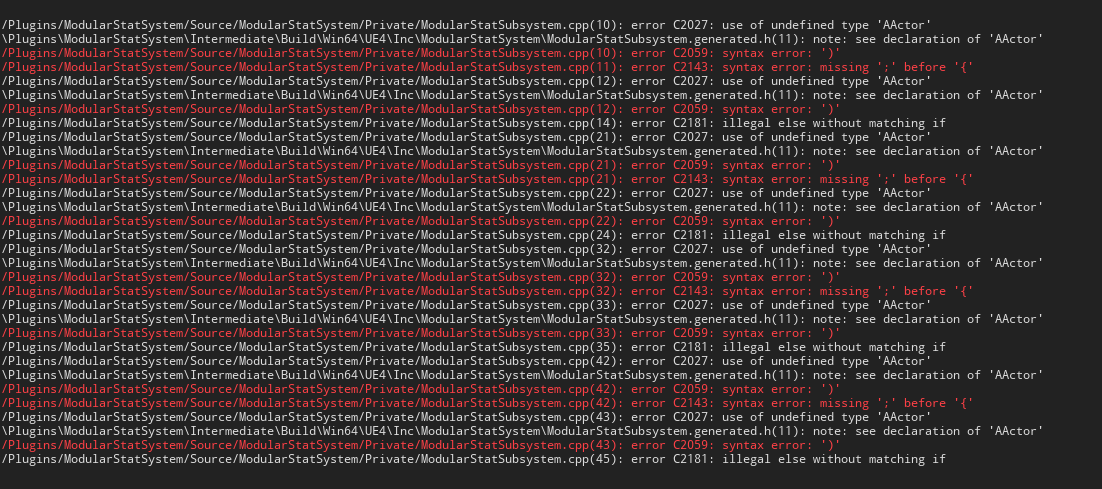
 lament tusk
Hey guys, i have no clue why this is not packaging... any ideas?

 zenith summit
lament tusk
Hey guys, i have no clue why this is not packaging... any ideas?
zenith summit
lament tusk
Hey guys, i have no clue why this is not packaging... any ideas?
It says you got 32 errors, what are they?
lament tusk
@zenith summit
 zenith summit
lament tusk
<@!298638418613633034>
zenith summit
lament tusk
<@!298638418613633034>
It seems like it might be related to this: https://issues.unrealengine.com/issue/UE-122409
Are you on 4.27 or 4.27.1?
lament tusk
@zenith summit 4.27
zenith summit
lament tusk
<@!298638418613633034> 4.27
Based on that issue page, it might be worth upgrading to 4.27.1 then trying again.
lament tusk
@zenith summit will try it now and let u know
@zenith summit Weird... i don't have 4.27.1 as an option lol. closest thing says 4.27 chaos
zenith summit
lament tusk
<@!298638418613633034> Weird... i don't have 4.27.1 as an option lol. closest th...
Where are you looking for an upgrade?
lament tusk
@zenith summit In the epic games library, under the dropdown
zenith summit
You mean that here, you see an option to get 4.27 Chaos but not to get 4.27.1? Huh.
 lament tusk
@zenith summit yeah... i clicked add version and I don't see that option
zenith summit
lament tusk
<@!298638418613633034> yeah... i clicked add version and I don't see that option
Never had to deal with this, sorry. I would ask in #ue4-general.
winged moss
past umbra
hello all, just like to say. ive been writing c++ for a grand total of 3 days. s...
#cpp even though it looks like you didn’t include Actor.h
lament tusk
@zenith summit It worked... ty my G... only issue is my game is 1/5th developed and is over 6gb lol... my god pc is running it at 20fps
zenith summit
lament tusk
<@!298638418613633034> It worked... ty my G... only issue is my game is 1/5th de...
Glad to hear ... though yeah, now it sounds like it's time to look up UE4 optimization. 😄
lament tusk
@zenith summit Step by step... lol
past umbra
winged moss
<#221799439008923648> even though it looks like you didn’t include Actor.h
Hello ! Yes you are correct :) I had tried this once or twice before posting here. but I didn't get the full actor.h directory correct and it took me a bit. I did eventually get it going :)
Thanks for your help. Atleast someone had my back if the headbashing on wall didn't pan out :)
 lusty ivy
Hi, Anyone know how it can be that when I build shipping build, my normal *.bat files I use to join the listen servers no longer works? i.e when running it will launch a separate standalone game. Everything works fine when packaging to Development, but once I package to Shipping then it seems like I can't join anymore. It's very hard to know why because there's no log 😦
coarse fiber
So does Unreal automatically exclude any plugins that you're not using in your project when packaging the game? I heard that plugins will get packaged with your game even if you're not using them. I didn't see this anywhere in the docs so Im not sure if this is true.
mellow bane
coarse fiber
So does Unreal automatically exclude any plugins that you're not using in your p...
Runtime plugins that are not disabled will be bundled AFAIK
lusty ivy
lusty ivy
Hi, Anyone know how it can be that when I build shipping build, my normal *.bat ...
So i figured out myself, did not realize shipping build no longer allow opening/hosting maps like "Game.exe MapName?listen"
all needs to run within the game itself
i guess this is to prevent users opening maps not meant to be opened and stuff
 spice veldt
[LowLevelFatalError [File:Unknown] [Line: 5291] Invalid object in Async Objects Referencer] Any idea how to figure out what is causing this? Only happens in shipping builds, and at random times while playing. Causes hard crashes
 regal elbow
I was packaging my game but it says cook failure and than Unknown cook failure how do i fix this?
mellow bane
Show the full packaging log
regal elbow
👍🏻
regal elbow
mellow bane
Show the full packaging log
 shy steeple
Hi guys! hey we need some help 😦 we are making the build of a small low polly game and the game uses 90% of the gpu, even tho the game is super low polly and the profiler says its ok
mellow bane
regal elbow
Now open it and look for the string "error" - your errors start line 927. Probably you removed a bunch of stuff, like a "UtilityCombatPlugin" plugin, without cleanly removing dependent assets.
mellow bane
shy steeple
Hi guys! hey we need some help 😦 we are making the build of a small low polly ...
Contrary to popular belief triangle count has not much to do with performance. What's your issue here - bad performance, or using GPU ?
Using 100% of the GPU is a good thing usually, means you're using the hardware correctly
mellow bane
What's the framerate ?
mellow bane
Okay but what's the framerate
shy steeple
60
mellow bane
And what's the scalability settings like ? Usually you let users control quality so that people who don't want to use their GPU can lower the render quality
If your game uses 100% GPU at 60fps and max scalability on your target machine, I fail to see the problem
You can check the GPU profiler to see what to degrade if you feel like the game shouldn't use your player's hardware but usually you want the opposite
shy steeple
when we adjust the quallity to lower the visuals, but it looks horrible. The thing is that this project is for mid end computers. Thte thing is that it shount use that much of the gpu due to how small the project is
it is like if a mobile game is using 90% of a high end computer
mellow bane
"Small" and "low poly" really have nothing to do with "easy to run", the opposite is often true
So, well, check the GPU profiler and post a screenshot here
shy steeple
for more insight we exported a scene empty of that same project and it was using 90%
let me get the ss
mellow bane
% usage of GPUs is kinda unreliable btw, a more useful metric is how many ms your GPU thread takes
If you have 5ms rendering and a 60fps lock you have a real-world cap of about 30%
shy steeple
 mellow bane
Well, stuff in there can be optimized, 2ms AO isn't nothing
 small moss
anyone know why a DLL I'm including with a RuntimeDependencies wouldn't get included? it's a module under my main target, but the DLL doesn't seem to get copied anywhere, and the directory it's in isn't searched when loading it
shy steeple
shy steeple
with this the game looks awful and uses 70% of the gpu
we can optimse
more yes
but is looks nasty af
mellow bane
This is what I'm not getting - focus on making the game look good ? And making it run well ? The % GPU use is completely irrelevant
What's the target hardware here ?
shy steeple
ok , here is a more clear example we tested the build on a mid end pc, we set the quallity in the profiler to the lowest we could and it was using about 70% of the gpu and the game was not runing good. its not a big game with highpolly assets , its fairly small and simple but still it was making the computer go nuts
we dont know if we are packeging wrong of we are using somethig incorrectly
mellow bane
Okay so
- forget about % GPU, it's a bullshit metric, focus on how many milliseconds it takes to render a frame
- forget about "big game" or "low poly" whatever, you can kill performance in seconds without any asset by dragging a light in the scene
Here's what to do : get a full profilegpu output on a development build on the target machine and see what's too expensive
Then adjust that
Your shot above is at 8ms = about 120fps
In your screenshot above you have SSAO taking >25% of performance for a relatively invisible effect so maybe try toning that down quality wise
shy steeple
once we donde this chamges and if we are lost could you help us in vc? latter today or other day?
mellow bane
No, I don't do that, but you can post information and I can get you feedback on it
shy steeple
we are worried beacsue when u start the game tha computers fan go nuts and it looks like is going to fly xd
mellow bane
Okay but that's more of a computer problem than a game problem - if your game looks good and runs well, people who bought a 400W GPU that doubles as a heater probably were aware of that
Maybe the game is terribly optimized but if you've confirmed it runs at 60fps and it only takes 8ms to render then it's hardly 90% actual usage
It's actually less than 50%
delicate rose
i think i should shift my question to here as its an isolated packaging issue. ustaticmesh with complex collision as simple do not work for me in packaged build (UE5). wondering if anyone else has this issue
mellow bane
Is it a Nanite mesh, are you using EA builds
delicate rose
yes it is 5.0EA, no it is not a nanite mesh
should I move to another branch of 5.0?
mellow bane
It's safe to say that EA releases aren't intended to work while packaged, try on 5.0 from source
mellow bane
Most of the 5.0 commits I've compiled worked
No idea about your particular issue, 5 is just not shipping ready
delicate rose
can I assume that these issues will be cleaned up before the release and continue work?
mellow bane
I think it's safe to assume complex collision will work in UE5 releases, yeah
Just saying it might work in source builds
delicate rose
ok. i'll look into compiling a source build later on, thanks!
 hoary osprey
hi there. I couldnt package my bp only project due to plugin-missing-error. I added a c++ class (since this might help according to google)
restarted. Now I cant open my project anymore.
Deleted some files according to google but didnt help.
Pls help me get my project back 👀
can I somehow make it nonc++ and bp only again by removing / editing certain files in the explorer?
mellow bane
Delete the sources, remove the module in uproject
hoary osprey
Hi, do you mean this part?
 mellow bane
Yeah, remove that entire selection to make it a Blueprint project
Probably also want to remove binaries & the .sln file
hoary osprey
oh thanks a lot its up running again
 brazen orbit
Hey guys... I'm having an issue with APK signing and I have some kind of general questions...
I have used the verify tool, and scheme 2 returns true.
but when I upload the apk using ovr-util, it says I need to verify my apkERROR: Please sign or rebuild your APK using a production certificate or verify your keystore build settings are correct.
I'm building for the quest2... using build-tools 30.0.3.... I've googled this but I can't seem to get past this error
brazen orbit
Ok, I didn't run the APK sign command after generating the keystore... oops. False alarm...
 willow saddle
Hey everyone,
I have noticed a new file in the Unreal packed project: turbojpeg.dll
Does anyone know if this is normal or not?
 mellow bane
Yes, it's normal
willow saddle
any idea on why it's there now?
In my last project, Jan this year, I didn't have it there.
Also, googling about this is not showing much info.
mellow bane
It's been added in a recent UE4 release
willow saddle
aha,
OK.
Thanks for the info !
 balmy vine
hey sorry does anyone know why my packaging is failing

 grave hinge
pebbles, the cooker is apparently trying to cook an asset that either doesnt exists or invalid. Try fix up redirectors in project and look into editor and game console logs for broken stuff. Also the cook log might give you hints in previous lines (not visible on your screenshot) indicating problems. Fix all those up first, maybe helps.
 pliant sentinel
hey does 4.26 package to mobile with no issues or should i stick to an earlier version?
 grizzled sundial
I would take 4.27
 raven thicket
anyone have any experience packaging for VR? my game works perfectly in the "VR preview" mode, but when i try to actually deploy it onto my headset, it doesn't seem to accept any button presses for input. the game loads and the motion controllers are tracked accurately, and my widget interaction is able to activate "hover" states on my main menu, but pressing the trigger or A button does nothing
the only error i can find that might be a clue is: Error: FOculusHMDModule::GetPluginWrapper().WaitToBeginFrame 995 failed
 primal thorn
hello, i've been trying to package my game through File -> Package Project -> Windows (64-bit) and every time he re-cooks everything even with iterative cooking enabled. what can i do to only do the diffs?
i'm having a crash only in packaged so for every try i need to wait 20 minutes for it to package
primal thorn
another question, this is the icon of the packaged exe, that shows because i haven't defined a custom icon?
 mellow bane
Yup
raven thicket
raven thicket
anyone have any experience packaging for VR? my game works perfectly in the "VR ...
i found my own solution - i had my project set up to work across PC and VR, and you can't have a "show mouse cursor" node when you go to build your project on device. still not sure why it worked in VR preview vs when packaged, but at least i found the issue.
 calm prawn
Hey everyone, I hope your day is going well! I just tried to package my game with the steam API integrated and the steam overlay does not pop up in a packaged build. In standalone it works fine, but in a shipped build it does not. I have tried literally everything and I was wondering if someone could help me. I also wanted to ask how I could package the plugins in my project since when I package my project, the plugins are not in the finished build.
Thank you everyone, have a great night!
mellow bane
calm prawn
Hey everyone, I hope your day is going well! I just tried to package my game wit...
Is the game started from Steam ?
open rapids
Hello gyus quick question because i cant find answer on internet 😄 , are consol commands starting from "showflag." work in shipping build ? I need to disable grain in options so im using command "showflag.grain 0/1" but i dont know if it will work in package game
calm prawn
mellow bane
Is the game started from Steam ?
Sorry, what do you mean by "is the game started from steam"?
mellow bane
Did you launch your game from Steam ?
With the client, I mean
If you didn't, you need to add a steam appid file next to the game executable in gamename/binaries
calm prawn
O so I should create a text document in binaries and add the appid in it?
Like 480
Which is the text one I am using
mellow bane
Only if you need to start shipping builds with Steam support without using the Steam client
mellow bane
Then yeah, add a steam_appid.txt file with the id in it
calm prawn
And do I need that if I am fully releasing it on steam?
mellow bane
IIRC you don't, but it's going to be a 10 bytes text file so...
calm prawn
Sounds good I will try that!
I greatly appreciate it!
Sorry, I have one last question, my plugins do not package in a complete build, how can I get them to package?
Someone said to add a plugins folder into the actual build folder
calm prawn
Ok, sounds good
Must me an error
I will try repackaging
Thanks have a great day!
I just tried adding the steam_appid.txt file with 480 in it and the overlay did not pop up in a packaged build
mellow bane
Where did you put it ?
calm prawn
In my binaries
calm prawn
Whoops did not put it there, I will try again, thx
When I open the txt document it already has {\rtf1}
Should I just put 480 after that?
 near lynx
Getting this error while packaging with nativized blueprints:
ERROR: Missing precompiled manifest for 'EditorStyle'
How can I find what plugin or blueprint is using that?
winged moss
and the error doesn't occur when nativisation is disabled?
because there's nothing in that module readily exposed to BP
 full wyvern
Hello, I'm getting the following error when I try to build my game:
I've looked through all previous postings of this error in the discord channel and unfortunately, it seems no one has found a solution (or at least posted one).
I've tried the obvious here, putting the 'PrecompileForTargets = PrecompileTargetsType.Any;' in the Launch.build.cs, but this doesn't fix anything (the only Launch.build.cs on my entire computer is the one associated with the engine, rather than anything project specific). I've also tried the most common result when you google the problem, which is to put the project plugins in your engine plugin folder.
Does anyone have any suggestions? This happens even on blank projects. I'm using UE 4.26.2
Edit: I think it may have something to do with compiling with a Universal build instead of an Intel build on an Apple Silicon device. I'm gonna test a sample project in 4.27.1 and see if it persists.
Edit 2: The issue persists, I'm going to post about it on the Unreal engine forums but I'll leave this message up on the off chance someone knows a solution, since I've seen it pop up in this discord when I searched many times. A temporary (non) fix would be switching to an Intel only build, which should still run on ARM based Macs
primal thorn
hello, when packaged i'm having this issue in random name to text conversions https://answers.unrealengine.com/questions/973931/uppercase-letters-are-converted-to-lowercase-when.html. Any idea on how to fix it?
mellow bane
primal thorn
hello, when packaged i'm having this issue in random name to text conversions ht...
Names are case insensitive
So just uppercase the stuff
mellow bane
Not that weird, just takes another identical name in the engine to have different case
Names cannot be used for display
Only text can be - native text properties, not conversions
primal thorn
got it, thanks 🙂
primal thorn
is there any special step required to package the project so it uses the supplied icon in the platform settings? i've tried setting my icon (256x256 ico) and when i package it it never uses it and in the taskbar it shows the wrong icon (not even the ue 4 one)
mellow bane
primal thorn
is there any special step required to package the project so it uses the supplie...
Beware that Windows caches icons and doesn't update them often
There is no special step, just add your ico in project settings
primal thorn
how do i clear the cache? restarting windows?
mellow bane
No idea, but right click the executable file and check its details
primal thorn
my taskbar icon is this
 primal thorn
if i go to the properties of the executable it shows this
 mellow bane
What does it look like in project settings ?
primal thorn
just a sec

i'm using a random 256x256 icon i found online
to test it out
btw does it matter if the packaging is not shipping?
@mellow bane could also be that the icon doesn't support all of the intermediate sizes (16x16, 32x32, etc) and that's why it's not working
mellow bane
There are loads of services on the web that convert a png to a valid ico so try that
mellow bane
Weird, not sure what can go wrong there
 mellow bane
Works for me here so it's something with the project
primal thorn
yeah
 primal thorn
@mellow bane got it to work, moved the icon to Build/Window/Application.ico and deleted the .ico and .rc i had in the source folder. the windows icon cache acted up so when i restarted the pc it showed up correctly and in the taskbar aswell
thanks for the help
mellow bane
Alright
 coral gull
mellow bane
Fix the errors
coral gull
mellow bane
Fix the errors
but how
do i need to add/assign a static mesh to the actors?
 grand breach
Hi, I'm using the Sound Visualization Plugin, and it works in the editor and a simulated game, but it doesn't work in the actual build. Any ideas? When I was googling, I saw a short thread about it, but all the links in the thread no longer exist, so I wasn't able to resolve the problem. Any help is greatly appreciated! Thanks.
mellow bane
coral gull
but how
You haven't shown the errors so no idea
coral gull
mellow bane
You haven't shown the errors so no idea
well it says static mesh actor has null staticmesh property
mellow bane
That's not an error
It says "warning", because it is a warning
You should fix it by removing those pointless meshes but it will not fix your packaging because that's not the error
lusty ivy
Hi anyone know if Unreal4's patching works with C++ code change?
 mellow bane
Yup
lusty ivy
winged moss
patching isn't applicable to code
so if i change c++ source code I have to release my whole game all over again?
winged moss
not sure what you mean by "release my whole game", pak patching is still applicable but you have a new game exe
lusty ivy
winged moss
not sure what you mean by "release my whole game", pak patching is still applica...
aha, so pak is for content and all game code is put into exe right? How about additional plugins, will they come with pak?
winged moss
Depends if they have content
lusty ivy
winged moss
Depends if they have content
So to update a game with patch, the new exe + pak files need to be placed over the existing game right
Ive been trying to package a patch but somehow it always re-cook everything and the patch files are huge :/
i only did small changes
mellow bane
lusty ivy
Ive been trying to package a patch but somehow it always re-cook everything and ...
Let's be real though on most platforms you want to re-release the full game and let the platform do a perfectly optimized parch from every version to any version
But the patching process does work AFAIK - make sure you correctly generated a named release before
 hollow haven
Greetings everyone. I have a smol problem and would really appreciate any help.
This returns true in editor play but not in packaged. 😦

All I want is to be able to load certain objects in a folder..
mellow bane
hollow haven
Aren't collections a purely editor thing ?
hollow haven
mellow bane
Aren't collections a purely editor thing ?
I delved into the subject newly so I realized it now.
All I wanted was to be able to load a folder and whats inside fully with an async load so I am just blindshooting at this point. 😔
mellow bane
The asset manager is your friend
hollow haven
mellow bane
The asset manager is your friend
But.. How do I tell it to load a folder my friend? I can only let it target certain objects. 😦
Sorry, I am really beginner at these stuff.
mellow bane
hollow haven
But.. How do I tell it to load a folder my friend? I can only let it target cert...
You can do this on a primary data asset that tag the folder in question : https://docs.unrealengine.com/4.26/en-US/BlueprintAPI/AssetManager/AsyncLoadPrimaryAsset/
Async Load Primary Asset
Though the very concept of folder is dubious
Usually what you actually want is to have chains of dependencies, like a list of characters - a data asset that has soft pointers to characters, that you can load asynchronously along with their dependencies
That way the packaging process can also determine exactly which assets are used
And you don't end up accidentally shipping unused 8K texture maps
hollow haven
mellow bane
You can do this on a primary data asset that tag the folder in question : https:...
First of all I really thank you for your time on this matter Stranger.

I managed to be able to load a Data Asset.

Now that the Data Asset is loaded, I am trying to reach its soft references.

I can even lable the folder like this so things get referenced automaticaly
But how do I reach those references to load them?
Thats where I am stuck. 😔
mellow bane
hollow haven
But how do I reach those references to load them?
If the data asset is a primary data asset, calling https://docs.unrealengine.com/4.26/en-US/BlueprintAPI/AssetManager/AsyncLoadPrimaryAsset/ on it should load the references
Async Load Primary Asset
hollow haven
mellow bane
If the data asset is a primary data asset, calling https://docs.unrealengine.com...
This is where I feel like really crying because it just doesnt load those assets Stranger. 😢
mellow bane
Can't say I've done this much tbh, in C++ I just get all soft pointers from a regular DA and load them
hollow haven
mellow bane
Can't say I've done this much tbh, in C++ I just get all soft pointers from a re...
Alright, one last question if I may. DA soft pointers are editor only if I label everything in their folder.

But your soft references work in packaged as well?
mellow bane
Soft references work in packaged builds of course, kinda the point
hollow haven
Got it. Thank you. I am a bit scared because when it says "Editoronly", I immediately think it wont work in packaged >.<
I appreciate the help. ❤️
 desert bluff
when trying to open my game on another pc im running into this error, it works on the pc where i created the game
 mellow bane
Did you run the UE4 prereq installer on that other PC first ?
mellow bane
Yes of course
desert bluff
lmao ive been using unreal for a week
ill try that, thank you
was using houdini before that
mellow bane
Any program you release to the public needs to install its dependencies
That's what installers do on top of copying files
Try that and see if that fixes the problem
Make sure the hardware on that PC matches the min specs too
desert bluff
mellow bane
Any program you release to the public needs to install its dependencies
okay gotchu, so i need to do something else other than packaging the game inside of unreal engine 5? Cause thats what UE5 safes when exporting my game

like where do i get the installer from
i exported it as in the "development" state, maybe thats why?
mellow bane
desert bluff
okay gotchu, so i need to do something else other than packaging the game inside...
Ther's an option in packaging settings to include a prereq installer that goes somewhere under engine dir in package
And you should package for shipping
And of course UE5 is likely to not work at all when packaged, it's early access, pretty much guaranteed to not work well, etc
desert bluff
mellow bane
Ther's an option in packaging settings to include a prereq installer that goes s...
yup the option is there

 compact timber
hello, anyone knows how to deal with html5 packaging? (UE4 4.20)
||i've been trying to test my game on a local server and when i package it it gives me a result with a bad quality and no particles nor UI, i've looked everywhere and i couldn't find one single thread related to my situation, i'm sorry if i'm in the wrong channel,||
desert bluff
mellow bane
Ther's an option in packaging settings to include a prereq installer that goes s...
that should be it right?
 mellow bane
Yes
 inner island
Is this physical memory? Didn't think I had that many things open when I was packaging but if it is physical memory, that's still odd (32 gigs) ackagingResults: Warning: Freeing 33554432 bytes from backup pool to handle out of memory. PackagingResults: Warning: MemoryStats: UATHelper: Packaging (Windows (64-bit)): LogWindows: Error: begin: stack for UAT UATHelper: Packaging (Windows (64-bit)): LogWindows: Error: === Critical error: === UATHelper: Packaging (Windows (64-bit)): LogWindows: Error: UATHelper: Packaging (Windows (64-bit)): LogWindows: Error: Fatal error: [File:D:/Build/++UE4/Sync/Engine/Source/Runtime/Core/Private/GenericPlatform/GenericPlatformMemory.cpp] [Line: 186] UATHelper: Packaging (Windows (64-bit)): LogWindows: Error: Ran out of memory allocating 3329638416 bytes with alignment 0 UATHelper: Packaging (Windows (64-bit)): LogWindows: Error:
mellow bane
Likely a bug
inner island
I'll restart PC and see if it repeats - I think you're right though
 dawn cipher
how much faster is a packaged shipping build compared to starting a game as standalone in the editor?
is it very noticable or just slightly faster?
mellow bane
dawn cipher
how much faster is a packaged shipping build compared to starting a game as stan...
It's much faster since everything is cooked
Not to mention packed in a single file

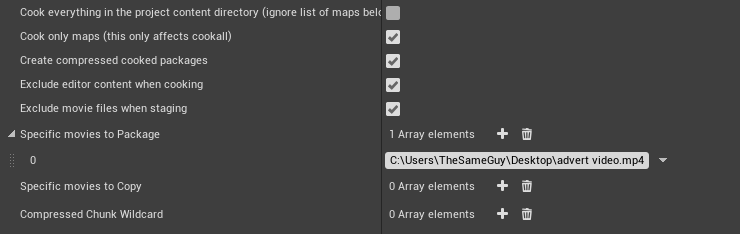


 inner island
mellow bane
Likely a bug
inner island
mellow bane
Likely a bug
packaged fine - so must have been a windows/ or editor glitch
 main patrol
hello, hope everyone's day is going great 🙂 wanted to ask, is there a command to (re)build navigation when cooking the content for packaging? thanks 💙
 ivory barn

Plz help me with this i am on this from past 2 months i have left all hopes plz i qant my thsi game to be completed
ivory barn
Can anybody tell how to fix unknown cook failure error while packaging for androdi
 onyx igloo
How would i use staging option to stage a .pak file that could then be put in the folder with game's other pakchunk files to be loaded at startup so that the .pak file i stage will be read as part of the game
 somber flower
I hope this is the correct place to ask I usually only point for blueprints help. Anyway. I have a customer telling me that his UE4 crash whenever he adds one of my packs to his projects (it's an environment pack that doesn't do anything fancy at all). I tried to add it to a test project and everything works fine. This is the error code provided `LoginId:b3e463ae436148a895614597542ce9b7
EpicAccountId:0c087ed56ee14ad88aa505a664493005
Assertion failed: (Index >= 0) & (Index < ArrayNum) [File:d:\build++portal\sync\engine\source\runtime\core\public\Containers/Array.h] [Line: 611] Array index out of bounds: -1878210080 from an array of size 252623424
EpicGamesLauncher
EpicGamesLauncher
EpicGamesLauncher
EpicGamesLauncher
EpicGamesLauncher
EpicGamesLauncher
EpicGamesLauncher
EpicGamesLauncher
EpicGamesLauncher
EpicGamesLauncher
EpicGamesLauncher
EpicGamesLauncher
EpicGamesLauncher
EpicGamesLauncher
EpicGamesLauncher
EpicGamesLauncher
EpicGamesLauncher
EpicGamesLauncher
EpicGamesLauncher
EpicGamesLauncher
EpicGamesLauncher
EpicGamesLauncher
EpicGamesLauncher
EpicGamesLauncher
user32
user32
EpicGamesLauncher
EpicGamesLauncher
EpicGamesLauncher
EpicGamesLauncher
EpicGamesLauncher
kernel32
ntdll
`
What should I tell him? I don't think it's my fault
 lapis path
So this is a fun one. My app packages and plays fine in Developer config, but crashes immediately w/ no error log or anything in a Shipping configuration, lol.
 grizzled wadi
hello when packaging this error is showing up
ProcessResult.StdOut: MyProject3.init.gen.cpp
ProcessResult.StdOut: MyProject3.cpp
ProcessResult.StdOut: C:\Program Files (x86)\Microsoft Visual Studio\2017\Community\VC\Tools\MSVC\14.13.26128\INCLUDE\pplinterface.h(142): error C4577: 'noexcept' used with no exception handling mode specified; termination on exception is not guaranteed. Specify /EHsc
ProcessResult.StdOut: C:\Program Files (x86)\Microsoft Visual Studio\2017\Community\VC\Tools\MSVC\14.13.26128\INCLUDE\pplinterface.h(150): error C4577: 'noexcept' used with no exception handling mode specified; termination on exception is not guaranteed. Specify /EHsc
ProcessResult.StdOut: C:\Program Files (x86)\Microsoft Visual Studio\2017\Community\VC\Tools\MSVC\14.13.26128\INCLUDE\pplinterface.h(181): error C4577: 'noexcept' used with no exception handling mode specified; termination on exception is not guaranteed. Specify /EHsc
anyone knows what could be the issue?
calm prawn
Hey everyone! I am having a bit of problem understanding what the difference is between debug, development, test, and shipping. (In the project settings>packaging>project>build configuration.
Which one should I choose?
 karmic elm
any ideas why a user might see this?
thanks

ah, their file failed to decompress fully, derp
willow saddle
Hey guys,
I have this problem with a packed game:
Message
Plugin 'AsyncLoadingScreen' failed to load because module 'AsyncLoadingScreen' could not be found. Please ensure the plugin is properly installed, otherwise consider disabling the plugin for this project.
OK
Any idea on how to fix it?
 maiden knot
is there a way to just package the game UI for testing?
open rapids
Hi, ive packaged my game in UE5 but can't open it in file explorer. Any ideas? Packaging was successful

Thats what comes up
 valid nimbus
dawn cipher
valid nimbus
dawn cipher
I got the same/similar error, check to see how much free storage space you have left
I keep getting thousands of these warnings whenever I package my game. The packaging goes successful, but when I try to start the game, nothing happens. Any fix for this?

 open rapids
ivory barn
open rapids
ivory barn
correctly install android studio. go to her "manager sdk" there download the sdk ndk you need
open rapids
ivory barn
the second option. install "Command line tools only" and manually download the files you need
regal elbow
hi! when i package my game it gives an error: Editor Target not found... how do i fix this problem?
 heady creek
open rapids
Hi, ive packaged my game in UE5 but can't open it in file explorer. Any ideas? P...
heady creek
open rapids
Hi, ive packaged my game in UE5 but can't open it in file explorer. Any ideas? P...
You can select where to put the packaged game when packaging, so I would just go into that menu again and see if you find it from there 🙂
Hello, first post here on the server! 🙂
I'm working in a large student project and are right now trying to make a build, solving some problems and finding others... As usual 😉
The latest progress is that I'm able to remove buggy files and fix all build issues except this last one. So I am asking for more eyes and minds to try and fix this. Any help would be appreciated! 🙂
Before posting this I searched for "Tag.Size" in the server, but found that all four previous post didn't get any reply. So I don't feel so lucky with getting a response on this one... 😕
But might get lucky anyway! 🙂
PackagingResults: Error: === Critical error: === PackagingResults: Error: Assertion failed: Tag.Size == Loaded [File:D:/build/++UE5/Sync/Engine/Source/Runtime/CoreUObject/Private/UObject/Class.cpp] [Line: 1499]
 thin anchor
I would appreciate some help trying to solve this. I have been packaging the project (Android) just fine on a remote machine. Tried to set the environment up on other 3 different machines and I'm getting this error.
[2021.11.19-19.31.04:330][439]UATHelper: Packaging (Android (ASTC)): LogInit: Display: LogOutputDevice: Error: Ensure condition failed: !FPackageName::IsShortPackageName(Path) [File:D:/Build/++UE4/Sync/Engine/Source/Runtime/CoreUObject/Private/UObject/SoftObjectPath.cpp] [Line: 79] [2021.11.19-19.31.04:507][439]UATHelper: Packaging (Android (ASTC)): LogInit: Display: LogOutputDevice: Error: Cannot create SoftObjectPath with short package name 'False'! You must pass in fully qualified package names
I've tried forcing a recompile on all of my structs (aka create a new field, save, delete new field, save), used a "Refresh All Nodes" plugin and found an answer hub topic which told the OP to attach VS to the engine, play and check the call stack. But this only happens when packaging. So... 2 questions:
- Any ideas on how to solve this?
- Is there a way to attach a debugger to the packaging process?
 plain sierra
Can anyone help me with this?
LogWindows: Warning: CreateProc failed: The system cannot find the file specified. (0x00000002)
LogWindows: Warning: URL: cmd.exe /c ""C:/Program Files/Epic Games/UE_4.26/Engine/Build/BatchFiles/RunUAT.bat" -ScriptsForProject="C:/Users/simon/Documents/Unreal Projects/FlappyBoat/FlappyBoat.uproject" BuildCookRun -nocompileeditor -installed -nop4 -project="C:/Users/simon/Documents/Unreal Projects/FlappyBoat/FlappyBoat.uproject" -cook -stage -archive -arc
hivedirectory="C:/Users/simon/Desktop/Package" -package -ue4exe="C:\Program Files\Epic Games\UE_4.26\Engine\Binaries\Win64\UE4Editor-Cmd.exe" -ddc=InstalledDerivedDataBackendGraph -pak -prereqs -distribution -targetplatform=Win64 -clientconfig=Shipping -utf8output"
Bit confused of what’s happening and want to look for to fix
 indigo mortar
plain sierra
Can anyone help me with this?
LogWindows: Warning: CreateProc failed: The syst...
indigo mortar
plain sierra
Can anyone help me with this?
LogWindows: Warning: CreateProc failed: The syst...
Try verifying the engine installation in the launcher. Might be an engine file missing for whatever reason (or maybe your third party AV software genocides on .bat files, if you have one installed)
plain sierra
indigo mortar
Try verifying the engine installation in the launcher. Might be an engine file m...
I’m not sure if have third party software but verify the engine installation I’m just a bit confused we’re. I open my project through epic games, so would it be somewhere there? Thanks
plain sierra
indigo mortar
Try verifying the engine installation in the launcher. Might be an engine file m...
Also I tried packaging a different game and had the same log error
regal elbow
When i download my game on my website for testing than when the download has finished it says: create process returned 2
winged moss
don't tell me you only uploaded the bootstrap exe rather than all of it
plain sierra
Is this me I don’t think I did I packaged to windows 64
winged moss
plain sierra
Is this me I don’t think I did I packaged to windows 64
no. you already had a suggestion of verifying your engine installation
which is what it'll be since you're missing the UAT batch file and/or executable
plain sierra
Sweet I will try that
I was just wondering were I can do that. In my project, in epic games or so we’re else
winged moss
since you're using the binary version of the engine, then the epic launcher
and it's also a possibility that AV software on your PC quarantined the file as a false positive
plain sierra
Okay, thanks for the help will look at trying to fix this
plain sierra
winged moss
since you're using the binary version of the engine, then the epic launcher
I tried verifying the engine installation, unless I have done it wrong it has not worked
winged moss
then see if your AV quarantined it then
 cyan saffron
Hi, is it possible to check what engine version a pak file was cooked on before it is mounted?
We have community made levels that cause the game to crash on loading if they were cooked on an older engine version to the current game version. Thanks.
winged moss
we used mod metadata for that instead
for the mod upload, we generate a metadata blob like this
 plain sierra
winged moss
then see if your AV quarantined it then
plain sierra
winged moss
then see if your AV quarantined it then
How would I find that
plain sierra
Right sorry, I use McaAfee but that prob won’t help u much