#packaging
1 messages · Page 39 of 1
 buoyant thunder
I installed 2017 and I changed the settings here but it didn't make that line go away
Go to Edit->Project Settings-> Platforms-> Windows -> Toolchain ->CompilerVersion
buoyant thunder
Can anyone tell me why this isn't game isn't packaging 😭
 mellow bane
@open rapids AArch64 is just for Android phones/tablets that were flashed with a Linux distro, so there is no market at all for that "platform", it's maybe 1000 people worldwide
That, and ARM laptops running Linux, which is a ridiculously small market too
It's not new tech, it's just Linux on a phone.
@buoyant thunder Deleting intermediate folder (and regenerating uproject + recompiling usually fixes this error
buoyant thunder
@mellow bane Thank you, I'll give deleting the intermediate folder a try,
what do you mean regenerating uproject?
mellow bane
Right click uproject -> regenerate project files
buoyant thunder
this one that say Generate Visual Studio project files? @mellow bane
mellow bane
Yes
 dusk briar
why does my editor keep cooking everything completely over and over again
like I make an xbox build, it cooks like 7000 packages, I add a log to the code, redeploy, and it has to cook 7000 packages again
mellow bane
That shouldn't be happening indeed
 brisk seal
uuhhh
I went to package my project and it says my Unreal directory doesn't exist? It certainly does..
brisk seal
Why are my maps not showing up?
I recently switch from 4.21 to 4.25 and got this.. Can someone please help me figure this out, I have to deliver this on time
mellow bane
What's that menu from ?
brisk seal
Project Launcher window
mellow bane
Sounds like you didn't set it up to cook your content before launch
brisk seal
It packaged fine yesterday
(using 4.25 after the switch) It had a few errors, which I fixed, and then I got this
brisk seal
I did a File > Package and it worked just fine.. weird butok
mellow bane
Yeah, because that cooks content
 native acorn
What's the difference in packaging for vulkan and vulkan Desktop(Under android category)
 tardy dew
Hi all, anyone knows how to setup Native Toolchain on mac, I want to package my project for linux from mac. I have seen this doc https://docs.unrealengine.com/en-US/Platforms/Linux/NativeToolchain/index.html and downloaded files, but not much instructions there how to set it up.
tardy dew
@brisk seal Go to Project launcher > Edit profile and set Project to any, It might not picking right one.
mellow bane
The Linux toolchain is meant for Windows AFAIK
 open rapids
@open rapids AArch64 is just for Android phones/tablets that were flashed with a Linux distro, so there is no market at all for that "platform", it's maybe 1000 people worldwide
That, and ARM laptops running Linux, which is a ridiculously small market too
It's not new tech, it's just Linux on a phone.
@mellow bane That explains a LOT on why Steam won't even compile with it. Guess I am missing nothing packaging my game for it.
 wheat junco
I am packaging the default templates from Architectural Visualization and am getting this warning when using the Project Launcher to make a DLC:
LogSavePackage: Warning: /Patch1/NewMap imported Serialize:/Engine/BasicShapes/Sphere, but it was never saved as an export.
How do I mark it for export? I have checked Include Engine Content in the profile but it still produces a very small pak file of 100kb
Am i supposed to copy these to my own content directory?
This is dumb, I replaced all references to those objects that are in /Engine/ to my own plugin's content folder and then it worked. Shouldn't that checkbox handle this for me?
Is there a way to migrate my map so that it just includes all the assets used in it and pulls it out of the Engine folder? I tried migrating but it only moved the Map and BuildData file
 light pumice
Been getting Kernal errors and not really sure what these errors mean and they only show up when packaging a build
 stark marsh
I can't package for Android after updating to 4.25. The only thing I've found so far is someone said to disable the OculusVR plugin but I need that since I'm building for the Quest. I get the following errors: UATHelper: Packaging (Android (ASTC)): Z:\app\src\main\java\com\epicgames\ue4\GameActivity.java:208: error: cannot find symbol UATHelper: Packaging (Android (ASTC)): import android.support.v4.app.NotificationManagerCompat; UATHelper: Packaging (Android (ASTC)): ^ UATHelper: Packaging (Android (ASTC)): symbol: class NotificationManagerCompat UATHelper: Packaging (Android (ASTC)): location: package android.support.v4.app UATHelper: Packaging (Android (ASTC)): Z:\app\src\main\java\com\epicgames\ue4\GameActivity.java:209: error: package android.support.v4.content does not exist UATHelper: Packaging (Android (ASTC)): import android.support.v4.content.FileProvider;
 latent zephyr
I'm trying to blacklist my project's DLC plugin so that the file is only included when I put the pak file in the directory myself. That way I can auth a DLC.
I try PakBlacklist-Development.txt in Build\WindowsNoEditor to exclude ../../Plugins/DLC but it still gets included in the pak files...
am I doing something wrong?
mellow bane
I think there are settings to exclude folders direvtly in packaging settings
latent zephyr
@mellow bane OK Thanks, so now in umodel it shows the content in the plugin pak and not in the main pak. But it's not auto mounting when I drop the plugin pak into the main pak dir?
Im playing a sound when it detects a blank actor from the plugin and it doesn't play when I drop the plugin pak in
the empty plugin folder is still detected in the main pak so doesnt that mean it should auto mount?
With all the paks together, umodel shows the correct plugin content as present. But ingame it's not spawning the blank actor to play my test sound like in editor
mellow bane
Depends how you auto detect the pak I guess
latent zephyr
Are there settings for that somewhere? I thought it just amalgamates all valid paks in the pak folder
mellow bane
IIRC it does, but you said "playing a sound when it detects a blank actor from the plugin" so I'm wodnering what you used for that
latent zephyr
In base game as a test, i have it spawn a blank actor from the plugin content dir, and if it's valid it just loops a sound so I know
plays sound in editor of course, and when I exclude the plugin from base pak it shows plugin folder empty in umodel, seems good, and then I pak the plugin and it has the content in umodel. I then put the plugin pak in the base game pak dir and expect it to play the sound but it doesn't
when I put the plugin pak in the base game, umodel shows the plugin content present
so I'm trying to figure out why the game isn't recognizing the actor from the plugin content when it's visible in umodel?
If I pak the base game without excluding the plugin, sound plays fine
I'm just trying to use a plugin pak file to auth enable a dlc that I'm implementing in the base game for simplicity
mellow bane
"i have it spawn a blank actor from the plugin content dir" - how ?
Using the asset registry ?
latent zephyr
Gotcha. No just a bp setup
Checking if class from plugin content dir is valid
here you can see I loop sound if so
I was trying spawning actor earlir but looks like now just valid class check
mellow bane
So how do you get the class
latent zephyr
The class is hard ref'd in the map's default values (1st pic on right)
which might be the issue
latent zephyr
I see, that makes sense... I was hoping for a simple pak file unlock. Do you have any better suggestion?
mellow bane
Using the asset registry to discover content in your DLC instead
Well, no
Using asset registry to discover content
DLC or not, it doesn't matter
New content will appear in the AR and that's it
latent zephyr
OK I think I understand, so basically the AR will update correctly, so I should just check if the plugin's unlock asset is present in the AR? Hopefully the explicit check for the asset won't get nulled too, I will try
mellow bane
Of course it will
latent zephyr
hmm
mellow bane
Forget about DLC logic in your game and just discover content
Want weapons, find all subclasses of BP_My_Weapon
Want levels, find all levels
Use data assets if you want a generalization of that
latent zephyr
Sounds like I need to use a data asset think how I would use that to unlock the ability to change PC's color
OK right just make a child asset with that new feature and replace I think
does that sound right?
mellow bane
You can add a data asset with the new color information and find that
Though DLC is meant for actual content, more than opt-in features
latent zephyr
Well it is DLC so that kind of makes sense. Really I just want a bool and to implement it all in the base game
I'll need to look more into how to use data assets
mellow bane
DLC is downloadable content, not pay-for-features
You should be able to simply query the DLC state on Steam

I recently had the pleasure to do a simple check if a DLC is owned and installed. This took more effort than it should. Not only is the documentation out of date, but there are also little to no tu…
Example is for Steam but other stores likely offer same feature
latent zephyr
Thanks very much, I considered that but also want to know how I would do it for a console release
I may end up doing just steam for now though since console probably has similar specific checks
mellow bane
Worth mentioning that game features as DLC is something likely to be received terribly by players
I mean even paid DLC isn't common for small indies since players hate it, but if it's real content, why not
latent zephyr
Yeah for sure, I'm just thinking as a crowdfunding reward being able to have a ship of a different color would be quick and easy
Could implement as a new ship model of course but just figured could set color dynamically
I'll give it some more thought though
stark marsh
Anyone have any idea how to fix this? https://forums.unrealengine.com/development-discussion/android-development/1762934-ue4-25-android-packaging-error
Unreal Engine Forums
I decided to port my project to 4.25 from 4.24. I set up Android Studio and all that. But I'm getting this error when trying to package for Android(ETC2).
I see that it's says some java modules are missing, but how do I fix this?
Log :
UATHelper: Packaging (Android (ETC2...
mellow bane
Full log
stark marsh
@mellow bane https://pastebin.com/5KcQS4D1
Pastebin
Pastebin.com is the number one paste tool since 2002. Pastebin is a website where you can store text online for a set period of time.
mellow bane
Alright, no idea what's wrong there
stark marsh
Thanks for looking 🙂
I think the problem is because AndroidX is enabled
Anyone know how I can disable AndroidX? Or should it be enabled?
stark marsh
Yeah I uninstalled codeworks and followed the new setup (several times 😦 )
 mint leaf
did you flush the config?
stark marsh
How?
mint leaf
its been a while, but you basically have to completely clean codeworks
I think I had to delete registry entries
stark marsh
I'll try that, thanks
 burnt smelt
When I'm using the project launcher and packaging plugins as DLC should I disable the plugins while packaging the base game?
 strange ledge
Hi! Is it possible to run ue4 game without copy to Hard Drive(for instance from memory stick)?
 rigid oar
is that " clear style" file package " are possible ? ( ue4 files packaging in folder look so ugly !) :)🤣 🤨
mellow bane
UE4 packages are somewhat close to that really
Game executable, engine folder, game folder with the game binary and pak file
rigid oar
Game executable, engine folder, game folder with the game binary and pak file
@mellow bane not really.. 😄
 still surge
does anyone have experience with steam achievements? I got the steam overlay and cloud saves working but can't seem to get the achievements to work
still surge
here's my setup, idk if I'm doing something wrong
DefaultEngine.ini
steam
setting achievement in BP
still surge
yes I have the steam oss plugin enabled and I'm testing with the steam version, where the overlay and cloud saves etc work fine. UE4 version is 4.21
 frank garnet
Might not help at all but make sure you add an empty entry
At the end
Achievement_2_Id=
still surge
tried it, but no luck. This is weird :/
frank garnet
You can also enable verbose logging for the online subsystem
It might give you more info in the logs when you try and unlock them.
still surge
how do you enable that?
still surge
thanks, I'll try that out!
mellow bane
@mellow bane not really.. 😄
@rigid oar That's because you are encrypting the pak.
 quiet pebble
My packaged game doesn't run at all, any reasons that can cause this to happen?
mellow bane
Depends on what happens, and whether this is on your machine or someone else's
quiet pebble
I checked the logs, apparently "SteamShared" plugin is unable to load and it crashes the game the moment it runs
I'm not sure how to solve it
It's on my machine
Ok! Solved it
I moved the plugins from my project folder to Engine's own plugins folder and tried again
This time the plugin got successfully included in the packaged game
 red stirrup
I get this error in my packaged build
[2020.08.17-15.27.30:631][ 0]LogStreaming: Error: Couldn't find file for package /Script/ActorLayerUtilities requested by async loading code. NameToLoad: /Script/ActorLayerUtilities
[2020.08.17-15.27.30:631][ 0]LogStreaming: Error: Found 1 dependent packages...
[2020.08.17-15.27.30:631][ 0]LogStreaming: Error: /Composure/Blueprints/CompositingElements/BP_CgCaptureCompElement
[2020.08.17-15.27.30:635][ 0]LogProperty: Error: Struct type unknown for property 'StructProperty /Composure/Blueprints/CompositingElements/UDS_TargetedActorLayer.UDS_TargetedActorLayer:ActorSet_2_31B5DF0445362FE8BFA9CC8FCF81CAFC'; perhaps the USTRUCT() was renamed or deleted?
not sure how to deal with it
The Packlage ActorLayerUtilities is enabled in the plugin settings
red stirrup
seems like the ActorLayerUtilities plugin is only available in the editor....
 abstract escarp
Hello all, I am getting an excruciating error within one of my blueprints that doesn't work with a 4.24 packaged engine build ONLY if that engine build was built using a custom engine build, i.e. - with some modifications to it that aren't relevant to this error.
I can play this everytime with no problem at all in development editor mode or when testing it out in non debug game mode, but otherwise I get this crash with regards to one of my blueprints
LoginId:cd2e9e924ba2427ca55ba7b00f332cd7
EpicAccountId:e4765165bed645d0b97b59851a33dc29
Assertion failed: Result [File:D:\Github\UnrealEngine-Custom\Engine\Source\Runtime\CoreUObject\Public\UObject/Stack.h] [Line: 248]
ProjectCore!AssertFailedImplV() [d:\github\unrealengine-custom\engine\source\runtime\core\private\misc\assertionmacros.cpp:105]
ProjectCore!FDebug::CheckVerifyFailedImpl() [d:\github\unrealengine-custom\engine\source\runtime\core\private\misc\assertionmacros.cpp:455]
ProjectCore!UObject::execStructMemberContext() [d:\github\unrealengine-custom\engine\source\runtime\coreuobject\private\uobject\scriptcore.cpp:2856]
ProjectCore!UButton::execSetStyle() [d:\github\unrealengine-custom\engine\source\runtime\umg\public\components\button.h:33]
ProjectCore!UFunction::Invoke() [d:\github\unrealengine-custom\engine\source\runtime\coreuobject\private\uobject\class.cpp:4908]
ProjectCore!UObject::CallFunction() [d:\github\unrealengine-custom\engine\source\runtime\coreuobject\private\uobject\scriptcore.cpp:928]
ProjectCore!UObject::ProcessContextOpcode() [d:\github\unrealengine-custom\engine\source\runtime\coreuobject\private\uobject\scriptcore.cpp:2792]
ProjectCore!ProcessLocalScriptFunction() [d:\github\unrealengine-custom\engine\source\runtime\coreuobject\private\uobject\scriptcore.cpp:997]
It honestly doesn't make sense since I was building and packaging fine with the launcher version of 4.24. It is just this move that has been causing this problem...
 hazy goblet
hey guys, can we package composition plugins for 4.25 ? i see warning, that composite plane shader is not compatible, with my platform
mellow bane
@hazy goblet What's the error ?
hazy goblet
These are the warnings as it says, that it cannot compile shader for the platform, which is needed to use the composite plane
These are the errors
mellow bane
Failing to compile for PC SM5 is unlikely to be an engine limitation
Did you check the materials involved ?
hazy goblet
yes, they are composite plane , shaders, which are used to do the composition,
on the plane.
mellow bane
So does the material compile in editor when you open and check it ?
hazy goblet
yes editor is working fine
standalone is fine too, but was not able to test for Exe, as it is not packaging
mellow bane
Weirdly enough, there is an HLSL error in that first log, so did you check it ?
hazy goblet
ah i see now
when opened the shader, i realised a mistake that i did few weeks, back, i was doing some changes in the hlsl code, and forget to complete that, got distracted with some other stuff, and as i was directly making changes to plugin shader, it got reflected to all of the projects. @mellow bane thanks mate
mellow bane
np !
hazy goblet
packaging is successfull, but there is still a problem related to do composition plugin, if anyone has come across with this problem let me know, i just want to package and play a project with composition
Issue seems to related with Transformpasses,
mint leaf
I can play this everytime with no problem at all in development editor mode or when testing it out in non debug game mode, but otherwise I get this crash with regards to one of my blueprints
@abstract escarp did you migrate progject to launcher binaries
red stirrup
@hazy goblet composure seems in general not ready for a packaged build.
I had the same error and only could work arround it by not using the Media_Plate.
Sady thats not the end of the problems
Even the CG render layer relay on the ActorLayerUtilities to filter what to render ... ending in
LogStreaming: Error: Couldn't find file for package /Script/ActorLayerUtilities requested by async loading code. NameToLoad: /Script/ActorLayerUtilities
i have seen some bug reports related to this but they are all slated for 4.26 with may come out this fall. not very good for planning a active project
hazy goblet
@red stirrup yeah, i have removed the MediaPlate now and using composite plane + keying with the composite plane, but keying is not that good.
I hope they resolve this soon.
 civic mesa
Hi, i have a project i'm working on with 1 other person. So far everything has worked - but we were using maps made of placeholder objects. Today i reworked the first map, adding models, lights, etc. Everything's fine on my computer, but when he syncronized the repository he told me there was no light at all. The map is entirely black. Our repository has a .gitignore that ignores the build data file, so it's to be expected that it didnt syncronize that, but rebuilding lighting does not change anything for him. On top of that, if i export the game, i also have the same issue.
When i click to build lighting i get an error that says "Map needs lighting rebuilt".
Any idea what is going on?
Edit: for some reason disabling auto exposure caused the exposure to be so dark in the built version that it looked completely black. No clue why that happened, but at least the game is salvageable lmao
and of course this happens 10 hours before the game jam's deadline 😰
On top of that, he said some AI npcs misbehave on the exported version, I havent been able to test that. Might be spaghetti code, but why it's only happening in the exported version is another mystery.
 dusky helm
Hey there, I'm currently setting up CI/CD with jenkins for my project.
Do I need a pc with a GPU to build/cook on? I can compile and build just fine but on the cooking stage the MeshUtilities.dll fails to be opened, and it stops the build.
abstract escarp
@mint leaf I am not sure what you mean. I don't use anything from the launcher version of the engine besides the marketplace assets.
Also, can anyone explain what the difference between DebugGame and Development mode is? Are they substantially different?
mint leaf
Debug game gives you access to a lot more debug stuff
generally Its not really needed, but can be useful to find certain things
 swift shore
hey while using nativation, can you modify the generated files?
what would be the process to do that?
swift shore
its wierd cause they are widgets
and im ignoring all widgets but they still get included
UATHelper: Packaging (Windows (64-bit)): G:/Unreal Projects/BadBunch/Intermediate/Plugins/NativizedAssets/Windows/Game/Source/NativizedAssets/Public/WBP_Menu_Base__pf2723934244.h(9): Error: #include found after .generated.h file - the .generated.h file should always be the last #include in a header
UATHelper: Packaging (Windows (64-bit)): G:/Unreal Projects/BadBunch/Intermediate/Plugins/NativizedAssets/Windows/Game/Source/NativizedAssets/Public/WBP_PauseMenu__pf1007151779.h(21): Error: #include found after .generated.h file - the .generated.h file should always be the last #include in a header
mellow bane
Nativization sucks
It's a common packaging problem, if you are using it, use it only for the Blueprints that you know cause performance problems
 plain lodge
stupid question. I saw that there is like an outside of editor tool / frontend thingy to package projects. Where can I find this tool?
And does anyone have any good tutorials on it?
mellow bane
Look in the binaries (exe files, not dll) in your engine binary folder, there aren't that many
Though personally I use RunUAT directly which is what does packaging
plain lodge
so it seems I'm looking for UnrealFrontend.exe
which should be in binaries/win64
but it's not there?
any idea why not? o_O
mint leaf
@plain lodge Its editor built only IIRC
 queen magnet
Hi. So I'm trying to package my project, previously the resolution is fine. But now when i play my game , the resolution and everything has been scaled down and it looks pixelated. I've checked the settings , and I've made sure the scalability setting in currently in EPIC , but the packaged game seems to run under MEDIUM or LOW setting. Any idea what would cause that? I don't remember changing any of the .ini file in the engine/project folder
mint leaf
Check the ini files and or render resolution?
 warped spire
Not sure if this is the correct spot but does anyone know if it's possible to have the Unreal Frontend Tool export a profile as a command line, command?
Would be nice to see the underlying command it's actually using when running a profile
queen magnet
I've checked those and it's the same values that I had before.. I've even copy pasted the ini files from a backup version of the project
Check the ini files and or render resolution?
@mint leaf
 serene quartz
Can anyone help me? I'm kind of caught in this right now
My game won't package properly and despite everything I've tried it keeps failing
mint leaf
look up more, looks like you arent cooking stuff
 white wigeon
I'm getting lots of "Pak chunk signing mismatch on chunk(x/x)" log messages upon the launch of my gameserver executable. Is it possible to find what or where is the source of the problem? (Is this the correct channel to ask this btw?)
 rare sun
I use chunks im my projects but since upgrading to 2.25 only one of the chunks are visible in the asset audit window. Is anybody else seeing the same problem?
ok looks like it's a new 4.25 feature...
 quartz current
I am trying to make a patch file, but get this "ERROR: Can't use iterative cooking / deploy on dlc or patching or creating a release"
This page describes how to create a patch for an existing project.
in case i am not on if there is a response please tag me
mellow bane
@quartz current Sounds like you have a Deploy step enabled you shouldn't
By the way UE4 patches are pointless on PC
mellow bane
What's the compile log like ?
quartz current
By the way UE4 patches are pointless on PC
@mellow bane if they are pointless then why are we able to make them? (actually curious, not being a dick)
mellow bane
The most obvious reason is that DLC is pretty much just the patch system
Also consoles require it, and some PC stores that I haven't worked with like UPlay or EA's or things like that might not have modern updating mechanisms
Also historical
Also before itch.io was a thing, distributing updates to playtesters was not fun and patches helped there
 golden pulsar
hi im trying to cook my project for windows and i get this error. Any ideas?
"UATHelper: Cooking (Windows): LogWindows: Error: Assertion failed: (Index >= 0) & (Index < ArrayNum) [File:d:\build++ue4\sync\engine\source\runtime\core\public\Containers/Array.h] [Line: 614]"
mellow bane
Put the full log on pastebin, there were errors before that
golden pulsar
@mellow bane https://pastebin.com/fD46hxEy
Pastebin
Pastebin.com is the number one paste tool since 2002. Pastebin is a website where you can store text online for a set period of time.
mellow bane
LogLinker: Warning: Unable to load package (C:/Users/familypc/Documents/Unreal Projects/Bone_Book_2/Content/Bone_Content/Maps/Main_Level/Main_Map.umap). Post Tag is not valid. File might be corrupted.
Check that
golden pulsar
@mellow bane yeah one of my game levels currupted but i im not using it in the build so why would it cuas an error?
mellow bane
Well, you are packaging it.
You should fill the list of levels to package in packaging settings
golden pulsar
ok il see if that fixes the problem thanks
golden pulsar
@mellow bane i got the same error i think
i changed the main game level
where is the list of levels to package?
mellow bane
Packaging options
golden pulsar
@mellow bane under project settings?
nevermind i found it
but if i am using leve loading do i have to add every sublevel of my game level or just the main level?
mellow bane
Just the main level
golden pulsar
ok thanks im cooking it again right now
wheat junco
Could someone please help with this: https://discordapp.com/channels/187217643009212416/221799439008923648/746137291713544322
Trying to read from a pak file
 placid vigil
Hello, I just joined the server because I'm trying to mod an Unreal Engine game using the pak method. I can't get any edits to show up, is there someone that could assist me in PM?
 queen marlin
Guys, is there anyway to reduce cpu/gpu usage of a packaged game when it is running in the background or minimized? Something like what the editor does. I could only find resources related to this about the editor but not of a packaged game.
 modern pond
@queen marlin You could always pause the game when it's minimized
That should stop it from terribly destroying your hardware at least
dusk briar
anyone know what this means while cooking ModuleManager: Unable to load module 'GoogleAnalytics' - 0 instances of that module name found.
I only seem to have it when packaging for certain platforms
mint leaf
You have a plugin installed that requires it installed to engine?
 dreamy panther
Can anyone confirm whether EQS functionality is cooked properly if the person cooking the project has Editor Preferences > Experimental > Environment Querying System disabled?
 cinder flower
Meshes suddenly disappear one after another in packaged game
I don't know what to do, packages were fine 30 mins ago
mint leaf
GPU culling?
cinder flower
Like what? I just got the default culling techniques turned on
cinder flower
Nvidia settings?
 formal snow
Hi!
I just set up the DiscordRPC plugin according to their guide. The plugin does work and i have access to its nodes and everything else.
However when i try packaging it fails to do so with ExitCode 5.
https://pastebin.com/z2ajXkr5 This is the full build log.
I'm pretty sure this is the issue but i don't know what i might need to do in order to resolve this and there also seem to be a bunch of other errors.
I've also tried moving the plugin from the project folder to the engine plugins folder.
this gives different errors but still works perfectly fine in editor: https://pastebin.com/b4v6Dh2N
Pastebin
Pastebin.com is the number one paste tool since 2002. Pastebin is a website where you can store text online for a set period of time.
 brisk bay
Is someone around who can help for a little bit? I have a BIG problem. I need to package our game for an already late publisher deadline and I ran into an issue I dont know how to solve:
The game packages fine, but it doesnt package some of the data assets, yet it does package others form the same folder. They are all in use in the map from the start.
How can I fix this?
 remote shard
No errors or anything in the logs?
brisk bay
nothing
brisk bay
Seems like the DataAssets were corrupt even though they work fine in the editor, duplicating them and assignning those to the actors instead worked.
open rapids
How do I fix this error?
UATHelper: Packaging (Windows (64-bit)): ERROR: The following files are set to be staged, but contain restricted folder names ("Switch"):
 granite pulsar
Okay, So I've been asking about this multiple times, I Just realized I never asked here in packaging; Anybody know what the magic voodoo is to make pak file chunking work in 4.25? Project uses PrimaryAssetLabels, Zero changes from 4.24 -> 4.25, except teh 4.25 build just does not make anything other than one chunk.
Here is the other thread in #ue4-general where I had one response, but nothing after that:
https://discordapp.com/channels/187217643009212416/225448446956404738/746211160042373151
So, yes ALL settings are un changed, chunking is enabled, asset labels are setup correctly (they have been for over a year in this project, and worked with both 4.22 and 4.24)
The Asset Audit even lists all the chunks.
But; at packaging time, it only creates one pak, and everything gets put into it. It uses the actual pakchunk naming, instead of the non-chunk naming as well, it just ONLY creates chunk0, and everything is put in there.
 swift arrow
Has anyone experienced their packaged project won't open? Doesn't give any errors, just simply doesn't do anything when I click on the exe.
 woven mango
@swift arrow I've had black screens before if I tell the packaging process to just convert all blueprints to native rather than an exclusive list, but not had any issues with the process failing to execute at all
swift arrow
I managed to fix it, Thanks for replying though. I merged my project into another project of mine and forgot to transfer over the steamSDK. lol
swift arrow
Yeah, I was disappointed in myself
woven mango
I'm running the editor on Windows, but I'm targeting a Linux Server build and I have some problems with packaging the project. If I choose to nativize any blueprints, the editor generates the files in UTF-16 format which the Linux build doesn't like, causing it to fail with a bytewise encoding issue. I've read online that this happens if your blueprint contains non-ASCII characters, but I have gone through the blueprints and I cannot see any non-ASCII characters in there
 opal grotto
@stray narwhal Did you solve the problem with SDK licence acceptance? I'm getting that in 4.25.3, bunch of sdk, ndk, jdk checked with environment variables or scripts from /Engine/Extras/Android but with no effect :/
also tips from the video https://www.youtube.com/watch?v=QyXQ30N4h2Q&feature=youtu.be won't help, do you have any idea maybe?

ndk in the update 2 : https://forum.unity.com/threads/android-ndk-missing.689122/
Visit Facebook Group : https://www.facebook.com/groups/579403183004720
Visit Facebook Page : https://www.facebook.com/How-To-Fix-Any-Problem-110511874050372
Setup Android SDK and JDK and NDK Fo...
 stray narwhal
@opal grotto hey
@opal grotto I did solve this, do you want to see how? we could probably screenshare
it might end up looking something like this
 spare acorn
I need help with the windows build of my game. When I send my build to others, windows pops up a message saying "Windows protected your PC" when they try to run it. Is there a way to add some kind of known developer/publisher certificate to my build to prevent this from happening?
remote shard
Yes, you need a Windows signing cert
@spare acorn https://docs.microsoft.com/en-us/windows-hardware/drivers/dashboard/get-a-code-signing-certificate

Get a code signing certificate
 near dagger
does anyone know why my frame rate is 50%-100% higher in the editor compared to the packaged game, even if I press F11 to enter full screen.
I also made sure the 'monitor editor performance' setting is switched off.
opal grotto
@stray narwhal hey, I had to use the SDK from NVPACK, I thought it could be any SDK that's my bad, but anyway thanks much for your willingness to help!
spare acorn
@remote shard thank you
spare acorn
Has anyone signed their Unreal windows builds using code signing certificates? If so, then can you help me with the process?
@remote shard
granite pulsar
yeah okay so assetlabels are just broken in 4.25.
they don't respect dependencies anymore either.
just having them existing; if they're set recursive, forcecs everything in the subfolder to package, even when it's not supposed to.
ie: having an assetlabel for a map (or just for a folder), to throw it into another chunk. <4.25, if the map isn't in the cook list, it won't cook it, but 4.25 everything cooks, always regardless of cook rule.
same goes for other folders; it would only cook referenced content, not the entire folder.
plus added into that, the fact that it still wont' actually make more than chunk0.
does epic test anything?
 leaden lava
Are there any online guides for how to troubleshoot packaged executables? I think World->SpawnActor(...) is crashing my game when not in editor, but it is so time consuming to make a change, repackage, then see if it still crashes.
[Maybe I fail at google today, but couldn't find anything]
mellow bane
Do a Development package, check the logs, use the debugger.
Most likely you aren't packaging the Blueprint class used to spawn or something like that
leaden lava
Ah, didn't know doing a final package disabled the logs. Thanks. (Also, I think you've nailed the problem... but I only found that over a ton of trial/error that logs would have probably given me in a few minutes)
 glossy haven
I'm having a weird issue when packaging for Shipping: if I use the editor's file -> package project -> windows -> win 64 button to do it it works fine. If I put the command in a batch file however it fails to package a particular asset's custom data properly. Looking at the packaging log from both the editor run and the batch file, the seem to be issuing the exact same commands. What could I be missing?
rmdir /S /Q d:\Work\HoruTest\PACKAGED\WindowsNoEditor
cd d:\Work\UE4Source_422\Engine\Build\BatchFiles
d:
call RunUAT -ScriptsForProject=C:/Work/Horu/Horu/Horu.uproject BuildCookRun -nocompileeditor -nop4 -project=C:/Work/Horu/Horu/Horu.uproject -cook -stage -archive -archivedirectory=D:/Work/HoruTest/PACKAGED -package -clientconfig=Shipping -ue4exe=D:\Work\UE4Source_422\Engine\Binaries\Win64\UE4Editor-Cmd.exe -compressed -SkipCookingEditorContent -pak -prereqs -applocaldirectory=d:/Work/UE4Source_422/Engine/Binaries/ThirdParty/HoruAppLocalDependencies -targetplatform=Win64 -build -CrashReporter -utf8output -compile
c:
``` for reference this is what my batch file is doinginvoking the batch file after successfully packaging from the editor seems to also work
I'm lost, but whatever. I'll chalk it up as a workaround.
granite pulsar
IF (%BUILD_CLIENT%)==(1) CALL %ENGINE_PATH%\Build\BatchFiles\RunUAT.bat BuildCookRun -project=%PROJECTPATH% -nop4 -platform=Win64 -clientconfig=Shipping -serverconfig=Shipping -cook -allmaps -build -stage -pak -archive -archivedirectory="%ARCHIVE_DIR%"
IF (%BUILD_CLIENT%)==(0) CALL %ENGINE_PATH%\Build\BatchFiles\RunUAT.bat BuildCookRun -project=%PROJECTPATH% -nop4 -platform=Win64 -clientconfig=Shipping -serverconfig=Shipping -cook -server -serverplatform=Win64 -noclient -allmaps -build -stage -pak -archive -archivedirectory="%ARCHIVE_DIR%"
that's how I do it
 nimble river
hello , how i can resolve this error ?
UATHelper: Packaging (Android (ETC2)): ERROR: cmd.exe failed with args /c "K:\ProjectName\Intermediate\Android\APK\gradle\rungradle.bat" :app:assembleDebug
PackagingResults: Error: cmd.exe failed with args /c "K:\ProjectName\Intermediate\Android\APK\gradle\rungradle.bat" :app:assembleDebug
mellow bane
Put up the full build log
mellow bane
pastebin
nimble river
Unfortunately I'm not at home , but I will put it here tomorrow
 fierce arrow
My game doesn't work right when I package it. I have an intro level with cutscenes, and in the editor it works fine, but when I package it not a single cutscene triggers. What's going on?
I'm using 4.21 and I'm using VS Code for C++
mellow bane
How are the cutscenes implemented ?
fierce arrow
just with level sequences
oh do you mean how they're triggered?
I used EventBeginPlay and box triggers
mellow bane
Might want to add some logs to see where the sequence fails to start
Is is the event, the trigger, is it the sequence...
mellow bane
So debug it in the packaged build
fierce arrow
so switch the package configuration to DebugGame?
fierce arrow
ok
nimble river
hello , when i try to package my game i receive this , how i can resolve it ?
UATHelper: Packaging (Android (ETC2)): License is invalid:
UATHelper: Packaging (Android (ETC2)): License information is invalid. Please try reloading your license file using the Coordinator Monitor application on the Coordinator machine, or reinstall IncrediBuild.
UATHelper: Packaging (Android (ETC2)): - License is invalid
nimble river
i reinstalled it and same
granite pulsar
just remove it.
nimble river
without installing it again ?
granite pulsar
correct.
granite pulsar
yeah becasue you get like a 1 month trial
and if you only have one PC, it's useless anyway
nimble river
@mellow bane this is the build log https://pastebin.com/7AiFevAF
Pastebin
Pastebin.com is the number one paste tool since 2002. Pastebin is a website where you can store text online for a set period of time.
 alpine helm
I just packed a build and discovered that lots of the sfx audio was really quiet compared to what it was while playing in editor. I am using a simple sound mix with master/music/sfx. Is there something that I need to watch out for when packaging to have the audio sound as it did in editor, or is this a common thing?
 nocturne depot
Hi. I am getting a problem with mixamo animations. The project is packaged correctly but when trying to open the cooked file you notice problems with defaultAnimBonecompressionSettings. The version I am using is 4.25.3
Is anyone getting this same problem? I can't find a way to fix it
 limpid socket
Quick question; anyone know where I can find a quick and convenient list of all of UE4's Target Platform names as used by UE4. Is there some documentation somewhere or anyone know what part of the source to look in? I need to know exactly what the Target's name strings are for different platforms and I'd like to make a cheatsheet to keep them handy.
spare acorn
When I try to deliver my app to the Mac store, it gives these 2 errors regarding UnrealCEFSubProcess:
`ERROR ITMS-90296: "App sandbox not enabled. The following executables must include the "com.apple.security.app-sandbox" entitlement with a Boolean value of true in the entitlements property list: [( "com...pkg/Payload/********.app/Contents/UE4/Engine/Binaries/Mac/UnrealCEFSubProcess.app/Contents/MacOS/UnrealCEFSubProcess" )] Refer to App Sandbox page at https://developer.apple.com/documentation/security/app_sandbox for more information on sandboxing your app."
ERROR ITMS-90511: "CFBundleIdentifier Collision. The Info.plist CFBundleIdentifier value 'com.epicgames.UnrealCEFSubProcess' of '**********.app/Contents/UE4/Engine/Binaries/Mac/UnrealCEFSubProcess.app' is already in use by another application."`
Has anyone experienced the same? What should I do to get rid of these?
 safe parrot
UATHelper: Packaging (Windows (64-bit)):   LogModuleManager: Display: Unable to bootstrap from archive C:/Users/PC/AppData/Local/Temp/UnrealXGEWorkingDir/2404BC0044E9F58C7FE6C59D81D2FC00//Bootstrap-C8D07910-EF5D-40F7-9956-37B6458EBF95.modules, will fallback on normal initialization
UATHelper: Packaging (Windows (64-bit)):   LogInit: Display: Unable to bootstrap from archive C:/Users/PC/AppData/Local/Temp/UnrealXGEWorkingDir/2404BC0044E9F58C7FE6C59D81D2FC00//Bootstrap-C8D07910-EF5D-40F7-9956-37B6458EBF95.inis, will fallback on normal initialization
Given these errors trying to package on windows, it says incredibuild is installed, I have no idea what it is and did not install it, could that be the cause of the issue?
safe parrot
nvm I fixed it by uninstalling incredibuild
near dagger
any ideas why my packaged game runs at 42-50 FPS while the standalone runs at 55-60?
the resolution is the same
open rapids
Hi people! Someone knows if exist any detailed guide for package in the correct way to upload in windows store? Only accept extensions that aren't the one that make unreal when pack for windows...
mint leaf
You need to package for UWP
 tiny nexus
IF (%BUILD_CLIENT%)==(1) CALL %ENGINE_PATH%\Build\BatchFiles\RunUAT.bat BuildCookRun -project=%PROJECTPATH% -nop4 -platform=Win64 -clientconfig=Shipping -serverconfig=Shipping -cook -allmaps -build -stage -pak -archive -archivedirectory="%ARCHIVE_DIR%"
IF (%BUILD_CLIENT%)==(0) CALL %ENGINE_PATH%\Build\BatchFiles\RunUAT.bat BuildCookRun -project=%PROJECTPATH% -nop4 -platform=Win64 -clientconfig=Shipping -serverconfig=Shipping -cook -server -serverplatform=Win64 -noclient -allmaps -build -stage -pak -archive -archivedirectory="%ARCHIVE_DIR%"
@granite pulsar Is this building the lights for you? Took suspiciously short time to package and lightning should've taken 30 minutes for me...
mellow bane
You build lighting from the editor, not at packaging time
Packaging has little reason to take more than a few minutes after the first run
abstract escarp
Are custom engine builds of Unreal Engine - or I.E. - when you take the source code off of the website - already built with debugging symbols in place?
mellow bane
When you compile the engine from source the symbols are created locally
abstract escarp
It seems like I get different crash logs when I'm in the launcher version from the source version
or at least it is displayed differently
mellow bane
You mean different callstacks ?
abstract escarp
it seems like that, yes
its moreso that I seem to crash more without any information in the callstack in the custom engine build vs the launcher engine
abstract escarp
[2020.08.30-22.05.12:541][394]LogWindows: Error:
[2020.08.30-22.05.12:541][394]LogWindows: Error: Unhandled Exception: EXCEPTION_ACCESS_VIOLATION reading address 0x002c0300
[2020.08.30-22.05.12:542][394]LogWindows: Error:
[2020.08.30-22.05.12:542][394]LogWindows: Error: [Callstack] 0x00007ffc26cf6889 UE4Editor-Core.dll!rml::internal::ExtMemoryPool::initTLS() []
[2020.08.30-22.05.12:542][394]LogWindows: Error: [Callstack] 0x00007ffc26cf9160 UE4Editor-Core.dll!scalable_realloc() []
[2020.08.30-22.05.12:542][394]LogWindows: Error: [Callstack] 0x00007ffc268de701 UE4Editor-Core.dll!FMallocTBB::Realloc() [C:\Users\MPLEX\Desktop\UnrealEngine-Custom\Engine\Source\Runtime\Core\Private\HAL\MallocTBB.cpp:123]
[2020.08.30-22.05.12:542][394]LogWindows: Error: [Callstack] 0x00007ffc2696a0de UE4Editor-Core.dll!FMemory::Realloc() [C:\Users\MPLEX\Desktop\UnrealEngine-Custom\Engine\Source\Runtime\Core\Public\HAL\FMemory.inl:56]
[2020.08.30-22.05.12:542][394]LogWindows: Error: [Callstack] 0x00007ffc26818d13 UE4Editor-Core.dll!TArray<wchar_t,TSizedDefaultAllocator<32> >::ResizeGrow() [C:\Users\MPLEX\Desktop\UnrealEngine-Custom\Engine\Source\Runtime\Core\Public\Containers\Array.h:2468]```well, what happens is that I crash out the game but no crash log appears
reason I posted here is because this is during a packaged build
mellow bane
If it's a shipping build then there are no logs
Callstacks and logs are unrelated
Just debug it in VS
abstract escarp
yea the debugger doesn't help
doesn't point to anywhere in my code
it only says it is a part of RunnableTasks
which is threaded - and I am guessing has to debugged another way
mellow bane
No, the debugger is fine
You just need to investigate in depth what happens
And of course you should check that you're running the right source version
Master builds are unstable
abstract escarp
hmm, yea it could be off of an earlier source version of 4.24, like 4.24.1 when I Should update it with 4.24.3
ill take a look at that
open rapids
@mint leaf and how I can package for UWP? If you know one complete guide...
mint leaf
You build lighting from the editor, not at packaging time
@mellow bane
My build service builds it at package time (for obvious reasons), but generally you dont need to build lighting when packaging
@mint leaf and how I can package for UWP? If you know one complete guide...
@open rapids
You need custom engine fork
mint leaf
you need to set the stuff up in project settings like it says
granite pulsar
@granite pulsar Is this building the lights for you? Took suspiciously short time to package and lightning should've taken 30 minutes for me...
@tiny nexus that doesn't do any baking, no. however, I do have a script to batch bake maps from command line:
%ENGINE_PATH%\UE4Editor-cmd.exe %PROJECT_NAME% -AUTO -UNATTENDED -run=resavepackages -allowcommandletrendering -buildreflectioncaptures -buildtexturestreaming -BuildHLOD -BuildOptions="Clusters Proxies" -buildlighting -quality=%QUALITY% -map=%MAPNAME%
The uat scripts run a bit differently is why. And they are riddled with perforce stuff.
 brazen surge
PSA: set CanUseUnversionedPropertySerialization to True in BaseEngine.ini (and recook your game) to fully enable 4.25's U/FProperty serialization optimization and get better loading speed
open rapids
Guys, I can't package my game. Seems like something tyr to load something that I don't even know existed
UATHelper: Packaging (Windows (64-bit)): LogUObjectGlobals: Warning: Failed to load '/Game/UltraMap/PathSetup': Can't find file.
UATHelper: Packaging (Windows (64-bit)): LogUObjectGlobals: Warning: Failed to load '/Game/UltraMap/PathSetup': Can't find file.
UATHelper: Packaging (Windows (64-bit)): LogUObjectGlobals: Warning: Failed to find object 'Class /Game/UltraMap/PathSetup.PathSetup_C'
UATHelper: Packaging (Windows (64-bit)): LogUObjectGlobals: Warning: Failed to load '/Game/UltraMap/InitialSetup': Can't find file.
UATHelper: Packaging (Windows (64-bit)): LogUObjectGlobals: Warning: Failed to load '/Game/UltraMap/InitialSetup': Can't find file.
UATHelper: Packaging (Windows (64-bit)): LogUObjectGlobals: Warning: Failed to find object 'Class /Game/UltraMap/InitialSetup.InitialSetup_C'
PackagingResults: Warning: Failed to load '/Game/UltraMap/PathSetup': Can't find file.
PackagingResults: Warning: Failed to load '/Game/UltraMap/PathSetup': Can't find file.
PackagingResults: Warning: Failed to find object 'Class /Game/UltraMap/PathSetup.PathSetup_C'
PackagingResults: Warning: Failed to load '/Game/UltraMap/InitialSetup': Can't find file.
PackagingResults: Warning: Failed to load '/Game/UltraMap/InitialSetup': Can't find file.
How can i de-reference or fix this issue?
safe parrot
My main menu works in unreal engine preview, but it doesn't do anything when I click the button in the packaged version. Thanks
 ripe void
Anyone could help me, I have this error while trying to package my project (I'm following a tutorial about making a game with steam multiplayer thing) - Please ping me
near dagger
hey guys any ideas why my packaged game with debug runs 25% better than with the shipping config?
 plucky pawn
Is it possible to build the server for linux only while the client is wrapped for Windows?
granite pulsar
yes.
-client -noserver
like with server it's -server and -noclient
just make sure you have a client target.
might not even need -noserver for that matter, i think it's gone
just -client
plucky pawn
Thanks.
And do you know how to get rid of these Engine files that contain VR and stuff? It's unnecessary MB's for the game.
granite pulsar
disable the plugins?
ripe void
Can someone help me, I'm trying to follow a tutorial on creating multiplayer game using the steam thing, I tried to package my game (there's not that much in it as I'm in the beginning of the creation) but the packaging fails and I have this as errors
 feral umbra
Can someone help me, I'm trying to follow a tutorial on creating multiplayer game using the steam thing, I tried to package my game (there's not that much in it as I'm in the beginning of the creation) but the packaging fails and I have this as errors
@ripe void are you following DevAddict's tutorial?
ripe void
@feral umbra At first yes but he fucked up my whole project, Now I was following the DevSquad (VirtusHub) tutorial
feral umbra
I've heard that to package Plugins with your project you need to have a c++ class
doesn't matter if its empty
ripe void
already created
feral umbra
Well the compiler says you have to fix these nodes but i think you have the game working in editor
try refreshing nodes the blueprints giving errors?
can you compile MainMenu in BP editor?
ripe void
@feral umbra Nope anymore as I deleted all the interfaces as everybody told me that makes no sens to use interfaces here
feral umbra
i was suspecting the interface too
ripe void
nope I have alot of broken things
feral umbra
nope I have alot of broken things
@ripe void this setup works on my project
with interface messages
im trying to package it right now
but for some reason i have TONS of Missing cached shader map for materials
ripe void
I'm gonna start from 0 again, do you have any good tutorials on making steam mutiplayer game working on 4.25 please ?
feral umbra
you can test the networking for steamworks with only a host and join button after implementing it
ripe void
@feral umbra But I deleted the BPI_GameInstance
feral umbra
there are few ways to approach this
you can just put all your logic in the MainMenu level BP
or the widget itself
i successfully packaged a project with networking logic on the mainmenu widget itself but it was LAN only
ripe void
yeah but I need the steam thing to work it's the most important
feral umbra
you can to the same thing with steam
essentially you only need a host and join button
you can make an array of sessions and select which one to join if you want to test multiple servers
 silk mesa
Hello guys, I'm struggling with cooking my content using custom set of maps defined. I run UAT command using BuildCookRun, then I specify list of maps to include using map= parameter. The deal is when I pass like 100 maps to cook everything is just fine. But once I exceed the threshold of around 100 maps there is an error little while after executing script:
AutomationTool exiting with ExitCode=25 (Error_UnknownCookFailure)
BUILD FAILED
All I need to do is remove enough maps to make it cook again. Is there a limit of maps you can cook at a time? If so, why? Doesn't make any sense to me.
(I've searched through logs and there is no error whatsoever)
I've also tried to cook those maps using Project Launcher where you can select cook By The Book and choose which maps should be cooked. Exactly same result.
Does anyone encountered similar issue with map cooking?
granite pulsar
path is probably too long.
i wrote a tool to modify the defaultgame.ini packaging settings for that
so the list just goes in the normal way.
silk mesa
Hmmm how would I reduce path length then?
granite pulsar
by not adding hundreds of maps on the command line
silk mesa
Is there a way to cook maps in separate calls? Cause all of the maps are utilized in game
silk mesa
I have paths specified in my ini file: +MapsToCook=... but despite those settings, all of my maps are being cooked into build
E.g. I have directory with TestMaps which is not included in my ini file yet they are available to access using ~ -> open LevelName
granite pulsar
as long as you don't have -allmaps on the command line..
it will follow the mapstocook list
silk mesa
"%UE_UAT%" BuildCookRun -project="%CD%/ProjectName".uproject^
 -noP4 -platform=Win64^
 -clientconfig=%1 -serverconfig=%1^
 -cook -build^
 -compressed -stage^
 -pak -archive -archivedirectory=%2
This is command line I'm using
granite pulsar
which engine version?
silk mesa
4.24.3
granite pulsar
do you ahve asset labels?
silk mesa
No, I don't use asset labels
granite pulsar
are your maps in the default /Game/Maps location?
because that folder is tracked by the asset manager (the same thing asset labels use)
by default
which may be why they're all being included
you can remove that folder and test though
silk mesa
Yes they are. Interesting. So I might try to move all unnecesary maps out of the deafult directory?
granite pulsar
under settings -> asset manager
as i just realized in my main project, I don't use the default path, due to organization, and it ONLY packages the maps in +MapsTocook for me
so it's the only other thing I can think of
silk mesa
I see, will give it a shot and report back
silk mesa
Unfortunately the cooking failed at the end: UATHelper: Packaging (Windows (64-bit)): LogInit: Display: LogAssetManager: Error: Found multiple "PrimaryAssetLabel" Primary Asset Type entries in "Primary Asset Types To Scan" config. Only a single entry per type is supported
silk mesa
I completely removed first one
mint leaf
You know you can build all with a switch
granite pulsar
Indeed. But the intent is to not build all. Because test maps are being included.
Hence the desire to use the mapstocook list.
 twilit fern
Error: Failed to identify the asset package that '/Game/EMyEnum' belongs to.
Why?
How do I fix this?
 terse glacier
Hi, Anyone know how to fix this error? I get it in my packaged build, for some reason it broke.
I think it might be related to this
mint leaf
That is quite a generic error, you probably need to give people a bit more to go on
but looks like your struct has some issues
terse glacier
Yes, I know, it is all I get from the logs too.
the code after the crash line mentions structs so..
silk mesa
@granite pulsar just letting you know, after some more investigation it appears not all maps have been included. BUT. Tha maps being in a directory /Content/Maps/Tests were included in Development configuration. I assumed they are stripped out during Shipping build. So I guess its all fine with maps specified in ini file
granite pulsar
makes sense.
 wary lake
How can I package 4.25 plugin with VS2019?
 violet nest
There's some automatic way to install the UE4PrereqSetup_x64 in a packaged game?
Or I have to use a batch file or similar?
mellow bane
Your game will normally be deployed by a platform that runs installers for you
Steam, GOG, etc
No installer needed in this day and age
violet nest
Thanks a lot @open rapids, very useful info. I've another question: should the installer that you meant also include the game itself or only the extra things that I need?
mellow bane
Which platform are you shipping for ?
violet nest
Thank you @mellow bane, I was about to ask for steam because I remembered it has options for redestributables etc
Only windows for now
violet nest
I'm using Itch as temporary platform right now
mellow bane
Just put your game package up and tick the correct boxes
On Itch, you need to include the redistriutable exec and ask people to run it, or use an installer for all of those 12 people using Itch
violet nest
Without installer, all runs ok but I didn't included prerequisites which cause trouble on some PC
mellow bane
There is no need to even include that executable on Steam.
violet nest
Ok. Now that I think of, Itch has a sort of batch file called .itch.toml that could be capable of run the prereq installer
mellow bane
And you shouldn't use an installer on Itch either
Unless you like full-game-redownload updates
violet nest
Oh, steam doesn't need it? Good to know
mellow bane
Steam will ask you which VS version was built and whether you need the DX redist (yes)
UE4 has no further requirements
violet nest
I don't use an installer on Itch, just the packaged game. But I was thinking of runnning the installer for the prereqs before starting the game through the toml file
So that the user hasn't to manually install it (if that can be done, of course XD)
Yes, they are
mellow bane
People not using the Itch client don't care about running a redist installer once
And frankly no one uses Itch in the first place
violet nest
The game is designed to be runned from the Itch app, otherwise it will hang at startup
As I said, it's a temporary solution to distribuite keys, the game will move on some other platform later
mellow bane
Probably not a great idea either but anyway, just put your entire game package up, keep the redist installer on Itch, if you care about the itch audience you can script the redist installer running on the client, and tell non-client-using users to run it
Same thing on GOG except it's much easier and GOG is a real platform
Steam is much easier
violet nest
I never used others platform until now, but we choosed Itch at the moment only because we need only private testing, it's free and simple to share with our testers
Surely will move on other platforms in the future, probably Steam
Thanks for the info anyway
mellow bane
Itch is perfect for internal testing, I use it too !
violet nest
Yep, totally agree
granite pulsar
if someone is using steam to install your game, it's like 99% probable they already havet he prerequisites.
and you can just, if you weant to be safe, tick the redistributables in the steam settings.
mint leaf
Oh I will deffo add this to mine 😛
 distant lake
Is there anywhere log files would be saved in a shipping build? Specifically for crash reports
mellow bane
No logs in shipping
 zenith musk
What is the difference between these 2?
Do they work the same way and do the same thing?
and if i unchecked this option and i want it to work, should i package my project, or cook content for windows?? will it ignore the BP errors and still package successfuly?
can someone let me know? I have already started the packaging process and it takes around an entire day ( more than 12 hours ) so i dont want to wait and then end up with a bunch of errors even though i unchecked the option above ^
mint leaf
that will only affect you if you are packaging development configuration
mint leaf
yes but in build vonfiguration there is development, test shipping debug etc
The only reason to check that box is to debug a shipping BP error that doesnt show up when not compiled (compiling will make them run a little faster)
zenith musk
I have it unchecked so hope even with errors it wouldnt say failed to cook
because it shouldnt cause i disabled the compiling
mint leaf
should be fine
zenith musk
alright ill see
granite pulsar
packaging is make binaries + cook + package the cooked content
cook is just cook.
usually for debugging from the editor, you'd just cook.
to use a non-editor config
and if it takes you more than 12 hours to package a project, something is seriously wrong
 bright zephyr
Hey, so i have a problem with compiling my project
It packages okay, but i have a map which crashes in Standalone process or packaged, but runs fine in PiE
 knotty valve
how do I add/properly configure UE4 prerequisistes to my build?
I have this enabled in my project launcher settings but upon testing the game on a fresh pc, It's not prompting to install them automatically
and if I check my build output, I don't get redist folders packaged in Engine/binaries/ThirdParty
mint leaf
It packages okay, but i have a map which crashes in Standalone process or packaged, but runs fine in PiE
@bright zephyr You gonna have to debug trace it
how do I add/properly configure UE4 prerequisistes to my build?
I have this enabled in my project launcher settings but upon testing the game on a fresh pc, It's not prompting to install them automatically
@knotty valve I dotn think pre-reqs gets auto setup unless you run it in your installer
I think the binary for UE4 prereqs in is Engine/Binaries somewhere tho
 boreal dragon
I've made a test game and it runs smoothly within the Unreal Editor and also when played in a separate window (also from the unreal engine) . But after pack and run the game from the .exe its Lags . Lag is slightly reduced when i exit fullscreenmode and playtest it in a windowed mode , but the performance is not same as what I had in the editor .
Know any fix to this ?
zenith musk
What is this error? it doesnt even locate it, how am i supposed to find and fix it??
 plain cosmos
I have this issue
UATHelper: Packaging (Windows (64-bit)): ERROR: Missing precompiled manifest for 'Launch'. This module was most likely not flagged for being included in a precompiled build - set 'PrecompileForTargets = PrecompileTargetsType.Any;' in Launch.build.cs to override.
@granite pulsar you had a simliar issue right? Did you solve it ?
plain cosmos
Jeah but that would be some of the plugins for the project i don´t know which does it. I try to solve it with the standard error solving routines but no luck yet.
mellow bane
So look at which dependencies you have in your build.cs if any, additional dependencies in uproject, and dependencies of plugins in your project folder
Sometimes this is also caused by putting plugins in the engine folder which you shouldn't do
plain cosmos
I think here it would be the opposite - i did put them in the project folder whereas they where in the engine plugins folder before
plain cosmos
I don´t know for what the owner of the project is using the victory plugin. I just help out
granite pulsar
I have this issue
UATHelper: Packaging (Windows (64-bit)): ERROR: Missing precompiled manifest for 'Launch'. This module was most likely not flagged for being included in a precompiled build - set 'PrecompileForTargets = PrecompileTargetsType.Any;' in Launch.build.cs to override.
@granite pulsar you had a simliar issue right? Did you solve it ?
@plain cosmos never had that issue.
plain cosmos
Seems simliar. I don´t have the eye of a programmer to see much of a difference unfortunately
plain cosmos
I am always thinking someone sees my question as if being lazy not to search for it. But i do but i am not in a good filter bubble to get the right threads about issues. Most of the time they aren´t resolved
Jeah i guessed / me too
granite pulsar
and i made a tool, so that i can swap my configs.
so at build time, it replaces parts of the .target
the .uproject stays linked to my binary engine (for source control reasons, so it never has to change)
and then i just run a pre-build step, that updates any configs + targets
and then kick off uat from the source.
plain cosmos
So did this issue persist or is it resolved for most of the time ? I never had this before
granite pulsar
the only way to fix it is to b uild from source.
granite pulsar
yw
 subtle crown
Hi Hi! Having some issues with building. I've done some searching for the past couple of hours, but have come up empty handed. I've worked through several issues already, but stuck on this last one. Can anyone clue me into why this build is failing? The only thing I see is BP_DemoRoom stuff failing to compile (but this is from an asset on the marketplace that is labeled at 4.25 compatible, and I didn't touch the assets. It continues to compile after it throws up those errors, so I don't know if that's preventing it from building. From what I found in google, someone said it might be issues with the build.cs file, but I don't know enough about packaging to be able to resolve this. Any help is greatly appreciated!
 burnt remnant
does anyone know how you get the project launcher to generate a .manifest file for your mobile DLC?
I've tried checking the http chunk generation stuff and giving it a path, but nothing is ever output to that directory. my DLC is set up as a plugin with content in it, and it does manage to create a pak file.
 sonic stratus
hi all, so I don't want almost all of the engine content, but there's one specific asset I want to include. Is there a way I can whitelist that while still having "exclude editor content when cooking" enabled?
burnt remnant
I suspect copying it into your project is the best option there
sonic stratus
@burnt remnant ahhh damn, I was hoping there wasn't - it's referenced with a hard coded path in a plugin that I ideally didn't want to modify, but I guess I'll have to.
burnt remnant
ah I see. that's a tough question then. and a good one.
plugins with hard-coded asset paths have given me a world of grief. you often can't replace or move the referenced assets.
granite pulsar
just
delete the demo rooms.
and the demoroom bp's
you have nativize blueprints turned on, and looks like multiple demorooms
the marketplace stuff is stupid sometimes.
@subtle crown
you have other issues, probably from renaming/moving things and not fixing up redirectors, or just deleting, but they aren't critical <yet>
but start with nuking the demo crap from all of the marketplace stuff.
burnt remnant
does UEngineSubsystem initalize in the editor? or only in standalone?
burnt remnant
does it happen before UE_LOG() would output anything to the output window?
this ain't firing for me
granite pulsar
LogGXPItemSubsystem: GXPItemSubsystem -- Initializing Items```nope
since i have this in log, and it's an enginesubsystem
burnt remnant
what if the engine subsystem is in a plugin?
burnt remnant
hmm
granite pulsar
hah
boreal dragon
Unreal Viewport testing is faster and smooth, but after packing a test build and running the .exe its slower and choppy. know why ?
granite pulsar
try profiling. likely it's just because in the editor you're running at a lower quality level, or, because the resolution is lower.
and it will default (unless you actually change ini settings) to highest quality of everything.
boreal dragon
Newbie here , where can i find the .ini config file for the package build ?
granite pulsar
you mean, DefaultGame.ini [/Script/UnrealEd.ProjectPackagingSettings] ?
boreal dragon
which .ini file should i edit to decrease the resolution of the package build ?
mellow bane
Resolution should be up to the player in a settings menu
Profile your gamle if you have perf issues
boreal dragon
There isn't much of a game , take the First Person template for example . It runs smoothly within the viewport (full screen , and windowed) but after packaging it gets choppy and feels like fps drops.
mint leaf
@subtle crown did you get it fixed, some stuff I noticed. There are some missing files throwing some errors, but it looks like BP demoroom has some issues (try turning off BP nativisation) and see. Also removing the file and references would probably help
subtle crown
@mint leaf Disabling nativization fixed the issue and it's now able to compile, any idea why nativization is breaking it?
mint leaf
Its buggy at the best of times, but certain nodes dont nativize properly
granite pulsar
.. lol did you miss everything I said?
it's because tehre are DUPLICATE assets
which is why i said nuke the demo stuff.
i gues i wasn't clear.
marketplace content creates a lot of extra residue, that needs to be cleaned up to properly package things.
mint leaf
I mean tbh you should work in a test project and migrate stuff
mellow bane
@subtle crown Nativization is best left unused.
granite pulsar
i have a separate project entirely to import crap from marketplace.
where I can organize into /Content/Marketplace/<package>
and clean up the trash
mint leaf
sounds about right
subtle crown
@granite pulsar I completely missed what you said, I'm sorry! I'll try deleting the marketplace stuff and just copying over what I need and let you know!
Also nativization is best left unused? The performance gains are massive from the little research I did...
subtle crown
yeah, but I don't want to go and learn C++ lol. Maybe when I get further in the project...
subtle crown
@granite pulsar @mint leaf Cleaning up the marketplace assets made it work! Now to restore all my references...
Thank you for your help!
zenith musk
if packaging gets an error, will i have to wait for 6 hours again?
does it continue from the last error, or rebuild all over again?
bright zephyr
@zenith musk if you already built it, subsequent builds will be much faster cause it dosen't have to re cache all the assets that are done
this is what my log gives me when i try to run my map in standalone mode
"LogUObjectGlobals: Warning: Failed to load '/Script/SpeedTreeImporter': Can't find file."
i tried to set the plugin as PreDefault, sill the same issue... what can i do ?
zenith musk
and im having this one, i deleted my intermediate and saved folder, regenerated visual studio files, now packaging the project again hoping it wouldnt say this
zenith musk
my packaging takes 6 hrs to be done
mellow bane
Put the full log on pastebin
plain lodge
I am using Google Noto font to support different languages in my game. When previewing all languages in standalone (editor) all languages are properly displayed without missing characters. However, when packaging the project, all languages are displayed without issue EXCEPT Korean. Korean works perfectly fine in standalone editor, however in packaged project the characters seem to be missing? Anyone know why this is?
mellow bane
Check the packaging options, there used to be a "region" thing where you'd package for a particular region, including or excluding asian countries
mint leaf
You may also need to select an additional language pack module, its been a while since I did this though
zenith musk
bruh i hope removing your internet connection wire doesnt interrupt packaging cause it threw some red messages
mint leaf
Why would you touch it?/
 grave hinge
How'd you investiage a "PAK decompression failed" assert in a shipping game? 4.22.3
open rapids
hey guys 🙂 i use ue4 frontend to package and i cant seem to find this option in there: https://gyazo.com/8fe867762fd1665b4822b0e78c8d2741 which i can in fact find in the editor, but i would prefer being able to disable debug files in the ue4 frontend because its very nice to let it build both the server and client at once for me 🙂 maybe its a command line argument? 🤔
 mint leaf
if its unchecked it shouldnt build
open rapids
Yes but like i mentioned.. i use the ue4 frontend build tool
The screenshot is an example of the option that is available in the editor.. i cant see it in the ue4 frontend tool
mellow bane
Any reason you're using frontend ? Running UAT directly is much nicer imho
open rapids
It seems like there is no option for it in the ue4 frontend tool
Yes the reason being i only have to press a button once everytine i wanna build both server and client ;p
Unless.. thats possible in the engine
mellow bane
Well yeah
open rapids
Or editor i should say
mellow bane
With UAT and a script
open rapids
Oo interesting
mellow bane
Both editor and frontend just call UAT
open rapids
What does uat stand for if i may ask?
mellow bane
Unreal Automation Tool
mellow bane
An actual script that does all your packaging and deployment process
This was mine a few years ago : https://github.com/arbonagw/HeliumRain/blob/master/Scripts/1-Build.py

GitHub
HELIUM RAIN - Full sources for Helium Rain, a realistic space opera using Unreal Engine 4 - arbonagw/HeliumRain
open rapids
Oo gotcha!! Python allrighty thank you very much!
So i assume if i would use that script it will take the package settings from the editor packaging settings?
mellow bane
Some are command-line specific, but yeah
My advice is to package from the editor once and look at the UAT command line in the output log
Since again the editor just calls UAT
You can then reproduce that command line in a script, change whatever you need etc
Bit of work but then you have a nice double-click-and-wait-for-it process
mellow bane
I spend an ungodly amount of time learning that back in 2015
mellow bane
Sure
It's just calling a process
But honestly I'd never want to write a bat file 😄
granite pulsar
lol my whole build system is batch files and c#
and i generate the vdf's for steamcmd, and also use json for config replacements, to modify the targets and ini
so i can auto-build ds, client, with different settings / auto-publish to beta branches in steam ,etc
but i'm more familiar with that, since i had been using valve scripts (which were a mix of batch files, and perl) for years
 tardy folio
Hi, New to unreal, Experienced with Unity. I have one query about deploying the game. Lets say I release a base version of 2GB. Now I added 2 more levels which I want to distribute now. 1) Is there a way to ship content by levels? 2) Is there a way to share resources among levels so that my new levels can also use the content that was already ship with previous levels?
mint leaf
You can use multiple paks
lol my whole build system is batch files and c#
@granite pulsar
I'm updating most of mine to powershell and python, with some go for the CI runner logic
granite pulsar
i started on a powershell version, but never finished it
mint leaf
the bit im not looking forward to is doing the steam autodeploy
granite pulsar
ell you can only auto-deploy to beta. you have to deploy manually for public
but it's easy, just in the vdf setlive <branchname>
mint leaf
nah, for public stuff
via scraping the web url and automagically submitting it
gonna be a pain in ze ass
 next dust
I hope this is the right place for my question.
Soo i want to pass an argument/parameter from UAT to UBT.
right now my command look like this
PATHTOMYPROJ.uproject BuildCookRun -CULTUREFORCOOKING=EN -nocompileeditor -nop4 -project=PATHTOMYPROJ.uproject -cook -stage -archive -package -ue4exe=UE4Editor-Cmd.exe -pak -build -utf8output -archivedirectory=PathToBuildFolder\Development -DEFGAMEINI=DefaultGameTest.ini -clientconfig=Development -targetplatform=Win64 -nocompile
but in Build, Cook or even Package part there's no -DEFGAMEINI=DefaultGameTest.ini passed
Have anyone tried to pass arguments like that or i need to skip uat completely if i want to use it?
plain cosmos
Hello, is there any way to resolve any yellow issue ? I am searching since ever but i don´t know why, it is rarely solved. Often its just ignored because it won´t break the package. So is there any way to resolve these?
 thorny shard
''' PackagingResults: Warning: While loading 'E:/Unreal/DeutschesMuseum/deutsches-museum-2020/Content/Assets/Blueprints/GrabToRotateObject.uasset' failed to load '/Game/Assets/Blueprints/BP_GrabToRotateRad': Can't find file. '''
when building it shows me this log for nearly every asset :/
mint leaf
You need to see what the yellow issue is and act accordingly?
Taking a wild guess @thorny shard You didnt clone everything or you have some refs that are incorrect. It means it cant find the file to package it....
thorny shard
@mint leaf but all assets? can it be the map?
mint leaf
more likely you have some refs out of sync or smth
mint leaf
migrate it maybe?>
Id advise tracking down the problem rather than trying to band aid it
thorny shard
@mint leaf where do i start?
UATHelper: Packaging (Windows (64-bit)): LogUObjectGlobals: Warning: Failed to load '/Game/VehicleCPP/VehicleOverview': Can't find file. UATHelper: Packaging (Windows (64-bit)): LogUObjectGlobals: Warning: Failed to load '/Game/VehicleCPP/VehicleOverview': Can't find file. UATHelper: Packaging (Windows (64-bit)): LogUObjectGlobals: Warning: Failed to find object 'Class /Game/VehicleCPP/VehicleOverview.VehicleOverview_C'
 crystal mulch
Hello Guys!
I'm a Senior Dev who handle the DevOps/CI of a UE4 Game Project, in my feasibility analysis I realized that it is difficult to find an updated and complete documentation of all the commands that can be launched from the terminal. I am currently stuck on being able to build the navmesh during the build of the project. Is there a command that allows me to build the navmesh?
Thanks for your answers
mint leaf
there is yes
crystal mulch
there is yes
@mint leaf can you tell me (or link) how can I build navmesh by command line?
 shadow surge
Not sure if this is the place to ask, but how do I track down large files in my project to fix / get rid of , things that are too large or that im not using - easily?
granite pulsar
@shadow surge
mellow bane
@shadow surge Unused files are not packaged if you provide a list of maps to package.
shadow surge
@mellow bane is that part of the screenshot above or another process?
mellow bane
Just the packaging options in project settings
Add the maps you use and unused assets will be removed at packaging
 abstract terrace
Hello, I'm trying to package a project (MyProject) that relies on a plugin (MyPlugin). MyPlugin depends on the ThirdParty dll file (MyFile.dll). When I attempt to package MyProject, MyFile.dll is being placed inside MyProject/Plugins/MyPlugin/Binaries/Win64/MyFile.dll and so MyProject.exe won't run. I can manually copy MyFile.dll into MyProject/Binaries/Win64 to make it work, but I am hoping to find a way for the copy to happen automatically. Do you good people have any advice?
mellow bane
Your plugin should copy the dll
abstract terrace
I tried using RuntimeDependencies.Add(Destination, Source); where desination is Path.Combine("$(TargetOutputDir)", "MyFile.dll"); and source is Path.Combine("$(PluginDir)", "Binaries/Win64/MyFile.dll"); but this causes packaging to fail
mellow bane
I think the plugin template for libraries do this correctly
abstract terrace
@mellow bane can I find this inside ue4's source on github?
mellow bane
Or just create a new plugin with the correct template and check that
abstract terrace
nice than you 🙂
open rapids
Hello I'm getting this issue, can someone please help.
It happens once I am trying to build to Windows
 eternal flare
GOD DAMN packager complains about a blueprint that isn't even in use, but when I finally fix that, it claims that the STARTING LEVEL IS MISSING!!!
😭 😭 😭
I'm playing it right now in the editor... what do you want from me???
 exotic tree
hey i packaged my game and i cant launch it
 bleak geyser
Hi. Just wish to ask is if possible to remote build from a Mojave MAC to a Catalina MAC for iOS dev? I need to do that as I’m in a lab condition and I can’t update all the macs to Catalina due to compatibility issue to other software. I could set up one single MAC as a Catalina machines with the right Xcode version. Just wondering would this work.
Would doing this allow me to have all the dev to remain in their Mojave machines?
thorny shard
my packaged project fails when loading a level :/ do i have to check some settings?
thorny shard
Log file open, 09/10/20 12:46:23 LogWindows: Failed to load 'aqProf.dll' (GetLastError=126) LogWindows: File 'aqProf.dll' does not exist LogWindows: Failed to load 'VtuneApi.dll' (GetLastError=126) LogWindows: File 'VtuneApi.dll' does not exist LogWindows: Failed to load 'VtuneApi32e.dll' (GetLastError=126) LogWindows: File 'VtuneApi32e.dll' does not exist
mint leaf
Hi. Just wish to ask is if possible to remote build from a Mojave MAC to a Catalina MAC for iOS dev? I need to do that as I’m in a lab condition and I can’t update all the macs to Catalina due to compatibility issue to other software. I could set up one single MAC as a Catalina machines with the right Xcode version. Just wondering would this work.
@bleak geyser with a proper build system yes its possible
its not the easiest thing in the world to setup tho
 true thistle
can i package for mac from windows or Linux
mint leaf
no
true thistle
do i have to have a mac to build for mac
true thistle
oh ok
 dusty bramble
After migration to 4.25 im failing to cook the project, im geting
` Script Stack (0 frames):
LogWindows: Error: begin: stack for UAT
LogWindows: Error: === Critical error: ===
LogWindows: Error:
LogWindows: Error: Assertion failed: Tag.Size == Loaded [File:D:/Build/++UE4+Licensee/Sync/Engine/Source/Runtime/CoreUObject/Private/UObject/Class.cpp] [Line: 1478]
LogWindows: Error:
LogWindows: Error:
LogWindows: Error:
LogWindows: Error: [Callstack] 0x00007ffa11ee3b29 KERNELBASE.dll!UnknownFunction []
LogWindows: Error: [Callstack] 0x00007ff9fa69e9e6 UE4Editor-Core.dll!UnknownFunction []`
which won't tell me much. Is there any way to see more details? For example to see what assets are being processed?
 knotty osprey
is there a target/command just to build shaders from ue4editor-cmd?
abstract terrace
Hello, I have a default game project that is blueprint only. inside the base directory I add the Plugins directory in which I place my freshly packaged plugin. Than I navigate to File -> PackageProject -> Windows (64) and it packages ok (meaning there are no errors and it succeeds ), but when I try to open the testProject.exe it won't even start loading. The log says this is because the PluginManager is unable to load TimeSynth Plugin which my plugin relies on... I would be grateful for any advice as to what I did wrong with my plugin setup. Also, everything works fine if I try to package from a new c++ project. It is only the blueprint only one which causes trouble...
mint leaf
Making projects BP only causes all sorts of weird quirks
ive spent literally days hunting down bugs that endedup being due to that
 open oriole
Hey guys, i hope someone can help me out 😉 I always get these Errorcode, i tryed a few things, but i dont get where the problem is. I try to connect the game with Steam. If im trying do packaging it, it gives the output of the Errorcode
UATHelper: Packaging (Windows (64-bit)):   Using Visual Studio 2019 14.27.29111 toolchain (C:\Program Files (x86)\Microsoft Visual Studio\2019\Community\VC\Tools\MSVC\14.27.29110) and Windows 10.0.18362.0 SDK (C:\Program Files (x86)\Windows Kits\10).
UATHelper: Packaging (Windows (64-bit)):   Building 3 actions with 24 processes...
UATHelper: Packaging (Windows (64-bit)):     [1/3] UnwrittenStory.cpp
UATHelper: Packaging (Windows (64-bit)):     C:\Users\sorlo\Desktop\Survival\UnwrittenStory\Source\UnwrittenStory\UnwrittenStory.h(8): fatal error C1083: Datei (Include) kann nicht ge�ffnet werden: "UnrealNetwork.h": No such file or directory
UATHelper: Packaging (Windows (64-bit)): Took 7,4082921s to run UnrealBuildTool.exe, ExitCode=6
UATHelper: Packaging (Windows (64-bit)): UnrealBuildTool failed. See log for more details. (C:\Users\sorlo\AppData\Roaming\Unreal Engine\AutomationTool\Logs\D+EpicGames+UE_4.25\UBT-UnwrittenStory-Win64-Development.txt)
UATHelper: Packaging (Windows (64-bit)): AutomationTool exiting with ExitCode=6 (6)
UATHelper: Packaging (Windows (64-bit)): BUILD FAILED
PackagingResults: Error: Unknown Error```Thank you Stranger 🙂 Im new at Programming and trying by best xD So i just replace it?
mellow bane
You can try that
But frankly if you're new to programming, C++ is not exactly a walk in the park
You should expect to need updates to your code every time you update the engine
open oriole
Thank you for the informations 🙂
 twilit scarab
please can someone try and help me fix this issue? I have 2 niagara particle systems that work in the PIE, play in editor, but do not show up in the packaged build? Does anyone know why that might be?
burnt remnant
word my code-brothers. does anyone know if we can still package for 32-bit windows? in the name of the emperor.
I see that you can do it through the automation tool but not the project launcher
knotty valve
Happening in Shipping build. Nani
LowLevelFatalError [File:Unknown] [Line: 258] Result failed at D:/Build/++UE4/Sync/Engine/Source/Runtime/Windows/D3D11RHI/Private/D3D11Viewport.cpp:389 with error DXGI_ERROR_INVALID_CALL
Error is gone if I run application as Admin
burnt remnant
it's an invalid call
1>D:\UE_Source\Engine\Source\Runtime\CoreUObject\Public\CoreUObject.h(6): warning : Monolithic headers should not be used by this module. Please change it to explicitly include the headers it needs.
fix your shit Epic
burnt remnant
What's this error likely to be about?
it happens during CreateTarget() if it can't find the package
I think... the only thing that might be causing it is I've enabled the ES3.1 RHI
burnt remnant
don't "rebuild" if your project is attached to a source engine build. for some reason it blew away the engine build and started over.
mint leaf
You an try packaging 32 bit on 4.25 but most probably while it will compile it wont run
granite pulsar
i use separate copies to deal with that.
i have another copy of the engine (source) purely for making game builds, that i don't work out of. hah
plucky pawn
I'm using the following blacklist:
../../../Engine/Content/Tutorial/
../../../Engine/Content/MobileResources/
../../../Engine/Content/Maps/
../../../Engine/Content/EngineDebugMaterials/
../../../Engine/Content/VREditor/
```In my quest for optimization, what else can I add here to is not being used in Shipping?it won't include what you aren't actually using.
if none of your maps/assets that are being built, don't hold any references to something, it isn't included.
and if it's not being force-included
plucky pawn
Then what is that engine content doing in my pak file?
granite pulsar
if you have no reason to include engine content, there is an option for that
plucky pawn
I didn't know there was a option, do you know perhaps where I can find that
granite pulsar
bSkipEditorContent
plucky pawn
Ah thanks!
mellow bane
Engine content is likely useful still, though.
 plain aurora
Post Packaging of a simple game results in the speed of a ball going faster than it was going in the editor. Does anyone have a guess as to why that happens?
 tribal summit
Hi guys, I've been wondering if you could help me on this : I'm having trouble packagin my project for test, and here is the log error : Projects\MyProject\Intermediate\Build\Win64\MyProject\Development\Core\SharedPCH.Core.h.pch'�: No such file or directory
it seems the file SharedPCH.Core.h.pch is missing and i dont know where it comes from
also do you think having a windows user folder name with special characters can cause problems for UE4?
granite pulsar
yeah it can.
so can long base paths
i make sure nothing is in program files, or the user directory for that reason. never seen that sharedpch error before though.
tribal summit
ty i'll try to change the path for my UE projects and see if it changes anything, will be better anyway
the sharedPCH error seems to be linked to UE trying to package c++ files in a BP projects (wich is the case for mine)
tribal summit
changing the directory seems to have fixed the issue
granite pulsar
path possibly was just too long
 honest verge
Just as my game is finishing building I am getting this error
Does anyone know whats causing this
cont:
https://media.discordapp.net/attachments/225448446956404738/754594530044674128/unknown.png?width=951&height=418 https://media.discordapp.net/attachments/225448446956404738/754594636596641862/unknown.png?width=951&height=130


 mellow bane
Usually caused when copying projects or renaming
Try deleting Intermediate folder, regenerate project and rebuild
 hazy spruce
Hi guys! 2 months has passed and still not solved my game which is crashing on Android after the splash screen but only on 32bit packaged game. Also still don't know what is the problem. and what this error means
Anyone has any idea what this means?
honest verge
@mellow bane
I just did what you said and it's still broken 😦
Just as my game is finishing building I am getting this error
Does anyone know whats causing this
cont:
https://media.discordapp.net/attachments/225448446956404738/754594530044674128/unknown.png?width=951&height=418 https://media.discordapp.net/attachments/225448446956404738/754594636596641862/unknown.png?width=951&height=130
 stoic ether
I get this error log when trying to package my game someone please help.https://pastebin.com/aenfakmh
Pastebin
Pastebin.com is the number one paste tool since 2002. Pastebin is a website where you can store text online for a set period of time.
granite pulsar
you have tons of issues.
either from old content, or moving stuff and not fixing redirectors, or just plain scripting errors.
go through and fix them all.
and then try again. some of it can be solved just by deleting sample stuff.
 midnight wagon
Hey everyone, the Collab viewer template to my knowledge doesn't include any C++ but won't let me package without visual studio. Any help would be great? I would prefer to not have to install vs
burnt remnant
you have tons of issues.
that's what my shrink said
@midnight wagon just install VS. there are times you'll need it just to perform basic tasks.
it's not as intimidating as it seems
midnight wagon
Thanks @burnt remnant .... It's not about it being intimadating. It's about not having to pay for the licence at work .... Since everything we are doing in blueprint, there is no justification for the purchase.
I have it installed on my personal PC :)
granite pulsar
Use community.
You dont need to install vs itself though. You can install the build tools.
Its what you would need to use if you were to use vscode
Its in the same download page.
(The build tools)
In fact, you can even use the VS installer and only install msbuild+tools if you really are concerned about the licensing.
 dim zenith
Hello. Does anyone have an idea why an URL may be flagged as invalid in a packaged game log despite having been added to the list of maps to package in the project settings?
 odd forge
my packaged game runs with limited fps when not in focus. is there a flag to change that behavior?
open rapids
How do you change the resolution of your game in a packaged project? (Not using game settings, the resolution by default)
mellow bane
@open rapids Inherit from UGameUserSettings for your custom setting class, set it in DefaultEngine.ini, and override GetDefaultResolution()
Base engine code for reference
Return what you want in GetDefaultResolution, preferably a resolution supported by the system, and you'll be fine
crystal mulch
Hello guys! I have another question for you. We use Substance as a engine plugin for a project that now we need to build with Jenkins
Our steps are to clone the engine github repo and next we build it from Jenkins.
When we try to build from command line (jenkins) our Project with the previously builded engine, we encounter the error "Unable to find Substance".
So, that machine is a build machine, how we can resolve that issue? Maybe we need to move the Substance plugin from engine to Project?
stark marsh
I get the following error after adding a new build target to my game: "ERROR: There can be only one Game target per project." But I want 2 different build targets.
nimble river
hello , i want to package my game to android but i receive this error , how i can resolve it ?
stark marsh
@nimble river Post the full output log please
nimble river
@stark marsh from ?
stark marsh
@nimble river Window -> developer tools -> output log
mint leaf
I get the following error after adding a new build target to my game: "ERROR: There can be only one Game target per project." But I want 2 different build targets.
@stark marsh Are you trying to build both at same time?
stark marsh
No, when I try to use the project launcher I get that error. But I changed one of the build targets to client instead of game and I think that works.
mint leaf
Well I have 3 build targets and they work fine, so id check your code
Im using a source build tho
granite pulsar
them not being referenced by anything that your included maps reference, directly.
 thorny cobalt
Was recently trying to set up an encryption key for my game but it stopped packaging ever since, even after disabling all of the crypto settings. I also updated Visual Studio as well.
mint leaf
looks like you have some locations that look wonky, possibly due to SCC (@thorny cobalt)
twilit fern
@granite pulsar is there no way for them to be force-included in my packaged game?
Just cause they aren’t in a map doesn’t mean they aren’t used
Also, some of the missing assets actually are in maps
granite pulsar
You add to the alwayspackage list.
Either with an asset label, or add a directory in package settings.
twilit fern
Ok, so question: is to bad to just force include everything?
granite pulsar
It justmakes your final build larger. And if you havetons of unused stuffit means forcing other people to download it
Other than that, no.
twilit fern
Ok, thanks
I see a "Cook everything in the project content folder" setting
Ok Cook everything in the project content folder did nothing 😢
stark marsh
@nimble river I'm not sure but I think it has something to do with your Java installation. Maybe someone else can help you.
https://cdn2.unrealengine.com/Unreal+Engine%2Ftech-blog%2Fupdates-to-required-setup-for-android-ndk-21-in-unreal-engine-4-25%2FTechBlog_AndroidManualNDK-932x338-6b4e72910ec8c3182d101989eda4cd2b90c166c2.png What did you set the third option here to?
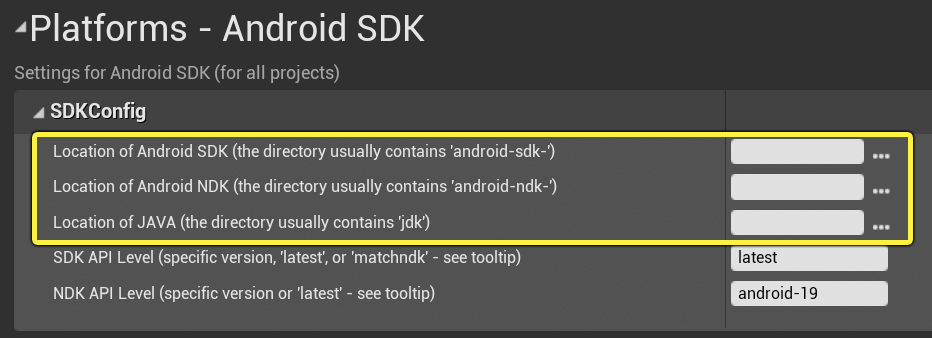
 stark marsh
I had to set mine to C:\Program Files\Android\Android Studio\jre
stark marsh
But is it set to the location of your Android Studio installation?
stark marsh
Great 🙂
open rapids
why when packagin having this error?
sometimes when i restart the editor this error desappear
but firts packagin always display this error version 4.25.3
burnt remnant
has anyone worked out how to generate a manifest for iOS DLC yet? I've not been able to release a project because of it.
mint leaf
You need to build sln in VS
tiny nexus
Anyone had an error about "None" package, when trying to build lighting by scripts?
 west ibex
Hello everyone! I have a question. Why i dont have a material in my android game? In windows, this material working good. But after Android packaging i have no material in Plane
terse glacier
Anyone else have issues with the "Create compressed cooked packages" option? With this setting my packaged game simply crashes on load, I think it might be related to 4.25, game runs fine without it enabled. This setting worked earlier for me, and reduced the overall size by 50%. I have seen other posts on forums about it but not found any solution. Are you guys using this?
terse glacier
@mellow bane Thanks, great to know, will do!
twilit fern
I have this weird scenario where assets are indeed being packaged, but the asset manager isn't seeing them??
thorny cobalt
@mint leaf I have Source Control disabled if that's what youre referring to
 spice prairie
nvm it was the engine content
burnt remnant
has anyone worked out how to generate a manifest for iOS DLC yet? I've not been able to release a project because of it.
mint leaf
I was going to look at it for a client but with the whole epic/apple thing they put their project on hold for iOS/mac
 compact cobalt
Hey everyone! Maybe someone worked with chunk's, especially runtime chunk installing (or pak mount\unmount) and can help me to understand how I can access content from the newly mounted pak(chunk) file? Currently I'm doing it through iterating over all files inside new mounted pak file and calling "LoadPackage", but I'm not sure if this is the right way (otherwise UE4 could not find any assets from the new pak file)
 weary flame
Anyone ever had this happen. Works in the viewport but not when it packages. Widgets not showing up properly.
 hoary crypt
anyone know what this error is:
Ensure condition failed: FMath::IsFinite(TexelFactor) [File:D:\Build++UE4+Licensee\Sync\Engine\Source\Runtime\Engine\Classes\Engine/TextureStreamingTypes.h] [Line: 96]
 tropic marsh
Can a blueprint-only project be packaged into a dedicated server?
mint leaf
If you make some modifications yes, else no
burnt remnant
@tropic marsh to package a dedicated server you have to use a source build of the engine
that's the main hurdle I think
burnt remnant
anyone have a snippet for only loading modules on certain platforms? I've forgotten the syntax and even the name of it
plugin! that's the word I was after
got it
alright. I have this windows-only plugin I've made. I've set it to whitelist Windows64, and now I'm trying to build for android. I haven't actually used anything in the plugin yet so nothing in the game depends on it. is that whitelist enough to stop it from trying to include the plugin? right now it seems to be failing to build because without the windows-only headers it fails.
what's the word for filtering dependencies in the build.cs file per platform?
 gentle lava
Hey all, does anyone know of a way to create asset packs that can used from the install Vault location? If not, does any one have ideas of how they share library assets and content packs within a large team, without having to locate and migrate from old projects?
would be super handy if there was a way to distribute internal asset packs to my team using, for example using a shared vault location and organizing our internal models and animations into content packs
 brittle geyser
Is there an easy way to estimate building times? Im planning on developing with ue for multiple platforms (ps, xbox, switch, pc) but the proyect is still too early to actually build anything and estimate the final time
 frank haven
Does anyone have any experiencing getting their mobile game on the android play store?
I upload my .abb that I packaged via android studio , but when they test it says no obb found no key store for downloading?@wheat wave
Same problem for me with UE 4.5.3 generated abb. I don't understand how to upload generated obb to the store. Did anyone succeed ?
mint leaf
Is there an easy way to estimate building times? Im planning on developing with ue for multiple platforms (ps, xbox, switch, pc) but the proyect is still too early to actually build anything and estimate the final time
@brittle geyser it depends on a lot of things, I have modelled some data for different projects but it depends
spare acorn
Is it possible to not include the config files in the pak file of the built game?
mint leaf
Same problem for me with UE 4.5.3 generated abb. I don't understand how to upload generated obb to the store. Did anyone succeed ?
@frank haven
Its literally in project settings
frank haven
@mint leaf what ? If you talk about store key, I followed all instructions
- generate key with
C:\Users\User>keytool -genkey -v -keystore arcade_petitbonheur.keystore -alias arcade_petitbonheur_key -keyalg RSA -keysize 2048 -validity 10000 - placing in
Build/Androidfolder - fill fields in
Project Settings > Android
https://docs.unrealengine.com/en-US/Platforms/Mobile/Android/DistributionSigning/index.html
[/Script/AndroidRuntimeSettings.AndroidRuntimeSettings]
PackageName=com.aikocreative.arcadepetitbonheur
StoreVersion=43
StoreVersionOffsetArmV7=0
StoreVersionOffsetArm64=1
StoreVersionOffsetX8664=2
ApplicationDisplayName=Chemin du Petit Bonheur Baillargues
VersionDisplayName=1.4
MinSDKVersion=23
TargetSDKVersion=29
InstallLocation=Auto
bEnableGradle=True
bEnableLint=False
bPackageDataInsideApk=False
bCreateAllPlatformsInstall=False
bDisableVerifyOBBOnStartUp=True
bAllowLargeOBBFiles=False
bAllowPatchOBBFile=False
bUseExternalFilesDir=False
bValidateTextureFormats=True
+ExtraApplicationNodeTags=android:requestLegacyExternalStorage="true"
ExtraApplicationSettings=
ExtraActivitySettings=
KeyStore=arcade_petitbonheur.keystore
KeyAlias=arcade_petitbonheur_key
KeyStorePassword=*******
KeyPassword= (i tried with and without)
bBuildForArmV7=True
bBuildForArm64=True
bBuildForX8664=False
bBuildForES2=False
bBuildForES31=True
bSupportsVulkan=False
bDetectVulkanByDefault=True
bBuildWithHiddenSymbolVisibility=False
bSaveSymbols=False
bEnableGooglePlaySupport=False
bUseGetAccounts=False
GamesAppID=
bEnableSnapshots=False
bSupportAdMob=False
AdMobAdUnitID=
GooglePlayLicenseKey=
bResampleForDevice=False
bMultiTargetFormat_ETC1=True
bMultiTargetFormat_ETC1a=True
bMultiTargetFormat_ETC2=True
bMultiTargetFormat_DXT=True
bMultiTargetFormat_PVRTC=True
bMultiTargetFormat_ATC=True
bMultiTargetFormat_ASTC=True
bEnableBundle=True
Getting your project ready to be release to the Google Play store.
burnt remnant
does anyone know how to build a manifest file for iOS DLC?
mint leaf
@frank haven sounds about right, but honestly I havent done it in a while
 shadow storm
hey I am having some issues, everything seems to work fine in my game, I have a false gravity c++ plugin that compiles and all the blueprints check out but unreal keeps saying it cant find a file.
I think its cant find load the c++ plugin on packing anyone know whart could be causing this?
shadow storm
Failed to load Parent for BlueprintGeneratedClass /Game/GravityCharacter/GravityCharacter.GravityCharacter_C
While loading Replicated_Character.uasset' failed to load '/Script/FalseDirectionalGravity': Can't find file.
shadow storm
is there anything that needs to be done to pack a game when a c++ plugin doesnt want to show up or be found during packing of the game? For some reason my packed game cant find the c++ gravity plugin, but it compiles fine and it works in the game in the editor https://cdn.discordapp.com/attachments/755581562799521813/757795588023648426/unknown.png

 burnt remnant
does anyone know where to start looking in the engine source for the project launcher?
mint leaf
Did you set map target etc?
open rapids
mint leaf
yes, but read the logs
it probably says there is an error
Also you need to start it via a shortcut to set stuff
 blazing acorn
Question: What are some things to think about early on programming wise to ensure I can sell my game on the consoles as well as PC? @ me if you have a answer please!
 rain osprey
Hello guys! Question: I was wondering how can I create a AR project and package it in a way to integrate it to a already existing mobile application. I my case a client want to add a new "AR" mini-game into an existing IOS/Android app.
granite pulsar
Okay, So I've talked about this a lot; but nobody has seemed to have an answer (yet!);
Something changed in 4.25, but I cannot figure out what it was (So many commits, and i'm not sure where to narrow it down) I have two Issues, both related, but covering one first;
First Issue: When I "Package" from binary editor, it makes all manifests + Pak Chunks correctly.
RunUAT.bat -ScriptsForProject=Path\To\Project.uproject BuildCookRun -nocompileeditor -installed -nop4 -project=Path/To/Project.uproject -cook -stage -archive -archivedirectory=D:/UETEMP -package -ue4exe=Path\To\Engine\Binaries\Win64\UE4Editor-Win64-DebugGame-Cmd.exe -pak -prereqs -manifests -targetplatform=Win64 -build -target=CSGame -clientconfig=Development -utf8output
However, issuing RunUAT using the SAME parameters via the source version (with a couple ommitted, since they don't apply to building from source) it ONLY makes one manifest and pakchunk0.
RunUAT.bat -ScriptsForProject=Path\To\Project.uproject BuildCookRun -nop4 -project=Path\To\Project.uproject -cook -stage -archive -archivedirectory=D:/UETEMP -package -pak -prereqs -manifests -targetplatform=Win64 -build -target=CSGame -clientconfig=Development -utf8output
With 4.24, 4.22 and 4.19, it didn't matter which version of the engine was doing it; both will create the chunks.
Second Issue: When Asset Labels that are setup for a folder (tagging all assets to be able to have a unique pakId) are used, EVERY asset is being included in 4.25 even if they are not referenced by any of the maps, or the "force include" list.
binary editor = installed build, built from the same source folder.
i have to package from source, because of Unique compile environments in the .target.cs for the shipping versions (setting defines, etc).
open rapids
what is Build Configuration? How can I use debug game?
open rapids
open rapids
how do i crossplatform package my project? please don't tell me i need to do them indivisually
 wary apex
Since each platform sets up software differently I would imagine you'd have to build each platform individually, though desktop does the 3 main options I think that's the closest you can get
open rapids
yo can i not upload the whole folder, do i need to only upload one thing on itch io?
open rapids
yo i can't package to 32 bit only 64 please help
mint leaf
Since each platform sets up software differently I would imagine you'd have to build each platform individually, though desktop does the 3 main options I think that's the closest you can get
@wary apex
You do, you also need to install all the requisite toolchains
wary apex
Yep
 harsh cosmos
@open rapids 32bit is like.. dying out.
open rapids
@harsh cosmos definitely not many people still use it and a lot of laptops still have it
btw just go project settings> all settings> target 32bit and tick it and package it
mellow bane
Steam's audience is quite representative of gamers, though
open rapids
most lower end users don't have steam cause many of them pirate
mellow bane
Pirates have Steam too
open rapids
yeah
mellow bane
People using a 32b OS today don't even get security updates, 7 and XP are EOL
Unless you're running a 32b version of Windows 8 of all systems 😄
open rapids
i have family that wanna play the game and they only have 32bit and many other people that use itch also have 32bit, so why not take the extra 5 minutes to package for 32bit too?
mellow bane
Because you should spend those 5 minutes telling them to use a system that is not completely compromised by every hacker on Earth
Anyway, happy you found a solution
open rapids
you don't know how much shit costs in my country
and most of the time 32 bit is much cheaper
mellow bane
What I do know is that it's not getting any security since a year ago at best
open rapids
people don't care about that tbh
mellow bane
You don't care about a ransomware wiping your disk ?