#packaging
1 messages · Page 17 of 1
 tender orbit
How would you handle something like a build ID you want to inject during build process? CustomConfig I'm guessing is referencing something similiar to Lyra's setup with projects?
 winged moss
tender orbit
How would you handle something like a build ID you want to inject during build p...
winged moss
tender orbit
How would you handle something like a build ID you want to inject during build p...
The UAT SetVersion step does this, injects branch name and Perforce CL
tender orbit
Yea, so we generally want ability to do this with any config value during CI process
 summer dock
tender orbit
Yea, so we generally want ability to do this with any config value during CI pro...
summer dock
tender orbit
Yea, so we generally want ability to do this with any config value during CI pro...
I've rolled my own python scripts to manipulate .ini files and .uproject files
tender orbit
Yea, we have something that works fine for cook as pointed out above, just wasn't sure if that is what CustomConfig does, doesn't feel like its quite the match. Made a commandlet that is triggered during staging that updates inis based on input values on command line for the UAT process
 gusty radish
Dear community, I am having an issue with a blank project, creating a few boxes and trying to package my game to test. I have never touched ControlRig and simply cant get it to package:

I made sure I am on the correct compiler version for 5.4 and have no other errors. Just exceptions out at this message
All I want to know is if this is a known error, or if I have done something wrong ^^
summer dock
gusty radish
I made sure I am on the correct compiler version for 5.4 and have no other error...
Sanity check that you can package a blank project perhaps. If that works, try adding a rig intentionally, test again. If either fails, Verify editor installation might help
 sweet lotus
Anybody use Rez for UE tooling deployment for your Studio?
I'm looking to learn how other studios are doeloying their UE Plugins. (w/ consideration of special cases in which Python Custom Libraries are dependencies)
winged moss
gusty radish
Dear community, I am having an issue with a blank project, creating a few boxes ...
well if it's building it, the plugin's enabled
otherwise, you might need to verify your engine install, or there's a bug with your MSVC version.
 jagged cape
When I cook / package my log gets spammed with about 30 bunch of warnings like this (they are all identical except for the UAID at the end):
UATHelper: Cooking (Windows): LogNavigation: Warning: Navigation System: registration queue full! System:/Game/Maps/TowerAreas/towerZeroNewPartitions/PvE-Intro-Partitioned.PvE-Intro-Partitioned:NavigationSystemV1_0 NavData:/Game/Maps/TowerAreas/towerZeroNewPartitions/PvE-Intro-Partitioned.PvE-Intro-Partitioned:PersistentLevel.RecastNavMesh_UAID_A4BB6D6569EF711C02-Default PackagingResults: Warning: Navigation System: registration queue full!
Nothing seems to be wrong in the packaged build. I found a forum thread with a similar error and it said to look either for unloaded recast nav meshes in the world partition (which I do not have) or to try and find the given recast nav meshes in the ExternalActors folder and manually delete them, but I don't know how to find the correct folder within external actors from the given log warning line.
 oak oracle
Does anyone know how to get a USD stage working in a packaged game? My stage is loaded and works fine in the editor when I play. but packaging the game its just not there. Dev, debug or shipping - all the same. Tried with 5.4 and 5.5 preview
 buoyant slate
Is there a way to specify the Microsoft GDK version that a Source Engine build uses if there are multiple versions installed? Similar to the Compiler/CompilerVersion entrys in the BuildConfiguration.xml
(I was using UE4.25 and was able to adjust things in UEBuildGDK.cs)

 reef quiver
 untold fossil
 reef quiver
untold fossil
but i already have visual studio code and msy installed
reef quiver
untold fossil
but i already have visual studio code and msy installed
did you follow all of these instructions? https://dev.epicgames.com/documentation/en-us/unreal-engine/setting-up-visual-studio-development-environment-for-cplusplus-projects-in-unreal-engine
winged moss
Visual Studio Code is not Visual Studio
summer dock
Rule of Thumb with Unreal setups seem to be to read the docs and follow them exactly, it's very finicky of anything not being just so
winged moss
That's true with Android but Windows is less finicky
 carmine salmon
Not sure about steam but this is done in engine ini
winged moss
but it's best to have the correct WinSDK and build toolchain
carmine salmon
carmine salmon
Not sure about steam but this is done in engine ini
change the RHI like this DefaultGraphicsRHI=DefaultGraphicsRHI_DX12
untold fossil

The latest version of Visual Studio has some super cool features for Unreal Engine 5. In this video we run through a full setup and demo the new integrations for blueprints, tests, naming conventions, and macro expansion.
🔴 Subscribe for more game development videos: https://www.youtube.com/riotnu?sub_confirmation=1
Check out my video on build...
should i follow this or just go with the docs(extremely bad with text )
winged moss
I ain't watching a whole video, it's just the IDE (latest version is fine), C++ for desktop, C++ for game development, .NET desktop, 14.38 build tools
untold fossil
ok
reef quiver
the text guide has pictures, which is like a video, but played really really slowly.
carmine salmon
Can be done in code like this
{
    const FString RHI_DX11(TEXT("DefaultGraphicsRHI_DX11"));
    const FString RHI_DX12(TEXT("DefaultGraphicsRHI_DX12"));
    const FString RHI_VULKAN(TEXT("DefaultGraphicsRHI_Vulkan"));

    switch (GraphicsRHI)
    {
    case EGraphicsRHI::RHI_DX11:

        SurvivalGameUserSettings->SetEngineIniValue("/Script/WindowsTargetPlatform.WindowsTargetSettings", "DefaultGraphicsRHI", *RHI_DX11);
    case EGraphicsRHI::RHI_DX12:

        SurvivalGameUserSettings->SetEngineIniValue("/Script/WindowsTargetPlatform.WindowsTargetSettings", "DefaultGraphicsRHI", *RHI_DX12);
    case EGraphicsRHI::RHI_VULKAN:
        SurvivalGameUserSettings->SetEngineIniValue("/Script/WindowsTargetPlatform.WindowsTargetSettings", "DefaultGraphicsRHI", *RHI_VULKAN);
    }
}```
```void UMoreGameUserSettings::SetEngineIniValue(const FString& Section, const FString& Key, const FString& Value)
{
    const FString PlatformName = UGameplayStatics::GetPlatformName();
    FString EngineIni = FPaths::GeneratedConfigDir() + PlatformName + TEXT("/Engine.ini");
    EngineIni = FConfigCacheIni::NormalizeConfigIniPath(EngineIni);
    GConfig->EnableFileOperations();
    GConfig->SetString(*Section, *Key, *Value, EngineIni);
    GConfig->Flush(true, EngineIni);
}```this seems slightly overengineered?
carmine salmon
how come
winged moss
seems like a lot of steps, and for some reason uses GeneratedConfigDir? I'm sure that isn't Saved/Config
carmine salmon
winged moss
seems like a lot of steps, and for some reason uses GeneratedConfigDir? I'm sure...
it is, as that changes in shipping from saved to appdata but yes it works returns the correct path in shipping and dev builds
Path in shipping C:\Users\dante\AppData\Local\Survival_Craft\Saved\Config\WindowsClient\Engine.ini and Dev build C:\Users\dante\OneDrive\Desktop\SC Server\Game\WindowsClient\Survival_Craft\Saved\Config\WindowsClient\Engine.ini
carmine salmon
winged moss
should just need SetString and Flush
GEngineIni? where
carmine salmon
winged moss
should just need SetString and Flush
and also i need the enable/disable file operations its just for my project
winged moss
GEngineIni is a global in CoreGlobals.h
carmine salmon
winged moss
GEngineIni is a global in CoreGlobals.h
yes i know that thought u ment i had it in the code and GEngineIni does not work for me as i use a client build and GEngineIni returns Windows not WindowsClient
 hidden sparrow
Hello! I need some help, how do I enable logging to file in a shipping build? I need to debug a crash that only happens when setting build to shipping.
I have added this code in my ProjectName.Target.cs:
BuildEnvironment = TargetBuildEnvironment.Unique;
bUseLoggingInShipping = true;```

When i try to build the game from my IDE it does not let me build it and it says: `Targets with a unique build environment cannot be built with an installed engine.`

Same thing if I try to generate visual studio project:
 dreamy tide
Getting this error when packaging: LogWater: Error: Failed to triangulate Ocean mesh for BP_Ocean_KC. Ensure that the Ocean's spline does not form any loops.
Not sure how to handle this, as Close Loop is greyed out?
 winged moss
hidden sparrow
Hello! I need some help, how do I enable logging to file in a shipping build? I ...
winged moss
hidden sparrow
Hello! I need some help, how do I enable logging to file in a shipping build? I ...
Pretty much what it says on the tin. Unique build environments require a source build
hidden sparrow
winged moss
Pretty much what it says on the tin. Unique build environments require a source ...
I removed BuildEnvironment = TargetBuildEnvironment.Unique; but I still can't package the game in shipping mode.
I also tried adding bOverrideBuildEnvironment = true; but i get spammed with linking error for missing log categories
winged moss
like I said, you cannot have a unique build environment with the launcher build or an installed build, it requires a source build
enabling logging in shipping modifies build definitions for the engine, and as such requires a source build
you can possibly make an installed build where that's defaulted to on in UnrealGame.Target.cs, but setting up a native engine build is easy too
hidden sparrow
Can you point me on how to do it?
winged moss
there's a whole guide on how best to structure your project in #source-control, but the important part is this:
https://dev.epicgames.com/community/api/learning/image/029fe999-a018-4d98-802a-e5db55f44aac?resizing_type=fit

I was hoping it would embed the image

you can get the engine source from GitHub or if you're an engine licensee, from the Epic licensee Perforce server
but it talks about that in the same article
 inland latch
winged moss
and you can use command line params
inland latch
winged moss
and you can use command line params
Thanks this was indeed what I was looking for!
Is there any way ingame I could confirm what it's running? (Like a command or something?)
winged moss
I'm sure via code you can get the current RHI or use a third party overlay or something
inland latch
carmine salmon
Can be done in code like this
```void UVideoSettings::SetGraphicsRHI(EGraphicsR...
So.. for someone not knowing C++ as well.. if at all! 🫣
Could you explain what these codes do? 😇
summer dock
inland latch
So.. for someone not knowing C++ as well.. if at all! 🫣
Could you explain what...
Switches between different renderers : DX11 ( DirectX ), DX12, Vulkan
Some games find it advantageous to give users the option to use GLES ( mobile ) renderer even, can help some laptops to work for example
winged moss
that's -featureleveles31
which is also how the mobile preview works
I asked about that on UDN ages ago, it's what Fortnite's "performance mode" does
summer dock
Yeah, we have it as an option now on Steam
We were getting a lot of people shocked when we moved up to unreal 5, and game wouldnt work for them anymore
 serene jolt
is there a way to exclude certain folders for server cooks? for instance, i want to exclude UI folders
i've looking up information about this online but i'm finding little information on DefaultPakFileRules.ini
 winged moss
Do the assets mentioned in the errors actually open?
untold fossil
the ones in the red?
winged moss
yes, those are the errors
untold fossil
they dont exist
winged moss
yellow the warnings
untold fossil
i browsed through but m_basic_wall doesnt exist
winged moss
well that sounds like a corrupt asset
you can try reverting it in source control to an earlier revision (though this where I anticipate you telling me you don't use it)
untold fossil
i dont use it in the project so its more convinient removing it completely
thanks for the help man
winged moss
damn please set it up
 winged moss
well yeah, there's no Source directory like the error says
summer dock
untold fossil
cant generate visual studio project files
create a dummy c++ file in the editor and your project will magically become a c++ project. Or maybe just adding a "Source" folder works too? Not sure
untold fossil
summer dock
create a dummy c++ file in the editor and your project will magically become a c...
thanks for that
winged moss
It will need a Build.cs, the relevant Target.cs, and then the actual module class implementation, but adding a class from the editor generates that
untold fossil
winged moss
It will need a Build.cs, the relevant Target.cs, and then the actual module clas...
i added bp classes but it didnt do anything
winged moss
well last I checked, adding a BP class is not adding a C++ class
untold fossil
oh then what class do i need to add from the editor?
winged moss
file > add c++ class
summer dock
Tools->New C++ class it seems to be in 5.4.4
untold fossil
thanks that did change things a bit
 manic horizon
 winged moss
14.38 if on 5.4
 hollow jungle

this is happening when i run my build as an application, anyone know how i can fix this?
winged moss
hollow jungle
this is happening when i run my build as an application, anyone know how i can f...
Elaborate on how you're doing this
 proper zodiac
hey there im trying to build my game using steammultiplayer system but whenever i try build it i get this error how do i fix this im using blueprint dont know if that makes a different or not

packing was working intill i added the steamworks api in and the steam subsytem pygin
plugin
 hollow iron
I can't get the Steam overlay to display when creating a shipping build. The overlay works when I create a development build. Can anyone help? I've created a txt file with the app ID as suggested by many YT videos, but that hasn't worked either.
 plain narwhal
Trying to setup ci cd with Jennkins, getting problem with Gradle start, I think it caused by no permission to virtual disk Z:
Creating rungradle.bat to work around commandline length limit (using unused drive letter Z:)
Writing symbols to C:\ProgramData\Jenkins\.jenkins\workspace\LeafFableAndroid\Binaries/Android\LeafFable_Symbols_v9/LeafFable-armv7\libUE4.so```

Folder intermediate/Android/Gradle always is empty
So I'm getting
```log
ERROR: System.IO.DirectoryNotFoundException: Could not find a part of the path 'C:\ProgramData\Jenkins\.jenkins\workspace\LeafFableAndroid\Intermediate\Android\gradle\app\abi.gradle'.
          at System.IO.__Error.WinIOError(Int32 errorCode, String maybeFullPath)
          at System.IO.FileStream.Init(String path, FileMode mode, FileAccess access, Int32 rights, Boolean useRights, FileShare share, Int32 bufferSize, FileOptions options, SECURITY_ATTRIBUTES secAttrs, String msgPath, Boolean bFromProxy, Boolean useLongPath, Boolean checkHost)
          at System.IO.FileStream..ctor(String path, FileMode mode, FileAccess access, FileShare share, Int32 bufferSize, FileOptions options, String msgPath, Boolean bFromProxy, Boolean useLongPath, Boolean checkHost)
          at System.IO.StreamWriter.CreateFile(String path, Boolean append, Boolean checkHost)
          at System.IO.StreamWriter..ctor(String path, Boolean append, Encoding encoding, Int32 bufferSize, Boolean checkHost)
          at System.IO.File.InternalWriteAllText(String path, String contents, Encoding encoding, Boolean checkHost)```

I tried to switch Jenkins to specific user instead of authority, but it didn't helped. Hot to fix that problem?I would first sanity check whether you can package from editor with the same settings to be sure whether this is jenkins issue or general setup issue
untold fossil

im trying to export two maps one is my ui map and the other is my game map ,iam not skilled enough to read these logs
much appreciated if anyone can tell me what is wrong
winged moss
untold fossil
much appreciated if anyone can tell me what is wrong
the Fab plugin breaks packaging, disable it
proper zodiac
hey there im using the unreal engine advanced steam sessions plugin but whenever i try test the game it doesnt work i did the c++ class and built the project with unreal engine closed got no errors but when i try test it the steam doesnt show up and i have steam open in the background
 gritty violet
proper zodiac
hey there im using the unreal engine advanced steam sessions plugin but whenever...
gritty violet
proper zodiac
hey there im using the unreal engine advanced steam sessions plugin but whenever...
Posting logs might be helpful
proper zodiac
i have looked and i cant seem to find a fix everything is set up the right way
untold fossil
winged moss
the Fab plugin breaks packaging, disable it
ok
untold fossil
winged moss
the Fab plugin breaks packaging, disable it
Where did u learn to Read Logs?
proper zodiac
gritty violet
Posting logs might be helpful
i have checked all the logs i have it all set up correctly it just isnt working and idk why
it works now
 vernal viper
Does anyone know if it is required to cook content before packaging the build, or packaging automatically perform the required cooking?
 mystic atlas
Packaging will cook the required assets.
vernal viper
mystic atlas
Packaging will cook the required assets.
Thank you. Somehow I feel like it doesn't cook.
If I cook content when Development mode is selected, will the cooked content be used if I run Debug Game (from VS)?
mystic atlas
I'm not sure on that one.
 cunning sparrow
Hey everyone, hopefully this is the right place to ask; I am following online resources on how to create bundled pso caches and I am stuck on the step where I need to run a packaged build with -logPSO command line switch. I believe I do this step correctly, however, documentation states that rec.pipelinecache files would be placed under Saved/CollectedPSOs; however, unless I am not looking in the right directory, I cannot find this CollectedPSOs folder. I am using 5.4, with build source build from github, and I am following these resources:
https://www.tomlooman.com/psocaching-unreal-engine/
https://dev.epicgames.com/documentation/en-us/unreal-engine/manually-creating-bundled-pso-caches-in-unreal-engine?application_version=5.4
Any help would be appreciated 🙂 thank you
 cloud kestrel
I am trying to exclude a bunch of files for a linux build. I added the file path needed in a DefaultPakFileRules.ini file put in the config folder. But when packaging the project I get a "Excluding config file DefaultPakFileRules.ini". Do I need to tell the engine that I want this in the package somewhere?
 round jolt
Hi all i wanted to ask this question but I updated my project to 5.4 from 5.2 and i keep getting this error when trying to package looking for some advice on fixing the isue PackagingResults: Error: Unknown Error PackagingResults: Error: Unknown Cook Failure
UATHelper: Packaging (Windows): LogCook: Error: Content is missing from cook. Source package referenced an object in target package but the object was stripped out of the target package when saved.
UATHelper: Packaging (Windows): Source package: /Game/Awakening_Game/Code/Core/Systems/InventorySystem/AC_Awake_Inventory
UATHelper: Packaging (Windows): Target package: /Game/Awakening_Game/Code/Core/Systems/Event_Sys/Events/BP_Event
UATHelper: Packaging (Windows): Referenced object: /Game/Awakening_Game/Code/Core/Systems/Event_Sys/Events/BP_Event.BP_Event_C:Arrow_GEN_VARIABLE
cloud kestrel
round jolt
Hi all i wanted to ask this question but I updated my project to 5.4 from 5.2 an...
Have you cleaned everything before you started you cook? Like deleted the intermediate folder, save folder etc? So you start of with a clean solution
round jolt
cloud kestrel
Have you cleaned everything before you started you cook? Like deleted the interm...
yes did it a few times lol
round jolt
cloud kestrel
Have you cleaned everything before you started you cook? Like deleted the interm...
all 4 of these i have deleted
 cloud kestrel
round jolt
all 4 of these i have deleted
cloud kestrel
round jolt
all 4 of these i have deleted
Hmm, I would delete the binaries folder too, but I would be surprised if that fixes your issue :/
round jolt
cloud kestrel
Hmm, I would delete the binaries folder too, but I would be surprised if that fi...
yeah not sure what else it could be i will do that and run it again and see if i get more errors
cloud kestrel
cloud kestrel
Have you cleaned everything before you started you cook? Like deleted the interm...
I guessed you checked this thread?
https://forums.unrealengine.com/t/logcook-error-content-is-missing-from-cook-source-package-referenced-an-object-in-target-package-but-the-target-package-was-marked-nevercook-or-is-not-cookable-for-the-target-platform/1825570

Epic Developer Community Forums
During the cook process of packaging I get a bunch of these errors? I tried using this cook settings and without: -AdditionalCookerOptions=“-cookprocesscount=4”. 1Either way I see errors. Sometimes without that multi-thread cook setting, it works, but not always. LogCook: Error: Content is missing from cook. Source package referenced an object ...
round jolt
cloud kestrel
I guessed you checked this thread?
https://forums.unrealengine.com/t/logcook-err...
Yes i did
round jolt
cloud kestrel
I guessed you checked this thread?
https://forums.unrealengine.com/t/logcook-err...
I will try a few of these things again see if it works
round jolt
@cloud kestrel Fixed 🙂
cloud kestrel
round jolt
<@996696300454150195> Fixed 🙂
Oh, the bin folder was the bad boy?
round jolt
cloud kestrel
Oh, the bin folder was the bad boy?
This guy right here

cooking checked it on
cloud kestrel
round jolt
cooking checked it on
Glad you found it 🙂
round jolt
cloud kestrel
Glad you found it 🙂
I managed to fix a few of my assets with this issue by
Marking the variable with the error as editor only compiling.
Unticking editor only and compiling agian.
3.Packaging/Cooking Content agian.
round jolt
cloud kestrel
Glad you found it 🙂
me too i was up really late trying to firuge it out
 dreamy panther
Does anyone know why we might be getting this error?
Internal Compiler Error: System.ArgumentException - An item with the same key has already been added.
Checking the uhtmanifest, it looks like all the headers are being included twice for a particular plugin for some reason. Note: The plugin is NOT installed at engine level, I know that sometimes can cause issues where one erroneous file is including the engine version instead of project version.
 hard thistle
Hello friends! I tried to cook the content and package my project, but there are a lot of errors showing in the output log. But I don't understand them at all. Could anyone help? Thanks!
 hard thistle
Hello friends! I tried to cook the content and package my project, but there are...
hard thistle
hard thistle
Hello friends! I tried to cook the content and package my project, but there are...
It looks like that it has something wrong with one animation sequence. Since I have a lot of animations, is there a way to quickly find it?
summer dock
hard thistle
Hello friends! I tried to cook the content and package my project, but there are...
Please post error logs as .txt files or
code snippets
It is much easier to read and copy paste relevant bits
In any case, looks like one your animation sequences is not feeling well. I would look at the whole log, searching for all occurences of "error" first and "warning" second, looking for suspect problems / references to animation sequences
hard thistle
hard thistle
The txt file is here
But I still don't understand the error parts
summer dock
hard thistle
But I still don't understand the error parts
- your project path is way way nested and may cause issues
hengcanz_489\CTIN_489\20231\18363\Projects\DogPunk\DogPunk\DogPunk - These Anims looks broken - they are Warnings, but might be cause of error as well
Found non valid position track for Slide1, 74 frames, instead of 73. Chopping!```There's load more Warnings
I suggest
- moving your project higher up to a near-root folder
- fixing up all the warnings that you can
hard thistle
summer dock
* your project path is way way nested and may cause issues
```hengcanz_489\CTIN_...
Got it, thank you so much!
hard thistle
summer dock
* your project path is way way nested and may cause issues
```hengcanz_489\CTIN_...
I got it fixed by fixing the animations, thank you again!
 patent forum
Hello,
Anyone knows what could be causing this issue when trying to package? Colleges using the same project can package fine

 patent forum
Didn't even see that lol ty I'll try
 orchid seal
@summer scroll
Even after removing the plugins the project won't compile now, no errors aside from the unkown one, it just fails.
I'll post the log and you let me know if you see anything, there are a couple warnings that mention plugins, but I'm not sure what the make of them.
There are 3 in line 978
You gotta download the file to see the whole thing.
 summer scroll
orchid seal
You gotta download the file to see the whole thing.
summer scroll
orchid seal
You gotta download the file to see the whole thing.
"UATHelper: Packaging (Windows): No Visual C++ installation was found. Please download and install Visual Studio 2022 with C++ components.
UATHelper: Packaging (Windows): Total execution time: 1.37 seconds
UATHelper: Packaging (Windows): Visual Studio 2022 x64 must be installed in order to build this target."
Your Unreal cannot reach your toolchain. You need to setup your toolchain properly to make it aware by Unreal.
 hardy forge
You need Visual studio to package and compile
orchid seal
So you're telling me is that I lucked out into having VS being installed on my computer previously (before I wiped my PC clean), and the lack of that is what's causing the problems right now?
summer scroll
There is a brutal way. Use visual studio to compile the whole Unreal, then it is guarantee to be aware of the visual studio(or other toolchain) you have.
At least, that was how I deal with it when I was doing windows game dev for a company.
orchid seal
I just read about compiling Unreal, seems like a nightmare.
summer scroll
orchid seal
So you're telling me is that I lucked out into having VS being installed on my c...
According to the message, that's the problem Unreal is complaning at least.
orchid seal
Shit I'll try it, VS should always be installed on my PC anyway.
summer scroll
orchid seal
I just read about compiling Unreal, seems like a nightmare.
I'm not sure if there is other way for windows game dev nowadays. But at least it's easier than Linux & Mac OS already. (I work on these platforms.)
summer scroll
orchid seal
Shit I'll try it, VS should always be installed on my PC anyway.
Good luck, then.
orchid seal
summer scroll
I'm not sure if there is other way for windows game dev nowadays. But at least i...
The commercial version SHOULD suffice for a small solo dev.
orchid seal
summer scroll
Good luck, then.
Thanks guys, I'll check back here, if anything new pops up.
 cobalt spire
Does anybody know if the Grit7Z add for 7-zip works for viewing .pak files?
winged moss
not remotely the same file format
cobalt spire
So, what utility can I use besides installing Unreal Engine 4/5?
winged moss
What is this for? Unofficial modding is not something that this server deals with
 stark shore
I have just reinstalled the Windows SDK and .net 3.1 and still getting this 😮💨


 winged moss
stark shore
I have just reinstalled the Windows SDK and .net 3.1 and still getting this 😮�...
winged moss
stark shore
I have just reinstalled the Windows SDK and .net 3.1 and still getting this 😮�...
Engine version?
And I would expect the output log to have more detailed info
stark shore
might be the Automation tool
 winged moss
then repair your engine install
though I can't tell from your overcropped screenshot
stark shore
THX engine Verify fixed it
 limber bear
Hi, I have a problem with packaging the title, on one platform it results in a 6gb package while on the other it is 26gb (I unfortunately cannot say what those platform are but they are similar) any hint as to how even approach debugging that?
Also bonus question, how do I disable packaging of Epic quality content if Im sure that quality will never be used?
 haughty terrace
Hey, does anyone know how I can capture game logs in a shipped build of my game?
winged moss
haughty terrace
Hey, does anyone know how I can capture game logs in a shipped build of my game?
You can enable logs in shipping if you enable it and use a source build
haughty terrace
winged moss
You can enable logs in shipping if you enable it *and* use a source build
I found this article which suggests you don't have to have a source build, but it doesn't seem to work for me
Devops, programming and gaming
shame that you have to have a source build
winged moss
Yeah whoever wrote that just making shit up
You should not do any of the extra stuff
Just the bUseLoggingInShipping setting in Target.cs
You can't have a unique build environment in the launcher build (or any installed build for that matter)
inland latch
I guess I'll ask this here, not sure where it belongs properly..
So I use UE 5.3.2, and usually beforee I packlage a Dev Package for testing I go through a lot of the Build Menu options, like:
- Geometry (CurrentLevel)
- Paths
- HLODS
- Landscape Spline Meshes
- Virtual Texture Streaming
- Virtual Textures
- Landscape
Those are I believe the only ones I "need".
So my Question, if I use the Prjoect Launcher with a Custom Profile for my Dev Package, do I need to go through all the Build options above everytime?
Or, does the option in the Profile to Build UAT do this for me?
Or, can I add CommandLine PArams to do the above mentioned options automatically when pakcaging?
Or is there another way to do the above Build options automatically in a Batch script or something?
Hope you guys can tell me? ❤️
 stable bramble
Hello! Is it possible for me to package a windows standalone build that works with the RemoteControl MIDI protocol? I have successfully got my MIDI controls working in Play mode but does not work once I make a windows package - no errors in the output log (Im using Unreal 5.4.4 )
Also to note, I found this https://www.youtube.com/watch?v=jlT-pSWcEr0 where he adds a -RC flag at the end of a shortcut to his windows executeable but that didnt work for me as I'm not using the web server part of RemoteControl API - I just need the MIDI -- Is there perhaps a flag I can put on it that will force RC MIDI to work in the build?
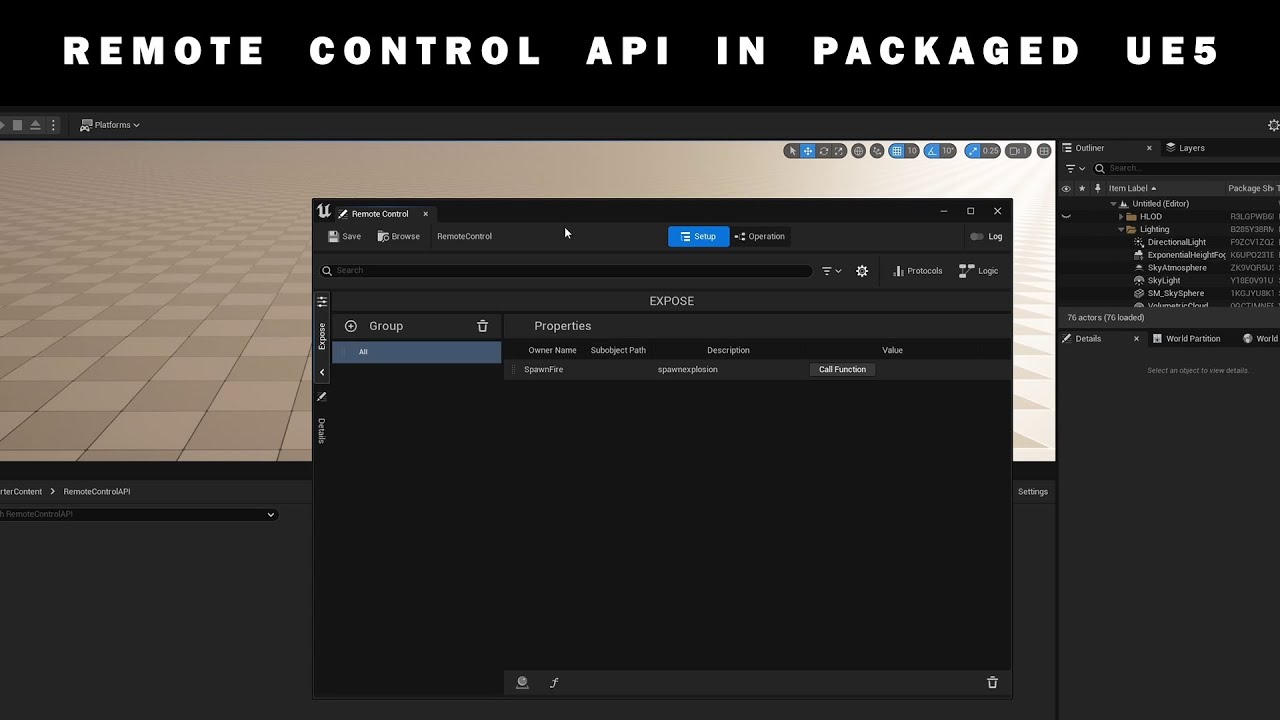
For a project I was working on I needed a way to trigger things over HTTP with the Remote Control API. In this short tutorial you can see how to start your packaged project with:
-RCWebControlEnable
Every Tuesday a short tutorial about Unreal Engine, broadcast or other applications I use in my work.
Instagram: https://www.instagram.com/sumatr...
 sweet willow
Cant fing whats wrong? Assertion failed: CurrentApplication.IsValid() [File:D:\build++UE5\Sync\LocalInstall\Engine\Source\Runtime\Slate\Public\Framework\Application\SlateApplication.h] [Line: 256]
0x00007fffb2e948a4 UnrealEditor-Fab.dll!FSlateApplication::Get() [D:\build++UE5\Sync\LocalInstall\Engine\Source\Runtime\Slate\Public\Framework\Application\SlateApplication.h:256]
0x00007fffb2eadb4d UnrealEditor-Fab.dll!FFabBrowser::RegisterSlateStyle() [D:\build++UE5\Sync\LocalBuilds\Fab\0.0.1\HostProject\Plugins\Fab\Source\Fab\Private\FabBrowser.cpp:98]
0x00007fffb2ea2e8d UnrealEditor-Fab.dll!FFabBrowser::Init() [D:\build++UE5\Sync\LocalBuilds\Fab\0.0.1\HostProject\Plugins\Fab\Source\Fab\Private\FabBrowser.cpp:68]
0x00007fffb2eb889d UnrealEditor-Fab.dll!FFabModule::StartupModule() [D:\build++UE5\Sync\LocalBuilds\Fab\0.0.1\HostProject\Plugins\Fab\Source\Fab\Private\FabModule.cpp:36]
0x00007ff8313ee42b UnrealEditor-Core.dll!UnknownFunction []
0x00007ff850c7a944 UnrealEditor-Projects.dll!UnknownFunction []
0x00007ff850c96ec1 UnrealEditor-Projects.dll!UnknownFunction []
0x00007ff850c7a1fe UnrealEditor-Projects.dll!UnknownFunction []
0x00007ff6b27434e2 UnrealEditor-Cmd.exe!UnknownFunction []
0x00007ff6b2747079 UnrealEditor-Cmd.exe!UnknownFunction []
0x00007ff6b273e146 UnrealEditor-Cmd.exe!UnknownFunction []
0x00007ff6b273e42a UnrealEditor-Cmd.exe!UnknownFunction []
0x00007ff6b27418a4 UnrealEditor-Cmd.exe!UnknownFunction []
0x00007ff6b27570c4 UnrealEditor-Cmd.exe!UnknownFunction []
0x00007ff6b27596e6 UnrealEditor-Cmd.exe!UnknownFunction []
0x00007ff8a77c7374 KERNEL32.DLL!UnknownFunction []
winged moss
well there's kind of a clue there
apparently there's an update for the Fab plugin that fixes this, or just disable it
 lavish kestrel
when trying to package a development build without c++ game module but having a c++ plugin throws some exceptions, but when adding a empty c++ class and with that adding a useless game module too it all works fine
what reasons could this have?
lavish kestrel
especially since i get some errors which would be more relevent for compilation, but the plugin in question does compile fine when having a game module
can it be related to the build.cs ?
public class AWSSDK : ModuleRules {

    public AWSSDK(ReadOnlyTargetRules Target) : base(Target) {

        Type = ModuleType.External;

        // This one is a bit concerning. During Link, some static symbols in
        // the SDK weren't found. This fixes it but it should always be the case for DLL linkage
        PublicDefinitions.Add("USE_IMPORT_EXPORT");

        // add any macros that need to be set. This is just an example define.
        PublicDefinitions.Add("WITH_AWSSDK=1");

        // add include path
        PublicIncludePaths.Add(Path.Combine(ModuleDirectory, "include"));

        // configure link libraries. This basically makes it windows x64 only
        string LibrariesPath = Path.Combine(ModuleDirectory, "lib", "Win64");

                // many PublicAdditionalLibraries.Add etc.

        // This should add the appropriate DLLs to the package by
        // copying the DDLs to the appropriate output dir
        string DLLPath = Path.Combine(ModuleDirectory, "bin", "Win64");

                // Many RuntimeDependencies.Add("$(BinaryOutputDir)/aws-c-common.dll", Path.Combine(DLLPath, "aws-c-common.dll")); etc.
    }
}
you must have at least one game module to use a C++ plugin in project
also be specific with errors
lavish kestrel
winged moss
you must have at least one game module to use a C++ plugin in project
is this always the case? so when i download a plugin from the marketplace which uses c++ and i want to build the game i still need a game module then ?
winged moss
in project it's 100% the case
lavish kestrel
i thought when the binaries for my build targets are precompiled it should work without then
but i guess im wrong about that
winged moss
well I don't make the rules, if you have a plugin in project you must also have at least 1 C++ module as part of your project
lavish kestrel
alright thanks!
winged moss
it's trivial to add one after the fact
lavish kestrel
winged moss
it's trivial to add one after the fact
it seems that unreal detects when a plugin needs a gamemodule and adds it temporary
i tried it with a new small c++ plugin and it seems to work, i tried it with the plugin in question solo and it worked too
only the combination of my big c++ plugin in combination with the plugin in questions raises the failed build error but strangly enough only for the plugin which builds solo perfectly fine
.uproject is has no code, but is being treated as a code-based project because: MeshModelingToolsetExp plugin is enabled. Creating temporary .Target.cs files.
engine plugins will do that, it doesn't really work properly with project plugins
all this trouble to avoid adding a minimal game module
lavish kestrel
i see so it also may depend on what the c++ plugins do if they somehow be compatible with a blueprint only project or not and since my big c++ plugin probably does a lot and depend on a lot of different modules they may not included or something like that
the only thing that still confuses me is the error messages, the error messages would more suggest a c++ problem since they indicate missing curly brackets and all that, but the code snippets the compiler suggets is free of errors
winged moss
well you still didn't post the errors
lavish kestrel
they are in german but i can wrangle them through chatgpt to have english errors one sec
winged moss
iirc if you set VS to English then it should produce English error messages
which will also help googling an error
lavish kestrel
at home i do have this but haven't done it at work yet
UATHelper: Packaging (Windows): D:\Unreal\CodeProjects\5.3\Lumen_5_3_NoCode\Plugins\MVAWS\Source\MVAWS\Public\IMVAWS.h(48): error C2760: Syntax error: "TPromise" was not expected here, but a "type specifier".
UATHelper: Packaging (Windows): D:\Unreal\CodeProjects\5.3\Lumen_5_3_NoCode\Plugins\MVAWS\Source\MVAWS\Public\IMVAWS.h(48): error C2059: Syntax error: "<"
UATHelper: Packaging (Windows): D:\Unreal\CodeProjects\5.3\Lumen_5_3_NoCode\Plugins\MVAWS\Source\MVAWS\Public\IMVAWS.h(49): error C2065: "SQSReturnPromise": undeclared identifier
UATHelper: Packaging (Windows): D:\Unreal\CodeProjects\5.3\Lumen_5_3_NoCode\Plugins\MVAWS\Source\MVAWS\Public\IMVAWS.h(49): error C2923: "TSharedPtr": "SQSReturnPromise" is not a valid template type argument for parameter "ObjectType".
stuff like this and more to come
winged moss
sounds like what I would expect from a plugin that's relying on unity builds but compiling without unity
lavish kestrel
couldn't i change the build type in the build.cs and set it to external ?
winged moss
no?
but you'd have to fix the plugin most likely
which is easy... with a C++ project
probably need to include whatever header has TPromise in it
which appears to be "Async/Future.h"
https://github.com/Accenture/mv-unreal-aws/blob/main/Source/MVAWS/Public/IMVAWS.h and if this is the plugin, then it doesn't seem to include it
winged moss
it could also be IncludeOrderVersion in the generated Target.cs, which you can't really control in a BP project
since Targets affect build settings for project plugins
lavish kestrel
which then would explain why a game module would fix it
winged moss
though usually unity issues affect cpp files rather than headers, so this is probably include order
lavish kestrel
i think so too
then minimal game module it is i guess
after adding the correct header and (for whatever reason) commenting the FObjectFinder out for the billboard it packages
stark shore
CANT built my project for a demo I only see 2 red errors and one was a ref to a actor I deleated , but i CLEANED UP THE REFS and the other is moaning about a default level but I cant see the issue. UATHelper: Packaging (Windows): LogStreaming: Error: Couldn't find file for package /ShooterCore/Weapons/Pistol/W_Reticle_Pistol_VR requested by async loading code. NameToLoad: /ShooterCore/Weapons/Pistol/W_Reticle_Pistol_VR
PackagingResults: Error: Couldn't find file for package /ShooterCore/Weapons/Pistol/W_Reticle_Pistol_VR requested by async loading code. NameToLoad: /ShooterCore/Weapons/Pistol/W_Reticle_Pistol_VR
Looks like I fixed the map one by loading it up blank then setting it again. but this async loading code keeps trying to load an asset I deleted, not sure how to fix
gritty violet
stark shore
CANT built my project for a demo I only see 2 red errors and one was a ref to a...
Posting more logs might be helpful. Although few quick questions
1 - Have you updated plugins through the launcher ?
2 - Enabled FAB plugin ?
 broken galleon
Hello!
I fixed some bugs in my game which is already on the epic games store and I would like to update it but I don’t know exactly how to proceed. Specifically, I used project launcher to package. I checked the following settings:
build configuration: Shipping
Cook: Windows
Release/DLC?patching : Compress content, Save packages without versions/Store all content in a single file/Encrypt ini files
Package: Include an installer for prerequisites of packaged games / Make a binary config file for faster runtime startup times
I used the build patch tool for the upload.
Can I update without having to reload the whole game? From what I understand, this can be done with a patch, but I haven’t found anything concrete.


 hardy yarrow
What may be the reason for a C++ functionality to work perfectly in the editor, but not work when the game is built or started in standalone mode?
I don't have IF-EDITOR macro in the code. Everything is set up properly.
winged moss
That's an incredibly vague question and it really depends what it is
 proper yoke
Yo! I've got an UDeveloperSettings with some soft references to other assets (FMOD events to be precise). They seem to be missing in the cook. Is there a good way to ensure all DeveloperSettings refs get included in the packaging?
winged moss
sometimes you gotta use the force directory to cook setting
proper yoke
I guess I'll add it to the always cook dirs
And maybe take another look at how it's set up
Cheers
False alert, I just realised the actual problem
winged moss
yeah?
proper yoke
In code I tested the soft object ptr for having been set with !MySoftThingo, which I feel like some Unreal packaging or error log message at some point has explicitly told me to.
Instead of MySoftThingo.IsNull() like I usually do.
But IsNull() is indeed the correct approach, I guess the ! operator actually supersedes IsValid(), not IsNull().
hardy yarrow
winged moss
That's an incredibly vague question and it really depends what it is
You are right. So its really weird and I'm bumping my head for hours now.
I have a folliage interaction system that consists of a interaction component that is applied to different actors.
The weirdest thing is that if I attach the component to a sphere actor ( a ball ) for example its working after compiling. But if I attach it to my 3rd person character, after compiling the component is not initialized at all. Its initialized only if I play it in the editor and its working there. I cannot find a possible reason behind this
 hardy yarrow
I tried packaging this on a new project with fresh 3rd person controller and its working fine.
 placid iris
DOES ANYONE KNOW HOW TO FIX THIS ERROR: --->
PackagingResults: Error: SCW 7 Queued Jobs, Finished 7 single jobs
PackagingResults: Error: Job 0 [Single] Failed: M_TMStdFoliage_5e9fb64d1b7eac07/Low/FNaniteVertexFactory/TBasePassCSFNoLightMapPolicy/0:/Engine/Private/BasePassPixelShader.usf|MainCS VF 'FNaniteVertexFactory' Type 'TBasePassCSFNoLightMapPolicy' '/Engine/Private/BasePassPixelShader.usf' Entry 'MainCS' Permutation 0
winged moss
hardy yarrow
You are right. So its really weird and I'm bumping my head for hours now.
I hav...
Sorry got distracted, but this looks like something you'd get when using EditDefaultsOnly/EditAnywhere with a component in the C++ class, that or using live coding (with reinstancing) or hot reload
Unless I'm misunderstanding "not initialised"
what I just described is when the details panel is blank so might not be that
hardy yarrow
winged moss
Sorry got distracted, but this looks like something you'd get when using EditDef...
Actually I found out that world partition is causing the issue. When I enable streaming and I start the game in standalone it seems that the component is there but the variables (Foliage mesh and Foliage Actors) are getting Null for some reason.
In the editor is working fine which cause me to think there is significant difference between loading the world partition in the engine and in standalone mode and processing all the data
It seems like the world partition is loading after some time and its bugging the folliage mesh that is already loaded.
Sadly, I don't have any idea how to fix this
hardy yarrow
If anyone is interested I was able to find a fix. I've added slight delay before initialization with timer to ensure World Partition has time to load cells. This was the issue.
 patent spindle
Anybody that has run into issues where the packaged game has a inconsistency wether it starts or not
My current issue, is that it sometimes starts without a hitch, while at some times it freezes during splash art/logo startup screens
 flat jay
I'm not really sure if this is the right place to ask... but is there a way to build and launch the editor from the command line? I'm sick of Visual studios bs and would like to move to a lighter weight IDE. Is there a way to get the build command that VS used so i can make a standard launch script for the editor in any IDE?
 grand grove
Hey can someone please tell me what this means?

my game doesn't run using PCVR without developer mode active on the quest headsets and was wondering if this has anything to do with it
winged moss
grand grove
Hey can someone please tell me what this means?
you installed incredibuild for some reason so you tell us
it's commercial software that's extremely expensive. so if you don't know what it is, uninstall it
it is in the VS installer, so there's also a chance you were blindly enabling options
grand grove
winged moss
it is in the VS installer, so there's also a chance you were blindly enabling op...
Thanks I'll remove it now lol
 jaunty condor
Hello, i have been working in this project for a while now. And i am ready to test on multiple devices for multiplayer. I am trying to package the project but i got long list of shader errors, what is worse, i can't even find these shaders in my project. I have been researching and trying for a few hours now but couldn't find a solution.
can anyone help me with this? what is the issue how can i fix it?

 summer dock
jaunty condor
full log https://gist.github.com/mkurtt/d82814c037189593a8d9646b25da9086
summer dock
jaunty condor
full log https://gist.github.com/mkurtt/d82814c037189593a8d9646b25da9086
- Sanity check on a blank project
- If repro on blank, might be hardware issues? https://forums.unrealengine.com/t/windows-packaging-errors-in-5-2-1/1777974/3
 flat dust
Hello, so to summurize, I have some linker load crash in a shipping build. To explain, We seperate maps package and code package. The issue is, If a add or remove a variable in a blueprint present on a map, this cause the crash. So for example, I added a variable on the blueprint, they I package the game, the map is marked as "directories to never cook", so only the code/bps are rebuilt. Then I copy/paste the code on the first map package (not no map not found error), but linker load error. Is this a normal workflow? any idea to fix it?
btw, before unreal 5, no issue
flat dust
flat dust
Hello, so to summurize, I have some linker load crash in a shipping build. To ex...
here is the callstack, but I don't think this help
 summer dock
flat dust
here is the callstack, but I don't think this help
summer dock
flat dust
here is the callstack, but I don't think this help
we had some linkerload issues around the time we did an upgrade. They were not perfectly consistent, which led us to believe that some bps having large amounts of referencers were to blame. We made some interfaces to decouple things a bit, and things started working again.
Now I can't say with any certainty that this might be your case, but if you have some BP that is used by say 100 other BPs, you might consider decoupling that a bit
That said, if you have any code in the Level Blueprint that refers to this changed stuff, that sounds like it may well break
flat dust
summer dock
we had some linkerload issues around the time we did an upgrade. They were not p...
I have the error on my project, but also tested on a new unreal project with only one bp so only one reference and same error
summer dock
flat dust
I have the error on my project, but also tested on a new unreal project with onl...
LinkerLoad error on a blank project? Best send over the full log of the packaging as .txt file
Can also try Verify editor
flat dust
summer dock
Can also try Verify editor
you mean verify button from launcher?
winged moss
flat dust
Hello, so to summurize, I have some linker load crash in a shipping build. To ex...
Why would you do this as opposed to pak chunking?
 weak spoke
Hello I have got a message like this , when i start to open my build;
I am not sure that i got it.
LowLevelFatalError [File:D:\build++UE5\Sync\Engine\Source\Runtime\Engine\Private\Materials\MaterialShared.cpp] [Line: 2998]
Failed to find shader map for default material WorldGridMaterial(/Engine/EngineMaterials/WorldGridMaterial.WorldGridMaterial)! Please make sure cooking was successful (Contains inline shaders, has GTSM)
 rare relic
I have a problem where gamepad works fine in PIE, and Standalone, and even when running by right clicking the uproject and choosing Launch Game.
But when I package, controllers just don't work. I am using my old usb Xbox 360 controller. Any ideas?
jaunty condor
summer dock
1) Sanity check on a blank project
2) If repro on blank, might be hardware issue...
Hey, Thank you for the advice, i just tried to. But it fails on a simple top down template project as well. So i guess it’s the engine and not the project.
I will be researching to fix it but if you can tell me a way to fix it that would be great.
 astral falcon
I've switched from dx11 to vulkan with sm5 and sm6..
Cook went through without errors and I can't launch builded game
Fatal error: [File:D:\build++UE5\Sync\Engine\Source\Runtime\Engine\Private\ShaderCompiler\ShaderCompiler.cpp] [Line: 9367]
Missing global shader FFXRHIOpticalFlowScaleOpticalFlowAdvCS's permutation 0, Please make sure cooking was successful.
rare relic
rare relic
I have a problem where gamepad works fine in PIE, and Standalone, and even when ...
Turns out it is related to running with Steam overlay and Steam input enabled by default. I think possibly because I'm using AppID 480 it has a specific mapping for Spacewar not my game. Disabling Steam Input in the steam hud fixes it. I guess it would also be fixed once I setup a new app id too.
 daring lynx
Is there any way for me to debug why AndroidEditor.ini and AndroidGame.ini files are not working correctly. The settings in those files are not working, overriding or modifying the default config settings. How do I debug it? Is there anyone have any idea why that might be? (UE 5.4)
 supple horizon
Hello! I have an issue where some of the materials fail at packaging, but work fine in PIE. Any idea on where to start investigating?
 summer dock
daring lynx
Is there any way for me to debug why AndroidEditor.ini and AndroidGame.ini files...
summer dock
daring lynx
Is there any way for me to debug why AndroidEditor.ini and AndroidGame.ini files...
Do you see any related warnings in packaging log?
daring lynx
summer dock
Do you see any related warnings in packaging log?
Nope
summer dock
And the android ini files are in Config/Android folder?
daring lynx
summer dock
Do you see any related warnings in packaging log?
It act as if they are not even there.
daring lynx
summer dock
And the android ini files are in Config/Android folder?
Correct
summer dock
supple horizon
Hello! I have an issue where some of the materials fail at packaging, but work ...
too many SRVs is certainly something of a problem. Not sure where the truncation comes from, are these custom materials?
supple horizon
summer dock
too many SRVs is certainly something of a problem. Not sure where the truncation...
Most likely - they're from Brushify
summer dock
supple horizon
Most likely - they're from Brushify
well, they are warnings, so they might not be critical, but I personally hate having warnings clogging up logs...
supple horizon
Well, I don't get any errors, the game packages successfully; but those materials are shown as default material in the packaged build
supple horizon
supple horizon
Hello! I have an issue where some of the materials fail at packaging, but work ...
If anybody else runs into this issue - I applied this fix and it now packages fine (found on the UE forum https://forums.unrealengine.com/t/ue4-26-shader-is-using-too-many-srvs-only-64-supported/154906/19)

 snow vapor
Is there not a way to specify which clang version to use if you have multiple installed? It just habitually uses the last installed clang in the path.
got it.
$env:LINUX_MULTIARCH_ROOT = 'C:\UnrealToolchains\v22_clang-16.0.6-centos7\'
It should really be an array honestly...
 tidal sundial
Does anyone know why my compiled game is crashing on boot / how to fix it?
summer dock
tidal sundial
Does anyone know why my compiled game is crashing on boot / how to fix it?
do the Steam warnings look relevant?
tidal sundial
summer dock
do the Steam warnings look relevant?
I don't think so, I've had the steam plugin enabled for months on this project and it never caused any issues I don't think?
oh and this error happens when trying to boot on windows/mac/linux, it doesn't seem to matter which platform I build it for
in the editor it works just fine though
summer dock
tidal sundial
in the editor it works just fine though
"Tried to open shader library 'Paper2D', but could not find it (only tried to open it as a monolithic library)."
Lots of that stuff looks sus
I would sanity check and build a blank project. If that works, then start brutally stripping out chunks of the game looking for where things go wrong
tidal sundial
The thing is the builds worked two days ago, its only today they stopped working. I haven't touched any plugins at all since then
The crash I'm getting on windows is this;

I don't see how it could be a plugin issue?
summer dock
tidal sundial
I don't see how it could be a plugin issue?
do you use version control, can check that earlier cl still runs
tidal sundial
it does but theres lots of changes in two days, but as a last resort that would work
summer dock
tidal sundial
it does but theres lots of changes in two days, but as a last resort that would ...
optimally one can pinpoint the breaking change
then back to head and fix
tidal sundial
summer dock
optimally one can pinpoint the breaking change
yep gonna have to do that, just wish there was an easier way 😓
summer dock
tidal sundial
yep gonna have to do that, just wish there was an easier way 😓
for stuff like this it is also great to have a separate build machine to not have to break dev time totally
 quick seal
Hi there. Is anyone here familiar with any of these two following build error cases? (Building a server target in Linux Docker)
- Single failure on:
LogCore: Warning: dlopen failed: libUnrealEditor-Project.so: cannot open shared object file: No such file or directory
LogPluginManager: Error: Plugin 'BaseGameModule' failed to load because module 'SomeGameFeatureModule' could not be loaded. There may be an operating system error or the module may not be properly set up. - Tens of errors like this:
ld.lld: error: undefined symbol: non-virtual thunk to UCharacterMovementComponent::SetGroupsToIgnoreMask(int)
referenced by Module.TopDownArenaRuntime.cpp
/tmp/project/Plugins/GameFeatures/TopDownArena/Intermediate/Build/Linux/x64/UnrealServer/Development/TopDownArenaRuntime/Module.TopDownArenaRuntime.cpp.o:(vtable for UTopDownArenaMovementComponent)
referenced by Module.Project.2.cpp
/tmp/project/Intermediate/Build/Linux/x64/UnrealServer/Development/RPO/Module.Project.2.cpp.o:(vtable for ULyraCharacterMovementComponent)
 jade steppe
Is there a way to package unreal engine default content?
It can be packaged when i replace the reference.
tidal sundial
summer dock
for stuff like this it is also great to have a separate build machine to not hav...
I'm a single programmer so it doesn't really matter in this case 😉
But I figured out the problem! The issue was with Software Cursors.
 short mural
My packaging logs are complaining that Error: GiveAbility called with an invalid Ability Class. But I only call this a few times and only do so generically (e.g. pass an ability class from a data table).
Is UE actually reading all possible entries in that table to test if it could return an invalid ability class?
tidal sundial
tidal sundial
But I figured out the problem! The issue was with Software Cursors.
For more context: This issue seems to occur when you're running code inside of a software cursor widget. Keep all code external to it and it seems to fix it
 orchid cypress
guys I'm losing it
EpicGames.UBA.xml". Access to the path
this happens when running BuildCookRun and perforce doesn't want to ignore these files
in the typemap i set the files to writable
 tight fjord
what in the world is happening in 5.5?

packaging a plugin and I keep getting this
initial message

 edgy marsh
Good morning gang, happy Friday! 👋 Quite new to Unreal, and question about mutables and trying to avoid Editor JIT compilation for each dev on the team:
- I hear there is an
.inisetting to enable mutable compilation during splash screen, instead of on first PIE? (ie. to generate/Saved/MutableStreamedDataEditor/) - Is it possible to generate these in the build server cook (and sync them down like you would precompiled binaries)?
 keen zinc
Long ago I reduced my packaged build size my having 'labels' using some sort of class, and I also was able to make custom named pak files. For the life of me I cannot remember how and googling is getting me nothing (where is answerhub gone with all my old answers!? 😭 )
It's a specific class that simply would sit in a folder and change the pak.
Thanks fellow devs
keen zinc
solution: packaging -> enable chunks -> use primaryassetlabel class
still trying to figure out how to name the pak files tho
gritty violet
keen zinc
still trying to figure out how to name the pak files tho
This might be helpful https://dev.epicgames.com/documentation/en-us/unreal-engine/google-play-asset-delivery-reference?application_version=4.27
Epic Games Developer
API reference and implementation guidelines for the Google PAD API
 azure flower
Hello, I have a packadging error that tells me my Visual Studio compiler is not a preferred version. Can somebody help me?
 proven stone
azure flower
Hello, I have a packadging error that tells me my Visual Studio compiler is not ...
proven stone
azure flower
Hello, I have a packadging error that tells me my Visual Studio compiler is not ...
Simple solution is to update your visual studio/msvc to the version unreal tells you. Every unreal version has different requirements and there were few bugs in some visual studio 2022 releases so they’re blacklisted be a it completely broke everything
 minor flame
I'm trying to debug a packaged client crash. I added this to my target.cs
bDebugBuildsActuallyUseDebugCRT = true; LinkType = TargetLinkType.Monolithic; bUsePDBFiles = true;
I can see a quite large .pdb file in my binaries/win64 but no stack trace appears in the log when it crashes. I see this tho, UnrealTraceServer: Unable to launch the trace store with '"../../../Engine//Binaries/Win64/
also this is from a source build so I am no longer seeing as much info when something crashes in the editor just 'fatal error'
winged moss
yeah just throw any old settings in your Target.cs
use -waitfordebugger, or use the -basedir thing
azure flower
proven stone
Simple solution is to update your visual studio/msvc to the version unreal tells...
How do I know which version Unreal needs? When I've tried without VS, it tells me in needs it. When I tried with VS, it said it's not the preffered. How do I find out which version my unreal software needs to package?
proven stone
azure flower
How do I know which version Unreal needs? When I've tried without VS, it tells m...
It's usually written in release notes for every UE release

best bet is to usually go with the "IDE Version the Build farm compiles against" as that's what's used by Epic to compile the builds that go to epic games store
here is direct link: https://dev.epicgames.com/documentation/en-us/unreal-engine/unreal-engine-5.5-release-notes#platformsdkupgrades
Epic Games Developer
Overview of new and updated features in Unreal Engine 5.5
azure flower
I'm using 5.4
proven stone
the njust switch to UE 5.4 🙂 https://dev.epicgames.com/documentation/en-us/unreal-engine/unreal-engine-5.4-release-notes#platformsdkupgrades
Visual Studio: Visual Studio 2022 17.8 14.38.33130 toolchain and Windows 10 SDK (10.0.18362.0)
azure flower
Got it. I will see what I can do. Usually I just have to go to VS and modify right?
azure flower
proven stone
the njust switch to UE 5.4 🙂 https://dev.epicgames.com/documentation/en-us/unre...
Or is there a different method
proven stone
what do you mean, different method?
you need visual studio - or to be more precise MSVC toolchain and Windows 10 SDK - to compile Unreal Engine
there's no way around it
azure flower
proven stone
what do you mean, different method?
Got it, thanks. I will try what you said. I will let you know what happens
azure flower
proven stone
what do you mean, different method?
It didn't work. This is my first time packaging on a Windows PC. I tried going back to the installer, I tried changing somethings, now I'm worried I might mess it up more
proven stone
can you send the whole error you're getting?
azure flower
Hang on...
azure flower
I think I will send tomorrow, I need to do something as of the moment
 faint pendant
anyone knows how to get rid of stats text even in shipping mode package? tried with both launcher and manual
placid iris
Hi guys need help with the frame drop in viewport and packaging. I'm using ue5.4 I placed a building on my level. Whenever I look at the building my frame is dropping from 50fps to 10fps I tried changing it to low and mid scalability but there is no change.
proven stone
can you provide more details, is the drop because of CPU load, GPU load etc?
placid iris
The first image facing towards the building and the other opposite.


 weary cedar
I can't understand why I cant package my game with the CustomConfig=Steam set.
When packaging it gives me this error, but when I do add the BuildEnvironment that he tells me to, Steam doesn't work when I launch the game.
MyProjectSteam modifies the values of properties: [ CustomConfig ]. This is not allowed, as MyProjectSteam has build products in common with UnrealGame.
Remove the modified setting, change MyProjectSteam to use a unique build environment by setting 'BuildEnvironment = TargetBuildEnvironment.Unique;' in the MyProjectSteamTarget constructor, or set bOverrideBuildEnvironment = true to force this setting on.
Took 1.71s to run dotnet.exe, ExitCode=6
The other target build:
public class MyProjectSteamTarget : MyProjectTarget
{
    public MyProjectSteamTarget(TargetInfo Target) : base(Target)
    {
// bOverrideBuildEnvironment = true Adding this do package the game but steam isn't working.
        CustomConfig = "Steam";
    }
}
Isn't it suppose to override the DefaultEngine config with the custom config one? am I mistaking here? 🤔
I'm packaging the game using the Project Launcher here.
 winged moss
weary cedar
I can't understand why I cant package my game with the CustomConfig=Steam set.
W...
winged moss
weary cedar
I can't understand why I cant package my game with the CustomConfig=Steam set.
W...
It requires a source build, that's what the first errors means anyway
azure flower
proven stone
can you send the whole error you're getting?
Here is after trying again:
proven stone
well, as it says, you have wrong VC++ toolchain version installed:
Visual Studio 2022 compiler version 14.42.34433 is not a preferred version. Please use the latest preferred version 14.38.33130
it's not only about visual studio version itself, but also about Windows SDK and C++ toolchains
 undone turret
placid iris
The first image facing towards the building and the other opposite.
undone turret
placid iris
The first image facing towards the building and the other opposite.
With that big of a jump something is definitely wrong I'd take a look at the GPU visualizer and see what's eating up your GPU
azure flower
proven stone
well, as it says, you have wrong VC++ toolchain version installed:
`Visual Studi...
I will check it out. Thank you
azure flower
@proven stone Thank you so much man. You're the best! I can finally rest easy.
proven stone
Glad you solved your issue 🙂
 craggy cobalt
Anyone having issues with a Stack Overflow somewhere in FLinkerLoad after packaging in UE 5.5? There is a new bug in 5.5 which can cause this when there are cyclical dependencies between blueprints. Some community members have been investigating this for a few days and we've tracked down that it seems the "IO Store" setting set to false is a requisite for the bug to occur, so if you need a quick fix, you can try turning that on within your Project Settings. If you experience this issue and setting IO Store to on does not solve it, please ping me!
If you have not yet packaged on 5.5 and you use Ultra Dynamic Sky, you are likely to experience this issue. There is a UDS update (either coming or already out) that works around the issue, but that update was before we discovered the "IO Store" setting was the culprit.
The issue is not specific to UDS though, our minimal reproduction shows it can happen with just 2 blueprints in an otherwise blank project (which are dependent on each other)
winged moss
this used to break before 5.5 randomly, I've dealt with this before, even with the old event driven loader
the best fix was just to fix the cyclic dependency
from https://dev.epicgames.com/community/learning/tutorials/dXl5/advanced-debugging-in-unreal-engine, this is a good tip for identifying problem assets:

 tacit frigate
Hello, is there a way to rename only packaged build? I created C++ project, which is complex, and I don't want to rename the entire project. Instead I want to rename only the packaged build, is that possible?
So if i just rename the .exe and upload it to steam, will it cause any issues? Or any better way?
 zinc gazelle
regarding my previous message, it's not that DefaultGameUserSettings.ini is not getting packaged (it is), but the settings for full screen mode to be windowed seem to be ignored:
(game is starting in full screen mode instead of windowed)
[/Script/MyProject.MyUserSettings]
ResolutionSizeX=1600
ResolutionSizeY=900
FullscreenMode=2
LastConfirmedFullscreenMode=2
PreferredFullscreenMode=2
hey yall.wondering if anyone has had this issue. I do have the sdk and the ndk installed but I keep getting sdk update icon next to my device. appreciate the help

I still get the unbuilt lighting text stat on my screen even after a packaging in a shipping mode. curious if this is the cause
supple horizon
Hello, I'm having an issue with the game being much brighter in packaged build than in PIE. It's difficult to setup lighting with this issue. Where should I look?
gritty violet
supple horizon
Hello, I'm having an issue with the game being much brighter in packaged build t...
Platform ?
It varies on many settings. Did you add any CVar's or tweaked rendering settings ? Or might be shader compilation issues too
supple horizon
gritty violet
Platform ?
windows
supple horizon
gritty violet
It varies on many settings. Did you add any CVar's or tweaked rendering settings...
anything in particular to be on the lookout for?
gritty violet
Sanity check with Third person / First person template
 severe narwhal
Hi community,
I need help to optimize my poject, I'm ready to send via a swiss transfer link anyone who could explain or help me find solutions. I'm currently developing an open-world video game representing the island of reunion, it's a racing game with drag races, races etc... we can also be in third-person view.
i've managed to have an imposing landscape of over 1000km2, i've got roads, buildings etc..., i've managed to optimize my project. I've managed to optimize as best I can, with my machine of course (RTX 3090, 256g ram, threadripper 3975 pro 32 cores), I get out of town Vram= 5.4go; Ram 4 to 5go FPS 100 110 then in town Vram 7 to 8go, ram = 4 to 6go Fps 70 80
in UE5.3 FPS constant 50 to 60.
I confess I don't really know how to use unreal insight, but I've optimized the materials, textures, tested all the commands (stat unit, stat fps, stat scene rendering) checked the drawcall etc... optimized the landscape with hlod + nanite, adjusted the lod too, optimized the mesh, I only get green when I'm in shaders quads and complexity mode,
have any of you already managed to package a project and optimize it? if so, I could send you my project package in dev version and see together what freezes at times (yes, only in certain places do I have an incomprehensible drop) I'd like to understand in order to evolve on my project, knowing that I'm integrating my ia traffic at the moment, then npc manager for the ia in town, then vertitably the gameplay with the different races etc...
best
supple horizon
gritty violet
Sanity check with Third person / First person template
What should I be looking out for when checking the templates?
gritty violet
severe narwhal
Hi community,
I need help to optimize my poject, I'm ready to send via a swiss ...
More details are needed. Target platform ?
gritty violet
supple horizon
What should I be looking out for when checking the templates?
Just package and try with default settings.
severe narwhal
gritty violet
More details are needed. Target platform ?
Windows64 bit for the moment, PS5 after the game is really optimize, iam partenair with sony but in 2025 ibought the pS5 dev
craggy cobalt
As an update regarding the stack overflow crash which occurs in packaged builds in UE 5.5: I mentioned that you can enable Io Store if you encounter the issue, but note that Io Store doesn't have any effect unless you are using pak files. Most projects do, but if you have those turned off for any reason, there is no effective work around. You might consider switching to pak files with iostore to work around the issue. Also we finally found a UE issue for this (we think it was made public not too long ago). You can vote for the issue to get it fixed sooner than the expected resolution of 5.6 https://issues.unrealengine.com/issue/UE-228884

Unreal Engine
Welcome to the Unreal Engine Issue and Bug Tracker. You can check the status of an issue and search for existing bugs. See latest bug fixes too.
 drowsy sphinx
Hello I have an error when i try to create an android package with EU5.5
Unhandled exception: IndexOutOfRangeException: Index was outside the bounds of the array.
at EpicGames.Core.FileSystemReference.ContainsName(String name, Int32 offset, Int32 length) in D:\build++UE5\Sync\Engine\Saved\CsTools\Engine\Source\Programs\Shared\EpicGames.Core\FileSystemReference.cs:line 159
at EpicGames.Core.FileSystemReference.ContainsName(String name, Int32 offset) in D:\build++UE5\Sync\Engine\Saved\CsTools\Engine\Source\Programs\Shared\EpicGames.Core\FileSystemReference.cs:line 147
How can i know from where the problem will come?
Here the full log:
Is it because i configure it badly but how can i found which step is wrongly done?
gritty violet
Are you using ACLPlugin ?
drowsy sphinx
i don't think so
drowsy sphinx
winged moss
Well it's in the log so you must be
here it's my uproject

i don't use lot of plugging... that's why i said i doubt about it, even if i believe you because it's inside the log
winged moss
Well I would suggest find in all files from your IDE of choice
drowsy sphinx
winged moss
Well I would suggest find in all files from your IDE of choice
what i dodn't understand is
why it put that:
CppStandard Cpp17

when it's supposed to be cpp20?
winged moss
This is why I'm suggesting to find in all files
Dunno why you set it V5 when the suggestion yesterday was Latest
drowsy sphinx
when i compile i had the error message, asking to put .V5
and the editor said to solve it put .V5
winged moss
?
drowsy sphinx
winged moss
?
yeah before into the log i had that :
Warning: [Upgrade] Suppress this message by setting 'DefaultBuildSettings = BuildSettingsVersion.V5;' in RainbowColorRace.Target.cs, and explicitly overriding settings that differ from the new defaults.
also that :
Warning: [Upgrade] The latest version of UE no longer supports CppStandardVersion.Cpp17 which may require code changes.
Warning: [Upgrade] Suppress this message by setting 'CppStandard = CppStandardVersion.Cpp20;' in RainbowColorRace.Target.cs.
so i updated the .target to put them inside of it
winged moss
Yeah you definitely didn't set it to Latest
drowsy sphinx
winged moss
Yeah you definitely didn't set it to Latest
yes i did yesterday it was in Editor.Target.cs
 winged moss
Yes and I said to apply it to each target
drowsy sphinx
i skip that one sorry
i put Latest also into Target.cs
ACLPlugin : it seems to be something related to unreal engine

and i guess it's that :

 plain bane
Hello. I am not a programmer or a developer and I have a very noob question if someone can help me out. our client asked us to provide a "raw binary .exe" for the final build. What does that mean? and what is the process to generate that? I also lack experience with VS. Feeling quite lost about it.
any help will be greatly appreciate it. Thank you
winged moss
That sounds like a client that doesn't know what they're talking about as per usual, since the exe isn't the only output from Unreal
Unless they want a self extractor or a setup program or something
The normal packaging process from Unreal would produce an exe file, well 2 of em, but then the actual content is in separate files
drowsy sphinx
The Doc of unreal engine said that if everything is properly setup i should not have the button for installation
But i see allowed SDK : [r25b - r27]
Installed: r25b
so why the button is still there?


and the allowed SDK go until r27
does it mean that i can install those one?

if yes which one should i take?
I see

I have:


NDK


java version is different : 17.0.12 vs 17.0.6
will unistall and install the 17.0.6

nop still the same
 plush kestrel
drowsy sphinx
plush kestrel
drowsy sphinx
r25b is 25.1.8937393
drowsy sphinx
that's the one i have
plush kestrel
drowsy sphinx
that's the one i have
You can check C:\Users\UserName\AppData\Local\Android\Sdk\ndk to make sure that you installed the correct one
drowsy sphinx
plush kestrel
You can check C:\Users\UserName\AppData\Local\Android\Sdk\ndk to make sure that ...
yes it's there.
i was able to package on UE5.1
i'm not able on UE5.5
plush kestrel
drowsy sphinx
i'm not able on UE5.5
I had the same problem when I updated to 5.4 from 5.3
I deleted everything related to the Android setup for the previous version and installed the 5.4 requirements
Also you need to delete .gradle folder manually
C:\Users\UserName\
drowsy sphinx
plush kestrel
I had the same problem when I updated to 5.4 from 5.3
I deleted everything relat...
you mean only keep what is needed for 5.5 and delete from android studio everything else?
plush kestrel
drowsy sphinx
you mean only keep what is needed for 5.5 and delete from android studio everyth...
Yes, that's what I did
And I installed all available android API
This is what I have for 5.4 ⬇️


I was getting errors related to gradle trying to download some packages repeatedly.
That is why I deleted the .gradle folder and it fixed the errors.
drowsy sphinx
plush kestrel
I was getting errors related to gradle trying to download some packages repeated...
i have remove everything and keep like you, but still the same error
😢
drowsy sphinx
How do you configure your path? SDK_ROOT or ANDROID_SDK_ROOT?
or maybe the name is not a big deal here
drowsy sphinx
Can you show me your .target.cs ?
drowsy sphinx
I found the issue
Issues (in my case) comes from the fact that i copied my gitHub project somewhere else from the github folder.
UE was trying to get some info from git hub... and bring that issue.
I made the update to 5.5 in a new branch of the git hub, and then no issue...
 timid harness
Any one has an idea why my Jump Inerty is different in my packaged game than in my editor?
drowsy sphinx
timid harness
Any one has an idea why my Jump Inerty is different in my packaged game than in ...
is it a custom jump?
timid harness
drowsy sphinx
is it a custom jump?
No its the Third Perso Jump
drowsy sphinx
timid harness
No its the Third Perso Jump
then no idea... maybe it's linked to the thick? if it's the case that will mean according to the platform the inerty will change
During the packaging i have that
UATHelper: Packaging (Android (ASTC)): Downloading https://services.gradle.org/distributions/gradle-7.5-all.zip
UATHelper: Packaging (Android (ASTC)): ..............................................................................................................................................................
UATHelper: Packaging (Android (ASTC)): Unzipping C:\Users\BakR.gradle\wrapper\dists\gradle-7.5-all\6qsw290k5lz422uaf8jf6m7co\gradle-7.5-all.zip to C:\Users\BakR.gradle\wrapper\dists\gradle-7.5-all\6qsw290k5lz422uaf8jf6m7co
UATHelper: Packaging (Android (ASTC)): Welcome to Gradle 7.5!
UATHelper: Packaging (Android (ASTC)): Here are the highlights of this release:
UATHelper: Packaging (Android (ASTC)): - Much more responsive continuous builds
UATHelper: Packaging (Android (ASTC)): - Improved diagnostics for dependency resolution
UATHelper: Packaging (Android (ASTC)): For more details see https://docs.gradle.org/7.5/release-notes.html
UATHelper: Packaging (Android (ASTC)): To honour the JVM settings for this build a single-use Daemon process will be forked. See https://docs.gradle.org/7.5/userguide/gradle_daemon.html#sec:disabling_the_daemon.
UATHelper: Packaging (Android (ASTC)): Daemon will be stopped at the end of the build
UATHelper: Packaging (Android (ASTC)): FAILURE: Build failed with an exception.
UATHelper: Packaging (Android (ASTC)): * Where:
UATHelper: Packaging (Android (ASTC)): Build file 'Z:\app\build.gradle' line: 1
UATHelper: Packaging (Android (ASTC)): * What went wrong:
UATHelper: Packaging (Android (ASTC)): A problem occurred evaluating project ':app'.
UATHelper: Packaging (Android (ASTC)): > Failed to apply plugin 'com.android.internal.version-check'.
UATHelper: Packaging (Android (ASTC)): > Minimum supported Gradle version is 8.7. Current version is 7.5. If using the gradle wrapper, try editing the distributionUrl in Z:\gradle\wrapper\gradle-wrapper.properties to gradle-8.7-all.zip
it try to download the gradle 7.5... but after it said, minimum gradle is 8.7....
Looks like when you update from something under 5.3 to something above 5.3
there is a default checked option into the project settigs.
You need to uncheck the box to not use the current gradle version, when you are above UE5.3
plush kestrel
drowsy sphinx
Looks like when you update from something under 5.3 to something above 5.3
there...
Are you still getting errors related to gradle?
drowsy sphinx
plush kestrel
Are you still getting errors related to gradle?
no it was related to the pluging AdMob which put a gradle check to previous version.
now i'm facing

it's a nightmare
plush kestrel
drowsy sphinx
Did you update the project settings before packaging?
drowsy sphinx
yes i even try to remove the app id to see if it works...

i remove it because when i provide the App ID
during the compilation it said wrong App ID : replace by 1
and same
i have the app id :

but it said it's a bad App ID
don't understand
plush kestrel
drowsy sphinx
I'm not using adMob and the App ID is empty for me and it works fine
drowsy sphinx
plush kestrel
I'm not using adMob and the App ID is empty for me and it works fine
will check if there is a conflict with AdMob... and their app ID
and retry
plush kestrel
drowsy sphinx
will check if there is a conflict with AdMob... and their app ID
Let me send you my settings


by the way this is 5.4
drowsy sphinx
plush kestrel
i had some doubt with that one, i will change like that
finally it works
bur
but
next issue 😄

hahaah 😄
permission to display add?
plush kestrel
drowsy sphinx
Enabling this option should fix it
 plush kestrel
drowsy sphinx
permission to display add?
plush kestrel
drowsy sphinx
permission to display add?
No, this is for accessing storage
drowsy sphinx
😄
summer dock
drowsy sphinx
you should no longer need storage permissions unless you are really accessing like video or something
target sdk 34+ and engine version 5.4+?

 plush kestrel
drowsy sphinx
will switch like you
plush kestrel
drowsy sphinx
will switch like you
Make sure environment variables are set correctly
 plush kestrel
summer dock
you should no longer need storage permissions unless you are really accessing li...
plush kestrel
summer dock
you should no longer need storage permissions unless you are really accessing li...
That's true but I had the same problem
drowsy sphinx
plush kestrel
Make sure environment variables are set correctly
yes those are ok
no still the same
drowsy sphinx
plush kestrel
No, this is for accessing storage
i see into the logs : Analytics storage consent denied; will not get app instance id
maybe it was related
i will try
plush kestrel
plush kestrel
That's true but I had the same problem
Actually I was using the save system, probably that's why it needed the storage permission
drowsy sphinx
plush kestrel
Actually I was using the save system, probably that's why it needed the storage ...

It was that 🙂
Thanks 🙏
Next step, be sure that android market accept the game like it is now
summer dock
plush kestrel
Actually I was using the save system, probably that's why it needed the storage ...
save system should not need storage permission prompts anymore.
drowsy sphinx
Because I migrate because they said we need to be sdk 34 to publish on the market
drowsy sphinx
summer dock
save system should not need storage permission prompts anymore.
So normally I shouldn’t have to check that things and it should work? That what you mean?
summer dock
drowsy sphinx
So normally I shouldn’t have to check that things and it should work? That what ...
Yes. READ/WRITE_EXTERNAL_STORAGE permission usage changed around Android 11 if I recall correctly
You only need it now for photo/media access etc nowadays
drowsy sphinx
again me !!
next step of the problem

meaning AAB file must be under 200mo....
but mine is 400mo..
i can i reduce that ?
plush kestrel
drowsy sphinx
i can i reduce that ?
You should use Google PAD (Play Asset Delivery)
drowsy sphinx
plush kestrel
You should use Google PAD (Play Asset Delivery)
don't know what it is
will search
drowsy sphinx
plush kestrel
You should use Google PAD (Play Asset Delivery)
ok it's to put assets in a kind of server that the client will download
plush kestrel
drowsy sphinx
ok it's to put assets in a kind of server that the client will download
Google play will handle it for you, you don't need a separate server
drowsy sphinx
plush kestrel
Google play will handle it for you, you don't need a separate server
yeah that what i have understand. i guess it's the way like all those game are build. where at the start they start to download ressource, and install those ressources
plush kestrel
drowsy sphinx
yeah that what i have understand. i guess it's the way like all those game are b...
Yes, using the fast-follow mode is the best option for you
google play will handle everything
drowsy sphinx
plush kestrel
Yes, using the fast-follow mode is the best option for you
is it something easy to put in place with unreal engine?
or i don't care about that everything will be handle by google?
like create a new file? or something
plush kestrel
drowsy sphinx
or i don't care about that everything will be handle by google?
You still need to configure the Google PAD
follow the documentation for it
drowsy sphinx
plush kestrel
You still need to configure the Google PAD
follow the documentation for it
so what i mean is, on the unreal engine part everything is done? and everything will be done on google side?
or i need to develop a screen first for download all things from google first
and make a kind of check that all ressources are available before going to the start screen
plush kestrel
With fast-follow mode you don't need it
Google play will download the data when user install the app
plush kestrel
drowsy sphinx
so what i mean is, on the unreal engine part everything is done? and everything ...
And you need to create a primary asset label for them
Add the large files to it
Something like this

Follow the documentation
https://dev.epicgames.com/documentation/en-us/unreal-engine/cooking-content-and-creating-chunks-in-unreal-engine?application_version=5.5
Epic Games Developer
Cooking Content and Building .pak Files for Distribution

This week on Inside Unreal, Ben Zeigler will walk us through how to use the Asset Manager to efficiently categorize, load, and ship large amounts of data. We'll explain the origin and purpose of the system, followed up by an in-editor tour of how Action RPG use the Asset Manager - including Blueprint nodes for Asynchronous Loading. We'll also di...
timid harness
drowsy sphinx
Looks like when you update from something under 5.3 to something above 5.3
there...
was this message for me?
drowsy sphinx
timid harness
was this message for me?
No
 oblique crystal
Hi everyone I'm having problems with the project packetization on UE 5.4.4 that gives me this error:
winged moss
Looks like 2 conflicting versions of Boost
Though I don't know why you'd curse yourself with Boost more than once, but the engine does have its own copy
You'll get away with it for editor builds because each module builds to its own DLL, but packaged is a statically linked exe
oblique crystal
winged moss
You'll get away with it for editor builds because each module builds to its own ...
Ok but in my cpp files I don't find any problem. Where can I fix this step??
oblique crystal
winged moss
Looks like 2 conflicting versions of Boost
Then I don't even know how he managed to put 2 Boosts
drowsy sphinx
plush kestrel
Follow the documentation
https://dev.epicgames.com/documentation/en-us/unreal-en...
how you didn't tag me :D, i will check that one 😄
i was able to reduce 200mo from my aab. from 498 to 308
but it's still not the 200mo requiered, i will check your video to see if i can do something better
winged moss
oblique crystal
Ok but in my cpp files I don't find any problem. Where can I fix this step??
This is nothing to do "your cpp files", this is the linker
And I can't really tell you more while knowing nothing about your project
oblique crystal
winged moss
This is nothing to do "your cpp files", this is the linker
ok thanks but I think I understood the problem is due to a plugin that I have
winged moss
Well only you can see what links all.lib
 glass tiger
For nearly a week now I've been struggling with building HLODs from PCG Forests in a partitioned open World in UE 5.4. - It takes over an hour each time and I am just tired at this point.
I managed to build it the HLODs somewhat successfully but for whatever reason I get huge frame drops as soon as I look at the forest in the distance (from stable 50 down to 3-4 FPS). I guess it is because the generated HLODs are still affected by the wind and casting shadows? I tried giving them their own HLOD layer (set to instanced or merged mesh) without change.
The forest itself works with nanite, but the HLODs seem to not work with nanite. I also tried generating them from PCG stamps and deactivating/clearing the PCGs but there is no change.
What am I doing wrong?
drowsy sphinx
plush kestrel
And you need to create a primary asset label for them
Add the large files to it
...
when you do that it generate the AAB with is the game + OBB which are the requiered data?
drowsy sphinx
it's a real nightmare those packaging things. spending to much time on that part 😢
drowsy sphinx
plush kestrel
And you need to create a primary asset label for them
Add the large files to it
...
I need help! i don't understand

i have split the assets on different chunk
so what i understand is those assets should be remove from the final package and be provided as external data
BUT
the size of my AAB increase... so i don't understand how i'm supposed to reach 200mo for that aab file...
because i understand that to will have to provide :
- the aab file
- all the .pak files
for a "install-Time"
but if i can't reach 200mo for aab file... what is the point to have those chunks?
plush kestrel
drowsy sphinx
when you do that it generate the AAB with is the game + OBB which are the requie...
It will package everything in that AAB file
plush kestrel
drowsy sphinx
the size of my AAB increase... so i don't understand how i'm supposed to reach 2...
Add this to DefaultEngine.ini file
[/Script/AndroidRuntimeSettings.AndroidRuntimeSettings]
+ObbFilters="-*pakchunk1*"
+ObbFilters="-*pakchunk2*"
+ObbFilters="-*pakchunk3*"
+ObbFilters="-*pakchunk4*"
+ObbFilters="-*pakchunk5*"
+ObbFilters="-*pakchunk6*"
+ObbFilters="-*pakchunk7*"
+ObbFilters="-*pakchunk8*"
+ObbFilters="-*pakchunk9*"
Check this for more info
https://forums.unrealengine.com/t/how-can-i-prevent-chunks-from-being-included-in-android-obb-in-order-to-remotely-fetch-them-via-the-chunkdownloader-plugin/483263/2?u=danialkama
Epic Developer Community Forums
Here is the answer I got from Michael Prinke, which allowed me to solve this issue : I got your Email regarding the chunks/OBBs. In DefaultEngine.ini, you need to add a series of OBB filters, like so: [/Script/AndroidRuntimeSettings.AndroidRuntimeSettings] +ObbFilters=“-pakchunk1” +ObbFilters=“-pakchunk2” +ObbFilters=“-pakchunk3” +ObbFi...
plush kestrel
drowsy sphinx
The fast-follow mode only accept one .pak file
Put all the large fiiles in one .pak file, not in multiply files
drowsy sphinx
plush kestrel
The fast-follow mode only accept one .pak file
Put all the large fiiles in one ....
But is the idea to reduce the aab size? Or I don’t understand ?
plush kestrel
drowsy sphinx
But is the idea to reduce the aab size? Or I don’t understand ?
Yes and probably the easiest solution
drowsy sphinx
Because I tryied multiples time and it’s doesn’t reduce the aab size and last attempt increase it 😅
Im following the doc! But they don’t mention what result we should expect
And I’m trying things without knowing what will be the outcome
And I’m starting to ask if I will be able to have an aab under 200 mo
plush kestrel
drowsy sphinx
Because I tryied multiples time and it’s doesn’t reduce the aab size and last at...
The size of the AAB is not going to change, it will affect the size of the installation file
 drowsy sphinx
plush kestrel
The size of the AAB is not going to change, it will affect the size of the insta...
drowsy sphinx
plush kestrel
The size of the AAB is not going to change, it will affect the size of the insta...
But my aab is 300mo and google limitation is 200mo… if it doesn’t reduce the size of the aab… I’m stuck?
plush kestrel
drowsy sphinx
But my aab is 300mo and google limitation is 200mo… if it doesn’t reduce the siz...
I think it means the size of apk file, not the AAB
drowsy sphinx
plush kestrel
I think it means the size of apk file, not the AAB
but if i cant reduce the aab file, how can i upload it 😄
summer dock
The AAB limit is 1.5 Gb or something. But it has to be split up. Follow the unreal GooglePAD documentation exactly. Don't worry about the stuff where you have your own server to provide paks.
drowsy sphinx
summer dock
The AAB limit is 1.5 Gb or something. But it has to be split up. Follow the unre...
the aab limite is 200mo
 summer dock
yeah, that's the base part. But then you have the PAD files, which are indeed part of the aab file
At the end of the process, we end up with a .aab file of approximately 1 Gb, and can upload it.
install-time assets is the key here
 summer dock
Install-Time 1 GB Asset pack that is delivered at the time of installation. The main .obb from your project is automatically bundled into this asset pack.
drowsy sphinx
318mo for the aab, 254 for the apk
summer dock
Take a day or two, follow the documentation step by step, come back
drowsy sphinx
summer dock
Take a day or two, follow the documentation step by step, come back
Im already into the documentation and im stuck because it's not clear
i created the chunks
and now im there

but already the step before it's not clear because they said i will have pak file
but i have more than pak file..

are those ucas and utoc requiered as well??
after the said : For Install-Time assets, you do not need to make any changes.
summer dock
Are you getting a .pak file in the StagedBuilds folder as indicated in docs?
drowsy sphinx
so do i need to make something or not ?? 😄
drowsy sphinx
summer dock
Are you getting a .pak file in the StagedBuilds folder as indicated in docs?
yes it's the print screen, i have pak + ucas + utoc
summer dock
not sure what they are, i haven't seen them before
summer dock
To keep things simple, I would aim at just getting 1 pak
drowsy sphinx
but i have more so i don't know 😄
drowsy sphinx
summer dock
To keep things simple, I would aim at just getting 1 pak
yes it was to try to reduce the size of the aab by creating multiple chunks, and also to check how it works
that's why i have 0 5 10 20 (testing and understanding purpose)
summer dock
this doc might help, thought it is for a plugin ( not necessary )
https://drive.google.com/file/d/1cYPrMJrzAMU5QYJgEHBWkbylIplBi84x/view
Google Docs
summer dock
plush kestrel
Add this to DefaultEngine.ini file
```
[/Script/AndroidRuntimeSettings.AndroidRu...
These filters are used only if you are delivering paks from your own server, if I recall correctly
drowsy sphinx
summer dock
These filters are used only if you are delivering paks from your own server, if ...
ok thanks i will read your document it seems to be explain better
tha data asset approach enter in conflict with the asset manager?
 plush kestrel
summer dock
These filters are used only if you are delivering paks from your own server, if ...
plush kestrel
summer dock
These filters are used only if you are delivering paks from your own server, if ...
Probably, my project uses Google PAD fast-follow and a custom runtime chunk downloader (dedicated server)
drowsy sphinx
summer dock
These filters are used only if you are delivering paks from your own server, if ...
UE Documentation said that we need to activate : Package game data inside .apk?
Your easyGooglePAD sais we need to disable that...
drowsy sphinx
Do you think I have issue because I try to use the SdK 34?
summer dock
drowsy sphinx
Do you think I have issue because I try to use the SdK 34?
no, sdk 34+ mandatory
drowsy sphinx
Because I don’t remember being blocked for that last time I try
I have already upload 2 times my aab file but I was not sdk34 so I have an issue
But now I can’t upload it anymore
summer dock
should make no difference
drowsy sphinx
But I think I understand that inside the aab I will have that data split
summer dock
or rather, under sdk34 should not be allowed to even upload anymore I think
drowsy sphinx
So normally even if my aab is 300mo inside the aab I should have something like
180mo data assets + 120mo other data
Is it correct ?
summer dock
we have
bPackageDataInsideApk=False
when doing aab
drowsy sphinx
If you do that you will have a obb file
summer dock
Hmm
ForDistribution=True
UsePakFile=True
bGenerateChunks=True
bEnableBundle=True
bPackageDataInsideApk=False
That is how we have it. Obb files are generated yes, but the final .aab is correct for us
drowsy sphinx
summer dock
```
ForDistribution=True
UsePakFile=True
bGenerateChunks=True
bEnableBundle=True...
let me try again
because if i want an : For Install-Time assets, you do not need to make any changes.
that means, i should be able to generate my aab and use it directly
summer dock
drowsy sphinx
because if i want an : **For Install-Time assets, you do not need to make any ch...
That's referring to obbFilters, and additional code to download assetpacks
Everything after that statement basically
drowsy sphinx
i will try to generate the AAB with the bPackageDataInsideApk=False
summer dock
drowsy sphinx
UE Documentation said that we need to activate : Package game data inside .apk? ...
If you want to use GooglePAD for install-time assets, you also need to navigate to Platforms > Android > APK Packaging and disable Package Data inside APK. The main .obb file will then be delivered as an install-time asset pack automatically.
summer dock
doesn't matter. Everything should be in the aab
the obb is just an artefact of the build process
drowsy sphinx
yes so i will try again
my understand was : aab should be 30mo and 270m of .pak
but it was not correct
in all case aab will be 300mo, but the internat structure of it will be different
that's the type of details missing inside the documentation
 paper shell
Hello,
I am trying to package the project, I don't have any errors in editor but I am getting these errors while packaging. Can anyone please help me find the solution. I am using 5.4.
 summer dock
paper shell
Hello,
I am trying to package the project, I don't have any errors in editor but...
summer dock
paper shell
Hello,
I am trying to package the project, I don't have any errors in editor but...
Please post as
snippets
or .txt files for readability + copypasting
Also, I would recommend trying out packaging a Blank project to sanity check your setup. If that works, then you can be sure something is funky in your project, not your setup.
summer dock
paper shell
I assume it is trying to warn you about illegal code. Do you have some custom c++ code or something?
paper shell
yeah I am using an asset from marketplace for combat system
summer dock
Basically you are not allowed to change the array during a ranged-for
can't remove or add stuff while the loop is processing
You need to cache changes you want to make, and perform after the loop, or something like that depending on what you are trying to do
paper shell
okay any idea on which particular asset this is effecting, sorry if I am asking wrong question
will it be helpful if i send whole log file
summer dock
paper shell
will it be helpful if i send whole log file
Possibly, we can have a look. If the plugin is relatively new, it shouldn't be the issue, but how you are using it.
paper shell
it is called ACF ultimate pack..previously I was able to package it without any errors, but not sure what's causing the error now.
winged moss
paper shell
okay any idea on which particular asset this is effecting, sorry if I am asking ...
you don't have engine symbols so you made this a lot harder
this also helps identify the problem asset
 paper shell
Log file
paper shell
winged moss
this also helps identify the problem asset
Okay I will try that
summer dock
Also note : you have a pretty scary amount of Errors in your log, I would strongly recomend you sort through them and try to reach a point where you have 0 errors
paper shell
yeah I am trying to..
summer dock
For debug symbols:
From the Launcher, click the drop down arrow under the version you are using, click the checkmark beside Editor Symbols for Debugging, click apply, and they will install. You will have to restart the engine once finished.
paper shell
summer dock
For debug symbols:
```From the Launcher, click the drop down arrow under the ver...
okay
drowsy sphinx
ok im now able to put the game on google play... next issue 😄
it's a nightmare 😄
my package uses something related to AIDL for the library Play Billing... what is that 😄
summer dock
drowsy sphinx
my package uses something related to AIDL for the library Play Billing... what i...
I've seen it mentioned several times over at#mobile channel, search there and you will probably find old answers
 dawn epoch
What does unloadable package mean?
 stray harness
Are there any 'soft' ways, apart from encrypting the Pak file, to prevent users from cheating or manipulating save files?
Want to avoid a kernel-level anti cheat, not sure what unreal has built in to stop 'easy' save file and local variable manipulation.
summer dock
stray harness
Are there any 'soft' ways, apart from encrypting the Pak file, to prevent users ...
You can roll your own obfuscation in there. Like for example have some magic numbers to multiply and divide critical values. Just that makes it a lot harder for script kiddies to fiddle around with
Optimally you use backend to save critical playerdata, but even that can of course be manipulated if somebody really takes the trouble
dawn epoch
I got those when I tried to package a game, and it failed.
summer dock
dawn epoch
I got those when I tried to package a game, and it failed.
looks like the assets have some unconventional structure or are corrupt.
dawn epoch
Uh oh. Unconventional how?
winged moss
I would lean more on the corrupt part of that more
summer dock
dawn epoch
Uh oh. Unconventional how?
where did you get them? I presume they are not your own .uassets ( ? )
dawn epoch
They're in a project I'm contributing to.
summer dock
dawn epoch
They're in a project I'm contributing to.
consult project documentation / owners i guess
winged moss
I'd also be going through source control history for each asset to see if a previous version is a) available, b) works
 chrome cloud
Hello, i migrated to 5.5 and was trying to package my game, but during cooking it stops and hangs with this in the log
LogCook: Display: Cooked packages 16579 Packages Remain 2209 Total 18788
LogCook: Display: Cook Diagnostics: OpenFileHandles=8663, VirtualMemory=21553MiB, VirtualMemoryAvailable=11633MiB
LogCook: Display:     CookWorker Local: 0 packages remain.
LogCook: Display:     CookWorker     1: 0 packages remain.
LogCook: Display:     CookWorker     2: 2209 packages remain.
LogCook: Display: Cooked packages 16579 Packages Remain 2209 Total 18788
LogCook: Display: [CookWorker 1]: Cooked packages 8064 Packages Remain 11 Total 8075
LogCook: Display: Cooked packages 16579 Packages Remain 2209 Total 18788
LogCook: Display: Cooked packages 16579 Packages Remain 2209 Total 18788
LogCook: Display: Cooked packages 16579 Packages Remain 2209 Total 18788
LogCook: Display: Cooked packages 16579 Packages Remain 2209 Total 18788
LogCook: Display: [CookWorker 1]: Cook Diagnostics: OpenFileHandles=7074, VirtualMemory=20291MiB, VirtualMemoryAvailable=11614MiB
LogCook: Display: Cooked packages 16579 Packages Remain 2209 Total 18788
LogCook: Display: Cook Diagnostics: OpenFileHandles=8663, VirtualMemory=21553MiB, VirtualMemoryAvailable=11648MiB
LogCook: Display:     CookWorker Local: 0 packages remain.
LogCook: Display:     CookWorker     1: 0 packages remain.
LogCook: Display:     CookWorker     2: 2209 packages remain.
LogCook: Display: Cooked packages 16579 Packages Remain 2209 Total 18788
LogCook: Display: Cooked packages 16579 Packages Remain 2209 Total 18788
LogCook: Display: Cooked packages 16579 Packages Remain 2209 Total 18788
LogCook: Display: CookWorker 2 has not responded to a RetractionRequest message for 360.1 seconds. Continuing to wait...
LogCook: Display: Cooked packages 16579 Packages Remain 2209 Total 18788
LogCook: Display: Cooked packages 16579 Packages Remain 2209 Total 18788
LogCook: Display: [CookWorker 1]: Cook Diagnostics: OpenFileHandles=7074, VirtualMemory=20291MiB, VirtualMemoryAvailable=11542MiB
LogCook: Display: Cooked packages 16579 Packages Remain 2209 Total 18788
LogCook: Display: Cook Diagnostics: OpenFileHandles=8663, VirtualMemory=21553MiB, VirtualMemoryAvailable=11393MiB
LogCook: Display:     CookWorker Local: 0 packages remain.
LogCook: Display:     CookWorker     1: 0 packages remain.
LogCook: Display:     CookWorker     2: 2209 packages remain.
LogCook: Display: Cooked packages 16579 Packages Remain 2209 Total 18788
LogCook: Display: Cooked packages 16579 Packages Remain 2209 Total 18788
LogCook: Display: Cooked packages 16579 Packages Remain 2209 Total 18788
LogCook: Display: Cooked packages 16579 Packages Remain 2209 Total 18788
LogCook: Display: Cooked packages 16579 Packages Remain 2209 Total 18788
LogCook: Display: [CookWorker 1]: Cook Diagnostics: OpenFileHandles=7074, VirtualMemory=20291MiB, VirtualMemoryAvailable=11328MiB
LogCook: Display: Cook Diagnostics: OpenFileHandles=8663, VirtualMemory=21553MiB, VirtualMemoryAvailable=11339MiB
LogCook: Display:     CookWorker Local: 0 packages remain.
LogCook: Display:     CookWorker     1: 0 packages remain.
LogCook: Display:     CookWorker     2: 2209 packages remain.
LogCook: Display: Cooked packages 16579 Packages Remain 2209 Total 18788
LogCook: Display: Cooked packages 16579 Packages Remain 2209 Total 18788
LogCook: Display: Cooked packages 16579 Packages Remain 2209 Total 18788
LogCook: Display: Cooked packages 16579 Packages Remain 2209 Total 18788
LogCook: Display: CookWorker 2 has not responded to a RetractionRequest message for 420.1 seconds. Continuing to wait...
It goes forever until i cancel the cook, any idea on what causes this?
also, sometimes it just refuses to cook saying this
I am using Zen Server as cooked output store to take advantage of zen streaming. (i mean i would love to take advantage of that if only it would cook)
oblique crystal
Hi guys I have a problem with the project packetization that I don't understand where I have to operate to fix this error
summer dock
oblique crystal
UATHelper: Packaging (Windows): (referenced via Target -> OASIWEBAPP.Build.cs)```
This seems to be the problemFixed in my Build.cs I pulled UnrealEd and it works thank you very much
 humble cipher
Guys, I made a game in unreal engine 4.23 in html, and everything works fine until I want to load a level, which basically crashed my game and gives me this error in browser: -s ASSERTIONS=1
summer dock
please post as text snippet for readability + copypasting
 twilit pasture
Hi guys, somebody knows how to solve this please?

UATHelper: Packaging (Windows): AutomationTool exiting with ExitCode=6 (6)
UATHelper: Packaging (Windows): BUILD FAILED
PackagingResults: Error: Unknown Error
winged moss
twilit pasture
Hi guys, somebody knows how to solve this please?
there's more to it than is just visible in this cropped screenshot, read the log
twilit pasture
winged moss
there's more to it than is just visible in this cropped screenshot, read the log
I noticed only that exit code
The other things seems to be clear
summer dock
twilit pasture
The other things seems to be clear
so here's how I get a quick scan of a log file ( full log )
I drop it in a good text editor like notepad++
I search for all occurences of "error". The last hit gets you right to the magic 99% of the time.
twilit pasture
summer dock
so here's how I get a quick scan of a log file ( full log )
I drop it in a good ...
Ok I try, it's the first time I package content
UATHelper: Packaging (Windows): Detected compiler newer than Visual Studio 2022, please update min version checking in WindowsPlatformCompilerSetup.h
twilit pasture
twilit pasture
UATHelper: Packaging (Windows): Detected compiler newer than Visual Studio 2022,...
I think this is the problem
summer dock
twilit pasture
UATHelper: Packaging (Windows): Detected compiler newer than Visual Studio 2022,...
I would strongly recommend using the tools recommended for your engine version. check the docs and follow them tightly
twilit pasture
summer dock
I would strongly recommend using the tools recommended for your engine version. ...
what do you mean ahah?
summer dock
twilit pasture
what do you mean ahah?
twilit pasture
summer dock
https://dev.epicgames.com/documentation/en-us/unreal-engine/setting-up-visual-st...
Thanks
 odd junco
can we still attach vs to the building process?
Getting this error and it tell me nothing at all
UATHelper: Packaging (Windows): [1265/1271] Compile [x64] Module.VulkanRHI.2.cpp UATHelper: Packaging (Windows): [1266/1271] Compile [x64] Module.VulkanRHI.3.cpp UATHelper: Packaging (Windows): [1267/1271] Compile [x64] Module.VectorVM.cpp UATHelper: Packaging (Windows): [1268/1271] Compile [x64] Module.UMG.2.cpp UATHelper: Packaging (Windows): Took 684.94s to run dotnet.exe, ExitCode=-1073741819 UATHelper: Packaging (Windows): UnrealBuildTool failed. See log for more details. (F:\Epic Games\UnrealEngine-5.5-release\Engine\Programs\AutomationTool\Saved\Logs\UBA-UnrealPak-Win64-Development_2.txt) UATHelper: Packaging (Windows): AutomationTool executed for 0h 11m 31s UATHelper: Packaging (Windows): AutomationTool exiting with ExitCode=-1073741819 (-1073741819) UATHelper: Packaging (Windows): BUILD FAILED PackagingResults: Error: Unknown Error
 midnight glacier
Is it possible to enable logging in shipping for a blueprint only project?
 sacred comet
Hello all, i'm trying to setup android in UE 5.5.
I'm following the documentation as it is, but i'm not able to package my apk
UATHelper: Packaging (Android (ASTC)): Running: D:\Engine\Unreal_Engine\UE_5.5\Engine\Binaries\ThirdParty\DotNet\8.0.300\win-x64\dotnet.exe "D:\Engine\Unreal_Engine\UE_5.5\Engine\Binaries\DotNET\UnrealBuildTool\UnrealBuildTool.dll" GASP_Updated Android Development -Project=D:\Projects\Unreal_Projects\GASP_Updated\GASP_Updated.uproject -Manifest=D:\Projects\Unreal_Projects\GASP_Updated\Intermediate\Build\Manifest.xml  -remoteini="D:\Projects\Unreal_Projects\GASP_Updated"  -skipdeploy  -log="C:\Users\ADMIN\AppData\Roaming\Unreal Engine\AutomationTool\Logs\D+Engine+Unreal_Engine+UE_5.5\UBA-GASP_U
pdated-Android-Development.txt"
UATHelper: Packaging (Android (ASTC)): Log file: C:\Users\ADMIN\AppData\Roaming\Unreal Engine\AutomationTool\Logs\D+Engine+Unreal_Engine+UE_5.5\UBA-GASP_Updated-Android-Development.txt
UATHelper: Packaging (Android (ASTC)): Creating makefile for GASP_Updated (no existing makefile)
UATHelper: Packaging (Android (ASTC)): Total execution time: 0.57 seconds
UATHelper: Packaging (Android (ASTC)): Platform Android is not a valid platform to build. Check that the SDK is installed properly and that you have the necessary platform support files (DataDrivenPlatformInfo.ini, SDK.json, etc).
UATHelper: Packaging (Android (ASTC)): Took 0.69s to run dotnet.exe, ExitCode=6
UATHelper: Packaging (Android (ASTC)): UnrealBuildTool failed. See log for more details. (C:\Users\ADMIN\AppData\Roaming\Unreal Engine\AutomationTool\Logs\D+Engine+Unreal_Engine+UE_5.5\UBA-GASP_Updated-Android-Development.txt)
UATHelper: Packaging (Android (ASTC)): AutomationTool executed for 0h 0m 11s
UATHelper: Packaging (Android (ASTC)): AutomationTool exiting with ExitCode=6 (6)
UATHelper: Packaging (Android (ASTC)): BUILD FAILED
LogStreaming: Display: FlushAsyncLoading(359): 1 QueuedPackages, 0 AsyncPackages
PackagingResults: Error: Unknown Error'```Trying to solve this for a long time, but not able to package,
SDK - C:/Users/ADMIN/AppData/Local/Android/Sdk (API 34)
NDK - C:/Users/ADMIN/AppData/Local/Android/Sdk/ndk/25.0.8775105 (NDK 25)
JDK - C:/Program Files/Android/Android Studio/jbr (Also tried - C:/Program Files/Java/jdk-17)
mystic atlas
Did you check the log?
 indigo fossil
My engine version is 5.5. I am building a project for Windows. Surprisingly, the build process is faster compared to version 5.4. However, when I run the project, I encounter this error with the following logs.
In version 5.4, everything builds and runs correctly. Could there be a general issue with version 5.5?
 chrome cloud
When trying to package my game with Zenserver as cooked output store i get this error, so it builds my game EVERY time. Any help?
LogStorageServerPlatformFile: Error: Failed to Deserialize ue.projectstore!'
LogCook: Display: Found 0 cooked package(s) in package store.
I'm aware that I can add maps to the "List of maps to include in a packaged build" but is there any way to find them automatically?
For example some of them are referenced in a DA in the reference chain. Why are they not automatically packaged too?
oh never mind, the maps in the DA are packaged correctly. What was missing was the 'main' map which is only referenced by a server travel cmd in the main menu world.
I set the map as the 'default server map' and now it's all packaged correctly.
mystic atlas
You can add whole directories to the always package list. If that helps for the future.
If a bit brute forcy.
twilit pasture
UATHelper: Packaging (Windows): 1 build system warning(s):
UATHelper: Packaging (Windows): - License not activated
UATHelper: Packaging (Windows): Total time in XGE executor: 3.54 seconds
UATHelper: Packaging (Windows): Total execution time: 5.84 seconds
UATHelper: Packaging (Windows): Took 5,93s to run dotnet.exe, ExitCode=6
Engine\AutomationTool\Logs\D+Epic+Games+UE_5.3\UBT-SideScroller-Win64-Development_2.txt)
UATHelper: Packaging (Windows): AutomationTool executed for 0h 0m 9s
UATHelper: Packaging (Windows): AutomationTool exiting with ExitCode=6 (6)
UATHelper: Packaging (Windows): BUILD FAILED
PackagingResults: Error: Unknown Error
Hi guys, I have this problem to package my game
The strange thing is that in my other pc it works well, and the build is packaging well. However in this other pc I have this issue.
Anyone knows how to solve it please?
 jagged karma
Hey yall, I'm having some hangups when trying to packags and I'm assuming it's an issue with some third-party plugins I have installed. Is there a common workaround that I should check out? I attached the last chunk of the packager log before failure.
winged moss
twilit pasture
The strange thing is that in my other pc it works well, and the build is packagi...
Uninstall Incredibuild, not entirely sure why you would've installed it in the first place as without a licence it actually slows down compilation as it's restricted to 1 CPU core
jagged karma
jagged karma
Hey yall, I'm having some hangups when trying to packags and I'm assuming it's a...
Good news, I got a few packages done! Running into some issues in the packaged executable, however.
I have some data that isn’t loading and I’m not really sure. At first I suspected it was due to some structures that had been modified and needed updated so I went through and refreshed every single node in my project with it, but it didn’t fix anything. I refreshed every node in every relevant BP, but my readers won’t populate inventories, but for some reason when I stream a different level then things work.. curious if anyone has any experience with problems like this after packaging?
I can make a short video to show what I’m talking about if it helps
For reference, a 1 minute video showing my issue.
Worth noting that the cave and the town are on the same level using level streaming, which is separate from the character creator level.
The trader in the cave, as well as the trader by the well use the same character BP as the blacksmith with instance-edited variables, so I'm not sure why things would be different? And this is ONLY in the packaged build. Very strange!
I’m going to try remaking the NPC’s that are having issues, but I am just so confused as to why it works in the editor but not in the packaged build
Re-making the trader fixes it. Must be an issue with "old" data from the structures not updating, somehow.. Either way 😂
twilit pasture
It happens when I switch from Windows 10 to windows 11
twilit pasture
winged moss
Uninstall Incredibuild, not entirely sure why you would've installed it in the f...
I turn off the components in Visual Studio 2022 but nothing
winged moss
you likely need to remove it from add/remove programs
you shouldn't blindly tick everything
@twilit pasture
 jagged karma
Re-making the trader fixes it. Must be an issue with "old" data from the structu...
jagged karma
jagged karma
Re-making the trader fixes it. Must be an issue with "old" data from the structu...
Check that, it actually didn't. I really don't know why it doesn't work 
 limber nimbus
I'm trying to package a new build for windows, but I'm getting the SDK warning before packaging. I had gotten this before and solved it, but unfortunately that SSD died and I had to revert to backup on a fresh windows install. I for the life of me cant remember what I did to fix it.
Anyone in here familiar with this?
it might be because I don't have visual studio installed?
winged moss
verbatim messages are helpful
limber nimbus
yea sorry. I'm installing visual studio. After thats done I can get the screenshot of the message from UE
I got the same message last time so I figured it might be a common issue.
limber nimbus
I only use BP so i'm not as familiar with compilers, hopefully that is indeed the issue. But I feel like I had it installed last time and got the same issue. It was kinda foolish of me to ask without actually showing the message, which is my bad. I'll check it after this install and report back.
I appreciate the quick reply
limber nimbus
winged moss
well you do need a compiler to compile code
Yea, that was indeed the issue. Thanks.
build failed. anyone understand whats going on here?
limber nimbus
How would i go about changing my visual studio version to the prefered version?
UATHelper: Packaging (Windows): Visual Studio 2022 compiler version 14.42.34435 is not a preferred version. Please use the latest preferred version 14.38.33130
winged moss
You install the 14.38 toolchain from the individual components list
limber nimbus
I thought I had done that via modify install but apparently I'm doing it wrong
i saw a check box for 14.38, but UE is still giving me the same warning before the build fails
winged moss
Then that's not the x86/64 one
limber nimbus
86/64 version of visual studio?
winged moss
?
flat dust
Hello, so to summurize, I have some linker load crash in a shipping build.
This happens because a modification has been made to a blueprint, which is present in a map. The blueprint modification has been repackaged, but the map has not been repackaged.
We don't want to repackage the map, but can we do otherwise to avoid a crash?
(btw this error is since we moved to ue5, no error with ue4)
twilit pasture
winged moss
you likely need to remove it from add/remove programs
You mean in my Windows programs?
Not Visual Studio(?)
twilit pasture
winged moss
you shouldn't blindly tick everything
Yes of course ahah
winged moss
twilit pasture
You mean in my Windows programs?
yes because if you get the same output then Unreal is still detecting XGE (Incredibuild)
if it says something else, then paste the output
 velvet hull
My friends are getting this error when they try to play my packaged game, but it doesnt happen for me. My game is very small, is there something that can be causing this? It is happening when first loading the game just before the main menu but after the unreal logo video
Out of video memory trying to allocate a rendering resource. Make sure your video card has the minimum required memory, try lowering the resolution and/or closing other applications that are running. Exiting...
 glass copper
hey has anyone seen this before? LINK : fatal error LNK1181: cannot open input file 'delayimp.lib'
I'm working in unreal and I get this when I try to compile
anyone know where I can find this in VS installer?
winged moss
did you install the appropriate components including the toolchain for your UE version?
twilit pasture
winged moss
yes because if you get the same output then Unreal is still detecting XGE (Incre...
Ok I will try it, thank you
glass copper
winged moss
did you install the appropriate components including the toolchain for your UE v...
I believe so. I had an error I was using a diff version to preferred and hten fixed it but now this thing I've never seen before
this is the log
game is called emergency if you see that in tehre
glass copper
if anyone knows where this lib is that woudl be appreciated. I have updated everything it seem in VS installer
I'm using the Unreal vehicle template for my base project if that helps
winged moss
well I'm not missing my copy

can you screenshot what 14.38 toolchains you have installed
glass copper
oph dang

I'm not sure which module I need to update in my vs installer to get it
trying to repair atm now maybe vsinstaller missed it or somethign
 strange solstice
(URGENT, please) Hello everyone. I have a question regarding the creation of .Pak files. How can I create a Blueprint that uses meshes, materials, and animations not included in the base project without having to manually map everything in the code?
Currently, for example, I would need to apply the texture to the material and then assign the material to the mesh in a weapon Blueprint that was packaged into a .pak file. If I don’t do this mapping, the weapon ends up without a material. I need it to work perfectly without requiring specific mapping for every Blueprint .pak I create.
This needs to work because I’m working with mods, and the player creating the mod may use unpredictable resources that I can’t map in advance. For example, if a mod adds a new Pawn with a custom player mesh and new animations, I need everything to work seamlessly when the client mounts the mod’s .pak file. Currently, when I package and try to use that player, all references to dependencies seem to break.
glass copper
winged moss
well I'm not missing my copy
Thank you !I got it now!
dawn epoch
How can I fix these package errors?
LogClass: Error: BoolProperty FFabAssetMetadata::IsQuixel is not initialized properly. Module:Fab File:Private/FabBrowserApi.h
LogAutomationTest: Error: LogClass: BoolProperty FFabAssetMetadata::IsQuixel is not initialized properly. Module:Fab File:Private/FabBrowserApi.h
winged moss
dawn epoch
How can I fix these package errors?
LogClass: Error: BoolProperty FFabAssetMeta...
clearly fab related, so make sure the plugin is up to date in the epic launcher or just disable it
twilit pasture
winged moss
yes because if you get the same output then Unreal is still detecting XGE (Incre...
Now I have not the "Licensed not valid" anymore, but....

I don't understant this Exit code=6
winged moss
the error will be above this
twilit pasture
winged moss
the error will be above this
Detected compiler newer than Visual Studio 2022, please update min version checking in WindowsPlatformCompilerSetup.h
Maybe this?
 broken forge
I changed only a Text inside the Open level by name node of a blueprint in my game. Is there a way to package that without repackaging my whole game? UE 4.27.2
summer dock
broken forge
I changed only a Text inside the Open level by name node of a blueprint in my ga...
no, it's always the full build. Having a dedicated build machine is highly recommended so builds don't hog up your main machine
twilit pasture
winged moss
full output? engine version?
What do you mean with "full output"?
twilit pasture
winged moss
full output? engine version?
Unreal engine 5.3.2
winged moss
twilit pasture
What do you mean with "full output"?
the entireity of the log output
as that is only partial information
and with 5.3.2, you need the 14.34 toolchain installed
twilit pasture
winged moss
the entireity of the log output
twilit pasture
winged moss
and with 5.3.2, you need the 14.34 toolchain installed
Is it a component of VS?
I have Visual Studio 17.12.2
winged moss
it's a component, yes
also you should modify your Target.cs to update the build settings
twilit pasture
winged moss
also you should modify your Target.cs to update the build settings
How can I do that? Sorry, I'm new in Unreal 🙈
winged moss
presuming this is actually a C++ project, open SideScroller.Target.cs, set the build settings to Latest
twilit pasture
Yes, I made it in Blueprint (I don't know if it's different even if it's visual C++)
twilit pasture
winged moss
and with 5.3.2, you need the 14.34 toolchain installed
These components are all not available

 twilit pasture
Compile tools...17.4)(Support no longer available)
winged moss
well yeah, it's older than 14.38 which 5.4 and 5.5 default to
twilit pasture
Ok I got it I'm installing it
twilit pasture
winged moss
presuming this is actually a C++ project, open SideScroller.Target.cs, set the b...
To make it I have to generate a Visual Studio project file, right?
winged moss
a BP-only project will have a generated one
broken forge
summer dock
no, it's always the full build. Having a dedicated build machine is highly recom...
I have no idea what that means in baby words
twilit pasture
winged moss
a BP-only project will have a generated one
Yes but I don't find it ahah
winged moss
yeah because with a BP-only project it's generated, so it's just makes one at build time and it's not meant to be edited
twilit pasture
I can't generate it
 twilit pasture
Some Update @winged moss
winged moss
why are you even doing this
twilit pasture
winged moss
and with 5.3.2, you need the 14.34 toolchain installed
I istalled this
twilit pasture
winged moss
also you should modify your Target.cs to update the build settings
I haven't modify the target
winged moss
alright so what does it say
twilit pasture
And it build
twilit pasture
twilit pasture
I haven't modify the target
Because I don't understand how to make it
winged moss
yes, it's only relevant for a C++ project and I repeatedly said it was a generated file
twilit pasture
winged moss
likely this one though
The question is: why it didn't work before? what is this component? Could you explain me please?
winged moss
it's an earlier version of the toolchain that 5.3 supports
there is nothing complicated about it
the version is even in the release notes
twilit pasture
Ok I got it
twilit pasture
winged moss
also you should modify your Target.cs to update the build settings
And why it build even if I didn't change the Target?
winged moss
it was to supress a warning
but it's irrelevant since it's not a C++ project so you don't control it
twilit pasture
👍
So the BIG problem was that missing component
amazing
Changing from Windows 10 to 11 became unchecked
twilit pasture
@winged moss thank you so much for you patience
undone turret
summer dock
no, it's always the full build. Having a dedicated build machine is highly recom...
Speaking of which I've got an old machine I've been wanting to setup to do this got any good docs or tutorials you could link me on setting something like this up?
winged moss
I'm not sure what the docs would say
since you install the MSVC build tools and your CI of choice. make sure you have plenty of storage and RAM
Horde might be interesting if you use a native source build on Perforce
undone turret
Fair enough I've only ever packaged from within the engine 😂 so I know there's other ways I just wasn't sure where to start but that makes sense thanks 👍
winged moss
BuildCookRun is about all the keywords you need to learn the commandline way of packaging
you can also use UnrealFrontend (project launcher) to spy on the command line parameters it passes as well
but yeah packaging through the editor is completely useless, the entire process runs in a separate process so having the editor open is just wasting potential system resources
undone turret
Sweet thanks 🤘
 short temple
hi there ! I have a packing failure.. no red messages thoguh and i had already done a package on a prior version 🙂 I've contacted Diversion
ok it was probab windows blocking it
plain bane
I have a packaged build that needs to preload tons of VAT textures (not streamable) at the start. It basically freezes for 20 sec in black at the start.
I am wondering if chunking would help if I break these VAT textures to a separate chunk. Any one has any suggestions?
summer dock
plain bane
I have a packaged build that needs to preload tons of VAT textures (not streamab...
Are they all really going to be needed immediately on start?
- if they are not, only load them up in the levels needed?
- or something... front loading everything seems a bit nasy
plain bane
summer dock
Are they all really going to be needed immediately on start?
* if they are not,...
thanks for the feedback.
They are spawned into the levels later on, but for whatever reason they all get loaded into memory at the start. Our dev kept saying there is no way around it with our current setup. I am just wondering if any one has other clever ideas. these textures are not power of 2 and they cannot use mipmap due ot the nature of VAT displacement.
summer dock
plain bane
thanks for the feedback.
They are spawned into the levels later on, but for what...
Well, to my understanding it should just be a matter of references.
if they are hard referenced, they get loaded. If the are soft refs, they get loaded when needed.
I might not know all the details behind this though
All that said, 20 seconds is hardly unusual these days. Make a nice loading bar...
plain bane
summer dock
Well, to my understanding it should just be a matter of references.
if they are ...
That's definitely something to investigate. Thanks for the tip
dawn epoch
I packaged a game but it crashes immediately when I try to run the executable
Why can't I send the bug report in?
 winged moss
well usually you wouldn't send game crashes to epic, and this looks like a circular dependency from a blueprint, which you'd have to debug
 drifting dock
Hello all, I've a question which might be obvious, but I can't really find an easy solution:
I have a plugin which includes an asset (ndisplay config) which gets spawned by nDisplay at runtime (by using the path). This asset is now apparently not referenced anywhere, therefore getting excluded in my packaged builds. Is it possible to force it to be included somehow via the plugin itself? I know I can work around this by setting it in project files, but that requires additional setup when adding the plugin.
winged moss
is this a plugin you made or something? because otherwise I'd just leave it at the project setting and be done with it
but at least if it's your thing, you could just have a UDeveloperSettings class and that would naturally provide the asset reference and make it configurable
drifting dock
Yeah it's our own plugin which is used by a lot of students, who tend to not read things very well and will forget to adjust the path 80% of the time.
Apparently there is a GetModifyCookDelegate which can be used in Module startup.
Maybe a simple plugin config .ini file also suffices, we're trying that now - there's at least one Engine plugin using this way, so I hope it just works
Otherwise I like the Settings reference, that's a neat way to do it
winged moss
well UDeveloperSettings is nice, you get an automatic project settings UI
GetDefault<T> gets you the instance
and maybe you don't need an asset, the settings can just be on that
drifting dock
Yep, we actually already have one for another plugin, I somehow didn't think a reference there would count as a packaged one
but it makes sense
thanks for the hint!
 rancid frigate
Heya, can someone please help me make sense of this error?
UATHelper: Packaging (Windows):    Source package: /Game/Units_Mobs/Crab/BP_Crab
UATHelper: Packaging (Windows):    Target package: /Game/Units_Mobs/BP_MobBase
UATHelper: Packaging (Windows): Referenced object: /Game/Units_Mobs/BP_MobBase.Default__BP_MobBase_C:UnitCombat```BP_Crab is a child of BP_MobBase
And BP_MobBase has the UnitCombat actor component on it
All of my enemies are setup this way, children of mobbase. it just suddenly starting giving errors for all of them now
Alright, I simply opened the BP_MobBase file, compiled it again, and saved it. Boom, all errors fixed.
summer dock
 winter zinc
here's the process. Open that up in a proper text editor like notepad++ or equivalent. Ctrl+F find "error", Find All in Current Document. Observe results for clues

 summer dock
Finding the Error in Packaging Logs : First Step
Open the log in a proper text editor like notepad++ or equivalent.
Ctrl+F find "error", Find All in Current Document.
Observe results for clues.
@rich herald could this be Pinned please? #packaging message
winter zinc
ive done step no1
summer dock
winter zinc
ive done step no1
Something seems to be wrong with your assets.
It might be something like "_ _ ExternalActors _ _ " looking like a bit of a scary folder name.
Or it might be something wrong with the .uassets themselves.
Maybe try one of them in a blank test project and see how they behave
winter zinc
when i open the test project i get this
 summer dock
winter zinc
when i open the test project i get this
summer dock
winter zinc
when i open the test project i get this
maybe the IsQuixel thing might be a clue
lots of errors
winter zinc
IsQuixel?
summer dock
LogClass: Display: 1 Uninitialized script struct members found including 0 object properties
LogAutomationTest: Error: LogClass: BoolProperty FFabAssetMetadata::IsQuixel is not initialized properly. Module:Fab File:Private/FabBrowserApi.h``` summer dock
winter zinc
summer dock
winter zinc
What's the asset source?
winter zinc
i think its from the deault first person project in ue5
summer dock
disabling fab plugin might be a good first step
cross that out of the error list
default sample assets should be good to go in general

 summer dock
I would also change that <underscore><underscore>ExternalActors<underscore><underscore> folder name. That kind of thing can mess things up
EDIT redacted
 fair vault
thats the engines OFPA, you shouldnt touch it...
summer dock
fair vault
thats the engines OFPA, you shouldnt touch it...
oh really? I've never seen that pattern, investigating
ah One File Per Actor, ok I havent used that
fair vault
@winter zincI would question what you did to this project to get it to this state. did you delete any files? did you move anything? theres things that are just missing and broken which is causing the problem
you have errors, if you were to copy the UID into your outliner into that map it will tell you which actor this is. for example this id is this actor in my project


this might help you narrow down the issue
winter zinc
fair vault
<@709754951261225022>I would question what you did to this project to get it to ...
I deleted some files from the unreal directory instead of the content browser
i think that may be the issue
but i have no idea how to tell unreal i dont want thsoe assets
fair vault
that is 100% the issue
you find the items that are still trying to use them like I mentioned above and delete them from the map/unreal @winter zinc
winter zinc
thank you so much, it worked
i no longer have the red eorrirs
how would i go about these ones?

 winged moss
Local scalibility settings in the editor have zero impact on packaging
But these don't look like errors?
winter zinc
packagins usually takes 10 minutes
for this project
but its still outputting that in the log
after 50 minutes
ive tried multiple times
winter zinc
winged moss
Local scalibility settings in the editor have zero impact on packaging
how can i make it have an impact
id like to package a lower graphics version


 stone ocean
Hi everyone,
I hope you're all doing well. I'm reaching out because I'm struggling with an issue in Unreal Engine that I haven't been able to resolve after several attempts over the past three days. Despite trying everything I can think of, I keep encountering the same error during the packaging process.
Specifically, I’m seeing the following errors in the log:
DecompressImage failed
SceneCulling instance hierarchy is disabled
Unable to use promoted target - ... does not exist
License not activated
I’ve already tried troubleshooting by re-importing assets, verifying SDK versions, and even cleaning the project, but nothing seems to work. I’m really stuck and would greatly appreciate any advice or suggestions you might have on how to fix this issue.
If anyone has experienced similar errors or has insights into what I might be missing, I’d be incredibly grateful for your help!
Thank you so much for your time, and I look forward to hearing from you.

 spiral sail
I wasn't aware that a newer version of Visual Studio was available. Has anyone ran across this?
 winged moss
spiral sail
I wasn't aware that a newer version of Visual Studio was available. Has anyone r...
winged moss
spiral sail
I wasn't aware that a newer version of Visual Studio was available. Has anyone r...
The toolchain you're using to build is too new. 5.3 expects 14.34
install it from individual components
if this is also a C++ project, I would also suggest updating the Target.cs to remove those warnings
spiral sail
winged moss
if this is also a C++ project, I would also suggest updating the Target.cs to re...
I'll look into this! Thank you!