#packaging
1 messages · Page 2 of 1
 warm shell
Or do I need to manually copy the crash reporter?
It's a c++ project, with a source built engine
 open rapids
UATHelper: Packaging (Windows): The system cannot find the path specified
ive been having trouble with this and ive done every tutorial i could find and i acnt figure it out and i need it done cause my game releases tomorw
open rapids
open rapids
UATHelper: Packaging (Windows): The system cannot find the path specified
State the whole error, please.
Boy you have really been moving around haven't you
yeah
again this server is dead
open rapids
open rapids
again this server is dead
and you killed it
now, if you would, please don't be annoying and provide me with the full packaging error
I'll try to play tech support
open rapids
open rapids
you don't have dotnet installed
Go open Visual Studio Installer and check you have all the right SDKs.
open rapids
open rapids
and you killed it
i did that already
open rapids
open rapids
i did that already
which versions?
let me show you mine
how do u check sdk
open rapids
open rapids
how do u check sdk
you didn't, did you
i installed it
try this

i checked the sdk boxes
open rapids
open rapids
i checked the sdk boxes
that's alright ig
i already installed visual studio and it wont let me check it again
open rapids
open rapids
i already installed visual studio and it wont let me check it again
bro just go to the installer
what do you see?

 open rapids
open rapids
open rapids
Individual components
oh
i didnt have the newest version
of the sdk
okay, I just bogged out for a minute lol
so after i download this it should be fixed?
even though i am using blueprints
open rapids
open rapids
so after i download this it should be fixed?
idk, go ahead and test
its gonna take a bit
open rapids
open rapids
even though i am using blueprints
it should internally be doing some magic for generating the blueprint virtual machine bytecode some C++ building
ah yes words
 willow sluice
Baka
open rapids
ah, the server reanimates!
unholy abomination!
open rapids
open rapids
ah, the server reanimates!
unholy abomination!
ah yes just like my
open rapids
open rapids
ah yes just like my
stop embarrassing yourself and tell me when your download completes
its done
good, try to package now I suppose
i had to restart my computer
open rapids
open rapids
it should internally be doing ~~some magic for generating the blueprint virtual ...
edit: mistake
open rapids
open rapids
edit: mistake
i was a mistake
open rapids
open rapids
i was a mistake
that remains to be seen
what does your packaging say now?
MWHWHAHAHA
IT WORKED
THOUGH
THE ERROR IS =STILL THERE
BUT IT DOSENT MATTER
CUASE THE GAME
IS COMPLETE
there we go
@open rapids your recalcitrance paid off today, but don't go around spamming all channels in the server, because it usually attracts a ban.
noted
sorry for being a prick its just that ive spent the whole day trying to fix this thing aand im very tired plus the game is supposed to release omorow and now it can
so thanks for ur help
I see.
Well, good luck with whatever it is that you will bring to the table!
thank you
 keen moss
Hey guys. I've been beating my head against a wall for the past couple of weeks trying to figure out why my project has a cool failure. If anyone has time to look at my log, here it is. If not, can someone point me at some good documentation for how identifying issues by reading a log? I just don't really know what I'm doing when trying to identify source of the problems. Thanks.
 open terrace
My project packages with CEF3, which I neither need nor use. How do I avoid this?
 feral umbra
LogPlayLevel: Script Stack (0 frames):
LogPlayLevel: Error: LogWindows: Error: begin: stack for UAT
LogPlayLevel: Error: LogWindows: Error: === Critical error: ===
LogPlayLevel: Error: LogWindows: Error:
LogPlayLevel: Error: LogWindows: Error: Assertion failed: !IsRunningCommandlet() [File:D:\build\++UE5\Sync\Engine\Source\Editor\UnrealEd\Private\UnrealEdGlobals.cpp] [Line: 51]
LogPlayLevel: Error: LogWindows: Error: The global mode manager should not be created or accessed in a commandlet environment. Check that your mode or module is not accessing the global mode tools or that scriptable features of modes have been moved to subsystems.
LogPlayLevel: Error: LogWindows: Error:
LogPlayLevel: Error: LogWindows: Error:
LogPlayLevel: Error: LogWindows: Error: [Callstack] 0x00007ffd1c482845 UnrealEditor-UnrealEd.dll!UnknownFunction []
LogPlayLevel: Error: LogWindows: Error: [Callstack] 0x00007ffd1c479c89 UnrealEditor-UnrealEd.dll!UnknownFunction []
LogPlayLevel: Error: LogWindows: Error: [Callstack] 0x00007ffd100675aa UnrealEditor-GameplayDebugger.dll!UnknownFunction []
LogPlayLevel: Error: LogWindows: Error: [Callstack] 0x00007ffd10072fc0 UnrealEditor-GameplayDebugger.dll!UnknownFunction []
LogPlayLevel: Error: LogWindows: Error: [Callstack] 0x00007ffd10065e31 UnrealEditor-GameplayDebugger.dll!UnknownFunction []
LogPlayLevel: Error: LogWindows: Error: [Callstack] 0x00007ffd10065f76 UnrealEditor-GameplayDebugger.dll!UnknownFunction []
LogPlayLevel: Error: LogWindows: Error: [Callstack] 0x00007ffd10064540 UnrealEditor-GameplayDebugger.dll!UnknownFunction []
LogPlayLevel: Error: LogWindows: Error: [Callstack] 0x00007ffd10070d3a UnrealEditor-GameplayDebugger.dll!UnknownFunction []
LogPlayLevel: Error: LogWindows: Error: [Callstack] 0x00007ffd10060dc6 UnrealEditor-GameplayDebugger.dll!UnknownFunction []
LogPlayLevel: Error: LogWindows: Error: [Callstack] 0x00007ffd1f2a6c0e UnrealEditor-Engine.dll!UnknownFunction []
LogPlayLevel: Error: LogWindows: Error: [Callstack] 0x00007ffd1f2bd07a UnrealEditor-Engine.dll!UnknownFunction []
LogPlayLevel: Error: LogWindows: Error: [Callstack] 0x00007ffd1f2bf191 UnrealEditor-Engine.dll!UnknownFunction []
LogPlayLevel: Error: LogWindows: Error: [Callstack] 0x00007ffd1f2ac998 UnrealEditor-Engine.dll!UnknownFunction []
LogPlayLevel: Error: LogWindows: Error: [Callstack] 0x00007ffd1f15a1f3 UnrealEditor-Engine.dll!UnknownFunction []
LogPlayLevel: Error: LogWindows: Error: [Callstack] 0x00007ffd1bb281ea UnrealEditor-UnrealEd.dll!UnknownFunction []
LogPlayLevel: Error: LogWindows: Error: [Callstack] 0x00007ff7af068e46 UnrealEditor-Cmd.exe!UnknownFunction []
LogPlayLevel: Error: LogWindows: Error: [Callstack] 0x00007ff7af060bbd UnrealEditor-Cmd.exe!UnknownFunction []
LogPlayLevel: Error: LogWindows: Error: [Callstack] 0x00007ff7af060e8a UnrealEditor-Cmd.exe!UnknownFunction []
LogPlayLevel: Error: LogWindows: Error: [Callstack] 0x00007ff7af063c4d UnrealEditor-Cmd.exe!UnknownFunction []
LogPlayLevel: Error: LogWindows: Error: [Callstack] 0x00007ff7af075564 UnrealEditor-Cmd.exe!UnknownFunction []
LogPlayLevel: Error: LogWindows: Error: [Callstack] 0x00007ff7af07788a UnrealEditor-Cmd.exe!UnknownFunction []
LogPlayLevel: Error: LogWindows: Error: [Callstack] 0x00007ffdaeda7034 KERNEL32.DLL!UnknownFunction []
LogPlayLevel: Error: LogWindows: Error: [Callstack] 0x00007ffdb0102651 ntdll.dll!UnknownFunction []
LogPlayLevel: Error: LogWindows: Error:
LogPlayLevel: Error: LogWindows: Error: end: stack for UAT
LogPlayLevel: Took 22.1059042s to run UnrealEditor-Cmd.exe, ExitCode=3
LogPlayLevel: Error: ERROR: Cook failed.
I was trying to get a dev build to see some baseline perfrmance, but i'm getting this error when trying to build the project
note:
[File:D:\build++UE5\Sync\Engine\Source\Editor\UnrealEd\Private\UnrealEdGlobals.cpp] [Line: 51]
this is not a valid path in my computer
 winged moss
feral umbra
note:
[File:D:\build\++UE5\Sync\Engine\Source\Editor\UnrealEd\Private\UnrealEdG...
winged moss
feral umbra
note:
[File:D:\build\++UE5\Sync\Engine\Source\Editor\UnrealEd\Private\UnrealEdG...
Why would it be? It's valid for the build environment
Plus you don't have editor symbols installed
 tight fjord
trying to do this but i got this when repackaging. https://docs.unrealengine.com/5.0/en-US/using-google-play-asset-delivery-in-unreal-engine/
No idea what it means:
UATHelper: Packaging (Android (ETC2)): * What went wrong:
UATHelper: Packaging (Android (ETC2)): Could not determine the dependencies of task ':app:assetPackReleasePreBundleTask'.
UATHelper: Packaging (Android (ETC2)): > Could not resolve all task dependencies for configuration ':app:assetPackFiles'.
UATHelper: Packaging (Android (ETC2)):    > Could not resolve project :assetpacks:fast-follow:FFPaks.
UATHelper: Packaging (Android (ETC2)):      Required by:
UATHelper: Packaging (Android (ETC2)):          project :app
UATHelper: Packaging (Android (ETC2)): > Project :app declares a dependency from configuration 'assetPackFiles' to configuration 'packElements' which is not declared in the descriptor for project :assetpacks:fast-follow:FFPaks.```what descriptor???
 spare comet
Hi all, does anybody have any experience with packaging minimal apk + dlc through mobile packaging wizard ? The idea is to make our levels individually downloadable for the client. Can I use the shown method (https://www.youtube.com/watch?v=h3A8qVb2VFk)here or is the packaging wizard my only option? We are also using level streaming for our level, are these approaches compatible?

Michael Prinke is back on Inside Unreal to talk to us about the ChunkDownloader! We'll walk you through how to do a basic setup of ChunkDownloader, and why you'd use it. We'll be covering how to break up assets into Pak files, how to integrate ChunkDownloader into your GameInstance, and how to test out the system on your local machine.
ANNOUNCE...
tight fjord
spare comet
Hi all, does anybody have any experience with packaging minimal apk + dlc throug...
Apparently that method of distribution is no longer necessary as you can simply use GooglePAD
I'm struggling with it but it's working
But for additional content, then yes, chunk downloader is the way to go
 sharp raptor
Hey

can anyone help with this error ? Im trying to package my game for windows(Shipping)
i found the problem in the logs its a include error
spare comet
tight fjord
Apparently that method of distribution is no longer necessary as you can simply ...
My mistake, I should have mentioned this is for a quest 2 application, so I suppose I will not be able to use googlePAD
 silk crown
hi guys any idea why this error occurs?
 keen moss
Hey guys. I fixed a few things that were causing errors and warnings but I'm still getting a Cook Failed error.
 silent orbit
if anyone else get this issue, installing vs 2022 fixes it. even if your project is BP only. i follow this persons video, up until packaging ue4 from source anyway. im on ue5 https://www.youtube.com/watch?v=8xJRr6Yr_LU&t=0s
 rotund zenith
Is there a way to exclude a module when packaging?
In the build.cs file I have Uncooked as the module type in the uproject (I also tried Editor) but neither seem to work and the package still loads i.e. the StartupModule function of the module still gets called while cooking.
tight fjord
@rotund zenith create a primary asset label and add it to your package target folder. Make it tag everything in the directory.
Everything else will be excluded from the build
rotund zenith
tight fjord
<@866397898183016454> create a primary asset label and add it to your package ta...
unless I am mistaken, that's for content? What about the module itself e.g. a plugin module
tight fjord
I never tried. If unused just Uninstall the plugin
rotund zenith
it is used, however it causes issues with packaging when cooking
 formal edge
hey i was wondering if anyone here managed to get the open source html5 packaging working for 4.24 ive been trying to get it to work for the last 2 weeks for a school web design project and its due this saturday so i was hoping someone here has it working and can help my group package it for html5
 main sparrow
i am getting error codesignfailed when i am trying to package for ios even tho i already have the certificate and provisions
i am using 4.26
main sparrow
anyone who have any idea how to solve this?
 keen raft
Is there a way to get the same functionally as "Get project dir" in a packaged project? I need to get the path of the main folder of my project
 edgy rock
I just packaged my project ( shipping ) and it's all good
except for this

I get some terrible screen tearing
what is happening here
edgy rock
ok
so I turnd VSync on using the Nvidia control panel thingy
and the issue is gone
tho I have vsync turned off in unreal ( using blueprints )
 mystic atlas
The Nvidia panel will override it
edgy rock
ooo
ok hollup
ok that's great to know
I initially set it to 'On' on the Nvidia panel ( that's what I found online )
but now I set it to Off and it works as well ( +VSync is off yay! )
thanks
 drifting thunder
When using the Media Framework. When does the encoding (for each platform) occour?
 slim sentinel
anyone got any insight into what all the skipping dirty area creation errors are about with painted foliege? shows up on building out the game and i cant find any useful info online about it, what it is or how to fix it... while i dont think it causes any problems, id rather know why unreal is complaining about it

 fresh oar
So im new to this game making scene
and i packaged my first ''game'' and it had this huge file unrealgame.exe making my game size up to 300mb
but on this other game from ichio it dosnt have that, even though its made with the same engine
and ofcourse my game doesnt work without the file
but can i get rid of it somehow and run my game without it, like this other guy did with his game.

 nocturne lava
Anyone ever received this error when launching the packaged game? I unticked DX12 yet get the same issue. Game files required to initialize the global shader library are missing from...
From what I can tell the shaders are building as expected. Haven't changed anything beyond upgrading from UE4.26 to UE5.
 brisk pulsar
why can't I package my game does anyone know what this error is ?
UATHelper: Packaging (Windows): LogInit: Display: LogOutputDevice: Error: begin: stack for UAT UATHelper: Packaging (Windows): LogInit: Display: LogOutputDevice: Error: === Handled ensure: === UATHelper: Packaging (Windows): LogInit: Display: LogOutputDevice: Error: UATHelper: Packaging (Windows): LogInit: Display: LogOutputDevice: Error: Ensure condition failed: SkeletalBodySetups[i] [File:D:\build\++UE5\Sync\Engine\Source\Runtime\Engine\Private\PhysicsEngine\PhysicsAsset.cpp] [Line: 169] UATHelper: Packaging (Windows): LogInit: Display: LogOutputDevice: Error: Stack:
 dawn quiver
In my game project that I am currently developing, I rendered today, but the game did not open after rendering, but when I switched the project to a different project, the game opened as a result of rendering, what do you think was the problem?
 gray fern
I'm trying to packaage my game but for the life of me can't figure out where my problem is.
winged moss
gray fern
I'm trying to packaage my game but for the life of me can't figure out where my ...
Any info would be handy
 misty jacinth
I have successfully received the package, but when I open the game, I get such an error.

 steady mortar
When packaging shipping build of my project such warning pops up. Build seems to be a success, but when I launch it, it crahes with an error it could not spawn a Player controller. This happened when I switched to UE5 and tried to package it. Is it common?
UATHelper: Packaging (Windows): LogPackageName: Warning: DoesPackageExist called on PackageName that will always return false. Reason: Input '/MProject/Controllers/MDefaultPlayerController' is not a child of an existing mount point.
^-- also same thing for 2 more assets
The warning clearly indicates that it has something to do with the player controller, but I have no idea why
Resolved:
Turns out all 3 files were in one of my plugins which wasn't was not set to run with engine version 5.0.
After adjusting that inside uplugin everything worked just fine. I wonder, why didn't other blueprints from that plugin also throw simillar warning message 🤔 . There was at least dozen of them yet only 3 failed to package properly
gray fern
winged moss
Any info would be handy
I figured it out, but the output log was to long and crashed discord
brisk pulsar
Hey guys asking again today 😦
I get this error when packaging does anybody know what this is?
UATHelper: Packaging (Windows): LogInit: Display: LogOutputDevice: Error: Ensure condition failed: SkeletalBodySetups[i] [File:D:\build\++UE5\Sync\Engine\Source\Runtime\Engine\Private\PhysicsEngine\PhysicsAsset.cpp] [Line: 169]
The file [File:D:\build\++UE5\Sync\Engine\Source\Runtime\Engine\Private\PhysicsEngine\PhysicsAsset.cpp] doesn't exist before or after the build so I'm not sure how to even look at what line 169 is...
I'm looking through the project folder for references to PhysicsAsset.cpp and I can't find any?
Can anybody point me in the right direction for troubleshooting this?
I cant find anything on the web related to this issue besides like one unanswered question about the error
 normal field
Hi folks, I am seeing this error for the first time when packaging after importing a plugin. I am on UE5. I am very comfortable with C++ and poking around engine code, but unfamiliar with UnrealScript. Does anyone know what I should take a look at? Cheers.
UATHelper: Packaging (Windows): LogWindows: Error: Assertion failed: !FUObjectThreadContext::Get().IsRoutingPostLoad [File:D:\build\++UE5\Sync\Engine\Source\Runtime\CoreUObject\Private\UObject\ScriptCore.cpp] [Line: 1840]

UATHelper: Packaging (Windows): LogWindows: Error: Cannot call UnrealScript (MyGameSettings_C /Engine/Transient.MyGameSettings_C_0 - Function /Script/CustomUserSettings.CustomGameUserSettings:SetCustomSettingsToDefaults) while PostLoading objects
 inland swallow
Hi everybody! i'm having some troubles with soft references to static meshes when packaging, they are completely ignored and my actors have no mesh at all (when playing from packaged version on shipping)
This also happpens when just open the unreal engine 5 editor, i need to "validate all assets" under content folder for references to work.
Any idea on how to fix this?
 tulip magnet
Does anyone know how to default video options for all launch clients? I.E first run of the engine it defaults to X settings for graphic settings
mystic atlas
Probably in the default engine ini file in your project.
 weak scaffold
tulip magnet
Does anyone know how to default video options for all launch clients? I.E first ...
weak scaffold
tulip magnet
Does anyone know how to default video options for all launch clients? I.E first ...
Most likely you want to look in BaseScalability.ini, which you can override in your project by creating a DefaultScalability.ini file.
Also, you'll probably want to look into this node and what it does behind the scenes:
Run Hardware Benchmark
Also, that ini has a comment:
; The definitions here affect the console variables starting with "sg." and define the user quality levels (game/editor video settings)
; To override a specific platform use DeviceProfile.ini (whach out for the different syntax).
while trying to package the game for ios this is the error i get is there any solution for this
The Legacy Build System will be removed in a future release. You can configure the selected build system and this deprecation message in File > Workspace Settings.
 placid zealot
Nowadays I have to package twice to get it throught. On the first run there are a bunch of
LogEditorScripting: Error: FindAssetData. Failed to find the AssetPath. The AssetData '/Game/<AssetPath>' could not be found in the Content Browser.
Someone got an idea on what's wrong? Probably setuped something wrong with Cooking.
 sour ermine
Hi all,
I'm trying to load assets dynamically from packaged PAK files. And it's working. However, when I mount a PAK file and register a mount point onto /Game/, I can no longer use Open Level as it cannot find the levels from the base PAK anymore.
I've narrowed the culprit code down to this line:
FPackageName::RegisterMountPoint("/Game/", MountPoint);
Without adding this line, I cannot find any content from the mounted PAK via IAssetRegistry scanning. But when I add this line, the levels from the base PAK no longer can be loaded, almost as if it replaces everything under /Game/ with just the contents of the add-on PAK. If I remove this line, Open Level works properly again (but dynamic assets obviously don't). Is there a way to fix this? Thanks!
Edit - things I tried and didn't help:
- Unmounting the add-on PAK files
- Using
FPackageName::UnRegisterMountPoint
Is there perhaps a way to re-register the base PAK before trying to load a level somehow?
 lost shell
Anyone ever have the issue when packaging, that it goes through and produces the exe fine (no errors or warnings). Then on launching, it freezes and goes non-responsive?
Levels are all included in project settings too
 worldly lava
I’m building and packaging my first game. Would anyone be available to help walk through the process?
 lavish kettle
Found this vid maybe try a simple run and see how it goes? https://www.youtube.com/watch?v=eThXSjryg-w

In this tutorial we go over everything you need to know in UE5 / UE4 in order to package your project! 👇 Come Join Our Discord, Down Below 👇
🕺 Come join the Team Beard Discord 🕺
If you're a game developer and looking to join a friendly game dev community which ranges from expert to professional, be sure to hop into the discord! We're alwa...



 valid crest
 ocean rune
<@593084982554001411> https://www.sidefx.com/forum/topic/83861/?page=1#post-3643...
ocean rune
<@593084982554001411> https://www.sidefx.com/forum/topic/83861/?page=1#post-3643...
Thanks for the response, I tried that but I am still getting the same error
ocean rune
you sure it's in the right folder?
and you did restart the editor?
it should go to <your project folder>/Plugins/<pluginname>
valid crest
I restarted the editor.
Maybe the problem is my plugins folder, I don't have one where you mentioned, my one is <my project folder>/Saved/Cooked/Windows/Engine/Plugins
ocean rune
yeah that's not where you put it
you don't manually put anything to Saved folder
it's all generated files
valid crest
I just copied the Plugins folder to where you said it should be, and now I am getting this
 ocean rune
you actually use that plugin?
if not, you could just disable it?
(cascada to niagara plugin)
 eternal ice
if you are done with it, no need to keep it enabled.
ocean rune
also did you restart the editor?
ocean rune
ok. just checking since ue really wants reset when you mess with plugins
valid crest
Cascade to Niagara isn't enabled at all in my game, since I didn't enable it I assume it was never enabled in the first place
Would I break it if I just deleted it from the Plugins folder?
ocean rune
go to plugins and check if it's enabled, no need to assume
valid crest
I went to Plugins and it wasn't enabled
ocean rune
ok
is the houdini plugin now loaded twice?
I don't actually know if that's possible even
valid crest
Do you mean does it show in Plugins twice? If so, it only shows once
ocean rune
I typically just move the marketplace plugins to project folders asap so there's never duplicate on the engine side, don't know how ue handles such case
valid crest
I'll try to make a habit of doing that, I only started using UE last week and most of that was playing around with textures
ocean rune
in general, you do want to package always after you've added any 3rd party plugins, to check if it still works.. it's not that uncommon it happens
even without third party plugins, doing packaging often to see there hasn't been regressions is a good habit
valid crest
I'll defnitely do that in future!
I have removed any duplicate folders, but I am still getting the first error
 ocean rune
if you've messed with those Saved / Intermediate folders manually, it's possible things there are just very broken
you could close the editor and delete those folders, and then open the editor again. make sure you got backup
wiping Saved, Intermediate and DerivedDataCache folders is safe as they are all generated
 ocean rune
just to make sure, you are actually utilizing this houdini plugin in your project? so that it needs to be there?
also does your project have c++ files or is it pure BP only project?
valid crest
Correct, I made some particles in Houdini and imported them
It's BP only
ocean rune
since the plugin is importer, you might be able to just disable it and try packaging without it
I just tried empty BP project with that plugin enabled on project folder's plugins folder and it packages fine on my end with UE 5.0.3
but I also don't have any content here
valid crest
I disabled it, but now UE crashes when I try to launch the project for some reason
ocean rune
it doesn't even load it in the editor?
valid crest
No, when I click to load it in the editor the whole thing crashes.
ocean rune
you can re-enable the plugin from your .uproject fine
valid crest
I re-enabled it and it will load again. That's strange :/
ocean rune
there must be some assets that still depend on that plugin in editor
valid crest
I keep putting the FX folder (the Niagara/Houdini one) into my plugins folder in my game folder, but it removes it whenever I load up the editor. I'm guessing that shouldn't happen?
ocean rune
this works for me
 valid crest
And it stays there even after you load it up?
ocean rune
yes, shows in plugins and it's enabled (I had to enable it manually after adding the plugins folder)
packaging works
valid crest

That's what I get when I load it up with the plugin enabled now
Disabled the plugin and it has gone back to crashing
ocean rune
yeah no idea, can't try things on my own end as it's not crashing here
you also sure you got the 5.0.3 version of the plugin?
HoudiniNiagara-v2.3.0-UE5.0.3-Win64.zip
valid crest
I am. I even tried to do a test package last night and it worked fine.
I have deleted everything that was made in Houdini and now I can package it, so it was obviously a very localised problem... Unfortunately a big part of my game was solving puzzles with hints from the particles. Back to the drawing board with 2.5 hours left I suppose! Thanks for your help 🙂
ocean rune
@valid crest if you can make the plugin package on new project, you could try migrating your current projects assets over
but the time you have left is making that quite challenging
valid crest
I think I will just try to add in a few small changes to the game and get it submitted, even if it's not what I had originally planned I think it's better to play it safe. Thanks again for your help!
Stegboi will be in the Game Jam thanks to you!
 formal edge
has anyone here been able to get the open sourced html5 packaging for ue 4.24 to work
valid crest
I'm getting this when trying to package my finished game, any help is greatly appreciated
 valid crest
16 minutes left and still getting the same message so I have to bow out. Good luck to everyone who got their game submitted!
 raw timber
Hi, i have an error while packaging with this path Failed to load package for import object 'Package /Game/nverse/Avatar/Nv00/BP_Nv00' but this path doesn't exists anymore, where is the cache related to packaging ? Why there is no cache invalidation when the resource doesn't exists anymore ?
raw timber
Even with a full rebuild it still using inexistant paths
 low wharf
Hi, does anyone know why my data tables aren't being read in packaged versions of my game? They work fine in editor, but once packaged and run, my blueprints don't seem to display any info taken from the data tables. I've found a lot of threads of people asking about this same problem, but no solutions.
low wharf
Not that I understand why, but setting blueprint nativization to inclusive seems to have fixed it
 inner merlin
Hello, I have packaged a file, it runs fine on my PC, however 2 other people cannot open it. It comes back with a CreateProcess() returned 2, error. This was my first packaging, I tried looking around and found I could try packing it as development instead of shipping, both methods come back with the same error. It took a couple of tries to pack, I had to download Visual Studio to get one of the runtimes to v143 I think, could this be causing this error if they don't have that? Or something else maybe?
 drifting nacelle
anyone know how to resolve any of these errors?

 static current
Hi. A question. I'm adding a lot of packages from the marketplace for my project and it becomes pretty big. Let's say it's around 150 gb at the moment. But in the maps for example I use 5 meshes (from a pack that contains 50 meshes). In the end when packaging, will it package all the content (150 gb ) or it will package only the 5 meshes and all other meshes that are used in the maps ?
 ripe geyser
How do I set what name I want the game to be?
It's not the 'Project Name' because it came out as something different to that.
 deft dust
Hi how do I test my android game without uploading to google play or attaching a usb with debugging mode
 quiet jackal
LogPhysics: Warning: PopulatePhysXGeometryAndTransform(Convex): ConvexElem is missing ConvexMesh LogPhysics: Warning: ForeachShape(Convex): ScaledElem[0] invalid I keep getting this error repeating when I try to package my game. It all comes down to this actor I have in my level and when I remove it I can successfully package my project. What within the actor could be causing this?
Please ping me if you think you have an answer
 deft turtle
Hello I have a problem that I have tried to figure out for a while now, I implemented the steam online subsystem, it works whenever I follow my projects directory and hit launch game, but when I package the game, the steam overlay just doesnt appear and its almost as if it doesnt work when its packaged, I packaged it in shipping mode, her is my default engine file where I implemented steam subsystem, any help is appreciated, thank you.
 tight fjord
what does this do in a primary asset label?

does this mean that if I have Asset A in pak 1 and pak 2, if pak 1 has a higher priority, it will be part of it or just the references?
and how does that work with this?

 wise robin
Hey folks, I'm getting this error whenever I tried to load my packaged game 🤔 Have no clue what it means.
 raw timber
Well debug and you will see where is the problem
raw timber
wise robin
So some array somewhere in the blueprints is causing this? 🤔
I guess
 untold pebble
Anyone got FASTBuild working with LiveCoding?
 viscid girder
Hello, I am looking for a tutorial on packaging, I don't know why it bothers me, but I feel a lot of my content is static and won't require many updates, certain code while i develop will, so to make the lives of people helping me easier, (especially those on non-gigabit connections) downloading the delta would be ideal
 wooden stream
helllo guys i wanna ask i have packaged game server for windows but i want to package it also for linux but i am missing sdk any instruction how to do it ?
 wicked rampart
wooden stream
helllo guys i wanna ask i have packaged game server for windows but i want to pa...
wicked rampart
wooden stream
helllo guys i wanna ask i have packaged game server for windows but i want to pa...
If you are in UE 5.0.3, Linux Cross Compiler is not out yet.
wooden stream
wicked rampart
If you are in UE 5.0.3, Linux Cross Compiler is not out yet.
i have source build but no idea which version where to check ?
wicked rampart
just open UnrealEditor.exe, will be there in the splash screen
viscid girder
Do you mean you can't release a client for linux yet with UE5? because i packaged up a linux server
wooden stream
wicked rampart
If you are in UE 5.0.3, Linux Cross Compiler is not out yet.
i am using 5.0.2
wicked rampart
Then should work
 wooden stream
wicked rampart
Then should work
wooden stream
wicked rampart
Then should work
but source build
wooden stream
wicked rampart
https://cdn.unrealengine.com/CrossToolchain_Linux/v20_clang-13.0.1-centos7.exe
nice thank you where did u find it
so this i Have to add in my engine folder or ?
wicked rampart

Required software and recommended hardware for developing Unreal Engine games with Linux.
Install
wooden stream
thank you
 barren field
Guys i need help on packaging for android...
my Abb is not enabling the Obb upload on google play console
wooden stream
guys I wanted package my server to linux platform and I got this error on the end any tips ?


 gray stream
Heya, I'm trying to pak a subset of assets that are within two different folders?
If I have all the assets in the same folder and I create a PrimaryAssetLabel in that folder and tick on "Label Assets in my Directory" it paks all the assets from that folder into the pak.
If I move those assets into their correct folders and move the PrimaryAssetLabel into a seperate folder, tick off "Label Assets in my Directory", but set Explicit Asset paths to each asset, it doesn't pak anything.
Any ideas? Cheers
 crude echo
Some files are being cooked on some platforms, but not on others, where would the settings be that would cause this?
specifically it is cooked on Android, but not on Win64 (I dont want it to cook on Android either...)
 inland mulch
Someone in the plug-ins section was kind enough to offer advice about this a week or so ago, but I still can’t get this packaging error sorted out… What is “Launch” referring to? Most examples of this error that I have seen list a specific plugin…
 wooden stream
guys I wanted package my server to linux platform and I got this error on the en...
wooden stream
wooden stream
guys I wanted package my server to linux platform and I got this error on the en...
anyone solution for this please?
 low locust
wooden stream
anyone solution for this please?
low locust
wooden stream
anyone solution for this please?
I would try to copy/paste the output log into a text editor and search "error" to see if there's some more information earlier
main sparrow
how to get the pak files of a ios package ,it is being stored inside the ipa file,if i edit the ipa file i am not able to test it in the iphone
the pak files are not being created in the saved folder as it does for windows
can someone tell me how to get the pak files for ios
Please can someone give me a solution
wooden stream
low locust
I would try to copy/paste the output log into a text editor and search "error" t...
hmmm
gray stream
main sparrow
Please can someone give me a solution
the ipa is just a zip, try unzipping it and looking through the contents to get your .pak files. If you want to change something you'll need to resign it
 heavy marlin
Hi, can i tell unreal engine 5 to compile the project on a network server ? (another computer)
 ruby badger
Anyone else getting an error like this when packaging in ue5?
FilenameToLongPackageName failed to convert '../../../../../000_Projects/01_ThiefAndMuse/Official_ThiefAndMuse/Content/00_ThirdPersonBP/Maps/Level00.umap'. Attempt result was '../../../../../000_Projects/01_ThiefAndMuse/Official_ThiefAndMuse/Content/00_ThirdPersonBP/Maps/Level00', but the path contains illegal characters '.'
The only period I see is in my .umap, so I'm not sure how I'm supposed to fix that....
 visual crag
Hey everyone. I have a weird error involving Oodle texture processing during the cook stage. I get error messages along these lines:
LogTextureFormatOodle: Display: Oodle Texture encode failed!? 潏汤呥硥䕟牲啟獮灵潰瑲摥偃U
LogTexture: Warning: Failed to build OODLE_AutoDXT derived data
LogTexture: Warning: Failed to build OODLE_DXT1 derived data
LogTexture: Warning: Failed to build OODLE_BC5 derived data
Has anyone ever encountered anything like it? I'm building on a Windows 11 VM hosted in a virtualization environment.
visual crag
heavy marlin
Hi, can i tell unreal engine 5 to compile the project on a network server ? (ano...
Hey @heavy marlin , I'm doing this using GIT version control and Gitlab pipelines running on a Windows VM. So then for each commit you'll get a packaged version of the project.
ruby badger
ruby badger
Anyone else getting an error like this when packaging in ue5?
```FilenameToLon...
I got it figured out after putting the whole error in a search. Someone said to delete the Saved and Intermediate folders in the project
 ivory veldt
How to pass commandline when building from Project Launcher?
heavy marlin
visual crag
Hey <@752799530189193288> , I'm doing this using GIT version control and Gitlab ...
So for this i need to run windows in a vm ?
visual crag
heavy marlin
So for this i need to run windows in a vm ?
You could install a Gitlab runner on that network server that you were speaking about. Then it would run whatever you script in the project.
heavy marlin
so i would need to use Git ?
 olive mesa
Anyone have experience with DLC on steam?
I've made the .pak file with the dlc content, it work when I put the pak file in {Game}\Content\Paks
in local it work as follow:
{Game}\Content\Paks{MainGame.pak}
{Game}\Content\Paks{Dlc.pak}
But now i'm trying to figure out how to push it to steam
Is it this structure?:
GameContent{Game}\Content\Paks{MainGame.pak}
DLC{Game}\Content\Paks{Dlc.pak}
Or this
GameContent{Game}\Content\Paks{MainGame.pak}
DLC{Dlc.pak}
-> and somewhere in the depot script, I need to put a setting to indicate it has to go in "content\paks"?
olive mesa
olive mesa
Anyone have experience with DLC on steam?
I've made the .pak file with the dlc ...
FYI, this is the answere:
GameContent{Game}\Content\Paks{MainGame.pak}
DLC{Game}\Content\Paks{Dlc.pak}
 stray maple
How to change crashdumpmode?
wooden stream
guys I wanted package my server to linux platform and I got this error on the end any tips ?


any tip?
winged moss
would help to show the actual compilation error
 pine ember
I've got two computers. one packages the game and its 20gigs. the other packages the game and its only 10 gigs. I don't recall having any different settings. This is quite frustrating, anybody have any ideas?
I'm using project launcher to create both dev and shipping builds
 sour topaz
Hi all, when packing my project with EOS on linux I receive following error :

From EOS plugin dir I see there is not a Linux directory :

Any idea how to proceed ? how to add linux support for EOS, when compiling the project. Thanks
 strong wedge
Question: Has anyone had issues where you could compile plugin code in both Live Code or in Visual Studio with no issues.... but when you go to package the plugin, they just won't compile due to a variety of C++ errors that only exist when attempting to package?
And I mean, only when packaging the plugins as plugins. I can compile and export them as part of a whole project fine.
visual crag
strong wedge
Question: Has anyone had issues where you could compile plugin code in both Live...
Yes, and that was due to the -nocompileeditor flag in the command line if I remember correctly.
visual crag
visual crag
Hey everyone. I have a weird error involving Oodle texture processing during the...
I solved my issues with the Oodle texture compression. Apparently Oodle algorithms are using SSE cpu extensions. When not enabled in the VM Oodle compression will fail with the mentioned errors. Enabling the extensions solved the issue.
strong wedge
visual crag
Yes, and that was due to the `-nocompileeditor` flag in the command line if I re...
I'll check that out, thanks!
 normal cave
Hi everyone - I've got a quick question: I've just tried to package my game and play it through the EXE. For some reason, it just doesn't open/load anything. Please see image below

if I right click and run as Admin, Windows will ask for permission where I click yes and it will think about something but will never load 🙃
So I did build this project to a Dropbox, so thinking it could be due to that I decided to build the game to my machine locally but this didn't open the .exe either - anyone got any suggestions?
placid zealot
My Editor module seems to be packaged as well which I don't want.
I have my Editor module declared as Type: "Editor". Isn't that enough? What else do I have to setup so it doesn't get packaged?
    "Modules": [
        {
            ...
        },
        {
            "Name": "Socs2Editor",
            "Type": "Editor",
            "LoadingPhase": "PostEngineInit"
        }
Or maybe it doesn't get really packaged.
To be more clear.
My Editor module subscribes to the SavePackage event which seems to fire while packaging my project:
void FMyEditorModule::StartupModule()
{
    ...
    UPackage::PackageSavedWithContextEvent.AddRaw(this, &FMyEditorModule::HandlePackageSave);
}

void FSocs2EditorModule::HandlePackageSave(const FString& PackageFileName, UPackage* Package, FObjectPostSaveContext ObjectContext)
{
    // FString PackageName = Package->FileName.ToString();
#if WITH_EDITORONLY_DATA
    const FString PackageName = Package->GetLoadedPath().GetPackageName();
    const FAssetData AssetData = UEditorAssetLibrary::FindAssetData(PackageName);
        ...
#endif
}
and the UEditorAssetLibrary::FindAssetData causes a lot of errors while packaging, saying that the asset couldn't be found in the content browser.
How do exclude the module or functionality from the package process?
normal cave
normal cave
So I did build this project to a Dropbox, so thinking it could be due to that I ...
As a quick update: I'm still not able to get any further with this issue that I'm having with this particular scene.
I've packaged up and run a different exe from a basic scene and it loaded instantly with no issue at all
mystic atlas
placid zealot
Or maybe it doesn't get really packaged.
To be more clear.
My Editor module subs...
If you add #if WITH_EDITOR around the subscription line, it should not be subscribed to while packaging
placid zealot
mystic atlas
If you add #if WITH_EDITOR around the subscription line, it should not be subscr...
I try that. Thanks Daekesh
mystic atlas
Generally you want to use WITH_EDITORONLY_DATA in headers and WITH_EDITOR in cpp.
The former is to exclude editor-only uproperties and such
placid zealot
good to know!
normal cave
Just had an error come up when building the project on a different PC saying 'Error - this program is used for packaged games and is not meant to be run directly'
How do I fix this?
 river gust
Has anyone ran into issues with plugins and generating patches through the project launcher?
I've successfully been able to generate patch files previously, I have no idea why I'm having issues now. Using 4.27 built from source.
The base release packages fine, I've had no issues, no errors. However, when I try to generate patch files, one of the plugins I'm using throws a ModuleManager: Unable to load module, 0 instances of that module found.
I'm using the same settings I've always used, following along with this post: https://forums.unrealengine.com/t/the-proper-way-of-releasing-updating-and-patching-your-ue4-games/154663
Edit: Update, found the issue. I downloaded a profanity filter plugin via github, disabling it fixed all my issues. Thankfully I wasn't using it anyway 🎉
 hard otter
anyone know why i get ERROR: System.ArgumentException: An item with the same key has already been added. <name of plugin here>
despite the fact that i already deleted the duplicate plugin from engine?
bp only project so there's no target files to cause problems either
nevermind... epic games launcher took a shit and didn't actually remove it lmao
 lean haven
Anyone familiar with packaging for quest 2? I constantly get multiple kinds of errors when trying to package
 scarlet pagoda
I've been iterating with live coding, and have modified a c++ class to have a BlueprintReadWrite property thusly:
    // Particle used when the projectile impacts against another object and explodes.
    UPROPERTY(VisibleAnywhere, BlueprintReadWrite, Category = "Effects")
        class UParticleSystem* ExplosionEffect;
When I modify the property in the blueprint and run in the editor, I have no issues.
However, when I try to package, I get the error:
[Compiler] TestProjectile.ExplosionEffect is not blueprint writable
Am I missing a step? Do I need to regenerate the visual studio project files for visual studio at some stage or something?
 mystic atlas
You should probably close the editor, recompile and then open it again.
Live coding generates patch files which change in-memory modules, it doesn't actually change the files that packaging might be using.
 cosmic ridge
How do I enable logging on a linux dedicated server ?
cosmic ridge
Preferably in a file
 coral grove
why there is no documentation about the feature to boost packaging. by turning off steam automatic updates ?

 high nexus
Does anyone know if 'Include Debug Files in Shipping Builds' also produces them for Development builds?
I've encountered a crash during a playthrough in a dev build and I'm trying to get more information
mystic atlas
If you build your game in vs, you can literally just copy the exe/pdb over
deft turtle
Hello I got a problem here, whenever I package my game, the lighting is way brighter than how it is when I hit play in engine, im using ultra dynamic sky, not sure if that info is relevent, anyone got a clue why?
deft turtle
Never mind I fixed it
placid zealot
When I try to package my Project to the console and I get compile errors printed out from the engine source, am I suppose to fix the engine source? Shouldn't the Engine source be ready to be compiled for the platforms they support? That's maybe a lot to ask for, but I'm just trying to understand what the workflow is. Maybe that's normal to fix the engine yourself for that. Maybe I setuped something wrong?
placid zealot
mystic atlas
If you add #if WITH_EDITOR around the subscription line, it should not be subscr...
it still does :/
mystic atlas
Oh.
I didn't quite read that. Yeah, WITH_EDITOR is always going to be true in an editor module
I guess you're packaging from within the editor?
mystic atlas
That shouldn't happen if you're packaging non-editor code.
Is your module set to editor only?
placid zealot
placid zealot
My Editor module seems to be packaged as well which I don't want.
I have my Edit...
yes
mystic atlas
Shrug 😦
Maybe find out if some global variable is set to true while packaging or something
placid zealot
okay, I will check
 umbral copper
Could please get some help with this error message? been at it for hours now
 umbral copper
The folder im trying to package to is in D drive with 40gb
Though My C drive has 2gb, I didn’t believe that should affect it
weak scaffold
It literally says on the second line not enough disk space
 light leaf
Hello everyone, somebody knows how to fix this problem? Trying to build for android
Bad class file. class file has wrong version 55.0, should be 52.0
 graceful kernel
so we just packaged our game, the packaging itself worked just fine, but for some reason we cant launch the game with the created .exe
the only message we get is in the event viewer and its just a simple "Application Error" with an exception code of 0xc0000005
anybody got an idea what we could be doing wrong?
winged moss
graceful kernel
so we just packaged our game, the packaging itself worked just fine, but for som...
launch game with -waitfordebugger and attach a debugger
graceful kernel
winged moss
launch game with `-waitfordebugger` and attach a debugger
crashes before i can attach, but i found something with error code -1073741819 in UHT, which looks like it is our problem
just need to figure out where it is and how to fix it...
winged moss
that's what -waitfordebugger is for
graceful kernel
yes, but it doesnt get that far
it crashes immediately
theres no process to attach to
 grizzled basin
does anyone have any tips or articles they could point me to on packaging large maps with sub levels for android into separate obb files? I am not sure if I can do things for example like have a map with sub levels that is larger than 4 gigs and separate it between different different obbs.
I was also curious if anyone knew how to properly refresh this view on Asset Audit

 mild shell
i'm getting a client crash with this message displayed, tbh I have no idea why it's happening, the code that is crashing it doesn't really have to do with slate or UI elements really. anyone know what might cause this?

 high folio
is it possible to change the location of the intermediates directory for a project? it takes up a significant amount of space on my ssd and would like to offload those build files onto an external drive. If it's not possible i was thinking of symlinking to where i want them to go instead possibly, but was hoping there might be some built in configuration i can change.
E: please ping me if you have an answer.
 warm cobalt
Hey guys anyone here with experience porting to Xbox devkits?
sour ermine
sour ermine
Hi all,
I'm trying to load assets dynamically from packaged PAK files. And it's ...
Bumping this question since I still haven't been able to solve it 😦
 deep moss
Are there any 'tips' for packaging a shipped game? The only thing I've seen is dont include your PDB files (but keep them separate for crash reports).
Is there anything else that people would recommend? (Nothing is pinned in this channel)
mystic atlas
high folio
is it possible to change the location of the intermediates directory for a proje...
You could use mklink to link the intermediate folder to a folder on another drive.
Hacks++
winged moss
warm cobalt
Hey guys anyone here with experience porting to Xbox devkits?
depending on what the follow up question is here, it might be NDA. usually you would post console questions on UDN
open rapids
Hello, I have a old project in unreal engine but when I open I get a error, could not find definition for module DetectRayTracingSupport, how I can download this plugin?
Unreal Engine 4.27
 dusk sail
hello
I have this game I am making and basically it's running on roughly 90fps on viewport and pie playing modes, but the packaged game.....it plays on 50-40 fps. Is this normal? I am using lumen BTW.
 tribal wyvern
I've got a question regarding exclusion of assets. I was trying to reduce file size by checking the "exclude editor content", which made it so materials didn't get pushed to the build but I guess that is supposed to happen? But anyway I unchecked that box and also went ahead and set everything else back to default but in the build output, the engine is still excluding material files and such. How do I fix this?
tribal wyvern
Okay a little more context. So the packages I've been doing are for Android. I decided to test real quick and make a build for Windows, and it did not exclude the textures for that build, but it is still excluding them for the Android build. It was not excluding them for the past 5ish builds i've done for the past couple weeks
 drowsy iron
Hello Everyone,
Is it possible to test dedicated server related stuff without using source build by using the following command:
"C:\Program Files\Epic Games\UE_5.0\Engine\Binaries\Win64\UnrealEditor.exe" "D:\Unreal Projects\myProject\MyGame.uproject" ServerLevel -server -log
 broken cloak
I'm trying to figure out how to build a WindowsEditor release. I'm looking through documents and settings, but can't seem to find the settings.
broken cloak
Never mind. I can't use modding support anyway.
mystic atlas
You can't release editor stuff.
You aren't allowed to ship anything in any editor module.
 opal sorrel
Wow, my game exported at under 1GB.... I'm amazed, was expecting it to be WAY bigger than that.
That's not even it zipped lmao. I almost feel like I must've done something wrong.
 formal tangle
would anyone know why my game isnt opening even after a successful build?
the executable "loads" but nothing shows in the task manager and nothing happens
 west canyon
Getting this error on packaging
 lavish kettle
I'm running into this too, were you able to fix it?
lavish kettle
I found the issue, it was a skeletal mesh with a material assigned that had a missing reference. For anyone seaching the Discord in the future...
For this error
UATHelper: Packaging (Windows (64-bit)):   LogWindows: Error: begin: stack for UAT
UATHelper: Packaging (Windows (64-bit)):   LogWindows: Error: === Critical error: ===
UATHelper: Packaging (Windows (64-bit)):   LogWindows: Error:
UATHelper: Packaging (Windows (64-bit)):   LogWindows: Error: Fatal error!
UATHelper: Packaging (Windows (64-bit)):   LogWindows: Error:
UATHelper: Packaging (Windows (64-bit)):   LogWindows: Error: Unhandled Exception: EXCEPTION_ACCESS_VIOLATION reading address 0x0000000000000038
UATHelper: Packaging (Windows (64-bit)):   LogWindows: Error:
UATHelper: Packaging (Windows (64-bit)):   LogWindows: Error: [Callstack] 0x00007ffe7119d0c8 UE4Editor-RenderCore.dll!FShaderMapContent::GetOutdatedTypes() [D:\Build\++UE4\Sync\Engine\Source\Runtime\RenderCore\Private\ShaderMap.cpp:597]
UATHelper: Packaging (Windows (64-bit)):   LogWindows: Error: [Callstack] 0x00007ffdd9a9604f UE4Editor-Engine.dll!FMaterialShaderMap::GetAllOutdatedTypes() [D:\Build\++UE4\Sync\Engine\Source\Runtime\Engine\Private\Materials\MaterialShader.cpp:1102]
UATHelper: Packaging (Windows (64-bit)):   LogWindows: Error: [Callstack] 0x00007ffdd9f96127 UE4Editor-Engine.dll!GetOutdatedShaderTypes() [D:\Build\++UE4\Sync\Engine\Source\Runtime\Engine\Private\ShaderCompiler\ShaderCompiler.cpp:5014]
UATHelper: Packaging (Windows (64-bit)):   LogWindows: Error: [Callstack] 0x00007ffdd9fab6e7 UE4Editor-Engine.dll!RecompileShadersForRemote() [D:\Build\++UE4\Sync\Engine\Source\Runtime\Engine\Private\ShaderCompiler\ShaderCompiler.cpp:5957]
UATHelper: Packaging (Windows (64-bit)):   LogWindows: Error: [Callstack] 0x00007ffe30a02f1d UE4Editor-UnrealEd.dll!UCookOnTheFlyServer::SaveGlobalShaderMapFiles() [D:\Build\++UE4\Sync\Engine\Source\Editor\UnrealEd\Private\CookOnTheFlyServer.cpp:5577]
UATHelper: Packaging (Windows (64-bit)):   LogWindows: Error: [Callstack] 0x00007ffe30a07043 UE4Editor-UnrealEd.dll!UCookOnTheFlyServer::StartCookByTheBook() [D:\Build\++UE4\Sync\Engine\Source\Editor\UnrealEd\Private\CookOnTheFlyServer.cpp:6942]
UATHelper: Packaging (Windows (64-bit)):   LogWindows: Error: [Callstack] 0x00007ffe3083e33f UE4Editor-UnrealEd.dll!UCookCommandlet::CookByTheBook() [D:\Build\++UE4\Sync\Engine\Source\Editor\UnrealEd\Private\Commandlets\CookCommandlet.cpp:966]
UATHelper: Packaging (Windows (64-bit)):   LogWindows: Error: [Callstack] 0x00007ffe30868f4d UE4Editor-UnrealEd.dll!UCookCommandlet::Main() [D:\Build\++UE4\Sync\Engine\Source\Editor\UnrealEd\Private\Commandlets\CookCommandlet.cpp:663]
UATHelper: Packaging (Windows (64-bit)):   LogWindows: Error: [Callstack] 0x00007ff79cdda02c UE4Editor-Cmd.exe!FEngineLoop::PreInitPostStartupScreen()
 obtuse hollow
I just finish to package LyraStarterGame as dedicated server, but I cannot start the server, there are binaries 😱.
Someone success to package Lyra dedicated server on Linux ?
 cyan silo
I'm having a weird issue when packaging. The character's groom physics is fine in the editor, but when packaged the groom physics are not working, and it's clipping through the character mesh. Any ideas on how to fix this?
 tiny storm
How can we cook packages faster when it barely use my computer resources on Windows 10 ?

 mortal ridge
Anyone know how to fix this issue in UE5? I have no idea what menu it's talking about
 grizzled basin
I am getting this error when packaging, I wasn't getting this error last night when packaging this set of maps, but an artist on my team committed new HLODs and now it fails packaging at the cooking stage every time. The level is a big set of sub levels with HLOD's built for all of them. I am thinking there is some kind of corrupt mesh in it but I am not sure how to track it down.
Anyone have any tips for isolating what it is causing the error?
 cyan silo
mortal ridge
Anyone know how to fix this issue in UE5? I have no idea what menu it's talking ...
cyan silo
mortal ridge
Anyone know how to fix this issue in UE5? I have no idea what menu it's talking ...
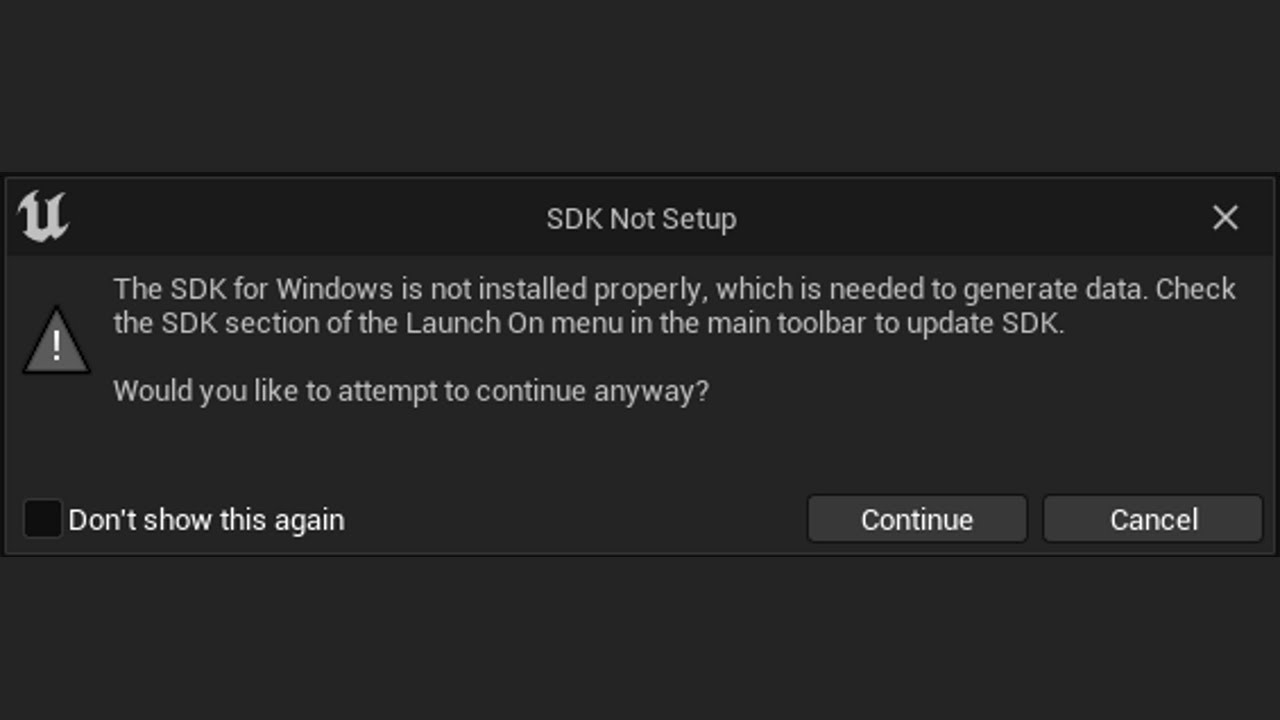
Google windows SDK and microsoft has a download for it. Then restart. If that doesn't work, I think this is the video that helped me: https://www.youtube.com/watch?v=EoIdyhjW9e0&ab_channel=UnrealEngine5Tutorials
Use the following link by September 31, 2022 for a huge discount on a 10-hour Unreal Engine 5 Beginner's course: https://www.udemy.com/course/unreal-engine-5-the-complete-beginners-course/?couponCode=SEP2022
How to Fix SDK Not Setup - The SDK for Windows is not installed properly, which is needed to generate data. Check the SDK section of the L...
 fierce condor
anyone seen this issue when cooking/packaging? Not sure how to start debugging it :/

 round sorrel
Hi all!
I need to package my game so I can submit it to App Store. I opened the project and it started compiling shaders. I don’t have time to wait forever to build.
Can I start packaging in parallel?
mystic atlas
You can enable on-demand shader compilation.

Why somebody has taken a screenshot of this, I don't know.
mortal ridge
Do I really need Visual Studio to package even if I'm BP-only right now?
mystic atlas
Maybe not VS, but the toolchain?
mortal ridge
Hrm. I should probably have VS anyways, what version do people recommend for Unreal development?
mystic atlas
2022
mortal ridge
So, I run the packaging process, and it doesn't SEEM to fail, but when it finishes there's nothing in the output directory I chose. Where do I look into to debug this?
cyan silo
Check your firewall? Mine blocked access at first
mortal ridge
Fucking love when the log file tells me to look at the log file?
==============================================================================
ERROR: Cook failed.
       (see C:\Users\<USERNAME>\AppData\Roaming\Unreal Engine\AutomationTool\Logs\C+Program+Files+Epic+Games+UE_5.0\Log.txt for full exception trace)

CommandletException: Editor terminated with exit code 1 while running Cook for C:\Users\<USERNAME>\Documents\Unreal Projects\<GAME>\<GAME>.uproject; see log C:\Users\<USERNAME>\AppData\Roaming\Unreal Engine\AutomationTool\Logs\C+Program+Files+Epic+Games+UE_5.0\Cook-2022.09.15-12.43.09.txt
   at AutomationTool.CommandUtils.RunCommandlet(FileReference ProjectName, String UnrealExe, String Commandlet, String Parameters, String& DestLogFile, Int32 ErrorLevel) in D:\build\++UE5\Sync\Engine\Source\Programs\AutomationTool\AutomationUtils\CommandletUtils.cs:line 425
I have absolutely no idea what in here is breaking the build. Obviously there's a lot of errors but I don't actually see any that impacts the actual game, it's all junk brought in by asset packs from the marketplace.
Obviously I could go through and delete everything breaking, but that'll be time consuming so I don't want to unless I'm sure that'll help.
cyan silo
Cook only the maps you are using, and only the folders that have assets you are using maybe? Then go from there.
mortal ridge
cyan silo
Cook only the maps you are using, and only the folders that have assets you are ...
Where's the options to restrict maps? That could help a lot.
 cyan silo
Go to packaging settings to set that up. I would also package using the project launcher, and create a custom profile thing which you can set that up too. For me when packaging outside the launcher it doesn't package as shipping for some reason.
project launcher is less buggy in my very limited experience
mortal ridge
what is this "project launcher"? I have no idea what you mean by that
cyan silo
its in the drop down menu in the screen shot you posted
mortal ridge
Nice!
mortal ridge
...I don't get it, everything about this build seems to be working, but I don't see an installer I could use to give this to someone else
I have an EXE I can run and everything, but how do I get an installer or archive of some sort? I picked the "Archive" option in the project launcher but the directory I picked was empty after
cyan silo
Not sure, I think there is an option for an installer. The executable should be able to run fine though? I'm really new at this though so hopefully someone way more experienced can help.
mortal ridge
cyan silo
Not sure, I think there is an option for an installer. The executable should be ...
The executable can run fine locally but I expect it probably has hard references, and would stop running if I moved it to a different directory
mortal ridge
mortal ridge
The executable can run fine locally but I expect it probably has hard references...
This is incorrect. I can zip this folder up and run it annnnywhere, even tested sending it to another computer
 dusky ridge
Hey guys I renamed my project and I changed everything and added core redirects and it works in the editor. Problem is when I try to package a game I get this error.
make sure you right click content folder and click Fixup Redirectors, and then Resave all. That will apply all the redirects you have, and then you can remove the core redirects and then package as you wish
core redirects, especially certain types, can be slow, so they should be removed as quick as possible. Resave all is the trick
 vivid trench
Hey! I'm currently using the function "GetCommandLine" to pass in arguments on opening the packaged application by launching any files associated with it. This function currently doesn't seem to work with a shipping build. Is there any other way to pass in arguments on launching these associated files or the application itself?
umbral copper
Packaging for android in UE5, Im getting the Sdk for android not properly set up blah blah (we've all seen it once before surely)
I swear, ive been at this for 3 days straight and ive done everything by the book dotting the i's and crossing the T's.. I cannot for love nor money work out what ive missed
any tips or help at all Ill be so grateful
dusky ridge
weak scaffold
make sure you right click content folder and click Fixup Redirectors, and then R...
Hey I'll try that as soon as I get home. When I tried to delete the redirectors, my c++ parents unbinded from my blueprint children. But I didn't fix up redirectors so I'll try it out.
weak scaffold
And resave all!
 mortal dune
Can anyone tell me how to solve this?
LogFeaturePack: Error: Error in Feature pack D:/Games/UE_5.0/FeaturePacks/TP_VirtualRealityBP.upack. Failed to parse manifest: Invalid Json Token. Line: 43 Ch: 4
this is the only red line in the output log
besides the PackagingResults: Error: Unknown Error ofc
 mortal dune
mortal dune
mortal dune
if someone resolves this, please either ping me or DM me
weak scaffold
mortal dune
That says your icon isn't supported
weak scaffold
mortal dune
``LogFeaturePack: Error: Error in Feature pack D:/Games/UE_5.0/FeaturePacks/TP_V...
Verify engine through launcher. The little arrow down on the engine version
mortal dune
weak scaffold
That says your icon isn't supported
how do i delete or revert icon?
mortal dune
weak scaffold
Verify engine through launcher. The little arrow down on the engine version
will do, so this has nothing to do with my project itself?
weak scaffold
You posted 2 errors. The first is your icon. The second is an invalid file in the engine
You can probably change icon through project settings
weak scaffold
 hollow helm
Look further up in your log, search for error
Or better yet, open that log file it lists
umbral copper
umbral copper
Packaging for android in UE5, Im getting the Sdk for android not properly set up...
Heyy, does anybody know a fox for this (I've done everything to the letter) still can't package to android
mortal dune
weak scaffold
You posted 2 errors. The first is your icon. The second is an invalid file in th...
Deleting the .ico file fixed the issue, and yea i verified the whole engine, no issues so far <3 thanks
 fervent shoal
My groom asset is perfect in editor, but after package behaves strange
hollow helm
weak scaffold
Or better yet, open that log file it lists
UATHelper: Packaging (Android (ASTC)): LogInit: Display: LogCook: Error: GameDefaultMap contains a redirected reference '/Game/FirstPerson/Maps/FirstPersonMap'. The intended asset will fail to load in a packaged build. Select the intended asset again in Project Settings to fix this issue.```
Why does this level cannot be default one? solid wraith
Good day. When I download the project in the Play Console, the error "We've detected this app uses unsupported version of Play billing. Please upgrade Billing Library" appears. I did everything in the video but it didn't fix the problem. Please suggest a solution, I can't find a solution anywhere
 white mango
Hi, I am getting this error when I try to package. It seems to be related to the new animations we put in the game. I still have a lot to learn about animation and debugging packaging errors so I don't know where to start. Does anyone know what might be wrong or how to go about debugging it? I did go to the error in the code but I'm not sure what it means.
This is the line where it breaks Swap(PlatformRenderData->NextCachedRenderData, Mesh->GetResourceForRendering()->NextCachedRenderData);
opal sorrel
I'm trying to package a game I've already successfully packaged before (I've made changes so this is the new version), but now I'm getting an error: 'There can be only one Game target per project.'
The original is in a completely different folder, so I don't think it's because of that, but I'm not sure why this is doing this now.
Any ideas would be appreciated! :)
mystic atlas
The target is the Blah.Target.cs in your source folder... do you have 2 of them?
opal sorrel
mystic atlas
The target is the Blah.Target.cs in your source folder... do you have 2 of them?
Aha! That seems to have done the trick I think! Thank you very much. :)
mystic atlas
Np
You can have like Blah and BlahEditor and BlahServer etc
But only 1 of them can be of type Game
The other is Editor or Server etc
deft turtle
Hello I have a problem, when I package my game, the cel shading and lighting looks different compared to when in editor, Is this because im using 3 different types of shading methods (Material Shader, Cel shader in post process, and outline in post process)
mystic atlas
It migth be that the editor is using different render settings than your packaged game.
deft turtle
and there is a way to make these settings match (So that the packaged visuals will look the same as the editors visuals?
white mango
It's gone.
 trail willow
how do you add platform specific overrides for ProjectPackagingSettings?
i want to package up an mp4 movie on my windows builds, package up a webm on other platforms
trail willow
nvm i figured it out
opal sorrel
I've packaged my game a couple of times and each time on a random amount of levels the navigation for my enemies won't work.
Any ideas why this might be?
It works fine in the editor (although I have had this glitch occasionally but it resolves itself without me doing anything), and most of the levels work fine, but for each packaged version of the game there'll be a couple of levels where navigational doesn't work for some reason.
 iron saffron
Hi, is there any way possible for packaging my game project for MAC/Ubuntu' from windows
winged moss
you will need macOS to package for Mac
for Linux, you install the cross-compile toolchain
opal sorrel
Quick question: you know when you package a game and it comes in the 'WindowsNoEditor' folder, can I rename that to the game's name for publishing?
winged moss
why not just publish the WindowsNoEditor folder (assuming this is UE4 then) instead?
opal sorrel
winged moss
why not just publish the WindowsNoEditor folder (assuming this is UE4 then) inst...
I could but it just but I'd have thought it'd be better to have the folder the game is in titled the name of the game as opposed to WindowsNoEditor?
I could be wrong I've never published a game before, just trying to consider what would look best.
winged moss
if this is for distribution on steam, then that's handled
opal sorrel
no it's gamejolt
winged moss
I have no idea what that is
opal sorrel
ah xD i tested out other people's UE4 games from gamejolt and it did seem to download it as 'WindowsNoEditor'.
winged moss
and if that's even a problem, you can just rename the directory after the cook finishes
opal sorrel
when you say 'the cook finishes' you mean the packaging?
winged moss
yes
opal sorrel
ah, okay very cool! thank you very much for your help, i'll do that! :)
river gust
Hey folks, has anyone gotten any luck with generating more than one patch tier?
I can generate a single patch off of my base release just fine, but creating a new patch tier just gives me a bunch of _0 patch files. Am I supposed to rename these manually?
Here are my settings for the patch tier

Edit: Okay, it looks like renaming the pak files from 0 to 1 worked. Is there any better solution to renaming the pak files, or is this just what I'm going to have to put up with?
 true falcon
Can I get more info than that? I can run my game with debug game config or with dev config through the editor (not as standalone). whenever I try to package it crashes because of this.
I am using VS22 and UE 5.0.3
 orchid stratus
Would anyone here have any suggestions as to why my DataTable in UE 5.0.3 does not seem to cook its contents when packaging. It's included in the asset directories to cook and does not import from a CSV file. It runs fine in the editor but comes out empty inside a packaged build. Happy to provide any additional information.
orchid stratus
orchid stratus
Would anyone here have any suggestions as to why my DataTable in UE 5.0.3 does n...
Strip from Client Builds is disabled on the table too.
 shadow storm
does unreal engine have an installer?\
I need something to install my game so people can get updates!
can someone recoomend something
 cerulean harness
Hey. Having an issue with creating patches in UE5. The patch paks seem to always get the same-ish size as the original pak. In UE4 the patching worked as it should. Have tried a lot of tweaking of the options sent to UAT without luck. Any ideas? Thanks!
shadow storm
what are you using to insall you game @cerulean harness ! Thats the issue I am having I need a good installer or you will never patch your games correct!
because of registry issues
cerulean harness
shadow storm
can someone recoomend something
There's no default installer. You may want to set up a game launcher. There are a few systems like https://gamelaunchercreator.com/ for example.
You are the Creator, the Developer.
cerulean harness
I've created a custom launcher myself, in Electron. So the patching/downloading itself is taken care of. My current issue is with the packaging.
cerulean harness
I haven't used that one. But they do have a system for patching there: https://gamelaunchercreator.com/unreal-launcher-patch-system/

Design your own custom Launchers and Patching systems for Unreal Developed games and Patchers using Game Launcher Creator V2.There's never been an easier way
There's also an open source one based on C#. Let me see if I can find it.
A bit cumbersome to set up and design, but I've used this before. Includes system for patching/updating as well: https://github.com/Nihlus/Launchpad
GitHub
An open-source game launcher for your games. Contribute to Nihlus/Launchpad development by creating an account on GitHub.
cerulean harness
Sure, checking the licensing is always important.
 abstract escarp
Has anyone got this error when packaging for android:
UATHelper: Packaging (Android (ASTC)): java.lang.NoClassDefFoundError: Could not initialize class org.codehaus.groovy.vmplugin.v7.Java7
UATHelper: Packaging (Android (ASTC)): Caused by: java.lang.ExceptionInInitializerError: Exception org.codehaus.groovy.GroovyBugError [in thread "Daemon worker"]
Fixed that by downloading Java 8 update according to a thread I found and pointing Unreal Editor settings at it... running through some other errors though. Will update if I get it working or not as I am plowing through these errors...
 short temple
hi ! BUILD FAILED: AddBuildProductsFromManifest: any idea what that could mean ? thanks a lot*
.debug was in manifest \Intermediate\Build\Manifest.xml" but could not be found.
trying to package from Linux
 primal thorn
hello is there a way to filter assets that are cooked per platform without using the PakBlacklist txt file?
 atomic gazelle
Hi all, I'm having issues with people opening my packaged build. It's successfully building, I can open it, I can zip it and open it.. however when I share it with my programmer or others, the program splash screen pops up for an instant and then the entire program closes, it doesn't even boot into the game menu. Any ideas what I'm missing on my packaging for this to occur or at least a direction I can start looking into this issue? Thanks so much !!!
open rapids
Hi, can someone take the time to explain me what is the difference between those ? My game is Multiplayer (dedicated server), i searched a lil bit on google, "Windows" is for Standalone game which requires cooked data to run, "WindowsClient" is same as "Windows" but with no server code ?

Those are the two that interests me. I already know WindowsServer builds the server
 sullen spindle
i just had a long build fail un UE4, could anyone help me out? is someone responds, ill send them the packaging log
the log states its an unknown cook failure and i cant find what exactly is causing the error
sullen spindle
it seems like this is one of the persistent errors but i dont know if it has anything to do with cook failure or why its there in the first place
 hot rock
any1 knows how to package game with Code. Any1 knows its location??
winged moss
open rapids
Hi, can someone take the time to explain me what is the difference between those...
"Client" in this context means a dedicated client. the ability to host listen servers (ie. ?listen) is removed
open rapids
winged moss
"Client" in this context means a dedicated client. the ability to host listen se...
So "Windows" is the same but with ability to host a server ?
So i only pick, WindowsClient.. or Both ?
winged moss
you would pick one
 marsh tinsel
I'm having the same issue. Anyone ever found a solution?
 lilac stone
My project is successfully recording in-game audio and playing it back using "Start Recording Output" and "Finish Recording Output". I specify a path and name for the saved file.
But when I package the build....it does not work. I suspect it has something to do with saving the SoundWave files. I am saving to Content/Audio/RecordedSoundWaves. Any ideas on where I can troubleshoot?
 high meadow
Sorry if this is in the wrong category but I'm sure where else to ask about it
In engine, the game starts up fine with no errors, but in a build the game will crash and give a fatal error. It says it’s an issue with AudioThread, but I don’t know what could be causing it.
Even stranger, it only seems to happen one time, as once the crash happens if you start the game again it usually doesn’t happen again. It also seems to happen sometimes if there’s no save data in appdata, which is also weird.
I’m on UE4 4.27.2.
If anyone has any ideas or suggestions they’d be much appreciated:
Fatal error!
Unhandled Exception: EXCEPTION_ACCESS_VIOLATION reading address 0x0000000000000000
0x00007ff6cf509ad8 Title_Pending-Win64-Shipping.exe!UnknownFunction []
0x00007ff6cef3b2f6 Title_Pending-Win64-Shipping.exe!UnknownFunction []
0x00007ff6cefe4eba Title_Pending-Win64-Shipping.exe!UnknownFunction []
0x00007ff6cefef003 Title_Pending-Win64-Shipping.exe!UnknownFunction []
0x00007ff6cd2ee889 Title_Pending-Win64-Shipping.exe!UnknownFunction []
0x00007ff6cd7910fb Title_Pending-Win64-Shipping.exe!UnknownFunction []
0x00007ff6cf00e430 Title_Pending-Win64-Shipping.exe!UnknownFunction []
0x00007ff6cd8db7fb Title_Pending-Win64-Shipping.exe!UnknownFunction []
0x00007ff6cd8d5bf1 Title_Pending-Win64-Shipping.exe!UnknownFunction []
0x00007fff1e2b7034 KERNEL32.DLL!UnknownFunction []
0x00007fff1ece26a1 ntdll.dll!UnknownFunction []
Crash in runnable thread AudioThread
primal thorn
Hello, how do i create platform specific packaging settings? for example, i want my iOS to never package a certain folder, but i want that folder to be packaged when i do it for windows. I tried adding +DirectoriesToNeverCook=(Path="/Game/Maps/LVL_Desktop") on the Config/iOS/iOSGame.ini, but that didnt work. Anything i'm missing?
winged moss
high meadow
Sorry if this is in the wrong category but I'm sure where else to ask about it
...
it doesn't help that you don't have symbols
 frank wind
Hello i would like if it's possible to get the unreal projet from a package game (exe) and how
winged moss
frank wind
Hello i would like if it's possible to get the unreal projet from a package game...
nah
mystic atlas
You probably could. But anyone able to do it wouldn't be asking how to do it.
 rugged igloo
For some reason it looks like my packaging button is missing?
Anyone know what could have caused that?
I'm on linux fwiw

 torpid hull
Can you read the BuildID from a .exe? I'd like to be able to check the version of a ServerBuild without having to run it NVM i see now that the BuildID is the identifier for the engine and not the game project.
 cunning echo
so i got this warning when trying to package my game for windows, and when told to continue anyways the console threw this error


(this is in the latest version of Unreal Engine 5 btw)
open rapids
What is the proper way to add a target ? This does not seems to work.
 cunning echo
so i got this warning when trying to package my game for windows, and when told ...
cunning echo
cunning echo
so i got this warning when trying to package my game for windows, and when told ...
fixed, just had to install the dotnet sdk
 cinder ember
Has anyone come across of the error: Error: FCompression::GetCompressionFormat - Unable to find a module or plugin for compression format None?
For anything I can find in proj settings, I have oodle/kraken set.
 strong geyser
Guys i get this when i package from android to my vr headset

anyone knows why it fails?
 severe basalt
strong geyser
anyone knows why it fails?
severe basalt
strong geyser
anyone knows why it fails?
usually main errors appear in the beginning of Log 😁
scarlet pagoda
anyone here familiar with packaging a dedicated server in a docker container?
 marble mesa
When it comes to pak files how do you go about having items that should be bought with in game currency both not accessible in the main build but also able to display the item (3D mesh) basically I don’t want players to have access to these items without making the purchase. How does epic handle the item security in fortnite. Is everything like downloadable content or some other security measure?
 mild turtle
(RE #multiplayer message)
@open rapids so it works for you it outputs 2 folders: Windows and WindowsServer on the packaging path you specified? For me it only did WindowsServer :/
Discord
Discord is the easiest way to communicate over voice, video, and text. Chat, hang out, and stay close with your friends and communities.
open rapids
mild turtle
(RE https://ptb.discord.com/channels/187217643009212416/221799385611239424/10236...
Yeah
Do you tried to package only Windows ?
open rapids
then u're good ?
mild turtle
no because
I want it to do it both in one run
and you are saying it works for you but not for me
😅
maybe I will try again.
yea I tried again and still only the server gets packaged..

my issue is both are selected but only WindowsServer gets packaged

 rancid lynx
hello, is there a way to change a boolean that already exists on all the actors in a project through a global console variable?
or maybe there is a better way other than console var?
the main idea is to have a custom static mesh actor that has two static meshes, one for PC and one for mobile. the boolean will switch between the two states and enable/disable cooking one one component instead of the other

 raven zephyr
Hey, I'm looking to get my windows package build to add the command line arg -SaveToUserDir by default. (We're using Test builds and want the package to look in the user/appdata for ini files instead of from the install root, just like the Shipping build does by default).
I remember using a UE4CommandLine.txt that you can put such cmd args into but I can't get it to work, it may be for other platforms (andriod, xb only). Has anyone had any luck with this?
lavish kettle
Did you ever figure this out? I'm having the same issue
 potent quest
lavish kettle
Did you ever figure this out? I'm having the same issue
potent quest
lavish kettle
Did you ever figure this out? I'm having the same issue
This fixed it for me
Unreal Engine Forums
So I’ve been trying to package up my game but I always get an unresolved external symbol error. Cannot find any solutions online so any help would be appreciated. Full log file here
lavish kettle
potent quest
This fixed it for me
https://answers.unrealengine.com/questions/961285/error-ln...
Thanks!!! This actually fixed it for me https://forums.unrealengine.com/t/cant-package-my-game/282046/2 hopefully helps anyone searching Discord in the future
Unreal Engine Forums
Hello, Thank you for your report. We were not able to investigate this on the engine version you reported, but there have been many version changes to UE4 since this question was first posted. With a new version of the Engine comes new fixes and it is possible that this issue has changed or may no longer occur. Due to timetable of when this iss...
keen moss
Hey guys I've been beating my head against the wall for a few weeks now trying to solve this cook failure. I confess that I don't really know the right way to read logs and I've had difficulty finding any guide to help with that. When packaging fails and the output log is throwing 39 errors, where should I start? Any key words (besides error) I should be looking at first? Thanks ahead of time and sorry for the noob enquiry.
 hollow nacelle
Hey guys! I'm having a problem with launching my packaged game on my phone. It takes 2-3 minutes for it to load past Unreal Engine logo screen. Then it works fine without any problems. Even if the app is installed on the phone it takes roughly the same amount of time.
Is there a way to check what's going on within those 2 minutes so i can try to reduce the time it takes? Thanks!
Here's the video: https://youtu.be/3t9fJlb7sew

 keen moss
This is what the log looks like and I'm not sure what to do about it. It seems to all derive from the engine itself.
mild turtle
keen moss
Hey guys I've been beating my head against the wall for a few weeks now trying t...
just search for 'error' in the log and fix each error, google if u don't know what it means.
mild turtle
keen moss
This is what the log looks like and I'm not sure what to do about it. It seems t...
try making a new project and see if it packages correctly
if not then reinstall the engine or osmething
keen moss
mild turtle
try making a new project and see if it packages correctly
Thanks. I will try this
 woeful thistle
Hey guys. I'm trying to set up the mobile preview stuff for UE but can't get past the SetupAndroid.bat section
I just end up with this

 hasty valve
For some reason my build works fine on development but on shipping it gives this error in the log
[Callstack] 0x000000004DA91550 VCRUNTIME140.dll!UnknownFunction []
[2022.09.26-20.22.29:090][ 0]LogWindows: Error: [Callstack] 0x000000003F4D5CDE Win64-Shipping.exe!UnknownFunction []
[2022.09.26-20.22.29:090][ 0]LogWindows: Error: [Callstack] 0x000000003F34B0E4 Win64-Shipping.exe!UnknownFunction []
[2022.09.26-20.22.29:090][ 0]LogWindows: Error: [Callstack] 0x000000003F62FEEB Win64-Shipping.exe!UnknownFunction []
[2022.09.26-20.22.29:090][ 0]LogWindows: Error: [Callstack] 0x000000003F76D4D9 Win64-Shipping.exe!UnknownFunction []
[2022.09.26-20.22.29:090][ 0]LogWindows: Error: [Callstack] 0x000000003F764556 Win64-Shipping.exe!UnknownFunction []
[2022.09.26-20.22.29:090][ 0]LogWindows: Error: [Callstack] 0x000000003F1D2882 Win64-Shipping.exe!UnknownFunction []
[2022.09.26-20.22.29:090][ 0]LogWindows: Error: [Callstack] 0x000000003F1CE34A Win64-Shipping.exe!UnknownFunction []
[2022.09.26-20.22.29:090][ 0]LogWindows: Error: [Callstack] 0x000000003F1CE5BA Win64-Shipping.exe!UnknownFunction []
[2022.09.26-20.22.29:090][ 0]LogWindows: Error: [Callstack] 0x000000003F1D58D1 Win64-Shipping.exe!UnknownFunction []
[2022.09.26-20.22.29:090][ 0]LogWindows: Error: [Callstack] 0x0000000040F8A0E7 Win64-Shipping.exe!UnknownFunction []
[2022.09.26-20.22.29:090][ 0]LogWindows: Error: [Callstack] 0x000000005DB17034 KERNEL32.DLL!UnknownFunction []
[2022.09.26-20.22.29:090][ 0]LogWindows: Error: [Callstack] 0x000000005EDE26A1 ntdll.dll!UnknownFunction []
[2022.09.26-20.22.29:090][ 0]LogWindows: Error: [Callstack] 0x000000005EDE26A1 ntdll.dll!UnknownFunction []
winged moss
it would help to have symbols
mild turtle
hasty valve
For some reason my build works fine on development but on shipping it gives this...
shipping is dumb. just ship a development build.
mild turtle
winged moss
it would help to have symbols
and ye, if u want to debug it, u need that
but if it's a packaged shipping build Idk how u can get that
 so Idk
hasty valve
winged moss
it would help to have symbols
yeah it says I dont have the required symbols
winged moss
you need the associated PDBs with your build
UnknownFunction tells you literally nothing
hasty valve
winged moss
you need the associated PDBs with your build
How I get that
winged moss
they're produced as part of packaging your build?
hasty valve
do u know where to look
winged moss
there's an option to stage them with your build, but search your drive for *.pdb in a tool like https://voidtools.com
 versed smelt
Hi 🙂 For some reason my packaged project gives a crash report after quitting the application. The game works with no issues before and after packaging, but it's just annoying to see a crash notification each time you quit the game (and also I don't want end users to think something is wrong with the game when it's working perfectly). However I don't know where to start investigating why that message keeps popping out. Any thoughts? (I'm using UE4.17)
winged moss
versed smelt
Hi 🙂 For some reason my packaged project gives a crash report after quitting th...
helps to see a callstack
versed smelt
Embarrassed to ask but what is a callstack?
winged moss
the lines of the crash reporter that have the function calls
versed smelt
Let me get that and I'll be right back
winged moss
well this is a packaged build anyway
mystic atlas
Maybe he won't have anything then. 😦
winged moss
it might be if it's a BP only game
versed smelt
Unfortunately this is what I see, no callstack according to the message

It is a BP only game
mild turtle
versed smelt
Unfortunately this is what I see, no callstack according to the message
4.17??
update ur version?
versed smelt
Yes it is 4.17
I can't update the version because the project is already finished. Tried updating it a while back and nothing worked
mild turtle
install engine symbols
from the epic launcher ue downloader
and install visual studio
and attach debugger
see if that works to give u info
but this sounds like an engine bug
but I guess must be somethnig specific u r doing causing it that u just need to find out and then work around
also if u r packaging for shipping, maybe instead package for development, and see if it still crashes
versed smelt
If it is packaged for development, will it still be suitable for giving it out to the end user?
versed smelt
I just packaged it for development and still get the same crash when I quit the packaged game.
I'm installing engine symbols
mild turtle
versed smelt
If it is packaged for development, will it still be suitable for giving it out t...
yes
versed smelt
After installing the engine symbols, this is what I'm getting after quitting the packaged game

 burnt remnant
how do I get UE to include a map when it packages?
burnt remnant
is it not possible anymore?
why doesn't this work


[2022.09.27-03.17.23:267][787]LogLoad: LoadMap: /Game/PoppyAndBuddy/Base/Library/Library

[2022.09.27-03.17.23:298][787]LogStreaming: Error: Couldn't find file for package /Game/PoppyAndBuddy/Base/Library/Library requested by async loading code. NameToLoad: /Game/PoppyAndBuddy/Base/Library/Library

[2022.09.27-03.17.23:370][787]LogNet: Warning: Travel Failure: [ClientTravelFailure]: Failed to load package '/Game/PoppyAndBuddy/Base/Library/Library'```Does this happen with all your users or just you? You're on a pretty old engine version but the text input stuff makes me think it's IME related
winged moss
burnt remnant
```
[2022.09.27-03.17.23:267][787]LogLoad: LoadMap: /Game/PoppyAndBuddy/Base/Lib...
Did you check the paths?
burnt remnant
in what sense? that's where the map is
trying something now. some value called serverdefaultmap was set to an old path
I can't even see in the project settings where that would have been set
winged moss
When in doubt, show it in the CB
burnt remnant
the path is right
winged moss
Show it in the CB

 burnt remnant
yeah, there was a mention of an old path., after removing the serverdefaultmap entry from an ini file that went away
trying the next build now
I asked this somewhere else, how do you inspect pak files?
like I've been asking that for months, I am dying to know
winged moss
UnrealPAK CLI, there are some third party tools
versed smelt
winged moss
Does this happen with all your users or just you? You're on a pretty old engine ...
I got feedback from two different end users who reported seeing the crash report when they exited the game. So I'm naturally assuming that others are also seeing it but not providing feedback. Also, no problems during the game, but when they quit the crash report pops up.
winged moss
Yeah but do you use IME on your machine?
Which is the system used to enter Japanese, Korean, and Chinese characters
versed smelt
winged moss
Yeah but do you use IME on your machine?
What is IME?
versed smelt
winged moss
Yeah but do you use IME on your machine?
No Japanese, Korean or Chinese characters.
winged moss
How about a system wide spell checker or something like that? You won't be able to fix this without engine source
It's likely fixed in a later engine version
versed smelt
I did however imported a new font for the game a while back, I don't know if that has anything to do with it?
winged moss
IME is a system for text entry, not display
versed smelt
There is no text entry in the game either. Even the save system is checkpoint based.
burnt remnant
winged moss
UnrealPAK CLI, there are some third party tools
I can't get it to use any of the commandline arguments. what's a good third party tool?
removing the serverdefaultmap entry didn't seem to help, the map still isn't found
untold pebble
Hi I'm getting crashes when packaging the game with the folllowing stacktrace. Does anyone know what the problem could be?
 open rapids
Hi, is there any way to debug blueprints in Debug Game Package build ?
open rapids
hello, im trying to package a plugin, and I get the following error:
ERROR: This version of the Unreal Engine can only be compiled with clang 10.0, 9.0, 8.0, 7.0 and 6.0. clang 11.0.1 may not build it - please use a different version.
how do I install a different version of clang? I downloaded 10.0.0 from llvm and ran the installer, and the x64 native tools command prompt says its at 10.0.0 with --version, but i still get the error
 austere kayak
Hey, is it possible to ship a game for ios from windows pc ? i have installed itune but i am still getting "sdk not installed" error.
 wide dome
Hello guys! I packaged my game but the performance horrible! In standalone mode the game work perfectly with max FPS , join to the steam also, but in packaged game I have 4-5 fps and doesn't join to steam. Guys anybody had this issue?
rancid lynx
hi, when i add -ue4exe="C:\Program Files\Epic Games\UE_4.27\Engine\Binaries\Win64\UE4Editor-Cmd.exe the command line gives me "UAT Failed to find command Files/Epic"
mild turtle
versed smelt
After installing the engine symbols, this is what I'm getting after quitting the...
hi I think u need to package it for development not shipping
and then u need to install visual studio and go to debug -> attach process
mild turtle
open rapids
Hi, is there any way to debug blueprints in Debug Game Package build ?
no
blueprints get compiled to cpp in packaged
but it depends on what u mean by debug bps exactly
winged moss
untold pebble
Hi I'm getting crashes when packaging the game with the folllowing stacktrace. D...
you might have to attach a debugger to the cooker (the UnrealEditor-Cmd.exe process) to see which asset this is
winged moss
mild turtle
blueprints get compiled to cpp in packaged
this is opt in in UE4 and completely removed in UE5
mild turtle
winged moss
this is opt in in UE4 and completely removed in UE5
u mean nativization? I didn't talk about that. yea I just didn't udnerstand what he meant by debugging blueprints in packaged.
untold pebble
winged moss
you might have to attach a debugger to the cooker (the UnrealEditor-Cmd.exe proc...
Yeah, I guess so, thanks!
winged moss
mild turtle
u mean nativization? I didn't talk about that. yea I just didn't udnerstand what...
"blueprints get compiled to cpp in packaged" - isn't this talking about nativisation?
because if it's not, then this is false
versed smelt
mild turtle
and then u need to install visual studio and go to debug -> attach process
I have no experience with visual studio; I have a bad feeling that I'm stuck with my project giving out a crash report every time the user quits the game. Appreciate all the help.
 gloomy garnet
Hey guys. So i have a question. I'm trying to package a project to windows then i'm getting the error "LINK : fatal error LNK1158: cannot run 'cvtres.exe" cannot find path specified. Any ideas on how to solve this?
mild turtle
versed smelt
I have no experience with visual studio; I have a bad feeling that I'm stuck wit...
well, I guess so.
gloomy garnet
Hey guys. So i have a question. I'm trying to package a project to windows then i'm getting the error "LINK : fatal error LNK1158: cannot run 'cvtres.exe" cannot find path specified. Any ideas on how to solve this?
 open rapids
Hey, does anyone know how I can get clang 13.0? I cant package my plugin without it:
ERROR: This version of the Unreal Engine can only be compiled with clang 13.0. clang 11.0.1 may not build it - please use a different version.
Usually I get it from here: https://docs.unrealengine.com/4.27/en-US/SharingAndReleasing/Linux/GettingStarted/, but ue5 isnt on that list, and its what im using
winged moss
open rapids
Hey, does anyone know how I can get clang 13.0? I cant package my plugin without...
yes because you are looking at the UE4 documentation
clicking on the 5.0 documentation takes you to https://docs.unrealengine.com/5.0/en-US/linux-development-requirements-for-unreal-engine/
open rapids
ah tysm
 mint leaf
burnt remnant
how do I get UE to include a map when it packages?
mint leaf
burnt remnant
how do I get UE to include a map when it packages?
Is it a BP project you "converted" to C++?
austere kayak
austere kayak
Hey, is it possible to ship a game for ios from windows pc ? i have installed it...
anyone ?
burnt remnant
mint leaf
Is it a BP project you "converted" to C++?
Yup
mint leaf
burnt remnant
Yup
Create a blank C++ class in your project, then drop it in the level and try baking/packaging
mint leaf
austere kayak
anyone ?
You need to have a mac for remote build, You might be able to do something using a VM - but its against the EULA and non trivial
burnt remnant
mint leaf
Create a blank C++ class in your project, then drop it in the level and try baki...
I'll let you know how it goes, cheers
burnt remnant
mint leaf
You need to have a mac for remote build, You *might* be able to do something usi...
It's also a risky idea to rely on a VM or hackintosh to support a released product
mint leaf
burnt remnant
It's also a risky idea to rely on a VM or hackintosh to support a released produ...
I dont disagree, thats why it was a might - it might get you up and running, but long term you need a better solution - now apple has moved to arm
 dark elk
Hi! I'd appreciate some help in this error that I'll send about a quick launch in Oculus Quest, for android using ES 3.2 and Vulkan

 vague bloom
hi there, can someone explain me what is the Stage Build exactly?
gloomy garnet
Hey guys, how do i include all my maps in my unreal engine 5 package?
rancid lynx
gloomy garnet
Hey guys, how do i include all my maps in my unreal engine 5 package?
project settings-> packaging -> look there in the drop-down menu for list of maps to include
severe basalt
Plugin asset failed to load after package:
Error: Couldn't find file for package /MyPlugin/CharacterMeshes/mt_female/hand_f
however asset is valid in editor runtime
how to solve that?

 karmic elm
I don't have 'Full Rebuild' checked, so why does UE5 keep rebuilding all my packages on each time I, er, package the packages
 calm pelican

Got a problem with ChunkDownloader
Just stucked with this
Does anyone can help with this?
Trying ChunkDownloader for a week now and I still got no luck

 prime ether
When my game crashes, and the crash reporter app pops up, is there way to have it so that that crash info is sent to me? Where do I access that or set that service up?
burnt remnant
mint leaf
I dont disagree, thats why it was a *might* - it might get you up and running, b...
didn't work unfortunately.
unrealpak is working again though and the map is definitely wrongly going into the http chunk install pak
(I meant to reply to the suggestion to create a new C++ actor and place it in the map)
wise robin
Is there a way of making a blueprint only work in PIE and not in a packaged version?
cerulean harness
wise robin
Is there a way of making a blueprint only work in PIE and not in a packaged vers...
If you're thinking of specific functionality in the blueprint that should only be run in PIE, you could use a little bit of C++ to create a node that checks if you're in PIE or not. You also have the "Is Packaged for Distribution" function that you can use for functionality that only works in PIE and with a Development package.
winged moss
prime ether
When my game crashes, and the crash reporter app pops up, is there way to have i...
you have to change where the crash data is sent. I've used BugSplat which is an off-the-shelf service you can use unless you want to roll your own
prime ether
winged moss
you have to change where the crash data is sent. I've used BugSplat which is an ...
Yeah thanks, I took a look into BugSplat and a couple other services. Thanks for the response!
 analog tinsel
Hello there, I'm having some errors in my Linux Server build with my plugins.
These plugins are not suppose to exist in the server, but I'm referencing content from them.
[2022.10.01-14.28.29:338][ 0]LogStreaming: Error: Found 1 dependent packages...
[2022.10.01-14.28.29:338][ 0]LogStreaming: Error: /Game/API-Example/HUD2/BP_HUD_Origin```
I already added the plugin's content as additional dependencies to add, but nothing happens rotund depot
Hey guys, whenever I package my project in client mode, I am not able to open a certain level. Here is the log
Warning: Travel Failure: [PackageMissing]: /Game/W_Maps/SomeMap [2022.10.01-15.43.12:831][558]LogNet: TravelFailure: PackageMissing, Reason for Failure: '/Game/W_Maps/SomeMap'
As you can see, it says that some package is missing, could someone tell me what might be going wrong? There are quite a few maps in our game, could that be an issue?
primal thorn
@rotund depot check on the Cooked folder if the missing map is there
 inner island
PackagingResults: Error: Unknown ErrorUATHelper: Packaging (Windows (64-bit)):   C:/LS Local Build/LiveSimProject/Intermediate/Plugins/NativizedAssets/Windows/Game/Source/NativizedAssets/Public/BP_ValveParentClass__pf1309408580.h(362) : Error: Unrecognized type 'IPumpInterface_C' (in expression TScriptInterface<IPumpInterface_C>) - type must be a UCLASS
PackagingResults: Error: Unknown Error``` this file isn't a one my list of nativized assets - so why did I get this packaging error? inner island
adding the assets to Nativization list didn't change the errors - I can't find direct references on these two original ones to the ones listed as errors
 woeful dust
hi, when I build for android/pico neo 3 I get the following error:
error: method AndroidThunkJava_IsOculusMobileApplication() is already defined in class GameActivity
but the Oculus VR plugin is disabled. does someone know what this could be?
 weak spoke
hello, windows defender gives warning messages while my build is running. This is pc build and no idea what i am missing, i thikn i should make a certificated build but no idea how to make it
 hazy lily
Hey guys, I wonder where are the ini files gone after packaging the project? I'm stuck in wrong resolution for some reason and my cursor doesn't work
Epic problem 🙂
Oh found it, C:\Users\username\AppData\Local\yourgame
 sonic stratus
Hey folks, first time packaging. Well, I did it once, ages ago but figured it's about time I learn the process again.
Tried packaging tonight, but ended up getting a fail. 110 errors, the only ones I can see in the first 50 are these:
LogInit: Display: LogCook: Warning: Package /Game/ExternalActors/PROJECT/SCENES/PortRoyal/PortRoyal/4/F7/9U5D0942UIP0J9YLW3VDXT exists on disk but does not exist in the AssetRegistry
There is a list of about 27 I can see.
The issue I have, is I can't tell what these particular files even are thanks to the really useful naming system. I'm also not familiar with the error itself, and a quick Google didn't seem to return anything.
The files themselves seem to be basically empty.
 strong root
Hey i am not sure if i am in correct channel , so i was wondering how can i achieve a smooth loading levels from these settings

higher value means no pause but stuttering loading right?
 unborn compass
When building My current Game I Am Getting the error " LogUObjectGlobals: Warning: Failed to load '/Game/***/ThirdPersonOverview': Can't find file."
this is a difrient source code project and it does not need This File. so I do not know why it is attempting to build it.
Sorry about the repost I wasn't meant to share out that person's name.
 ancient glen
Is there a way to package a game so it will run on Windows XP 32 / 64 and above? I'm asking because there are millions of gamers who use XP and don't want to / can't upgrade. Thank you for any help 🙂
river gust
I know this has been asked before but I've never seen a proper answer-
I added a new plugin to my project, but my clients already have a base release build that doesn't include this plugin.
Is there any way to deploy a patch / update a few files so this plugin works properly in shipping, or do I have to deploy an entire new build? Either way, not an issue. Just curious if there's an easier way so I send out as few files as possible, makes it easier for my clients.
keen moss
Hello. So I have an issue now where my "launch" function works correctly from the editor but not from a packaged build. I have the map URL's set up correctly according to the game project but I don't see them anywhere in the packaged build even thought I have included them in my packaging settings. Any clue why this might be happening? It acts like its loading but then it goes back to the main menu map.
 simple sundial
Hello!
I posted this on the MacOs channel, but perhaps, it is better suited here.
I'm trying to package my game after I migrated to UE5 from UE4.27.
I'm on MacOs Big Sur and using UE5.0.3
I'm getting this error:
UATHelper: Packaging (Mac): Undefined symbols for architecture x86_64:
UATHelper: Packaging (Mac):   "_SecTrustCopyKey", referenced from:
UATHelper: Packaging (Mac):       -[FHttpResponseAppleWrapper connection:willSendRequestForAuthenticationChallenge:] in Module.HTTP.cpp.o
UATHelper: Packaging (Mac):   "___darwin_check_fd_set_overflow", referenced from:
UATHelper: Packaging (Mac):       UE::Trace::Private::Writer_UpdateControl() in Module.TraceLog.cpp.o
UATHelper: Packaging (Mac):       FSocketBSD::HasState(ESocketBSDParam, FTimespan) in Module.Sockets.cpp.o
UATHelper: Packaging (Mac):   "_OBJC_CLASS_$_MTLBinaryArchiveDescriptor", referenced from:
UATHelper: Packaging (Mac):       objc-class-ref in Module.MetalRHI.1_of_3.cpp.o
UATHelper: Packaging (Mac):       objc-class-ref in Module.AGXRHI.cpp.o
UATHelper: Packaging (Mac): ld: symbol(s) not found for architecture x86_64
UATHelper: Packaging (Mac): clang: error: linker command failed with exit code 1 (use -v to see invocation)
Does anyone knows how to repait this?
I've been looking for the whole day, tried different options, nothing worked.
Thanks!
 topaz vault
Hi!
Packaging to html5 is not supported since 4.23, Emscripten seems to be working only for 4.24, but somehow there are new web projects on UE4/5, especially related to NFT. Do you think it's possible to build newer version to html5 or they have to use an old one? Has anyone managed to package lets say 4.27 to html5?
Thank you for any guidance here!
 tired verge
Hey people, was wondering if anyone that has done steam dlc before with Unreal could explain how it is that you setup your depot, does it end up being that I need to somehow create a seperate Pak file for the engine to use or something on a seperate steam depot id or do you just upload like an entire build and steam figures out a diff between the two for 'downloading the dlc'. Atm we mainly have uassets that we want to replace in game with some dlc versions, being asset replacement and not functional changes.
mild turtle
tired verge
Hey people, was wondering if anyone that has done steam dlc before with Unreal c...
you can use the project launcher UE feature to package a DLC
or better just put the dlc files with the base game, and have the DLC just add some file that allows access to it or something Idk
 cerulean harness
Hi. Has anyone here succeeded in making proper patches in UE5? I always get patch pak files that are the same size as the original (plus any changes), even when trying from clean, new projects. This used to work in UE4. Anyone aware of new/changed settings that need to be set for it to work?
 royal pond
Hi,
Anyone run into this before
I would like to know what the XGE controller is that they're suggested to disable and what side effect that might have
 dusky axle
trying to build my project, but when it finishes nothing is in the build folder and it tosses out an error saying "Cannot find the path specified"
https://i.gyazo.com/1979755580aa27aa7392aa8833018108.png

would really appreciate the help
mystic atlas
Don't have spaces in your directory names.
dusky axle
I removed the space and now I'm getting this error:
https://i.gyazo.com/e98aba450d914d65fa8c353756a3c984.png
 mystic atlas
You still have space in your directory names
"Unreal Engine"
Though that might not be an issue, that's just appdata...
Maybe just renaming the directories broke something!
dusky axle
bruuuhhhhh
 dusty jolt
Hello developers
I have an issue with building and packaging the MQTT Plugin from github, while building and packaging i got this error.
ProcessResult.StdOut: C:/Program Files/Epic Games/UE_4.26/Engine/Plugins/Marketplace/SteamBridge/Source/SteamBridge/Public/SteamStructs.h(49) : LogCompile: Error: An explicit Category specifier is required for any property exposed to the editor or Blueprints in an Engine module.
Please can anyone help help me with this issue
Thank you in advance.
weak scaffold
The plugin has a fault. Contact the plugin developer
royal pond
mystic atlas
It's a pile of poop.
Just disable the plugin and call it a day?
 wintry tangle
Any ideas why this info wouldn't be filled in in the exe despite the fields clearly being set in the project settings?


makes my game exe look very unpolished -.- not a super huge deal though, most people probably wont' even see the exe file directly
 wheat ivy
Hey everyone at #packaging ! 🙂
New to UE5 here. Quick questions regarding the build configurations for UE5.
I've noticed that builds wary very much when selecting different configs. Sometimes, development builds work much differently than shipping and produces artifacts that we could not see earlier while playing through the editor. I did refer to https://docs.unrealengine.com/5.0/en-US/build-configurations-reference-for-unreal-engine/ but cannot find a definitive answer as to how we could identify exactly what configuration needs to be used for optimal development conditions.
Our project uses both C++ and blueprints.
Reference guide for solution and project build configurations.
 azure nimbus
What is the proper procedure to follow if my game (which is working perfectly when started from the editor) crashes after being packaged in its final release state?
royal pond
Hey everyone,
Currently running into a weird cook issue where it says it's cooking packages but things aren't being saved properly
116 objects that have not yet returned true from IsCachedCookedPlatformDataLoaded
Has anyone run into this and know what causes it?
open rapids
How can I fix this?
wheat ivy
wheat ivy
Hey everyone at <#402958499660955658> ! 🙂
New to UE5 here. Quick questions reg...
Seems like there's not much help here. Is there anyone who can give some insights on this please? <@&213101288538374145> <@&608320500170620938>
To give some more details on the above message:
Editor files work flawlessly but when packaged as-
Development: The gun assets in our game float way above in the air than their intended location however collision works fine when walking through it on the ground. Hence they are there but visually the assets are above
Shipping: The gun assets are fine and where thy're supposed to be. But several functions/events that are triggered during the gameplay that operate on the backend are missing. The widgets also don't operate properly (which use the same backend functions).
 ashen pewter
please do not ping moderators for something that isnt an issue with server
wheat ivy
It's annoying to know that games behave differently in different build configurations and there is no way to actually get it streamlined.
We mostly use Dev/DebugGame however when packaged they translate into something else that isn't supposed to be there.
wheat ivy
ashen pewter
please do not ping moderators for something that isnt an issue with server
Noted @ashen pewter , could you please help me out with where/who would be perfect to answer/troubleshoot such queries? DM could be fine too.
 light junco
@wheat ivy If you need dedicated help, you should use the job-board of this server and ask for help there (paid..). If you however need dedicated help but you don't want or can't pay for it, then you gotta stick around with waiting until someone who knows the answer is here and willing to spend their free time on it.
And in the meantime post on Forums and AnswerHub fwiw
Also the UE Community Team is also not there for UE Technical Questions, so please don't ping them either
No one on this server here is theoretically pingable for questions, despite single users who state that you can ping them
And don't get me wrong, I know how annoying it is to have those bugs where different dev setups cause different results. Sadly that's also the most annoying bugs to get help with, cause it can be everything from an engine bug to a bug on your end.
I think you would even have a hard time with that on UDN
wheat ivy
Hey @light junco, very well noted. Thanks for understanding and talking about this.
In reality there's not much talk about this out there which is sad as many devs I know are facing this issue (online and IRL as well)
light junco
Yeah, again I also had issues with this in the past, most of them were due to errors on our end though.
Which makes it either harder for outside people to actually assist
The only thing you can really do is either debug it yourself, be lucky that someone here reads it and knows the issue, or hire someone
I do think that this question could be posted into #ue5-general though. This channel here is more about the actual packaging process
Also do you have the same issues in Standalone?
wheat ivy
Thanks @light junco I'll look into this and see if we can fix it. If not, I'll definitely see if anyone from #ue5-general or any other dev can help. Thanks 🙏 again
P.S- I've read your Network Compedium PDF previously as well. Pretty comprehensive and fantastic content you have there.
wheat ivy
light junco
Also do you have the same issues in Standalone?
Standalone in net mode in editor? Not really. Works majority of the times.
light junco
No, Standalone is when you start it outside the Editor, but not packaged
E.g. rightclick the UPROJECT file and press the Launch Game entry, or whatever it is called
If it breaks there already you'd at least not need to constantly package to check if it's fixed
wheat ivy
I just checked that. Works in standalone as well.
light junco
sad beep
wheat ivy
While this popped up as well. Quick question....
So we're building a multiplayer game (listen server for now). In order to test or demonstrate we usually package the game and distribute it within the team.
Is that efficient or is there any way we can test from within our editors? Everyone is connected via source control (perforce)
light junco
If everyone has access to the Project, it would be enough to do it via Standalone. Editor itself I would not connect to another Editor. But tbh, it's best if you do Dev Packages, because that's the closest you can get to the actual game.
If you want something easier, look into setting up a Build Machine
wheat ivy
Packaging and transferring them is a painful and time consuming 😛
light junco
We have a simple Ryzen driven PC in our Office that acts as a Build Machine. It creates Nightly Builds for the Game and uploads them to Steam.
So we basically have a new project uploaded to steam for people to test latest on every day, theoretically
Using Jenkins as automation software
Needs a bit of CI/CD setup, but you save a lot of time in the future
You can also use that in the future to build DedicatedServer builds and upload to whatever you want
As well as build Editor Binaries for your Artists and Designers that don't have C++ Code Access
And then use UGS for them to sync
Instead of the p4 client
It's all a tad involved but really nice once setup
wheat ivy
Yes for sure a pipeline would really ease building and distribution. Your setup is definetely something worth considering.
light junco
Think #automation talks about this, but never visited that channel
Anyway, I gotta go, doggo has to be walked. Good luck with your bug solving.
Try to maybe remove logic step by step and divide/conquer the issue that way
wheat ivy
Thanks a lot @light junco . Doggo needs some air for sure! 😄
royal pond
Hey everyone,
Currently running into a weird cook issue where it says it's cooking packages but things aren't being saved properly
116 objects that have not yet returned true from IsCachedCookedPlatformDataLoaded
Has anyone run into this and know what causes it?
 near tulip
Is it possible to package projects so that the person you send it to is not required to make any extra downloads to get your game running? When I send my project to my laptop it brings up a UE gui and forces me to download some visual studios and direct x stuff.
How do most games that use UE normally do packaging, do they all require the end user to download all the necessary files themselves or is there any way to package those files with the game download?
mystic atlas
It used to be included, I'm sure.
You'll want to look for the redist (ributable) packages for the things it wants to install and just add those.
near tulip
mystic atlas
You'll want to look for the redist (ributable) packages for the things it wants ...
This right? How would I go about adding the prerequisites would I just put them in the main game folder; what if the user already has the prerequisites installed?
 mystic atlas
I'd put it in a Prerequisites fodler myself, but yeah.
azure nimbus
How can I setup my texture pool size to be a certain size in my final packaged build?
It seems to default to 1000mb in the packaged build, no matter if I set it to 3000mb in the console.
azure nimbus
 wary prism
hmpf. there's always a fatal error when i try to run packaged builds
wary prism
hmpf. there's always a fatal error when i try to run packaged builds
Did you try packaging a "Development" build and check the error/crash logs?

 stoic cargo
Hi. Recently I deleted the Saved and Intermediate folder, and the next build seems to fail for an unexpected reason, with lots of these kinds of errors:

So it can't find some files in the Volumetrics folder of UE4, but I haven't changed something in regard to this, and it's located where it always was

Oh hold on.. how did it end up with Experimental/Volumetrics/Content/Content.. is this how this path is with any of you?
stoic cargo
I've fixed it, nvm, but I have noooo idea how the path suddenly became Content/Content. I haven't touched this at all. Very strange.
 solar trail
does anyone know how to fix this? it's happened over multiple engine versions and multiple project files and ive found nothing online that helps with the situation

i have no idea what is causing this to happen
open rapids
is there anything what I can do?
 open rapids
Please is there someone who can help? The deadline ends in 3 hours
mystic atlas
Might be the spaces in your directory name.
weak scaffold
solar trail
does anyone know how to fix this? it's happened over multiple engine versions an...
scroll up in the log, there might be more info, or atleast a message saying which asset it's cooking at the time when it crashes
weak scaffold
open rapids
is there anything what I can do?
don't nest your project so deep, try and keep the project as close to your root hard drive as possible, and remove spaces from directory name.
Also scroll up, theres likely an error saying why the apk wasn't built
shadow storm
is it true that if we encrypt our projects it will make it run slow?
weak scaffold
mainly affects loading and streaming, not so much fps
but yes, last time i tried it, there was a noticeable impact in load times
although they've changed the encryption library now i think, so it's a bit faster, but i'm sure theres still an impact
burnt remnant
still fighting packaging with http install data enabled.
this is the level blueprint of the entry map, that definitely does get packaged. the UMG widget referenced does NOT get packaged. it's infuriating.

it's like turning on http install data just breaks a whole lot of stuff
solar trail
weak scaffold
scroll up in the log, there might be more info, or atleast a message saying whic...
its trying to cook assets that dont exist
like assets that ive deleted from the project
open rapids
mystic atlas
Might be the spaces in your directory name.
it worked, thank you very much : )
mystic atlas
Np
 burnt epoch
How can I enable Test configuration ?
 mystic atlas
c++ project
 cyan comet
When packaging my project it includes old blueprints that I've since updated and changed. I'm doing a "Full Rebuild" with "Shipping" configuration, so I don't know why it's not including the updated blueprints. I've tried redownloading the project from our source control freshly and it didn't fix the issue.
Any ideas how to fix it?


 mystic atlas
Try not using spaces in directory names.
 eager forum
Is that so
mystic atlas
It's a far too common problem.
eager forum
Really do you face it
I have crying for half an hour
If this help me
Then from now on you are my best buddy
 cosmic prawn
I'm trying to create a patch pak file (with unrealpak.exe on the commandline). I created the 'lista.txt' file and created the pak. It gets picked up when the game runs but I get an error "Error: Seeked past end of file ../../../NOR/Plugins/Entities/Content/Meshes/SKEL_2000.uasset (89130 / 89126)". The file asset to replace the main pak asset is 89126kb. Why is the engine trying to read 89130kb?
 dapper canopy
Why can't I package my project?
dapper canopy
dapper canopy
Why can't I package my project?
Nvm. Had to rebuild automation tools
 coarse ruin
Anyone had the fmemorywrite error ONLY when packaging a patch but not when packaging a full build? 🙂

 mystic atlas
Removing the spaces didn't fix it then?
eager forum
Dear Daekesh please help
I have been working on this project for more than 6 month
I don't know from where to remove space
winged moss
Take a screenshot challenge
Or even posting the log file
Your path still has spaces in it
mystic atlas
It also has your rl name.
 formal mesa
Is there a good frame work for incremental distribution of packaged builds? I want to be able to rapidly iterate with a group of play testers but dont want to have them redownload a zip file with a packaged build every time. Would the easiest solution be to just setup a git repo for the build or would that even work since they are binaries? How does steam do it?
winged moss
formal mesa
Is there a good frame work for incremental distribution of packaged builds? I wa...
Anything preventing you from using Steam and distributing release override keys?
formal mesa
winged moss
Anything preventing you from using Steam and distributing release override keys?
just impatience, i know the playtest platform is promising but it takes 3-5 days for store review and 3-5 days for build review. Even if you main store and build is live.



 mystic atlas
eager forum
I don't know from where to remove space
mystic atlas
eager forum
I don't know from where to remove space
 winged moss
and the username
mystic atlas
Oh yes.
winged moss
also still loving these photos of a tiny resolution laptop
I don't know how that's even good to work with
 hard jasper
Sooo, I'm trying to build my game with different .exe names instead of the project name
I found this thread on the forum
Unreal Engine Forums
Hi, there, is there a way to let me give a name to my game being packaged. thus i could run the WindowsNoEditor/ProjectName/Binaries/Win64/SpecifiedGameName.exe through WindowsNoEditor/SpecifiedGameName.exe. Thank you!
So i did what was on the bottom post but it still just names it the project name
put the -target=newbuildname in the extra parameters section of the custom launcher, not sure if that is the right place.
 dreamy lily
Hi together,
i try to package Android package, but it still does not works. Android Studio 3.5.3 is installed, but he says, that it cannot find Android Studio.
Does anyone know a solution or a working tutorial for Android in UE5?
deft turtle
Hello, I have a packaging error that I cant solve, its basically telling me that a file cant be found or starts with the wrong name, I provided the error that it printed, does anyone know a way to fix this? thank you in advance


 reef yarrow
hi guys, When I do shipping, there is no connection to steam, but when I do DEV packing, the connection is established.has anyone encountered this problem?
viscid girder
Hi, i am packaging my game, i see a console error of LogAssetManager: Error: Registered PrimaryAssetId Maps:MainMenu for asset /Game/Maps/MainMenu/MainMenu.MainMenu does not match object's real id of Map:/Game/Maps/MainMenu/MainMenu! This will not load properly at runtime! what does this mean? the object's real id?
 hot tangle
Did you ever fix this? Started running into this issue recently and haven't had any luck fixing it yet, have every .NET and Windows SDK installed and have refreshed the Engine (source build 5.0.3/release branch) and project. Also interesting is that the problem area no longer even exists in the 5.1 preview's source code, I may try packaging with that version and see what happens
dreamy lily
Does anyone has a tip how to fix this?

 quiet basin
Hey I’m trying to pakage my game on Mac but it keeps telling me Xcode is not installed but it is does anyone know what to do
winged moss
?
 stuck summit
Hi everyone, I packaged my project with absolutely no warnings and no shown errors aside from the last surprising error/message above:
UATHelper: Packaging (Windows): BUILD FAILED
PackagingResults: Error: Unknown Error
Any ideas where to look at and how to proceed with completely unknown error?
 winged moss
the log file it shows the path to is probably a good start
 knotty karma
Hello, I created a plugin that works fine in the editor and in my project, but when I try to package my plugin it doesn't recognize some core dependencies and fails, any hint on what I'm messing up?
 winged moss
is your plugin relying on unity build or something because you should fix that instead
knotty karma
winged moss
is your plugin relying on unity build or something because you should fix that i...
I really don't know, i just created my plugin and clicked on package on the plugin menu. Default options on my plugin.uplugin and myplugin.Build.cs besides my modules includes
knotty karma
winged moss
is your plugin relying on unity build or something because you should fix that i...
https://pastebin.com/C0v83r2a here's a pastebin of my output log
Pastebin
Pastebin.com is the number one paste tool since 2002. Pastebin is a website where you can store text online for a set period of time.
winged moss
Yes and do you include the necessary headers, explicitly, for FFileHelper or not
knotty karma
oh, i think i might not, strange how my project can compile and run without it on the editor, my fault, thanks
weak scaffold
knotty karma
oh, i think i might not, strange how my project can compile and run without it o...
The plugin compile mode compiles under much stricter conditions for include what you use, and unity build modes. I'm not sure on the exact details to replicate it in your build.cs so you can find the problems earlier, but yeah, it's something to watch out for and package your plugin early and regularly to find problems earlier
knotty karma
weak scaffold
The plugin compile mode compiles under much stricter conditions for include what...
Thanks
weak scaffold
It's pretty annoying tbh. If i knew the build.cs settings it'd make life easier
winged moss
bUseUnityBuild = false
weak scaffold
winged moss
bUseUnityBuild = false
Is that different from bUseUnity?
I have this block in there to try and help match up
//Same setup from Subsystem Browser, to easily test the dev environment when compiling as an engine plugin
        //https://github.com/aquanox/SubsystemBrowserPlugin/blob/3e08e14ea609e2e3217444e58a45ee2e59ea1fc8/Source/SubsystemBrowser/SubsystemBrowser.Build.cs#L12
        if (Target.Configuration == UnrealTargetConfiguration.DebugGame
            || Target.Configuration == UnrealTargetConfiguration.Debug)
        {
            bUseUnity = false;
            bTreatAsEngineModule = true;
        }
Still seems a bit different than the package plugin UAT command
bUseUnityBuild doesn't exist, so it must just be bUseUnity
I had one for enforcing IWYU too, but it didn't make much difference
stuck summit
winged moss
the log file it shows the path to is probably a good start
Thank you for the response, could you point me to where/which log file to look at?
Also, I can see that just above the error message there is this line:
UATHelper: Packaging (Windows): Command failed (Result:-1073741521): C:\UnrealEngine\Engine\Binaries\Win64\UnrealPak.exe -CreateGlobalContainer=C:\<path_to_game>\Saved\StagedBuilds\Windows\<game_name>\Content\Paks\global.utoc -CookedDirectory=C:\<path_to_game>\Saved\Cooked\Windows -PackageStoreManifest=C:\<path_to_game>\Saved\Cooked\Windows\<game_name>\Metadata\packagestore.manifest -Commands=C:\UnrealEngine\Engine\Programs\AutomationTool\Saved\Logs\IoStoreCommands.txt -ScriptObjects=C:\<path_to_game>\Saved\Cooke d\Windows\<game_name>\Metadata\scriptobjects.bin -patchpaddingalign=2048 -compressionformats=Oodle -compressmethod=Kraken -compresslevel=4 -cryptokeys=C:\<path_to_game>\Saved\Cooked\Windows\<game_name>\Metadata\Crypto.json -compressionMinBytesSaved=1024 -compressionMinPercentSaved=5 . See logfile for details: '[None!, no output produced]'
 gaunt lava
Hi, is it possible to package a UE project on shipping with logs without the need for the source?
winged moss
gaunt lava
Hi, is it possible to package a UE project on shipping with logs without the nee...
no
winged moss
stuck summit
Thank you for the response, could you point me to where/which log file to look a...
does UnrealPak exist in that location
stuck summit
@winged moss thanks for the response, yes it looks like it does, as shown here

@winged moss however when I open it manually, it seems to be broken as shown here:
any recomemndation to get it installed again? should i delete intermediate/binaries of the unreal and install it again? or actually install it from scratch (of course the source build)
 winged moss
stuck summit
<@166299757151649793> thanks for the response, yes it looks like it does, as sho...
winged moss
stuck summit
<@166299757151649793> thanks for the response, yes it looks like it does, as sho...
is this a source build or from the launcher?
 pure pond
Getting an error that doesnt really tell me where to look for solutions, anyone know what i could do to fix this? Its latest version of unreal 5.
[2022.10.14-17.57.30:748][ 0]LogStats: FPlatformStackWalk::StackWalkAndDump - 0.108 s [2022.10.14-17.57.30:748][ 0]LogOutputDevice: Error: === Handled ensure: === [2022.10.14-17.57.30:748][ 0]LogOutputDevice: Error: [2022.10.14-17.57.30:748][ 0]LogOutputDevice: Error: Ensure condition failed: !FindPin(FFunctionEntryHelper::GetWorldContextPinName()) [File:D:\build\++UE5\Sync\Engine\Source\Editor\BlueprintGraph\Private\K2Node_FunctionEntry.cpp] [Line: 380] [2022.10.14-17.57.30:748][ 0]LogOutputDevice: Error: [2022.10.14-17.57.30:748][ 0]LogOutputDevice: Error: Stack: [2022.10.14-17.57.30:748][ 0]LogOutputDevice: Error: [Callstack] 0x00007ffd1080f5e5 UnrealEditor-BlueprintGraph.dll!UnknownFunction [] [2022.10.14-17.57.30:748][ 0]LogOutputDevice: Error: [Callstack] 0x00007ffd107a35c9 UnrealEditor-BlueprintGraph.dll!UnknownFunction [] [2022.10.14-17.57.30:748][ 0]LogOutputDevice: Error: [Callstack] 0x00007ffd107a5121 UnrealEditor-BlueprintGraph.dll!UnknownFunction [] [2022.10.14-17.57.30:748][ 0]LogOutputDevice: Error: [Callstack] 0x00007ffd107a4c67 UnrealEditor-BlueprintGraph.dll!UnknownFunction [] [2022.10.14-17.57.30:749][ 0]LogOutputDevice: Error: [Callstack] 0x00007ffd1600b43d UnrealEditor-UnrealEd.dll!UnknownFunction [] [2022.10.14-17.57.30:749][ 0]LogOutputDevice: Error: [Callstack] 0x00007ffd0d9908b2 UnrealEditor-Kismet.dll!UnknownFunction [] [2022.10.14-17.57.30:749][ 0]LogOutputDevice: Error: [Callstack] 0x00007ffd0d98e303 UnrealEditor-Kismet.dll!UnknownFunction [] [2022.10.14-17.57.30:749][ 0]LogOutputDevice: Error: [Callstack] 0x00007ffdba747660 UnrealEditor-CoreUObject.dll!UnknownFunction []
 stuck summit
@winged moss it's a source build yeah
winged moss
stuck summit
<@166299757151649793> it's a source build yeah
so rebuild UnrealPak
though that path looks like a separate engine and project, the incorrect way to do it.
 analog bane
Please help - we are Unable to **PACKAGE **for android error. Project is building fine.
stuck summit
@winged moss when I right click and rebuild it in visual studio, it does nothing at all, I think it is corrupt, not sure which related files to delete for it or how to rebuild it properly, any ideas? 😄
 fluid totem
Does anyone here know anything about GPU lightmass? Im running into several issues trying to get GPU baked lighting for my Android Oculus Quest build. I would love to know if this is even possible and maybe troubleshoot what Im getting wrong....
coral grove
is landmass a plugin ?
nvm
i have an error, which crashes the UAT after successful cooking
any idea how to trace the reason ?
 desert matrix
Hi All - has anyone come across this result: In the editor - I am getting max frame rate (120 FPS), however once I deploy the game and run from the .exe, I am getting <10 FPS. Compiled in UE5.1. Windows settings as shown below.


 desert matrix
Hi All - has anyone come across this result: In the editor - I am getting max fr...
desert matrix
desert matrix
Hi All - has anyone come across this result: In the editor - I am getting max fr...
So changed to Default - instead of DX12 and instant max frame rate in the deployed game.

 undone turret
@desert matrix Hmm is it possible you don't have a DX12 compatible GPU? Because otherwise you should see better frame rates with DX12?
desert matrix
undone turret
<@848909634437251093> Hmm is it possible you don't have a DX12 compatible GPU? B...
Thanks for the response, I don't think that's the issue, running a 3080ti with the latest drivers, and runs 100% in the editor.
 desert matrix
I'll see if I can force DX12 to run, might be trying to initialise DX11, because obviously need DX12 for Nanite etc with newest versions of UE
desert matrix
This is in the editor - Nanite Trees enabled

Appears the game is packaging DX12, however in runtime, any nanite asset disappears and FPS drops to <10 fps. If I force to run in DX11, runs full frames, but again no nanite assets. Any ideas anyone?

 desert matrix
Turns out it was simplescatter not compiling properly... as a forced copied it to 5.1. It was scattering all the nanite objects. So all sorved.
sonic stratus
Hey folks. I have some actors in my scene (created by Datasmith). Basically they act as parent/group parents for the collection of static meshes within them. In the packaged build they're getting randomly offset/rotated which totally collapses/breaks the visual of the level, and frankly they're dead weight anyway, because a packaged build doesn't care about pretty outliner hierarchy.
Anyway, I've tried deleting them manually before building, and that works. The child static meshes remain correctly placed, and everything looks fine once packaged. So I wondered if there was a way to remove them automatically when packaging? I tried making them 'Editor Only' in the level, but that seems to break things in a similar way as keeping them ( stuff just gets moved/vanishes/rotated randomly). Is there a way to physically delete them as part of packaging the level instead?
hollow helm
Heyyy
Do you guys have any ideas why have I that error (after .exe lunching)?
 mystic atlas
You're running a cooked version of the game with uncooked content.
barren field
Hello Everyone
Im having trouble pakaging for ios
i already did on this machine a previus version
now im getting signing error
anyone has this?
im using UE 4.27 with perforce versioning
barren field
UATHelper: Packaging (iOS): Code Signing Error: NewOds has conflicting provisioning settings. NewOds is automatically signed for development, but a conflicting code signing identity iPhone Distribution has been manually specified. Set the code signing identity value to "Apple Development" in the build settings editor, or switch to manual signing in the Sig
ning & Capabilities editor.
UATHelper: Packaging (iOS): Code Signing Error: Code signing is required for product type 'Application' in SDK 'iOS 15.2'

I really need help
 covert willow
Any ideas why my packaged shipping game would hitch and stutter badly while my packaged development build performs fine?
covert willow
Even weirder is that when I'm windowed mode in this shipping build, and my mouse leaves the screen, my fps shoots through the roof and runs smooth as butter. When my mouse is over the game window, it slogs hard.
weak scaffold
covert willow
Even weirder is that when I'm windowed mode in this shipping build, and my mouse...
I've seen that with other applications if the mouse polling rate is super high. Windows default is 125, if you set it to 1000 you could be getting a TON of mouse events every frame. Are you doing anything strange with mouse input?
Or do you have a plugin that might be doing something strange?
covert willow
weak scaffold
I've seen that with other applications if the mouse polling rate is super high. ...
Hmm I’m using a plugin called switcheroo for detecting mouse vs controller input. I’ll try gutting that and seeing if it fixes it.
barren field
Guys i really need help, i have already changed from developer to production and i still got the error
undone turret
barren field
Guys i really need help, i have already changed from developer to production and...
looks like google says it's an xcode issue are you building this on a mac or a pc?
ah mac hmm
this might help
barren field
@undone turret would you recomend build on a pc using remote build of a mac?
undone turret
honestly I don't know enough about building on Macs I know apple has a lot of protections against vms but idk
barren field
is automatically signed for development
where do i find this on the project settings?
 scenic kindle
Im having some issues packaging for Android, I keep receiving UATHelper: Packaging (Android (ASTC)): ----------------------------------------------
UATHelper: Packaging (Android (ASTC)): ERROR: Command E:\GameDev\UE5\UE_5.0\Engine\Extras\Android\SetupAndroid.bat android-28 28.0.3 3.10.2.4988404 21.4.7075529 -noninteractive failed [Exit code 3, working dir = E:\GameDev\UE5\UE_5.0\Engine\Extras\Android]
PackagingResults: Error: Command E:\GameDev\UE5\UE_5.0\Engine\Extras\Android\SetupAndroid.bat android-28 28.0.3 3.10.2.4988404 21.4.7075529 -noninteractive failed [Exit code 3, working dir = E:\GameDev\UE5\UE_5.0\Engine\Extras\Android]
LogSlate: Window 'Turnkey' being destroyed
Message dialog closed, result: Yes, title: Turnkey, text: Do you want to attempt again?
UATHelper: Packaging (Android (ASTC)): ERROR: Command E:\GameDev\UE5\UE_5.0\Engine\Extras\Android\SetupAndroid.bat android-28 28.0.3 3.10.2.4988404 21.4.7075529 -noninteractive failed [Exit code 3, working dir = E:\GameDev\UE5\UE_5.0\Engine\Extras\Android]
If i try to launch on an android emulator via UE5 I get LogPlayLevel: Error: ERROR: Platform Android is not a valid platform to build. Check that the SDK is installed properly.
Also get this - LogFeaturePack: Error: Error in Feature pack E:/GameDev/UE5/UE_5.0/FeaturePacks/TP_VirtualRealityBP.upack. Failed to parse manifest: Invalid Json Token. Line: 43 Ch: 4
Anyone got any ideas please? : )
This is some screenshots of the errors.

 deep crow
UATHelper: Packaging (Windows (64-bit)): Stacktrace:    bei System.IO.__Error.WinIOError(Int32 errorCode, String maybeFullPath)
UATHelper: Packaging (Windows (64-bit)):    bei System.IO.File.InternalCopy(String sourceFileName, String destFileName, Boolean overwrite, Boolean checkHost)
UATHelper: Packaging (Windows (64-bit)):    bei AutomationTool.InternalUtils.SafeCopyFile(String SourceName, String TargetName, Boolean bQuiet, List1 IniKeyBlacklist, List1 IniSectionBlacklist) in D:\Build++UE4\Sync\Engine\Source\Programs\AutomationTool\AutomationUtils\Utils.cs:Zeile 378.
UATHelper: Packaging (Windows (64-bit)): Failed to copy D:\Epic Games\UE_4.26\Engine\Source\Programs\PixelStreaming\WebServers\SignallingWebServer\Start_AWS_WithTURN_SignallingServer.ps1
Programs\PixelStreaming\WebServers\SignallingWebServer\Start_AWS_WithTURN_SignallingServer.ps1, deleting, waiting 10s and retrying.```what can I do here?
scenic kindle
Managed to get a lot of the above errors fixed seems it was a bad file location but now i get UATHelper: Packaging (Android (ETC2)): > Exception java.lang.NoClassDefFoundError: Could not initialize class org.codehaus.groovy.vmplugin.v7.Java7 [in thread "Daemon worker"]
deep crow
deep crow
```ERROR: Failed to copy D:\Epic Games\UE_4.26\Engine\Source\Programs\PixelStrea...
I found the issue to my problem - but not sure what the reason is.
I have to disable the PixelStreaming plugin. Then it packages correctly.
The weird thing is that I have another Project where it packages fine with the plugin enabled. I am not sure if I need to change some settings?
graceful kernel
a short and maybe pretty stupid question: if i package my game, does my lighting get built automatically?
im asking because my packaging usually takes 5-10 minutes, but only building my lighting takes about an hour
scenic kindle
Does anyone have issues packaging a game for Android in UE5? I,ve been here a whole day and feel like I have made 0 progress if its not one error its another gradle error :S
scenic kindle
Now just get

Android deployment seems so hard to do or i am doing something seriously wrong.
I do get an APK but when i drag it into Bluestacks it says it cannot install the app.
 frail ocean
Hello, is anyone familiar with this error? I've search online but I could only found 1 unresolved forum post. Any help is greatly appreciated!
 scenic kindle
For anyone else having issues I found this video which might be helpful to some. https://www.youtube.com/watch?v=OAYEpiTgeXI&ab_channel=NilsGallist

Here is a complete tour on: "How to set up Unreal Engine 5 (4.27.2) for your mobile/AR/VR development".
This process is long and painful! However, I spent my days searching the web, so you don´t have to!
This workflow lets you build to all Android devices from Android 10+.
!!!HERE ARE ALL THE NECESSARY LINKS!!!!
-----------------Android Quick...