#engine-source
1 messages · Page 15 of 1
 hidden hedge
as it will only need to compile what your project actually references
disabling engine plugins will reduce it further
 tranquil flame
hidden hedge
well a native build will reduce how much of the engine you need to compile
tranquil flame
hidden hedge
well a native build will reduce how much of the engine you need to compile
Okay thank you I'll look into it. If you have any good tutorial feel free to share !
 dusky compass
check pinned
 spark hamlet
If I wanted to get a comprehensive understanding of the source code, say for the lumen rendering pipeline, what's a good place to start? I found the siggraph presentation and looked through that, but I don't know where to start looking in the source itself
dusky compass
notepad file.cpp ?
 astral elm
spark hamlet
If I wanted to get a comprehensive understanding of the source code, say for the...
astral elm
spark hamlet
If I wanted to get a comprehensive understanding of the source code, say for the...
IDE : Ctrl+Shift+F "Lumen" : E
 ebon zinc
Rider issue that someone might have had before. We are using a source build of the editor. I build it on my machine and send out our version to the team. On my machine there is an unreal source version folder, and in another folder i have what i send out to everyone else and I use this version day-to-day to work as we don't change the engine often. Both versions have registry entries. The source is a GUID, and the day-to-day has a name so that the whole team has a registry key that matches what the .uproject points at.
OK now the problem, on my machine when I want to step through some engine code I put a breakpoint in the file in quesiton [DayToDayDir]/.../whatever.cpp. And when I'm running and the breakpoint hits (which it does), instead of showing me that line of code in [DayToDayDir]/.../whaterver.cpp it instead opens [SourceDirWhereDayToDayOrginallyBuilt]/.../whatever.cpp I can still step line by line, but I can no longer inspect any of the variables which sucks. Anyone know where the resolve of file is breaking down? Here is a visual. A is the file i set the breakpoint in, B is the source engine tab that opens
 astral elm
ebon zinc
Rider issue that someone might have had before. We are using a source build of t...
astral elm
ebon zinc
Rider issue that someone might have had before. We are using a source build of t...
is your games .uproject file
"EngineAssociation": "5.5",
set to the correct daytoday engine guid?
ebon zinc
it’s set to a non-GUID string that matches the registry entry associated with the day to day location
Somewhere there seems to be some list of paths it looks for and the build source folder is higher up because if I rename the unreal source build folder the debugger works as expected.
I tried a bunch of stuff but it behaves strange. So I filed a support post with jetbrains.
 oak wind
Hey,
so I just successfully built the engine from source.
However when I try to open the unreal editor it takes around half an hour to just get passed the loading screen.
After creating a binary build for that engine source it works just as usual with any other vanilla engine version.
What I noticed is that the "Loading PreDefault Modules for Plugin: xyz" is what takes that long.
It might even have to do something with the .pdb files, as my Binary build also loads very very slow until i removed the .pdb files resulting in my binary build to load the editor in a few seconds again.
I got an Intel i7 14th gen and around 64GB of RAM.
So my pc shouldn't be the problem
dusky compass
Every new project you create/open will compile all shaders
 dreamy bluff
Somehow my editor (source build) will do a full rebuild when changing between the ue5.sln and my project. What should I check? There is probably some misconfiguration, that it invalidates the other binaries?!
dusky compass
there isnt, this is how source build is
hidden hedge
dreamy bluff
Somehow my editor (source build) will do a full rebuild when changing between th...
Use a native project and at least then UE5.sln contains your game
And you just build your own project only
The contents of YourProjectEditor.Target.cs also affect the original problem
 hearty sand

 small silo
I setup a source build with a new Games folder next to the Engine folder in root. When I build a different project it re builds the entire engine code each time. Is there anyway to get it to share the built artifacts between projects?
dusky compass
no, that is how source build is, literally the question above.
you can try different build types like monolithic but it usually does not work for multiproject setup
small silo
But surely there must be a way to build the engine separately and use that build for each project?
 smoky goblet
I don’t know about building the engine separately, but I’ve had no problems with multiple projects using the same engine source. I don’t build the engine separately, just as part of building each project and its dependencies. Switching between projects doesn’t cause engine rebuilds for me.
hidden hedge
like before, I would be checking for inconsistent MyProjectEditor.Target.cs settings
but I've always kept engine and project 1:1
 polar hill
Hello i was trying to build UE 5.4.4 from source, but i got an error far into the process, so i looked at the log and this is what i could find:
[63/82] Link [x64] UnrealEditor-RiderLink.dll
   Creating library C:\Users\laust\AppData\Local\Temp\UnrealLink\Gyjywew\HostProject\Plugins\RiderLink\Intermediate\Build\Win64\x64\UnrealEditor\Development\RiderLink\UnrealEditor-RiderLink.sup.lib and object C:\Users\laust\AppData\Local\Temp\UnrealLink\Gyjywew\HostProject\Plugins\RiderLink\Intermediate\Build\Win64\x64\UnrealEditor\Development\RiderLink\UnrealEditor-RiderLink.sup.exp
 Compile [x64] Module.RenderCore.2.cpp: Exited with error code 2 . The build will fail.
 Compile [x64] Module.RenderCore.2.cpp: WorkingDirectory C:\UE_Source\UE_5.4.4\Engine\Source
 Compile [x64] Module.RenderCore.2.cpp: C:\Program Files\Microsoft Visual Studio\2022\Community\VC\Tools\MSVC\14.38.33130\bin\Hostx64\x64\cl.exe @"..\Intermediate\Build\Win64\x64\UnrealEditor\Development\RenderCore\Module.RenderCore.2.cpp.obj.rsp"
[64/82] Compile [x64] Module.RenderCore.2.cpp
C:\UE_Source\UE_5.4.4\Engine\Source\Runtime\RenderCore\Private\RenderGraphPrivate.cpp(189) : error C4756: overflow in constant arithmetic
   while compiling GetClobberValue
[65/82] Compile [x64] Module.RiderLogging.cpp
[66/82] Link [x64] UnrealEditor-RiderLogging.lib
   Creating library C:\Users\laust\AppData\Local\Temp\UnrealLink\Gyjywew\HostProject\Plugins\RiderLink\Intermediate\Build\Win64\x64\UnrealEditor\Development\RiderLogging\UnrealEditor-RiderLogging.lib and object C:\Users\laust\AppData\Local\Temp\UnrealLink\Gyjywew\HostProject\Plugins\RiderLink\Intermediate\Build\Win64\x64\UnrealEditor\Development\RiderLogging\UnrealEditor-RiderLogging.exp
[67/82] Compile [x64] Module.RiderLC.cpp
And i suppose this is what causes the error:
Compile [x64] Module.RenderCore.2.cpp: Exited with error code 2 . The build will fail.
But i dont understand why
hidden hedge
this looks like output of using marketplace packaging for the riderlink plugin
not building a source build
astral elm
small silo
But surely there must be a way to build the engine separately and use that build...
Yes. We have for example main project and test project using a single source fork, in a non-native configuration. I thought that would work fine in native config too?
smoky goblet
Yeah it absolutely should. At work we have multiple R&D projects setup in a native configuration to share an engine. At home I have multiple projects in a non-native configuration sharing one engine.
Both work as expected without any extra builds.
dusky compass
small silo
But surely there must be a way to build the engine separately and use that build...
yes
it is called installed build
astral elm
dusky compass
it is called installed build
that is not needed : seems to be only for convenience to distribute an editor for a team
oak wind
Hey, I just downloaded the engine source and tried to build it on my machine.
However I get an unhandled exception: BadImageFormatException: An attempt was made to load a program with an incorrect format. (0x8007000B) for almost all my processes.
Would anyone know what exactly I am missing?
astral elm
oak wind
Hey, I just downloaded the engine source and tried to build it on my machine.
Ho...
Are you following the setup docs for your version faithfully?
https://dev.epicgames.com/documentation/en-us/unreal-engine/building-unreal-engine-from-source
oak wind
astral elm
Are you following the setup docs for your version faithfully?
https://dev.epicga...
Yep, the only thing that would come to my mind is that I run the Setup.bat with the following arguments to save some space
--exclude=TVOS --exclude=HoloLens --exclude=Lumin --threads=12 --max-retries=4 --no-cache
But I don't see how that could possibly mess up my engine
astral elm
oak wind
Yep, the only thing that would come to my mind is that I run the Setup.bat with ...
yeah, that looks reasonable
astral elm
oak wind
Yep, the only thing that would come to my mind is that I run the Setup.bat with ...
your log doesn't mention compiler issue?
OR if you have recently solved that one, try deleting binaries + intermediate
 alpine plaza
what's a typical build time for the whole engine? that documentation page mentioned 10-40 minutes, but my build times have been way longer than that.
 iron dome
The better a PC you have, the shorter the build times
Things that matter:
- Number of cores / cpu speed
- Amount of memory
- Hard drive speed
The more you ahve of each, the better. But they are all limiting factors. Having a hdd and 600 cores won't benefit you because the hdd is too slow.
With a 3-series threadripper and 128gb of ram and an ssd, I built the engine in about 13 minutes.
With my laptop with a 9955HX3D, 64gb of ram and an ssd it takes about 17 minutes.
When I was used an external usb drive, that compile time went up to an hour.
If your machine isn't comparable to these, expect much longer build times.
Just don't rebuild your engine very often unless you absolutely have to and you'll be fine, no matter what system you're running. Do it overnight if it takes a while, etc.
alpine plaza
i9 9900k / 48gb RAM / older intel NVMe drive, it can take up to 2 hours
iron dome
When you compile, check the messages near the start. It will tell you how many processes it is using.
If it's low for some reason, it won't go very fast.
For instance, I had mine compile with 5 once, instead of 30, because of random ram usage.
I turned off the ram check.
alpine plaza
i don't think it's that, while it's building all cores are loaded nearly 100%
yeah just saw a message about 8 cores 16 threads
iron dome
Then you may just have a slow cpu.
dusky compass

 bright crown
First time trying to change engine files, how can I build this? (trying to make Button get focus when hovered by default)

basycally trying to work on an already existent code i nthe easier way possible
like, do this need a very compliacted setup before working?
smoky goblet
bright crown
like, do this need a very compliacted setup before working?
have you downloaded the source from github? or are you editing what comes with the installed build?
smoky goblet
If you want to edit the engine, you have to download it from github and build it.
You can't edit the source you get from the launcher/installed build and compile that.
bright crown
but if I do this it will change the engine for ALL projects?
and whn I build the game, will it contain my changes?
smoky goblet
It will change the engine for all the projects that use that version of the engine. You can still control with engine version each project uses.
Or control it through your use of source control to determine what changes each project currently has applied to the engine.
Yes, when you build the game it will build the engine.
smoky goblet

Epic Games Developer
Compiling Unreal Engine from source code.
dusky compass
You first need to build vanilla engine before attemptign to source edits
bright crown
newbie question: I need to go to commit 5.4.4 release to use the same version I have now?
and should I unistall my current instalation?
bright crown
HELP?

I have downloaded
executed the setup file
then the genrate one

do I need to also install 5.4 via epic games launcher?
 quiet knot
Anyone with experience making installed builds. If I make an installed build using: -set:WithServer=false Will this also disable Listening Servers?
Or it only affects dedicated server targets?
dusky compass
it should not, that target is speifically for dedicatedserver
 quick crystal
I cloned the latest release branch (5.6.0), updated a copied (cloned a fresh repo of it) version of my game project to use the 5.6 source version, generated project files, and then started to build the project. It says it is compiling 8.1k items?
astral elm
bright crown
do I need to also install 5.4 via epic games launcher?
No, source is independent of launcher.
astral elm
quick crystal
I cloned the latest release branch (5.6.0), updated a copied (cloned a fresh rep...
Native or separate arrangement? In any case sounds like you are compiling whole engine, which should only happen once for engine. After that compile game only.
quick crystal
astral elm
Native or separate arrangement? In any case sounds like you are compiling whole ...
Normally I just compile the game project and it only compiles the modules I need, but I guess this is fine for now.
dusky compass
you are probably building default UE5
 grim turtle
quick crystal
I cloned the latest release branch (5.6.0), updated a copied (cloned a fresh rep...
grim turtle
quick crystal
I cloned the latest release branch (5.6.0), updated a copied (cloned a fresh rep...
This is happening to me too for some reason. Every time I delete my project files like Intermediate, Binaries, etc. It compiles a bunch of source files. have you found a solution to it?
grim turtle
Hmmm, weird. Literally any time I clean my project, I ahve to build anywhere between 700-900 files
grim turtle
Like deleting my binaries, intermediate, etc
I don't do it every time, just when something goes awry
grim turtle
Figured it out. All good
quick crystal
grim turtle
Figured it out. All good
Oh nice, what was the issue?
 heady sparrow
bright crown
HELP?
heady sparrow
bright crown
HELP?
this error is probably because you have the wrong windows sdk
also since the thing you are trying to change has a multicast delegate why can't you just add your code to there?
just extent UButton and make yours listen to that when it is created
heady sparrow
so I don't think you need to build the whole engine just for this
but hey, now you can change them to do exactly what you want I geuess
bright crown
heady sparrow
just extent UButton and make yours listen to that when it is created
like an inheritance or like an extension that will change the whole UButton class
 short pike
Trying to run my UE5.5 project via UGS with precompiled binaries (build from Horde Agent), but it fails building UnrealBuildTool when running from UGS:
Launching UnrealBuildTool... [<WorkspacePath>/Engine/Build/BatchFiles/Build.bat -Mode=QueryTargets -Project="<WorkspacePath>/Projects/<ProjectName>/<ProjectName>.uproject" -Output="<WorkspacePath>/Projects/<ProjectName>/Intermediate/TargetInfo.json" -IncludeAllTargets]
Building UnrealBuildTool...
Building UnrealBuildTool in <WorkspacePath>/...
Project file not found at <WorkspacePath>/Engine/Source/Programs/UnrealBuildTool/UnrealBuildTool.csproj
Failed to build UnrealBuildTool.
LogDesktopPlatform: Warning: Failed to compile UnrealBuildTool (project file is '<WorkspacePath>/Engine/Source/Programs/UnrealBuildTool/UnrealBuildTool.csproj', exe path is '<WorkspacePath>/Engine/Build/BatchFiles/Build.bat')
LogDesktopPlatform: Warning: Unable to read target info for ../../../Projects/<ProjectName>/<ProjectName>.uproject
Running <WorkspacePath>/Engine/Build/BatchFiles/Build.bat Development Win64 -Project="<WorkspacePath>/Projects/<ProjectName>/<ProjectName>.uproject" -TargetType=Editor -Progress -NoEngineChanges -NoHotReloadFromIDE
ERROR: The batch file does not appear to be located in the Engine/Build/BatchFiles directory. This script must be run from within that directory.
I have Synced Filter setup to only download Content. It shouldn't try building UnrealBuildTool, because I'm set on precompiled binaries. Anyone got an idea on what is wrong?
short pike
short pike
Trying to run my UE5.5 project via UGS with precompiled binaries (build from Hor...
So Failing to compile UnrealBuildTool is just a warning. It seems to fall back on using Build.bat, but I ensured that /Engine/Build/BatchFiles/Build.bat is there.
Why does it say:
ERROR: The batch file does not appear to be located in the Engine/Build/BatchFiles directory. This script must be run from within that directory. then?
dusky compass
'<WorkspacePath>/Engine/Source/Programs/UnrealBuildTool/UnrealBuildTool.csproj'
does not look correct
short pike
UnrealBuildTool.csproj shouldn't matter with precompiled binaries.
dusky compass
Greatly depends. bat-scripts have some opinionated logic that may/will still build it just because it feels like it needs to, hence why I never use them
still, <WorkspacePath>/ us incorrect and should have been expanded into a real path
short pike
dusky compass
Greatly depends. bat-scripts have some opinionated logic that may/will still bui...
<WorkspacePath> was my part. It had the full path 👍
dusky compass
open Build.bat and see why it wants to build UBT then
in fact the issue is why that build.bat being called in a first place
this is some postcheckout action
smoky goblet
Is there an alternate place for the cross-compile toolchains? Epic's Linux page downloads the wrong toolchain for 5.6. The doc says you should use v25, but clicking the link (that says v25) actually downloads v23.
A quick google of the toolchain name doesn't come up with anything that seems like it's the same thing.
dusky compass
try v23 often times it can work just fine
smoky goblet
dusky compass
try v23 often times it can work just fine
I already have that installed and I'm getting Engine compile errors with Linux.
Maybe that's unrelated, but I wasn't getting any errors with 5.5
smoky goblet
Tried the silly thing and just edited the url for the v23 to be v25 and it worked. crazy.
link for anyone else: https://cdn.unrealengine.com/CrossToolchain_Linux/v25_clang-18.1.0-rockylinux8.exe
 frigid crypt
Where can I found the world partition and streaming changes from 5.4.4 to 5.6.0 ?
I crafted a custom solution that loads / unloads properly different VFX's and lights that supports world partition but after upgrading my project to 5.6.0 most of the things are not working. I sense that world partition was changed drastically in the BE
dusky compass
do respectitive file diffs between versions
 normal crag
Hello! Is UE5 modifiable enough so that you could rewrite half of it’s lightning models, pass structure, use own shading models, atmospherics, etc?
dusky compass
you literally have access to whole source
 leaden sequoia
Can we make own compiler for UE5 ? Anyone heard of Open-Source TPDE ? UE has officially supported is Clang right ?! How can I make custom one like TPDE ?
Recent post from phoronix blog says that TPDE compiler is 10 - 20x faster than LLVM
Thanks in advance
smoky goblet
leaden sequoia
Can we make own compiler for UE5 ? Anyone heard of Open-Source TPDE ? UE has off...
Yes the engine supports multiple compilers, including Clang but they tend to be tide to platforms so Clang only gets used for Linux.
I've never heard of anyone swapping out the compiler, but that doesn't mean it's not possible.
But why even bother? Are you really bottlenecked by compile times? There are other things you can do to improve your compilation without resorting to replacing a compiler (which may have significant knock-on to engine code that's not worth fixing)
 west cargo
this is more of a minor thing i guess, but does someone here have experience with making an installed build of unreal from source?
our custom version of unreal works completely fine when building in vs, but the installed build seems to keep throwing different errors depending on the build device i use
dusky compass
well read the errors and address them
 glass mauve
on that topic, anyone got any idea what happened here? Package '/Engine/EditorMaterials/AssetViewer/T_GreyAmbient' has been saved with a newer engine version and can't be loaded. Current EngineVersion: 5.6.0-174+++streamsDepot+mainline (Licensee=0). Package EngineVersion: 5.6.0-38216408+++Fortnite+Main (Licensee=0)
I know this can happen when accidentally moving assets from another engine version, but I definitely don't have access to Epics Fortnite+Main stream so I am a bit confused how this happened with a bunch of EditorMaterials
west cargo
dusky compass
well read the errors and address them
on my current system, these are the errors im getting
[1/390] Compile [x64] Module.AudioSynesthesiaCore.cpp I:\engine\Engine\Plugins\Runtime\AudioSynesthesia\Source\AudioSynesthesiaCore\Private\PeakPicker.cpp(17) : error C4756: overflow in constant arithmetic while compiling Audio::FPeakPicker::FPeakPicker [2/390] Compile [x64] Module.RenderCore.2.cpp I:\engine\Engine\Source\Runtime\RenderCore\Private\RenderGraphPrivate.cpp(189) : error C4756: overflow in constant arithmetic while compiling GetClobberValue [3/390] Compile [x64] Module.LiveLink.cpp I:\engine\Engine\Plugins\Animation\LiveLink\Source\LiveLink\Private\LiveLinkClient.cpp(1728) : error C4756: overflow in constant arithmetic while compiling FLiveLinkClient_Base_DEPRECATED::PushSubjectData [4/390] Compile [x64] Module.PoseSearch.3.cpp I:\engine\Engine\Plugins\Animation\PoseSearch\Source\Runtime\Private\PoseSearchLibrary.cpp(134) : error C4756: overflow in constant arithmetic while compiling FMotionMatchingState::Reset
the main thing is that i never touched any of these files, and all the changes for the engine were made in service of a new shading model for celshading. and i only get these errors when compiling for an installed build, visual studio and make on linux dont give me issues
dusky compass
that looks like sdk or compiler are invalid
west cargo
im building on windows 10 with the windows 10 sdk, but when i did that it gave an error that i didnt have the right version of the windows sdk installed so i gave it a go with the windows 11 sdk. it got me much further, but only to where i am now
dusky compass
you need to make sure compiler and SDK versions match requirements for specific UE version
installing isn enouhg read the log and confirm that is what it uses
 thick furnace
west cargo
on my current system, these are the errors im getting
`[1/390] Compile [x64] Mod...
thick furnace
west cargo
on my current system, these are the errors im getting
`[1/390] Compile [x64] Mod...
are those files use old winapi float/double INFINITY constants?
you can either fix them to not try force 1e300 into float and use TNumericLimits<Float>::Max() etc. newer engine fixed usages of them
west cargo
I think the issue ended up being I was using the newest version of msvc and the windows sdk, but neither were actually compatible with unreal
thick furnace
west cargo
I think the issue ended up being I was using the newest version of msvc and the ...
you don't use "latest", UE has specific version it supports. 14.38 compiler and 19xxxx/20xxxx SDK (varies on version)
latest != best in terms on compiler, each has own possible codegen bugs and SDK determines minimal supported OS version
west cargo
Yeah, I think I mistakenly installed it because it said some component was missing and a quick search led me to some forum post telling me that I didn't have the sdk properly installed
 little cobalt
does anybody know a fix for this?
Creating makefile for UnrealEditor (no exisiting makefile)
gets stuck and never completes
I've had this happen before but idk how i fixed it
its doing something
i can see that in the log file
i guess hitting clean solution wasn't that smart :D
heady sparrow
try running setp.bat again I suppose
 calm mason
I am trying to build Unreal 4.27 from source. Does anyone know if it's possible to force Unreal to use an older version of the compiler/toolchain?
I have the older versions installed, but it is not being used.
On Unreal 5. + it will somehow use the preferred version if installed...
I would prefer to avoid having to uninstall the newer versions.
calm mason
In fact, uninstalling 'Latest' causes all kinds of problems anyway 😖
dusky compass
calm mason
I am trying to build Unreal 4.27 from source. Does anyone know if it's possible ...
buildconfiguration.xml
calm mason
Ok so it took me a little while to figure out the exact versions I had installed, and to realise that the strings should not be quoted. Here's my final buildconfiguration.xml for Unreal 4.27.4
<Configuration xmlns="https://www.unrealengine.com/BuildConfiguration">
    <WindowsPlatform>
        <CompilerVersion>14.38.33130</CompilerVersion>
        <WindowsSdkVersion>10.0.19041.0</WindowsSdkVersion>
    </WindowsPlatform>
</Configuration>
17.8 / 33130 is a bit too new for 427, you will get warnings about too new compiler but you can just ignore them
your buildconfiguration.xml would have to be global My Documents/Unreal Engine/UnrealBuildTool or AppData/Unreal Engine/UnrealBuildTool as other paths not supported in 427
you could tweak it in XmlConfig.cs FindInputFiles()
calm mason
Ok thanks. I edited the one in UnrealEngine\Engine\Saved\UnrealBuildTool\BuildConfiguration.xml to avoid affecting other installations.
I have not tested it yet, I'll need to try it tomorrow. There was warnings about Min Compiler Version but nothing critical so far.
thick furnace
oh, yea. that works for non-installed build
 merry talon
Hi there!
I have a Standard NV36ads A10 v5 server in Azure (36 vCPU, dedicated GPU 22 Gb, Shared GPU 220 Gb). When I run renders I see that my shared GPU is almost not used. Can this significantly affect performance? If so, is there a setting to enable the use of the entire shared GPU?
 maiden temple
Hi - does anyone know the correct way to copy data between textures to ensure thread-safety?
I'm making a custom Unreal build which uses a UCurveLinearColorAtlas for cel shading, but I don't think having the render thread directly reference the texture is thread-safe and my attempts to copy data don't seem to function correctly
This is my current code for copying the texture
int32 TexSizeX = CelshadingCurveAtlas->TextureHeight;
uint16 Stride = TexSizeX * 4;
uint8* TexData = (CelshadingCurveAtlas->Source.LockMip(0));
CopyTextureData2D(TexData, DataBuffer, TexSizeY, EPixelFormat::PF_R8G8B8A8, Stride, Stride);
CelshadingCurveAtlas->Source.UnlockMip(0);
ProxyTexture->UpdateTextureRegions(0, 1, TextureRegion, Stride, 4, DataBuffer);
ProxyTexture->UpdateResource(); ``` broken sand
curious what folks here have tried to make building the engine from source faster. ive heard these ideas mainly:
- make the project in a launcher version of the engine first, switch that project version to the source version then build the project
- enable multi processor/parallel compilation in visual studio
- force ubt to use all cores
- setting power plan to high performance or even ultimate performance
- disable incredibuild
- use the command line (msbuild) instead of the gui (visual studio)
- make sure ram runs at full speed
- add parameters to setup.bat to exclude dependencies
of course the biggest drivers are always hardware, for e.g., switching from hdd to ssd or upgrading ram and CPU specs but just wanted to know if others have went beyond that to make building the engine from source even faster. And this list I compiled is mainly just "ideas" so not sure if anyone's already tried these and they made no difference
heady sparrow
use a distributed build with unreal build accelerator
which is similar to existing distributed build setups like expensivebuild
this of course requires having more compuiters to run it on
broken sand
heady sparrow
use a distributed build with unreal build accelerator
thanks, didn't even know this was possible, is there any documentation on this? I found this epic doc, https://dev.epicgames.com/documentation/en-us/unreal-engine/horde-unreal-build-accelerator-and-remote-compilation-tutorial-for-unreal-engine, just wanna make sure I'm on the right track
broken sand
heady sparrow
this of course requires having more compuiters to run it on
people could use aws ec2 instances perhaps? (free tier) definitely very interested in this because it could really help out those with lower specs if I'm picturing this right
 void owl
broken sand
thanks, didn't even know this was possible, is there any documentation on this? ...
void owl
broken sand
thanks, didn't even know this was possible, is there any documentation on this? ...
you are on right track, although in UE 5.6 things changed and are no longer handled in BuildConfiguration.xml
sadly the docs have yet to catch up
and the code examples are also... wrong 🙂
broken sand
void owl
you are on right track, although in UE 5.6 things changed and are no longer hand...
😦 I did notice this last night
void owl
Either way... simple way for you would be to spin up horde unless you have existing instance either on premisse if you have enough spare compute power or in cloud... then spin up compute of Horde agents - preferably using ASG or something... most cost effective is to use linux spot instances... and then just point your Engine to the horde
; ---------------------------------
; UBA Settings - See Engine/Source/Programs/UnrealBuildTool/Executors/UnrealBuildAccelerator/UnrealBuildAcceleratorHordeConfig.cs
; ---------------------------------

[UbaController]
+BuildMachineProviders=Uba.Provider.Horde.Internal
+Providers=Uba.Provider.Horde.Internal

[Uba.Provider.Horde.Internal]
ServerUrl="https://horde.vm.compute.jech.xyz"
UbaPool=Compute
UbaEnabled=True
UbaConnectionMode=Direct

; ---------------------------------
; UBA Cache Settings - Engine\Binaries\Win64\UnrealBuildAccelerator\x64\UbaCacheService.exe
; ---------------------------------

[UbaController]
+BuildMachineCacheProviders=Uba.CacheProvider.Uba.Internal
+CacheProviders=Uba.CacheProvider.Uba.Internal

[Uba.CacheProvider.Uba.Internal]
Url=ubacache.vm.compute.jech.xyz:1347
Write=True
RequireVFS=True
here is example of what we use, it's pretty basic (also the domain is intranet only so don't worry) - you're mostly interested in the first half
with EC2 you might need to spin up horde relay and go through the relay instead of using Direct connection as we have small compute cluster on premise
broken sand
thank you so much. I am very very new to this horde stuff so I have a lot of catching up to do
void owl
if you want to use Horde purely for UBA it's super easy... it gets more complicated the moment you start putting your CI into it since in that moment you have to start taking bigger care of your build agetns (SDKs, diskspace etc... etc...)
broken sand
im hoping you're right that it's super easy, willing to do anything to build the source engine faster
less so for me but moreso for others. not trying to self promote but I've made videos on this topic for a while now and I always get sad seeing comments saying the source build takes forever
void owl
oh yeah, editor builds without any caching or acceleration easily take 1.5 on mid-range PC
void owl
that's how long it takes on my machine ~4.5k units, 9950X (16 core/32 thread) CPU
clean local rebuild with fully cached stuff (ideal case) can take ~3 minutes from my experience.... and even without caching, UBA can help a lot... although there's no specific number since it depends on factors like network speed, amount of available compute etc. etc.
broken sand
i guess compared to what the average epic employee, yea that's mid range
that's also my cpu too funny enough
void owl
broken sand
i guess compared to what the average epic employee, yea that's mid range
my old desktop was 3990x (64 core/128 thread) so I consider my current offering mid-range 
either way, just for example... this is a small compute cluster I have at home - it struggels with disk IO during UBA, so the compile speed isn't the greatest... and I'm 10 minutes in into full editor recompile and I'm already 45% done
 broken sand
dang 5 computes?
void owl
I've got whole "home heater" cluster
planning to shift it to some colo later in the summer, since it's HOOOOOT in the summer
broken sand
wowzer
void owl
I'm planning to spin up secondary UBA cluster now that UE 5.6 added support for multiple clusters - so I can spin up fully separate horde instance directly at AWS without having to connect and/or proxy my agents through my on-prem horde
and we'll see how it will go with 512 cores instead of 92
*96
broken sand
it sounds cool but like i do wish unreal was more optimized so that 512 cores wouldn't ever have to be thought about
void owl
broken sand
it sounds cool but like i do wish unreal was more optimized so that 512 cores wo...
it's not about unreal being optimized... unreal is just huge
that's the issue
but also that's the price for versatile engine
void owl
broken sand
i know it's huge but unreal 4 was also "huge"
compared to 5... not really
broken sand
i thought we were supposed to plateau according to moore's rule 
void owl
Either way... with that compute cluster it took ~1000 seconds - ~17 minutes

using .\RunUBT.bat Win64 MatchoEditor Development -Rebuild
with 0 cache hits, so worst case
 broken sand
very nice
void owl
now let's see with full cache... 😉 (you can use UBA and UBA Cache even without remote agents helping you)
broken sand
void owl
now let's see with full cache... 😉 (you can use UBA and UBA Cache even without ...
you're just doing one machine or? sorry again im very new to this
void owl
no, I'm using my cluster... but I also have separate UBA cache running... and you can use local UBA independently from remote UBA and cache
local UBA is faster than normal MPC build
because better scheduling
and UBA cache helps a lot by trading compute for network speed
my full editor recompile with full cache took 40 seconds 🙃
but as I've said, that is not really representative of reality, since you're highly unlikely to have everything already cached
actually it took me more time to create the makefile for the editor than compiling itself (or more precisely fetching from cache)
but that's windows being cranky, the more you do large compiles such as unreal engine etc... windows gets sloooooooooooow..
broken sand
what is "MPC"?
void owl
multi process cook... the old pre-uba way of compiling
i.e. if you don't have UBA enabled, you're using parallel executor
broken sand
i see
void owl
now... this is compile where stuff is pre-cached
broken sand
is uba enabled by default in the newest version of the engine?

 broken sand
void owl
now... this is compile where stuff is pre-cached
broken sand
void owl
now... this is compile where stuff is pre-cached
yea that makes sense if everything is cached locally
void owl
not locally, remotely in UBA cache
locally I'm asking for full rebuild
if I had another machine with UE 5.6 and my project, I could ask it to compile everything and it would just fetch things from cache
as long as the hashes match
broken sand
that's so cool
void owl
the only reason it takes another 30 seconds is because some dualshock libraries are weird and cannot be cached and that's the last couple of things... one compile unit in total
sorry... three... compile cpp, link lib and link dll operations 🙂

here's UBA graph for the video

pretty much done 37 seconds in and then waiting for dualshock module to be done
broken sand
where is that ubavisualizer from?
also sorry to repeat myself but is uba enabled by default in the newest version of the engine?
void owl
broken sand
also sorry to repeat myself but is uba enabled by default in the newest version ...
it's not afaik
you go to BuildConfiguration.xml and enable it there
and UBA visualizer can either be set to launch automatically from inside the BuildConfiguration xml... or just Engine/Binaries/Win64/UnrealBuildAccelerator/UbaVisualizer.exe
 broken sand
was uba only released somewhat recently? for example did unreal 4 have it or?
void owl
although... nevermind... it's enabled by default in 5.6 🙂
broken sand
also btw thank you for your time, this is very helpful for me
void owl
broken sand
was uba only released somewhat recently? for example did unreal 4 have it or?
nope, that's a thing of UE 5... to be more precise like 5.2 or 5.3
and now in 5.6 it's finally enabled by default
so, in theory you don't have to touch the BuildConfiguration.xml at all now
broken sand
broken sand
curious what folks here have tried to make building the engine from source faste...
I think I know your answer, but do you think any of these hacks in my bullet point list are worth experimenting with or nah
void owl
I'd disable incredibuild and just stick with default unreal... building unreal never uses visual studio directly, but goes through UBT (Unreal Build Tool) first which then by proxy uses UBA...
and that's pretty much all I'd do... might help to set power plan if your CPU is not turbo boosting that high... but laptops tend to heat up and clock down in general
and compilation is mostly CPU + disk issue
but the more ram you have the more cores will unreal use
the equation is generally simple:
min(CpuCores, Ram / 1.5 GB)
unreal will use up to the number of cores that it can unless you're bottlenecked by ram, since every core in general uses 1.5 GB of ram during compilation
so if you can only satisfy 10 cores due to low ram unreal won't go higher
although UBA is bit more smart about it so it'll be more efficient
blah blah blah... just let unreal deal with this stuff, UBA is quite good at it all
 slim path
Hi! I ran Setup.bat with -exclude=GoogleTest but I realize control rig and a few other plugins depend on it so i cant compile the engine because its missing gtest.lib and gmock.lib. in the ThirdParty folder. How can i add them? I tried running Setup.bat -include=GoogleTest but it does not seem to make a difference..
slim path
slim path
Hi! I ran Setup.bat with `-exclude=GoogleTest` but I realize control rig and a f...
quick fix: yoink the .lib files from the launcher pre-compiled engine. BUT. There must be a way to do this by acutally including the dependency from setup
dusky compass
slim path
Hi! I ran Setup.bat with `-exclude=GoogleTest` but I realize control rig and a f...
just rerun Setup.bat without -exclude=GoogleTest and it will re-fetch them
 fleet holly
Related to the above, what's the current take on trying to slim down the engine a bit, mainly excluding unused platforms and plugins. I'm running Setup.bat with exclusion flags for a bunch of things but I still seem to get a lot of Mac and Linux folders that I have no use for. Is there a proven relatively straightforward strategy for removing unused stuff or is it better to just let it be bloated and spend energy on making games instead?
dusky compass
see pinned
 lapis barn
Can anyone help me with an error I'm getting when cross compiling from Windows to Linux for an installed build? (Included relevant error log)
Here's also my build command for creating the Installed Build:
Engine\Build\BatchFiles\RunUAT.bat BuildGraph -target="Make Installed Build Win64" -script="Engine/Build/InstalledEngineBuild.xml" -set:WithServer=true -set:WithWin64=true -set:WithLinux=true -set:WithMac=false -set:WithIOS=false -set:WithTVOS=false -set:WithVisionOS=false -set:GameConfigurations=Development;Shipping -set:BuiltDirectory="C:\UE5_CustomInstalledBuild" -set:WithLinuxArm64=false -set:WithAndroid=false -set:WithDDC=false
I might be blind but I can't find anything that gives information on why I have a bunch of Linux, linux32, Mac etc folders when I've been running with Setup.bat -exclude=WinRT -exclude=Mac -exclude=MacOS -exclude=MacOSX -exclude=osx -exclude=osx64 -exclude=osx32 -exclude=Android -exclude=TVOS -exclude=Linux -exclude=Linux32 -exclude=Linux64 -exclude=linux_x64 -exclude=HTML5 -exclude=PS4 -exclude=XboxOne -exclude=Switch -exclude=Dingo -exclude=Win32 -exclude=GoogleVR -exclude=LeapMotion
Would also be nice to have some general information on getting rid of things only used for VR or virtual production etc.. but maybe it's just tricky since some other things might depend on those for various reasons.
 agile tusk
Can someone help me make sense of Epic's github branching strategy?
I see the "release" branch that's tagged with "5.6.0-release", then I see a branch named "5.6" which is many many commits ahead of "release", and then I see a branch named "dev-5.6"
Should I be pulling branch "5.6" ?
 cyan birch
release is the last official release. 5.6 is for 5.6.x patches and features, with the next in line probably 5.6.1
So you can consider release the latest stable official release
And you can currently consider the 5.6 as an alternative for the release branch, but it may be less stable as it includes patches and features that are not officially released yet
dusky compass
@agile tusk pull the 5.6.0. tag if you want 5.6.0 exactly
 spring solstice
Hey guys, I was contract by a company to help modify the Unreal Engine into a mod editor, I managed to block off the ability to cook packages, but I've hit another dead-end on that. Is there a certain way on how to properly compile a modded editor?
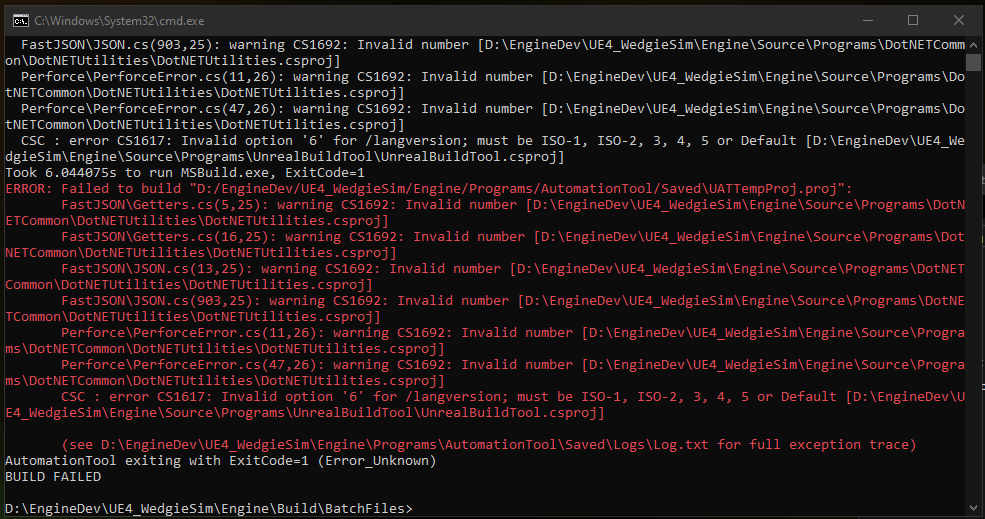
I am modifying a source code build of Unreal Engine 4.27.
dusky compass
What you posted is an UAT build error, not an engine build error.
Also you/they need direct permission from Epic to redistribute editor binaries publicly, if they dont then none of this work matters.
spring solstice
dusky compass
What you posted is an UAT build error, not an engine build error.
Also you/they...
Wdym? We're not distributing the code, we just want to build a precompiled editor for our UE4 game on Itch. The players won't be able to access the code, just use the editor to make UGC.
Or mods.
Like what Hello Neighbor has for instance.
heady sparrow
spring solstice
Wdym? We're not distributing the code, we just want to build a precompiled edito...

Unreal Engine
Unreal Engine is free to use for learning, and for developing internal projects; it also enables you to distribute many commercial projects without paying any fees to Epic Games.
iron dome
You can release your own stuff to add to an editor that the end user will download from epic.
But not give them the entire editor as well.
astral elm
So effectively plugins are ok
iron dome
Or distribute assets that they can use.
Maybe imposter assets so they can build a "ghost" level in editor. Not sure how that'd work exactly.
hidden hedge
Depending on the complexity of the project, distribution of the editor on EGL is the path of least resistance
 oblique breach
anyone used the TobjectPTR conversion tool yet with source control ?
i'm having issues it seems when running the command
iron dome
hidden hedge
Depending on the complexity of the project, distribution of the editor on EGL is...
That's interesting. How do you set that up?
hidden hedge
Its just giving out your editor sans source code and restricted content
iron dome
Cool. Thanks!
spring solstice
hidden hedge
Depending on the complexity of the project, distribution of the editor on EGL is...
The EULA states that I have to upload it to the Fab Marketplace.
 hidden hedge
Yeah EGL
spring solstice
hidden hedge
Yeah EGL
Does EGL stand for "Epic Games Launcher"?
 civic meadow
fleet holly
civic meadow
fleet holly
Is it possible to set custom made defines when building via RunUAT? I'd basically want to be able to check (in code) if the running editor is the precompiled version or locally built from source, maybe there's a nice way to do that already?
 forest mantle
fleet holly
Is it possible to set custom made defines when building via RunUAT? I'd basicall...
forest mantle
fleet holly
Is it possible to set custom made defines when building via RunUAT? I'd basicall...
maybe there is a simpler way, but the way I've done this is (1) in projects where I want to use a source-build I have a text file above the Plugins folder, I call mine "GRADIENTSPACE_DEV_BUILD.txt". Then (2) in build.cs I have this:
        bool bIsGSDevelopmentBuild = File.Exists(
            Path.GetFullPath(Path.Combine(PluginDirectory, "..", "GRADIENTSPACE_DEV_BUILD.txt")));
and then I can set custom defines/etc in the build.cs based on bIsGSDevelopmentBuild.
fleet holly
Cool will try it out!
astral elm
fleet holly
Is it possible to set custom made defines when building via RunUAT? I'd basicall...
I did it this way, in EngineDefines.h
#define UE_BUILD_CUSTOM_ENGINE 1
then, in game project cpp:
#define UE_BUILD_CUSTOM_ENGINE 0
#endif```Why do you feel to need to distinguish these two things? It's never been a distinction that I've ever encountered a reason to know (at least at compile time, for bug investigation it's in the log sort of)
astral elm
smoky goblet
Why do you feel to need to distinguish these two things? It's never been a disti...
In our case, we have a source fork with 100% mobile focused tweaks, and we let devs + PC builds carry on with the launcher version of the engine. There was like one or two situations where we needed the game c++ to know which engine we are running off
smoky goblet
And you wouldn't be able to use built in platform defines for that sort of thing? (I'm just curious)
I wouldn't have thought of trying to run the same project code off different engine source. But I've always had a binary deployment solution for prebuilt custom engine binaries, so not ever really needed anyone to rely on a launcher version.
fleet holly
It's a long story and you might not agree with my pursuit :) but I basically want to do different logic in a small portion of the code depending on if it's the precompiled version or not
astral elm
Yes, because we run mobile monitor + fast apk builds off the launcher, so...
This is the practical case, a chunk of code that uses the custom engine function, not available on launcher engine
{
#if UE_BUILD_CUSTOM_ENGINE
    UE_LOG(LogFunctionLibrary, Log, TEXT("Resetting touch inputs pressed states"));
    APlayerController* PlayerController = UGameplayStatics::GetPlayerController(WorldContextObject, 0);
    PlayerController->ResetInputTouchPressedStates();
#endif
}```Found this that might lead to something https://unrealution.com/automation/setting-a-define-inside-a-buildgraph-script/
astral elm
You can also pass custom parameters to runuat.bat, if you are looking for something to toggle on and off at will
fleet holly
I'm talking about differentiation the source version built locally by a coder and the precompiled version used by an artist (same engine source, just built locally or distributed)
So I was thinking the precompiled version could define IS_PRECOMPILED or such via an argument to RunUAT BuildEditorAndTools
astral elm
fleet holly
I'm talking about differentiation the source version built locally by a coder an...
I reckon for that, the build args might be the way to go... we have for example
    public bool Unstable = false;

ProjectDefinitions.Add(Unstable ? "UNSTABLE=1" : "UNSTABLE=0");
<mygame>.Target.cs
fleet holly
Very nice, that looks promising :)
How is it set when compiling? Just -Unstable directly into RunUAT?
astral elm
-ubtargs=<your custom args>
fleet holly
Super, thanks a ton!
astral elm
fleet holly
Super, thanks a ton!
Glad to be of assistance : )
 indigo star
Setup.bat only download half of dependencies then finish, does any one know why
Checking dependencies...
Updating dependencies: 100% (48377/88469), 11476.8 MiB cached...
Press any key to continue . . .
Generate project file failed due to missing depencies:
Setting up Unreal Engine 5 project files...

GenerateProjectFiles ERROR: It looks like you're missing some files that are required in order to generate projects.  Please check that you've downloaded and unpacked the engine source code, binaries, content and third-party dependencies before running this script.

Press any key to continue . . .
every once in a while the setup download can get weird
there is a specific way to download them in the pins that might be related, not sure though
indigo star
Thanks a lot, It was this: https://forums.unrealengine.com/t/upcoming-disruption-of-service-impacting-unreal-engine-users-on-github/1155880/32

Epic Developer Community Forums
same problem
 mellow ridge
Hi , I have issue when package project on linux its showing this error and freeze how to fix it please ?
I'm using source engine 5.5

 oak prawn
hello, unsure if this is the right place to ask but in case it is, does anyone have a article or tutorial on how to propperly setup perforce for Unreal? I have it all setup, can upload files and my team mates can download files no problem, however when trying to build through UGS they get all sorts of errors, most recently a Translation error, I have been trying for a couple of weeks but I simply cannot get it to work
smoky goblet
oak prawn
hello, unsure if this is the right place to ask but in case it is, does anyone h...
What exactly do you mean “build through UGS”? The build option that is there triggers the same process that building through your IDE does. Can they build that way?
You can check out the pinned comments in #source-control .
oak prawn
My team mate said he was able to build the project with Rider and using the Uproject, but running the build through UGS fails. I did not see there was a dedicated Source channel, sorry
smoky goblet
oak prawn
My team mate said he was able to build the project with Rider and using the Upro...
You'll have to share the actual errors that are being reported.
 cosmic spindle
Hi, has anyone been able to successfully compile 5.6.0 source?
I'm getting the following errors:
Error C1083 Cannot open include file: '../Plugins/Developer/Concert/ConcertApp/MultiUserClient/Source/MultiUserClient/Private/Widgets/ActiveSession/Replication/Client/Multi/Columns/AssignedClients/MultiStreamColumns_AssignedClients.cpp': No such file or directory
Error C1083 Cannot open compiler generated file: '..\Plugins\VirtualProduction\CaptureManager\CaptureManagerEditor\Intermediate\Build\Win64\x64\UnrealEditor\Development\CaptureManagerEditorSettings\Module.CaptureManagerEditorSettings.cpp.dep.json': No such file or directory
- I've downloaded and installed all the VS components as outlined here https://docs.unrealengine.com/en-US/setting-up-visual-studio-development-environment-for-cplusplus-projects-in-unreal-engine/
- Downloaded the source code zip and extracted
- Ran the setup.bat
- Ran the GenerateProjectFiles.bat
- Opened the solution in VS, set the solution configuration and platform to Dev Editor - Win64 and attempted to build the UE5 target
Any help would be greatly appreciated 🙂
dusky compass
If you dont need these plugins just axe them
 fading gazelle
How much storage do you need to build the editr from source? I have about 250GB left lol.
not sure if I can exclude the IOS, Android and MAC stuff from the build process
dusky compass
300-500GB but you CAN technically fit it into ~100Gb but it requires some work
fading gazelle
damn lol. are there specific excludes people use to remove the IOS, Android and MAC stuff?
if i exclude Apple i get build errors despite targeting win64
dusky compass
see pinned
dusky compass
the very first link has exceptions for apple
fading gazelle
So i did the excludes from the pinned and also deleted folders from plugins that had Apple or IOS or Mac in the name, but im hitting this issue

Is this required?
I guess it technically is via the RemoteSession Plugin?
heady sparrow
fading gazelle
So i did the excludes from the pinned and also deleted folders from plugins that...
instead of building the engine entirely you should just build it with a project that has what you need on it
fading gazelle
so make a project via UnrealBuildTool then build it that way?
i'd like certain modules to be built Release/Shipping, and link to those, wouldnt i need to build shaderworker or unrealpak separately?
I'd also like to understand what I did wrong in general. Is deleting items from the plugin folder unsafe?
heady sparrow
fading gazelle
so make a project via UnrealBuildTool then build it that way?
the easy way is to just use the launcher binary version
heady sparrow
fading gazelle
i'd like certain modules to be built Release/Shipping, and link to those, wouldn...
you can change their optimization levels in the build.cs I guess
heady sparrow
fading gazelle
I'd also like to understand what I did wrong in general. Is deleting items from ...
why would it be safe?
some plugins are enabled by default and required to be around to build
it might be safe if literally nothing refers to it
but I would say it's not worth
fading gazelle
yeah i guess i figured apple related stuff wouldnt get in the way of anything
heady sparrow
the most important thing is not just building the ENTIRE engine
a project + engine is far far easier and smaller
unless you must distribute an engine binary for some reason (probably never)
generally your game and engine will be kind of attached at the hip
fading gazelle
So basically dont do UnrealBuildTool.exe UnrealGame Win64 Development?
an by launcher do you mean the one on the epic game store?
im referring to this link here:
https://github.com/Kein/build_your_ue?tab=readme-ov-file#skipping-debug-symbols-and-pdb-gen
basiclly i did:
git clone <giturl>
Setup.bat -exclude=WinRT -exclude=Mac -exclude=MacOS -exclude=MacOSX -exclude=osx -exclude=osx64 -exclude=osx32 -exclude=Android -exclude=IOS -exclude=TVOS -exclude=HTML5 -exclude=PS4 -exclude=XboxOne -exclude=Switch -exclude=Dingo -exclude=Win32 -exclude=GoogleVR -exclude=LeapMotion -exclude=HoloLens
GenerateSolutionBat.bat
dotnet build Engine\Source\Programs\UnrealBuildTool\UnrealBuildTool.sln -c Release
delete all folders in plugins with Mac, Apple, Android
Engine\Binaries\DotNET\UnrealBuildTool\UnrealBuildTool.exe BlankProgram Win64 Development
UnrealBuildTool.exe UnrealGame Win64 Development
heady sparrow
I mean any installed version of the engine, it's just easier to make a project that way
not sure I would be interested in trying to avoid debug symbols existing
you kind of need those to do anything in c++
fading gazelle
i was under the impression that the version you install from epic game store does not allow you to modify the engine source
heady sparrow
fading gazelle
i was under the impression that the version you install from epic game store doe...
read what I said please, what I mean is that you use the launcher build to create a project
to add to that: you can right click on the uproject of this dummy project (for your game or just as a dummy project) and then change the engine version to be the source build in the same directory tree
when I said "you want to build the engine with a project" you kind of have to have a project to build with
I suppose there are probably some UAT args to make a uproject but I do not see the point when it's simple enough to just make one from another engine install
I tend to have like 2-3 versions of the engine on my pc at the same time
how you get the uproject etc doesn't really matter, it's just nicer to use a gui
fading gazelle
im probably still misunderstanding, but I dont have the space to have multiple installations with one version of the source from git, and another from EGS., I'm trying to cut down on space usage. My previous build worked fine when building the game and editor, but I wanted to cutdown more on space so I restarted from scratch. The difference here is the plugin changes i made. Just trying to understand what the issue is regarding the dependency to MetalShaderConvertor and more, and it seems that some default plugin really wants MetalShaderConvertor lol. Eitherway, I appreciate your patience with me.
heady sparrow
fading gazelle
im probably still misunderstanding, but I dont have the space to have multiple i...
never said to have multiple source builds here... my main point is to build a game project together with the engine
building the engine alone is going to waste a lot of space
the nice thing is that it would no longer need to build this random plugin
if it wasn't used by default or enabled in the project
fading gazelle
Ah i see. That makes sense
dusky compass
delete all folders in plugins with Mac, Apple, Android
you cant just do that, some programs/plugins/modules have hard requirements to some mac/linux libs even for win64
you also can't just delete a plugin, you will need to follow up the ref chain and delete these plugins that reference it as a dependency
 graceful willow
Trying to "Make Installed Build Win64" on a fresh sync of Unreal 5.6.0 from the official Epic Perforce server. Hitting several fairly opaque errors though.
Here is my build command line:
./Engine/Build/BatchFiles/RunUAT.bat BuildGraph -script='Engine/Build/InstalledEngineBuild.xml' -target="Make Installed Build Win64" -set:HostPlatformOnly=true -set:WithDDC=false -set:WithFullDebugInfo=false
First issue is this:
Horde server: 5.6.0-0, agent: 5.6.0-0
** For LiveLinkHub-Win64-Development + UnrealEditor-Win64-DebugGame + UnrealEditor-Win64-Development **
[1/33] Link [x64] UnrealEditor-NNERuntimeORT.dll
Module.NNERuntimeORT.cpp.obj : error LNK2001: unresolved external symbol DXCORE_ADAPTER_ATTRIBUTE_D3D12_GENERIC_ML
..\Plugins\NNE\NNERuntimeORT\Binaries\Win64\UnrealEditor-NNERuntimeORT.dll : fatal error LNK1120: 1 unresolved externals```

Second issue is:
** For UnrealEditor-Win64-DebugGame + UnrealEditor-Win64-Development **
[2/33] Compile [x64] Module.NNERuntimeRDG.2.cpp [RemoteExecutor: ASTRA]
Unhandled Exception: System.IO.FileNotFoundException: The specified module could not be found. (Exception from HRESULT: 0x8007007E)
ASSERT: Unhandled exception/crash. Suppress debugger startup and try to report issue instead. This message is here to hopefully see callstack
CALLSTACK:
uba::Detoured_CreateProcessW (UbaDetoursFunctionsKernelBase.inl:3050)
KERNEL32.dll: +0x78322
KERNEL32.dll: +0x511b2
KERNEL32.dll: +0x7898d
KERNELBASE.dll: +0x11ab6c
ntdll.dll: +0x16925f
ntdll.dll: +0x126b53
ntdll.dll: +0x16623f
ntdll.dll: +0x745d7
ntdll.dll: +0x73466
KERNELBASE.dll: +0xc85ea
clr.dll: +0x181058
ERROR: Process 1540 VCTIP.EXE (C:\HordeAgent\Sandbox\Saved\Uba\sessions\250702_132938\bin\c74eb6f9a94706d723e0cc990740cce5\VCTIP.EXE) not active but did not get exit message. Received 23 messages (GetExitCodeProcess returned 0xe0434352)
c:\vendor\epic\ue5\5.6.0\Engine\Plugins\Experimental\NNERuntimeRDG\Source\NNERuntimeRDG\Private\Tests\NNERuntimeRDGUnitTestOpUnary.cpp(209) : error C4756: overflow in constant arithmetic
while compiling UE::NNERuntimeRDG::Private::Test::UnaryOp::FElementWiseUnaryCPUHelperIsInf::RunTest
[3/33] Compile [x64] Module.AnimNextAnimGraph.4.cpp [RemoteExecutor: ASTRA]
c:\vendor\epic\ue5\5.6.0\Engine\Plugins\Experimental\AnimNextAnimGraph\Source\AnimNextAnimGraph\Private\Traits\BlendStackTrait.cpp(378) : error C4756: overflow in constant arithmetic
while compiling UE::AnimNext::FBlendStackCoreTrait::GetState
[4/33] Compile [x64] Module.AnimNextStateTree.cpp [RemoteExecutor: ASTRA]
c:\vendor\epic\ue5\5.6.0\Engine\Plugins\Experimental\AnimNextAnimGraph\Source\AnimNextAnimGraph\Public\TraitInterfaces\ITimeline.h(123) : error C4756: overflow in constant arithmetic
while compiling UE::AnimNext::FTimelineState::IsFinite
c:\vendor\epic\ue5\5.6.0\Engine\Plugins\Experimental\AnimNextAnimGraph\Source\AnimNextAnimGraph\Public\TraitInterfaces\ITimeline.h(98) : error C4756: overflow in constant arithmetic
while compiling UE::AnimNext::FTimelineState::GetPositionRatio
[5/33] Compile [x64] Module.AnimNextAnimGraph.3.cpp [RemoteExecutor: ASTRA]
c:\vendor\epic\ue5\5.6.0\Engine\Plugins\Experimental\AnimNextAnimGraph\Source\AnimNextAnimGraph\Public\TraitInterfaces\ITimeline.h(123) : error C4756: overflow in constant arithmetic
while compiling UE::AnimNext::FTimelineState::IsFinite
c:\vendor\epic\ue5\5.6.0\Engine\Plugins\Experimental\AnimNextAnimGraph\Source\AnimNextAnimGraph\Public\TraitInterfaces\ITimeline.h(98) : error C4756: overflow in constant arithmetic
while compiling UE::AnimNext::FTimelineState::GetPositionRatio```
Are either of these known issues that any of you have hit?
dusky compass
delete NNERuntimeORT plugin/module
graceful willow
There's a couple dependencies:
Unable to find plugin 'NNERuntimeORT' (referenced via default plugins -> NNEDenoiser.uplugin). Install it and try again, or remove it from the required plugin list.
which I pruned and leaves me only with one dependency from
Plugins/Animation/MLDeformer/VertexDeltaModel on NNERuntimeORT... which seems fishy to have a non-experimental plugin depend on an experimental one. Thanks for putting me on the right path!
graceful willow
I ended up pruning all these to get to a build: Engine/Plugins/Experimental/AnimNext Engine/Plugins/Experimental/AnimNext/Config/BaseAnimNext.ini Engine/Plugins/Experimental/AnimNextAnimGraph Engine/Plugins/Experimental/AnimNextAnimGraph/Config/BaseAnimNextAnimGraph.ini Engine/Plugins/Experimental/AnimNextChooser Engine/Plugins/Experimental/AnimNextControlRig Engine/Plugins/Experimental/AnimNextPoseSearch Engine/Plugins/Experimental/AnimNextStateTree Engine/Plugins/Experimental/AnimNextWarping Engine/Plugins/Experimental/EvaluationNotifies Engine/Plugins/Experimental/MoverAnimNext Engine/Plugins/Experimental/MoverAnimNext/README.md Engine/Plugins/Experimental/MoverAnimNext/Resources/Icon128.png Engine/Plugins/Experimental/MovieSceneAnimMixer Engine/Plugins/Experimental/MovieScenePoseSearchTracks Engine/Plugins/Experimental/NNERuntimeRDG Engine/Plugins/Experimental/RigLogicAnimNext Engine/Plugins/Experimental/RigLogicAnimNext/Resources/Icon128.png Engine/Plugins/NNE/NNERuntimeORT
not sure if I went too far, or if there is another, less destructive way of handling it (like some kind of sidecar configuration file to disable plugins). I really don't like modifying the source if I don't have to.
I've heard that I can make changes just to Engine\Build\InstalledEngineFilters.xml to control these sorts of things but I can't find any definitive documentation on it. ChatGPT keeps suggesting modifications to this file but none of them work 🙃
dusky compass
graceful willow
I ended up pruning all these to get to a build: ```Engine/Plugins/Experimental/A...
If you dont plan to use these plugins/their functionality - it does not matter
it is some animation machine/AI memes
 dapper sable
Hi, anyone knows where i can find my save game files in package project? I deleted it from SaveGames inside my project folder and it works normally in editor, but still has saves inside package project
iron dome
In your documents folder somewhere.
dapper sable
Is not, there is some project there, but not what i working with
I already deleted "savegames" from project folder .../saved/savegames/ and its works on editor, but not if i shipped it again, somehow there is still old saves
Epic Developer Community Forums
Nevermind, I just found it. It is in a somewhat different location, but it was Library/Application Support/Epic//Saved/SaveGames
i found someting like that, but directory doesnt exist

i search through my entire pc and didn't find anything like that beside my already deleted project folder
i deleted basiclly everything from project folder like saves/intermediate/datacache, even binaries and generate new ones, then shipped project again, AND AGAIN THERE WAS OLD SAVES.
so i guess there is something in epic launcher/other directory that i do not know of
Found it ❤️
dusky compass
not really related to #engine-source , see #packaging
 craggy tapir
Morning. Trying to figure out why our sk items are ticking every frame. We set up some not ticking on the BP and only tick when rendered and update rate optimizations in the BP for sk meshes but after doing an insights profile they are still ticking . Any idea why ?
 obsidian field
Hi there!
When you have Unreal Engine from source, you can also have these "uproject" (they are tools and can't be opened with UE editor) in the launcher. How can I remove them?
 smoky goblet
obsidian field
Hi there!
When you have Unreal Engine from source, you can also have these "upro...
smoky goblet
obsidian field
Hi there!
When you have Unreal Engine from source, you can also have these "upro...
Generally you don't bother because you don't launch project editors from the launcher. Instead you have your uproject as the startup project in the IDE and launch directly into the Editor. Not launching into the Launcher and then opening the project.
obsidian field
smoky goblet
Generally you don't bother because you don't launch project editors from the lau...
Yes, that's right. It's just that we're using the classic engine to sort a ton of assets, we have quite a few projects and I'd have liked it to be clean for the artists.
smoky goblet
obsidian field
Yes, that's right. It's just that we're using the classic engine to sort a ton o...
Then I’m not sure there’s anything you can do. Those are projects that shouldn’t be deleted.
Without experience in your workflow, it’s hard to give much advice. Our artists don’t use the launcher for anything. We only use it to migrate FAB content into plugins and the artists use them from there.
Multiple projects are managed using UGS. 99% of the team never sees the launcher (in my experience)
obsidian field
smoky goblet
Then I’m not sure there’s anything you can do. Those are projects that shouldn’t...
I see 🤔
I'll see what I can do without it, then, and make them a little program that includes everything they need.
 brittle viper
cosmic spindle
Hi, has anyone been able to successfully compile 5.6.0 source?
I'm getting the f...
brittle viper
cosmic spindle
Hi, has anyone been able to successfully compile 5.6.0 source?
I'm getting the f...
having the same issue
brittle viper
cosmic spindle
Hi, has anyone been able to successfully compile 5.6.0 source?
I'm getting the f...
cloned the repo instead of the release zip and it compiles fine
cosmic spindle
Sorry now seeing this…Yh that’s what worked for me
 distant venture
I am trying to build the ue4 docker container on Linux using ue4docker, the command being:
RUN ./Engine/Build/BatchFiles/RunUAT.sh BuildGraph \
    -target="Make Installed Build Linux" \
    -script=Engine/Build/InstalledEngineBuild.xml \
    -set:HostPlatformOnly=true \
    -set:WithClient=true \
    -set:WithDDC={% if excluded_components.ddc == true %}false{% else %}true{% endif %} \
    -set:WithServer=true \
    {{ buildgraph_args }} && \
    rm -R -f /home/ue4/UnrealEngine/LocalBuilds/InstalledDDC
I get to this point in the build
#12 1744.5 Creating makefile for UnrealServer (no existing makefile)
#12 1744.5 Linux dedicated server is made to depend on FreeType2. We want to avoid this, please correct module dependencies.
#12 1744.7 Unable to instantiate module 'FreeType2': Linux dedicated server is made to depend on FreeType2. We want to avoid this, please correct module dependencies.
#12 1744.7 (referenced via allmodules option -> AvalancheDataLink.uplugin -> AvalancheDataLink.Build.cs -> Avalanche.Build.cs -> Text3D.Build.cs) ?
Any idea why that would be happening? Does 5.6.0 Linux builds all fall over if you use WithServer=true because it sets AllModules?
dusky compass
I dont think you need Avalanche on the server, simply ax the plugin as well as anything that depends on it
 sonic zenith
I'm having these errors while trying to build engine source 5.6
I disabled UBA in BuildConfiguration.xml but still getting that same error
    <bAllowUBAExecutor>false</bAllowUBAExecutor>
    <bAllowUBALocalExecutor>false</bAllowUBALocalExecutor>
If building from inside Visual Studio make sure you are building the right project and solution configuration. What is your 'Startup Project'? What is your 'Solution Configuration'? It looks like whatever you've selected, it's trying to build UbaCore. Your settings in BuildConfiguration.xml just control whether the build system //uses// UBA, not whether it gets build (afaik). It looks like Visual Studio is actually trying to link the UnrealBuildAccelerator project and failing, apparently due to missing dependencies. What build command are you specifically choosing from the build menu?
 sonic zenith
I'm building solution with Ctrl+Shift+B, it's set on Development Editor
I'm running Setup.bat and building again to see if it helps
graceful willow
control-shift-b builds the entire solution, you might want to try narrowing the scope of the build with ctrl+b like my highlighted option above. I've definitely run into problems building the entire solution before
sonic zenith
graceful willow
control-shift-b builds the entire solution, you might want to try narrowing the ...
oh actually UE5 was already built with no error, it's all good then, thanks a lot!
 fair sedge
Any way to use UE5 as a renderer only? I.e. let's say I have my own .exe application which drives physics, simulation etc. And I just wanna tell UE5 what to render, and link it to my .exe as a library. Possible? Or am I asking for too much?
hearty sand
fair sedge
Any way to use UE5 as a renderer only? I.e. let's say I have my own .exe applica...
Probably possible, but I would be surprised if you find someone that did that AND documented it.
idk if the Elder Scrolls remake did that or not.
graceful willow
fair sedge
Any way to use UE5 as a renderer only? I.e. let's say I have my own .exe applica...
You have to decide how to communicate from your custom simulation to unreal -- an external process via sockets/shared memory/something, or embed your custom simulation code within the unreal process itself, most likely as a plugin. Either way you do it, you'll want to spawn an unreal Actor for each renderable scene object you have in your simulation. Then you can do things l ike SetActorTransform() on them per frame. You'll have to make sure and disable default behavior like Actor ticking, physics, and who knows what else.
dusky compass
OBRE was somewhat similar yes
fair sedge
graceful willow
You have to decide how to communicate from your custom simulation to unreal -- a...
That much I already have, but I'm struggling over more control over the game loop, inputs, etc. And with the part that my code has to get loaded as a dynamically linked plugin which is not ideal.
distant venture
dusky compass
I dont think you need Avalanche on the server, simply ax the plugin as well as a...
https://github.com/EpicGames/UnrealEngine/pull/13392 had the solution
iron dome
Yeah, there's been a push to make sure it works in all different kinds of builds recently.
distant venture
iron dome
Yeah, there's been a push to make sure it works in all different kinds of builds...
Nice. It was always a shock to get build issues with linux and does leave me wondering sometimes if I am the only one on Earth that uses it on linux
iron dome
I don't think so. But maybe the only one packaging it with a dedi server!
I don't think that issue was specific to Linux.
 foggy torrent
am I mistaken in thinking that there's no way to do cel shading in a forward rendered game without engine modifications? since the overlay material / post process based cel shading techniques require the gbuffer, and you can't add new shading model without modifying engine source
distant venture
iron dome
I don't think so. But maybe the only one packaging it with a dedi server!
Yeah the ue4-docker scripts build UnrealServer as part of its Installed Build target
I don't actually use it for anything at this point
dusky compass
not really relevant here, fulldebuginfo IIRC simply produces PDBs with private info, the shipping build will still have some code optimzied out
smoky goblet
 last anvil
a locally made installed build? or a launcher build?
last anvil
Locally made. I used the command in that message to generate the build.
smoky goblet
last anvil
Locally made. I used the command in that message to generate the build.
Curious. Agree with Kazekai that at least some of it can be explained by optimization settings. Callstack issue isn’t something I’ve seen before except when debugging dumps and the symbols aren’t actually loaded yet.
last anvil
This is what feels super odd to me
I have my source cloned to P:\UnrealEngine-Angelscript
If I make an installed build to P:\UnrealEngine-Angelscript\LocalBuilds\Engine\Windows and set a breakpoint for example in
P:\UnrealEngine-Angelscript\LocalBuilds\Engine\Windows\Engine\Plugins\Editor\EngineAssetDefinitions\Source\Private\Animation\AssetDefinition_AnimSequence.cpp
The breakpoint appears to catch in
P:\UnrealEngine-Angelscript\Engine\Plugins\Editor\EngineAssetDefinitions\Source\Private\Animation\AssetDefinition_AnimSequence.cpp
without a callstack, which to me looks like it's catching in the source build and not in the binary build
The test project I'm using is being pointed at the binary build in there. I've tried the same thing with the build not being nested like this, I was just making an updated build and figured I would attempt to address this before I started packaging it up. I've sort of been ignoring this issue up until this point.

When looking in the xml config the only thing I can find referencing debug settings is the full debug info option
                <Case If="'$(WithFullDebugInfo)' == true">
                    <!-- Copy files for local debug builds -->
                    <Copy Files="#UnrealEditor Win64 Unstripped" From="$(RootDir)" To="$(SavedOutput)"/>
                </Case>
                <Default>
                    <!-- Otherwise, strip the files for distribution -->
                    <Strip BaseDir="$(RootDir)" OutputDir="$(SavedOutput)" Platform="Win64" Files="#UnrealEditor Win64 Unstripped" Tag="#UnrealEditor Win64 Stripped"/>
                </Default>
</Switch>```Do I need to build the engine itself under an alternate configuration or something? I'm not sure what build config UAT is using under here. It feels like this should be easy, my understanding is this is the process by which epic genreates launcher builds and it's worked for me there before.
fair sedge
fair sedge
Any way to use UE5 as a renderer only? I.e. let's say I have my own .exe applica...
I figured out that there's the whole "UELibrary" module, which does compile UE as a .dll, which is provided an external window, and is ticked by the caller, which is pretty cool.
But this startups a pretty bare game window, even though it built this whole "UELibraryProjectEmbeddedEditor" taking up 830MBs, with the UELibraryApp.exe linking to it.
So, does anyone know how to get the actual editor running? Preferably with multiple windows ?
I'm asking out of curiosity mostly, since now at the least I can, run the editor and redirect the PIE button to actually run my game as a separate process, which is a huge improvement.
 manic flame
Hello, do you guys have a fix for EngineAssociation when collab ?
 radiant chasm
Anyone know where UEPrereqSetup_x64.exe went? It used to be in \Engine\Extras\Redist\en-us until 5.5 but in 5.6 it's gone.
 wise basin
after a change to a *.cs file in your project, do you have to regenerate always? e.g. ./Source/MyProjectClient.Target.cs or ./Source/MyProjectServer.Target.cs?
dusky compass
if you want to just build then no
hidden hedge
yeah that just runs UBT but if you want VS to actually see the changes, you have to
 small surge
trying to backport the gradle upgrade from 5.5 to 5.4 but I get these errors
UATHelper: Packaging (Android (ASTC)): Y:\app\src\main\java\com\google\android\vending\licensing\LicenseChecker.java:31: error: package com.android.vending.licensing does not exist
UATHelper: Packaging (Android (ASTC)): import com.android.vending.licensing.ILicenseResultListener;
UATHelper: Packaging (Android (ASTC)): > Task :app:compileReleaseJavaWithJavac FAILED
UATHelper: Packaging (Android (ASTC)):                                     ^
UATHelper: Packaging (Android (ASTC)): Y:\app\src\main\java\com\google\android\vending\licensing\LicenseChecker.java:32: error: package com.android.vending.licensing does not exist
UATHelper: Packaging (Android (ASTC)): import com.android.vending.licensing.ILicensingService;
UATHelper: Packaging (Android (ASTC)):                                     ^
UATHelper: Packaging (Android (ASTC)): Y:\app\src\main\java\com\google\android\vending\licensing\LicenseChecker.java:70: error: cannot find symbol
UATHelper: Packaging (Android (ASTC)):     private ILicensingService mService;
UATHelper: Packaging (Android (ASTC)):             ^
UATHelper: Packaging (Android (ASTC)):   symbol:   class ILicensingService
UATHelper: Packaging (Android (ASTC)):   location: class LicenseChecker
UATHelper: Packaging (Android (ASTC)): Y:\app\src\main\java\com\google\android\vending\licensing\LicenseChecker.java:221: error: package ILicenseResultListener does not exist
 delicate latch
Very new to unreal, mostly just looking around as engineering curiosity. I was confused when playing around with 5.6 Parrot Sample game what the "default HUD" was and why it wasn't respecting bShowHud.
Poked around and found it has a check here only to render HUD when NM_Client. So I tried changing network mode for PIE and then I found that within SpawnDefaultHUD it's not passing this null check, (at least in PIE).
What's up here? Is "default HUD" something that is never actually used in practice, and I just got curious looking at a stale path, or am I misunderstanding something fundamental?
dusky compass
I think it is a leftover from UT, usually people make their own HUD system and control directly
You can modify the check to run on both Standalone or Client if you want or just spawn manually
delicate latch
Do people generally not inherit from AHUD?
dusky compass
some do, some dont
 molten field
Which branch has ue5.7 features
hidden hedge
molten field
Which branch has ue5.7 features
There was someone else going on about this. There isn't a special early access version of 5.7 or anything like that, you have ue5-main, which is always going to be the development trunk for the next version (5.7 in this case)
void owl
hidden hedge
There was someone else going on about this. There isn't a special early access v...
General structure on github is:
- release -> latest release, stable, should be used by most people
- X.Y -> specific branch for given release of unreal, shows up when the version is close to being released (usually a month or at least couple of weeks before release) - after initial release usually contains WIP changes for next patch
- dev-X.Y -> sometimes there's also dev-X.Y branch, containing even more WIP changes but am not really sure what's the difference between dev and non-dev numbered release
- ue5-main -> latest and greatest (and the most broken), where day-to-day development happens... right now 5.7 - this is also the version used by fortnite etc... and it's heavily work-in-progress...
so technically speaking, when it's almost time to release 5.7, there will be "early access" branch which will eventually become release... but yeah...
molten field
hidden hedge
There was someone else going on about this. There isn't a special early access v...
what ue5-early-access
hidden hedge
pre-5.0
molten field
hidden hedge
pre-5.0
thanks
 past torrent
Hey all, I've compiled UE from source on Linux a few times now but cannot for the life of me get it to work on Windows.
The engine builds without any errors, starts up, and allows me to create a project, but then when trying to open that project suddenly exits. The problem is, there's no error info. Everything exits with code 0.
I get to here
[2025.07.20-01.57.23:573][566]Running C:/UEAS_Source/Engine/Build/BatchFiles/Build.bat  -projectfiles -project="C:/Unreal Projects/Test/Test.uproject" -game -engine -progress
[2025.07.20-01.57.23:681][566]Using bundled DotNet SDK version: 8.0.300 win-x64
[2025.07.20-01.57.24:486][566]Building UnrealBuildTool...
[2025.07.20-01.57.25:896][566]
[2025.07.20-01.57.25:896][566]Build succeeded.
[2025.07.20-01.57.25:896][566]    0 Warning(s)
[2025.07.20-01.57.25:896][566]    0 Error(s)
[2025.07.20-01.57.25:896][566]
[2025.07.20-01.57.25:896][566]Time Elapsed 00:00:01.30
All seems well. It generates some Visual Studio project files, succeeds, and then just exits:
[2025.07.20-01.57.40:001][566]Result: Succeeded
[2025.07.20-01.57.40:001][566]Total execution time: 12.61 seconds
'UnrealEditor.exe' (Win32): Loaded 'C:\Windows\System32\coml2.dll'. Symbol loading disabled by Include/Exclude setting.
'UnrealEditor.exe' (Win32): Unloaded 'C:\Windows\System32\coml2.dll'
'UnrealEditor.exe' (Win32): Loaded 'C:\Windows\System32\coml2.dll'. Symbol loading disabled by Include/Exclude setting.
'UnrealEditor.exe' (Win32): Loaded 'C:\Windows\System32\sxs.dll'. Symbol loading disabled by Include/Exclude setting.
'UnrealEditor.exe' (Win32): Unloaded 'C:\Windows\System32\sxs.dll'
'UnrealEditor.exe' (Win32): Loaded 'C:\Windows\System32\sxs.dll'. Symbol loading disabled by Include/Exclude setting.
[2025.07.20-01.57.40:677][566]LogStall: Shutdown...
[2025.07.20-01.57.40:678][566]LogStall: Shutdown complete.
[2025.07.20-01.57.40:697][566]LogSlate: Window 'Unreal Project Browser' being destroyed
[2025.07.20-01.57.40:711][566]Cmd: QUIT_EDITOR
Every line after this is just logs of it shutting down.
I dug through messages here going back to 2020 and someone mentioned that there should be something above the QUIT_EDITOR message, but I can't find anything there. Just successful build steps.
I don't even need a solution, just any help for where to look next or what to try as I really am not sure.
I'm building in Visual Studio, and have installed all the dependencies listed here:
https://dev.epicgames.com/documentation/en-us/unreal-engine/unreal-engine-5-6-release-notes
I'm running Windows 10
VS Version 17.14.9 (July 2025)
And clang --version in a command prompt says 19.1.5.
Thanks so much in advance for any help or ideas you might have
past torrent
Hey all, I've compiled UE from source on
spring solstice
How do I contact Epic Games by email?
iron dome
For what?
 runic dune
Hi, could you please tell me how to include the levels I split into sub-levels in the game build? In the packaged build they don't load — I just get a black screen, but everything works fine in the editor.
I added them here and built the game, but the Persistent Level and sub-levels don't work.
 dusky compass
spring solstice
iron dome
For what?
dusky compass
spring solstice
iron dome
For what?
Licensing a custom game engine. I have decided that I want to do so for my own game as well.
But I cannot find a way to do that in the Unreal Engine website.
iron dome
You can get and modify the UE source however you like. Just sign up on github and link your account.
No custom licence required.
Unless you have some specific requirements?!
delicate latch
Doing some more educational code spelunking.. anyone offhand know where HitProxyConsumer is actually used? (and what it's for?) Seems to be a constructor param for Canvas and PDI, but I'm not seeing any call sites across the engine that actually use it. Seems always to be set up null and unused
iron dome
It's for mouse clicks on the viewport.
So an actor can define its area on the viewport and register clicks there.
delicate latch
Thought that was HitProxy
iron dome
Oh Consumer
delicate latch
yeah like here FMeshProjectionPassProcessorBase
er
InHitProxyConsumer. i'm surfing around everywhere and EVERYWHERE i can find it's always null.
wondering if it's just a dead concept
i could be missing references for other platforms tho, only using rider on windows
and i'm a donkey
iron dome
It's used in an internal debug service 😄
delicate latch
haha know which file? i'm obviously curious
i saw one but then it was like almost a noop struct
seemed like it was nothing
also as per normal, this and any subsequent questions from me about UE5 source have no practical value.
iron dome
They'll be useful one day!
It's used in the rendering code too apparently via the FHitProxyMap class.
delicate latch
I think that was for HitProxies proper, not the consumer
iron dome
It extends from consumer
delicate latch
(this was all because I was curious how widgets get clicks)
oh interesting
but I guess with regard to canvas/PDI it's not in use
iron dome
Possibly not!
delicate latch
Cool cool! thanks for peeking with me 🙂
iron dome
Np
I'm always curious about random UE engine stuff!
I always forget it a moment later, but still...
delicate latch
yeah definitely. I've always had it in the back of my head to make a game, been thinking more seriously now about cloning the game "Muck". But instead of doing anything I'm more curious now about how all UE5 works. Got a good grasp now what it's doing with UHT, where it spawns render thread, and most things at a super high level.... so now I may actually have to make something :_(
last anvil
I'm running into an issue when using an installed build where I can't seem to debug engine level code. Breakpoints there don't hit and when I get a crash callstack anything outside of my code is omitted from the call stack. Here's the command I've used to generate the installed build. The pdb files all appear to be present but they don't appear to be working. Is there another build flag I should be setting??
 -set:WithDDC=false^
 -set:HostPlatformOnly=true^
 -set:WithFullDebugInfo=true^
-set:AllowParallelExecutor=true```I dont think it is related to the flags, it is not the answer you want but if you desire ot iterate and debug on engine code you better work with direct source build in-place
spring solstice
iron dome
You can get and modify the UE source however you like. Just sign up on github an...
Even if I want to use mod tools?
iron dome
Depends on the mod tools.
What exactly do you want to do?
You can't just distribute copies of the engine, but I believe you can make them available on the egs or fab or something.
I don't know about that specifically.
spring solstice
I just want to make a puzzle game but I think I need to use the engine for custom level editing.
hidden hedge
 dark sinew
and what do you have configured in "Package Sources" in Tools -> Options inside VS?
https://api.nuget.org/v3/index.json should at least be there
 desert moth
Hi, I'll try here too... We just upgraded to Unreal 5.6, and I'm trying to get my build setup to compile a linux dedicated server using clang-18.1, but all I get is a bunch of these
...
fatal error: 'type_traits' file not found
...
I've tried a couple of different things, but I'm kinda stuck now?
Anyone have any insight?
spring solstice
How do I even contact them?
dusky compass
you usually dont unless you are fairly big dev/publisher
dark sinew
hidden hedge
`https://api.nuget.org/v3/index.json` should at least be there
hey sorry for the late reply, but thats exactly whats configured in the nuget package manager
 fading dagger

Unreal Engine
Welcome to the Unreal Engine Issue and Bug Tracker. You can check the status of an issue and search for existing bugs. See latest bug fixes too.
Anyone have a fix for child sparse objects?
kinda annoying that on editor startup the sparse data is null
any bp that uses it needs a force bp compile otherwise anything that access the sparse data will crash with a null ptr. Seems to be a reflection issue related where the code isn't loaded into the side car structure during editor startup however forcing a BP compile does instantiate it
 robust night
 dusky compass
does it look fine?
hidden hedge
I guess "fatal error" is somehow not strongly worded enough
 nova talon
Hey gamers, I started having an issue that I can't really diagnose: I was working on a keybind menu and in the process enabled EnhancedInputUserSettings to read the key profiles. After enabling, the editor launched in debug mode, hit my breakpoints, showed the key profiles fine. I closed the editor, tried to relaunch and now every time I try to launch in debug it compiles fine then excepts with the following stack: TConstSetBitIterator::FindFirstSetBit() BitArray.h:1998 [Inlined] TConstSetBitIterator::operator++() BitArray.h:1953 [Inlined] TSparseArray::TBaseIterator::operator++() SparseArray.h:961 TSet::Rehash() Set.h:1443 [Inlined] TSet::ConditionalRehash(int, EAllowShrinking) Set.h:1418 [Inlined] TSet::RehashOrLink(unsigned int, TSetElement<…> &, int) Set.h:608 TSet::Emplace<…>(TPairInitializer<…> &&, bool *) Set.h:635 [Inlined] TMapBase::Emplace(int &&, FString &&) Map.h:450 [Inlined] TMapBase::Add(int &&, FString &&) Map.h:411 UE::UnifiedError::FErrorRegistry::RegisterModule(const TStringView<…> &) UnifiedError.h:512 UE::UnifiedError::StreamableManager::`dynamic initializer for 'StaticModuleId''() StreamableManagerError.h:8
Interestingly, the editor will still compile and launch in regular mode, key profiles remain accessible on testing so I'm not sure it's a problem with the UserSettings
I've re-pulled and rebuilt the engine and the problem persists. I can't find any logs related to this in Saved/Crashes in either my project folder or the engine.
- Unreal Engine 5.6 (source build from GitHub)
- Windows 11
- NVIDIA RTX 3080Ti (Driver 577.0.0)

 nova talon
Well against my better judgement I tried to compile and launch in debug through Visual Studio and it worked fine. Points to a Rider problem but still not sure what to do
hidden hedge
Rider is not a compiler and just uses MSVC. Not sure if you stumbled across a very weird debugger bug (Rider uses its own build of lldb for debugging)
thick furnace
nova talon
Hey gamers, I started having an issue that I can't really diagnose: I was workin...
wdym. is than an exception or breakpoint
lldb panel doesn't show anything usable. maybe smth in output
also - turn off call stack filtering. it hides a lot of important things. normally you should never hide frames
nova talon
Sorry, a lot of this side of things is over my head. It was an exception, I meant my own breakpoints that I was debugging worked, confirming Debug mode was working fine until I restarted the editor
Turned off the filtering and threw a breakpoint in the engine code, there's a PackageLoadFailed error for the StreamableManager module 🤔
 thick furnace
try finding what package it is
thick furnace
took a while to open image, yea
thick furnace
nova talon
Sorry, a lot of this side of things is over my head. It was an exception, I mean...
whats in log output
last lines
there should be UE_LOG(LogStreamableManager, Log, TEXT("Failed attempt to load %s"), *TargetName.ToString());
nova talon
I can't seem to find it, UE log is empty, debugger output is the same as before. I reinstalled Rider with no change. Launching Debug in VS still works, nothing about the StreamableManager in the logs
thick furnace
so nothing in debugger Console or Output panel?
nova talon
Unless I'm misunderstanding where those panels are, no


 unkempt aspen
Anyone knows path to this icon?

 drifting niche
when i press Build in VS code it is taking like 10+ hours for it to build the engine from source. Has anyone else seen it take this long. Im seeing in the docs it should take 10 to 40 minutes?
smoky goblet
drifting niche
when i press Build in VS code it is taking like 10+ hours for it to build the en...
It all depends on the capability of your machine or machines. My laptop can take a couple hours for a full rebuild, but at work we have UnrealBuildAccelerator which can distribute the load to a few machines and it goes faster.
drifting niche
smoky goblet
It all depends on the capability of your machine or machines. My laptop can take...
I have a mid to high tier gaming pc. so I dont know what would cause it to verify files so slow
smoky goblet
Does the log indicate anything when you build? Like that it's only building using 1 thread or something? or that you're building the wrong thing?
(it's a common mistake to build the solution instead of the game, which will build more than you need)
I'm not sure what verification you're talking about.
drifting niche
smoky goblet
Does the log indicate anything when you build? Like that it's only building usin...
as far as i know, which I'm very new to this so i could definitely be doing something wrong. https://dev.epicgames.com/documentation/en-us/unreal-engine/building-unreal-engine-from-source#runningtheeditor I am following these docs to the T. I cloned the 5.6 engine from the git hub. Then started this doc

Epic Games Developer
Compiling Unreal Engine from source code.
smoky goblet
drifting niche
as far as i know, which I'm very new to this so i could definitely be doing some...
Post the start of the build log.
drifting niche
i canceled this one manually because I started from scratch this morning to see if it was something i did in the process. but it still is going as slow as yesterday
smoky goblet
Yeah, that doesn't look right. You're using Visual Studio, right? Is your game project set as the startup project?
drifting niche
smoky goblet
Yeah, that doesn't look right. You're using Visual Studio, right? Is your game p...
not yet, the docs say to do that after the build is done
smoky goblet
Yeah, you can build before you do that step but it's not really required. It's probably more of a check before building your game.
Even after setting the startup project you can still build the other things or the full solution if you need to.
So I'd skip right down to that part
drifting niche
smoky goblet
Yeah, you _can_ build before you do that step but it's not really required. It's...
ok i set it, should i try to rebuild?
smoky goblet
Swap to debuggame editor first. That'll save you a rebuild in the future since that's the configuration that's better for development. Epic code is still optimized, but your code is debug.
drifting niche
smoky goblet
Swap to debuggame editor first. That'll save you a rebuild in the future since t...
thats the current start working
its still just as slow
drifting niche
I canceled that one
smoky goblet
This is what your toolbar should look like before you build.

 smoky goblet
Yeah, otherwise your editor will be super slow/unresponsive.
You also want to change the UE5 to your game project. It might not be set as the startup project correctly.
drifting niche
smoky goblet
Yeah, otherwise your editor will be super slow/unresponsive.
You also want to ch...
this is getting so frustrating. I wish there was clear documentation on this
smoky goblet
What sort of dev experience do you have? I don't recall having any issues following that documentation what I set mine up.
The build times can be frustrating and it was one reason I bought a new laptop, though it sounds like you should have a beefy enough machine already.
drifting niche
smoky goblet
What sort of dev experience do you have? I don't recall having any issues follow...
all of my experience is in front end stuff. all of this back end stuff is brand new to me and im out of my depth it seems
smoky goblet
keep at it, you'll get there.
Maybe swap to using the installed build? The engine source build is another step more complicated than "normal" dev.
drifting niche
smoky goblet
keep at it, you'll get there.
Maybe swap to using the installed build? The engin...
I appreciate your time in helping. Ill get it eventually
spark hamlet
My source build of the engine (5.4) all of the sudden would randomly invalidate previously built development binaries. Previously it would only have to build some 2k files once per configuration unless I clear intermediate or do something else the source, but recently I've been making changes only to a UE project and after one small change in a project script suddenly 2k engine files are being rebuilt, when it just before only had a few project files to build, same configuration. What's going on?
 gusty ember
spark hamlet
My source build of the engine (5.4) all of the sudden would randomly invalidate ...
gusty ember
spark hamlet
My source build of the engine (5.4) all of the sudden would randomly invalidate ...
you probably did something with engine files or your startup item is not your project in visual studio
ctrl+b will build your project.
ctrl+shift+b will build the solution in which engine is also involved

also visual studio has a bug, if you click Rebuild Survive it will rebuild the engine also
so always use ctrl+b to build your project
spark hamlet
I usually click "start debugging" which should build anything thats been changed, I know "build solution" would build the engine too as it shows as a project in the VS solution
if I want to build manually I build the project itself
gusty ember
spark hamlet
I usually click "start debugging" which should build anything thats been changed...
start debugging is fine, it just loads the project once build finished
what is your target item in visual studio?
should be your project
 spark hamlet
the target was dev editor. Right now tho im working off 5.4 from epic games so I don't have to wait around, trying to fix an issue with no hint as to where in my code its caused
Specifically, project is called LaserTag, set to dev editor. There are different project configs for dedicated server and what not but those would error if I try to load in editor anyways
gusty ember
dev editor is build settings not item target
gusty ember
spark hamlet
Specifically, project is called LaserTag, set to dev editor. There are different...
one thing is confirmed, if you build your project it will not build the engine if you already builded the engine
engine will only be building if you change engine files or binary corrupted
spark hamlet
yeah it shouldnt, yet I've been observing it building part of the engine
I'm moving the source build to a newer ssd, thinking it could be file corruption
gusty ember
spark hamlet
I'm moving the source build to a newer ssd, thinking it could be file corruption
do you have pubg installed?
spark hamlet
no...?
gusty ember
hmm, pubg also interact with unreal editor
few days ago my project start to build all those 6k engine shaders because i installed pubg on my dev pc
people saying that it changes the editor config files and this cause the editor to recompile shaders
spark hamlet
yeah but shader compilation is different, changing project render settings or even updating graphics drivers can cause the shaders to recompile
spark hamlet
Build started at 8:41 PM...
1>------ Build started: Project: LaserTag (Games\LaserTag\LaserTag), Configuration: Development_Editor x64 ------
Failed to restore A:\UE5_projects\LaserTag 5.0\Build\PLT_Beta.Automation\PLT_Beta.Automation.csproj (in 2 ms).
NuGet package restore failed. Please see Error List window for detailed warnings and errors.
1>Using bundled DotNet SDK version: 6.0.302
1>Running UnrealBuildTool: dotnet "..\..\Engine\Binaries\DotNET\UnrealBuildTool\UnrealBuildTool.dll" -Target="LaserTagEditor Win64 Development -Project=\"A:\UE5_projects\LaserTag 5.0\LaserTag.uproject\"" -Target="ShaderCompileWorker Win64 Development -Quiet" -WaitMutex -FromMsBuild -architecture=x64
1>Log file: B:\UnrealEngine\Engine\Programs\UnrealBuildTool\Log.txt
1>Using 'git status' to determine working set for adaptive non-unity build (B:\UnrealEngine).
1>Creating makefile for LaserTagEditor (.uproject file is newer)
1>Parsing headers for LaserTagEditor
1>  Running Internal UnrealHeaderTool "A:\UE5_projects\LaserTag 5.0\LaserTag.uproject" "A:\UE5_projects\LaserTag 5.0\Intermediate\Build\Win64\LaserTagEditor\Development\LaserTagEditor.uhtmanifest" -WarningsAsErrors
1>Total of 0 written
1>Reflection code generated for LaserTagEditor in 2.4674368 seconds
1>Building LaserTagEditor and ShaderCompileWorker...
1>Using Visual Studio 2022 14.38.33145 toolchain (B:\Program Files\Microsoft Visual Studio\2022\Community\VC\Tools\MSVC\14.38.33130) and Windows 10.0.22621.0 SDK (B:\Program Files (x86)\Windows Kits\10).
1>Determining max actions to execute in parallel (8 physical cores, 16 logical cores)
1>  Executing up to 8 processes, one per physical core
1>Using Parallel executor to run 2587 action(s)
1>------ Building 2587 action(s) started ------
1>** For LaserTagEditor-Win64-Development **
could be because it wants to build ShaderCompileWorker for some reason, its rebuilding engine components
 rose pollen
Hi!
I have strange issue: During development of my C++ game, everytime i just simply peak at some Unreal internal function definition (ctrl+right click) in Visual Studio, it forces the next build to rebuild massive chunk of the engine (3k-4k modules). I don't touch the Unreals code, no edits are being made, its a simple peak at headers that makes my next build run horribly longer. Does it detect looking and changes the state of files based on it? Sounds like quantum physics 😄
thick furnace
rose pollen
Hi!
I have strange issue: During development of my C++ game, everytime i just s...
make sure you don't have any extensions that autosave all files or like whitespace-fixer that automatically remove trailing whitespaces in file
try pay attention to tilestamp of file you open
and compare
rose pollen
thanks!
heady sparrow
Use source control and consider making engine source files read only
rose pollen
heady sparrow
Use source control and consider making engine source files read only
oh making it read only is a great tip, when I check with git status nothing is changed besides UnrealBuildAccellerator directory and some untracked dirs
heady sparrow
UnrealBuildAccellerator settings changing could also trigger a full rebuild I think
if they are build settings that change the target? I'm not certain as to the rules there but messing around with the build settings xml tends to require a full rebuild ime
rose pollen
Only those two LFS files were changed UbaDetours.exp , UbaHost.exp and i didnt change them by hand
heady sparrow
probably just stuff missed by the gitignore then
I have no clue what a dot exp even is
 cyan acorn
hey, how do I run the tests for Unreal Build Tool? I have a custom change that I want to make sure works.
 teal walrus
Hello! I am hoping to find someone who has had experience with creating global shaders through scene view extensions. I was almost able to get a simple shader running (literally just rendering a single color as a sanity check), but I have a runtime error stating that the pipeline could not be created and fatal shader compilation. Upon digging deeper with the debugger, I discovered that SceneColor's resources were null. I suspect it could be that SceneColor isn't fully available at PrePostProcess (which is what the tutorial outlined), hence now I am looking into Post Process hooks to correctly plug my shader at the Tonemapping pass. It would be great to find some fellow devs who have tinkered with this stuff before and to know if I'm on the right track!
 twin grail
Hello! I've never used Unreal before but am trying to write a uasset+uexp file parser for datamining and learning purposes. I've made decent progress so far but could really benefit from talking to someone more familiar with these file formats and how to actually interpret the bytes they contain. If anyone has this kind of knowledge and would be kind enough to enlighten me, my DMs are open. Thanks!
iron dome
Pretty sure that'd be against the rules here.
dusky compass
Which rule would that be?
dusky compass
twin grail
Hello! I've never used Unreal before but am trying to write a `uasset`+`uexp` fi...
you literally have the source
iron dome
dusky compass
Which rule would that be?
It's not exactly piracy, but it's definitely something I doubt the developers want you doing or they'd have made the information available. It'd also be the first steps to pirating assets by reverse engineering the file format and extracting data to rebuild assets.
dusky compass
which rule
iron dome
Well I mentioned piracy.. so the piracy one?
dusky compass
So he is pirating his own assets from example project?
iron dome
Where did he mention the example project or his own project?
dusky compass
where did he mention pirating anything?
iron dome
Did you read what I actually said?
dusky compass
did you?
dusky compass
then why say it
reading comprehension
iron dome
Not sure it's me that lacks the reading comprehension here.
dusky compass
"I'm not saying what are you doing is illegal, but if it was... heheh kid, ur in big trouble"
heady sparrow
Generally asset ripping stuff is not what we help with here in my experience... I think if they were just doing this to learn how the assets are serialized it would make sense but they explicitly say "datamining"
iron dome
Cos he'll definitely be data mining the example projects. 👍
twin grail
I didn't realize this topic fell under rule 5. I apologize
iron dome
It may not. I was just being overly cautious. If you're worried about it, you can always ask a mod. 🙂
twin grail
iron dome
Pretty sure that'd be against the rules here.
<@&213101288538374145> maybe someone can clarify? And if it's not allowed please delete my original message
 rain lake
I think it's fine? so long as the point isn't for hacking fortnite or whatnot
the source of the format is available to you
the point is to shut down piracy, data mining, and other exploitative behaviors; not to squelch knowledge or understanding of the underlying engine
so as long as you aren't doing those things, you're fine
twin grail
In my case it will be for building a database of items available in a game, to be able to better plan how you play it. But I could see this kind of information being used by others for other potentially nefarious purposes
twin grail
dusky compass
you literally have the source
You're not wrong. But the logic for reading/writing these files looks to be spread out to many places throughout the source code, and is further obscured by many levels of inheritance, overloading, and preprocessor macros. I've located some portions of it already in PackageFileSummary and ObjectResource, but feel like I'm still missing the big picture since I haven't really found the entry point for making these files
 frigid basin
while this server isn't a modding server there's a case for it to be used for modding as well, which i don't think we would frown upon
 wary bison
im looking to download ue 5.5.4 would this be the 5.5 in the github?

or would it be dev-5.5?
honestly don't know the difference
smoky goblet
wary bison
im looking to download ue 5.5.4 would this be the 5.5 in the github?
At this point they should both be 5.5.4, but you want the 5.5 branch
The dev branch for the changes that will make the next version.
5.6.1 just dropped, so dev-5.6 is where the changes for 5.6.2 will be rolled out. When 5.6.2 is released, those changes will be merged into 5.6.
wary bison
smoky goblet
At this point they should both be 5.5.4, but you want the 5.5 branch
The dev bra...
ahhh interesting, nice ty that's good to know
dusky compass
wary bison
im looking to download ue 5.5.4 would this be the 5.5 in the github?
there is a tag 5.5.4
wary bison
everything seems fine in the project but i have noticed on build, it will show these messages that i've never seen.. curious what they mean?
[Adaptive Build] Excluded from "plugin" ... etc
heady sparrow
excluded from unity build I believe
which it should say right on the line you removed
wary bison
heady sparrow
which it should say right on the line you removed
yea after the plugin or something before that, but what does it mean? did i do something wrong in this case is really what im asking, i used github to clone this time
heady sparrow
I believe it just can't unity blob some distinct files due to various build settings
you can just read the code
"Receives the files to compile using the adaptive unity configuration"
wary bison
heady sparrow
you can just read the code
yea lol i mean it's kind of saying nothing other than what it says to me, like i dont know what it means. it's also every plugin that i have in the project that's what it's pointing to
0>[Adaptive Build] Excluded from EIKShared unity file: EOSSDKManager.cpp, EOSShared.cpp, EIKSharedModule.cpp, PerModuleInline.gen.cpp
example
heady sparrow
"// When adaptive unity is enabled, go ahead and exclude any source files that we're actively working with"
the idea I think is to separate them so that changes to them are faster to compile instead of blobbing in random shit
you will see adaptive unity kick in a lot when you live code X file
wary bison
so it's all good , and i should ignore basically . it shows when building the project from source on new engine version
heady sparrow
yeah afaik it's innocuous... not entirely sure how it chooses working directories but it being your plugins makes sense
 timber sluice
I'm trying to build unreal source 5.5 on macOS sequoia with xcode 15.4, but warning as errors flag seems enabled, any idea how to avoid that?
 astral elm
timber sluice
I'm trying to build unreal source 5.5 on macOS sequoia with xcode 15.4, but warn...
astral elm
timber sluice
I'm trying to build unreal source 5.5 on macOS sequoia with xcode 15.4, but warn...
I don't recall seeing this. You are on recommended spec?
Recommended macOS and Xcode Versions
macOS 14.7 Sonoma
Xcode 15.4```
[edit] corrected for 5.5I'm afraid Sequoia / Xcode version might cause issues, but... hard to say for certain. I do know people have had issues with not being on the precise spec in the past
timber sluice
yea I'm running on the latest Sequoia, but I guess you are right I'm might be to up to update
astral elm
timber sluice
yea I'm running on the latest Sequoia, but I guess you are right I'm might be to...
I've personally been super paranoid about it after getting burned once some years back
wary bison
timber sluice
I'm trying to build unreal source 5.5 on macOS sequoia with xcode 15.4, but warn...
i just built on 5.5 and 5.6 on mac and was successful with both im on 14.5 and xcode 16.2, if that helps
timber sluice
I'm using 15.6 and xcode 16.4, so maybe too up-to-date :/
timber sluice
I finally make it work using xcode 16.2
 arctic girder
I'm trying to make an installed build of the 5.6.1 source on Windows. It works without the server target but if I add -set:WithServer=true, I get error C4702: unreachable code in the PixelStreaming2 plugin. Is this a known/common error? As I don't need it, can I just disable the plugin somewhere?
Just found #engine-source message, but where do I add this line?
arctic girder
Ah, also found the issue and solution here: https://forums.unrealengine.com/t/c4702-error-occurs-when-creating-an-installed-engine-build-in-ue-5-6/2602486/3

Epic Developer Community Forums
Hey there, This is a known issue that has been raised internally. I will post the public tracker link when it updates. Edit: Public tracking available here. Kind regards, Julian
 lament wasp
anyone maintaining or know of a fork with nvrtx branch on top of ue5-main?
 white river
Anyone has any experience with making an InstalledBuild? Which folder do I distribute, the DDC or the Engine one?
dusky compass
wellm what do you want to distribute, what for do you even make installedbuild
white river
dusky compass
wellm what do you want to distribute, what for do you even make installedbuild
idea is for programmers (at least those who need engine source) to build themselves from source and let the rest of the team download the installed build and use that
so whenever we update engine, either from Epic or some change from us, we run a job to make a new installed build and distribute that
dusky compass
so the distribute the intalled output folder
dusky compass
did theychange outpout? I dont remember, prety sure there should be more than Engine\
dusky compass
or may be not, dont recall if it copies templates and starter content
Actually, yeah, Engine is allyou need since your content is already in your project. just copy ddc cache to the respectitive place
wary bison
anyone else on 5.6.1 getting this error? project still builds/opens, but not sure what this means
 hidden hedge
wary bison
anyone else on 5.6.1 getting this error? project still builds/opens, but not su...
hidden hedge
wary bison
anyone else on 5.6.1 getting this error? project still builds/opens, but not su...
unless you want to get into the business of upgrading nuget packages, I'd just ignore it. it's one of the .NET tools that brings it in. I think you only see this when using sln, which I'm not sure why you would be in Rider
wary bison
hidden hedge
unless you want to get into the business of upgrading nuget packages, I'd just i...
Sounds simple enough. I’m in rider cause I’m on a Mac and I try to avoid Xcode
Or are you saying why would I be using sln in rider?
Not fully sure what sln is but I’d guts that means solution
Guess **
hidden hedge
well you're on Mac so you're not dealing with sln files
I hadn't actually seen this show up when using uproject
wary bison
hidden hedge
I hadn't actually seen this show up when using uproject
My project builds and opens fine but I should also point out that in rider, all the files of my project show up red like there when is an issue with rider not recognizing the project. But there doesn’t seem to actually be an issue, but additional info
dusky compass
just ignore unless you have a very big team and there is a potential security risk wuth public facing stuff
lament wasp
wary bison
anyone else on 5.6.1 getting this error? project still builds/opens, but not su...
it's super simple to update that. rider -> tools -> nuget -> tool window -> search magic -> right click -> upgrade
likewise for the bouncycastle warning
white river
Has anyone had any luck configuring the logging of engine code? I've tried using -LogCmds, e.g.
C:\work\UESource\Engine\Binaries\Win64\UnrealEditor.exe C:\project\project.uproject -LogCmds="LogModuleManager Verbose"
But I don't see any difference in the log file. I even tried reducing the logs that I did get but no change at all.
I've also tried changing the .ini files as described https://dev.epicgames.com/community/snippets/3GoB/unreal-engine-how-to-set-log-verbosity-via-command-line-with-logcmds
Any ideas?
 olive bobcat
Hi guys! I'm not sure if this is a proper channel for this question, but I can't find a more proper one in my opinion.
We are working in a team and use Unreal Engine compiled from source (everyone did it on their own machine). What is the right solution for the difference in GUID across the team? I found a solution that everyone should add another REG_SZ to the Windows Registry with some custom key name e.g. UE_5_6_Source. But I'm not sure if this is the correct solution. Any suggestions? Thanks in advance for answers.
white river
olive bobcat
Hi guys! I'm not sure if this is a proper channel for this question, but I can't...
yes, after building they should run some script (to make it easier for everyone) that sets the same registry key for everyone
olive bobcat
white river
yes, after building they should run some script (to make it easier for everyone)...
Thanks. 🙂
hidden hedge
olive bobcat
Hi guys! I'm not sure if this is a proper channel for this question, but I can't...
If you set it up as a native project, you don't have to deal with regkeys or engine GUIDs
olive bobcat
hidden hedge
If you set it up as a native project, you don't have to deal with regkeys or eng...
Can you expand what you mean by setting up as a native project?
hidden hedge
olive bobcat
Can you expand what you mean by setting up as a native project?
Top pin in #source-control
It's pretty much a complete guide to setting up an Unreal studio, but it covers how your engine source should be setup
dusky compass
white river
Has anyone had any luck configuring the logging of engine code? I've tried using...
use engine.ini config and this is a general ue question, not related to source
hidden hedge
-logcmds is correct though for changing verbosity on the commandline, but there actually has to be a thing logging on that log channel at that verbosity to make a difference
 visual marsh
Would it be a waste of money buying 128 gb of ram for engine builds & building indirect lighting?
Currently leaning on settling for 2x48gb (and then maybe I can upgrade with another identical pair of 2x48 if its not enough)
 viral sky
visual marsh
Would it be a waste of money buying 128 gb of ram for engine builds & building i...
viral sky
visual marsh
Would it be a waste of money buying 128 gb of ram for engine builds & building i...
let me try and answer this a different way: You don't need 128 GB of ram to make engine builds.
 gusty lance
Hey everyone, I'm wondering how to show the engine depot/branch on the title badge like I've seem on other games


Just fyi, I've the source build + perforce already
hidden hedge
UGS and BuildGraph does this automatically through a SetVersion UAT job
https://github.com/EpicGames/UnrealEngine/blob/6978b63c8951e57d97048d8424a0bebd637dde1d/Engine/Source/Programs/AutomationTool/BuildGraph/Tasks/SetVersionTask.cs#L14 if you need to reverse engineer how that works
gusty lance
Got it, it needs the UGS as well, thanks
smoky goblet
You should be able to update the build.version file manually. That's basically what the UAT job does
hidden hedge
UGS does it automatically as a step. For your actual build machines, you'll need to make it run that UAT job or mimick what it does (Build.version)
the buildgraph templates also have it being setup there as well
gusty lance
smoky goblet
You should be able to update the build.version file manually. That's basically w...
So, I tried to change the Build.version but didn't work either
hidden hedge
in which location because fundamentally, that's all it does
gusty lance
UnrealEngine/Engine/Build
hidden hedge
is this some weird setup with a foreign build or an installed build?
gusty lance
it's the normal git clone from the github repository
hidden hedge
yeah but is it a native build (correct) or a foreign build (technically correct, but kinda wrong)
additionally, how are you trying to read the version information?
gusty lance
it's native
hidden hedge
are you forcibly enabling a unique build environment in <project>Editor.Target.cs?
ie. do you run UnrealEditor.exe
gusty lance
hidden hedge
ie. do you run UnrealEditor.exe
Yes, I've run through the UnrealEditor.exe and then created a project
gusty lance
hidden hedge
are you forcibly enabling a unique build environment in <project>Editor.Target.c...
No
hidden hedge
so, how do you attempt to read the CL/branch info then?
gusty lance
Ok, I think I'm piecing it together. Just so I can confirm my understanding:
Is the expected workflow to modify the engine's C++ source to read the BranchName from Build.version and display it in the title bar? Or is there a built-in, automatic way to make it appear that I'm overlooking?
smoky goblet
You shouldn't need any C++ source changes. The title bar should show what's in the build.version file already.
This is what ours looks like for reference
{
  "MajorVersion": 5,
  "MinorVersion": 5,
  "PatchVersion": 0,
  "Changelist": 11866,
  "CompatibleChangelist": 11866,
  "IsLicenseeVersion": 1,
  "IsPromotedBuild": 0,
  "BranchName": "++Burbank+Mid+Game.Dev"
}
(though it's set through UGS, but at home I edit it manually and it works fine)
gusty lance
smoky goblet
You shouldn't need any C++ source changes. The title bar should show what's in t...
Yeah, mine is like this as well... strange
I'll get a revision on everything, maybe there's something missing
hidden hedge
gusty lance
Ok, I think I'm piecing it together. Just so I can confirm my understanding:
Is ...
I'm mostly just asking what API you use to read the version information
gusty lance
To be perfectly honest, I'm very new to engine versioning processes and I'm not sure I fully understand the question. When you ask "what API I use to read the information", I'm not entirely clear on what that means.
My understanding so far is that I just need to edit the Build.version file, and the engine will then automatically read it and display the branch.
Is the C++ function FEngineVersion::Current().GetBranchDescriptor() the "API" that does this job behind the scenes? Sorry if this is a basic question, I'm just trying to learn the correct process.
gusty lance
So, just for update, no luck at all, I'm using the UGS and have everything ready to go
Anyway, thanks for the help
 round pagoda
Any news on a 5.6.2? Its been ages since 5.6.1, and no patch version update in the Version.h file in the dev branch. I assume that means next will be 5.7?
iron dome
Seems so.
 vital hawk
Unreal Fest Stockholm (sep 22-24) has 5.7 talks, so I'm guessing the preview will drop around that time
 last mango
Hey, I have a question about Wwise X Movie Render Queue. When using Wwise, there's no way to use the Movie Render Queue to render out audio. I'm looking at getting this fixed for my project. I wanted to validate what are the correct steps. My initial research points towards having to write a custom audio device for non-realtime rendering, but that's considerable effort. The UE source code is also quite convoluted when it comes to creating audio device for non-realtime rendering. Looks like it's hardcoded to using the Audio::FMixerPlatformNonRealtime. Which suggests I might need to modify the engine to make the Movie Render Queue work correctly with Wwise.
Is someone here versed in this part of the engine or could point me to a contact who could help me understand the correct process before I commit to the work?
white river
About the native project setup, are people doing that outside of perforce too? As some kind of monorepo which includes engine as well as the projects?
hidden hedge
I did want to do this at a previous studio because doing anything with the engine when using an installed build is just annoyingly loathesome. If you had to do any engine work, you essentially had to checkout the engine repo and then checkout the project within it, for your own local jank native build. I guess that worked for the most part but the studio's workflows completely discouraged pushing anything to the engine repo
white river
hidden hedge
I did want to do this at a previous studio because doing anything with the engin...
Yeah, its messy... But does it really have to be a native project?
hidden hedge
it doesn't have to be, but generally it's way more convenient to be able to make modifications to the engine without it being a whole process
but git (if this is what "outside of perforce" means) was just incredibly annoying to use for game dev
white river
in my current and past jobs we use Plastic (Unity Version Control) and of course git for accessing the engine github
it feels like a waste because we have to reinvent UGS
hidden hedge
yeah the git studio had a bunch of tooling to deliver PCBs and it was all using git hooks and command line utilities
white river
i did get a workflow with installed build working so then there's one workflow for engine devs and one for the rest 🎉
but now im also trying one where the "rest" download the engine source from Plastic (like a "copy" of the github fork) and then download PCBs separetaly. I dont know if that will work but it sounds like it might be tiny bit smoother than using installed build
hidden hedge
it's been a long while since I used plastic, but it always seemed like a worst of both worlds solution
 cobalt ether
I made a binary build for UE5.6.1 without any issues but when trying to make one for UE5.5.4 I get this error
Does anyone know how to fix it?
 cobalt ether
Figured it out, for others having the same issue:
Whatever "SwarmCoordinator" is, it's targeting .NET 4.6.2
So basically, following the UE documentation for making an installed build won't solve this issue.
There you get told to install .NET6.0, but you also need to install .NET4.6.2 (Which is never mentioned)
After installing, I managed to build without problems :)
 warm matrix
Hi! My game crashes after a seemingly random amount of time when its built, whereas in the editor it seems to be fine and doesn't crash at all. This is the only error I get; [2025.09.04-16.34.46:201][305]LogWindows: Error: appError called: Assertion failed: SharedThis.Get() == this [File:D:\build\++UE5\Sync\Engine\Source\Runtime\Core\Public\Templates\SharedPointer.h] [Line: 1591]
Any ideas?
hidden hedge
there will usually be a callstack
 glacial hinge
warm matrix
Hi! My game crashes after a seemingly random amount of time when its built, wher...
glacial hinge
warm matrix
Hi! My game crashes after a seemingly random amount of time when its built, wher...
impossible to say from this
seems like some pointers issue, maybe you assign some pointer created with new that became nullptr(maybe garbage collected) to a shared ptr or somethign like this?
a call stack should be helpful for sure
 haughty warren
I added a typo to Vector.h and tried to compile, it screamed at me ofc. I fixed the typo and now Unreal wants to recompile the entire engine................
Any way I can skip this?
iron dome
No
Make the engine files read only and your ide will ask you if you want to overwrite.
Saves a lot of time.
thick furnace
warm matrix
Hi! My game crashes after a seemingly random amount of time when its built, wher...
without call stack hard to say, but i'd expect it is access to AsShared() of TSharedFromThis within c++ constructor, the previous call stack frame should tell you exactly where it was. also it could be caused by using AddSP binding delegate
if you look at the line
        // If the following assert goes off, it means one of the following:
        //
        //     - You tried to request a shared reference before the object was ever assigned to one. (e.g. constructor)
        //     - You tried to request a shared reference while the object is being destroyed (destructor chain)
        //
        // To fix this, make sure you create at least one shared reference to your object instance before requested,
        // and also avoid calling this function from your object's destructor.
        //
        check( SharedThis.Get() == this );
 abstract cloud
Hello, does anyone know how to fix this error when trying to build a project from visual studio? I have someone trying to build the project but this same error message comes up for this, and "theempiresoftherift.dll",
LINK : fatal error LNK1181: cannot open input file 'wininet.lib'
Link [x64] UnrealEditor-VisualStudioBlueprintDebuggerHelper.dll: Exited with error code 1181 . The build will fail.```You shouldn't really need the VS tools plugin but the error itself sounds like you either didn't install the Windows SDK or installed an unsupported version
This doesn't sound like it's engine source, might be more appropriate in #cpp
abstract cloud
yeah I sent it in that channel because I thought the same, also we did install some unsupported version in the individual components tab to try to solve it
 inland spruce
Attempting to build UE5.3 branch from source. Using VS 2022. After a VS update, I've been unable to build it.
Getting some compilier errors saying.
"overflow in constant arithmetic"
Its whenever the INFINITY macro is being used in the unreal source.
EX:
static float GetClobberValue()
{
    switch (GRDGClobberResources)
    {
    case 1:
        return 1000.0f;
    case 2:
        return NAN;
    case 3:
        return INFINITY;
    }
    return 0.0f;
}
Does anyone know how to solve this?
iron dome
Change infinity to a large number.
hidden hedge
5.3 is a bit old now, are you also on the right MSVC toolchain for it?
 compact rain
FLT_MAX is likely what you need
 merry sun
Hi, in UE 5.x we have EditorscriptableClickDragTool (Scriptable Tools Framework plugin), where I could find the implementation in the sourcecode? I just found the .h file https://github.com/EpicGames/UnrealEngine/blob/5.7/Engine/Plugins/Runtime/ScriptableToolsFramework/Source/EditorScriptableToolsFramework/Public/BaseTools/EditorScriptableClickDragTool.h
hidden hedge
merry sun
Hi, in UE 5.x we have EditorscriptableClickDragTool (`Scriptable Tools Framework...
this class literally does nothing. all the behaviour is inherited from UScriptableClickDragTool (which isn't Blueprintable)
merry sun
this class literally does nothing. all
delicate latch
Anyone know offhand-ish where the build system (for OSX) kicks off ld command during compilation? Seems like on my OSX laptop a pristine third-personal example project won't build. Doing hobbyist UE5 stuff and am not eager to jump into the build toolchain.
Error detail [here](#cpp message). Basically just want to know what args ld is being invoked with to see why it's pissed
or is there some config to have more verbosity?
hidden hedge
delicate latch
Anyone know offhand-ish where the build system (for OSX) kicks off `ld` command ...
Not sure if this is an appropriate channel but did you share your Build.cs and Target.cs anywhere?
Also I'm 3 days late to this
delicate latch
hidden hedge
Not sure if this is an appropriate channel but did you share your Build.cs and T...
Just whatever comes out of the box for new 5.6 project
hidden hedge
delicate latch
Just whatever comes out of the box for new 5.6 project
this is pseudocode but you probably can do something like:
if (Target.Platform == UnrealTargetPlatform.Mac)
{
    AdditionalLinkerArguments = "-v";
}
inside <project>Editor.Target.cs
delicate latch
hidden hedge
this is pseudocode but you probably can do something like:
```cs
if (Target.Plat...
Sick thank you I'll dig around
 gaunt heart
I'm making a modified view of a UAsset that uses gameplay tags, and I wanted it to expand all on open but it turns out the only method for it is private, is there anything else I can do? Idk how to make feature requests either (nor have the ability to wait until then)
 heady sparrow
gaunt heart
I'm making a modified view of a UAsset that uses gameplay tags, and I wanted it ...
heady sparrow
gaunt heart
I'm making a modified view of a UAsset that uses gameplay tags, and I wanted it ...
you can always just UE_DEFINE_PRIVATE_MEMBER_PTR on newer versions
or use the access private header-only lib
you are in luck that it appears this is exported
gaunt heart
yeah I'm on 5.6.1
gaunt heart
heady sparrow
you can always just UE_DEFINE_PRIVATE_MEMBER_PTR on newer versions
no more intellisense complaints but it does this, I tried changing names of the macro but then it cant find the private method or idk how to call it

 heady sparrow
gaunt heart
no more intellisense complaints but it does this, I tried changing names of the ...
heady sparrow
gaunt heart
no more intellisense complaints but it does this, I tried changing names of the ...
read the comment in the source closely
I don't think you want to make the ptr it makes for acces the same name as the type?
also error list isn't very useful here, we mainly care about the output log for c++ compilation
gaunt heart
(Picker.Get().*SGameplayTagPickerSetTagTreeItemExpansion)(true, true); got it with this and had to do void (bool, bool) in the macro
 novel minnow
ive built my engine from source, but my other machines cant run the project as they say the game project was built with a different version of unreal. my engine source is 560gb...i dont have enough disk space in the other machines for this. what's the solution?
smoky goblet
novel minnow
ive built my engine from source, but my other machines cant run the project as t...
Why is it so big? Mine's only 250. That's with binaries/pdb for three configurations.
But really the only option is a full binary deliverable, but that build can really only edit blueprints.
novel minnow
smoky goblet
Why is it so big? Mine's only 250. That's with binaries/pdb for three configurat...
i have sdks from consoles
might be why so big?
i dont wanna do any c++ on the other machines.(blueprinting is fine) how can i create a binary deliverable?
smoky goblet
Maybe that explains it. You can go the route of manually checking in your binaries. That's usually discouraged but it can work for a one programmer team. Using Horde & UGS or some other CI solution to build and package up binaries that other team members can sync to is what larger teams do.
novel minnow
smoky goblet
Maybe that explains it. You can go the route of manually checking in your binari...
"pseudo-programmer" 😅
dusky compass
novel minnow
ive built my engine from source, but my other machines cant run the project as t...
open uproject file and make version empty
 bright linden
When we build Unreal Engine, it says build UE5. But how do you deal with it when you accidentally press Build Solution in the toolbar above? Do you delete binary or something folder?
hidden hedge
?
iron dome
If you accidentally hit build solution, you can just cancel it. Then go back to building UE5.
heady sparrow
I think they are trying to save on space from the extra binaries and pdbs created
I would say if you can deal with it it's not a bad idea to clear out binaries/intermediate and do a regular build
if you can leave it on for a bit
iron dome
I guess!
 candid canopy
Heya guys, I just downloaded the 5.6.1 source and am having issues. I've already ran setup/generateprojectfiles.
Now I dropped the UE5.sln into rider but get a bunch of Microsoft.NET.SDK.WorkloadAutoImportPropsLocator errors. Am I doing something wrong?
(I've built from source before but feel like im missing a step somewhere)
I know you don't normally use the sln with rider, but there's no uproject file here to build from
dusky compass
try building from command line directly
candid canopy
I'm not sure how to do that. Trying with VS2022 atm
candid canopy
Edit : VS was the fix, I guess rider can't just build from the sln (out of the box)
astral elm
candid canopy
Edit : VS was the fix, I guess rider can't just build from the sln (out of the b...
I build source engine with Rider, don't recall having to do any magic tricks for it
 quasi laurel
candid canopy
Edit : VS was the fix, I guess rider can't just build from the sln (out of the b...
quasi laurel
candid canopy
Edit : VS was the fix, I guess rider can't just build from the sln (out of the b...
Nope, you need the VS Toolchain (MVSC)
Rider just is the better code editor.. but has no own toolchain included..
Hope that will come in the future..
But you can also install the toolchain without VS by using msys
astral elm
ah true true
candid canopy
oh right that makes sense
 vagrant herald
Hi. Does anyone know how to build Unreal Engine 4.27 with Visual Studio 2022?
or current Visual Studio Code? I don't have a Microsoft Subscription to get VS2019...
astral elm
vagrant herald
or current Visual Studio Code? I don't have a Microsoft Subscription to get VS20...
Thats bad news for oldskool devs! When did they change that...
hidden hedge
MS would probably tell you to you can download old MSVC toolchains for VS2022
dusky compass
what the issue it compiels just fine
heady sparrow
To be clear your IDE can use a different version of MSVC build tools and probably still stay on 2022 (not that what sswires said leaves anything out, just to be specific)
us the VS installer and switch to individual components then find the versions you want
white river
Hii, I was wondering, does anyone else experience that visual studio rebuilds everything all the time when working in a project from source? This can't be right, I just press Build -> Build Solution
white river
My UnrealBuildTool log says that "Engine\Intermediate\Build\Win64\x64\UnrealEditor\Development\Core\SharedDefinitions.Core.Cpp20.h: contents have changed." but I didn't do any thing 🤔
heady sparrow
white river
Hii, I was wondering, does anyone else experience that visual studio rebuilds ev...
does it also do this if you run from your game project?
white river
heady sparrow
does it also do this if you run from your game project?
yes. it actually stopped now after a couple of builds
heady sparrow
you should build/run your project, not the entire solution imo (when compiling both)
I may misunderstand the exact distinction here as it relates to vs but you want to only build what your game actually uses and not the entire engine
white river
heady sparrow
I may misunderstand the exact distinction here as it relates to vs but you want ...
yeah makes sense but what i do is
- generate project files with the uproject
- open up the solution
- press Build -> Build solution
iron dome
There are build.cs settings that can cause recompilation.
Make sure all the settings that are there are set to latest if they are specifically set to something else.
white river
iron dome
There are build.cs settings that can cause recompilation.
like which?
iron dome
Which do you have in your build.cs?
hidden hedge
white river
yeah makes sense but what i do is
* generate project files with the uproject
* o...
if you are already using a native project, I'm not sure why you'd EVER hit "build solution"
build your project target only
and it wouldn't be Build.cs anyway, it would be Target.cs
Build.cs is only per-module
white river
hidden hedge
build your project target only
how exactly? like right click on it in the solution explorer and press build?
 white river
Yeah it is
I thought that when you pressed Build -> Build solution it only built the startup project?
What should I have here?
 hidden hedge
probably that, but for day-to-day gameplay programming "debuggame editor" is probably better
just under no circumstances build solution, only the game project itself
white river
currently its develoopment_editor
hidden hedge
this is why there are VS extensions to bulid the startup project
white river
alright, thanks, will try these suggestions later today
iron dome
dusky compass
white river
My UnrealBuildTool log says that "Engine\Intermediate\Build\Win64\x64\UnrealEdit...
this is a generated header, in includes multiple others any changes to them or any relations can cause rebuild
even as simple thing as resaving any file with new timestamp, including aforementioned build.cs or even uproject can cause UHT and UBT to do new pass
hidden hedge
it's probably because of the stuff already discussed anyway
Target.cs, not Build.cs, is going to be changing definitions. Build.cs is for the module level
 minor verge
Would anyone happen to have any knowledge of the bug in engine trace code mentioned in this commit? https://github.com/EpicGames/UnrealEngine/commit/da1a30a3f74782a7c3d6d998ae19ee87a0fad3d8
One thing to note - due to a bug in the engine Trace code, we need to use NoSync on the PollingEvent or the trace could end up with a missing Sync event and make the file unreadable from that point on.
Haven't had any luck on the issue tracker.
heady sparrow
minor verge
Would anyone happen to have any knowledge of the bug in engine trace code mentio...
probably something to do with serializing the end resulting trace file if I had to guess
a lot of these changes to the internal polling trace for iris is probably because they can now do so in parallel
it's not super hard to make the object polling itself safe (they are all pretty isolated) but net tracing is something they all have to write which is scary to do in parallel as it was before
as for the actual trace structure itself I have no clue so that's not a great answer
but the iris part I am familiar with here
minor verge
heady sparrow
probably something to do with serializing the end resulting trace file if I had ...
For context, the NoSync marker doesn't seem to cause any issues with the parallel object polling.
However, about 2 months ago, for our project I modified the engine to execute the client tick phase in parallel (STAT_NetDriver_TickClientConnections).
I've had that running perfectly fine without any crashes or bugs for 2 months, but when running performance traces I'll often (25% - 50% of them) have trace files which freeze up the Insights UI when you try to load them.
They'll load eventually but will dump out a log file that's about 3GB in size, with just this log statement being spammed: "PacketContentEvent GameInstanceId: %u, ConnectionId: %u %s, Missing NameIndex: %llu".
My assumption for why this happens is that the Name event isn't guaranteed to be recorded before other events (or maybe at all?), due to the NoSync marker.
I'll be testing removing the marker next week when I get the chance, but I've got no information on this other supposed bug which the NoSync marker fixes.
lament wasp
has anyone fixed the bugs with UE_WITH_REMOTE_OBJECT_HANDLE so that it functions? ue devs said that they wont provide the internal code to get it to work, so we need to figure out how to make it work by separating it from internal code
dusky compass
said where
lament wasp
dusky compass
said where
@chrome fjord please correct me if i misunderstood something
dusky compass
 dusky compass
and what do you need UE_WITH_REMOTE_OBJECT_HANDLE for?
lament wasp
dusky compass
and what do you need `UE_WITH_REMOTE_OBJECT_HANDLE` for?
everything that pertains to the multiserver plugin, 88 files use if UE_WITH_REMOTE_OBJECT_HANDLE, and it is tightly coupled to all remote* classes
RemoteExecutor
RemoteObject
RemoteObjectPathName
RemoteObjectPrivate
RemoteObjectSerialization
RemoteObjectTransfer
 chrome fjord
lament wasp
<@1082436525381398578> please correct me if i misunderstood something
chrome fjord
lament wasp
<@1082436525381398578> please correct me if i misunderstood something
I think that answer still holds true. I'll give you a quick update there. Edit: Actually this may be another month before I have something useful to say. Some code changed from an earlier implementation that gave a clearer path for licensee adoption of this feature. I'm bringing up the changes with the team to re-enable a better path for adopting this. Whoops. I'll let you know in a month!
lament wasp
thank you sir !
 torn cypress
Hey
For those who put Engine source into git repository and put project files as "native" project, what is your process regarding gitignore files? Do you use the ue git repo gitignore + call Setup.bat on each PC?
heady sparrow
torn cypress
Hey
For those who put Engine source into git repository and put project files as...
just use the built in unreal one which applies already?
torn cypress
heady sparrow
just use the built in unreal one which applies already?
Sure. I’m curios, because perforce engine source has no “setup”. Thinking about if it makes any sense to call setup on clean git engine repo and then commit all the files to git. That will require changing the gitignore (otherwise binaries, downloaded by setup.bat will be ignored)
heady sparrow
torn cypress
Sure. I’m curios, because perforce engine source has no “setup”. Thinking about ...
binaries in git does not seem like a great idea to distribute a build
torn cypress
heady sparrow
binaries in git does not seem like a great idea to distribute a build
Then it makes sense
Thanks
heady sparrow
it might be okay if it was a distinct branch you don't touch I guess
might be easier to distribute a rocket build with a script or something
it's honestly kind of insane there is no simple "distribute biary to artists" setup that doesn't involve perforce
torn cypress
heady sparrow
it's honestly kind of insane there is no simple "distribute biary to artists" se...
Yeah, thats the case. Professionally perforce just works (Horde, UGS)
But for pet projects, when I need to keep some engines changes through engine versions, I am biasing towards committing engine source directly to my git
heady sparrow
heady sparrow
torn cypress
Yeah, thats the case. Professionally perforce just works (Horde, UGS)
But for pe...
engine SOURCE is not the issue here, I don't recall saying the source was not ideal to commit
we are talking about BINARIES
having the custom engine alongside your project is generally the case
they are inseperable in a decently large project (with any signfiicant engine changes)
torn cypress
Am I correct that setup.bat downloads platform specific binaries for some plugins/engine parts? Ive seen some platform excludes as arguments
heady sparrow
yes, you can exclude platforms you don't care about
Setup.bat -include=Win64 I think is worth a shot
this could have changed names over the years
the full list is a bit insane
./Setup.bat -exclude=WinRT -exclude=Mac -exclude=MacOS -exclude=MacOSX -exclude=osx -exclude=osx64 -exclude=osx32 -exclude=Android -exclude=TVOS -exclude=Linux -exclude=Linux32 -exclude=Linux64 -exclude=linux_x64 -exclude=HTML5 -exclude=PS4 -exclude=XboxOne -exclude=Switch -exclude=Dingo -exclude=Win32 -exclude=GoogleVR -exclude=LeapMotion
Hm. Well, maybe then committing engine source only and calling setup with args to exclude other platforms is not the worst scenario
torn cypress
heady sparrow
the full list is a bit insane
```
./Setup.bat -exclude=WinRT -exclude=Mac -exclu...
Omg..
heady sparrow
I think it might be missing a couple now too lol
seems like what people do is kinda just copy the build results sans pdbs
torn cypress
heady sparrow
seems like what people do is kinda just copy the build results sans pdbs
For the editor binaries I assume
heady sparrow
yeah, the pdbs are by far the most cumbersome part of the distributed files
ideally they have them just to make better crash logs but you should be able to debug dumos by just using your own copy of the pdbs
well, more like ideally something else maps the pdbs for you magically
torn cypress
Like pdb server
I think ive seen some docs about that
Maybe only binaries to distribute
im curious about the real setup in some studios for non p4/non UGS
git lfs on binaries (pdb too) might work as well
heady sparrow
from what I can read they just run buildgraph and send the files to something that isn't git
lfs here seems like needless complexity to me
using git at all I guess
maybe it could help bind the idea of the engine version to the artists work but they would probably prefer something not git anyways
some people use svn I guess
torn cypress
That’s fair. I worked with all three p4, svn and git. Looked at diversion briefly.
heady sparrow
also artists just building the source is not intolerable imo
unless you are cranking out core header changes daily
all they need to do is click the uproject and use correct loading settings that force recompile
so some people do just put the dev editor binaries in source control
torn cypress
heady sparrow
<https://forums.unrealengine.com/t/is-there-any-way-to-eliminate-the-visual-stud...
Oh interesting
Will check
heady sparrow
this seems really wacky to me but if it works it works 
if this breaks it will be ragnarok to fix though lol
also only windows allowed it seems
https://dev.epicgames.com/documentation/en-us/unreal-engine/create-an-installed-build-of-unreal-engine I would have voted to just have some script that automates doing this + pushing up to whatever and artists just can use the same engine association
torn cypress
heady sparrow
<https://dev.epicgames.com/documentation/en-us/unreal-engine/create-an-installed...
Oh yes
That takes quite some time to build but if engine does not change often, that might work.
spring solstice
Guys I am having trouble compiling a precompiled build of the Unreal Engine.
ERROR: Source file 'D:\EngineDev\UE4_WedgieSim\Engine\Binaries\DotNET\AutomationUtils.Automation.dll' is not under 'D:\EngineDev\UE4_WedgieSim\Engine\Saved\CsTools'
       while executing task <Copy Files="#Build Tools CS Binaries" From="D:\EngineDev\UE4_WedgieSim/Engine/Saved/CsTools" To="D:\EngineDev\UE4_WedgieSim/LocalBuilds/Engine/Windows" Overwrite="True" Tag="#Installed Build Win64 Files" />
       at Engine\Build\InstalledEngineBuild.xml(948)
       (see D:\EngineDev\UE4_WedgieSim\Engine\Programs\AutomationTool\Saved\Logs\Log.txt for full exception trace)
AutomationTool exiting with ExitCode=1 (Error_Unknown)
BUILD FAILED```

It seems the "AutomationUtils.Automation.dll" is not packaging properly at the last stage of the building process. I tried rebuilding the AutomationTool C# project, all other C# rebuild projects. Nothing is working to resolve this issue.Is this... UE4 like mention in the log, 4.27? ( I have no immediate clue, but may help to specify what version you are on )
dusky compass
Remove source copying step from the build graph
spring solstice
astral elm
Is this... UE4 like mention in the log, 4.27? ( I have no immediate clue, but ma...
Yeah, 4.27
spring solstice
dusky compass
Remove source copying step from the build graph
Source copying step?
dusky compass
default buildgrap copies source files by default, you can remove it
 spring solstice
dusky compass
default buildgrap copies source files by default, you can remove it
spring solstice
dusky compass
default buildgrap copies source files by default, you can remove it
It worked! I deleted that line and it finally compiled a new engine build. Thanks man!
 paper prawn
While working on a project, Found this error in shipping & Dev build
Assertion failed: (Index >= 0) & (Index < ArrayNum) [File:D:\build\++UE5\Sync\Engine\Source\Runtime\Core\Public\Containers\Array.h] [Line: 1067]
Array index out of bounds: 1 into an array of size 1


0x00007ff76f8e4048 BYOG.exe!FDebug::CheckVerifyFailedImpl2() []
0x00007ff7769bf96a BYOG.exe!FInstancedStaticMeshSceneProxy::GetDynamicRayTracingInstances() []
0x00007ff773992e3f BYOG.exe!RayTracing::FDynamicRayTracingInstancesContext::GatherDynamicRayTracingInstances_Internal() []
0x00007ff773992c50 BYOG.exe!RayTracing::FDynamicRayTracingInstancesContext::GatherDynamicRayTracingInstances() []
0x00007ff773961684 BYOG.exe!`FPixelShaderUtils::AddFullscreenPass<FVisualizeMotionVectorsPS>'::`2'::<lambda_1>::operator()() []
0x00007ff76f5e9fa3 BYOG.exe!UE::Tasks::Private::FTaskBase::TryExecuteTask() []
0x00007ff76f5ba00f BYOG.exe!LowLevelTasks::TTaskDelegate<LowLevelTasks::FTask * __ptr64 __cdecl(bool),48>::TTaskDelegateImpl<`LowLevelTasks::FTask::Init<`UE::Tasks::Private::FTaskBase::Init'::`2'::<lambda_1> >'::`13'::<lambda_1>,0>::CallAndMove() []
0x00007ff76f5c819e BYOG.exe!LowLevelTasks::FTask::ExecuteTask() []
0x00007ff76f5c7f4a BYOG.exe!LowLevelTasks::FScheduler::ExecuteTask() []
0x00007ff76f5eda91 BYOG.exe!LowLevelTasks::FScheduler::WorkerLoop() []
0x00007ff76f5b1a0a BYOG.exe!operator<<() []
0x00007ff76f7bfb53 BYOG.exe!FThreadImpl::Run() []
0x00007ff76fc1e408 BYOG.exe!FRunnableThreadWin::Run() []
0x00007ff76fc1709f BYOG.exe!FRunnableThreadWin::GuardedRun() []
0x00007ffbc2abe8d7 KERNEL32.DLL!UnknownFunction []

Crash in runnable thread Background Worker #7
It got fixed when i turned off ray tracing,
Just to clarify , there is no ISMs that are less than 1 or 0 meshes
mats r same for every one of them too
i feel like this is engine level issue,
unreal engine 5.6.1
drifting niche
everytime i build the source engine the unreal editor app file always disappears from the engine files. does this happen to anyone else?
round pagoda
Just came across the amazing talk by Keith Judge on Engine Upgrades. Says apparently you should re-save all of your project assets?
I have never done this and never noticed any warnings. Does using the source build of the engine save an engine version in the same way as precompiled? Is it necessary?
 hidden hedge
round pagoda
Just came across the amazing talk by Keith Judge on Engine Upgrades. Says appare...
hidden hedge
round pagoda
Just came across the amazing talk by Keith Judge on Engine Upgrades. Says appare...
yes it does if you use UGS or use the SetVersion UAT step. I've never done this either and not sure why it would be necessary
maybe a marginal editor loading/cooking speedup if it's dealing with deprecated properties? but I can't imagine it's much else, and that wouldn't apply to everything
and if you're dealing with live versions of a product, I wouldn't recommend this at all
smoky goblet
round pagoda
Just came across the amazing talk by Keith Judge on Engine Upgrades. Says appare...
I also have never resaved all assets prior to or after doing an upgrade and we didn't do that at my previous employer either.
There may be specific instances (like he describes in a later slide) where you might need to spot save an asset.
dusky compass
re-save updates the headers for assets
smoky goblet
dusky compass
re-save updates the headers for assets
For sure, I understand what it would do. But it seems like a mostly useless step since there's no reason why assets have to be at the most recent version.
Again, spot saving assets that might be multiple versions behind might be necessary. But resaving them all seems excessive.
hidden hedge
agreed
dusky compass
I dont know the supposed value/reason in the context of UGS
In terms of validation when you migrate to new version, validate (loads all into/through memory eventually) and resave allows to catch any issues like depretation or missing functions/props, if any
smoky goblet
dusky compass
I dont know the supposed value/reason in the context of UGS
In terms of validati...
That's important for sure, but you can run the CompileAllBlueprints commandlet (which I do) to catch those things. And/Or the DataValidation commandlet.
You don't need to actually save the asset to catch any of those things. CompileAllBlueprints is nice because it doesn't hit every asset in your project or source control so it can be really fast.
 crystal linden
While reading about custom class filters for asset picking I came across this part that is seemingly used for certain types of filters done on UnloadedBlueprintClasses.
    FTopLevelAssetPath UnloadedAssetPath = InUnloadedClassData->GetClassPathName();
    FString GeneratedClassPathString = UnloadedAssetPath.ToString();

    IAssetRegistry& AssetRegistry = FModuleManager::GetModuleChecked<FAssetRegistryModule>(TEXT("AssetRegistry")).Get();
    // This query is slow so should be done last
    const bool bOnlyIncludeOnDiskAssets = false; // If it was in memory it would have used the other filter function
    FAssetData BlueprintAssetData = AssetRegistry.GetAssetByObjectPath(FSoftObjectPath(UnloadedAssetPath), bOnlyIncludeOnDiskAssets);
    if (!BlueprintAssetData.IsValid())
    {
        FString BlueprintAssetPath = GeneratedClassPathString.LeftChop(2); // Chop off _C
        BlueprintAssetData = AssetRegistry.GetAssetByObjectPath(FSoftObjectPath(GeneratedClassPathString), bOnlyIncludeOnDiskAssets);
    }
However I'm not sure how it's supposed to be used. I've tested this in my own contexts and the step where it generates an AssetData instance from either the class or the blueprint always seems to fail and generate none. Is there something I'm missing about that?
crystal linden
So I've dug a little more, and for some reason
AssetRegistry.GetAssetByObjectPath()
Fails to property copy the FAssetData object. I don't really understand why.
However
AssetRegistry.TryGetAssetByObjectPath()
Takes the return value as a reference and works. So cheers to that.
lament wasp
anyone else get random rebuilds when nothing has changed?
0>Building ProjectEditor and ShaderCompileWorker...
0>------ Building 4136 action(s) started ------```or does it need to rebuild the shadercompileworker every time i modify our project's .uproject? should i set engine/source/* and engine/plugins/* to read-only to ensure nothing changes?
round pagoda
lament wasp
anyone else get random rebuilds when nothing has changed?
```0>Creating makefile...
I sometimes get large rebuilds if I haven't opened the project in a long time. But only on the project, I don't recall ever having to rebuild the engine.
round pagoda
lament wasp
or does it need to rebuild the shadercompileworker every time i modify our proje...
IIRC I think it reads a last modified timestamp from uproject, even if the contents hasn't changed, it will rebuild "just incase"
Running into an issue where artist machines using a precompiled version of Unreal are getting spammed with warning messages that assets are saved with empty engine versions. I assume that is coming from my source-build version of the engine.
Checked and it seems the version is empty? I thought this would at least set the version to the release branch its based on?
I am using the engine in a vanilla context, no modifications. Is there any way I can "safely" update it so that it thinks its the precompiled 5.6.1 so I can see the warnings, and prevent this happening in the future when I author assets?
LogLinker: Warning: [AssetLog] C:\Users\RemoteDeveloper\Documents\BGP\Content\Sound\SFX\Footsteps\Horse\SW_HorseStep2.uasset: Asset has been saved with empty engine version. The asset will be loaded but may be incompatible.
LogLinker: Warning: [AssetLog] C:\Users\RemoteDeveloper\Documents\BGP\Content\Sound\SFX\Footsteps\Horse\SW_HorseStep3.uasset: Asset has been saved with empty engine version. The asset will be loaded but may be incompatible.
LogLinker: Warning: [AssetLog] C:\Users\RemoteDeveloper\Documents\BGP\Content\Sound\SFX\Footsteps\Horse\SW_HorseStep4.uasset: Asset has been saved with empty engine version. The asset will be loaded but may be incompatible.

I can actually find it in \Engine\Source\Runtime\Launch\Resources\Version.h, so what the hek is going on
 lament wasp
round pagoda
IIRC I think it reads a last modified timestamp from uproject, even if the conte...
lament wasp
round pagoda
IIRC I think it reads a last modified timestamp from uproject, even if the conte...
so brittle.. should only if contents changed. accidently type in one and 4000 rebuild
smoky goblet
round pagoda
Running into an issue where artist machines using a precompiled version of Unrea...
how are they getting precompiled binaries? There is a SetVersion UAT job that can set the version used here (there might be a batch file). UGS should be doing this automatically. If you're using UGS now, those assets could predate the switch. If you're not using UGS, it's something they'd have to run locally after getting latest.
What you're looking at there isn't enough. You also want/need the changelist number included in the version so that people can't sync & open assets saved with a newer version than they have, and mess up content they don't have the code to support.
round pagoda
smoky goblet
how are they getting precompiled binaries? There is a SetVersion UAT job that ca...
I'm just pasting the files I can find in the source build. The binary saves seem to have an empty engine version, which is the issue.
Not using UGS.
smoky goblet
round pagoda
I'm just pasting the files I can find in the source build. The binary saves seem...
If you're not using UGS you'll need to provide a way for artists to run the UpdateLocalVersion Commandlet
https://dev.epicgames.com/documentation/en-us/unreal-engine/versioning-of-assets-and-packages-in-unreal-engine
Or some other way to update the Build.version file in Engine/Build directory.
round pagoda
smoky goblet
If you're not using UGS you'll need to provide a way for artists to run the `Upd...
The artists just use the precompiled, which is totally fine.
I just want to make it so that my source-compiled engine will save assets as-if it is a precompiled version (e.g. save assets like it is 5.6.1). Is there a setting I can flick to do that? It seems to have the 5.6.1 version already in the code
smoky goblet
Like I said, there's more than just the version from the code.
However you're collecting and distributing the compiled engine I guess could include the build.version file too.
As long as they don't have the right data in that file (or that file at all) you're going to keep having that problem.
round pagoda
smoky goblet
Like I said, there's more than just the version from the code.
However you're co...
I'm not distributing the compiled engine. Artists just use the normal launcher pre-compiled engine version
smoky goblet
If the artists resave the asset does the warning go away?
Why are you on a source build and they're on a launcher build? No wonder assets are confused.
Maybe just your build.version file is messed up then.
iron dome
It's what happens when you are missing the buildinfo json. It's totally harmless unless you're actually on different versions.
 frank ether
Hi, I was just curious why wouldn't they expose aerofoils and thrusters array from the chaos movement component?

It would be just so beneficial to be able to manage these arrays in runtime, because let's say we wan't to destroy an aerofoil at runtime visually, like ripping of a bone, but it wouldn't make sense when we can't change the calculation of the lift force behind the bone assigned.
Is there a certain reason why those are not exposable or maybe I can suggest a change somehow? Thanks for any answer
I could certainly calculate them myself in blueprints, but the c++ one is better and just much more stable and precise
round pagoda
smoky goblet
If the artists resave the asset does the warning go away?
Why are you on a sourc...
Yes, it does.
I am on the source build because I am doing C++ stuff and I like to reference and read engine implementations of stuff. I also need to build a dedicated server.
Artists don't need this and I don't want to complicate their workflow. Just keeping it simple, I ask they use the precompiled launcher. I am hoping/assuming there is an easy setting I can enable to just tell my source engine to save assets using its engine version.
round pagoda
iron dome
It's what happens when you are missing the buildinfo json. It's totally harmless...
That's fine, can I add a build.json or change a setting to fix this?
I want the artists to not get spam warning messages. I know it is harmless, but it is harder for them to filter out normal warnings under all of this noise
iron dome
Yes. If you take their (I think) buildinfo.json from their editor and resave all your assets, submit them to source control and have them update them, it will fix the issue.
The correct way to do it, though, is to use UGS to have it create the file for you. But that's a whole load of set up.
round pagoda
iron dome
Yes. If you take their (I think) buildinfo.json from their editor and resave all...
Ok thanks, can you explain this in a little bit more detail?
- I'm looking through the precompiled directory but can't find a build.json, is it called something else?
- When I get it, what do I do with it? Do I rebuild my engine and then it'll now "stamp" all saved assets correctly?
round pagoda
iron dome
The correct way to do it, though, is to use UGS to have it create the file for y...
Yeah definitely a bit too advanced and overkill for me at this time 🙂
iron dome
Honestly I don't know how it works with precompiled engines.
I haven't used one this decade.
 gloomy kelp
Howdy, is there a variant github that's not epic mirror A?
I'm only able to see ue5-main last updated 2 months ago while I see users speaking of a 5.7 branch and other items within a potentially more up to date ue5-main?
hidden hedge
?
I'm not sure where you're seeing that it was last updated 2 months ago
is that when you cloned it?
gloomy kelp
I'm new to building from source but on github the commit history for ue5 main is 2 months ago on my end. Wondering maybe I have made a clone then.
But found it strange
hidden hedge
well where are you seeing this information?
presumably not on github in a web browser
gloomy kelp
This was on github via Chrome
gloomy kelp
I'll just grab a screenshot just be a couple minutes need to pickup food. Appreciate the help here
If you can't get to it no stress tyty
hidden hedge
https://github.com/EpicGames/UnrealEngine/commits/ue5-main/ the latest commit I see here as of writing this message was from 3 hours ago
gloomy kelp

https://github.com/EpicGames-Mirror-A/UnrealEngine/branches
Maybe I'm on an incorrect mirror or taking updated as commit? But I swear I'm unable to see commits
heady sparrow
EpicGames-Mirror-A is not what you want... you want the "real" github repo sswires linked
I assume this is some defunct perforce mirror?
I am unfamiliar
technically the regular github repo is also a p4 mirror
gloomy kelp
I always found it a bit sus I might go through an unlink relink incase accounts stuck to some legacy setup
Appreciate the help y'all was goin a bit mental here XD
gloomy kelp
Seems to be a somewhat known issue. But unlink/relog/relink gave a fresh invite to the proper ue5-main, cheers
 thick furnace
heady sparrow
`EpicGames-Mirror-A` is not what you want... you want the "real" github repo ss...
thick furnace
heady sparrow
`EpicGames-Mirror-A` is not what you want... you want the "real" github repo ss...
due to org user limit there are mirrors in addition to main repo, newly subscribed users end up getting access to a mirror repo instead of main unreal one
wasn't there forum post describing that?
https://forums.unrealengine.com/t/maintenance-on-the-epic-games-github-organization-june-2024/1891135
they eventually clean up to free slots
https://forums.unrealengine.com/t/maintenance-on-the-epic-games-github-organization-june-2024/1891135/36
gloomy kelp
Ahhh ty may have gotten the emails at the time but been a while since dug into it.
heady sparrow
thick furnace
due to org user limit there are mirrors in addition to main repo, newly subscrib...
oh huh, I had no idea
vital hawk
thick furnace
due to org user limit there are mirrors in addition to main repo, newly subscrib...
Didn't they roll back that change? Because it prevented newer members from accessing existing forks
thick furnace
vital hawk
Didn't they roll back that change? Because it prevented newer members from acces...
it will prevent accessing forks (as it is different repo) if it was a fork it would be linked to original org
not sure about it, a friend of mine relinked in july 2024 (soon after they started purging) to get access to main repo
 dusky compass
yeah they are cancelling the engine and deleting github
 feral smelt


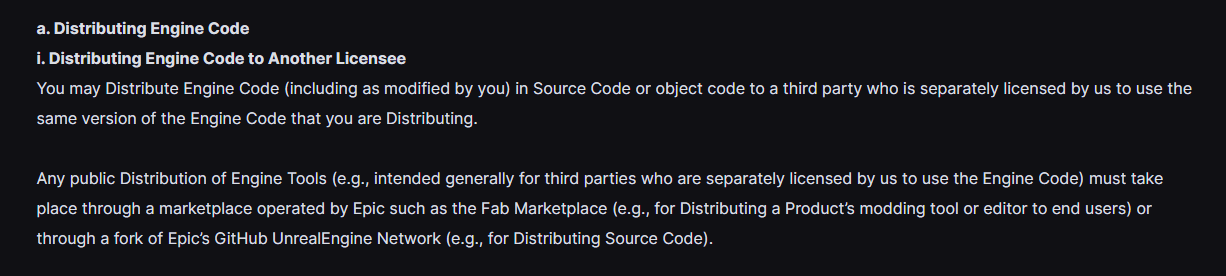 thick furnace
oh lol, indeed epic github broke
 cosmic stump
Seems like no one cares, not even Epic
thick furnace
most likely some bigger issue on github end
cosmic stump
thick furnace
most likely some bigger issue on github end
unlikely - https://github.com/EpicGames/ works and so do many non-UE related repos