
#engine-source
1 messages · Page 14 of 1
 crystal timber
 spice sundial
crystal timber
also
> 1>C:\Program Files\Microsoft Visual Studio\2022\Community\MSBuild\Microso...
spice sundial
crystal timber
also
> 1>C:\Program Files\Microsoft Visual Studio\2022\Community\MSBuild\Microso...
Thanks for the reply, no it hasnt built. I pulled from GitHub.
I have failed building previous versions as well after NuGet Packages being out of date and failing.
My VS 2022 is set up for android development for unreal but I only focus on Blueprints, I do really need this sorting, willing to pay, if sucessful.
From my reading of the logs there is something inside of Plugins\Experimental\Animation\HierarchyTableBuiltin\Intermediate\Build\Win64\x64\UnrealEditor\Development\HierarchyTableBuiltinUncookedOnly.
Or that is is missing, but the file doesnt exist on the repo and I have not built it, I can only assume that it is automatically genreated but I cant find it.
spice sundial
Please feel free to reach out if you can
 hearty sand
Does UE have any kind of "patching" setup for Installed Builds?
hearty sand
 dusky compass
patching of what
dusky compass
patching of what
Newly compiled builds.
@dusky compass How about you properly formulate what you don't understand.
If I automate building an Installed Build from a custom Source via our Build Machine, and said Installed Build is then distributed to the rest of the team, I would like to know if updated versions of said Installed Build have any form of patching system, or if one has to re-download the full Installed Build each time.
Epic has all kinds of new programs by now, e.g. Horde. So it's not too far fetched to assume that there is a setup that allows distributing Installed Builds easily.
Although given that Epic is by now more or less married to Perforce, I doubt there is a solution that doesn't required Perforce.
I guess UGS would be the answer again, but locked to Perforce. So will just have to plug it into our SourceControl setup and have people get latest I guess.
 smoky goblet
hearty sand
I guess UGS would be the answer again, but locked to Perforce. So will just have...
smoky goblet
hearty sand
I guess UGS would be the answer again, but locked to Perforce. So will just have...
Yeah, UGS is the best answer here but even in that case there is no patching. You’ll have to download the complete package of binaries each time. Data would come through your source control, so for that you’d only download what you need to update.
hearty sand
smoky goblet
Yeah, UGS is the best answer here but even in that case there is no patching. Yo...
Hm guess that makes somewhat sense. Only other option would be a simple downloader. I wonder if the Launcher re-downloads a lot when patching minor versions.
smoky goblet
hearty sand
Hm guess that makes somewhat sense. Only other option would be a simple download...
I wouldn't be surprised if it didn't have to. Similarly with Steam, that can do patching distribution too.
In both cases, the client has a very limited set of (very specific) possible initial conditions (maybe only 1) that you'd need to worry about being the state you're patching from.
During dev when you're making (hopefully?) multiple builds a day, and people are syncing whenever it makes sense for their workflow, it is much more difficult to maintain a patches that could be applied to update.
It would probably take longer to update if the patch was being built on the fly than just downloading the whole thing.
I believe Steam does their patch on upload of a new version, but it's been a while since I was involved in any of that.
 sick pivot
having severe issues with trying to build out 5.4 source - within 30 seconds of build kickoff - i get multitude of errors.... i'm looking online for pre-reqs ... i look to meet them.
VS Community 2022 - .Net, DesktopDevC++, GameDevC++
Win10 SDK (Latest) - PathVariable confirmed set
Rider(paid) - Latest 2024.2.7
Have used previously 5.0, 5.1, 5.2 with minimal issues - but sorted/fixed quite easily.... this has been a PITA - anyone make sense of these?
 smoky goblet
sick pivot
having severe issues with trying to build out 5.4 source - within 30 seconds of ...
smoky goblet
sick pivot
having severe issues with trying to build out 5.4 source - within 30 seconds of ...
Either switch to your games uproject or switch the startup project to your game.
Datasmith always seems to have build problems for me. I think you need another SDK for that. But if you build it the other ways it won’t try to build since it shouldn’t be a dependency.
sick pivot
smoky goblet
Either switch to your games uproject or switch the startup project to your game....
no game/project my dude... this is engine source (as the post described).
Same thing with 5.3....

this was much further in than a few seconds of build though - all the way to step 840's
smoky goblet
sick pivot
no game/project my dude... this is engine source (as the post described).
Same...
Yeah and this is (stupidly) what happens when you build the engine without a game project.
If those are your only errors, you can safely ignore them and create a project using that source engine and compile that and only dependencies in the future.
sick pivot
you cant even start unrealeditor.exe.....
because it doesnt build correctly.
i dont understand this .... in the past its been simple:
1: Get from GITHUB.
2: Setup.bat
3: GenerateProjectFiles.bat
4: Build Unreal.sln
sure there are dependency requirements - as stated earlier.
smoky goblet
Yeah it’s been a while since I haven’t had at least one game project I can build instead of trying to run the launcher from instead of going straight to the editor (which is what your doing)
 hidden hedge
building the entire engine (not just for one project) takes so long, it's just quicker to make a project with the launcher engine and "convert" it
there's seldom reason to open unrealeditor without a project
sick pivot
but how do you build a project, on a source-build engine - that has corrupt .dll ?
@hidden hedge
will it compile/build (the project) ?
hidden hedge
what corrupt DLL?
sick pivot
sick pivot
i dont understand this .... in the past its been simple:
1: Get from GITHUB.
2:...
if i do this workflow - i can run unrealeditor.exe
with the eerrors i've shown above - i get the following error:

this is different than the 5.4 dll error i had last night
hidden hedge
the best workflow still is to use a native build (engine + project)
also you should be using the toolchain prescribed for your engine version. 5.4/5.5 is 14.38
also if this is actually a native project, then your project's *Editor.Target.cs can influence the entire engine build
sick pivot
so again - i have no project....
And the only eway to make one would be to use the LAUNCHER version editor (install - NOT source)
i've not ever done this in the past.
as for the toolchain - it is native to VS2022 Community - i'm double checking this now.... but thats what VS page says
hidden hedge
VS has multiple toolchain versions that can be installed concurrently
sick pivot
i'm checking this - but it is NOT in the modify options section...
not that i can see
hidden hedge
 sick pivot
thats in MODIFY of the VS2022 Community? (Windows->Settings->Add/Remove Programs -> VS2022->Modify)
hidden hedge
VS installer -> Modify -> Individual components tab
 hidden hedge
and yeah, to reiterate, it's much easier to deal with engine source builds with a project within the engine root
since it builds engine modules (inc plugins) on-demand
 sick pivot
but to reiterate again -0 i have no project as of yet. i'm just tryign to even build the source. but i'll start to adapt to this workflow
as i t ypically have miy projects in another directory all-together
hidden hedge
yeah so you can make one in the launcher build easily enough and "converting" is just removing the EngineAssociation line in the uproject file
sick pivot
but to register the editor with a source build engine- you have to build that engine... and to build the engine is the entire problem i'm talking about in the firs tplace here.
i cant build engine.
i cant register that engine byuild (source) as an UE Editor Version (VersionSelector)
hidden hedge
but with a native build, you don't use the versionselector at all
there's nothing to register, since it detects the engine from the parent directory
sick pivot
so this "native build" you're talkin about - you simply do what? Can you describe the steps i get to do a "native build" ?
i'm readin ghtis now on the topic: https://dev.epicgames.com/community/learning/knowledge-base/eP9R/unreal-engine-what-s-a-native-project
hidden hedge
hidden hedge
from: https://dev.epicgames.com/community/learning/tutorials/8JYW/setting-up-an-...
this is
sick pivot
ty for your help. having a read now
and dead in the water right from the beginning: Step 3 on WHERE TO DOWNLOAD UE SOURCE FROM (Documentation link):
https://dev.epicgames.com/documentation/en-us/unreal-engine/building-unreal-engine-from-source

Epic Games Developer
Compiling Unreal Engine from source code.
this quite literally is addressed (not even really) at 8m into the video from the link you shared. moreso depicted by text in the same article (as i've linked here).
this isnt even new workflow - this is existing since dawn of UE source builds.
"how to build from source" is wha ti'm saying
i'm going to assume this is local to my PC that i have the problem with - not an engine issue.... i have somethign installed that is conflicting with the toolchain
i unfortunately use this same machine for various other work items - JAVA Dev, Python Coding, Gaming even.
smoky goblet
sick pivot
so again - i have no project....
And the only eway to make one would be to use...
You can copy, reduce and rename files from Lyra to make an empty project. You really just need the uproject, two target.cs files, one h/cpp for a module and its build.cs.
If you can’t figure that package out I can throw it together when I’m back to my computer tonight. But it’s going to be a while.
dusky compass
sick pivot
so this "native build" you're talkin about - you simply do what? Can you descri...
it is "native" project, not build.
sick pivot
i believe this to be a a problem with Rider.....
I reinstalled OS.
VSCommunity2022 - .Net/DesktopC++/GamingC++ modules. Windows SDK10
Git cloned repository (attempted 5.4 first)
Immediate errors in rider.
Started to debug - complaints of using toolchain 14.4X (not supported - forget which exact version ... doestn matter) - suggests 14.38.
I manually configured to have that support for 14.38.
restart windows + same errors on build (Inside rider....)
After about ready to toss aside all hope.... I switch over to VSCommunity2022.
ZERO ERRORS IN BUILD.
I'll be taking this to Rider support forums - and finding out wtf. Fresh PC build and nothing but problems - shouldnt even exist :/
@hidden hedge - thanks for chiming in and helping out man ... sorry for any frustrations - i was in a status of multiplied frustration levels lol.
 main thunder
hey guys just a quick question
if i'm using editor version 5.2.1 can I use the source version 5.2.0 to build game.
trying to get the server thing to work
dusky compass
you should be able, patches usually intercompatible
main thunder
Severity Code Description Project File Line Suppression State Details
Error C4668 '__has_feature' is not defined as a preprocessor macro, replacing with '0' for '#if/#elif' SurvivalCraft F:\SourceBuilds\UnrealEngine-5.2\Engine\Source\Runtime\Core\Public\Experimental\ConcurrentLinearAllocator.h 31
anyone out there that can help me with this?
hidden hedge
Your MSVC toolchain is probably too new, but 5.2 is a bit long in the tooth now
main thunder
so what do you suggest I do
hidden hedge
Install the toolchain mentioned by the 5.2 release notes
5.4/5.5 uses 14.38
5.3 uses 14.36
hidden hedge
MSVC x64/x86 build tools you install from individual components
I'm on my phone so not sure what version the old version of the engine you're using will use though
Ah found it 14.34
sick pivot
hidden hedge
from: https://dev.epicgames.com/community/learning/tutorials/8JYW/setting-up-an-...
out of curiosity - with this workflow ... how would you suggest upgrading projects from 5.4 to 5.5 for example?
Doest WorkspaceRoot now change? Do you Move(or copy) the project over to new directory?
hidden hedge
I've only done this in Perforce so your mileage may vary but pretty much exactly what the article describes: engine in project depot, copied from clean engine stream, merging for engine upgrades
sick pivot
@hidden hedge - in doing this, the editor did NOT build a .sln for the project i've created... i would look to come back to the UE5.sln found in the WorkspaceRoot - am I correct here?
Project compiles fine and builds fine, even opens fine... i'm just trying to wrap my head around this new workflow for myself.
hidden hedge
You run GenerateProjectFiles.bat with your project there
UE5.sln then contains your project
And then you build your project from there
sick pivot
yes - i believe that is automatic in the project creation from UnrealEditor.exe when selecting a new template..... it opened up VSCommunity with the project showing up in GAMES folder already.
 main thunder
is there components that can be added or taken away to allow visual studio 2022 to build unreal version 5.2.1
 kind minnow
is it not possible to get fab plugin to work on ue5.4.4 source? it just doesn't show up but when i built on 5.5.1 it showed up but the plugin i need isn't available on 5.5.1 only 5.4 so i had to revert back and rebuild but now i again cant even access fab since via epic launcher it says no install


is it just in another location or something?
 main thunder
ok I got it to work by following this

Epic Developer Community Forums
Was able to resolve this issue by launching Visual Studio Installer, then “Modify” the VS2022 installation, then install MSVC v14.31
It took a long time to build but worked
smoky goblet
With my home streams (which are setup more like that than they should for perforce) I do changelist integrations across the streams to add the changes to one version to another. Is that an option in git?
 plain sonnet
any big issues involving 5.5.0?
i tried 5.5.1 from source but it literally wouldn't build due to inability to find files, hoping 5.5.0 works
plain sonnet
I ran both setup.bat and then generate project files bat
plain sonnet
Tried it again with a 5.5 build and got the exact same error. Dunno whats going on
build process is not generating those files for some reason
plain sonnet
Looks like it was because the file path was too long on some files so windows didn't write them. I had to rename the directories to short names
Solved now
If this is occuring it should honestly be a valid suggestion to rename the default file name from "UnrealEngine-source-release-5.5.1" to something shorter on default like UE551-source, so others don't run into it. 🤷♂️
 worn cliff
Hi guys, do you know how I can generate some data from actors on a WP level and save it separately? I know I can override pre save on my wp actors and have them put some data in a shared place, but then how do I enforce ordering so presave on my shared asset is run after all wp actors are processed?
The shared thing can be an asset or an actor, it doesn't matter, I just need 1 per wp level
 quick mica
worn cliff
Hi guys, do you know how I can generate some data from actors on a WP level and ...
quick mica
worn cliff
Hi guys, do you know how I can generate some data from actors on a WP level and ...
I'd create a commandlet / or editor "tool" for it that runs your logic.
I do smth similar for my GUID system.
Basically works like this:
I load each Cell & Data layer which ensures all actors are loaded.
once this is finished I run some code on my actors of interest
at the end I can save my asset
(and of course restore the state of the level if I run this code within the editor and not from the commandlet)
I think HLOD generation does smth similar
worn cliff
I want to do this automatically on cook or on pie, kinda like how world partition streaming is built. I tried to understand how it works but it's a bit too convoluted.
Separate commandlet would work, but it's so inconvenient, my data will always be outdated 😦
quick mica
worn cliff
I want to do this automatically on cook or on pie, kinda like how world partitio...
well for cooking just create a script that dispatches everything and that runs your commandlets prior cooking.
For runtime, that's tricky, because you need your actors to be loaded inorder to do smth. If your actors could change the data incrementally (that's what I do) you could have a world subsystem that is also loaded in editor worlds which loads the asset, then you can dispatch changes to it and hook into level save to save it.
In my case this can have left over entries, but I don't quite care for these, that's what my commandlet can fix. also the data is not part of my version control, so it's more a local cache which I can rebuild if I want a clean state.
 somber horizon
How can I recompile a plugin to use for source? I'm on UE v5.4 source
i installed the plugin folder from marketplace into the engine source plugins folder
do i just ctrl shift b the ue 5 project on visual studio
to rebuild it
somber horizon
i decided to rebuild it, but for some reason i had an error with substrate in a node graph assistant plugin
so i deleted my intermediates folder, ran generate project files, then started a new build on visual studio
now it's looking like ima have to wait a few hours 🙃
 onyx osprey
--- Help ---🔥
hey guys i want to increase download and upload speed inside project , actually i have file on MB and i want have high speed to upload and download them , where and how can i Increase them in project ? Thanks 🧐
 molten seal
onyx osprey
--- Help ---🔥
hey guys i want to increase download and upload speed inside pro...
molten seal
onyx osprey
--- Help ---🔥
hey guys i want to increase download and upload speed inside pro...
I don’t understand, where are you DL and UL to?
onyx osprey
molten seal
I don’t understand, where are you DL and UL to?
works with with APi like GPT servers
 honest summit
anyone knows how i can record the viewport into a render target using the SceneColor as the source, the same way that SceneCaptureComponent does it, but without using that.
hidden hedge
somber horizon
now it's looking like ima have to wait a few hours 🙃
Why would you put it there? Just put it in the project so it builds with that instead
somber horizon
hidden hedge
Why would you put it there? Just put it in the project so it builds with that in...
It worked for a different plugin last time. I tried moving the plugin to my project's plugin folder, but it said they couldn't be recompiled and asked to compile from source
hidden hedge
well yeah, you build your project
and then that builds the plugins within the project
also I'm pretty sure Plugins/Marketplace has special treatment from UBT so don't put it there either
also if it takes "hours" to compile the engine, then I would also bet a native project isn't used
somber horizon
Okay, so do I just do ctrl shift b on my game's project in visual studio?
somber horizon
hidden hedge
also if it takes "hours" to compile the engine, then I would also bet a native p...
ive read on several forums and some youtube videos say compiling the source engine typically takes a few hours
hidden hedge
well yeah, because most people on forums and youtube also do it wrong where the engine is built independent of a project, and that results in a lot of engine components you're not using getting built
which wastes a hell of a lot of time
somber horizon
hidden hedge
well yeah, because most people on forums and youtube also do it wrong where the ...
I guess that's fair, I primarily use the source engine for multiplayer development
Also I received this unresolved external error after trying to do right click -> build on my project from its source, solution file
unresolved external symbol "__declspec(dllimport) bool __cdecl Substrate::IsSubstrateEnabled(void)" (__imp_?IsSubstrateEnabled@Substrate@@YA_NXZ) referenced in function "public: virtual void __cdecl FMaterialGraphConnectionDrawingPolicy::DetermineWiringStyle(class UEdGraphPin *,class UEdGraphPin *,struct FConnectionParams &)" (?DetermineWiringStyle@FMaterialGraphConnectionDrawingPolicy@@UEAAXPEAVUEdGraphPin@@0AEAUFConnectionParams@@@Z)
this goes away once i remove the Electronic Nodes and Node Graph Assistant plugins
so i assume something is uncompatible between those plugins and substrate?
hidden hedge
probably, I can't really tell you without a more complete error log
somber horizon
what's the file path for that
hidden hedge
like it's just hitting copy and then paste on the output log
 hidden hedge
that isn't the output tab
hidden hedge
the error list should be almost always ignored because it omits errors
somber horizon
hidden hedge
that isn't the output tab
https://pastebin.com/Knb2ZkRX pasebin with output log
Pastebin
Pastebin.com is the number one paste tool since 2002. Pastebin is a website where you can store text online for a set period of time.
sort of says the same thing from the error list
hidden hedge
well at least you can read the thing it's linking easier
somber horizon
could I just disable substrate?
hidden hedge
no because that's not what a linker error is
this is a function from RenderCore
(at least in 5.5 it is)
so that would need to be in the Build.cs of the plugin module
somber horizon
oh gotcha, lemme see
yeah, here's what's currently in my build.cs
    public YourBaristaCafe(ReadOnlyTargetRules Target) : base(Target)
    {
        PCHUsage = PCHUsageMode.UseExplicitOrSharedPCHs;

        PublicDependencyModuleNames.AddRange(new string[] { "Core", "CoreUObject", "Engine", "InputCore", "EnhancedInput" });
}```would I add the plugins there or substrate?
in the array list
or you mean just RenderCore
hidden hedge
I said the plugin module
somber horizon
I added the plugin modules there, I assume you mean the name, but still got the same error
public YourBaristaCafe(ReadOnlyTargetRules Target) : base(Target)
{
    PCHUsage = PCHUsageMode.UseExplicitOrSharedPCHs;

    PublicDependencyModuleNames.AddRange(new string[] {
        "Core", "CoreUObject", "Engine", "InputCore", "EnhancedInput",
        "ElectronicNodes", "NodeGraphAssistant"
    });
}```YourBaristaCafe.Build.cs is not the plugin module
in this case, ElectronicNodes.Build.cs and NodeGraphAssistant.Build.cs would be
this is UBT 101 stuff
somber horizon
hidden hedge
so that would need to be in the Build.cs of the plugin module
I misread plugin for project here
somber horizon
hidden hedge
this is UBT 101 stuff
also id appreciate if you weren't like this, I'm pretty new when it comes to UE source code stuff
thank you though, it built correctly
hidden hedge
this isn't exclusive to "UE source code", you usually deal with linker errors in the project module in the same way (UBT doesn't treat module types any differently). the Build.cs defines how a module is built, so if it's missing a module reference, then you need to add the module you wish to reference to the module Build.cs that is supposed to be referencing it
there is a pin in #cpp that goes over many of these common pitfalls
smoky goblet
It’s a registry setting sadly and not a file. And seems to be machine unique. It’s why for source builds you are sort of forced into native builds if you wanna share projects. I think installed builds either do something else or have a consistent id in the registry.
spice sundial
Is anyone free to help me? Willing to pay if successful
smoky goblet
spice sundial
Is anyone free to help me? Willing to pay if successful
Have you done anything about the actual warning that is being reported in your log?
1>Running from a path with a long directory name ("E:\Programs\Epic\Source\5.5_Source_Repo\UnrealEngine" = 52 characters). Root paths shorter than 50 characters are recommended to avoid exceeding maximum path lengths on Windows.
You need to make this path: "E:\Programs\Epic\Source\5.5_Source_Repo\UnrealEngine" shorter
spice sundial
smoky goblet
Have you done anything about the actual warning that is being reported in your l...
Thank you for pointung this out, I will try top rectify this
 shut marsh
I have a .pak file that I encrypted using UnrealPak.exe and I want to decrypt it and view the files inside using the -list flag. I have the encryption key but I can't figure out how to use it. Is there anyone who can help?
Idk this is the right place to write here.
dusky compass
shut marsh
I have a .pak file that I encrypted using UnrealPak.exe and I want to decrypt it...
FModel might be easier to use
 daring valve
spice sundial
Thank you for pointung this out, I will try top rectify this
daring valve
spice sundial
Thank you for pointung this out, I will try top rectify this
HKEY_LOCAL_MACHINE/SYSTEM/CurrentControlSet/Control/FileSystem -> LongPathsEnabled 1
This key will enable long path support and may also fix the issue.

 stable hemlock
SO ....i tried to use the RunUAT.bat file to build a 5.4 plugin. The original was a 4.27 that was rebuilt for 5.3 ANYONE KNOW if i need to go from that 5.3 to 5.4....OR should i try using the original 4.27 and go to 5.4 ??? cant find any documentation on this. ( the OVRLipSYnc Plugin was only made for UE 4.27 )
dusky compass
- try to build
- fix errors, repeat #1
daring valve
Pouring through the asset manager has been an odyssey. Is there a principle way of pulling when assets get queued to load (sync or async) and when they are loaded? Without modifying the engine source. Trying to do some advanced logging for dev and potentially a loading screen bar with text on the asset currently getting touched
spice sundial
smoky goblet
Have you done anything about the actual warning that is being reported in your l...
Thanks! I did shorten the path and it worked!
 tall pebble
Maybe there's a better channel for this, but does anyone know why Unreal editor instances will communicate a ton of UDP info to one another when sharing a private network? I had wireshark setup to debug some netcode code and i noticed the editor instances vommiting a bunch of udp to one another. I see stuff like product version, "RPCLocateServer", Current level, etc
 proud slate

 hidden hedge
you look at the output tab for errors
 runic dune
Who knows how to rebuild the engine? I have an already built engine from the source code of the engine, I have made changes to the source code of the engine and would like to rebuild the engine how to do it?
If you just rebuild the UE4 solution in Visual Studio, the build will be successful, but the engine will not be updated for some reason, i.e. its binaries will remain the same
 astral elm
runic dune
If you just rebuild the UE4 solution in Visual Studio, the build will be success...
astral elm
runic dune
If you just rebuild the UE4 solution in Visual Studio, the build will be success...
well, that seems unusual...
runic dune
I understand that I need to clean up some files myself, because even if I call Rebuild.bat from BatchFiles, nothing is actually rebuilt. I.e. the engine remains on the old build, although in the console it says that everything is fine
If I build the engine as if for the first time, everything is fine, but when it is already built and it needs to be rebuilt again because I have made changes to the source code, for some reason it is not updated, ie the changes that I brought in the code they are not, until here all from scratch do not collect.
dusky compass
Which binaries, for which target
tall pebble
How do you all manage native projects (https://dev.epicgames.com/documentation/en-us/unreal-engine/managing-game-code-in-unreal-engine) for teams using perforce? How do non-programmers get a build for the editor executable?

Epic Games Developer
Add code to your project and generate project files for IDEs.
Also these docs seem to be at odds? Why does one show the project as a sub directory of the enginre root, but the "epic way" documentation show them as sharing a parent directory

Epic Games Developer
Learn best practices on setting up an Unreal Engine studio when it comes to technical production workflows like version control, branching strategies, b...
smoky goblet
tall pebble
How do you all manage native projects (https://dev.epicgames.com/documentation/e...
Generally if you're talking about a studio setup, you've got Perforce, an automated build system & UnrealGameSync (UGS).
Non-programmers get pre-compiled builds through UGS.
Those two docs aren't at odds, the epic-way one is just poorly named.
UE4-Main => Workspace Root
UE4-Main/Engine => Engine
UE4-Main/Vanilla => ProjectX
You can do a studio with a source control other than Perforce, but you'd still need an automated build system somewhere doing builds and you'd have to roll your own binaries delivery system (some people just put them directly where they should be in source control, but you don't have to).
tall pebble
smoky goblet
Generally if you're talking about a studio setup, you've got Perforce, an automa...
Cool, thanks Ramius!
hidden hedge
tall pebble
Cool, thanks Ramius!
the way depicted in this image is correct
 tall pebble
Thanks sswires. Related but does anyone have any tips on getting the engine source checked into perforce? Or is the initial CL just doomed to suck? It took a double digit number of hours to reconcile offline work, is currently multiple hours into moving to a changelist, and then i'm assuming it's going to take another double digit number of hours to submit
molten seal
tall pebble
Thanks sswires. Related but does anyone have any tips on getting the engine sour...
Can you not contact Epic for Perforce access in order to pull directly from there?
smoky goblet
tall pebble
Thanks sswires. Related but does anyone have any tips on getting the engine sour...
Are you doing an minor or major update? You can setup perforce & streams in such a way that you only need to do reconciles for minor updates.
Unfortunately it all sort of depends on the hardware running your p4 server.
For example on my laptop (because it's all local) it's pretty fast to submit all those files.
At work, we use AWS and usually (temporarily) increase the instance type to be better during the upgrades. Those submissions can take a while, but can be more bearable if you're willing to break the files up into multiple submissions.
Also I've found that (for some reason) using the command line can be a better experience. It's a little more responsive than P4v and easier to terminate if something hangs.
@molten seal Even with Epic Perforce access, you have to sync-to-latest and then submit to your own perforce. You can't do server-to-server branches or copies. And generally you don't use that access as your Engine source directly.
tall pebble
This is initial project setup, so it's the whole thing
At work, we use AWS and usually (temporarily) increase the instance type to be better during the upgrades.
This is a good idea, i'll keep that in mind when i'm submitting
smoky goblet
tall pebble
This is initial project setup, so it's the whole thing
Then you should be able to save some time by not reconciling anything. Just pull from git, run setup.bat and then submit everything. Then run generateprojectfiles if you need to.
But yeah, adding the files and submitting them can be a bear. I feel ya, I just finished our update to 5.5 right before break.
hidden hedge
tall pebble
Thanks sswires. Related but does anyone have any tips on getting the engine sour...

GitHub
A tool to speed up "Reconcile Offline Work" in Perforce Helix Core. - brickadia/p4-fast-reconcile
though I used to do this the slow way and just let it run overnight
also like the article suggested, I would have a separate place for the clean engine, at a previous studio we just had a //unreal-engine depot which just had the vanilla engine in it and copy/merged that to project streams
smoky goblet
😬 I push the engine through 5 streams to get it from pristine to project mainline
hidden hedge
Well that's on you
smoky goblet
hidden hedge
Well that's on you
True, but I think it's the logical further-ance of this stream setup from the "Epic Way" talk, if you lay the groundwork for multiple project depots/streams.
The Riot talk about there source control/engine deployment setup is pretty good too and is similar to what I have.
It's not really all that painful to do and actually makes maintaining custom engine tweaks not that big of a deal.
 hidden hedge
How that diagram depicts it is how I do it, but that's 3
With only one of them being pristine
smoky goblet
I have this path:
VersionPristine (5.4, 5.5, etc) -> copy to LatestPristine -> merge to Studio (introduces studio tweaks) -> merge to Project staging (introduces project tweaks and provides the testbed for the project update) -> copy to Project main.
The copy to LatestPristine allows me to not have to do a reconcile on major updates, and if we don't take the minor updates never have to do one at all.
tall pebble
tall pebble
How do you all manage native projects (https://dev.epicgames.com/documentation/e...
I just came across https://dev.epicgames.com/documentation/en-us/unreal-engine/create-an-installed-build-of-unreal-engine which could be helpful for people who find this thread in the future

Epic Games Developer
Create pre-packaged binaries for Unreal Editor that you can distribute to your team.
hidden hedge
though personally I find installed builds a terrible idea
it doesn't work with a lot of the tooling (like UGS) and it closes the engine off from modification, which is actually a bad thing
dusky compass
I scrolled up, In his usecase it seems to be what he needs if it just for the artists
tall pebble
Sorry for asking so many questions. I'll try my best to pay it forward when I'm up to speed!
But, do you all extend the p4 ignore recommended by Epic https://dev.epicgames.com/documentation/en-us/unreal-engine/using-perforce-as-source-control-for-unreal-engine? It seems strangely incomplete, especially compared to their .gitignore for their github hosted code.
I currently have pre-setup.bat code checked into perforce, and i'm not sure it's necessary/recommended to submit all of the extra stuff

Epic Games Developer
How to setup Perforce so that you can share assets with other on your team.
smoky goblet
tall pebble
Sorry for asking so many questions. I'll try my best to pay it forward when I'm ...
Setup.bat downloads (at least) the Content directory for the Engine.
You need at least some of what is there to run the editor before you start making content.
If it's not checked into perforce, each developer would have to run setup.bat when starting on the project.
Which might be doable, but you wouldn't want automated builds having to run it.
I haven't noticed anything go particularly wrong with submissions to perforce with the provide p4ignore.
tall pebble
smoky goblet
Setup.bat downloads (at least) the Content directory for the Engine.
You need at...
Cool, thanks yet again Ramius 
smoky goblet
After you run setup and before checking in, you could delete the starter content and sample projects if you really don't want them included.
I keep Lyra, but delete everything else.
astral elm
problem building source on one PC, 5.4.4
toolchain looks good to me ( and we have it running on 2 other PCs, and have been comparing the Visual Studio setups in detail... )
Using Visual Studio 2022 14.38.33143 toolchain (C:\Program Files\Microsoft Visual Studio\2022\Community\VC\Tools\MSVC\14.38.33130) and Windows 10.0.19041.0 SDK (C:\Program Files (x86)\Windows Kits\10).
error
Module.Core.11.cpp.obj : error LNK2001: unresolved external symbol "wchar_t * GInternalProjectName" (?GInternalProjectName@@3PA_WA) [C:\UnrealNative\unreal-54\Engine\Intermediate\ProjectFiles\CmdLink.vcxproj]```
odd case. We are trying something from unreal forums, but even if it will work this bothers me...and you need to compile cmdlink?
astral elm
hidden hedge
and you need to compile cmdlink?
Maybe not, but it is bothersome that some bits might not compile for obscure reasons... seems we got it running with this hack in CmdLink.cpp though
TCHAR GInternalProjectName[64] = TEXT("CmdLink");
#else
TCHAR GInternalProjectName[64] = TEXT(PREPROCESSOR_TO_STRING(UE_PROJECT_NAME));
#endif
IMPLEMENT_FOREIGN_ENGINE_DIR()```Now that I look at the toolchain log closely, I do notice one anomaly : 14.38.33143 vs MSVC\14.38.33130
 last remnant
Is anyone familiar with bAlreadyMovedActors? It seems to be used in a lot of places across world related classes like level instances, HLOD and world, and I'm unsure of its meaning. I'd love to know what its role is because I'm getting an error Assertion failed: Level->bAlreadyMovedActors on line 467 of LevelInstanceLevelStreaming whenever I try to create new LevelInstances via the editor node. Knowing the meaning might help me troubleshoot or work around the issue.

 small surge
Where is the code for shading a mesh via volumetric lightmaps located in source? I am looking into make a modification to be able to multiply the intensity it is adding to the mesh in shading for a custom requirement.
tall pebble
More of a sanity check to make sure I didn't do something dumb, but I'm getting the following error after checking the engine source into perforce
0>Microsoft.NET.Sdk.targets(284,5): Error MSB4018 : The "GenerateDepsFile" task failed unexpectedly.
System.UnauthorizedAccessException: Access to the path
Which i guess isn't that surprising since it's just perforce doing perforce things. But do you all just clear the write locks for the engine directories? Or maybe my p4ignore is incomplete? I followed the recommended configs here https://dev.epicgames.com/documentation/en-us/unreal-engine/using-perforce-as-source-control-for-unreal-engine
Epic Games Developer
How to setup Perforce so that you can share assets with other on your team.
hidden hedge
tall pebble
More of a sanity check to make sure I didn't do something dumb, but I'm getting ...
the engine you should be checking into P4 is just the raw dump you get from the licensee p4 or from github immediately after running Setup.bat, this sounds like a little bit more than that
 radiant chasm
Hey all, I am trying to enable us to add (Translator) Comments to String Table entries (why is this not natively supported?).
I am using this PR (https://github.com/EpicGames/UnrealEngine/pull/9609) and merged it with our UE 5.5 source successfully.
However, like someone else in the PR comments mentioned, I am getting the following error when saving any kind of Actor:
"Unexpected custom version Internationalization found when saving %s. This usually happens when export tagging and final serialization paths differ. Package will not be saved."
They solved it by editing SavePackage2.cpp but I, like the PR creator, feel like this is not the place to fix it. But I don't know what else could be wrong with the Custom Versioning here. I have never worked with it, but it seems simple enough and looks correct to me. Has anyone ever tried adding their own Custom Version like that or ran into this error?
 iron dome
Have you tried breakpointing that error message and finding out what's causing it?
radiant chasm
iron dome
Have you tried breakpointing that error message and finding out what's causing i...
Yeah about that. When I run ue source through visual studio it opens up the ue project launcher. Once I open a project, it opens but visual studio stops debugging as if I had terminated the application. I must be doing it wrong I guess?
iron dome
You aren't running the project via VS. You're running UE.
You need to set your project within the solution to the start up project.
radiant chasm
iron dome
Have you tried breakpointing that error message and finding out what's causing i...
Alright, I think... the Custom Version is used after the package summary (not sure what that is) has been serialized.
So when I save the Actor BP, it gathers all Text for serialization. This is where my Custom Version kicks in for the translator comment but apparently UE does not like that.
void operator<<(FStructuredArchive::FSlot Slot, FTextSourceSiteContext& This)
{
    FArchive& UnderlyingArchive = Slot.GetUnderlyingArchive();
    UnderlyingArchive.UsingCustomVersion(FInternationalizationCustomVersion::GUID);

    FStructuredArchive::FRecord Record = Slot.EnterRecord();
    Record << SA_VALUE(TEXT("KeyName"), This.KeyName);
    Record << SA_VALUE(TEXT("SiteDescription"), This.SiteDescription);
    Record << SA_VALUE(TEXT("IsEditorOnly"), This.IsEditorOnly);
    Record << SA_VALUE(TEXT("IsOptional"), This.IsOptional);
    Record << SA_VALUE(TEXT("InfoMetaData"), This.InfoMetaData);
    Record << SA_VALUE(TEXT("KeyMetaData"), This.KeyMetaData);

    if (UnderlyingArchive.CustomVer(FInternationalizationCustomVersion::GUID) >= FInternationalizationCustomVersion::TranslatorCommentAdded)
    {
        Record << SA_VALUE(TEXT("TranslatorComment"), This.TranslatorComment);
    }
}
This is where it is used in GatherableTextData.cpp and it makes sense to me. The UsingCustomVersion call causes the error.
iron dome
So which line generates the error and what causes that error to be generated?
radiant chasm
UnderlyingArchive.UsingCustomVersion(FInternationalizationCustomVersion::GUID);
and then in LinkerSave.cpp is the Warning:
void FLinkerSave::UsingCustomVersion(const struct FGuid& Guid)
{
    FArchiveUObject::UsingCustomVersion(Guid);

    // Here we're going to try and dump the callstack that added a new custom version after package summary has been serialized
    if (Summary.GetCustomVersionContainer().GetVersion(Guid) == nullptr)
    {
        FCustomVersion RegisteredVersion = FCurrentCustomVersions::Get(Guid).GetValue();

        FString CustomVersionWarning = FString::Printf(TEXT("Unexpected custom version \"%s\" used after package %s summary has been serialized. Callstack:\n"),
            *RegisteredVersion.GetFriendlyName().ToString(), *LinkerRoot->GetName());

        const int32 MaxStackFrames = 100;
        uint64 StackFrames[MaxStackFrames];
        int32 NumStackFrames = FPlatformStackWalk::CaptureStackBackTrace(StackFrames, MaxStackFrames);

        // Convert the stack trace to text, ignore the first functions (ProgramCounterToHumanReadableString)
        const int32 IgnoreStackLinesCount = 1;
        ANSICHAR Buffer[1024];
        const ANSICHAR* CutoffFunction = "UPackage::Save";
        for (int32 Idx = IgnoreStackLinesCount; Idx < NumStackFrames; Idx++)
        {
            Buffer[0] = '\0';
            FPlatformStackWalk::ProgramCounterToHumanReadableString(Idx, StackFrames[Idx], Buffer, sizeof(Buffer));
            CustomVersionWarning += TEXT("\t");
            CustomVersionWarning += Buffer;
            CustomVersionWarning += "\n";
            if (FCStringAnsi::Strstr(Buffer, CutoffFunction))
            {
                // Anything below UPackage::Save is not interesting from the point of view of what we're trying to find
                break;
            }
        }

        UE_LOG(LogLinker, Warning, TEXT("%s"), *CustomVersionWarning);
    }
}
The Custom Version Guid cannot be found in the Summary, meaning it hasn't been added during serialization but should have been?
hidden hedge
I'd honestly just use CSV string tables so at least they're diffable/mergeable
And that allows comments already
radiant chasm
Yeah we might do that if this doesn't magically work out
 fading dagger
Anyone have experience with writing custom insights providers and analyzers?
I made my own and it works fine. I noticed something odd with a specific insights plugin being potentially spun up on a different thread
I am playing around with Network Prediction Insights plugin in combination with the Animation Insights Plugin (Rewind Debugger)
I found what I suspect might be a bug
I threw some break points on the Provider and Analyzer interface functions of the Network Prediction Insights plugin (Without Animation Insights) and noticed the code never gets hit so thats an immediate clue the stack is running on a seperate thread entirely (not DebugGame). If I have the Animation Insights Plugin enabled I do hit break points in that scenario so the RewindDebugger I think it's creating the Network Prediction Insights onto thread the Insights thread specific to engine itself.
I suspect the first case, the insights plugin runs on a thread complelety outside the engine? IE probably the insights Session Browser and is hooking to the engine externally to get the Trace Route Info to write data into.
The Issue this creates is a Network Data structure is being checked uses a TraceID which is a unique Identifier
This TraceID is being used to consolodate data from different PIE instances
When an Route Event is fired, the traceID is passed and then tries to grab the Network Data to read from it (Based on the TraceID). This results in a crash for an empty bounds on the Array
 mortal hazel
Has anyone had this issue when trying to make an installed build of the engine? It built successfully, but there was no UnrealEngine.exe anywhere, just loads of .pdb files.
I got the latest Angelscript version from github. Ran setup after some .gitdepsignore and removing VisionOS and a few plugins. Built the engine successfully.
Then I tried making an installed build and it failed on building LiveLinkHub because it depends on AppleARFaceWhatever plugin that I had removed. So I removed those lines from InstalledEngineBuild.xml (where it says "Note: We compile LiveLinkHub here (...)" and the querytargets line above that).
That build ran successfully, but no .exe
Tried again with those lines back in and the plugin back in and it succeeded again, but still no .exe
I'm not really sure where to even start figuring out what's going on here. I skimmed the logs and no major errors jumped out, and every build ends with a very clear BUILD SUCCESSFUL message
 dark sinew
how to import city sample into ue5 source code? epic games launcher isnt detecting the source installation
 inland folio
dark sinew
how to import city sample into ue5 source code? epic games launcher isnt detecti...
inland folio
dark sinew
how to import city sample into ue5 source code? epic games launcher isnt detecti...
Download a clean version of the engine using the Epic Games Launcher.
Open City Sample with the clean engine you downloaded in the first step, then migrate the desired assets or scene to the Contents/ folder of your source engine.
Verify that the assets have been successfully migrated to the target engine's project.
dark sinew
inland folio
Download a clean version of the engine using the Epic Games Launcher.
Open City ...
thank you i will do that now
 round pagoda
Will there be a 5.5.3 or next release is 5.6?
Can't see anything in Github to indicate a 5.5.3, but there are still quite a few bugs I would expect Epic to fix before another minor
dark sinew
im new to ue i downloaded the dark ruins template but how do i make it so when i click play i dont just fly away
 worn brook
round pagoda
Can't see anything in Github to indicate a 5.5.3, but there are still quite a fe...
mortal hazel
worn brook
round pagoda
Can't see anything in Github to indicate a 5.5.3, but there are still quite a fe...
mortal hazel
Any tips for linker errors when building from source? I tried building the angelscript version and now my normal engine won't compile. I can't figure out what SDK I need to add/remove to make it stop complaining
My latest errors is fatal error LNK1181: cannot open input file 'wininet.lib' which I fixed by installing the UWP workload last time, but I still have it installed
 uneven aurora
I couldn't find any documentation on Engine Source build options and/or features?
dusky compass
see pinned
uneven aurora
I found this https://dev.epicgames.com/documentation/en-us/unreal-engine/build-configuration-for-unreal-engine
and others I found were mostly about target plattforms.
But, for example, from this pinned message setup.bat -exclude=WinRT -exclude=Mac -exclude=MacOS -exclude=MacOSX -exclude=osx -exclude=osx64 -exclude=osx32 -exclude=Android -exclude=IOS -exclude=TVOS -exclude=HTML5 -exclude=PS4 -exclude=XboxOne -exclude=Switch -exclude=Dingo -exclude=Win32 -exclude=GoogleVR -exclude=LeapMotion -exclude=HoloLens I could only find the arguments in the actual source code.
I assume including features via build options is a thing of the past now?
hidden hedge
That depends if you make an installed build (I don't personally recommend that, prefer native)
fading dagger
Does every Trace Channel thats enabled have its own thread?
mortal hazel
uneven aurora
I found this <https://dev.epicgames.com/documentation/en-us/unreal-engine/build-...
as far as I can tell, a lot of these things are just not well documented since larger studios actually using them have dedicated build engineers to figure it all out. This guide was very helpful for figuring out a lot of the options. Though it's focused on stripping features, it explains a lot of what does what. https://github.com/Kein/build_your_ue?tab=readme-ov-file
inland folio
How can I get the data of each Niagara Particle through cpp?
I'm trying to extend NiagaraRenderer###.cpp, in order to pass additional data to BasePass shader.
I found that I can pass data using SceneProxy structure, but i'm in stuck which data should i pass, in other words, how can I read specific data from FNiagaraDataSet / FNiagaraDataBuffer?
Please let me know if I got a wrong way.
inland folio
inland folio
How can I get the data of each Niagara Particle through cpp?
I'm trying to exte...
Ok I found it. The keywords are ‘UNiagara##RendererProperties’ and ‘FNiagaraDataSetAccessor<T>’.
worn brook
the UE dev team has their own internal bug tracker right? thats not public?
inland folio
worn brook
the UE dev team has their own internal bug tracker right? thats not public?
This one?
https://issues.unrealengine.com
worn brook
i'm thinking they have their own internal bug tracking thing for the ue5-main branch
hidden hedge
Yeah it's called Jira
worn brook
Ahhh that makes sense lol
inland folio
Is there an expert who has deeply explored the Niagara source code? I'm extending the Niagara source code, but I've hit another roadblock.
I'm trying to solve this issue: (https://forums.unrealengine.com/t/bug-niagara-decal-renderer-not-support-dynamic-parameter/1349370)
Niagara's Sprite Renderer supports Dynamic Parameters, so I'm looking into NiagaraSpriteRendererProperties.cpp. There's a function called GetDynamicParameterChannelMask, but it's defined within the WITH_EDITORONLY_DATA preprocessor directive. The comments suggest that the data is serialized in cooked build, but I can't find where the serialization actually happens.
If this channel isn't the right place to ask, please let me know. Thanks!
void UNiagaraSpriteRendererProperties::CacheFromCompiledData(const FNiagaraDataSetCompiledData* CompiledData)
{
   ...
#if WITH_EDITORONLY_DATA
    // Build dynamic parameter mask
    // Serialize in cooked builds
    const FVersionedNiagaraEmitterData* EmitterData = GetEmitterData();
    MaterialParamValidMask  = bDynamicParam0Valid ? GetDynamicParameterChannelMask(EmitterData, DynamicMaterialBinding.GetName(),  0xf) <<  0 : 0;
    MaterialParamValidMask |= bDynamicParam1Valid ? GetDynamicParameterChannelMask(EmitterData, DynamicMaterial1Binding.GetName(), 0xf) <<  4 : 0;
    MaterialParamValidMask |= bDynamicParam2Valid ? GetDynamicParameterChannelMask(EmitterData, DynamicMaterial2Binding.GetName(), 0xf) <<  8 : 0;
    MaterialParamValidMask |= bDynamicParam3Valid ? GetDynamicParameterChannelMask(EmitterData, DynamicMaterial3Binding.GetName(), 0xf) << 12 : 0;
#endif
}
 undone oxide
Does anyone know if there is any reason why USkeletalMeshComponent::ComponentOverlapMultiImpl does not pass the overlapping body index further to the overlap info for non-sweep overlaps? We clearly can have the index from this Bodies loop, no?
Also in UPrimitiveComponent::BeginComponentOverlap where OtherComp->OnComponentBeginOverlap.Broadcast it's hardcoded to have OtherBodyIndex == INDEX_NONE instead of trying to get the index from the overlap info...
Is it just not implemented, or there is some reason behind that?
The code is super old, blames are from 2014-2015
 shut smelt
Hey guys, I just built unreal engine 4.27+ from source. How do I install ios target platform like we usually do from the options in epic launcher. Me and my friend are currently tryint to install the binary version and copy the files to source version. How do I solve this?
astral elm
shut smelt
Hey guys, I just built unreal engine 4.27+ from source. How do I install ios tar...
For me, I just built the source fork on a Mac and everything seemed to work ( 5.x though, not 4.27+ )
EDIT: I see no need to have the Target Platform : iOS binaries on the windows builds of the editor, since one can't build for ios on windows. Not sure what use they are to add? Interested to know )
 craggy tapir
Dont know where to post but trying to find what was changed in 5.5.2 for the following Bug
UE-231195 MegaLights doesn’t support lighting channels
Cant find the issue on https://issues.unrealengine.com/
hidden hedge
craggy tapir
Dont know where to post but trying to find what was changed in 5.5.2 for the fol...
Wasn't that hard to find just filtering commits
craggy tapir
You are right and thank you for that.
I had it as a tag of 5.5.2 and didnt see that it was Dev 5.5 branch.
 white adder
Hey is anyone here familiar with NVRTX Source build? I noticed there is a ray tracing visible setting for niagara particles and i would like to know if there is a way to get niagara particles to show up in reflections without SSR??
 eager jungle
I'm trying to rebuild the Houdini engine plugin for UE 5.1. (I used H20.0.653\5.2) I was able to get this to work on one computer, but I tried to do it on a second computer and it would not work. The difference is the computer that it worked on had Visual studio 2022 installed with all the components for UE. Is it imperative that visual studio be properly installed for rebuilding plugin when launching the UE project and it asks if you want to rebuild the plugin?
mortal hazel
typically, yes
eager jungle
OK. I do have a hunch but, I cant try until the IT lets me add a missing component in VS to the computer that I haven't ben able to get it to work on. We missed the Desktop Development with C++ component when installing visual studio.
stable hemlock
Does ever someone try to add the Timer Manager to the file of Core Module of the certain X Console Platform to minimize the frequeny of a function to be get called in a minute
I am currently working on Console and trying to minimize the call to the write function using timer manager however, while packaging it keep complaing that it unable to find UObject/Object.h file or Engine/World.h file Can someone help if someone got a chance to touch such area of engine
mortal hazel
eager jungle
OK. I do have a hunch but, I cant try until the IT lets me add a missing compone...
My condolences. It was a pain in the ass to try and compile not realizing I was missing elements even without the added hassle of needing the IT department let me install things. Don't forget to add the Universal Windows Platform tools under "Individual components". I think they've moved in the visual studio installer and I don't remember if the UE docs have updated
 mighty hull
I am trying to compile ue5 from source after changing a few lines in the code, but I cant because when I rebuild it (after already fully building it) it takes up like an extra 100 gigs of space, does anyone know how to work around this
 distant spindle
mighty hull
I am trying to compile ue5 from source after changing a few lines in the code, b...
distant spindle
mighty hull
I am trying to compile ue5 from source after changing a few lines in the code, b...
how did you built it first time? do you mean your changes causes mem leak? 
or you mean disk space 🤔
maybe you are building another Config?
like Development vs Debug
anyway you can check Binaries folder for what platform/config was compiled
worn brook
dang someone broke geometry collections in ue5-main lol
 cold wigeon
When building with UBT, UBT args are not passed to Target=SomeGameEditor, but are passed to the Target=SomeGame and Target=SomeGameServer
Command ran:
BuildCookRun -project=K:\POT_5.5_Upscaling\\SomeGame.uproject -ubtargs="-Upgrades -StoreV2" -noP4 -server -platform=Win64 -clientconfig=Development -serverconfig=Development -utf8output -build -SkipCookingEditorContent -cook -map=MainMenu+Island -unversionedcookedcontent -crashreporter -stage -pak -archive -archivedirectory=K:\POT_5.5_Upscaling
Command line arguments passed to various targets:
Command Line Argument: -Target=SomeGameEditor Win64 Development -Project=K:\POT_5.5_Upscaling\SomeGame.uproject -Manifest=E:\5.5-staging\Engine\Intermediate\Build\Manifest-1-SomeGameEditor-Win64-Development.xml
Command Line Argument: -Target=ShaderCompileWorker Win64 Development -Project=K:\POT_5.5_Upscaling\SomeGame.uproject -Manifest=E:\5.5-staging\Engine\Intermediate\Build\Manifest-2-ShaderCompileWorker-Win64-Development.xml
Command Line Argument: -Target=UnrealPak Win64 Development -Project=K:\POT_5.5_Upscaling\SomeGame.uproject -Manifest=E:\5.5-staging\Engine\Intermediate\Build\Manifest-3-UnrealPak-Win64-Development.xml
Command Line Argument: -Target=SomeGame Win64 Development -Project=K:\POT_5.5_Upscaling\SomeGame.uproject -Manifest=E:\5.5-staging\Engine\Intermediate\Build\Manifest-4-SomeGame-Win64-Development.xml -remoteini="K:\POT_5.5_Upscaling" -Upgrades -StoreV2
Command Line Argument: -Target=SomeGameServer Win64 Development -Project=K:\POT_5.5_Upscaling\SomeGame.uproject -Manifest=E:\5.5-staging\Engine\Intermediate\Build\Manifest-5-SomeGameServer-Win64-Development.xml -remoteini="K:\POT_5.5_Upscaling" -Upgrades -StoreV2
Command Line Argument: -log=E:\5.5-staging\Engine\Programs\AutomationTool\Saved\Logs\UBA-SomeGameEditor-Win64-Development.txt```
in this example, -Upgrades and -StoreV2 are the ubt args.
I need to be able to enable/disable plugins based on the platform, but additionally based on passed in ubt args, how do I solve this? young falcon
Wasn't totally sure where to post this but here should be fine I guess? Let me know if its not. Working on some automation for installed engine builds. When running build graph manually to test Linux Installed Build I have WithAndroid set to false but the build errors because it still tries to build the Android Game. Anyone see this before?
...

Platform Android is not a valid platform to build. Check that the SDK is installed properly and that you have the necessary platorm support files (DataDrivenPlatformInfo.ini, SDK.json, etc).
Took 4.17s to run dotnet.exe, ExitCode=6

AutomationTool executed for 2h 42m 19s
AutomationTool exiting with ExitCode=6 (6)
BUILD FAILED ```Found it, sigh. Was looking at the wrong script "WIthAndroid" reeeeeeeeee
daring valve
I'm mucking about in the low level engine mechanics, and noticed there's an arena allocator that doesn't seem to be used? Some stubs too on the free methods. Is this just an experiment or am I missing where some of the implementation is?
 halcyon shale
there is a lot of dead end code in the engine, its cause early on in ue5 they merged fortnite branch into main including their wip feature branches so there is lot of incomplete non-functional features that muck it up.
and if you ask "why would they do that" yah I don't understand the problem either. Epic after all bought and own perforce, so howcome they don't know how to manage branches right?
just seems like internal management problems that they gave up on and pushed the cost to everyone else to deal with
round pagoda
worn brook
https://github.com/EpicGames/UnrealEngine/commit/91d3b114fad74a0799a33f9d23d7e49...
Hey, maybe I'm being an idiot; is there an easy way in GitHub to keep tabs on this file for upcoming version changes (i.e. search for 5.5.4 in any upcoming pull requests on other branches)?
round pagoda
halcyon shale
and if you ask "why would they do that" yah I don't understand the problem eithe...
I don't think Epic own Perforce? Different company?
round pagoda
round pagoda
Hey, maybe I'm being an idiot; is there an easy way in GitHub to keep tabs on th...
The best I am doing at the moment (very crude) is just doing to the dev-5.5 branch and I can see there is a 5.5.4, but not sure if that will always be the best way? Maybe other branches might have updates to the Version.h file
distant spindle
round pagoda
Hey, maybe I'm being an idiot; is there an easy way in GitHub to keep tabs on th...
github has API for downloading single file, you can write script which will do that for some branches, then you can parse content for version number and apply some logic on top of that second way is better
https://docs.github.com/en/rest/repos/contents?apiVersion=2022-11-28#get-repository-content
also git log for specific file can be useful
distant spindle
round pagoda
The best I am doing at the moment (very crude) is just doing to the dev-5.5 bran...
git log --all -n 5 -- Engine/Build/Build.version
https://chatgpt.com/share/67b86943-1908-8008-8da6-677068b7abae

you can redirect output to a file for post process by some script
for more advanced case I believe git log can output the diff itself instead of relying on comments to commits. Also IIRC it can search for changes for specific lines in the file instead of any changes to whole file
round pagoda
Really useful and awesome explanation! Thanks snowed-on cat 🙂
daring valve
halcyon shale
there is a lot of dead end code in the engine, its cause early on in ue5 they me...
Gotcha, that’s disappointing I was excited to see their implementation on that sorta thing. Mimallic is good but there’s still a lot of performance left on the table
I wish they’d be more explicit about what’s ready and what isn’t, or what’s in progress or what’s on hold/abandoned
halcyon shale
round pagoda
I don't think Epic own Perforce? Different company?
oh your right, that's so weird, I could have swore epic bought them years ago. I don't remember why I believed that now. Hmm is this Mandela effect? haha
halcyon shale
daring valve
I wish they’d be more explicit about what’s ready and what isn’t, or what’s in p...
yah there was like four new systems/features that they had added to the material side of the codebase in UE5 and none of them work. Like if Epic is not announcing something in a release but its in the codebase then its probably very incomplete.
round pagoda
daring valve
I wish they’d be more explicit about what’s ready and what isn’t, or what’s in p...
Same. I feel a lot of the community would be so grateful for a minor release where they don't add anything new, but just fix / clean / give attention to their mountain of tech debt!!
halcyon shale
round pagoda
Same. I feel a lot of the community would be so grateful for a minor release whe...
I have used unreal for 20 years and I have never seen them do that
round pagoda
halcyon shale
oh your right, that's so weird, I could have swore epic bought them years ago. I...
IIRC they do use Perforce in-house and their integration in-engine is (to give credit where it is due), not bad. It's what I use
halcyon shale
yah I don't remember any time in which they weren't using perforce
round pagoda
halcyon shale
I have used unreal for 20 years and I have never seen them do that
Don't say that! Let us newbies keep the hopium cannister flowing 
halcyon shale
we use svn at my company
it works perfectly fine, except for the problem of the UE5 engine src and installed engine build being stupid huge and so many files
is this the channel to post about PRs?
smoky goblet
Probably depends what you want to posting about. No one here can help get them merged into the engine 😄
halcyon shale
mainly just looking for feedback
cause I don't know how to get any traction with Epic on them
Epic just doesn't seem to care or respect PRs
smoky goblet
Join the club/support group.
There's a lot of luck that goes into the right person being aware of the PR.
It doesn't seem like there's any sort of systemic review process in place.
halcyon shale
well here is the last one I did, they haven't declined it yet like they have the others:
daring valve
round pagoda
Same. I feel a lot of the community would be so grateful for a minor release whe...
I can’t remember the last project that utilized the semver philosophy in full.
With the way unreal engine is built, though, doing patch releases would be a pretty massive pain in the ass.
I just wanted slab based memory allocation lmao, didn’t mean to find this rabbit hole
smoky goblet
halcyon shale
well here is the last one I did, they haven't declined it yet like they have the...
That one's still got more engagement than many of mine.
This one: https://github.com/EpicGames/UnrealEngine/pull/10355 been hanging out for almost two years and shouldn't have any reasons to not take it.
Also, PR's should be trying to merge to ue5-main and not release.
halcyon shale
why to main? the first one I tried was to main and that got declined after sitting there for two years, the next three I did to release since I'm using release so its less work on my end
and when I look at other peoples PRs, its like half and half
round pagoda
halcyon shale
Epic just doesn't seem to care or respect PRs
Sad reality. I know a lot of really awesome devs that are finding bugs and submitting PRs with their newer functions (e.g. NPP or Mover 2.0 which are SO BUGGY). Epic are dragging their feet with their PRs 
halcyon shale
if you think about it, doing it to release makes it easier for Epic to test and confirm it
if its to main then it rapidly gets out of date
halcyon shale
round pagoda
Sad reality. I know a lot of really awesome devs that are finding bugs and submi...
yah my first PR attempt was to just fix one of Epic's broken ass 'features', a feature that they added in UE4, never actually worked properly and still doesn't work properly today
but like I said, they couldn't care less, they seem to like false advertising
like how they describe their cascade to niagara converter as a "converter", when it can't convert even the simplest of cascade systems, if it was advertised honestly they would just call it the cascade to dumpster fire converter
round pagoda
halcyon shale
yah my first PR attempt was to just fix one of Epic's broken ass 'features', a f...
This breaks my heart. That's a really well written and described PR with nice screenies/vids... Not even a comment from the Epic team!
halcyon shale
well there is a UDN side of it that did have comments
where they said something like: "this looks good there is no problems, but we will not merge it in because of 'unknown unknowns'"
like they tell me the reason to do PRs is so that Epic can take over maintenance and I can reduce my merge costs, yet they simultaneous tell me they refuse to merge a PR because they don't want to maintain it
i mean.. they clearly haven't maintained their own code.. so yah
mortal hazel
My first exploration of unreal source was tracking down a PR that changed how GitDepedencies.exe worked but didn't change any of the comments or other features that still relied on it working the old way. That was accepted lol
halcyon shale
just imagine how different unreal would be if they actually took PRs seriously
sooo many problems would have been resolved like a decade ago
to be fair the material system is a deep part of the engine that lots depends on
but it also hasn't changed significantly since early UE3
and the interface isn't that bad, they just don't seem to have any experts on it so are scared of it
I'm kinda worried they are replacing it instead of fixing it up
which would like break an insane amount of code on our end
smoky goblet
halcyon shale
why to main? the first one I tried was to main and that got declined after sitt...
🤷 Other than the readme says to: https://github.com/EpicGames/UnrealEngine/tree/ue5-main#contributions
halcyon shale
ah, when I look at the accepted PRs, I still see plenty of them for release
so its not an enforced rule more of a recommendation
if Epic says they will accept it if I merge it to main then I would do it then
until then its just a waste of time
 pliant light
is there a way with perforce to set it up so only one user has the full unreal engine source while the other developers have a lighter weight engine version for setting up dedicated servers?
or does everyone on the team need the source version from github?
Only one team member needs the Unreal Engine source build to compile the dedicated server. Once the dedicated server binaries are built, the rest of the team can use those binaries without needing the source build. Here’s how you can manage it: thanks chat gpt 🙂
hidden hedge
Is it telling you to setup an installed build or did it make up some gibberish? Though with P4 it's probably be easier to use a native build and use UnrealGameSync for precompiled binaries, as long as you have CI setup
daring valve
pliant light
is there a way with perforce to set it up so only one user has the full unreal e...
To note, you can set up your p4 attributes to delete n number of generations of any file type, such as executables, dlls, exps, etc. I generally set it to 3 or so. This way whenever you push an engine/game build to your binary stream for artists, etc, your database won’t infinitely bloat.
It’s worth looking over the perforce documentation in unreal engine and looking around online for people that share their vcs strategy
 fleet dock
idk how helpful this is but

 pliant light
daring valve
To note, you can set up your p4 attributes to delete n number of generations of ...
pliant light
daring valve
To note, you can set up your p4 attributes to delete n number of generations of ...
cool thanks!
pliant light
anyway to reduce the source build size? its 250+gb..can i delete features i dont need..im just really using it for dedicated server stuff..
hidden hedge
Don't build all of it is the easiest way
Thats what I said about a native build
https://dev.epicgames.com/community/learning/tutorials/8JYW/setting-up-an-unreal-engine-studio-the-epic-way this article is also pretty much the bible when it comes to setting up a Perforce shop

Epic Games Developer
Learn best practices on setting up an Unreal Engine studio when it comes to technical production workflows like version control, branching strategies, b...
pliant light
hidden hedge
Don't build all of it is the easiest way
so if i use unreal engine source build for a game that uses dedicated servers on a windows machine i dont need to build the entire release branch? what could my build size be compared to 250+gb?
wow great video unreal game sync looks cool
hidden hedge
pliant light
so if i use unreal engine source build for a game that uses dedicated servers on...
a native build of the engine is effectively linked with your project, so you only end up building parts of the engine your project actually uses
 heady sparrow
You can save a bit by just disabling plugins you never use I suppose (and of course building the ones yout project actually needs)
 zealous birch
I was using a pre-compiled UE 5.5.1 and built Lyra project just fine.
but then I downloaded 5.5.3 source and built it, then I switched to it and tried to build Lyra project again but I get these errors, any one can help please?
dusky compass
I think you need to redownload Lyra for 5.3.3 there have been changes between these 2 versions
zealous birch
@dusky compass both engines are 5.5
But the pre compiled is 5.5.1
And the source one is 5.5.3
dusky compass
oh my bad I read it wrong, 5.1 and 5.3
yeah no idea then
hidden hedge
Did you clean out Intermediate?
zealous birch
@hidden hedge I did it now, and that solved the problem. Thank you very much man 🙂
halcyon shale
I did another PR: https://github.com/EpicGames/UnrealEngine/pull/12915
any feedback/interaction is welcome
smoky goblet
halcyon shale
I did another PR: https://github.com/EpicGames/UnrealEngine/pull/12915
any feed...
Ya basically lost me in the first two paragraphs. You might consider that making combative remarks like those that are (imo) implying laziness or incompetence might not be received very well. I get that you might be frustrated by the lack of this functionality, but it doesn't help to make the people you want to do something about it feel less inclined to help you. Framing your change as the "right" way vs the "unreal" way or "lame" vs "awesome" are probably not very productive ways to communicate either.
I have a PR that adds a ForEach node for TMaps. Should that already be in the Engine, sure. But obviously the right person didn't actually need it ever so it was never a priority. Epic's no different than any other software shop that needs to prioritize and be pragmatic about the work they do.
halcyon shale
smoky goblet
Ya basically lost me in the first two paragraphs. You might consider that making...
you are correct I am extremely frustrated, what you see is the censored version
I did like two censor passes on it
smoky goblet
halcyon shale
you are correct I am extremely frustrated, what you see is the censored version
Then you need to censor it some more. If you're going to do a pull request, you should act like you work with the people on the other end and be professional. That writeup is not professional.
I had a colleague that we had to have a talking to because it posted in a public (to the team) channel (paraphrased): "Who wrote this stupid code: ... ".
I'd have the same talk to you if this was an email or a checkin comment.
halcyon shale
is it professional for Epic to decline PRs with a bot with no explanation?
smoky goblet
It's a little annoying (I've had a few of those), but it's not unprofessional.
halcyon shale
well I consider it to be
I'll trim the second paragraph I guess, but I'm not changing the pictures I don't see them as unprofessional it just talking up the feature
smoky goblet
There are just too many of them to necessarily spend the time on that sort of feedback.
It's the same reason why not every job application get personalized rejection letters.
halcyon shale
that is not the case though because they did have time to tell me "we will review it"
but no explanation for what looks like automatic decline?
smoky goblet
It's their codebase. They don't have to explain anything.
No means no.
halcyon shale
smoky goblet
Ya basically lost me in the first two paragraphs. You might consider that making...
also who actually is doing the work here? It is not that I am ASKING them to implement the feature, I did the implementation myself and I'm simply asking them to merge it so that everyone benefits.
well I guess its easy enough to change the pictures to remove the subtitles
I'll do that
smoky goblet
lol, that's so cute.
Someone needs to spend time to review it (+5800 lines!), understand it.
They then have to maintain it for the rest of time for future changes to the engine.
Someone at Epic has to take responsibility for it.
Someone is also going to have to spend time to merge it because you're merging it to release and not main, so there could be conflicting code changes you haven't taken into account.
halcyon shale
yah and? its still 90% less work for them
smoky goblet
but it's not 0 and it's likely lower priority than other things they see as having value to more customers.
halcyon shale
ok I censored the picture that had "The Unreal Way" in comic sans
so censorship complete!
halcyon shale
smoky goblet
but it's not 0 and it's likely lower priority than other things they see as havi...
this is a high value feature my dude
granted
I consider it incomprensible that they never did it
but it would be truly insane for them to not merge it
smoky goblet
I feel you, I really, really do. I think it's crazy you can't easily do a ForEach over maps in blueprints
And that pr's been hanging out for almost 2 years.
halcyon shale
think about it, in one fell swoop it enables the following:
- allows material designers to dramatically simplify graphs while also increasing parameterization
- dramatically improves MIC editor usability
What are the second order effects of this? Significantly improved productivity for everyone who uses Mats and Mics.. i.e. your Tech Art and 3d Art teams...
If Epic can't comprehend this then I don't know what to say
smoky goblet
Beats me, but it's not my area of expertise.
Dude, it took them like 5 years to fix a comment that made people think calling GetAllActorsOfClass was terribly slow.
They're not special, they're just people. And they're gonna make decisions that make sense given their information and view. Which may not be the same as yours.
halcyon shale
well anyways thanks for the advice, it wont' be till tomorrow at the earliest that they look at it so now they get the 'professional' version hehe
but I'll tell you what, if they decline all my PRs.. I ain't never wasting my time with this again
I simply cannot justify wasting such time/effort for no benefit
smoky goblet
it's unlikely anyone will actually see it tomorrow. I don't think they review them that frequently.
halcyon shale
I bet that there will be a response at least by Wednesday
smoky goblet
I wouldn't be surprised if the bot auto declines things being merged to release instead of main.
It's not the only reason, couple of declines were to main. But it could be one way to clean up some chafe from the list.
halcyon shale
well of the last 3 that I did to release, only two were declined by the bot, but it wasn't all at once
it was like days apart, I have to ask them for an explanation
while the last one is still there
and this one I did to release.. no choice to since its dependent on the previous one for some things
smoky goblet
Yeah, no one's particularly happy with the transparency of PR's.
But it's also not impossible to get them merged.
halcyon shale
yah but "not impossible" is not a standard we can work with.
smoky goblet
They're not under any obligation to do anything with PR's.
It's a way for them to take changes they feel are improvements.
Not any code any yahoo on the internet suggests they add.
Not matter how much we yahoos feel our suggestions make things better.
halcyon shale
using unreal professionally should put me outside of the "yahoo" category
especially after doing so for 20 years
all I'm asking for is for some reciprocation
if your going to decline, at least say why
otherwise I can never justify trying when its an opaque process
cause I can't change to meet their needs
when they don't say what needs to be different
smoky goblet
They have no way to know that.
From their perspective you're just another yahoo with a github account.
If you want that sort of recognition, go through UDN or the Epic contact for your company and bring the PR to their attention.
That's the only way to get out of yahoo territory.
halcyon shale
they actually absolutely do have a way to know that
its called the UDN
and I'm on it
saying "here is a PR epic"
I have had a UDN account for as long as its been around
but I'm also the only one at my company that actually uses it
smoky goblet
That's great then.
iron dome
I have to agree you aren't going to get anywhere with the belligerent attitude.
halcyon shale
Where does "belligerent attitude" come from?
iron dome
"here's a feature that should have been in since the UE 3" is aggressive and accusatory.
halcyon shale
saying it is aggressive and accusatory is subjective
Isn't it worth noting that it could have been there since the beginning?
iron dome
Not in that manner, no.
halcyon shale
that is the whole point, I cannot comprehend why it is not in the engine after 20 years
smoky goblet
But if we think that, the person reviewing it might to and not take it well.
It really doesn't matter if it should have been there from the beginning.
It's better to just describe the deficiet in the current state and how your change makes things better.
iron dome
Regardless of what you think about the engine or its lack of a particular feature, nobody who made the ue3 code is still probably even developing the engine. Even less so anyone who's reviewing PRs. It reads as unprofessional. Not a PR I would take seriously. On top of that, you hit anyone with any kind of pride in their work and the company and they'll just stop reading.
I'm not saying you have to suck up to Epic or anything, just be professional about it.
halcyon shale
saying they will stop reading.. that says more about them than what is being said about their work
if there is a critical flaw in my work I would want people to let me know.. wtf
iron dome
Not really. I'm sure there are many thousands (or even tens of thousands) of engine PRs. Your one, while probably super useful, is probably in a sea of 1000s of really useful ones.
halcyon shale
ok I'll do a fourth censorship pass cause I want to give it the best chance
well of this specific system.. no there is not other comparable ones
halcyon shale
thanks
ok I think it is HR approved now
I removed all direct criticisms of "could have, should have, bad design" etc
 velvet herald
https://github.com/EpicGames/UnrealEngine/pull/9928#issuecomment-2581196965 i think they likely will reject this pr, I say this from my own experience and because of this comment. It sounds like a feature like this is coming, so it will probably come on their timeline.
I would also recommend against bundling multiple different features in a single pr, like the renameable nodes- that is secondary from your static integer, and adds burden if they want to take one part but not the other.
Getting epic to accept PRs tends to be based on how no disruptive the changes are, and how little surface area they touch. Large features are more likely to be rewritten at some point.
Good luck though!
halcyon shale
velvet herald
https://github.com/EpicGames/UnrealEngine/pull/9928#issuecomment-2581196965 i th...
the rename node thing is like 6 lines of code, I didn't so much as add the functionality as just let the user access what was always there
oh I did see your PR a while back and I thought to myself that Epic would never take it because its too hacky, piggybacking on comp mask.. its more like a temporary mod that would be done for a project to keep it minimalistic instead of something that would be in a release.
for mine I did a straightforward implementation, I did it exactly how I think Epic would have done it themselves had they done it.
what was the timeline for you on it? added it in 2022 and it wasn't declined until recently?
thats annoying
velvet herald
Sure sure. Regardless of merit, adding additional feature, six lines of code or 100, drastically reduces odds of acceptance.
halcyon shale
that why I think that Epic just doesn't respect PRs
velvet herald
I'm not gonna argue about what epic does or doesn't do, just gonna offer what advice I have for getting acceptance. 🙂
halcyon shale
I see you have tried a lot but only got one accepted
velvet herald
- single feature at a time
- Verbose description of testing
- Support of all flows, including experimental ones i.e. substrate
- Keeping up to date through engine upgrades
- Polite tone
- Explicit, but eye catching title.
I've gotten tons accepted
They often are reimplemented.
Check the closed ones, I often closed them first.
Very rarely is a pr accepted without changes.
velvet herald
The ones with no tag were all accepted.
halcyon shale
"single feature at a time"
this is more unpayed work on my end
"Support of all flows, including experimental ones i.e. substrate"
this is impossible because the systems like the NewHLSLTranslator don't work at all, I cannot implement into a system that is non-functioning to begin with
substrate had the same problem cause it is not at feature parity with the standard material systems
velvet herald
But we can litigate it as much as you want. I'm just trying to help ya, but I'm not gonna spend my evening arguing. Accept the advice or don't. /Shrug. I got mine to work with substrate and I did the best I could with the new hlsl translator, but skipping that one is reasonable.
halcyon shale
I'm not arguing though? I appreciate the advice.
velvet herald
Sure, tone is hard to read on the internet . Possibly I'm misunderstanding your intents.
Good luck all the same. 👍
halcyon shale
"I got mine to work with substrate" yah I was thinking of my previous PR that is primarily affecting a system that substrate doesn't yet support properly
halcyon shale
velvet herald
Sure, tone is hard to read on the internet . Possibly I'm misunderstanding your ...
yah I was just thinking out loud to what you said
even though they don't give it the accepted tag and you say they merge it in partially, do they give you credit as a contributor?
velvet herald
Yah. Sometimes they do it without looking at my pr.
But my name is in their cl

Example
smoky goblet
I've had quite a few that the bot adds a message that it's been merged, but they're not tagged as accepted.
So they can be accepted without being marked as such.
halcyon shale
do you know why the bots would set it as declined with no explanation?
velvet herald
Some of those were due to a recent mistake I think.
halcyon shale
ok, I'll ask Epic about it monday
velvet herald
The jiras were closed with comments internally, but then those comments didn't get sent to GitHub.
So it wasn't a mistake they were closed, it was a mistake that there is no comment.
halcyon shale
The Jiras are public?
velvet herald
Nope
halcyon shale
surmising that from experience then?
it seems like we have similar jobs
do you like the PRs I did?
if your busy I'll leave ya alone
velvet herald
Surmising that from discussions on udn in the past.
I haven't looked yet at your implementation. I'm not a fan of the unique asset for the enum, but I like the native, so makes sense to support BP ones too... and I assume direct lets you just type their names in, but wasn't sure from your description.
This may be something you didn't need (or just didn't mention), but I like to support the material creation flows, so that scripting can set these values like they can set static switches.
I don't do a lot of this kinda work anymore, though it is what I did for many years.
I also haven't done as many PRs recently. Kinda slipped out of the habit.
Again, code unseen, I hope they accept yours. Having a static enum at all is a thing the engine should have.
Alternatively, I hope theirs comes soon.
halcyon shale
"I'm not a fan of the unique asset for the enum"
yah it was more that.. hey this is also an UEnum so might as well add the option since it all uses the same code. As for usage of it, I just thought it could be something project specific that the dev wanted to have unified across various mats/matfuncs, like a set of project specific options in their materials
"and I assume direct lets you just type their names in, but wasn't sure from your description."
correct, I can add that note to the page so its not left to imagination.
"so that scripting can set these values like they can set static switches."
hmm yah that isn't something I use or checked for. cause I normally do all my 'scripting' with c++ commandlets or little editor tools, so I just modify stuff more directly, do you happen to remember the name for such methods, I'll look into it
velvet herald
Tbh I don't, I'd look but I'm on my phone and it's too painful. Check my pr posted, I made functions for those, should be in a plugin for material editing something something.
halcyon shale
ok np
velvet herald
👍 aight I'm out for the night. Good luck.
halcyon shale
velvet herald
Alternatively, I hope theirs comes soon.
I learned to not hope or expect anything from Epic a very very long time ago
and I'm not saying that to be mean or insulting it just the painful truth.
I did all these PRs with zero expectation that they would be merged in. I did them partly cause a friend said I should try and partly just to show the community what they were missing out on for a decade+.
dusky compass
and are looking to come up with an equivalent features in a future release
yeah, in UE 12.0.1 in 2045
 chilly turtle
Hi everyone I update my VS because of UE5.5.3 since then I am not able to compile any project in UE5.3.2 each time I try to compile or even create new project I receive this error "C4668: '__has_feature' is not defined as a preprocessor macro, replacing with '0' for '#if/#elif", Do you know How can I fix this issue?
Also these two lines:
C4067: unexpected tokens following preprocessor directive - expected a newline
warning C4996: 'FBoneMirrorInfo': FBoneMirrorInfo is deprecated. Please use UMirrorDataTable for mirroring support. Please update your code to the new API before upgrading to the next release, otherwise your project will no longer compile.
One of them is warning but otherone is error.
hidden hedge
chilly turtle
Hi everyone I update my VS because of UE5.5.3 since then I am not able to compil...
5.3 install the 14.36 toolchain
5.4/5.5 install the 14.38 toolchain
It pretty much tells you that at the top of the output
chilly turtle
hidden hedge
5.3 install the 14.36 toolchain
5.4/5.5 install the 14.38 toolchain
Thanks it looks this solved my issue, But right now I am receiving version conflict error!?
Version conflict detected for Microsoft.CodeAnalysis.Common. Install/reference Microsoft.CodeAnalysis.Common 4.12.0 directly to project UnrealBuildTool to resolve this issue.
UnrealBuildTool -> EpicGames.Horde -> Microsoft.CodeAnalysis.CSharp.Workspaces 4.12.0 -> Microsoft.CodeAnalysis.Common (= 4.12.0)
UnrealBuildTool -> Microsoft.CodeAnalysis.CSharp 4.2.0 -> Microsoft.CodeAnalysis.Common (= 4.2.0).
 jovial meadow
when u install the linux cross compile toolchain do u need to do anything else ? i even tried rebuilding my engine it cant detect it, p annoying
Platform Linux is not a valid platform to build. Check that the SDK is installed properly and that you have the necessary platform support files (DataDrivenPlatformInfo.ini, SDK.json, etc). i have linux vers of datadrivenplatform.info and linux_sdk.json
i dunno why ubt cant detect it, it's always nightmare debugging ubt ..
smoky goblet
jovial meadow
when u install the linux cross compile toolchain do u need to do anything else ?...
I've had to restart my machine after installing the toolchain in order for it to get picked up properly.
Not that anything mentions that as part of the install process.
jovial meadow
ooh ok i didnt try the classic turn it off and turn it on again, will try now
ah wow, it was that easy  i literally spent hours messing around
thanks !
smoky goblet
np
 vital quarry
I was compiling UE4.27 from source and get this error.
error MSB3073: The command "..\..\Build\BatchFiles\Build.bat -Target="UE4Editor Win64 Development" -Target="ShaderCompileWorker Win64 Development -Quiet" -WaitMutex -FromMsBuild" exited with code 6.
Any idea?
astral elm
vital quarry
I was compiling UE4.27 from source and get this error.
error MSB3073: The comma...
look through the whole log, searching for errors
 dusky compass
small surge
Help?
dusky compass
small surge
Help?
try using custom dep manifets from links pinned

 quick crystal
Anyone have an issue with the last few versions where suddenly each time you compile it wants to re-link 1.6k+ dlls?
It seems to randomly happen. Haven't experienced it for a long time, since using one of the previous versions, and then all of the sudden it started happening yesterday on a project. Each time I compile, even when only changing one file in my project (no new includes), it wants to re-compile / link over 1.6k objects. It started happening once I tried to open an example project from someone else targeting the same engine source on my machine.
It's really annoying, because it already takes a few minutes for my project ot load when I started up a debugging project, so now I have to add another two or three minutes just to let the re-link / re-compile occur each time I make one simple change.
 unkempt beacon
Hey Guys Quick Question do we need all the .PDB files in the Engine Folder?
 thick furnace
unkempt beacon
Hey Guys Quick Question do we need all the .PDB files in the Engine Folder?
thick furnace
unkempt beacon
Hey Guys Quick Question do we need all the .PDB files in the Engine Folder?
if you want to debug - yes
unkempt beacon
thick furnace
if you want to debug - yes
I don't Even Use C++ but I wonder if it'll Affect the ouput log in the Editor
thick furnace
it does not affect output
it will affect crash reporter data (instead of "unknown function" a function and file will be listed)
unkempt beacon
thick furnace
it will affect crash reporter data (instead of "unknown function" a function and...
ah Cool 98GB for Free 🤍 thanks for the quick answer
thick furnace
well, it is not "free" you throwing away ability to interpret any crash you would receive in future
unkempt beacon
thick furnace
well, it is not "free" you throwing away ability to interpret any crash you woul...
well..My D: Drive has 45GB of free Space currently, I'll keep those .pdb files around for now
hidden hedge
You really should buy a dedicated work drive
Also you can cut down a bit by using a native build and therefore not building the entire engine
 sick glade
I'm trying to upgrade from 5.4 -> 5.5 and having trouble compiling the Engine, there are a bunch of compilation errors from BlackmagicHelper.cpp and BlackmagicInputChannel.h like this:
'system_clock': is not a member of 'std::chrono'
any suggestions?
iron dome
Do you need the blackmagic plugin?
sick glade
iron dome
Do you need the blackmagic plugin?
not even sure what it is tbh, probably not? just worried if it indicative of a broader configuration issue as presumably for most people the engine compiles
iron dome
If you try to compile the entire engine, it generally doesn't end well.
sick glade
i feel like i had to fight with 5.4.3 a bit but i can't remember what i did exactly lol
it compiled eventually
iron dome
Have you linked it to a project and then compiled the project instead of the engine?
sick glade
am attempting that atm, have a bunch of plugins to update but perhaps that will just work if it is a configuration issue with the visual stuido solution
sick glade
iron dome
Have you linked it to a project and then compiled the project instead of the eng...
that does seem to bypass the blackmagic issue, thanks for the advice.
Got things down to a single compile error in UniquePtr
'FRichCurveEditorModelNamed_COPY': cannot instantiate abstract class
iron dome
Why... _COPY?
sick glade
its a template. trying to track down where the tempalte usage is:
template <
typename T,
typename... TArgs
UE_REQUIRES(!std::is_array_v<T>)
[[nodiscard]] FORCEINLINE TUniquePtr<T> MakeUnique(TArgs&&... Args)
{
return TUniquePtr<T>(new T(Forward<TArgs>(Args)...));
}
iron dome
I'd have thought just searching for FRichCurveEditorModelNamed_COPY in the source would tlel you where.
sick glade
iron dome
I'd have thought just searching for FRichCurveEditorModelNamed_COPY in the sourc...
it did eventually i was being dumb, its from a marketplace plugin
it compiled!
iron dome
Woo!
 icy kettle
Quick question, would a new version (major/minor) of the engine take less time to build if I already did it? - For example 5.5.4 or 5.6
I'm currently on releasing branch
iron dome
Not really.
quick mica
depends on the change. but if you update a major version you usually want to clean anyway
iron dome
The updates to the core files mean most of it gets rebuilt anyway.
Like every day there are changes that require a 90% rebuild . A whole major/minor version is going to be even worse.
quick mica
(btw. isn't it Major.Minor.Patch)?
icy kettle
I see ...  Thanks, next time I'll decide to update I will keep that in mind
(@Frigerius yeah, the usual semantic versioning ig)
halcyon shale
just wanted to say, the community is right, Epic's reputation on how they handle PRs is well deserved.
Bad experiences all around.
Unreal Engine is not open source, its public source, there is a big difference, not initially evident to me who is fairly new to the concept of doing PRs.
smoky goblet
halcyon shale
Unreal Engine is not open source, its public source, there is a big difference, ...
To be fair to Epic, they’ve never claimed to be open source. As far back as UE3 it’s been a source available engine. Git was added as a new avenue when they opened things up to more public access. But never actually open source.
halcyon shale
Sure, I just meant that from the perspective of someone who never used github before. As I understand it, open source is where PRs are welcomed and there is a significant degree of crowd sourcing the work, Epic claims to welcome PRs but the reality is very different.
so I won't be doing PRs again, there is zero chance Epic will ever take them, there is something about anything that even remotely touches the material system makes it a non-starter to them and I don't understand why and they wouldn't explain it.
halcyon shale
Even something as simple as a minor bug fix. From my perspective there is no possible reason they wouldn't take such a thing.. yet they don't take it. Not because its not legit, they admit it is legit and looks good, but still no, why? No real answer. Actual open source wouldn't treat PRs like that, so it is hopeless.
I did have something big I was working on that I was going to do a PR for, but since it will never be merged in, maybe just having it on my github to share with the community will work. I originally thought doing it as a PR would be one way to bring more attention to it but seems like few people check them and fewer still interact with them.
 idle basin
Hello, I’ve been trying to solve this problem for months. When I package the dedicated server and start it, the following message appears:
Assertion Failed: Falied to load SDL3.dll
I’ve already tried copying the dll from another software and putting it in the Win64/Binaries and ThirdParty folder, but it didn’t work, I don’t know where this dll is from, if I pack the normal game, this DLL is also not generated and no errors occur.
UE 5.4.4
 wicked radish
Has anyone tried getting the reflection system to work with enums that are larger than 8 bits? I've hit the 256 entry limit and the lowest hanging fruit would be a larger max value.
I've looked at class.h and I'm not seeing anything in the greater uobject reflection system that would limit enums to be that size. I haven't found where the UENUM macro is declared so I can't tell if it's just a lacking implementation or some sort of a technical limitation.
halcyon shale
wicked radish
Has anyone tried getting the reflection system to work with enums that are large...
like this?
UENUM() enum class EPCGMetadataCompareOperation : uint16
wicked radish
Yes, that's what I initially tried. The compiler stopped there with an UHT error message saying only uint8 was supported.
halcyon shale
what does your UPROPERTY of it look like
wicked radish
Uenum blueprint type iirc.
halcyon shale
no I mean like this:
`UPROPERTY(Category=Sprite, EditAnywhere)
TEnumAsByte<ESpritePivotMode::Type> PivotMode;`
when you use enum class with the type specifier you can just have it like this instead:
`UPROPERTY(Category=Sprite, EditAnywhere)
ESpritePivotMode PivotMode;`
just so you know, BP VM does not support enum larger than uint8
wicked radish
Human readable numbers in blueprint is the only reason I'm interested. So welp, I guess.
smoky goblet
wicked radish
Human readable numbers in blueprint is the only reason I'm interested. So welp,...
Maybe consider swapping to GameplayTags. Those can be good as a replacement for enums.
 sour vortex
where can I suggest an addition to unreal engine? I have 3 lines that when added to the generated vscode files, makes intellisense work in vscode. They should be included every time you use the refresh vscode project action
smoky goblet
sour vortex
where can I suggest an addition to unreal engine? I have 3 lines that when added...
sour vortex
smoky goblet
https://github.com/EpicGames/UnrealEngine/tree/ue5-main#contributions
404?
ah i see
smoky goblet
Oops that’s the GitHub part.
https://dev.epicgames.com/documentation/en-us/unreal-engine/contributing-to-the-unreal-engine

Epic Games Developer
Describes how to use the GitHub Pull Request mechanism to submit changes you've made to the Unreal Engine source back to Epic.
 crimson delta
if this is the wrong place to post this, please direct me to a more appropriate place 
I am in need of some help with ini files.
one of the systems I have developed saves a map to an ini file. However, the way this is saved looks very ugly and is unreadable. Does anyone know if there's a way to override the way maps are serialized so that I can have each entry saved as if it was its own variable? this way it would be easier to see which elements in the map have been modified.
 gilded plover
thick furnace
gilded plover
gilded plover
thick furnace
gilded plover
is there any process locking those files or file permissions/windows issue due to files located on system drive?
I would recommend moving things to somewhere with shorter path too, like "D:/Workspace"
also it is more of #packaging or general
small surge
Has anybody experienced random viewport freezes in 5.3 source?
Standalone works fine. Mobile ES3.1 preview works fine too but desktop renderer causes random freezes. In one case it started showing a frame from my previous level in runtime.
Using DX11 sm5 with forward rendering and MSAA

The frame from previous level bug.
 dusky compass
profile and debug
small surge
switching to 5.3.2 release as of now since launcher version gave us no issues
heady sparrow
small surge
Has anybody experienced random viewport freezes in 5.3 source?
Standalone work...
using any slate overlay rendering?
 steep shuttle
Somebody please help me. This weird Error is eating all my time. Did anyone faced this before ?
Assertion failed : (Index >= 0) & (Index < ArrayNum) [ File: Source Engine path \Containers\Array.h ] [Line: 783]
Array index out of bounds; 53 into an array of size 53
BTW Version 5.5.3 !
Should I try with newly released patch ?
Thanks in advance.
 astral elm
steep shuttle
Somebody please help me. This weird Error is eating all my time. Did anyone face...
astral elm
steep shuttle
Somebody please help me. This weird Error is eating all my time. Did anyone face...
Get a proper stack trace. If it happens with editor, install debug symbols for editor.
( Ah you are on source engine? If yes, run in debug mode! )
 woven plover
Hey there, I'm currently learning to extend menus in the editor and have found out about FExtender and UToolMenus.
My question is just: is one newer than the other (like the "preferred method") or do they serve different purposes?
small surge
heady sparrow
using any slate overlay rendering?
Found the issue. A material is using custom depth on forward which is giving errors under the hood. Sadly I cannot find which one.
 unkempt otter
hi, quick question - is there a known "good" commit date of ue5-main that is recent? In other words, is there any sort of way of figuring out a ue5-main commit you can pull that is confirmed by someone else to successfully package a blank or template project without errors? I pulled and built ue5-main yesterday but a template first person project packaged exe immediately crashes with this:
FExportArchive::InvalidPosition: /Engine/EngineMaterials/T_Default_Material_Grid_N (0x9F5B09B4CF73717A) /Engine/EngineMaterials/T_Default_Material_Grid_N (0x9F5B09B4CF73717A) - InvalidSerialize: Position 6446 is outside of the current export buffer (680,6438).
smoky goblet
unkempt otter
hi, quick question - is there a known "good" commit date of ue5-main that is rec...
Nope. If you want something that is sure to build you have to pull one of the labeled releases like 5.5 or 4.27, etc
unkempt otter
k, yeah that's what I thought lol, the nature of ue5-main being inherently volatile. It would be pretty cool if Epic setup like a dedicated machine with an automation setup that would just periodically pull the repository at regular intervals, compile it, then build a blank/template project and report if it builds successfully or not. It'd be more for developer's convenience, not really for epic engineers
hidden hedge
unkempt otter
k, yeah that's what I thought lol, the nature of ue5-main being inherently volat...
well yeah it'd be exclusively for third party convenience because engine devs at Epic will be using UnrealGameSync which reports build failures
and main is a trunk, there's not much guarantee of stability
heady sparrow
it would be nice if the trunk included ubt job badges but it's already brittle enough as it is
 cobalt hinge
Hi, I am having a problem with order of function calls in deferred actor spawning. Regarding to the documentation (https://dev.epicgames.com/documentation/en-us/unreal-engine/unreal-engine-actor-lifecycle) broadcast OnActorSpawned should be called right before BeginPlay. And it makes total sense, but the code and debugger says differently. OnActorSpawned is called always at the end of SpawnActor function.:
For standard spawning everything is fine.
For deferred order is as follow:
UWorld::SpawnActor(SpawnParameters.bDeferConstruction = true)
PostSpawnInitialize
PostActorCreated
OnActorSpawned
-> return
and then I call Actor->FinishSpawning
ExecuteConstruction
... Construction + Components
BeginPlay
So when I subscribe to OnActorSpawned, the actor is not really spawned yet, it's rather "OnActorCreated".
Reading github repo - it works that way all the way from UE4.0. Is that behaviour correct in code or in documentation?

Epic Games Developer
What actually happens when an Actor is loaded or spawned, and eventually dies.
 jaunty forge
TL;DR: What is the UE 5.5 replacement for the FSoundBuffer* Buffer parameter in the FSoundBuffer class (Line 787-788)?
UPDATE: The more I read this message, it's become clearer to me where to start my search to find the correct documentation. Still stuck, but I will update here with my progress. For anyone else that might see this issue.
Hi, anyone know where I can reference the documentation or logic to solve a compile error I'm getting with the oculus-5.5 branch for the Meta Quest UE Source fork on Github?
UPDATE 3: Looks like the Meta development team has updated this part of the code specifically for 'cleaning up the buffer when it failed' . There's a conditional block to initialize the Source object in the AudioDevice::StartSources method.
...GitHub\Oculus\UnrealEngine\Engine\Source\Runtime\Engine\Private\AudioDevice.cpp(4543): warning C4996: 'FSoundSource::Buffer':
...
GitHub\Oculus\UnrealEngine\Engine\Source\Runtime\Engine\Private\AudioDeviceManager.cpp(241): warning C4996: 'FAudioDeviceManager::FreeBufferResource':
...
GitHub\Oculus\UnrealEngine\Engine\Source\Runtime\Engine\Private\AudioDeviceManager.cpp(1144): warning C4996: 'FAudioDeviceManager::StopSourcesUsingBuffer':
This message follows each of those pointers:
'This is no longer used and should not be accessed directly. Please update your code to the new API before upgrading to the next release, otherwise your project will no longer compile.'
The documentation or code itself is almost* enough to help me fix the issue.
(UPDATE 2: found the links below - I'll update here if I can't find the solution.
AudioDeviceManager: https://dev.epicgames.com/documentation/en-us/unreal-engine/API/Runtime/Engine/FAudioDeviceManager,
AudioDevice: https://dev.epicgames.com/documentation/en-us/unreal-engine/API/Runtime/Engine/FAudioDevice)
Thanks for this community & channel.
small surge
4.27-plus What do I do here?
 dusky compass
You can upgrade to 4.8 but it might require you upgrade the rest of dependenciy-projects too
 slow stream
Hello everyone. When I turn my head quickly or look behind a wall for a moment in Unreal, sometimes it hasn’t been rendered yet, as shown in the video. How can I fix this? Is there anyone who can help? Unfortunately, I experience this issue in many places and situations.
 sudden salmon
Does anyone know how to generate something like CallGraph or MethodHierarchy for Unreal Engine source code?
 hybrid latch
Hello guys, yesterday i tried compiling Unreal Engine from source but it consumed all the memory on an Empty 222GB drive, but my issue came when i tried creating a project it asked me for another 5GB even tho the proyect was made on another drive, i have another drive with enough space but WAY slower, is there a way to compile on the faster drive and move everything or could i delete some of the files after compilation?
right now im trying compiling it on the HDD drive with enough storage, but after the whole day i only have 10% done, when in my other drive it took only a couple of hours at most
i tried just moving it, but it keep throwing an error on the project because the engine folder changed and right now i don't wanna cancel the process on the slow drive in case there's nothing to do cause at this rate its gonna take several days of compilation
19:42:54:476 12>[718/6825] Link [x64] UnrealEditor-Chaos.lib (1:42.15 at +9:03:28)
dusky compass
You will need ~300-400GB free for default UE5 project buuld
astral elm
hybrid latch
Hello guys, yesterday i tried compiling Unreal Engine from source but it consume...
Yeah, my recommendation would be to get SSD/NVMe dedicated drive of 1 Tb for source forks
When it comes time to update engine version, it can be very useful to have spare space for two whole engines : )
plus, if you want to have the Epic Way of having project under the engine... yeah. Then you might want 2 Tb
hybrid latch
OMFG 08:04:13:785 12>[1543/6825] Compile [x64] Module.AddContentDialog.cpp (8:36.14 at +21:17:52)
Little update i have almost 21 hours, but i had an issue someone tried to turn off my pc while i was sleeping and i have some errors on the list, do you think that could mess up the final build? it's still going but im not really sure if its worth anymore to continue or should i restart it over
hybrid latch
astral elm
When it comes time to update engine version, it can be very useful to have spare...
for updates i thought the best would be to use git for version control a 2tb ssd is way to expensive for me at the moment, im just trying to learn more about dedicated servers
astral elm
hybrid latch
OMFG 08:04:13:785 12>[1543/6825] Compile [x64] Module.AddContentDialog.cpp (8...
Yeah if they are proper red errors, it's going to be a fail 99% certainly
hybrid latch
04:25:16:290 12>Error executing C:\Program Files\Microsoft Visual Studio\2022\Community\VC\Tools\MSVC\14.38.33130\bin\Hostx64\x64\cl.exe (tool returned code: STATUS_DLL_INIT_FAILED)
04:25:16:290 12>[1139/6825] Compile [x64] (0:01.39 at +15:10:04)
04:25:16:290 12>Error executing C:\Program Files\Microsoft Visual Studio\2022\Community\VC\Tools\MSVC\14.38.33130\bin\Hostx64\x64\cl.exe (tool returned code: STATUS_DLL_INIT_FAILED)
04:25:16:290 12>[1140/6825] Compile [x64] (0:01.34 at +15:10:04)
04:25:16:290 12>Error executing C:\Program Files\Microsoft Visual Studio\2022\Community\VC\Tools\MSVC\14.38.33130\bin\Hostx64\x64\cl.exe (tool returned code: STATUS_DLL_INIT_FAILED)
04:25:16:290 12>[1141/6825] Compile [x64] (0:01.29 at +15:10:04)
04:25:16:290 12>Error executing C:\Program Files\Microsoft Visual Studio\2022\Community\VC\Tools\MSVC\14.38.33130\bin\Hostx64\x64\cl.exe (tool returned code: STATUS_DLL_INIT_FAILED)
04:25:16:290 12>[1142/6825] Compile [x64] (0:04.51 at +15:10:06)
04:25:16:290 12>Error executing C:\Program Files\Microsoft Visual Studio\2022\Community\VC\Tools\MSVC\14.38.33130\bin\Hostx64\x64\cl.exe (tool returned code: STATUS_DLL_INIT_FAILED)
04:25:16:290 12>[1143/6825] Compile [x64] (0:03.93 at +15:10:06)
04:25:16:290 12>Error executing C:\Program Files\Microsoft Visual Studio\2022\Community\VC\Tools\MSVC\14.38.33130\bin\Hostx64\x64\cl.exe (tool returned code: STATUS_DLL_INIT_FAILED)
04:25:16:290 12>[1144/6825] Compile [x64] (0:03.90 at +15:10:06)
those are some of the errors i have, but they dont appear on the error List marked as red
and it still going
astral elm
hybrid latch
and it still going
hmm, hard to say
hybrid latch
for what it appears i still have 3 days left of compilation, i dont wanna waste my time if its most likely gonna fail
astral elm
hybrid latch
for what it appears i still have 3 days left of compilation, i dont wanna waste ...
yeah in any case i would say a 3 day build time is not optimal, as any time you make changes you have a good chance of having to do a near-full rebuild in any case ( depending on what files you are touching )
hybrid latch
for the moment i just wanna use this to build a dedicated server and a client to learn, i dont plan to modify the engine itself, and the projects i think i have enough space to build them on another drive, a faster one
astral elm
hybrid latch
for the moment i just wanna use this to build a dedicated server and a client to...
welp, good luck
hybrid latch
astral elm
welp, good luck
i got a suggestion somewhere else to compile it on another drive and move it they say it should work if i delete the intermediate folder do you think that could work?
astral elm
hybrid latch
i got a suggestion somewhere else to compile it on another drive and move it the...
Yeah, that should be fine. Not 100% sure about the intermediate folder - dont delete the original build folder before testing the move!
 novel perch
did anyone here encounter pretty drastic performance problems when using source compared to the binary from egs?
Both are modularly built and in development config. Was surprised to see this. I swapped the engine association from two projects to compare perf and to exclude differences in project config files, and the source engine build was considerably slower for both projects
iron dome
Did you have the debugging symbols installed for the launcher version? Not sure if that'd make a difference.
novel perch
yup I did. Both with debugger attached. I did wonder if the debug symbols from binary vs. source somehow make a difference. Guess I should test them again without the debugger
 void owl
novel perch
did anyone here encounter pretty drastic performance problems when using source ...
void owl
novel perch
did anyone here encounter pretty drastic performance problems when using source ...
The source build… was that DebugGame or Development? Since that matters, as debug game isn’t optimized since its used for debugging where you don’t want optimizations but development is optimized… and ega build iirc is development (in unreal anything that’s not debug game isn’t optimized optimized)
novel perch
void owl
The source build… was that DebugGame or Development? Since that matters, as debu...
Development. Hence my confusion.
void owl
weird, the only difference between prebuilt from epic and source code is probably the lack of precached ddc for engine assets, otherwise if you built from marked release builds they're 100% identical to what you get from epic store
 queen willow
When I package for Dedicated Server the configs all vanish, I need to keep one for people that host servers to set Server Variables like their server name. How do I get the .ini files to stop being deleted when it is packaged?
hidden hedge
INIs are coalesced and put into pak files, usually a server admin will create INIs in Saved/Config/WindowsServer or Saved/Config/LinuxServer (depending on platform) to override anything in the default configs
queen willow
So from my packed development server folder, i would create a config in Saved/Config/WindowsServer and anything put in there would override?
hidden hedge
yes (dropping the Default prefix, so DefaultGame.ini becomes Game.ini), or using the -ini commandline argument
queen willow
I have a custom ini i am trying to make for the server settings, this is my code i have currently
#pragma once

#include "CoreMinimal.h"
#include "Kismet/BlueprintFunctionLibrary.h"
#include "UObject/NoExportTypes.h"
#include "ServerSettings.generated.h"

UCLASS(config=ServerSettings, defaultconfig)
class UNBOUND_LIFE_API UServerSettings : public UObject
{
    GENERATED_BODY()

public:

    UPROPERTY(Config, EditAnywhere, BlueprintReadOnly, Category="Server")
    static FString ServerName;

    UPROPERTY(Config, EditAnywhere, BlueprintReadOnly, Category="Server")
    static int32 MaxPlayers;

    UPROPERTY(Config, EditAnywhere, BlueprintReadOnly, Category="Server")
    static int32 Port;

    UFUNCTION(BlueprintPure, Category = "Server Config")
    static FString GetServerName() { return GetMutableDefault<UServerSettings>()->ServerName; }

    UFUNCTION(BlueprintPure, Category = "Server Config")
    static int32 GetMaxPlayers() { return GetMutableDefault<UServerSettings>()->MaxPlayers; }

    UFUNCTION(BlueprintPure, Category = "Server Config")
    static int32 GetPort() { return GetMutableDefault<UServerSettings>()->Port; }
};
not sure why you edited those invalid statics in
but is there a question to go with it?
queen willow
I had them static to avoid target in bp
queen willow
I am new to c++ sorry, I was informed when making bp accessiable if there is no target you make it static which in this case when accessing the get functions in bp there would be no target
also this is for my custom ini, i was just seeing if anything is wrong with it
I am just trying to allow admins to change name of server, etc
smoky goblet
I'm surprised that even compiles/passes UHT
queen willow
whats wrong with it, I would like to get this fixed and working
hidden hedge
I saw you edit it in
And I told you
You can't specify static for UPROPERTYs
The static accessor functions are fine and is supported by BP
Though kinda weird to use GetMutableDefault rather than GetDefault for a getter
dusky compass
it isnt even mutable unless you force use the underlying pointer
it also does not return the CDO one so it is not a default either
smoky goblet
dusky compass
it isnt even mutable unless you force use the underlying pointer
it also does no...
What are you talking about? the only difference between the two is the const vs non-const return.
They both return the CDO. It's mutable because it's a non-const pointer even if you don't modify anything.
queen willow
hidden hedge
You can't specify `static` for UPROPERTYs
when its not static though, when spawning the get function in bp it expects a target
hidden hedge
do you know the difference between variables and functions?
dusky compass
smoky goblet
What are you talking about? the only difference between the two is the const vs ...
huh I might have read it wrong 🤔
hidden hedge
static functions are allowed for BP, variables are not
queen willow
oh ok maybe i was misunderstanding
i come from c# where this stuff is okay, so sorry for confusion
hidden hedge
from your snippet (incorrect):
    UPROPERTY(Config, EditAnywhere, BlueprintReadOnly, Category="Server")
    static FString ServerName;
correct
    UPROPERTY(Config, EditAnywhere, BlueprintReadOnly, Category="Server")
    FString ServerName;
but would that be the reason why the config is not being read?
hidden hedge
no
queen willow
thats the main part i am lost at
hidden hedge
what does your config look like, what's the file path?
queen willow
[ServerSettings]
ServerName=Outbound Life
MaxPlayers=75
Port=7777
hidden hedge
that wouldn't be the right section name
queen willow
Binaries/WindowsServer/Saved/Config/ServerSettings.ini
hidden hedge
the sections will be the virtual path to the class, eg. [/Script/Unbound_Life.ServerSettings]
queen willow
hidden hedge
the sections will be the virtual path to the class, eg. `[/Script/Unbound_Life.S...
okay and with that being said, was the file path ok?
hidden hedge
no
well "Binaries" is throwing me off
because really it should be <install dir>/<name of project>/Saved/Config/WindowsServer/ServerSettings.ini
queen willow
When i package the project it goes into the binaries folder
i am just packaging a development version atm
 upbeat finch
[2025.04.08-18.30.19:580][954]LogShaderCompilers: Display: Started 10 'Local' shader compile jobs with 'Low' priority
can I somehow force the UE to compile shaders with High priority?
 tawny scaffold

any idea why this is happening
this is happening to a friend of mine
while running GenerateProjectFiles.bat for Nvidia RTX 5.4 Branch
triend installing .net 8 and 9 and 6
hidden hedge
well they obviously didn't clone it properly if the UBT project file is missing
tawny scaffold
does he need to redownload the stuff?
tried running the setup.bat again but it doesnt download the sutff
hidden hedge
because UnrealBuildTool.csproj comes from the clone, not Setup.bat
Setup.bat is usually for binary files
tawny scaffold
oh yea the UnrealBuildTools Folder is completely Empty
hidden hedge
tawny scaffold
hmmm ok i'll get back to you after cloning again
hidden hedge
The error list is always useless
But looks like they didn't have the correct toolchain installed
Also why isn't this person here? Help via third party is never great
tawny scaffold
i know xd
tawny scaffold
hidden hedge
But looks like they didn't have the correct toolchain installed
which toolchains
 dapper spade
Trying to build UE 5.4.4 from source and running into Nuget errors that are impossible to update or resolve
Any ideas? I've exhausted google
 dusky compass
Network issues?
dapper spade
dusky compass
Network issues?
This is before attempting to build
All i've done so far after like 100 attempts is download the source from Git
Run Set-up
Run generate project files
And this is what i'm getting inside VS
I'm on the 10th uninstall/reinstall of VS also
Nothing is resolving or upating the Nuget errors
dusky compass
Create a dummy C# project somewhere via VS and try adding any nuget package - does it install properly?
also what does cmd command
type c:\Users\%USERNAME%\AppData\Roaming\NuGet\nuget.config
tell
dapper spade
 dusky compass
not relevant to anything i asked about
dapper spade
I'm attempting a build anyway to see what happens, last 5.4 build i attempted was +/- 2hours
dapper spade
dusky compass
not relevant to anything i asked about
What do you mean exactly?
Typing that into cmd prompt takes me to VS with the output
*Missed type at beginning
dapper spade
dusky compass
also give me full path to your `Setup.bat`

This is what it saying in a new test project

Same for others
This is whats showing in Source Mapping and Package Sources


 hidden hedge
why you trying to add nuget packages to a C++ project when the issue is with .NET ones?
dapper spade
Because @dusky compass asked me to create a new test project
dapper spade
Ok my bad, doing again now
Created new C# project, added a Nuget package and it froze for a while but eventually installed
 hidden hedge
so the issue isn't nuget
well it'd be nice to have more precise errors, though I couldn't help but notice you're building the entire engine, which is unnecessary anyway
dapper spade
All i'm trying to do is build 5.4 from Source to create a dedicated server for a project i'm working on in UE 5.4.4
I've followed guides and instructions what to do and its saying to build the engine
But run into these nuget errors everytime i open VS from running the Source set up and generate VS project files
Without building the engine, i get this on attempting to open the project after switching to the new engine version
I've attempted to build the project, but get the same Nuget errors in the project also

 dusky compass
dapper spade
Created new C# project, added a Nuget package and it froze for a while but event...
dusky compass
dapper spade
Created new C# project, added a Nuget package and it froze for a while but event...
where is TestProject2 located full path
dapper spade
dusky compass
where is `TestProject2` located full path
 dusky compass
dapper spade
dusky compass
dapper spade
and where is unreal engine source folder located?
 dusky compass
how much free space do you have on C
dapper spade
dusky compass
how much free space do you have on C

Source Folder is currently sitting at 174gb
 dusky compass
run cmd go to Engine\Source\Programs\UnrealBuildTool\ and run dotnet restore, upload the log
dapper spade
dusky compass
run `cmd` go to `Engine\Source\Programs\UnrealBuildTool\` and run `dotnet restor...
dusky compass
jesus christ
dapper spade
dusky compass
jesus christ
should i take that as bad?
dusky compass
I know what causes the issue I dont remember how to solve it for the mess that is UE intetwined project dependency chain is
dapper spade
Tell me about it! I've literally spent the past 2 days going through page after page on Google trying to find out the issue
Hence the reason i came here as i'm lost
It seems that 5.4 source uses Net 6.0 wheras 5.5 is using net 8.0
I can download the 5.5 latest source with no issues
But my project is sat on 5.4.4 currently, so need to build dedicated server for that version
And you may have guessed but i'm going in blind here with little to no experience of VS or C++
dusky compass
Okay, what you can try is read the log, note all the csproj files it references, open then and add to the header properly group these properties
    <TreatWarningsAsErrors>false</TreatWarningsAsErrors>
    <WarningsNotAsErrors>NU1901,NU1902,NU1903,NU1904</WarningsNotAsErrors>
to every single csproj referenced
then run dotnet nuget locals all --clear and repeat restore attempt
||Now, normally, you would update vulnerable packages but it wont work for the UE mess, trust me I tried||
dapper spade
dusky compass
Okay, what you can try is read the log, note all the `csproj` files it reference...
Like so?
 dusky compass
to the propertygroup
dapper spade
dusky compass
to the `propertygroup`
sorry my bad, here yeah?
 dusky compass
yes
dapper spade
Ok i'll be a while getting these updated, back shortly with results
dusky compass
did you update c:\UnrealEngine\Engine\Source\Programs\Shared\EpicGames.Horde.Tests\EpicGames.Horde.Tests.csproj?
dapper spade
dusky compass
did you update `c:\UnrealEngine\Engine\Source\Programs\Shared\EpicGames.Horde.Te...
Yes
 dusky compass
navigate to EpicGames.Horde.Tests folder and try to restore only that project for starters
dapper spade
dusky compass
navigate to `EpicGames.Horde.Tests` folder and try to restore only that project ...
Where is retore option? i can only see Rebuild
 dusky compass
dotnet restore
dapper spade
dapper spade
dusky compass
delete section `<PackageSourceMapping>`
Do you mean from here?
Sorry confused, and can't find nuget.conf in search
 dusky compass
you can do it there too
dapper spade
dusky compass
you can do it there too
Ok cool, and then dotnet restore again in EpicGames.Horde.Tests?
dusky compass
yes
dapper spade
dusky compass
yes
dusky compass
dotnet --list-sdks
dapper spade
dusky compass
`dotnet --list-sdks`
C:\UnrealEngine\Engine\Source\Programs\Shared\EpicGames.Horde.Tests>dotnet --list-sdks
8.0.407 [C:\Program Files\dotnet\sdk]
9.0.203 [C:\Program Files\dotnet\sdk]
C:\UnrealEngine\Engine\Source\Programs\Shared\EpicGames.Horde.Tests>
dusky compass
I assume you;ve updated EpicGames.Horde.csproj too
dapper spade
dusky compass
I assume you;ve updated `EpicGames.Horde.csproj` too
yes
 dusky compass
try adding NU1605 and NU1701 to the list of WarningsNotAsErrors
dapper spade
And then dotnet restore again in C:\UnrealEngine\Engine\Source\Programs\Shared\EpicGames.Horde.Tests>?
dusky compass
yes
dapper spade
dusky compass
yes
same result
I added the 2 x new ones to every .csproj file we updated eariler
 dusky compass
both projects EpicGames.Horde.csproj and the Tests one
dapper spade
dusky compass
both projects `EpicGames.Horde.csproj` and the Tests one
was missing on horde.tests so added now
dusky compass
What a mess.
You can try restoring pristine state of the git repo (git reset --hard) and instead try to go the other way - upgrading all the packages to newer versions, but you will need to do it in backwards order from orphans because you can't upgrade packages in a project that has bunch of other projects in deps because they will fail
dapper spade
dusky compass
What a mess.
You can try restoring pristine state of the git repo (`git reset --...
Ok, thanks a million for your help and trying
At least i know it's not a me problem, any idea why the source for 5.4 is such a mess?
Considering upgrading the project version to 5.5 as in all fairness there's no issues with 5.5 as far as i can see
I'll give it a break for a couple of days and gather my thoughts to decide the best option
I never realised it would be this difficult when i started to be honest 😦
dusky compass
it is not 5.4 fault per se, they were trying to keep the .NET deps stable but if you ever worked with node and its packages you know the mess with vulnerables
Normally, this is never an issue - you can easily upgrade a C# project to newer packages, the issue is that UE has 3456347534 intertwined C# projects and complex dependency chain
so the supposedly easy process just falls apart
if you really want 5.4, you can try visting some C#/NET communities, some people who deal with .NET ecosystem on a daily basis might have more insight in how to handle this
 heavy ore
Hey guys, can I install binary version of the plugin (compiled using Launcher/Stock engine) to Source engine?
It is complaining
Missing precompiled manifest for 'RuntimeVideoRecorder', 'J:\XXXXXXXXX\Development\RuntimeVideoRecorder\RuntimeVideoRecorder.precompiled. This module can not be referenced in a monolithic precompiled build, remove this reference or migrate to a fully compiled source build.
dusky compass
No you can't, offsets are different
 wary bison
im on mac, building 5.5.4 and i keep seeing "(UBA disabled)". is that.. bad ?
hidden hedge
No?
UBA is essentially what Epic replaced Incredibuild with. You can set it up if you have the spare machines or servers to do it with, but is by no means required
wary bison
hidden hedge
UBA is essentially what Epic replaced Incredibuild with. You can set it up if yo...
ok cool lol yea i just never seen it before while building so wasn't sure if was an issue or not
 sacred moss
Hello - after pointing my project to the source version of UE and rebuilding my project, when I try to travel to map and it created a UE instance, it says that the modules are built with a different version of UE. I think what could be happening here is when the client is spun it uses the old UE version, the one built from the UE launcher, which is causing this to not work. I figured this question was better suited to this channel. I don't think its a plugin problem but a mismatched engine issue.
Here are the steps I took:
1.Pulled from UE git repo as 5.4.3
2.Setup the UE source by running the bat files and building in the generated vs file. Verified there were no errors in the build process
3.Deleted my projects binary, intermediate, vs, and saved folders/files. Also deleted my plugins binaries/intermediate folders.
4.Pointed my uproject to the new source build of UE.
5.Rebuilt my project from VS, verified there were no errors.
6.Opened project and tested from within editor viewport that maps open and is playable
7.Tested on standalone mode (packaged or from editor) that calling PlayerController->ClientTravel(URL, TRAVEL_Absolute, false, FGuid()); still returns the missing modules error
 iron dome
sacred moss
Hello - after pointing my project to the source version of UE and rebuilding my ...
iron dome
sacred moss
Hello - after pointing my project to the source version of UE and rebuilding my ...
Are you starting the editor through your IDE? Or through hte launcher?
dusky compass
rebuild both Shipping and Development configurations for *Game target
 hexed perch
Am i allowed to ask questions about materials here if its related to source code?
I'm trying to learn how to work with the engine by looking at custom shading model for now. I was following the celshading tutorial by 0ne3y3 (https://dev.epicgames.com/community/learning/tutorials/2R5x/unreal-engine-new-shading-models-and-changing-the-gbuffer#creatinganewmaterialcustomoutputnode)
He uses 5.1 while I'm using the release version of the engine which is 5.4. After adding a new render target for celshading, I tested inside the material and I tried to add my new material custom output node but the project froze for some reason and I'm having a hard time figuring out why.


Epic Games Developer
Implementing a Celshading model directly into UE5.1 source. This celshading use a linear color curve atlas to drive all the values.
Learn how to set you...
bent normal is just an example of how it should look like
but if i press the celshadingoutput then the project freezes and I can't press anything
I'm not sure what i need to send for help so i was hoping you guys could help me
smoky goblet
You might have better luck in the #materials channel. Seems like more of a materials problem than working with the the engine source.
hexed perch
it should be source code problem right? because I'm using the github source code to make these custom nodes but luckily I found the problem. There was just a difference in how the new version of unreal handles making these custom nodes and how the tutorial did it in the older version.
but thanks anyways now I know that there is a material channel.
 spark hamlet
crazy idea: on an ntfs partition, build the engine for both windows and linux. Anyone know if it's viable?
iron dome
Why is that "crazy" ?
spark hamlet
- running ntfs on linux
- mixmatching compiled files (I guess as long as if they dont reuse the same filenames it should be fine)
hidden hedge
It is a little crazy. If you're primarily using Windows then I'd just be cross-compiling Linux. If you're mostly relying on Linux builds for the dedicated server, then you should be able to test the result in WSL
spark hamlet
ok I got UE built on linux (my windows dual boot is having startup issues) however the .modules file didn´t seem to get generated? error when I try opening UnrealEditor:
Fatal error: [File:Runtime/Core/Private/Modules/ModuleManager.cpp] [Line: 1191] Unable to read module manifest from '/media/andy/SharedVolume/repos/UnrealEngine/Engine/Binaries/Linux/UnrealEditor.modules'. Module manifests are generated at build time, and must be present to locate modules at runtime.
 paper sable
any ideas on how to get the associated FFolderTreeItem from a FFolder ?
from a selected actor i can get its FFolder, but i want to call FActorBrowsingMode::SelectFoldersDescendants which needs a FFolderTreeItem
paper sable
i gave up using the scene outliner and just did this
// get selected actors
    TArray<AActor*> SelectedActors;
    if (GEditor->GetSelectedActors()->GetSelectedObjects<AActor>(SelectedActors) > 0)
    {
        AActor* ReferenceActor = SelectedActors[0];
        FFolder ReferenceFolder = ReferenceActor->GetFolder();

        for (TActorIterator<AActor> It(GWorld); It; ++It)
        {
            if (It->GetFolder() == ReferenceFolder)
            {
                FU_LOG_STemp_D("Selected {0}", *It);
                GEditor->GetSelectedActors()->Select(*It);
            }
        }
    }
I'm trying to build source on linux (after building it in windows), I seem to be having an issue with the sdk not being configured? ./Setup.sh runs without issue but ./GenerateProjectFiles.sh sayd "Linux is not a valid platform to build"
dapper spade
dusky compass
it is not 5.4 fault per se, they were trying to keep the .NET deps stable but if...
Hey, thought i'd hop back in and thank you again, your help with the 5.4 issues were amazing thank you!
Quick update, i upgraded engine to 5.5.4 and built source from the latest release and had zero issues
Both game and server built fine, but having issues discovering the dedicated server so i'll check in other channel for that
 plucky forge
ok now I really hit the wall !!! it has been a while since I started messing with compute shader and implementing it into the unreal engine project with a custom scene view extension and custom subsystem.
But no matter I do .... I can't implement stencil shader ..... anybody know why or who I can ask this question from? I enabled it in the project setting and in the mesh I added a custom number for it, but when I call it in the shader it doesen't do anything :/
astral elm
plucky forge
ok now I really hit the wall !!! it has been a while since I started messing wi...
I would try to search for "custom shader" in this discord to see if you find similar posts on issues/tutorials/documentation
 cosmic stump
trying to see why Frame is 22+ms, while GPU is 11+ms. Tried Insightly:

what am I looking at/for here?!
astral elm
cosmic stump
what am I looking at/for here?!
try #profiling
 rose jungle
Hi! I have two projects that are linked to a version of Unreal Engine built from source.
When I open the first project, it asks me to compile everything. I do it, and it works fine.
Then, when I open the second project, it asks me to compile everything again. I do it, and it also works.
But when I go back to the first project—which I had already compiled (about 2500 files)—it asks me to compile everything once more.
Every time I switch from one project to the other, it asks to recompile everything again, as if the entire engine is being recompiled or something... I don't understand what's going on.
Is there anything I can do to avoid having to recompile everything every time I switch projects?
rose jungle
For example, I recompiled 2414 files just for only "1 correct".
1>[2414/2414] WriteMetadata BoxingBabesEditor.target
1>Total time in Parallel executor: 3753.52 seconds
1>Total execution time: 6398.49 seconds
========== Compilación: 1 correcto, 0 erróneo, 0 actualizado, 0 omitido ==========
hidden hedge
well you probably have target settings that are incompatible with each other in <project>Editor.Target.cs
but generally on past projects, we've always had project and engine as 1:1
smoky goblet
rose jungle
Hi! I have two projects that are linked to a version of Unreal Engine built from...
I'll also say that I have things setup this way at home and for R&D projects at work and do not encounter this.
Probably some difference in build settings like sswires suggested.
astral elm
some conversation on the subject around here, including my non-conventional strategy
#source-control message
Epic way : this is epic docs
https://dev.epicgames.com/documentation/en-us/unreal-engine/updating-to-the-latest-changes-from-epic-in-unreal-engine?application_version=5.5

Epic Games Developer
Describes how to update your fork of the Unreal Engine source code to get the latest fixes and newest features.
works for me
but... ue5-main is unstable??
you really should only use release branches
I think they just use that as an example, even if it is a bad example : E
I used to suffer but I am pretty happy with the setup I have now. Was totally painless, couple of small conflicts only
The main thing why I want to have 2 separate unreal forks is to easily keep working on the old one while the switchover is under work, always takes a few days to iron out all the big issues
dusky compass
rose jungle
For example, I recompiled 2414 files just for only "1 correct".
1>[2414/2414] W...
a lot/most of changes to engine code will result in whole engine rebuild like Actor or UObject, only plugins and some modules will recompile on their own
 solid moon
Can someone point me to the right place to get help with building unreal from source code? I followed the official documentation (https://dev.epicgames.com/documentation/en-us/unreal-engine/building-unreal-engine-from-source), I install fine, but when I get to generating files, I get tons of errors. Don't know why, VS 2022 said I have all the right addons installed. Do I need to move stuff into the build location? idk. Thanks for the help.
 solid moon
dusky compass
<@870883799846772736> you have offline only packages set for some reason
solid moon
dusky compass
<@870883799846772736> you have offline only packages set for some reason
Im not sure why that is, thank you I will look at these links 🙂
solid moon
Was having nothing but issues with VS22, I installed 2019 and worked first try.
 shadow python
not sure if I should be asking this here or in cpp but, I'm dealing with a build issue that says I'm missing a Horde dependency. I recently had to re-generate my project files. after doing so, I started getting all these build errors related to Horde. I did not have this issue before re-generating files. this project does not utilize Horde, so I'd like to know how I can just remove the dependency. I've tried cleaning the solution and rebuilding the UnrealBuildTool folder, how do I make this go away? I'm in UE 5.4
https://i.gyazo.com/77577e6c96878f4e371d874254fe2928.png
https://i.gyazo.com/c180d3eaf2910391b632119c380bb170.png
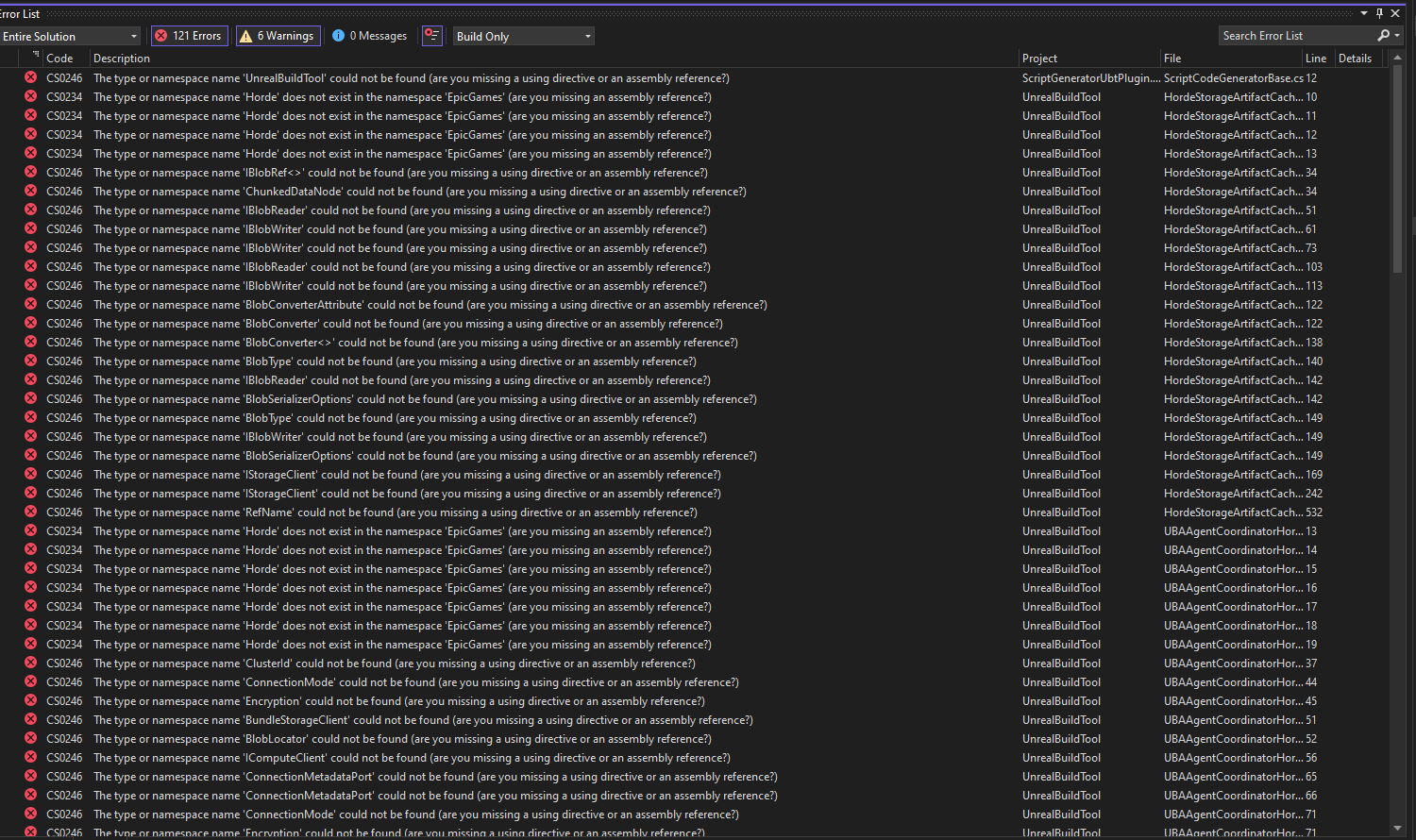
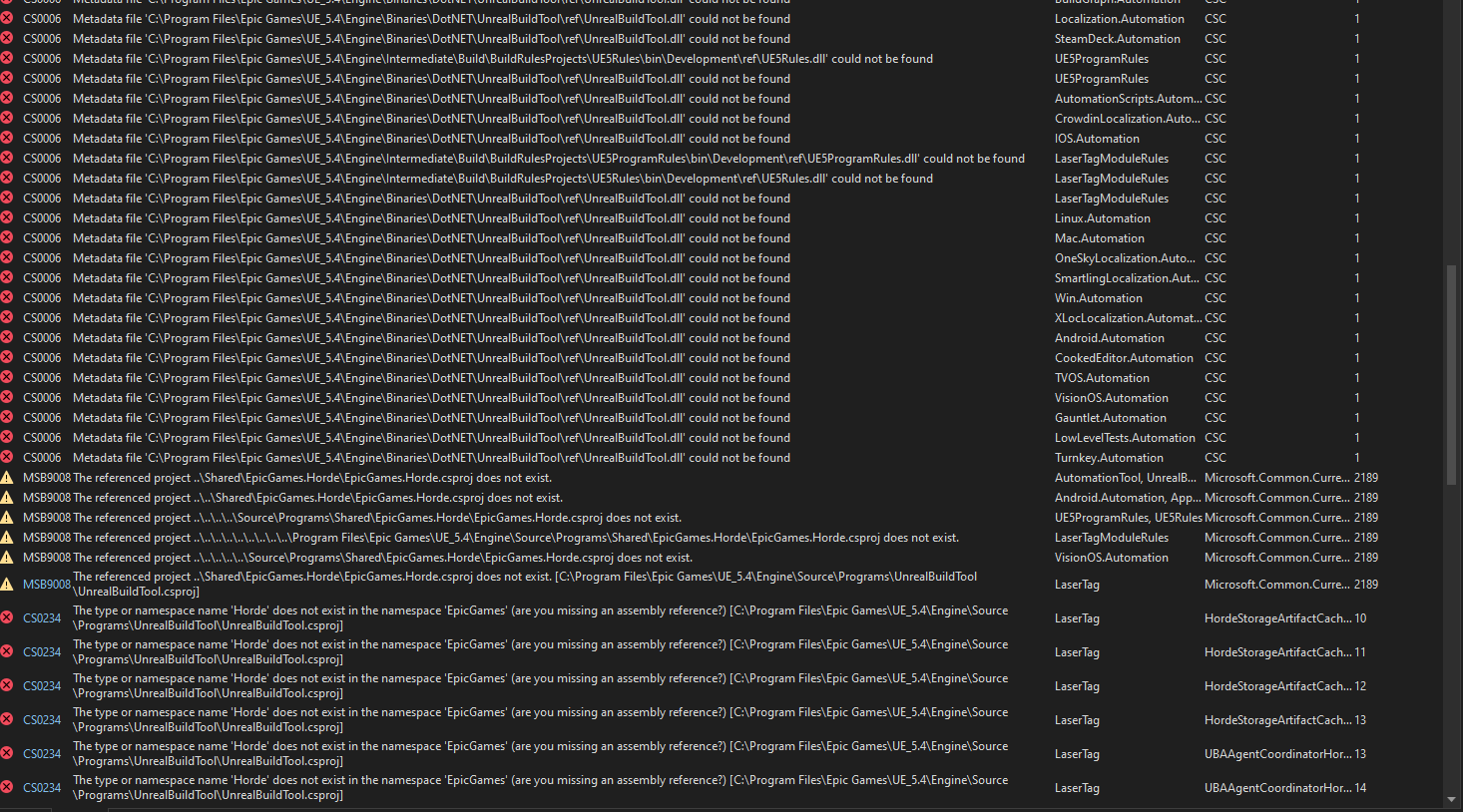

 dusky compass
none of these errors mean anything you need output log
shadow python
dusky compass
none of these errors mean anything you need output log
the output log pretty much just says the same thing as the error list
shadow python
and how do I do that?
currently verifying the files from the epic games launcher, gonna see if that works
shadow python
I verified my engine files, and built the project, I get only one error now, a missing dll for Horde. where do I get this dll?
I have .Net SDK 6.0.428 already installed
shadow python
nvm it looks like I just had to re-generate my project files again
dusky compass
shadow python
I verified my engine files, and built the project, I get only one error now, a m...
horde needs to be rebuild from clean now
 mossy jasper
Hello, I'm building the engine from source, and I'm wondering which branch I should use?
I'm seeing a few options that seem a bit suspicious to me: the default release branch, the purely numerical ones like 5.4, 5.5, 5.6, the ue5-main branch, the master branch, and the branches that have been released with tags.
I'm scratching my head a bit about which one to pick and what the differences are between them, The documentation just mentions avoiding the dev, staging, and test versions. Any insights you could offer would be super helpful! Thanks!


 smoky goblet
mossy jasper
Hello, I'm building the engine from source, and I'm wondering which branch I sho...
smoky goblet
mossy jasper
Hello, I'm building the engine from source, and I'm wondering which branch I sho...
ue5-main is the latest and greatest, but it can be unstable and have compile errors. You only have to use it if you're doing pull-requests.
The numbered streams are all the versioned releases as you probably expect.
release is the current public release, so right now that's 5.5.4 and is the same as the 5.5 stream.
Unless you have a specific reason to grab another version, grabbing release is probably the way to go. Just understand that it's 5.5.4 so that if a hotfix or 5.6 comes out you know where you stand in relation to the release.
mossy jasper
smoky goblet
`ue5-main` is the latest and greatest, but it can be unstable and have compile e...
So 5.5.4-release is the way to go. Thank you very much!
smoky goblet
I'd just stick with the 5.5, or release. You don't really need the -release ones unless you have to do intermediate updates.
if it's the first time you're pulling source, you might as well just grab directly from release (not a numbered -release)
mossy jasper
smoky goblet
I'd just stick with the `5.5`, or `release`. You don't really need the `-release...
OK, if I’m not mistaken, the default release is the most common choice, followed by 5.5.
smoky goblet
basically
dusky compass
mossy jasper
So `5.5.4-release` is the way to go. Thank you very much!
no, the release tags are th way to go
not branches
smoky goblet
dusky compass
no, the release tags are th way to go
Why? if you're getting the "stable" latest release == 5.5 == 5.5.4-release, don't they?
dusky compass
If you just want something production ready 100% without any secon-guessing I recommend always fetch specific tags
smoky goblet
🤷 that should be true of the release branch
mossy jasper
dusky compass
If you just want something production ready 100% without any secon-guessing I re...
Thank you, so you're saying you'd prefer to go with the 5.5.4 release first? Will switching to 5.5.5-release later cause any inconvenience if I need to import the git branch and its changelists/commits over to Perforce depot and keep them updated regularly?
mossy jasper
Hello! In a YouTube tutorial, I saw a "Retarget Projects" prompt in Visual Studio when building the engine, and they clicked "OK." Doesn't that mean it's not using the version Epic recommends?
In that case, is it better to click "Cancel"?
 void owl
mossy jasper
Hello! In a YouTube tutorial, I saw a "Retarget Projects" prompt in Visual Studi...
void owl
mossy jasper
Hello! In a YouTube tutorial, I saw a "Retarget Projects" prompt in Visual Studi...
Unreal will use whatever it decides to since its not visual studio that does the compilation, it’s the Unreal Build Tool which is called by Visual Studio… nut for best compatibility its recommended to have appropriate version of visual studio and windows SDK installed (since the prompt like this might annoy you quite often)
See https://dev.epicgames.com/documentation/en-us/unreal-engine/setting-up-visual-studio-development-environment-for-cplusplus-projects-in-unreal-engine and release notes for the release of unreal engine you are using for specific versions

Epic Games Developer
Tips, tricks, and techniques for setting up Visual Studio to work with Unreal Engine.
Here are the versions for UE 5.5

every release note for major versions (5.4, 5.5 etc) contains such section
mossy jasper
void owl
Unreal will use whatever it decides to since its not visual studio that does the...
Got it. I’ll try to stick with the appropriate versions of VS and SDKs to avoid that pop-up.
If I need to build an older version of the Engine, and the newer version of VS suggests updating the .vcxproj files, should I click “Cancel” to keep the original settings?
void owl
Ideally you shouldn’t see such prompt at all if you have all appropriate SDKs installed… otherwise it’s probably better to click cancel since that way you won’t be arguing with unreal who’s generating the solution… but at the end of the day UBT is the one who issues compilation commands and that doesn’t use the solution at all, so it doesn’t matter at the end of the day
mossy jasper
I'm not sure if VS will still pop up recommending the use of the newer version, even if I have multiple SDK versions installed, including the one used by the older Engine.
void owl
Or, alternative suggestion: try using other IDEs such as rider, you can open uproject files directly and it doesn’t need sln at all (and imo is generally better for unreal development than visual studio is)
mossy jasper
void owl
Or, alternative suggestion: try using other IDEs such as rider, you can open upr...
I’m planning to switch to Rider, but I’ve heard people say they use Rider for coding and VS for compiling. Is Rider now recommended for compiling the engine as well?
void owl
Never heard anyone say that tbh… as I’ve said before its not rider or visual studio that compiles the project… rider is generally more convenient for everything… only reason I used visual studio was for on-console debugging which wasn’t supported due to Sony and Microsoft until about 6-10 months ago… nowadays I’ve not touched visual studio at all
mossy jasper
void owl
Never heard anyone say that tbh… as I’ve said before its not rider or visual stu...
Got it, thanks so much for your advice, you've been a huge help all along!
void owl
Although I should add you still need to install visual studio for the SDKs 🙂 (although iirc you might only need the buildtools etc. but easiest way to get that is to install visual studio iirc) but you won’t have to open it at all… and good luck!
smoky goblet
void owl
Although I should add you still need to install visual studio for the SDKs 🙂 (a...
This is usually what people are referring to when they talk about having both IDE’s installed and “using” VS to compile.
void owl
I see, I wasn't familiar with that term, good to know.
small surge
Any idea where the build.gradle file is generated?
def billing_version = "6.1.0"
implementation   "com.android.billingclient:billing:$billing_version"
wanna add the above insource itself instead of having to write this manually after compiling
astral elm
small surge
Any idea where the build.gradle file is generated?
```
def billing_version = "6....
OnlineSubsystemGooglePlay_UPL.xml maybe?
 naive zenith
I need help with a minor step
I'm unsure how to run this command on windows
 naive zenith
No that was the only place I could find any information
I'm using a source build of 5.5, and visual 2022
naive zenith
on my the game folder wasn't appearing in visual studio @hidden hedge
hidden hedge
if you want the native build setup then the project needs to be a subdir of the engine root (the folder where default.uprojectdirs is)
then when you run GenerateProjectFiles.bat, you'll have a "games" folder with the project
naive zenith
@hidden hedge So i moved it over, now when I hit generate files it finishes, and then the .sln does not show up
Sorry I am new to the source version

ITFWA folder is in there now
I use the generate project files from my uproject of ITFWA
hidden hedge
Why is GenerateProjectFiles showing it's been modified
hidden hedge
Well you're not showing a lot. Like does it show anything in the output? You should be looking for UE5.sln
naive zenith
yes that generates but my project isn't in there, and in the project folder there is no .sln
 hidden hedge
It will only generate a UE5.sln and nothing else
If it doesn't show the game then I'm not sure what's in that subfolder
naive zenith
 hidden hedge
Well that looks like a uproject but this is still like scraps of information
And this project contains code?
naive zenith
that was it. I must of added the Cpp on a different project. I got it working, thanks for dealing with me @hidden hedge
round pagoda
After I build the engine from source, I get a litter of 'dummy' projects within the Source build folder showing in my launcher. Kind of annoying. Any way to ignore these?
 dusky compass
Do you plan to have any more than 1 project?
if not just make shortcut with UnrealEditor.exe d:\path\to\my\Game.uproject
small surge
astral elm
OnlineSubsystemGooglePlay_UPL.xml maybe?
Yeah that was it. Thanks
mossy jasper
Hello, does the “.NET 8.0” mentioned in the documentation refer to "SDK", "runtime", or something else? I don’t see the ".NET 8.0 SDK" in the VS Installer, do I need to download it from Microsoft’s website?

 dusky compass
mossy jasper
Hello, does the “.NET 8.0” mentioned in the documentation refer to "SDK", "runti...
dusky compass
mossy jasper
Hello, does the “.NET 8.0” mentioned in the documentation refer to "SDK", "runti...
do
dotnet --list-sdks
I remember that I selected the 4.6 SDK in VS, but why isn't it listed?
dusky compass
not a part of the new dotnet, it is old .NET framework
you should not be neededing it anymore, UE 5.x was migrated to net 6.0
mossy jasper
Hello, what should I do about this warning when running GenerateProjectFiles.bat?
I checked and found that the directory \Microsoft Visual Studio\2022\Community\VC\Tools\MSVC\14.38.33130\atlmfc doesn't actually exist — but there is a directory at \Microsoft Visual Studio\2022\Community\VC\Tools\MSVC\14.42.34433\atlmfc.
Should I manually move atlmfc to 14.38.33130? Or is it nothing to worry about, and GenerateProjectFiles.bat will automatically find the 14.42.34433\atlmfc directory?
 thick furnace
mossy jasper
Hello, what should I do about this warning when running `GenerateProjectFiles.ba...
thick furnace
mossy jasper
Hello, what should I do about this warning when running `GenerateProjectFiles.ba...
did you install ATL/MFC components for that toolchain in visual studio installer?
mossy jasper
thick furnace
did you install ATL/MFC components for that toolchain in visual studio installer...
I only installed C++ ATL for latest v143 build tools (x86 & x64) and C++ v14.38 (17.8) ATL for v143 build tools (x86 & x64), but not MFC.
How can I find the version of ATL/MFC that matches MSVC 14.38.33130 (MSVC 14.38-17.8)? Should I install both C++ v14.38 (17.8) MFC for v143 build tools (x86 & x64) and C++ v14.38 (17.8) ATL for v143 build tools (x86 & x64)?
thick furnace
in search box type 14.38 and it will show all components for that toolchain
the list is large, so just pay attention
so you not accidentally install ARM instead of x86 one
or specter one
mossy jasper
This is my current install status
 mossy jasper
thick furnace
MFC is missing
mossy jasper
thick furnace
MFC is missing
So I need to install C++ v14.38 (17.8) MFC for v143 build tools (x86 & x64) and C++ v14.38 (17.8) ATL for v143 build tools (x86 & x64), right?
thick furnace
yes
mossy jasper
thick furnace
yes
Thank you! When I install MSVC, I should always match the version (e.g. v143 and v14.38-17.8) and install the corresponding ATL and MFC together, am I right?
dusky compass
You dont really need MFC, I dont have any installed
what is important is match build tools version with reccomended per UE version
mossy jasper
dusky compass
You dont really need MFC, I dont have any installed
But what should I do if this warning pops up? #engine-source message
thick furnace
dusky compass
You dont really need MFC, I dont have any installed
maybe you don't build engine from source, as some programs need it
that is specific since he builds one of engine programs that uses mfc
dusky compass
Like what. You have xample
thick furnace
dusky compass
Like what. You have xample
read his message - DumpSyms program uses MFC
dusky compass
And why do you need DumpSyms
 visual mauve
Does anyone know where I can request access to 5.7?
Oh, is it just the ue5-main release?
smoky goblet
Yes and no. ue5-main is a mirror of the latest development.
5.6 now has branches which are being staged for its upcoming release.
There is no branch for 5.7 yet. 5.7 may or may not have things from ue5-main when it's released.
visual mauve
smoky goblet
Yes and no. ue5-main is a mirror of the latest development.
5.6 now has branches...
I see.
So all the metahuman plugin videos I'm seeing are from ue5-main?
smoky goblet
beats me
queen willow
hey guys,
been having a issue with a random black screen popping up when connecting to a server and after some research i found this. https://forums.unrealengine.com/t/open-level-node-shows-black-screen-with-throbber-in-packaged-game/392681/11

Epic Developer Community Forums
Found the code that is creating the throbber. It appears UWorld::BlockTillLevelStreamingCompleted() is called which then calls a delegate that pauses streaming. void FStreamingPauseRenderingModule::BeginStreamingPause( FViewport* GameViewport ) { // If a movie is already playing don’t bother starting one if(GetMoviePlayer()->IsInitialized...
any idea on how i can fix the issue, it seems it closes all my widgets when this pops up so i just need to stop it from happening
I asked in here assuming you guys would know the cause for this initially
 oblique pebble
hey guys has anyone tried building the UE 5.6 from source and attempted to create a film production
project? i tried to do that and it says the modules or are built with a different version.
i assume its because the 5.6 engine i built is a beta test build and those features are not available yet
oblique pebble
im glad i didnt ditch my 5.54 source build and that i kept it on my m.2 isb-c box
vital quarry
I have a source build, accidentaly changed something in ActorComponent.h, revert it back, and now the engine recompiles itself when I run project. How do I avoid this?
hidden hedge
it's a skill you learn where you just end up avoiding it entirely. if you accidentally type in it, just close the tab and say no about saving changes, if you saved changes, immediately revert in source control
 obsidian field
Hi there!
Can I change the value for UE_LWC_RENDER_TILE_SIZE somewhere without modifying the engine? 🙂
void owl
obsidian field
Hi there!
Can I change the value for ``UE_LWC_RENDER_TILE_SIZE`` somewhere with...
sadly not really, A) it's inside engine source code and B) it's compile time constant, so chaning the value of that will require modifying LargeWorldRenderPosition.h (and potentially some shader/material code if it's used there too) and recompiling the engine
obsidian field
void owl
sadly not really, A) it's inside engine source code and B) it's compile time con...
Ok thank you for your answer. I already modified the engine for that, but I end up with a custom engine just to change this value, which is a shame and drastically increases my compilation times 😅
iron dome
hidden hedge
it's a skill you learn where you just end up avoiding it entirely. if you accide...
Make the source code read only like Perforce does helps too.
It'll ask you to make it writeable when saving.
hidden hedge
I guess that's a good reason to not have auto-checkout enabled
 compact kelp
Hello, I'm having issues with the visual studio 2022 installer, it's stuck and doesn't download the setup installer. "It says unable to download check internet connection ". I've downloaded both epic games and unreal and rider they're working fine
Upgraded system so have to install everything again
 fading dagger
Quick question for you guys. When dragging in an actor in the editor then deleting it. If I perform an undo I don't see the constructor called for the previously deleted actor readded into level? Is there anyway to sniff when and Undo re instanaces the editor level actor?
There is a transaction buffer I suspect that caches a copy of the actor added.
mossy jasper
Hello, the build for version 5.2.1 has failed with many errors. How should I resolve this?

Is it because of this reason? The error messages seem quite similar.
 dusky compass
read the channel log, the .NET deps issue was discussed earlier
mossy jasper
Hello, how can I resolve these three warnings that appear when building UE5.2.1?
2>E:\Build5.2.1\Engine\Source\Programs\Shared\EpicGames.MsBuild\CsProjBuilder.cs(249,8,249,20): warning CA2200: Re-throwing caught exception changes stack information (https://learn.microsoft.com/dotnet/fundamentals/code-analysis/quality-rules/ca2200)
2>E:\Build5.2.1\Engine\Source\Programs\Shared\EpicGames.MsBuild\CsProjBuilder.cs(305,10,305,72): warning CA2249: Use 'string.Contains' instead of 'string.IndexOf' to improve readability (https://learn.microsoft.com/dotnet/fundamentals/code-analysis/quality-rules/ca2249)
7>E:\Build5.2.1\Engine\Source\Programs\UnrealBuildTool\Configuration\UEBuildTarget.cs(2533,163,2533,196): warning CS8603: Possible null reference return.
 solid shard
mossy jasper
Hello, how can I resolve these three warnings that appear when building UE5.2.1?...
solid shard
mossy jasper
Hello, how can I resolve these three warnings that appear when building UE5.2.1?...
damn
hidden hedge
I would simply ignore them
It's really not worth messing with the .NET stuff unless you actually know what you're doing
 hot parrot
Hey ! Anyone has resources on how to reduce the built size of the engine ?
dusky compass
see pinned
hot parrot
Thanks !
 tired yoke
I've updated to the latest 5.6 this morning and am now getting this error when I try open an openworld map, simple maps seem to open ok. Does anyone have any suggestions on where to start fixing this?
[2025.05.17-17.22.26:242][599]LogWindows: Error: appError called: Assertion failed: !FUObjectThreadContext::Get().IsRoutingPostLoad [File:D:\Dev\Github\UnrealEngine\Engine\Source\Runtime\CoreUObject\Private\UObject\ScriptCore.cpp] [Line: 2038]
Cannot call UnrealScript (SequencerSettings /Script/Sequencer.Default__SequencerSettings - Function /Script/Sequencer.SequencerSettings:ShouldShowThumbnailCaptureSettings) while PostLoading objects
Running from source between Linux and Windows: doable, with one caveat: UBT runs in dotnet which refers to one "cross platform" dll, however the windows dotnet bundled differs from linux in that it has desktop related frameworks missing from the linux dotnet: Microsoft.WindowsDesktop.App.
unkempt beacon
I'm having this crash in UE4.26, It's related to my Ai Driven Cars, happens Only in a packaged Build and it's very Random
`Unhandled Exception: EXCEPTION_ACCESS_VIOLATION reading address 0x00000248dad3df20
PhysX3_x64!physx::Scb::Shape::getMaterial() [d:\build++fortnite\sync\engine\source\thirdparty\physx3\physx_3.4\source\physx\src\buffering\scbshape.h:319]
Kaiju_New_Win64_Shipping!physx::processSuspTireWheels()
Kaiju_New_Win64_Shipping!physx::PxVehicleUpdate::updateDrive4W()
Kaiju_New_Win64_Shipping!physx::PxVehicleUpdate::update()
Kaiju_New_Win64_Shipping!FPhysXVehicleManager::Update()
Kaiju_New_Win64_Shipping!TBaseRawMethodDelegateInstance<1,SHeaderRow::FColumn const ,float __cdecl(void),FDefaultDelegateUserPolicy>::ExecuteIfSafe()
Kaiju_New_Win64_Shipping!TMulticastDelegate<void __cdecl(FPhysScene_PhysX * __ptr64,float),FDefaultDelegateUserPolicy>::Broadcast()
Kaiju_New_Win64_Shipping!FPhysSubstepTask::SubstepSimulationStart()
Kaiju_New_Win64_Shipping!TBaseRawMethodDelegateInstance<0,FPhysSubstepTask,void __cdecl(void),FDefaultDelegateUserPolicy,PhysXCompletionTask * __ptr64>::ExecuteIfSafe()
Kaiju_New_Win64_Shipping!TGraphTask<FSimpleDelegateGraphTask>::ExecuteTask()
Kaiju_New_Win64_Shipping!FNamedTaskThread::ProcessTasksUntilQuit()
Kaiju_New_Win64_Shipping!FTaskGraphImplementation::WaitUntilTasksComplete()
Kaiju_New_Win64_Shipping!FTickTaskSequencer::ReleaseTickGroup()
Kaiju_New_Win64_Shipping!FTickTaskManager::RunTickGroup()
Kaiju_New_Win64_Shipping!UWorld::Tick()
Kaiju_New_Win64_Shipping!UGameEngine::Tick()
Kaiju_New_Win64_Shipping!FEngineLoop::Tick()
Kaiju_New_Win64_Shipping!GuardedMain()
Kaiju_New_Win64_Shipping!GuardedMainWrapper()
Kaiju_New_Win64_Shipping!WinMain()
Kaiju_New_Win64_Shipping!__scrt_common_main_seh() [D:\a_work\1\s\src\vctools\crt\vcstartup\src\startup\exe_common.inl:288]
kernel32
ntdll`
astral elm
unkempt beacon
I'm having this crash in UE4.26, It's related to my Ai Driven Cars, happens Only...
I suspect it may be hard to get help on ancient tech, even 4.27 users are probably starting to get a bit scarce
unkempt beacon
astral elm
I suspect it may be hard to get help on ancient tech, even 4.27 users are probab...
I'm forced to use 4.26 in this particular project but for everything else I use 5.5, however it should be very similar, ue5 isn't rebuilt from the ground up it's just ue4 but with many changes
dusky compass
unkempt beacon
I'm having this crash in UE4.26, It's related to my Ai Driven Cars, happens Only...
I would try to debug first to get a gauge on what possible can be the root cause, even if approximately, and then simply delve into UE4.27 commit log/changelog for relevant source units to see if it might have been addressed so you can backport
 tranquil flame
Hi, i'm really experiencing very long time compile time more than 7h, for the first engine build.
Then modifieed a single h file and yeah i guess it will take 4h for (2727 actions).
I have a high end pc, UE's source on NVME, Ryzen9 5900X 12Cores.
I'm really suspecting something off here, it should not be that long.
Also i'm using Rider to build, but ig this have nothing to do with IDE. I need your help guys, i'm going crazy
Yup this make total sens to me. But not the time it takes to compile those files.
hidden hedge
tranquil flame
Hi, i'm really experiencing very long time compile time more than 7h, for the fi...
And are you using a native build? In addition, how much RAM is paired with that CPU?
tranquil flame
hidden hedge
And are you using a native build? In addition, how much RAM is paired with that ...
If you mean by native a engine source build then yes.
I have 32gb of ram
hidden hedge
a "native build" means it's closely tied to a specific project. if this is being used then UE5.sln contains the game project in the solution explorer
32GB is a bit low
so I wouldn't be surprised if this is a bottleneck
that said, I used a 24 core threadripper with 64GB of memory (the same ratio) and that was mostly fine
tranquil flame
Ok, no it's not a native build then, building sources, then create a project from this sources. Yeah that is what was expecting the ram might be the issue, but even if had more ram I would still need be limited by cpu cores, so yeah I guess it's time to upgrade my specs..