#cinematics
1 messages · Page 20 of 1
 sweet hemlock
 barren lagoon
yes, definitely
i just want to know what the bloody hell it is
ideally, i'd like to have it on at all times
so i can accurately see what the final render will look like
sweet hemlock
Could be streaming in a other map? Maybe some light or volume gets os off but activated at play mode
 amber axle
Why do I sometimes get grey keys in Sequencer?
 mystic shuttle
Sequencer problem! I have a camera on a camera rig and it just won't render ! everything seems to work fine, camera is bound in the camera cuts, but in the final render it seems stuck in place and not renders
mystic shuttle
 high salmon
i am trying to capture a pov shot of an animation climbimg. do i add the camera in a socket and attach it to the sequencer or what do i do?
ok nvm i figured it out.
sweet hemlock
Why do I sometimes get grey keys in Sequencer?
@amber axle likely means custom curves instead of standard auto, flat or linear
amber axle
@sweet hemlock Interesting... I'm not setting curves until after my initial placements, and that's when this is happening. In most cases the initial keys are pink, while successive keys are mostly grey, or sometimes pink. Still investigating.
The coloring of grey makes them look.... broken, or deactivated, though I know that's not the case.
sweet hemlock
open up that curve editor and see if your keyframes break from the norm
 hidden osprey
Hi, is there a solution to fix the stuttering sounds placed in Sequencer? If i drop them on the map, they play fine, but I need the Sequencer to be able to play them when I need. I'm on 4.25.3 now, but had the same on 4.24 as well. I always import Wav files (44.1khz, 16bit, stereo... but tried 48khz too, didnt see any difference). If I disable all background musics, and random cues, the stuttering still remains for those sounds which were placed in Sequencer. I have an external usb sound card (Steinberg UR22mk2, if that counts)
barren lagoon
hey @sweet hemlock, the first frame of my render has really bad LOD. is this just how it works or is there a way to fix that?
sweet hemlock
Maybe add a warm-up frame
barren lagoon
that’s the unfortunate part, i already have an initial 5 minute warmup and a 2 minute one per shot
i would think that’s plenty of time for the full LOD to kick in no?
EDIT: fixed!
barren lagoon
i've plugged my render into Premiere, but for some reason, the image quality looks kinda bad during playback. when i pause it, the quality looks pretty decent though. how can i fix this?
while the playback is paused:
while it is playing:
notice the writing on the gun, how much blurrier it is when the playback isn't paused
sweet hemlock
might be blending the frames?
amber axle
Somehow I can't seem to move the endpoint of my shot on this particular sequence, did I do something accidentally?
The other (green) start point has the little flag, and I can move it manually no prob
And, oddly, there is a right-side (endpoint) red line that I can manipulate, but it's darker and superseded by the brighter red line that I can't move
SOLVED: Turns out I was limiting the frame length in the master track. Simply grabbing the right side of the shot and moving out right increased the allowable timeline space in the shot itself.
barren lagoon
might be blending the frames?
could be. any ways you know of to fix this? @sweet hemlock
barren lagoon
will do, brb
 toxic horizon
Is there any intrinsic limitation to the hierarchical level of components inside an actor that Sequencer can record?
I am trying to record a custom vehicle actor where the wheel meshes are parented to a couple of scene components which are parented to collisions sphere which are constrained to the car body
I get the body and keyframes down to the 3 level, but not for the wheels.
high salmon
i'm trying to render but forsome reason the image has blurry previous frames and the shadows are missing too
and there is shadow near the horse head
high salmon
ok, i figured it out,it was a simple solution. In Sequencer > Render Movie Settings I turned off Cinematic Engine Scalability and it rendered perfectly. but still having trouble with blurry previous frames
amber axle
So, where'd the playrate track go?? I looked around online and here and haven't seen anything.
Wait. Is it Time Dilation? must be...
 stone igloo
Hey everyone! I had to do some major moving with my environment. I have a cutscene for an ending with a few things that the cutscene is positioned like cameras and characters. Is there a way to move all the old X,Y,Z Axis to a new location of my environment at once to the new X,Y,Z Axis? I'm trying to avoid doing each thing one by one because it'll just take time trying to get exactly the positioning I need.
amber axle
@stone igloo You could add an empty actor to your scene then parent all the mesh you want to move to it in the World Outliner. Then just move the Empty around accordingly. After you can unparent and delete the Empty unless you might need it again later.
 azure mirage
Hey so I'm using set view target with blend for a cutscene of mine, then resetting the target when finished with the cutscene. The issue is this positions the camera at half my character's height instead of where it originally was. Please @ me if you know why, thank you in advance!
Fixed just needed to set the new view target as the player instead of leaving the new view target empty. Wish there was more documentation but oh well 🙂
 alpine vortex
heey everyone 🙂 i started making animations in ue4 and so far i am loving it! i just have one small problem, and that is light shafts not visible/rendering inside my cinematic camera. it is in the game viewport though, anyone any advice? 🙂
alpine vortex
also why does my material look different inside the editor compared to the rendered images?


okay i fixed the material part.. seems like it was happeniing cuz the cam was colliding with the notebook.. anyways would love to know the fix for the cinematic camera not being able to see light shafts
 gusty heath
Hi guys, is it possible to play a video in sequencer like in a normal video editing software? Like an overlay and be able to scrub frame by frame?
 green oasis
Hello... I may be missing this, but is there some way to have the current state of the sequencer set the default state of the objects in the scene? So that when the sequencer is closed all those objects keep their transform values along with the other properties from that time in the sequencer? I've googled but I'm probably not using the right terms. Thanks for any tips!
barren lagoon
i have extra exposure set up in a few shots in my sequence, but in the render, it takes a second for the exposure to kick in for the very first shot
i've adjusted my warm ups and delays a ton, everything except the exposure at the start of the cinematic looks perfect
is there a way to alleviate this, or is that just the way exposure works?
just seems strange that i don't have exposure issues in any other shots
green oasis
@gusty heath Do you mean a media asset? For frame-by-frame stuff, image sequences will be more accurate, though might not be fast enough for realtime depending on your codec/hardware.
 grave sand
Hi, Guys!
Is it possible to create keys in sequencer using blueprint?
Or attaching or reattaching bindings using blueprints?
gusty heath
@green oasis Yes what we need is to play a reference animation in sinc with (in) sequencer and we only tried media asset, will try image sequence. Thank you for the tip. Cheers!
 cobalt estuary
how to capture 360 degree video
 north spear
Hi guys I made a sequence and everything it's fine on the viewport, however when I try to render the scene into a video format is not using the camera that I have

it seem that when I render a new camera gets spawn
north spear
that camera wasn't influencing the error I was having, In the end I decided to made a complete new level sequence and copy all the keyframes from the old one, worked like a charm
btw here's the video, I'm pretty new with cinematics so every tip is welcome https://youtu.be/LWoKqNv9zN4

 hazy whale
Cool @north spear!
sweet hemlock
thats pretty sick
 tulip ivy
How do i change the play rate of a level sequence?
sweet hemlock
during gameplay?
if you drag your sequence into the scene
you will see a playrate setting in details
tulip ivy
Thanks That Worked!
tulip ivy
So now i have another problem with my level sequence track my level sequence is basically a door going down and right as the sequence ends it goes back to it's original location at the speed of light Basically a door going down which it is supposed to do when the sequence ends the door goes straight back to where it was originally in rapid speed.
 sly dawn
hey i have a issue when i use movie renderer to render high quality renders of few animations exported from maya, I experienced a non sync camera animation with character animation and also few frames jumps to last frame in render output
Is it a graphic card issue because it gets delayed in playing character animation while camera animates in perfect timing, and when i use normal sequence render it plays just perfect
barren lagoon
just finished a cinematic! gotta give credit to @sweet hemlock, i appreciate your help greatly
 sweet hemlock
really nice man
 haughty sentinel
Is is possible to use footage in the sequencer?
sweet hemlock
yes
youll want to use media tracks
can use image sequences and videos
if you plan on rendering out images or video from sequencer I would recommend using images sequences
haughty sentinel
What about keyed footage? Or sequence with alphas?
When I try to import a 6,940 frame image sequence, I get an error at frame #1,000. Is this some arbitrary frame limit?
When I import MP4 files, they appear as content, but I get no preview when I double click them. Also, if I add them to the Sequencer under a MediaTrack, I see their length, but all frames are empty?
sweet hemlock
its a weird process with video unforunately
You will need to create a media texture asset as well
Demonstrates how to use the Media Track in Sequencer to control play of movies inside a Level.
basically you need a media texture, and you need to assign that texture to your media track in sequencer
haughty sentinel
The Media Player seems to run at the wrong FPS inside the Sequencer. Is there a fix for this?
When I use the play button for the engine, the Media Player looks like it is running at the correct FPS.
sly dawn
When I use the play button for the engine, the Media Player looks like it is running at the correct FPS.
@haughty sentinel I'm facing same issue what graphic card are you using
barren lagoon
hey everyone. is there a way to get a smooth transition from not tracking to tracking with a cine camera?
no matter how much i adjust the look at tracking interpolation speed, it always instantly snaps onto the actor
gusty heath
can i bake physics of static mesh in ue4 like in blender?
haughty sentinel
@sly dawn I don't think it has anything to do with the graphics card. I think it is a bug that has been there for months. I found this related post on the forum.
https://forums.unrealengine.com/development-discussion/architectural-and-design-visualization/1723594-media-texture-video-playback-too-fast-in-sequencer-render-output
Unreal Engine Forums
I have a media texture in my scene that plays an onscreen video (like a television in a living room). Everything is working fine when i play the level, and works fine as I scrub through the level sequence i made, which i'm rendering out as an animation. However, when i render ...
sly dawn
@haughty sentinel thanks atleast I found a answer that it was a bug
being searching about this from days
 neon slate
hey guys i incurred into a serious problem.... im triggering sequences via blueprint, and i'm having flicker issues on the reflections of my level; find an example video below... whenever i play a new sequence it seems as if the reflection takes up some times to update and thus the firs few milliseconds shows black/weird reflections.... can anybody help please ???? im going crazyyyy
sly dawn
i faced same issue
did you use unreal movie render queue to render this output
haughty sentinel
That is reminiscent of the velocity blur on camera cuts issue from many render systems. The position difference between two locations causes a momentary exagerated velocity. Perhaps you could avoid cuts and render each camera separate? Then comp your footage together as usual.
barren lagoon
would anyone here happen to know how to smooth out the lock on tracking?
no matter how much i move the interpolation number around, it's way too snappy
gusty heath
how do i make a video play on the screen in unreal engine? seems like all the tutorials are outdated to death and won't work
 quasi meadow
@gusty heath https://www.youtube.com/watch?v=0gui0WgCCoE
I just followed this video and it worked for me, except when you create a widget just drag the media texture into the widget scene and resize it, it will create video as image, rest of the video is good to follow, once you add to viewport just add a delay then remove widget after delay
gusty heath
ok lemme try to comprehend this
quasi meadow
It's pretty simple and probably not the most correct way but it's definitely a way that works
gusty heath
ok im just doing audio so i need to get that done with really quick
gusty heath
@quasi meadow didn't work, did everything i could, dragged the video in and it let me, but when i do what he does my screen stays black, maybe it's a version issue
im using 4.25.3
gusty heath
.
so i gave up on the video and went back to the sequencer and figured it out, but how do i add subtitles to my characters? as they don't actually have voices
and can i add images or title cards in the sequencer?
 fringe folio
Can someone render my project with raytracing, my laptop is very weak and can barely handle the unlit viewport. I am currently working on an environment and there's so many objects that it is struggling to survive.
gusty heath
make a game that is less demanding, why would you make a game that you can barely play? or save up and try to upgrade your pc or laptop
quasi meadow
@gusty heath shouldn't be a version issue because I'm using the same version as you, not sure why it wouldn't work unless you dragged the wrong one in? Did you import the video then create a media player from it? You should have 3 files for the video and the drag the Media Texture in the widget not the media player or the video import
gusty heath
yeah that's exactly what i did but it gives me a red cross
whatever it's too late now i need to post my game
maybe next game i'll figure the issue out
quasi meadow
Okay good luck
barren lagoon
one of my camera cut tracks keeps spawning a random camera into my world and i have no idea what's making it spawn. deleting it from my world outliner doesn't do anything, as it'll just spawn back in when i drag the playhead around the camera cut track. anyone know a fix for this?
 snow hamlet
Is there a camera set to spawnable below the camera cut track?
 timid pasture
Has anyone used additive control rig or control rig in sequencer with a modular character blueprint? Whether using set master pose or abp copy pose from mesh I get wicked crashes when the sequence is open and the blueprint compiles calls constructor?
 inner briar
Excuse me, please im so fangry.. can i or not record video with cine actor in sequencer OF audio visualized niagara particle AnD capture song as well or not?
barren lagoon
@snow hamlet nope, the camera hasn't been converted to spawnable
snow hamlet
@barren lagoon Hmm, not sure then. Are there any sub-tracks in the sequence? Could be a spawnable camera in one.
A screen grab of the sequence track could help.
barren lagoon
yep, one sec
barren lagoon
yeah, it looks like both of my camera cut tracks are spawning these random cameras now. here's what i have in both:
@snow hamlet
snow hamlet
@barren lagoon Sorry, I'm not getting full picture of what you are trying to do. Are you doing multiple shots or a single shot?
If it is just a single shot, you can delete CineCameraActor13 from the sequence track and the world outliner, or delete the LevelSequenceActor containing it from world outliner. That should stop it from spawning.
barren lagoon
it’s two shots, each one containing a single camera cut @snow hamlet
snow hamlet
@barren lagoon Are there 2 separate LevelSequenceActor's in world outliner?
barren lagoon
nope, only one @snow hamlet
snow hamlet
@barren lagoon Was trying a few things. When I applied 'camera shake' to the camera in the sequence track, I noticed that a 'CameraActor***' was added to the world outliner.
I think this is the camera that you see spawning in yours. If you mute Camera Shake it should disappear from world outliner.
Haven't really used Camera Shake myself but the CameraActor seems to be needed for Camera Shake to function. This is probably why it keeps reappear in the world.
barren lagoon
@snow hamlet excuse the late reply. i do have camera shake applied so that's probably what it is. how do i mute the shake without just deleting it?
snow hamlet
@barren lagoon Right-click on the camera shake. There should be a mute option.
 light egret
Hey I have some questions about adding motion control to the NDICam from the remote session IOS app Can anyone help?
 spare minnow
hello! Im trying to export some 360vr video with Panoramic Capture plugin, and its so slow, SP.ConcurrentCaptures have to solve this problem but unreal write images one by one, ignoring default value 30. Anyone know how to solve this problem?
 cerulean grail
Hey everyone,
We're facing an issue with the sequencer. We're making a turn based JRPG kind of game and we have seamless transitions to battle, meaning you can encounter enemies in any kind of landscape (not necessarily flat). When the player uses a skill, we use a sequence to have custom cameras and animations with all the sequencer functionalities. This works great except when the battle takes place on complicated landscapes. For example if there is a hill behind the enemy and the the character skill makes him go behind the enemy, he would just go straight inside the hill. So the question is : is there a way to have an actor in sequencer be bound by the same rule as a character actor would usually be ? IE follow the landscape shape when moving, and stop its movement if it faces an object with a collision ?
gusty heath
hey guys need short help on simple cinematic logic. i cant find the solution. i add a sequence ( master ) and put 2 shots in it, when i change viewport and start playback only the first shot is playing, the next shot is stop the full master sequence ?! in my Worldouliner are just the Master Sequence ( level sequnce). Even when i lock the cameras to "lock to viewport" the first clip/shot is playing. after that the movie is stop ?! just short hidden button or chekcbox i didnt see. please. Thanks all
gusty heath
even in the tutorial from 2017 he simple cerate: 1 level sequence ( master) and 3 shots ( level sequence) than he put the 3 shots into the master, hit play and the full clip is viewing in the viewport. in my case the viewport stops after first shot. time is playing but no more other clips are playing. i have to click manually the camera actor, wtf ?! do i need the camera actor in the level ? For this i have the Master , right ? Wired...help ^^
 tranquil bramble
Dumb thing to check, but is your work area long enough to encompass all the clips?
 kind wedge
Hey there, guys, does anyone faced the same glitch with the alembic cache?
gusty heath
hey guys I have a question, hope you can help me... I rigged a car in blender and made a bluerprint with new chaos physics in ue4... when I hit alt+P it works beautifuly, the drive physics feel really better then most other tripple games at the market right now... my problem is sequencer recorder... when I record a driving, my car is always about a meter under the landscape... I tried many different settings in sequencer recorder but nothing really helped... I could bring the landscape down after I recorded the sequencer, but then all objects which are not foliage or landscape material are going to be 1 meter too high... unless I firstly record everything I need and then make einviroment, which is very unflexibel... so do you have any idea why sequencer recorder is behaving this way???
 simple comet
Hey Guys just finished making this awesome trailer! Lot of editing has been done in post such as flares, SFX, Color Correction, creating the FPS View, lighting effects, etc!
BUT Unreal's Realtime pipeline really helped in pumping out this puppy in just a few days! (Most of the assets are used here are free, you may recognize them immediately 😅 ) Cheers!!

First Cinematic Trailer for Chess Chronicles.
Beta Launching on 1st November.
Visit www.rupturedhorizon.com to stay updated!
gusty heath
guys anybody any idea why sequencer recorder is doing that bizzare thing?
 feral coral
Yo real question, how do yall animate effectively in UE4? Do you use Maya? Come up with any solutions to clean up mocap data?
amber axle
@gusty heath I think we'd need a bit more info before determining what the actual problem is. It sounds like your sequencer is taking control of the transform of your vehicle and offsetting it. But without more detail it would be hard to say for sure.
 prime turtle
Hey... hopefully a simple question. Fairly new to this. I've been capturing face using AR kit.. still in hacked up demo scene from epic. I'm attempting to record audio along side the blend channels. Works (weird offset to resolve) ... however... Audio won't play while I'm PIE or simulating. Only when game is stopped. Sequencer audio track has an additional parameter above "Pitch" and "Volume" labeled "Attach" which is set to "Unresolved Binding" so I'm suspicious of that.
@feral coral mocap cleanup traditionally Motion Builder, but it's expensive. Look at iClone perhaps. Houdini 18.5 released soon looks to have new features that could one day knock both out of the water but they will be ... possibly rudimentary for a while.
prime turtle
Audio is now playing back with my face capture - no idea what fixed.
Now I just have about a ~2sec offset - facecap livelink data lagging audio. Anyone been down this path? Can compensate... will discover how consistent it is.
Slipping mocap to match end point of audio syncs it up. Odd.
tranquil bramble
Hello all. This has come up for me a bunch of times and I’m hoping someone has a good solve. I’m rendering out environments that are being composited externally with characters that are being rendered from Maya. Camera matching is no problem, and the new Movie Render Queue works great for my renders. But sometimes I have a foreground element I want to render separately with an alpha, and I can’t figure out an easy way to do this. I’m able to put the foreground elements in Layers and isolate them in Composure, but rendering using the Level Sequence’s “Render/Composure Export” never gives me what I want. So what I've been doing is deleting everything on a map that I don’t want to render then render what’s left using the Movie Render Queue as a png with alpha, then reverting the map to its former state. Not ideal, but it works. Anyone have a good way of rendering foreground passes? I really wish you could control layer visibility in a Level Sequence, that would fix it - is this possible?
 rotund bone
30 minutes into cinematics and wow. ill probably be exploring this all day.
 serene grail
Is there a someone able to help with hands placement on boat steering wheel using IK?
I dont know why sometimes my hands arent on wanted place
The wheel movement around own axis works
But after each rotation hands placement have to be the same as on second photo
 pseudo siren
Hello, I have set up a composition in composure, and in the editor everything is working as it should (I have tried this with image sequences and mp4's) but when I try an render the composition it only renders the first few seconds of the video. I have been looking all over the place to find a solution and I have hit a brick wall. Can anyone help me with this? The entire video is about a minute long.
 limpid wigeon
I'm going insane! why does the sequencer randomly break when trying to render a video
I rendered a 2 minute video at 1080P with literally 0 issue, it rendered fine
since then I closed the project, slept, and when I woke up I opened the project and changed the resolution to 2160P and now when I click render it will be stuck on the very first frame of the sequence and won't progress further
I changed it back to 1080P and it still refuses to render
I then tried 640X360 at 12FPS just to see if maybe maybe it was a performance issue and it still gets stuck
I've enabled and disabled texture streaming, changed compression settings and output settings, tried rendering in a seperate process
nothing has been changed from the sequence since it worked to render last night
hidden osprey
Hi, I succesfully imported an old sequence from Matinee (old UE3 project) to Sequencer (UE4-25). The cameras and routes imported properly. My question is, is it possible to select the camera route (as whole), and move it to a bit different location on the map? I changed some streets on my map, and I would need to move the Sequencer scene to another place. Currently I can not move it, only the keyframes one by one, but re-routing it would take a lot of time.
feral coral
Anyone know of Sequencer or cinematic related plugins? Would love to get the best cinematic tools for my next project
 distant mauve
How does one change the default "When Finished" behavior to keep state? adding [/Script/LevelSequence.LevelSequence] DefaultCompletionMode=KeepState to defaultengine.ini doesn't work in 4.25 like it did in previous versions
pseudo siren
Ok someone please help here this is driving me crazy. I have set up a composite in "composure" with a 37 second video, I am able to render it out but I have no clue how to render it in sequencer with sound. I have searched all over the youtube traying to find out how to do this and nothing. There are plenty of videos on how to set it up, hell I followed one, but none on how you render the sound with the video. If anyone can help with this I would be grateful.
 spark sleet
Hi! In sequencer, is it possible to fade between cameras? In other words cross dissolve.
distant mauve
@spark sleet there's no built in way to do this in unreal, but you can cross dissolve/fade between the two cameras by in post/another software. I know blender can do it
https://www.youtube.com/watch?v=6fxZaMKk418

In this Blender video editing tutorial we will be looking at video crossfades in Blender 2.8. Learn how to crossfade video in Blender easily and efficently.
Find more videos here - https://www.youtube.com/playlist?list=PLlXsqAWo0V6IiiThMKxaezET2sdO7grjQ
We are continuing and...
spark sleet
Ah OK. My searches brought up nothing. Thanks for the tip!
distant mauve
No problem, I also needed to do this and IIRC an epic employee told me it's not possible (without programming), and to do that instead
 civic tangle
Hey Guyz! any tutorial for good quality Product rendering? I cant find any specially for Unreal Engine
limpid wigeon
ughhhhhhhhhhhh
previously I had an issue where rendering my sequence to a file would freeze on the first frame of the sequence and get stuck
I was able to fix this by restarting my computer everytime it happened
now, just like last time, nothing has changed from the last time I rendered to this time rendering except me changing the quality (LOWERING it instead of raising it this time) and now it gets stuck on the first frame
except now restarting my computer does not fix the issue
I have restarted twice and the sequence continues to get stuck on rendering the first frame
 crisp horizon
Not sure if this belongs here, but how can I add a blueprint to play in a level sequence? I got a very simple blueprint that rotates a static mesh.
crisp horizon
Also...is there a simple way to fade between objects in sequencer?
All I found is material based fades, which is not an option here, as its a complex object with dozen material elements.
sly dawn
hi,
I'm doing a small render using ue4. So I need to create a cloth simulation inside the cinematic trailer. I simply create a flag simulation using cloth tool and it's perfectly working in the game play, but didn't play on cinematic. So I want to know how to do this thing!
haughty sentinel
I have run into this before, but I can't figure it out. I have downloaded the free polar station and set up a camera move. The sequencer seems configured correctly, but when I try to capture my movie it captures from some unknown camera?
I have set the pilot flag on the new camera and it plays back fine.
How do I force the capture dialog to use the camera I am piloting? Unreal is rendering an outdoor scene when I have clearly specified an indoor camera.
haughty sentinel
I guess it's old Matinee crap. Once I deleted those cameras, the Sequencer output started working..?
 chrome reef
hey I've got a couple questions one pretty basic and the other one weird and stupid
- whats the best way to have a cinematic camera start its keyframed animation upon hitting play, i.e through level blueprint stuff
- is there a way to parent an object to a keyframed cinematic camera, not just copy the keyframes to it, but have it pretty much be glued to the camera
I can go more in detail about why I have weird specifics on that, because Im doing a weird project
haughty sentinel
Try dragging your child object onto the camera in the outliner.
chrome reef
jeez what a simple solution, but it works perfectly! Thanks a ton man
chrome reef
I am however running into an issue where the object that I've parented to the cinematic camera will occasionally return the origin because the cinematic camera will disappear when performing certain actions, the most important being attempting to render the sequence
the tendency for cinecameras to blip in and out of the outliner is really irritating
I've used the solution to give an empty the keyframes of the camera and parent the projector to that
 regal urchin
Why would my objects, which I have animated in my sequence not move when I render the sequence into an Avi?
If I scrub through the sequence they move as I animated them to
regal urchin
i just tried making a subscene and applying that, stil didnt work
regal urchin
isnst there a setting in a BP that lets you selevt whether the mesh follows internal animation or sequence animation?
it isnt animating in play mode
ok so what do i do?
distant mauve
@regal urchin, do you have any logic in the construction script? If so, in that BP you need hit "class defaults" and check sequencer can tick construction script. If that doesn't work, I'm honestly having the same issue. No matter what I do, objects reset their state, even when setting the keyframe to keep state, when I render to AVI as well. I'm doing a construction timelapse, and I'm not able to simulate, PIE, or render to video.
Which leads me to my next question, in order to properly reset my sequence, I have to play in reverse until it hits the beginning, or else objects will be all over the place, no matter how I try to reset them. Also, I can only play in reverse at 5x speed, playing reverse at 10x doesn't scrub over keyframes that are ~0.3 seconds away from each other, so I have to wait a significant amount of time every single time I want to set my sequence state to the beginning. Has anyone encountered this issue and have any input on it?
 cold oracle
Noob question, what's the benefit of using BP_LightStudio?
Is it better than setting up lighting with SkyLight and BP_Sky_Sphere and some key lights?
 bright gyro
Anyone had issue simply playing a video in widget? Mine is just black and wont play a thing.
bright gyro
nvm got it working
 raven moat
Hello! Is it possible to animate and move a pawn in the sequencer then have a seamless transition to gameplay?
I'd like to have this kind of result like in GoW https://www.youtube.com/watch?v=hRMX9Rzq1AA&feature=youtu.be&t=4954

Everything GREAT With God of War - https://www.youtube.com/watch?v=It5aENQ_Ry0&t=3s
Get God Of War here: https://amzn.to/2z2cEcS
God of War (commonly referred to as God of War 4 or God of War PS4) is a third-person action-adventure video game developed by Santa Monica Studio ...
I get the camera transition but have problem with the skeletal mesh/pawn. Same goes for an AI like Atreus that switches its behaviour from AI to scripted in a sequencer
 carmine yew
Hello,
is there a way how to be notified (delegate etc.) when StartupMovies finished?
 tribal ivy
 coral oasis
Hello community. new to unreal.. I am trying to generate a landscape using megascans, landscape tools etc.
I have a doubt. do u guys know why my sun is square?
 violet igloo
Square??
 steep valve
I created this short animation in UE4.24. Inspired by a mythical being called ZawGyi. Seen here as he flies over Bagan, Myanmar https://drive.google.com/file/d/1NOWpP1ZSjwdwTq-7RrLsJLrIk-ge5y_i/view?usp=sharing

Google Drive
 mental spindle
Hi have question: In sequencer I have created a shot. If i add expenationalHeightFog is that only affected in shot it self? everything you add or effect is only in that SHOT. is this correct? Secondly I have smoke P_emitter, but when render range of frame 100-110... I have warmup time... The smoke doens't show up in the renderd frames. The smoke is visible thru camera_pilot and in editor. Any ideas what to check? thanks 🙂
violet igloo
If you add like -100 frames it will help all your particles warm up.
barren lagoon
hey everyone! with a cine camera, how can i go about changing the shape of a bokeh to a more anamorphic style?
 lilac dew
Hey guys, I have a modular character (Two skeletal meshes, the head is seperate and uses set master pose component to the body)
For the game this is all working fine and dandy. I'm using the take/sequencer recorder to record my player and in game its fine, but when I'm viewing the sequence back.. the head is completly detatched from the body and isnt working how it should at all. Anybody had an experience and have some pointers? thanks in advance
Edit: I fixed it guys, I moved setting the master pose component to the construction script and it works in sequencer now
 empty garden
how is it possible to connect chroma live with tracked camera so that all works in world space? I have tried with plenty of tutorials but nothing seems to work properly? I have a7s2 and elgato and also blackmagic and atem mini
mental spindle
Hi, @ Just Sharp... I already did like warm up time -50 that render anything.
 foggy comet
Hello, can someone help me out, i am a noob and clueless in blurprint, i need to triigger the free Firework particle Effect pack on marketplace in my sequence. going through some youtube tutorial but i still stuck
 glass silo
Hi everyone... i'm doing a short film with unreal engine and after the first render there are some texture props that fliccker... it's for the format (png 8bit fullhd)? or for some strage lights? idk.... in this exemples the camera is stop
 tender adder
Hello all,
First question here and kinda new to Unreal, nice to be here.
I’m on a relatively powerful computer with i7, 32GB RAM and RTX2080Ti.
My inquiry is that, when I create a sequence and try to export it to video I always I am getting the out of memory error right at start. It wasn’t always like this but as my project got more complex I started to have it more.
Obviously tried to optimize it and almost brought it back to how it was but it just didn’t render again.
So I started a new map -in the same project- and added a 3D model which with it previously could render but no avail yet again. Seems a bit odd to me at this point and feel like my computer was just able to render this and should be able to do it anyhow.
Tried to export to both external HD or internal.
Please see the stats and settings below of the project, darker one is the complex and lighter is basically the lighter one :-)
Thanks very much in advance!
Stat screenshots;
https://ibb.co/fQ81JrD
https://ibb.co/pQzLzDC
https://ibb.co/qB0CpQ5
https://ibb.co/CM1GjjF

Image tst2-Unreal-Editor-14-10-2020-18-05-49 hosted in ImgBB

Image tst2-Unreal-Editor-14-10-2020-17-51-56 hosted in ImgBB


Image Render-Movie-Settings-14-10-2020-18-07-38 hosted in ImgBB
 verbal saddle
@coral oasis probably Bokeh or some lens flare forming that shape.
@glass silo using raytracing? this link might have the solution https://youtu.be/ZS6co7LPRYQ
When using raytracing, we encounter different types of noise which can be visually very disturbing. Mainly coming from the bounced light global illumination, but also reflection and direct light, I show you the different ways I deal with it in my day to day work.
 fervent laurel
How do I adjust a camera's sensor settings in 4.25? Apparently the way in the screenshot has been deprecated
Ahh I forgot you can split struct pins
New node set-up
 dapper anvil
@tender adder a bit late to reply, but you should try increasing your texture memory pool via console (r.Streaming.PoolSize xxxxx), xxxxx being your available vram in mb. UE defaults to 1000 which you can see being reflected in your profiler. Despite the used memory being fairly 'low', when you have cinematic mode enabled, it'll still change the 'viewport' to cinematic quality for rendering which may be tripping the error. Dealt with this a lot during a recent project with a pile of textures/generally a lot going on, so a bit different, but i'd still give it a try to see if you get further in your render without it dying.
Also, consider using the render movie queue/exporting to frames and putting it together in other software, i've noticed it's a bit more stable for higher resolution renders that way.
oh also, the default for this can be added as a flag in your defaultengine.ini. otherwise, it'll default to 1000mb every time you re-open UE, so consider changing it in there since you clearly have more vram to spare :^D
empty garden
so how is it possible that greenscreen live footage and tracking isnt working together in 4.25? I have tried all pipelines
 rustic thorn
@raven moat Theres a doc page for this https://docs.unrealengine.com/en-US/Engine/Sequencer/HowTo/GameplayAnimBlending/index.html
Illustrates how you can blend animation smoothly from gameplay into a Level Sequence based animation.
@tender adder Not sure but here are some things to check if you havent already:
-Check the drive for storage space. Make sure theres enough.
-Render an image sequence instead and render a video from another package (after effects/premiere)
-Update video drivers
-Good old fashion reboot
-Try in a brand new project in the starter scene
gusty heath
Hi everyone, we have a large landscape with lots of foliage. When using wide shots foliage is dissapearing in editor and when rendering. Is there a way to get all visible atleast for rendering from sequencer? I already have texture streaming set to max. What else can we do (except getting new card..:) ?
 sterile roost
Hi folks. I'm doing some RTX RnD and this is what i got so far. I'm having some issues with sparkles popping up in some frames. It seem to be related to the DOF, it at least seem to appear in doffed areas and when focus change happens. Anybody got a clue to what settings needs to be adjusted or how to further debug it?
 empty garden
looks like static noise from electrical source
empty garden
anyone has any experience in greenscreen/tracking stuff in 4.25? Im a teacher in Finland and im fustrated cos they arent working together at all. Only greenscreen OR tracking not both? Anyone pls 🙂
gusty heath
yo, in games with customization like saints row and all of that, how does it keep the different clothes in the cutscenes?
sterile roost
it reads the savegame file to see which cloth you are wearing
 inland pebble
Hi guys, any reason why I can't modify my pawn's rotation in sequencer? Everything else works fine, but the rotation isn't affected at all. Might this have something to do with the fact that I link the rotation of the pawn to the controller?
 pallid spire
Whenever I attach spawnable objects to an actor, and then save, they deattach for some reason
 barren stone
If I use a blueprint CMD node to display the game at a certain resolution (E. G. 1080p), will sequencer still render at my custom size (E. G. 4k)
Or would it stretch the 1080p to 4K lowering the quality
 muted karma
not sure if this has been asked in here yet or not, but is there any simple way to bring in blender camera animation into unreal?
foggy comet
https://youtu.be/I9eY-9JHPog
Any idea why my car and water fountain running so quick ?
but it looks fine in my viewport sequence, only happen when rendering
i use image sequence 60 fps with 0.1s delay between frame
 gusty heath
Hi guys, for some reason I deleted the "location" & "rotation" in the transform of an asset in my timeline, can I retrieve them somehow ?
kind wedge
Hey there, guys!
Does anyone knows how to turn off animation paths from the vieport?
Thanks in advance!
empty garden
G?
 rocky escarp
@kind wedge
kind wedge
@rocky escarp great.. but what exactly you've selected to get that options? Because, i can't manage to get that properties for a regular camera with animation keys...
G?
@empty garden Thanks, but i need to hide only the track(s) and keep all the rest of the icons for the lights, cameras, e.t.c
rocky escarp
@kind wedge I right-click the animation track in sequencer, then go to properties. Not sure if there’s other ways of getting there
kind wedge
I only have Transform tracks but they don't have properties like that...
mental spindle
Hi all, I have sequencer shot... and some foilage rocks are poping. Is this LOD thing or can this be other issues?? like texturestreaming pool size thing. Just wonder were to look 🙂 Thanks
kind wedge
I'd suggest to start with the LODs as basics. You can set "Use only first LOD" to check if it's that cause you troubles
kind wedge
@rocky escarp @empty garden Hey guys, just in case you interested in solution - i've found the Show option related to thouse type of things which works just fine for me:
mental spindle
Thanks Alexey.
I'm having hard time in sequencer as I have particle _emiter not rendering when exporting jpg. I'm 4.24.3 In other shots they work again. I have noticed that in the Rendering visible you can switch them on/off. What could be causing this ???
mental spindle
Hi,
I'm having difficulties with my particle setup as its not rendering the output frames (jpg). I have created some shots,, some times it does render out.. other times
like this shot its not working at all. I can't figure out why this happening. I have noticed that P_emitters you can turn them on/off by RenderingTab visible.
So lets say you don't want them to appear you could turn it off.
Does anybody know why its working in the camera/cinematic mode, but when output the JPG frames the Particles won't render. Or is this a bug perhaps?
Thanks in advanced.
Cheers
Decorix
ue 4.24.3
 dire cedar
Is there a way of having the time in a Niagara system controlled by a sequencer? So it could be possible to scrubb the timeline? Maybe it needs to be cached somehow because its a solver...
kind wedge
hey there, guys, does anyone faced the same issue with alembic cache files? Black dots blinking on a certain frames. They are disappear as you tweaks the camera animatoin keys but re-appear in different frames instead. Anyone?
kind wedge
UPDATE: Ok, i've found it.
Just in case anyone gets into that same situation - the cause of those black pulsing devil dots is actually a rect Light with reytraced shadows. Changint it's type to spot (or any other type) solves the problem.
 errant estuary
@kind wedge mind if i ask why that face is an alembic cache?
kind wedge
Not only the face. The whole character is alembic because it was not rigged for engine originally.
errant estuary
ahh, i only used .abc for some simulation stuff
kind wedge
I do think you can encounter the same issue. The other thing to consider is that the face matetial also has a sss profile.
 dawn quiver
Any other way to set multiple material parameters in sequencer?
i got a mesh and it has 10 material elements but it's all 1 same material
 left sigil
hey guys, getting a really weird light flickering effect around the edges of my model. https://gyazo.com/1038b611152f409cd7bd2452a8cbc0df I'm using subsurface profile and the same material works in the Digital Humans scene but not in a fresh scene.
left sigil
fixed it, direct x 12 does not play well with transmission, changed to default and no more flickering
barren lagoon
i just realized how amazing it would be if there were TrackIR support for virtual cameras
mental spindle
Hi, I could us some advice in sequencer.
Should I create all my shots in sequencer and do a Master sequeuncer and
then render out the frames (JPG).
Or as I'm doing currently in sequencer render out each shot as JPG sequence
and then edit in AE?
Does anybody have any advice on this? Thanks
snow hamlet
@mental spindle if I'm understanding you correctly, you are asking whether it would be better to render a master track (with all your shots in it) or render each shot individually? In both cases your rendered output is jpg, which you'll compile into a video using adobe after effects, correct?
Personally, I would use a master sequence. The frame will render in numerical order. Making it easier to compile.
 torpid sigil
I'm wondering if I can dynamically play my sequence at a blueprint's location... It seems like I can set an Origin Transform but not through blueprint, only in editor
mental spindle
@snow hamlet Yes, that's correct. So do all the editing in sequencer. Thanks for you're advice. One question if you order your shots in the Master sequence. Are these shots then final..like they are the good length/frames or perhaps trimmed certain frame.. Or can you do things tweaks in the master as well? I'm not sure if I should touch the master sequence as well. Thanks for the info.
 austere sundial
hey - does anyone now how to set the default sequence fps to be 25fps?
snow hamlet
@mental spindle The Master is like a container for other sequence shot track.
If you double-click on a shot in the master, it will take you into that sequence shot. There you can make adjustments. Keep in mine if you lengthen or shorten that shot you will need to adjust that shots length in the master.
Here an example from an old Unreal tutorial (https://youtu.be/ryLbX3LIPw0?list=PLdh88bpMSAhLvnh3YGE4zpy47G8xvY078&t=557).
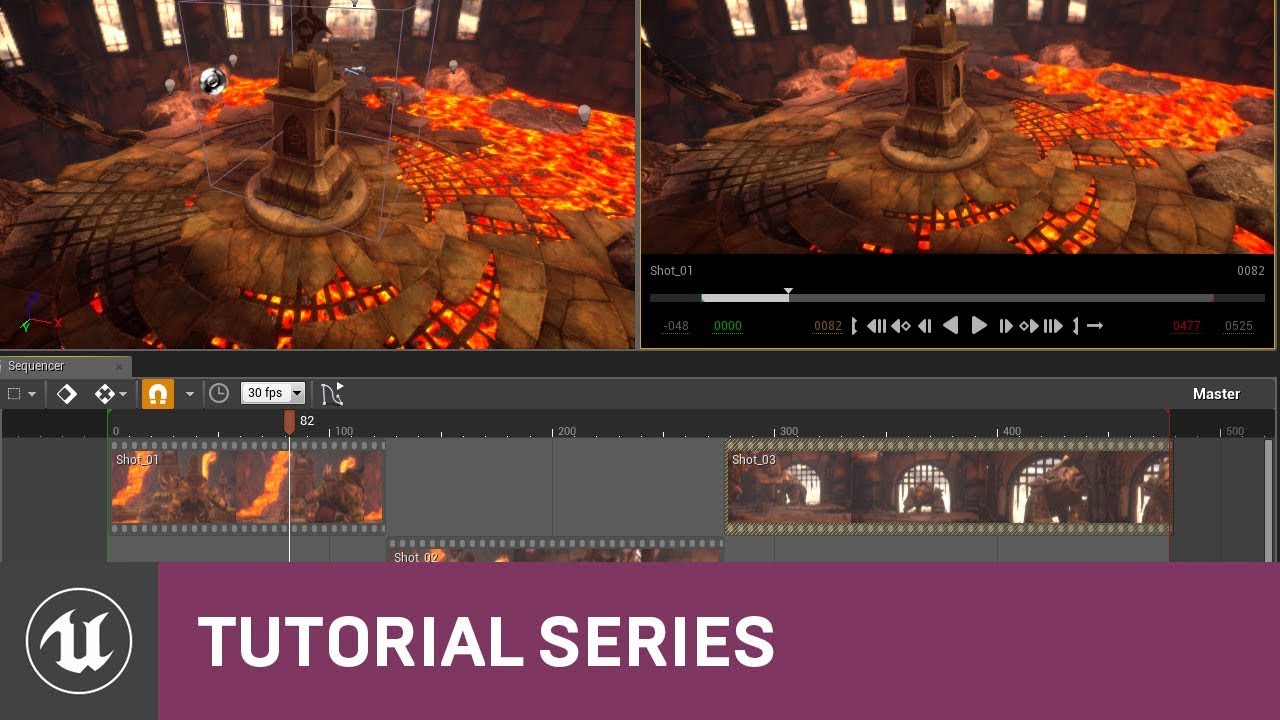
In this video we get a quick introduction to the basics of the Sequencer Editor. We set up our viewport to include a Cinematic Preview so that we can preview what our scene will look like in real-time. We then discuss how Sequencer uses a multi-track editing interface and how ...
 fringe tapir
I’m trying to use level sequencer events as breakpoints in my cinematics that stop playback until the player presses an input. I can’t seem to get these events to fire. I can’t name the events like some tutorials online show, and binding the events to an interface doesn’t help either. What am I doing wrong?
 vague nexus
Hi I'm using sequencer to film a short vid with a camera on rails. Although in the preview the camera on rails has motion blur working, the final output video does not. Can i fix this somehow?
I fixed it, had to enable it in postprocessvolume
gusty heath
having issues with sequencer actors turning red/breaking when i start a new level, i want to preserve these, anyone know why it would be doing this/a fix?
gusty heath
id like to be able to preserve my assets/sequences and just branch the map
refs keep breaking :/ , is the level editor the only way to consolidate it all?
torpid sigil
It's turned red because it's a reference to a specific object in the scene and you've created an empty scene. IF you want it to create the asset, convert it to a spawnable by right clicking on the name.
mental spindle
@snow hamlet Thanks, I already seen this arround. Thanks for pointing out about the lenght of shot/master thing. I've noticed that a Shot,,, can have cut scenes.. So basicly what I've seen I can have several cameras and make cuts... and switch between cameras as well in that shot. What about sound this comes in the shot sequence. The only thing I don't understand what I've seen is that the guy had P_emiiter in his sequence. But when I try this and render out frames (jpg) it won't render the Particle_Emitter. I'm on 24.3 perhaps I will try other format. But thanks again for help.
snow hamlet
@mental spindle if you are rendering to jpg I don't think sequencer has a capture audio function and even then the capture rate is slower than the audio.
You may have to capture the audio separately, then use another program to add the audio to the compiled video later.
Unfortunately, haven't tried render particle emitters in sequence yet but perhaps the emitter is rendered separate from the sequence. For example one is rendered by the the GPU and other by the CPU?
mental spindle
@snow hamlet No, it just doesn't render out always. Does the particle emitter need to be in your sequencer/shot? Or is it Global like you could have it turned on in the World? The tutorial I saw he had it it in his scene,, I also tried this.
 buoyant sonnet
Guys, im trying to change linear color variable in BP in level sequence, but it does not updating during sequence play. If i just move BP in the level manually, the linear color value get immediately updating.
 pine dock
Hi everyone, I wanted to ask help with rendering a movie. I am rendering a scene in UE but when it finishes the render, it only renders part of the movie and the rest looks black
do you know why is this happening?
Thanks in advanced 🙂
this is how it is
these are all my keyframes
mental spindle
@pine dock I'm novice too, but already been spending alot of time in sequencer. Look at screenshot.. I think you need camera cuts with + sign add the camera. Have you tried rendering out to jpg/png? Does it hapen at certain frame. Just try some things to see were it goes wrong. Hope it helps.
pine dock
Hi @mental spindle I haven’t tried the image sequence yet, I wanted to render full movie. I will add a camera cut where it stops recording and if it doesn’t work, I will render as png. Thank you so much for your help, much appreciated 😊
It does happens at my third frame where it stops recording.
mental spindle
Allright make sure you render all the frames 000 - 1502 + try to see were it goes wrong. I'm still learning too 🙂
 terse osprey
Anyone knows how to activate blueprint like doors inside sequencer? If I want to make camera fly by, and make the doors open from blueprint etc.?
I know that you need to add event track
but no idea how to activate that during sequence
 lavish portal
do you know how we make a death montage when you get killed how i should do it?
lavish portal
do you know how i can get a cine cam from a lvl sequence in blueprint
 frank robin
In the sequencer the car blueprint drives fine, i used the sequence recorder to get it working but when rendering it is completly off
 near patio
How do I find the end time of a piece of media?
For example : When video finished, Start something
 lucid spindle
Hi guys, I have recorded some character animations from iclone through the live link into unreal sequencer in order to create a movie. Can anyone help me on how to make the characters follow the unreal terrain? all the characters walk on a flat surface inside iclone. importing the whole landscape into iclone is not an option as it cant handle it and suffers with very low fps. what options I have to achieve this? can anyone help me?
tranquil bramble
When I change a pivot on a mesh, it still rotates from the original pivot in the sequencer. Anyone know how to get the sequencer transform to reflect the new pivot point?
 summer horizon
hi all!!
For an event involving unreal we need to provide a Scorpio crane(we do not take care of the Unreal & LED World)
Are you aware which model can we rent for the purpose to pass the data to unreal?
high salmon
i am using 4.26 and renders are crashing anyidea how i can fix it? can i open my map on a older version if yes how?
 wintry schooner
Trying to do Composure with a webcam, Logitech C270
The Media Player shows nothing because the camera is not turned on.
If I switch the Track to untitled steam 0 (it starts on untitled stream 1) then the camera turns on, Unreal Editor freezes, then crashes to the crash report window with a fatal exception on 0x0000000000000 (i forget how many zeroes)
I want the camera to turn on but I don't want it to crash the editor
Okay I crashed it again to get you the full crash report text:
mfcore
mfcore
mfcore
mfcore
mfcore
mfcore
mfcore
mfcore
mfcore
mfcore
RTWorkQ
RTWorkQ
ntdll
ntdll
kernel32
ntdll```Even after I downloaded latest drivers for Win 8.1, plugged into different USB port, same problem.
The webcam works without crashing anything else, only UE4
 twilit vessel
can somebody help me out am trying to look for a tutorial on how to attach mesh to cinema camera like arms and then play the animations when triggerd is this possible withouh BP or if i have to use bp how could i set it up ?
 minor gulch
i need some help and i dont know where to ask so i have a beach water waves project and when i press play the waves generator starts but when im in the viewport and want to record the waves the sequencer does not record the waves moveing the waves generator pack was not from me like i got it off marketplace i can hop in a call and stream to show what is happening someone please help also i looked all around for answers from the creator of the pack but i cant find anything
gusty heath
Hiii,
I am looking for a way to export a ue4 application into a 360 video. To be more precise... I made a game that consists of three levels and I need to convert it into a 360 video in order to show it on a webvr platform (mozilla hubs). Does anyone know if it's possible to make something like a walkthrough of the game but as a 360 video?
lucid spindle
anyone knows how to move an entire set of animated objects from the sequencer to another area of the map? I tried attaching all of them to an empty actor but everything is getting messed up, they change position as soon as click attach.
barren lagoon
ctrl + left click on everything you want to move, then you're free to move everything around with the transform tool 🙂 @lucid spindle
lucid spindle
@barren lagoon this was the first thing I tried but after moving everything to the new place, when I press the play button on the sequencer everything dissapears from the new location and appears back to the old place. I think this happens because in every key frame all those objects still have the original coordinates.
barren lagoon
yes, that is definitely why. when you move the objects, set a new keyframe on top of the old one. it’ll override it.
lucid spindle
ok but there hundrends of keyframes if not more ,I cant waste so much time. There must be a more easy way to achieve this
 mint monolith
@lucid spindle Lots of ways to go about this but most are easier/work better with pre planning. Figuring out attach rules for it might be the best. So right click properties on the attach track.
One way I used recently was to add the location offset to every curve in the graph editor. eg: to move 100 units in x select all objects, all their x transforms and do "+=100" in the value box
If that sounds tricky another way is add an ADDITIVE transform track to every object, right click it and select key selected. Dont add any keys. Now when you drag it around in the editor it will change that transform and stay where you want it
lucid spindle
@mint monolith the problem is that I need to precisly align all these animated objects (I actually have an elevetor with characters going in and out on different levels and I want to move all these objects/characters to a new building)
@mint monolith I'll try your second suggestion to see if it works!
mint monolith
@lucid spindle Throw an empty scene component in, attach one of your core actors like the elevator, record the scene components current transform, move it to exactly the right position, Use the new transform to figure out the difference between them
Trying this stuff like attaches etc. on a simple scene with basic shapes might help you figure it out quicker
lucid spindle
@mint monolith I just tried the additive transform track but I have to go on each object one by one and move it to the right place, its too much work.
@mint monolith I'll try now with the empty scene component, but I'm not sure If I understood correctly the procedure 😕
mint monolith
@lucid spindle Hmm ok, I think this method should be straightforward: Add a cube or something at 0,0,0 Add an attach track to every object, attaching to the cube, they shouldnt move at all. Now move the cube to offset everything
lucid spindle
this sounds good, I'll try it now!
@mint monolith what I choose for the cube coordinates? relative or world?
@mint monolith It still moves 🙁 Should I add also the cube to the sequencer as an actor?
barren lagoon
possibly stupid question, but why does the camera cut track inside of my shot track not end at the same time as my shot track?
for instance, if my shot track extends to the 1 second mark, the camera cut track inside of my shot track extends to .97777 seconds (or something along those lines)
 final niche
Could it be to do with what frame rate you're using?
I had a depressing experience recently rendering out a sequence. I'm using the MovieRenderQueue and Ray tracing to render on my new computer, 32GBP ram, i7-10700kf, gtx2060super, ssd1T. The sequence is somewhat dense and I have the Ray trace and anti aliasing settings medium to high. The time it takes to render 150 frames is about 3-4hrs. I sent the file to a friend who has all the same specs BUT has a 3080gpu. We did a screen share and I talked him through the settings to match mine, he hit render. I said, "so, there's a warm up and then it will render, probably take an 1hr or so to have the full sequence." I looked on my other screen at a message that had come in and as I read it, my friend said, "it's done."
I couldn't believe it. Something had to be wrong. We rechecked everything, all was right. His computer rendered, what takes mine 3-4hrs, in less than 1 minute.
I almost cried.
gusty heath
hey guys, I'd like to use the spring arm as a base for a cinematic camera. I can record the Action in take recorder but the smoothing action of the spring arm is not recorded in the take. I assume bc the arm is a BP inside the Character? Is there a way to have the super useful dampening function of the arm already recorded during the take and then attach a CineCamera to the Endpoint in the Sequencer?
gusty heath
Hiii, im trying to render a 360 video using the panoramic capture. For some reason the frames that are rendered are from a weird perspective. I cant figure out why or how to change the point of view. Any ideas ? 🙂
barren lagoon
it is incredibly annoying how different my focus looks in the final render compared to what i see in the full screen viewport. anyone know of any ways to alleviate this?
tranquil bramble
@barren lagoon try setting the viewport type to cinematic, then click the camera icon on your camera cuts track (lock viewport) if needed
barren lagoon
i believe i do both already. you’re talking about setting it to cinematic through the engine scalability settings, yes?
@tranquil bramble
tranquil bramble
No, in the viewport Perspective menu
haughty sentinel
I am working with A Boy And His Kite demo and I want to add a cinematic camera to the scene. This is all Matinee based, and the sequencer doesn't work.
Is there some way to make the sequencer work on this Epic project?
 ivory pollen
is there a way to record a cinematic ingame? through a console command
i've heard of 'StartMovieCapture' and 'StopMovieCapture' but neither seem to work for me
just want to record a video without the hud overlapping it
same question was asked here: #cinematics message
and here: #ue4-general message
so I doubt I'll get a response but it's worth a shot
barren lagoon
for those who've toyed around with the cinematic camera, does ISO in UE4 increase noise or does it only increase light sensitivity?
 unreal brook
Hello , i'm trying to record some gameplay by using the sequence recorder but when i playback the recording, some of the actors have a different rotation from they're rotation when i was recording at the time ? How do i go about this? I thought i'd change the transforms of them all but that's a lot of work is there a workaround for this?
haughty sentinel
Try dragging the problem actors into the Sequence, perhaps..?
tranquil bramble
@pale oasis look into planar reflections
 pale oasis
I thought planar reflections were only flat reflections
This is just a mesh i imported into an existing map to look at the reflections
 compact schooner
Curious if anyone with sequencer/cinematic experience wanted to share workflow tips.
One of the first things I want to know when planning a project to use unreal to make an all-in-engine short...
Do you lay down each shot individually, out put that material (with handles?) and then use an editing package to do the final edit?
Or do you edit within the sequencer?
And then - the follow on question for that is - what do you do about time jumping?
When shooting and editing live footage, there is no need to stay locked to a real time flow...
That's only done in live multi-camera shows, like a soap opera or news magazine show.
If one wanted to "time jump" in the sequencer, is this just using a new camera and putting new scene objects in new positions - by either "teleporting" the characters? Or duplicating them and then turning them on and off as needed?
I'm just trying to plan out how I'd accomplish a project and suddenly it's all a bunch of questions.
And by time jumping I mean - shot of 2 characters walking up the steps to a house, next shot is one peering through a window, cut to a character saying "anyone in?", cut back "no", shot of foot kicking in door close up, then two characters are in the doorway with guns drawn - there is no (or little) continuous time related action here...
So - again - would this be done as separate shots? or some sort of time jumping in editor as the camera cuts?
barren lagoon
i've recently questioned how "teleporting" would be done as well, and i've solved it using shots. essentially, what you can do is, rather than throwing everything inside the master sequence, place everything into its corresponding shot(s).
example: say i have a soldier who appears in shots 1 and 3. instead of putting the mesh inside the master sequence, i'll put the mesh inside shots 1 and 3. this makes it so the mesh instantly "teleports" to each shot, rather than doing awkward transitions from keyframe to keyframe. @compact schooner
compact schooner
I assume that when I get to know more about unreal's sequencer, I'll understand better the definition of "shot"?
@barren lagoon Thanks, btw...
The shot is what you lay onto the timeline in the sequencer?
barren lagoon
correct. you can add shot tracks using the green drop down in the master sequence that says "+ track" @compact schooner
if you want good foundational knowledge of sequencer, i highly recommend this course. once you go through it, you're pretty much set up to do everything on your own.

Udemy
Use Sequencer to Create Cinematic Cut Scenes & Gameplay Moments for Video Games in Unreal Engine 4.
wait for a sale though. they happen like once a week with Udemy lol.
it's a bit of a meme how often they are.
compact schooner
I may have some udemy credits somewhere... I'll have to go look
I've been going through the virtual production learning track, but it's not been that detailed.
Mosty high level stuff once it left the very basics.
barren lagoon
for those familiar with the cinematic camera, what is the difference between adjusting the motion blur and the shutter speed?
putting aside the fact that shutter speed affects the exposure, of course
the point of shutter speed in filmmaking is to increase/decrease motion blur, but we are already able to adjust the motion blur
what, then, is the point of adjusting the shutter speed?
 toxic dawn
Hey guys, I am filmmaker working in Octane render and I want to shift co UE4. I am trying to google, how should realtime assets be created for UE4 in filmmaking pipeline, but I dont have any success.
My question is, is the pipeline same as if I was creating a game, meaning creating high poly, low poly, then baking high poly or can I use high poly assets without using normal maps?
 bronze relic
Typically it would be same or nearly same pipeline, you just have a lot more leeway with respect to performance, allowing you to sidestep quite a few limitations. @toxic dawn
compact schooner
So - the cinematic viewport... Nice gridlines and aspect ratio... BUT:
I don't suppose there's a way to see this view ONLY when piloting the camera, or when looking down the camera view?
Still investigating, but I can't see a solution yet.
compact schooner
So
I'm following a tutorial on using the sequencer (see @barren lagoon 's link above)
And I have created a shot and then using the button to create and set the camera in the shot...

I have created a camera.
Now that I've done that I have a camera that only exists in the world outliner when the shot is active (this is fine)
I can't seem to be able to DO anything with it.
I can't rename it.
I can't pilot it.
If i change the transform to line up a shot, with won't stick/save.
- as soon as I move the play head, the transform reverts to what it was when I created it.
Hints and suggestions?
compact schooner
So, this system also seems to have a strange component structure:

There seems to be 3 transforms that can be affected.
Ah - but one is a reference to the parent transform... maybe
😕
I'm going to have to break my vow of silence and make a tutorial out of this once I figure the darned thing out.
haughty sentinel
Once you create a master shot track, you add shots to it with the + icon. Then you can double click into the hierarchy. Put each camera inside the shot track, not the master track. Drag animated elements into the shot track.
To pilot a "shot" camera, you have to click the little grey camera icon and place the viewport into cinematic mode.
compact schooner
Am I creating the cameras in the master track? I thought I made them in the shot, and the shot is instantiating them ... they only appear when I play the shot.
I'll look more closely.
haughty sentinel
No, and the free training for the sequencer by Epic is still valid.
compact schooner
I may have missed the sequencer training from Epic.
I am hip-deep in the virtual production track but the end section has a syllabus of 2h+ live streams and I was getting a bit tired of them.
haughty sentinel
I find the sequencer work flow a bit frustrating, but think of a shot track as your pre-comp in After Effects (if that makes sense to you).
compact schooner
Yeah - it's been a while but I used to be an AE comper...
haughty sentinel
To render, you'll need a camera cut track. This should sit at the master level and is essentially a bunch of thumbnails that the engine kicks out to be written to disk. Make sure the cut track camera is active before you render.
compact schooner
I was discussing (above) that if the scene objects are associated per shot, then there is little or no management necessary for instantiating and moving objects. They are bound to the shot and instantiated and destroyed (or managed) by the shot.
This is my master track

I have two shots
Each with only a camera

But I've broken something as I can't seem to move the cameras and if I change the transforms, I can see the new views in the preview, but not in the scene view window.
😕
I'll go back and start again.
haughty sentinel
Here is the training I followed that helped me work with the sequencer.
https://www.youtube.com/watch?v=uEnfMV-4afA

In this video we discuss what the series will cover and show the finished cinematic that we will create together from scratch. We also show how you can use the Take System in Sequencer to quickly swap out shots in your scene to provide different looks. We wrap up by discussing...
haughty sentinel
Yep, it will get you up and running.
haughty sentinel
Make sure you are working with a new project. The old system using Matinee really conflicts with the sequencer. You have to delete all the matinee objects before Sequencer can function.
compact schooner
Yeah - it's all new projects in the newest version of the editor
barren lagoon
apologies mate, i was snoozing. you still having issues with anything? @compact schooner
compact schooner
Just working through it, but thanks @barren lagoon I may have more questions in a bit.
I'm backing out and trying again, tbh.
I failed to get cameras in shots to work, so I want to make sure I've done all the foundations correct.
barren lagoon
alright, yeah
go through the tutorial again and lmk if something's still going wrong
compact schooner
Yeah - I will.
The theory that all the content resides within the shot is great.
But I just need to find out why once I put scene objects and cameras within the shot, I can't manipulate them.
barren lagoon
if you can't manipulate the camera, i'm assuming that means you're trying to pilot it? if that's the case, you can't have the viewport locked to the shot track, you need to have it locked to the camera
once you do that, you enter pilot mode and are free to fly around wherever you please
if pilot mode isn't available, you may need to right click the camera in the shot track and convert it to a possessable
compact schooner
... a possessable...
That's a new one for me... mostly.
They did mention it in the overview of the fortnite events team when doing their live events.
I'll dig into that as well.
Was it possessables and spawnables?
compact schooner
Way confused now....
Set Manual Focus with start keyframe on fr0 of a shot.
Set manual focus to last keyframe by eye (as the eye dropper doesn't work)

Set the KEYFRAME on Manual Focus Distance by clicking the circle on the keyframe track
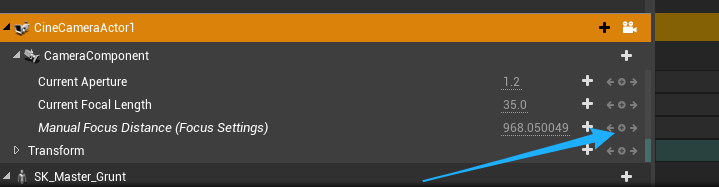
And by setting the keyframe, it changes the focus to the BG

o.0?
The work-around that's successful is to set a keyframe, set the value in the details panel, copy or note the value, open the keyframe and paste/override the value in the keyframe which had not updated.
timid pasture
Does anyone know how to work around the way changing screen resolution in top left viewport or post process volume changes the manual focus on cinacamera?
if i change the res from 100 to 200, all my manual focus keyframes are blurry : /
compact schooner
@timid pasture Just curious (as I don't know much about the Unreal side of this) but can you tell whether changing the resolution is changing your focus? Or just revealing that the manual focus keyframes were not exact enough to survive a doubling of the resolution?
If your focus choice was good, and it was in focus within the pixel, it could look soft at double the resolution if there was a slight discrepancy.
If however, your bokeh becomes "more blurry" than the previous setting, I wouldn't know how to fix that.
compact schooner
So when I'm following the Epic Sequencer Tutorial, they have us duplicating shots and then changing them, duplicating that new shot and changing it for the next.
In this video we discuss what the series will cover and show the finished cinematic that we will create together from scratch. We also show how you can use the Take System in Sequencer to quickly swap out shots in your scene to provide different looks. We wrap up by discussing...
What I'm finding is that I'm getting time code creep.
When I take a shot that is 200 frames long, use the first 150 as shot 01, and then duplicate it, split it and delete the unneeded portions, then shot 02 starts at frame 150 in the shot's timeline, not 000 or 001. Now this is ok to a degree as the "start" and "end" frames are set, but the local shot timeline tools start to suffer... eg: "To Front" button is irrelevant now.
If I follow this workflow, the duplicating and reusing shots...
Is there an easy way to reset all the content back to 000?
 elder light
If i am rendering a sequence and mess around on the computer, will that result in hitches in the rendering if I use alota the CPU?
timid pasture
has anyone had an issue where niagara particle speed is extremely fast when rendering in sequencer but fine in the viewport?
@compact schooner appreciate those thoughts thank u!
final niche
are you rendering with "movie render queue" or the movie renderer in sequencer
@timid pasture
timid pasture
@final niche the render to movie button in the sequencer
i'm a bit desperate at this point it seems like not only niagara but also material vfx that use time are also realllly speeding up when i render
Has anyone else experienced particles (in my case Niagara) and/or other VFX going super fast in your sequencer movie renders?
it's as if they have their own framerate much higher than the 30 fps i have for the movie/sequencer
final niche
Try using Movie Render queue. It seems to render things better for me, more strict to the desired settings. The doc is very easy to follow
@timid pasture
timid pasture
@final niche the thing is, my project is on source control and i just shared it with a friend and the timing is fine when he renders a movie using that button
But my computer certain material and particle fx are super speed
is there any chance it's my 3090 drivers?
i don't think it's a project issue : (
final niche
It's possible that your 3090 is making light work of it. I would suggest to try with render queue. I have found it to be more consistent with desired outcomes than with movie renderer.
 vale arrow
Does anyone know how to work around the way changing screen resolution in top left viewport or post process volume changes the manual focus on cinacamera?
@timid pasture It's possible the Temporal AA makes thing blurrier. From my cinematic rendering workflow, I disable TAA. If you need TAA, you have to make sure that you work with your desire output resolution and adjust the focus.
barren lagoon
is it still possible for iso to create noise and for shutter speed to increase/decrease motion blur even if the exposure mode is set to automatic?
from what i’ve seen, it appears i need to have exposure set to manual in order for shutter speed and iso to do anything at all
can anyone confirm?
 rough pewter
Hey, I was wondering if there was any way to place a CineCamera in the middle of the level, start recording what the camera sees, and start editing the level, so in the end, you get a video which shows all the changes you've done to the level, from the placed camera's perspective?
fervent laurel
I highly doubt that
Especially if it's on the UE4 Editor level
(as opposed to run time)
rough pewter
I found out a very hacky way to do this :
- Create a cineCamera, place it where you want it.
- Open Viewport 2 through the "Window" menu on the top right.
- On the 2nd Viewport, Pilot the cineCamera.
- Get a 3rd party software that would record the Viewport 2.
Voila
fervent laurel
Where there's a will, there's a way 😄
 strong bronze
has anyone ever tried animating the intensity of an HDRI backdrop node inside sequencer?
I can animate it but it doesn't update in the viewport
if I set the intensity to 0, it still stay bright. however if i delete it within sequencer and adjust the slider in the details panel again then it starts updating realtime
i went inside the blueprint and made the intensity variable "Expose to cinematics" and still no luck...
ok nvm, if you go inside the BP and key the intensity of the skylight then it works inside sequencer and updates correctly. HOWEVER the HDR image's emission is still reflected on the geo (no light from skylight which is good but the hdr texture still reflected everywhere) so technically its still broken ?
vale arrow
ok nvm, if you go inside the BP and key the intensity of the skylight then it works inside sequencer and updates correctly. HOWEVER the HDR image's emission is still reflected on the geo (no light from skylight which is good but the hdr texture still reflected everywhere) so technically its still broken ?
@strong bronze I think it's normal. But usually what I was doing is manually create the skylight and dome mesh with an adjustable-intensity material.
Of course you can access the HDRIBackdrop material and make your changes.
barren lagoon
reposting for visibility: for those knowledgeable with the cinematic camera, is it still possible for iso to create noise and for shutter speed to increase/decrease motion blur even if the exposure mode is set to automatic?
vale arrow
reposting for visibility: for those knowledgeable with the cinematic camera, is it still possible for iso to create noise and for shutter speed to increase/decrease motion blur even if the exposure mode is set to automatic?
@barren lagoon I don't think the iso or shutter speed change will act like a real camera. They're just a number to change the brightness.
vale arrow
If you need noise or motion blur, I suggest you using the post-process volume to change the noise amount and blur amount manually from there.
barren lagoon
out of curiosity, what's the point of iso and shutter speed being separate if they both only affect the brightness?
i would've thought there'd be a reason to choose one over the other
vale arrow
I guess it's useful for cinematographers to control the brightness😂
strong bronze
@strong bronze I think it's normal. But usually what I was doing is manually create the skylight and dome mesh with an adjustable-intensity material.
@vale arrow Sounds good! Thanks!!
 fading geode
Any ideas on how to resolve it
 umbral raven
barren lagoon
out of curiosity, what's the point of iso and shutter speed being separate if th...
umbral raven
barren lagoon
out of curiosity, what's the point of iso and shutter speed being separate if th...
you need shutter speed separate to play with motion blur 😉
barren lagoon
could you elaborate on that a bit? do you mean motion blur has to be ticked off in order for shutter speed to do anything other than exposure? @umbral raven
umbral raven
barren lagoon
could you elaborate on that a bit? do you mean motion blur has to be ticked off ...
yeah I think so
barren lagoon
the thing about that though is that when motion blur is ticked off, there is zero motion blur regardless of what the shutter speed is
at least, i’m pretty sure that’s the case @umbral raven
correct me if i’m wrong though 😅
umbral raven
barren lagoon
correct me if i’m wrong though 😅
no no you are right, I read your previous comment in a rush, sorry about that. When mblur is on, you adjust its intensity via the shutter speed.
but shutter speed will also interact with anything animated in the scene regardless of motion blur
barren lagoon
someone here replied to me saying shutter speed doesn’t affect motion blur 😕
it’s good to know it does indeed work though
barren lagoon
umbral raven
but shutter speed will also interact with anything animated in the scene regardl...
what do you mean by this?
umbral raven
if you have a fast moving object in your scene and your shutter speed is not enough to cope with it, the resulting animation won't look smooth
barren lagoon
umbral raven
if you have a fast moving object in your scene and your shutter speed is not eno...
yeah, it’ll have that kind of low fps + motion blur look to it, kind of like a dream sequence or something like that 😄
now that i know shutter speed does affect those things, does iso in unreal affect noise?
umbral raven
barren lagoon
now that i know shutter speed does affect those things, does iso in unreal affec...
that I'm not sure but I presume if you're using raytrace GI then ISO might have a play to the noise control.
But then noise would come from reflections, bounce light, fast moving objects, fast moving cameras, dark areas just like and off-line renderer (V-Ray, etc..).
It's an interesting topic by the way
barren lagoon
umbral raven
that I'm not sure but I presume if you're using raytrace GI then ISO might have ...
is there a difference between changing the intensity of motion blur and changing the shutter speed (simply in terms of motion blur, and not the “low fps” style made by low shutter speed or “jitter/sharpness” caused by high shutter speed)
in Unreal, not in a real life camera
 mortal garden
any way to average out the keyframes on sequencer timeline? Say I have keyframe on frame 1, frame 4 and frame 5. How do I average them out evenly so it becomes 1,3,5? Any tools for this?
umbral raven
mortal garden
any way to average out the keyframes on sequencer timeline? Say I have keyframe ...
use the curves
mortal garden
well thats where im at..
umbral raven
barren lagoon
is there a difference between changing the intensity of motion blur and changing...
do you mean between the one in ppvolume and the shutter speed in the camera?
umbral raven
mortal garden
well thats where im at..
not sure what you mean then. Have you tried playing with the interpolation presets?
mortal garden
I need to average out frame time, have a lot of keyframes unevenly distributed over time
need an even distribution over time
not what the keyframe does but when it happens
barren lagoon
umbral raven
do you mean between the one in ppvolume and the shutter speed in the camera?
difference between motion blur in the camera and shutter speed in the camera, aside from the distortion/sharpness caused by shutter speed
is there a difference between simply adjusting the motion blur and adjusting the shutter speed?
umbral raven
barren lagoon
is there a difference between simply adjusting the motion blur and adjusting the...
to me that amount value is to mitigate what's coming from the shutter speed but I'm not 100% sure
vale arrow
In PPVolume, the Shutter Speed and ISO are just a factor to control the Manual Exposure. You can verify this in UE4 easily. However, if you need the real-camera like motion blur, you can play with the Shutter Angle from High Quality Media Export.
 vagrant folio
Can anyone recommend a comprehensive tutorial on sequencer?
 dawn aurora
^ also been having trouble with setting up a night scene
timid pasture
@vale arrow sorry for the late response but thank you for the tip
@vale arrow is there any AA other than Temporal that doesn't affect focus?
vale arrow
@timid pasture If you're using High Quality Media Export, you can set Spatial Sample Count or Temporal Spatial Count higher to achieve AA .
If you're using traditional render output(the one on sequencer),
- you can use FXAA or
- you can render the resolution higher than your desire resolution (usually double the size is enough) and down res in any post process software.
 faint spruce
@dawn aurora @winged fractal
This may be of help:
-
Stylised night tutorial (there’s plenty of dev tips on general night time lighting concepts) https://youtu.be/XHXjRgRWhV4
-
General light+postprocess tips: https://youtu.be/VVFcZN8eBps
-
Lighting scenes from scratch: https://youtu.be/FsjqVIyr0O4
-
this dude has helped me understand lighting quite a bit. He’s quite good at what he does. https://www.youtube.com/c/ThatRyanManning
Basically, you can watch all the tuts in the world, but ultimately your stuff comes down to:
Disable auto exposure so you know exactly what level of lights you’re working with. You can re enable it later.
All night time scenes begin with new level, delete all the lights, go to world settings and choose “force no precomputed lighting” and bake once (only applicable if previously you suspect lights were baked) - this just clears any bakes. Untick that again so you can bake from now on.
Now start with a skylight - it should help give your scene overall ambience. Look for cold/cool colours in your HDRI’s or if not using them, play with intensity and temperature to get the mood right. Then add a directional light (directional light doesn’t really apply to indoor windowless scenes) and set the temp/intensity to some lower value that still provides a decent amount of light in your scene.
Then add omni/spot lights to meshes/objects that are intended to cast lighting and begin adding other light sources. Then it’s a matter of baking and adjusting. After that comes stuff like fog, volumetrics, post processing, color grading and exposure.
That’s what my personal research has found. Hope this helps a little.

In this livestream we walk you through the process of creating stylized lighting in Unreal Engine 4. We go through colors, fog & editing lights to get the look that we're after.
♥ Subscribe for new episodes weekly! http://bit.ly/1RWCVIN
♥ Don't forget you can help support the channel on Patreon! https://www.patreon.com/VirtusEdu
♥ Join the Vi...

Hey everyone! In this video I go through how I use lighting and post processing to develop my scenes in Unreal Engine 4.
The main focus is on the 5 components that I always use to try make my scenes look good. I hope you find something useful in this tutorial that will help improve your lighting and post processing for your games.
If you enj...

In this video we show you how you can use all of the different lighting & environmental components to light your scene from scratch. We also cover some of the best practices when implementing your environment to make sure your scene is both visually and performance pleasing.
The components we cover include:
- Direction Lights
- Sky Lights
- Atm...

YouTube
This channel is dedicated to bringing you quality, educational videos to help strengthen and grow your skills as an Unreal Engine developer. As an Unreal Aut...
 winged fractal
@faint spruce Thank you, I am a totall noob
barren lagoon
anyone know of any guides/tutorials for getting nice camera shake?
i’m aware of how to set up the blueprint and such, but i’d like to know some techniques for setting it up correctly
faint spruce
barren lagoon
anyone know of any guides/tutorials for getting nice camera shake?
Like an earthquake type of effect or “I’m holding my phone and trying to take a sweeping shot” type of effect?
barren lagoon
faint spruce
Like an earthquake type of effect or “I’m holding my phone and trying to take a ...
should’ve been more descriptive, apologies! i mean something more along the lines of a very natural handheld camera shake.
a normal one, per se
since, ya know, handheld cameras aren’t 100% steady 😄
there’s always a bit of sway
faint spruce
Ah
barren lagoon
whenever i try replicating this the movement of the camera shake is always very... predictable?
hard to explain
faint spruce
Well I could write some stuff out but it turns out there’s a lovely feller who has a video on it
Call me lazy, but imma bung you off on him

Sign up for CG Cookie for more Blender Training - http://bit.ly/2MdSDWV
Looking to add another layer of realism to your animation? Learn how to create quick, easy, and realistic camera shake in this quick tutorial!
Enjoy
It’s blender, but the concepts translate very well
I’m sure you won’t have any trouble seeing as UE has the same (better?) curve animation capabilities
You’d probably end up plugging camera axes exponents into the curves over a time line and it should work well
barren lagoon
well, cam shakes in ue4 are done using cam shake blueprints rather than keyframing every little movement
at least, that’s what i’ve known to be the proper way to do them 😄
faint spruce
You don’t have to kf at all
A sharp Z change in half a second on a curve animation would result in the same as key framing shit, but not as tedious.
Watch it for the concept at least, and then translate it into curve timelines
barren lagoon
interesting, so it seems like adjusting animation curves results in better handheld shake than a cam shake BP?
faint spruce
That’d be one good way of doing it. I reckon there isn’t one BEST way. It’s whatever you can throw together that does what you wanna do. “If it looks stupid, but works - it ain’t stupid” 😉
faint spruce
But yeah curves look natural and you have the benefit of setting dynamics - so you can simulate a person who’s experiencing fear - which would have higher offset values, resulting in more shake, more randomness, whereas someone who’s just having a video session would end up with lower offsets and steadier (albeit still shaky) hold.
Use curves and params and you will end up with something nice and customisable.
barren lagoon
i’m assuming the equivalent to “modifiers” are the choice between perlin noise and sine wave? @faint spruce
(in a camera shake blueprint)
faint spruce
If you’re using something pre-set then I’d assume so. I’ve not done CS on UE before. I reckon whatever the docs advise to use isn’t a bad starting point.
pallid spire
Did they ever announce the winners for Film Jam? It's been a year now 😵
high salmon
ok so my ue4.26 just updated from preview 6 to 7 and suddenly all decals dont render anymore
this is what it looks like
faint spruce
Yeah welcome to being on a test branch @high salmon. P7 broke lightmass plug-in and I was gonna port my 4.25 project for faster bakes. Derp.
vale arrow
high salmon
ok so my ue4.26 just updated from preview 6 to 7 and suddenly all decals dont re...
They break the displacement function. You can disable the displacement to get it works.
 sinful orbit
How can I activate my particle system at a specific time in the Sequencer?
high salmon
vale arrow
They break the displacement function. You can disable the displacement to get it...
hmmmm are you talking about the master mat for all the decals?
 olive apex
Hi, I'm new here. Does anyone here have experience with movie production? I'm trying to figure out how large can a 5-minute-ish animation movie project can get. I'm talking ballpark for efficient modeling and simple graphics altogether.
high salmon
olive apex
Hi, I'm new here. Does anyone here have experience with movie production? I'm tr...
it depends on your project and how detailed you want it to be.
 jade yacht
hi, does anyone know how to add an image as background in the sequencer, i have multiple videos and need to have a static image between the videos but i cant find a way to do it, any help on this will be appreaciate
 silver peak
i want help with cinematic for my mobile based battle royal TPS game want to make my game more reliastic and more attractive i am agressively waiting for your reply and responses
 restive kayak
Hey my level sequence is very short
and it is not about finishing time
I'm setting finish frame to for example 1000, and for testing im setting 100 later on, both of have same finish time
At the same time, looping doesn't work
what is going on with my level sequencer ?
Please help
high salmon
vale arrow
Yes
okay i checked the parent material and there is no displacement node. any ideas?
vale arrow
high salmon
okay i checked the parent material and there is no displacement node. any ideas?
Is the D3D11Tessllation Mode set to No Tessellation ?
If that wasn't your case, then my bad. Forget my words.
restive kayak
Why it is so bold ?
I want to make this to normal again
I did something wrong and this thing, arrow or kind of something that idk its name, become big
vale arrow
restive kayak
I want to make this to normal again
I don't get it, the number?
high salmon
vale arrow
Is the **D3D11Tessllation Mode** set to **No Tessellation** ?
this is the error i am getting. where can i find the tessllation mode. sorry a lil new xD
vale arrow
high salmon
this is the error i am getting. where can i find the tessllation mode. sorry a l...
Scroll down and you will see this.
high salmon
vale arrow
Scroll down and you will see this.
it worked thankyou ❤️ ❤️ ❤️
high salmon
silver peak
i want help with cinematic for my mobile based battle royal TPS game want to mak...
hey, what seems to be the problem
toxic horizon
Hi there, I hope someone can help on this. I have an actor (a car) which is made of a skeletal mesh simulating physics and some attached parts like wheels, brake calipers, etc. I am using the Take Recorder to record its movement and then, in sequencer, I apply the movement to a proxy vehicle, which doesn't simulate physics. My problem is with the attached parts. Some move as expected during Play / Rendering, some do not and I cannot figure out the logic because they are threated in the exact same way.
Anyone has any recommendation?
jade yacht
hi all!! one question just in case anyone have an idea on how to do this, i need to add a still image in a sequencer, the idea is that i will play some videos in a sequencer but between the videos need to have a still image as background, does anyone know how to do this? thanks!
mystic shuttle
Hey! I have a media player video on a TV screen in my Archviz project. When I render a sequence with the Sequencer, the video on the TV screen goes all weird and slow.
I tried to match the video FPS to the media file FPS but that didn't help
Ideas?
vale arrow
jade yacht
hi all!! one question just in case anyone have an idea on how to do this, i need...
There're several ways can do this but some of them are quite tricky. The one I prefer is using PostProcess material. I can overlay an image or video and I have more controls. For video, I use Img Media Source and put it in my PP material as a texture and finally I steam it through the sequencer. I've done this for a while, and I can't remember all the steps but this is the idea. Hope this is helping, there's no good solution I can found online.
compact schooner
olive apex
Hi, I'm new here. Does anyone here have experience with movie production? I'm tr...
Hi @olive apex Late reply to an offline guy... BUT: When dealing with traditional film production, you could try to do some output estimates. Use resolution and length and the number of audio channels, etc. to get an idea of the output size (this would still hold true for output from UE4). However, one of the advantages of using a RT Engine is that you don't need to record frames - that's only on the output end of the stick. SO - if you were to estimate the size of a story written about a Mannequin in a white void, all you'd need would be your one model and animation files; so VERY tiny project! Or you could do intricate, high-detail world building with crowds and crowds of unique characters all with a different look in a photo-realistic environment ... and you'd have a HUGE project.
What's that worry about size? Are you strapped for storage space?
sinful orbit
When I render cinematic from Sequencer using Movie Render it renders the cinematic from the other Sequence I have in my project. Why and how to fix it?
jade yacht
vale arrow
There're several ways can do this but some of them are quite tricky. The one I p...
Hi, Thanks for your answer, i tried that but dont know why having the img media source cause a huge impact in performance, what i end doing is a video of 10 seconds with the image and play in loop, then added in the top of the sequencer, so when nothing is playing it play the loop of the video, not ideal but kind of solve the issue haha
olive apex
compact schooner
Hi <@!199246953417015296> Late reply to an offline guy... BUT: When dealing wit...
Hi, thanks for the late reply! The story is going to revolve around a single character, but around 3 characters in total would actually be functional animation wise in various scenes. The rest is mostly sets etc. In terms of styling, think simple+stylish (Journey would be a good reference). Also some physics simulations like grass+clothes sprinkled here and there. I'm just trying to figure out what kind of source control solution to go for, this is a two person project.
Right now Git + LFS would be the preferable option, although I'm not sure how much badnwidth/space they can provide, need to check this out.
The main problem is that the team will be using Maya for modeling +rigging + animation and the program is known to create tonnes of garbage
compact schooner
@olive apex Yeah, I leave Maya to people whom I hire. If I'm working, I work in Blender - admittedly, not really on a professional level. For something as small as 3 characters and short form (I assume), I'd say "pick the one you like the most". The main issue I would suggest you look into, however, is what you are going to be doing about "large files". Textures and other artwork, if you are going to commit them and check them out using source control, some styles of source control do better than others.
This may be a question for the general chat as well, as I'd assume, using UE4, all projects will have the same issues: source control on levels/scenes, how to work collaboratively on the same scene at the same time with multiple artists (and multiple disciplines - sound, lighting, camera, animation), large files (textures and models), etc..
 slate dagger
Is there a way to pose skeletal meshes directly in the scene view or via sequencer? I'm looking to make some still images and I'd like to be able to pose my stuff in engine and in the context of the scene for the sake of faster iteration
mystic shuttle
Hey! I have a media player video on a TV screen in my Archviz project. When I render a sequence with the Sequencer, the video on the TV screen goes all weird and slow.
I tried to match the video FPS to the media file FPS but that didn't help
Ideas?
compact schooner
@slate dagger Just curious. How will the sequencer help you with your poses?
The only thing that I can imagine would be to put each pose in a shot?
@mystic shuttle There's a video about someone using sequencer to make a tv screen projections. Let me see if I can find it.
Watch this:
Join us for a live demonstration of Sequencer, Unreal Engine's cinematic tool, as Wes Bunn, Sr. Technical Writer, Epic Games, breaks down and edits the intro cinematic from our latest VR game, Robo Recall, before a live audience at GDC.
In this demo, we take a look at how you can use Sequencer to create in-game scripted events as well as tradi...
I've only skimmed it, but they cover making footage to put into a television screen.
mystic shuttle
compact schooner
Watch this:
This is nice but not what I was asking for
You see, once you render that all to a movie the TV video goes out of sync
 fierce comet
Hi guys, I want to share a tool we are developing, called MUTOOLS, is a Cinematics Production Pipeline Tools for Maya and UnrealEngine
It is a Vertex-level steaming tools and data Communication framework
Just check out
Unreal Engine Forums
Hi guys, I want to share a tool we are developing .
[/URL]
This is a pipeline tool, to be precise, it is a tool for making cinematics in Unreal Engine easier and more efficient.
Our company has been using the powerful rendering capabilities of Unreal Engine to produce 3D cinematic animations, but Unreal Engine’s animation
vale arrow
fierce comet
Hi guys, I want to share a tool we are developing, called MUTOOLS, is a Cinemati...
It is very impressive. I'm wondering how many polygons can the tool handle in general speaking? From my old experience, ABC file format is almost un-useable if more than a million of polygons (but this may solve because 4.26 is gonna support ABC file steaming).
fierce comet
vale arrow
It is very impressive. I'm wondering how many polygons can the tool handle in ge...
fierce comet
vale arrow
It is very impressive. I'm wondering how many polygons can the tool handle in ge...
fierce comet
vale arrow
It is very impressive. I'm wondering how many polygons can the tool handle in ge...
I just try a more than 1 million polygons helix, really quick for MUTOOLS
and
18 million polygons , works fine
vale arrow
18m polygons and the steaming time is still 24fps realtime?
fierce comet
vale arrow
18m polygons and the steaming time is still 24fps realtime?
It will have lags first time when steam in UE or it will lag each frame When I synchronize the timeline of the sequencer if the polygon have Deformation animation in Maya,but if I didn't toggle the timeline it will stay static and have nice frame rate in UE.
if it is a static mesh/scene or have rigid body animation in maya ,it will only have Coordinate transformation, it will run in real-time
vale arrow
yea, it's expected lagging for such high amount of polygons but it's still impressive. Keep it up!
fierce comet
vale arrow
yea, it's expected lagging for such high amount of polygons but it's still impre...
Thank you! Usually characters do not have such a large number of polygons, and the general scenes are made in Unreal, we will try to do a large-scale destruction VFX to test the limit.
 undone geode
As a novice there is something missing in my understanding of how Unreal is working in 'Play' mode.
I am creating Cinematics so everything is being driven from my Sequence(s).
I also am trying to Lerp an Actor position from my Level Blueprint with a Timeline Node and a Lerp based on a trigger event from my Sequence.
My question is
Is it sufficient for me to playback my sequence and trigger an event in my Level BP for the Timeline+Lerp to work, or do I also need to enter 'Game Play' mode in my Blueprint-Viewport?
And if so, how do I trigger Game Play mode from my Sequence?
timid pasture
does anyone know if screen percentage in a post process volume is respected (kept) when you render a video via sequencer?
 lime siren
I believe it is but not positive
timid pasture
ya trying to understand if i do screen percentage 200 and render a 4k video if that's sort of like downscaling an 8k to 4k
something like that. i guess i should try screen percentage 5 or something ridiculous and just render a video
fervent laurel
I need to make some cinematics in a project that's set to forward rendering. Is there anything I should watch out for?
I understand that there are different AntiAliasing options?
fervent laurel
Ok I found out the project I'm working started from a VR template which disables a depth of field and some other stuff. Is there an easy to enable it without nuking a bunch of .ini files
 languid coral
Can someone help me figuring out how to create sequences, add tracks, and set keys using API? Any approach would do: C++/Blueprints/Python. I want to make a blutility which spawns a cube at the (0, 0, 0), create a sequence, add a cube to it, add a key for the frame 0, then move a cube to (100, 100, 0), and add another key to the frame 60.
 mystic radish
What's the best way to make ingame cutscenes?
sinful orbit
I've attached a CineCamera to an actor (both of them are in sequencer) but when I press play or if i save the project, camera automatically detaches from an actor. How to stop that?
strong bronze
I had a question regarding this>>>

Epic Games partnered with Weta Digital on this exclusive animated short, created in Unreal Engine using the new Hair & Fur Rendering and Simulation tool coming to all users later this year in Unreal Engine 4.26. Weta Digital also leveraged Unreal Engine’s Control Rig and Animation in Sequencer features to create the meerkat, and Movie Render Que...
around 9:20 mark he mentions they bump up the temporal samples to up the render quality.
In my latest UE project, I noticed some significant TAA ghosting artifacts when things were moving really fast on screen.
When he said he bumped up temporal sample count, did he mean increasing r.TemporalAASamples to a value of 13 as shown in his dialog box?
I dont care about fps when rendering cinematics, I do care about not getting ghosting artifacts and MSAA and FXAA methods don't look as nice out of the box as TAA, its just that TAA ghosts like crazy.
anyone know how to solve that?
compact schooner
@strong bronze my memory (which is often faulty) was that AA works, or works better, in forward rendering but is prone to ghosting in deferred and the usual solution when using deferred is to turn OFF AA. Now, I watched that short as part of the Build: Virtual Productions seminar, which is where I felt the AA comment was from, but can’t remember if it’s from that segment. Perhaps try watching the entire Build: Virtual Productions seminar?
strong bronze
@compact schooner I watched the whole Build VP seminar in chunks from the individual presenters who were present. That is where this presentation is from, you are right they were one of the presenters.
So if I turn off AA and lets say I render without AA, all jagged edges at 4K but then scale it down to a lower resolution, would that have the same effect as having traditional AA?
timid pasture
playing back an image sequence in sequencer seems really finicky - works perfectly with one image sequence but if you have two media tracks it's busted
also if you click to use external media player checkbox, it's broken
anyone else noticed this?
4.25 and 4.26
compact schooner
strong bronze
So if I turn off AA and lets say I render without AA, all jagged edges at 4K but...
I actually don’t know. I just remember the note that various forms of AA don’t work well with deferred, which seems odd. But there are still strange issues with AA and SS reflections in RT render engines. It could be an optimisation step somewhere allowing frames per MS.
final niche
Hi, I'm rendering with "movie render queue" and I'm looking at my task manager performance and see that it's only using around 1%-10% of my cup and gpu to render. Why such a small amount, is there a way to make it use more to speed up the renders?
sinful orbit
How can I add same animation and/or animate movement in sequencer for multiple actors at once?
 frank gull
Can anyone give some help on how to make smooth looping of a rotating camera? Im just trying to get a camera to spin 360 degrees but it seems like on the last frame it kinda jutters before starting the loop again. Any help would be appreciated.
undone geode
Anyone work with dynamic Material Instances from Sequencer?
Spent a couple days getting all my keyframed parameters working when I scrub in Sequencer but the changes are gone when I render the movie or view in PIE!
 heavy lichen
Hey guys, how can I display a widget during a sequence?
 hollow stratus
How do i only render objects when sequence starts ?
vale arrow
frank gull
Can anyone give some help on how to make smooth looping of a rotating camera? Im...
use curve editor and set your keys to Linear Interpolation
vale arrow
strong bronze
When he said he bumped up temporal sample count, did he mean increasing r.Tempor...
This is the latest rendering tool which called: high quality media export
vale arrow
final niche
Hi, I'm rendering with "movie render queue" and I'm looking at my task manager p...
what is the scale of your scene? large scale scene or it's a lightweight scene? I'm thinking if your gpu runs too fast.
vale arrow
hollow stratus
How do i only render objects when sequence starts ?
you can convert your objects to blueprint and drag the blueprint into the sequencer
strong bronze
vale arrow
This is the latest rendering tool which called: high quality media export
It is inbuilt native within UE 4.26? That would be dope!!
I am still on 4.25
vale arrow
strong bronze
I am still on 4.25
It's in 4.25 already and quite production ready.
strong bronze
@vale arrow this is a life saver, thank you so much!!!!! 🥲
final niche
vale arrow
what is the scale of your scene? large scale scene or it's a lightweight scene? ...
Its a fairly large scene with lots of kitbash objects in there and raytracing on high.
vale arrow
final niche
Its a fairly large scene with lots of kitbash objects in there and raytracing on...
It's quite hard to tell what causes the problem. Usually you can identify the problem in UE4 editor, for example using Stat.
final niche
vale arrow
It's quite hard to tell what causes the problem. Usually you can identify the pr...
Well, I dont know if it is a problem or if its normal. Just that when I would render in Maya or 3ds Max, My processor would be flat out 98-100% (maybe Gpu too, cant remember). To me it seems as though Ive got a computer capable of being fast but it only uses a small amount of what its got.
vale arrow
final niche
Well, I dont know if it is a problem or if its normal. Just that when I would r...
The rendering approach of offline render and realtime render are totally different. It's quite normal the gpu doesn't fully utilized, it more like up and down every seconds. How is the performance of your scene in editor and when compare to rendering?
toxic horizon
Hey! Google is failing on this one. I am using Take Recorder and I need to record the value of a Blueprint variable part of the Pawn. I have added an extra track for it but I am unsure how to reference the variable in the fields Component Name and Property Name, assuming it is possible. If none knows I will start digging in the source code to find out. TIA!
Let me add that the variable (float) is exposes to cinematics and I can add a track for it in Sequencer, but I need to record its value.
 open mauve
Guys why the render video quality is so poor even in high resolution
 grizzled snow
Hey guys for Sequencer, if I wanted to create a dialog using sequences, how should I pause the sequence so that the player can select the dialog response options, but still have the eyes blink and idle animations run? I would like to not have to create a section/mark for each single dialog line where they pause with camera. Is there a way to do this?
 devout cobalt
 sharp stump
I have a huuuge problem with sequencer. My video look perfect in the Editor but whenever I render and export it it just doesn't look the same. I'm okay with the small iterations in lighting, but what I cannot get why my camera gets out of focus, like it doesn't make any sense. To put it into perspective I made sure every key is placed appropriately to give me the best depth I wanted but when I render the movie, it seems like it completely ignores the Aperture Keys. Am i missing something?? Thx in advance.
 latent crow
Should I try to use as few cameras as possible or are they performance friendly as long I deactive them when not used?
 earnest dirge
Guys, stop with a problem here, I'm trying to render a cinematic, with a meteor, but the trace of it doesn’t appear ... Do you have an option that I have to activate? One thing I realized is that when I play, the same thing happens.
 noble kraken
Hello, can anyone help me a bit with the sequencer? Im stuck for hours
compact schooner
noble kraken
Hello, can anyone help me a bit with the sequencer? Im stuck for hours
You need to state the problem and leave it here. If someone can help they will leave an answer for you.
compact schooner
grizzled snow
Hey guys for Sequencer, if I wanted to create a dialog using sequences, how shou...
Just a guess, but try one sequence per response and trigger that exact sequence with a reference when the button is pressed?
You may be able to get more clever with some sort of logic tree that tracks and triggers sequences, but just a direct reference associated with the button press might be the most simple.
grizzled snow
@compact schooner yeah, that's how it is set up, but sometimes the player takes too long to choose, and the sequence is already at the end, everything just looks frozen since nothing is playing. So there needs to be an "idle" for the sequence..I don't want to create an idle for every sequence, just wondering if there's a way to 'pause' the sequence in its track but let current animations loop
compact schooner
I’d play the sequence and immediately bail into an idle state.
Or have the last key in the sequence be idle animations that just interpolate as a loop.
I’d build it in blocks where there can’t be any end or time limit that runs out.
grizzled snow
So like sub-sequence in the last part?
compact schooner
I’d not use sequencer for the master level. Only for the active parts.
I’m not sure I’m unreal how you’d hop in and out of sequences. There are animation trees and state machines in unity, so I’d assume you could do the same in unreal.
You’d need an idle state that activated sequences as needed and returned to the idle state when done.
grizzled snow
hmm I see, ok I'll take a look at what kind of idle states there might be, assuming you mean the sequences can modify the current state of stuff, and it all just stays when it's done. I can trigger sequences to play using a SequencePlayer, there's no real state machine to it, I am seemingly having to create my own trigger them but I suppose you can hook it up to a behavior tree or something if you wanted to.
compact schooner
I feel you need to use a blueprint and a standard animation idle and then a ui that calls the individual sequences as needed.
Now, if you can work the blueprint to blend out of one sequence into another and back again, you’d be fine as well, but that main idle sequence would have to interpolate as a loop or random or something.
I’ve not tried that.
grizzled snow
Ok, or can just do another looped 'idle' sequence built for the whole dialog as a catch all at the end.
You can Play as a loop I think
vale arrow
sharp stump
I have a huuuge problem with sequencer. My video look perfect in the Editor but ...
Most likely it's affected by TAA. You can set your viewport resolution to match your render output resolution and adjust your camera settings accordingly.
vale arrow
latent crow
Should I try to use as few cameras as possible or are they performance friendly ...
It's fine to place lots of cameras as long as you don't use them.
sharp stump
vale arrow
Most likely it's affected by TAA. You can set your viewport resolution to match ...
Oh thank you! Do I do that in the output settings? Didn’t find anything.
noble kraken
Hello, I'm having a problem with the sequencer. I have a camera sequence and now I want to add a spinning object to that sequence. But When I try to add the object as component, it says "sequence is ready only". Other thing I tried to do that is make a seperate sequence for the spinning object and maybe somehow "combine" both sequences, the camera one and the object one. Any idea what to do?
 night solar
Hello all, I got a weird one... I recorded a sequnce in which I am driving a car. The recorded sequence looks fine in the Cuts-track. But when I press play in the editor, my recorded (spawned car) collides with the default spawning car and blows the whole scene up. So how to disable the default car? I have tried different gamemodes, but they all fail to start the recorded sequence...
Oh and trying to render it with Movie render Queue results in weird back and forth jumping between the start point and the current position in the animation. ( like one frame at 0.0.0 the next renders out a jump to a frame( similar to a warpeffect in star trek) and then back to 0.0.0 and then a even bigger warpeffect and the warpeffect gets bigger and bigger...)
 trail musk
In the Sequencer.. is it somehow possible to make the sequence start with same camera pos/rot as the current Third Person camera? I want to transition in to the sequence from the current camera if that makes any sense..
 jaunty kite

Here is a compilation of my work which I did during my Digital Design studies at ISD Rubika France and India.
The video even induces the work which I did during my internship at Tata Motors Design Studio, Pune.
I have used Autodesk Alias for 3d modeling and Unreal Engine for visualization.
Hope you like it.
Email- vkurdia8@gmail.com
Instagra...
compact schooner
night solar
Hello all, I got a weird one... I recorded a sequnce in which I am driving a car...
As a guess, have a look at the difference between spawnables and possessables... this may help. If you are transitioning from one to the other, I don't have experience in that. Many of the sequencer tutorials seem to place a game object in the scene and then add it to the sequencer then delete it from the scene as it's now IN the sequencer.
sharp stump
No progress on my problem since yesterday, I couldn't even find that setting suggested above of viewport resolution in 4.25. I have set all the camera settings and the filmback to 16:9 DSLR. Still nothing!! Any chance someone can help me out figure out why my sequencer exports are completely out of focus ignoring the keys I've specifically set in order for it not to???? I FEEL DESPERATE!
noble kraken
hi,any idea why when I choose any focus method, it looks perfectly focused and fine in viewport, but when rendered the whole video is blurry and bad looking ?
night solar
@compact schooner, thanks I will try it out 🙂 I think I understand it, I have to add the car that spawn in the game by default to the sequence and then set it to be hidden. (After hours of Youtubing...)
 muted linden
Hi all. I'm trying to record all properties of a cine camera (actor or component). It just...it just isn't working. Either its transformation is wrong, or its not capturing focal length, or I look in the mirror and see a joke of a man.
FWIW I'm moving it with a VR controller. I'm simply assigning its location to the location of my controller on tick and adjusting its focal length in-game with a controller input
II validated it is all where it should be - I validated location with drawing a debug sphere, and validated its focal length by copying the cameras settings to a scene capture component and outputting it to a render texture during the game
vale arrow
sharp stump
No progress on my problem since yesterday, I couldn't even find that setting sug...
Setting resolution in Unreal is quite tricky, there is no direct input for it. If your monitor is 1920x1080, then you can have 1920x1080 if you enter fullscreen mode (press F11 in your viewport). And you can scale your viewport resolution by adjusting the Screen Percentage.
It's hard to know what is the problem of your case given the lack of information but my first guess is TAA. Anyway, my suggestion for you is that turn off all the post-process effects (including Anti-Aliasing), and turn them on one by one to see which one affect your render result.
compact schooner
Just throwing it out there...
What are people's feelings on the best affordable VR Camera solution.
Dragonfly is out of my current testing budget:
https://glassboxtech.com/products/dragonfly#overview
So it the current Vive, tho' some of the newest are more affordable:
Glassbox

Whether it’s for gaming or business, discover the ideal VIVE device for you, and learn more about what features should be included in a high-end VR solution.
What are people using for hand held cameras in sync with Unreal
?
And for context, I'm talking some sort of tracked device to act as a virtual camera in a preexisting animated sequence.
 warm spire
do you need more than the latest iphone/ipad option like this? - https://www.youtube.com/watch?v=PktWwOs5jek
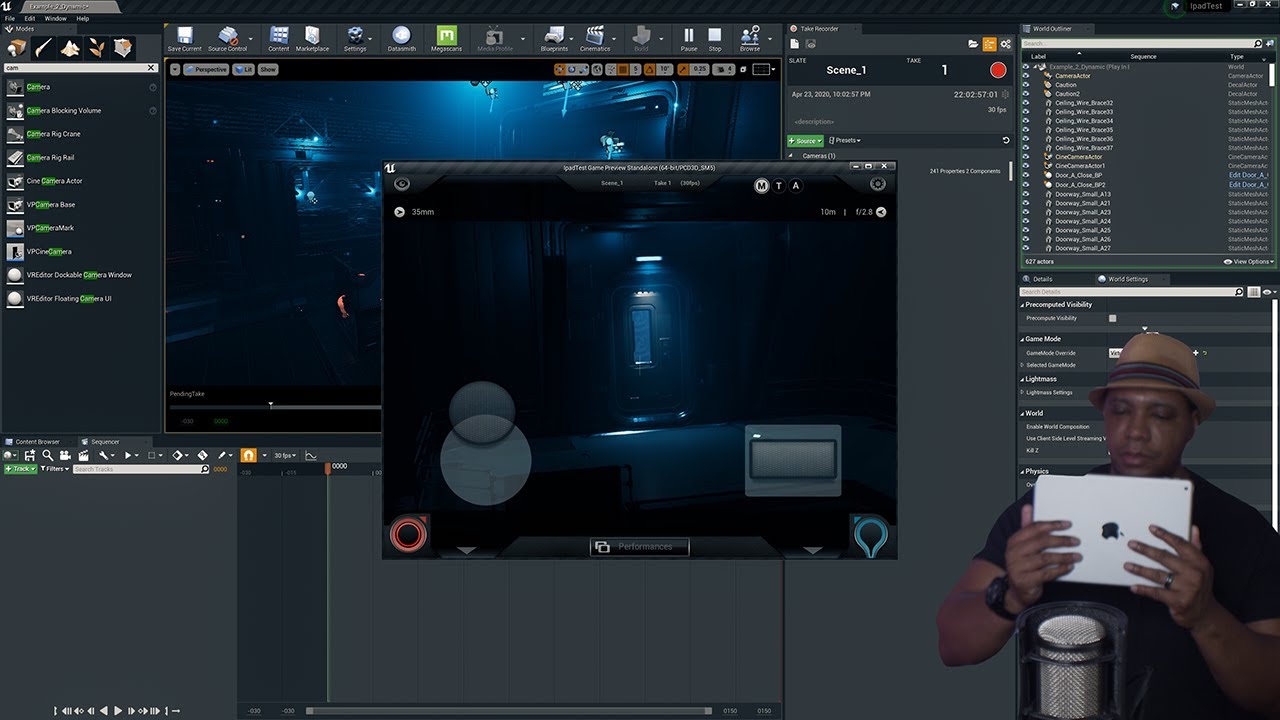
Another highly requested tutorial on setting up virtual sets in Unreal Engine 4. This time I take you step by step through how to properly setup your iOS device ( in my case the iPad ) with your camera in Unreal Engine to create a Virtual Camera to control in realtime.
My new Unreal Engine for Motion Graphics course is now out!
➜ Creating the Un...
noble kraken
Hello, can anyone help me a bit with camera settings?
compact schooner
noble kraken
Hello, can anyone help me a bit with camera settings?
Hiya - can you please state your entire question with details, images, links, etc. as many people pop on and off?
Most folks can't wait around until everyone's online at the same time...
Just let us know what your camera settings issues are and someone should get back to you.
noble kraken
I'm having problem with the focus settings, i'm trying keep clear image from far, but when zooming near an object I want the camera to be focused on it. But for some reason I can't get it working like that, when the camera zooms in, my whole viewport gets blurry and unfocused. And I have chosen only that object
compact schooner
noble kraken
I'm having problem with the focus settings, i'm trying keep clear image from far...
Are you using the camera with "auto focus" checked "on"?
There are both manual and auto focus settings.
noble kraken
I can't see that auto focus setting
right now I use manual
and I try to play with aperture,focus distance and focal lenght
but im not sure what are the correct settings for them
to make it work
tranquil bramble
@noble kraken are you using the focus plane to help your manual focus? And are you setting keyframes for the focus distance to match your zoom?
noble kraken
right now im trying to set keyframes for it, but im not that familiar with camera settings
how should it match my zoom ? For example I use 30mm focal lenght
tranquil bramble
Meaning, set a keyframe for manual focus at the beginning and end of your zoom. Turn on the focus plane to help you know exactly where to focus at each of those keyframes.
The aperture will only affect the depth of field
sinful orbit
How can my actor (skeletal mesh) be affected by an explosion (particle system) so that it knocks him off or that the collision with explosion triggers the death animation?
tranquil bramble
@noble kraken Try changing the manual focus while the focus plane is on. It should move towards and aways from camera. The plane is a slightly transparent purple plane, maybe it's what's making the scene dark
noble kraken
yeah i see it now
but I see no changes to the focus
ughhh... Now my scene just starts blurry
even if I don't have any keyframes
I don't get what is going on
noble kraken
why the hell I get completely results when rendered from what I see in the viewport...
compact schooner
noble kraken
why the hell I get completely results when rendered from what I see in the viewp...
https://docs.unrealengine.com/en-US/AnimatingObjects/Sequencer/HowTo/CineCameraActors/index.html
https://www.youtube.com/watch?v=OcwvF_jxh5M
https://www.youtube.com/watch?v=bkIWKhVriRg
Illustrates how you can create cinematic looking shots with the Cine Camera Actor.

In this quick one, I will show you how to make a basic auto focus system for your virtual production camera.

In this tutorial we take a look at one way we can setup auto focusing depth of field for the player camera.
sharp stump
vale arrow
Setting resolution in Unreal is quite tricky, there is no direct input for it. I...
i freakin solved it! after three days of struggle I realized that my preview was a plain LIE! The focus was wrong. I discovered he mask with colors debug thing and for focus and i focused it correctly!
compact schooner
sharp stump
i freakin solved it! after three days of struggle I realized that my preview was...
Yeah - there's something funny about focus in general. The "eyedropper" focus doesn't work in every viewport and can return wonky values.
There is something in there due to what viewport/camera you're looking through, what camera you've locked to a sequence or window and whether you're piloting or not.
I've not played with it enough to know the truth... but I suppose the truth is out there...
 rich bough
Hi all, I am trying to render a video with a custom aspect ratio of 0.8 out of Sequencer. In my render settings (in the high quality media export menu) I chose an output resolution of 2160 pixels by 2700 (also an 0.8 aspect ratio). The rendered frames do indeed have the correct resolution and aspect ratio, but the images appear zoomed in when compared with my camera in sequencer. Does anyone know why? Thank you for your time.
muted linden
@compact schooner, make any progress on that front? I'm making a VR pawn with a handheld cinecamera and running into my own challenges. feel free to DM
namely the sequencer is either recording the wrong transform for the camera, or it is not recording all of the settings (such as focal length)
I'm currently looking into how to completely handle the sequencer in C++, because I get different results by hitting record in the editor GUI
and then, to top it off, the rendered output is in an even more-wrong position and does not have any of the focal settings 😆. Its completely different than from what I see in the viewport
muted linden
@lime mantle I got it to properly record most settings of the cinecamera with the take recorder. there is a discrepancy with focusing, but it can probably be fixed. HMU if you want the deets
 cyan mountain
If i have an BP actor of a drone, and I want to be able to call the camera or view the "pov" cam from the drone after I sequence it (using that POV as my main cam" how would I go about that? I cant seem to access it from the sequencer.
 twin willow
How can I make it change characters and play the sequencer animation at the same time? After playing the sequencer and going back into the trigger box it then wants to switch instead of when I first enter it while the cutscene plays
 kindred dragon
Anyone know if there's a way to show the camera rig crane mesh at runtime?
 tight lava
Hello to everyone! I have a quick question about using the ipad as a virtual camera. When I go to PIE and enter game mode the ipads camera is set to a specific start point, similar to a Player Start. I tried to add a Player Start into the scene but no luck. Each time I enter game mode and the ipad is connected it starts from the same position. I added a CineCamera actor and thought that would help but once the ipad connects it immediately jumps to its start point. Is there a way to set the camera start point? Thank you in advance
 haughty hamlet
Hey folks, I have three cameras, two cuts, and the camera movements etc. How do I preview it with the camera changes? Just seems to get stuck on whichever camera I have selected in the viewport
vale arrow
haughty hamlet
Hey folks, I have three cameras, two cuts, and the camera movements etc. How do ...
Press the Camera Icon near the Camera Cut track
gusty heath
Can somebody tell me, why they removed the near/far DoF option to be exclusive to the mobile renderer? What is the point of this? I can't use near and far DoF foor cinematics anymore? I am still on 4.23
high salmon
Hey, I am haing trouble rendering all the frames are black. When i click on camera in scene the small preview window is also black. This started after i updated to 4.26
high salmon
high salmon
Hey, I am haing trouble rendering all the frames are black. When i click on cam...
okay i fixed it. turns out there is some issue with the exposure all you have to do is use exposure settings in post process volume

 fickle pine
anyone able to help?
 fallen jacinth
fickle pine
https://cdn.discordapp.com/attachments/784720285739253771/784830345866117150/unk...
fallen jacinth
fickle pine
https://cdn.discordapp.com/attachments/784720285739253771/784830345866117150/unk...
Not the right channel. But that's because you are reimporting a skeleral mesh with different bone hierarchy or new bones compared to the original.
fervent laurel
An SDI can only output a single layer video right? WYSIWYG
I can't output a feed containing both a video and a matte and switch between the two downstream
Each would need its own SDI output port
gusty heath
So do none of you guys use DoF in cinematics? How can I use near or far DoF without using the mobile renderer?
fallen jacinth
gusty heath
So do none of you guys use DoF in cinematics? How can I use near or far DoF with...
Not sure what you mean. DoF works fine from a postprocess
vale arrow
gusty heath
So do none of you guys use DoF in cinematics? How can I use near or far DoF with...
UE4 upgraded some internal renderer (high-end side) structure few version ago and they have to rewritten something (DoF for example) in order to make it work. They of course want to create something better and more realistic. Thats why the old DoF is no longer supported.
Although the new DoF is awesome and realistic, I'm agree with you that the new DoF is lack of artistic controls. I suggest you to search some kind of Depth-Based blur postprocess effects from online.
 gritty shore
animation question - I have an animation and I want to play a section (lets say frames 20-40), and once it's done that, I want to play that section in reverse (frames 40-20)
how the heck do you set that up?
I'm having real trouble getting the reversed section to play the correct frames
like, what values should be going in here?
gritty shore
buggerit, doing it in blueprint
kind wedge
Hi there, guys!
I have a snow particles falling town. It takes about 20seconts to fully fill in the scene with the flakes, as you can see on the image.
The problem is - i can not get thouse particles appear at the first frame, before the actual rendering starts, even if i set the Engine Warm up frames to 2K, which is in my case is 80 seconds, which should be more than enough for the particles to fall down and fill the shot...
Any help, please?
kind wedge
Looks like it is the issue in UE related to GPU particles - they are not affected by warm up option...
gusty heath
Could you not just extend the entire sequence by one second (so new start would be -0.1 instead of 0.0) and let the particles fall into place? @kind wedge
 eternal tusk
Alexey I think kami's solution is the faster solution you could have
Guys i have a problem with this new Render Queue Pipiline, it is giving me sorting error between some traslucenty plane that are sorted correctly 🤦♂️
Is this new method changing some .ini by default?
gusty heath
@fallen jacinth @vale arrow And this is the issue I was reffering to regarding the near and far DoF. I want the foreground not to be blurred (as much), but I have no control over it. That's a major flaw in my opinion 😒
eternal tusk
the ue cine camera work as a real life camera you have understand the f0 and the focal of a real camera to get it work as you want
gusty heath
@eternal tusk Yes you're right I'm so stupid. I don't know why I got hung up about this near and far DoF. I guess because it is an actual Setting you could theoretically change. Thx man for clearing that red mist 😇
vale arrow
gusty heath
<@!255336918567485440> Yes you're right I'm so stupid. I don't know why I got hu...
LOL I thought you're doing some kind of stylized animation and need the exact control of DoF.
vale arrow
kind wedge
Looks like it is the issue in UE related to GPU particles - they are not affecte...
If I remember correctly, this is solved in 4.26. They did mention this issue somewhere.
 untold trail
Hello guys 🤩 Does anyone have experience with using multiple maps in one level sequence? Im making a short movie and i've never used more than one environment. I'm not sure if the 'level streaming' is a good option since i know working with individual shots often require changing the levels per shot and im not quite sure if that's gonna cause any issues. Anyone tried this?
 tiny belfry
Hi all,
When I’m rendering the z-depth render pass from the movie render queue that enables high quality media rendering I’m getting the same solid color for every frame instead of z-depth. Same goes for the motion vectors render pass. All other render passes look good. What might be the reason? Any suggestions?
barren lagoon
@vale arrow would you happen to know if there’s a way to use Bokeh DOF in the current version of unreal? i vastly prefer it over what we have now...
anamorphic blur was so so nice
vale arrow
barren lagoon
<@701470822338134036> would you happen to know if there’s a way to use Bokeh DOF...
Sadly it's removed from deferred renderer. Only mobile renderer can use it.
Technically that's not very difficult to implement. But ya, no way you can use it anymore build-in.
barren lagoon
vale arrow
Sadly it's removed from deferred renderer. Only mobile renderer can use it.
Tech...
Technically that's not very difficult to implement.
i’m listening 👀
vale arrow
You can take a look of this article to have some ideas:
http://www.adriancourreges.com/blog/2018/12/02/ue4-optimized-post-effects/#bokeh-depth-of-field
At my day job I get to optimize several games for the Nintendo Switch
or the NVIDIA Shield,
some of them using Unreal Engine 4.
While UE4 is very …
barren lagoon
oh baby
vale arrow
tiny belfry
Hi all,
When I’m rendering the z-depth render pass from the movie render queue t...
Because those passes need more than 8bit of colors, you should render it in EXR file format.
 surreal helm
 barren lagoon
what are some settings (aside from post processing) that should be maxed out to make objective improvements to visual quality?
for instance, in the lighting for one of my levels, i maxed out the shadow settings.
also of course i set the engine scalability to cinematic
 viral steeple
@barren lagoon some here
 quasi horizon
hey guys
Somone show me how can I switch between sequencer Camera and the gameplay camera with a smooth transition...as the big games
 austere burrow
hey guys

i test rendered this as its my first time with ue4, everything looks alright except the timescale of all animated bp seems sped up, the skies and birds move much slower in my viewport
ive checked frame rates, tickrates and tried to even fiddle with time parameters in the said blueprints but to no avail, wat do?
p.s the clouds are Ultra dynamic skies and the birds are migrated from the landscape glider educational level
 primal rock
Does anyone know how the Camera attaches to the Crane when you parent it in the World Outliner? I am trying to build something like that.
gusty heath
Im trying to create a camera shot, with a sequence, rly simple just the camera going forward, I added the key frames but it wont show me a preview of it whenever I hit the play button in the sequence 😦 what am I missing ?
hollow stratus
Hello. I have a level sequence where dogs jump through window, My question is how can i then spawn the dogs bp, to attack the player, after junping through window
I have dog bp enemy all set up
 verbal holly
I'm trying to setup a VCAM using the new tools mentioned in the Unreal doc below. But the build on App store is still from a year back and not the one shown in the screenshot. Anyone know what's up with this?
Link: https://docs.unrealengine.com/en-US/AnimatingObjects/VirtualCamera/VirtualCameraActorQuickStart/index.html
The Virtual Camera Actor is a sample Virtual Camera that can be used as a starting point for your project.
timid pasture
Hello all, I'm totally aware that there are a myriad of tricks like Look At nodes etc etc to achieve this, but is there any way to avoid (maybe it's gimble lock?) your object in sequencer from flipping the opposite of what you want when hand keying a more than 360 rotation of an object?
 wicked glacier
Hey guys, maybe im asking same question as person above me I dunno but -> does anyone know the easiest way of having a camera orbit around an object in UE4 cinematics? I can't rotate the object cus I want to keep the built lighting.. Would be super grateful if anyone has a clue
 rich holly
Hey folks, anyone know why my PlaySound animnotify events aren't working in Sequencer?
argh
ok, it works when I enable real time audio in editor
sinful orbit
How can I delay activation/execution of my particle system in sequencer?
 still wharf
sinful orbit
How can I delay activation/execution of my particle system in sequencer?
still wharf
sinful orbit
How can I delay activation/execution of my particle system in sequencer?
Add the particle system to sequencer, hit "+ Track/FX System Toggle Track". If you want it trigger it once (like an explosion), choose "Trigger" from the FX System track dropdown menu and set a keyframe when you want the particle system to trigger. If you want to activate/deactivate a continuous system like smoke, choose "Activate" from the dropdown menu and set a keyframe when you want it to start, then choose "Deactivate" from the dropdown menu and set a keyframe when you want the system to stop.
Bonus tip: When rendering the sequence in the Movie Render Queue, be sure to go to the Anti-aliasing setting and increase the Engine Warm Up Count to a sufficient number of frames (i.e. 120) to prevent the triggered particles from going off at the beginning of the animation.
still wharf
wicked glacier
Hey guys, maybe im asking same question as person above me I dunno but -> does a...
Have you tried using the Camera Rig Rail? You can set it up as a circular spline by alt-dragging the extra spline point until it makes a loop around your object. Next, attach your CineCamera to the Rig Rail, then keyframe the "Current Position on Rail" to move the camera around your object. Set your camera to "Enable Look at Tracking" and use the picker to choose the object that you're orbiting to keep it nicely in the centre of the frame.
 plain berry
seem to be having an issue where I bind the player to a level sequence and it plays but for some reason it's started teleporting the player back and forth in the wrong place and not matching up with the keyframes
plain berry
you can see the weird jitter
plain berry
have absolute location/rotation on too
sinful orbit
Why are my movie render frames very dark at the beginning and then they slowly become normally bright
 noble geyser
Looking for help with resolving Player Transform issues on an intro cinematic.
I’m binding the player to the sequence in the level blueprint and noticing that the “Player Start” location/rotation is offsetting the Player in the cinematic.
I can eyeball the offset and get the player into roughly the correct spot by moving Player Start around, but I’m hoping that there is a better workflow for aligning things.
Any suggestions? Haven’t been able to find documentation.
undone geode
What are some recommended LUT packages and or color grading presets for high quality cinematics? I noticed this color grading interface but doesn't support live updates? https://www.unrealengine.com/marketplace/en-US/product/ucolor-color-grading-interface
Also my understanding is that LUTs should only be used for preview since they work in LDR color space.

Unreal Engine
UCOLOR is an editor widget for color grading work. It is the most efficient tool for color grading inside unreal engine.
 deep fern
hoii
any recommendations for ebook or course related to cinematics?
if so please @ me
vale arrow
sinful orbit
Why are my movie render frames very dark at the beginning and then they slowly b...
maybe it's auto-exposure stuff?
vale arrow
undone geode
What are some recommended LUT packages and or color grading presets for high qua...
you can also consider using OCIO for your workflow, it's supported from 4.26
sinful orbit
vale arrow
maybe it's auto-exposure stuff?
Yea, it was, I fixed it and it works as expected now. Thanks!
 lusty steppe

ArtStation
I redesigned Electronic Arts' Crysis Title Scene inside of After Effects along with physics based procedural Grass and Moss.


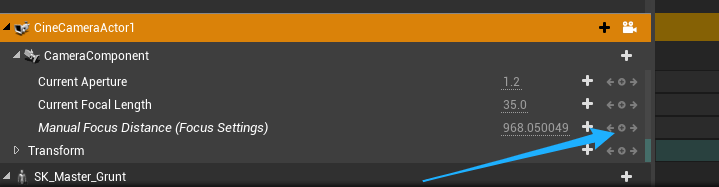

 errant estuary
what is it from?
 viral copper
the 5th wave (movie on netflix)
viral copper
The car is perhaps a bit shiny, looks very dusty in the movie.
errant estuary
yea they often use real cars in movies
theirs is more uneven like not on flat ground, thats prolly better
back wheels lower cuz it sinks when u want to drive out
viral copper
true thanks
crisp horizon
I feel like I found the solution to this before, but I can´t remember...
I´m simply trying to use movie render queue to render a sequence as png, but it always only renders the first 22 frames and after that its only black...any idea?
still wharf
deep fern
any recommendations for ebook or course related to cinematics?
@deep fern I'm not sure what your experience is with UE in general, but I found these two courses on Udemy very helpful as a complete newbie to using UE for 3D animation: https://www.udemy.com/share/102LRkAEIddFpTRX4J/ and https://www.udemy.com/share/102klEAEIddFpTRX4J/
deep fern
Thanks man
tiny belfry
Not sure if this question goes here: are any of you using a third party render farm with unreal engines movie render queue to render remote instead of local? I know it’s very new, just want to touch base with you all 😊
barren lagoon
can anyone help me understand why the blend outs on my camera shake blueprints are just completely broken?
i have my camera shake duration set up correctly, and even if i set it to .1 for the blend out, the camera shake stops abruptly like halfway through
i've done everything i can with the duration and even added a blend in to see if that was the issue, but the blend out still doesn't work as it should
i've been at this issue for days ☹️ if anyone knows a solution please don't hesitate to @ me
cyan mountain
How would one sequence the camera in an character bp? It seems I can sequence record the characters but the cameras attached to the player aren’t passing any transform keys.
verbal holly
Has anyone been able to get this new build of Unreal Remote 2 plugin for Virtual Camera? The picture on this document says Nov 2020 build but the link they have to App Store still has the 2019 build. https://docs.unrealengine.com/en-US/AnimatingObjects/VirtualCamera/VirtualCameraActorQuickStart/index.html
The Virtual Camera Actor is a sample Virtual Camera that can be used as a starting point for your project.
 silent lake
Hello! does anyone know how to solve this problem? When ray tracing is enabled, leaves and trees have double geometry. This can only be fixed on a single static mesh by checking the "Evaluate World Position Offset" checkbox in the Details / rendering tab. But I cannot fix it in Foliage Editing Mode.
languid coral
Haven't found any relevant info in the channel and docs. My question is:
Is there a way to execute a movie render queue job in "headless" mode? Meaning, no slate/UI. Maybe, turning off/removing MovieRenderDebugWidget is enough.
Any help appreciated!
viral steeple
Some expiriment for anime style shots in Unreal Engine
I do camera animations, lighting, editing, env building, tank animation and rig.
barren lagoon
would anyone here happen to be familiar with camera shake blueprints, in particular oscillation blend ins and blend outs?
 remote rose
hi, i am trying to make a cutscene where the player moves to a spesific location and starts doing an animation how can i accomplish this? (For Squeezing thru a gap)
 ivory salmon
does anyone know where I can find some good tutorials for getting into the cinematic aspect of Unreal?
 viscid pebble
@viral steeple Sick
 sacred sky
Hi everyone, how do I export my video from the sequencer with sound? When I export the sound in my sequencer does not render out.
vale arrow
sacred sky
Hi everyone, how do I export my video from the sequencer with sound? When I expo...
If you're using the default render tool (the button inside sequencer), then take a look of the last comment:
https://forums.unrealengine.com/development-discussion/audio/1448478-any-way-to-get-audio-out-of-sequencer-even-separate-from-the-image-sequence-video
Unreal Engine Forums
Hi everyone,
I've seen for a while now that Epic is continuing to try and come to a solution for rendering the audio out of Sequencer with the video. I'm perfectly
But it's much easy to do this by using the latest rendering tool movie render queue which I strongly suggest everyone uses.
vale arrow
ivory salmon
does anyone know where I can find some good tutorials for getting into the cinem...
The best tutorials I've seen are from Unreal official specifically the short video Rebirth. All the videos from Unreal are not a complete tutorial series. They provide the exact area of information you want to learn but it's assuming you have some background knowledge. If you're not familiar with Unreal, then what I'm suggesting you is take a look of Unreal Online Learning, they simply the best and are easy to get started.
 visual fiber
verbal holly
Has anyone been able to get this new build of Unreal Remote 2 plugin for Virtual...
visual fiber
verbal holly
Has anyone been able to get this new build of Unreal Remote 2 plugin for Virtual...
Hey, I'm having the same issue and confused on why the versions mismatch. Did you ever find a solution to this?
verbal holly
visual fiber
Hey, I'm having the same issue and confused on why the versions mismatch. Did yo...
Everyone seems to be having this issue. Not sure it has anything to do with Apple and Epic's relationship but they just need to release the new build for public.
lusty steppe

Learn to make Harry Potter Cinematic Title FX all procedurally using Adobe After Effects in this step-by-step Tutorial.
Instagram: https://www.instagram.com/mridul_sarmah/
Twitter: https://twitter.com/MridulSarmah13
If you love the tutorial, considering subscribing to the channel, giving the video a huge thumbs-up and share it every potter...
 calm valley
hi there i have some problem that is based on optimizing the scene which will not be pre-rendered it gonna play live. i just want you to help me that the scene which is behind the camera will be faded or disappeared to play smoothly.
vale arrow
calm valley
hi there i have some problem that is based on optimizing the scene which will no...
Unreal by default will cull everything out of camera view. For distance objects, you should create LOD for them to increase your performance.
calm valley
vale arrow
Unreal by default will cull everything out of camera view. For distance objects,...
ok thanks.......I'll try this.
 still pawn
I have a wheeled vehicle(wheels are not separated) I want to use it in my sequencer(the vehicle just moves from point A to point B) but I don't know how should I set it up properly so that it's wheels roll correctly.
is there any ideas or tutorials about this?
calm valley
still pawn
I have a wheeled vehicle(wheels are not separated) I want to use it in my sequen...
In this inspirational video, Matthew Doyle demonstrates how to use animation tools in Unreal Engine to tell a story and add life to your projects. Learn how to use the Atoms Crowd framework to populate city streets with animated crowds and use the engine’s core tools to add effects to people, birds, vehicles, and environmental objects.
Time cod...
 karmic crystal

Graveyard scene from Morytania, as I would've imagined it.
 stuck prism
Does anyone have a solution for high-res screenshot that overrides the r.tonemapping commands?
Keeps coming out blurry
Tried setting r.Tonemapper.Sharpen 7 and it just doesn't look good
 undone pine
what the hell ! I can only remove an actor away from a certain track but cannot add the actor to it again ! when I used matinee
How to add an actor to a track?thanks for any guidance
lusty steppe

ArtStation
I made a pillow all procedurally inside of Houdini and rendered in Mantra.
stuck prism
lusty steppe
https://www.artstation.com/artwork/483LQW
He's trying his best
lusty steppe
Thank you so much. Means a lot to me.
snow hamlet
undone pine
what the hell ! I can only remove an actor away from a certain track but cannot ...
Not sure if you are using matinee.
If you want to add an actor to a sequencer track, select your actor, go to your track, press the green '+ Track' button. At the top of that drop-down menu is 'Actor To Sequencer'. The actor you have selected should appear above the search bar.
timid pasture
Hey all, question just came up re: level sequencer I had never considered.
If you add say an audio component (audio track) to level sequence (+ Track button), can you reference it from a blueprint?
where does that component live?
I know if I add an actor with an audio component I can obviously reference that actor from another actor or whatever np
But what about an audio component you actually create in level sequencer?
 molten sonnet
does anybody have an idea why my first scenes are okay with a preview (and the camera is moving) and scene_03 and scene_04 are broken somehow?
 outer vector
Hey guys, I used the film project template and I have this circles each time I press start. How I can turn things off? Thank you.
vale arrow
outer vector
Hey guys, I used the film project template and I have this circles each time I p...
project setting -> Engine - Input -> Mobile, and disable those settings
outer vector
Thank you!
 nova marlin
Im sure this is an easy answer but cant find anything that helps me out there. I have created a flickering spot light and would like it to start flickering at a certain frame in my sequence. How can i achieve this ? Thanks in advance for any help !
barren lagoon
has anyone here been able to hack bokehDOF together?
i’m aware it’s legacy now, but perhaps someone has been able to come up with something that looks similar
i just do not like circleDOF
it feels very flat
undone pine
snow hamlet
Not sure if you are using matinee.
If you want to add an actor to a sequencer t...
I am using Matinee
fallen jacinth
nova marlin
Im sure this is an easy answer but cant find anything that helps me out there. I...
Why are you not just making it flicker in the sequencer itself?
kind wedge
Hi. there, guys!
I have a problem rendering particles with Movie Render Queue: at certain time (~3 seconds) they just stopped falling. Anyone faced the same issue and can help me out?
vale arrow
kind wedge
Hi. there, guys!
I have a problem rendering particles with Movie Render Queue: a...
It's hard to tell but I guess you have to take a look of your particle system. Are they set to loop?
kind wedge
Oh.. crap.. now my project is crushing on start after tweaking the particle system's attributes. Nice...
Kenneth, did you mean these parameters?
Hm... i found this about looping: "default loop-setting should be zero which means it SHOULD loop infinitely already"
vale arrow
kind wedge
Hm... i found this about looping: "default loop-setting should be zero which mea...
Yes, it's loop. 17516 draw count? maybe the number is too high. You can take a look of Max Draw Count
kind wedge
Will do, thanks!
 cyan rampart
Does anyone know of a good resource for creating realistic snow?
 rich nest
Hey, I'm very new to Sequencer and I'm using the ThirdPersonStoryTemplate which uses sequences for NPCs, When I interact with the NPC it players the Sequences correctly. But the only problem is that the sequence isn't played in the right place. I have attached a gif to represent https://gyazo.com/518ff7851b13fb12036d79dc4ef26d03
How would I set the location of the sequence to the NPC's location?
kind wedge
cyan rampart
Does anyone know of a good resource for creating realistic snow?
Oh mah gahd. Snuh! Today we're jumping into Niagara and creating a nice simple snow system to learn some of the functions!
Patreon: https://www.patreon.com/deanashford
Discord: https://discord.gg/ttqYq3r
Twitter: https://twitter.com/Play_Ruff
__
Huge thanks to my Patrons:
Assassinator Entertainment
Dhiego Lúcio
Guillaume Guérillot
Kamaal Man...
verbal holly
Hi does anyone know how to apply smoothing to the camera transform values? Not really sure if any of the filters will do the work?
vale arrow
verbal holly
Hi does anyone know how to apply smoothing to the camera transform values? Not r...
In your Sequencer, open the curve editor and use the right most button tool (Curve Editor Filters). You can then select the Simplify filter to smooth out your value.
verbal holly
Oh awesome. Is there a recommended value for just getting rid of jitters?
vale arrow
That filter will do
verbal holly
Thanks a lot! 🙂
undone pine
How to add a camera actor to an existing track in Matinee? Thanks for reply. This bug troubles me a lot .
 magic crag
stuck prism
Tried setting r.Tonemapper.Sharpen 7 and it just doesn't look good
magic crag
stuck prism
Tried setting r.Tonemapper.Sharpen 7 and it just doesn't look good
you really shouldn't be going above 3-4...
 nova arch
Hi Guys and good morning
I have a question regarding sequencer.
I have a Sequence where at some point I trigger an event that gathers all actors of a class and executes a event from does actors, this actors proceed to shoot a bullet when they are triggered and up to this point everything is working has expected, but after I shoot the bullet I want the Cinema Camera to follow the bullet, is there anyway to achieve this within sequencer?
nova arch
so basically what I'm looking to do is to attach the sequence camera to the spawned actor
stuck prism
magic crag
you really shouldn't be going above 3-4...
It was for test purposes to see if it changes anything in simulate - it didn't
haughty sentinel
Why doesn't my 4.25.3 JPG render look like my viewport? It loses all the nice color fog volumes in the background.
timid pasture
Oohh k so... no structs in level sequencer?
or am i missing something... struct variables don't have an "expose to cinematic" option
nova arch
Hi, is there a way to attach the cinematic camera to a actor that is spawned using a trigger event in sequencer?
 honest sorrel
Anyone here semi good with maya? how i would go about smoothing it so it doesnt look super weird in unreal, without makint it too smooth
thats how it looks in quixel and in unreal, dont mind the shiny paint its just for showing
 agile grove
hey everyone! I got you a new tutorial a meme and a small announcement ^^ if you are learning topics about Lighting, archviz, environment design in Unreal Engine, We started our channel few months ago. We are growing super fast thanks to the community (you guys) https://youtu.be/wwIPNlH5fpk
The improved modeling tools in Unreal Engine 4.26 with Quixel Megascans makes it so much more fun in creating concepts fast. I started using the 3d modeling tools to block out ideas In this tutorial series, We will learn how to create production-ready unreal engine scenes from block out to the final result. if you're a creator who's into buildin...
undone pine
oops . Select an actor before right clicking on the group can actually let the Add Actor to Group option appear.
 gritty minnow
agile grove
hey everyone! I got you a new tutorial a meme and a small announcement ^^ if you...
gritty minnow
agile grove
hey everyone! I got you a new tutorial a meme and a small announcement ^^ if you...
Are you allowed to use logos of UE4 and Quixel?
vale arrow
honest sorrel
Anyone here semi good with maya? how i would go about smoothing it so it doesnt ...
It's about the normal. What you need is Harden Normal. Take a look of this tutorial:
https://www.youtube.com/watch?v=Lyn5WxkzcIQ

This videos shows you how to use Soften and Harden Normals on low poly objects for game use.
agile grove
gritty minnow
Are you allowed to use logos of UE4 and Quixel?
I'm teaching how to use Unreal Engine and Quixel in that tutorial series, I think it's fine on a youtube video
gritty minnow
agile grove
I'm teaching how to use Unreal Engine and Quixel in that tutorial series, I thin...
Usage of UE4 logo requires permission as far as I know
vale arrow
gritty minnow
Usage of UE4 logo requires permission as far as I know

Unreal Engine
Unreal Engine is the world’s most open and advanced real-time 3D creation platform for photoreal visuals and immersive experiences.
I think he's fine as long as that's non-commercial. The world need ppl like him to provide more contents for helping others. You don't need to be that harsh 😁
 brazen quail
Hi everyone!
Not sure if this is the right place to ask but I'm trying to play a looping video seamlessly with no success..
Every time the video loops I get a black frame or a hitch.
Is there anything I can do about it?
I HAVE tried turning off auto-clear on the media texture, change the video codec, container and even framerate without success...
Thanks in advance for any lead 🙂
gritty minnow
vale arrow
https://www.unrealengine.com/en-US/branding
Bruh I am not harsh just trying to help him
Definition of commercial vs non-commercial familiar to you? If ads are shown on youtube that's commercial.
gusty heath
Hii, Im having a weird issue with rendering out camera shots. If I try to render instead of rendering the camera shot I set up, it renders out a default camera in the scene, even though I do not have a player actor or player camera in my scene . Please help me, I´m so frustrated 😦