#source-control
1 messages · Page 58 of 1
 lean prism
Make sure people get latest when they start the day, ectra
Packaging the dedicated server you can do manually, but you can also do it automatically with something like Jenkins and using P4V commandline, and the UE automation tool
@young thorn I hope that helps
 young thorn
lean prism
Packaging the dedicated server you can do manually, but you can also do it autom...
young thorn
lean prism
Packaging the dedicated server you can do manually, but you can also do it autom...
helps a lot thanks
do you mind if I mention you if I have a question sometime
lean prism
I would never mind, don't know if I will be around to answer but hey if I'm here and able to answer I will
Have a good one
@young thorn Additionally, if you make C++ changes they will need to build it to open it if they plan to work in blueprints there is no way to get around that
If you have peoples workspace setup in the advanced tab to enable "Allwrite" then perforce will create less read only permission errors, as it tends to do that quite often
young thorn
lean prism
<@!334627698083364865> Additionally, if you make C++ changes they will need to b...
yeah I have taught them at least 10 times by now how to regenerate project files and run the project through vs and they still forget
lean prism
Make a tutorial and just give it to them haha
young thorn
lean prism
Make a tutorial and just give it to them haha
I already did haha, useless bunch of individuals
jk
I actually did
and they still keep forgetting
young thorn
where can I find it?
young thorn
I've never used hot reload once in my life not even by accident, should I try it once 😋
Also wtf is defaulteditorperprojectusersettings.ini
 steady mortar
hello, ive had to check out my whole project from perforce, then i deleted some files in explorer, added some new ones, changed other ones, how can i mark for add what i added, mark for delete what i deleted?
 woven sluice
@young thorn learning curve is steep but using a streams depot instead of a classic depot can help a lot if you want to do things like put the binaries in for artists so they don't have to build, and omit binaries from coders' workspaces
(someone/something still has to build/submit their binaries for them though if they don't)
@steady mortar the command is Reconcile Offline Work, run it on any folder it will go through subfolders
steady mortar
@woven sluice thank you very much!
steady mortar
what do i keep in my server to have my created c++ classes?
woven sluice
are you asking because you have non-coders on your team who can't build with VS/Rider?
steady mortar
no to save space and cleanness, i was setuping my p4ignore file
 Intermediate/
 DerivedDataCache/
 FileOpenOrder/
 Saved/
 temp/

 *.pdb
 obj/
 *-Debug.*
 *.sln
 *.VC.db
.p4ignore.txt```does it seem ok?
its strange cuz i had this in my folder, excecuted the p4ignore command in cmd
and yet still it was uploading 15000 files from these folders
i guess it doesnt ignore changelist that was made before i excecuted p4ignore command in cmd
woven sluice
if you already committed files, you have to delete them. the ignore file doesn't apply retroactively to files that are already in your depot
there are plenty of example ignore files on the internet (either git or perforce, they're similar for basic use), find those instead for guidance
steady mortar
i see, thank you for the information. my p4ignore is indeed from the web
but it seems i only need source/content/config/plugins folders and my project still works
young thorn
how do I keep a file permanently check out
and somehow lock it so it doesn't get submitted by accident
(perforce)
 merry verge
Just throw it in a changelist named "DO NOT SUBMIT"
that's not a joke, I have one like that.
 molten marsh
Yeah I do that as well. Mainly for stuff I dont want other people to touch 😛
 languid escarp
how do I generate a patch in git that includes all the changes between two commits that are multiple commits apart as if there were only two commits? the aim is to get a .patch file that doesn't patch changes per commit, just once
merry verge
I don't know the exact operations but you could probably do something along these lines:
- Make a new branch from the earlier commit (delete this when you're done)
- Cherry-pick the second commit
- Create a patch.
languid escarp
yeah I'm ideally looking for a single command
languid escarp
merry verge
I don't know the exact operations but you could probably do something along thes...
this only seems to diff the branch against a single commit
merry verge
You might have to create the patch starting from the commit before your first commit through the cherry picked commit.
languid escarp
doesn't cherry picking only care about the changes in a single commit though?
merry verge
Sure, that's why you make a branch based on the first commit and then cherry pick the rest to put them on that branch
then you have a branch built from just those commits
languid escarp
ah you mean cherry pick all the commits into that branch ok
merry verge
Yeah
languid escarp
seems to have worked, thanks
woven sluice
@young thorn do you actually need to be able to submit these files, ever?
young thorn
@woven sluice no
its my .uproject file actually
its just that I am using a source-built version compared to my teams launcher versions
I don't want them to have to set engine association
woven sluice
Well.. First that's not a file you would ever need to do this workaround to
You're mixing engine versions with team members??
young thorn
I am having to package a dedicated server
which I can't do with launcher version
I just threw it in a changelist called 'DO NOT SUBMIT'
let's hope I don't submit it accidentally
languid escarp
just did my first merge using VS git - went smoothly, like how the merge window looks
 rotund bobcat
visual studio always does weird merges for me, like just leaving some markers in place sometimes and stuff
I prefer VS code for merging, it's very clean and just shows the one file with the 2 changes and you can pick or use bot hand edit and stuff
languid escarp
I'm trying to keep my workflow in VS
if I must I open SmartGIT
but really trying to save it for only doing engine upgrades
so much better to be able to press a hotkey and do quick tasks like commit, stash, push, etc. vs. having to keep other windows open, alt tab etc.
languid escarp
damn you're right
 cyan jay
highly recommend Beyond Compare for merging. It's a super useful tool for many other things (diffing folders, text files, etc) too.
 cosmic goblet
when using git lfs and uploading to github
can collabarotors only edit the project
or strangers can
rotund bobcat
only people with write access to the repository
if it is a public repo, they can see the code and download it and do what they want with it, but not update your repository with changes
 vernal solstice
Is Perforce still the VCS of choice for UE? i.e. better suited than Git?
Just asking because I'm pretty new to UE and considering setting up a perforce server if that's still the way to go.
cyan jay
I'd say so, yes. But it depends on lots of factors 🙂
If you are comfortable setting the server up, and the max 5 free users is fine for you, then I'd say use perforce.
but lots of people successfully use Git and it works for them 🤷
vernal solstice
cyan jay
I'd say so, yes. But it depends on lots of factors 🙂
If you are comfortable set...
Hmm, still having a hard time deciding between perforce. I'm an sw dev working alone, a lot of the perks that perforce would bring to the table don't really apply to my situation. So hmmm, maybe I'll give both a shot and decide which one fits better :).
Thank you for your advice 🙂
 ancient robin
I'm using Perforce for a personal project. It's easy to crank up the project size with Quixel, marketplace assets, etc. I was thinking about whether it's feasible to ignore any asset that can be easily restored by downloading it from source. I only work alone on a single PC. I'm mostly concerned about versioning code and backing up the project.
Is it a terrible idea? Of course it would be a monumental pain if I ever did need to restore the whole project, but it would keep the costs down.
woven sluice
Some people say that the only way to work is to use a full engine source build for every project, because you never know if Epic is going to vanish one day and take their engine distribution to the grave. Art source assets are just art source assets... It's more or less up to you to decide what you consider to be "safe", and how much effort you're willing to go through if for some reason you need to get those source files again after a crash
ancient robin
That is fair. How much trouble could I expect it to be though? Will Unreal provide a list of all the missing assets, and the directory it expects them to be? Is is just a matter of downloading again any referenced assets to their proper places, and letting Unreal do the rest?
woven sluice
I guess it depends if you're going to keep the original source files out, or keep them plus the entire uasset file out. The uasset files typically contain all the data your game uses plus a path reference to the original source file. I.e. If you import a png file and then delete the png file, the image data is in the uasset - the only time it typically needs the original png is if you ask it to reimport it, otherwise the original png can be deleted and nobody would ever know
(Personally I would never go so far as leaving any uasset files out, it would seriously break a lot if those files were ever lost)
woven sluice
couple other common notes: be careful to remember that a version control system isn't backup, and also, make sure you learn how to set up your typemap for perforce if you haven't already to limit file history count
ancient robin
Thanks HoJo. What do you mean that version control isn't backup though?
rotund bobcat
depends where your repo is stored
e.g. you can run git completely locally, but if your pc crashes, it's gone as well
I guess
cyan jay
even on Digital Ocean it's not backed up, unless you specifically get automatic backups of your VM (which is not the correct way to backup your source control, but better than nothing)
even then most companies will have an additional nightly offsite backup of the source control data. i.e. see the fire at OVH recently. If you had backups of your VM stored at the same data centre you'd lose everything.
ancient robin
No backup is infallible, that is true
woven sluice
source control is source control, it's not data backup
perforce is a running program that modifies itself and can go corrupt
case in point, just a few days ago in the chat above I found out that Jenkins can and did somehow corrupt the files it submitted to my server 🙃 I had to go in and do a manual restore to old archive versions to even make it possible to work in my repo again, thankfully they were only DLL files but if that happened with uassets it would have been really annoying
rotund bobcat
could you not go back in history for these files?
vernal solstice
3-2-1 Backup rule: https://www.acronis.com/en-us/articles/backup-rule/

Read this article and learn how following the 3-2-1 Rule of Backup can stop your organization from becoming a data disaster statistic.
merry verge
and remember to check on your backups every so often. Just found that my setup had been backing things up without ever deleting old backups from cloud storage so more and more space kept being taken up... going to free up a few hundred GB of backups that I don't need anymore now yay
 frigid cipher
When Submitting to Source Control, it takes a while and the output log shows lots of engine content being checked - is there a way to stop this from happening?
LogSourceControl: RunCommand: 'git status --porcelain --ignored "C:/Unreal/UE_4.26/Engine/Plugins/MegascansPlugin/Content"' LogSourceControl: Warning: RunCommand(status) ReturnCode=128: fatal: C:/Unreal/UE_4.26/Engine/Plugins/MegascansPlugin/Content: 'C:/Unreal/UE_4.26/Engine/Plugins/MegascansPlugin/Content' is outside repository at 'C:/xxxxx
 jolly fog
I'd like my teammates to see Git LFS locked files, or even prevent them to edit those ones, possibly outside of Git Bash. We use GitHub desktop and SourceTree. How do you guys manage to lock files it Git?
jolly fog
Answering my own question:
https://tortoisegit.org/
https://github.com/SRombauts/UE4GitPlugin
GitHub
Unreal Engine 4 Git LFS 2 Source Control Plugin (beta) - SRombauts/UE4GitPlugin
vernal solstice
I know that Git LFS exists to solve issues when git has to deal with large binaries (such as textures, .fbx etc.). However, has anybody used git's "partial clone" and/or "sparse checkout" features for GameDev?
From what I've read it could be a nice replacement for Git LFS (albeit no file locking).
vernal solstice
ancient robin
I'm using Perforce for a personal project. It's easy to crank up the project siz...
Regarding your message, I actually face the exact same issue. First to your question what happens if stuff is missing. I tried it out and UE loaded normally but the missing assets were simply gone from all levels. Once I added the assets back and restarted the engine it also showed them in levels again.
The solution I'm currently pursuing is to keep all assets (marketplace, megascans, my own etc.) from all projects in one central folder. Then to use those assets I create symbolic links to each project. A first quick test worked and UE loaded everything correctly.
The approach to keep all assets in one folder still means that your repo will grow but at least you don't keep multiple copies of the same assets in different projects.
However, you could also keep that folder outside of your repo/workspace and back it up to an ext. hard disk or something.
cosmic goblet
I'm having trouble connecting to a server on perforce but i get this error anyone know how to fix this?
 woven sluice
it's an IP address
use localhost if it's running on your machine, otherwise figure out the network IP address of the machine the server is running on
ProjectHD looks like a hard drive name
cosmic goblet
oh ok
i thought it was just the name of the server its the actual IP address linked to it correct? @woven sluice
woven sluice
perforce is really stupid with their names. P4PORT is the ipaddress:port, Server in that dialog is the ipaddress:port
(and while I'm at it, P4CLIENT is confusingly the workspace name, but at least P4USER is actually user)
sorry stupid typo, fixed
merry verge
don't forget how perforce uses weird syntax to specify its using ssl - ssl:ipOrHostName:port
because ofc using a real URI is too good for them
cosmic goblet
did they change how it used to be where it is a name instead of the hosts IP?
merry verge
Huh?
Nothing has changed.
You have to specify an ip or valid hostname that resolves to an ip... how else would it know where to connect to?
cosmic goblet
The tutorials are so old they don't show how you connect to a server and i keep getting that error
i'm the client i want to connect to the host
is the host doing something wrong or me
woven sluice
what are you doing?
young thorn
Perforce stores every version of every file you've ever added to the repo?
merry verge
By default, yes. Like every other version control system.
You can tell it to only store the last x revisions of certain filetypes but it stores everything by default (as it should).
 cyan viper
how should binaries be put in perforce
they take up a ton of space don't they
and result in a ridiculous number of merge conflicts if you have multiple source devs
woven sluice
Limit file type history to just one or two versions
Use a streams depot and use a virtual stream for anyone who will compile the code themselves that ignores all binaries/... folders
Use CI to build and submit binaries for artists
Coders just code. Artists just get latest and art. No conflicts, no issues with growing depot size.
 sand charm
You can use UGS for that too. It works pretty well for us
merry verge
UGS is the "right" way to do things, but it's not the simplest thing to setup.
Personally I don't even store binaries in source control, I just wrote a script that pulls down the latest "approved" binaries from CI artifacts. Just throwing them in perforce is probably the easiest for a small group just getting started though.
woven sluice
yeah I haven't figured out where we're going to evolve our devops setup to next, but for alpha dev fast iteration, this is absolutely fantastic. nobody has to do anything. everyone is always up to date. just don't break the build 
sand charm
We have a separate depot just for that and have our CI pipeline just put them in the perforce folder for them. We have UGS auto pull them down for our non programmer folks.
 chilly badge
Anyone already tried to work in team with perforce and the landscape layer ?
 crisp widget
Yo, having these huge issues with multi user and perforce, it corrupt files.
So we are currently trying to add a new blueprint, and this works fine. Its pushed through multi user session and is added to the depot. Once you try to reopen, it takes an extreme long time or causes to crash due to it was added through multi user.
anyone know why this is happening?
 light hollow
Hello! Why my p4ignore doesn't work in p4v???
I have this in p4ignore file

and I still being able to add files inside of these directories
p4ignore file is set in p4 set
this is what p4 ignores -v gives me
 ancient robin
vernal solstice
Regarding your message, I actually face the exact same issue. First to your ques...
ancient robin
vernal solstice
Regarding your message, I actually face the exact same issue. First to your ques...
That's a pretty good approach. I was mostly thinking about keeping repo size down, to keep hosting costs manageable. I think what I'll do is just be very selective about what assets I add to the project. I've set up another project which is solely an asset dump for marketplace packs etc. Then I migrate the indiviual assets I need to the actual project.
 stuck cape
Can anyone help me please. I have had serious struggles setting up Source Control with GIt and Perforce. Creating the server hasnt been an issue. But getting people to join is just not happening. (Git has a repository limit of 1GB so had to stop using it) But Perforce looks better.... But how do I get people to join the server? If perforce isnt a good SC then what is? I cant host the server myself as my internet is too slow, so how do i do it? its for a UE4 project.
 ornate willow
stuck cape
Can anyone help me please. I have had serious struggles setting up Source Contro...
ornate willow
stuck cape
Can anyone help me please. I have had serious struggles setting up Source Contro...
perforce, and git, are both "source control", they both require some kind of server to run on. Git runs on GitHub.com, which has a 1gb limit unless you pay 5 or 10 USD per month for something like 25 gigs with other limitations
with perforce, you need to pay for server hosting. perforce is easier for small teams but is only free for 5 people. you could pay 5-25 USD per month depending on how much storage you need. Perforce is great because it can tell you exactly what changed inside files git cant, like blueprints, and you can see a visual difference between changes.
i definitely recommend just using git and azure dev ops. go to dev.azure.com, they have unlimited storage for free for git repos only. you create a new project then you will see repos on the left hand bar, initialize one with a unrealengine gitignore, then clone it to an empty folder with something easy to use like Sourcetree, add the project to that empty folder, commit and push
ornate willow
crisp widget
Yo, having these huge issues with multi user and perforce, it corrupt files.
So...
multi user editing is known for having lots of issues especially with saving things
 storm sleet
ornate willow
perforce, and git, are both "source control", they both require some kind of ser...
storm sleet
ornate willow
perforce, and git, are both "source control", they both require some kind of ser...
Git runs on github, as well as gitlab and hundreds of other git hosters. Including my own server and shithub.us, git.sr.ht. it's not bound to github at all. In fact, you don't even need a server at all.
However, for file locking you need some central instance.
Is there a way to find references between unreal assets without having these assets on the disk? Like an offline reference viewer?
Some of our assets are large and I'd like to see what I really need for my editing steps to only download these assets. Is there a way to do this?
cyan jay
light hollow
this is what p4 ignores -v gives me
*.* is not valid p4ignore syntax. Use the ... notation instead.
https://www.perforce.com/manuals/cmdref/Content/CmdRef/filespecs.html
storm sleet
btw are there console commands for source control?
light hollow
cyan jay
\*.\* is not valid p4ignore syntax. Use the ... notation instead.
https://www.pe...

so this one from example still not work


if I specify *.extension it does ignore
merry verge
... isn't valid for p4ignore, but neither is *.*. If you want to ignore everything under a directory just use Some/Path/ and it'll ignore everything under that.
so just Intermediate/ in this case.
woven sluice
Pretty sure you need a star actually
merry verge
You don't - otherwise half my p4ignore wouldn't work
woven sluice
It's all documented about as good as epic's stuff
Oh, actually yeah. Never mind
Once it matches the intermediate directory, it's going to ignore everything further
storm sleet
so you guys put the unreal project directly into the repository?
woven sluice
You need the slash is what I should have remembered I guess (missing on Saved up there)
merry verge
storm sleet
so you guys put the unreal project directly into the repository?
define "unreal project" - the uproject file? Yes.
The sln or anything in Intermediate? No.
storm sleet
merry verge
define "unreal project" - the uproject file? Yes.
of course not everything, but content and stuff
merry verge
Yes.
storm sleet
and uproject directly at the root
merry verge
Why wouldn't you?
storm sleet
(we have the project in a subdirectory, next to a separate Import directory we use for auto import. The idea is that the project is self-contained. You can fetch the repository and everything you need is there, including the asset source files, but not the work files)
woven sluice
Also I guess noggs was getting mixed up remembering the syntax used for ignores in streams/workspace mappings (I was too tbh lol)
storm sleet
Import/...(fbx|png|...)
UEProject/...(everything needed, including uassets, umaps, uproject, ini)
of course we have the uasset files in there
merry verge
Ok, that's what I was confused about.
storm sleet
but not the maya|.blend|.psd|... files
merry verge
Depending on the studio and workflow I'd put those in there.
storm sleet
they are in a separate <project>-preparation repository (for reuseability and stuff)
woven sluice
I often struggle trying to get our team members to include all those files in our repo. I have accepted the fact that one day we'll have a project zomboid and someone will lose a laptop and we'll lose some weeks of source art asset work 
merry verge
Honestly I wouldn't include fbx/png/any other exports from DCC programs - they're simply not useful. You have the source files (maya/psd/etc) and you have the uassets. The intermediate exports don't store any extra data that can't be generated from source files.
Sometimes it's nice to work at a AAA where there's a set workflow you're expected to use and tools that support it 🙂
I can't imagine not having all the source files submitted.
woven sluice
Psh it's not like hard drives ever fail or anything
storm sleet
we have a dedicated repository for DCC files. when they are green lit, they'll be copied to a dedicated directory inside that repository. Then, a bot will export these files directly into the Import directory of the game repository, then Unreal imports them.
At some point we might find some nice solution, eg, the bot could directly import the stuff into unreal and checkin, skipping the Import directory completely
and we have the rule that artists check in at least in the evening when they stop working. because "what's not in the repo, isn't there"
light hollow
merry verge
You don't - otherwise half my p4ignore wouldn't work
I tried all this. Nothing work
merry verge
If you already have files submitted that match those patterns then perforce won't ignore them.
light hollow
/Intermediate
\Intermediate
/Intermediate/
Intermediate/
\Intermediate
\Intermediate/
/Intermediate
Intermediate
Intermediate/*
Intermediate/**
I removed them
It does add
merry verge
then you haven't configured perforce to use your p4ignore file.
light hollow
light hollow
if I specify *.extension it does ignore
*.log
ignores all log files
it does work
but not with dirs

not overriden by windows
merry verge
it should just be P4IGNORE=.p4ignore, you don't need a full path.
assuming it's at the root of your workspace
woven sluice
Is that on your perforce server or your machine you're using p4v on
(Or are they the same)
light hollow
merry verge
it should just be `P4IGNORE=.p4ignore`, you don't need a full path.
this is solution
I'm unequivocally jubilous
Thank you
stuck cape
ornate willow
perforce, and git, are both "source control", they both require some kind of ser...
Wait… are you saying that you can use GitHub Lfs and host it through Azure and I no longer have the 1gb limit for the Repo size?
storm sleet
you can set up git lfs anywhere, even on your local machine
 naive nebula
Hey there folks. Unrelated question. Do someone uses the Epic perforce for unreal engine sources ? I need to connect to it to get some versions of the engine but can't figure out where is the documentation
lean prism
They use Perforce?
That's cool 🙂
Fair enough 🙂
I imagine 100000 person perforce server would be a bit messy tbh
naive nebula
I only have udn for ps partner and xbox. And when I looked at it for answers no questions was asked so was wondering if it was public knowledge
Gotcha, thanks !
 charred osprey
Hey... wondering if I can get a little help. First time ever doing any of my own server setup. I made a server following a guide using AWS and Perforce Helix
It seems to be working so far, I have started to push some content up, but I need help understanding how to get other users to be able to join
I tried connecting in SourceTree as a test and I get this message

I don't really understand how these work, do I need each user to generate one? Do I provide one for them?
merry verge
inb4 Helix4Git or Helix TeamHub 🤔
ornate willow
storm sleet
Git runs on github, as well as gitlab and hundreds of other git hosters. Includi...
I never said it was bound to any one service, was just trying to make it explainable since its a complicated topic. but hey if you have any space I'll gladly pay for a server at shithub.us
storm sleet
ornate willow
I never said it was bound to any one service, was just trying to make it explain...
shithub.us currently only supports hjgit protocol, which is a combination of standard git:// with the 9front authentication and tls stuff. Iirc ori planned to implement standard git access, too, but that might still take some time.
Other idea: git.sr.ht is a great service. They rely on mails heavily (you send patches via mail, you can manage todos via mail, ...). I don't know if shithub or sr.ht implement lfs, but iirc you can make your own additional (automatically managed) lfs server somewhere else.
Shithub is mostly special purpose for plan9/9front/inferno projects, so you likely don't really want to use it.
charred osprey
woven sluice
That's for GIT not Perforce, which are you using?
Sourcetree doesn't work for perforce??
young thorn
merry verge
You can tell it to only store the last x revisions of certain filetypes but it s...
Sorry for replying so late, I didn't notice the answer. How do I do that?
young thorn
How do I make perforce store only like 1 or 2 revisions of a file
woven sluice
You set up the typemap
Google it for instructions, but to see a nice list of all the typemap flags right click on a file and click change file type
young thorn
woven sluice
You set up the typemap
That seems to be for all files of a type huh
Can I make it different between different kinds of uasset files
like there's textures and materials which I want to discard and I would like to keep blueprints
woven sluice
by individual file no, but you can include folders in the specification
alternatively you can explicitly set files from p4v (the typemap settings are only automatically applied when adding new files)
young thorn
woven sluice
alternatively you can explicitly set files from p4v (the typemap settings are on...
I would like to try this but I can't seem to find the option
woven sluice
right click on any file, set file type
young thorn
ah ok
 pearl egret
Do you guys think that 40 GB VPS i enough for UE4 SVN Repo?
It will be only for project, probably art assets will not be there so only code, maps etc.
 simple lodge
you can do it on a 10gb and put svn repo on a volume mount
then just expand the volume mount as you need
pearl egret
What is a Volume Mount?
simple lodge
An extra networked disk basically

Scalable and highly available SSD-based block storage to attach to Droplets. From 1GB to 16TB, priced at $0.10/GB per month.
like this
pearl egret
Oh, nice option. I didnt know about it 😄
I'll try that
 frosty stirrup
With Perforce:
Our project is using the water plugin and we changed some settings for the gerstner waves. Wondering how I can integrate these changes into perforce? Is it possible to contain it under "CCampbell" vs the entire content folder?
In other words, using the water plugin. It is outside of the team's content folder. Need to migrate settings over to CCampbell so the team can get updated waves within our PersistentLevel

I suppose I could move JUST the gerstner into my folder and re-integrate the WaterBody waves asset to that instead. not sure if it will break other dependencies for the water tho.
woven sluice
Are you saying there's a bunch of temp stuff in the plugin's content folder that isn't needed for your project that you don't want to commit?
frosty stirrup
woven sluice
Are you saying there's a bunch of temp stuff in the plugin's content folder that...
No, We had to update just the gerstner waves but we aren't currently uploading anything to perforce outside of the content / config folders.
Thinking before I try anything actually, I might just need to check out the .uproject file if water plugin settings are stored in there?
Everything relating to the built in water plugin is in its own "Water" folder outside of the content space. Team can see the water, since 2/2 we added the plugin to be enabled. So thats why I'm thinking now its just as simple as revising .uproject with the wave changes
woven sluice
Oh, are you modifying an engine plugin without using a source build? :/ are you certain the plugin doesn't expose some other way to customize it per project?
The screenshot above is super confusing because it looks like your uproject file is inside a "content" folder... And there's no config or content or source folders for it... 🤔
frosty stirrup
Yeah @woven sluice This is the setup we were told to do as a first time group project so I wouldn't be surprised if some things were setup in a way to keep us out of files most people don't know what to do with.
That said, I'm thinking if theres no way to edit it without migrating the plugin over, I could take the GerstnerWaves file and make a copy of it into my own folder, as those can be relocated at least
When you say source build does that mean a project that contains all files generated as well, like DerivedCache etc or ?
There is a Config Folder but we were instructed not to move any other types of files outside of Content/Config
This is our whole hierarchy. If we needed to check in something that related to modifying engine plugins, its most likely not there. everything in INTERNAL was provided to us by my school. Our project is to integrate multiple maps together into 1 large world. I'm in charge of the global water

ExampleTeam just stores our persistentlevel and builddata
merry verge
What exactly are these "settings" that you changed?
Did you create a blueprint of something? Did you change something in project settings? Did you modify a blueprint stored in the engine/plugin folder?
If you changed something in project settings, then it would have modified a file in your config directory.
frosty stirrup
merry verge
If you changed something in project settings, then it would have modified a file...
As far as I know I only changed the gerstner waves. The issue is that the waves are rendering way too large (default) by everyone else because of how the level is setup. I went in and made the waves calmer and move uniform around our entire map.
I think it's looking elsewhere tho, as my teammate just tested. I tried marking just the waves files for add but it looks the same
merry verge
What did you change.
"gerstner waves" doesn't tell me anything
did you modify an asset?
frosty stirrup
 frosty stirrup
 merry verge
Ok, that's just stored as part of the level (umap)
frosty stirrup
Water plugin relies on a waterbody, water mesh, brushmanager, and is binded to 1 landscape
 frosty stirrup
Yes I just tried making a copy of that and moved it to my content folder
merry verge
That should be fine.
frosty stirrup
That first screenshot is all the settings changed
merry verge
The settings are irrelevant, if you copied that and put it in your own content folder that should be enough. Assuming you copied it via the content browser and not through file explorer.
just change that option to point towards your new copy
frosty stirrup
I duplicated Waves_Lake & Waves_Ocean, renamed for the duplicate, then moved all inside of unreal
Moved to Content/CCampbell (my folder) sorry*
Content/CCampbell/WavesSettings ** Sorry I forget to clarify some things
merry verge
Ok, that all sounds fine.
So what's the question?
You didn't change any engine content or anything, you just made your own copy of it. If you point your WaterBodyLake towards that asset, it'll use it instead of whatever the engine content had. And it'll only affect that specific WaterBodyLake.
frosty stirrup
Just clarifying with you that my method to workaround should work, and i think it will.
What my question is, is our p4 setup atypical? What files would normally need to be included/updated for engine plugin settings to be forwarded over to the entire team?
Was assuming those things were stored in either .uproject or files inside of the config folders
merry verge
Your p4 setup seems fine. Project and plugin settings are stored in the Config folder. uproject contains some information about what plugins and modules are used and some metadata about the project itself, nothing more.
You didn't change any global settings with this, you just copied an asset. So config/uproject aren't relevant to this.
frosty stirrup
Right but thats the weird thing about it bc everything relating to this plugin is stored in "Water Content" outside of the content folder. It doesn't allow me to mark that folder for add, and I'm afraid to just migrate the whole plugin over if I wanted to add or change anything else relating to water or any other plugins for that matter.
merry verge
it's plugin content. You're not meant to modify it.
Subclass some of it in BP or copy some of its assets like you did, sure.
frosty stirrup
Sorry if im mispeaking jargon - i just mean it's strange bc seemingly any settings changed should change inside of config. According to documentation it says it should add something like DefaultWaterPlugin.ini or something named of that sort but not seeing that
merry verge
I've said this already - you didn't change any settings.
You changed some properties of an asset.
frosty stirrup
Right. ok lemme try to explain what im trying to ask about
So like
This is the default waves calc location. These files were not getting updated to perforce. Is there not a way to have this entire folder be referenced without migrating everything to the content folder?
Like if I was working with a ton of plugins would I have to always make a copy and port it over?
 merry verge
Most of the time you're not copying content from plugins. You're creating new assets based on the plugin's classes. That you copied those was really just a shortcut to doing the same thing.
And no, there is no way to add a folder that's entirely outside of your workspace to perforce.
There's also no such thing as "the default waves calc location". There's a few assets of whatever type in that folder, and WaterBodyLake happens to reference those by default. You're intended to make your own version and change it.
frosty stirrup
Ok I think I'm starting to get it. I was able to create my water mesh with the plugin itself. And these assets were generated from the plugin. Including the waves files, which otherwise would have been empty folders until I added my Lake and Ocean areas.
Right I made the assumption that these files were already in there but they were generated after I added the water bodies in myself
So the only thing relating to plugins that needs updated is the config and uproject itself to tell the project what plugins have been enabled. And from there, all generated assets need to be copied somewhere into the content folder
I appreciate your help tho thank you siliex
 patent dagger
Hello there. I was hoping someone could point me in the right direction regarding Perforce. I managed to get most of it working, however i realized the depot root contents are stored under the Perforce install directory which is on a small SSD. I would like to have the depot contents be pushes to a different, larger drive. I did read over how to ''move server components'' that states i punch in this command: p4 set -S "Perforce" P4ROOT=E:\Perforce However i am not getting any response when i punch this in to CMD. Maybe i am typing it wrong? https://community.perforce.com/s/article/2556
I also tried finding the config file to maybe modify that, but that has some weird .db or something extension, which opened with note pad gives me a bunch of weird text i can't make chocolate off.
cyan jay
patent dagger
Hello there. I was hoping someone could point me in the right direction regardin...
Assuming you're running as a Windows service, did you restart the service?
Youll need to stop it, move the existing files to the new location and start the service again.
patent dagger
I'm using W10 and no, i've never stopped the service. Going to try it!
patent dagger

I just tried putting the command line in but no luck. I stopped it a few times before and after copying the depot over.
@cyan jay If you have any other suggestions i am happy to oblige? 😁
cyan jay
I don't really remember much about perforce on windows other than it's a PITA.
But according to the website you linked "Perforce" is the default service name, does it match your service name?
patent dagger
no, but i did add that in for the command line
I will try changing it back to default.
cyan jay
maybe you need to run that as Administrator command prompt?
patent dagger
Ok i will try. It does except commands though, i went through the ''UE type map'' thingy for it to interpret files correctly.
cyan jay
yeah but the p4 set -S ... is trying to access system level registry keys, p4 typemap etc is just working within the p4 environment
it's been many years since I setup a p4 server on windows but I remember having a lot of issues with the user the service was run as too. Making sure it has the correct permissions, access to folders, the same environment variables etc.
I think p4 set -S ... is supposed to make that simpler now.
patent dagger
@cyan jay oh shit, i think i just struck gold!
I think i had to start CMD with Admin rights.
i did the same thing as before and now everything ended up on the other drive!
cyan jay
👍
patent dagger
hehe, yea, thanks for the suggestion man!
cyan jay
yw
 dusky sphinx
Hello I would like to know how to put source control on my server and what software I should use
I looked at github but I have the impression that it is paid or limited free
simple lodge
You can use git or perforce
Upto you which one
hell even SVN probably works
but its 2021, noone should use it
 jagged spear
Anyone have any recommendations for best free source control for Unreal without needing to run a server? I was using Plastic previously using a school server, but no longer have access, and need to set something else myself.
Was considering Git + LFS, but that seems more of a pain to setup in comparison, as someone who is fairly new to source control.
My understanding is any variation of Perforce still requires setting up your own server, no?
patent dagger
You can run the Perforce server of the same machine as the client if you want.
merry verge
Your only real option without running a server yourself (or doing ^) is git.
 north swan
How can I remove all trace of a previous repository?
I'm just trying to make a new project called ProjectCloak, I have previously had a project under the same name, both had a github repository and attached to github desktop
merry verge
just delete the files and the project on github
north swan
I tried that, it throws a ton of errors when I try to check the files through
Nevermind, I have 0% idea why, but it allowed me to commit the fresh copy, just needed to reboot UE4 I guess?
jagged spear
merry verge
Your only real option without running a server yourself (or doing ^) is git.
Thanks for confirming.
jagged spear
patent dagger
You can run the Perforce server of the same machine as the client if you want.
Is running the server on the client machine something you have done yourself? As someone not used to running servers I figured this could end up being more trouble than its worth, depending on complexity. (Keeping in mind I also will be working with others depending on the project)
patent dagger
I have dedicated server myself, however all tut's i followed went pretty much all on how to set it up on the client.
Nah, i am just an artist with absolutely zero programming back ground and i managed to figure it out.
Security is always an issue however i am just doing it with one other person at the moment as a small little project for friends, if you will.
Ever wanted to work with friends on an Unreal Engine 4 project but just couldn't figure out source control? Look no further! Collaborate with your friends, work on projects together in no time!
Perforce Download:
http://www.perforce.com/downloads/helix
This guy is slightly over the place and somethings he left out, but this should get you up and running for 90% of the way.
That other 10% me not knowing anything at all and having to ask, read, and watch many more tut's. 😆
Also look through the UE documentation, there's some ''type map'' stuff you have to set up.
simple lodge
jagged spear
Anyone have any recommendations for best free source control for Unreal without ...
p4 local server or git working locally
GitLFS is also pretty easy tbh
jolly fog
can you automate the Packaging process using Github Actions? if not what solution would you pick?
I'd like to do a very quick manual playtest of the packaged project after merging branches on GitHub
 north pilot
Anyone know if there is a way to move an asset and all its references to a different folder? I would like to take out only 1 particle from a pack bought in the marketplace and delete the rest to save space on our perforce server, but going through the asset reference list and moving each one is taking a lot of time
 long hull
north pilot
Anyone know if there is a way to move an asset and all its references to a diffe...
long hull
north pilot
Anyone know if there is a way to move an asset and all its references to a diffe...
I think you could do that with the Migrate tool https://docs.unrealengine.com/4.26/en-US/Basics/ContentBrowser/UserGuide/Migrate/
north pilot
Isn't that between projects? I am looking to do it within the same project
long hull
You can probably do that within a project, though I've never tried it.
- Migrate what you want to an empty folder anywhere
- Delete your marketplace pack on your projet
- Move back the migrated assets to your project's content folder
jolly fog
what do you use? never set up CI with UE before.
rotund bobcat
TeamCity is bae
jolly fog
rotund bobcat
TeamCity is bae
I am looking for a tutorial or something to set it up
storm sleet
I ask it here because it fits nowhere else really: If I load only parts of assets from my source control this will likely result in missing references, but I can often enough still play my game (just with bad graphics, missing textures and lots of warnings). If I load an asset with missing references, edit something (not related with the reference), save the asset and commit it to my source control, will the original reference work?
woven sluice
I don't have a reliable answer for you but I can say that I have done sort of the opposite - fix assets that were throwing warnings about missing references, but it may have been for properties that were removed - by simply resaving them. So my guess is that resaving/serializing could clear out any unfound reference properties and "break" it. if you really need to do this, you might as well spin up a test project and try it
 quaint obsidian
Just updated our READMEs for further instructions on how to at least get started using PBSync and ue4versionator!

GitHub
System for syncing Unreal Engine 4 project git repositories - ProjectBorealis/PBSync
GitHub
ue4versionator is a tool to download custom UE4 engine builds, extract and register them for use. - ProjectBorealis/ue4versionator
referring to this
 candid sapphire
Hi everyone. I'm using Bitbucket and SourceTree. I have created an empty repository, configured my ignore file and the attributes file so that LFS is enabled for all uasset and umap files and pushed those changes back into the repository. I am now ready to do my first commit which contains several LFS-enabled files, but I'm getting this error message:
Check that it exists and that you have proper access to it```

I have no idea how to fix this. I did a Google search but the only suggestion I can see is to switch to SSL from HTTPS, but I have another project repository which is HTTPS and doesn't have this issue. I didn't set up the working repository, but I can't see any settings on it which are different to the broken one. Is anyone able to offer some guidance?maybe bitbucket doesn't support the batch API? you'll have to disable it in your git condig
or make sure LFS is enabled in Bitbucket settings/account
candid sapphire
@quaint obsidian Its definitely not a software or account settings issue. We have another project with a repository that works just fine with SourceTree, so it has to be a repository config issue. I just have no idea what it could be :-(
simple lodge
quaint obsidian
Just updated our READMEs for further instructions on how to at least get started...
looks super cool, at some point ill take a look at that
frosty stirrup
I'm trying to mark an entire asset folder for add within UE. Is there a way to do this? seems to ignore my "mark for add" by selecting the folder. Is it better to just do this in p4v if i havent used anything for umaps yet

Also, is there a way to track progress of uploads within unreal? The frozen preview window is unnerving  would prefer to have some kind of feedback. Is this in a log somewhere at least
merry verge
Just do it from P4V.
And no, there's no way to watch progress from unreal - submit through P4V if you want that.
frosty stirrup
Hello and thank you once again sir 😄
I also got this when requesting latest revision. I'm afraid i'm gonna delete the most current revision if I do this. Is this just for my workspace or depot?

guessing workspace bc c:/ but just wanted to make 100% sure before I give approval to change anything
merry verge
Is this just for your workspace
it's complaining that those files were marked as writeable but weren't checked out for your workspace
perforce, by default, marks everything as read-only until you check something out because it forces you to tell perforce you're going to edit the file before actually doing the edit.
In this case something removed the read-only flag or overwrote the file. You might have done so by accident without noticing.
Accepting will "clobber" the file, which just means it'll erase your local copy and re-download one from the server (and then mark it read-only as it should have been)
 lucid laurel
About the Developers folder with Source Control.
Other developers can see what assets are in your folder, but only if you are using Source Control and if they have activated the "Show Other Developers" checkbox, located under Filters > Other Filters > Other Developers in the Content Browser.
The think is, I can see the other Developers folder without that filter enabled. Why is that? Does someone had the same issue?
 radiant quiver
I'm getting this message when trying to commit

Should I add my asset files to my gitignore file?
i didn't stage this for now, seem to be this file only
 lunar storm
I have combined 3 different plugins as one. all three plugins are custom plugins. Now i want my perforce setup this way that if i change anything a individual plugin it gets changed in the master plugin(Combination of plugins) as well
simple lodge
same way as you do Lfs with an ignore?
merry verge
radiant quiver
I'm getting this message when trying to commit
You shouldn't be committing the Intermediate directory at all. See https://github.com/github/gitignore/blob/master/UnrealEngine.gitignore
 kind laurel
I'm using Perforce. I changed my router and switch in my network, and now suddenly I can't connect to my Perforce server (which is on a separate computer than the one I'm using to develop). To verify the service is running, I tried running p4d from a command problem, but I get this error; what does this mean, and how do I fix it?

I tried the command it suggested (C:\Program Files\Perforce\Server>p4d -r C:\Program Files\Perforce\Server -xu) but it gave me this error: "Usage: p4d -h for usage. Unexpected arguments."
radiant quiver
merry verge
You shouldn't be committing the Intermediate directory at all. See https://githu...
yeah, i am using that gitignore but for some reason this file isn't being ignored. perhaps it might be because i created the gitignore after creating the project or summin
someone told me i could use the command git rm --cached -r . to deal with it
merry verge
If the file was added before the gitignore was created then yes, it will be tracked. Deleting it and committing will result in it being ignored again.
radiant quiver
oh, right. yeah, perhaps i should do that since intermediate files regenerate themselves
patent dagger
How do i submit something i deleted to Perforce with UE5?
jolly fog
Hi everyone, recently had an issue with Perforce and Unreal where Unreal doesnt find anymore my workspace and display this error in the log "unicode clients require a unicode enabled server" it was working previously on my machine, didnt do any updates on p4v or unreal. the other members doesnt have the issue on their side. Any ideas ? dont have a lof of xp except for the basic tasks in P4 so any help appreciated thanks !
jolly fog
jolly fog
Hi everyone, recently had an issue with Perforce and Unreal where Unreal doesnt ...
edit: found out the issue, deleted my charset key in my regedit, recreate one with the "none" value, fixed it
pearl egret
jolly fog
edit: found out the issue, deleted my charset key in my regedit, recreate one wi...
also you could use p4 set P4CHARSET=
but you need to know what is the name of the variable with charset soo check it in p4 set
Because p4 sometimes add server name to variable name
jolly fog
pearl egret
also you could use `p4 set P4CHARSET=`
I tried the set p4charset but not with the p4 set
might do it just for better understanding, thanks:
pearl egret
np, my coworker told me that, soo I've learned something new too 😛
north swan
Hello everyone I am pretty new to all this github stuff
How can my wife get her first manual copy of the project? Github desktop isn't allowing her to do a pull request right off the bat from my branch for some reason
 fervent birch
hi i am trying to create a discord webhook linked to my svn, but the only source i find is not working: / could anyone help me? :p (sorry if i post in wrong channel)
rotund bobcat
north swan
How can my wife get her first manual copy of the project? Github desktop isn't a...
a pull request is not what you're looking for, you just want a clone of the project once it's set up
rotund bobcat
north swan
How can my wife get her first manual copy of the project? Github desktop isn't a...
When you create a repository on GitHub, it exists as a remote repository. You can clone your repository to create a local copy on your computer and sync between the two locations.
 iron bronze
kind laurel
I tried the command it suggested (C:\Program Files\Perforce\Server>p4d -r C:\Pro...
iron bronze
kind laurel
I tried the command it suggested (C:\Program Files\Perforce\Server>p4d -r C:\Pro...
You need to put extra quotes for paths that have a space in them
simple lodge
kind laurel
I tried the command it suggested (C:\Program Files\Perforce\Server>p4d -r C:\Pro...
Do youself a favor and dont do paths with spaces
kind laurel
@iron bronze and @simple lodge , thanks! It turns out the problem was that, after changing out my router, my Perforce server thought I was on a public network and its firewall was therefore causing problems. I changed my network to Private (which it is) and then all was good.
steady mortar
hi everyone, i have a questio. im using perforce and do i have to check out whole project when i want to package my game?
and then revert unchanged?
cuz im getting errors because of read-only
iron bronze
steady mortar
hi everyone, i have a questio. im using perforce and do i have to check out who...
No you don't. From what I understand you've put unnecessary folders such as Saved, Intermediate, Build, etc under source control. Remove them from Perforce.
simple lodge
You can also have a diff workspace where you checkout but dont track checkouts and disable read only
if you want to keep intermediate in perforce for whatever reason
steady mortar
this is what i got in my depot

so all those folders are excluded
i dont get it
which folders are used/written when packaging a game?
quaint obsidian
https://github.com/SRombauts/UE4GitPlugin/pull/162
Updated Git LFS plugin to UE5
GitHub
Integrates Epic's changes to GitSourceControl between 4.26 and ue5-early-access
I would recommend creating a new ue5 branch off of master for this repo, and merging this there.
frosty stirrup
How can I clear out unused files in my workspace? One of my teammates migrated things to a new folder and I need to delete unused assets in the project
 silver token
If they were moved to a new folder you should run fix-up redirectors on the original source folder to delete those assets. If you just delete them directly you'll break the file references. There's a commandlet for it, but it's easy to do from the right-click menu in the content browser.
 oak dune
What is an optimal workflow process when using Perforce? It seems like checkout and then submit is what the engine suggests, since there really isn't too many other workflow options available within the editor.
I recently switched from GitHub, and the peer review process is throwing me for a loop. I find it hard to believe that AAA companies that utilize Perforce would use Helix Swarm at all. Any suggestions here?
silver token
oak dune
What is an optimal workflow process when using Perforce? It seems like checkout ...
What you are getting from the engine is the expected workflow for a centralized source control system like Perforce. You check stuff out, modify it and check it back in. For some files (various flavors of text, like source files) you may need to merge changes from other people before checking in but P4 is fairly robust about preventing you from missing that step. Other files (binary blobs like uassets) can be setup to use exclusive locks so that only one person can have the file checked out at time. This prevents lost work as binary files generally can't be merged, but can cause some issues if you need a file someone else is working with. In some cases you can organize your data in way to limit this contention but it will happen. One way Unreal tries to soften this blow is by allowing you to make source controlled files "writeable". This allows you to make local modifications (for testing or the like) but with the expectation that you'll probably lose those changes at some point.
Peer review process tends to vary per company. At my company there are generally no required reviews before checkins (unless locking down for a specific build) but people do informal reviews "over the shoulder" with a diffing tool or using the built in shelving feature (this has been more popular when everyone has been remote). We also do more formal reviews using SmartBear which has integration into the P4V gui. I don't have any experience with Helix Swarm.
merry verge
oak dune
What is an optimal workflow process when using Perforce? It seems like checkout ...
What are you confused by with helix swarm? It supports post-commit reviews if you care to use them, but they're not the only option. It has pre-commit reviews just like a traditional git workflow via shelves.
Hell, you can even setup perforce to block submissions unless they go through code review first, just like protected branches on github/bitbucket/wherever. It takes more effort to setup, but that's what you get with something you're self-hosting.
oak dune
merry verge
What are you confused by with helix swarm? It supports post-commit reviews if yo...
What I find most confusing about the helix swarm is configuration. Debugging corrupted setups is a real bad time. I was at the point where the whole server was working as expected with pre-commit changelist descriptions with #review generating pull requests, but for some reason, it broke, and I'm yet to find the culprit. (I've been through the documentation and reinstallation process twice, cron logs, etc.). At baseline it seems overly involved for a standard user to set up.
With it being broken, I started requesting the swarm reviews via P4V, but then you're using three different tools, overwhelming the the whole situation. It seems like regardless of your process, and if you're using swarm or not, you basically have to use P4V at some point.
Anywho, in summary, it feels like I'm going through a lot of friction forcing perforce/swarm to operate similar to how I've worked with github in the past; and I was wondering if there was just something fundamentally different that I was missing from my lack of institutional game studio experience.
merry verge
I mean, P4V is the default tool for interacting with perforce, it seems a bit odd to want to avoid it. I can't really speak to your issues with swarm though.
There is a difference in workflow between perforce and git, but it's primarily around how changelists and workspaces work. The review processes should largely be the same and issues you're hitting aren't because you are trying to do something unsupported - it should absolutely work.
That said, managing a perforce install (incl. swarm) is not really meant for the faint of heart. It's meant for experienced sysadmins and there's a reason perforce sells support. You said you couldn't see how AAAs use something like this, but those are exactly who this is positioned for.
Unfortunately perforce seems like they don't really want to target the indie market... which really sucks because it's really the best (or maybe the least-worst) tool for the industry right now.
oak dune
merry verge
I mean, P4V is the default tool for interacting with perforce, it seems a bit od...
Fair enough, thanks Siliex. After your comments, I think I will just force myself to track down the swarm review issue and make it work. Regarding the avoiding P4V, I was only thinking that was the optimal approach, since the primary functionality is available directly within UE4 (so why use two clientside tools when you can use one).
merry verge
Ah, gotcha. Unreal's built-in source control stuff is really just meant for artists and even then... it's iffy. UE5 finally lets you work with multiple changelists at least, but it's still not the best.
P4V should definitely be the preferred tool, unreal's source control integration is really best left to just basic file management (checkout/move/rename/add/delete/etc - the stuff you do with the content browser).
As for trying to fix swarm... one thing to note is that swarm stores pretty much all of its configuration and data inside perforce itself rather than a database. If you weren't aware of that when you tried reinstalling, you might have just hit the exact same issues because you didn't really start over. I don't know exactly how you wipe that data, but it's something to look into.
 worldly holly
Hello, Does anybody use Git/GitHub in windows?
rotund bobcat
I guess there's a few people using it yeah
worldly holly
Im trying to make work the visual studio extension for github, is that the way you guys use?
rotund bobcat
there's a lot of different ways to do it and not really one right one
you can do it from within VS, you can do it with Github Desktop, you can do it with command line or any other gui
worldly holly
Its for a solo project, i have been researching the subject only for 2 days, and i only need basic stuff, commit changes and check code differences in different days, what do u think could be the easiest way for this?
rotund bobcat
visual studio has built in git integration
so you could use that
when working with unreal I preferred SourceTree GUI though
worldly holly
Curious, why?
rotund bobcat
gives nice overview for diffs
worldly holly
Interesting
rotund bobcat
there's also built in plugin in Unreal itself for source control
you can also use that
This document overviews the Source Control features.
not sure how great it works though
never used it
 chrome lagoon
its not bad but it doesnt handle pushes
or i didn't find how anyway
so i commit changes through ue source control and then have to git push from cli 
storm sleet
plastic is nice
worldly holly
chrome lagoon
its not bad but it doesnt handle pushes
Do u use it from visual studio?
Smthing still confusing for me, according to documentation seems that commit only updates the local repository, why do i need to do that when it seems enough to save the file that u have updated?
rotund bobcat
if you commit you create a "snapshot" of the current state of your repository
if you make changes after that and you think oh no I fucked it all up
you can revert to that snapshot/version
or if at some point you removed something for example, and suddenly you think damn I need that 3 months later, you can go look at the commit where you removed it and revert it
worldly holly
Then is not the same to save the updated file and to do commit?
rotund bobcat
what
you're saying what's the point of commit
and now you say it's the same as commit?
or do you mean now that save is not the same as commit
cause that's true
save just saves the file
commit creates this version of changes
that you can revert to and stuff
worldly holly
rotund bobcat
save just saves the file
Ok, i was understanding that to update the local repository is what u do when u save the updated file
rotund bobcat
save is just saving
commit creates the changes in your source control history
push pushes your local changes of your commits to the remote repository
worldly holly
Ok, so i assume that 1) u have ur visual studio solution where u compile, edit or save 2) u have a local repository tgat communicates with my visual studio solution 3) u have the remote repository where all tge changes go at the end, is this correct @rotund bobcat ?
rotund bobcat
yeah kinda
Atlassian
Saving changes in a repo: git add adds a change in the working directory to the staging area. git commit commits the staged snapshot to the project history
worldly holly
Is sourceTree able to do all these?
worldly holly
Ok, thx👍🏽
chrome lagoon
worldly holly
Do u use it from visual studio?
no i meant from inside UE. i didn't find any button to push to remote repository after committing changes
 polar star
worldly holly
Hello, Does anybody use Git/GitHub in windows?
polar star
worldly holly
Hello, Does anybody use Git/GitHub in windows?
mee!
simple lodge
chrome lagoon
no i meant from inside UE. i didn't find any button to push to remote repository...
I think its there?
 hoary sail
Hi, I want to make a new git repository (without history/commits) for the same project. Is that possible?
 amber magnet
yes
chrome lagoon
ye, hard rebase i guess its called
alternatively just delete the .git folder and git init again
 runic summit
well shit - why won't perforce let me remove some of these I can't expand the list or read anything (I want to move some others to another changelist)

ah - https://stackoverflow.com/questions/3816080/p4v-does-not-show-the-complete-list-of-checked-out-files

Stack Overflow
If I checkout 4000 files in p4v it does not show me the complete list of files in the default changelist. It just says 4000 files checked out. Is there any way that I can view the complete list of ...
woven sluice
yeah I just changed mine to like 9000
worldly holly
Good morning. GitHub. Windows. Drag & Drop max 100 files, how do u guys manage it?
Visual Studio doesnt want to do it either coz the dependencies with external UE4 projects
I have copied the visual studio solution folder in the local repository manually, hoping there is some way to commit that to the remote repository
worldly holly
I found that limitation in GitHub web, once in my repository, trying to drop the folder with my VS solution and the rest of tge files of my UE4 project
 worldly holly
To upload my VS solution and my project files to GitHub, drag & drop files to my repository in the web seemed a thing worth to try
rotund bobcat
yeah, it's not
I already explained this to you
you make the changes, add, stage, commit, push
worldly holly
Im a newbie in GitHub😊
rotund bobcat
rotund bobcat
https://www.atlassian.com/git/tutorials/saving-changes
Have you read this though
worldly holly
rotund bobcat
I already explained this to you
I know, i understood ur explanations, but now issue i think is a bit different, its not about upload changes in filrs that r already part of local repository and previously snced with remote’s
rotund bobcat
what is the problem
worldly holly
To upload my folder to remote repository with my VS solution and rest of project files which i placed in my local repository
rotund bobcat
fuck
how is that any different though
how many times do I have to explain
you add the files to source control
aka stage
worldly holly
No more u have to explain, dont worry mate
rotund bobcat
you commit them
you push them
what of those steps is not working for you
as lorash said, make sure you have a proper .gitignore so you don't push unnecessary files
worldly holly
Told u tgat later i will show the error VS displays when trying to do so, it complains of the external dependencies with UE and wants ecerything to be in the same folder
chrome lagoon
worldly holly
Told u tgat later i will show the error VS displays when trying to do so, it com...
do you use a gitignore file? cause you shouldn't need to commit solutions file for instance, those can be generated by the engine
worldly holly
chrome lagoon
do you use a gitignore file? cause you shouldn't need to commit solutions file f...
Not familiar with that, just started with GitHub few days ago
rotund bobcat
you 100% need a gitignore file
as we already said before
it determines what files get ignored in your repository
e.g. .sln files that you don't need
also you should probably look into git lfs
which would require a .gitattributes file as well
worldly holly
Ok, i will research that gitignore file
rotund bobcat
something like this for example https://github.com/github/gitignore/blob/master/UnrealEngine.gitignore
GitHub
A collection of useful .gitignore templates. Contribute to github/gitignore development by creating an account on GitHub.
chrome lagoon
just follow the thing on documentation about versionning and git
it literally tells you to use this (or a variation of) gitignore
so you don't commit useless files that can be generated or are artifacts of builds/editor builds
worldly holly
Thx for ur explanations guys, i really appreciate them👍🏽
chrome lagoon
bit outdated tho but still worth a read
 true yacht

rotund bobcat
Rider does git?
true yacht
they both do
true yacht
he was told about VS forever ago by that guy we don't mention
rotund bobcat
true yacht
rotund bobcat
Rider does git?
 rotund bobcat
guess you didn't get the memo that having master as branch name is offensive
true yacht
rotund bobcat
guess you didn't get the memo that having master as branch name is offensive
I'm not using source control jokes on you
true yacht
it's just being lazy and not caring about a sandbox project
but Rider or UE (not sure and don't care what's doing it) creates the local repository for you
jolly fog
Wondering if someone could help me with Git and all that fun stuff? Forums aren't helping out much at all.
worldly holly
chrome lagoon
<https://odederell3d.blog/2020/04/22/unreal-engine-4-github-first-steps/> pretty...
Very easy & useful this tutorial, following it step by step, i wish i started it 4 days ago 😉 thanks
what i found in youtube wasnt this good
chrome lagoon
i often find written tutorials way easier to follow than youtube
worldly holly
unfortunately, it didnt work, repository empty

considering switching to command line
 sweet trellis
anybody know whether it's possible to set up UnrealGameSync for only game binaries, without adding the entire source build of the engine to our repository?
 royal cradle
I am having trouble with a plugin I downloaded. It is using the Delete command on a UAsset, then generating a new version of it. The problem is that Perforce, my source control, recognizes the item as deleted and ignores the re-creation. How can I script in C++ to get around this?
Either clear the Delete flag and mark the new file as "Changed", or use some kind of "Create or Edit" function that creates a new version of the UAsset or overwrites it
light hollow
Hello! Can anyone help me with helix p4?
I tried to rename the file, but it said it locked by other process, (it was locked by p4v); Now every time when I tryin to revert I'm getting 'Cannot create a file when that file already exists.'
royal cradle
I managed to solve my problem. If I don't bother deleting the object, perforce recognizes creating a new object with the same filepath as editing the old one and everything works great.
 frank sphinx
I am trying to mark my files for add, but they are not in client view ((perforce))
worldly holly
@chrome lagoon g’day😊do u know about some good tutorial for GitHub command line?
rotund bobcat
this has all documentation https://git-scm.com/, here's some guide that looks decent at first sight https://docs.gitlab.com/ee/gitlab-basics/start-using-git.html
also it's git command line
github is a host for git repos
worldly holly
worldly holly
unfortunately, it didnt work, repository empty
Dunno if u ever found this
rotund bobcat
depends on your host
git in itself has no size limit
but GitHub does for example
worldly holly
How much GitHub?
rotund bobcat
idk, google it
also, don't push your uassets and large files to git
well
use git lfs
rotund bobcat
worldly holly
unfortunately, it didnt work, repository empty
that's probably why this is failing
cause you're going over size limit
worldly holly
I used Git LFS for uassets, according to a tutorial
And selected in Git Ignore the Unreal Engine option
rotund bobcat
lfs needs .gitattributes file
worldly holly
rotund bobcat
lfs needs .gitattributes file
Thats where i said my uassets
chrome lagoon
tbh you don't need CLI that much, besides settings up lfs and using it to tell lfs to track files.
if you don't like GUI most used command are probably git status, git add . (all files) or git add <glob pattern>, git commit -m <message> and git push
simple lodge
github is 1?gb iirc
azure devops is 5 users
host your own and its as big as the machine you run it on
 pine siren
hey guys
I have a directory in my git repo which I don't want to be stored on remote anymore. So, I've added the directory to .gitignore, but how do I remove that directory from remote, saving it localy?
nvm, found the answer
you should use git rm -r --cached path_to_dir
 serene flax
Hey folks, I've set up a perforce server for the first time but my users are getting this error, could someone help me out?
 woven sluice
I don't know what that is, but that's not regular perforce user usage. I think that error is related to someone trying to copy data between perforce servers?
oh, personal servers. I don't think many people use these. I also don't think it's possible to use this without a license in case you're trying the 5 user free tier
serene flax
What do you mean personal server? I followed the standard setup on a cloud VM like many tutorials on youtube, do those not work for multiple users? It is under 5
woven sluice
it sounds like your users have installed a local personal perforce server and they're trying to get their perforce server to clone from your perforce server
I don't know how to get off of this path because I've never done it
serene flax
On my users, should they login with something like localhost:1666 or the ssl key of my server?
serene flax
Hm but that's what they did
They see the depot on the server, but can't get the files
woven sluice
did they make a workspace?
serene flax
They only have these options on the depot

We assumed Clone was what they should do but that's whats resulting in the error
woven sluice
my guess: they installed a personal server (they should not have) and now the buttons which are usually greyed out here are available for them
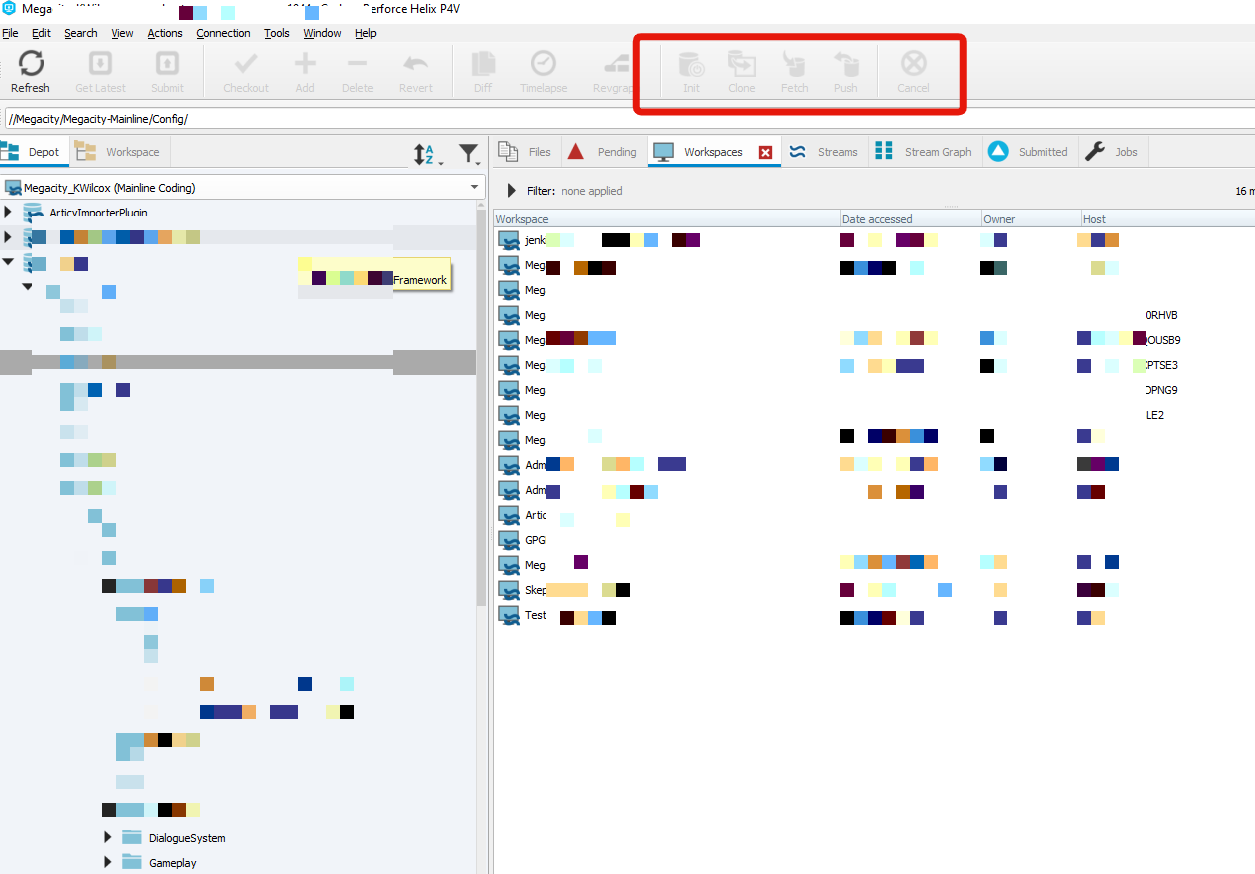
read up on and figure out how to make a workspace mapping
serene flax
I had them install the p4v client from this page
https://www.perforce.com/downloads/helix-visual-client-p4v
And they did the standard install
Helix Visual Client gives you visibility and control over your assets. Use the P4V download for time-lapse and revision views, insight into your project metadata, and a powerful GUI.
serene flax
woven sluice
my guess: they installed a personal server (they should not have) and now the b...
Might be that, this is the interface for one of my users

You're saying Init and Clone shouldn't normally be available for them?
woven sluice
i've never used either, init and clone appear to be for inter-server communication
merry verge
nah it's normal to have those, not sure why they aren't available for hojo
it's probably just the lack of a workspace like you said earlier
they need to create a workspace before they can grab files
woven sluice
I probably turned off some option during p4v install
serene flax
Ah, it was exactly that
They hadn't created a workspace yet
Now its working
Thanks so much both of you 🙏
By the way, does the Super admin user count towards the 5 user limit?
merry verge
yes, every user counts
serene flax
Can I use the super as a regular user then? Instead of having one for myself
merry verge
yes
serene flax
Ah ok, neat
serene flax
There's an error of rebuilding from source manually when someone fetches the project, what file should I be sending to the depot to prevent users from having to do this every time?
I'm sending a Plugins folder with RiderLink in it, might be the culprit of why it fails to compile?
merry verge
I wouldn't include RiderLink in your depot, it's something people should install locally if they are using rider.
woven sluice
they need all of the built binaries to open the project. they can install visual studio and build these locally, or you can figure out a solution to share them. there's a few semi-common ways to do it, it depends how much you want to invest in it and what your team is like
the "good" solution is to set up some form of continuous integration, but if you want to babysteps your dev ops, and if you're the only coder you might prefer to simply commit the binaries in perforce and manually submit the binaries you compile along with your code updates
serene flax
So just adding the binaries folder should resolve it?
woven sluice
yes. good practice is to make sure your perforce server typemap is set up so that the server won't store infinite DLL revisions, since usually these files are garbage once they're obsolete
serene flax
The Binaries folder doesn't show up in perforce
on my workspace
oh wait my bad
was browsing the wrong project folder lol
serene flax
woven sluice
yes. good practice is to make sure your perforce server `typemap` is set up so t...
Pardon the noobness but how do I do that? 😅
woven sluice
I'm not going to claim this as the best typemap for everyone, but for a small indie dev setup where you're not worried about needing to go back 6 months in history, this is what I've ended up with for our typemap. https://i.gyazo.com/7d71785bc3d742632eb435ca2fd598cd.png note at the top, it's keeping max two revisions of binaries files. it's also setting the binaries files to be always writeable
open up a Change Filetype dialog on any file in P4V to get an explanation of all the options https://i.gyazo.com/3ac8427aec494c626f69f3970f4807fb.png
try to google the docs otherwise for more instructions
serene flax
Ah it seems just by removing the RiderLink my user was able to open the project
I'll keep this bookmarked though in case I hve to send the binaries in the future for whatever reason
woven sluice
ah, sorry 😄
^ all good stuff to learn anyway
actually. I always install riderlink as an engine plugin, don't think it's affected anyone else this way
serene flax
I was having some issues with UE5 and the Engine version of RiderLink
Had to install it in the project instead, at least for now while its unstable
woven sluice
eh, well there's your problem 😄
merry verge
It's a known issue with RiderLink right now. Just don't submit it to perforce.
serene flax
Yeah with the engine version it should all be local and this problem shouldn't happen at all
woven sluice
just don't submit it to perforce use UE5. 
serene flax
😂 We're experimenting
worldly holly
Are u guys able to do with command line ‘git add <VS solution name>.sln’ successfully? Tried without gitignore file
With git status that line is not displayed, any random txt file it is
rotund bobcat
why would you want to add your .sln in the first place
worldly holly
Same issue with cpp and h
worldly holly
rotund bobcat
why would you want to add your .sln in the first place
Coz that one and cpp/h is what i work with mainly
rotund bobcat
.sln can be generated from the .uproject file so you don't need it in the repo
.cpp and .h should show in you git status though
except if you ignore them of course
worldly holly
Im trying now without gitignore
If i add one h/cpp class to my solution, UE4 doesnt know ab this
Coz all the difficultes found till now, im trying to specify one by one the files that i would like to be in remote
worldly holly
Coz i want to be able to compare differences in different dates, those differences r only in the h/cpp i work with
My h/cpp r not in my remote, thats what im trying fo fix since a week ago
rotund bobcat
I think you just did a completely wrong setup of your git man
worldly holly
If its only about 100 Mb storage the benefit is small for me, i will do my own backups in my computer harddrive
woven sluice
the amount of sense this conversation made was: could not be determined
 reef lance
Hurray! I just learned how to ignore files, and how to remove files from the repository (while leaving them cached in my directory system)
I got rid of all those megascans assets I had unknowingly included in my repository 🙂
 queen mulch
Is there a way to increase a git repository's 10GB limit?
worldly holly
queen mulch
Is there a way to increase a git repository's 10GB limit?
Limit is 100 Mb
merry verge
do you mean github specifically? Because git itself shouldn't have a limit.
afaik github's hard limit is 100GB but you'll probably get an email from support if you go over 5GB. This is without LFS - there's no limit with LFS but you pay based on size there.
queen mulch
I saw a blog saying that after September 2020, the limit on repos is 10gb without LFS
merry verge
err, not for github
i found a blog related to some other random company that hosts git that I've never heard of, and it mentions what you said
github doesn't actually mention anywhere about a hard limit, just a soft limit of 5GB at which point support might email you.
queen mulch
Ah, maybe that's where i got confused*
merry verge
Old docs mention a 100GB limit
queen mulch
I see. Thanks!
simple lodge
woven sluice
the amount of sense this conversation made was: could not be determined
🙃
Its a choice for sure
It begs the question of what they are doing with the SLN
 regal grotto
simple lodge
It begs the question of what they are doing with the SLN
regal grotto
simple lodge
It begs the question of what they are doing with the SLN
I personally follow a simple rule of thumb: under no circumstances, never ever, data that can be generated from other data should be stored in the same repository. sln file clearly falls into this category, because primary asset is .Build.cs/.Target.cs files, sln is derivative from them.
simple lodge
ye I dont understand why you would need to track SLN changes
worldly holly
I tried one last time these lines in .gitignore to isolate my code files, it didnt work
!Source/
!ThirdPersonProject.sln
!ThirdPersonProject.uproject
merry verge
That's the wrong way to use a gitignore. Just use one that's already been made for you and adjust it if needed: https://github.com/github/gitignore/blob/master/UnrealEngine.gitignore
woven sluice
and stop ignoring everyone. stop trying to put your .sln into source control. 
worldly holly
woven sluice
and stop ignoring everyone. stop trying to put your .sln into source control. <:...
From VS working from my solution, if i add one extra h/cpp, where is stored that change? And what is wrong with first 2 lines of my .gitignore? I only want what is inside Source/ to be tracked. This is the result of trying to work with the .gitignore provided GitHub Desktop(option unreal engine), it didnt work, i havent been ignoring everyone, just the opposite, so i try new solutions when smthing suggested fails for me
merry verge
worldly holly
From VS working from my solution, if i add one extra h/cpp, where is stored that...
Unreal doesn't expect you to store the list of files in the sln anywhere. Everything in a module directory (assuming the module is included in the uproject file) is automatically included, and you can regenerate the sln from the uproject file. Regenerating your project from the uproject will automatically add any cpp/h files in the appropriate directories.
Unreal doesn't use the normal visual studio project format at all - the build system is entirely custom. The existence of the sln (which, by the way, doesn't include any cpp/h files either - it just includes references to vcxproj files which are what actually define what files appear in a project) is purely for your own convenience and as such is not something you should store in a repo.
When you build from visual studio it just ends up calling into UnrealBuildTool - which completely ignores the existence of the sln and vcxproj files and does its own thing (depending on the platform this may involve regenerating project files, which will overwrite your changes anyway). The files don't even need to be in the vcxproj - if they're in the appropriate directory then UBT will compile them.
As such, do not check-in the sln or vcxproj files
Grab the gitignore I mentioned earlier and start there. gitignore isn't meant to be inclusive like you are using it, it's meant to be exclusive - you define what files you do not want to include, not the other way around.
You should be ignoring at a minimum the Binaries folder, sln file, Intermediate folder, DerivedDataCache folder, Saved folder (aside from one or two misc files that honestly don't matter like the project thumbnail), the sln file, and anything else related to the ide (.vs/ folder, .idea/ folder depending on what IDE is being used).
Everything else - Source/, Config/, Content/, the uproject file - should be committed to the repository.
worldly holly
merry verge
You should be ignoring _at a minimum_ the Binaries folder, sln file, Intermediat...
When i was using GitHub Desktop and the gitignore generated with unreal engine option, i tried from the command line to add 1 of my cpp in Source, git status didnt display it, but i added a random txt file and that was displayed with git status
merry verge
I don't know what github desktop did, I don't know how your repository is setup. I'm telling you how things are supposed to work, which includes not committing your sln and using a gitignore that isn't what you posted.
The gitignore I posted above is probably the same as what github desktop gave you, and it assumes the root of your repository is where your uproject file is.
If that isn't the case, the gitignore will largely be incorrect.
worldly holly
I understood ur sln explanation
But still i couldnt commit one single cpp from my project, coz once added wasnt listed in git status
My local repisitory n Source has only 8 h/cpp files
merry verge
Well, no one can help you if all you post is "it doesn't work". What's in your gitignore? Where is the file located? Where are you running git status from (or are you just looking in github desktop)?
worldly holly
Thx for ur patience but im gonna give up, i have lost 1 week of work in my project and i cant afford to spend more time, thx anyway
merry verge
you might have some assets that aren't tracked by LFS already committed but not pushed, or you just didn't track certain types of assets.
LFS doesn't change history just by enabling it - you need to explicitly tell it that you want to migrate items already tracked by git.
regal grotto
Define "better".
 balmy remnant
Hello, I am looking for advice on Unreal Project in GitHub via ssh. I tried a lot of stuff, but I keep getting this:
https://stackoverflow.com/questions/67942769/cannot-clone-github-ssh-repository-createprocessw-failed-error193
Or if you could recommend any other reliable source control, I would happily use that
For 50GB project
 neat stag
anyone ran into issue with perforce where u try to add a file from your workspace? I keep getting:
file(s) not in client view.
woven sluice
Usually means something like the file isn't under the workspace root or you're trying to add an ignored file or something
neat stag
it def is in the workspace
cause when i click Show in explorer, its able to find it
nvm
i fixed it. It's regarding the mapping
it was trying to find <workspace_directory>/DEPOTFOLDER
where it should've been just /workspace_directory/...
simple lodge
balmy remnant
Hello, I am looking for advice on Unreal Project in GitHub via ssh. I tried a lo...
dont use ssh
for gitlfs
balmy remnant
simple lodge
dont use ssh
OK, what would you recommend?
simple lodge
just clone over https
balmy remnant
that throws another error, and when I was googling how to solve that, the recommended solution was to use ssh
balmy remnant
Thi is the original error https://i.imgur.com/enhrKsz.png
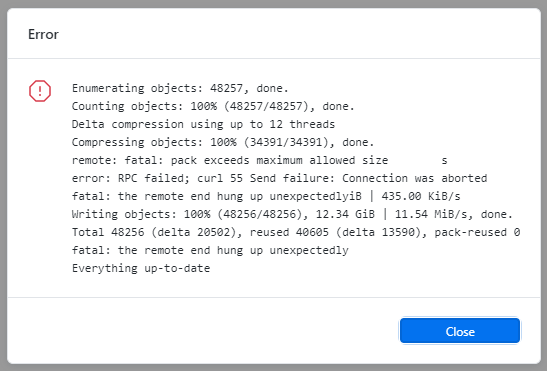
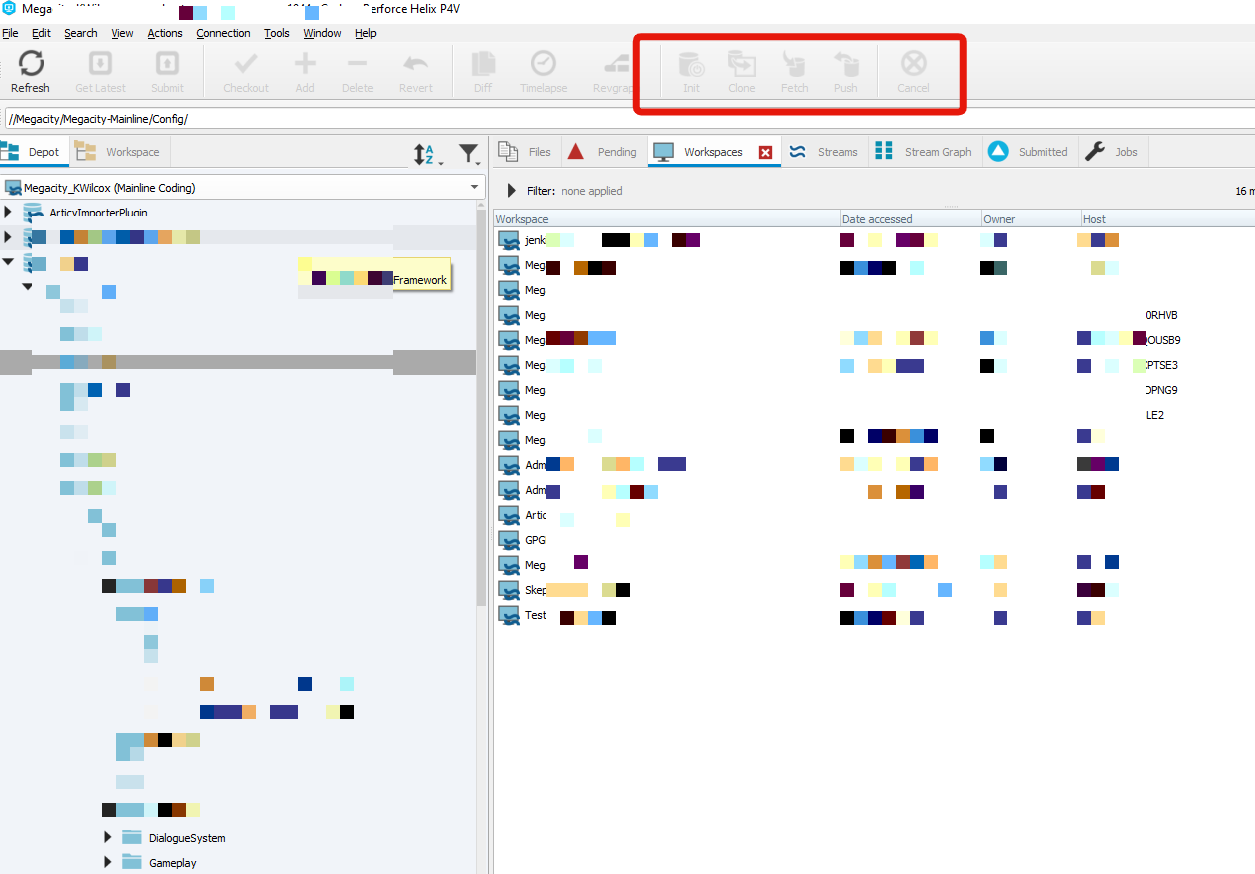
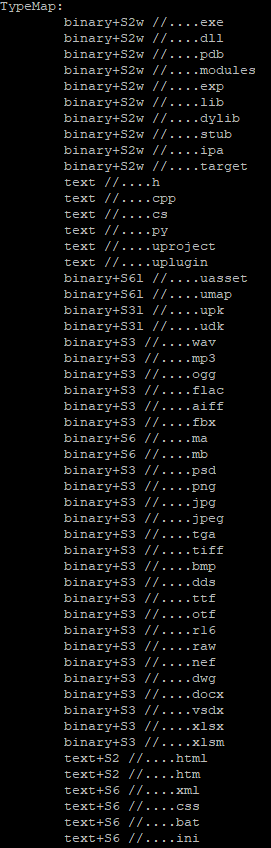
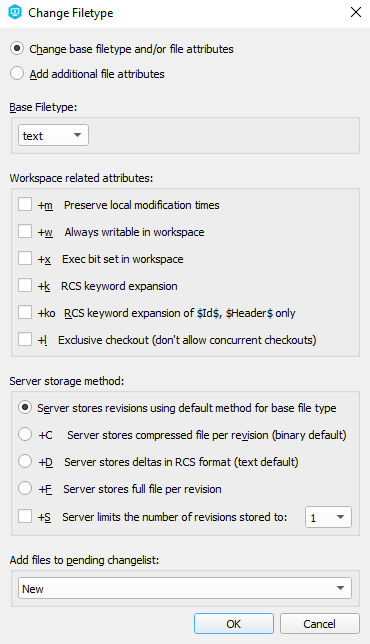
 simple lodge
Try doing a partial push maybe
Sounds like it’s stalling out for some reason , probably timeouts
regal grotto
simple lodge
Sounds like it’s stalling out for some reason , probably timeouts
It clearly says: pack exceeds maximum allowed size. It has nothing to do with any timeouts.
balmy remnant
regal grotto
It clearly says: pack exceeds maximum allowed size. It has nothing to do with an...
Do you know what is meant by pack? The entire repository or the current push?
regal grotto
balmy remnant
Do you know what is meant by pack? The entire repository or the current push?
I believe it talks about current push. Though even if you split it, GitHub (this is GitHub, right?) might not be happy about such repo size.
neat stag
is there more of a favor for GIT LFS over perforce?
merry verge
Are you asking which one is preferred? The answer is perforce, it's what Epic themselves use and it's what most AAAs use in general. The cost and requirement to maintain a server yourself generally mean that it's a moot point for solo/indie dev though. Pick the one you're most comfortable with.
balmy remnant
merry verge
Are you asking which one is preferred? The answer is perforce, it's what Epic th...
Yes we used perforce in work, but we had dev-ops department, and this is just for free-time fun project.
balmy remnant
regal grotto
I believe it talks about current push. Though even if you split it, GitHub (this...
yes this is GitHub, so is it different on Bitbucket or somewhere else?
merry verge
Are you using LFS? Are all the appropriate file types tracked by LFS?
simple lodge
git lfs is entirely usable though
and yes thats a good call
here drop this in,
and rename it .gitattributes
make sure it doesnt have a txt file extension
balmy remnant
merry verge
Are you using LFS? Are all the appropriate file types tracked by LFS?
I was not
Fuego already explained in the private channel
 compact pine
do I need to recompile the source for UE4 when I checkout a different batch? I think I should, but I want to avoid the build time.
 hushed granite
guys&girls it's in French but the guy explain how to setup a Perforce server super easily : https://www.youtube.com/watch?v=1hxQt6hYc04

Après avoir installé Perforce sur le serveur dédié, il faut maintenant y créer un Workspace dans lequel nous pourrons ensuite héberger notre projet Unreal Engine. Voici comment faire!
Sujet de la vidéo : Créer un workspace Perforce sur le serveur dédié.
Playlist Perforce : https://www.youtube.com/watch?v=1sFB3_8Euyc&list=PLKs9b0VUdRdwvoR6De7-7...
maybe with subtitles you can find out
very well explained
and very concise video too
 devout walrus
Is it weird that my .gitignore doesnt ignore anything it literally does nothing....
Its the gitignore that is provided by github even.
rotund bobcat
did you already push files before having the ignore?
cause those will still be tracked afaik
lucid laurel
My Linux Server (AWS) has been restarted where the Perforce Server has been running on. How do I restart the perforce server? I get the feeling that the depot is still there, but the AWS instance doesn't have p4 installed anymore. I could reinstall everything, but I'm worried I lose my depot and perforce server setup.
Can someone guide me a bit? I'm not sure where to start
simple lodge
should be able to run p4d & again
lucid laurel
I got it working. Thanks @simple lodge 🙂
 analog lodge
Hey there, I´ve set up a vps with perforce before, following allars tutorial, but now I´m not getting past the download stage. In PUTTY, when trying to use "wget ftp://ftp.perforce.com/perforce/r14.1/bin.linux26x86_64/p4d"
I´m getting a "no such file p4d" error.
Seems like perforce changed their folder structure or some other crap I don´t understand.
Anybody know how to get past this?
cyan jay
analog lodge
Hey there, I´ve set up a vps with perforce before, following allars tutorial, bu...
IMO you should really not be following that tutorial, it's really out of date.
You should be installing perforce via package install:
https://www.perforce.com/perforce/doc.current/manuals/p4sag/Content/P4SAG/install.linux.packages.install.html
analog lodge
Yeah, it worked fine like half a year ago, but I found another great tutorial to follow:
https://www.youtube.com/watch?v=F5J4EKi3AmM&lc=z22rz50wxyatyhfg504t1aokgmkgygzapslpofundmmfrk0h00410&ab_channel=HowTo

Do you want a cheap hosted Perforce Server? Here I will show you how to set it up.
BEFORE YOU WATCH THIS tutorial you should have allready created a Virtual Machine on Google Cloud Platform with this settings (a tutorial is available here:) http://www.how-to-guide.online/GCPInstanceForPerforce/
- Ubuntu 18.04
- Firewall rule to allow tcp inco...
 tranquil tiger
if anyone is using perforce. I want to rearrange the folder structure of an already created depot (which is on my local machine). Can I just rearrange it in explorer and then re-map the workspace to the depot?
cyan jay
tranquil tiger
if anyone is using perforce. I want to rearrange the folder structure of an alre...
You can do that then run Reconcile Offline work inside P4V which will work out what changes you have made. You get the chance to look through them before making the changelist and able to submit it.
cyan jay
analog lodge
Yeah, it worked fine like half a year ago, but I found another great tutorial to...
Yeah that looks good 👍
Installing via package is really important as it sets up lots of extra things you want, like journalling, log rotation, auto updates via apt-get etc.
FYI personally I would use a NON case sensitive server setting for unreal/windows dev
analog lodge
Yeah, I´m not set yet unfortunatly. I can´t add any files to the depot, constantly get a "file(s) not in client view" error.
Probably gonna restart the whole installation, this time using NON case sensitive setting, maybe that´ll fix it already.
I really still hate that they constantly assume I know how to move around commandline when dealing with issues, because I still don´t.
 toxic nacelle
Hi y'all, just posted in #freelance-jobs for anyone that can help me troubleshoot some P4V issues, on a deadline having issues. Thanks!
analog lodge
Ok, reinstalled everything, this time case sensitive, still can´t add anything to the depot through my workspace.
Keep getting " - file(s) not in client view
I need some help here...:(
toxic nacelle
I actually have the same exact problem, can’t figure it out!
balmy remnant
simple lodge
here drop this in,
So the GitHub worked via HTTPs and LFS (Large Files) enabled by the .gitattributes file (from the message I replied to) from @simple lodge and replacing .gitignore with this:
https://github.com/samsheff/UE4-Gitignore/blob/master/UE4.gitignore
analog lodge
toxic nacelle
I actually have the same exact problem, can’t figure it out!
I might have found the solution.
Unfortunately its now submitting the whole depot and it´ll take a while til I can get back to the settings...
toxic nacelle
Oh man, maybe you can help guide me through, would be massively appreciated
analog lodge
In the workspace settings, you gotta make sure the mappings are named correctly.
//YourDepotName/... //YourWorkspaceName/...
For example:
//RPGGame/...//RPGGame_Matt_Home/...
So, first you pick your workspacename, browse to the local folder, where you have the files stored for your project, then you pick the depot (either the default "depot" or you create a new one with a project specific name), then you delete the other mappings in the view and just leave the one I listed above as an example.
I kinda don´t get what I did different the first time trying to set it up, but now it works...:(
If it doesn´t work for you, I can try to retrace my steps, once submission is done.
toxic nacelle
Amazing! Thanks! Trying now
simple lodge
analog lodge
Ok, reinstalled everything, this time case sensitive, still can´t add anything t...
make a clean workspace and try
analog lodge
simple lodge
make a clean workspace and try
I made it work already. Not 100% sure how though, see above...
Ok, I think I know why it wasn´t working at first.
When you first create your workspace, the mapping defaults to this syntax:
//YourDepotName/... //YourWorkspaceName/YourDepotName/...
But it needs to be
//YourDepotName/... //YourWorkspaceName/...
ornate willow
Let’s say I have 3 commits. 3 is latest. I have git reset —hard 1. It returns saying origin/head is at 1. Yet commits 2 and 3 are sitting there still waiting to be pulled still, so I can’t commit that I want to reset the project to commit 1. What am I not understanding?
Main is at 1 and origin/head and main are at 3 despite what terminal is returning?
woven sluice
analog lodge
Ok, I think I know why it wasn´t working at first.
When you first create your wo...
you're using a classic depot aren't you. they're dumb. streams depots don't have that stupid folder path depth mixup happening by default anymore
ornate willow
ornate willow
Let’s say I have 3 commits. 3 is latest. I have `git reset —hard 1`. It returns ...
I guess reverting the last 2 commits works, but that just creates 2 new commits to push revert those commits which I'm sure is not an ideal thing for me to do on a big scale project
 sturdy lake
ornate willow
Main is at 1 and origin/head and main are at 3 despite what terminal is returnin...
sturdy lake
ornate willow
Main is at 1 and origin/head and main are at 3 despite what terminal is returnin...
So your local repo is at 1, and origin is at 3? If you do a git push —force it will overwrite the remote repo, if it’s set to allow that. You will lose 2 and 3 completely if you do this
rotund bobcat
--force-with-lease 🙏
tranquil tiger
Does anyone know if it's worth using streams over branches in a small team and with the depot located in a storage sensitive machine? (i.e. no storage space to waste)
cyan jay
Streams are always worth using. Doesn't make much (any?) difference re: server storage. But it is more flexible in configuring what your team sync (e.g. same data, different virtual streams for designers, coders, artists, build machines, etc).
Also means you configure workspace views once on the server instead of each user having to configure their own workspace.
tranquil tiger
Ahh i see. So if you have a main, dev and release stream, users wills till need 3 separate workspaces for them
ornate willow
sturdy lake
So your local repo is at 1, and origin is at 3? If you do a git push —force it w...
That's what I was trying to do, but was not able to overwrite history. I wanted 2 and 3 to be lost completely.
woven sluice
tranquil tiger
Ahh i see. So if you have a main, dev and release stream, users wills till need ...
optionally no, workspace can just switch streams. however, this will require downloading all file changes to match the target stream, so if there is many GB different between streams it will be a headache if working long distance and switching often
(related sidenote, my server was sending data out at about 20 Mbps with default settings, I enabled parallel thread sending/receiving and got it to 100 Mbps)
no, I think you are looking for "multi user editing", not related to source control
you didn't even say you did anything
tranquil tiger
woven sluice
optionally no, workspace can just switch streams. however, this will require dow...
Thanks for the reply! I have since figured it out somehow and made separate workspaces per stream. The only downside is that i need to manually reopen UE because it only sees the opened workspace as available from within UE.
woven sluice
@tranquil tiger cool, though I'm not sure what you mean, you would always have to (recompile if using C++ and) open a new instance of UE whenever changing between streams or whenever deciding to work in a different workspace (an entirely different set of files on your PC)?
hushed granite
woven sluice
(related sidenote, my server was sending data out at about 20 Mbps with default ...
really ?
need to check this
woven sluice
yes. never figured out if it's limited now by my VPS or by other things though, couldn't get it any higher than 100 (also, and then Jenkins exposed a flaw that it can't work with parallel streams and corrupted my server  )
)
tranquil tiger
woven sluice
<@!405063587657154571> cool, though I'm not sure what you mean, you would always...
yes, im referring to the fact that i cant switch them from within UE itself. But that's a small thing not really bothersome
woven sluice
yeah, there's no way you could ever have something else. Any time something "external" from UE was changing the project, UE should be closed. In case it wasn't clear before, using a single workspace and moving it between streams can be convenient instead of having multiple workspaces if the streams are kept fairly similar and/or if the user doesn't want to keep space for multiple copies of the project on their disk
fervent birch
hi i am trying to fetch my post commit info with svn to display on a discord server, but all my attempts fail ^^ could someone help me? 😄
cyan jay
I'm trying to make a Perforce virtual stream for programmers that excludes the Binaries folder.
Works fine for the main project binaries folder, but I can't get it to work for the plugins, due to "embedded wildcards". the last line in the stream def is not supported:
share ...
exclude MyProj/Binaries/...
exclude MyProj/Plugins/.../Binaries/...
Has anyone done this before? Is there a workaround I can use?
 urban sun
Hello I am using git for version control, can I somehow have UE4 save assets as text files (e.g YAML , json) so to resolve conflicts in blueprints between multiple authors ?
 bitter sun
Which one I should choose to completely remove this commit? Without being overwrite my current changes
 rotund bobcat
dno what software this is but I would guess undo commit
woven sluice
@cyan jay lmao you're making the same mistake I made for a year. use the Ignored settings
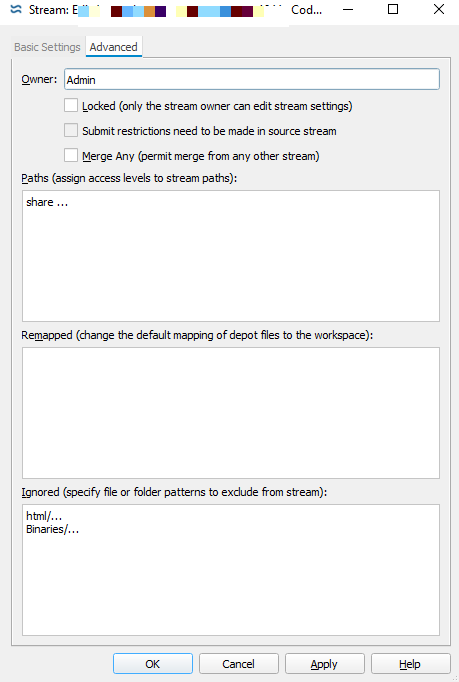
 cyan jay
Nice! Do I want to exclude ALL folders called Binaries though? I guess maybe that's ok...
 pallid ledge
I am using perforce, and I was wondering, how could I push/add my whole workspace to the depot?
I added a bunch of stuff, so I am not sure how
Never mind, I Figured it out later
 thorny eagle
Hello guys, one quick question, I'm using git with git lfs for source control, I tracked my *.uasset with git lfs, the problem is that as soon a I create a branch do so stuff and merge it, if anyone touched the blueprint I changed, it either override everything or juste create another blueprint is there a way to handle blueprint nicely with git ?
simple lodge
lock it or run the merge tool
its a binary asset, its not easy to merge in anything...
sturdy lake
I’ve not played with locking in LFS. Does locking a file lock it across all branches?
merry verge
No. It wouldn't make sense.
The point of locking is to prevent changes at the same time, but branches exist to allow changes at the same time. The only way to have a meaningful locking workflow across branches would be if making a change to a file in one branch locked it from editing in all other branches until merged in.
At which point... you might as well not have branches. So the real answer is to not do your primary content work in a branch at all (unless the merge tool works for that content). Brand new content would be fine in a branch too since there's no chance of a conflict aside from someone making a file with the same name.
An exception being if you use release branches in which case you might want to make release-only changes, but then you wouldn't be merging that back to a development branch anyway so it doesn't matter.
devout walrus
builddata should be filtered with gitignore right? It can be generated by editor?
regal grotto
sturdy lake
I’ve not played with locking in LFS. Does locking a file lock it across all bran...
Yes
regal grotto
merry verge
No. It wouldn't make sense.
You're under a false assumption that LFS locks make sense.
simple lodge
sturdy lake
I’ve not played with locking in LFS. Does locking a file lock it across all bran...
in the git specification yes, but per branch locks are also possible
simple lodge
merry verge
An exception being if you use release branches in which case you might want to m...
tags exist, use them for this
make a release[number] branch, cherry pick in the commits, then tag it
regal grotto
simple lodge
in the git specification yes, but per branch locks are also possible
per branch locks are also possible
Do you have a prooflink for this statement?
simple lodge
They are, but sure
It requires a small change to https://docs.gitlab.com/ee/user/project/file_lock.html
"default branch file and directory locking"
regal grotto
simple lodge
It requires a small change to https://docs.gitlab.com/ee/user/project/file_lock....
- Only on default branch (this isn't quite "per-branch", is it?)
- Only through web UI
- Only if you use GitLab at all
- Only if you're on Premium tier or higher
- According to https://gitlab.com/groups/gitlab-org/-/epics/5884, you cannot use "default branch locks" for LFS files
Today if a file is tracked by LFS, locking will enact a multi-branch lock, if it's not, it will create a default branch lock.
I'd say it is safe to pretend this feature doesn't exist at all.
simple lodge
You can implement something similar that works across all branches, it just requires some creative use of code
regal grotto
simple lodge
You can implement something similar that works across all branches, it just requ...
We started with a statement that there exist per-branch locks and ended up with "one can implement them".
simple lodge
I said, possible
I didnt say anything more than that
I have it working
so whatever dude
merry verge
tbh I thought that locks were per-branch by default but that's apparently wrong.
 still condor
Hi all, does anyone know how to migrate content from a project to a plugin? i have been working in some blueprints, widgets etc and now i want to move to a content plugin to share with other projects, but i am having some issues when copy, move or advanced copy. Is there a trick for this or i have to move piece by piece and make sure any reference is broken? thanks!!!
north swan
How can I merge branches that throw "fatal: refusing to merge unrelated histories"?
Also, why can I not delete my main branch and replace it with something else?
I love how the issue before was, I was currently on the main branch. Then after switching branches, the reason changed,
So in reality it never mattered whether main was currently active or not. 😆 jfc this program
simple lodge
north swan
Also, why can I not delete my main branch and replace it with something else?
make it a non default, then remove any protection and you can delete
north swan
@simple lodge What do you mean remove any protection?
simple lodge
Some git management systems (such as gitlab), have features to protect the branch
 inland dirge

Work in a team with Unreal Engine without worrying about committing, staging, pushing and pulling. This video introduces you to Anchorpoint, a new Git client specifically for artists. You will learn to set up a repository on GitHub and upload your first project versions.
Content
00:00 Introduction
00:30 Setup GitHub
01:58 Anchorpoint
03:10 Com...
Saw this new git client recently, anyone tried it?
jagged spear
Anyone have any suggestions for the best free way to share a 30GB or so Unreal project with a team online? Something I can upload to remotely, vs host on my computer. Most of the files are art asset binaries that won't change, with maybe 1.5GB of actual new data so far.
I've mainly used Plastic for Unreal, and am aware of LFS on Git, but I've never worked with a project on Git where one folder of art assets alone can be 10gb, for example. I've heard it's possible if you split up each individual commit into less than 2GB, but I haven't found much online that seems to back this up so far. Mainly just trying to find the best way forward, whatever that may be.
sturdy lake
For that kind of size, I’m pretty sure you’d have to pay for a Git service anyway. I’m not sure about GitHub, but bitbucket only offers 1Gb of LFS storage on their free tier
jagged spear
Yeah, I agree, it looks like I have to use a payment plan.
I haven't heard as much about Azure, but it looked it up, and it looks like the free tier has a similar pricing structure? 2GB are free, but then you pay more after that?
I've heard some prefer Gitlab, but I still run over its 10GB limit.
merry verge
Azure DevOps is free for 5 users and does not have hard storage limits for git. You are likely looking at the size limit for work item attachments or artifacts which has nothing to do with git repos.
simple lodge
jagged spear
Yeah, I agree, it looks like I have to use a payment plan.
I haven't heard as ...
Selfhost gitlab...
if you are a small team, with infrequent pushes its pretty inexpensive
I havent tried azure devops but im sure its fine
jagged spear
simple lodge
Selfhost gitlab...
It is a small team of a few people, but I'm reticient to self host since I haven't done it before, and the project is pretty time sensitive with a fast turnaround. The peace of mind of remote hosting is appealing.
simple lodge
jagged spear
It is a small team of a few people, but I'm reticient to self host since I haven...
Assuming you have a few bucks, getting someone to do for ya isnt the worst plan
jolly fog
i have perforce setup on my dedicated but its very hard to somehow start using that with unreal
its better to use idk other solution for small project?
aka option which provides much data storage without limit
jagged spear
Yeah, I've heard of people storing 8GB projects on Github (not Gitlab), but haven't seen much backing that up.
Having to potentially pay $5-$10/month doesn't seem that bad for a short term project potentially. If I do pay for a bit of LFS storage, does anyone have any recommendations? Been kind of surprised by not finding a ton of info on this topic.
Also am looking into the free Azure service.
simple lodge
jolly fog
i have perforce setup on my dedicated but its very hard to somehow start using t...
perforce is fine? I mean you create repo and connect to it?
 hidden pelican
Which folders should be ignored for a binary engine build?

Anything else that can be ignored aside from Intermediate and
Plugins/**/Intermediate?
quaint obsidian
jagged spear
Yeah, I've heard of people storing 8GB projects on Github (not Gitlab), but have...
dusky sphinx
Hello I am new to perforce and I wanted to push my project but there is an error if someone can help me it's very nice


sorry for the error there is a little bit of French word
regal grotto
dusky sphinx
Hello I am new to perforce and I wanted to push my project but there is an error...
You don't want to submit .vs dir to Perforce. It contains machine-local Visual Studio files. That additionally are currently locked by a running Visual Studio instance.
dusky sphinx
regal grotto
You don't want to submit `.vs` dir to Perforce. It contains machine-local Visual...
ok thanks
dusky sphinx
regal grotto
You don't want to submit `.vs` dir to Perforce. It contains machine-local Visual...
so I don't have to push certain file related to visual. That's right ?
jagged spear
quaint obsidian
https://discord.com/channels/187217643009212416/375019235853729805/7152532280482...
Thanks, very helpful breakdown. Are there any downsides to azure dev ops? I am thinking of either suggesting my client pays for the GitHub $5/month for 50GB, or I try dev ops. Once I push the art content (12-20GB) there shouldn’t be much activity on the project beyond new maps and cinematics that all use the art content.
quaint obsidian
I don't think there are any downsides as just a code hosting platform.
GitHub has a much more powerful ecosystem. Debatable which one provides a better web interface, but I personally prefer GitHub.
regal grotto
dusky sphinx
so I don't have to push certain file related to visual. That's right ?
Yep. You neither want to push VS files nor Intermediate & Saved folders.
jagged spear
quaint obsidian
GitHub has a much more powerful ecosystem. Debatable which one provides a better...
I have fairly simple needs to share a project with a few team members, so sounds like either is fine then. Surprised Azure Devops is that generous.
Some people claim they have gotten away with larger repos on github without using LFS, but I imagine for Unreal, using LFS is pretty much necessary, right?
 karmic meadow
Question about this part in the docs. When adding binaries, is that if I'm using a custom build of UE?
 regal grotto
karmic meadow
Question about this part in the docs. When adding binaries, is that if I'm using...
regal grotto
karmic meadow
Question about this part in the docs. When adding binaries, is that if I'm using...
I personally think that adding binaries to the repo is a path to guaranteed troubles that will happen when what you have in Binaries is inconsistent with what you have in Content.
On projects I work, we just add the following to Config/DefaultEditorPerProjectUserSettings.ini:
[/Script/UnrealEd.EditorLoadingSavingSettings]
bForceCompilationAtStartup=True
This setting tells editor to automatically rebuild game binaries whenever they are outdated. So our content makers just have Visual Studio installed but they never have to open it.
As a bonus, this gets rid of that "The following modules are missing or built with a different engine version, would you like to rebuild them" dialog. I cannot image situation when you would want to click "no" it in.
karmic meadow
How does it know that the binary is outdated though?
regal grotto
karmic meadow
How does it know that the binary is outdated though?
How does your IDE know that the binary outdated and needs to be rebuilt when you press "build solution"? 🙂 Exactly the same way. This job is delegated to UBT in both cases, to be precise.
quaint obsidian
jagged spear
I have fairly simple needs to share a project with a few team members, so sounds...
Yes, it's necessary
karmic meadow
regal grotto
How does your IDE know that the binary outdated and needs to be rebuilt when you...
Cool. So ignore it entirely, add that snippet in the config, and make sure everyone installs VS pretty much?
regal grotto
Under the hood, it involves comparing timestamps of .cpp/.h/.uproject/.Build.cs/.Target.cs/some-other-that-I-cannot-currently-remember files with dll/.obj timestamps.
regal grotto
karmic meadow
Cool. So ignore it entirely, add that snippet in the config, and make sure every...
Yep. One more bonus: programmers do not conflict with each other trying to commit updated binaries. And you don't need to set up some kind of CI to rebuild/commit them regularly.
Though I have to admit that I saw different setups where content makers never compile anything and just use whatever was committed in Binaries.
Downside: you need to install Visual Studio for everyone [if they are on Windows, of course. Situation on other platforms is better]. Depending on your company, Community license might not work for you, so it somewhat costs.
silver token
There is also a tool available from Epic called "Unreal Game Sync" (or UGS) that can be used to manage the whole binaries issue. Our content creators don't build the editor in any way and don't require a VS install. Programmers check in source only and an automated build compiles the editor. UGS then acts as the access point for new builds and keeps content & binaries together. I'm not 100% sure if it keeps the binaries in source control or just on another network location.
regal grotto
silver token
There is also a tool available from Epic called "Unreal Game Sync" (or UGS) that...
Programmers check in source only and an automated build compiles the editor
Are programmers allowed to commit content changes? Suppose, I add a new feature to code and want to create a BP with it.
There are two options to go from here:
a. I do commit BP immediately with code. Then, every content creator who updates between my commit and automated build commit is screwed because their editor simply cannot load the BP
b. I wait until automated build happens and commit BP only after it. In this case, I-as-a-programmer am severely slowed down by the process.
c. Everyone is somehow blocked from updating to my commit (or newer) until automated build commits new binaries.
silver token
Yes they can. There's a built in versioning system in the Engine that UGS leverages so that anyone that tries to sync the content before they have an editor with the right code can't open it. This goes for code that goes along with edits to existing content as well as code+new content.
regal grotto
Oh, so it is option C.
silver token
I suppose, but they're only blocked on modified assets. And the goal is to turn around new editor builds as fast as possible. so even if you are blocked by a specific change the time until the new binary is ready is maybe a half hour.
I've never heard of it being a problem. Everyone always has more than enough work to be doing something else until that specific task is unblocked.
Also, not everyone is blocked. Programmers still sync code and build their editor locally. They don't use the pre-built one ever.
regal grotto
silver token
I suppose, but they're _only_ blocked on modified assets. And the goal is to tur...
I suppose, but they're only blocked on modified assets.
I think I could construct a situation where updating all content except one asset [that is blocked from update because it needs newer code] would actually break the game.
silver token
That's probably true. But in practice it doesn't occur because content creators sync using UGS and not P4 and UGS prevents them from making those sorts of mistakes.
It can prevent someone from working as fast as they might like, but it allows them to work much safer.
regal grotto
Well, I once worked on a project where content makers would get code updates only on the next day. This wasn't UE-based project. And it worked. But was painfully slow 😄 And ended up in a total disaster each time when binaries that automated build committed didn't work properly. And new, fixed binaries would only be available the next day after they were fixed.
silver token
Oh, yeah that sounds dreadful. Our goal is to roll out new builds as fast as we can. When there's the capacity for it we'll even be building multiple new versions of the editor (for different changelists) at the same time. Nothing really prevents programmers from breaking that build, but we're building it often enough that they usually find out about it and have a fixed build shortly after it fails.
It's a nifty tool that can even make programmers lives easier. I tend not to sync through P4V directly and sync with UGS (for the versioning issues). Programmers are usually syncing to specific changelists or latest with it. Content folks are usually setup so as to only be allowed to sync to a CL with a successful Editor build, but they are usually syncing to "Latest Good" which is the most recent Editor build that succeeded.
woven sluice
we do the same thing but without UGS (we're small). coders submit code files, a bot posts that the build is being updated by CI and then posts success/fail in our discord server. it's quite easy for any artists/designers with half a brain to just not run Get Latest if there is either a build in progress or a failed build message up. artists can usually get updated project binaries about 3 minutes after coders submit code. (we have no automated testing yet, time will slow down soon  )
)
regal grotto
woven sluice
we do the same thing but without UGS (we're small). coders submit code files, a ...
3 mins is pretty nice. Using a prebuilt engine and only rebuilding the game itself?
woven sluice
just launcher engine, holding off on source engine as long as possible
merry verge
even with a source engine, if you setup your CI right such that it only builds the engine itself when engine code changes you can hit that number.
woven sluice
yep
merry verge
ofc having well-spec'd hardware for CI helps too
woven sluice
i just have an alternate build config i can trigger manually that does a full rebuild if i want it
regal grotto
merry verge
ofc having well-spec'd hardware for CI helps too
Not building something is usually faster than building something, even if you have a well-spec'd hardware 😄
silver token
woven sluice
we do the same thing but without UGS (we're small). coders submit code files, a ...
Yeah, it's totally possible with the right people. We're a large team and I'm not entirely convinced some of our content people have half a brain to not screw up with a system like that. 😉
I think our MP sub-team has a similar feature for posting builds to one of their Slack channels.
 finite dome
Has anyone used the git lfs plugin for file locking? I've tried using it multiple times but it has extremely slow performance when checking out a file
Anyone ran into this?
jagged spear
After looking into more paid LFS storage, I've narrowed down my options between Github and Bitbucket. It's a team that normally uses Github, so I think sticking to what they normally use is good.
Has anyone found any positives or negatives to Github's $5 for 50GB vs Bitbucket's $10 for each 100GB?
 storm vortex
finite dome
Has anyone used the git lfs plugin for file locking? I've tried using it multipl...
storm vortex
finite dome
Has anyone used the git lfs plugin for file locking? I've tried using it multipl...
It is super fast for me but I have to use command line, git lfs lock/unlock
I also use this plugin but yeah it is super slow https://github.com/SRombauts/UE4GitPlugin

GitHub
Unreal Engine 4 Git LFS 2 Source Control Plugin (beta) - SRombauts/UE4GitPlugin
much prefer to use command line
 oblique grotto
hey folks I am trying [and failing] to setup perforce for a small studio. When I install it for the first time, the server [service?] seems to be running, but if I stop it or reboot, it doesn't start again. There is no perforce service listed in "Services", and I am mighty confused as to what might be happening. I am using LTSC 2019. The error message is: Can not start the Perforce Service StartServiceCtrlDispatcher: p4s.exe: The service process could not connect to the service controller. I was wondering if anyone has any experience with this issue?
 pale mulch
manually fiddling with perforce servers sounds costly on time. Personally I'd just use a paid service to host and maintain it for me, like assembla or somesuch. But, if you're on the SPEND NO MONEY WAGON.... have fun!
cyan jay
It's entirely possible and not that difficult to setup. If done correctly virtually maintenance free. That said I've never seen that particular error I'm afraid.
@oblique grotto is it running as user with admin privileges?
woven sluice
sadly I keep getting the impression it's quite a bit more painless on linux... but then you have to know or learn linux...
oblique grotto
Ah man I managed to fix it by deleting the service and re-adding. It was a days work but she’s alive now!
simple lodge
oblique grotto
hey folks I am trying [and failing] to setup perforce for a small studio. When I...
was going to say just remake the service to run p4d & or similar, takes 5 min
But you must be a masochist to run p4 server on windows
Honestly youll probably find it less faff to use hyperV and install in a VM
 timid anchor
Anyone using plastic scm here? The saved folder seems impossible to ignore, I keep getting logs in pending changes, as well as some config files.

Tried both with slash first and without
 woven sluice
I'm not using plastic so I don't know... But it looks like maybe you've already put the files into source control. Most systems won't just stop tracking the files because you added them to the ignore settings. If so you probably have to actually delete them and submit that deletion. @timid anchor
timid anchor
Ah I see, makes sense. Ty
oblique grotto
simple lodge
Honestly youll probably find it less faff to use hyperV and install in a VM
This is my first time, it’s running in a windows VM on a qnap NAS. What OS would you suggest? I only went for windows as I figured it’d be painful doing it all in CLI. Turned out it was painful in windows as well lol.
simple lodge
oblique grotto
This is my first time, it’s running in a windows VM on a qnap NAS. What OS would...
Any linux as you wish, I typically use ubuntu or centos
Installing on ubuntu takes maybe 10 minutes, and another 5 mins to make service file. Tuning the params is what takes most of the time
oblique grotto
before I undo a days work doing it under windows, what are the problems that I might expect to see running it from windows?
regal grotto
oblique grotto
before I undo a days work doing it under windows, what are the problems that I m...
Be prepared that you'll eventually end up with repository that cannot be properly checked out to non-Windows.
https://community.perforce.com/s/article/3081
Windows server + UNIX clients revisited
If your Perforce Server is on Windows, your UNIX users must note that their Perforce Server stores case-variant files in the same archive name space. For example, if you issue the following commands from a UNIX client workspace:
p4 add dev/file1
p4 add DEV/file2
Both files are stored in the same depot directory on the Windows server, with the entire path normalised to lower case. In this example, the depot path name stored on the file system is "dev". However, the Perforce meta-data retains the case of path and file names as entered at the command line. Because the Perforce Server tracks the file locations based on meta-data entries, UNIX-based clients see these files in different local workspace directories, based on the case-variance in the meta-data.Windows users must be careful to use case consistently in file and path names when they add new files. Files added as "//depot/main/foo.c" and "//depot/MAIN/bar.c" will appear in two different directories in a UNIX user's workspace. Although the file is stored in only one case in the Perforce server archive on Windows, the Perforce meta-data retains the case of files and paths as originally added. The actual case of directory paths might vary based on how those path names were input at the command line or how the paths were picked up by the OS if you use drag-and-drop operations.
Emphasized by me. "Must be careful", lol. Of course sooner or later someone will fail to be careful.
So, I have windows server + windows client. I say
p4 add dir/file1
p4 add diR/file2
p4 add dIR/file3
p4 add DIR/file4
On Windows of course all files are inside the same directory. It's just the way I typed command line (because my cat walked over caps-lock or whatever).
And now you repository is fucked up. Bu you will only find that out when you try to check out it on Linux and see that you actually have four different directories instead of one.
oblique grotto
ah this is great advice.... we are primarily developing using UE4 and windows for virtual production, I can't see us using Linux for this work any time soon... and this issue primarily affects a single repo as opposed to the whole depot?
[per repo obvs]
woven sluice
That's not a problem related to running the server on a windows machine, that's just a problem with mixing windows + unix client machines in an organization (I might go so far as to say, a problem that would be caused by letting any developers use unix machines at all)
I think it's just a bit more clunky dealing with windows services and junk compared to unix for server troubleshooting
jagged spear
Regarding UNIX clients, I presume that includes working with UNIX based OS's like OS X?
Even with regular Github version control, I've heard horror stories of mixing OS X and Windows machines on the same repo if someone isn't careful with their file naming.
 vocal quarry
jagged spear
Regarding UNIX clients, I presume that includes working with UNIX based OS's lik...
vocal quarry
jagged spear
Regarding UNIX clients, I presume that includes working with UNIX based OS's lik...
I dont sure but you can set some rules about eof lines on .gitattributes to avoid that problem on git
 timber bone
I have the git plugin enabled with UE4.26, as i've used it a bit in the past. Is there a way I can revert the entire project to a previous commit in UE, or do I need a different solution for that?
simple lodge
jagged spear
Even with regular Github version control, I've heard horror stories of mixing OS...
There are ways to fix a lot of it, using stuff like CRLF and naming fixer scripts
Premaking all the directories too
jagged spear
timber bone
I have the git plugin enabled with UE4.26, as i've used it a bit in the past. Is...
Just wanted to be clear - are you only using the Git plugin without source control software (i.e. SourceTree)? Or are you saying even with external software, you're running into trouble reverting your project to a previous commit?
The Git plugin (as well as others like the Plastic) plugin are designed to work in conjunction with using your own version control software.
rotund bobcat
the plugins in the engine are pretty shite imo
jagged spear
Yeah, their documentation will list features that you'll need other software for, and generally recommend you still use other software as well. They're handy for getting started, automatically generating an ignore file, locking files, and doing basic commits, but aren't all in one solutions.
 teal nebula
Pinned YT video about source control still a good starting point?, or too basic for people with experience?.
timber bone
jagged spear
Just wanted to be clear - are you only using the Git plugin without source contr...
Without. I was under the impression it did it on its own. I'll start a client up and test it out
 frail hatch
hi, i use azure devops for storing repositories, and today I pushed an update and when my friend pulled it the materials where all different and some materials were even missing
oblique grotto
hi again, I am setting up P4 [getting there] and coming from github, I just wondered what is the equivalent of a repository? Should I have one workspace per project [like a repo]? This is for a small team sharing VP projects
simple lodge
stream/depot
oblique grotto
so a depot per project?
simple lodge
id recommend stream over depot, but sounds good, @woven sluice is probably more qualified to advise tho
oblique grotto
I haven't worked out streams yet, I had assumed they were branches of an individual project
just as a query, if you were setting up a version control system for UE 4 and were free to choose/learn any one, which would you go for?
simple lodge
depends on budget and team size
woven sluice
use streams depots. you might want to try both (create one classic depot and mess around with it for an hour too) but most people prefer how streams depots work @oblique grotto
oblique grotto
so each project is it's own stream depot? sorry if I sound basic, just want to try and find the correct path
woven sluice
You can kind of set it up however, but logically having each depot (streams or classic, a depot is a depot) contain some individual thing is fine. I have one for our game and one for each plugin project I'm making, there's no real wrong answer
simple lodge
woven sluice
You can kind of set it up however, but logically having each depot (streams or c...
There is, no source control
oblique grotto
Thanks again guys, this is the sort of guidance that is t written down anywhere. I really appreciate it.
dusky sphinx
hi i think i have a problem with perforce. it is normally when i want to submit the window of ue freeze?
or it is a real problem
dusky sphinx
ok nice
jolly fog
why perforce is not uploading all stuff and its only uploading some stuff also p4ignore its aka not working

 woven sluice
i can't tell if you're asking why your perforce ignore is allowing too much stuff to be uploaded or if you're asking why perforce isn't uploading more stuff
jolly fog
both its not uploading more files and now i have problem aka i cant even open project on other pc because of rebuild problem
also seems like p4ignore is not even working
cyan jay
jolly fog
also seems like p4ignore is not even working
This is often because you need to run CMD line to set the var:
p4 set P4IGNORE=. p4ignore
analog lodge
I have a stupid question...
When first playing around with source control a while back, I had an issue with some sun blueprint not being updated properly in source control and that it somehow was based on starter or engine content.
Problem is I don´t quite remember and now I need to know, to avoid any issues on a new project I´m starting.
So the questions are:
A) Is the skyatmosphere volume engine or starter content or can I just savely use it in my project?
B) Am I save if I simply don´t create my project with starter content?
I´ll probably figure this out before anyone answers, but please ping you if you have an answer anyways...:)
analog lodge
Damnit, So many people suggested to use streams instead of Depots, but I just can´t figure out how to make them work.
Anybody online who could answer some questions?
 blissful crown
Guys! Hi everyone, i have a question about teamwork. How to work on same project from two computers at the same time? I want to create my own blueprints and my friend want to create another blueprints at same time, with server feature it seems impossible, so is there any different way to work together? I heard something about git but I have no clue about it
Can someone tell me how to use git feature?
analog lodge
Thats a very lengthy topic, you gotta do some googling first and come back once you have a basic understanding.
simple lodge
blissful crown
Guys! Hi everyone, i have a question about teamwork. How to work on same project...
host/signup for a repo and profit - multi user server does sort of work for that, but its relatively non trivial to setup securely
stuck cape
Hey all, we are using source control and when trying to save a certain BP we get this error. Ticking the box makes it writable but does not save at all. Therefore we cannot check it out or submit it to the SC. Anyone know how to get past this issue? It says its checked out by my team member but it is not.
 iron bronze
stuck cape
Hey all, we are using source control and when trying to save a certain BP we get...
iron bronze
stuck cape
Hey all, we are using source control and when trying to save a certain BP we get...
" It says its checked out by my team member but it is not."
please double check.