#source-control
1 messages · Page 2 of 1
 neat grotto
 merry verge
Yeah, I'm happy to see someone at least moving in this direction, regardless of whether it's for games or something else.
 cyan jay
We used Swarm at my previous place, it was pretty good overall.
 pulsar adder
Hi everyone!
I a working on a project with a small team. We went with SVN as our source control however we would like to know which hosting service would be the best to host our repository.
Also, is there any option to host the repository in a single computer and then have access to it through WAN?
Thanks for the help
cyan jay
pulsar adder
Hi everyone!
I a working on a project with a small team. We went with SVN as o...
Any cloud provider will probably be fine, and the svn server will always be hosted on a single computer accessed via WAN, whether a self hosted machine somewhere or a cloud vm.
pulsar adder
cyan jay
Any cloud provider will probably be fine, and the svn server will always be host...
Alright. Thank you very much
 lethal cedar
Okay, starting to understand it better.
UE5 starter maps are world partition, which is OFPA by default. That's why the actors weren't updating.
 vague whale
Hello, I've setup perforce but i am not sure i am doing things in a perforce friendly way, i've kept plugins with my project, however when i come to compile i get errors about not being able to open files
 winged plover
Hello guys,
Could anyone help me with source control ? Please
 lethal cedar
Can I Sync OFPA assets from within the editor?
These folders aren't visible in the unreal content browser, and I can't find any way to make them visible.
Must it always be synced from the Source Control GUI?

 teal bone
They might get synced if you sync the map they are related to. I'm hoping Epic made that happen.
 vale basin
Yeah pretty sure they sync with the map. It's meant to be a somewhat invisible change to the user, you are meant to use the editor source control integration and not submit maps via another GUI anymore
The editor properly resolves actor names in the gui
winged plover
Can anyone help with source control ? Please
 woven sluice
winged plover
Can anyone help with source control ? Please
woven sluice
winged plover
Can anyone help with source control ? Please
no
winged plover
woven sluice
no
Why don’t you ignore my message then ?
 runic summit
Generally speaking the odds of having your question answered go up in direction proportion to HOW SPECIFIC they are
example - "Why is perforce not letting me undo a changelist that I just pushed?"
if you want a source control example, you can search for my name in THIS channel and see a year or two ago when I had some issues and it took a lot of specific questions before I finally had things click for me
winged plover
runic summit
example - "Why is perforce not letting me undo a changelist that I just pushed?"
Im just trying to hire someone who can help with that.
runic summit
post in the jobs board - you can ask for help here too but, again, if you want something setup the jobs board would be the best place
if you haven't checked the pins, there are some go-to videos for now to set up things yourself
winged plover
runic summit
post in the jobs board - you can ask for help here too but, again, if you want s...
Thank you for the feedback !
vague whale
I get the impression, perforce doesn't need a lot of cpu, but storage and UE are key
 restive coyote
Hey. I'm trying to save a CPP project to GitHub, do I just need to make sure I upload the .cpp and .h files? I'm using Visual Studios though
 river latch
restive coyote
Hey. I'm trying to save a CPP project to GitHub, do I just need to make sure I u...
river latch
restive coyote
Hey. I'm trying to save a CPP project to GitHub, do I just need to make sure I u...
You'll want to commit the Source, Config and Content folders as a minimum, as well as the uproject file.
restive coyote
I forgot to add in this wasn't for UE5, it's related but not strictly UE5
river latch
restive coyote
I forgot to add in this wasn't for UE5, it's related but not strictly UE5
Grab the recommended git ignore for visual studio and commit it to your repo. Then add everything; it'll ignore your built files.
In summary, you have a solution file .sln which has your project files .vcproj which visual studio uses to build things. They need to be committed in addition to the cpp and h files, and any other assets you add. What you don't need are the binary files bin or intermediate objects in obj. The gitignore takes care of it all, and many other files that can come up for a wide range of development habits.
The link: https://github.com/github/gitignore/blob/main/VisualStudio.gitignore
GitHub
A collection of useful .gitignore templates. Contribute to github/gitignore development by creating an account on GitHub.
restive coyote
Okay! I will look into adding things to .gitignore
I will try to remember I need only the .sln, .vcproj besides the .cpp and .h files
restive coyote
Gitignore is great!
 hoary lichen
hello guys, I am a noob in VCS and I came across this link, and what it says seems illogical to me, maybe I am getting it wrong

GitHub Docs
If you push a 500 MB file to Git LFS, you'll use 500 MB of your allotted storage and none of your bandwidth. If you make a 1 byte change and push the file again, you'll use another 500 MB of storage and no bandwidth, bringing your total usage for these two pushes to 1 GB of storage and zero bandwidth.
so I say to myself imagine what happens with a UE project which is several gbs
rn pro accounts on github have 100gb storage
but judging by this quote 100gb will be used so fast
 radiant musk
Is there a way to add to source control only assets that are used in the maps and not everything from the content folder ? For example I add a 10gb pack to the project and use only 2-3 meshes on the map. I don't want to upload the entire 10gb pack, but only the 3 meshes I use
 wind gazelle
copy only the meshes you use or add them independently
you are free to choose what files to git add
or keeping them in separate plugin
vale basin
radiant musk
Is there a way to add to source control only assets that are used in the maps an...
Not really. You can choose what to commit, but there's no tool that tracks asset usage and selectively commits based on usage. The way most people do this is they add content to a "marketplace" dummy project, and migrate just the content they want
radiant musk
vale basin
Not really. You can choose what to commit, but there's no tool that tracks asset...
That’s what I tried to do but it’s not letting me migrate twinmotion content
vale basin
radiant musk
That’s what I tried to do but it’s not letting me migrate twinmotion content
any log messages?
radiant musk
vale basin
any log messages?
this or sometimes nothing shows up and still doesn't migrate. I'm sending it to the content folder


or this
when I get this last message and I click yes, nothing happens
vale basin
Interesting. Just to make sure, you are selecting NewProjectDir\Content as your output folder? not choosing a sub folder or anything? Also you may get more info if you go Window->Developer Tools -> Output Log
But i haven't touched the twin motion stuff, so maybe it's special. Thats just a common trip up i see
 hoary lichen
hello guys some of my c++ files have "?" in the top right of them
but when I right click
I don't have mark for add option
 fierce torrent
I'm in a scenario where I have to merge some branch to main. There is this one Blueprint widget that has some conflicts going on.
Is there any way to solve these with Blueprint diff tool?
If yes I'd appreciate any tips.
What I used to do Is open two versions of project: some branch and main jsut to compare these blueprints and copy paste everything manually. This time I'd like to at least make sure there is no better alternative
 storm sleet
This is the only alternative. That's why we use file locking and only work on binary files on the same branch, and work with activated source control plugin (unreal tells you to update to latest revision when it's locked)
merry verge
You can use the in-editor merge tool if absolutely necessary, but it's horrible to work with and shouldn't really be part of your workflow - just use it for emergencies.
#source-control message
storm sleet
But still, even with that tool you need to manually copy paste
merry verge
Yeah. As I said, just for emergencies.
Mildly better than hopping between two normal instances of the editor to copy changes since it at least highlights what changed.
storm sleet
Yeah, sure
vale basin
 sacred fjord
or its only me
sacred fjord
or its only me
I wouldn't say it's only you, lots of people trip up on it, and version control in general. But no, i don't know of a widespread issue at this time
sacred fjord
yesterday i could connect to my perforce server, although today i cant
i know that router did a restart
and changed the ip
although i have a rule that opens 1666 port for every ip
in a specific lan ip
which is the same as the computer server
 hushed spoke
Anyone here has a perforce server on Vultr? I want to check my disc usage and I don't know how.
cyan jay
hushed spoke
Anyone here has a perforce server on Vultr? I want to check my disc usage and I ...
You need to log into the VM and use whatever tool is appropriate for your OS.
e.g. in Linux use df -h or in Windows check file explorer.
hushed spoke
@cyan jay I found out that my admin panel in Perforce has it 🙂
 cyan jay
Ah yeah good point 👍
 foggy bough
Hey guys. I have a question. How do you check the size of a perforce depot?
Also, curious, so devOps, means all and any operations that goes into development of an app right? e.g coding, source control, packaging, app release etc are all devops? Or what exactly? Trying to get the concise definition of the term. And if it's all operations, I'm wondering if even the artistic bit of gaming is considered devops. Sorry, just trying to get it clear 😄
vale basin
Dev ops means many things to many people. It’s meant to be the bridge between it (operations) and developers. Making sure all bases are covered rather than gaps between “that’s an it issue” etc.
Exact definition is hard as it changes from org to org, but usually covers ci, deployment(packaging and distribution) and live server automation
foggy bough
cool. thanks
radiant musk
Hello. I had source control enabled and submitted my project, but then I have spent a few days working without source control enabled. How can I know only submit the changes that I did while the source control was disabled ?
cyan jay
foggy bough
Hey guys. I have a question. How do you check the size of a perforce depot?
Run p4 diskspace from the command line (in P4V, right click and choose Open Command Window Here)
cyan jay
radiant musk
Hello. I had source control enabled and submitted my project, but then I have sp...
in P4V right click the root folder and choose Reconcile Offline Work. This brings up a dialog containing changes of: Any files added, Any files deleted, Any files modified
woven sluice
p4 diskspace does not tell you the size of your depot(s). i think you would want to use regular file system commands to find the depot's folder and check how big it is
 limpid obsidian
foggy bough
Hey guys. I have a question. How do you check the size of a perforce depot?
limpid obsidian
foggy bough
Hey guys. I have a question. How do you check the size of a perforce depot?
p4 sizes -sh //depot/...
cyan jay
I guess it depends what you want to know. That p4 sizes cmd will show you how much diskspace it would take to sync the current HEAD revision of the depot.
But if you're interested in the server side storage it's not straightforward due to compression, lazy copies etc.
woven sluice
p4 sizes -sha for all revisions.
but not sure if it displays compressed or original size
i think uncompressed, so more than actual disk usage. so my original answer i crossed out to just go and use the native file system is probably actually still the best answer
merry verge
If what you want to know is how big a specific depot is on the server's disk you can just look at the files on the server. The p4 database also takes up some space but generally not anywhere near the size of the actual on-disk storage. All the files for an individual depot are stored in a folder named after the depot under the server root.
But yes, this is not the same as the actual size of files if you sync'd the files to a workspace due to compression and other optimizations used for storage.
merry verge
So, just going to post my little discovery here... there's a commandlet for diffing arbitrary uassets as text files. No fancy UI like blueprint diffs, but this actually works on any arbitrary uasset (and potentially umaps too).
I have no clue when it was added, but at least as of UE5 you can do this (example uses p4merge to do the actual diff, the commandlet just outputs two text files and then calls into a third party diff tool)
UnrealEditor-Cmd.exe C:\Path\To\Your\Project.uproject -NoShaderCompile -run="DiffAssets" %1 %2 DiffCmd="C:\Program Files\Perforce\p4merge.exe {1} {2}"
Gives a result like this (this was a diff between two versions of a sequencer asset).
 merry verge
Managed to get it working in p4v as the default tool for uassets/umaps but due to some oddities around how p4v passes arguments I had to make a batch file that'd call the tool and have p4v call that.
 lunar crow
Hey all, looking for advice on source control solutions - I teach a game dev course that is working on a game to be shown at PAX south in a month and we're well into dev, but we have not yet set up source control since we're mostly working on art elements. Some of my students have reached a point with their code though that really necessitates the use of some kind of source control now though, so I'm wondering what the best solution for UE5 is?
I only have experience with GitHub on smaller teams for Unreal, but I've been hearing a lot about perforce; The main solutions we need are the ability to check out and make changes to blueprint assets, materials etc. Merging and diffing would be secondary. If I had more time I would chat to out IT dep and get a network drive set up for our repo on campus, but we're super short on time.
merry verge
git is probably going to be the quickest and easiest to setup for you
Either on github or another hosting platform (gitlab, azure devops, etc).
lunar crow
Ok thanks, does git support checking out assets now? For memory that didn't seem to be a function last I worked with it
merry verge
git lfs does but it's not the most seamless experience
you can lock lfs-managed assets but the workflow isn't perfect. Perforce is definitely better in that department (plastic might also be an option to look at).
If you want to look into git lfs - https://docs.github.com/en/repositories/working-with-files/managing-large-files/installing-git-large-file-storage
Note that hosting providers for git tend to have very different limits and costs once you start using LFS.
I believe this is the plugin usually recommended for using git inside unreal: https://github.com/ProjectBorealis/UEGitPlugin
The built-in plugin doesn't support LFS locks iirc (but might have been updated last time I checked)
lunar crow
Great, thanks heaps! I remember LFS being rough, hopefully we can get something set up. Pricing is certainly something I have to be very conscious of as well, I only have something like 5GB of LFS storage at the moment
merry verge
Normally people recommend Azure DevOps as it has unlimited storage but it's priced by user once you have > 5. For storage-based pricing I honestly don't know which host tends to be the best.
lunar crow
Hmm, might be that I can work with 5.. I have 3 students that are contributing the most to our codebase by a wide margin, but 20odd students in total that we would ideally want using the repo
Azure is in Microsoft's domain too which could be good since we use Planner and Teams for our Agile solutions, but I'm thinking it may not play great with Unreal?
merry verge
it's just git hosting and (if you want) project management tools. Same as github.
I'd compare their pricing vs github lfs packs. With > 5 users and > 2GB of assets you don't really have any free options unless you can find discounts for educational purposes.
lunar crow
Ok cool, thanks for all the info and advice! Hopefully I can get something set up
merry verge
fwiw github has some academic discounts and stuff but I don't know what it applies to - might be worth reaching out to them to see if there are options for more LFS storage.
There's some degree of parsing (it's how copy-paste works in blueprint, for example - it exports what you select as the same text as what I posted) but it's probably not the safest thing since it hasn't really been tested that way.
A ton of data in these files isn't mergable either since a lot of it is going to be arrays of mesh data which will never merge nicely no matter what format you put it in.
That seems more like a limitation of how the editor lets you copy/paste though. The actual object representation in text supports just about everything as far as I can tell.
I can even use this to diff blueprints however horrible it is to work with - every property of every node is there, along with property defaults.
Not with this commandlet at least. There might be another one?
mmm, don't see one. Wouldn't be hard to make though - basically just copy UDiffAssetsCommandlet.
wait... might have found one - UnrealEditor-Cmd.exe -run=TextAsset filename=path/to/asset.uasset outputpath=some/path.txt
I've been specifying the full on-disk path for DiffAssets, no idea if it works with a short package name.
radiant musk
cyan jay
in P4V right click the root folder and choose Reconcile Offline Work. This bring...
thx, I just opened it, but there are a lot of files that I don't know what they are. Should I reconcile for all of them?
 cyan jay
radiant musk
thx, I just opened it, but there are a lot of files that I don't know what they ...
cyan jay
radiant musk
thx, I just opened it, but there are a lot of files that I don't know what they ...
idk I can't really see the filenames, but hopefully you have some idea of what you were changing over the past few days?
You can also run Reconcile just on the Source folder if you have been changing C++, or the Content folder for content.
woven sluice
The fact that you've got a bunch of "crashr..." files indicates to me you might be submitting/tracking files that should be ignored, there's a chance your ignore file isn't working or wasn't working earlier
You can change the filename and path column widths of course
radiant musk
I already submitted everything. I don't have a ignore file, I'm still learning how to use perforce
 winter ermine
Greetings! If you were using a plugin that you can use to modify asset parameters during PIE and have them saved in the asset itself, what would you expect the behaviour to be regarding source control for these changes? Should the plugin check-out those files automatically?
Or is there a way to mark it as modified? There seems to be a bool at USourceControlHelpers::QueryFileState().bIsModified but I can't find a way to modify it by code. (It says "Cannot assign to rvalue")
 rotund bobcat
@opal oar what do you need to know?
 opal oar
so basically i did a big fuckup with my libraries which is not fixable or compilable and now i need to go back to the version before that commit, i branched from my fixed version and now want to merge my fixed version into the main branch and basically overwrite the latest commit
rotund bobcat
you branched after you broke it or before?
if you branched after breaking you can just merge in
right?
opal oar
i branched the fixed version(working version)
rotund bobcat
you can go on your main branch and revert commit the breaking changes first and then merge in your new branch
opal oar
the fixed version was comitted before my fuckup
rotund bobcat
or if nothing has changed since the breaking commit, you can reset the main branch to a commit before that
opal oar
yeah i tried that but reverting doesnt help because dependancies are corrupted or something, which means i really really need the fixed commit
opal oar
rotund bobcat
or if nothing has changed since the breaking commit, you can reset the main bran...
my fuckup was the latest commit, how do i reset it?
rotund bobcat
go on your main branch
do git reset --hard HEAD~1
this will go to second to last commit
you can also do --soft for more safety. That will give you that last commit as staged changes
afer you are on the working commit, do a git push --force-with-lease
that will overwrite the history
so that the faulty commit is gone on the remote
opal oar
been a while since i used the cmd, i have to right click in my repo and call git bash right?
rotund bobcat
then you can merge in your fixed thing
idk how you usually open cmd
I just do it in the adres bar of windows explorer
if you type cmd in that, one will open in current fodler location
also beware though that if someone already pulled your broken commit, it might cause some issues for them as well
opal oar
well someone already pulled it
opal oar
rotund bobcat
also beware though that if someone already pulled your broken commit, it might c...
so it would be better to overwrite in main branch by merging with my fixed version right?
rotund bobcat
yeah if that's possible
opal oar
i just merge the branches and everything will be overwritten right?
opal oar
rotund bobcat
yeah if that's possible
never really understood where the line is drawn when merging
rotund bobcat
idk what you mean by that
but if you have no conflicts you can merge just fine
and issue would be fixed
rotund bobcat
into main?
opal oar
yeah


 rotund bobcat
hmm
I think your best course of action is a reverse commit
if you really think that is not possible do the force push thing
and if the other guy has issues he could always reclone the repo
opal oar
the only thing i can do now is reverse commit and clone again cause i need the old version to get the editor running
@rotund bobcatcant i just discard all changes made in that commit?
rotund bobcat
that is basically what a revert commit does
opal oar
no, i need the whole original version of the commit before that
opal oar
rotund bobcat
that is basically what a revert commit does
that is the only way.
so lets delete it
rotund bobcat
I'm confused as to what you're saying
if you want the commit to have never existed
checkout that commit and force push
rotund bobcat
rotund bobcat
go on your main branch
this
opal oar
but it doesnt fix my bugs
because dependencies are corrupted
which are only halfway included
thats why i need the whole repo set back
which means i need to delete and clone again
rotund bobcat
if you already pushed it that won't fix it
still I'm confused as to how removing the breaking commit would not fix your issue
opal oar
it will fix it by just not existing anymore
opal oar
i need to download the old version of my folder.
to overwrite everything that has been corrupted
i cant save anything in the version that has been corrupted
thats why i need to get the old version
 unreal citrus
I tried pushing a default third person template to github but I encounter such issue
Any way around this? I already tried increasing buffer size, didn't help
edit: sort of resolved, switched from github to gitlab and push passed no probs. Still no idea why Icould not push to github

 mortal vale
When I want a person to have develop only Blueprints and level design etc.
I include the compile bins Binaries/Win64/UE4Editor-MyProject.dll in Source Control, but should I include MyProject.target and UE4Editor.modules?
(and excluding source folder)
foggy bough
Where do you write this command?
foggy bough
cyan jay
Run `p4 diskspace` from the command line (in P4V, right click and choose Open Co...
Thank you!!
 north coral
unreal citrus
I tried pushing a default third person template to github but I encounter such i...
north coral
unreal citrus
I tried pushing a default third person template to github but I encounter such i...
reasons why i refuse to use git for unreal game dev 💀
SVN for life 💪💪💪
teal bone
I so read "gym" and not "git"
Basically don't push binary assets to git without lfs. And even that has issues.
 lapis needle
can anyone recommend a decent .gitignore for UE5 + Rider
( mainly i sometimes switch between my macbook and desktop for working on my project )
 gaunt arrow

GitHub
A collection of useful .gitignore templates. Contribute to github/gitignore development by creating an account on GitHub.
 quaint obsidian
unreal citrus
I tried pushing a default third person template to github but I encounter such i...
quaint obsidian
unreal citrus
I tried pushing a default third person template to github but I encounter such i...
seems like youre not using lfs?
 robust bluff
I'm new to git. I want to undo the previous x commits and have my project be in the state it was x commits ago. What's the proper way to do that? I don't care about losing the work of those 6 commits at all.
quaint obsidian
robust bluff
I'm new to git. I want to undo the previous x commits and have my project be in...
git reset --hard HEAD~6
 timber quiver
I'd like to use perforce for version control, but one of my teammates is from Russia, and the perforce website at least, is blocked for him.
My question is if anybody else from Russia knows if the actual perforce is blocked too. Otherwise he would have to use a VPN, but that has limited speed and would not be convenient overall. In that case we will probably set up another source control.
cyan jay
timber quiver
I'd like to use perforce for version control, but one of my teammates is from Ru...
Perforce is self hosted (unless you use Assembla) so you can host it on any VM in any datacentre/cloud provider you want.
timber quiver
Ok thank you, I will set it up and try it then
 undone robin
quaint obsidian
git reset --hard HEAD~6
undone robin
quaint obsidian
git reset --hard HEAD~6
This is correct. But note that any remote that doesn't let you force-push that branch would reject subsequent changes.
undone robin
undone robin
This is correct. But note that any remote that doesn't let you force-push that b...
To avoid that one would use git revert and push extra commits that undo the previous commits.
radiant musk
Let's say I migrated some content from another project to mine, but then I decided that I don't need this content. How can I undo that ? I use perforce
radiant musk
can someone help ?
radiant musk
the problem is when I transfered the content, it went all over different folders
and I can't find everything by hand
how can I get back to earlier version of the project
radiant musk
I wanna get back to earlier version of my content folder
I click get revision
and nothing happens ?
woven sluice
You can either inspect past change lists to find them, or Undo one or more change lists. Get revision is for moving your known state in the depot timeline back and forth, not for making changes to content
@radiant musk
radiant musk
woven sluice
You can either inspect past change lists to find them, or Undo one or more chang...
is a past changelist gonna revert my content folder ?
Im not very sure what i'm doing
woven sluice
Undoing a change list will undo that change list as a new change list
radiant musk
I already did that, it removed the content from my map, but not from the content browser
woven sluice
I would only have to guess that you didn't undo the change list(s) that added this content then
radiant musk
I have a question mark on that content
timber quiver
Hey guys,
I've set up Perforce source control for my project.
The depot is on my pc. Now I want to make the depot (on my pc) accessible to my teammates.
Can somebody point me to the right direction as to what I have to google?
Or if someone has a guide on how to set that up, that would be best.
radiant musk
woven sluice
I would only have to guess that you didn't undo the change list(s) that added th...
btw, I have no submitted any changelists since I added the content
woven sluice
Oh. "Reconcile offline work" on your content folder, put everything it finds into a change list, then revert it. Either revert individual files from the pending change list or the whole thing if you're certain you don't need any of it
radiant musk
woven sluice
Oh. "Reconcile offline work" on your content folder, put everything it finds int...
Isn't this only if source control is disabled ? Mine was enabled . And Is it reverting everything since the last submitted changelist or ... ?
woven sluice
Well are you certain that everything you added is listed in the current pending change list?
If yes, you can skip the Reconcile
radiant musk
I don't have any pending changelist atm. I did a submit 5-6 hours ago. After that I added the new content which created a new changelist and I reverted it
but the content is still in the content browser
I just noticed that
all of those files have a qeustion mark on them
Which means that they are not under source control ?
Is it possible to delete all files with a question mark

I deleted them by hand, but there might be more
timber quiver
When port forwarding for perforce source control I get this error. Could somebody tell me why this tells me "invalid entry!"?
From the guides I checked I'd have to put a local IP in somewhere, but my router doesn't have that option. (I assume it just takes the local IP from the device option)

Should I just leave the 2nd TCP blank? I didn't get an error, but I'm not sure if its correct to do so.
teal bone
Maybe it just doesn't like ranges that aren't, well, a range.
limpid obsidian
radiant musk
I deleted them by hand, but there might be more
p4 clean
timber quiver
teal bone
Maybe it just doesn't like ranges that aren't, well, a range.
the example looked just like that. And the "local" auto fills 1666-1666, even if I have only the first TCP added. I just hope this is set up correctly (by leaving the 2nd one blank)
radiant musk
Is it just me that source control is causing small screen freezes when clicking buttons?
 uneven shale
anybody who can tell me how my friend can use pull requests for our unreal project? we have no idea how it works
teal bone
You create a branch. You do stuff in that branch. You then create a pull request from that branch back into the original one. That may or may not be your main branch.
If it's accepted, the changes from the new branch are merged back into the original one.
limpid obsidian
can you lock files across branches in git now? (i use p4)
teal bone
Didn't even know git had file locking.
limpid obsidian
I think with LFS it does. i'd be curious to see what the overall workflow is like

GitHub
Git extension for versioning large files. Contribute to git-lfs/git-lfs development by creating an account on GitHub.
I imagine with the git distributed model, you need to run a centralized server to coordinate this (ie. gitlab)
"Git LFS will verify that you're not modifying a file locked by another user when pushing" - that seems rather late in the process
teal bone
It doesn't seem to indicate whether that works cross branch or not.
uneven shale
teal bone
You create a branch. You do stuff in that branch. You then create a pull request...
i still don't quite understand lol im very new to this. what exactly does my friend have to do?
teal bone
It would be done via your git host or your git program locally. If it's github, go to pull requests and hit create new pull request and just follow the on screen prompts.
limpid obsidian
looks like you lock the file and push locally? and git lfs locks displays all locks taken?
teal bone
teal bone
It would be done via your git host or your git program locally. If it's github, ...
If you use github desktop, it's even easier.
uneven shale
teal bone
If you use github desktop, it's even easier.
my friend needs github desktop aswell right?
teal bone
Not if you use the github website as suggested before that.
...assuming you're using github.
uneven shale
yeah im using github
so he needs to install the project files from github. then make some changes to it, then just create a pull request?
teal bone
If by that you mean that he needs to checkout your repository, create a branch, make changes, push a update and then create a pull request, then yes.
You don't have to use pull requests to merge code. You can just create changes and push them directly. PRs are more like a safety/code review thing.
And you don't even need to create a PR to merge a side-branch into the main one - it's just, again, a process to facilitate that.
(it does make it easier if you don't know how to use git, though.)
I would suggest you both go find some git tutorials.
Some high-level ones (that don't necessarily deal with git commands, but with concepts)
quaint obsidian
LFS locking was introduced in LFS 2.0.0. It locks any file for the whole remote, across all branches.
 long hull
PSA for people hosting on GitLab SaaS free tier: on october 19th, a limit of 5GB/namespace + 5 users will be enforced.
https://about.gitlab.com/pricing/faq-efficient-free-tier/
foggy bough
Hi guys. So i accidentally marked files for deletion (i don't even know how that happened) as you can see the blue x on one of the files. I tried to go to actions --> revert in the menu but as you can see, the revert option was greyed out. How do i unmark those files for deletion?
This is what I'm talking about

 urban crystal
foggy bough
This is what I'm talking about
urban crystal
foggy bough
This is what I'm talking about
you see the "no workspace selected" in the left hand corner? Click that and select a workspace, this should solve your issue.
timber quiver
I've set up perforce with a depot on my pc. After some tinkering I was able to connect it to the internet, so that my teammate can work on it.
But now the project has big delays with everything we do. from moving assets, to making basic blueprints.
3 weeks ago when we worked on the gamejam and had access to assembla (with smartgit), there was no lag whatsoever.
Does anybody know what can cause these delays/lag? I just can't imagine this to be normal.
timber quiver
Does perforce lag/slow down the project of anybody else? Or is this a common issue?
teal bone
The editor integration isn't the best.
timber quiver
I see. I'll try to use it without the integration, but I think I'll most likely use smartgit as i had good experience with it before. I really wanted to use perforce because of the integration, but it that doesnt work that well, then I don't think I need to use it.
limpid obsidian
timber quiver
I see. I'll try to use it without the integration, but I think I'll most likely ...
perforce works perfectly well at scale for large teams with large repositories. you probably don't have p4 configured with optimal settings, bad disk I/O throughput or network latency (with too many hops across networks)
timber quiver
Yes I assume so too. I barely got it to work as it is. I'm not sure if its worth trying to fix the problem, or switching to smartgit.
 restive hamlet
Would it be a good idea to make zip file patches for patching game project sources during development?
I have a couple maps, a couple c++ classes, a plugin and a batch file and some project settings from one project that I'd like to be able to add to any project. The maps, C++ classes and batchfile - looks like perhaps I could just unzip into the target project because I wouldn't be stomping anything. Project settings and adding the plugin I think would require fancier merging.
restive hamlet
I just tried it and got some broken references. Perhaps the best way is to setup a minimal source project and use the migration tools.
 lavish shale
Anyone know how to clone a repository that uses git lfs? I'm trying to get my project onto my Mac from PC. I'm getting an error when I clone the repository that says that the summary for the package is invalid when trying to load the project on my Mac, and a bunch of blueprints are not showing up in the content browser.
 potent mist
does anyone know how to fix this? googling doesn't really return anything. I know the password I've inserted is correct
 vale basin
Open p4v and see if it asks you to sign in
I think by default it signs you out every 12 hours
potent mist
I've logged off and on P4V several times and I'm still getting this error in unreal
vale basin
Is your p4 username different to your windows username?
potent mist
yes it is
vale basin
Anyway, one way to do it is in command prompt type this
Setx p4user=username
Setx p4passwd=password
This does have some security caveats though, it means your password is stored in plain text in your environment variables, which may not be ideal
vale basin
potent mist
yes it is
You may get away with just setting the p4user variable then
You may need to log off and back on for all programs to pick up those new vars
Like out of windows, not p4
vale basin
potent mist
let me restart brb
If it didn't work type echo %p4user% in command prompt, the no spaces around the equals is important but common mistake
vale basin
Awesome
potent mist
thanks @vale basin !
vale basin
Np
potent mist
I was going crazy
vale basin
It can be like that
radiant musk
Hi, when I migrate content to a project that has source control enabled, why the new meshes don't automatically get mark for add ? They have a question mark on them
merry verge
because the instance of the editor doing the migration isn't aware of your source control settings (and may not even have the plugin necessary) so it doesn't even try.
Just mark them for add after migration. Assuming you keep a relatively clean content directory it shouldn't be hard to mass-add new files.
vale basin
Also, if using p4, you can open p4v and go "Reconcile offline work" and it will find any new files and modified files
 dusky pivot
Hello! Is there a way to make automatic adding files to changelist in perforce? I would like not to press "+" each time when a new big file is created.
runic summit
is there a trick to restoring a skeleton that somehow got messed up?
what's the correct procedure, because won't changing it also change the animations it was bound to?
runic summit
dusky pivot
Hello! Is there a way to make automatic adding files to changelist in perforce? ...
Mine does this by default, whether I want it to or not (aside from adding a file type to the ignore settings)
 worldly sun
Guys can someone point me where to look for a Discord Bot for VisualSVN submissions to be seen in a discord channel, i have seen this in a discord but was long time a go ?
I found this one https://github.com/marth8880/discord-subversion-hook-scripts but i get an error when i try to install the second library
https://i.imgur.com/BbFTBU8.png
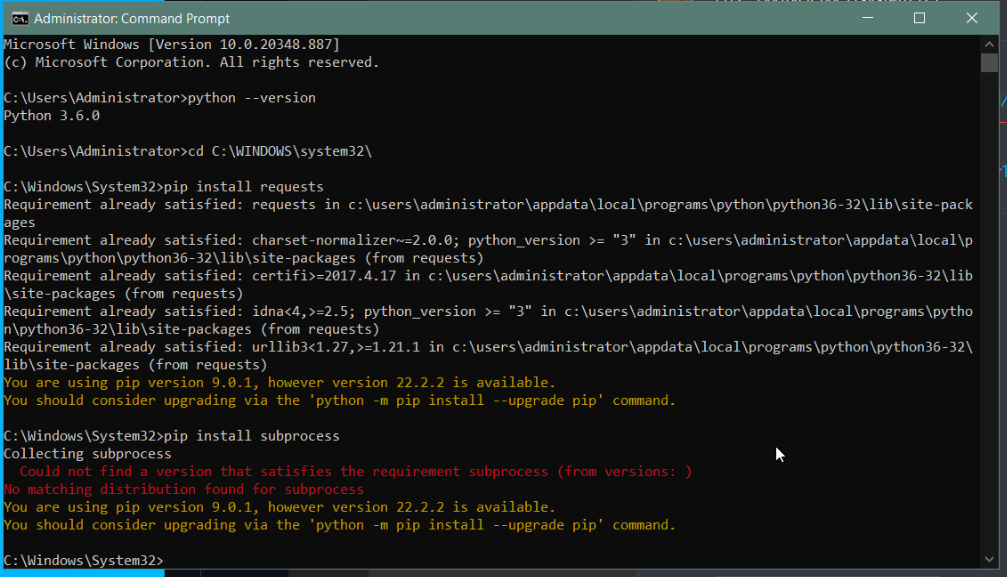
Also i m not a programmer, so i m not exactly sure what i m doing 😛
timber quiver
I have a question, that might sound dumb but I just have no idea how this works.
I decided to use Github for my source control, but the project will be over 1GB later on (so publishing is not an option). I want to make my repository (on my pc) accessible to my teammate. I was able to accomplish it with Perforce, but Perforce also made it easy to do. I just gave my teammate this "myPublicIP:1666" and he had access to it.
With Github, I don't know how to give him access. My understanding of a forwarded port is that it's like a gate to your pc, but how do I specify where it has to go ( not just to my pc, but to the repository)?
 strange hawk
guys, i am trying to upload my project to my github, its nearly 13 GB. so its taking a alot of time via github app, i tried sourcetree but i keep getting this error, any other way to upload to github?
 timber quiver
Oh I see! I will consider the azure devops, I'll have to check it out first, but just in case, would you happen to know where I could find a guide/tutorial on setting up a git server? also, is it difficult to do? I'm not that much of a coder, but I can do very simple stuff (or follow 1:1 in a tutorial)
timber quiver
Ok thanks a lot for your help. I've set up Azure DevOps and it works perfectly and it was very easy to set up. I can't believe such a service exists for free. I don't understand why not everyone is using Azure DevOps 😄
merry verge
Doesn't help that ADO's other services... exist. That's pretty much the best I can say about them. Github at least has an obviously focused effort on source code hosting and some relatively simple but good quality bits that circle around that.
But if all you're looking for is a git repo then yes, ADO is a great option.
teal bone
timber quiver
Ok thanks a lot for your help. I've set up Azure DevOps and it works perfectly a...
If everyone used ADO, I'm sure they'd clamp down on it. 😛
wind gazelle
do you close github prs by yourself or it is automated after some time post-merge ?
for ue prs on github
 merry isle
hey everyone, have a quick question if anyone can spare a minute.
Just setup perforce and was able to make changes and stuff while the editor was running
Closed the editor and trying to run it again from Rider and getting these error messages saying the files its trying to modify is locked.
Is there a "correct" way to handle this?
Im assuming there's a way for rider to auto checkout when you start or something?
The 1st file im not sure if it needs to be in perforce or not, but the 2nd is the actual .uproject unless im reading this wrong
 vale basin
merry isle
hey everyone, have a quick question if anyone can spare a minute.
Just setup per...
vale basin
merry isle
hey everyone, have a quick question if anyone can spare a minute.
Just setup per...
generally speaking you should setup your p4 ignore to ignore everything in intermediate and saved directories (including intermediate in plugin directories). And for the binaries directory, depending on your team, you can either ignore the directory, or set most files within to have a filetype of +w which leaves them writable so it won't interrupt compilation process
merry isle
ah okay makes sense, ill go back over the ignore and typemap setup. I followed the setup tutorial that was on perforce but looking around some more i stumbled across the typemap setup on unreal's website just now and it has a few more things listed compared to perforce's
so ima give that a go and update the ignore file some more and see if it fixes it, thanks for the info!
vale basin
Just as a tip, you will need to delete or update what is already committed manually. Ignore and typemap don't update what's already in there
merry isle
gotcha, ill prob make a copy of the project and just nuke the repo
 halcyon iron
Somehow I can't push my changes to Git, it keeps crashing unreal 🤔 Does anyone know why and how to fix it please ? Ping me if any answer 🙂
 teal bone
You probably want to install the debug symbols. Might get some useful output then.
Also use github desktop. It's fab. Assuming you're using github, or course.
 short delta
Hi all, I need help with Perforce.
We have someone checking out a file by accident, and he is now on vacation.
And we cant work with the file because its locked.
Can someone explain how to unlock them file? Tag me.
We were not able to figure it out...
😦
urban crystal
short delta
Hi all, I need help with Perforce.
We have someone checking out a file by accide...
An administrator can use the -C option to revert another user’s open files.
short delta
urban crystal
https://www.perforce.com/manuals/cmdref/Content/CmdRef/p4_revert.html
Thanks. I forwarded it.
 vagrant frigate
Is this normal?
SourceControl: Error: Operation 'UpdateChangelistsStatus' not supported by source control provider 'Git LFS 2'
runic summit
What's the correct process for backing up a skeleton in source control, in regards to all the animations that detect the change? Can I safely ignore them - I keep animations in my repo but I don't need to back them up when the skeleton is modified , can I safely disregard them ?
vale basin
If the engine has marked them as modified, you probably want to commit them. Theres a reference or something updated
 leaden musk
I'm getting this error, my project is hosted on digitalocean and I went ahead and got more space. But the issue ensues... Can anyone guide me🙏 🥹 🥲


 pulsar parcel
you probably have to resize the partition actually on the VM
you have to do that in AWS anyway
leaden musk
ah, I'll try this first thanks^^
 zealous lance
Hey im new to github source control with unreal, im trying to make a commit after i migrated over a folder full of assets. I have the unreal git ignore included so i thought that filtered out that stuff? the commit im trying to make is like over 2GB so clearly im doing something wrong, thanks
rotund bobcat
were the assets already in your source control before you added the git ignore?
zealous lance
i had already been pushing my project to github for a few versions and then i migrated some tree assets folder over that came with a bunch of stuff and now my git commit is over 2gb and it fails to push evrytime
when i commit/push do i need to do anything special to ensure it uses the gitignore file?
i just do the git commit -m"" -m"" and then i git push origin main
 forest crag
GitHub and game assets sounds like a catastrophy in the making, even with Git LFS. You're probably better off using a different provider or a self-hosted server.
I know this doesn't answer your particular question directly, but git - especially GitHub - is better for just source files.
zealous lance
well i dont want the assets
thats what i thought the gitignore did?
i only want to upload my source files i just dont know how to do it lmao pls help @forest crag
forest crag
I would start an empty repository
add the gitignore first
then start working with that
zealous lance
the gitignore was always there from the start'
do i need to do anything inside of the git ignore?
forest crag
zealous lance
do i need to do anything inside of the git ignore?
Grab the ones you need. This isn't a gitignore file but you can convert where it is needed:
https://pastebin.com/v3XPuQ46
zealous lance
alright sweet thanks
forest crag
if you just want the pure "Source" code files, there is also another method of writing gitignores where you can filter out everything you don't need:
https://stackoverflow.com/questions/987142/make-gitignore-ignore-everything-except-a-few-files
zealous lance
does git add . use the gitignore?
forest crag
forest crag
if you just want the pure "Source" code files, there is also another method of w...
this is a very aggressive way of filtering, but it makes sure you're in full control of what gets added by devs in your project, I've used it a couple times
zealous lance
okay ill definitely take a look in a minute
forest crag
zealous lance
does git add . use the gitignore?
yes but you can just "git status" to see if your .gitignore works or not
woven sluice
Are you seriously suggesting to someone that they only commit source code files to source control? You can suggest this, but where's the rest of the suggestion? 😄 you may be recommending an even bigger catastrophe in the making
 languid plume
Hello, we are a small team of 2 people going to 3, we would like to share our work with Unreal projects. I am reading about multi user editing. but I can
can't find information if you are using already a sinc tool such Resilio Sinc. I have read about source control but I wonder if multi user would work OK for us.
my question is since we use Resilio we all have exactly the same file, if we use multy edditing will this conflic with Resilio sinc? or we need to have the same project and files but only using multi user to sinc the changes but not the source files?
woven sluice
Source control and multi user editing are actually entirely different concepts and topics
You cannot expect to use Resilio for game development collaboration, you need to learn an actual source control tool (perforce or git or plastic or svn). I don't actually know how to use multi user editing itself, sorry
vale basin
Multiuser editing is a bit of a mess from what I hear. It's a pain to setup and very buggy. I wouldn't be using it as the basis for your whole workflow. Source control is the way to go
languid plume
well we do Arch Viz, I don't have a background on Game development but I do in VFX. The other person are Viz artist so I was looking for something simple for them to use. Resilio is a consisten file sicking tool, so far for 3D max workflow is good but for Unreal things gets more complicate. OK so I iwll take a look at Source control in Unreal and see how that goes. You guys recomend Git? I am guessing?
vale basin
Perforce is the one that gets the most love from epic. But there's a lot of people that have success with git+lfs. Sounds like plastic is in good shape too
languid plume
ok that's what I was wondering if the Epic development team had a preference, cool thank you for the advice
vale basin
Perforce is the defacto standard in the games industry.
 zealous grail
Anyone using Sourcetree?
I can't figure how the hell to use it
and my UI of it looks way different from anything i see in tutorials
leaden musk
Can someone explain to me how I can make the mounted volume appear on p4v. I am only seeing the base server storage even though the drive has been mounted.
The volume is showing up when I run the df -h command.
urban crystal
leaden musk
Can someone explain to me how I can make the mounted volume appear on p4v. I am ...
what does the "Mounted on" column says for that volume?
leaden musk
urban crystal
what does the "Mounted on" column says for that volume?
/mnt/volume_wuxia_01

 trim grove
So, I have an Azure DevOps account setup and I have an existing project that I want Source Control to and back it up on Azure DevOps.
Are there any steps I need to follow other than initializing a git repo in the Project folder, adding a remote to my Azure remote, marking LFS files and hitting git push?
teal bone
You have to init lfs
runic summit
vale basin
If the engine has marked them as modified, you probably want to commit them. The...
The skeleton was saved, so it was updated - but whenever I do that, it always wants to check them out - I didn't push them (bc it was like 1k animations and I didn't want to unless required)
I look at my other machine and the 'old animations' have no skeleton, simply because I had renamed the skeleton, so the push effectively deleted the old skeleton these were referencing. Simple enough to do a bulk property edit and pick the correct skeleton, but then perforce wants me to check these out to update them.
While it makes sense if I rename the skeleton they want to be updated, IRRC, this happens even if the I simply save the skeleton (which happens the moment I bring in a new animation or edit one) .... is it just not common practice to back up animations in source control, or what should I do so that each time I edit skeleton it wants to modify 1000 animations?
forest crag
woven sluice
Are you seriously suggesting to someone that they only commit source code files ...

Poor guy just wanted to gitignore an accidental 2 GB commit to GitHub
I'm not everyone's babysitter and not his boss, ofc you're supposed to put the assets under some sort of source control, but which solution you use is up to you
I'd stay away from the combination of assets on GitHub + Git LFS though (personal experience), Git LFS alone is fine.
woven sluice
You started that train of thought by discouraging them from placing assets in their source control without any justification/alternative. You gave the bad advice without any qualification. That's all
forest crag
Like gentlemen, let's agree to disagree then 👍
woven sluice
Your loss
forest crag
Nah, the real loss is time for having this conversation in the first place. We both (I assume) got work to do so let's keep it civil.
woven sluice
Well. @zealous lance whatever you're doing, make sure all your assets are stored in source control.
If you're new to this and thinking that maybe you don't need that -- that's dangerous
runic summit
Hojo - what's the proper practice for managing animations/skeleton on perforce? I wrote a quick writeup on my problem and am stumped -
 silver token
runic summit
Hojo - what's the proper practice for managing animations/skeleton on perforce? ...
silver token
runic summit
Hojo - what's the proper practice for managing animations/skeleton on perforce? ...
What exactly are you looking for? There's no real difference in working with those asset types then there is any other binary asset.
Check it out, modify it, check it in.
runic summit
silver token
What exactly are you looking for? There's no real difference in working with tho...
I have a write up that explains the problem a few posts above
silver token
Oh, I see that now.
The things I can recommend are either: tell perforce to revert files that are unchanged (that can happen sometimes with UE) or just go ahead and check them in.
Sometimes changes just have fallout and you've got to submit that. But it really shouldn't be seen as a big deal.
merry verge
Just... checkin the changes? I don't see a problem here, who renames skeletons that often?
And the issue you're talking about isn't specific to skeletons. Renaming any asset that has references to it will modify other assets (unless it leaves a redirector, but you don't want to leave those around unless you have to).
Unreal's asset system is based on paths - unity uses an asset id that doesn't change when you move the asset so it isn't an issue, but unreal when you move something you have to update anything referencing it too.
If you're worried about resubmitting lots of files that haven't changed much and taking up server space then look into storing only the last few revisions of assets (p4 supports this automatically with filetypes). It sucks, but game engines aren't exactly designed to save space in source control.
woven sluice
Yeah. It's always safe to run "revert unchanged" on a change list. If stuff remains in the list, it's changed. Submit it or 
@runic summit
runic summit
merry verge
Just... checkin the changes? I don't see a problem here, who renames skeletons t...
Well they wouldn't revert unchanged but besides renaming, even if I just save the skeleton they seem modified, unless I completely missed something.
merry verge
Modifying a skeleton resulting in animation assets being marked as dirty is something I've seen as well but it's not related to renames (which is something that happens with all asset types and is expected).
I'd blame it on some changes to skeletons requiring updates to animation assets but the checks for that being over-broad and marking assets as dirty on any change rather than just the ones that require it. If you know you've only made minor changes to the skeleton that are probably safe then just ignore the changes. If you want to be sure, I posted a diff tool included with the engine a couple of weeks ago: #source-control message
 ancient oxide
I've got a blueprint which has a merge conflict and after I resolve it, the blueprint no longer shows up in the content browser or has any reference to it. Anyone know what might be up?
wind gazelle
When using GIT LFS & UE is it possible to somehow to perform "delete old asset objects over month age"
since nobody would try to revert that long
since repo growing to over 400gb and most of it are assets and textures
i now you can locally do git prune, but how to free server space
technically can do history rewrite then delete unreferenced objects but that does not work
radiant musk
Why newly created/imported assets do not get automatically marked for add ? They have question mark
wind gazelle
radiant musk
Why newly created/imported assets do not get automatically marked for add ? They...
that is a job of source control plugin
if it supports the thing or not
forest crag
wind gazelle
When using GIT LFS & UE is it possible to somehow to perform "delete old asset o...
I've used BFG Repo-Cleaner in the past for a similar use case:
https://rtyley.github.io/bfg-repo-cleaner/
https://docs.github.com/en/repositories/working-with-files/managing-large-files/removing-files-from-git-large-file-storage
urban crystal
leaden musk
/mnt/volume_wuxia_01
you can 1) move your depot to the new volume at the mount point and 2) symlink your depot location to /mnt/volume_wuxia_01 and you will be able to use the larger disk space
 fluid kestrel
for people using Rider is there a way to ignore all the files that have identical contents? I just upgraded the project to 5.0 and Rider just marked 2200 files as modified without checkout for no reason (probably simply because modified date changed)

 sand charm
Is there a setup guide or documentation for Robomerge somewhere? I've seen discussions on it, but am unable to find out setup info or documentation for it.
limpid obsidian
sand charm
Is there a setup guide or documentation for Robomerge somewhere? I've seen discu...
do you mean robocopy?
sand charm
No, Robomerge specifically.
limpid obsidian
ah yes, i forgot about robomerge is that out of beta? also do you have the problem of "synchronizing large-scale development across Perforce streams"
sand charm
We do, which is why we want to utilize robomerge
limpid obsidian
the docs appear to say "read the source code"
I don't think you'll find much public info about it
@sand charm there are a few posts related to robomerge on UDN. that's your best bet
looks like there are Dockerfiles under Engine/Extras/Extra/Robomerge/v3 to deploy it
sand charm
I had looked at those and the UDN posts. I was more looking for an overview detailing expected setup environment and configuration. This kind of stuff isn't really my forte.
limpid obsidian
that's why the dockerfiles are interesting. should be self-contained setup/deployment
a good intro to docker here: https://www.youtube.com/watch?v=_dfLOzuIg2o&t=18s

Get 10% off your domain name with Hover
https://www.hover.com/techsquid
▬▬▬▬▬▬▬▬▬▬▬▬▬▬▬▬▬▬
What is Docker? Docker is a containerized virtual environment that makes it easy to develop, maintain, and deploy apps and services. Get a quick rundown in under 5 minutes about Docker.
We'll bring you through docker files, images, and containers.
In ...
leaden musk
urban crystal
you can 1) move your depot to the new volume at the mount point and 2) symlink y...
you are extremely helpful, I will go and look up the steps on how to do these now^^
tyvm🙏
sand charm
limpid obsidian
a good intro to docker here: https://www.youtube.com/watch?v=_dfLOzuIg2o&t=18s
Thanks! I've worked with Docker before, just not intimately familiar with it's syntax and what not.
quaint obsidian
wind gazelle
When using GIT LFS & UE is it possible to somehow to perform "delete old asset o...
gitlab does it during housekeeping
github does not do it unless you delete the repo
 jolly patrol
Anyone know good resources/vids for using Perforce (p4v) with Unreal? I'm a git veteran and trying to become proficient with Perforce now
 short briar
Hi, Guys. hope you are doing good. So what's happening is that my project is connected to perforce and now when I move the objects that are in the environment from before the version control doesn't work but when I add a new object in the environment its being detected by perforce so what should be the issue here
 calm flame
Working with Perforce Helix P4V in UE5, is there a way to notify or prompt other developers that the asset is requested to be checked in (and then preferably when it's checked in a notification is prompting me it's available for use)?
At the moment we have a lot of back-and-forth of asking if the requested asset is still really in use or if it could be submitted.
We're in a heavy prototyping phase with some systems using the same components causing many lock outs so this would be a very nice thing to have!!
 reef oriole
calm flame
Working with Perforce Helix P4V in UE5, is there a way to notify or prompt other...
reef oriole
calm flame
Working with Perforce Helix P4V in UE5, is there a way to notify or prompt other...
To my knowledge (working for years with P4V in UE4) there is no such "notification on lock release" nor any other mean to communicate around locked assets in Perforce.
Nor in any other supported source control.
Could be something to implement in Unreal Editor!
calm flame
reef oriole
To my knowledge (working for years with P4V in UE4) there is no such "notificati...
Okay, thanks for the response! 🙂 This hasn't been a big problem since we've been mostly working on separate systems but I could really see the benefit of having something like this (so we don't get too frustrated with eachother lol). Will look into how one could possibly do it via editor.
vagrant frigate
Is using Perforce plugin with DVCS a no-go then?
sand charm
@calm flame The editor will tell you if someone else has checked out a file or if the file you have is out of sync with perforce. What the source control plugin doesn't report natively, but a minor engine change fixes it, is cross stream checkout notifications. If someone is actively working on a file in your same stream, you can see that. However, if someone is working on a file in a different stream, ie a task stream, that isn't on the same stream as you, the editor won't notify you of that which can lead to clashes.
We ran into that particular issue about a month ago and found modifying the source control plugin code to check all streams from a depot rather than ones hard specified in an ini was the best way to go.
calm flame
sand charm
<@536959932935962634> The editor will tell you if someone else has checked out a...
Alright, good to know, will keep that in mind. Although what I really like with Perforce is that clashes with binary files are ""impossible"" so we wouldn't want to risk to introduce that element I think. I know my request is very situational but would certainly help our studio!
sand charm
In the prototyping stage, it's almost preferred you use as little binary files as possible
Clashes can certainly happen
especially if you're working on different streams, although that doesn't sound likely given your explanations
limpid obsidian
calm flame
Working with Perforce Helix P4V in UE5, is there a way to notify or prompt other...
sounds like you're not structuring things properly. for example, in 4.27 to avoid file locks in levels, you would use sub-levels. in UE5 you would use OFPA
calm flame
@limpid obsidian We're in UE5 and use World Partitioning where each actor has its own reference so levels aren't really an issue (mostly). Also majority is system driven with smaller components, just happens to currently use those components and adding minor adjustments.
@sand charm yeah, that's for sure! Moving from Unity's C# to Unreal's C++ implementation hasn't been the best of experiences 😅 Ended up with 95% BPs since it's powerful and most importantly quick.
 tardy venture
For anyone using Azure DevOps, can you use it just for an LFS server, and host the code in GitHub?
limpid obsidian
have you setup exclusive locking of files with a p4 typemap? you shouldn't be in the position of trying to merge binary assets
teal bone
tardy venture
For anyone using Azure DevOps, can you use it just for an LFS server, and host t...
I don't do it, but that is my understanding of how it would work, yes.
tardy venture
teal bone
I don't do it, but that is my understanding of how it would work, yes.
It's not the expected way to use it, but I think I got it working lol
tardy venture
Okay I'll do a mini writeup on how to use Azure DevOps for Git LFS, and GitHub for the code. Hope this helps someone!
You can see it in action here - https://github.com/sk0g/V, note the binary files like uassets are text file pointers, not integrated into GitHub the way native LFS is.
GitHub
- Create and checkout a repo
- Setup git LFS (plenty of resources available on how to do so)
- Create a
.lfsconfigfile, blank is a-ok for now - Map the files needed to be tracked by LFS instead
Azure DevOps (ADO)
- Create a repo, LFS is set up automatically
- Check it out (
git clone {url}is fine) and navigate to it - *In the repo root, run
git lfs env | findstr "Endpoint"on Windows orgit lfs env | grep Endpointon unix - Copy the URL, and add it to the GH repo's
.lfsconfigfile like this:
[lfs]
url = {UrlYouCopied}(this line should be indented by two spaces) - In the ADO page for your repo, Clone > Generate Git Credentials, note that down
- Now copy the URL in the Clone section, and clone it locally, which should prompt for and store the git credentials. If the credentials aren't stored, you may need to do something like
git config --global credential.helper store, then pull/clone it again.
Now in the main repo, try adding some binary files and they should be uploaded to the Azure LFS server automatically. You can also clone, to verify the LFS fetch is working too 💪
- alternatively, you can try to guess what the URL is, mine is
https://sk0g@dev.azure.com/sk0g/V/_git/V.git/info/lfs
quaint obsidian
tardy venture
Okay I'll do a mini writeup on how to use Azure DevOps for Git LFS, and GitHub f...
i assume locking doesn't work?
tardy venture
quaint obsidian
i assume locking doesn't work?
Not sure sorry, I disabled locking because I was connecting to a test LFS server running locally, and don't need it. I can try it out though, if you're interested.
teal bone
tardy venture
It's not the expected way to use it, but I think I got it working lol
Sounds like LFS in a nutshell.
runic summit
I've never seen this error before? was just getting latest changelist - rename: failed to rename E:\LiveSimCurrentWorkspace\Content\Maps\UrbanCity.umap after 10 attempts: Cannot create a file when that file already exists.
this was just a changelist that updated a few things - I'm hoping it was because the editor was open on the machine getting the latest changes and it detected those files were open?
teal bone
Probably, yes.
vale basin
That or you have remnant redirectors of a rename or something. If using p4, Do a reconcile and find what's not tracked
cyan jay
Anyone using UGS - how big are your editor binaries?
I just noticed ours is coming in at 770mb compressed zip - I'm sure when I first tested UGS they were 150mb 🤔
Scratch that, they've always been 700mb+
runic summit
vale basin
That or you have remnant redirectors of a rename or something. If using p4, Do a...
If I reconcile on the root of the project folder, will that snag everything that is problamatic (Meaning, I don't have to go hunt down from that last and manually reconcile each one)
How long should it take for the reconcile command to run? on a particularly large project?
vale basin
On very large projects it can take a while
On a 10 gig project it takes <2 mins for me
vale basin
runic summit
If I reconcile on the root of the project folder, will that snag everything that...
Yes it will recurse down. It will find anything not tracked or ignored by p4 as well as anything modified and not marked in a changelist
 vagrant citrus
so for some reason perforce refuses to add DefaultGameplayTags.ini to the depot

when i try to, it just says "no files opened"
no error given or anything
does anyone know why this happens
runic summit
vagrant citrus
if the ini file is in an ignorelist? I'm horrible at troubleshooting perforce but that's a guess - but usually get should get an info message telling you it was in the ignore file so it won't be added
runic summit
vagrant citrus
Look at the file type there - it says none - even though the other files are text
runic summit
I would copy the file, delete it from the directory, refresh perforce and try copying it back again and refreshing it then trying to add it to the depot
vagrant citrus
okay, gonna try that
runic summit
GL - there are others who might be able to chime in
vagrant citrus
didn't work
oh
i'm so dumb
this file existed in a later revision
so perforce didn't wanna add it
limpid obsidian
runic summit
How long should it take for the reconcile command to run? on a particularly larg...
p4 reconcile runs faster from the command line
limpid obsidian
runic summit
I've never seen this error before? was just getting latest changelist -``` ...
you shouldn't have the editor open while trying to sync files
 twin gust
Using Perforce with Unreal, when we're adding new files the system doesn't always understand that it's a new file until you in the content browser go into the folder, wait for a few second and then it updates and marks the files with a ❓. Is this the way it's supposed to work? If there's multiple new files going into multiple different folders its a very cumbersome process...
 fair monolith
Expert Git user, BRAND NEW P4 noob. When syncing content from Epic's P4V UDN, I sometimes get warnings like this:
1 warning reported Translation of file content failed near line 24930 file D:\Dev\EpicP4_XistGG\UE5\Release-5.1\Engine\Content\Localization\Category\zh-Hans\t7632t15680t315.tmp Partial character in translation
Anything to be concerned about? Anything I can do to fix it?
urban crystal
fair monolith
Expert Git user, BRAND NEW P4 noob. When syncing content from Epic's P4V UDN, I...
mostly a typemap issue. You can probably force tmp files to be treated as binary with https://www.perforce.com/manuals/cmdref/Content/CmdRef/p4_typemap.html
fair monolith
Thank you, I will take a look.
fair monolith
I'm trying to connect to UDN's P4V server and I'm getting this error:
Broker connection error: failed to connect to p4replicatarget.epicgames.net:1666.
TCP connect to p4replicatarget.epicgames.net:1666 failed.
connect: 10.1.20.202:1666: Connection refused```

I'm trying to connect to `ssl:p4-licensee.epicgames.com:1666`

This was working yesterday. Very confused what this `10.x.x.x` IP is doing here. Is it an upstream server problem?That'll be the ip that that host has resolved to. Is it correct?
It might be down, they did some maintenance on p4 yesterday.
fair monolith
A 10.x is always a local IP that doesn't route over the Internet. It's nothing to do with the name I'm trying to connect to.
pulsar parcel
fair monolith
I'm trying to connect to UDN's P4V server and I'm getting this error:
```
Broke...
why are you not posting about this on UDN or contacting your account manager?
teal bone
Also a good question.
fair monolith
pulsar parcel
why are you not posting about this on UDN or contacting your account manager?
If it's not a common known issue then that is the next step.
teal bone
Even so, it's not a common issue to have Epic's perforce server not work.
You should ask Epic.
fair monolith
FWIW it's working again. I didn't change anything. Clearly an issue on Epic's side that has now been resolved, as I suspected given the 10.x address in the error message. Something was fubar on their end and isn't fubar anymore.
limpid obsidian
twin gust
Using Perforce with Unreal, when we're adding new files the system doesn't alway...
the ? mark indicates that the file is not tracked in perforce and needs to be added. the files can be added to perforce either through Unreal or P4V. ultimately they all call the same p4 command line exe
 kind nacelle
How can I add other people onto my Git repository so they can make changes to the project?
There's 5 of us
 lucid stream
fair monolith
Expert Git user, BRAND NEW P4 noob. When syncing content from Epic's P4V UDN, I...
lucid stream
fair monolith
Expert Git user, BRAND NEW P4 noob. When syncing content from Epic's P4V UDN, I...
Suspect this may be related to a bug in version 2022.1 server + 2022.1 client. If you downgrade your client to 2021.4 or so see if you can reproduce the issue.
jolly patrol
What's the difference between Perforce streams and branches? I read this page but am still confused (new to Perforce) https://www.perforce.com/video-tutorials/vcs/what-perforce-streams
What is Perforce Streams? It's how branching and merging is done with Helix Core version control. It provides a better way to manage concurrent development, dependencies, and other common branching and release activities.
pulsar parcel
jolly patrol
What's the difference between Perforce streams and branches? I read this page bu...
Branches are old hat and they require deep copies every time you create one
Streams are functionally similar to what branches are in other VCSes
woven sluice
some streams are deep copies too (iirc only Task Streams aren't? and Virtual Streams of course)
 bitter sun
I want to use Jambax's PR for instanced structs but I want to use StructUtils as a project plugin without modifying the source. In that case, do I have to copy StructUtils from engine plugins to my project folder and copy paste Jambax's PR files or is there any built-in git functionality for that?
like downloading Jambax's PR version along with StructUtils module
bitter sun
how do we even download a PR locally?
jolly patrol
bitter sun
how do we even download a PR locally?
Just switch to that branch after fetching
 hushed granite
Hello ! On linux I cannot see my Perforce workspace in source control anymore on Linux. Nothing changed on my end and I've check all settings many times. Any ideas ? thanks !

 tough vector
can some one help me with this?
 tough vector
can some one help me with this?
tough vector
tough vector
can some one help me with this?
everything is gone 💀
 weary echo
Hi, so I got Multi-User editing setup. Whenever I upload a file to the project, the files do not update on my friend’s side.
How do I make it so any changes I do instantly update for him?
 weary wasp
Is there any good source control solution that i can make merge conflict comparisons with blueprint binarys in ue5?
vale basin
weary wasp
Is there any good source control solution that i can make merge conflict compari...
You can diff within the editor
There is a way to integrate a text export and diff within your merge tool, it's been mentioned in this channel before. Search for "-diff"
weary wasp
Ok thx
 maiden hamlet
What source control should I use for my solo project?
teal bone
Git+LFS?
maiden hamlet
teal bone
Git+LFS?
Ever experienced any problems?
 errant kelp
is there a way to git diff blueprints and uassets ?
google results say yes all source control features are available, but I can't find any resource on how to do so
vale basin
You can within the editor. Otherwise there's a diff commandlet that some people have had success with which does a text export I believe
errant kelp
well how do I set it up within the editor
its trying to use p4merge but that's not an option, so which binary of git should I use because I don't think there is a diff specific one
also what commandlet is that?
long hull
errant kelp
is there a way to git diff blueprints and uassets ?
If you have source control enabled, it's just a right click away
 errant kelp
as I said, its trying to use p4merge which is irrelevant to git
how do I set it up ?
for git I mean
long hull
The diff tool is built-in to UE, it has nothing to do with your source control provider. It works the same for Git, SVN, P4, etc.
errant kelp
weird, first time it complained about p4merge
now it just worked
but when I reverted a blueprint

it got reverted in the scm but the editor crashed
long hull
I've never reverted anything in-editor, but I wouldn't be surprised that it could crash. Especially if your asset is dirty, or if there are loaded assets in memory referencing it and its interface changes (e.g., BP reparenting).
 vale basin
Yes, it doesn't work on all types of assets. One file per actor does expose some ability to review changes to levels though. I don't know the full extent of that though
errant kelp
how to do this "one file per actor" ?
urban crystal
vale basin
Yes, it doesn't work on all types of assets. One file per actor does expose some...
this exactly: OFPA lets you know by who and when an asset has been created/placed/modified but won't let you know exactly what properties were modified between revs
merry verge
You can use the commandlet and an external diff tool for that, however: #source-control message
storm sleet
merry verge
So, just going to post my little discovery here... there's a commandlet for diff...
can this post be pinned please? That's really useful
radiant musk
How do I mark for add all assets with question mark ? They are all over the folders so can't do it by hand
radiant musk
would be thankful if I could ask a few simple questions to someone, dont wanna spam here
 modest valley
Is there any updated guides for how to diff a blueprint in UE5? All the google searches and discord searches I've done show UE4 examples - but I cant find that option anywhere in my UE5 editor. Does it exist in UE5, and if so where?
reef oriole
modest valley
Is there any updated guides for how to diff a blueprint in UE5? All the google s...
UI & UX didn't change for source control in UE5
eg with Plastic SCM, updated documentation for UE5 https://github.com/PlasticSCM/UEPlasticPlugin#source-control-windows
but you didn't mention what source control you are using
modest valley
Thanks - I just found it - not sure how I missed it - it was right in front of me this whole time.
 reef oriole
modest valley
Thanks - I just found it - not sure how I missed it - it was right in front of m...
reef oriole
modest valley
Thanks - I just found it - not sure how I missed it - it was right in front of m...
Ah, yes, sorry I was wrong in this case, since this UI did change! In UE4 the Diff dropdown was in the File menu, and is now directly in the toolbar
modest valley
yeah - that was the bit that was confusing - cause I searched the toolbar for ages 🙂
All good - thanks
reef oriole
merry verge
So, just going to post my little discovery here... there's a commandlet for diff...
Oh, that's a nice variant from the -diff "@sourcefile" "@destinationfile"
This UDiffAssetsCommandlet is also present in UE4.27 source code!
storm sleet
would be interesting to know if Unreal can read back changes, like variable values and stuff like that, I somehow doubt it, but hope is there?
reef oriole
storm sleet
would be interesting to know if Unreal can read back changes, like variable valu...
what do you mean? Change back from older version of Unreal, as in, serialization issues from older asset versions?
storm sleet
No, as in, like with a normal code diff/merge tool, you could revert parts of the file (some properties, for example) and overwrite others
reef oriole
storm sleet
No, as in, like with a normal code diff/merge tool, you could revert parts of th...
Alas, it doesn't for now. But for sure, being able to diff the local asset from any revision in source control and retrieve & apply any past value using the visual diff viewer would be awesome!
I don't know exactly why it's not possible, I never tried to inspect the code of the diff viewer, but I suspect that it's because it would need to duplicate a lot of code from the Editor into the diff viewer
I'd argue that, to my knowledge, it is probably the top requested feature for source control in Unreal
merry verge
It should theoretically be possible - the diff commandlet is using the text export stuff that unreal uses to copy objects to the clipboard (also used for copying blueprint nodes around). Which means it can also parse that data back... but I'd be worried about odd issues.
Also, some asset types would be beyond painful to use this way - anything encoding binary data like textures, landscape components, etc. Quite a few assets I've tried have p4merge warning me that the assets are massive.
Maybe one day...
storm sleet
Texture metadata at least... Imagine just using a simple shell script to apply texture groups and mip bias programmatically before starting the build
Sure, it's possible with blutilities, but still...
reef oriole
Yes, it would be interesting for all the Editor metadata
 bright wraith
Are there any multi member projects that are developing without version control? Just curious how that works out. Or is version control vital to a successful project.
reef oriole
bright wraith
Are there any multi member projects that are developing without version control?...
Technically, you need a way to share files across the network:
- A shared drive like Dropbox/Google Drive cannot work reliably since the assets are locked by the Editor when you open it, so it would fail the synchronization if someone else modifies the same file
- You could exchange some Blueprints & other assets by using the "Migrate" tool or just trying to copy/past to an external hardware, I guaranty it would be a nightmare
Short answer; you need source control instead of trying to reinvent the wheel and do it yourself with "'similar'" simpler tool
bright wraith
I completely agree, but setting up a source control server could also be tough for a small team who don't have an it or devops specialist.
Version control serves multiple purposes.
file lock
file history
file contributer/owner
file distribution
...
The benefits are clear
reef oriole
Yes; I have been in a startup and gave advice to a coworker starting an even smaller one;
My advice is, if you have the technical knowledge and the willingness, do install your own server
If you don't, please use one of the cloud solution out there; they get expensive for medium size projects & teams though
bright wraith
right. I once tried setting up a perforce server on AWS and never got to use it. First month bill was $35 and next was $180. 😱
I ended up setting up a local server on a Synology using Docker. Some upfront costs but at least there are no surprises.
reef oriole
We installed our own Perforce server, but licenses where something like 500$/person for the first year IIRC (I didn't manage this part of the IT)
bright wraith
But even this setup has some issues when submitting a lot of files (thousands of files). Perforce just stalls. Never been able to solve that one but it seems that it runs out of ram? not sure
reef oriole
bright wraith
But even this setup has some issues when submitting a lot of files (thousands of...
Oh yes, I mentioned it somewhere above, a few months ago;
we had to grow to 32GB & something like 8 or 16 cpu since the recommended figures in official docs are a complete jokes (works for normal work, but not for big merge/marketplace asset import/Engine upgrade)
Ok, so I this answers it more or less, you should give a look at cloud solutions (Perforce, Subversion or Plastic SCM imo Github LFS is too much of a pain & price, but some team here use it with success)
bright wraith
So what are your recommendations for a small team that needs to find someone to setup and manage a p4 server on the cloud? Is there a good way to find someone like that?
reef oriole
I don't know, I certainly wouldn't be able to find the time for that. Actually, I adviced you to look for an ready made cloud, like my friend/coworker
(Full disclaimer, I work for Unity/Plastic SCM)
Plastic SCM should be way less for small-medium size team, and you just use our/Unity's cloud
https://unity.com/products/plastic-scm
bright wraith
Thanks for the advice. Cheers!
reef oriole
reef oriole
(Full disclaimer, I work for Unity/Plastic SCM)
Plastic SCM should be way less f...
Basically: it should be free up to 5GB (!) for 3 users (so game-jam size/prototype at most)
- than USD $7 per user, per month (Applies to the 4th user and beyond.)
- and 5$ per 25GB
storm sleet
SRombauts, can I tell you a joke? We're a quite small team with 10-15 people (want to grow), currently using plastic cloud. We have no IT or devops guy, and we don't get one. We are basically three programmers and the project is ... well, let's say it's mid-sized.
Isn't it funny?
reef oriole
storm sleet
SRombauts, can I tell you a joke? We're a quite small team with 10-15 people (wa...
I hope it means it's nice 🙂
storm sleet
The team is nice, just the designers need much learning and testing and some business decisions are "questionable"
 tepid dove
Hello. We have setup P4 (Helix Core) in our Team and have multiple projects which share Modules in the form of Plugins. Currently still using 4.27 while we wait for 5.1.
We prepared the Workspace Views with the "& \\Plugins\... \\ProjectName\Plugins\..." And that works fine. So we have a 1 to many mapping.
However if I try to edit the Assets of said Plugins inside of the Project folders Unreal is unable to checkout the files. Also the log doesn't give too much insights on that matter. Just says 'Unable to Check Out From Source Control!'
Any ideas? Is this a known issue?
tepid dove
tepid dove
Hello. We have setup P4 (Helix Core) in our Team and have multiple projects whic...
Never mind. For future reference
"Mapping lines prepended with & are read-only..."
https://www.perforce.com/manuals/p4guide/Content/P4Guide/configuration.workspace_view.one-to-many.html
 dense lance
Where has the "New Branch" button gone to on GitHub?

Their own tutorial seems depracted:
 bright wraith
I wonder if the unreal.SourceControl api is simple due to the fact that it has to work with all supported source control systems.
reef oriole
dense lance
Where has the "New Branch" button gone to on GitHub?
But you just don't have permission to create a new branch on EpicGames/UnrealEngine repository 😮 you have to work in your own fork and create a Merge Request
 ashen plaza
How hard is it to learn git? Is it literally just a bunch of commands
reef oriole
ashen plaza
How hard is it to learn git? Is it literally just a bunch of commands
I'd say that you should know what you want to do with it: if you can find the proper GUI tool for your work, it can be very easy and efficient.
I have used SmartGit for more than 10 years now, but Github Desktop can be very simple to start with if you use Github to host your code
Then if you use Unreal Engine you can try to use mostly the Editor to work locally, and then the GUI to verify your work and push it / sync the changes from other people on your team if any
runic summit
how do I restrict a user so they can't read/write on a particular depot?
 limpid obsidian
@runic summit set 'no access' to the depot path in the permissions table
limpid obsidian
radiant musk
How do I mark for add all assets with question mark ? They are all over the fold...
reconcile offline work
limpid obsidian
errant kelp
is there a way to git diff blueprints and uassets ?
you shouldn't be trying to diff/merge binary assets
runic summit
limpid obsidian
<@273265779175194624> set 'no access' to the depot path in the permissions table
it' doesn'tlet me set it, that' sjust an access filter
limpid obsidian
the permissions table is the little excel looking spreadsheet below the screenshot you posted
reef oriole
Nice, the release of UE5.1 Preview 1 (https://forums.unrealengine.com/t/unreal-engine-5-1-preview/662523) comes with the very first update of the Plastic SCM plugin, v1.6.2 with support for the new Changelists UI (https://github.com/PlasticSCM/UEPlasticPlugin/releases/latest) 🙂
The first and only version that was integrated before was v1.4.6 in UE4.24 nearly 3 years ago!
Unreal Engine Forums
Ready to take new Unreal Engine features for a spin? Unreal Engine 5 Preview 1 is now available on the Epic Games launcher and GitHub. The Preview builds are made available so you can test-drive new features and help us catch issues before the final release. As fixes are implemented, we will release updated previews throughout the development cy...

GitHub
1.6.2 release with more bugfixes and polish for Changelists and upcoming UE 5.1
This version has been accepted upstream (as PR #9414 on Github) and integrated by Epic Games into ue5-main for upcomi...
storm sleet
Is there any plan at epic to update it regularly?
reef oriole
They are ready to accept any Pull Request I submit to the plugin, so yes it will be updated regularly for the foreseeing future
But it's not really about Epic Games; the plugin didn't receive much love for over 2 years, only a few bugfixes that I never proposed upstream.
Now it received major enhancements, and some more should be on their way sooner or later (after which we can expect it to slow down)
storm sleet
huh, ok 😄 Sounds great. Btw I released my first plugin yesterday (github only), I can imagine some people will like it, at some point I might consider making a pull request for it, too
 orchid basalt
Saved/
Intermediate/
DerivedDataCache/
*.pdb
obj/
*.vcxproj
*.sln
-Debug.
FileOpenOrder/
this correcto?

because the server still wants saved and intermediate
woven sluice
The ignore file is used to determine if new files should be added. It is not used to delete any existing files. Commit the deletion of those files manually.
 solid smelt
Hey everyone, hope all is well. I am working with P4 and UE5 and trying to figure out streams. How do some of you all utilize streams? To give a plain example our team would like to have a way of merging in updates. So if we have a MAIN workspace that includes the custom development with a GAME ENGINE stream that would contain the latest version of UE5. What would be the best workflow using streams to "merge in/copy up" (<-- this is where my confusion lies) the GAME ENGINE to the MAIN stream, while also allowing for custom development to be merged into the MAIN as well from separate streams (these streams only contain modified C++ code)
TLDR: How TF do you do P4 streams to enable development workflow and engine updates?
hushed granite
solid smelt
Hey everyone, hope all is well. I am working with P4 and UE5 and trying to figur...
regarding setting up streams I did it while using the easy install script
In Unreal I cannot connect source control, it won't find my workspace. I'm on Linux btw if that may help. If you have any idea... 😉
 native sentinel
Hiya is anyone able to help me quickly with Github Source Control? New to it can some who can guide me through an issue for 5 minutes in #vc-feedback-support
limpid obsidian
solid smelt
Hey everyone, hope all is well. I am working with P4 and UE5 and trying to figur...
first off, you'll want to pick a version of UE and stick with it for the majority of development. (ie. a lot of teams are still on 4.27 until their current project ships)
solid smelt
@limpid obsidian Ahh I see, so if a team wanted to upgrade the engine, it should be one time towards end of development?
leaden musk
So, I had an issue in perforce where.

I checked the size of disks but there is a volume with 100 gb I added to digital ocean that isn't being used.

I have tried making symbolic links but it says there is already a link.

I'm a bit lost right now, does anybody know a solution?
limpid obsidian
solid smelt
<@333792054863724545> Ahh I see, so if a team wanted to upgrade the engine, it s...
depends on how large the team is and the features being leveraged. all the standard "these features are not production-ready" warnings in Unreal apply
solid smelt
@limpid obsidian Right on, thats helpful info!
cyan jay
leaden musk
I'm a bit lost right now, does anybody know a solution?
I'd suggest moving your server p4 root files to the new volume, then junctioning the new volume to the original root location.
 coral flare
does anyone know how to speed up azure and source tree? my push was bad and i have to reclone 😦
 hushed granite
Hey so I'm back with my issue where I cannot connect Source Control in Unreal Editor because it cannot find my Workspace even thought I made no mistake with server and username. I only have this problem on a computer on Linux (all others work fine an connects instantly), it stopped working one day and I did nothing special. I see there's a SouceControlSettings.ini file in Saved/Config/LinuxEditor.
Maybe I can try to input my Workspace path manually here ? What format would that be ? thanks
vale basin
hushed granite
Hey so I'm back with my issue where I cannot connect Source Control in Unreal Ed...
Workspaces by default can only be used on one computer. That's because they retain some state information (eg, what revision your computer should be at). You should have 1 workspace per computer. If you really want to use that workspace on another machine, you need to remove the filter so you can use it, go to your workspaces view


turn that off
right click and edit your workspace
go to advanced tab
and clear out the "host" text box
but again, don't do this if you are going to be using the workspace on 2 different pc's
just create a new workspace
 dreamy spade
vale basin
Workspaces by default can only be used on one computer. That's because they reta...
dreamy spade
vale basin
Workspaces by default can only be used on one computer. That's because they reta...
Hey thanks for helping. I use one different workspace for each computer
vale basin
Still then check that the hostname hasn't changed for whatever reason
dreamy spade
I checked 100 times
vale basin
That's all I can think would make a workspace disappear
dreamy spade
Working on 3 other computers
Workspace appears on p4v but in Unreal it won't find my workspace. I'm using Archlinux
vale basin
Is your Linux username different to your p4 username?
I know you are signed in with p4v, but if they are different it can cause this too actually. Try setting p4user environment variable
@dreamy spade ^
hushed granite
vale basin
Is your Linux username different to your p4 username?
yes
hushed granite
vale basin
I know you are signed in with p4v, but if they are different it can cause this t...
ok gonna try. Didn't had issue before but you may get the solution
 jaunty hornet
I moved my P4 workspace, how do I change the path without logging in to P4?
north coral
coral flare
Personally recommend steering clear of git when it comes to unreal
In my experience git just cannot handle the large files, even with lfs, if you're storing in the cloud
Personally I like svn for small projects, not perfect either but at least it's really easy to set up and doesn't have those constant issues
hushed granite
vale basin
I know you are signed in with p4v, but if they are different it can cause this t...
Hey 🙂
I've set my p4user as my Perforce user name in /etc/environment and log in&out again, and get this error in Unreal now :
Failed to connect to source control. Check your settings and connection then try again.
I then tried to set other variable like p4client, p4port but it failed.
Maybe I have set them up well. Do you also have a different username on linux and Perforce ? Curious about how you could set that up.
vale basin
hushed granite
Maybe I have set them up well. Do you also have a different username on linux an...
Not on Linux, but on windows yeah. I just need to set the p4user env var
hushed granite
vale basin
Not on Linux, but on windows yeah. I just need to set the p4user env var
ok well unfortunately it doesn't work on my end. I've added P4USER=myusername in /etc/environment
vale basin
Then i'm out of ideas, sorry mate
hushed granite
thanks for trying out. I think I may try out with PlasticSCM
twin gust
Is there any way to execute a shell script after completing a get revision action in P4V?
vale basin
twin gust
Is there any way to execute a shell script after completing a get revision actio...
Yes, p4 triggers
Ohhhh after a get? Maybe, I don't know
I think p4 triggers are server side
cyan jay
not possible afaik, other than making your own script that calls p4, or uses p4 api directly
you could also setup a P4V Custom Tool to do the sync, check the result, run whatever cmds u wanted
 bold perch
[Perforce]
I made a copy of the depot at the office and put it my home computer, pointed P4 and P4V to this local copy, and ran p4 flush and p4 clean. p4 flush says all files are up to date and p4 clean says there are no files to reconcile, but P4V says there are no files in my workspace and when I do Get Latest tries to download the whole depot. What have I missed?
These are the tooltip and context menu I get for a file that I have on disk.


Strangely enough, a handful of files are updated in P4V.
 urban crystal
bold perch
Strangely enough, a handful of files are updated in P4V.
urban crystal
bold perch
Strangely enough, a handful of files are updated in P4V.
did you use p4migrate? http://ftp.perforce.com/perforce/tools/p4-migrate/p4migrate.html
bold perch
urban crystal
did you use p4migrate? http://ftp.perforce.com/perforce/tools/p4-migrate/p4migra...
No, but based on the description it seems it's for server-side migration, is that right? In my case all I'm trying to do is jumpstart my home workspace.
reef oriole
Did you see on ue5-main https://github.com/EpicGames/UnrealEngine/commit/aaf00cdf0497f470d703cdb10a873d68fb20ad47 Horde: Add simple VCS prototype using Horde storage library.
- Core data model is Git-like, with a merkle tree of commits and filesystem objects, but usage is designed around having a centralized, shared repository used by everyone.
- Commits are numbered to allow ordering for versioning (and potentially - in the future - allow the possibility of commit rewriting and per-user permissions for paths without relying on a universally shared hash to identify each change).
- Multiple branches are supported, but commit history in each is linear and does not currently contain any annotations for merges. (Thinking that merges are probably best implemented as weak references, to prevent sprawling history and to allow coarse grained security along branch boundaries.)
- File data is chunked by slicing along boundaries defined by a rolling hash, to more easily support large binaries. Chunks are hashed for deduplication using IoHash and packed together into bundles of a bounded size.
- Supports the normal array of storage backends (filesystem, HTTP, etc...) as IStorageClient, thus supporting use against a centralized server or local directory. Data can be pulled directly from the storage backend rather than requiring a full copy locally.
- Added horde.bat batch file to run HordeAgent, to allow using from command line as "horde vcs init" etc...
A small subset of commands are currently supported:
- horde vcs init (Initialize a repository in the current directory)
- horde vcs commit -message="..." (Commit the current directory state to the repository)
- horde vcs status (Show the current repository status)
- horde vcs checkout -change=N [-clean] [-force] (Checkout the repository at the given change number).
- horde vcs branch -name=XYZ (Create a new, empty branch. Leaves the current working directory intact.)
- horde vcs log (Shows the history of commits)
woven sluice
bold perch
[Perforce]
I made a copy of the depot at the office and put it my home computer,...
You didn't sync, you have to maybe use something like sync -k, I've never done it I just pull from the server
bold perch
woven sluice
You didn't sync, you have to maybe use something like sync -k, I've never done i...
Thank you. 🙂 But according to the Perforce docs,
p4 flush is an alias for p4 sync -k
woven sluice
Ah
bold perch
The weird thing is, the Explorer extension correctly detects file status. So it's just P4V that's being weird.
vale basin
reef oriole
Did you see on ue5-main https://github.com/EpicGames/UnrealEngine/commit/aaf00cd...
Interesting. I wonder how long it’d need to be out for before people trust it. New sc systems are always scary. No integrations, and high stakes if a bug corrupts it.
reef oriole
vale basin
Interesting. I wonder how long it’d need to be out for before people trust it. N...
(They also started a new Skein source control provider more than a year ago, and it's still en ongoing experiment in the background (not answering, I know))
We can expect that at some point Epic Games would want to release a custom fully integrated cloud source control solution, probably free for small team/small project
Tailored to actual needs just for/around Unreal
vale basin
Yeah it wouldn’t surprise me
vale basin
reef oriole
(They also started a new Skein source control provider more than a year ago, and...
What’s skein?
reef oriole
How long for adoption? I think Unity got some traction with their Collaborate solution, easy and integrated by default
so a couple of years perhaps?
vale basin
reef oriole
How long for adoption? I think Unity got some traction with their Collaborate so...
Yeah. If they could make the barrier to entry low enough for indies, that’d get the students in, and students often carry things into the Workforce. That’s help a lot
Let’s face it, the first use of source control is a bit of a brick wall for people unfortunately. There’s the workflow challenges, but then often there’s the system admin and technical barrier first
reef oriole
Yes exactly!
And no existing source control is perfectly tailored to game dev and use with an Editor for small/medium team; they can all do much more but ends up less focused on actual game dev (Perforce would be the closest to that obv)
They would also need a cloud service imo
Mcoms shared this on twitter about Skein 7 months ago https://twitter.com/mastercoms/status/1447567548434767873

Epic is working on a new source control provider called Skein in #UE5. Seems to have a CLI, WebUI, cloud streamed assets with local thumbnail preview, and a lockless workflow.

 Twitter
·
vale basin
Twitter
·
vale basin
Streamed assets…. 5.1 has that virtual assets. That’s actually a really exciting idea
reef oriole
vale basin
Streamed assets…. 5.1 has that virtual assets. That’s actually a really exciting...
Yes, Plastic SCM has this virtual/dynamic workspace concept
https://blog.plasticscm.com/2021/07/dynamic-workspaces-alpha-for-windows.html
I discussed with one studio that tested it with Unreal when it came out but obv it was not fully stable
It's still in some active development, supporting more features like symbolic links on all platforms etc

Enjoy plasticfs or how you can interact with Plastic by using Dynamic Workspaces.
vale basin
Cool. Does that work like the smart files in Dropbox, list all files, but just block io while it fetches files that haven’t been fetched yet?
reef oriole
vale basin
Cool. Does that work like the smart files in Dropbox, list all files, but just b...
Yes, I think that's exactly it 🙂
I'll have to test it, I was more or less waiting to hear more from the core dev team before I jump on it
like an official first "stable" release
 waxen spade
Is there a solution to this on linux ? I also have the engine complaining about SSL. p4 works fine when used through p4v. but source control in the editor doesn't work.
 umbral arch
I haven't found one. I work on all three OS and that's the only one messing with that
I haven't tried another linux distro
waxen spade
gotcha, thanks for the response. I was testing just vanilla debian.
umbral arch
So what I do on linux is manually checkout files, but that's quickly painfull
coral flare
If anyone ever has an issue with pushing LFS to azure with source tree. type these commands in your console. git lfs install``````git config http.version HTTP/1.1``````git config lfs.activitytimeout 120``````git config lfs.dialtimeout 120
vale basin
umbral arch
So what I do on linux is manually checkout files, but that's quickly painfull
you could just let unreal make files writable on disk, then do a reconcile after the fact
teal bone
I'm a big fan of reconcile!
vale basin
I run it regularly regardless. Always good to check nothing was missed
 floral owl
Where are the world partition HLODs stored, I wanted to mark them for LFS
 winter parcel
hi! exact your case, dont got how do you fix it. could you please explain a bit?
 faint cairn
winter parcel
hi! exact your case, dont got how do you fix it. could you please explain a bit?
faint cairn
winter parcel
hi! exact your case, dont got how do you fix it. could you please explain a bit?
Uff, 4 years ago. I can barely remember what I ate yesterday.
I don't know more about it than what I wrote there. Sorry
 iron bronze
winter parcel
hi! exact your case, dont got how do you fix it. could you please explain a bit?
iron bronze
winter parcel
hi! exact your case, dont got how do you fix it. could you please explain a bit?
export P4SSLDIR=/home/perforce/p4root/ssl
rm certificate.txt
rm privatekey.txt
chmod ga-rwx /home/perforce/p4root/ssl
chmod u+rwx /home/perforce/p4root/ssl
/usr/sbin/p4d -Gc
/usr/sbin/p4d -Gf
Type this using the terminal
Ofc change the paths to yours
After that you can restart the server
limpid obsidian
twin gust
Is there any way to execute a shell script after completing a get revision actio...
Tools -> Manage Tools -> Custom Tools...
 hot moat
Does anyone know how to view shelved changelists/items in PlasticSCM's new GUI?
 rotund canopy
I've been stuck on what I assume is a Perforce-related problem, for a week.
I'm attempting to put the compiled UE5 source in source control. However, after populating the depot, when trying to start GenerateProjectFiles.bat, I'm greeted by this MSB4018 error talking of access denied to a certain path, and subsequent errors. Could my environment/PATH variables be the culprit? Running on Windows 10, UE 5.03.
 leaden musk
cyan jay
I'd suggest moving your server p4 root files to the new volume, then junctioning...
leaden musk
cyan jay
I'd suggest moving your server p4 root files to the new volume, then junctioning...
So, I've been searching on and off for a bit but using the Digital ocean droplet console I can't seem to find the p4 root files. I must state that I don't know what the root files should look like on a linux machine also so I'm sort of looking blindly but that said, can anyone direct me to a video on how to do this copy paste or moving of files? I haven't found anything on perforce/google/youtube that is working for me and I assume I'm just missing something...
 daring willow
hi guys, is possible connect SVN with Azure Devops?
merry verge
no
silver token
rotund canopy
I've been stuck on what I assume is a Perforce-related problem, for a week.
I'm ...
What has probably happened is that you've added files to perforce that shouldn't be there. Adding them to perforce make them read-only so a something that is trying to compile and overwrite binaries will fail.
 limber merlin
Perforce Question: Does everyone need to rebuild from source if I start implementing c++
the project started as only Blueprints
vale basin
limber merlin
Perforce Question: Does everyone need to rebuild from source if I start implemen...
No, you can check in binaries. And unreal has a system called UGS to help sync binaries in a better way too
limber merlin
i have been looking at UGS PCB
vale basin
but even without UGS, you can just check in binaries and artists can grab those
limber merlin
so it will work if I just add Binaries?
vale basin
Should do
storm sleet
hot moat
Does anyone know how to view shelved changelists/items in PlasticSCM's new GUI?
Sorry I don't know, but I can look in a few minutes 🙂
 honest halo
We've recently started using Perforce at work. One issue we're having is the Editor (5.0.3) hangs when we try to close it. This happens with any separate window in editor (eg. opening a texture to edit its properties). Has anyone else encountered this?
It now takes a good 30-40 seconds for the Editor to close.
hot moat
honest halo
We've recently started using Perforce at work. One issue we're having is the Edi...
Where is your perforce server located? How is performance within P4V itself?
storm sleet
hot moat
Does anyone know how to view shelved changelists/items in PlasticSCM's new GUI?
seems like the only way currently is to switch back to legacy UI (using the three dots menu in the upper right corner)
I even tried adjusting the query in the changesets tab, but it doesn't let me remove the "changesets" in the query
well, wait: I found it

Pending changes > Show shelves
honest halo
hot moat
Where is your perforce server located? How is performance within P4V itself?
P4V is running fine, we're hosting Perforce on AWS.
It seems like there's something locking up Unreal since we integrated Perforce
rotund canopy
silver token
What has probably happened is that you've added files to perforce that shouldn't...
This seems like a reasonable explanation, thanks. I do find it difficult, if not impossible, to find good resources on how to properly set your typemaps and workspace mappings correctly for UE5. Any advice on how to integrate UE5 source code with Perforce intelligently?
silver token
rotund canopy
This seems like a reasonable explanation, thanks. I do find it difficult, if not...
I've had ups and downs with it in my home project. I wish there was a github download option that could actually just download everything that should be in source control instead of that silly Setup.bat file. I had a lot of similar problems to you with my Early Access source build, I think because I waited too long before adding things to source control. I think I've had better success with 5.0.3 where I did:
download zip, unzip, add all that to source control. run setup.bat. run generateprojectfiles. build engine. Add content directory to perforce. It's possible I'm missing somethings that should be in source control but it's tough to say and I could always run Setup.bat again to download them.
rotund canopy
silver token
I've had ups and downs with it in my home project. I wish there was a github dow...
Thanks! What does your typemap look like? And workspace mappings/ignores?
silver token
I don't do anything special with my workspace mapping. It just maps the whole depot to a directory on my drive. I'm not sure about the typemap, probably just one addition for uasset to make them exclusive checkout (which doesn't really matter a whole lot for solo development). Other than that I point my IDE at the .gitignore file that comes with the engine source (which is also weird but seems to work fine).
rotund canopy
silver token
I don't do anything special with my workspace mapping. It just maps the whole de...
Interesting, so far, I've made a first setup/generate/build sequence before opening up P4V. Maybe this is the way. I've been following Rob Baker's Udemy course but it assumes UE4. And I've found no exhaustive guides on this elsewhere.
In Rob's course, we're using this typemap and mappings before populating the depot:

 silver token
Sorry, I don't know that I'll be a whole lot of help. I think there's a lot of different ways to setup perforce and I'm no p4 guru. I get by better than most, but am no expert. Personally I don't bother with "-//" mappings because I don't tend to do the mass adds or reconciles that require it. I only use it to filter out syncing stuff from perforce, not preventing it from being added. For me, if the pdb is in perforce, I should probably sync it since it's also probably an exe that is pre-built. Otherwise it just shouldn't be getting added in the first place (which should be the job of the p4ignore or gitignore file).
I would say that the typemap seems like it's missing .uasset so that those are imported as binary (and lockable).
limpid obsidian
rotund canopy
Interesting, so far, I've made a first setup/generate/build sequence before open...
that typemap shows //depot/.../*.xxx paths which I would simply replace with //....xxx also why is *.umap specified to save only the last 10 revisions? that makes no sense.
rotund canopy
limpid obsidian
that typemap shows `//depot/.../*.xxx` paths which I would simply replace with `...
Thanks! May I ask why you'd make that change? Hmmm I can't quite remember the reasoning for why it's the last 10...
limpid obsidian
*.umap is like any other Unreal asset in version control. you'll want to save an entire history of it
rotund canopy
silver token
Sorry, I don't know that I'll be a whole lot of help. I think there's a lot of d...
Thanks for your elaborations! I (think) I solved things (I've know started building a C++ game project), by making my Binaries folder writeable again. It had switched back from being writeable after my submissions, it seems.
rotund canopy
limpid obsidian
*.umap is like any other Unreal asset in version control. you'll want to save an...
I don't suppose it could take up a lot of extra space if you have no limit on number of saved revisions?
limpid obsidian
changes to the typemap are not retro-active. for any existing files, you'll have to change the file type
rotund canopy
limpid obsidian
changes to the typemap are not retro-active. for any existing files, you'll have...
Yes, so I've heard, thanks! Although I found some kind of reset cli command
pulsar parcel
old fashioned depot?
 honest scroll
I'm getting an infuriating problem with perforce and I've never been able to work around it. it occurs on multiple PCs and accounts that I didn't set up.
if I delete a file in unreal that already exists in the perforce repo, when I go to submit the changes in p4v the file is in the commit as "marked for deletion" but when I submit it says it can't find the file to write it and the submit fails. No shit, I deleted it. how do I fix this?
alternately, I can't connect to source control in UE because i have a Maori keyboard layout in my list and it's treating my client as unicode. the server is not unicode. it sounds like we can't change that either because if it works for me, it won't work for anyone else.
 rough coral
So I've only experienced projects either fully supported by Git or by Perforce. Does someone have experience where the assets are in P4 and the code is in Git?
vale basin
rough coral
So I've only experienced projects either fully supported by Git or by Perforce. ...
No, but if you find any info I'd love to hear it. I've heard of it being done, but I can wrap my head around how to neatly handle the integration of BP
Sounds like it just becomes a manual process of managing 2 repos, which sounds painful
I'd love to know how people solve it at scale. Genuinely. It's an interesting problem
zealous lance
you guys use git lfs at all?
opal oar
quick question since i never tried this in github before, lets say i made code changes in the same classes but in different branches (they were branched off at the same time). which means both classes are now different. When i merge both of these classes into the main branch, will the code be overriden by the other branch or is github smart enough to correctly merge and implement the new lines without conflicting with both changes?
opal oar
zealous lance
you guys use git lfs at all?
nope
vale basin
opal oar
quick question since i never tried this in github before, lets say i made code c...
For actual text classes, git does a reasonable job of automerging, and will provide you with a prompt when there's an unresolvable conflict that needs your attention
orchid basalt
helixcore is just making issues for me all the time.. now i cant even login anymore and also cant login into my azure vm. T___T
why cant source control be easy!!??
limpid obsidian
orchid basalt
helixcore is just making issues for me all the time.. now i cant even login anym...
i'm not familiar with Azure but on AWS you need to add your IP to a Security Group before you connect
orchid basalt
already did taht
limpid obsidian
ssh into the box and make sure the service is running
orchid basalt
box?
limpid obsidian
your instance. computer.
orchid basalt
my ssh text is already done
limpid obsidian
are you running linux or windows on azure?
limpid obsidian
no...i can't imagine running server-side stuff with windows
but some ppl like it
orchid basalt
what i dont understand why cant i have a OS on azure? why is everything via console?
limpid obsidian
you can if you setup gnome (or equivalent) and RDP into it
but for server-side stuff the console is great
shell into a box and get your work done
orchid basalt
yeah if helix core would have done a easier tutorial and not so "recommended for server people only"
limpid obsidian
helix core is the marketing term for a host of services, including perforce. i just use p4d
merry verge
helix core is very specifically p4d/p4/related tools
helix is a bunch of different things
and no one calls it that, most call it perforce because screw their weird naming
merry verge
anyway, any time you're hosting something on you're own you should expect to deal with "recommended for server people only" docs. Hosting something critical to a project like version control really isn't for the faint of heart.
There's a reason hosting services like github exist and are so popular. Blame perforce for not having a reasonable hosting service, but the docs are actually somewhat decent for "server people"
If you're not used to hosting services like this and aren't interested in learning, I would definitely recommend using something else.
orchid basalt
i tried github. but i wasnt able to isntall lfs
merry verge
frankly, figuring out lfs is a lot easier than learning how to administrate a linux server and p4d correctly.
even if I don't particularly like lfs, perforce really isn't a great option for those inexperienced with server administration (unless you have the $ to pay for assembla)
merry verge
I've never used it myself and have no opinion on it, aside from it costing a decent amount of $ and being literally the only perforce hosting service.
limpid obsidian
even basic hosting on AWS will probably run you several hundred a month. storage tends to be the most costly. I hear Digital Ocean is slightly cheaper
merry verge
Hosting a basic perforce server shouldn't cost that much unless you're with a decently large team and the server actually needs those resources.
I run a server on a Linode 2GB plan, $10 a month + some extra for block storage (and a separate service for backups). Probably costs me $30/month.
p4d likes to eat resources, but as long as you can deal with the occasional slow transfer and don't have many people using the server it's perfectly usable.
limpid obsidian
not too bad
anyway @orchid basalt I would learn the basics of navigating around the console first. also, setting up p4 requires more than just running the installer
if you're serious about it, I recommend https://swarm.workshop.perforce.com/projects/perforce-software-sdp/
orchid basalt
limpid obsidian
anyway <@1012529259841069067> I would learn the basics of navigating around the ...
can i do github lfs on azure vm too?
 ornate willow
orchid basalt
can i do github lfs on azure vm too?
ornate willow
orchid basalt
can i do github lfs on azure vm too?
if your just trying to have source control for unreal just use sourcetree GUI, and upload your project as a git repo to azure for free unlimited storage
orchid basalt
i need version sharing
ornate willow
in a few minutes you can have a project up and ready on source control for others to download and collaborate also
orchid basalt
sounds literally like perforce
ornate willow
its a free option with unlimited storage, multiple users can collaborate. you asked why no OS, there is your OS option
can manage from web too
orchid basalt
adn with sourcetree i connect to the git on linux vm?
ornate willow
no vm. you go to dev.azure.com and make a new project and initialize a git repo. that git repo is now hosted on azure. you use source tree on your windows machine to enable git lfs (big files) and upload your project to the git repo where everyone can download it and commit changes
orchid basalt
no negative points about that?
ornate willow
there are lots of negative points about all the options. this one is the quickest, easiest and freest in my opinion
unlimited storage for 5 people, and after that you only pay $6 per extra user over 5 per month and still get unlimited storage
integrating git in unreal is not a good idea right now so you just use sourcetree to commit your changes outside of unreal. perforce integration is better but many still use console or p4v to do it outside th eeditor
orchid basalt
limpid obsidian
anyway <@1012529259841069067> I would learn the basics of navigating around the ...
why do you recommend helix over azure with git?
honest scroll
is there a way to get the last commit message in source control as a column in the column view?
vale basin
which source control? editor integration? p4v?
 ancient fractal
P4V does feels like a remnant of Clearcase/ClearQuest. Anyway, I am here to investigate on what's a reliable version control so that, what is working will be forever working if I revert to that version. And then, I can easily branch out creating new changes without fear
 knotty sable
i have a symlink on my depots but idk how to test if it works

i thought it would show up on the p4v client diskspace but it doesnt, anyway to test this?
 reef verge
Hi, does anyone know why there isn't an option to submit/revert files in UnrealGameSync? Shouldn't it be a P4V replacement for artists?
teal bone
UGS is more about syncing everyone to the same build
reef verge
But it's also related to game projects right? Not only for editor stuff
storm sleet
Afaik it's more for distributing the editor and game binaries to your team, but not for content and not working on source code for editor and project
But I have no idea besides what's in the official docs
reef verge
Ok thx
 small geyser
As a small dev can anyone recommend good version control server hosting? I'm thinking of using perforce - it looks like AWS / Google / Azure are my options from their website. Just curious people's thoughts on version control and server data hosting for projects
vale basin
Cloud gets expensive FAST, especially those ones that separate out compute and storage costs. You can reduce cost by getting reserved capacity, or going with a company that offers better VPS deals. OVH and Linode i'm pretty sure do decent VPSs
small geyser
Yeah that's what I'm worried about. I really want a good way to have a backup of projects so if something happens like a fire or something I have a backup elsewhere
vale basin
backblaze is pretty good for offsite storage i hear
small geyser
lol the only other thing I can think of is to get a hard drive and back it up every 2 weeks and keep it off site somewhere safe
but that's such a hassle
vale basin
lots of options to explore. I'd look at a VPS like OVH first if you really need compute. Otherwise, looking at just something like backblaze for storage may be enough for you
vale basin
small geyser
lol the only other thing I can think of is to get a hard drive and back it up ev...
You could get a cheap NAS and VPN and drop it at your parents, friends, or siblings house
small geyser
Hmmm that might work
woven sluice
if you're never planning to have teammates: local perforce server and weekly offsite backups of the full server. if you have teammates: vps with remote perforce server. if your version control history is important to you (i.e. if you're in late stage dev) then still do weekly offsite backups of the perforce server itself regardless of where it lives. (bonus round - if you are reading this and you hate perforce: don't use perforce)
small geyser
I like perforce from projects i've used it on. It takes a little to get used to but its a life saver.
teal bone
Projects you've used it on in the future? 😛
teal bone
woven sluice
if you're never planning to have teammates: local perforce server and weekly off...
Much like democracy, it's pretty bad, but there's little else that's any better.
small geyser
Shh, don't give away the fact i'm a time traveler!
Also, oh there is farr worse I used to do IT and the document management software most places use for office related things. Hooo boy.
1 step forward 3 steps back
teal bone
Lol
 true heath
Is it possible to set certain project settings to be updated in Git, but others not? Specifically, I was thinking about Virtual Shadow Maps. One of our artists loves to see their work with it enabled, but in our current builds I'm disabling it.
This is just an example, but I guess my question is - Because they are stored (as far as I'm aware) inside the same ini as other more project-specific settings (Virtual Textures/Ray Tracing/etc.) we can't set them to gitignore because then if we change those important settings the project will essentially break when trying to load for the other person.
One File Per Setting ™️ ?
vale basin
true heath
Is it possible to set certain project settings to be updated in Git, but others ...
With git, the artists local change should be fine, as long as they never try and commit it. They should be able to pull changes and it should automatically merge any changes into their local copy
Is it just a matter of wanting to hide it from their change list?
true heath
Yeah, it's not that big of a deal (I just end up having to change it back, in this particular VSM example) before I build, but I would be worried about accidental commits if it were a more integral setting (Like Ray Tracing, or something that causes shader recompiling on restart, for example)
I'm not the biggest source control expert myself, so while I've guided some of the team on best practices, I've not been wholly successful in making them comfortable using it, so accidents are likely if we go the route of selective commiting
quaint obsidian
true heath
Is it possible to set certain project settings to be updated in Git, but others ...
you can override any setting locally by copying it into the equivalent Saved/Config/WindowsNoEditor config file
true heath
quaint obsidian
you can override any setting locally by copying it into the equivalent Saved/Con...
Thank you, I'll take a look at this!
 mighty light
does p4 have a way for me to completely clean my workspace and remove all files that arent in the depot and re-get the latest copies of everything?
vale basin
Delete locally outside of p4v, in p4v get latest but check the force option
Or reconcile, but that won't clear what's in your p4 ignore
true heath
Okay, so I'm going to bite the bullet and move away from git. We're starting to get some real issues with file size, etc. (All very common with projects like UE on git, I know).
Going to go the Digital Ocean route. The thing that really worries me is storage capacity. We're at about 200GB for the full project. My concern is that surely the versioning of each of these files would mean that the capacity we need greatly exceeds the total project size that we see on disk? Is there a decent way to know what excess we should account for (simply for versioning, not even talking about the continued project growth)
true heath
Also, has anyone messed around with Plastic? Seems it was bought up by Unity since I last heard about it. Wondering if it's a little more game team friendly.
vale basin
No experience personally, but it's apparently in decent order. Srombauts (I won't tag them unnecessarily) works for them and is working on the Unreal Integration, which is apparently improved in the 5.1 release
true heath
Good to know, thank you!
I have to admit I hate the fact that the self-hosted option is more expensive. $23 per user! Crazy really, considering they basically are hands off on the hosting
vale basin
With anything cloud, self hosting often LOOKS more expensive at first glance. But when you factor in growth in storage and computer, it crosses a threshhold pretty quick where that inverts. Anywhere from 6-18 months
for instance, cloud edition at $7 a user only includes 5gb storage
true heath
That's true, though we'd still end up paying someone else for the benefit of hosting the data too 😅. I guess if it was a local network/NAS setup it would make more sense
vale basin
true heath
That's true, though we'd still end up paying someone else for the benefit of hos...
sure, if you don't host on-prem. But that's built into the pricing for plastic. Use their hosting, and they make the money back in the long run. Use on-prem, they make it now
I can't actually find their storage pricing
The price is $5/month per team for 5-25GB, then $5/month extra per team for every additional 25GB bucket
found it
vale basin
pretty reasonable actually. But still for larger projects it'll cross over at some point
and the larger projects, that $23 will be a drop in the bucket
true heath
If I was more confident about my network I might consider buying a box at this point, but yeah it feels like there isn't really a perfect answer for a remote team of 10ish people but large project file size
vale basin
Yeah. You either pay by using a hosted service which costs more, or you pay in your own time and equipment, or hiring a sysadmin.
true heath
I can't find any decent numbers for Perforce per user either. Seems they want me to email for a quote 🙄.
How is Subversion these days?
vale basin
I gotta say though, for team of 10, if your project was 100-150gb, that cloud edition pricing is actually pretty attractive
vale basin
true heath
I can't find any decent numbers for Perforce per user either. Seems they want me...
I've heard in the order of like $150 a year per user, but don't quote me. I have no experience personally
true heath
Yeah, for the time being I think the cloud solution is the best, and all costs are in one place too which I'd prefer for the books. I would guess we'll have a similar dilemma in about 6 months if the project grows in size considerably
Wow, that's ridiculous 🤣
(If true, won't hold you to it of course haha)
vale basin
is it? people pay more for maya, adobe suite, hell, even windows
i dunno, once you run the books of running a company, figures expensive to a single user aren't so expensive for a company
limpid obsidian
mighty light
does p4 have a way for me to completely clean my workspace and remove all files ...
right-click -> clean. then get latest
true heath
vale basin
is it? people pay more for maya, adobe suite, hell, even windows
We're using Blender, Adobe is about $60 per person for us, and everyone is working on their own device, so it'd certainly be the biggest expense we have. Certainly for a company with an income it'd be viable, but as a startup we're running on fumes pretty much. Sad really, but that's the nature of it. If we're removing Github ($60 a month currently) it works out about the same, on the cloud, so it should be okay for the time being.
Anyway, appreciate being able to bounce ideas off of you here briefly, I think you're right about the cloud offering, and I've heard good things about Plastic too
vale basin
isn't that adobe cost $60 per MONTH?
limpid obsidian
true heath
I can't find any decent numbers for Perforce per user either. Seems they want me...
p4 license is ~450 USD per seat
true heath
vale basin
isn't that adobe cost $60 per MONTH?
OH, yes, sorry I didn't read per year. My fault for reading past 1am 😅
vale basin
limpid obsidian
p4 license is ~450 USD per seat
so about $40 per month. Hard for a startup, but nothing for a company really considering the critical role it plays
limpid obsidian
if you order 10, you can ask for 1 free license. there's room to negotiate
true heath
Yeah, I worked at a large place before this and I can imagine p4 wasn't even a footnote on the balance sheet haha
limpid obsidian
if you like i can put you in contact with the guy i deal with @true heath
vale basin
Also consider the acceleration factor. if you'd be 1-2 hours a slower a month per user, it actually costs the company more to not have it
true heath
limpid obsidian
if you like i can put you in contact with the guy i deal with <@9554028008571289...
I appreciate that offer! If I read into Plastic some more tomorrow and change my mind I'll let you know, if that's alright!
vale basin
yeah the plastic pricing seems pretty attractive tbh
for a startup considering alternatives anyway
true heath
vale basin
Also consider the acceleration factor. if you'd be 1-2 hours a slower a month pe...
Yeah, I mean one poor artist burned an entire day on a hanging Git pull today, so it certainly adds up
Woe is me, indie devving on my life savings 😅. What I'd give for a software budget
Anyway, thanks both. I'll check out Plastic tomorrow and try the free thing first with a demo project. If things go pear-shaped I'll look into Perforce again, but that price is a tricky one
Worst case is SVN, but I hate it with a passion.
(Or stay with Git I suppose)
limpid obsidian
remember: open source is free, if your time is worth nothing 😉
true heath
So true
ornate willow
If your using git already why not switch the repo to a free unlimited storage azure git repo? first 5 people are free, after 5 its $6 per person per month, so 10 people is $30 per month with unlimited storage. Then you don't have to deal with the bandwidth limitations and such of github eating through your monthly plan. Warning though that there is a 2gb per push limitation, but you can break them up and push unlimitedly, but getting a big project up initially will be a hassle.
Also a trick with any adobe sub is that you can go to cancel the subscription, get all the way to the very last button before you cancel, right next to the prompt there will be an offer either your next month free, or your next 3 months 50% off or something like that. Works every few months, would save some bucks over a few subscriptions\
reef verge
Which charset do you guys use with Perforce?
 vivid grotto
Hi All, Maybe this is not the right channel for this question so I do apologize if that is the case, but I am playing with an idea about having a VR world with in-world editing. Maybe something like the Unreal UE5 editor but that it would not compile and source code and just be able to load maps and levels within a world to allow users to modify and add assets from within the 3D space. I am trying to get licensing limitations on the current UE5 release WRT this idea. Any thoughts on this?
teal bone
Definitely not the place, but I will tell you, you aren't allowed to publish any of the Editor-only code.
You could release a VR world building plugin for the editor. If it's for a game, you will have to remake the entire editor interface for yourself. And any additional editor-only systems which go along with it.
vivid grotto
@teal bone Thanks for your reply on this and I will have to research things a lot more it seems. Yea, I was actually thinking about a complete new editor interface as I would not use the existing one in its current state but mainly the type of map/level editing functionality (non-compiling) from inside an existing world. Still much to think about on this idea though.
teal bone
That being said, creating a world builder in VR is not all that hard.
Depending on the level of complexity you want.
 teal wedge
https://twitter.com/ALEXEIMARTOV/status/1583236387595116545?s=20&t=clTP00RpCT3Nu-DxqDRmUw anyone had this auto checkout issue? driving me nuts.


Anyone have a fix for this issue with @Perforce / autocheckout in @Unreal? It's not engine level (wasn't fixed changing engine versions). When I save, I have to locate the file. Only on this dev env.
 Twitter
·
quaint obsidian
true heath
Okay, so I'm going to bite the bullet and move away from git. We're starting to ...
Twitter
·
quaint obsidian
true heath
Okay, so I'm going to bite the bullet and move away from git. We're starting to ...
were you using LFS?
true heath
quaint obsidian
were you using LFS?
Yeah, we've got LFS set up
quaint obsidian
then what's hanging on pull?
like which step of the process, what progress indicator is stalling?
 high prairie
There's a lot of discussion here and I would recommend for small devs wanting to save money to get an extra SSD or nvme and setup a machine with nextcloud open source self host for your team. You can also host your own gitlab and hook these together for version control. In house we killed LFS and replaced it with rclone to access our storage and write some scripts using githooks so it works with normal git cli commit structures
 limpid mason
If virtual assets can be made to work without Git in 5.1 it will solve most peoples problems with LFS. It wont work to start, because Epic really only cares about Perforce, but hopefully in time.
merry verge
Virtual assets only support a few specific asset types (for now) and don't solve locking afaik, so it's not really a solution for most of the problems people have here.
limpid obsidian
@teal wedge a checkout in p4 changes the file from read-only to writeable. that message says the file is already writable (possible local change) and therefore not checked out
teal wedge
limpid obsidian
<@232532942482571264> a checkout in p4 changes the file from read-only to writea...
Ahhhhh I think this might be the key to fixing it, this machine is the build server and I just set Jenkins to set everything as writeable before building
So that’s probably messing things up
 half vortex
Hey guys 🙂 I was just wondering how you deal with big projects with your team. We are using gitlab now, but mostly environment artist bump in to a problem with big packs, materials, props etc. We are using free version of gitlab and will definitely run out of space soon. Payed gitlab is to expensive for us as of now. Is there any alternatives to that? 🙂
vale basin
Self host community edition of gitlab
Or I hear azure DevOps supports lfs free. But I can't imagine that loophole will last forever
half vortex
vale basin
Self host community edition of gitlab
yeah, was thinking of this. Thank you, will point this to our dev 🙂
mighty light
this is unhelpful af ```
p4 submit --parallel=0 -f submitunchanged -i
1 error reported
File(s) couldn't be locked.
Submit failed -- fix problems above then use 'p4 submit -c 121'.
the files checked out fine
nevermind. we recently had a host and user migration and i didnt update my config. also running it from the commandline gives me the files which are actually locked by other users
radiant musk
I click mark for add in a folder in perforce, but in the content browser the assets still have a question mark.. why is that ?
even if I manually click mark for add on them
they still have a question mark
opal oar
@rotund bobcat youre right better topic related here. Last time i tried it, the binaries were too big to be uploaded to github
teal bone
Use LFS?
bitter sun
quick question:
I was not able to connect my P4 server for a while so I had to work offline, and copied my local files to another folder and updated my engine version to 5.1 preview
is all I have to do is create a new workspace and select root folder as 5.1 project and push changes to continue from where I left?
considering I want to keep files of 5.0 on other folder
bold perch
bitter sun
quick question:
I was not able to connect my P4 server for a while so I had to w...
Sounds like you're looking for p4 flush + p4 clean.
Once you've pointed P4 to that folder.
I unthinkingly removed my .git folder when moving my source build, does anyone know if with this sequence of commands Git will skip the files from the repo I already have?
git init
git remote add origin https://github.com/EpicGames/UnrealEngine.git
git pull origin release
Not sure whether to use that or
git init
git remote add origin <url>
git fetch
git reset origin/master
Okay so, the second option with git reset --hard origin release worked just fine.
limpid obsidian
bitter sun
quick question:
I was not able to connect my P4 server for a while so I had to w...
if you're on a team, working offline is not an option as you have to coordinate file locks.
if you want to update your project to use 5.1, you don't have to to copy files or create a new workspace
however, if you've made local edits, you can right-click and 'reconcile offline work' in P4V
 serene flax
I have git repo A and git repo B
I add B into A as a git submodule, so if I make updates to repo B I can update them into A
But can I make changes to B directly inside A and commit them to the origin? or must I always work directly on the repo B to make changes to it
ornate willow
serene flax
I have git repo A and git repo B
I add B into A as a git submodule, so if I make...
You should be able to make pull requests to B from A. From repo B you can set it to auto accept and merge pull requests coming from repo A, or your username if you use the same for both. Whichever is easier
serene flax
Ooh cool
I intend to use the submodules for sharing Plugins across multiple projects, but given these repos wouldn't have an unreal project inside them it would be a pain to alter them since they wouldn't recognize any engine files
Glad to know I can change them in any project and send the changes up
 reef mesa
half vortex
Hey guys 🙂 I was just wondering how you deal with big projects with your team. ...
reef mesa
half vortex
Hey guys 🙂 I was just wondering how you deal with big projects with your team. ...
Also you can make script for deleting old LFS files from storage.
 crystal estuary
A single file was deleted in a submitted changelist (a few revisions ago). Is there a way to retrieve just this one file without reverting all changes made in that changelist? And if yes, how? 🙂
 vale basin
Go to the file in depot tree view (it's still visible there, but not in workspace tree view), click it. On the right look at history tab, find the revision before the delete revision, and right click, get
@crystal estuary
There MAY be an option under view menu at the top to show deleted files, but I think it's on by default
 sharp snow
vale basin
Or I hear azure DevOps supports lfs free. But I can't imagine that loophole will...
sharp snow
vale basin
Or I hear azure DevOps supports lfs free. But I can't imagine that loophole will...
Free up to a maximum of 5 people. Then you pay per person.
ornate willow
sharp snow
Free up to a maximum of 5 people. Then you pay per person.
That's per seat/user. They will always have unlimited LFS storage in their git repos, they have offered it since 2015 and haven't announced that it's going to change
sharp snow
ornate willow
That's per seat/user. They will always have unlimited LFS storage in their git r...
Yep. I've used it religiously for unreal projects.
 plush garnet
Hey
i was wondering why after cloning project from Github by my colleague, he's not able to compile and open it!
FYI, The project is blueprint Based and i forced to create a c++ class to my project because i couldn't package it. so, created a C++ class then it solved! but i didn't push the class to Git
i'm working with 4.27.2
The error is Project could not be compiled try rebuilding it from source!
i told him to generate a visual studio project file then build from there. he did this but still same error.
any help would be appreciated
 vale basin
Find the log in project/saved/logs and read that
Or get the error from visual studio
That error message is a catchall, there will be a more detailed one either in vs or the log, or both
bold perch
How can he build from source if he doesn't have at least one C++ class for GenerateProjectFiles.bat to find the project with?
bitter sun
in P4Admin is there any way to set password of an user that has no password at all?
i type empty password to "enter old password" area but it doesnt accept
vale basin
Uhh that doesn't sound right. If you login with an admin account to p4 admin you should be able to set/reset other user passwords without knowing it
I would imagine the only exception is your own (admin) account
urban crystal
yes I concur: you can overwrite passwords using P4Admin without providing the previous one
 hollow pike
Fun bug: If you rename an asset, then decide you liked the old name better and right click > source control > revert the asset in source control, it just disappears.
I think what's happening is UE naively tries to immediately restore the original file, which then conflicts with its own up redirector, and UE has no error handling so it just throws it on the floor.
reef oriole
hollow pike
Fun bug: If you rename an asset, then decide you liked the old name better and `...
In fact, it depends on your source control provider; in the Plastic SCM plugin I try to fix / work around all these oddities (though the TODO list is still long!)
faint cairn
@muted gulch Go to .p4qt in your PC, usually in your User's folder. Open ApplicationSettings.xml. There should be an entry called:
<StringList varName="RecentConnections">
  <String>someconnection:1666, Cedric, Cedric_Office</String>
</StringList>
You can probably clear that and restart p4
 muted gulch
Wheeey that's the one. Finally 😄
bitter sun
I get more confused each day when I continue discovering P4 features 😔
Can we have multiple workspaces point to same depot?
Seems like its creating a new depot for each workspace
Btw is there any "perforce tutorial for idiots" around web? I couldnt find much except what Perforce website provides
I keep bouncing between #source-control and stackoverflow for dumb questions since a week
hollow pike
reef oriole
In fact, it depends on your source control provider; in the Plastic SCM plugin I...
PlasticSCM is the one I'm using actually! Let me hit you with a version dump just in case.
I'm using Unreal version 5.0.3-20979098+++UE5+Release-5.0
And the Plastic SCM plugin version is 1.4.6
reef oriole
hollow pike
PlasticSCM is the one I'm using actually! Let me hit you with a version dump jus...
Oh no, I am sorry but this version is deeply outdated (there is a much more recent one in Unreal 5.1)
There is a much improved version you can grab for UE5.0, have a quick read at https://forum.plasticscm.com/topic/23605-plastic-scm-plugin-162-release-merged-for-upcoming-unreal-engine-51/
Plastic SCM Community
We have released a new version 1.6.2 of the Plastic SCM plugin with more polish for Unreal Engine 5 Changelists UI/UX Quite importantly, its PR has been accepted and integrated into ue5-main for the upcoming UE5.1 release! Cheers! Sébastien What's Changed (selection): 1.6.2: Fix updating the cach...
hollow pike
reef oriole
Oh no, I am sorry but this version is deeply outdated (there is a much more rece...
Neat, I appreciate that the new plugin silently disables the old one and gets rid of it. Thanks!
hollow pike
reef oriole
Oh no, I am sorry but this version is deeply outdated (there is a much more rece...
Though, while I got your ear, is there really no way to just make this silently auto-update?
 limpid obsidian
bitter sun
I get more confused each day when I continue discovering P4 features 😔
Can we...
limpid obsidian
bitter sun
I get more confused each day when I continue discovering P4 features 😔
Can we...
think of workspaces as disposable. they simply map server files to a local disk. I typically have a depot per project. depending on the size of the depot, I may have multiple workspaces for it.
limpid obsidian
bitter sun
Btw is there any "perforce tutorial for idiots" around web? I couldnt find much ...
i created a "perforce for artists" book on gumroad but took it down. nobody was interested. it covered p4 basics and workflow using unreal. nobody reads books anymore. perhaps a vid tutorial series is better...
 dim glade
Hey guys. I'm experiencing a strange problem where I change settings in my project settings which write to my DefaultEngine.ini but then revert when I close the editor. I can make manual changes to the ini which will be persistent but if I make the changes in the editor in project settings, it will always revert. I don't have source control on and it is disconnected. I did have P4 set up and one point but I didn't really know what I was doing so I took it down. Any idea what might be happening?
bitter sun
limpid obsidian
think of workspaces as disposable. they simply map server files to a local disk....
Why there is a new depot with same name of workspace being created when I create a new workspace too?
bitter sun
limpid obsidian
i created a "perforce for artists" book on gumroad but took it down. nobody was ...
perhaps a vid tutorial series is better...
I agree, met enough of artists to know they usually avoid text 😄
 lavish roost
Hello. I'm setting up perforce. I'm a total noob. What is a depot and what is a stream? Is a depot where you put your game? Or is a depot a place where you put all your games?
dim glade
dim glade
Hey guys. I'm experiencing a strange problem where I change settings in my proje...
I'm also experiencing a weird issue where my project has to be rebuilt completely every time I open it in VS even when I have made no changes.
 dense ginkgo
am i not supposed to open my project while pushing to source control (git)?
i just opened it while waiting for a large push and a really old version of my map and some old files which i'd deleted or moved a few days ago have reappeared in my project. moved ones stay where they were moved to, but clones of them appeared where i moved them from
but not just an old version of the map. i guess because it's one file per actor or whatever, all of the newest changes are still there too.
but the old ExternalActors which i deleted since from what seems like my last commit have returned
dense ginkgo
it wasn't a big deal to delete them again and push just that but that was frustrating
 glossy sluice
Hi, does anyone know why JetBrain Rider doesn't show perforce?
I have both P4, and P4V installed but it's still not showing up
limpid obsidian
dim glade
Hey guys. I'm experiencing a strange problem where I change settings in my proje...
if you had p4 setup previously it's likely some files are still read-only and your changes are not being persisted. right-click your top-level folder and mark as writable
 formal jewel
Every time I try to make a commit from GitHub Desktop it gets to 99% and then a failure message pops up saying something about checking your internet connection. I've googled this issue but mostly only see stuff about the file size of the commit being too large. Is file size actually what likely causes this issue, or are there any other known causes?
I have a gitignore file which is just set to the standard "UnrealEngine" preset from GitHub. I'm not sure tbh what the total size of the files I'm trying to push is though
 regal grotto
formal jewel
Every time I try to make a commit from GitHub Desktop it gets to 99% and then a ...
regal grotto
formal jewel
Every time I try to make a commit from GitHub Desktop it gets to 99% and then a ...
saying something about checking your internet connection
Crazy idea: try reading what it exactly says