#ue4-general
1 messages · Page 1150 of 1
 prime willow
im trying tu use multi convex hulls for physics and have my grooms physically reeact to those
is there even a particular channel here for groom based questions?
 spice ruin
They might object to a channel called #Groom
prime willow
o-o;
 sonic granite
how do i update the Houdini Engine plugin?
 sick patio
In the bathroom stalls I want the doors that
opens 45 degrees
you can walk into to open it
or slowly use the mouse to open it while standing still
and "lock" it, once inside the stall
I cannot find this in any tutorial.
 tall crypt
I just got UE5 download and its open, can I take the Outliner and drag it onto another screen? I have 4 monitors. also I asked this yesterday, but can i have a separate window open that only shows the "active cineCamera Actor at full screen on a separate monitor?
what I'm trying to create is the active cine camera full screen on one monitor and a 4-up on another monitor (perspective, top, front, left)
 fierce tulip
yes, window > viewports
gives you an additional viewport that you can open full screen on an additional monitor
 light thunder
what is the correct way to clear out a Grid panel?
if I clear out all children, I can't seem to add anything to it
something magical about these buttons - they would not be removed -

that is baffling
 muted imp
I am trying to use level streaming volumes in my level to seamlessly load in the next area of the map when the player turns the corner of a hallway or alley. The problem is that the game freezes for 2-3 seconds to load in all those new assets and looks jarring. Anyone know how to fix this and not load it on the main thread to prevent freezing the whole game? Someone recommended making multiple overlapping volumes that load in less at a time but that leads to issues like the level disappearing on me sometimes. Do I need to test it in a packaged game or will it always stutter like this? Possibly there is a way to load in more objects as I walk closer instead of the entire chunk of the level at once?
 rare frost
If you have control over which arguments are used in the launching of your game, -nohmd should fix this.
 worn copper
I have this issue after Building Light. I tried many things but not working.
So luckyly i Have Backup.
I there any Better way to get Exact same graphics and shadows we get in editor.
Unreal Realtime Editor first time i felt like it's a SCAM. after baking/building light result are completely wrong. Not even close. Means
Some texture gets Dark & some gets White Shaded. Even id same texture, same mesh, same scene, still 1 is Dark 1 is White Shaded. Just because i tried building light...
Give any suggestions or tutorial to learn how to tackle with this situation.
I felt i was in myth of graphics of my game. Suddenly everything changed upside down...
 plush yew
anyone know how to stop a camera going underground when a string arm isn't viable in this situation?
 hidden sparrow
Hey, how do I copy my First Person character blueprint from one project to another without losing the variables and blueprints? When I migrate my First person character to the second project it just isnt the same.
 red condor
hidden sparrow
Hey, how do I copy my First Person character blueprint from one project to anoth...
red condor
hidden sparrow
Hey, how do I copy my First Person character blueprint from one project to anoth...
I think you should just be able to migrate and keep all bp/variables. What's missing after migrating it?
hidden sparrow
Well, everything. I still have the default blueprint with the weapon. Maybe I do something wrong, but im pretty sure I do migrate it to the right project and to the right content folder. I dont know what can be the problem
red condor
so you're saying the event graph is completely empty and has no variables after migrating? That's very odd
I'd give it another try and double check the migrate path, it should work
red condor
plush yew
anyone know how to stop a camera going underground when a string arm isn't viabl...
You should provide more detail - is this a player's camera, when is it going through the ground, etc
plush yew
red condor
You should provide more detail - is this a player's camera, when is it going thr...
yes its the player camera, it moves dynamically and the spring arm cant do the collision test so times depending on whats going on the camera will move underground
its attached to the spine_03 bone so depending on the animation sometimes it will make go underground
red condor
can't you just parent the camera to the capsule? That way animation won't affect its position
plush yew
well I want the animation to affect the position
red condor
I mean the spring arm, sorry
You might want the camera to move with animations, but do you really want its movement to depend on animation data? Or would it be better to 'move/rotate camera to x while such and such is happening', provide the movement logic manually?
hidden sparrow
red condor
so you're saying the event graph is completely empty and has no variables after ...
I just got it. I had to manually reload the blueprint 😅
red condor
hidden sparrow
I just got it. I had to manually reload the blueprint 😅
ah, nice!
@plush yew otherwise you could set up collision channels so the camera only collides with the ground. Depends on exactly what effect you're going for. Having the camera tied to the bone position sounds like it would be awkward/limiting to work with, but maybe I'm not grasping the reason for doing it
plush yew
red condor
You might want the camera to move with animations, but do you really want its mo...
This doesn't happen all the time, the camera only moves like that during specific things like doing a stealth takedown for example
Well let me explain how it works a bit more, there is a reference camera that is always following the bone, then there is a timeline that makes the player camera move over to the position of the reference camera
But sometimes that reference camera moves underground and then that's where the problem comes
red condor
plush yew
This doesn't happen all the time, the camera only moves like that during specifi...
I see, thanks for explaining 👍 so do you think a custom collision channel could be the way to go? That way you can do collision checks but only with the ground
plush yew
Hmm I'll try it out but it already is blocking only the ground with how it is now but it won't hurt to try!!
red condor
oh, so even with a collision check it's still going through the ground?
red condor
plush yew
Hmm I'll try it out but it already is blocking only the ground with how it is no...
when you said spring arm isn't viable, I thought you meant you weren't using one, not that it wasn't working
In that case I'm not sure why it would move through the ground - unless maybe it's moving very fast and the ground is too thin? that might be possible
depends on the animation I guess
plush yew
it is moving very fast, the character is doing a lot of quick spins and moves
but Im at my desk now so Im gonna test out the collision idea
red condor
well, its already set to collide with ground I don't think it'll make any difference
You could try adding lag to the ref camera though
That will make it impossible for it to move instantly
Then the collision check should work
plush yew
how would I go about that? I have never done that before
red condor
It's in the settings for the spring arm in Details
under Lag, 'Enable Camera Lag'
then you can choose a speed, the default should be fine
it means it'll smoothly move to a new position rather than jumping
plush yew
alright gonna try it out!
hm it still does it, maybe if I add another spring arm to the reference camera and add the lag to that spring arm instead
red condor
the ref camera will need to be parented to a spring arm with lag to try this 👍
prime willow
what do i do if iwant to extend my water to my entire landscape

im not sure how to make the water itself circle the outside of my landscape
red condor
plush yew
Thank you so much!
Awesome, you're welcome! 👍
 drowsy snow
prime willow
https://gyazo.com/b102da680d019bc504f55886ea1ac60f
drowsy snow
prime willow
https://gyazo.com/b102da680d019bc504f55886ea1ac60f
I think the built in water plugin has limit on how big it can be
red condor
hey makoto, I fixed that jerky camera issue I was having finally 😁
prime willow
drowsy snow
I think the built in water plugin has limit on how big it can be
wait seriously?
so it cant fit a full landscape..
drowsy snow
prime willow
wait seriously?
Yeah, I've tested it myself before, it didn't fill up my 2km² landscape
red condor
How big is that landscape?
prime willow
so i need oceanology :3
oh
its super big
lol
i plan on filling that whole baby up with tons of characters cities and systems etc etc etc
prime willow
its just gonna take a while lmao
red condor
are you using world composition?
drowsy snow
I personally went with UIWS grids
drowsy snow
prime willow
no
Oh shit
prime willow
whats world comp D:<
red condor
its the only way your game will work probably :)
 red condor
stitching together multiple landscapes
drowsy snow
World Composition is distance based level streaming, made for open world maps
red condor
and loading in things as the player approaches
prime willow
send help!
drowsy snow
Basically chunks of maps streamed in and out, only in vicinity of the player camera, keeping memory usage more reasonable
drowsy snow
prime willow
wait i dont have to start over right?
You have to start over
prime willow
yay!
drowsy snow
And it won't work with Landmass
prime willow
what
red condor
yeah, it won't work with landmass
you might not have to reallly start over
it depends
drowsy snow
Landmass, the thing that the water plugin depends on, deforming the landscape
 red condor
nope
prime willow

red condor
well not ocean anyway at least
prime willow
i need to die
red condor
that goes around multiple tiles
prime willow
ill probably buy oceanology tbh
red condor
I'm pretty sure it wouldn't work
drowsy snow
I'm sticking with UE4, so it's not useless for me
prime willow
but i cant have in unreal 5
but i want to move to unreal 5
but i need to start over
drowsy snow
prime willow
but i cant have in unreal 5
If you use UE5, you're going to use World Partition
 red condor
ue4 is great, ue5 is too new for me to trust yet
drowsy snow
red condor
ue4 is great, ue5 is too new for me to trust yet
I can't trust UE5 running on low end hardware yet
prime willow
well iwant level destruct and one other thing cant member e ventually so i have to go to unreal 5 down the line or on reboot
drowsy snow
Even though Fortnite is of any proof
prime willow
so do i use wolrd partition if im moving to 5 eventually
@drowsy snow dun worry if my game successfull ill buy you stonk pc so you can play it ❤️

so if im going to unreal 5
do i us world parittion or something else?
red condor
unreal 5 you'd use world partition
prime willow
the goal is to make sumfin like pso1 when you play offline but can co-op with people or pvp :3
red condor
but you may run into other issues, since it's so new
prime willow
so use world paritions on unreal 4 until get unreal 5
 red condor
depends if you're going with ue4 or ue5 :)
 buoyant graniteBOT
@plush yew, :coin: Heads
red condor
lolll
prime willow
not before christmas they said
drowsy snow
I bet it's mid 2022
prime willow
;>_>
red condor
i'll never scratch half of what ue4 can do, I'm in no rush xD
prime willow
so do i jsut keep building witout a care than move to unreal 5 evwentually
red condor
is this your first game?
prime willow
m game probably wont come out until 2023 or 2024
red condor
if so yes
drowsy snow
But eh, I'm not going to use UE5 until I brought over my modifications from UE4 and planning to make DELUXE EDITION of my game
red condor
cuz you'll learn a bunch
prime willow
wot
red condor
Well I heard that composition and partition are similar
prime willow

red condor
that it's almost just a renaming and reprogramming, but that was a while ago
prime willow
fine
drowsy snow
I do have a machinima project that I plan to move to UE5 ASAP when it released
prime willow
i go work on dodging and stuff since i cant have cool water
 kindred depot
prime willow
i go work on dodging and stuff since i cant have cool water
kindred depot
prime willow
i go work on dodging and stuff since i cant have cool water
hows the project going bud 🙂
 lapis granite
Hey, i have a small question. I am using an old unreal development kit. Trying to follow a tutorial. He managed to scale x y z sepreatly but i can only manage to scale everything at ones. Sry for this maybe really stupid question 😦
 drowsy snow
lapis granite
Hey, i have a small question. I am using an old unreal development kit. Trying t...
drowsy snow
lapis granite
Hey, i have a small question. I am using an old unreal development kit. Trying t...
Why UDK?
In this day and age?
lapis granite
drowsy snow
Why UDK?
Mhmm not sure if i can use any other. I tried to find the most up to date tutorial i can use. I wanted to create a map for myself playing rocket league
drowsy snow
lapis granite
Mhmm not sure if i can use any other. I tried to find the most up to date tutori...
Oh, Rocket League modding
Then it's pretty much unsupported
lapis granite
drowsy snow
Oh, Rocket League modding
Then it's pretty much unsupported
ya sadly, wish i could use something more modern. But i finally found a nice way to actually learn a little bit more about programing
But not sure how hes scaling the object in only direction cant seem to figure that out
kindred depot
lapis granite
Mhmm not sure if i can use any other. I tried to find the most up to date tutori...
take a look in steams workshop. lots of tutorials there on how to do rocketleague modding and custom map making.
support here is limited to such a game this is engine support.
lapis granite
kindred depot
take a look in steams workshop. lots of tutorials there on how to do rocketleagu...
I think i found one, its also the one trying to copy at the moment but got that scaling issue but maybe thats just a small step i am missing and im just not getting it. But will see if i can someonehow figure out
kindred depot
lapis granite
I think i found one, its also the one trying to copy at the moment but got that ...
if you are having a map scaling issue. drag a cube into your map. place all objects onto cube and try to scale the cube to 2.54. If that's to big keep going lower.
lapis granite
Will try thank you
drowsy snow
I don't know why Rocket League could've just upgraded to UE4
lapis granite
not sure, would be so nice but maybe one day
drowsy snow
Even the new mobile spinoff seem to still use UE3
prime willow
drowsy snow
Even the new mobile spinoff seem to still use UE3
i lufffyou bunchies but i swear im going to slap you xD

it can be infinite
kindred depot
The only reason why i know this whole ccube thing, i had a scaling issue yesterday xD only solution after 4 hours.
prime willow
i just had to mess with some hidden sliders
kindred depot
prime willow
https://gyazo.com/9320bd40c9506c50517a54612aa44b84
whaaa is this?
prime willow
i made infinite water xD

 kindred depot
lmfao
prime willow

drowsy snow
prime willow
i lufffyou bunchies but i swear im going to slap you xD
Slap me xD
prime willow
nuuu id hurt a national treasure :C
drowsy snow
I've been trying to ditch UIWS for a while now lol
prime willow
and now you can >:3
drowsy snow
Had some difficulties sharing it with an open source project
drowsy snow
prime willow
and now you can >:3
But then there's
Landmass
kindred depot
UIWS is NOT fps friendly.
prime willow
^
prime willow
drowsy snow
But then there's
Landmass
landmass is amazing
drowsy snow
kindred depot
UIWS is NOT fps friendly.
And I know why.
prime willow
best suacy boi
drowsy snow
UIWS still use Canvas Render Target, which tanks the performance.
kindred depot
i caved in and bought oceanoligy. Used it 4 times, now it's wasted money 😦
drowsy snow
kindred depot
i caved in and bought oceanoligy. Used it 4 times, now it's wasted money 😦
At least I get it from free for the month xD
kindred depot
100% one of the best free assets ever released for the month.
red condor
ocean is easy - just add a huge plane, make it blue, make it go a bit up and down
done
kindred depot
caustics, swimmable, wave pattens. underwater dof, ocean foam, floatation.
one plane wont do this.
drowsy snow
prime willow
landmass is amazing
I haven't found a way to make it work with World Composition tho
red condor
^ it's annoying
cuz it's perfect for open world otherwise
is it also incompatible with World Partition in 5?
red condor
kindred depot
caustics, swimmable, wave pattens. underwater dof, ocean foam, floatation.
true, i was kidding :)
i would love to make an open world game
and world comp is easy enough
but its such a huge undertaking
drowsy snow
red condor
^ it's annoying
Maybe I got the scale wrong
I haven't tested it with X & Y at 128
red condor
I thought I heard they were incompatible before. I haven't tried myself yet
Hopefully snowie will report back 😁
 gaunt abyss
drowsy snow
I don't know why Rocket League could've just upgraded to UE4
gaunt abyss
drowsy snow
I don't know why Rocket League could've just upgraded to UE4
Pretty sure they are working on porting RL to UE4/5 but it's not as easy as just upgrading, they have to recreate everything
drowsy snow
gaunt abyss
Pretty sure they are working on porting RL to UE4/5 but it's not as easy as just...
To be fair, they use custom physics engine as well (I just found out looking at the Wikipedia article)
So, oceanology sus?
gaunt abyss
drowsy snow
To be fair, they use custom physics engine as well (I just found out looking at ...
Not sure if they changed it at some point again but I think it was Bullet
kindred depot
we did talk about this a long time ago. It might of been a port of it, but its 100% more advanced now. the amount of stuff you can customize compared to ocean project is amazing.
drowsy snow
kindred depot
we did talk about this a long time ago. It might of been a port of it, but its 1...
I'd still won't rely on it tbh
Now it's environment project btw
kindred depot
Every time you start your project you have one goal.. To fix what was on your mind, but then you get sidetracked to fix something else, then you see something else that needs a fix and this turns into a endless loop of fixing everything....You end up just saying fuck it for the day.
prime willow
kindred depot
Every time you start your project you have one goal.. To fix what was on your mi...
thats good
fix it all
and than add more stuff
thanrinse and repeat
 radiant river
Welp, camera still doesn't like me lol
I just want it to let me rotate the camera around with my mouse, independent from the car's movement
drowsy snow
prime willow
o-o;
So the issue I found is that Landmass stuff completely bust the streaming proxies, making one chunk's bound covers the entire map. That means one stray landscape have to be loaded at all times. Trying to move the BP brushes into persistent level will make saving futile because the landscape actor it uses stays on the first chunk.
It's a complete bust with world composition.

 jolly rampart
would unreal be good with making 2d games? just wondering, because the lighting system is really easy to use and blueprint is even easier
plush yew
jolly rampart
would unreal be good with making 2d games? just wondering, because the lighting ...
its more work than if you did it on Unity and the tools for 2d are pretty barebones but it can be done
drowsy snow
jolly rampart
would unreal be good with making 2d games? just wondering, because the lighting ...
Yes.
jolly rampart
i got two very different answers there
plush yew
Its good! Its just not as complete of features as Unity would have for example
but it is doable and you can make a really solid 2d game in UE4
drowsy snow
I've been using Unreal Engine for 5 years, and I know it's possible making 2D games in UE4.
jolly rampart
im looking to make a game that is based around the idea of the game Rounds
jolly rampart
drowsy snow
I've been using Unreal Engine for 5 years, and I know it's possible making 2D ga...
but im wondering if its easier
like
would it be easier to use unreal or easier to learn c#?
drowsy snow
jolly rampart
but im wondering if its easier
I'd say it's easy to do things in UE4.
You can run away with a functional game with just blueprints
plush yew
Hi everyone, I have a question for you. Could you recommend me the best sites with offers for developers?
drowsy snow
plush yew
Hi everyone, I have a question for you. Could you recommend me the best sites wi...
Please do not crosspost without prior redirect
prime willow
drowsy snow
So the issue I found is that Landmass stuff completely bust the streaming proxie...
so world partition than?
 quartz vale
I'm new to texturing and I can't find a texture channel so I'm not sure where to type my question
 grim ore
yes
 timber yacht
which one?
grim ore
yes
timber yacht
ahh thank you!
timber yacht
tf is a profiler?
grim ore
do you know C++? do you know blueprints? do you know UE?
timber yacht
I know a little bit of c++
grim ore
learn UE first and then you can choose what to program with
timber yacht
ok
drowsy snow
prime willow
so world partition than?
Probably.
I don't plan to use UE5 for open world game use anytime soon
drowsy snow
timber yacht
I dont know whether to use c++ in unreal engine or blueprints
Depends on what your project needs
 tropic oracle
found it easier to build initially with visual blueprints then convert to c++ as needed
tropic oracle
also was an entertaining challenge to convert them
know that Unreal Engine is using c++ strict 19 or so. meaning it doesn't have the more modern c++ features
drowsy snow
timber yacht
I just bought a course
Could've save some money with this
https://www.unrealengine.com/en-US/onlinelearning-courses/converting-blueprints-to-c

Unreal Engine
This course teaches you how to convert a Blueprint project to C++, explaining the core concepts of using C++ in Unreal Engine. Learn how to create an AI agent that senses, reacts to, and navigates the world around them.
timber yacht
thats ok
timber yacht
drowsy snow
Could've save some money with this
https://www.unrealengine.com/en-US/onlinelear...
but im not converting
im starting with c++
drowsy snow
tropic oracle
know that Unreal Engine is using c++ strict 19 or so. meaning it doesn't have th...
UE4 uses C++14
UE5 probably has C++17 and C++20
drowsy snow
timber yacht
but im not converting
Ignore the title.
 night dock
and whats the course?
timber yacht

Udemy
Created in collaboration with Epic Games. Learn C++ from basics while making your first 4 video games in Unreal
drowsy snow
udemy
tropic oracle
that's a good one @timber yacht. Though some of the course content got updated/removed if you compare what videos were available at different times
drowsy snow
timber yacht
https://www.udemy.com/course/unrealcourse/
Sure hope it's worth the money 😏
timber yacht
tropic oracle
that's a good one <@!720517276280946719>. Though some of the course content got ...
cool
timber yacht
drowsy snow
Sure hope it's worth the money 😏
there was a six hour sale and it took 85% off
drowsy snow
timber yacht
there was a six hour sale and it took 85% off
It's fake
grim ore
its always on sale, if you pay more than $9 you paid too much
timber yacht
drowsy snow
It's fake
how?
drowsy snow
Udemy's discount is a scam
drowsy snow
Because the original price is that range
grim ore
udemy is ALWAYS on discount is what we are saying
timber yacht
drowsy snow
Because the original price is that range
ok
timber yacht
grim ore
udemy is *ALWAYS* on discount is what we are saying
i see
grim ore
99% off of 1000$ is a good deal... unless its always that price
drowsy snow
It never be $100 per course
timber yacht
ok i gtg see you guys later
timber yacht
drowsy snow
It never be $100 per course
its a 35 hour course
drowsy snow
Compared to hours of free courses on Unreal Online Learning, yeah nah
Starting to suspect this is a udemy sales ploy
grim ore
its always a sales ploy at udemy
tropic oracle
main issue I have with Udemy is it's hard to figure out which presenters are actually good or not from the demo~ provided for each course. particularly if their teaching style resonates with you or not
 jovial hornet
its a starting point
grim ore
nothing wrong with Udemy, it's just them being them
jovial hornet
I mean compared to something like LinkedIn Learning Udemy is Harvard
grim ore
but yeah with all the free content that Epic gives out, it's weird people starting with UE4 go to Udemy
tropic oracle
LinkedIn courses can be a dog pile though. Even stuff paid via corporate accounts
drowsy snow
grim ore
nothing wrong with Udemy, it's just them being them
It would be a comedic stretch if one of their ploy is to have their sales pretend to be a newbie in dev forums and slowly promoting udemy
jovial hornet
For me its because the company I work for got us an Enterprise license to Udemy, and you have a slow day you get bored, you go oh hey look a course on something interesting for $10, sure
we had LinkedIn learning before and it was certifiable garbage
also Udemy gives you a nice little certificate to post on your LInkedIn to make it look like you know something
grim ore
I dunno if there is any perfect learning, someone had a good point tho if you can find something that resonates you and you learn I guess i doesn't matter where its from
drowsy snow
jovial hornet
also Udemy gives you a nice little certificate to post on your LInkedIn to make ...
For everything else, it's more understandable
But specifically for Unreal Engine, there is free Unreal Online Learning, and because it's provided by word of god, it has higher chance of being more high quality.
Sure, the rewards are just badge, but I can say the knowledge is more applicable.
grim ore
getting a portfolio piece, code or art or video, is nice
jovial hornet
drowsy snow
For everything else, it's more understandable
But specifically for Unreal Engin...
I recently found that. I started with the Udemy course, I learn some basic concepts my imagination runs wild I end up on Epics material spending several hours trying to get text to align the way I want it to
grim ore
hard to just show knowledge in a portfolio 😦
drowsy snow
Even I'm still learning new stuff from UOL with 5 years of doing UE stuff
grim ore
it might be because UOL tries to keep doing new stuff 😉
jovial hornet
yeah but a lot of suits only care about that. The person interviewing you don't know what any of it means, they just know you were willing to use your own money to learn something. And to them that has value
 minor grove
I have a very dumb question. If I get the distance (float) between my location last frame and my location this frame, what unit is that? cm (unreal unit) per second?
grim ore
well it would be in CM, but not in seconds as your tick would be less than a second
jovial hornet
the only dumb questions are the ones that go unasked
minor grove
ahh, so its cm per delta-time
minor grove
jovial hornet
the only dumb questions are the ones that go unasked
thank you 🙂
grim ore
yeah you can probablydo some math to figure it out
could uh.. even get velocity? I think thats a thing on the character
minor grove
I'm totally drawing a blank on how to convert that to mph or km per hour
grim ore
the advanced vehicle template has a speedo doesnt it? I know the learning example vehicle project does. maybe steal it lol
I know there is a speedo somewhere!
drowsy snow
It has speedo going on
grim ore
this is why I like just hanging out in here sometimes, cribbing the speedo is a good idea
minor grove
oh wow, I can just use USceneComponent::GetComponentVelocity instead of caching last frame's position
jovial hornet
grim ore
this is why I like just hanging out in here sometimes, cribbing the speedo is a...
work smarter not harder
drowsy snow
Oh, C++
grim ore
yep yep, which i why people need to play with all of the learning material epic gives out
all 3 vehicle projects have a speed, I dont know if its accurate but it is there
ah they cheat
 jovial hornet
Does UOL have anything on how to optimize the GPU utilization for the editor on Linux, and how to install marketplace assets and plugins via Linux, or are we on our own there
grim ore
well the codes in the component in C++ so you can steal it right from there then do the multiplication
I think linux is the badlands unfortunately
im pretty sure from what I have seen people use windows for the marketplace stuff then move it over
I take that back, EGS has lutris support now https://blog.gamedev.tv/ue4-marketplace-linux/
jovial hornet
Ah yes, I use Lutris EGS for the free game every Thrusday and their huge sales, totally forgot Unreal Engine Marketplace might be viable for moving assets to Linux. I tried installing them all to a single project in a shared drive between Windows and Linux, but that only seems to have been marginally successful
grim ore
if you download them, they go into the vault cache and you can share/copy that folder
jovial hornet
Yeah I noticed that but it saying Cache made me think its temp files
grim ore
nope it's a cache of the entire thingy you downloaded in the event you need it again
jovial hornet
intelligent
grim ore
it can be until you realize you have the valley of the ancients in 2 places on your drive and you run out of space lol
jovial hornet
I haven't tried any UE5 stuff. Waiting for the green light on Linux compilation.
yes, yes, I have Windows and it would be so much easier to just do it there, but I have so many workflow optimizations on Linux that don't work in Windows I go mad
timber yacht
Hello I have two problems, the first is that my vs code is working but when I try to type in cl or g++ nothing comes up, is that a problem or not? The second problem is when I click on PowerShell to change it to cmd the option to change it isnt there.
jovial hornet
timber yacht
Hello I have two problems, the first is that my vs code is working but when I tr...
I am assuming you are on Windows. If thats the case did you install VS Community 2022? If you didn't you don't have cl.exe and g++ is for Linux
timber yacht
jovial hornet
I am assuming you are on Windows. If thats the case did you install VS Community...
oh yeah im on windows but im using visual studio code right now not community
jovial hornet
timber yacht
oh yeah im on windows but im using visual studio code right now not community
then you need to aquire cl.exe, becuase VS Code doesn't have a compiler included, the course you are taking has you install VS Community first so that you have access to its compiler from within VS Code
timber yacht
jovial hornet
then you need to aquire cl.exe, becuase VS Code doesn't have a compiler include...
oh ok
how do I aqquire cl.exe?
grim ore
install vs community, or install the C++ tools seperately
timber yacht
I did that too
grim ore
it might not be worth the trouble using VS Code when VS proper is what the engine is tested against
timber yacht
ok
jovial hornet
man I don't know how CMD works but in Linux you can put in the path to the compiler and have it execute in the directory that you are in within the terminal
 pastel nacelle
 steady fractal

what maniac decided to rotate the top view 90 ccw???
Also, how am I only noticing this now


 oak berry
Idk where to ask this but when i right click my menu disappears. this happens randomly, how do i fix it
 drowsy acorn
is there a console variable to be able to clearly view full map/landscape when zooming out? It's perfectly clear, and then everything is clouded and not visible.
 sick tangle
oak berry
Idk where to ask this but when i right click my menu disappears. this happens ra...
sick tangle
oak berry
Idk where to ask this but when i right click my menu disappears. this happens ra...
virtual memory probably runs out, restart UE4. Or get a shit load more RAM
oak berry
sick tangle
virtual memory probably runs out, restart UE4. Or get a shit load more RAM
i have a lot of ram and i have restarted it
sick tangle
oak berry
i have a lot of ram and i have restarted it
Well good luck I Guess
grim ore
look at the pinned messages if you are using a nvidia card
 proven aspen
steady fractal
what maniac decided to rotate the top view 90 ccw???
proven aspen
steady fractal
what maniac decided to rotate the top view 90 ccw???
maybe it’s a a very subtle rebellion against whoever decided X should be forward
steady fractal
it's blasphemhy
jovial hornet
sick tangle
virtual memory probably runs out, restart UE4. Or get a shit load more RAM
if its virtual memory you wouldn't need more ram, you would just need to expand the page file (Windows) or add more swap space (Linux)
grim ore
i beleive its less forward and more the fact that traditionally in a graph view X is the horizontal axis and Y is the vertical, which matches the ortho views
but even then down should be Y+
so... dev rolled a D6 and picked the winner from that?
steady fractal
lol

It's just funny that I never noticed this until now
oh, I see, you mean with the top view
yeah I said it bad before, the top view I'm fine with
grim ore
yeah i noticed it at one point then never went back into ortho lol
steady fractal
just trying to fix up the tumbling on my planet... lots of trig
specifically looking at axis to see if I need to "flip" my trig
sick tangle
jovial hornet
if its virtual memory you wouldn't need more ram, you would just need to expand ...
Well something about memory in UE4, either way when you say load a mesh in UE4, it's then always loaded until you restart from what I understand, hence constantly opening things causing huge memory usage until it runs out and for me at least, right clicking causing flickering and I just restart.
Fine for me because it's a 30 second ordeal.
jovial hornet
sick tangle
Well something about memory in UE4, either way when you say load a mesh in UE4, ...
I think you are right, about virtual memory though. I notice that my swap space gets fully consumed when I use UE4 and most of the time I never see my swap get more than like 100mb usage at most
steady fractal
🤣
drowsy snow
timber yacht
ok
Also to clear up confusion:
- Visual Studio is the IDE with compiler for programming languages, C++ included
- Visual Studio Code is just a text editor with programming syntax highlighting (in the same vein of the likes of Atom, Sublime)
Microsoft isn't that well known for good naming conventions, but it could've been worse ||cough Adobe||
jovial hornet
it was a smart marketing ploy
Visual Studio is the respected name for most software devs. So they wanted to cut in on Dreamweaver, instead of coming up with a name that was unique they just called it Visual Stuido as well to make it have that brand recognition
timber yacht
drowsy snow
Also to clear up confusion:
- Visual Studio is the IDE with compiler for program...
ah ok
plush yew
im currently experimenting with blueprints and i think my stroke had a brain
jovial hornet
what is the best way to pull the length of a string that is stored in an array?
I went with something like this
srand(time(NULL)); FString CharArray[5] = {"array", "things", ...}; int32 Randomizer = rand() % 5; FString ArrayValue - CharArray[Randomizer]; int32 HowLong = Len(ArrayValue);
 foggy marten
hey guys i have an question, may be stupid or not idk
well here my question, do the loobby system on the ue4 have an actual login process?
i can jump in/ join on my other pc but don't know it works for different ips
rare frost
does anyone have any experience with replication behaving differently depending on how you connect to a server?
drowsy snow
rare frost
does anyone have any experience with replication behaving differently depending ...
rare frost
thank you!
 viscid walrus
Is there a way to let player sculpt their own landscape in play? Or to change my default mouse cursor before play?
So what I am trying to do is to have a clip to show the sculpting of landscape in a video. I want to a hand to be drawn to the screen as the mouse cursor and edit the landscape.
I've tried both directions, one is changing the mouse cursor after click play, that way the cursor can be changed, but landscape can not be edited anymore. So is there a way to give player access?
Another is changing the default mouse cursor before click play, that way I could edit the landscape and record it. But the thing is I can't seem to change the cursor before clicking play, no matter it is hardware or software cursor, they both only work in game I guess.
Does anyone know how? Please help. I've been smashing the wall and my table for too long now
😂 😂 😂
drowsy snow
viscid walrus
Is there a way to let player sculpt their own landscape in play? Or to change my...
-
No, you can't sculpt landscapes in runtime. (At least not without resorting to other methods, like voxel)
-
Changing cursor is possible, if you use UMG widget as the cursor. For hardware cursor that use Slate, C++ (and possibly engine modification) is needed.
viscid walrus
drowsy snow
1) No, you can't sculpt landscapes in runtime. (At least not without resorting t...
So 2 should be the direction I am going for? Where do I modify it? Do I need to go in the source code?
steady fractal
Is there some sort of keyboard shortcut for slowing down the increments when dragging a float value in the inspector?
shift|ctrl|alt don't seem to be it
drowsy snow
viscid walrus
So 2 should be the direction I am going for? Where do I modify it? Do I need to ...
If you use software cursor, you don't need to go that deep.
Though it is affected by framerate.
drowsy snow
steady fractal
Is there some sort of keyboard shortcut for slowing down the increments when dra...
There's none, unfortunatelt.
viscid walrus
drowsy snow
If you use software cursor, you don't need to go that deep.
Though it is affecte...
Can it be added before play?
drowsy snow
viscid walrus
Can it be added before play?
Yes.
viscid walrus
drowsy snow
Yes.
Really? How should I approach it?
😭
I suppose there should be a way but I just can't find it. Even tried on construction in blueprint and still not working. Every tutorial I found is all about change it after clicking play
 hybrid sky
I have an ai for a horror game that i'm developing in which whenever it sees the player it goes to the most recent point that he saw it. The issue with this is when he is close enough to the player in which he should collide or capture it, he staggers because the location it should move to is being updated as the vision is so if the player moves, he cant catch them

how can i make it with a visual approach but chasing works??
if i only use a target actor then my ai will find hiding places without effort which is not what i'm going for
 dim thistle
some one help me I destroy my player character when enemy kills him but the AI throwing error after my player destroyed because of missing refference,How can i check for Null in get player Character
 viscid walrus
hybrid sky
I have an ai for a horror game that i'm developing in which whenever it sees the...
viscid walrus
hybrid sky
I have an ai for a horror game that i'm developing in which whenever it sees the...
Maybe do it in behavior tree and use blackboard key? That shouldn't be hard according to your describtion
hybrid sky
viscid walrus
Maybe do it in behavior tree and use blackboard key? That shouldn't be hard acco...
tbh i dunno how to use behavior tree, i dont know how i'd port my spaghetti but idk
viscid walrus
hybrid sky
tbh i dunno how to use behavior tree, i dont know how i'd port my spaghetti but ...
Hmmm, according to your description, in behavior tree, you could customize patrol point and make it visible in your world for you to drag, and set conditions to decide whether AI keep patroling or begining to attack. That might be the only way to achieve your intention
An AIMoveTo node just not enough to do the work I guess
hybrid sky
i have an idea but if that doesn't work i'll give it a shot
hybrid sky
viscid walrus
Hmmm, according to your description, in behavior tree, you could customize patro...
I ended up setting it so once a distance is reached in which you can't escape the sensing interval is set to .1, in which the player location is updated more frequently allowing for collision
dim thistle
Some one help i made a simple InterpToMovement script to make my enemy go front and back but how do i make him to rotate to the moving direction

 gray maple
dim thistle
Some one help i made a simple InterpToMovement script to make my enemy go front ...
gray maple
dim thistle
Some one help i made a simple InterpToMovement script to make my enemy go front ...
You need a rotation variabile for changing the rotation
dim thistle
gray maple
You need a rotation variabile for changing the rotation
can u explain more
form were do i get rotate value to set that to the char
gray maple
I don't know what you need
But you are using only a vector variable
You need a rotator variable
dim thistle
i need my enemy to move from 1 point to another point back and forth
how do i do that
i did this and it works BUT the char is not rotating to the direction of movement
 spice ruin
dim thistle
spice ruin
dim thistle
There are functions here that return rotators
dim thistle
still not rotating to movement direction


 half kelp
 rain ingot
is this because of unreal?
rain ingot
is this because of unreal?
i believe it's because of windows/xbox pc capture solution (accessible with windows key+G)
half kelp
rain ingot
is this because of unreal?
you might want to disable this option
 rain ingot
half kelp
you might want to disable this option
rain ingot
half kelp
you might want to disable this option
k thx
plush yew
What would be the best way to tie in bone position changes with morphs
I can get the axes for each bone that needs to be moved when applying morph targets that signfigantly change the players body, now i just need a way to make a morph target UI affect not just the morph but the bone locations
i understand this is complicated but appreciate anyone who has an insight into how this works in games that have character creators, even the just released Elden Ring forgoed this kind of system for character presets and morphs that dont affect the bones because of how complicated making something like this work is
 neon bough
and that's why people wont share it 😛
and it's not really complicated if you think about it
basically what you got to do is get your weight painting job done well 😛 *scnr*
plush yew
uhh...
i know that was being fececious but hope you know the difference between skinning and weights lol
drowsy snow
plush yew
What would be the best way to tie in bone position changes with morphs
Anim blueprints
buoyant graniteBOT
:triangular_flag_on_post: Akshay Gadekar#4829 received strike 1. As a result, they were muted for 10 minutes.
 quiet island
Whenever I import a 3D model I just made in blender it exports like many seperate layers instead of 1 mesh, anyone knows what im doing wrong?
 neon bough
yea you have to combine them to one object in blender (CTRL + J in blender when having selected multiple objects)
maybe theres some export/import option which automates that job for you, but i'm not sure about that
 past basin
there is an option to combine the meshes when importing.
 steep flax
hi, i cant seem to find a option to scale the material ! can some one help where the option is?
neon bough
you scale the UV coords that are used at render time
either by altering the UV on the model, or by multiplying the texcoord with a scale factor
steep flax
neon bough
either by altering the UV on the model, or by multiplying the texcoord with a sc...
hmm 😄 ok i have no clue where to do that... i was watching tutorials that are pretty old and there was a setting called "surface properties" but i cant seem to find that setting any more when i click the mesh
quiet island
neon bough
yea you have to combine them to one object in blender (`CTRL` + `J` in blender w...
hmmm that makes sense, I am just a total numbhead on 3D models so makes sense I am messing it up
quiet island
neon bough
yea you have to combine them to one object in blender (`CTRL` + `J` in blender w...
the thing is my logo exist out of curves in blender so control J doesnt do anything herer
 drowsy snow
quiet island
the thing is my logo exist out of curves in blender so control J doesnt do anyt...
drowsy snow
quiet island
the thing is my logo exist out of curves in blender so control J doesnt do anyt...
Convert them all to meshes.
neon bough
i think the "combine meshs" option on import in unreal is the easier way for you
quiet island
neon bough
i think the "combine meshs" option on import in unreal is the easier way for you
wait what, we can do that in unreal?
neon bough
quiet island

hidden under the rock!
Ben! your a life safer

I know watching tutorials is the best way, but sometimes its things like this that users like me need to search for hours and hours! Really grateful
neon bough
andersonmat posted that hint, not me 😛
 primal tendon
How to use Jump start, in air and end animations?
Including direction and jump while walk/run...
 hybrid scarab
Does anyone know how to mirror both eyes/displays of a VR headset to the preview window in UE 4.27? I have some weird stuff happening with certain things not rendering in the right eye like reflections and such but can't seem to find a way to show it to others.
I found this post https://forums.unrealengine.com/t/vr-mirror-standard-output/333970 but when I type those commands in the console it changes nothing.
Sorry, missed that channel. I thought it had something to do with unreal itself. I use Oculus though so I will look for a way to display both eyes there
I could of course always use steamvr, thanks
red condor
primal tendon
How to use Jump start, in air and end animations?
Someone asked about this a few days ago and this tutorial was linked: https://www.youtube.com/watch?v=ph2ExmC1LA0

 shadow ravine
Hey guys, I have a rotation set on a BP which works fine, I just need it to rotate in the opposite direction does anyone know how I can achieve that?

 patent cobalt
shadow ravine
Hey guys, I have a rotation set on a BP which works fine, I just need it to rota...
patent cobalt
shadow ravine
Hey guys, I have a rotation set on a BP which works fine, I just need it to rota...
Multiply Z (Yaw) by -1.0
shadow ravine
patent cobalt
Multiply Z (Yaw) by -1.0
Hero, thank you
primal tendon
Thanks for that Geoff... now I have a different question, I have set interpolation time to 0.4 for speed in my Blend Space, and due to that the animation first starts with slow walk and speeds up to running but the initial animation doesn't match the speed at which character moves, how to match it according to interpolation time
viscid walrus
Hey is it possible to record the viewport with UI elements for gameplay? I did some research and people online were saying Take Recorder, but that appears to not working well for recording gameplay including UI elements(mouse cursor, health bar and etc). Is there any way to do that?
shadow ravine
Got another annoying one I can work out. I'm trying to get the eyes of a character BP to look at a focus point. I've got it working but when I move the focus point the directions don't match up. I originally assumed I'd put the XYZ in XYZ but that didn't work so I started crossing the wires to try and test. The best I've got now is Up is Left, Down is Right, Left is Down and Right is Up. Any know how I can sort this, been driving me crazy
 drowsy snow
viscid walrus
Hey is it possible to record the viewport with UI elements for gameplay? I did s...
drowsy snow
viscid walrus
Hey is it possible to record the viewport with UI elements for gameplay? I did s...
Not with the more recent versions with UE4.
Before 4.12, there used to be Matinee that allows for editor gameplay recording, but has since been deprecated in favour of Sequencer.
Take Recorder is more aimed towards live virtual production, like recording mocaps, in mind. Safe to say the gameplay being recorded is a side effect of it.
plush yew
is rtxgi busted in unreal 4.27 or am i not using it right

everything is set to movable
yet there is light indoors
without windows or lights
the two console commands are on
and raytracing is turned on
and default rhi is set to dx12
this has to be bugged right? Pretty sure i havnt missed anything
viscid walrus
drowsy snow
Not with the more recent versions with UE4.
Before 4.12, there used to be Matin...
So using another screen recording software might be the only option?
plush yew
does someone have ue 4.27 and can replicate this?
I want to report this as a bug if it is but im waiting to know if its something i did wrong or indeed they broke it lmao
primal tendon
primal tendon
Thanks for that Geoff... now I have a different question, I have set interpolati...
Anyone know about this?
light thunder
primal tendon
Thanks for that Geoff... now I have a different question, I have set interpolati...
It's off the timing in the animation window itself, or in gameplay (like character)
light thunder
shadow ravine
Got another annoying one I can work out. I'm trying to get the eyes of a charact...
I'm assuming you've made absolutely sure the origin of your eye mesh is correct -
Try using just the eye mesh, blowing it up to a big size, and test that way, with the eye by itself
Do that for two of them at the same time, with no relation to each, but just next to each other in the world
primal tendon
light thunder
It's off the timing in the animation window itself, or in gameplay (like charact...
In blend space I have idle at 0 speed and run at 600 speed, interpolation time is 0.4 so when playing it, when I move forward, the animation start looks like idle -> walk -> run, but the character starts accelerates at 600 directly, so the animation and acceleration doesn't match
Ok I'll try that idea...
shadow ravine
light thunder
Do that for two of them at the same time, with no relation to each, but just nex...
Gave that a try this was the results


You can see the focus actor top left, which is where the eyes should be looking
 haughty steppe
Getting this while trying to ask a question on answerhub. Basic trust level.
What could it be for?
 light thunder
shadow ravine
Gave that a try this was the results
light thunder
shadow ravine
Gave that a try this was the results
You want to use a texture mapped to the eye that has lines so you can see the pattern,
I'll try to find my look at rotation I use, but it's just for the head, not the eyes,
@shadow ravine This works for me
 shadow ravine
light thunder
<@!717384006466797568> This works for me
shadow ravine
light thunder
<@!717384006466797568> This works for me
Does this not just do left and right?
light thunder
yes, sorry I forgot I was handling the vertical rotation in the animation blueprint
This is hacky AF but all I have to offer -

you might be able to figure it out, basically they look up - the boolean is flagged when the game start, because the object doesn't move
You might try doing this in the animation blueprint perhaps
they are lifting there arm up to "aim" the phone
 winter stream
why is it glitching when walking on the wall side
 solid crown
Am I just stupid? How do I sort the online learning courses by date?
 woven star
hey guys I have some problems with a skeletal mesh ,where can I ask some questions?
I really need some help as I don't understand what's wrong
quiet island
I am running in some kind of bug for days now it drives me mad
red condor
solid crown
Am I just stupid? How do I sort the online learning courses by date?
I see an option to sort by release, is that not the date released? To the left of the search bar
quiet island
When im making a teleport on the tree hump to the water it works, when I make it to the right platform it doesnt
 red condor
woven star
hey guys I have some problems with a skeletal mesh ,where can I ask some questio...
red condor
woven star
hey guys I have some problems with a skeletal mesh ,where can I ask some questio...
You can post questions here
red condor
quiet island
When im making a teleport on the tree hump to the water it works, when I make it...
Hi Jaimy, what do you mean by 'making a teleport'?
solid crown
@red condor I don't see that. I'm searching the online courses. I select the sort and the only options are: Default, Title A-Z, and Title Z-A
red condor
solid crown
<@!116356564163493896> I don't see that. I'm searching the online courses. I sel...

Unreal Engine
Unreal Online Learning is a free learning platform that offers hands-on video courses and guided learning paths.
dropdown looks like this here
 solid crown
@red condor Yes. https://learn.unrealengine.com/home/library
@red condor ah no...sorry different pages
red condor
yep different pages haha :)
solid crown
@red condor so I can't actually sort them by release when I'm in the online portal? Only on that main page?
red condor
It looks like it unfortunately
woven star
so I have this problem with the jacket I'm trying to put on the metahuman, idk what it is as the skeletal for the jacket looks fine
 solid crown
bummer
woven star

when looked at separately
but in the metahuman blueprint it looks distorted like crazy
any idea why that might be?
red condor
I'm not sure as I haven't used metahuman yet. Hopefully someone else will help 👍
woven star
🤞
shadow ravine
Does a Camera Actor get affected by a Post Processing Volume automatically?
woven star
maybe something to do with physics?
plush yew
I have a simple question, I am working on a fan film and spent about 3 months developing morph targets and a rig for my movie, with plans to render it in Blenders eevee, after hurdle after hurdle dealing with its awful indirect lighting system I have decided to switch to render it in Unreal. Id like to incorperate some controller driven movement with it. I have some really nice animations built for the ue4 manny default dude as all animations for unreal are but I want to use them with my character without forgoing my rig. Can I somehow create a proxy of a rig so it can use ue4 animations and let me use the ones ive been making for the original?

the base of the rig was generated with rigify
i added a bunch of drivers but i feel like its not too far off to make it work
also when I make animations should I retarget them with the built in tool or is there a retargeting tool that does a better job, i wouldnt mind paying for something that does it well
 quiet island
red condor
Hi Jaimy, what do you mean by 'making a teleport'?
quiet island
red condor
Hi Jaimy, what do you mean by 'making a teleport'?
Hello Geoff,
so I have added a teleport on click function to the tree hump. When a player clicks it it should teleport to another place on the map ( respawn) but for some reason the place I want it to teleport to doesnt let it

 rugged harbor
Curious, does UE have a way to attach "scripts" to "game objects" the way Unity does it, or will I need to create a new class that extends AActor, which uses the "script"?
 worn pecan
yk whats wrong with this server
everyone asks questions
but it takes two years for somebody to get an answer
rugged harbor
It's actually better than the Unity server imo 😉
quiet island
worn pecan
but it takes two years for somebody to get an answer
It does require some patience but I am really glad with all the help I can get
woven star
woven star
btw , sorted this out ❤️
rugged harbor
rugged harbor
Curious, does UE have a way to attach "scripts" to "game objects" the way Unity ...
To answer my own question: "Add Component" was right in front of my face lit up in green, so yes, UE does have a way.
red condor
quiet island
Hello Geoff,
so I have added a teleport on click function to the tree hump. Wh...
Are you saying you can teleport to other destinations, just not that one? If you make a tree elsewhere does it work fine?
red condor
worn pecan
Sorry if I'm being dense, but what is the bug? The fact the landscape material isn't showing up?
If so it looks like it has unsaved changes, is it compiled/applied?
quiet island
red condor
Are you saying you can teleport to other destinations, just not that one? If you...
What I mean is that the thing I click on to teleport is on the right place, just the destination I set seems to depend
So I have put this as the destination but it doesnt let us teleport there

but here for example works fine
 red condor
aha right
is it possible that the player is blocked at the teleport location? is it too close to the ground maybe?
red condor
boom 🥳
quiet island
This is a great step forward^^
red condor
awesome!
I would make a suggestion too
rather than typing numbers into the location fields, you could add a 'scene component' to your tree blueprint at the other end of the tree (the teleport destination). Then you can 'get world location' of that component and plug that into the location to teleport to.
This would make things easier for you
It also means you could move the teleport location for any individual tree in the level editor if needed
No more finding and typing in values 👍
 oak patio
rugged harbor
To answer my own question: "Add Component" was right in front of my face lit up ...
oak patio
rugged harbor
To answer my own question: "Add Component" was right in front of my face lit up ...
There is a guide in the unreal docs that translates ue4 for a unity user
red condor
nice @plush yew! that's much better, I forgot you could do that xD
 severe crater
anyone know if there's an option of some kind to enable a collider clipping fix even when an object is still?
So basically, if one object is inside of another it will "fix" itself by unclipping and just offsetting the position slightly. However this only happens on movement of said collider.
I've tried always create physics state with no luck. Can anyone help me?
(Fixed)
red condor
look up 'custom time dilation'
 zenith saddle
red condor
look up 'custom time dilation'
zenith saddle
red condor
look up 'custom time dilation'
OK thanks
 zealous galleon
anyone know how to accept player text?
like the player will enter his own name in a main menu
BP
red condor
zealous galleon
anyone know how to accept player text?
like the player will enter his own name i...
If you search 'player input text' you will find plenty of tutorials 👍
https://www.youtube.com/watch?v=sQNx0utpV68 looks like just what you need
 vague jewel
"Constant crashes with groom"
Hey all. UE noob here. trying to apply groom from Yeti to my alembic caches (animals) and i get constant crashes. Happens both in my scene and a blank scene.
These are to showcase student animation work with our groom and ziva muscle sims (hence the alembic and not skeletal mesh)
Its very sporadic. sometimes it lasts more than others. Recently its crashed almost instant. As soon as i get a spike in my VRam it crashes. Never at any time have i been able to render anything.
pc specs:
32c ThreadRipper
3090
96gig ram
UE version 4.27
Driving me crazy. would appreciate any optimization tips or tips on GPU.
Attached is a snippet of the shot im talking about. Ive also tried this on the recent UE5 preview version and that crashes as soon as i drag the binding asset over.
thanks in Advance
Anton
oak berry
Trying of to think what to do for a game made for a FPS. I don’t wanna do TDM or SnD. Anybody have any ideas
 lime musk
is there a way to automatically make a UML Diagram for my unreal engine project?
 humble crow
Has anyone implenented a knockback system that they think works really well? We're using LaunchCharacter (and considering addimpulse) but we get issues like this https://media.giphy.com/media/y8HRhgAwBFTMvV0lUe/giphy.gif

it works as expected on level ground, or attacking from above
but below or in air gets silly
 peak bloom

 elder juniper
Hi, I’m doing a project and am currently trying to implement a simple sound mechanic but am super lost and not necessarily a coder. Is there anyone I can reach out to over DM to help out?
spice ruin
People don't generally like it if you DM them. Just ask in here?
 void sierra
My Unreal is stuck loading at 75% 😩
 spice ruin
It'll be compiling shaders probably.
Leave it for 20m
Limiting the velocity of a game mode?
🙂
red condor
humble crow
Has anyone implenented a knockback system that they think works really well? We'...
game is looking good! how about checking and limiting the velocity straight after the launch?
elder juniper
Well I’m currently working on an art experience rather than a game.
But I am trying to make it to where each of these trigger boxes are changing my AIs color, and depending on which boxes they hit, a specific song, or audio is played.
I got the color to work, but I am struggling constantly to get the audio to cooperate in the same fashion
 plush yew
is there a way to array a mesh
like without blueprints i mean when youre building your level
or copy paste repeate in a given direction
seems like a pretty basic function im sure unreal has a key for this
humble crow
red condor
game is looking good! how about checking and limiting the velocity straight afte...
Thanks! yeah that's a possibility. We're thinking of just going back to a more hard coded version thats less physics based.
red condor
elder juniper
Well I’m currently working on an art experience rather than a game.
But I am tr...
can you show the blueprint you're using to trigger audio?
red condor
humble crow
Thanks! yeah that's a possibility. We're thinking of just going back to a more h...
I don't blame you, it can be really tricky to get satisfying physics movement for characters 👍
spice ruin
elder juniper
Well I’m currently working on an art experience rather than a game.
But I am tr...
Define "struggling get the audio to cooperate"
red condor
plush yew
seems like a pretty basic function im sure unreal has a key for this
There are plugins available, such as 'level design assistant'. Not sure if you can do it natively, but I don't think so.
red condor
ha i agree
though I think there's a popular free one
personally I use blender as a level editor
much quicker, for me at least
elder juniper
Yes, I wrote up like 3 separate ones to test so please bare with me 😅
void sierra
spice ruin
Leave it for 20m
So it looks like Windows is not allocating any time for it. The ellipses also seems to stop animating. I'm not sure what's happening.
0% of CPU:
 red condor
I have had long waits at exactly 75% before
spice ruin
Click the little expand arrow to the left
elder juniper
my events are unplugged because I was testing everything 😅


 spice ruin
That's a weird one.
void sierra
yeah, I've never ran into this before
void sierra
yeah, Im in the process of several fixes
red condor
hopefully there's a fix somewhere. I do remember getting it but it carried on loading eventually
red condor
elder juniper
my events are unplugged because I was testing everything 😅
I'm struggling to view these personally, can you do screengrabs instead?
might just be my old eyes xD
elder juniper
Yes 😂 my bad
spice ruin
Tip: alt+printscreen to only printscreen the current window
plush yew
Hi team, i never remember, what rotation/scale do we need to do on a fbx exported from Houdini to Unreal?
 elder juniper
Okay, this has the audio stuff I was trying to put together, and the material/color change that I got to work. Is this view a bit better?


 red condor
looks much better 👍
spice ruin
Have you tried adding breakpoints to see if things are being run?
elder juniper
no, but I usually run a Print string to see if they are
The audio worked on one of the blueprints but it was set to "Do Automatically" So I checked it off so that it could be only on the overlap from the AI which isnt working yet
red condor
So it looks like these are attempts to do different things? You should probably take them one at a time, describe exactly what you want to happen and what is (or isn't) happening. That way it will be easier to get help.
By the way, if you need a more robust audio implementation and want to do synced/layered/dynamic sound then I highly recommend FMOD 👍
elder juniper
OK, so my overall idea is to create a system where the AI characters are representations of emotions.
So, what they will do is as they overlap these trigger boxes they will:
- change color
- change the song playing in the background
- and their animation will change
So for example, a box is triggered
The characters turn red, there is “mad” music in the background, and they are stomping
Does that help understanding it? I’m not wanting to do several different things, I just tried to make it several different ways to try and make it work out for me
red condor
that definitely helps, yep
how should the song change? just one stops and another starts?
interesting idea btw! I like it
elder juniper
I was going for that yes!
Thank you Geoff
If there is a way to loop it and have the volume of the "not called" ones be at 0, that would be even better, but I am just trying to keep it simple for now
red condor
i understand 👍
the simple version should be easy. You want to have a single actor that handles the sound. You can cast to it and play the music you need. You might need to stop the one that's playing. There are plenty of tutorials on triggering music. For the more complex version - if you want the music to stay in time as it changes - FMOD's unreal integration is a good way to go
becasue Unreal has some issues with timing and syncing that fmod solves
And FMOD lets you do much, much more if you want to - it's worth taking a look.
elder juniper
Is it a Plug-In
red condor
they call it an integration, there's a separate software that you set up your audio events in (fmod studio)
And then it syncs to your ue4 project
it's how dynamic music in games is done, usually with fmod or wwise
they're both 'free'
(unless you make a lot of money)
But fmod is much easier to use.
elder juniper
Nah, Im just a student with no money lol
red condor
then you're good to go 👍 it's well worth checking out for your kind of project, up to you if you want to invest the time in learning another software though of course xD
elder juniper
Im a beginner at UE as well so XD it's pretty ruff out here
red condor
my advice is try for the simplest implementation first while you're beginning
so first, get music to play in an actor, get it to change when you press a key
the audio component can have a sound assigned to it
so when you use 'Set Sound' and select a new file I think it'll just start playing the new song
(I use fmod so I'm not sure)
but once that's working, you can expand to having it happen on a trigger box, etc
if you take it one step at a time you'll know exactly where it's going wrong, and then you'll just need to ask for help on that step
but I think you can do this pretty easily. A single blueprint actor, maybe called 'Music Manager', with an audio component, and try 'set sound' to switch the music
quiet island
any advise on how to export unreal engine 4 to web best?
Geoff they should make you a moderator here, you really putting in effort to help people! Respect
red condor
ha thanks! I've gotten some good help myself too, and picked up some random tips
today seemed slow for answers so I thought I'd try and help things along - but i've never exported to web sadly :)
plush yew
quiet island
any advise on how to export unreal engine 4 to web best?
What are you trying to do, I’ve used PixelStreaming with great success but I am mainly making configurators.
quiet island
plush yew
What are you trying to do, I’ve used PixelStreaming with great success but I am ...
well its still an experiment but what ive been doing is making an interactive information map in unreal that gathers info about our platform ecosystem (as well as project partners) you can redirect to certain webpages / websites, etc
Its nothing to complex
 plush yew
Have you tried to do it in WebGL? And host it yourself ?
quiet island
tbh its the first time im building anything ever in unreal engine, but yes planning to host it on one of my vps servers
I cant spot the entire export to html option to begin with haha
I bet Im missing something as in tutorials I see the html5 option there
 red condor
Have you seen this? https://docs.unrealengine.com/4.27/en-US/SharingAndReleasing/HTML5/GettingStarted/

Setting up UE4 for HTML5 development.
looks like there are some required steps for html5
drowsy snow
Native HTML5 export is futile, as it has been discontinued since 4.23
The community effort also stopped at 4.25
drowsy snow
quiet island
I bet Im missing something as in tutorials I see the html5 option there
If you're on recent UE4 versions, don't bother looking for native HTML5 export.
The alternative for HTML5 export is pixel streaming, but that's essentially running your own cloud gaming server
 drowsy snow
As I said above, it's been long since discontinued.
quiet island
So I would need to downgrade this to 4.24?
red condor
ah, that's unfortunate :/
drowsy snow
The fail rate with Native HTML5 export is so high back then, I wouldn't even bother.
I know, because I tried. It isn't as good as it seem.
quiet island
its just an informatic map to ( not a real game ) so it might not be that bad for what we trying to do
what would you advise me right now, downgrade the engine or tha pixel streaming thing
drowsy snow
Same thing. I tried to make 3D anatomic viewer for a website back then, I had no success get it running across devices.
drowsy snow
quiet island
what would you advise me right now, downgrade the engine or tha pixel streaming ...
Personally I'd advise switching the engine entirely, if you can't afford the servers for pixel streaming.
plush yew
I am very confused
Windows SDK must be installed in order to build this target
I have previously successfully packaged a project
drowsy snow
quiet island
they are like a SAAS I assume?
Yes.
drowsy snow
plush yew
I am very confused
Windows SDK must be installed in order to build this target
I...
Are you upgrading the engine version?
plush yew
no
 brazen panther
blueprint ball
 quiet island
drowsy snow
Yes.
quiet island
drowsy snow
Yes.
Ive seen some unreal engine stuff in web that is more advanced and heavy then what we make so I just wanna take my chances on it but without the option of exporting to html its gonna be tough xD
drowsy snow
quiet island
Ive seen some unreal engine stuff in web that is more advanced and heavy then wh...
If you're referring to stuff like MetaHuman Creator, that's pixel streaming.
red condor
brazen panther
blueprint ball
nice Katamari remake 👍
plush yew
i don't know what to dooooo
i can't build my game to windows because it wants me to have an sdk that i have already
quiet island
drowsy snow
If you're referring to stuff like MetaHuman Creator, that's pixel streaming.
So this one would still support html 5 right?
 drowsy snow
quiet island
So this one would still support html 5 right?
drowsy snow
quiet island
So this one would still support html 5 right?
Yes, but... Good luck remaking the entire thing there.
quiet island
its not going to let me report it to that?
 dense knoll
whats the best way to exclude this material from motion blur?
 drowsy snow
quiet island
its not going to let me report it to that?
drowsy snow
quiet island
its not going to let me report it to that?
Nope. You can't port things you made into prior versions.
plush yew
quiet island
Ive seen some unreal engine stuff in web that is more advanced and heavy then wh...
Yes as I mentioned above it’s generally pixel streaming, it can be expensive too depending on how many streams you need.
drowsy snow
quiet island
or Unreal JS maybe
Nope.
Unreal JS would be at best trying to use JS as gameplay scripting, not a fully fledged export config.
plush yew
You can make your own and then if you are happy with it look at providers if it makes business sense.
I’ve been using this company
MONKEYWAY is a Munich based boutique agency, specialized in the delivery and support of digital projects, with a strong automotive footprint. small. driven. pragmatic.
quiet island
I just honestly only wanted to use a map for interactive informational purposes
drowsy snow
quiet island
I just honestly only wanted to use a map for interactive informational purposes
If you want to put WebGL natively, FWIW might as well make it in Godot
or ||Unity||
quiet island
yeah I might hire someone one day to do that, for now I just wanna find a way to still use what we made in unreal first..
I dont like the way other softwares like unity ( even godot ) works, unreal is more easy to work with
drowsy snow
Those has been proven low fail rate across devices, compared to Unreal's more limited and high fail rate native HTML5 export (even back then!)
quiet island
its just a metaverse concept anyway for our DeFi Platform
quiet island
plush yew
Yes as I mentioned above it’s generally pixel streaming, it can be expensive too...
what pricing range are we talking?
Might be suitable for our purpose here
plush yew
quiet island
what pricing range are we talking?
How many users are you expecting to be using it simultaneously?
quiet island
I dont expect it to reach 100 users simultaneously anytime soon
plush yew
Well I think you can get an AWS cost of about $1.20-1.50 per hour. So if a typical user is using your experience for 15 mins let’s say, then that would be 4 users per hour = 1.20-1.50
Depends on where you live I guess and what deal you can wrangle with whoever is going to host it for you, if you are not doing it yourself.
quiet island
this doesnt run on a vps or dps?
quiet island
But I assume you use it for a game or something right? something that probably takes up resources, etc
this is just really more of a map to click on logos to redirect to another webpage
it say lightweight to a certain extend
plush yew
No not a game, and also quite lightweight.
Even if it’s lightweight you still need some sort of machine to run it.
Doesn’t have to be a giant RTX one, all depends on the experience.
quiet island
I own some decent VPS and DPS machines got a huge server setup here to sec making a photo
plush yew
Well I mean the tools are free you may as well test it out, nothing too loose
quiet island

This thing is about 2 meters tall, perhaps I can run it on there then with some additional modifications
void sierra
spice ruin
That's a weird one.
This was the culprit:

 timid merlin
so im trying to package my project and it says that systems just crashed not sure what to do

 toxic lily
is it possible to make a character blink without using a face rig or morph targets in UE4.26? just curious
quiet island
plush yew
Doesn’t have to be a giant RTX one, all depends on the experience.
I own a rtx 3080 but if you say that will do the job in combination with a good online VMWARE Setup then ill get some of those rtx giants on the side
I prefer the one time investment over a monthly plan
drowsy snow
toxic lily
is it possible to make a character blink without using a face rig or morph targe...
No.
||However, if your character's eyes are 2D texture, you can hard pan the UVs to switch to the blinking variant||
plush yew
You said you might have 100 simultaneous users, so that would be 100 cards
quiet island
plush yew
You said you might have 100 simultaneous users, so that would be 100 cards
I see
worn pecan
so what to do if you downloaded a mesh
but instead of one mesh
it comes out as more than one
how do you use that mesh
quiet island
plush yew
You said you might have 100 simultaneous users, so that would be 100 cards
That indeed doesnt stick within budget then lol
plush yew
That’s why we use AWS
quiet island
Yeah but paying $2 an hour is also not worth it
drowsy snow
quiet island
Yeah but paying $2 an hour is also not worth it
You could opt to setup some cheapo mid range hardware 100x and run them yourself.
plush yew
quiet island
Yeah but paying $2 an hour is also not worth it
I would just make it in another tool then.
drowsy snow
Yeah, FWIW Native WebGL is more of Unity or Godot's thing
quiet island
can I atleast port a map from unreal to those environments?
quiet island
Annoying thing is that I GET unreal engine, unity I just dont have a feel with and godot is not my favorite either. I like construct 3 but unreal engine is much nicer to work with
might have to decide for that cloud solution
drowsy snow
If getting to run natively on WebGL for lower cost is an option, I'd rather force myself into Godot and make the WebGL application that way.
quiet island
I think im going to atleast finish the entire thing in unreal first and make support it for windows / mac /mobile first then and later on remake it in another environment
Who knows one genius might even come up with a html 5 solution anyway cause hes such a pro at rewriting interpretation code and finds a good way for these kind of simple projects in unreal regardless (wont get my hopes up though lol)
 west venture
Hello guys, i have a question.
¿Is there a way i can copy those 7 frames of animation and paste in at the end reversing it, to create a perfect loop with the first and last frame? (It's a Mixamo Jumping animation and im trying to create the loop )
 drowsy snow
quiet island
Who knows one genius might even come up with a html 5 solution anyway cause hes ...
drowsy snow
quiet island
Who knows one genius might even come up with a html 5 solution anyway cause hes ...
https://github.com/UnrealEngineHTML5/Documentation
I already pointed out this community effort, however it is stopped at 4.24, and requires building the engine from source. I say it's definitely NOT worth the effort going through building engine source just for HTML5 export alone for a minimap (and the time you spent might be best used to pay hourly for AWS or learning Godot)

GitHub
Contribute to UnrealEngineHTML5/Documentation development by creating an account on GitHub.
quiet island
drowsy snow
https://github.com/UnrealEngineHTML5/Documentation
I already pointed out this c...
I agree 100% with you. But with the goals we have for our company it makes more sense for me to keep on learning unreal for now and have the interactive webmap done by someone else in our team later. Meanwhile I still think unreal engine is the best engine out there ( despite the fact it not being for web Ill work around it and move my priorities). It still allows us to do great marketing and I know how to work with the engine.
But definitely agreeing with you that for the sole purpose of web its better to switch to another framework
 quick trellis
Is there any solution to editor context menu disappearing/filling completely black? Roughly every hour or two i have to completely restart ue4. I notice it always begins occurring after some type of video playback on my machine whether youtube or local media player.
I noticed in pins it says to try graphics driver version but that does not fix the problem for me.
plush yew
I just can't build my project. I have the windows sdk so i have no idea why it isn't detecting it
 drowsy snow
plush yew
I just can't build my project. I have the windows sdk so i have no idea why it i...
drowsy snow
plush yew
I just can't build my project. I have the windows sdk so i have no idea why it i...
What Windows SDK versions you have installed?
4.27 requires Win SDK version 10.0.19041
plush yew
i'm not sure how to check which version i have, but i found the right one
 devout whale
Hello, does anyone know how to add drifting and skid marks on the ground when in a vehicle? I cant find any good tutorials out there.
 frigid trellis
is there any plugin for unreal to have a dockable browser so you can eg. watch youtube videos inside of unreal?
plush yew
i just use a second screen
drowsy snow
frigid trellis
is there any plugin for unreal to have a dockable browser so you can eg. watch y...
Use a second screen or put your phone upright lol
You can even grab the cheapo 1366x768 displays just for putting YT
oak berry
Anybody have some good ideas for game modes. I have all the weapon creation and stuff setup. It’s a FPS
drowsy snow
oak berry
Anybody have some good ideas for game modes. I have all the weapon creation and ...
As in Game Mode objects?
drowsy snow
oak berry
but more creative
Okay, not game mode objects then.
Do your own variations based on Capture The Flag. I'll wait (or not)
oak berry
drowsy snow
Okay, not game mode objects then.
Do your own variations based on Capture The F...
i thought about doing that. im also gonna have two teams, attacker and defender, and defenders have to move a "VIP" to a certain area protecting him. if all defenders die or the vip dies, or if they run out of time. if they kill all attackers or reach to the target point then they win.
 hoary seal
For opening things, would it be better to set the relative transform inside the event graph, or make an animation then call the animation..? I'm voting for the animation cause then you can just play it reverse, would be more simple/clean right?
hoary seal
Any idea how to fix the delay in my actor sequences?
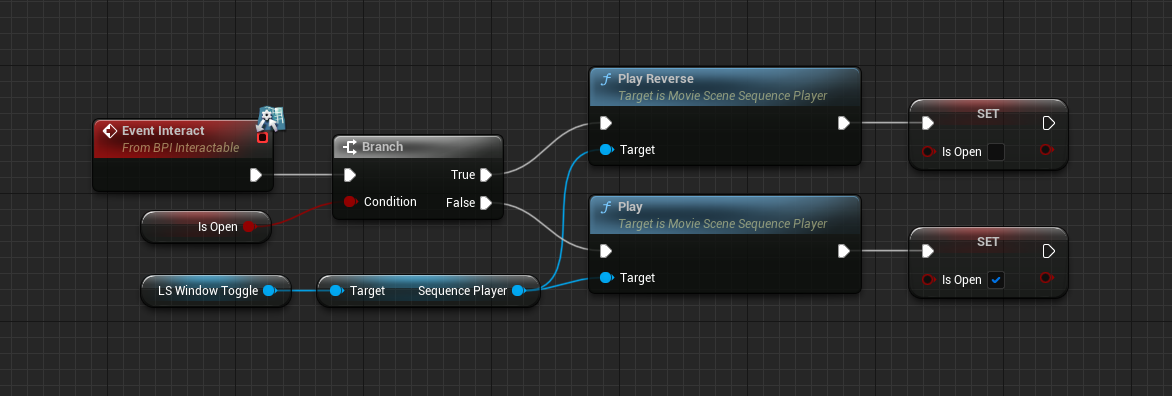
My "reverse" takes like half a second before starting if the window is already open all the way. If I spam the button to open/close while its mid animation its fine but if I want until its all the way opened (play reverse closes it) theres a delay
sometimes the delay is longer actually..
rain ingot
anyone know what this means? I think it may be the cause of my crashes when pressing play
 drowsy snow
rain ingot
anyone know what this means? I think it may be the cause of my crashes when pres...
drowsy snow
rain ingot
anyone know what this means? I think it may be the cause of my crashes when pres...
Try building the reflection (Build button in the toolbar)
drowsy snow
rain ingot
anyone know what this means? I think it may be the cause of my crashes when pres...
Also look into the crash log to see what actually cause the crash
rain ingot
drowsy snow
Also look into the crash log to see what actually cause the crash
I checked the crash log but none of it made sense
drowsy snow
rain ingot
I checked the crash log but none of it made sense
Post the callstack reported by the Crash Reporter
rain ingot
drowsy snow
Post the callstack reported by the Crash Reporter
the crash log ue does when it crashes, or the one thats saved in my crash files?
drowsy snow
rain ingot
the crash log ue does when it crashes, or the one thats saved in my crash files?
The former
(make sure you don't end task UE4Editor when it's suspended)
 crimson solstice
I have 50 Player Spawn's all with the same exact X position though when I press play the characters spawn with a different X
The problem with that is because my game is Top-down so I need to have every player all on the same X
rain ingot
drowsy snow
Post the callstack reported by the Crash Reporter
Unhandled Exception: EXCEPTION_ACCESS_VIOLATION reading address 0x00000000000003e8
ucrtbase
ucrtbase
ucrtbase
UE4Editor_Core
UE4Editor_BullCowGame_3108!UBullCowCartridge::BeginPlay() [C:\Users\stlou\OneDrive\Documents\UnrealProjects\BullCowGame-starter-kit\Source\BullCowGame\BullCowCartridge.cpp:11]
UE4Editor_Engine
UE4Editor_Engine
UE4Editor_Engine
UE4Editor_Engine
UE4Editor_Engine
UE4Editor_Engine
UE4Editor_UnrealEd
UE4Editor_UnrealEd
UE4Editor_UnrealEd
UE4Editor_UnrealEd
UE4Editor_UnrealEd
UE4Editor_UnrealEd
UE4Editor_UnrealEd
UE4Editor_UnrealEd
UE4Editor
UE4Editor
UE4Editor
UE4Editor
UE4Editor
UE4Editor
kernel32
ntdll
Have you installed the debug symbols for the engine?
rain ingot
drowsy snow
Have you installed the debug symbols for the engine?
probably not since I dont know what that is
drowsy snow
rain ingot
probably not since I dont know what that is
That's going to make the crash reports more decipherable. Without it the engine doesn't know what to blame.
It's very crucial especially when you're developing Unreal C++ projects.
rain ingot
drowsy snow
That's going to make the crash reports more decipherable. Without it the engine ...
where can I find it
drowsy snow
rain ingot
where can I find it
You can add it via the launcher, modify the engine's installation
 frank kayak
please help whenever i open a file in my ue4 it does this

tryna do Ai and this shit is messing up
crimson solstice
crimson solstice
I have 50 Player Spawn's all with the same exact X position though when I press ...
Anyone
frank kayak
wish i knew
crimson solstice
Maybe I could make Collison boxes for the player to stay in
frank kayak
yea maybe
ue4 is what i know and its what i like
FUCK i just wanna make ai but its more A than I
 solemn nest
well cant login XDDD
 frank kayak
damn
i have no idea whats up with my stuff
folder should have a blueprint it did a bit ago and now poof empty
primal tendon
how to separate click and hold button input?
I want ADS to be like pubg way, click to change to aim animation and hold to go to gun lens cam
 plush yew
Does anyone know if there is a limit to how much water you can put on your map
I added a bunch and it caused problems and my project crashed :3
rain ingot
does having 8 gb of RAM make things slower in unreal?
dim thistle
Now i want to play death animation can i tell like move to this state form any state Or should i needed to draw transition form all other state to death animation state, some one help
 drowsy snow
rain ingot
does having 8 gb of RAM make things slower in unreal?
drowsy snow
rain ingot
does having 8 gb of RAM make things slower in unreal?
Not necessarily, but Windows's malloc can put Unreal Editor processes into virtual memory using your storage media, which is slower than RAM
primal tendon
dim thistle
Now i want to play death animation can i tell like move to this state form any s...
One way transition to death, remember to remove loop in (animation). You should really try out some tutorials it helps you understand all basics
dim thistle
Is that ok , is that a right way to do @primal tendon
 primal tendon
Yeah sure... that looks fine
drowsy snow
No.
At least not in real-time.
You could bake the simulation in Houdini and somehow export it as vertex animation or alembic data, but it's massively complicated especially for dynamic animations.
 dapper oak
anyone know why my SetConstrainedComponents isnt working for my c++ Physics constraint?
rain ingot
ok so how do I rebuild this again?

 cosmic flume
I been trying to use a Daz3d to unreal engine plugin but it brings over all the materials as material instance but I want to edit some of the materials but I would have to recreate each of the materials by hand is there a way to convert a material instance to a full material
dapper oak
rain ingot
ok so how do I rebuild this again?
under Build
 rain ingot
dapper oak
under Build
rain ingot
dapper oak
under Build
ty
dapper oak
all g 👍 😄
 spark mason
can someone help me with this weird landscape painting bug?

 shell surge
Hello, does anyone know how can I make an animation play on button press? Right now it starts instantly when you play
worn copper
- Do epic games provide Free Multiplayer Server like Steam?
If any Other Please suggest which service should i Use. - Is there any restriction for usage for steam / Epic games Server?
quiet island
Is this wise?

I am trying to implement multiplayer session via steam
Tried it, cant even rebuild it with these plugins oddly enough
plush yew
How can I generate a path(spline) from a point to b point, based on Navmesh data, at runtime?
worn copper
quiet island
Is this wise?
Just Create Copy of Project before going for this. Backup it.
Then Hit Yes... See what happens...
drowsy snow
worn copper
- Do epic games provide Free Multiplayer Server like Steam?
If any Other Please ...
No.
I don't think Steam/Valve provide one either.
But the online services libraries are free and interchangeable to other storefronts/platforms
worn copper
I've tested One test project with steam
Just not sure about if there is any user limitation or something.
drowsy snow
EOS is more like library for handling stuff related to networking, so you don't have to worry about rolling your own networking system
worn copper
drowsy snow
EOS is more like library for handling stuff related to networking, so you don't ...
I'm Confused about EOS. Can I host my multiplayer on EOS?
or I have to setup Separate server?
drowsy snow
worn copper
I'm Confused about EOS. Can I host my multiplayer on EOS?
Servers are still up to you.
Again, EOS is not a dedicated server provider, but more of networking library. You provide your own dedicated servers, and let EOS do the detail works for the networking
worn copper
drowsy snow
Servers are still up to you.
Again, EOS is not a dedicated server provider, but...
Okk Got it So It's just a Library/Script app which controls Networking.
Means Server is mandatory.
am i correct>
drowsy snow
worn copper
Okk Got it So It's just a Library/Script app which controls Networking.
Means Se...
Yes.
Though I don't know if servers provided by Valve allows for third party networking libraries, EOS included.
worn copper
drowsy snow
Yes.
I tested one Multiplayer test project using steam. But not sure it was running on Steam server / Locally hosted on Host computer?
drowsy snow
worn copper
I tested one Multiplayer test project using steam. But not sure it was running o...
I'm pretty sure it's the latter
I can't think of a situation where Valve has the ability to provide dedicated servers with no extra charge
worn copper
drowsy snow
I'm pretty sure it's the latter
I tested it on two separate computer connected to internet. Also connected using steam overlay.
worn copper
drowsy snow
I can't think of a situation where Valve has the ability to provide dedicated se...
They are charging allready enough... They charging 30% Which is not small share,,,
drowsy snow
worn copper
They are charging allready enough... They charging 30% Which is not small share,...
Wasn't it 30%?
worn copper
drowsy snow
Wasn't it 30%?
- 100$ for each realeased game
drowsy snow
This is what Steamworks docs has to say:
You can host these game servers yourself, or allow your community to host them for you.
I've seen no mention of Valve providing dedicated servers, at least on publicly available docs
worn copper
drowsy snow
This is what Steamworks docs has to say:
> You can host these game servers yours...
Got it i'm reading it all.
What i tested in past was a Peer-to-Peer Connection.
drowsy snow
worn copper
Got it i'm reading it all.
What i tested in past was a Peer-to-Peer Connection.
Well, just what I suspected 😆
worn copper
My game Have Maximum 5 Players in one Lobby/Match. So i think i can go with Peer-to-peer.
Also called as Player self hosted and other player join as client.
 keen charm
OS Drive is Super-Fast
I got 2nd Storage
Is it better to have the engine on the OS Drive and Projects on 2nd? or 3rd?
got a new pc
drowsy snow
keen charm
OS Drive is Super-Fast
I got 2nd Storage
Is it better to have the engine on the...
I won't advise doing Unreal Engine stuff on OS drive, at all.
Personally I always have them on secondary partition, so if OS drive/partition goes to shit, not much repair work has to be done, and UE stuff can be continued right where it left off.
Even clean reinstalling Windows can preserve anything but the OS drive/partition.
plush yew
what's the problem? textures in far away look weird when you are moving away from them
they kinda disappear
scene is not that big to be having problems with view distance
seems like it's atmospheric fog that's causing the problem
but still
but view distance still has problems
grass was too thin
as you walk lights still change
it's not stable
post process is too heavy probably
20 fps on that scene lol
but no way
I think it's the sm_fieldgrass
it's heavy by default
 grave fjord
what's the shortcut for quickly turning the selected node to development or off or on?
neon bough
that depends on your editor preferences, iirc theres no keybind by default
woven star
hey guys , any advice on how to make better cloth materials?
grave fjord
neon bough
that depends on your editor preferences, iirc theres no keybind by default
Thanks, figured it out. Found Mathew's tutorial on the subject.
gray maple
Someone know how to start recording with the take recorder when hitting a key or event?
quiet island
I have this map which is pretty big already, but somehow I keep wanna make it bigger and bigger as things progress. Is there any kind of advise on what the limit should be (I am using quite a few meshes but even more foliage on the islands here and there
 woven star
yeah , ig that's the hard part:))
worn copper
quiet island
I have this map which is pretty big already, but somehow I keep wanna make it bi...
I think this is 4X4 Km Map
 ornate monolith
Does anyone else had problem/bug with animation not working unless moving the mouse a little bit? It seems to be connected to the directional light somehow, building the lightning seems to fix it most of the time but now it doesn't. So annoying!!
quiet island
worn copper
I think this is 4X4 Km Map
Alright, if I fill up the ocean with islands and stuff will that be doable in normal cases or is it best to leave huge amounts of spaces for environmental background purpose?
worn copper
quiet island
Alright, if I fill up the ocean with islands and stuff will that be doable in no...
You should use WaterPlane Texture and underWater Post Process effect.
quiet island
This is what I currently got

but when zoomed in its actually already huge

So im wondering if I keep on filling that water with islands and places to go if it will be a crash case scenario for multiplayer interaction
or even single player for that matter lol
I always tend to make maps to big and then have them to be to heavy
worn copper
quiet island
This is what I currently got
It's only 3x3 Km Water Ocean so you just need optimise Props and Trees. Water don't take that much hardware
quiet island
ahh oke, you comfort my concerns then haha. This will also work for mobile in your opinion?
using low poly graphics mostly
worn copper
quiet island
ahh oke, you comfort my concerns then haha. This will also work for mobile in yo...
If u are not planing to use water simulation or vehicles. Then Use WaterPlane with underwater post process.
ornate monolith
Does anyone else had problem/bug with animation not working unless moving the mouse a little bit? It seems to be connected to the directional light somehow, building the lightning seems to fix it most of the time but now it doesn't. So annoying!!
quiet island
worn copper
If u are not planing to use water simulation or vehicles. Then Use WaterPlane wi...
we dont even use underwater view I think I used a plugin for the water
worn copper
quiet island
ahh oke, you comfort my concerns then haha. This will also work for mobile in yo...
Also always Every take Backup considering it will crash one day. If its taking too much resources then you think about this.
- Use low resolution texture as much possible,
- Use LOD's for every props
- Merge same meshes to reduce draw calls.
- and keep adding island u want.
quiet island
 worn copper
quiet island
we dont even use underwater view I think I used a plugin for the water
worn copper
quiet island
we dont even use underwater view I think I used a plugin for the water
In that plugin folder there you will find water plane which gives same result it's just simple plane with Exact same result outside water.
If u don't want to go under water then there is no need of postprocess
quiet island
worn copper
In that plugin folder there you will find water plane which gives same result it...
Thanks I will check that out!
sick patio
um how do i animate this door?
 woven star
is there a way to bake lighting to the metahuman?
it's a blueprint so idk if I can , as changing lighting and then baking doesn't seem to affect him
dense knoll
Whats the ScreenLayer that UE4 uses for its VR Elements
 red condor
woven star
is there a way to bake lighting to the metahuman?
red condor
woven star
is there a way to bake lighting to the metahuman?
I doubt this is possible - the metahuman is designed to be dynamic, the same as you can't bake lighting on a characters skeletal mesh. Are you trying to use the metahuman as a static prop?
woven star
red condor
I doubt this is possible - the metahuman is designed to be dynamic, the same as ...
no but I notice that it could look a bit better without activating raytracing
and btw , how do I see what exactly changes when clicking these buttons?

 crimson comet
Hey guys! Does anyone know why my emissive cylinders and particle systems are not reacting to my camera depth of field?
 drowsy snow
woven star
and btw , how do I see what exactly changes when clicking these buttons?
drowsy snow
woven star
and btw , how do I see what exactly changes when clicking these buttons?
Open the editor widget blueprint yourself and see the BP graph.
It's not a custom C++ Slate editor utility.
woven star
drowsy snow
Open the editor widget blueprint yourself and see the BP graph.
thanks
drowsy snow
crimson comet
Hey guys! Does anyone know why my emissive cylinders and particle systems are no...
 crimson comet
drowsy snow
https://forums.unrealengine.com/t/depth-of-field-on-translucent-material/287253/...
crimson comet
drowsy snow
https://forums.unrealengine.com/t/depth-of-field-on-translucent-material/287253/...
Thanks 🙏🙏
 devout wagon
someone have some c++ books to recommend pls
red condor
I'd like my character to still be able to jump if they've -just- run off a platform - is there a built in way to do that or would I need to roll my own?
zenith saddle
Hi getting a crash error inside unreal when enabling ray trace to the projects no matter if ue5 early acces or ue427, last drivers, directx installed.

Please some help
More output *Fatal error: [File:D:/Build/++UE4/Sync/Engine/Source/Runtime/Engine/Private/ShaderCompiler/ShaderCompiler.cpp] [Line: 924] ShaderCompileWorker crashed! Assertion failed: IsValidIndex(Index) [File:D:\Build++UE4\Sync\Engine\Source\Runtime\Core\Public\Containers/UnrealString.h] [Line: 323] String index out of bounds: Index 88609 from a string with a length of 88609 0x00007ffffacc7807 ShaderCompileWorker-Core.dll!FDebug::CheckVerifyFailedImpl() [] 0x00007ffffb555815 ShaderCompileWorker-ShaderCompilerCommon.dll!DispatchCheckVerify<void,<lambda_ec5b1af1e06bfd9670a4e045e9c34ff8> >() [] 0x00007ffffb5475c4 ShaderCompileWorker-ShaderCompilerCommon.dll!RemoveUniformBuffersFromSource() [] 0x00007ffffa7df01c ShaderCompileWorker-ShaderFormatD3D.dll!CompileD3DShader() [] 0x00007ffffa7dffc3 ShaderCompileWorker-ShaderFormatD3D.dll!CompileShader_Windows() [] 0x00007ffffa7dfc41 ShaderCompileWorker-ShaderFormatD3D.dll!FShaderFormatD3D::CompileShader() [] 0x00007ff6191993ea ShaderCompileWorker.exe!ProcessCompilationJob() [] 0x00007ff61919a51e ShaderCompileWorker.exe!FWorkLoop::ProcessInputFromArchive() [] 0x00007ff619195d17 ShaderCompileWorker.exe!FWorkLoop::Loop() [] 0x00007ff619193865 ShaderCompileWorker.exe!GuardedMain() [] 0x00007ff619193aaf ShaderCompileWorker.exe!GuardedMainWrapper() [] 0x00007ff6191a1798 ShaderCompileWorker.exe!wmain() [] 0x00007ff6191a2a58 ShaderCompileWorker.exe!__scrt_common_main_seh() [] 0x00007ff88d9e54e0 KERNEL32.DLL!UnknownFunction [] 0x00007ff88f9e485b ntdll.dll!UnknownFunction []
UE4Editor_Engine
UE4Editor_Engine
UE4Editor_Engine
UE4Editor_Engine
UE4Editor_Engine
UE4Editor_Core
UE4Editor_Core
kernel32
ntdll*
Its a 3080
 harsh tiger
does anyone know how metahuman perform on a oculus quest 2 in standalone mode?
 small pewter
Does anyone know how to solve this issue where my character scales for no reason (when I press the "isCrouching" boolean) ? https://gyazo.com/09c64f12d4e734e4f5a85ea806bee30d

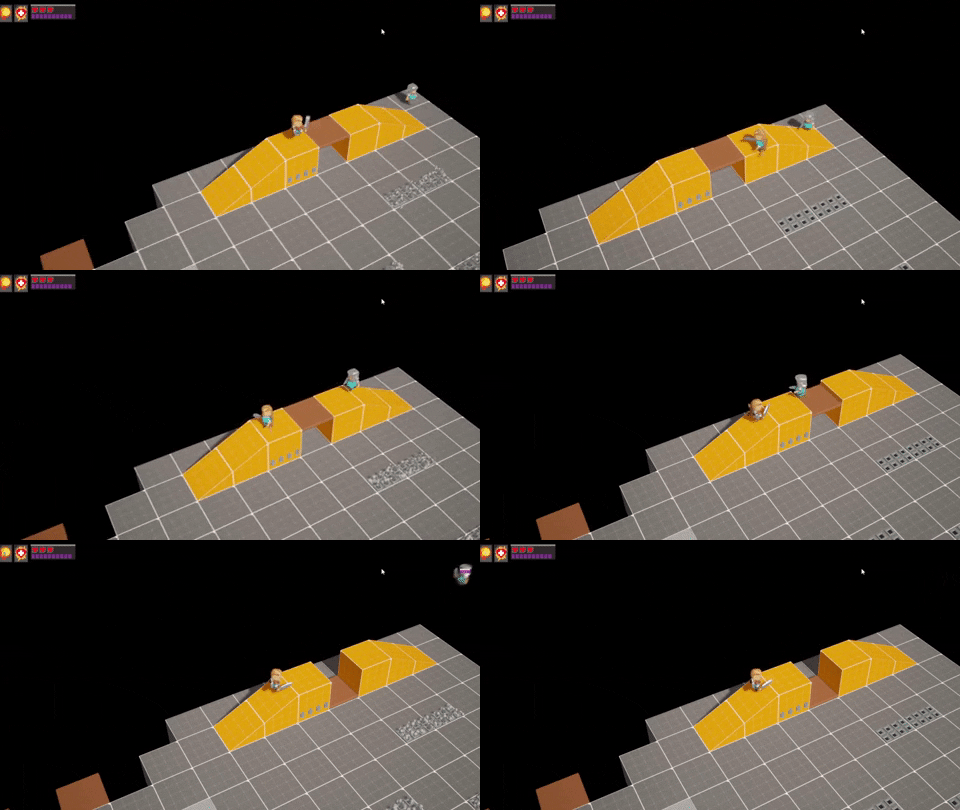
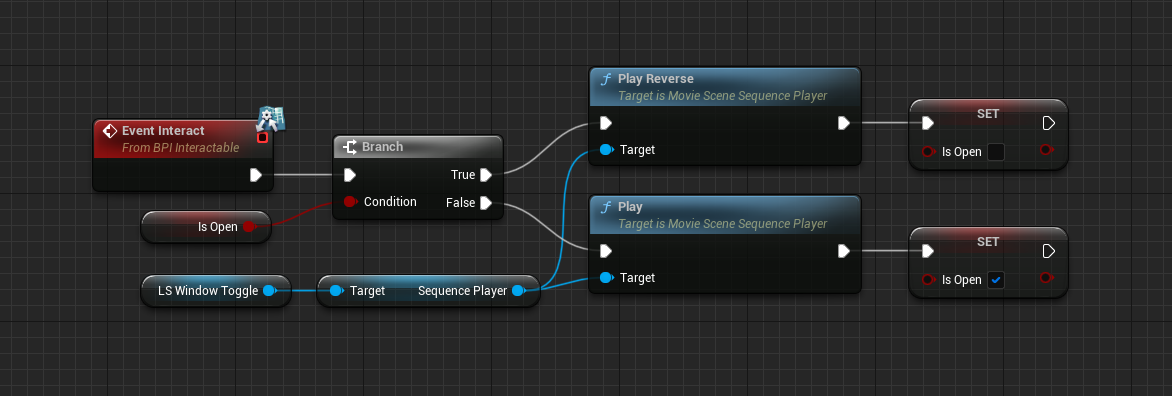 hoary seal
Did the keys to change brush size change in Preview 1 of ue5..?