#ue4-general
1 messages · Page 1145 of 1
 grim ore
 placid folio
Do I need to specify the plugin folder location somewhere?
grim ore
shouldnt have to, its an engine plugin so it should package it as aprt of the product
oh wait
you said launch, what are you trying to do?
im 99% guessing Launch is not what you're trying to do
placid folio
test the game multiplayer with steam, editor seemed to be getting in the way of openning the steam api, so was going to launch it stand alone without editor to test it.
grim ore
so play -> standalone or Launch. Launch is probably not what you expect it to be
it sounds like you actually want to package the game to a normal build and run that
placid folio
no I'm using launch. and thats when I get the error the game using play runs fine other than I'm having issues with steam.
Sorry I'm new.
grim ore
yeah Launch is primarily for mobile devices, that would be the issue. you can't really "launch" on windows
if you are trying to make it represent what it would be like running it without the editor then you want to try and play -> standalone or more than likely package the project and run it from there like a normal program
placid folio
oh, thats good to know, I thought that launch was the be all do all
 timid spade
is there any way to get all of these checkboxes and put them into an array

without have to manually drag each one onto the event graph and manually input it
 small jay
Does anyone know why my Building Lighting is greyed out (4.27) and how to fix it? I'm not playing in editor, Static lighting is not disabled, and Shader is not below Shader Model 5.
 weary basalt
When using the Find In Blueprints dialogue, how do you restrict the search to only return exact results?
If i search "Add" it will return all results that contain that string.
How do i restrict it to only return results that are exactly that string with no additional characters?
 flint crescent
timid spade
is there any way to get all of these checkboxes and put them into an array
flint crescent
timid spade
is there any way to get all of these checkboxes and put them into an array
make them all a child of something then use the "get all children"
 shrewd pulsar
hello i was wondering if anyone could help me. it wont let me play as my third person character. itll spawn me where my camera is and under play button its greyed out. but yet when i place a network spawn it will place me down but not use my Animation BP. i went into the third person game mode and made sure third person charecter was selected
i can also screen share in VC
can i change default player start ?
 small pewter
Does anyone know why I succeed making my material align perfectly on 1x1x1 cube but when I scale it to 1x5x1 it doesn't align perfectly anymore ?


 little oyster
Is there anyway to specify a specific player's UniqueID while testing via PIE? i.e. hardcode a SteamID during PIE
 distant totem
weary basalt
How do i restrict it to only return results that are exactly that string with no...
distant totem
weary basalt
How do i restrict it to only return results that are exactly that string with no...
You would do +Add
TextCmpExact (Pre-Unary)

+

Modifies a text value so that it will perform an "exact" text comparison.

+Blast
+"Blast"```Thanks
 modest cloud
This might be a noob question, but I've been painting some foliage onto my landscape and it looks great until the camera zooms back and then a lot of the foliage seems to disappear or the shadows go away. I have all the LODs set to 0. Does anyone have any ideas?
 shadow estuary
i wanna check where something is spawning when i click, so i paused so i can frame through and see the projectile fire, but i cant put in input when paused
is there a way around this or should i just put projectile speed 0 to test
shrewd pulsar
How would i set this to cast to multiple players in the game ? iv been trying diffrent things but im getting errors

i cant cast to third person charecter. i think it would only go to me and not another player
unless cast to third person will work for multiplayer ?
 autumn flame
Any player that is Third Person
small pewter
Anyone know how to automate the creation of materials being all of them instances of a base material and also the naming should be the same as the texture itself + M in the front of it (that's my convention to name materials) ?
 severe hound
Any advice on storing references to a bunch of actors in gamestate? Let's say there are 10 different actor types and each actor type has 10 each, would be 100 actors in total and 10 get all actors of class calls, would it better to grab the gamestate in each actor and add itself there or would it better on beginplay to just add it in a memory ref?
 solemn marten
hello there, how can I delete the part in parenthesis in my build
 shadow estuary
i added ads by making the camera lerp between two points and it works great, but now i cant look up
any tips
hahaha
 exotic rover
hey is the default networking good enough for an MMO made with unreal engine 4?
or is there a plugin or somethin' i'm unaware of
 night bridge
exotic rover
or is there a plugin or somethin' i'm unaware of
night bridge
exotic rover
or is there a plugin or somethin' i'm unaware of
this one is pretty well made and easy to implement: https://forums.unrealengine.com/t/advanced-sessions-plugin/30020

Unreal Engine Forums
Advanced Sessions Plugin Updated 08/19/2021 Plugin now has two modules, one is AdvancedSessions and one is AdvancedSteamSessions, this will allow me to tie more Steam specific functions in without forcing the steam subsystem to be packaged out with projects that don’t want it. New Parvan/Metahusk has made a menu example project that also sho...
 bleak garden
hi
 storm parcel
Hi, I want to create a button, when its clicked it should show 3 more buttons below it, and when it's clicked again it should hide them. How do I go about doing this? My first idea is, the main button will have an OnClicked event that will create another widget that contains those 3 buttons but I feel like there's a better way for this.
flint crescent
storm parcel
Hi, I want to create a button, when its clicked it should show 3 more buttons be...
Set visibility?
storm parcel
flint crescent
Set visibility?
Super new to unreal, thank you I will look into that
flint crescent
👍
 ionic bridge
anyone got a topdown bp for a normal casting? ie. Press 1, then right click, then cast skill. I don't want to just right click and it activate i want the sequence. ie kinda like how moba's work.
 young stream
ionic bridge
anyone got a topdown bp for a normal casting? ie. Press 1, then right click, the...
young stream
ionic bridge
anyone got a topdown bp for a normal casting? ie. Press 1, then right click, the...
press 1 --> create the preview decal and keep updating its position relative to mouse and defined location and rotation constraints based on the spell ->-> right click --> do the spell and destroy decal. Those are the steps, I don't have a BP to show you but try extrapolating on them. And maybe https://blueprintue.com/ has something relevant

blueprintUE is a tool for sharing, rendering and rating blueprints for Unreal Engine 4. UE4 is a game engine which use visual scripting called blueprint.
 worn pecan
so is it possible to play an animation when a npc starts moving
 plush yew
Why convert mouse location to world space gives false output?
anyone know why this happens on projct load??
i am new to UE4 and this both nonplusses me and makes me want not to deal with it
i verified the engine too
storm parcel
I want to call an EventDispatcher when a UI button is clicked, then it will bind in an Actor's blueprint and do actions. All the tutorials I'm seeing are about creating the EventDispatcher in the player character and then getting its reference etc. but I can't find anything on how to do what I need to. Any help?
plush yew
hold up. turns out cleaning my project and rebuilding it fixed the problem.
plush yew
and now its crashed and wont load my project agian. what gives?
i understand midnight is not the best time to be askingn for help... heh
 strong ocean
are you writing c++
plush yew
yup
strong ocean
sometimes mine will get in a wonk state when my build will compile in VS but the hot reload crashes in the engine
perhaps a runtime error but not a comp time error
what's the stack trace?
plush yew
EpicAccountId:
Assertion failed: CollisionComponent != nullptr [File:C:\Users\Chipps\Documents\Unreal Projects\FPExperiment\Source\FPExperiment\FPProjectile.cpp] [Line: 23]
UE4Editor_Core
UE4Editor_Core
UE4Editor_FPExperiment_0002!AFPProjectile::AFPProjectile() [C:\Users\Chipps\Documents\Unreal Projects\FPExperiment\Source\FPExperiment\FPProjectile.cpp:23]
UE4Editor_CoreUObject
UE4Editor_CoreUObject
UE4Editor_CoreUObject
UE4Editor_CoreUObject
UE4Editor_Core
UE4Editor_Core
UE4Editor_Projects
UE4Editor_Projects
UE4Editor
UE4Editor
UE4Editor
UE4Editor
UE4Editor
UE4Editor
UE4Editor
kernel32
ntdll
strong ocean
Assertion failed: CollisionComponent != nullptr [File:C:\Users\Chipps\Documents\Unreal Projects\FPExperiment\Source\FPExperiment\FPProjectile.cpp] [Line: 23]
looks like a runtime error
plush yew
strong ocean
`Assertion failed: CollisionComponent != nullptr [File:C:\Users\Chipps\Documents...
yea i get it. but wtf lol. game code shouldnt be running while editing... right?
strong ocean
Yeah I don't know how the hot reload works but it almost looks like it does try to run it
Cause the same stuff happens to me sometimes
plush yew
strong ocean
Cause the same stuff happens to me sometimes
hapens to me alot
strong ocean
LOL the first time I just rebooted my comp and thought it was a weird file state
but then I realized my code was just spaghetti
plush yew
strong ocean
LOL the first time I just rebooted my comp and thought it was a weird file state
lmao
UE4Editor_Core
UE4Editor_Core
UE4Editor_FPExperiment_0002!AFPProjectile::AFPProjectile() [C:\Users\Chipps\Documents\Unreal Projects\FPExperiment\Source\FPExperiment\FPProjectile.cpp:23]
UE4Editor_HotReload
UE4Editor_HotReload
UE4Editor_HotReload
UE4Editor_HotReload
UE4Editor_HotReload
UE4Editor_HotReload
UE4Editor_CoreUObject
UE4Editor_CoreUObject
UE4Editor_CoreUObject
UE4Editor_Core
UE4Editor_Core
UE4Editor_Core
UE4Editor_HotReload
UE4Editor_HotReload
UE4Editor_HotReload
UE4Editor_Core
UE4Editor
UE4Editor
UE4Editor
UE4Editor
UE4Editor
UE4Editor
kernel32
ntdll \
might be something to that thing
 dusk nebula
anything I can do to be able to open links to the old UE answers page when I find them? https://answers.unrealengine.com/storage/temp/235065-setbycaller01.jpg
 modest trench
unless it got archived by googled or something you might be better off just asking again
I can't find the image file
shadow estuary
you can try the archive.org or whatever
dusk nebula
couldn't find it
 night oar
Hi everyone so I have a question I want the show the names and health of two player on the Hud in online multiplayer but can find when and where to call the player state so I can replicate that data for every client connected
 blissful trail
so im trying to get a first person vaulting system working in ue4 but i cant seam to get it working at all i tried following a tutorial for a 3rd person vaulting system but it didnt work at all :<
 grim violet
I have a metahuman with roughness and metallic texture maps, and those maps aren't showing in render, how do I fix this?
In viewport the metahuman shows with the metallic and roughness correct, its just render output that it doesn't show those maps.
shadow estuary
when making ads for a game, is it better to move the camera to the sight, or move the gun towards the camera
or a bit of both
storm parcel
shadow estuary
when making ads for a game, is it better to move the camera to the sight, or mov...
I'm a newbie so take my opinion with a bit of salt, but I think if you move only the gun towards the camera there will be no "zoom in" effect. So it completely depends on your game and/or the gun in question, if you want the ADS to have a zoom in effect then move the camera towards the gun.
 lunar turret
I have very low disk space, and Unreal Engine takes about 120 GB, so I decided to store it on an external drive. Do you guys think it makes it slower?
It takes ages to start, I think I know why
storm parcel
lunar turret
I have very low disk space, and Unreal Engine takes about 120 GB, so I decided t...
Generally, all external drives are going to be slower than internal ones. There certainly are exceptions, but the difference between USB 2.0 and SATA is considerable. If the external is SSD and internal is HDD then it may not actually be a bad idea. But again, it completely depends on the specs of both drives.
My advice is, give the external a shot. If the speeds are workable for you, then great. If not, may be move it on the internal. (Assuming the speed is bottlenecked by the drives and none of your other hardware)
shadow estuary
storm parcel
I'm a newbie so take my opinion with a bit of salt, but I think if you move only...
yeah i figured that was what i was doing so far
just wasnt sure
lunar turret
They're all workable but it takes ages to start
shadow estuary
also im rendering my ADS with a little render target camera, its working great
but
i wanna draw a red dot on top of it
is there a way to do that
lunar turret
I've compiled UE4, now I want to configure it for Qt Creator. I have set everything up correctly, and I hit build. Is it supposed to take a long time?
 stone badger
is there a console command to show my location in-game?
like a transform or something of the playercontroller or controlled pawn?
plush yew
guys if i wanted to create room, let's say tavern which is in different states different times player enters - npc's in different locations, different lights are lit or not, items have changed place, etc - i know one way would be to fake it by having actually different levels load with differently setup versions of said room - but would that be the proper way of doing it? are there any alternatives to that approach?
is there a feature that saves different room states in one level that i'm not aware of?
How do you get this player camera view and ability to control it? I guess adding camera and placing that in front of player. And you control him with usual buttons.

yeah but imagine - let's say there would be 10 states, in each state there might be around 100 items changed, items moved around, npc placements, lights - doing all of that each time by the code back and forth is 10x100 details coded, so is it really the best way to do it?
small jay
Does anyone know why my Building Lighting is greyed out (4.27) and how to fix it? I'm not playing in editor, Static lighting is not disabled, and Shader is not below Shader Model 5.
plush yew
i'm making immersive sim so most likely NPC's will take care of themselves in a way that they will have different routes and at around night they go to tavern and pick a free place to sit. u mean that?
yeah true
so UE5 has something good for managing that?
i mean what it does exactly 😄
i don't understand, can u elaborate more about what u mean in "loading and unloading" stuff.
modest trench
knock yourself out
although this begs the question: do you need world partition for data layers?
alright, thanks
plush yew
wait i can do this in unreal 4 aswell no? separate actors onto different level stream.
modest trench
you could use levels to store actor hierarchies in a sense I think
yeah that sounds like hell to manage
plush yew
i mean i know of that technique already, i mentioned it in the post but i was kinda interested if there was something better than that, something that just saves state of the level.
like one click and boom it screenshots all the data from the level instead of me manually having to separate, store and load them - all the locations, all the settings and can be loaded whenever u want.
that's a good point. although sadly i can't think of making anything smarter which doesn't require me splitting thousands of objects into different levels by hand.
i did tons of skyrim research - they did it all by hand but then again they had hundreds of people 😄
i have small imsim like worlds per master level
like in deus ex
deus ex is imsim o.O
no lol - imsim means - immersive sim game genre 😄
does it mean something else aswell?
tf it's cool and all but why would i be having tavern for it 😄
yeah
yeah i guess manual it is ☠️
 buoyant graniteBOT
:triangular_flag_on_post: LookiSVK#0567 received strike 1. As a result, they were muted for 10 minutes.
 quaint stirrup
we are all friends here are we not
storm parcel
I'm trying to implement a simple EventDispatcher. When a UI button is clicked, it calls the Dispatcher and an Actor blueprint Binds to that event and should print a test string to make sure its working. But the error I keep getting is "Access none" due to the default value of "Interactable Reference" variable being blank

this is the variable's object type

BP_Interactable1 is the Blueprint that's supposed to print the test string
This is BP_Interactable1

Can someone please take a look and help?
The exact error is:
 tawdry mica
Hi there, am wondering if someone is able to help with a small problem - I followed a flight tutorial, the function works, however it doesn't show the blend animation 1d that I set, instead it shows the running animation while holding forward when flying - anyone know a simple solution for this? Many Thanks
 dim seal
How can I reorder rows in a data table? It only says either "Move to the Top" or "Move to the Bottom"
Weird! 😦

 native nimbus
Hey guys we've noticed that some of our project's features run more unstable on UE 4.27.2 (Media Framework to be specific) and would like to Rollback to 4.27.1. Is this possible without a custom build? Many thanks.
 drowsy snow
native nimbus
Hey guys we've noticed that some of our project's features run more unstable on ...
drowsy snow
native nimbus
Hey guys we've noticed that some of our project's features run more unstable on ...
No.
native nimbus
drowsy snow
No.
Damn...
tawdry mica
dim seal
How can I reorder rows in a data table? It only says either "Move to the Top" or...
hold and drag?
tawdry mica
🙂
tawdry mica
tawdry mica
Hi there, am wondering if someone is able to help with a small problem - I follo...
Anyone have a solution for this?
drowsy snow
tawdry mica
Anyone have a solution for this?
Might be wrong transition rules.

 drowsy snow
tawdry mica
drowsy snow
tawdry mica
Is there a check for a boolean (something like Is Flying) for the transition rule from Idle/Run to IceTravelPose_Blend?
 autumn flame
does new Raytraced Translucency on 4.27 and latest 5.0 just works with RTX graphics or working with any type of gpus?
tawdry mica
drowsy snow
Is there a check for a boolean (something like Is Flying) for the transition rul...
yeah
here

 novel rose
Is there a way to use the HDRI Backdrop's lightning, but hide the background image in the viewport?
 teal pawn
Can someone please let me know why i keep getting this when i try to log in into Epic Games Launcher?

 oak patio
storm parcel
The exact error is:
```Blueprint Runtime Error: "Accessed None trying to read pr...
oak patio
storm parcel
The exact error is:
```Blueprint Runtime Error: "Accessed None trying to read pr...
Have you set that variable to anything, you have said its an abject reference, but have you said which object specifically
storm parcel
oak patio
Have you set that variable to anything, you have said its an abject reference, b...
Thanks for the reply, this is the object type. (BP_Interactable1 is a blueprint actor where I am Binding the event)
 oak patio
Yes but are you setting the variable
storm parcel
(I'm very new sorry if this isn't what you asked)
plush yew
whenever my camera is directly behing my character, my character cant be seen, how do i make it so you can "see through" my character?
storm parcel
oak patio
But are you giving it a value
How do I do that? Sorry, newbie here
When I go to default values it doesn't allow me to assign anything
 plush yew
whenever my camera is directly behing my character, my character cant be seen, h...
plush yew
plush yew
whenever my camera is directly behing my character, my character cant be seen, h...
sorry, the way i said that wasnt really clear
oak patio
Yeah you cant assign default values, you need to find a way to tell it which reference to call it on
You can direvtly set variables in blueprints
How many interactables do you have in the world
storm parcel
I have 1, because I was just testing, its a learning project I can make as many as needed.
I just gave it a cube component and dragged it into the world
oak patio
So if you only have one, when you construct the widget, you can GetActorOfClass then set the variable to its output, however that isnt a great solution and wouldnt work with more than one
storm parcel
oak patio
So if you only have one, when you construct the widget, you can GetActorOfClass ...
Thank you for the solution. I do need to figure out how to make it work with more than one in actual projects in the future
oak patio
Yeah your specific implementation wouldnt really work with larger amounts as how do you tell it which one you want to effect with the button, again you could do things like get all actors of class then sort by distance, but thats very computationally expensive
storm parcel
I see, I can't find any other implementation. This is the one I followed through tutorials and Unreal documentation 🤔
oak patio
Typically i have my interactions set up with a heirarchy, where i have a blank class with the logic, and then childreb of that class with models and stuff, which makes it easy to do a cast with things like linetraces
You can also use interfaces, but i havent used those so im not yout guy for that one
storm parcel
Basically what I need to achieve is click on a UI button and then the camera should zoom onto the "interactable" (hotspot),
but im going step by step so currently I'm working on how to make the button widget blueprint talk to the interactable and trying to print a line that says it worked after I press the button, once I know I have made the connection with the interactable I will put in the hotspot stuff
plush yew
plush yew
sorry, the way i said that wasnt really clear
but i hope someoneknows what i mean because i cant really explain
oak patio
storm parcel
Basically what I need to achieve is click on a UI button and then the camera sho...
You see thats good, but if you have say 3 interacrables around you, how would you know which you want to zoom onto
storm parcel
plush yew
whenever my camera is directly behing my character, my character cant be seen, h...
do you want to do something like the 2000 Spider-Man game where the player gets semi transparent if he is too close to the wall behind him so camera pushes forward
storm parcel
oak patio
You see thats good, but if you have say 3 interacrables around you, how would yo...
That's true I didn't think of it, thanks
oak patio
You could have a system where itfilters all of them by distance, or you could have a system like city builders where you click the object, then pass that objects reference to the widget, then zoom in on it
storm parcel
oak patio
You could have a system where itfilters all of them by distance, or you could ha...
Thanks so much for the answer, I will look into these options!
I appreciate it
plush yew
storm parcel
do you want to do something like the 2000 Spider-Man game where the player gets ...
yes that is a good idea
it wasnt what i wanted but it sounds good
oak patio
You would need to be smart about the first way though, as it could be very computationally expensive if done improperly
storm parcel
oak patio
You would need to be smart about the first way though, as it could be very compu...
Yeah I would probably learn the second way
plush yew
storm parcel
do you want to do something like the 2000 Spider-Man game where the player gets ...
so how would you do that
storm parcel
plush yew
so how would you do that
I think you can set up a logic where if the camera arm shrinks more than a certain limit then it makes your player semi transparent?
or take player's location and camera's location and calculate the distance between them to determine it
plush yew
i have no idea what that means
grim violet
Hey can anyone help? I have a metahuman and I am trying to use the control rig to pose it inside of the level sequence, and when I do this then try to use Live Link for the facial pose/animation, it only tracks the head rotation and no longer outputs the face. (Face_AnimBP works just fine)
Is there something I have to do to save the control rig pose to allow Live Link face tracking to output correctly again?
drowsy snow
novel rose
Is there a way to use the HDRI Backdrop's lightning, but hide the background ima...
Sky Light.
 trim belfry
Does the water stuff in ue4 support submerged buildings/rooms? Like if I put an enclosed room in water, will it have water in it?
oak patio
All water is is a plane with a post process material when you go under it
drowsy snow
trim belfry
Does the water stuff in ue4 support submerged buildings/rooms? Like if I put an ...
Yes. It isn't a physically simulated mass of water.
plush yew
how do you make a barrier for your game like so you cant get out of the map
oak patio
Could always just drag out a boz collision and set it to block all
 thick herald
or use blocking volumes...
lunar turret
Hey
I'm trying to setup Qt C for UE4
I've done everything, generated my project
Now my project is opened
drowsy snow
lunar turret
I'm trying to setup Qt C for UE4
What? How Qt even got there?
drowsy snow
Making custom launcher?
lunar turret
Uh?
drowsy snow
Isn't Qt a GUI framework?
plush yew
Is a level designer responsible for making cutscenes for the game?
lunar turret
Qt is a framework
drowsy snow
What the fuck, that's new.
lunar turret
So I've been trying to set it up for UE4, I've generated my project, changed build release/debug options aswell as the run ones, but it won't start UE4...
plush yew
drowsy snow
No.
So, who is responsible for making cutscenes for the game?
In unreal engine?
What do you call that role?
I'm pretty sure it's not the programmer and, if not level designer then who?
drowsy snow
lunar turret
Qt Creator is an IDE
Then it's not supported by UE then
 fierce tulip
animator/cinemator
drowsy snow
plush yew
So, who is responsible for making cutscenes for the game?
Directors, animators, cinematographers.
plush yew
fierce tulip
animator/cinemator
So, I am looking for an unreal engine animator
lunar turret
drowsy snow
Then it's not supported by UE then
??

Learn how to set up your IDE to build and run UE4 on Linux.
drowsy snow
lunar turret
??
Yes.
plush yew
So, the unreal engine animator is also responsible for character animations, recoil animations, etc.?
drowsy snow
UE is a bit too VS centric.
drowsy snow
lunar turret
https://docs.unrealengine.com/4.27/en-US/SharingAndReleasing/Linux/BeginnerLinux...
And tbh idgaf about Linux, so #linux
drowsy snow
plush yew
So, the unreal engine animator is also responsible for character animations, rec...
Yes.
plush yew
drowsy snow
Yes.
Thank you so much for answering my questions!
drowsy snow
plush yew
Thank you so much for answering my questions!
But to be fair, level designers are sliiiightly responsible for the prop placements but then again it's not their main concern.
 sharp crest
drowsy snow
And tbh idgaf about Linux, so <#375022233875382274>
sharp crest
drowsy snow
And tbh idgaf about Linux, so <#375022233875382274>
linux is for nerds who like to waste their time
that personality fits more for unity users tbh
plush yew
drowsy snow
But to be fair, level designers are *sliiiightly* responsible for the prop place...
Aren't they also responsible for environment optimizations?
drowsy snow
sharp crest
linux is for nerds who like to waste their time
Linux is good for stuff like servers, but it's a massive exercise in futility for UE development.
plush yew
Such as taking care of maximum texture resolution and handling the LODs?
sharp crest
drowsy snow
Linux is good for stuff like servers, but it's a massive exercise in futility fo...
servers ofc yes but not for actual usage
drowsy snow
plush yew
Such as taking care of maximum texture resolution and handling the LODs?
That's more of technical artists' role.
sharp crest
plush yew
Aren't they also responsible for environment optimizations?
depends on how indie your team is
plush yew
drowsy snow
That's more of technical artists' role.
Hold up...
So what does a level designer do? Just put things together?
sharp crest
I know it's crazy but, they design the level
drowsy snow
plush yew
So level designer are basically a rip-off
Fuck no.
sharp crest

drowsy snow
They design the level but they'd also think about the gameplay side of things.
plush yew
drowsy snow
Fuck no.
Well from what I understand, they are just putting the integrated models together?
plush yew
drowsy snow
They design the level but they'd also think about the gameplay side of things.
Ooh. Like what?
drowsy snow
As a mapper, I'm offended by that statement.
plush yew
drowsy snow
As a mapper, I'm offended by that statement.
My apologies. But I am trying to understand what exactly does a level designer do apart from stitching the level?
Which I can also do?
Does a level designer create UI?
drowsy snow
plush yew
Well from what I understand, they are just putting the integrated models togethe...
Put models together without some thought, and you get yourself a shit gameplay.
Designing levels have to think about the gameplay in mind, how it going to flow throughout the game.
plush yew
sharp crest
depends on how indie your team is
9 peeps
plush yew
drowsy snow
Put models together without some thought, and you get yourself a shit gameplay.
...
So, if that is already thought and figured out then the level designer is not needed right?
sharp crest
seriously, wouldn't worry too much about the labeling.. just think what you need to get done for the game and then find someone who can do it...
plush yew
If the entire floor plan is already made and cutscene points are already decided in the GDD
sharp crest
sounds like you are really losing yourself on trying to define it, but it's not as complicated as u r making it sound
plush yew
sharp crest
seriously, wouldn't worry too much about the labeling.. just think what you need...
Yea, from this discussion I need a technical artist and also a cinemator and an animator to help me create cutscenes and trailer for the game
drowsy snow
plush yew
So, if that is already thought and figured out then the level designer is not ne...
I just can't assume good faith with that kind of sentence.
Screw you.
 sharp crest
lol ppl get triggered here so easily sometimes
plush yew
drowsy snow
I just can't assume good faith with that kind of sentence.
Screw you.
Why are you getting offended?
sharp crest
I'm so hungry
plush yew
sharp crest
I'm so hungry
Spaghetti and meatballs
sharp crest
the pizza is on it's way and I'm dying here waiting for it to come,..
plush yew
sharp crest
the pizza is on it's way and I'm dying here waiting for it to come,..
Pineapple pizza?
sharp crest
no..
sharp crest
😅
lunar turret
drowsy snow
And tbh idgaf about Linux, so <#375022233875382274>
Wait you edited I don't care to idgaf lol
lunar turret
drowsy snow
I just can't assume good faith with that kind of sentence.
Screw you.
And then this
You need to chill
drowsy snow
lunar turret
Wait you edited I don't care to idgaf lol
I had a love hate relationship with Linux, so I don't really give a frick. #linux folks may know something about Qt C thingie.
lunar turret
Barely condescending
I get that you don't like Linux and I'm fine with it but if someone on Linux asks for help be respectful please
drowsy snow
Again, #linux channel for things specific to UE development on Linux. Majority of people on other less platform specific channel still use Windows. You might get some concrete answers there, as Linux users could hang around there.
plush yew
lunar turret
And then this
You know what's funny. Came here for advice and got blocked in less than 2 minutes in this server. That's a guiness world record right there!
drowsy snow
plush yew
You know what's funny. Came here for advice and got blocked in less than 2 minut...
I apologise, but please don't crap talk on mappers again.
plush yew
drowsy snow
I apologise, but please don't crap talk on mappers again.
I was not trying to crap talk. I was just trying to understand their roles and responsibilites.
plush yew
drowsy snow
I apologise, but please don't crap talk on mappers again.
Yea, my apologies too for offending you.
 light thunder
What file do I need to copy over to make sure that my collections from my content browser are on another computer?
drowsy snow
light thunder
What file do I need to copy over to make sure that my collections from my conten...
The Collections folders? I don't think it goes to Saved folder.
plush yew
What I do is I create a new project on the ssd or hard drive that I will take to another computer and then just migrate the content folder into the new project using unreal engine itself.
drowsy snow
light thunder
What file do I need to copy over to make sure that my collections from my conten...
Collections folder normally got excluded by .gitignore tho
drowsy snow
plush yew
What I do is I create a new project on the ssd or hard drive that I will take to...
Collections don't get migrated over with Migrate feature.
At least AFAIK - it surely just copying over referenced assets.
plush yew
LMAO
 fringe pivot
Does anyone have experience with the "Merge Actors" tool?
I successfully used it in the past but now everything is greyed out and it says "insufficient mesh components found"
thick herald
How many mesh components are there?
drowsy snow
fringe pivot
Does anyone have experience with the "Merge Actors" tool?
I successfully used it...
You might selecting an actor with no mesh component. Merging actors are just putting together meshes into one actor.
fringe pivot
thick herald
How many mesh components are there?
2
plush yew
drowsy snow
Collections don't get migrated over with Migrate feature.
Oh. I thought everything could be migrated.
fringe pivot
I'm selecting 2 static meshes, I'm sure this worked in the past
drowsy snow
fringe pivot
I'm selecting 2 static meshes, I'm sure this worked in the past
Tried deselecting and attempting to merge again?
fringe pivot
Same result I'm afraid
drowsy snow
Maybe magic bullet of restarting?

 maiden shadow
Is there a way to build the engine, game and lightmass on a non-Mac machine for macOS? Or we're able to use only hackintoshes for that?
plush yew
ionic bridge
okay how do i get this "set"
If you are trying to get Ortho Width then try dragging a pin from Scene Capture Component 2D and then search for "Get Ortho Width"
 vagrant atlas
How can I check if an actor is movable or not and how can I check it's weight? I have a line trace by channel, and I want to pick up an actor if it is movable and if it's under a mass threshold. I have a cast to actor but I don't know where to go from there.
maiden shadow
Does UE have any way of mimicking/replicating Unity scene view with the ability to see the game with all the gismos, editable actor details and controls at least similar to what Unity does?
I'm new to UE and I really miss that ability to have a scene view while the game is running.
drowsy snow
vagrant atlas
How can I check if an actor is movable or not and how can I check it's weight? I...
I think there's a get mobility enum you can use, and you can get the mass (which be warned, the mass numbers don't make much sense in kg)
plush yew
maiden shadow
Does UE have any way of mimicking/replicating Unity scene view with the ability ...
When you find it, let me know too please!
drowsy snow
maiden shadow
Does UE have any way of mimicking/replicating Unity scene view with the ability ...
Eject (F8)?
ionic bridge
plush yew
If you are trying to get Ortho Width then try dragging a pin from Scene Capture ...
dragging pin?
plush yew
ionic bridge
dragging pin?
You see the blue node "Scene Capture Component 2D". Drag a pin from that node to any empty space and search for "Get Ortho Width"
maiden shadow
drowsy snow
Eject (F8)?
It's oddly limited and doesn't let me edit any of the active actors. Also I can't find a way to force level or actor loading (like I can do with invisible/inactive actors/game objects in Unity scene view).
plush yew
ionic bridge
dragging pin?
Click on the blue circle on that node and drag it at any empty position, just like how you did it for "Set"
ionic bridge
plush yew
Click on the blue circle on that node and drag it at any empty position, just li...
Thank you so much
plush yew
ionic bridge
Thank you so much
Glad to be of help
drowsy snow
maiden shadow
It's oddly limited and doesn't let me edit any of the active actors. Also I can'...
I'm convinced that you can edit variables marked as editable when the game is running. Also the actor has to be movable for you to be able to move it around.
maiden shadow
The community here is fantastic. Do you need donations to keep the Discord running or something? It's so helpful.
drowsy snow
maiden shadow
The community here is fantastic. Do you need donations to keep the Discord runni...
The server's boost is already way up, so yeah.
maiden shadow
Who owns "Slackers"? They ask for those ever or...?
maiden shadow
drowsy snow
I'm convinced that you can edit variables marked as editable when the game is ru...
So I have the game running, I eject from pawn and I can move around, but for example, I can't move my level mesh - it refuses to move. I move it, but it moves only my gizmo and my object is still stuck in the place. In Unity I can do everything as I'm in the editor. Here it seems like actors are kinda locked...
I change mobility from static to movable, but it still refuses to move. I only got a small orange circle mark on it in the actor list.
Oh I think something is odd. Making it movable is required, but also, moving with mouse doesn't work. I need to type in new position manually. Why is that so?
question: how do I bring in light/anim gizmo icons in this F8 mode?
 arctic plover
I installed a pack of icons, greyscale images with an alpha channel (basically a white icon with no background). Is there a way to make the thumbnails in the UE editors not use "white" as the background for assets with transparency to see them better when browsing?
 drowsy snow
arctic plover
I installed a pack of icons, greyscale images with an alpha channel (basically a...
drowsy snow
arctic plover
I installed a pack of icons, greyscale images with an alpha channel (basically a...
No.
Unfortunately you'd have to go with the asset names.
fierce tulip
be nice if they at the very least provided a big atlas showing each icon for easy pickings :p
arctic plover
Well yes, they actually did but this will still be a hindrance in my UI creation process 😏
fierce tulip
agreed, hehe
maiden shadow
It seems that displaying volume boxes is ON during "F8" mode (game running, but ejecteed), but I still don't see them.
 novel rose
I'm not seeing any Channels field inside the Details panel of the Skylight. Is it possible to light link a Skylight to specific objects only?
arctic plover
fierce tulip
agreed, hehe
Oh hey, it actually works by setting the texture group to "UI"

Now the assets are shown like this:

Which is perfect 😉
fierce tulip
ahhh, yea. Mike just mentioned that and was about to tell you XD
lunar turret
How do I check if my project is in Cpp or Blueprint?
fierce tulip
does it have code in it? then cpp, if it doesnt have code in it. blueprint.
In the end it doesnt matter
drowsy snow
Yes, it is a C++ project.
lunar turret
I'd like to create my character and its movement from scratch
Should I choose actor or pawn?
drowsy snow
lunar turret
Should I choose actor or pawn?
Pawn.
Pawns are actors that can be possessed.
lunar turret
scary
 eager yoke
hii, i have a problem with a post process material, when i try to use the material become grey, idk why
drowsy snow
eager yoke
hii, i have a problem with a post process material, when i try to use the materi...
 cosmic terrace
Hey guys, its a bit of a stupid question but I cant get around it. If I select multiple actors with different locations in editor and want to move them all by 10 units in any axis, how would I do it ? I cant type +10 to "multiple values". This is about the editor and mass moving actors/components not bp logics. Thanks !
 viral carbon
cosmic terrace
Hey guys, its a bit of a stupid question but I cant get around it. If I select m...
viral carbon
cosmic terrace
Hey guys, its a bit of a stupid question but I cant get around it. If I select m...
drag them in translate mode, if there is the three axis arrows that appear
.
cosmic terrace
viral carbon
drag them in translate mode, if there is the three axis arrows that appear
Its very laggy for the amount of actors I have selected and I know exactly how much units I would like to move them by
drowsy snow
cosmic terrace
Its very laggy for the amount of actors I have selected and I know exactly how m...
You might have to resort to making a quick and simple editor utility widget BP - get selected actors in level editor and add world location by 10
 thick loom
I wonder if anyone has made a plugin to do this
cosmic terrace
@drowsy snow I thought about this but im really not experienced in utilities. These id like to move are actually components of a blueprint. Do you know how that would work ?
thick loom
I too have wanted to be able to move multiple things by precise amounts by typing a number
Like you can do in Blender
 drowsy wigeon
Can someone pls tell me what I am doing wrong? Trying to set world aligned texture to tunnel walls and at some places, I got this weird stretching. 😦

 drowsy snow
cosmic terrace
<@!325627930484932608> I thought about this but im really not experienced in uti...
drowsy snow
cosmic terrace
<@!325627930484932608> I thought about this but im really not experienced in uti...
Still pretty much the same thing, with added step of looping through components.
cosmic terrace
Mmh ive tried that quickly but out of luck. Are you sure it would work with assets and not actors ?
@drowsy snow
viral carbon
cosmic terrace
Its very laggy for the amount of actors I have selected and I know exactly how m...
set grid size on the translate mode to 10 units?
drowsy snow
cosmic terrace
Mmh ive tried that quickly but out of luck. Are you sure it would work with asse...
As in assets in the content browser?
cosmic terrace
drowsy snow
As in assets in the content browser?
Yea its a blueprint and Id like to offset all of his components
cosmic terrace
viral carbon
set grid size on the translate mode to 10 units?
the 10 units was an exemple, and since its very laggy its kinda hard to know if I snapped it correctly anyway. I was looking for an elegant way of doing this
 hidden wren
hey guys, i'm literally just starting to use unreal engine, not even a week ago. i was wondering if i should, first, learn C++ or Blueprint for better effectiveness in the long run?
drowsy snow
hidden wren
hey guys, i'm literally just starting to use unreal engine, not even a week ago....
Not even a week, so BP first.
Get accustomed to the engine's way of doing things.
hidden wren
ah, ok, thank you.
 mortal cedar
I saw this comment on reddit. Is the robo recall project available to download? I cant find it


 prisma palm
Question: Is it possible to rotate the orthogonal viewport? If I'm in Top-down view, can I rotate that view so that I'm top-down but the viewport is rotated 25 or so degrees? A level I'm working on has a specific chunk that's laid out more or less isometrically and it's kind of melting my brain to line up volumes with all the lines slanted.
 young sparrow
thick loom
I too have wanted to be able to move multiple things by precise amounts by typin...
young sparrow
thick loom
I too have wanted to be able to move multiple things by precise amounts by typin...
Tool for viewing and editing multiple properties of multiple actors at the same time.
Should be able to adjust it in a spreadsheet format
 kindred depot
drowsy wigeon
Can someone pls tell me what I am doing wrong? Trying to set world aligned textu...
kindred depot
drowsy wigeon
Can someone pls tell me what I am doing wrong? Trying to set world aligned textu...
this is not how you approach this method. let me find the video for you
drowsy wigeon
@kindred depot Thx, I will appreciate it. I saw some videos and this is what I got ... it looks fine on some meshes, not this one though
kindred depot

This has revolutionised my use of tileable textures inside UE4. Its like using conventional Frontal Mapping but so much better. I no longer need to fiddle with UV maps when it comes to Seamless tiling, "WorldAlignTexture" to the Rescue. Hope it helps you as much as it has helped my workflow. This makes Archviz workflow so much more simple.
some master materials on assets come with this as well 😉 I will forever use this.
you can overlap meshes with out the material having a seizure. Everything becomes one.
drowsy wigeon
@kindred depot Yeah, that is what I wanted to use. Honestly, I did not yet use UV unwrap for my meshes, because so far I prefered to use common materials (like colored plastic, metal, concrete) and just world align them on my meshes. Not sure if this is good approach, but I like it, since now I can easily modify base baterials without redoing my meshes easily.
thick loom
young sparrow
Property matrix
https://docs.unrealengine.com/4.27/en-US/Basics/ToolsAndEditors...
This looks very useful. Thanks for sharing!
kindred depot
drowsy wigeon
<@!887916264188694578> Yeah, that is what I wanted to use. Honestly, I did not y...
Well you can just make this into a material function as well on your master material so not everything will be macro'd. I have this, and POM and lots others added to my master mat.
just use it as a make material attributes.
and use a on off switcher 😉
drowsy wigeon
@kindred depot I just checked that video and that guy did literally the same as me in chart above. So what's wrong?
The only difference is, he used Vector3 for TextureSize and I used float - which does not matter, since 100 float gets converted to 100,100,100 anyway (he just have option to use different tile size for different axis)
kindred depot
give me a minute, i need to compile 25k shaders to load my project. ill post what i did.
drowsy wigeon
OK 😄
I am worried it is somehow tied to a mesh, because when I make giant plane next to it, it does NOT have this issue. But it is weird, since it does not use any mesh data, so bad UV or normal on mesh shouldn't matter
kindred depot
drowsy wigeon
I am worried it is somehow tied to a mesh, because when I make giant plane next ...
has nothing to do with mesh, unless the mesh has like stripe pines going down the side.
a macro'd texture will macro no matter the object.
drowsy wigeon
no, that side which got stretched is pretty big flat face
kindred depot
like i said it should not matter xD
drowsy wigeon
that's what I think as well. But yet, there is some issue I can't find 😄
kindred depot
I used a different approach to do this i think, that is the wrong video.
once this loads..
 hardy rock
Does anyone use Rust Lang instead of Unreal Engine C++ ?
 finite mica
Is there a way for multiple people to work on the same unreal project at the same time?
young sparrow
hardy rock
Does anyone use Rust Lang instead of Unreal Engine C++ ?
You're probably looking for Amethyst for a rust Lang game engine, not sure if there's a rust lang plug in for UE?
kindred depot
@drowsy wigeon try using a 3vector on the texture size
young sparrow
thick loom
This looks very useful. Thanks for sharing!
Glad to help! I only just learned about it the other night while listening to an unreal stream
hardy rock
young sparrow
You're probably looking for Amethyst for a rust Lang game engine, not sure if th...
Oh, I didn't know...
thx
Is it meaningless to use Rust?
grim ore
Is it meaningful to use Rust?
hardy rock
It may be a silly idea, but I wanted to start Rust and Unreal at the same time.
grim ore
yes, it is silly
hardy rock
I see. I'm sorry if I made you feel bad.
 viral veldt
What's the difference between Launch and Play Standalone on the same PC?
 keen pecan
I been working with Blender but what's a better 3d modeling/texturing program for building unreal engine 5 assets...so high poly/nanite
thick herald
Zbrush
keen pecan
Moa. Thanks I was looking at zbrush or 3d coat..but was just trying to get a feel with what people use for aaa type assets. I like to use displacements with sculping in blender a lot I just feel its so limited.
 river crypt
haya guys quick question regarding foliage painting, for some reason when I select my foilage and try to paint it, it does not show the usual circle in fact nothing comes up and Im unable to place any trees. Does anyone know what the issue might be? Should be something simple
I did enable landmass plugin as well if that might be an issue
keen pecan
EmpHyper did you make sure your foliage pieces were check marked?
keen pecan
Ok I was thinking it was not selected or something simple.
river crypt
are there any other settings that might cause this issue?
grim ore
@viral veldtLaunch is mainly used for mobile or connected devices, you really dont want to use Launch unless you know what you are doing. Launch is for advanced use
if you dont see the brush for painting, there is no collision for it to paint on @river crypt
 obsidian nimbus
@keen pecan on artstation they often mention what software they used
its more of a time spend than tools used kinda game tho
keen pecan
@obsidian nimbus Umm ill have to check out artstation. Also looking for courses to take but most ue5 courses I've seen aren't that great right now.
obsidian nimbus
if u browse channels and not main page u dont need a login
Zbrush is prolly king in high poly sculpt... but if you want to do a bunch of other stuff u might want to do it all in blender for consistency
grim ore
well UE5 is not out yet so that might be a cause for them not being great
keen pecan
@grim ore Ya I understand that, just difficult when you are trying to learn the program is all.
@obsidian nimbus Ya I only needed blender for game models but its just showing how limited its been lately for what I need it for. Ill check out zbrush and that artstation place. Thanks.

 alpine mural
 lapis ore
I've got actors with huge scale values in a level. I need to get 1,1,1 scale values on them so that I can run RBD VAT simulations on them. I remember there used to be a way to do that in Maya. How can I "hide" the scale transforms on these actors?
river crypt
grim ore
<@!523334883037282314>Launch is mainly used for mobile or connected devices, you...
Hm thats weird the landscape does have collision tho
lapis ore
lapis ore
I've got actors with huge scale values in a level. I need to get 1,1,1 scale va...
I did it with Merge Actors
keen pecan
@obsidian nimbus Ya I guess blender does have the potential. I am more into environmental art and making buildings and hard surfaced items I just wanted more details. Maybe I need to do more sculpting tutorials for blender..but I'm aiming for the chips in the bricks and the texture displacement sculps and such. If you have any advice on where to start with blender for that direction Id be grateful tho.
obsidian nimbus
you can use a texture as a brush
just watch some recent sculpting tuts, every1 has his own style and methods
 prime willow
when i try to paint my landmass using the sculpt brush itll crash my game out of no where under the: " GPU & D3D Device removed Crash"
 coral wigeon
anyone know how to set the memory limit for the UnrealBuiltTool?
keen pecan
@obsidian nimbus Thanks ya ill do some more tutorials into sculpting..I always worry that since I'm doing it on a mouse it wont look that decent. And no I didn't know you could use a texture as a brush. I have done so many blender courses and haven't seen anything like this yet.
 dense knoll
Is there a way to change UE's default package tag to a custom string?
obsidian nimbus
yea u might want a pad to sculpt with
grim violet
Hey does anyone know how to use Live Link? I am trying to use it on my metahuman after I posed it using the control rig and now the face no longer moves. The head moves, but not the face
shadow estuary
i am using scene capture 2d + render target to generate a dynamic material for a scope, i want to add an aiming reticule on top but idk if you can create dynamic layered materials or what, any tips for this?
small pewter
Is it possible to have a material exposed on spawn but when you click on the dropdown list it only shows some materials instead of all materials (like maybe only materials from a folder in the Content) ?
 tight canopy
So i have a procedral generation that goes infinitely works fine...., but the character after 1048534 x or y deletes its self
How would this be over come in a multiplayer setting
shadow estuary
tight canopy
So i have a procedral generation that goes infinitely works fine...., but the c...
probably, make sure you are only generating the environments players are near, when i did this for a minecraft clone, i had a chunk render distance, and would only generate and render those chunks when a player was within that distance
tight canopy
shadow estuary
probably, make sure you are only generating the environments players are near, w...
Yeah that's how it is currently!
It's just in general regardless of my enviroment the player controller deletes itself
Past a certain distance
shadow estuary
ah there is an actor net cull distance or something
where if the actor goes past that it gets deleted
maybe thats the cause?
there is also a max map size for unreal idk the number
but if you go past that actors auto delete
youd likely need to do level streaming or something to fix that, but i dont have exp there
tight canopy
I see apperently i'm supposed to rebase world position every so often when doing a project like this
 fossil nexus
I have too many functions in my blueprint. Is there a way to organize this better? Something like when you put functions in a C++ structure or class function methods?
 bleak zodiac
you can collapse into Function
small jay
small jay
Does anyone know why my Building Lighting is greyed out (4.27) and how to fix it...
So I didn't get an answer so I migrated the project to a new file. Worked fine, but now when I try to build lighting, it fails every time. The only error I get it that I need to rebuild lighting lol.
fossil nexus
bleak zodiac
you can collapse into Function
What do you mean? Can i create a tab for different types of functions? Cant see how to do that
tight canopy
Is there any tutorials on how rebasing works? I see alot of videos showing it off
Also the version we are using is UE5 so i think that works in our favor hopefully
Oh yeah it's deprecated now right? Whats the altenrative to it
night bridge
tight canopy
Oh yeah it's deprecated now right? Whats the altenrative to it
new version is called World Partition
 bronze oyster
Does anyone know what these suffixes are
 grim violet
I am rendering out a custom pose and for some reason the camera cut is showing a different head position than viewport.


 elder badger
Hey guys I have a sequencer question I recorder a car I rigged the game and recorded its data movements and made it an animation in the preview it looks great and worked properly but when I render it doesn't work it doesn't follow the animation only when I render

 rapid lark
how do people in the industry collaborate with eachother, is it through the multi user editor
bronze oyster
Does anyone know what these suffixes are
 elder badger
bronze oyster
Does anyone know what these suffixes are
elder badger
bronze oyster
Does anyone know what these suffixes are
what are you trying to do
bronze oyster
elder badger
what are you trying to do
Import them into blender for a material
drowsy snow
rapid lark
how do people in the industry collaborate with eachother, is it through the mult...
No. We use source control.
grim ore
@bronze oysterthe suffixes should match the item if you mouse over them. chances are T is Texture, MI is Material Instance. but it depends on the software you are using and it's standards if any
blah suffix, not prefix. its going to depend on who did it and for what software and when. N is usually Normal Map, BC is probably Base Color. Here are some examples, multiple letters normally refer to packed textures https://github.com/Allar/ue5-style-guide
rapid lark
drowsy snow
No. We use source control.
what is that and also is there a video i can watch to get starte
d
grim ore
yes, Epic does.... https://docs.unrealengine.com/4.27/en-US/Basics/SourceControl and https://www.youtube.com/watch?v=faYmvw_Pd-A for starters
first two result from the google
also literally what you are asking about, collaboration https://www.youtube.com/watch?v=ywu4l1RTFPU
bronze oyster
grim ore
<@!439551127852417024>the suffixes should match the item if you mouse over them....
I refer to the letters at the end BC_N P_PX
grim ore
yes I replied with that
grim ore
grim ore
blah suffix, not prefix. its going to depend on who did it and for what softwa...
here
the issue comes when people start packing textures and use whatever they feel like. normally its the RGB(A) order. honestly you have to either guess or the author tells you
bronze oyster
grim ore
the issue comes when people start packing textures and use whatever they feel li...
Ok
grim ore
if you are lucky it should match the nodes on the material when you open it up (like BC for Base Color and N for Normal) but P... and PX... it could be a color map or who knows 😦
 viscid ledge
I have this widget component placed above the player's head. I want to reference custom functions declared in the included widget class. However, I cannot figure out which function I should use in the blueprint which allows me to get the widget class. Anyone have any ideas?
 grim ore
get the widget component variable, its in your variable list. then get the user widget from it (this is the actual widget that it is holding), then cast it to your widgets class and then you have access to it like you want
prime willow
you ever discover
a tool that unreal created
and youre just bewildered
at how insanely amazing it is and accesible
grim ore
yep all the time lol
prime willow
i just discovered landmass
i didnt even know this could be done in game engines ._.
grim ore
yes but on steroids, you can do non destructive changes as well as program blueprints for modifying it
 olive orchid
Is there a better way to scale textures that are on multiple surfaces? Every time I do, it scales EVERYTHING & ruins it depending on the sizes of the geometry..
Ok, thanks.. I’ll look in to that..
quaint stirrup
yez
I am yet to make a terrain but it looks pretty fun in unreal engine
I can't wait to make some environments in it
 ember token


 grim violet
YIKES

 fickle bear
material girl
 grave spruce
https://www.youtube.com/watch?v=Fp61Z9jOJk8 jp exclusive stream

アンケート:
https://forms.gle/9rK2g61s3uBSsUYu6
スケジュール(質疑応答は各URLよりご投稿ください。):
1, マンガで使う!初めてのUnreal Engine (Epic Games Japan Technical Artist Developer Relations 斎藤)
https://app.sli.do/event/arT5gzv9RSf62ba2VdSt5e
2, 未経験者でもできる!UE4を活用した2Dカラーイラスト作成法 (イラストレーター/キャラクターデザイナー あかざ)
https://app.sli.do/event/dtbPonNJXZvBDmxF2U9iAb
3, Unreal Engineでイケてるイラストを描く...
 oblique tangle
probably a really basic question, but is there anyway to push an animation back 'x' amount without needing to edit it's position in an animation software? i've got an animation but it's just off the capsule by a bit (around -40 units on the local y)
don't want to need to dynamically adjust it in the anim bp either as i need the anim for a blendspace
 stable path
oblique tangle
probably a really basic question, but is there anyway to push an animation back ...
stable path
oblique tangle
probably a really basic question, but is there anyway to push an animation back ...
You can change the actors position when the animation starts and set it back to original pos when it ends
But its a hacky way of doing things and is not recommended
You're better of doing it from an animation software
prime willow
stable path
You can change the actors position when the animation starts and set it back to ...
are you or anyone else free
i want to set my game/unreal engine to 1024 texture resolutions by default
instead of being able to touch or use 2k or 4k
how do i force my stuff down to 1024 :C
@drowsy snow ;-; send help
stable path
prime willow
i want to set my game/unreal engine to 1024 texture resolutions by default
Do you mean setting the max texture size?
I don't know about a global setting unfortunately
But I believe, in the texture editor there is a setting for max size for that texture
So, you would have to set it on every texture one by one
 dark depot
^select everything open bulk editor or import at the size you wantin the first place
stable path
prime willow
i want to set my game/unreal engine to 1024 texture resolutions by default
This might be more useful
https://docs.unrealengine.com/4.27/en-US/RenderingAndGraphics/Textures/SupportAndSettings/
Information over texture support both within the engine and hardware.
prime willow
well
i can reimport my textures at 1024
my problem is my landmass plugin is doing everything at 4k
._.;
and i just want it to be 1024 no higher than that
i cant even clone the landmass rock maker because its saying its another 4k setup
 stable path
prime willow
my problem is my landmass plugin is doing everything at 4k
stable path
prime willow
my problem is my landmass plugin is doing everything at 4k
maybe cause you have currently imported the textures at 4k?
prime willow
oh
wwaaaaaait
you may have a point!
im using an auto landscape add on for texturing my landscape
prime willow
stable path
maybe cause you have currently imported the textures at 4k?
you have big pp eneergy never change we sincerely appreciate you ❤️

you were right
theres the problem right there
stable path
prime willow
theres the problem right there
So, reimport them?
prime willow
thats the goal ❤️
prime willow
stable path
So, reimport them?
ok so my landscape however is set at a static 4k

Would using a runtime virtual volume be the possible option to force it to 1024

oh found fix
i jsut had to resample
plush yew
Dos anyone want to be friends
grim violet
Does anyone know how to turn off sky reflections? I am trying to do a render with roughness and metallic maps but the clouds are reflecting on the face making it look weird, is it possible to disable the clouds reflecting but keep the metallic and shiny effect?
I know its related to the sky light but I am a beginner in UE and confused lol
 regal narwhal
Hello. In the last week one of my UE4 project started to lagg pretty hard. Is there any way to find the asset or reason behind this lagg?
on my laptop both, but on my much better PC lagging while playing the project. (a TPS template working without lag on my laptop too)
drowsy snow
prime willow
<@!325627930484932608> ;-; send help
You can set Max LOD Texture size on per platform basis.
regal narwhal
Yes. There is a pawn, the map (a building), the player and a widget with buttons, images, a lot of stuff with can navigate the pawn. I used this bps since the start so i don't know why is lagging in for days now.
 wet briar
Does anyone know how to fix this?

 spice ruin
I'd suggest reinstalling the launcher
wet briar
Tried that, didn't work
spice ruin
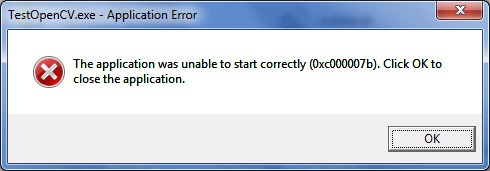
0xc00007b "the application was unable to start correctly". This error code represents that there is something corrupted within your Windows files or a DLL
wet briar
Yep, already tried everything on that page
vagrant atlas
how can I get the angle of the mouse to the center of the screen? I already have the x and y positions of the mouse, I just don't know how to do the math.
drowsy snow
vagrant atlas
how can I get the angle of the mouse to the center of the screen? I already have...
Basically trigonometry using X and Y position, half coordinate, and pythagorean formula to calculate the length from the center
modest trench
vagrant atlas
how can I get the angle of the mouse to the center of the screen? I already have...
plush yew
why is this happening? when I press play it's a different lightning and color than editor mode
auto exposure is off
but in post process exposure is 10
nvm, it was real time capture 😄
bleak zodiac
ionic bridge
After a while I finally did a fog of war by following this tutorial: https://hippowombat.medium.com/tutorial-line-of-sight-visualizer-for-unreal-engine-f32113b1f6f3
BUT i want to add a max view distance... with the attached screen shot you can see the red circle and the red X marking where I DO NOT want to be able to see. Meaning I want to be able to see only inside the radius.
Any suggestions?
 plush yew
I am trying to figure out who is responsible for making a game trailer and how is it made? Is it the Unreal cinemator or animator who makes game trailers? I have been trying to YouTube how to make game trailers and all I get is "how to make a game trailer that is good" but not actually about creating the trailer or the steps involved.
 oak gate
Hey Guys, I'm having a "polishing issue" where the character controller goes up/down too fast on the floor . Is there a settings I don't know about that could ease up that thing?
plush yew
oak gate
Hey Guys, I'm having a "polishing issue" where the character controller goes up/...
I had that issue once. What I did was I changed the collision of the box and made it a ramp. Like how you double click on the box and then choose "convex" collision and then change the collision to mimic that of a ramp. That worked for my taste, but I do not know if that would work for your taste or not.
oak gate
plush yew
I had that issue once. What I did was I changed the collision of the box and mad...
it's a heavy solution to put in place and I wanted to avoid that 🙂
In this zone, i've made it to mimic the levels in game with assets, so I could test it up 🙂
plush yew
Did you try increasing the step height of the character?
plush yew
oak gate
it's a heavy solution to put in place and I wanted to avoid that 🙂
In this zone...
Yea, for me luckily I found this issue early on before level designing
oak gate
plush yew
Did you try increasing the step height of the character?
yeah, it's actually because it's high that it does that 😄
kindred depot
plush yew
why is this happening? when I press play it's a different lightning and color th...
You should do what i did as well. Make your own Post process blueprint and inside this pawn has different settings for it. I clamped the post process different for each level 😛
 jolly plank
anyone know how to get instanced mesh to work on mobile?
plush yew
GUYS HELP I WANA USE RINTERP TO INSIDE A FUNCTION BUT I HAVE NO WAY TO GET DELTA TIME FROM IN THERE
 tender ember
Hello I downloaded a texture from Quixel and it doesn't show the material it only has M instance. also I how do I remove it from my landscape so I have that checked pattern again?

 drowsy snow
plush yew
GUYS HELP I WANA USE RINTERP TO INSIDE A FUNCTION BUT I HAVE NO WAY TO GET DELTA...
drowsy snow
plush yew
GUYS HELP I WANA USE RINTERP TO INSIDE A FUNCTION BUT I HAVE NO WAY TO GET DELTA...
CAN YOU GET THE SAME DELTA TIME FLOAT YOU USED FOR RINTERP?
(seriously take off that caps lock)
plush yew
what do you mean?
I used event tick but i want to run it inside of a function where event tick cant be used
Basically my goal is a Turn_Right function that smoothly turns the camera 90 degress
Oh! Maybe i can have my level bp change a global variable?
stable path
plush yew
Basically my goal is a Turn_Right function that smoothly turns the camera 90 deg...
I don't think you can smoothly run RInterp in a function, A function only runs once
modest trench
plush yew
Oh! Maybe i can have my level bp change a global variable?
be careful with LevelBPs, most people avoid them in favor of manager actors etc they can actually move around and share between levels
plush yew
so you guys think it's not possible? Do i take the BoolCheckAThousandConditions path?
thick herald
tender ember
Hello I downloaded a texture from Quixel and it doesn't show the material it onl...
Yup, all Bridge materials use a master Material and create instances based on that. Just click on the little arrow and pick a new material, Unreals default one is listed.
tender ember
thick herald
Yup, all Bridge materials use a master Material and create instances based on th...
oh ok, in my tutorial the guy has the same material but it is working and mine is just plain black
stable path
plush yew
so you guys think it's not possible? Do i take the BoolCheckAThousandConditions ...
Maybe you can use a Timeline?
But you can't use a Timeline in a function either, you'll have to use an Event
kindred depot
thick herald
Yup, all Bridge materials use a master Material and create instances based on th...
This actually works for you guys? I have been trying to get this to work for a long time lol. I have been manually selecting my textures to my mats >_<
plush yew
This is what i got right now, but ill have to do the same for going back now
 plush yew
stable path
Maybe you can use a Timeline?
But you can't use a Timeline in a function either,...
plush yew
stable path
Maybe you can use a Timeline?
But you can't use a Timeline in a function either,...
oh ok
drowsy snow
stable path
Maybe you can use a Timeline?
But you can't use a Timeline in a function either,...
Or macros
thick herald
kindred depot
This actually works for you guys? I have been trying to get this to work for a l...
Not sure what you mean, all I said was how to reset the material to something else?
tender ember
it is blank somehow but it used to be black idk why it didn't import it properly
 kindred depot
thick herald
Not sure what you mean, all I said was how to reset the material to something el...
kindred depot
thick herald
Not sure what you mean, all I said was how to reset the material to something el...
Oh sorry man. In my mind it was importing from mega scans and you can select your own material for the textures to import with not the MS preset.
thick herald
😄
plush yew
tender ember
it is blank somehow but it used to be black idk why it didn't import it properly
Could you open the material shader?
kindred depot
Myb xD
plush yew
How do i make events?
thick herald
@tender ember Megascans do not have any landscape materials
kindred depot
plush yew
How do i make events?
right click type custom event
thick herald
They have textures you can add to one though
stable path
plush yew
How do i make events?
https://docs.unrealengine.com/4.27/en-US/ProgrammingAndScripting/Blueprints/UserGuide/Events/Custom/
Custom user-created events that can be fired off from within a Graph.
plush yew
Thank you
tender ember
this is not a landscape material it's just a simple texture I'm gonna use as one
tender ember
plush yew
Could you open the material shader?
 kindred depot
I really with that feature worked with megascans, has anyone gotten it to work? You are able to import there textures to your master material but for some reason this out of the box has never actually worked.
tender ember
I guess I should connect them manually wdyt?
plush yew
tender ember
I guess I should connect them manually wdyt?
Yep. Try connecting them and let's see what happens next?
tender ember
plush yew
Yep. Try connecting them and let's see what happens next?
which ones should I connect?
 thick herald
It should cover the entire landscape with that one material
tender ember
thick herald
It should cover the entire landscape with that one material
yeah that's the whole point as I said I'm watching a tutorial and do everything as the guy says but it doesn't seem to work:(
I know PBR workflow but idk unreal yet
plush yew
tender ember
which ones should I connect?
Im not sure..
tender ember
kindred depot
https://www.unrealsensei.com/asset/autolandscape
too early for that yet I'm watching ben cloward
thick herald
https://docs.unrealengine.com/4.27/en-US/BuildingWorlds/Landscape/TechnicalGuide/ and https://docs.unrealengine.com/4.27/en-US/RenderingAndGraphics/Materials/ are good starting points or the official learning hub 🙂
Technical Settings for Landscape.
Controlling the appearance of surfaces in the world using shaders.
drowsy snow
tender ember
I watched sensei's videos but he doesn't explain every single node
If you want every single node explanations, better check out Mathew Wadstein's channel.
The explanations were on per node basis.
tender ember
for example these ones I see for the first time in my life
 thick herald
Those are material functions
tender ember
should I connect result to UV's or roation and which node or should I combine them somehow
drowsy snow
tender ember
for example these ones I see for the first time in my life
You can open them to see what it's doing
Double click on it and you'll be presented by the graph view that makes up the function
tender ember
yeah I tried to connect them but it gave me an error
plush yew
One last thing, how do i limit it to just turning 90 degrees and then stopping?
 drowsy snow
plush yew
One last thing, how do i limit it to just turning 90 degrees and then stopping?
drowsy snow
plush yew
One last thing, how do i limit it to just turning 90 degrees and then stopping?
I don't think you need RInterp To if you're going to use Timeline.
tender ember
my question is what should I do so my megascans texture works properly in UE coz I can't go on with the tutorial?
plush yew
tender ember
yeah I tried to connect them but it gave me an error
Honestly, they should have come connected. Idk why they didnt come connected.
plush yew
drowsy snow
I don't think you need RInterp To if you're going to use Timeline.
huh, then what do i do?
tender ember
yeah me neither I used to import them and it was fine
drowsy snow
tender ember
my question is what should I do so my megascans texture works properly in UE coz...
IMHO you should make your own materials for them megascans. It's what I did.
tender ember
maybe I should open UE5 coz Idk the interface of ue4 that well
drowsy snow
I have many hit or miss experiences with the importing process myself from Bridge.
plush yew
tender ember
maybe I should open UE5 coz Idk the interface of ue4 that well
Could you double click on the material function and share it?
tender ember
drowsy snow
IMHO you should make your own materials for them megascans. It's what I did.
sorry I don't understand what you mean. I'm watching beginner series on landscape and materials
tender ember
plush yew
Could you double click on the material function and share it?
I have several which one? the tiling ones or adjustments?
plush yew
Let's start with the tiling one
drowsy snow
tender ember
sorry I don't understand what you mean. I'm watching beginner series on landscap...
I mean making the materials from the ground up, using textures from megascans.
plush yew
The tiling one should connect to UV
plush yew
drowsy snow
I mean making the materials from the ground up, using textures from megascans.
I second that.
drowsy snow
tender ember
sorry I don't understand what you mean. I'm watching beginner series on landscap...
For the full tutorial playlist:
https://www.youtube.com/playlist?list=PLZlv_N0_O1gbQjgY0nDwZNYe_N8IcYWS-
(00:05) - Introduction and Materials in UE3
(04:14) - Materials in UE4
(08:56) - How Color Works Inside a Material
This high-level overview takes you through the concepts of Materials and our physically-based approach to surfaces in UE4.
A ...

 drowsy snow
Old tut, but still relevant to this very day
kindred depot
I understand how things work, I rather just pay for them to work correctly from the marketplace lol
tender ember
 plush yew
tender ember
plush yew
tender ember
Oooh seems like you have some missing functions that are not going into the adjustments
tender ember
I can create a material using those textures but I wanna this material to be exactly as in the video so I don't have other problems in the future
I'd just make a pbr set up with a texture coordinate node and tiled it up and that's all
drowsy snow
plush yew
Oooh seems like you have some missing functions that are not going into the adju...
An issue too common for myself to experience with it lmao
drowsy snow
tender ember
I can create a material using those textures but I wanna this material to be exa...
At best you're going to remake it anyway, because of leveraging landscape layers.
plush yew
Yea.. I can't help you there as well
tender ember
it's so hard to start do you guys know any free or paid courses on a detailed explanation of UE? I already watched everything by Unreal Sensei and that's not doing it for me rn I'll go back to them later for sure
kindred depot
What are you trying to accomplish.
plush yew
tender ember
it's so hard to start do you guys know any free or paid courses on a detailed ex...
Seems like you are interested in material shading?
What do you exactly want to do with UE?
plush yew
tender ember
I'm an environment artist I work in Blender
I recommend starting to learn how to blockout scenes
kindred depot
Yes we get that, but what kind of material are you trying to accomplish. like RVT, layering
plush yew
then creating terrains
tender ember
If it was up to me I'd never used nodes but it's something we have to do haha
plush yew
and then learning about environmental optimizations,
plush yew
tender ember
If it was up to me I'd never used nodes but it's something we have to do haha
It's actually fun once you understand it.
drowsy snow
tender ember
it's so hard to start do you guys know any free or paid courses on a detailed ex...

Unreal Engine
Unreal Online Learning is a free learning platform that offers hands-on video courses and guided learning paths.
tender ember
ok lemme actually show you my tutorial
drowsy snow
Your First Hour in Unreal Engine 4 https://learn.unrealengine.com/course/3756115
Animation Kickstart https://learn.unrealengine.com/course/3537714
Blueprint Kickstart https://learn.unrealengine.com/course/3537777
Character Kickstart https://learn.unrealengine.com/course/3537798
Engine Structure Kickstart https://learn.unrealengine.com/course/3537730
Materials Kickstart https://learn.unrealengine.com/course/3537805
Programming Kickstart https://learn.unrealengine.com/course/3537752
Rendering Kickstart https://learn.unrealengine.com/course/3537481
World Building Kickstart https://learn.unrealengine.com/course/3537476
Reposted because nobody reads pinned message
tender ember
In this episode, we go over the steps to download and process the Quixel Megascans textures that we're going to use in our landscape material. Because sampling textures in shaders is expensive, it's important to pack our maps into as few textures as possible. I'll show you how to pack six Megascans maps into just two textures using either Subs...
start at minute 10
plush yew
drowsy snow
Your First Hour in Unreal Engine 4 https://learn.unrealengine.com/course/3756115...
I dont recommend going this route personally....
Just learn what you want to learn from those above links...
Not all of the,
them*
kindred depot
I'm a simple man I use brushify and merged all my functions into it.
tender ember
isn't brushify super expensive?
thick herald
tender ember
https://www.youtube.com/watch?v=mEDoy-N1ODQ&list=PL78XDi0TS4lHwqv_PmXAdedT2SH1qe...
That tutorial is good, if it's not working for you, it means you've made a mistake.
drowsy snow
tender ember
isn't brushify super expensive?
Yes, but some of them used to be free for a limited amount of time.
drowsy snow
But that was way back when
kindred depot
lol
thick herald
Depends on what you call expensive. It's subjective.
drowsy snow
thick herald
Depends on what you call expensive. It's subjective.
I personally think it's worth the time cost to make them from scratch, but it's just me.
tender ember
the thing is I've alreaady watched a lot of official and youtube beginner tutorials and they all talk about general things like interface etc. But I wanna get into world building. they show game buidling but I need cinematics. I don't need c++ stuff you know or blueprints although I'll def gonna learn blueprints later on
drowsy snow
tender ember
the thing is I've alreaady watched a lot of official and youtube beginner tutori...
I'm not sure if the links to the courses I posted above is invisible to you.
tender ember
thick herald
That tutorial is good, if it's not working for you, it means you've made a mista...
I imported the texture and it looks black so idk how else should I do it
drowsy snow
The last one even mentions world building
thick herald
drowsy snow
I personally think it's worth the time cost to make them from scratch, but it's ...
Agree that learning how to make your own from scratch ultimately gives you more knowledge and control.
tender ember
drowsy snow
I'm not sure if the links to the courses I posted above is invisible to you.
I'm looking into them thanks. the chat is so fast haha
drowsy snow
I personally hide it in DCC tool, which means the skin is part of the cloth mesh, but you can use masked opacity and hide the skins underneath according to texture.
The former is kind of tedious to make because you have to have the master nude body at all times, but more foolproof in code, while the latter is quicker to make but difficult to manage in code.
tender ember
drowsy snow
Your First Hour in Unreal Engine 4 https://learn.unrealengine.com/course/3756115...
I'm gonna start the world building one thanks
thick herald
tender ember
I'm looking into them thanks. the chat is so fast haha
In that material graph you showed - the output node to the far right. Click on it and look in the details panel, there will be a checkbox saying something like 'Use Material Attributes' uncheck that. Plug in all the textures into the new node that magically appeared, ignore the rest. That will now work as a very very basic material. Getting it to look good is your next mission 😉 😄
bleak zodiac
First hour in sequencer is also worth for cinematic
tender ember
I already have some fundamental knowledge from Sensei and Ben I just want more details and undertanding and not just copypasting the tutorials and pre-prepared autolandscape materials you know
ok thanks guys💛
vagrant atlas
Is there a way that if I subtract two numbers, the smaller number is always subtracted?
thick herald
tender ember
I already have some fundamental knowledge from Sensei and Ben I just want more d...
If all the materials you download from Megascans do that, it means something is wrong with the plugin [assuming you are using bridge]
stable path
vagrant atlas
Is there a way that if I subtract two numbers, the smaller number is always subt...
Get the Absolute of the result
vagrant atlas
ok, thanks! :)
tender ember
thick herald
If all the materials you download from Megascans do that, it means something is ...
it's def UE4 coz I've never had any problems with importing to UE5
drowsy snow
thick herald
If all the materials you download from Megascans do that, it means something is ...
And it goes wrong like almost all the time lmao
kindred depot
To show off your Level, Would you rather have; a cinematic camera flying through out your whole entire level, or a post process mounted to the camera in the characters bp showing the beauty in a first person view.
drowsy snow
tender ember
it's def UE4 coz I've never had any problems with importing to UE5
UE5 has built in Bridge, that's why.
That was not the case with UE4, which I still use to this very day.
(and maybe until I'm fully done with my current game project, all DLC finished, and what's left is Deluxe edition using UE5 feature set)
UE5 has more engine level integration into Bridge, compared to standalone Bridge route UE4 has to go through as a mere higher level plugin.
It's really a side product of Epic acquiring Quixel before UE5 become a real thing
plush yew
kindred depot
You should do what i did as well. Make your own Post process blueprint and insid...
No idea how to do it, I always copy details from projects and just paste them but it does not allow to paste all the time. Have like 4 different levels with same scenery, trying out different lightning.
tender ember
yeah I kinda started learning UE not at the best time haha I learn both UE4 and UE5 coz there aren't much tuts on UE5 yet
drowsy snow
tender ember
yeah I kinda started learning UE not at the best time haha I learn both UE4 and ...
FWIW you should stick with UE4 in the meantime until UE5 is fully released. You can then continue where you left off.
tender ember
thank you 💛
plush yew
can someone help me - i have made an animation blueprint with animations from the paragon sample characters in the unreal marketplace, but the animations are really snappy and go to the next anim instantly like with walking. is there any solution to this?
drowsy snow
plush yew
can someone help me - i have made an animation blueprint with animations from th...
Can't recall exactly the name of the setting, but there's a setting to set the blend duration for a state transition
plush yew
ok
also i have 3 animations for jumping, the start, the looping middle and the end, how would i get them to play at the right time without having just a single animation for falling
vagrant atlas
I have a spring arm that holds objects, and when I play it rotates (opposite to the player). Is there something I can do?
plush yew
Hi everyone! hope you're having all a great weekend.. i'm looking for a tutorial on how to do a simple rigid body simulation with unreal? (the same way you could do it with houdini).. basically just want to have a static body animated and having simulation of rigid bodies
 ebon marlin
So I recently switched from a 2560x1440 @144hz display to a 1920x1080 @60hz display and noticed that mouse inputs aren't registering, apparently this happens when I move my mouse too much to the right or left, even if the UE window is in focused, and even when it's in fullscreen mode. Did anyone experience the same thing? On 4.27 btw
vagrant atlas
Is it a problem with a HUD?
ebon marlin
Not HUD related afaik, just normal player controller inputs
vagrant atlas
Maybe the scene is still 2560x1440
ebon marlin
plush yew
Hi everyone! hope you're having all a great weekend.. i'm looking for a tutorial...
Click on your static mesh or primitive component and toggle 'simulate physics' in the details panel
ebon marlin
vagrant atlas
Maybe the scene is still 2560x1440
The viewport? It's certainly at 1080p
plush yew
ebon marlin
Click on your static mesh or primitive component and toggle 'simulate physics' i...
thank you! trying it out!
ebon marlin
I think what's happening is for some reason UE is failing to glue my cursor the center of the window? And is instead just clamping my mouse to the window's regions
vagrant atlas
while playing do you play in selected view port or are you playing in new editor window
ebon marlin
Standalone window
plush yew
ebon marlin
The viewport? It's certainly at 1080p
working like a charm! thank you!
ebon marlin
And it also happened in a packaged build, didn't happen in editor PIE
vagrant atlas
try to use the console to change the resolution the the one of the screen you use now
the problem might be that the game window is bigger than your screen, but mouse input only counts when it's on that screen
ebon marlin
Oh, I just tried r.SetRes 1920x1080f and it seemed to work, TIL hitting F11 doesn't actually put you in 'real' fullscreen
but r.SetRes 1920x1080w still had the problem
ebon marlin
vagrant atlas
the problem might be that the game window is bigger than your screen, but mouse ...
Interesting, but odd that it happens, seems like something UE should fix
vagrant atlas
but it's also supposed to give you as much control as possible
plush yew
ebon marlin
Click on your static mesh or primitive component and toggle 'simulate physics' i...
last one, how to adjust the static collider object i'm trying to make a sphere simulate inside a cube, but right now once i hit play, the sphere moves out of the cube
ebon marlin
Double click the static mesh asset you're using, it should open the static mesh editor
In it, click on the collision menu and check 'simple collision'
it should show you a bunch of green collision primitives, and you can add/remove/transform them to edit the colliders
(if thats what you meant)
you can make your cube/box hollow and stuff
otherwise the sphere popping out of a solid collider is expected behavior
plush yew
thank you! trying it out
vagrant atlas
vagrant atlas
I have a spring arm that holds objects, and when I play it rotates (opposite to ...
Does anyone know what I can do about this?
modest trench
you could maybe lock the rotation on one axis
at least you can do that for physics objects
you just need to make it not follow the parent component's rotation
vagrant atlas
by locking, to you mean to set the rotation every tick? I've tried that, and it didn't work
lunar turret
How do I tell my gamemode to use an instance of a class as my character?
plush yew
how do I get mdl nodes to work in unreal or is that even a thing
vagrant atlas
@lunar turret Project settings > Maps & Modes > Default modes > Selected Gamemode >Default Pawn Class
lunar turret
vagrant atlas
<@!321218684117057536> Project settings > Maps & Modes > Default modes > Select...
This asks for a class not an instance
plush yew
i just really dont like unreal engines shader editor
lunar turret
Or an actor
vagrant atlas
then make a pawn or character how you want, and set it to be the default and make other pawns for the other instances
vagrant atlas
yes
lunar turret
I don't really get what you mean
I have my class written in Cpp
And I make it have a mesh in my actor details
But the mesh is just actor specific
Meaning that when my game starts I play as a pawn with no mesh
This is my issue
vagrant atlas
make a pawn as your player, and copy that pawn (so that you have two separate pawns in your files) and use them as the other instances
vagrant atlas
well, I personally don't know a way to control a specific instance of a pawn
lunar turret
Alright thx
vagrant atlas
but having a separate one as the player might help with the blueprints so that not everything has a lot of them
wet briar
Alright so I tried to build UE4 from source from github, but for some reason when building it in VS, it said ran out of heap space
How do I fix that?
drowsy snow
wet briar
Alright so I tried to build UE4 from source from github, but for some reason whe...
Heap space... Maybe RAM issue?
plush yew
ebon marlin
Double click the static mesh asset you're using, it should open the static mesh ...
working great thank you!
plush yew
plush yew
working great thank you!
also, i have a fbx with many geometries inside.. is it possible to simulate physics for each individual geo inside? or should i rather import the fbx and untick 'combine mesh' ?
drowsy snow
plush yew
also, i have a fbx with many geometries inside.. is it possible to simulate phys...
Should be the latter.
plush yew
drowsy snow
Should be the latter.
in the fbx mesh?
wet briar
Also another issue building the engine, Visual Studio gives me this when opening UE4.sln:

But on the download page there is no link for the 4.5 developer pack?
 drowsy snow
plush yew
in the fbx mesh?
drowsy snow
plush yew
in the fbx mesh?
As in importing without combining the mesh if you already have split meshes in it
oak patio
Try the reccomended option then
ebon marlin
plush yew
also, i have a fbx with many geometries inside.. is it possible to simulate phys...
maybe its a skeletal mesh?
drowsy snow
wet briar
Also another issue building the engine, Visual Studio gives me this when opening...
This alone worth #engine-source talk
wet briar
Ah didn't know that was a thing, thanks
drowsy snow
oak patio
Try the reccomended option then
I won't recommend it. It breaks when you build it with 4.8
oak patio
Ah mb then
drowsy snow
I've been struggling with that issue for a week.
oak patio
That sounds painful
Is there any particular reason people build from source over the launcher, engine modding aside?
drowsy snow
oak patio
Is there any particular reason people build from source over the launcher, engin...
Dedicated servers.
oak patio
Ah that makes sense
drowsy snow
That's like the most common reason people who asked about engine source
modest trench
A lot of my changes are just making stuff public
drowsy snow
Meanwhile me adding super epic anime shading model and super epic lens flares
modest trench
Yeah it's kinda rough going changing rendering in ue4
Definitely a weak aspect of it
drowsy snow
I admit Unity wins on this regard, is that you can use "light bending" HLSL codes without Plus tier to get the source code
modest trench
Years ago they changed the bloom calculation thingy and messed with many a project
drowsy snow
modest trench
Years ago they changed the bloom calculation thingy and messed with many a proje...
Was it 4.25?
Or maybe around 4.15
modest trench
I think it was around 15
drowsy snow
It was the point where they use ACES Filmic tonemapper
Then around 4.16 removes the legacy tonemapper entirely
modest trench
Omg, that too
ebon marlin
was the legacy tonemapper better?
modest trench
I prefer the new one
But it's a pretty big change visually
At least here I believe using your own should be possible
Or at least easier to mess with in source than other render features afaik
ebon marlin
ive been messing with capsule shadows' source code a bit
there are a lot of hardcoded values in the compute shader that should be CVars IMO
they really help fit capsule shadows to custom usage and also help with working around some limitations of the current configuration
drowsy snow
ebon marlin
was the legacy tonemapper better?
Prefer the new one as well tbh
plush yew
can you decrease light quality?
50 spotlights

but to light it all it takes like 200-300
and fps drops are huge
drowsy snow
plush yew
and fps drops are huge
You can fade out light in distance.
I think one video from UE YT channel on Fortnite talks about this
plush yew
ok
drowsy snow
In this session presented by Epic's Zak Parrish, you will learn about some of the dynamic lighting features we use in Fortnite with Unreal Engine 4.
We'll take a look at how you can set these up, optimize them, and get the most out of your dynamically lit worlds to achieve the highest fidelity and save some performance in the process.
Learn m...
drowsy snow
plush yew
50 spotlights
Also with that kind of light setup, you may want to consider disabling shadow casting on them
drowsy snow
plush yew
it kinda lights up floor and ceiling nicely
Still the same
Disabling shadow casting works on all type of light probes
Though interestingly there's no option to disable shadow casting on distance
lunar turret
How do I make a certain socket's arrows not rotated anymore again?
Like there

You can see the arrows are rotated a bit
How do I stop that?
plush yew
drowsy snow
Still the same
ok, thanks
ebon marlin
lunar turret
How do I stop that?
click on this button thingy, it should probably look like a cube woops
 drowsy snow
I don't consider using them, the engine blacklisted any Intel GPU from using mesh DFs (atm it's obviously iGPU in Intel CPUs, but who knows if this includes future Intel dGPUs)
Just falls back to traditional shadowmaps.
That means no soft shadows or any other feature using mesh DF on Intel GPU
Yeah, it was hardcoded to blacklist any GPU from Intel.
I'm too afraid to remove it lmao, felt like not worth rebuilding the engine with my less than thread ripping rig just to test it
ebon marlin
oof, I didnt know capsule shadows weren't supported on intel GPUs
drowsy snow
ebon marlin
oof, I didnt know capsule shadows weren't supported on intel GPUs
Capsule shadows actually supported on intel GPUs.
ebon marlin
but not distance field shadows?
drowsy snow
Capsule shadows don't share the same code as mesh DF
ebon marlin
What about indirect distance field shadows?
Because afaik all r.CapsuleShadowsX commands affect both, the engine handles them in the same files, etc
drowsy snow
An overview of Mesh Distance Fields and its available features that you can use when developing your games.
drowsy snow
ebon marlin
What about indirect distance field shadows?
Anything involves mesh DF data is blacklisted from intel GPUs.
ebon marlin
dang
drowsy snow
Which means no consistency from super epic niagara effects
ebon marlin
the gotchas list is getting bigger
drowsy snow
And I'm all craving for consistency and hardware agnostics
ebon marlin
does Lumen use distance fields? I forgot
drowsy snow
I still have faith on low spec gaming after all
But that doesn't ignore possibility with upcoming Intel's dedicated GPUs
ebon marlin
If it does, it's more likely epic are putting extra effort into working around that limitation
drowsy snow
ebon marlin
does Lumen use distance fields? I forgot
Either that, or more likely Virtual Shadow Maps
ebon marlin
I don't think virtual shadow maps have to do with Lumen, VSMs are for direct lighting (afaik?)
what's a good site to check intel GPUs usage worldwide?
drowsy snow
ebon marlin
what's a good site to check intel GPUs usage worldwide?
I forgot the site, but I know Steam has the statistics for that
Though that's not putting into account regional factors.
ebon marlin

its not an awful situation, but not ideal either
I had no idea Nvidia was dominating AMD so hard
drowsy snow
ebon marlin
I had no idea Nvidia was dominating AMD so hard
NVIDIA's marketing is much more aggresive.
Also RTX.
Though maybe RX 6900 XT (nice) started to support HW accelerated RT
vagrant atlas
I have a problem where I have a box collision in an actor and it's collision settings are "overlap all" but (while in game) when I drop a cube on it it's not being detected
rapid lark
hey if theres anyone out there who is experienced in making Cyber punk themed cities I was just curious what plugins you think would help me
I'm new to UE so I don't have any plugins
drowsy snow
rapid lark
hey if theres anyone out there who is experienced in making Cyber punk themed ci...
No plugins, just mostly on crafting the buildings and designing the city.
And maybe lots of emissive neon plaques, but that's doable with vanilla material system
rapid lark
drowsy snow
And maybe lots of emissive neon plaques, but that's doable with vanilla material...
thank you thank you so much
are there any keyboard shortcuts I should know for copy pasting
bc I tried copying a bunch of floors but I could only do one at a time
drowsy snow
rapid lark
are there any keyboard shortcuts I should know for copy pasting
Ctrl+W for duplicating stuff (which is basically just instant copy paste)
rapid lark
Thank you thank you
plush yew
can you sculpt landscape in different forms by using default unreal engine landscape?
like sculpt in a box into ground
drowsy snow
plush yew
like sculpt in a box into ground
If you mean using alpha texture brushes, yes.
plush yew
yeah
 limber badge
Sorry for this question. Whats deafult varibles in git.postbuffer and git.window memory
I broken something)))
plush yew
hi im making a massive open world map, how do i make it so it doesnt render buildings or foliage in the distance that you don't see because just with a landscape filled with foliage is having a huge performance impact
drowsy snow
plush yew
hi im making a massive open world map, how do i make it so it doesnt render buil...
Best you can do is isolate the interior from the outer world, and let view frustum culling do its job.
plush yew
i don't understand
becuase i solely have a landscape and foliage, it is a big world but its using a lot of processing power and is laggy
Question: what are the units of measure used for speed in UE?
I'm using 4.27
is it like m/s? pixels per seconds or something like that?
 raw harbor
Is it ok to use a video intro saying “powered by ue) with the logo or is it not allowed?
 ebon steeple
plush yew
Question: what are the units of measure used for speed in UE?
ebon steeple
plush yew
Question: what are the units of measure used for speed in UE?
sorry for the ping, i misunderstood your question at first x) unity uses the metric system, so speed is measured in meters per second. more on that right here https://www.techarthub.com/scale-and-measurement-inside-unreal-engine-4/

Having a practical understanding of how scale and measurement works inside the Unreal Engine is more than just a numbers game.
since 1 cm is 1 unreal unit a speed of 600 (default afaik) equals 6 meters per second
raw harbor
raw harbor
Is it ok to use a video intro saying “powered by ue) with the logo or is it not ...
This one https://youtu.be/YzQMIZ3Ui_Y
 plush yew
raw harbor
This one https://youtu.be/YzQMIZ3Ui_Y
plush yew
raw harbor
This one https://youtu.be/YzQMIZ3Ui_Y
If you have a publisher's license and when you export your package UE logo comes in the start by default.
During the intro
If that is what you were asking
ebon steeple
raw harbor
This one https://youtu.be/YzQMIZ3Ui_Y
https://www.unrealengine.com/en-US/branding you'll want to ask right here
Unreal Engine
Unreal Engine Branding Guidelines and Trademark Usage
raw harbor
How do I get a publisher license
ebon steeple
that website explains everything and gives you a link to approved UE4 logos to use
plush yew
raw harbor
How do I get a publisher license

Unreal Engine
Choose the Creators License or the Publishing License, or enquire about other licensing options.
plush yew
drowsy snow
Can't recall exactly the name of the setting, but there's a setting to set the b...
is it interpolation speed
or
raw harbor
plush yew
https://www.unrealengine.com/en-US/download
What does it mean for free projects ❌
I can’t release a game that’s free or ami wrong?
plush yew
raw harbor
I can’t release a game that’s free or ami wrong?
You can
But if your game is paid and your game ends up making more than USD 1M then 5% of that goes to UE as royalty.
plush yew
raw harbor
Ah ok
But you cannot publish a game using the creators license the last time I checked.
drowsy snow
raw harbor
But I still can’t find an answer if I can use the intro or not
wdym intro?
plush yew
Yes
drowsy snow
raw harbor
https://youtu.be/YzQMIZ3Ui_Y
Oh, that.
You're not obliged to show it on startup. ||Unlike Unity||
You have to sign the trademark use agreement
raw harbor
drowsy snow
Oh, that.
You're not obliged to show it on startup. ||Unlike Unity||
But the splash screen is allowed? 🤨
ebon steeple
i wouldn't use a logo from a random youtube video in a game i want to publish. if you find that video on their website or official youtube channel however, the story changes.
raw harbor
drowsy snow
You have to sign the trademark use agreement
I’m sorry if it’s stupid but is it paid?
raw harbor
ebon steeple
i wouldn't use a logo from a random youtube video in a game i want to publish. i...
I think He got jt from a video from us
Ue*
drowsy snow
raw harbor
But the splash screen is allowed? 🤨
If you haven't apply for it (which I'm certain is free) then not really.
ebon steeple
better look that up though, no way to make sure other than that.
drowsy snow
At the same time you're not pressured to put it ||like free tier of Unity lmao||
drowsy snow
raw harbor
Yeah Ik but I’m just tryna make the intro good
I'm sure you'll said the opposite thing when using ||Unity|| 😏
raw harbor
drowsy snow
I'm sure you'll said the opposite thing when using ||Unity|| 😏
Ofc 😂
Unity intro is a meme at this point, if it’s there the game is bad
drowsy snow
plush yew
is it like m/s? pixels per seconds or something like that?
More like centimeters in a frame.
ebon steeple
raw harbor
But ig Il just use my own logo
https://www.unrealengine.com/en-US/branding bro follow this website and press the "here" link in the first paragraph. all those videos and logos are cleared by UE to be used by you, there's no need to go by some random youtube video and word-by-mouth on that 🙂
Unreal Engine
Unreal Engine Branding Guidelines and Trademark Usage
 red condor
Hi all, if I want to make a super simple inventory system, just a list of item names and the amount of each that the player holds (i.e. keys = 2, coins = 5), what's the best data type/way to manage the logic side of this? I'd like to avoid using a separate variable for every item type, just to make it tidier when it comes to saving the game if possible. I'm using blueprint.
raw harbor
ebon steeple
https://www.unrealengine.com/en-US/branding bro follow this website and press th...
Thank you
drowsy snow
red condor
Hi all, if I want to make a super simple inventory system, just a list of item n...
I'd go with enum of all items, and array of struct made of item enum and amount integer.
At least that's what I learned from JRPG save editors.
red condor
Thanks! I'll see if I can work out how to do that, I know what to search for now :)
I got as far as making an enum and then went uhhh....
drowsy snow
It might not be the most elegant way, but considering that it's unlikely for one to add an entirely custom items, it should do.
Of course it would be a different story if you allow mods making custom items, but in many cases it handled separately. But then it's a massive can of worm by itself.
plush yew
I used this for the inventory system: https://www.youtube.com/watch?v=TcTxSyk8Vks&t=180s
In this video I teach you how to create your very own inventory system. I also give you the choice to download it for free
★ Come join the Team Beard Discord: https://discord.com/invite/hhv4qBs ★
★Check out my Marketplace Asset: https://www.unrealengine.com/marketplace/en-US/product/flexible-combat-system ★
★ Ways to Support The Channel ★
Pa...
red condor
drowsy snow
Of course it would be a different story if you allow mods making custom items, b...
Ah yeah, I won't be doing anything like that - at least for now. I'm just trying to blueprint a prototype together, things can always be redone later if needed.
red condor
plush yew
I used this for the inventory system: https://www.youtube.com/watch?v=TcTxSyk8Vk...
Thanks! I don't think I saw that one when I was looking. Seems like there's a lot of good 'complex' inventory system tutorials that go properly into the UI side of things too, but I just want to get basic logic working for now. I'll definitely check this one out if I get stuck though
plush yew
red condor
Thanks! I don't think I saw that one when I was looking. Seems like there's a lo...
You can skip the UI part and jump directly to the logic.
drowsy snow
red condor
Thanks! I don't think I saw that one when I was looking. Seems like there's a lo...
I can relate to this tbh.
It's easy for tuts on YT to overwhelm
red condor
plush yew
You can skip the UI part and jump directly to the logic.
Ah nice! A lot of tutorials skip back and forth, so I find myself skipping important steps. I'll take a closer look now
plush yew
any news about UE4 or UE5 being compiled for Mac M1?
 remote plover
how can i make it so i can walk through an object but still check collision is there a collision preset
raw harbor
remote plover
how can i make it so i can walk through an object but still check collision is ...
I’m not sure, but turn off the collision for the object and add a box to it, then code the overlap of the box collision to it, box doesn’t add a collision to your object
red condor
remote plover
how can i make it so i can walk through an object but still check collision is ...
Alternatively use a custom collision preset (static mesh - settings - collision). The middle column is headed 'overlap', so you can set your mesh to overlap the player (or everything). This way you don't need to use a separate collision box, you can just create an overlap event for the mesh.
 glad coral
Is this a known bug or do I need to enable something in Unreal for the Camera Shake Base blueprint class to show the "Camera Shake Pattern?" When I open the blueprint all I get is an instance option, no noise options. In 4.26...it works in 4.27.

 lucid trout
I kind of don't want to work on my own game project anymore
red condor
lucid trout
I kind of don't want to work on my own game project anymore
Losing motivation is a common problem, unfortunately, and there can be many reasons for it. Is it a big project? How far in are you?
lucid trout
Fairly big, about the same scope as Half-Life 2.
three months in and I'm nowhere near happy with it
red condor
Solo?
lucid trout
Solo, unfortunately.
red condor
And is it your first game?