#ue4-general
1 messages · Page 1102 of 1
 drowsy snow
 silver oar
So I've tried increasing light map size and spacing everything out, and it helped a little
Here it is after building the light

The surface is less jank, but the black patches are still there
Here is the light map I've built for reference

 hot kestrel
hi every one i am new here and i do not good in en but that okay 🙂 and i need ask about same problom 🙂 so any one can help me plzz ?
drowsy snow
silver oar
Here is the light map I've built for reference
That's fine, though you should try retopo. Smaller faces might get merged there
silver oar
drowsy snow
That's fine, though you should try retopo. Smaller faces might get merged there
Retopo? Also are you talking about these faces?

Also I've reduced the amount of subdivisions, if that would help
 autumn latch
i am setting my game mode to only ui but my keys in the player controller still working
hot kestrel
my problom it is i make M_Landscap ( grass ) and ( grass forest ) but when i put grass forest i get gray land . so any one can help me ?
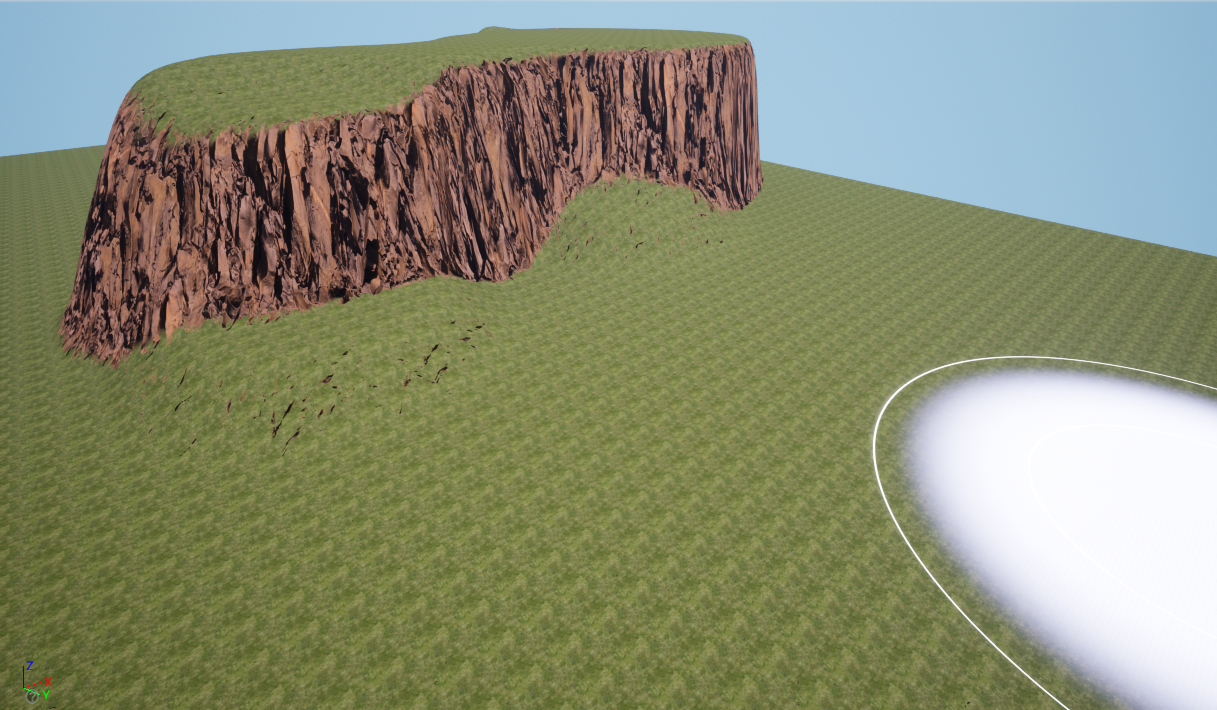
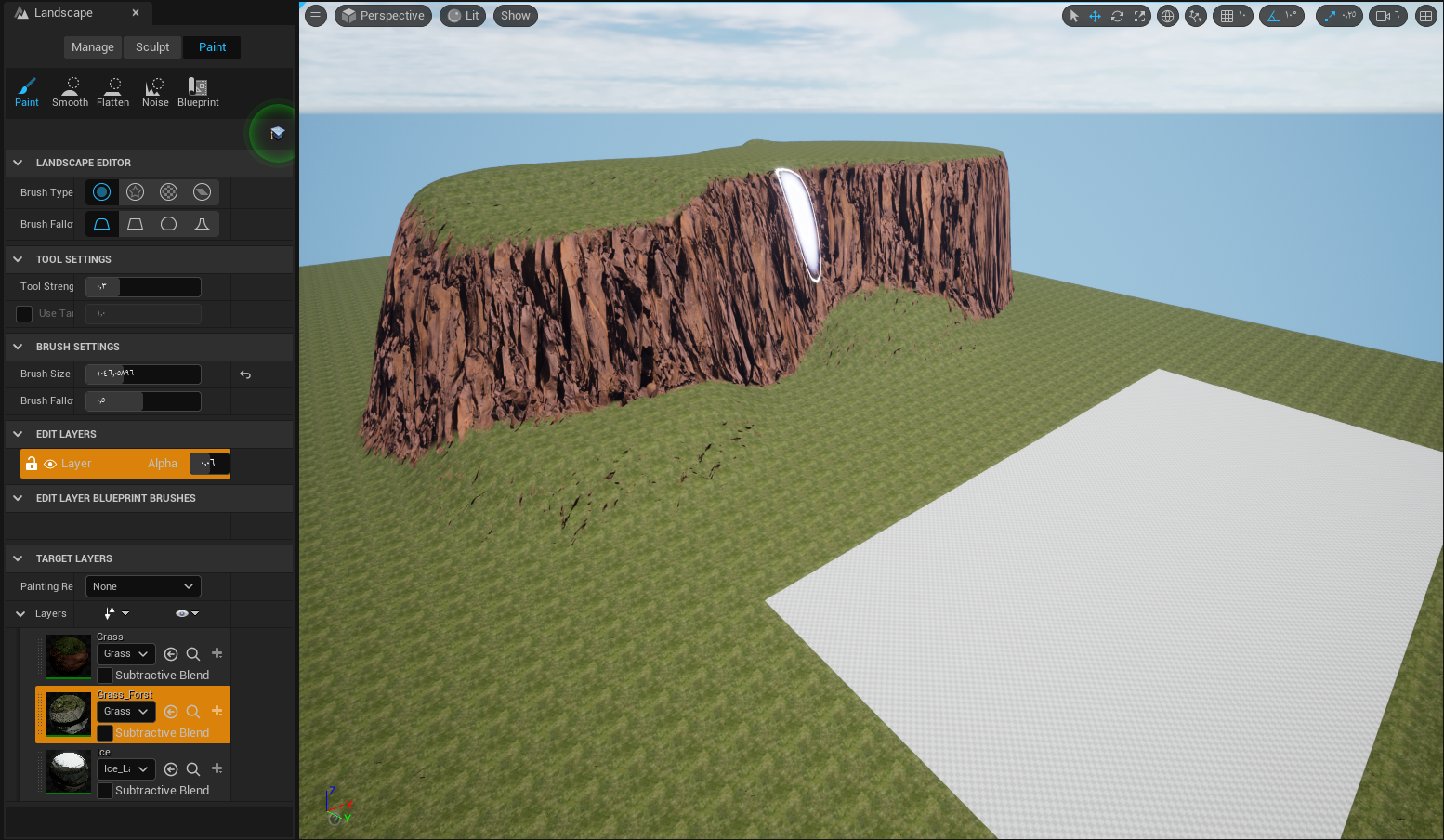
like this
drowsy snow
silver oar
Retopo? Also are you talking about these faces?
I mean overall faces. Still could be lowered down, while keeping the curved corner somewhat dense.
silver oar
drowsy snow
I mean overall faces. Still could be lowered down, while keeping the curved corn...
I got rid of some edge loops and this is probably as barebone as I can get it down to. I will try to see if I can get rid of more, but it's gonna be hard
 drowsy snow
silver oar
I got rid of some edge loops and this is probably as barebone as I can get it do...
drowsy snow
silver oar
I got rid of some edge loops and this is probably as barebone as I can get it do...
I'd say that's a pretty decent overall. Now it's making sure there's no double/overlapping islands.
One of those things that easy to forget, particularly with Mirror modifier enabled.
silver oar
Here is the uv map after the mirror modifier is applied

Doesn't seem like there's any overlapping islands
drowsy snow
Alright, give it a shot.
 prime willow
drowsy snow
Alright, give it a shot.
prime willow
drowsy snow
Alright, give it a shot.
whats a good tutorial for swimming and diving :3
oh!
and is ray tracing somehting we can use now?
or is it still too much for 60fps game builds?
silver oar
Ngl, it's looking a lot cleaner now. The black spots are still here, but the noise from other surfaces are completely gone
 drowsy snow
prime willow
whats a good tutorial for swimming and diving :3
drowsy snow
prime willow
whats a good tutorial for swimming and diving :3
Not sure about swimming, still haven't tackled it yet.
prime willow
;-;
silver oar
Oh also I've exported one with subdivision level at zero and it seems like something's wrong with the surfaces
drowsy snow
prime willow
and is ray tracing somehting we can use now?
Nope, still too much if you're aiming for high framerate. I'd expect around a decade or so when we reach that point.
Even PS5 games with raytracing don't go far with it.
drowsy snow
Full raster is still cool tho
prime willow
what
drowsy snow
Rasterisation. Basically how we render things in game for the past 2 decades or so.
silver oar
Here are the black faces highlighted, do you think this could be a blender side issue?
 prime willow
drowsy snow
Rasterisation. Basically how we render things in game for the past 2 decades or ...
prime willow
drowsy snow
Rasterisation. Basically how we render things in game for the past 2 decades or ...
can i bug you for a second
drowsy snow
prime willow
can i bug you for a second
Sure, though I'm kind of in "rest mode"
prime willow
promise its nuffin crazy complicated
 last topaz
Hi, anybody knows why at a distance my landscape is visibly stepping despite forcing lod0?

Huh nvm, I just had to move close to it and back, seems like it hadnt fully loaded for some reason..
 mystic fossil
New to UE, can I make my project cloud based and access it on any device?
drowsy snow
mystic fossil
New to UE, can I make my project cloud based and access it on any device?
If storing into GitHub (or any cloud source control) counts, then yeah. Though not in a sense that you open the editor on any device, phones included.
Remote desktop solution or cloud server with capable CPU and GPU are not optimal for something like Unreal Engine, even with the fastest internet connection.
mystic fossil
drowsy snow
If storing into GitHub (or any cloud source control) counts, then yeah. Though n...
Nah I need to access visual effects
So it doesn't have an option like Unity where you sync the project on multiple devices?
drowsy snow
mystic fossil
Nah I need to access visual effects
So it doesn't have an option like Unity whe...
Isn't that just source control? It also allows for syncing the project across computers that cloned it.
And yes, you can push .uasset files into GitHub.
mystic fossil
Hmm maybe then, just assumed that entire scenes can't go onto GitHub. But will give it a try, thanks!
drowsy snow
The .gitignore template for Unreal Engine project only ignore build files (something that's automatically generated) and some format files in SourceArt folder.
 real moth
Hi! I want to have a recoil mechanic sort of thing for the player (not the gun), so what I mean is say I shoot at the floor; my player will go upwards, if I shoot forward my player will go backwards. Does anyone know how I can do this, or good resources to look at?
Like I've got the horizontal movement working but the vertical is not, I assume due to gravity?
 drowsy wigeon
Since I am mainly a programmer, I plan to use C++ instead of Blueprints, but don't want to bother with VS2019 now - can I create blueprint project and later convert it to C++ project without any downside? Or should I start C++ project right away?
Because for start with Unreal, is probably easier for me to mess with blueprints, but later I will want to have full control in C++
 grim ore
C++ and BP go hand in hand, you can convert back and forth if you want (little more work for CPP to BP)
and yes learn how UE works first with blueprints, learn the editor and the engine without diving into CPP from the start to get a handle on how it works. then you can convert over to cpp to learn those parts
drowsy wigeon
So it will convert everything losslessly, not just for example wrap black box blueprints with C++ code etc, right?
grim ore
its not a conversion
silver oar
drowsy snow
The .gitignore template for Unreal Engine project only ignore build files (somet...
I fixed it. I scaled it 2 times bigger in blender and shrunk it down once imported to ue4. I have no idea what scale had to do with any of this.
grim ore
unreal engine uses blueprints, you dont get around that. its not CPP or BP, its both
drowsy wigeon
I guess it now works with precompiled blueprints, right? Then it will replace them with source
I imagine it the way, for example, right now I will create example project with vehicle - having basic vehicle physics. Will I be later able for example open source of that vehicle physics and modify the code to make it more advance/simulative?
grim ore
yes and no
every blueprint node has backing C++ code, if you wanted to you could create the project in BP then convert by hand all of your blueprints to the corresponding cpp code and replace it
now should you do this is up to you, there might be no advantage to it
if you wanted to modify the source of the blueprints, you would be changing the engine itself (which is fine), but adding your own code to create your own custom vehicle would be better (using the base UE4 code)
drowsy wigeon
my main point is - I don't want to stuck with some implementation - I am OK with basic blueprint now, but don't want to find out anytime in future I can't improve it in any way
grim ore
you have all of the source of the engine, you can do anything your skils let you do
drowsy wigeon
mainly I now want to build on some example content, to not get overwhelmed by new stuff, but later be able to improve basically anything
Sure, now I will use basic third person and default locomotion control and default vehicle controls, but in future be able to for example do own vehicle physics
I just don't want to get into dead end
grim ore
so yes you can prototype in BP, then move it over to CPP when you have an implementation you want, and go from there
drowsy wigeon
ok, seems fine ... I guess I am overthinking this and UE is much flexible to not get you into dead ends
grim ore
well you have the source, you can't get into a dead end if your skills are sufficient
its not like you cant just change what you want
drowsy wigeon
I don't want to modify unreal engine base - but I guess things like vehicle physics are not exactly part of engine, but code imported to my project
 grim ore
@drowsy wigeonvehicle physics are part of the engine, if your using it when you start the engine its part of the engine.
if you want to hand code your own vehicle system then yeah that would be part of your code using systems from the engine
drowsy wigeon
Interesting - OK, so probably way for own physics, like other games have, is later replace original blueprint with own implementation having same API - I guess
grim ore
well what do you mean by physics, that seems to be an issue here
drowsy wigeon
I imagine blueprint as some class implementing some interface - so to replace vehicle driving blueprint, I should create class implementing same methods and code the content of blueprint's blackbox, right?
grim ore
blueprints are code ran on a VM in the engine, they arent a class implementing an interface. if you wanted to replace blueprints with CPP you would create the same basic "code" in cpp then remove the BP code that calls it since your CPP code is now calling it
play with the engine for a bit, learn the basics of the editor and engine and then it might be easier to understand. you wont get "stuck" especially when learning as it should all be disposable content for that purpose
drowsy wigeon
OK thank you very much for your insight 🙂
grim ore
yep theres even some free courses on the unreal online learning site that cover converting BP to CPP when you get to that point
drowsy wigeon
I plan to watch some video tutorials - mainly I would like to learn how to create map - do some nice own map solely from Quixel assets - basically just walking simulator - and then, when I get this in hand, focus on some more gameplay. But I would like to keep map I will create during learning, not throw it away
grim ore
well the map itself would be fine, its probably not going to have any code at all
drowsy wigeon
OK thx 🙂
 broken socket
i dont understand whats happening. i have a character model with a bunch of armor models that have the EXACT same skeleton. however there where multiple of the same exact skeleton that different armors where using and so to clean things up, i retargeted all them to my main skeleton and deleted the rest. Ever since, when i set master pose component, the shoulders look all flipped. ive tried reimporting them, i even deleted all my files with the models in it and re added the content packs and it is still messed up. the skeletons lok finr on their own. but as soon as i run the game, they are flipped and weird. i dont understand wtf is happening and i need help
idk if its a problem with the asset? because originally the assets came with their own animations and before the looked flipped only when i used other animations. but now they are always flipped even with the built in animations for the mesh. and the skeleton itself works with animations on its own, i try it with animations by itself, but when i set master pose it is all wacked
all this happened because i retargeted stuff
and now its gonr insane
i tried giving them their own skeletons, reimporting them from blender, retargeting, deleteding them and adding them back. its still broken
this is driving me crazy, any kind of help i will greatly appretiate
 fallow oasis
im trying to export this bottle from blender into unreal and for some reason I can see thru it and the label is also on the inside and mirrored. any tips are appreciated :')


 bright sigil
looks like the typical transparency issue. is the inner liquid opaque while the bottle transparent?
should also be able to see the label the right way by rotating your camera
fallow oasis
bright sigil
looks like the typical transparency issue. is the inner liquid opaque while the ...
it was but i tried making both opaque. didnt make any difference
 toxic jolt
Hey! Is it somehow possible to receive the data (binary maybe?) of a screenshot made in UE4 application? Let's say i don't have an access to the location of the screenshot (UE4 application runs in the server and i can't access server files), can i somehow receive the data of the image?
fallow oasis
bright sigil
should also be able to see the label the right way by rotating your camera
its there but its only on the inside, not the outside
bright sigil
fallow oasis
it was but i tried making both opaque. didnt make any difference
if you made the bottle opaque and it looks like this, that sounds like flipped normals
fallow oasis
yeah that might be it
fallow oasis
bright sigil
if you made the bottle opaque and it looks like this, that sounds like flipped n...
yep it was, thanks!
bright sigil
 nocturne bone
i need map
nocturne bone
i need map
here ya go
 nocturne bone
dude a unreal map
bright sigil
nocturne bone
dude a unreal map
ah shit, my bad
 bright sigil
fresh out of those
nocturne bone
ah shit, here we go again
bright sigil
template projects might have some
bright sigil
no need, just make a template project, gotta have the engine and a project anyways, its win win
bright sigil
wha?
nocturne bone
!8ball is conard have map, and he doesn't send me that ?
 buoyant graniteBOT
@nocturne bone, :8ball: Ask again later.
buoyant graniteBOT
@nocturne bone, :8ball: Reply hazy, try again.
nocturne bone
!8ball is conard have map, and he doesn't send me that ?
buoyant graniteBOT
@nocturne bone, :8ball: Outlook not so good.
nocturne bone
!8ball is conard have map, and he doesn't send me that ?
buoyant graniteBOT
@nocturne bone, :8ball: It is decidedly so.
buoyant graniteBOT
@nocturne bone, :coin: Tails
nocturne bone
!channel
buoyant graniteBOT
**#unreal-engine**
Type
Text
ID
225448446956404738
Category
General
Topic
General discussion about Unreal Engine that doesn't fit in other channels.
Created
September 14, 2016, 2:51 AM UTC
Last Activity
December 2, 2021, 7:03 PM UTC
bright sigil
im pretty confused, are you trolling or something?
 glacial needle
does anyone know how I can get my boat mesh to have a simple collision similar to its complex without using, use complex as simple?
bright sigil
glacial needle
does anyone know how I can get my boat mesh to have a simple collision similar t...
how about auto-convex collision? is that not precise enough for your needs?
glacial needle
@bright sigil No it isn't since the object needs to float, and characters have to be able to walk and enter rooms on it.
 dark cairn
Hey guys, i need some help! I'm setting up a Pixel Streaming Space, and got all the server and connections up and running, but I'm in trouble with the Mobile controls, I can setup the joysticks to walk and turn the camera, but I dont know how to spawn a virtual keyboard to mobile users use the chat feature and fill the forms like Avatar name and interact with Url Browsers that I have on project...can anyone tell me or indicate a guide on how to setup this command to use the mobile keyboard? Thanks for while.
 ocean jasper
can i get a spline to snap to a bone via blueprints and stick with it and resize in game... im making powered body armor.. flexing dovetailed hoses with airbag piston heads.. powarmor.com = pneumatic body armor.. pick up 36,000lbs... https://www.artstation.com/marketplace/p/VX3jP/powarmor-com-pneumatic-body-armor-pick-up-36-000lbs .. https://www.youtube.com/watch?v=BTnlIfcZnDg

ArtStation
Game Assets - powarmor.com = pneumatic body armor.. pick up 36,000lbs, USD $0.00. www.powarmor.comBuilding better powered body armor for the human race. apache.org/ open license free to copy modify.This project is...

www.powarmor.com
Building better powered body armor for the human race. apache.org/ open license free to copy modify.
This project is still in design phase, I am only showing my demo drafts/ older work.
Air powered hollow universal direction joint (shoulder, hip, bird-wing..) Locking, lightweight, free to move when off, scale-able, spin-able, st...
 plush yew
Does anyone by chance have resources on how to use flowmaps for skyboxes in unreal engine?
buoyant graniteBOT
:triangular_flag_on_post: [EW] itsmagix#3865 received strike 3. As a result, they were banned.
real moth
Hi! I want to have a recoil mechanic sort of thing for the player (not the gun), so what I mean is say I shoot at the floor; my player will go upwards, if I shoot forward my player will go backwards. Does anyone know how I can do this, or good resources to look at?
Like I've got the horizontal movement working but the vertical is not, I assume due to gravity?
 thorn hazel
Hey I have made a blueprint that uses the default sphere as a static mesh. Any idea how I can get the radius of that sphere in blueprint
i just need something that gives me the size of an object in cm
 round spear
Anybody know how to block the camera of the player controller. IE before the player posseses the character there is a brief moment, only in server where they can see. anybody know how to block that?
Ollie the easiest thing you could do to make your system do something is just hit the jump node if they shoot the ground
 cold osprey
I'm the developer of uefy what do you want to know?
bright sigil
glacial needle
does anyone know how I can get my boat mesh to have a simple collision similar t...
you'd have to make the collision in DCC if its that specific. Unreal doesn't process concave shapes (like L shape) so it's best to use boxes, cylinders, pyramids, spheres, and cones - other "whole volume" primitives
 steep urchin
Are there any tutorials you'd recommend that do not involve building a FPS/TPS/etc.? I know of one, where you build a RTS: https://www.youtube.com/watch?v=rLe6Jrdqu3w
 eternal lotus
someone help me figure out what to google here.... i'm making a goofy 3rd person game and I want the character's hat and/or arms to flop-around ragdoll style as you run and jump.
I could add this to the animation cycle, but I think it would be better (....funnier) if it was an in-engine simulation. Not sure what I need to look into to accomplish this.
round spear
just set the hat and arms to have ragdoll enabled and the other meshes or whatever not to use it. then just google how to set up rag doll for the items you want to have it.
eternal lotus
should the hat and arms be separate meshes then? or can I selectively ragdoll specific bones in my rig?
round spear
idk i'm not an artist. if i was trying to make life easy on myself i would use seperate meshes.
round spear
sure thing
 lethal light
does anyone know a program to create giant maps besides the world machine? one that is free
 whole turtle
gaea is the best one out there, not free, but not that expensive either
lethal light
worse than for me it would be expensive, living in Brazil is complicated, 100 dollars is half the minimum wage here ç-ç
I'll see if I can buy this one later on.
bright sigil
lethal light
worse than for me it would be expensive, living in Brazil is complicated, 100 do...
have you ever considered using height data from satellites scans?
lethal light
is there how to do this? ;-;
bright sigil
even easier: https://www.cgtrader.com/free-3d-models/terrain
lethal light
there isn't what I need, I wanted one with a hole in the middle to put a floating island, so I want to create a custom e.e
but there are some there that I can use as a base
bright sigil
might as well just sculpt it in unreal
drowsy snow
lethal light
does anyone know a program to create giant maps besides the world machine? one t...
There's also Terresculptor, might worth taking it a look.
 kindred depot
really wierd bug i am having with meta humans
when i look at them, my screen goes crazy
any ideas?
drowsy snow
lethal light
worse than for me it would be expensive, living in Brazil is complicated, 100 do...
For that, you don't actually need to make a hole, but dig part of it down.
drowsy snow
kindred depot
when i look at them, my screen goes crazy
Le spooky metahuman 👻
kindred depot
drowsy snow
Le spooky metahuman 👻
i think its post process or something 😦 I can not for the life of me figure this one out. already used this meta body and everything, so i cant throw her out 😦
 languid relic
Joe
drowsy snow
kindred depot
i think its post process or something 😦 I can not for the life of me figure thi...
Had a hunch it's the groom hair physics going haywire
kindred depot
drowsy snow
Had a hunch it's the groom hair physics going haywire
STOP I REMEMBER NOW!, i fixed this drunk one night. ahhh your a life saver
lethal light
drowsy snow
For that, you don't actually need to make a hole, but dig part of it down.
I will try it
languid relic
hello
steep urchin
if i wanted to make a game like this https://store.steampowered.com/app/1418570/Zen_Trails/ in Unreal, what is the best way to approach it? It is 2D, but Paper2D would not be a good tool for it because it is not sprite-based. Rather, it involves generating shapes using programming (so, vector graphics)
the above game was made using Unity, I think, but it's not clear to me how. I think it must have used an external plugin like: https://assetstore.unity.com/packages/tools/particles-effects/vectorizer-170267

Use the Vectorizer tool for your next project. Find this and more particle & effect tools on the Unity Asset Store.
or maybe something like: https://assetstore.unity.com/packages/tools/particles-effects/shapes-173167

Use the Shapes tool for your next project. Find this and more particle & effect tools on the Unity Asset Store.
ah, I think I got it: we can use custom HLSL shaders in Unreal
drowsy snow
steep urchin
if i wanted to make a game like this <https://store.steampowered.com/app/1418570...
Looking at the trailer, it seem to be just trails coming out of a pendulum apparatus.
Probably could be achieved with simple Niagara particle setup, and as for lines, likely some procedural mesh going from point A to point B.
 silver crest
Hi Guys could anyone point me towards how I could go about implementing an in world map system, i.e the player holding a UI widget (map / compass etc) cant find a single tutorial on where to even start?
steep urchin
drowsy snow
Looking at the trailer, it seem to be just trails coming out of a pendulum appar...
ahh, i see, let me look into those two options then
procedural meshes in particular sound interesting
drowsy snow
steep urchin
ahh, i see, let me look into those two options then
Yeah, definitely not the job for Custom material node, as it's not capable of having another render buffer on its own.
I think you can also accomplish it with straight spline mesh, though you should do the rotation stuff separately (as in moving the start and end point).
steep urchin
can you explain what you mean by "Custom material node not having another render buffer"?
drowsy snow
steep urchin
can you explain what you mean by "Custom material node not having another render...
You know those multipass shaders, right?
drowsy snow
Yeah, so basically shaders with multiple render buffer to draw on. Custom HLSL node on their own is pretty limited, and it's not capable of such thing (at least not without extending it with Unreal Shader Files, but the setup's not as straightforward as Unity's by the looks of it)
steep urchin
why do i need multiple render buffers though, to do shader based vector graphics?
drowsy snow
I was assuming you're also talking about the trail thingy. I digress tho
Aside from spline meshes, I think you could also have vector lines in UMG, though I never actually used it, so I'm not sure.
bright sigil
silver crest
Hi Guys could anyone point me towards how I could go about implementing an in wo...
I've seen a method to use a render target and feed that into the widget. I believe it's a camera set high above and attached to the player in orthographic
 crystal rose
Hey so is it worth using unreal engine on an m1 max macbook pro or is it better to use it on a windows pc
 primal oasis
Hi! I need to compare performance of my iOS app built in UE4 against some other apps so I can understand performance better. Are there any tech demos or anything from Unreal that I can use for that purpose??
steep urchin
drowsy snow
I was assuming you're also talking about the trail thingy. I digress tho
Aside ...
hm, i think i'm not familiar with the vocab around shaders, but i do appreciate the tips you've provided
bright sigil
crystal rose
Hey so is it worth using unreal engine on an m1 max macbook pro or is it better ...
id vote pc, but i never owned/used mac
steep urchin
if you want to use Vulkan
you have to use PC/Linux
Apple does not support Vulkan, only Metal
drowsy snow
crystal rose
Hey so is it worth using unreal engine on an m1 max macbook pro or is it better ...
Not that Mac is better than PC for UE gamedev, but if you're looking to deploy for iOS, you're going to need one.
crystal rose
Ohh ok
crystal rose
drowsy snow
Not that Mac is better than PC for UE gamedev, but if you're looking to deploy f...
No not planning to deploy for ios I just heard about how m1 isnt too good for unreal and i have an m1 max macbook and a pc so idk which i should use
drowsy snow
crystal rose
No not planning to deploy for ios I just heard about how m1 isnt too good for un...
Definitely go with PC.
crystal rose
drowsy snow
Definitely go with PC.
Even if my m1 max is more powerful?
I have a 2060 on my@pc
drowsy snow
plush yew
where to find it
There's a couple built-in in the engine content folder.
 distant totem
primal oasis
Hi! I need to compare performance of my iOS app built in UE4 against some other ...
distant totem
primal oasis
Hi! I need to compare performance of my iOS app built in UE4 against some other ...
this was an epic tech demo that runs on iOS, they made back in 2014
https://www.unrealengine.com/marketplace/en-US/product/epic-zen-garden?sessionInvalidated=true

Unreal Engine
First demonstrated at Apple’s WWDC 2014 keynote, Epic Zen Garden is a beautiful graphical environment showcasing the power of the Metal API on Apple’s iOS platform.
trivia: It's also a TTT map in pavlov
plush yew
drowsy snow
There's a couple built-in in the engine content folder.
I mean bp_sky_sphere file
I added Starter Content Pack
can't find it
just default sky sphere that's always in project
or how to access engine content folder
primal oasis
distant totem
this was an epic tech demo that runs on iOS, they made back in 2014
https://www....
Thanks, ive seen Zen garden running in videos but didnt think to try it myself. Appreciated!.. Is there anything more recent that might do a similar job? I don't know how much difference there's been in the years since then really. I'm testing on a 2019 (6th gen) iPad
plush yew
got it
drowsy snow
primal oasis
Thanks, ive seen Zen garden running in videos but didnt think to try it myself. ...
I would say Fortnite, but Apple blacklisted it for a while now 
primal oasis
drowsy snow
I would say Fortnite, but Apple blacklisted it for a while now <:kappa:230139910...
yeah, shame 😦
anything thats relatively demanding that exists that I can package for IOS myself? anything thats been shipped wont run stat unitgraph anymore I believe? you can't run the 4-finger tap console on a shipping build as i recall
i just need some decent ue apps for comparison.
its hard to know how mine is performing with nothing really to put it up against in terms of numbers
drowsy wigeon
Can I somehow use Quixel Bridge easily with UE4? Plugin says, it is UE5 only, but I thought people use Quixel with UE4 as well
primal oasis
drowsy wigeon
Can I somehow use Quixel Bridge easily with UE4? Plugin says, it is UE5 only, bu...
its working fine in ue4.27
drowsy wigeon
@primal oasis I see there is download of Bridge and Mixer on quixel webpage, is that working for UE4 easy import? Or also UE5 only and I need to import assets more complicated way?
distant totem
drowsy wigeon
<@!736510439533576284> I see there is download of Bridge and Mixer on quixel web...
I'm using it as we speak for a 4.27 project, it also works all the way back to 4.21
primal oasis
drowsy wigeon
<@!736510439533576284> I see there is download of Bridge and Mixer on quixel web...
Sorry I don't understand. Can you rephrase?... I haven't used Mixer really, I just use Bridge to pick assets from the Megascans library to use them in projects. It's super easy. First thing after installing Bridge you have to complete some settings to tell it you want to use UE with it, you tell it the install path for UE, and your project folder path. Then some settings to decide what quality you want assets to be. Thereafter you just press 'Export' and it will send the assets directly to your Unreal project to use.
distant totem
do a quick search and find the guide it will show you how to set the unreal version
I'm talking about bridge btw, never tried mixer
distant totem
primal oasis
Thanks, ive seen Zen garden running in videos but didnt think to try it myself. ...
check this out also https://docs.unrealengine.com/4.27/en-US/Resources/SampleGames/UnrealMatch3/

Sample game that shows best practices for mobile game development including Paper2D, UMG, leaderboards, achievements, in-app purchases, ads, and more.
primal oasis
distant totem
I'm using it as we speak for a 4.27 project, it also works all the way back to 4...
yeah me too, although i did notice something in the release notes for 4.27 saying Bridge now works so perhaps it broke at some point in an earlier version.
distant totem
oh you said something recent sorry didn't catch that, maybe zen is the most recent 😂
drowsy snow
drowsy wigeon
Can I somehow use Quixel Bridge easily with UE4? Plugin says, it is UE5 only, bu...
You can use the standalone Bridge app.
primal oasis
distant totem
oh you said something recent sorry didn't catch that, maybe zen is the most rece...
ugh, looks like Zen Garden requires engine 4.23 😕 imma have to download it i guess
drowsy wigeon
Good, so the limitation to UE5 is only to built-in plugin, but standalone Bridge should work fine - thank you!
distant totem
yes sorry forgot to mention that about bridge, for 4.27 and below it's not a plugin its a standalone app
primal oasis
drowsy wigeon
Good, so the limitation to UE5 is only to built-in plugin, but standalone Bridge...
oh right, i never tried UE5 so i wouldnt know how it works with that, sorry. But yeah Bridge is standalone the way I use it here with 4.27
drowsy wigeon
Great, thank you guys ... this Quixel thing really looks like a dream to me, making nice world in one person, without any modeling knowledge 🙂
primal oasis
btw... UE version 4.27.1 is out right? it's described as a "hotfix" version. I can't see any way to update from 4.27.0 to .1 any idea how i might go about doing that?
drowsy snow
primal oasis
btw... UE version 4.27.1 is out right? it's described as a "hotfix" version. I c...
4.27.0 is fine tbh
drowsy wigeon
primal oasis
btw... UE version 4.27.1 is out right? it's described as a "hotfix" version. I c...
Yes, 4.27.1 is out, I think it should offer as engine upgrade, not separate version
primal oasis
drowsy wigeon
Great, thank you guys ... this Quixel thing really looks like a dream to me, mak...
its great but beware many assets are very large so think about the budget you have based upon whatever endpoint you want to release on.
drowsy snow
I mean, my custom build stays in 4.27.0 lol
primal oasis
drowsy wigeon
Yes, 4.27.1 is out, I think it should offer as engine upgrade, not separate vers...
where's the button for upgrade? normally in the yellow dropdown right?
drowsy wigeon
I saw lot of games is already shipped with 4.27.1 for few weeks at least
primal oasis
yeah downloading the launcher fresh on another PC offers 4.27.1
but not on my PC here for some reason
does anyone know if they fixed the problem with the IOS touch joysticks sticking to the edges all the damned time?
it says Fixed in the bug report but target release is 4.27.2 so i dunno if it actually went out
drowsy snow
primal oasis
but not on my PC here for some reason
Make sure all instances of the editor are fully closed, only then you can upgrade the engine.
primal oasis
drowsy snow
Make sure all instances of the editor are fully closed, only then you can upgrad...
i've restarted a couple times and same story
maybe i'll restart again. brb
drowsy wigeon
@distant totem May I ask follow up questions? I see there is lot of download options, 2K-8K textures, jpeg/exr formats, or even downloading original high poly model. When I download for example lower quality now and use in game, is there some easy way later redownload everything in higher quality and replace it without manually replacing everything? For example, now I would use lower lod models, but with UE5, I might use Nanite and want high poly meshes.
drowsy snow
drowsy wigeon
<@!702271954245124127> May I ask follow up questions? I see there is lot of down...
No. UE5's Quixel Bridge is almost an entirely different entity, with different downloader
drowsy wigeon
So I need to decide now, what I will import 😦
drowsy snow
Though with Nanite, I don't think LODs are necessary.
 spring pelican
why does unreal put all of this stuff here in an empty project
 distant totem
drowsy wigeon
<@!702271954245124127> May I ask follow up questions? I see there is lot of down...
distant totem
drowsy wigeon
<@!702271954245124127> May I ask follow up questions? I see there is lot of down...
Hey unfortunately it doesn't work that way, when you import a file it will come in as XXXXXX_4K, if you then wanted 2K, you would get a new folder called XXXXXX_2K
drowsy snow
But I'm not going to use UE5 for at most 10 years, so not that versed with UE5 stuff tbh
drowsy snow
spring pelican
why does unreal put all of this stuff here in an empty project
What? Those are new map actors with default runtime actors. I see nothing wrong with it.
distant totem
drowsy snow
But I'm not going to use UE5 for at most 10 years, so not that versed with UE5 s...
I'm going to hold you to this, I swear to god if I ever see you use unreal 5 before 2031 your in for it pal 😉
bright sigil
spring pelican
why does unreal put all of this stuff here in an empty project
that would be all the stuff in a level, and if you make a blank level there should be next to none in it
hot kestrel
what is LODs and what he is it or what he do ?
spring pelican
bright sigil
that would be all the stuff in a level, and if you make a blank level there shou...
oh ty
lethal light
what texture name? How can I do it through photoshop?
 drowsy wigeon
@distant totem But in a worst case, is at least possible to download higher quality asset and let Unreal replace that asset automatically without needing to go over each instance or each use of material, right? So replacing one asset on whole map for higher quality should be matter of few minutes, not hours.
 drowsy snow
hot kestrel
what is LODs and what he is it or what he do ?
drowsy snow
hot kestrel
what is LODs and what he is it or what he do ?
Level of Details, basically switching lower poly geometry on distance.
distant totem
drowsy wigeon
<@!702271954245124127> But in a worst case, is at least possible to download hig...
Yes you can right click and re-import with a new file, but you would need to do this to each texture
primal oasis
drowsy snow
Make sure all instances of the editor are fully closed, only then you can upgrad...
hey you were right. i shut down for like 5 mins and now the update option is there. bizarrely it didnt arrive after just a restart lol
bright sigil
drowsy wigeon
<@!702271954245124127> May I ask follow up questions? I see there is lot of down...
someone might have suggested this but i dont see it anywhere. Download higher res images and set the max game res lower for your needs
spring pelican
bright sigil
that would be all the stuff in a level, and if you make a blank level there shou...
I created a new level adn they are still there
drowsy wigeon
@distant totem I see ... but still better than starting all over again ... since I don't undestand that much now, I guess is best to let download everything - 8K + original mesh + JPEG+EXR - to be safe 😄
bright sigil
spring pelican
I created a new level adn they are still there
of the three options, which did you choose?
spring pelican
bright sigil
of the three options, which did you choose?
it didnt give me any options
drowsy snow
distant totem
LMAO
I might use UE5 for tech demos, but for games, I'd still use UE4. Considering that average joe kind of hardware won't be doing Nanite + Lumen that well.
bright sigil
spring pelican
it didnt give me any options
File > New Level, it should give 3 options. Sorry is this UE5?
spring pelican
ue4
 zinc shore
dose UE have any cache it stores or something of that sort cuz UE started running super slow yesterday and even after removing and reinstalling it its still slow and some one on the godot server said maybe its some sort of cache slowing it down so can this be the case
distant totem
drowsy snow
LMAO
I might use UE5 for tech demos, but for games, I'd still use UE4. Consider...
(btw over in #nanite I seent some claims that nanite now runs well even on HDDs)
drowsy snow
zinc shore
dose UE have any cache it stores or something of that sort cuz UE started runnin...
You might looking for Derived Data Cache.
zinc shore
where is that located
bright sigil
root of your project, you can also delete these other folders
 hot kestrel
drowsy snow
Level of Details, basically switching lower poly geometry on distance.
hot kestrel
drowsy snow
Level of Details, basically switching lower poly geometry on distance.
okay thanks 🙂 ❤️
bright sigil
zinc shore
cuz it affects every project
what do you mean? o.0
zinc shore
like every project i open with UE runs insanely slow
and the editor its self is laggy too
drowsy snow
zinc shore
cuz it affects every project
You could wipe one located in AppData, but that'll force recompiling ALL shaders.
bright sigil
maybe verifying engine could help, but that sounds like something else
zinc shore
i just recompiled ue from source and it just compiled all the shaders a few minutes ago and its still slow
bright sigil
and you dont have something else heavy running in the bg? maybe another ue?
bright sigil
🤷
zinc shore
and no other apps do this like unity and godot both run 60 fps no problem
its UE5 early access 2
if i open the same projects on my mac they will run fine but run any of them on here and they are super slow
drowsy snow
zinc shore
its UE5 early access 2
Lumen and Virtual Shadowmaps still suffer bad performance.
zinc shore
drowsy snow
Lumen and Virtual Shadowmaps still suffer bad performance.
i disabled lumen
kindred depot
in theory, by the time you are done making your game ue5 will be out in public beta.
spring pelican
how do I have a gamemode use my camera?
zinc shore
kindred depot
in theory, by the time you are done making your game ue5 will be out in public b...
yeah cuz its nowhere near done and docent have to much in it at the moment
kindred depot
zinc shore
yeah cuz its nowhere near done and docent have to much in it at the moment
Exactly my point about ue5. might as well start using it now, by the time you are done, the coding will be fixed and be game ready.
drowsy snow
spring pelican
how do I have a gamemode use my camera?
You shouldn't do camera stuff in GameMode.
Is there any reason for using GameMode for that?
spring pelican
idk what im doing
bright sigil
kindred depot
Exactly my point about ue5. might as well start using it now, by the time you ar...
ah just like when UE4 replaced UDK, yeah I guess i forgot about the many version changes deprecated my code and classes regularly 😛
drowsy snow
GameMode is typically just server side
spring pelican
and theres no guide for not having a moveable player
so basically I just need to use a camera pawn
zinc shore
i guess im weird in the fact im making stuff unstable software like i started making a project in godot 4 cuz i got tired of waiting for it to come out and it makes ue5 look like the most stable game engine ever
kindred depot
bright sigil
ah just like when UE4 replaced UDK, yeah I guess i forgot about the many version...
Yupp. Try to pull some BP's into ue5, a lot of the code is different. A lot of known nodes are completely changed.
spring pelican
spring pelican
so basically I just need to use a camera pawn
because when I play unreal just uses the default spectator actor
drowsy snow
spring pelican
and theres no guide for not having a moveable player
WTF do you mean? Can't you just have a Character BP with Character Movement Component in it?
spring pelican
drowsy snow
WTF do you mean? Can't you just have a Character BP with Character Movement Comp...
I dont want the player to move
I just want a camera
thats IT
 bright sigil
spring pelican
I dont want the player to move
bright sigil
spring pelican
I dont want the player to move
making a main menu or something?
spring pelican
no
drowsy snow
spring pelican
thats IT
So basically a free camera pawn?
spring pelican
yea
kindred depot
oh like spectating
spring pelican
I just need to know
no
it doesnt matter what im using it for
i just want the game
to use the camera
that I put in it
how do I do that
kindred depot
hold on
drowsy snow
spring pelican
I just need to know

When we create a new default project with Unreal Engine, it uses the DefaultPawn which is a kind of free camera, i we can move in all directions without being affected by the gravity. In this mode, the keyboard's keys are used to move the pawn, while the mouse is used to set
spring pelican
drowsy snow
https://isaratech.com/ue4-create-a-free-camera-pawn-with-custom-inputs/
it just doesnt use the camera now or the spectator actor
kindred depot
You can drag a camera into your level, and possess the camera if you want.
drowsy snow
kindred depot
You can drag a camera into your level, and possess the camera if you want.
Inb4 "but that's just the editor, not in runtime"
kindred depot
or drag a camera into the level, and add it to your game mode or player controller from there.
kindred depot
drowsy snow
Inb4 "but that's just the editor, not in runtime"
i know.
lol
thats what he wants tho
spring pelican
how do I possess it automatically
 plush yew
how to make meshes float in the air once you hit box trigger?
bright sigil
Physics, no gravity, impulse
plush yew
yeah 😄
 honest patrol
Do you guys know what the best way to go about getting variables from the player on the main menu screen for example how many coins the player has? I know you could place the player in the main menu screen level and then get player but I don't think this way would be great on performance?
drowsy snow
honest patrol
Do you guys know what the best way to go about getting variables from the player...
If the main menu is a separate persistent level, you can use Game Instance to pass values across level change. Game Instance persists from the moment the game application is running, until it is closed.
plush yew

Welcome to Episode 1 of the Space Simulator game creation tutorial series! In this Episode we will dive right in to our project by creating the functionality for our gravity and oxygen systems.
Leave a like and comment below if you found this helpful! Subscribe to stay updated with all of my latest videos! Thanks for watching!
found this
honest patrol
drowsy snow
If the main menu is a separate persistent level, you can use Game Instance to pa...
Okay I didn't think about that I was more thinking about it as a way to save and load game, thanks.
drowsy snow
Think of game instance as sort of the game's memory.
kindred depot
i think i am in love with enhanced input
it solves a lot of issues with the basic input
drowsy snow
WTF is enhanced input anyway?
honest patrol
drowsy snow
Think of game instance as sort of the game's memory.
Okay


 drowsy snow
It's a UE5 thing, huh
drowsy snow
So I'm in UE4, and apparently Enhanced Input is also there, but it's experimental.
kindred depot
try it out 🙂
to get the base code for it

Unreal Engine
Windwalker Echo, fresh off her starring roles in Lumen in the Land of Nanite, Valley of the Ancient, and Slay is now available as a standalone character asset for both Unreal Engine 4 and 5.
take from echo
drowsy snow
Yeah nah, I'm very hesitant to use experimental stuff in production ready scenario.
kindred depot
all good 🙂
drowsy snow
I'm afraid it either cause me workflow problems down the line, or cause lots of crashes due to it being experimental. And I set goal for my game to be as crash-free as possible.
kindred depot
So question about something. If I take a model from UE marketplace that has animations on it. Take that skel mesh of the model. export to blender add a subdivision to it to increase quality, reimport there should be no issues with that model because the bone structure should be the same correct?
drowsy snow
kindred depot
So question about something. If I take a model from UE marketplace that has anim...
Should be no issues, except if it has morph targets / shape keys.
kindred depot
drowsy snow
Should be no issues, except if it has morph targets / shape keys.
whats the best cel shader outliner?
nvm this is cheap
zinc shore
so it looks like just the editor runs slow on my computer while running a standalone or packaged build is just fine and on mac the editor runs just fine so i guess ill be switching to mac till ue editor works on my pc again
drowsy snow
kindred depot
whats the best cel shader outliner?
I personally used inverted hull trick.
It effectively doubles the poly count, but at least it doesn't tamper with Unreal's post process pipeline
spring pelican
is there a way to get all actors of a certain type
drowsy snow
spring pelican
is there a way to get all actors of a certain type
Get All Actors of Class node.
Just don't run it on Tick.
spring pelican
event begin play?
drowsy snow
BeginPlay's fine.
kindred depot
drowsy snow
I personally used inverted hull trick.
post process could be a huge fps dip right?
drowsy snow
kindred depot
post process could be a huge fps dip right?
Unless it's in mobile or VR, not really, it's just that post process blendables effectively executed after all the main post process stuff, making it not so efficient in my use cases.
spring pelican
drowsy snow
Get All Actors of Class node.
Just don't run it on Tick.
how can I create a custom class?
drowsy snow
spring pelican
how can I create a custom class?
Make a new blueprint (or C++ class), at least inheriting from Actor class.
spring pelican
drowsy snow
Make a new blueprint (or C++ class), at least inheriting from Actor class.
idk what you mean by 'at least inheriting from Actor class.'
kindred depot
spring pelican
idk what you mean by 'at least inheriting from Actor class.'
creating a parent blueprint, and using a child from the derived code.
depending on your code too, interfaces work.
bright sigil
spring pelican
idk what you mean by 'at least inheriting from Actor class.'
right-click in browser, make blueprint, choose actor
 ancient fiber
hey all. does anyone know about using webcam tracking with unreal? i do not have a modern iphone and,as such, can't use livelink.
prime willow
is there a safe way
to move project content folders
to where you want them
moving them raw or when the project is closed seems to break things :/
@kindred depot pls pm me your method for converting daz haircuts
ill be eternallly grateful my friend's method doesnt seem to work for me because im dumb
bright sigil
migrate
drowsy snow
prime willow
to move project content folders
Migrate.
bright sigil
that still works
bright sigil
yesh
drowsy snow
prime willow
no no i mean moving stuff in my own project
Oh, no, that can be doable with just moving the folder around, and let Unreal update the references.
prime willow
when i do that blueprints seem to break apart
bright sigil
drowsy snow
Oh, no, that can be doable with just moving the folder around, and let Unreal up...
ehhh i wouldnt say thats safe though
prime willow
and cause weird errors :C
some of my folders fracture massively when just moving from base to anywhere
i know there has to be a way to clean up and make your project tidy without massive issues ._.
also migrating to where i want it has caused problems with some assets
but it works with others whilst leaving empty clone folders that break my project if i delete them
bright sigil
well once you move a folder, run fixup redirects on the old and new loc, then the content root. then save all, then close, then check explorer for any remnant redirectors, then load it up again, pray its good and if errors still persists, a resaveall can help but it takes awhile
prime willow
so move fix directors over and over save open close rinse repeat hope tim sweeenees engine doesnt collpase on me ;-;
bright sigil
fix redirects as much as you like
i will usually have the file explorer open while i do this to see if any 1kb uassets get left behind
bright sigil
yep, you're not alone, i wish migrate worked 100% of the time, but its been better than me moving things around manually as annoying as it is to use
 stray drift
I've found moving it within the content drawer is safe, if slow. Moving stuff around in Explorer is fucked
bright sigil
stray drift
I've found moving it within the content drawer is safe, if slow. Moving stuff ar...
right, dont use explorer. hope what i said wasn't confusing, i mainly watch what's going on in file explorer while moving things in the engine.
stray drift
You can also manually fix references if there aren't too many, or if they are uniform sometimes, using the property matrix. Had to do that with an anim pack of ~1000 animations lol, moved it to the wrong folder which broke the self-reference to the skeleton
zinc shore
when compiling unreal are there different flags you can have for the make file like if its a debug or release build like i know other engines like godot do that for there build process
bright sigil
zinc shore
when compiling unreal are there different flags you can have for the make file l...
this is a question? there's development and shipping
drowsy snow
zinc shore
when compiling unreal are there different flags you can have for the make file l...
Just change the build configuration in either the Visual Studio project or Project Settings.
drowsy snow
bright sigil
this is a question? there's development and shipping
Also DebugGame, but not many people used it.
bright sigil
drowsy snow
Also DebugGame, but not many people used it.
how does this differ from development? extra tools?
 thin tendon
Anyone else have an issue with dynamic shadows on large levels? I tried expanding the size of my game map. And I am seeing large sections where trees won't cast shadows. But those same trees will cast them in other areas of the map
bright sigil
shadows are going to be distance limited for performance. there are shadow cascades as a method to push them futher
 rotund socket
Why performance of the constants in materials is better than performance of parameters in material instances?
It seems that it is better to create a lot of material masters and modify constants there, than conveniently use Material Instances with params
stray drift
rotund socket
Why performance of the constants in materials is better than performance of para...
How significant a performance difference are you experiencing?
rotund socket
well it depends, on my last measurement it was like 130 fps on instance vs 137 fps with constants
bright sigil
rotund socket
Why performance of the constants in materials is better than performance of para...
there is no different between a material and a material instance if they hold the same logic. Parametrization is to reduce repeatedly making more complex materials. If all you are doing is hooking up textures and some scalars, there is no performant difference if all of those materials are not instances
rotund socket
difference is between constants and params
not between instances and materials
the material is just a lot of powers, multiplyadds and some textures, purely for testing
bright sigil
rotund socket
difference is between constants and params
ah gotcha, and yes, performance of a constant will never change during game play, where instances are meant to be adjusted or can be adjusted
if you are not taking advantage of a parameter, hard code it
rotund socket
so let's say i want to make a bunch of material instances for geometry on my level from master material and change some params on each of them - then it would be better to copy this master material and hard code those parameters instead of instances?
thin tendon
@bright sigil Thanks mate. This was exactly what I needed. My distance far shadow wasn't set high enough
bright sigil
rotund socket
so let's say i want to make a bunch of material instances for geometry on my lev...
yeah you could do that, i dont know how much you save with that
rotund socket
thanks, yes it is logical but weird that Unreal does not optimize this under the hood and i have to spend more time hard coding values
bright sigil
rotund socket
thanks, yes it is logical but weird that Unreal does not optimize this under the...
from your tests it seems they are not, though i would test in standalone and not engine
as i stated initially, there should be no performant different between material and mat instance if its the same logic
rotund socket
yeah i did that, made a shipping builds
bright sigil
i understand that params have a percieved overhead, but i dont know how impactful that really is
bright sigil
rotund socket
yeah i did that, made a shipping builds
gotcha, cant argue with results
 midnight cloak
i have a material Instance , how can i find de base material of ?
bright sigil
midnight cloak
i have a material Instance , how can i find de base material of ?
in the material instance editor, scroll to the bottom to find the Parent Material slot, click the magnifying glass
midnight cloak
ho 🤫
midnight cloak
bright sigil
in the material instance editor, scroll to the bottom to find the Parent Materia...
Thanks you
drowsy snow
"Noooo! You can't just blockout levels using BSP brushes! That's not how you blockout levels!"
Hahaha BSP brushes go brrrrrrr
aka how to trigger #level-design so hard in one picture
 bright sigil
drowsy snow
"Noooo! You can't just blockout levels using BSP brushes! That's not how you blo...
bright sigil
drowsy snow
"Noooo! You can't just blockout levels using BSP brushes! That's not how you blo...
looks good. impressive use of subtractive brush for the pools recession. Carmack and Romero would be proud
drowsy snow
bright sigil
looks good. impressive use of subtractive brush for the pools recession. Carmack...
Welp, I was a Doom modder (still is, though not as active as I was a decade ago)
Obviously I had to put the Doom-y pool lol
bright sigil
the classic doom pool
 bright sigil
 night bobcat
i made this with bsp brushes a long time ago
night bobcat
i made this with bsp brushes a long time ago
impressive though
rotund socket
A Material Instance Constant is an instanced Material that calculates only once, prior to runtime. This means that it cannot change during gameplay. However, although they remain constant throughout your game, they still have the performance advantage of not requiring compilation. For instance, if you have a game with a variety of cars, all with individual paint jobs, but whose colors will not be changing during gameplay, the best practice approach would be to create a master Material that represented the base aspects of a generic car paint, and then create Material Instance Constants to represent the variations for different types of car, such as different colors, varying levels of metallicity, glossiness, etc.
-documentation
so there should be no additional cost for parameters if material instance is not dynamic
or am i missing something
bright sigil
i was under this assumption so yeah, it shouldn't and perhaps something else is going on if this case
rotund socket
is there a way to turn a Material Instance to Material?
or set the Material parameters to what is in Instance
 wide swift
Can anyone help me while adding a socket to a bone the socket size is larger idk why it is coming like this is there anyone who ca help me with this issue
 drowsy snow
wide swift
Can anyone help me while adding a socket to a bone the socket size is larger idk...
drowsy snow
wide swift
Can anyone help me while adding a socket to a bone the socket size is larger idk...
Where did you make the skeleton?
 vivid scaffold
can anybody help fix these decal flat planes sort of clipping in front of the geo


 tranquil roost
Not sure if this is the right place to ask but: I've built a level. I would like to package that level as a .pak file, to use with the ChunkDownloader. To create a .pak file, I'd make a DataAsset, all items in the folder of said DataAsset could be divided into a separate .pak chunk. However, the assets that populate the level I'd like to .pak, are in their own folder hierarchies.
Is there:
- A workaround
- A way to copy or move all assets in the level to their own folder?
 old bay
tranquil roost
old bay
tranquil roost
Try the job section! I always get responses from there. A lot of art-oriented teams on hire-a-studio as well. Also the Unreal forums have such sections.
 feral sierra
Hi, how many tris I should go for a tree for a stylized game?
 dull girder
is thre any way to get unreal engines marketplace items in a source build.(note:i am using ubontu 20.04 for it)?
thanks
drowsy snow
dull girder
thanks
If you don't fancy restarting just to dual boot, try making a Windows KVM on it. I know it's possible in archie, but not sure about booty Ubuntu
dull girder
drowsy snow
If you don't fancy restarting just to dual boot, try making a Windows KVM on it....
i just like linux more than anything
i dual booted
but both linux
kali and ubontu
drowsy snow
dull girder
i just like linux more than anything
Yeah, if you're a Linux junkie, consider setting up kernel virtual machine running Windows.
dull girder
drowsy snow
Yeah, if you're a Linux junkie, consider setting up kernel virtual machine runni...
Find and install hundreds of apps and games for Linux. Enjoy GIMP, GNU Octave, Spotify, Steam and many more!
found one
dull girder
drowsy snow
Yeah, if you're a Linux junkie, consider setting up kernel virtual machine runni...
i cant afford windows and cracked windows gets some problems that currupts dat
and linux is essential for hacking
drowsy snow
dull girder
i cant afford windows and cracked windows gets some problems that currupts dat
Don't even activate it. It's going to be a virtual machine anyway.
dull girder
drowsy snow
Don't even activate it. It's going to be a virtual machine anyway.
dont need
drowsy snow
Yeah, cool.
I'm staying in Windows, if you excuse me.
dull girder
i will install windows soon as 3rd os
dull girder
drowsy snow
Yeah, cool.
I'm staying in Windows, if you excuse me.
windows is awesome
and one of the best os
but who runs potato like me dont perfer it
drowsy snow
feral sierra
Hi, how many tris I should go for a tree for a stylized game?
Stylised Nature Pack's trees were around 6K tris.
 feral sierra
drowsy snow
Stylised Nature Pack's trees were around 6K tris.
feral sierra
drowsy snow
Stylised Nature Pack's trees were around 6K tris.
mhhh, thanks, sounds like already pretty high, I was guessing something maybe 3500k~, but maybe it's fine
drowsy snow
Isn't the CPU matter more?
dull girder
nah
on kali it took only 3 h
now waiting for ubontu
it is using 5 gb ram but 100 cpu
drowsy snow
Like, a vanilla 4.27 build is 4000 or so modules, most bottlenecks actually come from either CPU or disk I/O speed.
drowsy snow
dull girder
now waiting for ubontu
Use Gentoo / Archie or go home
At least that's what the meddling kids use these days
 rose lynx
I'm experiencing some heavy motion blur with custom time dilation, I've seen some other people have had this issue, is there a way to fix this that doesn't involve outright deactivating motion blur?
drowsy snow
rose lynx
I'm experiencing some heavy motion blur with custom time dilation, I've seen som...
Try increasing the shutter speed.
rose lynx
I'll give this a go
 sour tide
Why are Scene components called that?
 heady quartz
Why does the shadow look missed up on pc view but fine on the mobile preview renderer?

 drowsy snow
heady quartz
Why does the shadow look missed up on pc view but fine on the mobile preview ren...
drowsy snow
heady quartz
Why does the shadow look missed up on pc view but fine on the mobile preview ren...
The latter has soft shadowing.
heady quartz
pc?
toxic jolt
Hey, how to remove F key bindings so they wouldn't work in a built game? e.g. wireframe mode under F1.. I can't find it in settings.
drowsy snow
toxic jolt
Hey, how to remove F key bindings so they wouldn't work in a built game? e.g. wi...
It won't work in Shipping builds.
heady quartz
Change build config to shipping instead of developement
toxic jolt
Thank you both! I didn't know that
 rare glen
Is this the spot for UMG-Menu Anchor-Tooltip flickering issues since I can't find a category that fits other than Blueprint?
Hello all 😄
sour tide
I've worked through some basic tutorials and I think the next thing I have to try to do is make a microgame. Am I likely to get more out of this working from a template, or should I start from complete scratch?
 worthy plaza
I've to put the UE logo + trademark if i want to sell a game made in UE?
 fierce tulip
you have to ask for permission to do so, else you dont need to.
(iirc)

Unreal Engine
Unreal Engine Branding Guidelines and Trademark Usage
worthy plaza
perfect, ty
rose lynx
drowsy snow
Try increasing the shutter speed.
I assume you mean UCameraModifier post processing settings, I've tried something like InOutPOV.PostProcessSettings.bOverride_CameraShutterSpeed = true; InOutPOV.PostProcessSettings.CameraShutterSpeed = 2000.0f;
Should I have observed a difference or I'm doing this incorrectly?
wide swift
drowsy snow
Where did you make the skeleton?
blender
drowsy snow
fierce tulip
you have to ask for permission to do so, else you dont need to.
Contrast that to ||Unity with the Free tier||
fierce tulip
ikr
drowsy snow
wide swift
blender
Okay, have you tweaked your Blender scene's unit scaling?
 spiral flint
cold osprey
I'm the developer of uefy what do you want to know?
spiral flint
cold osprey
I'm the developer of uefy what do you want to know?
How to
Do the thing
 uneven torrent
Has anyone ever tried / had any luck in getting the DMX lighting to work with Android Vulkan? I cant seem to get the volumetric light beams to appear with Vulkan turned on.
worthy plaza
Someone who have 5 free minutes can help me to complete the trademark license agreement? What i've to write if i'm just a dude with no business offices or something like that?
 drowsy snow
I would fill it as follows:
your real, full name, a individual, having its principal business offices at your domicile address
Though if you're considering to establish a team/studio in the future, might be better to replace your name with your studio's, acting as a company.
worthy plaza
Thank you so much for the help
 marble mist
when they change the store for 100% discount?
drowsy snow
marble mist
when they change the store for 100% discount?
Free for the month? Every first Tuesday of the month.
marble mist
drowsy snow
Free for the month? Every first Tuesday of the month.
a ok
thin tendon
I have a weird issue with my dynamic nav mesh. In the editor I can see it generating navigation area. Any AI I place in the editor will move correctly at run time. But any ai I spawn at runtime don't invoke the navigation generation
kindred depot
prime willow
<@!887916264188694578> pls pm me your method for converting daz haircuts
just got home from work, ill hit you up[ in like 45
lethal light
How do I create a DXt1 texture by blender to send to unreal?
drowsy wigeon
Hey, I am trying to do map based on real world location - is there some plugin or way where I could use Google Maps satellite view in editor as guideline for landscaping?
 scenic fox
how the hell can i stop projectiles from colliding with my player?
there has to be a simple way of doing this right for multiplayer?
kindred depot
are you taking about when firing the weapon and its colliding with the capsule?
i was having this issue with impulse the other day lol took me 3 hours to figure out the issue
Last day for the black friday sale guys, don't forget to check out https://www.unrealengine.com/marketplace/en-US/event-sale

Unreal Engine
Find all of the latest packs on sale in the Unreal Engine Marketplace.
scenic fox
no but if it's set to ignore on the capsule of my BP it would be the same thing for every player
i don't want that
kindred depot
you need to do that in your weapon bp
scenic fox
Ah i do spawn my projectile with an owner and instigator so i just check if the actor it overlapped is not the same as the instigator?
kindred depot
prime willow
<@!887916264188694578> pls pm me your method for converting daz haircuts
 distant quiver
anyone have any ideas as to why, on my widget, "On Preview Key Down" doesn't trigger at all when pressing any buttons?
 normal thistle
hey, How in Wold Composition set level as 'always loaded'
broken socket
i dont understand whats happening. i have a character model with a bunch of armor models that have the EXACT same skeleton. however there where multiple of the same exact skeleton that different armors where using and so to clean things up, i retargeted all them to my main skeleton and deleted the rest. Ever since, when i set master pose component, the shoulders look all flipped. ive tried reimporting them, i even deleted all my files with the models in it and re added the content packs and it is still messed up. the skeletons lok finr on their own. but as soon as i run the game, they are flipped and weird. i dont understand wtf is happening and i need help
idk if its a problem with the asset? because originally the assets came with their own animations and before the looked flipped only when i used other animations. but now they are always flipped even with the built in animations for the mesh. and the skeleton itself works with animations on its own, i try it with animations by itself, but when i set master pose it is all wacked
all this happened because i retargeted stuff
and now its gonr insane
i tried giving them their own skeletons, reimporting them from blender, retargeting, deleteding them and adding them back. its still broken
this is driving me crazy, any kind of help i will greatly appretiate
 proven mauve
Hello can anyone give a hint for redirecting a UMAP?
I don't see any example on the core redirects page on the wiki.
 pearl minnow
is there a way with blueprints to get the KeyCode value instead of the key string? (referencing something like this https://docs.unrealengine.com/4.26/en-US/API/Runtime/SlateCore/Input/FKeyEvent/GetKeyCode/ )
Returns the key code received from hardware before any conversion/mapping.

 cyan bronze
"Unreal Engine is exiting due to D3D device being lost."
Version: 4.26.2
Crashing randomly
Can it be because of i have old version?
 rocky epoch
that could be because of the gpu driver as well
I had that issue with a version and solved when I reinstalled an older version
usually the screen goes black for a bit, and every 3d related software just crash
really annoying
round spear
anybody having issues with their oculus builds after the version 35 update. Using UE 4.26, its making it so each eye lens is blacked out.
i mean each eye lens is half blacked out
cyan bronze
rocky epoch
that could be because of the gpu driver as well
Ty. I have update for that. I will try that
rocky epoch
cyan bronze
Ty. I have update for that. I will try that
Do you have AMD card?
cyan bronze
nvidia
rocky epoch
cyan bronze
nvidia
I had that issue with AMD, but could be it. I hope it will fix it for you
 red prairie
Anyone having issue with 4.27 FPS template character components disappearing?
Like projectile and mesh gun. I think it happens when I import third person template.
 wraith cosmos
Hello every one, how can i tiling this texture for seamless effect ?

Texture Coordinate

 rare dawn
wraith cosmos
Texture Coordinate
rare dawn
wraith cosmos
Texture Coordinate
Add the codrs to a multiply and add a SP
wraith cosmos
rare dawn
Add the codrs to a multiply and add a SP
@rare dawn tks
 nocturne ferry
Good afternoon everyone! I was wondering if someone could point me in the right direction 😮 I'm super new to UE and I'm trying to implement a boss fight to a simple 3d platformer. Does anyone know of any helpful tutorials to point me towards? Basic AI, a few Phases, maybe a track or scripted movement/ attacks. idk lol nothing too far out of my scope i suppose.
 bright sigil
you should double check your materials. if its specifically green, it sounds like an overblown value
 cyan bronze
"Unreal Engine is exiting due to D3D device being lost."
Version: 4.26.2
Crashin...
cyan bronze
cyan bronze
"Unreal Engine is exiting due to D3D device being lost."
Version: 4.26.2
Crashin...
Yea still need help with this
 glad loom
Is there really no on right click option on a button?
round spear
round spear
anybody having issues with their oculus builds after the version 35 update. Usi...
In case anyone else runs into this, you should enable mobile multi view. fixes it right away.
bright sigil
can you screenshot?
 twin light
im trying to add text to a wall, how can i do this?
bright sigil
whoa, that is weird. the top looks fine yet not the rest. im clueless. i dont use 4.27 so def dont get any sort of bug like this.
delete that cursed object and bring in a fresh one, or maybe restart the editor
validate engine..?
like i said clueless
graphics driver update
too much dust in the computer
try a different engine version, that may narrow it down
cant think of any quick fixes
yeah
 upbeat tendon
im trying to make a secuirty camera system in unreal so if the player is seen in it they will get detected would you know how i would go about doing that? i know it has something to do with box tracing or line tracing but ive put into google and just not the things im trying to get, things im getting is how to set a cctv camera for the player to look into and flip between them but not if the player is seen by them
plush yew
all project files get saved on epic account?
I mean can I access and edit project from another pc?
 sand birch
Hey is there a tutorial or asset on making like a water hose, or something. And making the things the water touches collide with stuff like if there's a box on fire etc. I could just make it look like a cartoon and the water is just mini spheres is that maybe a better idea
 hidden oxide
So I'm making a sidescrolling platformer, and I named the player class SS(sidescrolling)Player
Now every time it's referenced in the class it's called ASSPlayer 🤦♂️ 😂
silver crest
This is utterly random but when im in a level and press "1" i jump to a new level (basic third person) and swap characters, could anyone help me work out why?
Output log:
LogNet: Browse: /Game/ThirdPersonBP/Maps/ThirdPersonExampleMap??Listen
LogLoad: LoadMap: /Game/ThirdPersonBP/Maps/ThirdPersonExampleMap??Listen
LogWorld: BeginTearingDown for /Game/Maps/UEDPIE_0_TestArea
 faint meadow
how can i debug memory usage in my game? Something in my code is causing my game to suddenly use 22gb of ram (wtf).
 tardy hedge
Is there a chess ai that is easy to implant into ue4 or donI have to code one from scratch
upbeat tendon
oh okay thank you
 dense knoll
having 1 or more AI actors in the level crashes the editor
having two works fine

but three crashes the editor
distant totem
cyan bronze
"Unreal Engine is exiting due to D3D device being lost."
Version: 4.26.2
Crashin...
best you can do is update your OS and video drivers, if that doesn't work try a clean install of video drivers. This happened to me a lot then suddenly stopped.
plush yew
how can you setup so that multiple people can work on same level and project in real time?
distant totem
plush yew
how can you setup so that multiple people can work on same level and project in ...
you can check out the multi user editing plugin, but good luck getting it working. I don't mean that in a rude way, its just very few people actually get it working. and when they do there are always issues with saving
plush yew
ok, thx
 eternal compass
Hi 🙂 I'm having some trouble with UE4's SVN support -- is this the right channel to ask for help?
distant totem
eternal compass
Hi 🙂 I'm having some trouble with UE4's SVN support -- is this the right channe...
#source-control is the right channel
eternal compass
Ah, not sure how I missed that, thanks!
 cyan cargo
How do I get all the children of a widget?
I have a reference to my widget but no way to "get all children" or something similar
 surreal gyro
Is there a way to do a palette swap of sorts?
sour tide
Material Instances?
So like from your base material, you can create one instance that is unchanged, and different ones in different colours...
I'm not sure about best practices but in the abstract sense you'd need all your possible materials for a thing in an array and then select one assuming you wanted to do this automatically
If you just want to shift the colour of something, the blueprint node you want is HueShift
cyan cargo
I'm not looking for a specific widget but the locations of multiple widgets
all of different types
or to be specific, the children of a widget
crystal rose
Hey so I am seeing a lot of mixed opinions about Unreal Engine on M1 Max mac online. some people are saying its fine some people are saying do not use it avoid it all costs use Unity since its supported natively or try using PC for UE so I am just very confused and was wondering if someone could help me
 neon bough
from what i know it runs in some compatibility mode which makes it slower than native and also leads to some bugs/glitches
e.g. skybox not rendering correct
it probably depends on your project if it's bearable or not
drowsy snow
Well, I think you could sideload them to circumvent the GPL shit, but that could at least kill cross platform
drowsy snow
tardy hedge
Is there a chess ai that is easy to implant into ue4 or donI have to code one fr...
If you can afford it, Chiron is pretty decent. It was used in Watch Dogs for the full chess AI.
Should mention that you might have to e-mail them to get the API.
 tall sorrel
are the forums down? Can't get any forum page to load at all
steep urchin
do you guys have any recommendations for tutorials which are not focused on building platformers or FPS/TPS games?
so, third person strategy (real time or turn based), city building, etc.?
i have found a city building tutorial on youtube, but it is incomplete and has been abandoned
there's an RTS tutorial, but...I'm not really gelling with it, might be my only option though
wish I could find stuff that was written out, rather in video form
a lot of Unreal tutorials want to help me build an FPS/TPS at the end, so I end up losing motivation to go through with it
drowsy snow
steep urchin
so, third person strategy (real time or turn based), city building, etc.?
Yeah, strategy and city building is like one of the most difficult game genre to program, let alone making a tutorial out of it.
I won't even expect a tutorial for making a strategy or city building game to exist at all, let alone one that's from start to playable.
sour tide
If I make a Character Actor, is there an option in it somewhere for midair controls i.e. being able to influence your movement when not on the ground?
midnight cloak
Do I absolutely have to have a normal map to bring out the boards?
drowsy snow
midnight cloak
is name is default ?
Make your own normal map for the mesh.
drowsy snow
Well, you bake it from the high poly sculpt, assuming you sculpt the mesh yourself.
midnight cloak
no i don't made the mesh
 bleak zodiac
bake your Hi-poly_source to Lo poly
plush yew
I have heard people say that if you want your game to be multiplayer it is best to make everything "Multiplayer ready" from the start, but im just starting out with UE4, and want to get the hang of basic things for my project first, can I still do that?
grim ore
yes, do both
learn the engine and editor, do not make your game.
then start working on your game when you know what you need to do
plush yew
oh ok
so figure out how to do stuff (gameplay as well as multiplayer), and then make a multiplayer game?
grim ore
you can learn the multiplayer part as part of doing that if you want, but learning how to do stuff first would be smarter. Not having to learn how the engine an editor works and the complications of networking will help you learn in the first place with less difficulties in the way
plush yew
aah ok
so figure out unreal engine to make simple mechanics and things, then learn multiplayer afterwards?
grim ore
yep
you could even learn the mechanics you are going to use later while learning the engine, the goals of your learning, and then work on doing the same thing while making them networked
plush yew
ah i see
plush yew
how do you make floor tiles more seperated? like the way you do it with landscape, you can open material and edit the way it looks
i have material applied to box
scaling up works, but I'm looking for a way to make different variations
 grim ore
you can try in #graphics , but generally you would use more variation in the material or just use different tiles if needed.
but in real life most tiled things are patterns, so there really isnt a ton of variation
plush yew
i was able to change the settings of material in another project when material was applied to box floor
so idk
confused lol
grim ore
that was probably a material instance set up to do that
materials are complex, tons of art and math
plush yew
when I open material of that project there's Parameter Groups etc
grim ore
those would be settings you can change in the material instance, yes
grim ore
it might not, i cant tell how it was designed.
i can see an instance there, but if you open the instance and dont see any options you want on the right then the material isnt set up to do more than that
grim ore
considering the textures look like they are colored, theres not much your going to be able to do to add much variation. You might be able to add more scuff or dirt with some work
plush yew
i see
bright sigil
plush yew
how do you make floor tiles more seperated? like the way you do it with landscap...
https://www.youtube.com/watch?v=De8DUod26Mg << all sorts of methods, take your pick

 worn flame
somebody can help, how can i do to make a sound Splash when i jump into water? thank you so much.
bright sigil
worn flame
somebody can help, how can i do to make a sound Splash when i jump into water? t...
play the sound from event OnLanded
worn flame
bright sigil
play the sound from event OnLanded
thanks bro
steep urchin
drowsy snow
Yeah, strategy and city building is like one of the most difficult game genre to...
I'm not convinced the difficulty is in programming it. At least, I have significant experience making simulations. The difficulty for me is in using Unreal to go from what's in my head, to something that is concrete.
Unreal itself has a lot of details to wade through
bleak zodiac
grim ore
learn the engine and editor, do not make your game.
yup, that was how i started few years before, saw your tutorial on UMG widget, then i started to prototype 🙂
tardy hedge
How does replication work, if I replicate an event why would I need to replicate the variables if the event sets the variables, similar to local variables in functions the function spits out the variables but they don’t need to be replicated etc
sour tide
Actually going from the idea to the implemented, functioning thing is hard. I found that one out myself over and over just in pure programming. So many times I thought I had a solid, clear idea of how things were going to work and then discovered in the attempt that I had loose ends that caused the entire thing to... sorta unravel
And game programming looks 10x, 100x more complex than the pure programming projects I've done so far
steep urchin
sour tide
Actually going from the idea to the implemented, functioning thing is hard. I fo...
sure, but I don't think that's the primary issue for me right now, because I've written simulations before
and the game I want to make is based on one of those simulations
plush yew
how to get character reflection in mirror? it shows meshes, but not a placed character
steep urchin
for me, the challenge is that there is a lot of detail in the Unreal engine (obviously, it's a complex tool)
and it's not clear to me which bits I should focus on in order to make headway towards what I see in my head
because of lack of experience on my part, in handling input and interactive visualization
sour tide
Mmm, same. I'm trying to essentially... write my own curriculum at the moment
steep urchin
yeah, that's a great way to put it
"writing your own curriculum"
the funny thing is, I've already made the game, with a lot less pain, in a game framework (not engine) called Bevy, for Rust
just because there is so many less bells and whistles in such a thing, and the ingredients it provides you are more obvious
sour tide
learned the phrase from Siraj Raval (before I knew he was faking it) but it's still a good concept
Mmm yeah I find the interface to just insert a blueprint node is verbose to the point of ridiculousness
steep urchin
yeah, so my stupid brain is wondering if the problem is Unreal, not me
but then another part of my brain says: "no way the problem is Unreal, lots of other people use it, and it works"
and then i am back to: "okay, how do I learn, without losing motivation"
sour tide
I think it's a cursed problem. Everyone that uses your tool will pull it in a different and new direction and everyone should be able to get what they want. So a very popular tool will cover cases that are completely outside what you would ever need, so you need to learn enough of the... alien ecosystem to find your way around to the bits you actually want
steep urchin
honestly, I think part of the challenge is caused by Unity and Unreal both trying to do to things through a graphical user interface, rather than a well defined, but graphical interface-less programming API
I have to go through tutorials to understand Blueprint, just so I can convert other tutorials written in Blueprint to C++
it's not as easy to just learn the C++ side of things in Unreal, through tutorials, because there are far fewer focused tutorials for that
ideally, I shouldn't have to learn anything about Blueprints
(and I'm not convinced it's a good thing for beginners to programming either, because you're stuck with knowledge for a tool that is inherently crippled, performance wise, since Blueprints runs on an interpreter)
anyway, so the strong incentive to continue with learning Unreal is not "Unreal is a great tool to use", but rather "someone asked me to deliver project X in Unreal, because that's what they are familiar with"
i.e. Unreal is more popular
it's easier to share a .uproject
sour tide
I'm not sold that performance is always king, but it's always awkward when a system seems to provide multiple ways to do the same thing. I think there should ideally be one obvious way to do just about anything, then you can optimise that process under the hood
steep urchin
performance is king, for me at least, because simulations really benefit from it
sour tide
Oh right, simulations
steep urchin
yeah
more performance essentially means being able to put in more simulation logic per frame
like in a city builder, if you have good performance, you can have a larger number of population entities
or a larger number of intertwined systems each entity is a part of
plush yew
hello guys
how can i send only map with all the models textures and all to my friends.
steep urchin
actually, now that i think about it, i wonder if Blueprints is what forces people into making particular genres of games (e.g. FPS/TPS, metroidvania)
because these typically have less non-graphical executions to execute per frame
plush yew
guys any one
plush yew
plush yew
hello guys
how can i send only map with all the models textures and all to my f...
can help me with this
steep urchin
plush yew
hello guys
how can i send only map with all the models textures and all to my f...
take the folder where yourp roject is stored, and copy it, and send it to them?
plush yew
models are missing
steep urchin
it's the folder that has the .uproject
steep urchin
plush yew
models are missing

Unreal Engine Forums
Me and someone else have been making something in unreal. First i made a 3D object and then sent it to him to his email so he could do blueprints for it and he has finished. But he doesn’t know how to send that project that he created in unreal to send it to me (I want the whole project that he has made). Can anyone help us out?
plush yew
steep urchin
https://forums.unrealengine.com/t/how-do-you-send-an-unreal-project-to-someone-e...
this is for sending full priject
project*
i need to send only level
which i created with all the models and textures present in it
drowsy snow
steep urchin
honestly, I think part of the challenge is caused by Unity and Unreal both tryin...
If you want to go balls out with C++, then go ahead. Lack of tutorials should NOT stop you.
Considering that you have experience writing sims before.
drowsy snow
steep urchin
because Unreal doesn't just use "plain C++"
It does lmao
steep urchin
it uses C++ with bunch of custom macros
and it expects a specific organization to the code too: i mean, can you even make a game with Unreal without ever touching the editor?
a lot of the code organization logic is streamlined by the editor?
drowsy snow
For one thing, you can also have a "third party" C++ library and call the functions in Unreal.
Porting C++ source code to Unreal is possible, even if the example isn't the shiniest diamond.
cough GTA Trilogy Definitive Edition
drowsy snow
plush yew
which i created with all the models and textures present in it
Migrate the map to a blank project, then zip the project.
steep urchin
drowsy snow
For one thing, you can also have a "third party" C++ library and call the functi...
can you write a game, using the "Unreal API" (if there is one) without ever touching the graphical user interface?
drowsy snow
steep urchin
can you write a game, using the "Unreal API" (if there is one) without ever touc...
You can. Don't bother putting premade assets at all, just go all procedural down to the balls.
steep urchin
drowsy snow
You can. Don't bother putting premade assets at all, just go all procedural down...
Unreal Engine Forums
I think it should be possible. 🙂 If I am not entirely mistaken you can try to use the SlateViewer as a reference. In fact it is not necessary to drag all of UE4 into a Slate Application. So you should be fine creating like an LOB application using that 🙂 Perhaps someone from Epic can clarify what approach would be best here 😉
Unreal isn't meant to be used as a stand alone API, and I can't find the docs for it anywhere either
for using it as a standalone API
drowsy snow
steep urchin
https://forums.unrealengine.com/t/c-programming-without-unreal-editor/55037/4
It's possible. Hugely impractical, but possible nonetheless. It's your balls, not mine, so yeah, go nuts with it if you want to. The C++ stuff is wide open for you to tear apart.
drowsy snow
What? You want to not open the editor at all, right? Consequence is just to forget using Content folder.
steep urchin
that's not the only consequence
drowsy snow
But at this point I'm sure you already written your own game engine from scratch.
steep urchin
if I wanted to use a game framework (which Unreal is not), then I'd use something that is designed to provide a sane API
there are tons of these out there
the problem is not about "writing my own game engine, if I don't want to use the Unreal editor"
drowsy snow
If the Unreal Editor disgusts you somehow, better not waste time on it.
steep urchin
the problem is "Unreal does not provide a sane API without Unreal Editor"
Unreal Editor does not "disgust me"
it just confuses me, and makes me uncertain about how much time I want to spend learning it
because I'm finding it hard to find material that lets me focus on the bits of Unreal that would be relevant to me
sour tide
This says it's got a keyboard shortcut to switch between local and global coordinates, but it doesn't work for me? I'm trying the singlequote and the thing under the tilde, with no effect

' and `
Ah. The problem is that it doesn't toggle on the scale tool
it's `
drowsy snow
sour tide
it's `
Kinda confusing because ` also puts up the console command interface lol
bright sigil
drowsy snow
Kinda confusing because ` also puts up the console command interface lol
it's ctrl + `
guess what can be remapped!?
drowsy snow
Since Unreal Engine 4.24, you can use physically based sky atmosphere system. Because it's physically based, you can actually go super far from the level and get this sort of space view.

Though getting this view is impractical for gameplay due to floating point error, but larger meshes won't break much at this distance, so you can put moon/star quads far away. (I don't know if UE5 has double floating point)
This is like around 700 km from map center, because I shrank down the planet size (default is 6360 km, which is real Earth radius)

 patent cobalt
In UE5 you can use double for world coordinates (LWC).
drowsy snow
patent cobalt
In UE5 you can use double for world coordinates (LWC).
Wonder if it's going to work on mobile 🤔
patent cobalt
drowsy snow
Wonder if it's going to work on mobile 🤔
Afaik mobile also supports double, so in principle it should work. Memory requirements are a whole different thing though.
steep urchin
feels like it would be easier to learn, because of past experience where API docs have been easier to learn
not necessarily true, but it was a feeling
just drudging through the documentation regardless
I'm not thinking of stuff like Unity, I'm thinking of stuff like XNA/SDL
or Bevy in Rust
but yeah, Unreal does not fit that paradigm
right
yeah
drowsy snow
Even then you could have "plain" C code as a third party library and Unreal could gladly accept it.
steep urchin
not sure why you keep bringing up external libraries, as that's not the concern
the thing that doesn't sit right with me about BP is that it runs on an interpreter, so it's much slower than it needs to be
tbh, I am going to learn Unreal regardless, including BP. it's just not a pleasant experience
the stuff i'm making is never GPU limited
because i don't make graphics heavy games
drowsy snow
steep urchin
the thing that doesn't sit right with me about BP is that it runs on an interpre...
You still can call C++ function through BP and harness C++ tick but oh well
steep urchin
hm, i see
makes sense
why is there such a big productivity difference though
between using BP, and not using it?
that's worrisome, because it means that BP is doing more than just being a visual coding system? it's somehow more userfriendly in other ways?
drowsy snow
Some things are easier to side load on BP than doing it entirely in C++.
Case in point, asset loading.
steep urchin
weird
i guess more effort has been put into streamlining that
so how does BP implement coroutines under the hood?
weird
totally agree
drowsy snow
Even if you're very picky about performance, calling C++ function through BP barely make a dent, even in mobile
drowsy snow
(just don't abuse BP tick)
steep urchin
The concern is: I'm going to learn Unreal, because I have to, but I'm not having a pleasant experience learning it. It's a behemoth of a tool and I figure after a year or two of pain it will just start to seem familiar/begin to click.
But I also wonder if I am doing something wrong in the way I am approaching learning it.
In particular, I wonder if the project I was given is badly defined (make XYZ in Unreal), because XYZ is not an FPS/TPS/metroidvania style game, so it doesn't fit as neatly into Unreal's paradigms?
drowsy snow
TBH it took me 4+ years of using Unreal Engine to be quite good at it (like knowing things by heart)
Also one can said about FPS root being still evidence in UE, but repurposing FPS engine to something else is not a new outlandish thing either.
steep urchin
So, I come from an applied math/simulation background, and I'd like to make city builder style, or turn-based strategy sort of games
it's (relatively) easy for me to make the logic part, and put a crappy renderer on top of it (ASCII...)
but the trick is making it pretty
more interactive
so that's part of the reason why I'm approaching Unreal, although mostly I have a project from someone, who wants me to make a proof-of-concept of a fire-spreading mechanic
simulation wise, it's rather easy, I've sketched out a simple algorithm (and others have done it 100s of times before me)
but implementing it is painful
yes! this is the feeling I have too: Unreal is incredibly featureful
I only need a fraction of that power
but it seems I have to learn almost everything in order to figure out what fraction ends up mattering to me
yes, i checked out the examples in the Content Examples, for Niagara
drowsy snow
Gears Tactics is one example of turn based strategy game made with Unreal.
steep urchin
Someone gave me the following advice on the reddit, and it's what I've taken to heart for now (and I think it's also what you're getting at?)
I would like to take a second to talk about the power of "dicking off." If you've been through the first hour and the kickstart stuff, you should be reasonably comfortable with the general stuff the engine can do simply within the editor and not going too awfully deep into the nitty-gritty stuff. I'm sure you have a great idea of what your game will end up like, with lots of ideas for cool features and all that to really make it yours. This point gets belabored a bit too much, I think, but there is definitely value in it: Make a crap game first. I always HATED that sentiment, as I always felt deep down that it's a waste of time. In my own interpretation, though, the real value of "make a crap game first" isn't literally making some garbage thing just to get it out of the way, but instead make a crap version of YOUR game first.
Making a bunch of faceless cubes on a flat gray surface that can take commands is actually a fun experience and probably shouldn't be skipped. If your idea is to make a giant sim city with military RTS units with kill streak bonuses and a cinematic storyline (which would be dope, btw), just make it with the absolute bare essentials first, which would probably just be faceless cubes on a flat surface that can take commands and a handful of variables that don't actually do anything except for print on screen "kill streak: 7," then make it so the player can start placing their own faceless cubes. Then make those cubes spawn other cubes. Then make those cubes do stuff. Then make OTHER cubes that make cubes that do OTHER stuff.
All along the way you will run into issues that will feel silly before, during, and probably even after you've overcome them. You will undoubtedly be up at 1:30 AM Googling "WHY THE HELL CAN'T I ROTATE MY PLAYER PAWN," but for every long night fixing little problems, you gain that much more knowledge and that much more control over the tools you are using. It will add up, and eventually you will be authoring more than Googling. Embrace the suck, as they say in the military.
yeah
that's keeping me busy for now, just getting cubes to interact
although i was making the mistake of not using BP
steep urchin
@plush yew btw, are there any tutorial sources that you think particularly highly off?
(so far, I've been using Unreal's learning material, because it seems to be straightforward)
ty
scenic fox
now this is a blueprint straight from hell
 vivid scaffold
hey guys im not sure which category this question should go in but i cant find the movie render queue option in windows>cinematics
sour tide
I think the rainbow highways are fine, but the strays should be more aggressively trimmed away
refactored into functions/macros
or at LEAST commented >>
 obsidian nimbus
well its a function, if it works i wouldnt even bother to clean it up
drowsy snow
obsidian nimbus
well its a function, if it works i wouldnt even bother to clean it up
I'd clean it up regardless, always pretending that I'm having collaborators at all times.
scenic fox
drowsy snow
I'd clean it up regardless, always pretending that I'm having collaborators at a...
honestly i can read this
am smart
obsidian nimbus
well mine wouldnt look like this, but is often not verry pretty
sour tide
Nah. The day you need to update that function and have forgotten it, that mess is a puzzle. I prefer to keep things... obvious.
scenic fox
sour tide
Nah. The day you need to update that function and have forgotten it, that mess i...
i might change some of the things to fuctions
obsidian nimbus
this might be a done function that never needs an update
sour tide
Simple is better than complex, complex is better than complicated, readability counts.
obsidian nimbus
i would move the last part to the right, than it isnt that bad
drowsy snow
Agreed. One of the member here personally consulted to me about the BP stuff, and I found it messy and difficult to debug through.
 sour tide
"A student brought his code to me and said, 'My code doesn't work!' I took one look at it and said, ' I believe you.' " - Raymond Hettinger
scenic fox
much better
 languid relic
me and my fellow co worker @plush yew made a simple program that makes it easier to convert Enumerations from BP to C++
 sly vine
hey guys i need help a friend told me to use MaterialInstanceConstant instead of Material but he didnt tell me much more deitals i how i do it i have the texture but i only understand i need to use "MaterialInstanceConstant instead of Material"
how i do it then
plush yew
sly vine
hey guys i need help a friend told me to use MaterialInstanceConstant instead o...
The docs tell all
 sly vine
thanks
 soft thicket
Hello fellow species members, could someone give me a heads-up how to go about spawning particles for collisions (spawning sparks at point of impact when bumping into something) and for the wheels when driving over different surfaces? (Throwing mud, snow, dirt and so on).
For impacts I am guessing it would be some collision overlap event on the car and for the wheels I'm not sure at all. Probably not checking for collision but casting a ray to check?
drowsy snow
languid relic
me and my fellow co worker <@456226577798135808> made a simple program that mak...
That's cute. Didn't know wxWidgets could be that good looking.
Few tips from me:
- Enum name should start with
Eprefix (for exampleEListOfThings). I don't think Unreal will complain about it (unlike structs that has to start withFprefix), but for consistency sake. - Resulting code should be in
monospace. That's a tradition for coders. (also if you're going to use monospace text, pls use Cascadia Code) - Add flag toggles for UPROPERTY meta flags.
- Add option to define friendly name / display name
- Prevent entries from having whitespace
- Don't forget to omit the comma on the last entry
- Add flag toggles for UMETA flags for each entry
- I think the resulting code should be the familiar format by default. Something like this:
UENUM(BlueprintType)
enum class EListOfThings : uint8
{
  Stuff1    UMETA(DisplayName = "First Stuff"),
  Stuff2    UMETA(DisplayName = "Second Stuff"),
  Etc       UMETA(DisplayName = "et cetera")
}
 stable path
sour tide
Simple is better than complex, complex is better than complicated, readability c...
stable path
sour tide
Simple is better than complex, complex is better than complicated, readability c...
Agreed
languid relic
drowsy snow
That's cute. Didn't know wxWidgets could be that good looking.
Few tips from me:...
that was just the first version of it and will be adding those features specified but we made that for someone with those specific intentions so we did exactly what he needed and ofc will critique it until its perfect
drowsy snow
soft thicket
Hello fellow species members, could someone give me a heads-up how to go about s...
I think you would have different kind of particle emitter, one is triggered when the vehicle slammed the ground, the other is more directional, bursting based on velocity/tyre rotation direction.
drowsy snow
languid relic
that was just the first version of it and will be adding those features specifie...
Also I make bold the stuff that could lead to compilation error if not addressed.
languid relic
drowsy snow
Also I make bold the stuff that could lead to compilation error if not addressed...
yea i know we just did that to speed up the process and will be implemented soon but when this becomes a multipurpose tool all little bugs will be fixed
it is now 8 am and im going to sleep now lol
good night my fellow slackers
sour tide
I find it inordinately amusing that the auto-renaming of actors in the level gets this exactly wrong

"ohhohoho you silly compuiter, that's not what that number means"
kindred depot
scenic fox
now this is a blueprint straight from hell
What is sad when you know what exactly is going on in this picture and how to prevent this.
scenic fox
kindred depot
What is sad when you know what exactly is going on in this picture and how to pr...
i knew
but i didn't prevent it
i left it as is
kindred depot
lol
scenic fox
well i collapsed some things into functions
kindred depot
yupp!
got to love how ue works 🙂
blueprinting is so much of an easier flow if you know what you are doing.
drowsy snow
kindred depot
blueprinting is so much of an easier flow if you know what you are doing.
Blueprinting is almost equal to cable management (except the cables don't magically tangle themselves)
kindred depot
drowsy snow
Blueprinting is almost equal to cable management (except the cables don't magica...
Okay I am not the only one who thought of this as well. I was doing something mechanical at work and thought it was the same thing as blueprinting
lol
 fiery crypt
Hi guys I have a question about skeletal meshes. Is it possible to change the base pose of a skeletal mesh? My skeleton and clothes have an A-Pose and I need the same for my character but I couldnt find anything about it. I need the same pose for blender
kindred depot
https://mocaponline.com/blogs/mocap-news/a-pose-or-t-pose-conversion-ue4-retarget-manager @fiery crypt

MoCap Online
“A” POSE OR “T” POSE - THE UE4 RETARGET MANAGER Some of our older current packs come with a default original Epic “T” pose for the humanoid “Retarget Manager”. This is different from the newer “A” pose from Epic. Since when they were created many users asked if we could provide a “T” that they were already using, we
soft thicket
drowsy snow
I think you would have different kind of particle emitter, one is triggered when...
Yes, I was thinking about that too., one for environment impacts and another system for spawning particle spray on the wheels when driving. I'm a bit lower on the progress ladder on this though, and wondering what to use to find the location of impact and where to put it. (Would you check for collisions on every tick for example?) I was thinking you would check for a collision overlap for the obstacle hitting but how would I check which surface you are driving on? A raycast with a low distance?
drowsy snow
fiery crypt
Hi guys I have a question about skeletal meshes. Is it possible to change the ba...
No.
But you can "change" base pose for hard anim retargeting purposes.
sour tide
What's the effective difference between selecting some things in the level and some things in the Content Browser and using Replace, vs selecting those same things and changing their mesh in the Details panel?
kindred depot
drowsy snow
No.
But you can "change" base pose for hard anim retargeting purposes.
weird i do this all the time LOL
I found some good packs from ue 4.2 and lower xD
drowsy snow
kindred depot
weird i do this all the time LOL
Well, the thing is that the retarget stuff isn't really changing the base pose, in permanent sense. It's just that you're setting the reference pose for the retargeting tool.
kindred depot
drowsy snow
Well, the thing is that the retarget stuff isn't really changing the base pose, ...
ahh your right
drowsy snow
soft thicket
Yes, I was thinking about that too., one for environment impacts and another sys...
For collision stuff, I suppose you could just trigger collision check on hit with ground collision channel, get the physical material by a short line trace downward, and spawn the appropriate particles.
As for the driving stuff, you could probably do a while loop to check if tyre RPM is above certain value, though you don't want to spawn particle system every frame, just handling the start/stop of the emitter.
soft thicket
Thanks for the tips, I'll look into that approach
kindred depot
yikes my launcher cache is 78 gigs from that sale..
oops
lol
Does anyone know of any tutorial on how to create aim training stuff like the circles from Aim Labs?
 shrewd rapids
Hi everyone, I'm trying to get a ragdoll react to sound. So far I've made this node tree but I
but I'd like it to move a bit more organically
 fiery crypt
kindred depot
https://mocaponline.com/blogs/mocap-news/a-pose-or-t-pose-conversion-ue4-retarge...
fiery crypt
kindred depot
https://mocaponline.com/blogs/mocap-news/a-pose-or-t-pose-conversion-ue4-retarge...
Thanks but this doesnt solve my problem. The skeletal mesh itself doesnt change it's pose.
kindred depot
fiery crypt
Thanks but this doesnt solve my problem. The skeletal mesh itself doesnt change ...
I thought you where retargeting anims. oops myb
drowsy snow
fiery crypt
Thanks but this doesnt solve my problem. The skeletal mesh itself doesnt change ...
Yeah, it's not possible to permanently change the base pose in UE. You have to do it in your DCC tool.
drowsy snow
kindred depot
I thought you where retargeting anims. oops myb
Just what I thought lol
fiery crypt
drowsy snow
Yeah, it's not possible to permanently change the base pose in UE. You have to d...
But if I change the pose in blender as an example and then import it back, the animations are played wrong. I am doing something wrong here lol.
 opal cedar
Guy's I've got a question. (In terms of terrains)
Currently, I've seen World creator, World Machine and Gaea.
I know this is like a Unreal vs Unity question but, which one is better/preferred?
drowsy snow
fiery crypt
But if I change the pose in blender as an example and then import it back, the a...
Well duh, you'd have to adjust the animations as well.
Especially if you made them yourself.
drowsy snow
opal cedar
Guy's I've got a question. (In terms of terrains)
Currently, I've seen World cre...
I personally prefer none of them xD
kindred depot
Your making your Own Pose, that's why it breaks. the pose have to be similar to what the original is. It can be off by a few inches or cm but not feet.
fiery crypt
I thought I can change only the mesh base pose without destroying the animations. Hmm.
kindred depot
yupp
welcome to unreal engine dev 🙂
Try retargeting things like this from daz to meta humans LOL
Best 6 dollars ill ever spend. I was trying to figure out this system on my own.
drowsy snow
Good thing I mainly worked with anime (VRoid) models lol
Implementation is fairly easy, and not much to consider even in rerigging it
kindred depot
drowsy snow
Good thing I mainly worked with anime (VRoid) models lol
Implementation is fairl...
ill check it out does it work with metas?
ohh this is a anime thinge 😄
drowsy snow
kindred depot
ill check it out does it work with metas?
No. VRoid Studio is sort of a loose "metahuman" equivalent of anime models, but the main rig do closely match to game engine standard, as opposed to MMD standard (which is more common with anime models)
drowsy snow
And I still ended up rerigging it because the lack of twist bones.
obsidian nimbus
metahumans are some complex rigs, im still not 100% sure what those 500 morphs are about
kindred depot
They are for the Creator
obsidian nimbus
at some point imma weight that facerig to some custom model
kindred depot
on import
when you edit the meta.
All those Morphs are added because of the way you set up your metahuman
obsidian nimbus
ahh does the animations not use the morhs at all?
obsidian nimbus
ow damn so i could just remove em all
obsidian nimbus
should be pretty staightforward to copy the weights to a new face than
