#ue4-general
1 messages · Page 1091 of 1
 limber mesa
 plush yew
why does everyone ignore me i just need help with rigging and importing

in this rig when i import it to ue4, the eyes and mouth don't even import and the bottom 2 feet import as separate skeletal meshes and objects

okay so the eyes and mouth are importing now but one eye has inverted normals
like wtf

this some bullshit man
 signal crater
How can I open a uax file? Everything online says they're from Unreal Engine, but I get "Unknown extension 'uax'" when I drag it in
 regal girder
I am working on a student animated film in Unreal and I am trying to render a specular reflection render pass , isolated from the rest, so that I can modify it in Nuke afterward, but for some reason, the render is a complete grey screen and I have no clue what I am doing wrong. Is there a setting I am missing in order to rectify this issue? thank you !

 versed lichen
Cannot remember how to snap a spline point to a vert. Holding V doesn’t work. What am I missing?
 dusk nebula
Hey, what's a good way to record distance traveled? Like, I want it to be able to count forwards and backwards and just add the linear distance to some variable to track it
 lean cloak
Hey everyone, I need help regarding texture control in Unreal:
I notice the streaming pool goes over budget constantly especially in converting meshes and lights to movable fast. I notice in other render engines like blender for example don’t do that. So is there a way to stop it from forever rising?? It’s really annoying tbh just because I want a full dynamic scene like you normally would have in your standard render engines and not have to worry about texture rising on your Ram constantly in even such a simple scene setup
I’m in UE5. I know we can use the command for increasing streaming pool but it keeps rising and I’m only using one mesh with 4K texture and sky light setup.
Are there any settings to sharpen the details further if it already says the max size of the texture is being displayed?
And do I need to turn off streaming by turning the rstreamingpoolsize to 0 so I can have it act as a regular render? Or will it still keep increasing infinitely? I just want the quality to remain and stop increasing. I have 11gb of Vram but I would rather use my 64GB of Ram so it won’t run out for sure
plush yew
ok this is dumb but how would i give a mesh(like a cube) keyboard inputs on the blank template?
actually how do i give a character parent class inputs like keyboard
 neon bough
by possessing it^
plush yew
i cant tell if your joking
 prime willow
so my mesh is stuck being rotated based on camera angle
and i cnt seem to undo it :/
 glossy geyser
Hi everyone
I'm newbie in game development with unreal.
Can any one help me with third person camera and controls source code?
I want both files separately to code.
 bleak widget
hi guys! i want to move pawn by physics. Is possible? AddForce applying but nothing is done

i using Pawn
 burnt iron
@bleak widget hey andery, maybe you should try doing it C++ way

Unreal Engine Forums
Yeah for now you’d have to get really creative in a pure Blueprint. Like spawn an invisible pawn. Have it follow the path. Your real pawn uses that location and adds external force. If you know a tiny bit of C++ though it would be way easier to add that FVector as a member var
you could ofc expose the function to blueprint and easily call it when certain event emits
but it describe override, so try from here
UCharacterMovementComponent::CalcVelocity()
bleak widget
so i still should trying BP only
burnt iron
why though?
bleak widget
i want like this https://youtu.be/QvcBotEg6ds
 burnt iron
ok, still. don't understand what you said you still should trying bp only
bleak widget
C++ way will cause difficulties
burnt iron
ok
there might not be a way, check the comment of the staff memeber on the link i sent here
 fleet sparrow
For Mesh Merge do all the components must have same materials?
bleak widget
burnt iron
there might not be a way, check the comment of the staff memeber on the link i s...
Okay, I will consider all options
 untold summit
on a sidenote, making the game exactly in the given daten might not happen if streaming becomes too much of an influence in my life.
because that takes a much bigger priority.
bleak widget
It working🙂

 grim plover
that ray-tracing tho

 buoyant graniteBOT
:triangular_flag_on_post: Wizzard_Dr#7240 received strike 1. As a result, they were muted for 10 minutes.
:triangular_flag_on_post: Hey itz Hydra#9430 received strike 1. As a result, they were muted for 10 minutes.
 hidden dew
Damn just when I thought I understand collision channels, I add 1 new trace channel defaulting to ignore, and put it on a line trace I don't even use....
... and everything breaks.
I delete the trace channel and everything's fixed again.
Well that's a puzzle. The one place that even calls a line trace with that channel is in a blueprint that is on no actors in the level.
 violet pilot
Anyone know if it's possible to make the Cesium model not receive shadows?
neon bough
collision channels can be a pain sometimes, best bet is to restart the engine after changing them
 mystic wren
Hi people! i have a question. I'm thinking of making a silent hill type game. but ive spend i week thinking how i would make the gameplay work. anyone has any tips? or maybe something in the store, or a projext build somewhere
 delicate kayak
Anyone know how I can remove the head of the basic unreal model because I want to convert the 3rd person preset into 1st person
 modest trench
delicate kayak
Anyone know how I can remove the head of the basic unreal model because I want t...
modest trench
delicate kayak
Anyone know how I can remove the head of the basic unreal model because I want t...
try shrinking the head bone
or hide I guess
 modest trench
you could have a second mesh just for shadowcasting 😛
with the visible first one not casting shadows
delicate kayak
okay ill give that a go
thank you
how do i make it not visible and still cast shadows?
found it

😀
 violet yoke
Hi, so I have a problem adding materials in ue4. I imported the model but parts are parented and I cant assign materials to every individual piece. How can I brake these parts individually? In blender all the pieces are parented to the armature. For example, the select piece is made of 3 planks but all of them are as one single mesh

 timid creek
@delicate kayak For those who didn't find it, there's an option called "Set Cast Hidden Shadow" which can be set in the blueprint or at runtime.
plush yew
Is there a way to cancel Compiling Shaders
 rugged arch
any unreal engine tutorials for beginners I've worked with unity before and I know how to programme but I never used UE before
 fierce tulip
check the pinned messages :)
violet yoke
Can someone help?
plush yew
Can anyone quickly explain what is default pin for in the switch nodes ?
 indigo cradle
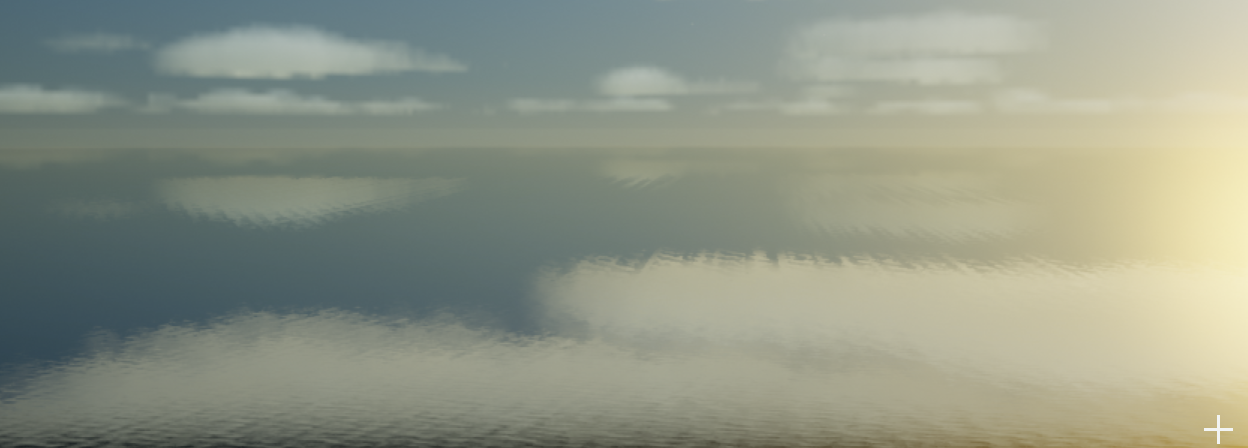
Is there manageable way to get rid of the tiling distance in UE 4.26 water?
https://i.imgur.com/cayejm5.png
 charred mortar
hellooo
I installed the automative materials pack thing for unreal and opened the map in it, but its all white, what do I do? (I dont use unreal I just need to view these materials in unreal for a client project)
 mystic wren
Hi people! i have a question. I'm thinking of making a silent hill type game. bu...
mystic wren
mystic wren
Hi people! i have a question. I'm thinking of making a silent hill type game. bu...
Does anyone have a idea?
modest trench
Too vague a question
There are horror game assets on the marketplace but I can't speak for their quality
Or if any of them do exactly what you want
 valid perch
I want to build a train track and how can I make the object copy itself with the blueprint?
 mystic wren
modest trench
Too vague a question
mystic wren
modest trench
Too vague a question
Oh sorry, a third person horror game, with shooting aliments. i was thinking of using als and horror engine but i cant combine the 2
modest trench
valid perch
I want to build a train track and how can I make the object copy itself with the...
How about a spline mesh?
mystic wren

Silent Hill Playlist: http://bit.ly/1BPMMWu
"Silent Hill" for the PS1! The original! Been meaning to start this for a long time, thanks for bearing with me if you've been waiting. Remember to Like! Thanks guys!
PLAYLISTS - http://bit.ly/HCPlaylists
Facebook - https://www.facebook.com/HarshlyCritical
Twitter - https://twitter.com/harshlycritica...
something like this but without a fixed camera
modest trench
Really hard to give advice besides to try to break the problem down into smaller pieces first
 drowsy snow
mystic wren
something like this but without a fixed camera
drowsy snow
mystic wren
something like this but without a fixed camera
And you get Silent Hill Homecoming.
mystic wren
drowsy snow
And you get Silent Hill Homecoming.
Yeah kinda
drowsy snow
mystic wren
Yeah kinda
So... What's your problem then?
modest trench
Go make the game!!!!!
mystic wren
Yeah i'm not that experienced using ue4, but what i'm trying to to to be honest is. having a gameplay style like the advanced locomotive system. combined with horror engine
valid perch
modest trench
How about a spline mesh?
I tried, but it doesn't work correctly even though I did exactly what is in the video I watched.
 drowsy snow
mystic wren
Yeah i'm not that experienced using ue4, but what i'm trying to to to be honest ...
drowsy snow
mystic wren
Yeah i'm not that experienced using ue4, but what i'm trying to to to be honest ...
Just do it.
Don't let your dreams be memes.
valid perch
modest trench
How about a spline mesh?

No description provided
 patent cobalt
Is it only me or blueprintUE is unable to properly render a Blueprint?!?
@valid perch I would rather look at a real screenshot of your code
LOL
including the execution lines that look like a printed circuit board
drowsy snow
patent cobalt
Is it only me or blueprintUE is unable to properly render a Blueprint?!?
To be fair, it's more of a "clean room" reverse engineering of the BP graph system.
valid perch
patent cobalt
Is it only me or blueprintUE is unable to properly render a Blueprint?!?
 patent cobalt
@drowsy snowtrue but it needs some decent work honestly. I thought they got an Epic Mega-grant.
drowsy snow
patent cobalt
<@!325627930484932608>true but it needs some decent work honestly. I thought the...
Well, I thought Epic MegaGrant only go as far as providing funding, and not actual support/manpower...
patent cobalt
So it is take the money and run with it?
With all due respect for the developers of the site.
@valid perchwhich tut have you been following?
drowsy snow
patent cobalt
So it is take the money and run with it?
Well granted (all puns intended) I don't know exactly how the MegaGrants works, so yeah...
valid perch
patent cobalt
<@!384361143910662165>which tut have you been following?
I solved the problem, I did it by following this tutorial. (https://www.youtube.com/watch?v=OdjvlvGRYRE)
Thanks.

Using Blueprint Splines to build out repetitive instances in a scene can save time and improve performance. In this Unreal Tips & Tricks video, we’ll cover Hierarchical Instanced StaticMesh Components as an efficient approach.
For more information on Blueprint Spline Components see the documentation and video:
 hot thistle
Anyone else ever had a bug with the NavMesh not working? Its working as usual in a empty level, but in my main level it wont show up, nor does it spawn a Recast?
P doesnt show it either
 hollow moat
How do I use event dispatchers when my object is spawned in at runtime?
bleak widget
hollow moat
How do I use event dispatchers when my object is spawned in at runtime?
you must have any manager on scene where spawned object pushing self reference i think🤔
 raw anchor
Hello. Scaled a character way up to giant size but when it runs . It does not cover the distance like a giant. It runs and covers distance just like any Regular sized character. How can I make it that the giant runs but covers more area like a giant would?
 exotic thicket
Maybe try multiplying its speed with the scale?
Either way it's just a question of adjusting the movement speed
raw anchor
@exotic thicket tried that from some tutorials but does not seem to make the appearance of the giant moving and a giant pace
 icy plaza
I try to find some infromation regarding triggering events. I want to use a few trigger boxes that would make the scale of a different blue print actor grow. Does someone has some information regarding this?
exotic thicket
How much something compresses depends entirely on what it is. For example, a PNG image does not compress much. I highly doubt that UE's compression was broken because it would affect literally every game being developed on it :P
 dry birch
exotic thicket
How much something compresses depends entirely on what it is. For example, a PNG...
dry birch
exotic thicket
How much something compresses depends entirely on what it is. For example, a PNG...
No not that
my game used to compress so much!
now it does not
there is something broken, perhaps we can say it is broken now?
exotic thicket
I've noticed that you seem to assume your problems exist because something in the engine is broken... I saw you ask a question with a similar assumption previously
dry birch
is the execlude content editor files safe to tick?
yes, there is something has been changed
exotic thicket
It's best to not immediately assume the engine is broken in such fundamental ways
dry birch
in the settings
im not saying the engine is broken, don't make words on me. that's... quite uncomfortable.
im just trying to say there is something off
what is so hard for you to understand?
:/
exotic thicket
I've just seen a lot of people assume the problem is in the tools they're using (such as UE4 itself) and not in their own code
and the problem is almost always in their own code
dry birch
i have no code, it is packaging settings im reffering to, not the code or the whole engine
 trim mantle
dry birch
ue4 compression broken?
trim mantle
dry birch
ue4 compression broken?
You literally said this xD
 gaunt abyss
dry birch
ue4 compression broken?
gaunt abyss
dry birch
ue4 compression broken?
Umm you yourself are implying that something in the engine is broken 🤔
dry birch
i have no code, it is packaging settings im reffering to, not the whole engine
sorry cant say it propleply
let me repharse it
perhaprs u might udnerastnd better
my compression for some reason is off not work correctly
is that ^ clear? please dont make words on me, thanks
exotic thicket
Nobody is trying to put words into your mouth, we're just trying to help us help you :)
And yes, that explanation of the problem is much better
dry birch
exotic thicket
Nobody is trying to put words into your mouth, we're just trying to help us help...
apprecaite it ❤️
dry birch
exotic thicket
And yes, that explanation of the problem is much better
glad!
( im not eng talker sorry for issues in wordings sometimes i do)
plush yew
o.o
thats ok were all friends here
sometimes we can butt heads but in general we just want super stupid sick amazing games to be releases be it mine yours or anyone else here
dry birch
its commucnations issues i think, ther no one butting headinds or something
all people good here
so what i do now guys to the issue
plush yew
no no not you theres others here in the server who can soemtimes butt heads with others xD
hidden dew
I have a blueprint that is zoomed out and repositioned so much that I can't actually find the nodes on it
How do I re-centre it?
Ah, found a way
Graphs -> Event Graph -> double click anything there
 zinc cipher
I don't know where this would fit. My artist uses a Wacom Intuos4 PTK-840 which is a drawing tablet. He often plays with the drawing pen (but he also has a mouse for the tablet). With the default FPS template (and our own FPS character blueprint), he cannot rotate more than 180 degrees in a single move. Like if you move the mouse you keep rotating around. Using the tablet, it stops. And he has to release and start again. I know it's SUPER edge case, but anyone have any idea what's up?
 sullen tree
Guys, where can I ask for help about ue4?
 grim ore
probably in the game devs support channels. if you mean UE4? then pick an appropriate channel
 trim bough
Tim Sweeney you are in heaven
Your Unreal is healed
Your next engine come
Your knowledge
As in heaven as well as programming
Our daily experience gives us today
We forgive us our event tick
We also forgive unitys bold
And do not lead us to Unity
But revoke us from the 2D Tools
Because your is the graphic
And performance
And the plugins
In code
ENTER!
fierce tulip
O_o
dry birch
What is the cons of increaseing target SDk?
dry birch
fierce tulip
O_o
what do you mean?
trim bough
he means my pray
trim bough
trim bough
Tim Sweeney you are in heaven
Your Unreal is healed
Your next engine come
Your k...
this
dry birch
let me check
so what he means?
why u have mage emoji on ur comment
guys i would apprceaite if someone help me to find soultion What is the cons of increaseing target SDk?
 winter gate
What do you mean by increasing target sdk? Which target and by how much?
 prime glade
If I want character skins to swap skeletal meshes, is there a common pattern for having the capsule resized to accommodate different sized meshes? I can't find an elegant way to accomplish this.
fierce tulip
dry birch
what do you mean?
weird poem is weird
dry birch
fierce tulip
weird poem is weird
but why sir? why are u ? a person? perhaps, included into many. but this server! is good. ?
indeed 100%
so thanks
fierce tulip
again, O_o.
because... what are you trying to say?
prime willow
@dry birch What language speak?
dry birch
what ar u then
 fresh vessel
Not strictly UE related but I'm failing at vector math/geometry today, anyone able to help?
I'm trying to rotate an actor so that a specific socket on the actor's mesh is looking at a target
"Find Look At Rotation" will find the rotation for either the socket or the actor but converting the socket look at rotation into an actor rotation is just breaking my brain today
hollow moat
Does Unreal have any built in button images?
Like X for Xbox
or Square for PS4
Or will I have to create those myself?
fierce tulip
you can find templates for them online. google search should help
 tired abyss
What's the correct terminology for converting numbers to smaller versions and prefixing them with things like "k" for thousand, "m" for million etc
hollow moat
No problem 😛
tired abyss
Wait before I go and implement this, am I going crazy or do I remember the engine having formatting built in to do it?
hollow moat
I had a look on google and it doesn't look like it!
@tired abyss please share your implementation when you're done though?
 scarlet birch
 tired abyss
Oh nvm I am thinking of ToText(float) function that has some formatting built in
Dam mike you beat me too it 😠
 thorny moon
I accidentally pressed something and now I can't control my pawn or click anything in the viewport. The white line appeared after I pressed something.

Yeah it works
 spare kernel
if you ever get that again
you can just drag something like message log or ouput log into that window
and it fixes it..
prime willow
wait did i get striked? o.o
i left for like five minutes and the conversation was deleted
spare kernel
no?
rugged arch
I tried learning unreal but I found that most tutorials uses blueprint instead of c++ why is that?
grim ore
because
blueprints are part of the engine, its how most things are interfaced. C++ is not a requirement and also... if you know C++, you have the ability to learn unguided most of the time with how C++ works in UE4
generally life finds a way, the audience for C++ "learning" matches the amount of C++ material you find out there
plush yew
man i cant believ that remasterd gta using unreal engine
spare kernel
Also a game will use both C++ and Blueprint
they work together.
@plush yew why? sure you mentioned this before also.
Is it bad that they used UE4?
spare kernel
clearly it wasn't or they would have used it..
 open eagle
plush yew
open eagle
plush yew
am also shocked how they could port car physx to unreal that good
plush yew
cuz this means there are tools that can be used in unreal are private to a company even though unreal is available to end user.
i guess grove street game dev company knows ue4 secrets
grim ore
it might surprise you to know there are tools that epic themselves uses that are private to themselves...
plush yew
Z:\GTA III - Definitive Edition\Gameface\Content\rageunreal\gta3
well the tools is rage unreal , maybe a bridge between rage engine and unreal ?
rugged arch
I wanna learn unreal but I have no idea how or where to get started I took a look into unreal tutorials but I didn't know what should I learn first?
 terse trench
HI there is there any good tutorials on Unreal C++ cause I am trying to find some good ones. That get into like all the detail and explains everything
grim ore
start with the intro and beginning tutorials on the official learn.unrealengine.com site @rugged arch
There are learning paths on the official site like this one https://www.unrealengine.com/en-US/onlinelearning-courses/welcome-to-game-development which gives you multiple courses in an order
gaunt abyss
plush yew
Z:\GTA III - Definitive Edition\Gameface\Content\rageunreal\gta3
well the tools...
It's probably their own custom UE4 engine branch, most bigger and serious projects will have their own custom branch of the engine
Not that surprising
Also I don't see a reason why they wouldn't be able to port stuff like vehicle physics to UE
 idle mantle
Hello I saw the new that Unity bought Weta
im very surprising that UE didn't bought it instead
so Unity own WetaH and WetaM?
plush yew
@gaunt abyssthats it
drowsy snow
plush yew
Z:\GTA III - Definitive Edition\Gameface\Content\rageunreal\gta3
well the tools...
Here's the thing:
Grove Street Games is actually War Drum Studios, and isn't part of Rockstar's internal studio line up. That's one reason they didn't use RAGE.
drowsy snow
idle mantle
im very surprising that UE didn't bought it instead
Doesn't seem like it.
drowsy snow
gaunt abyss
It's probably their own custom UE4 engine branch, most bigger and serious projec...
Probably just as simple as porting the original C++ code into Unreal's renderer, kind of like Demon's Souls remake.
idle mantle
I mean UE4 is more intended for movies so it makes more sense what epic buy a film VFX studio lol
this is really weird 🤣
drowsy snow
idle mantle
I mean UE4 is more intended for movies so it makes more sense what epic buy a fi...
Eh, as far as filmmaking goes, not really. Mandalorian S2 ditched UE4 for the virtual background, replaced by in house solution.
hollow moat
How can I make my custom component draw something in the Viewport window?
 distant totem
drowsy snow
Eh, as far as filmmaking goes, not really. Mandalorian S2 ditched UE4 for the vi...
distant totem
drowsy snow
Eh, as far as filmmaking goes, not really. Mandalorian S2 ditched UE4 for the vi...
I thought the in house solution was a custom version of unreal they built off of called Kona?
drowsy snow
distant totem
I thought the in house solution was a custom version of unreal they built off of...
IIRC they used ILM's own renderer, called Helios or something
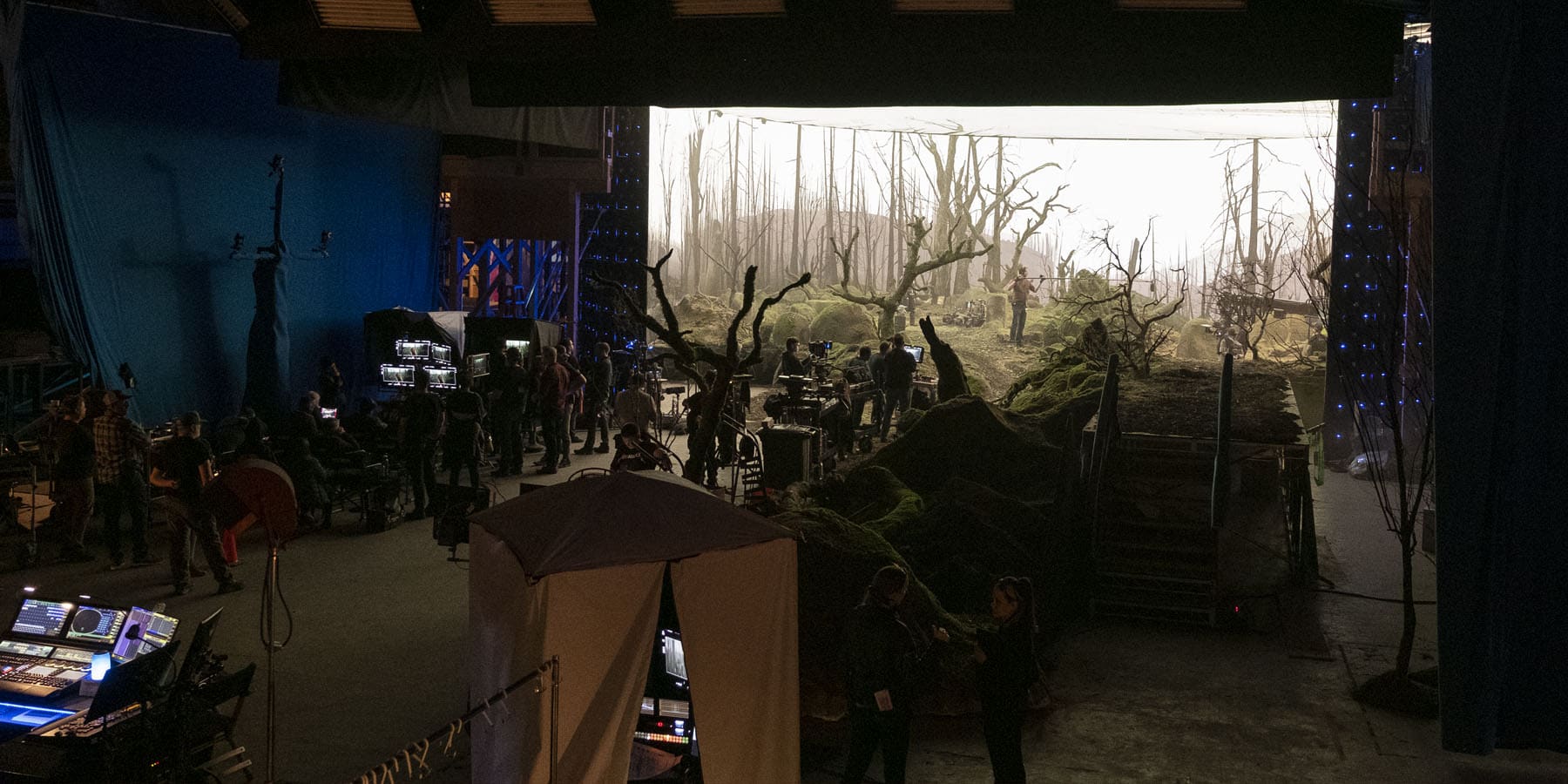
Virtual Production Innovations from the LED Stages of The Mandalorian.
They still used Unreal but just for previz and not for actual background uses
distant totem
ahh yes I see, wonder what prompted the switch, thanks for the link 🙂
drowsy snow
distant totem
ahh yes I see, wonder what prompted the switch, thanks for the link 🙂
Probably they just use UE4 to test the water.
Well, not testing the water system, but you get my drift.
prime willow
i feell
like remaking
my ledge and mantle from scratch
idk
.-.
@drowsy snow my little lady isnt naked anymore so i can start using her in streams :3
drowsy snow
prime willow
<@!325627930484932608> my little lady isnt naked anymore so i can start using he...
Hooray 🎉
prime willow
tho tbh i should work on my storage and inventory system
well time to suffer i wanna see if i can make a sort of state change setup without using so many gate like custom events
Zzzz
plush yew

is there a way to import content like this instead of creating a whole project from it?
I just wanted to import assets from it into a vr camera template
or maybe a way to compress a scene file of some kind? sorry Im very new to unreal engine, only used for a couple of weeks now
 grave pollen
do spline points have to be directly on the nav mesh ?
my AI is not able to follow the path (some make it some dont), albeit its a long one with twists and turns. I've tried everything... I changed cell height, cell size, nav agent height , step height, walkable floor angle, re-did my nav mesh, then made 2 more nav meshes so there's 3 now.... yet they still have issues in certain areas and I cannot solve this. Appreciate any help ty
drowsy snow
plush yew
is there a way to import content like this instead of creating a whole project f...
You can. Just migrate the asset from the new project to your project's Content folder. Unreal has a handy feature to migrate assets without breaking references to related assets, so no need to manually copy paste them in File Explorer.
 autumn flame
Pretty sure all those assets are on Bridge anyways too
hollow moat
My Blueprint implements an interface

But when I try and cast the actor, it returns false
IInteractable* interactable = Cast<IInteractable>(hitResult.GetActor())```@drowsy snow Thanks!
spare kernel
@hollow moat you need to add the interface in c++ to use cast on it.
which is why with BP interfaces, you use BPNative/BPImplementable events
spare kernel
and do if (HitResult.GetActor()->Implements<UInteractable>()) { IInteractable::Execute_SomeNativeEvent(HitResult.GetActor()); } FYI
if its a BP Interface
 uncut canyon
Hi, is someone familiar with github desktop able to help me? I'm trying to set this up but when I make the initial push it keeps saying "The following files are over 100MB. We recommend you avoid committing these files or use git LFS to store large files." I already have git LFS so I don't know what's the problem.
 thick loom
uncut canyon
Hi, is someone familiar with github desktop able to help me? I'm trying to set t...
thick loom
uncut canyon
Hi, is someone familiar with github desktop able to help me? I'm trying to set t...
Ask at #source-control
 lavish lake
hello, question, For some reason my character started falling through ladnscape after last build. it walks fine on top of meshes, but once he hits landscape, just falls through it. It just started happening and I didn't make any changes to the landscape
how do you fix that?
hollow moat
How can I align the image on the left with the text on the right?

I guess I want to inline the image as part of the text
drowsy snow
hollow moat
How can I align the image on the left with the text on the right?
Horizontal Box.
 pure galleon
Hey guys, this is off topic. does anyone has the same problem that the epic launcher kept asking u to relogin after i ady checked remember me ?
drowsy snow
pure galleon
Hey guys, this is off topic. does anyone has the same problem that the epic laun...
It's been that way for years.
It'll often ask for relogin after an unspecified amount of time.
pure galleon
geez
prime willow
weird question
i changed my camera settings so i can have a 8 way locomotion movement
but now i cant seem to turn it back off xD
hollow moat
@drowsy snow Perfect, thanks 🙂
 drowsy snow
prime willow
but now i cant seem to turn it back off xD
drowsy snow
prime willow
but now i cant seem to turn it back off xD
Control Rotation Yaw, I guess?
prime willow
something like that
mind walking me through what i might of clicked on that shouldnt be on
ive been messing with it for hours and cant seem to fix it :/
 wind kestrel
alguem fala portugues ?
drowsy snow
wind kestrel
alguem fala portugues ?
ポルトガル語は話せません
 neon magnet
any idea why in my sound cue, when I play it, it doesn't show the animation of the lines depending on which route has been chosen by the system?
you know those animations of the white or red spheres rolling through an execution wire from node to node - the 'execution flow' animation
 hidden bloom
hey guys dunno whats up but like 8 or 9 free items just dropped in the marketplace and its not the monthly giveaway stuff
drowsy snow
hidden bloom
hey guys dunno whats up but like 8 or 9 free items just dropped in the marketpla...
It's Unreal Online Learning stuff.
 zinc shore
so when my character ragdolls if they are holding the FOP gun model epic gives it falls out of the players hand but for my gun model it docent even though it also has a ragdoll just like the Fp gun so what am i doing wrong
neon magnet
neon magnet
you know those animations of the white or red spheres rolling through an executi...
anybaady?
 dense knoll
 neon bough
first of all, i see more blue than green
second, you might use some directx specific features in your materials
 marsh canopy
is it possible to run unreal without gpu (with all setting low ofcourse)
just for completing tutorial
drowsy snow
marsh canopy
is it possible to run unreal without gpu (with all setting low ofcourse)
No, but if you're talking about Intel's iGPU, then yes.
marsh canopy
drowsy snow
No, but if you're talking about Intel's iGPU, then yes.
yea I was talking about intel iGPU
 astral dust
Hello, i have a question. I would like to take anti piracy measures for my game. Although, I don't know how to get started with that
drowsy snow
astral dust
Hello, i have a question. I would like to take anti piracy measures for my game....
If you can't afford Denuvo, don't bother.
astral dust
I've heard Denuvo has major performance impacts on the game, so i don't think its a good idea either way
drowsy snow
astral dust
I've heard Denuvo has major performance impacts on the game, so i don't think it...
I'd say don't even think about the pirates. There are few reasons that aren't inherently criminal behind a pirating person, like region lock, financial troubles, protest of a business model, or just want to try it before actually buy it. If your game is good, people will buy it, even if it's later than sooner.
Provide a playable demo, that'll at least help shape someone's opinion on your game, and measure their expectation with the hardware they use.
DRM can only deter piracy for few weeks top, and can unnecessarily hurt legitimate users in the process. If you're a AAA dev and want to secure a quarter's sale, then sure, put a Denuvo or other kind of DRM. If you're a small time indie, then better let the word of mouth do its thing.
 lucid grove
Hey guys, can figure out how to achieve this:
I have MAP variable (TaskID-to-QuestID) with TaskID and QuestID.
I want somehow loop all this map and get all TaskID that equal to QuestID.
TaskID is unique, but QuestID is equal to quests its assigned to.
Its simple when i worked with arrays, but same approach doesn't work with map.
neon magnet
neon magnet
anybaady?
anybody 😢
marsh canopy
I had downloaded ue.4.25
So I started downloading in ssd then after sometimes time paused and closed it and pasted all files their
It worked before
but this time after verfying and cleaning up It tried to download last 40 mb
but it is not able to connect to network
It says error is because of no internet but my internet is running fine
 tender pecan
neon magnet
any idea why in my sound cue, when I play it, it doesn't show the animation of t...
tender pecan
neon magnet
any idea why in my sound cue, when I play it, it doesn't show the animation of t...
you can try #audio \0/
tender pecan
marsh canopy
It says error is because of no internet but my internet is running fine
\0/ I downloaded 4.11, 4.21 and 4.26 yesterday and it worked fine, maybe delete your vaultcache, and cleanup all residual installation/downloaded files, make 100% sure you have enough space and just try again I imagine.
sometimes the launcher gets confused about internet, it happens, you just have to force close it and reopen it. it can also happen if your internet drops, it wont always pick up and auto reconnect, it just happens sometimes.
there is no substitute for bad connectivity checking code 😆
neon magnet
tender pecan
you can try <#221798819753361408> \0/
okay but I thought since this it's more active here I'll try first
tender pecan
no problems, I have no clue what you are talking about so cant help you im afraid
usually if no one answers, that speaks volumes
neon magnet
tender pecan
usually if no one answers, that speaks volumes
could be that people miss it due to other messages
tender pecan
also possible. but your question does seem very related to audio, and they are pretty clued up there
neon magnet
but like it's helpful if people say anything, even if they don't know. Otherwise you're not sure if it was even read or acknowledged etc. Anyway I've asked in the audio section now but it's usually really really quiet there lol
(btw I posted an image in the audio section which illustrates what I mean as you said you didn't understand what I was talking about)
drowsy snow
neon magnet
but like it's helpful if people say anything, even if they don't know. Otherwise...
Well, firstly, I don't understand your question, so I can't speak volume. Secondly, #audio actually has the expert on their fields, but this is the sleeping time for the western time zones.
neon magnet
drowsy snow
Well, firstly, I don't understand your question, so I can't speak volume. Second...
the question is to do with general UE editor behaviour rather than specifically with sound logic/interaction/etc. this is why I thought to start in this general forum first. What I was asking was if anyone knew why I cannot see these flow lines (in red) when I play my cues. Since I can see these lines if I am in a regular blueprint, this has me confused

anyway, in another thing, I was wondering how I can implement this better where I want to play a sound when I collide with something at speed

The problem is that this often plays the sound too many times if say I keep running against the door after the first impact (i.e. not going back but just keep running in the direction of the door)
using that seems to play it more often when I move back away after hitting it lol, so weird
(yes begin overlap not end overlap!)
it's like this

I just wanted collision sound if I bump into it so hadn't thought of open or closed - ideally it should play whenever I bang into it. Later on I could adjust the volume depending on the velocity
I should add that I have a thinner capsule size for various reasons - the default one is just too big for narrow spaces so I dunno if this makes a difference
 plush yew
why is fps so low? which setting of post process affects it the most? and which balances it out? Room itself was in gold type of color, but I switched it to black and white.

Post processing is the best way to bring together various elements from your environments and levels and enhance the visuals to make everything more pleasant to the eye.
In this UE4 tutorial we'll go over how I create my post processing in 3 different scenes with 3 different lighting scenarios. We will aim for a realistic post process trying to ...
im editing settings as in this video
neon magnet
plush yew
why is fps so low? which setting of post process affects it the most? and which ...
check your lights, if they're all casting shadow they will be very expensive
plush yew
neon magnet
check your lights, if they're all casting shadow they will be very expensive
yeah, original is like this

so basically lower everything before and rise after in post process?
neon magnet
plush yew
yeah, original is like this
I mean check how performance is when you remove casting shadows and enable shadows. Then see which you need and which you don't. Even without shadows, lights on their own are still pretty expensive so it's a lot of fine tuning and experimentation to see what you need and what you don't. Maybe use two lights for lighting and the rest you can use an emissive material?
plush yew
neon magnet
I mean check how performance is when you remove casting shadows and enable shado...
yeah, will try
thx
hot thistle
Anyone else ever had a bug with the NavMesh not working? Its working as usual in a empty level, but in my main level it wont show up, nor does it spawn a Recast?
P doesnt show it either
patent cobalt
@hot thistlea navmesh needs collisions to work with. Does you floor have collisions?
hot thistle
Yes, its a standard landscape - even tried making a fresh one, seems like it wont work particualrly in this level
patent cobalt
engine version?
hot thistle
@patent cobalt 4.26
hot thistle
Yea, but tried putting nav mesh in all levels, still nothing
What is weird is that its not creating a RecastNavMesh actor
patent cobalt
ok, anything in the log? any warning/error?
hot thistle
Nothing
patent cobalt
you can try to export that level to a fresh project and check if it still does it there
just to single out where the problem could be
I assume you have Build all nav data for the level
hot thistle
Its a TwinMotion / Datasmith import, maybe that has something to do with it?
patent cobalt
oh, so it is not an Unreal landscape
hot thistle
the landscape is unreal
patent cobalt
ok, then it shouldn't matter
unless you have something big in it with collisions enabled which may be confusing the navigation system
for example you have a huge cube around your landscape and you are inside of it
it may be worth duplicating that level, removing everything except the landscape and see if it works in that way
I have seen cases where someone accidentally turned on collisions for the skysphere and everything in the level didn't work properly until it was solved
violet yoke
Hello
So I want to make a survival game , Im at start with ue4 and I cant find any good tutorial series on yt
What should I do?
hot thistle
@patent cobalt so I got a recastnavmesh now, but still no visual navmesh
 fallen marten
@violet yoke If you are just starting, then i would start simpler thana survival game dude
violet yoke
Ive been prototyping a car game
And learned some things about the structure of a game
How materials work, how to add collision to imported mesh
And more but Im not the best at blueprints
fallen marten
Ok, well, then there are a shit ton of tuts available - ike this one was first on a google search - https://youtu.be/maG2YnVnIVM

Check out my Unreal Engine 4 courses right here: https://devaddict.teachable.com/
►Subscribe here: https://www.youtube.com/channel/UCGxt9c_CREmnquHjPEknHYw?sub_confirmation=1
►Business Email: devaddictiscringe@gmail.com
Welcome to my latest course! This time we're going to make a Survival Game in Unreal Engine 4. And, with multiplayer! I know ...
drowsy snow
violet yoke
So I want to make a survival game , Im at start with ue4 and I cant find any goo...

Unreal Engine
Unreal Online Learning is a free learning platform that offers hands-on video courses and guided learning paths.
fallen marten
I was wondering if anyone knows how to get the Physical material of a material from a line trace - i cant get anything except the PM of the physics asset or PM override of the Skel mesh
And yes, im using complex collision test
Anyone?
patent cobalt
@fallen martenengine version?
try adding the physics material insider the shader instead of overriding it
fallen marten
its 4.26, and yeah i added phys materials in the material editor
overriding was just to try force a result
patent cobalt
@fallen martenit should work then. Maybe show how you are doing it.
 cinder flare
but the strafing so weird
patent cobalt
We can also move to #legacy-physics
fallen marten
ok
plush yew
Anyone can help me fix this inventory something is wrong and I can't fix it
https://www.youtube.com/watch?v=q6S470tLB8k

Something is worng with my inventory and drop items. Please send help
 honest sand
Hey, I would appreciate it if someone can maybe help me. So this inventory system I'm using uses a scene capture component to make the character show in the inventory. But its not capturing child actors that's added to the Player Capture Blueprint on begin play. I was wondering if there's a way to make the scene capture, capture the child actors. Or if there's maybe a workaround or something.
 dapper shale
Is there a way to rotate this video within the Unreal Engine 5 media player?

Tried flipping it externally, stays at same angle.
Externally meaning using other editing apps to flip it.
drowsy snow
dapper shale
Externally meaning using other editing apps to flip it.
Maybe HandBrake can rotate the video? Or use Premiere or Shotcut to rotate it.
dapper shale
It appears that filming in landscape fixes it. Not what I want to do, but, however.
 plain ferry
Hi, I want to create a camera blueprint with my own class inherited from UCameraComponent. But when I create a ACameraActor, I cannot replace the default camera component by my own. What's the correct workaround here? Should I just create a simple class inheriting from AActor, and put my UCameraComponent in it? I tried that but it doesn't behave as the default ACameraActor, so I'm wondering if it's the correct way to do this.
My goal is to only lock the head orientation to the HMD and not the position, because "Lock to HMD" locks both, and for some reason it moves the camera under the ground.
dapper shale
One last thing. Is there a way to increase the size of this video within UE?

 sweet jacinth
hello, is there a way to make a blueprint actor instead of a static mesh in this specified area or a buleprint actor for the statich mesh added here please because I will add a lot of greenery to my game and these will be usable
 drowsy snow
dapper shale
One last thing. Is there a way to increase the size of this video within UE?
drowsy snow
dapper shale
One last thing. Is there a way to increase the size of this video within UE?
What are you using to put the video plate on screen?
drowsy snow
dapper shale
One last thing. Is there a way to increase the size of this video within UE?
Also #virtual-production
dapper shale
I'm just using a plane and importing the media. On top of that, I'm making sure the camera is linked to that plane so that it focuses on the video.
Ah mb, let's meet there.
 autumn latch
hello everyone

i am want to only one way for physics
not 0 to -45 or 45
only 0 to 45
 autumn latch
patent cobalt
<@!421779420307783701>
autumn latch
patent cobalt
<@!421779420307783701>
thank u
plush yew
is there a way to make flying paper type of animation in unreal? like fast and easy way

In this tutorial we will be creating the second part of this cinematic scene. I will take you through the process of how I created this scene using just stock images. Sometimes in 3d you do not need a lot of details to make your work look good. This is the Final part of the tutorial, stay tuned for more upcoming content
PLEASE SUBSCRIBE AND ...
like this, but in unreal itself
i guess flying mesh animation, but then again it wouldn't be able to distort itself like in blender
or could it? 😄
neon bough
maybe with cloth simulation
but that has some problems with world collision in my experience
plush yew
ok
neon bough
or rig it
if you rig it you can work with normal physics collisions
and/or animations
plush yew
yeah, gonna use blender
just that I am learning it too
thought there might be some easy way in unreal
one way could be using rain animation and replacing rain texture
and adding wind to it
could it work and affect how the rain textures fall down?
neon bough
idk if theres a weather interaction, but you can for sure change the velocity vector of the particles
and control that by some external weather thing
but maybe thats already covered by the engine
plush yew
ok, thanks
 lost sparrow
I'm having an issue where I get some crazy blur when pausing my game if the camera is moving when it's paused. Any thoughts on how to fix this?
Can't really find anything on google.
 unique kraken
hm im thinking about creating characters where parts a changeable, like change the head for example.
is there any way to fit the neck vertecies to the head inside ue4?
as i creat characters / multible heads i might need to adjust the neck depending on the head or the other way around
 drowsy snow
unique kraken
hm im thinking about creating characters where parts a changeable, like change t...
drowsy snow
unique kraken
hm im thinking about creating characters where parts a changeable, like change t...
No. That's why you make them modular, with morph targets and split skelmeshes.
unique kraken
just wanted to say shapekeys are the only solution i can think of.
u got any sources for me?
split skeletal meshes arnt that big of a deal. thats what i planned
but a different head needs to fit a different neck
honest sand
Hey, I would appreciate it if someone can maybe help me. So this inventory system I'm using uses a scene capture component to make the character show in the inventory. But its not capturing child actors that's added to the Player Capture Blueprint. I was wondering if there's a way to make the scene capture, capture the child actors. Or if there's maybe a workaround or something?
 lyric falcon
I'm having a bad time using linetrace and I don't really know whats happening. So, ok, lets suppose we have a door, and when linetrace hits, fires an event of show widget (inside the door BP, there's a widget component). The problem is, I want as soon it stop hits, hides the widget component. The problem is, that as soon It stop hitting, I lost all control over that door, and the widget stay visible. How can I turn off the widget of my door as soon the linetrace (of my character) stop hitting the door?

As I said before, as soon the linetrace stop to hitting, I lost all the control of the door, how can I disable the widget (inside the door) then when I'm not hitting anymore the door?

I tried this:

But it doesnt really work very well
lyric falcon
lyric falcon
I tried this:
im sorry im very noob at logics
dont understand very well, but anyways, this example
lyric falcon
lyric falcon
I tried this:
this one
Doesn't work very well because when I duplicate the object, and use the linetrace, the widget get bugged and it keep showing in both objects (even when is not hitting anymore)
how can i do this?


yep thats the problem, it still shows, when it should hide
any idea ? XD
But it doesnt, because the hide node can't execute, because is not hitting anymore
Yes
lyric falcon
lyric falcon
I tried this:
In this example: This is what happen when you duplicate any object

seems fine right?

but when you hit the duplicated

the widget still shows in the previous one
 hollow cairn
are you referencing it in your blueprint maybe?


 last topaz
Hello, does anyone know what is causing these flickering black pixel artifacts?

I know they come from DFAO, but I have no clue on how to solve this.
They are exaggerated in the picture due to depth of field..
Using 4.27
Doesn't happen everywhere only in certain areas in the scene.
 whole solar
yo guys is there like a model website which i can download models free and they actually look good?
 sterile lichen
whole solar
yo guys is there like a model website which i can download models free and they ...
sterile lichen
whole solar
yo guys is there like a model website which i can download models free and they ...
check ue marketplace, there are plenty of free assets
whole solar
marketplacE?
whole solar
ue?
oh
ooo
ty
i want like a poor girl model
ya know
im insanly bad at blender
so i need a free model
lyric falcon
@plush yew actually this work, but i think is VERY BAD IDEA, because it would lag my game because this event on every interactable object:
Door BP:

Char BP:

it works perfectly but rip perfomance
i think the perfomance is not that high, what do you think?
 bleak zodiac
hello
 lament willow
So, this is the unreal server eh?
Feels nicee to be here
Was having some fun with UE5

What do you guys think?
plush yew
that's how it should be
👍
looks cool, but missing something
or there's too much elements
to get that special feeling of looking at it
plush yew
lament willow
damnn, that looks nicee
dry birch
O_o???
 candid imp
Hi! No matter what I do, I'm not able to cull my trees in the distance, or even change their detail distances whatsoever. The default LOD distance seems to be way too high by default and I can't seem to figure out where to change it
To clarify; My trees do indeed seem to become billboards and stop rendering shadows a few thousand units away from the camera, so the system seems to be working at least somewhat. It's just changing the culling / detail distance that doesn't seem to work. Changing the max and min cull distance in the Foliage menu doesn't seem to do anything at all, either.
 boreal grotto
 cedar wave
UE4
candid imp
Nevermind I figured out that it was because the Dynamic Shadow Distance in the Directional Light was set too high
 idle needle
Hi everyone! Is there a way to find all the blueprints that inherit from another bp in the content browser?
 zinc cave
Crazy that Unity aquired Weta for 1.6 billion. What do you guys think?
plush yew
Hi need major help please
When using UE4 after some time menus start flickering and I can't click on anything in the menu's so right click for example
I can't add node or anything as i say things start flickering any have any ideas ??
fierce tulip
hey Greg, check the pinned messages on this channel
plush yew
awsome thanks
 gray light
Why is it that my character can walk through the door but not the door frame when using the starter content? I am looking at the collision settings for both and they look identical
the character should not be able to pass through the door
gray light
i think i got it
 onyx nest
I made a character with a lot of objects on an armature. The objects are armor pieces. I need help Importing that character into Unreal engine. can someone help me?
 weak cypress
Is there an easy way to install UE?
drowsy snow
weak cypress
Is there an easy way to install UE?
Yes, via the launcher. That's the easiest way, in fact.
weak cypress
I dont think the launcher works
drowsy snow
That is implying that you don't have another PC/a friend with existing engine installation.
weak cypress
I do
drowsy snow
weak cypress
I do
Then you can copy the entire engine folder from one machine to your own.
plush yew
fierce tulip
hey Greg, check the pinned messages on this channel
So i tried that you mentioned on Pinned thing doesn't seem to have fixed it should I have restarted my system after adding in the registry ??
drowsy snow
weak cypress
Cause its cross-OS
Oh, of course not.
But I'm implying everyone uses Windows, and that's the other way.
plush yew
Stupid question, how do I pack for Linux?
plush yew
drowsy snow
<#375022233875382274>
ty
plush yew
can you change planar reflection size or use mesh as planar reflection itself?

to circle
drowsy snow
plush yew
can you change planar reflection size or use mesh as planar reflection itself?
Well, the planar reflection volume is what makes a mesh use a planar reflection.
plush yew
confused lol
drowsy snow
plush yew
confused lol
It's as simple as covering a (mostly) flat surface with the planar reflection volume. The preview plane is there to let you know where it's facing.
Just don't think of it going to achieve the same reflection as a raytraced reflections, because it's not going to work well on curved surfaces. It's named planar reflection not without reason.
plush yew
oh yeah
got this thx
can it get reflection from far away

like this
i guess not
 dawn gull
Hey, I'm having some math issues. I'm using this code to spawn in ray casts (https://blueprintue.com/blueprint/aqhvc7sj/), and with the branch before the setworldlocation I was thinking that it would make a circle, or even just not show anything at all because all the values printed out are above 10 but it still just shows a big square of casts
plush yew
all i can get
 dawn gull
Hey, I'm having some math issues. I'm using this code to spawn in ray casts (htt...
dawn gull
dawn gull
Hey, I'm having some math issues. I'm using this code to spawn in ray casts (htt...
even with the branch set at -5000, legit nothing changes.

 sage bane
@orchid hinge
onyx nest
onyx nest
I made a character with a lot of objects on an armature. The objects are armor p...
anyone?
 silk sleet
are these armor pieces separate meshes that can be bound to a bone on the character?
ie: import everything separately and then re-compose it in BP
dusk nebula
How would a game like Destiny 2 handle its characters, where each armor piece has a different texture? Is each piece a component or something? Obviously it's a different engine, but I'm curious if anyone would know how something like that works in UE
drowsy snow
dusk nebula
How would a game like Destiny 2 handle its characters, where each armor piece ha...
I don't play Destiny 2, but clothing pieces can be done with multiple skelmeshes sharing the same skeleton and multiple materials.
dusk nebula
So you can map multiple meshes to one skeleton?
I know little about most of the engine's ancillary systems like skeletal meshes, animation, materials, or Niagara
drowsy snow
dusk nebula
So you can map multiple meshes to one skeleton?
Yes, that's how modular characters were built.
onyx nest
silk sleet
are these armor pieces separate meshes that can be bound to a bone on the charac...
i DONT KNOW
welp caps
modest trench
Skeletal mesh combining cam be done multiple ways iirc
dusk nebula
Where should I start if I want to learn from skeletons to animation? I'm basically just bootlegging everything right now because I can only find tutorials for really basic stuff
silk sleet
if ur real bootleg u can grab a good anim system from marketplace and just yoink the bits you need lmao
dusk nebula
Like, I need to make or remap one (1) animation for something before progressing and can't find a reasonably good tutorial
silk sleet
look into 'retargeting'
dusk nebula
Is there a good video guide you know of? The official documentation is weirdly hard to follow for this
silk sleet
dusk nebula
How would a game like Destiny 2 handle its characters, where each armor piece ha...
you'd likely attach individual static meshes to bones on the character mesh
drowsy snow
dusk nebula
Is there a good video guide you know of? The official documentation is weirdly h...
If multiple skelmeshes share the same skeleton, no need for (hard) retargetting.
Best bet would be either a single anim BP with a Copy Pose From Mesh node in the anim graph, or Set Master Pose Component in the character BP.
silk sleet
I don't know of any guides for retargeting. what are you trying to do exactly?
autumn latch
hello
drowsy snow
silk sleet
I don't know of any guides for retargeting. what are you trying to do exactly?
He's trying to make modular characters.

 modest trench
Get the reference to that component first?
silk sleet
also I like how we clarify one (1) and then immediately say something lmao
 drowsy snow
autumn latch
drowsy snow
autumn latch
I don't think this variable in particular is BP read write.
silk sleet
autumn latch
what should i do for this?
you'd likely have to expose it to BP yourself. which isn't that hard if you got cpp chops
https://forums.unrealengine.com/t/set-angular-rotation-offset-through-bp/113762/5
silk sleet
modest trench
I'm surprised it's not directly exposed
yeah should be lol
drowsy snow
silk sleet
you'd likely have to expose it to BP yourself. which isn't that hard if you got ...
Worth mentioning that modifying engine code can't be done with vanilla launcher build, at all. The source code files on vanilla launcher build are mainly for project level C++ classes to compile.
silk sleet
drowsy snow
Worth mentioning that modifying engine code can't be done with vanilla launcher ...
you can modify w a vanilla launcher? you just build your own engine from source
and thus gotta run through all the github hoops
unless that's changed, idk
also you don't need to modify the engine to do this
drowsy snow
silk sleet
unless that's changed, idk
No, it's not changed, per UE licence.
silk sleet
in any case, I've definitely built my own engine and have never messed w my launcher. dunno
I also have shit memory though
dusk nebula
drowsy snow
If multiple skelmeshes share the same skeleton, no need for (hard) retargetting.
So I can just play an animation with anything if the bones match? I keep seeing the yellow messages about the first person arms playing a mistargeted animation, but I assume it's not really an issue
silk sleet
autumn latch
there is a have plugin?
the fix involves knowing cpp. dunno about any plugin but I doubt there's one
I'd try that BP solution at the bottom of the thread I linked
dusk nebula
To be honest I just need to find a beginner animation tutorial because I've never gone through it from the beginning. Most lazy guides give you the assets and then tell you exactly how to connect them
silk sleet
not a bad idea. also go study a good working system
esp bc it's hard to ask the qs before you know the terms yadig
dusk nebula
Yeah, that's also a good idea. I just need to get a good idea of the animation workflow
I have something that's reasonably good and playable, I think, but there are no animations aside from character movement lol
silk sleet
have fun! if it makes you feel better, I'm shit at animations and I've been doing it in UE for years
dusk nebula
Yeah, I don't expect to be good at it. I just want to be able to make any at all haha
drowsy snow
silk sleet
in any case, I've definitely built my own engine and have never messed w my laun...
Same, I've been using my custom 4.27
Though it's mainly for anime shading model, and this super epic lens flare that I kept drooling over
 plush yew
when it's going to be the black friday sale on the unreal engine marketplace?
drowsy snow
drowsy snow
Same, I've been using my custom 4.27
Though it's mainly for anime shading model,...
BTW if you want to get this le epic lens flare, check out this tut
https://www.froyok.fr/blog/2021-09-ue4-custom-lens-flare/
It's based on Batman Arkham Knight's lens flare system, which in turn is based on John Chapman's lens flare system.
It requires quite a bit of C++ and USF shader coding, and engine modification is necessary to probe Unreal's RDG (so this can't be done in vanilla launcher build).

This article shows how to modify the default Unreal Engine lens-flare post-process, from code to shaders. I always wanted to chang...
silk sleet
drowsy snow
Same, I've been using my custom 4.27
Though it's mainly for anime shading model,...
you're saying it works but its against TOS or somethin?
also siiiick
drowsy snow
silk sleet
you're saying it works but its against TOS or somethin?
WDYM against TOS?
silk sleet
thought you said something like 'per the ue license'
drowsy snow
silk sleet
thought you said something like 'per the ue license'
Well, per UE licence, is that the source code is only available for any licencees, not open source in any sense. Licencees can modify it to suit their needs, however.
 opaque oriole
Hello, I'm testing megascans material blending and I noticed that blended material (left) looks much darker than it's base instance (right). I went through the material graphs but I can't pinpoint the reason for this difference. Did anyone ever run into this issue?

 marble mist
Do you know of any page to download characters?
drowsy snow
marble mist
Do you know of any page to download characters?
the Unreal Marketplace.
plush yew
Hi sorry Im following a tutorial and something I am doing comes up different than what the tutorial asks
I add a camera to my sequencer and now my viewport displays this;


but the tutorial added the camera to the sequencer and their viewport did not snap the viewport to the camera.
Cant show what the video shows in that 15 second span, its a paid skillshare video
all I did was add the cinecamera to the sequencer
drowsy snow
plush yew
but the tutorial added the camera to the sequencer and their viewport did not sn...
Click on the camera icon in the Camera Cut track, if that's what you're looking for.
plush yew
Oh that did something thanks
how can I make the black bars go away?
not sure if that changes anything
how could you make character change it's size once it reaches box trigger?
and also when im changing size manually it does weird glitch
like fallin in the floor and bugging out
level that you walk through is way too big for default character size, so maybe that's the problem
 raw stream
"Lots of moving parts"
valid perch
I'm making a train track for a cinematic and I made the track with a spline. How can i do cull distance for spline.


When I turn the lights on it gets 10fps.
drowsy snow
valid perch
I'm making a train track for a cinematic and I made the track with a spline. How...
Is your cinematic has to show the train ride from outside, from start to finish, completely uninterrupted?
Yeah, if the shots are not going to be on the front side/outside, uninterrupted (a la Norwegian Slow TV train rides), then the tunnels can be faked with scrolling tunnel meshes moving back and teleporting forth
Besides, faking the tunnel could help eliminate potential camera motion blur and interpolation issues
grave pollen
' Spline Component Duration Specifies the duration of the spline in seconds'
I dont understand - what does this mean and why is the default 1 second?
hidden bloom
Guys I am trying to cut a hole in my landscape but says something abt not enabled in my material? do I have to add something to my material?
 digital anchor
hidden bloom
Guys I am trying to cut a hole in my landscape but says something abt not enabl...
digital anchor
hidden bloom
Guys I am trying to cut a hole in my landscape but says something abt not enabl...

 loud scarab
Hi guys, been doing some research on integrating bullet physics into unreal 5. Got it building with the project and everything now which is a good start. Unfortunately I just can't get my head around what to do next for my characte movement. I want to end up with game where only sending inputs and do the client side prediction. Does anyone have any good resources that could help me understand where to go next to achieve this? I think I might need to override the character movement component, just not sure... any advice would be appreciated.
hidden bloom
@digital anchor Danke
 shell thunder
Upto how many tris in the environment (non moving) can you push in UE4 while still having acceptable performance?
 silk vessel
Noob here, does anyone know how to reset ue to factory settings?
drowsy snow
silk vessel
Noob here, does anyone know how to reset ue to factory settings?
Delete the config .ini files (verify the installation afterwards if you're obliterating engine's .ini files and not the project's)
 shut kayak
hi, noob at UE. anyone able to take a look at something i dont know anything about?
 ionic dew
Hi all, New to UE, i've started watching tutorials and learning, can anyone recommend what's most important, a valid starting point, and the most efficient way to learn?


 drowsy snow
 potent aurora
Any issue with those? Or you just want to flex some WIP works unrelated to UE?
potent aurora
drowsy snow
Any issue with those? Or you just want to flex some WIP works unrelated to UE?
They are from my game, which is being developed in unreal engine, I present this so that you can see my level of modeling, good job in character modeling
drowsy snow
potent aurora
They are from my game, which is being developed in unreal engine, I present this...
WIPs should go to #work-in-progress
potent aurora
drowsy snow
WIPs should go to <#225448516376461313>
Thanks 🙃
plush yew
will i face problems if my mesh are named “body”, “head” etc. for all my characters?
the bones use the same name too… what differentiates them is the name i gave on armature inside Blender

 twilit lintel
it was a purchased asset via 3dsMax, so probably, but I wouldnt know how
@plush yew
it was at 95million tris 20 mins ago, i really cut some heavy percentages in the tri count
plush yew
hmm
i can not help you further… but maybe setting a more aggressive LOD? level streaming can help memory usage too
and remember, less materials = more performance
plush yew
🙂
drowsy snow
twilit lintel
Check on Octahedral Impostors as well.
 uncut prism
anyone know what the lighting is so wired? im just start learning unreal engine , not really know what happen about the light ...

 drowsy snow
uncut prism
drowsy snow
uncut prism
Look on the light's contact shadows.
uncut prism
oh , it look better now , thanks!!
 slow quest
It's been about 3 months since i used UE and when I opened it just now (repeatedly), I get this crash: Assertion failed: Result == NV_ENC_SUCCESS [File:D:/Build/++UE4/Sync/Engine/Plugins/Media/HardwareEncoders/Source/EncoderNVENC/Private/NVENC_Common.cpp] [Line: 86] Unable to create NvEnc API function list: error 15
Can nyone tell me what the heck is happened?
shut kayak
hello
i have a button and then an image put ONTO the button, but i have a second image placed overtop of the button. but, i cant press the button because of the image on top. is there a way to make the image have like, no hit detection?
drowsy snow
shut kayak
i have a button and then an image put ONTO the button, but i have a second image...
Change the widget visibility to Not Hit Testable.
shut kayak
can u point to me where that is? sorry, new haha
 void drum
why each views has a different color? can I change it?

 bright sigil
shut kayak
can u point to me where that is? sorry, new haha
bright sigil
shut kayak
can u point to me where that is? sorry, new haha
this place
 shut kayak
thank you!
drowsy snow
void drum
why each views has a different color? can I change it?
Don't bother with the ortographic views. Perspective Lit is your "ground truth".
void drum
I'm trying to clip some icons(Item thumbnail) for the UI. Any ideas?
drowsy snow
void drum
I'm trying to clip some icons(Item thumbnail) for the UI. Any ideas?
Use a camera actor with a low FOV.
void drum
@drowsy snow Ok, I will try
@drowsy snow Is this what you mean?

Then I go to photoshop to get rid of the black background?
tender pecan
slow quest
It's been about 3 months since i used UE and when I opened it just now (repeated...
#if defined _WIN64
        const TCHAR* DllName = TEXT("nvEncodeAPI64.dll");
...
                NVENCAPIPROC NvEncodeAPICreateInstanceFunc = (NVENCAPIPROC)(FPlatformProcess::GetDllExport(DllHandle, TEXT("NvEncodeAPICreateInstance")));
Seems the "nvEncodeAPI64.dll.NvEncodeAPICreateInstance" Error 15 means : ( looking at _NVENCSTATUS in nvEncodeAPI.h):
     * This indicates that an invalid struct version was used by the client.
     */
    NV_ENC_ERR_INVALID_VERSION,
It looks like this is enum with value 15.
So it probably has something to do the the version of the NV sdk vs what is installed, I guess? \0/ something changed there at first glance.
The version is:
In my case 2 is passed to this macro, to build up the version
#define NV_ENCODE_API_FUNCTION_LIST_VER NVENCAPI_STRUCT_VERSION(2)

...
#define NVENCAPI_MAJOR_VERSION 10
#define NVENCAPI_MINOR_VERSION 0
#define NVENCAPI_VERSION (NVENCAPI_MAJOR_VERSION | (NVENCAPI_MINOR_VERSION << 24))
#define NVENCAPI_STRUCT_VERSION(ver) ((uint32_t)NVENCAPI_VERSION | ((ver)<<16) | (0x7 << 28))
.. not 100% sure how this helps you, but it shows the error, and not just some random number, and I mean the numbers dont really mean much anyway, but there is a version issue with what the engine is sending to the video codec. So something changed there I imagine.
Just googling NV_ENC_ERR_INVALID_VERSION leads me to solutions where people have updated the NV drivers using the Geforce Experience (rather than Windows drivers for example ).
plain ferry
Hi, I want to create a camera blueprint with my own component class inherited from UCameraComponent. But when I create a ACameraActor, I cannot replace the default camera component by my own. What's the correct workaround here? Should I just create a simple class inheriting from AActor, and put my UCameraComponent in it? I tried that but it doesn't behave as the default ACameraActor, so I'm wondering if it's the correct way to do this.
My goal is to only lock the head orientation to the HMD and not the position, because "Lock to HMD" locks both, and for some reason it moves the camera under the ground.
 sharp oasis
Does some one know how to fix it_
 drowsy snow
sharp oasis
Does some one know how to fix it_
drowsy snow
sharp oasis
Does some one know how to fix it_
Download the source code files via your UE5's installation settings in the launcher.
It has to have the source code files for project level C++ stuff to compile.
sharp oasis
it was already selected
 tender pecan
plain ferry
Hi, I want to create a camera blueprint with my own component class inherited fr...
tender pecan
plain ferry
Hi, I want to create a camera blueprint with my own component class inherited fr...
Problem is ACameraActor defines the CameraComponent as private.
    /** The camera component for this camera */
    UPROPERTY(Category = CameraActor, VisibleAnywhere, BlueprintReadOnly, meta = (AllowPrivateAccess = "true"))
    class UCameraComponent* CameraComponent;
So yeah, probably going to need to roll your own CameraActor, you have access to the source so you can see what they do there, and change what you want.
In all honesty though ACameraActor.cpp does not really do much , so just roll your own, it has no tick functionality and just registers some stuff in begin play and supports serialization.
plain ferry
tender pecan
Problem is ```ACameraActor``` defines the CameraComponent as private.
```privat...
Yeah it seems feasible to redo the same when looking at the CameraActor code. But I'm a bit worried when I inspect all the CameraActor::GetCameraComponent() calls. Because if I inherit from CameraActor directly, I won't be able to return my own component since the field is private and GetCameraComponent() is not virtual, but if I inherit from Actor directly, all the places that use CameraActor (and who call CameraActor::GetCameraComponent()) won't do anything since it won't be a CameraActor anymore.
tender pecan
Def dont inherit from it. that wont work. 🙂 As i said above.
But yeah, your 2nd point is def valid. I mean do it, and see what does not work, and take it from there
Alternative is get the source vs binary, and just you know, change it yerself. 😆
Then no need for custom anything
plain ferry
Ok, thank you! Will try that then
tender pecan
👍
Also, a lot, and I mean a LOT of those references ( to GetCameraComponent() ) are for Editor components, so you may be just thinking because you see it everywhere does not mean it gets used in game always.
The Camera that the player is currently using is king (that would be bound to the player and is the active viewport) . And that has been proven to be extended without any engine mod required. 🙂
Unless you want to modify the editor camera, then sure. aaaaal rightyyy then
plain ferry
ok, that sounds good 🙂 giving it a shot now
 feral sierra
Is generated mesh at runtime necessarily cheaper than a normal spawn static mesh instance (foliage tool)?
tender pecan
feral sierra
Is generated mesh at runtime necessarily cheaper than a normal spawn static mesh...
A mesh will be cheaper than another mesh, if it has less vertices, uses less materials, uses dynamic instancing or their material uses less instructions and textures.
the generation itself has no impact when comparing performance. other implications such as memory and spawn time come into play when attempting to auto generate entire forrests with lush vegetation from nothing
drowsy snow
feral sierra
Is generated mesh at runtime necessarily cheaper than a normal spawn static mesh...
Also, to cause as less interruption as possible, procedural meshes has to be generated within initial loading, as to prevent huge stall from the CPU work.
That's why small size demoscene prods (realtime 3D presentation in 64 KB or less) often had long load times and took up a lot of memory real estate after fully loaded.
 rancid jay
What do people do, to swap item inventory in item slots? Swap array's index?
neon bough
bubbleswap?
rancid jay
I am not smart. So, idk what is regular old swap. Would like to hear about it
neon bough
or wait, i might have used the wrong term
we call it "triangle swap" in my native language
not sure if thats a valid programmer term
rancid jay
Sorry, what are the 3 sets actually? 3 sets of different variable?
Um, to be clear. I am trying to solve the one that is like this. Swapping item A at slot 1 with item B at slot 5.
neon bough
is it maybe called "three-way exchange"?
rancid jay
So, after i store in an array, i store the items into a new "Set" variable, right?
I am definitely not smart
Thanks a lot, i definitely need BP first since i am way too dumb to figure this "simple" swap.
Appreciate it.
Gonna spend time on it
 full lodge
What it means? 64 bin? It means that takes 16 textures with 4 channels each?
 drowsy snow
full lodge
What it means? 64 bin? It means that takes 16 textures with 4 channels each?
drowsy snow
full lodge
What it means? 64 bin? It means that takes 16 textures with 4 channels each?
A wild typo appears? No, it can't be 😱
full lodge
at the beginning, I thought, that it makes a 64 bit histogram
what they does inside shader


okay good
so it is divided into 64 intervals
cool thanks
laggy brain today, foggy day in Poland
thanks @plush yew @drowsy snow
plush yew
how can I import this flying paper animation into unreal from blender? it imports each paper page seperately and there's no animation like i made it in blender
 drowsy snow
plush yew
how can I import this flying paper animation into unreal from blender? it import...
drowsy snow
plush yew
how can I import this flying paper animation into unreal from blender? it import...
Either skeletal mesh + morph target trickeries, particle system trickeries, or alembic data.
drowsy snow
plush yew
i can't make it like complete one detail object and just import it like that?
If you value absolute accuracy on the paper count, then those fakery method I mentioned above.
plush yew
i have to play around with those in blender?
thought making animation was hard, but now importing lol
thx
drowsy snow
plush yew
i have to play around with those in blender?
Yeah, and if you don't mind the lack of realtime physics sim, then preanimating it and exporting as alembic or skelmesh + morph target is the way to go.
What DCC tool you're using?
Macarena.
By DCC tool, I mean software like Blender, Maya, ZBrush, 3ds Max, Metasequoia, etc.
plush yew
drowsy snow
Yeah, and if you don't mind the lack of realtime physics sim, then preanimating ...
ok
drowsy snow
Whoops, sorry for missing that.
patent cobalt
DCC = Digital Content Creation
drowsy snow
Anyway, do you have your unit scale set to 0.01?
This should be your new normal in Blender.

And of course scaling things up to 100 times, if necessary.
In orthographic views, you should see the grid representing the length unit.
patent cobalt
Check the scale of the root bone of your skeleton once it is in Unreal. If it is not 1,1,1 but 100,100,100 you have scaling issues
drowsy snow
I don't think so. AFAIK anims scale up fine, given if the keys are LocRot
Also make sure to apply the new transform beforehand.
hidden dew
Cool... tracked down an annoying bug to a rounding error in a Material.
Except it didn't fix the bug and was just some unrelated other bug I've inadvertently fixed.
That's... nice.
 stable path
@plush yew You have to animate then when they're at scale 1
If you animate at some other scale and then apply transform, it's going to cause such issues
full lodge
what that function does? https://github.com/EpicGames/UnrealEngine/blob/9e0f5f2a419a75b83392c44bf75462366ca8c1e2/Engine/Shaders/Private/PostProcessHistogramCommon.ush#L67
Loads texture and then at 0 index: R channel, 1 index G channel and so forth?
float4 HistogramColor = HistogramTexture.Load(int3(Texel, 0, 0)); I mean about this line
drowsy snow
full lodge
what that function does? https://github.com/EpicGames/UnrealEngine/blob/9e0f5f2a...
Maybe #cpp know something.
full lodge
ok
stable path
@plush yew In Blender,
In edit mode,
Make sure all your bones are at unit scale
Then in Object mode,
Make sure the whole skeleton object is also at unit scale
Then just to make sure, apply transform
drowsy snow
It's going to be weird animating with unapplied transform 😅
stable path
Then export your mesh and while importing in Unreal, use 0.01 as scale
That's what worked for me
No, do all the animations at 1
It's good to have a scale of 1, makes it easier to work with
drowsy snow
I keep holding back from posting about the new normal in this regard. Wasn't even sure if that's going to worth a pin or not.
plush yew
when I import as alembic it's just empty file
stable path
@plush yew in the Import dialog in Unreal, use scale of 0.01
drowsy snow
Send to Unreal?
I hate the collection workflow tbh
No, you make the object in Blender 100 times larger.
The transform won't be applied that way.
(and the apply transform checkmark is somehow broken)
neon bough
you should press CTRL + A and apply scale (in blender)
drowsy snow
Though with Send To Unreal, the collections have to be specific.
Which is I despise so much because it break my modular character workflows.
neon bough
just because blender isn't foolproof doesn't make it a bad software
drowsy snow
neon bough
just because blender isn't foolproof doesn't make it a bad software
For a FOSS, I'd say it held the high bar for digital content creation. And it's more accessible than Autodesk's shits.
And hope for the best 😛
drowsy snow
Fingers crossed, lass.
neon bough
ok, i lost you there, you may still have to (scale by 100) and apply scale
while the scale by 100 depends on your scene
anyways, your object should always have a final scale of 1,1,1 when you export
if its to small with 1,1,1 scale, scale it up to 100 and apply scale again, if it's to large scale it down to 0.01 and apply scale
me too
ok let me try to rephrase it
when you start a new project you set your scene units to 0.01
the default cube is then 1x1cm instead of 1x1m
in blender and fbx export
if you want it back to 1x1m you have to scale the cube by 100 up and then hit CTRL + A => scale (to apply the scale)
this has to be 1.0 before you export (which you get by using the CTRL + A => scale shortcut)

on the other hand, i had your issue only with rigs
when i import an fbx from unreal to blender, and work on that data and bring it back to unreal it always had correct size
drowsy snow
I think it's time for me to share my "new normal" for Blender to Unreal, with 0.01 unit scaling, and (almost) all clipping distances adjusted to it. It has been my "startup file" for a long time. More fool proof (IMO), while still allowing your own set of collection.
(Blender 2.93 or newer, no plugins required)
neon bough
does it have an anime figure instead of the default cube?
you cant compare blender to gimp
drowsy snow
neon bough
does it have an anime figure instead of the default cube?
Probably
neon bough
i agree with you on gimp
drowsy snow
Not even close. GIMP is far less intuitive
neon bough
well, blender, too
gimp really misses a bunch of features, specially when working with layers
or i'm just too stupid to figure out
drowsy snow
As a third world bloke, I'd still take usable free software, over resorting to piracy of industry standard software.
stable path
@plush yew Try using a scale of 1 instead of 0.01
neon bough
and same for the rig then^
stable path
drowsy snow
As a third world bloke, I'd still take usable free software, over resorting to p...
👍 Same
neon bough
usually you screwed up your rig most likely
as your animations and skeleton within unreal probably have a bonescale of 100 somewhere
most likely the root bone
neon bough
drowsy snow
As a third world bloke, I'd still take usable free software, over resorting to p...
you are from the states or eu?
that's the majority of 3rd world countries
drowsy snow
neon bough
you are from the states or eu?
Not even from the West.
neon bough
just covered in flat screens
however... seen people work with maya and i couldn't see much that i wouldn't be able to do in blender in less time
only the maya retopo thing where you create faces by clicking on the underlying mesh seems neat, not sure if something similar in blender exists
gaunt abyss
Because that's how every normal human being should think?
There is no excuse for piracy
I'll remind you that encouraging piracy is heavily against our #rules
 rotund scroll
does borrowing someone else's netflix account constitute piracy? 🤔
plush yew
can you move cinematic camera more softly? like with keys mimicking mouse movement
in real time
rotund scroll
you can do anything you want
rotund scroll
why did you ask if you knew lol
plush yew
i mean instead of creating checkpoints at sequencer and changing camera position, rotation every few seconds
how can you control it with keys
rotund scroll
well that's an entirely different question
if you're using blueprint, then Input events
plush yew
using buttons instead of standart move, scale, rotate
rotund scroll
I believe there is an option called Pilot Actor in the right click drop down
rotund scroll
what kind of advanced movement do you need? I don't think you can expect the camera to have a backflip implemented by default
rotund scroll
I'm not sure that I do
rotund scroll
like a dolly?
rotund scroll
I think there's something where you can set dolly spline points but tbh I haven't worked with cinematic cameras
try asking in #cinematics
plush yew
ok, thx
will figure it out somehow
i think it's this, when you move around it kind of smooths out camera and makes image steady
 zinc shore
so i accedently created a return node and now it wont let me delete it no mater what i do whats going on

is this a bug?
dry birch
What device profile will ue4 use if the device gpu is not in the list of the device profiles?
 glacial needle
Hey guys, Why do I not have the option to install 4.27.1? The highest version it says for me is 4.27 chaos
dry birch
Coz i think if the device has a gpu that is not listed in the list of device profiles it will use a wrong device profile resulting in a massive issues
 tacit moon
Anyone know if UE5 works well enough to do game dev on the new M1 Pro?
neon bough
no
apparently it runs in the emulation mode and therefor gpu performance is nuts as it can't use metal or however their renderengine is called
rotund scroll
plush yew
i think it's this, when you move around it kind of smooths out camera and makes ...
ask in #cinematics they have epic people there with expertise
plush yew
rotund scroll
ask in <#375020247335567360> they have epic people there with expertise
yeah, waiting for answer there
zinc shore
tacit moon
Anyone know if UE5 works well enough to do game dev on the new M1 Pro?
it docent run nattily so you have to use Rosetta but it works pretty good ive been able to use it on a m1 mac book air just fine
once they add m1 editor support it will probably be much better
shell thunder
The base M1Pro GPU has 5tflops, thats about as much as a 980, add the emulation layer on top of that and I highly doubt it's going to be particularly smooth for deving and especially not at 4k
zinc shore
the only issue ive had is the sky looks like this
 zinc shore
while on linux it looks like this
 zinc shore
neon bough
did you even add anything to the scene besides the sky?
zinc shore
neon bough
did you even add anything to the scene besides the sky?
yeah im just looking up
its just the default fps level
 chrome field
Does anyone know how to create a custom random loop decorator?
hollow cairn
hello dudes
tacit moon
@zinc shore That makes me think I'll run into a lot of issues with the M1
If the default sky looks that bad, how am I going to do shader dev with everything looking wrong?
hollow cairn
I am using some animations from mixamo for climbing and one of the animations (climb down) has the character higher up than the others so when the character moves down, the animation makes him move up first
how do I fix?
this is idle

this is climbing up

and then this is climbing down

idk if you can tell but he is way higher up on that animation
dry birch
Help
What device profile will ue4 use if the device gpu is not in the list of the device profiles?
Coz i think if the device has a gpu that is not listed in the list of device profiles it will use a wrong device profile resulting in a massive issues
 vague marsh
Hello guys, I’m learning Unreal and I have a doubt, anyone knows how to fix this noise when I press play?? Thank you 🙏🏼
drowsy snow
zinc shore
the only issue ive had is the sky looks like this
ngl this looked like anime sky
patent cobalt
@vague marshnever seen that, it reminds me of old VGA cables when you would pull is slightly and only some colors would go to the monitor. First make sure your graphic drivers are up to date.
 winter gale

In #UnrealEngine 5, Epic added a hyperlink to the asset directly inside Components tab. Nice QoL improvement!
#UnrealEngine5 #UnrealFeatures #UE5 #UETips

 Twitter
·
patent cobalt
Twitter
·
patent cobalt
I wonder if eventually the will add the possibility to drag a component onto an FName field and have it copy the name to it
neon magnet
Man I just don't understand these crashes. I updated my gpu drivers yesterday and so around 24 hours or so of rock solid, no crashes. And then just clicking on a value in the editor has caused this crash and apparently it's all to do with PhysX but I am not doing anything with PhysX at all.
true but it's just so frustrating sometimes. I wish there were more detailed errors like "this happened likely due to so and so reason" that I've noticed in some programs but it's exceedingly rare
neon bough
that's a weird way of handling crashs 😄
neon magnet
yea but it'd be informative, it gives a hint or direction to look at
patent cobalt
Which engine version is that?
neon magnet
right now it doesn't tell me anything, I can't figure out if it's a problem on my end, or a problem on a driver. If it's on my end, then unreal is the only one that crashes like this, so it can't be my hardware, etc.
neon magnet
patent cobalt
Which engine version is that?
4.27.1
neon bough
neon magnet
yea but it'd be informative, it gives a hint or direction to look at
i'm pretty sure the goal of epic is to avoid crashs by any chance rather than explaining them
neon magnet
where did I say "something happened"? ???
I said "this happened" where "this" is just a template word for an error that in reality would be something specific
neon magnet
neon bough
only where it happened
exactly, if I go to that cpp file it's just a line saying cout << so and so endl;


 neon magnet
patent cobalt
There isn't much that can go wrong here
neon magnet
patent cobalt
There isn't much that can go wrong here
granted this is probably the first time I've encountered a PhysX crash, the earlier ones were SlateUI or something
neon bough
the address is a bit weird 0xffffffffffffffff
ah, ok
and kernel32.dll is normal, too?
i'm not a windows user, just curious
neon bough
yea, but didn't expect a foobar32.dll
i'm a windows DAU, to me it looks like a wrapper for 32bit binaries 😛
but apparently its not
if you say its normal
patent cobalt
@neon magnetlooks like a problem with locking/unlocking the physics scene. Are you doing something with the physics scene somewhere else?
Or playing with gravity somewhere?
 azure topaz
does someone know whats the blueprint for fill bar?
neon bough
azure topaz
does someone know whats the blueprint for fill bar?
you mean progress bar in UMG?
neon magnet
patent cobalt
<@!396990950842564608>looks like a problem with locking/unlocking the physics sc...
that's the thing, I'm not touching physics at all. The most I did was how much my character can jump lol.
azure topaz
neon bough
you mean progress bar in UMG?
no, fill bar, like when the bar is at 0 ,so it start filling again from it self, UI
patent cobalt
@neon magnetand you changed that where? In the CMC?
neon magnet
patent cobalt
<@!396990950842564608>and you changed that where? In the CMC?
in the firstpersoncharacter bp
just the velocity of jump
I don't even think that would call anything heavy physics related beyond a simple math compute of vector
my doors have a 'get' that get the physics angular velocity, but I never touched them in the past few days and as aforementioned, I never had this error before (that I can remember)
neon bough
does the crash even reproduce? or was it a onetime thing?
azure topaz
can someone tell me?
 silk furnace
is this chat where i can ask for help?
neon magnet
nope, none of these crashes I can reproduce. They're all random. Often it's SlateUI. When I was playing around with volumetric clouds, it would crash often and it would complain about something unrelated (the stars plugin I am using). Since then hasn't crashed (once I stopped playing with clouds).
neon bough
azure topaz
can someone tell me?
i'm certainly sure that you want a progress bar, because that's what you described
neon magnet
@azure topaz do you mean a bar that reaches to the end then restarts?
azure topaz
neon bough
i'm certainly sure that you want a progress bar, because that's what you describ...
then it is what i want, its just i dont know everything how is it ,