#ue4-general
1 messages · Page 1083 of 1
 plush yew
 drowsy snow
plush yew
anyone know a good tutorial on how to make a moveable hud? I want players to be ...
drowsy snow
plush yew
anyone know a good tutorial on how to make a moveable hud? I want players to be ...
As in FF14?
plush yew
ff14?
whats that
ohhh final fantasy
Last one i played was like 7 on ps1 with 4 discs lol
 dusk nebula
Could I get some help with this? I can't get it to only fire once instead of continuously
current
 plush yew
anyone know a good tutorial on how to make a moveable hud? I want players to be ...
plush yew
plush yew
anyone know a good tutorial on how to make a moveable hud? I want players to be ...
Moveable HUD/UI?
Dead space?
plush yew
plush yew
Moveable HUD/UI?
Yeah
like being able to grab the minimap and drag to the other side
any good plugins or bps out there on the marketplace?
Wouldnt really know without trying it
Doubt youd find a bullet with that
 hidden dew
Hi all. Does anyone know what changed about ProceduralMeshComponent in UE 4.25?
I ask because of this:
UProceduralMeshComponent (API docs link) is historically how one would do such a thing in Unreal Engine. As of UE4.25, it is now also possible to “build” and update a UStaticMesh at Runtime, which can then be used in UStaticMeshComponent/Actor.
I haven't used PMC, but I thought building and updating static meshes at runtime was already what it did
plush yew
Oh shit your right i watched the end, I could add that in the menu to change the user UI
thank you 🙂
 limpid aspen
Hey, im very confused, could someone tell me where I can watch the Fortnitemares? Ive read all sorts of pages and nowhere does it actually say where I can watch them. It says "To watch any of the Shortnitemares films, select the “Shortnitemares” playlist and head into the Shortnitemares Theater" But where is this theater?
No links for anything.
plush yew
Wrong discord? This is for unreal engine dev.
limpid aspen
plush yew
Wrong discord? This is for unreal engine dev.
Yeah, this is epic games and Unreal Engine. The shorts are made with UE5.
NM
Its in Fortnite game
drowsy snow
Just because this is Unreal Engine dev server, doesn't mean everyone here have extensive knowledge with Fortnite.
 obsidian nimbus
they do have some cool cinematics, mayB i should go watch em later 🙂
i really liked the stopmotion Xmas one
and that scooby doo kinda cartoon
 runic fern
Hey Guys I want to make Customizable Mission system realtime spawn and despawn
Any idea where to start
plush yew
Would it make more sense to put the player UI in the player controller or create a custom HUD blueprint? Anyone have expertise with this? Replication? Just wondering, i dont wanna be screwed in the longrun
I dont want crosshairs to be Client only
but hmm
i forgot about that
good call 🙂
 exotic thicket
why would a crosshair not be client-only? 🤔
 modest trench
I think they misunderstand what you mean
where players are looking is of course a replicated thing
plush yew
exotic thicket
why would a crosshair not be client-only? 🤔
I want spectators to be able to see the custom crosshair, or UI they make. My game will be 100% customizable for these things.
exotic thicket
Right, the crosshair would still be technically clientside though
You would just replicate the settings that control what the crosshair looks like so the client can then display it correctly
drowsy snow
plush yew
I want spectators to be able to see the custom crosshair, or UI they make. My ga...
Just take the crosshair's enum from the settings.
plush yew
ohhh thats an interesting approch
drowsy snow
Or any other kind of value you use for it
plush yew
never done player UI before LOL
im sick of looking at nothing on my screen
just a gun with hands, so basic
drowsy snow
plush yew
never done player UI before LOL
Same goes for any other customisation options you have in your game - no need to replicate the entire thing as is, just replicate the settings.
runic fern
I was watching a video in youtube i saw this ...
What is this tree ??
 drowsy snow
runic fern
I was watching a video in youtube i saw this ...
What is this tree ??
drowsy snow
runic fern
I was watching a video in youtube i saw this ...
What is this tree ??
Seems like custom tree graph for mission system.
You could build one in C++.
runic fern
Oh nice
plush yew
This is a system

Unreal Engine
Create custom node types that run actions and build your own gameplay systems: dialogue trees and narrative flows, quests, achievements, combos, AI behavior, UI navigation, and more in a visual graph-based, parallel finite state machine blueprint editor.
 uneven cargo
Anyone knows how to have more control over normal camera DOF? I have a camera with a low FOV and want the foreground to be blurred, but no matter what settings I change I can't get more than a tiny amount of blurring
drowsy snow
plush yew
https://www.unrealengine.com/marketplace/en-US/product/logic-driver-state-machin...
I kept seeing this everywhere lmao
drowsy snow
TBH I prefer my own solution: Flow Graph + Lua scripting
plush yew
Actually its impended for any type of game... i might have to buy this when i have my paycheck.
drowsy snow
plush yew
Actually its impended for any type of game... i might have to buy this when i ha...
I mainly just trying to avoid dependencies with marketplace plugin due to terrible EULA loophole.
Thus, I resort to free open source stuff.
plush yew
I mean, i ended up buying this because i was lazy with anims too lol

Unreal Engine
Strider is a procedural animation warping plugin which improves animation diversity via several additional animation nodes.
exotic thicket
terrible EULA loophole.
What's this? 🤔
drowsy snow
exotic thicket
> terrible EULA loophole.
What's this? 🤔
I had a lengthy rant about it on #fab a few days ago.
plush yew
You buy it, it's yours. only usable in unreal engine. you can sell with that product your purchased, with out penalty.
i thought that's how the system worked
drowsy snow
plush yew
You buy it, it's yours. only usable in unreal engine. you can sell with that pro...
Except that with Code Plugins, licences for it are only applicable on per individual basis, not per project or per seat.
Simply put, this is a huge problem for more serious uses.
plush yew
Oh i knew that
exotic thicket
Well that's extremely confusing if you aren't allowed to share paid plugins between members working on that project...
plush yew
Each person has to buy the plugin to be used per computer.
drowsy snow
plush yew
Each person has to buy the plugin to be used per computer.
No, per person, with their personal Epic Games account.
plush yew
I mean, for now you can share with your team. When it comes to release and you make $ just buy it.
exotic thicket
What even is the point of sharing plugin files if you need to buy licenses for it, doesn't that basically mean "you might as well not share the plugin files"
lol
drowsy snow
It's not per seat, so if the person left the team, they bring the plugin licence with them, and new team members had to buy it for themselves, otherwise they can't work on the project.
drowsy snow
exotic thicket
What even is the point of sharing plugin files if you need to buy licenses for i...
It's the reason why Code Plugins are installed to vanilla engine installations, not on project level.
plush yew
ummm
you know you can add a plugin folder into your project
and drag the plugin into there?

thats what it looks liek for me.
drowsy snow
plush yew
you know you can add a plugin folder into your project
If you say, "fuck the EULA", then do that.
exotic thicket
It seems epic's own FAQ contradicts on it because it says you can just login to EGL as the user who bought the plugin and download it...
they really need to clarify these points
plush yew
i dont like having pljugins in the main dir tbh
i always put them into the plugin folder, plus i am using ue5.
exotic thicket
You are allowed to put code plugins into the project. There's nothing in the EULA that says you can't
plush yew
thats what i thought lol
drowsy snow
exotic thicket
It seems epic's own FAQ contradicts on it because it says you can just login to ...
But then it would constitute as hijacking, because the accounts are under individual ownership, not the company's.
Though now that I think about it, one way to exploit this would be to provide Epic account per seat.
plush yew
I own all the products i have in there.
exotic thicket
@drowsy snow yeah it says you can do that here which is very confusing hence why they should really clarify these points https://marketplacehelp.epicgames.com/s/article/How-do-I-share-Marketplace-products-with-my-project-team?language=en_US
the other page there says that you can't do it
exotic thicket
I submitted a support case from the menu to get clarification
plush yew
What i hate more is the refund policy.
200 dollar plugin/content does not work with the version of ue you want?
your screwed! enjoy!
exotic thicket
To be fair it states quite clearly which versions of the engine they work with on the store page
plush yew
CMD As Admin "cd C:\Program Files\Epic Games\ UE VERSION HERE ( NO SPACES) \Engine\Build\BatchFiles"
RunUAT.bat BuildPlugin -plugin="C:\Users\ USERNAME \Desktop\AGRPRO\AGRPRO.uplugin" -Package="C:\Users\ USERNAME \Desktop\ARG"
i mean you can do this
but you get the idea lol
drowsy snow
exotic thicket
To be fair it states quite clearly which versions of the engine they work with o...
The problem would be if the creator does not enable the flag for newer versions, and your project moved to a newer version.
plush yew
Hi guys Im new to Unreal Engine. I am following a tutorial on udemy but I got stuck when the speaker puts spotlight.. his spotlight has cone mine doesnt. how to open it?
Thanks in advance!
speaker puts spotlight?
OH instructor, puts the spotlight.
drowsy snow
plush yew
Hi guys Im new to Unreal Engine. I am following a tutorial on udemy but I got st...
Click on the spotlight actor.
plush yew
plush yew
OH instructor, puts the spotlight.
yes sir
plush yew
drowsy snow
Click on the spotlight actor.
I am clicking it now sir. but theres no cone
I am using UE 4.27

click the right side details
no cone like this?

the cone is the Attention radius.
in the right side in details.
 plush yew
the cone is the Attention radius.
plush yew
plush yew
the cone is the Attention radius.
I see thanks sir
but theres no transform cone
or what do you call it
are you following it exactly?
is he doing static or movable lighitng?
rewatch it 🙂

I mean this one sir
the bones thing
mine doesnt have it
inter core angle, and outer core angle
I see sir
but how to show it?

mine doesnt have bones
drowsy snow
plush yew
is he doing static or movable lighitng?
I'm not sure if this matters.
plush yew
it does not
Pirate
scroll to the top of details of the light
screen shot

here sir
I wanted to show the white lines
hmm weird, file save all, restart editor?
Okay I will sir
a second
I just tried this with 4.25,6,7 and 5 no issues lol
drowsy snow
plush yew
Okay I will sir
Try this
On the Viewport's top buttons: Show -> Advanced -> Light Radius
See if it's enabled or not.
plush yew
drowsy snow
Try this
On the Viewport's top buttons: Show -> Advanced -> Light Radius
Okay sir
Oh
yeah that could fix it
he has his scalability to nothing lol
drowsy snow
Safe to say he might accidentally pressed Alt+R, which is the hotkey
 lean widget
Is there any dropdown for selecting values? cant find its name
drowsy snow
lean widget
Is there any dropdown for selecting values? cant find its name
Combo box?
plush yew
okaaaay I cant find Show -> advanced sir
haha
sorry Im really noob
just got started this today

show at top
WOW
that fixed it
lean widget
drowsy snow
Combo box?
awesome thank you
plush yew
another problem sir
the transform icons are missing

no arrows
hoodie is more of a level designer i take it 😉
Thanks so much sirs!

click the cross
at the top
drowsy snow
plush yew
the transform icons are missing
Show -> Gizmos (I think)
 plush yew
drowsy snow
I forgot which one, but you know what, try Use Defaults
plush yew
drowsy snow
I forgot which one, but you know what, try Use Defaults
I see I see
drowsy snow
Or maybe just cycle through the transform mode to try summon the gizmo.
plush yew
drowsy snow
Or maybe just cycle through the transform mode to try summon the gizmo.
Okay sir thanks
Adding a second camera on the top of a character to summon on a minimap, could cause FPS issue in the end, right?
drowsy snow
plush yew
Adding a second camera on the top of a character to summon on a minimap, could c...
No, the one that could cause performance drop would be scene capture components.
plush yew
Ahh alright 🙂 ill follow this guide then, thanks

In this episode I show how easy it is to add a minimap to your game. This type of minimap is fine for simple games that aren't resource heavy or on mobile devices.
In this episode I introduce the scene capture component and how it can be used to create a 'live' minimap. I even go as far to show you how to add player icons to it.
If you get stu...
player no see, for camera and removing icon too.
drowsy snow
plush yew
https://www.youtube.com/watch?v=EQgmt20knLo
Isn't he used scene capture?
 drowsy snow
Looks like scene capture to me.
modest trench
that's definitely a scene capture on a springarm lol
drowsy snow
Scene capture would be the worst way to do minimaps.
modest trench
he has a much longer version that makes a much cheaper minimap https://youtu.be/Z6qzaT4ZOh0

In this episode I show you how to create a more advanced minimap for your game. Part 1 handles the creation of the minimap and tying its movement to the player.
Support me on my Patreon and see episodes 2 weeks early: https://www.patreon.com/ryanlaley
This type of minimap is the preferred method as it has minimal impact on performance; unlike ...
plush yew
i just started watching that 🙂
damn so in some games, the FPS drop is not coming from the actually game level, its coming from the way it is set up.
never thought about that before.
What IF you do a scene capture component, ignore the world and paste a image in the sky no one can see? other than the minimap.
drowsy snow
plush yew
What IF you do a scene capture component, ignore the world and paste a image in ...
Practically the same FPS drop, and might as well do the 2D UMG way, by using XY coordinates scaled to the minimap.
plush yew
alright, ill have to look into this. I don't like to do wrong practices.
 tawdry wren
Anyone else had an issue while building the client and getting this?
Failed to find streaming level package file: /Game/MyLevel/Generated_/WPRT_MyLevel_MainGrid_Cell_l0_X6_yDLO. This streaming levele may not load or save properly
Only happens when packaging the game my initial level opens, but when i use OpenLevel it does not fully load the level. The level will load but all the streaming instances will not load, so the entire map is basically empty.


 plush yew
drowsy snow
I forgot which one, but you know what, try Use Defaults
plush yew
drowsy snow
I forgot which one, but you know what, try Use Defaults
for some reasons I just pressed G and the arrows came back
thanks guys!
obsidian nimbus
ahh ok, I never done much with stream levels
 vocal edge
plush yew
vocal edge
plush yew
Holy moly. SceneCaptureComponent2D really adds quite the lag LOL bye to that.
drowsy snow
plush yew
Holy moly. SceneCaptureComponent2D really adds quite the lag LOL bye to that.
It's kinda unfortunate that Unreal Engine's Scene Capture isn't cheap, unlike other engines that did the same but lighter on performance.
 steady bramble
Hi, I have two identical levels, but one of them is darker. (I just duplicated the map)
What could be the problem?
Hi, I have two identical levels, but one of them is darker.
 real heath
Try rebuilding lighting
drowsy snow
steady bramble
Hi, I have two identical levels, but one of them is darker. (I just duplicated t...
Try adding lightmass importance volumes and rebuild the lighting.
drowsy snow
plush yew
Yeah, nothing you can really do to fix it either.
Speaking of which, I've been thinking of doing split screen cutscenes, kinda like telephone scenes in anime and movies. Maybe I could disable the main viewport entirely and substitute it with two split scene captures.
lean widget
Does anyone know how to add Event BeginPlay on graph? for some reason its not here by default
drowsy snow
lean widget
Does anyone know how to add Event BeginPlay on graph? for some reason its not he...
Right click (add node) -> find "Event BeginPlay"
 drowsy snow
lean widget
drowsy snow
lean widget
Oh, it's a widget BP.
Yeah, practically Construct is BeginPlay for widget. It got executed as soon as it spawned in game.
lean widget
I have to create new widget or i can do it in my main widget?
drowsy snow
lean widget
I have to create new widget or i can do it in my main widget?
Depends on what you're trying to do here.
 plush yew
why are you trying to put a begin play in a ui? that makes no sense.
lean widget
i want it on graph
plush yew
what is graph?
lean widget

 untold summit
hello, i need help with creating a completly new battle system.
plush yew
create a custom event, and cast the custom event to where you want it to be?
untold summit
the basic idea is pulling VR controls and porting them over to mouse.
 loud meadow
Guys how to do more than object need to be collected than go to a place to finnish the game
 ruby folio
Does anyone know if it is possible yet to import tiled landscapes into UE5?
drowsy snow
ruby folio
Does anyone know if it is possible yet to import tiled landscapes into UE5?
I know it's possible in UE4 with World Composition, though #ue5-general might know better about World Partition in this regard.
ruby folio
Cheers
 acoustic wraith
Is there a recommended way to run ads on Windows and Quest2?
 turbid wasp

ive painted this but why is it so linear?
its like a bunch of squares
i want it to be smooth
plush yew
i mean smaller
plush yew
good luck, just play around till you get it right 😁
turbid wasp
hm
:D
the smooth brush doesnt do anything lol 🤔
as soon as i make it to "smooth" it stops working
oh
wait
plush yew
zoom in
turbid wasp
lmao
turbid wasp
when i press smooth it cant paint anymore but it can delete what ive painted
ohhh
I get it now
 celest creek
Hey people - does anyone know how to mask off a specific UV quadrant on a UDIM UV set?
So let's say I want 1002 to be fully white but the rest fully black?
 acoustic wraith
What is "InTransform"'s type? @plush yew
 void sierra
How do I change the target directory for the built lighting?
All files get built in my C drive but I want them in my E drive
plush yew
acoustic wraith
What is "InTransform"'s type? <@456226577798135808>
i tried to promote it to value and try to ghetto rig it thats what that is lol
acoustic wraith
plush yew
i tried to promote it to value and try to ghetto rig it thats what that is lol
They aren't matching structs.
If you google "SetRenderTransform UWidget", it shows that it is a FWidgetTransform
If you search for "FWidgetTransform" on the GitHub repo you can see what its members are, but it's a blueprinttype so you should be able to just split the struct in your blueprint anyway
A widget transform takes a Translation, Scale, Shear, and Angle according to the source file
Right click on the struct pin and choose "split struct pin"

 acoustic wraith
turbid wasp
acoustic wraith
turbid wasp
Low resolution relative to the size of the landscape
turbid wasp
do you know how to fix that?
acoustic wraith
I believe you have to recreate the landscape with a finer scale
I don't know much about landscapes
turbid wasp
smaller?
acoustic wraith
Not necessarily; when you are creating a landscape, and it shows the dot matrix (for lack of a better name), mess with the settings until the dots are sufficiently close together
It'll probably take some experimenting until you find what works for you
turbid wasp
ah okay
hidden dew
Would anyone have any guesses as to why this:
``` just does nothing?

Stepping into it all I see is a called to Resize() in Array.h, and some string conversion function in GenericPlatformString.h. After this it simply moves on to the next line in my code as if this quit call never happened.It's being called early in BeginPlay(), if that means anything.
acoustic wraith
There are other ways to quit the game, does it need to be done this way for your implementation?
hidden dew
Nope
Just one quick way I found
I've tried FGenericPlatformMisc::RequestExit(false); as well
Also acts as if it isn't there, but I haven't stepped into that yet
acoustic wraith
Mmm you asked the right random person. I ran into a similar issue before
hidden dew
woo
acoustic wraith
Is this running on Windows?
hidden dew
Yeah
acoustic wraith
You want to import the platform header file for Windows. Most platform-specific files aren't included in the online documentation.
Then the call is FWindowsPlatformMisc::RequestExist(false) or something like that.
hidden dew
ah
acoustic wraith
For multiple platforms, use #if statements to make the right call for the platform
hidden dew
ok, great and thanks
 regal mulch
Since BP have a function to quit which should work on all platforms, you could just call that one. Probably part of the KismetFunctionLibrary or so
 fiery basalt
I am very excited to finally make a proper game with a proper game engine but what is delaying the progress is the art. I cant make a good animation for my character. Dont get me wrong it is literally the simplest of characters but walk cycles are annoying and it has been 2 days since and I havent made much progress. Whats your advice on this
acoustic wraith
Don't focus on art until it's absolutely necessary. Focus on the gameplay
drowsy snow
fiery basalt
I am very excited to finally make a proper game with a proper game engine but wh...
Hire someone else who has the talent to create the art for you. Make sure you do your due diligence before hiring, though. Lots of charlatan artists out there.
Don't force yourself to be the jack of all trades if you can't.
 fluid mist
Hi. I'd like to ask for help please also I'm not entirely sure where this question falls anyway I've been trying to figure out, what I can only describe as live in-game cinematic action.
You know, those in-game cinematic action sequences like Naughty Dog's.
acoustic wraith
What's your question?
fluid mist
That's my question, that's it called. That thing that Naughty Dog does especially the ones shown in Uncharted 4
drowsy snow
So... what's your problem with it?
fluid mist
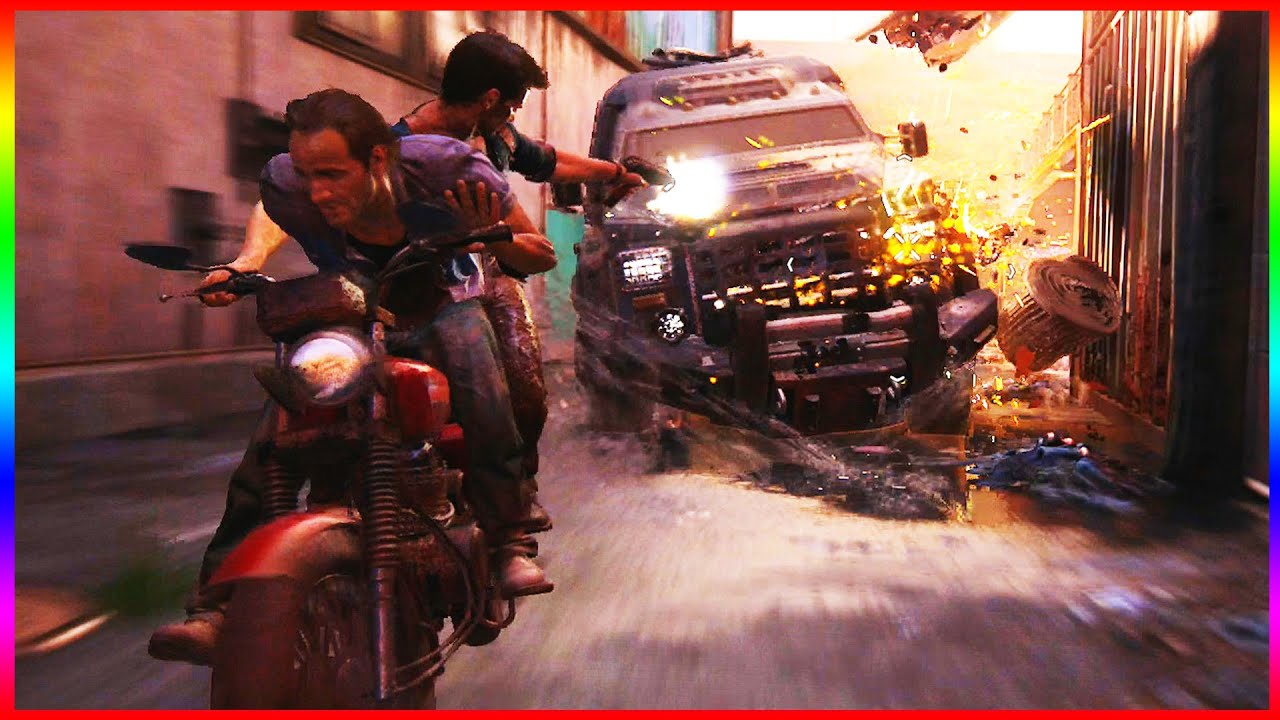
The craziest chase scene in a game.
● Help me reach 600K! ►http://bit.ly/subcot
Facebook: http://bit.ly/cotFB
Twitter: http://bit.ly/tweetcot
I'm trying to figure out what it's called
So I can study it.
I've looked through documentation, YouTube, courses. Which leaves me here.
Still havem't figured out how its done
drowsy snow
fluid mist
So I can study it.
Jonathan Cooper did a presentation about exactly this.
https://www.youtube.com/watch?v=0Hpk0l8-PAY

This is an 'HD Remaster' of a talk I originally gave at the Twitch Animation Exchange in February 2017, describing how we created Interactive Cinematics on Uncharted 4 and other projects at Naughty Dog.
fiery basalt
drowsy snow
Hire someone else who has the talent to create the art for you. Make sure you do...
The budget for this game is pretty much nonexistent. I have made a request in #volunteer-projects but idk where else to look
drowsy snow
Good thing my bookmark is full of anim references lol
drowsy snow
fiery basalt
The budget for this game is pretty much nonexistent. I have made a request in <#...
Don't hold your breath if you can't give paid incentive for asset productions. We largely treat #volunteer-projects for entertainment, not looking for actual gigs.
fiery basalt
😬
fluid mist
Hopefully, I can finally figure out how it's done.
drowsy snow
fluid mist
I'll go study it.
Good luck!
Once you get the gist of it, you can then look into Unreal's Sequencer feature.
https://docs.unrealengine.com/4.26/AnimatingObjects/Sequencer/Overview/

Sequencer is Unreal Engine 4's multi-track editor, used for creating and previewing cinematic sequences in real-time.
drowsy snow
fiery basalt
😬
Sorry, but the ones that bring food into the table gets more priority than those that don't.
Even most FOSS projects are worked in spare time, unless they got massive amount of donations consistently (like Blender Foundation or large Linux companies)
That's not to say that rev share is totally impossible, it's just that your contributors won't dedicate much of their time for you. You don't provide warranty to them, so do they.
lean widget
am i able to make a mp3 to uasset ?
drowsy snow
lean widget
am i able to make a mp3 to uasset ?
No, but you shouldn't even worry about it, because audio files will get compressed on packaging.
 fiery basalt
But its a 16x16 pixel art i literally just need to move the legs 😭
drowsy snow
lean widget
Converting it to WAV and importing it is more preferrable, especially for a click sound.
MP3 is terrible for more instantaneous sounds like that and generally not favoured by game makers.
Again, the WAV files will end up compressed in packaging anyway, while allowing for fast audio loading.
I think UE uses Vorbis for that, but I might be mistaken.
hidden dew
acoustic wraith
You want to import the platform header file for Windows. Most platform-specific...
Hmm.. I wasn't actually getting a difference with using the Windows headers/calls.
What I did find though was that it was related to BeginPlay() after all. Both the approaches I tried did quit, but not until BeginPlay() had completed. My issue had been that I was getting other crashes inside BeginPlay(), after the quit calls, confusing things.
I've also found that ConsoleCommand("quit") gives me a closed PIE and return to the editor, and RequestExit(false) closes the whole editor. Either way, both after BeginPlay() has completed.
drowsy snow
fiery basalt
But its a 16x16 pixel art i literally just need to move the legs 😭
I mean, if you want to, you could take some time to study from retro platformers, even as mundane as the original Super Mario Bros.
drowsy snow
fiery basalt
But its a 16x16 pixel art i literally just need to move the legs 😭
SMB 1 could be a mundane example, and too obvious for that, but because at the time big N have yet to flip the hardware to everyone's advantage, they had to make it simple to fit the famicom's barebone specs.
 stuck chasm
Would android multiplayer make quest 2 and mobile cross play? Or is there more to it ?
acoustic wraith
As long as it builds, there's no specific setup for crossplay
drowsy snow
The only thing that would stop crossplay is your own separation, or the platform's online infrastructure (and we know how Sony got backlash after Fortnite accidentally crossplay from PS4 and Epic saying how simple it was to do)
acoustic wraith
^ You'll probably have different PlayerControllers and Characters
You'll need to set the proper classes via the GameMode, when players connect.
 neon bough
how do we still not have an control rig channel 😭
it's barely related to animation blueprints, so it's own channel would be justified
drowsy snow
neon bough
how do we still not have an control rig channel 😭
I don't check on my usual channels all the time, so I can't be the sole "lecturer" if we have dedicated channel for it.
neon bough
well, i'm currently twisting, not only my, head around getting head rotation work within a limited range with DAZ rig -.-
i have some working implementations which split rotation into yaw/pitch, and it seems to work better than the aim node
drowsy snow
On top of that I don't use Daz (even though Snowie often gave me some clues about it, including its own merits)
neon bough
but it feels so complex and i feel like there must be an easier solution
@plush yew how did you solve it?
 prime willow
Solve what?
prime willow
yeah control rig and Daz
neon bough
did you use aim node, or some other solution?
prime willow
I have tried many things
neon bough
welcome to my world...
prime willow
nothing has solved my daz mesh from becoming a sphegetti monster
and if i use fix rotations before import they import as a spghetti monster ._.
neon bough
i'll get nightmares from that 180° yaw rotations and such 😄
prime willow
;-;
neon bough
oh that sounds like you failed even earlier
prime willow
yup
i mnaged to make everything work perfectly
until placed on the map
than he re-spghettis
all over again
control rig and daz isnt worth it
neon bough
it sure is
prime willow
i burnt over 4 months for no real usable progress
thats four months of mechanics and systems
neon bough
the problem is that you cant copy paste youtube solutions 😛
prime willow
and i work really really fast when i work lol
i can setup entire systems in 20 minutes
stuck chasm
Is there a specific channel for setting up android setup errors
stuck chasm
ty
prime willow
@neon bough I have a suggestion but you may have to do things that are not okay ;>_>
neon bough
which is?
prime willow
well that depends on if you can find any working solutions for character creation 3 and control rig
I may have a bypass lmao
 ivory locust
does anyone know how to export a tessellated mesh from ue4?
neon bough
thats the iclone software?
neon bough
yea, that's not gonna happen
prime willow
too expensive?
prime willow
very clonky
but their bone setup to export might be good
o-o
for the control rig issue
neon bough
and i'm kinda worried that my next trouble would be animations if i work with an altered rig
prime willow
lol
yup
also you can use sendtoeu and blender to daz bridge
and have a working decent Daz animation setup
where you pull rig and mesh animate in blender instantly send to unreal all done in 5 minutes or les sper animation
neon bough
i'm using a blender plugin for the DAZ rig and stuff
prime willow
ah oki
neon bough
i guess my main problem with the Aim node in CR is that it applies roll to the head bone, which i don't want
prime willow
this is the best i can give you for your control rig issue

and even than you have to follow the description instructions
and that might not fix it either
didnt for me ;-;
also my guess is try using a different bone for the head roll maybe?
neon bough
my rig works fine, it's just that particular problem with limiting the head rotation
prime willow
like neckupper
i know daz has silly names for their bones
i think iirc
upperneck is head 1 for daz
neon bough
head is head, it's pretty obvious 😄
prime willow
oh sorry im stupid and havent slept in 24+ hours xD
the only other person who may be able to guide you i know is @fierce tulip and he doesnt touch daz control rig iirc
drowsy snow
prime willow
ah oki
BTW I did some testing with MB-Lab models, and try to rerig it with Auto Rig Pro, and with the rig adhering more to UE mannequin standard, it works better with Control Rig. Though I have yet to solve twist bones problem.
Also yeah, it's practically throwing away the old, incompatible rig, and rerig the mesh, but from my experimentations, Auto Rig Pro did a good job at making auto weights with voxels.
prime willow
you can always cheat that process
and rrun a daz script
that completely tears out twist bones
and forces the model to become 1 and 1 with mannequin
neon bough
i think there's also a paid plugin for blender which pretty much makes anything UE mannequin compatible
not mr mannequin tools btw
prime willow
Hmmmmmmmmmmmmm
neon bough
nvm, auto rig pro is what i meant 😄
drowsy snow
neon bough
i think there's also a paid plugin for blender which pretty much makes anything ...
Yeah, it's 30 bucks 😅
prime willow
and everything tells me to eject fast
and use mannequin bones ._.
@woeful hatch hush you U:<
 woeful hatch
which one is it where you can place it its like a collision box and you can edit lighting? forgot name lol
drowsy snow
neon bough
where did you get it for 30?
Oh right, sorry, I forgot the price.
neon bough
woeful hatch
which one is it where you can place it its like a collision box and you can edit...
post process volume?
woeful hatch
neon bough
post process volume?
thanks!
just forgot it lol ofc it is
cheers again man
prime willow
Well Ben im sorry that i wasnt any help at all .-.
i qit the whole control rig thing
didnt seem worth the pain
like id waste away 6Plus months or more
and thats enough time to make your whole game mechanically
or at least the core aspect
neon bough
yea you did waste them because you did quit
prime willow
might as well come back to it later
neon bough
instead of learning from the fails 😄
prime willow
i just noticed that i keep getting stuck and have no idea or clue how to move forward
i feel like i should wait and work on other stuff
come back later when i msmarter wiser
and probably have a better understanding on unreal ;-;
its the same way with character creation tbh
i burnt nearly a year getting lost on that
sinc ei went to do that first before anything else
drowsy snow
neon bough
instead of learning from the fails 😄
NGL, my knowledge on Control Rig was culmination of months of trial and errors, and battle testing with machinima projects certainly help.
prime willow
i could maybe do it now lol but dang the time wasted super painful
anyways as ive clearly established im pretty useless in the control rig aspect and cant help you much at all in that area
untold summit
hello, i need some help, i wanna port vr to mouse controls, theres no yt video on this topic as far as i am aware.
prime willow
my only advice idk if its possible with control rig would be to setup an ignore function for twist bones if they get in the way maybe?
drowsy snow
untold summit
hello, i need some help, i wanna port vr to mouse controls, theres no yt video o...
#virtual-reality might know about it.
prime willow
worked for setting up iks
neon bough
ok, thanks tho
drowsy snow
prime willow
my only advice idk if its possible with control rig would be to setup an ignore ...
You could override it with another CR node after the IK node.
neon bough
but honestly my advice is to try to understand what's going on
that helps in moving forward 😄
 untold summit
drowsy snow
<#221799478364078081> might know about it.
untold summit
drowsy snow
<#221799478364078081> might know about it.
not many people there 😦
neon bough
probably the rig isn't the actual main problem but the fundamentals 😄
prime willow
im currently suffering through fixing my mantle system let alone aadding climbing and prince of persia floops
yup i still need to learn fundementals lol
neon bough
you must become one with the bone
drowsy snow
Speaking of moving forward, Control Rig executes in forward sequence, at least from Forward Solver, so overriding is possible.
RigVM is quite lightweight, so abuse it and find what works.
neon bough
and see how stuff gets messed up from the bone perspective 😄
 untold summit
drowsy snow
<#221799478364078081> might know about it.
untold summit
drowsy snow
<#221799478364078081> might know about it.
also, i need to add weight to the items held in the vr hands, how would i go about doing that?
drowsy snow
untold summit
also, i need to add weight to the items held in the vr hands, how would i go abo...
I don't work on VR at all.
untold summit
drowsy snow
I don't work on VR at all.
okay, imagine its not vr, how would you add weight to a weapon?
prime willow
maybe add physics
neon bough
create a physics asset and define a weight
prime willow
than change its weight in mass or weight
drowsy snow
untold summit
okay, imagine its not vr, how would you add weight to a weapon?
As in held on hand? Fake it with animations.
untold summit
drowsy snow
As in held on hand? Fake it with animations.
ah, not fake :/
thats the oposite of what my intent is :/
i wanna add collision to the weapon.
drowsy snow
Well, you said implying it's not VR. In non VR, the mass rarely relevant.
Save for things like dropping weapons, which even then often not physically accurate.
untold summit
drowsy snow
Save for things like dropping weapons, which even then often not physically accu...
yea thats a problem, trying to make an accurate fighting game, the weight is usper important here.
well
just a system for now
drowsy snow
Again, I don't work on VR at all (blame my health condition for that), so you're asking to the wrong person.
Even if I had to, I could just outsource the job and let someone else do it.
untold summit
prime willow
than change its weight in mass or weight
yeah, its such an issue making this, but its so worth it.
 untold summit
prime willow
i hope so
untold summit
prime willow
i hope so
very much, for this purpose i also need the weapon to have weight while colliding with another weapon.
prime willow
it better be sexy as fluff D:<
untold summit
 neon bough
well i think the full body ik solver is just trolling me
and not applying the limits corrects
drowsy snow
With some clever animation trick, one can make fighting sequences feel punchier than it should.
(and optionally some particle effects)
untold summit
drowsy snow
With some clever animation trick, one can make fighting sequences feel punchier ...
i guess, but i wanna add diferent weights to different weapons.
untold summit
drowsy snow
With some clever animation trick, one can make fighting sequences feel punchier ...
greatsword should easily overcome a onehand.
but be alot slower to swing.
drowsy snow
untold summit
greatsword should easily overcome a onehand.
Fake it with arbitrary numbers, for all I know, J-RPG style.
untold summit
but the system i have in mind has a way to avoid getting hit even if the blades touch, by guiding the sword away from your body.
think for honor, but less gimmicky.
drowsy snow
Maybe artificially add latency / desync to the HMD movement on screen to signify the weight, based on arbitrary JRPG numbers, and make it unusable if the weapon's enum switch disable one handed support.
Theoretically.
untold summit
drowsy snow
Maybe artificially add latency / desync to the HMD movement on screen to signify...
i would need to see how this looks.
drowsy snow
The thing is that VR controllers can't get heavier in real life, so you have to problem solve it on screen.
untold summit
drowsy snow
The thing is that VR controllers can't get heavier in real life, so you have to ...
yea, that is something i get.
untold summit
drowsy snow
The thing is that VR controllers can't get heavier in real life, so you have to ...
infact this is why i wanna make a mouse controller for it instead.
drowsy snow
Although the bulky headsets caused me to nearly pass out.
neon bough
i bet that would feel really weird in VR
untold summit
the thing is
i just want the vr controls
no vr headset
all normal on pc
just with vr controls.
neon bough
still your brain wants to see the movement to be somewhat what you tell your arm muscles
if you add artificial lag to it, you get into trouble
drowsy snow
FWIW, I see streamers playing that one VR game about sword battle, and the weight of the sword barely matters.
neon bough
yea probably for the reason that i said above
 hallow void
Hey guys, quick question, just to make ideas clear for future development, If I wanted to implement into my games some bots that use the same type of character the player uses (for example to allow bot support in deathmatchor other multiplayer modes), can I just make an AI possess or use that specified character or should I make a separate pawn or actor and recreate something similar to the player character on the front end while on the back end is completely different?
Take something like Unreal Tournament for example, my question is if I can put in some ways an AI to control a character or I should make something dedicate,
neon bough
you use the same base character, and unless you do weird things they can be possessed by players and AI
drowsy snow
hallow void
Hey guys, quick question, just to make ideas clear for future development, If I ...
IIRC in the case of CSGO, the server would hijack quitting players's characters with bots to balance the round
hallow void
neon bough
you use the same base character, and unless you do weird things they can be poss...
So if I built my character starting from the stock first person character BP it can be possessed by an AI, right?
neon bough
idk about the first person character because i never used it, but probably yes
hallow void
Good to know, this will make my life a lot easier, thanks!
drowsy snow
hallow void
So if I built my character starting from the stock first person character BP it ...
Yeah, basically having the AI controller as fallback.
If you don't mind looking at C++ code, Shooter Game template has what it takes for arena shooters.
hallow void
Great!
I am trying to learn C++ even though with school I am kinda stuck there, working majorly on UE5 and Blender rather than on C :/
drowsy snow
hallow void
I am trying to learn C++ even though with school I am kinda stuck there, working...
Also if you don't mind working with older UE4 versions, you can even dismantle the now abandoned Unreal Tournament 4 project source code (thanks Fortnite) and try reverse engineer it.
https://github.com/EpicGames/UnrealTournament
(if this gives you 404, you have to link your GitHub account with your Epic Games account with valid UE licence)
hallow void
drowsy snow
Also if you don't mind working with older UE4 versions, you can even dismantle t...
Everything that can get me on the track of making a quality boomer shooter is welcome, thanks a lot!
 placid socket
noob question, i have functions in my blueprint, one has a greenish F, and the others are blue/greyish, what's the difference? 😄
drowsy snow
hallow void
Everything that can get me on the track of making a quality boomer shooter is we...
Also, about boomer shooter, you can even grab this Source/old Quake like movement system, from Project Borealis.

GitHub
HL2-style, classic FPS movement for Unreal Engine 4 implemented in C++ - GitHub - ProjectBorealis/PBCharacterMovement: HL2-style, classic FPS movement for Unreal Engine 4 implemented in C++
hallow void
I hope there's a way I can turn my game developing experience into work hours for school... here in Italy there's the tradition of not letting students have a private life at all, so our dear dear government put a law that forces high school students to work 90 hours in 3 years otherwise you can't access university
Oh, you don't get any kind of money or experience from that work, you just work for free at McDonalds to have access to life
drowsy snow
placid socket
noob question, i have functions in my blueprint, one has a greenish F, and the o...
Blue function: "normal" functions that you can execute on its own
Green function: "pure" functions that can't be executed on its own
hallow void
drowsy snow
Also, about boomer shooter, you can even grab this Source/old Quake like movemen...
I did and I tried to install it in UE5, sadly I suck at coding so I couldn't get it working...
placid socket
drowsy snow
Blue function: "normal" functions that you can execute on its own
Green function...
thanks, that explains a lot, i will watch the video once again how to use it properly
drowsy snow
hallow void
I did and I tried to install it in UE5, sadly I suck at coding so I couldn't get...
The problem with UE5 is that (from what I heard, I don't use UE5) the build process is slightly different from UE4's. Consider asking on #ue5-general about this, someone there might able to help about it.
hallow void
Green functions are used most of the times as references or target, most of them are Get functions that get a value or a game component (e.g. Get Player Controller) and can't be executed, while blue ones can be executed but they often (not always) rely on variables and those green functions
hallow void
drowsy snow
The problem with UE5 is that (from what I heard, I don't use UE5) the build proc...
Thanks, I will do later
untold summit
neon bough
yea probably for the reason that i said above
i believe it wont be much of an issue, just gotta try it to know for real tho.
hallow void
I am very interested in UE5, can't wait to see what its future holds, now I'm probably go back studying Kant (I allegedly detest him)
untold summit
neon bough
yea probably for the reason that i said above
its not the first game to do this, for honor also has physics that simulate weight.
drowsy snow
untold summit
its not the first game to do this, for honor also has physics that simulate weig...
Does For Honor has motion controls?
untold summit
neon bough
yea probably for the reason that i said above
 untold summit
drowsy snow
Does For Honor has motion controls?
untold summit
drowsy snow
Does For Honor has motion controls?
its about simulation weight, not about vr per say, what i wanna create has nothing to do with vr except for the Free movement you get from the controls.
drowsy snow
untold summit
Yeah, this is definitely the animations that make it looks (and feels) punchy.
The simplest way to get it would be with some tweening.
untold summit
drowsy snow
Yeah, this is definitely the animations that make it looks (and feels) punchy.
this aint what i meant, i just wanted to showcase that adding artifical weight doesnt add trouble when it comes to playing the game.
drowsy snow
untold summit
this aint what i meant, i just wanted to showcase that adding artifical weight d...
I mean, if you really want to, you could just go with Wii route.
untold summit
drowsy snow
Yeah, this is definitely the animations that make it looks (and feels) punchy.
what i wanna do is a sort of semi first person/third person fighting game where you get to freely control your chars blade or any weapon equipe currently.
drowsy snow
Motion controls w/ peripherals, but not VR display, that's basically Wii in a nutshell.
untold summit
drowsy snow
Motion controls w/ peripherals, but not VR display, that's basically Wii in a nu...
my god
no headset
obsidian nimbus
wii is unsupported
untold summit
pc master race 😄
drowsy snow
Kinect is dead by now.
untold summit
forget wii, mouse it is.
its not really finding out a proper way to make it work, its about the how to add the controls rather than how to make it work gameplay wise.
drowsy snow
Though, you could add your own Wii controller support, if you want to, with some hacky C++ code, even though only retro enthusiasts, speedrunners, and grannies with the Wii mini still holding on the Wii remote.
obsidian nimbus
you could try use a phone as controller
drowsy snow
obsidian nimbus
you could try use a phone as controller
For gyro movement yes, but without spatial awareness.
 digital rover
cant we edit/change distance of existing layer on world composition
 untold summit
drowsy snow
Though, you could add your own Wii controller support, if you want to, with some...
untold summit
drowsy snow
Though, you could add your own Wii controller support, if you want to, with some...
nah mate, i wanna make it mouse mainly, i need a demo most people can play, not some wii nonsense.
drowsy snow
digital rover
cant we edit/change distance of existing layer on world composition
No, you have to create a new one, set the distance value, and evacuate your sublevels.
obsidian nimbus
could get spatial awareness if u incorp the camera tracking
digital rover
drowsy snow
No, you have to create a new one, set the distance value, and evacuate your subl...
cant we delete that layer?
drowsy snow
digital rover
cant we delete that layer?
The old one will be automatically deleted if there's no sublevels upon reloading the persistent level.
digital rover
oh ok thank you
untold summit
obsidian nimbus
could get spatial awareness if u incorp the camera tracking
is this towards me?
drowsy snow
obsidian nimbus
could get spatial awareness if u incorp the camera tracking
Some mid to lower end Android phones don't have AR capabilities, and ironically Unreal works best with iPhone's AR capabilities.
Though to be fair the integration was started way before the Fortnite banning fiasco.
obsidian nimbus
yea its not perfect, but ppl often have one
more ppl own an iphone than quest
iphonme + pc that is
its also something a lot of ppl dont wunna bother with
phone +pc has a lot of potential for a sync multiplay, but phones comin in all shapes and sizes makes things a bit tricky
 dawn gull
I'm trying to see if a hit actor is a specific class, I tried this and it doesnt work, what could I try?

I know its hitting because it could print the name of each actor fine
drowsy snow
dawn gull
I'm trying to see if a hit actor is a specific class, I tried this and it doesnt...
Maybe try getting the class first?
dawn gull
drowsy snow
Maybe try getting the class first?
That's what I originally had thought of before asking here but I didn't know how
 grim ore
get the hit actor, get its class, compare class to class, profit?
drowsy snow
dawn gull
I'm trying to see if a hit actor is a specific class, I tried this and it doesnt...
This is basically comparing the object reference, not necessarily the class.
dawn gull
Oh, like this?
 grim ore
yes, that would compare the classes
dawn gull
ill try it out
grim ore
you can also cast and that would work as well
drowsy snow
grim ore
you can also cast and that would work as well
Right, this can save some node real estate (and maybe a little more optimised)
turbid wasp
I made a landscape that I then deleted and made a new one. And when i was gonna add my material again so I could paint it onto the ground, it didn't work to press "ok". It worked before I deleted the terrain
It's what he's doing here
https://youtu.be/X0MN9xWr-iI?t=386
And I get the error message "Asset /Game/Landscape_sharedassets/Grass_LayerInfo already exists." When I press "ok"
Learn how you can setup a landscape material and then paint multiple textures onto your terrain using Unreal Engine 4 in this tutorial.
♥ Subscribe for new episodes weekly! http://bit.ly/1RWCVIN
♥ Don't forget you can help support the channel on Patreon! https://www.patreon.com/VirtusEdu
♥ Join the Virtus Dev Squad Discord: https://discord.gg...
dawn gull
Works great! Thank you!
 drowsy snow
turbid wasp
I made a landscape that I then deleted and made a new one. And when i was gonna ...
drowsy snow
turbid wasp
I made a landscape that I then deleted and made a new one. And when i was gonna ...
Sounds like you're trying to recreate the layer info.
Just so you know that Layer info assets are rather reusable, so you don't necessarily have to create one again if you already have one.
turbid wasp
drowsy snow
Sounds like you're trying to recreate the layer info.
Just so you know that Laye...
but I didn't find the one i used to have when i was painting before I deleted the terrain
grim ore
hqve you tried to run a save all so it saves the temporary files
it also shows the folder its in, in that error
turbid wasp
grim ore
hqve you tried to run a save all so it saves the temporary files
i dont know how to run a save all
i just started with this a couple of days ago hehe
so im really new to it
drowsy snow
turbid wasp
i dont know how to run a save all
Ctrl+Shift+S
grim ore
its also under the file menu at the top
drowsy snow
turbid wasp
wait when i started it, the ground was black
I think it would be easier to just create another new project and nuke the old one.
turbid wasp
but - ive done that twice already lol
this should be fine
but
the only problem I have
is still the "ok" thing where i cant press ok
drowsy snow
Mark my words.
If you're still learning and things gone haywire, you can always create a new project.
turbid wasp
yeah yeah
turbid wasp
turbid wasp
I made a landscape that I then deleted and made a new one. And when i was gonna ...
but is that the solution to this
grim ore
show the actual issue
 drowsy snow
turbid wasp
drowsy snow
turbid wasp
Choose a different folder.
grim ore
or
dont create a new one, just use the old one
see the drop down next to each material on the left, those are the layers you have assigned. click on the none and choose the one you created before
your trying to create the layers again (which is fine), and then save them into the same folder as before (which is the error)
turbid wasp
oh
i did a misstake lol
i pressed control + z
and i did this

by accident
._.
im so bad at this lol
now its black again
grim ore
on the left you have the two round balls, each represents the material for the layer
next to them is the layer info, which is set to none
change them
turbid wasp
ohh
thanks!
can I change my fly speed?
I know I can
i've forgotten how
also, it's really hard to know how big I should make something. how can I know how big my path should be?
what if I make it too big
grim ore
use something for reference, drag in your character for example.
grim ore
you drag in your character. find it in the content browser and drag it into the scene
or you could drag in a cube and size it to your character
 boreal sun
I have this ground wave projectile where I'm scaling a static mesh taurus in the xy direction. The only problem is that I want the width of the taurus to stay roughly the same for the whole duration. I can't seem to figure out how I would do this, does anyone have any ideas or solution?
not sure how I could scale the outside and inside diameter together
 turbid wasp
grim ore
you drag in your character. find it in the content browser and drag it into the...
turbid wasp
grim ore
you drag in your character. find it in the content browser and drag it into the...
i cant find it?
nvm
found it haha
drowsy snow
boreal sun
I have this ground wave projectile where I'm scaling a static mesh taurus in the...
Theoretically you could manipulate the vertices by displacing it with World Position Offset input in the material, but I'll leave it to you on figuring out how to use the transforms in material.
 plush yew
anyone know where to get victorian style castle interior models? like walls and details
drowsy snow
boreal sun
I have this ground wave projectile where I'm scaling a static mesh taurus in the...
Just know that even in theoretical level, the WPO method I propose is super hacky for what you're trying to achieve, due to how static mesh transformation works in all 3D CG tools that ever existed.
You might able to get away with particles instead, allowing you to retain the thiccness, or if particles dissatisfy you, you can last resort to SDF raymarcher algos.
plush yew
also for free
drowsy snow
plush yew
anyone know where to get victorian style castle interior models? like walls and ...
The marketplace
plush yew
yeah
drowsy snow
plush yew
also for free
If you want it for free, either: work with what you can get, even if it looks terrible; create it yourself in DCC tools of choice; or infringe some copyrights and screwing yourself up in the process.
Or gamble every month in Marketplace.
plush yew
well im mixing bridge assets
kinda works, but looks terrible
especially those details, like on ceiling, walls
boreal sun
drowsy snow
Just know that even in theoretical level, the WPO method I propose is super hack...
Good ideas tyty, WPO method sounds hard as hell but I'll give it an honest try. Particles might work out too
turbid wasp
Hey, how do i change flying speed?
drowsy snow
turbid wasp
Hey, how do i change flying speed?
As in the editor camera?
turbid wasp
yes
drowsy snow
turbid wasp
yes
There's a handy little blazing camera button in the top right of the viewport.
plush yew
does this look stupid?

Was talking about the hud
just spent like 6 hours trying to figure that all out
lol
i was going for the valorant look
 void sierra
I'm getting this error when building. Does anyone know how to resolve this?
 plush yew
you have a error in one of your blueprints
 void sierra
plush yew
you have a error in one of your blueprints
void sierra
plush yew
you have a error in one of your blueprints
oh ok, strange. Is there a way to know which one? Or am I going to have to go through every blueprint? It looks like that's the only information it gives me
void sierra
plush yew
you have a error in one of your blueprints
The thing is tho, it lets me play the game in the editor. Usually when there is a blueprint error, it does not let you play in the editor.
 warped crypt
I seen to be unable to add an Interface to a certain BP - what might be the reason?
I go into Class Settings ,I press ADD and and find it - click it and nothing??
turbid wasp
Im trying to download a pack from epic marketplace but I cant search up my project :(
anyone knows why?
dusk nebula
warped crypt
I seen to be unable to add an Interface to a certain BP - what might be the reas...
If I get weird bugs like that or the one where nodes don't change I just reopen first thing and go from there
untold summit
eyo back
something simple now
animation for camera switching between first and third person.
neon bough
set view target with blend
untold summit
neon bough
set view target with blend
👌
 granite sparrow
Anyone have a course they recommend for learning ue4 c++ for someone whos never done game development before
untold summit
neon bough
set view target with blend
i wish my camera actor appeared in my reference.
so i could actually do the damn thing.
neon bough
you need to reference the camera component
untold summit
neon bough
set view target with blend
it doesnt let me
neon bough
stop pinging me every 5 minutes ffs
untold summit
didnt mean to, my bad.
neon bough
which doesn't let you connect the reference?
target is player controller, new view target is actor which has a bound camera
untold summit
new target is camera actor yeah?
untold summit
because when i try to add it it doesnt show up in reference.
drowsy snow
granite sparrow
Anyone have a course they recommend for learning ue4 c++ for someone whos never ...
See pinned messages.
 slow haven
hello ppls im a project manager and a programmer we r working on a project we need 9 ppls i mean serious ppls who will continue with us we r a small team here is the roles i hope some of u will be interested

 tawdry pawn
just wanna say to everyone Happy Halloween 🤡
slow haven
where ?? n thnk u
 frozen solstice
Anyone seen an issue, in ue5 (or ue4 I guess), where breakpoints only want to trigger once? E.g. soon as I hit resume on a For Loop with an Array (that's full), only the first instance triggers the breakpoint. Resuming and I will never see that breakpoint again.
slow haven
i can t chat on job board
 steel lava
Question! I need help with something but the best way I have to show what I need help with is through a short video clip I uploaded on to YouTube. It's a short unlisted clip that doesn't make me any money or anything and I'll be deleting the video after I get a response so it's not like I'm shilling my own stuff but it still feels like I am in a way? I just wanna know if it's alright.
 smoky thunder
Good evening.
I just landed here, from planet Godot.
How are we all doing today?
steel lava
smoky thunder
Good evening.
I just landed here, from planet Godot.
How are we all doing today...
Heya! Doing well!
slow haven
srry for tha but where i can write the commands
smoky thunder
@steel lava If uploading it to youtube makes you unsure, cant you just list it as private and share the link to it?
Or do you need to show it to the big crowd ?
steel lava
It's unlisted which means that no one can see except for anyone who clicks the the link.
smoky thunder
Well what is the worry then? 🙂
modest trench
are you worried about making it public or worried about the channel rules?
steel lava
Worried about channel rules.
modest trench
I don't think posting a short problem video will be an issue
steel lava
Ah okay, thanks!
smoky thunder
Ahh i see.
I thought this was somehow youtube specific. haha
Sorry.
steel lava
Nah, it's fine! Thanks for trying to help!
Well here's my question basically.

Twitter: @PhantomFemboy
Twitch: https://www.twitch.tv/phantomfemboy
Okay, apparently the resolution is fucked.
modest trench
which pixel is your issue? lol
steel lava
Hold on, lemme try to re-render it and re-up the video and then I'll post a hopefully better link. lol
modest trench
I think I can understand a fair amount just from the audio
steel lava
Oh? That's nice at least. lol
modest trench
arrow component is mostly for just debug visualization btw
it's just so it's easy to see which way something faces (in the editor)
steel lava
modest trench
it's just so it's easy to see which way something faces (in the editor)
Ohh, that makes sense.
Sorry I don't understand what you mean.
modest trench

Announce Post: https://forums.unrealengine.com/showthread.php?101051
This Training Stream takes a look at Blueprint Communication. We find that Unreal Developers of all levels can sometimes struggle through the concepts behind moving data between objects. So in this video we'll take a look at the different ways to make Blueprints talk to one an...
steel lava
Sweet, I'll check that out now!
Especially since I re-rendered and uploaded the video and it's still 240p so that's not helpful.
 pearl swallow
Hi guys. I'm kinda noob here in case of making my own master shaders.
I wanted to ask: Is it legal to use some of the Unreal Tournament Master Material in my own project? I'll be using my own textures of course. No texture or mesh will be used from UT. Just the master material
 bronze vale
Does anyone have experience on switch? I am trying to convert a ".SWITCH_AUDIO" file to .wav
I didn't see anything about it in pins
smoky thunder
Wait a sec, unreal does run on Linux right?
Why did i get a .msi file, when trying to grab the download?
drowsy snow
smoky thunder
Wait a sec, unreal does run on Linux right?
Yes, but it took a lot of hoops to get there
drowsy snow
smoky thunder
Why did i get a .msi file, when trying to grab the download?
You have to build the engine from source code if you want to develop on Linux
drowsy snow
bronze vale
Does anyone have experience on switch? I am trying to convert a ".SWITCH_AUDIO" ...
...are you trying to rip Nintendo Switch game assets?
smoky thunder
so @drowsy snow Do i need UE4 or is there also a version 5 out there.
Do they both build on Linux, in that case ?
drowsy snow
bronze vale
Yes
Per #rules no.5, no support for asset ripping in this server.
Contact the respective modding forums instead.
drowsy snow
smoky thunder
so <@!325627930484932608> Do i need UE4 or is there also a version 5 out there.
...
I don't see why both won't build on Linux.
smoky thunder
Aighty, that will be tomorrows task then 🙂
modest trench
clang support is there but I don't know if it's super stable or not
smoky thunder
super stable is always relative 🙂
drowsy snow
modest trench
clang support is there but I don't know if it's super stable or not
Clang cross compile from Windows to Linux, right?
bronze vale
You say, "no support for asset ripping" but, what if I just need to know how to convert a UE file type
drowsy snow
bronze vale
You say, "no support for asset ripping" but, what if I just need to know how to ...
converting Unreal assets from shipped games still constitutes asset ripping.
bronze vale
But what if it's from a mod
I literally cannot find anything on this filetype
Gg no re ig
drowsy snow
bronze vale
I literally cannot find anything on this filetype
Can't you just make a recreation of the sound bite? Hassle free on your end if you don't know reverse engineering.
bronze vale
No, because I'd need to know exactly how many bits the original uses in little endian
drowsy snow
bronze vale
No, because I'd need to know exactly how many bits the original uses in little e...
Considering you're talking about ripping UE4 game, it's always 16-bit.
Though from your wording, I'm going to assume you already have knowledge on reverse engineering.
bronze vale
No, I'm just an average intelligence 15 year old
I no longer need assistance for now
I shall sort this out
smoky thunder
Plot twist, Stabb is actually a spy.
neon bough
or just intelligent enough to see that this is going nowhere here 😄
drowsy snow
smoky thunder
Plot twist, Stabb is actually a spy.

 fresh shoal

 drowsy snow
Google-fu.
That's the secret sauce.
modest trench
drowsy snow
(also a crap ton of trial and error)
modest trench
and reading engine source
there are also many weekly twitch streams they have done
you may find one covering a topic you care about
I don't know if that matters at all
hidden dew
neon bough
hover over it and it'll tell you why
oh, derp, ty
modest trench
probably just for their own usage metrics
drowsy snow
I highly doubt Epic will judge you for it, nor gaining any exclusive perks.
The official Unreal Engine channels.
It's always on Twitch, though sometimes they relay the stream to YouTube.
 spare kernel
hidden dew
spare kernel
hidden dew
Question about basic material logic.
Contrived example: I have a parameter that will be a random number: 0, 1, 2, or 3.
I want to say "Render pink if it's 0, lime if it's 1, cyan if it's 2, and white if it's 3."
How can I do this?

Or not the full explanation, but what I should look at. The 'if' material node doesn't appear to be as robust as the usual kind of if statement.
 hot anchor
anyone know where I should post link to my discord server? Its for anyone who is new or experienced game developer to ask me (developer of safezonevr on steam) about anything related to game development, show of their work etc
I cant find a channel to share it lol (:
hidden dew
hidden dew
Question about basic material logic.
Contrived example: I have a parameter that ...
Eyy I got it. I used a custom node with some basic logic. Don't know if it's the most optimal approach but it's simple and worked
Studying sucks but learning is fun
 buoyant graniteBOT
:triangular_flag_on_post: Julie Ji#6624 received strike 1. As a result, they were muted for 10 minutes.
hidden dew
I'm looking for a guide on how to use a Render Target to act as an array of values. So I just want to dump values into it on the CPU side, to read from it in the Material.
But I can't find anything that really shows how to do this... The best I've seen uses a Canvas Render Target and a Static Texture... which seems more convoluted than it has to be. Anyone know a good guide or tips?
 vocal flume
I have a widget that executes and displays a game over screen with player score and coins and everything. It’s elaborate. Player score appears. Then total time passed appears and so on. Takes like 10-12 seconds to get through the whole thing. Now I want to include a skip button at the bottom that’ll skip all the animations and particle effects and displays everything at once. How to stop the execution if player wants to skip when half of the page is done?
dusk nebula
vocal flume
I have a widget that executes and displays a game over screen with player score ...
just remove the widget from the screen or destroy it?
vocal flume
I can’t remove it because the result screen is the same widget.
vocal flume
Like I have a page that displays 1-100 one by one. When player presses skip I want to display all 100 numbers at once in the same page.
dusk nebula
keyframes maybe
I don't see why you couldn't skip to the end of the sequence somehow
vocal flume
Event Construct —> show text —> play animation —> 2 seconds delay —> show another text —> 1.5 seconds delay —> particle animation —> a second delay..
Im not sure how I can break execution when the player is at say.. 2nd animation..
dusk nebula
so when you move the slider to the end of the sequence, does that look how you want it to?
vocal flume
There is no slider.. it’s not a single animation
drowsy snow
You could convert it in place, or make installed builds of your custom UE.
vocal flume
created a project with the current 4.27.1 source build on pc and then tried to open the project running the same engine on mac, it says it's made with a different engine version and converting it could damage the project. does anyone know if there's a way around this?
@signal ember I did this recently. Moved project to mac. For your safety, backup the project folder and try opening it and convert it. Worst case you’ll have to rebuild with Xcode.
dusk nebula
any reason why a struct variable called from another BP would output the correct Data Table line the first time I call it but then the default after that?
 plush yew
really enjoying the udim support in unreal engine

does anyone know if they will make it enabled by default

 drowsy snow
prime willow
im awake!
drowsy snow
prime willow
im awake!
Hello!
Buy a new computer.
Kidding. Probably the automatic scalability kicks in and set things to low.
void sierra
Every time I try to build the lighting in unreal, it seems to be creating a folder called "SwarmCache" and storing a bunch of data in it. It's causing the build to fail because I don't have enough space on my c drive. How can I change the directory of the SwarmCache?
plush yew


how do i increase the taa
or should I use msaa
my blinds disappear with all the aliasing.
prime willow
drowsy snow
Hello!
❤️
drowsy snow
plush yew
my blinds disappear with all the aliasing.
Ah, yes, blinds. Anti aliasing's nemesis.
The best way to remedy this is to get screen resolution above 100%, but it could hurt performance.
MSAA (AFAIK) only available on forward rendering.
You practically don't have much choice due to how 3D raster render works, not accounting for any form of AA.
untold summit
drowsy snow
Yes, but it took a lot of hoops to get there
ello, i tried doing set view target with blend, but i really cant figure it out, i tried adding camera, that doesnt work, cameractor doesnt work either, the hell am i doing wrong.
drowsy snow
untold summit
ello, i tried doing set view target with blend, but i really cant figure it out,...
How do I use the Set View Target with Blend node to change cameras during gameplay using Unreal Engine 4 Blueprints.
Source Files: https://github.com/MWadstein/wtf-hdi-files
untold summit
drowsy snow
https://youtu.be/uW86ZGxesmc
thats what i followed
untold summit
drowsy snow
https://youtu.be/uW86ZGxesmc
i cannot add cameractor.
plush yew
@drowsy snowthanks that fixed it
you and that other guy managed to help me fix both my export issues with blender and my anti aliasing

now everything is as it should be when it comes into unreal
untold summit
please help
plush yew
same
untold summit
at least it actually works now, but i still cant figure out the camera, it now directs to player cotroller which goes inside the body, which obviously sucks.
 dapper oak
I've just loaded up this 4.27 project after a while and now my skysphere looks like this. Shaders have completely compiled. Any idea what is happening and how to fix?
 untold summit
It just directs to player right now, i need it to direct to cameraactor, which i cannot add.
 drowsy snow
untold summit
It just directs to player right now, i need it to direct to cameraactor, which i...
drowsy snow
untold summit
It just directs to player right now, i need it to direct to cameraactor, which i...
Blend camera gone sexual 🤔
untold summit
drowsy snow
Blend camera gone sexual 🤔
i wanna cry dude, its so frustrating.
plush yew
morning coders 🙂
dapper oak
good evening
plush yew
lol i have been putting so many man hours into my game, i had a dream about blueprints.. kinda weird af
plush yew
truth i did that too i needed a break.
but then you forget what you did and have to restert 😦
 stable path
dapper oak
ive put my game off for 3 months yet complain about it not being finished
stable path
dapper oak
ive put my game off for 3 months yet complain about it not being finished
I've had like 10 different projects like that
where I started, worked on it for a few months
Then gave up 😐
stable path
I mean, I knew that from the beginning
Yet, for some reason, I still wasted months on it
plush yew
I started getting into UE4 recently and I'm having some troubles. Is this the right channel to ask help at?
untold summit
i just need to add the camera actor for it to work 😦
 dapper oak
plush yew
I started getting into UE4 recently and I'm having some troubles. Is this the ri...
dapper oak
plush yew
I started getting into UE4 recently and I'm having some troubles. Is this the ri...
indeed it is!
plush yew
untold summit
i just need to add the camera actor for it to work 😦
add a .1 delay if yoour replicating, to the begining
untold summit
plush yew
add a .1 delay if yoour replicating, to the begining
yeah but right now it doesnt even work properly it hovers to his ass instead of his face, i cant add the cameraactor, idk why, help.
untold summit
i dont get a reference for the camera even when i have it selected.
 untold summit
plush yew
lemme find it for ya
untold summit
plush yew
lemme find it for ya
thanks for the effort either way.
 fast ginkgo
Is there any way to reset the Static Mesh Editor layout? I moved the Socket Manager tab, and now the whole editor crashes every time I try to open any static mesh (no matter which project/mesh).
plush yew
Uhh.. what I want to do is for a text to appear when holding down H but it doesn't seem to work. Could someone help?
 plush yew
untold summit
thanks for the effort either way.
plush yew
untold summit
thanks for the effort either way.

How to change 3rd to 1st person in unreal
SONG:
Trophy Endorphins by Andy G. Cohen
https://www.youtube.com/watch?v=s9u47VuamhY&index=72&list=PLrbG5f3IsHD2Yv4ZGkWHDMIti5Ic1UIoO
https://www.youtube.com/channel/UCv7Xe0ackt-4BAV4sYeEDjA
best i can find lol
not a proper way of doing it tho
fast ginkgo
fast ginkgo
Is there any way to reset the Static Mesh Editor layout? I moved the Socket Mana...
Found it in %HOME%\AppData\Local\UnrealEngine\4.27\Saved\Config\Windows. Weird bug.
plush yew
plush yew
Uhh.. what I want to do is for a text to appear when holding down H but it doesn...
instead of doing it by tick why dont you create a custom event, then inside your player bp call the custom event to the button?
plush yew
plush yew
instead of doing it by tick why dont you create a custom event, then inside your...
That could work. Thanks
plush yew
plush yew
That could work. Thanks
i did all that dumb ui crap yesterday for 10 hours lol

I literally dont understand any of this ._.
you will get there 🙂
right click, create custom event
yeah then im stuck
Call it ButtonPressedX or what ever
then link it up, compile save
then inside your character BP

then call the custom event
untold summit
plush yew
https://www.youtube.com/watch?v=maGGz2prwVY
thats simple shite there mate, i NEED the animation you get while changing cameras, my game will involve it, if i had the system you sent here people would get dizzy by constantly changing camera.
plush yew
untold summit
thats simple shite there mate, i NEED the animation you get while changing camer...
LMFAO thats the lazy dog way of doing it
you want an advanced tutorial ig ot you
untold summit
plush yew
you want an advanced tutorial ig ot you
?
plush yew
your trying to fix the camera issue correct?
What is your issue?
You want an animation to play when changing from one camera to another?
untold summit
plush yew
You want an animation to play when changing from one camera to another?
yea
plush yew
why not play montage then?
untold summit
plush yew
You want an animation to play when changing from one camera to another?
like this here
 plush yew
untold summit
like this here
plush yew
untold summit
like this here
I'm no professor but can't you just move the camera for it to work?
untold summit
plush yew
I'm no professor but can't you just move the camera for it to work?
please enlighten me.
 honest vale
 strong mesa
good morning everyone, I have a collage project and for it i need to simulate a visualization of Sine and Digital signal going from point A to point B , and I'm really lost on what's the way to do it.. can someone help !
regal mulch
The Animation, or "Blend", will only work if you switch between two ViewTargets.
ViewTargets are ACTORS. CameraComponents on the same ACTOR won't give you that feature.
If you still need this, then you need to code it yourself. Either by manually interpolating the CameraComponent location/rotation via Timeline, or by making your own PlayerCameraManager component (settable in PlayerController) and by manually returning the POV (point of view) you need in the overridable functions it offers.
The CameraComponent, in terms of Location and Rotation, is only offering the OFFSET from the ViewTarget. The first active one that is found will be used. If none is there, it will use the Actors location itself.
Which is why you are at the location of the PlayerController by default if you have no possessed Pawn
regal mulch
strong mesa
good morning everyone, I have a collage project and for it i need to simulate a ...
That's a very specific issue. You'll need to provide a few steps yourself. What exactly are you struggling with?
strong mesa
regal mulch
That's a very specific issue. You'll need to provide a few steps yourself. What ...
I have to actors ingame, actor A will send Info to B and vice versa...
I need to make a visual that looks like a Sine or a Digital signal that being sent from actor A position to actor B position
regal mulch
UE4 has SplineComponents
They offers a way to add/remove points and define in- and outgoing tangents
turbid wasp
Can someone help me? doesn't seem like my project shows up here.
 regal mulch
What Engine Version is your project?
turbid wasp
how do I check?
turbid wasp
seems to be 4.27.1
regal mulch
Did you create the project on this PC or download it to it?
turbid wasp
I created it
strong mesa
okay so.. I should spawn a SplineComponent then add a point in to make it look like a sine wave
regal mulch
turbid wasp
I created it
You can try clicking on the "Show all projects" at the top right.
turbid wasp
still doesnt show up
regal mulch
strong mesa
okay so.. I should spawn a SplineComponent then add a point in to make it look l...
That's one option, yes. You can add the SplineComponent to one of the two actors, or make a 3rd one that both use.
regal mulch
turbid wasp
still doesnt show up
Does the project show up in your normal library?
turbid wasp
do you mean the library where games are?

this library?
you probably mean the unreal engine library lol
yes
it does show up in the unreal engine library
turbid wasp
yeah
regal mulch
Not sure then, sorry
turbid wasp
:(