#ue4-general
1 messages · Page 1069 of 1
 drowsy snow
Tadaima~
 prime willow

 odd hull
If I wanted to add something to the viewport like an attachment to a gun you’re already holding, what’s the easiest way?
drowsy snow
odd hull
If I wanted to add something to the viewport like an attachment to a gun you’re ...
Sockets in the weapon's skeletal mesh.
Also static mesh generally isn't good for "hero" weapon, but viable for dropped weapons
 final onyx
Is there a way to automatically snap any object to 0 height when i drag them into my level? Its annoying keep having to correct it every time
drowsy snow
Finally get the epic super pretty lens flare working 😏

 fierce tulip
@drowsy snow the ones Froyo did a big post about recently?

This article shows how to modify the default Unreal Engine lens-flare post-process, from code to shaders. I always wanted to chang...
drowsy snow
fierce tulip
<@!325627930484932608> the ones Froyo did a big post about recently?
Yeah, that one. It kinda finicky to work with atm, and I kinda don't like the Data Table approach.
I've consider putting the settings into Project Settings instead, as it's a plugin.
fierce tulip
sweet :)
 carmine slate
Anyone know if it's possible to bulk change the mip level of multiple textures all at once? I have almost 300 textures I need to change from 8k to 2k and it would take me too long if I did them one by one.
fierce tulip
isnt there an option for it in the bulk-edit matrix?
drowsy snow
carmine slate
Anyone know if it's possible to bulk change the mip level of multiple textures a...
Go to the Device Profile to set the texture size's hard limit for each texture group (Window > Developer > Device Profiles). This is non destructive, and you can set different size limit for each platform.
fierce tulip
or that, yea
 nova portal
I am having some trouble with my leaves particles that glow in the dark, does anyone have any clue what could be causing this?

 runic fern
Hey Guys I want to make Dirt On Glass or Floor and clean it with Broom and Wiper Can someone Suggest an idea for me pelase
Other than Render Target ?
 thick herald
decals
drowsy snow
runic fern
Hey Guys I want to make Dirt On Glass or Floor and clean it with Broom and Wiper...
If the swipe pattern is fixed, I think a fixed flow map hack could work. But for more accurate player driven swiping, well, Render Targets.
 plush yew
nova portal
I am having some trouble with my leaves particles that glow in the dark, does an...
plush yew
nova portal
I am having some trouble with my leaves particles that glow in the dark, does an...
Is something plugged in your emissive node
runic fern
drowsy snow
If the swipe pattern is fixed, I think a fixed flow map hack could work. But for...
Well But the Render Targets just applying on Small Area I was using that for wall paint just half of the wall
 turbid wigeon
@drowsy snow what a beautiful lensflare shot
drowsy snow
turbid wigeon
<@!325627930484932608> what a beautiful lensflare shot
Yeah, it manages to looking better than stock UE4 lens flare, while also cheaper to render than FFT Convolution Bloom.
turbid wigeon
well hopefully
convo bloom even half res is pretty expensive
but sure is beautiful
the kernels are hard to manage tho, can't easily iterate
you sold me on testing froyok latestest post !
 bold rivet
UE4 Mannequin mobile is not compatible with 4.27... is there any alternative?
odd hull
drowsy snow
Sockets in the weapon's skeletal mesh.
Also static mesh generally isn't good fo...
Assuming I have a different blueprint for character, weapon, and attachment.
In Which blueprint would I want to use the node that adds it to the socket?
Probably the weapon with a “has attachment” bool?
drowsy snow
bold rivet
UE4 Mannequin mobile is not compatible with 4.27... is there any alternative?
I don't see any reason not too leech one from earlier versions and somehow not working in newer versions of the engine.
After all, it's just a skeletal mesh with bog standard material setup.
bold rivet
drowsy snow
I don't see any reason not too leech one from earlier versions and somehow not w...
you mean create a project in a earlier version and export the mannequin to the 4.27 project?
 grim ore
you should still be able to use it even if its not updated, did you try to add it to your project?
bold rivet
grim ore
you should still be able to use it even if its not updated, did you try to add i...
yea it won't let me add it to the project
grim ore
it works here, change the version like it says and add it
bold rivet
grim ore
it works here, change the version like it says and add it
oh what the hell it works. i thought it had to be the same version. thanks!
 true geode
hashtag win
grim ore

 terse urchin
Can someone help? I have the same exact problem like this one, except mine is manifesting in Unreal Engine 5 and only for a certain type of foliage. https://forums.unrealengine.com/t/foliage-only-paints-on-spline-meshes-and-not-landscape/212972

Unreal Engine Forums
So dumb question, but I have a landscape set up, with some spline meshes (Brushify Country Road pack, to be exact), and now all foliage only sticks to the spline and nothing else, even when I have the splines set to a specific layer. How do I go about fixing this?
 hot maple
Is it common practice to have a specific player controller subclass for main menus and such?
carmine slate
drowsy snow
Go to the Device Profile to set the texture size's hard limit for each texture g...
Ah this is great, thank you. Ill try this.
carmine slate
fierce tulip
isnt there an option for it in the bulk-edit matrix?
I am trying that now and if it doesnt work well Ill try TheHoodieGuy's suggestion. Thank you.
drowsy snow
hot maple
Is it common practice to have a specific player controller subclass for main men...
Not for me. I do almost nothing in a Player Controller. The actual input functionality were left on the pawn BPs.
carmine slate
drowsy snow
Go to the Device Profile to set the texture size's hard limit for each texture g...
Hey guys, I'm following these instructions and now I'm a bit confused on what settings I should change to hard limit all the textures in the project to 2k?
drowsy snow
carmine slate
Hey guys, I'm following these instructions and now I'm a bit confused on what se...
In the device profiles window, pick on the platform that you want, choose the TextureLODGroups...
 carmine slate
Right, I did that
drowsy snow
carmine slate
Hey guys, I'm following these instructions and now I'm a bit confused on what se...
...and then set the Max LOD Size for each texture group to the size you want, which would be 2048

 eternal mist
Hey, Does anyone know how to have microphone input in UE4? I'm trying to make a game controlled by sound but I cannot find any info on how to get ue4 to work with a microphone.
prime willow
@drowsy snow can you help me out if youre free to 10 seconds
i cant seem to figure out a decent method for doing animations ._.
drowsy snow
prime willow
<@!325627930484932608> can you help me out if youre free to 10 seconds
Sure thing.
And that's 10 secs.
prime willow
xD
drowsy snow
Nah, jk xD
prime willow
well played U:
So i have a rig and all of that jazz
but when using it for animations it doesnt play nice with the bones already in the setup
I can show you if you can jump in call?
and it breaks the current bones that are already good to go
drowsy snow
prime willow
I can show you if you can jump in call?
As in video call/stream? Sure, but I haven't set up my mic again.
prime willow
its ok we can type in here or vc louge
i dont use my mic anyways tho i can listen along
drowsy snow
LiveLink anim is indeed for Maya only, not Blender
Not even the official Blender UE addon
drowsy snow
One of the official presentation from last year, I think
I don't bookmark them. TBH I saw no use for them as I animate things by hand
prime willow
How do I add more custom bones
https://gyazo.com/74bee6e9e444357b1f34c00f0fb2b102

 ancient lotus
any ideas why my result in UE4 is completely different looks for the upper/lower receiver? heres the result in ue4

and heres the result in marmoset

 white cloud
Good evening,
I would like to know if there is a way to switch from three, to first person without looking stupid with a camera in your head? I'm talking about a real swap, like if I create a new project in UE with the first person mode.
ancient lotus
white cloud
Good evening,
I would like to know if there is a way to switch from three, to fi...
two separate meshes, one for first and one for third with a camera bone on the skeleton. unhide first person and hide third person mesh and attach camera to the first person mesh at the camera bone
white cloud
ancient lotus
two separate meshes, one for first and one for third with a camera bone on the s...
And I could switch with a defined button?
ancient lotus
yes
white cloud
ancient lotus
yes
Great, thanks!

 void palm
plush yew
void palm
plush yew
what was wrong
 knotty vessel
does anyone know of any tutorials on using shape keys for character customization? i.e. different eye shapes, and different body proportions (ping me if you respond pls i have this server muted)
plush yew
What
Just use an animation blueprint and set the body proportions from a var
using a blend
drowsy snow
knotty vessel
does anyone know of any tutorials on using shape keys for character customizatio...
In those cases, usually the facial expressions are driven by bones, and the feature deformations are handled by morph target.
You can buy one asset pack of character customization and reverse engineer them yourself.
drowsy snow
 torpid stone
why Slay project showing those two controls from Android and how to fix it?
torpid stone
why Slay project showing those two controls from Android and how to fix it?
Try disabling touch inputs in the project settings.
white cloud
Are there people who had this problem during the Build? I have Visual Studio 2019 with the C++ dependencies, C++ Video Game (Unreal) and Dotnet Runtime 6.0.0 installed on my PC. Unreal Engine has no reason to reject my build.

Sorry to interrupt your discussion
drowsy snow
white cloud
Are there people who had this problem during the Build? I have Visual Studio 201...
What about NET Framework 4 SDK? Not the runtime one.
Also, what about Windows SDK?
drowsy snow
white cloud
If it's not runtime, then what is it?
SDK, not the Runtime.
Runtime libs are mainly for already compiled programs and not for development.
knotty vessel
drowsy snow
In those cases, usually the facial expressions are driven by bones, and the feat...
thats not what im asking, im aiming to create a character customization system that has slides to scale the size of different body parts, like what the game fer.al has if youre familiar
i dont know of anything on the asset store that has something like this either
and im going to use shape keys to do it, but i dont know how id implement them in
if that makes any sense
im not using the shape keys for animating in this area, its for customization
white cloud
Ah that sucks. I have bad luck. It still does.
Is it because Unreal Engine is installed on the \D: disk and the dependencies are on the \C: disk ?
I find the prob! I was using SDK version 5 and not 4...
 rose plume
hi guys, do anyone know how to enable the word wrap for the text box? i just need the text to stay inside the box instead of keep going across the screen

 granite spire
rose plume
hi guys, do anyone know how to enable the word wrap for the text box? i just nee...
granite spire
rose plume
hi guys, do anyone know how to enable the word wrap for the text box? i just nee...
there's a button to auto wrap text, you have to set in pixels how far it is
 rose plume
tyty
granite spire
I cannot for the life of me remember how to get every X step in a loop
I thought it was % based but that isn't working for me
 atomic cargo
Hello, if I'm trying to make an npc hop while it's roaming/moving. I'm trying to make a slime character. I have a basic roam but I'm not sure if the hoping should be implemented in the animation or if it's a node based thing to just get it to jump when it moves
 vernal thicket
If I have a second mesh which is set owner no see, but I want shadows - do I need to build the lighting to see those shadows? I can't understand why I can't see the shadows from the mesh
plush yew
Good morning, i have a problem with the VR motion controller, its floating when i walk on steps or anything else and move back. Gravity is enabled, and so is physics... but capsule keeps floating
vernal thicket
plush yew
Good morning, i have a problem with the VR motion controller, its floating when ...
Is 'is in air' set to true when this happens?
or 'is falling' even
plush yew
vernal thicket
Is 'is in air' set to true when this happens?
i dont know where to find that option? <_<
vernal thicket
Inside character BP, do event tick, get character movement component, drag off and type 'is falling' and then print string to see when is falling
Set a delay on the event tick so it's easier to read
plush yew
my glass stopped working switching from ue4 to 5
its screenspace not raytraced
anyone know why a material like glass would change to a blank uv after the switch

i found the error
its these two nodes
 viscid narwhal
G'd mornin peeple, is there anybody here experienced with landscape tools and such?
plush yew
@autumn flamei dont see anything wrong with that
it works perfect in unreal engine 4
it only shows this as an error in ue5
what i want to know is why ue5 cannot handle this and how to resolve it i cant think of any workarounds to achieve this node setup in ue5 myself
 autumn flame
Then #ue5-general
That's what the error says, you can use ComponentMask in case as a workaround
plush yew
u know what
thats actually a good idea
should i push my a+b to a component mask
or component mask first
its a glass opaque and a glass transluscent
autumn flame
Dunno where the error originates from but i imagine from a texture of sorts, so you can use it after that
If you need the color of it then it's a different story
plush yew
speaking of texture why is Targa (TGA) the most popular texture format for unreal engine games
does it help performance
autumn flame
TGAs are less problematic
iirc Engine processes them better for example the mipmaps too
I personally had problems with PNGs too where TGAs worked so sticking to them
autumn flame
TGAs take more space
Really doubt it's that much of an issue tho considering the new Oodle compressions too
To me PNGs were mostly problematic regarding working with Alphas
plush yew
tgas take more space
yep
my game is sitting at almost 70gb
just this little section of the map is around 40gb lol
 autumn flame
You gotta see when the game is packaged how much it takes
Dunno if UE5 has Oodle but if needed you can switch to a method with bigger compression ratios but slower decode
autumn flame
viscid narwhal
G'd mornin peeple, is there anybody here experienced with landscape tools and su...
Just ask away your problem, doubt anyone will raise hands saying me meeee!!! :p

 carmine shuttle
can some one share his dual screen layout?
plush yew
but when its under directional light its invisible
is there a way to make a mask to make it more opaque under light
viscid narwhal
autumn flame
Just ask away your problem, doubt anyone will raise hands saying me meeee!!! :p
Oh well u're probably right, thing is i'm having a bucket of problems right now 😄
So i've got this 16k heightmap imported into unreal, tried both importing it full and importing it split into 16 tiles using world compo. Anybody knows why the latter gave me an average of 40fps with 3-5mil tris drawn while having it imported as a full 16k landscape gives me 120fps while drawing 18-22mil tris? i'm also noob on performance thingys
autumn flame
World Comp is getting Deprecated, but had a similar issue when using it
Solved by creating Tile impostors with the tool they provide for each Tile
Basically when far enough from a tile it will be replaced by a StaticMesh
I honestly don't think World Comp is worth it rn, had so many problems with it, don't think it works with the Water System too
plush yew
does Level Streaming is getting deprecated too?
& what are that green squared division on the terrain tool?
I am minding making a low-poly terrain, however, the best result is only achievable by modelling on external software, as the terrain tool make curve smooth as vegan butter
drowsy snow
plush yew
does Level Streaming is getting deprecated too?
Nope. Level streaming in code is here to stay.
plush yew
if I start now defining my level streaming volumes, it will migrate flawless to UE5?
autumn flame
plush yew
& what are that green squared division on the terrain tool?
May be cause you didn't build light, or you can set it to movable
plush yew
I mean, at least on the plan
plush yew
autumn flame
May be cause you didn't build light, or you can set it to movable
ah, so there is nothing with optimization of any kind, regardless streaming or world comp
plush yew
yes
autumn flame
It's just the Landscape Quads
autumn flame
Resolution and LODs
plush yew
I am minding a low-poly terrain, divided by level streaming, as I want to run on most hardware possible; ok; I will rely heavily on navigation invokers. Can I build the base terrain divided (and called by streaming) or should I model it as a full piece and use streaming just for landscape plants etc.?
viscid narwhal
So world comp is bad bad. The only actual reason i decided to go for a landscape is because it allows for material layer painting , which shouldn't be possible on static meshes, is that right?
autumn flame
World Comp is literally getting removed and replaced with World Partition :p
viscid narwhal
plush yew
I am minding a low-poly terrain, divided by level streaming, as I want to run on...
How low poly btw?
autumn flame
Landscape is good yeah, in case you are worried about polys you can always adjust Landscape LODs

 viscid narwhal
autumn flame
World Comp is literally getting removed and replaced with World Partition :p
viscid narwhal
autumn flame
World Comp is literally getting removed and replaced with World Partition :p
Ah yikes thats true. So a full piece 18km landscape CAN be fine? Also landscape lods are auto generated or do they need setting up?
viscid narwhal
plush yew
this is a huge mountain
I dont know about mobile gaming honestly, but for everything else i wouldnt worry about polys if thats your final model
plush yew
will World Partition works with terrain out of the Terrain Tool?
granite spire
Hmm multi dimensional arrays are a pain
 plush yew
what is the difference between WP and Level Streaming?
granite spire
surely there's a simple idea rather than this atrocity
autumn flame
WP uses Level Streaming but for Tiled Landscapes
autumn flame
It basically creates a SubLevel for each Tile
You can load and unload parts of the world
plush yew
so manual level streaming creation will feel pointless
plush yew
for all axis world partition?
how can they unload & load a block of terrain, since it is the same mesh?
autumn flame
It's not
plush yew
or, again, the fixed terrain is the only mesh that does not get unloaded?
autumn flame
That's the thing
Each Tile is a different Landscape
Different Level
Put together to create the entire Landscape
In the Persistent Level
 vivid copper
hello, im new to unreal engine.
is ue4 the one i should start with? that would be what i guess, but im not familair with ue4 or 5 so im not sure.
plush yew
yes, as skills translate; blueprint scripting etc.
vivid copper
if skills translate then what are the reasons that i should go for ue4 instead of 5?
not trying to be a smartass, just curious
viscid narwhal
vivid copper
if skills translate then what are the reasons that i should go for ue4 instead o...
I think you really dont wanna deal with bugs and such while starting out
autumn flame
Theoretically UE5 is not that stable rn but soon enough when UE5 will release most will transfer over
vivid copper
i see
autumn flame
But at the same time UE4 basically works the same as UE5 scripting wise and all that
vivid copper
so i wont miss out much if i decide to start learning ue4?
autumn flame
Not really, you will most likely have to get used to the new interface when going over UE5
That's really it
vivid copper
alright, thanks for the information
granite spire
This is the "multi dimensional array" searcher I have, it just loops through a struct, it's disgusting
 plush yew
ok, so there is no such a thing of loading and unloading just a part of a mesh in streaming logic
autumn flame
You assing the items to a stream level and when you unload it, the item unloads too
Imagine it like opening a new Level
But without actually opening a new Map
plush yew
ok I got it
I was just thinking if Unreal could do these type of thing
who knows, the code there to me is alien tech
viscid narwhal
plush yew
I was just thinking if Unreal could do these type of thing
Maybe you're thinking of LODs...
autumn flame
If he means reducing the quality of it for performance based on distance, then LODs
Ye
plush yew
viscid narwhal
Maybe you're thinking of LODs...
I do not think so; I was thinking, lets say an huge spaceship that loads and unload like occlusion culling do with the mesh?
viscid narwhal
I think he means whether it can be done or not on a single mesh
autumn flame
Best way i can explain Level Streaming is
Imagine having a big Space Station and you take an Elevator
When taking the Elevator you unload the previous Level and load the new one
So the section you're not using is not loaded in memory
viscid narwhal
Oh yeah, nvm
btw isn't there always a bit of a stuttering in frames whe loading/unloading?
autumn flame
If it loads it all together yeah
Not sure if it can be done async
Never looked into it much
plush yew
really thanks
@autumn flame

I was spending like an hour trying to figure ot why it wasnt working
now it works perfect
viscid narwhal
I really feel like an alien when talking performance
autumn flame
Raytrace the raytrace
autumn flame
Resolution scale 200%
plush yew
streaming culling
viscid narwhal
hi poly meshes instead of HUD elements
plush yew
maybe in ue6
autumn flame
Just create your UI with cubes and text renders, plop down a RenderTarget and render it on the UI
viscid narwhal
in ue6 the average indiegame will be around 5tb
viscid narwhal
autumn flame
Just create your UI with cubes and text renders, plop down a RenderTarget and re...
Where the fun in that... Also u won't be using nanite with that approach
autumn flame
Next step of optimization
Everything is a StaticMesh for Nanite
plush yew
next step, gamification of real life, no more video-games
ue7 = metagame, indies can now generate AAA titles
ue8 = Verse++ rewritten
granite spire
Multi dimensional array
 viscid narwhal
UE9
Multidimensional arrays are a thing of the past
So i was diving into material creation in designer and i was wondering, whats the typical workflow there? Do you use the tessellation displacement in unreal? POM? Do you actually slightly displace the mesh (which i've read should be cheaper)?
autumn flame
Tesselletion is getting deprecated
 brittle plume
Please, does anyone know how to make particles slowly disappear inside an actor? Thanks in advance for future answers
autumn flame
You ask it nicely ☺️
brittle plume
autumn flame
You ask it nicely ☺️
Goes better? 😊
autumn flame
Haha, not you, I meant ask the particle nicely to slowly disappear :p
But seriously, it depends on how you have it setup
brittle plume
autumn flame
Haha, not you, I meant ask the particle nicely to slowly disappear :p
Unfortunately it didn't work 😦
brittle plume
autumn flame
But seriously, it depends on how you have it setup
i downloaded it free couf couf couf
emh... wait

It has such a bad quality... They forgot to update themselves to modernity
 brittle plume
It has such a bad quality... They forgot to update themselves to modernity
brittle plume
brittle plume
It has such a bad quality... They forgot to update themselves to modernity
Anyway, does anyone know that I have to click?
autumn flame
Oh that's Cascade, pretty old stuff
brittle plume
brittle plume
Anyway, does anyone know that I have to click?
Without replicating the explosion particle in real life on my pc. thank
brittle plume
 brittle plume
autumn flame
Set it to a Curve
brittle plume
autumn flame
Set it to a Curve
wait I missed something? 😂
brittle plume
autumn flame
Check them
right?
 autumn flame
Expands the OutVal too
brittle plume
autumn flame
Expands the OutVal too
 autumn flame
Can you show me the actual Curve?
brittle plume
autumn flame
Can you show me the actual Curve?
emh...? yes, think
What is... the, actual Curve?
Uh @autumn flame is this?
 autumn flame
Yep
brittle plume
autumn flame
Yep
perfect, now?
autumn flame
Actually try this
Distribution Vector Constant Curve
Change to
Distrubution Float Constant Curve
brittle plume
autumn flame
Change to
Distrubution Float Constant Curve
omh...
 autumn flame
Guess it got deprecated, lmao
Didn't work with Cascade for a while
But should be fine
Delete the points you have
Then create 2 new ones
brittle plume
autumn flame
Then create 2 new ones
wait, emh... you run too much, you run too much, where is it?
 brittle plume
Yes
autumn flame
First one
brittle plume
 autumn flame
InVal 0.0
OutVal 1.0
brittle plume
autumn flame
InVal 0.0
OutVal 1.0
?
 brittle plume
autumn flame
InVal 1.0
OutVal 0.0
brittle plume
autumn flame
InVal 1.0
OutVal 0.0
done
 autumn flame
It should fade and scale out over the lifespan now
brittle plume
autumn flame
It should fade and scale out over the lifespan now
I try
brittle plume
autumn flame
It should fade and scale out over the lifespan now
It doesn't happen
autumn flame
What are you trying to achieve
Like, what type of particle, how do you want it to fade
The setup there is for the actual particle itself to fade out naturally by itself when lifespan is ending
If you are destroying a particle manually, that's something else
brittle plume
I think he does it but then he spreads others, I need this cloud of smoke of 1 second precisely under a falling mesh, I managed to do it but anyway as soon as the cloud of smoke disappears it does not do the animation so it suddenly disappears making it all sh- ugly

 autumn flame
You destroying it anywhere?
Cause Deactivate should just stop it from creating new particles
brittle plume
autumn flame
Cause Deactivate should just stop it from creating new particles
no? Destroying? no no I think you mean "Destroy Component" as soon as I don't need it anymore, I just took off the active car and put that as soon as it falls, it activates and then detaches after 1 second
autumn flame
Destroying deletes all the particles too with it
brittle plume
autumn flame
Destroying deletes all the particles too with it
yes
brittle plume
autumn flame
Destroying deletes all the particles too with it
But he doesn't do it slowly, they suddenly disappear
brittle plume
autumn flame
Deactivate it, have a Delay, then Destroy
I was writing to you in Italian I realized it later, I mean that ... they disappear, all of a sudden, that is, they do PUF, and not slowly, slowly,
autumn flame
If you destroy them, they will poof yes
brittle plume
autumn flame
If you destroy them, they will poof yes
Now they no longer appear directly 😂
autumn flame
Dunno what you're doing
My suggestion as i said is Deactivate -> Wait -> Destroy
brittle plume
autumn flame
Dunno what you're doing
My suggestion as i said is Deactivate -> Wait -> Destro...
 brittle plume
autumn flame
Dunno what you're doing
My suggestion as i said is Deactivate -> Wait -> Destro...
brittle plume
autumn flame
Dunno what you're doing
My suggestion as i said is Deactivate -> Wait -> Destro...
The Particles 😦

 zealous magnet
Is it possible to move a whole sub-level around?
Like, I want to be able to build a certain room interior in a sub level with origin at 0,0,0 and then place that sublevel containing the room interior at a certain position in the main level
drowsy snow
zealous magnet
Like, I want to be able to build a certain room interior in a sub level with ori...
If you're using World Composition, then yes.
Sort of, because it doesn't keep all the actors in dead center on their own.
Though World Composition is mainly for open world maps, so might be a bitch to deal with in more linear map progression
 opal coral
Hey, a team member was working on a .umap file, pulled some new files (unrelated ones), and now their umap doesn't show up anymore, except in explorer. Reimporting it doesn't work, and their previous version is quite old. Is anyone familiar with maps suddenly disappearing from the content browser? Any ideas how to restore it?
Same engine version and all
drowsy snow
 blissful kindle
just downloaded ue5 and i'm getting 20 fps
blissful kindle
just downloaded ue5 and i'm getting 20 fps
Get a better PC, or disable Lumen.
blissful kindle
how do i disable lumen
drowsy snow
Also #ue5-general
drowsy snow
This channel is still predominantly UE4.
 naive grail
Hi there everyone! I've been bashing my head against this for the last couple days, getting close but still can't quite figure it out. I've been working with the UGCExample and extending it.
I'm building a moddable game. Currently I just want my game runtime to be able to load a UGC Mod pak that's been packaged from the editor.
So far the way I do it is call:
bool bDoesPluginExist = IPluginManager::Get().AddPluginSearchPath(PluginPathWithTrailingSlash, true);- Then I Register the mount point for the Pak that's found by this
RegisterMountPoint(FString::Printf(TEXT("/%s/"), *ModName), FString::Printf(TEXT("../../../%s/Mods/%s/Content/"), FApp::GetProjectName(), *ModName));where ModName is the FriendlyName of the mod. - I then append the AssetRegistry.bin for this Mod to the Game runtime asset registry using:
FAssetRegistryState PakState;
PakState.Load(SerializedAssetData); // Where this is the AssetRegistry.bin referenced from the mount point "../../../%s/Mods/%s/AssetRegistry.bin"
AssetRegistryModule.Get().AppendState(PakState);
- I then run
IPluginManager::Get().LoadModulesForEnabledPlugins(ELoadingPhase::Max);
Now, this order of execution seems to work some of the time and I'm able to discover the .uplugin file, load a UGCPackage and instantiate a static mesh from it. But sometimes this does not work at all, and sometimes I am only able to discover .uplugin without the assets. I believe because there is some asynchronous operation happening in the AddPluginSearchPath function, RegisterMountPoint and FAssetRegistryState::Load. I'm eventually able to get the assets if I continue rerunning this execution order.
I'm wondering if anyone has some pointers or tips on how to load a .uplugin .pak at runtime and be able to add it's .uplugin to the plugins list?
drowsy snow
naive grail
Hi there everyone! I've been bashing my head against this for the last couple da...
I never touched UGC so I do apologize if my answer don't sit well with what you're looking for - but if you want a moddable game, without having to ship a modified UnrealEd, then IMO the better way would be to come up with your own solutions/workarounds or having runtime scripts in languages like Lua.
UGC still isn't exactly align with what would usually comes to mind in terms of moddability and end user ease. I think in the end you'd still have to ship the modified editor to get the plugins working correctly, which can only be done through Epic Launcher and through several agreements.
If you insist, though, maybe try looking for approaches and details on delivering patches or DLCs, as it's fundamentally the same as that.
naive grail
Thanks @drowsy snow
It's not a problem for me to use a modified UnrealEd as it's for something internal. I'm mostly just wanting to load in content at runtime.
I think the solution is close, it's more to do with these functions working asynchronously, and trying to find the easiest way to execute things in the correct order
drowsy snow
naive grail
Thanks <@!325627930484932608>
It's not a problem for me to use a modified Unre...
As for custom assets, the modding community has already put together decent methods of hacking in custom models without having to have the modified editor. (Bandai Namco games made with UE4 already have a sizeable modding activities)
Again, though, treat it as you would like adding DLCs and patches into your game, if you're going for the more "official" route.
Loading additional .pak file in runtime is basically how DLCs are handled.
naive grail
Thanks @drowsy snow
 hollow cairn
hey slackers
I'm thinking about doing a splitscreen co op project and I was wondering if it's possible to make a screen that switches from split to single depending on where the players are?
I don't want a tutorial or anything I just want to hear your opinion if that sounds doable or not and how complicated that might be
 sinful willow
Hey, does anyone know if there is a way to setup collaboration on the same project through a VPN?
 distant siren
hi dear,I created my character swimming in the sea: forward, backward, right and left. , the only problem is that I can't get it to move up and down to make it go higher on the sea or lower on the sea, what did I do wrong?


first screen is in animation BP the second screen is in CharacterBP
hollow cairn
is your char swimming on the surface or below?
distant siren
hollow cairn
is your char swimming on the surface or below?
swims in the deep soil of the sea
hollow cairn
huh, does he sink if you place him higher and then press play?
 clever flare
were can I find view settings for the content browser in UE5?
distant siren
hollow cairn
huh, does he sink if you place him higher and then press play?
no it always floats! can swim forward back left and right, I can't move up and down to change her swim in the sea water level. I'm using him as the only character swimming without connecting him to the walking character ,I don't need to make him walk, the game is all inside the sea
hollow cairn
so the character should swim up when you look up right?
distant siren
hollow cairn
so the character should swim up when you look up right?
exactly but it doesn't swim if I look up or down.
hollow cairn
that is weird
 lethal wigeon

Did anyone else had this issue?
I created a custom cube with a custom collision. I import them and for some reason the Collision gets rotated on import. When i set all rotations to 0 it works, but if press reset, the collision doesn't scale at all.


 distant siren
hollow cairn
that is weird
distant siren
hollow cairn
that is weird
yes, in fact, from the screenshots I sent, I didn't do anything wrong?
hollow cairn
I don't see anything wrong, but I am a beginner so don't take my word. Just thought I would try to help 😅
distant siren
thanks
lethal wigeon
this more or less fixed it. but iam still confused. cause the cube should not care about its forward axis.... all transformations are freezed in maya and both cubes are on 0,0,0.
 plush yew
anyone know where this lod comes from

i searched the static mesh and material and found nothing
it appears on some of my water actors but not all
 iron wadi
Hey, wasn't there a UDN only issue tracker for hidden issues? I am searching for issues UE-112667 and UE-113081, but they are hidden on the issue tracker and I cannot find them on UDN.
 hollow dove
Why does the top of my mesh have Broken shadows but the bottom is fine


 vestal turret
Anyone know how to use IK Stretch Bone from Blender into Unreal ?

 autumn grail
How to do for having the skeletons appearing in the list of "retargeting animations" ?

ok ty
 tame marsh
plush yew
anyone know where this lod comes from
tame marsh
plush yew
anyone know where this lod comes from
Look into Mesh Distance Fields if you haven't yet.
I just noticed you're using UE5 though so I'm not sure if that's present there
plush yew
@tame marshits not related to mesh distance fields
not enabled nor does any of my meshes contain this
 dusk tartan
Hello everyone, i have a question, when i hit play in unreal i want it to play from a lens of a camera in my scene. Is it possible ?
( if the question isn't clear or something please tell me, i will explain ty ty )
plush yew
yo wtf
if u use an emmisive object as a boolean in the modeling editor plugin (comes with ue4/5 by default)

u get this
the boolean object leaves a emissive insert
 humble moon
Hi! I have a general UE question, should I be using a Player Controller for my multiplayer game? If so, what should I be doing with it.
plush yew
@plush yewunreal engine material nodes are already baked
it doesnt bake anything
it just adds it as a new material slot to the mesh you apply the boolean
autumn flame
from the bakery
 weary remnant
Is there a way to add an issue to Unreal Engine Issues (https://issues.unrealengine.com/)?
 harsh tiger
This is the end of my crash report when trying to run my app on the oculus quest 2 in standalone. Any ideas what it could be?
 autumn flame
You can't have Mobile HDR with it
 autumn flame
Odd then
harsh tiger
Sounds like unreal to me 😂 i'll restart the project and do a full rebuild. Maybe it didn't realise it was disable or something
autumn flame
In case you could try to force it with the console command, never know
r.MobileHDR 0
harsh tiger
 harsh tiger
When I play in VR in the editor everything works perfectly. It's just when I try the apk on the headset it crashes on load
autumn flame
Does the crash window tell you anything useful?
harsh tiger
Inside the headset? Nope
autumn flame
Seems like it's a bug with 4.25?
Lots of posts about it crashing on 4.25


Seems like it crashes in the Apk indeed
Are you able to try another version?
 stuck nova
Anyone know or have a resource I can check out to have a tile set change via button press?
Like player can toggle different tile sets by key press
 novel ember
Does UE4.26 keep backups anywhere but the Saved/Autosaves folder?
 royal magnet


Can anyone tell me why is this happening, this is a megascan asset? and first time I am having this error
 ember star
Can I open the world composition overhead map in game, as a minimap feature?
grim ore
world composition is an editor feature, so no
ember star
Is there another simple way to get a top down visual of an area?
I guess just spin camera, add an opaque overlay, and markers?
grim ore
usually a render target onto an image using the UI system is a simple way
ember star
Nice, thanks, ill try that
royal magnet
royal magnet
funny part is it looks fine in the scene but when you open from the content browser this is how it looks
Mr. Mathew you must know what this is 🙂
hollow cairn
is there any way I can split up the default mannequin and use for example the legs somewhere else?
royal magnet
You can fbx export it and split anything you want in your 3d software
hollow cairn
like maya?
royal magnet
yes
hollow cairn
cool
royal magnet
just do right click and find ' asset actions'
royal magnet
or blender 😄
hollow cairn
it's just I know how to use maya from school 🐵
harsh tiger
autumn flame
Are you able to try another version?
I have another project that I've used 4.25 on with VR since the start of the year and had no problems. It's just this new project
 summer plume
Is it normal that my compressed images (around 200kb) increase in file size to about 10x (2mb) when I import them?
 carmine shell
I am working on this horror game where the level is really dark. I mean. "can't see one meter away from you dark".
Now I want to know if I can have editor only lightning which will not be there when I run the game as PIE or standalone cause it's hard to work in dark and the Unlit mode is just too white . xD
Sorry, I am new to this so not sure.
sorry. how do I do that?
oh okay.
That makes the world brighter but... hold on. let me show what the issue is
This is how it looks

When I crank up the exposure compensation, it looks like this

Inside, in game it should look like this, when you're inside the house

after cranking up exposure, it looks like this

I am looking for a solution where I'll have lights to work with when working in editor. but lights should not be there when I run the game to test
grim ore
you can add lights and make them editor only, hidden in game. You can try adding another level (if using level streaming/levels) that is just lighting and then disable it when playing, you could add apoint light then pilot it as your temporary camera in the editor
carmine shell
I tried the editor only solution, but that is only applicable to builds. Not PIE.
I might need to check the solution with a lightning level.. That sounds like a good idea
I have another issue related to perforce version control with UE4
I am trying to save my progress with the save button and I am getting the following error
 grim ore
Actor hidden in game will have the light work in editor, but hidden when you hit play
carmine shell
grim ore
Actor hidden in game will have the light work in editor, but hidden when you hit...
as you can see, I added a point light and made it an in editor only actor

it's still there when I hit play
 hollow cairn
wtf stupid ass light
grim ore
i didnt say editor only
Actor Hidden In Game
Editor Only has the Cooking header above it, that would only apply for the final product for editor only crap you dont need like arrows
grim ore
the easiest way if you just need to see whats near you is to pilot a point light
carmine shell
yes but I kinda need to see the whole level while working :3
but yeah this actor hidden in game is what I need
this is great
Now, the next thing. If you have worked with perforce and can help me with my problem. :"(
grim ore
I dont work with perforce but #source-control might help
 cedar wave
Yeah - Mathew prefers the ol' floppy disk method
grim ore
no I use source control, like perforce, but never in the engine itself
I just tend to do it all outside using normal programs and not the in built source systems
drowsy snow
cedar wave
Imagine having to use UE4 with floppy disks though 🤣
🤔 💾
grim ore
depends on the size of them, or if you consider a Zip Disk a floppy
carmine shell
xD I'll check that out. Thanks @grim ore for the help.
drowsy snow
Office 97 alone took 46 or so floppies and that was less than a gig
Multiply that by 200
cedar wave
9200 floppy disks, lol
 rain hatch
Is there any way to import .fbx files with the textures, or do I have to manually set them in their material?
 vast anvil
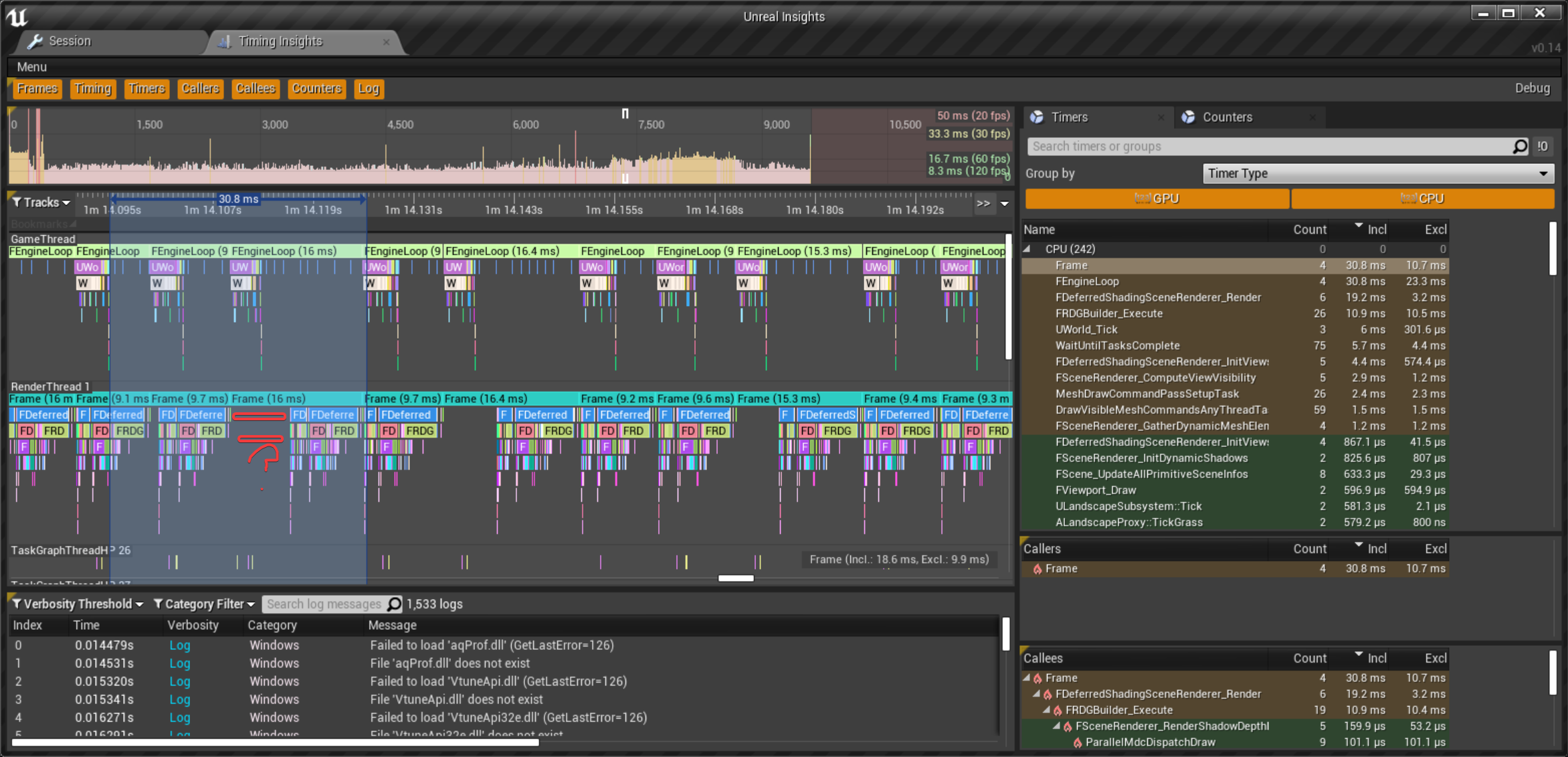
Gving unreal insights a go.... why do some frames render at the same time as the cpu, but some wait for cpu to finish, or even longer before doing the rendering? https://i.imgur.com/A1iXc3L.png
 drowsy snow
rain hatch
Is there any way to import .fbx files with the textures, or do I have to manuall...
drowsy snow
rain hatch
Is there any way to import .fbx files with the textures, or do I have to manuall...
Most of the times it's the latter.
drowsy snow
rain hatch
for faster iteration
Faster iteration would be reimporting them, but glTF is the closest you can get (though if anything, it's rather finicky)
rain hatch
I guess making a custom material and importing them using a naming convention is the way to go
 muted imp
Hey guys I'm trying to make a stopwatch for a course run but I don't know how. I want to make something like this - https://youtu.be/ey34YhzMpjw

MW2 Any% wr: https://www.youtube.com/watch?v=dLF5TIyRl5Q
Actual wr happens at 1:03
Yeah so i don't know why i kept trying, but then this happened.
Twitch: https://www.twitch.tv/klooger
rose plume
anyone know how to lower a audio in bp? i tried these 2 but it didnt make a different

 quaint notch
Anyone know if there's a way to write an FTEST for multiple players?
 dry wedge
Any can help me for this
all bones are created correctly what could be the problem?
sprint is ok everything is ok just running is like this
 fleet scroll
This question doesn't pertain to the engine so I'm asking in general chat. Where do I report an epic games user account for their username? This dude's username is "NÄGGER"
That a with two dots, if I'm not mistaken, is german and pronounced " ee "
or "i"
drowsy snow
muted imp
Hey guys I'm trying to make a stopwatch for a course run but I don't know how. I...
Simple enough. Decrease a float variable for the seconds with the world delta seconds.
humble moon
should I use a player controller?
quaint notch
Ä is pronounced like the A in 'hat'
dry wedge
@plush yew They really were like curves I used the curve copy system and now they work correctly a lot Thanks
plush yew
Damn all these free model packages are unsupported on 5.0
plush yew
damn 30 gigabytes
 light thunder
Question - is there anyway to stop my streamed level from causing slowdowns? I don't have "should block on load" check - I don't care if it takes longer, I wish I could tell it, "load everything slowly and gently' but I'm not sure how to do that exactly
To be clear - this is a packaged build - while these are not "small levels" they are not huge world style either - the hitching is occuring
 dense knoll
this errror pops up every five secconds

 marsh swallow
okay so i was messing around with our default character settings and inputs implimenting MoveIT! (which works great btw) however i never marked down the settings we had for movement/camera controls.
When mounted, the horse and camera is working with the exception of when pressing left or right (A or D) the mount does not respond to turn and go forward in that direction
think simple movement. 😄
what in the heck did i miss
You can see its all working and i can move the cameras as i wish, then the W/D keys orient direction to the camera, however when pressing A or D the horse should turn and move forward in the right or left direction
ummm
please ignore this
im stupid

you see... when you feed in nothing... you get... nothing
 celest hull
Can someone point me towards a tutorial on multiplayer character system. I am missing a simple thing, i know, but i cannot seem to get over this particular hurdle. I am having trouble keeping the settings for Char1 seperate from Char2. I just need an overview of a multiplayer character selection system. Conceptual level is fine. Thanks
 dawn glacier
when im importing something from blender the material is not importing at all or not correctly. What is the proper way to import models
only thing im finding is that you gotta check import materials in ue4 but i have that checked
 coral jolt
Can someone direct me to a tutorial on how to import a metahuman in UE5. I was able to download the metahuman but when I hit the add button on quixel bridge the folders it creates are empty except for the clothing. Can anyone help?
 vague shale
For some reason the editor isnt detected new or changed files in the project directory and I need to manually import things to get them to show up. is there some option or hotkey I need to slap to undo this?
 indigo cradle
I have a question about renaming folders. I notice that Unreal creates redirectors and leaves the old folder in place. Is there a way to get rid of the old folders?
drowsy snow
indigo cradle
I have a question about renaming folders. I notice that Unreal creates redirecto...
Right click -> fix up redirectors
drowsy snow
dense knoll
this errror pops up every five secconds
I see that Direct3D 12 in Unreal is still unstable 🤔
It used to crash A LOT even in 4.26, so I just full on using Direct3D 11.
drowsy snow
light thunder
To be clear - this is a packaged build - while these are not "small levels" they...
Unfortunately this is like one of those questions that no one has the definitive answer. God knows if Epic already started using internal version of World Partition for Fortnite when everyone else outside UDN struggled with the level streaming merits.
 burnt tinsel
help
i have a 3d screenspace widget
but widget component on clicked event isn't firing
only the button onclick event works inside the widget bp
but i want it to work in the actor bp
autumn grail
Hello , how to prevent seeing 0.0.0 location with camera on begin play , when loading open 127.0.0.1 map?
I have tried with sequences playing but we see this ugly 0.0.0 point for 1 second
is there a way to deactivate base camera for a moment?
drowsy snow
autumn grail
I have tried with sequences playing but we see this ugly 0.0.0 point for 1 secon...
Hide it with a persistent UI? 🤔
autumn grail
good idea thx
 icy plaza
I got this problem where nothing wants to snap to a certain surface anymore. Decals ignore the surface. Other geo ignores the surface as well. Does someone know why?
 wary wave
 slim blaze
Is unreal supported?
slim blaze
Is unreal supported?
Unreal Engine does not support modern Apple devices.
slim blaze
I saw it on the roadmap for unreal 5 though, not happening?
wary wave
as far as I'm aware, Epic are banned from Apple's development tools, so this seems likely the case
drowsy snow
slim blaze
I saw it on the roadmap for unreal 5 though, not happening?
Apple's being a jerk lately, and virtually nobody cares about gaming on a Mac ¯_(ツ)_/¯
It's kind of a side effect because of Epic v. Apple lawsuit, and Apple said "f___ you" to Unreal developers for using Epic Games stuff.
wary wave
eh, intentionally break a contract and then suing them when they enforce their conditions doesn't exactly put you in the good books
drowsy snow
TBH I don't give a bloody damn about Apple. Windows/Linux on PC and Android on mobile are reigning supreme.
wary wave
Apple were well within their rights to block those accounts (which is now upheld by the courts)
it's a case of 'fuck around and find out', really
FYI, if you were to sue Epic about anything, they'd block you in a heartbeat
hell, they block your developer account instantly if you so much as reverse a marketplace charge on your credit card
drowsy snow
To hell with Apple and their closed environment.
autumn grail
drowsy snow
Hide it with a persistent UI? 🤔
I have tried with a Black UI , it is not added before we see the 0.0.0
i ad to viewport the UI at the begin play of the level blueprint
where is the very first execution of the game
drowsy snow
autumn grail
where is the very first execution of the game
Eh, not really. From what I know, level BP executed once the level is usable by the game thread, not the moment it started loading.
distant siren
hi dear, I should have a character activate that chases me throughout the level while my character runs away and is chased. is there a tutorial on this thing?
 deep kraken
regarding modding, i want my game to be moddable, in realtime by providing a lua interface. the EULA says that you cant distribute any of the Engine Tools with your game except from the Marketplace. Does an ingame scripting interface to the engine count as an access to engine tools?
wary wave
if it's referring to a tool you yourself have written, no, the EULA does not apply
but you can't ship a game executable with editor code, e.g. anything that would be wrapped inside a macro like #WITH_EDITOR
deep kraken
so basically if i build a standard release version, i can provide an interface to any part of it to the player
wary wave
pretty much
you can write any tool you want into the normal packaged build
you just can't include any of the engine tools
deep kraken
thanks
 urban dirge
How to solve this error? error DXGI_ERROR_DEVICE_REMOVED with Reason: DXGI_ERROR_DEVICE_HUNG. I have gtx 3090. Error appears when baking light.


unreal 4.26 or 4.27 with rhi dx12 and ray tracing, gpu baking
distant siren
if i want to make an enemy run for the whole level and when i touch it i restart the level, is there a tutorial?
 misty wharf
Are you trying to restart the enemy or the level?
drowsy snow
urban dirge
unreal 4.26 or 4.27 with rhi dx12 and ray tracing, gpu baking
Use the more stable DirectX 11. Sure, you'd lose the raytracing, but Lightmass still works.
DirectX 12 and in some extent Vulkan is still quite unstable in UE4 (and UE5 EA1 last time I checked)
burnt tinsel
burnt tinsel
but widget component on clicked event isn't firing
help
 night flame
hello all!
give me advice please.
I want to make a 2D game.
question: is there any difference between rendering animation or rendering sprites?
drowsy snow
night flame
hello all!
give me advice please.
I want to make a 2D game.
question: is there ...
Not sure what you mean by "rendering animation".
autumn grail
Can someone help me with groom
its like that in viewport of the groom

and like that in the blueprint

the roots are stretched
light thunder
drowsy snow
Unfortunately this is like one of those questions that no one has the definitive...
I wonder if there is a way to slow down the process - one day I"ll have to experiment by breaking up the biggest levels into smaller ones and streaming ALL of them in, but one at a time with a slight delay
autumn grail
 drowsy snow
light thunder
I wonder if there is a way to slow down the process - one day I"ll have to exper...
drowsy snow
light thunder
I wonder if there is a way to slow down the process - one day I"ll have to exper...
The better way would be to somehow decouple the loading from game thread, but I know it's super destructive.
 grizzled sonnet
does anyone know why my displacement maps are always incredibly scuffed??
i have this set up and it looks fine in the preview

but this is what it looks like in preview

why does this happen??? i could never figure out why it does this
even when i apply the material to a flat plane it looks scuffed
like wtf is this?
 drowsy snow
grizzled sonnet
but this is what it looks like in preview
drowsy snow
grizzled sonnet
but this is what it looks like in preview
- Likely your mesh being the culprit
- Vertex displacement is NOT NECESSARY for small bump details. I can't stress this enough. Consider using normal maps for small details, or Parallax Occlusion Mapping for more macro faux displacements.
Also, no, Tessellation is not a good magic bullet.
If one wants true displacement, UE5 has Nanite that can decimate huge poly count in real time, because it's easier to decimate poly count than subdividing tris on the spot.
grizzled sonnet
but i thought the whole point of displacement maps is to not have to use lots of geometry?
or am i confusing it with normals

Join the Blender Weekly Challenge Facebook Group!
https://www.facebook.com/groups/857468965094451/
In this video we use Blender, Octane and Jsplacement to get a nice fast render.
If I've missed anything or you are a bit unsure then please get in touch in the comments and I will answer best way I can.
Original Render available as an NFT here
...
im sort of trying to follow this tutorial
except this is in blender
drowsy snow
grizzled sonnet
but i thought the whole point of displacement maps is to not have to use lots of...
You're confusing it with normal maps.
grizzled sonnet
he uses JUST the displacement map, yet he gets this result
drowsy snow
grizzled sonnet
except this is in blender
Blender does not have limitations of real time game rendering, that's why.
grizzled sonnet
i even tried it in autodesk maya
cannot do it, it looks scuffed no matter what i do
but even before, with different tutorials when I was starting out with unreal engine
Learn how to create believable, fluffy snow in Unreal Engine 4 using materials created in Quixel Mixer.
Directional Snow Material: https://pastebin.com/95RztgF7
Ground Material: https://pastebin.com/GcnJi6Pk
(Copy-Paste into Material Editor in UE4)
Learn more about Quixel Mixer and Megascans here: http://megascans.se
UE4 scene inspired by ori...
like this, i followed it word for word, step by step
drowsy snow
grizzled sonnet
cannot do it, it looks scuffed no matter what i do
Here's the thing:
Those two software you mentioned, they used offline rendering by design. They can damn the real time rendering and its limitations for all they want.
grizzled sonnet
my snow ended up looking like a blop of white, zero displacement
drowsy snow
Unlike those offline renderers, in real time rendering, displacements can only displace existing vertices.
grizzled sonnet
what do u mean offline renderers, whats the difference between online and offline ones
 obsidian nimbus
you can use displacement on a super high poly mesh and bake a normal map out of it tho
drowsy snow
obsidian nimbus
you can use displacement on a super high poly mesh and bake a normal map out of ...
Or using Nanite, which basically realtime mesh decimating.
grizzled sonnet
so do u reckon if I add more polys to the model, will it work?
obsidian nimbus
also its only in UE5
drowsy snow
grizzled sonnet
so do u reckon if I add more polys to the model, will it work?
Yes, but you'll going to damn performace with it, if you're not in UE5 and not using the Nanite system.
light thunder
Anyone know an input wizard? I've got to figure out a way to trick the engine into think a key has been pressed (the simulate keypress from Victory Plugin doesn't work for me) - so the game will listening for a ON Key Release event - (I'm using a special plugin for a VR application that makes a popup game window that you can use to have a widget, but if you click in the screen, it will temporarily interrupt input for the VR user. So if the VR user is holding down a key and the instructor presses a single mouse click into this other game window, it will immediately drop input (and fire an OnRelease Key Event) - I can put logic into it that can bypass whatever action would be applied to a REAL OnRelease event, but I can't make the system go back to Listening for the OnRelease event again, the VR user literally will have to hit the button again
TLDR _
- VR application, with special popup boxes for the instructor to run someone through VR experience
- Clicking in special popup box immediately steals input, causing VR Player input to drop for a second (which fires OnRelease Events)
- Input immediately goes back, so VR player doesn't necessarily release
- Can't figure out a way to make the game engine listen for OnRelease event again, to bypass the original input dropping
In my application, someone is holding down a radio button and its the main "gameplay" so it's a big deal
and if you click into the popup window they stop transmitting
grizzled sonnet
do u reckon this is enough
 drowsy snow
grizzled sonnet
https://www.youtube.com/watch?v=-yR5lrtilWE&ab_channel=3DChallenges
drowsy snow
grizzled sonnet
https://www.youtube.com/watch?v=-yR5lrtilWE&ab_channel=3DChallenges
You can achieve almost the same effect with normal maps.
POM would work better on flatter surfaces, like grounds. Hence it's used for snow trails and alike.
drowsy snow
grizzled sonnet
do u reckon this is enough
Probably not enough for that detail, but you're using UE4 anyway so...
grizzled sonnet
but even then, that snow tutorial was made ages ago, and i attempted it in the same version that the guy was using
drowsy snow
drowsy snow
You can achieve almost the same effect with normal maps.
POM would work better ...
@grizzled sonnet
grizzled sonnet
and it still didnt work, I did everything the same to the DOT
i went back an forth in that tutorial for hours
days even
until i just gave up cuz it wouldnt work
drowsy snow
For comparison, The Last Of Us 2 uses POM for snow trails.
grizzled sonnet
what does POM stand for
obsidian nimbus
paralax mapping
drowsy snow
grizzled sonnet
what does POM stand for
Parallax Occlusion Mapping
drowsy snow
grizzled sonnet
what does POM stand for
Basically you're faking a displacement with it, though may not work well on curved and angled objects like your mesh.
But for flatter surfaces like snow field, it works good, and relatively easier on performance.
drowsy snow
light thunder
Anyone know an input wizard? I've got to figure out a way to trick the engine in...
I'm not sure if VR has this different enough, so... #virtual-reality
grizzled sonnet
drowsy snow
Basically you're faking a displacement with it, though may not work well on curv...
then how did that guy in the tutorial do it so easily
is it just because blender?
but why can blender do it but nothing else can, even tho its the same concept
drowsy snow
grizzled sonnet
is it just because blender?
Basically yes.
drowsy snow
grizzled sonnet
but why can blender do it but nothing else can, even tho its the same concept
Because Blender's material system is not 1:1 with others, and there are no concerns about realtime rendering, at all.
grizzled sonnet
so is it literally impossible for me to achieve the same effect in maya?
light thunder
drowsy snow
I'm not sure if VR has this different enough, so... <#221799478364078081>
This is more of a Windows limitation, I will actually check #cpp
but vr is still a good idea
drowsy snow
grizzled sonnet
so is it literally impossible for me to achieve the same effect in maya?
It's impossible if you don't know how to improvise them.
night flame
hi, i mean, which is easier for the GPU:
there are 100 animations on the stage with bones
there are 100 animations from sprites on the stage
drowsy snow
night flame
hi, i mean, which is easier for the GPU:
there are 100 animations on the stage w...
Assuming you're going to make Smash TV / Alien Shooter type of game, shooting hordes of enemies:
In many cases it's the latter, but CPU's still play role on handling those on screen regardless.
I think in most parts, CPU has more work with dealing hundreds of AI agents and their own animations than the GPU would to render them (and sorting them) on screen.
night flame
thx!
hollow cairn
royal magnet
You can fbx export it and split anything you want in your 3d software
do I export the thirdpersoncharacter blueprint?
nono, just the mannequin mesh right?
royal magnet
hollow cairn
do I export the thirdpersoncharacter blueprint?
Hey man, no just the mesh, find the mesh, character, if you have the mannequin on your scene click on it and use search icon, little magnifying glass to locate
Yes blueprint for action, you need just mesh, legs,arms and stuff
hollow cairn
there are three 👀
mannequin, mannequon physicsAsset and mannequin skeleton
just the basic one?
royal magnet
Yes, the one when you click and just opens mannequin not any blueprint
Just export the asset and try
hollow cairn
ah yes, thank you
royal magnet
No problem, hope it will work out fine
 lapis iron
what channel is for Shader work?
 formal needle
Hi guys , Im working on multiplayer, and there is a problem that i need to replicate this attachment in order show in widget at client, but tmap variables cant replicate ,i try using function and getting function cant be replicate. Any idea how to replicate this?

 winter gale

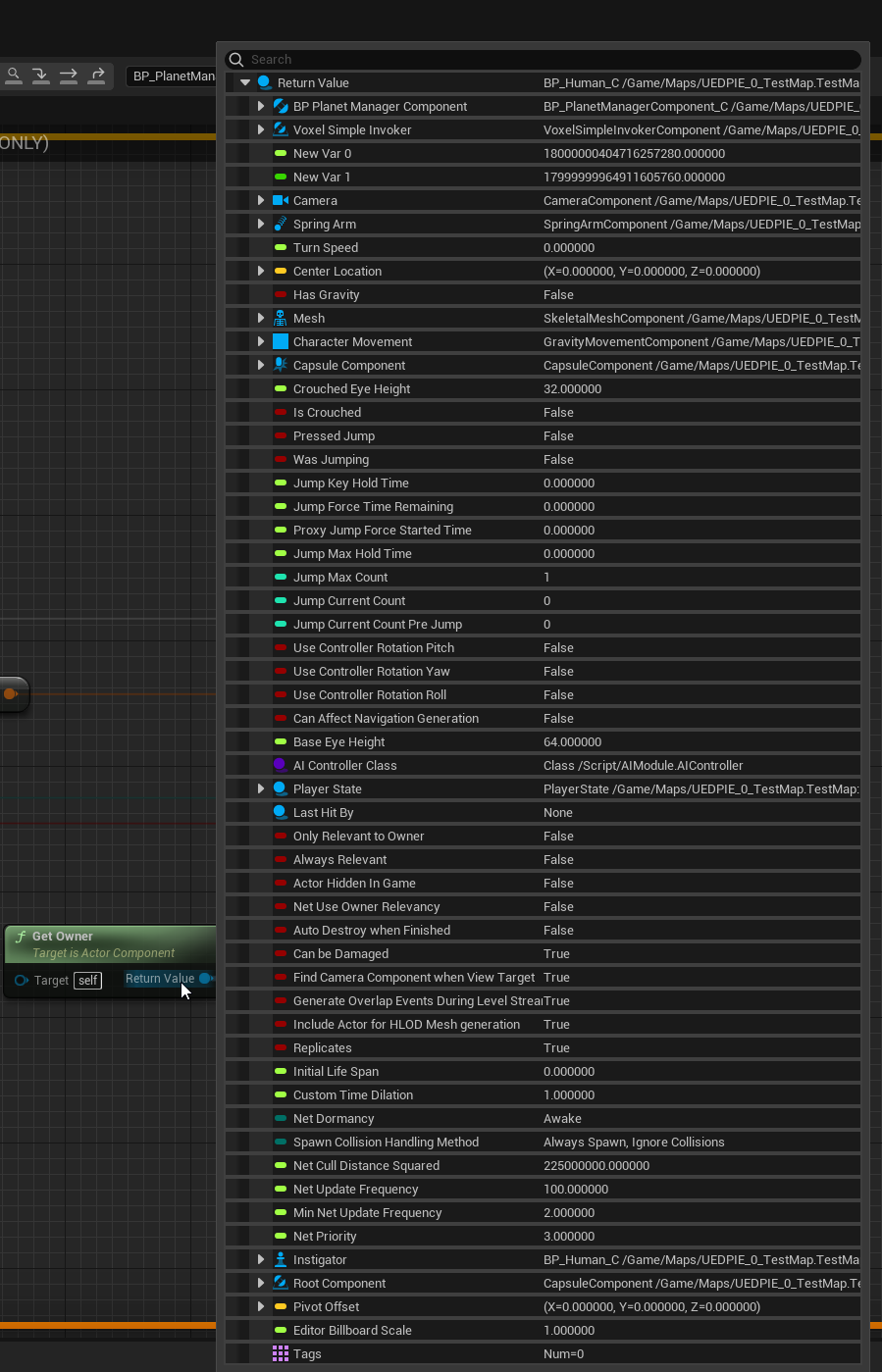
In #UnrealEngine 5, you will get a brand new interactive Blueprint pin inspection when a breakpoint is hit. In this image you can see how rich the tooltip is for the Return Value of Get Owner node.
#UnrealEngine5 #UnrealFeatures #UE5 #UETips
 Twitter
·
wary wave
Twitter
·
wary wave
it's a nice idea, but boy does that UI need to be better
using the variable categories would be a good start, giving it an actual window so you can actually do stuff whilst it's visible, etc
 warm hornet
Anyone know if its possible to lock a viewport to a specific view? I have a 2 viewport setup and bookmarks set for different views. However when I switch views I only want one viewport to change and the other to remain 'locked'.
This is really essential for client presentations when you might have Pathtracing enabled in one viewport and regular lit or unlit mode in another.
harsh tiger
Does anyone know how to access videos on the quest 2? I've got a plugin for this. But inside the app I only see a folder called \storage and inside that is an "emulated" and "self" folder which are both empty. How can I give my app access to the internal storage on the quest 2?
https://www.unrealengine.com/marketplace/en-US/product/video-player-360-2d-180-360-stereo plugin in question

Unreal Engine
Video Player 360 - video player for watching 2D, 180, 360, Stereo videos.
light thunder
is there anyway to add a UI to the viewport and magically have the player camera ignore it?
 native swift
Hello, does anyone know how to emmit audio from an AI? as in it plays from where ever the AI is and is louder depending on player radius. Currently the audio plays from the AI's original location at the start of play but doesnt follow the AI once its starts moving. We are using spawn sound at location, then get active location
winter gale
wary wave
it's a nice idea, but boy does that UI need to be better
This is first pass. Probably they will improve it down the road.


 grim ore
what conversions are you doing into the set brush from texture node?
 sterile lichen
winter gale
https://twitter.com/RyanJon2040/status/1443191329958219778
sterile lichen
winter gale
https://twitter.com/RyanJon2040/status/1443191329958219778
i wish this was a thing too https://twitter.com/exifrexi/status/1432608327910006786

Vastly improved variable inspector for Blueprints.
@UnrealEngine You still have the option to get this into UE5, if it isn't already. Who do I need to ping to get proper Epic eyes on it? Don't make me @ Tim.
Such QOL improvements are still really needed in UE. https://t.co/NHm4uQ3lFW
Likes
146
Twitter
·
 grim ore
first thing to check is to see if that code even works, unhook the texture input and force a texture in there. if that works the icon should show up now (wrong one, but the node works)
 candid grail
It does, i think it is a GC thing, when I change my texture in my item class it works for a bit, but then all of a sudden it just stops working..?
 grim ore
thats for pre construct right?
grim ore
so have you verified then that the code itself is actually sending in a valid texture 2d reference when running? breakpoint on the set brush from texture node and when it fires in game see what the input is for that texture
or oh.. this issue isnt at runtime is it?
candid grail
grim ore
or oh.. this issue isnt at runtime is it?
It don't work in runtime ether
grim ore
debug it in runtime with a breakpoint then
candid grail
grim ore
so have you verified then that the code itself is actually sending in a valid te...
No, but I don't see what I would be able to change?
grim ore
I can say I have that same basic setup using a variable (not default but a variable on the widget) and it never gets cleaned up here
 sturdy smelt
Hey Guys im importing an Pose, like just 1 Keyframe, and the Problem is, that my rotations of my arm get curshed totally, any idea why?
on C4D it looks good
grim ore
just to make sure when running its actually getting something valid for the texture
 candid grail
You are right, i get None...
granite spire
candid grail
It don't work in runtime ether
why does this problem sound familiar
candid grail
?
granite spire
things randomly stop working, I've had a few of those, I do know there's a few issues with empty arrays in structs as I found out as of 2 days ago
what exactly is your end goal here?
grim ore
backtrack then and see what your base class is then, it must be bad for some reason if its returning nothing
candid grail
This is the correct way of referencing a texture asset, right?
UPROPERTY(EditAnywhere, BlueprintReadOnly, Category = "Item")
TAssetPtr<UTexture2D> Icon;```That is the only actual code I have, everything else is backend unreal stuff?
granite spire
because if you're setting that and it's a reference, and the reference is null then it's a timing issue, as your model is being set before the reference, I recommend a temporary delay of 0.1 and see if it works
i know UE4 gets me on it's timing of how it generates things
candid grail
granite spire
because if you're setting that and it's a reference, and the reference is null t...
Nah, I reference the class defaults.
Not an instance of the class.
granite spire
so the class default is null and not being set?
candid grail
Nope, that is verified.
granite spire
if that's the case then that's working as intended
candid grail
Also, all the text works...
granite spire
defaults are preexisting data you set out of game
candid grail
yea?
granite spire
I think even if you set a reference when it's created that's not part of the defaults
as defaults are different
from memory
candid grail
But why would only the texture fail then?
granite spire
though i'm not understanding what you're trying to do
candid grail
I'm trying to make the texture not display as white, but the specified texture in the item class.
granite spire
what's the list you're trying to pull from look like?
chuck us a screen shot
I got a feeling I know what's going on
candid grail
granite spire
what's the list you're trying to pull from look like?
No list, only what i sent before; the WBP_ShopItem is a ui element that takes an item class to get default info from.
Most likely, but how?
I am wondering if i actually want an UTexture2D* instead of a TAssetPtr<UTexture2D>...
granite spire
So this icon is pulling a null? if you set this on the BP itself manually I would imagine it would work, but I think it might be like models how you can't reference them and you have to create a variable that holds that data

thought you're doing it through C++, I know in blueprints you can just add a variable image and use that (I think), I know UE4 locks out some things like models from defaults
candid grail
This seems to have fixed the problem.
 candid grail
granite spire
thought you're doing it through C++, I know in blueprints you can just add a var...
candid grail
granite spire
thought you're doing it through C++, I know in blueprints you can just add a var...
It needs to be done in C++ for architectural reasons.
granite spire
yeah from what I see TAssetsPtr might not reference correctly
 weak urchin
Does anyone know what the processing exports means when saving? It takes a full ten minutes to save a fairly simple map.
granite spire
do assets not reference correctly but a whole class does? maybe
candid grail
Yeah, but I thought having a pointer to a texture would be worse; I guess unreal is swapping it behind the scenes.
granite spire
sounds common to the mesh itself perhaps
well at least you figured it out
glad I was of 0.0001% help in jolting ur brain 
I know if I forget something I google it and figure it out as I type it
candid grail
granite spire
glad I was of 0.0001% help in jolting ur brain <:DogeSmile:855692987249721355>
Haha, you guys led in the right direction; I havened thought to change the data type xD
Yeah, me to.
sterile lichen
that is quite ancient article
granite spire
yeah I UE4 be crazy
sterile lichen
TAssetPtr is like blast from 4.10
candid grail
Jup, I think it will be deprecated as well?
granite spire
sounds like redundancies
sterile lichen
it is typedef to TSoftObjectPtr nowadays so replace with TSoftObjectPtr
blueprint has ASyncLoadAsset node that takes in soft pointer and loads it
sterile lichen
the small bp node SoftToPtr simply uses Get which will return null is asset is not loaded yet
worst part of AsyncLoadAsset is that it does not have automatic output pin type resolving like most of others do, so need to cast
one day they will fix it
distant siren
if i want to make an enemy run for the whole level and he follow me, is there a tutorial? I mean I run away from the enemy who runs after me for the whole level
grim ore
there are official AI docs, there is an AI course, and there is google. so yes there are tutorials
 near breach
Damm one uses 4 anymore
distant siren
grim ore
there are official AI docs, there is an AI course, and there is google. so yes ...
do you have the link?
warm hornet
Can anyone tell me what the limiting factor is in terms of texture resolution? I have 20 4K maps for a desktop application.
grim ore
winter gale
sterile lichen
i wish this was a thing too https://twitter.com/exifrexi/status/1432608327910006...
Its almost similar to the one I posted. I think Epic saw that.
sterile lichen
i guess it is first step to proper tree view
of variables
like in VS debugger
hopefully they will finish tree view too and backport it to 427
distant siren
grim ore
<https://www.unrealengine.com/en-US/onlinelearning-courses/introduction-to-ai-wi...
I HAVE ALREADY DONE THIS I MEAN SOMETHING MORE SPECIFIC,but thanks 😉
distant siren
grim ore
how much more specific do you need?
something more synthesized as possible
grim ore
begin play -> move to actor. done.
distant siren
sorry but i don't understand english well.
distant siren
grim ore
begin play -> move to actor. done.
I would say a great start, good, are you starting now?you have a great future to begin play😂
grim ore
that is the code you asked for. that is how you can do what you want
distant siren
grim ore
that is the code you asked for. that is how you can do what you want
come on I'm kidding I meant more a specific tutorial., but ok 😉
grim ore
what did you need more specifically?
distant siren
a tutorial that shows you exactly what you need, this means. not that. I've seen that there are specific tutorials out there about what you want to do
grim ore
the one from epic shows you exactly what you need, the docs show you that as well
distant siren
a tutorial that shows you how to make an enemy chase you throughout the level, and that's it. simple
grim ore
and this is literally all that you need, like I said.
 distant siren
exact
sorry but i don't understand english well.
and is it a problem for you?
but in reality there are those who upload specific things, let's say that they are two different ways of thinking, you just need to go on the internet to find out that it's a little like me and a little bit like you say
grim ore
Googles? https://youtu.be/Z3mWSpKb3Kw
distant siren
there is no absolute truth in your way of thinking or doing a tutorial,
The world is beautiful because it is varied
distant siren
grim ore
Googles? <https://youtu.be/Z3mWSpKb3Kw>
good
 distant siren
grim ore
or again.. the official tutorial where this came from
distant siren
grim ore
or again.. the official tutorial where this came from
exactly, I just meant to be a little more relaxed and have a more open view of life
distant siren
exactly, these are references that can help you the most you understand ,? leonardo da vinci argued that you can not just do theory without practice, the two things walk together, if I can have a specific tutorial of a thing today, tomorrow I will be able to walk alone .. understand?
my comment was inherent in the fact that when you do something you really like and you find it in a tutorial you will be stimulated to do even better, more than a moan is a comment. I understand that you were wrong. 😉
I can assure you that the problems of life are not these and that you were wrong to judge me, you took me a long time, sorry. bye
maybe I go to another discord group, too many moans here;)
 viral veldt
When you copy or get an asset name it has a period in the name and repeats twice. For example: '/Game/MSPresets/Textures/T_Default_N.T_Default_N', can someone explain what the significance of the dot notation is?
urban dirge
drowsy snow
Use the more stable DirectX 11. Sure, you'd lose the raytracing, but Lightmass s...
But without dx12 and raytracing GPU Lightmas does not work
urban dirge
drowsy snow
Use the more stable DirectX 11. Sure, you'd lose the raytracing, but Lightmass s...
 drowsy snow
urban dirge
But without dx12 and raytracing GPU Lightmas does not work
drowsy snow
urban dirge
But without dx12 and raytracing GPU Lightmas does not work
CPU Lightmass still works in DX11.
And you can still block out the levels before you switch to DX12 temporarily anyway.
At least with my puny Intel i5, CPU Lightmass isn't terribly slow (but I still favour dynamic lighting)
urban dirge
yes, and I really need gpu lithmass speed
urban dirge
drowsy snow
CPU Lightmass still works in DX11.
And you can still block out the levels before...
CPU bake for 20-25 hours, gpu bake 10 min
drowsy snow
urban dirge
CPU bake for 20-25 hours, gpu bake 10 min
My i5 is practically nothing compared to your setup, but building a lighting with Task Manager process trick, I built indoors in a lunch.
urban dirge
and i have 3090, so my choice is gpu lightmass 🙂
drowsy snow
But hey, I still can't relate as a low spec dev, still resorting for CPU Lightmass.
Who am I to say, a puny potato GLaDOS attached in a portal gun.
obsidian nimbus


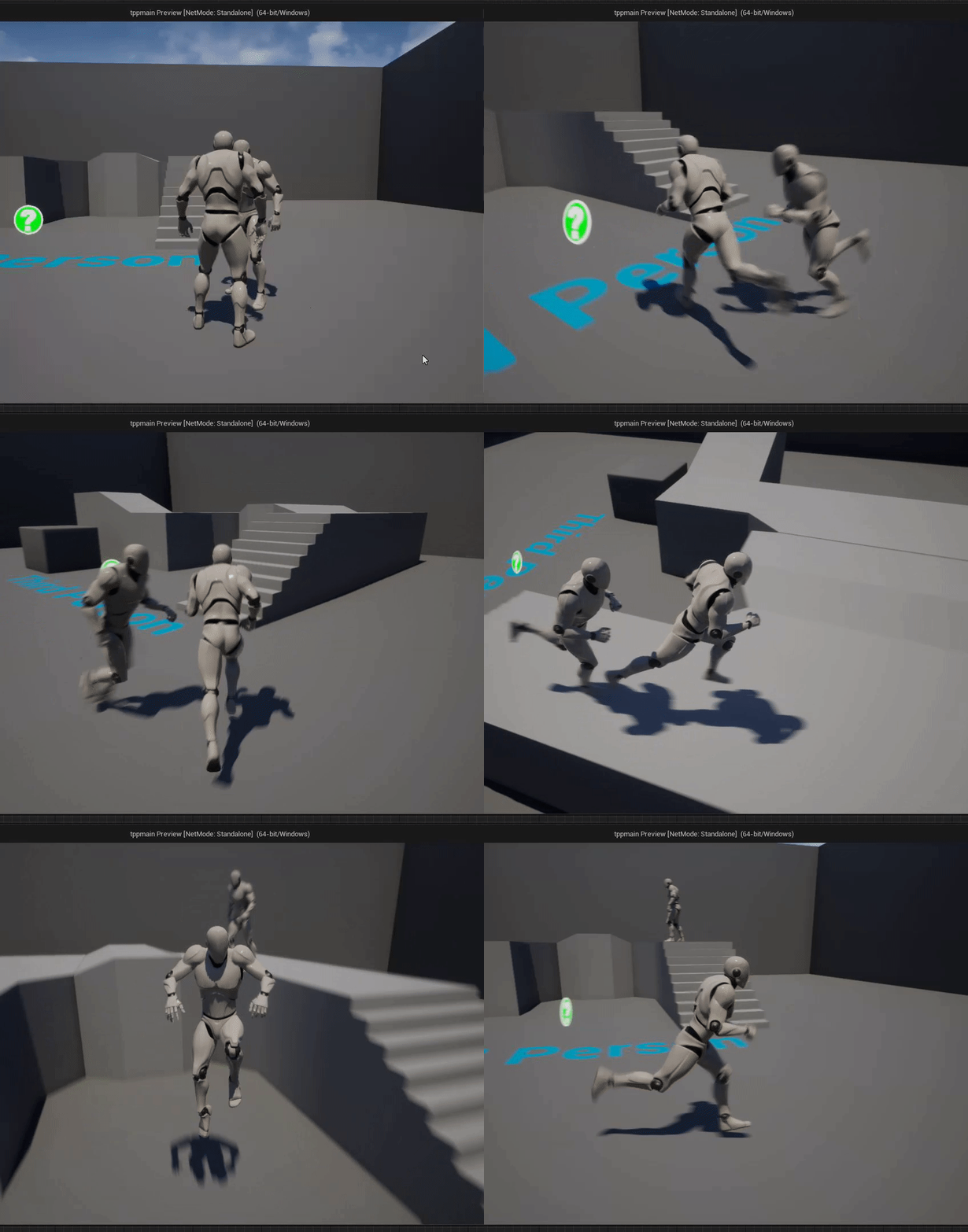 drowsy snow
Even then I think Epic kinda prioritise on software RT right now to be working on DX11
Not sure about vulkan tho
Though it also seem that Epic is also working on Vulkan more than DX12, because native Linux practically have no other choice than JIT compilers like DXVK
Vulkan has been a lot more stable on me compared to 4.20 or so.
obsidian nimbus
i updated my binary from 4.27.0 to 4.27.0
drowsy snow
Well, my bias against realtime raytracing didn't help my case.
drowsy snow
I prefer full raster but playable in many device, over some fancy realtime raytracing but even rich kiddos barely get 60 FPS
drowsy snow
obsidian nimbus
the 4.27 update was kinda big
Well, it is, the engine code almost got revamped.
obsidian nimbus
i didnt see the patch notes of 4.27.0 to 4.27.0
drowsy snow
obsidian nimbus
the 4.27 update was kinda big
It's either stuff from 4.26 didn't work, or backporting from 4.27 is futile.
I attempted to backport Oodle to 4.26, but the changes just going deeper and deeper, I gave up and cherrypick the changes to base 4.27
obsidian nimbus
backport lumen to UDK
 cold bridge
hey guys I'm having an odd issue. I'm attempting to make a sequencer play at the beginning of my level, but my player is not being hidden eventhough I tick th "hide player" in "set cinematic mode", anyone got an idea?
drowsy snow
cold bridge
hey guys I'm having an odd issue. I'm attempting to make a sequencer play at the...
Not sure about "set cinematic mode", but how about setting Actor Hidden in Game?
cold bridge
doesnt work with "playerstart" objects
anyways it seems the node doesn't wait for play to end so therefore it just sets everything back to what it was before.
drowsy snow
Not even sure about PlayerStart as it is just an invisible spawn point...
cold bridge
this is not what I said.
when playerstart is responsible for spawning a player pawn, you cannot set the visibility of the player pawn itself, it's created in runtime..
so you cant just add the visibility to the playerstart object
and you do not have an access to the player pawn bp object before the game is executing so you cant make it part of the sequencer
drowsy snow
cold bridge
and you do not have an access to the player pawn bp object before the game is ex...
Does getting actor of class, and hide it when you run the sequence, not in the sequencer timeline, sounds too hacky for you?
cold bridge
again
grim ore
do you need the player you are trying to hide?
cold bridge
hiding the player start object won't hide my player bp, it's a different object
drowsy snow
I mean, it doesn't guarantee to work on multiplayer...
cold bridge
I don't plan on making a multiplayer game anyways
drowsy snow
cold bridge
hiding the player start object won't hide my player bp, it's a different object
The character class, NOT the playerstart object
cold bridge
thanks for the answers, as I wrote above I found the answer
mate, the character class does not exist in the environment before the game starts
drowsy snow
I'm sure it's solvable with just get player pawn.
cold bridge
you cant assign it to the sequencer
drowsy snow
cold bridge
you cant assign it to the sequencer
In BP, not in Sequencer timeline.
grim ore
you could do a custom event in sequencer to do that, sure
cold bridge
it's not the intended way for it to work, I found the solution in the forums
no need for all of that.
drowsy snow
Alright, whatever works for you.
cold bridge
the sequence player fires off "on finished" when done. you can use the proper "set cinematic mode" to turn everything off once you're done with the animation, all from the level blueprint....
grim ore
what was the solution? ah
drowsy snow
Is this concerning Sequence exporting?
cold bridge
I don't know what you mean
I just wanted a simple cutscene sequence for my starting of the game and I found this to work best...
drowsy snow
👍
cold bridge
thanks you 2
 stray tangle
Hello, I have a trouble in a character ai not working after being un possessed
cold bridge
for future reference, this is the solution that works for me @drowsy snow @grim ore
It just lets you regain control right after the sequence is that. I wanted to emulate a sense of the player "waking up", looking around and settling on... then letting you control it, but since it has a mesh and 1st person view, it looked awful with the character visible.
 drowsy snow
cold bridge
for future reference, this is the solution that works for me <@!3256279304849326...
drowsy snow
cold bridge
for future reference, this is the solution that works for me <@!3256279304849326...
Nice.
I'm not going for this approach tho, as my game is mainly third person.
Also benefit of mainly third person is a true FP camera.
cold bridge
yea, that's true, it's a different approach and solution
 maiden sundial
Any idea why this always happens when i start the editor ?

 edgy rover
Hi guys, I've set up 2 nodes - 2 screen system using nDisplay 4.27 with an integrated cine camera like this. However, I couldn't get the same result in 4.26 nDisplay, because the cinecam was able to be applied to only one screen/viewport. Does anyone know how can I get the same result in 4.26?
prime willow
maiden sundial
Any idea why this always happens when i start the editor ?
it's compressing your animations
which saves space and allows faster utilities for the animations iirc
 full lodge
How to disable or change randomness of particles?
 warm quartz
Hello. Does anyone have any good tutorials for understanding classes. base classes, parent classes etc and how they all work together overall?
 true ridge
I've got a collision box on a melee weapon and I'm using OnComponentBeginOverlap to hit things and apply damage. Where could I extract an impact location from this overlap to spawn a hit VFX?
plush yew
is there a tutorial or any resources on handling raytracing fuzz
i know you can increase the sample count
drowsy snow
plush yew
is there a tutorial or any resources on handling raytracing fuzz
Look for denoiser and DLSS.
plush yew
but light with bounce lighting you can do things like change the screen percentage and other values before adjusting the sample count for better performance
what about reflections
 void sierra
Is there anyway to have indirect lighting for non static lighting that I can turn on and off during gameplay?
drowsy snow
void sierra
Is there anyway to have indirect lighting for non static lighting that I can tur...
Use screen space GI (or LPV, which often fail indoors)
Or Lumen GI (if you're in UE5)
void sierra
drowsy snow
Use screen space GI (or LPV, which often fail indoors)
I activated screen space GI in my project settings and restarted the editor but Im not seeing any changes. Are there any other settings I need to change for it?
Im using UE4 26.2 source build
drowsy snow
void sierra
I activated screen space GI in my project settings and restarted the editor but ...
It should be taking effect immediately since 4.24.
Though it won't be working if you're in forward rendering.
void sierra
drowsy snow
It should be taking effect immediately since 4.24.
Though it won't be working if...
But shouldn't there be some kind of parameter to change the intensity or effectiveness of the indirect dynamic lighting? just like how we can do it with the static lighting?
 wooden bison
My editors dropdown menus flickering randomly. Spawning in random places. Even worse visual & hitbox of menus seperated only way to use it stable is keyboard keys but still you can't even see ui bcs it's constantly flickering
drowsy snow
void sierra
But shouldn't there be some kind of parameter to change the intensity or effecti...
There are several console commands for that (look it up on the docs)
Though again, if you're in forward rendering, it's useless.
wooden bison
Is there any solution for this? I even reinstalled windows, editor, drivers etc
void sierra
drowsy snow
There are several console commands for that (look it up on the docs)
Though agai...
I have forward shading unchecked in project settings. Ill look into those console commands.
wooden bison
He said desktop. I'm using laptop. Is process still same?
drowsy snow
wooden bison
He said desktop. I'm using laptop. Is process still same?
In an alternate universe, desktops and laptops is a completely separate kind of electronics.
wooden bison
drowsy snow
In an alternate universe, desktops and laptops is a completely separate kind of ...
I know but i thougt there should be a reason why he specified as "desktop"
So do i need to install latest driver after uninstall?
void sierra
drowsy snow
There are several console commands for that (look it up on the docs)
Though agai...
So it seems that the indirect lighting intensity setting in the post processing volume is what controls that
 wispy ledge
i need to ask which is the better or comparison between gamelift and playfab
void sierra
drowsy snow
There are several console commands for that (look it up on the docs)
Though agai...
I'm getting this weird effect tho where the object further away from the light turn into a reddish color. This also happens when I bake static lights as well. Im not sure what is causing that
 drowsy snow
void sierra
I'm getting this weird effect tho where the object further away from the light t...
drowsy snow
void sierra
I'm getting this weird effect tho where the object further away from the light t...
Looks like a stray sky light to me 🤔
void sierra
drowsy snow
Looks like a stray sky light to me 🤔
hmmm, I dont seem to have a sky light in my world outliner tho
uuuuuggghhhhh, Im so lost on all this lighting stuff 😫
wooden bison
I uninstalled the drivers with ddu but what to do now? If problem is latest drivers which driver i should install?
drowsy snow
wooden bison
I uninstalled the drivers with ddu but what to do now? If problem is latest driv...
wooden bison
drowsy snow
https://discord.com/channels/187217643009212416/225448446956404738/8110566110994...
Both are incompatible with my 3050ti laptop version 😦
Actually i can't even find my gpu in driver search area

Only GeForce experience gives me a driver and it's the latest
I found this one: https://nvidia.custhelp.com/app/answers/detail/a_id/5212
 weak nymph
When i click play the third person char doesnt appear no more, i play like a camera, what happened?
cold bridge
hey,
this issue: https://answers.unrealengine.com/questions/708994/interp-to-movement-component-only-works-on-initial.html
still happens on UE 4.26
anyone got any suggestion on how to get this effect?
I want to have a elevator platform that only moves up when an object is pressing against a trigger platform someplace else. But if I try to activate it twice it's breaking
cold bridge
weak nymph
When i click play the third person char doesnt appear no more, i play like a cam...
is the character "visible"? check the mesh
cold bridge
was it the issue? 🙂
wooden bison
I uninstalled all the drivers and ran ue4 without drivers. It's still flickering. I think it's about engine
cold bridge
cold bridge
hey,
this issue: https://answers.unrealengine.com/questions/708994/interp-to-mo...
anyone's got any idea about activating something for the second time? or a better way to have a stopping platform
 quick trellis
Is there a way to save PostProcessVolume to the project?
In my case i have my ideal effect in one level but want to reuse it in other levels
drowsy snow
quick trellis
Is there a way to save PostProcessVolume to the project?
In my case i have my id...
Make a new actor BP and put a Post Process component on it (also set it to unbound)
quick trellis
drowsy snow
Make a new actor BP and put a Post Process component on it (also set it to unbou...
LFG that worked. Thanks 
 dusk nebula
Is anyone familiar enough with bounties/world events in Diablo 3 for me to make a comparison?
drowsy snow
Never played Diablo.
prime willow
drowsy snow
Never played Diablo.
Diablo 3 is fun
dunno about the rest
but only on console
its painful to play on pc
 thorny warren
Hey folks! I'm having some issues with getting megascans wind to work right. It's a long shot but if you have any experience with it would love to pick your brain!
drowsy snow
prime willow
Diablo 3 is fun
I dunno, I kinda biased towards JRPGs more than WRPG, even if I hated turn based combats.
prime willow
drowsy snow
I dunno, I kinda biased towards JRPGs more than WRPG, even if I hated turn based...
same tbh but some wrpg's are nice
dusk nebula
Well either way, do you guys think D3 world events like Cursed Chest are implemented through individual game states, or what would the equivalent be in Unreal?
Obv it's a different engine but they can't be that different overall
 tall kiln
Ive been having this problem where Unreal Engine keeps deleting my material functions from Quixel. Does anyone know how to fix this without re-downloading 12 GB of models?
 livid haven
Odd question. Anyone perchance tried to replicate a TSoftClassPtr or TSoftObjectPtr that is non-null, but whose referenced asset may not exist?
tall kiln
update: Found out Bridge was not saving to my SSD.. so stupid... looks like I have to re download. (Im moving between a school PC and a home PC)
livid haven
In order to help clear out UI logic from the server, I'm trying to resolve the part where the UE4 engine logic needs the HUD class to be loaded on the server, just to be able to tell the client to use said HUD class.
Since it uses a TSubclassOf<AHUD>, there's the problem. But... if it used TSoftClassPtr<AHUD>? 🤔
 versed lichen
Anyone know how to turn off textures (like F4 does). While playing a platform built standalone window? Is there a functioning console command.
drowsy snow
livid haven
Since it uses a TSubclassOf<AHUD>, there's the problem. But... if it used `TSoft...
Might get better answer in #cpp
livid haven
The server would not need to load it. It might be able to serialize the reference. Unless of course some part of cooking end up trying to zero out the reference.
@drowsy snow I mean, possibly, but the idea works in BP too - any soft reference.
prime willow
yes
drowsy snow
Yes, though there might be issue wit root motions.
drowsy snow
prime willow
i still dont know what root motion does
Basically animation moving the actor itself
prime willow
drowsy snow
Basically animation moving the actor itself
so root motion would move the capsule and everything with it
basic animation wouldnt move the capsule and everything with it
also do i have to make duplicate animations for root motion or can i force it via unreal
 shrewd gyro
Bit of an odd question, is it possible to make an unreal engine project that excludes all of the "3D" portions of the engine, and is just essentially a standard app? I ask because I know epic games launcher is made with unreal engine (or I'm pretty sure based on the crash handler appearing when it crashes), and it seems to have incredibly low GPU usage even for an unreal engine game where it's just an empty level.
 thorn dirge
anybody know a video or something that can help me improve my games performance in my packaged game people are getting 20 fps
its a small game to
plush yew
@thorn dirge there is a Epic Games live-stream on their YouTube channel about performance
 toxic owl
I realize the answer to this may depend on the project, etc. To the extent that the question can be answered usefully, how stable (in terms of bugs, not necessarily crashing specifically) are the latest released builds of UE? (ie. 427 right now, not early access) Is it a bad idea to develop on the latest version? Do people usually hang back a couple of releases? Wasn't sure where to ask this so I'm dropping it in the general channel.
 rancid lagoon
i am having a very annoying problem. It has never happended before, but i have ue4.27 on a hard drive as my computer doest have the space to hold ue4, but now the luancher is saying that i dant have it installed, even thi my drive is plugged in. PLZ help
rancid lagoon
rancid lagoon
i am having a very annoying problem. It has never happended before, but i have u...
never mind, just needed to restart
weak nymph
cold bridge
is the character "visible"? check the mesh
hey sorry for asking again
which one is the mesh?
 thorn dirge
Any help with my packaged game using 100% of gpu and fps 20? i tried to look at docs but could not find out how?
drowsy snow
thorn dirge
Any help with my packaged game using 100% of gpu and fps 20? i tried to look at ...
Start by checking your frametime with stat unit and see which thread took up the most.
plush yew
thorn dirge
Any help with my packaged game using 100% of gpu and fps 20? i tried to look at ...
If your packaged game is packaged using the "development" feature you should also be able to use the console commands inside there by using the "`" key to check. There's a bunch of stat "x" commands you can use to check in real time what's happening. Also: https://docs.unrealengine.com/4.27/en-US/TestingAndOptimization/PerformanceAndProfiling/
How to identify performance problems and fix them.
thorn dirge
plush yew
If your packaged game is packaged using the "development" feature you should als...
can i do this in the editor?
plush yew
thorn dirge
can i do this in the editor?
Yes
thorn dirge
plush yew
Yes
i dont really understand any of this tbh im fairly new to this its very confusing
plush yew
thorn dirge
i dont really understand any of this tbh im fairly new to this its very confusin...
😅 Start by following really simple tutorials, there's a bunch on the online learning portal. You can use Youtube as well : https://www.unrealengine.com/en-US/onlinelearning-courses

Unreal Engine
Unreal Online Learning is a free learning platform that offers hands-on video courses and guided learning paths.
drowsy snow
thorn dirge
i dont really understand any of this tbh im fairly new to this its very confusin...
You can do it in editor, but the editor overhead can give you false reference.
thorn dirge
plush yew
😅 Start by following really simple tutorials, there's a bunch on the online lea...
im decent with the blueprints just not to sure how to fix the issue im having rn thats it i was looking at the docs but it was like reading hieroglyphics
plush yew
thorn dirge
im decent with the blueprints just not to sure how to fix the issue im having rn...
Yeah it's like that sometimes, there's a lot more than just blueprints in the learning portal btw. You actually have to sign into the dashboard to see all the courses. The courses will expose you to more things that might solve your problem, like how to use view modes and stuff to see lighting complexity.
 light dove
Hello. I have probably a very primitive question for the more experienced people in UE4. I'm trying to create an interface blueprint following this guide https://www.youtube.com/watch?v=pj5G8M2k4kQ but when I add the actor blueprint to the interfaces tab, the interfaces category does not appear in the bottom left. please help

Check out my Unreal Engine 4 courses:
➤ Souls-Like Action RPG with Multiplayer: https://devaddict.teachable.com/p/souls-like-action-rpg-game-with-multiplayer
➤ Multiplayer First Person Shooter with Dedicated Servers: https://devaddict.teachable.com/p/multiplayer-fps-inspired-by-cs-go
➤ Multiplayer Top-Down Dung...
plush yew
light dove
Hello. I have probably a very primitive question for the more experienced people...
Have you added the interface in class settings?
light dove
yes
plush yew
light dove
yes
Did you check to make sure the interface has a function inside it?