#ue4-general
1 messages · Page 1067 of 1
 faint meadow
Is it worth upgrading 4.26.2 to 4.27? I heard it’s more stable and 4.26.2
 summer plume
Hello, I have a drone (pawn) that I'd like to control/possess. Do I need to create a new player controller for it, or what's the general workflow for that? This area is completely new to me and I'd really appreciate some tips!
 plush yew
summer plume
Hello, I have a drone (pawn) that I'd like to control/possess. Do I need to crea...
plush yew
summer plume
Hello, I have a drone (pawn) that I'd like to control/possess. Do I need to crea...
the docs should cover a lot of beginner stuff!
summer plume
plush yew
the docs should cover a lot of beginner stuff!
Oh nice I'll check that out! Thanks
 neon magnet
anybody 😢
 mint sequoia
@gleaming narwhal I don't want to get involved in UE5 development so wont be doing any pull request, but just want to add an FYI that the new control rig Full Body IK (PBIK) will break often (your node disappears from asset) unless the LoadingPhase is earlier than it currently is (I just went for EarliestPossible and it fixed it) - up to you if you want to pass this on or not
The bug report system is so frustratingly broken atm without UDN access that this is all I can will myself to do 😄 I apologize
 dull lake
Ok who here can help me out. Im importing foliage from bridge to UE4 4.27 and for some reason the imported model never imports with its billboard
neon magnet
dull lake
Ok who here can help me out. Im importing foliage from bridge to UE4 4.27 and fo...
Check your download settings and export settings and see if something is left unchecked.
 gleaming narwhal
mint sequoia
<@!531923466799284244> I don't want to get involved in UE5 development so wont b...
gleaming narwhal
mint sequoia
<@!531923466799284244> I don't want to get involved in UE5 development so wont b...
Forum post + link is better than just a message on Discord as it's difficult to share 🙏
dull lake
neon magnet
Check your download settings and export settings and see if something is left un...
Checked them all
Has anyone experienced this problem before
 simple yoke
hey :), can someone please explain to me how megascan works with unreal enigne 4/5? I do not understand is it free or paid? I checked the website it has nothing talking about prices but when i checked the library I noticed it had a points system and did not understand how it works. Any help is appreciated :)
for beginner tutorials check the pined messages here there is a guide :)
 forest storm
Needs help on packaged build, but no audio bug (?)
#blueprint message
 ancient fiber
hey everyone. when i run my game in editor and switch tabs, everything starts lagging to all hell which makes the MIDI music sound very funny. this doesn't happen in the standalone launch/build though. Is there a way i can set up something to do this on purpose as a gag consistently?
 small panther
probably be easier to record the distorted music as a separate track, then have it play when people alt tab, not sure how you would do that in blueprint tho
ancient fiber
hmmm that may work
im running midi unreal plugin, and i have "use game time" enabled to control the midi events. is there a way to slow down game time perhaps? that might be what's causing it
small panther
this might be of help https://www.youtube.com/watch?v=hjXR0JCGg5U

Hey guys, in today's video, I'm going to be showing you how to speed up and slow down time in your game in real time. We can do this by a simple push of a button or anyway you like, and it can snap or be a smooth transition between the speeds.
#Ue4 #UnrealEngine4 #Ue4Tutorial
_____________________________________________________________________...
ancient fiber
thank you! i'll check this out
 fast siren

Learn how to work with UDIM texture workflow inside Unreal Engine.
Background Music Credit:-Inspirational Corporate by MaxKoMusic | https://maxkomusic.com/
Music promoted by https://www.chosic.com/
Creative Commons Attribution-ShareAlike 3.0 Unported
https://creativecommons.org/licenses/by-sa/3.0/deed.en_US
 shrewd gyro
neon magnet
if it helps, I am also getting crashes for no reason. Just normal use. Every now...
shrewd gyro
neon magnet
if it helps, I am also getting crashes for no reason. Just normal use. Every now...
Yeah, EU4, especially 4.25 seems to be really temperamental when working in the editor. However, this wasn't the case, I figured it out though. I was using a spin lock in cpp to handle checking a certain process, sorta like a delegate, and then deleting the object when I was done (in this case it was an unreal engine web browser). The cpp that handles the browser though somehow missed the memo that it didn't exist anymore and EU4 wasn't being quick enough on the clean up to handle it, so I just made it so that the object exists for 5 seconds in a null state when complete, which is plenty of time for the browser code to finish up before I yeet it.
 pure galleon
hi guys, sorry to interrupt if u in a middle of conversation. I like to ask if im correct abt level streaming. Level streaming is basically multiple level of games are put in a single map right
plush yew
pure galleon
hi guys, sorry to interrupt if u in a middle of conversation. I like to ask if i...
It is a feature that allows us to load and unload the levels to conserve resources, so you can make one huge map with lots of smaller maps loading and unloading as necessary, ya know to make large seemingly seamless maps.

Asynchronously loading and unloading levels during play to decrease memory usage and create seamless worlds.
pure galleon
so basically that's how industry use to create an open world map is it
plush yew
This might be useful.
plush yew
pure galleon
so basically that's how industry use to create an open world map is it
I guess so.
pure galleon
ya but sometime i read the doc i dun understand it too much lol
plush yew
Just look up a tutorial and try implementing the feature, doing stuff makes me understand it faster.
 prisma marlin
hi...is there any better way to approch with this dense foliage ?? like if i want to populate whole ground with this dense grass.

 vocal sorrel
Hey guys, anyone familiar with having text boxes on the screen to input values?
 wet schooner
prisma marlin
hi...is there any better way to approch with this dense foliage ?? like if i wan...
wet schooner
prisma marlin
hi...is there any better way to approch with this dense foliage ?? like if i wan...
some kind of lod system that spawns in better grass near you i'm guessing
 autumn flame
prisma marlin
hi...is there any better way to approch with this dense foliage ?? like if i wan...
autumn flame
prisma marlin
hi...is there any better way to approch with this dense foliage ?? like if i wan...
LandscapeGrass
plush yew
im making a sandbox game and I have made a web widget so players can pull up websites on the in game computers and tvs, one of the features is to store links to your plex library which is totally fine but...
what if players in my game start using it for other less savory websites (please dont suggest how to prevent this I am not trying to prevent players from streaming illegal content just curious how liable I could be held as the games creator)

I know a lot of games claim (not responsible for online content)
so I probably wont have to worry
but im ready to release a early access so i want full disclosure
wet schooner
so if your game isn't multiplayer it's basically the same thing as using your browser I think
if it is multiplayer that does change things a little potentially
wet schooner
but things like vrchat seem to do fine?
plush yew
yeah
wet schooner
they have a similar thing happening
wet schooner
yeah you could mail a lawyer, just risk it, or just put down some kind of disclaimer about it idk
I dont think you're really at risk
plush yew
I wonder how this pertains to linked content
like it would be funny to have gwar guras face show up every sunrise and go "A" like the meme
but it wouldnt be a file in game just a link to a video
which in the shader editor im making a node to make the background of video link transparent
wet schooner
just have a terms of service thing and you'll be fine
just look at competitors for inspiration
plush yew
anyone know the limitations of the UDM thing
UDK
the mod content plugin
so people can mod your game
 idle moat
@prisma marlin i think i would be some fur shader used in ground.
 thin tendon
Probably a really simple question. But does anyone know how I can format a float to always be two decimal places. Like a double.

 weary basalt
thin tendon
Probably a really simple question. But does anyone know how I can format a float...
weary basalt
thin tendon
Probably a really simple question. But does anyone know how I can format a float...
Pretty sure there is a Text Formatting node that does what your after.
thin tendon
@weary basalt This is good for display only. When I do actual math on it. Buying and selling it will be incorrect because the third decimal place still exists and just isn't being shown.
plush yew
anyone been using nvidia canvas for sky boxes
 thin tendon
I ended up fixing my own problem. I am going to leave this here for anyone needing a simple solution on how to round out a float to two decimal places.

 silent remnant
Is it just me or did epic games design the unreal engine to FUKING crash constantly
plush yew
Yo wtf
i know this server is dead at this hour but why

my character is 6.4gb
how long is this supposed to take
 errant blade
Could somebody explain to me what "multi broadphase pruning" is?
looking into it, haven't found much
reason i'm looking into is is some far away objects in my map not having collisions
silent remnant
If this server is ded, then someboody on the east coast is sleeping in past work hour
Not to name any names
But if my ass is up at 3:30 am then they have no excuse……
I have crashed this engine about 4000 times in the last month. Tbh i should start recording this shit cuz im pretty sure im getting close to a record…… and a mental breakdown that may or may not cause a few fatalities
plush yew
@plush yewits not one outfit
the character contains all the outfits available
and they are all in the same skeletal mesh

is landscape grass lod a thing
I want little lod meshes for my grass
or one big one
silent remnant
Knowing unreal it prolly takes 6 gigs of ram just to look at her too dont it
silent remnant
Apparently it takes a ryzen 9 and a 3080 to, oh wait, it still fukin crashes
Nevermind
Epic games owes me 5 grand
The shit part is
It dont even crash
It just freezes
So like, no crash logs and no way to tell the issue
Just a massive disappointment and a month of work to get what normally takes a single day, er, thats at least the shit they advertise
Idk, do they even use this god damned engine themselves
Im no genius
Im no programmer, yet im still running into issues that are detrimental to making anything
Maybe instead of releasing updates that add shit they should refine the shit they have already added cuz this is pathetic stuff
I hope one of your employees reads this shit cuz a fifth grader could quality test this shit better than you fuks getting a 100k paycheck every year
🧂🧂🧂🧂
Oh and not having the ability to actually close the app through task manager when it fuks up, thats really fun
See when i try to force end it with command prompt guess what, the app isnt actually there
Please tell me none of the epic employees have ever, never ever ran into this problem before
Fix it you nutless monkeys
I shouldnt have to restart my pc every time YOUR program chokes on a chode
Oh and if you have the balls tell me im wrong
Denial is the first part of the grieving process
errant blade
I'm entirely convinced if you ever had to deal with an SDK or most modding programs / workflows you'd immediatelly collapse into a black hole
cause holy shit that's a rant and a half
silent remnant
Ive modded, its not hard
I have a reshaded skyrim that brings the latest hardware to its knees
And it works
errant blade
im talking making them
most modding programs are way, way, waaaaaaaaaay more unreliable than UE
silent remnant
Ill bet you a check for 1 million they are all equally as retarded as the rest
See, if i cant run ue4 there is no argument
errant blade
i've used both normal UE4 and modded multiple games and UE4 is a blessing in comparison
errant blade
errant blade
Could somebody explain to me what "multi broadphase pruning" is?
anyway bump
silent remnant
Ue4 seems great, but its not as functional as it needs to be for me to get my work done
And making mods with Bethesda’s engine is more reliable than the shit ue4 has been putting me through
@errant blade
Thats a diss
 digital anchor
errant blade
anyway bump
digital anchor
errant blade
anyway bump
the broadphase checks if an object could actually collide (eg. bounds intersect), before actually trying to check for collision
plush yew
WACK

 hollow dove
This should make car go brrr right?
 silent remnant
Or loading a project on other computer
plush yew
anyone ever import hair and its fine in editor
silent remnant
Or landscaping
silent remnant
Literally everything but coding causes the engine to freeze
errant blade
digital anchor
the broadphase checks if an object could actually collide (eg. bounds intersect)...
what would I have to change to ensure far away objects still have collision? i tried increasing the bounds but no luck so far.
These are my current values
 silent remnant
@steady owl i though that too but nope, it triggers rando
No sir
I know
But it does
And its not my hardware
digital anchor
errant blade
what would I have to change to ensure far away objects still have collision? i t...
how far are we talking? ive never had to do anything like that, but havent build more than 1-2 kms map
silent remnant
Ue4 is the only temperamental bitch on my pc’s
Ive had numerous checks performed by different people, drivers are good and nothing is infected so its unreal and the companies LACK of quality checks in their own software
 runic grail
If i want to start a project for UI/UX designing (maybe for a user-application), which project is best suited for this?
 silent remnant
They are so focused on adding crap, they dont ever take the time to make sure its working good
@steady owl it happens on 4.26
Any and all projects
digital anchor
errant blade
what would I have to change to ensure far away objects still have collision? i t...
anyway im sure you will get an answer at #legacy-physics try asking there
silent remnant
No matter size no matter what piece of the editor im in
The event graph is the only area that doesn’t cause it strangely
Landscaping, painting, world comp is when it acts up more, but its done this shit while placing actors, building lighting and just merely saving a god damn level
So either im doing way more stressful shit in it than most people which i doubt, or the engine is just lacking love that it needs
From the people who made it and me
In 4.26?
Nope, i stay away from experimental shit when the basic shit dont work lmao
At first i though it was integrated graphics issue
But desktop had exact same problems
I wouldn’t be mad at all if i Could actually end the task
But it literally freezes in the worst way possible, and i have to restart the shit every time
Nope
No plug ins
Brushify for landscaping
But no one else has issues
Idk, and thats the issue is i dont know
No one knows
Because its not something thats reasonable
I cant check the damn logs because its not an official crash
Its a durka durk
Tellin u dude, ive triple checked that everything on my pc’s are in ship shape
My desktop is 2080 super
And same issues
Both have a ryzen 9, my desktop a 16 core, laptop 8 core
Its the engine, not my pc
Cuz again, nothing else has any problems
Welp
My laptop is the strix scar 17 g733
2021
Idk how many other people use that
But i doubt ill have any help on that matter
And yes
Laptop 32 desktop 64
Ive had both assessed by geek squad and bitdefender service for driver checks
Its not my pc’s
But that doesnt mean its not something else on the pc
Yea. Whatever the case. Im pretty livid when i put 16 hour days in to go to sleep not having accomplished much
I run Samsung evo
But its external
Then i move the project into my internal ssd
But both my ssd and my external have same issues
Yea.
Oo
You might be onto something
When i received the damn laptop the bus drivers were non existent and it was an issue for a few weeks
Then i also found out that the display out ports on the laptop are forced to integrated graphics
Which caused similar issues
Now im forced to work on a damn 17 inch screen
Because otherwise my 3080 isnt actually doing anything
#fukasus
So maybe i just need to strip everything off the laptop and see if it works naked, no buttplugs and no integrated outputs
If that works, and ue4 comes back to working, i will then celebrate by shattering my laptop up the wrinkled asian asses of its designers
For causing me this trouble

@steady owl one other thing
Is 250 64x64 landscapes a little much?
Cuz performance wise everything seemed fine in world comp
But that doesnt mean much if there is an engine limitation here
plush yew
plush yew
in editor the hair is where its supposed to be
Create binding or a socket and stick it onto the socket or binding
 wary wave
the heck would you want 250 landscapes for?
silent remnant
To season a project thats backed by a story 11 years in the making
Tbh it crashes all the same with 10 landscapes
But idk
wary wave
even 10 is a lot
silent remnant
Larger than skyrim
So 30km squared
Maybe, i think
26~
I have to, otherwise creating pieces shits the piece into the middle and its a pain to drag it every time
wary wave
world composition and a single landscape would do the job just fine
silent remnant
And it runs fine
Just hangs every so often, thats the weird thing
Performance wise everything is chillin
Yea
Brushify
God damn it
I accused brushify in an email trying to get a refund
Epic turned that down
So i had to reach out to the creator who assured me it couldn’t be the issue
Long story long here we are. Any suggestions for replacement pack?
I own the mawi stuff
 feral sierra
hi, how can I multiply the scale of multiple selected object instead of setting a value?
silent remnant
feral sierra
hi, how can I multiply the scale of multiple selected object instead of setting ...
Array?
feral sierra
silent remnant
Array?
you mean code?
wary wave
don't do any of those things
parent all the actors to a single actor
then scale the top level actor
feral sierra
thanks captain, that's exactly what I was looking for
plush yew
im just gonna reiterate making your own original quality and consistency is better overall than using any premade asset
feral sierra
wary wave
don't do any of those things
ow, ok, I'm going to try it too
plush yew
if you need to fix something you made its a lot easier than someone elses mess
silent remnant
Yea
wary wave
that is using the scale gizmo
groups probably have the same issue where everything kinda scales randomly
silent remnant
Idk
wary wave
but if you have a parent, everything will scale relative to the parent
silent remnant
There has to be a way to just disable the grass spawn in brushify
I have no problem ripping apart peoples code
I do understand most of it
I stay away from doing stuff from scratch cuz with this engines tendency to piss me off
If i get that pissed at myself
…
@steady owl the weird thing is
Even if it is the grass
Why wouldn’t it hang when simulating
Pie
It only crashes on save events mostly, or sculpting or moving pieces in world comp…. Oh shit
Thats it
The grass maps arent compat with world comp are they
feral sierra
wary wave
but if you have a parent, everything will scale relative to the parent
sorry if it's dump question, but I can't parent my meshes with an empty actor, seems drag and drop works only with other mesh
silent remnant
In bp?
wary wave
in the level outliner you can parent any actor to any other actor in the same level
silent remnant
And in a blueprint
wary wave
we're not in blueprint
silent remnant
Depends where
Ah
Are grass maps not reasonable in world comp?
@feral sierra please tell me thats a den den mushi
feral sierra
silent remnant
<@335696546769141760> please tell me thats a den den mushi
it is good sir
feral sierra
wary wave
in the level outliner you can parent any actor to any other actor in the same le...
thanks, I'm not very comfortable with UE yet
 feral sierra
haha true. I've been on it for a year, never overdoing it, but yeah, I still lack some basics here and there
I come from Unity
silent remnant
Best den den mushi scene
 silent remnant
Off topic is a matter of perspective
If you love onepiece its on topic but i get your point
 bitter ether
sorry guys, I have a stupid question... where should I put the LoadingScreen widget? I don't actually in which folder I should put that
 flat gorge
hello, does anyone know is there a fix for the Instanced meshes don't yet support unique static lightning for each LOD. Lightning on LOD 1+ may be incorrect unless lightmap UVS are the same for all LODs.
wary wave
no, that's just how it is
flat gorge
aight, thanks
flat gorge
it did help me learn some aspects of unreal, so i guess it's good
tutorial wise i think so, they are much better than some of the ones on youtube, because they just go straight in to the teaching without any blabering around to subscribe, like it is on youtube, I did find it helpful tho
 covert haven
It is always best to learn from a lot of different resources. No single resource would be "the best". People come from different backgrounds and have different goals.
The learning portal has some good stuff, but don't limit yourself to it.
plush yew
I figured out why the metahumans look so unnatural to me
they make the hair and face and all this crazy advance tech to give motion to them
yet they pretend that breasts are static, like even in the demos showing it off the character would do a full rotation and the body was static like a toy story character lol
 fierce tulip
this beta was only focused on the face and hair though.
because in the end an engine is just a canvas, and its up to the painter what they do with it.
plush yew
@plush yew its even more so that a game engine is not even canvas. a canvas only needs paint.
a engine needs trillion things more
painting on canvas is trillion times easier than making a game
even making something nice on canvas is easier lol
fierce tulip
a canvas needs an idea, brushes, paint (or pen, crayon), do you make the paint yourself or do you order it elsewhere, same can be said about the brushes and other tools needed, it needs time, contemplation, thought, and focus.
do you need a model?, what is the subject, have you sketched it out, is this the first attempt?
an empty canvas is a perfect comparison with an engine.
 vale cliff
hey i need help in unreal for controlling laser dmx
 unkempt zinc
Anyone know why none of my lights are emitting any light? They are set to moveable.

 woven falcon
quick question
would it be possible to make an unreal engine project, that automatically imports a folder of .fbx files, and renders them out? 
dull lake
Anyone have any good methods of taking a landscape from google maps and getting it into unreal engine
trying to capture a hill in france for a project
 sturdy smelt
woven falcon
would it be possible to make an unreal engine project, that automatically import...
sturdy smelt
woven falcon
would it be possible to make an unreal engine project, that automatically import...
Its everything Possible when u good at Coding
woven falcon
well basically just taking a screenshot
woven falcon
sturdy smelt
Its everything Possible when u good at Coding
hmm, do you think it'd be possible with only blueprints?
I'm having a hard time deciding...
Like, i got a bunch of .fbx files from a client, and the client wants preview pictures.
So i could make a couple of python scripts in blender, set it up, and have it done fairly quickly - but some of these fbx files are 80mb+
and blender might not be able to handle that.
Unreal engine probably has 0 problem with importing them, but i feel like it's probably alot more difficult to get it working in the first place...
well i'd just need a screenshot of sorts. Like have a fixed camera angle, assign the model with materials - take a screenshot - done.
plush yew
If blender has automation with python for that, then I would be rather going for blender... why would 80Mb be an issue for blender?
 hoary holly
Does DLAA for unreal engine exist yet?
woven falcon
plush yew
If blender has automation with python for that, then I would be rather going for...
afaik blender only has single threading and importing huge files can take literally hours
 icy plaza
I got probably the most basic question of them all. I'm fairly new to unreal engine, but I have to rotate the pivot, but for some reason I can't get it to rotate at all, does someone know how this works? 😅
plush yew
It probably would be more complicated to make this process including the import "automatic" in Unreal... afaik it would require C++.
sturdy smelt
woven falcon
hmm, do you think it'd be possible with only blueprints?
Nope
woven falcon
sturdy smelt
Nope

sturdy smelt
Just make it per Hand its Fast
woven falcon
it's over 500 files tho 
plush yew
woven falcon
afaik blender only has single threading and importing huge files can take litera...
have you tried importing to see how long this specific file takes?
sturdy smelt
Just use templates/ Lighghting
sturdy smelt
woven falcon
it's over 500 files tho <:rooBlank1:580612156806922250>
U can import more than 1 Mesh at same time
woven falcon
plush yew
have you tried importing to see how long this specific file takes?
we let one of those giant files run - and it imported for over 24 hours, after which blender crashed.
Chances are if we try it again, it might work-
it might not-
probably will work eventually-
but it's still like... 
woven falcon
sturdy smelt
U can import more than 1 Mesh at same time
oooh so you're saying like "import 100 meshes into an unreal4 project, and then just switch the meshes out via simple blueprint scripts & render them out" 
that could work
sturdy smelt
Yeah just Basic
woven falcon
 that might actually work...
Like, we did most of the work already using blender, we started out with over 30.000 files that needed to be rendered out-
But for the big ones we've hit issues
sturdy smelt
Its not that Automation, but better than Nothing if u dont want write Plugins/ Codes
 sturdy smelt
Yw Bro 🐋
 surreal tundra
hey all, not sure where to post this, but i'm having a problem where I'm using mocap in Blender and retargeting there and then when I'm importing it to UE5 it doesn't work 😦
woven falcon
surreal tundra
hey all, not sure where to post this, but i'm having a problem where I'm using m...
have you baked it to a skeleton action with keyframes?
plush yew
explain "it doesn't work"
sturdy smelt
U also could try to when u have it like Mesh001 etc just using an Fbx Import Plugin, than on Import adding every time +1
And there are some Icon renderer out there Projects
woven falcon
sturdy smelt
And there are some Icon renderer out there Projects
yeah- but the client has specific lighting conditions, specific HDRI and specific camera angles on their wishlist, and we already have over 30.000 images that all share these characteristics
surreal tundra
@woven falcon I tried baking it as NLA action in Blender and it still doesn't seem to work 😦
woven falcon
just incase someone is curious - we're upgrading an entire stock of a boomer corporation who's never had anything to do with internet, so they need ALOT 
they've been going boomer mode - telephone & fax - for years and now they want it all digitized 
surreal tundra
@plush yew it doesn't work in the sense that the skeleton is static, it doesn't move at all... i can get it to stand in the same pose as the skeleton does in Blender but it doesn't move at all
sturdy smelt
woven falcon
yeah- but the client has specific lighting conditions, specific HDRI and specifi...
if that such an Amount , it should be not that Cheap, so i guess, theres a lot of Money avaible, just get an Coder, to get it Automated perfectly
doesnt cost that much
plush yew
woven falcon
_just incase someone is curious - we're upgrading an entire stock of a boomer co...
good luck with that corp... I feel your pain...
woven falcon
sturdy smelt
if that such an Amount , it should be not that Cheap, so i guess, theres a lot o...
well the images are only a small part, we're setting an entire webfront & store up for them, and it'll be hard to convince them to get a big budget for "just images lmao"
especially since we already have like 99% of them done
woven falcon
someone who prints out the reports that we send them via pdf in order to read them - might have some troubles understanding why single thread importing causes troubles for blender 
plush yew
woven falcon
well the images are only a small part, we're setting an entire webfront & store ...
I tell my web customers, that even something feels like a small change or 5mins to them, especially when everything is done, can take a lot of effort or one or several hours in the end... that convinces them sometimes, to just say "ok it's not really that necessary to do it" or to say "ok let's do it anyway even if it costs so much more"
woven falcon
well i guess if we can't get it working in ue4 - in the end we'll need to get a budget & hire someone to make a couple plugins / maybe convince them to get a dedicated inhouse program going so they can implement new stock by themselves...
But for now we're trying to just make things run smoothly since we're probably gonna run into enough bumps later down the line
woven falcon
plush yew
I tell my web customers, that even something feels like a small change or 5mins ...
true! 
 native swift
Hey guys, My AI zombies all move around in sync when the level starts, is there anyway to offset them??
just to be more clear, they wander to different random locations but each step they take is synchronised
 thick herald
add in a random wait when spawned or something 🙂
 warped crypt
Hi - I've set up a dynamic UI based on this tut: https://www.unrealengine.com/en-US/tech-blog/creating-a-data-driven-ui-with-umg - and got it working - but I have 3 menus loading different stuff, each using the same Scroll Box. How do I unload each before loading the next?

Unreal Engine
Developing a UI that dynamically updates based on data can save development time by reducing the number of times a UI must be manually iterated upon. Developer Support Engineer Cody Albert explains how to do just that.
native swift
thick herald
add in a random wait when spawned or something 🙂
would I do that in the behaviour tree? this is what it looks like atm

 obtuse gate
does anyone know what these things are called? and how i can get them?

 void palm
what is the proper way to store how much ammo a certain gun can have in its clip?
an enum?
 stiff bane
obtuse gate
does anyone know what these things are called? and how i can get them?
stiff bane
obtuse gate
does anyone know what these things are called? and how i can get them?
just a calculation, type + or - or / to get those and you will see what variable type to what var type you can do
obtuse gate
stiff bane
just a calculation, type + or - or / to get those and you will see what variable...
Thanks!
stiff bane
yw
plush yew
Hi, im new on this dsc and i want to create a game in UE5, im also new in UE😅 I only have an advance with creating an advanced minecraft servers like mine, so if anyone know tutorials for new UE members i will be grateful😁
thick herald
Check out pinned messages in this channel 🙂 Better stick to UE4 while you learn the basics as it's more stable.
 light root
If you absolutely want UE5, UnrealSensei has an extraordinary video going from the very basics.
https://www.youtube.com/watch?v=gQmiqmxJMtA
Unreal Engine 5 tutorial for beginners! In this free tutorial we will go over everything you need to know to get started in Unreal Engine 5. Specifically we will focus on Unreal's new features: nanite and lumen. You will learn how to install Unreal Engine, navigate the 3D viewport, create materials and worlds, sculpt landscapes, paint foliage, p...
It's about 5 hours long, so it's definately content rich.
plush yew
thick herald
Check out pinned messages in this channel 🙂 Better stick to UE4 while you learn...
Very thanks
plush yew
light root
It's about 5 hours long, so it's definately content rich.
Very thanks man, you saving my life
light root

 void palm
@cedar wave no, for each gun i want to store the clip size
 cedar wave
Yes. It would be a variable for each gun. Use inheritance.
void palm
@cedar wave the guns aren't blueprints though
cedar wave
Okay?
They are some form of data
Data asset? Cool, put the variable in there
Data Table? Cool, put the amount in there
Raw C++? Cool, put it in there
Could you use an enum? Sure, nothing stopping you.
Could also make it its own object. Then have various forms of it and apply as needed.
So have a version that is standard for rifles, a version that is a small mag, etc...
void palm
thanks
how would i make an array where i can store name and description under one instance?
so i could call upon it like array->name and array->desc for example
nvm
found it
vocal sorrel
Hey guys, I am trying to create a text box where I can input a value and change the cameras rotation. This is what my widget currently looks like but I dont know how to connect it to my camera blueprint or Cine Camera to actually update. Any help would be greatly appreciated!
 plush yew
Who still play games
 weary shard
How do I rig a character to be compatible with the default ue4/eu5 epic skeleton
plush yew
I want to release my game in early access but I keep finding bug after bug
Multiple times a day for like a week now
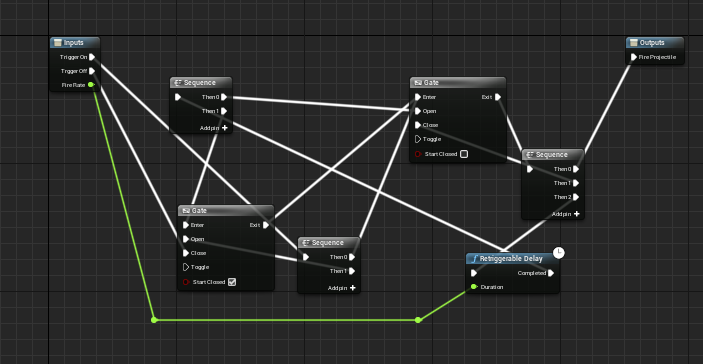
 prime willow
plush yew
I want to release my game in early access but I keep finding bug after bug
prime willow
plush yew
I want to release my game in early access but I keep finding bug after bug
hammer away
until you think the amounts of bugs wouldnt be an issue for launch
in my personal opinion id only want to launch with 0 bugs
but gamers will eat up the scum from the ground and lick the crevasses clean whilst paying you to do so which makes me a very sad chimera
so having some bugs even if its game breaking* isnt a death sentence anymore

 light thunder
How does one generate/open the users email client (and possibly pass ) the subject line or TO: field?
 still moat
I decided to go the the UE Github, all of a sudden I witness this:
https://github.com/EpicGames/UnrealEngine/pull/8413
 novel mauve
Hello,
Does anyone know why this assets has this weird shading ?

Although the UVs are done correctly

 frozen pond
how i could slow down character but not stop movement completly?
in this case this is floating movement -> when i enter floating zone my character has some velocity but i don't want it to be so fast
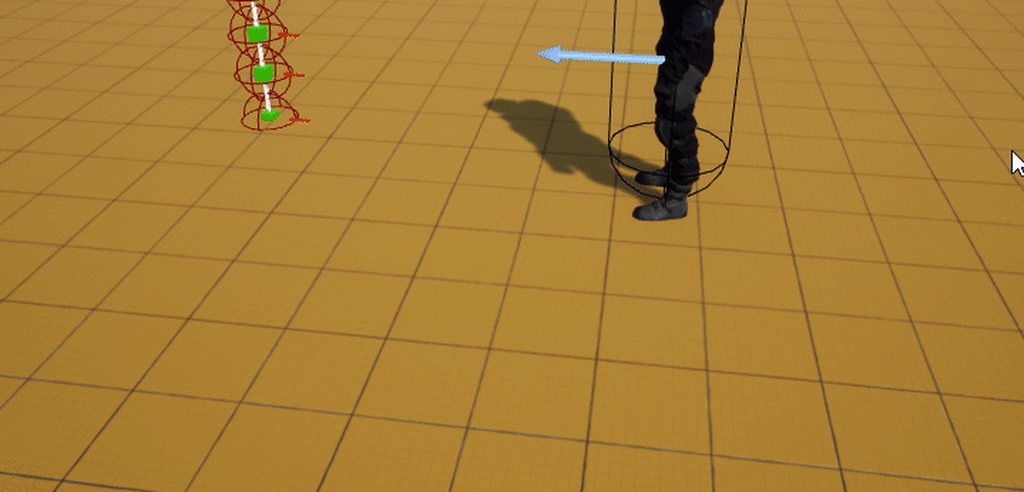
 narrow igloo
void palm
https://imgur.com/a/ehTcvG4
narrow igloo
void palm
https://imgur.com/a/ehTcvG4
It's a feature not a bug
narrow igloo
... yes I was joking. Calling things "features" instead of bugs is a meme
plush yew
does unreal have a build in modular system? or how would I snap modular pieces in unreal?
frozen pond
plush yew
does unreal have a build in modular system? or how would I snap modular pieces i...
in editor or in game?
plush yew
editor
frozen pond

Unreal Engine
Snap Actors in Editor by moving them close to each other.
plush yew
there is? I need to google that then 😄
 hidden tendon
Quick question... if I have 10 material slots on one static mesh and put the same material in each slot, is that more expensive than one material slot with that same material instead? Thanks!
thick herald
plush yew
does unreal have a build in modular system? or how would I snap modular pieces i...
By default you control modular snapping with the grid sizes, top right of the viewport.
hidden tendon
plush yew
does unreal have a build in modular system? or how would I snap modular pieces i...
If you build your assets at set increments .25, .5, 1, 5, 10, etc... you can just adjust the grid snapping in the engine.
plush yew
yea that could work too
narrow igloo
I think it will be 10 draw calls. Not the best idea
hidden tendon
Dang.
Yes, it's UE5 with nanite.
I'm making hard surface assets and I have the different slots for all of the different parts in case I want to change them up.
Word. That's a relief then... that's pretty great if that's how it works with material slots in UE5.
narrow igloo
Mesh draw calls != material draw calls, unless someone can correct me
hidden tendon
But, I end up using the same thing in multiple slots half the time. When I made the assets, I was thinking "flexibility" but then I thought about draw calls.
narrow igloo
Nanite just means all instances of the mesh is one call. Each material is still a call AFAIK
So 10 slots == 10 draw calls
hidden tendon
Is there a way to combine material slots in the engine?
narrow igloo
Not out of the box. There are procedural mesh tools that can probably do that, but I don't think they support nanite yet
prime willow
Isn't there a rule about being a vicious help vampire?
narrow igloo
Nani?
prime willow
There's this little kid in voice chat named
Gaming production
and hes been leeching pretty hard for nearly a week, refuses to do his own research
google anyhting
do any of the basic tutorials that teach unreal basics
and just yells help me for hours until someone does or he get sad than comes back and does it again
ive been thinking about it honestly
narrow igloo
Ping mods if it's a problem
prime willow
yeah i just might
its just annoying he comes and yells with a super loud mic for help and runs everyone out of the chat repeatedly .-.
o.o
so that is a mod related thing
i dont wanna ping them if the kids doing no foul play lol
id be an asshole for that
o.o oki
hidden tendon
If I had two slots that I wanted to combine, period, could I do this in the engine though? Man, I really don't want to have to go back into houdini and modify the assets because of the round-trip. I know you can delete material slots but I haven't seen anything about combining them.
prime willow
@median wigeon Don't smite me please D:
but is it ok for gaming production to keep at what hes doing or?
 median wigeon
hidden tendon
median wigeon
hidden tendon
Ah, no worries at all.
I guess blending between 4 materials with a vertex color id map and using just one material slot would be the best course of action... that's going to be a lot of work lol.
narrow igloo
Oh that's good to know. Do you know if different material instances of the same master are also 1 call?
Noice
Eek.
Personally I'm a big fan of custom primitive data. It's suppose to be a lot cheaper than dynamic instances.
 stoic folio
guys
theres something really bizzare
ive been making an autumn environment
and when i hit build the entire game changed into a snowy environment
i have no snow shaders or anything
and its applied to every single asset from custom to asset store to terrain


this is how my game was looking earlier today
where the fuck did the procedural snow come from
why did the mannequin turn black
i just saw the mothman prophecies movies yesterday and i am terrified and chilled to the bone
someone help me
 stoic folio
man you have not seen that movie
prime willow
nope
prime willow
check lighting
stoic folio
what in the actual fuck
in unlit i get my autumn scene back with the white mannequin

lighting only


removing the skylight makes it go back to autumn
hidden tendon
How many material slots would be typical for a hard surface asset with about 10 parts each? My target is current/next gen hardware. Should I bother taking the time to reassign materials, bake id maps etc, or whatever else for optimization? Here are some of the assets. I am getting about 42 fps @2560x1080 in the editor in this scene (RTX 2080 SUPER). most of the assets have about 10 material slots. I'm using UE5 with nanite.

I want to keep the assets easy to customize so a lot of material slots sounds great, but I get that it's a performance thing.
 restive vine
Where can I get/make realistic tress for UE5? And where do I showcase my UE5 Renders?
dull lake
Anyone know a good way to get some google map terrain and color data into ue5
 neon bough
blender also has a good tree generator plugin (at least for the mesh, texturing is another thing...)
restive vine
I've done blender tress...yes...but i always made planes with leaf txt for blender which is i think not supported for nanite mesh and I'm also new to UE, just started learning last week. So idk😅
neon bough
yea nanite (currently) only supports static opaque meshs
restive vine
neon bough
yea nanite (currently) only supports static opaque meshs
Yes exectly...so i was wondering to get/make realistic tress as Nanite mesh for UE5 with mesh leaves....😅
neon bough
iirc they don't even support foliage, so to have a trunk/branches as nanite may require them to be placed as normal actors
would just go for plain old LOD system for stuff like that
 chilly olive
is 16go ram enough
neon bough
that's a pretty meta question
chilly olive
hmmm
maybe like for making god of war 4 game like
map size
detail as shown in various games
chilly olive
blender
neon bough
well, my blender stuff sometimes hangs at around ~8gb memory usage, so there would be only 8 left to run unreal at the same time
it all depends on what stuff you work with
chilly olive
hmmm interesting
neon bough
low poly might work out with 16GB 😄
chilly olive
lmao
light thunder
Can you not spawn an actor inside a function? What am I missing here?
neon bough
personally i wouldn't recommend anything <32GB
neon bough
light thunder
Can you not spawn an actor inside a function? What am I missing here?
usually you can, do you try to do so in a blueprint function library?
light thunder
yes, you read my mind
neon bough
then you might use the world context
light thunder
ah yes, thank you!
chilly olive
k I will try to get 32gigs
light thunder
neon bough
usually you can, do you try to do so in a blueprint function library?
Still can't get it to work the only stuff I'm finding is from 2016
neon bough
light thunder
Still can't get it to work the only stuff I'm finding is from 2016
do you pass any context object when calling the function?
blueprint function libs aren't aware of the world, unless you pass some context object
i'm afraid that i cant help any further, as i never tried what you are trying 😄
light thunder
I want to be able to call this from any actor so I just literally just get the actor self since it will exist and be part of the world context
neon bough
yea, that should in theory work
 neon bough
yea, couldn't either create the spawn actor node at all
maybe i tried that a while ago but forgot, a workaround is some simple actor which allows spawning of actors and is placed in the level
light thunder
Then you make a blueprint function that gets the actor of that one class and call the function from there? ah okay
wary wave
you can only spawn from something that has a world reference (i.e. an actor)
light thunder
wary wave
you can only spawn from something that has a world reference (i.e. an actor)
How do I get a reference to the actor calling the Blueprint Library function and use that to populate world context -
 exotic thicket
It might not be possible in BP's 🤔
There's some limitations with how the spawn actor nodes do stuff and how it works with things that have a world or don't have a world
it is very much possible in C++ though
light thunder
What if I try believing in the power of my dreams?
exotic thicket
your dreams better be in C++ 
 exotic thicket
you could have something else spawn the actor I guess, like your gamemode
and simply wrap the get game mode -> cast -> call spawning function in your function library call
it's a bit of a roundabout way of doing it but it's probably not too terrible
light thunder
I'm doing something similiar
 halcyon ridge
Anyone using Pixel Streaming?
I have a weird bug where the sound sounds like static until I RDP in.
Also which is the right channel for Pixel Streaming questions? Thanks!
exotic thicket
I didn't even know pixel streaming supports audio, that's pretty neat if it does
 dark furnace
https://forums.unrealengine.com/t/gore-peeling-system-need-tut/252200 can someone help me with this please I’m trying to make a gore zombie peeling system

Unreal Engine Forums
I’m looking everywhere I can for a link etc on how to make a gore peeling system like dead space remake coming in 2023 or the resident evil 2 remake and 3 remake gore system
We’re they have layers under the skin
 crisp summit
I have tried to google this answer but havent found the answer. my u5 blue print view port for my character is missing, because of it I cant add any components. How do I get the view port back?
here is a picture, Without the viewport I cant change the default third person character because of it.

I guess I Can always just uninstall and reinstall but wanted to avoid that at all costs.
nvm, loading default editor fixed it
 fresh arrow
I have a general 3d question. I've been a 3d artist for years, but never for games. Can i import my gun as separate parts with separate UVs, or does it all have to be attached as one?
I've been texturing separately in SP.
light thunder
fresh arrow
I have a general 3d question. I've been a 3d artist for years, but never for gam...
It can all be separate - if they are moving parts, then yes
There are certain optimizations you can do, by cramming multiple textures onto a single image, and hiding different textures in different channels as well, or having the UV's set on the map, that can save memory
 radiant fable
hi, i forgot how to do something
how do i get my landscape grass type (the trees) to spread across the rock instead of the grass
 plush yew
Whats the option to increase the range of the pixel shaking from stopping
 dusk nebula
How do spawns work in pvp games? Like, if I want to create a system that takes proximity and such into account and spawns players in set locations, where do I start?
plush yew
dusk nebula
How do spawns work in pvp games? Like, if I want to create a system that takes p...
box collisions and AI for what you want
dusk nebula
plush yew
box collisions and AI for what you want
I appreciate you giving an answer, but that doesn't really clarify much. What would the collision do? What is the ai supposed to do?
plush yew
dusk nebula
I appreciate you giving an answer, but that doesn't really clarify much. What wo...
the box collisions you can either make it use a overlap node or some other node depending on what your using it for so say you want monsters to spawn you would use on overlap so when the player overlaps or goes inside the box, and the ai you can makie do whatever like make it follow the character etc, but you will need a nav mesh in order to make it move, the nav mesh just says where the ai can walk so if you want it to be the same size as the box you can so when you leave it the ai doesnt follow you forever, just do one think at a time first
dusk nebula
Pvp game
plush yew
it would be best to set up the AI first and your little minions so they can move and stuff when they see the player and attack them, then i would do the box collisions and the spawning so when the player steps inside it spawns the AI and next a nav mesh so they can move, change the size of the nav mesh to make the AI move further
dusk nebula
Player vs player
plush yew
i know, im just saying tho, but player spawns are literally just adding player starts on the side panel that easy, but what i told you was if you wanted something like a overlap like say a cutscene or something
plush yew
dusk nebula
Player vs player
also how you wanted it made me think it was ai and not player spawns
dusk nebula
Yeah but I said pvp
"check proximity" meaning the first thing it looks for is that there is nobody nearby
And can you add variables to player starts like that?
plush yew
not really i mean you could try, but just use line tracing for that or again box collisions, just about anything that can check for it, agin tho the beginning of what you said made me think it was ai even tho its pvp that didnt really specify anything
Well if you use the get random location in navigatable radius, technically the navmesh doesnt overlap pawns so youll never spawn on them
hollow dove
How do I get this line trace to ignore the map and only detect vehicals
 plush yew
umm make array from trace channel
hollow dove
then what
plush yew
Your best bet is to do object trace for them specifically but not 100% sure
Or you can just branch and pass true on your vehicles lol
1 sec
 hollow dove
would this do the same thing?

 winter gale

In #UnrealEngine 5, there is a Niagara Debugger tab which can help you debug your Niagara systems. I haven't used Niagara so not sure how this works. #UnrealEngine5 #UnrealFeatures #UE5 #UETips

 Twitter
·
Twitter
·
 woven quest
please help im trying to do a simple shoot then the gun flips, but i don't know how to get the gun to flip ive been at this for 4 hours and im lost
i feel ike the answer has to be really simple too i even made my own animations in blender but i ran into another problem to where idk how to get blender animations into ue4 even though im doing what everyone says. i think
 vale grove
Hi i need help i have these ptoblem when my character destroyed i used isvalid but it make my map not working when spawn again

 lapis tulip
vale grove
Hi i need help i have these ptoblem when my character destroyed i used isvalid b...
lapis tulip
vale grove
Hi i need help i have these ptoblem when my character destroyed i used isvalid b...
you issue is not clear can you send code what are you doing ?
plush yew
woven quest
please help im trying to do a simple shoot then the gun flips, but i don't know ...
Whats not working
you need to rename the default skeleton rig name to something other then "skeleton" for starters
vale grove
@lapis tulip i just change everything from destroyactor to teleport and fix everything hope there are no bad thing from using it
lapis tulip
vale grove
<@697125477575557191> i just change everything from destroyactor to teleport and...
no issue at all if you are reset everything you want it
vale grove
@lapis tulip the problem is many blueprint try to access character when he is destroyed make it so hard to fix them all
lapis tulip
its depends how you handle the game state
wet schooner
What do you think a good but even more important easy way is to do like a twinstick shooter with a character rotating. I'm scratching my head thinking of the rotation when i want to aim a gun. How do I rotate the mannequin around you know? Do I use a ik rig? Do I rotate character the towards the aiming direction? If so how do I make sure that the legs keep moving normally
if anyone has any resources video or whatever tips hmu
 leaden dust
I've been using linux for the past few months and feel confident enough to switch my unreal work over to linux. Are there any issues I should be aware about?
woven quest
plush yew
you need to rename the default skeleton rig name to something other then "skelet...
In blender right? I'll try that
 autumn flame
radiant fable
hi, i forgot how to do something
how do i get my landscape grass type (the trees...
autumn flame
radiant fable
hi, i forgot how to do something
how do i get my landscape grass type (the trees...
Assign the LG to the Rock layer instead of Grass one
radiant fable
in terrain mode?
wary wave
 sweet galleon
Is uv to 3d postion suppported in UE?
sweet galleon
Is uv to 3d postion suppported in UE?
depends what you're trying to do
 bitter sorrel
not sure if anyone here would be willing to help me out, though wanted to try before i reset my pc. trying to launch a game in unreal engine 4, tho get an unreal engine 4 crash log when starting it. dont think its appreciated to spam post an entire crash log here so if anyone would be willing to take a look for me, would be very appreciated. and yeah ive contacted the game devs but they didnt know a fix and told me to try and reset my pc. just wanna make sure ive tried everything before i commit to that.
small panther
Have you tried a fresh install of graphics drivers?
Complete Deletion of the game's configs?
Verifying integrity of the game files, Manual Deletion and reinstall, etc...
autumn flame
radiant fable
in terrain mode?
Material -> Landscape Grass Output
bitter sorrel
small panther
Have you tried a fresh install of graphics drivers?
hm ive updated it recently though, would reinstall be better?
the things I've tried:
- restarting my pc
- updating my graphics card drivers
- updating windows
- force starting with direct x 11
- reinstalling the game on steam
- installing the game on epic games
- disabling overlays
- reinstalling on different drives
- running with windows game mode
bitter ether
sorry guys, where can I find someone that can create for me a custom .fbx character?
fierce tulip
try the job/request work channels. you can read the #instructions on how to post your own request
bitter ether
thanks!
 fluid lance
Bit of a silly question but how does one make a not-so-dumb AI for a game they don't play, so they have almost no clue which moves would be smart(er) 😐
I'll soon need to create ai for my tactical strat game, but I just figured I don't even remember 1/2 of the unit's skills and I probably suck at my own game so...
I thought of something on levels of threat depending on the unit, skills etc. Then again, I have little clue of what is actually a threat during various phases of a fight 🤷♂️
plush yew
can i maybe hire someone to help me with the code here,
I have two projects, both made by someone else that passed away,
trying to copy the movement and interaction he made on one project to another
Anyone? ( im still very new and was tasked with taking over his work, and cant make his system work on the other project :/ )
Hello, I got a problem with my game Tyrgard VR. Ive just recently noticed that when i close the game (either using my new ingame feature using esc button. using the Stop button in steam) then the game rarely quits completly. it keeps a task in the task manager even though the window has closed. anyone tried this before and could lead help me figure out whats happening? The esc button uses the Quit game blueprint
wary wave
fluid lance
I thought of something on levels of threat depending on the unit, skills etc. Th...
sounds like you have a game design problem
plush yew
its fairly easy for people with UE4 experience to fix up these 2 projects we have. Just need someone to go through them and make the blueprints work on the other project. ... posted job offer in the appropriate channel too, anyone pls, we are on a very tight schedule 🙏
wary wave
if you can't quantify what is more threatening and when yourself, then neither can a player, so you may want to revise what is happening
fluid lance
Certain skills/units are, but they are all deeply dependent on battle context/other units. I can roughly estimate what unit is a threat, but estimating the context is something else entirely. The context is what I'm having a hard time imagining addressing 😐
For instance, a single Legionnaire isn't worth shit (low damage, low defense), but paired with another, they have bonuses. Now, add a Cretan Archer behind (too much to explain) and the combo is a powerhouse... This kind of stuff
wary wave
I can't comment on your exact situation, but depending on how the game works, you may have created something that is also impossible to realistically evaluate
it's worth remembering that there is no AI that can actually play chess to a vaguely reasonable degree
the problems are too spatially complex and there are too many steps to correctly evaluate until there are only a few pieces remaining on the board
when you play against a computer, it's generally using database lookups for the next best moves
fluid lance
Yep, kind of my situation: "I made a chess game, I know the rules, I need to make an AI for it, but I suck at chess" lol
wary wave
the best you can do is try to map out these contextual behaviours on paper as best you can, and come up with a set of rules to try and evaluate them
you want to generate a single decision tree structure that you can theoretically apply to any combat scenario
start with a few simple scenarios
and when you've been testing that tree against those simple scenarios, modifying it to correct suboptimal plays, increase the complexity and variety of those scenarios
fluid lance
Just as I thought before getting desperate 😆 . Start small, see where it goes 😛
Haven't started it yet btw, but I'm nearly there
wary wave
it's important to also never throw away the simple scenarios - keep adding more scenarios to your tree, and keep evaluating - you don't want to accidentally create a decision tree that works for big complicated scenarios, but craps itself when there's something like a single archer 😄
common mistake, that one
fluid lance
Hehe, good advice! Thanks! 😄 @wary wave
 woven patrol
hey can someone please help me out with my camera?

this is my blueprint
when I look up or down, actually move forward
and it clips me into walls and stuff
anyone have a solution?
@wary wave u got anything? U seem to be pretty experienced and UI know my problem is fairly simple
winter gale
In #UnrealEngine 5, you can configure per platform input settings from Project Settings -> Common Input Settings.
#UnrealEngine5 #UE5 #UnrealFeatures #UETips
 Twitter
·
Twitter
·
 vale silo
I have overlapping UVs in UV0 and proper UVs in UV1
When I bake lightmaps, mesh has artifacts on directly lit side and is black on the opposite side.
I usually don't have overlapping UVs, but in this case I needed to have them overlapping .
Is it a bug?
native swift
How do I get my AI to detect whether the player is in it's collision box, in order to deal damage?
 woven patrol
native swift
How do I get my AI to detect whether the player is in it's collision box, in ord...
woven patrol
native swift
How do I get my AI to detect whether the player is in it's collision box, in ord...
u set up a health system right?
native swift
woven patrol
u set up a health system right?
yeah health system is set up
woven patrol
I am fairly in experienced too so im not 100% sure this will work
but dont u just need to get the variable
make sure the little eye is open on the health variable
and just "get" the variable
then "set" the variable to whatever
wait that wouldnt work
native swift
woven patrol
I am fairly in experienced too so im not 100% sure this will work
Never mind, I had to get the player character instead of the player controller 😅 thank you for the response though!
woven patrol
native swift
Never mind, I had to get the player character instead of the player controller �...
yeah sorry I tried
 olive heath
Is there any channel for tutorials in this discord?
native swift
woven patrol
yeah sorry I tried
I appreciate it! thank you
 shadow ravine
I'm having an issue with my player camera when my enemies are too close, like the camera boom is being affected. Is there a way to make the camera ignore my AIs?
covert haven
vale silo
I have overlapping UVs in UV0 and proper UVs in UV1
make sure that the light map coordinate index is set to 1 then so that unreal uses proper uvs for lightmapping and not the overlapping ones
it's under general settings in the mesh properties
vale silo
thanks, I totally forgot about that one
plush yew
shadow ravine
I'm having an issue with my player camera when my enemies are too close, like th...
In the camera boon the set probe channel is what the pawns would react to
plush yew
is there some good true first person tutorials? I remember some from years ago, but they were pretty awkward
ShooterGame
obtuse gate
does anyone know why I cant hear my character jump in game? I have got the sound setup and everything (followed a tutorial online)
 native swift
Does anyone know why this is happening? the character doesnt walk properly while playing the hit reaction montage https://youtu.be/Z5ZObCDHjrM


 robust bolt
hey i have a question
how to empty my revolvers bullets after every bullet which is shot
plush yew
plush yew
ShooterGame
that has true first person? isn't it C++ though?
neon bough
for errors like that, is it possible to get debug information about which blueprint is affected by that?
Ensure condition failed: !FindPin(FFunctionEntryHelper::GetWorldContextPinName()) [File:./Editor/BlueprintGraph/Private/K2Node_FunctionEntry.cpp] [Line: 380]
plush yew
I only used blueprints for now
neon bough
the stacktrace isn't really helpful
 graceful ginkgo
Hey, maybe someone can help me with this:
When dragging nodes in the blueprint editor oder hovering over an asset in the content browser and the tooltip pops up, my FPS of the editor drops to 20 - but only if I do this on my left monitor. When doing this on my right monitor it stays at 60fps
plush yew
why do breaks like this happen in the first place?
 cedar wave
Sorry for the late response - but are you saying Fortnite only uses 7kbps for its networking for the average player?
 rancid jay
cedar wave
Sorry for the late response - but are you saying Fortnite only uses 7kbps for it...
rancid jay
cedar wave
Sorry for the late response - but are you saying Fortnite only uses 7kbps for it...
That's the highest i ever get when got near to intense fight. But if it is much more players and intense like tournament, probably another 1k-2k.
most of the time it's just 1k-2k when it is normal
very low though
cedar wave
So, 7kbps when near an intense fight, and 1-2kbps when off by your lonesome
In general that is
 median sandal
any way to fix that?
 rancid jay
yea
median sandal
it's been like this for almost a week, I cannot find out how to slow down animations...
plush yew
Play Rate
plush yew
grats
 maiden sundial
I got there a law question which is related to the market place.
There's an plugin called Mirror Animation System with a price of 55.98€.
But the very first sentence in the description says Attention! this plugin has been open sourced under MIT license, find it at github.
Which confuses me really hard. Does that mean i can just use it without paying for it ?
Cuz afaik the MIT license is pretty.. friendly when it comes to using it
 obsidian nimbus
or you scale the animation by x-1
maiden sundial
obsidian nimbus
or you scale the animation by x-1
I wish it would be just as easy as you say it xD
 wise trail
Curious when unreal says building cards what does that entail?
wise trail
4.27?
I've seen it in 4.26 and 5.0 also
Only versions of unreal ive used, usually happens before compiling shaders.
I think you may be right @plush yew cant find anything in my searches other than hair referencing cards. Thank you.
 rose hamlet
Hey, i need help about a problem ive been encountering while using splines on my landscape. I need them to deform the landscape around them, and they do, but not how they are supposed to. The landscape bends down and under the mesh applied to the spline creating a hole around it. If you by any chance know anything about this tag me.
 obtuse crystal
What simple games would you recommend for a uneral engine beginner game developer
small panther
maiden sundial
I got there a law question which is related to the market place.
There's an plug...
Go on the github and read the license, worst case create an issue to confirm
on the github page
 dusky pebble
hey could some look over my landscape settings i have a little problem wich i cant solve
 eternal compass
Hi everyone 🙂 I'm having trouble receiving Art-Net packets in UE4. Did anybody get that working?
 tranquil mountain
@upper heart sorry for the ping but i wanted to ask did you work on Split-Gate
 modern obsidian
I have an asset (a composure comp) that crashes unreal any time I click on it. I have a hunch my colleague deleted something and now it's got a Null reference or something (I don't know though, I'm new at this).
Looks like I also can't save the .umap that (I think) it's stored in.
How can I get it out of my project, since I can't delete it, and I can't find it on disk?
Thanks in advance!
median sandal
so I want to match the current shot in my cinematic with a shot from previous level, is there any way to display an image overlay on my camera as a reference?
like in maya you can import image planes
plush yew
Uh ya you could use a 2d scene render component to get a picture i guess
median sandal
yeah
I made a new ui, slapped on the image, but the thing is that now it only displays when i simulate
this is the blueprint

not what i was looking for, but it works for now ig
plush yew
Cant you figure out how to do that with the post process material
 misty wharf
Does anyone know how I can get music to play persistently across levels without using level streaming? I found this video https://www.youtube.com/watch?v=M5RnDBNnjx4, but it doesn't seem to work if I want the music to loop, which I do.

Hey guys, in today's video, I'm going to be showing you how to play music across level transitions, so if you are playing music, or audio of any kind, and change levels, the audio will continue playing.
Main Menu Tutorial: https://youtu.be/K1vVbwMJCTQ
8-Bit Music Theme: https://freesound.org/people/michorvath/sounds/412343/
Original Thread Idea...
 mint umbra
Hmm, is this the expected result of importing grass meshes from Quixel's Bridge? Seems like a lot of the meshes dont have proper LOD transitions..
https://gyazo.com/823902a9395b8d80bc784cc8cb28b538
tranquil mountain
A recent partnership gave Fortnite players the opportunity to dress in stunning digital versions of Balenciaga silhouettes. But that’s just the start. The same character models used in the game were reused for a real-world 3D billboard experience in New York, London, Tokyo, and Seoul—which was then replicated digitally in a virtual Balenciaga bo...
 vestal turret
I try to use Paragon Shinbi from the Epic Games Marketplace with UE5. There is something wrong with the clothing and hair as well for that animation. Does anyone have that issue?
prime willow
vestal turret
I try to use Paragon Shinbi from the Epic Games Marketplace with UE5. There is s...
if the physics arent causing the issue
the cyclinders around the mesh
try painting with weaker strength levels
vestal turret
prime willow
if the physics arent causing the issue
Good point, I try to see if there is something wrong with the physics
 regal marsh
Hi, can i change existing game world in plugin? Like, add new objects, or change existing
plush yew
Does level streaming works while on editor? If so does it helps a weak computer build a large world?
regal marsh
Level streaming works always, if you use it. It's optimisation method, and it's actually depends ™. If you have very heavy levels, it would take a while to load level. And if you load levels too much, it's not best decision too. You should play around with level streaming and see by yourself, what would be the best for you
plush yew
hey, so my unreal engine is not using the latest windows 10 sdk to build stuff, using 10.0.16299
also

wth?
I'm using an AMD card, pretty old, works enough though
R9 290
regal marsh
plush yew
thinks it's probably more an ue5 issue, I used this project just today before I reinstalled epic
plush yew
regal marsh
Level streaming works always, if you use it. It's optimisation method, and it's ...
OK. So it can help a weak computer deal better with the editor, right?
regal marsh
Ahh, you meant not PIE, but UnrealEd. Sadly, no, it won't help. Only when you press play
If you want weak pc to work with UnrealEd, you should look at Scalability and view modes
Like, you can notice buttons at the top of viewport. There should be button with text "Lit". You can press it and select Unlit
Shadows and lightning is longest to render on GPU, so it will double your fps while in UnrealEd, if not 3x+
If CPU fails, you should open Level Composition, where you can create a lot of levels. And when you are working on one area, you hide all levels and load area you only work with at the moment
plush yew
what is the meaning of PIE? I was trying to form an Playing In Enruel Editor
hmm.. that is sad information to read 😐
regal marsh
PIE is Play in Editor. It's just when you press play
plush yew
there is any motive they do not allow level streaming on UnrealEd?
regal marsh
Yes, UnrealEd is tool for designing, and actually lack almost any runtime logic, except initialization, rendering and all of that
plush yew
hmm.. so probably it would run slower with this type of functionality?!
cool, thanks for the information! 🙂
regal marsh
plush yew
hmm.. so probably it would run slower with this type of functionality?!
Im not sure, actually. But there should be something similar implemented in unrealed too, i think occlusion culling is still present and most of such techniques
 narrow mauve
Trying to display a volume in the volumetriccloud rendering using a grid3d niagara system. So just to visualize in the early stages I have a super simple material that takes in a render target volume as a parameter.

in Niagara here is the material parameter and the render target volume set

Here is the volume slice preview in niagara

However nothing shows up in the volumetriccloud. There should be a giant volumetric sphere at 0,0,0 .there is something I am missing here because I've never used Niagara this way..placing the niagara system in the world doesn't do anything either. The material is only rendering the default volume texture in the parameter, not the one connected in Niagara
This maybe that I totally misunderstand the use of a 'Render Target Volume' . I assumed it was rendering as an ordinary volume texture
The math must be correct because the slices clearly show what would be a sphere
plush yew
regal marsh
Im not sure, actually. But there should be something similar implemented in unre...
Does hiding a level plays the same role (performance-wise) than occlusion culling?
regal marsh
Hiding - almost.
Unloading - removes them from memory, like it never existed
You can unload levels in composition if i remember it right
regal marsh
No problems! 👍
narrow mauve
Okay I know why now. It's because it's rendering to a 'sprite'. It doesn't update the render target of the material in the volumetric cloud, only the material in the niagara system 'sprite'. Well ...there has to be a way to use the render target to render into the volumetric cloud but no idea how
narrow mauve
I have tried so many times asking niagara related stuff in that section
its too inactive
regal marsh
I guess c++ and this channels are most active on all server
narrow mauve
yeeeeeeup
regal marsh
I saw rendering settings at Emitter's Sprite Rendering settings. Or maybe there's some component for rendering not sprites
plush yew
is Cinema4d the most compatible software for unreal engine
cause both max and maya fail to bring in some things and so does blender
but ive been using cinema4d as a bridge, i dont even have to export unreal engine just loads cinema4d files native
regal marsh
Officially Maya is, but some features in cinema4d are setup just like UE4 expects it, and yes, c4d files are supported by UE4 from the scratch. So not most compatible in general
plush yew
there is a lot of maya stuff incompatible with unreal
i cant find anything in 4d incompatible
i know maya is the preferred or official but going by most compatible in a literal sense even 4d particles get imported like they look in 4d
mostly material related
regal marsh
Ah, materials. Materials are very wrong in fbx
 formal pebble
Hello guys, any ideia of why my computer freezes at 95% when opening a new project
regal marsh
C4D importer is a plug-in, which handles imports in own way, so it may be a looot better
regal marsh
formal pebble
Hello guys, any ideia of why my computer freezes at 95% when opening a new proje...
Launch it through command line and see
formal pebble
how I do it
plush yew
thats what I was thinking @regal marsh it was made for cinema 4d
which is why its so compatible
regal marsh
neon bough
most likely it's compiling shaders
Yeah, it will show you ShaderCompilers
plush yew
i just love being able to do my unreal engine particles in cinema 4d and chuck them into unreal
regal marsh
formal pebble
how I do it
You open command line(cmd.exe) and then go to your project folder and then you type ue4 launch command with your project as argument
formal pebble
ok thanks I'll try that
regal marsh
plush yew
thats what I was thinking <@!353882566178242560> it was made for cinema 4d
I guess it's being maintained by C4D team by themselves
It might explain good importer quality
I found gltf meshes a bit cursed
Yeah, materials are good, but my meshes are very cursed when i try to import them
By cursed i mean displaced, distorted and messy
I'm using Blender exporter
 pearl hornet
How do I make Main Window the default setting?
 small panther
I have a clickable button that is supposed to teleport the player, and the button is clickable in the play test, but not in game, any idea why that might be?
formal pebble
regal marsh
You open command line(cmd.exe) and then go to your project folder and then you t...
do you know how is the argument to launch ue4, I didnt find it
small panther
small panther
I have a clickable button that is supposed to teleport the player, and the butto...
My testing method was off, it was working I had a menu in the way I didn't realize in game
 ivory furnace
does anyone know how to get a unique identifier for an object/Actor thats consistent across saves? Ive tried UniqueID, GetName, GetFName
 topaz scarab
anyone know how to change default import settings? (for textures?)
And no I dont want to use bulk edit. it doesnt help much in my case.
pearl hornet
pearl hornet
How do I make **Main Window** the default setting?
There has to be a option in BaseEditorPerProjectUserSettings.ini but I cant find it, and if not there maybe in another .ini?
 silk furnace
does anyone know where i can pay for a ue4 commision, need some ai for my project
and im not good at ai
 agile cosmos

Hi everyone. I'm a beginner in UE. This is my first environment building project. My grass rendered differently in viewport and in the render queue. Does anyone know what might be the cause of the problem?
 plush yew
you got the thailand render on
@agile cosmos
nono i mean u got the singapore render on
only straight stuff allowed
 somber prawn
Anyone else using the editor over Remote Desktop and getting their mouse cursor jumping to another monitor after click-dragging attribute values? It's driving me nutty!
 silent plover
okay so i have a very strange request here, does anyone happen to have the knowledge on how to pull out geometry and texture information from a .apk file for a game? There is an old, outdated game that is no longer playable on ios or android because it hasnt been updated and has basically been abandoned by the devs called Dark Meadow: The Pact. It is a genuinely amazing game and there isnt any way at all that I've found to be able to play it anymore, but what id love to be able to do is get the models and whatnot into a program like blender and mess around with the environments. It was made using unreal engine 3 and after unpacking the APK i was able to find a file in the lib folder called "libUnrealEngine3.so" i was wonder if there is any way to extract the data from this file and turn it into a usable format (obj, fbx, etc etc) Any help would be greatly appreciated 🙂
 vagrant cliff
Do anyone know how to change the icon of a class in world outliner?
 vale silo
just found an odd issue - apparently Lightmap Coordinate Index can't be higher than 3, even if my Lightmaps UV map is UV6 (UE4.27). Is it a bug or was it always like that ?
plush yew
sometimes when I delete something
my grass dissapears
it only dissapears for the cell im in
and if i restart the editor the grass comes back
and in game the grass is there
its just the editor viewport
what could cause something like this
is the mesh set to movable or something stupid
light thunder
Isn't there a project setting/editor setting that turns off escape key exiting play? I'm trying to test some of the key functionality and though I could swap out another key, I want to make sure escape works before I package again
 vale silo
just found an odd issue - apparently Lightmap Coordinate Index can't be higher t...
vale silo
vale silo
just found an odd issue - apparently Lightmap Coordinate Index can't be higher t...
@gleaming narwhal do you happen to know about this ? 😊
plush yew
why does skylight make water look so milky

im using a capture based skylight
and no matter what color or tint i give my water every time of day the water is very milky
 hexed panther
Hey everyone, bit of a dumb question but I'm completely new to Unreal. When installing UE4, there are "Target Platforms" options to tic (like Android, IOS, etc). Can someone explain what exactly is this for? If I uncheck Android, for example, does this mean that nothing that I make on UE4 will run on an Android device?
vagrant cliff
hexed panther
Hey everyone, bit of a dumb question but I'm completely new to Unreal. When inst...
not that it cant run on android, but you unreal install cant make an android exicutuable
hexed panther
vagrant cliff
not that it cant run on android, but you unreal install cant make an android exi...
I see, thanks! And is this something that I can change later? I don't really plan on making anything usable right now so I'd rather save the space and try to fit it in my SSD, but if I end up wanting to make something for Android or whatever, can I just download the specific target platform stuff that I want without reinstalling everything? I'd assume so but just want to make sure
silent plover
Does anyone have experience using UModel that could maybe message me and help me with something?
 burnt tinsel
hi i need help
for some reason, every button i click it shows gempack4

instead of showing the actual index + 1
 bright tulip
is there anyone who know how to attach geometry collection component to skeletal mesh properly?
i tried to attach it in some way (attach component function in BP, parent socket setup) but geometry collection component always falls to ground when game starts
 marsh nacelle
Hey, anyone know what happens here ?
I imported the Asset pack without any Errors and now you see the Results, in the Content Browser the asset looks good with Textures & Co. but when i use it in my scene, it has no Texture and this Asset Pack was realy Expensive. :/
You know what i can do to fix it ?


 frigid bear
burnt tinsel
for some reason, every button i click it shows gempack4
frigid bear
burnt tinsel
for some reason, every button i click it shows gempack4
thats cus when you format text whatever you dont write in the squiggle brackets get shown in the game so try removenig thast gempaack44
 winter gazelle
burnt tinsel
for some reason, every button i click it shows gempack4
winter gazelle
burnt tinsel
for some reason, every button i click it shows gempack4
Probably because after the forloop ends, that index value is "3". And that "3" value is being read by all the buttons. You dont have a local var to that each button has to read from to get the int value you want
burnt tinsel
winter gazelle
Probably because after the forloop ends, that index value is "3". And that "3" v...
ok thanks
i managed to fix it by not using a for loop at all
winter gazelle
i didnt know there was a format text node that you can feed in various text field values like ints and such. So i learned something from looking at your code
 maiden shadow
Does GPU Lightmass in 4.27 require game running with ray-tracing and virtual shadowing or we configure the project that way only during baking and editor use?
 nova harbor

 stark gyro
My friend has a website for his business. He wants a game built into it. Is there anyway I can do this? More in depth, he wants a currency on his website that you gain credits from the game. Can I do that too?
 final swan
Hi, is someone familiar with cloth simulation from blender to ue 5? To be more precise, I did a cloth simulation on blender, but after some random actions I exported it but i have some “backface culling” problems which idk how to solve. Is there a correct workflow? I tried fbx, alembic, baking and importing but nothing works good, even because the scale is not correct
burnt tinsel
stark gyro
My friend has a website for his business. He wants a game built into it. Is ther...
yes
check out xsolla
they have a site builder which connects to game currency and items
for free
stark gyro
Can I use ue4? @burnt tinsel
 regal mulch
Theoretically yes
UE can build HTML5 projects I think?
Which you can embed into a website?
Never done that, but should be possible.
stark gyro
Thanks, but what about the currency? How can I connect the game to the website
regal mulch
You'll probably have to read through that xsolla stuff then
stark gyro
Cheers.
wary wave
regal mulch
UE can build HTML5 projects I think?
not any more, it was dropped some time ago
it never worked very well anyway
I suspect these days you'd use Pixel Streaming and run the game itself on a separate dedicated server;
https://docs.unrealengine.com/4.27/en-US/SharingAndReleasing/PixelStreaming/
Run your Unreal Engine application on a server in the cloud, and stream its rendered frames and audio to browsers and mobile devices over WebRTC.
regal mulch
Ah okay
vale silo
just found an odd issue - apparently Lightmap Coordinate Index can't be higher than 3, even if my Lightmaps UV map is UV6
plush yew
someone can enlighten me how I can do or how unrealistic I am being into trying to set a workflow for not pushing my hard too much, like edit a chunk on a separated terrain and join all together in a master scene that contains NavMesh volume for AI following Player & level streaming volumes?
and since level streaming does not work on UnrealEd, I probably want to touch the master scene only on blueprint level & on PIE
wary wave
navmesh is broken with level streaming and has been for some time - I suspect it still is in 4.27
plush yew
😐
I am back at godot
(at far my tests goes, level stream and navMesh there is broken too / not implemented)
wary wave
Yeah, I figured as much. It's been broken since ~4.21 I believe
level streaming is pretty shit in general, but a lot of the features also just don't work at all and haven't done for years
in our case, our nav mesh is just loaded for everything at all times, and we stream most other things in/out
but obviously that won't work for everyone
we also pause the game whilst streaming, because it's not very good at async loading without nasty hitches - unless you want to duck into doing some engine modification to get it to initialise content more effectively
but we're not 'Open World', it's just a pseudo-loading feature for us
plush yew
any signal from the up above ue5?
world partition + navMesh
as my understand goes | world partition = level streaming
or close to
wary wave
I wouldn't rely on any of the supposed features of UE5 yet, it's too early
but the stuff they've shown regarding level streaming has been extremely weak so far
basically a 'one size fits all' approach that more or less only works if you want something equivalent to World Composition in UE4
 iron frigate
can anyone tell me why the shadows on my windows look like this?
 winter gale
In #UnrealEngine 5, you can disable specific Blueprint compiler messages from Project Settings -> Blueprint Project Settings.
#UnrealEngine5 #UnrealFeatures #UE5 #UETips
 Twitter
·
Twitter
·
 opal gazelle
could anyone shed some light on possible reasons why i have an empty project with a single asset and 3 extremely simple materials and it's building 8800 shaders?
opal gazelle
so it builds shaders for default materials you're not even using?
 potent bridge
Anyone got an idea on how I'd achieve a looping segemented health bar? something like this.
(Marked with 1)

wrap box doesn't work since its not percent based.
 zealous magnet
I got a physics handle component to pick up items. Interpolation is enabled so it transiitons smoothly between the ground and my hand, but when it e.g. has to rotate from 270° to 0°, it goes -270° back instead of 90° forward, is there a way to control that?
stark gyro
is it normal that my computer shits itself whenever i open ue4
not when i open it just when its open ^
shadow ravine
I'm having a framerate issue on my engine, last night I created a new blank project and it was hitting 120fps but today when I created a new project I'm only hitting 30fps anyone know what this might be?
 white kindle
Hello everyone! Does anyone know how to override nav mesh height limit? If i place two navmeshs with distance between them ~ 86000 by Z axis, then the upper one will not work. I didn't find any related options in settings nor in config files nor in forums(i found one of 2019, but it has no answer)

 mental solar
help, content is randomly disappearing from my content browser when I restart unreal, even tough I saved.
I imported everything by dragging them in, what did I do wrong?
plush yew
Hello there! New to the server! Graduate from University and still learning Unreal Engine! Not ashamed to say I'm a slow learner.
mental solar
Nice to meet you.
New to unreal too, wanna bet that I learn slower than you? (I usually drag race with snails and still lose)
plush yew
Heh no shame in that I've been using Unreal for 4 years now and did my final project using it. Love the software but plenty still to learn!
mental solar
😄
awesome
Currently trying to make a remake of five nights of freddy's just to test if it was a good choice to switch from unity. Had lots of troubles and errors with unity that I wasnt able to fix, unreal seems promising, been learning for a month, but totally ineffectively. I get distracted a lot, even tough I'm very concerned about my goals
plush yew
That sounds good! Personally I'm refining and learning new skills, currently I'm trying to make grass from scratch
mental solar
Until now, I just randomly have put planes with textures or 3d modelled grass pieces in blender using particle systems. Code generated grass already exists, but its surely a great thing to learn.
iron frigate
@winter gale was the post meant as an answer for me?
winter gale
iron frigate
<@!148762361413500928> was the post meant as an answer for me?
Sorry no. It was just a general tip.
vale silo
any idea if Lightmap Coordinate Index on static mesh maxing out at 3 is a bug or a standard behavior ?
iron frigate
hey im at a loss how to make my groom follow animation. groom hairs doesnt bind to my animation.
Ive read this and tried it, but i dont think im doing it right as it doesnt work....

No description provided
what component should be switched out in order for me to use it on my own?
 smoky valve
Hi, i have a big problem, when i'm trying to build lighting my swarm agent doesn't work properly, it gives out this error
[ERROR] Channel registration failed. Reason: No such host is known , Callstack: at System.Net.Dns.InternalGetHostByAddress(IPAddress address, Boolean includeIPv6) at System.Net.Dns.GetHostEntry(String hostNameOrAddress) at System.Runtime.Remoting.Channels.CoreChannel.GetMachineName() at System.Runtime.Remoting.Channels.CoreChannel.GetMachineIp() at System.Runtime.Remoting.Channels.T
Can someone help me with that?
icy plaza
Hey guys! does someone know if there is a way in which you can merge decals onto a static mesh so you can use it as a asset?
wary wave
there is no such feature
mental solar
mental solar
help, content is randomly disappearing from my content browser when I restart un...
.pls help
fierce tulip
in some cases that happens when you accidentally have two iterations of the same project running. else, no clue
icy plaza
wary wave
there is no such feature
ah shit, also no baking option or some sort?
wary wave
no, there is no such feature
thick herald
icy plaza
Hey guys! does someone know if there is a way in which you can merge decals onto...
Put the decal[s] onto your static mesh and select them all inc the mesh, right click and convert to static mesh.
wary wave
does that actually work?
thick herald
Maybe.
wary wave
I've never heard of that workflow and it isn't documented
icy plaza
thick herald
Put the decal[s] onto your static mesh and select them all inc the mesh, right c...
I tried, but after that mesh that is supposed to get the decals is still empty without decals
thick herald
I watched someone do it on a stream, I may have missed something though
thick herald
I'll see what I can find and if I find anything of use I'll ping you.
icy plaza
that would be amazing! thank you so much in advance!
wary wave
sir, this is an Unreal Engine discord
 tranquil apex
how to publish your game on the app store?
 neon cargo


 thick herald
icy plaza
I tried, but after that mesh that is supposed to get the decals is still empty w...
thick herald
icy plaza
I tried, but after that mesh that is supposed to get the decals is still empty w...
Turns out he didn't do what he thought he did. My bad. That said it is possible but would require a lot of faffing around in the material, adapting existing material functions to suit. Not a task for those with limited knowledge in materials/textures etc.
icy plaza
thick herald
Turns out he didn't do what he thought he did. My bad. That said it is possible ...
aah too bad would have come in very handy tho! Thanks for checking!!
thick herald
Have a read of this https://forums.unrealengine.com/t/baking-decals-to-uv-texture-maps/83153/15
Unreal Engine Forums
Cool thanks so much for investigating! 🙂 That sounds exciting to try! At the moment I am very focused on a gameplay improvement stretch and this would be a bit of a luxury to pursue right now as it sounds like it would take a little figuring out for me, how to technically implement and check each step. I definitely am going to try though as th...