#ue4-general
1 messages · Page 1061 of 1
 clear light
Does the movement itself work fine, regardless of anim
 clear light
Try to debug log the speed variable in the tick of anim bp
clear light
Your setting it in the anim blueprint right
 dense wren
yes
in the blendspace
inside idle
thats where i placed the walk backward
i changed nothing else
clear light
Yes but that blendspace needs to get the actors speed
dense wren
right
clear light
Through the anim blueprint
 clear light
Yes debug log that just to see what the value is being set to
dense wren
how do i do that
you mean print string?
ohh
so the value for both sies
sides
its positive
if i go left
its same as right
i printed string
and wether i go left or right
it shows as 600
positive
dense wren
okay
so
what can i do?
i did this so that player points where the mouse is

i need to some how
let the game know that
whenever mouse is right, then left is minus
and whenever mouse is left
then right is minus
how do i?
 gaunt abyss
If you want to get a velocity in a specific direction use a dot product
Forward speed for example, get the actor forward vector, get the velocity and do a dot product with the 2
gaunt abyss
From anywhere, doesn't matter
Anim BP is fine too
dense wren
but the front side of my character
is based on the position of the mouse
it changes every time
wether the mouse is left or right
gaunt abyss
If your character always rotates towards the mouse position then you'll always be getting positive velocity
dense wren
right so i need to make it so that minus velocity comes in play at the oposite of mouse position
gaunt abyss
Oh I missed the part where you said it's 2D
Just do a dot product with the velocity and whatever axis is forward/right for your sidescroller
dense wren
gaunt abyss
Oh I missed the part where you said it's 2D
Just do a dot product with the vel...
would you give me more detail im kinda new
gaunt abyss
Sec, have to open up UE
dense wren
yes
 sterile pumice
If anyone's not too busy I'm still having issues with my build. UE builds using the wrong gameinstance class, it's set correctly in the project settings and I've tried a few different build configurations at this point
at a loss unfortunately, It may have something to do with he fact that I reorganized my project?
If so, I'm not sure how i'd go about making sure it has the right paths for everything
 dense wren
nice thanks
a lot
lol
it worked
but
when i go backward
it goes the anim forward
and forward plays the backward anim
should i change the anims in the blendspace?
run forward to minus
and backward to +
?
or it would mess some other stuff?
mmm it is a mess, becasue now left is always backwards and right is forward
it doesnt change on the mouse position
sterile pumice
sterile pumice
If anyone's not too busy I'm still having issues with my build. UE builds using ...
Fixed my problem, for anyone interested, it is because I restructured my project
 dense wren
you use c++?
sterile pumice
DefaultEngine.ini failed to update the new location for the GameInstance, but did fine for GameMode
Sometimes, not a lot
that's just one of the config files for the engine
Anyway, yeah. I edited the path to reflect where the blueprint actually was and now it builds correctly. If there is a way to fix the paths from inside the engine, or prevent the problem in general, that would be peachy
 cold bridge
any way for Landmass CustomBrush_MaterialOnly to ignore certain planes? Say I have a house and I don't want the landscape to get thwarted into the house
can I somehow define that?
dense wren
maybe in collision settings?
cold bridge
dense wren
maybe in collision settings?
doesn't seem to trigger. I tried to set the floor mesh to Movable, and in the materialonly brush:

doesn't seem to make the mesh go and fit, I'd guess it'll take something more complex than that. maybe best to fit my landscape needs by myself, as in design the world around it
dense wren
idk much about this
but i would say maybe you can select a certain part of the terrain
and throught blueprint
some how set it to a collisionable area
idk just saying
cold bridge
this brush affect the entire terrain and there dont seem to be some way to limit this noise to a certain area, or the other way around, limiting it from doing the same
dense wren
maybe set a terrain appart from your base terrain
like a ground over the terrain
a plain i mean
a plain only for the house
so everything around gets painted but that specific plane
cold bridge
dense wren
so everything around gets painted but that specific plane
I'll check that out, thank you
dense wren
yw let me know if it worked
 silver basin
sterile pumice
If anyone's not too busy I'm still having issues with my build. UE builds using ...
silver basin
sterile pumice
If anyone's not too busy I'm still having issues with my build. UE builds using ...
Did you have unreal verify all assets? Could try copying your project out, deleting the one through unreal then reopen the copied project into unreal. Ue4 seems to have a lot of issues with moving things around
 plush yew
I am new in the game I wanted to know if it is better to animate a door under blender direction unreal in this case how to make it open an unreal .... or direct on unreal ?? Thank you
 slow musk
I'm having troubles with some really dark scenes in UE 4.26 I'm developing for VR but the levels are basic so I'm not having issues with frames etc. But the issues I'm having is that I can even add a giant ass point light in the middle of the scene with giant ass radius and intensity trying to light the whole level. Problem is, the map continues to be darkened. Anyway to just make it be equally lit? Feel free to @ me if you have some solutions.
 silver oar
@plush yew @dense wren Thanks for the help, figured out the problem. Turns I just had to scale the model down lol
 neon bough
slow musk
I'm having troubles with some really dark scenes in UE 4.26 I'm developing for V...
neon bough
slow musk
I'm having troubles with some really dark scenes in UE 4.26 I'm developing for V...
check the (auto) exposure settings of your post process volume
 pulsar onyx
i have a drone that follows me, i need him to shoot the player on a key press, can i not do a linetrace between the drone and the player and use that to show the projectile?
dense wren
silver oar
<@456226577798135808> <@!414924277310160896> Thanks for the help, figured out th...
glad you could fix it
slow musk
neon bough
check the (auto) exposure settings of your post process volume
Yeah not really fixing my deal, I'm using basically a single skylight to illuminate the scene currently. I'm basically just wanting the whole thing to be same illumination levels as if the original mesh freely let light pass through it. (Currently both skylight and the mesh are set up to not cast shadows.)
 whole glacier
Hi , i am using Ultra dynamic sky and the issue i am currently having is the day / night cycle is lighting the interiors of caves. I noticed the post process volume does not seem to block , i think the skylight. Does anyone know of a way to keep cave interiors (or say other underground rooms) , from allowing the light in? thanks
plush yew
could I get help with a texture issue real quick?
 hallow citrus
helloo i am trying to make my particles fade out transparency

how would i do this in the material? should I change the blend mode? i still want to keep my masks and stuff
 plush yew
How can explain to me how to fix button style of boarder : https://i.imgur.com/aT85RyK.png
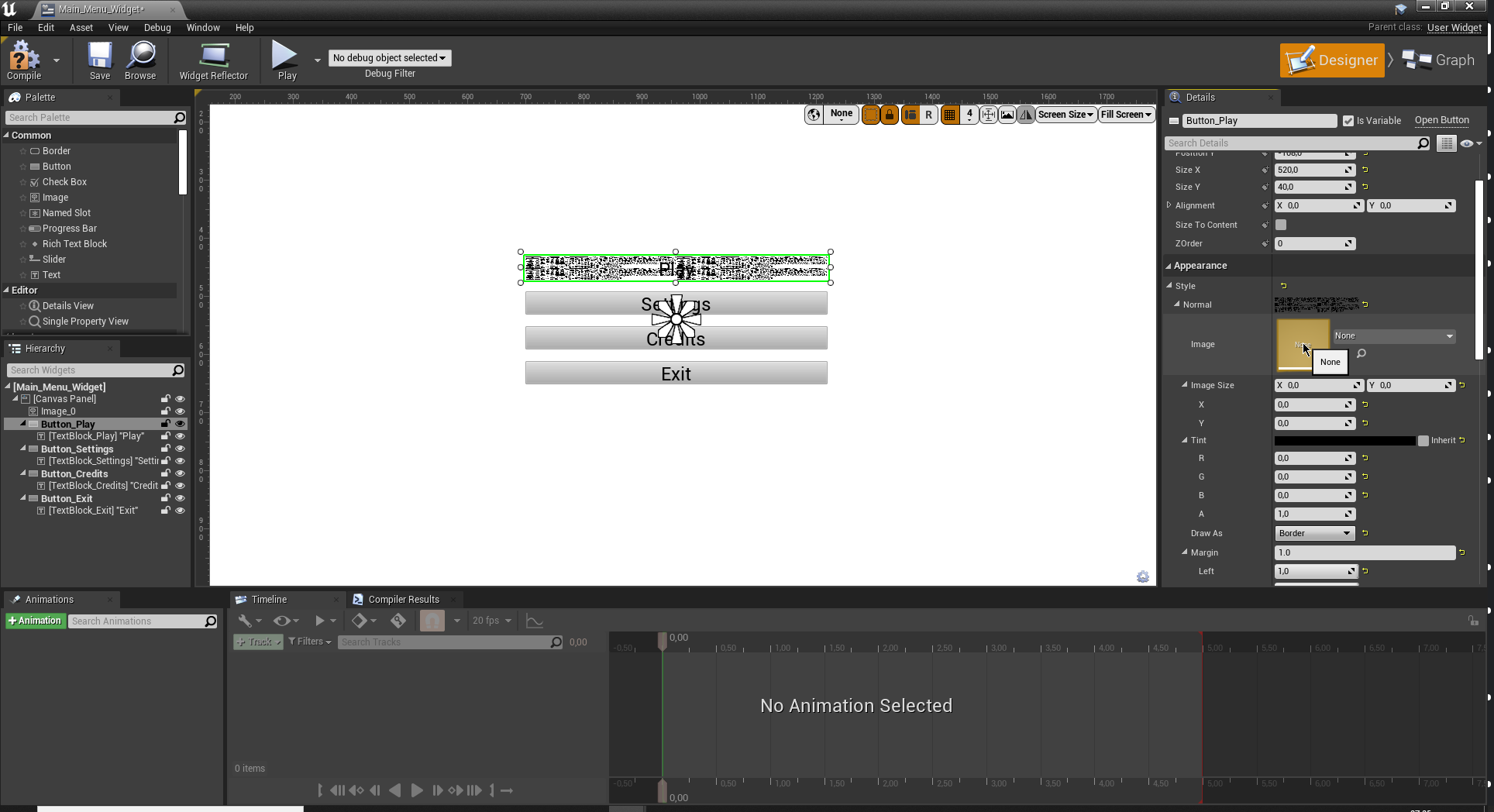 plush yew
How can explain to me how to fix button style of boarder : https://i.imgur.com/a...
plush yew
plush yew
How can explain to me how to fix button style of boarder : https://i.imgur.com/a...
the yellow arrow click it
 naive burrow
Welp Unreal Engine just corrupted my project and there's no way for me to import some of the assets from my other project to a new
✨ great software ✨
plush yew
plush yew
the yellow arrow click it
i will not undo it no
plush yew
plush yew
i will not undo it no

Check the DRAW AS
Boarder means a boarder
thats a button my friend
and?
its not a border

With this CSS only snippet designed by Giana has a cool button animation when you hover over it, the colour of the text and border changes from the bottom
a border
same in UE4 draw as BORDER
seems buggy
a border isnt a button tho
damned
it is
the border you can grab from the panel its the top one you can put it button onto it
idk why i have to explain you what a draweing or a border is i asked fomr someone who has any idea how to fix it
not like arguing with you sry
but that there is a animated button that i would prefer doing in C++ blueprints for it may be more complex and weird
what i saw in the image tho didnt really have anything to do with the border only a button with a text onto it
so i did what you said how to fix it and it was as simple as just clicking the arrow
i did not need a undo
so you want that text texture there?
 regal mulch
If I understand them correctly they marked the image of the Button to draw as Border (which has nothing to do with the widget that is also called Border) and that looks kinda broken
plush yew
+1
regal mulch
But I don't think I ever marked button texture to draw as Border
regal mulch
Yeah okay
But keep in mind that UE4 and css is not the same
Whatever epic labels as Border on that things doesn't mean the same as css
 placid jasper
can anyone recommend a good tutorial/series for ue4 c++? I already know c++, so it doesnt have to be extremely basic
regal mulch
You might need a texture to go with the setting
 wary wave
IIRC you need multiple textures, but it's been a long time since I've touched it
regal mulch
Sounds like that thing with a 9 in it
wary wave
I suspect if you don't supply it with a texture it falls back to some default, and then goes nuts on trying to use it as an atlas or something
but yeah, a 9 sliced image like this makes sense:
https://forums.unrealengine.com/t/9-slice-scaling-umg-image/123231

Unreal Engine Forums
I just recently discovered the 9-slice scaling feature in UE4, but I can’t seem to wrap my head around how to calculate the margins. For instance, take this simple image: This image is originally 256x256. This image will be used as it is (1:1) but I intend to use this image for buttons as well. This is where the 9-slice scaling comes in hand...
regal mulch
9 slice ha
 dim arch
anyone know why when I press K to save properties, it will reset then I exit PIE
there is no construction script or other code modifying the object

We use Blueprints to enter a bounding box, slide the door open, have a delay and then the door closes. Direct to the point.
This is a very watered down version of the Unreal tutorial series, and it is more of a way for myself how to do this, then for anyone else. If however you would love to see more tutorials like this, then let me know.
+++...
 surreal eagle
hey yall
how do i make animations
i need a few custom ones made
please tis is important
plush yew
Hello everyone I wanted to know from you that it is more interesting to use an animation for a door for unreal from blender or have done it directly on unreal I got the version thank you
Please
regal mulch
Hm, nothing in the log that I can see
But your file path has multiple whitespaces in it
And even a dot
Which I would try to get rid of first
 digital tide
hi
plush yew
hi
 wet schooner
Hey does anyone know whether there's an easier way to migrate? Like they tell you to only put it in content
but this means in order to have a good file structure you need to move things into folders
which takes forever with unreal
should i just accept this taking forever or is there a better method?
 knotty hollow
I have a landscape material that's giving me questionable results and I'm pretty sure I have this hooked up incorrectly, I'm trying to adjust my roughness/AO/specular using scalar params and the only thing that makes a difference is the specular, did I do something wrong?

I packed the rough ao and spec into one texture using the substance designer workflow
digital tide
unreal engine only supports c++ right?
plush yew
digital tide
unreal engine only supports c++ right?
yes
digital tide
plush yew
yes
alright thanks
plush yew
digital tide
alright thanks

 cyan bronze
This is PPSH model but different textures. Am i able to use this in a game that costs money. Also will change the name ofc
 digital tide
Hey, I am very new to Unreal Engine. So when i finish making the model of my gun in Blender. How do i make it very reflective in Unreal Engine? I made a magnum 44 pistol and i dont know how to add reflection and texture to make it look real
cyan bronze
digital tide
Hey, I am very new to Unreal Engine. So when i finish making the model of my gun...
Only import the textures like i have that blue/black base color of the gun and also the normals. Others like roughness, metallic and bloom make in unreal
digital tide
cyan bronze
Only import the textures like i have that blue/black base color of the gun and a...
how do i get textures?
cyan bronze
digital tide
how do i get textures?
Youtube.... You have to bake them
digital tide
oh ok thank you so much
cyan bronze
into image file
digital tide
and one more question is blender or unreal engine better for making terrain?
cyan bronze
digital tide
and one more question is blender or unreal engine better for making terrain?
No idea. Also getting the models and animations to UE use "blender to unreal" plugin in blender
digital tide
cyan bronze
No idea. Also getting the models and animations to UE use "blender to unreal" pl...
wow thank you
cyan bronze
np
 craggy sierra
hey, i have a problem with widget component, world type, i have it about 50cm before camera, attached to player, and sometimes when i rotate really fast the widget dissappears (rather visibility is changed to hidden and then visible again, not like its out of screen)
anyone know a solution?
 brittle plume
o_o

 loud sky
im quite new to character stuff... i found a character online but its not rigged. is there a way for me to assign it to ue4_skeletton (default one idk what its exactly called)
i tried to import it and assign it to that skel but then it said smth about merging bones and errors
Free Download, 3d GIRL TOON model available in obj, fbx, blend format.
wanted to implement this
 drowsy snow
loud sky
i tried to import it and assign it to that skel but then it said smth about merg...
drowsy snow
loud sky
i tried to import it and assign it to that skel but then it said smth about merg...
Okay, kinda rude about that, but have you checked the bone hierarchy matches with Mannequin skeleton? What DCC tool you're using?
loud sky
Rude?
I'm using blender
I wasn't sure where to start and I'm not well versed with either blender or character modelling, should I be looking into that first? Cuz I already have my animations using advanced locomotion system v4 on ue4 so I just needed a mesh and didn't wanna spend time learning blender... Of that's possible
 regal path
Hello I have a crash with virtual texture
When I open the mesh with material and some virtual texture I got this crash```
UE4Editor_Renderer!FVirtualTextureSystem::GatherRequestsTask() [D:\Build++UE4\Sync\Engine\Source\Runtime\Renderer\Private\VT\VirtualTextureSystem.cpp:1455]
UE4Editor_Renderer!FVirtualTextureSystem::GatherRequests() [D:\Build++UE4\Sync\Engine\Source\Runtime\Renderer\Private\VT\VirtualTextureSystem.cpp:1241]
UE4Editor_Renderer!FVirtualTextureSystem::Update() [D:\Build++UE4\Sync\Engine\Source\Runtime\Renderer\Private\VT\VirtualTextureSystem.cpp:1145]
UE4Editor_Renderer!FDeferredShadingSceneRenderer::Render() [D:\Build++UE4\Sync\Engine\Source\Runtime\Renderer\Private\DeferredShadingRenderer.cpp:1467]
UE4Editor_Renderer!RenderViewFamily_RenderThread() [D:\Build++UE4\Sync\Engine\Source\Runtime\Renderer\Private\SceneRendering.cpp:3619]
UE4Editor_Renderer!<lambda_ead3a0042dfdf5af6dd902d9545231b0>::operator()() [D:\Build++UE4\Sync\Engine\Source\Runtime\Renderer\Private\SceneRendering.cpp:3889]
UE4Editor_Renderer!TEnqueueUniqueRenderCommandType<FRendererModule::BeginRenderingViewFamily'::35'::FDrawSceneCommandName,<lambda_ead3a0042dfdf5af6dd902d9545231b0> >::DoTask() [D:\Build++UE4\Sync\Engine\Source\Runtime\RenderCore\Public\RenderingThread.h:183]
UE4Editor_Renderer!TGraphTask<TEnqueueUniqueRenderCommandType<FRendererModule::BeginRenderingViewFamily'::35'::FDrawSceneCommandName,<lambda_ead3a0042dfdf5af6dd902d9545231b0> > >::ExecuteTask() [D:\Build++UE4\Sync\Engine\Source\Runtime\Core\Public\Async\TaskGraphInterfaces.h:886]
UE4Editor_Core!FNamedTaskThread::ProcessTasksNamedThread() [D:\Build++UE4\Sync\Engine\Source\Runtime\Core\Private\Async\TaskGraph.cpp:709]
UE4Editor_Core!FNamedTaskThread::ProcessTasksUntilQuit() [D:\Build++UE4\Sync\Engine\Source\Runtime\Core\Private\Async\TaskGraph.cpp:601]
UE4Editor_RenderCore!RenderingThreadMain() [D:\Build++UE4\Sync\Engine\Source\Runtime\RenderCore\Private\RenderingThread.cpp:373]
UE4Editor_RenderCore!FRenderingThread::Run() [D:\Build++UE4\Sync\Engine\Source\Runtime\RenderCore\Private\RenderingThread.cpp:509]
UE4Editor_Core!FRunnableThreadWin::Run() [D:\Build++UE4\Sync\Engine\Source\Runtime\Core\Private\Windows\WindowsRunnableThread.cpp:86]
 autumn grail
Hello , i want to drag an inventory slot from the character's bag to the character sheet
i don't know why it won't work

this is the On drag over overriden function of the inventory slot
If i want to drag and drop from bag to bag it works , but not from bag to sheet
Is there something specific to do for drag and drop from a widget to another
whole glacier
Hi , i am using Ultra dynamic sky and the issue i am currently having is the day / night cycle is lighting the interiors of caves. I noticed the post process volume does not seem to block , i think the skylight. Does anyone know of a way to keep cave interiors (or say other underground rooms) , from allowing the light in? thanks
wary wave
you can't 'block' a skylight, because they are ambient with no location or direction
you could use lighting channels to ignore it outright
wet schooner
Since you're using ultra dynamic sky you could do a few things from my limited knowledge
turns it into night quickly when you enter a cave therefore making it dark lol
exclusively use the sun light which afaik is a directional light and therefore will not light up your cave
for the first method they added a way to transition between different weather and lighting conditions with a spline based bp
you can use this tool and set a transition over your cave maybe depending on how your level is set up but if your level isn't set up for that well then you'll have to change the value manually using a triggerbox for example
plus you don't have to use night
you could just turn off the skylight when you enter the triggerbox
maybe even find a way to make it smooth like with a timeline who knows
whole glacier
@wary waveThing is the skylight don't have any lighting channels . you mean , some other way?
@wet schooner yea i saw some stuff like this , thinking about it.
 untold arrow
Anyone in here, who can help out with a Level Streaming problem, I cannot seem to track down? 🙂
 tight raptor
How can I get an async light flicker/fade for the same light used multiple times in the scene ?
I have a scene with multiple torches, which are all the same blueprint. I tried around some stuff but I could not figure out how to set this up
 golden fossil
@everyone I am starting a patreon page and I will be providing exclusive unreal engine resources for just 10 dollars in whch you will have access for a whole month. So, I just a small reveiw that is there anyone who will like to buy it. some of the resources will be some worlds, characters , plugins etc
plush yew
hi
 signal pewter
quick question, which section of this discord can i ask questions about collision and camera and the player etc
plush yew

im having this problem when i try to create a C++ project
only problem is that i installed .NET Framework SDK version 4.8 and it still doesn't work
is there an appropriate channel to discuss this issue, though?
plush yew
ok
 tardy birch
Has anyone worked with the "Set color vision deficiency type" function before?
It's working, it even changes the colors of the editor outside the game window.

However, when loading a new map, the editor crashes with the following error line: "Assertion failed: IsInsideRenderPass() [File:d:\build++ue4\sync\engine\source\runtime\rhi\public\RHICommandList.h] [Line: 2856]"
 zenith anchor
Hello, is it possible to add empty text rows in the data table description text? I'm pulling the descriptions into a widget but I need to separate the paragraphs and I can't seem to be able do that.
 sick slate
nvm the samples just a test, but how can i render the hair after the translucency?
 untold arrow
Does anyone know if this has changed?
 wary wave
I believe it has changed to more or less what has been described
 ebon marlin
Anyone know why my editor fails to launch with forward rendering enabled?
Oh it might actually be a terribly long shader compilation sequence with absolutely no indicator that that's happening on the editor splash screen. Nice.
 hidden tendon
For some reason I can't login to the launcher, Error Code: EC-BI-LS-3... does anyone know what this means?
hidden tendon
Just did, the reddit thread says this: https://www.reddit.com/r/EpicGamesPC/comments/db82p3/launcher_wont_log_in_error_code_ecbils3/
reddit
5 votes and 2 comments so far on Reddit
dense wren

Get Droid Tips
When it comes to one of the popular online battle royale games, Fortnite is always on the list. It offers cartoonish graphics, characters, and everything
it says changing your dns adress
try connecting with a pvn
then disconnecting it if it works
hidden tendon
Hmmm, never had to do that before but let me try running it as an admin.
Maybe my permissions are screwed up somehow.
hidden tendon
Should already be off but let me check, Windows somehow updates itself even with updates off and weird crap happens sometimes.
dense wren
in my case, firewalls always automatically enable after a period of time
hidden tendon
Yep, defender turned the firewall on.
Fingers crossed.
I'm in.... thanks so much man. Much appreciated!
 bold fractal
Hello folks, UE4.27 has a feature called "Unreal Engine as a Library". I could not find any further documentation on how to use it. Has anyone tried using it to or knows and can help me out please?
dense wren
still, it should be in even with firewall on
so try to enable and see if it logs you off..
dense wren
bold fractal
Hello folks, UE4.27 has a feature called "Unreal Engine as a Library". I could n...
Not me
 humble sentinel
Running low on disk space and i'm wondering if i can delete AppData\Local\UnrealEngine\DerivedDataCache
dense wren
humble sentinel
Running low on disk space and i'm wondering if i can delete `AppData\Local\Unrea...
No idea, but have you tried changing the location?
i changed the whole epic games location from c(which was low on space) to D
and i freed 20 gb
then the launcher fixes the rest for you
 robust marten
Super noob question that kind of gets asked all the time... I need to cast to an actor that ISN'T the player character, but, what would I use to input into the Object pin?
dense wren
why cant i find the blueprints channel??!?!?
humble sentinel
dense wren
robust marten
Super noob question that kind of gets asked all the time... I need to cast to an...
im no expert, but i think you can do that by creating a variable of type actor
or object reference
thanks guys
untold arrow
wary wave
I believe it has changed to more or less what has been described
Then it's just me, who cannot find the setting for it. I would imagine it was under the actual volume box itself, right?
robust marten
dense wren
im no expert, but i think you can do that by creating a variable of type actor
But then I would have to set that variable, right? How would I set an actor variable? For the player you can just say "Get Player Character" so what would I "get" for the other actor?
wary wave
I don't think there is any such setting. I believe it's using the pawn, or more likely, a player controller
dense wren
robust marten
But then I would have to set that variable, right? How would I set an actor vari...
your other actor is a weapon?
or something
?
i mean, besides the player.. so you are trying to cast an object
right?
robust marten
dense wren
your other actor is a weapon?
Nope, just an object in my game
dense wren
you are trying to cast it in a node?
robust marten
dense wren
i mean, besides the player.. so you are trying to cast an object
Yes. I have a variable in an actor besides the player that I want to call upon
robust marten
dense wren
variable> type actor>object reference
Yes, but now I must set that reference or it will be an Accessed None error
robust marten
dense wren
mm
BTW Love the profile pic, I recognize jason from FC3 anywhere lol
dense wren
you can add static mesh
as component
haha thank
always loved fc3
add static mesh as component and set it
you then dont even have to add the variable
just drag the static mesh you added as component
or you can do the blueprinting into the actor
your object
you set the variable
and connect the static mesh
robust marten
FC3 is my second favorite game. Anyway! I'm actually trying to call the variable inside a widget so I cant add a static mesh
dense wren
so you cast it in your player blueprint
oh, i havent got into widgets
but
there are many tutorials
on widget
inventory tutorials you might search
dense wren
robust marten
FC3 is my second favorite game. Anyway! I'm actually trying to call the variable...
whats your first favorite tho?
 vale grove
There is no free of the month asset this month?
wary wave
it's not tuesday yet
 torn pilot
anyone know how to backtrack "Unable to instantiate module 'UnrealEd':"? i know its trying to use an editor function for release build. But there is no stack trace, so im not rly sure what to look for. Anyone encountered that already? google is not rly helping
 deep swallow
@wary wave Just wanted to say thank you for your help figuring out my problem. I tried reducing the size map of assets by feeding function calls to higher levels of the hierarchy using interfaces and it works without crashing now!
@glacial pecan Your method of using interfaces to communicate with the game mode works great, just had a question: Would you recommend I create one interface for each aspect of the game much like the managers I am using (i.e. one interface that handles functions for player-controlled units, one for vehicles, one that handles data about the level etc) or one giant interface that is basically just a middleman of every function in the game that I want to interact with the game mode? (i.e. hundreds or maybe even thousands of them) Where will I run into issues if I don't watch out?
3000+ Rock Raiders fans thank you both 😄
 naive dune
If anyone wants to try and help with movie render queue stuff, please do! #cinematics message
dense wren
i need help
with
a side scroller
i was helped to do some coding in order to make player look towards where the direction of the mouse is (right or left) so if mouse is right, then left is backward, and if mouse is left then, right will be backward
thing is
in my game, left is always backwards and right always forwards
that doesnt change in base to the mouse position in screen
torn pilot
torn pilot
anyone know how to backtrack "Unable to instantiate module 'UnrealEd':"? i know ...
bump due to 2 super long answers xD
dense wren
dense wren
i need help
with
a side scroller
i was helped to do some coding in order to make...
 dense wren
dense wren
dense wren
this is the player look at mouse code
 neon magnet
Hey guys, I've been trying to change the first person character BP's default FOV but no matter which tutorial I try, including from answers.unrealengine.com, they don't work
changing the fov of the camera directly doesn't do anything either
 steep timber
hi i want a enemy to spawn if the player walks into the trigger (collision Box) but it just doesnt spawn the event is a function of a Blueprint Interface

this is the trigger
 dense wren
idk anything about that, but you are casting that to the third player
shouldnt the player cast that into the map?
idk just saying
steep timber
but i have to cast to character cause he is the one that has to overlap with the trigger or not ?
dense wren
or try overlapped component
torn pilot
torn pilot
anyone know how to backtrack "Unable to instantiate module 'UnrealEd':"? i know ...
bump, i cant ship rn, its kinda important
i dont use any plugins, i also removed ALL source code
still same error
dense wren

 glacial pecan
deep swallow
<@!99264143659401216> Just wanted to say thank you for your help figuring out my...
glacial pecan
deep swallow
<@!99264143659401216> Just wanted to say thank you for your help figuring out my...
I can only say that I have an interface for each cluster of functions that made sense for me to group. Giant anything is probably bad, and the more modular/independent the better. 😉
dense wren
how do i add a code so that player knows thatif mouse is in right side then the oposite side is backwards
deep swallow
glacial pecan
I can only say that I have an interface for each cluster of functions that made ...
Agreed, I'm just hoping I don't run into the same issue again where it goes "Whoops, you are using/referencing too many interfaces, better go back and re-do!", but if our hunches match I think it's green light 😄 Thank you for everything!
glacial pecan
deep swallow
Agreed, I'm just hoping I don't run into the same issue again where it goes "Who...
Best of luck! 👍
 stable kettle
Hello, i have a problem on UE 4.27 which chat channel is for me ? 😄
stable kettle
Okay, thanks @dense wren ,
After few minutes while using UE 4.27 dropdown menus is bugged. When i try the click, they are immediately closes, i need reopen the UE for fix. How can i fix this problem perma
Editor downloaded from Epic Launcher
torn pilot
that could happen if your code constantly tries to replace the component you"r trying to edit, uncheck runtime in the upper left area of the editor viewport
and see if it still happens
stable kettle
Using BP, all editor dropdowns is broken not only BP components
torn pilot
try a new project
see if it happens there
if not, propably something in what you have done, most likely
torn pilot
then idk, write the support i guess, maybe be hardware configuration
stable kettle
i 'll remove Megascans plugin, maybe i guess
torn pilot
i said empty 😄
stable kettle
😄
torn pilot
oh no i didnt, i meant an empty project
stable kettle
Okay i will try
And how can i disable Steam VR, each time when i try the open UE, its popup ?
torn pilot
For all those people who find it more convenient to bother you with their question rather than to Google it for themselves.
stable kettle
😄 lmao, i tried but not working, UE tried reopen :/
torn pilot
¯_(ツ)_/¯
dense wren
torn pilot
https://lmgtfy.app/?q=How+to+disable+auto-SteamVR+launch+on+UE4+launch
arent you the guy asking over and over and resend your question because its too important?
torn pilot
2 times
torn pilot
what is your problem exactly?
dense wren
torn pilot
https://lmgtfy.app/?q=How+to+disable+auto-SteamVR+launch+on+UE4+launch
you send this to him
when you are literally askon too
torn pilot
yes, i googled extensively, coulnt find an answer
dense wren
asking
torn pilot
6 hrs now
dense wren
and what if he googled too?
torn pilot
that was more a way to means that i cant halp him beyond doing that for him, relax
dont fight other peoples non existent battles please
stable kettle
Dude, i can google and i googled before. This is why ask here.
torn pilot
sorry if it came akross offensive, didnt mean it. lets move on
dense wren
¯_(ツ)_/¯
 light crag
anyone know how to check the engine version of a .uasset file?
 fading lake
anyone has an idea what's going on? I cannot select any asset from dropdowns, I cant select a default map in projet settings and set the actor through the object reference variable
 rough jasper
ayooo
where the help channel
my engine broke lol
i cant import any meshes from outside the marketplace
 steel leaf
Have you tried reinstalling the engine ?
rough jasper
it makes them without a material
rough jasper
steel leaf
Have you tried reinstalling the engine ?
nope
steel leaf
or verifying local files ?
steel leaf
Hope it works 👌
 steel leaf
uh

 steel leaf
ohh I see
didn't know this was a thing lol
same

what

Am I the only one having the "auto" key interpolation not working and giving me a similar result as "linear" ? I think it's since 4.27 but I'm not sure
 regal mulch
Auto probably needs 3 keys
 limber pebble
Idk if this is something I have to fix in ue4 or my pc, but for some reason some models that I import to unreal are glitched and transparent in some places like they weren't rendered correctly or something. Can anyone help?

 fair sundial
Anyone know any good ways to get started in level design with unreal. I've used source but want to move to unreal
rough jasper
any1 have a free sword model for 4.27
or know where i can get one
my fbx's wont import properly because it only gives me the mesh, without materials
 grim ore
@limber pebbleif you can see thru a model where you do not want to, then your normals are flipped on that side of the mesh. If its a single plane that needs to be visible on both sides you need to turn on two sided in the material properties for both sides to render
@fair sundialthere are level design courses on the official unreal engine page, https://www.unrealengine.com/en-US/onlinelearning-courses
fair sundial
Danke
steel leaf
regal mulch
Auto probably needs 3 keys
still have the issue, and it worked with 2 before
 dense wren
hi guys
dense wren
grim ore
<@!703688279916281877>if you can see thru a model where you do not want to, then...
hey mathew are you online?
light crag
limber pebble
Idk if this is something I have to fix in ue4 or my pc, but for some reason some...
test in blender to confirm the problem is in asset or ue
rough jasper
wow... that seperates UE from the world
 slim sun

So i have been working a little bit on making an fps
and can not quite get the hands to move,
any suggestions?
Im quite new as well
drowsy snow
rough jasper
wow... that seperates UE from the world
If you mean the world being Unity, as opposed to every other game engines (or even every other DCC tools for that matter), welp.
Though even Materials doesn't work right away from FBX to Unity AFAIK
drowsy snow
slim sun
So i have been working a little bit on making an fps
and can not quite get the ...
Consider looking for Inverse Kinematics (IK) techniques, if you don't fancy making your own animations.
drowsy snow
rough jasper
wow... that seperates UE from the world
If you want to have a lazy drag and drop solution, look for GLTF format, which can store general material informations.
slim sun
Oh wow, i haerd about IK but thought their use is really situational and did not think it goes into idling as well.
Much thanks
 exotic cairn
is there a grid pixel size console command equivalent for volumetric clouds?
to increase the "resolution" per se
rough jasper
drowsy snow
If you want to have a lazy drag and drop solution, look for GLTF format, which c...
ty
will do!
rough jasper
drowsy snow
If you want to have a lazy drag and drop solution, look for GLTF format, which c...
any other formats that do this?
as well as gltf
 worn frost
Trying to figure out why my trim sheet is working in some places but not others. It was working fine, the walls of this crate are reading correctly. I have a single static mesh on the top and it's coming in dark.

I just read above that FBX is bad at importing materials to Unreal, so should I use OBJ or remove the materials somehow?

The material above is applied to the static mesh.
drowsy snow
rough jasper
as well as gltf
Unreal Datasmith, but impractical for games and was made for linear media and enterprise uses in mind
rough jasper
drowsy snow
Unreal Datasmith, but **impractical for games** and was made for linear media an...
aaa ok
rough jasper
drowsy snow
If you want to have a lazy drag and drop solution, look for GLTF format, which c...
bro
 drowsy snow
rough jasper
bro
drowsy snow
rough jasper
bro
Oh right, forgot to mention that GLTF importer is part of Datasmith.
dense wren
hi guys
how do i orient my player`s movement depending on my mouse location in screen?
in side scroller
my player always faces mouse
so if the mouse is in the right side of the player, that would mean the left is backward
and if the mouse is in the left side, then right is backward
drowsy snow
rough jasper
bro
But creating a quick material on your own in UE4 won't hurt 🤷
At least 30 seconds to get simple Texture Samplers and hooking the outputs accordingly.
stable kettle
I try blueprint network tutorial but i cant create a lobby, when i checkl the logs it says "STEAM: Failed to initialize game server with Steam!" im using SteamDevId=480
dense wren
if in my input settings, for movement, by default A is -1 and D is 1
limber pebble
light crag
test in blender to confirm the problem is in asset or ue
I've bought other peoples assets and when I imported them they had the same problem
rough jasper
drowsy snow
But creating a quick material on your own in UE4 won't hurt 🤷
At least 30 secon...
havent learnt materials yet but ty for your help anyway
dense wren
dense wren
if in my input settings, for movement, by default A is -1 and D is 1
so a will always be negative, and D positive how do i orient it based on the mouse position?
drowsy snow
limber pebble
Idk if this is something I have to fix in ue4 or my pc, but for some reason some...
This is just a matter of backface culling.
worn frost
@solemn sparrow https://www.artstation.com/blogs/camille_meehan/e21E/mmmm-modular-design this is what I'm working on

 static warren
Also in the vein of movement, how can i add a float track to a timeline?
limber pebble
drowsy snow
This is just a matter of backface culling.
Can you please evaluate I'm new to the engine
worn frost
 static warren
I'm trying to do something that gradually slows player movement speed
rough jasper
drowsy snow
Oh right, forgot to mention that GLTF importer is part of Datasmith.
if i add data smith plugin then can i import stuff like that?
 drowsy snow
It'll hurt.
dense wren
😃
drowsy snow
Again, impractical for games, due to how it works, kiddo.
rough jasper
thanks
limber pebble
grim ore
<@!703688279916281877>if you can see thru a model where you do not want to, then...
tysm it worked
dense wren
im having lots of trouble can i get help? please 😦
drowsy snow
I have used Datasmith for actual corpo uses, so I know many of its merits for game uses.
worn frost
@solemn sparrow

 stuck linden
does anyone know the best way of doing ADS?
ADS as aiming a gun not advertisement btw
drowsy snow
stuck linden
does anyone know the best way of doing ADS?
Animations and slight FOV adjustments.
stuck linden
drowsy snow
Animations and slight FOV adjustments.
do u think i should move the arms also?
drowsy snow
stuck linden
do u think i should move the arms also?
As in actually making animations for the arm, not just moving the mesh itself as a whole.
static warren
Hi guys! I'm getting started on making my first game, and i've got a pretty solid bunny hopping system down. All i need to do now is gradually decrease the speed after the player is no longer b-hopping. I've tried messing around with a timeline but i'm not sure what i'm doing.
Abrubptly setting the speed back to default is a bit too rough for the type of game i want to make
light crag
limber pebble
I've bought other peoples assets and when I imported them they had the same prob...
its mean they are not ue4 ready, a working fbx doesn't mean that the asset is supported ue4
drowsy snow
static warren
Hi guys! I'm getting started on making my first game, and i've got a pretty soli...
If you're aiming for Source like movement, maybe you can use Project Borealis' movement codes.
static warren
Any idea where i can find that?
light crag
you will need to re-edit in blender according to the supported axis direction by ue4 @limber pebble
drowsy snow
static warren
Any idea where i can find that?
Google is one way to find it, but just so happens it's in one of my browser's address bar history.
https://github.com/ProjectBorealis/PBCharacterMovement

GitHub
HL2-style, classic FPS movement for Unreal Engine 4 implemented in C++ - GitHub - ProjectBorealis/PBCharacterMovement: HL2-style, classic FPS movement for Unreal Engine 4 implemented in C++
 simple oasis
 static warren
drowsy snow
Google is one way to find it, but just so happens it's in one of my browser's ad...
static warren
drowsy snow
Google is one way to find it, but just so happens it's in one of my browser's ad...
So i've added it as a plugin, but i'm having trouble getting it to work in my project
I've attempted to follow the github tutorial, but i'm stuck at actually implementing it
stable kettle
Can i create blueprint MP game without Steam online subsystems ?
plush yew
Stream to @buoyant granite
stable kettle
Do i need implement my server/client ?
 pure sorrel
could someone help with collision and destroy
i have this blueprint but on hit with the player the sphere doesn't get destroyed

 desert verge
pure sorrel
i have this blueprint but on hit with the player the sphere doesn't get destroye...
desert verge
pure sorrel
i have this blueprint but on hit with the player the sphere doesn't get destroye...
you need to attach it to cast to character
why are you using a custom event for it too?
just generate an on component hit from the sphere
limber pebble
light crag
you will need to re-edit in blender according to the supported axis direction by...
ik ty
 fierce merlin
https://gyazo.com/c019c074657615acb4f2a04057a64928
anyone know what causes this? I see ImportTagsFromConfig is checked in project settings and set to true in DefaultGameplayTags.ini
 stuck linden
does anyone know how to make the fire animation start from the location that the ads one is?
stable kettle
But i need only master server for list all created sessions. For only those why i need get steamworks 😦 so sad for 100$
drowsy snow
Inb4 storefront debacle
Not necessarily, but it kinda built for EGS in mind. Partially due to Fortnite in consoles.
whole glacier
Hi , anybody know what this shadow bleeding on the walls is? It only seems to happen during the day when the sun/directional light is up. Its not any of the lights or torches on the walls. https://imgur.com/a/PU02Oez

 prime willow
❤️
 buoyant graniteBOT
:triangular_flag_on_post: Cravox#8425 received strike 1. As a result, they were muted for 10 minutes.
 halcyon basin
Hey, how often do you buy assets for your indie games?
I am a programmer, and definitely getting something modular is way easier than actually lurking for free assets that do not match
Would be interested to hear opinions
whole glacier
I buy what it seems i might need , i mean if one is working on a bigger game , its very difficult to make everything you use.
prime willow
halcyon basin
Hey, how often do you buy assets for your indie games?
so dont buy assets often
search for exactly what you need
and see if its free
else where or wait til a deal
if you dont need it now
also other sites may have competitive pricing
halcyon basin
It would be very interesting to make a challenge game jam where you can only use BSPs to create something. Wonder what would be the results XD
whole glacier
There's a lot of good free assets out there , but oftentimes they have to be imported or sized or something , makes for some extra work.
halcyon basin
Yes but the thing is they need to adhere to the general emotion of the game, you can't plug a banana tree where its supposed to have pine trees XD
Interior things are especially susceptible to this
 gilded igloo
Hi guys. im trying to figure out this replication stuff... anyone knows whats the difference between server and server, spawned? same for client...
 stable kettle
Blueprint Interface function give an erro, how can i avoid them ?
There is no exists function but console it exists.

 sick parcel
UE4 becomes much more fun to use when you stop watching tutorials and go free style.
PSA: stop getting addicted to tutorials, lessons, YT
halcyon basin
sick parcel
UE4 becomes much more fun to use when you stop watching tutorials and go free st...
Yea but just clicking around won't really do much if you have no idea
sick parcel
they are good, to a point
once you do a few things, UE4 is quite user friendly
you dont need to stay IV hooked to "AWESOME YT VIDEO HOW TO LEARN UE69 IN 5 MINUTES!"
you are doing yourself a disservice.
prime willow
sick parcel
UE4 becomes much more fun to use when you stop watching tutorials and go free st...
yes
i agree completely
but i still need to cover more basics before i can make custom jank and break my game xD
and i just figured out my problem
sick parcel
example, just to put something here
you never used event listeners before? try them out, dont watch a video about them
you will learn more this way
prime willow
i have nothing to check if im standing jumping sliding or crouching when i do my functions omg im stupid xD
prime willow
sick parcel
you will learn more this way
i kind of agree tbh
trial and error teaching much better than following a guide lol
static warren
Is there any reason the movement in unreal is so clunky?
prime willow
the things thats stuck with me have always been something relative messing up and fixing it xD
prime willow
static warren
Is there any reason the movement in unreal is so clunky?
go to third person blueprint
and mess with character movement componenet
you cna tweak speeds that are far beyond anything seen in games xD
jump angles
speed
gravity
etc
sick parcel
prime willow
the things thats stuck with me have always been something relative messing up an...
of course, you will discover that whatever you watch and copy paste in your code, wont remember 2 days after
prime willow
literally
sick parcel
spent 2 hours trying to fix your stupid array? never forget
prime willow
i have to reference the video several times
or write nodes into chunks of blueprint to remember why these are snarred together
that too
some of the most needed fixes are sometimes something as silly as flick a check box ._.
static warren
Sorry i've just been playing around with a grapple hook mechanic
and the movement just feels so impercise and clunky
sick parcel
need to be a bit more precise..
is that code you made?, are you copy pasting something you dont understad?
what is making the hook/player move?
etc
need to narrow down the problem
static warren
It's most definitely a mixture of shit code and me not understanding the engine
halcyon basin
Can you show a video so we have any idea
sick parcel
check first what makes the thing move
and maybe abstract that logic into a simpler example
since this "hook" you mention probably is a shit ton of code
you got from somewhere
static warren
The grapple works by attatching a projectile to a surface then launching you towards it
sick parcel
just break it down
static warren
unless i overwrite all xyz info the grapple just doesn't apply enough momentum to pull you towards it, and you end up flying into a pit
sick parcel
grab the launching thing, and see what happens in isolation
if the movement looks fine, the problem is somewhere else
rinse and repeat
 night yew
I've been building an inventory system and everything works great except for the fact that the widget I use for the inventory slots doesn't want to update its image or text that I pass to it with the item's struct. I have an inventory widget with an array of slot widgets, and it sends info to the slot widget to populate it with item thumbnails and quantities. When an item is picked up the inventory widget calls AddToConsumablesInventory, to check if the item already exists in the inventory, then it calls SetItem in the slot widget to change the image and text of the corresponding slot in the array.


 woven marlin
What is the best way to make a sword or an item that will deal damage, Pawn or Actor?
night yew
My inventory hierarchy is pause menu with widget switcher > inventory widget > slot widget. I'm having trouble pinpointing exactly where the problem occurs that the inventory slot isn't being updated at all, even though I have print strings confirming that the items are actually in the inventory
halcyon basin
woven marlin
What is the best way to make a sword or an item that will deal damage, Pawn or A...
Actor?
 oak berry
"Writable Assets not Checked Out" When I hit save all, how do I fix this
 proud verge
Hi guys, I tried to translate an struct text "variables" and I can´t, localization is enable, so I don't understand why the gather process from the localization dashboard is ignoring it
plush yew
hello still new to unreal just a quick question, i cannot see my recent project in unreal project browser > recent projects.
i could load it on browse option but is there a way to let it show on Recent projects?
proud verge
plush yew
i could load it on browse option but is there a way to let it show on Recent pro...
Just restart your PC
plush yew
proud verge
Just restart your PC
already done restarting but project still doesn't show
 drowsy snow
woven marlin
What is the best way to make a sword or an item that will deal damage, Pawn or A...
drowsy snow
woven marlin
What is the best way to make a sword or an item that will deal damage, Pawn or A...
Depends if you want to have a strange mechanics that directly control said items or not.
 exotic geyser
is the setbind console command not working anymore?
 gray basalt
I can't find how to look at a specific location with a camera (without targeting an actor)
 wary knot
would the gameState be the correct place to initialize the map for an online game?
I want to place actors randomly in the level and need them to replicate to each client
gray basalt
That's what i'm doing so i would say yes :p
drowsy snow
wary knot
would the gameState be the correct place to initialize the map for an online gam...
Game Mode seems be more fitting as it's primarily for server-side. But might get better answer on #multiplayer
gray basalt
If you want to track and replicate them you can't in the gamemode
 zinc shore
do unreal servers let me type commands into the terminal window like how minecraft servers do
like for example if i run a minecraft server i can type in the terminal /stop to shutdown the server
rough jasper
any1 know why it wont slash on click
btw how do i export an entire project so i can put it here
 scarlet birch
Anyone have a goto VPN service for Multiuser editing?
 dark briar
hey guys im not sure where to ask this, but is there a way to export as 'certain type of file' in blueprint?
 deft pumice
I am trying to export my project but keep getting this unknown cook failure error and I really don't know how to fix it I am a bit desperate at this point as I've been working for months on this please if anyone has any idea how to solve this let me know: LogOutputDevice: Error: === Handled ensure: ===
LogOutputDevice: Error: Ensure condition failed: ParentNode [File:D:/Build/++UE4+Licensee/Sync/Engine/Source/Runtime/Engine/Private/SimpleConstructionScript.cpp] [Line: 924]
LogOutputDevice: Error: Stack:
this type of error
UATHelper: Packaging (Windows (64-bit)): LogInit: Display: LogOutputDevice: Error: begin: stack for UAT
UATHelper: Packaging (Windows (64-bit)): LogInit: Display: LogOutputDevice: Error: === Handled ensure: ===
UATHelper: Packaging (Windows (64-bit)): LogInit: Display: LogOutputDevice: Error:
UATHelper: Packaging (Windows (64-bit)): LogInit: Display: LogOutputDevice: Error: Ensure condition failed: ParentNode [File:D:/Build/++UE4+Licensee/Sync/Engine/Source/Runtime/Engine/Private/SimpleConstructionScript.cpp] [Line: 924]
UATHelper: Packaging (Windows (64-bit)): LogInit: Display: LogOutputDevice: Error: Stack:
dense wren
hey guys
any of you who ever coded with c++ in ue4
is it normal for c++ code to take so long to recompile?
 waxen raven
There was a section of the course designed to teach you why not to do some things, that slowed it down in the archived. Possibly the same now but what is long? How many different files etc, did it succeed? What did you add? A lot goes into that question tbh.
gaunt abyss
dense wren
is it normal for c++ code to take so long to recompile?
It depends on your hardware, it can take a while to compile
 fervent saffron
Any suggestion how should I study Ue properly?
A couple week in, feel like I am constantly feel confuse and not sure what I am doing. Especially with blueprint.
dense wren
im kind of in the same spot as you
i been getting by with some tutorials and managed to learn some decent stuff, but still its nothing
i started learning c++ acouple days a go and helped me to understand better the whole concept of blueprints
fervent saffron
I might tackle c++ a bit. I know a bit of python but that does not help me much in ue.
dense wren
but its great that you know a starting languaje, i read that python its a great starter, and c++ its not recommended as a beginner languaje
so you are right headed
fervent saffron
I will probably need to study more on blueprint. UE is so big engine. Feel like a long road ahead.
dense wren
well. blueprint its like c++ but simplified i think, you got variables just as in c++
i mean its not two worlds apparts
fervent saffron
I mostly confuse about class and variable type lol
prime willow
if i wanted to make a function impossible during another function
what do i search to fix that out
dense wren
starting with the most basic thats an object i think?
prime willow
i can crouch when jumping and its bothering me :C
fervent saffron
I will probably watch more tutorial.
dense wren
you give variables values
fervent saffron
About basic stuff
prime willow
o.o
dense wren
string is made to sore words
store
then you got character
to store single character letters
fervent saffron
I am mostly confuse when I put an object or class as variable.
dense wren
watch a youtube tutorial, that will cover everything up
but you might always have to go back to it, unless you have phographic memory
fervent saffron
I will 👏
prime willow

dense wren
prime willow
if i wanted to make a function impossible during another function
i think you might have to create a variable for is jumping? and set it negative in the jump code
im no profesional like i said im just trynna give you a hint
which you might already know that
fervent saffron
You have a kind heart :3
dense wren
but i did watch a youtube tutorial that covered that exact thing
fervent saffron
Do you have a link?
prime willow
i have a bool for jump crouch and such
dense wren
prime willow
i have a bool for jump crouch and such
here this might help

Unreal Engine Forums
Hi, So as the title says I want to remove crouch input while you are in the air. The problem is that when I press crouch input (ctrl) while in the air, my camera view is set a bit lower. Any ideas how I could get rid of this problem? While in air crouch animation is not being played which is working as intended, but only the camera view changes...
dense wren
fervent saffron
You have a kind heart :3
thanks 😄

In this episode, we'll cover how to make and open a new project, how to move around in 3D space (it's really fundamental to everything you'll learn later!) and how to navigate UE4's editor to find what you need.
Get Unreal Engine 4 here!
https://www.unrealengine.com/en-US/get-now
Music:
L e a v e s by Sachko - https://soundcloud.com/sachkobe...
i really like how she teaches
but youtube has almost everything just write code words starting with ue4
for example
"ue4 how not to jump in air"
fervent saffron
Thank you a lot. I will watch it right now
dense wren
yw i wish you the best 😄
prime willow
my issue is i dont want crouch to activate (basic crouch function) whils tin the air ;O;
okie ill see your method
fervent saffron
Sometimes I think a lot of beginner tutorials focus too much on visual stuff instead of programming tool.
prime willow
Hmm
neon bough
"You're gonna need a mouse" 😄
dense wren
fervent saffron
Sometimes I think a lot of beginner tutorials focus too much on visual stuff ins...
maybe, maybe not, but you watch everything you can, and keep with what suits you
in the end you have to learn everything, so the puzzle pieces will come together wether you learn one or the other first
fervent saffron
Maybe because I came from godot which does not have much flashy tool to play with 😄
 sullen rain
Guys sorry about the random question, but how much of a difference is there between iphone 11 and 12 LIDAR sensor when using face tracking(meta humans) and other similar features ?
dark briar
hey guys im not sure where to ask this, but is there a way to export selected as 'certain type of file' in blueprint?
prime willow
@dense wren Your link was helpful in giving me an idea for setting up what i needed
i really appreciate the assistance and hope to return the favor in due time~

 native tulip
what is the difference between HUD and normal widgets?
plush yew
Can anyone here recommend any videos that show off interesting or inspiring use of Niagra to create particle systems? Hoping to find some examples of particularly exotic or exciting particle system designs for inspiration to share with students
drowsy snow
plush yew
Can anyone here recommend any videos that show off interesting or inspiring use ...
Please do not crosspost unless redirected or not getting answer for hours.
Per #rules no.7:
- No spam. This includes phishing, scams, unsolicited Discord invites, unsolicited direct messages asking for help, cross-posting in multiple channels, and use of excessive mentions, emoji, or repeated messages.
buoyant graniteBOT
:triangular_flag_on_post: annahahn#7168 received strike 1. As a result, they were muted for 10 minutes.
deft pumice
I am getting some packaging errors of this sort: LogOutputDevice: Error: === Handled ensure: ===
LogOutputDevice: Error: Ensure condition failed: ParentNode [File:D:/Build/++UE4+Licensee/Sync/Engine/Source/Runtime/Engine/Private/SimpleConstructionScript.cpp] [Line: 924]
LogOutputDevice: Error: Stack: - anyone encountered these before ? Also how can I check that line 924 I am not sure where to find the build really ?
plush yew
drowsy snow
Per <#809148428922781737> no.7:
> 7. **No spam.** This includes phishing, scams,...
Apologies will not happen again!
 livid lily
Can Unreal's water plugin render infinite ocean?
dense wren
prime willow
i really appreciate the assistance and hope to return the favor in due time~
im glad you solved it!🥳
 green glade
I made this simple blueprint but show always the same result, how is it possible?
regal mulch
I got some Actor that is attached to the Character and moved via a Montage.
That Actor is generating overlaps, but although the overlap happens due to movement, this doesn't count as a Sweep, so the HitResult is garbage. Was there any magical checkbox to get this to behave like a sweep or do I really need to actively sweep trace each frame?
 lean bobcat
Hi, can any1 help me how to scale down multiple objects with the same pivot point ? Cuz rn some objects go everywhere
naive dune
Movie render queue not operating bump #cinematics message
 novel cobalt
unreal 5 has me really wanting to learn my way around unreal for filmmaking
regal mulch
Hm, can I somehow get access to the Primitive on a bone defined in a PhysicsAsset?
wary wave
I don't believe so
 nova kernel
Is it a holiday in the usa? I noticed the monthly free stuff has not updated,
wary wave
it's not time yet
 compact marsh
How to write a Project Plan or “elevator pitch.” for my game?
Can GDD be the project plan or elevator pitch document?
wary wave
no, these are three completely different things
there should be ample resources that are easily googleable on the topic
 ivory spire
Hey, im importing this from blender into unreal via FBX and these 3 Parts are always assigned the same material altough they're different parts, how do i change that ?

 exotic thicket
ivory spire
Hey, im importing this from blender into unreal via FBX and these 3 Parts are al...
exotic thicket
ivory spire
Hey, im importing this from blender into unreal via FBX and these 3 Parts are al...
You need to assign them separate materials in blender
 daring sorrel
quick question, im trying to import a simple png image, i did this multiple times but for some reason unreal is giving this bug: when i import a png image i just imports a white square whats causing this bug? or is this even a bug?


this is the image
 fierce tulip
png and alpha dont work well (with ue4) save it as a tga
 native swift
hello, can anyone help me please? i'm trying to get my characters hand to wrap around a weapon, but when I add a key to the bones it just sets them back to the default position... I have a video to show you what I mean https://youtu.be/7cX7aACEr5E
 daring sorrel
it worked thank you
 shadow ravine
Does anyone know how I can get my rifle to also attach to the left hand socket, I'm using the ALS BPs and my rifle is spawning on the right hand socket but I can't work out how I can also get the left hand to attach as at the moment it's in the correct animation just floating around the gun slightly?
 tawdry fern
Help what's the default name of a project if you don't name it anything
I'm not going to tell anyone why because then I will sound stupid
 wary wave
read the log file, it tells you exactly why it fails
plush yew
wary wave
read the log file, it tells you exactly why it fails
im new i dont know what i should do
wary wave
well, you should start by reading the log and looking at the (numerous) error messages
some of them look like missing files or broken references
some of them look like things that aren't compiling, probably because of the previous
how that has come to be the case is going to be unique to whatever you have managed to break - so you're going to have to figure that out
wary wave
no problem - once you've found specific problems, people in here might be able to help with those, but for now just work out where and what those problems are
plush yew
i copied the map from a first person project to this project there might be missing files i can find 🙂
i know what is wrong my game uses the default 3rd person character but my game searches for first persib character
 simple saddle
i'm trying to open an old project UE 4.2.1 and it's crashing
No minidump found for this crash.
any idea how i can fix this?
grim ore
do you get the unreal engine crash reporter with the stack trace on the screen?
 mortal cedar
after updating to 4.27 everything became way too shiny. anyone else have this happen?
ivory spire
exotic thicket
You need to assign them separate materials in blender
thx fixed it
How do i get rid of that interpolation unreal applied to my low res textures
 grim ore
open the texture and change the Filter, its under Texture and the advanced section
ivory spire
im in ue5
grim ore
assuming that is what you want, might also want to chagne the compression settings at the top to user interface
simple saddle
@grim ore yeah, this i get "No minidump found for this crash."
ivory spire
i just searched for "interpolation" all the time
grim ore
@simple saddlein the unreal crash reporter? if so look at the log is your only choice then
simple saddle
yeah, let me screen shoot it
grim ore
well.. i mean if its doesnt show anything showing the screenshot wont help, you need to look at your log
simple saddle
but the log doesn't say anything except No minidump found for this crash.
grim ore
the log in saved/logs shows nothing else?
simple saddle
oh okay, what am i should look for?
grim ore
open the latest log and look for any errors, im assuming near the end where it crashed should be the last valid stuff
simple saddle
Crash in runnable thread FAssetDataGatherer
[2021.09.07-17.13.50:878][119]LogExit: Executing StaticShutdownAfterError
[2021.09.07-17.13.50:881][119]LogWindows:Error: Error reentered: Runnable thread FAssetDataGatherer crashed.
[2021.09.07-17.13.50:881][119]LogWindows:Error: HandleError re-entered.
[2021.09.07-17.13.50:881][119]LogWindows: FPlatformMisc::RequestExit(1)
[2021.09.07-17.13.50:881][119]Log file closed, 09/08/21 01:13:50
welp that is a place to start then. are you opening it in a newer version or still in the older version?
autumn grail
I have a simple question : In multiplayer , How to get the player character possessed by the specific client , (some says getplayerCharacter(0) is always the local character) ?
 simple saddle
still old version, i open the .uproject and it's says
"EngineVersion": "4.2.0-2073860+++depot+UE4"
autumn grail
There is an issue , the equip breast event is called on the wrong character
simple saddle
but the latest Unreal has is UE 4.2.1
grim ore
yeah that should be fine. Its possible your derived data cache is just too new and causing issues
I would look at clearing that all out so you have nothing related to UE4 then trying to open it again
also if the project has any temp folders , like intermediate or binaries or build, they should be removed as well.
simple saddle
well, i downloaded the project it was nothing else init except, Config and Content
grim ore
thats a reported error on the thread as well 😦
simple saddle
hmm... i guess i just start to delete part by part of the project until i figure out what cause it
but before that is there anyway i can export content out of project without opening the project
?
grim ore
you can move the .uasset files forward, no guarantee they will work
but I just tried opening it in 4.27 and no issues
just an fyi
 grim ore
missing or needing updates? because if its the later you will have to do that no matter what if you plan on using them in a recent version
simple saddle
like some of static meshes missing shader, is like not recognized
i think in the city maps
grim ore
some of them yeah have no shader assigned, but that might be normal? if not what shader is it
I do have output log errrors, but it has nothing to do with the project
simple saddle
hmmm... let me try open it in latest version again
grim ore
I take that back
yeah... you might have to find a fix for .2 or find a middle engine version
LogAssetRegistry: Error: Package C:/Users/isanc/Downloads/SemiProcedural/Content/Developers/ryanbrucks/Materials/Metal/M_COG_Underground_Pipe_Tjunction.uasset is too old
LogAssetRegistry: Error: Package C:/Users/isanc/Downloads/SemiProcedural/Content/Developers/ryanbrucks/Developers/ryanbrucks/HDR/Bunker_01_Ref.uasset is too old```on quite a few of them
grim ore
if this was me and seeing how it does this, I would install say 4.10 and see what happens ( I have unlimited time and internet), might get lucky and it opens and upgrades the shaders. then move them forward to .27 or another higher version
oldest I have installed is .25 or I would try it
there are about 50 of them that are too old according to the log
simple saddle
from 4.2 to 4.27 there is 25 versions different 😄
i wish the creator could update the project as UE version increased
grim ore
yep but I would expect somehting like a few versions difference is fine
simple saddle
ok, let me try on 4.10 then
grim ore
so this is the key that is checked VER_UE4_OLDEST_LOADABLE_PACKAGE = 214,
and that code was added in 4.7
soo... I have a feeling 4.6 is the latest that could actually open that project and files
I mean its not the best news... but its a chance lol
simple saddle
okay, what is 214? and where did you look for it?
grim ore
thats part of the code in the source https://github.com/EpicGames/UnrealEngine/blob/4.7/Engine/Source/Runtime/Core/Public/UObject/ObjectVersion.h
thats the commit for 4.7 that adds that, in 4.6 its not present. that is the check that is failing when you open the file in 4.27 (its the same check in 4.7 to 4.27)
so based on that 4.6 should be able to "open" the files without the "too old" error, 4.7 and later wont work unless you change the code and even then.. who knows what isnt forward compatible in the asset
simple saddle
i see... okay, let me download and test it in 4.6 then
though just now i install 4.10.4 and try to open it, it crash
 simple saddle
4.6 crash too
 shell surge
shell surge
shell surge
NVM
shell surge
how can I make my landscape higher poly ? When i sculpts it's too edgy
 timid frost
@grim ore hey Mathew I am having problem with my ai can u help me
 devout walrus
Hello everyone, I'm caught on something while writing the blueprint b exploding box. I can't add an explosion animation in the "Spawn Emitter at Location" blueprint. More precisely, I have animation as Paperflipbook, but I guess only particle system can be added here. Do I have a chance to use it as my own Paperbook for Element explosion animation? Thanks in advance!
 exotic thicket
@devout walrus you need to create a particle system for that node, yes. You may be able to use the flipbook in it, not sure if it supports paper flipbooks. It is possible via a material and subuv's at least but it's a bit annoying to set up IIRC
alternatively you could create an actor which contains a paper flipbook component with your animation, and spawn that instead
exotic thicket
np
 sage silo
Anyone know how to check if autoinstancing works? Only thing debug command r.MeshDrawCommands.LogDynamicInstancingStats 1 does is crashing editor. Bleh. Using 4.27.0.
 brisk matrix
Hey!
I'm new here, have done some basic (mostly 2D games, some basic 3D) in Unity and GameMaker. Just upgraded my computer and I want to try out Unreal Engine finally
I'm just not sure where to start. Are there any recommended beginner resources for learning?
And should I start with Unreal 4 or is it better to just start with 5 early access since the release is soon'ish?
 cedar wave
Start with 4. As for learning - you should be able to just learn as you go. Ryan Layley has a pretty decent beginners playlist. Depends on your overall game dev experience level.
fierce tulip
also, check the pinned messages in this channel, there is some good getting started stuff.
I think epic also made a unreal for unity-devs document, but not sure if thats updated.
brisk matrix
Alright, thanks a lot guys
plush yew
Everyone in this server Unrealing making me so jealous, while I’m at work like a pleb.
silver oar
Hey guys, quick question about importing models. I'm trying to import this truck with materials applied to this salt flat scene, but when I click on the salt flat file in the content manager it switch to a different level


Is there anyway I can have both the salt flat and the truck on one level at the same time?
Any help is appreciated!
 rancid lagoon
silver oar
Is there anyway I can have both the salt flat and the truck on one level at the ...
rancid lagoon
silver oar
Is there anyway I can have both the salt flat and the truck on one level at the ...
find the 3d model of truck and put in the the salt flats level. or vice versa
silver oar
I did and that works, but it does not load with the material reapplied like the 2nd screen shot
rancid lagoon
silver oar
I did and that works, but it does not load with the material reapplied like the ...
select all the model files in World outliner and make a merged file. Then open the salt flats level and place the merged file in. it should keep the materials on it
silver oar
I will try doing that, thanks!
Also is it the merge actor button from developer tools?
 dim kelp
Is this legit? https://news.ycombinator.com/item?id=28447672
 brittle plume
Sorry... why he didn't work?

 left arrow
Can someone tell me why my skylight is not working? it worked 3 hours ago, then I reopened my project and its not working anymore... 😦
 rancid lagoon
silver oar
Also is it the merge actor button from developer tools?
rancid lagoon
silver oar
Also is it the merge actor button from developer tools?
no. if you right click it shoud show up
rancid lagoon
left arrow
Can someone tell me why my skylight is not working? it worked 3 hours ago, then ...
rebuild lighting? or just delete it and put a new one in unless it has other refrences
woven marlin
why my project crashes everytime i try to open it?

All i did is c++ class and compiled it, now i can't open the project to fix the issue
is there anyway to fix it?
 novel rover
paste the whole error code
and it might be caused by something being null in a non null var
*I dont really remember its been a while
 ashen gate
Hi, i have a problem about far distance flickering.

rotate axis/pivot and object are flickering. I used sky atmosphere for earth. Created all objects are far away from origin.
Anyone can help me ?
Thanx
Also you can see object coordinate as meter unit.
 ebon marlin
Is there any way I can test for input latency with hard numbers instead of eyeballing it and relying on my senses?
 sterile lichen
woven marlin
why my project crashes everytime i try to open it?
sterile lichen
woven marlin
why my project crashes everytime i try to open it?
- download Editor debugging symbols via epic launcher
- check top pinned post in #cpp because you're hotreloading. a survivor with over 8000 hot reloads!
woven marlin
aight
ty
but can i disable it manually
because i can't even open the project
lol how this line crashes the editor..
 sterile lichen
open visual studio, rebuild solution (Build -> Build Solution) then either run or run with debugger (Debug menu)
woven marlin
last question, is there anyway to disable the auto-enable of VR?

everytime i run unreal it just pops up
sterile lichen
disable themt in plugins menu once you launch editor
or edit uproject file, add a plugin entry "SteamVR" and set it to Enabled false
    "Plugins": [
        {
            "Name": "SteamVR",
            "Enabled": false
        }
    ]
Perfect thank you so much :D!!
last question, i've modeled my character in a wrong scale and now it's huge in unreal. the skeleton is huge too, when i create a socket i had to scale it from 1 to 0.02
is there anyway to fix that?
Or i need to remodel it?
sterile lichen
woven marlin
last question, i've modeled my character in a wrong scale and now it's huge in u...
you can change mesh scale i guess, but preferably update the model if the scale difference is that high
woven marlin
the real question is how do i update the model to ue standards?
sterile lichen
woven marlin
the real question is how do i update the model to ue standards?
https://answers.unrealengine.com/questions/549577/scaling-from-blender-to-unreal.html or search if you using something else
 floral cliff
Question about virtual texture : i struggle to understand when we should use them, pro and con (even after reading the doc).
What is the big advantage of VT ? what is the big con ?
 unkempt python
trying to make a post process volume that gets rid of auto-exposure. all these old forum threads I'm finding are talking about an "Unbound" checkbox and making it global but I can't find anything like that in the post process volume details panel.
 mild agate
 versed star
If I wanted to make a top down shooter, what should I do to start/what tutorials do you recommend for someone with little to no experience?
 ember geode
Can anyone tell me what's the difference between architectural vs game projects?
ebon marlin
Probably that one is for archvis (architecture visualization) and game projects create playable games
Is 4.27 a good install for games? Or should I be going for a later 4.26 version?
plush yew
im working with a small company to develop a very impressive competitor to the sims franchise but it's highly nsfw and I feel there is not much I can show off here, is there a nsfw channel? It is not nsfw in the sense of pornography but more in mature subject matter, the nudity is very tasteful and artistic
i know my username makes this all sus af but its amazing technology lmao
 quick trellis
Is it possible to save an instanced version of a static mesh actor with its transformations? For example i change dimensions of cube to be a wall, but if I save it as a static mesh, its back to being a cube.
desert verge
can i use any mesh for an animation pack?
sterile lichen
quick trellis
Is it possible to save an instanced version of a static mesh actor with its tran...
you can make a blueprint inheriting StaticMeshActor and use it instead of pure SMA with own changes
desert verge
say if i want to use this https://www.unrealengine.com/marketplace/en-US/product/close-combat-animset

Unreal Engine
This is a close combat pack of 46 animations.

Unreal Engine
UE-Only Content - Licensed for use only with UE4 based products. Includes the character model, animations and skins for the Paragon Hero, Revenant.
is that possible?
quick trellis
sterile lichen
you can make a blueprint inheriting StaticMeshActor and use it instead of pure S...
Is there not some other way? I saw this as the solution online but i can only provide static meshes to the plugin i am using and feel like having blueprints for the meshes seems unintutive.(since i will end with over 200+ probably)
Is it because its preferred to do this type of work in blender? Sorry for so many questions just newer to unreal engine and trying to understand the workflow
sterile lichen
quick trellis
Is there not some other way? I saw this as the solution online but i can only pr...
mesh is a mesh it has only local transform and know nothing about world
world has an actor with static mesh instance and world transform is applied to it
if it is meshes (not mesh actors) you pass to plugin then you have to modify them
or plugin
quick trellis
Sounds like i have to do it in external software if I want it without using bps then?
sterile lichen
depends whats the purpose of them and your capabilities 🙂
 plucky bobcat
does anyone know if its possible to set unreals built in water to act as a physics volume? Essentially so that the volume matches the waves opposed to a phsyics volume box that just sits flush with the waters surface.
 grand oyster
how can i make it so 600 looks like a faster animation

 vocal sorrel
Hi guys, I currently have this simple bit of code to print out the Pitch, Yaw and Rotation of my camera. How can I loop it so every 5 seconds or so it prints again? ( I will be moving the camera around when I play my scene)
 versed star
I've got a disturbing amount of blue screens in the last 3 hours
Oh god the computer won't turn back on
Unreal why
 bright aspen

 hidden bloom
Wow Cool they giving away Echo from the UE5 Preview this month for the freebee woot
Be Sure to get your Sept Giveaways
 raw stream
@bright aspen pretty self explanatory. ripping into a bunch of 4k textures i imagine?
dark briar
who do i go to if a question hasn't been answered in over a week?
it's not an easy question so i am not surprised
plucky bobcat
@bright aspen https://www.youtube.com/watch?v=9qPcAW5obg0
Here's a quick tutorial on how to fix that dreadful Texture Streaming Pool error once and for all.
Discord: https://discord.com/invite/mPbhYejKjB
Donate: https://www.patreon.com/OneUpGameDev
Website: https://www.anujpatwari.com/
Anuj's Instagram: https://instagram.com/anuj_patwari
Unreal Engine Version: 4.26.1
Music: https://www.bensound.com...
zinc shore
do unreal engien servers support stdin input
 dire fjord
Anyone having issues with mixamo? Just needed a quick pose for a synty character and mixamo is behaving kind of weird. I've used it several times without issue, but for some reason when I download an animation I'm not getting the animation. I uploaded the character, picked an animation, hit download, tried both with and without skin. Without skin it's telling me that's it's failing to import and with skin it imports, but it only imports the skin, not the animation.
When I import with skin, all I get is this

When i import without skin I get this: FBXImport: Warning: No smoothing group information was found in this FBX scene. Please make sure to enable the 'Export Smoothing Groups' option in the FBX Exporter plug-in before exporting the file. Even for tools that don't support smoothing groups, the FBX Exporter will generate appropriate smoothing data at export-time so that correct vertex normals can be inferred while importing. FBXImport: Warning: Could not find the bind pose. It will use time 0 as bind pose. FBXImport: Error: There is no geometry information in mesh FBXImport: Warning: Get Import Data has failed. FBXImport: Error: Import failed.
This is probably why. this is what the fbx looks like in blender...
 unkempt python
is there a way to add collision into a level as its own actor? like, invisible wall style.
I've been googling it but I just keep getting results about making collisions for static meshes
unkempt python
ah, found it. blocking volumes.
 finite wren
Hey guys I pressed some button and now things are being created as "temporary actors". Not sure what this is. How can I make it stop?
 surreal eagle

 sudden portal
so i got this clock and wanted to get the hands to move and i did, BUT becuase the hands center thingy is down at the bottem and not in the center off the hand hole it dont not spin right.
So how do i change/re-center the origin or wat ever its call on my hands.?
 neon bough
sudden portal
so i got this clock and wanted to get the hands to move and i did, BUT becuase ...
neon bough
sudden portal
so i got this clock and wanted to get the hands to move and i did, BUT becuase ...
you can create a scene in your actor and place it's origin to the center, then move the static mesh into the scene and align it
then you have to change your rotation thing to rotate the scene component, instead of the mesh
the proper way would be to fix the actual origin of the arm mesh
finite wren
Hey guys dont flame pls, but is there a way I can scroll the material editor using my trackpad? On Windows fwiw.
 wispy bobcat
hi: had a quick question about actor/scene components and modularity w/ blueprints. So i've built this blueprint pretty modularly, but I'm trying to add additional behaviour with a box collider - in order to get the box collider component from the actor instance, would I need to use an actor component or scene component, or something else entirely? I know I can do it by going straight into the master blueprint but for modularity reasons I've been avoiding that.

 dusk nebula
is there an easy way to make only the fill end of a progress bar visible?
basically I have a movement speed bar on my hud and I want to put another progress bar on top so that I can put a mark for what the character movement speed is set to
 stark wharf
Hi, my Unreal project has about 30GB of content, however its full project size is ballooning increasingly over time to now 166GB. Normally I haven't seen a project file balloon this way. However, this is my first time using Git LFS collaborating with a small team. Previously I've used Perforce for larger Unreal projects. Not sure if that's a contributing factor, but that's the only difference I can think of. Any suggestions for managing this? Thanks!
plucky bobcat
unkempt python
ah, found it. blocking volumes.
You could also just make a wall out of a cube give it the desired collision and then set it to hidden in game
 static crystal
Hello. I'm making a coin pusher game. Now I have a problem. My coins are getting stuck. I already set the physics of the pins and plate to have friction 0. Still they are getting stuck. Anybody got an idea what this can be?

 wide girder
Seems like Visual Studio 2022's parsing speed and intellisense is much better?
wide girder
yeah I open up a cpp file, it only takes about 40 seconds for the class names to became green
plush yew
I want to make game is it hard?
wary wave
'hard' is an understatement
to put things in perspective, one famous game developer left the industry to work in rocketry / aerospace.
they described aerospace as much easier.
 frozen pond
Hi,i have problem with runing empty project on android:
Build-tool 31.0.0 is missing DX at C:\Users\username\AppData\Local\Android\Sdk\build-tools\31.0.0\dx.bat
i renamed d8.bat and jar to dx but still won't work
 prisma marlin
Hey....is there any way where i can import the whole scene of one level to another level with its directory(i mean indivisual actors without combining into one mesh)??
btw it also contains multiple decales so if there is any way, i would appriciate it
frozen pond
level streaming ?
prisma marlin
ya
i want to move the scene from one level to different level with all the decales and meshes intact without combining into single mesh
floral cliff
Question about virtual texture : i struggle to understand when we should use them, pro and con (even after reading the doc).
What is the big advantage of VT ? what is the big con ?
dire fjord
Anyone ever seen any issues with Unreal games overheating while streaming? We've never had any overheating problems with our game, but someone just reported that their machine nearly melted down while trying to stream it.
 dim dragon
A pretty simple question, is there a way to stop the main editor window (ie, the one with the map loaded in it) from always rendering on the bottom? When I click, it refuses to go other windows of UE4 and on a multi-monitor system that's incredibly annoying.
wary wave
any game can potentially push hardware to it's maximum - but the hardware and the associated firmware should limit itself to prevent that from happening
 full lodge

someone had following problem?
I tried this one, without results....
https://answers.unrealengine.com/questions/724854/generateprojectfiles-error-msb3644.html
torn pilot
try taskkill and finding that pid, the previous build wasnt exited properly
also check your windows Taskmanager and kill the process if you see it there
full lodge
okay, I have deleted everything (I made a copy after Setup.bat)
seems to building properly
 torn pilot
Unreal noob question. i have a working weapon system. And now i want hotswapable weapon components via Blueprint, can anyone point me into the direction on how to replace an Actor Component via blueprint, im apparently to dumb to find it
full lodge
@torn pilot lets assume one thing, I would like to change one thing inside the engine, after change I had to build again or just launch engine by pressing F5?
full lodge
torn pilot
Unreal noob question. i have a working weapon system. And now i want hotswapable...
IIRC, you can do it via SetActorComponent or something like this, take a look on similar methods
torn pilot
yes inside c++ you can CreateDefaultSubobject or SetActorComponent. But what i wanna have is a BP class of my Weapon c++ class that i can drag into my characters available weapon slots in its BP
i can do it in c++ no prob, but thats static and not flexible. I'd like a flexible slution for fast iteration tho
sterile lichen
full lodge
uninstall ExpensiveBuild (Incredibuild) it will just slow you down
you should never ever have it enabled as it would force 1-core build mode while present
full lodge
hmm I did not do it, it seems set up by default
sterile lichen
it is not on by default but shown as "increase build speeds" so folks turn it on then suffer forever once 1 month trial ends
sterile lichen
also if you have latest VS (16.11+) for some reason it doesn't terminate build processes so "conflicting UBT is running" are quite frequent until you kill it


 sterile lichen
yeah
it must never be used unless you have a park of PCs and infinite money (cost based on core count)
full lodge
I have a massive PC, but I agree with u
full lodge
@sterile lichen lets assume one thing, I would like to change one thing inside the engine, after change I had to build again or just launch engine by pressing F5?
sterile lichen
full lodge
<@!203202200615387136> lets assume one thing, I would like to change one thing i...
you compile engine once and use it until you modify something in it again
then you just rebuild that module (if editor)
monolithic build would require building engine from scratch once again