#ue4-general
1 messages · Page 1057 of 1
 spare kernel
 cold bridge
 spare kernel
you pull type, get copy, then right click the blue pin, and click break..
cold bridge

and in the video these 3 nodes can connect, mine cant because the "get" returns a type that is incorrect
 spare kernel
also you could have pulled of that blue pin and also typed "Break"
and had a seperate break node
BP is funky eh 😛
 ivory spire
What is "properly"
i recompiled the whole vs project and compiled inside the editor, nothing
cold bridge
spare kernel
BP is funky eh 😛
it is! thanks tho
ivory spire
showing "engine c++ classes" works tho and in that folder i get the context menu to create a cpp class
 smoky hull
Why do all my ue4 games not work? Driver problem?
smoky hull
Yeh i agree
 brittle plume
Now I can? 🥱
Who keeps silent consents 👍
I have a problem... I have to show a video, so I used the widget technique ... I uploaded the video, I took the media player, I inserted the video and created the texture, then I created the material and turned it into User Interface, and then I put it as image on the widget, and from the level blueprint I added it to the vieweport, but it shows all white, unless in the media player I re-click the video ...

 ivory spire
even if i would know how to i wouldn't help you anymore after this
 buoyant graniteBOT
:triangular_flag_on_post: ꧁༒☬𝓔𝓝𝓣𝓡𝓞𝓛𝓞𝓛☬༒꧂#9439 received strike 1. As a result, they were muted for 10 minutes.
 pine pewter
Dude Im brand new to Unreal
 cyan bronze
pine pewter
Dude Im brand new to Unreal
cyan bronze
pine pewter
Dude Im brand new to Unreal
aaaahh. Well i ended up making it procedural
brittle plume
ivory spire
even if i would know how to i wouldn't help you anymore after this
it's an Italian saying, however I'm not rude, I think I'm grumpy if they've already changed me into 5 different servers ... anyway, helping others is not a duty, it's a pleasure, you don't have to feel obligated to do it.
 marble kayak
I was just wondering how long will UE4 be supported and updated after UE5 release next year or end of this year.
My main issue is the hardware I have.
I run UE4 on a Nitro 5 gaming laptop and it works great actually but I dont know if it will have high enough specs for UE5.
Anyone have any thoughts?
 tame comet
Does anyone know how I can get a reference to an item that I'm looking at in my widget graph? I want to, for example, on crosshair hover, change the items material
 true falcon
tame comet
Does anyone know how I can get a reference to an item that I'm looking at in my ...
true falcon
tame comet
Does anyone know how I can get a reference to an item that I'm looking at in my ...
ctrl-b is usually the shortcut to lookup an asset
 neon grove
tame comet
true falcon
ctrl-b is usually the shortcut to lookup an asset
neon grove
tame comet
true falcon
ctrl-b is usually the shortcut to lookup an asset
Im talking about in the event graph lol - how can I get a reference to the item I am hovering over within my widget's event graph.
That is a very useful shortcut tho thank you
 plush yew
Will be there any language support except c++ and BP in UE5? 
true falcon
tame comet
Im talking about in the event graph lol - how can I get a reference to the item ...
how do you mean, either you just use autocomplete when adding a node, or drag from functions/variables
tame comet
Yes I am asking what I search for to get this. I don't know HOW to get the reference to the item on hover within widgets. Like, what do I type in to start pulling that info?
 knotty hollow
Why does .png import wrong for textures while .tga imports just fine? I'm confused, is there a setting I need to check for png's? this is from substance designer
tame comet
I have a linetrace set up already to modify the crosshair on my widget on hover, but I also want to modify the item's material, so I need a reference to the item to pull the material
 rich oar
Off topic: I feel like a kid on Christmas. Been away from my PC for 2 long ... days.
brittle plume
Off topic: cool in italian it is said "Figo"
brittle plume
rich oar
Off topic: I feel like a kid on Christmas. Been away from my PC for 2 long ... d...
And this... is not figo, is sad 😦
rich oar
TMI but had to get a medical procedure done 😣🍑...
brittle plume
rich oar
TMI but had to get a medical procedure done 😣🍑...
I am sorry!
rich oar
I was "coding" on paper in my hotel room lmao
brittle plume
I only get UE abstinence when I play video games ... like my head tells me "Try to do that mechanism on your project of the evil tests entrolollo ... try it! MUHAHAH"
So even if I'm in the game I have to do alt + f4 😢
rich oar
brittle plume
I only get UE abstinence when I play video games ... like my head tells me "Try ...
I have developed a serious problem. Almost an addiction to it lmao. I guess that's what you call Passion.
When I do anything in my spare time other than improve my development skills I feel depressed 😂
Okay I must stop blowing up the unreal chat with regular chit chat before I get flagged
brittle plume
I don't think it's passion, that is, it satisfies me ... don't plan, see the result and say "I did it!"
brittle plume
rich oar
Okay I must stop blowing up the unreal chat with regular chit chat before I get ...
They will banner us
😂
🧥 👍
👖
 light thunder
TIL that there is an actual 3D text plugin builtin Unreal that I've not had enabled for 4 years
 sullen willow
hey cani i get help with something?
light thunder
Just ask - people are busy but if they see something they know they might answer
don't take not answering as people ignoring you, they are just looking at there own editor screens trying to figure things out
sullen willow
i saw a video that teaches how to equi and unequip weapon from back
but
they add static mesh to the character
how do i do it without making it a part of the character`s mesh
 autumn flame
Sockets
 twin hedge
Is it normal? i got gpu crashed msg like ten mins ago.
 lyric cedar

I have imported a map as a 3d model
does anyone know why my character can only walk on top of the map as if it were a cube?
I want my character to actually use the map as if he were a player
 sharp crest
lyric cedar
does anyone know why my character can only walk on top of the map as if it were ...
sharp crest
lyric cedar
does anyone know why my character can only walk on top of the map as if it were ...
you need to import custom collision for the map mesh.
there shouldnt be a case where u need to reinstall the engine unless u messed with it
 rough kraken
let me try this question here - is there some good reading I can do on the engine architecture itself?
specifically i want to understand the flow of C++ code -> C++ object in editor -> derive bp class from C++ object
i don't understand how objects are being loaded into the engine because of the multithreaded voodoo going on, so it would be good to read a bit i think
lyric cedar
sharp crest
you need to import custom collision for the map mesh.
do you know what the custom collision should be? for example overlap all dynamic?
sharp crest
no it needs to be a custom collision bro not a variable
u cant generate that collision in ue4
it needs to be from the modeling program
 opal plover
lyric cedar
do you know what the custom collision should be? for example overlap all dynamic...
opal plover
lyric cedar
do you know what the custom collision should be? for example overlap all dynamic...
you need to open you're asset itself and set collision to complex collision.
lyric cedar
opal plover
you need to open you're asset itself and set collision to complex collision.
do you know of any tutorials that might help me with that?
its cool if u dont 🙂
 sharp crest
right side
sharp crest
lyric cedar
do you know of any tutorials that might help me with that?
also learn to google urself instead of asking, first result from googling set collision to complex collision (what he said) literally has a picture of how to do it, lol.
lyric cedar
sharp crest
also learn to google urself instead of asking, first result from googling `set c...
i actually think i got it yeah thanks
sharp crest
👍
 grand oyster
when i release the shift button the playrate doesnt change any reason why?
 autumn flame
Cause you're using a Flip Flop
grand oyster
what should i use
autumn flame
Runs A first, then B the next time you release
grand oyster
because adding a second left shift didnt work either
autumn flame
You could have it directly after the Set or use a Sequence for organisation instead of Flip Flop
 waxen grotto
Is a flip flop the same as a sequence or what’s the difference
grand oyster
so i changed it to sequence it didnt work
autumn flame
Flip Flop means for example, if i run some code on Pressed, the first time i click the key A will happen, the second time i press the same key B will happen, A B A B A B
Sequence is just flow control in the end, it runs the code in order of the nodes, it's like having them all in line but more organized
autumn flame
grand oyster
so i changed it to sequence it didnt work
Show how you did it
grand oyster
 autumn flame
Yeah should work, not sure what you want to achieve tho
grand oyster
im making a game about super speed i want the play rate to stop going super when i stop pressing shift
rough kraken
Ok there Viewtiful Joe 😉
autumn flame
Aand what's the base Play Rate
autumn flame
Sooo you want the animation to be slower?
autumn flame
I don't think Play Rate works for that
You may wanna have a Blendspace to easily handle stuff like that
sullen willow
guys
when i pick up weapon
the weapon displays into the mesh in a different scale
much bigger than when its on ground
how do i scale it for all the spaces it gets shown
autumn flame
You may wanna check the Scale Rule when you Attach
autumn flame
Show the attachment code
 waxen grotto
autumn flame
Flip Flop means for example, if i run some code on Pressed, the first time i cli...
waxen grotto
autumn flame
Flip Flop means for example, if i run some code on Pressed, the first time i cli...
Thank you a lot that might help me with my game can’t believe I didn’t know that
 autumn flame
Works?
sullen willow
kinda
i had to play with the scale numbres
now it do shows to the same scale thats shown before picking it up
but if i put x=1 y= z= its still to big
like kinda giant
when in other weapons
x1 y1 and z1 its a normal scale
like a torso
autumn flame
Yeah, you may wanna scale the weapons to be correct sizes
What Keep World does it only keep the same Scale as they are in the world before picking up
So if they are 0,5, when you pick up they still gonna be 0,5
sullen willow
yup that wa the problem, so solved thanks
how do i do a
if weapon in hand. attack+
so the game knows that if i have a sword in hand then i can attack
 magic raptor
beginner question
I have a bunch of street lamps. about "3 mannequins" in height. I added spot lights for illumination. even though the intensity is on max (160cd) its barely casting light on the ground. any suggestions?
sullen willow
but if its not equiped in hand then i throw just normal punches
autumn flame
sullen willow
but if its not equiped in hand then i throw just normal punches
Just use a bool, if you have something grabbed set it to true, if you drop it or put it on your back, set it back to false or so
Basically after attaching or dropping you set it
autumn flame
magic raptor
beginner question
I have a bunch of street lamps. about "3 mannequins" in height...
It's candelas, aka 160 candles luminance for you, just don't use the slider, write the number manually :p
Go for something like 10k and you'll see a difference
magic raptor
damned....
autumn flame
You can actually change Light Units if Candelas bothers you

Project Settings -> Engine -> Rendering -> Light Units
magic raptor
thx man
 coarse apex
hey guys very basic question but I jsut cant seem to get the google search correct, so I have a sequence for my scene and I have it hooked up to the level blueprint for when I click play the scene plays but here the two issues: 1. How do I set my freecam to the camera view and 2. how do I start the record/render when the play starts? (here is a photo of my current lvl bp):

 regal carbon
I haven't ever used Unreal Engine before, but can someone tell me if there is any way I can use a proxy mesh in order to drive the shading on an NPR character?
 cloud stone
Hey! If I wanted to send my game over email - Would I have to only send the Interactable application file? Or what else would I need to send?

 grave pollen
so I put some fire in my game, now I have this wicked glare on my camera, any ideas how to fix?
autumn flame
cloud stone
Hey! If I wanted to send my game over email - Would I have to only send the `Int...
Send the entire WindowsNoEditor folder
autumn flame
grave pollen
so I put some fire in my game, now I have this wicked glare on my camera, any id...
That's Lens Flare
grave pollen
autumn flame
That's Lens Flare
u are my sunshine... my only sunshine
cloud stone
autumn flame
Send the entire WindowsNoEditor folder
Thanks!
 crimson peak
Hello! So I successfully compiled my first build.
But I am confused about something.
I chose " Full rebuild " when packaging. But I do not think its working. Simply because it isn't taking as long as clicking build first. What am I missing here?
If I hit build, the lighting updates etc as normal, but Full rebuild on packaging isn't doing much it seems lol
So I just clicked build, and than kept force rebuild on and the lighting updates and it packages I don't get it lol
 pliant junco
anyone know how to make an arch doorway?
rough kraken
crimson peak
Hello! So I successfully compiled my first build.
But I am confused about s...
not quite sure of your problem, but try packaging up your build and see if it is running as you expect. If it is, you are probably just getting tripped up in UE not giving you the "feedback" of something being built that you expect, because its already built
crimson peak
rough kraken
not quite sure of your problem, but try packaging up your build and see if it is...
I understand. But I make a ton of stuff, and let the "full build" package option do its thing. Doesn't take long at all and the lighting still has to be built after its done.
If I hit build first, lighting gets updated, and it starts building etc. So I'm just not sure what full build is doing is all. It takes less time to do a full build on packaging than do build inside and than package lol and I have to update lighting after anyways lol
 weak cradle
Im trying to spawn a particle effect in an anim montage using anim notifies, I set up the notify then called it in the animBP, then spawned a particle at location, but no particle shows up, what do i do?
 noble solstice
hey gamers, is a good way to learn to just look up tutorials for making certain types of games? or is there a better way?>
 winter wedge
render engines
 honest thistle
noble solstice
hey gamers, is a good way to learn to just look up tutorials for making certain ...
honest thistle
noble solstice
hey gamers, is a good way to learn to just look up tutorials for making certain ...
I, honestly, just look up tutorials on YouTube and talk to any devs I can who have more knowledge than I do.
plush yew
cya guys lol
weak cradle
honest thistle
I, honestly, just look up tutorials on YouTube and talk to any devs I can who ha...
word.
 void kraken
Anyone knows the solution to the issue
For few minutes, the engine works fine
however after that when I right click anywhere, the content menu starts flickering and doesn't display anything
and when I take engine out of full screen, it does show, but is totally black.
only thing i can do rn is restart engine everytime, which is pretty annoying.
 sage yacht
Hi guys, I am lighting a game level , using lightmass, then I'm sending the unreal file to the dev team, they will migrate it an use it in the main project. Normal workflow. Now If I use GPU lightmass baking, to bake in my level will it cause problems when the dev team migrates it to there projects, cus Im activating cetain project settings like raytrace enable, texture streaming etc. will it be a issue for the game as well ? will the dev team have to do some extra stuff from their end ?
plush yew
got a new cpu, hopefully my performance developing in ue4 will be bearable

 noble portal
is this the right place to talk about UE viewer? where could i go to get help for that
 dreamy nebula
idk if this is the right place to ask but I followed the guides on setting up a metahuman as a thirdperson character and after I had done the animation part it ended up looking like this
 crimson peak
dreamy nebula
idk if this is the right place to ask but I followed the guides on setting up a ...
crimson peak
dreamy nebula
idk if this is the right place to ask but I followed the guides on setting up a ...
😅
dreamy nebula
Any ideas?
 wraith river
Hi everyone, just want to ask about ALS, I already retargeted my animation to the skeleton, the thing is I want to know where can I put my animations to be used in the system? I also tried to blend it with the current animgraph and I am also lost in the BP's I can do it simply in UE default character, but we are building a game based on this, I am fairly a beginner, but know something about UE, if you can spare some time with this I will be really happy, or if you know some tutorials for this, thank you!
dreamy nebula
crimson peak
😅
Yea idk why the hair is so miss placed 😂
crimson peak
dreamy nebula
Yea idk why the hair is so miss placed 😂
I love it tho haha
dreamy nebula
crimson peak
I love it tho haha
Yea it makes the physics hella weird when I jump as well😂
crimson peak
dreamy nebula
Yea it makes the physics hella weird when I jump as well😂
I'd help ya, but I haven't dabbled with meta yet. Currently building my own game that has come a long way and still learning myself as I go haha
dreamy nebula
crimson peak
I'd help ya, but I haven't dabbled with meta yet. Currently building my own gam...
Ah yea I just like to do scenes and small levels. But wanted to try and make scene with a third person character. Which went well
crimson peak
dreamy nebula
Ah yea I just like to do scenes and small levels. But wanted to try and make sce...
Oooo awesome!
 blissful trail
so i tried make a stamina/sprint system and it does work but
is there a more efficient way of doing it ?

 nova portal
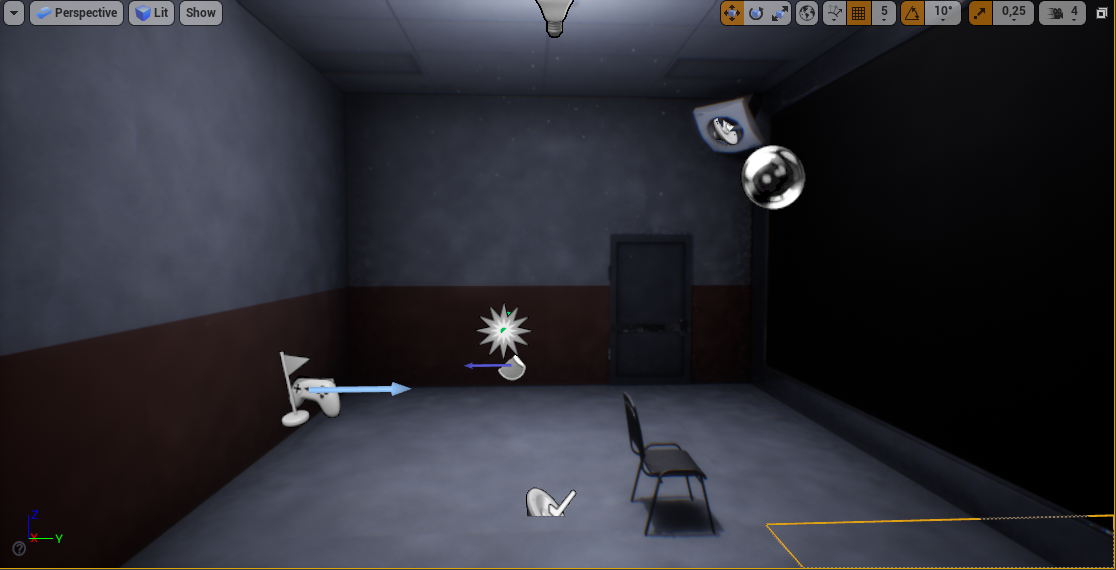
Hey everyone! I ran into this light issue after booting up my game today and noticing that my point light was gone. I am not sure if I deleted it before I saved yesterday, or if it's a bug. But now, when I re-added the pointlight. My scene now looks like this after building. https://i.imgur.com/5J90kKx.png
The shadows on the walls look really bumpy. I have overridden the light map resolution on the walls, floor and ceiling to be 512
All lights (only one) are set to static
 rich oar
If you were do animate FPS arms for walking, sprinting, etc.. and applied camera shake. Would this cause some screwy stuff since the FPS arms are usually a child of the camera component?
plush yew
blissful trail
so i tried make a stamina/sprint system and it does work but
is there a more eff...
How about you set it so that sprinitng calls the stamina event instead?
Better than a tick right?
rich oar
Heres my camera shake
So what happens if I animate the arms when sprinting and continue to apply camera shake 🤔
I hear that some developers render the weapon with another camera. Is this true lol? Anyone here messed with something like that before ?
plush yew
I have problem
I using unreal engine 2 days
can someone help me
there are shooting sounds in the menu how do i fix it?
pine pewter
void kraken
Anyone knows the solution to the issue
For few minutes, the engine works fine
ho...
I get this bug a lot, just restart
what game are you making
ok
what kind of models do you want to make
the most "popular" models are usually shitty gun assets or low poly anything that dont have textures
you could try making things related to metal I guess
 sturdy smelt
rich oar
Heres my camera shake
sturdy smelt
rich oar
Heres my camera shake
i never saw a Quixel Marble Map wrapped around a Weapon, haha , There are more than 1 Method, Pannini Projection is it called in Unreal Engine what u want when im right
sturdy smelt
anyone knows Why when i Using an Socket from my SK Mesh, that the Transform of the Mesh is rotated and moved af away?
 fierce tulip
you kinda need to understand the whole pbr workflow, its not just one image, its a specific set of textures combined.
plush yew
this may be a easy question to answer but i like to have a understanding before going into things so i was wondering whats the different if i create a widget in player pawn and in the game mode? all i got from it was for some reason i can use the remove all widgets and it disapears when put in the game mode but when in the characters bp it doesnt, im just trying to understand how that works exactly even tho its probably a very simple answer
 stuck linden
i really dont wanna do this
 fierce tulip
blueprints do not use images.
again, read up on the ue4 pbr workflow, and get trough some ue4 getting started tutorials. (pinned in this channel)
plush yew
plush yew
there are shooting sounds in the menu how do i fix it?
can someone help me
void kraken
pine pewter
I get this bug a lot, just restart
That’s annoying
 jade surge
plush yew
can someone help me
jade surge
plush yew
can someone help me
You need to pause the game when the player is in the menu, alternatively just disable input while player is in the menu with the set input mode UI only node
stuck linden
stuck linden
i really dont wanna do this
any alternatives to this?
jade surge
@void kraken @pine pewter
This is an NVIDIA bug I believe. I had the same problem on 2 of my pc's. And yes restarting the engine everytime is gonna get played out really fast... (Both methods worked for me)
Option 1: Revert to a previously working driver will fix this problem
Option 2 disable Nvidia MultiPlane Overlay (MPO) will fix this problem. You can disable it here https://nvidia.custhelp.com/app/answers/detail/a_id/5157/~/after-updating-to-nvidia-game-ready-driver-461.09-or-newer%2C-some-desktop-apps
jade surge
stuck linden
i really dont wanna do this
There is an on hovered event isn't there? So you don't need that
jade surge
plush yew
this may be a easy question to answer but i like to have a understanding before ...
It works in character Blueprints too

 frigid bear
Hey guys! I need some big help
fierce tulip
ask away
frigid bear
I'm making a game and have almost completed but theres one thing left to do which seems like an impossible taslk for me
making a boss
pine pewter
jade surge
<@!119298253765214212> <@!796202065444995115>
This is an NVIDIA bug I believe. ...
Nvidia should just stop being ass
frigid bear
im willing to sit for hours on this but i dont kow where to start
pine pewter
When I tried to update my graphics driver it fucking POWERED OFF my pc in the middle of several projects
Thank you for the advice though
It doesnt happen to me for several hours at a time now thankfully
jade surge
frigid bear
making a boss
are you going to ask the question?
frigid bear
jade surge
are you going to ask the question?
yes i need help making a boss
pine pewter
is the boss just a simple enemy ai with a lot of health?
or does it have special features
frigid bear
pine pewter
or does it have special features
it should shoot
pine pewter
ok shoot what
frigid bear
pine pewter
ok shoot what
homing grenades
pine pewter
from where
frigid bear
it has a gun in his hands
fierce tulip
make a detailed list of what it needs to do, how it needs to do it, what it needs to look like, the area it needs to be in, how it moves around, and tackle one thing at a time.
pine pewter
Yeah, describing it single detail at a time is bad for getting help
frigid bear
aight will try!
pine pewter
I would instead go about it like
"Hey can someone help me build a boss character thats similar to the demo man from tf2 but has homing grenades?"
something like this is easy, recognizable and conveys what you would like to achieve in a single sentence
frigid bear
pine pewter
"Hey can someone help me build a boss character thats similar to the demo man fr...
hahaha!
frigid bear
pine pewter
something like this is easy, recognizable and conveys what you would like to ach...
it is very nice thanks
pine pewter
You laugh but that is exactly the best way to get help
Relate what you're making to similar ideas
frigid bear
he shoul also melee me if i get close
fierce tulip
though, we rather have people attempt it and ask if they are stuck, instead of us collectively build something for someone.
frigid bear
pine pewter
So Monitsu I'd advise looking over basic enemy ai tutorials
i have meade countless ais
pine pewter
that doing projectile prediction for enemies requires quaternions or whatever
frigid bear
pine pewter
that doing projectile prediction for enemies requires quaternions or whatever
there is a homing? option in projectile
frigid bear
yeha in its settings
pine pewter
I thought you meant the boss would prediction fire grenades in an attempt to hit the player
like leading shots with bullet drop
frigid bear
pine pewter
Oh my bad
theres a problem though none of my friends know or even hear of unreal
frigid bear
pine pewter
I thought you meant the boss would prediction fire grenades in an attempt to hit...
the projectile itself is homing
pine pewter
I like it because of its visual scripting
frigid bear
pine pewter
I like it because of its visual scripting
so do i
its easier

well of i am in the hunt for people to help me
thanks btw
jade surge
I'm still waiting on the question
pine pewter
Yeah he didnt ask anything
frigid bear
jade surge
I'm still waiting on the question
oh i asked "Hey can someone help me build a boss character thats similar to the demo man from tf2 but has homing grenades?"
jade surge
you mean help like actually open the project and help you design and build it?
frigid bear
jade surge
you mean help like actually open the project and help you design and build it?

yes
i mean not like babysit me through it
just like its so long and stuff i have tried making a homing missile and i died
jade surge
@frigid bear so you don't know how to make grenades?
pine pewter
I'm guessing
im trying to gauge how hard it is to build a resident evil style inventory system
 frigid bear
jade surge
<@!581885592607129624> so you don't know how to make grenades?
frigid bear
jade surge
<@!581885592607129624> so you don't know how to make grenades?
I know how to make grenade just not homing ones that come out of an ai
pine pewter
wouldnt you just add it that the ai spawns them or something when it tries to attack the player at a distance?
get player distance if further than so and so spawn homing grenade
forgive me if its not how unreal works im just wondering basic logic wise
frigid bear
pine pewter
wouldnt you just add it that the ai spawns them or something when it tries to at...
In theory yes... But homing it was very confusing
pine pewter
I have a feeling its like "get player x and y and follow" or something similar
frigid bear
pine pewter
forgive me if its not how unreal works im just wondering basic logic wise
youre right
frigid bear
pine pewter
I have a feeling its like "get player x and y and follow" or something similar
no not like that you can just specify who to home it to
jade surge
Idk what you mean by homing tbh
frigid bear
jade surge
Idk what you mean by homing tbh
follow the player
pine pewter
tracking I guess

Hey everyone! In this video we're going to create beginner AI in Unreal Engine 4 using blueprints. We'll be creating three types of beginner AI. The charger enemy, turret enemy and the patrol + turret enemy.
I hope you enjoy this video! If you do make sure to subscribe and consider supporting me on Patreon. By supporting me on Patreon you'll re...
These ais have shooting and shoot projectiles
jade surge
The grenade should track the player like a lock on missle?
frigid bear
jade surge
The grenade should track the player like a lock on missle?
oh i found one tutorial prolly will try it
 past stag
What would be the optimal landscape size for 2km*2km map? I mean should I make it from multiple tiles and what tile size?
 regal jasper
guys how to fix this

 night burrow
Is there a thing in UE that fixes material tiling and aspect ratio of textures globally? So materials don't stretch according to mesh dimensions?
 exotic thicket
you could probably try using world coordinates instead of UV coordinates for your textures
not 100% sure if it'll immediately work as you want, but that would be a start
 warm violet
How to fix UE4 crash
 thick herald
night burrow
Is there a thing in UE that fixes material tiling and aspect ratio of textures g...
thick herald
night burrow
Is there a thing in UE that fixes material tiling and aspect ratio of textures g...
Use a texcord node plugged into a multiplies A pin and plug a scalar parameter into the B pin, plug the output of that into the UV pin of the texture[s] change the value of the scalar to suit your purposes. If you make an instance copy of the material, and open that instance, you can change the value while in the viewport so can see the changes live.
 wary wave
is there a way to debug-draw a navmesh whilst you're playing in editor?
i.e. without needing to eject, just have it drawn whilst playing
regal jasper
guys how to fix this
 wary wave
installing debugging symbols so you actually get an error message would be a start
 runic fern
Hello Guys What is the Best Way to get Shadow on Mobile ?
im trying to use Modulatedshadow working just with directional light ..
can i cast shadow from static light ?
light thunder
The moment I hit play, these shadows disappear - AFAIK all lights are stationary

 hexed cove
anyone have any exp with google play asset in unreal engine ?
I want my asset to be delivered on install time. I am enabling google play assets in project settings and packaging the obb outside the base apk. So I have a base folder in my abb and another folder obb asset in which I have addition obb file and I am able to put my abb on google play. My question is. I though that abb dont use obb right? So why It is still packging inside onn
*obb
 stoic ridge
Does the oculus quest works for making animations in unreal engine?
 west merlin
One of those things that makes you feel really dumb for not knowing why, but why would this change per level?
 plush yew
How do I make it easier for my character to fall? My character does not fall out until the capsule is completely out of contact. But I want to make it more realistic, only one foot contact cutoff will make it fall off. So what's controls that?
past stag
past stag
What would be the optimal landscape size for 2km*2km map? I mean should I make i...
anyone?
 idle needle
Hi everyone, is there a way to add this type of images to actors placed in the scene, with our on images? Thanks
 plush yew
light thunder
The moment I hit play, these shadows disappear - AFAIK all lights are stationary
plush yew
light thunder
The moment I hit play, these shadows disappear - AFAIK all lights are stationary
Set one of them to movable, and try it again. Also check the light's option like cast shadows unchecked maybe?
plush yew
past stag
What would be the optimal landscape size for 2km*2km map? I mean should I make i...

as I know, 2017x2017 means 2km
nova portal
How can I call an event on a blueprint from another?
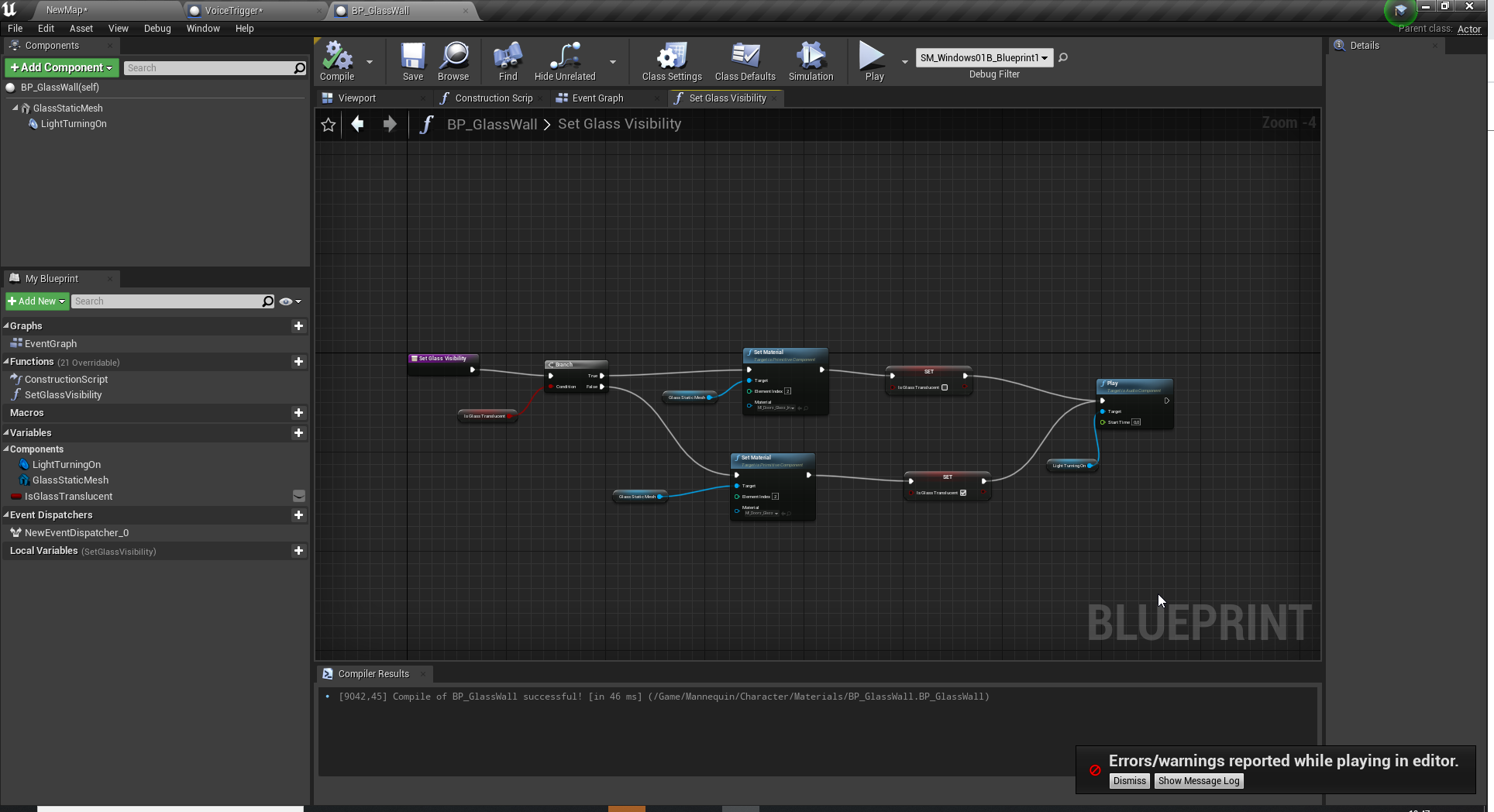
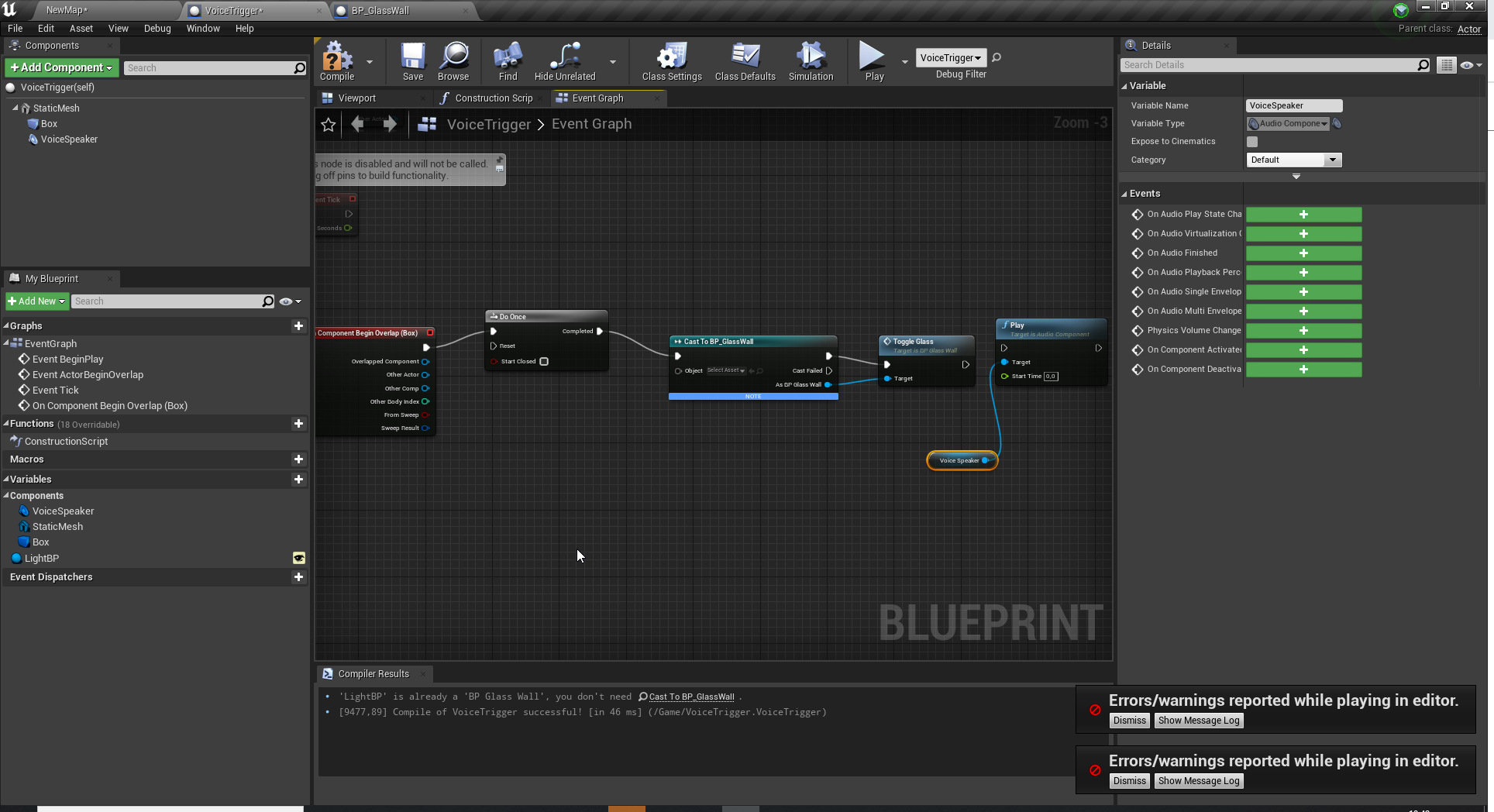
I've got two blueprints. One that is an intercom (VoiceTrigger) and one that is a glass wall (BP_GlassWall). When the player enters the VoiceTrigger trigger, I want the Custom Event (Toggle Glass) to run. The custom event is in the blueprint BP_GlassWall.
https://i.imgur.com/3e9uWaS.png
https://i.imgur.com/1rpyDw9.png
I figured I needed to cast the event from BP_Glasswall, but I don't know what to put in the object slot.
 tawdry oasis
Is there a way to use click to move without needing a nav mesh volume?
past stag
plush yew
yeah, but I mean like should I split it to smaller sections like 4 500x500 landscapes?
or is there some other way to make it not render the whole thing as it seems like it has some lag spikes
past stag
past stag
yeah, but I mean like should I split it to smaller sections like 4 500x500 lands...
using world compositing
 native tulip
something funny for the game jam would be someone takes "running out of space" too seriously and actually makes a game about running as in moving out of space
 acoustic stone
nova portal
How can I call an event on a blueprint from another?
I've got two blueprints. O...
acoustic stone
nova portal
How can I call an event on a blueprint from another?
I've got two blueprints. O...
hello my friend. i think you may need to/can use level blueprint or event dispatcher for this.
 fierce pine
How about MegaJam? Are Marketplace items allowed?
regal jasper
can you help me

 sterile lichen
regal jasper
can you help me
sterile lichen
regal jasper
can you help me
 regal jasper
ah ok thanks
 past stag
anyone know how to get swarm to work with another machine? I have one pc that I would like to use to build the lighting and the other one just for managing it
I have set up swarm coordinator and both pc's show up in there, but if I hit build lighting from ue4 then it just builds it locally
they both are in same agent group and its allowed and also local execution is disabled for the host pc
but it still builds the lighting using it

 plush yew
I'm using orthographic camera and for some reason objects disappear after going too far away from the center. Why does it happen?
past stag
past stag
but it still builds the lighting using it
okay I got it to work
 coral lotus
hello, is the best way to get a single frame from the sequence editor? or going through 'high res screenshot' route?
 simple ember
hey guys, I need help with 1 really bad thing. i just built the lightning and the texture streaming but somehow one of the textures turned to be yellow, any fix?

thank you for help
this was wooden chair texture

 latent sonnet
I'm in 4.25 and I'm trying to test out packaging for android but it keeps sending me to a webpage with a 404 error
 mighty belfry
Is this course still available? It doesn't give me access to these courses
https://learn.unrealengine.com/course/3750189
 desert verge
why can't i search for anything on the UE marketplace
the client has been slow for the past week
not sure if its just me
actually there's an update
doing that now
 deep lion
does anyone know how I get rid of UE crash log popping up everytime I restart my computer?
nova portal
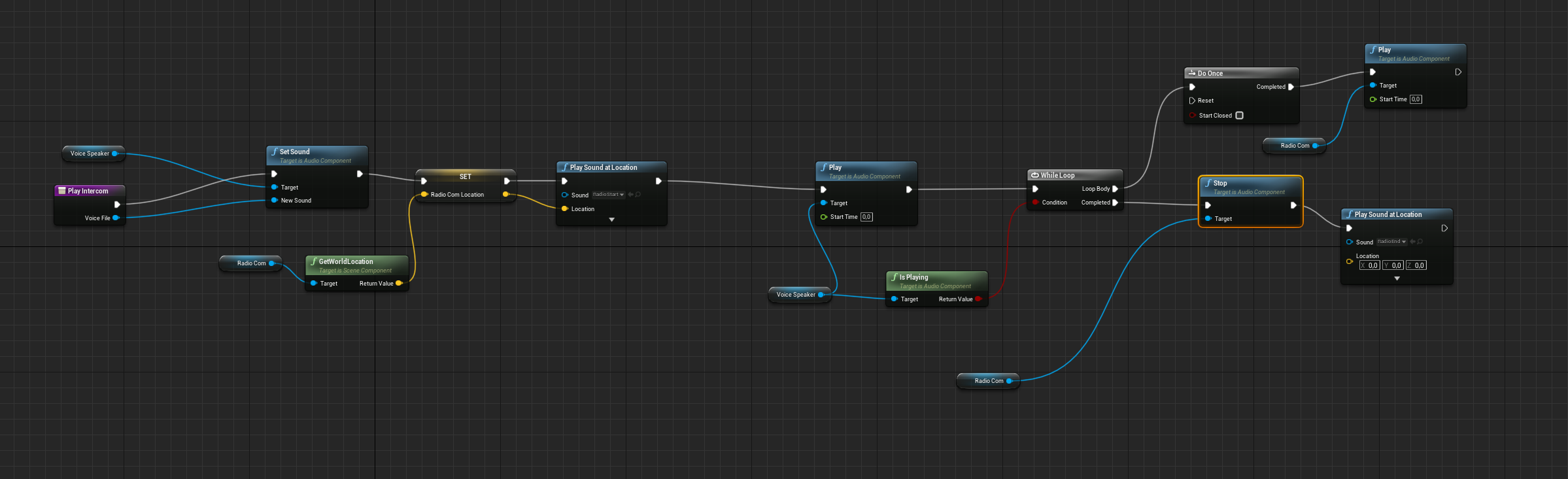
Okay. I am completely lost here: I've got this function: https://i.imgur.com/rYMKZo9.png
Basically, it's an intercom system. I input a voiceline in VoiceSpeaker, and the function does this: Plays a clicksounds (RadioStart), While the VoiceSpeaker sound is playing, play a loop of radio noise (RadioCom), when VoiceSpeaker is finished, stop RadioCom and play click sound (RadioEnd)
This function gives me an infinite loop and won't work! What am I doing wrong 😦
 plush yew
nova portal
Okay. I am completely lost here: I've got this function: https://i.imgur.com/rYM...
plush yew
nova portal
Okay. I am completely lost here: I've got this function: https://i.imgur.com/rYM...
Have you thought of creating a looping radio noise sound cue instead of using a while loop?
Personally I would avoid using the logical loop, and instead start/stop a looping sound asset.
nova portal
plush yew
Have you thought of creating a looping radio noise sound cue instead of using a ...
I already have a looping radio noise sound que, but I want it to stop when VoiceSpeaker is finished
That's why I had the while node, but I guess I am using it wrong
plush yew
I guess what I'm getting at is why do you have a while loop to begin with...
Maybe not the most helpful, but it's causing you problems.
nova portal
Ah
How can I else stop playing all sound at the end of the VoiceSpeaker sound?
Is there a condition node I can use
plush yew
I'm speculating here, but I would guess some type of event could trigger when a sound is finished playing
And you could do whatever you want with it
plush yew
Yeah that's what this server is for, I'm learning too 🙂
@nova portal I've been looking for an audio event that fires when a sound is finished playing
I haven't found something like that built-in yet
nova portal
Hm. Yeah, i'll keep searching! Thanks for the help anyways! 🙂
 tiny sonnet
This is a weird problem I'm having that when the client attacks the enemy, the attack is recognized (Check1) but only SOMETIMES does the zombie itself take damage (Check2), everything is set to reliable as well. any thoughts
https://gyazo.com/a3ef1e6bad3812589c7ae6ce4ec4d608
why tf is the gyazo not loading smh
fierce tulip
need the extension added, like .gif, png, jpg etc
tiny sonnet
fierce tulip
need the extension added, like .gif, png, jpg etc
are you talking to me?
fierce tulip
yup
tiny sonnet
hmm
i never had to add anything before, just copied the url
do u by any chance know a solution to my actual problem tho
fierce tulip
i just do materials and vfx mainly. so i cant help you there.
tiny sonnet
oh
plush yew
why do i get these errors?
 autumn flame
Cause you're over the texture streaming pool 👌
tiny sonnet
an error that I ignore 👍
autumn flame
You can make textures shared or increase the pool to fix that so they don't look blurry
Or close material editors 👀
It's just an annoyance
tiny sonnet
or just ignore it
plush yew

 prime willow
@drowsy snow if i wanted to start making my own animations for my unreal models
where and how do i start ;-;
tiny sonnet
fierce tulip
i just do materials and vfx mainly. so i cant help you there.
i fixed it btw, apparently u cant call a server event from a cast which is so unbelievably stupid, i had to make a custom event within the bp i was using, and the original event and nothing else and use that
 drowsy snow
prime willow
<@!325627930484932608> if i wanted to start making my own animations for my unre...
drowsy snow
prime willow
<@!325627930484932608> if i wanted to start making my own animations for my unre...
Female Manny, if it's a biped character.
prime willow
biped?
i mean like if i wanted to make animations using my own character models in engine
how would i start via blender
also i noticed alot of assets have really smoothe animations
where the animation plays as normal but there's a bunch of in between animations that make it translate like butter
from walk to run to jog and back in any way
they call them start end and turn animations whats the term i need to learn how to set up some of those o-o
nova portal
nova portal
Okay. I am completely lost here: I've got this function: https://i.imgur.com/rYM...
I managed to find On Audio Finished event. I set up the blueprints much simpler now like this
https://i.imgur.com/IDRLYHf.png
https://i.imgur.com/OHL5TVB.png
https://i.imgur.com/EONZq6M.png
Now I got a new problem where RadioCom won't stop looping/playing when event On Audio Finished fires.
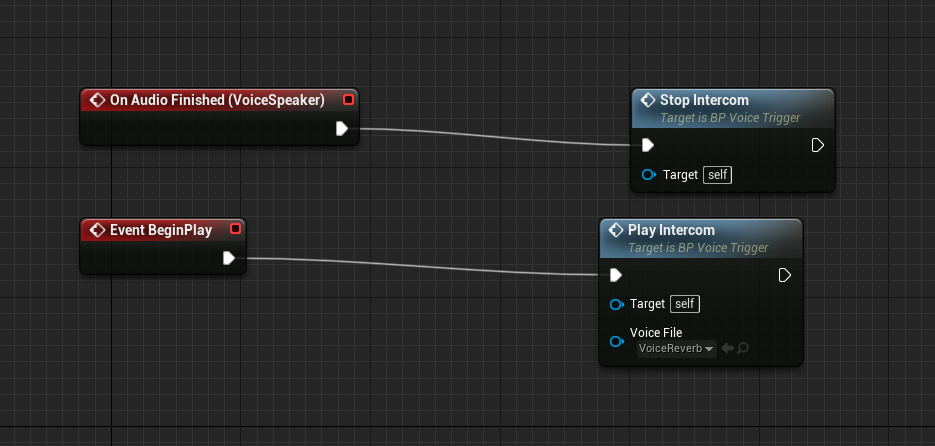
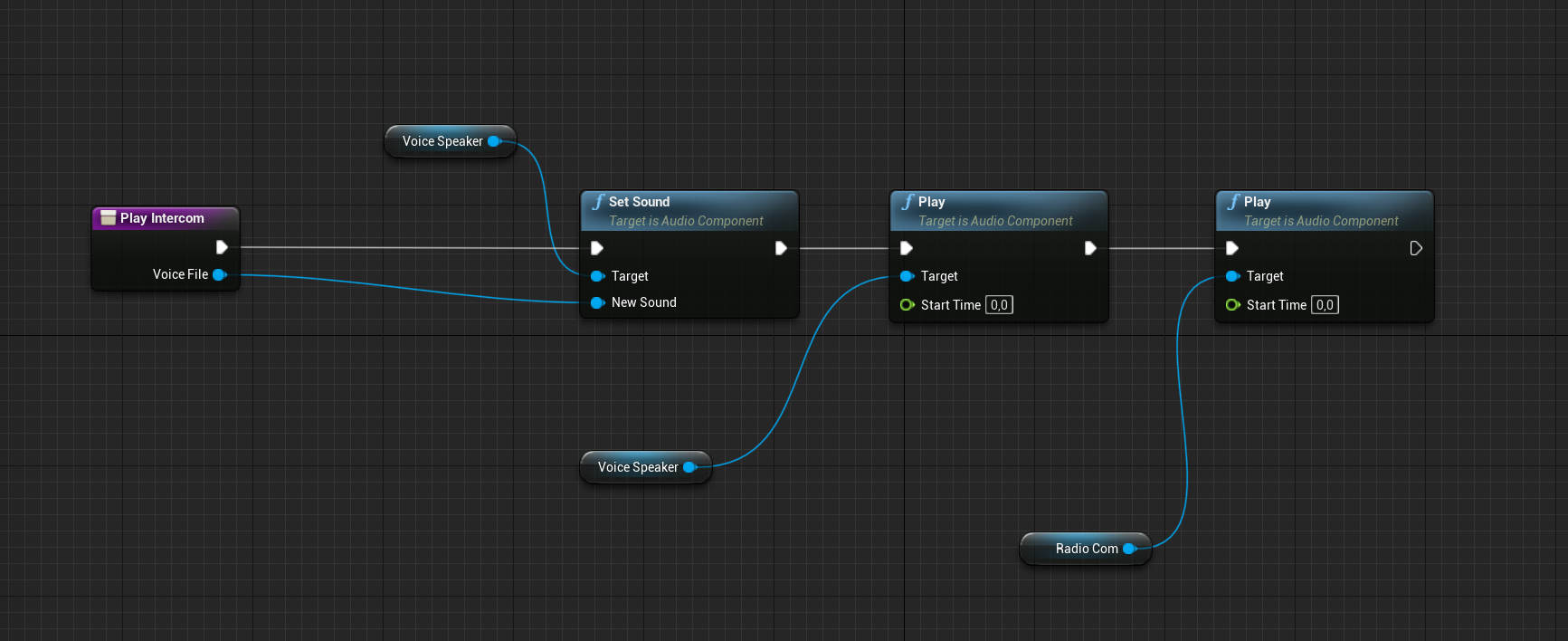
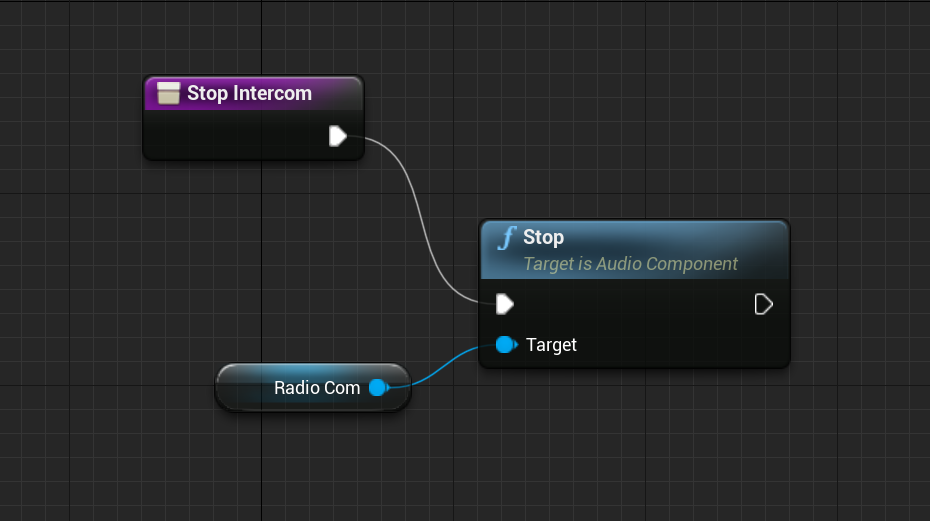 light thunder
@drowsy snow I'm trying to record the editor window in the game capture from nvidia like you advised - how do I hide the editor stuff? I've tried for the new window but the game capture doesn't target it - I get the entire desktop since the resolution of the editor window is smaller than the monitor I am using
how do I make the PIE window maximized when it starts?
 stray ruin
there is a hide viewport UI button somewhere
also you can change PIE window size in editor preferences
@light thunder
light thunder
ugh this is killing me
 cold bridge
hello o/ I just put down a river and the shoreline is very edgy, I'm not sure how to fix that. what's the right documentation I should head to for help?

these are all the default settings for the falloff settings
light thunder
stray ruin
also you can change PIE window size in editor preferences
How do I get rid of this windows title bar though?
light thunder
What a STUPID game capture thing to not allow you to hide the game capture recording -
 stray ruin
pretty sure you can turn that notification off
sullen willow
hi everyone, i`v set up a root motion system, but for some reasion when i walk B, L, or R the character palys the animation but it wont move, and whenever i go F i do play animation and walk correctly
sullen willow
help
 hollow hamlet
is this a good software to start making games on
waxen grotto
Looking for someone to make FPS or even open world game with. Uk 13-14. Unreal engine. Dm if interested
cold bridge
can anyone please help me out with this, idk what's causing it, which setting should I look at?

also this.. what's causing it?
 light thunder
it's probably some form of resolution
@cold bridge
I would literally google "unreal engine landscape resolution jagged edges"
cold bridge
it's just a river and a lake out of the box
light thunder
I would literally google "unreal engine landscape resolution jagged edges"
cold bridge
I literally googled that.. no results that help. it finds stuff about issues with other things... that's why I asked it here.
 tranquil terrace
hollow hamlet
is this a good software to start making games on
tranquil terrace
hollow hamlet
is this a good software to start making games on
i don't think so
light thunder
it's your landscape material I thin
I've seen something similar @cold bridge standby
cold bridge
ok, thanks
hollow hamlet
tranquil terrace
i don't think so
what should i start on
tranquil terrace
i think godot is very user friendly for beginners
light thunder
cold bridge
ok, thanks
play with making a new landscape
 tranquil terrace
but there are a lot of different takes on that question
cold bridge
light thunder
play with making a new landscape
oh dam... ok, thanks, I'll give it a try
hollow hamlet
i just want a good program to try out, im 15 and i wanna get into it
light thunder
hollow hamlet
i just want a good program to try out, im 15 and i wanna get into it
Take a course on Udemy, one of the "make your first game ones"
lyric cedar

anyone know a good way to temporarily hide messages like these without having to fix the problem?
light thunder
execute consolecommand -DisableAllScreenMessages
light thunder
lyric cedar

 prime willow
@light thunder if i wanted to make a change to a large amount of animatons at once
like changing their additive setting to local space could i do that
or do i have to hand sort between 100 singular animations?
nvm
figured it out
dang
unreal is too cool ._.
light thunder
prime willow
<@!273265779175194624> if i wanted to make a change to a large amount of animato...
did you mean bulk property edit?
prime willow
yup
didnt know unreal had this
probably the coolest thing ive seen in a while on this engine
i wish it existed for certain systems xD
 dawn gull
Is there something that has like, a reverse append? Idk how to put it any other way but it splits the string in half
 grim ore
split?
dawn gull
grim ore
split?
will that just split it in half? if so thats what im looking for
grim ore
not in half, it splits at a specific string. You could use left or right tho or substring
dawn gull
ah, ok. I'll watch your video on it
light thunder
I've tried messing with focus but this stuff still seems blurry and I don't think it's the textures

here's the editor view -
 prime willow
im trying to setup additive poses for walk starting leaning and ending but i need to make it so my controller knows when im pressing said controller direction
should i just use th same speed and directional variables for my locomotion movement for my walk's locomotion start additive poses
 dawn gull
Can I split a string into an array of strings with each string being a character from the original?
grim ore
so something like Get Character Array from String?
light thunder
Can anyone see my screenshots above and please help - i've tried apeture settings to 32 and no change - i'm sooooo close to having this stupid thing done
cloud stone
Mathew Wadstein! 😮
 terse sapphire
Hello (I posted this question in VR but that doesn't seem to be too active - hope it's okay to post here)
I am prototyping a game that would have the player (in VR) attached to a box that is moving along a spline. I have simply started with the VR template and create a box that moves along a spline, but I can't figure out how to attach the player to the box.
 viral garden
Why can i get this close to the wall on this side

But only this close on this side of the wall ?

The collision is the same width as the wall's
 fresh arrow
@viral garden is your shadow colliding?
noble solstice
finding a lot of tutorials that are like "build your first game" and then the whole video is level design then they plop in a 3rd person template and go LOOK ITS GAME. Why is it so hard to just find proper resources to learn 😭
grim ore
not searching well enough for what you want to learn?
fresh arrow
@noble solstice udemy has good courses if you're willing to pay
Or you can parse from youtube
grim ore
always start with the free epic content, no reason to pay until you run out of th basics
noble solstice
fresh arrow
<@113933494392061957> udemy has good courses if you're willing to pay
unfortunately udemy only has sales for "new buyers" despite not ever stating this fact, and since ive bought blender and other courses, if i wanted a UE4 course id have to actually shell out the $100+ on it
light thunder
noble solstice
unfortunately udemy only has sales for "new buyers" despite not ever stating thi...
they have sales ALL the time
it's like once a week at least
noble solstice
grim ore
always start with the free epic content, no reason to pay until you run out of t...
i find the free epic content to be more like "heres how the interface works" and less how to actually accomplish making a game, unless im looking in the wrong places
grim ore
well what part for making a game is missing?
noble solstice
light thunder
they have sales ALL the time
after you buy enough all the sales disappear

ive chekced daily
noble solstice
grim ore
well what part for making a game is missing?
like the actual coding/blue print, for people who arent as familiar
grim ore
for any specific feature? or do you want a couple hundred hour complete course for duplicating a game?
light thunder
noble solstice
after you buy enough all the sales disappear
try to come back to it - another thing you can do is check the website from your region but logged out - if there are sales then, then you have a strong case for emailing them
noble solstice
grim ore
for any specific feature? or do you want a couple hundred hour complete course...
either or, can learn a lot through recreating a game
grim ore
well I mean you have courses on animation, UMG, level design, and such
noble solstice
light thunder
try to come back to it - another thing you can do is check the website from your...
thats what i mean by all the sales are "new buyers" if i log ouut, these will all be like 90% off
grim ore
so.... there are courses on those features
but no, there are no "heres how to make a complet game from A to Z in a hundred hours" courses like on Udemy
games are just pieces put together
light thunder
noble solstice
thats what i mean by all the sales are "new buyers" if i log ouut, these will al...
well, you're going to have a hard time learning the shit if you let things like 'rules' stop you - make another account or something then
grim ore
just make a new account if your not getting any deals and you want to buy more udemy stuff
noble solstice
light thunder
try to come back to it - another thing you can do is check the website from your...
yeah see, different browser and now suddnely theyre on sale.
 grim ore
you should never pay "full price" for undemy, those are just prices to make you think your getting a good deal
terse sapphire
I love UDemy. I just wait until I get there SALE email and buy from there.
light thunder
noble solstice
yeah see, different browser and now suddnely theyre on sale.
then just make a new account lol
noble solstice
grim ore
you should never pay "full price" for undemy, those are just prices to make you ...
i know that, thats why i hate undemy lol. its false discounts, which im pretty sure is illegal
light thunder
you are only there for the knowledge, not the certificate
bro that's marketing 101 EVERY business does it
noble solstice
light thunder
bro that's marketing 101 EVERY business does it
bethesda did it with i think fallout and got sued lol
anyway this kinda got off topic so ill stop ranting now
light thunder
How do I solve the problem? I need a camera actor to render a shot/sequence but it looks blurry - even in the simuation mode, you can see the camera just goes blurry, which tells me this is a world setting or something global
grim ore
its serious question tho, what is missing from epic's free content that you think should be there.
noble solstice
grim ore
its serious question tho, what is missing from epic's free content that you thi...
like i said, how to use coding and or blue prints to accomplish certain things, and why those things work. knowing level design, animations and all that is great, but if i dont know how to do anything with it, then whats the point
light thunder
noble solstice
like i said, how to use coding and or blue prints to accomplish certain things, ...
there's a course that's just on blueprints in general
the blueprint communication video on youtube will have you learn more in 2 hours than you would on your own in weeks,
grim ore
so certain things is NOT helpful tho
there are intro courses on the engine and how it works, there are multiple courses on learning and using blueprints
noble solstice
light thunder
the blueprint communication video on youtube will have you learn more in 2 hours...
ill take al ook
terse sapphire
@noble solstice I liked this course on UDemy: https://www.udemy.com/share/104Mj23@tHMlWUbR-M5WxNUiEgNRUCmXdhgMWWz_TdR-G_5AQHvo7ck8TKwFlnWKyJbfY470GQ==/

Udemy
Become a game developer in 6 hours by creating an entire puzzle platformer in UE5 without a single line of code!
grim ore
"I wish they had a course on how to make a game completely from scratch, say blank project to a basic endless runner" is good feedback
"I wish they had more on how to learn stuff"....
noble solstice
grim ore
"I wish they had more on how to learn stuff"....
when i said "certain things", "blank project to a basic endless runner" is more or less what i meant, i was just trying to generalize. im not saying theres hould be 1 video on how to do everything
grim ore
@light thunderthats weird it looks like a very shallow DOF, the brick texture in the back doesnt seem to blur or barely blurs. but its weird since if it was a post process volume that was on it should affect the editor viewport
well there is a ue4 video on blank to basic endless runner...
and its even in C++
noble solstice
grim ore
well there is a ue4 video on blank to basic endless runner...
the 6 year old one?
grim ore
yep but its still content 😛
noble solstice
i had my doubt on how relevant a video from that long ago would be
grim ore
I think the biggest issue is people really dont want to have longer courses
and by people I mean the people using the online learning stuff from epic. they want focused learning
noble solstice
terse sapphire
<@!113933494392061957> I liked this course on UDemy: https://www.udemy.com/shar...
ill give that al ook
grim ore
like my intro to ue4 basic -> basic FPS course is over 5 hours long... and its barely a prototype without a ton of depth
breaking that down like epic is doing into disciplines ends up with higher viewership and happier customers
 sullen forge
There was an old livestream that epic did on data driven character movement is there any way to still get the source for that project or is that now just gone.
https://epicgames.ent.box.com/s/x4rk68esx2oannw1gk52ouvxl0rxsexl
The box is now empty
 ripe zenith
Hi, I have like a thousand textures, everything is named correctly, how can I automatically create material instance for all of theses textures (with normal maps, roughness, basecolor and all that stuff) ?
light thunder
grim ore
<@!273265779175194624>thats weird it looks like a very shallow DOF, the brick te...
Might have something there -
 light thunder
ripe zenith
Hi, I have like a thousand textures, everything is named correctly, how can I au...
light thunder
ripe zenith
Hi, I have like a thousand textures, everything is named correctly, how can I au...
you can select them all and there are asset options, it might like you create a material instance for each one
 digital anchor
ripe zenith
Hi, I have like a thousand textures, everything is named correctly, how can I au...
digital anchor
ripe zenith
Hi, I have like a thousand textures, everything is named correctly, how can I au...
create a master material that has parameters plugged in, use a scripted action to iterate them, use the asset tools to create instance assets, then just cast to material instance constant, and set the parameters to your textures
ripe zenith
light thunder
you can select them all and there are asset options, it might like you create a ...
What are these asset options ?
ripe zenith
digital anchor
create a master material that has parameters plugged in, use a scripted action t...
I have the master material, but I dont understand how to automatically create instances, is there a sample project somewhere, or a tutorial ? Could you show me a screenshot ?
 crisp summit
Hello, I am new guy trying out Epic. Any advise you guys can offer?
light thunder
grim ore
<@!273265779175194624>thats weird it looks like a very shallow DOF, the brick te...
Weird - I'm using the Unreal Plugin Path follow, which is basically a spline tool with some built in QoL features, like visulalized speed/rotation points - I've used them to make some orbit cams and other tracks for this trailer I'm making - but I noticed if I take the camera OFF that spline tool path, the depth of field problem goes away - but I can't for the life of me find any option on the tool itself - does having DoF get triggered if something is in front of the camera? I'm wondering if his visualizations he has in the editor are bugging this camera out
light thunder
crisp summit
Hello, I am new guy trying out Epic. Any advise you guys can offer?
take a course on udemy, watch some of the older livestreams (blueprint comms is a good one) download some of the epic starter content examples that shows you how things are done
plush yew
I have a cool idea
crisp summit
light thunder
take a course on udemy, watch some of the older livestreams (blueprint comms is ...
what course in udemy?
digital anchor
ripe zenith
I have the master material, but I dont understand how to automatically create in...

something like that
that is inside of an asset action utility blueprint
light thunder
crisp summit
what course in udemy?
any one of the courses that is ranked high, and you want blueprint or C++, depending on if you code or don't
look for courses that are updated regularly but even if they aren't, it is still fine - you want to take a course to get an idea of how everything is done
crisp summit
ok thanks so much
light thunder
crisp summit
ok thanks so much
Also get a good screen shot utility and get good at asking specific questions - the more vague it is, the less likely it will be answered
crisp summit
ok thanks
light thunder
grim ore
<@!273265779175194624>thats weird it looks like a very shallow DOF, the brick te...
When I turn post processing scalability to HIGH (from epic) the problem goes away - but I have no post process volumes in the level...ideas?
ripe zenith
digital anchor
Thanks a lot ! 🙂
 thick chasm
Hey, anyone know how to scale down a particle bp? (This thing is way too big for a bullet trail)
 ripe zenith
digital anchor
ripe zenith
digital anchor
It works ! 😄
light thunder
thick chasm
Hey, anyone know how to scale down a particle bp? (This thing is way too big for...
check lifetime, initial size, size by life
 regal mulch
light thunder
When I turn post processing scalability to HIGH (from epic) the problem goes awa...
regal mulch
light thunder
When I turn post processing scalability to HIGH (from epic) the problem goes awa...
Isn't there always default post processing?
Some project wide settings? I know e.g. that engine has things like eye adaption on by default or so
thick chasm
light thunder
check lifetime, initial size, size by life
Oh cheers man, haven't tried that, I'll give it a go 😁
light thunder
regal mulch
Isn't there always default post processing?
apparantely there is a big difference between focal distance of 1 and focal distance of zero - that seemed to fix it
But you are right, when I simulate it goes a bit blurry
 mystic robin
Is there any online subsystem for mobile ?.
 pure marsh
Hey how’s it going everyone. Just started learning Unreal. Looking forward to meeting new people 🤘
 nocturne warren
Is there any good tutorial for creating water material ?
pure marsh
nocturne warren
Is there any good tutorial for creating water material ?
May be one on unreal learning? Not 100% though
 static crystal
Hello! I have a projectile movement component going fast. (2000) The problem is it doesn't always register onHit events. Does anybody have an idea what that can be?
plush yew
static crystal
Hello! I have a projectile movement component going fast. (2000) The problem is ...
Hypothesis: It is moving so fast, there isn't always a frame where the projectile is overlapping the collider.
Which if true, might mean you could try tracing or "shooting a ray" from the projectile in the direction of its velocity to see if it will likely hit something by extrapolating its position by a couple frames.

 pure sandal
I have this code that my player follows my mouse and I want to add controller thumbstick instead of using a mouse

 oblique drift
why does my procedural mesh look the way it loos?

the texturing works in unlit mode

is there maybe a problem with the procedural mesh component and lumen?
oblique drift
i can get it to work realy badly using a skylight at max intesity and exponential height fog...

ok i converted my procedural mesh component into a static mesh and the lighting for it is still bugged, although it works for other objects...
 past mountain
anyone know how to share content with multiple projects
i've seen some people do it with plugins
but i don't know
 burnt ether
Can I somehow change the Axis for the Planar snappings ? my level is straight top down
viral garden
fresh arrow
<@191491822839791616> is your shadow colliding?
I don't know, how do I check that?
 bronze badge
Anyone know where to find the UGC plugin for UE?
opal plover
it is possible to export morphs target from unreal engine, when I try to export the fbx I loose all morphs
static crystal
Another question. I have a blaster gun with enabled physics. Now when I hit play the object floats above the table. When I touch it it starts rolling over. It looks like it has a sphere as a collision mesh. Is there a way to add a custom collision mesh or how would I do this?
 wise trail
Make the collision a box
Usually if it rolls like that collisions set to capsule if im not mistaken?
Check your skeletal mesh pretty sure thats where you change it. Its been a minute since ive done it myself.
wise trail
1 moment
Let me see if I can find it myself
Oh forgot I deleted my source code for ue5 to update it so I gotta rebuild my project bare with me
oblique drift
how can i flip the normals of my procedural mesh in the procedural mesh component?
wise trail
@static crystal https://i.imgur.com/PMax2b6.png
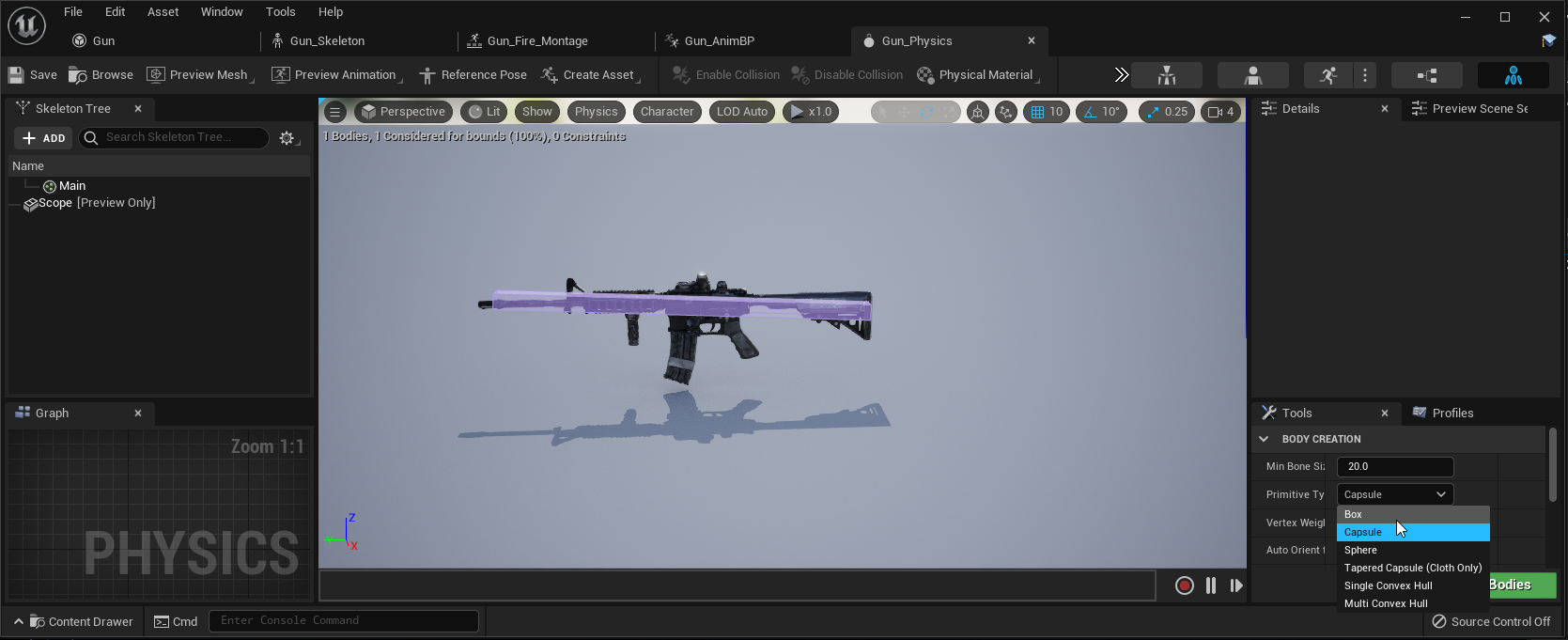
You can modify how large the box affecting your weapon is.
So if its set to capsule and its rolling it could be its just a really big area thats effected by it making it smaller could change that. This was my physics asset for my weapon btw.
static crystal
Alright thanks! going to try to find that!
wise trail
If not I can make a video
But shouldnt be too hard.
@oblique drift like this? https://www.youtube.com/watch?v=Fq8faoIvDWA
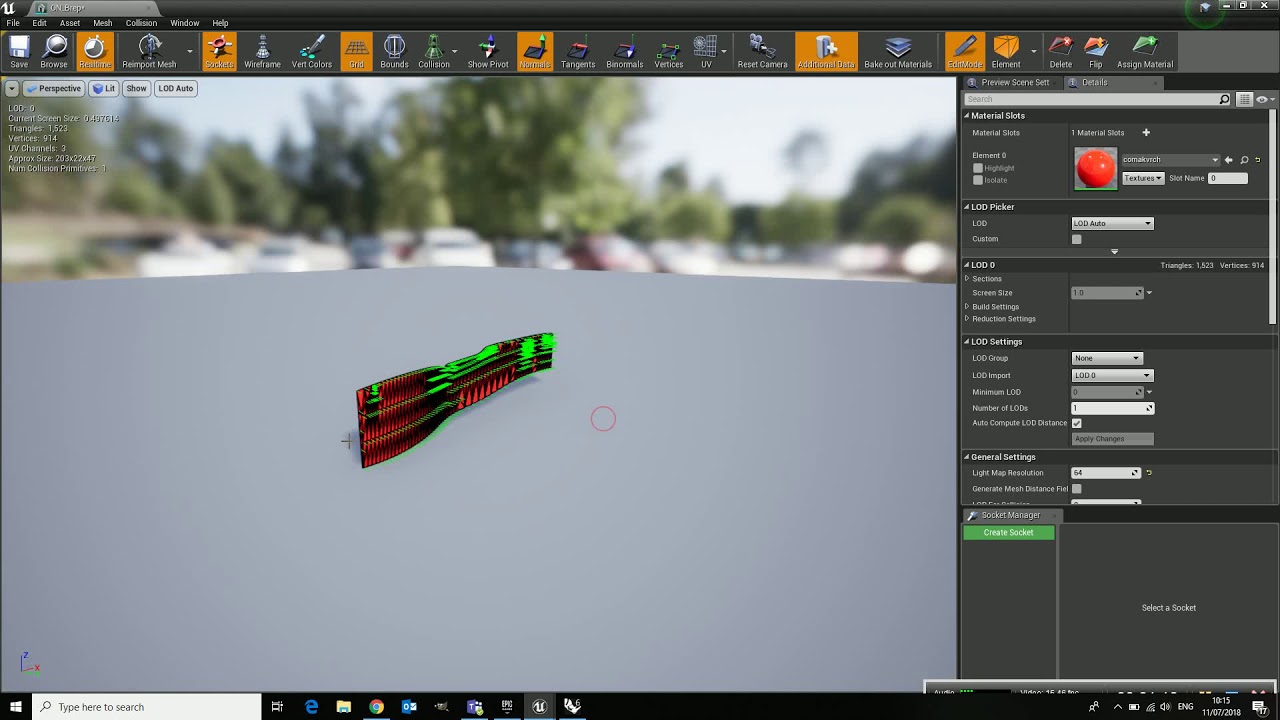
Short explenation on how normals can be flipped manually inside Unreal Engine
static crystal
@wise trail Not needed. I fixed it by changing it to a box like you said! Thanks a lot, it's working now.
wise trail
Awesome enjoy!
oblique drift
wise trail
<@!478138774107193344> like this? https://www.youtube.com/watch?v=Fq8faoIvDWA
yes thx i already fixed it
 frank pumice
why is my actor not getting destroyed after hit

 deft pumice
can anyone help with this pls my editor keeps crashign constantly because of it but I cant tell what the problem is
 tight prawn
frank pumice
why is my actor not getting destroyed after hit
tight prawn
frank pumice
why is my actor not getting destroyed after hit
because you're calling Destroy() at the end of the function
 light goblet
Has anyone experienced consistent crashes relating to source control operations hanging the GPU driver? I've been getting this consistently on my laptop (Dell Inspiron 7400) for the last couple days.
Fatal error: [File:D:/Build/++UE4/Sync/Engine/Source/Runtime/Windows/D3D11RHI/Private/D3D11Util.cpp] [Line: 198] Unreal Engine is exiting due to D3D device being lost. (Error: 0x0 - 'S_OK')
It's almost always on "Updating file(s) source control status" - setting the TDR delay to 10 seconds in regedit just causes the system to hang for 10 seconds, and then the crash happens anyway
This is really really bad ngl - I can only work with source control disabled, which isn't the biggest deal considering I'm a one-man show, but still
frank pumice
tight prawn
because you're calling `Destroy()` at the end of the function
where should I call it
 vagrant hornet
i have a splat map and textures how do i add that to a terrain?
 stark gyro
Why is it I have my character on the ground here but when I play its in the air?

 fluid swift
 deft pumice
anyone know how to copy and paste foliage from one map into another different map ?
fierce tulip
@deft pumice could you post error/crash logs trough pastebin next time please? thank you
nocturne warren
Is it possible to control two characters with one keyboard ? My second character is stuck, not even falling to ground.
I am trying to make it work for two days.
 young fern
Hey guys
Does anyone have the kite demo?
Because i want the sm_fieldGrass_01 model and material
Without downloading the whole thing
oblique drift
how can i get 2d perlin noise in Blueprints?
 solemn sleet
hello guys
gonna give a screenshot example of my problem which is probably very basic
this is the way i want to render when previewing

this is what i get and i can rotate around in 3d when in it

i don't understand how to set a fixed planar its been most of my morning 🙂
plush yew
How should I draw the 2D orbit in UE4? It's radius needs to be something that can be changed in runtime.
solemn sleet
an indication on how i could learn about my problem would be ok too
i can't seem to find anything relevant on google
i choose and empty project with a tile map an actor and a camera attached to the actor
nocturne warren
nocturne warren
Is it possible to control two characters with one keyboard ? My second character...
Can someone help me with this ?
thick herald
Does your second character has separate inputs set up, in the project settings -> input or in it's BP?
nocturne warren
thick herald
Does your second character has separate inputs set up, in the project settings -...
I tried both methods but none worked.
thick herald
maybe something to do with player index thing. I've not messed with multiplayer stuff so can't say for sure. Try asking in #multiplayer
nocturne warren
thick herald
maybe something to do with player index thing. I've not messed with multiplayer ...
Ok, Thanks.
thick herald
solemn sleet
i don't understand how to set a fixed planar its been most of my morning 🙂
Try asking in #graphics 🙂
 paper garnet
any way to make this into repeatedly continue instead of 1 big one, i know you can do it with placing alot of smaller ones next to eachother but is it possible without having to do that?

like this without having to make many small ones
 fierce tulip
paper garnet
any way to make this into repeatedly continue instead of 1 big one, i know you c...
fierce tulip
paper garnet
any way to make this into repeatedly continue instead of 1 big one, i know you c...
world position uv's, or some math that changes tiling depending on size of mesh, or just a texture coordinate node multiplied with a variable thats controlled in a material instance.
https://docs.unrealengine.com/4.26/en-US/RenderingAndGraphics/Materials/ExpressionReference/
paper garnet
ok figured it out
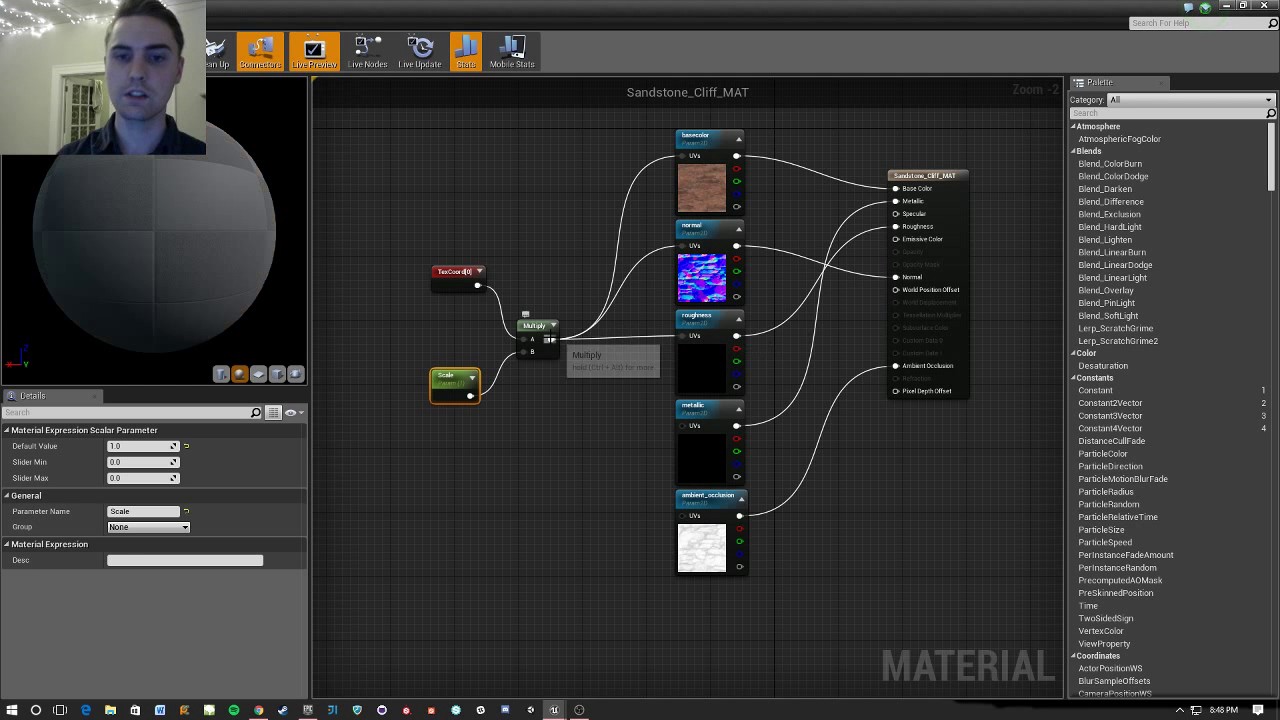
A quick dive into scaling materials' UVs so they fit better for your static mesh needs!
If you have a good idea for a Quick! How To video or have a question about UE4 let me know in the comments. If I can answer it quickly I'll try to make a video response!
paper garnet
fierce tulip
world position uv's, or some math that changes tiling depending on size of mesh,...
https://streamable.com/h42lv9 Why does this happen when i have that door in my world
 fierce tulip
not sure why you are tagging me, and that video is so random i cant see what the problem is
fierce tulip
no clue
paper garnet
and do u know how to make this 2 peices instead of one?
 oblique drift
how can i get 2d perlin noise in Blueprints?
thick herald

In this episode, we take a look at Procedural Noise - or Perlin Noise. We cover what it is, where it came from, and then talk about a method for making it fast enough to be used in a real-time project. Then we just into the Ureal Material Editor and take a look at the basics of using the noise node.
Next week we'll use the noise node to creat...
oblique drift
thick herald
https://youtu.be/QIlxWkfZK-8
thx but i need it in the blueprint editor not in the material editor
 fierce summit
What would be the best way to implement first custom first person movement like vaulting, sliding, wallruns etc? Would you go with the default character movement component, create your own? something else? I'd like it to be multiplayer friendly as i want to implement multi down the road
I've started trying to tinker with the default and changing the maxwalkspeed constantly but it looks like its going to be very complex. should i continue or take another path?
 sly surge
Hello hop some one can help me a bit as u can see i'm having a problem and don't know how to fix ...
The Audio Work's but then i get that error
can someone help
Oh and i'm using BP Struct to hold the audio
thanks you
 jade surge
sly surge
Hello hop some one can help me a bit as u can see i'm having a problem and don't...
jade surge
sly surge
Hello hop some one can help me a bit as u can see i'm having a problem and don't...
The problem is that the first time the function fires, the fadeout node hasn't been created yet... so it returns none as it doesn't exist yet. A simple fix is to check if the return value on the sound your spawning is valid first. If it is valid then it should fade out
 rigid belfry
can i launch project i downloaded from the marketplace with a an unsupported version of the engine? the one i am looking at only supports up to 4.26 but i am trying to launch it using ue5 
 tough perch
What value you use r.Streaming.MaxTempMemoryAllowed? default was 50 for me but Temp texture streaming buffer not large enough, needed 8388608 bytes. My r.Streaming.PoolSize is 4000
grave pollen
anyone familiar with te magic circle creator that was free last month? It shows up in my viewport but not in game..

viewport looks fine, game is nothing lol
rigid belfry
grave pollen
maybe the effect is below the ground
grave pollen
ya thats wat i figured but it wasnt
light thunder
What's the trick to making this not occlude as it comes closer - I need to have it take up the whole screen, but even if I scale it, it will be culled as it comes closer? any ideas?
light thunder
grave pollen
ya thats wat i figured but it wasnt
check scalability settings - also check the world outliner and try using simulation mode too - make sure the item exists still
thick herald
project settings, near clipping distance? Maybe?
or something in the camera settings itself
vagrant hornet

how do i use splat maps on my terrain
to determine where textures go?
i got this?
 thick herald
This is something you could have easily found out for yourself by using a search engine like google. https://youtu.be/Ia42xDVfGuc?t=833
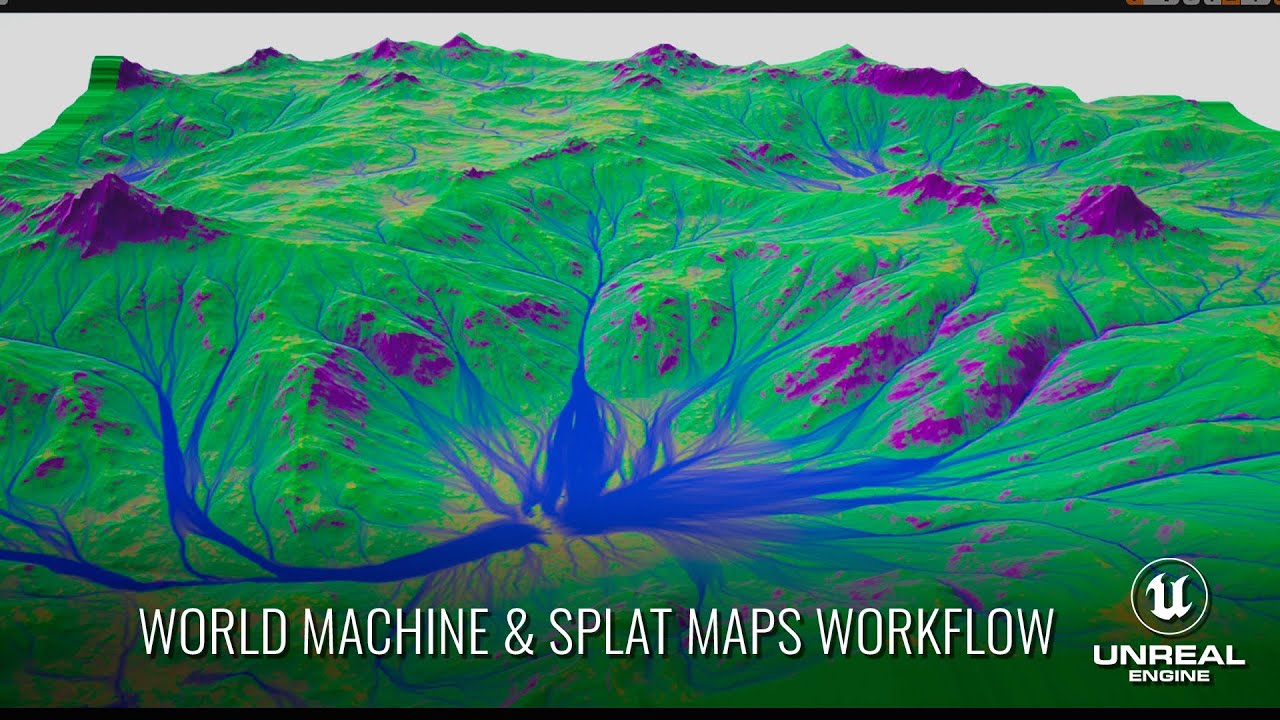
If you use an external DCC app to create your content and splat maps and want to use them in UE4 for your terrain, then this video's for you. We'll step through the process of exporting data from World Machine, how to create terrain in UE4, and how to associate your masks to your terrain layers directly in editor.
00:00 - Intro
00:27 - World Ma...
tight prawn
why can't I find fracture mode in UE4.27 even though chaos is enabled as plugin ?
ivory spire
There is a typo in this ue5 description
 terse sapphire
light thunder
take a course on udemy, watch some of the older livestreams (blueprint comms is ...
terse sapphire
light thunder
take a course on udemy, watch some of the older livestreams (blueprint comms is ...
Wow - just finished that Blueprint Communication video you recommended. Fantastic piece for new folks like myself to watch. Made a lot of things make more sense. Thanks for the recommendation.
 gilded igloo
Hey guys, is there anyway to reverse the flow of a grid panel to right-to-left? that way in the example above itll be DCBA and not ABCD?
 thick herald
Move the text boxes or rename the contents?
gilded igloo
well yea I can but thats not the point... i want it to be left-to-right when I add items too
gilded igloo
oh right, thanks!
light thunder
terse sapphire
Wow - just finished that Blueprint Communication video you recommended. Fantas...
No worries - its the one video I wish someone had tied me down and forced me to watch - god knows how many weeks/months I bumbled around in the beginning trying to get stuff done - I still check back from time to time
digital anchor
<@&213101288538374145> @plush yew is randomly messaging people
 gaunt abyss
DM me
gaunt abyss
😅
 grave aspen
thick herald
grave aspen
thick herald
Fools. You all know Manny is the king of DMs
sharp crest
I have these 8 parts of a cube anyone wants to try combine them into one mesh??? lol
 plush yew
ok so
someone please guide me okay
i want to have a ton of animated stuff on the map at one, grass, trees, water, volumetric fogs etc, what should i search to learn how to set that up without lots of fps drops
is it just optimizations?
 arctic hare
use the unreal engine foliage for the grass and maybe the trees. Volumetric fog wont be a issue with fps unless there is a whole lot of them. For water that idk about that not educated much on that.
plush yew
o.o
when i painted with the foliage on my map willy nilly
it could incredible frame drops
coarse apex
hey, I have the control rig mannequin from the market place and a character with the same sleketon and I want to switch the control rig to that, the problem is the character is a blueprint so how would I add trhe control rig to that?
thick herald
plush yew
when i painted with the foliage on my map willy nilly
cull distance is the thing to look into.
 sharp crest
 wide valve
Breh
wide valve
Breh
looks cool
ui doesnt seem to fit the game tho
sharp crest
prime willow
why do I feel like Ik this guy
wide valve
sharp crest
looks cool
ui doesnt seem to fit the game tho
Correct i am working on it, i am just focussing on gameplay and main functions before i work sorrowly on the UI
sharp crest
👍
light thunder
what setting did I do - I can't see any level geometry and it's like this on every map
 arctic hare
just wait i know your issue
 arctic hare
damn I forgot the fix for you, sorry man wish I can remember what I did
 light thunder
arctic hare
damn I forgot the fix for you, sorry man wish I can remember what I did
light thunder
arctic hare
damn I forgot the fix for you, sorry man wish I can remember what I did
it was near clipping
never set it to zero
 zinc shore
how do i do hitboxes for my character like ive seen that there are some for the ragdoll but when ive searched up creating hitboxes for a fps i see people making hitboxes by adding collision shapes to the character actor and parenting them to the mesh like can i not use the ragdolls collision boxes or something
 humble bay
Sup peeps? Here's what I'm trying to access :

The "Mod Panel", that is
And here's what my launcher looks like

Anyone know how to acces the modding tab?
wary wave
it's long, long gone
has been for years
mod SDKs are at the bottom of your game library or something equally stupid now, IIRC
thick herald
Easiest way is to go to the store tab, in the discover area, type into the search box roborecall, and you'll get to it. :0
humble bay
Thanks yall
coral lotus
Hey, does anyone know why my exports are so overexposed..? This is my viewport...

 pine rock
how do i make these icons like the blueprints bigger in my scene preview?
 coral lotus
Hey, does anyone know why my exports are so overexposed..? This is my viewport.....
coral lotus
coral lotus
Hey, does anyone know why my exports are so overexposed..? This is my viewport.....
and this is my export

 pseudo pulsar
That's okay, I appreciate the help none-the-less! I honestly think it might just be a bug, or maybe a setting I've changed accidentally without realizing.
 round quiver
I have a blueprint for my player character
and I want to add a cloud to his feet
some sort of particle system
what's the best way to go about doing that
 rancid lagoon
does anyone know how i can make a chase system. i.e. police chasing me after running a red light or hitting a car?
 peak quail
Hi. I am reading https://docs.unrealengine.com/4.26/en-US/ProgrammingAndScripting/Blueprints/UserGuide/FlowControl/
and multiple times it refers to 'execution pulses' without defining what they mean. I'm trying to learn how the blueprint system is implemented underneath to inspire a toy visual language, but I think this will be hard to figure out from the source alone.
May I have clarity on the execution model? How do the wires actually work? Is there some sorting going on to figure out how to order the nodes and pass around data?

Nodes that allow for controlling the flow of execution based on conditions.
thick herald
If you look at nodes for example this one, the white input and output pins are called execution pins, the flow of blueprints goes from one to another.
 peak quail
Okay, that makes sense. At an implementation level, though, what does that mean?
I'm not sure if I should be sorting nodes topologically by wire, or is there some sort of scheduler for blueprints
are blueprints copied for each actor
or are they run multiple times per an actor they're attached to
I guess I'm trying to understand at a deeper level there when compared with other VPLs like whatever things like Scratch and Little Big Planet (for example) do.
Looking at something like this

The white arrows are execution contraints
the others are data flow
so how might I model this internally, and is this per actor or is it some global thing?
I guess the big unknown for me is how one would create a blueprint that is run on multiple actors that are queried.
because then each node would need to have its own parallel execution state or something
for the control flow wires, I guess I'd have a jump instruction
Oh I program in C++
Maybe the question is unclear
it's more about how the graphs are modeled
Is it like a
"each actor instance owns a copy of the graph" (that would be kind of expensive)
or does the graph operate globally and can run on multiple actors that fit some query
(all actors that have an "Armor Component")
but let's say a node has some internal state like "this variable changed by x since last frame"
and I want to run this graph across multiple entities
the internal state of the node might depend on each entity's execution
so that means you need N copies of the graph...
thick herald
each actor will have it's own, yes.
wary wave
there's an instance of each class, the graph itself is compiled into bytecode
one base instance as a template, and then every object is in itself an instance of that template
all the nodes, all of that stuff, is long gone when you're running it
peak quail
but the state within the graph, bytecode or not, is duplicated?
wary wave
the nodes don't exist, there is no 'state'
peak quail
Then how do you do an if branch based on, idk:
if (actor.x changed by 5) {
    // cause many side-effects based on specific actor
}
I'm really absolutely lost as to the question at this point
peak quail
ok let me try to be more specific
I am stuck on this problem:
I have a game query system
each entity has tag properties (Is type of X, is happy, is blue)
I need to run a graph selectively based on results of queries
e.g.
for each entity E that matches (IsA(ghost), blue(), likes(fire)) {
    run execution graph on E
}
This is probably not super Unreal-like at all.
But I'm trying to grasp how one might implement something like this
basically running something procedurally based on a query
these properties change at runtime
wary wave
you probably wouldn't implement something like this in Blueprint
it's like hammering a square peg into a round hole
peak quail
hmmm
wary wave
why not implement the core in C++?
peak quail
Well for this system I need to generate these operations procedurally
part of it has to be a graph or scratch-like block
or some sort of VPL-like primitive sequence
So I'm trying to figure out the separation there
wary wave
honestly it sounds like you want to implement some kind of database system and work outwards from there
but your questions are so esoteric, I doubt you'll get any answers here
peak quail
Oh, well, sorry.
For what it's worth, I have the outer loop for properties
I just wasn't sure how to feed them into a graph if the graph only applies to one entity
actor
It IS confusing
And actually I'm not using unreal. I just thought maybe Unreal blueprints might shed some light on how I might write a vpl
I have a prototype but it's hitting these issues in expressivity
I'm not sure why it's confusing.
I was kind of asking about how one might write a vpl to support runtime queries on entities
but I guess it's inappropriate for a discord about using unreal
oh well
 round igloo
I just, wanted to share this and idk where to share this, but, this is a place, and...

"Fine, i'll do it myself"
Try my C++ Survival Game Course:
http://bit.ly/unrealsurvival
Get the project files (note I have replaced all copyrighted content with royalty free versions)
https://www.patreon.com/posts/53203531
Discord:
https://discord.gg/meFRZfm
 grave spruce
 urban river
Hello, I am currently trying to change information on one widget from a different widget, specifically I am trying to change a text box. Does anybody know how I would go about this
rancid lagoon
urban river
Hello, I am currently trying to change information on one widget from a differen...
wouldnt you just edit the widget? Im confused as to what you are asking.
 wet schooner
why is doing collisions so horrible 
Is there a way to select all collision parts or something
this is pain
light thunder
If you set global time diation, backend events, like unloading a level will continue to run, as long as the events that triggered them weren't time based or started unloading/loading BEFORE the time dilation was set to zero right?
 atomic plover
wet schooner
why is doing collisions so horrible <:harold:529144065380450314>
atomic plover
wet schooner
why is doing collisions so horrible <:harold:529144065380450314>
Define?
wet schooner
Well I got a lot of collision parts I have to select piece by piece instead of being able to select all somehow which is annoying
I wanted to move them all
and i did it was just slow
had to ctrl click them all lol
atomic plover
Oh boy 
Depending on where Exaclty you are inside the editor.
You can right click, and select every childs. Based on the parent.
wet schooner
hmm idk if I made them children I just duped them but it may have made them childs
thanks ill have to try that next time
atomic plover
I certainly hope, that works for Collison also :sip:
 surreal eagle
hey can i talk this through with someone
need to decide between vault and wall hanging
what controll should i have
wet schooner
what do you mean, like choosing one of them to implement, or telling the engine which one to do when near a ledge
surreal eagle
wet schooner
what do you mean, like choosing one of them to implement, or telling the engine ...
no i mean how should the player controll it
 spark turret
this is not a hire request or anything
but say someone had a game idea, and it bounced off an older movie franchise, but included inventive thinking and wide scopes of gameplay, including an unlimited to character actors who get paid, crypto or cash w/e
but was so epic he needed an entire team to help even plan it because he knows dick about prod and knife
and*
unlimited
coarse apex
hey, im making a snow level and I want their to be snow on my character during this cinematic of him picking up a weapon, how would I add realistic looking snow on him? I know I can use vertextnormaliws but its just a white layer that doesn't look very realistic. Any help would be awesome, thank you!
wet schooner
surreal eagle
no i mean how should the player controll it
So i'm assuming you have a ledge and you want the player to decide whether to hang or vault
I think one way of doing this is by holding the button, so if you press the button you will hang if possible, if you're holding it will vault
Alteast that seems like a natural way to do it but you could always just make hanging the default and vault when you press the button again
atomic plover
You good?
surreal eagle
wet schooner
So i'm assuming you have a ledge and you want the player to decide whether to ha...
hm,what about shift to vault over,press nothing to stay there
and if you ever press shift it throws you over
could work just gotta explain it tothe player
wet schooner
Shift is generally a run button, assuming yours is aswell then the way assasin's creed for example did it if you hold run it would have you run and automatically climb and vault things
But yeah explaining it to the player is going to be the hardest thing
urban river
rancid lagoon
wouldnt you just edit the widget? Im confused as to what you are asking.
I am trying to let the user edit it from the settings, like some pre set options.
 rich mango
yo, i just started coding in UE4, can i get some recommendations for tutorials?
atomic plover
rich mango
yo, i just started coding in UE4, can i get some recommendations for tutorials?
Asking myself the same questions, what I did find are those. Pretty good actually
What happens when you start up your Unreal Engine game? This video is a guided tour of the Engine's initialization process: along the way, we'll glimpse the high-level structure of the Engine (modules, game instances, local players, and viewports) and we'll see how all the different parts of the Game Framework (game modes, game states, player co...
It's not an either/or decision. Learn what makes C++ and Blueprints different, what they have in common, and how to use them together effectively. We'll also learn a thing or two about performance optimization and some basic software design concepts.
Read the article version: http://awforsythe.com/unreal/blueprints_vs_cpp/
00:00 - Introduction...
rich mango
do you have any videos on how to use blueprints? or does that second video dive into that @atomic plover
atomic plover
Oh, you said coding, I'm sorry.
No they don't
They're mainly about C++ and the use together with blueprints
rich mango
the real thing i want to learn is a little bit of everything so that i can put all my ideas quickly into a game without having to use my whole night looking things up
nocturne warren
How can I stop my character from spawning camera when created ?
atomic plover
rich mango
the real thing i want to learn is a little bit of everything so that i can put a...
Blueprints
atomic plover
atomic plover
Blueprints
For clarification, it an answer no question 
atomic plover
rich mango
any specific videos you'd recommend?
Not really 😕
thick chasm
Hey, is this nessecary? I feel like there is a simpler way.. please let me know if there is 🙂
 atomic plover
nocturne warren
How can I stop my character from spawning camera when created ?
atomic plover
nocturne warren
How can I stop my character from spawning camera when created ?
That's a very small inside information, depends on your code
atomic plover
thick chasm
Hey, is this nessecary? I feel like there is a simpler way.. please let me know ...
I would guess setting a state of your character
nocturne warren
atomic plover
That's a very small inside information, depends on your code <:stare_Lisa:662647...
I am spawning my character from blueprint. How can I stop it from spawning camera along with it ?
I already have a camera in my scene.
atomic plover
You can edit the character, simply remove the applied camera
nocturne warren
atomic plover
You can edit the character, simply remove the applied camera
Already removed it.
atomic plover
Well, it has to come from somewhere 
thick chasm
atomic plover
I would guess setting a state of your character
thanks Pavlov, I'll try find a way to do that
rich oar
Posted an update for my FPS controller I'm working on from scratch #work-in-progress
Check it out !
rich oar
Lmao 🤣
 void sierra
 lapis tulip
is it crash?
lapis tulip
is it crash?
yeah, the editor crashes and I have to restart. I checked all the constructors in my code, and I just call the standard CreateDefaultSubobject and SetUpAttachment functions in most of them, which are not pure virtual functions so I'm at a loss rn.
I would assume the issue lies within a constructor since the crash happens in the editor while not in play mode
The crash only happens in play mode whenever I switch levels during gameplay using OpenLevel
surreal eagle
i went big pp mode and figured out a bunch of stuff
 worn mountain
Hey everyone I have a 2D Sprite with Sockets that hold dynamic objects (Basically think of a torso and different limbs). I would like to have a black outline of the final Sprite and all of the Socket Sprites. What is the correct way to implement such a thing?
coarse apex
hey I have this code of a material I want but I don’t know how to import it can someone help or link a doc/vid? (Link to code: https://pastebin.com/95RztgF7) also please @ me if you can, thank you!
wary wave
ctrl+c, ctrl+v in the material editor window
cold bridge
does anyone know what setting I should look at that causes this weird water pattern outside of the lake?

 wide girder
round quiver
wide girder
round quiver

Yes there's one on Udemy for a 3D tank game @wide girder
Also I'm trying to stack blocks with physics on but they repel each other
I'm making a small fort fighting game
anyone know of a fix for this type of thing?
round quiver
hmm ok @rigid belfry
I tried it but it's still not quite what I want
I want them perfectly stacked but still moveable
if I add a little space it drops down and moves a bit
 fervent saffron
How to declare variable like this? I was following a tutorial and it got cut out.
 fervent saffron
How to declare variable like this? I was following a tutorial and it got cut out...
fervent saffron
fervent saffron
How to declare variable like this? I was following a tutorial and it got cut out...
NVM I think I got it.
 small basin
Input seems to be doing something weird. I've got a keyboard and a controller connected. My keyboard inputs work fine in the game, but my controller seems to be controlling the editor instead of the game. I can move this outline around buttons with the joystick instead of actually controlling the game like I would expect...

 arctic flame
small basin
Input seems to be doing something weird. I've got a keyboard and a controller co...
arctic flame
small basin
Input seems to be doing something weird. I've got a keyboard and a controller co...
click on the game window to move focus to the game
small basin
I've done that, but the gamepad still controls the editor instead of the game
Even playing as standalone game still has the gamepad control the editor instead of the new game window
night burrow
So I built a scene in 4.27 but I want to test it out in 5ea. How can I migrate the project and the scene to 5 since it's considered lower version?
fervent saffron
Try it. I think you can. Just save the original copy first.
atomic plover
Are the UE Docs editable for community? 
fierce tulip
would be nice if we could. alongside an unedited version.
plush yew
fervent saffron
How to declare variable like this? I was following a tutorial and it got cut out...
if you use | you can separate into sub category also
 stable needle
Hey, does anyone know how to deal with painted foliage that's stuck in the air for some reason? I want to delete just the floating instances, but I can't paint-erase them since the brush only snaps to surfaces. Do I actually have to place actors beneath them just so I can erase them?
 flint urchin
I'd like to move unreal engine onto a new ssd. Can I copy/paste the version folder, or will I need to reinstall from epic launcher?
 sharp bison
Help me guys - I'm new to unreal. I want to stop the player start from spawning a new pawn and want to possess an already existing pawn in the level. How do I do that?
paper garnet
anyone know a tutorial that shows how to make a seamless portal gun?
 signal zodiac
paper garnet
anyone know a tutorial that shows how to make a seamless portal gun?
signal zodiac
paper garnet
anyone know a tutorial that shows how to make a seamless portal gun?
pretty sure you might be able to watch someone do it in unity and sort of translate it to unreal
fierce tulip
paper garnet
anyone know a tutorial that shows how to make a seamless portal gun?
think some people recently released some tutorial videos about it on youtube. a simple "ue4 portal gun" tutorial or so should give you some results.

 gentle rampart





 hot cosmos
hey guys! how are you?
recently i am having some problems with RVT in ue4 and ue5
anyone had the RVT Volume not allowing you to set the bounds of the selected landscape?
lyric cedar
does anyone know why for some unreal assets I have to "create project" instead of being able to import them into an already existing project?
plush yew
Hey is there any plug-in in unreal to modify skeleton and skeletal mesh like scaling or moving bones
grim ore
@lyric cedarthe project was created that way is why, normally it might have something included that makes it a project such as input settings or some other things that makes it not just "stuff to add to a project"
lyric cedar
is it impossible to import a map from ue4 into ue5?
every time I migrate the map it imports everything into ue5 like assets but not the actual map itself
 manic dew
can any1 help me with this:
so whenever i try to use the arrows to move a certain mesh
the mesh doesnt move like as much as i want it to
but it moves a long distance

it basically moves it on the range of these chunks or grids
plush yew
guys i fell down and cant see my stuff anymore how do i get back to my objects?
 manic dew
use the wasd keys
fervent saffron
plush yew
guys i fell down and cant see my stuff anymore how do i get back to my objects?
press F
plush yew
i know but it doesnt seem to go back up there
fervent saffron
on some object
fervent saffron
I have just started UE5 as well.
manic dew
manic dew
so whenever i try to use the arrows to move a certain mesh
can any1 help me with this tho
plush yew
sorry bro idk
manic dew
ok np
fervent saffron
YW
 warm fossil
Does anybody know how to fix this error in unreal engine 4.26.2 ? The error message : DX12 is not supported on your system. Try running without the -dx12 or -d3d12 command line argument.