#ue4-general
1 messages · Page 1056 of 1
 narrow mauve
 dire coral
is there a tutorial or a asset for a realistic fire effect for ue5 (best if its free if its an asset)
 rough kraken
is "NotPlaceable" negatable in a derived class with "Placeable"?
 neon hatch
How is this fixed? Have watched 5 different Youtube "tutorials" on this and all end up doing this, I just want these "seamless" textures to stop tiling
 narrow mauve
Maybe they arent seamless lol
neon hatch
What's the point of calling it 'seamless' if it isn't? lol
narrow mauve
where did you get the texture from anywya
neon hatch
i am aware of that, but i'm not looking for megascans
narrow mauve
Well
Well even if you don't want a stock megascans texture you could make your own in megascans Quixel
I don't see why you wouldn't be able to get what you need that way unless I misunderstand
neon hatch
'just get megascans' is not an answer to my question
neon hatch
i just went to textures.com and typed 'medieval' and have been grabbing any standard flat textures that say 'seamless' in 512x512 or lower
 gray basalt
If many C++ classes needs the same BPs, is it ok to store this BP in a dataasset instead of setting the BP in every classes ?
neon hatch
https://www.textures.com/download/BrickJapanese0071/120035 this one in particular is the one i'm trying to use most recently
 plush yew
the material is invisibile
 narrow mauve
neon hatch
i just went to textures.com and typed 'medieval' and have been grabbing any stan...
narrow mauve
neon hatch
i just went to textures.com and typed 'medieval' and have been grabbing any stan...
Its not seamless they lied D:
There's a clear seam in it
Made the material and scaling it there is a clear seam :\
neon hatch
good thing i didn't pay for their shitty subscription service -_-
so basically if the texture is seamless, it will work with those settings and be tiled if not? oof
narrow mauve
It should work
What are you creating the material for? A wall? Walkway? Street? Other?
neon hatch
just a basic floor to start with. ideally 512x512 or lower and not reflective/shiney/etc just base material, no normals or roughness maps either just albedo ideally
narrow mauve
ah okay. Is the lack of normal/roughness to do with optimization or just a specific style you're lookikng for
 regal totem
hey i need really big help please
i can't even start my project loads up to 91 and then crashes

 sterile lichen
regal totem
i can't even start my project loads up to 91 and then crashes
sterile lichen
regal totem
i can't even start my project loads up to 91 and then crashes
download engine symbols in launcher
 ivory spire
is there a limit on procedural mesh actors or a point at which the engine just stops doing stuff because of lag ?
because wth


when building procedural terrain, coordinates grow really large really quickly and i dont know what to do about it..
regal totem
how about you make it so it only spawns around the player
like minecraft
and as the player goes away it despawns
ivory spire
I will in the future but for now i were just testing the limits and i reached them much faster than i expected
this is 1 min walk from 0,0,0
regal totem
have u made it so it only shows the faces that the player sees
ivory spire
yes
neon hatch
narrow mauve
ah okay. Is the lack of normal/roughness to do with optimization or just a speci...
kinda both, but mostly for 'retro' style
 alpine glade
@ivory spire
Are you using the Unreal Engine - Brushes to build geometry?
(often called BSP)
for this

Because that's the downside of using brushes, it's kind of slow compared to building geo in a 3D application and importing meshes.
The more I build geo with the UE4-Geometry tools, the more unstable and likely to crash it gets.
At least, that's how that was in 2014. Not sure if they changed it since then
 pulsar onyx
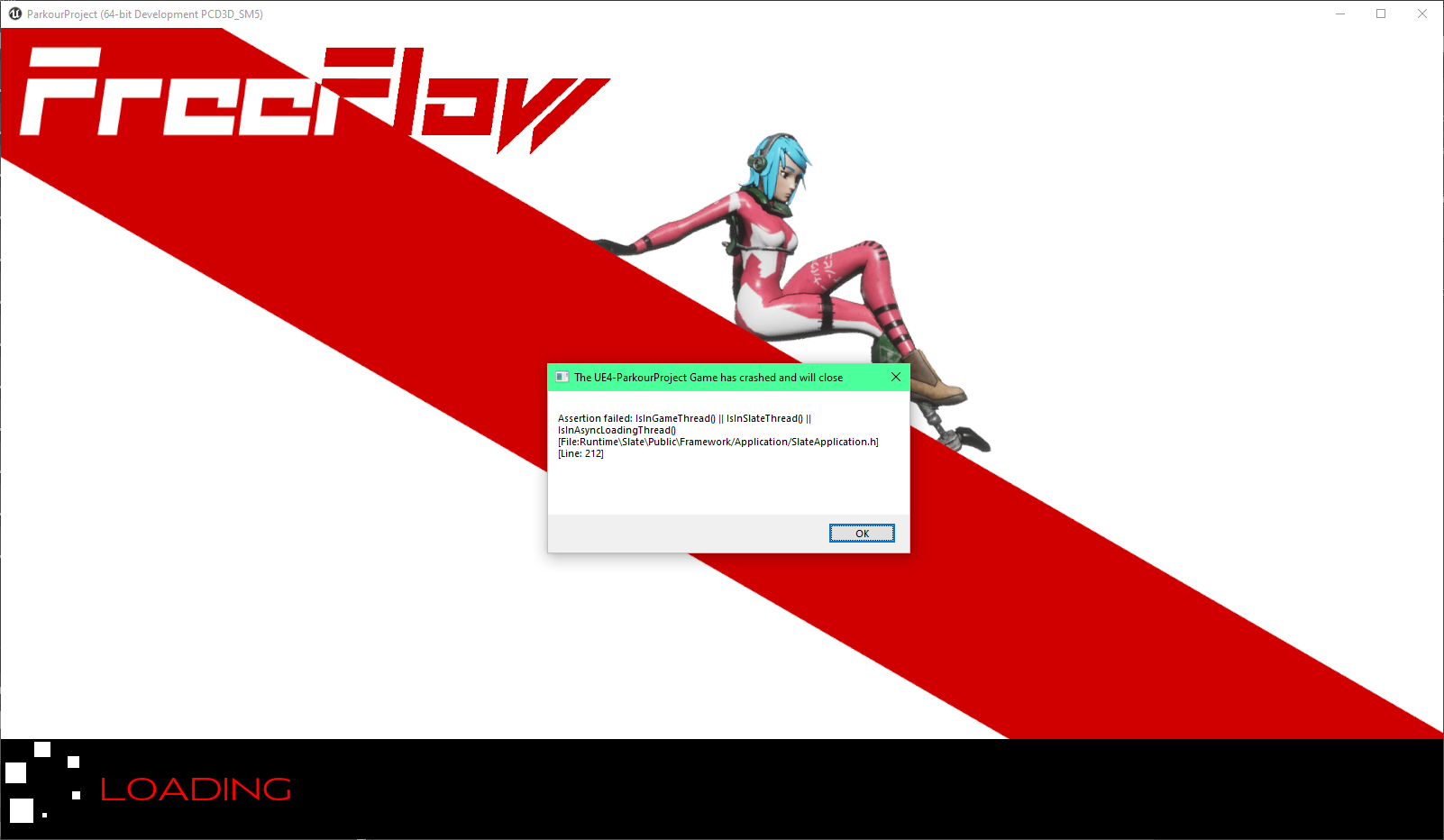
 hazy lake
alpine glade
At least, that's how that was in 2014. Not sure if they changed it since then
hazy lake
alpine glade
At least, that's how that was in 2014. Not sure if they changed it since then
Unreal BSPs code is pretty much untouched since Tim Sweeny originally programmed the system way back in the Unreal Tournament days
 fierce tulip
even earlier for unreal itself.
when we had non-solid, semi-solid, and solid bsp's
 distant totem
those options are still available in the advanced dropdown section of the bsp geo. I thought on a livestream they mentioned they intended to replace BSP with "something", and I think that was supposed to be the new modeling mode (keyword I think, don't quote me on that), but BSP is included in 5 still because it's just much easier and quicker to use
alpine glade
Considering that UE4 is more mature now.
Is it possible that Epic Games could use UE4 for less demanding hardware (similar to Unity Universal Rendering Pipeline) and use UE5 for high end PCs?
Or is Epic Games moving forward fully with UE5 and will drop UE4 at some point?
 coarse apex
anyone know why when I import a asset pack from one project to another all of the textures fail?
fierce tulip
need to migrate to the content folder. if you place it in another folder the linkage between files gets lost
fierce tulip
alpine glade
Considering that UE4 is more mature now.
Is it possible that Epic Games could us...
I'll bet that once you disable any of the new ue5 features and the users optimize their content well enough things should still run about as good as they would in ue4.
 light thunder
I'm trying to save wav files and I've realized that the times it is failing is probably due to the names I'm using to build the path - (also found LogAudio: Error: Wave serialize operation failed: failiure in SerializeWaveFile) -
is there some magic string tool I can use to just parse out / or - symbols from a string without making some crazy logic?
 rich oar
Got a problem.... trying to draw a debug capsule but the scene is putting a random camera in my level ???
 light thunder
just the outliner of that level BEFORE you hit begin play
rich oar
Not on the correct camera ??? lol

It prints out the correct location of the camera im using but its drawing the debug on a different camera that is generated automatically in the scene

 zinc shore
how can i have 2 actors that are overlapping like 2 players get pushed apart like in minecraft and apex legends if 2 players stand at the same location they get pushed apart but could still walk though each other
 void siren
Hello. I am new. I have a question. I am trying to edit a level that was already made. Is it possible to delete individual trees from this group? It's a HISMA, and when I select one it selects all of them. I really don't want to have to go in an replace all of them with individual meshes. Thank you.

 glossy dagger
Any one know how it is a common "thing" to distrust a game being built by 1 person, why is everyone trying to One-Up evertyone else with the learning curve and instead, people should get into traditional alterations. New ideas, Excellent, reinvented ideas based off of real world functionality, also excellent
Fromj what i've seen Title Updates seem to be the META and are acceptable as patches, best to do it before console releease, console patching costs a fee everytime
 muted imp
is there a way to have a character BP be a skeletal mesh
 prime willow
if i make an animation with a model who's skeleton is shared by 16 models
will all 16 models be able to share the animation in unreal
or would i need to retarget the models or some weirdness like that xD
 thin tendon
@prime willow If they all share the exact same skeleton with no differences then there isn't any need to retarget. They can just use it.
@muted imp Add a skeletal mesh component
@void siren Try the foliage brush tool. Clicking on it selects the foliage instance actor which contains all the foliage
void siren
Thanks, slimwaffle!
muted imp
@thin tendon How
thin tendon
@zinc shore Set collision to not block but allow query. On query apply force
@muted imp Top left corner of your fresh BP. there is a button for adding a component. Click that and type skeletal mesh. Once you have added the component. Click on it and set the mesh variable to the mesh you want to use
void siren
thin tendon
<@!350734540517539841> Try the foliage brush tool. Clicking on it selects the fo...
what about for non foliage?
 thin tendon
@void siren There is a panel on the right of the screen that give you all the information you need about actors you click on. It will tell you what it is all the settings etc and all the child components. Its likely a created BP or a HLOD actor. Or they merged them into a single mesh. These will all change how you deal with it
void siren
 thin tendon
@void siren Its a HLOD actor. Which means they have all been combined into a single actor. I haven't really used this system much. But pretty sure you would have to delete the whole thing and place them all back in
muted imp

I keep getting an error saying accessed none. The BP compiles correctly with no errors but I can't click start on my game

 humble bay
THANK YOU
thin tendon
@muted imp Try this. From the get Game instance Ref variable. Do an is valid check before Using your Set Player Character node
 pliant junco
anyone know why tis happening?
muted imp
I tried that and it didnt produce any errors but when clicking start nothing works
thin tendon
@muted imp So that actually tells you your problem. That means that you need to correctly set the Game instance ref variable before using it. Right now its being detected as empty
muted imp
So I bought this lobby system asset that has you join in a shared lobby room before starting the game. It works in its original project but when I migrated it over, it didnt work
How do I set the game instance ref variable before using it? I didn't touch any settings
thin tendon
I would just bread crumb it. To find out how far it loads your code. Right click on it find references. If you can't find a set node. You need to set it
 thin tendon
You should just bread crumb it. On your is valid node. Drag out print string for each state. If it prints the string for is not valid. 100% your issue is that set node that you found.
muted imp
it says its not valid
thin tendon
okay so you need to go to that set node. And set it so that it is valid. Not valid means that you are setting it to empty. There is no value there. So you can't interact with it
 thin tendon
So now we bread crumb it again using print strings. From the cast failed print a string. From the blue pin on the right side of the set drag out and add an is valid. Then print strings from both valid and invalid again.
muted imp
so drag an is valid off the "Set gameref"
thin tendon
yes
 thin tendon
Add another print string from the cast node. Where it says cast failed
 thin tendon
no
muted imp
why add a 3rd one
I added one after the SET game instance ref but nothing is showing up either way on the screen
thin tendon
Like this

All these prints are what is called bread crumbing. Depending on what prints. It will tell you exactly where your problem is
muted imp
I think i fixed it. I had to go to the project settings and enable the right game instance class
 thin tendon
Sounds about right. It should print valid now
muted imp
yep but now I got to fix why my character isnt showing up lol
thin tendon
Just use bread crumbing mate. Its going to be your best friend as a programmer
muted imp
Thanks for ur help I'll keep trying
rough kraken
You know what's funny? You can spawn something marked NotPlaceable
via blueprints or code
but you can't override NotPlaceable with Placeable in a derived class so you can just... place the thing
im not sure why its safe to spawn with something like "SpawnActor" but not placable in a level via drag and drop
wait, wtf, this compile error indicates otherwise
MyDeleteMeTestDerived.h(14) : Error: The 'placeable' specifier is only allowed on classes which have a base class that's marked as not placeable. Classes are assumed to be placeable by default.
but if I have deletemetest with "NotPlaceable" and then the derived with placeable, it won't place
wtf
my mission to understand continues
Maybe its still broken? https://answers.unrealengine.com/questions/1008499/class-specifier-placeable-does-not-work.html
 hidden bloom
Testing Fog Particles in my Cemetery Scene

 stuck linden
Does anyone know why steam isnt retrieving friends list on a packaged game but on a standalone its working?
 azure nimbus
Does anyone know how to properly spawn a default pawn without setting it and then posses it like the game does automatically. I tried "Creating an actor" and possing it but this feels unsafe since it says server only. It also doesn't handle my camera the same way It does when it's a default pawn.
I basically want to spawn the pawn later on or via a save game so i don't want it just spawning right away via default pawn.
Figured it out so i guess the UI i had was causing the issue it was removed correctly.

 dusky inlet
You can delete everything in saved
prime willow
you ever experience or remember a system so amazing and or incredible
and youre sad because youll have to rework everything from scratch to include it and it doesnt fit the games identity
but its one hell of a gem mechanically ;-;
 wary wave
dusky inlet
You can delete everything in saved
wary wave
dusky inlet
You can delete everything in saved
No, you can't. E.g. some of the audio system plugins saves things into there for some reason, and those will be lost if you just delete the whole directory. You can usually delete most stuff though.
dusky inlet
wary wave
No, you can't. E.g. some of the audio system plugins saves things into there for...
Is that stuff required though? As in, will it break content?
wary wave
it'll break utterly
dusky inlet
Whew, poor design
wary wave
so yeah, as an example the modulation plugin saves config files matching the uasset path here;

along with settings:

which correspond directly to this asset:

without that config, the asset will completely break
(it's this asset the ini file is for: )

it also, as we discovered last night, doesn't get included during packaging, so the whole thing is unreliable AF
 jade surge
AI's and Doors are the absolute worst combination
 exotic thicket
^
you can cheat it somewhat by making AI's clip through doors and just faking a door open animation while they clip through it, but making it work better than that is kind of a pain :D
fierce tulip
https://lizengland.com/blog/2014/04/the-door-problem/
mandatory url when mentioning doors
exotic thicket
heh
this reminds me of the book The Design of Everyday Things actually... it has a chapter on the design and usability of door handles
basically it talks about "how do you know if you need to push or pull a door?", and how you by designing the door handles (or "affordance") correctly, it's just immediately and naturally obvious
 obsidian nimbus
why are they stuck to the door, why doesnt every1 has his own doorhandle that just fits on every door?
exotic thicket
lol
fierce tulip
a friend of mine works as an architect/designer for a freight ship building company. he once showed me an entire book about the design of screws. just regular screws.
exotic thicket
heh
I don't know much about screws but from what I understand at least some of the design is to support different amounts of torque
obsidian nimbus
torques are the best screws
fierce tulip
it went over my head for sure. even mathematical equations on a lot of things.
exotic thicket
interesting
obsidian nimbus
 exotic thicket
I'd imagine if it goes into the maths it's probably about torque and load bearing and such
fierce tulip
yea, friction and such as well
exotic thicket
The Design of Everyday Things is a quite easy to understand book even if you're not like a usability person, and it has some interesting stuff also on things like the handles on teapots, and some other stuff that I forget because it's been ages since I read it :D
fierce tulip
yea, a lot of everyday things you take for granted, but even the design of scissors or can openers are actually stupid smart
fierce tulip
like unbreakble geotriangles XD
I teacher was telling me they intentionally putthe word unbreakable on them because they know that students will try and break them (and they will) so they sell more XD
fierce tulip
not sure what the english word was
exotic thicket
but that's actually exactly what it's called in finnish too except obviously with triangle in finnish
but I just forgot they were a thing because it's probably been over 20 years since I last saw one
obsidian nimbus
 fierce tulip
O_o
obsidian nimbus
its the math triangle
fierce tulip
no that is a moped with a cannon on it XD
exotic thicket
technically it's a recoilless rifle 
fierce tulip
hehe
obsidian nimbus
mayB its a plane
fierce tulip
i now want one in PUBG
 green cradle
Is it possible to edit the basic demo vehicle from starter content to use my own model?
 buoyant graniteBOT
:warning: You can't give yourself a strike.
obsidian nimbus
yea you can drop a new model on the template, not sure if the vehicle template is great tho
obsidian nimbus
i havent messed much with the vehicle template
exotic thicket
There's probably a guide somewhere on how to import vehicle meshes into UE
afaik it needs to be a skeletal mesh with a certain bone setup but I haven't really looked at it much, I just remember seeing some guides for it
 calm sphinx
How many days it takes Epic to reply back for custom license applications? 1 week or more? I've started to think they'll never reply our application form, lol.
obsidian nimbus
is it a moped with a connon by any chance? 😛
green cradle
4 wheeled vehicle
obsidian nimbus
you can prolly just replace the mesh than
green cradle
I'm used to unity call me a sinner

I dont see how to do that
i have a skeleton ect for the new vehicle mesh i want to add
obsidian nimbus
you need to set it in the blueprint, the thing thats place in the level and you drive when you start
fierce tulip
calm sphinx
How many days it takes Epic to reply back for custom license applications? 1 wee...
can take a long time from what ive heard.
If they dont reply after a few weeks you can always fire off an email to inquire about it.
obsidian nimbus
weird, thats a big part of their business i think
usually anything that generates income is way faster than tech support
fierce tulip
they'll probably do research/have to go trough the hoops etc
calm sphinx
fierce tulip
can take a long time from what ive heard.
If they dont reply after a few weeks y...
Do you know which e-mail we should use in that case? I couldn't find any contact e-mail for such inquiries?
fierce tulip
dooooont know. not sure the regular support email is the way to go

Unreal Engine Forums
Hello, I have made a custom license inquiry, but I am not receiving any response. I would like to work out a custom license for my game before I start using UE, can you help? Thank you
obsidian nimbus
@green cradle the unreal launcher has a learn tab, it has a vehicle game and a car configurator project
the vehicle game might not have been updated for a long time and the car configurator i never downloaded
but you could take a look at em
exotic thicket
Frankly it feels like a litmus test like for that guy who posted in that thread "waited 7 years"
If you wait 7 years to get the license you probably aren't the target market for a custom license
fierce tulip
installs top down demo, asks for custom license without credentials
though, could be any reason really
¯_(ツ)_/¯
prime willow
luos if you dont mind guiding me
What term would i need to search to make it so different reaction animations happen when specific animations occur
fierce tulip
if I did more with anim and blueprint I would probably know
prime willow
ah would it be best to ask there?
and would that be okay considering it would be dual posting x-x
fierce tulip
first try to formulate better what you are trying to achieve, maybe use a scenario or so to make it clearer :)
fierce tulip
whatever works for you (and hopefully for the people who could help)
prime willow
oki :3
plush yew
I think they want to know if they can set things up in a way that a particular animation playing leads to other animations playing, eg: When the player does the pulling the trigger animation, the gun does the firing animation.
prime willow
kind of like that
plush yew
I think it would be doable using Notifies right?
prime willow
more akin to you see the standard reaction characters make in fighting games when their hit by a attack
can i choose which animation they make instead of standard heeling back recoil

like in this example he cycles between 2
plush yew
a hit reaction
ivory spire
alpine glade
<@!670729951460458496>
Are you using the Unreal Engine - Brushes to build geom...
No i am using procedural meshes and built the logic for the mesh generation from scratch
fierce tulip
I know you can, but im not the person who can explain that.
you can go really in-depth even and have dozens of interaction animations depending on a lot of variables.
plush yew
I think it has to do with setting up collision boxes on the char and then using those to guide the animations.
prime willow
no its ok im not looking for how to but what to search to figure out how to
i want to have about several for types of attacks, and differing ones for weapon size or weight if that makes sense
fierce tulip
^ seems about right
prime willow
so CQC shares the same set of of 10 but light weapon have their own 10 and heavy weapons have their own 10 if that makes any sense x3
so anim notify and hit reactions
prime willow
reaction animations
so CQC attacks in general regardless of how many will cause a hit reaction of 1 through 10
thats an example lol but its to get the point across
plush yew
Here is how I would set it up:
prime willow
o.o
plush yew
Prepare hit reactions for all the player/npc skeletons, and then set those up with registering hits. I don't think a weapon really matters?
Example: No matter who punches a character in a game the character responds the same.
The type of punch itself like high, low , medium, grab, stun changes the reaction mostly.
prime willow
well weaponry doesnt matter id be the same process as CQC setup just with CQC cross Weaponry animations
and yeah kind of like that
where if human punches human in the face the target coils his head back but if human does combo hit 2 and kicks his ribs attacked human bends inwards towards kick
adjust your physics
plush yew
yeah the physics asset is fucked up I guess
prime willow
use multi convex or make them smaller and morepercise to the body
green cradle
once I've highlighted nodes in a blueprint, how do i comment what that section of nodes does?
prime willow
its in the enxt tab
green cradle
Like whats the hotkey
prime willow
press c
plush yew
C
prime willow
than enter comments
green cradle
Thank you 🙂
prime willow
plush yew
C
 plush yew
prime willow
where if human punches human in the face the target coils his head back but if h...
plush yew
prime willow
where if human punches human in the face the target coils his head back but if h...
Yeah so not 100 % sure, but I think what you want to do is setup multiple collision boxes one covering the head, one the middle body, one the lower body.
You can then :
if(hit)
{
if(hit==head)
play>headhit
else if(hit==mid)
play>midhit
else
play>lowhit
}
else
miss
prime willow
oh i see where youre coming from
plush yew
this may be a stupid question but i have been doing a lot of research and found nothing that was helpful, i was wondering when i export a animation i had made to unreal why is the animations changing size? the character is perfectly fine and exported properly but the animations go tiny the only thing i got was it was some sort of but with the 3d software but still nothing
prime willow
check the scale maybe?
i have no clue how to do animation in unreal for the most part
plush yew
plush yew
this may be a stupid question but i have been doing a lot of research and found ...
Are you using Blender?
yes
Yeah Blender has a habit of fucking the animations up
prime willow
@plush yew did you ever finish your robot o.o
plush yew
plush yew
yes
⚠️This video was the first one in what became a series about Blender & Game Engines. Some recommendations I made in this video have changed and they may keep changing. Check out the full playlist to stay up to date!
https://www.youtube.com/playlist?list=PLdcL5aF8ZcJvCyqWeCBYVGKbQgrQngen3
LINKS
● Free scene files
⇒ https://gum.co/cgdive_free
● ...
Try this whole channel out to learn lots of useful stuff
yeah, is there any other way i could export the animations? or should i just download a different software and sort of i scraped it because i basically broke the topology
Some normal Blender tips:
Make sure you have applied all transforms
There is an official Blender to UE4 pipeline tool although I haven't used it in a while
prime willow
@plush yew ok youre really smart
i can even stack collisions properly and layer them on top of each other
plush yew
could you send a think to it?
link
Not really, hang around and hit your head against software enough and you learn stuff.
prime willow
so based on angle of the hit when colliding it plays the animation
thats how ive been learning unreal xD
tutorials and failing nonstop
plush yew
not really the angle, the collision
prime willow
i mean the angle of the attack
 charred leaf
I think those are the wrong color robes.
prime willow
if it touches a layered collsio itll play the animation associated with the angle o-o
plush yew
also you can make sure to not get weird collision bugs by adding colliders to your characters hands and feet and having the opponents have custom collisions that only respond to the character and not to lets say a bush.
 carmine olive
anyone know how to find your compile log on Mac, my build keeps crashing, and I can't find the location of: Users/MyName/Library/Logs/ ...
plush yew
carmine olive
anyone know how to find your compile log on Mac, my build keeps crashing, and I ...
Can you get to the library folder?
prime willow
plush yew
also you can make sure to not get weird collision bugs by adding colliders to yo...
thats really smart thank you ❤️
 runic fern
Goodday guys can i get ue4 development certificate after a course or something ?
Official training program or something
 hard lagoon
If I wanted to make a 2d tycoon game, which type of game should I choose as a starter template? Puzzle?
 sick slate
anyone knows why i cant set bounds on my rvts? i have virtual textures and all settings and plugins enabled

 meager frigate
I thought there was a way to add a suffix or prefix to an imported mesh's materials but now I can't figure how? Is this a thing? was I dreaming?
I thought it was in the panel that comes up when you import a mesh.
(UE4)
 wintry torrent
I am using 2d sidescroller template and i want to make the character turn 180. I was wondering if anyone knew of a fix.
This was the fix I found but it forces 90 on z.

 worldly kettle
hey there 🙂
just wondering if any of you have been using Modular Game Features in Multiplayer, yet?
it seems to me that loading features (even via command line) in multiplayer results in weird and inconsistent behavior.
I'm looking for guidelines what to call locally and what on the client, or if it is even possible to load features only locally.

 fierce tulip
did you enable 2 sided?
fierce tulip
yea
plush yew
yay it's working now, thank you so much
fierce tulip
np :)
prime willow
can you use unreal engine's cloth physics paint on clothing that are affected by morphs?
like making a jacket expand due to muscles than adding cloth psyiques on it
 thick herald
try it and see 🙂
prime willow
i dun have any setup ;-;
thick herald
Well, it's not going to be an issue then 😄
prime willow
i guess xD
 idle haven
Guys would it be possible to vertex paint in game?
Player character would trace a line a it would paint a color or different material on static mesh.
coarse apex
hey sorry to bother you guys but I’m having trouble finding the right turtorial for a sky lightning flash, I already have some lighting but the sky doesn’t do a white flash with it. If someone could link me any docs or video that would be great thank you! (also please tag me bc this chat moves fast af lol)
 somber mauve
can anybody help me i cant find any fix online about this, i am floating above the landscape i have created at a certain level in vr
 brittle plume
But how do you do Landscape on Unreal Engine? That is to say, like the islands ...
 tired abyss
Is there any strong example work of melee combo systems before i start trying different things, would be nice to look at some example work
plush yew
Is there a way to disable one shadow for one mesh? I dont want to disable light shadow, or mesh's static/dynamic shadow. I really want to disable one light's shadow for one mesh. Is there a way to that? really guys I must do it
 grim ore
do you want light affecting the mesh still? just no shadow? or no light or shadow?
plush yew
grim ore
do you want light affecting the mesh still? just no shadow? or no light or sha...
wait, I need to explain a little more detailed
prime willow
if i wanted to make my game have buildings each one being modular with upper and lower floors in a city like hub would that be problematic down the line performance wise
plush yew
I am using a interactable grass, it uses mesh distance fields. I have two main lights, one is sunlight which is not using dfs shadows, it's just using normal dynamic shadows. Anyways, for make my character to interactive with grass, I were need a object like in the screenshot, because it needs to generate distance field. Well everything was alright, After I add a flashlight to my character and make it uses distance field shadows, it cast's sphere shadow Although it is completely transparent. Because distance field shadows doesnt support translucent materials, so that makes the problem. All I need to is, just disable "flashlight's shadow" only for that object

However if I set my flashlight to cascaded shadows, the problem goes away. But I really want to use dfs because it is so cheap and looking great
i wonder if this is possible?
somber mauve
can anybody help me i cant find any fix online about this, i am floating above the landscape i have created at a certain level in vr
prime willow
have you checked your collison channels
the ignore block sort of settings
that happened to me with enemy nav
somber mauve
can anybody help me i cant find any fix online about this, i am floating above the landscape i have created at a certain level in vr
i cant go higher or lower
grim ore
dude you waited 3 minutes before reposting lol
and thats not enough info to help. but uh random things to try are collision, collision, and collision? and your VR pawn movement
brittle plume
grim ore
dude you waited 3 minutes before reposting lol
Mathew? You are the famous YouTuber?
grim ore
Not famous, but yes
brittle plume
grim ore
Not famous, but yes
50.000 subscribers
grim ore
43.1, not quite 50
brittle plume
grim ore
43.1, not quite 50
You will soon get there 😁
grim ore
@plush yewthere are lighting channels where you can set a light to not affect objects that are not on that channel, they all default to channel 1 which is why lights work with everything. The issue is if you move that object to another channel then the other light will stop working on it. The other options are to start adjusting the lighting and use multiple channels but that can use more memory
rich oar
What's the best way to check for collision like a wall. I am working on a custom FPS controller and don't want my weapon to clip through objects.
I am not asking for a detailed how to*
Just curious about the best methods in terms of performance/optimization.
Example: Should I use a ray cast or use a physical collision component
grim ore
raycasts are cheap, normal collision if its simple is cheap. both probably wont be different in the end in terms of cost
rich oar
All I needed. Thank you
brittle plume
What is lumin and nanite used for?
calm sphinx
Lumin or lumen?
 clever harbor
I want to learn unreal engine should I use 4 version or 5 ?
prime willow
Should i make a video game or make the coolest video game ever >O>
brittle plume
calm sphinx
Lumin or lumen?
lumen
brittle plume
clever harbor
I want to learn unreal engine should I use 4 version or 5 ?
it's the same
 azure egret
Does ue support shader coding?
calm sphinx
azure egret
Does ue support shader coding?
With hlsl, yes.
azure egret
ok thanks
brittle plume
azure egret
Does ue support shader coding?
maybe I don't know, but being a graphics engine with which you can create anything you want, I suppose you can do whatever you want
calm sphinx
brittle plume
it's the same
I think you should check out Unreal engine 5 docs, there are plenty of information there.
sterile lichen
clever harbor
I want to learn unreal engine should I use 4 version or 5 ?
5 is same 4 with just extra new endgame features
brittle plume
calm sphinx
I think you should check out Unreal engine 5 docs, there are plenty of informati...
🥶 Suddenly I don't want to know what lumen is anymore
calm sphinx
It's new global illumination system
brittle plume
sterile lichen
5 is same 4 with just extra new endgame features
At the moment, however, with UE4 there are more pre-created, I don't know what to call them ..
calm sphinx
And nanite lets you render high poly objects with low performance cost on next-gen systems
brittle plume
calm sphinx
And nanite lets you render high poly objects with low performance cost on next-g...
As they say in Italy ... cool = figo
calm sphinx
Bruh
 trail crater
Hey! Is there a way to figure out if my vehicle is drifting or not?
plush yew
hello, how can i solve this problem?
 grim ore
do what it says, remove one of the two items
 nova portal
I use https://i.imgur.com/1ltxrxP.png
Is this enough? If not, what should it be at least
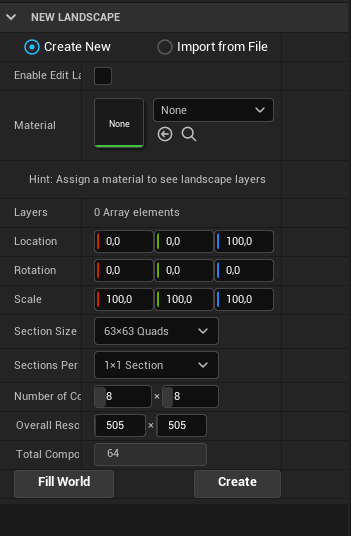 nova portal
Oh. That sounds like it caused the problem? What is a recommended resolution for it to look less squary?
 stray smelt
what would be the best way to go about creating a red vignette for damage feedback? (think of a subtle red flash along the edges/vignette). do I update the postprocess? do I use something else?
plush yew
hello guys so iam learning UE c++ FPS.
i don't know what happen, but my FPS character is not spawning bullets but sound is coming, firing animation is playing and i added one log massage even that also not printing in Output log
Can any one Help me
 cyan bronze
I have thise Niagara system bullet trails which have force on them. But the actual shooting is a hitscan. How do i make it so that it destroys the effect after it hits something like an enemy so i t doesnt go trough it and the actual line trace hits. Do i have to make it a projectile actor just for the visuals?
Like how do you guys usually do it
grim ore
@plush yewwhat would you want help with? we dont have your code, and we cant see the issue. You've narrowed it down to the problem (no spawn?) so start debugging and walking through the code as it runs to see if its being called and if it is, is it spawning
plush yew
i didnt change any thing i was checking code how its there and all and ya bullets are not spawning @grim ore
grim ore
so start debugging your spawning code then
put a breakpoint on the spawn line, make sure all the values going into it are valid, then step to the next line and make sure it spawned the item and the return value is valid
prime willow
@grim ore is using unreal engines water plugin a good idea for a game i want to make productize and eventually sell i ask as it still says its in it's experimental phase o-o
grim ore
good idea? only you can figure that out. It's in use in Fortnite right now is about all I can say for how well it works
prime willow
ah
so its stable
okie than i will definitely use!
wait
@grim ore is landmass also ok to use as well
its also been in beta for a year xD
stability wise
grim ore
it's kinda hard to really know, most of those features are in use somewhere we just dont know how much they use them. landmass is in fortnite for example
but they tend to only bulletproof how they use it
prime willow
ah
well if thats the case i think i can handle whatever implosion it may cause down the line x3
if not i cna always load up a backup before i took the dive
plush yew
@grim ore i did debugging i added to walking, fire, jumping its working but when its coming to projectile its not even showing
 manic dew
guys can any1 help me please
my project wont open after i turned on raytracing
its stuck at 39% each time
grim ore
what does your task manager show for CPU use? is it high. I bet its high
I bet you didnt realize it was going to have to compile the permutations for DXR shaders when you did that
manic dew
grim ore
what does your task manager show for CPU use? is it high. I bet its high
the cpu usage
is at its highest
grim ore
yep that's what I said
grim ore
 manic dew
grim ore
https://discord.com/channels/187217643009212416/225448446956404738/8805140370776...
manic dew
grim ore
https://discord.com/channels/187217643009212416/225448446956404738/8805140370776...
i cant understand
manic dew
till it opens?
grim ore
till it finishes compiling the shaders, yes
grim ore
It will finish when it finishes, all you could do at this point is wait or turn off DXR and DX12 and go back to what you had before
grim ore
you would change the lines in the engine .ini files that enabled it
but you turned it on for a reason
grim ore
in your DefaultEngine.ini file, find the default RHI section and remove it or swap it from 12 to 11
or just wait
manic dew
grim ore
in your DefaultEngine.ini file, find the default RHI section and remove it or sw...
it says here ray tracing= true
will it work if i do false
grim ore
it wont fix this issue, its the change from DX11 to 12 that caused it
 brisk spire
I had a project I normally work in take like 3 hours to open yesterday because someone in my perforce group changed some graphics settings, lol
grim ore
it might not hurt it you can remove that part and the default RHI or change the default RHI from 12 to 11
brisk spire
I think Mathew's right, you just gotta be real patient
 manic dew
brisk spire
I had a project I normally work in take like 3 hours to open yesterday because s...
manic dew
brisk spire
I had a project I normally work in take like 3 hours to open yesterday because s...
well my problem is with ray tracing
and it isnt a big deal
even if i disable it
brisk spire
oh, sorry, I misread
brisk spire
I'm using a 970, raytracing is basically a "brick your graphics card" button, I haven't looked into it, sorry :(
I do have an unrelated question though... I've got a weird bug with importing armor from an .fbx file.
I imported my armor yesterday, and it told me I had incorrect bone hierarchy, and I assumed I had mistakenly fooled around with the skeleton at some point (using the default UE4_Mannequin_Skeleton) .
I fiddled with the file a bunch, fixed it through disabling a bunch of stuff and cleaning weight painting, a bunch of random hail marys, and eventually it just started importing to Unreal normally again.
TODAY, my armor is once again refusing to import, and giving me the same error. I have not touched the armor, the skeleton, or even the file they're inside since yesterday. Any idea what could cause this?
brisk spire
oh yay, nice :D
brisk spire
is it still compiling shaders
 gloomy cosmos
i need help
 west merlin
Has anyone replicated this or something similar?

Unreal Engine
A purely shader-based interaction system for realistic looking foliage interaction with the player
light thunder
This bind event isn't happening because I'm invalidating the reference right afterwards, correct? That's the nature of my problem?

 hot magnet
is there any way to make your actor tags a constant you can select from a dropdown, to avoid having a typo on one object that you will never find? I looked into Gameplay Tags but it looks like you have to make a new class to add that in, which isn't that hard, but I want to use that system on just a default actor I put in the scene instead of making a new class for every generic object.
 sick patio
hi @grim ore

 tender pecan
plush yew
tender pecan
plush yew
post the stack trace of your log file, this is not enough for anyone to help you. 🙂
tender pecan
plush yew
no inderstand
no problems, so go to your project folder, look under [project]\Saved\Logs\bla.log
open that file, snip the last few lines *there should be an error there, and ensure it contains enough for someone to decipher a little
so there should be a clear readable stack trace, which normally includes some error message, and locations pointing to source files.
grim ore
the launcher is crashing and I dont see a valid trace there, so I doubt the logs will have anything usefull. uninstall and reinstall the Epic Games Launcher and see what happens
 sullen willow
hi everyone
im having trouble
i'v set up a simple rootmotion
but when i walk i only walk forward
but when i press D or A or S to walk backwards or to the sides
it dont move, but it do plays the animations
of walking back and sides
it only moves forward
help?
tender pecan
plush yew
what do you need to help me? sltp ^^
try this
https://answers.unrealengine.com/questions/981675/view.html
Reinstalling the launcher could fix it maybe.
 ivory furnace
Does anyone know blender to unreal engine export settings?
my meshes are spawning really big when spawned from c++
sullen willow
okay thanyou guys
grim ore
the engines are separate from the launcher, so it should not cause the launcher to crash
plush yew
ok ba i'm moving back i'm telling you
sullen willow
hello may i get help?
im having trouble
i'v set up a simple rootmotion
but when i walk i only walk forward
but when i press D or A or S to walk backwards or to the sides
it dont move, but it do plays the animations
of walking back and sides
it only moves forward
plush yew
I'm sorry I don't know the spas software to help you bro but it is on somebody will help you from here max 5min be blessed
grim ore
you asked 10 minutes ago the same quetion @sullen willow , its still on my screen... if someone could or wanted to help they would have.
brittle plume
I think UE5 has a bug, I wanted your opinion, maybe I'm wrong ...
I created this Blueprint for the Auto Material in the Landscape... but

This is right.. think

Here... nothing appears ... I tried to build, but it doesn't change anything, it doesn't update the shaders when I change the BP

After the built by this error, so I set all lights to movable ...

here yes... but is, down... under the map XC

night
 vestal anchor
Can you add more lighting channels to a project?
fierce tulip
no, unless you really weally know how to edit source code
ivory furnace
does anyone know how to stop child objects from colliding with their parent? Example a weapon with its owner?
I attach a weapon to a socket and it keeps colliding with the parent mesh
if i turn off collision for everything then the weapon doesnt effect anything and I dont want that
grim ore
you would set the collision channel on the child mesh to ignore the parent collision channel
also does the weapon need collision? like need need
ivory furnace
No I mean I guess I could do line tracing for the weapon collision detection. But I'm debating on whether I want to use physics for sword fighting so that I could use sword collision physics along with rag doll physics and the control rig so that when the player swings his sword it actually seems like it hit the other character
and thanks! I didnt know you could do that with the collision channel, I thought it was just categories based on object type
ill look into that thanks
grim ore
you can create your own, of if your using a normal character then the capsule at root is PAWN and you can try and just ignore that (but if you have enemies that are the same object type...). this might be a good chance to make a custom Player and Enemy object type for collision presets
ivory furnace
Ooh okay thanks sm. Ill def try that out
sullen willow
hi everyone i need help
 winter gate
How can you quickly figure out which objects are causing Shadow Projection and Shadow Depth to be slow?
ivory furnace
Not entirely sure but usually what makes creating shadows slow is ambient occlusion so try looking into that. I forgot how to make it appear in the editor
 viral lagoon
Anyone knows what causes a Translucent material to render on top of another Translucent material in the wrong order?

I've tried many things (even if I disable depth test) but the issue keeps happening
winter gate
viral lagoon
I've tried many things (even if I disable depth test) but the issue keeps happen...
Does the white outer part have to be translucent, what if it were opaque?
viral lagoon
Yes, that is a mesh that it is used in a particle system to generate an effect.
I left a white material to showcase the issue
If renders on top only at specific angles.
 pine pewter
Ok I have encountered an error in ue4
I enabled "show animations" by mistake in the editor
and now I cannot click on any drop down tabs
I also cannot access the editor preferences because of this now
winter gate
viral lagoon
Yes, that is a mesh that it is used in a particle system to generate an effect.
Are they sharing the exact same vector? Is it possible to move one of them a very small amount? I don't know if translucent materials have a "z-index" or layer controls.
viral lagoon
If they are far enough from each other it becomes impossible to reproduce. But it happens even if there is considerable distance between them.
@winter gate
 winter gate
Is the material for the "other side" of the portal part using refraction to cause a distortion? Does it happen in standalone?
viral lagoon
Yes, just tested that.
winter gate
Still happens there?
viral lagoon
Yes
winter gate
Any luck with adjusting the amount of refraction? Maybe you can use something else to have a similar effect?
viral lagoon
Just tried turning off the refraction and it still happens.
winter gate
hmm interesting
viral lagoon
Unfortunately I need the material to be translucid in order to use refraction. I would have to fake a refraction if I want to keep it opaque.
I guess I'll have to go that route.
 spring jasper
Hey, anybody sing 4.26 Enhanced Inputs? I am wondering if you need to do any coding to make the EnhancedInput actions in blueprint fire correctly? I've done this, but not having my event get called!
 viral lagoon
Thanks @winter gate , let me know if you think of any other ideas to try!
 regal marsh
how can i optimise Alembic Grooms for lower end platforms? My target platform is XBox One as the lowest of platforms I'm planning releases to
fierce tulip
viral lagoon
Anyone knows what causes a Translucent material to render on top of another Tran...
thats because of how ue4 renders translucency. not much you can do about it.
if its separate meshes you can try to set their translucency sorting order but generally doesnt matter that much.
either gotta live with it, or find ways to work around it. (using a masked texture for the non-refracting one, fake-layering trough material math, that sorta thing)
ivory furnace
hmm
 night burrow
Why is my pat tracing so grainy even with 500 samples?
 winter gate
I'm thinking it might have something to do with the scene being so empty. There isn't much to bounce off of when its just a smooth flat world.
night burrow
winter gate
I'm thinking it might have something to do with the scene being so empty. There ...
could be that actually
I was watching this: https://www.youtube.com/watch?v=X5zVhc5ahl0
The first 1,000 people to use this link will get a 1 month free trial of Skillshare: https://skl.sh/williamfaucher08211
This tutorial is all about the new & improved Path Tracer renderer in Unreal Engine 4.27. This is a pretty condensed video but will cover everything you should know before using it! With new supported features like Subsurface S...
and the scenes are really nicely rendered
 night burrow
check postprocess volume
night burrow
sorry letterbox
plush yew
letterbox??
night burrow
in postprocess
plush yew
okay
awesome
thank you!
its under camera
its because im using a cinematic camera instead of a regular camera
 south valley
my character keeps going too up or too low and im stressed out and idk what to do lol
i havent even worked on the map yet
is this how it feels to game develop>
viral lagoon
fierce tulip
thats because of how ue4 renders translucency. not much you can do about it.
if ...
Thanks!
 drowsy snow
sullen willow
is there anyone online to help me?
drowsy snow
sullen willow
is there anyone online to help me?
 zinc shore
when i am in a collapsed group of nodes why cant i straighten connecting nodes
some times they only way to do it is to constantly restart the editor
sullen willow
well i have set a root locomotion system
had some trouble
but handled it
now i`v set a crouch
thing is i can crouch
but when im to walk crouched
i stay stuck some seconds in place
and then start going forward
any ideas?
zinc shore
is there a shortcut to straighten bp nodes cuz the right click one isnt working and not being able to straighten my nodes is really annoying
winter gate
Q
zinc shore
👍
 ancient lotus
test at 1000 ping with a new method of handling grenade syncing. much much cleaner in my opinion than the previous way as its end point is in sync with the server, plus come on its also 1000 ping
sullen willow
when i walk right its all ok, i strafe right, but when i walk left, it strafes but wont move it only plays the strafe left animation
whats the problem?
 vocal flume
I have completed my app for the iPhone. I’ve tested it on different iPhones and everything seems to be in order. Now I want to port the same app for iPads. How do I go about doing this? Copy the project, make the UI adjustments for iPad and upload it as a new app for iPad? I’m doing this first time. Kind of clueless here.
coarse apex
hey guys, any idea on how to make volumetric clouds that can be affected by light? Im trying to make lighting and the sky flash white, any ideas would be awesome thank you
coarse apex
 tired sierra
is unreal engine friendly to low end pc?
tired sierra
is unreal engine friendly to low end pc?
how low end?
tired sierra
coarse apex
how low end?
does date work?
coarse apex
cpu gpu
coarse apex
These are the min:
Windows 10 64-bit
Quad-core Intel or AMD processor, 2.5 GHz or faster
NVIDIA GeForce 470 GTX or AMD Radeon 6870 HD series card or higher
8 GB RAM
this doesnt mean it will run smooth at all and if anything you will experience many crashes.
UE4/5 still crashes my computer and i have 3080/3900x
ancient lotus
@tired sierra in start menu type dxdiag and you can see specs
coarse apex
about this pc
 arctic hare
there was a space marine model that was free what is it called I forgot. All i remember it came with gun and a spider.
coarse apex
yes, your cpu is fine
ancient lotus
@tired sierra what gpu. its under Display 1 tab at the top
or is it just from your apu
tired sierra
there's no more at the top
coarse apex
to check gpu without needing any software right click the windows icon in the bottom left > device management > display adapters
tired sierra
it says "bios"

 tired sierra
NVIDIA GeForce GTX 750 Ti
ancient lotus
is your hdmi or display port cable plugged into your motherboard or graphics card? or would it not show the 750ti if it wasnt plugged in?
coarse apex
you will be very laggy in ue4/5, a 750 is very close to the minimum
coarse apex
ancient lotus
is your hdmi or display port cable plugged into your motherboard or graphics car...
it will show no matter what, its just checking the driver, unless he has the wrong driver installed but doubt it
coarse apex
coarse apex
it will show no matter what, its just checking the driver, unless he has the wro...
amd has no integrated graphics
tired sierra
coarse apex
you will be very laggy in ue4/5, a 750 is very close to the minimum
icic, thank you so much
coarse apex
tired sierra
icic, thank you so much
no problem, you could try UE5 it is unstable but maybe nanite/lumen will help your pc not sure tho
coarse apex
?
tired sierra
i thought it was unrelated about unreal
coarse apex
i dont think they really care about specific channels as long as it not like hate/racism type stuff
tired sierra
really? okay
coarse apex
not sure
tired sierra
it's about blender
tired sierra
ooh icic
just wants to talk about the rendering
i never used unreal before, so does it also have that thing where you render an image or an animation
sullen willow
i have a question
is it posible to change a character mesh without having to change the animation bp
or retargeting anims
coarse apex
tired sierra
i never used unreal before, so does it also have that thing where you render an ...
no it is real time, sometimes you will have to build the level
coarse apex
yea if they have the same skeleton then you should be fine
sullen willow
aight thanks
tired sierra
coarse apex
no it is real time, sometimes you will have to build the level
Wow that's so good to hear
 worn granite
tired sierra
AMD A8-6600K APU w/ Radeom(tm) HD graphics (4CPUs) ~ 3.9GHz
worn granite
tired sierra
AMD A8-6600K APU w/ Radeom(tm) HD graphics (4CPUs) ~ 3.9GHz
I had an A10 APU. If you plan on compiling the engine yourself, you will see a 3 (more likely 4/5+) hour compile time for iterative changes. So not only is your GPU pretty min spec, but your processor is too.
Good news!! I did freelance dev on my similar setup, it's certainly possible.
tired sierra
as long as it's possible, its very good to hear 😄
 primal valve
sorry to barge in so late at night, but i actually had a question, can u use a drawdebugcone to kill an enemy if they overlap?
ancient lotus
@primal valve you wouldnt use the draw debug but instead do the cone trace to get the actors overlapping
primal valve
oke holdup!
ancient lotus
@sullen willow setup a integer (uint8 if c++). when you press the key start a timer thats something like 0.3 delay and add 1 to the integer. when the timer finishes check and see if that integer is greater than 1. if it is then there was a double press, then set the integer back to 0.
sullen willow
i set it in the input action in the event graph from character?
ancient lotus
whichever function you call on the key press
sullen willow
aight thankyou
vocal flume
I have completed my app for the iPhone. I’ve tested it on different iPhones and everything seems to be in order. Now I want to port the same app for iPads. How do I go about doing this? Copy the project, make the UI adjustments for iPad and upload it as a new app for iPad? I’m doing this first time. Kind of clueless here.
 dull mango
Could you please explain me, what does it mean convex mesh. Asking in context of custom collision. Does it mean, collision for the room should be a branch of boxes. Mesh that looks like simplified room - doesn't fit for collision. Am i correct ?
 vivid girder
Can you add c++ custom classes to a BP project?
wary wave
yes
stuck linden
does anyone know how to fix shootergame in unreal 5?~~
 crimson peak
worn granite
I had an A10 APU. If you plan on compiling the engine yourself, you will see a 3...
crimson peak
worn granite
I had an A10 APU. If you plan on compiling the engine yourself, you will see a 3...
Is that compiling a build?. So far my time hasn't been to bad yet
brittle plume
Why with the AUTO Mat the foliage does not appear??
brittle plume
brittle plume
Why with the AUTO Mat the foliage does not appear??
Sorry for the music 😂 😅
Nothing?
😦
rich oar
brittle plume
Why with the AUTO Mat the foliage does not appear??
Is this an asset from the marketplace ?
brittle plume
rich oar
Is this an asset from the marketplace ?
no, the texture yes, but the Auto material I created it
rich oar
Well there may be a problem with your auto material lol. Can you share a screenshot
brittle plume
Material Function
 brittle plume
rich oar
Well there may be a problem with your auto material lol. Can you share a screens...
brittle plume
rich oar
Well there may be a problem with your auto material lol. Can you share a screens...
🥶

https://www.youtube.com/watch?v=-h4-h8zyVzE&ab_channel=NoahIlbery
i followed this tutorial

In this tutorial you will learn how to make a Landscape Auto-Material which is a shader that will procedurally generate how your landscape will look so you don't have to do all that manual labor of painting it yourself, but you can still paint on this shader if you're so inclined. Let me know if you have any questions and if there's enough inter...
But I am almost certain that I am going to freak out and going to buy an auto material from the marketplace, the € 2 one is not bad
XD


 rich oar
Have you gone back over the tutorial? There's so many lines everywhere it's hard to really look into this lmao
Sometimes you accidentally miss the slightest detail that would cause an issue
brittle plume
rich oar
Have you gone back over the tutorial? There's so many lines everywhere it's hard...
ik, think of my minutes of life wasted copying the blueprint
brittle plume
rich oar
Sometimes you accidentally miss the slightest detail that would cause an issue
I think there will be some money in the epic games today
rich oar
Lmao. I created one along time ago from scratch and it was a nightmare
brittle plume
rich oar
Lmao. I created one along time ago from scratch and it was a nightmare
You're encouraging me ... really XD
25- ok no, I believe I will do it myself

 static crystal
Hello. I'm new to UE4 and have a question about blueprints. Right now I'm determining if I can cast an object to the wanted object by creating an empty parent class and checking if the object is a child of. This feels really sloppy and I don't know if I should do it this way. Maybe somebody can give me some feedback on this code.
 rich oar
Lol sorry bout it. Yeah I'd either do more researching learning about the material nodes or follow another tutorial
brittle plume
@rich oar How do you create landscapes? Because I believe the Heightmaps and then I upload them, but they are all broken and ugly 😦
rich oar
static crystal
Hello. I'm new to UE4 and have a question about blueprints. Right now I'm determ...
What do you mean by cast an object to the wanted object ? What exactly are you checking isTrue before calling the fire function
rich oar
brittle plume
<@!729865415387250848> How do you create landscapes? Because I believe the Heigh...
Hieghtmaps ?
static crystal
rich oar
What do you mean by cast an object to the wanted object ? What exactly are you c...
@rich oar I'm checking if the class is a child of the empty parent class.
I just discovered the blueprint channel and asked the same question there.
Got feedback about blueprint interfaces.
rich oar
I was just trying to figure out (why) you were checking this before calling Fire() -> your reasons behind it
rich oar
brittle plume
<@!729865415387250848> How do you create landscapes? Because I believe the Heigh...

How to use custom heightmaps and layers to add more dimension to your Landscapes.
Have you seen this yet ?
static crystal
@feral stumpt because otherwise I'm going to cast the object to the wrong class.
if it's not a blaster
I also have light sabers
oh btw it's for VR so it's about whats in the hand of the character
I should have mentioned this
rich oar
Ohhhh okay. I get your reasoning now lol thanks
brittle plume
rich oar
https://docs.unrealengine.com/4.26/en-US/BuildingWorlds/Landscape/Custom/#import...
Yes i seen it, and and I know how it works, but it's not the best, that is, I see people doing realistic things etc ... like islands ...
@rich oar he's breaking into pieces to help everyone, he's a golden person
 knotty summit
Hey there, sorry for pinging. I'm dealing with a similar issue, did you managed to fix Error: RequestAsyncLoad called error?
 tardy hedge
Hey I have a skeleton when auto rigged to the humanoid rig needs slight adjustments is there any way I can save these bone adjustments as a preset so I can apply them to animations without needing to adjust the bones each animation
 tight prawn
in UE4.27 I can't find Fracture mode for Chaos physics even though I have the plugin enabled, what am i missing ?
 copper flicker
@knotty summit I don't really remember man, it's an old issue, don't remember which version.. so on
try maybe checking the integrity of files. and look for any BP that might error. but this is a shot in the dark, I really have no idea and I don't remember what I did
 blissful trail


 rapid arch
 Hello Dears , Somebody can help me, I am looking for a SpotLight Target on Ue4... I don't find this option thanks if you got the solve
green cradle
What does this mean?
 tight prawn
green cradle
What does this mean?
tight prawn
green cradle
What does this mean?
it means you're trying to access a property of something that doesn't exist
green cradle
tight prawn
it means you're trying to access a property of something that doesn't exist
i have the WBP_UI Blueprint

Ok i fixed it 😛
brittle plume
In your opinion, is it true that single players die first?
 plush yew
is there any way to scale skeleton?
 sturdy smelt
Hey anyone knows how to get an High Resolution Collision Model, for Characters in Ue?
with Spheres and capsules its not work that well
plush yew
Do you mean change a landscapes materials during runtime?
brittle plume
How do I enlarge the BlenderSpace1D? I don't want it to stop at 100 ...
Done
Thank
plush yew
I think you should look into masks, I have seen people set up landscape changes using masks or something.
Because landscapes are static i think.
Might work with dynamic materials

What are Dynamic Material Instances in Unreal Engine 4?
Source Files: https://github.com/MWadstein/wtf-hdi-files
Maybe don't ping him
rich oar
green cradle
Ok i fixed it 😛
Curious as to what you did. I sent a message in the BP channel
green cradle
rich oar
Curious as to what you did. I sent a message in the BP channel
I didnt drag a connection to 2 of the white inputs
I don;t know what they're called
rich oar
Oh lol
 thick chasm
Hey, I need help - I'm using same Anim blueprint for multiple characters in-game of same bp. Obviously characters need to animate individually, but they all share and override the exact same variables and I have no idea how to make separate variables for each character. Any ideas are appreciated. Also is this a support chat, sorry if not...
green cradle
I've now gone into perpetual WASD camera controls for scene movement
My cursor goes into the scene view and i cant do anything? Did i press a hotkey by mistake?
 winter wedge
anyone know of any render engines that work on unreal engine, that use ray or path tracing and are not rtx hardware dependent
wary wave
"render engines"?
rich oar
green cradle
My cursor goes into the scene view and i cant do anything? Did i press a hotkey ...
F8 ? Lol is it every time you hit play ?
rich oar
Lol sometimes the craziest s*** happens.
Restarts work wonders
exotic thicket
Anyone know if there's a way to identify a specific foliage mesh that's in the world?
LogNavigationDirtyArea: Warning: Skipping dirty area creation because of empty bounds (object: FoliageInstancedStaticMeshComponent /Game/tapegame/Maps/MainGameWorld/UEDPIE_0_MainGameWorld.MainGameWorld:PersistentLevel.InstancedFoliageActor_0.FoliageInstancedStaticMeshComponent_0)
Can't find any way of finding this since it's just all part of the dynamic foliage 🤔
green cradle
Are you good at unreal ttritt?
How long would you say you became competent at it? This is my second day and im not sure if i can grasp it
rich oar
I've been on and off since I was 14 (im 21 now)
I started with Xcode
Then unity
Now Unreal.
I messed around with Unreal years ago and it was too much to take in. I knew the basics of game dev principles and OOP. The transition from c# to c++ isn't that bad. It's just the unreal API that is the biggest learning curve.
I'd say years if you do not study properly. There's a wrong and right way to maximize learning potential. Otherwise, in 3-6 months of dedicated (proper) study. You can definitely know your way around the engine and also more technically challenging things.
To grasp every tiny detail in Unreal is hardly possible lol. To become a professional just takes time and experience. @green cradle
green cradle
Im very competent with Unity, Trying out Unreal for the first time 😬
rich oar
The biggest challenge in game dev is more about PROBLEM SOLVING . Big and bold. But this wasn't really your question lol.
Yeah Unreal is a different animal. Once you get the hang of it, and how it wants you to do things. It's wayyy too good. Never will I go back to Unity lol.
thick herald
Finding the right resources that fit your way of thinking or rather your way of learning is the key. The official learning hub has a host of information and is a good place to start. Mathew Wadsteins "WTF" videos on YouTube are a true Godsend with nearly every commonly used node explained.
rich oar
@green cradle
Do you code or use purely BP ?
green cradle
Blue print
https://www.youtube.com/watch?v=ITCWa3oLNAQ I just followed this tutorial just now

How to create a game in Unreal Engine 5. UE5 tutorial for beginners! In this free course we will create our first game using Epic Game's Unreal Engine 5. We will go over the fundamentals of how to program a game using UE5's visual scripting language called Blueprint!
The Unreal Masterclass:
https://www.unrealmasterclass.com
Unreal Engine 5 Be...
I don't know c++, I know c# though 😛
rich oar
green cradle
I don't know c++, I know c# though 😛
Learning c++ with a foundation in c# isn't bad.
And dude... Working with Cpp and blueprints together is a beautiful thing
And using BP to prototype is great. If you know cpp it's super easy to prototype in BP and then use that reference to re create in Cpp
stuck linden
Anyone knows why check box is returning default image when clearly theres one selected?
 green cradle
How do i build my game?

 tawny burrow
can someone help me. Im having an issue where i cannot launch the UE4 editor, unless I directly open .exe in Program files folder.
It displays "Error Failed to launch editor" when clicking on .uproject file, and when clicking from Epic Games Launcher then it says "Launch Failed Could not Launch Unreal Engine Error code LS-0013" - but even when I re-verify, nothing fixes it for me.
Ive tried reinstalling aswell
plush yew
green cradle
How do i build my game?
click on package project, packageing it sends the game folder into whatever destination you put it in but if you want to publish it you will have to make a zip file and put the project in there after you packaged it
also it would be best any ue5 related content be in the #ue5-general
sterile lichen
Do ShooterGame and other demo projects get any kind of updates or has a repository to send PRs to ?
plush yew
can someone help me please i would need the car without the skeleton please could you help me thank you for removing it thank you this is a shit question lol ^^
green cradle
How do i change the master volume of the built game? Im not making audio sliders ect, i just want to lower it
brittle plume
green cradle
How do i build my game?
Depends bro, is it for Android/IOS?
green cradle
Windows
brittle plume
But you disabled it XD
green cradle
oh, I've built the game now. just the audio is really loud
i want to reduce the volume of the audio
brittle plume
The audio of what?
green cradle
The game
brittle plume
How many audios are there? You should do this from the Blueprint / code you operated them in!
brittle plume
green cradle
is there no global audio volume?
IDK, in project setting, in the engine section, there is the thing for the audio, try from there and let me know
pine pewter
hey is anyone getting this bug in unreal engine
all of my menus flicker and the windows and drop downs turn invisible
green cradle
brittle plume
IDK, in project setting, in the engine section, there is the thing for the audio...
Worked perfectly 🙂
static crystal
pine pewter
hey is anyone getting this bug in unreal engine
Yes I have the same problem. Have to restart the editor when that happens. I don't have a clue on how to fix this.
pine pewter
I have another question
whenver I go into play mode
another one of my character controller spawns for some reaosn
 autumn flame
They switched from 1.47 to 1.51 SDK, but 1.47 is still there, not sure about it being broken, works on my side
green cradle
Is there any vehicle tutorials thats start to finish in unreal? I've watched a couple but i couldnt get them to work, I'd like a full tutorial if one is about
I've also moved the locations of these projects, can i delete these previews somehow? rightclicking and pressing delete doesnt do anything

 forest notch
Hello. Is someone here with experience on First Person Shooters that can help me regarding some tips on handling a weapon system in Blueprints? Private chat would be preferred thanks!
pine pewter
Hello, can anyone explain to me why my character controller spawns twice when I test play my game?
drowsy snow
pine pewter
Hello, can anyone explain to me why my character controller spawns twice when I ...
Check if the Auto Possess is set to Player 0.
thick herald
green cradle
Is there any vehicle tutorials thats start to finish in unreal? I've watched a c...
Keep in mind that you are using UE5, and the vast majority of stuff out there is for UE4. While much of stuff is the same, you will run into issues where things aren't the same, and even more so if the tutorial was made with an even earlier version of UE4.
Also #ue5-general is the place, if you're using UE5 🙂
stuck linden
can anyone pls let me know whats happening here im stuck on this problem for 3 hours now
i think checkbox may just be broken in ue5
pine pewter
drowsy snow
Check if the Auto Possess is set to Player 0.
Where would I look for that in the settings
Sorry I am a total beginner
drowsy snow
pine pewter
Where would I look for that in the settings
It's in your pawn/character's details panel.
pine pewter
Thank you ill check
Thank you
That made it so I spawn but I can no longer move
I can now also launch myself wtf lmao
 odd wyvern
sorry, I don't really know the category this fits in. I have a character mesh with multiple materials on it, when I export it as FBX to put clothing on it, it defaults back to 1 material on import. What's the correct way to deal with this?
 paper garnet
someone pls help in #blueprint
 vital jolt
paper garnet
5
vital jolt
paper garnet
5
Is it harder to develop games compared to UE4?
thick herald
UE5 is not as stable as UE4. There are several issues that you could run into. Best keeping to UE4, until you know what you're doing 🙂
vital jolt
oh alright thanks
ima look up how to use visual scripting
since i don't know how to code in c++
pine pewter
drowsy snow
It's in your pawn/character's details panel.
When I set this to player 0 I cannot move
drowsy snow
pine pewter
When I set this to player 0 I cannot move
What about the input events?
thick herald
vital jolt
since i don't know how to code in c++
Check the pinned messages in this channel for useful links
pine pewter
I set it to player 0 but it didnt let me move either
im following a tutorial and the guy never mentions it

WAIT
it fixed itself wtf
I just had to add my jump input
brittle plume
pine pewter
it fixed itself wtf
If is UE5 is normal XD... is so bugged
brittle plume
pine pewter
No its ue4
😕 rip
 gray light
Probably a really simple fix... i imported a demonstration level and for some reason I can pass through the floor. But not the walls. Some collision thing?
plush yew
@gray light the easiest way i can think of is the level you imported the collisions arnt compatible with unreal you would have probably gotten a error or something if so but another reason is the object may not have collisions or they are turned off, if it doesnt have collisions unreal as a weird way of makeing custom ones once imported long message but its worth noting it could be a lot of reasons
gray light
the walls work as collisions and as far s i can tell the collision settngs are the same
should i be looking at the static mesh?
plush yew
you could look at the settings in there or see the collisions i forgot the button but when you double click it, on the top of the editor it should be up there
if there is collisions then there is probably something else going on
cyan bronze
Which way is better to do "aiming down sight" in fast paced FPS game which only floating gun and floating hands (not arms, only hands). By animating it in blender or with procedural aiming?
pine pewter
procedural aiming in ue4 is always gonna look weird
cyan bronze
and with animating I have more control over it i assume
pine pewter
yeah
cyan bronze
ok ty
knotty summit
copper flicker
<@!322655207664123904> I don't really remember man, it's an old issue, don't rem...
Thank you for answering. It solved own its own. Classic Unreal Engine bugs. 🙃
gray light
another clue for the floor that falls through... it does not scale in the z direction and is see through when looking up at it but when looking down i see the floor
wtf
 glacial pecan
Is this really too long a folder name/asset name for Unreal?

It feels as if I'm back in the DOS era all over again...
plush yew
gray light
another clue for the floor that falls through... it does not scale in the z dire...
you can change that by making the material two sided, and its like that because its a plane like just a pure flat surface thats only one sided so my guess is how they set it up may have messed up its collisions i hevent really ran into that problem so im not to much of help but the only thing i can say is you could go to a 3d software and export it if it still keeps happening then i dont think unreal is adding collisions to it, you could always add them tho by going into a 3d software and adding a cube then rename the cube UCX_ObjectName make sure you scale the collision box to fit and then export it may be a lot but this long message makes it seem harder then it is
gray light
ok thanks!
apparently other ppl are having this problem
I guess i have to go into static mesh and add box collision to the floor supposedly that will work
plush yew
i mean you could do that to but it wont be as reliable as custom collisions
gray light
hmmm ok
so you are suggesting editing the static mesh
what kind of software does that?
can i use photoshop haha
plush yew
i wish but no, you could use maya, blender etc
plush yew
blender is free to use and it can do a lot so probably your best bet if you want to say make your own animations etc etc
gray light
well the good news is the simple fix got it working
plush yew
thats good
gray light
idk who goes through the effort of making a demonstration level like this but forgets to put a collision on the foor
pine pewter
So my biggest issue I have with UE4 is that most of the tutorials either look like dogshit or have really messy blueprints
plush yew
well i mean it may just be a importing problem or because of the version, but unreal usually adds collisions if you select it in the importing option but not always reliable if you want to make a walkable bridge or a fence you can shoot threw or like walking over rocks the unreal collisions are just squares
pine pewter
How am I supposed to learn unreal 4 if the documentation on it is so daunting
pine pewter
asking someone to teach me how to use unreal 4 is unrealistic
plush yew
pine pewter
How am I supposed to learn unreal 4 if the documentation on it is so daunting
mainly research but the old unreal and the newer layout of it are almost the same just some stuff is moved but dont to tutorials for ue5 unless your using it ue5 has majer bugs right now and isnt fully released
pine pewter
good thing im not using ue5 lol
plush yew
also the tutorials arnt really for full games most of them are for you to just get a idea of what to do, they make it so you can learn about it more and well make your own kind of code or bp
 coral lotus
Hellooo, does anyone know why a I'm getting an error message in my skybox after painting in foliage?
 pine pewter
plush yew
also the tutorials arnt really for full games most of them are for you to just g...
pine pewter
plush yew
also the tutorials arnt really for full games most of them are for you to just g...
yeah and most of them are terribly made or dont explain how or why they work
hence why Im asking where do I learn
ive been watching unreal tutorial videos for years now
plush yew
there are a couple youtube channels that could help but they wont really help in detail the only true way is just learn the layout first and go slow like make a small game like i dont know a jumping game haha
pine pewter
well I mean I already follow tutorials pretty easily
I just cannot find ones that are actually well made
like for example every fps tutorial on youtube have the most awful and jank animations
like the tutorials just show you how to make asset flips basically
plush yew
ha yeah but it does show you how to make it all you have to do is add your own to it
pine pewter
yeah but it looks like an asset flip because they never show how to polish it
plush yew
like say you want to shoot your weapon follow the tutorial for that part but if you want your own anmations etc you will need to do some of it yourself or go to placed and download them
pine pewter
I'd do them myself but guess what there's no information on how to animate certain weapons
like revolvers
plush yew
well yes but a easy way is just to learn how to rig and animate first and a revolver seems east just a couple bones
pine pewter
Yeah I already have all the bones rigged in blender
The videos in blender on how to animate things are just a nightmare though
Whatever I guess I'll do that now
neon hatch
Is it possible to replicate EAX sound propogation in UE4?
 spare stirrup
Hi, i have a question: I'm adding more content to an asset pack I've made, and I need to edit the name of the new version. The version numbers are the thing that confuses me, so this may be a dumb question but does it sounds okay if I name the different versions of the asset pack like this (Let's say I'm updating it four times in total)
Assetpackname 1.0
Assetpackname 1.1
Assetpackname 1.2
Assetpackname 1.3
Assetpackname 1.4
fierce tulip
yea, thats fine
spare stirrup
@fierce tulip Thank you!
 tawdry oasis
halp!
fierce tulip
@spare stirrup
what I do in such cases is:
XX.YY.ZZ
X > release number/very big core changes
Y > new content added
Z > fixes
so 1.2.4 means: release number, 2x new content added, and I fixed bugs four times.
spare stirrup
I'm going to use that sorting method in future, seems rational. Thank you for answering and teaching me about the issue!
 dreamy saffron
Hey! Really new user here. Created an empty Blueprint project and I seem to be missing the "Add C++ Class" Option here, what should I do?
 cyan bronze
dreamy saffron
Hey! Really new user here. Created an empty Blueprint project and I seem to be m...
cyan bronze
dreamy saffron
Hey! Really new user here. Created an empty Blueprint project and I seem to be m...

Create it to that folder
Its created automaticly
brittle plume
I have a problem... I have to show a video, so I used the widget technique ... I uploaded the video, I took the media player, I inserted the video and created the texture, then I created the material and turned it into User Interface, and then I put it as image on the widget, and from the level blueprint I added it to the vieweport, but it shows all white, unless in the media player I re-click the video ...

 dreamy saffron
cyan bronze
dreamy saffron
cyan bronze
Wasn't created 😦 any way of creating it manually?
 cyan bronze
dreamy saffron
Wasn't created 😦 any way of creating it manually?
cyan bronze
dreamy saffron
Wasn't created 😦 any way of creating it manually?
Ok so you selected the blueprint and not C++ when created the project... Yes you can wait

There?
New C++ class
If not then


Then you can delete all the things it adds
 cold bridge
hey guys, I'm trying to set a textbox in the HUD component to display a letter that's in the games settings, but I'm not sure how to access this HUD component from my gamecontroller blueprint
cyan bronze
@dreamy saffron Or if its empty project you can just create a new one and remember to select C++ and not Blueprint
In C++ selected you ofc can and WILL use blueprints
brittle plume
I have a problem... I have to show a video, so I used the widget technique ... I uploaded the video, I took the media player, I inserted the video and created the texture, then I created the material and turned it into User Interface, and then I put it as image on the widget, and from the level blueprint I added it to the vieweport, but it shows all white, unless in the media player I re-click the video ...


 quartz reef
Does someone know if there's a way to export a Skeletal Mesh from Unreal Engine into blender AND keep the vertex groups ? Because currently if i import the skeletal mesh (fbx) into blender and change something and import it back to unreal engine i lose all the vertex groups.
ivory spire
Hey, in UE5 my create c++ class buttons are missing

i did this but it didn't change anything
my .sln file for VisualStudio is there
but i can't seem to generate a new class from within unreal


 spare kernel
and what is the issue?
ivory spire
but in my old project
the c++ classes folder is missing
it was originally a blueprint only project and i converted it
"converted"
did the create vs files thing
spare kernel
 brittle plume
🤨
spare kernel
is this ticked? Show C++ classes?
 stiff summit
Has anyone ever had an issue that pressing G turns off Atmospheric effects?
ivory spire
imma check wait
spare kernel
@brittle plumePlease be patient. If someone knows the answer to your question they will answer it. No need for the random face.
ivory spire
spare kernel
is this ticked? Show C++ classes?
yes it is
brittle plume
spare kernel
<@!726470929798004786>Please be patient. If someone knows the answer to your que...
I just sent an emoj. 😉
spare kernel
Also you posted twice within 20mins or so. Next time, you will get a strike.
spare kernel
@ivory spireOnly other reason it won't show up is you never compiled it properly. Other than i have no idea. It has always shown up for me.
dreamy saffron
cyan bronze
In C++ selected you ofc can and WILL use blueprints
File -> Add C++ worked, thx!
cyan bronze
np
cold bridge
how do I get the node marked in red??? the context-sensitive option on my end is not displaying it and I have no idea what it is...

 spare kernel
pull and type Get
cyan bronze
@pine pewter How do you add the aim animation to the game. You cant use booleans or functions or inputs in animationBP
spare kernel
you will see get Copy
cold bridge
spare kernel
you will see get Copy
it's not giving the same thing as the video... it's of type action key mapping structure, and the "get key display name" requires a key structure
in the video it gives out the array as key structures
brittle plume
cold bridge
how do I get the node marked in red??? the context-sensitive option on my end is...
LightShot confirmed 😎
cold bridge
nothing to do with the copy... I'm talking about the type it returns...