#ue4-general
1 messages · Page 1053 of 1
 prime willow
you has my respects~

yesh he has taught me well in the ways of blender
right after leaving donut kindergarden with the guru*
 junior abyss
Hi all, I wanted to ask if this laptop is fine with working ue4
“ Microsoft Surface Book 3
Intel Core i7
16 GB Ram
Nvidia GeForce GTX 1650 Max-Q w/ 4GB GDDR5 graphics memory”
junior abyss
What’s a good graphics card/specs for larger rendering loads
A 2060 and up?
prime willow
well the entire game making thing
is fake as much cool stuff as possible
and make it as convincing as possible
players dont need to understand the tricks
they just have to have quite the experience~
 pulsar onyx
anyone have any ideas how i would do a countdown timer for begin play. so on HUD it would be 3,2,1, go, or ready,set,go and then the game and timer plays?
theres not a SINGLE yt tutorial for that specific mechanic but its so common haha
yeah, but i dont know how to implement a countdown into a Interface widget
and pause game and start game
im very new
ill just try it
 fierce tulip
@past wing try asking in #graphics there are some smartiepants there who might be able to answer.
 woven patrol
sorry was just wondering what this error message means? An error occurred while trying to generate project files.
Running C:/Program Files/Epic Games/UE_4.26/Engine/Binaries/DotNET/UnrealBuildTool.exe -projectfiles -project="C:/Users/adslp/OneDrive/Documents/Unreal Projects/Tutorial/Tutorial.uproject" -game -rocket -progress
Discovering modules, targets and source code for project...
ERROR: Could not find NetFxSDK install dir; this will prevent SwarmInterface from installing. Install a version of .NET Framework SDK at 4.6.0 or higher.
 winter gate
"Install a version of .NET Framework SDK at 4.6.0 or higher."
Have you tried doing that?
 weak cradle
Im having trouble with collision
I know what the problem is, the wolf collision is colliding with the player collision
the problem im having is that the wolf has to be very close to the player to attack
and that range is what causes the push bug
Is there a way to somehow prevent that pushing bug while still having both collisions set to block
If i set the collisions to ignore, the wolfs head goes through the player, but it fixes
Heres my wolfs collision
 winter gate
I'm not sure but it seems like the problem could be related to physics, specifically the mass of the two colliding rigid bodies.
weak cradle
yeah i know thats whats causing it
i just dont know how to prevent the colliding while still mainting a close distance
 mental helm
I just got a mouse with a horizontal scroll wheel, is there any way to make it scroll left/right on blueprint and material graphs?
 rapid yarrow
Howdy - I'm pretty new to UE. Quick question: Every time I create a new material (PBR) should I be making an instance of it? Is that general best practice? :/
prime willow
rapid yarrow
Howdy - I'm pretty new to UE. Quick question: Every time I create a new material...
yes make an instance and use that
performance wise its ideal
also if you plan to have character creation or customizations
make dynamic materials istead
rapid yarrow
sweet - thought it might be the case - do you normally store instances of a material in a separate location?
prime willow
or you wont be able to edit colors or such of it during some run time creator system or such
rapid yarrow
Haha at this stage I'm looking more for scene creation/arch viz type stuff 🙂
prime willow
rapid yarrow
sweet - thought it might be the case - do you normally store instances of a mate...
i typically store it in a folder next to the base materials so its not confusing
"skin material and skin material inst"
makes management easier and less of a headache
rapid yarrow
Is there anything else you normally expose via parameters (i'm showing only UV scaling for tiling atm) - do add a parameter for roughness/metal etc?
prime willow
um honestly its up to your setup
you can even use metal for your image setting if thats what you want to do
however im not so knowledgeable enough to know
rapid yarrow
I guess: spent the time setting up the parameters once - then can make things more useful in the instances later on 🙂
prime willow
if thats going to cause issues down the line using which ever node for whatever texture
but i havent seen any issues so far and have created some cool jank stuff doing so xD
that too
if you setup the material right the instance is easier to manage
 wintry torrent
Is there a template or something that I can follow so i can rig a character to match default skeletal. I tried re-targeting but my character didn't have enough joints
 limber mesa
Quick question having an issue with scope. I made a function that spawns an actor but the class variable is being passed into a param
I set the class var to be inst editable so I can edit it outside the editor
Can anyone assist?
 rancid lagoon
i don't know if where to put this, so i am going to put it here. If any Unreal Engine employee are here i ask that you look at this: https://forums.unrealengine.com/t/when-will-unreal-engine-support-android-users/246622?u=rphad23. I found this and i hope you can help
winter gate
rancid lagoon
i don't know if where to put this, so i am going to put it here. If any Unreal E...
Are you looking for this? https://docs.unrealengine.com/4.26/en-US/SharingAndReleasing/Mobile/Android/GettingStarted/
 tiny sonnet
@spark valley
 runic fern
Hello Guys ..
Does it impact the performance if i called the API every 5 Seconds to keep the data Up to date ?
 rancid lagoon
winter gate
Are you looking for this? https://docs.unrealengine.com/4.26/en-US/SharingAndRel...
rancid lagoon
winter gate
Are you looking for this? https://docs.unrealengine.com/4.26/en-US/SharingAndRel...
no i posted a forum feature request i found
 halcyon hawk
does anyone know how I can create an anime style simple thin outline around my meshes. Most of the tutorials get closer but they lines come out really thick
 cedar wave
runic fern
Hello Guys ..
Does it impact the performance if i called the API every 5 Seconds...
cedar wave
runic fern
Hello Guys ..
Does it impact the performance if i called the API every 5 Seconds...
Of course it does. Would it be noticeable? Measure it.
 young mirage
Is DDC compatible across different engine versions?
 wary sentinel
Does anyone have a problem with textures in 4.27?
runic fern
cedar wave
Of course it does. Would it be noticeable? Measure it.
How can i keep the database updated with the project without effecting Performance
Maybe using websocket with button to fire this event 
 bright root
Hi, I am looking for some help with pixel streaming... I know the basics, I can set up the project and run the test project and learning project both locally and online.
So now I want to go to the next step in my idea. I have quite a few questions to be honest so if anyone has a lot of knowledge in this area I would appreciate having a conversation
runic fern
bright root
Hi, I am looking for some help with pixel streaming... I know the basics, I can...
I can help send me DM
 rugged terrace
megascans plugin didnt support 4.27 yet?
runic fern
If you want
 cyan bronze
Ok here is my proble:
I have a FPS project with projectile firing from the gun socket. I would like it to rotate in the middle of the screen so it hits where the crosshair aims.
Back in unity i made it so that it made a raycast from the camera and what ever it hit, it lauched the projectile into that direction.
Is that possible in Unreal Engine.
For shooting i have use C++ but i think i could make the rotation in Blueprint and use the variable in C++? If that even works that way from blueprint to C++
What do you guys think?
 noble zodiac
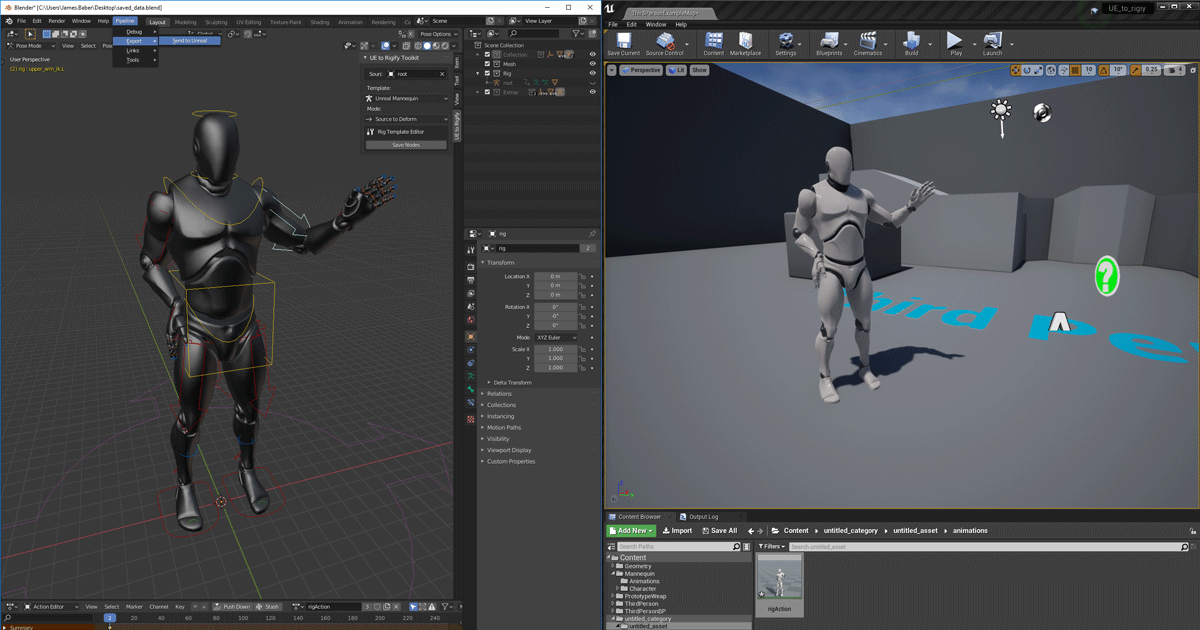
Does anyone know if the Send To Unreal - Blender tool is still valid or maintained? https://www.unrealengine.com/en-US/blog/download-our-new-blender-addons or have things moved on?
Unreal Engine
We’ve released two new, free addons that greatly streamline the workflow between Blender and Unreal Engine.
 plush yew
Ssr and reflection captures, I can't use them both at the same time because that makes reflection blending and it's look unnatural, Can I use a reflection capture as like ssr? I mean can I remove ssr and place reflection capture, will it work fine? Or can't I just make a reflection texture/face reflection, Then how?
 left crystal
Um random question, but does anyone know a way to fix this: my friend can't connect to the only services on tony hawk pro skater 1 2 on pc and he has good internet.
 idle mantle
strange question its about UE?
left crystal
Well the people help make it lol
idle mantle
sorry dont understand
left crystal
dang thank you anyways
 gaunt abyss
runic fern
Hello Guys ..
Does it impact the performance if i called the API every 5 Seconds...
gaunt abyss
runic fern
Hello Guys ..
Does it impact the performance if i called the API every 5 Seconds...
It shouldn't, I'm expecting from that plugin to handle requests async so it really shouldn't matter if you are calling it every 50 or 5 seconds
Question is can your server backend/DB handle it, depending on what this is for
 subtle mural
<@&213101288538374145> Should we maybe now have a separate channel for Pixel Streaming now that it's in Production Ready state?
gaunt abyss
I guess it depends on how popular and used pixel streaming is (gonna be) since it wouldn't make sense to make a channel for like 10 people using it, I guess if there is enough demand for it we can look into creating a channel for it
subtle mural
Sign me up 🙂
I am very interested in Pixel Streaming. I've been using Furioos for some time, but I am looking into using other services out there, maybe even having our own (my company's) platform dedicated for Pixel Streaming services.
gaunt abyss
It's an interesting topic for sure
Something I'm interested in too
idle mantle
gaunt abyss
I guess it depends on how popular and used pixel streaming is (gonna be) since i...
We use it with GPT-3
but im just an artist lol
gaunt abyss
I'm more interested in reusing bits and pieces of the pixel streaming tech than the whole thing 😅
idle mantle
I animate for a friend that use it it's very impressive.. and now I'm figuring out how UE works lol
Hey is there a way to show only that on full screen please:

I just need to see how the animations look like in UE with the iClone live link
Also it lag so much lol need to change my computer I guess
rapid yarrow
Howdy - I'm pretty new at UE and have a quick question - I've imported a bunch of meshes from Blender to UE5 using the 'send to unreal' addon. My static mesh when import shows really big cubes on the default material.. is this a problem? (even if I scale textures/increase lightmass res?)
 brittle sedge
ok, I have a massive problem
I can't move, scale or rotate anything
when I drag the sliders, or change the values, nothing happens
idle mantle
You are in playing mode man? :3 @brittle sedge
 lapis plinth
hey, do you know how to install 4.27 ? i don't see it in engine upgrades
brittle sedge
idle mantle
You are in playing mode man? :3 <@!798254943923863612>
no
Defintely
not
i can see the arrows, and fly around
and stuff
idle mantle
Your problems are weirder than mine guys 😆
btw do you know how to have fullscreen ? only viewport screen?
brittle sedge
idle mantle
btw do you know how to have fullscreen ? only viewport screen?
no
but, i can't do anything
a can't move
i can play, but, idk
idle mantle
restart UE?
brittle sedge
idle mantle
restart UE?
done that 3 times now
idle mantle
you dont have error message?
idle mantle
upload your drivers maybe
idle mantle
I had problem with my Graphic card caused me problem with UE
brittle sedge
idle mantle
I had problem with my Graphic card caused me problem with UE
i don't have one
idle mantle
I fixed it by updating my GC
idle mantle
ok, man sorry Im a noob I guess someone else can help u better ^^'
brittle sedge
ok?
idle mantle
I meant "got it"
 brittle sedge
cyan bronze
brittle sedge
cyan bronze
event on hit?
cyan bronze
brittle sedge
event on hit?
?
 brittle sedge
cyan bronze
?
brittle sedge
cyan bronze
?
i think so?
i'm not sure
I don't know ue that well
but if that doesn't work, i followed a tutorial that used an overlap event
you select the object
under physics, select generate overlap event
and then you can use that
(i think)
cyan bronze
nvm its hitting my player character. brb
brittle sedge
ok?

 cyan bronze
Line trace from gun to enemy
brittle sedge
cyan bronze
Line trace from gun to enemy
ohhhhhh, ok
cyan bronze
Event hit triggers only with physic colission
brittle sedge
uh
brittle sedge
cyan bronze
Event hit triggers only with physic colission
yeah
brittle sedge
cyan bronze
Event hit triggers only with physic colission
wait, why don't use instead of line trace, generate a bullet actor, and give soo high velocity, that its basically a line-trace
but realistic
AND you can use event hit
but, if you don't want to use it, i think I have a solution
gimme a sec
cyan bronze
I had that and im currently chansing it to a line trace
brittle sedge
cyan bronze
I had that and im currently chansing it to a line trace
ok, then, gimme a sec
cyan bronze
And i will make it so the line trace acts as the damage and the bullet actor as a visual
brittle sedge
cyan bronze
And i will make it so the line trace acts as the damage and the bullet actor as ...
cool
I think i have a solution, I'm not sure though
cyan bronze
If i make its velocity high im afraid that it might not work so well with the collision
brittle sedge
cyan bronze
If i make its velocity high im afraid that it might not work so well with the c...
but, why don't use just despawn it when you hit?
so it doesn't bounce or anything
idk
cyan bronze
I mean that it might not register it
brittle sedge
hmm
cyan bronze
Everything works with "Ticks" and if i make the velocity too high it might skip the player
Unity has that problem
Unreal does better job on that but not sure how much better
brittle sedge
hmmm,
but like, couldn't you do some math to predict?
anyways, here is all I can help:
 cyan bronze
blurry 😄
brittle sedge
I know, srry
i will give better version
so, basically, what this is doing is that it is detecting if a wall is on the left or right. I think that you might be able to modify it, so that you can detect if it hit an enemy, unfortunatly though, I am a noob, and I was following a tutorial, so I don't fully understand it
hope it helps anyways 😉
cyan bronze
Yea well ill get this to work at some point no worries


 formal temple
Is there a way to force install a plugin meant for 4.26 in 4.27, while I don't have UE4.26 downloaded?
I imagine it'll be updated soon enough, but sometimes I just want to roll the dice on if it'll work or not
brittle sedge
is there a way to make a KillZ thing make the player respawn in the start location?
why do I have duplicate actors?
same actor, 2 objects
?
plush yew
does anyone know how to apply physical animation to the head and neck?

from below confuses me.
does it simulate EVERYTHING below the neck/head then?
aah!
thatll make sense haha
runic fern
gaunt abyss
It shouldn't, I'm expecting from that plugin to handle requests async so it real...
Thanks For Replaying Brother ..
Yes Im using Mysql Storing Shop Item Information maybe change maybe not everyday once
 grand oyster
I just started using unreal and im confused as to how to make it so while im playing the game i want to make it so when i press the e key i want to make the max walk speed to go up by 500
formal temple
@grand oyster, have you set up the E key in your inputs?
I don't have the starter project in front of me, but I do recall there being a walk speed variable
 exotic thicket
there is a speed value in character or character movement component which could be used
 keen charm
How difficult do you think it would be for someone to make a game like Binding of Isaac?
for someone at a beginner level?
formal temple
Depends on how nuts you want to go
You could probably start out with the top-down template
Or was it there a twin-stick template I forgot about
If you want to go 2D, though, UE might be overkill


 stark gyro
my is my character spawning in the middle of nowhere when creating a new level
 wind gate
hey guys, I am working on a project on different computers and the same project I worked a bit on an old gtx960m but would be very slow (even on lower screen resolution) on an apple m1. And that on 4.26 and the newly released 4.27. I thought the 4.27 would make some core elements run natively and solve this issues as in this specific example its not a gpu issue since the m1 as far as i understand is at least a bit better than a super old 960m. I'm actually asking mostly to understand, for the time being maybe ill stick to Windows workstations. thx in advance.
stark gyro

Why isnt default player start coming up as an option
I have the character in the level
formal temple
@stark gyro do you have a PlayerStart object anywhere in the level?
stark gyro
no
formal temple
Alternatively, I think there should be a checkbox somewhere on the placed character that has you possess it by default, I just forget the name
stark gyro
 formal temple
Well there it is
stark gyro
Sweet
formal temple
That should work, and replacing it with a playerstart object should also work
Assuming you have your gamemode set up correctly
 scarlet perch
So why does my AI enemys Projectile got no Velocity at all? I got ProjectileMovementComponent and all, it once got Velocity but its gone now? I only changed the Texture of the Projectile and it left me wondering
 flint urchin
If I move one folder into another inside the UE content browser, and it succesfully transfers the folder and all files within, and the original now empty folder refuses to be deleted from the content browser after fixing redirectors, am I ok to delete the folder from windows explorer or is there some reason that folder cannot be deleted?
 thick herald
It's the gremlins, always the bleedin' gremlins
 unreal widget
Okay so bit of an odd question, but does anyone else get weird whining noise from their hardware when they run Unreal? Seems whenever the editor is on focus it does this, I suspect it might be the graphics card but I'm just curious if anyone else has had this before.
Engine and hardware runs fine aside from the noise, its just a bit grating after a while.
thick herald
flint urchin
If I move one folder into another inside the UE content browser, and it succesfu...
Unreal has a habit of doing that. Sometimes restarting the project will let you delete them in engine. If there aren't any redirects, and you've checked that nothing is being referenced you should be okay to nuke it via Windows. Unless someone else more knowledgeable chimes in, of course.
flint urchin
Thanks, double checked and nuked from windows. Seems ok.
 orchid lodge
It seemed menial too make a paintable surface that you can then scan based off how many pixels are X color
But im finding nothing too suggest how to do this.
 chilly schooner
Hey everyone, just started learning unreal recently and have a question about blueprints vs c++. For bigger projects, do teams/individuals typically prefer one over the other? The blueprints seem extremely flexible for all the basic things I'm testing out, but are there any shortcomings that would make me want to use c++ in some scenarios? Also, do most projects have a mix of both, or do they typically stick to one or the other?
 nimble crater
You're typically going to see a mix of both. I create some functions in C++ and expose it to Blueprints
And things that are calculating allot of math may be better suited to be done in C++
cyan bronze
How do i use this ApplyDamage. I know what it does and what each thing that i have to fill up means but still i have problems with the AActor* parts


 chilly schooner
nimble crater
And things that are calculating allot of math may be better suited to be done in...
chilly schooner
nimble crater
And things that are calculating allot of math may be better suited to be done in...
Ok gotcha, so you're favoring C++ in situations where the logic is a bit more advanced and you need more control beyond the options a blueprint gives you
 vestal anchor
chilly schooner
Hey everyone, just started learning unreal recently and have a question about bl...
vestal anchor
chilly schooner
Hey everyone, just started learning unreal recently and have a question about bl...
You're gonna see a mix of both. Some studios have made games entirely in blueprint, some are completely in C++ though those are usually studios with access to a lot of programmers and NEED every frame, like an eSports title, both have their strengths and weaknesses.
Here's a good video https://youtu.be/VMZftEVDuCE
It's not an either/or decision. Learn what makes C++ and Blueprints different, what they have in common, and how to use them together effectively. We'll also learn a thing or two about performance optimization and some basic software design concepts.
Read the article version: http://awforsythe.com/unreal/blueprints_vs_cpp/
00:00 - Introduction...
nimble crater
chilly schooner
Ok gotcha, so you're favoring C++ in situations where the logic is a bit more ad...
Lots of times it's not about options, but just performance. While blueprints aren't necessarily slow, they still aren't as fast as C++.
Granted for me personally, I'm not great at C++ so I stick with Blueprints as much as possible.
chilly schooner
nimble crater
Lots of times it's not about options, but just performance. While blueprints are...
Ok, that makes sense. Thanks for the info!

 chilly schooner
vestal anchor
You're gonna see a mix of both. Some studios have made games entirely in bluepri...
chilly schooner
vestal anchor
You're gonna see a mix of both. Some studios have made games entirely in bluepri...
Thank you! Going to check that video out
 wary wave
cyan bronze
Like why wouldnt this work?
wary wave
cyan bronze
Like why wouldnt this work?
because that code probably doesn't compile and 'HitResult' is not an actor.
also #cpp

 zinc shore
if i set my characters crouched half height in the character movement settings no matter what value i set its never changes why is that
 thorny thunder
 cosmic dock
does anybody know why is so resized ?
cosmic dock
does anybody know why is so resized ?
Need a bit more detail
cosmic dock
how i make a detail ?
you see the arrrow on top line in normal mod you have all tools without arrow
zinc shore
when my character crouches the camera gets moved above the capsule how can i fix that
cosmic dock
thorny thunder
Need a bit more detail
normal is this
 cosmic dock
cosmic dock
cosmic dock
my is
thorny thunder
Its a combination of screen size/ res/ aspect ration. and then the about you scale each of the sections too
cosmic dock
where is the setting ?
cosmic dock
thorny thunder
Its a combination of screen size/ res/ aspect ration. and then the about you sca...
?
plush yew
 gloomy cosmos
its not exporting
gloomy cosmos
its not exporting
Did you install vs 2019?
gloomy cosmos
yes
gloomy cosmos
i need help
PackagingResults: Error: An explicit Category specifier is required for Blueprint accessible functions in an Engine module.

 formal cedar
so my character object has around 6 material slots how can i hide specific ones?
 sharp crest
What if, God help you, this is a networked game and you need to send that to a server?
formal cedar
you talking to me?
 chrome dust
Hi, do you know a tutorial to learn Unreal Engine with only good practices? 😃
rancid lagoon
just use the UE4 epic tutorials on thier website
 clever axle
Hi guys!
I have a custom player start that I set my pawn onto in my BeginPlay of GameMode.
On the first tick however, the pawn is somewhere else and I just can't figure out what's moving it there. Any idea what might be doing that?
 steep basin
is it possible to animate inside ue4? If the base model and rig are already set up yata yata? or an easy way to edit animations for the model that are already in?
 steep basin
for foliage and tree of the sort you would normally use global lighting or world lighting
try adding a "light source" to the level
steep basin
plush yew
What is this?
Directional light
type it into search top left and drag it into the level
plush yew
steep basin
try adding a "light source" to the level
There is it
And it's buggy too

Only directional light, it is compeletly black
It looks like a lightmap bleeding, but it's not because this is dynamic
steep basin
check skysphere
view options bottom right
show engine content
type into search enginesky

drag that into your level
 steep basin
plush yew
It looks like a lightmap bleeding, but it's not because this is dynamic
steep basin
plush yew
It looks like a lightmap bleeding, but it's not because this is dynamic
does that work?
plush yew
You mean sky sphere? it is already at the scene
There is nothing wrong with map. It is with bark mesh
I downloaded it with marketplace but didnt expect that
 fair summit
is there a way to do something each time a float variable changes?
plush yew
fair summit
is there a way to do something each time a float variable changes?
You mean random variables?
plush yew
steep basin
does that work?
Some tree meshes have that problem, I think I cant use them for now
fair summit
plush yew
You mean random variables?
i have a button that each time i click it increases a float
i want to do something each time that float increases
not when that button is clicked
fair summit
plush yew
Event tick
isnt even tick for everything in general
plush yew
once time you use it, use sequence node to make multiple things with it
fair summit
i dont want when every tick passes
i want when that float changes in general
or increases
chrome dust
Is this C++?

 dull mango
Does some one have problem to build a UE4 from source on arch Linux ?
exotic thicket
chrome dust
Is this C++?
Yes
chrome dust
Nice, thanks
plush yew
how do you properly use animation notifiers on the actorBP?
trying to set up a hitbox for my attack animations
 reef cove
Hi, does anyone know anything about spawning actors on a thirdperson player
orchid lodge
Get actor location. Spawn actor of class
plush yew
set actor location
reef cove
Oh sorry
I have an actor which is an AoE attack, im trying to spawn it on my character using the key E.
plush yew
then yes do it in your characterBP
reef cove
I know its dumb to ask questions on here with little experience, but youtube isnt giving me any good results 😅
Ah

I know its deffo not this simple, could someone tell me what im doing wrong
plush yew
@plush yewsaying that, whos the 5% on youtube who does know his shit?
where do you go?
vimeo? 👏
reef cove
Im a level designer, please bare with me lol idk much about blueprints
plush yew
I kid I kid
btw, why do all nodes default to floats?
is it okay to to use ints and just convert to floats when needed?
exotic thicket
What nodes are you talking about?
plush yew
literally any node lol
exotic thicket
There's quite a few which use ints, such as the for loop
 exotic thicket
Yeah, it makes sense for those to use floats because if you wanted to delay for half a second for example
If your value is a whole number, say you're counting something, then definitely just use an int
reef cove
Is there a help chat on here?
plush yew
@plush yewalso excuse me but andrewWs shit on youtube is fantastic 😛
exotic thicket
reef cove
Is there a help chat on here?
all the channels are help chats on their specific topics more or less
reef cove
ah dope
reef cove
exotic thicket
all the channels are help chats on their specific topics more or less
Thanks man
 odd adder
I still have this question if anyone can help me, I tried sub-levels and that doesn't really help.
Well idk I am watching a video and the person opens a map and grabs what he needs and then closes the tab (his original map tab) is open and then he just plugs it in and boom done, but when ever I open any map it just closes the current one and opens the one I clicked on
exotic thicket
maybe you could link the video I'm kinda curious :P
wintry torrent
Does anyone know how to make a camera system like smash bros? I found this but the images are all dead, I think it because unrealengine wiki is dead too.

Unreal Engine Forums
Hello all! I just started learning Unreal a little over a week ago and I’d like to show you something I’ve cooked up. I thought for my first foray I’d get to know the camera system in Unreal. The goal was to make a system similar in function to Super Smash Bros, wherein the camera actor relocates and zooms to keep all characters in view. I n...
prime willow
i have a retarded question
guys please point me in the right direction ok
so i have a button i want to be directly for stuff like crouching, sliding during sprint, wall running during near box collisions or so of the wall,*
however i want different actions to chain from any of the stated things the crouch button would do *
so would it be best to setup the crouch as a state machine as well that is referenced back and forth*
plush yew
@prime willow I would think of it as an "action button" as opposed to a crouch button with surprises.
There's probably a few ways you could go about getting an action button to be context sensitive... state machine would work.
plush yew
Generally speaking with something like this, my main goal would be to avoid a bunch of if statements or one massive switch statement
That sounds like a maintenance nightmare with lots of surface area for bugs
prime willow
o.o
plush yew
Maybe not, but that's just me 😄
prime willow
ah so i want to go with state machines
and what would be best to use insteead of switch or if's o-o
plush yew
I mean, get it working however you can
prime willow
of course xD
plush yew
But once it's doing what you want, I would try to refactor away from the if (isRunning && isNearWall) type stuff
And instead formalize in-game events that put you into finite states
(maybe using an ENUM)
prime willow
o.o
plush yew
I may not be making sense, heh eh
prime willow
no no its ok i kind of understand
plush yew
So one idea for example, could be like a delegate that your action button calls — right? just a simple delegate invocation when it's pressed
And then you manage what delegate it's attached to based on in-game events
prime willow
o.o
plush yew
I'm just brainstorming with you, maybe something I'm saying will make sense
prime willow
so state machines and use enums and delagations for that via custom events in finite states rather than loops right?
plush yew
I'm not sure if they all make sense to use together
 crystal skiff
Im brainstorming a new game for my first game, So. Youre a chimpanzee, on drugs, crazy weird lighting, and its like my friend pedro and you kill people by throwing bananas at them.
prime willow
sounds fun o.o
crystal skiff
honestly does
plush yew
prime willow
so state machines and use enums and delagations for that via custom events in fi...
I like the idea of enums because it means you could never be in two conflicting states because of buggy if/else boolean spaghetti
 arctic hare
crystal skiff
Im brainstorming a new game for my first game, So. Youre a chimpanzee, on drugs,...
arctic hare
crystal skiff
Im brainstorming a new game for my first game, So. Youre a chimpanzee, on drugs,...
sounds awesome
prime willow
would that also be a good way to setup things like combo attacks and other systems that interlink into a bunch of other systems
arctic hare
super stoked for the ue game jam coming up
plush yew
prime willow
would that also be a good way to setup things like combo attacks and other syste...
Combo system sounds a little more like topological sorting — essentially a branching tree of dependencies
prime willow
o.o
prime willow
so i wouldnt want to use enums for something like attacks and such just for the action setup o-o
plush yew
Well, the enum is cool for "only one thing at a time"
 maiden iris
snowie, how is the character creator going? im waiting for screenshots 😄
plush yew
So you could never have a "can jump" and "can't jump" at the same time
prime willow
well im trying to tackle data tables and understanding enums so i can make it lmao
oh i get it
maiden iris
wait, thats supposed to be the easy part 😄
plush yew
if you had canJump = boolean && boolean and canNotJump = boolean && boolean it's possible you could get into conflicting states right?
prime willow
oh i ge tit
plush yew
so rather than maintaining a bunch of booleans, just set your action = ActionEnum::ValidAction
something like that
just an idea
prime willow
its for setting up things that shouldnt merge with other states at once
thats actually really cool o.o
plush yew
so you might have to weight/rank your states
so running next to a wall might be higher priority than just running
so that ActionEnum::WallRun is used instead of ActionEnum::Slide
this is just one idea, I'm sure there are other approaches, I just have been burned so many times by trying to use boolean spaghetti
prime willow
maiden iris
wait, thats supposed to be the easy part 😄
im trying to figure out how to mix that stuff with animation blueprints per mesh associated, and grooms and slap widgets into it with gender and age differences
it gets messy when i try to grasp that all at once ._.
prime willow
plush yew
so running next to a wall might be higher priority than just running
oh ok so id have to prioritize it if i went towards enums
prime willow
can they flip flop regrdless of prioritizes?
plush yew
You could have more than 1 action bound at a time
prime willow
x-x
plush yew
prime willow
can they flip flop regrdless of prioritizes?
I'm not sure, I wouldn't think so
prime willow
blahh xD
i might just go with boolean spghetti since i want my systems to dance between each other like a formal dance
plush yew
Many developers prefer that, because it's easier to get started
It just turns into hell on earth when you get conflicting states
prime willow
hmm
plush yew
I think whatever you had in mind for a state machine could be good
I just wanted to throw some other ideas at you 
prime willow
if i setup a bunch of transitions wouldnt that counteract the constant conflicting states that could occur O:
prime willow
ah
plush yew
so state machine would still be good for the "only one possible valid action per button click"
prime willow
can functions or events be state macines or is it button stricted only
plush yew
but if still can flip flop every tick based on wonky boolean spaghetti
plush yew
it could
prime willow
okie okie thanksies ill see what ican do based on this conversation
plush yew
It's going to be great!
prime willow
i hope so lmao
plush yew
'Eyyyy my editor stopped crashing after upgrading from 4.26.2 to 4.27
The gods are on our side!
 barren ocean
Do you have any idea why I get this weird pattern on the wall? The wall is made up of white wall pieces (400x400) from the engine startercontent. Lighting is with one point light set to static (CPU lightmass).
 stark gyro
Does anyone have any idea on why my second level is so much brighter then my first? I have changed nothing and have added no lighting components
sharp crest
stark gyro
Does anyone have any idea on why my second level is so much brighter then my fir...
disable auto exposure https://www.youtube.com/watch?v=K2kIre_BHgA
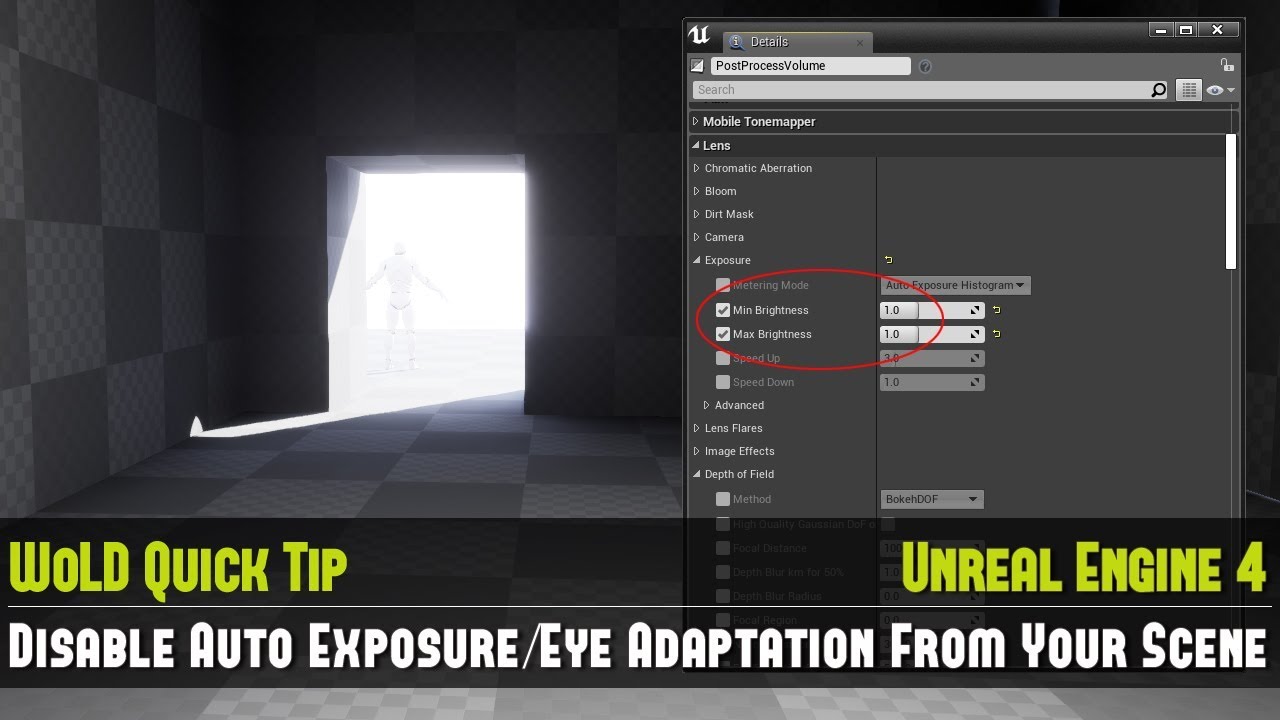
Full UE4 Quick Tip Playlist: https://www.youtube.com/playlist?list=PL_c7yiTIRI8rPQfsNytgjgJh-bssWUczX
Learn how to quickly disable auto exposure, also known as eye adaptation from your scene. This is especially important to do when you are working on creating your environment and not on lighting, as exposure is too distracting in the scene by d...
stark gyro
sharp crest
disable auto exposure https://www.youtube.com/watch?v=K2kIre_BHgA
I figured out what it was. Its an object 'GlobalPostProcessSettings' Its in my first level but not in the second
Really confused as to why
sharp crest
ok
stark gyro
Do you know why?
sharp crest
Idk what u mean tbh
if it's just a postprocessing actor then just delete it or whatever
 sharp crest
it does work tho
sharp crest
lol
stark gyro
ty
sharp crest
klol
prime willow

sharp crest

omg I want noodles
Idk if to eat or sleep
Im tired and hungry
I hate when this happens
lol
gonna get snacks and watch netflix insetad
 hushed cedar
did anyone here had a problem with the bottom right part of the engine not recognizing mouse in 4.27?
i can't select anything at the bottom of the details panel
 light prairie
hm can anyone point me in the right direction as to why my r.ForceDebugViewModes=1 isn't working in a packaged game (engine version: 4.26.2 built from source) i have it in my config and it worked in 4.25 before I upgraded but I'm unsure as to why it's different now
sharp crest
light prairie
hm can anyone point me in the right direction as to why my ```r.ForceDebugViewMo...
this?
 light prairie
yeah i've googled a bunch and the initial solution i had found(give me a sec to get the actual link) had worked fine for me
ah this https://forums.unrealengine.com/t/buffer-visualization-in-executable-build-of-my-project/27059/8
Unreal Engine Forums
In addition to enabling the commands, I think you need two things: r.ForceDebugViewModes=1 (DefaultEngine.ini). Otherwise FSceneView::ConfigureBufferVisualizationSettings() is not being called. After setting that variable, you need to recook your content, which will now include Engine/Content/BufferVisualization/*.uasset. Otherwise FBufferVisu...
sharp crest
hm Idk sry
 lavish turret
Hey all, hopefully this is the correct channel for this, but I'm having trouble understanding the built-in Puzzle Template
What I'm trying to figure out is how the camera works
I understand that the PuzzleGameMode sets the default pawn and the player controller class
But I just can't seem to find where it sets how the camera functionality works
sharp crest
probably player controller or player character @lavish turret
lavish turret
So I see in the PuzzlePlayerCharacter there is a Camera component
But there's no player start or anything in the default level
But there is a camera actor, which clearly is what's being used, but if I create a new level with a camera actor it doesn't get controlled
plush yew
hi
hi have a problem
how can use a player blueprint in a proyect designed like "FILM"
?
sharp crest
lavish turret
But there is a camera actor, which clearly is what's being used, but if I create...
screenshots, unclear what u want
lavish turret
Sorry, I'm not quite sure how a screenshot is going to help convey what I'm asking
sharp crest
Idk what camera u r talking about
plush yew
sharp crest
wut
I need to use a player in a film project
 sharp crest
do u want to find where it gets possesed or when it gets moved?
lavish turret
Where it gets possesed
sharp crest
plush yew
I need to use a player in a film project
cool story bro
lavish turret
The camera never moves
plush yew
sharp crest
cool story bro
do you know how can i do it?
sharp crest
lavish turret
The camera never moves
just press ctrl + f and search for view blend and/or possess
lavish turret
The event graph for the PlayerCharacter only has to do with if the player is in VR or not
sharp crest
plush yew
do you know how can i do it?
u r unclear
lavish turret
There's no instances of view blend or posses
plush yew
@lavish turret Is your game mode (and default pawn) set?
sharp crest
plush yew
<@!144663455922651136> Is your game mode (and default pawn) set?
its a cameraactor
plush yew
sharp crest
u r unclear
oh sorry, my proyect is a proyect is in film mode, but i need to define a character as a player

 lavish turret
Oh sure so that's set on the map I created but when I click play the player does not posses the camera actor
lavish turret
What I'm trying to understand is how this behavior works in the built-in Puzzle Template
sharp crest
lavish turret
What I'm trying to understand is how this behavior works in the built-in Puzzle ...
just delete bps from the working level until it stops working
sharp crest
plush yew
Only pawns can be possessed afaik
can still blend view
sharp crest
lavish turret
There's only one pawn on the default map, besides skysphere
just delete every god damn node then, lol
plush yew
@lavish turret I learned a fair bit going through the top down template, I think you're on the right path reverse engineering it.
lavish turret
Yeah, I mean for sure the behavior has to come from the Player Characater or the Player Controller
plush yew
Have you checked out the blueprints on the BP_GameMode ?
sharp crest
I think he did
plush yew
I seem to recall that having a fair bit of logic
lavish turret
So the PuzzleGameMode is currently just data only
And the tutorial mentions that all it does it set the Player Controller Class and the Default Pawn Class
 sharp crest
ye
bruh
I thought u said
u copied the camera to a new level
and it didnt work
..

u didnt
 sharp crest
👍
sharp crest
sometimes ye
lavish turret
I don't think I would have ever looked in the camera settings
Was hung up on the player controller
But all the player controller does is enable click events and show the mouse cursor
sharp crest
I did what I told u, I removed all the bps and it didnt stop working, so it had to be the camera actor itself
I changed to the engine default pawn &contorller
Im bored
Iv been stuck on this thing in my game for like a few days now
it's like a lot of variables I need to think about and setup
not very fun
so havent rly started on it
maybe I should
Idk
woven patrol
im trying to learn unreal, can anyone recommend any free/very cheap courses I could take?
ik the basics btw
so im looking for something a little bit above beginner
sharp crest
woven patrol
im trying to learn unreal, can anyone recommend any free/very cheap courses I co...

Unreal Engine 4 Beginner Tutorial Series - #1 Series Introduction
This is episode 1 of my Unreal Engine 4 Beginner Tutorial Series, In this video I will be going over an introduction to the unreal engine 4 series, some of the topics we'll be going over and most importantly giving you some examples of what we will be creating!
Unreal Engine 4 Do...
sharp crest
woven patrol
so im looking for something a little bit above beginner
you can check his other playlists.
woven patrol
thank you
sharp crest
woven patrol
thank you
but tbh youtube isn't great to learn apart from basics,
just think of a small game idea and try to do it, then google every single thing u dont know how to do. u'll learn faster this way, at least I learn faster this way, lol.
 icy mulch
Hey does anyone know how to fix a issue my packaged game crashes when ever I try to open the game
sharp crest
icy mulch
Hey does anyone know how to fix a issue my packaged game crashes when ever I try...
just make a new project and package that one and it will work np 👍
but if you are asking how to find out what the issue is,
then go to /Packaged Project Folder/Project Name/Saved/Logs/Project Name.log
and go to the bottom, and it should give u details on the crash cause @icy mulch
 glossy dagger
Can someone tell me what LOD i should use for a tessellated Landscape, instead of -1 which is staying the same at all distances.
Material has flat tessellation, it's scaled to 0.25 to get real tight mesh, and LOD in details is -1, but afraid to change the value until i know which way it should go.
 astral phoenix
Hello, my project is named ''Game1'' in my library, but when i package and play the game and wants to turn the game sound down i can see the name is not the same, how can i fix that so its the same name as in my library? 🙂
zinc shore
so when my character crouches the camera height is still above the capsule and when i change it in the character settings it wont work so how am i supposed to fix that
zinc shore
no its a fps charater
glossy dagger
You still need a spring arm and the camera on it: https://docs.unrealengine.com/4.26/en-US/InteractiveExperiences/HowTo/CharacterMovement/

In this How-To guide, you will create a playable character that exhibits different forms of Character Movement.
Step 6 of creating the player character
sharp crest

Packed my fluid simulation and renderer into one single Niagara system, which unlocked so many magic tricks
twitter thread:
https://twitter.com/Vuthric/status/1331758077968744452
glossy dagger
can you swim in it? @sharp crest
zinc shore
this is the problem when i crouch the camera is obove the capsule

and i cant seem to change the height of the camera or capsule when crouched
sharp crest
zinc shore
this is the problem when i crouch the camera is obove the capsule
bro there r settings in the movement component for crouch height and stuff like that
sharp crest
glossy dagger
can you swim in it? <@!98431296350461952>
ye
glossy dagger
spring arm connects the character to the camera just fine, then of cousrse crouch height and any other settings are needed
zinc shore
sharp crest
bro there r settings in the movement component for crouch height and stuff like ...
but if i change them the height stays the same

no mater what i set these values nothing changes in game
if i set the height to 10000 it will still be the same as 65
glossy dagger
apparently i'm not really typing here
zinc shore
same with setting the capsule height
sharp crest
zinc shore
but if i change them the height stays the same
check the setings in the mvoement compnonet
 zinc shore
sharp crest
check the setings in the mvoement compnonet
zinc shore
sharp crest
check the setings in the mvoement compnonet
docent work no mater what i set the value the height stays the same
zinc shore
is there anything else i can do or will i just have to deal with clipping though walls
sharp crest
just disable crouching or make ur own crouchning system
zinc shore
can i manually change the capsule height
zinc shore
btw looks like this is a bug someone else had this problem https://answers.unrealengine.com/questions/838178/view.html
sharp crest
ok
zinc shore
apparently they forgot to add the ability to set it so you can only get its value
hope they fix that
 upper bison
I'm running across a problem where certain things, like fences and semi-opened assets are flickering even at a short distance...both in editor and in standalone. Any help would be appreciated.
sharp crest
gif/vid?
wdym flickering
just make a new project
put the assets there
see if it flickers

upper bison
Just slightly like it is see through yet still seeing it, don't know if that helps
But if you can tell me how to record i will. I have the Geforce Experience
Across all projects
sharp crest
dowlnoad this
then open Gyazo GIF app and select the screen area
then itll link u the gif
upper bison

I think thats it
yeah
For some reason, in that gif it isn't showing the shimmer of the fence, just the distortion of it. I just updated all my drivers an hour ago hoping for a fix, because this has happened for the past 3 months of me using the software

this is better
 fathom heath
Some cursed code from my project

 vital mountain
Can someone help me with a issue, how would I go about making a button that hides a widget?
icy mulch
sharp crest
check the setings in the mvoement compnonet
It says not using caced read wrapper started graph with 5 named threads and 26 total threads with 3 sets of task threads and when I try to migrate it does work when I press play it says blueprint editor
 modest swan
I accidently closed my world settings. How do I get it back??
 autumn flame
Window -> World Settings
modest swan
autumn flame
Window -> World Settings
Wheres window??
autumn flame
Top left
crystal skiff
Im importing my weapon. Which one should I pick?
 modest swan
How do I get to my project settings again?
crystal skiff
this normal?
 sharp crest
crystal skiff
this normal?
sharp crest
crystal skiff
this normal?
what is? add a skylight if u dont want the dark light
sharp crest
modest swan
How do I get to my project settings again?
edit-> prj stngs
crystal skiff
sharp crest
what is? add a skylight if u dont want the dark light
I had a texture on it
It was yellow and stuff
sharp crest
so put the material on it
crystal skiff
I think I screwed up
sharp crest
did u tho
just add the material to the mesh
or make a material from the texture and add it to the mesh
 upper bison
click on the drop down where it says material, and look for the one that you are needing
sharp crest
it'd help if u would screenshot the whole screen
crystal skiff

 crystal skiff
I made it in blender, should I just export the texture as a png and drag it into UE4?
sharp crest
yes
then when it's in UE4, right click the texture and press create material from texture, then drag it to the model
chilly schooner
Can anyone recommend any good resources for programming vehicles in unreal?
crystal skiff
Oh alr, Thnak you so much for putting up with my dumbass.
sharp crest
chilly schooner
Can anyone recommend any good resources for programming vehicles in unreal?
there are 2 vehicle templates
 cosmic birch
Where may I inquire as to how I can get my displacement (tessellation) back that I had in UE4 now in UE5? I've seen one video on ytube about a Virtual Height Field, and that was it.
I need the displacement socket back for my landscape surface material.
sharp crest
u cant there is no tesseliaoin with the new lighting thing @cosmic birch
as far as I'v heard at least
arctic hare
i got a question im trying to change the model in the fps template but it's always super massive any solutions
sharp crest
arctic hare
i got a question im trying to change the model in the fps template but it's alwa...
what?
just scale it down
there is a scale parameter
screenshot ur screen
cosmic birch
sharp crest
u cant there is no tesseliaoin with the new lighting thing <@!561194839245324320...
https://www.youtube.com/watch?v=JzYVeIF89V0 He did it.

In Unreal Engine 5, tessellation is removed. So, using Virtual Heightfield Mesh is the only viable solution to do displacements. Here's all about it.
-
Get OpenLand: https://bit.ly/unreal-openland
-
Join Our Discord: https://discord.gg/DK9cMn9eFV
-
00:00 Demo
-
01:48 About the Scene
-
02:17 Setting Up
-
05:51 Doing Displacements
-
06:48 LOD Di...
I don't understand it yet.
cosmic birch
Yikes. When you said before lighting thing, you mean lumen or something?
arctic hare
i tried to lower it to 0.2 but is stays the same size
 sharp crest
cosmic birch
Yikes. When you said before lighting thing, you mean lumen or something?
sharp crest
cosmic birch
Yikes. When you said before lighting thing, you mean lumen or something?
lumen ye
forget the name
but I'm not sure if u cant use it only with lumen, or if they removed it completely
I think they removed it completely
cosmic birch
Lucky I only found nanite when importing... I haven't even found the check box for lumen...
So I should really go UE4.26 then?
cosmic birch
It's shinny.
sharp crest

arctic hare
arctic hare
i tried to lower it to 0.2 but is stays the same size
just fixed it. Needed to change some nodes in the construction script
sharp crest
10000 reasons to use 4.26
0 reasons to use 4.27
-1 reasons to use 5
sharp crest
arctic hare
just fixed it. Needed to change some nodes in the construction script
oh, ok lol
crystal skiff
Is there a way I can turn this into a texture?
 sharp crest
go to blender discord
cosmic birch
sharp crest
10000 reasons to use 4.26
0 reasons to use 4.27
-1 reasons to use 5
You just made my problems go away. Tyvm.
sharp crest
not here
cosmic birch
crystal skiff
Is there a way I can turn this into a texture?
emit node... as long as you keep that away from me.
sharp crest
lol
 sullen willow
hi everyone may i get help?
arctic hare
sullen willow
hi everyone may i get help?
sure
sharp crest
sullen willow
hi everyone may i get help?
can't help u
sullen willow
well i wanto to create a top down survival game with wasd controls
sharp crest
ok so open ue4 and choose a template and get started
sullen willow
i already have the top down wasd of course with the third person defaul blueprint
sharp crest
you do take a long time getting to the point, lol
sullen willow
well i have a lot of questions
sharp crest
better get started writing then
make sure to filter ones that u already tried to google
👍
zinc shore
how can i change the capsule height without it moving the camera
sullen willow
whats the best way to create my custom 3d character
i cant find any 3d character thats free
sharp crest
zinc shore
how can i change the capsule height without it moving the camera
u'd save the camera world location, then u'd change the capsule height, then u'd change the camera world location to the one u saved
(assuming changing the caps height moves the camera)
sullen willow
i only want a perfectly made 3d character if to anatomy it comes
zinc shore
sharp crest
u'd save the camera world location, then u'd change the capsule height, then u'd...
when i do that it still moves or jitters
sharp crest
sullen willow
i only want a perfectly made 3d character if to anatomy it comes
try ue4 marketplace
wait u want free
Idk then
try googlnig maybe u will find
sullen willow
i searched like crazy
sharp crest
zinc shore
when i do that it still moves or jitters
if u do it on frame it wont jitter. try adding delays and stuff Idk. prob- u r doing it wrong :)
sullen willow
i only want a normal male for survival game
no cloth
or anything
only that it has a well made anatomy
rigged
is there any cheap way to get it
sharp crest
just ask your dad to buy you something from the marketplace
marketplace is cheap usually
20$ range for 1character
sharp crest
that's not how currencies work
sullen willow
and i have literally no money
sullen willow
you clearly dont know about my country`s currency
sharp crest
just get paid in dollars then
crystal skiff
Where can I find textures?
crystal skiff
*Materials
crystal skiff
My friend had a website where he could find a bunch of materials
sorry for being unclear.
sharp crest
o
just like
go to the ue4 marketplace
or go online and google free ue4 materials
but if u already have a texture, u dont need that
crystal skiff
Is it frowned abound to use free materials?
crystal skiff
true
Im just gonna make a simple bullet hell for my first game
I have a big game in mind.
sharp crest
ok ye better start with the small idea first
crystal skiff
Yeah cause you dont wanna be making an AAA game as your first game, you gotta start with something simple
sharp crest
well no it's just ur first game is gonna be shit
crystal skiff
Yeah that too
sullen willow
do you know how to recreate the advanced locomotion system from scratch?
sharp crest
isnt it free?
just download

Unreal Engine
An advanced bipedal locomotion and layering system focusing on high quality character animation with responsive movement. Built to be flexible, extendable, and to provide a solid starting point for new projects. Currently Singleplayer only. (100% BP)
crystal skiff
God I love the 4 free things amonth
sullen willow
its too complicated to add new animations an blendspace i end up gettin it all messed up
crystal skiff
Do we have to cook jesse?
sullen willow
is it hard to make a basic locomotion?
sharp crest
haha 1000 ratings I think thats the most I'v ever seen on a marketplace asset
sullen willow
thats similat
sharp crest
Idk what locomotion is tbh I just use regular animations for my games works just fine
sullen willow
with the sensation of weight and heavyness in steps
sharp crest
but just google root motion ue4 tutorial or something
sullen willow
third person top down
sullen willow
i just need the walking to look real
sullen willow
not just that
sullen willow
yea i just asked there but no one seems to be online
crystal skiff
Would it be hard to make a weapon where you throw, then you have to get it back like a throwing knife?
sharp crest
no
sharp crest
ok
sharp crest
Ik
crystal skiff
sullen willow
and replicated kratos leaviathon
Wait, I think I saw a video on that
Idk if it was you tho
sharp crest
I feel left out send link
crystal skiff
sullen willow
nah i made one based in three videotutorials
fr? Please do send a link
crystal skiff
sullen willow
imma send em
Thanks bro!!
sullen willow
well
this first video
its the best and shortest explained

A super quick and easy Unreal Engine tutorial on how to replicate the God of War Leviathan Axe Throw without having to watch an hour and a half tutorial.
Downloads___
https://drive.google.com/drive/folders/1L8zSD_D7YoIPfmyhbcod9tz_Q9LvXT9D?usp=sharing
Video Chapters_______
0:00...
very well explained fast and easy
heres a long and easy too
sharp crest
nice
sullen willow

Animations Used: https://drive.google.com/open?id=1_siT-p2wZdH4NQxHDppNWnTFKPn2J2WD
In this tutorial I share how I would set up the basics of the God of War axe throwing mechanic.
This tutorial isn't intended to produce a complete feature, but it should give insight on how some the math can work. Note: there is plenty of optimizations to be d...
heres the short and way to hard video
well
not that hard
but you need previous experience

In this first episode of Let's Make, we look at how God of War's Leviathon Axe Throw was designed, and have a go at recreating it using UE4. (Final Result at 8:55)
This is my first time making and recording a video, so I hope you all enjoy. It turned out a bit longer than I would have liked and there’s a lot of things I could have done better w...

The new God of War is one of the best games on the PS4, and I couldn't help but try my best to recreate something of it!
Support Mix and Jam on Patreon!
https://www.patreon.com/mixandjam
PROJECT REPOSITORY
https://github.com/mixandjam/GodofWar-AxeThrow
REFERENCES
Thi...
for c++
sharp crest
wow people really do love that god of war axe
sullen willow
if yall wrap around thos videos you will be able to combine them and create something amazing
sharp crest
what's wrong with the first video?
sullen willow
who said theres something wrong with that
one video has what the other doestn
doesnt
sharp crest
so what does it not have?
sullen willow
nones perfect
why dont you watch the video and form an opinion based on your own criteria about what the video lacks and doesnt?
sullen willow
well
sharp crest
I need to know which video to follow
crystal skiff
You see im making one of those bullet hell/my friend Pedro, but your a chimpanzee on Drugs and you pick up bananas and kill people and you have to retrieve the banana every time you throw it, and there will be special bananas, you can also break through a few walls/windows, etc. Very gory too, and like explosive because funny drug
sharp crest
or what parts
sharp crest
just email that guy and ask him for the project files then
sharp crest
soudns better
zinc shore
sharp crest
if u do it on frame it wont jitter. try adding delays and stuff Idk. prob- u r d...
this is what i have
 sullen willow
then get it back smoothly with through the right side of your screen
the first gets it back from the side
which its not realistic at all
sharp crest
zinc shore
this is what i have
right click the function input and press 'turn to custom event'
then gif and show me the issue
sullen willow
and the 10 minute long video thats hard
zinc shore
sharp crest
right click the function input and press 'turn to custom event'
why dose it need to be an event
sullen willow
has the information on where to get the animations that make the axe throwing and recalling the realest
sharp crest
@crystal skiff did u figure out which vid to watch???
crystal skiff
sharp crest
<@!263740999044562945> did u figure out which vid to watch???
I got them all in the tabs
in my tabs
sharp crest
crystal skiff
I got them all in the tabs
so u did not
sharp crest
sullen willow
watch the 20 minutes first
actually
watch the 10 minute frist
just for informative purposes
then go one with the 20 min
to do it first as a practice
then the 1 hr
in parts
cuz you might get stuck and need to go back to the other two vids
for refresh
sharp crest
@crystal skiff ^
sharp crest
ok
sullen willow
cool
sharp crest
very
sullen willow
Extremely.
sharp crest
not that much dont exaggerate bro @sullen willow
sharp crest
whynot
sullen willow
as in real life dying
sharp crest
not quite certain about that
sharp crest
ok gl
sullen willow
cuz i buy food and cook
crystal skiff
sullen willow
watch the 20 minutes first
Kk, thank you!!!
sharp crest
sounds like too much effort
crystal skiff
Im gonna do those videos soon, I hope it will work as a throwing knife, as in you have to walk and pick it up after throwing, either way it will work
sharp crest
well u could just learn blueprints and do it urself
crystal skiff
I will probably change it to a Chimpanzee throwing a banana that comes back to him
sharp crest
but who's got time for that am I right
crystal skiff
Yeah youre right
sharp crest
crystal skiff
Wait do they have a team create?? like can multiple people work on 1 project at the same time?
sharp crest
I dont think u can work in the same level I think u need a plugin for that, but ye apart from that
crystal skiff
well if it is a plugin I dont mind I will probably install that
 surreal eagle
is there a fast way to scroll down a list of values and select a output on that value?
sharp crest
surreal eagle
is there a fast way to scroll down a list of values and select a output on that ...
wut, screeenshot
surreal eagle
sharp crest
wut, screeenshot
i have a enum and want to do a different thing per value
sharp crest
Switch
surreal eagle
thanks my man
 spark valley
Help guys the fact that code can be inbred is keeping me awake...
chrome dust

If you didn't sleep already, sleep on your problem and your brain will find the answer for you
spark valley
Yes
Ok ive dedicated my life to figuring this out now
Class Prarent1
Class parent2
Class kid1 inherite p1 p2
Class kid2 inherit p1 p2
Class wtfisdis inherit kid1 kid2
Is there a practixal use for a that? Probably not right?
Or just say no so i can be put to ease
This isnt possibke in single parenting but in lang where multiinheritance is allowed...
modest swan
I can't see anything in my game anymore. I had a working character and map and everything disappeared. I definitely didn't delete ANYTHING. Does anyone have any ideas. I can send my event graphs and stuff
 pliant junco
modest swan
I can't see anything in my game anymore. I had a working character and map and e...
pliant junco
modest swan
I can't see anything in my game anymore. I had a working character and map and e...
u can show a screenshot of ur project?
modest swan
pliant junco
u can show a screenshot of ur project?
I can

Sorry it isn't a screenshot
Discord is bugging on pc rn
pliant junco
modest swan
my guess is u deleated ur map
try going to file
open level
and find the level file u saved
modest swan
pliant junco
my guess is u deleated ur map
But my character is also gone?
pliant junco
modest swan
But my character is also gone?
yea try it
i've happened like tht b4
should be all good as long as u saved ur map
modest swan
pliant junco
yea try it
Life saver. I spent a few hours on it and it now works. Thanks alot
pliant junco
modest swan
Life saver. I spent a few hours on it and it now works. Thanks alot
u got it