#ue4-general
1 messages · Page 1026 of 1
 covert summit
you definitely want to go instanced for things like trees if you want any reasonable amount of density
a 1080ti can handle hundreds of millions of tris of instanced foliage, but if they arent instanced, no way
 steep steeple
I don't really understand instances, do you know any good tutorials on the subject?
covert summit
the idea is that the CPU does not have to issue a draw call for each tree of a certain type
it can issue one draw call and "batch" them together
the "static mesh" foliage type does this for you, which is why its

you can use instancing in other ways in the engine, but static mesh foliage is the most straightforward way to leverage it
 plush yew
How to make a spot light like that? I mean, a true light fading. My light It looks very bright when held to the near wall as in the picture, but a small amount on the far wall, so it is not well balanced. I couldn't find any proper way to fix this. Also I noticed most of indie ue4 games flashlights have that problem. What can I do to remove or slightly reduce the far fading of the light?
 covert summit
plush yew
How to make a spot light like that? I mean, a true light fading. My light It loo...
covert summit
plush yew
How to make a spot light like that? I mean, a true light fading. My light It loo...
the cone of a spot light lets you control its influence over distance, but lighting is a pretty complex topic so i might not get the ask here
steep steeple
Alright, I'll give this a shot. Thanks for the help guys
covert summit
@plush yew i think you should look at cone distance versus intensity
there are other techniques that dont actually use the lighting system but those will be more complex to implement -- would not bother going beyond the core dynamic lighting until you have to
plush yew
covert summit
<@456226577798135808> i think you should look at cone distance versus intensity
Do you mean attenuation radius with "cone distance"? Cuz it's sets the light distance. But I set it far enough already, the problem is fading system. It's not balanced well for me, and I dont know how to edit it
covert summit
hmmm
covert summit
you could look into Light Functions and IES profiles, but note that these have tradeoffs- if you are using forward rendering for instance you cant use them. Unreal by default is deferred renderer and it can use them, but they have a perf cost
but for something like a player's flashlight, where there is only one in your scene, it might help with the use case
 crystal kelp
Could anyone give me some links to some good tutorials for UE4? (in case that would be considered spam on the text channel you can just dm them)
covert summit
not sure that is the place to go, but might want to investigate them
 drowsy snow
crystal kelp
Could anyone give me some links to some good tutorials for UE4? (in case that wo...
drowsy snow
crystal kelp
Could anyone give me some links to some good tutorials for UE4? (in case that wo...

Unreal Engine
Unreal Online Learning is a free learning platform that offers hands-on video courses and guided learning paths.
covert summit
crystal kelp
Could anyone give me some links to some good tutorials for UE4? (in case that wo...
There are boundless tutorials on YouTube, just search "unreal tutorial" 🙂
crystal kelp
covert summit
There are boundless tutorials on YouTube, just search "unreal tutorial" 🙂
yeah but some go into directly into creating stuff without explaining the basics, like they consider that you have a little bit of knowledge
ok thanks
crystal kelp
drowsy snow
https://www.unrealengine.com/en-US/onlinelearning-courses
thanks
covert summit
yeah thats fair, the link above for Unreal Online Learning is a good resource
and welcome to game dev 😄 its so much fun
 hardy nacelle
How can I know which point (for example index of that point) was moved in spline inside function PostEditMove
plush yew
covert summit
but for something like a player's flashlight, where there is only one in your sc...
I am using a light function for ies texture. Look, the red striped parts are so bright, also the far is darker than I want. I think I will stay with that, cuz I can't do anything
 covert summit
@plush yew I would also recommend controlling your exposure comp, it's a good feature when used in a controlled way but the defaults are whacky and can throw off a lot of tuning. if you aren't already aware of it's effect, set it to 0 on your global post process and see how that affects things
lol
he got offed
mannequin abuse 😛
plush yew
I killed him
covert summit
killed him with flashlight
plush yew
covert summit
killed him with flashlight
I was gonna say that 😄
plush yew
covert summit
<@456226577798135808> I would also recommend controlling your exposure comp, it'...
I will try everything you said, thanks
covert summit
yeah if you havent messed with exposure comp at all and you are fine tuning lighting, then yeah it will make things make way more sense
like i said though, exposure comp is not a bad thing when used right
not good to just totally disable it and never think of it again -- more than likely youll get to a point where you're like yes it looks good when im standing in this light, but not in this light
disabling exposure comp entirely is mostly done for still frame work
plush yew
You mean auto exposure? I heard first time exposure comp
covert summit
yes the same thing
 plush yew
Oh, I'm gonna check it
covert summit
0 means no changes

ngl i dont know why its -0.8127 on this one lol
the unfortunate thing about post processing in unreal is that there are a boatload of defaults that are always there
personally, i prefer to have full control of lighting at the map-level, and ensure that unreal does as little post processing globally as I can, at least beyond the obvious global postprocessing like antialiasing etc
which i do not think the engine even puts under the post processing category, but it is post processing
plush yew
Yeah I think same
covert summit
you can change the global defaults in project settings
 radiant jewel
I am currently setting up a UMG editable text screen for the player to enter data in, how can I cast this text data to another blueprint so that I could display what the person typed in on screen through a different UMG
plush yew
I tried the exposure comp, it brights everything but, maybe If I set it balanced with the ambient light, I can achieve the result I want. But I'm wondering if there is another way instead. Also what if I uncheck this? It works a little for me, But it makes some glitches on the wall. I'm not the only one who having that problem, I think I'm not gonna use this...
 covert summit
@radiant jewel Question is broad so I'll cover a broad response. you would use "Editable Text" or "Text Box" widgets in your UMG blueprint, then use Get Text when some event happens to get the text out, send it where you want, and then on some other widget use Set Text to show it on the screen
You'd use Create Widget and "Add to Viewport" or "Add Child" on a parent container to create the second one.
covert summit
plush yew
I tried the exposure comp, it brights everything but, maybe If I set it balanced...
No I don't mean set it to something that brightens your scene. Set it to zero. Turn it off entirely, and get your lighting working the way you want first
Then, once it looks the way you want, then you can turn it back on to taste
setting exposure comp to values based on a quick look in your scene can result in a lot of weirdness
plush yew
I disabled auto exposure, so that doesnt change anything
radiant jewel
covert summit
<@!327094392844189706> Question is broad so I'll cover a broad response. you wou...
So I am trying to create a timer that the player or the user could set for themselves, a countdown timer to be exact. I am planning on setting up the timer in the third person character blueprint with all the variables. Problem is if I want the player to set the time for themselves, I must allow them to enter in their own data so I must use the UMG editable text. As a result, I would need to somehow gather the info entered by the user then send that variable or text to the timer blueprint in the thirdperson, then from there, I would then send that variable again to another UMG blue print to project the timer Countdown. That's what I have in mind
covert summit
well it's one less thing to worry about off the bat. dont have more knowledge myself of how to configure the light for what you're after, bring it back again later im sure there's lots of folks around who can shed light on it (oh no, the puns)
also poor manny
plush yew
okay guys, I think the way to disable or fix the light fading is, disabling use inverse squared falloff, That is the only way works for me
covert summit
plush yew
okay guys, I think the way to disable or fix the light fading is, disabling use ...
what do the glitches look like?
plush yew
covert summit
what do the glitches look like?
It's gone, for now
covert summit
radiant jewel
So I am trying to create a timer that the player or the user could set for thems...
ah so you would need to set the timer based on what the player entered. if the player is entering an amount of seconds its easy, if they are entering an amount of minutes, its mostly easy, if you want them to be able to type any possible type of response like "3.2 minutes" or "12 minutes and 3 seconds" then its hard
taking an amount of seconds and converting to an integer happens automatically, drag a String or Text to an Integer and it should auto-cast
and beyond that, its just programming
welp, having fun helping folks out and will continue to be around, but my objective is solving a packaging problem, which ive posted in #packaging - if anyone knows how i turn off es3.1 shader compilation in DX11/12 SM5 windows packaging (or why the hell it is there to begin with), im all ears
having a hard time believing this hasnt been hit before
drowsy snow
covert summit
welp, having fun helping folks out and will continue to be around, but my object...
Wait, it did include ES3.1??
radiant jewel
covert summit
ah so you would need to set the timer based on what the player entered. if the p...
Thanks a lot, I'll have a look into it then
covert summit
drowsy snow
Wait, it did include ES3.1??
it is building all my shaders for ES3.1 in windows SM5 with zero ES3.1 platforms or targets configured at all (via File -> Packaging -> Windows x64)
and i have some that use Shading Models that are not supported in ES3.1 (specifically "Hair" or "MSM_Hair" in engine)
results in packaging failing
drowsy snow
That's odd, because I swear I never had issues with MSM_Hair in packaging before. Probably it come from my modified UE, which doesn't have build config for mobile/VR.
covert summit
i have used the prebuilts and have a custom devenv set up- which let me understand that the crash was happening because Content on the material shader map ends up being nullptr, on a hair material that is a few lines above (in the cook log) complaining that it cant build for ES3.1 because Hair isnt a supported output
so the material instance cant build because the main material could not build on ES3.1
drowsy snow
Though if I going to sus, probably leftovers from OpenGL
I think only Vulkan that use SM5
covert summit
i have Vulkan enabled
but yeah its supposed to be SM5
let me turn it off

thats where ive been at
never mind, thats linux anyway
windows is just Vulkan (SM5)

its not even on

wait
i have a theory
😮


🤣
thanks unreal
 clever axle
Hey everyone!
I'm trying to increase the grass cull distance but I can't find the setting
and could someone at epic please fix those image access errors in the forums? Half the threads I find on google look like this https://forums.unrealengine.com/t/grass-rendering-distance/36958

Unreal Engine Forums
Hello, I started learning the Open world tools recently and I’ve found an issue which I don’t know how to solve. I followed this tutorial https://docs.unrealengine.com/latest/INT/Engine/OpenWorldTools/Grass/QuickStart/index.html for creating grass step by step. So I’m using Landscape tools / Paint for creating the grass and other elements like...
covert summit
yep that fixed it immediately. Maybe don't trust unreal project preferences if you or anything have ever touched DefaultEngine.ini. Check the config file if it's not behaving as expected
welp, I owe much to unreal slackers already :-D
clever axle
@plush yew my question or the plea to fix forums or both?
covert summit
I will agree though that the breakage is annoying
clever axle
aye.. I'm trying out the stylized forest that's free on the marketplace for the month
drowsy snow
clever axle
<@456226577798135808> my question or the plea to fix forums or both?
The transition to Discourse make some threads missing as well
covert summit
oh yeah, just click the foliage type in the foliage efitor
under instance settings, cull distance min/max
if you are in modern UE, there's a toolbar button to entire foliage mode
or shift+...2 I think
clever axle
it's landscape grass though, not foliage..
clever axle
drowsy snow
The transition to Discourse make some threads missing as well
I'm not sure I get your meaning
covert summit
landscape grass? foliage is how you put 3d grass on landscape, I don't know of another way, and if you mean the 2d texture then you don't need cull distance on it
ahhhh
clever axle
yes, I think it is.. It's a layer on the material
clever axle
I only see the Material that would be close to that but I can't find any cull settings or the like
covert summit
man I need to read up on this
so if it's referenced by a material, then I'd guess the material is in charge of cull for it yeah?
clever axle
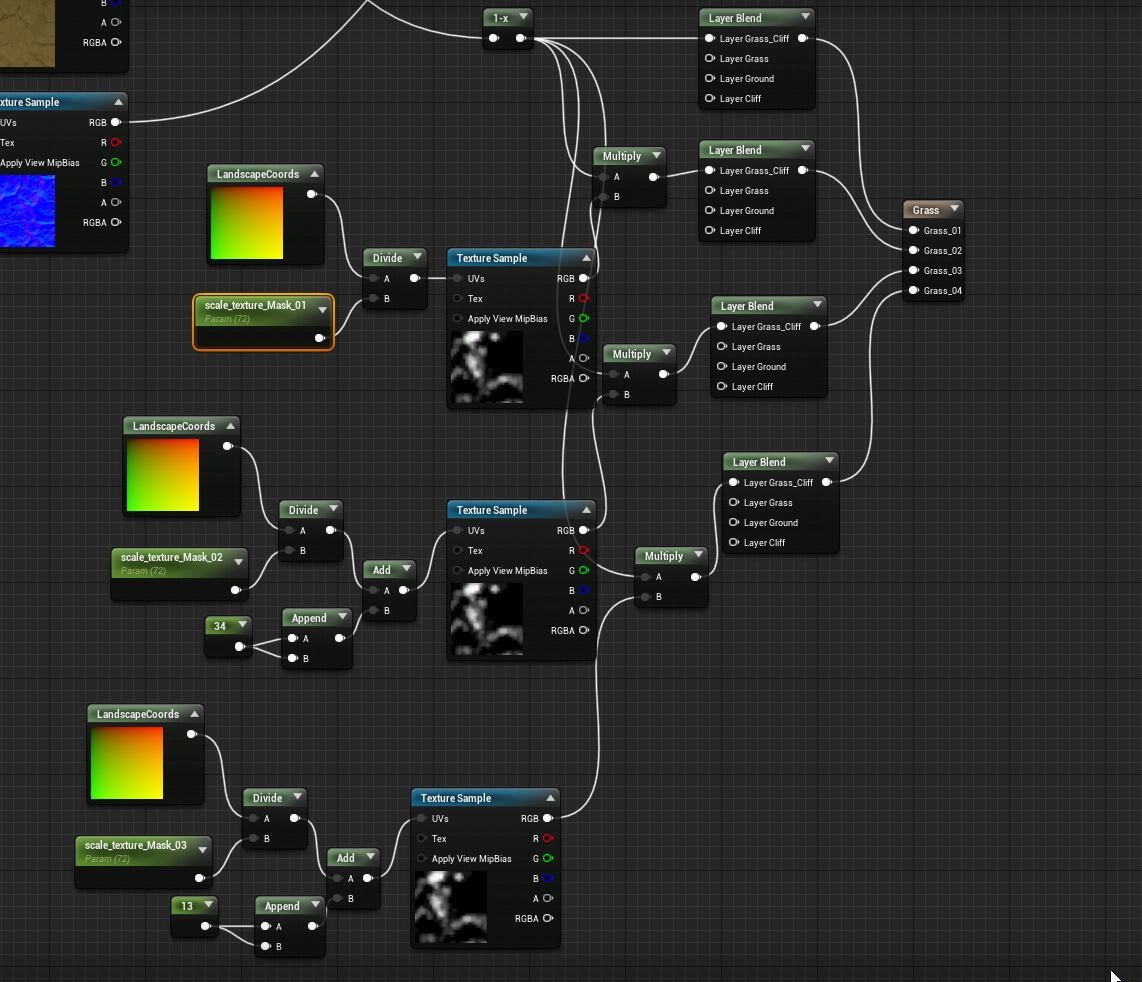
probably this then
aah, ok
I see
now everything's broken but this is progress
thanks @plush yew
covert summit
shaders build for sure
I guess the feature is this one https://docs.unrealengine.com/4.26/en-US/BuildingWorlds/OpenWorldTools/Grass/QuickStart/
Learn how to add Grass textures to a landscape.
 civic mauve
Is there a way to search through content packs in the editor? or do you need to do that via epic games
covert summit
civic mauve
Is there a way to search through content packs in the editor? or do you need to ...
you can search through any assets in your project
if you mean search through all available assets on the store, epic games -> unreal -> marketplace
civic mauve
okay
clever axle
@covert summit I found the setting, grass to the horizon and no frames left 😄
clever axle
I'm on GTX970 until prices come down to reasonable levels 😄
covert summit
yeah, the less "full" wireframe shows, for the equivalent visual effect, the better
you crank density to a billion and paint, it will be crushed, but it won't look better than way less density
yes not yet sadly :-(
pro tip though, if you've painted too much and you just want to reduce what you have, the editors got you on that
just set your erase density and repaint over the land with control pressed
you can reduce until perf is ok
yes, my stuff is mainly on foliage paint which is not the dedicated grass system
civic mauve
is there a way to change the folder where it looks for projects? i can only add assets to these projects now
 covert summit
civic mauve
is there a way to change the folder where it looks for projects? i can only add ...
covert summit
civic mauve
is there a way to change the folder where it looks for projects? i can only add ...
probably it's not the right version that is compatible
you can tell the marketplace that it's ok often
but it might not work if it's a big gap between compatibility of your project and the asset
easy to come across assets for 4.25 that don't show your project by default, but that will work fine in 4.26
clever axle
@covert summit from what I read having the grass as a landscape layer is a lot more performant than foliage actors
civic mauve
i just started a new project with ue5
covert summit
clever axle
<@!138013505545568256> from what I read having the grass as a landscape layer is...
yeah I'm going to check this out. I've got speedtree nice and optimized in my maps but grass is basic foliage
you can do a lot with grass with instances static mesh on a good gpu but the more perf the merrier when things get big :-D
(btw super pumped to go to 3080ti tmrw from 1080ti)
finally get to really play with ue5 and lumen (not that you can't use lumen without rtx to be clear, that's one of the best things about it)
well my poor system has some work to do tonight
 clever axle
@covert summit the gpu prices are finally falling a little bit so fingers crossed to be able to pick one up this year
covert summit
@clever axle best of luck, i recommend fixitfixitfixit for stock alerts
also fml this is how #unrealdevlife really is

@clever axle btw only reason i got one is because of the recent reduction in demand from the china crackdown on crypto
clever axle
well, that and everyone who wanted one and was willing to pay dumb prices has one now
covert summit
i paid dumb prices. you shouldnt pay $1400 for a 3080ti. if you are doing gamedev, aim for a 3090
clever axle
and everything's reopening so people are chilling at the lake instead of rendering their blender tutorial donuts 😄
covert summit
3090 has 2x as much VRAM and thats important for gamedev
good luck fitting it in your case though
covert summit
😄
clever axle
I'm aiming for an AMD GPU actually
cause I want founders edition /reference card or bust
covert summit
6900xt is definitely a reasonable choice for dev
clever axle
and NVDA cards just don't have enough VRAM this generation
at least the affordable ones
so.. I just want something to tide me over until chip stacked gpus are mature
covert summit
6900xt has 16GB VRAM, 3090 has 24GB of VRAM, 3080Ti has 12GB of VRAM
6900xt is a bit cheaper than 3090
3080Ti is in the middle of those two
so if you are looking for the low end of this set, 6900xt is completely fair
upper end, 3090 is better
3080Ti is in a bit of a weird place, but i also want to play some RTX, and RT is doing better on NV
clever axle
I would consider a 3090 but well, as a tide-over card it's too expensive
and 12GB is not enough
clever axle
I just want the headroom
covert summit
but i dont do static lighting at all
and no DCC
overall VRAM is mainly a factor of "how effective RT cores will be at accelerating my pre-computation"
scenes that i get 60fps on in standalone, yield 20-40fps in editor now, with minimal or acceptable texture streaming (1080Ti)
its hard to see a path where i really feel i need the full 16 that 6900xt will give me, but sacrificing RT perf
maybe in about a week ill have a different report, but right now im confident that going from a 1080Ti -> 3080Ti is going to produce good results from a gamedev perspective
ill be able to explore a lot of perf that my players will ultimately have when the game ships in 3-4 years
clever axle
well, have you used lumen/nanite with silly amounts of textures and tris?
clever axle
I've installed it. The editor runs at around 5fps with the little chair default scene
covert summit
im super excited about the positive perf impact there with no additional hw
covert summit
clever axle
I've installed it. The editor runs at around 5fps with the little chair default ...
wait what
clever axle
yes.. basically empty editor..
covert summit
ok one more time your hw stats?
clever axle
I only got a 970 though.. It's a solid card but too old for this next level stuff
covert summit
whats your storage?
 clever axle
yes.. the editor is maxing my GPU is the problem
covert summit
my old 970 is in my gf's machine, i think i need to test this when i finally get into ue5 testing
it makes some amount of sense from a raw I/O perspective
but
this is where i wonder how epic is going to handle scalability
ideally i want to take advantage of directstorage + modern GPUs to produce nanite + lumen in a commercial build
but the ideal is that we get what we had before in 970s
which should be fantastic actually if you know what you are doing in UE4
it may not be possible technically though
we still need terrain + foliage in nanite
clever axle
directstorage + modern GPUs
yes, I'm looking forward to this as well
I'm actually surprised it took this long to develop a direct line from the GPU to mass storage
covert summit
no point when doing magnetic storage
but on the SSD front, yeah, its way more than feasible
clever axle
SSDs have been a thing for a while
covert summit
yeah but architecting game engines around it is brand new
when I first got into unreal I thought of course it already culls the vertices of actors that are off screen
but that's false, before nanite it could not do that
I mean partial vertices of the actor, in ue4 you can merge actors of a huge wall, and that's bad for perf, the engine will render the entire wall if only a fraction is in the view frustrum
clever axle
what? I refuse to believe that. It's even backface culling afaik?
covert summit
in nanite ue5, only the vertices on screen render
back face culling doesn't address forward face offscreen vertices
clever axle
Yes.. But if it's backface culling it's hard to believe it's not also partially offscreen culling
but in any case. I like that nanite is a thing
but I wonder if it will be possible with dynamic actors
covert summit
backface culling is against the camera plane
camera plane doesn't factor in polygons off of the view frustrum
for dynamic actors, that will be amazing but epic has certainly not promised anything like that for GA
it still should be possible
the best part of nanite is breaking every actor into polygon groups (basically HLOD)
it means that view frustrum does matter, on top of automatic LOD
beautiful future we've got :-D
yeah what nanite promises is to make it more or less easy, but it's not anything that can't already be achieved
and maybe not even that much more difficult with the right middleware
that's why for me the ue5 unveil was powerful though, that right within the editor there was a promise that the engine will take care of it
yes
I'm holding off on that and the issues on foliage for lumen
though I've seen some amazing foliage heavy lumen
there were some heavy hacks (sorry chance and team) on VotA that they fully intend to address
and people wonder why i spend so much on computer hardware

yeah
like i mentioned earlier, if you want to ship something in 2021, then realistically consider shipping on UE4
early 2022 (GA) is a longshot on UE5, mid 2022 more reasonable, and end of 2022 is a good target for UE5
2023 should be ok i think
i havent dug in deeply but if so then i think they've got the right timelines 😄
yeap
well yeah the GA is early 2022
but its a longshot to actually ship a game on UE5 in early 2022
definitely violent agreement here
for me, my game aint coming out before 2022 period, and early 2022 would be way ahead of my schedule so yeah ill be going to UE5
but im also not jumping from 4.26 to UE5 yet
you get deep enough into a project in unreal and every engine version move is laborious, let alone jumping to a new major v ersion
yes agreed. UE5 is a testing phase thing at this point
im just happy its not trying to build ES 3.1 (mobile) for a game that definitively is not targetted at mobile. maybe my last 3 months of work can be enshrined in a nice packaged build i can keep forever

its hard enough to do that
(i have way too many assets to build manually on the regular, but im contemplating setting up an automated nightly similar to how the big boys do it)
definitely in the "i have too many assets and this is a problem to solve" phase
the builds come out to 13.x GB which is far higher than it should be for about a quarter of the game im going to make
(though most of these assets will certainly be reused)
curious, for those of you single devs out there (as when you are in a team with a perforce server its a different dynamic) -- how big is your project folder?
hey, if youve got a team and a perforce server set up, still curious what the heft is
 hot swift
Hi guys, does somebody has experience to get your game dev build to Xbox One? I have everything set up and I cant transfer my game to Xbox to test it.
 wary wave
if you're using a dev kit, nobody here can talk to you because of the NDAs associated with that dev kit
hot swift
yeah, ... is there any troubleshooting in doc that explain those problems? its so secretive that nobody really explain anything 🙂
drowsy snow
hot swift
Hi guys, does somebody has experience to get your game dev build to Xbox One? I...
Are you using converted retail Xbox One, or have actual devkits?
If you have the latter, maybe you could contact Microsoft regarding your issue.
 uncut vigil
Is 4.27 preview compatible to 4.27 when it will be out?
 magic heron
Hello guys, we are currently loooking into making 3D real time configurators with Unreal. We are not really familiar with Hosting of such an application tbh. So I was wondering if we have some wizards here that can give me a bit of inside on what server requirements there are, if scaling is a good idea etc. That would be absolut sugar.
 random pagoda
So I broke my project. After moving folders around unreal has lost references to everything and I’m up shits creek even with version control. Does anyone know any tips for fixing this.
wary wave
random pagoda
So I broke my project. After moving folders around unreal has lost references to...
If version control can't save you, you fucked up. You will have to fix those references manually.
never, ever, move things around in Windows
do it from inside the engine
random pagoda
Damn that sucks.
That’s legit my entire project lmao fuck that’s trash.. I have a version before I moved the folder structure around but sheesh that’s dumb
wary wave
I mean every material, model, etc has a file path inside it pointing to everything it references
you move that stuff in windows, all of those paths are now pointing to the wrong place
random pagoda
Yep that’s pretty much what happened. I feel like that’s something that you should definitely preach early.. holy moly. The one thing unity has over unreal is definitely folder structure
drowsy snow
Number #69420 of Unity bootlicking message. (or something)
random pagoda
I wouldn’t say that. It’s just this engine has damn near everything but you move a folder and you have to do double work and they fail to mention things like this until you break it. Every other software allows you to move things around in windows fine this is a multi billion dollar company.. I’m just holding them accountable.
 dark rune
how do you guys make a reliable projectile bullet system
i use a bullet that overlaps everything but it seems to pass through walls without detecting the overlap sometimes
 jade lark
Hello everyone!
How can i get value of some stat (for example - Fps, or DrawCalls)?
I found documentation page that describes how to setup and count custom stats:
https://docs.unrealengine.com/4.26/en-US/TestingAndOptimization/PerformanceAndProfiling/StatCommands/StatsSystemOverview/
But i didnt find how to access them through code (bp or cpp).
Please help!
Thanks!
The Stats System enables developers to collect and display performance data so that they can optimize their games.
drowsy snow
jade lark
Hello everyone!
How can i get value of some stat (for example - Fps, or DrawCall...
In PIE or the editor, press tilde (`) key to open up the console command interface. Then enter stat followed by one of the many options.
 jade lark
drowsy snow
In PIE or the editor, press tilde (\`) key to open up the console command interf...
jade lark
drowsy snow
In PIE or the editor, press tilde (\`) key to open up the console command interf...
him yea. but how i can get those values through code. For example, what if i want to make my own FPS widget
drowsy snow
jade lark
him yea. but how i can get those values through code. For example, what if i wan...
Well, you could calculate it by the tick delta seconds.
jade lark
my final goal is - create my own custom debug widget where i can display multiple stats(like fps, drawcalls, triangle etc.) in one window
jade lark
drowsy snow
Well, you could calculate it by the tick delta seconds.
in the FPS case , yes
but i need more stats than FPS. It was for example
drowsy snow
But why do you want to reinvent the wheel? The stat command and Unreal Insights tool already provide you that, and player won't care with drawcall/polycount stats.
Those kind of stats means nothing to end-user side (the players), because they're not the one tasked to develop and optimise your game.
jade lark
drowsy snow
But why do you want to reinvent the wheel? The stat command and Unreal Insights ...
because i need stats from separate stat windows, and there alot of unwanted info in those windows, i want to gather only stat that i need
drowsy snow
jade lark
because i need stats from separate stat windows, and there alot of unwanted info...
Have you looked through ALL the stat commands, and exploring through Unreal Insights?
Are you aware of software like RenderDoc?
 amber dune
hey
so ive recently reformatted my pc and kept my engine files. i can open the engine etc but its not registered in epic launcher and my project files arnt associated with anything
any idea how to fix it?
 marble mango
you must know the location installed folder
Move it to the Epic Folder
that shi for real
amber dune
well i want to keep it on its own drive
i have a seperate ssd for game dev, epic is installed on c which is a 150gig partition just for windows and apps
drowsy snow
amber dune
so ive recently reformatted my pc and kept my engine files. i can open the engin...
Rename your engine folder to something else, then download the engine from the launcher with the intended installation directory.
Once you done that, wait for it to actually starts downloading, after initialising, then force close the launcher through Task Manager.
After that, move the engine stuff from the renamed folder into the new folder created by the launcher. Then launch the launcher, and attempt to resume download. It should start verifying the files, and if done correctly, it'll detect the engine stuff.
This is basically tricking the engine into thinking that the engine files already exists in the directory it knows.
Use source control.
amber dune
drowsy snow
Rename your engine folder to something else, then download the engine from the l...
I tried that, i wouldnt resume the download or do anything
i have done this a few times before but it doesnt seem to work now
but let me try again
it MIGHT be a different version of the engine actually
in the launcher it says just 4.26 but my files are 4.26.2
sorry, other way round
aha i think its located it now
i had to copy the .egstore folder from the new download to the initial folder
 hidden tendon
I have a mesh that won't show complex collisions unless I use "customized collision" and select itself from the browser. Why is it doing this and is it cool to use this workaround?
Even when doing it this way it still shows simple collisions when it's added to the scene.
 wintry silo
getting out of video memory error popping up frequently in the engine.
wary wave
then you are running out of video memory
 orchid lodge
Can you use complex collision on sprites?
wary wave
no
 bleak ginkgo
Hello, is there an easier way to select everything in a certain zone or do i need to select everything individually ? ty

Ty for that
 next swift
Anyone really familiar with Voxel Plugin Pro? I'm thinking about buying it but I have some concerns
So what is the best way to implement water with voxel plugin, to get at least a minecraft like effect. By that I mean being able to have oceans that don't just fill everything below a certain height, rendering any caves that are below sea level but on land flooded as well. Also is there an established solution to have water pour into caves/tunnels that breach into water?
I'm pretty new to all this so I may have passed over it, but I'm having trouble finding anything other than a cool water sim on the Voxel Plugin Youtube channel from 3 years ago. If anyone has some leads I'd be grateful.
 grave nebula
Regarding water sim, you need to take down your appetites in that respect alot. It is doable of course, but not as how you depict it. Removing/adding water from closed spaces is doable too. Regarding plugin itself, you can safely drop all concerns regarding buying it, for it is arguably best plugin on marketplace. @next swift
next swift
grave nebula
Regarding water sim, you need to take down your appetites in that respect alot. ...
Do you mind if I Dm you some more question about the water?
grave nebula
@next swiftI don't do one on one counseling in DMs. I suggest #graphics for visual-related questions, or voxel plugin discord, if you have specific questions regarding plugin.
next swift
Gotcha, thanks
hot swift
drowsy snow
Are you using converted retail Xbox One, or have actual devkits?
If you have the...
I have retail Xbox One
plush yew
How could I prevent illegal sharing of my game?
 gleaming lotus
next swift
Anyone really familiar with Voxel Plugin Pro? I'm thinking about buying it but I...
gleaming lotus
next swift
Anyone really familiar with Voxel Plugin Pro? I'm thinking about buying it but I...
I use voxel plugin pro for both of my games, its very very useful and I recommend getting pro, there's not really anything right now readily available for voxel-based water systems that you're looking for
gleaming lotus
plush yew
How could I prevent illegal sharing of my game?
DRM is a start, but its pretty damn near impossible (especially at an indie level) to prevent pirating. If someone's going to pirate your game, they're not going to be buying it
 cedar wave
gleaming lotus
DRM is a start, but its pretty damn near impossible (especially at an indie leve...
cedar wave
gleaming lotus
DRM is a start, but its pretty damn near impossible (especially at an indie leve...
It's damn near impossible at the AAA level as well.
 deft pumice
UE4Editor_Engine!FViewport::Draw() [D:\Build++UE4+Licensee\Sync\Engine\Source\Runtime\Engine\Private\UnrealClient.cpp:1543]
UE4Editor_UnrealEd!UEditorEngine::UpdateSingleViewportClient() [D:\Build++UE4+Licensee\Sync\Engine\Source\Editor\UnrealEd\Private\EditorEngine.cpp:2130]
UE4Editor_UnrealEd!UEditorEngine::Tick() [D:\Build++UE4+Licensee\Sync\Engine\Source\Editor\UnrealEd\Private\EditorEngine.cpp:1826]
UE4Editor_UnrealEd!UUnrealEdEngine::Tick() [D:\Build++UE4+Licensee\Sync\Engine\Source\Editor\UnrealEd\Private\UnrealEdEngine.cpp:414]
UE4Editor!FEngineLoop::Tick() [D:\Build++UE4+Licensee\Sync\Engine\Source\Runtime\Launch\Private\LaunchEngineLoop.cpp:4850]
UE4Editor!GuardedMain() [D:\Build++UE4+Licensee\Sync\Engine\Source\Runtime\Launch\Private\Launch.cpp:169]
UE4Editor!GuardedMainWrapper() [D:\Build++UE4+Licensee\Sync\Engine\Source\Runtime\Launch\Private\Windows\LaunchWindows.cpp:137]
UE4Editor!WinMain() [D:\Build++UE4+Licensee\Sync\Engine\Source\Runtime\Launch\Private\Windows\LaunchWindows.cpp:268]
UE4Editor!__scrt_common_main_seh() [d:\agent_work\5\s\src\vctools\crt\vcstartup\src\startup\exe_common.inl:288]
kernel32
ntdll
this is very important would really appreciate if anyoen could help with it
plush yew
Well I guess I gotta be fine with possiblity of pirating ;D I don't think that I could even get that drm thing working so yup
gleaming lotus
Yeah, I don't even bother with adding DRM to my game, pirates going to pirate.
cedar wave
I've seen indies upload good pirated copies of their game themselves, just so people don't have a crap experience.
deft pumice
is this like a graphics card issue as it seems to have problems calculating the scene or something else ?
gleaming lotus

Hey folks, having an issue here that I cant figure out....
I'm trying to import two SM and have them create material instances of the selected material. When I try this, it just creates two blank materials. I've tried a variety of different options in the importer but I cant figure out where I'm going wrong. Any suggestions?
 buoyant graniteBOT
:triangular_flag_on_post: ARtemachka.11111111 Dead Inside#9348 received strike 1. As a result, they were muted for 10 minutes.
 hazy lake
Profile it yourself and find out
Not sure if anybody here knows off the top of their head
 dry moon
I'm making a C++ Day and Night, but trying to add YAW so it doesn't go directly up and down. What would be the best way off adding that offset
covert summit
dry moon
I'm making a C++ Day and Night, but trying to add YAW so it doesn't go directly ...
do you mean making the _sun go directly up and down? typically you should just use a directional light and change its rotation to match your time of day (with it set to Dynamic), and also recommend looking at the Sky Atmosphere and Volumetric Clouds that they added in recent engine versions as they are very good. There is also a built in time of day blueprint based on it (i forget the name) that might be sufficient for your needs or at least useful for guiding you on how to do it in C++
dry moon
@covert summit No as in it's not super realistic as of now, it simply just goes up and down with Pitch. The problem I'm having is having so the pitch is offset with a sun angle to avoid it hitting pitch -90 (direct overcast). So it orbits around at an angle rather than straight up down
but just a simple offset will in turn ruin the sun rise and sun set timing, 6am etc
I know there's some easy formula but I'm brain farting
They use an X and Y of lat, long which doesn't mix too well with mine
I got SunRotation.Pitch = TimePitchClamped(Time, 0.f, 2400.f) - 90.f;
 obtuse copper
Is there a way to have unreal use fixed frame rate below 30fps but non-fixed frame rate above 30fps? so that the game will slow down below 30, but is allowed to run above that at normal game speed.
basically a maximum delta-time size
 steep basin
Can someone please explain to me the order of making a cinematic? For example would you set up animations first then v/o or vice versa or what?
 kindred viper
@steep basin check out learn.unrealengine.com and look for a course called "First hour with sequencer" and it should help you a lot
steep basin
kindred viper
<@!211875042148089856> check out learn.unrealengine.com and look for a course ca...
Thank you
dry moon
dry moon
I know there's some easy formula but I'm brain farting
If anyone has this issue (probably no one). I solved it as such.
Get the Sun's Height with -1 to 1 with this:
SunHeight = Sun->GetComponentRotation().Pitch / -90.f;
Use that as a lerp with the Sun's angle. to get a Desired Sun Angle.
Then Minus that with your pitch, and add that to your Yaw. Angled Sun
 light thunder
Is there a node that lets me use HALF of a texture?

These are all getting adding and finally going into the emissive channel - I'm wondering about how to wire the logic - what's the way I could use the single map but have it take in different parameters at the same time - it starts to get confusing when I think of the different states
If those resources used in the house were pushed into your source control - but many times they are not (and shouldn't be, to save space on the source control machine)
so they'd get the house itself but it would be missing the material, unless they downloaded the associated content pack and had it in the exact spot in their project
nothing wrong with pushing textures to source control, I do it all the time, but if you are limited on hard drive space on the source control machine, it's something to think about
 vital belfry
Hey! So... I can call this event from C++ and it prints the correct values. BUT it does not update the Ui (Actualvalue)?

 burnt lichen
Hey folks, how can I move the view editor window and make it full screen without starting play?
light thunder
burnt lichen
Hey folks, how can I move the view editor window and make it full screen without...
F11 I believe
burnt lichen
light thunder
F11 I believe
Yeah that does it, is there a way to have a second window or detatch that to a second monitor?
light thunder
vital belfry
Hey! So... I can call this event from C++ and it prints the correct values. BUT ...
So if the print works but it's not showing up on your UI then your reference is bad - hit F9 on that SetText node, and then hit play, when it stops, hover over the value of that variable that's the target
light thunder
burnt lichen
Yeah that does it, is there a way to have a second window or detatch that to a s...
Play in New Window (click Play Mode Type)
or you can use the windows hotkeys and you should be able to move it
burnt lichen
I guess I would need to move around couple of windows I will just make up some space. Thanks for answering
vital belfry
How do i view it?

 gentle bolt
Hey guys I made a horror game and it’s about ready for release I was wondering how I would go about publishing it I don’t want to publish it to steam cuz theres a fee and I can’t spare money can anyone help please
light thunder
vital belfry
How do i view it?
hover your mouse over the pin itself
it will give you a tool tip - where it says target or over where target is coming from
it's going to say "None" probably
 lunar kiln
Any resources for setting up an asymmetrical gamemode similar to Dead By Daylight? I need one player to be selected to be the 'monster' (in this scenario), and assigned a pawn that is different from the others'.
vital belfry
Nothing pops up when i hover over it?
Oh wait
It says current value is "1/4"
Which is what i expect
light thunder
no, the blue
vital belfry
 light thunder
find the "frame skip" button and hit it once
gentle bolt
Anyone help?
light thunder
gentle bolt
Anyone help?
How much is the fee? I thought there was a Early Access thing you could do
vital belfry
 gentle bolt
It’s like 100 dollars or something
 bleak copper
light thunder
Is there a node that lets me use HALF of a texture?
bleak copper
light thunder
Is there a node that lets me use HALF of a texture?
This is usually done by scaling the UVs.
You might also accomplish this with an if that masks.
Depending on what you're specifically doing.
light thunder
If there isn't a simple node, like "Use half of texture" it's not worth my time, just was checking if there was a simple node for it
I have an emissive I'm using for my brake lights, I could re-use it for my turn signals if I could tell it to ignore one of them (for the left/right)
bleak copper
Not that I know if... but you could make one.
vital belfry
light thunder
find the "frame skip" button and hit it once
Could it have something todo with my widget itself?
light thunder
vital belfry
Could it have something todo with my widget itself?
yes, do what I said and check, you most likely have two widgets of the same kind in your world, you need to make sure you only have one
because it's updating ONE of them (we saw that with the break) but you're LOOKING at the other one
bleak copper
Btw: re: "You could make one" -- https://docs.unrealengine.com/4.26/en-US/RenderingAndGraphics/Materials/Functions/
But yeah up to you
light thunder
NOPE, we aren't going down that rabbit hole again lol
 light thunder
scott how does this look for emissive channel logic on a car @bleak copper
 vital belfry
which cpp then sets to show on viewport
light thunder
vital belfry
You aren't listening, break through it again and hit frame skip once
vital belfry
Okay, now the target is blank
 light thunder
then look at the filters menu, looks like this

hit frame skip
and you are checking to make sure there is only ONE of those widgets listed
 light thunder
DO WHAT I SAY LOL
i'm trying to help you
click the filter and make sure
if there's one, that's good
if not, that's the problem
vital belfry
Where do i find the filters?
light thunder
 vital belfry
 light thunder
you might have to click to expaand
vital belfry
So thats bad?
light thunder
it means you are creating that widget multiple times
vital belfry
Shit, how do i only create it once?
 vital belfry
this is just the start screen
light thunder
if you call the event again that created it, instead of removing/adding from viewport, it will make a brand new one
vital belfry
I never create it in cpp i dont think
vital belfry
?
 light thunder
No, the blueprint event that creates the widget
where are you telling the engine to use Rolla Wiedget
I'
check in #cpp this might be beyond me
vital belfry
think thats it right? GameWidget->AddToViewport();
 novel mural
Help me
 frozen pond
to enable multi user editing i need copy of project on another pc ?
 mild jetty
guys
how big was the last project you worked on, how long did it take to build, and what are your specs?
estimates are fine
 pallid talon
On the Water Plugin, I just can not figure out how to lower or raise the ocean when using the "Water Body Ocean". Any suggestions???
 heady quartz
Help, i'm getting trolled by unreal. i set the bitmask enum to my enum and save the blueprint. I then restart the editor the value is reset to None

 plush yew
It says my project shouldn't contain more than 20 characters, is that a bad thing? Someone tell me, please. I'm worried.
pallid talon
plush yew
It says my project shouldn't contain more than 20 characters, is that a bad thin...
Could lead to packaging issues, as the length of characters involved to pointing to files and folders has its limits.
plush yew
Do you think I lost files? Or I'm fine?
pallid talon
I have no idea.
plush yew
How will I notice if I lost something?
:(( Alright
And thanks.
What is ALS?
I mean, Will I notice if something wrong happened with my project?
Will I get same message every time I open the project, or only one time?
I'm fine if I rename it?
I mean, it's a problem if I rename folder?
pallid talon
@plush yew Make a copy of your project before you do.
plush yew
Alright, I won't do it then
 drowsy snow
Use Git or Perforce.
drowsy snow
plush yew
Is c++ faster than blueprints?
If you're ticking thousands of actors, yes.
Otherwise, no tangible difference.
Note that ticking thousands of actor is extreme case (or shitty scripting), hence many C++ vs BP benchmark are "synthetic benchmarks".
drowsy snow

How to determine whether or not you should be using Blueprints or C++.
 midnight ferry
Prototype in blueprint, if it starts getting too slow, you can monitor where the lag is coming from and if it is indeed a certain operation, you can switch it to C++
Hoping someone here can help, I literally cannot get the splash image of the game to scale correctly. Does anyone know what controls the size of the image when the game first launches?
plush yew
drowsy snow
https://www.youtube.com/watch?v=flEtQBPtBTc
Ty 🙂
Oh, that was short.
I didn't expect that.
So long.
Ty.
 soft tree
plush yew
So long.
soft tree
plush yew
So long.
Long video but extremely worth it. This guys last 5 or so videos are the best videos on youtube when it comes to unreal
drowsy snow
I don't like long videos 😛
plush yew
Any way to make 4.25 projects work to 4.26 ?
I tried 4.25 project in UE5 and give me error.
I guess only 4.26 projects work for UE5, right?
Anyone know?
drowsy snow
plush yew
I guess only 4.26 projects work for UE5, right?
UE5 early access is based on 4.26
plush yew
Do you think is hard to make 4.25 blueprints work in 4.26 ?
I mean, I can see the map, but first person character is not working
Blueprint error.
drowsy snow
I know that 4.24 BPs worked on 4.26, so the error might be something else.
plush yew
LogWindows: Failed to load 'aqProf.dll' (GetLastError=126)
LogWindows: File 'aqProf.dll' does not exist
LogProfilingDebugging: Loading WinPixEventRuntime.dll for PIX profiling (from ../../../Engine/Binaries/ThirdParty/Windows/WinPixEventRuntime/x64).
LogWindows: Failed to load 'VtuneApi.dll' (GetLastError=126)
LogWindows: File 'VtuneApi.dll' does not exist
LogWindows: Failed to load 'VtuneApi32e.dll' (GetLastError=126)
LogWindows: File 'VtuneApi32e.dll' does not exist
LogConsoleResponse: Display: Failed to find resolution value strings in scalability ini. Falling back to default.
LogConsoleResponse: Display: Failed to find resolution value strings in scalability ini. Falling back to default.```And error in assets.
drowsy snow
That's not helpful. It's complaining about profilers.
plush yew
I'm getting a lot of errors in "FirstPersonCharacter.uasset"
drowsy snow
The question is, what's the error in the BP?
drowsy snow
Open the BP, and try to compile it
 drowsy snow
Click on the PlaySlotAnimation to go to the offending node.
 gentle bolt
Help please
I need help now
It deleted my level that I spend days on
Can I recover this??? I know I saved it but it deleted it
kindred viper
check your autosave folder
 fast pendant
Hello, im coding compass markers, and it works pretty fine tho, but when im staying at some locations the result it kinda weird
here is the thing
thats how i calculate the object degree

angle i meant
here is other calcs
 gentle bolt
It’s not there I have a project and I was workin in the map I saved it and got off when I got back on just now it auto deleted it
fast pendant
when im staying here it calculates correctly

and marker is on the right place on the compass
 gentle bolt
Can anyone help? I worked hard and I don’t want it to just be gone forever there has to be a way to recover it
fast pendant
fast pendant
how to do right calculations here?
drowsy snow
gentle bolt
Can anyone help? I worked hard and I don’t want it to just be gone forever there...
That's your wake up call to use source control.
fast pendant
u wanna keep projects on github for example and commit ur shit
drowsy snow
gentle bolt
Can I recover the level with that
Not right now, but it'll save your arse in the future.
gentle bolt
No there’s gotta be a way to recover it
 sterile lichen
even local git repository is enough if not upload it somewhere else
you can try search in Saved/Backups
gentle bolt
I spent days on it
drowsy snow
As I said not long ago:
That's your wake up call to use source control.
sterile lichen
luckily with git creating repo is just two mouse clicks
gentle bolt
Why did it delete in the first place
Dudeee I was legit about to publish to I was pretty much done
drowsy snow
sterile lichen
luckily with git creating repo is just two mouse clicks
Actually a few of Git bash lines, but apps like GitHub Desktop abstract it enough down to 2 kliks philip
sterile lichen
tortoise git = 2 clicks 😄
 grim ore
search your hard drive for the file name then @gentle bolt , if not look in the project folder, if not... then yes its gone
 cerulean lotus
hey! im super new here an i'm getting this warning that i'm not sure how to fix. the objects listed are just <none>. this scene only has level geometry, no static meshes yet. i'm not entirely sure what could cause this?

i googled it but the results i got were from people having this issue with static meshes
all thats in this scene is some basic level geometry with some really basic textures, and a few lights
drowsy snow
cerulean lotus
hey! im super new here an i'm getting this warning that i'm not sure how to fix....
By level geometry, are you referring to BSP brushes?
cerulean lotus
yes
drowsy snow
If it's not actually screwing something up, you can dismiss it.
cerulean lotus
alright. it doesnt seem to be breaking anything so it'll probably be fine
drowsy snow
Probably false alarm due to the BSP brushes.
kindred viper
overlapping uvs are used often these days anyway so its not always an issue.
cerulean lotus
it's probably nothing. i never added any overlapping uvs, but i guess sometimes these things happen
kindred viper
did you unwrap manually or let auto uv do it?
cerulean lotus
i have not unwrapped anything manually
kindred viper
then its probably reusing space it deems best and probably isnt an issue. Sometimes you pack islands with a margin to avoid it, but auto uv doesn't always do that
cerulean lotus
alright thanks
drowsy snow
kindred viper
overlapping uvs are used often these days anyway so its not always an issue.
Hehehehe
And BTW, to be fair, overlapping UVs are practically non issue if you have separate UV map specifically for lightmaps, or applied to skelmeshes and movable objects.
 vagrant hornet
midnight ferry
Prototype in blueprint, if it starts getting too slow, you can monitor where the...
vagrant hornet
midnight ferry
Prototype in blueprint, if it starts getting too slow, you can monitor where the...
Switch to cpp? Is there a way to convert or do you have to rewrite the entire thing
pallid talon
Does anyone know how to lower the water of the ocean on the Water Plugin? I can't lower it or raise it. Not sure why.
drowsy snow
vagrant hornet
Switch to cpp? Is there a way to convert or do you have to rewrite the entire th...
It's the latter
plush yew
Does anyone know if Chaos replicated Physics works yet/how to set it up?
or is Chaos Replication only for UE5?
I feel like its hard to find info on Chaos cause its still not used too much
drowsy snow
plush yew
I feel like its hard to find info on Chaos cause its still not used too much
It's hard to find info on it because it's not production ready. And UE5 itself is still in Early Access, also not production ready.
 dreamy zenith
how does one export materials from unreal to blender
drowsy snow
dreamy zenith
how does one export materials from unreal to blender
You can't.
drowsy snow
dreamy zenith
can you edit them on unreal atleast?
There are few mesh editing tools in UE, but in no way they're meant to replace DCC software.
dreamy zenith
i just need to change some colors
drowsy snow
dreamy zenith
i just need to change some colors
Do you know your way around the Material editor?
dreamy zenith
no
grim ore
well the materials in UE4 are materials, in UE4, you create them in UE4. IF you mean edit the textures, no not in UE4. IF you mean edit the UE4 materials to do stuff with the textures, maybe
dreamy zenith
dang, well, thanks both of you
 sturdy trench
Anyone knows what engine is usually doing at %59

Its stuck

I have Ryzen 2600 and for a small project like this it shouldnt have took more than one hour 😅
drowsy snow
Compiling shaders.
 plush salmon
sturdy trench
Anyone knows what engine is usually doing at %59
plush salmon
sturdy trench
Anyone knows what engine is usually doing at %59
is your OS on a Hard drive?
sturdy trench
SSD
sturdy trench
Its always between 1500-1750 megabytes so changing
plush yew
Ah but still is any version of Chaos Replication Ready?
buoyant graniteBOT
:no_entry_sign: gpu#7049 was banned.
sturdy trench
What if.. compiling shaders had an issue with virtual memory
Could that happen with shaders?
Or C++ compiler specific?
plush salmon
Wdym by having an issue with virtual memory?
sturdy trench
That error when your compiler couldnt allocate enough memory to compile
 spare kernel
ah, you mean the out of page memory?
i get that from time to time even with a 9gb page file, and 64gb ram, but its not that common
plush salmon
How to solve it^?
drowsy snow
Even then out of memory situation should've crashed the engine
sturdy trench
Even with shader compiling?
I dont know why, most of the time I dont get that error on any other project
But I have a project that I'm working currently and keep having that out of page memory error
Also some other errors... like when closing the engine I can still see its using CPU and RAM on task manager
plush salmon
what's your page file size?
I remember you mentioning some time ago of having 16gb of physical ram
sturdy trench
plush salmon
what's your page file size?
I remember you mentioning some time ago of having 1...
 plush salmon
do you see any other processes on task manager that have to do with unreal? Say things like Shader Compilers and stuff
sturdy trench
Only CrashReporterClient
plush salmon
so your engine is crashing?
plush salmon
oh right nvm
sturdy trench
After doing what you said in DM, I dont see UE on task tab anymore btw
There isnt UE icon
 plush salmon
it closed itself?

 drowsy snow
Though it's rare to stuck on 59%
Most of the time it lingers around either 45% or 95%
sturdy trench
sturdy trench
No, just cant see icon
Ignore this btw..
gentle bolt
So why did my level delete itself? I’ve tried for hours now and I’ve tried everything
 hollow socket
Anyone happen to have blueprints or a tutorial to view stereo videos in VR side-by-side format? The only tutorial I can find is many years old and missing important blueprint images.
 desert verge
what's that website for free fonts?
plush yew
desert verge
what's that website for free fonts?
google fonts
drowsy snow
desert verge
what's that website for free fonts?
desert verge
drowsy snow
https://fonts.google.com/
https://www.fontsquirrel.com/
thank you!
desert verge
plush yew
google fonts
thank you
drowsy snow
Don't go into dafont, because some listings have misleading licence tags.
 lean fable
hey i want to do a scene with grass moving with the wind, and with the collision of raining drops. But im doing it in blender and i am sturggeling with it. And i dont know if it would be better to switch to ue4 or 5 instead of doing it with blender, what do you think, where will be easier to do it?
 celest pike
Hi all I have a lake river and ocean in my level all look great but if I stream to the level using load streaming level in the editor it works fine but in standalone and packaged game the water texture is not rendered just a dip where the lake or river should be . any ideas ?
 grave wigeon
what i see

whats in the course

i tried to drag the "blueprint_essential concepts" into the scene but it did nothing
has anyone followed the "blueprints - essential concepts" course recently?
nvm, ill just keep it like this for now
in the blueprint editor thing it has "simulation" and "play" whats the difference?
 empty steeple
Jeez I love UE5 beta, awesome engine
 upbeat fjord
Hey guys I’m having a problem with the epic games launcher and unreal engine 5 can someone help me
drowsy snow
upbeat fjord
Hey guys I’m having a problem with the epic games launcher and unreal engine 5 c...
 plush yew
empty steeple
Jeez I love UE5 beta, awesome engine
plush yew
empty steeple
Jeez I love UE5 beta, awesome engine
for me its very laggy
 empty steeple
plush yew
for me its very laggy
empty steeple
plush yew
for me its very laggy
hmm, runs for me perfectly fine
grave wigeon
upbeat fjord
Hey guys I’m having a problem with the epic games launcher and unreal engine 5 c...
what @drowsy snow is saying is that u should just say what the problem is right away without saying something like "so like can anyone help me with this one thing im having a problem with?"
grave wigeon
plush yew
for me its very laggy
laptop?
plush yew
empty steeple
hmm, runs for me perfectly fine
i am getting 45 fps in firstperson template and 100 fps in ue4
plush yew
grave wigeon
laptop?
yes
grave wigeon
plush yew
yes
eyyy, same
empty steeple
plush yew
i am getting 45 fps in firstperson template and 100 fps in ue4
what are your computer specs?
upbeat fjord
So my projects aren’t showing up in my epic games launcher I was trying to add something from market place because I am brand new to unreal and it was from a tutorial but I couldn’t get it to pop up. It says I have no projects even if I go to the file I can edit my project but it just won’t show up in ue5 or epic
@grave wigeon @drowsy snow
grave wigeon
upbeat fjord
So my projects aren’t showing up in my epic games launcher I was trying to add s...
im really new to this too, and i work with ue4 not ue5
upbeat fjord
It should still apply just nothing is popping up
grave wigeon
upbeat fjord
It should still apply just nothing is popping up
can u send me a screenshot?
drowsy snow
upbeat fjord
So my projects aren’t showing up in my epic games launcher I was trying to add s...
Just be aware that there are little to no non-Epic marketplace assets that supports 5.0EA. Try creating new UE4 project in the same project directory and see if it appears in project list.
grave wigeon
drowsy snow
Just be aware that there are little to no non-Epic marketplace assets that suppo...
thx for helping him, imma go. cyall
upbeat fjord
Well the problem is my project won’t even pop up in my library it’s like it doesn’t exist
grave wigeon
its a ue5 project?
do u know where it is?
like on your pc
there should be a "browse" thing somewhere which will let you open the projects by showing ue5 where they are
i personally never had a problem like where it just didnt know about the projects that i already worked on so idk
anyways, i rly gtg, sry if i wasnt too helpful
upbeat fjord
Yea i did that and got my project and my project opened up but it wont save to their base or whatever it is idk
 foggy creek
i need help
I would like to change the Jump Distance. But there is no variable for this, how am I able to fix this?
plush yew
empty steeple
what are your computer specs?
i5 6300hq, nvidia quadro m2000m, 16gb ram
foggy creek
foggy creek
I would like to change the Jump Distance. But there is no variable for this, how...
im new to ue4
plush salmon
foggy creek
I would like to change the Jump Distance. But there is no variable for this, how...
you can just go to your Character->CharacterMovementComponent Settings ->JumpHeight
foggy creek
plush salmon
you can just go to your Character->CharacterMovementComponent Settings ->JumpHei...
the distance
not height
drowsy snow
foggy creek
the distance
Jump height = jump distance
foggy creek
drowsy snow
Jump height = jump distance
oh well i dont want my character to jump really far
drowsy snow
This is implying that you already know the mathematical relation between velocity and upward jump force.
foggy creek
drowsy snow
This is implying that you already know the mathematical relation between velocit...
?
 pliant junco
Im currently following a tutorial and do i link it like this for the new calculate direction? https://www.youtube.com/watch?v=ftLBejDtlqc&list=PLL0cLF8gjBprG6487lxqSq-aEo6ZXLDLg&index=7

In today's video we check out how we can finish up our animation blueprint, setting up the conditioning and logic to determine the player's speed and direction and then feed it into our animation blendspace.
By the end of this video we'll have a completely custom character set up for our FPS game inside Unreal Engine 4.
► Resources: https://ww...
covert summit
Fun fact, if you have a blueprint function that uses the "island" style parameter references and you use Convert To Event, the parameter node will not get converted to an edge off the Event node and will be present in your event graph. If you select it, the editor will crash which makes for some -ahem- extra fun operations in getting rid of it
Thankfully, you can select a group of nodes including the problem node safely, then carefully unselect the ones you want to keep, and then once you only have the broken nodes selected, you can delete it
second time ive been bit by this in the last few months
Oh, error indeed. Don't you dare click it though 😒

 viral marten
Hi <@&213101288538374145>
Could someone dm me to discuss the recent strike I got, please?
 maiden swift
viral marten
Hi <@&213101288538374145>
Could someone dm me to discuss the recent strike I go...
maiden swift
viral marten
Hi <@&213101288538374145>
Could someone dm me to discuss the recent strike I go...
Just DM one of us. From #10 in #rules:
If you disagree with a moderator's actions, please reach out to us privately instead of discussing it in the server.
 misty gazelle
Its not much, but I'm proud of where I am so far
sturdy trench
Can I see which shader UE is compiling?
drowsy snow
sturdy trench
Can I see which shader UE is compiling?
You can't, though uncompiled materials will resort to use the default World Grid Material
viral marten
hey guys
I have a material and textures which "are" used in it, but they are not linked in material blueprint. Texture files have postfixes "_BC", "_N" and "_Relf". First two are base color and normal, I suppose. But does anyone know what "_Relf" stands for?
drowsy snow
viral marten
hey guys
I have a material and textures which "are" used in it, but they are not...
Reflection? Depends on where the texture came from.
viral marten
What do you mean by where it came from?
Also, yeah, seems like it was meant to be "_Refl"
drowsy snow
viral marten
What do you mean by where it came from?
Unreal Engine, on its own, don't have linter naming conventions for assets. Each creators can have their own naming conventions for the assets.
 young quartz
I am very very new to unreal engine.. and it keeps compiling shaders.. any solution?
viral marten
drowsy snow
Unreal Engine, on its own, don't have linter naming conventions for assets. Each...
Ah, I see. I extracted the asset from Satisfactory game via UModel tool, so I guess I should check for Satisfactory's naming conventions if there are some. Thanks :)
 modest trench
young quartz
I am very very new to unreal engine.. and it keeps compiling shaders.. any solut...
modest trench
young quartz
I am very very new to unreal engine.. and it keeps compiling shaders.. any solut...
the magic solution is to wait for the shaders to compile (a cpu with lots of threads helps here)
also keep in mind changing some project rendering settings could force a complete redo of all shader compilation
switching to forward shading etc
young quartz
whats forward shading?
modest trench
young quartz
whats forward shading?
a different renderer intended for higher perf requirements in VR etc https://docs.unrealengine.com/4.26/en-US/TestingAndOptimization/PerformanceAndProfiling/ForwardRenderer/
Describes the advantages of using the Forward Shading Renderer.
 loud knoll
@young quartz google anything you do understand
modest trench
and yeah... it wouldn't hurt to just google something first as this article explains it better than I can
 fickle ravine
Hi there
 icy egret
hi
I have a question
Can I attach component to component with blend?
or is there a similar way to do?
loud knoll
@icy egret what do you want to blend the movement ?
modest trench
do you mean linear interpolation?
fickle ravine
I have a question too. Why does it take a while for tabs to load in Unreal Engine 4?
loud knoll
@fickle ravine what is your system spec? the hardwre you are using?
 covert summit
@fickle ravine What about storage? (ah i see GPU is Radeon R7, so probably an APU)
icy egret
like reload
when eject magazine, we use "attach component to component " to attach empty magazine into the hand
but it will be unnatural
so I want to attach it with blend
fickle ravine
covert summit
<@!593066548021952523> What about storage? (ah i see GPU is Radeon R7, so probab...
 covert summit
@icy egret you could also consider using hand IK for that
@fickle ravine I meant if its an SSD or an HDD, but Unreal is heavy software, it has to do a lot to get that tab ready for you. Try opening Task Manager (ctrl+shift+esc), go to Performance, then load a new asset up in Unreal and see what goes to 100% (it shows percentages for CPU, memory, storage, and GPU in there)
even on a good system though, loading an asset that hasn't been accessed recently can take a few seconds
fickle ravine
Ohh I see. I'm sorry. I'm not that tech savvy but i'll open up Task Manager
icy egret
so, no way to attach component to component with blend?
I don't think hand IK will make good result
covert summit
icy egret
so, no way to attach component to component with blend?
I don't think hand IK wi...
To be clear, you are talking about blending the (now empty) magazine from the bottom of the gun toward the location of the hand in the animation?
if so, then hand IK will probably be a better result
loud knoll
@fickle ravine getting a discrete "add on" or "dedicated" video card is a minimum requirement in my opinion if you want to use the engine.
covert summit
you would blend*/linear-interp the hand to the position of the magazine, and when it arrives, then do the attach


 fickle ravine
loud knoll
<@!593066548021952523> getting a discrete "add on" or "dedicated" video card is...
fickle ravine
loud knoll
<@!593066548021952523> getting a discrete "add on" or "dedicated" video card is...
Oh no
icy egret
it's one of the example
other example is to equip weapons, or grabing something
fickle ravine
I don't even know if I have a good video card
covert summit
well in any case, if you do want to interpolate from the actor's position to the location it will be attached to, you can interpolate its position during tick, and when its within a maximum threshold of distance from where it will attach, then do the attach
both moving the hand and moving the object would both be done the same way
check out Vector Interp To
 loud knoll
@fickle ravine you don't need a super fast or powerful machine to "use" the engine but you need to learn what your hardware can do, for instance if you are making a simple game with less 5 million polygons you should be fine, if you want to start loading megascan assets and build a giant terrain level filled then you are going to be running at a very low FPS and waiting around for your machine to process the data. Learning to work with in hardware limitations is a very important lesson in game development so having less "hardware" has an advantage.
fickle ravine
So uh...this happens whenever I try to open a tab
 fickle ravine
loud knoll
<@!593066548021952523> you don't need a super fast or powerful machine to "use" ...
fickle ravine
loud knoll
<@!593066548021952523> you don't need a super fast or powerful machine to "use" ...
@loud knoll I just wanna make a low poly, 3D platformer cel shaded mushroom game
I know my PC isn't that powerful
I know what limitations has done to games and how creative they are with those limitations
loud knoll
For instance at 2k which makes tons of money off GTA were using 980's in the dev PC's even though they were replaced by 2 newer generations because they didn't need anymore then that, if it didn't run on a 980 then something was wrong they over loaded the hardware, the more hardware you require the few people will be able to play your product.
@fickle ravine that is good you might want to shut down everything on your machine expcept for what you need, I have a laptop that is around that power and it is fine to do work on blue prints and all that but I wouldn't be working on lighting on it.
a good measuring stick for hardware is basing your machine spec on the current console hardware even if you aren't doing console development, UE4 should have a PS4 level machine UE5 should be PS5 level machine anything extra is gravy
@fickle ravine your process count is very high 270 seems like a lot with discord and web running i have 70
@icy egret you might want to spend some time on how sockets work, those issues are pretty common and sockets allow you snap objects together at an exact location and rotation scale and are used a lot for those tasks.
even though I hate certain things about sockets so I make my own
fickle ravine
Sorry for the late reply. I had to restart my PC because everything suddenly turned black except for my cursor and whatever remaining windows was opened
fickle ravine
loud knoll
<@!593066548021952523> that is good you might want to shut down everything on yo...
Everything is shut down rn except for Google Chrome
Which I need rn
fickle ravine
loud knoll
For instance at 2k which makes tons of money off GTA were using 980's in the dev...
Work with limitations so people will be able to play on it
fickle ravine
loud knoll
<@!593066548021952523> your process count is very high 270 seems like a lot with...
Wait, is that a bad thing?
Or a very very bad thing?
viral marten
@fickle ravine I have 230 and everything works fine
fickle ravine
It's 198 now since I restarted it
 sleek solar
You need better CPU and a little bit more RAM for UE4
sleek solar
You can run UE4 games, but the editor itself needs more power
fickle ravine
Damn it. That was gonna be my summer project, like to be able to turn one of my creations into a game
What about UE3?
Is that possible to run?
drowsy snow
fickle ravine
What about UE3?
UDK is difficult to track down, and isn't meant to create standalone games.
Despite that, UE4 is quite scalable.
wary wave
drowsy snow
UDK is difficult to track down, and isn't meant to create standalone games.
whut - the whole point of UDK is to make standalone games
 jolly anchor
Is there a way to downgrade a UE5 project to a UE4?
wary wave
no
drowsy snow
wary wave
whut - the whole point of UDK is to make standalone games
Wait, really?
I was only able to get through UT3-like game mode :/
bleak ginkgo
hello, can i get a delay function while coding another one ?
 sleek solar
fickle ravine
You mean there's a chance I can still make a game with my crappy PC?
sleek solar
fickle ravine
You mean there's a chance I can still make a game with my crappy PC?
You can make a game on your PC using UE4, but loading/restarting editor will take a lot of time, compiling materials and stuff will be slow. You also won't be able to create big detailed levels.
drowsy snow
bleak ginkgo
hello, can i get a delay function while coding another one ?
You can't have latent nodes inside a function
drowsy snow
sleek solar
You can make a game on your PC using UE4, but loading/restarting editor will tak...
It'll be fine for their retro style game tho
bleak ginkgo
ty
 prime ingot
Good morning. I created a simple event replicated to server and I wonna fire it from clients. Unfortunately that event fire only on host. What is wierd, that other events replicated to server works fine on client. Please help, I'm trying to figure it out about 3 days and nothing
 hybrid scroll

Im getting a lot of errors like this in the oputput log.
I guess I'm accessing an invalid index from an array.
But I can't figure out where. Can I somehow get a callstack or something for this?
fickle ravine
sleek solar
You can make a game on your PC using UE4, but loading/restarting editor will tak...
So N64 styled graphics is not gonna be a big possibility with my PC
Damn
Well thanks for the help everyone
I'm gonna uninstall Unreal Engine 4 now
 rancid flame
created with Unreal Engine 4
rancid flame
ah thx, sorry for posting it wrong here
 sly condor
Hi! Anyone struggling with this error when baking?
=== Lightmass crashed: ===
Assertion failed: rtcDeviceGetError(EmbreeDevice) == RTC_NO_ERROR
 granite spire
@sly condor https://forums.unrealengine.com/t/error-when-building-lighting-need-help/121864 That's what I get when I google the error
Unreal Engine Forums
Hello! I am currently building a map for some video making and I am trying to build the lighting after I added several amount of objects, foliage etc and it stops building and crashes. I have no idea how to fix it. I am a total beginner aswell so I understand very little what different things mean. So if there’s a fix, please be gentle with me ...
I've personally never had it as I only deal with non static lighting and all of those issues
sly condor
granite spire
<@!706878937091014778> https://forums.unrealengine.com/t/error-when-building-lig...
thanks. I already did that, though. I wrote here to check if someone has something more to tell me about that.
granite spire
what is your PC/Laptop specs?
sly condor
granite spire
what is your PC/Laptop specs?
I have a swarm of 12 PCs with different specs. My guess is that some of them crash and some not. But from the log I really can't tell which is which.
granite spire
Ahhh, yeah if you have an underpowered PC that can get shrekt on huge tasks and fail first, you can try compiling it without weak PCs and then mentally check a timer if it's taking longer to crash you know it's the scene wrecking havok on PC's.
that would be my guess if I was going to try and debug your issue
sly condor
granite spire
that would be my guess if I was going to try and debug your issue
nice suggestion; do you know how lightmass deals with those crashes? I mean the crashed jobs will be respawned in other nodes ?
granite spire
I'm not too sure what you mean?
sly condor
granite spire
I'm not too sure what you mean?
I mean: Swarm spreads jobs across different PCs. One of those PCs crashes while baking something. The coordinator knows that, pops the error; then ? this job will be reassigned to another PC ?
granite spire
I am unsure of that, I haven't had to work with multi PC setups, what happens when you just use 1 PC to compile lighting?
 dusty cypress
Hello anyone know if we can use assets from the latest Unreal Tournament game into our games? (my game is totally free and on ue4-5)
 fierce tulip
dusty cypress
Hello anyone know if we can use assets from the latest Unreal Tournament game in...
fierce tulip
dusty cypress
Hello anyone know if we can use assets from the latest Unreal Tournament game in...
No, UT4 has a different eula than ue4
sly condor
granite spire
I am unsure of that, I haven't had to work with multi PC setups, what happens wh...
I can't really try that, it would take ages. I'll dig into the code to understand that.
granite spire
@sly condor If you figureout your problem, shoot me a tag if you remember, I'd like to know and have it as information
 weak cypress
is there a good tutorial to get started in UE4?
fierce tulip
and check the pinned messages in this channel.
 nova shadow
anyone had the sculpt/paint brush dissapear in the viewport?
granite spire
@nova shadow https://forums.unrealengine.com/t/landscape-brush-not-showing/40230 could be you have a combination of keys held down too
Unreal Engine Forums
When I assign the desert material created by Epik to my landscape, the sculpt brush disappears. Does anyone know how to fix this?
nova shadow
hmmm
the actual brush works fine
just cant see it
like, the gizmo or whatever it would be called
weak cypress
uhh i would want to look at more of a c++ in unreal tutorial @plush yew
nova shadow
@granite spire
granite spire
@nova shadow Have you tried to reload UE4 and/or reboot your PC?
nova shadow
yeah :/
drowsy snow
weak cypress
thank you very much
Besides, C++ in Unreal is quite low level, it's not for getting started.
It's not like Unity with higer level C# scripting.
weak cypress
i am not getting started
this is more like a jumpstart
i havent coded in like 6 months
granite spire
@nova shadow Did you try everything in that link I sent?
there appears to be a "raytracing bug" with it too:
Had the same issue just now. I had raytracing enabled and I disabled it in the project settings which seems to “fix” it. Might also be that it just needed a fresh recompilation of the shaders to display the brush again.
nova shadow
yeah, I know im in the right landscape because I can actually edit it
I'm trying the raytracing thing now
granite spire
you can also hold down left and right click and it disappears, so it's just the cursor that's gone? can you screen shot it for me?
nova shadow
oh really
Ill show you when it reboots
now I can see it
turned ray tracing back on and yeah doesn't work again hahah
weird
granite spire
@nova shadow can your PC do RT?
drowsy snow
Newer NVIDIA drivers are reportedly wonky and don't work well with UE4 editor.
nova shadow
messing with ray tracing settings does absolutely nothing
granite spire
maybe leave it off
I know this is as good as we're gonna get with RT because of the new system in UE5
nova shadow
yeah
drowsy snow
Just coordinate with your friend in whatever chat platform you guys are using.

Multi User Editing plugin isn't even actively maintained.
Coordinate with your friend via chat live stream or share screen, then push the change to the remote repo.
Do you guys use source control? Git, Perforce, or SVN? @plush yew
Set that up, before you guys getting further. It can save your arse in unfortunate events, and make collaboration more coordinated.
granite spire
Perforce is king  fite me
drowsy snow
If you're going to use Git, GitHub has free organization option with private repo support.
Individual private repo is also free.
buoyant graniteBOT
:triangular_flag_on_post: FrostyNotFound#8971 received strike 1. As a result, they were muted for 10 minutes.
granite spire
buoyant granite
:triangular_flag_on_post: **FrostyNotFound#8971** received strike 1. As a result...
whut
that needs details on what they did
fierce tulip
not really.
the details are send to the user in question
fierce tulip
if you really want to know, they posted the same question in multiple channels, and have done this multiple times.
 signal geyser
hello all, where can I ask a specific question regarding cloth?
 tough perch
Have anybody found any solution for using mouse cursor with gamepad joystic in ue 4.26?
 potent goblet
tough perch
Have anybody found any solution for using mouse cursor with gamepad joystic in u...
potent goblet
tough perch
Have anybody found any solution for using mouse cursor with gamepad joystic in u...
Can you re-word that?
plush yew
what is the meaning of refresh rider project
 whole abyss
Ey the capsule component. Can i make it so the player glides off edges more easy?
granite spire
@whole abyss Physical material
whole abyss
I mean more general for the capsule. Like if i'm on a really narrow piece of geometry i'd like to fall off @granite spire

If i make it more narrow, then i'd have my mesh clip into walls
 frosty copper
Then someone has your ipv4 address?
granite spire
@whole abyss You could have an artificial slip and a collision trigger and have that be set to the slip amount
frosty copper
I'd like to assume there's some amount of security with hamachi. But that's also on you to make the environment secure
granite spire
@plush yew Then invest in a VPN, only give your IP to people you trust
frosty copper
That's a very open question.
whole abyss
granite spire
<@!81433262831968256> You could have an artificial slip and a collision trigger ...
So a collision just under the player maybe. Might work, though how would i then make the player be scooted off?
frosty copper
Anyone can, it's a matter of whether someone will
granite spire
@whole abyss have a physical material with your ledges and adjust the values for it, you would have to do that for where you want people to slip, it's a bit tedious but there's no real "if near edge slip" because you have to still tell it what to do
whole abyss
Hmm i'll toy around with it, what i'm trying to make now is actually a wall hugging mechanic. So maybe i should rethink this also
plush yew
did they rename it/change it?
whole abyss
plush yew
anyone know what happened to camera shake?
do you mean "play world camera shake"
or like adding a shake pattern thing
I don't know how camera shake works that well
plush yew
all the guides on camera shake add a ''camera shake'' actor but its not there for me
whole abyss
hmm i can see camera shake source
plush yew
oh someone answered its ''matineecamerashake'' now lol
whole abyss
Tbh, i only fiddled briefly with camera shake. And it seemed like you can only play an animation of camerashake. And not have a continous one
unless that's what matinee is for?
whole abyss
If you'd like camera shake to just hypotethically continue forever
and then have a value scale it. So like the velocity dictates shake for example
how'd you do that?
plush yew
well its a bp so you could just add logic to your camera shake I suppose
why would you want infinite camera shake tho?
whole abyss
I just mean like, the faster you go, the more the camera shakes
If you're doing that, then you can't just start a camera shake, that has a set duration
plush yew
Yea you could just link movement speed to some camera shake values with some added math I suppose
whole abyss
I guess that'd just be sidesteping the camera shake components completely
also adding camera shake to my begin event crashes unreal lol
plush yew
it has a ''single instance'' tick
whole abyss
i'll play more with it later : V
 uneven raven
Sorry if this is the wrong channel to ask in. But i'm still getting my feet wet with unreal engine and trying to find some good resources to use for learning and experimenting with the engine. Do you guys have any that you would recommend? I would like to find some focused on FPS (but am open to any) but a lot of the information/tutorials/guides that I have found are pretty outdated (at least from my outside perspective looking in) or forum posts of people asking a similar question and someone just telling them to google it lol.
This one has been great. Ive went through the kickstart, blueprints, AI, programming, and engine structure courses. It might just be me though but these are good for learning the concepts and features of the engine. Its 100% me not be experienced with the tool, but I have a hard time transitioning that knowledge to real world application.
Are these just the templates that come with the engine? Ive seen people mention them a couple times and haven't seemed to be able to locate them on the learn site
oh gotcha, ill have to check those out! Thank you!
For sure, I often find myself in a position of not knowing what I dont know
 worn peak
is it possible to do UV on unreal like create seams, organize the uv isles etc
or I must use a external software
uneven raven
worn peak
is it possible to do UV on unreal like create seams, organize the uv isles etc
Idk if Unreal can do it, but even if it did I would probably still recommend you use external software designed to do this.
plush yew
@uneven ravenitll take time, but once stuff starts to click it becomes much easier
drowsy snow
worn peak
is it possible to do UV on unreal like create seams, organize the uv isles etc
Generate UV map, yes, but you'll lose control over how the map looks.
uneven raven
plush yew
<@!90798030613151744>itll take time, but once stuff starts to click it becomes m...
Yeah for sure, I'm not frustrated with it. Just reaching out to people more experienced that I to see if there are any good resources to use that I've missed.
drowsy snow
It was sort of intended to be magic bullet for archvis purposes, where UV mapping be damned for non props.
uneven raven
I've been diving into a couple udemy classes as well that have helped
plush yew
lots of good guides and series on youtube aswell
experimenting yourself works great too! combining different techniques youve learned in classes/guides. reverse engineering or seeing how other games work
youd be surprised how much they get away with in lots of games
drowsy snow
Often times modding experience helps.
uneven raven
Yeah I think Im finding myself in that spot now, just a slow transition and really trying to supplement existing knowledge to make something like this happen
plush yew
what ive been doing is I have a sort of mechanic or subsystem in mind that I wanna try and make and improve.
Like for instance ive been trying to make a magic attack using niagara.
so ive been just combining guides to achieve it. niagara guides, fps guides. sound design, decals.
then ive decided I wanna make it charge up. and based on the charge itll look different, do more damage and sound different
uneven raven
Yeah what Im currently trying to do is implement a shooting range, just target practice so I can learn how projectiles work in the engine.
plush yew
so ive looked up a charge rifle guide, and from the niagara guide I know you can change the particle parameters so I can combine those two
so the longer its charged itll make the beam bigger and brighter, make the decal bigger, make the sound louder or hit effect louder. add more camera shake etc
you wont really find that in one tutorial or class or written guide
thats kinda my point I guess. experiment on your own a lot
uneven raven
Yeah thats a good point. I think I should also probably sit down and write out what I am looking to do. Ive kinda been making general searches and using that as the basis of what Im trying to implement. Documenting it out would help give me focus and direction and hopefully help refine the searches I need to make.
plush yew
completing a simple game also is a nice idea @plush yew said
just keep it really simple for your first one
Noob question, but to change the direction of a projectile, I'd have to use a vector, right?
whole abyss
granite spire
<@!81433262831968256> You could have an artificial slip and a collision trigger ...
about the falling off of ledges. The thing i should use was Perch threshold on the movement component (:
plush yew
@plush yewthese people are so talented man haha
uneven raven
like past entries or use the prompt that was provided?
plush yew
So could someone answer my question then? Not to sound hasty
@plush yewit depends
kinda a vague question
Well this'd be for paper2d
what are you trying to do?
uneven raven
Thanks for all the help, encouragement, and direction guys! Really appreciate how friendly everyone on this server has been!
whole abyss
I got a moveforward method. And a moveright method
I want both of them to trigger a third method. But how can i make sure it doesn't get called twice in a tick?
plush yew
plush yew
what are you trying to do?
Specifically trying to replicate this mechanic https://youtu.be/m0ZwCw1bw5o?t=26

...and so the actual adventure begins! The first actual level of Wario Land: Shake It, is fairly basic and short, but this pattern does not really last for long. The first level of every world seems to be very easy, though.
I'm adding minor amounts of video editing into each stage at this point so I can fit all the needed missions into one vi...
uneven raven
whole abyss
I got a moveforward method. And a moveright method
I want both of them to trigg...
I believe there is a do once node if you are using blueprint
plush yew
I already have the grabbing part down
But now I'm trying to get my guy to be able to throw it like Wario here
Notice how Wario locks himself into place and can aim in the direction he's about to throw
That's what I want for my guy
break it down and look up how to do each part.
whole abyss
uneven raven
I believe there is a do once node if you are using blueprint
I'm doing code, i guess i should just do a boolean to be toggled
plush yew
plush yew
break it down and look up how to do each part.
I mean, I can't seem to find a clear answer on it, so I was hoping you guys could help me
uneven raven
Oh I think I can actually think through this one. You would want to stop the player movement, the object that you pick up would be destroyed and replaced with a projectile with the same mesh, and you would then just need to implement code for the aim arrow. And then you could just apply the velocity in the direction the player is aiming.
plush yew
uneven raven
Oh I think I can actually think through this one. You would want to stop the pla...
Thank you
we cant really write your code, but we can give you ideas on how to do it. rotating something around a single axis isnt really hard to do
you can start there
plush yew
uneven raven
Oh I think I can actually think through this one. You would want to stop the pla...
What if I were to transform the held object into a projectile?
@uneven ravenbasicly this
think of wario as a stationary turret
uneven raven
plush yew
What if I were to transform the held object into a projectile?
Creating a projectile object builds in a lot of the functionality you need for the throw. Im not sure if you could just transform the object into a projectile.
Look into the projectile movement component. Alot of this functionality is built into that component.
plush yew
Hm
what I do with projectiles is just destroy the fake one(the ones hes holding) and spawn a new one in with projectile properties
uneven raven
So on pickup destroy actor, spawn actor from class.
then on the player if they are throwing, just make it so they cant move and the controls transition to the aiming.
plush yew
Well what specifically would allow me to change the direction of the projectile?
lot of game design is just faking it to make it really lol
Like allow me to aim it?
uneven raven
plush yew
Well what specifically would allow me to change the direction of the projectile?
You arent changing the direction. You would just apply a velocity in the given direction.
plush yew
uneven raven
You arent changing the direction. You would just apply a velocity in the given d...
Well my goal is to be able to aim the projectile in 8 different directions like Wario
uneven raven
plush yew
Like allow me to aim it?
https://www.youtube.com/watch?v=AM3TXKI-4co&t=55s This was helpful to get the basic concepts of the projectile movement component

What is the Projectile Movement Actor Component in Unreal Engine 4
Source Files: https://github.com/MWadstein/wtf-hdi-files
uneven raven
plush yew
Well my goal is to be able to aim the projectile in 8 different directions like ...
each direction is just a different velocity
uneven raven
you just apply the velocity for that direction when its thrown
uneven raven
err vector. velocity is speed, vector is speed and direction. Thats my bad
(someone keep me honest lol)
 fallow hornet
Is there a way to use light cards where they still affect an object but are hidden to the view with moveable lights, so completely non baked lighting? I know this is achievable with backed lighting but that is not an option for the project I'm working on. As an example in studio photography you can sometimes use reflection cards to affect the product.
 autumn latch
how can i attach component smootly
 brisk nimbus
I have a dumb question about migrating assets...
 light wigeon
can somebody help me on unreal engine mobile
plush yew
uneven raven
you just apply the velocity for that direction when its thrown
Either way, I figured out how to change the direction of my projectile
So thanks
brisk nimbus
Is it possible to work in a developer folder and then just migrate what I´ve been working on to the main content folder within the same project?
plush yew
@uneven raven also are you basically saying that I need to destroy whatever object or enemy my character is holding when they pick it up and then replace it with a new projectile that resembles said object?
my game looks so bright in ue5
 plush yew
plush yew
plush yew

I have a question
Nah but Srsly go ahead
It's really possible to migrate a full terrain to another project?
I mean, if is a full project.
plush yew
plush yew
It's really possible to migrate a full terrain to another project?
Yes it is
Just migrating?