#ue4-general
1 messages · Page 1004 of 1
 severe warren
 drowsy snow
Not convinced? This function execute every tick is all it took to create that day night cycle. Just rotate a directional sun light, and Sky Atmosphere component will do the rest - it just worked.
The rest of functions are my time struct to second interpreter, which is not obligatory btw.

 queen flume
Hello mind if I ask will UE4 work on my PC (6GB ram , SSD , Nvidia 730 GT , i5 )
drowsy snow
queen flume
Hello mind if I ask will UE4 work on my PC (6GB ram , SSD , Nvidia 730 GT , i5 )
Not hurt to try.
queen flume
just my boss wants us to get UE4 and idk if my PC can handle
queen flume
 fierce tulip
<#821821368017485885>
fierce tulip
<#821821368017485885>
oh k
 night crystal
I'm convinced - I just lack experience with ue, is the bottom line - I thought I'd give myself a challenge to recreate a little cutscene I made for my game, it took two full fat days to make - but then when I got into ue4 a half hour ago or so, I just blanked, been like a year since I had it open
blueeeprintssss
when I used it a year ago, I didn't have c++ set up properly and blueprints were too limiting, I hope you guys can help solve that prob
drowsy snow
night crystal
I'm convinced - I just lack experience with ue, is the bottom line - I thought I...
Don't worry, we're here to jog your memory with UE4, and I will help you as much as I can in this server. 😃
night crystal
I like to think i'm getting pretty good at c# for unity, but.. thats the only language I know 😛
drowsy snow
Also Blueprints has come a long way since 4.1x - it's more powerful in 4.2x for sure.
Also feel free to check out and study the official Unreal Online Learning Courses in your own pace.
https://www.unrealengine.com/en-US/onlinelearning-courses/

Unreal Engine
Unreal Online Learning is a free learning platform that offers hands-on video courses and guided learning paths.
night crystal
yeh, probably will - I remember there being a lot of parallel systems to unity, named differently, hidden in different locations, more or less functional
 grave osprey
do old project can be used for UE 5 ?
 feral sierra
I suppose Lumen is making Shadow Depths high right?
 drowsy snow
grave osprey
do old project can be used for UE 5 ?
drowsy snow
grave osprey
do old project can be used for UE 5 ?
In short, yes, but hold your horses - by the time you complete your project, you still use UE4 or long enough for UE5 tech to be matured.
grave osprey
hope so. i just wanna make simple games
drowsy snow
grave osprey
hope so. i just wanna make simple games
You can run away with UE4 for simple or huge games.
Don't change engine version just because some arsehole told you to.
grave osprey
i just curious about nanites. so i probneed to use theese tech. however i dont like the risk prob used later.
feral sierra
drowsy snow
<#847139243246616596>
didn't see UE5 specific sections were created, thanks
drowsy snow
grave osprey
i just curious about nanites. so i probneed to use theese tech. however i dont l...
Same, but I put it in low priority - right now I'm using UE5 merely for researching, not for productive reasons.
The traditional LOD still holds well, and probably for the better - you reach more users.
 pulsar badge
Guys I'm getting a error saying buildtool.exe for source build when I build it and can't launch any projects coming from 4.26
 grim ore
is this a source build or launcher build?
 crisp flame
 willow yacht
Anyone know how to build UE4 project for XBox Series X?
drowsy snow
willow yacht
Anyone know how to build UE4 project for XBox Series X?
Do you have the developer account for Xbox?
willow yacht
Yes
drowsy snow
willow yacht
Yes
Then contact Epic for verification and request for platform configuration for Xbox SeX.
That platform configuration is what you need for building to console platforms.
willow yacht
Hmm, thanks, I'll try
 fallow hornet
is there a way to replace the mesh used for a skeletal mesh?
drowsy snow
fallow hornet
is there a way to replace the mesh used for a skeletal mesh?
A skeleton can have multiple skeletal meshes (or rather skinned mesh) - if that's what you're looking for.
fallow hornet
I think so, I have a car mesh that I rigged and a dummy mesh that i rigged, I don't really want to have to re-import the car mesh would rather import the dummy and then replace it with the car that I already have in engine
grim ore
you just change the mesh on the component if that is what you are asking
its a property
 plush yew
@grim ore Is the unreal 5 something i should start using now if i want to move my project over hence the stability of unreal 5 or should I wait for a full release?
grim ore
full release
plush yew
okie thx x,.,x
grim ore
UE5 Early Access provides you the first chance to get your hands on some of the exciting new features for next-generation game development. However, this is not a production-ready version, which is why we recommend only using it for testing new features, exploring the new capabilities, and prototyping your future next-gen games. If you’re currently developing a game, please continue to use Unreal Engine 4.26.``` light crag
Just got updates from Microsoft for w10pro and after rebooting the machine Unreal is ignoring using GPU...
anyone also face this problem with updates or this is only me?
 grim ore
45% is compiling shaders
shaders are 100% cpu
the fix is to upgrade your CPU or wait 😛
light crag
grim ore
the fix is to upgrade your CPU or wait 😛
CPU is 5 3400G
why do I need to upgrade?
 gray narwhal
Hey all. Anyone know any resources for setting up a Render Que Render Farm for Remote Render?
grim ore
you dont, that is the fix for your problem if you dont want to wait. "the fix is to upgrade your CPU or wait"
drowsy snow
plush yew
<@!218779540359479297> Is the unreal 5 something i should start using now if i w...
Even better, wait for UE5.1
light crag
grim ore
you dont, that is the fix for your problem if you dont want to wait. "the fix ...
Ok, I am switching the CPU to thread ripper
grim ore
you can, it would definitely help
drowsy snow
light crag
Ok, I am switching the CPU to thread ripper
Just make sure you're still able to pay the bills and food after buying a threadripper.
light crag
grim ore
you can, it would definitely help
I like the way thread ripper really rip the unreal shader threads in seconds
light crag
drowsy snow
Just make sure you're still able to pay the bills and food after buying a thread...
I have it in my heavy system
and I don't pay any bills
 candid steppe
Who else would just want the ue5 UI in ue4?
drowsy snow
candid steppe
Who else would just want the ue5 UI in ue4?
Not me 😛
gray narwhal
candid steppe
Who else would just want the ue5 UI in ue4?
Not me either
The new UI feels like its gone past the over simplification into breaking it. BUT, with a little customization I got it back to looking like UE4. But just a preferences ^_^
drowsy snow
I mean, what's not to love from this? 🥺

 cedar wave
Collapsible docks. Best thing about the new UI imo.
drowsy snow
cedar wave
Collapsible docks. Best thing about the new UI imo.
This is technically collapsing.
 cedar wave
It's not the same and you know it.
In the new UI - I only have the viewport and details panel showing. I mostly navigated around using CTRL + P anyway. Just hit CTRL + Space to get the quick access to the content browser and it's just great.
candid steppe
I just feel that the new ui looks very simplistic and less distracting.
cedar wave
I miss the large icons though.
 warm delta
maybe Epic store could start selling GPU's? with scalping prevention? (at msrp prices)
my GTX 660 is not even supported
drowsy snow
warm delta
maybe Epic store could start selling GPU's? with scalping prevention? (at msrp p...
maybe you'd stick with UE4 instead?
warm delta
no!
drowsy snow
Reposted here for good measure.
 warm delta
I am learning UE anyway so I can use UE5...
and from what I saw, I think UE5 dont have the building shaders (90000) etc.
 timber birch
warm delta
my GTX 660 is not even supported
timber birch
warm delta
my GTX 660 is not even supported
Pretty. Ancient
drowsy snow
timber birch
Pretty. Ancient
It's literally what my game estimated requires (minimum, 720p)
warm delta
well with current GPU prices and the PCpocalypse, its impossible to buy new PC (even if I had the money)
grim ore
look at pre builts, they are affordable alternatives to building one
or as silly as it sounds, laptops are completely usable and available
warm delta
maybe, but I want to build my own pc and laptops dont have good ventilation
 honest vale
warm delta
my GTX 660 is not even supported
honest vale
warm delta
my GTX 660 is not even supported
dang, that's almost a decade old GPU
warm delta
honest vale
dang, that's almost a decade old GPU
Thanks!
grim ore
you said its impossible, its not impossible.
warm delta
I am perfectionists...
candid steppe
warm delta
I am learning UE anyway so I can use UE5...
UE5 isn't production ready so unless you plan to release a game in a year with UE5 and want to tread the line of potential file corruption or just learn how to use it, I wouldn't suggest you use it.
timber birch
AMD Ryzen Threadripper 3990X 4000€ 
Ill stick to my Ryzen 9, it compiles quickly enough
warm delta
I dont trust AMD, but its seems that Intel fell asleep or something
 serene birch
got a laptop with a 2070 recently for a fair price
laptop makers seem to be trying to flush there 20xx inventory, probably to make room for the 30xx models?
grim ore
I would assume so as the 30 series models have been out for a bit
timber birch
warm delta
I dont trust AMD, but its seems that Intel fell asleep or something
Why don't you trust AMD?
I always enjoyed my Intel i7 4790k, but it was absolutely miserable with UE4 compiling its shaders. the entire PC would get stucked often
my Ryzen 3900x doesn't really care about them
 fading fiber
do you guys have flickering shadows in UE5? looks very obvious in interior scenes

 plush yew
I cannot wait for the full release of UE5 I must start making games NOW!!!
 plush yew
 finite nest
here
finite nest
here
Restart launcher
finite nest
i reinstalled it 5 times now
finite nest
how?
plush yew
idk
If your Epic Games Launcher displays incorrectly or appears blank, try clearing
your launcher’s web cache or change your high DPI settings t
@finite nest
grim ore
you have the store hidden
 finite nest
grim ore
you have the store hidden
finite nest
grim ore
you have the store hidden
how do i seek it
grim ore
click settings and see if it says "Hide Game Library"
 grim ore

 lost sparrow
Is there a limit to BSP brush complexity? I can't make any edits on one anymore. Just doesn't move
 agile thistle
@grim ore did Epic hire you? Because im checking out the UE5 course. Congrats if thats true!
grim ore
I produce content for them, I don't work for them... lol
plush yew
MathewW the real mvp ;-;
 lucid grove
Anybody know does Nanite works with Groom system?
Right now metahuman with hair completely destroys performance
agile thistle
I'm fairely sure though that they'd hire you if you apply and clearly state your motivations.. you are a top notch supporter
its all alpha
 uneven crater
I could use a tutorial or two on making a game using c++
Pretty much all the videos I've found are about blueprints
grim ore
do you know blueprints?
uneven crater
No
grim ore
do you know Unreal Engine?
cedar wave
Weren't they supposed to have a livestream today? 🤔
grim ore
livestreams are in about 1 hour
cedar wave
Ah - that's it.
uneven crater
I'm new to programming in general
cedar wave
Stick to BP and learn UE, then move to C++.
grim ore
then why jump into C++.... its the opposite of smart
 terse zealot
cedar wave
Weren't they supposed to have a livestream today? 🤔
terse zealot
cedar wave
Weren't they supposed to have a livestream today? 🤔
what's the livestream focus today?
cedar wave
terse zealot
what's the livestream focus today?
Yesterday - they said they're going to explore UE5 some more.
grim ore
Learn Unreal Engine which teaches you how it works and how blueprints work which then you use to learn how C++ work in UE4.
agile thistle
yeah, start with BP, its actually very comprehendable
grim ore
dont' start with a masterpiece, learn to draw a circle
plush yew
listen to matheww
im making a game with an insane scope and hundreds of documents
for it
absolutely shit idea
agile thistle
eventually a circle can become a masterpiece 😆
plush yew
its beyond overwleming lol
uneven crater
Ugh fiiine
plush yew
trust me
a smaller simplifer project has a decent return if you make it with actual care
agile thistle
also take a look at programming fundamentals
plush yew
and use such to build upon systems and such for your future games
plus smaller easier games are a type of passive income which can make future games easier to make because of more money for items and necessary tools :3
dont be a dumbie head like me lol
cedar wave
The best games that I've ever played in my life are actually nice and simple.
plush yew
^
grim ore
tetris!
agile thistle
Skyrim 😆
plush yew
megaman x1
mario for the nes
vectorman
dumb simple games and they hold up gloriously 30+ years later :3
if you really want to make a bigger more higher scope game break off parts of your main intended project and turn that into smaller games to perfect the systems and also make smaller projects that will lead you into your own ideals
make a combat system and create something like street of rage
or nice movement and create a runner like game etc etc
eventually slap them all into one game~
 viral lagoon
I wonder if AAA studios use cinematic tools such as Level Sequencers and Actor Sequencers for cinematics/animations or if those studios use internal tools or custom UE4 integrations.
 shadow orchid
Not sure where to post this
anyone have experience using the BuildPatchTool to deploy to the Epic Games Store?
grim ore
@viral lagoonyou can see SQENIX using the old matinee tools for KH3 so yes I would expect they use sequencer now https://youtu.be/mCivGl28qK0?t=174
 icy lark
Hey pls help how to open a ue4.26 project with ue4.24
😦
I wanted to package for html with ue4.24
but i am making it in 4.26
😦
that sucks unreal team needs to work on that
ah i see..
does ue5 have that?
tell
I will try. thanks.
grim ore
Download source, change the asset loading code to ignore the version check, hope the .26 asset structure for those items is the same as .24 and if not step back the changes to make them compatible, and then your done. easy!
icy lark
grim ore
Download source, change the asset loading code to ignore the version check, hope...
How do i change the asset loading code?
cedar wave
Downloading the source, find the code that loads the assets, modify it as needed.
grim ore
yeah the easy! part of that was me being sarcastic
 tame dust
Hi guys, can someone point me to a tutorial or tell me what I should search in the docs to learn about how to mix/layer two or more materials/textures so I can paint to mix them (like painting a dirt texture on top of asphalt texture etc)
grim ore
on landscape or static mesh?
tame dust
both, is it different workflows?
I will most likely be bringing in the ground as static mesh
gray narwhal
Anyone know how to use a UDM texture in a material instance? Normal methodology doesn'y allow UDM's
 latent sonnet
Which is best to use?

 dawn gull
Is there a way I could do something like this with Niagra since the old particle system isnt available on UE5?
https://www.youtube.com/watch?v=LALLbM0Cwzk
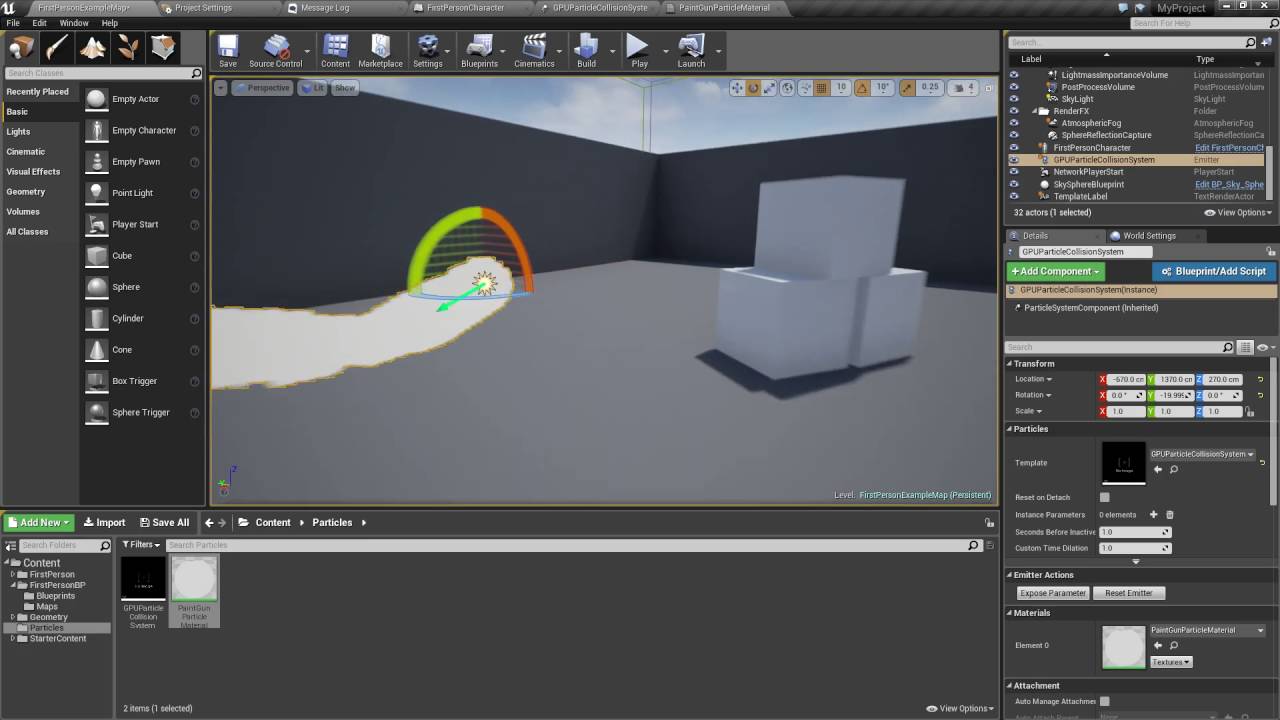
Exploring particle collision usage while creating a simple paintgun.
icy lark
grim ore
Download source, change the asset loading code to ignore the version check, hope...
Can you pls help me out finding the files? There are too many source files.
fierce tulip
@dawn gull you can enable cascade in ue5, prolly in plugins tab
that said, its well possible in niagara
dawn gull
fierce tulip
<@!307936066546040842> you can enable cascade in ue5, prolly in plugins tab
i only see this

yeah i havent used niagra before but ive used cascade a lot
grim ore
@icy larkno I can't. It was just an offhand statement. If you had the experience to do this change you would know how to do it already, its not an easy fix. If you need HTML and have to have it in UE4 then you have to use the last supported version of the engine
icy lark
Thanks for the reply Mathew. I will try.
 coral solar
Hey guys, I've just installed UE 4.26.2 and this is all I get when I open a project... Blank project, fresh install. Stays like this for hours without change.
 grim ore
@coral solarwhat does your task manager show for CPU usage?
coral solar
Task Manager
 grim ore
what tasks are running under UE4Editor?
icy lark
coral solar
Hey guys, I've just installed UE 4.26.2 and this is all I get when I open a proj...
When I open a project, Its like this for a couple of seconds. Make sure you have close all other heavy apps. I think that might work.
coral solar
 grim ore
just the one task? no shader compilers?
coral solar
icy lark
When I open a project, Its like this for a couple of seconds. Make sure you have...
Restarted my PC, opened only UE and same issue. Only has Unity open together with UE for the pic as I got fed up and went back to Unity lol
coral solar
grim ore
just the one task? no shader compilers?
Nope, no shader compilers running
grim ore
super weird. maybe check the log in the saved folder in that project
normally when it gets "stuck" like this its due to incredibuild being installed on a machine
coral solar
I will say that I installed UE to a secondary hard drive, but apparently that works?
coral solar
grim ore
normally when it gets "stuck" like this its due to incredibuild being installed ...
Never installed that or seen it running on my PC before
grim ore
yep shouldn't matter where. If you have Visual Studio installed I would check for incredibuild in the VS installer as a possible issues but normally that just limits the compiler to 1
and your not showing any compilers
coral solar
Here's the project log if that helps
grim ore
yep that looks like its loaded, might be just a gpu incompatibility or some other weird issue 😦
oh your GPU might not be supported
I'm willing to bet that is the issue
coral solar
It is a pretty old GPU I will admit
grim ore
yeah it doesnt support DX12, but does support SM5 so it should work but.... 512MB of GPU memory might be an issue
 grim ore
yep all that info is in the log
the CPU would be fine in terms of letting it load atleast
coral solar
Yeah would think that too
Low specs would more likely just make it perform poorly, but at least load
grim ore
yep but the driver might be so old that it doesnt support UE4
 cobalt hollow
hey, friends, uhm, do you know how to enable Lumen on a default (not Valley) project? Info is scarce this days
coral solar
I've been using Unity for years and it performs well enough to develop games and run multiple clients in full quality for multiplayer testing
grim ore
the only way to know for sure would be to pick an older version of the engine that supports SM4, like 4.7, and see if it loads
coral solar
Okay, I'll have to try that
grim ore
@cobalt hollownew UE5 projects have lumen enabled, otherwise its in the project settings -> renderings for older projects
and all that info is in the docs....
coral solar
grim ore
the only way to know for sure would be to pick an older version of the engine th...
Thanks for the help 🙂
grim ore
I am curious to see if it works
cobalt hollow
grim ore
<@!94850714731286528>new UE5 projects have lumen enabled, otherwise its in the p...
Yeah, allright, I might've missed that. First time I've opened UE, not yet accustomed to it's docs.
Good lord
viral lagoon
grim ore
<@!208690876673687552>you can see SQENIX using the old matinee tools for KH3 so ...
You are right! This kind of video is exactly what I was hoping to find. Thank you!
coral solar
Downloading 4.7.6 (only option there was). Might take a while because my internet speed has already been throttled for downloading over 1TB in the first 15 days of the month 😆
grim ore
aww 😦
 light thunder
I've pulled up an old project and it's ticking something to the screen - it's the name of an actor - I'm trying to find the print function that is doing it but that's troublesome (because I have a lot of them) - I've tried looking at the execution flow to see if I can find any ticking/timer events - any other thoughts? (I tried deleting to see if the triggering actor would throw a error but that didn't work)
grim ore
use the find in blueprints and look for the print string?
 past basin
I have updated my graphics drivers and played with editor settings but nothing seems to fix the problem. Occurs after using the editor for about an hour
https://youtu.be/O-VzqQYEQWw
 grim ore
you can also look for the exact string printed, or part of it, and the find in blueprints should find it if its part of the print string node
@past basin ?
 past basin
i tried turning it on or off but doesn't seems to change anything
grim ore
turning it off should fix that issue if its the menus only
if it also does the right click content like the blueprint node lookups then its a driver issue
light thunder
grim ore
use the find in blueprints and look for the print string?
There are a lot of it - the problem is it's getting the actors name when I print it - so maybe searching for the "get display name' node?
That or I wish I could see where it's printing from - sometimes it tells me but not this time
wait let me check output log - doesn't it show the name it's printing from?
(my output log takes an inordinately long time to load, (like 30 seconds0
past basin
thanks it fixed the position issue but flickering is still there. and sometimes it is completely gone. i am using an nvidia gpu, will it help if i install the studio drivers?
light thunder
grim ore
you can also look for the exact string printed, or part of it, and the find in b...
Output log found it - I had forgotten that it shows the name of whatever actor is printing to screen
grim ore
compltely forgot it defaults to the log as well as screen
@past basinthe flickering is a driver issue for sure, most people seem to say the newer ones cause the problem and older ones do not. I use 460.79 without issue personally
light thunder
Am I reading this right - "tried to access but Actor is pending kill - so I'm looking for a destroy command somewhere?"
 daring schooner
hi, I'm experienced with unity and godot but still new to unreal and I have a few questions :
- Is there an unreal equivalent of unity's scriptableobject, as in being able to create a new type of assets that holds data and functions relevant to said data.
- If I want to make multiple type of enemies/playable characters in my game, what would be the proper approach? Creating a base "character" blueprints with functionalities like health and other common stuff, then make other blueprints inheriting from it with their unique stuff like models, animations, AI, etc? or are there other methods?
- Is there anything like the animation system's state machine but for "code" blueprints? as in a state machine except with functions in each states instead of an animation to play
- If I want my character to be able to have multiple weapons with each different states and transitions animation-wise, is there a way to swap sections of the state machine on the fly without breaking currently running animation, or should I have every set of animations within one state machine?
also, is it fine to use exclusively blueprints in a project if I'm not doing anything uniquely fancy performances wise like world generation and whatnot?
grim ore
@light thunderthat or a natural kill, like falling outside the world or its lifetime being met.
light thunder
it's a pawn in this case, my main now - and there's no kill functions (like health events or anything)
dawn gull
daring schooner
hi, I'm experienced with unity and godot but still new to unreal and I have a fe...
I can answer part of the last one, yes you hypothetically could use only BP but it's relatively slow in the editor. When it's compiled it's as fast as C++ with blueprint nativization.
light thunder
I wonder if changing the map is doing that
daring schooner
oh yeah I don't mind stuff being slow in the editor
light thunder
@grim ore LogSpawn: Warning: SpawnActor failed because of collision at the spawn location [X=2128.964 Y=-38550.133 Z=779.987] for [BP_VRBasePawn_C] LogScript: Warning: Attempted to access BP_VRBasePawn_C_0 via property VRPawnREF, but BP_VRBasePawn_C_0 is pending kill
not the clearest message but maybe it creates the actor but doesn't spawn it, and if the collision stops it from spawning in the world, I guess it would see it as "pending kill"
 hidden sparrow
Hey, when I launch my game and alt tab out of it for few minutes, the game freezes and doesnt want to unfreeze. Any ideas on how to fix this?
light thunder
I would have thought not spawning it because of collision wouldn't have triggered anything, it should have just said, "invalid/no reference" for the vr pawn
 hearty wagon
hi there,
how can i move an asset in screen space? while placing them in the editor's viewport? like moving them in all directions?
grim ore
@light thunderwell if you have a "spawn Actor" node -> do something with spawned actor and that spawn actor fails due to "destroy if colliding" then that would happen
it would still spawn it, then destroy it due to collision preventing it from staying
light thunder
Yes thank you I'm glad you explained that to me
 warm hornet
Anyone familiar with the source control inside Unreal for git workflows? How robust is it? Are any external git tools necessary?
fierce tulip
they should work, though most users would say it might be best to use tortoisegit (or any git) and pull before opening ue, and push after closing.
night crystal
is this as simple as it sounds, or would reinstalling be a waste of time?

 still mason
For some reason, Turnkey doesn’t seem to be work where it doesn’t register any of my SDKs. When I try to install the SDK as what it suggests it keeps failing.
 fair crest
Hello, I'm using the steam leaderbords stats, it was working fine, activating the achievements and counting the stats, but suddenly this is not working anymore. I don't have changed the programming and I even created another project and put the same programming. In the other project the achievements worked. Anyone know what can be the issue?
night crystal
I haaaaaaate watching a twenty minute tutorial and then at the end, it just doesn't work
my fault? his fault? outdated tutorial?
fml either way, I just want to import a custom skybox - why is this so hard
 scarlet birch
A bit confused that during the stream it seemed like he was indicating that precision issues still crop up at about 10k units with UE5. Did anyone else catch that? Did I misunderstand what was being said?
 lean sparrow
Hey guys, quick question regarding raytracing on unreal. Is an RTX 2060 enough to use UE4 and 5 raytracing features? Like dynamic GI
 raven island
any1 know how i can get my megascans material? all i see as a parent of it is m ms surface material
but where can i find the actual material i need to put it in a material function
but where is it? if i click material instance to find parent it brings me to that
lean sparrow
Thanks @plush yew
raven island
so if i dont have seperate materials i cant make functions of them for my landscape material?
yes but all 4 instances come from same material
somehow
its 4 different materials
 potent bridge
Would anyone know how to make an object fall faster in UE4?
 autumn grail
I open my game in standalone with separate server , when i join the server with the 1st process it possess the character correctly , but it fails for the second process. the second is seeing the origin of the world.

it is because the two processes have the same ip?
the minimaps of the two processes are the same. i think the second process try to possess the first character
solved
hearty wagon
is there any physx paint like placement for objects in unreal?
 lunar kiln
Can anyone tell me why I'm getting these small, flickering black artifacts on my landscape? I've noticed it happening with certain materials in the past, but I'm not quite sure how to resolve the issue. I'm running an RX580, stock clock. This also happens in a few games I've played, like Siege and Insurgency: Sandstorm, but not with others. Thanks in advance!

 lusty carbon
What file do I need to write to in order to have UE4 launch for a set of console commands without having to write them every time I launch my project?
drowsy snow
lusty carbon
What file do I need to write to in order to have UE4 launch for a set of console...
Your project's DefaultEngine.ini
 midnight wren
how do i recompile my project
 heady quarry
Does anyone know if it is possible to give a character a square hitbox instead of a capsule?
agile thistle
yes it is
heady quarry
How?
agile thistle
its called boxcollision
put it in your characterblueprint under add components
this is UE5 but its just the same in 4

in the character blueprint left sided
side*
heady quarry
That didn't work because the capsule is the root component, and I cant change it.
The box doesn't collide with anything.
agile thistle
you might want to scale it down and add the box collision
then use it whenever you want to register hits or anything
i think it might also count if say anything enters/overlaps etc
im bad at explaining lol, there are experts here who do it better
heady quarry
It does register overlaps but wold collide with walls.
Also I just double checked, and it a paper 2d character, I don't know if that makes a difference.
agile thistle
you can set the collision preset when clicking on the collision box in the details tab
set it to block all
damn thats not doing it
i just tried
heady quarry
Another thought I had was using a pawn or something like that, but I cant figure out how to give it gravity.
fierce tulip
looks like there are (at least) two instances of the meshes on top of eachother
 clever sequoia
I just painted some trees... with the foliage tool.
And as soon as the leaves are out of sight the flickering stops.
 glass rapids
Hi, I'm trying to make a camera system like Fortnite (https://gfycat.com/needytintedgilamonster) When the camera goes down past a certain point it starts to move away so it doesn't overlap. How could I do that?
 grim ore
that looks like a normal third person camera setup where the spring arm is being pushed in towards the character as it hits the ground
 fringe rivet
Hey,
So does anyone know how I can get the bottom result for my physics-based cube character?
 fringe rivet
glass rapids
Hi, I'm trying to make a camera system like Fortnite (https://gfycat.com/needyti...
fringe rivet
glass rapids
Hi, I'm trying to make a camera system like Fortnite (https://gfycat.com/needyti...
Also, use the spring-arm component
glass rapids
My camera overlaps the mesh, is there a setting I need to change?
grim ore
show what its doing?
fringe rivet
glass rapids
My camera overlaps the mesh, is there a setting I need to change?
Hm,
I honestly do not know
glass rapids
okay, give me one sec
I just made a gif for it (https://gfycat.com/illegalpeacefulbrontosaurus)
 grim ore
it looks like your camera is not colliding with your players mesh or the capsule
they also limit the range for the camera
you can set max pitch for a camera to prevent it from going all the way down
glass rapids
how would you go about doing that?
grim ore

they might also be manually limiting the arm length on the spring arm based on the rotation pitch to prevent "upskirting"
glass rapids
How would you go about updating that?
grim ore
on the move of the camera the pitch can be checked and if its greater than an amount downwards you can pull the spring arm in
easiest way might be a map range where you set the starting point for the pull in and the ending point (the min and max for when this effect starts as the camera pans down) and remap that to your spring arms normal length and your closer length then apply it
so if camera is within this range of the pitch below the player, it checks to see what length the spring arm should be and sets it. since this is checked on every camera move it would be smooth
grim ore
its just an idea, the probably had 100s of hours into just making the camera work right lol
glass rapids
yeah, I just bought some animations so I wanted to make a good camera to work with them
It works, thank you so much
 worldly mango
Hello, anyone else having trouble accessing this documentation page? https://docs.unrealengine.com/InteractiveExperiences/GameplayAbilitySystem
worldly mango
thx
glass rapids
np
plush yew
so by the release of ue5 epic will keep release ue4 in lts branch ? or will stop it ?
drowsy snow
plush yew
so by the release of ue5 epic will keep release ue4 in lts branch ? or will stop...
They'll keep UE4 releases in the number branches, as per usual.
(though older 4.1x branches got demolished)
 ancient lotus
question, im trying to setup a physics constraint to make it so the target (white part) only falls backwards, however it seems like it only rotates on the 45 degrees both forwards and backwards as if the rotation of the constraint doesnt matter. how can i solve this

 woven elk
This probably 've been asked before. When I use megaScan Bridge . It keeps storing at my c:\user, can I change location?
ancient lotus
preferences or settings, theres a path for your files that you can set
 dusk nebula
How do I add a camera to the player's screen as an event? I'm basically trying to do like in Portal 2 where you can hold a button and show the other player's screen over part of the first player's
ancient lotus
@dusk nebula render target. keep in mind this would be more performance heavy as its rendering what the other player sees ontop of yours
dusk nebula
I'll look into it, thanks
 gusty stag
has anyone done 'large vehicle' stuff in ue4?
So Im building a sub, and its not like a car or jeep where you can just group the actors. its more like.... an apartment building with controls to move it around, which you can step away from and walk around the sub still.
anyway, i ask because, in ue4, i import my static mesh for the sub... and the Center of Mass is weird. because the collision is all crazy shapes, physx gives a CoM thats way off near the 'big' shapes, and the axis of the CoM are tilted too.
what do people normally do, for importing large vehicles, to fix the CoM? I'm aware I can just set position... but the orientation, not so much...
heres my CoM widget in Editor, to give you an idea

 finite ocean
Excuse me!
How long is the sale going for?
On the marketplace. I can't find any info on when it ends.
autumn grail

The armors (child actors of blueprints containing skeletal meshes) doesnt replicate
 deep stump
What’s the average price for someone to create a modern menu UI? Just looking around for prices 😌
 trim elm
Volumetric Clouds Material & Sequencer Question: Does any one how to add parameters from inside a Cloud Material Instance into sequencer? It lets me add the Material to sequencer but that only allows me to switch between material Instances but not add any specific parameters from that material instance. Might anyone know?

 exotic lion
Uhh. Is there a tissue for this issue? XD
 lucid grove
Hey fellas, is it possible to disable physics of character but keep its bones position?
For example npc dies, ragdoll gots enabled, 5 sec delay and physics got disabled
In my case when i disable physics character gets back to its idle animation
ancient lotus
@lucid grove disable its simulation?
lucid grove
Yep
 mighty copper
lunar kiln
Can anyone tell me why I'm getting these small, flickering black artifacts on my...
mighty copper
lunar kiln
Can anyone tell me why I'm getting these small, flickering black artifacts on my...
I would say make sure you have the latest video card driver for your card if you haven't already that is.
 indigo totem
any reason why my foliage is flickering? how would somebody do the fixing
 pure echo
is it possible to put multiple material instances on the same object but in different sections? Ex. 1 big plane for the floor and different Material on various parts of the very big plane?
 signal bone
Hello im in the need of hte help

i got this uasset files but when i go to ue4 > import
they dont recognize them
 clever marsh
yo question
so I am making a main menu and when I start it up the hud from the game shows on my screen. (health, minimap, etc.) what line of blueprints do I use to remove the widget from my screen?
pure echo
@clever marsh you might be able to check when u spawn the widget into the world
clever marsh
It's a different level and I need to know the line of blueprints to get rid of the widget on event begin play
grim ore
@signal bone .uasset files are already imported files. They go in your project folder and are not imported.
plush yew
hi
plush yew
signal bone
it might be the problem that the asset was made for unreal engine 4 and not for 5
@gaunt abyss
hi
 gaunt abyss
Hi
?
 median island
What exactly is "Realtime rendering"?
I get crazy coil whine noise from my PC when I have it enabled. The noise goes away if I disable it.
But I'm wondering if I need it or what it does
 grim ore
@median island it means stuff updates in the viewport like animations or effects and such.
Coil whine means it's pushing your video card too hard
median island
I had to go to Project Settings -> General Settings -> Fixed Frame Rate: 30 to get rid of the coil whine
I think it might have to do with v sync too maybe, I don't know how to disable v sync in the Editor
 median island
Anything above 40 fps and the coil whine starts and my PC goes super loud
I have i5-11400, 32 GB RAM, 5700 XT, Noctua fan
What's up with that..
finite nest
any help?

i mean i deleted running, i tried to replace with walking and in result the character just t-poses
 loud pilot
Hey guys! I worked in the past with UE(only c++ programming) and now want to learn environment design. Can you recommend me some good courses? (Doesn‘t matter if it is paid or for free) or is here a section for resourcec like courses? Thank you in advance 🙂
 noble finch
epic!
 fast ginkgo
In yesterday's stream, they said no 4.28 is planned; it's going to be 4.27 then 5.
 icy narwhal
Under AppData->Local->Unreal Engine, the engine is taking over 60+ gigs on my SSD, can someone tell me if there's things there that are safe for deletion and can be deleted to free up space?
drowsy snow
icy narwhal
Under AppData->Local->Unreal Engine, the engine is taking over 60+ gigs on my SS...
You can delete all Derived Data Cache files, but it'll cause your engine to recompile ALL shaders, and it'll fill up your drive again.
finite nest
I am testing metahuman for first time!
plush yew
Will the performance of my game be always different to when I ran it standalone compared to running it in the editor?
icy narwhal
Yeah unless you cap it.
plush yew
ok good 🙂
Now side question, why did the source code vanish from github 😄 Did not yet see someone talking about this 😄
and apparently I'm the only one noticing this or what 😹 ?
 flint rover
Hey peeps, how come the Kite Demo assets are so damn annoying to open? They're not that high poly, niether are the textures anything out of the ordinary... But whenever I try to open them they just load, load and load. I can open hi-poly assets from megascans with 8K textures in a matter of seconds. But opening a tree crashes my browser, tried it with different versions, even with UE5. SAme problem

I just want to place same trees god damn it
drowsy snow
flint rover
Hey peeps, how come the Kite Demo assets are so damn annoying to open? They're n...
Set the max texture size to 4K (4096)
It'll load only up to the 4K mip
flint rover
drowsy snow
Set the max texture size to 4K (4096)
It'll load only up to the 4K mip
Where can I do that? Problem is I cannot even open the editor for the actual mesh because it freezes
drowsy snow
flint rover
Where can I do that? Problem is I cannot even open the editor for the actual mes...
Not the meshes, but the textures.
 flint rover
Yeah that doesn't seem to fix it either sadly
drowsy snow
flint rover
Yeah that doesn't seem to fix it either sadly
It worked with my own 8 GB RAM system. What do you mean not fixing it?
honest vale
grim ore
Coil whine means it's pushing your video card too hard
more like GPU manufacturer used cheapest parts possible 😄
drowsy snow
flint rover
It still freezes my client
Even with max texture size ≤ 4096?
Is your RAM happens to be < 8GB?
Because it works fine in my shitty potato system.
flint rover
I got 32 GB RAM 😦
As I said before, opening other very taxing assets have never been a problem
But for some reason these assets do not work, no matter what I do
 kindred viper
there are only certain assets that have trouble loading for me. Who knows why though. That kite demo was for a specfic purpose on a specific setup for a specific reason. The fact they gave it away at all in asset form is just a bonus (or a curse).
 wary wave
first time you open an asset in that demo it's building distance fields, which takes a long time
for some reason they aren't saved with distance fields
drowsy snow
kindred viper
there are only certain assets that have trouble loading for me. Who knows why th...
Guess my potato is weird, because those assets only problematic in 8K max size 🤔
kindred viper
didn't know it was distance field based work. You live you learn
 warm drum
hey can anyone tell me how to add sound to zombie i added the sound in the idle animation but it plays very loud and it plays when i am away from my zombie can anyone fix that
drowsy snow
warm drum
hey can anyone tell me how to add sound to zombie i added the sound in the idle ...
Spawn Sound Attached
Use the zombie actor itself as the attach target.
warm drum
okay thanku
drowsy snow
Also there's audio attenuation settings - you can ask it over on #audio because I forgot exactly what the settings are.
 stiff beacon
I just reopened UE4 after going to sleep and turning my PC off, and EVERY. SINGLE. TEXTURE. is completely gone. The ones that look like theyre still there become blank when i start to drag them. What the hell could have happened??

 flint rover
wary wave
first time you open an asset in that demo it's building distance fields, which t...
flint rover
wary wave
first time you open an asset in that demo it's building distance fields, which t...
I see, do you know how long on average this usually takes?
wary wave
depends on your hardware, but it is slow
 pliant junco
Please help?
 autumn grail
there is no way to replicate f***ing child actor components?
pliant junco
its not cooking can someone please help me
finite nest
anyone using streamlabs?
i need help
sorry for the server just uhh
how do i stop that black background
 drowsy snow
 cedar fern
can i use quixel bridge in ue4 the same way i can for the ue5 early access?
cedar fern
can i use quixel bridge in ue4 the same way i can for the ue5 early access?
Nope. You still need the Bridge app for UE4.
Though honestly doesn't make difference to me.
cedar fern
but can i use the assets in ue4?
drowsy snow
cedar fern
but can i use the assets in ue4?
Yes, you can.
cedar fern
great, UE5 looks amazing but i don't think my cpu likes nanite that much, it's super slow for me
do you think it'll be more optimized after full release?
drowsy snow
cedar fern
do you think it'll be more optimized after full release?
It should be, though I won't hold my breath until at least 5.1 or 5.2 released
cedar fern
yeah, i just wanna try and make a simple vr scene in unreal cuz it takes so damn long to get everything set up in unity
 neon bough
nanite doesn't even work properly in VR yet
cedar fern
wasn't planning on using nanite for VR
drowsy snow
neon bough
nanite doesn't even work properly in VR yet
I bet it'll be half a decade for VR to be even capable of Nanite + Lumen without making everyone collapsed.
plush yew
Is it wrong
 neon bough
if you start an project, UE4 is probably always the best bet
cedar fern
yeah, downloading the engine right now
neon bough
plush yew
Is it wrong
depends... does get current level index return the right value, are your level names in the right order in the array?
plush yew
neon bough
depends... does get current level index return the right value, are your level n...
yes
neon bough
then it should be fine
plush yew
is this correct
 plush yew
neon bough
then it should be fine
plush yew
neon bough
then it should be fine
but when my player collides with the trigger the game get quit
the next level is not been loaded
plush yew
neon bough
well, then there are crystals remaining
but if the crystals are remaining then why the trigger quits the game
flint rover
I got the kite demo assets working, like you mentioned I just had to wait for a while but now the textures are not linked hehe
neon bough
plush yew
but if the crystals are remaining then why the trigger quits the game
because your quit game condition is true
collect all crystals 😄
i would replace the quit game thing with a message telling the player that he is missing crystals
unless that was for debugging
 humble imp
I need your help for a moment. I'm not so sure anymore, but doesn't exist a term for the (sudden) popping up of objects in the game world?
plush yew
unreal engine stucked when i clicked the material
 neon bough
plush yew
unreal engine stucked when i clicked the material
neon bough
plush yew
unreal engine stucked when i clicked the material
it might compile the shaders for the material in the background
neon bough
humble imp
I need your help for a moment. I'm not so sure anymore, but doesn't exist a term...
spawn?
humble imp
neon bough
spawn?
well, spawn isn't very descriptively in this context or?
plush yew
is there any good free material pack
fierce tulip
your question isnt that meaningful either, do you mean controlled popping, unexpected popping, bugging, spawning, emitting, constructing, or generating?
neon bough
plush yew
is there any good free material pack
the twinmotion materials are a good start imho, at least to get some inspiration for own material setups
humble imp
@fierce tulip
I should have guessed that the adverb I chose would be misunderstood and have now replaced it. I am concerned with the sudden, much too late appearance of objects in front of the camera.
fierce tulip
could be many reasons, hard to guess without seeing the issue at hand me thinks
pliant junco
can someone please help?
 neon bough
humble imp
<@!220596777034711040>
I should have guessed that the adverb I chose would be m...
neon bough
humble imp
<@!220596777034711040>
I should have guessed that the adverb I chose would be m...
you might want to adjust the near clip plane value
pliant junco
do i need to uninstall and install again?
humble imp
neon bough
you might want to adjust the near clip plane value
Yeah thanks, I think clipping is the term I was searching for
but maybe it is also low draw distance
neon bough
possible
depends where they pop in
far away from the camera => draw distance / far clip plane (but guess it's just called draw distance in UE)
moving backwards and pop in front of camera => near clip plane
humble imp
Okay, thank you @neon bough
 unborn hound
Hi! 👋 I don't know if I should ask this question in a specific channel,
Does anyone know of a way to get a camera to only render one (or just a few) Static or skeletal meshes?
drowsy snow
unborn hound
Hi! 👋 I don't know if I should ask this question in a specific channel,
Does a...
I assume you're using SceneCapture2D cameras, of which it is indeed able to selectively render certain actors (not necessarily limited to meshes)
unborn hound
drowsy snow
I assume you're using SceneCapture2D cameras, of which it is indeed able to sele...
you are assuming wrong haha, ok thanks a lot, this is what i needed
plush yew
how to invert controls for specific level
 tacit sonnet
any idea whats wrong with my texture ? using 2 procedural mesh components to create the floor for procedural buildings. starting to run into issues using 2 components
 tacit sonnet
plush yew
how to invert controls for specific level
tacit sonnet
plush yew
how to invert controls for specific level
couldnt you multiply any input from the player by -1
and have the script only enabled on that level
plush yew
tacit sonnet
couldnt you multiply any input from the player by -1
can you tell me briefly
as i m new
tacit sonnet
plush yew
can you tell me briefly
my knowledge using blueprints is not amazing but i will try
so if the player presses 'W' for example
you want them to move forward so you apply X amount of velocity + in their forward direction
any value multiplied by -1 is inverted
so you take that velocity and * it by -1 and they move backwards
when they press W
you can do the same for mouse axis etc
plush yew
tacit sonnet
my knowledge using blueprints is not amazing but i will try
i want to do in my level 2 blueprint
tacit sonnet
do you have any movement code atm ?
plush yew
i want to change this in level 2
 tacit sonnet
so you want the opposite of this in level 2 ?
plush yew
tacit sonnet
so you want the opposite of this in level 2 ?
yeah
tacit sonnet
add a float multiply node
and then multiply the torque by -1
see if that works
im sure there will be a bp for it
but idk what it is
plush yew
tacit sonnet
add a float multiply node
i have to create a function that means
 plush yew
tacit sonnet
plush yew
tacit sonnet
how do i apply on next level
tacit sonnet
well it depends on how you have structured it
but
you could create a boolean
which is called something like 'isInverted'
set it to false for the rest of your levels
and when the level = level 2
set it to true
and while its true
run the inverted code
finite nest
any help?
i just deleted running animation to replace it with walking but in result is shows this also i cant find blueprint

 willow gust
Is it possible to import Unity3D humanoid animations into Unreal Engine?
 fallen marten
if its an fbx then yeah you should be able to
 mild phoenix
Hello who can help in "Ultra Dynamic Sky" asset when its start raining I have this bug

 worn obsidian
mild phoenix
Hello who can help in "Ultra Dynamic Sky" asset when its start raining I have th...
worn obsidian
mild phoenix
Hello who can help in "Ultra Dynamic Sky" asset when its start raining I have th...
That is uniquely beautiful. I would leave it in as a feature, Sony style.
 inland flicker
Why do y'all in here want to make video games? Just curious if you don't mind sharing
Is it the pay, the freedom of a creative outlet, or some kind of inspiration for something?
 haughty slate
inland flicker
Is it the pay, the freedom of a creative outlet, or some kind of inspiration for...
haughty slate
inland flicker
Is it the pay, the freedom of a creative outlet, or some kind of inspiration for...
All of the above :p
 pseudo swift
is there a way I can render out the reflections?
 haughty slate
And honestly, I feel like my sanity depends on it. Reality is collapsing in on itself so indulging the imagination is a nice retreat in some respect. Plus, videogames are just awesome.
pseudo swift
this worked for other viewmodes but not reflections, is there a console command for it? I couldnt find any in the docs..

its not in here either

 unique kraken
anyone knows of tools/ workflows for procedualy PLACING stuff.
like, lets say i build myself city asstes. different houses trees etc. instead of literally palcing each one id like to have a system or tool
 rotund rapids
Hello, I was thinking about maybe making a linear boost Sonic like 3D game in this engine at some point. How should I set up Unreal to develop this Sonic like game?
unique kraken
Sounds like all u need is to setup some camera switches
And some base movement I guess. That doesn't sound to hard I would say
Can you elaborate?
Or a link or something
I'm not a Big programmer. I can use some bps but mainly character related
So some sort of guidance, a link or so would be nice
Ah sry didn't realize
Thx


 unique kraken
Well the links don't work
 tough cove
would anyone have an idea as to why unreal engine is claiming i have overlapping in my UVs when i definitely made sure they weren't overlapping before i brought them to substance
unique kraken
Maybe substance generated some?
tough cove
I have 18 UV tiles for the textures

sure the UVs aren't perfect but I was super short on time completing this
UV's are seperated based on material and parts
I made sure in unreal to make virtual texture support on
fierce tulip
lightmap needs all that into one uv tile.
if there is anything overlapping itself, or mirrored it will also give problems.
haughty slate
rotund rapids
Hello, I was thinking about maybe making a linear boost Sonic like 3D game in th...
Look up some guides on how to move actors, how to get player input and move a character, maybe do a bit of research into using Unreal's physics engine (so you've got options) and then.... experiment!
tough cove
fierce tulip
lightmap needs all that into one uv tile.
if there is anything overlapping itsel...
putting it all into one UV tile would mean doing UVs and Texturing all from scratch again right
rotund rapids
@haughty slate Got it!
tough cove
and I definitely don't have time to be able to do that
as I need to get this all done today
fierce tulip
nah, add a new uv-channel, repack it.
tough cove
in substance or unreal i'm confused
fierce tulip
in your 3d app
tough cove
that would mean doing textures again no?
grim ore
then dont do static lighting, use dynamic
fierce tulip
you can try it in unreal, but that only works if no vert is overlapping, or any poly is mirrored
also no, because the textures are still assigned to your first uv-channel
unless you are redoing uv's in substance (not sure if that is a thing) just add the new uv-channel afterwards
tough cove
"because the textures are still assigned to your first uv-channel" not sure I understand what you are meaning here
haughty slate
Could somebody please explain to me how Add Impulse at Location works? I'm doing a clean up of some code I haven't touched in a while and found such node. I remember just faffing about with it and putting in what feels like silly coordinates and somehow getting the desired result. On paper it seems very obvious - you specify a force and at which location in space that force is applied to the mesh. Running some tests, that doesn't seem to be the case and I'm not really sure what is going on.
I'm trying to make a wheelchair flip in the direction it is travelling when the player hits the brakes at too high a speed. This code works exactly as intended, but my mesh certainly isn't anywhere near 100000000 units tall on the Z axis, so what is going on here? I've achieved similar results with just a simple cube and I really don't understand it. Is this world space or local? Because adding a transform direction completely breaks it, which should ordinarily translate world to local.
 tough cove
if I change anything with my UV's i'd have to do all of my texturing again
fierce tulip
textures > uv channel 0
lightmap > uv channel 1
or do what matthew said, use dynamic lighting
tough cove
oh is this stuff in unreal
fierce tulip
ok, im out.
plush yew
i want to change the value of acceleration only for a specific level how do i do it
grim ore
@tough covehow many UV channels does your mesh have in UE4?
@plush yewdefine acceleration? but you can store a value in a game mode specific to that level and use it?
tough cove
i've got 3
plush yew
grim ore
<@456226577798135808>define acceleration? but you can store a value in a game m...
 plush yew
grim ore
<@456226577798135808>define acceleration? but you can store a value in a game m...
plush yew
grim ore
<@456226577798135808>define acceleration? but you can store a value in a game m...
oh sorry i thought i have sended the image
grim ore
use a custom game mode then and get that value from your game mode on begin play and store it in the character so it uses it
tough cove
the mesh is in seperate pieces rather than making the whole thing one mesh as I didn't have time to boolean and fix the topology
grim ore
@tough coveif you are using baked lighting you need 1 UV assigned for the lighting, it can be an existing one or a specific one. You can make that in an external program or have UE4 use it. If you do not want to do this you have to use dynamic lighting.
so each mesh has 3 UV Channels?
plush yew
Dumb beginner question but how can I run a code snippet(like say turning off gravity) for a set duration of time(in blueprints)?
plush yew
grim ore
use a custom game mode then and get that value from your game mode on begin play...
i already have a game mod. but how do i do that you are telling
 tough cove
by UV Channels your refering to basecolor/normals/Occlusion+Roughness+Metallic
or are you referencing to something in Unreal Engine
grim ore
@plush yewduplicate the game mode, open it up and create a new variable that has your custom value in it. Set that game mode as an override in the world settings for the map. On begin play your character can get the game mode -> cast to your special game mode -> it will fail on all levels but this one -> on this one it will pass so you get that special variable which has your custom value and save it to the player (set his local acceleration variable to this new one), and now when you use your acceleration variable in the player its the one you got from the game mode
UV channels are UV channles
tough cove
technically my first time using Unreal Engine so I won't understand some of the terminology you may be referencing if it's got to do with unreal
grim ore
they are not textures
UV channels are not unique to UE4 its a modeling thing
like its literally a thing for modeling
haughty slate
Anybody here familiar with Add Impulse at Location?
grim ore
if you double click the mesh, go to the top bar and click the UV button, you can see how many channels you have. This is channel 0 for example on this mesh

that mesh is fine, each face is unique in it's own island without any overlapping so there is unique data for making lighting
this mesh is not, it has 6 sides but the UV was not designed for baked lighting as it only uses 1 island that is basically stacked for each side

so this will end up with overlapping UV's and pooor lighting
this is the UV channel on that same mesh that is used for lighting, one unique island per face

now all of this data comes from the modeling program, when it was modeled it was designed like this as its part of the modeling process. Its possible a 3rd party program creates new UV's for texturing but this is all handled outside of UE4 unless you want UE4 to take it's best guess and make one for you

 grim ore
so the UV channel with the red would not work, its has data outside the 0-1 range, the UV channel 1 would work but it might give very bad results due to the data being so small in it. On the right it tells you which UV channel it is using. Light Map Coordinate Index

 daring gyro
https://cdn.discordapp.com/attachments/738424654506754131/847812455052607508/unknown.png its my first time using UE and i just wanna get a Metahuman and export it as .fbx but after i import it from bridge its missing the object file which so i cant place it in the scene and idk how to fix that, can some1 pls pls help me
 finite nest
also, anyone wants to be a voice actor in my game?
fierce tulip
grim ore
@daring gyroare you sure its missing, did you filter out for skeletal meshes?
daring gyro
grim ore
<@!353158647024451588>are you sure its missing, did you filter out for skeletal ...
how do i check that?
grim ore
click the filter button next to the search bar and click skeletal mesh
 heady quartz
Hi, from what I've seen motion blur is available in fortnite for mobile how do i use it for my projects (mobile)
daring gyro
filter button?

like i can import other 3d models from quixel without a problem its jsut the metahumans that are causing me trouble
grim ore
in your content browser... the screenshot you showed us
grim ore
I know, if you check Skeletal Mesh it will show you any skeletal meshes you have in that folder
daring gyro

nope
when i check skeletal mesh nothing comes up
ive tried using different metahuman models and none of that worked either
grim ore
and no errors come up when you export out of bridge?
daring gyro
nope
grim ore
did you get any errors when you first imported? It should tell you about a few things that are not enabled but having missing meshes is weird
if you try exporting again after you exported does it tell you its already there in the project?
daring gyro
grim ore
if you try exporting again after you exported does it tell you its already there...
yes it tells me Do i want to import this file again or something like that
daring gyro
grim ore
did you get any errors when you first imported? It should tell you about a few ...
im not getting any errors
@grim ore im downloading the newest version of UE rn , maybe that will fix it
cedar fern
it's been stuck like this for like an hour

 autumn latch
not working on client, what can i do?
 wary wave
do it on the server
 wary wave
well, think about it, debug it, fix it
there are obvious potential problems above:
- You're getting the local player controller on the server (controller 0).
- Is CharRef even set correctly?
autumn latch
wary wave
well, think about it, debug it, fix it
there are obvious potential problems abo...
debug say nothing, are u know how can i get player index when i press e keyboard?
wary wave
index is different on every machine, you probably want to handle possession in the controller itself.
 proven mauve
How do I include arbitrary assets into my game?
Obviously only some stuff can be viewed/interacted with, but if I want to put something random, how can I do so?
If I drag + drop it fails to import (unknown file extension, fair).
Can I go outside of the engine to get the file in?
I know I will need to adjust packaging rules so that it gets cooked, ofc.
Like if I want to ship my game with a .blend or .pdf, what is the flow for doing so
 granite spire
what would be the point to do that?
proven mauve
Good question 😓
Its partly a theoretical question. I'm just trying to better understand the asset flow that UE4 takes.
Its not clear to me yet whether I am allowed to interact with the filesystem outside of the editor, or if UE4 will complain.
 thick herald
You can use the addon Send To Unreal, which does what it says it does, or just export the assets as fbx, obj, usd etc etc
granite spire
I have not fiddled with mods, but you'd go down that route I'd say
proven mauve
I see. So I need to utilize the asset types that UE4 knows how to handle.
granite spire
I would say so, or it wouldn't know what to do with it
proven mauve
Seemingly ue4 doesn't know what to do with a PDF, sadly.
thick herald
proven mauve
I see. So I need to utilize the asset types that UE4 knows how to handle.
That's the case will all programs, use what they allow.
proven mauve
Although it should be able to cook PDF into images, right?
thick herald
Why do you want to use a pdf?
proven mauve
thick herald
That's the case will all programs, use what they allow.
Not true. In Godot you can include arbitrary assets into the pack files, and it respects it as an unknown entity.
Its called a "keep" import.
Useful for custom handling of user-generated file formats, or even stuff like json-config, or anything else you don't want the engine to touch.
proven mauve
Instruction manual that gets placed on user system?
Or whatever.
I can think of any number of reasons why the ability to pack arbitrary assets into the packaged game is useful.
granite spire
I guess but even then you'd just zip it with the executable
proven mauve
But then you lose out on the ability to deal with that layer at the same time as making the game.
 wintry silo
Got an issue when switching pawns using the player controller. When switching to another player, the player I switch out from is left stuck up in the air during the switch or is still running on the ground on the spot if moving the player during the switch..
unborn hound
Hi! all! Is there any way to use render to texture with SceneCapture2D, using post-procesing and keeping alpha information? Basically leaving alpha 1 to all the non rendering meshes/actors in the capture.
 vocal herald
How can I change the shape of Procedural Foliage Volume or Blocking volume? Or can I only use box shapes?
granite spire
@wintry silo If you switch pawns, the other one no longer has a controller, so what probably is happening is the animation is stuck, as it no longer has any AI or controller information to update, the easiest thing would be to setup a "reset" function and call that to reset the animation, you could even have a timer that waits for it to collide with the ground before switching too.
@unborn hound There use to be a way to block out what you don't want on the camera 2D through the use of a "white list" which only items you want can be displayed, I don't know of such a thing existing for post process effects as unbound = everything, the only thing you could do would be to apply their own post process effects to counter what you've done.
@vocal herald is this a pack? I'll need more detail
vocal herald
Im talking about built in procedural foliage volume. When u add a procedural foliage volume or blocking volume they are box shaped
granite spire
Hmm I haven't had to fiddle with that, I always make my own so I can grow trees and have life cycles.
vocal herald
if i wanna make a round hole in my volume, Am I supposed to draw a circle with tons of box shaped blocking volumes?
granite spire
I would think so
that tends to be the case for blocking volumes
they're cheap anyway
 clever arch
Hey Everyone 🙂
Wondering if you can help please (Not sure if this is the correct place to post!)
I'm having an issue where one of my static meshes won't generate a UV lightmap no matter what I do and not sure what I can do to fix it
thick herald
vocal herald
How can I change the shape of Procedural Foliage Volume or Blocking volume? Or c...
In the details panel scroll down. You can choose what shape you want. You can also edit the shape itself if you like by adding / removing / moving vertex.
 broken heath
The thumbnail of my bp doesn’t show the static mesh inside it , its empty world thumbnail
 short willow
clever arch
Hey Everyone 🙂
Wondering if you can help please (Not sure if this is the corre...
short willow
clever arch
Hey Everyone 🙂
Wondering if you can help please (Not sure if this is the corre...
Probably try fix your mesh first.
clever arch
short willow
Probably try fix your mesh first.
Mesh is fine, Never had the issue before
short willow
So you used this mesh in other project before also use unreal?
clever arch
yes, recently moved from 4.20 to 4.25 and literally the first time i've had the issue so not sure if something has changed in 4.25
short willow
How do you move? Did you upgrade the project? migrate assets? Copied the uasset? Etc?
clever arch
completely new project just imported the same tree ive used previously into my project
just double checked the mesh and its all ok no N-gons or anything like that
short willow
Hmmmm. No idea then. Maybe check the issues website and see if there are bugs related to it.
clever arch
thanks for trying to help anyway 🙂
short willow
Yeah, maybe change your uv attr names and try again. I might try that.
 coral iron
excuse my ignorance please, I literally just started with unreal yesterday for the first time, I've never used a program like this. 100% completely new to this. I'm struggling hard to find places online to help with different problems I'm having, I'm trying to follow different tutorials on youtube to learn different things, such as making an environment. The user says to enable a plugin called "Landmass", a plugin I do not seem to have, this is the continuing problem with every tutorial I follow is that I seem to have way less plugins out of the gate and I just don't understand my own issue here. I apologize for any inconvenience.
clever arch
coral iron
excuse my ignorance please, I literally just started with unreal yesterday for t...
Hey, No its not the same with all tutorials. You may want to look at unreals official tutorials as they generally use stuff that is soley in the engine if that makes sense
coral iron
One of the tutorials was from Unreal and I didn't even have the folder or subcategory that said plugin was in.
clever arch
it could be that your using a different version of the engine which is common
plush yew
with UE5 close to release, is UE4 support going to end?
coral iron
I believe I have discovered I may be using an old version, I have no idea how this is possible.
yeah I'm on 4.13, I have absolutely no idea how I did that
I downloaded it last night straight off their website, well, time to fix this I guess, Thank you for your help very much
clever arch
coral iron
I downloaded it last night straight off their website, well, time to fix this I ...
inside the launcher there are different versions you may have installed the wrong one
short willow
Yeah, the default sorting to get engine is weird.
If you absolutely start new it seems to default to the oldest one somehow.
wintry silo
Player I switch over to is stuck in air during a jump during possess how do I fix this. Skynar BP is a child of CH_Human and Ch Human (my commander) is a child of Third Person Char. For some reason the code in Player Controller is not putting the character back down on the ground after switching the player.

so when I switch from commander to skynar and I jump with skynar in the air and switch or when hes running, hes left stuck in the air or running during the switch.
granite spire
@wintry silo I'm going to repeat my reply.
If you switch pawns, the other one no longer has a controller, so what probably is happening is the animation is stuck, as it no longer has any AI or controller information to update, the easiest thing would be to setup a "reset" function and call that to reset the animation, you could even have a timer that waits for it to collide with the ground before switching too.
wintry silo
I had this problem and also after switching back to the commander, the AI pawn just stands there dead and dosen't continue following the player. So I had two probkems with the ai.
granite spire
You're also getting all actors of class, which appears to be incorrect, as you should want the spawned character
wintry silo
??
latent sonnet
Uh... How do I fix this?
 granite spire
you don't want to be looping through class actors every time you hit 2
wintry silo
i wouldn't know i followed a tutorial to switch the pawns.
short willow
Lol
wintry silo
well it switched, but leaves the player animation running when switching or stuck in jump.
granite spire
you're always trying to grab actor 0 and seeing if you can control it, if there's other actors for CH Human, you'll only ever grab details from the first one
wintry silo
the timer to refresh ai is here

i am not doing a multiplayer game but a single player party companion game.
granite spire
well that's because without a controller, a pawn will cease to do anything, you might have to reload in the AI or have the AI take over
if you possess a pawn you have to reload in the AI I would assume
I don't know what tutorial that is but it's messy
wintry silo
i don;'t know how to actually reset the ai again to follow the player after leaving the pawn.
i know how to possess it, but not how to restart the ai after unpossessing.
granite spire
I've never had to deal with that type of logic, I can only go by guesses
you should be able to just reassign the AI
set the AI controller ref
 granite spire
if you've possessed it, i imagine the ai controller ref gets overridden
wintry silo
this allows the 10 party members to be assigned.
short willow
Can you give us link so we can go report it? Lol
wintry silo
what are you insinuating Penguin?
granite spire
you don't get all actors of class, when you have the party reference there
then loop through an array with a for loop
it has a remove function from the party members but then a size of 10, but that could be incorrect as you might have that array shrink to 5, which then you'll get errors galore
wary wave
there are... a lot of really truly terrible tutorials out there
wintry silo
well I don't know what the correction is. I only tested this with just one of the pawns to see if it will work or not, Here's how I set it up for the others.
 granite spire
I might as well write a better one
wintry silo
I managed to get the levelling component working for all the pawns. But not the unpossess part so get the ai to resume again.
granite spire
@wintry silo you're only ever getting index[0] of the CH Loana, this is bad because one could exist if you destroy it
wintry silo
I'm not sure why index 0 is bad when the pawns are picked by an array index with that register code.
granite spire
it's 3:11am, I have to sleep but in 12 hours if you're still struggling hit me up
I have to put in a capture system into my crappy game so I might see what I can do
wintry silo
so you want me to add in the index numbers to the get arrays for each pawn.
granite spire
well i'm only seeing half of your code, if it's the unpossess not working try and reassign the AI
unpossess then setAI to previous possessed unit
you'll have to manually do that
wintry silo
only code I have is this
 granite spire
why is there a pause timer?
if you unpossess your ai controller probably won't be valid
if it's doing what I think it's doing
wintry silo
that it was from a tutorial, as i don't know how to write the logic for unpossessing the pawns.
granite spire
I would look up a bunch of tutorials till it clicks
matthew doesn't have any on this
surprisingly
wintry silo
been trying that.
granite spire
let me see what I can come up with after work tomorrow
I know I easily got mine to work when you loot a chest
wintry silo
ok
granite spire
but it's nothing to do with ai
wintry silo
i have got the widgets working with the game mode for the levelling system so when i possess pawns i don't lose their values off the screen.
granite spire
yeah
you should be storing all of that on the game instance or the blueprint itself
wintry silo
so i have got stuff working, just not everything working. gem collecting for all pawns is working and that was done with an event dispatcher
granite spire
a lot of tutorials over complicate things with event dispatchers
wintry silo
its not a one single map game, but a game of different worlds. so there will be different maps.
granite spire
yeah so game instance

How do I use the GameInstance Object in Unreal Engine 4?
Source Files: https://github.com/MWadstein/wtf-hdi-files
mathews tutorials are on point
wintry silo
i just need to know how to set up a multiple world game with that game instance. Not used game instance yet.
wintry silo
Got the dialog system all working for basic dialog with the data table, but not the Dialog Choices yet in the dialog.... That's more harder to do as it has to be dynamicallky created in the same widget somehow..
granite spire
I should probably continue streaming my little adventure game I been doing
might be handy for everyone
it'll be funny seeing an experienced dev be forgetful for things
wintry silo
my game is storyline based contains alot of dialog. Thisis why I need to use data table. Is it possible to generate dialog choices using a data table, or canit only be done with an internal default array list with the NPC you chat to.
granite spire
I'm actually not sure, I have to do the same thing so i been thinking on it
i'll end up making a "smart" dialogue system that you feed in results, and that NPC will pick from a bunch of choices
wintry silo
there's 2 ways I've seen dialog branching being done, 1 with a behavior tree which is alot more tedious to set up all the dialog branchings in the conversation, and the other is with an array list. Not seen it done yet with a data table to create a dialog tree in a conversation. Kotor II had its own a dialog talk editor which made things so much easier..
granite spire
which might be just a bunch of enums
wintry silo
A bunch of enums, not tried this. Sounds interesting.
granite spire
I was thinking a struct array for dialogues, then enums to tie the code together, but then a data table for random conversations based off the personality and type of npc
wintry silo
because I'm running the dialog struct through the data table.
granite spire
say you wanted a shop keeper, you could have like an intensity level dialogue or something
so if he is high tense and hates you the dialogue changes
that's what I'll probably do
wintry silo
i'll just get my struct to show what I've done so far.
 granite spire
but then there would be loads of predefined stuff
i'll have to figureout something later
but an intensity thing sounds good
wintry silo
so I have got dialog working so far with the timer for showing all the NPC conversations.
granite spire
then if you kill someone that's friends with someone, you can raise the intensity level, or get super complex
wintry silo
and that all runs in the same widget.
granite spire
make sure you keep calculations off of widgets as they already run bad
wintry silo
calculations? But to generate the butons to the dialog so you can branch the dialog conversations is a little tricky.
granite spire
so you'd feed it elsewhere
wintry silo
here's the widget
 granite spire
if it pulls the dialogue from an NPC then that's ok
wintry silo
yes I set all the row numbers in the dialog actor itself

 granite spire
Yeah not too bad
wintry silo
So that works in showing all the assigned dialog conversations with npc's. Now its just the dialog button choices to do. Random dialog can also be done as well. I know how to do that.... I did that in my batch file most of my game is still in batch file format containing all the game dialog and its choices.
I only placed some of my game in unreal engine.
granite spire
I see
You might then reference choice with another column linking the rows up and producing buttons that way
Then have another column called btn choice text
wintry silo
I didn't jump into Unreal Engine and just started making a game, I designed a prototype of the whole thing in batch text format first (game in text form) so I could playtest out all the storylines and choices and rooms and values in the game. So I went about it different, I knew it would take longer if I tried to do the changes to dialog in the engine itself so I done all the changes to text outside of the engine.
granite spire
I see
wintry silo
yeah otherwise you have to keep on starting and stopping the engine too much all the time just to see the new changes. So text changes to storyline ect were all done outside the engine. Then I could just insert the dialog in.
granite spire
Yeah thats what data tables are for
wintry silo
ok I have this in the data table as well. put in an empty array for dialog choices

This I'm not clear on "You might then reference choice with another column linking the rows up and producing buttons that way
Then have another column called btn choice text" How would this be set up in data table if its possible to set up the choice buttons this way?
because i want the choice buttons to read text from the data table when you click on them. So I don't have to re-create another widget.
what pins do I need to add now to my dialog struct to make this work for the buttons? So I can pull the choices in from the data table
through the dialog struct if we can use the same struct.
unborn hound
granite spire
<@!281244900928782347> There use to be a way to block out what you don't want on...
Thanks for the reply, I am using the white list on the camera 2d, the thing is I need the "empty" space to be filled with alpha = 1.
However, in order to get the postprocess rendering in the generated texture I need to use the "Capture Source" as "Final Color in linear sRGB" and I loose the alpha info in the generated texture.
So, if you need transparency in the texture, you cant use Final Color , but if you don't use Final Color, you loose transparency D:
broken heath
Help i renamed a folder and i lost the blueprints thumbnail , now its just a white sphere
How do i return thumbnail
wintry silo
can you undo your last actions with ctrl z until the folder is restored
wintry silo
I think I have to put the dialog choices in a different data table...
broken heath
Thank u i solved it , (hidden in game) can mess up the thumbnail
wintry silo
ok good to hear
unborn hound
unborn hound
Thanks for the reply, I am using the white list on the camera 2d, the thing is I...
Ok I found a solution in this thread
https://forums.unrealengine.com/t/scene-capture-doesnt-render-post-process/105626/9

Unreal Engine Forums
Thanks Masui, This solved my problem! but I’m just worried that this isn’t going to be a performance problem. Don’t Render Tags require high performance?
light thunder
How would someone go about making a material that cascades, like running lights? I could make a blueprint actor i'm not sure if that's the best way to do it - ideally would be a material function
 lyric timber
why does the color from a subsurface shader not show up in ray traced reflections?
is there some kind of work around?
latent sonnet
Looking for this but it's not showing up?


Ah nvm I got it. Needed to Click on the Skeletal Mesh to add it
lyric timber

 wise trail
Ahh
lyric timber
how do i fix this
wise trail
What happened to skin
 kind dew
how do you get the "Blueprint Session Result" from a created session?
 short willow
lyric timber
how do i fix this
short willow
lyric timber
how do i fix this
You probably need a cheaper version of skin shader for the reflection(like one that doesn't use subsurface scattering and other fancy stuff)
wintry silo
how do you set up the logic to read button choices text from a data table into a mouse click?
short willow
You probably need to create you own shader base on the metahuman ones?
short willow
So a rough explanation, the mirror unlike offline renderer(vray, render man) they don't actually do ray trace calculattion.
They are render in a different pass and read back as texture.
And during that render a lot of things are disabled to speed up the rendering time.
lyric timber
lol
short willow
So as you can see, there are no indirect lights for your sink, towel etc.
lyric timber
right
short willow
Means they don't even look up the light maps
lyric timber
there is a setting to change them but hard shadows is the best looking right now
i can add a base color to the SSS and it shows up in the reflection
but it also messes up the shader outside the reflection
i know how it works. i just need some kind of work around
short willow
I haven't personally set up this in unreal before, so my hunch is that you need a switch somewhere so if it's a call to render target, you use the cheaper version skin shader that are just surface model.
In offline renderers we call it a ray switch.
lyric timber
that seems beyond what im willing to do
short willow
Don't know what is unreal equivalent
short willow
Lol, welcome to the real-time world
lyric timber
inefficient^
short willow
Or you can do the terminator 2 approach
lyric timber
i mean this is going to happen to all the humans that walk by a mirror. thats not good
short willow
So no mirror just double on the other side and very good lighting control
short willow
Yeah if you have other reflection other than that mirror, then invest the time to do the rayswitch then .
lyric timber
i have no idea how to do that
short willow
Cause I also have no idea if you can override that render target part.
lyric timber
i can try to add a generic skin-tone to the base color and tweek it till it looks ok
short willow
If you are using the rtx ray tracing, probably ask that in nvidia's forum would be faster.
Or in the #virtual-production channel and see if someone know about it respond.
lyric timber
@short willow thx for responding
 zealous magnet
In the profiler, what do these values actually mean? Especially Calls - does it mean how much it was called in general, or per tick?

 inner sundial
in the source control tab for git beta i keep getting an error saying source control failed even though the path is set right
 wintry silo
how do you get the data table to generate text dynamically in the buttons?
its needed for dialog conversation choices buti don't know how to generate it in the widget
plush yew
why does the text in my editable text in a widget appear so small?

Where can you download the ue5 desert canyon map showed in the showcase?
light thunder
Everytime - I swear I've changed this multiple times and didn't think about it - but apparently I was wrong - running out of space kids? Check your vault cache
daring schooner
I enabled planar reflections and restarted unreal and now I'm stuck at 39%, any idea if it's actually stuck or just taking very long to load that one % for some reason?
 light thunder
daring schooner
I enabled planar reflections and restarted unreal and now I'm stuck at 39%, any ...
light thunder
daring schooner
I enabled planar reflections and restarted unreal and now I'm stuck at 39%, any ...
It's literally recompiling all your shaders, or a lot of them
So it will take a long time to open, and then it will say like "compiling shaders 4,405"
light thunder
Yep, have fun - I'd think about other total recompile functions and enable those too, might as well do it only once
daring schooner
don't know the other ones, still pretty new to unreal
light thunder
things like forward shading, if you are going to use for example ---maybe distance mesh fields but I can't remember if that triggers a recompile or not
daring schooner
oh yeah speaking of
can I use distance mesh fields for reflections somehow
iirc GIProbes in godot add reflections that way so that'd be nice in unreal too
light thunder
I'd check #graphics for that - note it is typically not as busy their chatwise as it is here, so it might take awhile
daring schooner
okay, I'll do it later, thanks
wintry silo
how do you code a dialog skip button ?
 haughty adder
Guys. Anyone have experience in developing multiplayer game in unreal engine.
Me and my friends we have all the resources, models, landscapes and npcs ready.
But we really lack in multiplayer experience. If any of you have a basic or good idea about introducing multiplayer in unreal engine, please DM and we can talk about it.
I can show you our project amd the videos regarding it.
It's actually a pokemon 3d open world game. Being pokemon fans, we have developed it a lot.
If you are willing to help and checkout the awesome videos of the game that is being developed, please DM.
Thanks 😄
plush yew
Hi, anyone knows how can i know if the user support ray tracing?
for dlss plugin, there's a function called IsNVIDIADLSSSuported
but for ray tracing i can't find anything
 echo phoenix
Hi all I just use UE5 yesterday and I try to find how I can blend two quixel Material like in uE4 for Vertex Painting but I don't find how to do ?
coral iron
Hey, I'm trying to come to an understanding with importing megascans, when enabling displacement in the plugin for Quixel, it gets rid of the texture for the material like so:

but when the setting for "Enable Displacement" is off it works just fine

why is this?
 smoky timber
Hey guys! I have an issue with the navmesh's cell size in UE 4.22. I change the cell size to 9, but all the time, it seems Unreal changes it back to 19. Could delete save or github affect the cell size navmesh value somehow? Has anyone experienced a similar issue? Any suggestions?
light thunder
smoky timber
Hey guys! I have an issue with the navmesh's cell size in UE 4.22. I change the ...
Does it change back real-time, like right in front of you, or when youload the editor after closing it?
smoky timber
light thunder
Does it change back real-time, like right in front of you, or when youload the e...
When I load the editor after closing it
light thunder
smoky timber
When I load the editor after closing it
Try to save ANYTHING on that map, not just the navmesh - make sure the changes you made persist
sounds like a source control issue - it's supposed to not let you save it but sometimes for certain aspects, like shader compiles, if something is 'source controlled' but not read-only, it will let you'save it' but it won't actually save (basically you've only saved a temp file, which is gone as soon as editor closes) - you'd have no way of knowing directly though
smoky timber
Oh ok gonna have to check. Regarding regular save it works. I constantly add new stuff. Everything except this navmesh :(
plush yew
hey
im trying to make a simple glass material on unreal 5
apparently the previous raytracing stuff is deprecated or something
does anyone know how to make a simple glass material on ue5?
 fervent maple
Hi, anyone knows how can i know if the user support ray tracing?
wintry silo
how do we do the dialog skip logic with the data table to skip audio and reset the data table row? I got dialog working, but i need dialog skip
autumn grail
Does someone have the same graphic caard bug with ue4 editor when , after 20 minutes ~ the widgets begin flickering and are not visibles?
fervent maple
autumn grail
Does someone have the same graphic caard bug with ue4 editor when , after 20 min...
I had this bug, it's the NVIDIA driver
wintry silo
unreal engine also dosen't respond with the mouse when first booting it up i have to switch tabs in order to get the window to respond.
wintry silo
my machine also been randomly freezing, then screen goes all black and saying that it lost the video signal....and the only way out is to push the reset button to boot it back up.....
fervent maple
autumn grail
Pirrita you reversed to an older driver version?
yes
autumn grail
which was it please? or do you remember where to search for
fervent maple
I'm using now 460.89
autumn grail
ok ty
 true ridge
Was there a setting for swapping between controller and keyboard UI buttons or was that a paid plugin?
 sharp crest
why does my texture look like this when I'm attaching it to a material? it should be transpernt

NV. this fixed it.
 serene birch
I don't see why it should be transparent considering you didn't show any value plugged to the opacity pin
sharp crest
I was trying to combine 2 textures, not actually make it transper
 serene birch
you must have plugged a vector plug into a vector plug of smaller size
like passe a float3 to a float2
coral iron
I should have explained I'm brand spankin' new to this, and this is just me looking at the parent of a megascan, I'm trying to import with displacement enabled but it gives me the default checkered skin instead of the intended result. TL:DR, I have no idea what that means
I found this on the issue:

If anyone runs into the same problem as me, it seems to just be a bug for this project type (VR), unfortunately the work arounds are not easy
autumn grail
I'm stuck since 3 days on how to replicate my characters armors can someone help me?
 drowsy siren
guys im trying to use virtual run time textures but all my textures are black when i try to paint, does anybiody knwo why?
 steep basin
advice on using quixel assets and getting collision setup good?
deff in the wrong place my dude.


 modest trench
asking for pirated content is against the rules
 strong slate
Ty Alucard
steep basin
iv spent thousands on my epic account on random crap 🤣