#ue4-general
1 messages · Page 997 of 1
 prime willow
 drowsy snow
It's sunny afternoon here in Yogyakarta, after all.
You can DM me for that.
 violet goblet
is it possible to have
character which can change clothes and can use clothing tool?
modular clothes +
clothing tool (physics)
drowsy snow
violet goblet
is it possible to have
character which can change clothes and can use clothing ...
Yes, it's possible.
violet goblet
oh really ? good to hear that 🙂
the only way i know how to make cloth modular is to use "Set Master Pose Component" but this wont work with pyhsic as i have read
violet goblet
drowsy snow
Yes, it's possible.
may i ask you what your approach would look like?
drowsy snow
violet goblet
oh really ? good to hear that 🙂
the only way i know how to make cloth modular i...
You can create a new anim BP and only have "Copy pose from mesh" node. This one respects any physics you apply on the mesh, and in BP, it copies any poses the parent mesh made.
 violet goblet
cool thanks alot i will try that, do i still need to use set master pose??
drowsy snow
No, you don't need Set Master Pose if you have that.
violet goblet
how would i then combine the "body-mesh" with the "cloth mesh" then?
oh i actually just had to google -.- sry
i found that if someone needs that too:
https://iluvanimation.blogspot.com/2017/04/master-pose-vs-copy-pose-vs-mesh-merge.html

Since I get this question so often, I'm just writing quick summary for each. When you have different parts of bodies, and you want to allo...
drowsy snow
This kind of setup is worked for the Copy Mesh node.
(also the Outline uses Set Master Pose, so it's a mix of both)

 young mirage
hey guys can some point me on how to change that appearance of BP nodes , make it look cooler in the editor 😛
young mirage
drowsy snow
You can create a new anim BP and only have "Copy pose from mesh" node. This one ...
like this
drowsy snow
young mirage
hey guys can some point me on how to change that appearance of BP nodes , make i...
It's in Engine/Content/Editor/Slate
All of the image resource files are in PNG.
young mirage
is there no default way to do it ? a theme manager or sort?
drowsy snow
No.
 kindred viper
the node stuff you can copy from other people's themes. Probably best to start with the minimal theme
drowsy snow
kindred viper
https://jack-myth.github.io/UE4EditorCustomize/Documentation.html
This is for the window theme, not affecting BP nodes.
kindred viper
yeah thats why I said the second line
better to copy one of the minimal themes and work from there
 brisk hamlet
Hello by any chance, any fix to that?
It starts to be very annoying to have to restart the engine for a graphic bug every 20 minutes every day
I saw something about my graphic driver but update it didn't solve that 😦
 vocal herald
wtf is ADS?
kindred viper
aim down sights.
drowsy snow
brisk hamlet
I saw something about my graphic driver but update it didn't solve that 😦
brisk hamlet
Thanks a lot @drowsy snow
brisk hamlet
In fact, there is also a pinned message and 461.40 is not recommanded: It's showning an error message when booting Unreal
Will try 460.89
 glacial dawn
@brisk hamlet it's related with the hdpi, I tried everything I saw in google with no success. Only way to fix it it's disabling the hdpi support but everything turns very blurry so no fox by now. I'm used to close and open after 20 minutes approximately.
brisk hamlet
Sure but did you try to downgrade your driver as suggested?
 plush yew
Hey guys, very quick question. You know that awful autoexposure thing in any default level ? I tried disabling it in the PPV but to no avail... Am I missing something ?
 drowsy snow
plush yew
Hey guys, very quick question. You know that awful autoexposure thing in any def...
drowsy snow
plush yew
Hey guys, very quick question. You know that awful autoexposure thing in any def...
Set the metering mode to manual - the exposure will be dependant on the typical camera adjustment variables instead.
plush yew
Ah thanks, but still in manual I get the autoexposure effect
plush yew
drowsy snow
Do you forgot to set the PPV to be Unbound / have Infinite Extent?
omg that was it, thanks a lot!!
 steel shell
when i add a skysphere to my level there are these black spots at the border of the landscape

someone knows why they appear?
when im higher the black border disappears
 potent bridge
Are there any tutorials online that can help with making the world space affect animations? I want to stop them clipping into walls [Some animations move and go right into walls.]
 autumn flame
RootMotion

 autumn flame
And?
plush yew
this is not thw same thing
autumn flame
Right click Cast, convert to Pure
plush yew
why dont i have set here?

 autumn flame
You do that on the Cast and you call Death from the Cast
I don't know the context of what you're trying to do, explain
And it it's blueprint perhaps move to #blueprint
 spare kernel
@plush yew what is with the random picture?
plush yew
spare kernel
<@456226577798135808> what is with the random picture?
? nothing
 pastel ginkgo
How would I make a spotlight track my character? Like how it would on a stage.

 buoyant graniteBOT
:triangular_flag_on_post: Multi Premium#4930 received strike 2. As a result, they were muted for 1 hour.

 vale bone
Is there a way to convert static meshes into sprites?
 exotic thicket
render it into a texture
you could potentially do it with scene capture and render targets but it probably won't be entirely forward
vale bone
thanks! Sorry I'm new to this, where is that option?
exotic thicket
it's not an option, you have to build that yourself
there's a scene capture component which can be used to render something into a render target, but setting it up so it captures your static mesh and then makes it possible to use it in a sprite needs to be set up yourself
 elder nova
Hello guys, just joined, I'm new to UE and I'm working on little things to try and learn about the engine
exotic thicket
depending on what you're doing, it might be easier to do by loading your meshes into something like Blender, and rendering them out from Blender and then using the results as textures in sprites
vale bone
ah right. I just bought a pack on the asset store and it says it includes sprites to use on the HUD, but they're actually static meshes. Do you think the pack is wrong?
 topaz kelp
vale bone
ah right. I just bought a pack on the asset store and it says it includes sprite...
topaz kelp
vale bone
ah right. I just bought a pack on the asset store and it says it includes sprite...
Description says they rendered them as sprites, could be they forgot to add them
exotic thicket
Yeah if you can't find the sprites you should probably contact the pack author
vale bone
hmm ok, thanks 🙂
 dapper swift
HI all, does anyone know how to make leaves fall from a tree? I saw that in the Rural Australia pack.
 topaz kelp
dapper swift
HI all, does anyone know how to make leaves fall from a tree? I saw that in the ...
topaz kelp
dapper swift
HI all, does anyone know how to make leaves fall from a tree? I saw that in the ...
Probably use them in a particle system
dapper swift
topaz kelp
Probably use them in a particle system
Your mean like Niagra?
topaz kelp
dapper swift
Your mean like Niagra?
Yep
dapper swift
topaz kelp
Yep
Where do I even start? would I have to learn Niagara, and then figure out how to do that one effect? or is there a tutorial that one can point me to?
topaz kelp
plush yew
dont ban me i am asking again this question a day ago
If you include an image it might be easier to understand the problem
 neon bough
well it would spawn in the ground, only the top half visible
plush yew
topaz kelp
If you include an image it might be easier to understand the problem
i have included
just jump the message
thiss is the image
neon bough
anyways your collision should match up with mesh
topaz kelp
plush yew
thiss is the image
Ah, ok
neon bough
hover over a message and click the smiley button^
potent bridge
In the latest version of UE4 (4.26), how do I get the camera shake? I'm following a tutorial from UEs youtube but the videos from 2015.
pastel ginkgo
How do I get a spotlight to follow an animated skeletal mesh? Basically I want my spotlight location to be static and the light to pitch and yaw to track the skeletal mesh moving around.
 grim ore
@potent bridgethe old camera shake class is now the matinee camera shake, or you can look into using the new camera shake stuff
plush yew
does anyone know any website from where we can get fbx 3d model files
plush yew


 elder nova
Ok is anyone familiar with text stuff here?
plush yew
plush yew
does anyone know any website from where we can get fbx 3d model files
just search 3d something download
grim ore
@plush yewthe SK_Mannequin_Arms is a Skeletal Mesh, you want to add it to a blueprint add a Skeletal Mesh Component then use that mesh
plush yew
grim ore
<@456226577798135808>the SK_Mannequin_Arms is a Skeletal Mesh, you want to add i...
tysm!
elder nova
I'd like some help, I'm building an office, I want to add an object that would allow me to type in text, and that text is displayed in something like a whiteboard on the wall, or even floating text really, what's important is for whatever I type to be displayed in-game in a specific location
I'm new to UE and any help with this would be very much appreciated
grim ore
UMG is used for UI, UMG can be in the viewport in the game level. UMG can be used on the screen to take in input. look at UMG
elder nova
Yeah but the text has to appear on let's say a room in-game, not on the screen, everything I've seen is for on screen display
exotic thicket
you can use either a text component or a widget component on an actor to display that sorta stuff
text component just renders some text, a widget component can render a UMG widget in world space
grim ore
"UMG can be in the viewport in the game level."
 worn peak
a 'cast to' to my game instance works normally inside the editor but when I export the project for windows and try to run doenst
any ideia ?
grim ore
gremlins are in your PC?
potent bridge
grim ore
"UMG can be in the viewport in the game level."
I'm fairly certain he means he wants it to appear on like a TV screen. Does viewport do that?
exotic thicket
just make it a world space widget with a widget component and it'll work just fine
grim ore
viewport is the thingy you are looking thru in the game, so yep what zomg is saying you can make a blueprint with a widget component and put the UMG in the game level
worn peak
works inside editor and doesnt outside, any ideia ?
 grim ore
welp first
it is working in the build version
your print is what is not
see the little yellow warning notice on the Print String nodes?
worn peak
?
grim ore
 worn peak
it just say 'development only'
grim ore
and what do we think Development Only might mean?
worn peak
my print its working on both
i have the log message from the print
inside and outside the editor
inside i receive the 'worked'
outside i receive the 'failed'
what u talking about 'the problem its with the print node' ?
grim ore
I assumed when you said exported for windows and the try to run doesnt you meant you packaged it for use and you didnt see the message
so my bad on that one. Is your default game mode set to use that game instance?
you should always have a game instance, so maybe print string out the name of the game instance it is getting before you cast
worn peak
yep

i mean if u talking about that part on project settings
btw when i press launch on the toolbar
i receive this error
elder nova
exotic thicket
just make it a world space widget with a widget component and it'll work just fi...
Sorry, bear with me I'm dumb and new to this, so I went to user interface and selected widget blueprint called text, opened it and I have this gray grid, how do i make it into a world space widget?
worn peak
 exotic thicket
@elder nova You need to create an actor, give the actor a widget component, then assign your widget blueprint that you created as the widget class in the widget component's settings... if this is unclear, you probably should look at a few tutorials on how actors, widgets and such work :)
grim ore
@worn peakusually the Launch button from the editor is not used for testing unless you know what you are doing, packaging the project is how you would test a built version.
elder nova
exotic thicket
<@!703746196899889162> You need to create an actor, give the actor a widget com...
Thanks, appreciate it, will hit YouTube, sorry for being a pain in the ass my brain's not what it used to be
plush yew
why did not it work for me?
 elder nova
I'm a little old see
grim ore
@plush yewif you are doing this at design time, you dont need to do it at run time. arent you just trying to add them to an existing character?
exotic thicket
elder nova
I'm a little old see
no worries, there's a lot of stuff in UE to get the hang of at the start :)
 grim ore
yep that would be fine for testing, you just said you get the error when you Launch and that would be expected as Launch is weird
grim ore
you need to print out the game instance that the game is being packaged with since your cast is failing
plush yew
grim ore
<@456226577798135808>if you are doing this at design time, you dont need to do i...
yes, i do (sry if i sound dumb i am new)
grim ore
@plush yewjust use the option to set it in the blueprint
 plush yew
grim ore
<@456226577798135808>just use the option to set it in the blueprint
plush yew
grim ore
<@456226577798135808>just use the option to set it in the blueprint
ohh thank you so much for you help!!!
grim ore
@worn peakso your getting packaging errors?
 grim ore
yeah if the cast is failing you should find out if its using another game instance instead of the one you set or nothing at all
worn peak
let me check this print game instance u said first
plush yew
grim ore
<@456226577798135808>just use the option to set it in the blueprint
where can i find it?
grim ore
click on the skeletal mesh component
your trying to set the Skeletal Mesh on the Skeletal Mesh Component in your Blueprint
plush yew
Hi guys, quick question: I want to align loads of spotlights in a row. Is there a way I can do that, but only change the settings of ONE spotlight, and it will affect all the others in the row ? (Like a cloning system)
plush yew
grim ore
click on the skeletal mesh component
?
 grim ore
this mesh is supposed to be in your blueprint right?
plush yew
yes
grim ore
did you add a skeletal mesh component to it?
 plush yew
did not
grim ore
then you cant add a skeletal mesh to it
components are the parts of the blueprint, you want to add a skeletal mesh to it (the arms) you need to add a skeletal mesh component
worn peak
back
plush yew
grim ore
components are the parts of the blueprint, you want to add a skeletal mesh to it...
i did that right now
 grim ore
yep now in the details panel set the Skeletal Mesh

 timber birch
Question
worn peak
its givin me this in editor
 timber birch
The UE4 overview windows, why is there a difference in viewing the Overview vs lets say Roughness

 worn peak
and this outside
 timber birch
Roughness is much darker in the tiny window 🤔
worn peak
my game instance name is 'MyGameInstance'
grim ore
@worn peakyep it looks like it cant use your custom one for one reason or another, you said you had a package issue so I would try and fix that. Maybe run a Validate Data (from the file menu) and try packaging again
grim ore
maybe just open the blueprint and save it again and try packaging, see if that error goes away
all I can think of is it's not packaging/being able to load your custom instance (you have it set and you cant really override it)
worn peak
i runned the validate data
found just a error inside engine content about a 'tutorial' file
i creating another personal game instance and change every cast to it
to see if works
 ocean narwhal
how can i change the top down controller? do i need to make my own controller?
 ember walrus
ocean narwhal
how can i change the top down controller? do i need to make my own controller?
ember walrus
ocean narwhal
how can i change the top down controller? do i need to make my own controller?
you can find it in the topdown folder, and change it whichever you want
grim ore
show the blueprint? show the issue? and what are you trying to change
 steel crest
Sorry if this question has been beaten to death and i guess their is no definitive answer. What are the best ways to create a game overall? 3rd person rpg specifically im curious about. As im learning im at a bit of a loss where exactly to start, UI, combat, xp/skill trees/ AI, equipment, maps, etc etc, i imagine somethings are best made before other things, but is their a kinda tried and true rationale to follow? i know it would be game specific, but must be a general guide line to make systems that wont requires full overhauls down the line once you implement newer ones. If anyone has good content on the matter please share
grim ore
there is no best way
and there is no definitive answer
you do you, and if you don't know you yet then start doing stuff till you figure it out
grim ore
"i know it would be game specific, but must be a general guide line to make systems that wont requires full overhauls down the line once you implement newer ones. " this is Iteration and normal for any development
ocean narwhal
and it says move to hit location, but what decides the speed
grim ore
speed of?
ocean narwhal
id like to make the speed faster or slower with a variable
the player character
in the top down controller
it says move
grim ore
the Max Walk Speed on the Character determines that
 worldly lynx
how can make a custom event with C++ just like we do with blueprint????
ocean narwhal
oh ok
ember walrus
ocean narwhal
and it says move to hit location, but what decides the speed
The speed is attached to the character, it's on the character movement compenent
grim ore
@worldly lynxyou would make a custom event in C++...
if your asking how to make new functions in C++, you need to learn more C++
 cedar wave
worldly lynx
how can make a custom event with C++ just like we do with blueprint????
cedar wave
worldly lynx
how can make a custom event with C++ just like we do with blueprint????

How to set up event dispatchers in c++
Note Knew I was forgetting something at the end there, this also lets it work perfectly with blueprint, so if you have a reference to whatever actor the dispatcher/delegate is declared on, you can bind to it in blueprint like normal.
Syntax for copy paste:
DECLARE_DYNAMIC_MULTICAST_DELEGATE_OneParam(F...
worldly lynx
grim ore
<@!266891371741315072>you would make a custom event in C++...
I know how to make normal functions , I need to know how can we create custom function for setting Replicates and all of custom things for sever and client , we can do it as easy with custom events in blueprints , but how can we do it c++?
ocean narwhal
i might just be being a smooth brain, this early in the morning
but i cant find the walking speed
grim ore
@worldly lynx do you have an example of what you are trying to do? Your question is weird
@ocean narwhalare you in the character?
worldly lynx
grim ore
<@!266891371741315072> do you have an example of what you are trying to do? You...
wait a min , ı will show you with image
ocean narwhal
i believe so? in the blueprint right?
grim ore
yep, the Walking Speed is determined by the Character Movement Component on the Character, click on that first then you can find it
worldly lynx
grim ore
<@!266891371741315072> do you have an example of what you are trying to do? You...
I want do all of this stuff inside of c++ codes, look at right - top of image , how can set this things in c++?
 cedar wave
worldly lynx
I want do all of this stuff inside of c++ codes, look at right - top of image , ...
cedar wave
worldly lynx
I want do all of this stuff inside of c++ codes, look at right - top of image , ...
Create a simple multiplayer game in C++.
Then - you also have this https://github.com/tomlooman/EpicSurvivalGameSeries
GitHub
Third-person Survival Game for Unreal Engine 4 (Sample Project) - tomlooman/EpicSurvivalGameSeries
Which uhhh - looks like oh Mr. Tom Looman finally updated it to a modern version of UE. So that's super cool.

 ocean narwhal
i still dont see it. i guess ill take a screen shot and yall can tell me where like im dora the explorer

 ocean narwhal
OOOOOOOOOOHHHHHHHHHHHHHHH
i didnt look in the component area
smooth brain activate
ember walrus
ocean narwhal
i still dont see it. i guess ill take a screen shot and yall can tell me where l...
that's the firstperson character
ocean narwhal
yeah but thjat is also here in the topdown one i think
so can i take the max walk speed and make it a variable so i can change it?cause id like to make a stat called speed, then have that change the max walk speed
grim ore
yep
ember walrus
ocean narwhal
yeah but thjat is also here in the topdown one i think
nevermind i was looking the wrong pic!
ocean narwhal
so ive made the variable speed
can someone please help my smooth brain. so ive made this integer, and how can i now make Max walk speed this integer
blueprints are very foreign to me
grim ore
you might want to start learning them then
if you want something similar look at how people implement shift to run
 quiet raft
if i drag a decal on a brush it sets the material, if on static mesh it is applied as decal, how to control this?
ember walrus
ocean narwhal
i cant find anything to set max walking speed
My Apps: https://sites.google.com/view/bradapplist/home
Tools: Unreal Engine Version 4.23.0
Assets: Third Person Blueprint Project
Recording: ShareX, OBS Studio
Editing: Microsoft Photos
Background Music:
Merry Go Round by Dan Lebowitz
Artist: https://www.youtube.com/channel/UCOg3zLw7St5V4N7O8HSoQRA
Kick the Can by The Mini Vandals
Artist: ...
plush yew
Hi guys, I'd like to learn Unreal Engine but I don't know where to start. I already have some knowledge in C++ and 3D modelling softwares, any advice?
quiet raft
ocean narwhal
i cant find anything to set max walking speed
select your character movement component, type in property search "speed"
plush yew
plush yew
Hi guys, I'd like to learn Unreal Engine but I don't know where to start. I alre...
can you recommend me any video, pdf?
quiet raft
@ocean narwhal
 daring cedar
Any idea when we will be able to do fluid simulation like this in Unreal Engine?
https://www.youtube.com/watch?v=RjEUzCpyWGA

Packed my fluid simulation and renderer into one single Niagara system, which unlocked so many magic tricks
twitter thread:
https://twitter.com/Vuthric/status/1331758077968744452
grim ore
@plush yewread the pinned messages in this channel
@daring cedarthat is inside of Unreal Engine
plush yew
grim ore
<@456226577798135808>read the pinned messages in this channel
thanks
daring cedar
grim ore
<@!450176873293414408>that is inside of Unreal Engine
Yea but I don't know how they did it and there are no tutorials yet
grim ore
did you read... the... stuff? https://twitter.com/Vuthric/status/1331758077968744452
 idle dragon
Yo, this is just a general question. I have a procedural system that hides/teleports a road section along a straight line. Would any blueprint affichonadoes here let me know if it would be easy to implement splines into this system so the road can procedurally generate along a procedural spline?
Sorry if this question doesn't make sense
Basically - can I make a procedural spline that generates itself in game, and can I have a road that follows it
quiet raft
daring cedar
Yea but I don't know how they did it and there are no tutorials yet
do you have experience with fluid simulation?
daring cedar
quiet raft
do you have experience with fluid simulation?
No I only did it in Blender but when I import it in UE I could only make it play the simulation
quiet raft
i mean writing fluid sim
i assume this is what the dude from the video did - he wrote his own fluid simulation, he used unreal to get collision mesh (or voxels or whatever) from, and used niagara to render the particles of his fluid sim
i would assume he could relatively easily transfer same fluid sim backend to any other engine and render it with whatever tools that engine provided
 sonic granite
I am trying to import an alembic cache into UE4, and it's looking super jagged in the viewport. Comparing the wireframe views between UE4 and Houdini shows that somehow UE4 messes with the mesh upon import?

 daring cedar
quiet raft
i assume this is what the dude from the video did - he wrote his own fluid simul...
daring cedar
quiet raft
i assume this is what the dude from the video did - he wrote his own fluid simul...
How can I write my own fluid simulation?
sonic granite
I exported with OGAWA format out of Houdini. Anyone knkows what's up?
quiet raft

I gave this talk last month in Unreal Open Day and subbed it in English since you guys and girls seem to like it
Updated water with flowmaps: https://www.youtube.com/watch?v=RjEUzCpyWGA
My showreel on twitter: https://twitter.com/i/events/1226163357121515524
huh apparently its now part of niagara
quiet raft
daring cedar
How can I write my own fluid simulation?
yeah if you were to

you would find out
 zealous spire
Hi guys, apologies if this is a nooby question but I'm struggling to find a straight answer online. I need to combine these skeletal meshes into one asset (not in runtime but as one selectable file in the editor) is there a way to do this without exporting to 3Dapp and parenting/childing the bones?

 leaden hornet
how can i stop these 2 materials from blending this way?

i have no clue why its prioritising the grass normals but the sand color
grim ore
@zealous spireyou would have to do it outside of UE4
plush yew
Hello!
grim ore
@leaden hornetI know your asking why but... we have no idea what your material look like or how you are blending so the why would be you are doing it wrong?
ocean narwhal
So I set speed to a number.
Did get speed.
Got the character movement and did set max walk speed. Confused why it isn't changing
 leaden hornet
grim ore
<@!303613593054609409>I know your asking why but... we have no idea what your ma...
leaden hornet
grim ore
<@!303613593054609409>I know your asking why but... we have no idea what your ma...
ill make another screenshot
 grim ore
@ocean narwhalits not changing because you are not learning how blueprints work, you are doing random stuff
ocean narwhal
but isnt there learning by doing sorta thing
leaden hornet
weight blending is diffrent from heightblending right?
grim ore
@ocean narwhalsure if you are capable of doing that
ocean narwhal
like i now know a lot more than i did when i woke up
like you can drag stuff just into the screen
grim ore
but its also like saying "I can learn to drive a car" without understanding you have to turn it on first and getting confused on why its not going
you dont understand how to USE blueprints. randomly doing stuff with them to learn how they work is fine but.. you kinda need to learn how they are used first
quiet raft
well i never learned how to drive a car and im doing alright. what do you mean i can drive faster than 20m/h? Whats clutch? There are more than one gears?
grim ore
learn the flow, learn what the colors mean on nodes, learn what an execute wire is, learn why there is an execute wire
@leaden hornetyep but thats not the material, the material behind the scenes is doing the blending
hell if you are going to learn by doing then look at working blueprints in the templates and see how they are set up
leaden hornet
what is the name of the problem im having so i can search tutorials
thnx for helping btw
plush yew
Hello everyone, I'm a new game developer and recently I have started to work on my Unreal project. I'm preparing to invite one of my friends to help me with my project and was wandering how to collaborate with him. I know that unreal has Multi User Editing but it's a bit buggy. We live far from each other and we have tried github but the results are the same and aren't what I want. We have errors most of the time. Do you guys know any kind of collaboration that would work smoothly. Thank you!
zealous spire
@grim ore thanks mate, thought so but was hoping there was another way
quiet raft
i really need to drag decals on brushes, it is very annoying that i cant 😄
grim ore
@leaden hornet #graphics might be more help but it seems like its not using the correct normal for that layer. if you remove the normal for the grass does it used the sand normal?
leaden hornet
the sand and the grass are both fine if they arent layered on top
but as soon as i brush the sand over the grass this happends
but i want the sand to override the grass
so it doesnt get affected by the grass at all if its at 100% opacity
plush yew
Someone invited me this server and I have no idea what should I do
grim ore
Leave?
 fierce tulip
too late, learn ue4 naow
grim ore
Could always just wait the 42 days and start learning UE5 instead
cedar wave
plush yew
Hello everyone, I'm a new game developer and recently I have started to work on ...
Git/perforce/plastic (some kind of version control) is pretty much the standard way. If you're looking for a Google Docs like experience, not really there yet.
plush yew
cedar wave
Git/perforce/plastic (some kind of version control) is pretty much the standard ...
I knew about perfore and Github but didn't know about plastic. Thank you I'll look into that
cedar wave
It's pretty much the same thing. Just another version control
plush yew
Just want to try all of them to know which one suits best for me
cedar wave
If you're are trying to be cheap? git + git lfs + azure
(or gitlab instead of azure)
UE recommended way? Perforce
plush yew
fierce tulip
too late, learn ue4 naow
okay, what can I learn?
I'm always aiming for cheap xD
cedar wave
I prefer Plastic over Perforce personally. Easier to work with and cheaper as well.
plush yew
Trying it right now. Thanks!
grim ore
not legally
 brazen venture
can someone help me when you open settings widget and when you click the x button then it sends to main menu, and if it is opened from pause menu then when you click x it opens pause menu

 river crypt
I see...cant believe that there is no work around
 winter portal
Was wondering if anyone knew what could be causing this. Every time I open any game made within unreal, it just crashes after about 2 seconds with no error at all.
 wise trail
That explains a lot
cedar wave
river crypt
I see...cant believe that there is no work around
With how locked down Apple is - why would you think there is a legal one?
wise trail
You need a license dont you for apple?
river crypt
well the license is no problem, its only 99 dollars but it seems like I need a mac to actually make a build
wise trail
Use a vm?
cedar wave
Apple's whole thing is to lock you into their ecosystem
river crypt
yeah Im not experienced with vm
cedar wave
So they require you to use their stuff
grim ore
hence the not legally part. you can do it
wise trail
@river crypt Good a time as any to learn
grim ore
or just buy a new mac mini and do it
wise trail
Ye
grim ore
or rent a remote build service to build
wise trail
Something that can handle your build
river crypt
is there such a thing as remote build service?
grim ore
@brazen ventureif you plan on using the same widget for settings in game and in main menu, pass the current widget to the settings menu when you add it to your viewport/show it and then when you go to hide/remove the settings menu just show that passed menu again
river crypt
seems im better off just buying a mac...
grim ore
it is
but if your cheap or crazy or bored, then there are alternatives
if you plan on building for iOS/macOS as a real supported platform then investing in the ecosystem is the correct thing to do
 smoky timber
Hey there guys! 👋 How's everyone doing today?
I'm stuck with an issue so I was hoping someone more experienced could help.
I have 7 languages in my game, added them all via the localization dashboard. But it seems, some languages like Russian or Chinese or Greek, some of their characters appear as question marks.
I'm using the regular roboto font UE4 uses. Does anyone know how to fix those special characters?
grim ore
@smoky timberthat means that character is not supported in the font, you need a supported font for that language
smoky timber
Is there a possibility to choose a font for particular culture?
grim ore
It looks like Font Families might be what you want
Sub Font Families being used for specific language/character ranges
river crypt
so if I have the files on my windows, I guess i cant just transfer the project with a ssd to a mac?
guess remote building would be the only option?
grim ore
sure you can, or you can use a shared network location, or you can use source control (you should be using source control)
river crypt
cool, so if I just get it up on my git then a mac user should be able to take it down no problem?
grim ore
yep
plush yew
what is that?
 grim ore
might have some weirdness on the first commits on the mac as it builds the mac specific config files the first time and has to sync them but other than that you just need the project
 river crypt
awesome, thank you for the info it has really helped me out!
steel crest
plush yew
Hi guys, I'd like to learn Unreal Engine but I don't know where to start. I alre...
Watch ue4 with casey, matt aspland, and ryan liley, ue4 casey is best ive seen to explain the concepts, and those others for general tutorials
brazen venture
grim ore
<@!706536914408177726>if you plan on using the same widget for settings in game ...
can i create a new widget for a button (2) then when one from main menu is clicked just hide other button and so on?
grim ore
you can do that yep. From my experience the settings menus are not always the "same" between a main menu and in game menu so most of the time this wouldnt be an issue
plush yew
how do i create a new thing like this?
 brazen venture
thanks
 grim ore
that would be a blueprint, probably with a Character as the parent. So make a new Blueprint Class and choose Character
potent bridge
Question, is is possible to select what parts of a UI element can be extended? for example a health bar.
grim ore
extended?
potent bridge
if max health increases the bar gets longer
grim ore
sure
potent bridge
currently I can achieve that if the bar image is beyond a certain length, but any lower and it starts to affect one ends details
plush yew
grim ore
that would be a blueprint, probably with a Character as the parent. So make a n...
 grim ore
the anchor would be on the left so when the bar gets longer it grows to the right.
 potent bridge
any tutorials online for that?
grim ore
what that does it splits it into 9 parts, then just the far right would be moved and the middle would be filled in (the solid part so scaling it is no issue)
and anchoring is just a normal part of UMG, its where the starting point for drawing the image is set to
plush yew
what's wrong w that?
 grim ore
if you look at the way the UMG button is set up you can use that as a basis
 plush yew
this is what i get when i start
 grim ore
and this is the technique, I am sure there is more info out there on it https://en.wikipedia.org/wiki/9-slice_scaling
@plush yewis there a problem?
plush yew
plush yew
this is what i get when i start
yes, when i start w this user

this is what i get
and then boom

@grim ore
grim ore
well that character is empty, what are you expecting it to do?
potent bridge
@grim ore So for 9 patch, do I have to modify my graphics in PhotoShop and separate it?
or can you do this all in UE4
grim ore
no, you would just make sure its designed how you want it. It seems like its designed fine you would just use BOX for the draw as and make sure your margins are set up correctly
potent bridge
So this is accessed through the image asset yes?
wait.
@grim ore So in the widget, its draw type is set to box, but where would I access borders.
grim ore
you basically slice it in the UMG editor so its similar to this

right below box is the margin
potent bridge
Okay, how would I get that to display? Because otherwise its a blind guess
grim ore
you dont, its ablind guess lol. but as you are adjusting it your image should be adjusting in the editor
potent bridge
Good point

 potent bridge
I see.
grim ore
you can see how it just stretches in the "inside" which is fine and the edges are kept at the settings you choose for the margins
another way to visualize it is to set it to border and

you get the "inner" part as clear so you can more easily set it up
potent bridge
got it working, thanks as per usual Mathew, you're amazing.
grim ore
yay 🙂
 olive mason
fuck it im go to unity
fierce tulip
have fun!
winter portal
I am honestly so confused, I can load the unreal engine. But if I load any game made in the unreal engine, they all crash without errors.... why?!?!
grim ore
If unity works for your project, go for it!
@winter portalwell this isnt a UE game support channel so we cant help
winter portal
Do you know where I could get support?
potent bridge
Or I thought it worked.
grim ore
from the game devs
 junior nimbus
how do I add Unreal Engine to Visual Studio 2019 so I can package projects?
 narrow mauve
This works perfect for 2D textures but for my volume texture it is creating a 'back and forth' effect. Almost as if I was using a sine. I am not sure how to fix it.

Ohhhhhh...I see what is happening. It's going out of a 0 to 1 range and looping over like a tiling texture coord
 zealous ridge
Can someone please help me with implementing procedural animation in unreal engine. I couldnt find anything on youtube nor were there any articles there for ue4. Most are just showcasing their work and the tutorials are of unity.
 tawny pier
This room has no lights and it's still bright as hell I need it dark. How do I darken it?
 zealous ridge
Maybe you are in unlit mode
 untold yacht
hey guys, anyone know if u can change the annimation length to a variable duration ??
plush yew
hi !! 😄
can anyone redirect me to the right channel please? 😄
i finely have everything to make a big ass game ; i want to make a big big big map like gta
question :
typing it :p
tawny pier
its not in unlit mode, it's lit.
 versed burrow
plush yew
i finely have everything to make a big ass game ; i want to make a big big big m...
versed burrow
plush yew
i finely have everything to make a big ass game ; i want to make a big big big m...
Same lol
plush yew
do i need to make lots of little maps with composing and client; and after that make the bigg ass landscape with the landmass to make after i done that do i need to make more levels then like if i made my stadium do i have to make the stadium as one level in the map or an actor ? or do i need to put it on the landscape map ?
dont care if it takes long the gamer have to has the minimum performance loss of it
i think i have to make a level instead of an actor ?
plush yew
versed burrow
Same lol
then do it
you have expierience when it comes to easy loading from levels?
my exp. of making that is lots of lag
its like 4 sepperent landscapes with 1 big 2med and 1 smal all migrated as one landscape(map) connected with bridges
so i mean on every landscape tile i have to make a 'level'
that means the smaller the tiles the more areadimanic things i can make ? like better light more to do more epic fights with less performance loss?
if thats correct to i thank you sir
suggest me how many tiles gta5 shall need when you gone make that ? 🙂
or me 🙂
okay; i am at 25 now 5x5 on 64 probably going to make it few times bigger
i think so to :p
untold yacht

how do i remove collision box after actor "dies" ??
oh wait
think i got it
yey fixed it X)
quiet raft
build will include only whats referenced in levels right?
versed burrow
@plush yew are u trying take a story mode game?
quiet raft
how to make a blueprint out of existing pp volume?
tawny pier
Is there a way to make a raycast ignore a certain class of object? Or make a certain class of object immune to raycasts?
 warm hornet
What is everyone using for source control? Git? or is there a better alternative?
 pulsar badge
@grim ore 42 days ue5?
tawny pier
Ok now, for some reason, when I go into a "dark" room, it starts out dark like I need it to be but then it brightens up and I need it to not do the latter.
?
I tried messing with the post process volumes and not sure exactly what setting to use for that.
 sweet axle
zealous ridge
Can someone please help me with implementing procedural animation in unreal engi...
sweet axle
zealous ridge
Can someone please help me with implementing procedural animation in unreal engi...
The content example project on the learning page in epic has procedural animation examples and i'm pretty sure theres a procedural animation tut on the unreal channel one youtube.
tawny pier
I got the raycast thing working but not the light thing. There isn't a way to just make the sky light stop when it gets to an object?
 spring ether
Evening everyone, I'm using the Beta Modelling toolkit, I can't seem to snap to the vertices on the meshes the toolkit creates. Is this possible?
kindred viper
@spring etheryou can vertex snap by holding V when you drag an object. Or you can use the Surface Snapping menu button near your scale/rotate/etc buttons
 umbral ferry
where to change name of the package build
current i have windowsnoeditor
still want to change...
and i don't speak about exe name
umbral ferry
yeah
 tender bluff
 umbral ferry
do this each time 😒
 next dome
hi, anyone know a way to fix this hair disappearing in distance? https://gyazo.com/1985bfd149633e887efeec8975fa8646
 pastel ginkgo
next dome
hi, anyone know a way to fix this hair disappearing in distance? https://gyazo.c...
pastel ginkgo
next dome
hi, anyone know a way to fix this hair disappearing in distance? https://gyazo.c...
Is your LOD set to 0?
 pastel ginkgo
next dome
but it doesnt help
pastel ginkgo
next dome
but it doesnt help

Unreal Metahumans hair is made of groom system and it has 0 LODs but meta humans Face has a 8 LODs
so if you go far away face LOD change and hair is going to remove
you can fix it with changing the face lod
 lucid grove
Does ue4 render pawns that not in view? Culling seems to working great with static objects, but cant really tell about characters.
next dome
@pastel ginkgo that helped. cheers!
 robust smelt
Guys, please help. When I swap skeletal meshes during run time, the skeleton is not updating to use the new rig proportions of the new mesh. any idea how to fix that?
narrow mauve
Does anyone know a studio that does networking/dedicated server stuff
drowsy snow
narrow mauve
Does anyone know a studio that does networking/dedicated server stuff
Also Improbable (the one who made Spatialos) have The Multiplayer Guys that offer co-development for MP stuff.
https://www.improbable.io/multiplayer-codevelopment

Meet any multiplayer challenge: outsource an entire dev team or get help with a specific problem, from engineering and art to game design and production.
 autumn grail
Can help me? i want to set the member of my struct variable but it doesnt update. i have verified the value i get from the "+" node is 37.0

I have tried in construction script and on begin play (runtime)
same result
 autumn grail
That dont work also

in the Struct Out the value is also 37.0 which is correct
but the variable struct of my bp is not updated with this value
 late stag
What would be a good approach for a physics based vehicle
autumn grail
@plush yew The problem is i want it to be precalculated in construction script
 sharp kestrel
Is there any way to increase the CPU usage for building ue4 from the source? It is only using around 9% of the CPU, judging by what task manager is telling me, and it is taking absolutely for ever (3 hours +) and it still hasn't completed.
 polar verge
Can Unreal Engine pull content from online?
Such as making API requests?
VaREST might be what I'm looking for.
 hollow flame
Hello, I'm trying chaos vehicle in Unreal Engine. But the car is not moving. Can you help me?
kindred viper
@polar verge yeah there is a VARest plugin. Works a treat
@hollow flame you have to do the exact process it says in the Vehicle workflow documentation. Any deviation will break it
 topaz granite
is it normal for a map level to be responsible for populating your game with a bunch of objects, like the playercharacter and UI widgets and etc? i feel like my map's "BeginPlay" event is like 35 miles long and that's probably bad...
creating objects and widgets, binding events to them, calling initialization functions on them...
 hollow flame
@kindred viper I did the same, even looked 3 or 4 times
kindred viper
@topaz graniteIm not a fan of using the level blueprint for such things. It's better in a blueprint manager type class. Then it's re-usable. Otherwise you copy/paste into every level and if you change things you have to go do it in every level.
topaz granite
ah i see - but you do still have a sort of single "populate the level" sort of manager blueprint?
drowsy snow
topaz granite
is it normal for a map level to be responsible for populating your game with a b...
Consider splitting it with Sequence node.
 torpid shadow
So I have been working on a game for sometime and ran into a big error, the game crashes when certain things happen when I am playing in the viewport but not when I play in the standalone mode. I am just curious if this means it is truly playable, not sure why it works in one but not the other but I am just trying to see is this actually usable for now then.
topaz granite
drowsy snow
Consider splitting it with Sequence node.
i guess that makes it prettier at least
drowsy snow
torpid shadow
So I have been working on a game for sometime and ran into a big error, the game...
What's the crash log?
torpid shadow
LogUObjectGlobals: Warning: Failed to find object 'Object None.None'
I get this a few times and then it tells me there has been an infinite loop detected in my save system
I was using a pack I downloaded and somehow it got corrupted and looks like it took most of my game with it, I have been trying for days to undo whatever happened but its not wanting to work
brazen venture
I cant build peoject becasue of this error
UATHelper: Packaging (Windows (64-bit)): ERROR: Could not find NetFxSDK install dir; this will prevent SwarmInterface from installing. Install a version of .NET Framework SDK at 4.6.0 or higher.
PackagingResults: Error: Could not find NetFxSDK install dir; this will prevent SwarmInterface from installing. Install a version of .NET Framework SDK at 4.6.0 or higher.
 ancient lotus
@sharp kestrel VS should compile using all your threads, linking is another story (not as multithreaded) but you should still have near 100% usage. Check and see if you have your threads limited in VS settings
@polar verge Yes, I show an example of it in this playlist using ASP.Net as the API to communicate with a database: https://www.youtube.com/watch?v=d7m5s8xR-jg&list=PLnHeglBaPYu-H3Gqe_94oFkmn9amBXNZp&index=18&ab_channel=SneakyKittyGameDevSneakyKittyGameDev
I have another series doing the same thing but for persistence using Kotlin as the API language (much simpler) as well

Patreon: https://www.patreon.com/SneakyKittyGaming
Discord: https://discord.gg/VUJKzE3
Creating the required classes to make our beacons functional.
 native flicker
Hello im brand spanking new to unreal and have never worked on a game before
ancient lotus
Welcome
native flicker
ive never been able to comprehend writing code and the blueprint system looks easier for my brain
ancient lotus
Well if you want to give an attempt to writing in UE4 with C++ then this might help you if you have a very basic understanding of programming, this series starts you from just native C++ with no UE4, covers everything you will use in UE4, then moves you into UE4 by making very simple features
https://www.youtube.com/watch?v=6UaQ4ZztT9U&list=PLnHeglBaPYu9FFgnYww2UC1g3F7fYWkaT

Patreon: https://www.patreon.com/SneakyKittyGaming
Discord: https://discord.gg/VUJKzE3
In this video we discuss variables and the different types that we will be commonly using in UE4 with C++'s standard types compared to Unreal Engines types.
native flicker
alright cool
how can i tell if something i want to make is over my scale?
or what is a good first project
i want to make something to work on for a long time but simple enough to get a solid foundation for
ancient lotus
if its something that will take you 5+ months to make for a learning project, thats probably over your scale. start small with something simple like making a door system. you walk up to the door, press F, the door opens. then expand on that by making the door open with an overlap event/box component. then expand on that by making the door open based upon the weight of objects in the box component. then figure out how to replicate this and make it work in multiplayer. then move onto the next thing. stuff like this that has alot of tutorials for if you get stuck, it would be fairly simple for beginners, and it shows results quickly to keep you interested while allowing you to expand it
native flicker
I was thinking of making a 1st person turn based dungeon crawler
something that doesnt seem 2 hard
ancient lotus
thats not a bad option
native flicker
idk if its 2 ambitious but i was thinking it could be a card game as well
instead of turn based combat its a turn based card game
ancient lotus
against AI or multiplayer?
ancient lotus
go for it
ancient lotus
what is the simplest for you to make
 next nebula
how can I make the widget disappear when I look away?

I can take the false branch and destroy all widgets but I dont want to do that
 elfin bolt
Remove from viewport
next nebula
that doesn't exist
 modest trench
sounds like you need some way of storing the last "looked at" widget?
or having the widget dissapear on its own?
next nebula
having the widget disappear if its no longer in the trace
 distant totem
why doesn't advanced search syntax work in the content browser anymore? one AND two one && two ect doesn't work like it shows in the docs
 little shard
How does one find out the command to summon entities in different games via console? I know for example in the game Grounded you type something like summon BP_blahblah and it spawns.. another game had CH_blahblah, but this game Im trying now I dont know what character to use before the entity name. I am using UE Viewer to check out the game contents to find entity names to spawn like here
 next nebula
I can take the false branch and destroy all widgets but I dont want to do that
next nebula
next nebula
I can take the false branch and destroy all widgets but I dont want to do that
ok how do I remove one specific widget now all of them
 dusk nebula
my right click and popup menus disappear after an hour or so and I'm basically forced to restart the program. Is there a known fix for this?

 jaunty matrix

 honest vale
low lightmap resolution on the floor
distant totem
dusk nebula
my right click and popup menus disappear after an hour or so and I'm basically f...
It's an error specific to hardware/driver combinations related to Nvidia drivers, with no clear fix from anyone. I had this happen constantly to me, but since i've updated to the latest nvidia drivers (466.47) I haven't had it happen in a very long time. Every time it happens, go reinstall your drivers from geforce now
little shard
Is anyone here familiar with ue4, console commands, ue viewer? Please help me with summon/spawning .. I can't figure out how to spawn in this game. Ive done it with other games.
distant totem
little shard
Is anyone here familiar with ue4, console commands, ue viewer? Please help me wi...
your in the wrong server, nobody will help you with breaking apart others work
drowsy snow
little shard
Didnt know where to ask
Go into the game's modding community, if it exists.
dusk nebula
so I've imported a few images that have transparency and I just assumed that I didn't have to do anything to make them work, because the first one just kinda did, but the others that I've imported in the same way right next to it have a black background
the differing shades of white are intentional, by the way
 drowsy snow
Honestly felt like I'm condemning where I came from everytime I yeeted out a newb asset ripper or modder, but then again, this server isn't condone both things out of respect to the creators.
dusk nebula
I also looked and none of the image settings are different
prime willow
what term would i be looking for to create a system
where you have an inventory
and you can swamp out the outfits your characters wear in the inventory
and the outfit worns changes
;O;
prime willow
yeah like a wardrobe
not classes and loadouts lord no im not there yet
just the clothing o-o
drowsy snow
prime willow
what term would i be looking for to create a system
Modular characters?
Equipments?
prime willow
yeah i guess
like how characters can change weapons
and the model of it changes
but for clothing
drowsy snow
You can repurpose equipment system for swapping clothing.
prime willow
so you can chan ge your fashion on the fly
granted i might want to add mechancis and systems to the clothing on a piece by piece level
but in general idk the term for what i should look for to make a clothing change system that is tied to your inventory which wuld be a widget setup o-o
drowsy snow
Well, again, equipment system is your clue.
prime willow
okie so there isnt a special type for clothng
i was just hoping i wasnt fluffing it up by using something like a modular compenent system for clothing with cloth physics o-o;
drowsy snow
Clothing physics only affect the mesh so code wise it won't affect the backend systems.
drowsy snow
Feel free to HMU if you need more assistant, maybe on setting it up or things to adapt later on.
prime willow
yes yes ❤️
youre honestly precious and i hope to be as useful to you as you have been to me one day!
untold yacht
https://gyazo.com/ed06f163194d50526f519000c1ab5618
hey guys i think this is getting the wrong rotation can u se sometihng wrong ?
 next nebula
how can I set my integer to a random number between 1 and 10...

 clever axle
Hey everyone!
I'm trying to CalculateFrequencySpectrum for an audio stream. I hooked up a source bus as my sound wave input but the output of the node is empty. I'm trying to figure it out from the code but I can't find the node in the source code. Any help with this please?
drowsy snow
next nebula
how can I set my integer to a random number between 1 and 10...
Random Int In Range
drowsy snow
clever axle
Hey everyone!
I'm trying to `CalculateFrequencySpectrum` for an audio stream. I ...
I guess #audio could help
clever axle
I'll try there too but this is more of a general problem because I wanted to look into the source but can't find it
kindred viper
@clever axle it should give you an array of peak data. So I would first make sure the array is valid, then loop the array for each entry
clever axle
@kindred viper it works if I just plug in a legit wave file
next nebula
Hoodie guy I looked into that a little and I cannot see to find what im looking for
1 sec
clever axle
but it doesn't when I hook it up with a source bus
next nebula
drowsy snow
Random Int In Range
thing is I want to check if the random int is a certain number
by having an ==
clever axle
@kindred viper well yes, that's what I'm doing: https://i.imgur.com/rtfWOdh.png
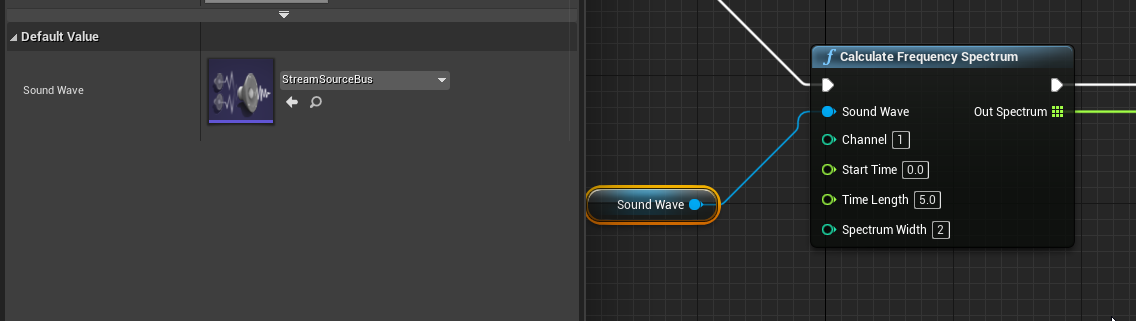
but the out spectrum is empty
next nebula
ah wait I think I understand it
clever axle
So I wanted to debug it to see what's the input even
but I can't find it in the UE4 source
kindred viper
that is a stream source. Have you checked if it's a terminated stream source? ie. UDP = non terminated. TCP = terminated. RTMP isn't terminated unless im mistaken.
clever axle
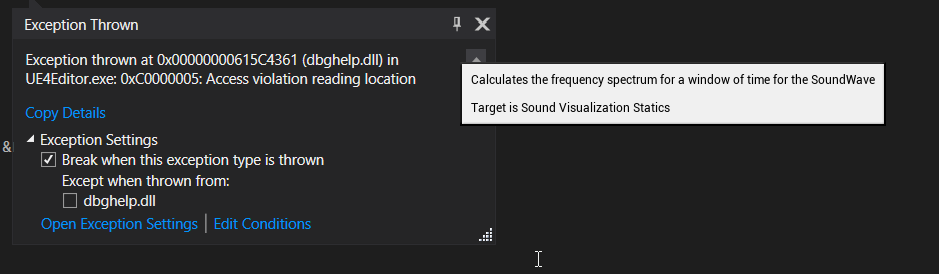
@kindred viper huh. that's good info. No I haven't. It's most likely UDP I would think.
kindred viper
yeah I remember having to hack that with Flash. In fact, I was the first person to hack that when people thought it couldn't be done 🙂
I took the data and inserted /0 at the packet size I needed for it to play in a browser
clever axle
@kindred viper damn, bruh, can you help me through this? Most of my game concept hinges on being able to analyze audio streams
kindred viper
hmm an access violation there seems like something else is wrong. Can you post a log to pastebin?
clever axle
@kindred viper I've actually just now seen some log messages I didn't before. one sec
The debugger just gave me those. Hadn't have them before:
LogOutputDevice: Error: Ensure condition failed: AudioBusPtr.IsValid() [File:C:/dev/UE_4.26_source/Engine/Source/Runtime/AudioMixer/Private/AudioMixerSourceManager.cpp] [Line: 465]
and
LogActorComponent: UnregisterComponent: (/Engine/Transient.World_1:PersistentLevel.BP_Ship_C_0.MediaSound.AudioComponent_0) Not registered. Aborting.
so it appears the media sound component that plays back the stream is not registered (not sure this actually has something to do with this) and also the audio bus is invalid
kindred viper
indeed
dusk nebula
I'm still having an issue where some of my images with transparency are applying it automatically and others aren't
clever axle
@kindred viper ok, during the testing I shredded the audio bus but it's back now. The output is still empty though
and this is the line I get when trying to navigate to the source: LogSelectionDetails: Warning: NavigateToFunctionSource: Unable to find symbols for 'USoundVisualizationStatics::CalculateFrequencySpectrum' []
kindred viper
hmm I can't say that that error is. Seems like it needs something to reference it in memory but it doesn't have it. Why though? I can't say. I'd have to deep dive
clever axle
ok.. Meanwhile someone over in #audio told me to try AddSpectralAnalysisDelegate which I'm doing right now
prime willow
is there a way to export a model from unreal to blender
and keep the shape keys :3
i cant seem to figure it out
 dim merlin
Hi, anyone knows any tutorial or example asset is around to archive a post process grid material like this :
 kindred viper
@prime willow Yes but you have to make sure "Apply Modifiers" is unchecked on the export
drowsy snow
prime willow
is there a way to export a model from unreal to blender
Also don't forget to check Import Morph Targets when importing the FBX to Unreal.
It's hidden and disabled by default, so it's rather easy to miss.
hollow flame
I am having a problem with the chaos vehicle. Can you help me?
hollow flame
Oh sorry
plush yew
how do i copy my map to other project?
kindred viper
migrate it
fierce tulip
select it, migrate
 dark berry
Can someone help me out?
I know it's something I've done before, but I can't figure it out, nor can I figure it out on Google.
How do I change the appearance of a material in the asset browser from displaying on a sphere to being a flat image?
plush yew
kindred viper
migrate it
thank you!
 stray ruin
dark berry
Can someone help me out?
I know it's something I've done before, but I can't fig...
stray ruin
dark berry
Can someone help me out?
I know it's something I've done before, but I can't fig...
if you click view options in bottom right of browser there is an edit thumbnail mode, can use left and right mouse to adjust not sure if any other ways
dark berry
stray ruin
if you click view options in bottom right of browser there is an edit thumbnail ...
Thanks for the suggestion! But that's not what I'm looking for. 🙂
drowsy snow
dark berry
Can someone help me out?
I know it's something I've done before, but I can't fig...
I think it's "hard" set depending on the material type.
Surface materials defaults to sphere, Volume materials defaults to cube (I think, volumetric materials rarely appears on preview), UI materials defaults to plane.
plush yew
fierce tulip
select it, migrate
i did it, it just copied the folders and not these files
 fierce tulip
if they arent placed in the level, obviously they wont migrate with it
stray ruin
dark berry
Thanks for the suggestion! But that's not what I'm looking for. 🙂
you can change it from a sphere to flat image with that not sure if thats what you wanted exactly thou
dark berry
stray ruin
you can change it from a sphere to flat image with that not sure if thats what y...
I'm starting to think you're right, and it's just changed position since I last used it in a much older version of UE4. Thanks! 👍
stray ruin

 coral wasp
HI
 mellow whale
 lofty ridge
i have an project to make a solar system, can someone tell me where to get the materials for it
fierce tulip
nasa
 obsidian nimbus
a real solar system? 😛
kindred viper
its true. My first ever 3dsmax full scene was a solar system and I took all my images from NASA because they were high resolution 😄
obsidian nimbus
good thing a solar system is mostly empty
so with an empty scene u have 99% done
 lean kernel
Hi. I'm currently trying the Localization Dashboard.
I have 2 cultures setup (en, de).
I gathered all texts.
Added translations for 2 entries.
But my UMG WIdget (that is linked) is not changing.
In Selected Viewport I see de translation
In Standalone Game I see en translation.
I'm changing Current Language and Locale on key pressed.
But nothing changes.
What could be wrong?
coral wasp
Quixel... Substance
obsidian nimbus
cuz its free 😛
coral wasp
The Starter Content pack? it doesn't matter . it like 1000000 steps to finish your development , and you're taking the first step now.
 graceful onyx
Hey! I'm currently learning the basics of Unreal Engine via a tutorial series (FPS Game by DevSquad). Can you suggest a subject i could focus on after im done with that series? I would like to jump into Niagara but maybe i need some experience in Animating and Vertex Painting?
fierce tulip
you'll learn those along the way once you want more challenging stuff to do in niagara
 covert onyx
hello, currently rendering for a project on UE 4.26.2, I noticed that my flag simulation was doing anything but when I run the simulation mode on Unreal, my flag works perfectly. I'm using the new UE render mode (movie render queue), do you have any ideas?
 native bough
Is there a way that unreal engine start early I have core I7 8gb ram Intel 620 graphic card... I have nothing to do with graphics just game mechanics
 plush yew
native bough
Is there a way that unreal engine start early I have core I7 8gb ram Intel 620 ...
plush yew
native bough
Is there a way that unreal engine start early I have core I7 8gb ram Intel 620 ...
i think u should remove the burden on the processor
might work
late stag
I am going to start working on a realistic driving game but i cant figure out to either do it in blueprints and which template to use.
plush yew
how is this i just tried first time
late stag
late stag
I am going to start working on a realistic driving game but i cant figure out to...
is someone able to help
plush yew
which material is best for canon
 fresh geode
hey guys! I have a pushable object and would like to add sound to it, whenever it moves, can someone give me an idea for a setup?
plush yew
what is this ?
 young garden
I try to rotate this from the top, but It keep rotate it from the center. I just want to use af cube. How can I change the rotation center (pivot) of the default EU4 Cube. : https://www.youtube.com/watch?v=77sQp2qMHuQ
This is not working:

 buoyant graniteBOT
:triangular_flag_on_post: Chi Long Qua#8014 received strike 1. As a result, they were muted for 10 minutes.
stray ruin
young garden
I try to rotate this from the top, but It keep rotate it from the center. I just...
https://www.youtube.com/watch?v=4jEE2NCrJlc this video will give u an idea

In this door episode we move on from the sliding doors and now into the hinged door. Learn how to not only make the hinged door swing open, but also ensure it will always swing open away from the player.
Watch the next episode where we begin creating our quest system over at Patreon for as little as $1.
Support me on Patreon and get access to ...
plush yew
hi 😄
its about getting hundreds of houses on your world, make the houses and make is as an actor; it explained a big house van be 3 actors; i understand that
the white popup i don't understand 100% what he means can anyone tell me simple please? 🙂

ow i understand now haha lol :p
lofty ridge
i cant see planar reflection when i hit play or G, why is that, how to help it?
 radiant sun
Do you know that way how you find a level on the marketplace... And then you just excitedly stare at the droplets going down the glass windows like a little kid, marvelling at how amazing the graphics are?
 small vault
Has anyone run into issues with HLODs continuing to bake even though they are disabled in world settings? I'm stumped on it but its costing me a lot of time now. I found some old threads on the UE forums but no resolution unfortunately
 digital anchor
lofty ridge
i cant see planar reflection when i hit play or G, why is that, how to help it?
digital anchor
lofty ridge
i cant see planar reflection when i hit play or G, why is that, how to help it?
planar reflection has a preview, but to see ingame you need something reflective near it
you may find some backups at project/saved/autosaves/, but start using #source-control to not lose more work
 keen beacon
you just answered your own question
 gray mauve
is there any easy way to make a timed lap system in unreal?
unreal's racing game tutorial on youtube is overly complicated
grim ore
is it overly complicated or is complicated enough to get the job done?
gray mauve
i dont know man, I tried following their videos but even the comment section is full of complaints about how nothing is working
grim ore
which tutorial series is this?
also the Vehicle learn project on the launcher has a checkpoint/lap time system you could look at
fierce tulip
so, unless the mesh I import is a 100x100x100 square mesh, it just wont have collision for some reason.
simple as complex, complex as simple and anything in between results in no collision.
nothing is showing up as collision either, even when generating in ue4
digital anchor
can u drop the fbx
gray mauve
grim ore
also the Vehicle learn project on the launcher has a checkpoint/lap time system ...
damn it does? i'll check it out
fierce tulip
would be odd though, because when i import a regular cube with same settings it works right away
ember walrus
Hi Hi guys, is it fine to use the billboard component as a clickable target in a turn based game?
digital anchor
was looking if the fbx had UCX stuff but youre generating in UE right? unless generate missing collision is off it should work fine
fierce tulip
@digital anchor delving deeper, it seems to be something with the folder im importing into, importing to another folder seems to work
O_o
gray mauve
grim ore
also the Vehicle learn project on the launcher has a checkpoint/lap time system ...
nah m8 it doesnt have a checkpoint lap time system
 fallow hornet
Is there an alternative to using depth fade for an opaque material?
Could you achieve the same thing using a fresnel?
 limber oracle
Anyone an idea when unreal 5 is released?
fallow hornet
@limber oracle next year
grim ore
@gray mauveI played it before I replied, there are checkpoints as you go around the track and it keeps track of your fastest lap time
what are you looking for?
 fallow relic
Under the triangles Tab, select Edit Mats. You can then add as many material slots as you want. Select the triangles, make sure to set the "selected material slot" id to the desired slot and then hit assign selected material.
 gray mauve
grim ore
what are you looking for?
gray mauve
grim ore
what are you looking for?
im playing it rn bro, it just lets you drive around. No checkpoint or laptime system
 grim ore
I didnt say the vehicle template
gray mauve
oh mb
grim ore
a lap timer system shouldnt be too difficult to implement if you break it down into the parts. A blueprint with a collision is all that is needed to trigger it. a variable that holds the current time when it starts, then the time when the collision is overlapped, then subtracting them to get lap time, then comparing that to the last fastest time, then storing a new starting time for the next lap should be enough
gray mauve
btw this is the series i had been following for like 8 parts and its super confusing and honestly not a great deal of help
 grim ore
that would be about 4 years old so it make sense it might have issues right now
but the concept should still be solid
gray mauve
perhaps should've just made my game inside unity
grim ore
you would have the same issue trying to follow a 4 year old tutorial without any engine experience
the choice of game engine doesnt magically solve core issues
 quaint snow
guys, does anyone know what's the pprooblem here?
Blueprint Runtime Error: "Accessed None trying to read property None_ExecuteUbergraph_Demo_RefProperty". Blueprint: Demo Function: Execute Ubergraph Demo Graph: EventGraph Node: Play
gray mauve
i meant like tutorials would be easier to find and learn
grim ore
they could be. Maybe take a few hours and try to do the same thing in Unity, maybe its better for your project
@quaint snowthere should be links to click on in the error to take you to the problem.
@native flickerread the pinned messages in this channel. go to learn.unrealengine.com and start with the your first hour or introduction to UE4 courses. Randomly start pushing buttons in the editor. Open up the content examples and explore. How YOU learn is up to you
quaint snow
grim ore
<@!163863012703207424>read the pinned messages in this channel. go to learn.unr...
oh, yeah there is. I clicked on a Play link that took me to blueprint graph. It seems the problem is here, but i'm new to UE so i don't know what to do exactly 😦
grim ore
show the graph and the error, a screenshot
its hard to just guess based on the error description
quaint snow
that's the graph
 grim ore
so what is Unknown?
it has a warning
there is a very good chance if this is an older project in a new version of the engine it's broke, matinee has been deprecated for years
quaint snow

yeah, i think it's an older project, just downloaded it online and imported the map to my project
grim ore
yep so what is this project?
quaint snow
it's Urban City
gray mauve
yo matthew, i just found an unlisted video series from 2017 about checkpoints
grim ore
yeah you need to remove that reference its bad now
gray mauve
 grim ore
yeah that would be the older version, the one you listed was updated. notice the description about 4.8
gray mauve
yeah, so should i try following this or would it be a bad idea?
grim ore
@quaint snowif you just want to use the map, remove the nodes connected to Event Begin Play
this unlisted list is OLDER than the one you said doesnt work....
 velvet palm
Need any Landscape mobile MasterMaterial.
quaint snow
grim ore
<@!258736529382309900>if you just want to use the map, remove the nodes connecte...
nice, it did solve 🙂
btw, what was that mantinee actor?
did it got replaced by another thing in current versions?
grim ore
matinee was the older system used to animate/make in game cutscenes. It was replaced with Sequencer and disabled in newer versions
quaint snow
ah i see
if i'd like to make that nodes linked to BeginPlay to work, you should i do with them?
like replace that Play node targeting Mantinee for a Sequencer?
grim ore
you would have to allow the engine to open the matinee, then convert it over to a sequence, then tell it to play the sequence. I know there is a converter in the engine or its being worked on but honestly have never touched it
you would also have to figure out what that matinee was in the first place to see if it is even something you want
 nimble sand
Guys I'm not an unreal dev but
how are rigs managed in Unreal?
because in games like Valorant
there's indefinite number of characters and indefinite (aka huge) number of weapons
do they manually make these rigs for each character (and each weapon)
im not sure how things in UE work
grim ore
did you check out any information about that?
nimble sand
google got nothn
grim ore
tons for me, but you can share an animation setup between multiple meshes as a simple way of doing it
or yeah if the skeleton is going to be unique you have a different skeleton
and there is no such thing as unlimited, you have set limits.
nimble sand
grim ore
and there is no such thing as unlimited, you have set limits.
by unlimited i meant varying
uh also
waht if the skeletons are the same?
grim ore
then they can share an animation setup
nimble sand
how does UE handle merging of gun armatures and character armatures
grim ore
you can merge them, or just not merge them
nimble sand
wdym
grim ore
you can merge multiple meshes at runtime to make one animated mesh, or you can just keep them seperate and play the animation back
nimble sand
grim ore
you can merge multiple meshes at runtime to make one animated mesh, or you can j...
ah i see
grim ore
or you could have the weapon do it's own animations while the players legs do it's own while the hat does it's own while the backpack does it's own while
nimble sand
so a skeleton for everything
grim ore
could be, could not be. depends on your project
nimble sand
whats the most ideal way
fierce tulip
@digital anchor reimporting them with the same mesh and with a duplicate mesh (but with ucx_ prefix) acting as its collision works...
no clue how/what/why works properly in other folders/project/versions
grim ore
maybe you use vertex animation for everything because your project has a million characters
there is no ideal way, your project dictates your tech
digital anchor
fierce tulip
<@!223951924276363267> reimporting them with the same mesh and with a duplicate ...
yeah, never seen this happening tbh
 heavy sail
Cannot build modules while Unreal Engine is running - please build through your IDE
umbral ferry
ok

 umbral harness
Is learn.unrealengine.com having cloudflare issues for anyone else?
late stag
nvm
topaz kelp
umbral harness
Is learn.unrealengine.com having cloudflare issues for anyone else?
works fine for me
huh, looks like they really expanded the amount of courses since last i checked
grim ore
@umbral harnesswhen did you have the issue?
 grim ore
Where are you located in the world?
umbral harness
Sweden
grim ore
There was an issue earlier they thought was resolved, I will let them know 🙂
umbral harness
I had it earlier today but then it started working for an hour or two, and now it's back :/
steel crest
Progress bar/stats/xp question, is their anything out there that is easy to implement to replace simple progress bars with the hex/octagon type things to display several things at once? Or is it easy to kinda make from scratch? If theirs anything related to this available please let me know
To clarify, replace eg. several bars that go from 1-10, say xp 2, strength6, and speed 4, and make it (triangle in this case) the multiple side shape, with a fill corresponding to that value
heavy sail
me after deleting the sky

 amber dune
when exporting fbx from blender, how do you stop the origin being the center of scene and be the origin of the actual object youre exporting?
grim ore
you move the item to the world origin in blender and export it out that way
thats just how it works 😦
amber dune
ahh yeh ive been doing that, was hoping there was an easier way
instead of moving everything back to the center:S
grim ore
you can adjust the origin on import if that is easier
amber dune
probably not, if i have to enter it manuaully
grim ore
yep, work either way lol
amber dune
boooo
would be nice if the export tool would just move the object to the center before export then back to is original position
dusk nebula
hi, could someone tell me how to set up transparency on images in a UI?
it just kinda worked for the first one I imported but now it doesn't
grim ore
@amber duneI actually was just going to comment on that, a post I just read says a studio does just that lol. They have a script that they use that duplicates the object, moves it to origin, exports it out, then deletes the duplicate
@dusk nebulayour texture would have transparency on it and it will use it, otherwise your material will be set up with transparent parts
brazen venture
My build failed idk maybe license expired
grim ore
well you need to uninstall incredibuild if you didnt pay for it, but thats not the error
brazen venture
how to do it?
grim ore
c1xx: fatal error C1083: Cannot open compiler intermediate file: 'C:\Users\Lietot�?js\Documents\Unreal Projects\MyProject - kopija\Intermediate\Build\Win64\MyProject\Shipping\Core\SharedPCH.Core.h.pch': No such file or directory
your user name where your project is stored has characters the editor does not like
brazen venture
of frick
grim ore
you uninstall it the same way you installed it, with visual studio installer
grim ore
for project folders you should try and put them as close to root as you can, not in your documents if you have a choice, and you should not use - symbol
you dont need to uninstall UE4, you need to uninstall Incredibuild from your Visual Studio Installer
brazen venture
Oh ok
amber dune
@grim ore cool, i might look into writing a script myself
brazen venture
grim ore
you dont need to uninstall UE4, you need to uninstall Incredibuild from your Vis...
only increbuild?
grim ore
yes incredibuild is an issue
grim ore
the error has nothing to do with incredibuild
incredibuild was a warning and different, your issue is your project is in a bad location
brazen venture
oh
when i updated from 2017 o 2019 vsc then everything broke
ITs VSC bug or UE4?
stray ruin
@grim oreIve seen 100s of your videos and learned a ton from them, just wanted to say you did a great job on them
grim ore
@brazen ventureyou should move your project folder, and rename it, to try and fix this issue.
brazen venture
grim ore
<@!706536914408177726>you should move your project folder, and rename it, to try...
Will it not break anything?
grim ore
if you move the project folder, no it should be fine everything inside of it is inside of it
brazen venture
Oh ok thanks!
 crystal pine
Why is it so difficult to render a still image in UE4? It's like rocket science..
dusk nebula
could somebody help me figure something out? I'm trying to destroy one of a group of actors on an input, but I don't know how to store a reference to each one in order to destroy them individually
in this case it actually doesn't matter what order they're destroyed in, so I figured I could use an array but I just don't know how
grim ore
how are you keeping track of the actors?
dusk nebula
I'm storing a reference after spawning
I like your vids btw
I can destroy one but then I get an error after closing if I attempt more than one
grim ore
are you trying to destroy just one of them, or all of them?
dusk nebula
I'm trying to destroy one per input, which I'll later change to be another action
grim ore
but it doesnt matter which ones? just say you spawn 10 then input you want one of the 10 destroyed so 9 are left?
dusk nebula
yeah it doesn't matter because they're all functionally the same
grim ore
then after you spawn you should be Add them to an array
and on input you check if the array length is more than 0 and then get the first one from the array and destroy it if it is
dusk nebula
so I'd use Make Array with one pin going from that reference to the actor?
 dusk nebula
okay so the array needs to be a variable already
let me try this really quickly then
grim ore
you probably also need to add to the end of that a Remove Index so it removes the now blank entry from the array
or you could first remove the item from the array then destroy it
dusk nebula
am I missing some simple way to get one item from an array?
it destroys all of them at once because I referenced the array
I don't think I could use random array item because the remove node would randomize again
brazen venture
grim ore
<@!706536914408177726>you should move your project folder, and rename it, to try...
I have tried everything still the same error. Is it VSC bug?
dusk nebula
grim ore
or you could first remove the item from the array then destroy it
I actually figured out that I needed to just use a get node on the first item. Thanks for helping me
grim ore
@brazen ventureshow the error log again
brazen venture
grim ore
welp all you did was move it from one folder with the issue to another...
fatal error C1083: Cannot open compiler intermediate file: 'C:\Users\Lietot�?js\Desktop\deleting this folder will couse death of you\egreefes\Intermediate\Build\Win64\MyProject\Shipping\Core\SharedPCH.Core.h.pch': No such file or directory
its still under your user folder which is the issue
make a folder in your root drive (C:) and call it Projects, then move the project into there
and remove all the silly stuff, spaces should not be in a project name
brazen venture
Oh ok
wise trail
Is there an easier way to get resources for a source build instead of installing a binary launcher for ue4?
grim ore
what resources?
grim ore
third party sites like gumroad would be about it, if you want the official stuff then not really
 ember geode
Anyone down to make a dark souls VR game?
young garden
I try to rotate this from the top, but It keep rotate it from the center. I just want to use af cube. How can I change the rotation center (pivot) of the default EU4 Cube. : https://www.youtube.com/watch?v=77sQp2qMHuQ
This is not working:
This is not working
 grim ore
@young gardenyou would have to import your own item with the corrected pivot, or use the new modeling toolkint to change the pivot on the item you are using, or make it all in a blueprint with a corrected scene component as the new pivot
young garden
grim ore
<@!810131753497788416>you would have to import your own item with the corrected ...
So I can't use the UE4 cube
grim ore
you can if you "use the new modeling toolkit to change the pivot on the item you are using, or make it all in a blueprint with a corrected scene component as the new pivot"
young garden
grim ore
you can if you "use the new modeling toolkit to change the pivot on the item you...
Thx a lot. What is the easiest way
grim ore
probably using the modeling toolkit to do it in editor since you dont have to leave
young garden
grim ore
probably using the modeling toolkit to do it in editor since you dont have to le...
Ok thx a lot. I'll try that.
grim ore
you could even just make a box using the modeling tools and it will automatically put the pivot on the edge it is snapped to
now with that all said, based on your screenshots I would have personally just done all of this inside a standalone blueprint (code, meshes, etc.) and this wouldnt have been an issue
young garden
grim ore
you could even just make a box using the modeling tools and it will automaticall...
Perfect I will try modling
young garden
grim ore
now with that all said, based on your screenshots I would have personally just d...
But it does the same if I use af cube in a standalone blueprint
grim ore

when you put stuff in a blueprint you can have parents and children, using scene roots as parents you can make new "pivot" points
with this code it would rotate the root (which is the scene component) which rotates the child based on its location to it (moved down so its new "pivot" is on the top)

using scene components to offset/move where stuff is/layout stuff is pretty normal
also all your code is inside here, not in the level blueprint which makes re using this stuff easier. plus level blueprints are evil
 grim ore
yep you are targetting something with your code, a scene component, mine doesnt it targets the actor itself (read the second line on the blueprint node, the smaller words)
young garden
grim ore
yep you are targetting something with your code, a scene component, mine doesnt ...
OIC
 wintry raptor
Whats up with the extra column when importing a CSV into a Data Table?
 grim ore
that would be the index, its basically an array under the hood
wintry raptor
Are you responding to me Mathew?
grim ore
yes
wintry raptor
There's 2 index columns though. When you import a CSV, the first column is set up to be the index.
grim ore
on your file that you import your first column is the row name
wintry raptor
Scratch that, you're right.
young garden
grim ore
yep you are targetting something with your code, a scene component, mine doesnt ...
That was the solution . Thanks a lot.
wintry raptor
I guess since I'm using 1-X integer values as my "Row Names" it looks weird, but if I were using strings, it would make more sense.
grim ore
you can re order your rows, if you did that then it would make more sense
wintry raptor
yeah i just changed the test rows to 2 4 6 and it cleared it up immediately
thanks
 inner cloak
Hey guys, i'm doing the Wall Climbing tutorial from Crocopede, thing is, it does not work where it should turn green when getting close to the mesh !!!

it does this when getting to the wall
 dusk nebula
does anyone know where I could find some good assets for a progress bar?
inner cloak
What features do you see on the progress bar?
grim ore
are you expecting the red horizontal capsule to go green? My guess is its not colliding which is why its red. make sure its collision settings match the other ones
inner cloak
That is the thing, it should be colliding .. maybe there is some setting i dont thing of !
grim ore
check the collision settings then
inner cloak
Pretty sure it is, but it seems to be hiding in some blueprint graph section or such
also, the vertical one does work properly
grim ore
yep just check the collision settings tabbing back and forth between them to see what might be different. or maybe copy the one that works and paste it and rotate it and see what happens
inner cloak
Argh .. i feel dumb .. found the issue:
 untold yacht

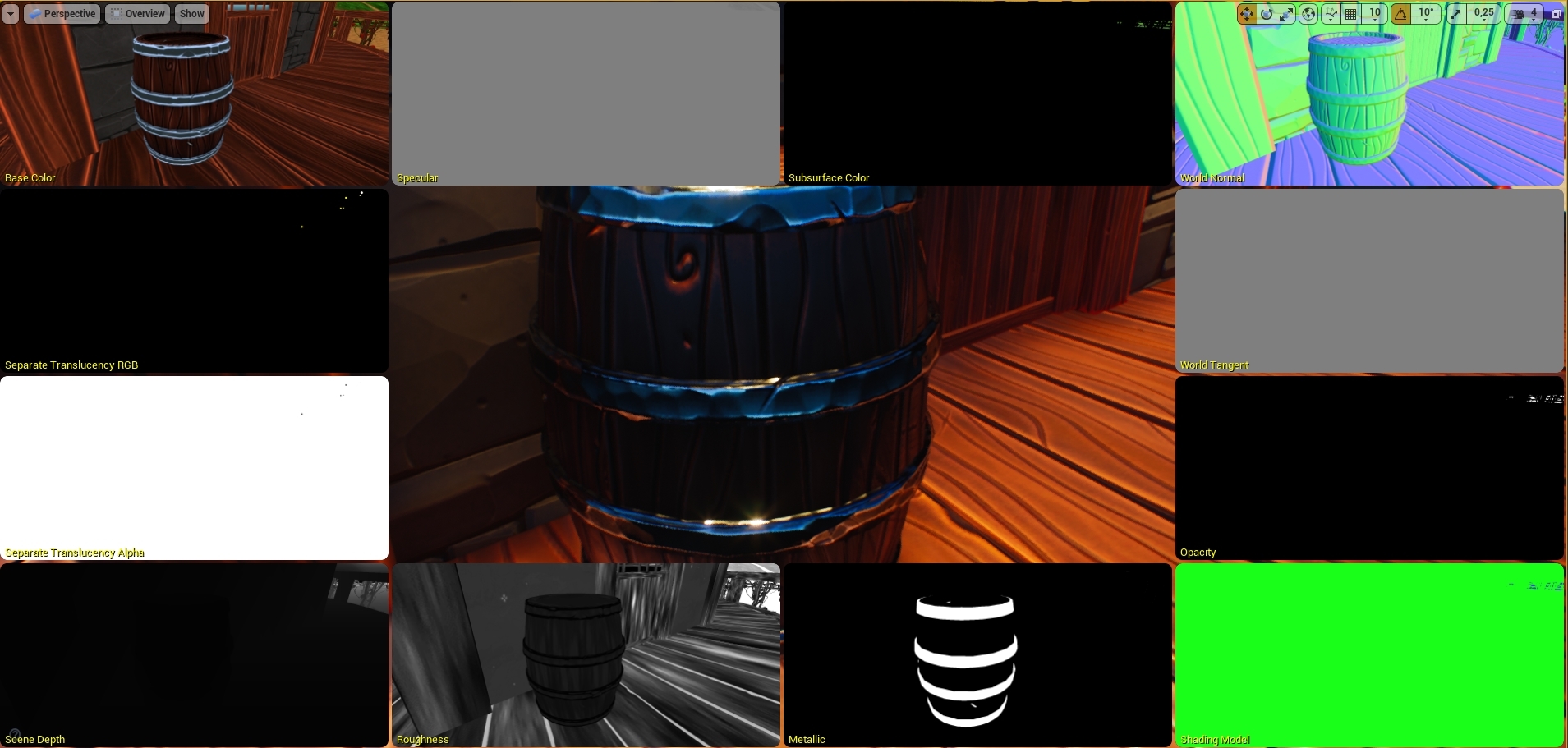
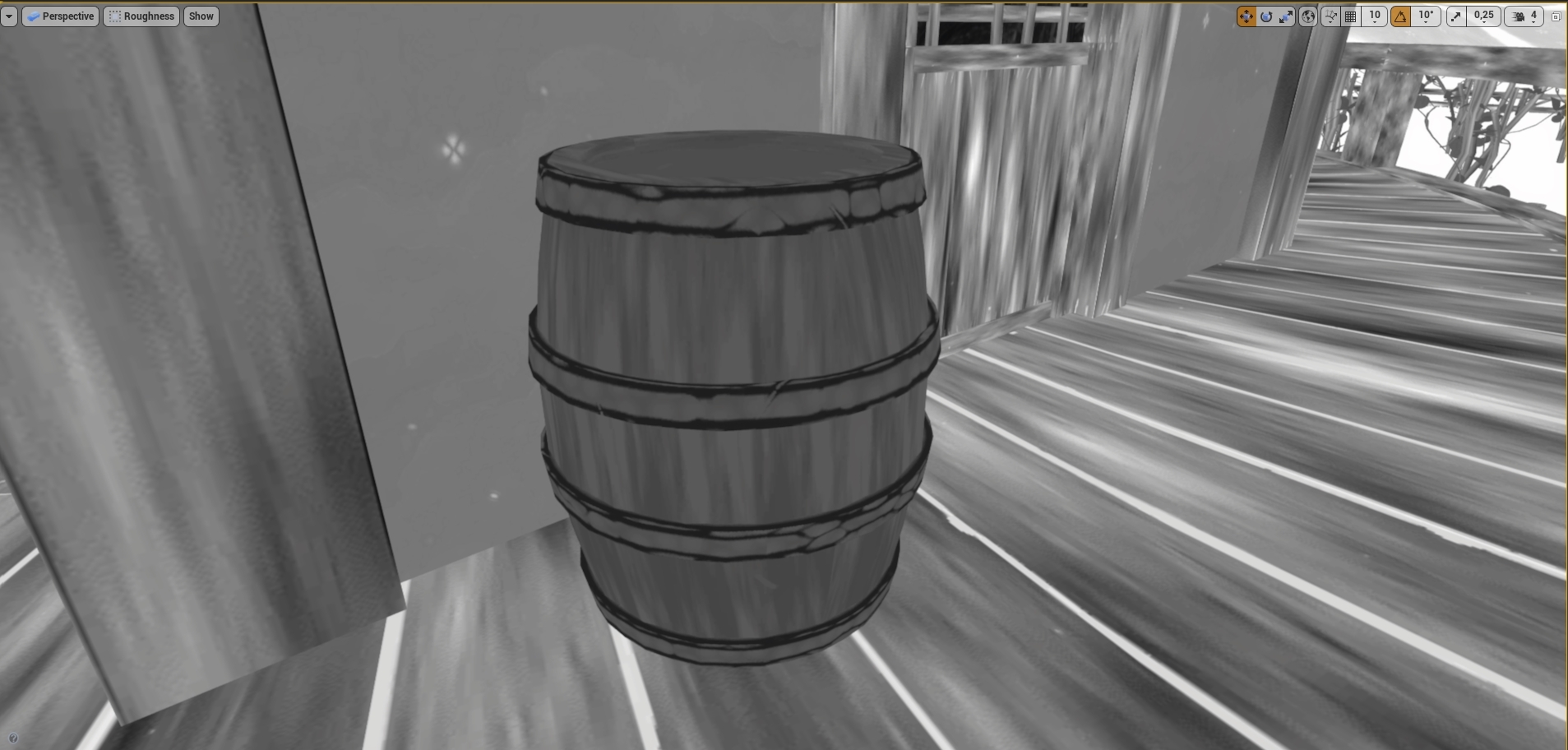


hey how do i get destination to a "player character" this is inside the enemies "Bp"
 small basin
I'm trying to use an "Instanced Static Mesh" component, but if I add an instance the scaling gets weird:


Why would the spawned instance no longer be scaled (1,1,1) but (1, .99, .99)?
grim ore
its probably 1, its just a floating point error
inner cloak
in the video i follow, there is a green ball showing .. how do i get that ?
 drowsy snow
small basin
Why would the spawned instance no longer be scaled (1,1,1) but (1, .99, .99)?
drowsy snow
small basin
Why would the spawned instance no longer be scaled (1,1,1) but (1, .99, .99)?
Floating point error 
grim ore
@inner cloakyou do have it, its the hit location. your screenshot showed it on the top of the mesh n the vertical trace
inner cloak
yes, it does on the top, but not the side