#ue4-general
1 messages · Page 994 of 1
 idle dragon
 icy egret
Hi all
I have a question
I found asset distribution site named "desirefx.me"
Is it safe? isn't they cracked assets?
When I use an asset from the site, asset needs me to download from vault cache
but I can't download it because it said "not available"
So I worry about this
 kindred viper
i only googled it to see if it was still relevant tbh. I didn't want you to end up with a bad tutorial
🙂
@icy egret no its not legit.
idle dragon
I'm probably going to have to default to FGear though, I've been through that tutorial before
icy egret
🤯
kindred viper
if they are making you put it manually into the vault location that is a big sign its taking assets that are installed there.
idle dragon
Vehicle movement settings are decent but there is a ceiling to how powerful it actually is, unfortunately.
kindred viper
the ceiling is how much you understand about the physics of everything really. There are AAA games made with that component.
idle dragon
True, but there isn't a single UE4 tutorial that can give a robust driving model from start to finish. Even Udemy's tutorials can't get there. Not complaining, just making an observation.
It's probably way too complicated for that anyway.
kindred viper
well think about it. You can't accomodate every single vehicle in one go. It's about learning what the physics are in real life and emulating them. It's got enough of the engine components to deal with most vehicles.
And now its in Chaos its not limited by the old PhysX caveats as much. Like the fact PhysX needed to be more than 3 wheels for some reason.
icy egret
why "desirefx.me" is living although it is not legit?
just Epic missing them?
kindred viper
who knows. but I wouldn't share that link
 ruby blade
Hi everyone!
kindred viper
its pretty much giving them traffic
 untold yacht
hey how can i make a "progress Bar" into a Circle instead oh a Squarish ?
icy egret
hmm,thanks
kindred viper
@untold yacht a radial progress bar is like dividing 360/100 and segmenting it. Just check out the UMG stuff on things like that. Im sure someone has done and if not, I'll make it for the marketplace for a nominal fee.
or.... first link in google ffs https://www.tomlooman.com/circular-progress-bar-for-umg/

We recently added a new locking feature to Switch for which we needed to have progress feedback. For this I built a circular progress bar in UMG. I'm giving away the material to use in your own projects. The download link is at the bottom. If you wish to learn more about the effect, keep reading - otherwise you can simply scroll down and downloa...
untold yacht
ah sweet ty 😛
kindred viper
yeah please google first.
untold yacht
yes sir.
kindred viper
its only fair if you ask people for their time that you put some time in yourself
 plush yew
hello, when i duplicate the level i get this error. it can't save

 heady stratus
🤔 I'm not entirely sure how others can combat this error, when their drivers are up to date. Any suggestions on what I should be doing?
 untold yacht
@kindred viper yeah gotcha i have tho, like the link you sent is for a circular progressbar thats not what im looking for i just want the square to be round really.. havent found anything on google about that :/
https://gyazo.com/e983b831d3a4ef5a38b9d969708ee7fc
like i just want it to be a square

circle *
kindred viper
@heady stratus try a different driver. Use a driver cleaner first.
 finite dew
not sure how to say this but how can i make The egg just character with orbit camera and When you press any button it will hatch. And it spawn a baby and destroy the egg after animation ?
 regal mulch
untold yacht
https://gyazo.com/e983b831d3a4ef5a38b9d969708ee7fc
like i just want it to be a ...
regal mulch
untold yacht
https://gyazo.com/e983b831d3a4ef5a38b9d969708ee7fc
like i just want it to be a ...
I think you are overcomplicating this. If you want this to be a circle that gets filled from left to right (or whatever direction you've chosen), you'll just have to import a circle texture and swap out the textures in the style tab
untold yacht
@regal mulch well the problem is that the texure will just fill the square right ?
regal mulch
No you have multiple texture slots
Background and Fill
If you replace both with the circle, given the circle has an alphachannel :P, it should work
untold yacht
hmm ill try it
 toxic birch
I am honestly super tired of how much Unreal keeps crashing.
Unreal Engine is exiting due to D3D device being lost.
I googled solutions and applied all of them, upgraded Unreal, Nvidia drivers, windows, reinstalled, regedit stuff, driver updates, verified files.. Not a single solution online is working anymore and I have a final deadline tomorrow and the crashing is seriously ruining the workflow. What do I do
Would you like the error stack?
If I email someone right now I'm afraid of the response time and that I won't get a response within the deadline of my project
 fierce tulip
might be a faulty gpu (or error) and ue4 not bypassing it like most software but hard crashing
fierce tulip
i had to replace my gpu when I had an issue like that a few years ago, havent had a gpu-related crash since
idle dragon
upgraded Unreal, Nvidia drivers, windows, reinstalled, regedit stuff, driver updates, verified files..
fierce tulip
still a few crashes from time to time, but well.. software in general
idle dragon
Downgrade drivers maybe?
fierce tulip
downclocking worked for a while until gpu died
toxic birch
Well I have a few question that might lead us somewhere
idle dragon
Just offering a quick solution before you throw in the towel at a new GPU
toxic birch
In the error stack it says
Fatal error: [File:D:/Build/++UE4/Sync/Engine/Source/Runtime/Windows/D3D11RHI/Private/D3D11Util.cpp] [Line: 198] Unreal Engine is exiting due to D3D device being lost. (Error: 0x887A0020 - 'INTERNAL_ERROR')
I wanna focus on D:/Build..
My unreal is downloaded on the E drive
Why is the error stack showing somewhere with D
Is that something to note?
Or is that normal
Also, I remember a couple of months ago it gave me an error about scratch cards or something not having enough space and I (like an idiot) dismissed it with a never show again by accident and the crashes started ever then
idle dragon
You might need a new GPU
toxic birch
My E has space, my D has space but my C doesn't
Why would I need a new GPU though
Mine isn't old
toxic birch
A GTX 1050
idle dragon
might be worth troubleshooting with that
fierce tulip
time does not equal not faulty though
idle dragon
Try your 1050 and see if the problem subsides
toxic birch
Well my thing is still on warranty, do I contact them about the issue saying the GPU has an issue?
I don't get why and how the GPU is the issue here
idle dragon
I've read D3D errors occur because your GPU/driver can't handle some graphics settings or something
fierce tulip
also, unless you manually changed where ue4 stores cache files, thats gonna be your c:/
toxic birch
okay good to know, how do I manually change there
Where exactly does it show me where it stores cache files
fierce tulip
there is H:\Launcher\Epic Games\Launcher\VaultCache for stuff downloaded trough launcher
and
C:\Users\XXXX\AppData\Local\UnrealEngine
i think nowadays you can change that during installation of engine, but not sure.
fierce tulip
and the launcher stuff you can change in launcher settings
fierce tulip
never have a full c drive. it should only be for windows/general windows/explorer apps. not software and such (imho)
toxic birch
Yeah, I got a new SSD drive for stuff but it was too late
I'm planning on cleaning stuff up after finals
fierce tulip
you can run "disk cleanup" in admin mode, this results in being able to clean it more thoroughly
just
start > disk cleanup > rightclick on it > run as admin
 slate vessel
So I managed to put a video together showing this issue I am getting where I have a fog particle, which fades out before it disappaers to stop any popping. Problem is when I layer multiple emitters, they start popping in and out. Is there a setting I can change to stop this?
in the video you can see it runs fine no popping but then when i duplicate them, they start popping
fierce tulip
video is private
slate vessel
there we go sorry
fierce tulip
looks like sorting order instead of dissapearing.
also, doing this would kill your performance due to overdraw :p
slate vessel
its only for an arch vis video, not realtime. Is there a way to fix it?
fierce tulip
you can set sorting in the required module, but imho I would prolly set it up to be one emitter as well so it sorts itself out better
 glass raft
for game asset, is it common to not unwrap and set the mapping on the engine or is it much better if everything unwrapped?
fierce tulip
latter
slate vessel
ill have a look at sorting order. In practice i am not overlapping the emitters as close as i am in the video, they are spread out but because they still converge eventually, the pop in still happens so ill see if i can do it per module
 clever marsh
yo are we ever getting UE5 or what is up with that
i havent been following up on it
fierce tulip
ue4 does not handle translucency well because its done after depth or sorting or whatever, so even if a translucent particle is 1000 units away, it can suddenly appear in front of another translucent particle thats right in your face
@clever marsh no new info has been shared
 frozen pond
any tutorial how to blend 2 animations? i have anim blendspace for aiming and shooting animation but when i shoot my character just move to center and shoot instead of shooting in direction i'm looking at
 trim granite
Anyone know it's possible to bind mouse and keyboard shortcuts together?
 ruby blade
Anyone know how to merge two projects together? Or does it have it have to be done manually with folder file transfers?
trim granite
I've been searching and clicking, but nothing so far.
frozen pond
ruby blade
Anyone know how to merge two projects together? Or does it have it have to be do...
you can do migration from 1 to another if you want to make it work
fierce tulip
@trim granite like leftmouseclick + shift or so?
ruby blade
How do you migrate BPs, animations, meshes etc?
trim granite
Yeah, something like that.
fierce tulip
never tried besides writing it myself in the .ini files :p
trim granite
ow, does that work ?
fierce tulip
in some cases
trim granite
Yea, it's a bit convoluted having to select brush and setting the brush size each time you want to do something.
ruby blade
frozen pond
asset acction -> migrate
Thanks! I am still trying to get the hang of UE4, just starting using it last week
fierce tulip
not sure how to set it up though
trim granite
I'll look in to that, thanks for the tip! 😉
 junior nimbus
Anyone in here with decent UI knowledge? We're getting this super annoying flicker when we open our inventory

cant figure it out
 west venture
How can i disable that Sun light on the floor? It looks really bad

 rigid belfry
increase roughness on the material

 rigid belfry
untold yacht
https://gyazo.com/5df645d3e5f17755732b2232b5046fc3
rigid belfry
untold yacht
https://gyazo.com/5df645d3e5f17755732b2232b5046fc3
are you adding a widget to the viewport or are you doing something else?
 rigid belfry
did you change any settings under the rendering tab
rigid belfry
how?
untold yacht
behavior
is enabled "box was unchecked"
so i guess the rendering was below 1.0
when deselecting it
rigid belfry
did the widget work while it was disabled? never tested it
frozen pond
any idea how to fix that? it don't proper interpolate(?) from pose to pose
 rigid belfry
i am pretty sure a disabled widget shouldn't receive any events, right? so you should've seen the healthbar not updating or whatever
frozen pond
junior nimbus
https://youtu.be/6J9lVAZWkdM
check Z order on them
rigid belfry
frozen pond
any idea how to fix that? it don't proper interpolate(?) from pose to pose
i guess an easy solution would be by using IK
untold yacht
@rigid belfryit did work while disabled
rigid belfry
frozen pond
any idea how to fix that? it don't proper interpolate(?) from pose to pose
i think this tutorial should be pretty relevant still https://zaggoth.wordpress.com/2019/01/26/ue4-tutorial-the-right-way-to-do-left-hand-weapon-ik/
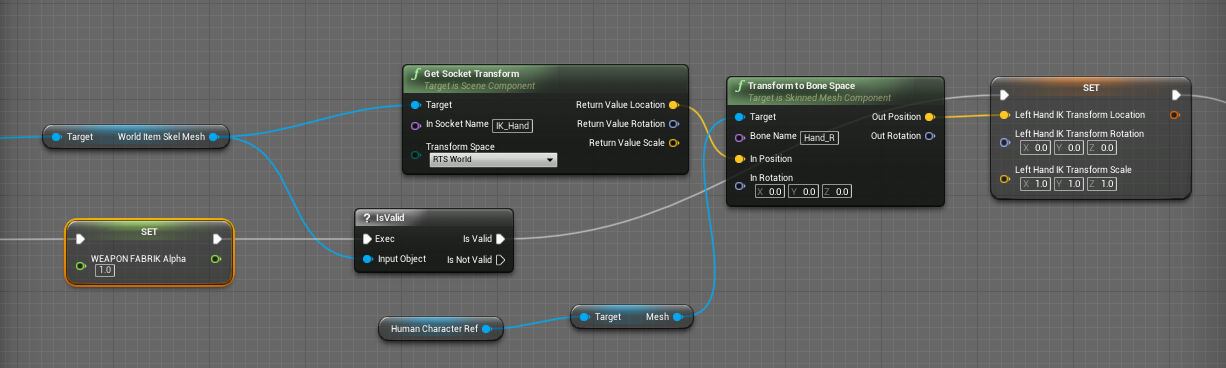
Everyone else on the internet is wrong. (Okay, not quite — though I spent a good many hours going through tutorials and not getting the results I wanted for left-hand IK. There are a LOT of t…
frozen pond
thanks for link but oh god i hate animations so much
rigid belfry
not sure if something has improved ever since control rig was introduced thought
well its not really animation, you're using Inverse kinematics to move bones
you animate through code
frozen pond
still related to animations and i hate animations
west venture
I have a question, the lag when making a ue4 Landscape it going to be when i export the game, i mean its a really simple terrain, and its lagging, but my pc run a lot of games in graphics ultra, i dont know why this is happening
frozen pond
west venture
I have a question, the lag when making a ue4 Landscape it going to be when i exp...
unreal is not a game, what your spec ?
west venture
frozen pond
unreal is not a game, what your spec ?
GTX 1050, I7-4770k and 12GB RAM
frozen pond
gtx 1050 is dying there probably
rigid belfry
if its a simple terrain and its lagging, its most likely not simple
rigid belfry
frozen pond
gtx 1050 is dying there probably
maybe hes playing on a lower resolution
frozen pond
also 12gb ram isn't good for calculations, you should allways power 2
2/4/8/16/32 etc
west venture
rigid belfry
maybe hes playing on a lower resolution
maybe, how do i change that?
frozen pond
how big is your landscape ?
west venture
63x63
rigid belfry
frozen pond
also 12gb ram isn't good for calculations, you should allways power 2
pretty sure 12gb of ddr3 used to be standard
rigid belfry
west venture
maybe, how do i change that?
not really something you change. i am talking about the resolution of your monitor
west venture
its 1600x900
frozen pond
i just checked 63x63 and my gpu usage is 3.4 gb so probably gtx 1050 is too bad for ue4
west venture
🙄
frozen pond
gtx 1050 (non TI) have 2GB of vram
there were some settings in editor lemme find them
frozen pond
west venture
🙄
Scalability options, properties, and console variables.
untold yacht
quick question, ive bought a simple male charachter from the marketplace but im new at UE4 and watching tutorials to learn etc, but when im trying to switch the "SK_mannequin" to the base male i dont have a "mesh" with all pieces ive got a blueprint file with all pieces ?
https://gyazo.com/044a75b11b694d7daaafd79520088c39
Gyazo
 frozen pond
it's master pose component sorry

Super simple method to do clothing/armor attachments. Uses Synty's Polygon Battle Royale and UE4 Third Person template
 real vortex
i am trying to make a main menu for the first time and i am having an issue with the start button, for some reason it simply does not work no matter how many times i try to make it work.
this the start button in event graph


 kindred viper
is there any error in the log file?
real vortex
as you can see i already made it default
no there isnt
how can i check to make sure
 static wharf
Question: How would I go about making a material that is a child material its own seperate material?
kindred viper
open the log file 😄
real vortex
im pretty new
kindred viper
its in Saved/Logs
frozen pond
static wharf
Question: How would I go about making a material that is a child material its ow...
sounds like material instance ?
static wharf
frozen pond
sounds like material instance ?
Yes, how do I make it not a instance?
static wharf
Darn, Guess I have to remake it then, that isnt too much of a issue, but its annoying
 autumn grail
Hello , is 4.27 compilable from source? because i have compile errors
kindred viper
it should be if its in master build
real vortex
no there isnt any error in the log
kindred viper
are you in the level at the time?
real vortex
yeah
kindred viper
try changing to a different map
real vortex
i made an old save the default so if i quit the program and open it it should give me an old save right? and then if i open the one i want it should work
kindred viper
did you try changing to another level?
static wharf
@frozen pond Another question, if I bake lighting, does a emissive material emit light?
kindred viper
@static wharf its not an actual light, but it's kind of a bloom
frozen pond
yes
kindred viper
add a light
static wharf
frozen pond
set emissive color
I did
real vortex
kindred viper
did you try changing to another level?
no how?
kindred viper
by changing the Open Level text to another map name
real vortex
my idea did not work😩
real vortex
kindred viper
by changing the Open Level text to another map name
yeah
it worked for the old save which is the thirdpersonmap
but not for the one i want
kindred viper
you probably want a Restart Level node then
 static wharf
frozen pond
set emissive color
static wharf
frozen pond
set emissive color
I did that, it didnt work, how do I make a whole mesh emit light?
kindred viper
@real vortex sorry Reset Level
had no sleep so im broken mentally 😄
@static wharf mesh lights aren't a thing in realtime rendering. So we fake it with Emission and lights. You can fake some stuff quite well with shaders on a per poly basis, but essentially its fakery
or vert basis for shaders. #brainfart
static wharf
kindred viper
<@!146741818711605250> mesh lights aren't a thing in realtime rendering. So we f...
So do I have to add a light to the mesh and then disable the material casting shadows?
kindred viper
I guess yeah. Im not a material guru per se. Might be better ways but thats the old school way I learned it
 versed burrow
Hi
real vortex
this one? what do i do next cuz i cant compile there is an error
 static wharf
@kindred viper So how would I make this emit light properly?
 kindred viper
well... looks like its been to target Game Mode Base. @real vortex it helps if you show the error tho
real vortex
 kindred viper
@static wharf like I said. emissive + light, or just a light.
@real vortex then you need to get a reference to your game mode and drag it out from there.
static wharf
kindred viper
<@!146741818711605250> like I said. emissive + light, or just a light.
Ah I see, but I think I have solved the issue a diffrent way, with a skylight
 thick nebula
hello friends... what is the cheese hack to get steam subsystem to work in the viewport?
kindred viper
Spacewar I guess
real vortex
kindred viper
<@!498531873446690826> then you need to get a reference to your game mode and dr...
i am trying but idk how
kindred viper
@real vortex ok this is where I say visit learn.unrealengine.com and start with the introduction courses. You are in need of core basics.
 prime willow
@kindred viper can i ask you a weird set of questions o.o
not really asking for the how to do it but if its something that can be done
kindred viper
I dunno. How wierd?
prime willow
well the first one is if i switch out a mesh for another mesh can i make it so a completely unrelated mesh switches out for the other as well?
like changing my belt
will change my top
or pants
kindred viper
sure. just have an event dispatcher that notified whatever is registered to it, or call interfaced functions, or sequence node it.
prime willow
ah
and lets say this weapon has a belt attached to it
so the belt and weapon has different drawing and sheathing animations
and lets say my shirt also have a different sewwt of animations
when i flip my belt to another weapon
and my shirt switches
will the animations be able to be played proper for the new adjusted items
the sheathing and drawing aspects of it
i mean
kindred viper
that depends. If they are part of the anim graph associated with the skeletal mesh, sure. You would build your anim graph in the same way you would any movement system. Just have transition rules and conduits for different setups.
prime willow
so each weapon would have their own state machine i would presume
and when swamping from the skeletal mesh weapon on belt
the graph should populate and run as intended right?
kindred viper
it depends how you set it up. Modular characters can be multiple skeletal meshes with their own anim graph associated. You can create separate graphs within a single AnimInstance too. But honestly I'd have to test things out with that as I haven't made a modular character before like that
prime willow
o.o
lets say my game lets you have multiple weapons a basic one, a switchable one like rifle, katana, claymore, hammer, etc
usable pouch items etc
would i want to setup a modular character system
kindred viper
well it's not the character in that sense. It's the components attached to it that changes.
prime willow
^ yes
it would be the characters compenents
wait what if theres also hand to hand for when using no weapons
still component based
kindred viper
that would be part of the character animgraph state machine. Transitions to Punch/kick/runawayscreamingandonfire
prime willow
ah so incorperate that stuff into the characters state machine
wait wait
what if the hand to hand has different variations
like a style where you kick more than punch, another being more grpaple focused
would i do it in state machine or compnents o-o
since it is technically a weapon
kindred viper
well its all animation right? So it would be just as usual. In the state machine to transition to different anim states
prime willow
just using the body
ah
so slap those on the character's state machine
and make it so theres a trigger where you pick one of the three styles until changed in widgets via said trigger
kindred viper
yeah in the anim graph you can you set a variable that basically sets up the state to drive the anims.
prime willow
oh ok
so hand to hand doesnt seem as painful to setup
and for the other stuff like military pouch items, weapons equipped and such compneents same for any other object that slaps onto the model using it right
kindred viper
yeah its fairly easy. Depends how many anims and the kind of fighting you want though. It can get complicated in some circumstances ie. anim breaks, counters, blocks etc.
prime willow
well i want to have the full fighters range of mechanics
block parry dodge, grab, combo, supers, ultimates, etc etc
block breaking, counter attack systems
ill learn them as i go and make changes where nesessary
but i want an idea of the termonlogies for what i need to look into learning to achieve my goal hence the questions x3
kindred viper
then you will want to organise it with a combo of transitions and conduits. But yeah its not simple. You should start simple, but leave room to add things later. I have to say, I made a Killer Instinct style fighting system once and it almost broke me when I realised how much work I needed to configure to get it all going with the legit methods like they use in such games
prime willow
o-o
oof
i dont mind i have nothing but time and patience to clean up the gaming industry :3
its annoying exhuasting but life isnt easy and you get what you give so if it means sleepless nights and cramming infinite knowledge ill walk the road lol
kindred viper
I almost made a Paragon fighting game. It was cool for a little while until I needed to get all the animation matching and move sets done properly. Then it became a studio job. So I moved on
 distant cobalt
can one help pls in #epic-online-services
prime willow
- pouches for items, weapons, belt for knives and whatever is external that may have functions go into components,
- from there setup animationgrahps and state machines for each skeletal mesh external component using blueprint classes for each mechanic or function these have
- for hand to hand as well as character movement or functions pertaining to its body, setup state machines and animgraphs for each one
- create system to switch swampable compnents to the other and if their setup proper prior itll transition from one setup to another.
@kindred viper does this sound about right?
kindred viper
yep sounds like a plan
prime willow
huh its alot less complicated than i thought
kindred viper
yeah when you break it down its ok
untold yacht
https://gyazo.com/b5c7a9d876bd0ca933c08d3cce9a689e
wtf is this bullshit zzzZz
 prime willow
ok so if i understand this correctly what if i wanted to have all of the above right but make it so teenage characters fight differently animation wise than adult character models
do i keep the same setup but change out the animation grahp?
to the teenage sized version
granted the teenage characters have their own mesh and skeelton
morphs etc
kindred viper
well the animation matching would be an issue there as it would be hitting different locations. But if you go into the setup knowing this, you can probably do some offset if char == teen
prime willow
we;ll i want to have animation reactions for each animation
idk if thats even possible for gameplay
but like if i punch your chest you have an animation for the chest punch animation that hit o.o
kindred viper
yeah that how fighting works. Every move has two animations. One for the attacker, one for the victim.
prime willow
so wouldnt i need about 4 for example
i mean 6
or 5 when you think about it
adult on adult kid on kid adult on kid
untold yacht
aye i fixed the location etc but i just dont know how to get the annimations to work O.o the tutorials arent the same as this asset i got
prime willow
animation tab would be better honestly for that o.o
untold yacht
im applying my "skins" to the mannequin replacing
kindred viper
the logic would factor in offsets for the animations based on char type, then adjust the location of where it hits and syncs up
kindred viper
its not automatic. You would need to have a calc for the offset based on char height difference to re-pose and blend the animations into position
prime willow
ah okie
kindred viper
You could cheat it with an extra set of anims for both. ie. Char hits Adult == normal anims. Char his teen = second set of anims.
but thats overloading it. It might be better if performance becomes an issue from the offset checking and adjustments
prime willow
yes yes i want to have kid to adult reactions and vice versa
ive always seen animes where the teenage uses their advantages of short and fast to fight appropiately against adult characters and vise verse for adult to teenager
so i want to sort of re create that in motion
where a kid character will have differing attacks and movements compared to larger characters and the characters will physically animate to compensate for that
however thats far into the future my real question is would i need a completely different setup for the state machines for that or would i need to slap on a new anime graph for teenage to adult changes o.o
kindred viper
I'd love to be able to set that up one day. Seems like a cool challenge but a lot of work. I guess if you did a prototype with 1 or 2 moves it wouldn't take too long
prime willow
i know i know
it would be such a beautiful thing to watch animation wise
but i plan to take it much much further!
ughhhhh i cant wait to finally get into that part
im so close so im preparing for it ahead of time :3
honestly im thinking
since teenagers would have the same mechanics functionally as adult characters
wouldnt i just need to copy over the state machines and such and swamp the animations
and make tinkering changes to it so its smoothe
kindred viper
you could use animation sharing and I think that handles things like offsets. Not sure tho. Not implemented it yet
prime willow
well i want to try the control rig
i heard its amazing for what im allegedly planning
 drowsy snow
prime willow
well i want to try the control rig
drowsy snow
prime willow
well i want to try the control rig
Control Rig is very capable of that.
prime willow
i think with control rig i might be able to string together all of the combat parts
kindred viper
dont get tricked into thinking its the greatest thing ever. It is..... but not for this. It would require custom Unit nodes for any functionality beyond the basics of rigging
prime willow
;DDDDDDDDDDDDDDDDDDDDDDDDDDDDDDDDDDDDDDDDDDDD
well my characters are rigged like the standard mannequin
just different bone names
drowsy snow
Although there's a small inconvenience with how the keyframs are not "weighted" by default and you have to toggle it.
drowsy snow
Also yeah, my three characters prepped for the demo are 19 years old, 23, and 15 respectively. There's quite a lot of overlay modification going in the ALS xD
prime willow
im not using als v4 even though i really reeally really want to
because it doesnt seem to handle daz 3d characters very well
so i want to kind of make my own custom one
._.
kindred viper
id wait for the melee addon thats coming if you do. It should have a lot of extensions that would be handy. Its not being done by the creator though, its being done by an Epic guy on his fun fridays I thinks.
drowsy snow
each characters have different classes too. From "knight", fighter monk, and blue mage.
kindred viper
the ALS melee fighting mod yeah
kindred viper
full physical fighting. Its still in early stages but its working
prime willow
but idk how to convert the skeleton without breaking the project
or meshes
though i think making a custom one might be best if a fix cant be found ;-;
since it seems to me that als is a state machine setup so you could technically replicate most of it i hope xD
kindred viper
yep. There are two melee ALS mods right now in fact. One is the Epic guy one and the other is https://www.youtube.com/channel/UCZGQgDOdIvFMNMA97dhAF8Q

YouTube
I'm currently super busy, I'll comback and make the next tutorials as soon as I finish the work!
prime willow
O:
drowsy snow
prime willow
though i think making a custom one might be best if a fix cant be found ;-;
I think you could slap in ue skeleton for Daz character after getting exported.
I don't know the exact procedure, since I'm using VRoid instead.
prime willow
i tried for months
there was always an issue
or pieces of it would break
like the weight painting or morphs etc
or trust me id have animal like races too >O>
i still cant seem to fix that
even after learning python lol
drowsy snow
I have no idea how Daz characters really worked. Is it that starkly different from game engine standards?
untold yacht
https://gyazo.com/8b99e4f9b051624e6386a8fb3c3225d6
why isent my char using annimations T.T ?
 prime willow
so daz 3d characters are really weird tbh
its almost like mannequin
but impossible to tweak with because its coded together so flooping weirdly
kindred viper
@untold yacht no idea. The video looks like but doesn't show much information on the error messages or where you have accessed none etc.
prime willow
not necessarily but a hassle to mess with any piece of it via blender maya or unreal engine itself
drowsy snow
prime willow
not necessarily but a hassle to mess with any piece of it via blender maya or un...
Perhaps another solutions like MB-lab or MakeHuman?
Those have rig closer to the game engine standards. MakeHuman has special options to reduce bone counts to adhere on it too.
prime willow
well daz 3d works if you use the daz extension
and use them as is
with any applied morphs or rigging setup
i think you can control rig them to as well
you can use a fbxjointrenamer to force their bones to have the same setup as mannequin
but that doesnt work on files over 200mb and mines were waaaay past that due to 1500 morph targets >_>
drowsy snow
Well, Control Rig works even with MikuMikuDance's weird bone hierarchy standards.
prime willow
;D
kindred viper
control rig reflects the bone structure initially which is awesome. But it's what you add to make it a nice custom setup that truly makes it great. We could already move bones (ala controls) but to move a bone with IK on non-bipedal chars with influence is truly great. Plus you can add things like controls for tails, hair control, switchables and so on . I cant wait until it gets more magic unit nodes.
prime willow
o.o
drowsy snow
Control Rig is very overpowered.

Also the appeal of making animations where it's WYSIWYG. No need to estimate from inaccurate blockings.
prime willow
so
kindred viper
its definitely got the basis for being overpowered. But most people are going to use it for simple IK in engine and not having to use Maya's rig or Blender's uefy/rigify setup. Thats why im more interested in the unit nodes that are gonna get made and what you can make with it
prime willow
you know that thing the division does
where you have a gun hoslter
and your equipped gun goes into it
and when drawing said gun the gun poofs from the holster
and you draw it
if i wante dto set that up with a knife
same process or different?
drowsy snow
Similar process.
kindred viper
same. Just animate it into position, hook it into the component and voila
prime willow
what about if the knife though always equipped kind of like division pistol
has its own custom moveset like any weapon you could equip be it rifle katana etc
drowsy snow
I used virtual bones to drive the animation, though, so that I can animate the weapon position.
prime willow
but only when equipped as the weapon of choice instead of katana rifle etc
kindred viper
division pistol isn't always equipped tho. it's holstered.
prime willow
well the knife would serve as a holster tool
kindred viper
thats just hanging like a component snapped to the position it needs to be in
drowsy snow
Maybe I should try making FPS animation with Control Rig, after this Eid al-Mubarak prayer.
prime willow
climb with it etc
but can equip it and use it as a weapon of choice
would i still use the same setup as division 2
granted this would partially change animations
the heavy attack combo varation for example
kindred viper
@drowsy snow thats what I've been doing for this 11 second club animation comp. Its really a blessing compered to how control rig used to work 😄
it used to crash if you looked at it funny
distant cobalt
can one pls help in #epic-online-services @kindred viper or so pls
drowsy snow
prime willow
the heavy attack combo varation for example
Again, you can use my technique of using additional bone to drive the weapon position, and switch the anim state around the weapon type.
prime willow
o.o
kindred viper
Nils thats the second time you asked and Im sorry but I would have hlped you first time. Pinging me doesn't work either.
prime willow
oh i see
distant cobalt
kindred viper
Nils thats the second time you asked and Im sorry but I would have hlped you fir...
höh
you dont help me
haha
prime willow
and i guess i can do the same thing for if you throw the weapon
distant cobalt
i quest you and you dont help
prime willow
so you flip to a selected hand to hand type until it comes back x3
kindred viper
yes because I didn't want to nor did I know what to do to help you. Thats why I didn't answer. Badgering me is out of order.
distant cobalt
ah
prime willow
help isnt a mandatory nor is it something people are suppose to do
people help if they can and want to
drowsy snow
prime willow
and i guess i can do the same thing for if you throw the weapon
Yes, you would swap it into a projectile when the thing gets off the hand.
kindred viper
if I knew I would honestly help you. But I haven't set it up yet myself.
prime willow
hell im beyond grateful that i can swamp ideas with these guys
drowsy snow
prime willow
and i hope to be able to assist them with their own projects as i increae my knowledge
 mellow sluice
Ok, thanks
drowsy snow
prime willow
and i hope to be able to assist them with their own projects as i increae my kno...
I think I could need your assistant later 👀
prime willow
@drowsy snow okie so that would probably be way more helpful than the idea i was going to go with
sure sure
pm me or ping me later :3
prime willow
granted im still learning unreal so i apologize if i am not as useful to you as i wish i could be
make a patreon and i shall give you tips when i can afford :3
 neon bough
how did you even manage to import a 200mb daz character? my engine takes up almost 40gb memory when importing an 70MB fbx...
kindred viper
everyone knows something you don't know Snowie and you know something others don't. Thats why this server is such an important resource.
drowsy snow
kindred viper
OK I need help. Does anyone have any spare money? 😄
If I have money i could've buy some cow for qurban by now lol
kindred viper
As long as we share info, we all profit
prime willow
i worked on mapping out my entire game whilst accumulating money than i bought a 4k tower to make sure nothing gets in the way of making my dream action game :3 @neon bough
drowsy snow
prime willow
make a patreon and i shall give you tips when i can afford :3
We're learning together in this.
Heck, I still discover new things in Unreal from others too.
prime willow
yessssss
kindred viper
@drowsy snow hah Im only joking. Charity is for those in real need. Im sat here in relative luxury compered to most. 🙂
prime willow

@kindred viper you're not wrong thats why i really really really appreciate you guys
and would rather ask for the terms i need than the how to since its much less of a burden to you guys and i really wish to tax you lot less than more for the assistance or concepts i have no idea where to start looking for ❤️
neon bough
is chaos cloth the new default in 4.27? (plugin is enabled, but i'm not sure if im using it actually)
drowsy snow
They have talked about Chaos being ready in UE4, and ditch PhysX entirely in UE5.
neon bough
hmm... so can i just use the normal cloth painting, and it will use chaos then?
kindred viper
yeah it should, but dont quote me.
neon bough
ok, thx
drowsy snow
Wait, 4.27 already ditched PhysX?
kindred viper
4.26 did if you want it gone
untold yacht
 neon bough
well at least theres no separate chaos branch for 4.27
untold yacht
why the F¤¤¤ is it showing red ?
kindred viper
its optional you use either one or the other
neon bough
untold yacht
why the F¤¤¤ is it showing red ?
because it's getting executed xD
kindred viper
@untold yacht because you never went to learn.unrealengine.com and it knows.
kindred viper
introduction courses are your friend
untold yacht
yeah learn by doing is my cup of tea tho
drowsy snow
It's erroring lmao XDDDDDD
Kidding. It's showing that the blueprint executes something.
kindred viper
@untold yacht so you want to take 10x as long and waste everyone's time with basic core questions? I see.
drowsy snow
untold yacht
yeah learn by doing is my cup of tea tho
I learned by doing things, but I still refer to tutorials, and granted, I have prior modding experience so yeah
untold yacht
well yeah, thats why i asked for the best tutorial channel of discord with personal service for newbies
and they sent me here lol
@drowsy snowyeah im constantly watching tutorials aswell
but when shit dont work even then i get fustrated
and wanna throw the cpu out the window
" must be broken "
lol
kindred viper
this isn't personal service. It's a place to get information but you have to at least put some effort in. It's not a full course university channel here. Just trying to get you to help yourself then it will be more appealing to help you.
If you want personal training, I will do it for £50/h
drowsy snow
Well, this server is not academically approved personal tutorship.
untold yacht
well yeah i know.. im just trying to learn and some ppl like helping newbs with fundamental questions
kindred viper
there is an entire website for that.
it has videos, information, courses, specifically to make you better
you even win badges
untold yacht
well
 kindred viper
If you do 2 or 3 days of courses, you will know enough from the introduction courses to make a game. The rest is all based on what you want to do, but it will teach you where to look, how to understand errors, how to debug, and to do what you need. Then when you get tough questions or are truly confused, you can ask here and we will do our best to help you. But repeating the same basic core questions that you should learn first before you ask is honestly unfair to people's time. We all ran through the process.
those courses are fun too.
I did some recently for sequencer to learn that. It completely blew my mind.
neon bough
is there any that covers cloth system? 😄
drowsy snow
neon bough
is there any that covers cloth system? 😄
Cloth system counts as modular characters though 🤔
neon bough
yea, i was trying to avoid that route somehow
drowsy snow
But why?
kindred viper
@neon bough funnily enough there is no cloth course on the learning portal. Thats unfair.
neon bough
i want all kind of different clothes, so i would have to make a lot of modules
kindred viper
Perhaps its needs one or just goto youtube. Someone will have done it
drowsy snow
GTA and MMO games are modular characters in a nutshell though
neon bough
and i was actually trying to give the user a lot of options to customize stuff, like clipping the length of a cloth item for pants for example
kindred viper
most people are dumping marvelous designer stuff in fairly often
neon bough
the yt tutorials are mostly covering how to make cloth sim for a flag or something like an apron
there's not much of "detailed" physics interaction going on
kindred viper
the clothing tutorials are more detailed. A flag is just basics. You could cheat that with an alembic too
 weary basalt
Does anyone remember the Livestream where they explained a system where you can dynamically download content from a web server?
kindred viper
no but I'd probably know how to do that anyway. Then use the Asset Manager/Registry to deal with getting it into the engine so I'd check the Asset Registry one.
sorry Asset Manager one.

This week on Inside Unreal, Ben Zeigler will walk us through how to use the Asset Manager to efficiently categorize, load, and ship large amounts of data. We'll explain the origin and purpose of the system, followed up by an in-editor tour of how Action RPG use the Asset Manager - including Blueprint nodes for Asynchronous Loading. We'll also di...
kindred viper
hmm. then I'd like to see the one you need. Just in case my method is old now
weary basalt
They did a specific example where they were playing the game and ran over a trigger box that loaded a different type of model in realtime from a webserver that was hosting the asset.
kindred viper
ahh it rings a bell
weary basalt
I should have bookmarked it when I watched it as I wanted to come back to it. 😦
 modern root
@weary basalt https://www.youtube.com/watch?v=h3A8qVb2VFk

Michael Prinke is back on Inside Unreal to talk to us about the ChunkDownloader! We'll walk you through how to do a basic setup of ChunkDownloader, and why you'd use it. We'll be covering how to break up assets into Pak files, how to integrate ChunkDownloader into your GameInstance, and how to test out the system on your local machine.
ANNOUNCE...
?
weary basalt
Im trying to work out if I can get Clients to be able to create their own Content and pass it between eachother without the need to upload that Content to an external webserver.
kindred viper
hmm. I wonder if EOS peer services can handle that stuff
weary basalt
So like if I create a cool Character Model and my friend wants it as well, if they can "download" it from me directly.
I was thinking that as well.
But can EOS handle P2P while also being directly connected to a Server?
kindred viper
unsure. Its still new to me that bit
weary basalt
Same.
If it can open a channel between Players for a specific purpose like this that would be amazing.
I want to try and avoid the entire "upload your Mod/UGC to be able to share it" type deal that I see everywhere for the most part.
kindred viper
yeah having a peer to peer downloader for such things would be epic.
weary basalt
Ill go through the ChunkDownloader source and see what pops out.
But it seems to be part of the solution.
At least at a glance.
 uncut basin
I’m having some trouble finding any information on this. Is it possible to create a plug-in with blueprints that uses a umg layout as the interface?
kindred viper
@uncut basin technically that is what an Editor utility widget does. But you can also simply add UMG content as part of a plugin too. I presume you want it to work inside the editor?
uncut basin
Yeah it’s an internal plugin so I can “create a customised character” and export it as a merged fbx
Internal to my dev team*
I can do it in c++ I just don’t have experience in coding UI I find it much easier to achieve in blueprints
Switching from unity and C# has been a headache but I’m just starting to get the hang of ue4. Found it much more powerful but most of the docs are woefully outdated. Hopefully they’re updated with ue5
 dire fjord
Thoughts on bullet tracers? They look fine when you're standing still, but start to get weird when you're moving around. Especially moving forward. Normally you'd spawn a tracer at the barrel of the weapon and point it towards the target/straight ahead for it's visible distance, but they look odd if you're moving forward quickly as the tracer looks like it's coming from behind you or can look weird hanging in the air to the side if you're strafing. Anyone have any suggestions on that?
 ebon marlin
show pics/gifs
drowsy snow
dire fjord
Thoughts on bullet tracers? They look fine when you're standing still, but start...
Most of firearms in games are hitscans with fake visible tracer anyway, so yeah.
dire fjord
drowsy snow
Most of firearms in games are hitscans with fake visible tracer anyway, so yeah.
This is hit scan, We just have a particle effect that takes in the barrel end as a source and the end point (whatever comes from the scan) and runs a tracer effect between them. You don't want to attach that to the barrel, I don't think any ways. Because that the tracer effect would strafe with the character which would look odd, and just leaving it spawn where the barrel was causes issues if the player is moving forward quickly.
ebon marlin
hit scan or not the visuals are the problem from your description, and its hard to pinpoint the cause of the problem without gifs
dire fjord
I'm building right now, so I can't take any screenshots.
ebon marlin
it could be tick ordering issues
as in you might be shooting from the gun's position in the previous frame
dire fjord
It's a tracer effect. it isn't attached to the barrel. Tracer's don't move with your barrel. They spawn from where they were fired.
the problem is for it to be large enough and substantial enough for the player to see it has to be on the screen for more than a tick and if the player is moving forward at full speed, they'll blow by that origin point well before the tracer expires.
so you end up with something like this.
 ebon marlin
I see, yeah this isn't an easy problem if you want the tracer to persist for a while
the first thing that comes to mind is trying to make it into a non-problem by making it go transparent as the player walks through it
dire fjord
Maybe we could have the tracer move expontentially or something so that it moves quicker at the beginning and slows down a little towards the end.
just so you could see where it's going a little clearer but it'll get out of your way faster.
ebon marlin
that could definitely be the way to go yeah
dire fjord
I figured a lot of people made shooters so I thought some people here might have some experience with this. Maybe I need to go fire up fortnite to see what it looks like there and see if I can work out how they do it.
 stray axle
How do you guys deal with the ugly DOF artifacts that are always present, especially in FG objects?
plush yew
Should I be using the latest ue4 version? I can't quite get camera shake to play right in 4.26, its all sharp, but in 4.19.2, its smooth
 sonic granite
I'm rendering out my images with movie render queue but it doesn't have any motion blur. In the editor I do see motion blur, and adjusting the settings on post process volume modifies the motion blur ( shutter speed / motion blur value ). How do I get the same motion blur in the editor into my final renders?
 pastel ginkgo
Anybody know why this is happening with my lighting?
 sweet axle
dire fjord
I figured a lot of people made shooters so I thought some people here might have...
sweet axle
dire fjord
I figured a lot of people made shooters so I thought some people here might have...
i saw in one of the agr tuts on youtube for the new agr plugin where he wxplains one of the other plugins he is using in the tut, EzBallistics. Anyway, he goes through the ebbullet bp and describes all the stuff and one of the things had to do with character movement and bullet speed. i think that is close to what you looking for. He desrcibes a scenario where for example fighter jets move at high speeds so the the character movement has to be taken into consideration when calculating the bullets speed. That isnt hitscan though but from what you describe is happening thats what it makes me think of.
dire fjord
Thanks, I'll check that out and see if I can find anything useful
sweet axle
Good luck
pastel ginkgo
pastel ginkgo
Anybody know why this is happening with my lighting?
I have a rectangular light in that gap. It's sealed off so that no sky lighting falls through. It's providing some indirect light like you see on the other wall. But for some reason this light is being affected when I move in and out of the scene.
 devout whale
How hard would it be to make the numbers actually change on a gun. This is just a image reference I found for an example

Please @ me if you reply. Thanks
 spare kernel
use a material make it dynamic apply it to the gun, then set that value in the instance, and have the material draw the number
devout whale
spare kernel
use a material make it dynamic apply it to the gun, then set that value in the i...
Thanks ill look into it more
 somber linden
Hi, anyone developing games for Switch using UE here? I encountered an issue that the force feedback will go to the wrong controller. It seems only happen on Switch and playing the game in the editor is fine. I wonder if this happen to anyone else, thanks!
drowsy snow
somber linden
Hi, anyone developing games for Switch using UE here? I encountered an issue tha...
Its an NDA stuff so you may go for console development channels only (outside this server obviously)
somber linden
drowsy snow
Its an NDA stuff so you may go for console development channels only (outside th...
Got it thanks!
 vernal dock
hey guys do i use the 'add' command to download my repo?

i am using SVN on MAC
i have the repo url and i am wondering if i use the add command
nvm
i use the checkout command
plush yew
how do i create this in unreal engine? i already have the skies

 tame bobcat
Off-topic but I'm legit done with these video tutorials all around the internet. For some reason I was able to learn more stuff (not just in case of UE) through books than videos.
In contrast to what I thought, number of books published on UE4 have increased over time...
 grave nebula
thing with videos, is that they are more accessible and allow you to skim through, skipping and filtering irrelevant content much faster, while perception of useful information is usually slower.
 fleet sparrow
what is the difference between FSlateBrush and UTexture2D?
 broken heath
Is there softwares developed using unreal engine ? With 2d interfaces and all
untold yacht
Hey guys, when starting a new project and selecting "thirdpersonwiev" the starting mannequin got annimations when walking/running and jumping. do anyone know where the blueprint settup for the annimations are in the default settings ?
 bleak zodiac
it should be at thirdpersonblue folder, try check animation blue print too
 lost portal
try search “ABP” in content browser. Animation state machine is defined in animation blueprint.
untold yacht
nope
nothing there
its so weird i has to have a BP to do the annimations but i cant find it anywhere O.o

i mean this is just the BP for the dude to move and jump not the annimations right ?
 cloud idol
Hi everybody))) i have a problem with gun equip/un equip, it tried everything on the internet, but it didn't work for my case((( Is there a way i can get assistance via Teamviewer or AnyDesk? I will return the favor guys)))
 bronze vault
untold yacht
https://gyazo.com/385bac38ad5f8896d2ad32eeaf85e581
bronze vault
untold yacht
https://gyazo.com/385bac38ad5f8896d2ad32eeaf85e581
I think what you are looking for is the AnimGraph in that ABP
bronze vault
broken heath
Is there softwares developed using unreal engine ? With 2d interfaces and all
Not really sure what you mean, but this may be a good place to start https://docs.unrealengine.com/en-US/InteractiveExperiences/UMG/UserGuide/index.html
A guide to using Unreal Motion Graphics to create UI elements.
drowsy snow
fleet sparrow
what is the difference between FSlateBrush and UTexture2D?
FSlateBrush has the image brush (can be UTexture or UMaterial), image size, image border mode and its split margins, and tint.
UTexture2D is basically static texture and have image size information, you can make a FSlateBrush out of it.
fleet sparrow
Thanks Anime Guy.....
untold yacht
hm anyone using Blender here ?
drowsy snow
blender pls fix
 hot thistle
Hey, I'm trying to get the colors from the Custom Stencil on object to render out - anyone got any tips?
 vocal herald
I made a game for LAN multiplayer. How can I see if somebody hosted a game and join them without typing in their IP?
 stark ledge
vocal herald
I made a game for LAN multiplayer. How can I see if somebody hosted a game and j...
stark ledge
vocal herald
I made a game for LAN multiplayer. How can I see if somebody hosted a game and j...
You need to setup NULL Online Subsystem, create a Session on the server then use the Find Session api on the clients.
 ember swan
Hi there I was wondering if it is possible for unreal to generate Lightmaps on a Udim UV channels ?
 old nimbus
@ember swan hey man how long have you been using Unreal?
ember swan
not very long I got a little past experience but have been investing a lot of time into it last couple weeks I use it for arch viz
old nimbus
Wow, that's great
ember swan
Thx man what about you ?
old nimbus
I downloaded Unreal a while ago, like a month ago, and started using it since a week ago
I'm like Brand New to the Engine
ember swan
I agree with you above it fire indeed
old nimbus
Yeah
I have been using Blender for an year tho
Thought I should check out Unreal
Haven't used Blender since 2 months 🥴
ember swan
Good stuff man CG is quite a journey all the best with yours.
vernal dock
takking foreverrr

 proud narwhal
Does anyone know if halflife alexs booze shader https://www.youtube.com/watch?v=8kQW2jFPYZo has been mimicked in unreal?
I saw someone working on it here https://www.reddit.com/r/unrealengine/comments/gth3uw/trying_to_recreate_the_bottle_shader_from_hla_in/ but they did not release it
fierce tulip
ryan brucks has done it, ive seen more people do it (among them @subtle ember )
but its not something you'd just give away so other people can shine with it
proud narwhal
is it for sale anywhere?
plush yew
i get this error when i duplicate my level
 fierce tulip
I think there is a very stylized minimalist one on the marketplace iirc
proud narwhal
https://www.unrealengine.com/marketplace/en-US/product/real-liquid-x-liquid-material-blueprint this one looks like it might do for my purposes
Thanks I will see if I can copy it
 coarse notch
Hi! Does anyone know why when I use VCAM (Ipad) if I press some input action (with the keyboard) in PlayMode, the buttons on the Ipad stop working?
pastel ginkgo
Does anyone know why my animation won't import? It's a demo from xsens. https://content.xsens.com/xsens-mvn-files

Download your Xsens MVN Motion Capture files here and try the software.
plush yew
I have no idea
 subtle ember
proud narwhal
Does anyone know if halflife alexs booze shader https://www.youtube.com/watch?v=...
subtle ember
proud narwhal
Does anyone know if halflife alexs booze shader https://www.youtube.com/watch?v=...
There is a few tutorials and actually how to do that in unreal, and one free version on gumroad.
Just look for a liquid shader on artstation.
proud narwhal
Thanks!
plush yew
i exported a model from 3dmaxx to unreal but i but in the secne my player Cant get in that model what shloud i do ?
Sorry for the noob question but how can I switch between the rotation wheel and movement widget for placing an object?
fierce tulip
spacebar
plush yew
And my widget is pretty far away from the object itself (the vectors coming from a white circle), is there a way to move the position of this, so it rotates more appropriately?
pastel ginkgo
plush yew
Sorry for the noob question but how can I switch between the rotation wheel and ...
W=move, E=rotate, R=scale
plush yew
Oh thank you, I feel dumb.
I used E and was like 'b-but how do I go back'
Thank you :)
I would like to rotate the object, but it will heavily displace it. I presume it's because of where the widget is located (not at the base of the tree but far away from it), is there a way to move the widget itself, relative to the object?

Sorry for basic questions, I just don't know how these widgets are called so I had a tough time googling this
fierce tulip
you kinda want the pivot to be at the base of the tree, which you can do in your dcc.
you can also use alt + middle mouse button to temporarily change where the pivot is
plush yew
Thank you, I'll change it in the editor as you advised
fierce tulip
another reason for this is that it sees the pivot as its origin, and if the pivot is out of view, but the tree is not it can cull the tree because it does not see the pivot.
@plush yew thats hard to tell.
It could be that the generated collision gets in the way, it could be that you are making something that should be accessed as one mesh.
plush yew
That makes sense
 versed pier
Hi. I'm slowly self teaching myself so sorry for the noob question.
I'm just messing around with geometry at the moment, and I'm noticing the Z value for location and the Z value for brush settings don't line up? I was offsetting cylinders to make my own basic riser shape, putting one cylinder inside a hollowed out cylinder. The hollow one is 10z thick and located 10z off the origin. The internal cylinder is located on the origin with 0z, but needs to be 30z thick to line up with the top of the hollowed one. testing it the other way, if I set the brush to 20z but rise the location only by 5z, it aligns at the top?
plush yew
fierce tulip
<@456226577798135808> thats hard to tell.
It could be that the generated collisi...
ii cant get in ,its bec for colli or something else
 fierce tulip
are you talking about the foliage?
and is there anything that should block the player at all?
plush yew
fierce tulip
<@456226577798135808> thats hard to tell.
It could be that the generated collisi...
Yeah, another issue with the pivots is that the x and y axes don't exactly align with the world's x and y axes, makes it a bit difficult to align objects
fierce tulip
thats just practice/experience and knowing how and where to place pivots in your dcc
plush yew
fierce tulip
are you talking about the foliage?
and is there anything that should block the p...
yes but i made that in #ds maxx , there is nothing which can block the player
fierce tulip
it means you imported it with "generate collision = true"
either disable the collision in the mesh viewer, or re-import with import options enabled and disable generate collision.
 tender bridge
Hey there!
I’ve got a question, maybe somebody can help me!
I’ve kind of set up Quixel Bridge for my Unreal Engine 4.26.2 Project.
I have already downloaded and imported some textures at about 30MB. But I somehow can’t import any 3D Models?
When downloading, the download gets canceled after some MB, probably after 50% or something around that.
Any solutions?
Thanks in advance!
plush yew
i get this error when i'm duplicating my level. How do i fix it?
 plush yew
fierce tulip
it means you imported it with "generate collision = true"
either disable the col...
plush yew
fierce tulip
it means you imported it with "generate collision = true"
either disable the col...
now i can go through but it goes through tree
 drowsy snow
plush yew
now i can go through but it goes through tree
drowsy snow
plush yew
now i can go through but it goes through tree
Add a separate simple collision mesh following the UCX_ naming convention, covering only the trunk, or place a capsule collision around each trunk.
 ancient tulip
I need a way to store and give information to many characters at once what class type would be ideal for this? It would almost be a messenger for all of the characters spawned?
drowsy snow
ancient tulip
I need a way to store and give information to many characters at once what class...
If it's for all characters regardless of alliance, you could create an invisible actor BP containing all the interface calls or event dispatchers.
Otherwise, if it's for player only, you could store them in a persistent BP like Game Instance.
pastel ginkgo
How do I import these xsens animation demo files? https://content.xsens.com/xsens-mvn-files I'm getting an error that says "Mesh contains root bone as root but animation doesn't contain the root track unreal".
Download your Xsens MVN Motion Capture files here and try the software.
plush yew
drowsy snow
Add a separate simple collision mesh following the UCX_ naming convention, cover...
thx
ancient tulip
drowsy snow
If it's for all characters regardless of alliance, you could create an invisible...
If it's for all characters regardless of alliance, you could create an invisible actor BP containing all the interface calls or event dispatchers.
I'm guessing by this you mean that multiple characters could give information to the units they own (so the player has a unit and an AI character has a unit)?
drowsy snow
plush yew
now i can go through but it goes through tree
This tutorial is for Blender, but since the basics are exporting to FBX, you should be able to improvise it for 3ds Max

How to create custom UCX collision for Unreal Engine 4 in Blender.
Wishlist our mystery shooter INDUSTRIA on Steam: https://store.steampowered.com/app/1172650
Discord: https://discord.gg/KbeU2k2
Twitter: https://twitter.com/joinindustria
Instagram: https://www.instagram.com/bleakmillgames
Facebook: https://www.facebook.com/BleakmillGames
drowsy snow
ancient tulip
> If it's for all characters regardless of alliance, you could create an invisib...
Close to that, yes.
pastel ginkgo
What should I use for that? I have it open in blender now. Trying to figure it out.
ancient tulip
drowsy snow
Close to that, yes.
See I had the same idea but was wondering if a Uobject would be better? I'm not too sure what the difference is other than the Uobject cant spawn actors
drowsy snow
ancient tulip
See I had the same idea but was wondering if a Uobject would be better? I'm not ...
You can't put UObject into the level. Only AActor and all its derivatives can.
 exotic thicket
UObjects can spawn actors but you need to have a base-UObject that overrides GetWorld
UObjects by default don't have an implementation of GetWorld that ever returns a valid world reference
ancient tulip
Yeah but if I create a UObject (which will be the unit 'controller') then add all the characters (in that unit) into an array inside that UObject. Pass the player (character) a reference to that UObject then just call functions from that like some sort of command system?
(Btw my idea is to create a system like total war has with all of its unit command stuff)
drowsy snow
Besides, Objects are more difficult to get a reference or keep track of compared to Actors by other in world Actors.
untold yacht
hey guys ive tried solving this for over 20 hours now
i cant get my fucking charachter to show annimations
anyone got a few minutes to help me
 polar barn
anyone else have issue with mouse wheel action getting reversed on export? when I test project in editor mouse zoom in and zoom out works just perfectly but when I export project to html it sets mouse wheel zoom in to out and zoom out to in.. anyone else have this issue?
ancient tulip
drowsy snow
Besides, Objects are more difficult to get a reference or keep track of compared...
Why do you say that? I haven't got a lot of experience with UObjects if you couldn't tell 😂
drowsy snow
Not that's it's not possible, but Kismet's header libs have a function to get actors of class. And it's fine to use Kismet/BP stuff in C++
drowsy snow
polar barn
anyone else have issue with mouse wheel action getting reversed on export? when ...
ancient tulip
drowsy snow
Not that's it's not possible, but Kismet's header libs have a function to get a...
Okay thanks, I'll give it a go with just a UObject but if it gets too annoying i'll just use an Actor. Thanks!
 ripe geyser
Hey guys, I'm having issues with "mouse clicks" within the editor lately (the past few days). Basically, sometimes the mouse click gets "stuck" in some way, and I'm not able to click stuff properly. For example, on the Blueprint editor, when the problem arises I can't open the context menu (it opens and then immediately disappears).
At first I was convinced it was a problem with my mouse, so I got a new one and it's happening the same... am I the only one with this sort of prroblem?
 steel crest
Need little advice, made a spell thats a portal redirect for projectiles etc, when you use it, the time dilates and slows down, and the portals spawn using line trace mouse input, how can i make the mouse input stay the same during the slow mo? as it slows right down, i dont want to just make my whole player stay the same speed, as he doesnt lose any function during the spell, so if he was to retain normal speed, he would effectively be the flash
plush yew
drowsy snow
This tutorial is for Blender, but since the basics are exporting to FBX, you sho...
thx
proud narwhal
I have lost my mesh editor window somewhere, the plugin is enabled
plush yew
why there is no mesh collider in unreal like unity?
 grim flame
@plush yew I don't know exactly what you want but there are mesh colliders in Unreal.
 merry bison
ripe geyser
Hey guys, I'm having issues with "mouse clicks" within the editor lately (the pa...
merry bison
ripe geyser
Hey guys, I'm having issues with "mouse clicks" within the editor lately (the pa...
I have the same issue too. And I've applied the Nvidia fix but it didn't help, so I usually save my work and restart the application.
https://nvidia.custhelp.com/app/answers/detail/a_id/5157
ripe geyser
@merry bison Interesting, so I'm not mad after all! I'll try the fix as well then, but yeah, currently my only solution is the same as yours, I just restart 😦
pastel ginkgo
Is it possible to select an actor to NOT be affected by "cast ray tracing shadows"?
junior nimbus
Any thoughts on why this flicker is happening on mana/action bar? It's not an issue with the Zorder...
Can't for the life of me figure it out.
 scenic fox
How come this branch is going to false?

and this one isn;t?

this is the Fire event that im firing through an input action (from the player) to another blueprint
scenic fox
plush yew
how can i build only one level as a .exe
Go to project settings and maps and modes and keep scrolling till you find the list of maps to package in the build list when you can click the three dots and select the .umap file of the map you want to package
plush yew
here?
 toxic birch
Hello! So I'm trying to make a randomizing function that gets target points, makes an array of them then gets a random number within the array index, gets the transform and spawns a character but.. It's not spawning even though it is logging different actor transforms.

Where am I going wrong
scenic fox
there's a three dot thing when it lets you select your .umap file and you select that file
plush yew
oki and then, do i select launch to build it? cuz build doesn't do anything
scenic fox
plush yew
oki and then, do i select launch to build it? cuz build doesn't do anything
click file package project and the operating system you want
exotic thicket
toxic birch
Hello! So I'm trying to make a randomizing function that gets target points, mak...
check the return value for is valid, it might be colliding and thus not spawning. Also there's a random from array thing at least if you're using 4.26, I think your current random might overflow the array since iirc max is inclusive
plush yew
i get this error when i'm duplicating my level. How do i fix it?

 fast rain
can anyone tell me why my 3rd person character is running away from me when i play and then teleporting back to me as i run. i thought it might be a root motion problem but im too newb to know
toxic birch
exotic thicket
check the return value for is valid, it might be colliding and thus not spawning...
okay I replaced it with the random from array node, can you tell me more about the colliding?
exotic thicket
well if the actor collides when it attempts to spawn it won't spawn, there's the collision override option in the spawn node you could try changing that
drowsy snow
fast rain
can anyone tell me why my 3rd person character is running away from me when i pl...
It's definitely root motion problem.
toxic birch
exotic thicket
well if the actor collides when it attempts to spawn it won't spawn, there's the...
Okay you're a king, I changed the the spawn actor collision handling override to Try To Adjust Location, But Always Spawn and now it spawns but it's like this

So I assume I have to adjust the target locations
To be more fitting
exotic thicket
Yeah looks like it
fast rain
@drowsy snow okay ill read the docs a little closer thanks
 jaunty widget
 cerulean warren
Is UE5 going to be out after 4.27 or are we going to have more ue4 versions? Also if they showed the demo, wouldn't it be ready for release though?
 storm burrow
Beyond 4.27.x, i doubt it
cerulean warren
July is the time
storm burrow
Maybe
cerulean warren
Hopefully
plush yew
scenic fox
click file package project and the operating system you want
i got this error

 sand birch
Hey so I was able to talk to someone who current works at Amazon on new world. They told me based off what I'm trying to learn what I should be working on. He said to work on a really small gameplay mechanic if you're not interested in gaming a full small game. And that it should always take at most two weeks. I've thought of some things I could do that he described and he thought was a good idea. But im trying to think of other things I could try to make myself. I thought I should come here to brainstorm maybe.
 dark wagon
sand birch
Hey so I was able to talk to someone who current works at Amazon on new world. T...
dark wagon
sand birch
Hey so I was able to talk to someone who current works at Amazon on new world. T...
Just try recreating something interesting from a game you really like. That way you have a basis of comparison
merry bison
sand birch
Hey so I was able to talk to someone who current works at Amazon on new world. T...
Even super easy games like Pong or Asteroids will be challenging for a new UE user. Just a heads-up. And it will not take two weeks. More like 2 months for new UE users, imo.
dark wagon
merry bison
Even super easy games like Pong or Asteroids will be challenging for a new UE us...
Lol yeah want to get set up? get ready to spend hours compiling and recompiling if you make mistakes. Want to move a source code file? No. Don't
sand birch
I've thought of trying to just change how the bullets come out of the gun in unreal fps template and he said its a perfect idea. A different thing I've thought of a while ago is making a marble racing game which seems easy enough as well
But I guess I'm struggling to think of extra sandbox mechanics is what he called it.
I gave up on the marble racing idea for some really crappy reasons its a good one that I should continue now
I think it was i wanted to learn unity and I did a bit but I'm circling back to unreal noe
merry bison
sand birch
But I guess I'm struggling to think of extra sandbox mechanics is what he called...
I'm also new, like 3 weeks new... My plan and goal is to create a small, simple but complete game from start to finish. Only so I can learn everything that's required to create a full product.
 thick herald
merry bison
I'm also new, like 3 weeks new... My plan and goal is to create a small, simple...
thick herald
merry bison
I'm also new, like 3 weeks new... My plan and goal is to create a small, simple...
You win todays "Finally a new guy with a sensible plan" award! 😄
drowsy snow
The 4.27 roadmap doesn't mention anything about Chaos physics, which I think was scheduled for production ready in UE4 first before ditching PhysX in UE5.
So I guess 4.28 is really a thing 🤔
storm burrow
Or plans changed
 steel shell
if i destroy a meshactor, is everything freed up? (like the attached meshcomponent)
drowsy snow
This is very interesting 👀
Wonder if we can make our own editor with Unreal Engine under the hood with this thing
 versed pier
Once I have built something, how do I then export this item as an asset to be migrated to future projects?
drowsy snow
versed pier
Once I have built something, how do I then export this item as an asset to be mi...
If you don't delete the project files and source code of your built game, you can simply migrate the assets from the project's Content folder to another UE projects' Content folders efortlessly.
sweet axle
scenic fox
How come this branch is going to false?
depends what the flow is doing, checking if enough ammo to fire or to reload.
versed pier
drowsy snow
If you don't delete the project files and source code of your built game, you ca...
Thanks. You'll have to excuse the noob follow up question:
Been messing around with some of the free items, these are entire prebuilt assets which can be dragged and dropped in. Knowing what I'd need repeated across future projects I practised just making items. Each of the different shapes that make up the props, in this case a platform, come together to make the level rather than just a random mesh item. How do I make my platform available as a mesh item??
steel shell
performance-wise: is it better to have a mesh that has 1x16k texture vs 4x8k texture?
 fallow hornet
If I render anything higher than 1920x1080 in MRQ my DOF is completely off. Is there a way to get the same DOF at 1920x1080 say at 6000x3376?
 grim ore
@versed pieryou might need to give more info. How is this item "built" ?
versed pier
grim ore
<@!251027110947323904>you might need to give more info. How is this item "built...
Looks like Unreal isn't capable of building meshes, they need to be imported from 3rd party software. I didn't know this earlier
versed pier
Whats the work around?
grim ore
no work around, you use the mesh editing tools and make stuff
it's just limited compared to a real DCC program
versed pier
Aaaah okay.
Also, whats the default units for these elements? For example if I make a cylinder be 600
grim ore
unreal units in engine are in CM
versed pier
Thank you for all your help ✌️
 cedar wave
(I kinda wish it wasn't though 😭)
versed pier
cedar wave
(I kinda wish it wasn't though 😭)
Was that to what I said? What's wrong with CM?
cedar wave
I find that I am more often concerned with Meter distance rather than Centimeter.
And I forget to just do the conversion.
versed pier
True. And a lot of the designs I make at uni are in mm.... yeah this is going to be confusing. Is there no option to change it??
grim ore
no, its the way the engine is designed
 winter rain
Hey guys, I implemented a left and right turn animation when I'm standing still, however it moves my gun down when I'm doing the animation, even though I used a 'layered blend per bone' node in the AnimBP. Is this just an inevitable feature as moving the lower half of the body will need to slightly effect the upper half? Or is this fixable?
https://gyazo.com/62e4467cd07c2fbdb7c8f7384c33dff4
^ this is a gif of it happening


 timber birch
drowsy snow
This is very interesting 👀
Wonder if we can make our own editor with Unreal Eng...
timber birch
drowsy snow
This is very interesting 👀
Wonder if we can make our own editor with Unreal Eng...
Hmm doesn't Quixel Mixer run on Unity now? maybe they want to swap that out and use a UE render system in the future 😄
plush yew
I honestly can't wait for Nanite
 pearl pulsar
Hey everyone, i've been trying to get my Intro screen for a game im developing for my school course however instead of playing the splash screen it plays this for the duration and cuts to the game... the format is 1280x720p 24fps MP4, as im aware of an issue not playing video's of resolutions greater then 720p. Regardless the result is the same, any thoughts?:

 warped sluice
@wary ferry lol stay mad
grim ore
does the video work in the editor? when you open the media player and select it as the source?
pearl pulsar
It doesnt work regardless of being a build or in the editor standalone
However i got a test project where i tried it out and it work just fine there for no reason at all.. so im just confused as heck
Does level streaming messing with it or something?
grim ore
it might but it shouldnt, it should just play back but I dont know how you are playing it
pearl pulsar
i can send a screenshot of how

So i use this in the project settings to call the video on game launch
 coral lotus
hey, I've got a number of meshes that I want to move with some lights throughout my landscape all at the same rate. Is there anyway to group them together and have a parent object and just move that..?
grim ore
ok so your using the startup videos stuff. I would look into using the Media Player and a UMG texture, it would give you more control
also you should avoid long file names and spaces if possible, I doubt its the issue but you never know
pearl pulsar
Ah this was from a youtube video as i tried to get a picture fast, the file name is called GameIntro720p
Gotchu so i should just avoid this then?
grim ore
gotcha. Making sure its in the right folder is about my only other suggestion
but yeah you might want to look into handling the movie yourself
pearl pulsar
Yup i think ill do that then if theres nothing more on my current solution :/
Thanks for the help! 😄
 lucid grove
grim ore
gotcha. Making sure its in the right folder is about my only other suggestion
lucid grove
grim ore
gotcha. Making sure its in the right folder is about my only other suggestion
Hello @grim ore in old atmospheric fog there was option "Fog distance" but i cant find same setting in new sky atmosphere. Can you help me with that?
steel shell
How do i change the lod screen size for many meshes at once?
So that for every mesh lod1 is displayed at eg screen size 0.1
kindred viper
@steel shellproperty matrix should cover that
steel shell
@kindred viper can you elaborate that a bit please?
toxic birch
Hey! I have something in AI Controller to print string on Event BeginPlay. If I drag the character it's connected to onto the scene, it prints the string correctly but if I use a function to spawn that character then it won't print the string. Any idea why?
kindred viper
ok. @steel shell . thhhhe prrropperrtyyyy matttrriiixxxxx shoouuulllddd cooovvveeerrrrr iiiittttt
steel shell
Haha
 kindred viper
if you go look it up it will give you what you need. Its pretty cool
steel shell
i dont find screen size in there
@kindred viper there is only lod group available in the property matrix
kindred viper
thats disappointing
 serene beacon
hi, does anyone know where i can find a UE starter course? i can't find anything on the learn UE website, and i've done a few tutorials in the editor and messed about with some of the pre-made projects, but haven't actually gotten around to making anything from scratch yet.
grim ore
@toxic birchyes
fierce tulip
@serene beacon check the pinned messages in this channel
serene beacon
ty!
toxic birch
grim ore
<@!617839406199341067>yes
Yes to Any idea why or what exactly
grim ore
 toxic birch
I do have that set
 grim ore
yes you do... now.... read?
toxic birch
the player 0 thingy?
grim ore
"it only works when I place it in the world, it doesnt work when I spawn it"
the AI only gets POSSESSED when I PLACED IN WORLD
grim ore
 toxic birch
Yup
I changed that
Now the behavior tree is simulating and the print string is printing as intended
I shall debug the other issues
Thanks
grim ore
I really wish they had that disabled so people had to use possess manually, or had it on both so it would just work.. its weird its neither lol
toxic birch
Yeah both would be ideal as default imo
grim ore
yep yep, its.... Epic!
toxic birch
I'm still new to AI so I'm having a few issues
I will try to solve them on my own first though
grim ore
AI is weird
toxic birch
But it's cool to mess around with
 cosmic veldt
Hey, I'm programming a deformable mesh component for the Unreal Engine. It updates collisions and visuals in real-time. Still WIP. Let me know what you think.
https://www.youtube.com/watch?v=u5DaDEpnXsk

Hey, I'm programming a deformable mesh component for the Unreal Engine. It updates collisions and visuals in real-time. Still WIP. Let me know what you think.
 shell surge
Hey guys, how can I activate a particle system 1 minute after start ? like delay it and when 1 minute passes the particles get activated
grim ore
do exxactly that
idle dragon
@cosmic veldt Interesting. I can see some use cases in an enemy that deforms as you shoot/damage it.
Assuming it's possible to implement it into an enemy
shell surge
I want to trigger a particle system 1 minute after clicking play button
cosmic veldt
As long as your enemy is a static mesh
it can turn any static mesh into deformable mesh
grim ore
Emitters have delay parameters, or you can use a delay node somewhere to activate the component/actor, or you can use a timer to spawn it, or lots of ways
 idle dragon
I guess attaching the static mesh to the character as a child?
cosmic veldt
sure no problem
 buoyant graniteBOT
:triangular_flag_on_post: abracadavra#5380 received strike 1. As a result, they were muted for 10 minutes.
cosmic veldt
it works very similar to static mesh on editor
idle dragon
It'd be awesome for a survival horror type game
steel shell
@kindred viper if its interesting to you, too: https://answers.unrealengine.com/questions/761113/lod-screen-sizes-need-to-be-halved-in-vr.html
cosmic veldt
i had vehicle deformations and oil barrels etc in my mind. what's in your mind armor or something?
guess would be cool denting an armored enemy
idle dragon
In my head I was thinking a really chubby zombie. You shoot at his belly or head, and it deforms.
Might add to the scare factor too since a deformed zombie would look uncanny af,
If you're wondering why im thinking like this, I just finished RE8 so I have Survival horror on the brain lol
cosmic veldt
yea you need to find a way to have belly seperate as static mesh tho since it doesn't support bone deformations
kindred viper
why doesnt it work on skeletal meshes if I may ask?
idle dragon
So I'm guessing if it doesn't work on skeletal meshes, you'd have to "hide" the skeletal mesh and have the static mesh copy its exact movements
cosmic veldt
because it doesn't lol you can have the similiar look with wpo on a static mesh static mesh doesn't use collisions that i can update you can't use complex collisions
kindred viper
ahh because it doesn't explains it 🙂
I thought it might be somethign to do with bone weighting
cosmic veldt
i mean for the belly example you gave i think it would make more sense to rig the belly tho
idle dragon
The belly example is a MUST
cosmic veldt
just put some bones and colliders and use simulate bones
kindred viper
you can scale bones and it should scale the mesh with it right?
cosmic veldt
yea the plugin i'm making more for the static meshes
 alpine furnace
Anyone familiar with the UE3 extension nFringe? Or is there a discord I can check out for UE3 stuff
idle dragon
would pay some moneys for it
kindred viper
@alpine furnaceI haven't heard of one. But presumably the UDN would have some info if its well used.
cosmic veldt
yea thinking about releasing it to marketplace
idle dragon
Just make sure if you do release it, give it some good names and tags or no one will find it.
kindred viper
is it using some proportional deformation shader?
cosmic veldt
naa it is modifying the mesh no shaders involved yet but i might add shaders for some extra fx not sure yet
kindred viper
does it reverse too then? ie. inside deformations can be outside
 gaunt abyss
If I had to guess it's probably taking a static mesh and turning it into procedural so you can modify it/cook collision, etc...
kindred viper
yeah if its not shader deformation thats what I'd presume. I haven't touched the proc stuff for a while tho. Not sure how far its come
 ornate forge
I wonder why the Virtual Reality template doesn't have a C++ version
cosmic veldt
gaunt abyss
If I had to guess it's probably taking a static mesh and turning it into procedu...
close it's rmc
it might work with procedural mesh too but rmc works faster
gaunt abyss
Ah nice, was close enough 😅
cosmic veldt
yea do you think i should add procedural mesh support too? i don't see any reason to use procedural mesh over runtime mesh since it's free on the marketplace but still
shell surge
@grim ore hey, so I managed to delay it, but then the particle activates just for 1-2 seconds
I tried adjusting the settings but can't get it to last longer
grim ore
how did you delay it? and how long does it normally last if you didnt delay it?
 flat cedar
I am guessing I am alone when I say this but doesn anyone have UE 4.26 crash when exporting anything at all from Quixel Bridge? Doesn't matter what I send or to which project, it always crashes
gaunt abyss
cosmic veldt
yea do you think i should add procedural mesh support too? i don't see any reaso...
Hmm not sure, might even be worth looking into implementing a custom mesh component, might be some room for performance improvements in your specific case
The collision, I'm guessing it generates convex hulls for the deformed mesh?
it looks really cool
cosmic veldt
can custom mesh component simulates physics?
yepper
it can use the static mesh's convex hull or generate convex hull from complex collision
i kinda wanna add a third way of generating convex hull
since convex hull generation script doesn't take in account that it might be deformed
something like a tesselated convex or something you know
shell surge
@grim ore I used the delay settings you showed me
but if there is no delay it goes forever
 grim seal
Can someone help me with "SetWorldLocation" of a component?
first time called always put the component at wrong place, after that works like it should
 gaunt abyss
It might do well if you decide to sell it, it's definitely a cool idea
can custom mesh component simulates physics?
What I mean is seeing what procedural/runtime MC does internally and implementing your own version based on it, not sure if there would be much benefit in doing that tho.
plush yew
yo how you guys getting straight node lines
grim seal
electronic nodes in marketplace
grim seal
grim seal
Can someone help me with "SetWorldLocation" of a component?
first time called a...
 idle dragon
@grim sealcan you reframe the problem?
what do you want it to do and what is it doing?
I've been working with worldlocations for the past week so I might be able to help
grim seal
idle dragon
I've been working with worldlocations for the past week so I might be able to he...
i have a static mesh component (the blue sphere) and i want it to move to the location i'm shooting at, it works like it should but the first time i call / shoot, it places the actor at wrong location (check left of screen after 1st shot)
the location is the same for both shots as printed on the top left
grim ore
how are you setting it, since its a component are you detaching or attaching it at some point? are you using world or local coordinates? are you actually using that location to move it both times?
idle dragon
Off the top of my head (I need to see more of the blueprint tbh) try setting relative location too.
 idle dragon
Set world and relative location to grapple location for the sake of troubleshooting
grim seal
ok, let me try
idle dragon
If that doesn't work, try "add actor World Offset" and turn on sweep
grim ore
so.. your setting absolute after you set it
idle dragon
Sry not sweep
grim ore
do you ever set that before?
idle dragon
i mean teleport
Yeah the set absolute seems weird and unnesscary.
I've never had to use that in all my weeks using these blueprints
grim ore
no it seems fine and it would explain what is going on
grim ore
absolute is not set, you set the world location, then you set absolute, then the next time it comes thru its set to absolute on the scene component so it worked
idle dragon
Oh ok. Forget what I said about set absolute btw, I think MatthewW will know more about that
grim ore
but yeah relative location fixing it is good 🙂
grim seal
idle dragon
Yeah the set absolute seems weird and unnesscary.
if i don't use absolute it would move with the character, i'm trying to make it stick to that location
plush yew
@plush yew I wanna make games like this man https://www.youtube.com/channel/UCEr8Emk3781_Inm-V1q2yPQ

YouTube
Yes, I am Dave Microwaves Games, that low-poly horror game developer that made 3AM at The Krusty Krab, Around the Clock at Bikini Bottom as well as many others.
If you wanna play some of my spooky ol' games I've released, then why don't you head on over to my itch.io or Gamejolt page! If you wanna support me and my projects, consider checking o...
 wet sapphire
Hey I have litteraly ZERO knowladge of UE4 if anybody has like a youtube playlist to learn or some shit pls dm it to me thx
grim seal
yea, thank you, i spend about 2 hours trying to fix it and it was that simple 😅
grim ore
read the pinned messages.... like... do some actual effort to learn lol
idle dragon
@grim sealIf you're working a lot with world locations and relative locations, consider making a quick prototype of an endless runner. It will beef up your knowledge of some super easy solutions quite a bit.
There's a decent offical ue4 tutorial for an endless runner out there.
 dawn phoenix
Herro sorry for noobie question I'm trying to save an array and I can't find the correct form, does anyone know how to do it or what am I doing wrong?
 grim seal
idle dragon
<@!351198159361409024>If you're working a lot with world locations and relative ...
grim seal
idle dragon
<@!351198159361409024>If you're working a lot with world locations and relative ...
will do, thanks for the tips!
grim ore
@dawn phoenixso your save game object, does it have the array you want to save in it?
idle dragon
@grim oreOh, I just wanted to say your youtube channel is 👍
dawn phoenix
grim ore
<@!696055905732526171>so your save game object, does it have the array you want ...
yes, I have created the same array inside the save object but when i save the game nothing happens
idk if this is the way to save an array but cant find any tutorial or example saving and simple array like mine
grim ore
if you are using the code above, then no it wont save
where are you setting the array in the save game object?
there is nothing special about an array, its a variable that saves just like any other variable
dawn phoenix
grim ore
there is nothing special about an array, its a variable that saves just like any...
but is there any way to save an array without using break?
grim ore
well I dont think you are doing what you are trying to do or I am definitely confused
first your not breaking your array, your breaking a struct that is in the array
dawn phoenix
sorry, I have very little knowledge of ue4 and maybe I did not express myself correctly
idle dragon
That's okay, just try to rephrase your problem a different way
dawn phoenix
I want to save the complete array but if I do it like this I get an error that it is empty
that's why I tried with the break
idle dragon
I havn't done much with arrays so I can't help you there unfortunately
grim ore
ok soo...
lets reverse
right now you have 2 things, a STRUCT and an ARRAY
you are putting your STRUCT into the ARRAY
no where in there do I see you putting the ARRAY into the SAVE GAME OBJECT
so first thing first
what is supposed to be saved? is it one thing, or like 10 things, or 100 variables or ?
dawn phoenix
grim ore
what is supposed to be saved? is it one thing, or like 10 things, or 100 variab...
6 vars in structure