#ue4-general
1 messages · Page 971 of 1
 plush yew
 wide girder

first time using Unreal, i'm a long time Visual Assist user, but I find it crushes my Visual Studio a lot when i try to open a class file
i did disable the parsing whole option but still
is this a common issue?
 rigid belfry
wait there have been meetups in germany? i am located right there for work and i'd love to hear more about this
plush yew
Hi, where do I ask a question regarding RGB masking in textures?
 regal mulch
rigid belfry
wait there have been meetups in germany? i am located right there for work and i...
regal mulch
rigid belfry
wait there have been meetups in germany? i am located right there for work and i...
Due to Corona problably not at the moment.
Mine was in Düsseldorf
There is another in Berlin iirc
 meager holly
Hi guys! Please help!
I have a problem with my character animation. The problem is that the starting position of animation, every time it is called is not the same.
For example, when I call reload function for the first time, the character will play its hand animation nicely from frame 0. But in the subsequent calls, it seems like the animation doesn't play from frame 0 but frame 5, 10, 10 and so on (every time its called).
Why is this happening?
plush yew
 fierce tulip
<@456226577798135808> <#221799195806400512>
fierce tulip
<@456226577798135808> <#221799195806400512>
A million thanks!
rigid belfry

now why on earth would this ever return false?

please help me wrap my head around this. i am asking "is the overlapping actor a BallActor?" the code says "no its not". what is it then? "a BallActor". is this whats happening?
 exotic thicket
You're comparing a class to an actor instance
This 4.26.1 regression that allows you to fill in a class when it needs an instance has caused so many people to ask about this lol
 exotic thicket
It would probably make more sense to use a Cast to BallActor node instead
But what you have in that one should work too yeah
rigid belfry
i dont want to cast since i wont need the reference at all. i could also use Tags instead. that way i could have multiple balls in the level and it'd still work
since the display name would chance for each ball added
plush yew

Does this lead to the same result as the add unique node? Just want to add an item to an array but not if it's already in there
exotic thicket
rigid belfry
i dont want to cast since i wont need the reference at all. i could also use Tag...
Casting it to check class is fine even if you don't intend to use it for anything else
it's a lot more reliable than comparing Display Name since it could change and you won't get any errors and your code just stops working. For example if you were to rename the class... The cast node would automatically get correctly renamed if the class was renamed
rigid belfry
whats the shortkey for pausing the game?
on the keyboard
i think theres nothing set to default right? i'll add one myself
 dim merlin
Hi, Anyone knows its possible to bake grass maps at runtime?
rigid belfry
oh yeah you're right. tbh i had no idea there was a pause key on keyboards at all 😆
 lusty carbon
How about controlling the UV index in a material instance option??
rigid belfry
i enabled "create compressed cooked packages", told the engine to exclude Editor Content and also selected what maps to cook. how come by very minimal game still weights 200 mbs? isn't that a tad too much?
 marsh rose
Does anyone know how I can detect if the user is using a gamepad or keyboard + mouse?
Regarding to the usage I want to display different buttons in my menu.
I noticed that Rocket League does it too. As soon as I move my mouse the buttons in the menu changes.
rigid belfry
this is everything in use right now
 rigid belfry
marsh rose
Does anyone know how I can detect if the user is using a gamepad or keyboard + m...
rigid belfry
marsh rose
Does anyone know how I can detect if the user is using a gamepad or keyboard + m...
maybe event dispatchers?
 merry gazelle
What's best performance wise? Using 1 parent blueprint and swapping the child actors (In level) vs 10 parent blueprint with unqiue child actors setup inside each parent?
My usecase is a parent [cityblock_BP] with child [building_BP] actors
I want to make lots of variation
 charred frigate
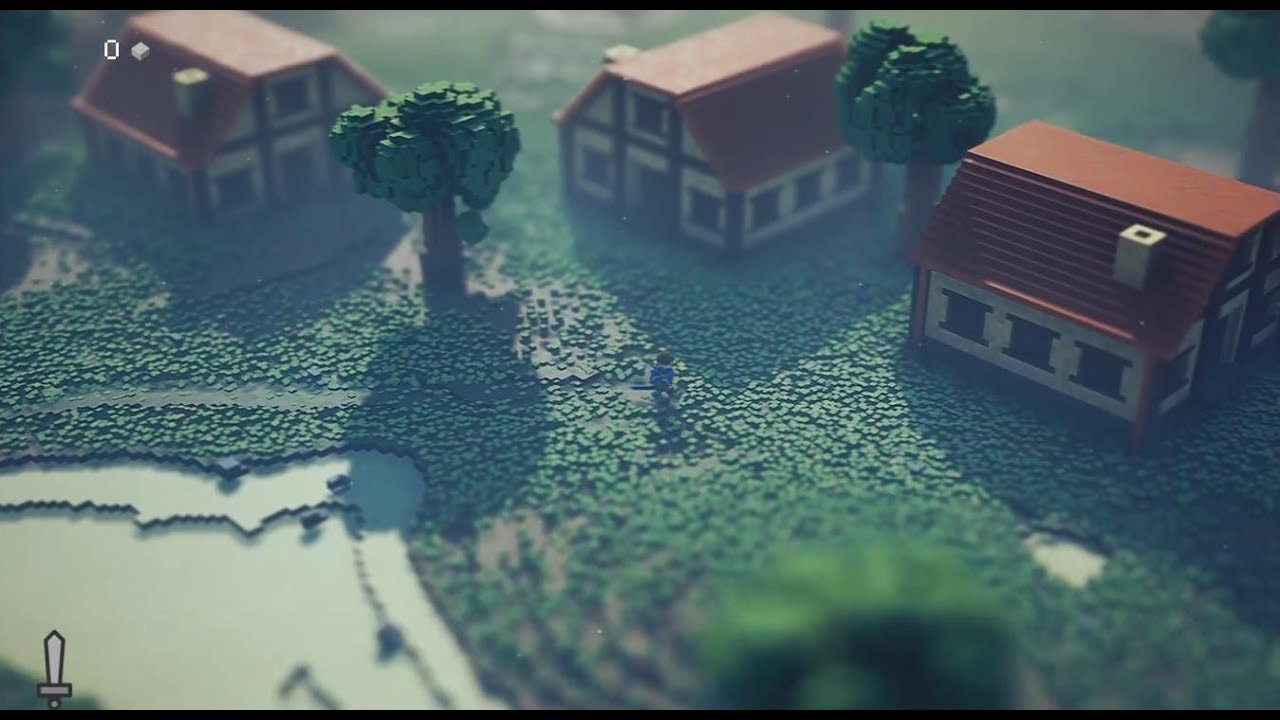
Using
- Voxel Plugin
- Modular RPG Heroes Polyart
- Retro 8 Bit Sounds
- Sound Phenomenon Fantasy Orchestra
- Magicavoxel
Can someone tell me how he did the camera? I‘m very new and would love to get some help from a pro.
rigid belfry
far camera with small fov? just my guess. blur vignette on the sides too
charred frigate
I mean the movement of the camera. How can I fix the z coordinate and change the camera distance from the third person preset.
rigid belfry
in the third person template, the camera is moved through blueprints. you could disable the LookUp InputAxis event, that way you cant rotate the camera up and down
you can set the camera distance in the properties and you can view it in the viewport. changing the spring arm(named camera boom) would be better rather than moving the camera
charred frigate
thank you very much
rigid belfry
charred frigate
thank you very much
btw that game looks very complex. dont get discouraged if you are not able to reproduce something similar
charred frigate
yeah you are right, but I just wanted to know how the camera works
rigid belfry
charred frigate
yeah you are right, but I just wanted to know how the camera works
if you are new to the engine, you could try this course https://learn.unrealengine.com/course/3750185?r=False&ts=637531216634733412 which is 100% free and aimed towards beginners
it starts with the basics but it ramps up very fast, so maybe some prior programming experience is recommended, but not needed
 mild pulsar
I've downloaded animation starter pack and moved things around. Now my material instance not working and showing error in red at the top left corner in the viewport:

I checked the original and all the properties are the same in details:

And there are no TextureSamles and MakeMaterialAttributes on the right
How do I fix the material instance?
rigid belfry
can you open the master material?
mild pulsar
What's the master material? How do I find out?
rigid belfry
its not about the properties, something in the actual material graph is missing. the function which calculates the mannequinn's shininess is missing an input
mild pulsar
And where's that function?
It doesn't tell me where the master material is or where that function is
rigid belfry
if you double click here, the material graph should open
 mild pulsar
Ok, I opened it but I can't find anything related to functions as in normal blueprints
I had to fix it, too. It couldn't find these assets in the blueprint:

Thanks I fixed it
Went through that blueprint graph and found that function
charred frigate
how can I create my own materials
rigid belfry
mild pulsar
Went through that blueprint graph and found that function
i am on 4.26 and to me, it seems like your body material has some extra stuff in it. are you using a different version or did you change something perhaps?
this is whats in mine
charred frigate
I don't really know where it tells me how I can create my own materials
rigid belfry
are you new to the engine?
charred frigate
I know the basics
rigid belfry
are you interested in programming?
charred frigate
kind of, but I know nothing about it and don't want to put the effort into it
thats why I chose unreal
because of the blueprints
rigid belfry
sorry if i sound blunt, but blueprint as a language is easy to pickup but hard to master. if you think that you can just "not put effort it" and obtain anything in return you're simply delusional
charred frigate
well, I just want to do it for fun and want to create a simple game
rigid belfry
just follow some tutorials and as you grasp more and more about the engine you'll be able to work on your own accord
learn.unrealengine.com puts everything in a concise manner and cuts it straight to the point, not like some yt videos.
they're also categorised and listed in order
you can search for any term that might interest you and find something
charred frigate
I just want to know how I can create own materials
if I type in own materials, there is only some irelevant stuff which I wasn't looking for
rigid belfry
if you type in "material" in the search box, there's quite literally 60(i counted them) different courses you could start
charred frigate
I ask again
rigid belfry
and its 2 am and nobodys replying
charred frigate
I wait
rigid belfry
you're gonna put "Unreal Slackers" on the credits when you finish your project?
charred frigate
yes
I know the basics, I just don't know how some little things work
I just want to create a game where you can run and shoot
rigid belfry
open up first person template, package it and call it aday
charred frigate
ok perfect, thank you
dim merlin
Hi, for any procedural levels, like Voxel or my custom runtime terrain, how would i spawn grass?
I think the ue landscape grass tool is way faster than using a HISMC or ISC right?
rigid belfry
maybe this? https://docs.unrealengine.com/en-US/BuildingWorlds/OpenWorldTools/ProceduralFoliage/QuickStart/index.html
How to set up and use the Procedural Foliage tool.
if you want to follow the quickstart, you dont need to download the open world demo collection(which is quite heavy). you can just use standard meshes
maybe give them a green material
charred frigate
can you please send me the libk of the tutorial which tells me how to create own materials
link
rigid belfry
yeah sure
charred frigate
thanks
rigid belfry

LetMeGoogleThat.com
For all those people that find it more convenient to bother you with their question than to google it for themselves.
charred frigate
bro, I thought you were a nice guy that helps other people
 nova lagoon
Does anyone know how to retarget multiple animations at once
I keep doing it individually
nvm found it
 gaunt abyss
charred frigate
bro, I thought you were a nice guy that helps other people
gaunt abyss
charred frigate
bro, I thought you were a nice guy that helps other people
No one here is going to make a game for you, you asked how to make a material and Righy pointed you to the learning materials which is the right thing to do
dim merlin
rigid belfry
maybe this? https://docs.unrealengine.com/en-US/BuildingWorlds/OpenWorldTools/Pr...
Would that be the same in performance as the grass tool?
charred frigate
I asked a question and just got no answer, I don't find any good tutorials and neither on the site he sent me, I just want a tutorial or link from the guys here and I just get told to google it. Isn't asking questions the whole point of this server?
mild pulsar
rigid belfry
i am on 4.26 and to me, it seems like your body material has some extra stuff in...
I only moved things around from folder to folder, then fixed up redirectors and then deleted the original animation starer pack folder.
I see you show a material /Engine/Transient.M_Male_Body but mine is from Animation Starter Pack which I downloaded from the marketplace and then included in the project. It's in /Game/AnimStarterPack/UE4_Mannequin/Materials/M_UE4Man_Body by default after you add it to project and called M_UE4Man_Body and not M_Male_Body.
gaunt abyss
Right click in the content browser and create material , if you tried to Google it would have been one of the first search results
mild pulsar
charred frigate
I asked a question and just got no answer, I don't find any good tutorials and n...

Learn C++ from scratch and make your first 4 video games in Ureal Engine. The online course is created in collaboration with Epic Games
This course has everything you need, including how to create your own materials.
charred frigate
gaunt abyss
Right click in the content browser and create material , if you tried to Google ...
thank you very much
mild pulsar
But yeah if you want to create material, you can do it like this:

kind of, but I know nothing about it and don't want to put the effort into it
thats why I chose unreal
because of the blueprints
Well, blueprints is just another language. I don't like, I'll take C++, C# and Java any day of the week instead of that launguage.
also @rigid belfry is that how blueprint files look in text?
I never opened them
fierce tulip
https://i.gyazo.com/513faa450074560519693c9bb507643e.png
mixed messages :p
@rigid belfry
 rigid belfry
mild pulsar
also <@!386223315146244097> is that how blueprint files look in text?
rigid belfry
mild pulsar
also <@!386223315146244097> is that how blueprint files look in text?
yep. you could even save your blueprints as txt files as a rudimental form of version control if you wanted to
plush yew
Where do I post a gig for freelancers?
plush yew
fierce tulip
shocking, i know
yes, I couldn't find it, there are soo many channels
lol
@fierce tulip but how do I post, there's @buoyant granite
what's the format?
fierce tulip
the pinned message tells you what to do :) (check: #instructions )
 royal eagle
Hi, I started to study the engine and immediately ran into such a headache. The application does not work in full screen mode.
Phone: samsung a40 19.5 / 9
Android: 11
Engine: 4.26.1
Orientation: Landscape
Kitkat + full screen: true
Maximum support aspect ratio: 2.4
Use current display region: true
Maintain Aspect Ratio: false
 slow musk
trying to package a VR game, after I get it packaged I load it on the quest and it takes forever to launch. Any idea why this is happening?
royal eagle
sory
plush yew
@fierce tulip so I don't post a gig, I just dm one of the freelancers on the channel right?
fierce tulip
oh for freelancers, then either contract jobs or permanent jobs depending on what you need
or unpaid if.,.. its unpaid
plush yew
also I'm not sure what channel I should use, I want someone to develop me an open world MOBILE game, the AI part, the Damage/Hit system, The database for Player stats, the Authentication, etc
fierce tulip
either find someone in #hire-a-freelancer or post it in #freelance-jobs probably. though what you need might need multiple people
plush yew
fierce tulip
either find someone in <#780560026220625950> or post it in <#780559987143213056>...
yes, I understand that it needs multiple ppl, but I was not sure how to find multiple ppl, thank you so much!
 willow star
 broken heath
The default , without/actors added
broken heath
The default , without/actors added
To my knowledge you gotta do it on a camera. If you want to default it, you probably have to save it as a setting
 fringe rivet
nendta
 light thunder
Is there a way to mimic the backend commands that trigger blueprint bookmarks to work? Obviously they are recording some x/y position or location in the blueprint when it is set, I was just wondering if there is a way to access it via a console command in the editor
plush yew
I upgraded to 4.26 recently and now I have an issue where actors I spawn via blueprint do not move using navigation mesh. ANyone else having this issue?
 solar mulch
 light wigeon
How can we make the multi user ?
light wigeon
How can we make the multi user ?
install the plugin then use hamachi and connect the multi user with your friend
light wigeon
😄
solar mulch
😄
 covert moss
Does anyone know if there is gonna be a sale on the ue4 marketplace soon?
fierce tulip
even if we knew, we are not allowed to mention it
 autumn grail
Is there an alternative to NVIDIA FLEX for UE4.26?
covert moss
fierce tulip
even if we knew, we are not allowed to mention it
haha alright thanks anyways! 🙂
 latent sonnet
Thanks for the help, @plush yew, but there are a few things I'm not understanding. For one, I don't know if I'm doing the change color to choose which level thing correctly. Secondly, am I supposed to cast to Game Instance in the StarBase? If so, what am I supposed to hook up object to? And lastly, I'm not really understanding "Level > Star # > IsTrue". I'm sorry for not understanding properly, but if you could explain this to me that would be great. Thanks.
plush yew
Omg, setting up player character animations itself are sooooooo inconvenient and confusing in UE. There is so much to keep track of right from anim bp and anim blendspace. Its sooo complicated. I think I will try UE after some years when I have understood game dev a bit better.
I heard that in Unity its a lot easier....
Doubt it's that much easier
Are you using blender? That causes a lot of problems with UE
 gaunt tide
Not for me 🙂
 steady vale
plush yew
I heard that in Unity its a lot easier....
steady vale
plush yew
I heard that in Unity its a lot easier....
hmm ngl
plush yew
plush yew
Doubt it's that much easier
I just downloaded some animations from maximo
gaunt tide
My friend has wayyy more issues going from Modo to Ue4 than I have Blender to Ue4
steady vale
i just switched from unity to unreal so ik
but ue provides everything out of the box
i mean graphics
which u really need to work hard on unity to acheive
plush yew
steady vale
i mean graphics
Apart from lighting in UE that makes all the difference, I think Unity can handle graphics pretty well
steady vale
but c# coding is as easy as blue prints and faster as well
plush yew
steady vale
which u really need to work hard on unity to acheive
Yea also this
steady vale
hmm
i am kinda good at unity so i thought it was a good time that i switched to ue4
doing good upto now
plush yew
But importing and exporting from DCC to UE4 is a pain in the ***
plush yew
steady vale
i am kinda good at unity so i thought it was a good time that i switched to ue4
I think I will learn Unity first and then come back to UE after some years
plush yew
Now I understand why people say "UE" is very overwhelming for beginners
plush yew
ooh
steady vale
plush yew
Now I understand why people say "UE" is very overwhelming for beginners
yeah xD
plush yew
but isnt brackeys outdated?
steady vale
plush yew
but isnt brackeys outdated?
nope. but the problem is, be left last year xD
steady vale
he got 400 good quality vids hope u learn a lot from him
plush yew
yea....
I couldnt find brackeys styled tutorial for UE tho
most of the tutorials are just "Do this and do that and this will happen"
light wigeon
Hi how can we use the multi user system
 worldly lynx
i am making a game, i have 3 levels. one is Main menu. that has a button that opens another level by name. After opening that level nav mesh stops working. i have force rebuild on start, i tryed deleting it and make a new nav mesh. If my character spawns in that world when the game starts. nav mesh works. if i open that level. or any level usig open level by name. bav mesh dosent work.
how can i fix it?
it randomly worked , sometimes it work and sometimes not working
why?
 warm hornet
Anyone know if there are plans for multi GPU raytracing in UE4-5?
 chilly geyser
Hey question for the pros: how do devs handle a 3rd person player character possessing a vehicle, and the character still be able to take damage and trigger AI when the vehicle is being possessed?
 spare kernel
don't possess the vehicle
instead pass control inputs to the vehicle but keep the player possessed
 timid spade
how do i manage multiple checkboxes in the event that i only want one or none to be checked at a time?
can i use an array for that?
or enum?
which would be better
 grim ore
use an array and a function that handles it. your array could have all of the "group" and you could just make sure the rest are unchecked when the one you want is checked
 surreal eagle
Why am I never satisfied with my work?
timid spade

im also trying to determine whether to draw a checkbox or not
based on what the weapon bp says
how do i not draw a checkbox from the specific index
idk what to put
doi remove from parent?
 vagrant hornet
plush yew
vagrant hornet
plush yew
i have a question. everytime i load up unreal engine, all of a sudden it crashes out of nowhere. how do i fix?
autumn grail
Help , Since i'm using a c++ class Custom GameInstance threaded with loading screen , My startup movies are cutted after 2 seconds and replaced with a black screen
after that when the movies are finished , i have to click to launch the game menu
 tawny meadow
just a question why are all the tutorials i find for unreal engine not using c++ but like visual code. are there any c++ fps shooter tutorials?
plush yew
can anyone say how to show the 4.26 water in viewport? mine only generates in simulate or play
 buoyant graniteBOT
:triangular_flag_on_post: Imperius88#2291 received strike 1. As a result, they were muted for 10 minutes.
plush yew
I've got an array where the order of the items matters. Is there a node or function that will let me add items to the end of the array or at certain values in the array? I can write my own but if it's already a feature I'd rather just use whats already there
spare kernel
Items always get added to the end of a Array
spare kernel
BP or C++?
plush yew
BP
spare kernel
urgh, not 100 percent sure in BP
plush yew
The current solution is just going to be copying the array, removing everything past where I need to add a new item, then adding the copy back to the original. Not too much of a headache but if there was a node that did this I just wanted to know. No problem thanks for the reply
spare kernel
i am 90 percent sure there is not
in C++ we have TQueue
but not available in BP
you could save a bit of time
create a temp array, add the new item, then use the append array node to append the old array
🤷
not optimal, but will work
plush yew
yeah that's the plan. Not too hard or expensive
Its a card game deck with a based number of 30 cards so nothing insane
spare kernel
i normally just iterate backwards
so the first index is the last
i always add to the end but treat the end like the start
plush yew
Thats a good option I'll keep it in mind thanks
 round quiver
when you click development editor and run it
it takes a while to launch
is there a way to make it faster?
I'm aware this is the best way to develop when modifying header files and constructors since hot reload doesnt play nice with those
I have an SSD and 12 thread CPU so I'm not sure what the issue would be
gaunt tide
For a 8km^2 map multiplayer wouldn’t have issues with being too far from the origin or replication would it? I know in the docs it says 8192x8192
chilly geyser
spare kernel
instead pass control inputs to the vehicle but keep the player possessed
So would I need to put all the "shared" player character controls in the controller and pass them to the character and vehicle bps?
 grim plover
is Live Link Face compatible with the iphone 8+?
plush yew
Another thing with arrays. I've got an array of actors, each actor is only in the array once. I know about the "contains" function will tell me if any given actor is a part of the actor array. Is there a way for me to get that actor's index in the array?
gaunt tide
grim plover
is Live Link Face compatible with the iphone 8+?
Yes, just make sure you have IOS 13.0+
plush yew
"find" got it
gaunt tide
grim plover
<@!241705563753283595> fr? thank you
http://www.cgchannel.com/2020/07/epic-games-releases-free-ios-app-live-link-face-for-ue4/ No problem!

Impressive free app streams facial animation from an iPhone to a 3D character in the game engine.
grim plover
it says it needs a truth depth camera- which isn't on the 8
gaunt tide
Yeah IPhone X+. Yeah I assumed maybe you had something later than an 8
 rotund elbow
when does the free for month update?
 vapid rover
Henlo there fellow lovers of the unreal engine. I have been informed that I need to get to know people and broaden my knowledge if I'm ever going to get out of the hole I'm in
 abstract scaffold
Question, I am working on a top-down shooter. However, I have my camera at 75 degrees instead of 90. That being said, my aiming is a bit off when i'm not shooting straight up and down. Anything to the right or left is slightly off from where my cursor is appearing. Is there some type of offset math I can do to combat the difference in appearance from the camera angle being 75deg instead of 90?
spare kernel
You shoot from the camera ?
Seems weird in a top down game
I assume you shoot to the cursor position and that is off right ?
abstract scaffold
no i dont shoot from the camera, but because the camera isn't pointing straight down, projectiles dont actually hit where the cursor position when i'm pointed left or right
for instance.. if my cursor was at red here, projectile is looking like this :
 spare kernel
Our camera is at about 75degrees and I can't remember if much was done for that @mossy nymph might be able to chime in
abstract scaffold
if I change to 90 its perfect every time
its more of a perception issue
the projectiles going to where it's supposed to
spare kernel
I think we may have done some adjustments in the weapon
 mossy nymph
i have 200 lines of c++ handling that
abstract scaffold
yikes lol. Was hoping it was an easier solution than that
mossy nymph
maybe
we don't have a flat surface for a game area
which makes the problem oh so much more interesting
abstract scaffold
yeah I could see that. Mine are almost all flat
spare kernel
Elevation is tricky also
mossy nymph
basically
we arbitrarily decided that Spine03 on our skeleton is the weapon height (for most weapons)
so i grab the position, direction from projecting mouse to world
and i intersect line that point + direction create
abstract scaffold
ah that would make sense. projecting mouse to world is from the camera right?
mossy nymph
with a plane going through my Spine03
that has UpVector for a normal
(simplified version for flat surface)
mossy nymph
and i shoot at the intersection
even if its not a flat world, you always have to shoot at a point on that line
or it will never feel right
rotund elbow
whens the free for the month update?
mossy nymph
tuesday
autumn grail
How to include String tables in a packaged build?
round quiver
UE_LOG(LogTemp, Warning, TEXT("We found an interactable."));
autumn grail
I have added an entry to scan in the asset manager
round quiver
How do I include a line to include the current game time in this warning
GetWorld()->GetTimeSeconds(); I assume, but I'm not sure of how to integrate it into the string
autumn grail
 autumn grail
Found
 strong sentinel
Hey guys, would you recommend udemy courses for learning Blueprint?
strong sentinel
UE
strong sentinel
round quiver
where are you coming from <@!255428965806768129>
been trying to find a way to learn how to use BP etc but by just looking at tutorials, its not really helping me create my own mechanics for example.. seen a video from some1 on YT who said he had a udemy class and it helped him (no, not self advertisement from that guy)
round quiver
Unreal has a really strange way of doing things
it provides the engine itself
but it also provides a big convenient library on top of that (which is all the actor, pawn, etc. stuff)
you're gonna want to follow some youtube tutorials probably
and find out how people do things in unreal
if you have a feature you want to implement, just google it and you should find something
 calm pollen
hey is there a way to get the user's irl time to display certain texts? Example: Display "Good Morning" in the morning and "Good Night" in the night time?
 proper mauve
spare kernel
<@!379923109454675968> <#479798887247511570> please.
proper mauve
spare kernel
<@!379923109454675968> <#479798887247511570> please.
Oh yeah no trouble sorry!
I wasn't sure where the best place was haha
calm pollen
got it, thanks so much! 🙂
 marble pasture
How do I try and landscape on unreal? I wish to create some river banks, a flowing river, and a bit of elevation raises throughout a level that I have created.
plush yew
I have a question. So, I downloaded asset from marketplace. Then I cancelled the download but I notice my ssd (local file) space is decreased, even if i cancelled the download. Can you help me looking for the asset location? Many says its on unreal engine directory file, but i install unreal engine on my hard drive (second storage), not on my ssd. *excuse my english
spare kernel
Inside your launcher, in options, there will be a Vault Cacvhe

this will show you the location where the cache is
plush yew
thanks!
round quiver

I'm trying to use some delegates, but it doesn't like how I did them
can anyone help out?
 weary basalt
Ignore the Error Tab, ignore squiggles. Compile your code, use the Output Tab to identify syntax errors if your code fails to compile.
Intellisense creates alot of false positives with the UE Codebase.
round quiver
it doesnt compile @weary basalt
I get an exited with error code 6
I'm following a course
I downloaded the finished course project
checked my code
it is exact down to the line
weary basalt
You most likely need to #include ASurvivalCharacter or Forward Declare it.
Also it helps to post the actual error when asking for help.
round quiver
Severity Code Description Project File Line Suppression State Error MSB3073 The command "D:\UE_4.26\Engine\Build\BatchFiles\Build.bat SurvivalGameEditor Win64 Development -Project="D:\Downloads\TUSC\Starter Project (Download this first)\Starter Project\SurvivalGame\SurvivalGame.uproject" -WaitMutex -FromMsBuild" exited with code 6. SurvivalGame C:\Program Files (x86)\Microsoft Visual Studio\2019\Community\MSBuild\Microsoft\VC\v160\Microsoft.MakeFile.Targets 45
my bad
here it is
I'll try the include
weary basalt
That is not the error, thats just telling you there is an error.
The actual error will be further above that line in the Output Tab.
round quiver
I can't even open the project @weary basalt
it wants me to rebuild it but the rebuild fails
weary basalt
I said that isnt the Error, the actual error will be further above in the log....
round quiver
1>Building 7 actions with 12 processes...
1>  [1/7] SurvivalCharacter.cpp
1>D:\Downloads\TUSC\Starter Project (Download this first)\Starter Project\SurvivalGame\Source\SurvivalGame\Player\SurvivalCharacter.cpp(215): error C2660: 'ASurvivalCharacter::EndInteract': function does not take 1 arguments
1>  D:\Downloads\TUSC\Starter Project (Download this first)\Starter Project\SurvivalGame\Source\SurvivalGame\Player\SurvivalCharacter.cpp(202): note: see declaration of 'ASurvivalCharacter::EndInteract'
1>D:\Downloads\TUSC\Starter Project (Download this first)\Starter Project\SurvivalGame\Source\SurvivalGame\Player\SurvivalCharacter.cpp(245): error C2660: 'ASurvivalCharacter::Interact': function does not take 1 arguments
1>  D:\Downloads\TUSC\Starter Project (Download this first)\Starter Project\SurvivalGame\Source\SurvivalGame\Player\SurvivalCharacter.cpp(239): note: see declaration of 'ASurvivalCharacter::Interact'
1>  [2/7] SurvivalCharacter.gen.cpp
1>  [3/7] InteractionComponent.gen.cpp
1>  [4/7] InteractionComponent.cpp
1>D:\Downloads\TUSC\Starter Project (Download this first)\Starter Project\SurvivalGame\Source\SurvivalGame\Components\InteractionComponent.cpp(38): warning C4996: 'AActor::GetComponentsByClass': Use one of the GetComponents implementations as appropriate Please update your code to the new API before upgrading to the next release, otherwise your project will no longer compile.
1>C:\Program Files (x86)\Microsoft Visual Studio\2019\Community\MSBuild\Microsoft\VC\v160\Microsoft.MakeFile.Targets(45,5): error MSB3073: The command "D:\UE_4.26\Engine\Build\BatchFiles\Build.bat SurvivalGameEditor Win64 Development -Project="D:\Downloads\TUSC\Starter Project (Download this first)\Starter Project\SurvivalGame\SurvivalGame.uproject" -WaitMutex -FromMsBuild" exited with code 6.
1>Done building project "SurvivalGame.vcxproj" -- FAILED.
========== Build: 0 succeeded, 1 failed, 0 up-to-date, 0 skipped ==========```here's my output from vs, sorry if I'm doing this wrong
weary basalt
1>D:\Downloads\TUSC\Starter Project (Download this first)\Starter Project\SurvivalGame\Source\SurvivalGame\Player\SurvivalCharacter.cpp(215): error C2660: 'ASurvivalCharacter::EndInteract': function does not take 1 arguments
Start at the top
This is the first error
Fix that, compile again and then continue to fix errors until it compiles.
Always start at the top.
round quiver
ok, thank you
it's just really strange because in the video, his code compiles perfectly
even with the same calls
weary basalt
You maybe on a different version which has code differences
round quiver
yeah I am
weary basalt
For which you need to update them
round quiver
the videos are 4 years old
gaunt abyss
depends how old the video is, there were a lot of API changes in the last 4 years
When you are working from a tutorial try not to just copy and paste the code, while you are typing it try and understand what the code actually does, this way you will avoid errors like this one
When you start typing out the function your IDE (Rider, VS) will show you the parameters the function takes
round quiver
thank you guys so much, turns out im an idiot and missed adding a parameter to the function@gaunt abyss @weary basalt
 obsidian lily
hey with the new Cesium announcement, I have never been able to figure out how much the tech is useful for a custom planet, like suppose I wanted to use it for a sci-fi game with a realistic planet with my own GIS data? It’s unclear to me whether Cesium is strongly tied to earth data or whether it’s just the primary use case so they don’t talk about anything else?
fierce tulip
in theory it should work with non-earth data, in practice... nooooooooooo clue.
 frank oar
Hey all,
I am trying to make it sou a sound plays when an object is being moved, but stops when the object stops...
the sound does not stop, any idea why ?

 dusky inlet
You spawn a sound every frame while moving
And you overwrite your pointer everytime so you only keep access to 1 sound out of many
So when you stop moving it could only stop 1 sound
frank oar
@dusky inlet any suggestions ? I have been trying for the past couple of days, I thought it would be simple XD
dusky inlet
For a simple fix add a do once before the spawn of the sound
And reset the do once when you have stopped moving
frank oar
 dusky inlet
Yeah something like that
You can also set breakpoints to see if something's being executed at all
Just hit f9 after selecting a node
frank oar
That works really well, except I have this seemingly infinite error message

 tough stream
frank oar
That works really well, except I have this seemingly infinite error message
tough stream
frank oar
That works really well, except I have this seemingly infinite error message
just do an is valid check before u stop the sound that should fix it
frank oar
@tough stream Between the compare node and the stop node right ? tyvm for the advise
tough stream
yeah, check if the sound is valid
rigid belfry
your logic is flawed
frank oar
It seems to work quite well, sound starts and stops as expected
 rigid belfry
your moveable actor should have a SoundToPlayRef in it.
when moving, you play it, when not, you call stop
why are you spawning sound?
rigid belfry
are you doing this inside the player character?
frank oar
inside the actor (actor with a static mesh component which is set to simulate physics)
rigid belfry
i dont know what you're aiming for, but if you were to use interfaces it would def improve your code flow
you call a WasUsed function, on target pawn you play animations, make change visuals, play a cinematic
on target MoveableActor you do what you need to do
frank oar
All I want is for the actor to make a sound when it is moved (will be a dragging sound)
rigid belfry
if the scope of your project is small, the tick on the actor is fine
your Actor has a Sound reference. on tick, checks if hes being moved. if yes, play sound reference. if not. stop sound
frank oar
Will I have issues when I have several objects like this in a scene ?
rigid belfry
no, because each actor will have its reference
you should consider if having several actors running on tick is going to give you issues thought
frank oar
I am trying to make a puzzle room which has a tini person in it moving around objects to solve puzzles and platfmorm etc..
rigid belfry
consider this. what makes more sense to you? spawn an actor every frame when moving, or already knowing what actor to spawn, and waiting to play it?
dusky inlet
He isn't spawning it every frame anymore though
frank oar
@rigid belfry In the time I have been using UE4 I have been told to use tick as sparingly as possible.
But I do not know how I should do this otherwise, because I can not seem to find informations online
dusky inlet
You can't go around some kind of tick
But you can abstract levels of tick so it doesn't appear as bad anymore
Helps with reusability
frank oar
do you mean adjust the tick rate @dusky inlet ? thanks for the knowledge!
dusky inlet
That could help in case of performance issues but no, what I meant is, the nature of your task involves checking things frequently
rigid belfry
i mean, sometimes you need to use Tick, right? otherwise it wouldn't exist
you're not doing anything heavy on it either
dusky inlet
Regardless of whether you put in an event "on move started" and "on move stopped", and you attach your sound logic there, you still need to check for the event conditions every frame
The movement component itself has to update every frame
Just the nature of it
frank oar
ok cool, seems like in this use case it will be ok then
dusky inlet
If there is no level of predictability there is no way to calculate it properly
rigid belfry
i'll give you an example. i have a multiplayer project and there are some interactables in my level, which use tick to run logic
dusky inlet
Yup. I would go the event approach so it becomes tidier and you can attach more logic to "on move start\end" but that's about it
rigid belfry
instead of having them on tick, you use a timer that runs each 0.01/0.001 seconds, and only activate the timer if the player is X amount close to the object
so its already much more performant that just having a tick run for no reason
dusky inlet
Yeah culling works
Depends on what amount of functionality you are willing to sacrifice
rigid belfry
if i have a camera that follows the player, the camera does not need to track anything if the closest player is 2000 units away
frank oar
Thank you @dusky inlet and @rigid belfry lots of really great solutions to my problem
@dusky inlet on move start would be a custom event right ?
rigid belfry
you dont need custom events since you still have to run tick
 frank haven
Hey guys, sorry if a silly question but I'm trying to add some materials to geometry, but they look like they have white paint splattered everywhere, do you guys know what may be causing this?
 rigid belfry
the do once fixes your problem, but to not have the problem you dont spawn at all, and use a variable instead
rigid belfry
frank haven
Hey guys, sorry if a silly question but I'm trying to add some materials to geom...
maybe UVs? i dont know much about materials #graphics
frank haven
I'll try graphics, thanks~
 vivid stratus
Is there a Quixel discord? 
plush yew
Hey guys, do you know what might be happening here ?https://imgur.com/a/sK62bxU
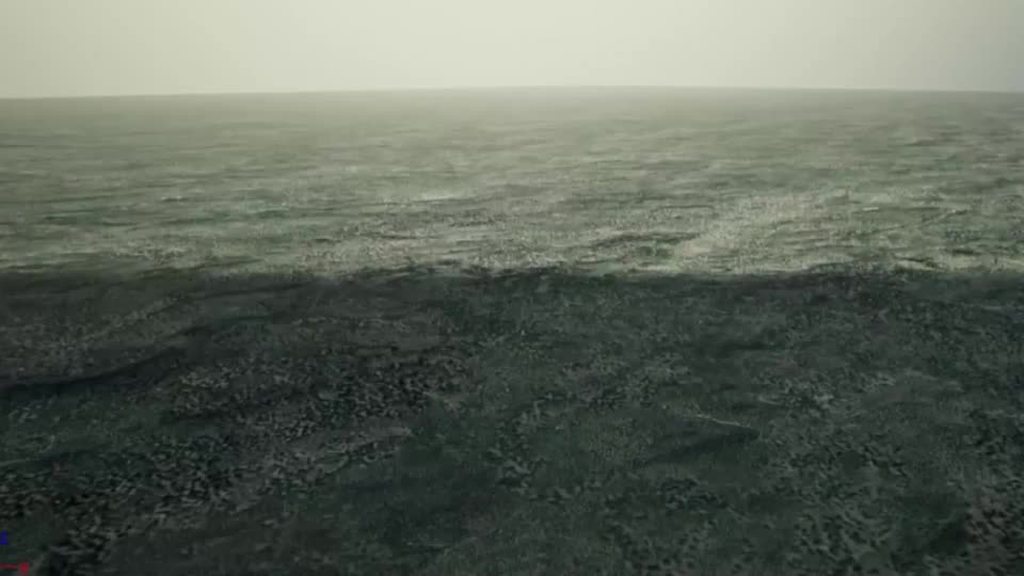
What is this shadow following me ? Have a tweaked a setting I shouldn't have perhaps ? I can't remember
 drowsy snow
plush yew
What is this shadow following me ? Have a tweaked a setting I shouldn't have per...
drowsy snow
plush yew
What is this shadow following me ? Have a tweaked a setting I shouldn't have per...
Are you in UE4.26?
plush yew
yes 4.26.1
fierce tulip
could also be the camera actor itself hehe
dusky inlet
frank oar
<@!188279818842800129> on move start would be a custom event right ?
I'd make it an event dispatcher.
You run the logic to determine if you just started/stopped moving on tick and then call those 2 event dispatchers
I'm surprised the character movement comp doesn't have these events built in
or does it?
plush yew
I don't have anytning in my scene except fog and light
and the lanscape
I found that if I set the cascade Num Dynamic Shadow Cascades from 3 to 0 it disappears
but it shouldn't be at 0, no ?
is there another way
 lucid plover
Question: Where and what is a good way to start in UE4 for materials? I'm a complete noob 🙂
 marsh cove
try and go find some basic materials tutorials
Can someone please help me I can't convert a thin line texture to a sprite and whenever I do, there is just nothing in the sprite
 dim saddle
Question: If im gona make a game which is just like a maze or a small adventure should i download UE with starter content, templates and feature packs, engine source and editor symbols for debuging?
 magic lantern
I created a spline in actor blueprint and I got the refarence of actor in character blueprint as a object type varible. But I have a problem. When I add 2x spline to
viewport then the character perceive onky one of the splines. Can some one help me with take refarence of splines in viewport.(I learned with this video:https://youtu.be/VJiTHlypTZQ)
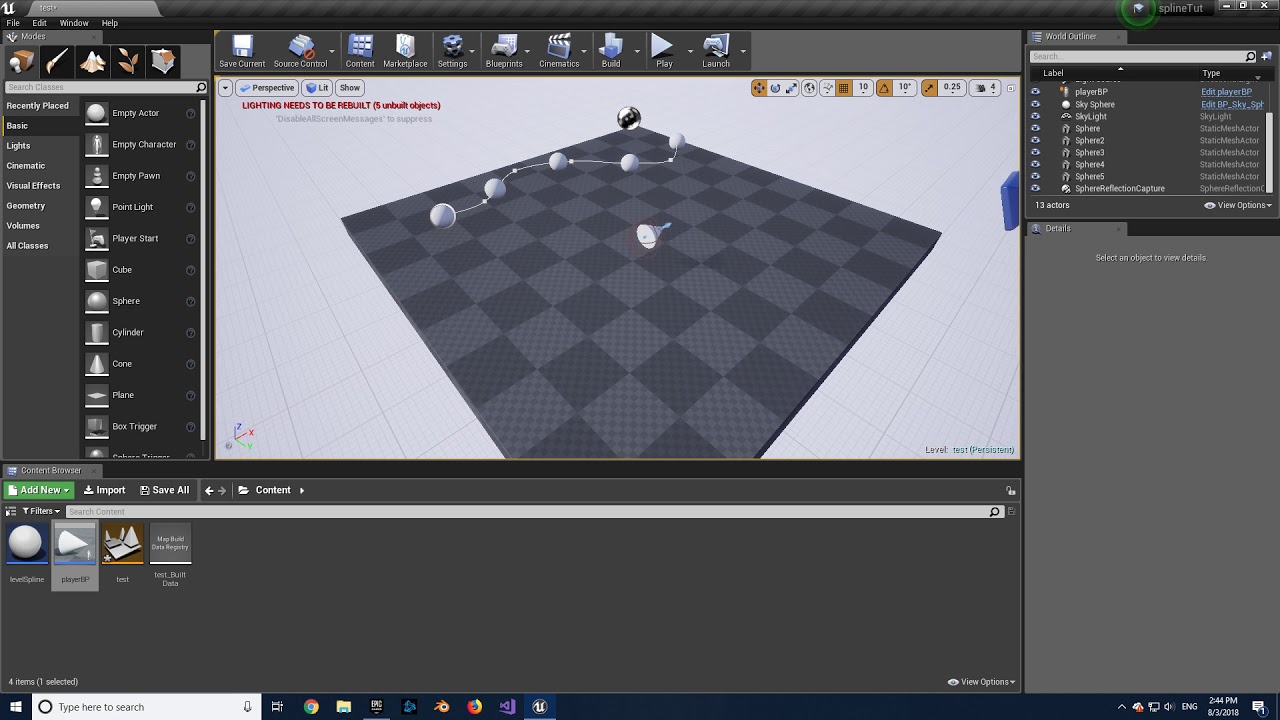
Hey there! This video will demonstrate how a character can be made to move along a spline in the level using blueprints.
You can find the character setup here:
https://youtu.be/OM0uKDyiKBI
light thunder
magic lantern
I created a spline in actor blueprint and I got the refarence of actor in charac...
did you check the world outliner in the editor for the spline actors? is there two of them?
 deft raven


i imported a scene from unity, if i look some assets from "editor view" they are textureless and some have different shapes
but when i go game view, or play the game, they look fine, anyone know what cause this "bug"?
fierce tulip
looks like the collision
 thick nebula
Windows Restarted in the middle of my session and crashed my Visual Studio with the Unreal Engine Launched from it. When i try to relaunch Unreal Engine though visual studio, it just shows me debug error output from CMake, and I can not see the UE4 project file to run an instance from. Any ideas?
ughhhhh all i am seeing is that this problem happens when there is an issue with Windows Updating... can anyone verify that the newest windows update breaks the recent release of 4.26.1 on github
In case anyone has the issue i just had: Make sure you complete windows update. There was a .NET update that didn't complete and it seemed to cause the issue.
 tawny nacelle
Stuck .. lost transform after hitting enable root motion .. any help
deft raven
Any rumors about unreal engine 5 release date?
fierce tulip
nope
 radiant sleet
Im curious for ue5
are they gonna keep most of the same framework they did in ue4
like stuff liek player controllers gamestate etc
fierce tulip
consider it about 4-5 versions of upgrades in one go, and then some
radiant sleet
Maybe a dumb question
fierce tulip
and from what i heard, for almost everyone moving from 4.27 to 5.0 should be smooth
 runic iron
I think it'll be a glorified big update, the UE4->UE5 is probably just a marketing move to take advantage of the next gen hype
radiant sleet
The biggest difference will be no building light or whatever?
fierce tulip
its mainly because they replaced the rendering and lighting system that they felt renaming it to 5
radiant sleet
That makes sense
radiant sleet
Unreal is so exciting cause it always feels like its on the frontier
runic iron
Indeed, I only checked the new geometry improvements, wasn't aware of the lighting stuff, that's neat 🙂
rigid belfry
is it possible to select a static mesh on the level, right click on it and turn that mesh into an actor?
dim merlin
Hey, so anyone knows if the landscape grass map is more performant than using HISCM for grass ?
grim ore
@rigid belfry A static mesh in the level is already an actor
rigid belfry
can you merge mutliple skeletal meshes into one?
or create a skeletal mesh from an already imported mesh?
plush yew
Is there a tool that lets me visualise triangle density on screen? To easily diagnose which meshes I need to LOD
I know there is stat.rhi but that doesn't really help me locate the problem
 fallen goblet
Hey, can someone help me with this? Is there any way to open Meta Human with dx11?
 grim ore
edit the config file to default it to 11 and hope it works
MetaHumans\Config\DefaultEngine.ini , find the "DefaultGraphicsRHI=DefaultGraphicsRHI_DX12" line and delete it
and it looks like it works, I just tested it
 fallen goblet
Thanks @grim ore , It's working now
grim ore
Maybe the forums, maybe general chat around a genre you like, #volunteer-projects is a channel here where people are looking for people
exotic thicket
MetaHumans doesn't work with dx11? 🤔 I hope it only applies to the editor tooling for it...
grim ore
it does work for dx11
the default project just defaults to dx12 due to RT would be my guess
exotic thicket
That'd make sense I guess
 cedar wave
Doing another bump on this as I still haven't been able to figure out why the raycast stuff is behaving this way
grim ore
@ebon linden I did a random project that does something similar here https://youtu.be/GQP8wv8m4Kc?t=727 , but look for dynamic healthbar might help. I basically just used a separate progress bar to represent the "temporary missing amount" then did whatever after whatever time
plush yew
shameless self promotion
 fossil arrow
Hey there... I'm new here and new to the dev world and I'm just starting out with UE4 and I have a few questions. My main one being... for the game I'm designing the camera angle is a big function that I'm trying to figure out... I want to make it so that I still move around with WASD with a 3rd person, Diablo style camera angle. If anyone here ever played the old NCSoft game Dungeon Runners that's where my inspiration is stemming from with the way I want the camera to function. If anyone has tutorial videos they can link me or has time to show me, I would greatly appreciate it! I've been on youtube and google trying to figure it out but I'm not quite finding what I want to do/how to do it.
 ebon garnet
good day guys, im trying to figure out how to add dirt to a object and manipulate it with a variable, can you point me in a direction?
grim ore
@fossil arrow have you looked at the third person template? You could pull the camera out to the angle you want it and and disable the camera controls so its locked into that position
fossil arrow
@grim ore yeah I've been in the 3rd person template and the problems I'm running into that I can't seem to find, are how to make it so my mouse cursor doesn't get locked to the character, so basically while I'm in-game I want to be able to move around and still have my cursor free to interact with objects/target enemies etc. And be able to scroll in/out and only move the camera horizontally, just not vertically.
grim ore
yep out of the box you wont be able to do that, have to code it in. The mouse cursor by default is set to hide, so you would set it to show if you want it to be visible.
scrolling in and out, I assume towards and away from the character, would be adding code so the mouse wheel moves the length of the spring arm between the camera and the character
fossil arrow
ahh i see... sounds like a lot more learning and googling because i have no idea how to code yet... 😅
 plush yew
Does anyone have a defined learning plan for unreal engine ?
Something like, "week 1: this, week 2: that..."
fierce tulip
iunno, we have some getting started stuff in the pinned messages in this channel though
plush yew
Alright thanks a lot I’ll check that out
I’m a student going through Unreal soon, so I wanted to master it before
However the learning curve seems pretty steep
fierce tulip
as someone who has been around since unreal engine 1, dont expect to master it. I havent.
just have fun playing around with it
fierce tulip
all the time, but that is normal in this industry.
you cant expect anybody to know everything about the engine, besides a few wonderkids
plush yew
Oh I see. I think I’ve got it wrong. I was aiming at trying to know a lot of stuff by heart...
grim ore
you can, no one said you couldn't
fierce tulip
and you will, but you'll still look things up hehe
i actually think that the more you know, the more you'll be looking things up
plush yew
Thing is I’m pretty lost in front of the engine. There’s so much stuff to learn... I don’t know where to start. Programming, animations, materials, UI... that’s why I wanted a learning plan, to know what subject should take more time than the other
plush yew
fierce tulip
i actually think that the more you know, the more you'll be looking things up
Can’t wait to reach that point !
fierce tulip
go over the getting started stuff, and see what you like most
me and matthew basically going https://i.gifer.com/8LTu.gif
 plush yew
I’m into programming, but I feel like I need to know animations, UI, materials and all of that to be able to make even the simplest game. Maybe I’m wrong, but I thought about it that way
Ahahah
plush yew
Gameplay programming mainly
grim ore
ok but what for? are you trying to make a game, make games for someone else, just randomly do random stuff?
plush yew
I’m pursuing a CS degree, and I’d really like to be able to work in the videogame industry one day. My end goal would be to work with a team/studio on the programming side
grim ore
welp there ya go. so learning animation, materials, ui would help but its not directly related to what you want so those can go into the future me pile to learn
if you enjoy programming learn the programming part of the engine with some goal
and you cant learn the programming part of the engine until you learn how the engine works, so like suggested go with the getting started stuff first
Epic has a learn site and docs to get started with that, live training as well then there is just playing with stuff with a random goal. since its programming, learn to make stuff to stuff as the goal
then break it down into making a game or a small project that does something and then figure out what you need to go from there
plush yew
Should I try working on simple prototypes/gameplay mechanics ? Or should I make small games on my own ?
grim ore
both
plush yew
Thanks a lot for your advices, really
grim ore
mechanics and prototypes are part of a game generally
plush yew
I’ve already made a simple game, and prototypes, but I’m lost in the « what next » part
grim ore
game doesnt even need to be a full game, make a vertical slice of something you like using a mechanic you like
yep the what next is basically what to you want to learn/do next
like with maths its a linear progression to a point then it branches off to the other higher level ones, same with pretty much everything at a point
plush yew
Thing is I don’t know how to organize myself. I’ve been used to being told what to do (for school projects, school learning paths...) and learning such a big thing on my own is kind of hard for me
Oh i see
grim ore
dont learn a big thing
a big thing is just a million small things
learn all the small things
plush yew
Mhm, yeah, I think I’ve got a wrong point of view
grim ore
you dont make your final application when programming, you make each function that combines into the end result
plush yew
That’s true...
 frail coral
i accidentally tuned this mod and cant do anything
 grim ore
same thing. say you were making a simple calculator app. You would need to define the UI, you would need to define the functions for each maths on it (+ / * - etc..) you would need to define what each button does if its a numeral. then you would make different functions to handle different use cases
@frail coral restart the editor, reset the layout under window or drag another window around and put it back. The UI thinks you are moving a window, its a bug
plush yew
grim ore
same thing. say you were making a simple calculator app. You would need to def...
Correct
frail coral
close and reopen project? @grim ore
grim ore
yep close and open it back up
plush yew
I should proceed step by step, but I don’t know what the next step is. I don’t know if I’m clear in my explanations, but I’m at a difficult point in my learning journey
frail coral
thanks man
grim ore
what was the last step you did then
plush yew
I’m afraid I’m losing motivation being such in a critical point, but I’m at the same time I really want to be able to use the engine correctly in a creative way
But at the same time*
I made a simple prototype game, but got confused when I need some materials to make it look cool. So I wanted to learn materials, but lost motivation as I thought I was losing time on improving my programming skills. It’s all things like that that loses me
grim ore
was the goal to make a good looking finished prototype or just to make one?
plush yew
I should improve my animations skills (blend space and animations bp) as well, etc etc
Make one that is showable on a portfolio without like a garbage project
grim ore
theres tons of free resources to just make stuff look better if you were working on programming and gameplay, dont focus on those
grim ore
if you are making art, then yes your portfolio needs to showcase the art. if you are showing a random trash generation algorithm then it doesnt need to look like gears of war
how many of those are using higher end art and how many are using the built in resources and just showcasing the actual tech
grim ore
if you really want to be a generalist, knowing a bit of everything, then that is fine just know it is a ton of work and pick one part to learn the basics then move on and know when enough is enough
there is nothing wrong with being a generalist, you just have to understand you are not going to be doing portfolio art pieces
but you can certainly make a world aligned rock texture that is used in a basic landscape, just not one that has 5 layered blends with feathered edges between a rock and the dirt.
plush yew
Thing is Im hesitating. My professional project is to work on the programming side of a team/studio. But on the other hand, I want to be able
To make a polished little game on my own
But at the same time, I’m affraid I’ll lose time to work on my programming skills
grim ore
heh.. time
in theory you have TOOOOOOOOOOOOOOONS of time
and if its that much of a worry just set a time limit
take 2 days to learn materials, take 2 days to learn the UI system, take 2 days to learn animation, etc.
either set a goal in those 2 days or just learn from the ground up and stop when time is up
then go back to the normal stuff
set a goal, do the goal, set a goal, do a goal. repeat
but if you are that worried about it, then dont do it. focus just on programming
plush yew
Oh man that’s where I struggle. I don’t know how to organize myself, nor set goals etc. lol... and I know that I need to work on that for the future
grim ore
Take the action RPG example game, tear it apart until you understand how it works then remake it from scratch using the free infinity blade assets.
grim ore
look at a game you like, recreate one piece of it like a mechanic or visual effect.
etc..
your game is your goal, if you are making a game or learning is your goal, if you want to learn.
as you do more stuff your goal setting ability should start becoming better. its hard to set a goal if you dont know anything about it
which is why whenever I do stuff, even if it have done it before, I do it from scratch to learn the muscle memory. Personally its how I learn.
plush yew
I think I should follow your advice.
I should take 2 days to learn the general aspects of game development:
Materials, UI, Animations, AI...
Then focus on my programming. And I’ll be able to understand everything better, and recreate simple stuff... what do you think ?
grim ore
sounds good. almost all of that is in the online learning system from epic, even just the intro or first hours to get you an idea then you can learn more about a subject if you need/want
at the worst you spend a few days/weeks touching everything to get a feel and you have some basic ideas of what you can/cant do
its a known issue that "learning paths" are something people want, especially structured learners, it's just difficult at a point as everyone is different even when trying to get to the same goal.
plush yew
I want to take the optimal path so much that I don’t dare jumping into it. Is it fear of losing time? Fear of the unknown? I don’t know, but with what you told me I really got to jump in
plush yew
grim ore
its a known issue that "learning paths" are something people want, especially st...
Indeed... I’m really a structured learner. Like : "from that day to the other, learn that. Week 2, start learning that." Etc
grim ore
you will take time, but dont treat it as a loss if you can learn something
I mean I guess if you are expecting that if you take X time you get X result and any deviation from the X will make X result take longer or not happen sure.
plush yew
Yeah my way of thinking is something I should work on. I’d tend to see that "loss" of time as really negative towards my end goal. But I have to rethink it as positive
grim ore
but... I dunno if anyone can plan anything out like that in terms of time
maybe just think of that time spent as just a smaller percent to your goal than if you were on the direct path
plush yew
So, do you think downloading someone else’s project and going through the code trying to figure how things work is a good way of learning ?
grim ore
and dont worry if the end goal take a bit longer
plush yew
grim ore
maybe just think of that time spent as just a smaller percent to your goal than ...
For sure. I really need to put that in my brain.
grim ore
I personally tear apart content to learn yep but I also can't do that until I know what I am looking at
plush yew
I can’t describe how much you’re helping me here. Really
grim ore
like when I first started the content examples map was great but I was soooooooooo lost. It was full of neato stuff but how the hell it worked just made me confused.
then I took the time to learn the basics of the engine and systems, focused on what I wanted to learn, then went back and used those examples as "how to do something"
plush yew
Ahaa I see...
Thank you very very much. You’re helping me change my mind in the right way
abstract scaffold
Question... im doing a knockback around a character. I'm currently doing a sphere trace and adding impulse to overlapping characters. My question is.. is there a way to do the same thing but with better control.. i'm looking for a lower speed over a longer distance. currently the impulse is practically a teleport it's so fast. I've lowered variable i'm multiplying against the vector, but that decreased the range that the character is knocked back. HALP lol
grim ore
not trying to change it, just show there are tons of options and not to worry about it being wrong 🙂
 tranquil roost
Good tips here, @grim ore! I like the idea of segmenting topics into days. I've been doing 3D for 10 years, and I know I can become friends with Blueprints and UE in general, but I'm still at the "how do I" and "What is the general idea behind" everything I try and accomplish. Do you know if there are people on here who would accept a few hours for mentoring and crossing questions off a list, for a bit of compensation?
Perhaps I could post it in the contract-jobs channel
plush yew
tranquil roost
Perhaps I could post it in the contract-jobs channel
Good idea ! Maybe someone could be interested in giving lessons for an hourly rate
grim ore
I think I have seen some people in the community doing tutoring yep
radiant sleet
Whats the function for making an actor rotate to point at a position
or other actor
grim ore
Find Look at Rotation
grim ore
I've just dont it over and over lol
radiant sleet
whats the function for rotating an actor again?
tranquil roost
Well, I think I speak for all the newbs when I say, it's pretty amazing to have this really specific problem and pop over to this discord, the forum or reddt, and there's a Mathew tossing the answer over, and we can keep going 🙂
grim ore
actor would be Set Actor Rotation
plush yew
SetWorldRotation
radiant sleet
Yes thank you
grim ore
but dont do that to a character lol
radiant sleet
I do apreciate it a lot
plush yew
@grim ore how many years of practice do you have on Unreal Engine, just to know ?
radiant sleet
whts the difference between set actor location vs set world rotation?
id use first
but is world rotation like relative location to itself?
Or how does that work
grim ore
@plush yew since Unreal 1
grim ore
@radiant sleet world is on a component, actor is the root component basically
both are world relative
same thing basically just differing targets
radiant sleet
so basically if I want to change the rotation full actor I use actor rotation but if I want to change only one component I use world rotation
?
Scince unreal 1 dang
grim ore
I honestly dont remember when it came out, I just know it was an awesome game and UE1 let us actually code our own levels in a GUI rather than the evil editors we used to use for Doom lol
radiant sleet
how old are you out of curiosity?
grim ore
@radiant sleet basically yes, you could use world rotation on the root component as well if you wanted
44 this year i think? I lose track of time
radiant sleet
Dang ngl you do not sound that old in your tutorials
I thought you were something like 22-25 when I heard your tutorials
plush yew
grim ore
44 this year i think? I lose track of time
Still young !
grim ore
yep I also apparently sound like a women on a phone so no offense taken lol
plush yew
Ahah
How difficult is it to go from Blueprints to C++ / using both ?
Even though I know C++, I’m still at that point where I only use blueprints to get used to the API. But I’ll have to make the jump one day
radiant sleet
44 years young exactly lmfao
grim ore
you dont have to make the jump, and its not hard. starting with BP is smart. Every BP node is just C++ on the backend
 violet goblet
hi unreal slackers 🙂
can i ask a question regarding unreal + displacement maps?
since there seems not to be a "help" section?
grim ore
so learning how the engine works using BP then migrating over to C++ if needed is a good way to do it as you can almost 1:1 the code as a learning experience
@violet goblet you would pick the appropriate channel if there is one, #graphics might be for example? if not ask away
radiant sleet
yeah I tried to learn c++ but liek I could not do it after multiple attempts
BP is so nice
grim ore
C++ is C++..... its.... C++
grim ore
if I had a choice I would burn it to the ground but hey some people like it lol
oh not saying you said it wrong lol
violet goblet
so i created a cube+uv in maya
in zbrush i creased all edges, subdivided it 10x, and sculpted on it: that is what it looks like
grim ore
just saying C++ is C++ lol
its like saying someone is the way they are, we dont judge we let them be
violet goblet
maya

zbrush

i exported the displ.map from zbrush like that:

in unreal i created a material like that (and assigned it to the cube in the scene)
 radiant sleet
Oh is see what you mean lmfao
How much of a performance boost yo think C++ adds overall?
violet goblet
unreal result
 radiant sleet
like if im getting 30 fps with blueprint how much wit C++?
grim ore
@radiant sleet from negative to positive % depending on what you are doing
radiant sleet
If im smart with BP are the benifits negligable?
Compared to the increase ease and speed of blueprint?
Like arent there just a few fnctions that are wayyy more expensive than c++?
grim ore
@violet goblet how many actual vertices do you have on the cube for it to actually use for displacement? if your cube has none then its got nothing it can push/pull to give you the result. you need a dense mesh
@radiant sleet some things are faster in C++ yep, complex math or looping can definitely be faster. Are you doing that? how much are doing doing it? etc... determines if its worth it.
 opaque ingot
Mathew are you that pro youtuber that I have learned so much from? @grim ore
grim ore
some things are faster in BP, would I ever want to set up a UI in C++? hell no. Would I want to set up animations in C++? hell no lol
violet goblet
@grim ore oh i see i try it with a little higher mesh, one scond please
grim ore
you should use whatever you need to get the job done and whatever is appropriate. If you get to the point where you need to go "damn its so slow in blueprints I should do this in C++" you will know you need to do it in C++.
radiant sleet
I can defiently make simple linear platforms for mobile with basic enemies and pickups?
grim ore
if your getting 30FPS you would profile the scene to see why you are getting 30 then go from there
radiant sleet
Yeah thats a way more practical way of knowing if ya at that point if its ever too slow
plush yew
grim ore
you should use whatever you need to get the job done and whatever is appropriate...
What’s cool with BP is that I can work my logic skills instead of always thinking of the syntax, or the wrong types, or this and that. I can really work on my problem solving skills effectively
violet goblet
@grim ore the mesh does have ~ 6.000 tris and it looks like that:
radiant sleet
Speaking of animations you have a video going over the animation window? like rootmotion and all that
violet goblet
 grim ore
@radiant sleet nothing that detailed no, there is a general animation video on the unreal learning site. Rootmotion itself has a good documentation page with examples.
violet goblet
it looks like the displacement map doesnt do a thing ^^
grim ore
@plush yew yep if you want to use C++, prototype in BP and move to C++ once its how you want it. its a good workflow
plush yew
grim ore
<@456226577798135808> yep if you want to use C++, prototype in BP and move to C+...
Will do like this !
What’s your main working field @grim ore ? I’m guessing programming ?
grim ore
@violet goblet so your mesh is already set to look like that, with the swirls?
@plush yew I am a programmer by trade yep, but doing educational stuff lately
violet goblet
yes if i put a plain white material , it would look like that, except those sharp bumps you see on the edges
radiant sleet
the ai move to node the pin above success executes every frame? or only when it finishes?
violet goblet
left (with displacement map), right (plain material without displ. map)
 grim ore
all the displacement map should do is move the vertices on the rendering part but if they are already moved I dont think you are going to get a good result?
violet goblet
i see...so that means i should maybe try to upper the tessellation value
grim ore
I could be wrong, i am not a good artist, but I would assume you want the displacement map to be on a flat cube not one that is already displaced
violet goblet
thanks anyway @grim ore i will try any further
grim ore
like you can see here my result

and this is on a cube, nothing but 4 flat sides
using this as the texture input for the tesselation

so its pushing out the white part of the texture from the surface
here is is in the world on a cube (flat on all 4 sides) with a much higher density so the displacement has more vertices to work with when pushing out

 worn peak
theres a node to change the textRender content ?

or a way to change like UMG where we can bind text
grim ore
@radiant sleet if its the AI Move To node with the 3 outputs and 1 pin then the top one is a normal execute wire, it fires once when this node is executed
@worn peak you can SET TEXT on a Text Render to change it's text yes. It is not designed to be bound to but you could create your own setup to do that if you wanted (but probably shouldnt)
grim ore
the top one will fire immediately when the node is triggered
grim ore
yep, the icon on the top right indicates latent or it doesnt stop execution. it fires, starts doing stuff, and then your code continues immediately. the two below it fire when they are needed
radiant sleet
oh that makes sense
that little clock indicates that?
So when it doesnt have that I know its takin its time with whatever its executing
grim ore
well the clock indicates latent but... its also used on the delay which delays so its... weird
worn peak
do I really need a variable to pass the text instead of type the text directly in the node ? -.-'
 grim ore
thats what you could take from that yep, if it doesnt have the clock it should halt execution until that node is finished
worn peak
or did I select the wrong node
radiant sleet
Ok thank you very much
grim ore
@worn peak you can use the make literal text node if you want and plug that in
but generally... like... if you arent changing the text to something else you dont need the node. unless you are using the set text multiple times with different text in them?
if so there is probably a better way to handle it
grim ore
yup just have to play with them all, theres only like 250 thousand?
grim ore
you would normally have 1 set text node when you want to set it, and just change the variable it uses
if you need to select from different text to show based on something, there is a select node
worn peak
I dont know how the things works so its little strange cause some nodes has a space to type
but text I need to create with other node
 cosmic matrix
Hi,
What is the difference between touchforce and push force in UCharacterMovementComponent ?
what i understand is that they are both used to apply force to physics objects
 toxic hatch
Has anyone else noticed that the new landmass tools have bad memory leaks when you have a complicated setup with water and stuff? Want to see if its just me
 supple horizon
hey
do game developers use oop for games? (small or large scale games)?
i can think of the player/enemies having properties and all but not the rest (logic,physics and maps)
 noble magnet
Oh my god Unreal. Why are you this way?? God forbid I want to organize the folders in my project. Jesus
What's that? You put something in your project and made an edit before you moved it where you wanna go? WELP NOW ITS BROKEN.
 digital anchor
supple horizon
do game developers use oop for games? (small or large scale games)?
digital anchor
supple horizon
do game developers use oop for games? (small or large scale games)?
ue4 kinda forces you to use oop, but whenever you can, use components/composition
radiant sleet
IM confused about the is valid function?
Does it just execute if theres a reference?
grim ore
theres 2 of them, if you mean the one with the execute wires then if the object put into it is valid (not null basically) it will fire the valid wire yep
I want to say it might also fire as invalid if its pending kill
 broken stream
i got this when i update to the new version 4.26 from 4.25 and my grass is not showing

hmm, any one know way this hapand
 late verge
Would anyone be able to explain why I'm able to stretch forward 10 frames but not shrink backwards 10 frames? What's the difference?

I can stretch 10 frames just fine, but if I try shrinking back 10 frames (so back to the original positions), I get this error:

This is what the documentation says about stretching/shrinking, but I'm not really sure why the overlapping track thing matters or why I'm able to stretch but not shrink:

I might just be missing something stupidly obvious here.
If I delete the animation sequences from the timeline, I'm able to freely stretch and shrink as much as I want.
So I'm not sure why the animation sequences aren't allowing me to shrink.
 dawn gull
So, I have a texture with a black background and white details, is there a way to replace the black with nothing? I already have the material mode set to translucent
grim ore
feed that channel into a one minus, which should flip the black and white, then feed that output into the alpha on the material
dawn gull
grim ore
feed that channel into a one minus, which should flip the black and white, then ...
Which one is the alpha? Im a bit rusty with materials
grim ore
the translucency or mask on your material node, the really long one
dawn gull
Opacity?
grim ore
probably yep
dawn gull
Did that with the one minus but it showed the area i didnt want, so I removed it but now the colors are switched
grim ore
maybe show what you have

 grim ore
show the material? and what are you expecting?
dawn gull
This is the texture, i want the black background to not be there and only show the white clouds
 grim ore
as in transparent?
 obsidian nimbus
dawn gull
obsidian nimbus
dawn gull
yeah, this is what my material looks like rn
 grim ore
your not actually putting anything into the base color
dawn gull
So would I just put in plain white?
grim ore
also this isnt a black and white image, it has gray
but if you where to plug the R into the Base Color and the R into Opacity, nothing else just those two what does it look like
dawn gull
Lemme see
rigid belfry
what lighting mode is the material using?
grim ore
and yeah I always flip opacity, 1 is how much you cant see thru it not 0 so if you just plug in the normal texture it should make the black parts clear
rigid belfry
i think masked using only values of 0s and 1s right? so you should have either black or white
 grim ore
yep the only issue with masked is it gives hard edges most of the time
yeah I always forget that opacity != translucent lol
dawn gull
yeah i mix them up too
grim ore
so black is not there and white is there, which is what you have already
dawn gull
yeah pretty much
rigid belfry
did you need the grey values too?
dawn gull
rigid belfry
did you need the grey values too?
I dont need but it would probably look nicer
rigid belfry
try other lighting modes
dawn gull
Shading Modes? Because I don't see that
rigid belfry
let me download the text and mess with it
vivid stratus
so... can I Create a new actor for the Brush Setting of a Procedural Foliage Volume?
I want to make it a curved one, to follow a BP_path 

 ember star
my camera wont stop spinning
i open/close UE and it keeps spinning
ive mashed all my keys/buttons and nothing is stuck
fierce tulip
last time that happened to me, one of the analogue sticks on the controller was being pushed by my cat
rigid belfry
@dawn gull i am heading off to bed since its pretty late, but before that allow me to explain. first set the material to translucent, then in the lighting mode set it to Surface TranslucencyVolume(you can read more by holding alt). as for the actual material, you have a vector1 parameter FilerBackIntensity, which dictates how much black should be filtered out. in the if, A is the value of the different pixels, B is your filterIntensity. if pixel greater or equal than blackIntensity, set 1, else 0

but again, i am not that experienced with materials...
ember star
@fierce tulip ha. no pets here to blame
rigid belfry
@dawn gull
 dawn gull
ok, thank you!
 slate vessel
Is anyone aware of issues with motion blur like trails from mesh movement in low light situations? I have disabled motion blur in every place i can in the project and there is none in well lit areas. in darker areas the trails are horrendous. I do remember someone saying about temporal anti aliasing can cause this but ive also got all anti aliasing turned off!
rigid belfry
dawn gull
ok, thank you!
paste this in the material graph
i am heading off to bed. check #graphics for more material questions
dawn gull
ok
 past gull
does anyone know how I would go abt removing the floor in the stative mesh preview, I see an option for the background but nothing else, I have a rlly small skeletal mesh n the ground is eating it up
exotic thicket
in top right, preview scene settings
should have the option for it somewhere in there
if the preview scene settings tab isn't visible, you can open it from the window menu
past gull
omg theres a check box called show floor
lmao thanks
oh nvm it seems to disappear whn i gt rlly close to it, is there a way u can scale skeletal meshes the option that exists for statics doesnt seem to be there
nvm again u just have to change scale then reimport:D
ember star
@fierce tulip holy shit you were right
not a pet but a phone cable fell on a controller i didnt know was even connected to my computer, havent touched it in a yer
ember star
I have another really annoying bug maybe you can solve too. Every time UE crashes or doesn't close nicely, the same blueprint error comes back, and all i do is refresh the nodes and it works
but i have to do it every time. even if i save after. and save/close/reopen
fierce tulip
cant really help you there besides suggesting to double-check if the blueprint uasset file is not set to read only
you might need to wait for someone with blueprint knowledge as I got none
 topaz gulch
hello everyone I am new, I just joined this discord, I am a university student studying Games Design and use unreal for modules. Is there any chance I could ask some questions and have some help please? I have a module due in less than 11 days?
 faint juniper
How do you cut up a character mesh in Maya into modular pieces whilst retaining blendshapes - something I am doing is causing issues with Unreal Engine. When I import into UE, every single Blendshape is being imported as a separate file and it doesn't do that if I keep the whole mesh as one. Any ideas? How can I combine the blendshapes into one Skeletal Mesh - it does this without a modular character
 tiny sonnet
I can't find the answer to this, but if there are no sessions found when this node is run, will it fail, or manifest a empty array?

 buoyant oar
How to use WaterBodyLake or WaterBodyRiver without forcing the landscape inside the WaterBodyOcean spline?
Basically, in my landscape carried over from 4.25, I have a pre-made island and would like to use an ocean, lakes, and rivers with it. For the ocean, I am able to get water to appear around the natural shape of the island by putting the WaterBodyOcean spline inside of the landscape and setting blend mode to Max instead of Alpha Blend. This allows the Ocean to form around the landscape without deforming it at all.
However, when I add a WaterBodyRiver or a WaterBodyLake, the ocean all of a sudden does restrict the size of the landscape so that it only keeps the pre-existing height data inside of the WaterBodyOcean spline, with the rest of the landscape being turned into a generally flat plane.
Is there a way to add the lake or river so that they can modify my landscape without forcing it inside of the WaterBodyOcean spline? Thank you for the help.
topaz gulch
I have a problem with my character movement, I have programmed to use the controller for movement but when the character has stopped movement by the joystick he turns facing me and then sometimes glitches in that position, any suggestions how to fix this?
deft raven

i trying a map, when i try to select one thing
select the whole building and the things inside, anyone know why? and how i can select single things?
 neat shale
well if those are attached to the building then it will select all of it
 rocky cipher
Any idea why my spline mesh stretches after this control point?
 deft raven
neat shale
well if those are attached to the building then it will select all of it
deft raven
neat shale
well if those are attached to the building then it will select all of it
yep is a single bp, but days ago i selected one thing at the time, i remember i was moving the door
of i can select a "piece"
deft raven
ok now is working, maybe was a bug
is a bp but have a lot of bp inside, doors, objects etc etc
buoyant oar
buoyant oar
How to use WaterBodyLake or WaterBodyRiver without forcing the landscape inside ...
Can anyone help me ?
rocky cipher
not that I could figure out. Kinda had to redo my old landscape to use the water systems.
 open belfry
so I'm trying to make a VR game, had pretty much everything working in PIE up to this point, but when I package the game the controllers don't receive input commands! I've tested in the SteamVR and settings menus and the buttons on the controllers are working fine, just that pressing them in game doesn't do anything. Can't pick things up even. Any idea what's going on?
plush yew
open belfry
so I'm trying to make a VR game, had pretty much everything working in PIE up to...
Re install steam vr, I had the same problem and it’s steam VR or the plug-in through ue4.
How to I obtain the steam ticket for the Playfab login?
 topaz gulch
I have a problem with my character movement, I have programmed to use the contro...
topaz gulch
topaz gulch
I have a problem with my character movement, I have programmed to use the contro...
Any advice with this please?
 tawny python
Not sure what's happening, maybe you guys will know

basically most of my materials are wrong and some of the static meshes are invisible\
Restarted unreal and my pc and neither helped

changed the material now it's invisible
im very confused
nvm figured it out 😂 near clip was set to 0
 tidal kernel
 open belfry
plush yew
Re install steam vr, I had the same problem and it’s steam VR or the plug-in thr...
open belfry
plush yew
Re install steam vr, I had the same problem and it’s steam VR or the plug-in thr...
I redownloaded SteamVR and it's not doing anything. What can I do to mess with the plugin and make sure that's working right (this is 4.25 btw)
plush yew
open belfry
I redownloaded SteamVR and it's not doing anything. What can I do to mess with t...
Remove and add back the plug-in, I also use 4.25
open belfry
by remove you mean disable and re-enable? Or something else?
open belfry
yupyup, verified that SteamVR is running and that the triggers are receiving commands, that's all working fine
disabling and re-enabling the SteamVR plugin didn't do anything
@plush yew is there like a player controller thing I need to set up or something? I'm using the default VR test BPs for some of the core functionality
 glad dagger
Hi all. In your experience what is the maximum X, Y distances you can use in a level before floating point precision becomes an issue?
I'm working on a multiplayer game where players may enter their own dedicated boss fight room (within the same server). so I'll be dynamically spawning instances of the room, which could in the worst case be 1 per player. So perhaps 64-100 rooms
lets say I needed 2000 units between each instance, laid along a single axis, that could mean the last instance is at x = 200,000
for your standard multiplayer action game, being 200k units from origin, is that a problem?
open belfry
so update: it appears to be receiving input, I think. I got into the packaged build and fucked around for a little while and found something: if I used custom bindings, I was able to rebind the triggers to activate on click. By default, though, the UE4GAME default bindings showed as "Use As Trigger" with no
click effect bound to it
So I guess my question at this point is how do I bind it to actually register triggers as click events by default?
boy this is pretty much exactly my question: https://forums.unrealengine.com/development-discussion/vr-ar-development/1801445-need-help-setting-up-steamvr-input-bindings-for-htc-vive-controllers
Unreal Engine Forums
Hi all, new to Unreal Engine.
Having a bit of confusion regarding how the Unreal Input Actions bind to the Vive controller inputs.
Using the UE4 VR Template to create a new project, all input works when played within the editor, but when I package a development build to test, the trigger inputs are not bound.
I understand a
 sonic kestrel
Quick question.
I have a large asset that was my world in Unity, the size of the FBX i ended up having to scale down to .01 in unreal to make positional data correct however my basic capsule player is huge at a scale of 1. is there a simple way to rectify this without having to apply a smaller scaling to everything else?
Im trying to decide if going to unreal is the better option for what we are doing vs unity. we have a lot of libraries that we wrote in c++ and porting them all to unity would be a nightmare we are already dealing with a bunch of garbage with our new netcode as our server is still written in c# so trying to see if we should make the jump to speed up the dev time.
fossil arrow
Question..... does anyone know how to find the set node of "View Pitch Max/Min" ???? I can't find it under any title when I search nodes and I'm trying to limit the pitch on my 3rd Person game.
rigid belfry
was following this course here https://learn.unrealengine.com/course/3750186 and during the project setup they're installing visual studio. is it fine if i keep on using rider for unreal engine instead? i find it cleaner
late verge
Hey everyone, having a bit of trouble understanding Sequencer's stretch/shrink tool. I'd greatly appreciate any and all help I could get in getting to grips with how it works.
Here's a video I made explaining my thought process: https://www.youtube.com/watch?v=YA4af_yxXsU

 plucky jetty
Hello everyone. Tell me. Why does this effect occur? When changing the camera angle, how to make sure that the brightness of the illumination does not change? How do I expose the light from the sun?


I can't figure out how I can get the global illumination to be uniform, there would be no flares.
 rare dawn
plucky jetty
I can't figure out how I can get the global illumination to be uniform, there wo...
rare dawn
plucky jetty
I can't figure out how I can get the global illumination to be uniform, there wo...
Thats the height fog on your terrain. And your lens flare. You will find in post process
plucky jetty
rays from the sun pass through the rock)))

 alpine wigeon
Is there a way to generate a project template from a command line? Or just copying the template from the Engine directory is enough?
Hehe.. well I can do that as well... I am asking if there is something ready made..
I just want to be able to generate the ThirdPersonBP project for example
the already existing one..
Ok ... let me start again.. I am working on a tool to manage assets from a marketplace...and I want to add functionality of "Create project" button to a non project assets, just so they can be added to a "clean" project for inspection..so you do not have to create project, reload the launcher, add it to the project and open the project
first link -> no answer, second link -> the reverse project, last link..possibly helpful 😄
 sharp willow
Hey there 😄
Question for all you gameplay programmers:
How do you, personally, plan / specify gameplay mechanics?
Do you use something like UML to describe use cases? perhaps inputs & effects?
Are you more freeform, preferring rapid iteration and prototyping?
Do you think modelling gameplay mechanics is useful at all? Do you wish there were better tools to do so?
The key question really is: How do you describe or model the structure of your gameplay mechanics? (edited)
 honest vale
I don't 😄
joys of working alone
though generally speaking some sort of planning and scribbling on a paper is good to keep yourself focused
alpine wigeon
I use a mindmap tool for this.... so essentially a UML...
plush yew
hey guys quick question, I started my work on a blank level, but now I'd like to have an FPS game mode. Is there anyway I can add it in ?
 sharp willow
plush yew
hey guys quick question, I started my work on a blank level, but now I'd like to...
sharp willow
plush yew
hey guys quick question, I started my work on a blank level, but now I'd like to...
Pretty sure you can just copy the asset from the engine directory template files
plush yew
ah, cool. Where would I copy it ?
sharp willow
to your project's content folder
plush yew
thanks @sharp willow , I almost got it. I imported these in my content folder

but I only have only this showing up

it doesn't bring me the actual fps gameplay
sharp willow
probs because you need other assets from the template
maybe the first person character
plush yew
ah yes indeed, I got it! thanks a lot for your help
sharp willow
np


 frigid harness
kinda makes me think of a mix between dragon age/ an mmo and dark souls
plucky jetty
Why does it seem dark souls?
frigid harness
the ui bit that has 4 cubes in a kinda diamond shape and the dark fantasy look
I've never actually played dark souls but have seen clips and I remember that specific ui thing
plucky jetty
and if I remove 4 dice?
 weak sorrel
Hey. Anyone knows how to diagnose this error ? "Maximum number of UObjects (196608) exceeded. First I don't know why there's so much UObjects even if I made a very large scale level for an Android game it's all flat and has less than 120.000 actors for sure
broken heath
Is there a known good quality animation/ short made with unreal ? Beside zafari
weak sorrel
I've been looking on the internet and well I've seen people who just found their issues randomly by luck x)
weak sorrel
broken heath
Is there a known good quality animation/ short made with unreal ? Beside zafari
Star Wars hahaha
broken heath
@weak sorrel i got similar but when i restarted engine it got fixed?
weak sorrel
The Mandalorian
weak sorrel
I had this problem on 2 different computers
broken heath
O
weak sorrel
gonna restart engine
Regarding Mandalorian actors play in front of huge screens. On the screens there are scenes made in Unreal
 ember crypt
Alright, who broke my Epic Launcher. lol
broken heath
Me



 weak sorrel
@ember crypt no worry I never use the Epic Launcher to start the engine and it doesn't even exist on Linux
ember crypt
Alright cool
broken heath
Will u sacrifice market place amazing products
weak sorrel
I try to avoid marketplace plugins because it adds complexity and it's prone to error but sometimes you won't have a choice
broken heath
Free of the month is apparently today
ember crypt
The marketplace has decent products but I find more interesting stuff outside of it. It's just what's in it tends to be easier to use and more accessible for just getting a concept moving.
ember crypt
Google. Quixel (Directly). Usually friends who know how to use Blender.
broken heath
Alright
ember crypt
I've seen Sketchfab but I havent used anything out of there
broken heath
Many times its risky with some sites That doesn’t give much attention to license
ember crypt
And that's why you read the licenses.
and if it's free it's probably sketchy... lol... so punny
broken heath
I meant even paid one of some sites are actually stolen
ember crypt
Great news
broken heath
I just advice you to fix your launcher
ember crypt
When you use a product/service and they breach their own contract with crap like that
You get to have fun
Also screw the launcher
broken heath
O
 waxen harbor
Is unreal marketplace website down?
ember crypt
I cant sign into the launcher at all
broken heath
Wait a minute, whats wrong with my launcher too 🤔
broken heath
My launcher isnt working too
alpine wigeon
yeah the api is down
 mighty hearth
ayo is the launcher down?
waxen harbor
I'm getting 500 error on the marketplace website
alpine wigeon
🙂
ember crypt
Maint or did someone spill Coffee?
I have a ruler so we can start slapping workers on the wrist.
alpine wigeon
Give the ops people some time....(I am ops in a different company... i feel with them:D)
broken heath
O epic is down epic is down
ember crypt
I mean... ... I cant say anything because I've never worked in a game company
But if this was a telecomm business this would've already failed over
😛
alpine wigeon
Depends... 😄