#ue4-general
1 messages · Page 959 of 1
 tame patrol
 grim ore
@plush yew you could do that yes it just might be very very hard
 plush yew
ok well if thats possible than im A-ok with doing all online only
Hmmmmmmmmmmmmmmmmmmmm
does this mean i have to setup all of my current blueprints all over again based on multiplayer server stuff?
grim ore
You have to make sure they work yep. Might have to redo them.
This is why designing for mp at the start is important.
plush yew
hmmmm
i only built a cool widget systems so i dont think its all that bad
the rest is mesh and bone stuff off of unreal >:3
 frozen pond
hi, im trying to make fall damage, and that isn't problem, expect i want to add some zones that slower the character in fall, and then velocity method don't work, any idea how could i do it?
plush yew
I just cant understand why one extra player gets spawned in my game. It's so basic, one gamemode with no default pawn assigned to a player controller blueprint.
This playercontroller blueprint BeginPlay is spawning an actor at a specific location and posessing it.
When playing multiplayer as listen server with 2 players 3 actors are being spawned of the one mentioned above.
 still oyster
So I made a flashlight, and I want to give it a light beam, does anyone know how to do that?
frozen pond
still oyster
So I made a flashlight, and I want to give it a light beam, does anyone know how...
so if it don't have beam, it's not flashlight lol
by flashlight you mean model or what?
still oyster
I added a flashlight into a project, it's good so far, but it needs a visible beam to look more realistic.
frozen pond
but flashlight model, actor, you need to be more precise
but i assume you want to add directional lightning with some lightning profile
and parent it with flashlight model
still oyster
I'll put up a screenshot of the flashlight right now
here is the flashlight, no visible flashlight model however.

 floral heart
You wouldn't use that for a flashlight. More likely you'd use something like this:
https://docs.unrealengine.com/en-US/Resources/Showcases/BlueprintExamples/FogSheet/index.html
An overview of the Fog Sheet Blueprint.
plush yew
is this server for getting help and stuff
 fierce tulip
we consider it to be that kind of server yes
plush yew
is there no official unreal engine server
 primal oasis
Good evening everyone
fierce tulip
true, though we are kinda endorsed by epic :)
primal oasis
plush yew
is this server for getting help and stuff
Did you have a question?
Hey is there a way of universally compressing all materials in my game during packaging? Ideally with some options to adjust?
fierce tulip
not really, though there are feature quality settings you can set up with nodes inside the material so if it needs to run on i.e. mobile it uses a cheaper setup than on ps5
Expressions that perform various utility operations on one or more inputs.
primal oasis
Interesting. But is that just determining what asset to use rather than to pack? Will that not pack both large and small assets?
I’m thinking about limiting my file size basically
fierce tulip
i think you might be confusing some terms
primal oasis
Probably, sorry if so
fierce tulip
that is alright.
im not one that "cooks" a lot, but you can (as far as I know) change settings during cook to change the max size/half the size of textures and such to reduce filesize
you can also use the material analyzer to find duplicates

Want to learn how to lower and optimize your Unreal Engine project file sizes?
During one of my Twitch streams we investigated this. Here's what we found!
Chapters:
00:00 Introduction
01:07 Establishing a baseline
03:18 Reference Viewer
05:47 Size Map
07:18 C...
but it all depends on your needs, desires, etc
primal oasis
Great, I’ll check the video. Thanks so much
fierce tulip
good luck
primal oasis
fierce tulip
good luck
I appreciate it, and to you
 deep viper
Thanks. I fiddled with the Light Component some more.
The light became visible after giving it a larger 'Attenuation Radius' and a stronger 'Intensity'
It seems that Intensity inside the game levels lists it as "cd" units e.g. 0.5 cd While it does not use cd inside the blueprint. So 0.5 intensity inside the level does not equal 0.5 intensity inside a blueprint (The blueprint's intensity is much weaker)
grim ore
That’s weird for sure. So the light changes it’s values when in the level?
deep viper
Lights seem to have different units listed depending on the type of light.
A Directional Light Actor (Actor) lists it's intensity with lux as a unit.
A Point Light Actor (Actor) lists it's intensity with cd as a unit.
A Point Light Component (Its an Actor Component) does not list any unit (only the scalar value).
The Point Light Actor and Point Light Component have different Lighting Strength when they have the same number in their intensity.
primal oasis
Is there a game like sim city or theme hospital or whatever but you run a school or classroom?
plush yew
how do i switch walking animations in bp? can I just change wich animationbp is used?
 upper oasis
Is there a small possibility of AMD making a big progress of ray tracing within this year close to NVIDIA?
floral heart
Their GPUs went from none to some in the past few months.
 final moat
hey i dont know if this fits here but does anyone know how to fix the compile file glitch im kinda panicking a bit rn xD
 rotund elbow
How do i confugre my collisions channel to ignore the pawn capsule.
I do a line trace on weapon with some collision boxes attached. I just want to register the hits on the enemy mesh.
still oyster
how do I group nodes?
rotund elbow
mark them and press C
still oyster
got it
plush yew
whats the easiest cost efficient way to check if an certain actor is spawned in?
spheretracebyobjects is quite heavy right?
primal oasis
rotund elbow
How do i confugre my collisions channel to ignore the pawn capsule.
I do a line ...
Have you tried setting the pawn capsule to ignore collisions on your trace channel? This is quite a nice overview that might help... https://www.unrealengine.com/en-US/blog/collision-filtering
Unreal Engine
Choosing what collides is obviously very important, but it can be tricky, and it’s a problem that we have spent quite a while discussing while developing UE4. The system we have can seem a little complex at first, but it is very powerful and consistent, so I wanted to give a little background on how we arrived at it. We’ll talk about the differe...
rotund elbow
@primal oasis Im reading that but i dont understand it. I might be confused about it because i followed a tutorial to do linetraceforobjects and dont quiet understand it
primal oasis
rotund elbow
<@!736510439533576284> Im reading that but i dont understand it. I might be conf...
Easy to get confused with tutorials. Maybe you could try to break down the tutorial into small chunks and get a better understanding of each part so you can adapt it to your own needs?
rotund elbow
wow i really conveyed that i dont understand things. 🙂
Yeah this is the part where i try to understand every detail of the guide
primal oasis
Too often in videos they assume you already have a certain body of knowledge
And if you don’t, it can make little sense. So start small
rotund elbow
collision 0-4 are set to noCollision and "generate overllap events" set fo false. Yet this line trace works. Im starting to suspect that object types override the editor collision settings
 primal oasis
Did u create a custom collision channel for your trace? You could exclude the capsule that way and then use line trace by channel
I g2g through rly, maybe someone else can help pitch in?
plush yew
primal oasis
Did you have a question?
na
rotund elbow
I dont how to exclude the capsule, i assume its ignore but i dont know how to mention it specifically.
plush yew
why is no one in game jams using unreal engine lol
rotund elbow
because its not compatible with rapid prototyping 😄
 lament shore
I'm trying to create switches where when you shoot them they play different songs in a certain room.
How would I make it so that when you shoot different switches, it shuts off any other song that is playing in that area before it starts the new song?
at the moment I'm using "play sound at area" but not sure if thats the best way
i am not sure how to stop it though
 whole prawn
spawn sound at location will give you a ref to the sound, you can stop at a later time
plush yew
rotund elbow
because its not compatible with rapid prototyping 😄
wait so i wont be able to do game jams
 mellow turret
If I have an action bound to the input component to for example the left mouse button, and I click a UI button with the left mouse button, will the action bound to the input component trigger too?
 buoyant graniteBOT
:triangular_flag_on_post: Eli Iannuzzo | Digital Lode#2378 received strike 1. As a result, they were muted for 10 minutes.
 slender jolt
Can you create "instances" of blueprints using parameters? Like, spawn an object with a blueprint attached to it, that takes in information from another blueprint when it is spawned
I'll need a bunch of consistently looping blueprints, that sounds like a really unoptimal way of doing this but I'm not sure it is
I'm really racking my brain to try and understand how I'm going to do what I'm trying to do
I think I found a way to do it, but it looks really janky
deep viper
Point lights turn off when not inside the Camera ~fulcrum~ frustum. When I turn to face opposite to a light, the light slowly turns off until it is pitch black.
I suspect this is because the point light is being culled due to not being present inside the camera's frustum*, is there a way to stop ue4 from culling point lights within a certain radius of the camra's position?
 dim arch
hi, I am setting a spline transform, but the points are still in the same position in world space
do I need to loop over all points and calculate their transform to scale a spline?
primal oasis
mellow turret
If I have an action bound to the input component to for example the left mouse b...
Yes
 dreamy prairie
I was wondering if someone could help me with a texturing problem
mellow turret
primal oasis
Yes
isn't there a "consume input" option for this cases?
primal oasis
dreamy prairie
I was wondering if someone could help me with a texturing problem
You’ll only know if you ask
primal oasis
mellow turret
isn't there a "consume input" option for this cases?
You can switch the input mode to game, or to ui or game and ui. Would that help?
 novel summit
@upbeat fern can you message me?
dreamy prairie
Im trying to re-texture this but when I place the material on the texture is White
 primal oasis
Or just use a branch to filter out the ui action
lament shore
I have ambient music playing in a room. Every time I leave and come back to the area, the music starts from the beginning. How can i make it just continuously play in real time even if I'm not near it?
primal oasis
lament shore
I have ambient music playing in a room. Every time I leave and come back to the ...
What triggers it to start playing?
lament shore
a switch with anydamage event on it
which is hooked up to a play audio component in the level blueprint
there is also an area that simply has a sound file dragged to that area, and custom attenuation, and I would like it to just loop on its own instead of resetting each time I come near it too
dreamy prairie
so do I have to rebuild the model or is it an easy fix
fixed it the model was set to movable not static
primal oasis
dreamy prairie
Im trying to re-texture this but when I place the material on the texture is Wh...
Not sure what u mean, just click on the village and on the right of the screen you’ll see a list of the current materials used, just replace them with whatever u want
Ah ok
 loud scarab
please help, why did I fail when I did the packaging?🙏🙏

 dawn gull
@loud scarab it looks like it’s related to memory from what’s shown
How much RAM do you have?
dawn gull
If you haven’t already try closing all the other programs if that doesn’t work run an antivirus scan (there may be something clogging up memory) and if both don’t work then you just need more RAM
final moat
does anyone know how to fix the could not compile bug?
loud scarab
dawn gull
If you haven’t already try closing all the other programs if that doesn’t work r...
thanks for the suggestion, i will try it first
 narrow mauve
Anyone have experience in Render Targets? I am trying to create/draw to an array of render targets that I can then access later. I can always draw '1' just fine..but if I use a loop, or add delays it will never go through and continue drawing more and adding to an array. Not sure what I wuld be missing
Okay so it DOES draw the array as many times as I specificy...BUT it doesn't update the material..I am changing a scalar in material, and then redrawing to a new render target and adding to array....but it no worky..bleh
 dry latch
anyone has an idea how to make the mouse input less sluggy ?
It feels like it's skipping pixels even tho I am at 120fps
I disabled Mouse Smoothing and FOV scaling
but it didn't change much
 pure barn
does anyone know why my leaves turn into an inky black void after i build lighting??
moveable lights

static lights with built lighting
 dry latch
cheers!
plush yew
.
 chilly sun
pure barn
moveable lights
chilly sun
pure barn
moveable lights
oof the blackness of the post build lighting.. I had that a number of times, I think I forgot what fixed it BUT
-> uv channels, you should have 1 for the texture, and then 1 more (number2) for lighting
if u have just 1 uv channel when u import, ue should just pop 2nd uv channel in and do things for u.. But I feel like Im forgetting a part of the solution still
pure barn
i've just started to head home, i'll tell you how it goes once i get ue4 open there
chilly sun
Im brainwashing myself with some tutorials atm, will try to do a mesh import and build lighting if it doesnt work for u - maybe if I go through the motions my brain will remember. Else gl for now 😉
pure barn
thank you!
narrow mauve
Does anyone know why this won't work? For some reason when redrawing to the new render target it doesn't draw the updated material. It draws how the material was set in the first loop. Makes not a lick of sense to me..I am changing the material..I can see the material visibly change, but the render target only gets the first version of that material applied to it

I thought maybee the loop was firing too fast so I added delays but there is no difference
Here is the material showing its updating as it should..but the render targets dont change https://streamable.com/j09hj1

I just tried using a dynamic material instance instead and plugging it in directly..but it is not the issue, as the result is identicaly

SOLVED IT
plush yew
If I check a bool on tick, which is almost always true and rarely false, what is the cost performance wise? Is there built in prediction for the bool value?
 restive yarrow
I have my UE4 engine source in my C drive which is a NVME M.2 , along with visual studio and Windows 10. And I have my ue4 project in a normal SSD. If I install and use my UE4 editor from a normal HDD, how badly will it affect the performance of my project? will it completely destroy the purpose of using a NVME?
because ive been facing a lot of trouble in project builds, it completely eats up all the space in my c drive
 winter gale

Quick #UE4 Tip number 125.
Use Layers to quickly organize your actors in world.
https://t.co/f0fDNP0V0K
#unrealtips #UETips #unrealdev #indiegamedev #gamedev #indiedev #screenshotsaturday #UnrealEngine

 Twitter
·
Twitter
·
 scenic fox
why is part of the object dark im using indirect lighting

 timber nymph
I recently started getting "Pure virtual function being called while application was running" during hotreload, is that something I can fix?
 untold hornet
Hi Folks, I'm new to this forum and newish to UE4, I have a troubleshooting question about Aim Offsets. I have my characters AO all set up and it works well... until the attack animation (sword) is applied to it. I looks or seems to me (if we were talking in maya) as if the layered animation is rotating in the wrong coordinates (world vs local) and/ or its not being applied to the whole upper body of the skeleton. When applied with the idle the AO works and looks fine, as soon as I apply the attack the poses don't match. One of the arms rotates the opposite way, the other doesn't rotate but the wrist does, and the spine does not rotate the full area of rotation on the AO. Its like double transforms and the incorrect rotation order in one problem...... I have followed the UE4 documents to a T, even re-created it just incase. I'm just getting the same results. I wonder could the animation itself be an issue? I cant imagine, its matched to the skeleton, but I am really reaching for a solution here. Any help or insight into the mysteries of AO would be of great help. Thank you in advance.
 near dirge
How would one go about setting up an option to allow a player to choose which hand they favor? For example, they want to use their left hand for their sword rather than their right.
timber nymph
that's a broad question
 covert moss
For some reason my water plane is always in focus, anyone know how to fix this? im also using planar reflection for the reflections but i dont think thats the issue
 chilly sun
near dirge
How would one go about setting up an option to allow a player to choose which ha...
chilly sun
near dirge
How would one go about setting up an option to allow a player to choose which ha...
random ideas - "depends" but,
(attach it to a socket on one or the other hand eh, need animations for both L and R, may be some "copy and mirror" tricks I dnno)
..could base it off which key is pressed, then pickup the item with one hand or the other.
..could have it in a menu somewhere so you set which hand you wanna use
..could have a menu pop up on pickup asking which hand you wanna use
..could have some rightclick-menu or hover-mouse-on-item-in-inventory-menu where you can select/set it
Things .. dunno if that was the kinda stuff you looking for
I think boil it to- A How do you want the user to select which hand to use? (a menu somewhere, or a keypress that flips which hand is used, or..) - and B then you gotta have the prep work for it, animation stuff, sockets.
timber nymph
covert moss
For some reason my water plane is always in focus, anyone know how to fix this? ...
wow pretty
timber nymph
what causes this? where I can't interact with the viewport anymore until I restart the editor

 honest vale
no idea, it's annoying as hell when it happens 😄
the editor thinks you're dragging some UI element into a new slot :\
 gloomy seal
timber nymph
what causes this? where I can't interact with the viewport anymore until I resta...
gloomy seal
timber nymph
what causes this? where I can't interact with the viewport anymore until I resta...
take some random tab and pin it into one of the sections. it will disappear and you could just back tab where it was.
 deft raven
HIi, anyone know if is possible merge multiple landscape in unreal engine?
i mean the landscape/scenes from marketplace, like a by a forest scene and a mountain scene, can i merge this 2 map to create a single map?
plush yew
If I dont want any player starts on the map but spawn the player myself when they start the level, where should this code belong? Level blueprint, game mode? Is there any good guides on a normal workflow
 chilly gale
Does this mean the editor is compiling stuff or what?

Not sure about these new landscape layers and how they behave
plush yew
Maybe it should be in the GameMode "FindPlayerStart"?
rotund elbow
So round 2. How do i exclude capsule collisions from my "linetraceforobjects"
 naive dune
Hi, getting the same problem as @loud scarab
Using UE 4.25.4
"LogWindows: Error: Ran out of memory allocating 18446744071578882959 bytes with alignment 0" when packaging :((
 rocky radish
it says in the text, you ran out of memory
naive dune
Tried doing what most of internet said, increasing the paging memory and also set it to automatically set paging file size for all drives
dry latch
well I might give it a shot too but this is another issue with my builds x)
Failed to build with this error
dry latch
UATHelper: Packaging (Windows (64-bit)): LogOutputDevice: Error: Attempting to save a map package '/Game/Bunker/Maps/demonstration_BUNKER' that does not contain a map object.
naive dune
The bunker map, right? I'm using that too!
Well...not the actual demonstration_Bunker but the assets yeah
Did not have this problem before... :(( Last time i managed to package demonstration_bunker just fine
dry latch
I did rename the level within the content browser so it is more clear on my persistant level
but then it could not find it when building
naive dune
rocky radish
it says in the text, you ran out of memory
I have 28GB on my C Drive and 95GB on D Drive...for virtual memory stuff. 16GB physical RAM
rocky radish
naive dune
"LogWindows: Error: Ran out of memory allocating 18446744071578882959 bytes with...
it says its allocating an impossibly big amount of memory somehow
probably an engine bug
naive dune
Line before it is LogWindows: Error: Fatal error: [File:D:/Build/++UE4/Sync/Engine/Source/Runtime/Core/Private/GenericPlatform/GenericPlatformMemory.cpp] [Line: 186]
naive dune
loud scarab
please help, why did I fail when I did the packaging?🙏🙏
Same as
rocky radish
what version are you using?
naive dune
.25.4
 frank oar
Hi all,
I would like to learn how I can use box collisions within actor BP's to drive animations.
I have a box setup and on player overlap I would like to play the shiver animation I have, I have begun to set it up in the animation bp > state machine but I am not sure what I would do from the casting to third person character I have in the actor BP...
if theres a tutorial I could follow or just any advice would be welcome!
naive dune
I feel that since someone else is getting the same issue, might actually be a real problem, or both of us just didn't put the settings right XD
Also coincidence that I am using the same marketplace asset as @dry latch, but I don't think that has anything to do with it
Have tried lowering my package size and all that, compressed cooked packages, share shaders, do not include editor content etc.
rocky radish
can you send a screenshot with the error?
rocky radish
sure
naive dune
hold on
rocky radish
but a screenshot would be faster
naive dune
packaging error
 chilly sun
8gig mem?
chilly sun
:c
naive dune
hmmmm but that's a fix for project crashing on launch?
And not sure what is contained in intermediate folder
naive dune
but i guess he also has the ran out of memory allocating 18446744067144027908 bytes with alignment 0 thing
 static raft
Hey, whats the deal with "time between purging pending kill objects" in the engine settings? Will it ease the load on the cpu if we lower the value from 60 to 1 second? Any dangers to doing so?
rocky radish
you can try deleting the intermediate folder and see if the issue gets fixed though
 steel shell
how can i edit the material of an imported mesh? unreal engine automatically detects and assigns the diffuse-texture of the mesh, but how can i set material parameters like emissive colour manually?
naive dune
@rocky radish It seems to contain lots of important information like .ini files so just a bit wary of doing so 😂
 violet goblet
i am following a material "tutorial", where it says:
"The light direction is just a directional light with the forward vector passed in through a material parameter."
So this directional light is placed in the scene, but how can i "add" this into the material?! -.-
(this is the screenshot from the material, the red square what i painted in is what i am looking for):
 naive dune
steel shell
how can i edit the material of an imported mesh? unreal engine automatically det...
naive dune
steel shell
how can i edit the material of an imported mesh? unreal engine automatically det...
Create a new material set its mode to unlit plug in your emissive colour then assign your material to your mesh
steel shell
naive dune
Create a new material set its mode to unlit plug in your emissive colour then as...
ok i try this!
naive dune
Just use a vector4 for colour
steel shell
naive dune
Create a new material set its mode to unlit plug in your emissive colour then as...
i created testdisplacementmaterial, but it does not change the appearance of the mesh
 naive dune
Are you using bridge?
steel shell
what is bridge?
naive dune
Trying assigning the material to all the elements
Can we see what test displaceentmaterial looks like
steel shell
naive dune
Can we see what test displaceentmaterial looks like

ah.. if i set it to the first element slot it changes something..
mhhh so what i try to do: i have 2000 meshes with diffuse and displacement map
i want to import them automatically and set e.g. one emissive color for all meshes
what would be the best approach to this?
rocky radish
naive dune
<@!433708483200942081> It seems to contain lots of important information like .i...
you can make a copy of that folder if you dont want to lose it
plush yew
steel shell
what would be the best approach to this?
easy as just dragging and dropping the material to the other material if that is what your trying to do and if you want certain parts to have say an emissive and the other some sort of color or metalic look you need to do that in a seperate software and assign the material to the part you wish to change, thats just what im getting from what you said
plush yew
steel shell
also roughness and the emmisive in there should be 1.0 and the emmisive should be 100 or whatever you want the brightness to be if your trying to make a glow
@steel shell haha sorry for spam but one last thing the base color needs to have a color set to it
steel shell
ok 🙂 thank you
so if i want to make a material with the diffuses of element0 and element1, how would i do this?
plush yew
you need to do that in a different software cause the object you already have doesnt have 2 materials selected onto it
@steel shell the object doesnt have two materials in simple words
 jolly anchor
Hie, question. I have UE4 listening to a port but somehow it always gets stuck, and I have to change the listener and sender to a new port. It always happens randomly. Is there a way to refresh to listening port in UE4? Its definitely not the sender port because other programs still work listening to it.
 manic eagle
Hello to all. Guys, please help to fix some bugs that I'm stacked. There is a geometry blinking on the railroad. I've Googled tons of different solutions and explanations but nothing helped. Thanks.
plush yew
manic eagle
Hello to all. Guys, please help to fix some bugs that I'm stacked. There is a ge...
i feel like i should know why this is but it could be a duplacated object or your post process volume etc but im not totally sure
maybe its the material or the object itself
frank oar
Hi,
I am trying to get my character to play an animation once it begins to overlap a box.
It will begin to shiver.
could anyone please help me make the connection from the actor BP with the overlap event to the state machine to let it know when to begin the transition between animations please
manic eagle
plush yew
i feel like i should know why this is but it could be a duplacated object or you...
No duplicated objects and no z-fighting, disabling post-process doesn't change anything, replacing material to any other also with no result. Used directional light, skylight and couple of spotlights (all dynamic)
plush yew
@manic eagle have you tried reimporting the object and seeing what happens?
manic eagle
plush yew
<@!488252178943967242> have you tried reimporting the object and seeing what hap...
Just tried. Same bug
plush yew
manic eagle
Just tried. Same bug
there may be something wrong with the objects lighting or its uvs
manic eagle
This blinking appeared only far from camera, close parts always okay
 placid lark
Hi everyone
I am kinda new to UE. I am trying to make a small maze game as a school project and I had a lot of issues. Fixed most of them but now I am completely stuck.
I had an error with code -1073740791. Fixed it by adding "[/Script/Engine.GarbageCollectionSettings] gc.MergeGCClusters=0" in DefaultEngine.ini
now the error is 3 and I cant see any fixes on google about this
These are the only warning I get

 sharp willow
placid lark
Hi everyone
I am kinda new to UE. I am trying to make a small maze game as a sch...
sharp willow
placid lark
Hi everyone
I am kinda new to UE. I am trying to make a small maze game as a sch...
What was the actual error you had before you made the GC fix?
manic eagle
plush yew
there may be something wrong with the objects lighting or its uvs
It starting to blink when spotlight enabled, it is dynamic
placid lark
sharp willow
What was the *actual* error you had before you made the GC fix?
That number was the only thing that popped.
It would open then crash instantly
 plush yew
manic eagle
It starting to blink when spotlight enabled, it is dynamic
plush yew
manic eagle
It starting to blink when spotlight enabled, it is dynamic
hmm im not sure here to be honest all i can think of is the objects lighting might need to be tweaked or something a long those lines, i havent been in unreal in a while and just getting back into it after a long break so i may be wrong here
sharp willow
placid lark
That number was the only thing that popped.
It would open then crash instantly
And you get this error when trying to build, or PIE?
placid lark
sharp willow
And you get this error when trying to *build*, or *PIE*?
This happens when I try to launch. It works perfect in every other place. Build, cook, packaging perfect
rotund elbow
I want to have first person melee
No camera based tracing
Detailed collisions between weapon and other objects without capsule respones.
What would the goto methods be in terms of where to check for overlap and generate hit result and so on?
sharp willow
placid lark
This happens when I try to launch. It works perfect in every other place. Build,...
Yes, but are you trying to launch in PIE or built?
placid lark
sharp willow
Yes, but are you trying to launch in PIE or built?
built. Works in PIE
plush yew
When starting the game as listen server with 2 players it's not every time the second player spawns when I press play. Sometimes it works 5 times in a row then suddenly no 2nd player actor. It's a very very standard project with nothing weird in it.
Anyone knows why this can be?
 dense shadow
Is there any point at learning c++? I have experience in c# with unity and I also know basic blueprints but have found it so hard to start with c++
 mossy nymph
there is
can't do everything in blueprints
especially when it comes to few areas like networking
covert moss
Hey would anyone like to give me some feedback or tips for this forest scene i've worked on for the last 3 days, im always looking to improve so please feel free to say anything that u think could be improved! Thanks alot! 🙂


 sharp willow
placid lark
built. Works in PIE
sharp willow
placid lark
built. Works in PIE
I take it you're opening the log file in unreal?
dense shadow
@mossy nymph can you create c++ files but still have a blueprint project?
placid lark
sharp willow
I take it you're opening the log file in unreal?
yes. but I can open the notepad log if it is needed
sharp willow
placid lark
yes. but I can open the notepad log if it is needed
Any plugins?
placid lark
sharp willow
Any plugins?
just this

 rain shoal
just out of curiosity.....is there any way to mask wind intensity on foliage so that I could tweak the wind received in certain areas?
sharp willow
placid lark
just this
No other ERROR: lines on the log?
placid lark
sharp willow
No other `ERROR:` lines on the log?
nope. And for some reason I am back to this error even tho I didnt change anything. But nothing except this
 sharp willow
placid lark
nope. And for some reason I am back to this error even tho I didnt change anythi...
sharp willow
placid lark
nope. And for some reason I am back to this error even tho I didnt change anythi...
Have you changed the unreal version of this project at all?
placid lark
sharp willow
Have you changed the unreal version of this project at all?
I dont think I did. But not sure. Should I copy my project into a new one?
sharp willow
placid lark
I dont think I did. But not sure. Should I copy my project into a new one?
could try that if it's not too big
what ver you using?
placid lark
sharp willow
what ver you using?
4.26 is the project ver
 exotic otter
If I use Empty on a TMap<FName, UObject*> (this map is not an uproperty) does it delete the pointer of the UOBject too?
or do i handmatically iterate over the map and have to delete the value of the pair i iterate over?
placid lark
Not too big. This is all

 unborn hound
hey there, is there any way to import the mesh as a navmesh and bypass the recast completly
it just creates wrong mesh for my case
 dim merlin
unborn hound
hey there, is there any way to import the mesh as a navmesh and bypass the recas...
dim merlin
unborn hound
hey there, is there any way to import the mesh as a navmesh and bypass the recas...
I dont think thats possible like out of the box
however u could try change settings for navmesh, or implement your own navigation
unborn hound
I tried, but it's a vr project where you need to be able to teleport to slopes around 80degree and change your orientation
so normal waterfall mesh navmesh detection fails with the concept
plush yew

This is my transition rule to go from double jump anim to falling anim
why does he stay in the double jump end frame when falling?
 tiny grove
how can I design a character from images?
 lone talon
who impelented levelUp hero in GAS? i have a Q
sharp willow
exotic otter
If I use Empty on a TMap<FName, UObject*> (this map is not an uproperty) does it...
afaik the only time a UObject pointer will be invalid is if it gets garbage collected
sharp willow
placid lark
Not too big. This is all
Did you try moving it to a new project?
naive dune
covert moss
I'd say the trunks of the trees could be a bit better? In terms of texture that's applied. And give it more shape, maybe bend them a little?
placid lark
sharp willow
Did you try moving it to a new project?
I have so many problems with my source. I know I am supposed to copy config, source and content. But my source doesnt work and my whole cpp is dead on the new project
naive dune
covert moss
Also why are there patches of snow? Flowers n snow don't really go together in my brain 😂
 opal lark
Event begin play not firing never seen this happen before
 exotic thicket
How did you determine it's not firing?
opal lark
With a prnt string
exotic thicket
try placing a breakpoint on the print node
exotic thicket
Is this an actor or what?
 exotic thicket
Are you sure you've actually put it into your level and it isn't being immediately destroyed by anything?
opal lark
Not being destroyed no
exotic thicket
so when you play you can see it in the world outliner?
also have you checked this https://answers.unrealengine.com/questions/583741/event-beginplay-suddenly-not-firing-anymore-any-an.html
opal lark
Thanks ill look
 maiden ruin
So i already have a posting up and i mught get hit by the moderators. But im going to try to make contact with someone its getting baording working alone
Hello my name is Knight i am working on a mod for a game called Squad. The mod it self if a zombie survival game mode idea. It will also have a grid based inventory system and may other futures i have in mind.
Im looking for someone with alot of free time and energy to help for the most part ever day. Your role you would be right beside me at my level working as a team member and comimg up with good ideas ect.
It would be way better if i had soemone who had a little more experience than me so they can teach me a thing or 2 im a noob lol
You also must have a mic. DM me if interested ☺
opal lark
Im the Biggest Resident Evil Fan but zombies again, meh
 next rover
This is the place to ask for help with UE issues right?
I made some C++ classes, some public and some private, but UE only has a public folder, not a private one, so I can't see my stuff in the engine. In Visual Studio and File Explorer my code is there.
 misty wharf
What is in your private folder that you need to access from UE? Typically you put your cpp files in there, and shouldn't need to access it outside of VS
next rover
Hmm, I suppose I'm just used to seeing it in Unreal
misty wharf
The solution I suppose would be to just put whatever you want to access in UE in the public folder.
next rover
I mean, I could, but I won't. I'd rather have to access it through VS.
Is there not a way to toggle this folder? I have it visible (and its contents) in other projects
I also just noticed my C++ Classes structure doesn't match what I have in file explorer or VS, so I guess I'll have to fix that first
 gilded lichen
Hello, how do I get all actors in a collision box? As I've tried 'Get Overlapping Actors' but that doesnt work correctly
covert moss
naive dune
I'd say the trunks of the trees could be a bit better? In terms of texture that'...
Alright thank you! 😉 the reason for the snow is because i wanted to make a sort of early spring forest where the snow is just melting away and i added the flowers to get some more life in the image, my main concern was not to go for realism but instead focus on what looks good!
plush yew
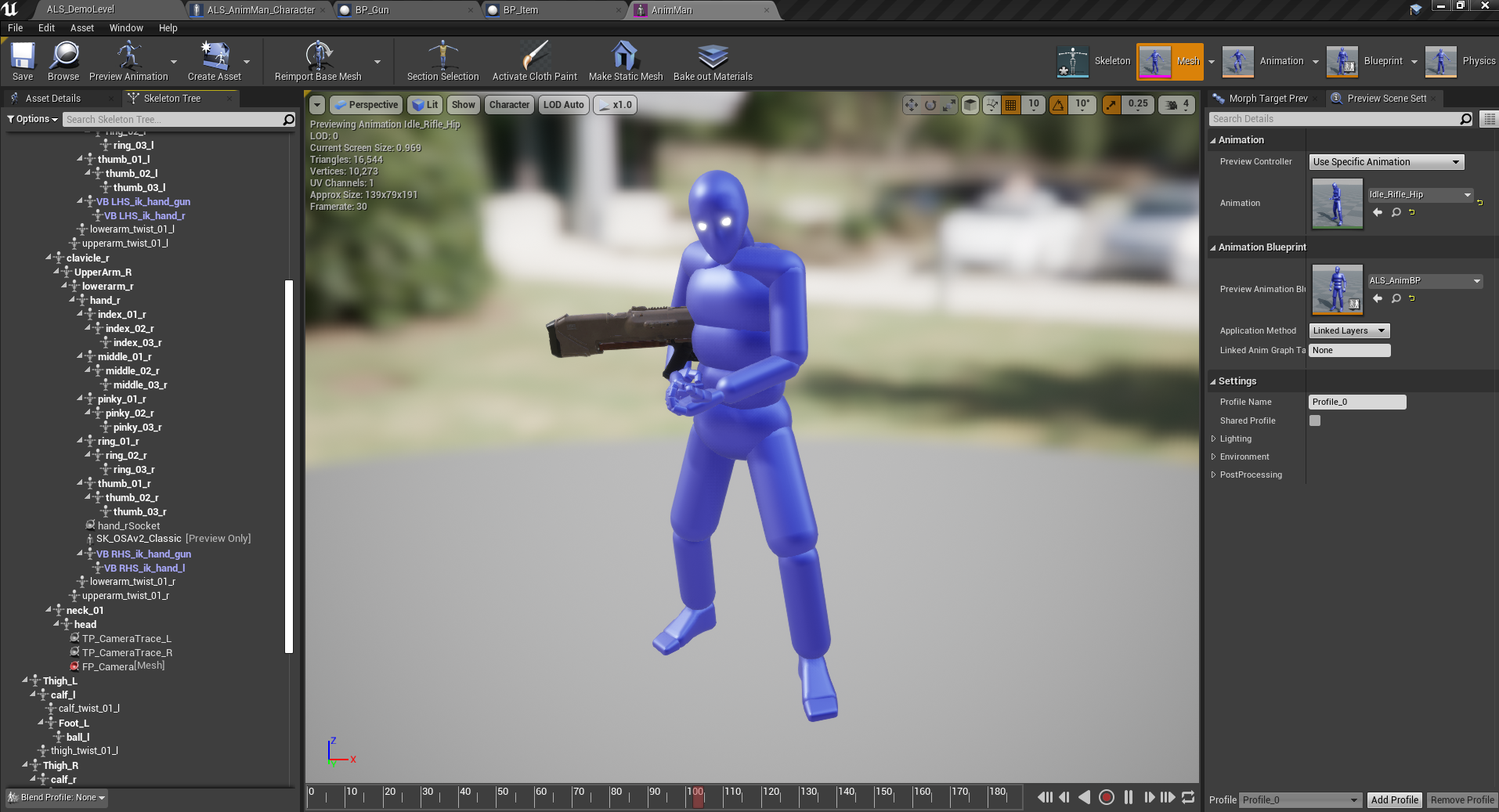
how do you stop previewing an item in the skeleton. it wont let me click on this gun https://i.imgur.com/7rphD8M.png
 vocal flume
can anyone tell me why this size discrepancy happens.. is it the lights?

 stiff verge
i got a quick Q. I'm trying to animate a material instance parameter but as soon as I added that parameter to my sequence, it replaced the mat instance by a new one. This allows me to animate each object using that mat independently. Great but what if I want all of them to be in sync?
 calm pollen
how could i make a system where once a widget shows up one time, it never shows up again, I have a boolean being set when the player clicks a button, then that boolean is being checked whenever the game starts, choosing whether or not to show the widget. It is not working for some reason. Anyone know how to fix this?
plush yew
vocal flume
can anyone tell me why this size discrepancy happens.. is it the lights?
yes, baked lighting takes a crap ton of resources
vocal flume
@plush yew Thanks. Trying to package now with all lights set to stationary..
stiff verge
how can I create, in a material, a float ramping up from 0 to 1.. in a loop?
at a specific speed
stiff verge
ahh time sine clamp.. thx I'll try that
 obsidian nimbus
wasnt saturate or desat a free clamp?
stiff verge
sine goes back and forth with a pause in between I need a ramp
obsidian nimbus
power?
stiff verge
it's hard to visualize the effect i'm not that good at math
vocal flume
vocal flume
<@456226577798135808> Thanks. Trying to package now with all lights set to stati...
size did not go down one bit.. switching all lights to dynamic now
obsidian nimbus
sine absolute than
obsidian nimbus
it counts up
stiff verge
I'd need a clamp that loops the value.. like a modulo
stiff verge
this is what I need
if only I could see what the time node outputs I would understand better
obsidian nimbus
it outputs time in seconds
obsidian nimbus
with ramp i thought go up exponential
stiff verge
oh wow with DebugScalarValue you get a texture with the data from your node.. amazing

 obsidian nimbus
np 🙂
stiff verge
there is so much potential for out of the box stuff.. but it's not that useful for games so there isn't many tutorials on it
stiff verge
it's frustrating for me to get stuck like this everywhere because I know how I'd do this stuff in TouchDesigner
obsidian nimbus
or mayB it was the material map
well if you know what term too google thats like half the work
 sharp crest
without adding a point light actor*
is there a way to make emissive materials light up an area?

nevermind figured it out from the wiki docs
vocal flume
vocal flume
<@456226577798135808> Thanks. Trying to package now with all lights set to stati...
looks like its not the lights. changing to dynamic lights did not reduce the size a bit
I figured it out.. It was the freaking HDRI backdrop plugin.. I enabled it sometime back to see if i can use a low res HDRI image as a backdrop.. removed it from the level but still it was driving up the project size by 120 mb
stiff verge
I'm looking for a way to slightly offset player position in VR.. basically I want to add WASD movement
but it's not part of the VR template so.. I'm lost
 bitter meteor
hello I want to ask if someone dont know this game name or TYPE of this game please

 golden ore
isometric? topdown? (not sure what you are asking)
anyone here able to troubleshoot a clothing issue?

added clothing, painted, applied, and the "physical mesh" visualization shows correctly, but its not moving the mesh section it was applied to
 median hound
bitter meteor
hello I want to ask if someone dont know this game name or TYPE of this game ple...
median hound
bitter meteor
hello I want to ask if someone dont know this game name or TYPE of this game ple...
overland, its a tactical adventure game
bitter meteor
ok thank you
plush yew
What is an efficient way of checking the distance to nearest enemy? Is a giant collision box okay? I dont actually want exact distance, just to know if I am within x units of any enemy, then when I attack I will do a slowmo effect.
grim ore
is this checked every frame or at a specific time?
golden ore
golden ore
added clothing, painted, applied, and the "physical mesh" visualization shows co...
ignore this, I was in es3 mode... which doesnt support cloth
static raft
Any reason why the engine doesn't recognize mp3?

Opening a different project on the same engine version let's me import mp3s just fine
As filemediasource ofc
grim ore
mp3 should not be suported, are you sure?
static raft
Ofcourse- when I drag and drop on one project, a file media source is created automatically pointing to my file
however on my project when I do it I get an error
my file media sources also fail to read the files they are pointing to unless the files are outside the project's directory structure
grim ore
are you just trying to use them as sound waves? if so yes mp3 will not work. if you are trying to just play back a file, similar to a .mp4, then mp3 should work as a file media source
pretty much you dont want to use mp3 files, use ogg or wav
static raft
No I'm not trying to use them as sound waves
I only need the file media sources to hold the path of the mp3 file
I use fmod to play mp3s
I can manually create the media sources and fill in the path, but as long as the path is pointing outside of the project structure, ex. in downloads or something, otherwise the path will fail to be read. I can't help but think these two issues are related
grim ore
well your screenshot shows you trying to import an mp3, that just wont work. ue4 does not import mp3 files
since this is an fmod specific thing you might want to try #audio or their support forums
 broken heath
If i need to create a simple photo viewer with touch (zoom/ pan) do i use 3d world or widget interface
 neat ether
Hi, I'm trying to export a sequence that has an animated widget in it into a video, but when I do the widget's animation is a lot faster in the exported video than it was in-engine. Any idea on what could be the cause and how I could fix (or workaround) this?
timber nymph
gloomy seal
take some random tab and pin it into one of the sections. it will disappear and ...
thanks
frozen pond
question about saves: will save game object will hold data until saved? like i want to have it as part of player on runtime, and save/load when conditions are meet like zones changes, autosaves etc
 slim badger
why is this happening plus how can i fix this???
 plush yew
I'm having a big problem, any help appreciated, basically I am using 'sphere trace for objects', I have a setup for object type 'pawn' that checks fine, however I created a new object type called 'attack attempts' and created the EXACT same setup as before, the trace is never drawn even when I try to get it to draw debug persistent, and it always returns false.
I checked 100000 times that my setup is the same as with checking for type pawn which is ok
grim ore
@frozen pond the save game object once created is in memory until you get rid of it. If you want to create one on start and save a reference to it, never change levels, keep adding/changing stuff in it, then save it out when you quit it would retain that data until you quit
@slim badger are you using a source build of the engine?> if so.... do what it says
@opal verge rule #8 8. No recruiting or self promotion outside the designated channels. Use the Job Board category for recruiting (see #instructions), and the Sharing category for self promotion. Recruiting and self promotion must be related to Unreal Engine unless otherwise specified.
 flint dagger
slim badger
why is this happening plus how can i fix this???
flint dagger
slim badger
why is this happening plus how can i fix this???
Try to force quit Swarm Agent, alternatively try Cache > Clean in Swarm Agent. It's likely the cache is no longer valid.

Please see the Job Board down below. And specify whether or not it is a #freelance-jobs or #volunteer-projects etc. See Rule 8 of #rules.
flint dagger
grim ore
<@!307898820262494208> rule #8 ```8. No recruiting or self promotion outside t...
Just saw you posted this, sorry for the double post! x)
buoyant graniteBOT
:triangular_flag_on_post: RektbyKurdistan#3405 received strike 1. As a result, they were muted for 10 minutes.
 high dragon
Hello, I have been having an odd glitch with UE4 recently. Whenever I try to open a drop down menu it either flickers very rapidly or it just doesn't render at all. I have a dual monitor set up and the odd thing is if I move the UE4 editor window over to my second monitor it is fine. The difference between the two is my main one has freesync and is up to 144hz and the other doesn't have freesync and is up to 75hz. Any ideas?
fierce tulip
@high dragon read the pinned message, it might help
(but first check under "Edit > editor preferences > enable windows animations" and see if its off. if its enabled, disable it.)
high dragon
fierce tulip
(but first check under "Edit > editor preferences > enable windows animations" a...
Thank you, I already tried that. I may have to down grade my Nvidia drivers next.
 distant totem
wow never thought to move to a second monitor, will definitely try that if it happens to me. I was having luck for the longest time on the newest nvidia drivers but yeah I think thats the issue, I'll need to try a downgrade as well.
One strange thing is that when streaming in discord, or doing any kind of video capture/screenshots, all the menus are still visible to that, so it must be something with displaying the monitor
high dragon
Glad to hear it's not just me. It's been infuriating...
 fluid bronze
The outside of this character is normal but https://gyazo.com/d8c3bcf896083410055b616d7cc51315 the inside is see through and i don't want that https://gyazo.com/d8c3bcf896083410055b616d7cc51315 i don't know if this was the right place to ask.
 distant totem
yeah I meant to say "when it happens to me again" yes is extremely frustrating, It's inspired me to want to add a button to the top tool bar to save all and restart the project, but what's stopped me is how do you restart a code project when you want to run it in debug.. oh well another day
flint dagger
high dragon
Hello, I have been having an odd glitch with UE4 recently. Whenever I try to ope...
One other thing we saw on r/unrealengine with Quixel Tools is issues with UI because of NVIDIA's new sharpening filter. Might be worth disabling.
distant totem
flint dagger
One other thing we saw on r/unrealengine with Quixel Tools is issues with UI bec...
do you mean this?
 flint dagger
That would be it!
distant totem
okay awesome, I know there is some weird filter stuff you can add using nvidia's anzel as well
flint dagger
I'm just wondering now that I think about it if there's anything in Geforce Experience too, though. Worth double checking.
high dragon
Has anyone tried NVIDIA Studio Driver instead?
flint dagger
But generally, I would just go to Program Settings on that same page in the screenshot, and just ensure that UE4Editor.exe for whichever engine your using is set to default settings.
I've tried the Studio Driver, there isn't too much improvements to Unreal specifically. It's more multi-app use that gets bump in performance in general. Having Substance, Quixel, and UE4 open together, etc.
But in general, the Studio Drivers just work to improve specific bugs faster for Autodesk, Adobe etc suites before they get released into the main driver branch.
flint dagger
 flint dagger
high dragon
Where does one go to revert back to an old driver?
flint dagger
high dragon
Where does one go to revert back to an old driver?
If you search here, you should get a list of older drivers 🙂

But to be more apt on the Studio Drivers thing. It's more just like, experimental of UE4 branches, but just more curated and not experimental. You get it if you want to get features faster, before they go out to the geforce ready game drivers.
 severe ibex
Would anyone know where I can learn about material optimisation? I see loads of courses for making materials but I want to understand how materials work.
For instance there are incredible materials in the sun temple sample project that have roughness but are bright green in the shader complexity view. I'd love to know how to achieve results like this.
flint dagger
severe ibex
Would anyone know where I can learn about material optimisation? I see loads of ...
I can just give some quick tips. Stick to textures if you can help it, reuse the same textures if possible. Do not use Noise nodes, and be wary of things like SphereGradient3D etc (these are functions, double clicking them will show you all the extra nodes you're adding to your graph).
When in doubt, test. What I like to do, to see where my material is most expensive, is basically take a section of the material and plug it directly into Emissive - check the Instructions count in the Stats panel.
Then gauge this against your full materials instruction count. See where you can improve or simplify the material to optimize. The instruction count number is your friend here basically. 🙂
Translucent materials are always gonna be a chore to deal with. A quick work around here is to use a masked material instead, and right near your Opacity, you can multiply by DitherTemporalAA to achieve a pseudo transluent effect that is cheaper.
I'm planning to release a tutorial on this soon actually.
Lastly, Static Switch Parameters are your friend, you can add these in to basically turn on and off parts of your graph in Material Instances. Wall is too expensive because of some extra things you're doing with tiling? Turn it off in the instance :3
But yeah, I agree with @plush yew check out the master course in learning portal. And just keep testing! Experiment with what increases or decreases your shader instruction count.
severe ibex
@plush yew cheers
@flint dagger many thanks Alessa, generally I am using the UE4 textures from substance, base colour, AORM and Normal and materials are often only those texture maps with some UV edits if need be or a little roughness multiply, all tend to be Material Instance also.
flint dagger
@severe ibex Do you have an example of what your expensive material looks like? (screenshot)
Maybe I can give some more quick advice based on that.
severe ibex
I am targeting mobile, using fully rough is great for some but to get roughness and reflections things start to hit the "dark green" spectrum.
@flint dagger sadly I am in bed now after a day messing with lighting a level
flint dagger
Yeah, mobile targeting with materials is always going to be more on the expensive side. There are tricks you can do to 'circumvent' this, but they won't be PBR correct.
Using a cubemap with a MipBias to emulate a sort of roughness perhaps. But in general with mobile - it's gonna be a hell of a time trying to get it green.
Dark Green isn't so bad though.
The real thing to make sure here is keeping your draw calls low, your material can be a little more expensive, e.g: Dark Green, but making sure most of your objects utilize the same material,
using the Actor Merging Tool on assets that all use the same material can help to gain performance on mobile.
severe ibex
Yeah dark green is fabulous enough, but I cant understand how the materials in the sun temple sample project are bright green, there must be some other settings because if I migrate a material over to my project they are the the same bright green.
 mystic holly
flint dagger
mystic holly
flint dagger
Compare and Contrast! Look at their materials, the size of their textures, if their texture samples are shared. See what is different there in the details panel of the material and try to gauge why they are better 🙂
severe ibex
Ah, so the shader complexity numbers are affected by more than just the material? I have some very simple materials with like 900 shader complexity.
mystic holly
My widget interaction keeps going through my 3d widget anyone know what I can do?
flint dagger
Shader complexity, specifically instruction count is for that one shader itself. But if you are using that shader everywhere, or using multiple shaders everywhere, you are basically stalling the CPU for a short second so it can get the new shader instructions ready for the GPU to draw them. This is a draw call 🙂
So utilizing the same material everywhere if you can, combining objects together means the CPU doesn't have to send so many instructions, improving the GPU speeds. ^^
(this is way over simplified, but gives a general idea. Looking up tutorials on Draw Calls is the first place I would go for mobile)
Sorry, that was a little poorly worded. Shader Complexity is the total cost to the scene - instruction count is the individual shader cost. But yes, there is more that can increase complexity, and lower performance of your scene.
final moat
sorry for barging into this conversation, but would anyone here know how to fix
LogInit: Warning: Incompatible or missing module: MultiplayerFPSEngine
im getting this error code whenever i try to launch my project, any ideas how to fix?
severe ibex
@flint dagger I understand, so for instance stick 2 or 3 assets into 1 uv space for 1 material over 3 assets etc
flint dagger
severe ibex
<@413541153741471748> I understand, so for instance stick 2 or 3 assets into 1 u...
Yep! Any combination so that multiple assets are all using the same material, same texture atlases etc, is pretty much the best advice I can give for mobile. The second best advice after that, is always static lighting if you can :3
 worldly cipher
say is there really no colorramp in ue4?
flint dagger
final moat
sorry for barging into this conversation, but would anyone here know how to fix...
This is best asked in #cpp, your module/plugin etc, is either not compiled for the engine version you're using, or is missing entirely from the project.
severe ibex
@flint dagger all over static lighting, I've been lighting labs that sadly only have 1 light source (the ceiling lights) and my bosses cant understand why it looks flat.
worldly cipher
how the hell can you work without a colorramp tough lol
final moat
alrighty thanks xD first response ive gotten all week ive been trying to fix it lmao
flint dagger
severe ibex
<@413541153741471748> all over static lighting, I've been lighting labs that sad...
Yeah, this is where you can start maybe looking into using old-school fakery techniques for mobile. Make the ceiling transparent and mirror the geometry above the ceiling to give it a sort of reflection feel,
or just adding a really subtle cubemap into the emissive channel to sort of fake these. But honestly, as someone who did Arch Viz for Mobile VR in UE4 for 5 years.
Just tell the client, no. Or wait for a better phone release 😛
severe ibex
@flint dagger we are working on the Pico Neo 2 also and it's rather shite compared to the Quest 2
flint dagger
severe ibex
<@413541153741471748> we are working on the Pico Neo 2 also and it's rather shit...
Sweetheart, I was dealing with the Gear VR for the Galaxy Note 4 before both devices were released. That shit was a nightmare :p
severe ibex
@flint dagger oh man. I feel for you. I was in arch vis for almost 10 years with bosses who wanted Vray render quality on an ipad...
I literally left because I was making entire UE4 projects but being paid 24k.
flint dagger
Actually @severe ibex If it is some sort of Architectural demo you're doing, and not a game. One tip I have here is that framerate becomes less important because the device is rendering a 360 frame.
If you can keep the player stationary, and fade out, teleport to location and fade in, because the player isn't moving, a lower framerate under 90fps, even 60fps becomes less perceivable. :3
flint dagger
severe ibex
I literally left because I was making entire UE4 projects but being paid 24k.
Woah, ouch. Thankfully I was freelance at the time, money was on my terms. But doing an entire house for mobile VR in 2 weeks, no amount of money is worth the sleep lost.
Especially considering I had to deploy, individually, to 12 different devices, everytime we had an update, manually.
severe ibex
@flint dagger lucky I am working with very capable developers who do a great job of optimising and all sorts, I am merely trying to make things look as nice as I can for them.
@flint dagger yes fuck that! Haha
I think I just need to do my best and see what comes out. I know I can light scenes well but it just hurts a bit when you can see they're not impressed with a white clinical laboratory with few reflections.
I will try the emissive cube map cheat however
flint dagger
For sure, keep me posted on what you make! I'm curious to know if I can be of anymore help, but I would need some examples to know what you're dealing with more 🙂
severe ibex
@flint dagger mind if I add you then or send a DM just to find you tomorrow?
flint dagger
Sure thing!
severe ibex
I am far more of an asset artist and less of a mobile dev.
flint dagger
One of my favorite cheats that UDK Citadel back in the iPhone days used, and has been used since Silent Hill 2 on the PS2 is to straight up duplicate, scale negatively on Z and put it under a transparent floor.
See 1 min 13 seconds in:
https://www.youtube.com/watch?v=gV0VDvtL5sk

Enter Epic Citadel, the dynamic fantasy setting of the award-winning Infinity Blade.From the circus bazaar to the sweeping cathedral in the center of town, Epic Citadel dazzles with a visual parade of special effects, as only imagined by Epic Games and powered by the critically acclaimed Unreal Engine 3.
Epic Citadel is a benchmark testing app ...
Looks hella cool for just duplicated geometry.
severe ibex
@flint dagger that's very cool. Though the way the Devs are tackling draw calls they might hate this.
flint dagger
severe ibex
<@413541153741471748> that's very cool. Though the way the Devs are tackling dra...
Sounds like a lesson needs to be taught! 😛
That said though, you don't need to duplicate everything, walls floor and ceiling, tables should be enough :3
severe ibex
@flint dagger I guess the next question I have is if you have any tips on lighting literally a square room with ceiling lights and no other light source? I keep getting told it looks flat.
 errant blade
IDK where to ask it so i'll ask it here
how can I resize a skeletal mesh with 3Ds Max OR with UE4? i exported a skeletal mesh from UE4, changed a couple things (but not its size) and when i re-import it it's tiny??? but i can't figure out how to scale it back up either in-game or in max!
flint dagger
severe ibex
<@413541153741471748> I guess the next question I have is if you have any tips o...
Hmm... It's tricky, let me see if I can find some of the old Arch Viz tutorials I had.
severe ibex
@errant blade I presume your unit scaled are different in 3ds max and UE4.
 neon bough
errant blade
IDK where to ask it so i'll ask it here
how can I resize a skeletal mesh with 3...
neon bough
errant blade
IDK where to ask it so i'll ask it here
how can I resize a skeletal mesh with 3...
doesn't 3DS max have a scaling option on export?
severe ibex
@errant blade you can change the.import scale in UE4 when you import. I have to.set mine to 0.1 as I model in mm but UE4 is cm I believe.
plush yew
I have a sphere but it's only 1/4 of the sphere (top half) that I can do foliage on. Anyone know why?
 errant blade
I'll try all of that. thanks!
severe ibex
@flint dagger your think I would know after so many years doing it. But there were always windows!
flint dagger
severe ibex
<@413541153741471748> your think I would know after so many years doing it. But ...
I feel like most of this still applies, even though it says it's outdated, it's hella useful for showing how lighting works in UE4 with examples but also modifying the INI files for smoother lightmaps, but longer build times:
https://ue4arch.com/tutorials/ue4archs-unreal-engine-4-lighting-workflow-part-1/
And someone has also kindly curated a whole list of things on lighting in general.
https://forums.unrealengine.com/development-discussion/architectural-and-design-visualization/62129-baselightmass-ini-a-summary-from-various-posts
UE4Arch
We have received many questions about our lighting workflow for archviz in UE4, so we decided to write this article and detail some of our process. OBS: This tutorial is outdated since in version 4.18 of the engine it was released multi-bounce sky lightning. We should write a new tutorial soon. Lightmass is the system […]
Unreal Engine Forums
Architectural and product design visualization, pointers, tips and tricks.
neon bough
i'm still curious which device renders 360°?!
severe ibex
@flint dagger magical. I would be using GPULightmass but we are on 4.25.3 and they havent supported that version yet, but it's in 4.26...
flint dagger
severe ibex
<@413541153741471748> your think I would know after so many years doing it. But ...
But realistically, the best advice I can give here. Is filling out as much lighting as you can 'ambiently' and then dealing with direct light sources after. You can actually use a skylight and supply a cubemap to create a general ambient lighting to the baked GI, it's not exactly accurate but can make a really good base pass before adding in your ceiling lights and dealing with their reflectivity.
All lightsources have an Indirect Lighting Intensity too. If your light looks good, but you want it to travel in the room more, consider playing with this!
 flint dagger
severe ibex
<@413541153741471748> magical. I would be using GPULightmass but we are on 4.25....
flint dagger
severe ibex
<@413541153741471748> magical. I would be using GPULightmass but we are on 4.25....
I've had the chance to experiment with GPU Lightmass. It's hella fucking cool, but right now the only benefit I can see it giving is just giving Artists a more 'realistic' view on how their lights are in the scene.
I would still use CPU Lightmass to actually calculate (along with the Ini file changes to make it extra clean!)
severe ibex
@flint dagger yes I've got my indirect lighting intensity set to 2 on most lights. But how would using a skylight work in a completely sealed room?
errant blade
severe ibex
<@249271234062188545> you can change the.import scale in UE4 when you import. I ...
this did the trick, there was an option in import that said "convert to ue4 units" or something of the sort
flint dagger
severe ibex
<@413541153741471748> yes I've got my indirect lighting intensity set to 2 on mo...
So on the skylight you have two options, you can either pull from a specified HDRI or from the scene itself. In this case, my baked lighting is coming from the specified cubemap, not from the scene around it.
 severe ibex
@errant blade glad I could help.
flint dagger
neon bough
i'm still curious which device renders 360°?!
It's not neccesarily that it renders in 360, but if you can keep your player fixed to a stationary point - pretty much everything that needs to be loaded or done is coming from the existing frame before it.
severe ibex
@flint dagger player is teleporting around, but can this be used to light the interior of the room?
flint dagger
How do you mean?
severe ibex
Just curious if a skylight would do anything to help light a sealed room, theres only ceiling lights in the room, no external sources
errant blade
severe ibex
<@249271234062188545> glad I could help.
thanks a lot! :D
flint dagger
severe ibex
Just curious if a skylight would do anything to help light a sealed room, theres...
Ah I see. So the example I had set up with the skylight and Specified Cubemap wasn't a sealed room.
Here is a quick, but rather terrible example if the walls are one-sided, the cubemap still applies to the lightmaps.
 severe ibex
@flint dagger hmmm we will see. I'll share some screenshots tomorrow when I am at my PC and we can marvel at the terrible quality from the Pico headset.
flint dagger
One other method is a combination of using Environment Color in world settings, which gives you this, but also I fear, won't work in your scenario.

The last thing I can however suggest, which for ambient lighting could definitely work is to fake it!
Here is a point light source you can duplicate around to create the 'ambient' fill, but all shadow settings are turned off.
Inverse Squared Falloff is disabled here, and source radius increased, to give the point sources less of a spherical effect.
In this case, I have two on either side of the corridor.
 stiff verge
I got some fog that is only visible in a specific area. It's created using particles. Problem is.. it's very heavy.. got ideas?


 merry canopy
hey. I have no idea in what channel to ask that: But I would like to create simple geometry/shapes ingame. blocks, spheres, tubes and placeing them in the world. Is there maybe a plugin for that? Like Garys mod for HL2.
flint dagger
stiff verge
I got some fog that is only visible in a specific area. It's created using parti...
You're best asking in #graphics but TLDR, lower your particle count, or optimize your particle shader.
flint dagger
severe ibex
<@413541153741471748> hmmm we will see. I'll share some screenshots tomorrow whe...
And then add your cool rect light, or whatever else to be the directionals from the ceiling. Just a note, rect lights are more expensive than spots. I'd recommend trying to achieve it with spots.
 flint dagger
merry canopy
hey. I have no idea in what channel to ask that: But I would like to create simp...
flint dagger
merry canopy
hey. I have no idea in what channel to ask that: But I would like to create simp...
Why not just import a basic Sphere, Cube or Tube shape, and just spawn them when the player clicks a button?
neon bough
^^ that, which also gets you around trouble with UV and lightmaps
flint dagger
neon bough
^^ that, which also gets you around trouble with UV and lightmaps
Yep, doesn't need to be dynamic or crazy. Just spawn meshes :3
stiff verge
@flint dagger Thanks. the particle count is super low.. not sure how I can optimize it.. I don't even care about how it looks I just want some fog up there
neon bough
sure you can do it at runtime, but that could answer an quick google search in a minute, so i guess you don't want to put much work into it 😛
flint dagger
stiff verge
<@!413541153741471748> Thanks. the particle count is super low.. not sure how I ...
Sounds like I really need to get on this Material Optimization video tutorial soon... Second time this has come up in about 20 minutes :p
merry canopy
@flint dagger is it possible, to translate, scale, rotate ingame, too?
neon bough
yes it is
severe ibex
@flint dagger this is all good. I was going to use a fill light to prevent the hot spots from the ceiling lights. Would rectangular lights be fine it's all static anyway?
flint dagger
merry canopy
<@!413541153741471748> is it possible, to translate, scale, rotate ingame, too?
Sure. enable physics on the object. But you're going to have to work out a 'Tool Gun' to pickup and change the transform at runtime.
Check out SetActorTransform/SetRelativeTransform :3
https://docs.unrealengine.com/en-US/BlueprintAPI/Utilities/Transformation/SetActorTransform/index.html
https://www.youtube.com/watch?v=aUK48CdXiYs
@grim ore Has a whole lot of tutorials on transformation nodes on his channel, highly recommended :3 ❤️
SetActorTransform
What is the Set Relative Transform Node in Unreal Engine 4
Source Files: https://github.com/MWadstein/wtf-hdi-files
stiff verge
@flint dagger haha yes!
 timber birch
Does anyone know why this happens? UE4's screen goes black aswell as all the dropdowns, but it only happens on the second LCD, some weeks ago it only happened on the first LCD, and after rebooting UE4 the issue is fixed for "X amount of time"
 flint dagger
severe ibex
<@413541153741471748> this is all good. I was going to use a fill light to preve...
flint dagger
severe ibex
<@413541153741471748> this is all good. I was going to use a fill light to preve...
Not entirely, I've come up to a rather weird issue that allegedly static lights still have some minor cost. Not sure about the details, but if it's static, it should be fine more or less :3
severe ibex
@flint dagger it better be... haha
neon bough
well they apparently do if you have dynamic objects
flint dagger
timber birch
Does anyone know why this happens? UE4's screen goes black aswell as all the dro...
Looks like a GPU issue, what are your specs? Could just be taking a second to load the window. But I've never seen this in UE4.
severe ibex
I'll stick with spots anyway, getting the same results so why not.
flint dagger
neon bough
well they apparently do if you have dynamic objects
For sure if you have dynamic objects,
timber birch
@flint dagger Ryzen 9 3900x, 64GB Ram, Nvidia GPU 2080Ti (latest driver)
flint dagger
timber birch
<@!413541153741471748> Ryzen 9 3900x, 64GB Ram, Nvidia GPU 2080Ti (latest driver...
That is hella weird then, honestly I've no idea. Try Yoeri's suggestion to disable Window animations in UE4.
 timber birch
@flint dagger Hmm indeed, Thank you, ill give that a try 😄
merry canopy
@flint dagger yea, thats actually what I need... tool gun and basic shapes to place in the level.
But would it be possible, to move the points on the geometry and modify a cube or so?
severe ibex
@timber birch not a driver issue is it? I had mad instability and had to toll back to an older driver.
flint dagger
merry canopy
<@!413541153741471748> yea, thats actually what I need... tool gun and basic sha...
That's a lot more sophisticated, you're looking at two things if you really wanna delve down that rabbit hole, but I suggest you don't if you're just looking for a Garry's Mod style thing.
ProceduralMeshComponent and generating basic shapes with it (it's something I'd say is advanced) and then having your gun being able to deal with that data.
I'd also say, don't do this in blueprint, this would be a C++ implementation for sure, for performance.
Here is a brief start to that. But I warn you, you're getting into heavy territory there.
https://www.youtube.com/watch?v=1ksgB6hYGrE

On this episode of Inside Unreal, our Technical Artist and UK Evangelist Arran Langmead will explore the procedural mesh component and how it can be used to build art tools in the engine. He'll demonstrate an example of this with a stylized tree generator that uses a mixture of splines and random mesh generation to create foliage elements. These...
 boreal crown
If I allow my game to get modded, how safe would it be for players to download those mods? Like is there a way to sandbox the mods so they don't have internet access or have the ability to install nefarious things?
 nova kernel
has anyone used this
https://github.com/adamrehn/ue4-docker
With aws Lightsail?

GitHub
Windows and Linux containers for Unreal Engine 4. Contribute to adamrehn/ue4-docker development by creating an account on GitHub.
flint dagger
boreal crown
If I allow my game to get modded, how safe would it be for players to download t...
Tricky question, it depends on how those mods are implemented and whether or not if you have a verification before they are submitted to allowed to be used on a multiplayer server.
Might be worth asking in #multiplayer.
boreal crown
I'll ask there, thanks!
timber birch
severe ibex
<@244999130135527428> not a driver issue is it? I had mad instability and had to...
Well i have updated my drivers several times, I don't think that is the issue, and i think its only on UE4.26
ok nope, its also UE4.24, not specified to a version then
flint dagger
timber birch
Well i have updated my drivers several times, I don't think that is the issue, a...
Can you confirm that it is only 4.26? What about 4.25? Because It could potentially be a bug report to Answerhub.
Ah okay.
timber birch
Disabling window animations doesn't solve it either
Ok most likely a windows 10 issue or something.
If i enable HDR on that specific LCD, the problem is solved.
merry canopy
thx @flint dagger - looks interesting! 🙂
flint dagger
 dusk portal
Any ETA for 5?
dusk portal
Any ETA for 5?
Latest blog says early this year, but no confirmed date afaik.
flint dagger
timber birch
Ok most likely a windows 10 issue or something.
If i enable HDR on that specif...
Woah, that's hella interesting. Honestly, if you can have a repro like that, I'd bug report to Answerhub. I don't have an LCD panel here that I can do HDR on,
But I feel like this is a Windows 10 issue for sure.
timber birch
Yeah i should report this, to both i think... enabling HDR and disabling HDR fixes it. (at least that is good to know) I just don't like HDR haha.
Anyways thank you for your help 😄
I just noticed, i watched a tutorial from you last night ha! keep it up.
flint dagger
Awh, Thank you! I'm glad I could help a little bit.
timber birch
Yeah! At some point ill show you what i used it for.
timber birch
@severe ibex Thank you as well tho, for taking the time to help. Much Appreciated 🙂
calm pollen
hey how could I make a "total speed" variable for a vehicle?
plush yew
what?
calm pollen
nvm got it im dumb
rotund elbow
"Modular" character assets on the store be like yeah it gots 2 weapons very modular, good price.
plush yew
yikes dude
severe ibex
@rotund elbow man selling assets is a terrible thing anyway, the work to profit ratio is ass.
plush yew
some
but most are pure trash you can make yourself if you just look up a blender guide or whatever rlol
rotund elbow
pricing is weird. the good stuff is sometimes priced lower than the generic 3d student portfolio spam
plush yew
lower price ends up making more profit cause you sell more
rotund elbow
true
broken heath
severe ibex
<@269451489129267201> man selling assets is a terrible thing anyway, the work to...
Really? Tell me more about it
What is considered low price?
plush yew
theres a couple of things to consider here
work hours, expertise and demand
this is why games are triple A games are 60 even tho they cost thousands of dollars and man hours to make
they sell a whole bunch more then just an ''asset''
rotund elbow
bit different perspective when buying assets instead of hiring a person to do it.
broken heath
So if i work for 3 months with acceptable quality product , is 29$ pricing too much?
rotund elbow
depends on the result
 jagged halo
speaking of assets, I found a nice pack with incorrect mesh scaling (something very small, like 20x smaller than it should); is it fixable in ue4 without having to fix the transform of every single mesh instance?
plush yew
depends, if youre a beginner it might take 3 months but that doesnt mean its worth 3 months
@jagged halo yea just set the import scale to like 20 or something
plush yew
bro for what? a tree? a detailed character with high res texture and normal maps?
rotund elbow
10$ rigged to epic skeleton good price
broken heath
plush yew
bro for what? a tree? a detailed character with high res texture and normal maps...
Ok say a tree pack
plush yew
still not enough detail lol
severe ibex
@broken heath it varies. I've made good money long term when I made assets for Adobe but I remember putting in a whole weekend on assets only to find they were not popular sellers, I could have worked that weekend and made £300 but instead saw some assets sell for 50p over the next few days.
 kindred viper
for $29 if it saves me 2 hours work doing it myself, it's often worth it.
rotund elbow
will the tree pack forever satisfy the needs for trees in the project?
broken heath
kindred viper
for $29 if it saves me 2 hours work doing it myself, it's often worth it.
Nice
severe ibex
I've also made very high quality models that can be 3d printed as kits, literally months of work in those and you have to sell for super low prices for people to be interested.
broken heath
severe ibex
<@768035735470080000> it varies. I've made good money long term when I made asse...
Whos not popular sellers?
severe ibex
Everyone wants assets cheap but they dont value asset makers.
kindred viper
asset selling it all about trickle income. Making things that sell for a long time, making a lot of them, making them in quicktime so you don't waste time. If you can manage all that and put in a couple of years grind, you can pay the rent
rotund elbow
😄
 vast plover
You can make more money teaching people how to make assets then making and selling them yourself..
kindred viper
probably
broken heath
Anyone here successful with market place?
broken heath
vast plover
You can make more money teaching people how to make assets then making and selli...
Do u mean Courses
vast plover
Udemy art classes make huge money
rotund elbow
you can make more money from utube ad rev showing bp coding than selling a game
vast plover
Even the low quality courses still make more then selling most asset packs
severe ibex
@broken heath just some assets l, simple things like cutlery just did not sell but a cut glass tumbler sold incredibly well. I made like $300 on one cut glass tumbler that took an hour or two and £10 on something that took all day.
kindred viper
i doubt that unless the game sucks 😄
rotund elbow
a lot of games dont net at all
kindred viper
aye
severe ibex
Half tempted to stream on twitch during my day job.
rotund elbow
but some dude just showing of coding on youtube can make tons
broken heath
@severe ibex can i know u made 300$ over what period of time
kindred viper
well I'd know who to ask about that but im not gonna bother him now
severe ibex
Programmers make mad cash. I get a bit salty being the only 3d artist, earning 25k but the 5 other devs are on 40k
rotund elbow
capitalism weird, almost as if the system doesnt apply on instantly instanced goods :p
kindred viper
@severe ibex learning programming isn't hard. Pick it up as a hobby. See where it leads
broken heath
@rotund elbow i dont think tutorial ads can beat a creative game with ads or paid price
vast plover
@severe ibex Funny part as an engineer, I think 3d artist job is so much harder
severe ibex
@broken heath like 2 years maybe? I had a lot of assets though, average about $4 a day in sales
broken heath
Oh hi5 @severe ibex i am an architectural engineer but I don’t know much about selling I can do alot of art works but idk if its worth it
severe ibex
@vast plover it's very outsourced though, but then funny thing is even programming can be, but 3d artists just seem to be the ones getting ducked.
If "artist" is in your job title, you're not getting paid well haha!
vast plover
I wont go as far as to say average engineers are overpaid because honestly the job is horrible, but I really do think other positions should be brought up
kindred viper
all jobs are horrible. Thats why I do game dev. It's a passion, not a job 🙂
rotund elbow
was just about to say, arent all jobs horrible..
broken heath
Not if you’re a ceo
vast plover
When I was young and worked at the arcade I loved every minute of it, but I would be living in a cardboard box today if I still worked in an arcade so it's relative
kindred viper
living in an arcade cab would be better 😄
rotund elbow
i've done arcade machines out of cardboard boxes
 delicate mesa
Quick question does anyone know a service to backup UE4 projects or just big projects in general ive tried GitHub and I’m pissed off at the push limit and it’s caused me to have to restart my project over 3 times
rotund elbow
why not look into self hosted svn or perforce?
severe ibex
My job is sweet. I am so lucky to do it, but I just get upset that literally everyone else I work with doing the same thing makes hand over fist more than me. But sadly you do what you love and I dont feel I love C++ enough to be a real Dev, Tech Artist at best perhaps.
delicate mesa
Never heard of it that’s why I’m asking
severe ibex
@delicate mesa perforce for sure man.
vast plover
One of the things I found funny about art was when I learned that "classic" art is mostly ghost writer art that someone attaches their name to, and the more obscure or lets call it "in" the more it's worth although some rando got paid maybe a 100$ for the work, that's valued at millions.
delicate mesa
I’ll have to look into it thanks for the suggestion
kindred viper
I do a bit of everything. Keep me from getting stale. Coding is cool but it's a grind when you know what you are doing and planned it out. I guess it is with art but you see a lot more coming together
should probably go do some work in fact so have fun folks.
rotund elbow
i tried freelancing with my pixelart for a while
i couldnt compete with the netops salary i had then
nova kernel
has there been any news on the ue5 preview? They said Early 2021, and its almost spring now,
rotund elbow
still snow here
nova kernel
still snow here as well, but was 9c today
 weary basalt
nova kernel
has there been any news on the ue5 preview? They said Early 2021, and its almost...
weary basalt
nova kernel
has there been any news on the ue5 preview? They said Early 2021, and its almost...
As soon as we know, everyone in this Server will know 😛
nova kernel
weary basalt
As soon as we know, everyone in this Server will know 😛
i only ask as i dont follow many channels. not only am i way too busy, just too many servers to follow and keep up-to-date
nova kernel
rotund elbow
still snow here
spring is in 9 days (March 20th)
 bleak copper
Quick sanity test. When you modify the rotation of an actor or component, the actual rotation is performed as a vertex shader, correct?
I'm seeing stuff like this https://www.tomlooman.com/rotate-mesh-vertex-shaders-ue4/ and getting very confused why you wouldn't just set the static mesh rotation.
floral heart
Rotation component?
 late verge
Hey everyone, bit of a novice question here regarding exposure.
I currently have my camera's min/max brightness set to 1, therefore "clamping" the eye adaptation. However, doing this made my scene darker. Should I crank up the exposure compensation on my camera, or brighten up the lights in my scene?
flint dagger
late verge
Hey everyone, bit of a novice question here regarding exposure.
I currently hav...
Then use 2.0 and 2.0 - I still think you should clamp eye adaptation to what you need and not remove it entirely, but using higher values will increase the general exposure.
bleak copper
My opinion is both methods are valid. It might be hard to collaborate, but, if you have control over both lighting and camera, then either way that gets your desired effect is good.
I generally set the exposure to 1 and adjust the lights and materials to make it easier to guess what the expected color will be.
late verge
flint dagger
Then use 2.0 and 2.0 - I still think you should clamp eye adaptation to what you...
Setting both to 2 made my scene even darker 😅 Reducing the values and making matching them is actually working as intended though.
late verge
bleak copper
I generally set the exposure to 1 and adjust the lights and materials to make it...
Gotcha. What's the difference between "1" in exposure compensation and "1" in the min/max brightness settings?
Or do they mean the same thing, so to speak?
bleak copper
Uhm... it's been a little while since I've done post-processing stuff in Unreal. One second. (Currently on a mobile VR title that turns it off.)
late verge
No worries, take your time.
bleak copper
Well the documentation is here: https://docs.unrealengine.com/en-US/RenderingAndGraphics/PostProcessEffects/AutomaticExposure/#autoexposurebasicsettings --- don't quite understand Exposure Compensation unfortunately.
 prime willow
ok weird question but i have bone driven shapekeys in my blender mesh setup
does it mean i cant use those shapekeys/morph targets in unreal engine because their bone driven and purple shaded on the setup in blender
late verge
bleak copper
Well the documentation is here: <https://docs.unrealengine.com/en-US/RenderingAn...
Will take a look, thanks!
calm pollen
hey does anyone know how to make a camera follow a rolling ball, when I add it to the actual actor, the camera rolls around with the ball and makes people dizzy lol
I also cant stop the rotation since the ball is meant to roll down a hill if that makes sense
 floral parcel
When I create a BP based on a C++ class then add to that C++ class and compile, the updates i make are not updated to that BP (i.e. setting MasterPoseComponents in the C++ class wont add it in the BP class). Is there any way to fix this so it synchronizes?
plush yew
floral parcel
When I create a BP based on a C++ class then add to that C++ class and compile, ...
I believe due to how things are serialized, you can run into a lot of trouble modifying the C++ classes that your Blueprints are derived from. Adding things is usually cool, but changes can corrupt things. Many people I've asked about that say they just remake the BP.
For example, I changed the name of a decal component in one of my classes, and the BP was no longer able to display its transform. I had to remake it 😦
 mystic silo
Hi guys, I’m looking for an advice. I’ve a 3dsmax model and I want to export it to unreal engine, should I use fbx or data smith? Thanks for your help
calm pollen
mystic silo
Hi guys, I’m looking for an advice. I’ve a 3dsmax model and I want to export it...
i would recommend fbx 👍
mystic silo
calm pollen
i would recommend fbx 👍
Any particular reason or is just better?? Thanks for your answer 😄
timber nymph
max's game exporter is very good
calm pollen
mystic silo
Any particular reason or is just better?? Thanks for your answer 😄
from what I've seen, fbx is just a lot more consistent and can hold a lot more data than any other form. Whether that is actually true or not im not 100% sure, but that is what I have seen in my experience 😁
timber nymph
it's the universal recommendation I saw when I looked
lots of "you can use" with other formats but that's the only format that was usually "you should do"
floral parcel
plush yew
I believe due to how things are serialized, you can run into a lot of trouble mo...
Thanks, good to know!
 tribal holly
I'm getting an issue where unreal is importing my mesh like a tiny little bit higher than it's supposed to be set. I'm exporting FBX via 3ds. It's creating a gap between seams that wasn't there previously. Everything just seems to be shifted up like 1 cm or something
calm pollen
how do i make this so that the camera does not roll with the ball, it just kinda hovers above it and follows the ball
 grave radish
What would you guys recommend for mapping a game with a lot of keyboard inputs to an xbox controller?
calm pollen
grave radish
What would you guys recommend for mapping a game with a lot of keyboard inputs t...
what exactly do you mean? like how to make it happen or tips on what to bind each thing to?
 autumn elbow
@calm pollen turn off inherit roll on the character
pure barn
grave radish
What would you guys recommend for mapping a game with a lot of keyboard inputs t...
what kind of game is it? are all the inputs important?
grave radish
calm pollen
what exactly do you mean? like how to make it happen or tips on what to bind eac...
Like just tips. The game I'm working on is an FPS, so just lots of actions to bind. Idk if enough buttona exist
I think they all are important imo
pure barn
can you give a list of some? :v
most things like jump, shoot, reload are easy to bind to the face buttons and triggers
grave radish
I don't know if I can with NDA
timber nymph
grave radish
I think they all are important imo
games usually use like a wheel
if there's really a lot of stuff to map
grave radish
I thought about that, that would reduce weapons by a lot. Or the d pad like in gears
timber nymph
yea dpad
grave radish
I can look into a wheel, good advice
timber nymph
you have your old MGS style with a fan out list
timber nymph
oh it's just like, hold a trigger and a list unfolds and let go and it retracts
basically a wheel but less usable
but arbitrary number of items
pure barn
look at something like tf2's xbox port from the orange box
i think that game uses just about every button on the main keyboard keys, even if some of them are just shortcuts
timber nymph
grave radish
I can look into a wheel, good advice
MGS5 has categorized slots and each slot holds a list


 timber nymph
grave radish
I can look into a wheel, good advice
timber nymph
grave radish
I can look into a wheel, good advice
so pressing dpad once activates the slot and pressing multiple times iterates the list

contrast with DCS where each slice in the pizza drills into another pizza

 thorny coral
nvm it just took a while to load
 humble stratus
Hey all. My PC crashed a lot. SO I save a lot. However, UE4 does not seem to save all my progress, especially regarding materials. I keep losing ~30 mins of work in my materials. Even though I am CONSTANTLY applying & saving them. Shouldn't they just save regardless of my PC crashing?
thorny coral
@humble stratus even when it auto saves?
pure barn
i had something similar happen earlier today
UE4 crashed and stopped applying my materials to ~80% of what i had in the scene
it also stripped the actual materials of the source images
humble stratus
Yep, autosaving too, must be something on my end
worldly cipher
ue4 be like: "this node is called lerp, we call it that you call it"
"Allright lemme just search for "Lerp""
"fuck you its linear interpolation"
timber nymph
by project cache you mean %user%\AppData\Local\UnrealEngine?
timber nymph
worldly cipher
ue4 be like: "this node is called lerp, we call it that you call it"
"Allright l...
blueprints be like "oh he typed For Loop, I know I've got a For Loop but he must want a For Each Loop. I'll put For Loop at the bottom of the list he probably didn't mean that"
winter gale
Quick #UE4 Tip number 126.
Filtering results in context menus.
https://t.co/ZvTDTcZuJg
#unrealtips #UETips #unrealdev #indiegamedev #gamedev #indiedev #screenshotsaturday #UnrealEngine
 Twitter
·
worldly cipher
Twitter
·
worldly cipher
but honestly does anyone know any good tutorials for realtime shading fx? like doing a hologram effect or something like that
 toxic zealot

raywenderlich.com
In this Unreal Engine 4 tutorial, you will learn how to create C++ classes and expose variables and functions to the editor.
dim arch
hi, did they remove z order from the widget editor?
neon bough
no, it just isnt an option for every widget
overlays for example should have an z-order
plush yew
I want to create a debug line from my Actor and some amount forward but this seems not to be the way forward. What am I doing wrong?

I guess it has something to do with adding the amount on top since this will throw off the World location? Or something. Very new to this.
bitter meteor
Hello, I want to ask, if any of you know, what is the official name of game TYPE where you click on ground and the character goes there.
plush yew
is there a way to attach more materials top a landscape ?
 crimson blaze
Morning all, hope we good?
anyone use FMOD at all?
and if so have they ever used in a collab project across github?
thanks alot
Yoz 🙂
worldly cipher
can someone explain to me why my amd ryzen 7 3800x goes to 95% when changing the basecolor of any material lol
 viscid saffron
Hello everybody. I have a problem with unreal engine. I have an architecture project underway. I have activated planar reflections for capture. When I restart unreal the scene gets stuck at 39% loading. How can I solve? is there a way to disable it from closed scene?
it has been stopped at 39% for half an hour, my computer probably can't load them.
the problem is that I had a lot of work thrown away like that. Isn't there a way via folders to turn it off?
worldly cipher
yeah but while im doing the material ill still have that problem
viscid saffron
100% 😄
It opened 😮
6.954 compiling shaders! Probably the planar for reflections causes me to slow down my pc. It is probable?
slim badger
flint dagger
Try to force quit Swarm Agent, alternatively try Cache > Clean in Swarm Agent. I...
sadly not working
slim badger
grim ore
<@!373178387373621259> are you using a source build of the engine?> if so.... d...
i click build lighiting only and this happens kickoff swarm and fails build lighting it happened when my unreal crashed while building light
slim badger
slim badger
sadly not working
wait it may work I'll try a new thing
 worn copper
Hello I just done my vehicle Audio Setup using advanced Vehicle Template
but Now Problem is When my Vehicle Goes Above 100km/s it is going completely silent...
Can Anyone Help me with this...sob
plush yew
when will we get ue5?
fierce tulip
when its ready
plush yew
can u tell me the timestamp of that?
Why does this particular objecet that I exported from Blender is transparent when I add a texture to it? Yet another object from the same file, when I apply the exact same texture it doesnt have this effect?
 worn copper
plush yew
Why does this particular objecet that I exported from Blender is transparent whe...
worn copper
plush yew
Why does this particular objecet that I exported from Blender is transparent whe...
You have to invert Plane in Blender
plush yew
should i install editor symbols for debugging too?
worn copper
Also check Material in Ue
plush yew
worn copper
You have to invert Plane in Blender
thanks will try it out
worn copper
plush yew
thanks will try it out
Or set mutiside plane
plush yew
plush yew
can i install the debugging symbols later?
Yes.
But they make error messages actually helpful.
worn copper
Hello I just done my vehicle Audio Setup using advanced Vehicle Template
but Now Problem is When my Vehicle Goes Above 100km/s it is going completely silent...
Can Anyone Help me with this...
plush yew
plush yew
But they make error messages actually helpful.
its using too much space
noob question ,but how do you move this closer to the object, annoying having to zoom out each time
 worn copper
plush yew
noob question ,but how do you move this closer to the object, annoying having to...
worn copper
plush yew
noob question ,but how do you move this closer to the object, annoying having to...
Reset Transform.
May be you can do this with right click
This thing you have to do in Blender befor importing
 thorny snow
I was wondering if their is any information/documentation on how exactly to setup your project to be able to be built to multiple platforms and automatically have a different u.i. for each platform like the action rpg template.
exotic otter
Does anyone here have any experience with unreals texture streaming systems
plush yew
plush yew
noob question ,but how do you move this closer to the object, annoying having to...
set pivot with the right click
 feral moon
Ehi, I imported a camera from maya to unreal, everything is fine except for the Width of the sensor.Is there a way to perfectly match it to the one from Maya other than fix it by eye?
 lunar depot

With the recent launch of MetaHumans, Epic released one of their first cloud powered tool. In the future though it's looking like the cloud is going to play a much bigger part in the future of Unreal Engine.
Link:
https://gamefromscratch.com/unreal-engine-coming-to-a-cloud-near-you/
-----------------------------------------------------------...
 exotic lion
So we had an internet blackout yesterday, and now when I try to log into Epic Launcher, it says sending the verification code to my email, but it's been hours and several retries and nothing.
plush yew
plush yew
set pivot with the right click
yeah i found out how to do it!
 plush yew
mystic holly
https://streamable.com/ilk36d
plush yew
mystic holly
https://streamable.com/ilk36d

Your virtual hands will work wonders soon!
Patreon: https://www.patreon.com/deanashford
Twitter: https://twitter.com/Play_Ruff
Discord: https://discord.gg/ttqYq3r
Twitch: https://twitch.tv/unrealdean - https://twitch.tv/tunuko
Huge thanks to my Patreon supporters:
Dhiego Lucio
Guillaume Guerillot
Mark Drew
 past stag
Can anyone suggest some beginenr friendly Unreal Engine tutorial that includes c++ coding? Because I know some c++, but I dont know ue4 specifics.
 tacit onyx
Wondering if UMG Animations are not single instances? I seem to be having a problem where one instance of the widget playing this animation causes it to play on all instances.
 vivid ermine
Hi guys. I hope everyone is having a good friday. I have a question regarding GPU lightmass. I'm trying to use it but whenever I build the lighting I still have preview on some of my materials? It's also taking forever to build the lighting any idea why? I'm using a rtx 2080 super
It's a scene that I am trying to do that has both interior and exterior shots so not sure if that's why it's taking a long time because of all the trees and grass outside?
exotic otter
Hi guys, maybe one of you knows
can I reduce the time it takes for some of my textures to stream in?
some times a texture takes like 5-10 seconds to fully pop in(it shows low res version before)
can I make this go way faster
plush yew
exotic otter
Hi guys, maybe one of you knows
can I reduce the time it takes for some of my te...
lol are ur textures 16k or what
exotic otter
no but it has like 10 mips
and it loads them all in and only then shows the highest res
the moment i click the texture i want it to pop in
plush yew
"click"? so not in the actual game?
exotic otter
nono in game
i click on a button and it should appear on something
im limited in what i cn say xD
calm pollen
send a screenshot or video @exotic otter
exotic otter
I cant 😛
 acoustic pollen
How many other things are also trying to stream in textures?
How much of your vram is used?
Could be that it's unable to allocate because everything is trying too hard. Though usually what i would expect to happen there, is that everything gets allocated a lower MIP.
exotic otter
hmm i dont think its streaming in anything else anymore atm
its just that the first time it should appear its just low res for like 5 seconds
and then shows in full res
calm pollen
does anyone know a way to make a ball speed up by a set speed whenever a UI button is pressed?
acoustic pollen
exotic otter
its just that the first time it should appear its just low res for like 5 second...
This definitely sounds like memory streaming to me. It's allocating the texture then walking up the MIPs to find the highest one it can render...
It seems you might be bound by some NDA's or other such things. But are you able to say whether this is for an in-world asset, user interface, etc.?
severe ibex
Anyone know why a swarm agent on my network shows as available, unassigned but doesnt pick up any jobs?
exotic otter
acoustic pollen
This definitely sounds like memory streaming to me. It's allocating the texture ...
im trying to find the unreal classes that handle memory / texture streaming. cause i want it to load in the high mip instantly and use it.
its for an in game texture
acoustic pollen
You could look into a couple of things then:
- you can set your compression method in the texture to more closely match what you're trying to do.
- you can set the texture sampler in the material to use a fixed MIP.
exotic otter
and I want to see the implementation
yah, but maybe there is a setting in the texture streamer, that causes it to be always around 5 seconds for all the textures.
and its only the first time it has to load them
but i dont want fixd mips, cause we still want to be able to use the other mips
acoustic pollen

In this material "wot i made earlier", you can see that i'm currently biasing the mip, so it always loads 1 higher than the one it calculates. Which increases sharpness at the cost of memory usage, but will still scale well at distance.
But you can set the MipValueMode setting on the sampler to "MipLevel", and give it a value of 0, which should mean it always uses the highest MIP.
But, that won't always look good... as you get further away, you'll find really detailed or noisy textures will start to "swim", visually.
exotic otter
if i do that, can it still swap tom lower mips depending on distance
i only want the high mip when i first see it in my case
acoustic pollen
If you have MipBias on, yes. If you have MipLevel on, no.
one is relative, the other is absolute (though i suppose you could do your own mip calculations...)
How much vram do you actually have?
exotic otter
hmm that idk outn of my head
i hope nothing strange or bad happens if i use biasmode
 ember star
I'm trying to create a board game type board, where in game the tiles themselves will be modified and have elements, so I figured the tiles would be actors. I was trying to create a 'blank' board in the viewport using construction scripts, but i cant spawn actors there, and only solution seems to be static mesh components. Anyone have any suggestions?
plush yew
The construction script is static, pick it up with the blueprint or copy it in the blueprint and make the manipulations.
acoustic pollen
exotic otter
i hope nothing strange or bad happens if i use biasmode
Nothing bad will happen, it's definitely something you should manage carefully though. You don't want to set to -8 and leave it there...
Is this something you're only seeing in editor/play in editor, or is it something you're also seeing in the cooked game? If it's something you're only seeing in editor, you could maybe do something like... in your level blueprint, check if you're in editor or PIE, and if so, bias the MIP, otherwise don't bias in the cooked game.
acoustic pollen
if the underlying render code calculates the mip needed is 3, and you have a bias of -1, it will load mip2.
- is sharper/higher res, + is less sharp/lower res.
But remember, it's not just about resolution, it's also about memory... If you're having issues where every texture is loading in a low res mip and eventually loading the high res ones. That suggests to me that your hardware is struggling.
 compact patio
hey,Noob question:
im creating blueprints for a parkour kind of like game, now i wanted to make a spinning spiral stairs.
but somehow when i add a staticmesh and want change that to the spiral stair,it does not show...
it only show linear stair and cube and cylinder etc..
Do i have to assign them from elsewhere,or what do i need to do ,to make it show up in the list?
many thnks in advance
grim ore
where do you see spiral stairs?
compact patio
Geometry
grim ore
ok, those are geometry brushes. they are not the same as static meshes.
compact patio
can i make it?
grim ore
you can make the geometry brush if you want and use it
compact patio
sorry
grim ore
if you need it to be a static mesh there is an option after you made it to turn it into one
 grim ore
you dont have permission to write to program files is why
run the launcher as administrator, or install to a non protected folder
 grave shadow
run the epic games laundher in administrator right?
compact patio
@grim ore Worked ,thnks!!!
calm pollen
grave shadow
run the epic games laundher in administrator right?
yes, or you can try to install it in another location
grave shadow
ok thanks im installing it at my documents folder and it works now
 spare sun
question
any way to display the amount of bones on a skeletal mesh?
grim ore
or showing them?
spare sun
frank oar
Hi guys!
If I have my third person character (base mannequin) and another mannequin in the scene playing an animation (like dancing or anything from the starter anim pack)
How might I set it up so that the ThirdPersonCharacter would begin to imitate the mannequin's animation with a button press (while standing closeby) ?
grim ore
@spare sun mouse over it in the content browser and it has a bones property in the tooltip
grim ore
ah yeah, i always forget there is an actual skeletal asset lol
calm pollen
ok so I have a .ipa file that has been packaged from my mobile game for iOS, but for some reason when I try to put it on my phone, it says IPP ERROR: Failed to connect to an IPC Port: The system cannot find the file specified.
 wet lance
Is there any way to merge actors in runtime? I’m looking at mergeactor and casttomergeactor rn.
compact patio
I cant find my collision drop down menu,tried to find solution on google and yt but no solutions,any tips?
plush yew
hello i have a low resolution whenever i make a project in 4.26, do you know how to make it higher?
 grim ore
@compact patio where did you look?
@plush yew what is your resolution scale set to under settings -> scalability settings
compact patio
Unreal Engine Forums
I'm not sure what I'm doing wrong but in my project, I don't have a collision drop-down menu. All I have is File, Edit, Window, and Help. Any idea how to enable it?
Thank you.
this is what i found on google
plush yew
how it was just low nvm its good now thank you @grim ore
grim ore
@compact patio ok.... where are you looking for this menu at?
compact patio
in blueprint
grim ore
it wont be in a blueprint, its part of the static meshes
compact patio
how would i get there?
grim ore
open up a static mesh
compact patio
oh wow i found it thnks!!
 ashen tundra
Hello community, what's up 😊 . I wanted to know please if you have had any editor glitches with the latest nvidia drivers (from 461.x) whether in Game Ready or Studio. The update seems to deactivate the vsync of the UE4 editor and randomly causes black screens when opening certain assets such as AnimBP for example. As a bonus, I occasionally come across a D3D12 crash when working in raytracing 🧐
grim ore
yes the latest drivers are randomly unstable
ashen tundra
grim ore
yes the latest drivers are randomly unstable
ha thank you, I'm relieved not to be the only one to notice this 😊
misty wharf
Does anyone know if it's possible to make billboard components visible on preview cameras?
grim ore
yes, uncheck hidden in game (the preview acts as a game camera)
 lucid grove
Heya
When im using procedural foliage i have noticed that almost always i have this blind spot in the middle

How can i fix that?
misty wharf
grim ore
yes, uncheck hidden in game (the preview acts as a game camera)
Was hoping for a way to do it just for the preview, but I only need this to work for testing anyway. Thanks.
grim ore
you could always set it back to hidden in game on begin play
 mystic barn
Does Unreal Engine allow procedural map creation at runtime yet?
 worn granite
mystic barn
Does Unreal Engine allow procedural map creation at runtime yet?
worn granite
mystic barn
Does Unreal Engine allow procedural map creation at runtime yet?
only if you make it yourself without using the editor tools
you could use procedural meshes to let players push verts around. spawn actors and move em around. save it all to disk.
mystic barn
Thank you. I will start reading up on that then.
plush yew
8k megascans are the bomb
worn granite
or stuff like dungeon architect
mystic barn
specifically looking for outdoor world building, so I'll check out the voxel plugins. Thanks.
calm pollen
how would i make a ball with physics sort of charge up speed, then get released with one large burst when it touches the ground?
plush yew
Hi. I've put a giant sphere as the dome and inside I have created a smaller sphere. The giant sphere is having the right material assigned to it as a attempt to light my inner sphere up but it's always black. Can someone guide me on how to get that effect?
 frank oar
Hi guys, I followed a tutorial to make a pushable block but it only works for like 5ft before the ThirdPersonCharacter can no longer move it.
Any idea what might be causeing it to stop being 'Pushable' ?
grim ore
open the console while playing (~ key on US keyboards) and type pxvis collision 1
this lets you see collision while playing, maybe you can notice something
frank oar
ah! I see, the collision boxes are not moving with the static mesh!
grim ore
super weird, did you add in like a seperate collision box instead of using the meshes collision?
 rocky epoch
lucid grove
When im using procedural foliage i have noticed that almost always i have this b...
rocky epoch
lucid grove
When im using procedural foliage i have noticed that almost always i have this b...
There is a settings for that in the volume I believe and you can offset these gaps. If you do not find it I can check it what it is exactly.
frank oar
In the actor I just dragged the collision box's onto the mesh in the left hand menu and it works fine now.
thank you @grim ore once again!
grim ore
ah yeah. you might want to not use a seperate collision and just use the one for the static mesh (this would be the correct way)
frank oar
ok I will give that a go, the tutorial used 2 box collisions but it doesnt seem too efficient.
grim ore
if your just using physics to move an item yeah that sounds weird, the static meshes have collision on them if its set up
frank oar
They are set up for overlap events. is that possible to replicate using the collision box of the static mesh ?
 covert moss


Hey guys! Would anyone like to give me some feedback or tips for this early spring forest scene i've worked on for the last 5 days, im always looking to improve so please feel free to say absolutely anything that u think could be improved! Thanks alot! 🙂
calm pollen
@covert moss that looks really good damn
nothing I can really say that is wrong with it lol
covert moss
calm pollen
<@!307788617336619010> that looks really good damn
Thanks! 😉
calm pollen
I have a sort of involved question
You know those mobile party game sort of things where the game basically looks like it is only widgets (an example would be a charades app). How would that work?
do you actually only use widgets or is something in the actual world
if that makes any sense
ember star
How can I conveniently develop/test multiple phases of a game? For example a prep phase and a game phase. Is the idea that those would all be different levels?
I'm trying to let the player setup the map, but want to be able to skip that phase with a preset map to develop past that
exotic thicket
in my game I've implemented custom console commands to allow me to do something like that
basically they just run some code to do things I need to do to test things, like spawning certain things or skipping ahead
grim ore
if the app looks like it is only ui, no reason it couldnt be only ui
ember star
i was considering something like that. setting up some state macros to automate and skip
calm pollen
grim ore
if the app looks like it is only ui, no reason it couldnt be only ui
ok so it is possible to make only UI thanks
grim ore
I made a slot machine game using only UI elements
calm pollen
it would still work with multiplayer right? there shouldnt be anything horribly different
grim ore
if your just exchanging data over the server sure, just got to keep in mind UI is client only
calm pollen
ok will do, thanks!
 vapid fox
Hi there,
I'm trying to import a sbar file I made in Substance Designer into UE4 but it seems to completely ignore the roughness map once imported. I tried importing this sbar file into Painter and it recognises the roughness map. It just seems that UE4 is being funny about it. Any help is appreciated 🙂
Thank you
 calm pollen
grim ore
if your just exchanging data over the server sure, just got to keep in mind UI ...
calm pollen
grim ore
if your just exchanging data over the server sure, just got to keep in mind UI ...
so if the ui is client only, how would i get multiple users to connect?
something has to be the server
grim ore
the ui is just ui, its just user interface
if your running the project in listen mode, one of the clients is the server if not your running in dedicated, if not your just using a third party server somewhere to hold and transfer data
im just saying in terms of replication and normal network behaviour its important to remember UI is client only so you dont just make something on the server and everyone else has it
calm pollen
im new to multiplayer so im not really sure how everything works. If i was trying to make something such as a simple player list, where people can see live who has joined there "lobby" how exactly could I make sure that all players are seeing the same screen?
prime willow
o.o
plush yew
what happens if you dont finish execute in a sequence on a bht?
does it skip to the next sequence in the selector?
someone using houdini with unreal license ?
 next badger
@plush yew houdini engine?
next badger
engine is not the app
plush yew
what ?
next badger
its the engine...as ue4 has engine and editor parts
plush yew
okay to run the editor ?
next badger
you can get one from sidefx...it's not free tho
plush yew
so i just downloaded plugin for unreal that is 3 GB ??
next badger
nope, installer has alll the versions of houdini...even the FX one
plush yew
i knew it something was fishy
next badger
you can learn houdinit by using apprentice license
plush yew
okay so what is the editor the FX ?
next badger
FX is most expensive "version"...then goes indie
plush yew
why this app is so complicated ???? which one is the editor ?
next badger
plugin for ue4 includes the houdini engine, so you can load houdini logic in ue4
grim ore
@calm pollen something like that isnt hard, the server can keep track of people joining and leaving and the clients can ask the server for that info and the server could send that info to each client
next badger
@plush yew if you instelled it you may find this in start

they all installed at once
calm pollen
grim ore
<@!682289272518213632> something like that isnt hard, the server can keep track ...
oh ok got it
ember star
I was trying to build a 'board' actor, with an array of visible tiles, which i started as actors of their own, hoping to make children of the board and define different tile sets. I see i can't use actors in actors. Should the tiles be components? I'm reading components are more for abstract functionality?
rotund elbow
IS it possible to set Maximum Axis Value to the same as an input variable?
Or am i overthinking it
in a blend space
 winged crypt
I'm new to Niagara and just got a pack from the marketplace, but the files don't show up in the project (I have the plugin enabled) after import, any ideas?
grim ore
@ember star there are child actors, if you need actors in actors. depending on what you are trying to do it also sounds like some of this is just data and you wouldnt need different blueprints to represent tile sets
 granite gate
how do i make directx 12 default
grim ore
project settings -> windows -> default rhi
granite gate
it always resets
grim ore
the same project keeps resetting?
granite gate
it wants me to restart then i restart and its dx11 again
grim ore
perhaps you dont have a supported gpu or operating system
granite gate
i have a gtx 1080
windows 10 20h2
it supports upto 12.1
all my drivrs are updated
grim ore
it shouldnt ask you to restart if just changing the rhi
granite gate
it is asking
grim ore
then its something else causing that
which might be causing the other issue. perhaps it cant write to the .ini files
grim ore
welp I can say in 4.26 that just changing the default RHI from 11 to 12 doesnt ask for a restart
granite gate
im using 4.26.1
grim ore
yep
grim ore
right click menus or the ones at the top of the screen
 surreal gyro
