#ue4-general
1 messages · Page 948 of 1
 steep timber
 dawn gull
How do I get the number of characters in a float?
 wanton lotus
dawn gull
How do I get the number of characters in a float?
wanton lotus
dawn gull
How do I get the number of characters in a float?
Something like this:
 dawn gull
Ok, thank you!
wanton lotus
 stiff verge
is there a color ramp node? for materials?
stiff verge
is there a color ramp node? for materials?
Maybe these will help:
https://docs.unrealengine.com/en-US/RenderingAndGraphics/Materials/Functions/Reference/Gradient/index.html
Procedurally generated gradients to add to your materials, eliminating the need for textures and saving memory.
stiff verge
thanks
yeah that's useful
i wish there was one similar to what's in blender houdini touchdesigner, etc
i guess it's easy to build however
 sterile tulip
 plush yew
anyone here has experience with tree's falling? 😛
thinking of a way to do it, animations or physics
 waxen crypt
hi guys do u have any idea what to do with this alert ?
https://prnt.sc/1043ml4
https://prnt.sc/1043pzy
https://prnt.sc/1043q8u
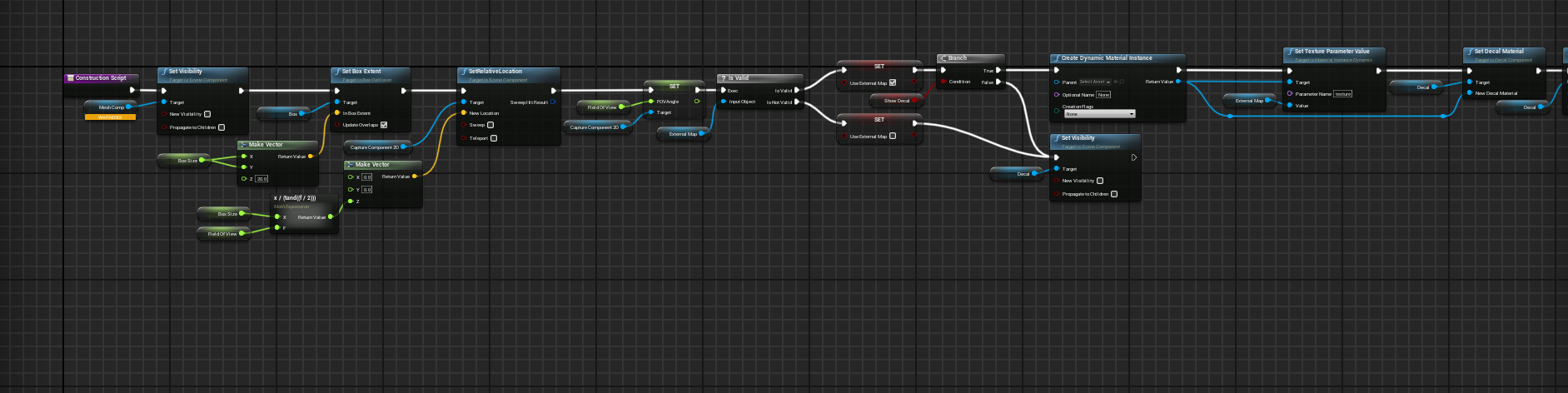
i'm trying to use this minimap but it isnt working and idk what to do with
(i'm using UI Kit) and i was wondering if it is possible to fix it better than me doing a new one form a yt vid cuz this one is great tbh

 stiff verge
is there a way to stop the editor from rendering the scene when it's not in focus?
 fresh plover
should be
dawn gull
Is there a way to split a float into 3 separate floats evenly split?
plush yew
why is my timeline lerp faster then 3 seconds
even tho its 3 seconds

like
the tree already fell right
so youd think the timeline lerp is done?

its just 0 to 1
 gleaming creek
Most likely because you are putting the current position back into the 'A'
You need to save the original position to a variable and use that to lerp between
(Also why are is there wiring looping around your nodes in that crazy manner?)
stiff verge
I just followed a fog tutorial. using a particle system to generate clouds.. at the end the guy says it's light and he shows his shader complexity viewmode being all green
plush yew
gotta stop hating variables
stiff verge
mine gets white right away.. any ideas?
I assume my pc is hgiher end than his
what usually makes volume particles heavy?
 dry latch
can someone help me with very simple stupid ui thing ? i'm new :p
it's just to set an ui widget to transparent inner background color
 grim ore
it depends on which widget it is on if that can be done
dry latch
im on support vc to stream it if anyone would help ^^
oh can't stream
basically it resets the alpha value to 1 instead of 0 when compiling
i'll do a gif
 grim ore
if you change just the outer background alpha to 0 in the details panel, not in the color picker just click on the A and set it to 0 and compile what happens.
 slim hornet
Something weird is happening, even after adding a c++ class successfully, I cannot see it in my editor. "Show C++ classes" is checked. Also restarted my editor a few times, no dice. I can see the visual studio solution file in the project directory. I can open it and build the project in Visual Studio. But the editor still does not acknowledge that the project is code project. Any code changes (adding functions to C++ BP function library) are not reflected either. I am using binary 4.26, can anyone help?
grim ore
so you added a c++ class, it compiled, reloaded the module and nothing?
plush yew
when I use array: clear, does it remove all items and all indices, returning my array to a null array? or does it simply remove all items but keep the indices, so that I have an array with multiple null entries?
plush yew
plush yew
when I use array: clear, does it remove all items and all indices, returning my ...
I'm not sure, but I'd guess it maintains its length but nulls all entries.

 grim ore
if that was too much work, then testing a real project is going to be impossible
plush yew
yeah was only joking i just watched your video on it and got an answer. ty
The Clear node will wipe out all data within a connected array, resetting the array and removing all indices within.
Nodes designed to aid in working with Blueprint arrays.
I guessed wrong 💀
plush yew
nvm
found the answe
How would one go about

Closing the start menu that is being casted via phgameinstance
I'm thinking a variable with the widget as the newly made variable >3>
 rigid belfry
do you guys use "IsAlive" or "IsDead"?
had a little...discussion with a friend of mine
plush yew
Do you mean philosophically, or practically?
Cause, practically, I try to avoid that approach altogether, and use finite states
how would you guys go about changing walking animations all together based on states? I want my guy to use a different walking animation if hes carrying something, or hes injured
Hehe, am I nerd sniping?
i feel state machines might be to cluttered cause im planning to add a couple of different walking styles
 leaden garnet
probably are 
plush yew
So far nearly good but I'm trying to use the remove from parent to be able to close the widget on a second press of said input

But its casting from game instance
The target part is getting me
And I'm not sure how to proceed from here x.x
How would I go from here or what should I be searching to figure it out from here

are you serious?
yes unfortunately
use printscreen man no one can read that shit 😛
oh
gleaming creek
Forgot printscreen, use Graph Printer (free on Marketplace)
gleaming creek
Or one of the other Blueprint screenshotting tools (but probably not the $1,500 one!)
 gleaming creek
No. Don't take photographs of your screen.
plush yew
Its a different pc im doing unreal on
I can get discord on there i guess xD
One moment!
leaden garnet
the problem is youre trying to remove a parent inside the widget class, so it doesnr know which widget to remove
plush yew
yeah thats the confusing part for me im not sure how to remove a widget summoned from the game instance x-x;
leaden garnet
do you know the widgets name?
leaden garnet
does typing get STMenu prompt anything?
plush yew
cast to STmenu appears
if i right click on the blueprint page and type it
should i be casting to that instead of the gameinstance first?
leaden garnet
yeah, you need to get a reference to that widget first, then plug it into the Target Node
rigid belfry
plush yew
ah
when you first create the widget, off the return output create a widget ref variable
plush yew
huh
wait
so dont mess with the current code
create a widget ref instead?
or after casting to STmenu instead?
dawn gull
How do I merge multiple strings into 1?

 stuck swan
what can be the cause for animation blueprint events not being called. It worked on one version and on the next it doesn't but there are no significant changes visible in source control
stuck swan
you could create an Animation Blueprint with a state machine switching animations based on some condition
 prime willow
This is what i currently got

is there a term or something i could search to figure out closing widgets inv particular
plush yew
What exactly is this error trying to tell me?
https://i.imgur.com/brsdyZ0.png
 prime willow
i wouldnt want to keep needing assistance when this occurs again
stuck swan
plush yew
What exactly is this error trying to tell me?
https://i.imgur.com/brsdyZ0.png
click on sethealth, one of the variable nodes connecting to this one is none/null
stuck swan
prime willow
is there a term or something i could search to figure out closing widgets inv pa...
you want to close a specific widget?
prime willow
yes the start menu button when pressing it again
or honestly the start menu based widget or widgets that the start menu can open
like your basic start menu most games xD
stuck swan
you have to create the widget, save the reference and show it for adding and remove the widget from it parent to remove it.
you are doing the right things. I wouldn't store the reference in game instance though
plush yew
anyone have any idea how to change walking animations based on bools?
prime willow
wait
plush yew
 prime willow
i shouldnt setup widgets in game instances?
stuck swan
the second cast btw will always fail. If you want to do it with the game instance you should store the reference to the created widget there and create a new function named RemoveIngameSTMenu and call that
 silent chasm
game instance is only one, when you start the game till finish, it is used to keep global variables that can travel through levels. usually widgets should be stored in player controller
stuck swan
prime willow
i shouldnt setup widgets in game instances?
I would add the function for adding and removing the hud to a class inheriting from HUD and use this hud class in your custom Game Mode
prime willow
so the settings And main menu can possibly stay in the game instance but i should just use the base setup i had for widgets for the start menu than

my previous setup ^
stuck swan
the gameinstance should only contain things which should be kept between levels. Mostly just data no references to other objects.
prime willow
so the main menu widget to start the game and settings for that should be stored elsewhere
not in the game instance as its not som,ething kept for all levels or gameplay stuff
stuck swan
prime willow
after the create widget store the result in a property and use that property in the RemoveFromParent node
prime willow
property as in variables?
stuck swan
yes
prime willow
so remake my widget codes esstionally?
silent chasm
after you create widget you can store it in variable from context menu
prime willow
yes yes i did that to the gameinstance
stuck swan
 plush yew
stuck swan
click on sethealth, one of the variable nodes connecting to this one is none/nul...
plush yew
stuck swan
click on sethealth, one of the variable nodes connecting to this one is none/nul...
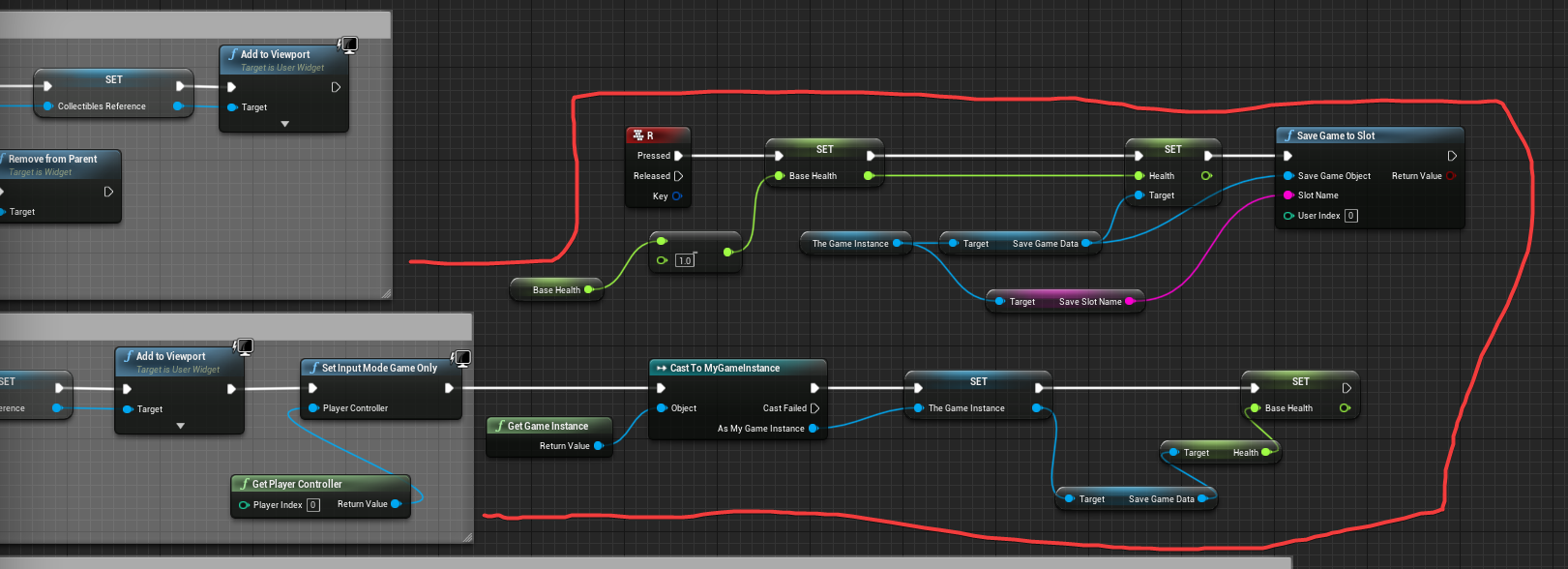
Sorry for the late response fighting with my PC post power-outage and trying to troubleshoot this save game issue at the same time lol.
So, the variable connecting to it should actually have a number attached to it?
stuck swan
send a picture of the nodes
stuck swan
prime willow
yes yes i did that to the gameinstance
you can place it in a player controller, there you have access to input events by default
silent chasm
you need smth like this
 plush yew
 prime willow
thats how i set it up the first time o.o
silent chasm
i forgot to connect add to viewport target 😄 but you get the idea
prime willow
ooo
so many ways to do it x3
so if player controller is based on gameplay controller inputs
storing start menu stuff should be set up there
main menu in the blueprint for main menu i would assume
and leave game instance for stuff that might travel to different levels or dungeons
okie i think i get it ill go work through this ❤️
stuck swan
plush yew
https://i.imgur.com/9XHAHMr.png
set a break point at set health and look if thegameinstance or savegamedata is null
fresh plover
andrei u romanian?
silent chasm
fresh plover
andrei u romanian?
yes 🙂
 onyx folio
I am following the 2015 series by unreal engine about building a 3rd person game. The Punching Montage part doesn't seem to be working. If anyone see's anything wrong I would appreciate the help.


 stuck swan
should setspeed be unconnected from the cast?
 onyx folio
ooo thank you
hmm I guess I was missing that but it unfortunately didn't fix the issue where I can't punch
wanton lotus
onyx folio
ooo thank you
Do you have an animation state in your animation blueprint that relies on the "is punching" boolean?
onyx folio
wanton lotus
Do you have an animation state in your animation blueprint that relies on the "i...
Is this it?
 wanton lotus
You should honestly call your "Punch" event with your input action event.
wanton lotus
onyx folio
Is this it?
That is for the montage, you mean slot node, right?
onyx folio
sorry I just started learning this like 4 days ago, my head is exploding trying to understand...
dawn gull
I try putting "111222333" as a float but it automatically gets switched to "111222336", why?
onyx folio
wanton lotus
You should honestly call your "Punch" event with your input action event.
How would I call Punch?
wanton lotus
Input Action > Set Is Punching > Call Punch event
Use the other play montage node
It will let you handle notifies outside the animation blueprint.
rigid belfry
onyx folio
How would I call Punch?
are you following a tutorial?
onyx folio
rigid belfry
are you following a tutorial?
yeah I am. but after 2 hours of setting the punch thing up it doesn't work. I went back through the videos and I couldn't find my error so I asked here
rigid belfry
some times you miss out of stuff while watching long tutorial vids
its completely fine
onyx folio
yeah
rigid belfry
i think at that point just step back, take a pause. your brain needs time to process new information
dont know about you, but its currently 1 am where i live
wanton lotus
There are 2 ways to handle it, you use states in your state machine or you use montages, the tutorial you are following seems to combine both for some reason. You shouldn't have to work inside both your animBP and your character BP for this. One or the other.
onyx folio
yeah it was yesterday when I ran into the issue so I stopped for the day
rigid belfry
oh i see
onyx folio
Thanks slashin8r I will try to fix that
rigid belfry
while i don't have the exact answer to your solution, i recently watched a very good video that explains how animation montages work
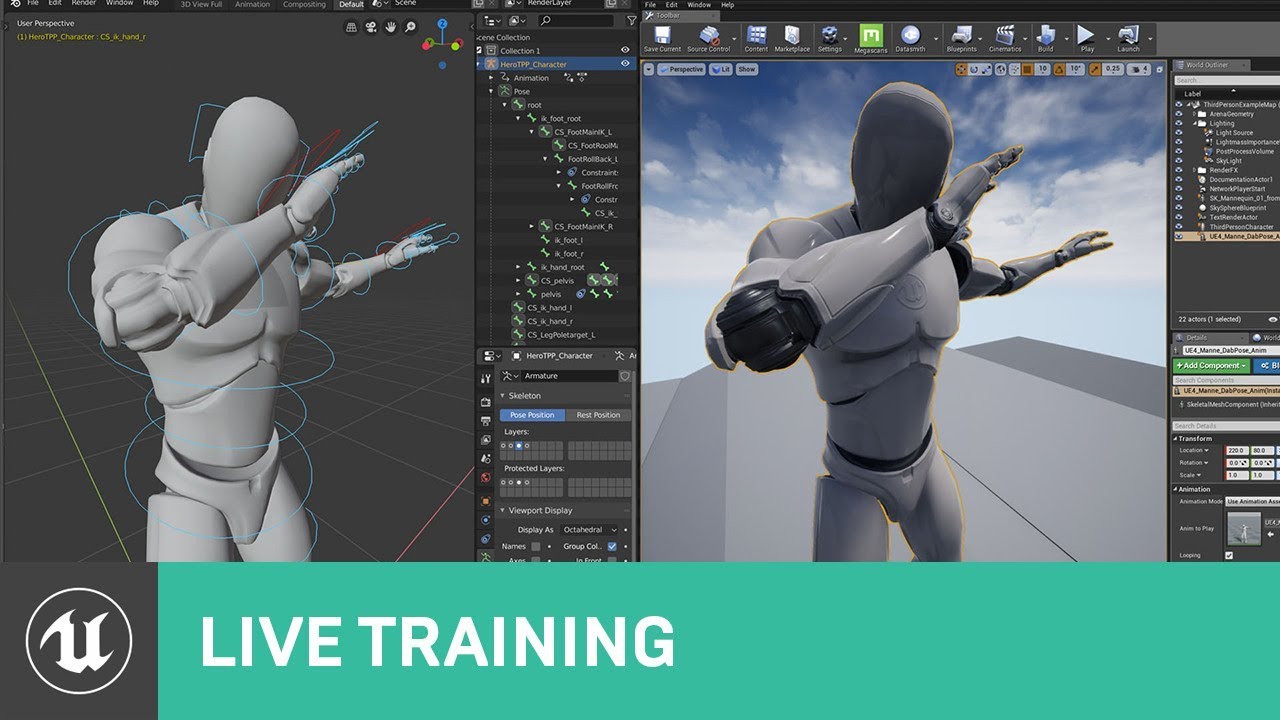
Creator of Cine Tracer Matt Workman, will join us on the next livestream to demonstrate his Blender to Unreal Engine workflow. As an artist familiar with traditional DCC tools, Matt will talk about his shift to Blender as well as tips and tricks he has learned in the process.
ANNOUNCEMENT
https://forums.unrealengine.com/unreal-engine/events/167...
onyx folio
ok
rigid belfry
its not exactly what you need, but the guy(he's amazing btw) sets up a custom animation in the anim montage
onyx folio
wanton lotus
Use the other play montage node
There is only one play montage node.?
rigid belfry
so he "dabs" or "punches" in your case, and the animation plays
wanton lotus
This node gives so much more flexibility when handling montages, especially ones for attacks.
 onyx folio
rigid belfry
its not exactly what you need, but the guy(he's amazing btw) sets up a custom an...
onyx folio
rigid belfry
its not exactly what you need, but the guy(he's amazing btw) sets up a custom an...
I will check it out. I am watching the 2015 tutorial from them
onyx folio
wanton lotus
This node gives so much more flexibility when handling montages, especially ones...
Ok
wanton lotus
Starting section will be your best friend with combo moves.
onyx folio
thanks for your help
 orchid haven
hey hey unreal slackers
rigid belfry
i've got a question. if i have surface snapping turned on, why on earth do my meshes not snap on the ground, but geometry brushes do?

 warped bay
Hey guys! I've baked some lighting for this house I'm working on, and all the walls (suppose to be white-ish) are now pink/purple. Any idea why or how to fix? I've turned my lights to 0 Indirect Lighting Saturation with no luck.
 rigid belfry
subsurface scattering?
grim ore
@rigid belfry the pivot point is what it uses to determine the snapping point for snapping, and the pivot on your static mesh cube is the middle. geometry brushes are special and dont really have a defined pivot as they are BSP
rigid belfry
grim ore
<@!386223315146244097> the pivot point is what it uses to determine the snapping...
i see. is there a way to have pivots on edges instead of in the middle?
grim ore
if you design the mesh like that yes
you can also temporarily set it by right clicking it on the spot you want it and going down to pivot
it does seem to go wonky when using surface snapping tho lol
rigid belfry
grim ore
if you design the mesh like that yes
what do you mean by that
grim ore
every mesh has a pivot/origin point. If you want it on the edge, you create it like that (externally or using the modeling toolset in the engine)
otherwise edit it in the engine to adjust the pivot permanently or temporarily
rigid belfry
i used the brush editing tool to create these assets. can i change the pivot now that i've created the static meshes or is it too late?
grim ore
use the modeling toolkit in the engine (plugin) or set it temporarily by right clicking the mesh in the viewport and going down to pivot
grim ore
for being part of the engine yep, and they are working on it every release trying to make it more robust
plush yew
I have a weird hypothetical question
I don't really want a how to just curious on the possibility
If I have a morph target set up on a skeleton mesh
Is it possible to cause an event if said number on the morph target exceeds the 0.0 to let's say 0.75 ratio
grim ore
well how would the morph target change?
plush yew
The morph target would be attached to something like character creation
Like for example
grim ore
so something would change it?
plush yew
Yes
grim ore
so something could call the event if it was over your ratio?
plush yew
The creator system during character creation
Oh
I see where you're going with this
Yes
Pretty much
grim ore
I assume its not magically going to change, something has to set it 🙂
rigid belfry
is there a way to fix this UVs problem? i am not too familiar with this kinda stuff
 plush yew
Yes yes
Like I wanna setup something like this for the giggles and i kind of feel its possible
 grim ore
@rigid belfry #graphics might have a good solution, but yes you could export it and fix it in your DCC program or those modeling tools "support uv layouts" but I have never used them and have no graphics skills lol
plush yew
It'd be an adorable way to throw a joke for people who max slide breast or such xD
grim ore
yep when slider > number do event
plush yew
;DDDDD
I knew it would be simple
Damn i love this engine so much
The things you can do with it ;3;
grim ore
your in the honeymoon phase. give it some time and you will fall out of love. then some more time and you will fall back in love. then you will just be roomates. then after spending enough time together you will fall back in love.
plush yew
Yes yes
I wanna make such silly dumb.games that explore the possibilities I've never seen before but noticed hints towards it
And everytime it seems something as simple as a when this do that
Or state machine when this
Like ;O; its amazing
Okie back to work for me!
Thanskies mathewwww <3
prime willow
That's crazy 2 hours of silence
i've never seen that before in here
i hope thats because weve become so smort in unreal stuff :3
 gaunt abyss
 plush yew

 coral patio
Hey guys! I'm trying to take a high res screenshot with double resolution. However, if I look at the pictures their actual resolution isn't better - I just got more pixels but when zooming in I got the same aliasing etc. as in lower resolutions. Even when going up to 3x resolution nothing changes, really. Is that just how it works or am I doing something wrong?
grim ore
well heres the same parts across the same screen one at 1x and one at 5x

yes if you zoom in far enough you will eventually get to the pixels, i mean its an image its made up of pixels
but same screenshot at different resolutions gives the higher resolution one more details on the "screen"
 potent reef
Hi.. so i tried live link face with iphone to unreal metahuman. The problem is, the mouth is not perfectly closed, Even my mouth was closed in real action. Which settings did i need to change? I tried look on animbp didnt find any.

 dull bolt
So i have a static mesh in ue4
But the player falls through it
Is there a way to generate collision from the mesh itself?
grim ore
@potent reef I know in previous versions of this there was an "offset" that you could use by calibrating it at runtime (the previous version of this using live link had the button on the blueprint in the details panel)
@dull bolt open the static mesh from the content browser (double click on it / right click -> open) then you have collision options at the top to create collision shapes
dull bolt
This is confusing lol
 zealous socket
Can anyone tell me why my array is not updating with the value I'm giving it even though I'm getting a reference to the array? (Specifically my Stage 1 welding point hits array)

 outer cosmos
started learning unreal engine, currently doing light and found out about gpu light bake but i am not liking the result it looks so fake, am i doing something wrong, is there a place here i can learn gpu lightbake process.
 outer cosmos
started learning unreal engine, currently doing light and found out about gpu li...
outer cosmos
outer cosmos
started learning unreal engine, currently doing light and found out about gpu li...
also any hdri i use is making my light pink
potent reef
grim ore
<@!708105875478282281> I know in previous versions of this there was an "offset"...
Thanks will try look it out! 👍
grim ore
@potent reef I just checked it out because why not and the meta humans doesnt have that ability, but I copied it over from the face ar sample (i mentioned before) and got it to work. Its just basically snapshotting the current offsets and applying them to the base curves in the anim bp at runtime.
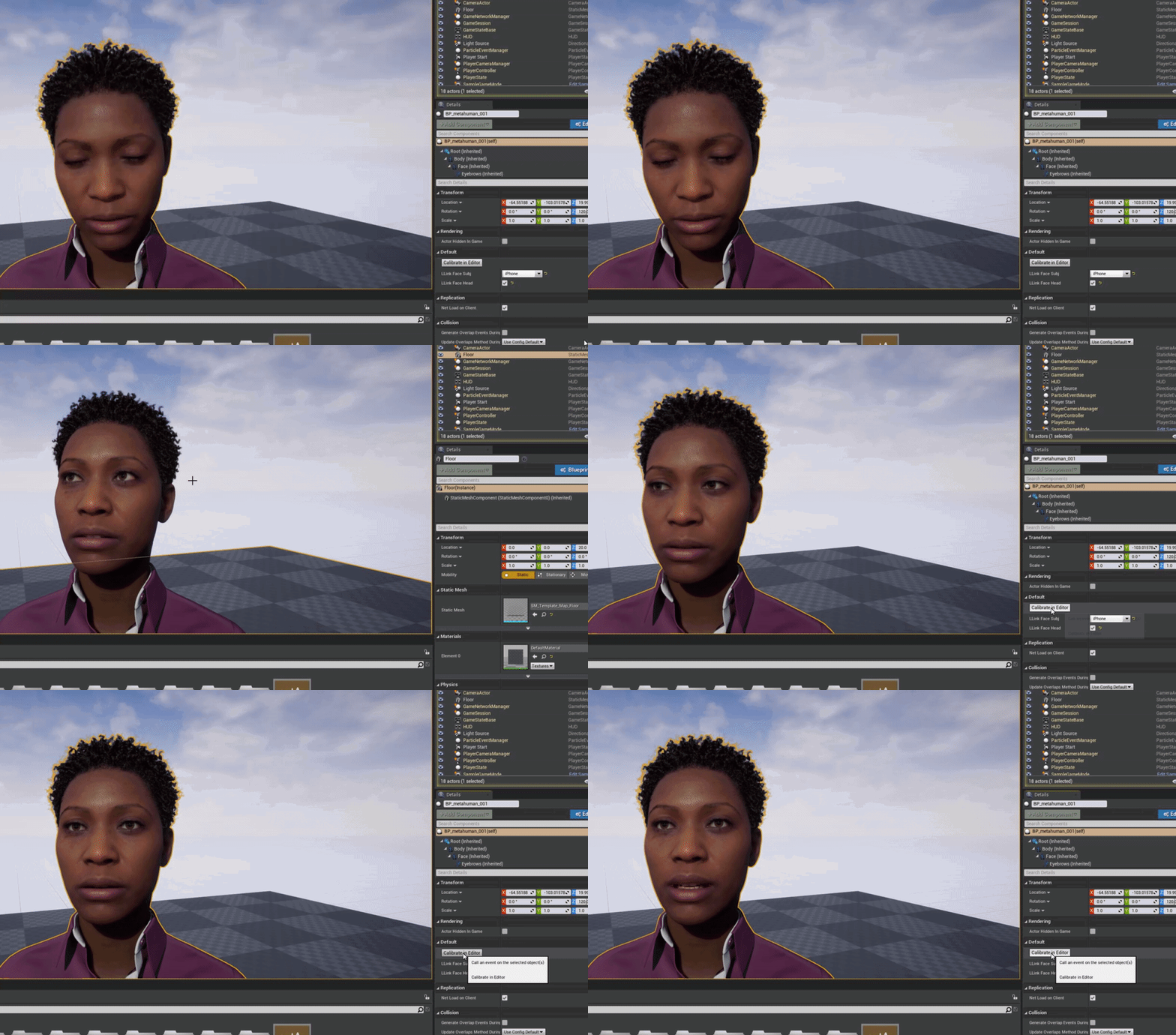
biggest thing I found was the calibration section in the anim bp, where it modifies the curve, goes BEFORE the remapping to pose rig (the mh_arkit_mapping_pose) so similar to this
 potent reef
grim ore
<@!708105875478282281> I just checked it out because why not and the meta humans...
potent reef
grim ore
<@!708105875478282281> I just checked it out because why not and the meta humans...
Got it! Thank you so much! That’s make sense now! 🙏🏼
grim ore
it took me foreeeeever to get that figured out in the original one lol, I was doing it by hand before I figured it out
potent reef
grim ore
it took me foreeeeever to get that figured out in the original one lol, I was do...
I figure why unreal not doing that in the first place 😅
grim ore
yep its weird its missing from this rig but epic is also smart so maybe its not and we cant find it lol
on the neato front I didnt realize you could drive more than one character at a time with live link (makes sense you can) so you can drive both examples at once lol
potent reef
grim ore
yep its weird its missing from this rig *but* epic is also smart so maybe its no...
Maybe someone has answer for this without copying from ar sample 😏
 calm pollen
how would a make an animation bp transition so that when the player moves from 0 on the y axis to 520 or -520, an animation plays
calm pollen
grim ore
0 to 520 As in what are those numbers?
like the location of the player, sorry
its an endless runner, so by swiping left, the player moves -520 and right is +520
grim ore
You can use a a layered blend inside the anim bp and then feed in a mapped range to the anim bp based on the players location. For example if the location of the player is -520 it feeds in 0 to the layered blend in the anim bp which then plays animation 1. If it’s 520 it feeds in 0 and plays animation 2
You could also use a blend space since it sounds like there are 3 animations and feed the actual location to the blend space in the anim bp and it will play
Similar to the way it gets the player speed and drives an idle to walk to run set of animations.
calm pollen
grim ore
You could also use a blend space since it sounds like there are 3 animations and...
i tried something just like that, for some reason its not reading the character's location though, i can send a screenshot of my code, i honestly dont know what the issue is
grim ore
If you look at the third person anim bp it’s the same basics as the is falling check
You can post someone might see the issue.
calm pollen
alright, heres the blend space code, in here it has the little hop animation is plays when going to left/right, with a sped up version for the speed

im just not sure what exactly i would do in the event graph to make the "direction" variable actually check the character's location
grim ore
In the event graph you get the player and it’s location and pull out the value you want and set it
Look at how it gets the current is falling value from the character for example
 uncut vigil
I want to store dialogue in a struct with 3 members, like paragraph - query - voiceover. Then I guess an array with IDs linking up a whole dialogue from these structs. Is that how it should be done?
calm pollen
the "is falling" is just one of the green functions dragged out from the "character movement," I dont see anything similar to that for the location if that makes sense
all i can see is a "get actor location" but the return value is a vector
grim ore
World location? Actor location? From the pawn owner node not the character movement
Yes vector Which is the location which is the XYZ so just split it and get the XY or Z that you are looking for
calm pollen
im so dumb 😆
i forgot about splitting it thanks so much lmao
it works now, appreciate you bro have a good night
grim ore
Yay
 runic narwhal
Does anyone else experience some pretty noticeable hitching in the full screen "immersive" editor mode?
It's not terrible, but it's definitely there.
Every couple seconds.
plush yew
Is it possible to access the material instance in BPs? (I want to change a parameter in my material like I do for example with a light component where I can change intensity ecc....)
 covert ivy
Hey ! I was on Youtube looking this video : https://gyazo.com/559a3c80b11b1b8bd9260b1351184835

I'm a big fan of this kind of animation ! Typically, this is used as finishing moves into fights. But I was wondering if it is possible to do a entire fighting system with only animations like this ??? 🤔
plush yew
Everything is possible but it would be really hard and take a lot of time
 turbid plover
Falco you can create and save the dynamic material instance as a ref. Then you can access and modify it anytime.
I usually do it in construction script.
You don’t have to though, I just generally use them on construction anyway 🙂
covert ivy
@turbid plover He is @plush yew , not Falco ^^
turbid plover
Ugh sorry hehe
covert ivy
plush yew
Everything is possible but it would be really hard and take a lot of time
No doubt it would take a lot of time, haha ! But time is not a big problem. My concern would be more about the performance. Actually, I have some ideas of how to do it but the thing is I would probably need many animations. I mean, I would probably need several variations depending on the scale of the characters fighting each others for example (or maybe is there a way to having only one animations and using curves or something which could tweak/adjust some animations, in order to reduce the number of animations) ... Depending of the size of swords or melee weapons also, if I add some weapons in the fighting system. And I was wondering how much it would impact the performance (RAM especially I presume ?) having a very high amount of animations, like, I don't know, 100 or 200 short animations (lets say between 0.1s and 2s) just for one character ? And maybe far more if there is many weapons...
 lucid grove
Heya
Can someone suggest me what is the name of the direction in game development, which is tied to the placement of objects in the scene, without creating 3d models specifically. I tried to search for 3d environment artist courses, but almost all of them are related to the creation of 3d models, but not the placement and composition.
If you recommend courses (both paid or free), I will be very grateful.
uncut vigil
level design? blocking out levels?
Blocktober quick start guide to level design and game environment blockouts for October.
lucid grove
Those more about level mechanics and gaming concept, im looking for something more related to the art. Like art composition or something.
uncut vigil
then perhaps you can find something useful here? https://www.youtube.com/c/MarkBrownGMT/search?query=level

YouTube
Game Maker's Toolkit is a deep dive into game design, level design, and game production, hosted by Mark Brown.
Feel free to email me on the "business enquires" email below, but please note that I DO NOT DO SPONSORED VIDEOS of any kind.
lucid grove
uncut vigil
then perhaps you can find something useful here? https://www.youtube.com/c/MarkB...
Thanks for your effort, but i have already seen most of those videos 🙂 They are great about game concepts, but not environment art and composition itself.
uncut vigil
artstation learning?
 rancid lynx
Is it possible to get the Index of an overlapped static mesh component with begin overlap events? I know how to do it with a LineTrace and a BREAK, but when i try with overlap collisions all results return -1

I made an actor who converts static meshes to instances, i want to convert instances back to static meshes later. but im having trouble getting the index number from the array, technically i could run a line trace between the two objects that collided and break that, but that doesnt sound effecient or bulletproof. actually quite half assed
what the hell is "Other body index" even for, if not... index info X_x
rancid lynx
guess ill just macro a bullethole linetrace X_x
 winter gale

Quick #UE4 Tip number 109. https://t.co/Ug0U4SP6OL
#unrealtips #unrealdev #indiegamedev #gamedev #indiedev #screenshotsaturday #UnrealEngine

 Twitter
·
Twitter
·
 stuck linden
Hi, I'm looking into Unreal Engine and I'm wondering if it's possible to have fine control over draw calls? E.g. would it be possible to draw into a stencil buffer with specific stencil flags, then submit a draw call to render some shape, then clear the stencil buffer, ..etc? Or is this very uncommon?
 broken heath
covert ivy
I'm a big fan of this kind of animation ! Typically, this is used as finishing m...
broken heath
covert ivy
I'm a big fan of this kind of animation ! Typically, this is used as finishing m...
Wheres this from
Is it a market place asset
 lusty carbon
Migrated level to a new project loses light bake data (it's all black). Any ideas?
waxen crypt
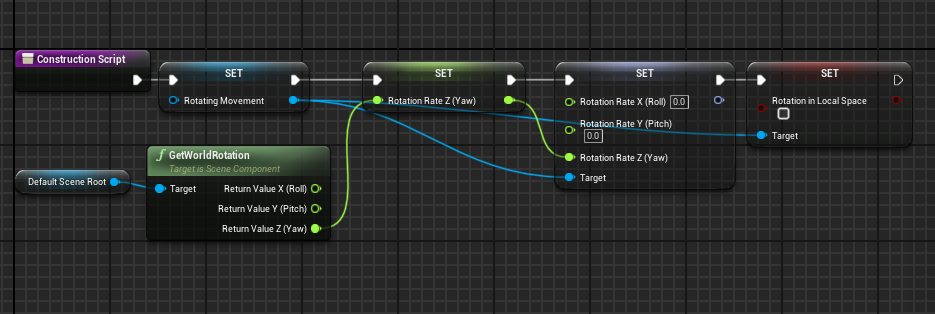
Hi guys can someone explain to me what's wrong with this
i can't seem to understand what am i doing wrong
what im trying to do it expose the rotation rate to make it easier to change form editor so as not to go back and forth
https://prnt.sc/104mcav
https://prnt.sc/104mczo
(ping me if someone knows a solution pls)


 inner cloak
is it possible to just change the skin/mesh of a character for a different look ... like switching from male to female ?
and can that be done at runtime ?
 dire coral
can i use the source build 4.26 for making a test server on 4.26.1
 autumn flame
waxen crypt
Hi guys can someone explain to me what's wrong with this
i can't seem to unders...
autumn flame
waxen crypt
Hi guys can someone explain to me what's wrong with this
i can't seem to unders...
You're Setting "Rotating Movement" to nothing
So reference pin of course fails
 ebon snow
Is there a way to draw solid lines in Unreal?
Or should I just use a mesh and a custom shader?
 vivid stratus
where would I read the physics code of the engine?
 late loom
can any1 tell me how to attach a skeletal mesh to another skeletal mesh ?? so that one moves other follows as ragdoll
 wary wave
ebon snow
Is there a way to draw solid lines in Unreal?
wary wave
ebon snow
Is there a way to draw solid lines in Unreal?
particles are the most common-sense approach depending on your visual requirements
ebon snow
wary wave
particles are the most common-sense approach depending on your visual requiremen...
Ah thanks, just for context, I'm trying to draw object bounds and lines between objects (for an in-game tool). Particles still make sense for that?
rigid belfry
how do i fix my UVs?
 wary wave
ebon snow
Ah thanks, just for context, I'm trying to draw object bounds and lines between ...
wary wave
ebon snow
Ah thanks, just for context, I'm trying to draw object bounds and lines between ...
if it's in game, then it might, though for something like bounds you could use either mesh geometry or something screen-space
ebon snow
Great, will give it a shot, thanks!
waxen crypt
autumn flame
You're Setting "Rotating Movement" to nothing
So reference pin of course fails
thx but i alrdy tried and it seems it doesnt work but doesnt show an error tho...
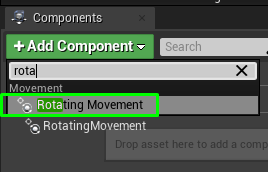
https://prnt.sc/104p8ze (is this the correct way?) im basically trying to rotate this mesh (rotating movement not one time rotation tho)
 ancient tangle
I am trying to import fbx with textures from a web server, but I can't find a way to get the textures correctly imported and applied to the new static mesh.
Any idea on how can I do that?
autumn flame
waxen crypt
thx but i alrdy tried and it seems it doesnt work but doesnt show an error tho.....

Or you plug something in there, or expose it and set it in the level
Not sure what Rotating Movement is too
 worldly rose
I have renamed a plugin and looking at https://answers.unrealengine.com/questions/355744/view.html I see the recommendation to do Resave All Assets after adding CoreRedirects. Will this resave ALL assets, including textures and such that don't have this kind of references? If so, is there a way to resave only those assets that are affected by the new CoreRedirects? Will Fixup Redirectors do just that?
 static raft
Hey, I'm getting low fps in separate window PIE but not in the editor window even when the editor window is fullscreen, I have a steady 120 fps however in the separate window I get 72 max, regardless of size.
 shut stump
Hello, does anyone know of any plugin or way to import a driver into UE4 ? Like I have a windows x64 DLL which interfaces with a USB device, I probably assume I don't need to recreate the whole driver, but I would probably need to create an UE4 plugin to bring those functions into the UE4 editor I hope, I hope I won't need to manually modify the engine source, that's a bit beyond my skills and time.
worldly rose
shut stump
Hello, does anyone know of any plugin or way to import a driver into UE4 ? Like ...
Is it a proper driver that is installed to the OS or "just" a library that any application can link to?
autumn flame
waxen crypt
https://prnt.sc/104ppc4
If it's a component you already have a reference of it, just use Get instead of Set
 sacred vapor
Can someone share me good Unreal tutorials which are more focused towards C++ and not blueprints? I am a beginner and wanna learn C++ along with Unreal
waxen crypt
autumn flame
If it's a component you already have a reference of it, just use Get instead of ...
It came with engine
And that's what I did first but didn't work
autumn flame
waxen crypt
It came with engine
And that's what I did first but didn't work

Dis works
 azure reef
Hello guys! I have some questions about instance actors for reducing draw calls, if you can light me up a bit.
So for example I have 10 decals and I've merged all the decals into 1 single actor using the instance merge tool.
1.So after I've merged, the other decals are now set to not visible. If I want to move a decal, I have to delete the instance actor and merge again?
2.I use often show/hide actors and sometimes I hit ctrl+h to show all actors so my instanced decals are set to visible. Now I have the instance actor + 10 decals? Or the instance actor is replacing the decals even if are visible?
3. Some actors are not merged. If I have 10 meshes, sometimes it will instance only 8 meshes. Why is that?
- Should I use instance merge only to the meshes who shares the same material?
 chrome hedge
sacred vapor
Can someone share me good Unreal tutorials which are more focused towards C++ an...
chrome hedge
sacred vapor
Can someone share me good Unreal tutorials which are more focused towards C++ an...
Check out the one from Tom Looman on Udemy, there are some free/paid on youtube too, I think from devenabled and so on
but honestly, if you already know C++, just get started, that's what I did, and when I didn't know something I googled it
chrome hedge
sacred vapor
Can someone share me good Unreal tutorials which are more focused towards C++ an...
to add more from youtube, so devenabled, codelikeme, ryan laley I think 2 of those have paid C++ courses too in UE, I have the ryan one that I half finished because I already had the C++ experience and just wanted a quick 'how to get started'. Tom looman (udemy) is a highly recommended one from a lot of people, I'm following it in my free time sometimes to get a better grasp of networking
shut stump
@worldly rose It's not a sys driver yeah, it's more of a library, so that applications can link to it and use.
worldly rose
shut stump
<@!433323065393414144> It's not a sys driver yeah, it's more of a library, so th...
Then have a look at https://docs.unrealengine.com/en-US/ProductionPipelines/BuildTools/UnrealBuildTool/ThirdPartyLibraries/index.html
Integrating third-party libraries into Unreal Engine
orchid haven
off the top of everyone's heads, does anyone know why an actor's animation mode / animation asset would consistently reset on save?
i cannot export something out of sequencer because it must save before rendering. every time the project saves, the animation asset is reset from my baked animation to "none"
plush yew
Might anyone have an idea what is going on here? Retargeted some animations, which seem to work in the BP, but I can't seem to access them from sequencer. Here's a video https://vimeo.com/515725844

This is "2021-02-23_12-28-23" by Brice De Venice on Vimeo, the home for high quality videos and the people who love them.
 buoyant mesa
is there a way to disable this viewport camera rotate feature when you hold alt and duplicate items it sometimes flips the viewport its super annoying
 bleak widget
hi guys! does anybody done some cheap dynamic impact shoreline in ocean shader ?🤨 i am trying to do it by WaveWorks. Shoreline pipline needs a static texture to reproduce it. RenderTarget is a good idea to create dynamic shoreline which can impact win any game objects. But it need strong rework souce code. My mind is blown
bleak widget
 slate kernel
any ideas on why the buoyancy component just sinks?
slate kernel
any ideas on why the buoyancy component just sinks?
I've already seen custom buoyancy in OceanProject. And it too hard to my understanding
sacred vapor
chrome hedge
to add more from youtube, so ```devenabled, codelikeme, ryan laley``` I think 2 ...
Hey,Thanks a lot 😀
chrome hedge
np
gleaming creek
I've been having an insane amount of hassle trying to make a custom variable type that can be used in Blueprints but has some functionality other than simply storing values.
You can make a USTRUCT in C++ that can be used in BP, but you are not allowed to have any Blueprint-callable functions on a USTRUCT.
If you try to make a variable of a UOBJECT type, then it won't be instanced in BP, and you'll just get a "pick an object of this class" selector instead.
There's an Instanced flag you can set on a property field to have the the property instanced, but only in C++.
The only way I figured out how to get around this was to make a pointless wrapper struct in C++, with a single property of a UOBJECT type, and the Instanced flag on that.
But that has some problems:
- I always have to break/split the value out of the struct
- If I duplicate the struct, it just copies the pointer, so I end up with two structs containing the same UOBJECT (which is a mess)
- If I use one of these structs as a property on a widget, and try to edit the properties on the UOBJECT instance, the entire editor will crash
I suspect this is too specific for anyone to be able to suggest anything (or there may be no good solution for it), but I'll ask anyway.
Having an object as a variable type seems like such a basic thing to want to do....
rigid belfry
just testing the modeling tools plug in. is it normal for the engine to freeze when clicking this?
 shut stump
@worldly rose Thanks, tho I do not see a "Third Party Plugin" template on the New Plugin dialog in UE4 here, I just created a new blank project. Content Plugin only.
 onyx mango
This is driving me crazy: the world outliner keeps expanding EVERYTHING when clicking an actor in the scene or doing other stuff. There HAS to be a setting for this utterly stupid behaviour. It is so tiring because I have to scroll and collapse the hierarchy thousand times in a day...
covert ivy
broken heath
Is it a market place asset
Yes, it's a marketplace asset but Idon't know how it is called. I saw this in this tuto : https://www.youtube.com/watch?v=9YewzEKD-XI

In this tutorial I am going to show you how to implement combat finishers in a hand to hand combat system in unreal engine. Compared to normal kicks and punches, the finishers are usually longer animation sequences with complex movements and interactions between two characters. In order to work them properly, both character meshes should be in ...
plush yew
Can you share projects with your friends?
shut stump
So umm, what do I need to do to get Third Party Library template in UE4 for Plugins ? Do I have to use C++ project template and have source and VS2019 in order to create such plugins?
 karmic panther
@plush yew #source-control
look into svns, although those are only on local networks
if you really want to share it online, use git and git lfs, thats what i tried
plush yew
Anyone wanna make a plane simulator
 worn granite
gleaming creek
I've been having an insane amount of hassle trying to make a custom variable typ...
worn granite
gleaming creek
I've been having an insane amount of hassle trying to make a custom variable typ...
Oh dear, that should maybe be impossible via UHT
Instanced objects are super flaky, not meant to go on USTRUCTS
Poor instanced object probably got wiped out along with the transient package - as well as everything you've pointed out
grim ore
@shut stump I have 4.26.1 installed and I have it in my create new plugin options
 gleaming creek
Yeah, I just finally found a thread where someone else talked about this... annoyingly mostly links to UDN which I can't access 😠
They had other cases where instanced objects fail
Like when you duplicate the entire blueprint (eek, I hadn't even noticed that yet)
No solution either way
worn granite
@gleaming creek what I like to do for c++ structs is have a BPFL in the same file.
If you can write all your functions there and have the rest of the struct opaque, it almost feels like you aren't duplicating effort.
gleaming creek
Yeah, I saw someone suggest that as well
It seems a bit ugly because you'll get the function in the right-click menu
But it's not like there aren't tons of things in there already
worn granite
anyway
you can make your copies re-instance the object, and if you don't use Instanced you will have to spawn the object yourself manually (which is probably fine).
 worn granite
Create Object in Struct Storage - new function you add in the BPFL
gleaming creek
How would I make them re-instance it? I didn't see a way of making a copy constructor for USTRUCTs
I should probably explain what I'm trying to do here, as it's a little bit complicated
worn granite
So your copy ctor/assignment grab the class of the other and calls that function with the class
unless BP just memstomps
I think there's a way around that too
gleaming creek
What I want to do is have a variable in a BP (or a widget) which has some identifiers in it
And based on those identifiers, it loads its value
So this is basically a kind of custom configuration
worn granite
oh interesting I kinda made a similar thing not long ago
Did mine as a component so it isn't quite the same
gleaming creek
The idea behind it was that it's "just a variable", and the correct value is injected
It does work, but it has all those weird awkward edge cases I mentioned
So you set it like this:

Where "Property" is a UObject type, a different one for each param type
(Which is also a bit annoying because they all need to have e.g. GetBooleanValue, GetFloatValue, etc. functions, most of which doing nothing if they're called on the wrong type)
worn granite
okay you need to make generics because that api is bad
go look at the way the BP container support stuff works
gleaming creek
And if the value of the configuration changes, the configuration system will lookup all the appropriate objects (using the Unreal reference lookup) and inject the fresh values
Things like TArray?
gleaming creek
I wasn't sure if you could create something like that without recompiling the engine
worn granite
You can make them in your game module no problem
gleaming creek
I was looking at the built-in types like FString, but those looked like they were hard-coded into the engine/editor
(or, at least, I didn't see any annotation-type macros on them)
 fierce forge
how i can change these numbers ?
 gleaming creek
worn granite
okay you need to make generics because that api is bad
gleaming creek
worn granite
okay you need to make generics because that api is bad
Not sure how generic would work in that case because you'd have to set them on the struct somehow
and you can't add functions to structs
Unless I'm misunderstanding
Because the struct just contains an instance of the base class
So you either need to do that horrible API, or use casts each time you use (which feels even worse)
worn granite
Okay so. Back to the whole BlueprintFunctionLibrary
you'd be making that. inside is a function. that function handles wildcard out params.
when you handle wildcards you can get the expected type that particular pin has. you can do type enforcement.
in BP I guess it wouldn't be much different from a cast but it's better than specifically naming out Bool Float Vector etc
gleaming creek
Oh, I see what you're saying
grim ore
@fierce forge
 gleaming creek
Yeah, you can make it Pure if it's a library function
So you don't have the mess of exec wires
worn granite
You could combine it with ExpandEnumAsExec to have multiple output pins (Here's your variable, wrong type, not found)
or you could do that
gleaming creek
I want to minimise the overhead of using these things
I mean, the easiest way would be to just have a global function "get config float, identifiers"
But I didn't want to do that because it's potentially expensive to look them up, for example if you need the value each tick
Value changes rarely, (potentially) gets read often
Other thing I was thinking was that I could handle the instancing myself, if there was some way to hook into when a USTRUCT gets updated
A UOBJECT has PostInitProperties and PostLoad and PostEditChangeProperty - but there doesn't appear to be an equivalent for structs (They do have PostLoad, but it doesn't appear to fire)
worn granite
you could have an async task that listens for changes (that are broadcast from the store)
wait for changes to the property you want -> do the work of extraction
gleaming creek
I didn't mean from that side, I meant from the other side
I would need somewhere that I could check the values in the struct (the identifiers) and then register for those
Can't register in the struct's constructor, because it doesn't have any values yet
worn granite
true
I keep forgetting that the store is the struct and it so happens to contain a UObject
gleaming creek
If I could make the variable be the UObject directly, that would be ideal
But you can't make a Blueprint variable Instanced
Unless it's a component, like you mentioned earlier 🙂
But those have the limitation of only working on actors
worn granite
I guess DefaultToInstanced doesn't work?
gleaming creek
Sadly, no
worn granite
Figured since you can mark the native class with that, it had a shot
gleaming creek
It just always ends up like this

Pick an existing instance, but there are none and can't really be any
worn granite
anyway, this gives you an entry point for a subset of your usages. Part of using the struct from BP will involve registering?
gleaming creek
Well, right now it just does it all automatically
I just have to create a variable of the struct, in its properties set the property type and its identifiers
And it "just works"
worn granite
idk I feel like the async action + wildcard function combo is nifty
can't combine them unfortunately
gleaming creek
The way I push the updates is by looping through all the objects
    {
        UNVConfigBase* Config = *ConfigIterator;

        if (Config->PropertyFile == File && Config->PropertyCategory == Section && Config->PropertyName == Key) {
            Config->LoadValueAndBroadcast();
        }
}```hmm
gleaming creek
Nicely abusing the UE4 object reference sets it keeps for garbage collection 🙂
It'll even update the values in the editor at edit time, which is kind of cool
worn granite
It's a shame you can't intercept the user selecting the class - you could make the property be a singleton
but it's wrapped in a struct
gleaming creek
I was thinking of that, the struct could just hold a pointer to the singleton of the property
But I didn't find a good place to hook that in
I was looking at the USTRUCT API but didn't find anything
(Doesn't help that the API doc rarely has any good descriptions)
gleaming creek
It works fine with UObjets as far as I can tell
worn granite
Oh you've done this before?
gleaming creek
That's how it works now
The instanced UObject gets notified when its properties change
worn granite
....
gleaming creek
and that's how it knows to re-lookup
worn granite
Oh. So not really what I thought I was asking
gleaming creek
The only reason the system doesn't work right is because of the annoying hassle of needing it to be wrapped in a struct
I saw a mention of something else while researching this, someone talked about a factory function to construct objects, to potentially allow you to have UObject variables. But I didn't find any more information on that and so have no idea if it would be relevant to what I'm trying to do
fierce forge
grim ore
<@!380057465414221824>
i can't find any with 1 then 2 then 3 then 4 then 5 then 10 and so one
grim ore
no problem here changing it as you can see, the decimal grid sizes @fierce forge

 sharp crest
any idea how to make sky atmosphere fog thing for a planet? so like the one atm is infinite and I want one that will be just around one area
steep timber
can someone tell me where the problem is ? i want to make a inventory but 2 functions dont work


 grim ore
it tells you the error, click on it to go to the node
sharp crest
access none means whatever u r accessing in that branch is missing
steep timber
y but i dont understand it im newby and everything looks like in the tutorial
fierce forge
grim ore
no problem here changing it as you can see, the decimal grid sizes <@!3800574654...
not working, i need to change the snap size from the widgets
steep timber
ok
grim ore
@fierce forge ah thats the widget editor, I dont think you can do that
 weak cypress
how long does unreal take to compile?
grim ore
10 minutes to 3 days?
weak cypress
like normally
grim ore
normally depends on your machine, there is no normally
grim ore
its 100% cpu, what is your cpu
weak cypress
yeah its 100% on the cpu looks like i gotta wait
grim ore
i mean what is your cpu, what brand/model #
steep timber
does that mean i have to put something into "false" in the branches ?
weak cypress
i forgot lol
grim ore
@steep timber your Get Inventory Reference node is not working, its not returning anything. that is the error
weak cypress
oh its an i5 right
 weak cypress
if this thing stays at 100% for 2 hours its gonna melt
grim ore
welp it could depending on your machine, and if it melts after 2 hours of 100% cpu you should try and fix that
steep timber
grim ore
<@!349622855345897483> your Get Inventory Reference node is not working, its not...
but why its refferenced to my Inventory Widget

in "Outputs"
grim ore
thats just a variable
its not an instance of the one in your world if that is what you are trying to get
I also dont know what that node does for you
 primal oasis
does anyone know how to animate the height (Size Y) of an overlay in a widget?
i cant see it available to Track
steep timber
y i think im missing way too muhc Unreal vocabulary to understand waht u try to say ty for ur help ill ask my teacher tomorrow xD
grim ore
childrens layout is based on the parent, unless the parent has a size it can adjust for the child you wont see it @primal oasis
@steep timber is the "Get Inventory Reference" a custom node? C++ or something?
steep timber
grim ore
childrens layout is based on the parent, unless the parent has a size it can adj...
wait a moment ill figure it out xD
plush yew
Hello, im a Student from Switzerland and looking for someone to help me with how i can make Knive spawn when i overlap a Triggerbox and then letting it fall down into a specific object were it stops half way in. I just started learning UE4 so im a Noob at it 🙂
steep timber
grim ore
childrens layout is based on the parent, unless the parent has a size it can adj...
it WOOOOOOOOOOOOOOOOOKS!!!! y was custom and i accidantly checked a checkbox i shoudnt have checked ty for leading me to the answer
 ebon steeple
i just validated my projects and there are more than 2000 files without validation. as far as i can see all of them are inside the engine content directory. what can i do to fix it?
Files Checked: 2.676, Passed: 77, Failed: 1, Skipped: 0, Unable to validate: 2.598
i misread, this is the last line in the log
grim ore
if it the engine files you should be fine
ebon steeple
the cook failed which isn't fine with me
grim ore
@plush yew when you overlap a trigger box, an event would happen (probaly on overlap) in both the trigger and the thingy that overlaps it. You could have a blueprint that is the trigger box, and the mesh (with the object where it stops) and the mesh for the knife. When the trigger is triggered (the player overlaps it) you can have the knife become un hidden and then use a timeline to move it into the object over time.
what was the cook failed error?
plush yew
grim ore
<@456226577798135808> when you overlap a trigger box, an event would happen (pro...
thanks i wiill try it
ebon steeple
grim ore
what was the cook failed error?
unknown cook failure 😔
grim ore
normally the error would be in the log still above that part
something has to fail somewhere for that to happen
ebon steeple
wow i just tried again to see the error message and it just worked - thanks a lot anyway!
plush yew
@grim ore how would you switch from automatic AI to targeted AI? I got some ideas but theyr probably all bad
grim ore
what is targetted ai?
grim ore
you could have the same tree they are using with a boolean check at the top for "automatic" or "directed" and then it branches down to your code
or you could swap the behaviour tree itself
plush yew
I was thinking of doing that, swapping the behaviour tree 😛
grim ore
pretty much the first thing it should check is "am I being told to do something" and if it is it does the thing, if it has nothing its supposed to be doing it should find something to do
plush yew
ah yea
grim ore
so yep either way would work fine, it depends on how your game is set up.
plush yew
so I was going in the right direction 😄 thanks!
grim ore
@plush yew "8. No recruiting or self promotion outside the designated channels. Use the Job Board category for recruiting (see #instructions), and the Sharing category for self promotion. Recruiting and self promotion must be related to Unreal Engine unless otherwise specified."
 glacial dawn
I've have a roll implemented with a timer and an offset movement towards a vector. It works great but sometimes changes the reach of the vector, and I have to duplicate the vector value. It changes, sometimes, when I press the button Play, it seems random but there must be something I'm not seeing, somebody can help me?
potent reef
grim ore
<@!708105875478282281> I just checked it out because why not and the meta humans...
I copied offset and blueprint face ar sample to animbp metahuman. Calibrate in editor is showing but when i click, does not work.
grim ore
so what does that call in your blueprint?
prime willow
matheww i have a weird question i was told that i should store the start menu function since its based on individual players in player controller since its bound to each and every player alone
but at that point should i store player controller stuff like movement and such in player controller as well
or is it best left in thirdperson blueprints
grim ore
@prime willow the player controller is a good place to store widget stuff if its player specific if that is what you are asking?
prime willow
yes yes but also should character based actions like picking up items, or sprint and jumping be stored there as well
potent reef
grim ore
so what does that call in your blueprint?
I already got this running
 prime willow
or left with third person esepcially if ill have multiple races in my game that you can play for o-o
potent reef
potent reef
I already got this running
But it does not work. Can you tell me your step?
grim ore
pretty much if the stuff is unique to the controller it should go in the controller, and if its unique to the character being controlled put it in the character.
 uneven hemlock
What would u guys say is the best terrain generation tool for absoulutlly massive open world terrains.
grim ore
@potent reef what code do you have hooked up to that editor event in the blueprint ?
potent reef
This
potent reef
potent reef
This
@grim ore
plush yew
ah i see
grim ore
ok and whatr does that code call lol @potent reef
plush yew
so controller based functions go in controller but stuff like race speficic functions go in the character itself o-o
grim ore
im trying to make sure your actually calling the code in the anim bp
plush yew
okie ill go look into player controller in a few minutes x3
grim ore
@plush yew lets say you have a jump action, you could put that in the player controller if everything does a "jump" but say jump is skid in a car and jump on a player you could put that "jump" action in the character itself
plush yew
o.o
so controller is for generalized stuff thats just the absolute same regardless of controller setup, character, race, game mode etc
potent reef
grim ore
ok and whatr does that code call lol <@!708105875478282281>
I’m sorry but i dont understand 😅
plush yew
and for stuff like cat race lunging and demons teleporting character specific
grim ore
"probably?" its the interface between the person behind the screen and the pawn you are doing stuff with
plush yew
yeah that makes alot of sense

 grim ore
 potent reef
In animBp Event Graph?
grim ore
so button is clicked, it calls the function in the bp, that function talks to the anim bp and tells it to do the calibrate function on the anim bp. the anim bp function stores the current offsets into the struct inside of it
weak cypress
ugh compiling ue4 is painfully slow
grim ore
then that struct is applied as a curve offset every tick
first 2 screenshots are in the metahuman BP and the last screenshot is in the anim bp
grim ore
@light thunder go to the details and set it to not enabled
 potent reef
Its there
 grim ore
ok so where is your code to call that at? in the metahuman bp is it calling that?
potent reef
Ok it isnt there
grim ore
thats the missing part then? the in editor button calls the function in the metahuman bp that talk to the anim bp and calls that function in your last screenshot
grim ore
probably, i dont know what you have in that function inside your metahuman
potent reef
Im missing purple nodes like yours eh 😅

Sorry i just copied functions, macro etc from ar sample project
grim ore
yes I just copied as well, you dont have your call hooked up at the end
purple just means its a function
your call in editor function, the one that makes the button work on the blueprint, doesnt need to call a function it just needs to call that last part where it tells the anim bp to run the function inside of it (the In Editor Offsets)
potent reef
grim ore
your call in editor function, the one that makes the button work on the blueprin...
Man! I got it workingggg thanks so much 😅
grim ore
yay
 dim oyster
Hi guys Im having an issue when using cameras in my planet scene any idea whats causing this?
 potent reef
grim ore
yay
potent reef
grim ore
yay
Did you find how to mirror head rotation?
plush yew
Do I need Visual Studio for unreal engine?
unreal crashed, lost half my actors but the bp's are still there
why does this happen? lol
grim ore
@potent reef so flipping the head rotation?
 grim ore
if you mean flipping it so left is left and right is right and not backwards, look at the face ar example it does it in there you can apply the same multiply
plush yew
im 100% it saved after making these actors
grim ore
this section from the metahumans
 plush yew
theyr from 2 hours ago
grim ore
and this part from the face ar

one of those 3 on the modify is where it adjusts the rotation, I beleive its the yaw and doing something similar to this in the meta human and changing it to 180 instead of -180 will do that
rigid belfry
now what is wrong with my shadows here

 atomic crown
hi how do center the controls to the middle of the model?

 inner vine
The controls should appear at the origin of the model, it looks to me like the model was exported with a strange origin.
 kindred viper
@rigid belfry low resolution perhaps.
atomic crown
in blender the origin is in the center of the model
kindred viper
did you finalise that change in blender?
atomic crown
how do i do that
kindred viper
I forgot the shortcut 😄 Id have to open it. But when you set an origin point, often it will retain some co-ordinates and you need to "reset the transformation". Google that and you will find it
or "apply transformation"
If not, you can set the pivot point in Unreal but you wlil have to google that too 😄
@plain pagoda There are rules to advertising other servers in here
atomic crown
ah i see it was ctrl + a thanks
kindred viper
yeah I knew A was the key, couldn't remember if it was alt/shift/ctrl tho 😄
 plain pagoda
kindred viper
<@!360540279704649731> There are rules to advertising other servers in here
plain pagoda
kindred viper
<@!360540279704649731> There are rules to advertising other servers in here
Yeah sorry. I read the rules but there doesn't seem to be a specific channel where I can invite others to a ue4 community on other platform
kindred viper
Ahh good reason to break the rules then :/
dim oyster
I did the same render with two different resolutions but they come out completely different?


 true falcon
the shader is probably distance based or smh
dim oyster
do you know how to change that?
true falcon
guess you'd have to go into the shader and account for it somehow 🙂
 keen moss
Has anyone ever encountered a bug with unreal where a bunch of assets get duplicated (geo/decals) with no rhyme or reason?
and the duplicates are in the same 3d space so you cant tell they are there
 keen wadi
Hi, is it possible to stream the webcam video from the browser to a remote unreal installation with pixel streaming? Thank you!
plush yew

a bunch of actors disappeared after a crash but the bp's theyr being used in are still there giving me errors
how does this happen? they were made like 2 hours ago so im 100% it autosaved atleast 5 times lol
it makes no sense to me
grim ore
disappeared or are not working right? that says not working right
 grim ore
so the class drop down doesnt have the class as an option anymore?
prime willow
should i also put the input and flip flop closing input for opening menu's ingame in the player controller or should i leave that in third person character
👀
plush yew
yup, and its gone from my content browser too
prime willow
its the same input across the board soooo im thinking maybe lleave it in player controller
grim ore
is that input specific to the character or the person controlling the character
grim ore
then probably player controller for the input
prime willow
ah
grim ore
@plush yew does it exist on the drive? check the folder
plush yew
doesnt seem to be in the drive
grim ore
it shouldnt just disappear so thats is weird. Pull it out of your source control or check auto saves then and make sure you using the correct project I guess
grim ore
check your auto save folder then under saved
 ashen gale
Hey, what is the best practice to get started on the engine? Like what type of game?
grim ore
learn random stuff, no need to make a game
 sinful bone
Can someone explain to me what I have to feed in for the BoxMask2D? I don't understand the values except the falloff
grim ore
stuff is linked in the pinned message in this channel
plush yew
wheres that? 😛
grim ore
project folder -> saved -> auto saves
plush yew
the auto saves
ashen gale
grim ore
learn random stuff, no need to make a game
I see. But that way I'll have no direction
grim ore
if you need direction then pick a game. how about pong. there.. make pong.
ashen gale
Sure I'll see how it turn out 🙂
grim ore
make pong in full 3d with a fully 3d paddle and ball not just vertical
plush yew
its not there either, the fucking child of the actor is there tho...
how is the child there but the parent actor just vanished? lol
prime willow
you could always call child services for neglect~
plush yew
i might
broken heath
How can i downlod 4.22 version
grim ore
 grim ore
it might be grey if the engine is running some code or you are installing a new version
grim ore
its the drop down in the engine version after pressing the +. if your plus is grey see if anything is updating
what does that part of your screen look like
grim ore
click on the word 4.25.4 and change it to 4.22.3, or remove it and then your + will be usable again
broken heath
Oh thats true , worked thanks
So i wont be able to add more versions unless i install whats not installed?
grim ore
you can only install one at a time
so you need to fully install it before you can add another
 orchid glade
Hello, i'm currently using a component with like 10 HISM (but only 4 are pre-filled when spawning) inside and i'm spawning that component at least 81 times but the problem is that when that actor spawn it cause the game to freeze for ~2sec for each component (but when they are spawned i don't have performance issue). What can i do about this ?
plush yew
 broken heath
Oh Makes sense, i will install 4.22 to make my unreal market place asset in older versions from current (4.26), They said i can’t open files from newer to older , so if i click migrate to an older project it wont work?
plush yew
all my anim montages are like this...
grim ore
you cant move 4.26 to 4.22, you can move from 4.22 to 4.26
broken heath
So migration would simply not work
Alright i will start over with 4.22 then increase the versions till 4.26 thanks
grim ore
you can probably go from .22 to .26
broken heath
Or should i start with 4.20 for more customers 🤔
Im not sure why would any body keep older versions and not update
grim ore
when starting a professional project you usually lock down your version during development so it could be a few versions behind
but going back more than a year is probably not super important
broken heath
Lock down ? How
If i use start over with 4.20 , do i have do it for 4.21 , 4,22 etc or
Since i did 4.20 i don’t have to do it for between 4.20 and 4.26
grim ore
what is this about?
grim ore
what are you making?
broken heath
Publishing asset to market place
grim ore
yes , what are you making
broken heath
A blueprint
grim ore
ok so if its a blueprint it would need to be packaged in each version you support
broken heath
Oh
grim ore
so yes if you want to support .20 and up you need to open and package it for the marketplace in each version
broken heath
Ahh
grim ore
more than likely you would only want to support the current version and maybe back 2 versions if releasing new content
but who knows, the type of blueprint and the audience and if you want to support it is a factor
broken heath
I work on windows how would i know supported platforms? I can test mobile from mobile previews but
Linus mac os etc
grim ore
you would have to test it, thats part of the marketplace documentation
broken heath
How do they say my thing works on all of these
 frozen pond
hi guys, i'm struggling with retargeting skeleton to skeleton and my prolem is that nothing happens, i can pick skeletons but after i press retarget it just closes without errors
grim ore
yep just confirmed its up to you. You choose to support it, you support it. your responsible to fix it if broken later and refunds and reviews
frozen pond
one thing i notices that skeleton look to big?

 autumn elbow
 prime willow
@grim ore https://gyazo.com/ea86c6142fa1d23d02eb510b90adf2bf I noticed when i leave the main menu settings it wont load the main menu widget and this is what i get in the message logs
 grim ore
have to walk thru that error, your reference to the game instance is bad when calling that node
plush yew
Hello guys I have little problem with my save system
prime willow
well its in the game instance

 prime willow
but i want to move the main menu out of the game instance lol

 prime willow
so i might have to rewrite the code entirely
grim ore
sounds like it, you can still keep some of the code in the instance if you want. nothing wrong with generic UI in the game mode or instance (like settings) if its easier to keep it in one spot
prime willow
well i dont mind the main menu screen and settings for the main menu being in the game instance if it wont be an issue
but im thinking maybe loading it to the main menu level blueprint might be ideal since its legitmately for the main menu before playing the game xD

this is what it looks like
grim ore
ah yeah if its specific to one level then put it in that level somewhere, even a custom game mode in that level only (since you probably dont want a default pawn for example) is ok
prime willow
ah so it would be wiser to do it that way
okie will do
this is pretty much how it happens
from main menu to game works but from main menu to settings explodes
might have something to do with the remove all widgets node in the settings button xD
grim ore
you keep saying problem, what is the problem.
plush yew
I want when I collect the coins to be saved
and then to have them in other widget
like I collect 2 coins and I die
and then in upgrades I want to see 2 coins
I did the highest value system and it works, like it saves the highest value
 safe rose
@plush yew So, you have like at least 4 completely different things going on in "Death Function"
Separate it out like this first into its own separate functions:
Save Game
Load Game
Calculate Score
Death Function (I guess it's just really simulating physics/ragdolling, disabling movement)
Wherever you are calling DeathFunction (hopefully the start is somewhere in a GameMode class), then:
OnGameOver->CalculateScore->SaveGame
And whenever the game opens/or player clicks "Load Game" :
OnGameStart/GameLoad->LoadGame->OpenLevel->UpdateWidgetsWithProperScore (or whatever you're trying to save and show again later)
Once you do something like this, it may (should), make it easier to understand what's going on and what you're doing wrong.
prime willow
I setup the main menu properly so im assuming just using a launch custom event would be fine after if valid but would leaving the if not valid empty be ok or would it be wiser to make it loop back to launch game or close the game if main menu is for some reason not valid >O>

or even a trouble shoot screen for example if i build one
plush yew
Hey I just got unreal engine and I am just trying to get started is there a video anyone can recomend
safe rose
plush yew
Hey I just got unreal engine and I am just trying to get started is there a vide...

Unreal Engine
Unreal Online Learning is a free learning platform that offers hands-on video courses and guided learning paths.
prime willow
and i guess you could also google where to start as (a solo) game dev
its a steep uphill learning curve but a wonderful journey if you willing to ride it out
 dire whale
Hey, i am currently trying to package my game but its giving me some errors that i am not sure how to fix... anyone could maybe help me out? Thank you
safe rose
dire whale
Hey, i am currently trying to package my game but its giving me some errors that...
#packaging post your errors there
plush yew
safe rose
<@456226577798135808> So, you have like at least 4 completely different things g...
in game mode I have nothing as a code
safe rose
That's too bad, but just follow what I said, wherever you have it.
Read this: https://docs.unrealengine.com/en-US/InteractiveExperiences/Framework/index.html
and watch this: https://www.youtube.com/watch?v=0LG4hiisflg&ab_channel=UnrealEngine
Whenever you have the chance. Good luck.
Core systems, such as game rules, player input and controls, cameras, and user interfaces.

Announce Post https://forums.unrealengine.com/showthread.php?90434-Training-Stream-UE4-Game-Framework-Basics-in-Blueprint-Nov-10th-2015
You've prototyped your gameplay, now what? Alan Noon walks you through building a simple project shell highlighting the usage of UE4's Game Framework. Topics covered: UMG, Game State, Player State, Game Instanc...
dire whale
Thanks
plush yew
safe rose
That's too bad, but just follow what I said, wherever you have it.
Read this: ...
why? lol
the code that I sent is in third person character
plush yew
safe rose
That's too bad, but just follow what I said, wherever you have it.
Read this: ...
aha
lol
safe rose
Hm?
plush yew
I created it as save game class
isn't there a way to fix the code that I did in third person bp to make it work?
 bitter iris
Question, I've just bought a 8TB Cloud Storage which is connected to my PC and also through internet, could I setup perforce to it? that way can use it for me an my friend
safe rose
plush yew
isn't there a way to fix the code that I did in third person bp to make it work?
But, this is what I would have done: Health as part of an actor component (EventDispatcher inside that actor comp). Put in the character, grab that new event on the actor comp. Scoring part of the Game Mode. Save/Load Game logic inside Game Instance.
Have that event inside Character, call the "GameOver function (in GameMode)" on player death. Inside GameMode, do the scoring, then call the Save Game function in Game Instance after it's done.
grim ore
@plush yew I didnt see an actual problem anywhere in what you said, you said what you did and want but not the problem
plush yew
huh?
I want when I collect the coins to be saved
and then to have them in other widget
like I collect 2 coins and I die
and then in upgrades I want to see 2 coins
I did the highest value system and it works, like it saves the highest value
I think that the system should work
but I am not sure for this code:
 grim ore
your not saying the problem. What is the problem? or is it you just dont know what to do
plush yew
the problem is that when I collect 2 coins
grim ore
based on your screenshots your save game should contain a variable for the saved coins yes, it will always be the last number you saved since you never add it to the current one, and that last part should update a text widget with that info from the save game

 plush yew
grim ore
based on your screenshots your save game should contain a variable for the saved...
plush yew
grim ore
based on your screenshots your save game should contain a variable for the saved...
yeah, it has variable in game mode and in the save game
grim ore
first you shouldnt bind, that should be something you call on loading that widget
plush yew
??
grim ore
that is a bind, that is run EVERY frame
plush yew
there are the variables in save game
 grim ore
do you need to load the # of coins from the save game every frame?
plush yew
I want when I play the game
and collect 2 coins
I want to see them when I click on the Upgrades
and there I will collect the coins
and in future I will upgrade
I hope you understand now 😄
plush yew
plush yew
there are the variables in save game
I think that the coins needs to be added in the collected coins and saved in the save and then load from there?
plush yew
This is variable which will store the whole coins
and it will represent all the coins that I have for upgrade
grim ore
ok so that is in the save game, and you are loading it in the widget
plush yew
I have this variable in game mode and save game
grim ore
and when you press play and that screen is up what does it show for that?

 grim ore
you need to pick one place to load and store those coins when you are using them in the game, the save game or the game mode
the game loads -> save game loads -> puts the coin in game mode -> game mode keeps track of coins at all point that you use in the game
plush yew
okay but the save game slot is connected with the save game
grim ore
and your widget should not be loading from the save game if all of your coins are in the game mode
 grim ore
that code takes the coins from you game mode, and stores a copy of that value in your save game
but your game mode is where the actual current valid coins should be stored and used while you are in the game
 grim ore
so your upgrade screen when loading should be getting the game mode -> getting the coins -> then updating that text
plush yew
here I need to cast to my game mode?
 plush yew
grim ore
did you not create this ui and game?
plush yew
grim ore
did you not create this ui and game?
I created it by myself, lol
grim ore
start debugging. your code should work assuming your game mode has that info.
it sounds like your bind is not set, and you should not be using it anyways
plush yew
okay
so how I can do it if I won't use binding?
it is not hard but why it is not working 😦
grim ore
widget is created, on construct you get the value and set the text on the widget
 grim ore
that code just saves your stuff in your save game, but they are already in your game mode
grim ore
your going to need to debug it and find out why, your bind might not be set
 grim ore
any of them, return is probably fine
 grim ore
mouse over the As Third Person Game Mode blue pin and see what it says
 grim ore
I didnt say to breakpoint on it, when its stopped on the return node mouse over the blue pin that says "As Third Person Game Mode" and see what it says

 plush yew
 grim ore
is it stopped on that node or on the return node
grim ore
stop the game, make sure the only breakpoint is on the return node, and run it again until it stops then what does it say

 autumn latch
I want to click the button with the right mouse button instead of the left mouse button. How can I do that?
 grim ore
so when I said make sure its only on the return node, that means make sure its on the game mode?
 plush yew
grim ore
so when I said make sure its only on the return node, that means make sure its o...
plush yew
grim ore
so when I said make sure its only on the return node, that means make sure its o...
a okay
sorry
grim ore
that blue pin wont be active until AFTER this node runs, and stopping on it is BEFORE it runs
 grim ore
we still need to know what that blue pin has AFTER it has run
 grim ore
yes so that value is correct, now mouse over the Total Coins return to the right of it
plush yew
okay
grim ore
@autumn latch https://forums.unrealengine.com/unreal-engine/feedback-for-epic/1657518-ui-widget-right-click , you would override the on pressed on that widget and look for right click and handle it
 grim ore
so are you sure the game mode stores the coins?


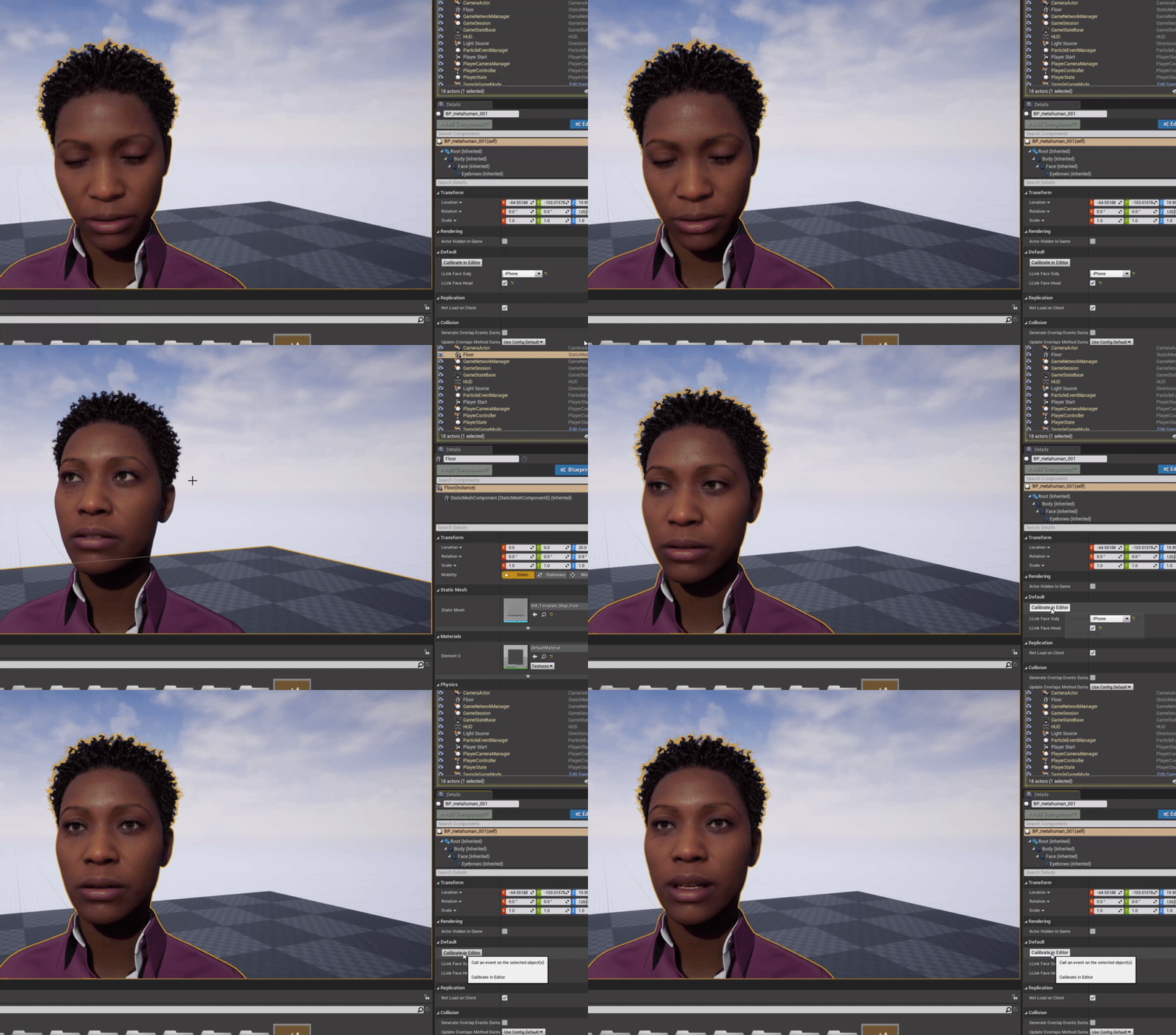 grim ore
wait
plush yew
okay
grim ore
your getting Total Coins from the game mode, where do you set that?
in that code the game mode holds the Coins variable
you have lots of logic in different places that might not be set up.
I would assume your code in the widget should be getting the "coins" variable from the game mode if you want it to show something but that doesnt mean its correct once you actually do proper saving and loading
 gloomy ginkgo
how can I get if my vehicle is braking or not without creating any variable?
grim ore
what would determine braking? using the "brake" input or slowing down?
grim ore
so you push a key and it starts to brake?
gloomy ginkgo
yes
grim ore
and what needs to know if you are braking without a variable? nothing is wrong with making a variable
gloomy ginkgo
i have function where it determines if my car is braking
if the car is braking, it draws a trail behind it
in multiplayer
this only works for the client
others don't see the trails
i have to replicate the handbrake variable and set it on server
but I don't want to do that
grim ore
no other way I can see besides that unless you edit the code. Im not seeing a check for braking in the vehicle component
and using velocity wont work
 fringe drift
I am having a problem with one of my HUD elements. I am using an image (with an alpha layer), which has parts of varying opacity. It's a shield icon, and the edges of the shield are less opaque than the inside.
This image shows up correctly on my HUD widget.
However, when playing, the HUD widget starts at the correct opacity, but then quickly turns 100% opaque everywhere on the image. It appears as if the image is being redrawn again and again with every tick, and an infinite number of the images are being stacked on top of one another.
Does anyone have tips on how to resolve this issue?
inner vine
Are you sure you're only adding the image to the HUD once?
fringe drift
Reasonably sure. The other items in the HUD widget (a progress bar and text equal to a recharging variable) do not appear to draw on top of one another infinitely.
frozen pond
i have problem with soccket snapping on begin play i attach actors to soccket then i detach one of them, and attach one again and heres the result

bp:

like rotation is changing ?
fringe drift
Maybe use 'make rotator' and plug it into the rotation pin? That way the sword's rotation is always clamped to a specific value when it's sheathed?
frozen pond
fringe drift
Maybe use 'make rotator' and plug it into the rotation pin? That way the sword's...
fixed by snaping again to target
plush yew
Applying any animations to this model (which is ripped), causes half the model to be invisible

the animation itself appears fine, but when applied to my skeletal mesh it doesnt work

Any fixes?
 obtuse siren
Hello guys I am very new to Unreal and have a question which I reckon you guys can do easily
I'm trying to start a timer when my game starts
plush yew
obtuse siren
I'm trying to start a timer when my game starts
Youtube this.
https://www.youtube.com/watch?v=UR4l_tsYcqs @obtuse siren

We create a widget, and user blueprints on the game mode to create a timer. Direct to the point.
This is a very watered down version of the Unreal tutorial series, and it is more of a way for myself how to do this, then for anyone else. If however you would love to see more tutorials like this, then let me know.
+++++++++++++++++++
Donate -...
obtuse siren
I'm trying to increment a float value by delta time when an if statement is false

Yeaaa I tried that bro
wasn't really what I was looking for 😦
 ebon geode
if something false -> float value = float value + delta seconds?