#ue4-general
1 messages · Page 946 of 1
 civic mauve
 grim ore
 hollow trench
And hi Mat
civic mauve
grim ore
<https://forums.unrealengine.com/development-discussion/content-creation/65109-g...
thank you sir
 manic aurora
Hoping someone may have a solve for this problem this morning. I upgraded my project to 4.26, but when I try to package it I get the error, "Unable to find target 'UE4Game'. Everything worked fine back in 4.25
I saw a solve that was merging the full content of my project to a different game, which works but feels like a last resort since that would mess with my version control
grim ore
@sonic cliff yep i bet if you went in and checked your materials that are having this issue will have this checked. the dithered LODs is the issue on those items

 fossil ore
Can someone help me? I'm looking for a person who could create a script
 wary wave
job boards.
 pure cliff
Well crap, now the level-switching "memory leak" thing is back. And this time I actually got a crash report window instead of -poof- editor closes.
grim ore
@manic aurora when you upgraded did you change the project/folder name at all?
manic aurora
grim ore
<@!610594962127454209> when you upgraded did you change the project/folder name ...
Nope, that's the weirdest thing about it. I just did a straight conversion
grim ore
ok, after migrating did you delete all your temp folders in the project and regenerate the solution file if needed?
manic aurora
grim ore
ok, after migrating did you delete all your temp folders in the project and rege...
Which folders would be considered temp and how would I regenerate the solution file? I poked around a bit at guessing which ones were temp but didn't have much luck
grim ore
well is this a C++ project?
manic aurora
grim ore
well is this a C++ project?
This one should just be blueprint
grim ore
hmm. well binaries and intermediate are the 2 main temp folders in the project
you should be able to delete all the files in saved as well but the config folder but that probably wont help
other than that yeah you might need to migrate
manic aurora
grim ore
hmm. well binaries and intermediate are the 2 main temp folders in the project
I'll try doing that right now. Is there anything that might be outside of that the game is looking at for packaging? I saw it was looking for some temp things in C (with my designer guesswork)
grim ore
its trying to find your engine and not able to for some reason
so something inside of it went wonky
fossil ore
ok
grim ore
possibly out of date plugins or not updated as well but those would have popped up when you started it
manic aurora
Hrm yeah when I migrated it over and opened the plug ins I still had a few errors of, "requires a temporary target.cs to be generated " for a plug in but it managed to find UE4Game
It looks like it's still having a problem even with deleting those folders, so I might just clone off the project and assault it before hitting the big button to migrate it, thanks for the help though!
 steady owl
Is it normal for there to be ~100ms of input delay from the sound of you clicking your mouse to actually registering an event in game at 100+ FPS? I would have though it would instantly play the sound / fx but it's noticeably more than just a few frames off
wary wave
Unreal has always had abominable input delay
it's why first person games made in UE4 tend to feel like you're wading through invisible lead soup
hollow trench
Hey guys! Does anyone had this behaviour in a widget blueprint before that it removes "unused" widgets?
Actually it just happened in the morning, regular opening of my WB.
Info: Not sure its a bug or something is on its way to fix it, but I really need my content back.
https://answers.unrealengine.com/questions/999828/ue4-is-removing-widgets-from-the-hierarchy-on-its.html?sort=oldest#comment-999828-form
 fresh plover
if for exemple i want to implement an gathering system from trees , rocks etc
hollow trench
 fresh plover
how should i approch this? what things i need to document?
hollow trench
steady owl
wary wave
it's why first person games made in UE4 tend to feel like you're wading through ...
Ugh that sucks. Is there any way to improve it? I saw the post about low latency frame syncing but that only seems to improve input delay for 30FPS games. You'd think it'd be amazing for input delay with UT
wary wave
steady owl
Ugh that sucks. Is there any way to improve it? I saw the post about low latency...
If you're lucky the Valorant folks talked about it somewhere, but there is no magic bullet
steady owl
Oh great thanks I think I remember seeing that somewhere
Will have a look
It's probably closer to like 200ms which is crazy
 fierce tulip
a lot of people in the competitive street fighterV (and even db fighter z) community complained about the input delay.
well, in SFV's case more like burned down the forums

Destructoid
Over two years after release, Street Fighter V will finally address input lag complaints
grim ore
@fresh plover if you know C++ there is no reason you cant transfer a Blueprint system to C++, every BP node has backing C++
steady owl
fierce tulip
a lot of people in the competitive street fighterV (and even db fighter z) commu...
Damn! Looks like it's a common issue then
Do console commands like r.GTSyncType 2 only last for when the editor / game is open?
Weirdly I had set it to something, closed the game and then reopened it and there were warnings relating to the sync type in the log
I had thought any console commands only affect that particular session
 sonic cliff
grim ore
<@!307900658445582336> yep i bet if you went in and checked your materials that ...
sonic cliff
grim ore
<@!307900658445582336> yep i bet if you went in and checked your materials that ...
Wow thank you so much Mathew i will try it and let you know
 gilded lichen
Hello, I've got a HUD Reference variable on my Item blueprint. The variable isnt being set and Im unsure why. I dont know why the variable is empty. Hope someone can help?


It is empty as I did a print string from the HUD Reference at the end which returns nothing
 wide cloak
Hello, I'm trying to get the remote session app up and running but it seems to be stuck on connecting to the IP. I found my IP via the IPCONFIG command in the command prompt. I have also ensured that the required plugins are enabled and that I am using the same connection for my phone and PC
grim ore
@gilded lichen what is the order of operations there? how do you know that the first script, creating it, runs before the 2nd one, checking it?
 robust marten
Perhaps someone might know why this BP doesn't get the actor transform properly? Maybe I am setting this up wrong? lol
 gilded lichen
@grim ore Well, I thought that could be the case. But after this, still some dont work
 grim ore
so again how do you know its not the case? where are these all being done from
you need to either guarantee order of operation so its valid, or if it fails wait then try again.
also this is single player right?
gilded lichen
Yes
grim ore
how about using some print string debugging, print out the hud reference variable to your screen after you set it (in the first screenshot before add to viewport). then print out the player reference after you get it , before trying to get the hud reference (in the 2nd one)
gilded lichen
I get all 5 print correctly
But still get

This isnt on event beginplay, the player has to interact to call the event
gilded lichen
No, 5 is correct. I have 5 items in the scene
grim ore
so then 6 things? one for each item and 1 for the thing creating the hud?
gilded lichen
I have a master item blueprint. This has 3 children: Potion, Sword and Coins. There are 2 potions, 1 sword and 2 coins in the scene. Only the master item bp has the code to print string.
grim ore
from the sounds of it the getting of the player reference is the issue on those items
gilded lichen
Yea
but its just werid as its the same process for all of the items, I dont get why some are working and others arent
grim ore
order of operations
items 1-3 are created, player is created, items 4-5 are created
any reason why you need to set it on spawn for those items and cant get it one when you need it?
which I would assume would be after the player exists.
otherwise move the UI, which you want everyone to have access to, to somewhere else that is guaranteed earlier like the game mode
or add a delay on to the beginning of the items for a second or so lol
gilded lichen
Yea, I'll probably move it to gamemode or just get it when it is needed. Thank you
grim ore
its one of the annoying things that UE4 is still missing, guaranteed ordering of execution 😦
but you can easily do that yourself if you wanted so I can see why its not required. just a nice to have like unity has
manic aurora
@grim ore , still working on my unable to find target 'UE4Game' problem from before. Seems like the new 4.26 version isn't recognizing something about my plugins. It kept saying "requires a temporary target.cs to be generated" for each plugin. When I disabled all the plugins it was able to pass through that part, but eventually the cook failed due to all the errors that popped up from that. Not sure if that serves as a hint for anything, though I'm getting close to just doing the migration
grim ore
some plugins require a temporary target, I've had that happen before, it just depends on the plugin. It seems normal depending on the plugin. Its possible those plugins are not updated to .26
manic aurora
It looks like (at least looking at the guts of this one) that the version name is 4.26.0 and the engine version is set to 4.26
not sure if I need to do a full uninstall/reinstall to kick it
 light thunder
What happens if you try to load a level that is already loaded? it will just reload it right? basically restart everything in it? (that's what I want)
grim ore
it should basically tear down the old one, then load the new one yes
there is a restart command as well but its.... weird
light thunder
Understood - completely unrelated - is there a plugin (I know there are several file ones) that let you open up a designate windows folder?
(basically I want that to happen when someone exits)
 mental gust
I have deleted materials in UE4, saved, exited and reopened it. They are not visible in the content viewer but files exist in the filesystem with their names. When I try to create a material with the name of one of the deleted materials it complains that it already exists
can I delete these assets from the file system without UE4 being grumpy? I've never seen it do this before
 lost oasis
I am new to this community and have a quick question for you this morning. I hear a strange noise coming from my pc (dell-xps 8940 64gb intel i7) only when UE4 is open or running. I just wanted to ask someone if this is normal. My iMac is quiet for the same activities. Thank you.
mental gust
sounds like a fan kicking in
I get this occasionally with blender when doing intensive stuff
wide cloak
Hello, I'm trying to get the remote session app up and running but it seems to be stuck on connecting to the IP. I found my IP via the IPCONFIG command in the command prompt. I have also ensured that the required plugins are enabled and that I am using the same connection for my phone and PC. Am I doing anything wrong or missing steps?
 acoustic crescent
i need to get a better cpu before i can move my project from unity to ue4
 plush yew
lost oasis
I am new to this community and have a quick question for you this morning. I he...
plush yew
lost oasis
I am new to this community and have a quick question for you this morning. I he...
Would be nice if we could here that noise! Record it!
 scarlet current
Im having a strange issue, Im using blueprint construction scripts to control substance materials in sequencer. when rendering the sequencer through movie render que or the render movie option, it will ignore the blueprint control in the sequencer and render without its effect. The material changing effect works as expected when playing within the sequencer. Any input greatly appreciate!
 stiff verge
here's an easy one.. if I import a model and check "generate lightmap uv" does that mean it will create a uv map, specifically for baking the lighting, that is equivalent to the uv map?
like a duplicate?
of the uv map?
 digital anchor
it will take your existing uv map and shuffle around so they dont overlap and have a padding and save to uv1
digital anchor
yea but on a duplicate as you mentioned
stiff verge
and uv0 would be the uv map?
stiff verge
well that's very important to know lol
nice
thanks
i'm wondering why my alembic model is weird in UE.. I think that might be why

that's the same model in blender
 wide cloak
I know this is a dumb question, but how do I get it so when I click a button, an object moves? I've done it a thousand times but for some reason today I can't get it going
stiff verge
how did you previously do it? do you remember following tutorials?
wide cloak
Not really sure. I took a break over the Holidays from dev work and today I just am really off my game. I wasn't sure if someone could just spell it out for me lol
 sudden ferry
hey guys i havent updated a while, is the chaos system in already or still disabled
i remember when the .26 came it was removed i wonder if they added it now
i dont want to use some special experimental engine version for my game
but i guess that means its not yet in
stiff verge
what's the chaos system?
wide cloak
stiff verge
i would find a tutorial
Ah no worries then
wide cloak
sudden ferry
i dont want to use some special experimental engine version for my game
You need a source code version of the engine, although I still believe it uses a normal engine number like 4.26. Here's the guide to get it: https://docs.unrealengine.com/en-US/InteractiveExperiences/Physics/ChaosPhysics/ChaosDestruction/ChaosDestructionOverview/index.html

Overview of the Chaos Destruction tools that are available, and how they work together to create destruction in UE4.
 plain plover
so im trying to render an animation through a camera i have set up in the world, but the render is coming through a completely seperate camera...i dont know what im doing wrong

does anyone have any idea?
wide cloak
sudden ferry
i dont want to use some special experimental engine version for my game
It's not in a normal release yet though, just to be aware
sudden ferry
yeah ive been waiting for a while for normal version, im slowly thinking just going with the standard destruction xD (because its been already so long in development lol)
(for what things I want to do with it)
plain plover
plain plover
so im trying to render an animation through a camera i have set up in the world,...
this is the result of said render...
 sage perch
Hi, Does anybody know if the proceduralFoliageSpawner is broken in 4.26.1
 calm pollen
is there a way to bind normal text to editable text to make the normal text say the same thing as the editable text?
if that makes sense, i kinda worded it wrong
 sly wagon
ugh I cant figure out how to do simple damage over time ;.;
sly wagon
like what can I even do eeek

I just want the apply damage part to repeat every second
tick is based on user framerate, not ideal for something meant for multiplayer
fresh plover
for the time being
sly wagon
i need to use Timers, but I literally cannot get timers working
fresh plover
if you just want to test
digital anchor
you created a timer and didnt use it?
you didnt even set what function the timer should call
sly wagon
why do I need to create a function
to just get the apply damage to repeat
jdfngkjdng
digital anchor
wtf?
sly wagon
I swear out of everything I've done so far... timers are by far the most complicated
digital anchor
 sly wagon
oh
I had to.. connect the damage from the custom event.
brb gonna go drink lizard waste
how do I stop the damage/timer once overlap ends?
im still new to unreal so learning where to connect things is still a giant hill I need to climb
digital anchor
the handle (return value) can be used to stop and resume the timers
sly wagon
o; I see
oops my aoe damage is triggering a left click hitbox inside my character
and killing him
LMAO
u h
 limpid arch
Does anyone else have following problems with UE4 right now:
- After some time the screens of the engine begin to flicker, pressing the play button shows black screens
- Other open windows, like internet browsers or other flicker too, if active and maximised
I have tried reinstalling - it didn't help. Additional information: using 144Hz monitor and 1440p. Maybe it's a bug for such monitor setups or something.
Thank you in advance!
limpid arch
Yes only with unreal
Ah one thing
I plugged in my other computer and let it run at 1440p and 144Hz too. It didn't happen on that one
It happens after some time, I didn't count but I would guess the time it takes to happen is always the same. The issue is always resolved for this time after closing UE4 completely and reopening it
manic aurora
@grim ore just to end the no UE4Game error saga, I converted the project to C++, built the sln, and that seemed to kickstart everything back to normal w/o having to do a migration to a new project
 kind bluff
I know this is a wide question, But im develping my fist game, and worried about its performace. I have a 3070, and im only getting 70-80 frames. Given I am using blueprints, with all the editors open,(causing alot of overhead) but if I can run apex at 4k at 160 fps I feel like I could run a single playermovement script alot higher than 80 fps
plush yew
kind bluff
I know this is a wide question, But im develping my fist game, and worried about...
Look into profiling your game. There's no need to guess about your frame times.
stiff verge
for me for doing something different I guess.. I got so many issues..
sequence playback of a fbx animation.. suddently change its scale??
 glad karma
Hey guys I have quick question, hope so you will understand what I mean.
I have around 40 character. I want lut them without rigging add to mixamo to get bones and everything. After this I want take animations and put to blender and convert everything to unreal bones. Now I have a question. Is better to set all of animations and set them to unreal skeleton position or better using just only mixamo animations and try sometimes if need convert animation from skeleton to mixamo animation?
stiff verge
 upper karma
This is gonna sound a little weird but what version of unreal was available on March 12th of last year (aka 2020)?
kind bluff
plush yew
Look into profiling your game. There's no need to guess about your frame times.
im not guessing, Im calculating the framerate with the delta time. I know that the overhead for said calculation is definately lowering the framerate, But I still feel like it would be alot higher, Unless running bluprints in editor has just obscene amounts of overhead
fresh plover
hey
i know it.s simple but why it doesn.t work?

it.s binded on a key in the character code
or it doesn.t work like this ?
 timid spade


i have an additive montage set up to play every time i shoot
and this always happens for some reason
the animation is an additive in mesh space
in the animbp i have set up blend pose by bone
plush yew
ok so im new to game design and i'm trying to remove all natural light, after some experimenting im left with no light sources except my lamps etc, the sky is fully blacked out but parts like my roof without any lighting at all is still lit up. does anyone know how i could fix this?
stiff verge
i don't understand transparent materials in UE.. I can't seem to make roughness do anything
grim ore
@manic aurora ugh. Im glad that fixed it but... ugh
@manic aurora im curious if you were to now go back out and just remove that module from the project, assuming you just added a blank class, if it would now go back to being BP only and work.
plush yew
kind bluff
im not guessing, Im calculating the framerate with the delta time. I know that t...
I don't think you understand what I mean by profiling. You can examine exactly what each part of the system is doing, and exactly how long it takes. For example, volumetric shadows might be adding 3ms to your frame times.
manic aurora
@grim ore Haha that was my thought exactly! I did just add a blank class. I'll have to check that out in a bit to see if that does it
light thunder
is this DLSS plugin by Nvidia, I heard that it was enabled automatically, but it shows me a plugin download - what am I missing here ?
ah shit, it's not 4.25
plush yew
why is my roof still lit right here? i removed all the natural light sources but its still not dark for some reason... im very new to unreal
 stiff verge
I can't seem to get reflections from my environment, where do I bake the cubemap of my environment?
is that it?
 plush yew
i used the deafult first person pack and deleted all the scenes @grim ore
so if that includes any static lighting then
and i only added spotlights to the scene
grim ore
did you build lighting at all?
first person has a skylight which would cause what you see
kind bluff
plush yew
I don't think you understand what I mean by profiling. You can examine exactly w...
oh my bad, flew way over my head. Yeah i'll definately look into that, sounds exactly like what im looking for thnx :)
 orchid glade
Hello, I'm trying to spawn an actor which spawns a huge filled HISM (16x16x130) with some holes but everytime that actor spawn (between 2-4 of that actor spawning), the game freeze for ~2sec then goes normal. What can i do ?? thanks.
plush yew
@grim ore i removed all the deafult lighting
grim ore
ok so are you building lighting?
its looks like your using stationary and they are overlapping as well which turns them dynamic
we also dont know how those material are set up, are they set to use emissive?
plush yew
i understand 10% of those words, but im pretty sure ive only placed spotlights so far
i stole my materials from quixel bridge
grim ore
click the build button on the toolbar at the top and see if they change (the lighting)
 grim ore
the one that says Build
plush yew
fuck me im blind
grim ore
but I think I know what it is

uncheck Game Settings near the bottom, see what happens for you
plush yew
i just finished the build thingy, and i believe it worked
its very dark now so yeah
thanks alot my guy :D
by the way, do u know why the sky is fully black? id like to change that
grim ore
you need to add something that represents the sky
sky sphere, atmosphere, a picture, hdri image, tons of options
plush yew
alright thanks ill try to find out how i do that
grim ore
the easiest is to just add a bp sky sphere. the next easiest is to just drop in an atmosphere fog. the next easiest is using a sky atmosphere and a directional light.
grim ore
in the place actors panel on the left
plush yew
neither the sky sphere or the atmosphere fog did anything
maybe it isnt as simple as just dragging them?
Typically it is.
grim ore
the sky sphere is as simple as dragging it in, same with atmosphere fog
make sure realtime is turned back on
 haughty willow
I'm quite confused if anyone's willing to help, i'm using blender for animating. I use multiple root bones for inverse kinematics is there some other way i'm mean't to import this and what could I do
 plush yew
Is exponential height fog deprecated in favor of atmosphere fog?
why does the word "preview" appear in all of my shadows?
Get used to hitting "build" hehe.
You need to recalculate the lighting data, pretty much anytime anything moves or lighting values are changed.
hmm okay
grim ore
i know atmosphere fog has been deprecated if you use a new sky atmosphere
plush yew
Interesting. I mostly use exponential height fog, but it must've been a cool demo of sky atmosphere that I saw recently.
@plush yew FWIW I mash ctrl + shift + ; all the time, the hotkey for rebuilding lighting.
oo okay
ty
sorry for asking so many questions but
how do i download the materials from here?
Google Docs
'eyyy, UE is hard. Ain't no shame.
.uasset files are UE specific binary files, a.k.a. they have all the goods already inside, so you should be able to drag them into your projects content browser.
im pretty sure the files have no interaction whatsoever, i cant drag them or anything from the google drives page, maybe its just me being weird again but idk
In the top right, I see

Is that what you mean?
idk i just cant do anything from here really

Next to your avatar in the top right
grim ore
... ....
grim ore
. .. .... ..... .. (thats morse code for SOS)
plush yew
i probably do
Hahah
i havent slept for like 50 hours or something
lol
Yeah man, hit tha' download button and you can drag 'n drop no problem.
where do i drag them again?
In your Unreal project, the "content browser" is essentially your project's file system

Yours will look different obviously, based on your project files and folders
But anytime you want to import stuff, you will typically drag from your desktop or source folder to that little area
grim ore
well those are asset file so that wont work for them
 grim ore
nope
plush yew
Facts.
haughty willow
Sorry, when it asks for 1 root bone I expect it means something like 1 root bone parented to the entire mesh, but it just ruins my animations terribly
 plush yew
that scares me
grim ore
#animation is a better fit for that, those crazy art people hang out in there
plush yew
I guess you have to hit the Add/import button and go to Import Asset
Learn a little each day!
 past pilot
Has anyone used the new water system and buoyancy? I copied the buoyancy example bp and tested it and it floats as designed. I then change the mesh to a boat and it falls through the world. I change it back to their cube and it floats. I then changed it to an identically sized crate model and again it falls through the world. Change it back and it floats...
 celest vapor
plush yew
You can't drag in .uasset?
celest vapor
plush yew
You can't drag in .uasset?
no but but you can manually add it to the project folder and restart the editor and it should show up. but probly should migrate the uasset instead
plush yew
Yeah, I think I normally do "migrate" when I'm pulling things from downloaded projects.
I feel as though I've borked some projects messing with the uasset files directly...
grim ore
yep
past pilot
Everything is referenced to everything else and by directory structure and all that. Copying in Uassets is bad in general.
grim ore
@past pilot did you adjus the buoyancy settings for the new mesh?
past pilot
@grim ore Nothing was changed except the mesh itself. The buoyancy component wasnt touched
plush yew
Alright, thanks alot for the help guys, I'm about to head off tho... Unreal crashed when trying to import the materials, i seriously need to upgrade this potato
past pilot
mass was 50kg in all tests
grim ore
@past pilot I would recommend making a new BP, not duplicating the custom one, and adding in your SM and the buoyancy component and setting it up. https://www.youtube.com/watch?v=cOLxTBe5MaY. Keys being correct pontoon setup for the weight on the item, and a proper collision on the item to use
past pilot
I tried that too, maybe im not using the "right" collision. I will look at that
grim ore
for that example I was using a box collision around the entire item, and the pontoon was on the bottom 20 units below so it wouldnt interfere with the mesh or collision
past pilot
So mesh to pontoon clearance is a thing? I thought it just floated the Object based on pontoons and basically ignored the mesh other than its physics settings
grim ore
well it needs collision so I think it might be a thing
no collision on the object and it doesnt seem to work
if my pontoon was at the 0,0,0 mark it seems to launch the mesh in the air when it landed. putting it lower seemed to offset that penetration
 celest vapor
Can someone point me in the direction of GUID in UE4?
I've searched the docs and there is so little there about GUIDs
past pilot
welp, the primitive box collision made it so it doesnt just fall through the ground anymore but still sinks like a stone lol
 stiff verge
i have a model that used to work.. but now as soon as I bake the lights.. it's all black
is that a bug or what?
the uv mapping is fine
oh I'll doublecheck that the import dialog creates them
that might be it
i'm using the blender to unreal addon
doing light maps in blender?
i thought it was just a duplicate of the uv map
what the hell
ah I see.. a uv map could overlap and have a specific light map that doesn't
could be useful
is there a way to create light maps within ue? in my model parameters or something?
in general the index should be 1?
well idk for most of the stuff I imported it seems fine not sure why this one would be different
baking with index 0 seems to work... now what's weird is that it was working before with index 1..
anyway
thanks for your help
i'm getting there
i can't figure out transparency.. it looks right in the material preview but reflections are all over the place in my world
this is weird
oh I assumed it was part of the post process volume
wow
well ok that helps a lot
thanks
i was confused because the reflection kind of worked...
 glass geode
Has anyone had any experience using the new Movie Render Queue tiled screenshots feature?
stiff verge
blender
thanks
the new cloth sim in blender is really fun because it's light.. so it's easier to learn and experiment with until it looks right
blender is the next houdini.. watch out
that said I'm kind of tempted to learn houdini but yeah
pure cliff
Well this is confusing. I'm trying to change which level is persistent (because I didn't realize that the "default map" and "startup map" = persistent and that's causing a memory leak issue). I set those two to be a separate map that is literally empty, but the Levels window still shows a different one as being the persistent level.


Ok, this time it did change over (after the engine crashed itself and I re-opened it).
But now all the objects from -every- level is in the empty map...
Which I suspect is part of the memory leak problem
I can't seem to find anything online, which makes me worry that I'll have to treat it like the project got corrupted
past pilot
i dont understand this buoyancy issue at all. Ive changed the mesh to about 30 different meshes. They show they have collision, they dont fall through the ground but nothing will float unless its that exact cube.
pure cliff
Would anybody have any advice for the problem I'm having? Or should I just treat it like the project got corrupted and make a new one to paste in the assets?
past pilot
i honestly dont understand your issue, or id try to help. Im not much of a level composer.
 sharp frigate
Ayo is it safe to delete this folder ?

Its taking around 30 GBs
its on saved / cooked
light thunder
sharp frigate
Ayo is it safe to delete this folder ?
You'll have to rebuild the stuff you did for compiling a project build - there's a slight chance you might have to recompile shaders too but I don't think that's where your project stores them (I think it might store the ones the editor needs when it compiles shaders while packaging for a build)
sharp frigate
Well if its important i guess we'll keep it for now
 harsh ivy
Anybody know a good tut for like animated numbers so if like i add 500 coins it goes up gradually.
is it just time line?
 rancid jay
anyone has any idea on how to use Unreal Insight? I Googled still don't understand
need some screenshot on how do i open this, i even saw the livestream but they never showed how
 solid trench
Hey guys, I’m an unreal noob that’s been handed off a project with a bunch of cameras and multiple levels. Some of the cameras are set to only some levels, not all, so they’re missing some of the geo. Is is possible to have the cameras render everything visible?
sly wagon
How do I stop a timer for a specific actor?
Basically I have a timer that starts whenever something enters my trigger capsule, dealing X damage per second to all actors in that overlap. However, currently if they leave the overlap the timer stops completely, even if there are current overlapping actors. I want it to stop ONLY for the actor that left the overlap ;.;
 worn granite
make a map of actors to timer handle
actor enters? set timer, add handle
Actor exits? Get handle, clear timer
Or you can store the timer handle on the actor (along with it's callback)
sly wagon
worn granite
make a map of actors to timer handle
is doing that possible with how my current blueprint is set up?

I know very messy, im still new to unreal : (
 sterile tulip
 worn granite
sly wagon
is doing that possible with how my current blueprint is set up?
worn granite
sly wagon
is doing that possible with how my current blueprint is set up?
Well, technically yes. If you can express it in the available nodes anything is possible.
You are currently going about the entire thing wrong, and would have to change it quite a bit. If you don't see how to convert this, I would suggest going to #blueprint and starting a convo there
 keen moss
been working on a project for a while now and recently discovered that a bunch of random assets (geo, decals, lights) had duplicates in the same 3D space. Like the assets were copied and never moved. Has anyone else ever encountered this?
sly wagon
eh tomorrow I will
spent the 8 hours trying to get it to work
no progress
just gonna try again tomorrow ;.;
 crimson hornet
So I have this code to where if my character hits a platform the platform stays for 2 seconds then goes away. How do I make the platform respawn back in 5 seconds?

 glad quail
Anyone know why SSR is affected by depth like this?
 sterile tulip
How would I go about implementing tire marks? Whenever the tire is sliding
 obtuse hearth
why my model's hands look different when i imported it to ue4
past pilot
Can someone enlighten me on why the heck this happens? The boat is set to 5000kg and barely moves if at all when pushed on from the outside but once i get on it... hold on to your butts...
https://www.youtube.com/watch?v=sLWsENC66Mo&feature=youtu.be

When im outside the boat i can sort of push it a little but once i get in it and run up against the side its like its got a powerful motor.

 stiff verge
If I use a post process material and a depth as matte, does that work with VR or do I need to handle each eye separately?
 cinder cradle
Is it OK to name game tag rows in Data Tables the same as the tags found at those rows? Like Ability.Dance as a row and as a tag for that row
 spare kernel
yes
cinder cradle
Sweet
 still tangle
How can I make item to be selected from data table random?

 winter parcel
Ok I am potentially switching to unreal from unity mostly because of the graphics but also I absolutely love writing cop
But it seems somewhat restricted
I am a full time software engineer so I love code
I feel like unity allows more control
Is that just because I’m learning blueprints
Can I customize blueprints in code
I really want to use unreal for the graphics
 jade sinew
Is there a correct channel here to ask about USD conundrums?
winter parcel
What is the correct channel for that question
And sorry
Oh I thought you were saying this is the wrong room
My question stays
 clever vault
is linux version the same as windows? i mean does linux lack same features or its just a worse version?
plush yew
is there a quick way to get collision working on the feet of a character so they block a cloth cape attached to the same character?
 honest vale
clever vault
is linux version the same as windows? i mean does linux lack same features or it...
honest vale
clever vault
is linux version the same as windows? i mean does linux lack same features or it...
should be the same
though I guess GPU lightmass doesn't exist on linux
since it uses DXR
 ancient lotus
question, im trying to setup an IK aiming system and i have it so the optic is lined up perfectly in the center of the screen based on the camera, but when i look up/down the offset changes and im not sure how to account for it. for example if im looking horizontally its perfect

but if i look up then this happens. same deal with down

GetAimPoint is just a socket on the optic thats all it returns

and the two bone ik

 dusky inlet
winter parcel
Is that just because I’m learning blueprints
dusky inlet
winter parcel
Is that just because I’m learning blueprints
Yes, blueprints are a mighty tool but more or less specifically for game programming. You can do entire games in blueprints. But if you need more control you use c++. With unreal header markup you expose your c++ classes and functions to blueprints so you can write extensive systems in c++, and then configure it using bp.
And if you need even more control, the entire source code is open to you
 leaden dust
Is niagara a replacement for cascade? Even if not now, in the future?
or the two are meant to co-exist?
 hexed escarp
Guys, any idea why can't I extend certain classes in blueprints?
Like for example the SceneCaptureComponent2D or SphereCollisionComponent
 true falcon
leaden dust
or the two are meant to co-exist?
true falcon
leaden dust
or the two are meant to co-exist?
Pretty sure cascade is going to be deprecated in the future. Niagara does everything it does, but better and more flexible
 forest tree
Is there a logical reason why a character would fall through a landscape in specific parts of the level, exactly when the pawn is possessed, even though the pawn itself was already visible on the screen and colliding just fine? I can also walk to the part where it falls through, and it works fine.
Normally I'd say "collision settings", but it works absolutely fine in other parts, also on the landscape. And the pawn that is spawned likewise works without issue before it's possessed.
plush yew
Can someone explain to me the way unreal handles rotations it makes no sense to me
Why does go from -180 to 180
With the initial point being 0
hexed escarp
0 is front, -180 is maximum turn to one side, +180 is maximum turn to the other
you could have -360 but that would equal to 0
plush yew
how do i use quixel bridge atlases?
 weak sorrel
leaden dust
Is niagara a replacement for cascade? Even if not now, in the future?
weak sorrel
leaden dust
Is niagara a replacement for cascade? Even if not now, in the future?
it's not usable on mobile for now
if it does in the future why not
oh it looks like it works if you use Vulkan
 exotic marsh
Hi all, I’d really like to know how to manipulate final textures rendered and add masks etc. I can’t seem to work out where in the engine you can access these things (like RTT etc) does anyone know where I should look for this? Think maybe access a specific camera for outputting over Sdi, or reusing the texture in game on a screen or something
plush yew
Im new to UE4
 limpid escarp
I would like to use a websocket connection for each player. How could I initialize a connection and then call the same websocket in other blueprints to make emits?
glad karma
Guys I have question, maybe you could help me with this and hope you will understand what I mean.
I have around 40 characters models without bones and everything. I want add all of them to mixamo to get rigging.
After this I have blender plugin which can add root bone to making locomotion etc on character.
Every single character has got A-Pose bit not exactly like UE4 skeleton so I don't think so all animation from UE will be correct.
My question is - better to pose all my new character to UE4 skeleton and getting all animation from UE4 or staying with mixamo animations?
plush yew
is there like a keybind to center something on the entity below?
 raven sand
is there an easy way to get a camera boom to ignore some colliders? i.e. to react to walls, but not to other characters in the game? I have a problem with the 3rd person controller that whenever I melee attack someone and sorta move through them the camera jumps because their body blocks its view
 hot grail
Hey guys I am new into unreal engine and stuff.
I was wondering if these specs actually are fine to making realistic stuff, like artwork n stuff:
GTX 1060 3GB MAX-Q
i5 7300HQ
8GB DDR4 2400Mhz
or landscapes ehem
 gloomy ginkgo
how can I see my function ms?
I want to know how much ms does it take for a single function to execute
is this possible?
spare kernel
@hot grail you are borderline minimum
hot grail
spare kernel
<@!228868010578935808> you are borderline minimum
Is that good?
Or is that not good
spare kernel
it will be slow and take a while to do things (ram being only 8gb, CPU being mobile and only a 4 core with 4 threads). Graphics card is ok, but on the low end. But the engine will run
spare kernel
like i said, it will run, just it will be quite slow, if that is not an issue, then its fine
like shader compiling will be slower, etc. Give it a try, and see. But your specs can run it
hot grail
I will just screenshot the image when I am done with it
and then remove the thing when I am done
Does this include with artwork as well?
hot grail
spare kernel
like i said, it will run, just it will be quite slow, if that is not an issue, t...
It's not installing
spare kernel
whats the error?
plush yew
How do I create a mesh??
 gloomy kindle
Does it matter working in unreal if it's on SSD or on HDD - like let's say 30 min scene compile time would be reduced atleast by 5 min on SSD?
 rocky epoch
gloomy kindle
Does it matter working in unreal if it's on SSD or on HDD - like let's say 30 mi...
rocky epoch
gloomy kindle
Does it matter working in unreal if it's on SSD or on HDD - like let's say 30 mi...
It matters a lot. I do know how much it helps compiling, but on HDD everything is way slower.
Give yourself a treat and use ssd for unreal.
I even felt some boost when I switched to an m2 ssd from a sata ssd.
plush yew
does anyone know how i make quixel bridge 3d assets 2 sided? in this case its a door
rocky epoch
One of my friend recently switched to an m2 from a hdd and since then he mention it daily he can’t believe he waited that long.
 winter gale

Buy Me a Coffee
In UE4, there is templated type called TOptional which is a really useful class. It can be used to check if a certain value is set or not an...
gloomy kindle
@rocky epoch Yup, definitely getting one if it actually helps. everything is super fast from loading to opening things but compile time on large scenes makes me oof
 merry gazelle
Can somone help me with a quick question. If I provide a 3D artist a B/W texture will they be be able to etch it into a model so it's swappable in UE4 material?
rocky epoch
hot grail
Hey guys I am new into unreal engine and stuff.
I was wondering if these specs ...
I am working on a i5-7400, RX580, 32GB ram and a project is on a high end m2 ssd
Right now we have an under optimised openworld project. And it runs fine on epic quality.
rocky epoch
That is defintely can be a bottleneck. I would upgrade if I were you, if you can.
gloomy kindle
i'm on 32GB ram, GTX 1080ti, i7 10th gen and somewhat large level (it's size of a talos-1 from prey more or less) takes atleast 30 min at its best to compile. So it's just my personal opinion - i wouldn't use unreal if i didn't had the setup (atleast ram, cuz it's a ram hog) i have unless i'm doing very small project. It would be just too much fuss.
hot grail
Why would I need to compile it?
I am taking screenshots and making realistic artwork/or cool scenes
gloomy kindle
i mean everytime you change something in the scene, you need to compile shaders and lights to play it.
hot grail
Never heard of that before
 modern dew
hi
gloomy kindle
you can't press play after you add a single chair unless you let it rebuild lights, which on large scenes takes huge amount of time.
modern dew
what is the reason
hot grail
Why would I need to play it???
modern dew
 hot grail
Isn't it just straightforward to add a couple of rocks and terrain?
modern dew
what is the reason
gloomy kindle
to see how it looks from different angles and how realtime light changes
hot grail
i'll see if it actually does do anything
if not... then that's the end of my unreal engine career
Which hasn't started.
modern dew
can someone please look at the error
gloomy kindle
@modern dew Can you stop spamming please?! we're not getting paid to help people here. Someone who's willing will look at it and help you.
modern dew
gloomy kindle
<@!764531750054395905> Can you stop spamming please?! we're not getting paid to ...
sorry i don't think this is spam but ok i would be glad if you help
gloomy kindle
Give it a time
one thing i LOVE about unreal engine is that whenever it's stuck, it never crashes after it's stuck and after waiting a certain time, it comes to its senses.
modern dew
gloomy kindle
Give it a time
ok
gloomy kindle
@modern dew as for your problem, can you show me the bones of character in 3D software?
 little warren
Hello, is there a way to make the skybox not affect the environment color? I have white meshes that become blue due to the sky box being blue, is there a way to fix that?
rocky epoch
gloomy kindle
one thing i LOVE about unreal engine is that whenever it's stuck, it never crash...
that is my petpeeve with the engine. Please just give me a progress bar, a popup that says "Sorry, I am loadin,g I promise I am not dead!", or anything.
I hate I have to have a Task Manager open all the time :D
modern dew
gloomy kindle
<@!764531750054395905> as for your problem, can you show me the bones of charact...
I actually closed the program, I worked for a while, but I did it with 3ds 3ds max skeleton is correct but if it passes to ue4 it is broken like pixel art problem in unity
gloomy kindle
@modern dew well it's either export error or your skeleton is wrong. what's the extension you exported from 3Dmax for unreal? FBX?
Also check skeleton hierarchy in unreal to see if everything's childed correctly.
modern dew
gloomy kindle
<@!764531750054395905> well it's either export error or your skeleton is wrong. ...
yes .fbx
gloomy kindle
you exported properly childed skeleton right?!
modern dew
gloomy kindle
you exported properly childed skeleton right?!
yes
gloomy kindle
did you happen to export animations with it aswell as a single FBX file?
modern dew
gloomy kindle
did you happen to export animations with it aswell as a single FBX file?
I exported correctly I don't know your language, it may have translated incorrectly google translate
 rigid belfry
how do i make an interactable component that i can add to multiple actors? is c++ the only solution?
modern dew
gloomy kindle
did you happen to export animations with it aswell as a single FBX file?
no I transferred it as different files
gloomy kindle
@modern dew Open it again in unreal and see if there's any error or warning when you're opening it
usually this problem happens when bones aren't correctly childed or bonecount doesn't match the count unreal accepts as a human skeleton.
modern dew
gloomy kindle
<@!764531750054395905> Open it again in unreal and see if there's any error or ...
exists but storage error is minor
 broken heath
Is there a way to simplify the world outliner for easier selection?
Like blender grouping method
modern dew
broken heath
Like blender grouping method
i think use 3ds max for skeleton is simpler
gloomy kindle
@hot grail grats 😄
rigid belfry
why is this not compiling?
 gloomy ginkgo
::
hot grail
Bruh
@gloomy kindle it couldn't launch
"LS-0019-IS-PQR3010" was the error
or something
or was it because it didn't have perms to run
lol
 vernal quarry
 rigid belfry
gloomy ginkgo
::
rigid belfry
gloomy ginkgo
::
that does not work
 ionic oxide
@rigid belfry I think its missing the PROJECT_API macro
rigid belfry
ionic oxide
<@!386223315146244097> I think its missing the PROJECT_API macro
whats that?
ionic oxide
look other header file
I think it should be something like this
'class PROJECTNAME_API UMyComponent : public USceneComponent'
gilded lichen
Hello, why do I get this everytime I load my project?

then I have to disconnect and change the create widget to something else
then it works fine
 rocky epoch
hot grail
"LS-0019-IS-PQR3010" was the error
rocky epoch
hot grail
"LS-0019-IS-PQR3010" was the error
I found an answer that a resart solved the users problem
or start the ue4.exe from the file manager not from the launcher
winter parcel
@dusky inlet thanks
worn granite
@gilded lichen oh wow that could be a number of things. Have you ever hot reloaded and then saved the asset?
hot grail
How do I get trees and stuff into unreal engine
worn granite
do you not know what I mean?
gilded lichen
No
worn granite
have you changed a struct which is part of the struct which has broken?
gilded lichen
No
worn granite
If you fix it and save it, does it break again?
 wanton bloom
Hello i have a problem can i ask it?
 worn granite
Okay, well that's my standard checklist
I don't know why your struct connection broke
wanton bloom
Lights in a other room but reflection to other rooms how can i fix it?

Like thats light reflections to other rooms
rocky epoch
gilded lichen
Yes
We literally have that same issue. Our programmers will look into that on Monday. If they solve I can ask them what was the issue and can let you know.
gilded lichen
Well, thank you anyway! @worn granite
Well, I think I fixed it? I went into the blueprint that was being created and compiled, saved it and I've not got the error after saving and closing the project
worn granite
@wanton bloom your lightmaps are bad, go ask in #level-design or #graphics
rocky epoch
gilded lichen
Well, I think I fixed it? I went into the blueprint that was being created and c...
Sometimes that indeed solves it. Right now we has that every project restart :/
little warren
Hello, is there a way to make the skybox not affect the environment color? I have white meshes that become blue due to the sky box being blue, is there a way to fix that?
robust marten
little warren
Hello, is there a way to make the skybox not affect the environment color? I hav...
Hey there, have you tried clicking the object and playing around with the lighting options for it?
Also, I just started working on my landscape and noticed this weird blending effect when the grass layer meets the soil layer, does anybody know what causes this weird effect?

And for some reason grass still shows on the soil layer even though I set it not to lol
 rigid belfry
how do i get what key an input has set to? i have an "interact" action input which can be eventually remapped. how do i get to what key the event has been remapped to?
rigid belfry
robust marten
And for some reason grass still shows on the soil layer even though I set it not...
maybe the point where the grass is placed is considered grass and not soil
your material has no reference to how big the grass is, so it picks 1 point and just assumes that the plant is on grass
wait i think i've read your question wrong
 dense knoll
Why does UE4 randomly get stuck in large lag spikes
out of nowhere
I play in editor a few times and then the editor starts lagging
badly
 tough pagoda
Anybody can help me? I already checked Unreal for any issues and so on in EGS.
But I still have this problem:
Cannot open include file: 'Field/FieldSystemActor.h': No such file or directory
robust marten
rigid belfry
maybe the point where the grass is placed is considered grass and not soil
I've changed my stuff so that grass is applied via the foliage brush instead of the landscape grass type so I can control exactly where I want the grass, will this affect my performance even if I set it so that it has the same settings as the landscape grass type?
broken heath
modern dew
i think use 3ds max for skeleton is simpler
You misunderstood I’m talking about simplifying level world outliner to select level components easily
 timber mountain
is UE4 a suitable choice to make a Casual game for Android and IOS platforms ?
tough pagoda
tough pagoda
Anybody can help me? I already checked Unreal for any issues and so on in EGS.
...
UPDATE:
Some damn this was added include in my .h file.
rigid belfry
why is this blueprint giving me this error?
The widget 'W_Interact_C' was already added to the screen.

i am even checking if it is valid
true falcon
The widget's so nice you added it twice
robust marten
timber mountain
is UE4 a suitable choice to make a Casual game for Android and IOS platforms ?
For 2D use Unity, for 3D use UE4
robust marten
rigid belfry
why is this blueprint giving me this error?
```The widget 'W_Interact_C' was al...
Are you adding it to the viewport somewhere else without removing it from the parent before this function is called?
rigid belfry
nope
 nocturne skiff
if i get the creator licence of unreal engine does it mean i cant sell or distribute my game?
rigid belfry
changed the code, this works perfectly
 grim ore
if you want to publish your game, you would switch to the other license
true falcon
That can trigger multiple times, you need to set a bool to prevent that
nocturne skiff
ok
and if your going to publish your game do you have to publish on epic games store in addition to wherever else you put it because of their connection to unreal engine?
rigid belfry
pretty sure you're allowed to sell your game wherever you want
nocturne skiff
cool
robust marten
grim ore
if you want to publish your game, you would switch to the other license
I thought you could publish your game even with the free license as long as you made <1 mil the previous year or something. Or maybe it was like, Unreal gets 10% after the first million or something
sterile tulip
After 1 mil they get 5% I think, why do you need to get a license to publish your game? @nocturne skiff
grim ore
@robust marten there are two licenses for using the engine, one for creators creating and its free and the other for publishing your work for profit and that one is a percentage
sterile tulip
Yes but if you publish you only give a percentage after it reached 1 million in revenue
Before that its still free
grim ore
doesnt change the license. one is a creators license and one is for publishing
rocky epoch
nocturne skiff
and if your going to publish your game do you have to publish on epic games stor...
Actually games for epic stores is handpicked as far as I know
sterile tulip
You submit @rocky epoch
grim ore
you do not have to publish to the epic store. like all of this is in the license and its on their website. https://www.unrealengine.com/en-US/faq?sessionInvalidated=true
nocturne skiff
sterile tulip
After 1 mil they get 5% I think, why do you need to get a license to publish you...
just want it to maybe publish any games i create if i want
sterile tulip
But when I downloaded unreal engine I dont remember it asking me which license I want ? @grim ore
I just downloaded and started using the program
 slim badger
guys i updated some settings and now my project stucks at %45 how can i fix it back?
 grim ore
just depends on when you downloaded it. originally there was one license, the publishing, that you agreed to when you created and account and started using it. now there are 2
@slim badger wait. wait longer.. and then wait some more
slim badger
grim ore
<@!373178387373621259> wait. wait longer.. and then wait some more
im nearly waiting for 30 mins
grim ore
then wait 31? maybe 32
sterile tulip
I downloaded it in 2020 I think
grim ore
perhaps 37.5
slim badger
grim ore
then wait 31? maybe 32
rip
grim ore
open task manager and see what it is doing
sterile tulip
So I have the publisher license now?
grim ore
if you did not specify one when downloading or creating the account, I beleive that is the case.
there are different ones that you might have gotten over time, I think you can find there here https://www.unrealengine.com/account/eula-history
sterile tulip
What does linear content mean ? The publish license says there is no linear content
grim ore
doesnt it literally say it right after? " or is a non-interactive linear media product (e.g., broadcast or streamed video files, cartoons, movies, or images) rendered using the Engine Code."
slim badger
@grim ore i found out this https://i.imgur.com/Yn1MrF2.png
i think this is the answer
why it stuck at %45
grim ore
yes.,.. that is the answer, thats why I said wait. thats why I said to open the task manager.
slim badger
%100 cpu
grim ore
yep if its at 100% you just wait

 grim ore
if its not super low, and theres more than one compile worker running, you wait or you go out and buy a more powerful machine
sterile tulip
It says I accepted the license agreement of publishing
slim badger
grim ore
if its not super low, and theres more than one compile worker running, you wait ...
i'll wait no more chance
sterile tulip
So I cant make any videos or media using the publishing license?
grim ore
if they are non interactive, correct
sterile tulip
But if you are making a game you also make trailers and videos
grim ore
the biggest thing is this part "Distributed in a form that does not contain the Licensed Technology or, in order to deliver, rely on servers running the Licensed Technology;"
you generally dont make a trailer or video of your game using just the engine, its footage from the engine and then put into a video or trailer form. that is not the same as releasing your product using the engine solely in video form
grim ore
what type of videos?
sterile tulip
Trailers
grim ore
and for what purpose
sterile tulip
Gameplay
grim ore
yes if its a trailer for the game there is no problem
sterile tulip
Release trailer etc
grim ore
you do realize it says you can do that, it doesnt say you cant
its telling you that you can do that if its ue4 only content, and that no royalty is owed if its non interactive linear media that doesnt contain the engine
its pretty simple for the licenses. If you want to publish a product using the engine and sell it to people and make money, epic would like to participate in your success at some point. If there is any confusion just send them an email and they can help but if you get to the point where you are making enough to pay epic you should already be past the point of knowing what to do
 exotic thicket
Free for UE based projects iirc
grim ore
on steam you pay to get it on the store, and you pay a royalty as well
exotic thicket
But I think EGS is not exactly as easy to get into as Steam
dense knoll
How do i get the DPAD to navigate UI
 frozen pond
hi, scaling question: i want smaller character, but i don't want to make new skeleton for it, will making mesh size 0.8 uniform will work ?
gloomy kindle
@frozen pond As a rule of thumb you don't want to scale character meshes ever. But it will kinda work if it's not that important.
frozen pond
any workaround about making character smaller ?
rigid belfry
make everything larger
frozen pond
yeah but tak will make another problem: all npc need to be larger so we meet same problem again: scale of character mesh
rigid belfry
make everything except pawns larger
robust marten
How would I move this border into an overlay? I can't place anything inside this widget because the sizebox cant have more children? I don't have to delete them and redo my blueprints, do I?
 plush yew
@grim ore teach me your secrets so i can become a human engine machine like you >O>
also the learning tabs are really really really good ive gotten a crazy good hang of unreal from them
thanksies for referring me to it ❤️
 obtuse solstice
@robust marten Right click -> Wrap with...
robust marten
obtuse solstice
<@!150691836560801794> Right click -> Wrap with...
Thank you
stiff verge
anyone was able to import animated skeletons and mesh from blender to UE using the blender addon? animations just won't go through for some reason
rigid belfry
i followed this tutorial https://trashbyte.io/blog/2019/07/17/interactables-tutorial.html online but having finished it, i am pretty sure this is pretty bad. or at least, not what i am looking for
 violet sluice
hey guys i have issue about my project. I'm making a twin stick game(top view). How can i lock enemy's z axis( I use move to command)
rigid belfry
i wanted to create an interactable component i can put on stuff. i can totally make a normal "interactable" parent actor, have the logic in there, and create childs of the actor based on my needs. there was absolutely no need for c++. plus in the tutorial some of the logic is bound to a tick
 dire lantern
How do I make the executable file open full-window by default
grim ore
@rigid belfry mmm yes and no. ticks are not bad if they need to be used and this one isnt that bad. Its trying to see what is near you that you can interact with for the ui part. Can you think of another way?
 unborn scarab
I'm having an issue with the Quixel Megascan plugin on 4.26.1. I got it installed, picked a texture from Bridge, and hit export. It shows up in my project just fine, but when I look at the material instance it generated, I just see the default checkerboard texture and it gives me the following errors:
[SM5] (Node TextureSampleParameter2D) Param2D> Found NULL, requires Texture2D
[SM5] Function MF_MapAdjustments: (Node MakeMaterialAttributes) Error on property Normal
Warning: Roughness samples /Game/Megascans/Surfaces/Dry_Wall_qjpmyqp0_surface/Roughness/2K/qjpmyqp0.Roughness_2K_qjpmyqp0 as Linear Color.
Seems to be something wrong with the MS_DefaultMaterial that the plugin is generating. If I look at it, it looks like it's missing the "Detail Normal" texture. Is this supposed to be broken out of the box?
rigid belfry
grim ore
<@!386223315146244097> mmm yes and no. ticks are not bad if they need to be use...
i dont think theres any reason for tick at all. since there's already a trigger box in the actor, as soon the player begins overlapping, the widget appears. why is there a need to constantly check for that
literally
 grim ore
what if you have 3 items in the same area with overlapping trigger boxes?
rigid belfry
oh i see
grim ore
not saying tick is right, or wrong, but its a valid option for this. as an alternate you could have a collider on the player and then get stuff as it goes in an out of its trigger and act on that
rigid belfry
even thought i have no idea why someone would have a need for that, i now understand why theres a need for it
like on some very specific scenario this would work i guess
grim ore
the C++ does seem like its not needed, I think a BPI could work in that case
But thats the magic of coding, multiple ways to do the same thing and the wrong thing in one case could be right in others
 runic fern
Goodday Mr Mathew 🙂

every week watching tutorials just in case im forgetting something 😄
to keep updated
grim ore
@rigid belfry also it looks like the point of using a C++ component is the same as the multiple items idea from the docs. One interface = one event you can call, multiple components means you can have multiple interact points on the same object
rigid belfry
is there a way to hide the sceneroot in the viewport?
 grim ore
thats just what it looks like with the default scene root, drag another one in and replace it
rigid belfry
why is the object i imported invisible?

this is what it should look like

did ue4 make it extremely small?
runic fern
either too small or check the pivot its somewhere in the scene
rigid belfry
oh yeah its way too tiny. had to scale the static mesh up to x20 to even see it
do i make the object larger in my editing software or would scaling it up in unreal be enough?
grim ore
its not invisible, its tiny your import size was bad
if using blender its normally a 100 scale on import, or fix it in blender (which is better? especially for animated stuff)
runic fern
Use the Metric Measure on Blender
grim ore
^^
 thick hollow
hi everyone.
I'm using this custom script made by someone name: Robojumper. This script is useful when you doing voicepack modding for the video game: XCOM 2. https://pastebin.com/dpmkwX0Y
What I don't like is that each line is now expand/collapse arrows. I wonder if theres a way to modify the code so that it looks more like the vanilla version so that i don't have to manually click expand. The green arrow icon is the only icon I use. I also wonder if theres any macro I can just type to auto expand all the arrows.

Pastebin
Pastebin.com is the number one paste tool since 2002. Pastebin is a website where you can store text online for a set period of time.

 elder moat
is there a way to rename bones? I just wanna try and rig a character I already have to another skeleton and it has all the same bones but they just have different names.
wary wave
@thick hollow It's very unlikely anyone in here can help you since, it has nothing to do with Unreal Engine 4. Whatever tool that script is for looks to be custom and tied to that game.
grim ore
@elder moat you cant rename bones, but you can use retargetting to map one skeleton to another and inside of the retarget manager you name the compatible bones
wary wave
the difference though, is likely that they are different data structures, the left looks like an array of structs, the right looks like a map
elder moat
I've tried that but I thought that was only for 1 specific animation so idk how I can put it on a whole skeleton
thick hollow
ah okay ty
grim ore
once your retarget skeleton is set up you can retarget all of the animations to the new skeleton

 wary ferry
Does anyone know what the "mesh streaming experimental" option is doing? I mean i read the description but when viewing my meshes, apart from LOD changes I dont see anything else happening .D
nocturne skiff
anyone have a simple first game idea for me to make (using blueprints)
new to game development
grim ore
make pong, make space invaders, make an endless runner, make super mario brothers, make duck hunt, make tank, make doom, make find a key in a maze, make etc. etc.
figure out a concept to learn and make that
wary ferry
nocturne skiff
anyone have a simple first game idea for me to make (using blueprints)
or you could start with simply opening a door. Thats plenty to learn for 1 day :3
MathewW do you by any chance know what this is doing?
 grim ore
@wary ferry I've never used it, and I dont know exactly, but the source code shows it has to do with LOD streaming on static and skeletal meshes and the only real comment is "// If LOD streaming is supported, LODs below MinLOD are stored to optional paks and thus never cooked out". But most of the engine seems to know its happening if its on, niagara is aware for example of this being a thing
wary ferry
Oi ok then that kinda answers my suspicion :3
Thanks!
How can i read engine code like you did just now?
grim ore
grim ore
I just searched for Mesh Streaming, found that part in the settings, found the cvar, searched for that and found the spots it checked for it
wary ferry
i suppose i should clone for properly searchin?
grim ore
its like so not mentioned anywhere by epic that I can find except for one note in .26 but even then its just making sure its enabled lol
I search on the website
grim ore
cloning and opening in VS is easier since you can go to definitions if needed but yeah just finding words is easy on the website
plush yew
grim ore
cloning and opening in VS is easier since you can go to definitions if needed bu...
Whoa are you THE Matthew Wadstein?
wary ferry
plush yew
Whoa are you **THE** Matthew Wadstein?
how everyone reacts that just started watching baseline unreal vids 😄
grim ore
I can't say that for sure, there may be more out there lol
plush yew
I was literally watching one of your videos lmao
I thought, damn that pfp looks familiar
wary ferry
grim ore
I can't say that for sure, there may be more out there lol
Its a mystery ;D
plush yew
You sir are a treasure. Keep up the good work.
Tomatos?
I really would like to know the story behind that lol
Its one of kids afaik
grim ore
Play on words, one of my younger kids seeing Tutorial and saying it wrong. just for humour
frozen pond
did i pick wrong class for camera shake? i don't see any other camera shakess classes

 median hound
frozen pond
median hound
frozen pond
is matineecamerashake what ur looking 4
frozen pond
tnaks
little warren
Hello, is there a way to make the skybox not affect the environment color? I have white meshes that become blue due to the sky box being blue, is there a way to fix that?
grim ore
matinee camera shake will at some point be removed probably due to matinee being basically removed at this point. You can use a camera modifier shake and create your own code for a shake or a sequencer camera shake that should be around longer
frozen pond
good to know
grim ore
@little warren what are you suing for your skybox?
little warren
@grim ore the regular UE4 skybox
grim ore
theres no regular skybox
we have a blueprint sky sphere, some sky lights, directional lights, sky atmosphere, atmospheric fog,
little warren
the blueprint sky sphere I meant
grim ore
the sky sphere shouldnt influence light, is your directional light colored?
usually the directional light and the sky light are the 2 that affect "overall" color
little warren
Nope, they are both white
grim ore
so if you click the eyeball next to the sky sphere blueprint in your world outliner so it hides it, the items are no longer blue?
little warren
I can't test it because the tint only happens when I am in play mode
I changed the color of the sky light to pink and the meshes now have a pink tint
grim ore
yep thats what a sky light does
 grim ore
which color did you change?
grim ore
yep Ive never not used the sun color options so never noticed this
 grim ore
yep are you trying to set up custom colors for the world or just want the defaults?
little warren
custom colors
I wanted it to be light blue all around but it gives everything a blue tint
like this
 little warren
not really
grim ore
yep everything else is meant to reflect realistic lighting on the scene you just want like a blue background yes?
little warren
Not really, I still want there to be like a gradient to it
grim ore
is this in a new map or an existing map? what other lights do you have
little warren
existing, the other lights are just a SkyLight and a DirectionalLight that are both white
grim ore
yeah I think its the existing scene, if I do a new level (the one with the floor) go to the sky sphere. uncheck colors determine by sun position and change horizon color to bright pink I dont get that weirdness
 little warren
just tested in a new scene and the problem also exists
grim ore
well you can see above what I did and my results 😦
little warren
did you test in play mode?
grim ore
yep the dude wont show up if its not in play mode in a new scene
I see the issue you are talking about in the default third person scene
 little warren
yup that's the problem
grim ore
yep but I dont get that in the other one, I do get light bouncing off the character that is from the sky tho that kinda makes sense tho this is a giant mesh with a texture on it
ugh
once I turn the skylight into movable it comes on
ok go to your skylight, and change the light source type from captured scene to cubemap (but dont set a cubemap)
runic fern
hello guys how can i solve this error ?
 little warren
I tried that before, it makes the unlight edges completely black and makes the lighting very weird
runic fern
it is related to Remote control Web Interface
grim ore
I dont know if there is a solution then, its getting its light from your scene which is a giant glowy sphere and then your ambient light is based on that
I mean you could put an actual cubemap in there
little warren
alright I'll give that a try
grim ore
I get this using cube map and one of the engine cube maps (graytexturecube)
 frozen pond
can any1 tell me what this error means?
Cast To Character was pruned because its Exec pin is not connected, the connected value is not available and will instead be read as default
little warren
Oh I didn't realize there were engine cube maps
yeh that pretty much fixes my problem haha, thanks a ton
grim ore
yay
lesson learned tho, the skylight plays with the scene to make the cubemap which the sky sphere can affect which I never realized since I always used the default settings on it lol
makes sense tho
@frozen pond we would need to see the code but it sounds like your white wire was not connected
frozen pond

warrning appears when i connect root component to set world location
nothing fancy
grim ore
@runic fern your project is named remote control and I think there is a plugin with the same name and its causing issues. maybe try renaming your project?
rigid belfry
frozen pond
what plugin are you using? the interface looks neat
frozen pond
it's electric nodes
grim ore
@frozen pond what is that yellow error if you mouse over it?
grim ore
wait what are you getting on the left side of that?
whats the object going into the node
grim ore
if your getting your player character (which returns a character), are you casting to your custom class called character or the default character class?
frozen pond
accualy i got other custom class that i will cast it to but it gives error too
but i just cast i to default character class
first time i see this so i ask
grim ore
there is no reason for that, the get player character returns a character
and I've never seen that before either but it says your white (exec pin) is not connected
frozen pond
i will just remove cast, but idk where did that come from
runic fern
grim ore
<@!288693281544732674> your project is named remote control and I think there is...
Yes Mate the name conflict its works now Thanks
frozen pond
one more stuff: how to disable character falling animation? is there any checkbox for that like can fall or something?
grim ore
maybe that error is happening before you connected it and you have not compiled it since
there is no default character falling animation, if your using a template it was set up for you. You can disconnect it in the animation blueprint
runic fern
i think there is Boolean called is falling responsable for falling animation
grim ore
like this code will cause that error but you can clearly see why, I am using the As Character from the cast later on to something that IS CONNECTED but the Cast To Character is never ran

perhaps your code is running that part of the code in a different event or function and never called during this path
plush yew
Is there a way to add a Print String to show what key/gamepad button is pressed?
frozen pond
how to use gradient in color picker on particle? i started changing color and lost it :/
 winged flame
Hi! Is there a way to disable the Arrow camera navigation in the editor? I would like to remap them to custom shortcuts. Same for Tab
 woven hound
Hi! Is there anybody who have a bus simulator source code to share with me? Thanks!
winged flame
I found this, but it only affects WASD, not arrows
 plush yew
isvalid nodes are used so when you cast something, and it doesnt cast, it wont give you errors?
i mean you could use them for other stuff too I suppose
 timber nymph
hi all, I'm having some conceptual trouble with setting up my object graph; maybe you can help me get on track. I have an actor with a grid component and actors with attachment components. I was struggling with losing these connections at start, and rebuilding the whole tree in OnConstruction doesn't make any sense to me because it executes so often. So I found that if I make the references properties then they're persisted, I guess they get serialized?
But now I have the grid actor in a blueprint and its constructor isn't being called when I drop it in the world; so I'm thinking I create the components in maybe PostInitializeComponents. But the grid attachment components need references to the components I'm rebuilding, so I'm invalidating my whole object graph now.
My understanding is that I would create the object graph in the editor and that would be persisted into play. But I keep getting stuck with that, and I read a lot of answers like "do it in BeginPlay." But the references are made through interaction in the editor so I can't necessarily just "load a map."
What am I missing?
to be clear, I'm using CreateDefaultSubobject in the constructor; this works when I drop the C++ object into the world, but when I drop the blueprint object those properties are unpopulated
and restarting the editor doesn't help so it's not just a hot reload issue
What I'm really not understanding as well is what's happening with my pointers. If I get references and store them in fields then all of those pointers should be invalid when the editor restarts or when the world is copied for play. Does marking them as properties cause the engine to track instances and recreate those references to build an identical graph?
it seems the only way to run the constructor from a blueprint child class is to create a new child class altogether
but that makes createdefaultsubobject useless for blueprintable types
timber nymph
PostInitializeComponents doesn't appear to run either when I drop the BP into the world or compile it
I can see the components in the BP editor but not in the details pane in the world editor
spare kernel
@timber nymph might be better to ask in #cpp
copy it there, and remove here, you will get more help 🙂
 kindred viper
alpha
plush yew
I've been trying to track this down for a couple days now…
Does anyone know how the main camera is linked to volume actors, such as audio and post processing volumes? The camera activates them automatically if it is within their bounds, but I can't seem to find where that relationship is established (so I can change it).
The reason I ask is because I have an "almost isometric" camera that's super far away (4000 units with a narrow field of view) and its position isn't really relevant anymore re: volumes.
kindred viper
wouldn't it be the combination of frustum culling effects and being flagged for recently rendered?
stiff verge
I'm trying to tweak this shiny plastic case that you see on the phone here.. got tips?
 plush yew
kindred viper
wouldn't it be the combination of frustum culling effects and being flagged for ...
plush yew
kindred viper
wouldn't it be the combination of frustum culling effects and being flagged for ...
I'm not sure I follow. These volumes aren't being culled, I just have to make them really large — but that creates a can of worms.
kindred viper
oh sorry misunderstood then
plush yew
No worries, just trying to figure out if there's a better way to set a default "volume-activator" actor, instead of manually coding it up

I don't know how clear that is, but I hope you can see how the camera's position makes it much harder to create player-location specific audio or post processing
calm pollen
is there a way to change the sky colour without making it change how objects look? When i make the sky more blue, all the objects in the game also get a blue tint
plush yew
@calm pollen Someone actually just had that same issue earlier today
The solution is to not use "capture scene" in your lighting settings, and instead use a cube map
You can use a default grey cube map provided by the editor
calm pollen
where would i change that? is that in the sky sphere details or the lighting details, im not seeing it but i may just be blind
past pilot
Anyone know why from the outside the boat is hard to push like it should be but from the inside i defy all laws of physics and push it like its powered? https://discordapp.com/channels/187217643009212416/225448446956404738
plush yew
calm pollen
where would i change that? is that in the sky sphere details or the lighting det...
As @plush yew mentioned, in your Sky Light you'll have this property section


Randomly my unreal engine has ita menu flicker like this
Typically hours after using it
What should I do :>
plush yew
plush yew
Randomly my unreal engine has ita menu flicker like this
I think this is a common bug, it's come up quite a few times in the past few days. I know some people have simply rolled back their video drivers.
So this isn't a unreal or project issue
It might be related to 4.26, not sure.
Also, I run into that on previous versions of Unreal when I enabled "Window Animations" in editor settings.
I don't have to worry about starting over righ? o.o
This makes me content

calm pollen
plush yew
As <@456226577798135808> mentioned, in your Sky Light you'll have this property ...
ok i have that up, but when i try to change the CubeMap, nothing is there, how do i bind that to the cube?
plush yew
Make sure to change "SLS Captured Scene" to "SLS Specified Cubemap"
And then in the asset search, just look for "gray" and it should pop up with gray cube.
There are other built-in cube maps that might give you better results, but gray is at least a neutral starting point.
Also, if you want to see these changes reflected in your scene, you likely need to rebuild your lighting data — either by hitting the "Build" button in your primary toolbar, or the hotkey ctrl + shift + ;
 late olive
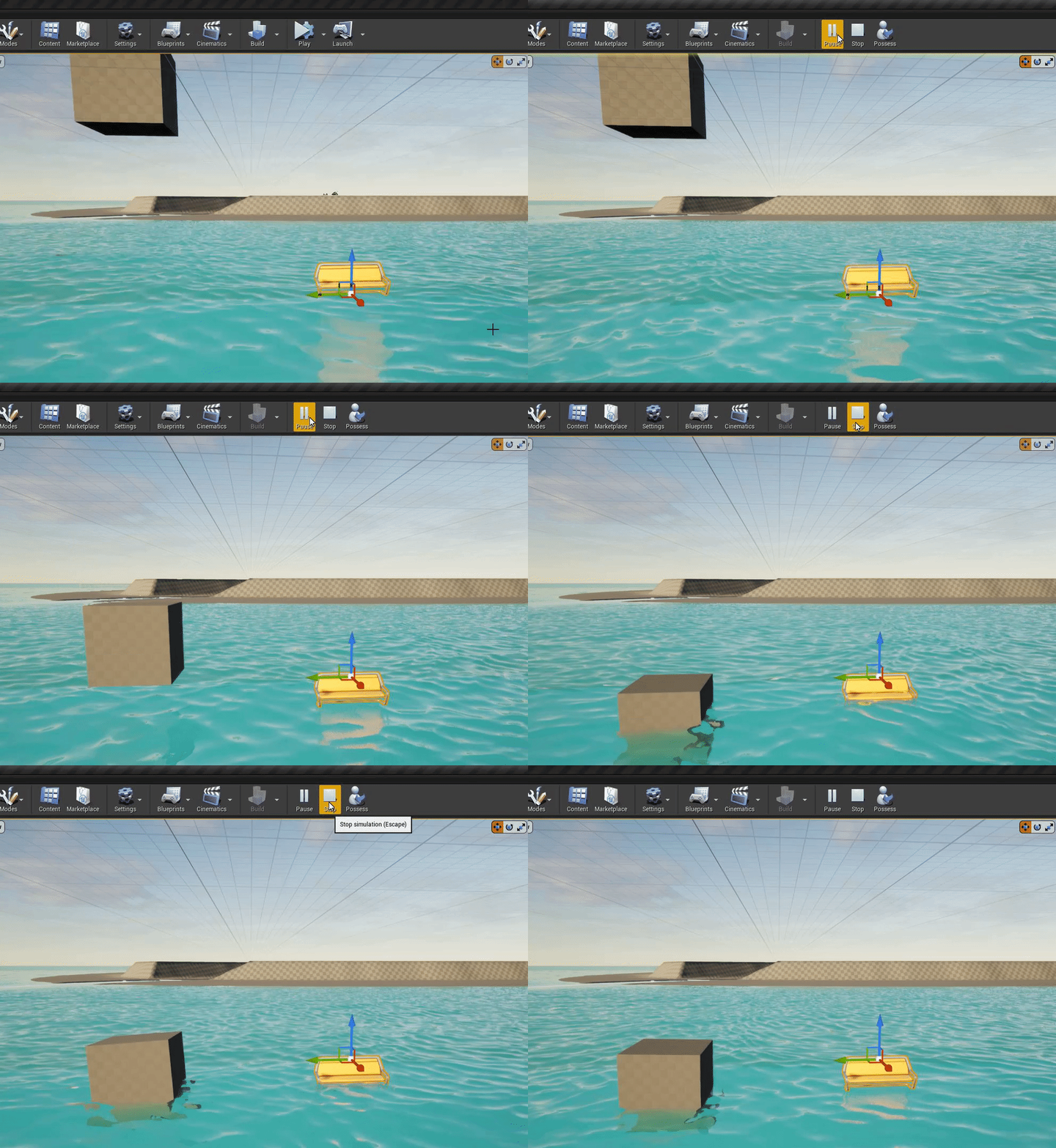
 spare kernel
well that is all price dependant?
could tell you get a TR3990X if price is not an issue
sonic cliff
is Amd threadripper is the best processor?
plush yew
For development, you basically want as many CPU threads as possible — the AMD Ryzen series is really popular right now, and obscenely difficult to obtain due to supply shortages.
fierce tulip
yup
past pilot
@plush yew i walked into the store last week and bought my 5600x lol
plush yew
i made my games base menu system
some of it
progress
the packaged game worked too ;D
 winter zenith
Hello!
I had a question about retargetting anims?
So I have this animation blueprint of a deer from this asset I have, I want to be able to use my other deer alongside it's animations with another variant of this blueprint
 plush yew
than you want to make sure they have simuliar bones
in name and setup
than retarget the bones from one deer to another
retarget and duplicate the set of desired aniamtions from the animation BP
profit :>
iirc
i could be completely wrong
 hot maple
Is there a way to get back into a data only view of a bp?
More specifically, get back to this view after clicking "Open Full Blueprint Editor"

Yeah but that opens it up on the side instead of taking up the full screen :/
I mean, I can drag that window all the way over to the left but then it hides the toolbar with compile and save.
 sage hinge
someone knows how to do
wet clothes with eu4 materials?
light thunder
Can someone please explain to me while some Marketplace content I can just add to my project, but others require me to make my goddamn own project copy of it, then migrate it over ... what am I missing here???
 lyric timber
@grim ore 4.26 destructible mesh is invisible until broken in standalone/built game =[
 unique rock
How do i change the color of a plane in unreal engine?
lyric timber
wow
calm pollen
unique rock
How do i change the color of a plane in unreal engine?
add a material to it and change the color of the material
@plush yew i got it now. Thanks so much!
 wet sphinx
i got a question about UE4 🙂 as the engine is able to open cooked content than when i cook my map, remove uncooked content from the editor and add cooked content there why i cant see some actors on the map ? Do i need to activate something to be able to load BP actors on the map ?
i dont even see cooked BPs in content browser so i cant even place another on the map
rigid belfry
are static meshes heavy on performance?
calm pollen
it depends on how detailed it is. If its low-poly and not very detailed, it'll be less heavy on performance. But if its like a whole detailed building, it will be much more heavy.
light thunder
@rigid belfry depends on how many you have in view and what materials/textures you have on them, and how complicated (polygon count) they are
Generally, no
 gloomy apex
The ue bug submission page just not submitting bugs for anyone else?
I tried all my browsers, it gets stuck on submit every time
 somber rover
Followed a guide on deleting some stuff in Appdata because my lighting wasn't building, now whenever I try to open my project or create a new project I get this Unhandled Exception: EXCEPTION_ACCESS_VIOLATION reading address 0x0000000000000968
Any ideas?
 half sorrel
Is there any way to do ECS in unreal? I know actors are entities and you can add components but I don't see a way to make "systems"
 brittle dawn
Is there a way to use the character controller to 'predict' where a character will be in x seconds?
brittle dawn
Would it make sense to create a 'phantom' charactermovement component and walk it forward for x seconds?
 shut olive
maybe not the best place to ask, but anyone here building websites for money?
kindred viper
@brittle dawn you can average the velocity direction over time to get an idea. Programming wise you could probably do something with data further down the line in anticipation but it depends what accuracy you want. I mean, if you are moving a character 1uunit a frame for example, it's as accurate as that per frame. But if you move 10 units, there will be a wider margin for error if things change, but you should have an average that works out fine for most purposes.
between interpolation and extrapolation of locations and the average, it's probably accurate enough really.
 paper cosmos
shut olive
maybe not the best place to ask, but anyone here building websites for money?
paper cosmos
shut olive
maybe not the best place to ask, but anyone here building websites for money?
try wix or weebly, save yourself some money, then you wont have to ask in a discord specifically for ue4 😉
shut olive
@paper cosmos Why would I use that crap? I'm gonna make one in wordpress probably. It's for a friend. I'm just looking for some advice 😛
and I asked here because it's my #1 channel for coding info haha
kindred viper
wix isn't crap, its just basic. depends what you need tho
wordpress on the other hand. As complex as you want it to be
brittle dawn
@kindred viper good idea, unfortunately the timescale i'm looking at is closer to 0.2 seconds, trying to create an auto-crouch system. If I average over a large length of time, I'm afraid my character-controller will too eagerly crouch
shut olive
@kindred viper mind a PM?
paper cosmos
spamming in dms?
kindred viper
asked if he could dm. i said im not a webdev, he dms anyway
paper cosmos
he didnt say yeah to answer your question
kindred viper
@brittle dawn by autocrouch you mean like next to cover?
brittle dawn
No like when you're near a table, if you're walking towards it the game will think "oh you want to get under it" and autocrouch
kindred viper
use volumes
paper cosmos
ah so kinda like monstrum with its ability to crouch under a bed without pressing a button
kindred viper
then you can blend the crouch in if you like
brittle dawn
i'd like to be more dynamic than that
robust marten
I dont suppose anyone knows why text in a widget menu moves position as it increases instead of staying in place?
kindred viper
@robust marten centered?
shut olive
@brittle dawn You can make a bigger collider around the table send some info to player "on enter collision", maybe with a direction check
many ways for that
@brittle dawn another way would be, player sends a trace forward, with length dependent on the movement velocity... if it hits "crouchable" object, player crouches automatically?
robust marten
kindred viper
<@!150691836560801794> centered?
Not sure what that means, but here are the settings for it. When it increases, it starts moving to the right
 brittle dawn
I guess I'm trying to create a system that can avoid having to tag objects as crouchable, and instead predict it from the character's current move direction
kindred viper
its sizing to content
shut olive
@brittle dawn only way to do that is either multiple traces (and a bit of complex guessing whether you will see a hole and fit in or not), or the collision method mentioned before
kindred viper
@brittle dawn that's all kinds of bounds checking that would be best served with a navmesh I guess. But no matter how you do it, it's not gonna be better than tags/gameplaytags because of the calculations. But if thats necessary, perhaps the navmesh would help somehow. Otherwise manual bounds checking and tracing which is gonna take frametime.
shut olive
Maybe some collisions on your character that detect collisions on head level and waist level. If you have a collision on head level, but not waist level - that's a crouch