#ue4-general
1 messages · Page 943 of 1
 frank escarp
sounds like he is just speculating everything
having no real good idea of anything
 serene birch
he starts the video by saying it's full speculation 😄
 honest vale
yup
it's one of those youtube videos that take current info and then regurgitate it onto a new video
 fierce tulip
removed because full of meh
 plush yew
do you know how i could make a color filter or any kind of filter over a character when he is low life?
fierce tulip
you can post it again, but its so filled with bs claims and thoughts I rather not have people go OMG FACT!!
 stiff verge
I don't understand why my translucent materials look so different from the tutorials.. could it be my model?
 quick bough
ah, thanks, will post there
stiff verge
hmm that's it! it's the model!
lol
oh I think I get it.. I'm used to not creating uv maps in blender when I don't need them
 sonic cliff
Hi guys, somebody know how to keyframe animate in sequencer the rotating movement component of an actor? i dont want it to be allways active
 sleek spear
i find rigging confusing. can someone help? i have made some character models in blender and i tried uploading in mixamo to have them rigged and download some animations. i like this workflow, are there any cons? i cant use the same animations for all rigged models. do i have to "retarget"? i dont understand the retargetting workflow very well. should i prefer the unreal mannequin skeleton to rig my models based on that? will i be able to use any animation based on the mannequin skeleton as is. or do i have to retarget as well. finally, should i worry about these things or it doesnt matter what skeleton i use because i can retarget everything to everything. i have no experience in rigging and animating so any kind of help / advice would be appreciated. thanks
frank escarp
@fierce tulip yes, but thats why we were commenting that its BS
removing the video does nothing
now people cant know that the video is BS
couse it was deleted
fierce tulip
what is done is done ¯_(ツ)_/¯
 slim badger
Hello, how can i make my ai character to be able to walk everywhere? (even at the spawned actors)
honest vale
use a navmesh
 mystic apex
hi
mystic apex
can i discuss about "packaging" of unreal engine here?? (I am new in this server)
fierce tulip
 sly vine
hey guys i have a question about the bin file
i have 2 files inside my project
AssetRegistry.bin
DevelopmentAssetRegistry.bin
what are they?
what they included , can i delete it , what is it for?
 sharp frigate
Hello Can i ask someone a few questions [in private] about packaging my project
honest vale
there is also #packaging
plush yew
is there a way to put a youtube link in my main menu
when i click on a button
plush yew
what
fierce tulip
"2. Be patient when asking for help. This isn't an official Epic Games support channel so we can't guarantee a response. Don't ping people unless you're replying to them. If someone can help, they will. If not, come back in a few hours and consider rephrasing your question or adding more details."
slim badger
@spare kernel are there any place that i can ask about my hud problem?
plush yew
i didin't pinged anyone
 spare kernel
@slim badger depends on the context, but either here, #blueprint #umg or #slate.
fierce tulip
@plush yew read the whole sentence <_<
slim badger
spare kernel
<@!373178387373621259> depends on the context, but either here, <#22179886293804...
aight tysm
spare kernel
@slim badger if you can't find the correct channel, just ask your question here, people will normally point you to a better place to ask. Just don't ask the same question in multiple channels if you are not sure 🙂
slim badger
spare kernel
<@!373178387373621259> if you can't find the correct channel, just ask your ques...
okay, dw i wont make your work harder ik that feeling since im a professional mod on a game's server :)
this is my 4th day on unreal so i use here a lot
 latent lance
still no fix for the blinking windows bug with the latest nvidia drivers (461.40 & UE 4.26.1)?
slim badger
latent lance
still no fix for the blinking windows bug with the latest nvidia drivers (461.40...
i have that problem
latent lance
yeah i iknow this is a bug from 4.26 but still no fix :/
 grim ore
roll back to 460.79? I have none of the issues here
latent lance
grim ore
roll back to 460.79? I have none of the issues here
yeah i know this option works but this annoying :/
 magic fern
Hey guys. Hwo do I implement a store on my ue game connected to steam? Do I need a plugin or can I use just bps?
 rocky epoch
Hi, can I tell to the engine to cook every map in a specific folder?
I know there is the "Cook everything in the project content directory" and "Cook only maps", but I suppose that will cook every map in the content, including testmaps, asset example maps, etc.
We have a specific maps folder that contains all the maps that we are using. Can I somehow point that folder out for cooking? We have a lot of sublevels, so adding all of them is tedious also a great possibility of error.
Or should we just use "Cook everything"/"cook only map" and discard all the example maps, and blacklist our testmap folder?
 surreal cloak
can you create a texture from scratch, inside of UE4?
 azure reef
Guys, I'm having a problem with 4.26. When I preview the game with Android ES3 and I'm changing the levels I get a warning. I think this is the cause for crashing on my mobile device. If I'm inside a level and I switch to the same level the game is not crashing and this warning does not appear. Only if I change to a different level. What can cause this?
PIE: Warning: Constraint in '/Engine/Transient.World_73:PersistentLevel.AnimationEditorPreviewActor_0.DebugSkelMeshComponent_0' attempting to create a joint between objects that are both static. No joint created.
grim ore
@surreal cloak in theory yes, you can outut a render texture into a texture asset.
surreal cloak
if I look through the project files of my UE4 project, will the texture files be an actual file or will they just say UEASSET sort of thing?
Like is there such thing as like, file = "BasicTexture.texture"?
plush yew
hey mathew do you have any finished projects of your own?
 unkempt hazel
psssst, hey
hey you
happy belated valentine's day

Unreal Engine
Unreal Learning Kits give you all the pieces, including source assets, to build your own project.
plush yew
hey guys, what process would you use for hanging dangly bits on your character?
basicly a physics constraint
 timber steeple
I am happy with unreal engine as of now @stiff verge. It performs far more nicely on my computer....than blender
plush yew
dont hate on blender 😦
timber steeple
No... but
I had to struggle to get good materials and less render time
I was rendering a short movie, and in the morning blender would have crashed..
 fallow edge
After upg to 4.26, these messages are no longer going away after being ignored for a few seconds. Any way to stop them from spamming the screen forever?
timber steeple
I had to monitor for 6 nights... 2060 card...
plush yew
thats just cause you dont know how to use blender properly then
 drowsy violet
plush yew
drowsy violet
plush yew
lmao
 frank oar
If I have a new mesh that I want to work with all my current animations which are being used by the unreal mannequin.
I am guessing I have to retarget that new mesh to the skeleton of the unreal mannequin right ?
grim ore
yes
frank oar
tyvm
rocky epoch
rocky epoch
Hi, can I tell to the engine to cook every map in a specific folder?
I know the...
Any idea for that?
frank oar
I am currently retargetting the skeleton
What does it mean if there is nothing in this box ?
I know it is supposed to be the current skeleton but its not showing up.
stiff verge
@timber steeple nice! it performs better than eevee?
the cool part is that you can still make yur scene in blender and import it in Unreal
 worn oasis
hi everyone, quick question here
im looking to upgrade my current cpu to 8 cores (from the 4 i currently have) so i can compile better in UE
these are my main candidates
worn oasis
id say 3700X is the best option since theres only a 11€ difference but it has lower max TDP, idk if thats super important though?
stiff verge
the 3700x is the fastest here
stiff verge
yeah they are hard to find.. how much is the 3900x?
worn oasis
didnt find that one either
stiff verge
what's your gpu?
worn oasis
these were all i found
worn oasis
i didnt find those
and yeah i had 3700x in mind
was just a little sus about that TDP
stiff verge
it's absurd to save 11 euros here
worn oasis
yea yeah
i just wanted to ask about the TDP drop
cause 2700X has 105, and 3700x has 65
stiff verge
i don't think it matters
i thought that was wattage lol
hmm yeah a lower TDP is better actually
well it doesn't mean it's better but having similar or better performance with a lower TDP is a good thing
worn oasis
i dont quite understand
"The thermal design power (TDP), sometimes called thermal design point, is the maximum amount of heat generated by a computer chip or component (often a CPU, GPU or system on a chip) that the cooling system in a computer is designed to dissipate under any workload."
is it the heat that it generates, or the max heat that it can dissipate¿
stiff verge
yeah
 rotund gorge
question, i have set up ragdoll upon death, how would i add health to make it take more shots until it ragdolled.
 clever axle
anyone know how to keep a camera transform after a sequence has ended?
In the documentation it says to go "properties -> when finished" but properties doesn't show up for my camera/transform track
 regal hollow
Hellooooooooooooo
 spare sun
hello
regal hollow
Is it possible to take the roughness angle and add a second texture to it?
So instead of it being shiny you can actually change the material?
something like an IOR but using the roughness value instead of the IOR value
😄
how's it going @spare sun
?
spare sun
fine hbu
regal hollow
Pretty good thanks 😄 just getting on with my day really 😄
kids are home for half term 😄
work is super hard haha
spare sun
wdym adding a texture to a roughness angle? What kind of texture?
regal hollow
i'd say a gold
spare sun
you mean like the straighter you look at the rough spot the more gold it becomes instead of actually becoming more shiny?
regal hollow
it's kind of like a dark quartz stone I'm making
https://www.wish.com/product/5a214e041726783e82a291c0?hide_login_modal=true&from_ad=goog_shopping&_display_country_code=GB&_force_currency_code=GBP&pid=googleadwords_int&c={campaignId}&ad_cid=5a214e041726783e82a291c0&ad_cc=GB&ad_curr=GBP&ad_price=7.00&campaign_id=6493229882&exclude_install=true}&guest=true&gclid=Cj0KCQiA1KiBBhCcARIsAPWqoSqWZvIDkB_jTNoUDsxftFf77GX4ry_86QwygNLWB0pKGasm6VwW_SUaAo4OEALw_wcB&share=web

Wish
Buy 180g Natural Black Tourmaline Crystal Rough Rock Specimen at Wish - Shopping Made Fun
frank oar
I seem to be stuck in a loop, this window keep popping up
regal hollow
Like this, so the Idea is I want to make like a black ish stone material that's glossy, but at certain angles you can see gold in it
 smoky sonnet
anyone know why my thumbstick right fires an value but my keyboard e does not (keyboard Q works fine)
regal hollow
can't help you sorry pascal 😦
spare sun
ah but for that you can use the roughness map and simply multi the golden diffuse texture where ur gold is by the roughness value no. So that it actually replaces the black one
regal hollow
Roughness values don't use colour in UE4
spare sun
yea but its still a value so you can have a golden texture as an overlay and set the alpha depending on the 0-1 roughness
regal hollow
for example, I could have changed the specular values to respond to a golden look in cryengine but in UE4 it's all static and it kind of more would look like a subsurface gold but not in the subsurface
spare sun
I mean.. you could also plug up an extra diffuse and modulate depending on dot product but it would only brighten up when you stare directly onto it
regal hollow
will look into it thank you 🙂
plush yew
its to my understanding you can play two anim montages at the same right?
like for lower and upper body as an example?
would this be hard to set up?
grim ore
@smoky sonnet your E key could be used for another input? another input E event inside of a blueprint, or another input event using it.
smoky sonnet
yea also thought about that one but could not find it i just switche now to another key which also fits for this context
grim ore
@plush yew it is not, there are docs on the website that should show it. Its as simple as using something like a layered blend and having it use 2 montages for the blend parts
 light thunder
How can I reference specific instance foliage meshes during runtime? There is a video that uses a linetrace but I want to be able to set it up BEFORE runtime
I'm getting there but need a little help
Not sure why is says 11 children components -
 rigid belfry
i am no expert and i have no idea, but try on the construction script maybe?
light thunder
I have 15 but I'm not sure if the type matters, it probably does but I don't know where to start - unclear on what the difference is
rigid belfry
if you want to do something before all else goes, the construction script runs before the event graph
plush yew
@grim ore whats the process called so I can look it up? 😛
 copper swallow
Hey guys, i had a question, im just starting out with unreal, and i already know a bit of C++, could anyone tell me whats the difference between doing it with C++ and blueprints? Blueprints seem more convenient but maybe know C++ is better?
 half kelp
Light Build won't start on two different machines with different projects, they have both 4.26.1, enable static light baking is enabled, assets are ok (tried also primitives from Unreal, nothing works, anyone having this issue? @ me please if you reply
plush yew
afaik c++ is faster
grim ore
@plush yew blending basically, layered animations, additive animations https://docs.unrealengine.com/en-US/AnimatingObjects/SkeletalMeshAnimation/AnimHowTo/AdditiveAnimations/index.html
light thunder
@grim ore You know how to reference a specific foliage instance at runtime WITHOUT using a linetrace?
plush yew
thanks mathew 😄
grim ore
@copper swallow do you know the engine? if no learn the engine with blueprints then learn the C++ behind the blueprints. If you do know the engine, well you know the answer to this question
copper swallow
I dont know it lol, just getting started
grim ore
then learn the engine and the editor, blueprints are part of that. dont try and jump into C++ with UE4 without knowing how UE4 works.
copper swallow
gotcha, thanks man
grim ore
@light thunder no I think you need to line trace no matter what in some way. without directly tracing you would have to get the instance transform for the instance you want, then you do like a small sphere trace to get that instance object
so like your foliage instance actor -> foliage instanced static mesh component -> get instance transform -> sphere trace for a small amount from that transform -> get the hit result -> blah blah
rigid belfry
copper swallow
Hey guys, i had a question, im just starting out with unreal, and i already know...
its also explained here https://www.unrealengine.com/en-US/onlinelearning-courses/blueprints---essential-concepts but essentially blueprint has to go throught a virtual machine first, which can be quite slow when doing a lot of calculations
plus if we're being honest, C++ would be more convenient because it has a lot of uses. bp can only be used in unreal
serene birch
blueprints are a neat glue for C++ code <=> UE4 engine though so using some will probably alleviate a lot of pain
copper swallow
yeah it seems that way
grim ore
one thing to note, there should never be a "C++ or BP" choice, it should be both where needed.
smoky sonnet
hey can someone help me am i missing smth? i have a pizza and a bootle. the bootle is a child blueprint from my pizza so why is my pizza going through the box collision but my bootle is not
meshes both have collision boxes
and both same settings for collision
and thats my collision where they both should go through
nvm fixed it 🙂
plush yew
o.o
 fresh plover
i.m total newbie to ue4 right now , sorry to ask but what to do ? i can.t see my map anymore..
i mean i see it
but it.s in a different format
rocky epoch
I believe you switched to a different view mode. In the top let corner there is the "Right" button. Switch back to Perspective
fresh plover
@rocky epoch that was it ! thank you very muchj
rocky epoch
Cheers :)
azure reef
Hello guys! My game is crashing when I'm changing the level on a Android device. Do you have any idea what is this about? I get the logs from Android Studio
frank oar
If anyone has a moment, I have a question regarding retargeting.
I am stuck in a message loop that I cant get out of, any tips would be apprciated!
This message will not stop popping up, it wont allow me to do anything at all, stuck in a loop of clicking the OK button
 thick nebula
Hello guys, I want to make my project read from a database, however, I don't know how to do it, and haven't found anything rather useful online.... help please?
grim ore
find a plugin for the engine for the database type and go from there
light thunder
grim ore
so like your foliage instance actor -> foliage instanced static mesh component -...
How do I even run that form the foliage actor? or do I just run it and sphere trace and cast to the type I want to remove?
 proven nebula
water is not working ?
In one project it is working fine and in other i won't even showing.
Anyone know how to solve this?
rigid belfry
whats the difference between add to viewport and add to player screen?
plush yew
would this unreal doc about locomotion and animation blending be okai the new control rig https://docs.unrealengine.com/en-US/AnimatingObjects/SkeletalMeshAnimation/AnimHowTo/AdditiveAnimations/index.html
Demonstrates how to blend animations together, in this case, a character that can move and fire a weapon at the same time.

light thunder
thick nebula
Hello guys, I want to make my project read from a database, however, I don't kno...
You need to research importing CSVs into datatables in Unreal
plush yew
anyone know how to abort a task or sequence in the bht when its already going?
 past pilot
Has anyone had it where you have worked on a project for two days, multiple saves. Ran and compiled it plenty of times. Close the editor and reopen it and it reverted the engine upgrade, completely reverted all changes you have done 2 days days and in fact seem to break more things in the process while not using anything like source control atm so there is no mechanism to "Revert" code changes.
 broken heath
Is there a way to show thumbnails of my unreal projects ? Because in the launcher it only shows recents
And i have a big group that i want to distinguish to find a file
grim ore
@light thunder you can get actor of class to get the foliage instance actor then go from there based on the code above.
@rigid belfry split screen for screen and viewport in general for the entire thing.
rigid belfry
anyone ever watched this? https://youtu.be/LsNW4FPHuZE is it worth it the 4 hours? should i just jump into this course instead? https://www.udemy.com/course/beginning-c-plus-plus-programming/
light thunder
grim ore
<@273265779175194624> you can get actor of class to get the foliage instance act...
Does the trace channel need to be set to block?
plush yew
thats usually how you specify it to be traced yea
grim ore
It could be on its own channel so it can only affect the line trace.
 steel shell
when i try to import a 8k udim i get this error: "Cannot import texture with non-power of two dimensions"
the udim is 3x3 8192 px images
someone knows whats wrong?
light thunder
grim ore
so like your foliage instance actor -> foliage instanced static mesh component -...
How do I get that to come up? I've taken a reference from the world's entire foliage but I can't get to anything involving instances from it -
 dusky inlet
my nav mesh bounds volume doesnt wanna build navigation for some reason in a fresh project in 4.26.1. Anybody encountered something like this before?
grim ore
@light thunder “so like your foliage instance actor -> foliage instanced static mesh component -> get instance transform -> sphere trace for a small amount from that transform -> get the hit result -> blah blah”. Your missing the 2nd part. Getting the component on the actor holding all the meshes.
light thunder
this- ?
rigid belfry
i am creating a PowerUps actor parent which holds most logic, and then creating child actors off of that for custom effects. this is what i am doing right now
is there a way to make that custom event fire in the child actors? this is not working
light thunder
grim ore
<@273265779175194624> “so like your foliage instance actor -> foliage instanced ...
It's weird that I get 11 when I have 15 things listed as foliage - 7 as foliage items, 8 as static mesh origins
grim ore
ugh
 drifting geode
anyone here using the oculus lab app? i have some questions... 🙂
 vale grove
Hello All
I have a quick question regarding building Unreal classes
I am in the middle of creating my custom environment in Unreal by doing the following
-
Create a New C++ class. This should trigger compile and open up a VS project
-
However, when I try to transfer my environment, I don't have this compiled VS project with me
Although I have the cpp and h files
Is there a way to manually compile?
I am sorry
It is a cpp and .cs file
Oh..one sec
But when I do that, it says this project does not have any source code associated with it
In a different folder ...haha
Oh
Let me try that
I will put both the .cpp as well as .cs files under Source
Well how do I get that
??
Thank you for all the advice though
I am a complete beginner here
Essentially I built a unreal project (using available templates)
Then I pushed the project folder into github
When I pulled it from github, apparently some files were missing
plush yew
i have my ai set up it will find a chair, move to the chair and sit on it
how would I make it so if its occupied others wont use it?
vale grove
I finally figured that unreal stored the .cpp and .cs files in a different folder
Perhaps that's why I am facing these issues?
Hmm..well I have them now
Sorry for the confusion
So I went back to my orifinal computer
I got the .cpp and .cs file
But the .h file looks empty
 random summit
vale grove
random summit
vale grove
Does the source folder have to be in the same directory as .uproject file?
Can it be somewhere else?
Got it
I will make some changes and get back to you
Thank you once more
Oh
Got it
 clever vault
    if (Input == HiddenWord)
    {
        PrintLine(TEXT("Your guess is right"));
    }
    else
    {
        PrintLine(TEXT("%i,%i"),Input.Len(),HiddenWord.Len());
        if (!Input.Len() == HiddenWord.Len())
        {
            PrintLine(TEXT("hiddenword is 4 characters "));
        }
        PrintLine(TEXT("You have lost!"));
    }
}```if i have input and hiddenword different lenght it still won't show the printline
oo
now i see
but i didn't 😦
 wanton lotus
rigid belfry
fixed my previous problem by using an event dispatcher
wanton lotus
rigid belfry
fixed my previous problem by using an event dispatcher
You really don't need a dispatcher to communicate with itself. In the parent, you could have made a normal custom event, but left its logic blank. You can then make calls to this blank event in the parent class. Then in the child class, you override that custom event and put in logic that is specific to that child.
Dispatchers are usually used when you need to communicate with another blueprint (or many) and there won't be an easy way to get a reference.
rigid belfry
wanton lotus
You really don't need a dispatcher to communicate with itself. In the parent, yo...
if you scroll a bit higher you can see that i was trying to do something like that but was unable to come to a solution on my own. since i recently learnt aboutabout event dispatchers, i used them
wanton lotus
rigid belfry
if you scroll a bit higher you can see that i was trying to do something like th...
I see your original post now. You basically had it there, but you chose to call the event instead of override it. When you type in the event name, you will see it listed twice, one is to override it and one to call it.
rigid belfry
oh
wanton lotus
You know you have the right node when it is red like this:
Notice how it doesn't say "custom event" anymore, since it is inherited from the parent.
Dispatchers are definitely handy, but I would think the use of them is a bit heavier than just calling the objects own events.
vale grove
Okay, so I lost everything that I made... haha
What were you saying about the gitignore file?
I don't want to make the same mistake again
Where do I get it?
Perfect
Thank you
 violet sluice
need help about continue game 🙂
travelfailure
normally its working but when i press continue on startmenu i get this error
 arctic compass
I have two Actors both with the OnHit methods but sometimes when they collide, the OnHit will only fire on one of them and not the other (like 1 in 6). Any ideas why that would happen?
 split kettle
I finally got a grid made. Now to work on A* pathing 😄
 pseudo bane
Hi all, I’m having some issues with getting some take recorded movements of a vehicle rendering properly. When I record the take, I pilot the vehicle no problem, the shot is recorded no problem. I add the shot to sequencer with a sub scenes track, no problem. Cinecamera added, no problem. Playback in editor, all good. But when I try and export with movie render queue, the vehicle doesn’t move. It’s wheels animate as if it were moving, turning left and right like it did in the take recorder, but it doesn’t change position
I did a test with the third person character bp and with the vehicle bp in separate recordings above, as viewed from a cinema camera also recorded in each take. Car won’t actually move! It’s transforms are all there though, and in playback in editor it moves as it should!
plush yew
Started a new project, made a lot of headway into making the ideas I had into a reality but then just got extremely un-motivated after thinking about all the textures, materials and animations I'd need.. Anyone else feel this way?
pseudo bane
No Im actually quite keen to get my question above answered and push on 😉 but thank you for sharing 🍉🍴😋
rigid belfry
plush yew
Started a new project, made a lot of headway into making the ideas I had into a ...
you dont need that to test ideas
white cubes is all you need
 magic lantern
Can anyone help me?
Hello I have a problem with rotate system. I am using Blendspace 2d (not blendspace 1d) and controller yaw is off. When I am looking the charact from the front from the anathor side the character isn't turning to your camera view side it is glitching. But I want do same system with last of us. Viz when I am looking the character from any side character should turn to your camera view side slowly and with animation. But not automatically. It should rotate when I press w/a/s/d.
plush yew
Is there a way to create a Multiplayer Game without pay for Server?
And is there a way for Multiplayer mobile games?
 worn granite
Listen servers. Ask in #multiplayer, you might also want to look into "ad-hoc" multiplayer (or host migration), you're basically making the game client able to act as a server too. There are game feel and anticheat concerns
If you want anything super cool like P2P via bluetooth (or related tech) you will have to do lots of custom code.
plush yew
can anyone help me? My camera is clipping through wall
i have a True fp camera
oh ok
i can't make it bigger
oh i can
sorry
it's not working
😦
 brittle jay
i can install 424 n 425 but 426 installs then hangs at not responding lol nothing works to eleviate so maybe im wasting my time with this engine cause i wont be able to use it no more ?? 426 is a mess \
funny part is i can get 426 working on windows 7 lolol
but not windows ten
but then some packs i cant use , cause not win ten lol yup tough times lol
 lyric timber
when i hit the Q key it does stuff in my game. i dont remember assigning anything to that event and i do not have that key assigned in the action mappings
is there a way to troubleshoot inputs realtime?
 rancid lynx
is it possible to get the index - element - id, from an instancedStaticMesh like Foliage, from an BEGIN OVERLAP event ? or only from a line trace?
 cursive aurora
Hey all, I was using the VR Expansion Plugin Demo Project to test out a few things and when trying to import a few assets (specifically the MotionController blueprint and Pickup interface blueprint from the default VR template project set up by Unreal) the files would show in file explorer that they had either been migrated from migrating them directly in Unreal's template project or from dropping them manually into the content folder. The Expansion Plugin Demo Project and the new project that I was trying to import the content from were both the same version (4.26) and yet the assets would not show up in the content browser when imported or migrated, only in file explorer. I attempted to do this with other assets as well to see if it was just the blueprint to the same result. I was wondering if anyone else had encountered this problem when using the Expansion Plugin Project, and if so, if there was a way to fix this so that I could migrate assets from other projects to the demo project. Thanks in advance and sorry for the super long message.
 sonic glacier
I have a new bug with the ue4 editor (4.26.1), my drop down menus getting invisible after a while and I need to restart the editor.
is there a way to fix this, its very annoying!
rancid lynx
brittle jay
i can install 424 n 425 but 426 installs then hangs at not responding lol nothin...
youre not going to like MY solution. formatting your harddrive and reinstalling a fresh windows and fresh Unreal engine would solve the problem. you might not know the power of a real refresh, but , if your hardware works, what ever bullshit software issue is causing your problem would be vanquishied. if I didnt solve the problem within the night, I wouldnt think twice, I reformat my ---- at least once a year. I hate trivial termites.
never happened to me evilFlex. guess im lucky. or maybe my files are minty fresh.
spare kernel
Anyone experiencing menus disappearing/going invisible, flickering editor, degraded editor experience, try downgrading your nvidia drivers. Commonly reported working versions: 461.40 and 460.89 and below.
latest version is causing this issue
sonic glacier
spare kernel
Anyone experiencing menus disappearing/going invisible, flickering editor, degra...
thanks, i will try it
spare kernel
spare kernel
Anyone experiencing menus disappearing/going invisible, flickering editor, degra...
plush yew
Anyone can help me figure out this headscratcher issue?
 slate thicket
anyone having an issue where right clicking on more than 5 items in the content browser crashes your ue
plush yew
Having ai use objects outside the navmesh
For example the chair
I teleport them onto the chair, now its stuck,
Gotta nudge him back into it
wanton lotus
plush yew
Having ai use objects outside the navmesh
Change the navigation area class?
plush yew
Better way would be turn off navmesh but then they would end up walking into the chair
wanton lotus
I think it is set to null? Obstacle may be fine.
wanton lotus
plush yew
On the chair?
wanton lotus
null means it leaves it empty, not traversable, ever
Obstacle just costs more so AI avoids it in general, unless it is the only path.
wanton lotus
In your chair
plush yew
Class settings/defaults?
 flat pewter
Hey folks, I already asked this over at #packaging but didn't get any answer... does anyone know how to work with .pak chunks?
flat pewter
I tried to use "MaxChunkSize" but doesn't seem to do anything
plush yew
should i add a custom collision?
oh it works
omg what a relief haha
thank you so much @wanton lotus
 frail portal
My guy came clutch and converted my game to html5!
 quick shell
would unreal crash if you didnt check if its valid? like the character is bugged or something so it keeps trying to do it infinitely?
 obsidian heart
Did anybody find a solution for this yet? I have the exact same problem. I've tried all the things that were suggested, but nothing worked for me 😦 Oh and also my screen flickers when I move my cursor over the UI or click something in the editor... Super frustrating.
 wary wave
quick shell
would unreal crash if you didnt check if its valid? like the character is bugged...
wary wave
quick shell
would unreal crash if you didnt check if its valid? like the character is bugged...
it is unlikely to crash specifically because of the absence of that check, it is more likely it will 'access none' and complain about it
 pseudo solstice
Materials are just straight up not working for me
I have a material that is just a constant V3 output, and I put it into a "set brush from material" node - nothing
I also tried drawing to a render texture with a solid colour material - nothing
Anyone have any clue why these materials just aren't doing anything?


And the UI image just displays as transparent
 lunar timber
@pseudo solstice Maybe the setting in your actual base material are wrong somehow? Hard to know, in those situations I usually start another material from scratch and see if I can figure it out
pseudo solstice
lunar timber
<@!212084311967399936> Maybe the setting in your actual base material are wrong ...
It’s the same for two materials with default settings - unless there are specific settings you need to use for drawing to render targets and showing on UI?
 rose cloud
How can I specify a property in c++ that of type "any" or "any struct" ?
pseudo solstice
rose cloud
How can I specify a property in c++ that of type "any" or "any struct" ?
C++ is strictly typed. Closest you’ll probably get is generics, but that works for specific use cases
 tardy basin
@novel rover
 novel rover
Hi
tardy basin
Ayo
rose cloud
@pseudo solstice I'll look into generics that. All I want to do is specify a "payload" member in a struct, that could be one of a number of other structs
pseudo solstice
Then you probably want to use polymorphism and inheritance with classes instead
rose cloud
hrm, I guess that's the way to go then, then I can specify the parent class
@pseudo solstice thanks
grim ore
Larger the project the larger the compile times yep
 regal mulch
That depends what you mean with "Compile Times".
You C++ code usually only compiles the changes.
And pretty sure BPs aren't much different.
 strong bay
Hi everyone iv been running in to a problem on unreal like whenever I try and get my character to load in say using a checkpoint or loading after saving my character just doesn’t spawn in. Iv followed multiple tutorials and iv just ended up getting the same result. Even started a new project just to try and get it to work and nothing works
 marsh cargo
hi guys, I have this problem using a houdini HDA.
 sly wagon
so Im nearing my first week of using unreal and I made this horrid creation

ignore the black hole thing in the back, that's another playable thing I made 🤣
slim badger
how can unreal engine use 50gb of space on my pc?
or are there any way that i can get it less?
from settings etc?
strong bay
Anyone know I can solve this issue when I click load. When I creat checkpoint does the same thing too
fierce tulip
looks at his 500gb of ue4 engine installs and even more GB of projects.
wary wave
cries in 2Tb SSD
plush yew
I hope I'm posting in the correct channel.
Who can I talk to re; constant crashing? I've been saving the logs and dump files.
slim badger
strong bay
Anyone know I can solve this issue when I click load. When I creat checkpoint do...
any destroyactor?
mybe??
rose cloud
I have this method:
I am passing it one of these:
class EMRGAGENTUI_API UEMRGPubSubMessageNavigationEvent : public UEMRGPubSubMessage
and getting this error fro mthe compiler:
GM->EMRGAgentInstance->PubSub->Publish(EMRGChannels::NavigationEvents, *message);
what am I missing?
UEMRGPubSubMessage itself extends UObject
I make the call like this:
PubSub->Publish(EMRGChannels::NavigationEvents, *message);
 leaden dust
what is in 'message'?
rose cloud
it's a UEMGPubSubMessageNavigationEvent
#pragma once

#include "CoreMinimal.h"
#include "EMRGPubSubMessage.h"
#include "EMRGPubSubMessageNavigationEvent.generated.h"

/**
 *
 */
UCLASS()
class EMRGAGENTUI_API UEMRGPubSubMessageNavigationEvent : public UEMRGPubSubMessage
{
    GENERATED_BODY()

public:
    UEMRGPubSubMessageNavigationEvent();

    UPROPERTY(EditAnywhere, BlueprintReadWrite)
    FEMRGAppListEntry Payload;


};
#include "EMRGPubSubMessageNavigationEvent.h"

UEMRGPubSubMessageNavigationEvent::UEMRGPubSubMessageNavigationEvent() {
}```@plush yew going to need to see your crashes to get any help
plush yew
@spare kernel mind if I DM
spare kernel
@plush yew sure
honest vale
@civic mauve that's just a warning, not an error
 blissful trail
any idea's on how to fix this ?
https://gyazo.com/8a752435f46877319b0f36b216ee3ca3
rose cloud
@spare kernel here 'tis:
 civic mauve
honest vale
<@!574885916578021388> that's just a warning, not an error
civic mauve
honest vale
<@!574885916578021388> that's just a warning, not an error
but i cant able to build the lights
help
honest vale
do you have a ton of foliage on your map?
 stark ledge
I have a bunch of Instanced Foliage Types, and I'd like to convert them to Actor Foliage but keep the placement settings etc.
Any ideas on how to do this? Really want to avoid having to recreate 25 types by hand...
leaden dust
@rose cloud try passing message as a reference instead of a pointer maybe?
I have no experience in c++ I am just guessing
civic mauve
honest vale
do you have a ton of foliage on your map?
not really. its just snow
this is my scene
leaden dust
@stark ledge I am pretty sure you can't convert them directly
stark ledge
Seems that way, which is a shame as 95% of the parameters are shared in the base class
leaden dust
@blissful trail whats happening?
rose cloud
leaden dust
<@!200790565594464256> try passing message as a reference instead of a pointer m...
hrm, will check thanks
leaden dust
@rose cloud or maybe just pass it as 'message' and not '*message'
blissful trail
leaden dust
<@!485639307793793046> whats happening?
when i stand on a sword i made that has physics it kinda acts a bit weird
leaden dust
@blissful trail yeah thats just the collider's interacting
if you want the sword to stay still when you walk over it then disable its collision with the player
 worthy orbit
Everyone Germany Here?
leaden dust
I really should upgrade my CPU, loading levels take a while
pseudo solstice
Anyone else have times when the editor just... stops letting you right click and drag??
It's really fucking irritating, and it's either the dumbest feature ever or a bug
fierce tulip
no need to curse hehe, and yea that sounds like a bug
 waxen aspen
Would there be any difference in performance between a road created in Unreal's Landscape Spline Tool vs one imported as a one big mesh from Blender?
rigid belfry
does the begin overlap node fire constantly while the actor is overlapping or does it just fire once?
 upbeat trench
fierce tulip
_looks at his 500gb of ue4 engine installs and even more GB of projects._
upbeat trench
fierce tulip
_looks at his 500gb of ue4 engine installs and even more GB of projects._
I just got an 8TB drive, time to fill it entirely with UE4 😛
 tiny grove
hey I am having a small trouble in ue4 can anyone help me/
 flat trail
Getting some weird bugs when using XR live link with 4.26
Cant seem to save the main map as long as a livelink component is added to an actor, which is added to the map
 urban chasm
Whats the best way to find when a projectile will reach a certain height? I'm using PredictProjectilePath.... I'm thinking of using a trigger box, and set the predict to only collide with this actor. Is there a better way?
spare sun
@urban chasm depends on how ur projectile is shot. If it's a parabola it follows then you just need to figure the highest point considering x axis to be the time.
 inner cloak
I have an issue with Key mapping .. i have set the key binding but it does nothing, what am i missing ?
its not printing Hello
Grrrr .. seems to work now ! strange
urban chasm
spare sun
<@!472473264875372554> depends on how ur projectile is shot. If it's a parabola ...
Thanks, it could be a different trajectory depending on the situation. I've scrapped the trigger box idea already :). I'm manually parsing through the PathData and checking the height and storing the values now. I think it should work.
 amber ibex
Hello, are there other ways of fixing light bleeding instead of just bumping up the lightmap resolution?
rigid belfry
i want some power ups to last until the level is complete. where should i store the information? right now if the player dies, i destroy the actor. that means that i lose all variables. i want to make this network ready so i am wondering wether the player controller or the game mode would be better
lunar timber
@amber ibex do you mean bleeding through walls and corners etc?
amber ibex
lunar timber
<@!264107489128087553> do you mean bleeding through walls and corners etc?
yes
lunar timber
the only tips ive learnt so far is to make sure that lightmap res is high, shadow detail is high and that the actual static meshes / geometry should be quite thick
i think i also noticed light bleeds happening worse when using mainlydynamic lights
 heady quarry
I am having trouble with a widget button. I cannot get it to stay held down. When I click and hold, it will call the 'on released' function a few seconds later, despite me never letting go. I don know if this makes a difference, but I need it for a mobile game, so I have the 'use mouse for touch' setting enabled.
amber ibex
lunar timber
the only tips ive learnt so far is to make sure that lightmap res is high, shado...
i already looked into that and it helped, now theres no light bleeding anymore, but sometimes shadow bleeding.
 azure elk
Just migrated to 4.26 and simple material on my forward rendering is red...
Can someone help how to fix that?:)
This is how it was on 4.24 for example
Totally different picture
 dense knoll
Why are plugins only being made for 4.26? 4.25.4 is still used...
azure elk
No, im comparing two forward renders with mobile previews on 4.24.3 and 4.26.1 versions)
sleek spear
the neo kinect plugin moves the mannequin skeleton with data from kinect. it is made to work with the mannequin skeleton. can someone help me modify the animation blueprint and calculate the required rotations so it works with the mixamo skeleton?
 digital anchor
@azure elk iirc thats normal and not a worry, forward adds like 500 instructions on the material but eprformance should be the same
as for the reason its different on 4.24 im not sure
 faint meadow
Can we ask general questions here? I was just curious when people think epic is gonna drop ue5 preview, I’m excited to play with it. Just opinionated
fierce tulip
late 2021 is our best guess... I guess
 thorn topaz
What is the difference between the 4.25 and 4.25-plus branches?
 sterile tulip
Maybe game instance @rigid belfry
 stiff bane
@thorn topaz https://forums.unrealengine.com/unreal-engine/feedback-for-epic/1726233-ue-4-25-plus-branch maybe this helps
Unreal Engine Forums
Hello,
is there any documentation on the branches of ue4?
I'm currently wondering what the difference between the normal 4.25 and 4.25-plus branch is
thorn topaz
thanks
plush yew

stiff bane
tryed to import a slide animation,, anyone know how to fix this?
 tight prawn
are there any articles/tutorials on how to develop a systemic game
as in having electricity be intensified with water and such
 steady zodiac
Does anyone have a demo map to showcase VFX in ue4?
stiff bane
this stuff?
 silk pumice
is there any way to make the skysphere un-selectable? I always select it by accident when box selecting multiple meshes
 potent bridge
How long does UE4 packaging usually take? For some reason I have 54,000 shaders to compile all of a sudden
fierce tulip
@steady zodiac you can download any of the free marketplace packs, or check the learning tab for some more free stuffsies. you can easily make a demo-map out of em
stiff verge
are there other discords or forums to ask for help?
steady zodiac
Yeah I guess I'll make my own then
stiff verge
it's insane to compare unreal and blender in terms of learning curve and community.. unreal appears to be unaccessible
I tried asking on reddit but got no reply..
https://www.reddit.com/r/unrealengine/comments/lkianm/actor_from_plugin_is_broken_after_packaging_but/

reddit
1 vote and 0 comments so far on Reddit
stiff verge
oh thanks
wary wave
if you're having a problem with a plugin, the person to ask for help is the author
because by the sounds of it the problem is almost certainly the plugin
fierce tulip
also attempting to use a 4-year old plugin... is kiiiinda asking for trouble
stiff verge
i couldn't find better 😦
fierce tulip
so yea, contact author, hope they are around. else... id move on
stiff verge
i mean.. most resources for unreal are 3-4 years old lol
i posted the two issues I'm having on the github
potent bridge
What in the world?
stiff verge
@wary wave yeah but it works in the editor.. just not when packaging.. and I got a 1 week of experience with unreal.. chances are i forgot something
wary wave
it's possible, but if it's packaging, and it runs, albeit with issues, I would actually guess that the plugin is the issue
e.g. it's using a code path that isn't supported in the runtime or whatever
 wooden jacinth
hi, I really want to learn programming but I don't really know where to start (how to start) i know some basic stuff and I know theory but I can't put it into practice. Could someone help/guide me what to do?
lunar timber
So you mean you want to learn how to use ue4? Because you don't really need to know how to code to use ue4
wooden jacinth
I know all of inspectors, and I know how to use engine but I don't know how to code
lunar timber
So you can use the unreal blueprints?
wooden jacinth
ok so is it better for me to use learn c++ or bp first?
stiff bane
depends
wooden jacinth
and I dont really know what to start with
stiff bane
blueprints in ue are pretty eazy to understand of you know basics of coding, and they are eazy to use, you can just use them and follow more C++ tutorials
like the serie from The Cherno

YouTube
wooden jacinth
ok but for example I wanna know how to make inventory system. What do I do then jut follow tutorial or what?
lunar timber
I have no coding background and just use the blueprints system and watch it tutorials, works well for games that are relatively simple for beginners I guess
stiff bane
almost noone uses C++ in ue4 i think cuz every tutorial uses blueprints
stiff bane
wooden jacinth
ok but for example I wanna know how to make inventory system. What do I do then ...
first learn C++ basics at least so you know what you doing, you might be able to figue it out by your self but there are 100% tutorials on it
rigid belfry
wooden jacinth
ok but for example I wanna know how to make inventory system. What do I do then ...
stiff bane
you might be able to convert blueprint to code
rigid belfry
search ue4 beginner tutorials on yt as well
stiff bane
rigid belfry
https://learn.unrealengine.com/
that yeah very usefull
potent bridge
@wooden jacinth Inventories? Thats a pretty ambitious starting point.
wooden jacinth
ok and is there some sort of "path" that I have to go through like in math (first addition and subtraction after that multiplication and division) or there isnt
wooden jacinth
potent bridge
<@!516234380252020746> Inventories? Thats a pretty ambitious starting point.
it was just example
 grave radish
Is anyone having issues being able to build projects with VS and UE4.26.1?
stiff bane
wooden jacinth
ok and is there some sort of "path" that I have to go through like in math (firs...
depends on what series you follow, most will starts with variables n stuff
wooden jacinth
I already know things like what is bool, float etc like total basics
rigid belfry
wooden jacinth
it was just example
do you know how write "hello world" in blueprints?
wooden jacinth
yea
rigid belfry
cool. have you watched any tutorials?
wooden jacinth
no I tried working in C# but I switched to ue4 because unity was too buggy
I was only experimenting with code and with nodes
rigid belfry
have you followed any of these? https://learn.unrealengine.com/home/dashboard
blueprints essentials is pretty good
stiff bane
it is
rigid belfry
try "Getting Started in Unreal Engine" first
"blueprints essentials" after
then "Exploring Blueprints"
lunar timber
My suggestion would be to just make a simple level first, how to raycast, use collision boxes, open doors, turn on lights, pickup objects etc. YouTube is full of beginners tutorials. The hardest part for me was just understanding casting.
wooden jacinth
lunar timber
My suggestion would be to just make a simple level first, how to raycast, use co...
ok so I should not start with things like movement?
rigid belfry
wooden jacinth
ok so I should not start with things like movement?
movement is already set up in unreal
lunar timber
Well yes, but the template projects come with movement setup
rigid belfry
wooden jacinth
ok so I should not start with things like movement?
https://youtu.be/rAVPEGnyatk also this video

Continue your learning with my Unreal Engine 4 courses right here: https://devaddict.teachable.com
This new beginner's tutorial is using the just released Unreal Engine 4.26 version to help you learn how to make a platformer game with the free Hour of Code project. If it's your first time ever opening up UE4, then this video is for you. You wil...
wooden jacinth
yea but I mean just to practice because I wanna know how to make movement too (and custom)
plush yew
Is there a way to go back and disable a project setting? I enabled one, it forced a restart and now it's hanging at 39% indefinitely.
lunar timber
I'm guessing the project settings are kept in a configuration ini file in the project folder?
So perhaps if that can be found and deleted the project will reset to defaults? Idk
plush yew
Hm, is there a log to see where it's hanging?
wooden jacinth
could i add you guys as friends if i have a problem in the future?
lunar timber
Yeah just ask on here especially for beginner advice I think
wooden jacinth
ok thank you for help
plush yew
CPU usage @ 100% now, and ShaderCompileWorker is duplicating itself.
lunar timber
I mean certain settings can take half an hour to reboot
Depending on your computer and project
If you change major rendering settings it can cause a long delay on first reboot
plush yew
I'll let it sit for a few mins but https://i.imgur.com/n3EaMB4.png
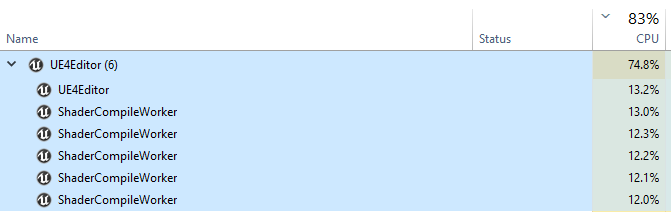
That doesn't look right to me
plush yew
I've never had it take this long to open up a project though..
lunar timber
Usually switching on raytracing did this to me
wary wave
yeah, anything that triggers a change in base shaders will trigger a massive recompile
 fringe wigeon
any tips for a Marvelous > unreal pipeline? in the sequancer the alembic clothing is very slightly out of sync with the fbx animation, which is causing clipping. tried locking the fps, checked framerate, checked both in blender and they're fine. it seems to start fine, then drift towards the end of the sequance
plush yew
Turned it off in the ini file and it loaded up
lunar timber
What was the setting?
lunar timber
@fringe wigeon is your project on a fixed frame rate?
 lunar timber
Hmmmm never tried that one, but I assume it was forcing a big shader recompile yeah
plush yew
Well now I'm back to square 1 lol.
fringe wigeon
@lunar timber oooh inside engine - general settings? thats a good shout lemme try setting it to a fixed framerate there
 rancid bramble
Any way to get an instance of a spline mesh? The idea is to duplicate and modify the spline mesh
 jolly jungle
how do i make my antivirus not go ripshit bananas when i open a built unreal project
digital anchor
delet
lunar timber
Yeah just use windows defender
fringe wigeon
@lunar timber dang, seemed good at first but didnt work ahah - -trying a full refresh pipeline now so will see if its 1000000% not anything to do with the mesh/base animations
plush yew
So, I'm fooling around with Sequencer and trying to Render out this animation but for some reason the animation is framed wrong
lunar timber
The drift seems to suggest a very slightly off interpolation of one of the animations I guess
jolly jungle
lunar timber
Yeah just use windows defender
no windows defender is useless
fringe wigeon
@plush yew is it framed wrong when its rendering in the preview window or the final product?
jolly jungle
avast has been so helpful
plush yew
fringe wigeon
<@456226577798135808> is it framed wrong when its rendering in the preview windo...
I think I just figured it out. Let me go open it in the folder before I give a definite answer.
Okay, so it's framed correctly now. But how do I remove the background so it's just the object I'm recording?
fringe wigeon
@lunar timber yeah thats what we've been thinking, but just cant seem to nail down where that happened in the process - i had this same issue a while a go with anothe project and solved it using t.maxFPS 30 but i think this time its a different root issue with the same visual error which has made it long to solve
lunar timber
Those kind of errors are the worst to figure out haha
mystic apex
i created an empty project in unreal engine and package it as apk format.but the apk file size becomes 96 mb.............can anyone please explain it....................
lunar timber
I think ue4 has required files that it needs in a package
Even if there's no game or levels
mystic apex
but 96 mb is a very big file for an empty project.........isn't it!!
lunar timber
Well it depends on your platform, but yes ue4 games seem to start off bigger than other engines I guess
mystic apex
yes
lunar timber
There are ways to make sure you only package your selected level
In project setting there is a list of maps to package
If you only select your empty level maybe that will help
mystic apex
but if i open a "third person" project,which unreal gives us free,
i packaged the file and the apk file size becomes 1.3gb!!!!!!!even I dont changed a single part of the game,
lunar timber
Yeah I think that's because by default unreal will package all maps in project
mystic apex
so what should i do now?
mystic apex
what's the name of the setting?
 still tangle
Hey, I have 2 projects - Ultimate shooter kit and batttle royale template. any easy way to merge them easily?
lunar timber
Can you just migrate all assets?
still tangle
lunar timber
Can you just migrate all assets?
Ya I did but then I want the character from the Ultimate shooter kit to work with the br mode. Hope you got the point
mystic apex
@lunar timber are you talking about "cooked everything in the project"??
lunar timber
It's a setting call map include list or something similar
lunar timber
If you google only include certain maps in unreal there will be results
steady zodiac
How to I go about making a progress bar like this, is it possible to create a material with a float variable 0 - 1 to control how many bars are active?
plush yew
where did copy rotation and copy bounds from runtime virtual textures go to?
(sorry for the garbage screenshot, trying to learn from a video)
(now)
 earnest violet
My in game menu is overlapping the pause menu when I hit the escape key. Does anyone know how I disable the game's ui whilst in pause menu temporarily? Thx! 🙂
rancid bramble
steady zodiac
How to I go about making a progress bar like this, is it possible to create a ma...
You may add children to a horizontal grid in UMG. Each children is an image of one red slot. You feed the amount of max progress to the widget and then use a for loop with max set to max progress - 1. Then in the loop you get the amount of filled slots and in the update of for loop you check, if the current index is <= to the amount of filled slots and depending on that you put red image or pink image. And then in your progress code you get a ref to your widget and it's horizontal grid and use similar for loop to update
 tired escarp
Epic you need to become more popular with Idaho
earnest violet
how do I remove a widget temporarily
grim ore
Set it’s visibility
spare kernel
also Z order can help
normally you want your pause menu to have higher Z
and blur the background, not hide the UI
grim ore
^^^
earnest violet
oh ok mate thx
spare kernel
then you can apply a blur over the widget background
earnest violet
how do i blur
lunar timber
I think the Blur is a component within the widget
earnest violet
thx
stiff verge
anyone has experience with baked alembic anims? how do I ping pong loop them?
earnest violet
@spare kernel Got a tut on how to blur when pause menu is enabled. You sorta triggered in a sense mate?
spare kernel
that link shows a pause menu with blur
 robust marten
Would anyone know why the character recorder wouldn't show new meshes? The helmet, sword and shield are attached meshes whereas the rest of the equipment is a change for the skeletal mesh.
magic fern
Hey guys. Hwo do I implement a store on my ue game connected to steam? Do I need a plugin or can I use just bps?
earnest violet
Thx u guys for all the help! You're the best!
I got it working. The only problem now is that when I'm in the menu and select graphics the game automatically resizes my window to like the viewport size. Anyone know what'scausingthis plz?
 jaunty zinc
I didnt read the entire conversation about it, but could it be because youre changing resolution?
earnest violet
Maybe
jaunty zinc
i think you should launch the game as standalone, since in the viewport its fixed resulotion, if you get what i mean
jaunty zinc
so yeah check the resolution change
jaunty zinc
all good
in your graphics tab, you change the graphics quality, do you also change resolution?
earnest violet
Not manually no mate
jaunty zinc
can you show me what happens? like a video or something
earnest violet
I don't cahange any graphics setting I just click graphics section text
yeah ok hang will record no wmate
jaunty zinc
alrighty great
earnest violet
@jaunty zinc Here ya go mate!
fresh plover
Any Idea why i can.t make an constructor and getting those errors?
jaunty zinc
alright yeah i see, what we can try to do is go over the Display menu, there should be a variable of the resolution, and im guessing the default is 1024x768 @earnest violet
so go to that variable and try changing it to 1920x1080
also try launching the game by going to Explorer, then right click on the project (with the blue ue icon) and click on "launch game"
earnest violet
ok will do I'll go look
jaunty zinc
great
 golden niche
epic just gave away GameDevTV's courses for free!
fresh plover
can somebody help me?
robust marten
fresh plover
can somebody help me?
Whats up
fresh plover
i.m watching an tutorial for ue4 on youtube
whats weird is that i.m getting errors if i try to create an constructor in an object class
robust marten
fresh plover
Oh god sorry, I don't use C++, only BPs lmao
 rocky radish
what is in your .cpp file?
earnest violet
@jaunty zinc Hi man bk again with another video. I can't seem to find it. Maybe if you watch the short vid It'll help. Thx Bro1 🙂
rocky radish
fresh plover
nothing
then your error is being caused by you not defining your constructor in your .cpp file
rocky radish
it should be something like URandom::URandom(){}
plush yew
how to change the default walk animation in a statemachine to another one?
like if id be hurting or carrying something
is it just a bool?
rocky radish
np
fresh plover
i don.t understand why is working now
i tried to implement in the c++ before and it still gave me errors
jaunty zinc
earnest violet
<@!586425838107361294> Hi man bk again with another video. I can't seem to find ...
could you record a video of that event please?
thanks
from what ive gathered you need to change the variable to a specific number which translates to 1920x1080, but before that lets check that out
earnest violet
Sorry 4 being dumb but where do I locate the event mate?
jaunty zinc
you click on view, look at where the arrow is pointing in the pic, bottom left corner
after you select the "display resolution options picker" var
earnest violet
@jaunty zinc Here's the video mate! 🙂
jaunty zinc
@earnest violet yeah i see so select the variable called "loaded screen resolution and change it from 0 to 13, see if that works
earnest violet
ok m8 will bb in a mo
jaunty zinc
sure, let me know how it goes, if not i have another idea
earnest violet
Nah man didn't work =/
jaunty zinc
it didnt change anything?
earnest violet
The window still resizes I changed the interger value to 13 and the same thing happens my friend! 🙂
jaunty zinc
did the default resolution change tho? or does it stay on 1024x768?
earnest violet
oh i'll just check
@jaunty zinc The window still resizes but the default resolution has actually now changed to 1920X 1080. One step closer dude! Has it got something to do with the variable loaded window mode. It's in the video!
I can make another vid on loaded window mode if u want?
jaunty zinc
does it resize to 1920x1080 or like the previous video?
 hollow forge
some may recommend a beginner video series to make an open world game? 😄
earnest violet
no
Project Files : https://www.patreon.com/posts/45891311
Welcome to the longest running and most complete up to date unreal open world tutorial series which worth more than any tutorial series you will find anywhere on web (paid or free). The series is still continuing and new episodes are released everyday.
This would be the first entry of the...
hollow forge
Thanks
earnest violet
@hollow forge all u need dude
hollow forge
Yer just a place to starte
earnest violet
Can't go wrong with code like me
@jaunty zinc any ideas
@earnest violet I swear its got summink 2 do with loaded wndow mode
jaunty zinc
hmm i see so whats happening is that there's an event thats being triggered every time you click on the graphics menu, could you maybe check where it happens and see if there's any node that changes the resolution or resizes the window?
Im trying to have a look on my project in the meantime
earnest violet
@jaunty zinc how would I check 4 that m8?
jaunty zinc
hmmm go over the widget blueprint of the menu, look for the graphics option button, scroll down on the bottom right and look for "on clicked" event
earnest violet
ok
jaunty zinc
like so
ok ok ok i checked, dude i think the problem is that youre launching the game by standalone!
earnest violet
@jaunty zinc Hi dude! Me again. Got another video hopefully this will help!
jaunty zinc
you see, for some reason it doesnt actually change the resolution, but if you launch the game out of the editor it works
earnest violet
yeah I am
jaunty zinc
look, go to your project files, and right click:
earnest violet
How do I launch out of editor sorry for such n00b question. Do I have to package it firsrt]
jaunty zinc
jaunty zinc
earnest violet
How do I launch out of editor sorry for such n00b question. Do I have to package...
nono you go to the project files, right click on the uproject, and click on launch game like i showed in the screenshot
earnest violet
@jaunty zinc All's good in the hood! I launched it outside of the editor like you said and everthing is great now. No more resizing. I'd just like to say a massive thank you for all your help mate! 🙂
jaunty zinc
neat, no problem mate. so dont worry about the resolution changing, its just the editor's issue. if youll package the game itll be just fine!
earnest violet
Yeah thx. Thx again dude! 🙂
 forest bay
hey peeps, anyone played with Blutilities much? I think this is a simple question but all the examples I'm finding of blutiilties are being run on Static mesh's or textures. I'm trying to create a Scripted Action to run on the Blueprints i have selected in the Content Browser. Ultimately I want to be able to make a series of changes to the static mesh's inside the blueprint and save those changes. I'm using Get Selected Assets then running a for loop on those assets...But i cant figure out what to cast to...Since i don't know which blueprint will be selected.
jaunty zinc
earnest violet
Yeah thx. Thx again dude! 🙂
no problem man, good luck devving!
digital anchor
hum actually forget, i dont think that works at all
 remote gale
Has anyone tried moving or modifying the shape of the water bodies at runtime? I have set the console variable r.Water.WaterMesh.ForceRebuildMeshPerFrame, but still there is no change in the water mesh when I move the water bodies or change the spline points.
 sand inlet
Does anyone know if it is possible to have multiple action mapping sets? For example, I want to have a full fledged flight sim and a full fledged fps, each with their own unique key bindings that very much overlap.
amber ibex
Does someone know why one part is so much darker here than the other one? they are two objects in the game but the same mesh, and have the same material. only difference is that one room just gets more sunlight than the other one. why is there such a clear border?
 fleet iris
so im having a weird issue with building my project
everytime i have tried to run the executable it has either not run or has given me this crash message
has anyone else encountered this?
not sure if this is also helpful but here are my build settings just in case i have messed something up with this
 next badger
@fleet iris make sure the path of your game has no weird characters
fleet iris
could you elaborate what you mean by weird characters?
next badger
щдé etc
fleet iris
yeah i dont have any of those
its strange why it cant run the project as it works perfectly fine in the editor
but the moment i try to run the exe it starts having a fit
also for some reason when i am building the file instead of being called "catgame v0.5" its just importing as catgame v0
any idea where i could have went wrong with this?
next badger
. dot is not a normal character
fleet iris
ah ok i will try changing the name and see if that fixes it
plush yew
how would you animate a tree falling down, then having it seperate into a stump and a log?
have an animation of the tree falling down, then delete it and replace it with a seperate stump and tree?
 nimble moat
@plush yew that should work, i guess if you let the tree fall by physics then get world transform and delete actor then spawn new actor from the transform
plush yew
not a fan of physics they tend to go batshit crazy
fleet iris
well... changing the name did not fix things
 mild sedge
Hello! Tricky question here, or at least it is tricky in my opinion xD. Do you know if I have more than 1 camera in the viewport, during gameplay, all the cameras will render what they are looking and increase the polycounts that I'm having in my level?
thorn topaz
So I moved my built from source engine install and when I get the pop up, clicking yes does nothing.
spare kernel
You need to register your source engine
In the binaries folder will be a version selector executions run that to register your build
thorn topaz
?
sterile tulip
guys
 dim osprey
Hi, I'm between in making a game engine for a voxel game or use UE4? Which one is make sense for long-term project? Thanks in advance 🙂
worn granite
@dim osprey is your goal to eventually make a game? Use UE⁴
otherwise your own engine is fine
dim osprey
Yeah, my goal is make a game. But I'm thinking if I cant find a feature on future tense vice versa.... I want dont want to waste my time if I'll get stuck in future with UE4.
 inner vine
@dim osprey Depends a lot on what your plans are and how big of a team you have. There's an Unreal Engine plugin for voxel worlds so in Unreal you have a lot of pre-made stuff which would greatly speed up development. You'd get better performance in-game with a custom engine, but if you have only a very small team then it may not be worth the effort.
dim osprey
inner vine
<@!305679531463802881> Depends a lot on what your plans are and how big of a tea...
Not that voxel. Cubes and low poly graphics.
dim osprey
inner vine
<@!305679531463802881> Depends a lot on what your plans are and how big of a tea...
Do you think is there any chance I'll stuck in UE4 with high-scaled game on the future? I know it depends my project but just taking a advise.
dim osprey
nearest examples are minecraft(1), trove(2)
inner vine
And well, if you may feel stuck in the future depends a lot on how complex your game will be. Unreal Engine is open source so in theory you can make it do whatever you want. In practice that can be very hard however as many parts of the inner engine are very complex and not well documented. So you should think about what features you may eventually need and if they're all either supported by the engine or if it's doable to add them. If you for example would want a fully custom lighting and shadow system then you may not want to use UE as its lighting system is integrated very deep into the engine and very hard to manipulate without degrading performance. If you're fine with UEs rendering techniques then likely your project will be doable in UE.
dim osprey
inner vine
And well, if you may feel stuck in the future depends a lot on how complex your ...
Can you say example the level of complexity?
What I can't do in UE4?
inner vine
Well for example for one game I wanted a highly stylized lighting and shadow model, completely different from the built-in PBR system. It required me to build Unreal from its source to be able to change the lighting model at all, and then you're messing around with hugely complex rendering code which is very poorly documented. The renderer is also the most rapidly evolving part of the engine so any documentation or tutorial you do find on the subject is already outdated even if it's written for the second-latest engine build, so you'll have to tons of reverse-engineering to get anything to work. Your reverse engineering work will then also be outdated as soon as a new engine build releases, so you're either stuck on one engine version or you'll have to reverse-engineer the rendering code again to figure out how to update your code, each time you upgrade your engine build. Light maps made the situation even worse as it turned out to be a real pain to get the lighting to look consistent between the real-time system and the prebuilt light maps.
There is an other approach to this, which is to not use the Unreal lighting system at all and do all your light effects in the materials or in a post-processing effect. In this way you however have to build a complete lighting system yourself as there are no easy ways to get all light information in a scene and to pass that information to the materials. You then also have to deal with the performance cost of having two lighting systems running in parallel as there's no way to completely disable the built-in system, and custom ways of shadow casting will also be way less efficient than the built-in ways since you likely won't be able to integrate it as deeply in the engine. Also if you need more outputs from your materials as you can store in the default deferred rendering buffers then you're pretty much SOL since you can't add an extra one without diving deep into the source.
If everything you want can be done with regular shaders and the information UE makes available to them then you won't have those issues though. Basically, if you're fine with UE's renderer, then UE is a great engine. But if you want your own renderer, then you're likely better off either writing your own engine or using an engine which gives you easy access to more low-level stuff.
dim osprey
wow, wait a min I'll read 😄
I don't gonna make highly complex light system. Only day and night cycle and little cube shadows. That's it. So you prefer UE for high-scaled games as I understand?
Like in this image. It is enough for me
(lights and shadows are)
inner vine
Basically, are you fine with how UE's lighting and shadow system and rendering systems work? If yes, then likely all issues you'll encounter with UE will be solveable. If you want your own lighting and/or rendering system, then you're better off with something else like a custom engine.
I'd for sure check out the voxel plugin and the included examples (it's free anyway) and play around a bit with them to see if you can get the visual style you're after, you should be able to get a minecrafty blocky look by setting the voxel size quite large (for example 100 units which would be 1m), disabling the smoothing, and using low-res textures.

GitHub
Voxel Plugin for Unreal Engine. Contribute to Phyronnaz/VoxelPlugin development by creating an account on GitHub.
dim osprey
I love the current lightning system. Even this system offers a lot of features for me 🙂 I just have small light systems. So coding, optimization, scripting are fine
My last question is, can I make modding feature to my game?
inner vine
I'm not sure, I haven't used the modding support functionalities myself. I think it only supports blueprint scripting, but I may be wrong.
dim osprey
It's not a problem. We'll see UGC in the future. Thank you for your all detailed answers, your time and your attention. Thank you so much ❤️
inner vine
(meaning you can make still the game in C++ and mods will be able to make use of any C++ functions you expose to Blueprint, but mods won't be able to modify the C++ code or add C++ of their own)
 calm pollen
when i socket a static mesh to my character, it becomes giant, but when its not socketed its normal size, how do i fix this
inner vine
Did you import your mesh and skeleton from Blender?
inner vine
Try switching the units in your Blender files to centimeters and don't scale on import/export
 lean garden
Has Epic said anything about backcompatibility for UE4 projects in UE5?
faint meadow
i have a quick question, how does unreal engines default character movement differ from source engines? as in if i were just walking at the same speed, would i be able to feel a difference between the two?
inner vine
@lean garden UE5 is supposed to be backwards compatible with UE4, so upgrading will likely be possible and generate about the same amount of issues as switching to a different build of UE4.
calm pollen
inner vine
Try switching the units in your Blender files to centimeters and don't scale on ...
but the object itself is fine alone, will not scaling it on import change what happens when it is socketed?
inner vine
The importer/exporters often mess up the scale on rigging, your character may still look fine but the bones are scaled way up, so anything you'll attach to those bones will be scaled up too. As a quick test you can set the scale of the object you attach to 0.01 and if it appears normal then it's almost certainly an import/export issue.
plush yew
Does the new water system work with world compostion? It's seems broken for me
calm pollen
inner vine
The importer/exporters often mess up the scale on rigging, your character may st...
ahh got it thanks so much 😁
earnest violet
How do I import uasset files into ue4. I know you have to move them via file explorer but when I have copied the files into my game project it's not finializing the import by loading them in so mmy question after transferring files via file explorer how do I get ue4 to recognize them and finish importingthem? THX!
Any ideas?
No one got a scooby? 🙂
grim ore
you dont import .uasset files into ue4, they are in ue4 format.
so the .uasset file goes into your project in the correct folder and the correct version and the editor will load them up in that project.
earnest violet
Well it ain't loading up my good fellow
forest bay
earnest violet
Well it ain't loading up my good fellow
What @grim ore is correct, we do this method almost on a daily basis...The only other time it breaks is if the Uasset that you copied into your project can't find a reference to something. It could be a redirector issue. You could open the original project and run fix up redirectors and then try copying the Uasset to the new project...But the folder structure needs to be exactly the same.
grim ore
yep its not magic. the .uasset is a file that holds stuff. part of it is a version that it was created against. other parts are like what it links to (a material linking to textures). All of that stuff has to be correct or it breaks
forest bay
Repost from earlier since there is a different group of peeps on now... hey peeps, anyone played with Blutilities much? I think this is a simple question but all the examples I'm finding of blutiilties are being run on Static mesh's or textures. I'm trying to create a Scripted Action to run on the Blueprints i have selected in the Content Browser. Ultimately I want to be able to make a series of changes to the static mesh's inside the blueprint and save those changes. I'm using Get Selected Assets then running a for loop on those assets...But i cant figure out what to cast to...Since i don't know which blueprint will be selected.
grim ore
you can always look at the output log when the project is loading, most of the time when an asset fails to load it gives a reason
 crimson lake
Hey guys
so I was going through the Robo Recall files
and I saw this OdinEditor plugin
anyone got a clue what that may be ?
Can't find much documentation online about it
grim ore
@forest bay I dont know if you can, I was just checking it out and the issue is the assets are blueprints and you cant seem to cast to blueprints 😦
 timid spade
its a widget
grim ore
and what creates this widget? you need to keep track of this widget when its created and then talk to it that way
 knotty heron
whats this mean
 south ridge
knotty heron
whats this mean
south ridge
knotty heron
whats this mean
A UI bug from UE 4.0. Just drag a tab onto this and then drag it away and it will remove this
It's a guide for dropping tabs onto windows
Lets you arrange tabs in an arbitrary order
knotty heron
Oh alright i thought i did something wrong
 stuck scarab
https://gyazo.com/2fca9ab16ce3d1f663b8fbe0f255f843
This is the character walking sideways. The transition from Idle to walk is nice but from walk to idle is so snapping and quick. This is currently in a blendspace including the idle animation. I had the Idle Animation in a different State as well and tried using different Blend settings (duration/mode) but nothing really helped to make it look better. Any tipps for me to make it look smoother?
 calm pollen
inner vine
The importer/exporters often mess up the scale on rigging, your character may st...
calm pollen
inner vine
The importer/exporters often mess up the scale on rigging, your character may st...
i tried reimporting an object with new settings, still the same issue. How do i set the scale correctly?
calm pollen
stuck scarab
https://gyazo.com/2fca9ab16ce3d1f663b8fbe0f255f843
This is the character walking...
add more space between the animations in the blend space, itll make it take longer to transition
grim ore
@stuck scarab you might have to show more info on what you are trying to do but there are transition times you can adjust for both anim bp state machines and blendspaces you can look at.
if using a blend your biggest issue may be just due to the fact you are going from max speed to 0 which means its going to transition to that idle animation as quickly as it can
stuck scarab
I think that might be the problem, playing with the transition duration doesnt do the trick
grim ore
yep even if you changed it, your basically going to have it shuffling its feet in a fixed position since you are no longer moving. you might have to look into using accelleration and decelleration when moving
stuck scarab
yes thats what I see, flipping and shuffling. Mh okay I played with "Braking Friction" for the forward movement, that actually helped there as well. I will try to reduce it heavily for the sidemoves
calm pollen
if i scale an object down that is socketed to a bone, will it show up that size or will it be reset to 1,1,1 in the gameplay
fierce tulip
^ fun fact
the development name for the switch was "wolf" and when a user (accidentally) created a folder in UE4 named "wolf" it would crash the project during packaging.
fleet iris
"LowLevelFatalError [File:Unknown] [Line: 153]
ICU data directory was not discovered:
../../../Engine/Content/Internationalization
../../../Engine/Content/Internationalization"
so i came across this error does anyone know how i can fix this
this occurred when i had built my game in unreal engine 4.24.3
when i would build it and try to run the .exe file i would either get this message or the file just would not run
has anyone encountered this error before? and if so does anyone know how i can fix it

here is the package settings i used when exporting the build
another weird issue not sure if its related is my game mode blueprint does not display any information its just grey
fleet iris
but yeah i have no idea whats going on with unreal engine or what i did thats made it throw a fit
thick nebula
Hello guys! I have a question, more or less about if I am on the right track or not.
Goal:
i.e. enemy#23 is entry #23 in the enemy_template table, and we use all the info there to populate an actor with different information such as model_id```
Issue(?):
```I made the "server" as an API to which I can make HTTP requests(pic below), and my plan is to use HTTP gets to consume the data```
Question:
```Is this the right approach? Or am I having the worst, most unusable idea?And why?```(pic)
(pic2)
rigid belfry
has it ever happened to anyone else that while using the SteamDevAppId 480, they find servers for completely different games? ahah
 vocal loom
Does anyone have access to Unreal Engine enterprise here?
timid spade
can i edit keyframes of an animation i recorded in ue4?
plush yew
Yep
In the animation editor
Modify the rig bones and hit the “+key” in the top then the apply button and it should modify the animation :)
timid spade
i double clicked the animation
theres nothing here
no keyframes
i want to delete them entirely
oh wait i mightve figured it out
nah
is there a way to modify the base animation and not add keys to it
 coarse turtle
Any idea why this occures?
https://gyazo.com/35a1b1c623b8d14eb85aa884f7660b2e


 timid spade
nvm figured it out a different way
also no idea bro
is it possible to promote this to variable
id like to use the corresponding animation to the weapon child
but i cant promote it to a variable
 gleaming creek
Why does UE4 have such ugly names for some input keys?
Something which has annoyed me in actual Unreal Engine games in the past, too
Things like Thumb Mouse Button 2 and Gamepad face button bottom
Which are so long that they won't fit anywhere
plush yew
@timid spade drag of the node and then promote
My mesh imported and this happened
Every bone was renamed

knotty heron
name clash so ig it already exists?
lunar timber
guys a silly question, but I've forgotten how to make custom keyboard shortcuts for editor controls?
coarse turtle
Question: Do I have to submit the Royalty Form before or after I made $1M from my game?
lunar timber
I'd assume you don't need to , but I'm also not a corporate lawyer....
as in not until you break 1million $
thick nebula
Hello guys
I made an API which I call from unreal and I want to use it as a database in order to set different things throughout the world, for now, it's just NPCs, a JSON(from which I take all the data looks like this:
    "id": 2,
    "enemy_name": "John Hillly",
    "title": "Blacksmith",
    "cursorIconName": "NPCInteract",
    "gossip_menu_id": 2,
    "minLevel": 5
   }
Is this approach very bad for some reason? Is there a better way?
 lucid grove
Heya, any news regarding fps loss in 4.26?
timid spade
plush yew
<@!224690365452517377> drag of the node and then promote
I can’t, there’s no promote to variable. ThTs why I’m confused
 jaunty cedar
How can I call a Run on Server replicated event from another player? The way I have things set up is that I call an interface function on the other player, which then calls an event that is replicated on the server. However I can only get that event to actually fire if I trigger it from, say, pressing a key on that player's client, which then correctly replicates, but not if I call it from the other player
The other player needs to be able to trigger that replicated event, which is implemented in the other player class.
 mossy nymph
you can't send RPCs from an Actor you don't own
jaunty cedar
Any workarounds? How should I be implementing this?
mossy nymph
it has to go through owned actor, no workaround possible
jaunty cedar
I know of a popular plugin that sets the owner to call it then resets the owner to do this, would that be an appropriate way to do this?
This is for a game jam so game jam quality code is acceptable
mossy nymph
no, because owner needs to be set on server
and if you're doing that, its redundant as you might as well have send a RPC you want to call instead (through owned actor)
jaunty cedar
I am calling the interface function through an owned actor and everything up to that function call replicates
I tested it and it prints on all clients before the function call
But the function itself doesn't run on anything but one even if I don't make it call anything replicated
mossy nymph
just send an RPC through your Pawn or w/e with a pointer to the other player as payload, and then have the RPC server side call the interface function on that player
jaunty cedar
Interface function is called on other player from server side RPC -> function doesn't run
Interface function is called multicast from server like other replicated events I do normally -> function runs on one client only
 night zealot
Folks, QQ
I am trying to make math operations on a global location vector. For instance, average over time, standard deviation over time. Can anybody point me to the right documentation? I searched on the UE site, but I could not find anything.
mossy nymph
that is too specific to work out of the box, need to write it yourself
jaunty cedar
i moved everything to a multicast on the one player's pawn and anything after a cast stops being run on other clients
i have a print string before the cast and one after
the one before runs on all clients
the one after only runs on one client
can casting an object also not be done on a non owning actor?
NVM i got it to work
 rustic panther
is it bad practice to not have a default pawn
 open compass
how can i attach these little spheres to a cable actor so that they move with the physics of the cable
im trying to make something like this, like christmas street lights
lunar timber
oh nice, yeah I'd be interested to know how to make string lights too
open compass
yeah ive been tryna find something online about it but can find anything. Im guessing it would be probs easier using some sort of particle system attached to the cable instead but idk
lunar timber
one idea that comes to mind is to actually have emissive globes as part of the static mesh, but you probably want something dynamically parented
i'm surprised there isnt a tutorial out there already
lunar timber

Create a rope lantern in Unreal Engine 4
Using a cable component and a physics constraint within blueprint.
 coral shoal
does anyone know offhand how rtx performance scales the more lights you add?
 distant swift
Anyone can help with the shallow solver error Water 4.26? waves goes crazy with river Only works at WaterFluidSimtestShallow Map
lunar timber
anyone familiar with fixing TEXTURE STREAMING POOL OVER errors?
I assume it has something to do with culling distance?
hmm i just added "r.Streaming.PoolSize=1500" to the BaseEngine.ini and the error went away...
sly wagon
guys im learning unreal, decided to work on my health system
but its not working : (
this is very confusing xd
 fleet beacon
I upgraded project to 4.26.1 and I am getting this error. Anyone encounter this before?
LogUnrealMath: Error: FMatrix::InverseFast(), trying to invert a NIL matrix, this results in NaNs! Use Inverse() instead.
slim badger
sly wagon
guys im learning unreal, decided to work on my health system
the healt system is harder than stamina
LOL
if u select advanced one
 restive eagle
your math doesnt make much sense, you are taking damage, lets say 10 and taking your life value from the damage one
it ends up being 10(dmg) - 100 (health) = -90
restive eagle
i mean what i wrote, not sure how to put it in other words
flip the values, so you would be deducting from health
you want to deduct from health, not damage
always add a print string to see what value is being calculated, then it will make more sense
jaunty zinc
you switch the Health variable to be on top instead of the damage lol
@sly wagon
lets say you take 10 damage, and you have 100 health, what youre oding right now is: 10 - 100, instead of 100 - 10.
sly wagon
omfg im so dumb.