#ue4-general
1 messages · Page 936 of 1
 frail portal
 next badger
or maybe a custom build
next badger
or maybe a custom build
I'm aware was just looking for an easy work around but I'll have to do this method sadly
next badger
you can pay someone, that will be an easy workaround
frail portal
I mean true but I dont have money to lol
So I'll do it myself
Deadline is march 10th I think so I'll work on installing the stuff and building in the background
I'll try talking to people first to find prices then do it myself if pricey
 misty cargo
If E^1 is 1 then
I must find a way to make this possible without using "huge" numbers
Probably c++ but bleck I need to reinstall the launcher for that
Cuz it be more a pain with making video studios to work
This is the power of 1/365 or as u know it a "year"
A degree of a circle is pie which is also 360°
 foggy berry
guys, do i need raytraced shadows to have shadows from volumes?
i tried everything and volumes still dont cast shadows
neither do translucent/additive particles
(im trying to do a smoke puff with shadows but cant get shadows to work(
 cold condor
Phone calculator has a strange limit
misty cargo
cold condor
Phone calculator has a strange limit
Well it has no limit ... mattering how long u want to wait for it to load
So this is proof that 365 is a value equal to a new variable set called C
cold condor
Oh I thought your talking about the calculator app
cold condor
Oh
 inner cloak
In my project, i have folders that show empty content but if i try to delete the folder , it show a message about having files to delete ... is there a way to fix this ?
misty cargo
Mine is programed in I think
Mine also has an fm radio app revolving around a pair of earbuds
 clear shard
@inner cloak Might be some of the redirectors is still present. I think they are hidden by default.
misty cargo
This here is magical to me
As the fraction becomes less toy becomes more in value hehehehe
Let's see what number will make it equal 1
It physically can't by moving the percentage Value because a percentage is infinitely smaller xD
The smallest I can get using a bunch of bones is just above 34 million
 thick herald
inner cloak
In my project, i have folders that show empty content but if i try to delete the...
thick herald
inner cloak
In my project, i have folders that show empty content but if i try to delete the...
try fixing up redirectors
misty cargo
No calculator can handle this xD
π^exp(exp(365^(1÷7))
 plush yew
hi, i have a character with a pawn that constantly follow the player and i would like to have it falling of the ledges, do you know how i can do that?
 wanton lotus
plush yew
hi, i have a character with a pawn that constantly follow the player and i would...
wanton lotus
plush yew
hi, i have a character with a pawn that constantly follow the player and i would...
You may need to test for difference in Z between the player and the pawn. PlayerZ - PawnZ < (Ledge Height Threshold) then you can switch to using SimpleMoveTo or AddImpulse to get your pawn to walk or be pushed off the ledge. Then it will have a navmesh near your player to use again. Probably a better way to do this though.
Otherwise, you can put trigger boxes everywhere a ledge is, one below the ledge and one on top, then you can have those trigger whether the AI should fall off a ledge or jump up onto a ledge (if you want them to also follow up ledges).
 shadow oak
anyone experience the out of video memory error ive got it on 3 diffrent computers, tried paging file not fixing it
 inner vine
Paging file doesn't help for video memory. Are you trying to load huge assets?
plush yew
@wanton lotus thank you, i think i will try to put add impulse instead of moveto
shadow oak
@inner vine im loading the demo scenes like the abandoned factory or down town
level opens and crashes straight away. thats with an rtx 3090
wanton lotus
shadow oak
level opens and crashes straight away. thats with an rtx 3090
3090? Downgrade drivers to December version. People been complaining about most recent drivers.
shadow oak
on another machine 2080ti cant even open an empty scene gets stuck at 39%
same thing for 2080ti drivers u think?
wanton lotus
That is still RTX series, so yes.
shadow oak
ill try that out thanks
wanton lotus
39% is usual for first load too, give it time to compile shaders.
shadow oak
sweet thanks
 cosmic grove
hi everyone im new to unreal but my dayjob is a software engineer..
this is my first game but its going to be SOOOO much fun
 thorny coral
I’m trying to test package a game I’m making, and the compiling shaders keeps going up and down
Is that normal?
 wary wave
yes, you will just have to wait it out
thorny coral
Ok, thanks
plush yew
Hello guys! I was invited to this discord, and I'm looking for help, to solve UE4 C++ problem I have. Can I post it here?
next badger
@violet quiver before doing optimizations, you need to do benchmarking, use profilers
plush yew
wary wave
<#221799439008923648>
Thanks @wary wave !
 grim ore
check task manager, is it running?
grim ore
normally thats normal, but just UE4 "freezes" as its gathering stuff to packaged and then cooking and compiling
thorny coral
Last time this happened it was frozen for so long my monitor shut off and my PC went into sleep mode
grim ore
ctrl-shift-esc is the hotkey for task manager you can try it
 ocean grove
When I first loaded up the city park map my PC was "frozen" for 2 hrs
thorny coral
Yikes
 meager stag
What does the white console response means? I thought it is a confirmation of input, but it doesn't always match the input?
grim ore
from the looks of it, it was the old value
 drowsy gull
Excuse me, if a keyboard mapping relationship is written in the controller, while it is also written in the character, and the character inherits from the controller
What will happen when I press Play
 placid orbit
HI all, I'm struggling with a issue using the PMC to create a procedural mesh. I have it working to create a (roughly rectangular) mesh pointing at the sky. The issue is I now want to rotate that mesh at one end (using the bottom end as a pivot point) to point at different things or be horizontal eventually.
Can anyone "point me" (see what I did there?) in the right direction for the easiest math of methodology to rotate a PMC about one end? I'm having trouble thinking of the right math to apply to those for vertices to get them to rotate while maintaining the shape...
So something like this I need to make happen, rotating the top vertex and the bottom vertices:
grim ore
@drowsy gull do you mean you have the same events in the player controller and in the character it is controlling? input events
placid orbit
Would Spline be the best way?
drowsy gull
yes
grim ore
the player controller events should fire first, then if consume input is enabled nothing else will happen. If consume input is disabled, other items can listen for it. Consume input is on the input event in the blueprint
the order of "other stuff" reacting to events I beleive may not be fixed, it might be semi random (like if you had 10 items all listening its not guaranteed the order they would react if at all)
drowsy gull
Ok I know
Thanks
If consume input is disabled , that means the character will perform the script written in its self after performing the script from controller?
 sterile tulip
Does nvidia gameworks work for console ?
For example Nvidia Flex?
Or can you only package it with nvidia gamework for PC versions?
 vernal dock
anyway to increase gravity scale to a pawn without a movement component?
if not i was thinking adding force from top down
ohhhh set phsics linear velocity maybe 😄
 bronze plinth
You can also use Unity.
grim ore
@drowsy gull no guarantee it would happen right after or at the same time but what it means is consume input on = when this event fires it will not pass it on to the rest of the project. consume input off, the input will happen then it will pass it back on to the rest of the engine
 wary ferry
Heyho, I was wondering if anyone knows some magic to have a smooth camera look IN EDITOR. I am super annoyed by the cam always flipping out as soon as I move the mouse no matter how hard I reduce its movement speed 😄
bronze plinth
If you have a USB mouse, unplug it. This will stop any unwanted mouse movement.
Hope this helps 😄
😄
😄
inner vine
I usually use a controller for in-editor camera movement. Having analog sticks makes accurate positioning easier IMO
grim ore
@wary ferry the WASD flying around navigation? a game controller works well
bronze plinth
If you have a USB game controller, unplug it. This will stop any unwanted game controller movement.
Hope this helps 😄
😄
😄
 vagrant lodge
wary ferry
Heyho, I was wondering if anyone knows some magic to have a smooth camera look I...
vagrant lodge
wary ferry
Heyho, I was wondering if anyone knows some magic to have a smooth camera look I...
The camera speed (adjusted by the scroll wheel) is relative to the camera speed set in the viewport editor.
thorny coral
im seeing some settings in the package game called build configuration, development and shipping
what is the difference?
i dont think ive seen this before
inner vine
development includes debug stuff
thorny coral
ah
inner vine
So if you want access to the console and such for a testing build you should use development, and you usually want shipping for the final build.
wary ferry
grim ore
<@!415212815771500545> the WASD flying around navigation? a game controller wor...
hmm interesting - will test 🙂
 worthy plaza
Downloaded a model from Megascan, but i want to remove a thing from it, its possible?
vagrant lodge
wary ferry
Heyho, I was wondering if anyone knows some magic to have a smooth camera look I...
The SpaceMouse is finally officially supported for Unreal! It is a truly excellent, high-precision way to navigate the viewport with one hand without the other hand leaving the keyboard/mouse. So smoooth! I'm now using it for all my 3D software. Well, except Substance and Mixer, which still use a very clunky mouse navigation with modifier keys.
plush yew
anyone who can help in #animation ? 😄
grim ore
@worthy plaza part of the actual model? You can try using the new mesh modeling toolkit in the engine or you have to change it in an external program like maya or blender
grim ore
there is a HUD class, the game mode controls the HUD class, the HUD class is drawing the crosshair in that template.
 lost oasis
Good morning everyone!
 nimble moat
Can anyone tell me if my lightmap is ok for my object? the shading is absolutely awful (the lightmap seems ok but it's the only thing that could be wrong i think)
plush yew
lost oasis
Good morning everyone!
Its 6PM for me xD
grim ore
USER WIDGET is not the same as HUD
so you would not replace the HUD class in the GAME MODE with a USER WIDGET
if you want to use a USER WIDGET for your ui, change the HUD class to none in the game mode and then create/add your USER WIDGET like normal
so you want to still use the HUD class but create your USER WIDGETs in it?
after you create it, do you add it to your screen?
show your code, or start debugging it.
where in there does it add it to your screen?
also...... REAAALLY not the right place to do that. that will create a new widget every frame
 worldly cipher
say is ue4 allways this terrible in performance? When I open it it instantly takes 100% of my CPU on my i5 7600k, sometimes i cant even create projects and its allways opening up steamvr as an extra fuck you
if i was to use substance painter at the same time it would probably kill my computer
 honest vale
have you checked task manager for what it is doing?
worldly cipher
yeah, i also had to up the priority for the shadercompileworker to above normal because defaulty its set to low priority meaning any change in there would take 20 seconds
thick herald

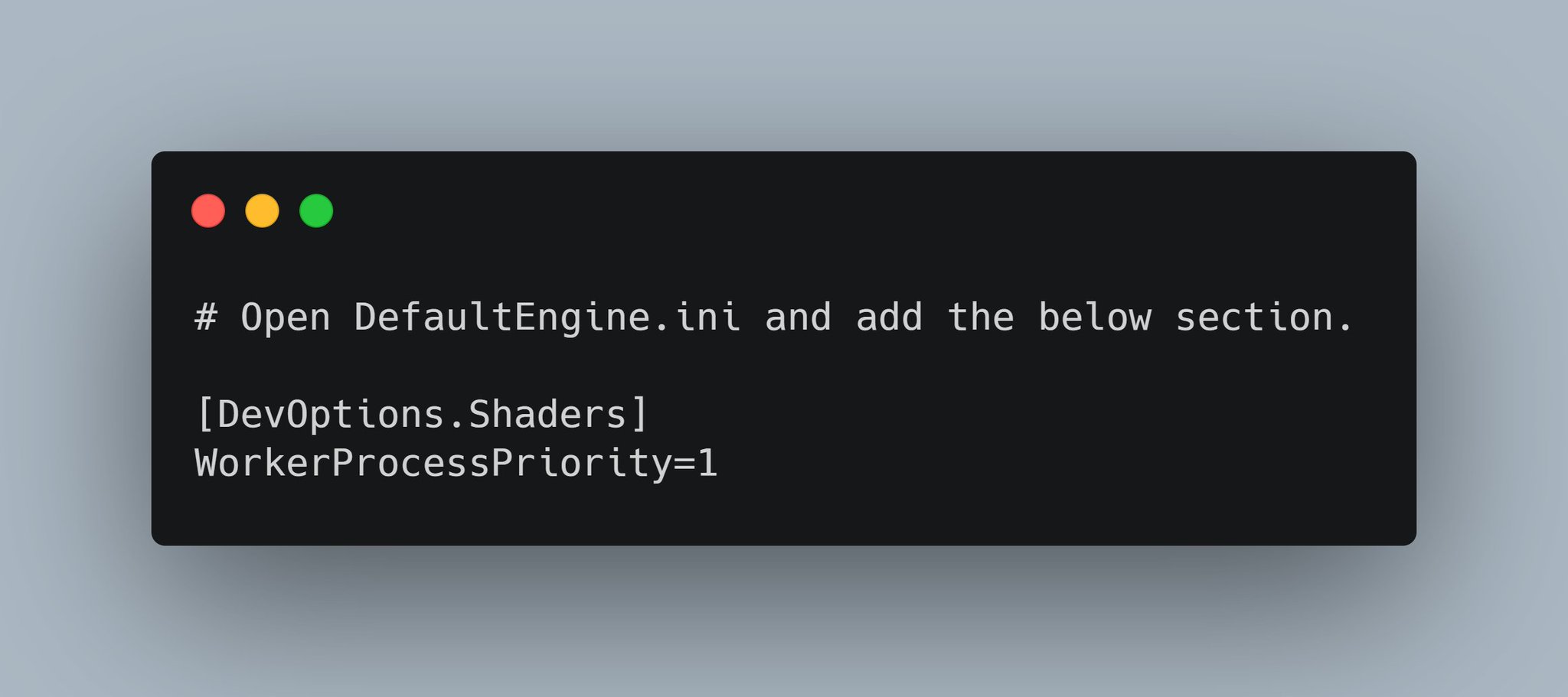
Quick #UE4 Tip number 72.
Tired of shader compile times? Cut shader compile times almost by half by setting the priority to above normal.
-1: Below normal
0: Normal
1: Above Normal
#unreal #unrealtips #unrealdev #indiegamedev #gamedev #indiedev #screenshotsaturday #UnrealEngine
 Twitter
·
worldly cipher
Twitter
·
worldly cipher
yeah already did that , you also need another software than taskmanager as it would otherwise not remembver the priority
i set the shadercompileworker ot above normal but yeah. the viewport itself runs t 144 fps
it feels surreal
and we are talking about blank scenes here too
 rancid lynx
when I walk off a 50cm step, im instantly teleported to the ground below, instead of using gravity to fall, while using standard character pawn blueprint. anyone know how to disable the instant teleport to the step below ? its terrible looking in VR. id rather go into fall mode than teleport instantly when walking off a ledge
 clever niche
ok i'm trying to expand on using the chaos vehicle components which I know work for a double wishbone. i'm wondering if i were making an 18 wheeler (just cab shown) would option 1 or option 2 be the way to go about laying out the bone structure
 light thunder
I want a material to choose randomly per instance, from 10 vectors for color - how do I do that? I tried the speedtree color modifier, and it worked for making each object with the material have different instance of it (like in foliage) but the colors looked off - so I'd rather just make it choose between 10 colors that I know look okay)
put a break on the branch and hover over the hit actor at the bottom, see what it's name is
select the branch and hit f9
rancid lynx
right click a node and add a break point i think, ive been using ue4 for 2 years and never learned breakpoints.
light thunder
then you can "step through" to see the execution
rancid lynx
after seeing blakestrs tip, i think ill learn about it now
as useful as PRINT i imagine
rancid lynx
i bet so
light thunder
because it takes you immediately to the blueprint in question and you can hover over ANYTHING and if it is a variable, you can see its current value
rancid lynx
ive seen mattW videos suggest it manytimes but, now i think ill start using it. games 50% finished X_x
rancid lynx
current value, so helpful holy smokes
light thunder
no, it didn't, because if it did, it would fire true
unless you have more than one sushi character type
grim ore
I would be curious what the == node contains for "sushi"
yes but.... and its a big butt
what is "sushi" in that == node
A blueprint actor, or THE blueprint actor in the world or ?
 scarlet birch
I mean, only one sushi? I want the dragon platter.
grim ore
your missing the distinction between an actor, an instance, a blueprint object, etc
an OBJECT , which you are comparing to, is the thingy in your content browser. the base
an ACTOR/INSTANCE is an OBJECT that has come to life an exists in your world
your asking if the ACTOR in the world is the same as the OBJECT in your browser, which it is not.
same class and type? yep. same literal thing? nope
scarlet birch
Sorry to jump in without reading all the scroll, but might it be easier to make a collision channel for sushi?
grim ore
in this case, casting to your class (sushi) would work if you want to make sure the actor you hit is of type sushi
making a new collision channel would work yep and you could trace by object that way as well. lots of ways to get to the solution
issue come from if he intends on having it check for other "stuff" other than just sushi and how to handle it 😉
@light lintel BTW your gif kinda shows the issue as well. When you mouse over the HIT ACTOR it says its an ACTOR OBJECT REFERENCE while the "sushi" in the compare (==) says its an OBJECT REFERENCE
scarlet birch
That object == in blueprint gets me caught up a lot. Have to rethink about how it works every time I use it. (ok, maybe a bit of an exaggeration but at least once it did.)
grim ore
it does, the default player controller
light thunder
How do I know, for absolute certain that a static mesh is truly being instanced? (without using foliage)
 plush shoal
Anyone that knows how to work on udk?
light thunder
Just check if the hit actor is equal to the object CLASS
that's a bit more reliable
 sour aurora
Heyyy, idk if this is the right place in the discord to look for help, but could I find anyone willing to look through my project file and help me fix my player characters movement? I can not work out why it.wont respond to input
light thunder
Like, these are NOT instancing if I am reading this right
So I would love to confirm that
plush shoal
If someone that knows how to use udk would help me for like 3-5 minutes would be really appreciated
light thunder
not sure, but even that you could check
wary ferry
vagrant lodge
The SpaceMouse is finally officially supported for Unreal! It is a truly excell...
never heard about the space mouse before 😮
light thunder
@grim ore can you help me confirm that these static meshes are actually being instanced? they are still adding mesh draw calls as far as I can tell that
grim ore
they dont look like it but this post has some ways of checking https://forums.unrealengine.com/development-discussion/rendering/1657862-4-22-auto-instancing-question?p=1658293#post1658293
but then again I dont know the draw call count for just 1 of them on screen
wary ferry
btw i figured out that if you have a high dpi mouse the easiest way to get a smooth camera look in the editor viewport is by reducing mouse sensitivity to 0.05 instead of 0.2
light thunder
I know it's the editor and it's not exact draw mesh count but 352 is the count - there are 129 cars I'm going to delete (130 total)
cleary, it's 100 mesh draw calls now,
in the background that's foliage pant btw
@grim ore I can use the foliage tool and speedtree color modifier but I just want the material to use the per instance random and instead of a random color that look like crap, just choose between 10 different vector values that I know look good...how could i pull that off in the material? you can see I'm close
speed tree on cars basically makes pastels
grim ore
how are you doing the random?
light thunder
this is the speedtree color modifier, I'm trying to inject into but don't know how to like randomly choose between 10 vectrors
grim ore
ok so if doing it in the material you could use a texture lookup
plush yew
Random color is 200iq
light thunder
basically all I'd need is object positions
grim ore
but if this is in a material instance you could always use a blueprint to tell the material instance it's color based on a select node filled with those colors
light thunder
grim ore
but if this is in a material instance you could always use a blueprint to tell t...
How could I do that with foliage?
grim ore
I have no idea lol. I know you can get the individual instances but I have never tried to set parameters in an instance in a foliage instance (if you even can, I assumed it was all the same material)
grim ore
trying to figure it out and its not going well. I cant seem to just get the instances, I can get the transform but I think instances are not exposed directly to blueprints. I can trace and get them but ugh
 dire lantern
Does someone know how to add a cutscene but instead of sequencer some other footage from the internet
plush yew
you can set custom data to instanced in blueprints and use that for coloring
could make it random or do some more material math and have more control over the colors
use set custom data (or something close to that) with index and access to it with perinstancecustomdata with the material editor
grim ore
I was looking at that
plush yew
I'm not sure if you can do it with foliage tool and vanilla blueprints. ue4 used to really dislike interacting with foliage tool
plenty of games had to hack around that in the past
very doable still, just not sure about blueprints
(custom data is relatively new btw, in older versions you had to add it manually)
it is extremely useful all around, couldn't believe my eyes when they finally added it 😄
grim ore
tried messing with it but I cant seem to get it to read the data in a foliage instanced static mesh 😦
misty cargo
misty cargo
<@218779540359479297> my god your YouTube videos help
@grim ore to continue the compliment yours are as good as u can get them ☺️ perfect if anyone can't learn from u they should most definitely quite while the are ahead of their selves though I would like to know since u have been around for a while is there something wrong with adding values to a map in 4.21? Cuz everytime I use the proper ones u show it doesn't add it if there is what version would be best that works for a laptop and Radeon vega 8 GPU and and ryzen 5 cpu integrated gpu
It's driving me nuts
;-;
U have showed maps on your videos
grim ore
maps shold work fine, I was using them the other day. Are you making sure your key is unique? the left one in the map
and the latest version should work as well as pretty much any older one on integrated graphics
misty cargo
It says if the key is the same key it will replace the value in it
I was using maps to lable my variables
grim ore
when setting it up in the details panel, or using nodes to update them?
rancid lynx
I have a question about CASTING, when i cast to Stone, and set TARGET to stone, when i try to get the material from the target, """"IS IT"""" pointing to a NEW copy of stone? because it doesnt appear to show the material from the "OTHER ACTOR that was hit, it gives me the "default material" from a "new copy" of stone. is this correct ? how can i access the material from the OTHER HIT ACTOR from the "on begin overlap" output
i want the material from the other actor, not the Cast Stone Target.
plush yew
Hello guys I want to make my camera moving free when I move my mouse-how I can do it in my project?
misty cargo
@grim ore
 frozen mortar
Does anyone know of a good description of the forward shading pipeline?
I'm trying to render a translucent object but my material requires the maximum depth of that object as seen from the players camera.
I think it might be possible to compute this using custom depth and stenciling along with depth expressions but I really hit a wall trying to get it to work
rancid lynx
plush yew
Hello guys I want to make my camera moving free when I move my mouse-how I can d...
im not sure, but i imagine it has something to do with mouse wheel inputs and "add offset" to camera. idono. thats one way
rancid lynx
youtube probably as a great camera example. mouse camera """ youtube idk
plush yew
in controller , characte, where?
plush yew
rancid lynx
youtube probably as a great camera example. mouse camera """ youtube idk
yeah but idk what to look for 😄
rancid lynx
what ever blueprint controls the camera now, youtube search "ue4 mouse camera" that should return some good tutorials.
plush yew
okay
rancid lynx
or open the FPS blueprint, the mouse controls that guys camera. you can find the code inside there also
examples
grim ore
@misty cargo yep when using the node it will overwrite. is it not updating?
misty cargo
grim ore
<@!527191586447032331> yep when using the node it will overwrite. is it not upd...
Yeah it's not updating like it's should for me every time I work with maps I have to set every variable into a new make map using two maps.....
Which is inefficient
grim ore
@rancid lynx when you cast to stone its just saying "hey treat this item as a stone class" when you set the target you are setting the variable called target to a reference of the item you put in, so it would be the other actor cast to type stone.
so the question is what are you trying to do?
@misty cargo might just be your code then, it should work fine I just tested it with a string:bool map
rancid lynx
when i try to get the material from "target" from cast to stone, its showing me the material from the static mesh thats in the folder, the default mesh, not the material from the other hit actor.
misty cargo
grim ore
<@!527191586447032331> might just be your code then, it should work fine I just ...
I will try again when I have time xD right now I need to get some stuff done
rancid lynx
it seems like its pointing to a new fresh unmodified copy of stone, instead of the actual OtherActor from the hit
grim ore
well heres the issue. what is the other actor and what is stone? are you sure its not pointing to a new copy but actually failing and never being changed?
rancid lynx
its returning the default material from this guy, not the actual material from the actor that was hit. the hit actors material is different
the in game actor is changed, i can see it in my hand
grim ore
but what is "other actor" and what is "stone". are these 2 separate blueprints?
rancid lynx
the hit other actor is a stone in game also.
grim ore
show the tooltip when its running? debug it on the first cast
rancid lynx
the Cast stone Target should be pointing to the actual hit actor, and not a generic new copy, right ?
probably just an overlap issue.
grim ore
debug, your going to have to breakpoint and see what is happening
rancid lynx
okty ! ill do that next
misty cargo
grim ore
debug, your going to have to breakpoint and see what is happening
Watching variables don't always work sometimes it shows 0 for integers
grim ore
dont have to set up a watch, you can see the current value when you mouse over the output or input
wanton lotus
You may need to step forward one node and see what populated behind it
misty cargo
It's a good idea to make it into a string and have it print as well if debugging doesn't help
Make sure u change the color of the font sometimes print string doesn't always show up the first color it's set to
light thunder
So you can set it up in foliage I'm just trying to figure out how to extend this using IF statements ...two colors but i should be able to just widen the branches
@grim ore
 glossy cradle
Hi are there any coders that are hobbyist and want to make a game and get paid revenue of them?
grim ore
@light thunder is that in the material or in a BP?
light thunder
grim ore
<@!273265779175194624> is that in the material or in a BP?
material
 jaunty zinc
surely it can help you
light thunder
putting some more logic in, this is going to be so damn hacky
grim ore
share that when your done I am super curious. I was trying to make custom data work but for whatever reason I couldnt get foliage instanced static meshes to use it
glossy cradle
Thanks couldnt find the best channel for it
grim ore
but I would say if you want multiple colors use a texture with multiple colors in it and sample from it, like a square swatch of colors
light thunder
grim ore
share that when your done I am super curious. I was trying to make custom data ...
let me save you the disappointment early, i'm not use custom data, jusing per instance random is mostly driving it
 deep viper
I am trying to add a hexagon shape in a UMG Material, is this possible?
plush yew
Hello, I need help i get this errors. Someone can help me? This is sprint for Character
grim ore
https://www.artstation.com/artwork/w8JmwO @light thunder
light thunder
holy crap you lovely bastard
grim ore
yep it works
I always forget about the custom HLSL node
still upset I cant get custom data into foliage actor tho. The forums say you can but I cant figure out how to tell the foliage instance static mesh component that it has custom data, it works fine on a isntance static mesh component
grim ore
Auto Exposure?
 potent bridge
could be, let me check
light thunder
grim ore
still upset I cant get custom data into foliage actor tho. The forums say you c...
How do YOu make sure your static meshes are instanced without doing a bluepritn?
grim ore
thats in the post process as an override, what are the settings in your project?
potent bridge
that seemed to fix it
plush yew
you probably need to do some light engine modification to add custom data into the foliage tool
maybe you can do some unsafe c++ stuff without engine modifications too, but that would be fiddly
 tawdry python
light thunder
tawdry python
light thunder
Where is that HLSL node???
tawdry python
my game keeps crashing for no reason
the GPU seems to hang and my screens turn off
😦
grim ore
thats the annoying part about it, the forums say custom data should work right now with foliage but I cant find the spot to say "yo I want 2 channels of custom data"
@light thunder its the "custom" node
@tawdry python d3d lost is usually a hardware or software issue with your card. theres a ton of stuff on google for it. I would try and lower the speed or voltage your card uses to make sure its not being stressed
plush yew
🤔 does the foliage tool auto instance the blueprint meshes?
if so you could add custom primitive data to the blueprints
tawdry python
@grim ore I found this
i had the same problem here. What i found is that when using dynamic material instances, if you have different instances of the dynamic instance material, both created from the same parent but have THE SAME NAME, it will certainly crash D3D11RHI. Creating a unique name for the entire project solved the problem for me. I created an integer variable in player controller and increment the number on every new material that I created.
grim ore
@plush yew well its just static meshes that the foliage tool is instancing so no blueprints (unless you want it which we dont)
I mean i know why its not working, the component doesnt have the # of custom data I want set, I just cant find the spot to set it because foliage actors are weiiiiird
plush yew
foliage tool supports distributing blueprint prototypes but it doesn't put them into a hism like it does with others
you can do blueprint stuff with the meshes you've placed that way
grim ore
yep trying to avoid the overhead of that
tawdry python
grim ore
<@!167122174467899393> d3d lost is usually a hardware or software issue with you...
is it possible to do that on a laptop? I think I can't
grim ore
its possible just harder
 pale ibex
Whoa some of the VFX shots that were done for the Superbowl bumpers were done with UE4.
light thunder
I knew there had to be a way, I'm sure this problem has been solved hundreds of times
I feel like learning about PerInstanceRandom is a bit of a gamechanger to be honest
I did not know about it before
and I did not know that I did not know about it
frozen mortar
Sorry to ask again,
I'm trying to render a translucent object but my material requires the maximum depth of that object as seen from the players camera. I've looked into depth expressions and custom depth but I havent made much progress
grim ore
I thnk its new and maybe should be covered somewhere.... the per instance node
tawdry python
what's the best way to make a simple mesh that goes up and down (kinda like coins in the 3D mario games iirc)
light thunder
add local offset
tawdry python
I'm using a set location with sine time on tick but with a lot of actors I feel like it's a dumb move
light thunder
or world offset, but you are adding offset to it
yeah don't do the tick when you can avoid it
use a timeline or a timer that is looped
grim ore
most efficient? do it in the material. not as efficient but super easy, use an interpto component in the bp
tawdry python
the tick is in C++ btw not bp
grim ore
it is less efficient to do it on tick yes
tawdry python
I'll try to do it in the material but there is no way to make it inherited right?
grim ore
materials can have parent child relationships sure
light thunder
They warn about using these custom nodes for performance - but if i'm just referencing like 10 or 20 colors and have like a single if statement between two custom nodes, that should be good right?
 kindred viper
yes
the shader code in a custom node loses any of the boiler plate material blueprint code optimisations. However that doesn't mean everything in all areas, nor does it mean it can kill your project, but they have to warn that it can, because who knows what HLSL you will write in there.
light thunder
what's the simple node that blends between too colors
like if you used it with blue and red you'd get purple?
just multiplying but i was looking for something else
kindred viper
lerp usually
wish I knew more about materials. this stuff makes me feel like I have a hole in my library wall.
light thunder
yep, I feel exactly the same - and it's made worse because it FEELS like I'm operating in blueprint where I can make most things happen but it's not
Not sure why Unreal doesn't have a Public Safety evangalist
light thunder
kindred viper
lerp usually
Glad I asked - i realized I could get use 3 colors in 1 - just lerp between black and white using the alpha coming from the PerInstanceRandom - what is the actual range of that per instance?
kindred viper
shrugs
light thunder
I mean hte PerInstanceRandom node - what number does it even output?
light thunder
that's my guess too but I can't find it documented
grim ore
its 0..1
light thunder
I believe you but where is that?
grim ore
do you know how default pawns work?
 limpid peak
Completely new to unreal, doing games design in university. Decided to take some time out to start learning some stuff before we actually get taught it and wanted to make a basic teleporter
it's going 'well'
grim ore
@light thunder ugh I was trying to explain the way it works but basically its a giant nest of shader code that is created when the shader is created and the material is made then passed into the shader itself since its an instance and its a parameter thats based on where the instance origin is at when the material is executed as well as some offsets that are calculated.... its a giant furball of code but to show it in action
and based on my best test its accurate to 7 numbers
light thunder
jesus
make a 10 second video that says, "WTF is PerInstanceRandom code" with an immediate answer, "Nobody knows"
grim ore
oh man
light thunder
weird, they must not have exposed the paramter for Color
grim ore
and I stopped at this point and just started using it
light thunder
something something intermediates
grim ore
like I said at that point I stopped chasing the rabbit down the hole
nope thats the value that it uses
its just how that value gets passed into the shader is magic
once you get into the .ush files for the HLSL its.... math
ugh and I take back the accuracy, thats just the debug output depending on how many numbers I tell it to use
the fact that out of 1000 instances not one is 1 or above is a pretty good indicator. plus... and there is a key here it uses the parameters .x (or red channel) from a float4 and as far as I know for UE4 float 4 are 0..1 for XYZW
trying to come up with a simple example of using this node for a video because I never covered it lol
light thunder
grim ore
ugh and I take back the accuracy, thats just the debug output depending on how m...
I think in conjuction with foliage is most practical example - simplest way without setting up material layers
grim ore
yep I like it just have to make sure I have a basic one to go with it. I made my foliage all purply lol. Its also nice for smaller variations on items like you could have a roughness mask on an item and use the random to determine how rough it is on each item at random. just simple variation
light thunder
Probalby should consider making it a material function that they can then call and pass into any material
 south ridge
grim ore
and based on my best test its accurate to 7 numbers
south ridge
grim ore
and based on my best test its accurate to 7 numbers
Sounds about right, 6-7 digits is the limit of 32-bit floats
But the actual precision is defined by the bit width of the random number generator
Which might be 16-bits, giving you like 4-5 digits of precision even if it renders as 7
light thunder
grim ore
yep I like it just have to make sure I have a basic one to go with it. I made m...
OF course there's no way to do any translucency on this foliage material right?
well, make an easy way for me to tell the damn editor to actual instance a static mesh
because I spent most of the day trying to figure out how
And I don't know how having a blueprint HISM helps me when I still need to place the actors
light thunder
@grim ore this was worth it I guess-
that's basically 1,000 cars
I didn't bother with the paint settings, I just wanted it to paint as much like a stress test
grim ore
thats seems like a good draw call saving compared to earlier
 frank grove
hello,I've been trying to get some courses on Udemy to learn some unreal engine,and c++
but I was thinking if it would be better, to get a course for c++ only first,and then get to know unreal
what should I do?
 ancient lotus
@frank grove https://www.youtube.com/channel/UCYcDJPGvIUFxBTmXOZWFswQ/playlists just take your pick, 537 videos and 95% are ue4 and c++. theres a beginner series playlist on there where we work in just c++ first and then move onto unreal engine. you can learn c++ while working inside of unreal engine but i would recommend having a basic knowledge of c++ first

YouTube
ancient lotus
for example learn variable types, functions, how to pass parameters to functions, how to use return values, templates, classes, pointers and your pretty much good to go. id recommend learning a little first as its mostly just to prevent you from being overwhelmed and demotivated when it feels like its super confusing. if you can learn simple things beforehand or atleast get a basic grasp, then adding unreal engine ontop of that will not be nearly as big of a deal as if you were to take it on all at once
ancient lotus
goodluck!
also a quick reminder that might help depending on how you look at things. you dont need to feel like you need to use c++ for everything. if something that your trying to make is leaving you stumped and frustrated, try making it in blueprint first
frank grove
thats a good ideia
 somber rover
What's the performance wise of C++ over BP in UE4? or is it just a matter of preference?
ancient lotus
more than preference, im sure someone here has numbers. if your c++ code is well written and being compared to well written blueprint, c++ code will outperform the blueprint. the heavier the code the bigger this difference gets. if its something small and quick (like turning on/off a light) then the difference will be very small. if you compared poorly written c++ code to a well written blueprint, well then the gap closes
somber rover
I was just watching a bunch of tutorials yesterday on youtube and one of the bigger UE4 guys was talking about how C++ offers so little performance over Bp that it wasn't even worth it no matter how big the game, but I'm use to C++ only from writing MUDs back in the 90s
ancient lotus
theres an option now to compile blueprints to native, but even then......
i swear if he says dev squad lol
somber rover
naw wasn't dev squad lol, i gave up on him a long time ago. I can't remember which one it was I watched so many yesterday
 warped fox
Any idea why a transparent material isn’t transparent on a certain map but fine on others? Would it be the way the lighting was made in that map?
somber rover
Anyone here good with behavior trees?
having a hard time with an asset I got, 4.26 broke it and the dev won't update it to 4.26 because he said he don't have time, then he said he don't even know what exactly broke and not sure if he can fix it, then he changed and said he knows what it is but don't have time. Now he's saying he might fix it in a few weeks, but back when 4.26 first came out he said he'd have it updated in a few days. So after seeing that in his discord I went ahead and bought the asset, now he isn't updating it so I figured i'd give it a go and try myself since I'm still learning, figured it would be a good learning situation. yea....i've spent the last 3 days and still haven't figured it out
light thunder
somber rover
What's the performance wise of C++ over BP in UE4? or is it just a matter of pre...
You just have to pay attention to the assets you reference in a blueprint
plush yew
Hey, I have been working with ue4 and encountered an issue, one of the levels in my game for some reason is unable to make sound, I have already tried restarted ue4, please help.
light thunder
plush yew
Hey, I have been working with ue4 and encountered an issue, one of the levels in...
What do you mean "make sound" ?
plush yew
When I play in the level, there isn't any audio.
light thunder
show me the blueprint of when you load the level
I'm assuming you aren't streaming it in, just a straight load?
sterile tulip
Did you set up the audio in level blueprint, the level blueprint only applies to the current lvl
light thunder
or you might have the ambient sound in a different level
plush yew
sterile tulip
Did you set up the audio in level blueprint, the level blueprint only applies to...
Oh, seems like I forgot to do that, I just did it and fixed the sound.
Thanks.
grim ore
level blueprint strikes again...
 meager frigate
anyone know much about 4.26 water features? I'm curious if I still have to drop a physics volume in the ocean water for swimming or if theres something built into it that I'm missing. I could also add a buoyancy component to my character I guess but seeing as how the character pawn already has buoyancy options I'd think that there would be a way to get the ocean water to use that.
 mighty oak
Hello, has anyone come across this issue? Sprint Arm Component set with location and rotation lag, does not lag if fixed framerate is set to 60 or bellow...
meager frigate
spring arm?
mighty oak
Actually, I think I just figured out the bug, maybe it's a UE4 engine bug? If the Camera Lag Speed or Camera Rotation Lag Speed to is set to 60, and the framerate is 60, it doesn't lat anymore and is just fixed.
meager frigate
have to you fudged with those numbers to see if anything changes?
mighty oak
Yes, that's how i figured out the issue above 🙂
meager frigate
oh i thought you meant fixed as in not moving
mighty oak
Basically, don't set it to 60 😦 even though that's the number that I found I liked to use for my gameplay
mighty oak
meager frigate
oh i thought you meant fixed as in not moving
I did mean that haha
Both, fixed as in not moving, and fixed as in 'avoid using 60 or you will get unexpected behaviour'.
It seems quite unpredictable, with higher framerates it lags more than with slower framerates...
shadow oak
regarding the out of video memory problem im having ive tried 3 different clean insalls of gpu drivers from december still no good
anyone having this problem
mighty oak
How much video memory do you have?
mighty oak
And have you been able to look at Task Manager or other system reporting tools to see if you do run out of memory?
shadow oak
32gb pc ram and increased the paging file
when i look at task manager nothing is maxing out
crashes soon as it opens
feels like a bug reported it to unreal but havnt heard anything back
it happens to 3 different people i know
mighty oak
Is it Unreal that's giving you this error or your GPU driver?
mighty oak
That looks like an extremely simple level...
I just looked at my stats for a level just a tad more complex that the stock FPS starter level. and I'm using no more than 3GB RAM
shadow oak
wait let me do the test again just restarted my pc had lots of stuff running before
mighty oak
Like a bitcoin mining virus? ;P
shadow oak
yeah its not opening the level at all . im trying to open the downtown west project from marketplace
so i made a empty level added the downtown west and open to empty level click on the down town levels doesnt open and crashes straight away no resources are being maxed
is there like a log i can see
light thunder
What did I do wrong with this mask? here's what's happening - you can see it's basically applying it to most of the vehicle - to the right is the original diffuse texture -
here's the actual instance, you can see it just laughed at my mask
I tried the 1-x from the alpha before but it didn't work
mighty oak
shadow oak
so i made a empty level added the downtown west and open to empty level click on...
Have you tried switching to the Nvidia "Studio" Drivers?
grim ore
@shadow oak the log should be in the saved folder in your project
 marsh swallow
About to install the DLSS Plugin into the engine. xD
I wonder how much cleaner this will look than current sharpen/AA solutions.
grim ore
there are quite a few posts on the marketplace in the comments section with ideas, its not just you crashing due to resource issues. one popular one seems to be to drop the texture sizes down. The other is lowing the reflection capture size in settings @shadow oak
marsh swallow
Question however, Does anyone know of any tutorials on making the new UE4 water swimmable?
shadow oak
i just changed all the textures through matrix to max 512
ill try lowering reflection capture and open
 torpid steeple
Does anyone know how to bind text for ammo if max ammo variable is not in character BP only in weapon BP?
grim ore
dont bind, binding is bad.
and you can do anything if you can get a reference to it. someone has to know about the weapon, someone has to know about the UI. make them friends
marsh swallow
Physics volume doesnt have buoyancy tho? 
grim ore
@shadow oak no issues loading the demo_environment from the map (assuming this is the "Downtown West Modular Pack by PurePolygons) on my 3080. I never got about 2.5gb GPU usage
with that said I do have 64gb memory in this machine and it got above 30 at one point
marsh swallow
Yeah i watched em all
xD
they dont really touch on swimming. However someone whom i have had my eye on their plugin for awhile, he wrote the new water into his swimming plugin i see.
The one Deep Dive was really nice! Gave me some great ideas for Niagara stuff we can do.
thats actually what we just moved away from
😄
grim ore
@shadow oak the project I loaded it into was a default third person with DX11, Im curious if DX12 is an issue here since the pack is DXR enabled
marsh swallow
it was a great project tho
but we need more lake water/rivers swimmable than oceans. so some of our features just weren't there.
light thunder
@plush yew so I was curious - it wasn't as bad as I thought but it is definitely a hit -
 oak sedge
I have a game with a compressed "PAK" file and an uncompressed version. (It's not my game.) The documentation of this engine says that the compressed version will have faster loading times, but I tried the same scenarios with both and I didn't notice a difference. Other than the possibility of different loading times, and the larger file size, what other advantages and disadvantages would happen if I play a game with the uncompressed version of its PAK file?
light thunder
opaque glass - but look at the numbers
granted, that mesh has 4 material elements to it
shadow oak
i changed alll the textures to 512 and changed reflection capture to 16 from 2048 and its opened now
thanks @grim ore
it wasnt showing that the gpu memory was maxing out making it hard to tell what do you think was going on?
light thunder
266 instances - dynamic lighting on the foliage OFF, but the translucent material OFF
weird ...maybe because the shaders aren't compiled, same thing but with transculent on
grim ore
@shadow oak yep its weird I literally had no issue just opening it up in a default template
light thunder
like, these are background, and if I use the opaque I can also remove the interior element
but i thought the difference would be more pronounced
can I not delete this from the middle? because it will shuffle the material index up and screw everything up?
 supple cove
hi super basic question. i'm going through the learning tutorial and when it gets to the part where it teaches you how to move and duplicate items it is not letting me do it. i am on OSX and using the trackpad
the video guide is from the learning center https://learn.unrealengine.com/course/2503277/module/5435644?
It is at 3:30 that he describes how to move and duplicate objects. i can't do either no matter what i try!
grim ore
so the holding alt and dragging?
supple cove
on mac there is no ALT key so I use the OPTION key
grim ore
yep it shows it should work with option and drag, when you do that what happens
supple cove
using the OPTION key i can move the view of object in place
grim ore
what is moving the view of the object? moving the object or like moving your camera around
 mental yacht
whats the best way to revert a unreal update?
grim ore
from say .25.2 to .25.1 ?
grim ore
you cannot from the launcher, you would need to compile the source code for that tag
supple cove
First part of this clip is clicking down on trackpad (and holding it) and then moving left and right.
The second part of this clip is clicking down on the trackpad while holding the option key down and dragging left and right and up and down.
Neither option moves the object or duplicates it
mental yacht
i went from game drivers to studio drivers to fix, but that didnt work, then i checked my hardware, and thats fine, then i played other games, and they work
the only thing left is to roll back unreal
supple cove
first part is holding down on trackpad and moving left and right. second part is holding option key and dragging left and right and up and down
grim ore
@supple cove soo.. he mentions in the video its when you are moving the item. you have to click on one of the translate items (the arrows) and hold the button while moving the item
what you are doing with the key and no transform selected is orbiting (rotating) around the middle of the screen
mental yacht
my launcher offers 4.25.4, is that a good stable release?
grim ore
you wont be able to open your .26 project in it
grim ore
and all releases are relatively stable, its just weird .26.1 broke for you. if just learning then sure .25 is fine
it might have the same issues we dont know, .26.1 doesnt crash here for example
mental yacht
i did the verify thing too that didnt work so i duno have to try it
supple cove
grim ore
what you are doing with the key and no transform selected is orbiting (rotating)...
my question then is how to move and how to duplicate. his instructions seem to only apply to Windows
grim ore
did you try what he suggested?
clicking the mouse and dragging on one of the arrows (the red green and blue ones) is how you move an item
holding alt/command , clicking the mouse and dragging on one of the arrows is how you duplicate the item
as part of the duplication you now are moving the new item at the same time
 bronze mango
why cant i use that?
grim ore
its definitely possible you cant do it with a trackpad just due to the way they work, I know i had a terrible time trying to do hold stuff with a trackpad
because you have no active mode that is using that
your in selection mode I would guess so no toolbar or box is open, switch to say mesh editing or landscape and that will highlight
you kinda dont need to turn those on or off if they dont exist (which they dont in selection mode)
bronze mango
kk
supple cove
grim ore
its definitely possible you cant do it with a trackpad just due to the way they ...
bingo bango you got it to work!
bronze mango
found my answer https://community.gamedev.tv/t/ue4-4-25-editor-toolbox-modes-not-shown-anymore/131845

GameDev.tv
I recently upgraded to 4.25 and while working on one of my files, I noticed the toolbox shortcuts that normally hangs around the prebuilt actors panel was missing. I am unsure how to get it back as Window>Editor Modes>Editor Toolbox is greyed out for me and the only way I can seem to access some of these is the modes button or the pre-existing s...
supple cove
grim ore
clicking the mouse and dragging on one of the arrows (the red green and blue one...
i was clicking on the object NOT the arrows. clicking on the arrows makes them move.
grim ore
yes that is the translate tool/widget
supple cove
then, for me, holding ALT+ CMD and then moving will duplicate it
 broken rapids
broken rapids
broken rapids
In my endless runner game after reaching that particular score my game got crash and my own character got disappear. I think game memory got full.. So tell how to fix that
supple cove
I can't seem to start to add new versions of unreal engine to my library
broken rapids
I face this more than 2 times..
supple cove
Unreal Engine Forums
I am excited to get a new version of Unreal Engine but I have questions.
In the Epic Games screen it says that an item is queued. It has said that it is queued for about a day now.
Does this mean it is downloading or that it is waiting for something else to download? How do I know what it is doing?
Screenshots attached
 humble yacht
has anyone had issues where dynamically created text ui's
you can see the ui text trying to be fit inside a wrapbox/scalebox
is there a way to force unreal to compute it in one frame
plush yew
broken rapids
In my endless runner game after reaching that particular score my game got crash...
Are you deleting the platforms behind you?
broken rapids
plush yew
Are you deleting the platforms behind you?
Yup its deleting tiles
But not obstacles..
plush yew
how many tiles have you crossed when it crashes
broken rapids
plush yew
how many tiles have you crossed when it crashes
Idk 😅
That's too difficult to count that i was busy in my game
plush yew
What is the scoring system you use?
 sand inlet
Are people using actor sequence components much for animation? Or do they do it all in the 3d programs of their choice? This would be for more mechanical, not skinned meshes.
broken rapids
plush yew
What is the scoring system you use?
See at every moment it reaches 100, 200, 300, like so on
plush yew
1059 secs then or so
My first thought is that there are too many actors at the given moment
 long flax
hello everyone, can someone help me with this error?
I can no longer open unreal projects, before I could
broken rapids
plush yew
My first thought is that there are too many actors at the given moment
Ohh see I need to reduce textures of that..
plush yew
Since it is an endless runner and you are not deleting the obstacles they would still be using resources and after a time the engine won't have enough resources, that is my hypothesis.
broken rapids
Your point 📍 is totally valid..
plush yew
Well we won't know until we try, so try removing the obstacles and see if it works.
broken rapids
plush yew
Well we won't know until we try, so try removing the obstacles and see if it wor...
Yup got it
plush yew
long flax
hello everyone, can someone help me with this error?
Are you on a laptop?
long flax
not
desktop
you can help? It's urgent, now, as soon as I open a real I get that error
I have a NVIDIA GEFORCE 1060 6GB video card
plush yew
Okay so have you set the card as your dedicated card?
long flax
I have not configured that, but it is the only graphics card I have, I do not have integrated
plush yew
Try updating your drivers
long flax
I already have the latest version
plush yew
Also did you make any changes in your Nvidia settings between the time it last ran and now?
long flax
i have this version, is correct?
I just reinstalled the drivers, but it's worse than before, I can't even open a real one anymore
 chrome cairn
Hey all ! Is there a way when I select a mesh to snap it to a specific point with a shortcut ?
supple cove
When you guys download a new version of Unreal in the Library does it say Queued for a few days? How do you make it start downloading?
plush yew
long flax
I just reinstalled the drivers, but it's worse than before, I can't even open a ...
Try reinstalling unreal then.
 buoyant graniteBOT
:triangular_flag_on_post: JekasG#1909 received strike 1. As a result, they were muted for 10 minutes.
plush yew
What was the strike about?
mental yacht
@grim ore i had to revert my graphics driver back to 60.89 studio driver and now 4.26.1 works fine with no freezing
frail portal
does it take 2-3 hours to install the html5 ssh file (from ue4 github html5 packaging)
humble yacht
are you talking to me
grim ore
@mental yacht yay. Good to know there is a fix.
frail portal
Epic really should update their thing to make it user friendly when it comes to installing the ue4 deployment
 sonic quest
long flax
140 gb ::((((((((((
sonic quest
long flax
140 gb ::((((((((((
Hmm. You don't need to install everything. Just select the stuff you need. Specially, avoid getting debugging symboles.
And platforms, you really don't want.
 static raft
Hey, is there anywhere where I can find out when each version of UE4 was released? I mean exact dates and so on?
I can't remember which version I used for a project and I don't have the files but I remember the rough time estimates
 velvet magnet
Lmao a strike, what
plush yew
Hey guys, I have this blueprint here to start a fire particle when the player's health is less than or equal to 25 but I can't find a way on how to make that fire go away when the player is greater than or equal to 26, I tried putting it there in the auto destroy connection but that didn't work and idk what do on this, any help?
supple cove
Asking one more time. My Unreal Engine is very old. I'm trying to install a new version but it has said Queued for a while now. Is it downloading? How do I get it to start downloading? What is it waiting for? A sunny day?
plush yew
Anyone know if games like kh3 and ffvii remake would use the default character movement component? Or would they have built it from scratch by changing the source code?
 honest lily
guys
why does my zombie apply me damage at the end of the animation montage instead of in the middle of the montage.
 fresh ruin
hi May i request questions under this channel ?
 storm vapor
yes
fresh ruin
how activate the "console" under unreal to show the console command prompt ?
The tutorial i am making say "Use the Tildé Key" but dont work under my +4.26 or computer
Want to display the 'Stat FPS'
 grizzled axle
you can rebind the key in options
fresh ruin
sorry pretty new under unreal .. learning phase .. in editor preferences ?
grizzled axle
edit -> projects settings -> input -> and scroll all the way down and there is a field called Console keys
fresh ruin
Thanks vk but console prompt seems not display
grizzled axle
are you playing? it only works when you are playing
fresh ruin
no
but in the tuto i am making the guy is not in play
At 1.52
But you re right Vk it work in play mode
but this guy seems arrive to show a command prompt to activate it when not play
but it works know i have use play .. activate stat FPS and its working when not in play
grizzled axle
try this and write to Cmd
fresh ruin
Thanks you very much .. i have loosed 1 hour on that ahah thanks vk /kiss 🙂
grizzled axle
no problem, UE can be very confusing when starting 😄
fresh ruin
Yes sure :;)
know i have 2 methods for that thank you 🙂
ahah too many menu lost in the UI ahah
Really thanks know could continue this tuto 🙂
1 Hour to collect assets .. configure Ui ... i could begin ahah
grizzled axle
it gets easier with time.. soon you are making games!
fresh ruin
Trying to make virtual prod not gamesd
so not so easy many things to understand or figure out 🙂
grizzled axle
ahh, I see, Unreal is great for that too
fresh ruin
your makin game on your side ? 🙂
 golden condor
<@&213101288538374145> we need you in General voice chat.
grizzled axle
yes, I'm making small games and still learning this big engine
 stark ledge
Argh pls help!
How do I add a Landscape layer in 4.26 ?
It used to be in the Landscape... Paint tool but now I have no clue.
It just keeps saying "This layer has no layer info assigned yet. You must create or assign a layer info before you can paint this layer."
lol just found it - there's a little eye icon and I changed it to Show all layers instyead of the default Hide unused layers
now I can set the Layerinfo and it works
plush yew
guys could you tell me why i have this volumetric light? i dont have exponential height fog...
volumetric inscattering is off
 shrewd rain
 tawdry wren
Are project categories gone in 4.26.1? I can't seem to make a top down or even third person. Its only allowing me to make a blank project?
 covert moss
Hey i'm fairly new to UE4 and 3D in general and i need a way to blend these 3 nodes into this function, does anyone know which node to use so that i dont get a float error? Thanks! 🙂
frail portal
Tired and doing ue4 stuff
Building the html5 on visual studio thing so I'm gonna sleep as bad PC = 20 hours of work
plush yew
how can i scale the whole map?
 elfin bolt
Mask
plush yew
??
 gilded lichen
Hello, whats the best way to rotate the camera to face an object? As I have a system that zooms in on an object and I want the camera to rotate so the player can see the object. A small video showing the problem. https://youtu.be/vchAcmAgR0E

 uneven mica
So i found a auto material that i want to add to my project it is in a zip how can i add it now and strangly nothing is in the folders
fresh ruin
Hum someone have already import Character animations from Mixamo ?
 harsh sparrow
yeah I did
fresh ruin
i couldnt figure out how to tell the Sequencer to point on my animation ..
in the Sequencer when you add an animation there is a menu you see ?
i have tried all the case but it didnt show me my animations
harsh sparrow
what do you mean to point on ur animation ?
fresh ruin
i have donwloaded from mixamo
and i have put the fbx under /Project/character/Mannequin/Mesh
and it didnt list me when i add animation in the sequencer
only list another source folder out of the project
harsh sparrow
by fbx you mean the character
fresh ruin
No animation
harsh sparrow
so this is your sequence I'm not familiar with these enough
all I know
you first download a char
and import it to ue4
fresh ruin
have it already
Sk Mannequin$
but i am trying the +Animation on this sequencer
try it you will have a menu pop up
in this menu it didnt show the mixamo animation i have on my folder
i assume its an FBX extention because mixamo send this
grizzled axle
did you retarget the animaton to mannequin skeleton?
fresh ruin
on Mixamo itself ?
harsh sparrow
just drag and drop ur animation to ue4 and choose ur mesh skeleton
there won't be any problem
grizzled axle
in unreal
harsh sparrow
with ur animation at least
grizzled axle
you need to retarget mixamo animaton to unreal mannequin skeleton, to use that animation on mannequin
in the editor
fresh ruin
yes thats what i am trying to do in other words Vk
look my screen you will see my SK Mannequin
But know when i click the +Animation there is a menu for select the animation k ?
in this menu it dont show the one i have download in FBX from mixamo
i will retry reupload SK on mixamo and redownload to see . maybe missed something 🙂
grizzled axle
Examples of how to set up and use Retargeted Animations for multiple characters.
you did those steps?
grizzled axle
yeah you most likely have multiple characters now, all with their own skeletons and animations
so skeleton1 cant use animations from skeleton2 without retargeting
fresh ruin
thick herald
Mixamo to UE conversion http://terribilisstudio.fr/?section=MC

Terribilis Studio make indie games and assets for developers.
fresh ruin
At 6.00
The guy for example in tuto just search "Waving" Animation ok ? but where or in which format maybe did i have to have it ..
i have the waving Animation but seems UE dont see it
i will try your retargeted link 🙂
grizzled axle
it's easy process but hard to explain, since there are multiple steps
maybe theres a nice youtube video sec
 thick herald
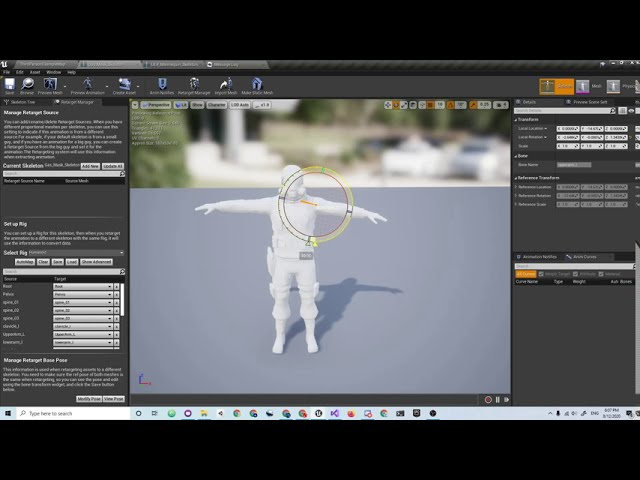
If you use the above linked tool, conversion is super easy. It can do multiple animations at once too.
fresh ruin
Thanks guys will take time to study these links 🙂 thanks for help /kiss
grizzled axle
I have unreal project with all mixamo animations already retargeted to mannequin on my harddrive, cant remember where i got that lol
 stiff verge
is there any resources on create non eucledian worlds in unreal?
 civic lance
Guys anyone can recommend some cool Honours project ideas for gamedev? The project should have something that can be evaluated through the report
plush yew
if i want my AI to do an animation do I do it in the animationBP or can I just use an AnimMontage?
theyr animations like pick up, chop tree etc
grizzled axle
montage sounds like a right tool for that job
you still need Slot on animationBP to play the montage
wary wave
stiff verge
is there any resources on create non eucledian worlds in unreal?
I'm honestly not sure what you expect to find, or to be out there
stiff verge
there is a series on youtube about how it's possible to create those in game engine
most basic would be to create the game Portal
I guess
but it can be funkier
i found a tutorial for portals already it's cool
wary wave
I suspect they're actually teleporters, rather than portals
UE4 would need a fair bit work to support actual portals
gilded lichen
Hello, whats the best way to rotate the camera to face an object? As I have a system that zooms in on an object and I want the camera to rotate so the player can see the object. A small video showing the problem. https://youtu.be/vchAcmAgR0E
I've tried Find look at rotation but that doesnt work
stiff verge
the issue here is that the camera moves up and down instead of towards the object?
if you could parent the camera to the object it could work
gilded lichen
it moves to a point that I've set
stiff verge
oh
gilded lichen
the billboard that is attached to the object
stiff verge
i really don't know much about unreal so I don't think I can help, but in another software I would have the camera spin around the object with a parent and then change the Z of the camera so it's closer and further away from the object but with that specific orientation
gilded lichen
ok, thank you anyway!
 coarse jetty
Hi can somebody help me? I need to see an actor always through walls and everything. Actor consists of: mesh > wigets
gilded lichen
I got it fixed by disabling this
coarse jetty
In unity it will be super easy with render layers
stiff verge
did you use unity a lot? what made you switch?
wary wave
stiff verge
I found one tutorial showing it
It's probably teleporters, and a material using render targets. It's a common approach to trying to simulate the effect, but it's not a portal and it has a lot of caveats (performance cost is very high, objects are on one side or the other, audio and lighting does not propagate through them etc)
stiff verge
i don't mind performance cost but that's good info
is there a better way?
they use a teleporter so you can actually use the portal but I'm mostly interested in the effect of merging different render views, are related to current player position
wary wave
depends what you mean by 'merging different render views', I guess
there's all kinds of things you can do to simulate a portal, but nothing is a substitute for actually implementing a proper portal (which I expect is probably quite involved)
stiff verge
having a material in a frame behave has a window to another world
I guess you need a 2nd render layer based on your current charater orientation then project it on the frame
so you essentially render two environments
wary wave
if you're rendering two environments, you're approaching render target levels of cost again, tbh
stiff verge
and that 2nd layer moves with your character.. but it's offset somewhere else
wary wave
I built a system that duplicates geometry within the view frustrum at the target location and masks it out using shader math
but that was really quite involved
stiff verge
I see
I don't really mind performance that much at the moment because the thing will be simple and won't have to run on all machines
like it has to run on a 3060 or +
plush yew
Why is my AA so trash? TemporalAA is too blurry, FXAA, MSAA AND OFF are too sharp...
stiff verge
speaking of that.. anyone knows good tutorials on how to tweak the look of your world?
plush yew
Post process helps a lot
 serene birch
did you try tweaking the TAA settings? did you try the experimental TAA in 4.26?
sonic quest
Hey all, need some help on perf. optimization for landscapes on mobile devices.
My gut feeling is frustum culling is not working properly.
Here's the details in full: https://forums.unrealengine.com/development-discussion/content-creation/1860729-landscape-performance-tips-for-mobile
If you know any sort of materials in this area, share them with me, please.
Thanks.
Unreal Engine Forums
Currently, I am working on a landscape project targeting mobile. We want that to run smoothly(at-least 30FPS) even on budget mobile devices.
But, it's really hard to find such tips on the internet or in the official docs.
Yes, most of the existing optimization stuff is working here. So, I did them & I also found LOD
sonic quest
honest lily
guys where did my event graph go
Just click the "EventGraph" on the left-side menu.
drowsy gull
Hey guys.Why can't I allow static light? What should I do?
 halcyon glen
Just to check unreal engine can make vr games right?
drowsy gull
Every time I checked it on , restarting ,I always found it was unchecked again.
All informations on Google are just about deactivate static light.
But I need to turn it on
grizzled axle
yes Unreal can make vr games
halcyon glen
Aight thanks man
sonic quest
honest lily
i didnt even see it
Yeah! That happens 😄
uneven mica
I have placed a megascan but when i start to play i fall through it, how can i change that?
drowsy gull
Anyone knows how to enable static lighting?
 remote oasis
hai anyone knows how to packaging game/event to android,ios desktop, and mac at the same time in unreal 4.26
 pseudo swift
trying to get foam going, must be missing something? any tip?
honest lily
guys
i put my character in the scene
but if i press play it automatically adds another one
 knotty heron
Anyone know how i can get to the groom importer? when importing my alembic files i just get the default importer, and the groom importer plugin is enabled
honest lily
 fiery dawn
Hi. Does Epic games requires to pay for profitable visualizations, and if so, how much?
uneven mica
Why is that happening can i change it that it blocks me
 vagrant pagoda
How do you set it to have seperate UI for each camera for your BP. Is there a simple option. Cheers
plush yew
serene birch
did you try tweaking the TAA settings? did you try the experimental TAA in 4.26?
No, what is the experimental TAA?
And how do I turn it on
serene birch
hmm, I don't remember the command to try it
ah https://forums.unrealengine.com/unreal-engine/feedback-for-epic/1821872-gen-5-temporal-anti-aliasing
Unreal Engine Forums
tested the experimental aa algorithm a bit...
all my tests were done in vr.
I believe that it is selectively smoothing edges- putting the aa where it needs it most, leaving a sharper image where no aa is needed..
in theory this is great.
it is very expensive. at least for vr. cooking may help..
still images look great.
information on it
r.TemporalAA.Algorithm=1 to switch to gen 5 TAA
r.TemporalAA.Upsampling=1 to have TAA do the upscaling and allow output TAAU resolution different from input resolution
r.ScreenPercentage below 100 to start lowering input resolution and therefore TAA cost, but also your overall frame's GPU time
@vagrant pagoda there is no simple option, you as the dev control what UI is shown and when so you need to add the code for swapping UI when you swap cameras
@honest lily is your character you "put" in the scene set up to be controlled automatically? if not you need to do that or use a player start and not a character you "put" in the scene
vagrant pagoda
cheers
plush yew
serene birch
ah https://forums.unrealengine.com/unreal-engine/feedback-for-epic/1821872-gen-5...
K thx
grim ore
@uneven mica if you are asking how to make something block you? make sure the item has collision and its set to block your character/pawn. Chances are the item does not have collision
 worn oasis
hello, are there any minimal requirements for the PC to run UE4? because mine freezes (task manager says CPU is at 100% and memory is at 80%) when i open UE files that arent too heavy at all (around 300MB) and i dont understand why, specially cause my pc can open much bigger 3Dmax files and even render those scenes.
for reference, my main specs are:
- 3.5 Hz CPU
- geforce GTX 1050 Ti
- 2x4 GB RAM
thanks in advance
 spare kernel
8gb ram is pretty low, what is your actual cpu?
grim ore
there are minimum requirements and you are pretty much at it
and yep 8gb is pretty low once you consider how much you actually have free for UE4 once it opens
grim ore
you will be fine for the basics, a 3dmax scene is not harder to render since there is no logic as well
worn oasis
yeah i read the official "suggested specs" and i was close
worn oasis
but i can handle 3dmax with no trouble at all which is what confuses me
spare kernel
(normally hits your PC at 100%)
worn oasis
yeah thats it, compilind shaders
grim ore
what is 3dsmax doing besides displaying your model?
worn oasis
when that pop up window is on the screen, it ends up freezing
spare kernel
how long did you wait?
it can take anywhere from 1 to 20mins
depending on specs of pc
and amount of shaders ofc
worn oasis
with 3dmax i can do pretty much anything, create a lot of objects, lighting, materials, cameras, render...
grim ore
and the project you are opening, and the engine versions, and how you got the engine version, and your OS, and other stuff going on, and the rhi, and...
spare kernel
basically, load it up, and just wait
grim ore
with 3dsmax are you rendering in real time?
worn oasis
no, i render in 2d with vray
grim ore
so UE4 which does render in real time is going to perform different that 3dsmax which is not.
they are not comparable
@brave urchin anything is possible with UE4
worn oasis
so summarizing, UE4 is going to require much higher specs than 3dmax in all cases?
worn oasis
@spare kernel it needed 5ish minutes to open a 370MB file, 15+ (i interrupted the process) for a 8GB file, and the same for a 21GB file
grim ore
370mb file of what?
spare kernel
sounds like an entire scene
grim ore
and was it the first time opening it, and had the engine started up before then, and was anything else happening, and lol
spare kernel
i would be concerned
worn oasis
.uproject file
grim ore
yeah but like a 300mb project that consists of flat shaded materials and some meshes is not going to be the same as a 300mb project consisting of high density meshes and 4k textures
size is not relative to the performance
wary wave
if you have to compile a lot of shaders, it could definitely take a while
worn oasis
i wouldnt know how to explain the size of the project othewise
grim ore
I think you just have to accept the fact that UE4 is resource hungry and its going to take some time to do stuff on your specs.
wary wave
first time opening a project when there are uncompiled shaders tends to do that
grim ore
your specs hit the "uuuuughhhh I hate working in the engine" feeling
grim ore
depends on your goals
more fps, gpu might help. faster loading times, cpu would help. doing more stuff at once, more ram.
honest lily
grim ore
<@!280685104127541249> is your character you "put" in the scene set up to be con...
how can i see if my character is controlled automatically
grim ore
you would know if it was, you would have to do it
I would not recommend doing this unless testing, using proper player starts for spawning is better in the end since the game logic is designed around that
honest lily
i mean im making a drone controller
when i play the game i can press (F) and it automatically it goes me to the drone but the character cant move
worn oasis
well considering that i cant even open the project, i dont know if upgrading the cpu would help with that, or if its the ram that needs to be upgraded
grim ore
you probably can open it, you just need to wait
honest lily
grim ore
open task manager, open the project, look at task manager, wait
grim ore
@honest lily your asking why it spawns a new dude and doesnt control your dude, that is the reason why. Either use player starts and let the engine spawn in your default pawn or set the one you put into the world to be auto possessed
worn oasis
i have 250GB of SSD and 1TB of HDD @spare kernel
@grim ore when the PC gets stuck and freezes, the cpu is at 100% and the ram is at 80%
spare kernel
I always suggest for UE4 as a minimum, an 8 core CPU with 16 threads, a SSD with your project and Unreal engine on, 16GB+ ram.
grim ore
yep and the task manager shows what happening
worn oasis
up until now ive been working with the project on an external drive and UE installed in the PC's SSD (i think)
spare kernel
most full time UE4 devs, have pretty powerful systems, (i have a 3950X, 64GB Ram, RTX3080, NVME drive for project)
worn oasis
yeah im just starting with this so i aimed for low budget to begin with
grim ore
just watch task manager, see if its doing shader compilation on the UE4 process, and if it is wait.. and wait.. and wait some more
worn oasis
let me check the specs of the office PC, cause i worked on these files with that PC without a problem
grim ore
starting with anything other than the default templates with that machine specs is just asking for waiting and pain
wary wave
project on an external drive D:
this would probably explain why it is so slow
I hope it's at least external SATA?
worn oasis
the office PC specs:
- intel xeon CPU E5-2620 @2,40 Hz, 6X core
- ram: 64 GB
- gpu: nvidia quadro P4000
plush yew
hello i got a question but you're already talking can i ask?
worn oasis
@wary wave regular external HDD :/
civic lance
spare kernel
most full time UE4 devs, have pretty powerful systems, (i have a 3950X, 64GB Ram...
Did you manage to snag that gpu for msrp price or did you overpay a bunch from scalpers?
wary wave
worn oasis
<@!99264143659401216> regular external HDD :/
yeah, that is going to be painfully slow, don't do that
spare kernel
i paid 650 for it @civic lance
worn oasis
worn oasis
the office PC specs:
- intel xeon CPU E5-2620 @2,40 Hz, 6X core
- ram: 64 GB
- g...
@grim ore @spare kernel it seems the office PC has a worse CPU but much more ram?
wary wave
the office PC looks largely unsuitable, tbh
civic lance
Did you build lighting in your scene when you had the object still?
worn oasis
@wary wave noted for the future, untiñl now i kind of had to work like this cause of other reasons
spare kernel
which is MSRP price in my country for that card
grim ore
the workd pc has more cores and threads, that helps with compiling which is the issue you are stuck on
civic lance
Looks like a shadow that is left from the previous lighting build
And the object was set to cast a static shadow
worn oasis
i see
wary wave
grim ore
the workd pc has more cores and threads, that helps with compiling which is the ...
it does have more threads, but it's also antiquated and slow
civic lance
If that's the case, it should disappear if you rebuild your lighting again
worn oasis
the cpu description also says "2 processors" (sorry if bad translation
wary wave
that Xeon versus the Ryzen:
https://www.cpubenchmark.net/compare/Intel-Xeon-E5-2620-vs-AMD-Ryzen-5-1500X/1214vs3001
honest lily
grim ore
<@!280685104127541249> your asking why it spawns a new dude and doesnt control y...
oh okay
fixed!
thank you
worn oasis
well this is certainly weird
i turned on the office pc for troubleshooting (the pc where i originally created the projects that i am now unable to open in my personal PC) and tried to open one of those projects
the cpu reached 100% on this pc as well
although after a minute or so it managed to open the scene
worn oasis
normal that it reaches 100%, or that it ends up opening?
it also managed to open the biggest project of all. even faster, id say
 forest tree
unreal go vroom
 smoky sonnet
anyone know how can i attach a spline/cable correctly between 2 moving objects
it should look like the drone is holding the box
grim ore
@worn oasis yes to both. normal that it hits 100% while preparing the project and then normal that it opens once the project is prepared.
wary wave
smoky sonnet
anyone know how can i attach a spline/cable correctly between 2 moving objects
you can't
smoky sonnet
for real?
wary wave
one end must be static
wary wave
fix it in C++
smoky sonnet
kms
knotty heron
why did they remove the import button in 4.26?
grim ore
racism?
worn oasis
@grim ore alright so i need to upgrade. do youi think adding ram could be enough (i have 2 slots occupied by 2 4GB cards and 2 more slots free) or is a cpu upgrade unavoidable?
cause cpu upgrade is a bit scarier
grim ore
compiling shaders is cpu. each thread lets it compile faster, faster threads is faster compilation time.
but with that you need enough memory for each thread to not get starved
1gb per thread is good but overkill, 1gb per core is doable
so adding more memory will probably not give you any faster opening times, but you can have more open at once and less time hitting your page file so things might "feel" better once open. it will help a bit with the initial loading but not really the compiling
honestly if just learning just learn to wait
lower your goals, learn on starter content and projects, and dont try anything fancy
and yes a 300mb lamps pack is fancy
wary wave
seems reasonable for arch-vis, if not on the low side
worn oasis
by learning i meant that it is my first year as half time professional, and now i need to work from home with my own pc as opposed to working with the office pc
worn oasis
grim ore
1gb per thread is *good* but overkill, 1gb per core is *doable*
1gb per thread is what i currently have on my pc
so i understand that i straight up need more threads and therefore more ram as well
grim ore
for faster compilation yep.
but once the project is open thats not a main concern, what you have now is fine for that
then you need more robust GPU
I've used Ue4 on a very similar machine to yours, even compiled the engine. you just have to wait to get stuff up and running with that setup
harsh sparrow
hey guys,My game on landscape mode works just fine but just now I changed to portrait and the camera has gone far away from the player why is that ?
the camera is supposed to be close to player
but no matter what I do this is the result I get
grim ore
my guess, and I am not an artist, and you can verify this by launching a new window in editor and resizing it, is that your FOV is changing and the camera position is not and this is why you have the issue. default is 90 which looks fine on a normal 16:9 ratio but once you go ultra wide or ultra skinny its going to look weird.
try adjusting your FOV down when you go into portrait on the camera
 runic fern
Hello..
I've Downloaded the Master Branch of Engine source and its say 4.27.0
the Advanced Session Plugin for 4.26
i've tried to build the engine and the plugins included still the plugin wont build
worn oasis
@grim ore alright, ill look into buying a better cpu and maybe adding another slot of ram. any tips / advice?
grim ore
@runic fern dont donwload the master branch? download the .26 tag or branch
worn oasis
i am a little scared about swapping the cpu and how that can affect the files and programs installed and all that
runic fern
Im trying to Use EOS Plugin
grim ore
then dont do it, have someone else do it or again just start using what you have now
runic fern
its shows error if its not the Master Branch
grim ore
might have to fix the advanced sessions then. what error does it give?
runic fern
the Plugin is build for 4.26 says
if i changed the version from Uplugin will that work ?
grim ore
that might let it work yep
it cant hurt, worst it will do is try and compile it against that engine version
runic fern
i will try now
plush yew
I wanted to know is there a way to make an event that trigger when an actor collide with a static object
like oncoponent begin overlap but of static objects
 tidal sail
plush yew
I wanted to know is there a way to make an event that trigger when an actor coll...
tidal sail
plush yew
I wanted to know is there a way to make an event that trigger when an actor coll...
maybe box trigger?
plush yew
@tidal sail what do you mean
plush yew
@grim ore alright but what i should put after the event
grim ore
whatever you want to do, you just asked how to make an event trigger when an actor collides. when things collide they can trigger their on hit event. after that its up to you
plush yew
oh fine
there is something to make it trigger with all the solid meshes?
i want to do a projectile that is destroyed whenever it touch a wall or the floor
runic fern
Mathew its worked but showing this error
grim ore
@plush yew then in your projectille you would use its actor or component on hit and when it hits you can destroy it
@runic fern did you try doing that? building from your solution file
runic fern
Its succesfully Build
plush yew
thank you
smoky sonnet
hey i output my locations of my spline index 0 and 1 also from the correct objects/meshes where the spline indexes were assigned to
and here i am setting start and end point of my mesh spline but its not there
the mesh spline location is wrong but idk why its the cyan box in the first screenshot
can anyone explain that to me?
grim ore
@runic fern that is saying the engine modules are out of date, so the engine plugins. did you recompile the engine once you updated the engine plugin?