#ue4-general
1 messages · Page 923 of 1
 meager frigate
 narrow plaza
meager frigate
crashes when i close it out too almost every time
narrow plaza
meager frigate
crashes when i close it out too almost every time
I get a few crashes in 4.26 on exit (1 - 3 a day), but I exit a fair bit I guess
you have plenty of HD space? and SSD?
 rancid lynx
When I WALK over a 50cm physics cube, one of us usually flys away voilently, launching like 20 feet, I set Max depenetration to .0001, I tried setting MASS, tested "multiply MASS" . why do physics cubes violently launch the player pawn around when walking over them ?, I set my step height to 90, so that i can walk onto a cube. its ok if the cube moves or rotates.. but whey the ffff does it violently launch ?
whats the solution? surely walking over a brick or block with physics shouldnt trigger a violent launch.....
im pretty sure i solved this very issue in my last version, but i cant figure out what the secret bull---- was.
narrow plaza
rancid lynx
When I WALK over a 50cm physics cube, one of us usually flys away voilently, lau...
on your object Details panel, choose the eye dropdown and select "only show modified properties" - you might have tweaked something it didnt like
 ancient lotus
dumb question, how can i spawn a replicated actor without it replicating to clients (for example spawning a firearm on the server (listen server) and not have the other clients know it exists)
 hexed cove
Hi! I am facing this error while building project for andorid. It says could not find com.firebase.messeging.cpp
can anyone help me with this. its 4.24. eariler i was using sdk from codeworks but then i shifted to android studio sdk
 real wasp
 plain vapor
I have a healthbar widget and it's casting a shadow, and I cannot figure out how to stop it from casting a shadow, 4.26. Anyone know how?
 mental yacht
anyone have super beginner friendly tutorials for getting started with unreal?
 winged ridge
how tf do i add a save option. i am not doing an in world game. its a story game made with just widgets
 midnight root
@mental yacht You can judge how easy or not but it does say beginner at top of page of ue4 doc website, never used it so beware I guess, but it looks like it should 'meet' your custom needs https://docs.unrealengine.com/en-US/InteractiveExperiences/SaveGame/index.html
Overview of how to save and load your game
From there it gets interesting , maybe for latre https://www.youtube.com/c/UnrealEngine/featured

YouTube
Welcome to the official Unreal Engine channel!
Unreal Engine 4 is a complete suite of real-time 3D tools made by developers, for developers. Create and take your content anywhere, from PC, console, mobile and VR games to cinematic experiences, visualizations and training applications. With Unreal Engine you get everything you need to start, shi...
mental yacht
cool thanks ill look into it
 candid grove
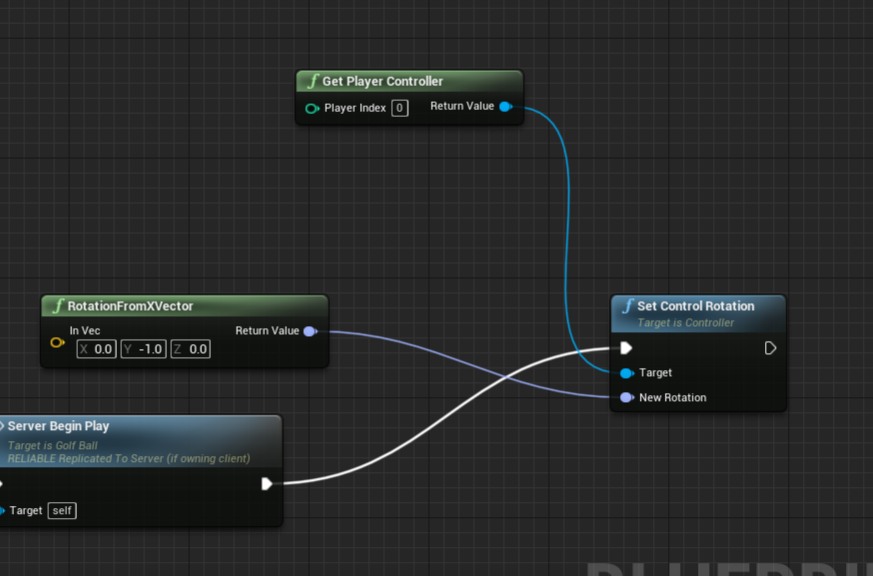
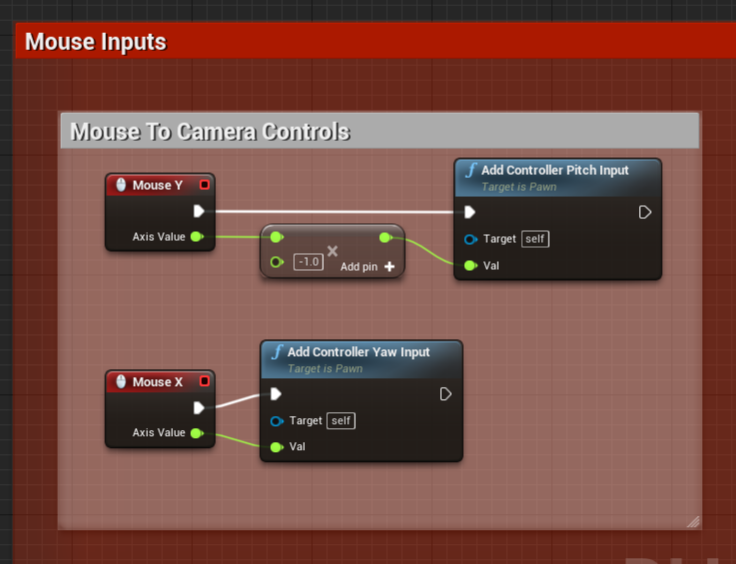
Anyone know why after I set control rotation, the mousex/y rotation doesn't work anymore?
setting control rotation on beginPlay
 tough pagoda
@candid grove
Why you have * -1?
candid grove
invert up and down
candid grove
Yea I think you are misunderstanding my question
The rotation works perfectly fine, unless I call set rotation first to set the intitial rotation after spawn. It sets the rotation like I would like it to, but then it no longer rotates, like its setting the rotation permenatly
tough pagoda
Debug and watch at variables.
I think that your rotation is locking.
Need to reset or something.
candid grove

It seems like event Begin Play is running more then just at the start. With the delay it is setting control rotation every second back to the specified rotation
I see the issue now

coming off the update pin of the timeline 😦
tough pagoda
candid grove
It seems like event Begin Play is running more then just at the start. With the ...
Maybe it can help you.
Is link on Mattew's Channel.
tough pagoda
candid grove
coming off the update pin of the timeline 😦
I'm not at home I implemented lock on enemy.
And I have rotation reset.
candid grove
Nah, its because of this looping animation
its calling update every time the animation finishes
so its setting control rotation each time
tough pagoda
Pin node for stop.
tough pagoda
candid grove
I need this animation to keep looping
Okay.
tough pagoda
candid grove
thanks for your help
You plugged stop pin?
candid grove
no, I dont want it to stop
I just put the timeline at the end of the execute for begin play
tough pagoda
Welp, that's good if you resolved this problem fast.
 latent pivot
 pseudo river
don't use the error window. use the output window instead. set up your visual studio to stop opening the error list on failures
pseudo river
yeah it doesn't bother me but the headlesschaos is 🅱️orked
 harsh coral
settings values in blender for animation and dimensions with less decimals can help performance in a open world game?
 clever axle
https://i.imgur.com/HZ3zh1k.png These shadows are really harsh.. Am I missing a setting somewhere?
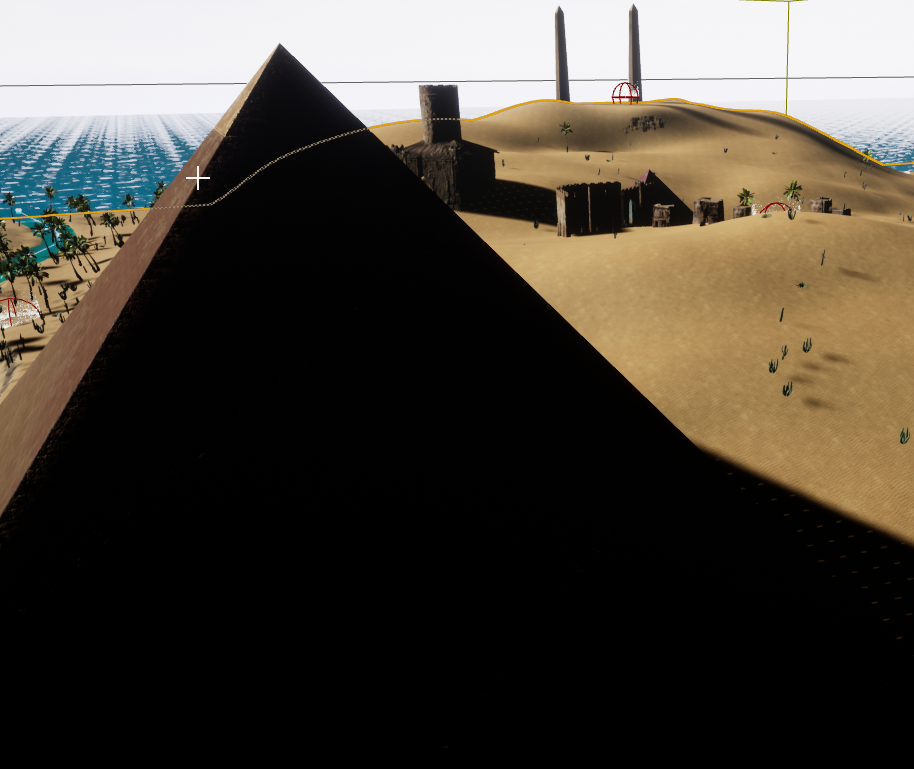
 wary wave
sky light
clever axle
I'll answer you if you can get your question onto a single line ;P
 tired escarp
Last time I looked on the marketplace there were like 4 packs, and unity's marketplace wasn't much better. I would really love to know where you got those Egyptian themed assets?
Egypt is cool
clever axle
@tired escarp I lifted them off racing game or what it's called in the learning tab
@wary wave I'm moving the skylight but it has no effect on those shadows.. I have static lighting disabled so it should hit immediately I was thinking
wary wave
moving a skylight would do nothing?
clever axle
oh damn, it seems to be linked to my directional light somehow
 forest finch
Hey im new to UE4 and i was wondering if there are any good Books/YT Channels for people coming from Source(Valve's Game engine) to UE4??
oor Similar YT Channels to 2KlicksPhilip or 3KlicksPhilip??
(Edit#1: But for UE4)
(Edit#2: If any one has answers pls DM me oor @forest finch/Ping me )
(Edit#3: I am a noob so go easy on me)
 coral kernel
Hi Can i get some help guys
i have trouble with my interact system the problem is when i start my game 2 player when first player come to the door press F widget appear on the player 1 and player 2
It should only appear on the first player
 serene birch
clever axle
oh damn, it seems to be linked to my directional light somehow
serene birch
clever axle
oh damn, it seems to be linked to my directional light somehow
skylight will capture your sky to simulate how much light falls down on your scene per direction
so you need a sky that is somewhat emissive in the first place
in a typical setup, if you use stuff like the UE4 sky atmosphere, the sky power is computed from the light that comes from the sun, aka your main directional light that is linked in the sky atmosphere object
serene birch
you can technically feed a sky texture directly to the skylight too if you want
clever axle
alright.. I pretty much got my game code done so now I gotta make it look nice..
which isn't easy :>
 fluid swift
Shouldn't there be some property for component replication?
coral kernel
@fluid swift Let me see
fluid swift
According to a tutorial I'm following it should look like this:
coral kernel
fluid swift
I assume it must have been moved/named something different, since the tutorial is from mid 2019
😮
coral kernel
nope but nothing changed
fluid swift
Is it not the correct place?
coral kernel
No when you click on object like box you can change it in the deatils
fluid swift
I've clicked on the "Sphere"
fluid swift
Ah
coral kernel
fluid swift
I needed to access the blueprint for some reason, the other details was a wrong view
Cool tyvm!
coral kernel
what the toturial you watching
 naive reef
Why don't my Light Sources contain the details menu?
fluid swift
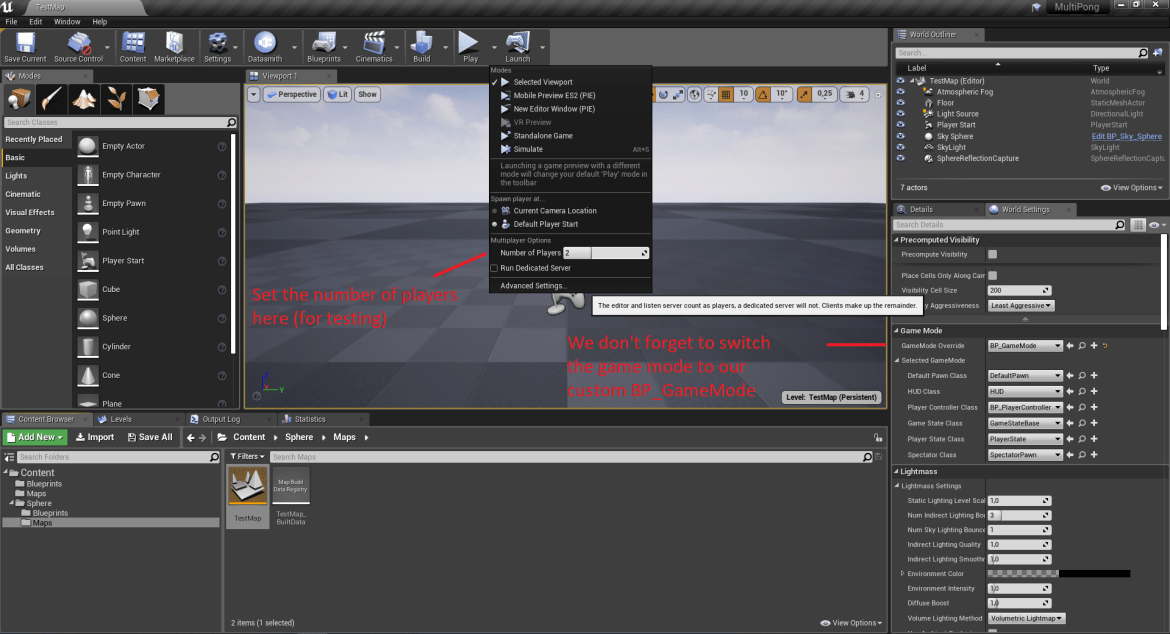
Medium
Even though the network is a well covered subject in UE4 documentation, a small tutorial explaining how to get started with a really…
coral kernel
idk
But
guys @fluid swift @naive reef if you cant see the details menu you can just go to
make sure its cheked
naive reef
ok thanks
clever axle
how do you get a smooth horizon on an ocean body? https://i.imgur.com/Kzx17w5.png
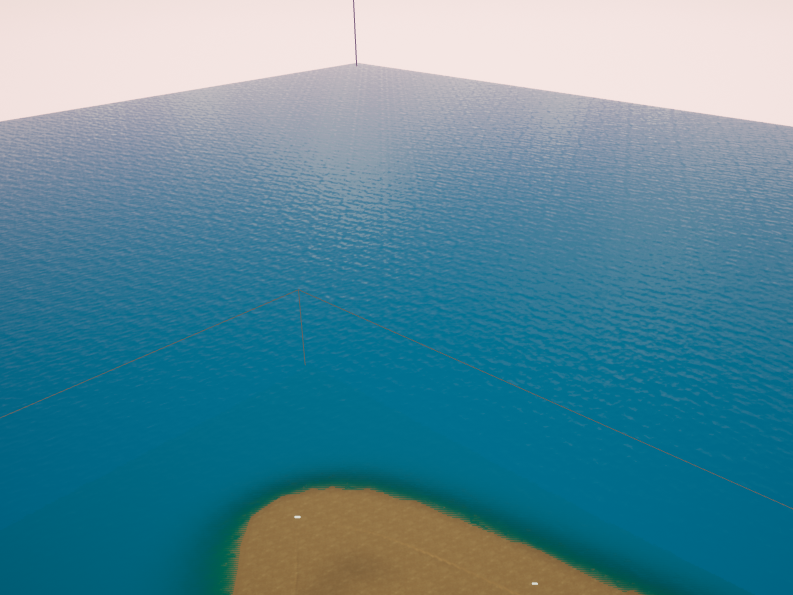
been experimenting with exponential fog and postprocessing fog but nothing really clicked
 neon bough
does anyone by chance have an alembic file with long hair, that he successful imported to UE4 and would share it? (shape doesnt matter, i just need something to test, as my abc from blender is missing parts)
 turbid vigil
Just a quick question for curiosity.. uhm can u sculpt imported meshes in ue4 with the sculpt tool like for example rocks
 sonic quest
Are you using the Sky Atomosphere? Try using that.
If so, you need to change project settings to support Expo. height fog.
Check this video on setting up those: https://www.youtube.com/watch?v=sCd4RnFZHz8&t=8s
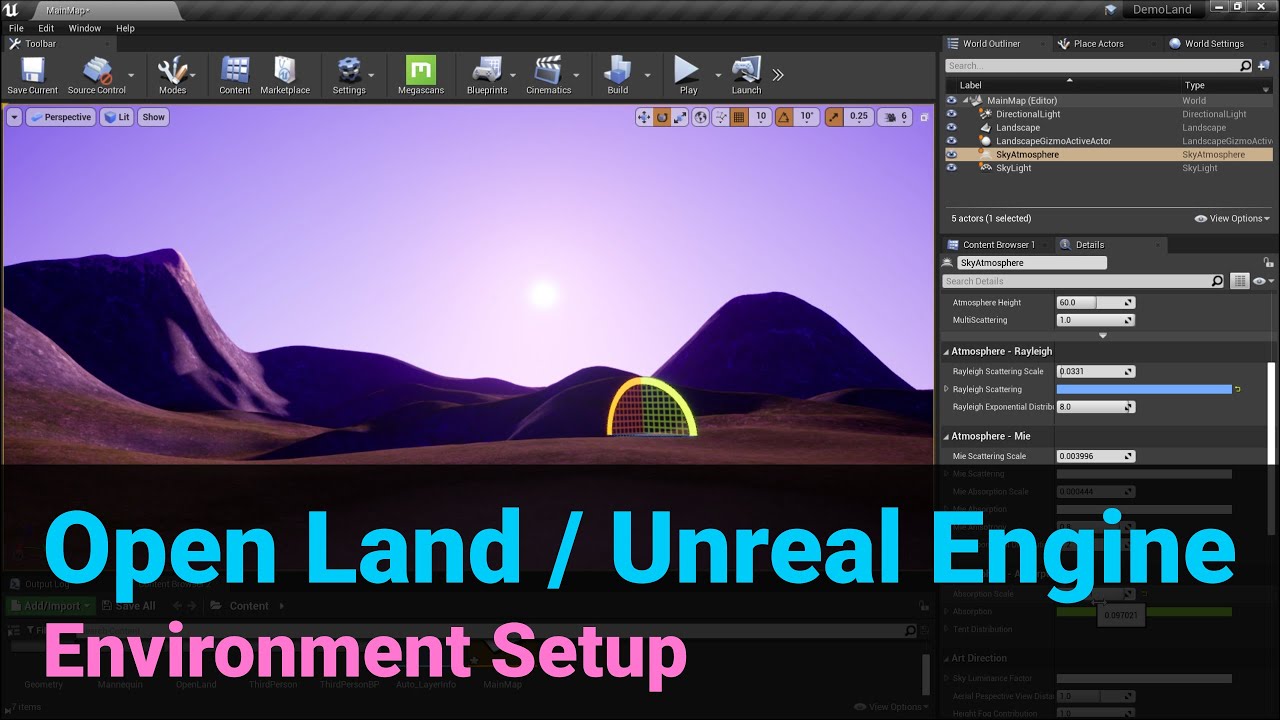
Get OpenLand: https://github.com/GameDev4K/unreal-open-land
Support Us: https://www.patreon.com/gamedev4k
Let's Talk: https://discord.gg/DK9cMn9eFV
Get this example project: https://github.com/GameDev4K/DemoLand
This doesn't have the water system. But it should work.
 plush yew
Hello guys, I’ve created an input mapping system in my project, but if I want to change the widget BP too how do I do it? ( I have a text that says( “E” to open the door ) and I want the E to change on the input mapping). I hope I explained it good
Do I have to create a widget BP for every key?
 regal mulch
You should only need one widget. But you do need some static lookup for key to icon or text. Can be just a dataTable. You should be able to query the keys via binding name. Not sure what the function for that was. But basically, have a binding called "Interact", check what key is currently bound to that, get the matching icon to that and use that for your widget
 crimson lake
hey guys, (apologies if I'm interrupting something)
is there anything noticeably wrong with my post process mat?
i should create a simple outline around my object
Stencil enabled, depth enabled
on both object and world
 wind iris
Hey all. Can anyone tell me if there is a way get "Keep Simulation Changes" to work with Destructibles or GeometryCollectionActors, such that the simulated positions of the fractured pieces can be retained outside of the simulation/game? Or if there is a workaround to achieve this behavior?
wary wave
I'm unfamiliar with Geometry Collections, but no, you can't do this with destructibles
 dark briar
how do i use a mesh's socket location to place my hands using two-bone ik?
plush yew
hi guys
i made a bowls collision : complex as simple collision
but unreal engine cant simulate physics in ComplexAsSimple Collision
ue5?
 patent cobalt
@plush yew that is correct. Complex collisions can be used for scene queries or kinematic collisions, but actors simulating physics cannot use complex collisions for performance reasons.
plush yew
patent cobalt
<@456226577798135808> that is correct. Complex collisions can be used for scene ...
but
patent cobalt
Why do you need complex collisions?
plush yew
because
patent cobalt
You can also create custom collision volumes
 exotic thicket
The typical solution is to create a separate collision mesh out of simpler shapes
patent cobalt
Or a custom collision volume
plush yew
okay
patent cobalt
Setting up, exporting, and importing Static Meshes using the FBX content pipeline.
Look under Custom Collisions
plush yew
i'm trying custom collision
 river bridge
Hello everyone! Is there anyone who knows what is wrong with camera transform on sequencer in UE4.26? I can't add, edit etc. I guess there is a weird bug 🙁
regal mulch
Has anyone ever had the issue that the context menus all over UE4 just flicker and visually disappear until editor restart?
Only happens in UE4 and only after some time. I can still click where that menu should be. Think that also happens where drop down menus are.
Really annoying
 fierce tulip
@regal mulch ive only had that happen when i enabled animated menu stuff in ue4
regal mulch
the what now :D
Now my editor just flickers black, lol. Every other program is just fine.
I also just had it that I could see through the editor where the context menu should be.
Could literally see my jira behind the editor.... what the hell
Oh lord, it works fine on my other screens. How is that even a thing
exotic thicket
Sounds vaguely like some of the random issues I had when I still used an AMD GPU :P
exotic thicket
Check your refresh rate
I bet you might have it higher on your middle screen than others at least if you play games
That's what was causing some weirdness for me on AMD lol
regal mulch
It's all 3 the same, just in case
But I do remote into the PC a lot, which is only the middle screen
Maybe remote desktop shizzle broke something
Hm, nope, all 3 the same
 warm hornet
Anyone familiar with alembics in UE? How do you start playback of an alembic on a specific frame in your UE sequence ?
Or in other words stop and start playback. There is a 'Start Frame Offset' in UE but this is for the frame offset in the actual alembic file. Alembic files imported as Geometry Cache always start playback on frame 1 of your sequence.
 sterile tulip
guys
Im trying to import a 4 wheeled vehicle in UE4
How do I do this if I have more than just the body and the 4 wheels
I have the car body separated in many parts, and 4 wheels
I parented everything to the base mesh, I have like 30 separate objects or something, but when I import it, the parented objects are invisible and only the base mesh is visible in UE4
 proud narwhal
If I open any object up in the viewer it has what looks to be a building and carpark as the backdrop whereas my actual map seems to be a dark grey sky, is there an easy way to change this to something a little more interesting?
heres a comparison of what I mean
nevermind I got it, HDRI backdrop
 late loom
Does animation notify not work when playing animation directly??
 echo zealot
Why is there no "Is Focussable" checkbox on "spin boxes" and "input key selectors"? I need to disable it, there must be a way right?!
plush yew
hello! Is it possible to animate the player in a Level Sequence? Specifically, can I animate player bones in the sequence or does that all need to be a pre made animation clip?
wary wave
I don't understand either the question nor what you are trying to do?
 hoary holly
Anyone here got an idea how to get started with enemy knock up? I know how to do knock back, but not a small knock up like in GoW
 kindred viper
same thing different vector?
crimson lake
Hey guys, is there any performance difference between using an Actor class or a Pawn class?
hoary holly
Nope
 next badger
@crimson lake actor is just a class that can be rendered in viewport, pawn can be controlled
The Pawn is the physical representation of a player within the world.
next badger
UObject -> AActor -> APawn -> ACharacter
crimson lake
if a pawn was not being used
or posessed
would it act the same as an AActor?
performance wise
(if that's a thing)
next badger
ye, pawn has a lot of components that are ticking
 wicked fjord
how does mordhau cast a headless chromium/CEF browser to clients? It also playback audio too
crimson lake
mm
another question then if I may thanks alot @next badger ❤️
so, would I rather
use an AActor and disable input from char, then enable it in the AActor
or
use a pawn with tick disabled, enable it (sphere trace or sm), and possess it ?
next badger
@wicked fjord maybe...it has embedded CEF in it...like ue4
wicked fjord
yeah, but how do you send a texture/video stream/picture over the net?
what kind of API i should look for that?
next badger
in CEF?
wicked fjord
no, I mean broadcasting texture (in this case CEF) to clients
next badger
CEF is not a texture...it's a full pledged browser
wicked fjord
yeah but CEF render the display to texture, isn't not?
next badger
yeah, but you not streaming texture...it renders it on the client...like any other browser
you can open youtube and it will be playing it
wicked fjord
but the problem this, how does the other player see the exact timing and audio?
i expect there will be some desync, but nope
next badger
only if you can sync the web streming this way...
as twitch cant sync stuff over the web...sometimes you can't too
wicked fjord
maybe it sets the URL?
next badger
well, all depends on your streaming capability
wicked fjord
for all players
next badger
it's not related to ue4 anyway, pure web
wicked fjord
well, it looks like magic to me. I doubt it sends the full texture to each client, probably replicates the URL on every client CEF
next badger
i've already said it, it's a browser
it does not send any texture
it's a BROWSER (in caps)
wicked fjord
lmaooo
I worked with webkit before, I have a mindset that the browser is just texture copied from memory
next badger
cool, ue4 uses CEF as is
no magic, texture is rendered by CEF and then it's placed somewhere in widget
all done on client
this is why Epic Launcher is so laggy and consumes alot of CPU sometimes
 light thunder
Why does my model come over in blender with 22 material slots but when I look in blender it only has 7?
 hoary geyser
i am having a bit of an issue with importing a fbx mesh into blender with the unreal rig
is this the right place to ask?
light thunder
meh, kinda - might have more luck in blender discord to be honest - i can tell you what I've learned importing fbx's from blender but I haven't messed with the rigging stuff
 modest agate
whats good to use for data persistence, datamodel? gameinstance?
light thunder
modest agate
whats good to use for data persistence, datamodel? gameinstance?
persisting across game sessions or just levels?
turbid vigil
my textures from the auto material arent showing in the instance material any clue?
plush yew
I know this is a super longshot question, but does anyone here still have Maya 08 on their computer?
 ocean grove
Dumb question but if I have a widget where I get the player to put in their name (menu level) and I want to access that input in the game map (world level) I don't just cast to that widget right?
 grim ore
it depends on where you store it? is this all single player then you can store it in the widget but if this is the player name it might make sense to keep it in the player as part of his info
 worn peak
excuse me
clever axle
Guys I have this problem where sometimes there are assets (in this case right now a level) in the filesystem but the content browser doesn't pick it up
worn peak
any1 knows anything about a date for the ue5 preview ?
clever axle
Anyone else?
grim ore
the preview will be out later this year, thats aboot it. they said maybe quarter 1?
ocean grove
It's all single player, I was messing with player info yesterday and idk what I did but anytime I touched the node it crashed.
I'll have to mess with it some more.
modest agate
light thunder
persisting across game sessions or just levels?
across game sessions
how can i add 3rd party cpp code? which is not created inside ue?
 broken fulcrum
Hi guys, I'm going to build my pc to gaming and to work with Unreal and I come to ask you for recommendations on components, the idea is to build something mid-range and improve to high-end over time.
 tame marsh
Goshdarnit why does UE4 generate decent lightmaps at LOD0, LOD2, and LOD3 but LOD1 is completely blank
ocean grove
@broken fulcrum I know a decent amount about PC's send me a message if you'd like I should be able to help
light thunder
modest agate
across game sessions
there are savegame assets from the unreal marketplace that help with the process - in terms of making savegame objects, you don't need to use CPP to do that
 long stag
So I moved my project from one harddrive to another and now its throwing an error when I try to launch it from Visual studio saying "Failed to open descriptor file and gives a path to the uproject that was from the other drive. Not sure if this is the right channel to ask
grim ore
after you moved it, have you tried regenerating your project file? (right click the .uproject and regenerate solution)
long stag
yea tried that, still threw it
Had to physically delete the folders, then generate and that fixed it
dark briar
how would i get the socket from my skeletal mesh (trying to tell my character where to grab 2 handed weapons using sockets)
clever axle
@broken fulcrum https://www.logicalincrements.com/

Helping you build a PC, at any budget.
grim ore
@dark briar you need to pass the weapon reference into your anim bp somehow then go from there. You could set up a variable in the anim bp and have your character send it over, or your weapon send it over for example
dark briar
@grim ore thanks! since all my 2h weapons / halbers / spears will use the same socket names, would i pass it as an array?
grim ore
I guess it would depend on what you are trying to do and how many weapons. Assuming you have 1 weapon out at a time and the socket name are the same like you say this operates generically on a scene transform so just making sure the weapon reference in the anim bp is the current weapon is fine
dark briar
ohh okay thanks! perfect 🙂
grim ore
im not saying this is perfect and if you have no weapon by default its going to give an access error temporarily until you do but it makes sense on how to do it, #animation might have more info but since you need the weapon reference to get those socket locations in the anim bp the other alternative is to get the transform in the character and pass it to the anim bp instead of the item itself
dark briar
grim ore
im not saying this is perfect and if you have no weapon by default its going to ...
oh i meant thanks for your info! i'm new to UE4 so anything helps. I also added an alpha curve name which my 2h montages are set to 1 (on), hopefully that avoids the error for the time being. i'll post the video of my results!
modest agate
where can i add external cpp sources to link and get compiled as well?
modest agate
light thunder
there are savegame assets from the unreal marketplace that help with the process...
thanks! i will have a look, probably i will just all save/load by json for now, like my generic landscape data, etc.
 brave shard
how can i swap 2 children in a scrollbox?
 devout swift
if I want to move my character forward very fast for a brief moment (like a dash or flash step ability), what's the difference between using AddForce vs LaunchCharacter ?
modest agate
i see i have to extend that build.cs
latent pivot
to any unreal veterans here: is the general consensus still to avoid using hot reload?
clever axle
Not a veteran but yes.
https://answers.unrealengine.com/questions/935431/view.html anyone else have this + a solution?
says Cannot create SoftObjectPath with short package name '('! You must pass in fully qualified package names and prevents me from cooking
echo zealot
Hi, i've been strugling with this problem for way too long now! If you press the tab key in your packaged project you enter a keyboard navigation mode in your UMG widgets, however i did already make my own keyboard navigation system and i want to disable this but by some hilarious reason it is just impossible! I've already tried all of those things:
Set "Render Focus Rule" to "Never" in the project setting, this hides the selection button but it's still enabled so if you will press enter it still presses the random button you selected.
Set all properties on the buttons under "Navigation" to stop, this will make it impossible to move the selection, but one will still be selected.
This seems like the cleanest solution so far: Set "is Focussable" to false on the buttons, this worked perfectly but by some wierd reasons this checkbox is not available for "spin boxes" and "input key selectors", so this solution also doesn't work for me.
I also made a hidden "pseudo button" with all navigation set to stop, this seemed fine but then i realized you can also enter this focused navigation mode when pressing on the button and then hitting tab..
I also tried to "consume" the navigation keys with listen for input action events, but they were less prioritized so it didn't work.
I just can't believe that there is no proper way to disable this function!? Can PLEASE someone help me, how did y'all solve this in your projects?
ocean grove
Is there a benefit for doing one method over the other?
light thunder
If you are constructing it, the options will be defaulted and won't persist
in terms of what is displayed
plush yew
Oh really
light thunder
think about it
you are constructing a widget each time that options button is click on 1
plush yew
But I'd do option 2 it is easier what do you think
ocean grove
Ahhhh but if you request show options menu it will ref the game instance so anything you've already entered will persist?
light thunder
You can still do that, but you have to make sure you aren't makign mutiple widgets, so in the first one, check to see if that widget reference is valid, if it is, just switch to it, if it isn't ,then construct it
light thunder
ocean grove
Ahhhh but if you request show options menu it will ref the game instance so anyt...
yes, but just remember there is a difference between your widget itself and the game variables it might be referencing
plush yew
But why can't you hide it so it doesn't to add all the time
light thunder
removing from viewport hides it
plush yew
Option 2 Is easier and better in many ways
light thunder
FYI there is a #umg
section here guys, might want to go there if you are going in depth
plush yew
Quick tip instead of using remove widget use hide widget so I'd doesnt just add all up
ocean grove
Oh I have pause and unpause functions in my character bp that removes all widgets
plush yew
Good
 vale silo
any inside scoop on 4.26.1 release time frame ?
 edgy anchor
Hello everyone, I start working with Unreal, I'm a programmer but I have some difficulties to learn BP, BP for programmer is not easy so I think I may go to c++ directly, it's there's a good tutorial to learn BP for programmer, like compare code vs BP to have a idea to how to assemble those graph block.
sterile tulip
Are megascan assets royalty free or do they have a license?
Can you earn as much as you want with your project with megascan assets in it without giving out a percentage?
 thick herald
edgy anchor
Hello everyone, I start working with Unreal, I'm a programmer but I have some d...
thick herald
edgy anchor
Hello everyone, I start working with Unreal, I'm a programmer but I have some d...
https://www.unrealengine.com/en-US/onlinelearning-courses and https://www.unrealengine.com/en-US/onlinelearning-courses/balancing-blueprint-and-c-in-game-development may help you decide what to do 🙂

Unreal Engine
Unreal Online Learning is a free learning platform that offers hands-on video courses and guided learning paths.

Unreal Engine
In this course, you’ll learn how to make the most out of Unreal Engine by utilizing Blueprints and C++ in ways that complement their individual strengths. By the end, you’ll be able to assess which option best fits your needs in your own projects.
edgy anchor
Thank @thick herald very appreciate 🙂
thick herald
sterile tulip
Are megascan assets royalty free or do they have a license?
If you have connected your Epic account with Megascans, you are bound by the Unlimited Unreal License. Basically if you are doing it in UE you don't pay to use the assets at all.
edgy anchor
I decide to let down unity..
plush yew
Hello guys, if I add a real car in my project but I remove the logo of the car do I get in trouble or not?
thick herald
Maybe. It's usually good practice not to copy real life things. They can be similar, but not copies.
 dim oyster
Hi guys, I've been trying to import some foliage from bridge to unreal but it only imports the textures and not the mesh any idea why?
 daring tundra
[ARKit/IOS] Could someone from Epic or the mods please verify that only Apple devices with the A12 Bionic Chip or newer are supported with engine version 4.26 when using AR Kit?
I wasn't able to get our previously well working Apps running with 4.26 on older Apple devices and would be happy to spare the time trying to get it to work, when it's not possible in the first place.
thick herald
daring tundra
[ARKit/IOS] Could someone from Epic or the mods please verify that only Apple de...
This isn't an official Epic server. You might be better posting that in Epics forums
plush yew
thick herald
This isn't an official Epic server. You might be better posting that in Epics fo...
you mean the unreal forums? @daring tundra they have forum mods in the server by the way
thick herald
plush yew
you mean the unreal forums? <@!372081628291268619> they have forum mods in the s...
There are community managers in the server, however they are often very busy with their jobs and aren't active much here.
sterile tulip
Dont add a real car in your project except you have an agreement and a license for usage of their cars from their company @plush yew
Make your own or change their design
daring tundra
@thick herald Yeah will do that too, it was pretty much just a shot in the dark
sterile tulip
You cannot take anything from the internet and put it in your project and sell it except the owner clearly states that you are allowed to use it in your project without any restrictions
clever axle
oh man, damn.. I don't know what to do anymore.. I recreated my project like 5 times now and migrated various stuff over but nothing helps, I just can't cook it anymore, it fails on this:
Cannot create SoftObjectPath with short package name '('! You must pass in fully qualified package names
I haven't been able to trace this far in the code. It just seems that some path in the project is broken
 winged crypt
Any way to override the velocity of a ragdoll flying through the air?
I tried setting the linear velocity for all bodies to 0 but it has no effect
crimson lake
hey guys
I have an object that I'm tumbling
moving around, take input from player and set it on this actor
when I take control of the actor's camera (the cube im turning)
instead of the players
it flies off and keeps moving away
for some reason
that's the script
(mirrored for y)
any clue?
also code for bringing the cube to the front
 pallid talon
Does anyone have any suggestions on how to make a Landscape conform to a mesh? I have a real world location mesh in my scene, and I want it to use the Landscape tools. Can I convert it or morph a landscape to its shape easily without using hightmaps?
meager frigate
narrow plaza
you have plenty of HD space? and SSD?
119 gigs left out of a TB ssd on the drive the projects on and the two projects ive started are barely started
my main c drive is pretty low though, only 42 gigs left out of another tb
fierce tulip
how to ruin ssd's :p
plush yew
Hello guys, if I want to add a weapon to my game could I add a line trace and don’t spawn a projectile but if the actor is overlapping the line I lower the health variable. Is that a good idea?
Cuz I have no idea how to do it
meager frigate
thanks for being cryptic and not enlightening me on what im doing wrong lol. @fierce tulip
light thunder
How do I visualize an objects Center of mass? is it the pivot point/world origin? or does Unreal actually try to guess based on the bounds?
 light thunder
thanks for being cryptic and not enlightening me on what im doing wrong lol
meager frigate
lol i meant to add that to my post
light thunder
lol context is everything
plush yew
light thunder
How do I visualize an objects Center of mass? is it the pivot point/world origin...
I think that if you add a mesh that will be the perfect center
meager frigate
im not sure what you mean by center of mass, i think in blender when you set the origin point to the mesh you can set it to the meshes volume, im not sure that has anything to do with its mass though
the pivot point is always the meshes origin point
unless you change it, you can do that by holding middle mouse wheel on it
in unreal
then you gotta right click on the object and set the pivot point to where it is currently
otherwise if your turning physics on in the mesh options theres a way to set the center of mass in that details sections @light thunder
winged ridge
anyone a fucking genius and know how to save slider values for audio adjustment
light thunder
meager frigate
otherwise if your turning physics on in the mesh options theres a way to set the...
How do I visualize it - I have mass properties turned on but can't see it on the mesh in the world
meager frigate
ill take a look let me see if i can help
light thunder
You can see the mass properties on some of the objects in the scene - but not the one I want -
 obsidian nimbus
mayB use 2 collision boxes and make the 2nd more heavy
 maiden swift
Does anyone happen to know why the build data for the default map in the Blank film template is nearly 300 MB?
It looks just like the basic default map you get with File → New Level → Default. 🤔
light thunder
meager frigate
ill take a look let me see if i can help
Found center of gravity - I want to make this fall over like it was leading and then just gave way -
if I want to nudge it, am I looking for radial force?
obsidian nimbus
you coould, or add force add impulse
meager frigate
i would just cut the mesh at legs where you want it to buckle, bring both pieces back in and have the mesh change when your event happens then turn physics back on
itl just fall on its own
light thunder
it kinda is cut already
but I want it to fall towards the street, so basically I guess add some impulse to it at negative y?
meager frigate
theres a couple impulses you can use, i usually just keep toying with them until i find something i like
light thunder
so, it goes flying though -
I need to make the weight more accurate or tweak the collision at the bottom maybe?
when I disconnected the add impulse it is fine
but even an impulse of zero makes it fly off
meager frigate
to me it looks like your legs are sticking in the ground, if your colliding with the ground and the legs are inside of it its going to launch it when you turn physics on
light thunder
I kinda have to have them in there
meager frigate
thats why i was saying if you cut the mesh at the legs and then bring it back in you can turn the physics on, on the tower and let the legs stay there with no physics and itl clip right through it and fall on its own
ill make a mock up real quick and show you
give me a couple
light thunder
what if I just move the collision up on the static mesh
this is a one time thing so I'll just animated it falling - but do you know about how to make it go through these powerlines? My thought was to just animate the spline endpoints move (basically pulling them down)
 queen fulcrum
Hi all, Im new here with a beginner question: if I have a scene in a 3dapp like max with several props I want to export to unreal, as i update them, is there a way to avoid having to export them all from origin, since they seem to get displaced with whatever distance they deviate from 0,0,0 when entering unreal? I havent found a solution looking elsewhere yet but its probably some import option im missing?
light thunder
look for "import vertex absolute" or something
in blender you have to make sure you "apply" your location before you export,..probably the same thing in max
queen fulcrum
I think that option doesnt work that well if you have a large hierarchy linked to a root. I would have to collapse all everytime.
But thanks! that was one of the options i tried.
meager frigate
light thunder
the problem is I have to have it wrest against that building but it is colliding with it
so even if I fix the legs, I"ll have to deal with simulating physics launching it, like you said
meager frigate
ah ok, maybe a interpolated timeline that starts the rotation off the wall, just enough to let the physics take over maybe
plush yew
Lol
 lapis bronze
idk why you arent just making this an animation
you'll never get a curated fall out of using physics
light thunder
I am using an animation lol that was my thought
@lapis bronze the exception to what you are saying is if you simulate ragdoll physics and save the new result - that crap is amazing
is the only way to length those tangents just to add more keyframes? trying to make this thing linger at the top then fall down hard/fast
lapis bronze
if i were doing it, i wouldnt animate it using curves, but do it in a 3d software
then when the animation is done (if you desire this) enable physics on the object so players can hit it or sometthing
light thunder
it's not traditional, it just need to look like the damn thing feel realistically lol
help me tweak this timeline but it's close to wear I need it to be
 half bay
any1 have any idea why the UMG expandable area, when expanded / collapsed, sets the visibility of the elements inside it faster than the animation runs? it ends up having say 0.2 seconds of this while expanding / collapsing
id hate to have to make one myself, but this apparent glitch makes the control unusable due to how annoying it looks 😦
meager frigate
light thunder
it's not traditional, it just need to look like the damn thing feel realisticall...
man that looks damn good but what about ending it right when its over the street and letting the physics take over from there
light thunder
because i'll have to animated other stuff coming on and it will be easy if it lands in the same spot everytime
candid grove
meager frigate
@light thunder that was my mock up, it needs a lot of polish though
candid grove
Anyone know how I can get that infinity mirror emission effect like in the screenshot above? I saw you can maybe use bump offset, but can't find any examples
Another example
light thunder
Can I make changes to the timeline and have them reflect realtime, if I am looping through the falling action? like blueprint reset it and just keep doing it?
The answer : yes this will make iteration so much faster
just add this to the finished of the timeline then call another event that plays from start
plush yew
hi guys i have a problem. I have a wall with a texture but when I fix the tiling the texture is fine in front and behind. but on the left and right the wall being less wide the texture appears stretched. how can i fix it?
brave shard
how can i swap 2 children in a scrollbox?
light thunder
@meager frigate
modest agate
whats the performance factor of BP vs CPP?
light thunder
I can almost hear Cleveland yelling "No no no noooooooo"
brave shard
modest agate
whats the performance factor of BP vs CPP?
all depends on how u optimise it
u can make a game that is perfectly optimised with both
modest agate
well once i know the api more i will prefer cpp but right now bp is great fun to work with, and think its great to build on top of my further cpp ai code
prototype or any other small things
and it compiles super fast
brave shard
well idk about compiling im talking about in-game performance
modest agate
yes i understood
light thunder
I probably need to add more segaments then
you can see the spline collides since I enabled collision during construction script
candid grove
https://prnt.sc/xe2xmq
Anyone know how I can treat this multiplay as a texture sample?

 median kettle
im sorry guys i just redownloaded UE4 and some stuff just feel weirder than the last time i had it, for example my sphere is no longer a sphere
light thunder
I'm trying to add points to a spline mesh with control click but it just selects crap behind it - I can't just hide everything in this scene, some of it is used for referencing this
plush yew
Hello! Is it possible to play an animation sequence from a level sequence?
 worn mirage
I've noticed I'm unable to paint foliage on the landscape if the landscape is set to a custom object channel. Is there a way to fix this? Or do I have to switch it back manually when painting and remember to put the value back when done?
 steady owl
vale silo
any inside scoop on 4.26.1 release time frame ?
steady owl
vale silo
any inside scoop on 4.26.1 release time frame ?
my bet is this friday
plush yew
What is going to change in 4.26.1 ?
 still moat
half bay
any1 have any idea why the UMG expandable area, when expanded / collapsed, sets ...
still moat
half bay
any1 have any idea why the UMG expandable area, when expanded / collapsed, sets ...
Its not a bug per say but you need to change something
Hold up
half bay
still moat
Its not a bug per say but you need to change something
i changed the roll up animation speed, but it's still overlapping, i started adding a fade in animation for the controls inside it, works with the expand, when it collapses it overlaps :/
still moat
half bay
i'm looking how to expand it on demand, by pressing a button for example so i can add a delay
hmm
oh wow ❤️
still moat
try this
half bay
still moat
try this
omg i donno who you are but i love you!
 half bay
and you scrolled up like 3 hours or something to help me ❤️
still moat
If its an issue thats not a basic question that can be googled in 5 minutes then I always help 😉
(or when I am here lol)
half bay
still moat
If its an issue thats not a basic question that can be googled in 5 minutes then...
i ended up on the 3rd page of google, went to take a walk while still checking my phone for the damn problem, then started looking for workarounds with fade in and bleh
steady owl
plush yew
What is going to change in 4.26.1 ?
Nothing changes, but lots gets fixed!
still moat
half bay
i ended up on the 3rd page of google, went to take a walk while still checking m...
Imagine and all it took was clicking a dropdown menu😆
half bay
well the damn settings were the 1st things i started looking at, i'm fairly new to ue4 so i didnt quite understand the clipping option
naive reef
@fierce tulip can i watch your stream?
half bay
opsie
edgy anchor
newbie question here, Why when I test my scene, it look like blury, even if the quality is at max
plush yew
edgy anchor
newbie question here, Why when I test my scene, it look like blury, even if the ...
AntiAliasing
Write in the console command: r.defaultFeatureAntiAliasing 0
Or smthing like that
 dawn gull
Or motion blur
edgy anchor
thank Boolean
plush yew
Np
 molten solstice
Hi! I accidentally deleted an entire Level in my project and save... But I ve a version of last week, I would like to take the Level in my old version to reintegrate it into my current version. I saw we can Export or Migrate, by clicking on Migrate it shows me all the assets used, but they already exist in my current version, should I use this? Unhook everything? Or another option?
fierce tulip
I'd use version control and revert the level
edgy anchor
it's work with AntiAliasing but the character look too sharp now and pixeled heh
molten solstice
Or maybe copy paste the level from the windows folder?
plush yew
Ye that is a problem with antiAliasing. Try different numbers
molten solstice
@fierce tulip If I copy my .umap in the windows browser and paste it into my new project will it work?
fierce tulip
I'd rename and try, but def look up version control because that is really what you need to be using
still moat
@molten solstice There might be a chance theres a backup in your Saved folder
 rain forge
Hey guys, any chance somebody know this bug? It starts randomly and I’m not able to open any context menu. The only way to fix it is restart
Interesting thing that if I would do a screen video capture it shows everything as normal
lapis bronze
If you're running editor mods like blueprint wires, it could be a visual bug solved by restarting the editor?
rain forge
As I mentioned, restart is the only way to fix it
Wires shape is only editor mod I have, however I doubt that it is what causing it
 lucid grove
Heya
is there a way to loop whole animmontage?
I can see there is an option to loop single animation, but not while montage
Looping with bp is not an option
worn mirage
@rain forge Perhaps the Plugin? I'm running "Electronic Nodes" and thought the menu didn't popup some times but then it would. It's never been a showstopper.
lapis bronze
rain forge
Wires shape is only editor mod I have, however I doubt that it is what causing i...
Not testing that seems folly
light thunder
I'm trying to enable physics on these spline meshes but it just makes it disappear as soon as the construction script compiles
 midnight gulch
I get a bug during gameplay where pawn collision shuts off (player characters and enemies can move through each other) and World UMG elements (like healthbars) disappear. AI and pathfinding continue working. After a few seconds, collision and UMG elements return.
 spare kernel
@midnight gulch that could be caused by wrong mobility components intersecting a static
when moved
we had one where a pickup would spawn in the floor, and the entire floor collisions would go and player just falls through
 agile nova
how to stop or turn off this madness ? lol
midnight gulch
@spare kernel Cool if I DM for some help debugging this? Really appreciate the help! Thanks!
grim ore
fix the errors and warnings
agile nova
grim ore
fix the errors and warnings
but can off in editor settings ? i dont need this popups ;p
grim ore
not that i know of, its important to fix
 wanton lotus
agile nova
how to stop or turn off this madness ? lol
wanton lotus
agile nova
how to stop or turn off this madness ? lol
Add like 10 million validation checks.
clever axle
I posted this like 10 hours ago and I'm about to recreate my entire project.. Any help before I go that far?
https://answers.unrealengine.com/questions/935431/view.html
anyone else have this + a solution? says
Cannot create SoftObjectPath with short package name '('! You must pass in fully qualified package names
and prevents me from cooking
grim ore
you could try running the editor with source version so you can debug this in visual studio and find the affected file
clever axle
I'm doing this right now but it's not much help
This really goes into the guts of the engine
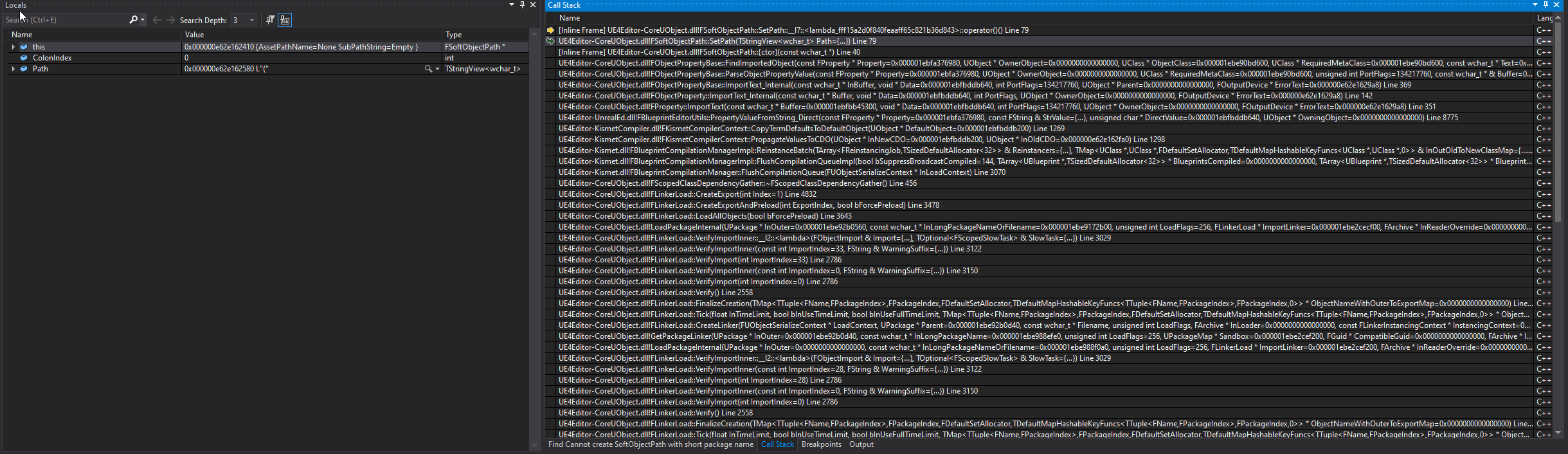
it seems to me some blueprint linkage is off
I gutted a clone of the project earlier to see what might set it off. if all content is gone, it cooks NP. The last thing I had going was a link to the player controller from the HUD. But only removing that didn't help later
grim ore
well somewhere in the engine is that error, I would breakpoint on that error and when it stops VS step back to find the item it's having an issue with
clever axle
@grim ore yes.. what I posted there is the exception stack trace
grim ore
but is that with the source version of the engine or the launcher version?
clever axle
source
grim ore
so ignore the trace and actually look at the code thats running where the breakpoint hit
clever axle
I've tried to that. From what I can see the problem is that an FSoftObjectPath is corrupted
but I can't find where it is
grim ore
so the path being sent is is bad to that code?
clever axle
appearently, yes
grim ore
yeah the path is ( which is odd
clever axle
I'm trying to find out where that path is coming from
yes
it should be something /Game/foo.foo or something from what I can gather
grim ore
there is supposed to be a pointer to the object being serialized in that line but I assume its returning nothing?
clever axle
it seems
and yes, I'm a step further. It really seems to be a link to the player controller
grim ore
so the findimported object in the stack below it is calling it, you would have to break on that one and see whats being passed in or in that stack see if you can see whats in memory in the OwnerObject that is being passed in
actuall the owner object is nothing so that doesnt help lol
maybe just recreate the controller if you can or resave it? or move it and resave it lol
clever axle
I tried moving and resaving before, didn't help
and that controller is everywhere
but I'm onto something here with FindImportedObject
modest agate
clever axle
<@!800162370936373289> what do you mean by "name"?
have it, used getallactorswithtag, thanks a lot
but what's strange my actor has a camera boom and when i switch back from cam2 to the actor the camera is kinda different
clever axle
@grim ore appearently it's trying to import this string value: L"(PlayerController_10_9373161F418EC9361F7D9F84291412B5=None,PlayerState_4_7FF8F7C8464EBB53BCAB37B5279832FC=None,GameState_7_B9D72FB940375FF1CCBE6AA675232141=None)"
This looks like a struct (BP) I had a while ago but removed since
then it figures this is not valid, returns the first character and then explodes
modest agate
got it, i used getplayercameramanager, but its strange if i set the player camera its not using its cameraboom camera
but i could imagine whats wrong
unreal is reall super great
clever axle
@grim ore I figured it out more or less. I think it really is that struct.. I used to pass that as an argument to my widgets, now I only deliver the controller. It cooks now so I only have to recreate my HUD tomorrow.. Thanks for your help!
light thunder
can you do a "pick from world" type of instance editable variable?
Does anyone know how to keep the location of either end of a CABLE COMPONENT the same spot?
I can't make one side of it fall without the other going
 rough knoll
how do i make materials not stretch on the landscape?
grim ore
@clever axle so what was your actual fix for this based on that error?
worn mirage
I've noticed I'm unable to paint foliage on the landscape if the landscape collision is set to a custom object channel. Is there a way to workaround this or do I have to switch it back manually when painting and remember to put the value back when done?
clever axle
@grim ore killing everything hud and all references to it :>
grim ore
Ugh
 vernal compass
Lets say i want to create a world like litteraly the size of the earth like Microsoft flight simulator The best i got is world composition and level of streaming. But i need heightmaps, a lot of them. Is there any free ap to do it?
 cerulean nova
Yes and no
believe me when I say that big maps mean a lot of work and no matter how motivated you are you will reach your limits
I spent over 3000 hours in the tools for a terrain and another 7000 hours in placing objects
Its a pain
vernal compass
I believe you
I was hoping to use ArcGIS plugin
To get a headstart
Most of the planet is water
cerulean nova

Objekt placement was done ingame via extra scripted tools

Thats for the tools
Stunden = Hours
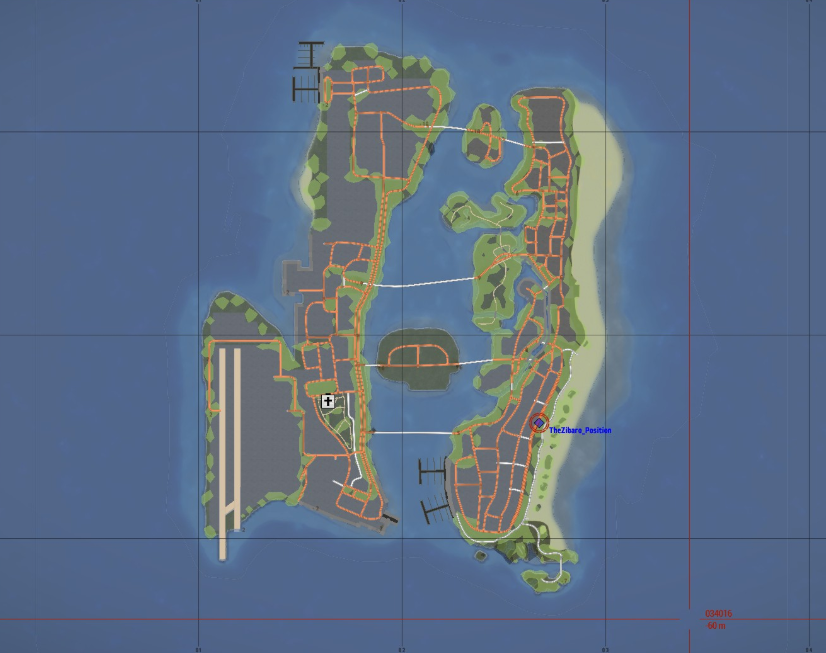
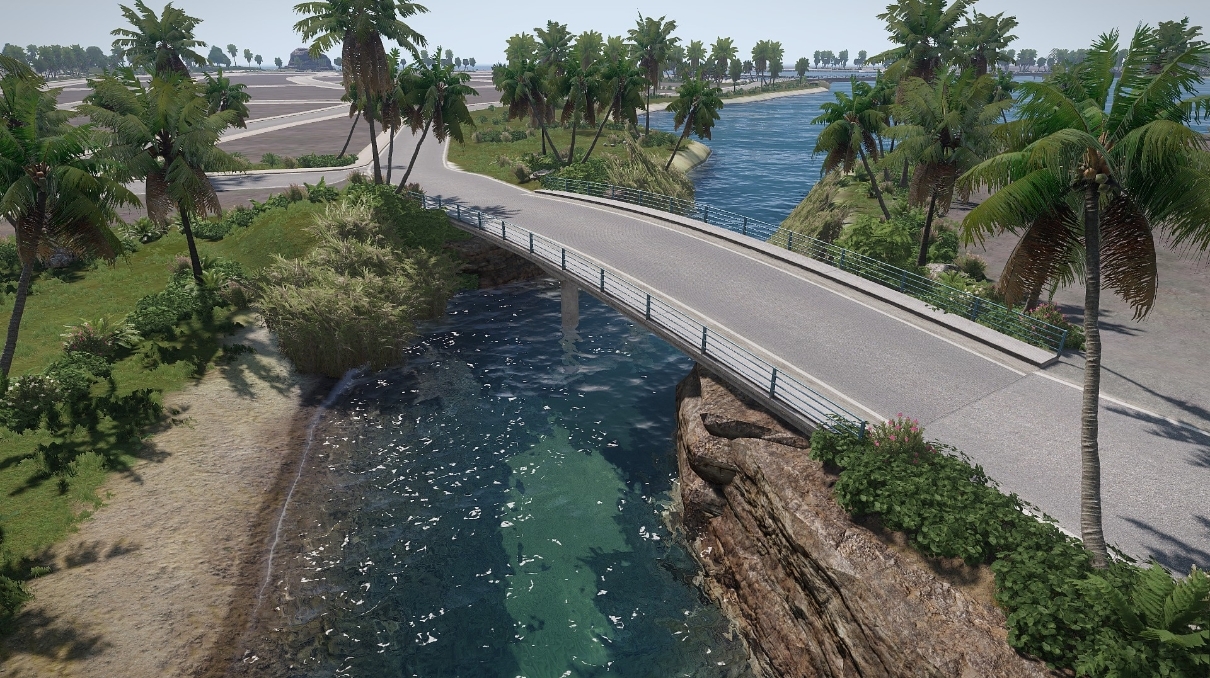
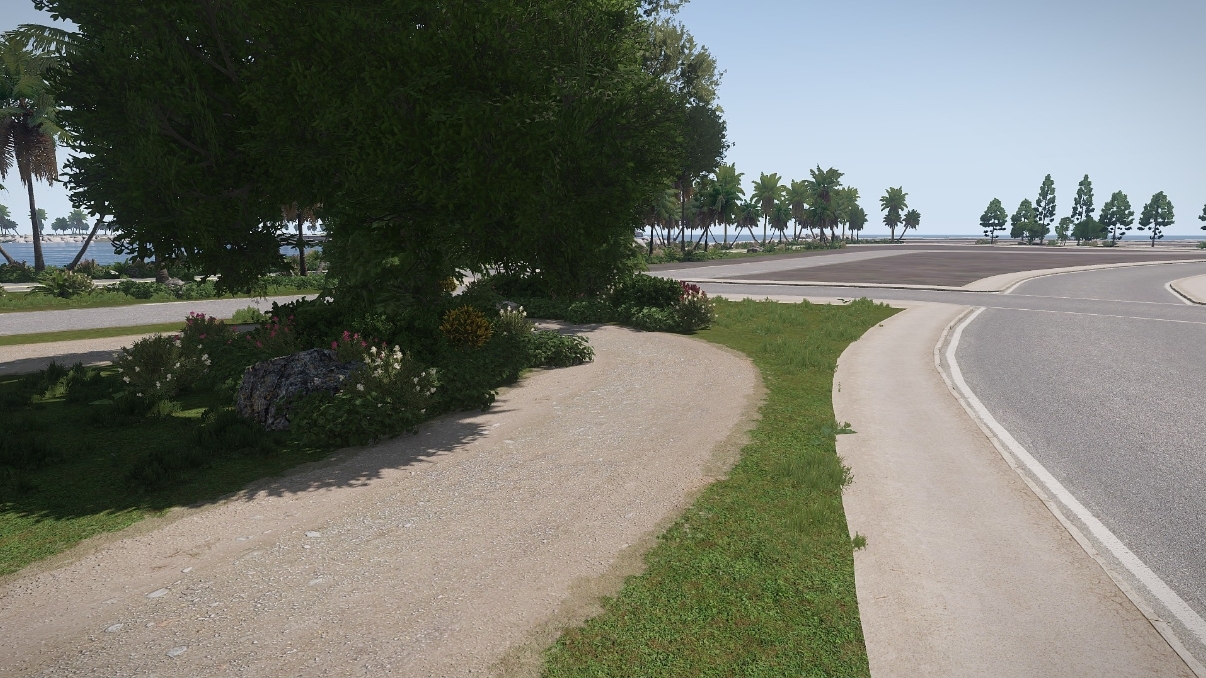
i mean sure it was cool to remake GTA Vice City 🤷♂️
Just for a Life Roleplaying game

Every little light was placed by hand
vernal compass
Thats a lot of hours
cerulean nova
on that dam airfield
vernal compass
Its very nice
cerulean nova
Sure but was it worth it?
NOPE
over 10.000 objekts just for sidewalks you get crazy just from placing them
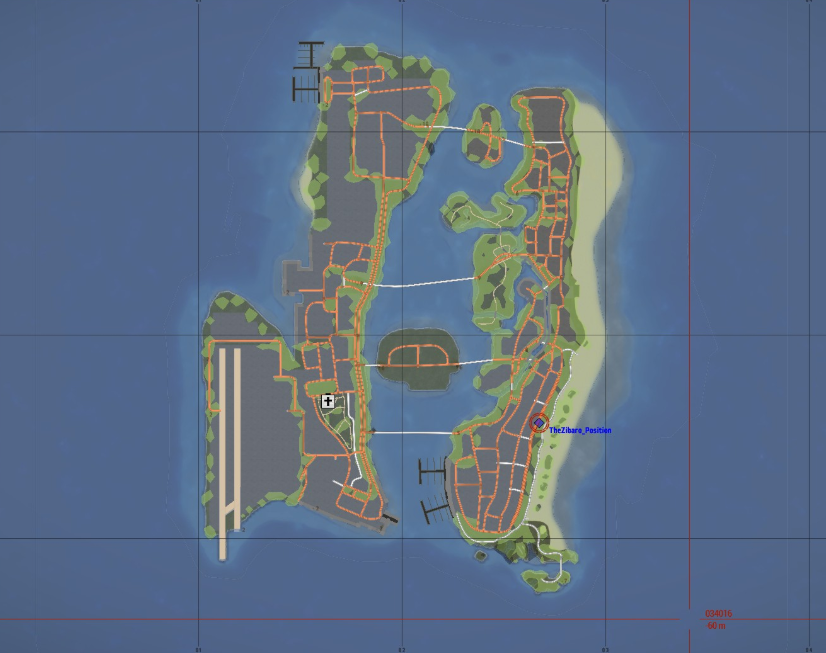
i mean it was not 1:1 Vice City but close 🤷♂️
vernal compass
Lot of work for That airport
cerulean nova
had to change the runway since aircrafts took way more space to get up and stop aafter landing

Also old WIP pic
 frosty hollow
oo
cerulean nova
https://i.gyazo.com/ea0628bcddaad844c4e2428a48e07331.jpg
https://i.gyazo.com/43b8c7033d8748966cdeaf6cc39dd8de.jpg
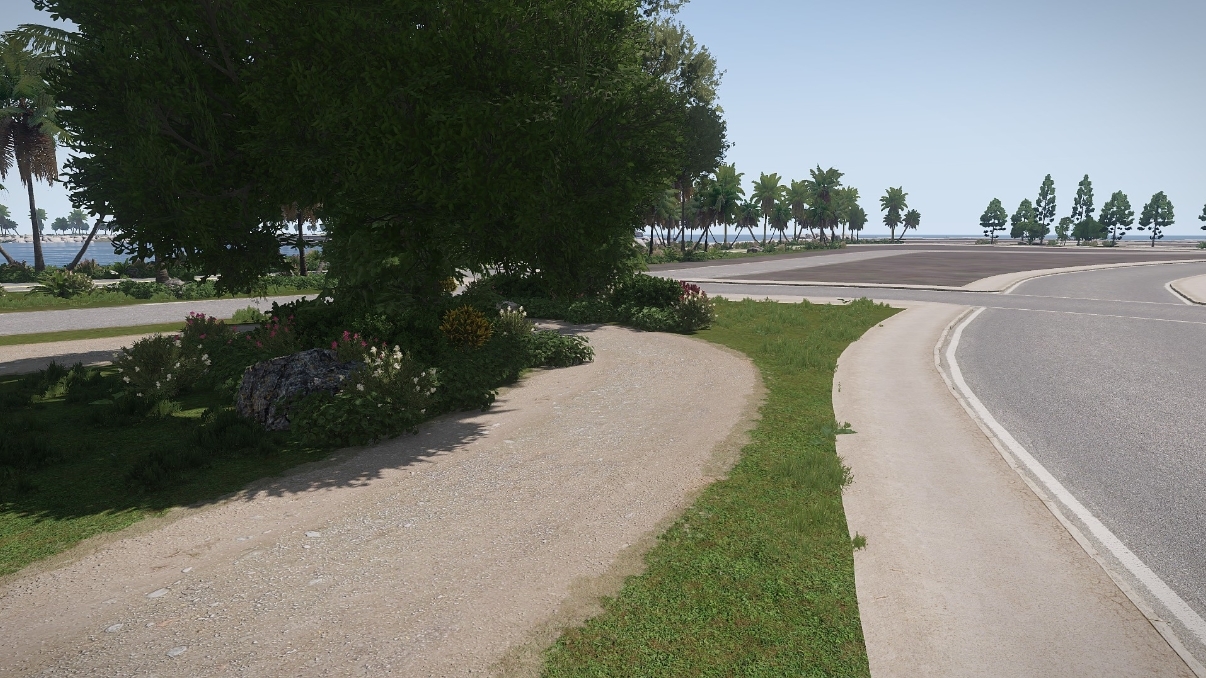
 frosty hollow
cerulean nova
https://i.gyazo.com/34a8aaffa75a1377db7feb3b184af383.png
frosty hollow
cerulean nova
https://i.gyazo.com/34a8aaffa75a1377db7feb3b184af383.png
wait hours for what
cerulean nova
Arma 3 Tools
frosty hollow
i bet
i have never used armas tools myself but i would assume there semi outdated by this point
vernal compass
Níce job
cerulean nova
Thanks but realy it was a crazy waste of time 😄
and thats just 4x4 Km
sure i had other maps aswell that scaled to 16x16 but they had mountains and lots of trees and i came to the point where i said its so much terrain and nobody ever gets there since there is nothing that it was literally wasted space and performance to some degree
vernal compass
Ok
Thanks for the tips
cerulean nova
what are u trying to do? with your large terrain ?
cerulean nova
multiplayer?
cerulean nova
if you ever want to go multiplayer you should plan ahead otherwise u will have to rework almost everything 😄
then keep in mind that unreal engines multiplayer replication is kinda limiting ^^
if i would do my dream game i would make a Dark Souls Open World MMORPG with some areas that have World PvP so when u go there u can attack other player and with a arena system but i dont think that will ever happen not without enough people who would join in on the fun ^^
 low rock
Hi guys, does anyone knows how to link ue4 with google maps?
vernal compass
You can try. Get experience too
cerulean nova
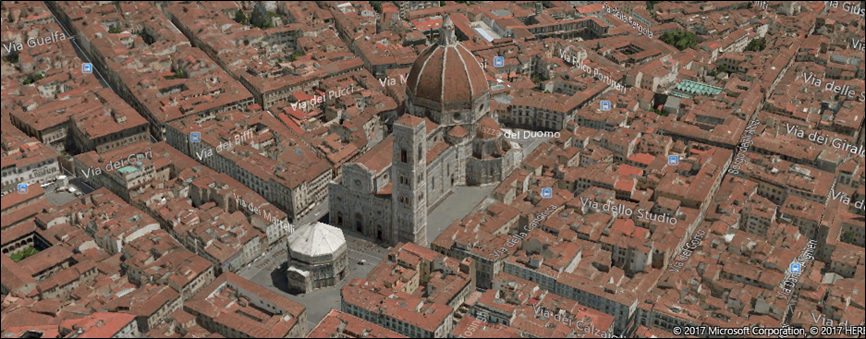
i wonder why people always ask for google maps since microsoft flight sim uses bing maps wich are funny enough as far as i know even better wich is hard to belive since google is more known 😄
low rock
vernal compass
How to link bings in ue4? Might teu something
for example press a button and google maps open and show you a certain location
cerulean nova
if it would be that easy 😄
im not even sure if it would work but

You can show a map in light dismissable window called a map place card or in a full featured map control.
abit down there u can see the 3d map
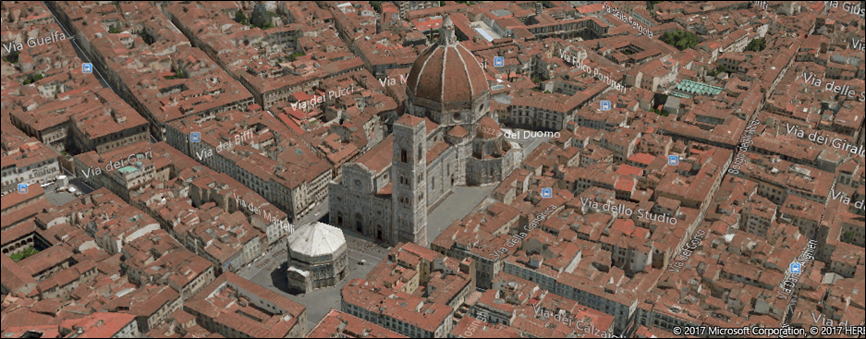
but not even sure if it would work 🤷♂️
 dapper bridge
Hell all, I am interested in using a phone as a controller for a game made for console. Can anyone help point me in the right direction, offer any guidance or link any tutorials if you have used them to accomplish the same thing. I've just been Google the crap outta this and haven't found exactly try what to do.any help is much appreciated.
low rock
I know it woudnt be easy but i just want to display a certain location
cerulean nova
just the map or heightmap ?
 narrow mauve
Anyone have any idea how I could project a UI onto a mesh...or well..to fake it anyway. I have a laptop in my game that I want users to be able to open and navigate around in
dapper bridge
Look into scene capture components. I'll try and find a good link to video
cerulean nova
narrow mauve
Anyone have any idea how I could project a UI onto a mesh...or well..to fake it ...
like possesing a camera infront of the screen in a fixed position and display ui over it to fake it?
dapper bridge

Check out my Patreon: http://bit.ly/TechnoNerd_Patreon
DON'T CLICK THIS: bit.ly/2vBhU2s
PLEASE LIKE AND SUBSCRIBE
This Tutorial will teach you how to use Scene Capture 2D, Render Targets, and Materials to render a live view of a level on to a Mesh.
#TextureTarget
#SceneCapture2D
#UnrealEngineTutorials
And feel free to req...
narrow mauve
Thanks Ill take a look
dapper bridge
I made a game, the player can play within the actual unreal project.
low rock
cerulean nova
just the map or heightmap ?
never mind, i have a better idea haha
vernal compass
Half my brain sleeping. Going to rest the other half. Thanks for the help and tips
cerulean nova
low rock
never mind, i have a better idea haha
move the mouse curser on the laptop via line trace and fake inputs by placing invisible hitboxes for interaction? 😄
or mouse position to world space ?
So many projects that i would do if i just be able to model humans 😂 and i dont know but Character Creator 3 the models always look weird but maybe its me 😂
and most of my ideas involve of players being able to make their own charkter wich is alot of work so lets go Robots 😂
plush yew
hello everone im is there a way to make tree interactive in ue4 i want only the leave like in the last of us 2 when abby walk to the tree its interactive i search on yt but no tutorial for it but the a lot for grass THanks 🙂
cerulean nova
its just a shader thing that could be applyed to trees
not played any last of us so not sure what u mean ^^
is it at the museum i might saw a making of of that level 🤔
// This video focuses on one of Ellie's levels in the chapter "Seattle: Day 1", and does not contain any major story spoilers //
In this episode of Game Maker's Toolkit, I chat to The Last of Us Part II designer Evan Hill about the creation of the game's best level.
Support Game Maker's Toolkit on Patreon - https://www.patreon.com/GameMakersTo...
this ?
(scene)
plush yew
no what i mean i want the tree is to interactive just example in the last of use the tree is interactive
the last of use 2 made from ue4 right ?
cerulean nova
i dont think so
if u use it spare just for a one thing thing for example might for for bones and ridgid bodys but im not sure how it would look
plush yew
nvm i will check it on google thank you so much @cerulean nova 🙏
 latent sonnet
Fellow UE4 programmers help is needed. This guy is supposed to play an animation when I press the up key but it's not working correctly. I'm following a tutorial and I'm sure I did everything right. If anyone can point out a flaw I made it would be much appreciated.
plush yew
latent sonnet
Fellow UE4 programmers help is needed. This guy is supposed to play an animation...
are you following dev react tutorial ?
plush yew
latent sonnet
It's on udemy.
ohh i though from youtube xD
 red arch
Hey everyone!! could someone help me? I've just started using unreal and i was following a tutorial, however for some reason the emissive colour doesnt glow even though i have it in the same values as the person in the tutorial
i've tried looking for solutions online and in Reddit but no one has been able to answer my question, i was hoping maybe someone here could!
narrow mauve
I am so confused...and it's such an elementary thing too. I can't find a single thing wrong about it. When play testing in editor my character will not spawn at all...only when I manually place and make sure player 0 possesses. Shouldn't have to do that. Should just spawn at the player starts..so elementary..I'm baffled...everything is perfectly fine in the game modes
rancid lynx
yea, you have to add a player to the map somehow. it needs a start location.
when I scale a 50cm cube to .1, 5cm and then back to 1, the collision is wrecked. if i scale it to .5, that bug doesnthappen. whats the work around? this happened to me before, deleting the actor and starting again may have fixed it.
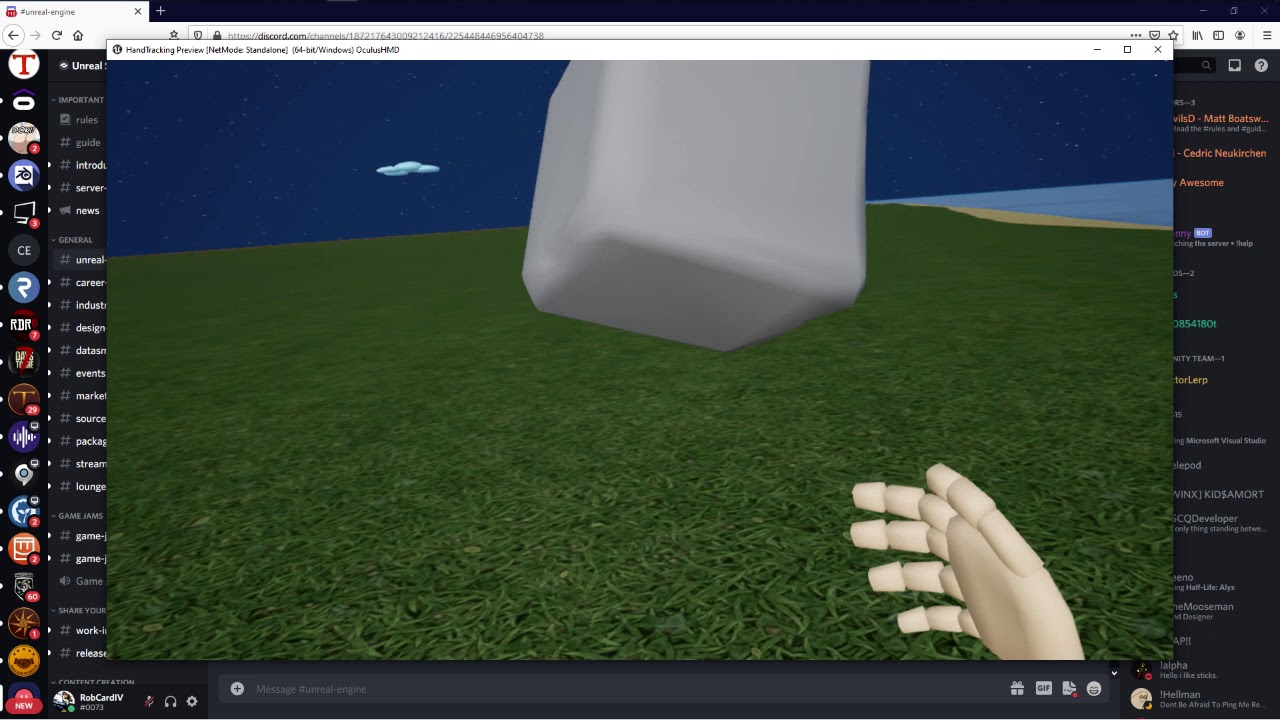
when i put this block in my menu "scale to .1 and attach to primitive comp, very simple, when i grab it and scale it back to 1.0 , the collision fails. why? any ideas?
if i only scale it to .5 andback to 1., it doesnt happen, something about collision boxes failing to scale correctly
see how it flows into the floor and falls through ?
has something to do with mass or depenetration , when the block rolls, it falls through the floor less quickly. so the invisible box is the right size. seems like msas isnt updating.
ive tried ramping all mass options highe ran dlower to test X_x
rancid lynx
found an accidental criss cross -
plush yew
can someone tell me where is the settings for how much K you want in megascans i want 4K but where do i set that i updated my quixel everything change Thanks 🙂
plush yew
hello guys, can i use the blocking volume to block landscape sculpting in that area?
plush yew
plush yew
hello guys, can i use the blocking volume to block landscape sculpting in that a...
i dont think so
wary wave
Blocking volumes are collision geometry for gameplay and do more or less nothing in the editor.
midnight gulch
I get a bug during gameplay where pawn collision shuts off (player characters and enemies can move through each other) and World UMG elements (like healthbars) disappear. AI and pathfinding continue working. After a few seconds, collision and UMG elements return.
 turbid halo
Does anyone have a world machine tutorial for unreal , I've been trying to import a 505x505m terrain to unreal but everytime I import it , unreal changes the res to https://cdn.discordapp.com/attachments/533644946541117449/802017294075166740/unknown.png


and the mesh looks weird too
 empty helm
Hello, my terrain in unreal is blocky, not sure why. On another machine it's fine, it shows all the smooth falloffs. Is this a performance thing? Any way around it?
plush yew
empty helm
Hello, my terrain in unreal is blocky, not sure why. On another machine it's fi...
Could be the brush strength brush size, how large the landscape is, or the quality
If its a small landscape that's probably another reason
does anyone know a plugin like ProCore thats free on unreal engine?
 fringe obsidian
Is 4GB RAM, a SATA SSD 111GB, Intel Celeron N4000 make UE4 run? I don't really intend to run any other background apps w/ UE4. Something like Unity runs fairly fine for me even with Chrome and Atom open.
wary wave
it is not even close to adequate
what you're describing is basically a mobile phone :/
fringe obsidian
I asked "run", like would launching the editor instantly crash or something like that?
wary wave
I don't think anyone can answer that question without actually trying it
there's also no mention of a graphics card, which is ominous, so if it runs, it'll probably be at a fairly unusable frame rate
I would expect to run out of memory and crash a lot
you'll probably also run out of disk space pretty quickly
fierce tulip
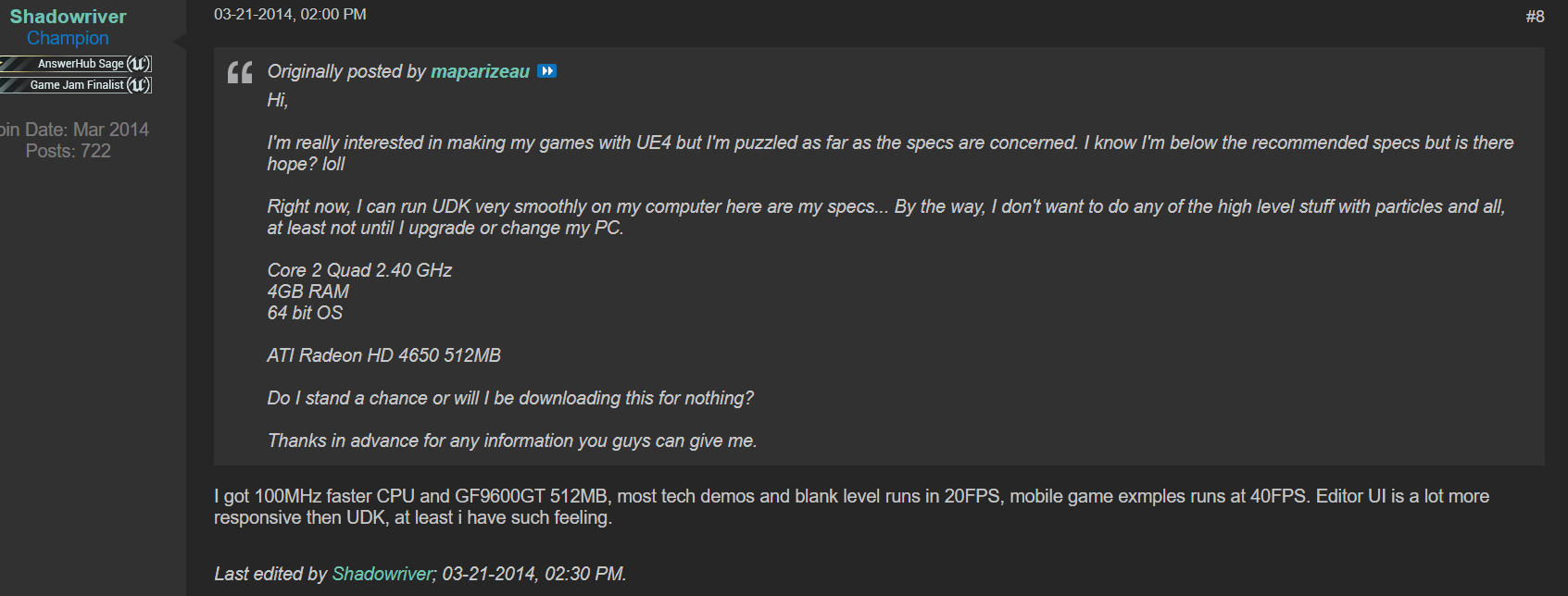
shadowriver ran ue4 on a computer that dx-wise shouldnt even be able to run ue4.. so you can at the very least try
but if your experience will be good... thats up to your patience level
fringe obsidian
wary wave
there's also no mention of a graphics card, which is ominous, so if it runs, it'...
UHD Graphics 600, the one which is with the Celeron N4000
fringe obsidian
fierce tulip
but if your experience will be good... thats up to your patience level
Yeah, then I think I should atleast try it.
wary wave
yes, the inbuilt GPU is grossly outclassed by the requirements
I mean it supports Dx12, but it's also very weak
a 200MHz GPU and 1.1Ghz dual core processor will just about deal with browsing the web
fringe obsidian
Nope
much more than that
Probably some Office application, 3 tabs, MS Teams all together runs fine for me... And I do that every morning for 5 hours...
wary wave
I'm surprised Teams runs tbh
it's such a memory hog
but in any case, Office is very light compared to a game engine
fringe obsidian
wary wave
a 200MHz GPU and 1.1Ghz dual core processor will just about deal with browsing t...
"deal with browsing the web"
But overall I guess I found out my answer, it will atleast run, and how well it runs depends on my patience
wary wave
I would stress that you're probably going to run out of memory a lot
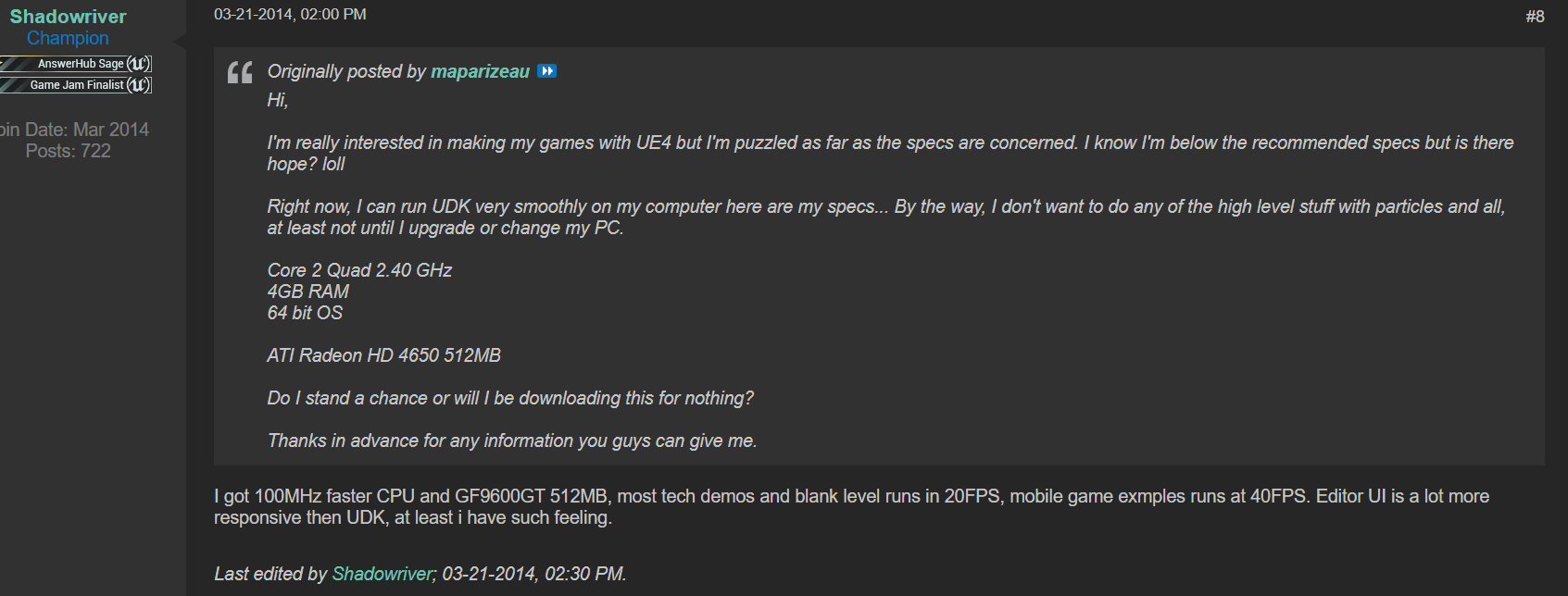 fringe obsidian
20FPS is cool for me
wary wave
fierce tulip
i still feel sad shadow had to deal with that
...and that was 7 years ago. The engine is a lot more hardware intensive now :/
fierce tulip
true :p
wary wave
I routinely run out of memory on 32GB now, haha
fierce tulip
he could load 4.4-16-ish though :p
wary wave
loading is one thing, using is another!
 forest tree
wary wave
I routinely run out of memory on 32GB now, haha
forest tree
wary wave
I routinely run out of memory on 32GB now, haha
Felt that 😢
plush yew
hello guys, i implemented a crouch system in my game, the problem is that when i change the capsule size it gets smaller in the center and not from top to bottom. how could i fix it?
clever axle
@grim ore I replaced my Initialize event that previously passed a struct with PlayerController, PlayerState, Gamestate down the UI tree with the Init event that only takes the controller for all widgets. It cooks now. 😆
@plush yew how are you actually changing the capsule? You only need to change Z in this case I think
clever axle
@plush yew https://i.imgur.com/TWOkjop.png








it also sets the radius so I'd just do it by hand, see if that changes it
plush yew
can i mix cpp and bp without problems right?
clever axle
the passed radius is GetUnscaledCapsuleRadius() but I'd still see if that changes anything
yes.
@plush yew have you set your capsule height on the actual character to 50% to see how that actually turns out?
hm, on a character, the mesh is actually below the capsule so there needs to be some scaling anyway I think.. What do you mean by smaller in the center?
 knotty summit
Did you guys notice any performance issues after last NVIDIA driver? Talking about 461.09 In graph editor, I feel like I'm getting 15 fps
wanton lotus
knotty summit
Did you guys notice any performance issues after last NVIDIA driver? Talking abo...
Walmart suggests:
knotty summit
yeah I'm about to do that 🙂
knotty summit
@plush yew https://www.youtube.com/watch?v=5J9uGacgMIA

4.22 Issue: https://github.com/ictusbrucks/ImpostorBaker/issues/10
Forked Fix Here: https://github.com/LucianoJacomeli/ImpostorBaker
Discord: https://discord.gg/G3ye3Jm
Watch live at https://www.twitch.tv/feluccastudios
This video goes over how to install and use the octahedral Impostor system created by Ryan Brucks from Epic.
how to install...
 storm vapor
My project was 15gb, i made somethings that i dont know with plugins. Now, its 24 gb
Please help me
How can
i reset plugin settings
 viral garden
is it an issue to have uv lightmaps overlapping ?
storm vapor
if i delete saves folder which is in my project folders, can this be problem?
fierce tulip
@viral garden yes
@storm vapor generally no problem, but i'd back it up first, then see if project loads fine.
storm vapor
ok i will try, thanks @fierce tulip . Also, i have another question. My project was 15gb, i made somethings that i dont know with plugins. Now, project become 24 gb. Can plugins effecting like this big sizes ? Im not sure why my project became 24gb, maybe plugins
fierce tulip
@storm vapor iunno, not sure what could cause that.
storm vapor
it is probably saved folder. It was 4gb, now 14gb
viral garden
fierce tulip
<@!191491822839791616> yes
why is it an issue? i made grass, since it's the same texture on multiple planes, i overlapped my UV to gain space, is that really bad ?
 dim merlin
anyone knows how to change viewmodes ingame? (not editor) Tx
Sorry to double ask, pulling my hear out why it aint work 😅
fierce tulip
try the F keys
dim merlin
not working
the console also does not auto complete when i type e.g. 'viewmode wireframe'
fierce tulip
oh actual build game? no clue, need to enable some console stuff thats about as much as I know
dim merlin
Its not a packaged game, just launching it from .uproject shell menu
like 'Launch Game'
fierce tulip
https://i.gyazo.com/6b9a23bc0805cef0e61663fa36f837b1.gif
nooo clue why its not working for you, sorry
 dim merlin
Thats ingame @fierce tulip ?
fierce tulip
yea, trough launch game
dim merlin
Standalone Game to be sure?
fierce tulip
yup
dim merlin
hhm so yeah, not working for me
must be some config
i even set r.ForceDebugViewModes=1 in my ini
Soo hhm
actually, seems there is a difference between 'Stand alone game' and what i do
i just rightclick the uproject and do 'Launch Game'
it does work when i launch the game when editor is open
(from the editor)
@fierce tulip i think some more stuff should be set like the ForceDebugViewModes
I actually Love the way to test my games using the windows shell option on uproject
but it seems like to figure as a semi packaged game for the ViewModes
 left mist
Hi all, can someone tell me where I can find the small previews that are made in the variant manager? ( I think they are also the same as the previews in the Content manager? )
wary wave
I'm not sure many people have even used it
lucid grove
heya, im trying implement water shader i just made
thi thing is its applying to both sides of material
left mist
@wary wave What about those content preview images?
lucid grove
So both sides of village house looks like they wet (but only external one should)
wary wave
I assume they're saved into the assets
left mist
Oh, so like into the Uasset file...
wary wave
yup
left mist
Ofcourse no dev around to confirm this..... But it would make sense ofcourse
 digital anchor
mask it with vertex paint @lucid grove
wary wave
or UV the house appropriately
lucid grove
I have a very little experience with materials
but it covers both external and internal wall
in same direction
digital anchor
digital anchor
mask it with vertex paint <@!667566391444111380>
wary wave
advanced settings in the same drop down
worn peak
it only shows theses for standalone
 oblique tangle
Bit of a noob with niagara but I've setup a system that does what I want it to do on the first spawn, however on subsequent spawns it doesn't follow the logic I want it to follow
Looks like this, the web does the stretchy effect I want it to on first spawn, however on subsequent spawns it just stays static
 leaden hedge
Hey guys I have a level 'Scenery' with a bunch of meshes and some blueprint systems.
I want to have 3 different light times (noon, evening, night) all separately in 3 levels for optimization purposes (using static lights).
I have tried to create 3 levels and add 'Scenery' as a sub level but everytime I build one of this 3 levels the build data ends up going to the sub level 'Scenery'.
I'm trying this type of workflow instead of duplicate 'Scenery' because if I have to change something in 'Scenery' I would only need to change this once.
What do you suggest for me to deal with this?
 split lake
Hi. Write this in ue4 log - Slate.ShowWireFrame 1 🙂
worn mirage
Can I paint foliage on a custom collision object channel?
 crude robin
any idea how to get your custom gamemode working i had made two one for the main menu and one for player c ontrols and rules but then deleted the main menu stuff since i didnt like it but now none of the game mode that is set in project setting is working
seem like the only option is to recreate the project.
 vernal spoke
Hey guys, I'm feeling really stupid right now
I've been trying to import blueprint splines for a while
And... I just simply can't get into the "spline" mode anymore
Like, I can't see the curve control points etc.
Whenever I drag a BP-based spline into a project, it behaves like a static mesh, the gizmo and all
I haven't used them in a year or so, but from what I recall, it was just "drag in BP spline, see the control points, use ALT to drag out next element"
I... simply can't seem to get into the "Spline Editing" mode anymore, unless for Landscape Splines, those I still remember how to find...
Can anyone help a caveman out? 🙂
Feels like holding a pen in your hand, knowing what it should do, but not remembering how to make it do it, lol
midnight gulch
I get a bug during gameplay where pawn collision shuts off (player characters and enemies can move through each other) and World UMG elements (like healthbars) disappear. AI and pathfinding continue working. After a few seconds, collision and UMG elements return.
 gleaming hedge
guys, i have a problem with lighting
coral kernel
Hello guys i have source ue4 how can i install bridge quxile plugin @here
gleaming hedge
whenever i try to import this object, it returns this
while other objects seem fine
wary wave
it's probably something like your mesh normals or lightmap UVs
gleaming hedge
i tried
coral kernel
then your object has some problems
coral kernel
Nice
wary wave
what about your lightmap UVs
(and also, it could still be normals or something similar)
 iron nexus
Hey, I have a question about what's contained in what folder
I had a working project and when transfering it between computers I lost my Config folder, what types of stuff is usually stored in there so I know what to fix? Would it just be like, Action Mappings?
gleaming hedge
bruh
no one experienced this shit?
i tried to recalculate normals outside and even inside
worn mirage
No but now I want a donut
 azure shore
theres an import normals option, may not help but worth a try
in the static mesh window
azure shore
did you reimport since choosing that or has it always been on
azure shore
damn its odd then
 glad loom
Hello, I have a game with only widgets and I have 2 buttons placed one under the other. If I press the button above, and then press space, it presses the button, and I can press the arrow keys to change which button it presses. How do I disable that?
gleaming hedge
It says :
No smoothing group information was found in this FBX scene. Please make sure to enable the 'Export Smoothing Groups' option in the FBX Exporter plug-in before exporting the file. Even for tools that don't support smoothing groups, the FBX Exporter will generate appropriate smoothing data at export-time so that correct vertex normals can be inferred while importing.
 median hound
you have to export in blender with face smoothing
gleaming hedge
Done lemme try now
this is my donut when i don't build lights
this is my donut when i build lights
i over cooked it
median hound
that shit is coal
 zealous magnet
DId anyone ever have the problem that the engine does get stuck at 39% or 45% when loading the project? I checked the log and it says "Missing cached shader map for WorldGridMaterial" and that's everything. Nothing happens for hours
median hound
put a point light ontop of it maybe it can restore some pink
 karmic ermine
hey im having trouble finding the plugins directory to link with bridge, any pointers?
kindred viper
@karmic ermine it tells you to point it at the Engine/Plugins directory of your Source installation
I guess its the same with binary but I don't use those very often
karmic ermine
source installation would be? i downloaded UE through epic games
kindred viper
well wherever you installed the engine
latent sonnet
latent sonnet
Fellow UE4 programmers help is needed. This guy is supposed to play an animation...
Hey guys. Still looking for a solution here if anyone can help.
karmic ermine
kindred viper
well wherever you installed the engine
got it, thank you, brain fart moment
kindred viper
no worries
karmic ermine
kindred viper
no worries
hey, found the folder, apart from when i export assets, im getting an error?
kindred viper
can you post the error?
plush yew
latent sonnet
Hey guys. Still looking for a solution here if anyone can help.
im not totally sure whats wrong with the images you sent but in my case its better to use a AnimBP instead of using montages, i mean you could use them but
 broken heath
K , i will just rotate it in blender -.-
latent sonnet
plush yew
im not totally sure whats wrong with the images you sent but in my case its bett...
I was thinking the same thing, but I was following a tutorial so I didn't want to try and change anything.
plush yew
latent sonnet
I was thinking the same thing, but I was following a tutorial so I didn't want t...
yeah i get it, the tutorial might have been an older version or something of unreal im not sure tho so
latent sonnet
It seems like it was. They were using 4.24 I think.
plush yew
i dont understand how it would effect that but, montages i feel like are specific now a days if you know what i mean
latent sonnet
I don't really lol.
plush yew
more complex to use then how it use to be or like different to work with, i hevent used them in a while tho soooo but, again AnimBP is probably you best bet
plush yew
Hey there, Im new to Unreal and I was wondering, should I use bp or c++?
a boolean and a branch node in the players character bp then in anim bp cast to it should be pretty simple once you get the hang of it @latent sonnet
 humble dagger
Hey, silly question, is there an easy way to apply the same material to 81 different skeletal meshes?
plush yew
plush yew
Hey there, Im new to Unreal and I was wondering, should I use bp or c++?
whatever you feel most comfortable with, BP is basically code just more complex and easier if you're a beginner and C++ again the same thing but a little bit harder but easy to get the hang of, bp might ne harder to navigate the ui tho in my oppinion, but whatever you feel comfortable with
(there both sorta the same in my book)
 potent dune
Hello. I have tried working with Unreal Engine and have even taken some in-depth classes as part of my Master's Degree on it, but I have since not tried to do much on it afterwards due to a few reasons, and I thought to ask here about some of them. What is the proper channel for asking?
plush yew
I've been coding in C# for a whole year now and honestly I know UE uses C++ but I have not much knowledge of how different they are. I think I'll just stick with C++ since im a bit familiar with it, just asked because maybe Blueprint could be more efficient in some way, thanks!
plush yew
plush yew
I've been coding in C# for a whole year now and honestly I know UE uses C++ but ...
quick note most people use both BP and C++ when making a game
I didnt know you could use both not gonna lie
potent dune
(You kinda need to use blueprints to place almost anything, it's harder to try not to)
 woeful willow
hey guys hope everyone is doing well!! how can i make so that when i rotate using mouse while sliding my Mesh doesn't rotate as well, Currently i have it so that while sliding my player can't move right or left but i want the mesh to not be able to move as well.
plush yew
haha well at the start is sorta a pain to hook up from BP to C++ but the other way around is pretty simple @plush yew
potent dune
potent dune
Hello. I have tried working with Unreal Engine and have even taken some in-depth...
I'll try to ask the questions/issues I have found here, please remove them if this is not the channel for them.
-
Too intensive to compile. I know for a fact UE is infamous for this much, to the point where it is recommended to keep the installation and projects on an SSD, and have a beefy many-cored processor as well as enough RAM to handle everything, but even then I found it exceedingly frustrating to work with whenever I need to modify something in code. What plug-ins / well known solutions are there to improve compile times?
-
Too intensive to autocomplete. Working solely with Visual Studio Community and no other plugins, I have found myself missing the fast autocompletion that Unity gave me when working with C#. I know for a fact this is due to how massive the UE4 engine is, and also because of the hilariously large number of nested macros that the IDE must work with every time I try to do an #include. Another commodity from C# is that if you type the name of a class, it is able to locate the path you need to include it from, which is almost definitely not a thing for C# and while not something I would consider necessary, would be a godsend (I kind of feel lazy to remember in what path things are, when I know their name already). Is there any plug-in and/or help to have an almost-zero seconds functioning autocomplete while developing? (Heard of Rider, but the website gives me an error when trying to apply for their early access...)
fierce tulip
this kinda question works better on a forum than on a discord tbh.
kindred viper
@karmic ermine sorry had a baby to deal with for a while. I think that error happens when you don't have the editor open iirc. Bridge and asset export only works with the editor open
potent dune
fierce tulip
this kinda question works better on a forum than on a discord tbh.
That is a very valid thing to say. Though seeing how there are over 14k people online here, I wanted to try my luck here. Discord usually feels a bit easier to find people that are knowledgeable than some forums
plush yew
Does anyone know some tutorials for effect like when geometry starts appearing from nowhere and builds a whole mesh, for instance a bridge?
fierce tulip
@potent dune you could try asking the bold part of your questions in #cpp if anybody knows its the people active there
potent dune
Will do. Thanks
crimson lake
mm weird question that might be based on nothing
is casting to the character or using Get player character
cheaper?
or is it basically the same sh
kindred viper
its not the same
kindred viper
get player character will get the base class reference. Casting to your class gets your class reference of the player character
crimson lake
kindred viper
so get player character will still need casting to for specific functionality.
crimson lake
I'm just comparing the object hitting
so I can either branch it off like this
or set it if casting succeeded do X
but based on what you said I guess casting straight away would technically be cheaper
as getting the player character still casts anyways?
kindred viper
you dont need to cast for base class functionality with get player character
it's already at the base class. You only cast when you need your custom functionality
plush yew
Hello guys I have a problem, I exported a rigged character from blender to unreal engine 4. The problem is that I had 10/20 bones in blender but I only have 1 in ue4
 tribal holly
I don't see a channel specifically for it, but where would I ask a physics asset related question
fierce tulip
tribal holly
... I don't know how I missed that. Thanks
fierce tulip
hehe np
turbid halo
Is it possible to sculpt natural looking landscapes in unreal without using any external software?
worn peak
I downloaded and installed the android studio
the phone its usb conected to the pc
any1 knows what else should i do to be able to package to android ?
plush yew
should I do ant ai or colony sim ai aka dwarf fortress ai in blueprints or the ai blackboard stuff?
Im thinking here, does Unreal really worth it? It seems super heavy for my PC specially when I have no SSD
I have only 16gb ram though the processor is ok imo
Its an amd fx8320e 4.32ghz
potent dune
That's already better than my computer @plush yew . I would suggest you would try and judge for yourself. The biggest appeal of UE imo is the graphics and prestige it gives.
(And performance too, but you shouldn't worry about that unless you make something tremendously big)
 cosmic kiln
I'm trying to use SetCollisionResponseToChannel from BeginPlay event in a component. I need a reference to the "Primitive Component Object" in the owner to set collision responses for. Anyone know how I can call up and/or cast to get that reference?
plush yew
potent dune
(And performance too, but you shouldn't worry about that unless you make somethi...
I wont make anything big for at least a year, I wanna get experience by doing small stuff first
potent dune
Small stuff is possible too. If you're looking for experience, depends on what you're looking for. Most companies look for UE developers but do want a lot of expertise on the engine, so it's not a bad thing if you are willing to invest your time and effort into making small projects with it
Unity is easier and much more friendly, with the downside of requiring a lot of RAM and power to match Unreal Engine's level of quality, and is mostly frowned upon by most AAA publishers. Its fame is mostly due to indie games, but that doesn't make it any less worth.
Both engines are good in their own way. UE4 is just more demanding is all
plush yew
Silly question, but what is AAA? I started game development like a week ago
potent dune
Triple A is a term used to describe a big game from a big company that takes a lot of time, money, and has great quality
plush yew
Oh, I see now
potent dune
Mario Odyssey, Red Dead Redemption 2, GTA V, all of those are AAA
fierce tulip
"and claims to have great quality until published" :p
cosmic kiln
This doesn't work, but for reference in case I explained that as bad as I think I did. This is from the EventGraph for a component that is attached to the blueprint I want to change the responses for. I just can't figure out how to get that reference from this scope.
And in simpler terms, I need a reference to the static mesh in a blueprint from a component attached to that blueprint.
potent dune
Try the blueprint channel maybe
dawn gull
How do I get a boolean on whether or not I'm currently overlapping with a specific actor type?
cosmic kiln
Ah. .Thanks. I didn't see that
glad loom
Hello, I have a game with only widgets and I have 2 buttons placed one under the other. If I press the button above, and then press space, it presses the button, and I can press the arrow keys to change which button it presses. How do I disable that?
potent dune
dawn gull
How do I get a boolean on whether or not I'm currently overlapping with a specif...
A quick google search tells me you can just do something likeTriggerVolume.GetOverlappingActors().Find(this) exists. If you're looking for a blueprint version of that, I think GetOverlappingActors returns a list of actors, and you can probably do a search there and try to see if it's one class or not (assuming it doesn't have an option for filtering the type of actor)
dawn gull
Alright, thank you!
plush yew
Guys how to create this sort of effect ? What's called? Mb some tutorial pls https://youtu.be/Z8zVyQIyuCU?t=430

The Sojourn is an atmospheric first-person puzzle game in the mould of The Witness or The Talos Principle. Check out this brand new PC gameplay!
it's based on niagara mesh morphing?
unreal engine blueprint scene in a messenger app in my country
this is embrassing thing
potent dune
Cool 3 screen setup tho
fierce tulip
@plush yew no real name for it, could be re/construction effect, assembly effect.
dont know any tuts for it, so your google-fu is as good as mine
latent sonnet
latent sonnet
Fellow UE4 programmers help is needed. This guy is supposed to play an animation...
OK so following up on my question from before, I don't think I'll be able use use blueprints due to the way the entire game is set up. Or, at least, I'm nowhere near skilled enough to try and fit them into the game to work proplerly.
I still don't understand why the montages won't work.
And overall I kinda just want to get through this and move on.
 eager radish
hello, im new in the server and a beginner in ue4, i wanted to learn unreal engine and maybe create my own game, as a starting point i want to place blocks aligned to the grid, i googled so much stuff but its seems to be impossible to find a solution, a friend of mine has done the same in unity forcing the coordinates to be exact numbers(sorry for bad explanation i hope it can be understand)
fierce tulip
you might wanna check the pinned message and follow some getting started tutorials
eager radish
ok thank you 🙂
turbid halo
Hey guys , can someone please help me with landscapes in Unreal. I'm using world machine to import a terrain of size ( 505 x 505 ) to unreal but everytime I do this it ends up looking like a weird box. I was just following a tutorial but the guy in the video had it perfectly imported but mine just ends up looking like this everytime. I've been doing this for 3 days now. Unreal shows the heightmap res as 256x256. What am I doing wrong here?
 tough coyote
guys how can i do marketing for my game
i'm about to release it in 10 days
and i have not reached even 100 wishlist on steam
fierce tulip
should have done marketing sooner
tough coyote
so does this mean that i'm fuc*** up ?
fierce tulip
nah, but i'd look up some gdc talks on youtube about marketing on no/low budget
 uncut fulcrum
Send keys of your game to youtubers/streamers
right before release
and don't just spam try to be a bit personal about it
tough coyote
ok what if i already send 20 codes to youtubers and no one is replying
lol
i'm so desperate i should kill myself
uncut fulcrum
20 is nothing, no surprise there's no response
plush yew
share it lol, work on publicity
 rapid wharf
can someone help me on support vc
 fluid wagon
ok so I am watching this "how to" tutorial and its telling me to hold alt and drag the item. When I do this it just moves the screen. What am I doing wrong?
 paper sluice
sorry this a bit of a shit question, but i genuinely can't figure out how to put text over my progress bar (it's currently taking up some of the progress bar)
uncut fulcrum
put text and progress bar as child of an overlay