#ue4-general
1 messages · Page 908 of 1
 meager shale
Sorry, that's outside my knowledge. I'm not well versed in how Blender works, sorry.
 median hound
Z(up down) Y( forward back) X( left right) right?
 honest fox
 plush yew
Oh
plush yew
Oh
 median hound
remember to not have anything named armature inside of blender when exporting
 calm widget
I'm trying to use Mouse axis in the top down project but it only works when i hold down and drag the mouse, setting the game mode doesn't seem to work until i click once then it wont print any more. I've tried removing the consume input from SetDestination.
Only prints when i hold down any mouse button, cant think of anywhere else top down project could set game mode
 narrow mauve
Is there a way to set a mesh rotation where the forward vector changes with the angle of rotation
nevermind found a work around
calm widget
I think there's a pun in there
 frozen pond
hello, any1 have idea where i can buy armors (body, boots, gloves etc.) models ? that will fit for unreal ?
calm widget
What kind of quality you looking for? sets or what
 still moat
Sometimes I think people just join this discord and think it works like a google search engine 😛
calm widget
Doesn't it?
calm widget
1 Hour left!
plush yew
happy new year everyone
calm widget
where you from man of the future?
plush yew
=)))
calm widget
People are happy, showing it by exploding things outside of my window. Make it go away please
 velvet vapor
Guys, if I have 4 terrains, is merging them together gonna help the performance?
They are 4 8kx8k terrains
frozen pond
calm widget
What kind of quality you looking for? sets or what
parts, with large catalog of stuffs
preferably normalized so you can mix and match
calm widget
@velvet vapor I don't know much about this but i think you should check out world composition
 gloomy gull
Oh bby, my engine keeps freezing when I click play 🤦♂️
I've been spending too much time debugging
 grave radish
how can you import json data into a data table again?
 celest vapor
If I convert BP Project to a C++ project. Will all my BP still hold functionality?
On top of that would I still be able to use Blueprint in the Project now that it's been moved to a C++ project?
frozen pond
yes
celest vapor
To both questions right?
frozen pond
c++ project gives more possibilities
calm widget
I'm not sure what you mean by the first question
celest vapor
Overall my project is made using Blueprint but there is a plugin I wish to use that needs C++
frozen pond
i found 1 "downsite" of c++ projects
frozen pond
in default character there is no keyboard input blueprint lol
gloomy gull
@frozen pond There is
gloomy gull
celest vapor
If I convert BP Project to a C++ project. Will all my BP still hold functionalit...
You'll need to recode all the blueprints in C++
frozen pond
lol no why?
gloomy gull
What do u mean?
frozen pond
in c++ you can use blueprint too
 grim ore
he means the input is handled in the C++ character
frozen pond
sorry covid makes me hard to think
gloomy gull
naw ur good
frozen pond
also i can't go sleep yet as new year comes in < 1 hour
protect yourself guys really
gloomy gull
Different Time Zones 😉
celest vapor
12 hours for me xD
velvet vapor
I hope you'll be okay Tota
frozen pond
for now i'm fine just cough a lot and i feel a little pain in my lungs
celest vapor
(I know the conversation kinda moved on but thank you guys!)
frozen pond
thanks, at least i got some time to work on game lol
bad side i have hard time thinking
velvet vapor
Cannot wait till we all get vaccinated from this bullshit virus.
frozen pond
i'm more worried about my grandfather, he is almost 100 years old
celest vapor
oh my! Best wishes to him
median hound
yep if he gets covid its gonzo
frozen pond
guys how i could get reference to this (attached components) so i can destroy them?
grim ore
@frozen pond do you add them at runtime, or are they there at design time?
frozen pond
design time
grim ore
there is a variable then in your variables panel for them
celest vapor
On top of what MathewW said, if you just want to remove all the child component you can get children components
(during play of course)
frozen pond
yeah but this isn't children component(?) it's just attached to it
celest vapor
Those components are children of the "Display2" Child actor component from the looks of it
frozen pond
i just attached skeletal mesh to it
celest vapor
yeah. The skeletal mesh is a child of the Display2 component
frozen pond
so whole group end as this:
celest vapor
Wait. Did you yourself attach the skeletal Mesh to the child actor component or did you assign a child actor to the child actor component that put those there?
wow that was a mouthfull
frozen pond
its just attached skeletal mesh to display2
they are separate components/actors
only 1 stuff comes to my mind atm and its is get components by a tag
celest vapor
 crude robin
what the best way to learn lighting interior the vids i go to on epic site there levels do not work on learn.unrealengine.com
or they do not provide the resource
grim ore
@frozen pond why cant you just use the variables already made for them like suggested?
@crude robin the lighting courses are concepts, you can do the same steps in any other level. If you are referring to the realistic rendering demo (the room) then you can substitute out the current arch viz interior example in its place
otherwise 80.lvl is a good resource for graphics related learning
crude robin
i just need to learn it in general i struggle with setting it up
grim ore
@crude robin do the course using the arch viz interior example then, it's a fully set up interior scene intended to replace the older realistic rendering one
frozen pond
@grim ore i didn't use variables due it's runing on loop
crude robin
thanks ill try using that the global illumination is the part i struggle with to get the full overall decent result
grim ore
art is hard, you just have to keep failing until you get better at it
crude robin
seem i cant use it cause i dont have the light mass plug in
frozen pond
happy new year
 hasty gorge
so I found out how to open that gwent clone
now how do I check the cpp code of the project itself?
do I have to open it from visual studio only?
okay I actually see there is a source folder within the main folder
and its filled with cpp files
and cs files which is weird
but is there really no way to open up cpp files associated with the unreal project within the unreal engine 4 environment?
frozen pond
load project from unreal start panel
on just double click on Cards.uproject
@hasty gorge
works fine
crude robin
finally found a level i can use sheesh lol maybe it itme for me to upgrade to 4.25 lol
 fringe pivot
How much extra storage you need for 4.26 with 4.25 installed?
Does it eat the same space?
I guess everyone is getting drunk
hasty gorge
can someone tell me what UPROPERTY is about?
I tried looking for it in the C++ docs, but it has no page of its own
hasty gorge
idk if this is a cpp thing or ue4 thing
what is this GENERATED_BODY() thing in the header files?
 solar tartan
where can one ask for help here?
plush yew
@solar tartan Right in here, theres also a design chat etc for specific things you need help with
 robust marten
So all I did was click "add new C++ Class" and created a new one and all of a sudden the project said I need to rebuild the data so I restarted it and now it wont open. it says "The following modules are missing or built with a different engine version" and when I press "Okay" it says "Project could not be compiled. Try rebuilding from source manually" anybody know how to fix this? The first sveral pages of google dont help, i tried it all
solar tartan
Can someone tell me how to have fewer triangles in the "red marked area" As you can see I made a transition with tesselation from close to mid but I can't find something to show me how to achieve a reduction of triangles in the far distance?
 worldly token
anybody know why I can't delete the maps I was using for worldcomp earlier? I'm ready to replace them, and use different tile counts/sizes, but it won't let me. All are referenced in memory exactly once despite not being listed in my Levels window. I'm also getting an error that I'm over my 484,232MiB texture streaming budget. Which is also wild high so something looks like it went pretty wrong with this test project at this point.
 north stream
Happy new year to all !!
 autumn flame
solar tartan
Can someone tell me how to have fewer triangles in the "red marked area" As you ...
autumn flame
solar tartan
Can someone tell me how to have fewer triangles in the "red marked area" As you ...
If it's a Landscape you go into Details and lower Other LODs
 quartz kestrel
how do you make an AI that stays still and shoots at you
plush yew
@autumn flame that dark theme... im curious how you did it, ive looked everywhere people told me there was a new thing in the market place but it costs money and im to lazy to add my credit card
autumn flame
I just bought it from the marketplace and customized it with the already integrated options
It's like 8 bucks
plush yew
ok cool, isnt there a way to get a custom image on the editor? i remember i downloaded something but im not sure what it was called and think they might have removed it
autumn flame
Custom image?
plush yew
im not to sure how to explain it but you can change the editors gray layout to an image or something, or it might have been the background of the blueprints
autumn flame
I mean, you can edit colors in Editor Preferences -> Appearance
plush yew
here one sec ima see if i can find it
autumn flame
Edit -> Editor Preferences -> General -> Appearance
autumn flame
Perhaps, never really seen anything like that
plush yew
yeah, i use to have it in my library but i cant find it anywhere anymore
 plush yew
ok thanks
can anyone help me with AI character?
i already have my character and animations
idk how to set
and stuff
i really need some help
😦
no one helps me. 😦
autumn flame
Looked up a tutorial?
autumn flame
What type of animations?
plush yew
running
i already have the animations imported into ue4
If I spawn a lot of actors on beginplay, how do I assign ownership of those actors to the BP that spawns them (not the networking ownership I mean actor parent/child ownership)
autumn flame
I don't see why AnimBP wouldn't work for AI Anims
plush yew
um
i want my character to make a run animation when he is chasing me
i already have a running animation
autumn flame
Yeah
Use AnimBP
Blendspaces

In this video we set up player aim offset, blending those with walking, and a camera zoom.
In the next video we will be covering how to implement this system with the AI. Aiming at the player and firing.
autumn flame
It still uses AnimBP
Why would an AI have different animations if using the same Characters as you for example
It's still a Skeleton
You just need to guide the AI's behaviour
plush yew
guys
i added the animation to the AI
and the animation is like 2 seconds and then he is going back
how do i fix that
celest vapor
Can you make Functions in Interfaces Pure?
plush yew
@plush yew How long is the animation?
1 seconds
second
As in how many frames?
30
the ai is repeating it over and over
how can i fix that
Could you show me how you set it up?
what
the blueprint?
 soft fiber
When I import exported UE4 animations into Blender the starting height is wrong? Is there a way to correct this?
By height, I mean the origin of the z location.
plush yew
this is probably a dumb question but how do you make UV texture animations work in unreal engine?
I know you make a texture like this
but is this something you animate in maya before hand or in unreal engine
 waxen raven
I know you could flip through it, hard to remember terms offhand though.
I almost want to say flip book or something to that effect, but I'd just do a web search.
plush yew
can anyone help mee
waxen raven
Depends on the problem I'd assume.
plush yew
i added a animation to my AI and he is repeating over and over the animation
waxen raven
soft fiber
By height, I mean the origin of the z location.
You can adjust the origins in blender, but I believe they use a different x,y,z base. That said the Unreal to Blender plug in might be worth a look for the return trip.
plush yew
i really need help
waxen raven
Okay, is the condition for the animation in a loop?
waxen raven
Keep the animation window open and run in editor in another window iirc. Been in modeling last few months so a bit rusty.
Or just add a chain and see.
plush yew
animation editor?
@waxen raven ive already tried helping him, from what i got hes trying to make an animation for the ai to chase him as in the ai has no function to actually follow the character is what i got and he want the animation to move the ai?
ok
i'm in
it has
he is chasing me
but i have this problem
with animation
waxen raven
Animation doesn't move characters. But yeah I could see the knowledge difference as being likely.
plush yew
it's a running animation
and i added to my ai
and he is chasing me
but he repeats the animation over and over
waxen raven
Odds are you never set a return conditional in the animation.
soft fiber
waxen raven
You can adjust the origins in blender, but I believe they use a different x,y,z ...
I'm guessing you mean manually adjust? I'm trying to match the origin of another animation exactly.
plush yew
ok so let me see
waxen raven
You have to give them a gate back to original state.
plush yew
ok so loop?
i also told him to loop that animation (got it from mixamo its calle in place or something)
waxen raven
Yeah I'd manually adjust, but I can see how that would be frustrating. Probably why T pose or A pose exist.
plush yew
So us the animation blueprint for your AI
i DID @plush yew
NOW IT'S RUNNING AT THE SAME PLACE
waxen raven
Exactly. The condition needs a change condition or it stays.
plush yew
i don't find loop
root motion
no umm
@plush yew Could ya show us your animation blueprint for the AI.
yeah to like 1 or something i forgot what the panel option was called but you need to make it 1 i think in the blend space
ok
wait
waxen raven
I'd sent a screenshot of the anim bp. Way easier to see then.
plush yew
ok
that's AI blueprint
Alright looks okay
yeah 😦
i'm so sad
what is your anim bp like
waxen raven
That tells it to move, but not the animation itself.
waxen raven
I'm guessing you've got a speed >= then play anim
waxen raven
That is the one we need.
plush yew
kk
Go to the AI BP, and in the details set it to use the Anim BP you make
ummm
details
here?
Select the mesh
ok
ok
done
ooh
looping
i see
it's checked
yes
it's set to
Animation mode: Use animation Assest
You should set the animation up
um
https://youtu.be/Qzd4oU0tkVA this should help

Hey everyone! In this video we're going to create a 3rd person character in Unreal Engine 4 using blueprints. We'll be creating our character using the 3rd person template and adding animations for idle and running. We will be using the Infinity Blade Adversaries pack so we can get a character with animations.
I hope you enjoy this video! If yo...
i'm in first person
btw
works both ways
@plush yew
so
what animation
wdym
wdym set animation up
waxen raven
This looks like a job for wtf is.
plush yew
you understand my confusion right?
😦
animation mode?
:/
@plush yew are you still here?
waxen raven

What is the Play Animation Task Node in the Behavior Tree in Unreal Engine 4
Source Files: https://github.com/MWadstein/wtf-hdi-files
plush yew
So if I'm understanding this correctly, the Unreal EULA allows me to distribute the UE4 source code, provided it's a fork of their official repo and not a new repo altogether, right?
waxen raven
It might not be that one specifically, but I'm sure he'll have a video on animations and how they work.
plush yew
ok so
guys
i deactivated the loop
and now
it's not repeating
but when the animation finishes the ai is stuck
i mean he is not moving
that's good for now
autumn flame
You need to actually create an Animation Blueprint for the AI
Set up some State Machines
waxen raven
Yeah that was what I meant lol.
autumn flame
What State is currently in will be decided by a Transition like Speed > 0
Look into AnimBPs, you can't have an Animation set over there like that and expect it to work flawlessly
The problem here is the fundamentals
plush yew
oh
autumn flame
You need to basically code animation logic
Like if speed > 0 play run animation
if speed == 0 play idle
something like that
autumn flame
AnimBP drives the logic of the animation, still better having it no matter what
Especially for running animations
autumn flame
For stuff that play once you can use Anim Montages
plush yew
Wait i think
autumn flame
Create --> Anim Blueprint
autumn flame
Your animation will probs be driven by a Blendspace
If you only want running in one direction
Blend Space 1D
Just holds an animation in a line for Speed
 earnest junco
If I were theoretically looking for a freelance animator, anyone have a vague idea of what I should expect to pay? Looking for someone mid level preferably
plush yew
I would really love to have telltale esque graphics in unreal engine, but the closest I've ever seen is with cartoony cel-shading which doesn't exactly have the gritty comic book hand drawn look
You would use cel-shading, I think a darker palette of colors and darker lighting is all it takes to make the games feel grittier, maybe desaturate stuff a little.
well I don't know- maybe it's just the models that need to be textured differently
 vivid goblet
https://www.unrealengine.com/marketplace/en-US/product/pivot-tool
i have a bunch of meshes from artstation which are great but the pivot points are wildly out of place. so is this the best plugin to fix these?? whats the best to do (i just needing them to center the points or bring them near the mesh generally. they are far away) .. (not sure best room for this) . thanks

Unreal Engine
Pivot Tool is an editor plugin that allows you to modify actors pivot easily, and bake changes to static meshes inside Unreal Editor.
 gritty finch
Anyone available for small suggestion?
I want to publish my unreal engine games to cloud in website. Whats the best way? I researched and found that i have to convert the unreal project to HTML 5, is it true? However i didn't find any resources or tutorial to follow through. PLease help me
 inner heart
Some help? It happens to me with any unreal engine game, it does not matter if it has good graphics or not, the game works perfectly the first time I open it and the second time I see that
 devout whale
Is it possible to create a .IO game in ue4 ?
 verbal bronze
Well, its 2021, gib ue5! Gib nao! 🌞 I need them infinite polies, gi and 64bit coordinates!
devout whale
Ahh 😄
gritty finch
@verbal bronze can you help me?
 open wadi
Question - I've got a plugin I got off the marketplace that only supports UE 4.21 - 4.25, but I need it to work in 4.26.
I would be willing to bet the plugin code works fine in 4.26 - is there a way, on a per-plugin basis, to overwrite an ini file and simply tel the engine that 4.26 is supported?
 dawn gull
Do you have any previous versions of Unreal installed currently? Because if so you can install it to say, 4.25 and just copy the files in the engine plugin folder
gritty finch
@dawn gull Can you help me with my question?
dawn gull
Have you looked on YouTube
gritty finch
I did but its not clear. And HTML 5 is scruff from unreal website
 idle stump
Slightly off topic but does anyone have a recommendation on dual monitors vs a single ultra wide? Specifically for Unreal, Blender, and video editing etc. I've got a single 16:9 monitor now; been wanting dual monitors for a long time but now I'm wondering if an ultra wide is better.
dawn gull
They’re functionally the same, except ultra wide stops gaps at the bottom between the screens
@gritty finch look through the unreal documentation
gritty finch
@dawn gull sure thanks!
open wadi
@dawn gull Will give that a shot.
 midnight jetty
how do i create a new navigation mesh? anyone know rq?
open wadi
@dawn gull I copied the plugin from the same pulgin / marketplace directory in UE 4.25 to the equivalent in 4.26, and I'm told that filepicker was built with a different engine version, and must be built through the IDE. Any thoughts?
 odd ibex
Is there any way I can download plugins I bought from the marketplace to the engine I built from source? The epic games launcher only recognize engines installed by it.
 flint trench
@open wadi you can open .uproject and .uplugin files in a text editor
Right click the .uplugin and open in vs code or something, There should be an engine version setting in there
and then you will have to do whatever changes are necessary to bring that plugin up to 4.26, Some of the code might not compile
 junior sedge
LoginId:6f8635b14d3576ed250e29b91cd5d1c1
EpicAccountId:30e45f0ef2a54d24aae6aa3c3657088b
Unhandled Exception: EXCEPTION_ACCESS_VIOLATION reading address 0x0000000000000098
UE4Editor_Engine
UE4Editor_Engine
UE4Editor_ShootingGame_5658!AEnemyCharacter::AEnemyCharacter() [E:\gd\DaniBasementGameJam2\ShootingGame\Source\ShootingGame\EnemyCharacter.cpp:13]
UE4Editor_CoreUObject
UE4Editor_CoreUObject
UE4Editor_CoreUObject
UE4Editor_CoreUObject
UE4Editor_Core
UE4Editor_Core
UE4Editor_Projects
UE4Editor_Projects
UE4Editor
UE4Editor
UE4Editor
UE4Editor
UE4Editor
UE4Editor
kernel32
ntdll
Why is my project crashing on startup
gloomy gull
@junior sedge send the code specified by the crash
junior sedge
// Fill out your copyright notice in the Description page of Project Settings.
#include "EnemyCharacter.h"
// Sets default values
AEnemyCharacter::AEnemyCharacter()
{
// Set this character to call Tick() every frame. You can turn this off to improve performance if you don't need it.
PrimaryActorTick.bCanEverTick = true;
}
// Called when the game starts or when spawned
void AEnemyCharacter::BeginPlay()
{
Super::BeginPlay();
}
// Called every frame
void AEnemyCharacter::Tick(float DeltaTime)
{
Super::Tick(DeltaTime);
}
// Called to bind functionality to input
void AEnemyCharacter::SetupPlayerInputComponent(UInputComponent* PlayerInputComponent)
{
Super::SetupPlayerInputComponent(PlayerInputComponent);
}
flint trench
use code blocks plz
junior sedge
I haven't set up github for the project
gloomy gull
@junior sedge just send a screenshot of the line
junior sedge
ok
flint trench
or that ^
gloomy gull
Around that area
flint trench
we need the line numbers
junior sedge
here
flint trench
your crash is on line 13
junior sedge
yeah
flint trench
crashing on construction
gloomy gull
@junior sedge did u compile code without closing the editor?
junior sedge
yes
junior sedge
After compilation it crashed
gloomy gull
Try restarting and it should work 😉
junior sedge
and keeps crashiung
flint trench
close the editor down
gloomy gull
junior sedge
After compilation it crashed
Happens after compiling without closing the editor
gloomy gull
If it continues lmk
junior sedge
flint trench
and then press f5
Got to know a new shortcut
gloomy gull
@junior sedge is this a bp project?
gloomy gull
No, like did the project start out with any cpp in it?
junior sedge
yes
junior sedge
And now my editor opened
gloomy gull
Lmk if it crashes this time
gloomy gull
🙏
gloomy gull
Gotta get it done before 2021 lmao
gloomy gull
@junior sedge sweet! Yeah stuff like that happens when u hot reload
junior sedge
see
gloomy gull
I see ur doing a game jam, eh?
junior sedge
yeah
gloomy gull
I’m still waiting lol
junior sedge
first one
gloomy gull
Good luck on that man!
junior sedge
thanks
junior sedge
thanks
gloomy gull
Anyway, cheers to 2021 😝
junior sedge
Thanks and same to you
plush yew
2020: CORONAVIRUS STARTS
2021: Who knows what happens? Might be the end of the world
Wrong chat
How can we do these kind of "simulations" in Unreal ? https://youtu.be/c7fJGAK7EbQ?t=228

An educational video showing why I love Euphoria so much.
Euphoria is a game animation engine created by NaturalMotion based on Dynamic Motion Synthesis, NaturalMotion's proprietary technology for animating 3D characters on-the-fly "based on a full simulation of the 3D character, including body, muscles and motor nervous system".[2] Instead of ...
"learning how to walk"
I don't get it, how do you make something learn how to walk ?
Is it related to A.I. and physics? Are there any examples of people trying to do this kind of stuff in ue4?
 broken heath
I remember seeing this long ago, it’s scary
I assume it’s a combination of physics simulation, Memory Saving and a targeted correct animation that improves based on money
Memory*
plush yew
broken heath
I remember seeing this long ago, it’s scary
it's scary no one actually has any idea how they did it
 cinder iron
reinforcement learning is called
plush yew
so how do you do this kind of experiments in ue ?
broken heath
No i think many experts does
plush yew
I keep seeing these "simulations" but no one teaches how to use the engine for this kind of stuff
cinder iron
and yeah it's a physics walking. You need to implement your multilayer perceptron
define an input and output
and extend it based on your needs
Its a genetic algorithm to an extent
broken heath
But im curious why you need such simulation
cinder iron
because you need to train your model
plush yew
Because I love this stuff
cinder iron
so it inferes walking
plush yew
I love realism in games
broken heath
I can fake it
cinder iron
ML doesn't necessarily provide realism
broken heath
Faking this sim wouldnt look bad
plush yew
broken heath
Faking this sim wouldnt look bad
yup but it would cut alot of fun out of it
I remember spending days in gta only doing crashes and all kinds of stuff to see the results
so I kinda want to use this to have my own stuff now
@cinder iron how can I train my mesh in ue ? is the training done in the engine or outside of it ?
cinder iron
it can be done within the engine
broken heath
Great i thought you want to train engine to simulate games
plush yew
@cinder iron this is basially the same thing I believe https://youtu.be/I1P_B65XW4I?t=131

All animation procedurally generated, in realtime. No pre-created animation whatsoever.
Details:
2012 Paper : http://onlinelibrary.wiley.com/doi/10.1002/cav.1436/abstract
A system for dynamically animating ground based arthropods in real-time, capable of traversing realistically across a complex, arbitrary environment. The physical simulat...
broken heath
Yes it’s just physics
cinder iron
let me read the paper
plush yew
cinder iron
let me read the paper
no worries
plush yew
broken heath
Yes it’s just physics
You think that behavioral trees are also involved ?
broken heath
Yes
cinder iron
no, this one is simply kinematic, probably deterministic
broken heath
Oh
cinder iron
and deterministic means that a BT could be involved
even ML models are deterministic once trained, however the indeterminism of the results are purely based on the hyperparams and the randomisation of your model
broken heath
Yes my idea of faking it is randomation based on a targeted animation that gets close everytime to the targeted animation based on memory
With different settings to different heights
cinder iron
oh there are wonderful works in the literature about that
hold on

❤️ Check out Lambda here and sign up for their GPU Cloud: https://lambdalabs.com/papers
📝 The paper "Neural State Machine for Character-Scene Interactions" is available here:
https://github.com/sebastianstarke/AI4Animation
🙏 We would like to thank our generous Patreon supporters who make Two Minute Papers possible:
Alex Haro, Anastasia Marchen...
plush yew
@cinder iron found a similar paper http://web.cs.ucla.edu/~dt/theses/fang-thesis.pdf
broken heath
Unreal engine 5 must help us with this
 hearty bloom
When ue 5 will be released?
broken heath
End of 2021 publicly and betas for devs in early 2021 i assume
hearty bloom
for beta in early 2021
broken heath
Thats what i heard
hearty bloom
but official release end of 2021?
hearty bloom
broken heath
Thats what i heard
where?
broken heath
Ya
I don’t remember but thats what would u get if u search
Lemme see
Unreal Engine 5 will be available in preview in early 2021, and in full release late in 2021, supporting next-generation consoles, current-generation consoles, PC, Mac, iOS, and Android.Jun 15, 2020
frozen pond
pro devs already use ue5
hearty bloom
wow
frozen pond
broken heath
Oh yeah probably big studios are already
hearty bloom
but it is not available for all of us as I can see
cinder iron
plush yew
<@!158247241000157185> found a similar paper http://web.cs.ucla.edu/~dt/theses/f...
doesnt look like ML
plush yew
cinder iron
doesnt look like ML
Must've been wrong then
cinder iron
no biggie, it's easy to get confused in this topic
the TLDR is... RL in UE is time consuming as you need to create everything from scratch
however this is... more or less expected given that RL methods are specific to solve specific problems
as you need to define rewards/penalties based on your objective
ie:
reward your kart if it drives fast
reward your kart if it drives near the center of the track
penalty your car if it crashes
penalty your car if it takes more than x time in completing the circuit
plush yew
So for example
I would like to work like this: I would like to teach an npc how to walk, carry objects and to also be able to observe by looking at what the main character does. I would then like to use noise generation to give it a voice and have it learn how to produce sounds and to write. Lol, I know it sounds crazy but I'd like it to be learning all the time from the player. The final goal is not to have him speaking a language or write words, but just to have him TRYING TO.
Because, this would make each interraction with that npc DIFFERENT and unique.
What would work the best in this case ?
cinder iron
I wouldn't recommend you doing that from scratch
if you want to feed in audio and chat with an NPC
you want a speech to text model already trained in your language
then that text can be transferred and passed to your npc that will implement a chatbot behaviour
with a text to speech
meaning that it will be able to mantain a silly conversation with you
cinder iron
I have it at home hahaha
plush yew
lol
cinder iron
its called Alexa
plush yew
LOL
cinder iron
yeah these systems work exactly the same way, however they are a bit smarter
also you have it on windows under the name "Cortana"
plush yew
Is that a Halo refference ?
plush yew
wow
cinder iron
also I have in Barcelona a custom made home assistant
that works the same way I told you
I made it with a couple of friends
its still wip, but its our pet project
we wanted also to integrate face recognition and all this stuff
but... again, this is a mixup of already crafted tech
by very great profesionals
if you want to make your own speech synthesis model
thats a bit harder (lol)
plush yew
so basically I want something to generate sounds
just like a baby learns how to speak
it doesnt need to talk
and maybe
I could have it trained in game lobbies
just to put it on listen
cinder iron
I dont think such a thing exists per now
because speech to text
and chat bot training are different things
thats quite challenging actually
you might be able to train an ai to articulate sounds simply feeding it audio
plush yew
yup
cinder iron
however the ai would need to understand how... word formation works... its... very very complicated. You'd need to implement a cognitive model
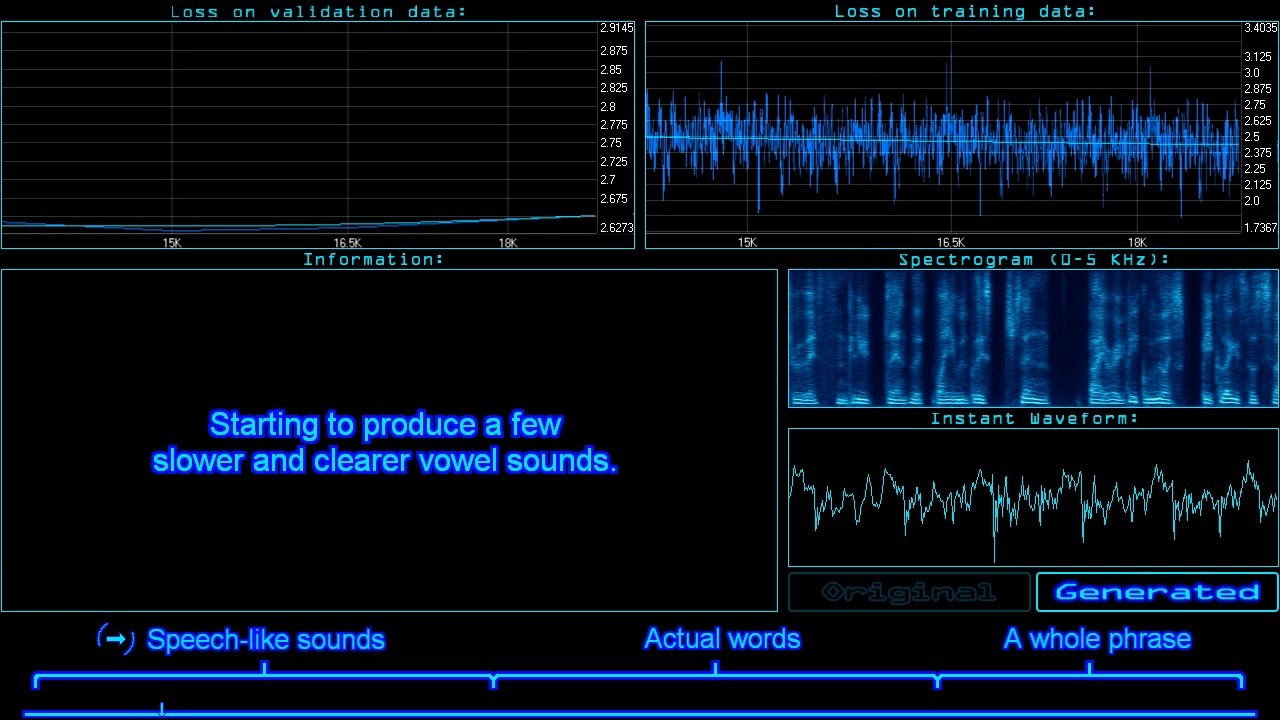
By popular demand, I threw my own voice into a neural network (3 times) and got it to recreate what it had learned along the way!
This is 3 different recurrent neural networks (LSTM type) trying to find patterns in raw audio and reproduce them as well as they can. The networks are quite small considering the complexity of the data. I recorded ...
this is... current state of the art speech synthesis
if you combine it with text data I guess it could improve notably
plush yew
That is exacly what I want lo l
cinder iron
to associate sounds with sylabes
 haughty orchid
guys, is it normal for unreal engine to open so slow
broken heath
Your device memory is ok?
haughty orchid
ofc
broken heath
Good specs?
 pure hollow
first open for the project? it could be compiling shaders
broken heath
Oh , I’m on windows no ideas about macs
haughty orchid
it's my first time opening it
still not opening..
I have stored unreal engine on an external hard drive
broken heath
But on my device it opens about 5 seconds
haughty orchid
and I can see it flashing(reading)
broken heath
Oh
haughty orchid
it's been2 mins
pure hollow
I've seen it takes 5+ minutes hammering my CPU on shaders before during open
haughty orchid
: /
pure hollow
on a 3950x
broken heath
I used to store it on hhd but it wont be more than 1 min
I think
But if ur project is humongous thats another story
haughty orchid
pls take a look at this
broken heath
Is it the same with any project?
haughty orchid
i dunno
i think there's something wrong preventing unreal engine to open
nothing happens after I click launch button
at first it gave me crash error
then i restart my pc
and now it doesnt open
and the crash error dont appear again
plz help
midnight jetty
can anyone help me? im extremely new, and im trying to randomize an item spawn. so, i created an object type array. in the array, i have the blueprint for a health globe. however, when i get the item from the array, i cannot "spawn actor from class" to get it because the Object reference does not work with the "Spawn Actor From Class" input. does anyone have any tips for me? http://puu.sh/H2Psc/7a9a755fea.png
 broken heath
For what then spook
broken heath
Are you coming from blender
 ivory musk
Sooo I've looked everywhere and can't find any bug reports on this so... is no one else having a problem with Landscape LODs just... not working? I noticed my performance was tanking and memory exhausted and surprisingly, it wasn't fog! I checked wireframe and realized that my landscape was not LODing literally at all. I've used landscapes plenty of times in older versions and never experienced this. Specifically, it seems to only be happening at higher component counts, or with 2x2 sections selected.
midnight jetty
nvm i figured it out
 rich spoke
Guys, I imported minigun model to my project and... I'm kinda confused
Can you help me to import this model normally?
There's how the minigun have to look
broken heath
Is location rotation , scale applied in blender?
frozen pond
Hi, i want to create widget with yes/no, is there any node for dialog result or i should create separate functions for each of this ?
haughty orchid
guys
help me fix my stupid unreal engine not opening
I will just get Unity screw this..
 obsidian nimbus
@rich spoke thats flipped normals
 vestal goblet
don't really know which channel to ask in but what would be some good programs for asset creation, mainly 3d, 2d and audio?
obsidian nimbus
your normals are not all pointing outwards
 winter gale

Quick #UE4 Tip number 86.
Want to disable opening a C++ class when double clicking on a Blueprint node? Disable Navigate to Native Functions from Editor Preferences.
#unreal #unrealtips #unrealdev #indiegamedev #gamedev #indiedev #screenshotsaturday #UnrealEngine

 Twitter
·
obsidian nimbus
Twitter
·
obsidian nimbus
ill keep that on ty 😛
plush yew
do game studios already have ue5 ? i see dynamic GI. https://i.imgur.com/iOHf7jB.png https://i.imgur.com/yJkQP9D.jpg
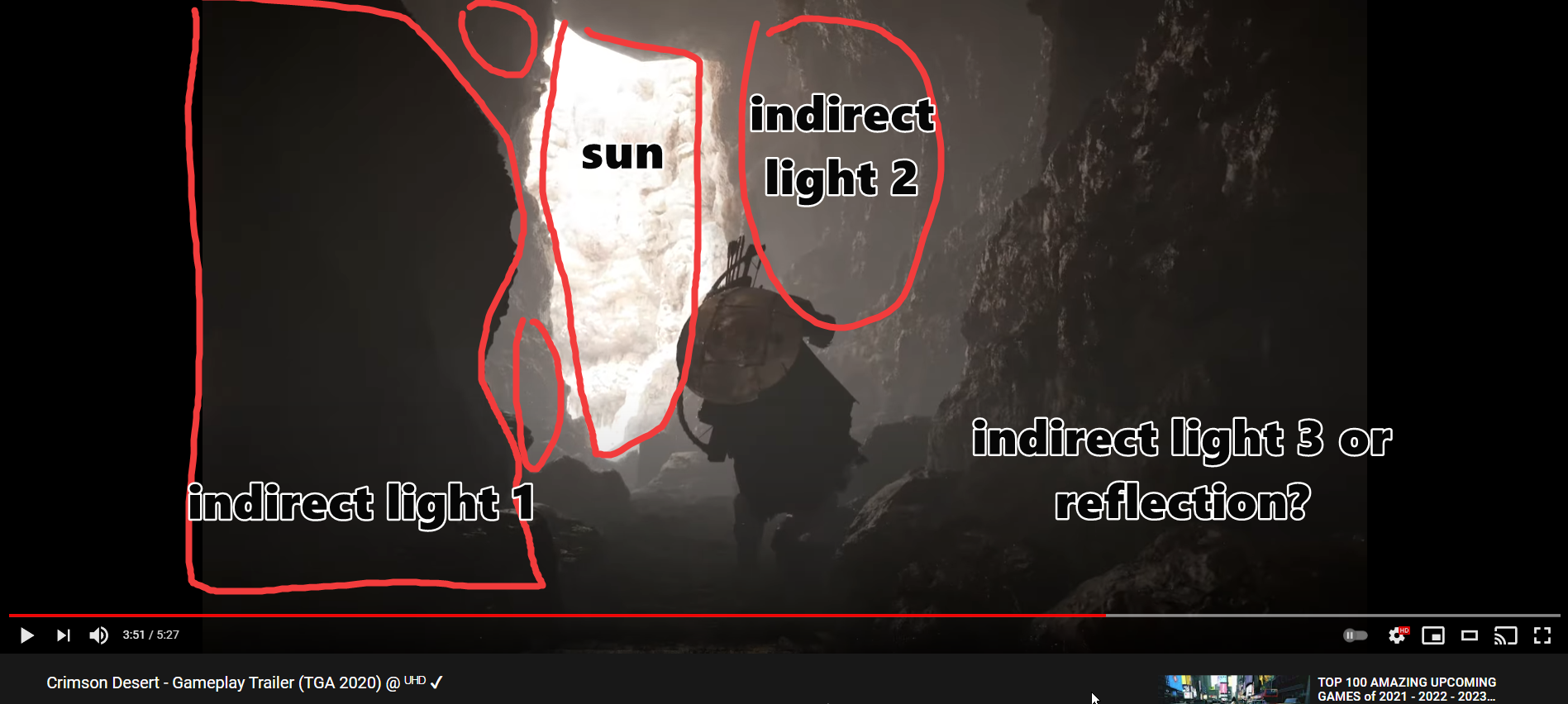
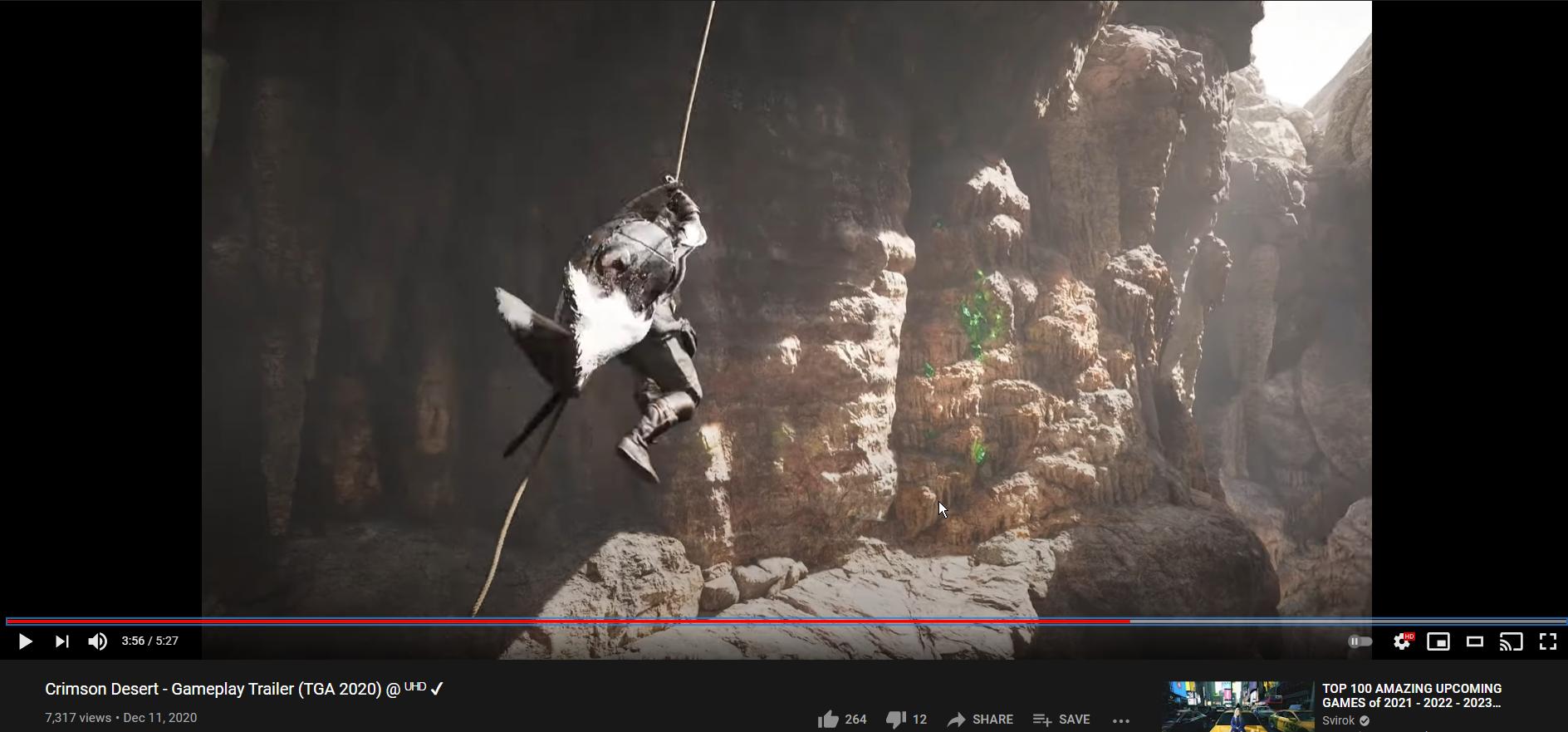
i see dynamic GI
frozen pond
@plush yew yes but under NDA
 wary wave
Crimson Desert is not an Unreal Engine game
plush yew
it is
wary wave
they have their own proprietary engine
plush yew
its in the ue reel
frozen pond
so unreal is destroying my actors that i spawn on loop:
and code
can't figure out wtf
 rugged bolt
Character for my first game! now to work out how to rig, how to export to unreal, how to apply soft body physics... anyone got tips for rigging a character as such?
wary wave
plush yew
its in the ue reel
They literally did an interview last year where they talked about building a brand new engine to replace the one used in Black Desert :/
plush yew
@wary wave the game is inside the current ue reel
How to change cubemap at run time
It works fine in editor, but when doing same at packaged version, it simply doesn't work
wary wave
plush yew
<@!99264143659401216> the game is inside the current ue reel
It wasn't in here;
https://www.youtube.com/watch?v=O6j-FZEEovg
I'm not sure which reel you're otherwise referring to
frozen pond
frozen pond
maybe, or maybe no, we don't know yet
 sleek solar


 warm vector
Happy New Year To All!!!
 oblique tangle
Bit of a random, probably stupid question
But if I reduce a vector's length, will this result in the actual vector becoming shorter?
 fierce tulip
happy new year peeps!
frozen pond
vector length is just distance, so reducing out distance don't reduce accual distance beetwen 2 actors
oblique tangle
Ye thought so, reducing it as a float is doing nothing except reducing that float value
which isn't impacting the two vectors?
frozen pond
it isn't
warm vector
how can you make the flow in blueprints redirect so it doest go trough other nodes ? i see they do it alot in video's but don't know how to do it or how its called to look it up
frozen pond
i still don't understand you question
you mean functions ?
or macros?
or colapsed graphs?
warm vector
i wanted to make the white line from complete to reset more viseble bye going back at it above the nodes
hard to explain 😄
frozen pond
ah
frozen pond
double click on white line
warm vector
nice drawing skils 😄
warm vector
ah ok ty 😄 and + ctrl to move it 😄
frozen pond
yeah
warm vector
yeah did not know how its called 😄 and apperenly they all think everyone just knows this if you're new xD
frozen pond
i think scene capture is dynamic so you can't
plush yew
Ah
It works at editor, but not at packaged game.
Situation where it is used is galaxy map, where it takes scene capture of environment each time star is selected and then uses it at solar system map's skysphere.
warm vector
also @frozen pond Ty for help
plush yew
@frozen pond Any idea how I could do the same successfully..?
 rare thorn
does anyone have a issue with the engine not closing down on shipping builds on 4.26?
frozen pond
plush yew
<@!236559497718398977> Any idea how I could do the same successfully..?
sry no idea
plush yew
;-;
 humble patrol
broken heath
Are you coming from blender
humble patrol
broken heath
Are you coming from blender
Yes
 proven oxide
Guys, do you have any tips for ensuring that UE launches an app using SteamVR instead of the Oculus runtime?
 zinc shore
why cant my PIE windows be moved its like i can resize and maximize but cant move the window
plush yew
That would be great if Unreal Engine has a Live Link for Blender.
 proper quiver
Is there a blueprint-friendly way to show a build version number for packaged games?
besides manually maintaining a build number or string...
 limpid flicker
do anyone know how to figure out with IP dedicated server? what port do i forward? 7777?
127.0.0.1 is worked well for me
celest vapor
127.0.0.1 is just your local host.
autumn flame
Port: 7777
PeerPort: 7778
SteamSubsystemPort: 27015
limpid flicker
Yeah i know, I set public IP into domian. and forwarded 7777 port. it's dont seem work. it's might be tricky.
I don't use steamsubsystem yet
I'm just learning on dedicated server bit.
is there any more tutorial document website that i didnt find?
autumn flame
Is the port UDP?
limpid flicker
Both i guess?
celest vapor
limpid flicker
do anyone know how to figure out with IP dedicated server? what port do i forwar...
Wait. Wouldnt I be you computer's public IP? Or even your router's public IP?
Nvm I mis read the question
autumn flame
UE4 uses UDP
limpid flicker
Ill have a look again.
celest vapor
The best way I know of is exporting the settings and importing them to new projects. If there is a better way I would also like to know 😂
plush yew
i don't UNDERSTAND
HOW PEOPLE ADD ANIMATION TO THE AI
IF I ADD ANIMATION TO MY AI THE AI IS REPEATING THE ANIMATION OVER AND OVER
 maiden socket
Hey guys is there any channel where I can present my ideas and find people who want to work on that projecT?
plush yew
can anyone help meeeee
 wanton lotus
maiden socket
Hey guys is there any channel where I can present my ideas and find people who w...
wanton lotus
maiden socket
Hey guys is there any channel where I can present my ideas and find people who w...
Check out the Job Board channels starting with #instructions.
plush yew
no one is helping me
wanton lotus
plush yew
no one is helping me
Try using a channel related to your current issue. You should be asking in #animation about how to create an animation blueprint. Also can look at the ThirdPersonCharacter animBP for an example.
wanton lotus
Create new project with third person so you can learn from it.
plush yew
no because i worked i think 2 weeks on my game
wanton lotus
There are other example projects there too.
wanton lotus
You need to create an animation blueprint that uses a locomotion blendspace that includes all your movement animations.
wanton lotus
People in #animation know more about this.
plush yew
FINE
frozen pond
show animation node @plush yew
frozen pond
are you doing something like play animation or montage?
 cedar wave
Turn off caps lock, jeebus
frozen pond
you need animation blueprint for that
plush yew
i have
i already have
i'll show you
rn
it's only running animation
it's not idle
but i watched a tutorial and that's why
that's why i put idle_run
frozen pond
you didn't connect speed input
frozen pond
idle_run is driven by speed so if speed is 0 characters does something
frozen pond
and check now if its work as expected
plush yew
ok
no
he is repeating the same animation
he is running 1 second and then he is teleporting back where the animation started
wanton lotus
Need to also see your update graph
frozen pond
its default idle_run or you created one ?
wanton lotus
How are you setting speed?
frozen pond
yes
plush yew
i don't have one
frozen pond
show speed node
frozen pond
select event graph
frozen pond
if you don't have same nodes probably you didn't code it
frozen pond
open this and copy then paste in event graph
wanton lotus
Copy the screenshot above, that will give you basic movement.
plush yew
ok
wanton lotus
Ah, there ya go
frozen pond
open file -> ctrl + a -> ctrl +c -> ctrl + v in animation blueprint
celest vapor
in the event graph of the animation blueprint ofc (if its the get velocity)
frozen pond
should just work now
celest vapor
drag off of "try get pawn owner" and search for is valid (the one with the question mark on it)
proven oxide
Say guys I'm starting to develop a phobia of shader compilation.. I don't suppose there's options to expedite this by looping it through OpenCL or anything?
Anyone ever explore that?
plush yew
i don't find set
celest vapor
plush yew
i don't find set
Set what? Set speed?
frozen pond
you need to create variable first
celest vapor
its setting the variable
frozen pond
that's not good variable name but fine
plush yew
then what's the name
frozen pond
any you want
frozen pond
but something you will recognize in future
frozen pond
in this case you are checking if character is faling
plush yew
that's how
plush yew
ok
celest vapor
Usually you want to name them something along the lines they represent
in this instance it represents if the character is falling
"is falling" is what I personally would name it
plush yew
frozen pond
thats better
 crude tulip
One message removed from a suspended account.
celest vapor
@crude tulip Are you using math to rotate it or a timeline/Animation?
celest vapor
I havent really tinkered with UI animation much. so that would be beyond me as of now
crude tulip
celest vapor
<@!272529165771735040> Are you using math to rotate it or a timeline/Animation?
One message removed from a suspended account.
frozen pond
animation should be on loop and should be starting from 0 and ending at 0
celest vapor
Do you have the keys curve set to auto? Because that has caused me some issues in the past
Also you should take into account what @frozen pond said
frozen pond
yes that definily a curve
frozen pond
@crude tulip better add animation in widget itself
celest vapor
The curve should be linear if it just spins
frozen pond
nope
celest vapor
The white line represents the execution path
plush yew
oh
celest vapor
Meaning it will execute things in order from left to right along the white line
plush yew
done
frozen pond
compile and check
crude tulip
frozen pond
animation should be on loop and should be starting from 0 and ending at 0
One message removed from a suspended account.
plush yew
frozen pond
still missing one
frozen pond
crude tulip
One message removed from a suspended account.
when i want to do animation on timeline i instead use lerp note
plush yew
where
celest vapor
@crude tulip You should animate using the UI animation instead of timelines if its on a widget
crude tulip
One message removed from a suspended account.
plush yew
it's not missing
plush yew
@frozen pond where is missing
wanton lotus
still moat
🤔
wanton lotus
If your blend space is correct it will work
plush yew
compile error
frozen pond
meanwhile i need help too:
looking for tutorial how to set profiler
wanton lotus
I am guessing you may need to set the min and max values of your blend space correctly though.
frozen pond
yeah
plush yew
how do i fix this
frozen pond
read error
celest vapor
the compile error will make the character T pose, once you fix that it should return back to normal
wanton lotus
plush yew
ok
frozen pond
but T pose is good sign for you
frozen pond
connect nodes
frozen pond
wanton lotus
do this
frozen pond
thats mean you got wrong node
wanton lotus
Drag from "try get pawn owner", then type in "get movement component"
still moat
🥳
plush yew
he is not t psing
posing
let me try in game
to see if it works
the moment of truth
wanton lotus
Now to fix the blend space, hehe. Just a hunch.
celest vapor
nice call @wanton lotus
frozen pond
XD
still moat
😞
wanton lotus
Open your blend space and let's set your min/max values correctly based off your AI's max walk speed.
wanton lotus
Or you can set min/max to 0 and 1 and normalize the velocity based on your pawn's max walk speed.
frozen pond
i got small question to you
plush yew
ok
frozen pond
did you set blueprint to be used by character?
wanton lotus
Open asset details:
wanton lotus
Then show what you got in there.
frozen pond
plush yew
wanton lotus
Yes, that too, make sure your character is actually using the animBP you are setting up.
plush yew
ok