#ue4-general
1 messages · Page 904 of 1
 uneven hemlock
 grim ore
welll #cpp would be better for this, but what do you mean you set a pointed or something to null lol. Do you know what you are doing?
 plush yew
can anyone help me ?
im doing playfab
like you see i registered 2 acc but they dont see eachother
plush yew
What is the best version to use?
 dense knoll
How do you make a Widget/Hud glow / bloom using a retainer box
 round quiver
so I'm trying to learn Unreal Engine in C++. I have a lot of 2D experience in Unity and Monogame and am looking to try 3D.
What tutorials are considered the best for learning Unreal?
plush yew
plush yew
can anyone help me ?
Hello TimDevs, Click the ">(Pointing down)" arrow and put it as the the max players.
 ancient lotus
@round quiver self advertising https://www.youtube.com/channel/UCYcDJPGvIUFxBTmXOZWFswQ/videos

YouTube
round quiver
cool stuff, thanks @ancient lotus
I think your stuff is more geared towards complete newbies though
i'm someone with a decent bit of experience wanting to learn unreal quick
ancient lotus
some of it is, the nazi zombies series is more geared towards the intermediate level in terms of using beacons to interact with a web api to use with a mysql DB for custom server handling and then everything gameplay related (which is pretty straight forward) which your probably familiar doing in unity so it should be pretty effortless moving to ue4
 shell tangle
I'm having some trouble wrapping my head around using BPs along with C++ classes. I'm trying to create a menu widget via my player controller class but now I need a reference to the widget's BP class. I don't want to use the path to the BP file so the best option left to me is uproperty tsubclass for a class viewer in the editor. Now it looks like the player controller isn't something that shows up in the editor so I can't customize fields in the details pane. Should I be going about this another way?
ancient lotus
it is, did you create a BP class version of the player controller?
shell tangle
no but I haven't thought about that
grim ore
There is an entire section in the official docs for C++ https://docs.unrealengine.com/en-US/ProgrammingAndScripting/ProgrammingWithCPP/index.html plus this new joint venture with Gamedev.tv http://learn.unrealengine.com/?C=3750189 @round quiver
 mental stone
I want to learn unreal engine what are some good tutorials?
shell tangle
ancient lotus
it is, did you create a BP class version of the player controller?
Okay so I'm starting to wrap my head around this now, is it normal practice to be creating C++ classes just to create a BP out of it for editor customization?
ancient lotus
yes
grim ore
@mental stone look at the pinned messages in this channel
mental stone
This message?
grim ore
yep
shell tangle
ancient lotus
yes
So i've created a BP for my player controller, my game mode c++ class was referencing the player controller c++ class. If I now want to change this to the BP version do I now have to also turn my game mode into a BP? Do you ever run into situations where you are multiple levels of classes deep and you have to go up the entire tree of references turning them into BPs?
ancient lotus
its common to have blueprint classes for most things like your game mode, game state, player controller, character and so on. not really no, nearly every class i have has a blueprint version of it, i use blueprint versions whenever i need to set a uproperty for example
plush yew
if i color or paint my blender meshes that are rigged and everything
will it be possible to overwrite their skin color and such body features
i want character creation for my game but idk if texturing and painting my done models will affect the abilty to have them change into whatever a player wants later on if it already has a set default texture and painting done to it o-o
ancient lotus
you can switch materials that the player is using for their character
plush yew
so i just have to setup the basic skin color or such so its a change-able state o.o
ancient lotus
pretty much, you can tinker with it with the mannequin, create a material instance with different colors and switch between them with a key press to see
plush yew
oh
so i dont even need to paint my default mesh
i can just set that up in a modular means in unreal engine
 chilly sun
model uv texture, import setup materials, edit parts of the texture
this u wanna do yesno? and yes you can
right?
plush yew
o.o
chilly sun
blender mesh u wanna paint -> model uv texture
thenu wanna edit skin color -> import and edit part of texture
or am I big off and wrong?
plush yew
yeah im, building the character creation part first starting with proper meshes which are done ik/fk rigs and all i just need to figure out the whole skin changing and eye iris part x3
chilly sun
or just hard to understand 😄
plush yew
though i think eyes can be modular
chilly sun
o rite rig part
plush yew
but yeah that sounjds like what im looking for i think
chilly sun
not sure how, sure u can tho 🙂
ancient lotus
lets say you have a character mesh, and you have created two textures for it in something like substance, lets say you made one set of textures with a white skin color and one with a black skin color, you would create a master material, hook up your substance textures into that material so that its setup, right click on each texture your using and click set as parameter and name them (like base color, normal and such). then right click on the material and create a material instance, create two of these, for the first one just select your textures for the white skin color, for the second one select the textures for the black skin color. thats it, whenever you want to switch between these materials (white/black skin colors) you just change the material your mesh is using which you can do on teh fly
plush yew
if you two dont mind ill be saving this conversation for reference afterwards x3
chilly sun
mask on the eye texture, multiply the color values covered by mask.. something someithng -> new eye color
plush yew
ah
so @ancient lotus the skin part can be done via unreal engine
i know how to make master materials too
so this is pretty sweet x3
ancient lotus
yes, you just have to make the textures for it (either in UE4 which wont look very good, or in something like substance/quixel/marmoset/blender and so on)
plush yew
oh yeah
that reminds me
can i use quixel textures and such for game design
or is it like license pay for their stuff
ancient lotus
yes
plush yew
for some reason i can just use them for my project no questions asked o-o
ancient lotus
free, epic games purchased quixel and made it free to use for unreal engine developers
plush yew
creeps me out i feel theres some catch
chilly sun
lol
ancient lotus
you can sell your game with those textures in it as well, no paying no nothing (assuming your using unreal engine)
chilly sun
basiclee
chilly sun
all the tools are ... basiclee at our feet n stuff
plush yew
i grew up in a very different time xD
you werent even taught basic stuff unless there was a catch lmao
thats so weird asfdjh
chilly sun
catch is, uniformity
plush yew
ive been skeptical as heck about using quixel past training tutorials..
chilly sun
if everyone uses same animations.. even with small adjustments, over a range, we'll be able to recognize sameness
plush yew
yesh yesh :>
chilly sun
contradicting myself maybe: but all u need is a baseline.. after that edits bring about the new and improved.. if u so will
sry bit hazy wording lol
ancient lotus
yep, now we have blender, quixel, armor paint, gimp, materialize, and a bunch of other free software that you can literally do anything with for free to create some amazing things. i suggest you checkout armor paint and materialize if you havent already, you can make some fantastic textures from scratch with just your smart phone camera (i was able to make a very nice detailed looking road using just blender, materialize, armor paint, and my phone and bring it right into ue4
plush yew
o.o
its ok i understand
well i want to make a more stylized anime like game
i have a personal thing for that 80's anime to 90's color aesthetic with hues and saturations and shadow/color choices
and i have no clue where to start or where to go for that sort of stylization when it comes to material creation x-x;
 broken heath
plush yew
and i have no clue where to start or where to go for that sort of stylization wh...
broken heath
plush yew
and i have no clue where to start or where to go for that sort of stylization wh...
Y not just buy some cell shading post process effects from the market
plush yew
doesnt post process effects change the overall look of a game or such
and if so than wouldnt i be able to just use about any material or such and still have that 80's to 90's aesthetic look?
broken heath
U can but i think its easier to apply post process effect so it applies automatically on any simple material u create
plush yew
so if i use a 4k hyper realistic leaf will it make it look anime ish with post process xD
plush yew
;DDDDDDDDDDDDDDDDDDDDDDDDDDDDDDDDDDDDDDDDDDDDDD
broken heath
We apply using camera , we’re realistic ourselfs
plush yew
this makes me content :>
broken heath
Yes i think its worth it to look up atleast , unless u want to learn and advance it yourself
plush yew
its ok i want my game for consoles & pc
broken heath
Ur good to go
plush yew
❤️
 faint forge
Greetings to everyone, I am trying to add the animation loop to my I got from marketplace to my rigged ready characters which I also got it from marketplace. I was hoping you can tell me step by step what should I do, if its complex maybe you can suggest a tutorial, thank you
In this pic, left animation is the one I got from the pack and the other one is from another pack, It would be really easy if I could just drag and drop the left one to the right character but I guess I need to retarged or something, anyways hoping to hear some guidance from you, thank again.
plush yew
both ;DDD
chilly sun
@faint forge my 2cents not worth much..
if your models have same skeleton rig thing, they should be able to use the same animations more or less drag n drop like u wish
it does look odd tho, and retargeting sounds like the thing that fits to fix it, no idea tho sry ;c
plush yew
If you use dual perspective (1st and 3rd) will you need two pairs of animations for each perspective ?
I programmed it so that I use two cameras and I can switch at my will between them.
 uncut vigil
@plush yew possibly. I think I read somewhere that its incredibly hard to nail using a single character for both perspectives, and having to pull tricks like multiple models and anims
plush yew
Does anyone have experience with Ultra Dynamic Sky from the Marketplace?
 rare gyro
Is there any chance I can import a blend file to an actor so I can rotate diffrent pieces of the blend?
 west aspen
Hello I want to create an Android game I installed the Android Studio 3.5.3 according to the documents, but SetupAndroid.bat file is not working, it opens for a second and then nothing happens, can anyone help?
 mellow flame
anyone experienced with cryptocurrency games?
 north monolith
We are making an ambitious game that will be an multiplayer game in the end. However, my thinking has so far been to get the studio running smoothly and show that we are able to ship something. So I've stripped down the game to have it work as a single player game, and I think it will work fine this way even though the whole idea is more geared towards multiplayer, too first and foremost refine the pipeline within the studio and be able to complete. However, since Im inexperienced with multiplayer systems, Im not sure about this decision. This is not a shooter, so the game mechanics will not be as complicated as those games. How hard is it these days too create for multiplayer, I guess is what I am asking.
 sullen steeple
 lost grotto
how would i make a moveable character that is legit just a cube
that can move foward and back and also jump a bit
 plush yew
Does UE 4 have biomechanical AI ?
I mean, not just simple ragdoll physics but something like this https://www.youtube.com/watch?v=c7fJGAK7EbQ

An educational video showing why I love Euphoria so much.
Euphoria is a game animation engine created by NaturalMotion based on Dynamic Motion Synthesis, NaturalMotion's proprietary technology for animating 3D characters on-the-fly "based on a full simulation of the 3D character, including body, muscles and motor nervous system".[2] Instead of ...
lost grotto
lost grotto
how would i make a moveable character that is legit just a cube
pls help
 tight prawn
lost grotto
pls help
tight prawn
lost grotto
pls help
Introductory information for developers starting out creating games with Unreal Engine.
tight prawn
you need to get started somewhere
what you are asking is a very basic question that is covered many times, it wouldn't help you to just jump right in
lost grotto
i know the basics but like how do i make a cube a moveable third person character
tight prawn
you can create a new project with the third person template and see how it works
TLDR: create a character class, it contains character movement
and that's about it
lost grotto
ik how it works
used unreal many times before
but how do i swap the manequens mesh for a cube
tight prawn
delete skeletal mesh and use a static mesh, if you can't delete the SK, just ignore it and use a static mesh
lost grotto
so where u put sketeal mesh just put a static mesh of a cube
tight prawn
yup
 slender glade
Hi. Who knows why the fence is spinning so much and why it doesn't open smoothly, if in the timeline settings I made it open smoothly. I can't use set because it opens for 1 tap, it also spins and then simply does not respond to clicks.
Thank you!
Unfortunately I can't upload the video here so I posted it on YouTube
https://youtu.be/is3SK9N2jNM
 lost grotto
tight prawn
yup
lost grotto
tight prawn
yup
search for the cube mesh here and nothing
 jolly mason
Can you create sockets for a procedural mesh or create sockets at runtime in general? I haven’t gotten much help from reddit 😦 only a downvote
@lost grotto it could be because skeletal mesh needs a rig whereas your cube is a basic static mesh. What you want is a pawn
lost grotto
i need a moveable character thats a cube tho
it needs to jump and move foward and backward
jolly mason
Use a pawn. Pawns can have all the movement components of a character
Example, I am using pawns for airship movement with basic addmovement
lost grotto
how do i set it up
jolly mason
Hi into the BP and add a cube and a movement component
Then use the input axis/ events to trigger addmovement nodes
Just copy paste the movement code from the character you started with
Don’t forget the springarm for the camera
lost grotto
sorry i dont understand that really as im new to ue4 😆
jolly mason
I get ya man, I know it sucks to hear but you might want to check out a „how to set up a pawn“ video
lost grotto
also how do i go into the bp of it
cant find it in content browser
jolly mason
But don’t worry all the things as of now are easy and doable
If you create something you have to right click the content browser and then choose create blueprint. It then will give you a list of things to create and you can pick from actor to pawn to etc
You will want a pawn
lost grotto
nvm
im in the pawn now wtf do i do as i have no clue
@jolly mason how do i use the input axis/ events to trigger addmovement nodes
all i done so far is make the pawn and add a cube in there idk what to do now
 dawn gull
plush yew
Does UE 4 have biomechanical AI ?
dawn gull
plush yew
Does UE 4 have biomechanical AI ?
You can program your own :)
jolly mason
I know it’s easier to ask but cmon man, I can’t feed you all the solutions. You first need to do some research yourself and learn the basics of blueprint
It’s not difficult but you won’t learn anything if I tell you all now
lost grotto
I understand what your saying
But from here i have no clue what to do
jolly mason
Also can someone please help me with my question 😦 I have looked into the procedural mesh article of UE but have found nothing about it. Is there a way to add sockets to a procedural mesh.
I feel like if we have the power to create a mesh ourselves we should be able to make sockets as well
I made a pretty smart procedural mesh generation that can create blocks out of 3 static meshes using their mesh data and I would want to have sockets at the parts so I can add doors or walls to the procedural mesh
lost grotto
why does my standalone game window look this small
jolly mason
Try making it bigger
dawn gull
jolly mason
Also can someone please help me with my question 😦 I have looked into the proce...
If that isn't a node try looking into plugins, open source or on the marketplace
lost grotto
cant package game
UATHelper: Packaging (Windows (64-bit)): ERROR: Could not find NetFxSDK install dir; this will prevent SwarmInterface from installing. Install a version of .NET Framework SDK at 4.6.0 or higher.
UATHelper: Packaging (Windows (64-bit)): Took 2.9678752s to run UnrealBuildTool.exe, ExitCode=6
UATHelper: Packaging (Windows (64-bit)): UnrealBuildTool failed. See log for more details. (C:\Users\Darcy Pratt\AppData\Roaming\Unreal Engine\AutomationTool\Logs\C+Program+Files+Epic+Games+UE_4.26\UBT-CuboidGame-Win64-Shipping.txt)
UATHelper: Packaging (Windows (64-bit)): AutomationTool exiting with ExitCode=6 (6)
UATHelper: Packaging (Windows (64-bit)): BUILD FAILED
PackagingResults: Error: Could not find NetFxSDK install dir; this will prevent SwarmInterface from installing. Install a version of .NET Framework SDK at 4.6.0 or higher.
PackagingResults: Error: Unknown Error
dawn gull
Install a version of .NET Framework SDK at 4.6.0 or higher
lost grotto
how
dawn gull
Try Googling it
jolly mason
That’s a good idea. Tho I am sure I would have found something by now. I looked for sockets at runtime and checked out almost any article and none had a solution for that. Well they were mostly from 2015 but this just tells me that there hasn’t been any progress on that matter
lost grotto
dawn gull

Microsoft
Download .NET SDKs for Visual Studio. Visit our main Downloads page for all .NET downloads, including Linux and macOS.
yes
dawn gull
jolly mason
That’s a good idea. Tho I am sure I would have found something by now. I looked ...
Are you good at C++?
lost grotto
shouldnt all prequesites like this install when u download the engine
jolly mason
I am good at coding, I get the basics so c++ shouldn’t be a stretch
dawn gull
because @jolly mason it's not helpful, and probably not what you're looking for, but you could try programming your own plugin
jolly mason
I will take that as a last solution
lost grotto
it still says it @dawn gull
guessing i have to restart engine?
jolly mason
Every softaware help discord I am in has the same issues where people as the most basic questions that they could just google and overshadow anyone who has a “proper” question 👏
lost grotto
restarted and it still does it
 fallen flower
Does webcontrol api work in packaged projects? I have it working in editor and PIE, but not packaged.
lost grotto
keep getting Could not find NetFxSDK install dir; this will prevent SwarmInterface from installing. Install a version of .NET Framework SDK at 4.6.0 or higher. even though i have it installed
dawn gull
How tf did swam not install with the engine\
lost grotto
lol
dawn gull
try uninstalling and reinstalling the entire engine
lost grotto
i figured it out
dawn gull
jolly mason
Every softaware help discord I am in has the same issues where people as the mos...
That sucks man. I wish you luck.
 rocky radish
dynamic lighting? both have it, unless you meant realtime GI
plush yew
@dawn gull ue4 ya
@rocky radish ue4 dynamic lighting is more like beginner stage of dynamic light
unity seems like is more advanced.
https://docs.unity3d.com/Manual/realtime-gi-using-enlighten.html but it says deprecated
 rocky radish
what specifically
dawn gull
They use the same lighting system lmao
plush yew
GI is relevant for a good dynamic light solution
rocky radish
yes, i know, im just saying that because i asked if you were talking about GI and you said you weren't
plush yew
i thought youd understand me
id really love to see how it looks when sun lightens up a enclosed object, like a flat
without anyadditional window shit
cant do it at my flat
@rocky radish
fallen flower
nvm webcontrol works in packaged.
plush yew
how can i change camera position of ThirdPersonCharacter while watching thru camera
jolly mason
So aight I found a smart alternative for my socket issue. I stead I will use scene components. Now here’s the thing. I would have literal dozens of scene components with that solution. Is that bad ? :/
plush yew
so i enabled the water plugin in my project now its just stuck at 39 lol how to fix haha
nvm xD
 hardy pagoda
@dusky hedge i'm sorry, bullying? you specifically asked for feedback in your post in the WIP section. Its on you for not being able to take any other feedback other than praise.
if you're really so upset about receiving criticism after explicitly asking for it in a WIP channel, take it up with the moderators instead of dragging it into other channels.
 neon grove
and youtube for praise
"OMG (game company) HIRE THIS MAN!!!!!"
 mystic shard
Any ideas on how i can make the crosshair pop a bit more
dense knoll
There any way to fix the contrail going dark like this when angling the camera at it in a certain way? Its supposed to be white but keeps going like this
 regal mulch
If someone with EQS and C++ knowledge could have a look at #gameplay-ai , that would make me happy. Been a while since I've been so lost with the Engine. Stupid bugs.
 dusky inlet
does this count as cross posting? ;D
regal mulch
A bit I guess. #gameplay-ai is pretty dead sadly
dense knoll
Any idea why whenever using any resolution above 1920x1080 breaks my game? The effects meshes and some other stuff get pushed asside
plush yew
dense knoll
Any idea why whenever using any resolution above 1920x1080 breaks my game? The e...
Breaks your game, or your monitor?
plush yew
What resolution is your monitor?
plush yew
Whats wrong with it, are the exhaust flames in the wrong place or something?
plush yew
okay. are they part of the scene or the HUD/UI. Because if they are UI, it messes around, and changes position depending on screen size
plush yew
Hmmm
dense knoll
they are attached to the actor
or effects
the spawning of bullets and other things work
just not the effects and some meshes
this is on 1440p
plush yew
Does this occur when you playing it in normal-sized viewport, compared to immersive mode? Or just above 1920x1080
dense knoll
just above 1920x1080
plush yew
You need to set the starting point of the fire.
plush yew
Whats your monitor?
plush yew
The location of the particles are tailored to your screen.
dense knoll
G237HL
nope
the particles are spawned in normally
or attached to an actor
this could be ue4.25.4 but then its not going to be updated given ue4.26
plush yew
I think that particle spawn is seen differently depending on the resolution adopted.
dense knoll
any way to fix that?
plush yew
I have the same problem with my widgets when I use a full Hd monitor or a phone or tablet
dense knoll
so this is a engine issue not a project issue
plush yew
A project issue. It can be repaired
plush yew
I don t know yet hiw can be this possible.
You could allow the player to set their resolution in the settings menu (when you distribute the game. ) And set the particle location according to that.
dense knoll
im using the Spawn emmiter at location
or attaching it
its not based of off the display
but then this keeps happening
 fast spindle
Hello everyone I have question.
I want this tabard (I parented it to hips rig.) to be affected by character's hitboxes.
How Can I do it?
plush yew
@dense knoll I realized what wasn't working. The pixels that the plane displays create are consistent with the length of the plane. In viewport you have fewer pixels and the length is smaller. You set the fire particle display to a fixed location.
dense knoll
is there a way to set the plane to a certain size at startup?
plush yew
Yes. Make the viewport on the resolusion you want to play the game normally and then set the spawn location of particles
It may works. Maybe I am wrong.
dense knoll
Is there a node that gets the Users current display res?
plush yew
I don t know these things. Sorry. You need to adapt the game just for a resolution.
dense knoll
Ok found a node that does this
plush yew
I am sorry if I can t help you bro. I hope you can solve that problem!
plush yew
Any idea how I can replace the mesh of the main character with this one ? I need to keep everything working as it is, I only want to change the mesh.
I tried adding it in there but the blue mesh stays and they overlap.
@plush yew Is this for Advanced Locomotion System?
 wanton lotus
@plush yew in ALS, the bodymesh is the alternative mesh you can switch to during runtime by pressing "M". Try changing the "mesh" instead of "bodymesh"
plush yew
@plush yew You'll have to retarget all the animations to your new character
plush yew
wanton lotus
<@456226577798135808> in ALS, the bodymesh is the alternative mesh you can switc...
Any idea where I can find the Mesh object ?
I can't seem to find it in here, only the BodyMesh
wanton lotus
And as Edward says, you need to make sure the new mesh uses the ALS skeleton. Easy way to do this is to delete the skeleton used by the new mesh and in the delete window, select the ALS sekeleton as the replacement reference.
Mesh (CharacterMesh0) (inherited)
That is the actual ALS character mesh. The other one is the alternative mesh.
plush yew
plush yew
<@456226577798135808> You'll have to retarget all the animations to your new cha...
If I do that it stays in t pose and animations dont work anymore.
Do I need to delete the skeleton from the new mesh first ?
wanton lotus
Because your new mesh does not use the ALS skeleton and therefore cannot use the ALS animation blueprint.
plush yew
wanton lotus
Because your new mesh does not use the ALS skeleton and therefore cannot use the...
Sweet I had no idea that was how it worked
wanton lotus
Yes, delete the new mesh skeleton and choose to replace its reference with the ALS skeleton.
plush yew
@plush yew https://www.youtube.com/watch?v=5pY4rcxmk_Y

This video is part 1 of a multiple part tutorial on merging Advanced Locomotion System v4 with Character Customizer.
The same method could be used for other custom characters too.
Marketplace Links:
ALSv4 - https://www.unrealengine.com/marketplace/en-US/product/advanced-locomotion-system-v1
Character Customizer - https://www.unrealengine.co...
plush yew
plush yew
<@456226577798135808> https://www.youtube.com/watch?v=5pY4rcxmk_Y
Huge thanks guys
wanton lotus
Better off deleting the skeleton and replacing reference in the delete window than going through the retarget process. Doing this is essentially the same as doing a fresh import of a mesh and choosing ALS skeleton for the import, but it will also work for all the meshes tied to that skeleton (every 3D scanned person will be retargeted all at once).
plush yew
wanton lotus
Better off deleting the skeleton and replacing reference in the delete window th...
Hmm, any idea where is the delete option in here ?
wanton lotus
Should be a magnifying glass icon in the upper left corner to browse directly to the actual uasset in the content browser. Then you can delete in the content browser. A delete window with warnings and references then pops up. In the lower left corner will be where you choose the ALS skeleton to replace the references.
plush yew
I think I may've found it but I still don't see any skeleton I can delete
Do I need to be in the mesh menu or in the Skeleton menu ?
 light wigeon
hi how can we use multi user?
wanton lotus
@plush yew when you are in the skeleton, click here:
That brings you to the content window in which you can select the skeleton there and press delete. Then follow previous instructions.
plush yew
Found it
wanton lotus
Make absolutely sure you put ALS skeleton as the replacement before confirming the delete.
plush yew
I found it by entering the mesh menu and scrolling down to where it said skeleton
plush yew
wanton lotus
Make absolutely sure you put ALS skeleton as the replacement before confirming t...
Yup I did that
And now I can simply replace it where you said before and it should work ?
wanton lotus
Yep, should be good to go
When you replace the mesh, you may have to also set the animation blueprint again,
Just select the ALS animation blueprint and you should see the mesh in idle animation.
plush yew
Do I select ok ?
wanton lotus
That is normal.
wanton lotus
Looks like scanned 3D people asset doesn't use the exact base ue skeleton and they added some bones.
You may want to click the yellow arrow next to the material for the mesh to revert it back to default.
You got the mesh showing, but it is still using the blue material for the ALS character, hehe.
plush yew
Uh I have a problem, the fps sudenly dropped by alot and when it moves head the mouth is glitching
plus I have these errors
wanton lotus
Might have to do with the added bones.
Geez, did 3D scanned people asset rename every bone in the skeleton or something?
plush yew
lol I guess
wanton lotus
I really hate when creators do that, stick with the default names.
You may need to actually follow the retarget video.
What I suggested only works when the skeleton is nearly identical. Maybe a few new bones added, but all original bones need to be used.
plush yew
So I need to add back the skeleton I deleted ?
wanton lotus
Better off re-adding the 3D scanned people asset.
wanton lotus
lol
plush yew
But we were close, the animations and everything work but the fps drop is unbearable
it runs with like 12 fps
wanton lotus
I'm adding the scanned people asset to a project right now. Want to see its skeleton.
Never messed with it before.
plush yew
Oh wait
I didn't click Compile
before testing
In the mesh inherited thing
Is that the cause ?
wanton lotus
It compiles automatically before playing
plush yew
Ah, gotcha
Do you think we can add behaviour to the ALS ?
I mean to the AI that takes care of the animation
I'd like to add two behaviour trees, namely balance and protect
 winter gale

Quick #UE4 Tip number 80.
Making changes to your plugin? You can reload, unload or recompile modules from the Editor itself by opening Modules Tab.
#unreal #unrealtips #unrealdev #indiegamedev #gamedev #indiedev #screenshotsaturday #UnrealEngine

 Twitter
·
plush yew
Twitter
·
plush yew
I'm not sure if ALS uses the behaviour tree
wanton lotus
I can only answer moderately weird questions
 dim narwhal
Any idea why there’s this weird black horizon thingy? I’m trying to follow a the sky atmosphere tutorial
 thick herald
Looks like it's a keyboard
wanton lotus
lol
dim narwhal
thick herald
Looks like it's a keyboard
😂
So there’s the sky, and this stupid black thing😂
Any idea how I can remove it
jolly mason
click on it and delete it
i have encountered an issue when my character is standing on a moving platform, i attached her to the platform because i want her to be able to jump on it and not fall off instantly.
expected behaviour is her moving with the object she is attached to
resulting behaviour however is that she begins sliding off the platform she is standing on, to be more precise her movement seems to double. and once i am off the box, still attached tho, it works correctly.
i looked what might cause it and found only one person with a similiar issue who hasnt found the solution either
this is the code, really barebone. i think it has to do with the movement component but i am not sure
nevermind that attach to component solved it
false alarm it still doesnt work
 zealous cloak
My player's pawn will occasionally fall through the terrain, not every game, I can't find a pattern, but something causes it to work 95% of the time and then occasionally fall through the terrain. Is there some bug? My googles haven't been useful yet
dusky inlet
the survey is very representative
jolly mason
i play warthunder because i hate myself 😄
zealous cloak
I'm wondering why Minecraft isn't on there. Skeletons shoot at you
and you have to survive
and your pickaxe has this cool super breaker ability
plush yew
So one more thing, is it possible to have this in Unreal Engine 4? Is there any documentation on how to achieve this level of animation? I only found some active ragdoll tutorials but they seem like a simplified version of this type of ragdoll tech and this was way back in 2008 https://www.youtube.com/watch?v=q0yvs6RJVVY

This is the showreel for "Endorphin", the software that's used for animating with "Euphoria", the physics engine which will be used in GTA IV.
I added and mixed the music to fit the movie. There was no music before.
This thing is mind blowing, it bassically creates animations on the fly in a way
dense knoll
How do you add a holographic effect to a hud?
 glad karma
Hey guys, did somebody courses through unreal engine online learning? I have a question trough which courses should I started, is it sone list or should I pick that what I want?
 dense gate
Any information/documentation on how texture sharing works in 4.26?
dusky inlet
just pick what you want according to difficulty level, as far as I remember there are beginner courses and so on
 obsidian nimbus
or was it blend shapes?
plush yew
D:
obsidian nimbus
i call em vertex targets
plush yew
o.o
i ask because im trying to figure out how to make a character muscle system
where the body can get crazy toned
and be added to sliders or such during a character creation system
obsidian nimbus
i think its shape keys
morp target, shape key and blend shape is all the same thing tho
obsidian nimbus
you need to hit a checkbox morph on import window and checkbox morph in material of the mesh
plush yew
;DDDDDDDDDD
 weak veldt
Hey guys
plush yew
gonna have sum floofy BRICC waifu's in my game >:3
dawn gull
@plush yew Yeah thats cool, but this is better and faster for ingame https://www.youtube.com/watch?v=XVCyRlcZt7E

Part 1! I faff around with character setup, these first 2 videos are kind of slow, the real logic of the component is in parts 3 and 4.
So i found this way to interpolate physics with animation that works better for me than the other tutorials and guides i learned from and applied. It functions almost entirely from inside a component and should...
Basically it runs the animations, but it also morphs the animations so when you run into something it can push your limbs around
plush yew
dawn gull
<@456226577798135808> Yeah thats cool, but this is better and faster for ingame ...
Thank you!
I ll look into it
Is there a status on Epic games if you are in UE?
dawn gull
I don't think so
Is there a way I can add 4 floats together and have the first float contribute the most and the 4th float contribute the least and then have the second and third inbetween?
plush yew
Is it possible to create some variable to change the GameMode in game ?
 sterile tulip
Does UE4 have DLSS implementation support?
ancient lotus
@dawn gull make it percentage based? like so, the first addition is more than the second, the second is more than the third, and the third is more than the 4th
float One = 30.0f;
float Two = 35.0f;
float Three = 28.0f;
float Four = 39.0f;

float Total = 0.0f;
Total += (One * 40.0f) / 100.0f;
Total += (Two * 30.0f) / 100.0f;
Total += (Three * 20.0f) / 100.0f;
Total += (Four * 10.0f) / 100.0f;
Alright, thanks!
 timber tulip
Love the fact that you use blueprints and cpp together, it's really neat
dense knoll
Any way to improve performace when using Convulsion bloom?
 warm hornet
What is the recommended procedure to determine exactly which Ray Tracing feature is causing the biggest performance hit?
When I toggle
r.RayTracing.ForceAllRayTracingEffects
I go from 15 FPS to 120 FPS!
 light thunder
why aren't my hotkeys working, like Shift+1 to change editor modes?
plush yew
Can someone explain differences between Functions,Macros and Events?
they look so similar
I want to make a fps game and I am just starting to make games, I am not planning to finish the game, but i just want the practice for later. Should I use blueprints or c++? and how does level design work in UE, I am coming from unity so I am really bad at level design in UE
dim narwhal
Blueprints is just amazing
You can try c++ if you wanna learn programming
But it’s hard
Blueprints are very visual and simple. I come from a pretty strong programming base. I used to code in C# for unity and got pretty good at python and base C++ too
But i find unreal’s c++ quite hard
And another reason is that if you have a mid ranged comp then compiling c++ code is gonna take a while. I just didn’t like waiting that long. So I went ahead with blueprints
I would say go with blueprints. It’s an amazing tool and gets your prototype done in no times
Time*
 shut glen
i have never been able to do physical animation
anyone know how?
why it doesnt work@
 viral fractal
warm hornet
What is the recommended procedure to determine exactly which Ray Tracing feature...
viral fractal
warm hornet
What is the recommended procedure to determine exactly which Ray Tracing feature...
Its very easy... All of them
But GI has the most impact because improper and innefficient Implementation
 slow coral
I'm creating a mesh with the procedural mesh component in an actor blueprint. why does my frames drop from 120 to about 30 when i select the actor in the editor? when i select nothing or anything else i have full 120 fps
light thunder
well screw this thing -
light thunder
slow coral
I'm creating a mesh with the procedural mesh component in an actor blueprint. wh...
your construction script is probably the issue
if you load a blueprint, you load every thing that it references into memory, to a certain extent
basically, when you are selecting that one actor, you are selecting ALL of those procedural meshes as if they were all individual things
light thunder
show me a screenshot of your actor's components
 bold oracle
Am I missing something or does Unreal really not have some kind of generic HFSM/BT systems?
It has HFSM for animations and a BT system for AI.
But no generic ones for say a character controller's states
light thunder
now the construction script of the blueprint
light thunder
bold oracle
Am I missing something or does Unreal really not have some kind of generic HFSM/...
Yeah that's why some people aren't super keen on it
bold oracle
light thunder
Yeah that's why some people aren't super keen on it
Seems like a pretty big oversight.
Guess I'd have to roll out my own. I was hoping to have that time saved but oh well.
slow coral
light thunder
now the construction script of the blueprint
BlueprintUE
light thunder
bold oracle
Seems like a pretty big oversight.
Guess I'd have to roll out my own. I was hopi...
Check marketplace, there's probably a pretty cheap solution someone did
light thunder
slow coral
https://blueprintue.com/blueprint/17p-8axf/
Okay, if I'm reading correct, you are probably doing too much with these loops during construction
I'd try incrementing a variable each type that loop runs, then check output and print that variable out at the end of the construction script - I bet it is big
It's not the end of the world because as long as your spawning those actors that fast, a built game should handle it much faster than editor but you want have a good idea about how complicated your loops are in construction scripts
plush yew
what is the best way to make limitation to your open world game
 dusty pulsar
Hello Everyone!
I have a question, I'm new with UE4 and I'm trying to figure out how to do something like this (I don't even know how to search something like this)
I have a truck loaded with something (dirt, grain etc) that has volume.
I start to dump this cargo on the ground and then the game creates this "volumetric actor" that basically works like this: If there's nothing on the ground same as that actor, then creates it. If there's anything in the ground already, start to add more volume to it creating some kind of "heap of dirt"
Can someone help me? Just give me tips what I should look for please!
Thanks!
mental stone
Approximately how long will it take for me to learn the basics of the unreal engine?
 rotund scroll
plush yew
what is the best way to make limitation to your open world game
rotund scroll
plush yew
what is the best way to make limitation to your open world game
not making it open world 😉
plush yew
hahah
yea
i know
but i was just wondering if i was to make one
how should i put limitation on it
rotund scroll
make a linear game instead
plush yew
yea i thought about water and rock but it just seems weird
it doesnt fit
yea thats prob best ;-;
rotund scroll
open world games is where good design goes to die so don't fret
plush yew
thats actually true
 finite dew
i have a amd radeon r7. What should i get so my ue4 can run smoothly ?
plush yew
my idea was to make it seem like the player has a choise on what to do but in fact he doesnt he just needs to finish his mission
but i dont think it can work
mental stone
How long will it take me to learn ue
mental stone
1 what?
plush yew
well if u want to learn ue i am guessing you dont want to learn only the basic
the basic you can learn in 3-4 days
mental stone
Ohhh that is good
I do not have a lot of time on my hands, I think I can dedicate 1 hour and 30 minutes a day to learn ue
plush yew
yea good luck with that
mental stone
Thank you
@plush yew does this tutorial series seem good? https://youtu.be/iTwxuahe5B4

In this episode, we'll cover how to make and open a new project, how to move around in 3D space (it's really fundamental to everything you'll learn later!) and how to navigate UE4's editor to find what you need.
Get Unreal Engine 4 here!
https://www.unrealengine.com/en-US/get-now
Music:
L e a v e s by Sachko - https://soundcloud.com/sachkobe...
plush yew
i dont think you can find better tutorial about unreal engine
she is the best
beacuse she actually works in the industry and is not just a youtuber
mental stone
Oooooooooo but does she teach about scripting or making a game
 floral mesa
no she teaches you basic fundamentals to get you going in the right direction
@mental stone https://www.unrealengine.com/en-US/onlinelearning-courses earn all the badges here. youll know how alot of things work after that

Unreal Engine
Unreal Online Learning is a free learning platform that offers hands-on video courses and guided learning paths.
finite dew
i have a amd radeon r7 8ram. What should i get so my ue4 can run smoothly ?
floral mesa
ryzen 7
comes with a cooler that works well so you dont have to buy a cooler that was nice
floral mesa
like 3 hundo
floral mesa
this conversation is better for lounge
finite dew
Oh srry
 tough pagoda
Hello. I have switching weapons by array.
And I have system of reloading. I have also ammo current and ammo max for my weapon. But I have issue that after switching to another weapon and switching back to the previous, stats of my weapon are getting to default, but I shot and so on. How to change element of array I tried, but nothing!
Please, mention me, I can be afk.
 velvet vapor
https://gyazo.com/30f0fe29952c70c424b1aca5621487b7 Why is this happening? I mean, by changing hours it only goes so far and also there is literally no night, any idea how to fix that?
 atomic forge
compared to 4.25 how stable is 4.26?
mental stone
floral mesa
<@!518193887190319134> https://www.unrealengine.com/en-US/onlinelearning-courses...
Thank you
ancient lotus
alt + drag?
velvet vapor
How do I do that? Is it in the engine?
I use sun position plug in, sun position calculator to be specific.
 dreamy perch
An overview of the setup and usage of the SunSky Actor with the SkyAtmosphere component.
 civic saddle

 hardy granite
@atomic forge since 4.26 is new it is leas stable
velvet vapor
dreamy perch
https://docs.unrealengine.com/en-US/BuildingWorlds/LightingAndShadows/SunSky/ind...
thank yoiu
dreamy perch
Good luck!
light thunder
I have an level that is built of static meshes (modular) and it's complete but I realized the size is all off - I can select them all and resize them, but is there a way to scale them without them losing their relative positions?
dreamy perch
If you select multiple objects at once, you can scale them uniformly. shiftand/or ctrl in the outliner would be your best bet. Unfortunately, I think you -will- have to reposition the objects in relation to their world position, regardless.
@light thunder
But there may be a better option out there, so don't take my word as law.
light thunder
you can but you have to do it along the same axis ....
dreamy perch
Another option could be to rescale the player character, or scale the map down entirely. Both of which... I would definitely be careful of. Lol
dreamy perch
Scratch my last response, I'm a liar. lol
 fallen marten
Is there anyone here who has built a shipped version of their game and found the navmesh doesn't work when you spawn AI ? Is there a fix?
It's fine in dev build
Tag me if there's something I can try
plush yew
hello can anybody reccomend computer requirment for ue4 chaos ?
 oblique grotto
So UE will get new scripting language like godot ? Can anyone confirm this ?
 umbral pike
so im trying to set up a joystick controlled line trace using 2d sprites, are there any good tutorials as far as setting up to where the character aims with the directional input? essentially a the gun points where the character is aiming but for a sprite. Sorta similar to contra or Enter the Gungeoun but 2D. i've got the projectile working and able to shoot in all the directions but the animation just sticks to the idle pose. Am i looking at just setting up a bunch of flipbooks in the state machine or is there an easier way? Any help would be incredibly appreciated
 cedar wave
oblique grotto
So UE will get new scripting language like godot ? Can anyone confirm this ?
cedar wave
oblique grotto
So UE will get new scripting language like godot ? Can anyone confirm this ?
The only thing that anyone knows is that Fortnite creative has a scripting language that has similarities to python in that they are whitespace sensitive (I think that's the correct term, can't recall).
plush yew
Hey, aspiring 20 y/o game developer from the middle of nowhere. Just joined and I was wondering if anyone could direct me to some useful online resources to start learning to use UE4. I usually do the art when creating video games but this time around I wanna make it from scratch, any tips?
I looked up some tutorials on youtube but they seemed very specific and I'm not sure if I'll learn anything by just copying people
oblique grotto
cedar wave
The only thing that anyone knows is that Fortnite creative has a scripting langu...
Oh .. maybe
 glass karma
There's Unreal Engine learning material from Epic, I suggest following their course material to start
 nova trench
On tutorial stuff are there any good tutorials just for using unreal for cinematics and films
plush yew
ill look into it ty
nova trench
Im looking into Unreal for animating stuff, but I cant find a good tutorial on importing rigged characters into unreal. I've got a rig that parents individual parts to individual bones, not a pre made rig.
 digital solstice
I have a very basic question. I'm using a plane as the floor for my level, but since it's very small when I initially load it in, I've scaled up the size of it. However, I'm finding that the collision box for it is not scaling up as well. How do I fix this?
plush yew
How can I make my character fall ?
I mean, when one foot is in the air
Or maybe a better question is, why doesn't it fall when in that circumstance ?
 urban iris
plush yew
urban iris
plush yew
the character's capsule is still on the box even though some of it is off the ledge
in this circumstance, the collision is based off of the capsule
the foot IK is only for animations/visuals
plush yew
urban iris
the character's capsule is still on the box even though some of it is off the le...
The strange thing is that if I enable ragdoll (by pressing x) the character realises it's outside the edge and imediatly falls accordingly, but the problem is this has to be manually triggered.
urban iris
Yes, because then you ignore the capsule, and trigger physics simulation.
urban iris
If you want to ragdoll in this situation, you need to program the logic so it switches by itself when a foot is off the ledge
plush yew
This should normally happen automatically right ?
urban iris
i don't specifically know how to approach that though :/
urban iris
plush yew
This should normally happen automatically right ?
As far as I know, not unless you program it on purpose
plush yew
urban iris
If you want to ragdoll in this situation, you need to program the logic so it sw...
hold on, I have an idea
What if I trigger the x button when on outside of the edge ?
Like, have it trigger by itself
Actually I'd still have to program edge detection or something for it to be aware of the surroundings lol
urban iris
yeah, that ends up like i said
you're thinking like
the ragdoll is held up by muscles and skeleton
 dark thorn
I want to jump a ball on pressing space, is AddImpulse function is good for this?
urban iris
dark thorn
I want to jump a ball on pressing space, is `AddImpulse` function is good for th...
yeah
dark thorn
Thanks @urban iris ,one more thing, how can I avoid jumping it more than expected if player keeps pressing space?
plush yew
urban iris
the ragdoll is held up by muscles and skeleton
I found something that may be of help but it's going to be difficult
I will wait until you help Shantanu to elaborate
urban iris
dark thorn
Thanks <@!212304742137724928> ,one more thing, how can I avoid jumping it more t...
There should be a node to check "is on ground"
you should branch the jumping action off that and only jump if you're on ground
another option is to check for Z velocity and only jump if its equal to 0
urban iris
urban iris
There should be a node to check "is on ground"
that might be a macro i made myself 😄
dark thorn
Thanks @urban iris ^-^, that was helpful!
urban iris
no problem!
dark thorn
urban iris
that might be a macro i made myself 😄
😂 , so there is no isOnGround
plush yew
So, I think what I'm looking for is Procedural Generated Animations aka Physicallly Based Animations (which exists in UE4 thankfuly).
urban iris
dark thorn
😂 , so there is no isOnGround
Then you GetVelocity>split the vector> Z=0 > branch > True > addImpulse
urban iris
plush yew
So, I think what I'm looking for is Procedural Generated Animations aka Physical...
I've had no luck with that, i don't have the proficiency for messing with the PBR animations 😆
In my case, they were a bit janky
plush yew
Well, there is always Euphoria Physics but it's way too expensive
From what I've heard it works with any humanoid mesh you throw at it out of the box
And they are using like 2 systems, one of pga's and the other one for the physics simulations
Euphoria is the one that generates the animations and there is one more system that simulates the physics stuff
and they kinda work together
 pliant rose
i need someone to confirm
urban iris
plush yew
Well, there is always Euphoria Physics but it's way too expensive
Ahh the good old euphoria
Yes, the euphoria's system works more like a human body
I don't know how hard or easy it is to implement into ue4 though
plush yew
urban iris
Yes, the euphoria's system works more like a human body
An educational video showing why I love Euphoria so much.
Euphoria is a game animation engine created by NaturalMotion based on Dynamic Motion Synthesis, NaturalMotion's proprietary technology for animating 3D characters on-the-fly "based on a full simulation of the 3D character, including body, muscles and motor nervous system".[2] Instead of ...
plush yew
urban iris
I don't know how hard or easy it is to implement into ue4 though
It is already implemented but not publicly available unless you have a license
urban iris
Years back they had something like a demo kit
plush yew
I found out yesterday
urban iris
where you could animate and test the engine
plush yew
Like, it is in the engine already
urban iris
oh i see
yeah, that stuff is probably expensive
rockstar games wants to make it as exclusive as possible i guess lol
plush yew
Yes that is the reason
The interesting thing is that they didn't just stopped at animations, they also made an autonomous ai that makes use of the animation tech to mantain balance and protect itself, kind of behaviour tree on top of the rest.
If you take a look, those skeletons react to what's happening around them, actively
urban iris
I've been always amazed by the AI and simulation in GTA IV
pliant rose
excuse me, i must make sure whether this the noxious fumes, or is it the space dust?
urban iris
that was the full blown euphoria
urban iris
pliant rose
excuse me, i must make sure whether this the noxious fumes, or is it the space d...
can't really tell 🙂
plush yew
urban iris
I've been always amazed by the AI and simulation in GTA IV
If you liked that, they took it to the next level in RDR 2
urban iris
ooh that might be the reason for the performance issues 😄
pliant rose
ai can be a good opponent to beat... call that tactical practice..
how expensive is this tech @urban iris
plush yew
urban iris
ooh that might be the reason for the performance issues 😄
You know what ?
I changed my mind, I think instead of making a game I will make this my game, like trying to come up with a system that does just what euphoria does
urban iris
euphoria intern wrote this on reddit:
"The engine needs integration with a games code base, which is a lot of work. Especially if you are not using an off the shelf game engine.
The Euphoria behaviors are incredibly complex simulations and need a very competent mathematician to create. This means a lot of the work to create them has to be done by NM. This inter company cooperation scares away corporate type developers who are terrified of such things. (A lot of developers are afraid of middleware as they see it as cancerous on the code base)
It should be noted that a lot of companies do have their own similar animation systems. I currently have friends at EA tech working on physics based animation. Even at Frontier there was a cheap knockoff in production for a while.
And yes, it is quite expensive. Also Natural motion is focusing more on free-to-play games now, with the animation tech taking more of a back seat."
you know, when the price of something isn't visible on webpages, it is VERY expensive
plush yew
urban iris
you know, when the price of something isn't visible on webpages, it is VERY expe...
So whoever said that it is implemented on yt was wrong hmm.
I mean, maybe if you pay them they send their team to implement it in your game perhaps
Maybe that is one of the reasons it's so expensive
urban iris
i think that's how it works
pliant rose
respect
pliant rose
engine goes another dimention
im too dumb for that )
so far saw Spacetime series heavy use of CG
want my children to observe simulations
can u remember there was a book with a picture, it was dead..
plush yew
urban iris
that might be use to you

Intel
A “Hollywood quality” physics simulation and destruction system was unveiled at the 2019 Game Developers Conference (GDC).
pliant rose
how about particle meshing.. dense.. layers of particles..
i mean instead of meshes?
winter gale
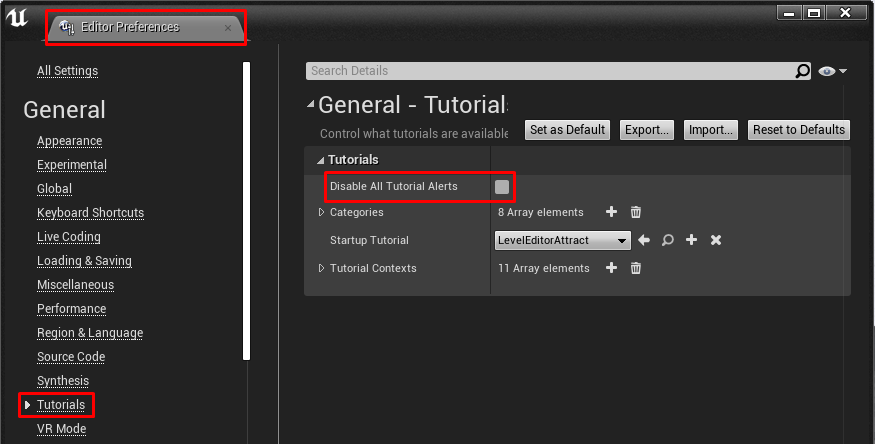
Quick #UE4 Tip number 81.
Disable all tutorials from Editor Preferences -> Tutorials -> Disable All Tutorial Alerts.
#unreal #unrealtips #unrealdev #indiegamedev #gamedev #indiedev #screenshotsaturday #UnrealEngine
 Twitter
·
lost grotto
Twitter
·
lost grotto
how do i get a media player to automaticly play in standalone game
dark thorn
urban iris
Then you GetVelocity>split the vector> Z=0 > branch > True > addImpulse
I tried this @urban iris , in most cases it is working but if player keeps space pressed then ball keeps jumping when it comes is at the highest point as Z velocity is also zero there.😄
urban iris
dark thorn
I tried this <@!212304742137724928> , in most cases it is working but if player ...
ah yea, i forgot to mention that 😄 i thought it would be for such short time that you wouldn't be able to time it
are you making your custom movement or using a prebuilt one
dark thorn
custom movement means?
i am adding Z impulse when space is pressed and Z velocity is zero.
lost grotto
lost grotto
how do i get a media player to automaticly play in standalone game
pls help
urban iris
a Pawn
dark thorn
A Pawn!
urban iris
I see
in the Character class, there are nodes like canJump and a function called Jump
that's why i got confused
dark thorn
Ohh! 😄
urban iris
so you're building a custom movement
i'd like to find out what "canJump" node actually checks
dark thorn
urban iris
so you're building a custom movement
Yeah!
dark thorn
urban iris
i'd like to find out what "canJump" node actually checks
the canJump node which in Character class? yeah, it will be helpfull to know what that node is doing
dark thorn
I was also thinking to add impulse based on its height, but this might not work in all cases
urban iris
you can try gating the jump
and reset the gate after you land
im not very "clear-minded" right now, so I probably sound completely dumb 😄
dark thorn
urban iris
im not very "clear-minded" right now, so I probably sound completely dumb 😄
Not sure, might work. Nothing is wrong in trying 😄
urban iris
the reset trigger could be a collision volume under the ball
placed just at where it would only trigger when you're standing on something
dark thorn
urban iris
the reset trigger could be a collision volume under the ball
yeah, this might work. It will be moving as ball moves on ground! ^-^
urban iris
the problem is the odd cases where if you fail to jump, the beginOverlap event wouldn't fire and the gate wouldn't be reset
which results in losing the ability to jump
so you'd need a failsafe for this method
i'm sure there is a better way to do this
😄
dark thorn
no problem! I will try this trigger thing anyway, just to see how this goes 😅 . Thanks for the help @urban iris .😄
dark thorn
Got it working @urban iris 🙂 , Added one more condition along with checking is Z velocity is 0 i.e. checking sign of last non zero velocity and jump is activated when Z velocity is zero and sign of last non zero velocity is negative(downwards).
 sleek swift
Guys @here I am having problem in Importing/Re-importing .Umap files that got auto deleted from a sudden electricity cut.
 mint gate
I would like to pass the variable (total) from another widget(Q1) to this widget(Q2), however it cannot show it. What shd I do?
chilly sun
anyone able to recognize what Im doin? -tryin to rig a toon with the ue mannequin skeleton..
But the question-- am I on a right path, or should I abandon asap and figure out how to do it right (assuming this is wrong, assuming its obvious what Im doing)
obsidian nimbus
@chilly sun that is goin to be hell to weight
 steel shell
Does someone know how i can simplify an imported heightmap landscape?
 forest orchid
Guys where can i enable collision for audio?
dusty pulsar
dusty pulsar
Hello Everyone!
I have a question, I'm new with UE4 and I'm trying to figure ou...
Someone please can give me a direction?
 true nexus
@forest orchid First you need to enable ray tracing for audio. Also only works with version UE 5.91
forest orchid
@true nexus Where can I enable this?
@true nexus
can't find the reason why it doesn't work. It seems to me that he does not see the coliseum
plush yew
Could anyone tell me why my blueprint does not work? Why it has an empty variable?
plush yew
where do you set 'enemy 01'?
urban iris
plush yew
Could anyone tell me why my blueprint does not work? Why it has an empty variabl...
i know what you're trying to do.
do this: drag a reference of widget component and add the get user widget node to it and cast that to the healthbar widget, then as that widget set the enemy to self
that should be done in the bp_enemy class
 steel gull
dusty pulsar
Someone please can give me a direction?
steel gull
dusty pulsar
Someone please can give me a direction?
Try watching unreal starter tutorial in unreal learning tab in unreal official page
 keen minnow
Might be a stupid question, but I tried googling and found no result:
Can I "refresh" the "VR Preview" state of Unreal Engine? (I plugged in my headset after starting a project up, and the "VR Preview" is currently greyed out)
I know if I close the project and reopen it, it will be an available option, but seems tedious to have to close down your current work, because I forgot to plug in my headset before starting up work on it. 😉
 past stag
steel gull
past stag
steel gull
No lights and nothing in blank , that is why it is blank
steel gull
Yes you can find everything used in that level in outliner
 frozen pond
is there any way to force actor reference into class reference? in c# i would do something like this (int)string , but in unreal i know only cast to class using actor reference, is there any other way for doing that ?
 smoky sonnet
can anyone explain to me why I need to use deltatime when working with inputs and also why i should add the desired altitude with the old one ?
 left arrow
Hey guys, Can someone please tell me why I cant see any foliage? I just opened my project and its all gone. But its still there I just cant see it. I also cant place any foliage
 fierce tulip
if this isnt it, i dont know (as I dont do work with that stuff a lot)
viewport's Show > Advanced > Instanced Static Meshes option and toggling it on.
 echo zealot
Am I allowed to use the art in the engine content for my commercial game? (There are a few pretty cool sounds in there!)
fierce tulip
generally, if epic supplies it, you can use it
plush yew
hello 
fierce tulip

 dusty pulsar
steel gull
Try watching unreal starter tutorial in unreal learning tab in unreal official p...
dusty pulsar
steel gull
Try watching unreal starter tutorial in unreal learning tab in unreal official p...
lol
smoky sonnet
can anyone explain to me why it is necessary to use deltatime within your calculation when working with forces/inputs to control movement etc?
 lusty carbon
What could be causing this?? lightmap UVs are perfect
left arrow
Hey, does someone know why my foliage still has shadow even when I turned shadows off ?
broken heath
U sure its the same as selection?
broken heath
lusty carbon
What could be causing this?? lightmap UVs are perfect
Lightmap resolution?
left arrow
broken heath
U sure its the same as selection?
Yeah, i turned the shadows off for all my foliage
broken heath
Did u build lighting after ?
left arrow
Nah I never build lighting. is that important? Im new to UE4
broken heath
Rebuild lighting since static shadow is baked on the map
left arrow
Okay then I will build lighting when I placed all my foliage. But this always take ages
Thanks
broken heath
Maybe choose preview quality if ur in early stages
lusty carbon
broken heath
Lightmap resolution?
512
broken heath
Show screenshot of lightmap density?
lusty carbon
plush yew
How can we display all the Optimization Viewmodes (Lightmap density just like up above but also Light Complexity, Quad Overdraw, etc.) in the same time (splitting the screen with each different modes) ?
I'm pretty sure there is an option for this because I already do it once, I believe... But I can't remember how to do that...
broken heath
plush yew
I'm pretty sure there is an option for this because I already do it once, I beli...
Oh split layout won’t work? Why not?
frozen pond
hello, how i can disable cloth physic simulation when time dilatation is set to 0.01 ?
 dense knoll
Any way to fix UE4 not spawning a player and resulting in an instant mission failure?
Its not happening on my PC but on other peoples PC its not spawning
frozen pond
it's multiplayer/singleplayer ?
dense knoll
Both
dense knoll
whenever spawning into a level the Player doesent spawn, So the camera sets at 0 0 0 and the level cant find any player charecter and puts that as a Mission FAilure
 cedar fossil
Hey anyone have an idea how to get the Vcam in 4.26 working with stabilization? All works but I get LogBlueprintUserMessages: [VCAM_W_Button_Ear_2] WARNING: Missing Focus Modifier
LogBlueprintUserMessages: [VCAM_W_Panel_MotionAdjustments] WARNING: Missing Stabilization Modifier when trying to trigger buttons
Unreal documention of course skips this part...
The Virtual Camera Actor is a sample Virtual Camera that can be used as a starting point for your project.
 oblique steeple
how can i do camera tilt when strafing?
 cold pecan
Hey guys. Does anyone know if it's possible to set different frame rates for distinct Actors/Widgets? Like, I wan't so set an actor to render at 30 FPS and other Actor/Widget to render at 60 FPS. I know engines like Anvil can do this, but found nothing about unreal. Also, is there any way to get the last rendered frame as a picture?
light thunder
Need to resize objects without changing their position - found this on answerhub Alternatively, transform SpawnLocation by the inverse of the block's intended scale to offset the change in position caused by scaling the component.
broken heath
light thunder
Need to resize objects without changing their position - found this on answerhub...
So did u succeed
cedar fossil
anyone get the Vcam component to work fully on iphone/ipad?
plush yew
I am following DevSquads fps tutorial and I'm having some problems: 1. When I am leaning forwards the camera goes to the legs 2. When I am aiming down sights the camera is snapping in a weird way, this happens when I'm not aiming down sights too
and when I'm running the weapon go behind the legs
ancient lotus
well its kind of a hack video on how to just setup a fps with as little resources and as quickly as possible. generally you have two different meshes for first and third person and a separated upper/lower body (if using full body for first person) where the upper half pivots and such with the camera and the lower body is planted like legs. how is the aiming setup
plush yew
I think i'm gonna just throw that project in the bin because I don't think its the right way to make an fps and I did it because i just needed to get used to UE4
light thunder
broken heath
Oh u did already split
This is thing that worked - while you can resize them if you select and group them all, it's difficult to be precise - if you use this but make a blutility script that takes in a float, you can scale it - while everything will move (it has to) they will all be positioned right next to eachother, the same as before you scaled them
 proud prism
plush yew
I think i'm gonna just throw that project in the bin because I don't think its t...
proud prism
plush yew
I think i'm gonna just throw that project in the bin because I don't think its t...
Check out Ryan Laley's FPS series. He teaches the proper way to do things.
plush yew
ok thank you
plush yew
Hello guys I have little problem with changing the name of the player system
it is not working
The NewName variable is cretaed inside of the widget
The Name variable is stored in the thirdperson controller
 fringe pivot
@vernal thicket just ask
 vernal thicket
git can't locate the origin/master inside the repo folder, i saw recommendations to delete the origin/master and then it'll be forced to create new but there doesnt seem to be one there at all
fringe pivot
what does git remote -v say?
vernal thicket
i think it's fixed by checkout?, it's pulling latest through command prmt atm
nope
says fetch & push?
origin - fetch
origin - push
fringe pivot
that's the repo where you made the checkout from right?
vernal thicket
yeah,
fringe pivot
and what action are you doing that shows you that git can't locate it?
vernal thicket
anything, but currently trying to fetch & pill
pull
However, it's asking me to 'publish branch' as it doesn't seem to think it exists?
error: cannot lock ref 'refs/remotes/origin/master': unable to resolve reference 'refs/remotes/origin/master': reference broken
 frank oar
Hi guys,
Is it possible to move projects between ssd's without causing problems ?
vernal thicket
@frank oar only with the UE reference file (if you launch from epic launcher), but to be safe why not clone it onto your SSD first and then open it make sur ethere's no issues?
frank oar
thanks @vernal thicket I have never tried cloning so I will have to learn the process.
Are you saying that I can relocate files from the epic launch btw ?
fringe pivot
@vernal thicket you could try git gc --prune=now
backup your repo first just in case
vernal thicket
I'm pretty sure I tried that and nothing happene
same error or similar with regards to not locating the origin/master
@frank oar you can create a clone from the launcher
frank oar
ok so create a clone, check it, then delete the original ?
thank you
vernal thicket
Just make sure it's all good before you delete anything lol
 main juniper
yo anyone can help me with my problem
i have 2 problems
1 my shooting assualt rifle and pisol actions are both wrong and i dont know how to fix them
2 i got problems unequiping the pistol
anyone can join a voice chat plz and help me i would really apretaite it
mention me or dm please if u can help
 exotic radish
Is there any way to "show" epic games launcher previously installed UE 4.26? I've just reinstalled windows, but I had EGL and engine and editor installed on a separate drive but EGL wouldn't have started until I reinstalled it too. So now when I launch it it lets me only install new UE4.26, but how do I actually use my already installed version?
 tiny sonnet
Why can u not use a tif file as a heightmap, is there any way to losslessly convert to PNG??
dawn gull
Is there an LOD setting so it can automatically lower the detail of meshes the farther away? and if not is there a way I can make my own?
ancient lotus
there is, it decimates the mesh automatically. you can also bring in your own LOD's if you wish and use those
dawn gull
What's it called?
dawn gull
so fix your lighting
plush yew
how
dawn gull
add more lights or change the light direction
plush yew
ah okay
dawn gull
I can't find the BaseEngine.ini file, has it been renamed in new versions?
This says that theres a project one
https://docs.unrealengine.com/en-US/WorkingWithContent/Types/StaticMeshes/HowTo/AutomaticLODGeneration/index.html
How To use the Automatic LOD Generation system in UE4.
will it do the same thing if I add it to the engine one?
 flat pewter
does anyone know if there's a build log that tells what's occupying build size? (textures, meshes, etc)
plush yew
yeah but it looks too bright
dawn gull

Hey everyone! In this video I go through how I use lighting and post processing to develop my scenes in Unreal Engine 4.
The main focus is on the 5 components that I always use to try make my scenes look good. I hope you find something useful in this tutorial that will help improve your lighting and post processing for your games.
If you enj...
plush yew
um
ok
it's working
but when i click on play the light is too bright
how do i fix
 rough knoll
how to round a float to the nearest tenth? (i.e. 100.5999999 to 100.6)
plush yew
@plush yew in your post process find exposure and find min/max brightness change min to 2 then find infinite extant and check it
aah ok
where is post procces
visual effects in the side panel it should be the top one
using infinite extant means it effects the entire level turned off means it only effects inside the box
ok
ok
i found it
ok now
i set it to 1.0
set what to 1.0?
min brightness and max
set min to 2 max stays at 8
ok
yooo
thank you so much
then again find infinite extant so it effects everything besides having to be in the box
dense knoll
Any way to fix Player Actors not spawnig on other PCs
plush yew
Is it possible to use only one widget for 2 enemy ? I'm getting this error and empty bar on the first enemy as I start playing.
plush yew
It is strange. I am almost at 60 FPS in all the Optimization Viewmodes. On "Lightmap Density" mode, for example (picture on top). Though, when I go into "Lightmap Complexity", my FPS fall in the red. Same when I go into "Stationay Light Overlap". Even stranger is that UE tells there is no problem neither with Lightmap Complexity nor Stationary Ligh Overlap" because the colors are green or blue/green. Look :
I don't understand. Is it normal ??
If I believe these optimization viewmodes, the issue CANNOT be other things because I repeat, I am on approximately 60 FPS in ALL the other optimization viewmodes... So it is clearly reliate to the Lightmap Complexity or the Stationary Light Overlap. Though, it is all green ! 🤔
 normal olive
So I have a question that'll probably sound rather n00bish because I am n00b.
How suitable is Unreal Engine for creating a "massive open world" similar to Zelda: Breath of the Wild, where you can see pretty much all the way across the map if you have a good vantage point? (I'm aware that BotW doesn't actually LOAD everything at once though, of course - it loads/unloads relevant objects by predicting where the player is headed.)
I've got ideas. Need to get learning UE
(gotta start somewhere)
plush yew
how can i make a transparent glass
window
sorry
@plush yew Answering to myself but : Indeed, these optimization viewmodes is absolutely are an indicator of the FPS of the game. So I said nothing. I'm still on low FPS in the game though, so I guess I have a problem somewhere but I don't find it still... 🤔
@normal olive Noob here but I'm pretty sure that all is about good construction with level streaming (in short : split the level world in multiple part and hide/display some parts wisely)
 minor grove
Is it possible to launch a packaged build via an external link?
normal olive
Another thing that I'm considering is a game similar to ye old "Uplink" by Introversion... where the GUI is -basically- just a "fake desktop operating system" and so there is no physics or 3D - but I'm not sure what sort of tech stack to use for that. probably wouldn't need something like Unreal but dunno....????
tiny sonnet
Why can u not use a tif file as a heightmap, is there any way to losslessly convert to PNG?? Can I plz get some help??
normal olive
@plush yew aha. So it has amenities. Good to know. 🙂
 proper quiver
How do I change the build of my game from WindowsNoEditor to something else? Google was of no help at all in this regard.
 restive zinc
how do you do a camera bob
what is the actor called they changed if i remember?
which one of these are for camera bob such as walking and running it used to be called camera shake
 placid citrus
It's probably in your HUD bp
plush yew
Yes
Ik
I have to uncheck
event recive draw hud
But i can't
sorry to interrupt but is there a way to temporarily disable an input? i added crouching and can still jump while crouching i dont want that to happen so i was wondering if theres a way to disable the jump input temporarily, i did look something up but when i tried it, it removed the input completely
I fixed
broken heath
plush yew
sorry to interrupt but is there a way to temporarily disable an input? i added c...
Yes u can i think its a set gravity?
Or maybe theres ‘can jump’ in blueprint , i forgot
But Tryna let u guess
plush yew
@broken heath ok thanks ima try both ways, i completely forgot there was gravity
broken heath
Alrights
plush yew
guys
how do i fix this
that preview thing
it's annoying
how do i get rid of it
can anyone help me
@plush yew build lighting
ah okay
Hey
I'm on low FPS in the editor :
But pretty high when I hit Play :
Is it normal ? Can you explain why please ?
 ruby ocean
What's a good way of understanding snap flags/groups?
plush yew
when i rebuild the light the lighting looks weird and if i move a light it's saying again lights need to be rebuild
plush yew
plush yew
that preview thing
U can do 2 things, build light or set it to movable
plush yew
plush yew
when i rebuild the light the lighting looks weird and if i move a light it's say...
.
someone is already helping me
Movable is better cuz u don’t have to build light but it would use more cpu power
Oh ok
@plush yew Yes I was thinking the same because when I go into Stationary Light Overlap (which shows the cascaded shadows if I understood well), the FPS is red :
@plush yew Though guys on discord explained me that FPS in these "Optimizations Viewmodes" was due to specific calculations of these modes and it was not an indicator on the real FPS stats of the game
Moreover, the color is all green, meaning that it's good here
so really, I don't know...
Yeah, I think too
ok
interesting
But anyway... If it's all green on the screen I've just put, that means that the Stationary Light Overlap is good, right ?
Though, I guess you're right when you talk about cascaded shadows because when I build the light, I have some overlap warnings :
So, it is green but it is bad ? 🤪
and though, it's green : #ue4-general message
Do you and I agree ? I hope I am not colour blind ! 😆
but maybe the stationary lights and this overlap lightning UV are two different things, finally... I don't know...
plush yew
Mh, shader complexity is still another optimization viewmode :
Here, I am well the viewmode called "Stationary Light Overlap"
obsidian nimbus
ahh ur right
you prolly need to up ur lightmap reslution for the meshes that give the error for the error to go away
plush yew
well you're right it is definitely two different things
 burnt ether
Can I smhw spawn Actors with the Foliage Tool ?
plush yew
obsidian nimbus
you prolly need to up ur lightmap reslution for the meshes that give the error f...
These error comes from the foliage. Though I didn't make the landscape neither the foliage... In the log, it is called "InstanceFoliageActor_0" I think it's the same that the foliage in the Details panel called "InstanceFoliageActor" (without the zero) because I have only this foliage. I have a doubt though...
Moreover, I don't find where is the lightmap resolution setting for this
I made an idle animation for my 2d sidescroller game, should i export it as a gif or make it into different png files that i can put together in unreal
Apparently, the lightmap resolution settings are here, in the LOD, but I don't see anything here :
Yeah this is not the first time that I hear complaints about lightmaps, lol. I can't wait for the Lumen system of UE5 !! :🥳 🥳 🥳
Oh, I get it. So it's on each mesh composing the foliage, ok
 worldly sonnet
Hey Guys, i need some help. I'm getting a weird error that I cant wrap my head around.
This happens only in a cooked build as well.
On a level transition i get the following error:
http://prntscr.com/wb3niz
Thats what it says in the debug file:
http://prntscr.com/wb3o8r


The thing is im not even killing anything at any point
I assume he has problems deleting things on the previous level? Im really confused
timber tulip
What's a good version to stick to?
I don't wanna use the LATEST one, but I also don't want to use one from years ago
what's the latest stable one - is pretty much what I'm asking
or maybe you should use the latest one in UE4?
plush yew
@timber tulip Because I'm also afraid of unstable versions, I use to pick the latest version - 1. So now, I am on 4.25. But it's just my (noob) opinion ^^
@plush yew @obsidian nimbus I've just gone into foliage mode and found the lightmap resolutions of the meshes but... It seems that I don't have ones, actually... 🤔 Am I wrong ? https://gyazo.com/34c4de696ca4d6103f38f8ba10e46be9
( Light Map Resolution is untick on all the meshes )
 final gyro
Hello, I have a small issue that I tried to fix for the last hour. These little stats on the top right corner are no longer visible in my editor and I cant find out how to turn them back on: https://answers.unrealengine.com/storage/temp/318352-untitled.png


Any help would be greatly appreciated.
.< oh! I was looking through there two times. Must have missed the obvious. Thank you!
plush yew
so that means it is the good settings I have to check, right ? Or does the lightmap resolution settings of the base meshes count too ? EDIT : Ah I've misread your answer. Ok, so it uses the lightmap res of my base static mesh !@plush yew
final gyro
jupp, that did it, thanks a ton ponkkis!
plush yew
@plush yew Ok so all the mesh have a Light Map Resolution of 64 :
Don't know if it's good or not but I'm gonna reduce it just to see what it happens...
Ah ! Just read again what you said and figured out I can simply check the Lightmap resolution of the instances (which is currently set on 8) to reduce it 👍
I am working on my 2d sidescroller game and i have coded it so that when falling the jump animation is set to true, but when its coded like that the animation loops, how do i fix this?
 river drum
anyone ever get strange e_outofmemory crashes in unreal? never had a problem before, on a new system though but same project which runs fine on my other machines keeps crashing with this error. its choosing the right adapter, and its an nvidia 3070 with 8 gigs of vram. doesnt actually seem to be out of ram. if anyone has run into this issue and found a fix please let me know.