#ue4-general
1 messages · Page 897 of 1
 civic otter
 light thunder
Why is unreal making multiple static mesh copies of an FBX when I just want them on a single one? 15 billion$ game engine and it can't recognize LOD's?
 wispy moon
Subscribe For More Videos; https://goo.gl/fNYgMg | 1000 Subs Goal
►Visit My Website!: https://warmaster2143.co.za
►Follow my Twitter!: https://twitter.com/warmaster2143
►Join My Discord!: https://discord.gg/Q4c9JwF
►Humble Bundle: https://www.humblebundle.com/?partner=warmaster2143
►Looking For Web / Email Hosting Visit: https://rsacloud.co.za/
...
 rotund scroll
@light thunder have you checked the FBX pipeline to ensure that your lods are correctly named?
light thunder
doesn't say anything about that in the importer - let's hope it's me
read something about the blender naming conventions but I need to know what to name the meshes then
rotund scroll
it's all on the documentation page
rotund scroll
https://docs.unrealengine.com/en-US/WorkingWithContent/Importing/FBX/StaticMeshes/index.html literally first result
Setting up, exporting, and importing Static Meshes using the FBX content pipeline.
light thunder
it's not very clear
rotund scroll
on a sidenote I gotta say this server is so much more helpful than any of the blender servers, so uh, props
light thunder
heh
https://docs.unrealengine.com/en-US/WorkingWithContent/Importing/FBX/ImportOptions/index.html ```StaticMesh
If Override FullName is:
Enabled
If single mesh in file - Named as %1
If multiple meshes in file and Combine Meshes is:
Enabled - Named as %1
Disabled - Named as %1_%2
Disabled
If single mesh in file - Named as %1_%2
If multiple meshes in file and Combine Meshes is:
Enabled - Named as %1
Disabled - Named as %1_%2```
Explanations of the options available in the FBX Import Options dialog.
They couldn't even include an example
whoever wrote these docs should be beaten
light thunder
there's a NAMING convention example for static mesh FBX import containing multiple meshes as LOD's?
please screenshot that so I can apologize to you
also make sure that Import LODs is enabled. Note: When importing LODs, the name of the imported mesh will follow the default Naming Rules . See the FBX Import Dialog section for complete details of all of the settings. that's there
90% of the time, it's my dumbass/ignorant fault - but 10% of the time, the docs just suck or are incomplete, or unclear at best
light thunder
@rotund scroll you mentioned blender, what am I doing wrong that it only gives me LOD2 here?
light thunder
lol with what, let's derail this channel
rotund scroll
something as simple as vertex snapping between two objects
light thunder
try any modifiers?
other thing that threw me off is there are multiple addons for things like that, that are turned off by default
rotund scroll
fair I might have to look through the addon list
the blender discord is being massively unhelpful, as is customary
light thunder
You have to learn to troll them every once in awhile, can't use it all the time, doesn't always work
but I say something like, "man, I know it's free and everything, but you think at this point, blender would be able to do vertex snapping easily without having to spend hours to tweak it"
then someone shows you how wrong you are
rotund scroll
literally had a guy telling me to "get creative" to find a solution
we're in 2020 and blender doesn't do vertex to vertex snapping
 mossy geode
Anyone else have any issues with the mouse cursor freezing in 4.26 (Epic Launcher build) while moving around in the viewport? If the mouse cursor is over the viewport while I am moving in any direction (for example, holding the left arrow key), the mouse cursor freezes for 1 second and then jumps to whereever it should have been after moving the mouse and then freezes again. This behavior repeats indefinitely while moving around. It does not occur in previous versions of UE4. This is happening on a brand new blank project. Running a Ryzen 3950X and Nvidia 3090 on a relatively fresh install of Windows 10 2004. Tried latest Geforce Game Ready drivers and Studio drivers. I looked thru the UE issues list and didnt spot anything related.
 hearty dagger
How do you edit the nodes of an instanced material
 scarlet birch
You don't. You can edit parameters for the instance.
hearty dagger
Can you find where it was instanced from?
light thunder
find parent
 tiny granite
i need help restarting a game after a red cube hits actor. Does anyone have experience with Unreal Engine that may provide guidance? if yes dm me or call me
pls i need this project to be done by tomorrow and in my country it's 4 AM already
rotund scroll
tiny granite
i need help restarting a game after a red cube hits actor. Does anyone have expe...
there's a restart level functionality you could call on the gamemode
tiny granite
i know but it does't work
light thunder
make a "print string" event and make sure that fires when your event is supposed to happen
make sure you are triggering it actually
tiny granite
light thunder
make a trigger volume, if you are in a hurry, just do that and use the level blueprint
tiny granite
i am still new to unreal do you mind if i call you
@wind yacht can you help me with some thing , it's stupid but i can't do it
 wet berry
anyone have a livestream or youtube where someone is using houdini for UE4 asset creation?
I'm curious to see what it can do
 dark stag
is there a better way to see event payload when youre mucking around in the level sequencer?
right clicking things suck.
 proven shuttle
what the hell is wrong with the editor it flickers and i can't do anything
dark stag
our house.... in the middle of the tab, our house...
 floral knoll
Navigation will not build
even when I move the nav mesh
just stays static
does anyone have any idea on how to fix this
 dim arch
hi, does anyone know the recommended specs fo a linux dedicated? to host 16 clients optimally
 celest spire
general question. I'm new to Unreal, but I'm very familiar with CG tools (houdini especially, but that's beside the point) I'm most interested in creating a VR game as my first game. Do you think it's important to go through a normal tutorial session before I try jumping into the a VR workflow? or should I dive right into vr?
proven shuttle
I can't do shit the ui is flickering so much...
:(
- Dont enable window animations, fixes the problem
 elder robin
is it possible to set the visibility (or other properties) of parts of an actor?
like lets say an actor is made up of a cube and a sphere, would it be possible to change the properties of that sphere?
 median hound
yes?
 rapid tree
Does anyone know why: when I import an animation the mesh I have already imported doesn't link with it?
 late verge
can anyone help explain to me why my oscillation blend outs on my camera shake blueprints are just completely broken?
i have my camera shake duration set up correctly, and even if i set it to .1 for the blend out, the camera shake stops abruptly like halfway through
 silver crown
Your render resolution is low
dark stag
what would be the equivalent of a construction script for a level when it loads?
level bp?
having some silly race condition problems, and i wasnt sure whats loading first / when
 autumn flame
iirc Level Blueprints don't have Construction Scripts, just Event Graphs
dark stag
yeah, i think what i mean to ask is... where would an ideal place to initialize vars and things when a level is loaded before actors are spawned?
 still tangle
silver crown
Your render resolution is low
still tangle
silver crown
Your render resolution is low
Can you share a article or share a step to make it run fine?
And thanks for the help 😉
silver crown
Try sg.ResolutionQuality 100 in the console
dark stag
i was thinking about just making a few custom events in the game instance or something
autumn flame
Depends really mau, you can simply expose variables and have some code decide the values
When you spawn the actor
dark stag
right, its a camera selector thats meant to work across multiple levels, so im guessing the game instance is always "there"
and the level when loaded can call that function
just trying to work it out in my head before i go changing too much
autumn flame
If you want to keep stuff between levels use Game Instance, yeh
dark stag
yeah ive been using the player controller to store stuff... turns out that was a mistake
hey thats how you learn
lol
silver crown
I assume this is blueprints?
dark stag
yerp. my C is no good.
 wispy steeple
does ram speed significantly matter for unreal engine performance ?
frequency , i mean
autumn flame
A tip i can give that i found myself sometimes in is that Begin Play can be tricky without a Delay if you do multiple things, to simulate loading you can just put at the start a 0 Delay
median hound
not as much as other hardware
dim arch
depends if the application is gpu-bound or cpu-bound @wispy steeple
dark stag
yeah, i find if youre adding delays and such, youre probably doing something wrong and being too lazy to fix.
dim arch
usually gpu will be the bottleneck
still tangle
silver crown
Try `sg.ResolutionQuality 100` in the console
Same problem. 😦
dark stag
a needed delay to something wqould likely be edge case
median hound
check ur graphic settings demise
still tangle
dim arch
ram and cpu need to run gamethread to schedule sending drawcommands to gpu, but drawing usually takes the longest
silver crown
autumn flame
I find myself in need to use it to simulate server loading
silver crown
This might work
But I've never used it - so it might not
You need the event to run before all the actors BeginPlay?
Or just before all the actors tick
wispy steeple
well , I am planning to use gtx 1070ti with 8gb ram and intel i3 10100f - 2666mhz setup. im having this giant card to my system because it is cheap
silver crown
You're going to have a hard time with a i3 10100f
silver crown
Developing with unreal requires a strong CPU
silver crown
8GB is on the very low side too indeed
 warped tangle
16 minimum if you have chrome running in the background
autumn flame
Just don't work on big environments meanwhile
I feel my RAM suffering just thinking at that
dim arch
if anything, you will be cpu-bound, 2666mhz is pretty fast, you wont be I/O bound and probably for what you're doing it will be gpu-bound for framerate
autumn flame
Compiling shaders fun times
wispy steeple
so for gpu bound works am I bottlenecked
dim arch
yeah shaders will take forever
wispy steeple
why ?
autumn flame
The more cores, the faster it goes, to keep it simple
silver crown
Shaders time = shader count / number of cores
autumn flame
UE4 uses all your CPU resources to compile
wispy steeple
well gtx 1070ti have nice shader units i guess
dim arch
its possible to compile them using CUDA (I think) not sure if it has all the instructions, but it isnt supported
silver crown
I really doubt that
dim arch
shaders run on the GPU, but theyre compiled on the CPU
wispy steeple
so compiling is another th,ng
dim arch
because you need to compile them for different rendering systems
wispy steeple
yeh yeh makes sense now
autumn flame
Perhaps while you wait an upgrade keep your main light atleast on movable so you avoid compiling lighting everytime while you do stuff
wispy steeple
thx guys , very much
silver crown
Or go full dynamic lighting
autumn flame
Yeah
wispy steeple
dynamic lighting it is lol
i do not trust my cpu
btw, why ssd does matter that much
autumn flame
Moving, loading, saving, opening... everything, takes way less time
Cause it Reads and Writes data way faster
Personally I wouldn't bother having UE on a HDD, would lose more time than anything else, but it can be done, it's just a no for me
 plush yew
What item should I use to spawn enemy actors
I tried arrow but the actor won't move
I'm doing paper2d
autumn flame
Spaw Actor from Class?
plush yew
I did that
But the actor won't move
Stays in air like that
Is arrow component the one I need to use for spawning actor objects with dedicated animation flow
I'm using arrow for spawning projectiles
But what about actor
Like enemy
autumn flame
It really depends on your game i guess
Just need something to handle them spawning, when, how and where
You could use anything that holds a transform and spawn the actor there, have a spawn manager that does it for you?
It's really vague
You could have a triggerbox spawning them in specific places as you overlap or just a manager that spawns them randomly considering all spawn points
plush yew
I checked triggerbox it's for 3d games right
Based on documentation
I want for paper2d 2d game
wispy steeple
so is ryzen 5 2600 update over intel i3 10100f worth it?
say i3 is 700 dollar
ryzen 5 2600 is 1248 dollar
in my country
autumn flame
There should still be overlap settings for sprites, never done it personally tho
autumn flame
You could have a sprite with collision set on overlap and when your character overlaps it something happens?
silver crown
@wispy steeple How much is a 3700 in your country
actually how much are all of these
silver crown
Yes, but what about 3rd gen
 queen wasp
what a mess, all my ships have -x as forward vector, while in the actor editor when you select front view you see the back of the ships, all my movement code and cam code has been made to workaround this wrong direction thing, all ships in fact are facing backwards and driving backwards as forwards
It looks fine hehe
silver crown
3600x would be better if you can afford it
silver crown
That one might do
 heavy yew
(simple) Physics question.
I have a vehicle actor blueprint and I want to add a collision capsules to edit the collision behavior. What is the right way to set these so they don't impact the mass balance of the vehicle?
I will uncheck gravity but will that still keep the mass there impacting inertia? Do I need to set the mass to smallest possible also?
wispy steeple
why do i need muscled - cpu s anyways ? how much shader can i use
is it for reducing time spent ?
silver crown
Very much yes
silver crown
@heavy yew Maybe try #legacy-physics
heavy yew
thanks
silver crown
Yes, SSD is a must as well
heavy yew
missd it
wispy steeple
F
dumb question here , say i am making something similar to rebirth demo . How many times will i encounter lack of cpu and storage speed ?
@silver crown
silver crown
every time you save an asset, edit a material, package the project, open the project
silver crown
GPU scales very well really
So if it's too slow, you can always drop the quality settings
I'd say for game dev having a good GPU is not needed, unless you're doing photorealistic stuff
wispy steeple
so i can scale my prject to photorealism anytime ?
btw thank you very very much for your understanding and undertaking
no one helped me this much about hardware choices on my prefered applications
what is multirendering btw
 dire coral
question. i have 100% blueprint project how do i add c++ in the new 4.26. in 4.25 you just right click in the content and there is a option to add it but in the new version its not there??
 wary wave
Just add a new C++ class and it will generate the project if it doesn't exist
 glacial oar
wanting to try make a chain whichis better make it in blender ith bones and animate there or make in unreal using thephysics
 lusty carbon
ue4 r.raytracing.shadows 0 makes my game crash
 fluid ginkgo
hey guys, i finally stole so time to try out som virtual camera with my iphone 7 in a scene i did for the learn unreal online contest. and sharing it here. https://twitter.com/aine_jacob/status/1337859735886950403?s=20

https://t.co/tH77rJb0zQ
I just earned the "Converting Blueprint to C++" badge on Unreal Online Learning. @UnrealEngine #LearnUnreal

 Twitter
·
Twitter
·
the videos are in the comment section, hope yall like it. will be improving my work with time.
 proud narwhal
is there any way to filter "Not Used In Current Level"? there is "Not Used In Any Level" but thats no use for me
 shy prairie
Any way to get my actor current Y axis and add value to it with blueprints?
so for example i wanna get the current Y and push it another 5m up
 echo zealot
Is there any way in the UE4 to spawn actors in a way they don't just exist during runtime, but remain in the level you've spawned them in? Meant like a tool to help the developer building the level with ingame mechanics. I'd REALLY appreciate any help!
 covert hedge
@echo zealot editor only checkbox in the blueprint might be what you're looking for
echo zealot
Imagine like a "Spawn Actor Permanent (Editor Only)" node or something...
 thick herald
echo zealot
Is there any way in the UE4 to spawn actors in a way they don't just exist durin...
thick herald
echo zealot
Is there any way in the UE4 to spawn actors in a way they don't just exist durin...
Don't think so, certainly not in BP
You can create a Editor Widget which can do all kinds of wonderful stuff, and is designed for making editor things easy- you'll have to create all the functionality yourself of course. Hopefully that at least may point you in the right direction.
thick herald
shy prairie
Any way to get my actor current Y axis and add value to it with blueprints?
Yeah, Get Actor Location, add vector.
No editor widgets are in editor only
echo zealot
yeah i mean can i use the editor widget while the game is runnung?
thick herald
no
echo zealot
😦
 stuck scarab
Workflow / "best" practice question:
The last days I started to build an advanced jump "skill", so I didnt quite knew how fancy or crazy it will get.
It's not done yet but is quite some code with around 15 new variables already, so a lot of new stuff thats now within the character blueprint.
How do you approach such things?
-Keep it there, organize and filter it, who cares right?
-definitely make a own blueprint for stuff like that
covert hedge
i mean i don't get what you are trying to achieve
you can create a component dedicated to that if you wish so, that's how they did it in custom movement
thick herald
You mean like a physical curved monitor?
 barren lintel
helo guys is there a way to change the speed of manny in unreal engine?
when i go into his blueprint code there deosnt seem to be a place to change his speed
wary wave
it's in the movement component
stuck scarab
called max walking speed I believe
 dawn gull
So with tri-planar mapping you can only have it non stretched on 2 sides, how can I blend two texturs together so the stretched sides dont show?
thick herald
dawn gull
So with tri-planar mapping you can only have it non stretched on 2 sides, how ca...
Check out the two videos here https://youtu.be/yxigaCW4Knc
dawn gull
Ohhhh I did the first one, I didn't know there was a second. Thank you!
 flat trail
thick herald
You mean like a physical curved monitor?
flat trail
thick herald
You mean like a physical curved monitor?
Yes, i would need to calculate the degrees an screens curvature
thick herald
Unless you can access the monitor's details in windows, there probably isn't a way.
flat trail
Well, i mean physicall, not from ue4
 sly surge
questing about UE on my enemay iv adding a drop item to it useing spawn actor for class and it all works but when the item drops its the wrong size how can i fix lol
its Way to big
elder robin
how would i get the child of an actor in ue4?
 winter gale

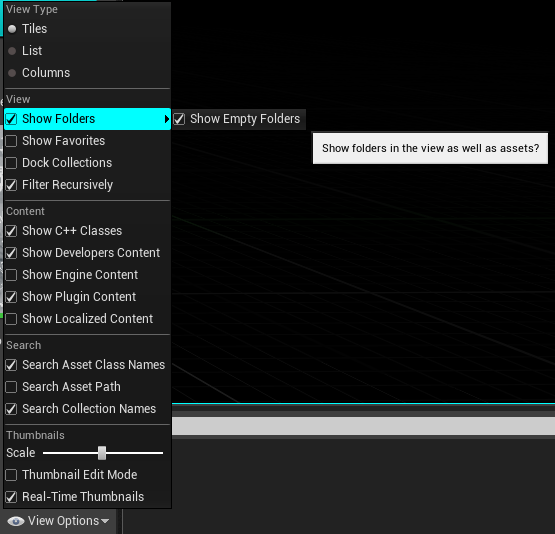
Quick #UE4 Tip number 68.
Having empty folders in Content Browser but don't want them displayed? You can disable Show Empty Folders from Content Browser View Options.
#unreal #unrealtips #unrealdev #indiegamedev #gamedev #indiedev #screenshotsaturday #UnrealEngine
 Twitter
·
lusty carbon
Twitter
·
lusty carbon
I can't figure out a way to remove all foliage from mesh in one click!
like there's Fill, but the opposite
anyone?
 stark marsh
how do i, when i attack i send out a raycast, and what it hits, damaged is applied to it, only if they're NOT in an actors to ignore list
so check to see if they're in the list before choosing to apply damage
then once damaged is applied once, put them in the ignore list
echo zealot
echo zealot
Is there any way in the UE4 to spawn actors in a way they don't just exist durin...
Is there any experienced ue4 dev here that could help me with my problem? I'm stuck for way too long now... (We could hang out in voice!)
stark marsh
then once my attack has finished clear the array?
 grim ore
@stark marsh it sounds like you know exactly how to do it, you do it as described. where is the problem?
stark marsh
i don't know how to actually do it
but i know what needs to be done, i just don't know exactly how
grim ore
well then you want someone to give you the exact code or what do you need?
because it sounds like you know what you need so you can find the help for each part in the docs or in tutorials and such
plush yew
hello , i am having troubles starting Unreal Engine for the first time . it always try to launch it in VR Mode or something ... anybody know how do i remove or uninstall VR or this libOVR fully ? https://gyazo.com/25e829609556b26e9634f514ea828a6a

 clever solstice
Anyone else experiencing instant crash when using vertex blend paint tool ?
in ue 4.26
stark marsh
how exactly would i make whatever actors have been damaged, to be ignored so they don't get damaged again?
grim ore
@plush yew go into the plugins oculus oculus VR folder, similar to this "E:\Epic Games\UE_4.26\Engine\Plugins\Runtime\Oculus\OculusVR", open the .uplugin file, and disable the "enabled by default" line
stark marsh
and then i need the actors to ignore to reset after the attack has finished
plush yew
thank you i gonna try it out
grim ore
@stark marsh whatever deals the damage, whatever decides something should take damage (i assume the player), can make an array that is full of actors that you add after you say "deal damage to this" and before you choose to "deal damage to this" you check to see if that actor is already in the array and if so you dont "deal damage to this"
stark marsh
i think i'm getting their
but now i need to be able check if they're in the array or not
and then i need to be able to clear the array too
which i don't know how to do
grim ore
make an array and start looking at the nodes you can use
grim ore
the first time or at all? what is inside of the ignore these variables. Start using debugging and breakpoints to walk thru the code (such as the branch)
stark marsh
i've set what has been damaged once to go into an array, which then goes into the actors to ignore array
then to damage again i check the ignore array
grim ore
yep so time to start debugging to see what is actually happening then
 tight prawn
why is this static mesh passing through collision ?
i've enabled collision and everything on it, but it still passes through
the cone is large on purpose, however I don't want it passing through objects
do I need to line trace and resize it based on the results ?
rotund scroll
it's a mesh
you're not going to make what you want work with a mesh
your resize solution is the only thing that's available, and it's not a great solution
tight prawn
what do you suggest I use for a cosmetics only cone of vision ?
the purpose of this is just to make the player aware of where the enemy is looking and heading to
An overview of the Security Door Blueprints.
got it ^^
 viral gorge
Some one plz help me can I use my projects from another folder if they were saved in another I lost all my work and it is showing no projects plz help as soon as possible
Just ping me
grim ore
you can open your project directly by opening the .uproject
viral gorge
Wait really
 final swallow
hey there!
is it any solutions to destruct a landscape? i want to emit earthquake.
i know that landscape is static mesh, but is it any solution for that?
wanna to something like in pic
or to make landscape to disappear to particles or something like that
 digital pasture
Hello, I'm wondering if anyone knows if there is something like "Find in blueprints" but for materials? I'd like to find all usages of a certain SceneTexture across all materials if possible.
 calm sphinx
Does 4.26 have any breaking bugs atm?
From what I see from forums & issues dashboard, it doesn't have any.
 terse pawn
Hey all; having trouble getting my Mac to multithread when building C++. I've updated the contents of the BuildConfiguration.xml file with the requisite tags for MaxProcessorCount and ProcessorCountMultiplier but it will not perform more than 5 parallel tasks despite being a 6-core hyperthreaded machine. Is there something I'm missing? My previous mac, a quad-core, always built with 8 parallel tasks and I never touched the BuildConfiguration file so I'm not entirely certain what I'm doing wrong. Any guidance would be greatly appreciated.
For the record, I know the BuildConfiguration.xml file is being taken into account because I am able to limit the number of processors (and thus parallel tasks) to anything less than 5 with no problem, it just will not build with more than 5.
 thorny coral
so i finally got my project to load after 45 minutes of waiting
at least i think it was 45 minutes
clever solstice
Where are we supposed to report about ue4 bugs ?
dark stag
does a level BP fire before any actor BP's in the level on load?
alternatively, is there a BP class that will?
 vocal loom
I'm getting the following error when I try to cook my assets
MainFrameActions: Packaging (Windows (64-bit)): RunUAT.bat ERROR: Visual studio and/or AutomationTool.csproj was not found, nor was Engine\Binaries\DotNET\AutomationTool.exe. Can't run the automation tool.```AutomationTool.exe doesn't exist in that location
I can't verify files since I'm using UE4 that's built from source code
 abstract solar
guys is possible to put the Landscape tools in a tab? in the 4.26 version? because is now in a menu in the top ??
 cedar wave
dark stag
does a level BP fire before any actor BP's in the level on load?
cedar wave
dark stag
does a level BP fire before any actor BP's in the level on load?
I'm quite interested in this as well to be honest, though, I'd imagine it would because other actors don't really exist unless inside of a level. Could always test it to be sure. And I think GameMode gets initialized before levels.
wary wave
dark stag
alternatively, is there a BP class that will?
no guarantee regarding ordering at all
 mossy nymph
you can hook into StartPlay, or InitGameState and few other functions in GameMode to execute code before BeginPlay
c++ required
 forest tree
The process of starting the engine and launching a game or play-in-editor session.
What actually happens when an Actor is loaded or spawned, and eventually dies.
These two help put it into pretty pictures
dawn gull
How do I make the client invisible to themself but visible to everybody else?
forest tree
dawn gull
How do I make the client invisible to themself but visible to everybody else?
Could just execute the logic that makes the person invisible on only the client
dawn gull
I'm using this and it doesnt work, everybody (including yourself) is visible on one side, and nobody (including self) is visible on the other.
forest tree
This is in your character blueprint?
dawn gull
yes
forest tree
By using this code, you've basically said:
- All characters of this class will hide themselves locally
- All characters of this class will show themselves on the server
dawn gull
ohhhhh im stupid
forest tree
Nah, everyone makes mistakes 😄
dawn gull
Well how do I make it so only yourself is invisible and not everybody?
dawn gull
It works perfectly! Thanks so much!
stark marsh
how do i get root motion working
would i need to do anything with the ue4 mannequin in blender?
i make the custom animations for the mannequin in blender
but i want a roll animation where he actually rolls with the animation
how do i do root motion
 true swift
hey has anyone used the new water stuff in 4.26?
specifically the underwater post processing
the surface shaders for the new stuff looks great but I have yet to see any footage of anything underwater and was wondering how that looked
 warm timber
how do I make trees react to directional wind?
plush yew
What does this mean ?
enable multiplayer world origin what is the difference between not checked and checked?
rotund scroll
sounds like something that would be easily googleable
stark marsh
help i need help with rootmotion
i want to add a roll animation in
is there anything i need to do to the manneqwuins mesh
oh an why does turning root motion off make him move away from the centre, whereas turning root motion on he stays in place, like it's the opposite
light thunder
I have a persistent map it's basically empty, a lighting level, and about 20 sublevels. I build lights on one level but unreal flags all the levels as being edited. ( and because it's saving the fact that I've made them not visible while I build lights for one of the sublevels, because I save everything after doing that.)
It makes me nervous to not save maps or other files unless I'm sure I haven't changed them. A lot of the time I save them but just don't submit the changes in my source control, but I'd like to know more about what's happening so I can make more informed decisions. Why does the editor flag those levels changed when AFAIK, they haven't been changed.
rotund scroll
it just does
an engine quirk
most of the time it's probably a failsafe as the level can't know if e.g. a BP inside of it has changed
and when you build lights you build lights for all levels
stark marsh
light thunder
what about streaming level volumes, I thought you could build one at a time, by simply toggling the visibility of the level, so it's lights aren't build @rotund scroll
stark marsh
how do i get to this screen
i cant get root motion working it's just not making the character move with the animation
rotund scroll
light thunder
what about streaming level volumes, I thought you could build one at a time, by ...
can't imagine that being the case no
light thunder
@rotund scroll So what is happening to my lighting in the other levels? When I make them visible, it doesn't say, "Lighting objects X need to be rebuilt"
and when I move objects, you can still see the baked shadows where they were
rotund scroll
is it WC?
light thunder
WC?
rotund scroll
generally the visibility is just for editor use and has no effect on lighting afaik
world composition
light thunder
world comp
covert hedge
@stark marsh afaik root motion is only to get the capsule component to move along the animation, or not, depending on which you want. It doesn't have anything to do with moving the character, that would be your moovement component
light thunder
no, at least I didn't mess with the system
stark marsh
so what would be the best way to do a darksouls type roll
rotund scroll
there is no best way
there are animation driven or gameplay driven approaches
both have pros and cons
plush yew
I have got a bit off topic question. I am working on developing a visual programming tool and I saw that UE Blueprints uses a similar nodes based visual script editor. Does anyone have any pointers to any UX/UI research/user studies Blueprint devs carried out when deciding to use a node based editor for this purpose?
in other words I simply want to know the reasons, if any, why they went for a node based setup with connecting lines and not something else (like puzzle piece like blocks, the kind of which you find in Scratch Programming tool for example)
rotund scroll
stuff like that is probably confidential epic material
plush yew
yeah I was wondering if they happened to make any publication of some sort on that by any chance
plush yew
I see. yeah google didnt really help on this. Do you know of any events that speakers might have talked about this? just so that I can try to dig up the video
rotund scroll
like I said I don't think there is anything
light thunder
@rotund scroll does this make sense ? if I move that light post, the shadow remains, so lighting build worked, even though aftewards I built another sublevel.
rotund scroll
if google turned up zilch then that's really your best option off the table
light thunder
@plush yew Do research into the concept of mindmaps and algorithms, there is a design philosophy regarding them
They wanted something visual akin to algorithms, the nodes simply developed because programming without parameters is basically not programming
rotund scroll
I mean the "design philosophy" is probably more a natural evolution of a programming language in a visual setting but then that's just my best guess
light thunder
In terms of your tool, I think one thing missing in visual programming is the relationship (hierarchical and cyclical) that one piece of code/blueprint has, in relationship to the others one - making a clear way to visually express that would be valuable for sure
rotund scroll
light thunder
<@!224571781862653952> does this make sense ? if I move that light post, the sha...
who knows. you'd get better answers if you dove into the engine code for light building and saw for yourself
plush yew
serious questions people
and dont really need an explanation just a yes ish or no
scenario 1: if i want to have character customization in my game do i need to create every possible setup as seperate models
scenario 2: or can i make 1 or a few specific preset models
and they can just somehow stretch and wiggle each part to how they like it o-o;
rotund scroll
you want a yes or no answer but you don't ask a yes or no question
stark marsh
in a lot of games the healthbar doesn't just go down
like when you're damaged the amount of health that's been taken from you when you were hit changed to another color, like red to yellow, then slides to the left until it has disapeared, how do i do this
grim ore
@plush yew you can do eeither one depending on what "character customization" is
plush yew
o.o
um like black desert online character customization
or like final fantasy xiv
or phantasy star online 2 and or universe
grim ore
@stark marsh the googles has examples, fighting game hit bars is a common term to look at. I personally know I made a video covering exactly this idea as well
grim ore
yep too many options there as the term character customization can mean alot and in those cases can probably cover both scenarios as well
rotund scroll
literally his channel is in his bio lmao
grim ore
for example black desert would use morph targets on the character so you can adjust things such as weight and plumpness
plush yew
ah
grim ore
PSO would swap out body parts due to things being swappable such as mech arms on humanoid bodies
rotund scroll
grim ore
yep too many options there as the term character customization can mean alot *an...
out of curiosity, what do you call the concept?
grim ore
you can if you know what you are doing
stark marsh
@grim ore do you know which video it is please
plush yew
light thunder
In terms of your tool, I think one thing missing in visual programming is the re...
Thanks for the tips!
so it's hard
but i can do it if i muscle it out
okie okie
grim ore
its lots of prep work and art, yes
plush yew
so i just need like 1 or a few models that will be take care of height and such presets
than do the work to make them plumpy as umpf~ and with swampable bits
thanksies!
oh mathew! i learnt how to do landscapes and ive been messing around with it for a while
its really really funn
grim ore
heres one for ue4 https://www.youtube.com/watch?v=WqANF-G0hDY
rotund scroll
I was more looking for an industry term but I realized it's perhaps not standardized enough
I've called it ghost health myself
grim ore
and heres the one I did https://youtu.be/GQP8wv8m4Kc
and I traditionally think of it as a fighter health bar yeah, but recent damage seems appropriate
plush yew
subs fast as fickle salads!
@grim ore wait i have 1 more question and its probably a silly one
i notice most people use other tutorials other than the ones from unreal engine
should i stick to other peoples tutorials or should i sit through unreal's as well o-o
the official ones i mean
 hallow wyvern
Anyone know off hand how to specify different icon sizes for a windows package?
All I see is one size option and it seems to auto resize for all sizes.
 still moat
@plush yew Any tutorial is better than no tutorial. In my experience it doesn't/didn't matter from where it came.
 shut glen
when i press the magnifying loop i doesnt do anything. Any idea on how could i attach the gun to the hand socket?
still moat
@shut glen Its doing nothing because there aren't any bones, are there any bones to what the component is attached to ?
shut glen
still moat
<@!649954758890881034> Its doing nothing because there aren't any bones, are the...
i wanna attach it to the player
still moat
You gotta attach whatever component you have under the skeletal mesh
then you'll be able to pick a bone to attach it to
shut glen
Thanks :)
@still moat
still moat
Np 😉
 rough osprey
Hello! I am having an issue where I am trying to import a car from Blender (I have all the units setup correctly in Blender) and my individual bones show up in the Skeletal area but not in the Physics tab and no bones are seen there
 leaden tide
Trying to use a custom collision mesh - but when I save as an FBX and import to UE4 the desired collision mesh doesn't appear?
rotund scroll
use the send to unreal plugin
 warm sluice
Anyone knows where is Backup System in 4.26? It seems there is no more Saved/Backup directory. UE4 crashes, great, now there is no way to bring files back if not committed before! Amazing!
plush yew
wait unreal 26 is out atm?
still moat
Yes
 blissful rock
Is there a room for just starting out?
warm sluice
Yes it's out, what else is removed what worked perfectly fine? 😄
blissful rock
The reason I ask is it seems like it's a bothersome to go to some of these chats ask me questions that y'all probably answer a million times every time somebody new comes in
light thunder
@blissful rock General is probably the best place for it, even if there was a "newbie" you'd have the same issue - the discord search function is decent but not necessarily as clear as google - basically, it is what it is,
blissful rock
Oh ok thank yoi@light thunder
I mean I've messed with this before years ago but it was with no clear directive and only motivated on pure curiosity and now with the engine and their developers leaping to new bounds is kind of opened up my curiosity that is back to support of a local Arthur in my town
light thunder
my advice, as someone who has been here for years but is still a noob in many respects, is to first google and find out as much as you can, and try to develop* "effective question asking" habits
blissful rock
That's a good way to put it@light thunder I'm in my last week of class for my bachelor's degree so I have been putting most of my research efforts into that along with building several databases on personal work and schooling so I'll be getting to the new database for this game engine soon
light thunder
the more vauge a question is, the harder it is to answer and you probably won't get a good answer
"how do I make a character shoot a gun" is like, very very vague - instead, demonstrate your respect for people's free time by first getting as far as you can on your own or asking for a good resource on youtube - even better, you can try something like, "I want to get started with animating - is THIS LINK a good one, or can anyone recommend something better" ?
blissful rock
I really haven't been able to jump into the engine just yet because I'm still waiting for the approval for the student side of the game engine to be approved by the 22nd
light thunder
approval?
blissful rock
Oh wait, that for Unity, due to my Oculs Rift side of things. Sorry I've been bouncing between two different engines
I've had a few people tell me to start go to Unity and some people just say stay here, go to the lessons and courses and stay with the community and I can learn
 sterile tulip
Is 32gb ram enough for large open worlds?
rough osprey
anyone have an idea as to why my wheel colliders in game are 90 degrees off? the car drives sideways because of this
light thunder
@rough osprey Did you try deleting the collision and having Unreal generate it's own?
sterile tulip
Did you set the pivot point? Did you set the metric scale? Did you apply the transforms? @rough osprey
rough osprey
oh I forgot to apply transforms
hold on
and Ill try having unreal generate its own
neither worked 😦
light thunder
show me the pivot point in the source model @rough osprey
rough osprey
light thunder
Try turning it sideways, the wrong way, and see what that change does to your model in Unreal
if it doesn't change it, then you know it's not that
sterile tulip
Did you rotate the car right?
rough osprey
hold on im going to try to apply all transforms on each individual wheel
see if that works
yeah its right
sterile tulip
Is this blender? @rough osprey
thorny coral
My computer has stayed frozen like this for 1 or 2 hours, how long does it take usually to package a small project?
thorny coral
median hound
is the shaders going down?
It was until a couple hours ago when it just stopped completely at that number in the picture
And my monitor just went to sleep lol
rough osprey
@sterile tulip yeah it works now I didnt apply transforms right on everything
 steel shell
i have a very detailed 3d model of a landscape. because unreal engine cannot handle so much detail, i created a heightmap and put a texture on it. The problem is now that at some points the landscape is very steep and the texture is stretched:
someone knows what would be an option in these areas?
 prisma plank
GPU lightmass will work with DX11?
light thunder
@steel shell I think you can export the landmass as a mesh and try to fix the UV's? that or check youtube because I'm sure this is a common issue
steel shell
@light thunder i have not found a way yet.. i would like to know how other people deal with this problem actually 🙂
light thunder
I don't deal with landscapes much but they probably have more blended areas in their height-map so drops aren't that obvious, I'm not sure what the term is, maybe "heightmap stretching" but if you soften your angles it would make it less noticeable
that or use world composition, which I know next to nothing on
check #level-design too, if you haven't already
stark marsh
ive managed to prevent spamming but now the comabt just feels unresponsive
how can i make it feel unresponsize whilst also preventing spamming
to stop spamming i made it so i have to wait a short amount of time to attack again, but i lierally have to wait half a second to attack again
without this though i could pres really fast and the animations will bug
 ionic haven
Best way to creat hair for unreal engine without the use of expensive softqare?
light thunder
@stark marsh there are plenty of very affordable courses on how to make a game with unreal engine on talking things that might only cost $10 but have 40 hours of walk-through videos and support forums - even discord channels - you are asking questions to problems that have already been solved and I think you'll find a lot of value from one of those courses
rotund scroll
stark marsh
ive managed to prevent spamming but now the comabt just feels unresponsive
welcome to game design
 cloud patrol
hey everyone, i think this question might be quite stupid but how do i disable the low poly look of a mesh that is far from the camera?
grim ore
that is probably the level of details so adjust them
light thunder
That's the LOD
light thunder
you can either just delete the levels you don't want,
or redo them
@grim ore you know anything about unreal not importing LOD's in an FBX properly? I exported out to blender and couldn't figure out the right method for importing them and having them come back as a single static mesh with 3 LOD's - it was either 1 static mesh with no LOD's or 3 separate static mesh actors -
cloud patrol
alright, thank you man 😄
grim ore
@light thunder nope I don't art 😦 I assume you followed the documentation page on them?
light thunder
yes it was ....rather opaque
it mentioned naming convetions and proceeded to give the clear example of %1, which i took to having Staticmesh1 (LOD1, Staticmesh2(LOD2) and so on
it said "import LOD's which I did but provided no troubleshooting methods, it is what it is I guess
grim ore
oh I didnt see that I just saw they needed to be grouped properly in the dcc program but I havent used blender
yeah googling it looks like there are multple ways to get blender to do it and all are wonky lol
some using scripts, etc.
light thunder
There's a pipeline tool - frustrating thing was, It exported once right somehow but I couldn't figure out what I did to make it work lol - it's a minor issue, not really worried about having a single LOD for the few rare times I need to adjust static meshes to have extra functionality but it's kinda the principle of the thing....it should work
rotund scroll
did wind actors ever become a thing in UE4?
light thunder
that's a good question Cranz - you mean like the witcher 3?
god that game did wind amazing - so many games I played but that's first time I was like' holy shit, there's wind"
rotund scroll
I don't know that it had a modkit
but there's a wind node in materials that asks for a wind actor
light thunder
right now the best I could think of is instanced foliage that somehow had it's material set to a dynamic parameter to the animation speed
rotund scroll
so I'm curious
light thunder
damnit you are going to distract me, now I'm googling "make wind like in the witcher 3"
rotund scroll
I apologize
light thunder
https://youtu.be/wpZqYjAA6Cg "meh" it's something

Project Files : https://www.patreon.com/CodeLikeMe/posts?tag=source code
Support my work on Patreon : https://www.patreon.com/CodeLikeMe
In this video, i'll explain how to setup a global directional wind system implemented withing materials using grass wind. the direction of the wind can be changed with a material parameter which is accessible...
trees are missing it
rotund scroll
yeah tbh I just wanted to use it for water and this looks like a gerstner wave interpretation
I was honestly just wondering about the wind actor
because if that's real
then that potentially opens up for changing wind direction
light thunder

Blog about Environment Graphics for Games. Mainly my work i do in lectures. Also stuff from my work for Piranha Bytes on the Gothic and Risen Series.
rotund scroll
okay so there is a wind actor somehow somewhere
since that guy references it
ah it's called a Wind Directional Source
now
the question is how that relates to the wind node in the material
light thunder
I see your frustration lol - not exactly helpful
couldn't even spell the goddamn tooltip right
rotund scroll
yeah
seems like the wind directional source is only compatible with speedtree assets too
@grim ore I don't suppose you have a video on this?
grim ore
pretty much what you guys have said is what I know of it. Speedtree uses it to basicaly know the wind stuff for it's use. Beyond that I dont think anything uses it. Can use a general material parameter collection to move meshes as far as I know
grim ore
its a really good question tho im gonna look at it more
 finite chasm
How would I make a camera that looks straight down and can only move on the x and y coords?
Also zoom in and out but I will get to that eventually
rotund scroll
grim ore
its a really good question tho im gonna look at it more
much appreciate 🙏
light thunder
You can lock something's to a particularly axis by Making a Tick Event that Gets It's movement (whatever is making it move) and then AddWorldOffset to whatever it is, but not connect the node that you want to leave out ... so you'd hook up x an y, but not z
@finite chasm
finite chasm
Thank you
I’m pretty new to UE4 so forgive me if I have more questions.
I know there is a ton of YouTube tutorials
light thunder
so, NEVER do this in VR because you will nausea your player (in my case, that is the brief but actual goal) - but this is running on event tick,
finite chasm
Trying to make a game like Europa Universalis
light thunder
that's using rotation but you could do whatever you want in terms of rotation or location
Civilization or Risk?
finite chasm
Civ is also a good representation of my project
light thunder
the "last known z" position is set the moment this function turns on, so it doesn't "jump"
finite chasm
Pretty much a game where you build up a country
light thunder
I recommend you do one of the online courses on Unreal for sure, and be patient about learning
Honestly the best advice, I wish i had follow, was to following a "learn stage" where you just watch videos and try experiments, and a build stage, but you alternate - you can try to piecemeal it like me and learn as you go, but it's a masochist's game
@grim ore Well, this is hilariously wrong -
tried timeline updating to add local offset, and lerping between set location with vector plus 50 to z
grim ore
oy
light thunder
I always have trouble with these
and I don't do them just long enough to forget what I did wrong the last time I figured it out
grim ore
yep I only remember due to repetition
light thunder
weird
maybe I got my time wrong - I put this on and it never fired
should be 2 seconds
so why does 1.2 never fire?
only made it to one
grim ore
well your value never goes above 1 does it?
grim ore
nope you would get the timeline variable and get the time from it
 visual flame
I am having trouble with deleting an actor (even for testing purposes) My test setup looks like this: (This function destroys target actor)
I trigger it here:
light thunder
So it's adding 50 every tick it seems
grim ore
well what the actual problem?
visual flame
but it keeps getting an error: Blueprint Runtime Error: "Accessed None trying to read property BuildingRef". Blueprint: RTS_campawncontroller Function: Execute Ubergraph RTS Campawncontroller Graph: EventGraph Node: KIll Building
light thunder
Does it ever fire before?
Because that error means your reference to it is invalid - either you didn't update the reference or that actor doesnt' exist - did you check the world outliner for that
visual flame
I am placing the actor in in game
grim ore
so you are calling kill building and which part is failing, the calling it or the destroy actor part
light thunder
@grim ore Why does it add 50 each update of the timeline, instead of lerping between the two poitns, I want the original vector, and the original vector + 50 to z, and lerp between those points
grim ore
@light thunder if its like the screenshots your starting location (the A in the lerp) changes every time its called rather than your A and B being fixed and the timeline output driving it from A to B
@visual flame welp you need to figure out what is not working. Use debugging and breakpoints to figure out what is not being called. What is your Building Ref variable
visual flame
a reference to my building parent
grim ore
did you verify it?
visual flame
How do you do so?
grim ore
well use breakpoints or prints to see what it is or just walk thru and see what it says it is
according to the error the Building ref is bad
visual flame
thank you
autumn flame
You could intiliaze the starting location before the timeline if it's a problem, then have the end location with starting location + 50 still before and plug them in A and B
If it keeps adding 50 everytime
light thunder
grim ore
<@!273265779175194624> if its like the screenshots your starting location (the A...
So basically, get the window location BEFORE the timeline? or will that still get updating, even if it is a node before the timeline event - I've promoted it to a variable and even make an end position variable but I'm curious if I could do it without doing that, just by getting it before the timeline is executed (would it go that far back)?
autumn flame
Basically starting and end location aleady decided before the ticks
grim ore
@light thunder yep get the variable before and the end before and then lerp between the 2
er... get your start and end locations before and use them, or determine them in the loop (the end is just start + value)
an alternative to the lerp is an interpto and you could use the current location every frame and just the end as fixed but I like simplicity of a lerp
light thunder
cool thanks glad my instincts were somewhat on the right track
late verge
can anyone help me understand why the blend outs on my camera shake blueprints are just completely broken?
i have my camera shake duration set up correctly, and even if i set it to .1 for the blend out, the camera shake stops abruptly like halfway through
i've done everything i can with the duration and even added a blend in to see if that was the issue, but the blend out still doesn't work as it should
late verge
if anyone here knows a solution feel free to @ me, i've been at this for days
light thunder
also weird - Why is this static mesh not visible I'm ticking the visibility and the location and they are all what they are supposed to be
asset in question
visual flame
I have a code that is failing to call another blueprints function to destroy an actor that is placed in-game (the calling code)
the destroy code:
grim ore
yep again what is building ref
when do you set it, what value is inside of it, what value is inside of it when you are trying to use it during that code
visual flame
I set it upon starting the game, and it is just a reference when I try to use it
autumn flame
Is it a empty reference tho?
It can hold only 1 building inside, or you expose it and set it manually from the world or if you wanna destroy them all just get all actors with a for each loop
It will iterate through them all this way
autumn flame
You are casting the ref to itself and setting it again?
visual flame
oops
autumn flame
You could just use Self then
Or destroy actor self if you want it to just delete itself
visual flame
this is in my camera controller
autumn flame
Thing is makes no sense casting a variable to it's same object, you won't get anything out of it
It's like saying i have a house with all the house variables, but i still cast to the house object and set my house again
visual flame
Maybe I need to redesign my whole system
autumn flame
What do you want to achieve at the end?
visual flame
I want to have an object of my choice to be deleted by me
autumn flame
How do you get the said object?
How does the engine know which one to delete i mean
visual flame
I guess that is my main problem
I am creating the objects in game, so I would need to constantly be updating the list, correct?
light thunder
You add them to an array
visual flame
would I use tick, or would that be laggy?
light thunder
and the index of the array they are added to, that's the "key" or the "Location" of where they are
no, hardly ever need to use tick
autumn flame
Simplest way to test this type of system would be a Line Trace, it will return what it hits, from Hit Actor cast to your Building and you have the reference there or do something with it
That's if you want your player to decide which one
visual flame
how would I trigger the array update?
light thunder
adding to what he is saying, you can make an "IsValid Node" to do the thing that you want and if it doesnt' hit something that you care about, it just does ntothing
you need to watch the blueprint comm video I think
autumn flame
IsValid Node is my bane, I always forget it exists :'D
light thunder
https://www.youtube.com/watch?v=EM_HYqQdToE&t=2s&ab_channel=UnrealEngine @visual flame if you haven't seen this yet, you will level up like 5 levels by watching this

Announce Post: https://forums.unrealengine.com/showthread.php?101051
This Training Stream takes a look at Blueprint Communication. We find that Unreal Developers of all levels can sometimes struggle through the concepts behind moving data between objects. So in this video we'll take a look at the different ways to make Blueprints talk to one an...
visual flame
thank you
 jaunty cedar
 full stump
Ugh I can't download 4.26 because I'm out of storage :/
Now I need to upgrade my storage before I can use it ;-;
I've basically deleted all I could that's not important as well :/
 ivory ridge
@light thunder I see your 23GB and go all in
ivory ridge
haha XD
 oblique stream
could uninstall unity lol
light thunder
full stump
Ugh I can't download 4.26 because I'm out of storage :/
try deleting your vault cache in installation - i found like 100 gb there once
dark stag
dumb but is there a way to get the actors class after getting the actors object?
returning it as actor object, but i need it to return the slass
*class
oblique stream
i have seen a "create class from object" node
dark stag
shrug ?
no that cant be it
actually scratch that, im doing this wrong
making a map:
but i need that "get attach parent actor" to be a camera rail object
which it is.
but its returning actor object
 weary basalt
@dark stag GetClass?
Do you want to cast it to something?
Cast it to a CameraRail perhaps?
 soft fiber
Deactivate player and play an animation, but when I activate again there is a large shutter because the during the animation the player has moved. Is there anyway to fix this issue?
 uneven fractal
any idea why this level streaming volume is disabled?
soft fiber
I'm thinking the shutter is being caused by the camera jump, but I don't know how to get around it?
 summer harness
Does anyone run unreal 4.26 DMX plugin with Grand MA console? I got problem in 4.26 with artnet. Everything was fine in version 4.25 and i recived artnet, but 4.26 i got nothing.
hearty dagger
im trying to chance the sun position but nothing happens when i chance the values
 cunning quest
#ue4-general How to detect physical material with niagara
late verge
can anyone help me understand why the blend outs on my camera shake blueprints are just completely broken?
i have my camera shake duration set up correctly, and even if i set it to .1 for the blend out, the camera shake stops abruptly like halfway through. i've done everything i can with the duration and even added a blend in to see if that was the issue, but the blend out still doesn't work as it should.
i've been at this issue for days ☹️ if anyone knows a solution please don't hesitate to @ me
 restive yarrow
My player character tends to die when i hit play beyond a certain range across my landscape ( you can see the blue line ), but i have set my killZ to almost infinite , why does this happen?
 open wadi
So I'm sure no one will have the answer, but just in case hell froze over and it wasn't on the news, I'm having this exact issue: https://answers.unrealengine.com/questions/766713/text-box-commits-when-clicking-outside-of-it.html
I have a text box, and when a user clicks outside of it it commits the text. I only want the text committed on enter, not clicking outside of the box. I have it configured this way. Anyone have any clue how to prevent clicking outside of a text box from committing the change?
open wadi
For example - though it's hard to see due to the comment color, I clearly have the commit type set to "On Enter", yet clicking anywhere outside of the text box acts as an "on enter' commit.
Any idea how to configure the commit so clicking outside of the text box does not, for whatever reason, register as an "on enter"?
lusty carbon
Is DLSS and RTXGI production ready in the latest UE4 version?
dim arch
 honest vale
@lusty carbon UE 4 as far as I know does not use any vendor specific stuff
(like DLSS)
 neon magnet
Is there a way to disable raytracing when playing but keep it on to bake the gpu lightmass? How is the setup supposed to be? I tried gpu lightmass once according to the instructions - it baked it fine but it's always calculating. Now within the editor, fine, but when I press play, it uses raytracing instead of the baked lightmass, so what have I missed in the options?
lusty carbon
honest vale
<@!459754093397803018> UE 4 as far as I know does not use any vendor specific st...
What does that mean?
UE4 is supposed to use DLss afaik
honest vale
vendor specific as in nvidia/amd specific tech
for example UE 4 does not use RTX per se, instead everything is programmed to use DXR
lusty carbon
So gotta use the special Nvidia branch to use it?
lusty carbon
Im talking about DLSS
honest vale
I don't know about that, I haven't seen anything about DLSS in engine 🤔
lusty carbon
ok thanks
rough osprey
sorry for the stupid question im new to this whole thing
but why does unreal show my tires inside out like?
 regal mulch
If that's blender then there should be a button that says "Recalculate Normals" somewhere
But I'm not sure where that is in 2.8+
 frank wren
@regal mulch Alt+N
I guess
just out of my mind if not I will check it after my lol game
neon magnet
neon magnet
Is there a way to disable raytracing when playing but keep it on to bake the gpu...
beep
regal mulch
Tell them, not me :P
frank wren
oh sorry
regal mulch
neon magnet
beep
#graphics maybe?
neon magnet
regal mulch
<#221799195806400512> maybe?
I can try but I'm not making graphics more of an editor/engine question
regal mulch
Yeah but RayTracing and GPU Lightmass stuff is probably #graphics
So the peeps that might be able to help are probably there
 harsh tiger
https://youtu.be/62EFiBrUhEI?t=3 when treyarch recorded this. for the piece at 3 seconds where the camera follows the gun. is this just as simple as attaching the camera to the weapon itself during recording? or are they doing something more complex?

This is the Season 1 Battle Pass.
Jump into 100 tactical grade tiers on December 16 in Black Ops Cold War and Warzone.
 dim merlin
Hi, anyone knows whats the best export and import format for a heightmap (runtime mesh) ?
frank wren
Hey is there anyone who tested the new water plugin?
I am making this scene (image) and have the problem that the landscape isn't a landscape but a mesh I made in Blender in some minutes.
My problem is, that when I use the same Height Map in Unreal to create a landscape with it, it looks bad or it needs to be that highpoly that it crashes. So I need to sculpt a map that is already finished in an extra step?
Or should I use this mesh without creating a landscape?
I want some nice waves heading towards the shore with foam and so on and I read the new water plugin needs to be used together with a landscape for that?
Short: I prefer my mesh which isn't a landscape. Do I need to model a landscape for the things I want to do?
rough osprey
sorry for another dumb question but
for some reason the viewport when editing my bp disappeared
oh shit oh shit
ngm
ngm
regal mulch
Click on the blue link at the top
regal mulch
UE4 turns BPs into DataOnly BPs if you have 0 code in them
regal mulch
Well "turn" is maybe the wrong word, but it hides the unneeded rest as it thinks you only changed variables on it.
open wadi
Question: Has anyone ever seen an issue on Mac where Unreal randomly will not maintain a websocket connection, indicating "OnClose" is happening over and over (where your code is designed to reconnect OnClose)?
Sometimes it happens, sometimes it doesn't. Right now it's happening over and over, every simulation.
Same code never does it on Windows. And sometimes doesn't do it on Mac.
The logs simply say the websocket connection onClose message is "Message: Peer did not specify a reason for initiating the closing"
stuck scarab
@rough osprey For the future, the easiest way (for me) to check my normals is this option (while you are in edit mode)
It will color everything in two colors, blue and red. Every face you need to see should be blue, so if you see any red on the outside you can easily identify it that way. Then change those sides with alt+n and whatever option you like, like flip
open wadi
Lol, as an aside, I just did a wireshark dump and saw that epic games launcher is performing a non-stop UDP stream between my windows and mac boxes, what on earth.
rough osprey
@stuck scarab thank you for the tips!
one more question i promise
is there a way i could make collisions more accurate?
the wheel currently goes through the cylinder which isn't ideal imo
stuck scarab
yeah there are some options for you
for quick testing you could turn on a more detailed collision inside unreal, I say quick testing because it's probably not an optimized way 🙂 If you just want to play around that should be fine tho.
2:you could try to add a better suiting collision inside unreal
stuck scarab
3: you make a custom collision in blender and export it together with the car/tiles
open wadi
Does anyone know why exactly UE4Editor.exe is blasting a UDP stream from my Windows box to my Mac?
stuck scarab
for that you need to change this setting to "use complex collision as simple" @rough osprey
In the upper top menu, Collision, enable simple collision if not already. Then this should give you perfectly collision, with the cost of performance. Nothing to worry about at early stages tho
#work-in-progress
Fun character I think 🙂
 hot beacon
rough osprey
hot beacon
rough osprey
@stuck scarab so all I need to do is make my mesh static then change the collision settings and it'll work?
stuck scarab
oh sorry mate, so your car is a skeleton and not a mesh? Havent worked with vehicles yet 🙂
stuck scarab
mh.. might actually be my bad. Depending on how you run this car it could be the skeleton physics where you handle collision
Anyone here using the Unreal -> Blender Rigify/Uefy -> Unreal workflow?
stuck scarab
not without seeing your code
stuck scarab
try it without the rotation of your sphere
light thunder
@shut glen The first person shooter template has a projectile on it, you can see what they did exactly on there
 craggy sierra
is it normal that scaling only one axis of skeletal mesh, breaks collision? 4.25
skeletal mesh has no collision after scaling it for example on Z axis only
if I scale SM as a whole, on all axis then its good
 fringe pivot
So how much storage do you think it would take to version-control a game with probably 20GB of assets?
I feel it would become unmanageable pretty quick.
 midnight gate
help i cant log into epic games launcher is loading of ages and killing my internet
i need to access my assets ffs
light thunder
@fringe pivot You won't need to push all of those assets
forest tree
fringe pivot
So how much storage do you think it would take to version-control a game with pr...
Perforce
Totally doable
light thunder
@fringe pivot Check #source-control but generally just the assets you can change - if you need the space, just push your blueprints and other logic code, things like textures you don't need to push - you can always push it if you are thinking about making a change to a texture or something else - you can push it before you make a change as a revision and then you'll have a backup you can revert to
@midnight gate just open your uproject file
Unless you need to download one of your marketplace assets
midnight gate
open what file
i need to open the damn launcher to get an asset
i dont need to acces ue4 that part works fine
light thunder
is it from a project you are working on?
light thunder
might be able to try logging in through the web if the launcher is being quirky
 obsidian nimbus
it does seem like loggin in launcher takes longer, you can scroll trough project w/o lag now tho 😛
echo zealot
Is there any way to get/set a "sound time" type variable? I would like to see at what playtime a sound component is and adjust the time.
 worn shadow
hello i imported some fbx files from mixamo but its says "Mesh contains Root bone as root but animation doesn't contain the root track " how can i fix it ?
stuck scarab
Export your UE Skeleton as fbx. Upload it to mixamo.
Use this skeleton with the animation
At the download step choose "with skin"
had the same issue yesterday, still very clueless about animations but that solved the error at least @worn shadow
stuck scarab
np, dont know why its so hard to find useful information on that topic
 winged crypt
I can't see decals unless lit by movable/stationary lights, but I have dbuffer decals enabled and this decal uses that mode 🤔
frank wren
hey :)
Is there a way to create a multiple paintable master material?
 slender island
 novel charm
Hi
 haughty hound
Hi, when i pause the game im able to rotate the camera but not to move it, how could i move it? thanks guys
 cloud forum
Structure variable bugs will be the end of me
works fine when I set the variable to editable
 dense knoll
Any way to do automatic replication without re writing a ton of things?
wary wave
probably not
when you make something multiplayer, you make it multiplayer from the start
dense knoll
Wish UE4 had it built in
wary wave
it is built in?
wary wave
if you think that's manual, I have bad news for you 😄
dense knoll
Wait wat
wary wave
UE4 does a LOT for you
but you still obviously have to tell it what data to replicate and when
that part could never be automatic
dense knoll
Thats the part im talking about
There should be a setting in the actor to automatically replicate everything in it
obsidian nimbus
that would flood connection real fast
obsidian nimbus
characters are allready setup for replication
dense knoll
I created a custom Pawn
 sterile thistle
We are all custom pawns
 cedar vector
mood:
 zealous cloak
i have a question about the editor layout. i moved the my BLueprint section to the right of my window and then back again. No every new opened has it on the right side. How can i save this setting?
dense knoll
cedar vector
mood:
Summary of 2020
 grim shale
Hello, am new to programming and am looking to get into UE4,
C++ Programming specifically
I have some experience with programming (very small experience).
And I was wondering if one of you guys knows a good place to start with this engine
Because I have no idea where to start.
Thanks in advance.
 fierce tulip
@grim shale while you wait for smore answers, check out the pinned message in this channel for a getting started care-pack
grim shale
@fierce tulip sounds good, I'll check it out.
One question though,
doesn't Epic Games have like a course for teaching the basics of their engine?
fierce tulip
they have getting started tutorials available on the wiki/youtube and learning tab on the launcher
grim shale
Ah, I didn't see that in the launcher the first time I started it.
I just came here straight away...
plush yew
sorry to interrupt but i was wondering if anyone could help me find something for a simple weapon sway? i mean for like any object i want a flashlight to sway when the camera moves.
grim shale
@fierce tulip thanks for the help,
I appreciate it.
fierce tulip
np, i also remember Tom Looman publishing a c++ for ue4 tutorial thingy. i think googling "tom looman ue4 cpp tutorial" might get you the right results.
its a bit old, so might need to use an older ue4 version to get it working as things change under the hood.
fierce tulip
in case some missed it:
https://80.lv/articles/packs-from-unreal-for-all-creators-film-available-for-free/

Epic Games offers two packs used for the production of Unreal for All Creators film free for download.
 south flax
guys i am a 13 years old kid. does particel system kills fps???
wary wave
those things are neat, but probably not useful for almost anyone 😄
south flax
i wanna make some smoke in my project
cloud patrol
hey, im following a course for creating large scale terrain but mine has these dark marks and idk how to fix them (mats downloaded from quixel)
i used World Machine
wary wave
build lighting.
cloud patrol
akready did
didnt work
oh nvm, it did lol
thank you, actual stupid problem haha
cedar vector
south flax
i wanna make some smoke in my project
careful when spawning lots of translucent particles (like smoke-planes)! When translucency overlaps a lot, it can kill the FPS fast
south flax
cedar vector
careful when spawning lots of translucent particles (like smoke-planes)! When tr...
is it kills fps like the explosions of games????????
cedar vector
south flax
is it kills fps like the explosions of games????????
Not sure I understand that question haha, but try keep the particle count as low as you can when working with Translucent-materials
south flax
i mean if we burst any cars in many games like gta v it kills a lot of fps. is it like that?
cedar vector
south flax
i mean if we burst any cars in many games like gta v it kills a lot of fps. is i...
Uh, yes probably!
south flax
but the problem is i have a very low end laptop that has i3 8130u 8gb ram and no gpu. even i get a lot of problems in making maps that takes a lot of time to compile shaders
midnight gate
im working on a quiz and i want to have the questions randomized cause number 1 will always be correct while the rest is wrong
how should i go about randomizing these 4 data struk variables into the ui?
covert hedge
put them into an array, use a random int node and then use the result to get the element of that array
@midnight gate
nevermind that
there's a shuffle method
you can call
midnight gate
may you screenshot me the setup? i have a hard time understanding
midnight gate
oh wow a shuffle node
covert hedge
than shuffle the array, and the lements are in random order 🙂
covert hedge

soft fiber
After the animation, when I move the origin the actual location of the player, it causes a camera jump. What is a good way to handle this?
midnight gate
i would not recomend this method
covert hedge
mb something to do with root motion and stuff? idk 
soft fiber
@midnight gate Why? What do you recomend?
Does any have any recommendations for my question above?
worn shadow
guys how can i fix this 😦
midnight gate
Move the character instead of root
@soft fiber
Mive the whole actor
Your anins should always be around the 0,0,0 pivot
light thunder
What's the animation concept for having a animation that targets a particular part of the skeleton but not all of it (like a reload animation that you place ontop of a walking animation) it's not blendspace or montage ...think it's slot but my google is failing me
midnight gate
@worn shadow cant read text to tiny
@light thunder smth like overlays look it up i dont know much
Anim overlays
Anim mixing etc
celest spire
@worn shadow , what cg app are you exporting from?
light thunder
Is it not montage?
midnight gate
@worn shadow u imported smth with 0 data
worn shadow
im trying to import some animation from mixamo but 😦
winter gale
Quick #UE4 Tip number 69.
Can't remember viewport controls? You can click show Viewport Controls in bottomleft corner of Viewport.
#unreal #unrealtips #unrealdev #indiegamedev #gamedev #indiedev #screenshotsaturday #UnrealEngine
 Twitter
·
midnight gate
Twitter
·
midnight gate
@worn shadow idk its weird its not working did u select skeleton?
worn shadow
yes
midnight gate
Can u import the fbx into blender or smth?
worn shadow
if you are avabile i can share my screen and i can show you what i made so you can tell me whats wrong ? 🙂
worn shadow
midnight gate
Can u import the fbx into blender or smth?
gonna try
midnight gate
Im busy w ue4 myself cant talk
worn shadow
i got it 🙂
 dense ravine
hey, has someone an idea why i can't chose other languages in the right click, "Asset localization/Create Asset Localization/language" menu except for english? I added the other languages in the localization dashboard but it's not showing up on the asset localization
 unique kraken
anyone can tell me if you can creat a pose asset useing morph targets?
midnight gate
how can i read what is written on the button and if the text = that execute?
you kno i shufled my questions and now idk how to know wich button is question 1 wich button question 2
soft fiber
worn shadow
im trying to import some animation from mixamo but 😦
This approach actual works, don't waste your time with other methods:
https://www.youtube.com/watch?v=TnuCfyuIhpM
This video explains one of the ways to utilize animations from Mixamo and the Unreal Third person template with a modified Unreal Engine skeleton. This is a follow-up to my previous videos and explores new techniques based on viewer feedback.
I am not affiliated with Unreal Engine. I am not a professional educator. This video is meant to help s...
grim ore
@midnight gate when do you read it?
there is an event each time you push the button that you would use, so the button shouldn't be changing unless your changing the text at runtime. IF you are doing that you still know which button is pressed so you can get the text block widget that is assigned to that button and read its text