#ue4-general
1 messages · Page 891 of 1
 coral bear
 misty tree
I'm stuck as well with this
 plush yew
I keep getting this everytime I try to install unreal engine
And then this
But it doesn't exist on my computer anywhere
So it can't be running
 soft fiber
You probably already figured it out by now. Is called Atmosphere Sun Light in the Direction Light properties. Here is the video that helped me: https://www.youtube.com/watch?v=WX7yJ-ZPYB0

This video is about the Unreal Engine, one of the best engines for game design and development ...
Bu video oyun tasarımı ve geliştirmek için en iyi motorlardan biri olan Unreal Engine hakkındadır...
➤ All course categories: https://goo.gl/6FHBV9
➤ Tüm ders kategorileri: https://goo.gl/6FHBV9
•If you like lessons, like and do not forget to su...
coral bear
There's probably a dead / old registry key somewhere
which is why it still see's it as installed
plush yew
Where would I find that
coral bear
Delete it. Delete all the folders. uninstall all the things related too it you can. Then run CCleaner (it's free) to clean you registry - back it up first just in case.
plush yew
Ok
Ok
So it does say theres one startup app to disable
But
I need to get the pro version to disable it
 sterile tulip
How long does it take to import a 1gb map in a 3d software
 exotic thicket
Read this on registry cleaners https://decentsecurity.com/#/registry-cleaners/
 coral bear
Whilst I certainly am aware that there's a lot of software desperate to gauge their users of money, and I normally wouldn't suggest someone touch their registry unless they need too. It looks (to me at least) like he has a bad install and has already tried removing it. A bad / defunct registry key could be the problem.
coral bear
You could try this - there's other people who've had similar problems with the Epic Game Launcher
 idle moat
@topaz crow maybe you could find backup in Save folder if you turn on the auto save before
plush yew
Ah
The troubleshooter found it
Found the launcher that wasn't uninstalled
It's attempting to uninstall it now
It's taking a long time
coral bear
fingers crossed
 gloomy ginkgo
Guys, Is the level tick same as the other ticks? Such as the player character tick function, the widget tick function.
coral bear
Awesome 🙂
plush yew
I don't know what to get rid of tho
coral bear
Not got another drive you can install too?
coral bear
another hard drive
coral bear
Where you store your stuff.
plush yew
Is it like a small portable thing?
coral bear
It's inside your computer
coral bear
Folders are parts of your drive
plush yew
see that on the left?
thats a drive
Hmmm
How would I find that
do you see "This PC"
on your file explorer
it should be on the side
Yes
click on it
looks like you have 2 drives
try installing it to data
Will do
 sacred yacht
Hey guys, does anyone know why my pixel-textured mesh is all blurry and looks horrible? I already enabled nearest texture on the filter, both the texture and material look fine, but the model looks terrible
coral bear
Oof that 1tb unused drive looks sad rn 😄
sacred yacht
this is what the texture looks like
sacred yacht
this is what the model looks like
plush yew
Lmao
sacred yacht
just why
coral bear
Sorry - i have no idea why i'm a noob as well, but that's hilarious looking 😛
sacred yacht
IK, that's why I need help lol
plush yew
might it be the file type?
 gray kindle
im a noob as well but it looks to me like its stretched
sacred yacht
it was stretched, but that's what the nearest filter is for
the model looks like this in Blender
 thorn nacelle
is there a way to convert a object from unity to unreal please
plush yew
I'm still a noob but I would guess download it as a file and import it into unreal
Is it possible to do coding in unreal Engine? If so how?
 rocky radish
plush yew
Is it possible to do coding in unreal Engine? If so how?
rocky radish
plush yew
Is it possible to do coding in unreal Engine? If so how?
yes, you can code in c++ with unreal
 woven tree
Ladies and gentleman, is it possible to export Unreal clouds? What is possible to export from Unreal to Houdini ? Cheers!
plush yew
Houdini?
 woeful marten
I am new to Unreal Engine, although a proficient Unity user and C++ programmer.
I am trying Unreal for the Epic Jam. Which resources/videos/courses would you recommend for learning Unreal? I already went through many, but they all end up discussing Marketplace/Navigation/etc. and not achieve anything by the end. I am willing to go through a several hours course, but I want to actually learn stuff: how to instantiate objects/blueprints, move them, detect collisions, destroy objects, etc. (in other words - how to do real gameplay) and how to do it in C++.
My current level - managed to do parametric tables (number of legs, size, height are adjustable) with Blueprint's construction script, but no idea how to do the same thing in C++
 tulip yacht
woeful marten
I am new to Unreal Engine, although a proficient Unity user and C++ programmer.
...
tulip yacht
woeful marten
I am new to Unreal Engine, although a proficient Unity user and C++ programmer.
...
If you haven't found exactly what you're looking for on Unreal's Online Learning Portal, try checking out some Udemy courses. I found they have a nice selection of really in depth courses, particularly for C++ / Blueprints.
woeful marten
tulip yacht
If you haven't found exactly what you're looking for on Unreal's Online Learning...
I found some promising courses on "Unreal's Online Learning Portal" such as "Making the Switch from Unity to Unreal Engine", but then the course ends up saying "this is similar in Unity and Unreal" 90% of time instead of highlighting differences and teaching how to do stuff:(
I can check Udemy. Any recommendation of specific courses there?
 grave nebula
There was a decent C++ course on Udemy, Unreal specific. Could grab that one.
tulip yacht
woeful marten
I found some promising courses on "Unreal's Online Learning Portal" such as "Mak...
No specific course recommendations for that as I don't know C++ and have only just started blueprint courses 😅 I think if you found a high rated teacher / course you'd be in good hands there. My only tip would be to try and find a course updated in the last 6 months so you're using latest pipeline /workflow with the newest engine version. You might find some more in-depth walkthroughs through UE's webinars on their YT page. There are a lot of 2 hour+ talks that go into the deets if you find the right topic.
woeful marten
That's actually exactly the question I was typing: tutorials on which versions of Unreal are still relevant?
(e.g. in case of Unity, it changes so fast, that I would recommend to avoid tutorials with Unity older than Unity 2019)
woeful marten
grave nebula
There was a decent C++ course on Udemy, Unreal specific. Could grab that one.
I'll check it. Thanks for the recommendation
grave nebula
With respect to gameplay programming, most of material hasn't lost any relevancy.
woeful marten
That's nice
 uneven mica
Hey im new to ue where can i ask questions
 fervent sigil
seems like you just did
sacred yacht
is there a way to make a material less specular?
I mean, I want my object not to be so shiny like it is
I want it to be more rough
rocky radish
increase the roughness value
coral bear
Asking again in the hope of a response - would really like to nail this sucker down: https://www.youtube.com/watch?v=-6mVbf6b8QM - this video is from a rendered sequence, this sequence plays fine in editor and cinematic cameras, this teleporting glitcyness only appears in render. Any ideas?
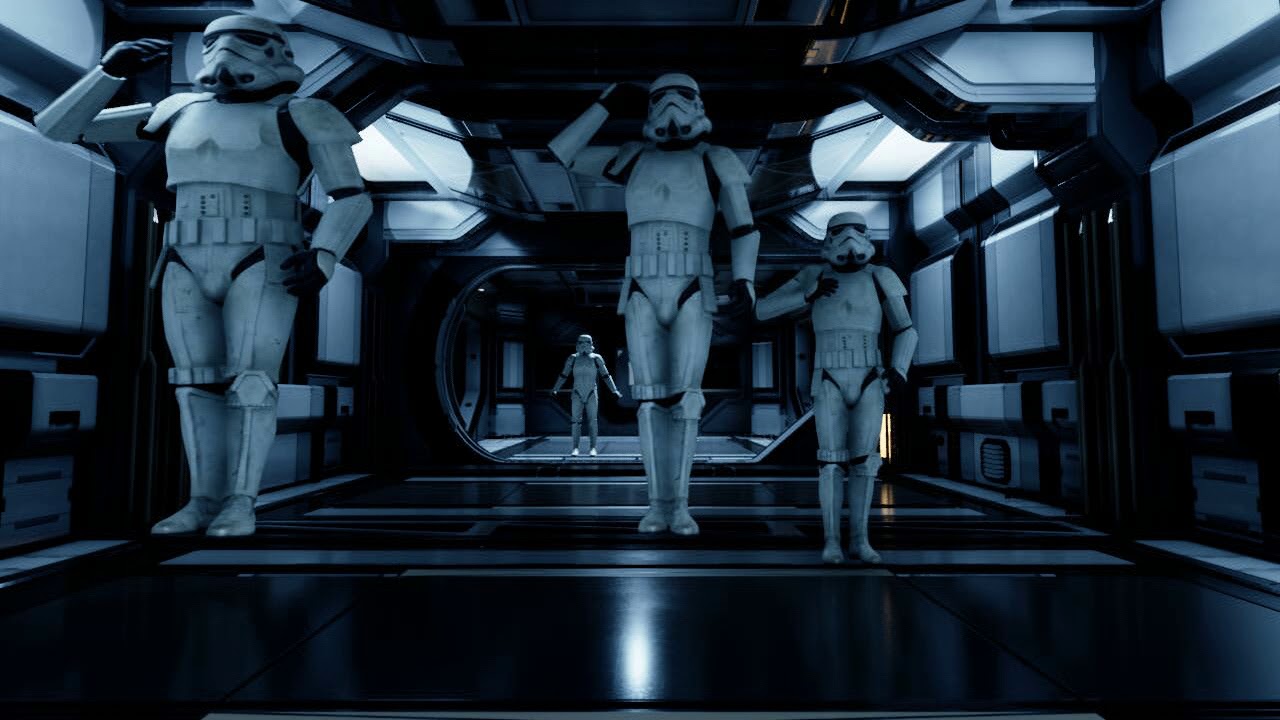
Trying to figure out why the models are twitching and teleporting.
coral bear
How would I be able to tell that? it looks perfect in the editor
plush yew
If you zoom in really close on the sequencer, are there any gaps?
But it is odd, how it plays perfectly in the editor...
coral bear
Nope, no gaps
plush yew
Seems to be similar. https://answers.unrealengine.com/questions/778910/view.html
 winter gale

Quick #UE4 Tip number 60.
Want to debug FORCEINLINE methods? Use FORCEINLINE_DEBUGGABLE_ACTUAL
#unreal #unrealtips #unrealdev #indiegamedev #gamedev #indiedev #screenshotsaturday #UnrealEngine

 Twitter
·
coral bear
Twitter
·
coral bear
Seems similar - but unfortunately they didn't find a solution either it seems 😄
Although the comment on the youtube video about physics not being active in the sequencer but is rendered could be something - is there a way to quickly just disable all physics on render or anything? there's so many tick boxes and options i'm a little lost !
 clever axle
I'm trying to create an event for a trigger volume. I placed it in my level, selected it in the outliner and went to the level blueprint but when I right click, there's no option to crate an event for the trigger, any ideas?
alright, nvm. Restarted the engine now it's there
coral bear
Oh hey - it is something to do with the physics - i went into World Settings , Overrode gravity to 0.0 and now it renders fine. Thanks @plush yew
 velvet loom
Different skeleton?
 kindred dew
Having an issue I wondered if someone could help me with, my level is becoming extremely bright around my camera, Ive tried the usual trick of modifying auto exposure and adaptive lighting but nothing seems to be fixing it
sacred yacht
Is it possible to make shadows more pixelated?
 next badger
@velvet loom same skeleton as Male one
@velvet loom they have predefined retargeting setup
 scarlet birch
Anyone using Vivox?
 celest vapor
Lol out of 6 years of using UE4 before and after Maps were used in BPs I have used them for the first time today
 fierce forge
why i don't have the fracture tab at modes ?
scarlet birch
Just started using them more this week myself. Didn't use them at all until now.
 pallid talon
Question - I have both static and dynamic objects in my scene. I have a Directional light as the sun set to "Stationary" show it creates shadows for both baked static and dynamic objects. But when I increase the "Dynamic Shadow Distance StationaryLight, it overrides the shadow used on static objects and displays the dynamic shadow on the static object. I don't want that. How to prevent?
 desert lichen
Is there a way to animate when physics activates globally from Sequencer ? I just brouhgt in this wall made of cubes - I'm doing a 5 projector immersive experience with a Pink Floyd tip - and i turned on all the blocks and got them to look great when i hit play but i dont want it to happen immedietly and there are like 300 cubes - wondering if theres an easy way in the level blueprint to activate based on a Sequencer .Otherwise I guess I can go simulate in C4D and bring it in thru Datasmith but its done if i cna just get it to happen 10 sec int othe shot
 ember dust
Hey does anybody know how to mount .pak files at runtime?
 vernal compass
where can i talk about a map development?
 wary wave
 normal narwhal
I'm following the documentation on using ue4's new web app with the remote control api (https://docs.unrealengine.com/en-US/ProductionPipelines/ScriptingAndAutomation/WebControl/RemoteControlPresetsAndWebApplication/index.html) and am unable to find the "Remote Control Web Interface" plugin they show in the docs.. I have node installed... is anyone seeing this plugin/ have any idea why I may not be seeing it?
 astral seal
Hey does anybody have tutorials or explanations for buoyancy? Default settings and pontoon on 4 corners of the bottom of a default cube does not work?
No amount of mass changing or radius increase for the pontoons works.
 distant totem
I've had this before, to make any source code show up in a BP project, you have to create a new C++ file that starts at least at Actor on the hierarchy, or else no source will show up
clever axle
I want to set the team for my players when they join. Is there a way for me to set that on the server and have it replicated to the clients?
astral seal
You can mark your variable as Replicated.
clever axle
it would then replicate to everyone, yes?
that would mean everyone is on the same team
is there an array of connected players on the server or something?
astral seal
no, I mean that everybody will know who is on each team
clever axle
ok
So.. any reason my Player State might be empty in the player controller's beginplay?
astral seal
are you using code or BPs?
clever axle
BPs
 pale magnet
soft fiber
You probably already figured it out by now. Is called Atmosphere Sun Light in t...
pale magnet
soft fiber
You probably already figured it out by now. Is called Atmosphere Sun Light in t...
Yeah I ended up finding that option. I end up having a lot of screen flickering and turning white when I look at/near the sun. Trying to figure out if that's normal (it doesn't seem like it).
I thought I might have been selecting the wrong option which was causing it.
Here's a gif if that's helpful
astral seal
@clever axle
 night lichen
Hello,
in my 4.26 vr project (formerly 4.25) after compiling shaders my water is invisible
but in a fresh 4.26 vr project everything works just fine
does anyone know any reasons why?
pale magnet
pale magnet
Yeah I ended up finding that option. I end up having a lot of screen flickering ...
Hmm, as per https://answers.unrealengine.com/questions/941697/sun-in-the-sunsky-object-flickers-424.html, switching off Temporal AA in the Project Settings appeared to fix the issue showin in the gif there. Anyone know if that's just a problem in general or something specific with my project?
night lichen
ok so it turns out
the ocean works in a new level in the old project
but not in the old levels
thorn nacelle
Can anyone help on converting a unity asset to a unreal please
 light thunder
Why can you not edit an animation sequence and actually save over it?
I can't for the life of me find a simple driver idling behind the wheel animation
plush yew
hello does anybody know how to make ue4 water system interactive ?
 grim ore
silly question about the Modeling Tools in UE4. say I want to make a simple box. I can go to primitives, choose a box, then if I want to preview what it looks like I change the size and such but its not like the item is front and center in the preview to see the changes since the preview follows the mouse cursor and I need to move the mouse cursor to change settings lol. Any ideas?
 stark marsh
can one person make an open world rpg game?
it wouldn't have to be absolutely massive, it could be more compact but could it be done?
wary wave
not unless they really know what they're doing
stark marsh
a year sounds too short for a game like that
plush yew
"But what if two people are working on it
 copper plaza
Depends on the scope of the game
stark marsh
yeah thats what i mean
 prisma seal
I'm making a game similar to ARK survival evolved but singleplayer and stylized. I've been working since July and the programming part isn't too difficult, I've managed to get the groundwork for most of the survival aspect done, art and level design is the hardest part for me.
stark marsh
art and level is hard too, the coding is the simplest
prisma seal
Just make sure you don't spend too long on any one mechanic until you polish
plush yew
Coding is simple?
prisma seal
Yes
plush yew
For an open world game
plush yew
Is there an open world template in unreal?
copper plaza
I’m sure it’s more simple when you’re only working on a single player game in comparison to multiplayer 😛
prisma seal
Yeah
plush yew
It'll start out single playet
prisma seal
The only reason I'm not doing multiplayer yet is because this project is the first time I'm using Unreal
stark marsh
if i make a game thats fun with example / free assets, then once im better at 3d art i can replace them with my own slowly maybe
plush yew
Well to make this game I'm taking steps
Learning 3D modeling and animation first
My game will be similar to Neir Automata
prisma seal
I try and make everything myself but when I switched from lowpoly to stylized, I bought an asset pack that had some meshes and stuff that I could learn from so I wouldn't waste a whole lot of time watching countless videos
stark marsh
yeah, i'll just use free assets to get the main mechanics, like combat, then replace them with my own
free assets as in animations and stuff
plush yew
Sounds like a Good. Idea
stark marsh
and character models
prisma seal
I just used the mannequin until like 2 months ago because creating a good character is hard. And I'm only making basic animations that take under an hour until I get a final character model
plush yew
I've mad her just as practice
prisma seal
Wow that's really good
stark marsh
yeah, i've kept thinking i'll wait until im really good at 3d modelling and texturing and then make a game, but that's not the right way to go, i should make all that i can with the starter mannequin
prisma seal
Make a game and improve your 3d modelling by working on that game
That's what I've been doing
stark marsh
i could always have my rpg as a big goal, and make smaller games to practice skills for it
 mortal cedar
If one person could make an openworld rpg, we'd had our world flooded with such games. But, we can't observe an overwhelming amount even of bad openworld RPGs. If we apply anthropic principle, we can conclude, that such game production is statistically impossible for the current level of technology. This is scientific truth.
 solemn yacht
Hey friends! Unity dev trying out some unreal for this epic mega jam. I’m curious, I use Unity timeline to coordinate game events. What systems should I be looking into for similar functionality with unreal?
plush yew
I'm feeling
More passionate noe
Now
How does one start making an open world game in unreal engine
plush yew
prisma seal
I'm making a game similar to ARK survival evolved but singleplayer and stylized....
How did you start making your game open world?
 median hound
ark uses ue4 dont they
plush yew
What's that?
median hound
ark uses unreal engine 4
median hound
2017 ue4 no not 4.26
 quaint fractal
hello guys. i am new to this discord server. may i ask where/which channel can i ask for help with unreal engine?
 river glacier
^
 devout swift
is there a way to set the order in which the BeginPlay() of each class gets called?
(Like call class1's BeginPlay first and then call class2's BeginPlay)
 brisk spire
Hey uhh, what do you guys thing is more efficient for a constantly spinning mesh, having it be a skeletal mesh with one spinning bone? Or having it spin based on a blueprint tick
My gut says skeletal mesh
wary wave
based on tick if it needs accurate collision, vertex shader if it doesn't
anyway, question from me - set res console command; appending f is supposed to make it full screen, w is supposed to make it windowed, what makes it windowed-fullscreen?
I'm getting weird behaviour testing it
grim ore
@devout swift nothing specific unless you set it up to do that yourself
light thunder
Why is Set Visibility so difficult to get working
reference is good
@grim ore beyond a null reference, why would this SetVis node not work? targets are components
median hound
set vis works for me
devout swift
grim ore
<@!217441989937987595> nothing specific unless you set it up to do that yourself
i see, you mean like create my own custom beginPlay? and delete the regular BeginPlay()?
prisma seal
@plush yew Sorry for the late reply, I was eating. I started the first few months inside of the normal 3rd person template map just getting some core functionality down like inventory, saving, and farming. And then I made a small landscape where I could practice some small scale level design and some more mechanics like building and creature AI. And now, in the past month, I've started on a larger scale map. I made the general shape of the land first and then I worked on large details like mountains. And then I started adding resources to the map. I've got a devlog series documenting the progress and my latest devlog has a timelapse of the process. I can dm you the link if you want
plush yew
prisma seal
<@456226577798135808> Sorry for the late reply, I was eating. I started the firs...
Please do
soft fiber
Is there a way to hide the texture on the bottom of a subtractive brush so it doesn't clash with the floor?
light thunder
For a packaged build, do you always have to include your maps, or will they work if they are referenced by something?
 modest ivy
is there a way to adjust the volume of all sounds in the editor? not talking about just in-game sound, but the volume in general of everything played in unreal
woeful marten
Anyone has an example of C++ construction script?
These three lines, although compile, cause Unreal Engine to crash:
void AJustMesh::OnConstruction(const FTransform& transform) {
    meshComponent = CreateDefaultSubobject<UStaticMeshComponent>(TEXT("Some auto mesh"));
    meshComponent->SetStaticMesh(mesh);
    SetRootComponent(meshComponent);
}```Is there a way to import the rolling ball actor with all the controls in a ThirdPersonTemplate project ?
prisma seal
I don't think creating a new StaticMeshComponent every construction is a good idea, check if meshComponent is already set first @woeful marten
Construction gets called everytime you move an actor in the editor
So you'd basically be creating 10's of static mesh components in a couple seconds
 dusky tide
How can I turn on the legacy landscaping tool on 4.25 ? Thank you in advance
woeful marten
prisma seal
Construction gets called everytime you move an actor in the editor
I know. I hypothesized it would create new StaticMeshComponents without destroying previous ones, but it seems that it should not happen unless I do any changes. And in my case I didn't even had an opportunity to make changes - Unreal Editor crashed immediately upon successful compilation.
prisma seal
Lemme check my construction scripts
woeful marten
I changed it to:
void AJustMesh::OnConstruction(const FTransform& transform) {
    if (meshComponent != nullptr)
        meshComponent->DestroyComponent();
    meshComponent = CreateDefaultSubobject<UStaticMeshComponent>(TEXT("Some auto mesh"));
    meshComponent->SetStaticMesh(mesh);
    SetRootComponent(meshComponent);
}```
Unreal doesn't crash, but the component is not created anymoreOh wait, I just realized you're using OnConstruction I usually just do AJustMesh::AJustMesh() as the construction. Also try calling Super::OnConstruction if you're using OnCunstruction
And do if(!meshComponent) {//create component}
light thunder
Where are the packaged shaders in a build held?
prisma seal
And I think you can just do RootComponent = meshComponent in actors instead of having to use the setter
woeful marten
prisma seal
Oh wait, I just realized you're using `OnConstruction` I usually just do `AJustM...
I usually just do AJustMesh::AJustMesh() as the construction
That's what I initially did, but in this case meshComponent is not updated when "mesh" property changes, so the code needs to be executed any time any change happens, that is why I moved it to OnConstruction
prisma seal
You want it to be called whenever the mesh changes?
woeful marten
prisma seal
You want it to be called whenever the mesh changes?
Yes
prisma seal
void AJustMesh::PostEditChangeProperty(FPropertyChangedEvent& PropertyChangedEvent)
{
    Super::PostEditChangeProperty(PropertyChangedEvent);
    SetMesh();
}
#endif``` This gets called whenever a property changes. Not sure if it includes any component values being changed thoBut isn't OnConstruction the intended way to do it?
It works perfect with Blueprints
prisma seal
I haven't used OnConstruction much at all so I don't really know its intended uses
Hmm, just did a quick google and it does seem like OnConstruction is used for property changes. In that case just add Super::OnConstruction(transform) at the top of the function and put if (!meshComponent){ meshComponent = CreateDefaultblahblah; meshComponent->SetStaticMesh(mesh); RootComponent = meshComponent; or SetRootComponent(meshComponent); //Whichever one you want }
woeful marten
prisma seal
Hmm, just did a quick google and it does seem like OnConstruction is used for pr...
    Super::OnConstruction(transform);
    if (!meshComponent) {
        meshComponent = CreateDefaultSubobject<UStaticMeshComponent>(TEXT("Some auto mesh"));
        meshComponent->SetStaticMesh(mesh);
        SetRootComponent(meshComponent);
    }
Doesn't crash, but it doesn't work either - no root component created
prisma seal
    {
        RootComponent = CreateDefaultSubobject<USceneComponent>(TEXT("Root"));
}``` Add this above the checkIn the past 15 minutes my Unreal crashed something like ~10 times (frustrated)
prisma seal
I'm pretty sure that was how I fixed it
woeful marten
Now this crashed
woeful marten
prisma seal
What's the error?
No errors - compiles and crashes upon placing new C++Actor on the scene
woeful marten
 supple totem
It's a good idea to run in debug game editor
supple totem
It's a good idea to run in debug game editor
I'll try to obtain it ...
For this code:
    Super::OnConstruction(transform);
    if (!meshComponent) {
        meshComponent = CreateDefaultSubobject<UStaticMeshComponent>(TEXT("Some auto mesh"));
        meshComponent->SetStaticMesh(mesh);
        SetRootComponent(meshComponent);
    }
Between, I wrote above that this code doesn't crash.
Now it does
prisma seal
Not sure if I'm reading this correctly but it seems like the callstack is pointing to the name but I don't know why that would be causing a problem. Try removing the spaces maybe? I don't think spaces matter for creating components but its worth a check
woeful marten
"SomeAutoMesh" crashes as well
prisma seal
Oh well, so is it the meshComponent = Create... line that's crashing or something below it?
If it's the line then I'm completely lost, if not, it could be that mesh is not valid
woeful marten
Yes, CreateDefaultSubobject causes the crash ...
woeful marten
supple totem
Shouldn't use spaces in component names
I already removed spaces - it didn't help
prisma seal
Just did some more digging in my code and I found that I create my StaticMesh differently MeshComponent = NewObject<UStaticMeshComponent>(this); MeshComponent->RegisterComponent; MeshComponent->AttachToComponent(GetRootComponent(), FAttachmentTransformRules::KeepWorldTransform); MeshComponent->SetStaticMesh(mesh)
woeful marten
prisma seal
Just did some more digging in my code and I found that I create my StaticMesh di...
Do you do this in OnConstruction?
prisma seal
No, this is called on PostEditChangeProperty and PostInitProperty
 ivory sleet
HeLp the water mechanics are broken or i am dumb i am not able to add an ocean even after i enabled Edit layers in a landscape.
The ocean starts around the land the spline points are like so far from the landscape but it surrounds it.
is it a bug or did i do something wrong?
Since it is still in beta
ivory sleet
like the default size as i wanted it to be a part of a mesh and just added the landscape so i can add the ocean
ivory sleet
prisma seal
You might just have to move the spline points closer
oh thanks
woeful marten
prisma seal
Just did some more digging in my code and I found that I create my StaticMesh di...
I'll try it
prisma seal
np, you can add more spline points by right clicking on the white line to add some more curves and stuff to your landscape
 radiant jasper
tryna launch ue4 and it dont work
ivory sleet
the mesh is like a 100 time bigger so the spline points are so far apart i will try to increase the size of the landscape so it keeps the mesh size
radiant jasper
idek what mlsdk is
prisma seal
@ivory sleet Just move the spline points closer together
ivory sleet
oh so i just need to have the spline points closer together?
so i can add more instead of moving it closer?
ivory sleet
prisma seal
<@!526773649987076111> Just move the spline points closer together
THANK YOU SO MUCH lol
prisma seal
Np lol
Splines are very flexible, literally and figuratively, when you click on a spline point, you'll see 2 straight lines coming out of it with points on each side, move those to adjust the curvature of the point
radiant jasper
anyone know how to fix the error im getting
 flat pewter
hi folks, does anyone know if it's possible to add controller
input depending on rotation?
radiant jasper
ig ill try rebuilding
ivory sleet
radiant jasper
idek what mlsdk is
MLSDK is Magic Leap Development
flat pewter
I want that "AddControllerYawInput" works locally
prisma seal
Try regenerating project files
flat pewter
by that I mean relative to the player space
if I'm not mistaken it uses the World yaw?
ivory sleet
prisma seal
Splines are very flexible, literally and figuratively, when you click on a splin...
wait that line is for the curvature of the point? i thought it was a bug
prisma seal
Yeah, try moving the points around, you'll see that you can change the curvature of the main point quite a bit
Anyways, I'm getting off now, cya
ivory sleet
ohk thanks 😄
ivory sleet
radiant jasper
anyone know how to fix the error im getting
you might need to update the plugin
ivory sleet
ohk 👍
median hound
anyone know how i would print an array in order like every second go up the list like 0, 1, 2, 3
grim ore
use a timer, the timer calls the event, it pulls the value from the array using an index variable you update every time it's called
grim ore
well your doing it on tick and no reason to do it on tick if you want it every second
make a variable, type integer, call it "myreallylongnameforthevariablethatwillholdwtheindexofthearrayIwillbegetting" or something similar
that is the variable you plug into your get from the array and after you get from the array, add 1 to that variable so its now the next value for the next time you need it
make a custom event that does whatever you want, get the value, add 1 to the variable, dance with the dogs, etc
at some point in your project start a timer by function name that calls that event and set it to go off every second repeating if you want, or just tell it to do it once and once the event is done (all that stuff above) it calls itself again after 1 second (the same way you started it)
median hound
thx this worked
scarlet birch
Is there a way in a material or otherwise to get the value of RAND_MAX that's being referred to in the doc on PerInstanceRandom which states "The output value will be a whole number between 0 and RAND_MAX for the target platform."?
plush yew
can i put a widget in a material or something so i cam make the widget show on an object and still have it function, i want to play around with it
median hound
yeh
light thunder
How long should it take to do a package build immediately after you have packaged, if you just make a ridiculously small change, like changing a single float?
 tender granite
Anyone ever seen a BUS on the free content packs that os not from Synty?
median hound
blake i can be wrong but i think it packages the whole thing again dont take my word on it tho never hurts to test tho
 deft parcel
winter gale
deft parcel
winter gale
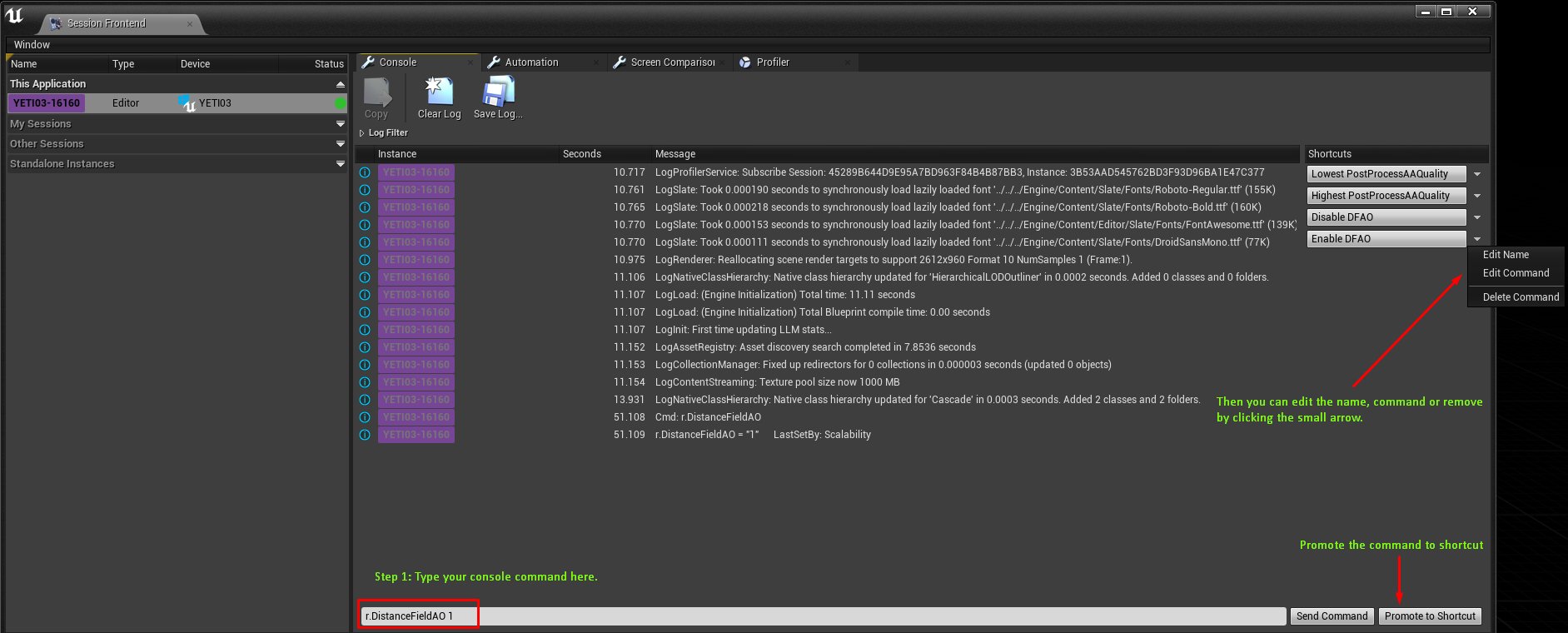
Quick #UE4 Tip number 61.
Session Frontend is a useful tool which is easily overlooked. Console commands can be promoted as button shortcuts. Go ahead and click click click.
#unreal #unrealtips #unrealdev #indiegamedev #gamedev #indiedev #screenshotsaturday #UnrealEngine
Twitter
·
 ivory sleet
@prisma seal MORE spline points closer together did not do it lol
I added like 100 spline points
IT SHOWS THIS ERROR (the last one) BUT my landscape has edit layers enabled and IT was selected when I added the ocean
So lol how do i fix this?
median hound
the water body one i fixed that by adding a landscape
 rotund yew
im seeing people hover over even graph nodes and creating a reroute node in one click
how do you do that
fierce forge
how i can enable the water interaction ?
ivory sleet
median hound
the water body one i fixed that by adding a landscape
so did I. I added a landscape but it still fails
the yellow box in the middle of the picture is the landscape
light thunder
is there a way to make a decal ignore an actor?
fierce forge
@light thunder for mesh
light thunder
that's the one, thank you!
fierce forge
you're welcome
 civic mauve
Hey guys, i need help, i am having problems in importing u asset file, i know unreal cant import u asset file but a youtuber said to copy paste the u asset file to your project folder, and its not working in mine case, and even if i create a new folder from the file explorer the folder has not created in the unreal engine content browser pls help me 🙏
ivory sleet
civic mauve
Hey guys, i need help, i am having problems in importing u asset file, i know un...
does it crash when you try to import the asset?
civic mauve
ivory sleet
does it crash when you try to import the asset?
no, when i copy paste the uasset to the project folder in file explorer and when i check in the content browser in unreal its not there, even if i create a folder from file explorer its not get created in content browser
pls help me
ivory sleet
it might be a bug in the new 4.26 becoz it did not work for me too
civic mauve
i tried in 4.25 and now i tried in 4.19 too but not working
ivory sleet
try reinstalling unreal editor
ivory sleet
Did you try to change the install location?
civic mauve
lol
ivory sleet
easiest fix
civic mauve
yep 
light thunder
what am I doing wrong here, I want those 5 outpins to ALL execute and I want it to happen 100 times
ivory sleet
civic mauve
Hey it worked, i just close the engine and opened it again
hmmm can you give me more details I need to fix mine 😂
i am reinstalling it currently
civic mauve
ivory sleet
hmmm can you give me more details I need to fix mine 😂
🤣 sure, so when you copy paste the u asset file to your project folder in explorer, then you must need to re open unreal engine
ivory sleet
lol so it has to be closed when i import it? 🤣
civic mauve
yea 😂 or if it is opened then close it then open it again
ivory sleet
lol i am so dumb 😆
civic mauve
its ok
 regal mulch
light thunder
what am I doing wrong here, I want those 5 outpins to ALL execute and I want it ...
regal mulch
light thunder
what am I doing wrong here, I want those 5 outpins to ALL execute and I want it ...
MultiGate isn't for that. Just use a Sequence
 lean crater
Guys i created a uobject c++ class and created blueprint from that class and when i search eventbeginplay on blueprint it's not showing what should I do
regal mulch
Well, UObjects don't have BeginPlay
But you should be able to listen to the OnPostWorldCreation delegate or something like that to create your own
clever axle
hi! quick question: game mode only exists on the server?
regal mulch
Yes
clever axle
check. thanks.
 burnt ether
How would I check my code's performance ?
 toxic spoke
Hello. Can someone please Help. I import from Blender. Smooth edges shape. But in unreal the corner looks like this 😦
clever axle
I have a string in an actor and I set it on the server, Replication is set to Replicated but on the client the string is empty. Any ideas?
LogBlueprintUserMessages: [bp_CommandPoint_3] Server: bravo
LogBlueprintUserMessages: [bp_CommandPoint_3] Client 0:
LogBlueprintUserMessages: [bp_CommandPoint_3] Client 1:
 outer cosmos
received a fbx file from client the file is huge no wonder it lagged in unity so he has sent the file to me so that i can remove unwanted poly's, when i opened the files in 3ds max i saw that there are many meshes that look similar and they tile perfectly so i was wondering that in 3ds max there is instance which save memory and performance if your instance the mesh instead of copy so, i was wondering if there is something similar unreal or unity where you can instance the mesh improve the fps and memory consumption.
clever axle
just so I understand it right: if I put a blueprinted actor into my scene and it has a variable.. If I set that variable in a server event and the variable is set to replicate, that variable should also change on the client, correct?
 dim arch
outer cosmos
dim arch
outer cosmos
@dim arch thanks man.
dim arch
generally you need to split the mesh into modular parts, if there is one repeating part, save it as a single mesh and then use staticmesh actors to instance the same mesh
outer cosmos
do you think this walls will be instanced in unreal because in 3ds max i can make them for performance
 round tangle
i cant build lighting in my project?
it just skips it
when i build everything
i have a importance volume
and everytime i move somehitng in my level, it doesnt say lughting rebuilt need
i have every light se to t movable
 chilly skiff
i have a small issue
 hidden adder
||You just lost the game||
chilly skiff
How to display file name when a file is selected to a label in C#.
I use VS2019
clever axle
@dim arch so the actor itself needs to have Replicates checked. thanks.
plush yew
Hi! Can i turn this info window off?
clever axle
I'm trying to put a gun into Manny's hand.
I added a skeletal mesh to the mesh of the character, set the mesh to my weapon and set socket to ik_hand_gun
Now I'm trying to line the gun up with the hand but when I move the gun, the character mesh rotates as well. Can I move the gun independently somehow?
dim arch
@outer cosmos you cant export and FBX with instances, then import it into UE4 and have it set up mesh instances (it will combine all the instances into one mesh) the only way is to use datasmith, or manually setup the instances yourself
 fathom rapids
light thunder
what am I doing wrong here, I want those 5 outpins to ALL execute and I want it ...
fathom rapids
light thunder
what am I doing wrong here, I want those 5 outpins to ALL execute and I want it ...
Have you got a response? Try to use a sequencer (then) instead of a multigate ^^
 toxic quest
Posting there as well since it globally concerns UE4. I am working with AI for our enemy. As I don't have the model atm I'm aiming to use temporary skeleton and animations, is it possible to rebase the anim BP onto another skeleton later on?
dim arch
yes, as long as the skeleton has the same bone count
 ionic veldt
hello guys
sorry for intrusion
has anyone tried chaos vehicles yet?
 forest tree
ionic veldt
hello guys
sorry for intrusion
has anyone tried chaos vehicles yet?
forest tree
ionic veldt
hello guys
sorry for intrusion
has anyone tried chaos vehicles yet?
Have not tried myself, but I did hear someone talk in here about how chaos worked fine for their vehicles. So that's hopeful at least.
 digital badger
Is supporting win32 worthwhile in 2020?
ionic veldt
i built 4.26 w chaos
it seemed alright at first
but when the moon is right
car just flies away and engine crashes
forest tree
:yikes:
forest tree
digital badger
Is supporting win32 worthwhile in 2020?
I really wonder if anyone still running win32 has the hardware to run your game at a reasonable framerate

Stack Overflow
I've noticed many programs are still released with 32-bit binaries or even only a 32-bit binary. How common are 32-bit systems? i.e., how many 32-bit vs. 64-bit systems are out there?
This is impor...
^This might help, though 2017, check the latest steam survey to get a general idea:
 serene birch
there's close to no value in supporting win32 from a "end user compatibility" point of view
 grim salmon
Hi guys, I have a question, sorry if its OffTopic
I want to localization a game to my native language (game developer doesn't have any problem with modding all game file at all, since I talked with him)
I can easily unpack PAK file and edit local file, but problem is I don't want to touch original game file at all or add anything new to it
I'm thinking its possible to maybe create a DLL to inject new local file to game? I think its best and easiest way for user to use localization mod, but I don't know its possible or not (or its hit performance or not)
anyone can help me a little?
thanks
digital badger
@grim salmon Localization files wouldn't be .DLL files - the game developer would need to share their project files with you for this to work
grim salmon
digital badger
<@!589788348806070272> Localization files wouldn't be .DLL files - the game deve...
so you think its not possible to inject into the target process by forcing the process to load the DLL and after that load local file from somewhere else or even from dll itself?
 stray sparrow
does anyone know why I am still getting the preview text watermark on my scene while I have disabled static lighting in settings? (all my lights are dynamic)
digital badger
@grim salmon No I do not believe so.
 honest vale
digital badger
honest vale
digital badger
Localization is defined in the actual UI / code using macros. You would need to know what each name responds to. For example MainMenuText1 might refer to a UI label with the english text "Hello", then the French localization would map MainMenuText1 to "Bonjour" etc
And this needs to be done in the editor so that it can compiled into the UI during packaging. Rather than importing an external file
stray sparrow
@stray sparrow but the watermark still remains
digital badger
This is why one of the many reasons why UE4 is very mod-unfriendly
Oh, and if the game in question is english-only that probably means that the developer hard-coded all the text in the game. Making localization impossible
grim salmon
digital badger
Localization is defined in the actual UI / code using macros. You would need to ...
oh, so its make it hard and maybe impossible to load local outside of the game
my only solution is create a patch PAK file, game support it
digital badger
You would need to work with the developer to add this - as you need access to the project files.
Creating a patch file would require you to have the development files
grim salmon
digital badger
Oh, and if the game in question is english-only that probably means that the dev...
Fortunately this game doesn't use any hard-coded text, its support multi language, and language file can easily edited
digital badger
If I may ask - what is the game you're trying to translate?
grim salmon
digital badger
If I may ask - what is the game you're trying to translate?
its a small game name Visage
digital badger
Yeah I had a quick look and it seems like all the other translations are included in the game's core package
Rather than separate downloadable files
Apologies I'm not of much help - but I don't see how you can do this without directly asking the developer
ivory sleet
 shadow violet
i cant create landscape
shadow violet
i cant create landscape
you have to go to tools
then select landscape
then you will see it
ivory sleet
LOl you have to check near the save options
 tight prawn
is there a way to place actors in world and have them be in folder automatically
for example, i'm working on a level and want all actors i place in the scene to be automatically put on "floor" folder
shadow violet
Ah found, thanks @ivory sleet
ivory sleet
LOl ur welcome 🙃
ivory sleet
tight prawn
for example, i'm working on a level and want all actors i place in the scene to ...
like a subdivision of floor?
or in an actual folder?
tight prawn
in the world outliner i mean
i want the actors i place in the world to be automatically put inside a folder in the world outliner
is what i mean
ivory sleet
lol Idk how to do that
MAybe try placing the the folder above the scene folder
Oceans aren't working for me the splines are placed so far from the landscape but the spline points are closed together
 unreal plume
hello can some PLEASE help me D; im fraustrated!
ivory sleet
i have enabled edit layer but it still doesn't work it says it has no landscape to attach to
unreal plume
im trying to add some background music in my level but for some reason it just stops after a dew seconds Anyone know why??? D:
ivory sleet
HELP!!!!!
clever axle
I spawn bullets out of a gun. they fly around as you would expect on the client due to ProjectileMovement but when I spawn them on the server and replicate, they just fall to the ground. What gives?
ivory sleet
did you enable gravity for those meshes?
 mossy nymph
its almost like your initial velocity isn't replicated ^^
clever axle
yes, that seems to be it
ivory sleet
ivory sleet
Oceans aren't working for me the splines are placed so far from the landscape bu...
I can't add more than 1 ocean to a map that's why it doesn't work
can anyone help in creating more than 1 ocean
clever axle
now if only I could get the bullet to be rotated 90° without spinning
ivory sleet
or increase the ocean's size
clever axle
any tips on this? the model of the ammo is right side up as if it was standing on a table. can I rotate that somehow? the only transform I have here is scale and when I do it after I spawn the actor, it spins
 icy egret
hello I have an problem
This are destructive meshes, and once I break it, it will be extremely blurry after "Set Destructive Mesh" to respawn
How to fix it?
prisma seal
@ivory sleet To increase the ocean's size, go to your waterMeshActor in your world outliner and increase the tile size
 daring gazelle
anyone know how to make a hole where that cube is?
prisma seal
I think that's only possible with BSP unless there's something new in 4.26
daring gazelle
figured it out
ivory sleet
prisma seal
<@!526773649987076111> To increase the ocean's size, go to your waterMeshActor i...
Oh my god yesssssss i got it working thank you
plush yew
Is megascans plugin available in 4.26 ?
ivory sleet
plush yew
Is megascans plugin available in 4.26 ?
There is a new one available but it doesn't seem to work with 4.26 FOR ME
clever axle
can I create an array of an interface type and then stuff whatever has the interface in there?
plush yew
I don’t even know wtf is an array
 open gorge
Are you joking...
plush yew
No I am not I don’t use ue4 I don’t know why I am here
plush yew
I wanna play video games, not creating them
open gorge
clever axle
can I create an array of an interface type and then stuff whatever has the inter...
You should
clever axle
@open gorge then my issue must lie somewhere else
clever axle
huh. well, the actor in the array is None
 earnest pawn
Hey, is there an option for the camera component or the spring arm to only use the controller pitch?
clever axle
@open gorge appearently you have to set an asset to add? how does that work?
earnest pawn
I have my movement component set to use controller desired rotation with a turn speed, but when I have my camera set to use control rotation, the camera turns faster than the char
clever axle
guess I could cast to actor
mortal cedar
Will unreal 5 be shipped in more bare bone state? For example, project templates and native plugins moved to the repo (or marketplace)?
light thunder
if you have a data table based on a structure, how can you safely modify that structure so that the data table reflects it's changes (is it even possible?)
gray kindle
yo lads anyone here seen raised by wolves? they do this thing with clouds being at the same level as mountains peak
and falling down off them
it looks great, and im wondering if its even possible with the new volumetric clouds, since the lowest value of height possible is still not low enough for that to happen, unless the mountain is absurdly tall
 dapper frost
why are meshes not supported with different versions?
I have a mesh pack that I like but it's not available on 4.26
serene birch
probably requires the authors to test and manually white list 4.26
you can try to force installing them anyway, or install them in another project and import the assets from there I suppose
 clever vault
hello guys i want to learn unreal engine ,what guide will you recommend ?
light thunder
I'm getting unknown structure errors , despite reverting changes on those structures, I've restarted the editor but I can't find where those errors should be - the blueprints that they reference have no issues whatsoever
and my build won't package as a result of these errors
 sly anvil
Hello I am creating a fictitious home console for a challenge, I would need earlier darker game videos to integrate into the ad, like teasers, if you are interested please contact me in private message
@clever vault they are a lot of tuto on youtube
clever vault
yea but which one?
prisma seal
@clever vault I would recommend this tutorial series. It shows you how to make the same game in blueprint and c++. https://www.youtube.com/watch?v=4OFKNUK8uBE&list=PL9z3tc0RL6Z4Yd0yqoELGiJLVIoDkpFD8&ab_channel=DevEnabled

Unreal Engine 4 / Make a Game Playlist:
In this collection of videos, we will create a simple game complete with a start screen, multiple levels and a game over screen. This is aimed to teach beginners the basics of creating interactive buttons, game mechanics and loading levels.
This Video:
In this video, we set up our project and create our f...
light thunder
What does this mean? where is this max and how can I change it? I have 32 gb
 gaunt tide
I’d need to add a camera to my pawn if I want it to move in the direction I am looking at on screen huh?
Rn I can look around while holding RMB but I can’t move in the direction I’m looking, I can move forwards,backwards,left, and right but not upwards in the direction I’m looking in the level. I could be facing backwards and hit the forwards key and than it looks like I’m going backwards when in reality I’m pressing forward key
tight prawn
is there a way to snap objects to each other in the editor?
grid snapping isn't really that accurate as I need to change the scales frequently
light thunder
besides the grid snapping and other snapping tools in the movement/scale, stuff
you could make an editor script/blutility that does it
Get Select Set is the node you want, and I believe it remembers the order you selected things in, so you should be able to move them in the editor and snap them to whatever paramaters you want
tight prawn
ok thanks
clever axle
how can I rotate the capsule to fit the mesh?
gaunt tide
Bullet mesh?
clever axle
the static mesh of the bullet
gaunt tide
For reloading purposes?
clever axle
no, just cause it will bounce and will bounce before it's on the ground
because the collision capsule is off
gaunt tide
There is select and rotate objects in top right of that window to rotate the capsule
clever axle
yes but that only works on the mesh, not the capsule
serene birch
is your bullet a ACharacter?
 pearl saffron
where i can find Web interface plugin. It was added in 4.26
serene birch
if it is, you probably shouldn't do it that way
or if your capsule is the "root" of the components, I don't think you'll be able to move/rotate it
make the mesh the root instead I guess?
gaunt tide
Its because the root of the mesh is the capsule
If Im reading that correctly or something to that effect
Since you dropped the bullet mesh onto the capsule component they will both rotate the same
serene birch
well you can rotate the mesh component to fit the capsule instead for now but this has implications on the users of that actor
clever axle
if I make the mesh the root, it doesn't collide anymore
I have it set to block all but it just falls through the floor
this isn't better 😆
ok, I added an empty static mesh as root, now I can rotate both as intended
but the collision doesn't work
only on the character it seems, it launches him back a bit
daaaaamn, it's driving me mad. when the capsule is the root, collision works but it's wrong because the capsule orientation is wrong. if I make a mesh the root, I can align it alright but the collision doesn't work :/
 woven badger
Having a problem with my stackable inventory. This is the problem.
Im following a youtube guide but its 5 years old, is there something that I have to change to make it work?
and this is the guide
https://www.youtube.com/watch?v=TEuNhjNHnhM

In this episode, we add item-stacking and show a variety of ways to display it using strings, and make sure everything is prepared for crafting (using casts instead of references etc.) shorter this time, next lesson will be use/drop buttons quickly (15-20 mins) unless you guys want me to go right into the crafting.
We are always adding royalty...
 lucid prairie
How to limit camera rotation? I'm using this bp for my character and It's not working
https://cdn.discordapp.com/attachments/225448446956404738/785518699447582750/unknown.png
 pearl saffron
@lucid prairie Why you add relative rotation? Isn't it easier add node (Add controller pitch, yaw input)?
lucid prairie
That was in the tutorial lol, I'm learning the basics for 3 days now
 heady quartz
can someone explain why this is happening?
pearl saffron
@lucid prairie
rocky radish
that wont really work when you're doing it by adding a relative rotation @lucid prairie
rocky radish
thats because you need to set it up on your project settings @lucid prairie but you can still use the Mouse X and Mouse Y nodes you were using before
lucid prairie
Ohhh
Okay
and what is "learn character"? I tried to connect every component to the controllers
rocky radish
you dont really need to attach anything to the target, that is some variable that MaverX created to use as one
unless you wanted to do that to a different pawn, the target pin can remain empty
lucid prairie
Okay
 sly surge
I hop this is the right place
I need help plz I'm having problems with my enemy AI i cant seem to get the enemy to die when attacking i will attach my projected so that u can see what to problem is and see if u can fix or tell me how to fix
https://mega.nz/file/bpZW1TyS#0tUj_fG8k4WMiBlLlV9ouAhqMoxPFWIUKaNsge5aAA0
Thank you
I'm Still learning but having fun doing so
UE4.25 - 2d Paper sidescroller
PM if u can help
oh and hello
lucid prairie
I'll make a new project beacuse I must've somehow blocked the y axis lol
 drifting ocean
Is there a shortcut to hide everything but the root component in the editor?
Because I appear to have done just that by accident
Okay I had a compiler error it didn't bother showing me , sorted it
pearl saffron
enable use pawn control rotation in Camera component
pearl saffron
pearl saffron
enable use pawn control rotation in Camera component
@lucid prairie
thorn nacelle
can anyone help please as ive watch youtube videos on how to convert a unity asset so i can use it in unreal but im having no joy can someone help do this please DM me
lucid prairie
it inverts the y axis tho
 analog prism
Hi everyone, I have a problem with per instance custom data when using a hierarchical instanced static mesh. It seems like the values are unstable and aren't set correctly, but it works perfectly with an instanced static mesh. I was led to believe that a fix had been implemented in 4.26.0 but I am still seeing the same problem occurring. Does anyone know about this problem and how I can resolve it? It's a bit of a show-stopper for me at the moment as I absolutely must be able to set per instance custom data, and with the number of instances I want to use, I also need the LOD capability of a HISM
rocky radish
lucid prairie
it inverts the y axis tho
multiply the y axis value by -1
rocky radish
woven badger
Anyone know why i get error on this?
you're trying to access an non-existant index of an array
analog prism
@woven badger That error occurs if your array only has (for example) 2 items in it and you want to access item 3 from it
lucid prairie
rocky radish
multiply the y axis value by -1
I already did that but with taking it away form 0, still thanks
analog prism
@woven badger When looping through an array, make sure you first check that the length of the array > 0 and then in your loop you want to loop from 0 to array.length - 1
the -1 is necessary because arrays start at index 0, so an array with 3 items in it will actually go from 0 to 2
 crisp thicket
 burnt smelt
Hey guys can someone please tell me how to get a 2D steering wheel input for Android games in unreal engine? I'm really new so Idk much about sorry to bother
gaunt tide
So when I left click within my game my mouse disappears but I have a function that when you right click the mouse is hidden so when I use that function the mouse reappears once right mouse button is released. On event begin play I have the Mouse cursor show set to true but as soon as I left click it disappears until I use my other function that I described above. I even tested with "Set Input Mode Game and UI" with the Hide Cursor during Capture to false and still same result. Any suggestions?
scarlet birch
In UMG image brushes am I correct in that "Draw As : Box" acts like a 9 slice? and if so is there a way to see the lines for the slices?
Ok, I found the doc and it does act like a 9 slice. Is there anyway to draw a debug line or something to see where the slice is?
ivory sleet
Is there a way to convert mesh into a landscape?
cause I want to add a water system to a mesh I made in blender
scarlet birch
convert the mesh to a height map
ivory sleet
How to do that?😂
scarlet birch
Might be a good thing to try in google. Blender can do it.
ivory sleet
Thanks
 meager frigate
Anyone find any info on how to animate with sequencer in 4.26? I've never even used sequencer and I can only find old vids on it, nothing about the new stuff I've seen in the sizzler trailer
scarlet birch
Like what new stuff?
 wet schooner
Does anyone know how to use assets you have in a existing project?
Like I have these assets but they say create project
but I already have a project
what's the most efficient way of getting them inside my existing project
normally asset packs just say add to project
prisma seal
Migrate the assets
Right click on them in content folder, and go to asset actions and you can migrate to any project
wet schooner
ah ok that's perfect thank you
 left elk
What is the best VPN anyone has used for multi-user editing remotely?
plush yew
noob question : how do I attach a component to a transform variable?
scarlet birch
You don't.
Do you mean to offset its location with something like a scene component?
 lean mauve
noob question: How do I increase the size of the sun?
scarlet birch
If I'm using one of the variables in a struct to set the static mesh component's mesh in a BP, what is the effect of choosing to make the variable in the struct a class vs an object?
I think my questions is if it's an object, at what point is it instantiated?
grim ore
I would assume since its an object you cant use a class for the mesh itself, since... the mesh is not a class
scarlet birch
yeah, I would have to create it from the class first, I think I'm just tired and over thinking it
grim ore
using a class reference if you can would be better as it would be a soft reference and not a hard reference in the end but sometimes you can't avoid that when you need to reference something.
scarlet birch
Thanks, I can use a class and just create an object from it in the constructor.
median hound
is this dumb? should i just reconnect it
 wooden delta
Any suitable chat for beginners?
median hound
i dont think so you just ask ur question topic in the right topic 2 get best answers
wooden delta
Ok thanks🙂
 steep thistle
Has anyone else had this issue when packaging?
The solution is either to recompile after deleting .vs and Intermediate
Other times it's just to restart the profile
But why does this happen in the first place?
 fluid lance
anyone else noticed how "non-hit testable" doesn't really work on text?
Context: I have a button with a number var inside it. The number var is set to "non-hit testable" and the button displays a tooltip custom widget when hovered. Except that when the cursor goes over the text in the middle, the tooltip disappears and only reappears when you move the cursor slightly outside the textbox, on the button behind it. Which means that non-hit testable on the text isn't working, or I am missing something.
lean mauve
Guys, another question. I have small map here and as you see, the problem is that lights go through mountain. What can I do to fix that?
fluid lance
@lean mauve your mountain is only a "shell", it doesn't have backfaces, so light goes through it since there is nothing blocking it
gaunt tide
fluid lance
anyone else noticed how "non-hit testable" doesn't really work on text?
Context:...
Need pics of how you have that setup. I understand what you are saying but maybe it is in how you setup the widget? I usually dont have these issues when I have text over buttons
lean mauve
fluid lance
<@!695997822356553778> your mountain is only a "shell", it doesn't have backface...
Fixed it, thank you (duplicated shell from the both sides)
gaunt tide
Nothing in graph?
fluid lance
the weird thing i see now, after some more playing around with it is that it doesn't detected as being hovered (checked with tick+ishovered and prt) and also tried hooking up a tooltip which also doesn't fire up
unrelated, i'll ss the graph
@gaunt tide
fluid lance
man, you need to explicitly tell us what you need help with...
gaunt tide
^^^^
fluid lance
describe, provide ss or something wtf 😄
gaunt tide
Have you tried doing some debugging using Print String?
gaunt tide
Ive seen some youtube tutorials for doors and passwords
fluid lance
gaunt tide
Have you tried doing some debugging using Print String?
Wrote earler, after you said "nothing in graph?" 🙂
gaunt tide
Ohhh. lol im blind sorry
fluid lance
dw dw 🙂
i'll try and do some transparency on the text, see if that would help, but it def looks like a bug to me
gaunt tide
Yeah cuz I have text in little boxes like that similar to yours and it works fine, can even drag them around the screen
plush yew
Can you set up short video of door 2d paper and password
gaunt tide
To make the door in 2D paper you need a 3D program to begin with to make the mesh for it
Go to youtube. Im not about to make a whole video lol. Do some research bro
 somber veldt
Has anyone ever played a game where you drive a car and wherever you drive a track appears?
somber veldt
... I mean, where the tracks aren't predefined,
I can think of some driving games that let you build tracks, but never one that was controlled with an actual car that you just drive around
gaunt tide
Whoops. Thought you ment wheel tracks..lol I need to come down a bit before I answer anymore questions.
plush yew
Can I have moderator
 gaunt tide
Lmao XD
median hound
what does a non pre defined track look like
plush yew
Can I have moderator
somber veldt
invisible until you drive on it
gaunt tide
I wont make a video now you want a moderator? I dont think thats how that works. Just go to google and look up paper 2d...
median hound
i mean yeah
somber veldt
procedurally generated tracks, controlled by driving a car
plush yew
gaunt tide
I wont make a video now you want a moderator? I dont think thats how that works....
Yes
somber veldt
who's high now
median hound
same thing with stepping in snow right?
gaunt tide
plush yew
Yes
That just makes you lazy asking us to do things for you and with that attitude no one will help you. Just saying.
somber veldt
in a sense yeah
gaunt tide
somber veldt
who's high now
Always.
plush yew
gaunt tide
That just makes you lazy asking us to do things for you and with that attitude n...
Sorry I am bad English
Ok
gaunt tide
plush yew
Sorry I am bad English
Do some research. If along the way you cant figure out how to do something than you can come post a question. But asking someone to do everything for you when you, yourself havent even made an attempt will get you ignored. Not trying to bash just being honest about us peoples here.
somber veldt
I found this tut where they map a track to a spline https://www.youtube.com/watch?v=wR0fH6O9jD8&feature=youtu.be&t=4730
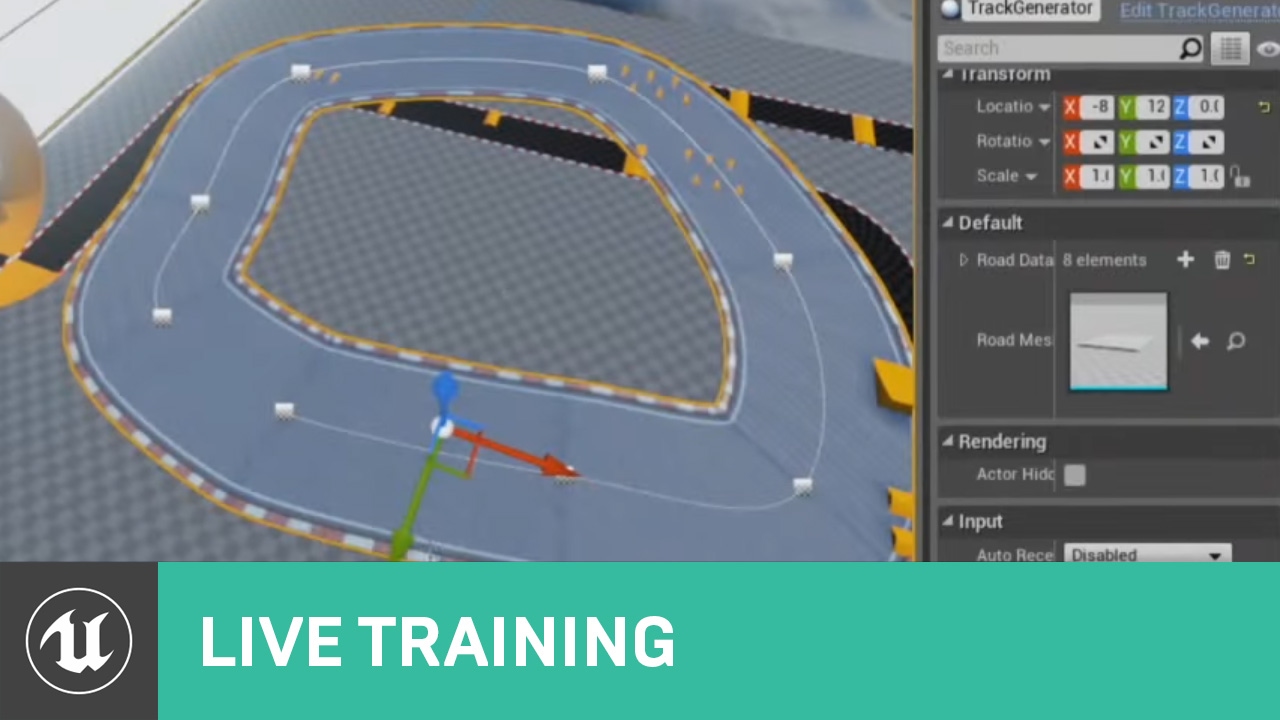
In this Livestream Tutorial we'll show how to use both Spline and Spline Mesh Components to construct an easy-to-use racetrack generator tool in UE4. Viewers will learn about custom structs, functions with local variables, using for loops, and much more!
[00:00:45] - Google Drive file - https://epicgames.box.com/shared/static/2ws205gi1nct0g5vvc...
plush yew
gaunt tide
Do some research. If along the way you cant figure out how to do something than ...
I won't Iesy me down
somber veldt
But you still create the spline in the editor
I want to create the spline as the player moves
median hound
foot prints
somber veldt
I'll look into those as well
but this is more than just a change in the texture, or adding some stickers, I want to create an actual mesh track as the car drives
the car needs to actually be suported by something
plush yew
What if there 2d paper front of door lock but there pop up pictures then open door
Can someone help me
Can someone make design in 2d paper
plush yew
plush yew
Can someone make design in 2d paper
For free pls DM me
btw. DLSS is great. greater than native. change my mind
DLSS™
Yes but
Make a own design and I done story but story Make a 2d paper
median hound
gum what language is your original
plush yew
Ireland and English
plush yew
plush yew
Ireland and English
I in isl sign language deaf and hearing
 dawn gull
I eject myself from the character, and I cast a shadow. This shadow is also casted when I'm in the charcter. WHy is this and how do I stop it?
plush yew
Pls I done story and pls help me for story make design too
dawn gull
@plush yew use @buoyant granite bot
prisma seal
@plush yew You have the story for your game made but you want someon to make the actual game for you?/
plush yew
Yes
prisma seal
The chances of someone making a whole game for you for free is very unlikely
 weak cypress
ugg how do you enable Raytracing in unreal
prisma seal
But if you still want to try, post the offer in #volunteer-projects @plush yew
You have a better chance of getting the game completed if you learn game development yourself, that way you can make the game exactly how you wanted
median hound
@weak cypress
median hound
to a already made project?
weak cypress
ye ye
median hound
goto project settings type raytrace and enable
weak cypress
i can disable it if i want right?
median hound
ye
weak cypress
time to see them rays
median hound
i fucking hate when i restart the project and its shader compiling i wanna see the shaders compiling not hope that its not over 100k and keep waiting its just stuck on loading task mgr compiling but what if its like a bunch i dont wanna wait what if its very slow
@weak cypress did yours already finish?
 clever sequoia
Hey guys,
I am importing a 12GB Alembic file since 5 min. and UE4 (newest version) is still on 0%. Is it even possible to import it?
thank you
 lyric mural
Hello everyone. I am having some technical issues regarding Unreal's capability of rendering a 3D object I imported. Is there a channel I should post my issue to see if other have had anything similar?
 lucid grove
Heya, i have a small problem. When i try to change some settings inside postprocess with blueprint it seems its override everything inside it.
Like i want to change min-brightness to 0 its set everything else to default and my brightness to 0.
lyric mural
Apologies to post another issue right after Jake but my main problem comes with the rendering of objects. In substance painter as well as Marmoset,. the object looks normal. However in Unreal I get this issue
These squares and UV issues can be seen no matter what I do to the mesh. In fact, even after retopology, the errors remain
 neon bough
looks like your lightmap uv is messed up
if you can change it in substance painter choose to make an lightmap uv packing on channel 1, and get sure that they are within the bounds
median hound
any tips to speed up compiling shaders
lucid grove
median hound
any tips to speed up compiling shaders
everything i tried on google didnt help 🙂 but if you found something let me know too
lyric mural
^ Actually yes. it may just be my comptuer speed but if i loweer my resolution scale to like 1 percent, compiling goes fastee
then you can increase it after its done
lucid grove
i have rtx 3070 and i5 8700k, probably on that system its just bottle necked by ue4 itself
median hound
yep it is
my gpu is better then cpu and one way for games is to increase the gpu load uh
one thing that helped a bit is turning off realtime then i made a batch file that sets priorities
 blissful spire
I'm new to blueprints so sorry for my ignorance... when I run this function for some reason the widget does not become visible. The print statement works.
Whenever i try to set that widget to visible using any event it stays hidden. Does anybody know what I'm doing wrong?
 earnest violet
Hello! My problem is with overlapping Ui. Does anone know how I remove me game HUD UI from my START GAME MENU. I'd be very thankful to anyone who can help me solve this? See picture below:- 🙂
clever sequoia
Hey guys,
I am importing a 12GB Alembic file since 20 min. and UE4 (newest version) is still on 0%. Is it even possible to import it?
thank you
neon bough
that doesn't really good in the first place, why is it 12GB?
lyric mural
if anyone else has a similar issue to my lightmap problem ,I found that checking "full precision UV's" under the build settings of every model works
celest vapor
What would be a good way to approach making cosmetics? I.e different clothing, hats, etc.
earnest violet
should i be using remove all widets on event begin play?
plush yew
Is it me or the ball from the Rolling Ball template has some sort of "rolling itself over" or "skating" effect (I don't konw how to tell in english) ? https://gyazo.com/c0842cb42a25c1ad87b8c12439f8f66f

We can see it in the end. I mean that the movement is not really fluid/realistic. The ball seems rolling itself over (yet I have drastically reduced the torque force !)
 remote kindle
when you post an unpaid gig and it posts twice :/
clever sequoia
@neon bough It is a animation... with 3 mio. Polygons.
 zinc shore
is it possible to make a custom mesh brush
 frozen pond
hello, so when i set time dilatation to 0 i'm getting werid bug
https://www.youtube.com/watch?v=G3EZw7aHZTg&feature=youtu.be

any clue wtf?
modest ivy
guuuuuuuuys
 digital anchor
i guess it makes sense? if you have time dilation 0 youre moving your camera at speed of light and your motion blur goes awry 😛 try disabling motion blur
modest ivy
every single time i close and reopen my projects the default gamemode reverts back to none/default. how do i fix this?
frozen pond
@digital anchor thanks xD
 shell surge
guys, Is there a way to show you a few renders? I need help with choosing the best for my portfolio. But I don't wanna send 10 separate pictures here lol
frozen pond
create imgur album ?
shell surge
is there any option like to vote for example ? So I can know which is most liked
shell surge
what do you think about this? Anything to improve?
median hound
thats sick bloom, leds, little lens flare?
 timber birch
@shell surge add clearcoat on the car
pallid talon
I have a directional light and a skylight in my scene. Both are set to stationary. After a successful light build, my light remains dynamic not showing any of the baked lighting, what am I doing wrong? Yes, UV lightmass is correct and "Cast Shadow" is checked on the light.
plush yew
yo, so I recently upgraded to 4.26, and I've been trying to figure out how to use the caustics generator, but im not sure how it works, and there aren't many resources on how to set it up since its such a new feature.
here's what I know so far about the caustics generator:
- it's a placeable actor in the scene
- it has no parameters that I can change, it only has the transform, so its either broken or I'm not using it correctly
- parenting the caustics generator actor to any of the water bodies doesn't do anything
this is probably the closest thing I found to a detailed setup from the update notes, but its a bit too blurry for me to make out much
so has anyone else been able to get the caustics generator working with the new water features?
grim ore
did you check out the caustics sample map?
plush yew
there's a sample map? I watched the livestream video and I didn't see any obvious link for it
lemme go look it up quick, i think that would be very helpful for me lol
grim ore
the water plugin has maps included with it
most plugins that are releasd will include sample content like that
 pastel lynx
You have to look into the plug-in contents. You can do that from the bottom right corner of content browser by clicking on eye symbol and check the box for Plugin Content.
 bleak copper
Hmm... does UMG and Sequencer have some interaction with state machines?
Trying to think of easier ways to make a main menu.
There's obvious ways of doing it of course, but I'm curious whether there's easier (ex: more maintainable) ways.
 primal mango
can anyone help me animate a ball going along a specific path in unreal engine?
 pale forge
Hey guys ... I need to take a snapshot of a portion of my screen at runtime and save it to a file. Could anyone point me in the right direction... using blueprints?
idle moat
i found that unreal 4.26 support FastBuild. Have any one try it ?
zinc shore
how can i make certain objects all share the same draw-distance set by the player
 blazing matrix
hey, starting to learn unreal as i have to do a gameplay mechanic module for uni. i have my mechanic i want to implement, i've got the starter 3rd person project but i'm just lost on where to start. anyone able to jump in a voice chat and help me out and give me a bit of guidance?
plush yew
ue4 4.26 (landscape edition waiting for edit layer resources to be ready) does anybody know why is this happening ?
 turbid plover
im trying to access the old ue 4.9 particle examples (wiht the snow, fire, blizzard castle scene). does anyone know how to get back to that?
An overview of the Effects example included with UE4.
its that example. i cant find it anywhere 😦
soft fiber
Didn't there use to be a free Epic female mannequin?
ivory sleet
turbid plover
im trying to access the old ue 4.9 particle examples (wiht the snow, fire, blizz...
u just need to download the Old version i guess
turbid plover
ah its in the learn tab! 🙂
only supports up to 4.24 but thats fine! thanks @ivory sleet
ivory sleet
lol i tried
median hound
event tick and delays are expensive right?
 worn mirage
as a rule of thumb - yes
median hound
but you need them to update actor locations right
worn mirage
Possibly, just remember that the code will execute on every game tick. There may be better ways or times to check actor positions
median hound
is it bad if those red lines are leading no where? like a false statement
clever vault
where is the help section
ivory sleet
here
clever vault
An error occurred while trying to generate project files.
Running C:/Program Files/Epic Games/UE_4.26/Engine/Binaries/DotNET/UnrealBuildTool.exe -projectfiles -project="C:/Users/Iulian/Documents/Unreal Projects/MyProject/MyProject.uproject" -game -rocket -progress
Discovering modules, targets and source code for project...
ERROR: Could not find NetFxSDK install dir; this will prevent SwarmInterface from installing. Install a version of .NET Framework SDK at 4.6.0 or higher.
i do have the sdk installed
5.0
worn mirage
@median hound There is no performance impact for code that does not run. It just may be messy 🙂
median hound
thx
ivory sleet
clever vault
i do have the sdk installed
try reinstalling it or the engine
 vague scaffold
I thought if I turned on Force No Precompute and rebuilt maps to remove the Lightmass data that "Preview" should disappear.
How do I get rid of "Preview" when I have 0 lightmaps?
 latent orbit
so, I have a question not directly related to Unreal Engine but I've been looking at upgrading my PC. I'm working on building an open world game, and I know it's resource heavy for sure. I've been reading a lot about dev packages and such to help with rendering. Does anyone know if this works with only CPU, or does it help with GPU processing as well? Also, would anyone say AMD processors and Graphics Cards would work well with Unreal Engine? Sorry if this is in the wrong place.
ivory sleet
Is there a way to convert a mech into a height map?
 tranquil falcon
Does anyone know of a really great SunSky tutorial? The documentation leaves a lot lacking...
Also is it a known issue that Ctrl+L does not work in 4.26?
clever vault
hello guys big question should i go with blueprints or c++
tranquil falcon
C++
median hound
i would go with bps if you dont wanna stress too much unity scared me when you had to become a harvard student to make a look around script by yourself without cpy n pasteing or hard copying a tutorial and im pretty sure c++ would be the same?
you can try both see what fits you
 plush thicket
why is the bottom of my foliage pure black even though I have a skysphere in my scene?
grim ore

How to determine whether or not you should be using Blueprints or C++.
latent orbit
@plush thicket Is your scene static, or stationary? If so, you need to build your lighting. But also you can go in your lightsource and lower your shadows. I found it helps me.
clever vault
the thing is i don't even know what blueprints are 😅
plush thicket
because of a day-night system
median hound
bps are nodes with shit that you connect kinda like advanced scratch
latent orbit
@plush thicket Dude, I've had so many issues with day night cycles tbh. It's a nightmare. Is your post process set to cover your entire scene?
latent orbit
Is it only dark when you play, or in your editor?
Let me jump in my editor really quick and send some screen shots. Maybe some stuff will help.
plush thicket
both
latent orbit
This is one thing you can do to see if it will help with your issue. Make sure in-game settings is checked.
plush thicket
yup it's checked
latent orbit
Do you have a skylight in your scene at all?
plush thicket
yes
there was an issue with that before but it's fixed
but thin foliage
it's just full clipped black
clever vault
https://i.imgur.com/pAz2eoL.png why do i get so many errors i just created the class
 plush yew
i just found this server, it's amazing ! hi everybody 👋
latent orbit
Did you use the foliage actor, or place them individually? I'm not too familiar myself with it. But if you have issues with it for your day night cycle. I would check to see if your skylight intensity is the issue during the day. There are many different ways to make a day night cycle as you know. One common way is to set intensity for your skylight and directional light.
median hound
hi bud
latent orbit
@plush yew What's up man? Nice to have you. New here myself. lol
plush yew
latent orbit
<@456226577798135808> What's up man? Nice to have you. New here myself. lol
oh cool, i am fine thank you 🙂
latent orbit
Glad to hear it. lol You do mostly coding and such? I've tried that in Unity, and I suck at it. haha
plush yew
i am remaking deus ex alone, i have to code quite a lot
 chilly geyser
Anybody ever have UE4 ever just stop printing Line Traces? 😅😂😂😂 wth they work but I cant see them!
median hound
yes
latent orbit
Dang. That's got to be frustrating at times. I'd honestly be willing to help if I knew anything about coding. lol
median hound
draw debug type set that for duration
latent orbit
@chilly geyser I had that issue when trying to do footstep notifies. lol
plush yew
chilly geyser
Anybody ever have UE4 ever just stop printing Line Traces? 😅😂😂😂 wth they wor...
you cant print them, you have to show the debug
chilly geyser
median hound
draw debug type set that for duration
Ive set them to duration, persistent and they dont appear lol
median hound
show bp
latent orbit
@plush yew Can't you do print string and? That's usually what I do.
chilly geyser
this
chilly geyser
The line trace IS working but the Debug setting isnt making it visible lol
latent orbit
@plush thicket I'm not sure honestly what's going on with it man. I would recommend use the foliage tool. It gives you some good options, and may help a bit more honestly.
plush thicket
it's not the mesh
the trees are doing it too and they were placed using the foliage tool
it's something with the lighting
light bounces or somehting
latent orbit
latent orbit
<@!186638866445369344> I'm not sure honestly what's going on with it man. I wou...
It could be a bug honestly. I've had the same issue. I think I fixed it before, but I can't figure out what's going on with it.
@plush thicket Well, in the foliage tool, it may have an option to fix it there is what I was meaning. But yeah, I definitely think it's your light bounces. Try turning down your shadow's in your light source.
median hound
uzi you can draw the simplest line trace by camera to see if it even works then if it does then u prob got the locations messed up?
latent orbit
@plush thicket shadow amount.
chilly geyser
printing the Hit Actor name prints the correct item. It's like ive disabled Line Trace visibility somehow
median hound
yeah it hits but from where why cant u see it thats why im saying to do a simple camera one to see narrow down the possibilities
clever vault
oh wow i think i will move to unity cuz i can't make unreal working
latent orbit
What's the issue you're having with Unreal?
latent orbit
Oh dang. I can't help with that. lol Unity is going to be the same thing. lol C# at least. Did you build it with Code? Is there a way to just rebuild it? I'm spit-balling honestly.
clever vault
i just created the classes
latent orbit
Oh I see. I wish I knew more. I'd see if I could help. I essentially barely dived into this with Unity.
So I asked this before, but is anyone familiar with how to set up other computers on your networks for rendering? Does anyone also know if AMD processors such as the Threadripper, and Graphics cards like the 6800xt would work well with Unreal? Looking at upgrading my pc in the future.
plush thicket
@latent orbit
fixed but not what you said
two-sided foliage shading model on the material
- connecting the texture to subsurface
latent orbit
Oh okay. I didn't even think of that. haha Sorry man. I'm still learning stuff myself. Glad you fixed it though.
latent orbit
That's a good idea. lol I like the style of your game by the way. I'm looking forward to playing it when it comes out.
soft fiber
My animation re-targeting is 95%. Anyone know how to correct the ankle area?
latent orbit
Can anyone helps me with this?
My day night cycle is going dark for like half a second and then it get's brighter during the night. It's like the post process is doing something. But I've deleted it, and it still did it.
 pure galleon
Hello there, may I ask have anybody tried/done game project such as rhythm game(beat sabers, audica etc)
hidden adder
how secure is ue4 compiled games? any security issues i should know of for my projects?
chilly geyser
wow I still cant get Line Traces to appear again. Anyone recall how they fixed this? Should I recompile the engine or something?
median hound
damn so you did it from camera and still not visible
you changed the trace channel to weapon @chilly geyser ? https://forums.unrealengine.com/development-discussion/content-creation/65190-line-trace-visible maybe that will help
Unreal Engine Forums
Talk about Level Design, Static Meshes, Physics, and more.
 signal bone


 vestal anchor
Is it possible to store assets on a different drive than the project?
chilly geyser
@median hound it seems related to whether the game is Offline or Not? Is that an Engine or Project setting?
latent orbit
I ended up fixing it for the most part. It seems my atmospheric fog was the issue. It was set to sun multiplier of 1. So I lowered it. Now it's just a matter of getting my post process volume set properly.
 green prairie
I have a particle system, and a material where a noise texture is eroding a sprite texture..
Question:
How do I change the UV offset of the noise texture, so that it’s not eroding the same way on every particle?
I am a noob, and can for the life of me, not figure it out...
median hound
learn concepts
 sweet acorn
help please
When i create a physics asset for my mesh it doesn't actually assign to it even though i 100% know it is assigned.
if that makes sense
after i cook it's not assigned
clever axle
morning, fellas!
can anyone think of a reason why my projectiles are just falling to the ground instead of being launched despite projectileMovement being InitialSpeed = 1500 and Velocity x = 200?
They are being launched if I don't simulate physics on the collision capsule but then they don't collide, if that helps any
and also they are replicated from server to client
sweet acorn
never mind i fixed my issue :)
chilly geyser
clever axle
They are being launched if I don't simulate physics on the collision capsule but...
You had forgotten to simulate physics on the collider?
clever axle
no
chilly geyser
I might be having a similar issue
clever axle
ok
chilly geyser
what was the solution?
clever axle
I don't have a solution yet
my real problem is, the collision component should be the root component and you can't rotate the root component so my collision capsule is vertical instead of horizontal and I can't change it
and If the capsule is not root, everything completely breaks so I really don't know what to do here
Unreal Engine Forums
There is a bug since 2016 year. When collision is not root - its dont work correct. (Projectiles flying through walls) Like in this question: https://answers.unrealengine.com/que...#answer-934368 (https://answers.unrealengine.com/questions/697180/projectile-collision-not-working-until-root-remove.html?childToView=934368#answer
basically this
green prairie
median hound
learn concepts
What do you mean?
plush yew
I just noticed i can't drag and drop files into my content browser at any projects. anyone got an idea to how i can fix this? I tried verifying my ue 4.25.4 and ive tried at other projects but thats the same
 left arrow
Is someone useing Speedtree and Unreal Engine and can help me real quick? I want to buy Speedtree but Im not sure if thats the right version for me.
sly surge
I hop this is the right place
I need help plz I'm having problems with my enemy AI i cant seem to get the enemy to die when attacking i will attach my projected so that u can see what to problem is and see if u can fix or tell me how to fix
https://mega.nz/file/bpZW1TyS#0tUj_fG8k4WMiBlLlV9ouAhqMoxPFWIUKaNsge5aAA0
Thank you
I'm Still learning but having fun doing so
UE4.25 - 2d Paper sidescroller
PM if u can help
 lucid jetty
Hello folks. Just a quick question.
Lets say there are 500 objects on the map.
If I use a node called "Get All Actors with Interface", does it really search in all those actors to find it or Engine already knows which actors got which interface?
Thanks in advance!
 thick herald
It searches for them. It will query all actors to see if they have the interface
lucid jetty
I expected that, but in answerhub someone said this about "Get all actors of class" node.
"FYI - For future users, I thought it would be important to note that GetAllActorsOfClass DOES NOT iterate over all actors. It only iterates overe a hash of all actors of that class...
TActorIteratorBase is a templated class and queries a class-specific hash."
My assumption is, unless I am doing a literal "Get All Actors of Class" with Actor as request or an interface that every single actor has in level, Engine supposed to have a "pool system" in.
 regal hollow
Hey guys, quick question I'm using world composition to create an open world, the first one i imported was 4033 with x9 tiles, Took to long to render and was far too big, I've downscaled and reimported but it seems to have brought in the old version as well? Is there a way to delete height information from the levels tab?
thick herald
lucid jetty
I expected that, but in answerhub someone said this about "Get all actors of cla...
Cool, go with that then. It's probably right.
clever axle
is there a way to ignore a certain type of actor when doing a line trace by channel?
the only possibility I can see is to loop but that can't be fast
thick herald
Create a custom trace channel for that actor
 merry gazelle
Can anyone explain to me the math of deviding 100 into 3 random parts? E.g. 29, 11, 60
 oak zinc
Can you run blueprint function from c++ ?
thick herald
merry gazelle
Can anyone explain to me the math of deviding 100 into 3 random parts? E.g. 29, ...
get a random number between 1 & 100 thats your first. Subtract that from 100. Get random number between that answer and 100, that's your second. Do the same for the 3rd.
thick herald
oak zinc
Can you run blueprint function from c++ ?
Probably. Maybe better asking in #cpp
thick herald
 steady owl
What is the Script folder for in UE4.26?
steady owl
What is the Script folder for in UE4.26?
No idea. I suspect it's for Python Scripts.
 lavish perch
how do you get access to the Unreal Engine GitHub?
thick herald
lavish perch
how do you get access to the Unreal Engine GitHub?
Follow the instructions here: https://www.unrealengine.com/en-US/ue4-on-github

Unreal Engine
Unreal Engine is the world’s most open and advanced real-time 3D creation platform for photoreal visuals and immersive experiences.
 calm widget
Anyone got a clue why lightshafts are flashing and flickering? Had this issue since 4.24 i think.
lavish perch
thick herald
Follow the instructions here: https://www.unrealengine.com/en-US/ue4-on-github
Thank you
thick herald
calm widget
Anyone got a clue why lightshafts are flashing and flickering? Had this issue si...
You may be better asking in #graphics
calm widget
Right you are (A)
Though it's not really content creation, seems more of an engine bug or something.
thick herald
calm widget
Right you are (A)
Excuse me? What exactly are you saying?
calm widget
Huh, well #graphics is under content creation, i was just saying i don't really think this applies. But i'm not arguing tho. @thick herald
lavish perch
when i run the GenerateProjectFiles.bat i get this error
regal mulch
Might be that you need VS 2019 and not 2017?
lavish perch
ok
lavish perch
regal mulch
Might be that you need VS 2019 and not 2017?
still getting the same error
blazing matrix
Hey guys, im starting with unreal dev and looking for some support. I have to develop a gameplay mechanic for my uni course but im getting a bit mixed up on how to get started. anyone available for a voice chat and i can share my screen? just need some pointers on where im screwing up lol
 potent bridge
Very basic question I guess, but is it possible to make it so that a player does not affect the physics of an actor?
 stoic viper
I couldn't see a help text channel, so I'm putting this here. Someone please help unreal crashes every few minutes and every time it does i lose all imported assets from bridge or my own, I save all the time and have a 1080ti and 8 core CPU what the hell is happening.
potent bridge
My issue.
plush yew
I just noticed i can't drag and drop files into my content browser at any projects. anyone got an idea to how i can fix this? I tried verifying my ue 4.25.4 and ive tried at other projects but thats the same
 warped tangle
@plush yew whats the file type
 covert hedge
hi, for a game wide timer, is it okay to use the tick from GameState ?
potent bridge
@plush yew If its a .uasset file, you need to close the project and navigate to the folder where you want it.
 young cliff
Hello. Does anyone have an idea how to get dumpticks to work? I've tried dumpticks enabled but it doesn't do anything? I'm trying to get a list of all ticking blueprints in the game.
lucid grove
heya
warped tangle
you can either do a startfile/stopfile and check that way, or stat..... tickgroups? something like that, open the console and stat tick*** and there should be something there that'll give you some debug data @young cliff