#ue4-general
1 messages · Page 889 of 1
 mental crown
 median hound
volumetric clouds, how high are they?
 plush yew
fo rme they are strange
median hound
when u drag n drop they look ugly af adjusting makes it look better the material i think it was
 grim ore
there are docs for the clouds, you just drop the actor in the world and tweak. the material is the big one
plush yew
 median hound
looll
mental crown
plush yew
https://i.imgur.com/QTLxVC6.jpeg
Yeah you cannot just drop it in the scene of course
plush yew
they sell it as artistic friendly toh
 marsh swallow
Yeah you too @plush yew
i was just about to post that
im starting to think those clouds with storms we saw in the video earlier isnt UE4.26 stock
xD
 wet laurel
@median hound you need the volumetrics plugin, then in the Volumetrics content folder you can finde the BP_Planet Test
 weary hull
is there any example showing off the ue4 fur?
 arctic thicket
they have on the release notes @weary hull
weary hull
i mean one i can load into ue4.26
arctic thicket
i dunno, but you can make one and try using blender and other 3d softwares
 queen hawk
is there any performance boost on 4.26? i mean at game runtime
arctic thicket
I'm downloading 4.26 i hope d3d device lost will be gone cause it's a pain in the neck
plush yew
unreal keeps removing my video from the Media PLayer on start, any ideas?
i tried setting up the blueprint to play on start but it just starts empty
 valid kelp
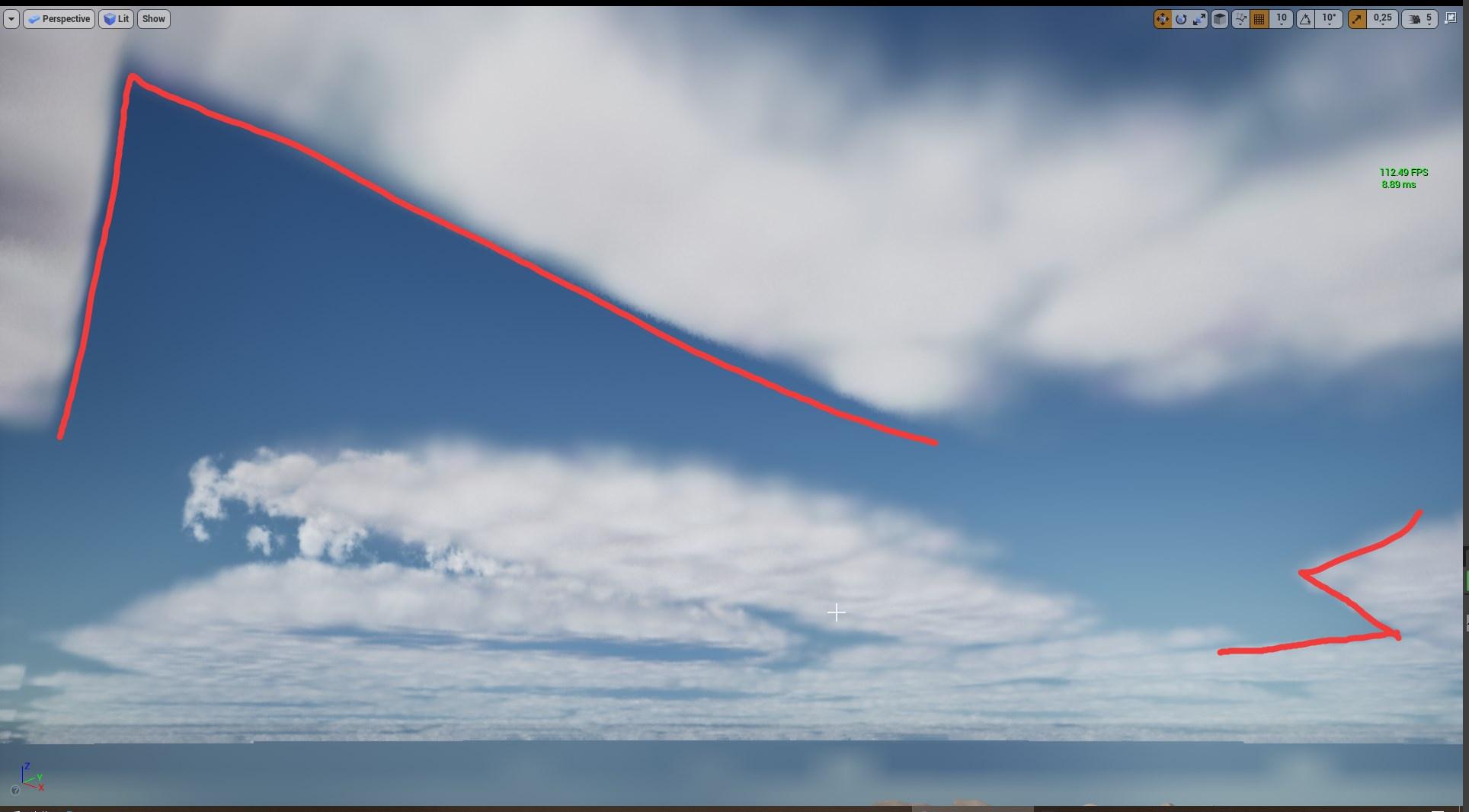
For anyone not liking the rigid patterns in the default cloud setup just go into EngineContent->EngineSky->VolumetricClouds and open up the m_SimpleVolumetricCloud material and change this texture to any noise texture
Here is what it looks like when I change it to the T_Noise01 texture
valid kelp
that default red and yellow texture in the first image i posted doesn't seamlessly tile so by default it looks like this
marsh swallow
ahhhh
makes sense.
The default lake water also seems to have some odd settings. the gerstner waves are over extending and fracturing.
going to adjust some settings to see whats causing it. Is there any UE4 tutorials on the water yet? linking them to the Terrain is eluding me. 😅
 buoyant iron
small question. Is thier a setting to fix this?
When i get closer it goes away
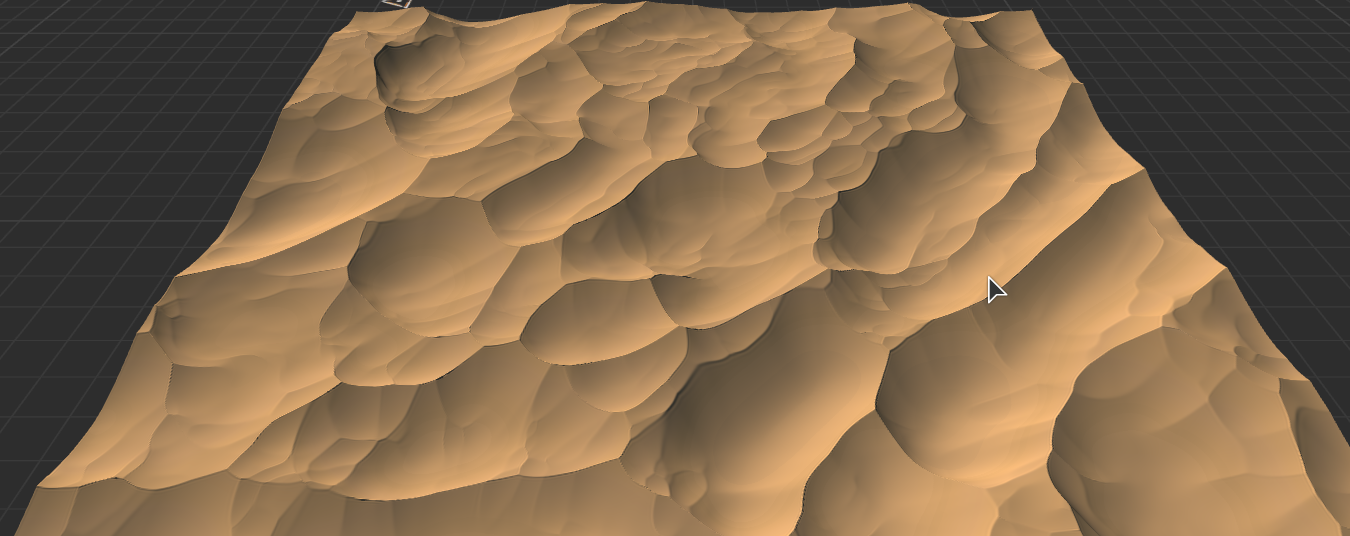
trying to do some cinematic shots of some dunes
valid kelp
looks like it has to do with cascading shadows
buoyant iron
world creator is great
plush yew
lol. its shit for dunes
can wc create such dunes? https://i.imgur.com/WriLO0b.png
cmon fight!!!!
plush yew
thats not how real dunes look
buoyant iron
plush yew
buoyant iron
heres another fake dune for u
plush yew
closing the media player editor also unloads the video, I have no idea why
@buoyant iron you dont even trry :<
I've tried saving it, creating playlists and using those instead, but it seems to be broken
i've tried different video formats, mp4 and avi, and even using an image sequence instead
nothing works so far
marsh swallow
@valid kelp I see now, that Water Waves Actor is where all that control is
valid kelp
also your terrain and WaterBodyOcean should both have a z height of 100 in order for the gerstner waves to blend into the landscape correctly
 heady quartz
Did anyone here experimented with PSO Caching?
marsh swallow
Yeah a friend of mine was mentioning that Z height has to be adjusted for things to work correctly
 remote mist
Question about the Ocean tool in 4.26
I have a lake on my landscape
And the Ocean looks to be like a plane
but it's overlapping with my lake
How do I exclude the ocean from effecting certain areas of my landscape
valid kelp
theres a water body exclusion volume
marsh swallow
im actually playing with that atm
valid kelp
also if your lake is too close to your ocean then it will produce issues
plush yew
I've saved like 3 different playlists but they all disapear as soon as I close the window
plush yew
like they're still in the browser it just gets unlinked in the Media PLayer
marsh swallow
but it doesnt seem to have any effect
remote mist
Also when I place down the ocean, it doesn't appear right away, I have to delete it then undo the delete for the ocean to show up =/
marsh swallow
i came across that for the lake, but i checked and unchecked a setting, which fixed it. Prob just a render thing
WaterBody exclusion is not what we think it is
it means the movement component does not enter swimming state
 hoary holly
Hey all, I've got 4 4033x4033 landscapes and my fps is like 10 lol. I get that it's a large landscape but it'
it's unextured and unlit, any idea why it
is so bad?
Unloaded two of them leaving me 2 4033x4033s. FPS is still awful. Working on a 3080 and 3900x
remote mist
I'm getting this issue with my Ocean mesh though and can't seem to raise the height of the ocean =/
actually i think that might be a landscape sculpting issue
queen hawk
hoary holly
it's unextured and unlit, any idea why it
shadows
queen hawk
remote mist
I'm getting this issue with my Ocean mesh though and can't seem to raise the hei...
thats a landscape bad sculp xd
queen hawk
hoary holly
lighting turned off tho
vertices
hoary holly
Don't know how I didn't think of that off the top of my head haha. Exporting it as a 4k landscape probably isn't a good idea
65mil vertices xD
triangles actually oof
remote mist
Hmm, the water body exclusion volume doesn't seem to remove the water from the affected area.
 woven zealot
Is anybody else getting this error when they try to launch 4.26?
I'm not even launching a project I'm just launching the engine from the launcher
marsh swallow
However the water does seem to be locked into a position and cant raise or lower it
im trying to add a lake at a higher altitude and its not doing anything
i mean i gotta say, overall so far, pretty impressed. Some instruction would be nice. 😂
 fierce tulip
in chat everyone is having weird issues with the water, and all are having different issues.
its kinda fun/mysterious
fierce tulip
for you maybe XD
marsh swallow
but i think a lot of it is not knowing how it interacts with landscape
has anyone looked at the demo map it comes with?
^^
fierce tulip
if you want some rofls join the chat to see the struggles XD
 crisp bone
Why is this water system so buggy
i cant see anything when i drop it on the landscape
median hound
build?
press build that worked 4 me
i had the water mesh actor down then water then build
crisp bone
thanks
now i got this
any idea how to prevent the water from floating above the surface?
I had this issue in the test builds too
median hound
try lowering it?
crisp bone
odd, works fine in the viewport preview but when i try standalone preview it has that issue still
but anyway
wet laurel
Honestly? I was faster with the old system to build with rivers.
no water 😦
What i needed for this? a Nasa PC?
crisp bone
yea the system seems to be a mess idk whats wrong
wet laurel
I hope this will be fixed soon, because the idea behind it is really great.
 limber ravine
should I ask for help with editor issues in this channel?
median hound
das nice https://streamable.com/a3koj6

 next badger
@limber ravine this is a generic questions channel...you can ask anything not related to specific topic that has own channel (like animation)
limber ravine
okay I guess this would be more of an import issue, does anyone know why this mesh might appear completely fine in Blender, Maya and Substance Painter, but in Unreal the top loops are missing?
oops, here's wireframe
 sacred hound
A short question: I have a glide/fly-animation and I have put in a PlaySoundNotify -> While my PlayerCharacter is gliding the Glidingsound is played.
Question: How to make the sound stop, when animation stops before the sound is completely at the end? (In this case when the player is landing on ground.)
limber ravine
hm, seems like my issue was to do with the scale, as I had scaled them up by 100 in-editor, reimporting them and using the uniform scale there instead seemed to fix it
 celest vapor
if a component on the player's character is set to "owner only see" and the character is unpossessed will it hide the component that is set for "owner only see" from the player that previously possessed it?
 zinc shore
in 4.26 every time i start standalone mode it crashes whats going on
 worldly dagger
im trying to make a "cutscene scene" where the player just sees what the camera sees and cant move, but i have my project set up as third person character, so whenever I play the cutscene level a third person controller spawns in.
can someone help me implement this?
 ornate bobcat
How do i use the Experimental modeling thing in 4.26 ?
 plush furnace
The 4.26 Content Exemples are avaliable now? When I try to download by Epic Launcher it's only from 4.0 to 4.25
marsh swallow
so for anyone who isnt aware we have been working with the water system in VoiceChat
There is a few things you gotta know it seems to make them work but it actually does work pretty well. Were breaking the hell out of it, but used right, it works just fine. Hell buoyancy even works. 😅 ish.....
 chilly panther
nice.. 🙂
 honest rune
hey, did they change the car project template to use Chaos physics in 4.26? I think I remember that being said a while back
 light thunder
Why do I have 300 draw calls on a completely empty map ?
what is actually being drawn?
 serene heron
How Can I play a sequencer animation then immediately execute a switch character setup i have both usimg event overlap
 humble yacht
Is it possible to show the console and use console commands on mobile builds ?
 true falcon
"Tesselation is now deprecated" hahahah, wtf? :))
 full stump
Ayo
true falcon
I mean, Shirley
honest rune
 light thunder
Question - How do you get the tooltips to come up on the editor again? every google search is just the wedget tooltips
zinc shore
my standalone and pakaged builds keep crashing whan i add an instance static mesh whats causing this
true falcon
zinc shore
my standalone and pakaged builds keep crashing whan i add an instance static mes...
Seems like a DirectX 11 bug, maybe trying switching the RHI to 12
 nimble warren
Usually when this appears it goes away after a few seconds, now it never disappears, is there a fix?
true falcon
nimble warren
Usually when this appears it goes away after a few seconds, now it never disappe...
Click Dismiss
zinc shore
true falcon
Seems like a DirectX 11 bug, maybe trying switching the RHI to 12
that worked thanks
ok when i make a vulkan pakage of my game i just get a message fatel error is that just a windows problem or will this same issue happen on linux
it seems if i create an instance static mesh it instantly crashes on everything except direct x 12
plush yew
is there a benefit to making your own rig and model and animations for the main agent or such youre going to program the game with or should you focus on making the functions and mechanics before using proper assets
 deep viper
Should all [Static Mesh]es be contained inside of an [Actor] or is placing [Meshes] in the level by themselves a practical workflow?
Context: I am using very modular Hexagon Meshes to composite a long dungeon.
honest rune
placing them in the level creates a AStaticMeshActor anyway. Unless you need them to have other behaviors then that is fine
 ivory sleet
ye
honest rune
like, if its a statue that will never change or interact with anything, then the staticmeshactor is fine
true falcon
deep viper
Should all [Static Mesh]es be contained inside of an [Actor] or is placing [Mesh...
I'd say playing them in actors is better, more flexibility and instancing. Though best is to use a HISM blueprint in case auto-instancing doesnt work. At least if it's an actor you'd want to composit with other stuff
plush yew
;-;
true falcon
The water is super janky, sometimes it works, then it breaks, clicking on some of water actors helps sometimes. Seems some bug with the render targets or something
deep viper
I am thinking of adding the [Glue] mesh pieces (Non-Hex pieces in this screenshot) as optional variable to be attached to sockets in my main Mesh (Hexagon).
Although the challenge here is that when I added a mesh manually to a socket in the Actor itself, the transform of the mesh relative to the main mesh always needs adjusting for it to fit correctly). Is there a method for establishing how a mesh will be positioned relative to the Mesh with the socket?
EDIT: In this case, the Hexagon would have two forward sockets where the triangles would be optionally spawned (for linear corridor sections).
true falcon
It's almost like the watermesh actor or something need a line of sight to the water body, but you can't move it, Shrug
zinc shore
so if i use any RHI other than DX 12 i get a fatel error when ever i create a instance static mesh is this a windows vulkan issue or will this also happen on linux since the windows vulkan version isn't working
serene heron
How can I make it change characters and play the sequencer animation at the same time? After playing the sequencer and going back into the trigger box it then wants to switch instead of when I first enter it while the cutscene plays
true falcon
serene heron
How can I make it change characters and play the sequencer animation at the same...
 cedar wave
Do people generally create a whole new map for the main menu?
true falcon
I mean it's a great opportunity to make a good first impression. I'd take advantage of it 🙂 Also the bar for creative main menus isn't exactly high so great way to stand out. The first scene in a movie is seldom boring
 queen wasp
@zinc shore I used to get crashes even loading the editor with DX12 with my game, now I set the default to DX11 ..not optimal but works.
Installing 4.26: AVG went "Threat blocked" "We've blocked cl-filter.exe because it was infected with IDP.Generic" (behavior shield) I reckon a false positive, but choosing "create exception" and AVG has been at it for 15 minutes no no progress (in the midst of converting a project in-place)
zinc shore
so could it be an issue with my AV
queen wasp
Had to kill AVG and then it popped up "Threat succesfully blocked", and the progress of loading 4.26 with new project seems to be running OK
@zinc shore probably not, the mention of AVG was me right now what I am doing 🙂
But who knows.. AV can cause issues
zinc shore
becuse for me if i pakage my game using vulkan it crashes when i play it and it seems to be instance static meshes that trigger it
but i havent had any notifications frome anythink blocked
queen wasp
The instanced static mesh issue is interesting to me too, I have a few and am experiencing crashes in 2 player single process in PIE at the start persistently, and I do generate some ISMs..
zinc shore
like it works fine in DX12 but since linux uses vulkan and it crashes with vulkan i hope then it wont instant crash on linux making it unplayeble on linux
queen wasp
Only bug I am aware of with ISMs is with Hierarchical Instanced Static Meshes not having correct values for CustomInstanceData in shaders, which I hope is fixed in 4.26..
zinc shore
i am using Hierarchical Instanced Static Meshes so i could just try Instanced Static Meshes
queen wasp
@zinc shore mmm, yeah IDK, I got "out of video memory" errors on DX12 here, not Vulcan I think, just plain DX12, DX11 worked for me
HISMs works for me, except the custominstancedata which I use to control ripe color of vegetables on my farms
I've implemented both too, HISM and ISM so I can switch with a variable once I can confirm it works also for HISMs..
I would've liked to use HISMs though, for the LOD
Compiling shaders (12,017) ..
 deft parcel
Hmm hello anyone?? I got an issue with unreal engine 4 :v
It seems to show only (ETC2, DXT, ASTC only) in android packaging but I want to test my project on samsung galaxy grand prime, help
 barren flume
Okay I finally got an error log and not sure why it always thinks my device is being lost
usually always happens when I hover over certain buttons or it will be random and only happens when I'm using the editor even being idle
at first I thought it was because of my integrated graphics so I disabled it again in the bios since I thought that was what was causing it since when I turned it on that started happening
 burnt smelt
Heyy guys sorry I'm new in unreal engine and idk how to make a functional steering wheel like that which u can rotate to turn the car on Android can anyone please help or if u know any tutorials on yt which covers this please lemme know
true falcon
burnt smelt
Heyy guys sorry I'm new in unreal engine and idk how to make a functional steeri...

How to set up an IK system on a vehicle's steering wheel in UE4.
Remember folks. "Unreal is the one tool that NEVER CRASHES!!!"
 wary ferry
I was wondering - how do you guys find the vault packs that need to be updated when the launcher tells you that there are some? For me its super hard with 10 pages of vault file to find ANYTHING in there ... especially while looking for a single line of txt that says "update" xD
true falcon
yeah it's tricky :/ For engine plugins at least you can click "installed plugins" on the UE version and the ones with update will be first in the list marked
wary ferry
yeah but rn in 4.26 nothing is installed yet xD and i think rn the ART related packs are updating way ahead of the plugins
true falcon
no one was allowed to publish 4.26 plugin until a few hours ago, and Epic lead time for validating plugins is week/month long. I can sense many plugin authors scrambling right now 🙂
deep viper
I just started wondering. If I want my Actor to have between 1-10 static meshes at fixed relative coordinates (e.g. Floor, Walls, column #1), wouldn't just defining the meshes themselves without any sockets be a better solution than insisting on attaching all other static meshes to the main static mesh?
Sockets seem to completely mess up the translation/rotation of an attached mesh, making them very unreliable.
true falcon
deep viper
I just started wondering. If I want my Actor to have between 1-10 static meshes...
I don't know what you mean, attaching to a socket doesn't "mess up the translation", but parents it so it moves respective to that socket 🙂
deep viper
I'll try to illustrate my point (my words are unreliable).
I want a workflow that facilitates positioning pieces like these. If I simply add the mesh components separately to an actor, I can easily specify their coordinates relative to the root component in Blender when I omit use of sockets.
I thought [sockets] were THE tool to always use when handling more than one [mesh] in a single actor, but I am beginning to suspect that [sockets] are a tool to have a [Mesh/Actor] follow !!moving!! (critical part here) geometry (e.g. an animated skeleton).
true falcon
Well, use what works best, sockets are for skeletons mostly, in blender sometimes you'd want to integrate parts into the actual skeleton, or not. Depends if you want things animator driven or blueprint driven. Also sockets are for when you're not the one actually producing the skeleton. It's always better to have one skeleton that multiple actor parts though as draw calls go
deep viper
Thanks. I think I'm getting a better idea of what to expect from sockets. Like you said, a mesh attached to a socket will have a transform relative to the socket, which implies that the ORIGIN of the mesh will be share the same location transform as the socket (If I ever choose to use sockets, I'll have to move the [origin] of my attached mesh if I want to predict its position accurately. Having a socket attach in the smack middle of a mesh will look wonky most of the time)
true falcon
Yeah, it's for when you want something to move specific to a certain bone
deft parcel
Hey can I package my game to android without android studios?
(ETC 1 doesn't shows up in my pc)
 teal ibex
Having trouble trying to blend my spline mesh into the terrain, I've tried the dither effect which only barely works if raise the terrain any help would be appreciated.
 gaunt tide
Pixel Depth Offset?
teal ibex
gaunt tide
Pixel Depth Offset?
Yeah tried that as well the pixel depth offset parameter blends my entire mesh, i just need the edges
gaunt tide
teal ibex
Yeah tried that as well the pixel depth offset parameter blends my entire mesh, ...
Did you try an alpha masked material?
http://riteofilk.com/2017/07/29/blurring-the-edge-blending-meshes-with-terrain-in/ This is what I have found with a quick google search
a Turtleneck Studios production
teal ibex
gaunt tide
Did you try an alpha masked material?
Thanks I'll give this method a shot
gaunt tide
No problem hope it works!
barren flume
Okay think I may or may not have fixed it
I disabled hard ware accelerated gpu scheduling in windows settings
Nope didn't fix it
crashed again with same message
time for a factory reset
 edgy talon
Hi, all! Does in 4.26 chaos Fracture Mode exist by default? Or I need compile from source?
burnt smelt
true falcon
https://www.youtube.com/watch?v=QvNWpjHV2fs
Thanks
 arctic flame
Wondering if anyone knows how to solve this problem:
I have separate SkeletalMeshes for my player's coat and boots. Whenever my coat covers the top half of my boots, the boots become invisible when they should still be visible. I tried turning off the "Use as Occluder" option but it had no effect.
 lunar depot
queen wasp
Only bug I am aware of with ISMs is with Hierarchical Instanced Static Meshes no...
lunar depot
queen wasp
Only bug I am aware of with ISMs is with Hierarchical Instanced Static Meshes no...
is it fixed ??
in 4.26 ?
i wasnt even aware there was a bug there
plush yew
Guys why the 4.26 water is not realistic? My water looks like the fortnite one. Is there any way to fix?
true falcon
plush yew
Guys why the 4.26 water is not realistic? My water looks like the fortnite one. ...
because it's made for fortnite. Maybe try Truesky/Truewater, but they're lagging behind current UE tech. Or there's plenty of parameters in the material you can tweak
 clever axle
Hello! I have a problem with my game I need help with:
I created a dedicated server and I am connecting to it fine but the inputs seem to not be forwarded to the player controller (the game ignores all inputs)
When I play in the editor it all works fine.
Any ideas?
 kind dew
Calling this with an IP Address:
It is not spawning players on the player start location. Any idea how to tell it to search for player starts when loading in via console command open?
clever axle
@kind dew not sure I understand you correctly but maybe override FindPlayerStart in the game mode?
kind dew
Yea I think the problem is that it's not even trying to find player start. I think when you run the 'open' console command, it just spawns the player randomly around 0,0,0 instead of looking for player start
yep just confirmed, FindPlayerStart is not being executed
 quaint fox
with world composition enabled, is there any way to have it automatically load all maps when opening the persistent level in editor?
 viral fractal
Anyone else having massive problems with 4.26 ? Its a package of critical bugs
I never had so many crashes in a non Preview Version 
 icy narwhal
Anyone know why this is happening? I am using Rider and I am pretty sure it's up to date, this only started to happen after I updated to full release of 4.26 from the Preview 7.
It says they are built with a different version of the engine but ugh.
 unique lodge
i think you should reinstall the rider plugin
icy narwhal
Alright I'll try that.
I actually let Rider install it on it's own so I first need to fine where it is.
From next time, I'm definitely installing it as project one instead of engine.
icy narwhal
It's in the developer folder.
unique lodge
yup
 hexed gale
Hi everyone! Is this the right channel for asking about Landscapes and BPs? 🙂
 tender granite
#blueprint #level-design should help too.
Also, i wnted to ask around if anyone heard about World Composition being discontinued for some new feature... anyone know anything about that?
clever axle
I've asked this in #multiplayer but haven't gotten a solution so far so asking here again:
I have a little rts-style game and it works well as long as I play from the editor, even as client
when I run it from my packaged version, it ignores all inputs, the playerController does not trigger on them. Any idea on solutions?
hexed gale
I'll try asking there, thanks @tender granite
 signal flower
Hello everyone
I need to get mouse's inputs when its moved but I cant find a solution
Action mappings call event when mouse is moved but only for 1 time at start
Axis mappings call event every tick even when mouse isnt moved
Can you tell me how to solve this problem?
clever axle
@signal flower Probably an issue with your game mode
signal flower
clever axle
<@!247300200849342465> Probably an issue with your game mode
its default game mode from UE starter contetnt, I changed nothing
clever axle
I need to get mouse's inputs when its moved but I cant find a solution
do you need this always or in some kind of freelook mode?
signal flower
I need it for my widgets so the mouse will be free
clever axle
@signal flower so you want to trigger mouse movement events while in ui mode?
signal flower
and only when mouse is moved
clever axle
well, far as I know it always triggers but you can check if the value is 0
signal flower
if it's always called I can just call event tick
but I hope there's a better solution
clever axle
I'm pretty new to ue myself but I don't think it'll work that way
but you could save your last known cursor position and then check in the next tick if it has changed and build a delta from there
signal flower
but event ticks are bad
 hot beacon
hey guys i need a good name for my game so it is a puzzle story game rn the name of the game/ character is FR3D
signal flower
hot beacon
hey guys i need a good name for my game so it is a puzzle story game rn the name...
I think things like giving name for game must not be solved like this
you really should discuss this with your game managers or with the rest of the team
hot beacon
uhhh yes
team
yea no i dont have a team
it is just me
that is why i need help
i had some names but they didnt fit
 idle sail
Was this not shipped with 4.26? seems not to be?

My PR about material local variables has been merged!!!!
I'm so happy right now :)
Big kudos to the Epic engineer who took the time to test it & merge it after so long! @ingramb3 maybe?
Likes
378
 Twitter
·
signal flower
Twitter
·
signal flower
so anyways we cant even see how this game looks like
our namings will not be very correct at this point
 open wadi
I have a media player sound component that was playing audio fine with my media player, but now that I have another video playing (as a background animation that contains no sound), suddenly my old media player (that plays in the foreground) will not emit audio.
Is it not possible to have two videos playing at the same time, one with sound and one without?
signal flower
idle sail
Was this not shipped with 4.26? seems not to be?
you can check release notes there
https://docs.unrealengine.com/en-US/WhatsNew/Builds/ReleaseNotes/4_26/index.html
Overview of new and updated features in Unreal Engine 4.26
signal flower
🤔
hot beacon
uhh yes not any other game that sounds like that
idle sail
Guess not
clever axle
My inputs don't trigger on the player controller when in dedicated client. Any ideas on how to solve this?
hot beacon
well i havnt done much on story but so far you are a robot but used to be a human but your memory got wiped and other sad stuff
clever axle
@hot beacon seeing a screenshot would help
hot beacon
oh ok the graphics arnt that great seing it is my second ue4 game but ok
yes
wait for a name
hmm
not bad
i like that
tru
this is what it looks like now still some work needed to be done
wait thats a old pic
every time you open the menu the cubes will be in different places
 glacial pecan
anyone tried the new water plugin yet? when I drop an ocean volume into my scene, it's empty... anyone experienced the same and figured out how to fix it?
clever axle
@hot beacon why not just "FR3D"?
hot beacon
dont like the name
but humanoid sounds cool
i did cum up with some names like past and future
but i like humanoid
so it is now HUM4N0!D
and wit some blender magic
got a new name
and now for a pixel shader that cgmater or defult cube
they should Collab
clever axle
well ok then. anyway..
I still got this problem and it's driving me crazy:
My inputs don't trigger on the player controller when in dedicated client. Any ideas on how to solve this? Can I maybe trace what happens to the input?
hot beacon
wait what
 terse cradle
got a question regarding the unreal engine logo can we use the logo for example in the show reel
 pure hollow
glacial pecan
anyone tried the new water plugin yet? when I drop an ocean volume into my scene...
pure hollow
glacial pecan
anyone tried the new water plugin yet? when I drop an ocean volume into my scene...
you need a landscape, and you have to check the "Enable Edit Layers" box when you create the landscape
glacial pecan
@pure hollow even if I just want an infinite ocean scene?
 maiden kindle
https://puu.sh/GU7ug/59cdc4e7a4.png
insert is it for me meme
 pure hollow
glacial pecan
<@!140298919639777280> even if I just want an infinite ocean scene?
pure hollow
glacial pecan
<@!140298919639777280> even if I just want an infinite ocean scene?
yes, I believe so
glacial pecan
@pure hollow sorry for being a terrible newb, but even after I add a landscape mesh proxy actor and a landmass actor nothing happens
weirdly, there are no tutorials on this either
too new, I guess
(or my google fu is weak)
oh wait... I didn't see that layers box
so how do you create a landscape in unreal? it's not dragging an actor into the scene like with everything else?
oh, got a landscape now (it was a special mode)
still no water 😦
ok... got it, I had to delete the water and then re-add it AFTER the lanscape...
and now I have these neat bugs
sigh
guess I'll wait for TwinMotion or something to get this tech
pure hollow
lmao yeah the reason i checked in here actually is because i wanted to ask if anyone has gotten good results with the volumetric clouds
out of the box they have lots of squares
but the bigger issue I'm seeing is that there is a lot of flickering when the camera's pitch changes on the clouds near the horizon
fierce tulip
they prolly exported the wrong texture map for the clouds, everyone is having issues with that one
as for the water, its rather complex. took us hours to get it working last night in voice
glacial pecan
@pure hollow this guy actually has amazing cool clouds: https://www.youtube.com/watch?v=oWE_vYiQMoE

Grab the source files on Michael's Artstation:
https://www.artstation.com/marketplace/p/KzYA/dinusty-volumetric-clouds-in-ue4-tutorial-content
Sources from the video:
http://killzone.dl.playstation.net/killzone/horizonzerodawn/presentations/Siggraph15_Schneider_Real-Time_Volumetric_Cloudsca...
however, downloading his settings makes the sky utterly dark, and I haven't figured out all parameters yet
there's like a dozen of them
 thick herald
fierce tulip
as for the water, its rather complex. took us hours to get it working last night...
thick herald
fierce tulip
as for the water, its rather complex. took us hours to get it working last night...
Did I leave before a solution was found, or was it a combo of luck etc? 😄
 fierce notch
Hello! I guess this is the correct channel to ask.
I would like if someone could help me to confirm if these assumptions are all correct or not.
-Skeletal meshes "canonical" orientation is +Y
-Pawn orientation is +X (meaning a 90 degree rotation in the skeletal mesh)
-Bone orientation is +X
And, in case this is correct. What potential headaches, in the long run, could provoke skeletons that have a bone structure with +Y orientation.
glacial pecan
oh, GREAT... deleting the annoying shore spline DELETES THE ENTIRE OCEAN
I want a boundless ocean, no shore!
fierce tulip
@thick herald we ended up with 20.000+ buoyancy cubes going down a river :p
glacial pecan
aaaargh 😛
thick herald
nice
fierce tulip
or well, fly away from a river. im sure someone recorded it
glacial pecan
screw this, default settings look like fortnite anyway... I'm importing an old realistic water ocean plugin 😛
pure hollow
glacial pecan
I want a boundless ocean, no shore!
set all the spline points to the same position
glacial pecan
@pure hollow haha, neat... still, I guess I'll have to wait until someone like that cloud youtube video I posted makes a realistic looking setting to download
plush yew
Anyone know how I can set a notify every second loop?
It would be too often for the particle effect to play every loop
 dark stag
quick silly question: is this .. ok?
clever axle
guile add a boolean and set it to true if it's false and if it's true, you do your thing and then set it to false
@plush yew
dark stag
meaning can you have more than one flow control input like that?
like on that condition being false / change a var, if not, ignore that and keep going
pure hollow
dark stag
meaning can you have more than one flow control input like that?
yeah, that works fine
dark stag
ok, just looks dodgy but... didnt see the point of duplicating the set view target for either condition
glacial pecan
@pure hollow let me know if you download that guy's cloud settings and manage to get rid of the dark spot in the zenith of the sky 🙂
wet laurel
Something is wrong with my Texture Streaming pool. It's writing itself extremely full all the time. Is there anything else I can adjust? In general I have to say that the 4.26 seems slower than the 4.25
 honest vale
I doubt much has changed with that, didn't see anything in the release notes
plush yew
deadmau5 is still lacking that better name
 mellow flame
is it normal 4.26 is asking me more than 80gb to install?
plush yew
@mellow flame its 12.7 gigs for me
 dusky inlet
uhh so why is tesselation deprecated in 4.26?
even so, there are tons of effects that rely on tesselation such as mud/snow
marsh swallow
also World Comp is as well isnt it?
dusky inlet
yeah but I heard they are redoing the world comp system completely
so there will be a replacement
marsh swallow
correct, we will have a new one.
mellow flame
what do you mean? how can I check that? I just have no preferences on install button
dusky inlet
but so far there is nothing about a tesselation replacement for effects
or maybe they just count on people to use niagara for that kinda stuff now
given that even realtime fluid sims are now possible
marsh swallow
but yeah tessellation is used in a lot of stuff.
dusky inlet
so why not snow too 🤔
marsh swallow
ehhhh i mean thats a much more complex setup than tessellation. but then again. imo tessellation was never great.
just having it on was a performance hit, and then collision never followed it since its just visuals.
dusky inlet
true
but regardless there has to be a good way to achieve the same things without tesselation if they are gonna deprecate it
so its a bit weird
 drifting ocean
Why is the node to round down called "floor" and not "Ground" 🧐
 tough solar
icy narwhal
Anyone know why this is happening? I am using Rider and I am pretty sure it's up...
tough solar
icy narwhal
Anyone know why this is happening? I am using Rider and I am pretty sure it's up...
RiderLink and RiderSourceCodeAccess author here)
I suppose you've installed RiderLink into the Engine before update.
'cause it's not part of the UnrealEngine itself, when you install minor update of UnrealEngine, it won't be updated as well.
Easiest fixup would be to open Rider and go to :
File | Settings | Languages & Frameworks | Unreal Engine and run one of the options "Install in Engine" or "Install in Game", it'll force reinstall plugin in place.
plush yew
Hello guys I did small stone ammo counter
when I click left mouse of the button I thorow the stones
but I have problem
so before I get a stone it appears text "Press E to get it"
all of the getting system is working
but when i have it and throw with left button the text is appearing for 1 second and then disapears
let me send you video
if someone can help me, please tag me or dm me
icy narwhal
tough solar
RiderLink and RiderSourceCodeAccess author here)
I suppose you've installed Ride...
Thank you very much! I've solved it by removing and then reinstalling! : D
 wooden delta
Hey guys, just one quick question.
If I download new version of unreal from launcher so can I download in multiple days. I don't have internet to download 10+ GB in once.
Due to this problem i never tried downloading it. Also my current version is just taken from other pc. But it's old now😕
 unkempt delta
So anyone know the reason for the cutoff in the volumetric clouds?
plush yew
wdym
 dire ingot
guys what should i use to achive a similar path like this?
unkempt delta
When i load them i see a weird pattern in the sky, like a sharp square edge
Like a tiled texture
dire ingot
not the mounatin or the terrain, the road only i mean
i use a cube? or what or landscape?
wooden delta
Any help??
Just yes or no would be enough
unkempt delta
Hmmm
dire ingot
any help?
unkempt delta
When i get the chance I'll send it
wooden delta
Hey guys, just one quick question.
If I download new version of unreal from launcher so can I download in multiple days. I don't have internet to download 10+ GB in once.
Due to this problem i never tried downloading it. Also my current version is just taken from other pc. But it's old nowconfused
This one
plush yew
yes u can wait
dire ingot
@plush yew meshes? i dont mean the path texture, i mean what is that object? what should i use for it? a cube or landscape then decrease its size or what
wooden delta
@plush yew
plush yew
you can pause the download
unkempt delta
Yeah just pause the download
plush yew
@dire ingot its just an extruded cube from blender, u can get that in 5 mins
dire ingot
oh so it is only a cube?
wooden delta
Okay so can I download in 5-7 days.
Also if I switch off it won't cause any problems?
dire ingot
with texture right?
plush yew
yes with a semi circle
dire ingot
that great, i will go and make a cool looking cube now
plush yew
ok
dire ingot
but there is a diffrent
i cant use the scrupting landspce tool on cubes
or objects i import from blender
plush yew
you can vertex paint
dire ingot
i dont mean paint
i mean for example what if i want to use the
smooth brush
that i use in the landscape editing mode
plush yew
oh no u cant
dire ingot
on a cube
then how can i make a fall in that cube?
i want to make a long road, i want to do it from 1-4 cubes models only
i wont model every piece of model for the road
coz if i use the brushes in the landscape editing mode
it will be much better, Easier and time saving
any other alternatives?
dire ingot
if u notice the blue cricrle i made
that path has a fall, not as straight as the one before it i mean
how do i achieve that?
plush yew
u crete a landscape layer and then u put the mesh on, u can edit the landscape
that's just a flat landscape with an high road
plush yew
no the road is a mesh
dire ingot
you mean an object?
plush yew
not always a cube u can crete custom shapes
plush yew
np
plush yew
plush yew
if someone can help me, please tag me or dm me
anyone?
@plush yew
what's the problem
plush yew
plush yew
this is the video
@plush yew
umm ur using a do once ?
where?
idk i am asking, in the ammo bp?
this is the code for the E button in third person character BP
no there is no do once
ummm
this is the code for the left mouse
when you click left mouse button you throw a stone
umm
it looks like everything is ok
uhm but it is not that
xD
you could try creating that message with a box trigger maybe?
 quick cloak
What does this mean?
 brazen cairn
Can someone tell me whether world machine and world creator are basically similar software or different ones for different uses?
brazen cairn
even world machine is payed though right?
thick herald
WM has a free version
plush yew
ye
quick cloak
Nah I understand that, but what about the "before you can upload to the Megajam" part?
thick herald
It's limited to 512 res though
brazen cairn
ah right. I did check that, it doesnt fulfil what I need for world creation. anyways thanks
thick herald
Well, you have to have the game on Itch so they can see and play the game.
quick cloak
Does the Jam have age restrictions?
clever axle
My playerController does not trigger input events when in dedicated client, any ideas what might be the problem?
 weak cypress
can you run raytracing on any gpu for unreal?
mellow flame
is there any reason why Epic contests are not open to individuals in the province of Quebec, Brazil, or Italy?
plush yew
What if I am from one of those countries ?
mellow flame
plush yew
What if I am from one of those countries ?
I'm from italy so basically I can't do sh - but I can have fun anyway 😄
quick cloak
You wont be able to participate thats all
 hot thorn
yo someone can help mee aa
hot thorn
jajsa
i have a blendspace blended per bone with and animation right ( jog and some top animation) and i want to blend another one top animation triggered by bool
is that possible?
and the other question is: it is possible to get the new blended per bone animations blendspace? like export these
 vestal goblet
so, i'm having a really weird issue and i don't know what's causing it
 forest tree
Sorry, totally off-topic, but which language is this? I'm Dutch, it looks so familar/similar. But I don't think it's German? Afrikaans?
vestal goblet
it seems very simple, just a widget not displaying when its supposed to, but i can't for the life of my figure out why
forest tree
"Aktualisie" really threw me off 😄
Yaaaa! That makes more sense hahhaah
I was like, which creole of German and Dutch is this 😆
 deep stump
Hello, Just out of curiosity, If I havre a team of (4 as an example) and I purchase a few assets on the marketplace, do I need to buy 4 copies to have the licenses or does one purchase count as the entire team?
Alrighty. Thanks
clever axle
My playerController does not trigger input events when in dedicated client, any ideas what might be the problem?
 civic lance
Does the lighting need to be rebuilt if I change the directional light intensity at runtime?
 cursive dagger
Is it stationary?
civic lance
yeap
cursive dagger
yeah you can change it at runtime
 ashen merlin
Hey - I have a question about new support for OCIO - when you set a color space transformation for viewport - it will, obviously, look wrong, so I am guessing that all textures need to be preconverted to ACES, right? There is no way to change the color space of a texture within UE?
civic lance
I was just wondering whether it will break other static objects' shadows and stuff
 sly pollen
I have absolutely no idea what I've done, but on only one of my projects, the size of all the editor elements are WAY bigger. This doesn't happen in any of my other projects, and I can't see anything in the settings about it. Any ideas?
deft parcel
I need help please
sly pollen
compared with this regular size
 astral bluff
Hey, I am facing a really big problem.
I'm importing surfaces from quixel Bridge.
Displacement map is not importing
I did everything
deft parcel
@astral bluff u look a lil professional, mind helping me xd
 rocky radish
deft parcel
Can anyone help me about packaging stuff?
rocky radish
deft parcel
Can anyone help me about packaging stuff?
you may find an answer in #packaging
astral bluff
Nah I'm not @deft parcel
rocky radish
np
civic lance
astral bluff
Displacement map is not importing
you did this too?
astral bluff
Yes
civic lance
and make sure displacement texture is checked in quixel itself
you also have to tick those every time you restart your Editor
astral bluff
Yes thats the first thing I do
civic lance
some textures do not come with displacement maps either
i just imported one of mine and it works as usual
astral bluff
I tried many
 neon bough
hey, does someone know how i can figure out why my editor is using almost 20gb ram?
forest tree
neon bough
hey, does someone know how i can figure out why my editor is using almost 20gb r...
Big heightmaps?
I have to restart often, tbh
neon bough
no, my level consists of 3 objects 😄
forest tree
🤔
neon bough
output of obj list
deft parcel
man no one is there :V
neon bough
it seems like working in the content browser and on assets is leaving trash in memory, but i don't know what and where
clever axle
My playerController does not trigger input events when in dedicated client, any ideas what might be the problem?
 terse jewel
What's the trick to getting the new Ocean water to work?
I drop the actor into my scene and get an invisible object. It seems to exist because the screen gets a blue post processing if you're inside it, but it doesn't render anywhere?
thick herald
The water system is very buggy at the moment
terse jewel
but not rendering at all levels of buggy? That feels excessive
thick herald
It's still only a beta feature, so bugs are to be expected. They may have not realised the number of issues that users have encountered though. All I can suggest is file a bug report, there may be a solution to fix it, but I'm not sure.
neon bough
try to move it up/down, for some people that did the trick
terse jewel
I was able to fix my problem by making sure to include a water brush and landscape brush actor
 fervent sigil
hi, I'm trying to use 4.26 with water lake, but it doesn't seem to show anything or deform my landscape.
In the fact the only water volume that works is the custom one.
Any idea why?
 pearl saffron
Why i cant find Remote Control Web Interface plugin?
 autumn latch
What will be the plugins we use in UE4 when we try to transfer our project that we developed when UE5 is released to UE5?
As you know, the project does not open when there is no plugin. I am sorry for my English.
 timber birch
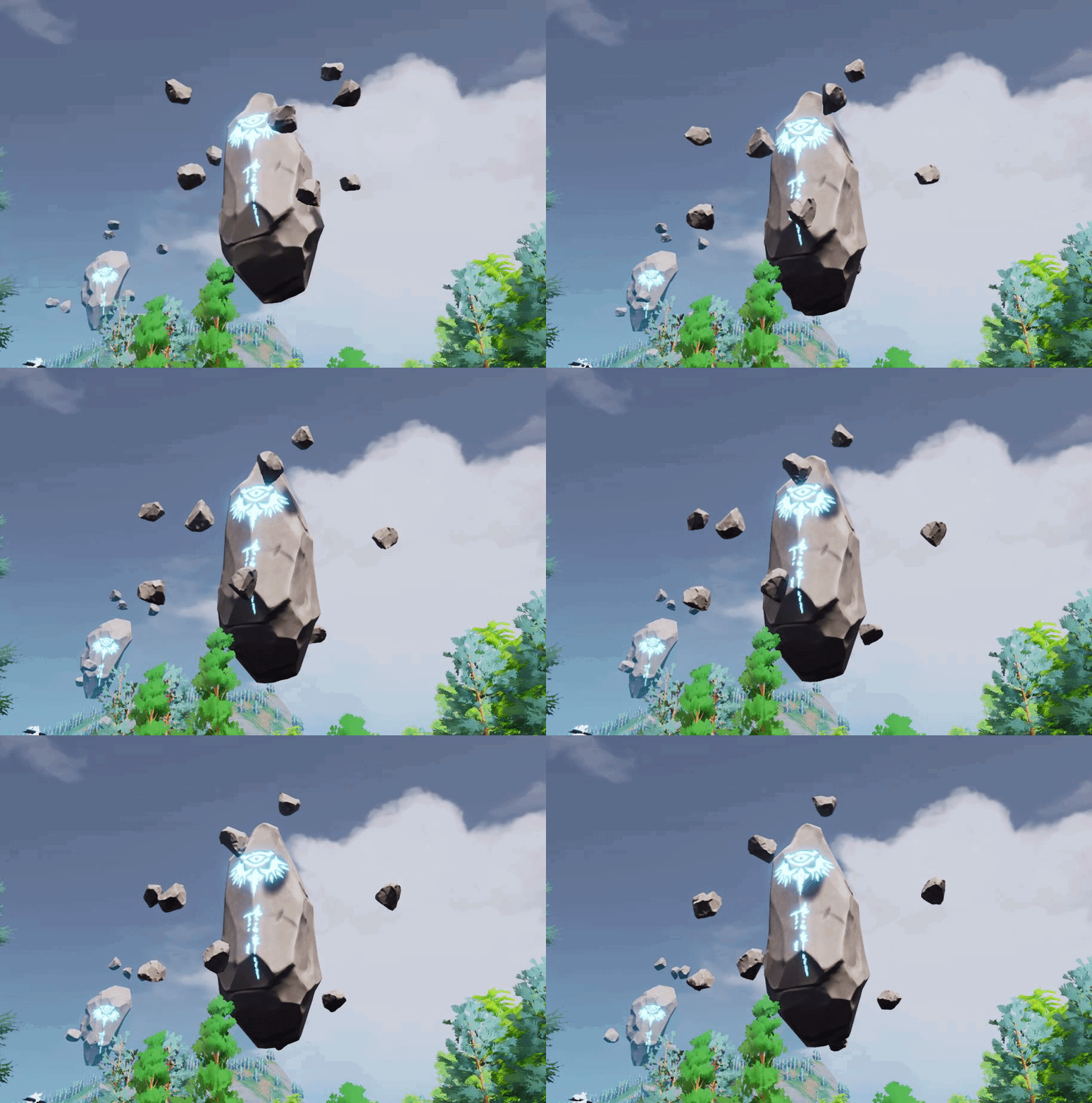
@ashen brook I think ill tag you here? As promised weeks ago, i would show the floating rocks https://i.gyazo.com/4d2c84ad74169b9d9bc5cb2aae91c028.gif
 neon bough
UE5 probably is UE4 with more features
i doubt that they work on a complete new engine, rather than changing stuff under the hood of UE4
 ashen brook
timber birch
ashen brook
timber birch
Yeah haha 😄
queen hawk
UE5 will be released on december 2021?
dire ingot
guys lets say i have a turret, and when i click on this turret, it should show its range
since it rotate, the range should appear as a circle
where should i start, what to do?
its like MOBA target thingie
kind dew
I'm using execute console command to open a level by ip address, like this:
https://cdn.discordapp.com/attachments/225448446956404738/784334423285956628/unknown.png
For whatever reason when the player's load in that way, they do not spawn on any player start location. And, the game mode playerstart functions(FindPlayerStart, ChoosePlayerStart, etc), are not even firing.
 light thunder
Why is my cull distance volume not showing a box shape or any size to indicate what it's volume is?
 inner vine
fervent sigil
hi, I'm trying to use 4.26 with water lake, but it doesn't seem to show anything...
inner vine
fervent sigil
hi, I'm trying to use 4.26 with water lake, but it doesn't seem to show anything...
Do you have the landscape edit layers enabled? They seem to be required.
plush yew
Hello, if I use some quixel assets for my game I just need to mention them or I have to pay? Thx
queen hawk
if you got them from the Unreal Engine Marketplace you can use them for comercial
plush yew
From quixel bridge
 haughty sequoia
Hi! im totally new to UE4 and i was watching a yt vid about the tutorial..i pretty much got the basic stuff..but while in the video ,there was a part of exporting a 3d grass asset from megascans to UE4 ..through quixel bridge..so i installed everything which were necessary..now when i imported a 3d plant asset..and used it in the Viewport in UE4 ..it was only mesh..without any material..there were the materials tho..but placing the grass in the viewport,it was completly blank..and also wired rectangular shaped..however in the yt video..he imported the grass easily..and said "Unreal automatically did the necessasy things...thats very cool" and there were no wiered shapes..it was also with full material.. any help?
this one..
 undone bough
is it just me or is floating point math off?
I have a simple routine:
which takes a float, converts it to a interger of of 1000, then i convert it back to a float, and divide it by 100, at this point it should only return a 2 decimal value for any returned value but its not. sometimes i get a 2 decimal value, other times im getting a 5 decimal value.
even 6...
woven zealot
Has anybody else noticed that the documentation on the site is totally messed up? A bunch of content is gone. I.e:
https://docs.unrealengine.com/en-US/AnimatingObjects/SkeletalMeshAnimation/StateMachines/index.html
https://docs.unrealengine.com/en-US/API/Runtime/InteractiveExperiences/Physics/Engine/UPhysicsHandleComponent/index.html
State Machines allow Skeletal Animations to be broken up into various states, with full control over how blends occur from one state to another.
It looks like something got seriously messed up somehow
fervent sigil
@inner vine It is required, and I do have it.
woven zealot
Have you tried creating a new landscape just to see if that is the problem?
Try making a demo map
fervent sigil
@undone bough Floating point arithmetic isn't precise
woven zealot
with a simple flat landscape and see what happens
fervent sigil
@woven zealot No but it wouldn't matter; I need it to work on my existing landscape..
 north stream
i have a weapon skeletal mesh oriented at Y axis
is there a way to turn it to X axis
undone bough
fervent sigil
<@!458977415176257536> Floating point arithmetic isn't precise
makes it a bit difficult when you need precise decimal values.
i guess floats are 'how not to do math' in unreal engine.
fervent sigil
@undone bough Precise decimal values = slow, hence why they aren't usually used in games.
You have 2 options:
- Describe the bigger picture; usually there are other ways to achieve what you want without precise floating point arithmetic
- Use "BigDecimal". I don't know if it exist in UE4, definitely not in blueprints.
Know it's not UE4 specific, but all games. Using a "precise" floating point arithmetic is WAY too slow for ANY game.
undone bough
o.O precise = slow? say what... 1 / .5 = .5 how is that slow?
woven zealot
@fervent sigil yeah but if it doesn't work on the demo landscape you know that it is something with your environment
haughty sequoia
anyone?any help plz?
light thunder
Why is my instanced foliage actor adding like 5k draw calls? What setting did I screw up that made it not...well, instanced
fervent sigil
@woven zealot It's a clean UE 4.26, I doubt it's in my env.
haughty sequoia
any help please!??
inner vine
fervent sigil
<@!133640892627156993> It is required, and I do have it.
Have you checked if creating the lake adds a "water" edit layer? If it's showing nothing, not even the control splines, then it probably has troubles finding or interacting with the landscape.
fervent sigil
@haughty sequoia Just go into the mesh and put the material it self. Not sure exactly what the video did and what you did, but something UE4 doesn't get things right.
Assigning the correct material to the mesh is pretty simple
@inner vine Is it suppose to create a "water" edit layer? if so then true, it doesn't work with it.
I do see the control splines though
@inner vine Is it suppose to create a "water" edit layer? if so then true, it doesn't work with it.
I do see the control splines though
haughty sequoia
https://www.youtube.com/watch?v=_a6kcSP8R1Y at 2:01:13

Unreal Engine tutorial for beginners! In this free tutorial we will go over everything you need to know to get started in Unreal Engine 4. You will learn how to install Unreal Engine, navigate the 3D viewport, create materials and worlds, sculpt landscapes, paint foliage, program in Unreal using Blueprints, and end with creating a photorealistic...
fervent sigil
@inner vine
haughty sequoia
this one..i did the exact same thing..and idk why..but mine looks shit
fervent sigil
@inner vine Is it suppose to create a "water" edit layer? if so then true, it doesn't work with it.
I do see the control splines though
haughty sequoia
also..as i go a little back..it takes the shape of a rectangle standing..
fervent sigil
@haughty sequoia Like I said, just do it manually. Otherwise you could contact Quixel since it's their plugin that is suppose to do the job there
It's suppose to be a rectangle. It's a texture with transparent pixels
inner vine
Yes, it is supposed to create a landscape edit layer named "water".
fervent sigil
mm it doesn't do it
@inner vine Any idea what can I check/change/etc to affect the relationship between the water and the landscape?
inner vine
Are you sure edit layers is turned on in your landscape object too, not just in the plugin settings?
fervent sigil
yup. I got 4 layers
1 is reserved for splines too
@inner vine .. Any ideas then?
inner vine
I'm trying to reproduce your situation.
Do you have level streaming set up or is everything just in one level?
haughty sequoia
ok..i manually placed the a material which i created by myself..using the provided maps..now it actually looks like grass..but the problem is ..as i go a lttle back..it starts to loose details..and if i get even a metre back..it becomes full thin rectangle...any sulutions?
inner vine
But, you aren't trying to place the water and landscape in different streaming levels or such, right?
fervent sigil
@haughty sequoia You shouldn't create the material your self. The Quixel material does a lot more than a simple material. It should be created when exported.
I would suggest you try again, a while back the export/import worked for me.
@inner vine I'm not sure what you call streaming levels, since all levels in world composition are automatically streamed out & in.
Also, a tiled landscape has a sort of landscape-tile per level, but it's only a proxy on each one. So again, not really sure about it
but I tried to put the lake in multiple levels such as the specific tile, the peristent level, and a custom one. none worked.
inner vine
On your WaterBodyLake actor, is "use curves channel" enabled?
haughty sequoia
@fervent sigil i didnt understand..srry..im a totall newbie ..can u explain it to me?
undone bough
@fervent sigil so... if i understand you correctly.... being decimal math is too hard for a computer... i'd have to go this route to get precise decimal values....
fervent sigil
@haughty sequoia I simply said you should try the process again. You shouldn't create the material your self.
@inner vine yup
haughty sequoia
i did that a hundred times.. ;-;
fervent sigil
@undone bough float is never going to be precise. Try to explain what are you actually trying to do
neon bough
@undone bough decimal math isn't hard if you don't do stupid things, computers aren't organic...
fervent sigil
@haughty sequoia Try using a new project, and making sure all products are up to date. If it still doesn't work, either wait for someone else or ask in a Quixel discord server
haughty sequoia
okkay
undone bough
@neon bough @fervent sigil im trying to reduce the decimal value to a two digit value, which honestly should of worked with the simple rounding routine, but nope.
fervent sigil
@undone bough use format float node
terse jewel
I'm learning that I need to Enable Edit Layers when creating a landscape to use them with the new water deformation tools. Is there a way to enable edit layers on a pre-existing landscape that didn't tick this box originally?
undone bough
fervent sigil
<@!458977415176257536> use format float node
format float node on what?
true falcon
terse jewel
I'm learning that I need to Enable Edit Layers when creating a landscape to use ...
Yeah, just enable it in the details panel
inner vine
terse jewel
I'm learning that I need to Enable Edit Layers when creating a landscape to use ...
Select your landscape actor, and under "Lancscape" check "Enable edit layers"
@fervent sigil I don't really find anything which could cause your problems, sorry.
undone bough
@fervent sigil still can't make it back into a 2 decimal float :/
texttostring->stringtofloat-> 6 digit float non percise.
fervent sigil
@undone bough picture
fervent sigil
wait you don't want to display it?
undone bough
I'm trying to trim the float, for display thats great.
basically round the float to the second decimal.
fervent sigil
well either way if it doesn't work the problem is elsewhere. That node works for sure
undone bough
it works fine if you leave it text yes, it doesn't if you make it back to a float.
fervent sigil
not sure why you'd want to round it but non-display, but yeah I guess you could use that like what you just did. Not sure if there's a better way
well floats don't have a limit on digits
well actually they do, but it's a 7 digits limit and it's on precision.
undone bough
yeah but a string containing 95.59 shouldn't become a string of 95.699998
fervent sigil
you mean .599998 ?
undone bough
yeah
undone bough
yes it should be .590000
fervent sigil
.009 still sounds like quite a lot and something weird going on in there
undone bough
there honestly doesn't seem to be a way...
fervent sigil
@undone bough You could try to explain what you are actually trying to do though.. the big picture, that is
undone bough
i said - round the float to the second decimal
fervent sigil
.. why?
undone bough
the why doesn't really matter to be honest.
fervent sigil
assuming it's not for display reasons, it's not a common thing
 mint umbra
Why can't I find this node in material-editor of UE4.24? Is it not searchable as it's name, or am I missing something? https://gyazo.com/75e8d4ac37bca0563d4dea19ba4d241f

 stiff beacon
Hey everyone, So I'm really REALLY new to UE4 and design in general, but I've gotten more and more interested in it the past couple months.
So I want my first project to be a bit ambitious, but no gameplay design and such, just making a good looking environment from my favourite childhood game.
Should I really watch through and master all of the many tutorials or just freely mess around and look it up if I cant do it myself?
dire ingot
guys lets say i have a turret, and when i click on this turret, it should show its range
since it rotate, the range should appear as a circle
where should i start, what to do?
fervent sigil
@undone bough sort of does. If you want to stick to the arithmetic, you can check how it's actualy being stored & calculated: https://en.wikipedia.org/wiki/Floating-point_arithmetic
undone bough
hahaha... even this doesn't work:
fervent sigil
@honest rune I don't have it. Possibly new projects only?
honest rune
its so fresh that the docs don't even mention it lol
undone bough
well ty anyhow @fervent sigil seems to be a limitation with the engine, so anything that requires precise floats (i.e. even pie calculations) is out.
fervent sigil
@undone bough There isn't any limitation to the engine.
undone bough
incorrect float point math = limitation
thick herald
why not store the float as a float, instead of rounding it for whatever reason it is?
honest rune
floating point rounding error is a well known phenomena
undone bough
i mean the only way to actually get precise float point math is to convert the entire float to a int, then do all float point math as ints but even that is limited by the length of a int
honest rune
there's things you can do to help mitigate it but its highly subjective to its use case
and environment
thick herald
floating point error, is a well known and common issue while dealing with potentially large numbers. UE4 is not alone in this.
clever axle
when packaging my project, do I have to package both client and server seperately or does it suffice to package either?
undone bough
anyhow, i'll do it with int's, leat the values will be correct.
thick herald
You meant modus there, right?
 wanton lotus
1 / 0.5 = 2
undone bough
sry slasher i typed it wrong, im frustrated. 1 - 0.5
 digital anchor
you must be doing something very complicated to get fustrated at floating point precision, should be completely transparent for normal usecase
wanton lotus
@undone bough I just finished catching up. You can definitely round to decimal places like you did with that initial screenshot. I think the only problem may have been the "float * int" node, try making it a "float * float" to multiply by 100.
honest rune
I'm really curious what the heck this new Script folder is for lol. I don't see anything in the release notes or previews so far. something with editor scripting maybe?
thick herald
could be Python
honest rune
I'm kind of thinking maybe it is for the editor scripting
they did mention upgrading python and they've put a lot of love into it lately
weak cypress
it says that i cant move the camera to be the child of the character, is there a way to do it?
thick herald
editor scripting has been around since 4.22 though, which is why I'm guessing it's for Python scripts
undone bough
@wanton lotus still same result but thanks
undone bough
weak cypress
it says that i cant move the camera to be the child of the character, is there a...
attach a springarm to mesh then the camera to the springarm ?
wanton lotus
That really is odd. I literally do this type of rounding in my day/night cycle for my project.
weak cypress
it says this
undone bough
wanton lotus
That really is odd. I literally do this type of rounding in my day/night cycle f...
sometimes it returns a 2 decimal round, other times 6 decimal, its weird
wanton lotus
@weak cypress It is inherited by its parent class, you need to edit the parent class.
weak cypress
edit it to what 🤔
 river silo
How can I get all available Microphones?
wanton lotus
To move anything inherited, you need to edit the parent blueprint (class).
fervent sigil
@wanton lotus I believe he's thinking that .05 != 0.49999999. It's the same value, and it could happen.
It's not UE4 related, but how computers work in general regarding floating points
wanton lotus
@weak cypress With what you shown on screenshots, looks like you made a child of the ThirdPersonCharacter blueprint. ThirdPersonCharacter would be your parent class.
wanton lotus
Still need to edit the parent class, hehe.
undone bough
@weak cypress select the mesh, then 'add component and select 'camera' not 'cine camera'
should add a camera attached to the mesh
wanton lotus
If you want 2 cameras, you do it like that, but to move something "inherited", you need to edit the parent class.
undone bough
o.O
wanton lotus
Upper-right corner of the blueprint you are working in has a link to the parent class.
weak cypress
yeah i clicked that
wanton lotus
Now you should be able to move the camera boom and such.
Save the edits you make, and it will be reflected in the child blueprint too.
undone bough
@wanton lotus you talking about doing things like....
 nimble pilot
Set the forward axis
weak cypress
wanton lotus
Now you should be able to move the camera boom and such.
hmm i cant seem to figure how to do it
plush yew
nimble pilot
Set the forward axis
Set the forward axis
wanton lotus
@undone bough Nah, I mean if you want to simply reorder the components like what was being tried. If a component says "inherited" it can only be reordered in the parent class.
undone bough
ah
 ornate forge

Exploring the amazing new water capabilities introduced in Unreal Engine 4.26, Epic Games’ Sjoerd de Jong talks you through the basics of setting up an ocean, a lake, and a river. Then, he dives into more advanced features and possibilities that showcase how you can tap into the water rendering through other parts of the engine by making objects...
wanton lotus
@weak cypress What is your overall goal? Do you want strictly first person view, or both first and third? Either way, you could always add the 2nd camera and just disable the original if you want first-person only.
weak cypress
only first person
undone bough
so @weak cypress was editing a child blueprint and was trying to move a parent blueprint camera on to the mesh which can't be done, sense you have to edit the parent class to move any components that are setup in it 🙂
 acoustic wraith
Could I use pre-computed lighting scenarios and level streaming to effectively toggle baked lighting?
wanton lotus
Yep, exactly. Should be simple enough to edit the ThirdPersonCharacter class to move the camera.
weak cypress
ok how to edit it
wanton lotus
The same way you tried in your child blueprint, but do it in the parent.
undone bough
you need to open the parent blueprint and make the changes in it Kostaxr
weak cypress
i did open it and i dont know what change i need to do
wanton lotus
Drag the camera to the mesh, then you can set the attached socket to head or something.
honest rune
to change that component's parent, you can set its attachment in the constructor. The parent class sets up its attachment to the springarm component, so you'd just have to set a new attachment in your child class' constructor
wanton lotus
@weak cypress I was really just trying to get you beyond your initial problem of not being able to move something inherited. To figure out the rest of setting up first person view on a full body character, there are countless tutorials.
light thunder
What did I do wrong with my export/import settings - I needed this model to note have windows, exported to blender, remove the faces of the windows, imported back in, with no warning messages - same material instances, and it looks NEARLY the same, but somehow the tiling got affected, in this second image (I made sure the actual SM position in world hadn't changed either) What settings did I miss? I didn't change, AFAIK, anything that should affect the UV tiling? But it looks very very slightly out of place
undone bough
@weak cypress you'd want to setup the camera in the parent class not the child class, so that any character you create off the parent class will still have the camera already setup in it. unless your parent class is being used for both npc & player, then you'd want to set up the camera in the child class for the player.
weak cypress
yeah i am here in the parent class and i dont know what i need to change
undone bough
what exactly are you trying to do?
weak cypress
turn the 3rd person camera
into a 1st person camera
but keep that robot looking thing
undone bough
so you want a first person camera with a third person character?
weak cypress
yes
clever axle
when I package for dedicated server/client.. do I have to select each target (normal and server) and package 2 times or does it package both?
honest rune
Plugin Utilities plugin is new too. That's a handy one.
@weak cypress If you want to do that using the third person template instead of the first person template, you can simply change the springarm component's arm length so that it clips past the character's mesh
 agile thistle
does anyone know, why the sun isnt shown anymore with a SkyAtmo/Directional Light Setup?
weak cypress
i meant like
agile thistle
And where the option went in the Directional Light to turn sky atmo on
weak cypress
when i open the c++ parent class what do i need to change
agile thistle
honest rune
you could create a custom character type that attaches the camera directly to the character or its root component but the down side would be that the camera would be missing benefits that it gains by using a springarm component
to just change the arm length, you don't need to change the native parent class, just the third person character blueprint, then select the springarm component, then find the arm length property and adjust it
clever axle
is there a way to package both client and server at the same time? it's a bit tedious
honest rune
each one has its reason for use. Generally, you use c++ types for creating a base type that will contain functionality and you create blueprints of those base types to setup the data/assets specific to a specific type
terse jewel
@weak cypress Just take the default third person character bp, go to the view port tab, move the camera to be a child of the mesh, position it in front of the face. What you're trying to do does not require logic in bp or c++.
honest rune
so basically c++ is for functionality, blueprints is for tying assets and data to types
weak cypress
i cant do this
honest rune
you honestly don't need to. just change the springarms length
terse jewel
spring arm is fine if you want it to be perfectly controlled. If you want animation to affect the camera, make it a child of the mesh (and attach it to a socket).
weak cypress
i want the animation to affect the camera
north stream
do you mean like a shaky camera
north stream
or do you want the cammera to follow mesh rotation ?
north stream
weak cypress
to just move with the animation
ok
undone bough
Kostaxrs parent class thats setup the camera is done in c++, so they need to know how to change the camera from being attached to a boom and attached to the character mesh via the c++ class.
north stream
ya make it a child of your mesh, clik on camboom, in details panel you should see a Sockets Tab
weak cypress
i cant make it a child
north stream
ah C++, i dunno
undone bough
the one tutorial i had on c++ for camera setup in unreal engine by unreal seems to of been deleted 😦 i was gonna send them the link but it just takes me to the main tut page now 😦
honest rune
to be honest, I think you should really just start with the engine's docs for getting started. This is pretty basic stuff and you'll need to understand this,otherwise the rest of the engine is going to be a hell of a battle for you
like this right here:
https://docs.unrealengine.com/en-US/Basics/GettingStarted/index.html
Introductory information for developers starting out creating games with Unreal Engine.
undone bough
why i started with blueprint driven... so i can learn that first, then dive into c++ after
honest rune
you still need to understand the basics
undone bough
yeah but blueprint driven is easier to visualize then strait code.
honest rune
I'm talking about blueprint. Its not an insult 🙂 Everyone has to start somewhere
undone bough
didn't take it that way @honest rune no worries 🙂
 winter gale

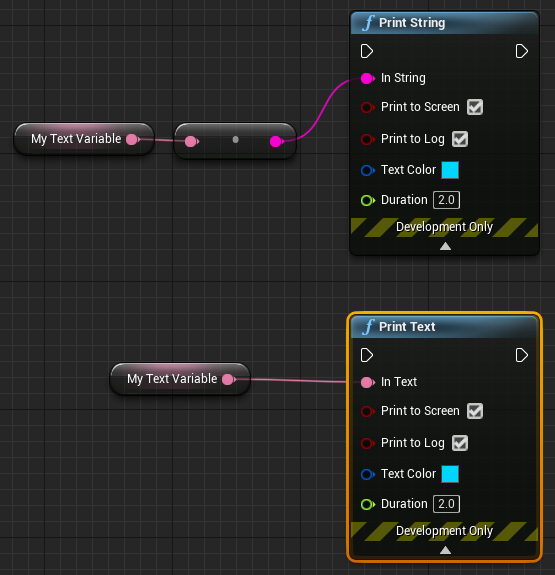
Quick #UE4 Tip number 58.
Don't forget that #UnrealEngine has Print Text that does exactly what Print String do. I've seen people often converting Text to String for Print String.
#unreal #unrealtips #unrealdev #indiegamedev #gamedev #indiedev #screenshotsaturday
 Twitter
·
north stream
Twitter
·
north stream
is this what you're looking for ?
undone bough
they want to do this:
where its attached to the head socket instead of a spring arm
in c++
north stream
look at the last line it shows how to attach to a socket
 pallid talon
If I have a 3d Asset, like the curbs from Megascan, and I want to draw a spline to place the curbs, do I need my on script to create splines that Megascan curbs will follow? Or is there a tool for this that I've overlooked?
 daring gazelle
quite proud of myself to be honest
 marsh sparrow
so just tried to start up 4.26 in my project, compiles and builds fine, but the editor sits at 45% and goes no further.. anybody else seeing this or is there a way to see what is stuck??
its rocking cpu
but just chills here
build stuff.. nothing big here i know i will change it later
nm
forget me.. just saw a new debug window
[2020.12.04-17.51.00:880][ 0]LogShaderCompilers: Display: Worker (5/5): shaders left to compile 1758
hahah
well that explains it
ill wait thanks
heady quartz
Does anyone know how to reduce/eliminate initial lag spikes (first time opening a map)?
heady quartz
Probably shaders
 stone stump
is there a way to make the player stop after looking up after a certain angle
marsh sparrow
heady quartz
Probably shaders
Can you level stream it? Like preload the shaders?
heady quartz
I am level streaming it and loading it but as soon as i make it visible i get lag spikes
stone stump
anyone know a answer to my issue
median hound
yes stop moving
heady quartz
@stone stump what do u mean
 analog vale
HI i am having trouble with grass culling
stone stump
so i want to stop the player from looking straight up
i want it to stop in a certain angle
median hound
clamp the angle
marsh sparrow
@stone stump you'd probably detect the camera angle and if it hits that certain point, call the player controller there is a stop movement flag i think
heady quartz
Just clamp
stone stump
?
heady quartz
I'm not on my pc so i can't really screenshot but its simple
marsh sparrow
wrong at.. sorry
marsh sparrow
analog vale
HI i am having trouble with grass culling
What kind of issues
analog vale
my grass is not visible
weak cypress
i cant convert my third person character to a first person character
analog vale
from afar
stone stump
heady quartz
I'm not on my pc so i can't really screenshot but its simple
can you send it to me when you get a chance please
weak cypress
https://www.youtube.com/watch?v=VVttmneWJMA like on this video
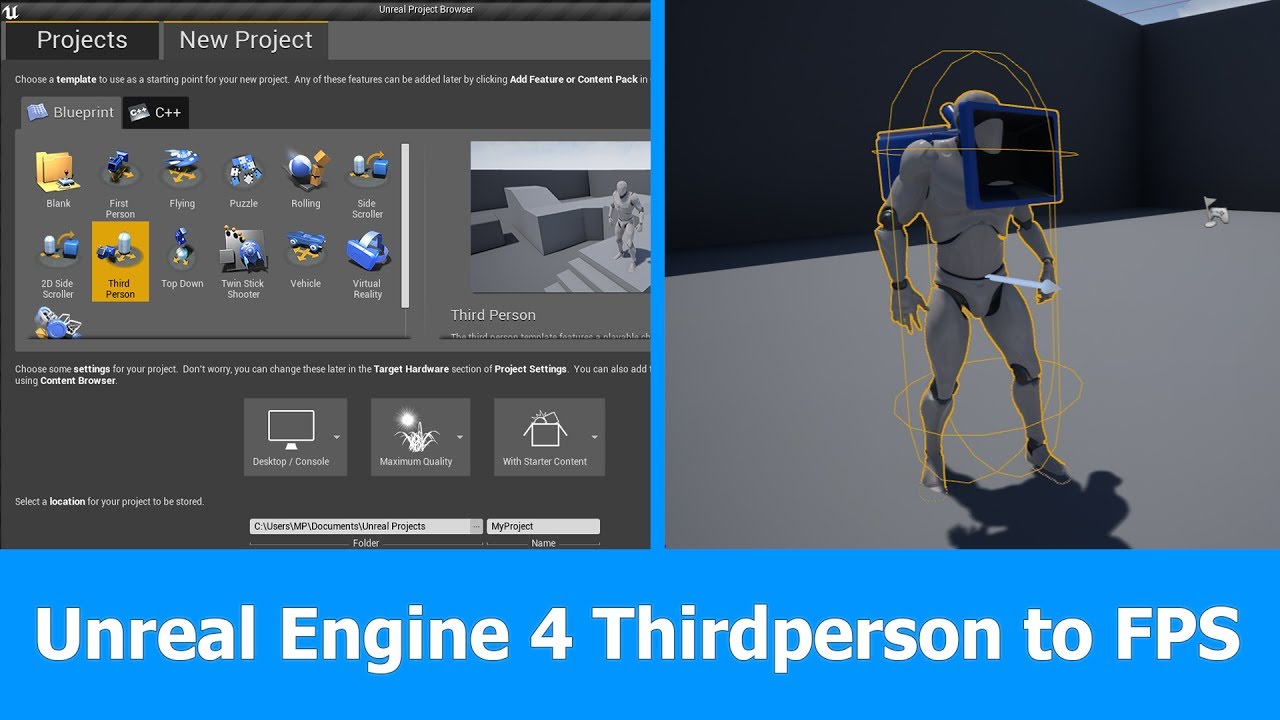
In this short Unreal Engine 4 tutorial I want to show you how to turn a Thirdperson Player and Camera into a First person Player for FPS games in which you can see the whole character.
See my social profiles here
G+: https://plus.google.com/+JayAnAm
Twitter: https://twitter.com/jayanamgames
Facebook: https://www.facebook.com/jayanamgames
Patre...
marsh sparrow
I think in reality you just need a different camera on your person
    FirstPersonCamera = CreateDefaultSubobject<UCameraComponent>(TEXT("FirstPersonCamera"));
    FirstPersonCamera->SetupAttachment(CameraBoom, USpringArmComponent::SocketName);

    // Attach camera to boom
FirstPersonCamera->bUsePawnControlRotation = true;```undeclared identifier
marsh sparrow
well you have to set it up in the header file
    UPROPERTY(VisibleAnywhere, BlueprintReadOnly, Category="Camera", meta=(AllowPrivateAccess="true"))
    class USpringArmComponent* CameraBoom;

    /** Camera for First Person */
    UPROPERTY(VisibleAnywhere, BlueprintReadOnly, Category = "Camera", meta = (AllowPrivateAccess = "true"))
class UCameraComponent* FirstPersonCamera;```i figured it out
marsh sparrow
cool
i did it a while back by opening the fp project and swapping my character class over
weak cypress
that doesnt work...
light thunder
can animated materials effect foliage actors for draw calls? I put some grass down and got like 5k draw calls extra from what I could tell
 ember notch
 fleet juniper
Quick question im trying to open a uasset file in ue but it says it dosnt know the file type anyone got any ideas why??
fierce tulip
you cant drag em into the content browser, and/or if they are made in a newer version of ue4, the older version has no clue what to do with em
 pine pecan
why does it take so long to import objects/rigs
fleet juniper
I'm using the most up to date version
pine pecan
1 character with a rig took me almost a minuet to import compared to the 10-20 seconds that it takes in unity when i just drag and drop it in
dire ingot
why this is ont working
dire ingot
help
fierce tulip
@fleet juniper you cant import em, that is not really a thing.
put them into your project's folder.
fleet juniper
Where is that located sorry im new
fierce tulip
wherever you installed your project
if you have a shortcut on your desktop you can rightclick on it and "open file location"
fleet juniper
Ok thanks
fierce tulip
you can put it anywhere inside the content folder
dire ingot
help
fierce tulip
@dire ingot please read the #old-rules and stop going "help, help" thank you
 finite hamlet
So...the shader compilation for a Ray traced project takes a hot minute. Does it have to be done everytime it's opened/a new RT project is created, or is it a one time thing?
fierce tulip
normally you'd migrate uassets from one project to another (rightmouseclick on the uasset > asset actions > migrate > select the content folder of the project you want the migrate to)
you might wanna follow some getting started tutorials though.
 tender flint
Is Unreal engine a good software?
fleet juniper
But it dosnt even show the asset as in the engine where I put it
 unreal sable
I'm having lagspikes every 2.8 seconds inside the engine and during gameplay.
This didn't use to happen every session of use and remains that way until i close it.
Restarting doesn't help.
When i open "stat scenerendering" in console i see that RenderQuery disappears at the same time and theres a drop from 55ms to 7ms.
I'm wonder what the cause is and how i can fix it?
pallid talon
The Blueprint "Add Spline Mesh Component" allows you to add a mesh to a spline, but I can't expose the Static Mesh as a variable. Does anyone know how?
dire ingot
why im being ignored? luos told me to stop going help, if i dont ask for help how can i get it?
so may u guys help me?
 vapid karma
HEEEEEEEEEEEElP am stuck
vapid karma
what do you need
dire ingot
dire ingot
why this is ont working
this
 dire ingot
dattybayo
 orchid gull
Hello, any opinions on the style guidelines from ue4.style? 🤔


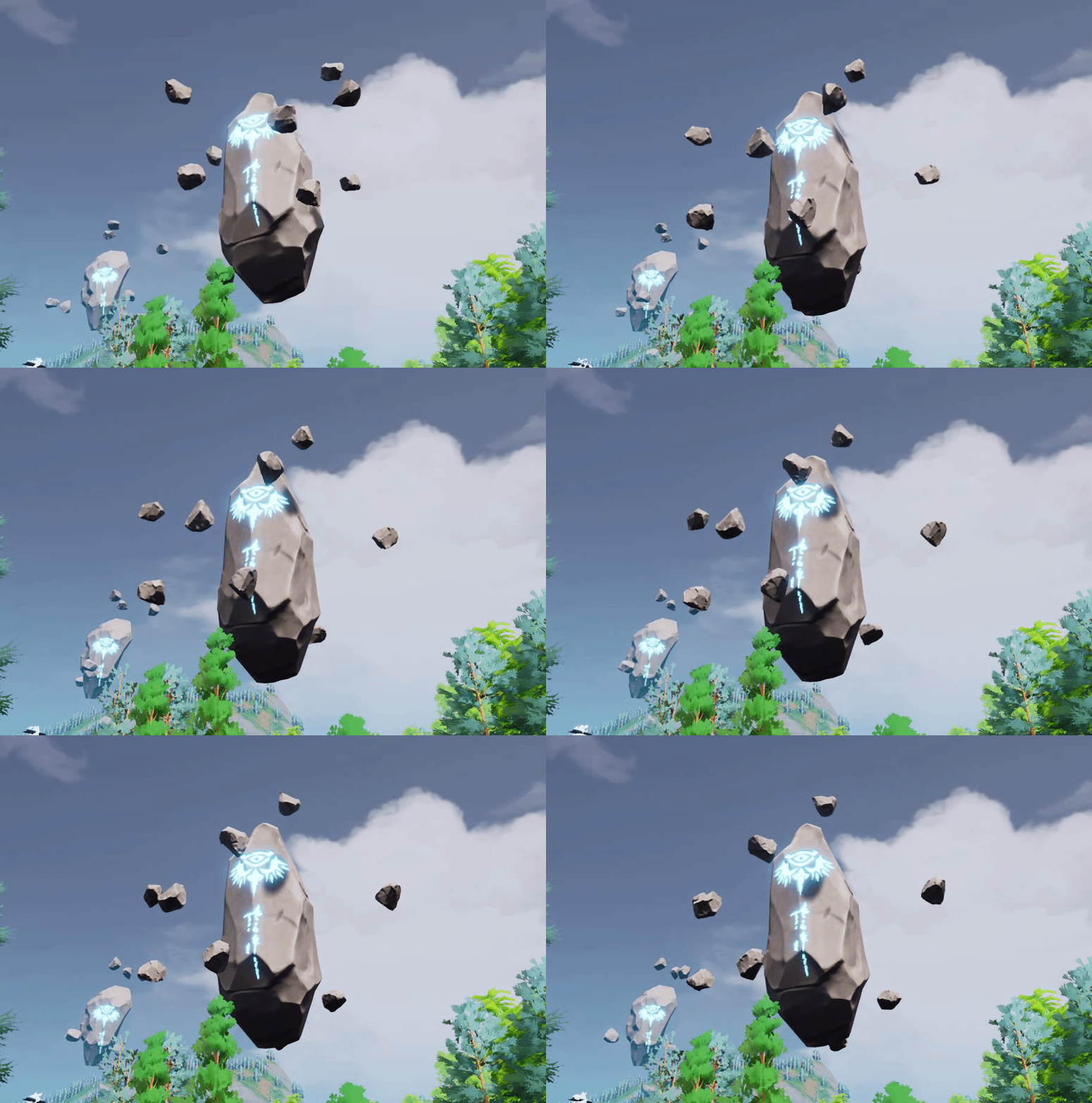

 glacial belfry
Hey guys - anyone else missing the "Remote control web interface" plugin inside a fresh 4.26 installation?
https://docs.unrealengine.com/en-US/ProductionPipelines/ScriptingAndAutomation/WebControl/RemoteControlPresetsAndWebApplication/index.html says right here it should be available under "Messaging"
Collect and organize UI parameters and functions into a Remote Control Preset and connect them to widgets in a web application.
Doesn't even seem to be on their github
finite hamlet
Content examples is not compatible with 4.26? :/ Do you think it'll be made compatible?
Actually, nothing in the vault is currently supported? Is that a bug or something?
 high jolt
Hello guys, I'm a now member here and actually I have a homework in C language but the problem is I don't understand anything from my teacher because it's online 🙃so can someone help me with it?
median hound
i made' a program in c months ago a normal cheat
median hound
whatds topic
 south hill
It has been a long road, but we are not done yet< Something like that
"it's been a long time, but we are not done yet"
That is the exact theme
Pandemic feel to it 😄
median hound
getting over it suits that
median hound
whens it end
clever axle
I have been struggling with a weird bug for the last day or so and I finally know what's going on: a cameraActor and manager is being spawn automatically when I join, despite the default pawn having a camera attached. How can I avoid this?
light thunder
I want to make a house fall into a sinkhole - what would be a good approach for this?
I can deform the landscape fine
and most of the house will be more or less intact
 mossy nymph
you did get chaos in 4.26
south hill
median hound
whens it end
It is for one week, ends Thurs
 mellow turret
when using a EQSTestingPawn and put a EQS template in it, the context-querier of the template tests0 is the TestingPawn itself right?
clever axle
Can I avoid the spawn of the default camera?
my default pawn has a camera attached so I don't need it
plush yew
Is it possible to add specific properties to animations on the same function
like doing a 3 hit combo is pressed with 1 button
but the properties attached to each punch or kick being different
depending on the animations that is used during the same button input >~>
dont need an explaination just a simple yes or no i can go figure out how to do it later when i get there
 smoky wren
where is mega jam chat?
thick herald
In the mega jam channel- game-jams
light thunder
can you have two landscapes?
fleet juniper
Can anyone help me with the issue my uasset file won't load into the content folder
 sterile idol
I should probably put that in #engine-source - my bad.
light thunder
I need to duplicate the landscape in my editor but it keeps crashing - any ideas for workarounds?
unkempt delta
plush yew
<@!525805719493017630> idk i had no problem
this is what i was talking about
 shell surge
Hello guys, my editor became too slow for some reason... I was running at around 100fps and now it is around 20.... what the hell. What could be the problem?
median hound
mess with the material haru?
unkempt delta
ill see
 dense hatch
Hello, when I try to "Goto Definition (Alt-G)" on a Blueprint node, I am getting a Access violation reading location error
 grim juniper
unkempt delta
this is what i was talking about
grim juniper
unkempt delta
this is what i was talking about
I think the answer is thatit is a tiling texture. The example just isn't seamless
unkempt delta
ah