#ue4-general
1 messages · Page 886 of 1
 plush yew
 elder haven
Hi, is there a way to have an object invincible in game but only use its collisions ?
plush yew
yeah code is easier to be honest, i feel like blueprints have to much stuff you have to put together and for me it takes to much time
 rich jay
Yeah, it's non-linear you can have just nodes cluttered and spider webbing everywhere and how are you supposed to work your way through all that?
plush yew
@elder haven there is a blocking volume on the place actors panel
do you guys have any recommendations to start learning cpp for ue4
rich jay
In code at least everything is divided into functions and you only need to call that function to have it perform an action, I know it's basically the same thing with BP but I'm still trying to get used to them. I'm sure there are way's to better organize it or at least I hope, I can only base this off the disasterous BP pictures people post on here that look 100% unreadable
elder haven
@plush yew cool thnx man !!
plush yew
The only good guides I've found are for blueprint
I already know some cpp like classes constructors and pointers
there is a playlist for cpp from Dev Enabled
rich jay
Ah, yeah @plush yew Idk I'm just coming over from Unity so I haven't started to yet but I'm sure there are planty of books on it
plush yew
thanks I will take a look
he teaches you the beginner steps of making functions etc
i see
rich jay
Yeah I'll look into that as well, is it on YouTube or the Unreal site?
plush yew
youtube
rich jay
Ah alright
plush yew
Blueprint seems easier though
yeah thats only cause of the simple layout in the editor
it's harder to debug tho
because you can't really search for stuff u called
rich jay
Yeah that's another concern
plush yew
and there's like interfaces and casting
rich jay
With code you can set breakpoints and check to see what all the variables are set to in your IDE
plush yew
yeah, i fell like code has more to offer then blueprints
rich jay
I wouldn't be able to fix 60% of my issues without a proper debugger
I constantly use it
plush yew
I feel like this would be harder in cpp
I'll probably use a combination of bp and cpp
rich jay
Not really, Event PointDamage is a class or function and the values under it are either variables or functions of the class
plush yew
yeah, your kind of just making things function and work to be honest
rich jay
Yeah it's basically the same concept but without the visuals
plush yew
yea
got it
and you could also just make one of those nodes you dont have to do the hole thing in vs
yea
is cpp faster than blueprint?
probably
rich jay
Yeah, it's said to be better at performance
rich jay
Which makes sense because I imagine it's fairly easy to make messy code using the BP system.
Don't get me wrong, it's a great way to teach people your system. Some people might find it easier to learn. Once you get familiar with the classes and functions though I would think your better off writing the code
plush yew
yeah, i feel like blueprints are doing to much if you know what i mean
rich jay
Yeah
When I see those pictures of an entire screen filled with nodes and lines running back and forth.....looks like a nightmare
plush yew
haha yeah
rich jay
Might be alright for short scripts but can't imagine trying to navigate through a large one
plush yew
yeah, blueprints you have to add node after node after node an in cpp all you need is a couple lines of code
rich jay
It promotes bad programming practice because it should never get that big anyway. That would be like me writing an entire program in one file, it should be broken up into multiple files
I know you can do that with blueprints too, but people think it's cool to make them complex and unreadable lol so they throw it all into one
Makes them feel smarter lol
plush yew
i feel like blueprints attract new people who dont want to code tho i mean its fine by me but blueprints are so weird it might be simple for like beginners but still
if it were up to be, coding is better even if you dont know where to start
rich jay
I think the visual's make it a good way to get the hang of it, writing code can be pretty dry at times and people get put off by it. I get that
plush yew
yeah, blueprints might be best for new people but coding seams more simple then blueprints
rich jay
I would think so
plush yew
yeah
 fierce tulip
really depends on the person
plush yew
yeah
i mean i understand if you want to use blueprints but i feel like it takes up more time
fierce tulip
also really depends on the person :p
plush yew
is there away to add a folder in the C++ Classes folder
when i try making a sub folder when adding the class i get an error so is there another way
 trim sapphire
hi guys im new. Is unreal engine hard?
fierce tulip
well.. its software
trim sapphire
okay
fierce tulip
its as hard as you make it.
if you enjoy learning and following guides/tutorials its fine.
If you dont, its hard
trim sapphire
okay thanks
plush yew
ok im back
fierce tulip
or in other words.
If you start with a simple pacman/puzzle game its easy, if you start with an mmo-fps with battle royale mode, with procedural planets set in multiple galaxies its Star Citizen
trim sapphire
okay
plush yew
I like third person better than first person
trim sapphire
i think first person is better
 jaunty cedar
Huh, my game crashes whenever I press a button that changes the scalability level in a packaged build. "Fatal error!".
The engine did close while it was half way through compiling shaders for low/medium/high after I tested them in editor, and it didn't try to compile any shaders on build. Could there be an issue there?
 maiden iris
Hey guys, any experts on pivot painter 2 here? I have some specific questions about player interaction and wind interaction
 night bridge
Guys
I cant select Cube for some reason
Like it doesnt have the mesh so how do I fix this
plush yew
why the pfp
 mellow pebble
Does anybody know if there's documentation on size (bytes) of different variable types? I really remember seeing this once and I don't remember where. It'd be interesting to look at, if it's real.
plush yew
for c++?
 tiny eagle
sorry to ask, but where do i set the project save location in UE4? i installed UEngine4 on a separate SSD, and i'm using a really small SSD for OS, it saves on small SSD
tiny eagle
just that 1 problem i've been having and it gets worse
jaunty cedar
are you talking about the primitive types or something specific to UE? If you're talking about the basic C++ data types then yeah there's documentation that EVERYWHERE, but because of compilers spacing out memory in 8s/4s to pad things and whatnot it's not actually that relevant @mellow pebble
plush yew
I don't even have an ssd I just save my projects to the default UnrealProjects folder. hold on that's not even default
tiny eagle
the more i import or add to the project the less disk space i have and i already got the error after installing 4.26
well, sorry but i cannot
plush yew
@tiny eagle are you trying to change the projects location?
 lethal cypress
@tiny eagle you chose it when creating the project.
plush yew
I just found out i save my unreal projects to onedrive 😳. That's probably why it's full
tiny eagle
yes, the drive is too small and i hope i can put it on same disk as Engine
mellow pebble
jaunty cedar
are you talking about the primitive types or something specific to UE? If you're...
primitive types I guess, I'm mainly interested in the difference between strings, names, text, int vs byte, that stuff. I SWEAR there was a page in Unreal docs that has a graph but I may just be imagining that
tiny eagle
no i mean autosave and such
well, even if, suppose i missed it? i did already and don't want to migrate of copy/paste, plz?
plush yew
mellow pebble
primitive types I guess, I'm mainly interested in the difference between strings...
there's a ton of stuff on that

GeeksforGeeks
A Computer Science portal for geeks. It contains well written, well thought and well explained computer science and programming articles, quizzes and practice/competitive programming/company interview Questions.
@tiny eagle if you already have a project you built im not sure you can change where the file is i mean i havent done that before so but when making a new project you can change its location next to the name of the project
tiny eagle
so i have to delete a whole project in medius res because you won't tell me how to actually do it?
jaunty cedar
mellow pebble
primitive types I guess, I'm mainly interested in the difference between strings...
names and text are not primitive types, those are UE specific and i have no idea. the other ones depend on implementation, microsoft has a page here https://docs.microsoft.com/en-us/cpp/cpp/fundamental-types-cpp?view=msvc-160#sizes-of-built-in-types for the basics, and strings will take as much memory as the number of chars + the null terminator iirc, they too are not a primitive type as they are a class in the standard library
plush yew
what do you mean?
tiny eagle
i did make a mistake
mellow pebble
thanks guys, I'll look at these links and do some reading.
tiny eagle
i didn't relocate the save of the project, but i know there is a way to swap it, and just resave under the new location sooopo
i cannot find it in editor settings
tiny eagle
pepo is like an std lol jk
plush yew

tiny eagle
lol 😛
i'd catch wwarts if i could relocate my project without copying it all over or deleting
/notinterestedinmetiing
bah i'll ask somewhere else with people who care
plush yew
file/choose files to save maybe?
 stuck scarab
https://www.worldofleveldesign.com/categories/ue4/ue4-change-move-project-folder.php
here is a tutorial on how to change the location of your project
Unreal Engine 4 tutorial covering how to move a project folder to another place on your computer and have Unreal Engine Launcher find that project.
 worn granite
> doesn't get immediate answer
> well nobody cares anyway
fierce tulip
also, please keep this channel meme/troll free where possible please. while regular ue4 discussions are fine, dont confuse new people with random mumbojumbo. thanks.
stuck scarab
@plush yew depending on how you line traced I assume you changed the channel, object type.. check again on what you trace and check if your enemy has the correct setting. I dont think that this stuff stops working all of a sudden 😄
plush yew
Has anyone used a raycast as some kind of bullet instead of actually firing a projectile?
It sounds pretty cool
Just put a tracer and it'll look like a bullet
 shy ocean
Sorry to keep asking but don't want my question to be missed by new people coming online. Has anyone had any exp in merging ALS V4 with the Character Interaction pack? As i am suck using a ALS V3 tutorial on YouTube and the 2 systems are very different and I am a novice when it comes to all things coding
 serene heron
the right skeleton represent it done correctly. what is wrong?
 sterile tulip
Is there a way of adding splines on meshes?
 real patrol
where would i ask about EXCEPTION_ACCESS_VIOLATION writing address 0x00000240?
 teal ibex
@rich jay thanks friend much appreciated
 haughty hound
I have 2 different characters, and i want to add a controller to pause them both, should i make a controller and assign it to each character?
 late sierra
I think so, yeah. There's a Paragon remake thing on Steam that's about $20.
late sierra
Fault
 devout swift
Is there an easy way of spawning a cube on ground level?
Currently I'm setting it to spawn in front of my character but it spawns a little above ground so it floats a bit.
 void barn
ah ok
stuck scarab
how do you spawn it? @devout swift
plush yew
is there a way to add a new folder in the C++ Classes folder, i tried to make one using the New C++ Class and making it public and i got an error saying compile failed and another error saying i have to recompile the module and im not sure how, the folder does show in the vs 2019 but not in the C++ Classes folder in ue4
anyone?
what is a moduleeeeeee
 weak sequoia
How does making multiplayer games work, is it any different from any other engine?
 wild plover
I'm developing one as we speak. I can't say how other engines do it though, but i know how unreal does it
 latent moth
is there a way to create a BP class from actors on a level so that components like static mesh are added, but other BP are not harvested for components and left as child actors? ATM you can either choose between harvesting all components or making all as child actors (including static meshes...)
plush yew
Someone could tell me more about the node DistanceToNearestSurface please ? I tried something with the help of a tuto but it does nothing :
 lusty lance
posted this the other night but not sure if anyone answered
is there anyway to slow down the viewport rotation speed in viewport?
got the camera zoom/movement speed fine, just rotation speed is mental with even a slight movement
(RMB)
 feral patio
Anybody who knows how to work with unreal VR want to be hired to make the wireframe structure of a game I want to design?
fierce tulip
@feral patio please check the #old-rules to learn about job postings
 prisma plank
@shell surge check in tab game settings view
prisma plank
When you play is dark?
prisma plank
There s difference in game , and your blueprint person..
what bp you using ?
in camera options
feral patio
@fierce tulip I cant see how to post a job offer with the format that is being used there
 shell surge
what do you mean ? I havent done any blueprints
fierce tulip
ah, seems pfist hasnt updated the rules yet
prisma plank
when you hit start there is blueprint , like you walk, run et..c
shell surge
when I hit start, I move around with my phone, I connected it as a virtual camera
but looks way too different from the viewport view
prisma plank
Hit play, and see in right tab- thre need to be blueprint option..
fierce tulip
@feral patio try #instructions instead
shell surge
don't see any blueprint option on this window
prisma plank
ahh wait.. so, you have 2 diff cameras.. thart s why so dark..
shell surge
but I don't get what camera is the virtual camera using
it starts from the point where you spawn when you hit play
I have 4 cameras, but they all look fine when I select them in the viewport
prisma plank
really, i don't used virtual camera..
shell surge
it only looks bad when its in play mode
prisma plank
What is problem, check cameras and up your exponent
I know that difference, and so, i change settings in my bp first- or third person..
plush yew
So why does the default character class use acceleration-based movement when very few games actually use acceleration?
The only ones that come to mind are a few platformers and valorant/csgo
prisma plank
@shell surge simple answer- there is difference in game mode, and your play mode cameraas..
shell surge
@prisma plank
prisma plank
Yeah, virtual camera pawn or controller, there check camera options
and you have cinecamera- they same affect all..
but first pawn check
Virtual camerapawn
shell surge
im checking
 upbeat tendon
I am trying to start my game in pie with use single process unchecked, but when I run with play as client set nothing seems to start
prisma plank
So i cranked up in my char bp exposure by 2.. and result
viewport mode and character mode
prisma plank
what your set? it's game mode or cameras for cinemtic..
if only cameras, check them same..
 slender moss
how do i go about letting npcs control vehicles?
shell surge
game mode
prisma plank
and? it's working..?
shell surge
it's better, but it also gets reset everytime I stop play mode
prisma plank
put same values at cinema camera and it's all
shell surge
cinema camera doesn't do anything
because when I play it only uses this camera as a virtual one
not cinema cameras that i add
prisma plank
so change there
shell surge
im trying
prisma plank
you can 't find cam options or in what problem?
There can be autoexposure enabled..
plush yew
quick question, i just changed my vaultcache location but is there a way to smoothly move the 70gb of assets already in the default vaultcache location to the new one?? thank you 🙂
edit-- just moving them to the new file location seemed to have no issues
prisma plank
@shell surge i don't know about it.. maybe thre s such option..
shell surge
whenever I change anything on that camera
and quit game play
everything goes back as before
wtf
it doesn't save the changes
shell surge
I see
plush yew
did anybody recreate the ue5 demo in ue4?
 dark stag
stoopid question... in my foor loop when creating static mesh components....
how do i rename those at the end of the loop to something more manageable
like name + array index or w/e
plush yew
Hi, I'm currently following a tuto to try RVT. Apparently, it needs a layer blend. In the tuto, the guy uses a LandscapeLayerBlend :
Though, I'd liike to use RVT to have smooth textures transitions between a mesh and another mesh, not between a mesh and the landscape. Is it even possible ? 🤔
dark stag
 plain pagoda
Would really appreciate it if someone can guide me in the right direction. I want to create a skybox with a material like this, I want the lines to be dynamic and not fixed (moving randomly). How can I learn to do that and what should I start looking for?
dark stag
check your engine content
night bridge
I see the cube itself in Engine Content
And can drag it into the scene
But I cant select it easily through that list
Which I just sent
I would keep have to go to Engine Content for it
night bridge
I dont even know how to delete
night bridge
O
 zinc cave
Hello all! I've looked around quite a bit, and tried several tutorials that aren't exactly what I need, and I just can't get this to work. I'm trying to get these glass bottles to be see-through with refraction, but the combination of alpha masking/opacity just don't seem to work. Is there a reference node and/or tutorial that you all recommend to help? Thanks so much in advance.
*addendum: This image doesn't have alpha hooked up, but you can imagine I've tried it with different connections and material settings.
 acoustic timber
New trying to learn how to use ue4. can anyone explain why it would not allow me to change the default playable character?
 prime moon
hi, im trying to build my lighting and it simply pops up this (image attached) it doesnt say anything in message logs, and happens to every project i open/make.
 rotund scroll
is it in the right domain?
plush yew
how so ? what do you call a "domain" ?
 digital anchor
@plush yew where did you get that image from
just curious
btw height needs a separate rvt now
 autumn elbow
@acoustic timber You are using the default GameMode. Make your own, and you'll be able to change it from there.
plush yew
@digital anchor Well I just googled the name of the pin that I don't have ^^ : https://www.google.com/search?q=runtime+virtual+texture+output+pin+worldheight&client=firefox-b-d&sxsrf=ALeKk02DeOi9cN9jdK2UOlUHgVDO8QARMQ:1606698068364&tbm=isch&source=iu&ictx=1&fir=OSHl0cucolW0OM%252Cvjqmph_jXFRaKM%252C_&vet=1&usg=AI4_-kRd_ufzu_C4tQ4FRUpRU-UOOGqK_A&sa=X&ved=2ahUKEwjj1oDdiKntAhVKxYUKHfeLDloQ9QF6BAgNEAg#imgrc=I2Yg-6OH5-BG-M
I was following somes tutos on RVT and apparently, everybodies has this pin but not me... 😆
plush yew
Ah, you're talking about this ? :
acoustic timber
autumn elbow
<@348171344329834507> You are using the default GameMode. Make your own, and yo...
thanks
digital anchor
you need to add another rvt for height
plush yew
@digital anchor Ah ? Weird... I'm following this tuto on the official Quixel's blog, they don't talk about this (and though, this damn pin is displayed) :
digital anchor
it was decoupled
now height is rendered alone
actually i was thinking you first need to choose the rvt outputs for the pins to show up but to be honest i dont think thats the case
@plush yew what ue4 version are you in
first time rvt was added i dont think there was height
cant open my engine right now
plush yew
I just opened a project in 4.23 so maybe that this is just what you've said : there was not height
I'm gonna open 4.25 and see...
digital anchor
yeah, thats probably it
 bitter iris
i need some help if poss, im coming to some troubles with character & ai spawning before the world spawns (world is level streamed) im wondering how exactly to stop the characters and ai spawning until the world is fully loaded
bitter iris
never mind, fixed it using this
 gusty dune
Hey all, are there any tutorial videos covering level blueprints? I'm trying to make a small combat mission with scripted events using blueprints
plush yew
@digital anchor Et voilà, that was it ! And now, I even get a "Mask" pin ! ^_^
( 4.25 )
feral patio
Im trying to add the ability to pick up a item in Unreal VR, I am fallowing a video: time stamp( https://youtu.be/O2Hq3jQNLX8?t=102) and he mentions if me item mesh is renamed to something different I will need to rename a component. My item is renamed, But I cant find how I would rename this "Static Mesh Component" Can someone help with this simple but annoying task?
We go through the process of setting up to pick up and object in VR using the pick up interface.
+++++++++++++++++++
www.markom3d.com
www.facebook.com/markom3d
https://www.instagram.com/markom3d/
prime moon
hi, im trying to build my lighting and it simply pops up this (image attached) it doesnt say anything in message logs, and happens to every project i open/make.
 gloomy gull
I'm having this weird issue where a muzzle flash doesn't spawn when the player is looking upwards above a certain point
Is there any obvious reason why this may be happening?
 barren flume
Was wondering if I could get help with something
The ue4 interface looks blurry like text
gloomy gull
@barren flume send a pic
gloomy gull
Weird, I don't know how to help you with this one besides restarting the editor or your computer
barren flume
I tried doing both thinking it was my pc at first
but it looks like that on both of my monitors
Yeah all the text in the editor is sort of pixelated
same thing with the project browser
acoustic timber
I have built some AI zombies that chase the player. Only problem is that they move at the exact same speed as the player, where would I find a variable to alter their movement speed?
barren flume
Inside the blueprint for the zombie in the component "Character Movement"
Think you could change up the accel rate or walk speed
acoustic timber
barren flume
Inside the blueprint for the zombie in the component "Character Movement"
Thanks man 👍
 narrow mauve
Anyone know how to use the radius/point feature on the winddirectional sopurce
It's weird ..the cpp file shows it should work I don't see why it wouldnt..when the Point is checked (true) it uses the radius from the position of the actor with a falloff
but yet it doesn't do anything
Isnt this something that has never worked lol
wtf..even when you replace the pointsource code with the regular code in the if statement it still doesnt work lmao
why is it so broken
 kind dew
Anythoughts on how i can have AI round corners a little bit better when they are moving? Currently he runs like this
dark stag
are variables (object) that are stored in the player controller basically always available anywhere?
barren flume
Really sorry if wrong but should be able to cast to the player controller then be able to get the variables from it
dark stag
hm
yeah that doesnt seem to makes sense
eg
accessed none trying to read porperty... but its set in the variable?
barren flume
You can't cast to the player controller?
I meant from the exec at event begin play you drag off of it and type cast to "the name of your player controller you're trying to cast to"
then you get the variables from there
but sorry if that still doesn't work
 weary basalt
@dark stag If your not making a Multiplayer game, then yes.
Which variable isnt Set? Make sure the PlayerController is actually valid first.
 mossy nymph
looks like accessing PC from Pawn on BeginPlay
that doesn't work in SP/Server
Pawn calls BeginPlay right before its Possessed, and until then has no PlayerController
you can plug that into OnPossessed or w/e the event is called, then it will work
 dull comet
hi
 exotic thicket
Fixing a race condition with a delay is just a recipe for another more complicated race condition sometime in the future 
dark stag
yeah probably 😦
just dont know how to tell UE "make sure this player controller is legit before you do anything else"
exotic thicket
hmm
one way to do it would be to have the player controller tell you when it's ready, and then trigger the other logic from that
dark stag
like any bp in here with a "beginplay" is gunna do just that
unless i move this stuff over to construction in my PC?
id imagine that would prioritize that
weary basalt
Dirtyish trick for you.
dark stag
ew
i got a better idea
make a custom event
and fire it from my PC after its made that variable
 ember linden
hey geys what would be stopping my landscape brush from being fluent its just paint on the X and Y lines
weary basalt
Landscape painting can only go so small. Your probably at the lowest bounds that it will allow you to paint.
ember linden
@weary basalt thank you that was the problem, new problem tho cant paint some of the landscape
dark stag
fixed up my issue with an event dispatcher instead of a begin play
weary basalt
👍
dark stag
yeah looks like UE's midi contrller needs a few more microseconds to propagate than usual stuff
 fierce forge
hello, what i need to put at joint target for every leg in a ik system ?
for the ue4 mannequin
plush yew
Uhhh
Is this channel “FREEEEE”?
On recent Project image I got good and fine colours and on UE4 open project image thingy I can see colours are messed up. Can someone help??? Please I can’t do anything colours are super bad
I tried resetting ue4/downloading whole epic games launcher and ue4 back again, this is my new p
Pc
 winter gale

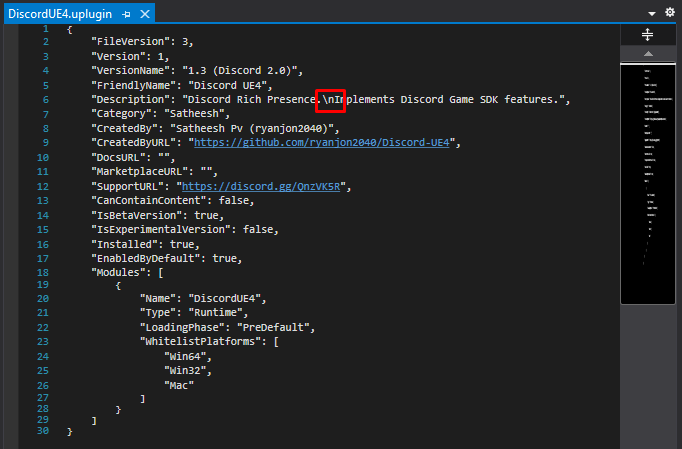
Quick #UE4 Tip number 54.
Need multi-line description for your @UnrealEngine Plugin? Use "\n" in your description.
#unreal #unrealtips #unrealdev #indiegamedev #gamedev #indiedev #screenshotsaturday
 Twitter
·
Twitter
·
 rich jay
Hey, I'm just wondering why there are nearly 10k members but if I ask a question I can wait for 3 day's and not get a response?
Was interested in moving over from Unity but now that I see the Unreal community is dead I'm not sure It's a good idea
Wow, it's almost say how I can say that and not get one response. This channel is the deadest channel I have ever seen.
Usually that will bring out the trolls
 signal bone
hey
need some help
Anyone got a tutorial for making a peeking/looking to the sides ?
 rotund yew
I'd thibk you'd probably need a bend space for that
 ripe plaza
the UGC system seems to require you to distribute the whole game project in your custom distribution of the editor? this seems a bit problematic, because for example say for a paid game:
- you can't distribute the editor + game sources with the game as the editor needs to be released through epic channels
- you can't distribute the editor + game sources through github because then anyone could just grab the git repo, build it and play the game for free
- you could distribute editor + game sources separately but the ugc system doesn't seem to allow that
 timber bay
Hey just wondering. When creating a new 3rd person game, I notice the "Default land movement mode" is set to "Walking" but for some reason, the character is always in a state of running, when the max walk speed is set higher than 100. Is there any way to fix that to change the default to always walking and maintain the walking speed/animation until I toggle it with a sprint button?
 wanton lotus
@timber bay what does your blend space for movement look like? You may need to adjust your axis settings, specifically the max values should match your character speeds.
timber bay
Where exactly would I find that?
wanton lotus
I just made a blank blend space, and by default they use 0 through 100. That is why after 100 it is stuck in running.
Search your entire content folder using a filter for blend spaces. I can't possibly know exactly where it would be in your project.
I generally set my max value to 1 and then in my animation blueprint my velocity is normalized based on the max speed of the character, since characters might have different speeds.
If the blend space includes sprinting, then max would be set to sprinting speed.
Or like I suggested, max is still set to 1, but the sprinting speed becomes the max speed of the character to normalize from.
timber bay
wanton lotus
Search your entire content folder using a filter for blend spaces. I can't possi...
It's a completely brand new project using the 3rd person assets when you create a new project. Nothing changed (yet)
wanton lotus
Go to your Content folder and search for "IdleRun"
timber bay
Alright I'm in the blend space. Where exactly would I find this "max value" to set to 1?
@wanton lotus
wanton lotus
Axis Settings on the left
Default third person blend space should be max value of 375
timber bay
this?
wanton lotus
Looks like it is fine.
timber bay
So what exactly should I change in order to get the default movement to always walking, until I press shift to sprint, and blend into the running animation?
wanton lotus
You can adjust that blend space to match the values you need. Default third person character is not normally stuck in running animation though, so not sure how the original problem came to be.
What movement speeds do you want each animation to play?
shell surge
Hello, I have a rotating animation which I record using the sequencer. But when I watch the video later, the object is not rotating lol. Any idea?
 lusty carbon
Hi! I accidently filled this sidewalk with grass foliage. I want to remove all of it in one click, but it seems I can only delete foliage with the paint tool. Any way to "fill remove" this foliage from the geometry ?
plush yew
hi everyone!
il be needing advice from alot of people
topic is mmorpg
i make the chat system / trade system / party system... how can i make that if i dont have a server ? does the chat system needs a server input ?
why shall i make the basics of a game when there is no server ?
 wary wave
an MMORPG.... without a server?
stuck scarab
@timber bay Set the movement speed to a lower value as your base movement speed.
Increase this value while holding shift.
Then you probably want to adjust the animation in your blendspace so the animation adjust to those new settings as well.
 haughty tangle
So - as I transition from Unity to Unreal...
One thing I've noticed - or really, have not seen in Unreal - is using multiple cameras concurrently.
In Unity, using clear flags, layers and masks, I could use multiple cameras in the same scene at the same time.
One example is a star-sphere. I could render with one camera a sphere is stars inside and then script the camera to match only the rotation of the main camera.
I'd render the stars as the farthest layer and make it the only the secondary camera could see it.
Then, in the main camera, I'd render everything else except the star layer.
Job done.
Can this be done in Unreal?
wary wave
UE4 doesn't have render layers due to it's deferred nature
haughty tangle
You can use multiple cameras in deferred in Unity.
wary wave
it's a common problem encountered by people doing first person shooters, where you'd normally render the arms / weapon etc as a separate layer always on-top of the rest of the game world
haughty tangle
They were two separate issues.
Yea - that's one use case - the FPS.
Is there a work-around in Unreal?
wary wave
there are always work arounds, yeah, but I think you'd need to look to your specific use-case to find one
haughty tangle
I use star spheres in Unity and in Maya/Nuke environments for high-end VFX.
It's strange that I wouldn't be able to do that in Unreal.
wary wave
for the first person arms people tend to use a projection based vertex shader to have their first person arms / weapon rendered correctly, but in reality it's really tiny and in front of the camera
which is a decent technique
haughty tangle
By making the stars an independent object with a unique camera, you don't need to worry about position or scale.
Same is true with super sized/mismatched scales.
haughty tangle
You can have an object that is "very small" and an object that is "very big" and just have two cameras and scaled motion.
@dull comet Like a lot of software, simple to get started, very deep by the end.
Start in the shallow end.
stuck scarab
start somewhere and find it out by yourself @dull comet
dull comet
Where should I start
haughty tangle
Unreal has a robust lean tab.
stuck scarab
do you have a basic idea of what you would like to create?
dull comet
Idk, stuff like marvels spider man, or an MMORPG like EVE online
haughty tangle
Any game you like is a good idea ... BUT:
Don't try to do an MMO
FPS, Pixel Miner, Classic Arcade... do a game you'd like to play.
What you need to be aware of is VOLUME as it can sneak up on you and kill you.
My classic example is Warcraft, where, 10 years ago or more, there were over 2000 icons (and many were used more than once!).
If you were to make one icon an hour on average, 10 hours a day, no breaks for wee, biscuits or tea... It would take you 200 days to make them all.
If you stop for weekends, that's about one MAN YEAR of labor.
My only advice is start small.
Find a tutorial making the game you'd like to make and finish it.
 summer matrix
any idea why my unreal is stuttering , it never used to do that
lets say i try to save a bp or whatever / close a window it will get stuck for a second and than continue
stuck scarab
you might not find a full tutorial on exactly the game you'd like to create, so learn how to break topics down in way smaller topics. With this you will probably always find resources online.
Learn how to ask properly, "is unreal engine complicated" was already a very bad example 😄
lusty carbon
Am I the only one who find Megascans foliage assets LODs happen too fast? It's really bad
timber bay
wanton lotus
What movement speeds do you want each animation to play?
I'd like for the default animation to just be walking the entire time until I press shift, then it blends into a sprinting animation, then back to walking once I let go of shift
My apologies for the delayed msg btw. My WiFi went down for a bit
wanton lotus
@timber bay you will want to set your default walk speed to the speed of walking, which was something like 94. Then the input event for shift will set it to the run speed, which was 375. You can adjust the numbers in the blend space to show animations at different speeds.
 echo zealot
Is there any way to keep the spawned actors in the level after ending the game? Because id like to build my level with the abilities of my character..
wary wave
sounds like you need to build a save game system of sorts
haughty tangle
@lusty carbon I'd assume that you can set when you blend LODs? I'm transitioning from Unity to Unreal, but in Unity, this was just a set of sliders and you - as designer - decide when LODs change. You could just be looking at a default setting?
Now, just to be clear, often these LODs are set for performance reasons, more than aesthetic reasons. I see LOD blending in textures and shadows a lot in games, and wish they were more subtle... but the reason they are so harsh is to be able to maintain performance.
echo zealot
wary wave
sounds like you need to build a save game system of sorts
no i dont want to save it, i actually want to put it in the level for the game
i want to use my character to help building it
timber bay
wanton lotus
<@!193507326660050944> you will want to set your default walk speed to the speed...
By chance, do you know of any solid tutorial that might be explain stuff like that? I can't seem to find much on it and most people just say they're gonna do a tutorial series but never continue after the first episode
Also just wondering.. I've been hearing a lot about a UE5, as far as a year back. Any thoughts on when it might actually be a thing?
Also @light lintel I already got the shift toggle thing done. I just can't seem to figure out the blending portion
Max walk speed = 600 (sprinting speed I want)
Default walk speed = 300 (I notice the character is still doing the sprinting animation at this speed but I need it to be walking)
stuck scarab
@timber bay search tutorial for "Blendspace" or "Blendspace 2D".
This is where the animation changes, depending on your walk speed.
timber bay
Also, I'll half to look into it more tomorrow. I'm no longer at my pc but I'm just walking a few tutorials to hopefully get a better understanding of how it all works
timber bay
stuck scarab
<@!193507326660050944> search tutorial for "Blendspace" or "Blendspace 2D".
Thi...
Already on it lol
I'm honestly probably just over thinking it so I'm gonna get some sleep now and hopefully have a clear mind in the morning 😅 Gn gamers
timber bay
Will do! 😄
fierce tulip
multiply with low value is a way
 vast dagger
Its just changing the colour of it to make it darker. The fresnel kinda stops you from seeing the details of the texture, wanted to see the texture properly but with a lil rim lighting
fierce tulip
multiply the fresnel with the color, then add it to the color afterwards
 civic lance
is it possible to see for which objects exactly the lighting needs to be rebuilt?
Since i am building but every time it fails for 8 objects, can't figure out which ones
 azure summit
Apologies in advance if this is the wrong place to ask, but I was wondering if there was a way to reference & transform a section/chunk within a skeletal mesh LOD? (The chunks you can isolate/highlight within the asset viewer)
Through looking, I would assume I would have to make something custom with "SkeletalMeshLODInfo". If that's the case, which C++ class would it be best for me to make/add information into?
 lapis narwhal
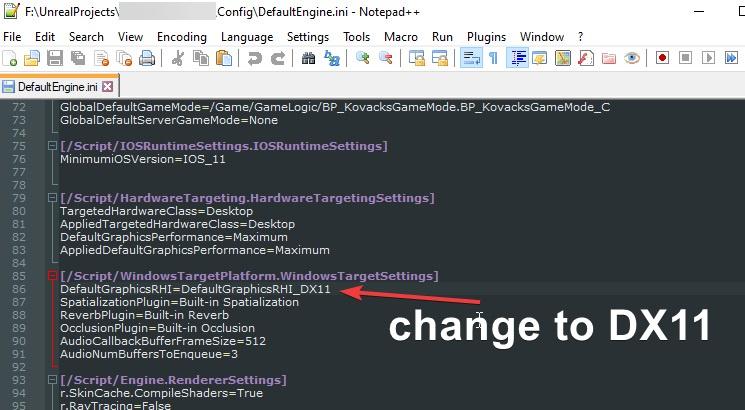
hey guys, this might be a bit random but an old project of mine (4.25) started crashing after a windows 10 update. call stack says something about DX12, i am not aware of ever using anything DX12 related in the project.
so im looking for a way to force UE4 to use DX11 on startup, is there a way?
lapis narwhal
lapis narwhal
hey guys, this might be a bit random but an old project of mine (4.25) started c...
phew, got it. god damn what a relief.
https://i.imgur.com/7HgE3af.jpeg
no idea why this was set to dx12 or why it started crashing.
 plush yew
Is there a discord server or channel for the unreal games?
wary wave
there's probably a community out there for the UT games at least
 wicked frigate
Hey guys... Is there a way to increase number of segments(edges) in a spline mesh?
 proud narwhal
is there an easy way to highlight all instances of an object in a map?
wary wave
wicked frigate
Hey guys... Is there a way to increase number of segments(edges) in a spline mes...
Have more triangles in the base mesh. It works directly with the base mesh geometry (through essentially what is a vertex shader)
wicked frigate
wary wave
Have more triangles in the base mesh. It works directly with the base mesh geome...
thanks a lot ... I'll try it
 harsh tiger
i have this inside the bp_Motioncontroller to track how fast the hands are moving while in VR. but it returns 0, 0, 0. any idea why?
 opal lark
How do i only render objects when sequence starts ?
wicked frigate
wary wave
Have more triangles in the base mesh. It works directly with the base mesh geome...
Thanks it worked ❤️
 merry gazelle
Is [get all actors of class] ok to use (performance wise) if only a couple of actors of that class are in the level and it fires 6 - 12secs?
Like does that node also count actors not in the class referenced
exotic thicket
If you don't notice any visible performance problems from using it, it's fine
Generally most of the expensive methods are like that - it's just a warning to keep in mind that they can be expensive
opal lark
Does anybody know the answer to my question please,
 true falcon
Whopsy Daisy, Gaea is on blackfriday sale now as well, 25% off, https://quadspinner.com/

QuadSpinner creates the industry's most loved terrain design tools for games, films, and virtual experiences.
opal lark
Im I not explaining well enough or something
 maiden sundial
Is there any tutorial on how to export a skeleton mesh with the textures to Blender ?
opal lark
So I guess I,m being ignored, thanks for the help
maiden sundial
Not everyone knows every answer.
azure summit
Regarding my question earlier, is there a better channel to ask in, or is it a case where nobody would really know the answer, if there is any. No worries if so
echo zealot
maiden sundial
Is there any tutorial on how to export a skeleton mesh with the textures to Blen...
just search on youtube ue4 to blender there are a few good ones!
opal lark
Thanks if for someone just mentioned that
plush yew
hello guys, does someone know when to use virtual texturing and why? I have seen every talk about it but still dont get it if it is an optimized method or not, and when to use it
maiden sundial
echo zealot
just search on youtube ue4 to blender there are a few good ones!
I just see from blender to UE, but it need it from UE to blender :s
 jovial zenith
Hello people. I need advice
how import C++ classes with BP heirs into another project?
opal lark
What i mean to say is only want an object to show when sequence player starts. IE My puzzle is sequence plays when plays a sword inserted in to a mechnism but the sword is there before the sequence starts.
Hope you know what i mean if not no worries
echo zealot
put it in #cinematics!
opal lark
ok
true falcon
plush yew
hello guys, does someone know when to use virtual texturing and why? I have seen...
I think it's to generate textures dynamically on the fly so you can have better blending with grass, roads and stuff
plush yew
true falcon
I think it's to generate textures dynamically on the fly so you can have better ...
thank you man!
true falcon
plush yew
thank you man!
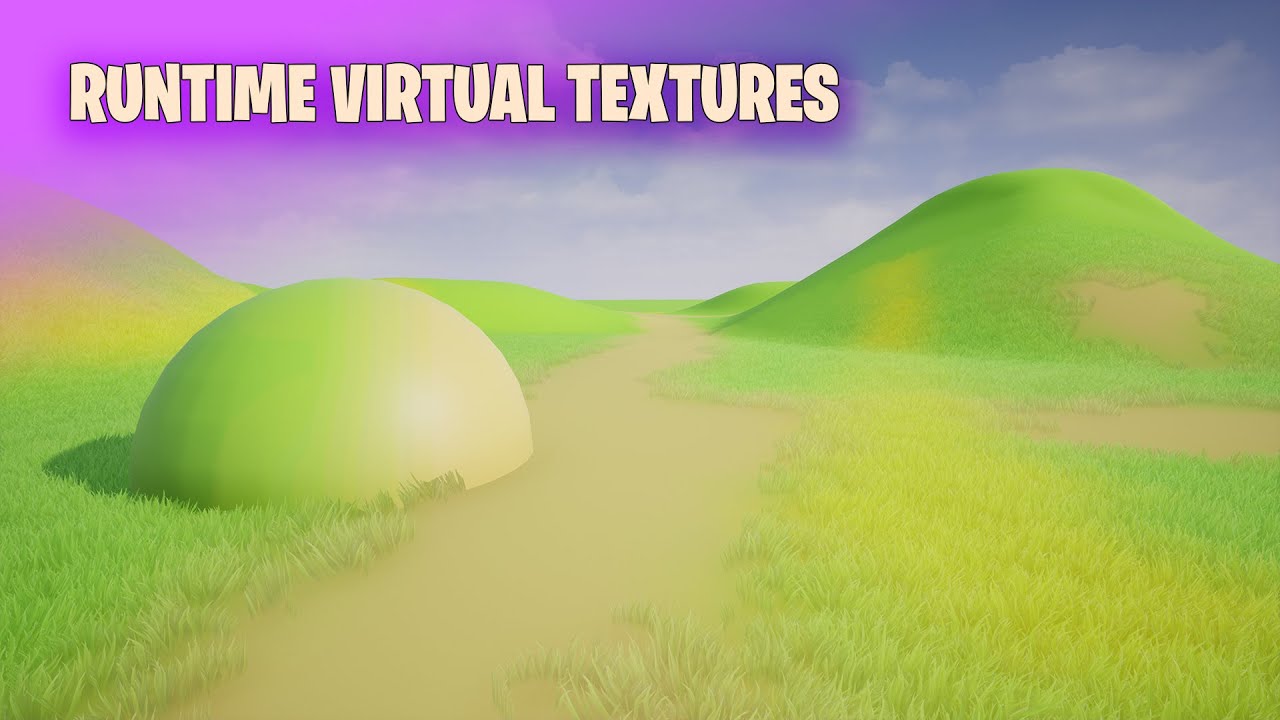
Project Files : https://www.patreon.com/posts/43929827
Today I am going to show you how to use runtime virtual textures to blend grass and other object meshes to blend properly with the color of the landscape. We implemented something similar in Fortnite style grass rendering video I did here (https://youtu.be/I0S0Aufq5Ko) but there, the color m...
 light thunder
Beyond the actual levels themselves and the HLOD asset created, what else needs to be checked Out of source control in order for HLOD's to save correctly. Not every actor is persisting after editor shutdown, but some area, even though they are all built just fine - you can open up the LOD actors and they appear fine, but they don't "stay saved" . You hit save, see the asset marked as saved, but it doesn't exist once you fire up the editor again
lusty carbon
I need help with foliage!
They cull in 5 meters away after I applied them (the foliage)
Now I wanna change it but it won't change!
Do I really have to re-apply all the foliage with the new settings or what?
 icy egret
Someone please help me
I want to take a cinematic picture, so I change possessing characters to aim one after another
but when I unpossess character to change character, they will bit tilt and won't see straight
how to fix it?(sorry my bad Eng xd)
above is before unpossess (when I move her)
under is after unpossess (when I change character)
I don't move anything, but she will see away
plush yew
true falcon
I think it's to generate textures dynamically on the fly so you can have better ...
Do you know if Virtual Texturing works also in order to blend a mesh with another mesh ? All tutos that I see talk about blending meshes with LANDSCAPE but never with others meshes so I doubt that is possible but, well, I don't know...
true falcon
plush yew
Do you know if Virtual Texturing works also in order to blend a mesh with anothe...
You should be able to, its not limited to landscape
lusty lance
hi don't know if anyone can help - am trying to change bloom intensity in my scene
but post process volume doesn't seem to make a difference? definitely worked before
plush yew
@true falcon That would be pretty cool 🙂 I don't know why there is no tuto to doing this... I'm currently trying to do this with a "mesh/mesh" setup with the help of a RVT tuto explaining how use RVT between mesh and landscape but I don't manage to do it...
 dense knoll
any idea how to fix this?
UATHelper: Packaging (Windows (64-bit)): LogOnline: Display: STEAM: OnlineSubsystemSteam::Shutdown()
i have a valid app ID but it still wont work
 shut glen
how could i create a physics based boomerang?
lusty lance
argh I forgot how you import downloaded content to your project
gusty dune
Is anyone around to help out with a query by any chance?
plush yew
@true falcon Furthermore, this is my setup for RVT between 2 regular meshes (if indeed it's work...) :
I did the most basic setup
does anyone know how to make a new folder in the C++ Classes folder?
I also created the RVT and placed it in the meshes (via Details Panel) :
light thunder
What in god's name is happening here - I made a duplicate copy of a map, but the original keeps disappearing when I try to delete it and reappearing when I try to rename the copy to the original. ... look at what is happening in this video it is bafflling
Like if it is in source control or whatever, fine, but why would it disappear from the content browser?
 grim ore
redirectors to the level still in the project?
maiden sundial
Is anyone aware of an UE plugin which makes the export of materials less painful ?
weak sequoia
Can you use C++ and blueprints on the same project?
maiden sundial
Sure
weak sequoia
but there's no choice for both?
maiden sundial
If you create the project as C++ project you are free to use both.
But i'm not sure if you can use C++ if you create the project as BP project
grim ore
yep all you have to do is add C++ to BP, or remove C++ from BP or add BP to C++ or remove BP from C++ lol. it's all or whatever
 worldly swift
Hello guys, can someone please tell me why I do see those black "edges" in my Lightmap Density visualization in Editor?
Show -> Advanced -> Mesh Edges is disabled, but I still see those black areas (only in this view mode, if I switch to Lit, or Detail Lighting, they don't show up)
I guess there is a switch somewhere to hide them, but I cannot seem to find it...
 rain dome
Hey, is it 4.25.4 or UE. When you double click a model, change the material and until you click somewhere in that tab or window it has opened in, ctrl + s or ctrl + b don't work(like UE has no focus on that tab/window)?
 lavish skiff
Hello, I'm strugling a bit with a noob questions here for some hours, so, I have a door with a trigger box, and my player pawn do not trigger the door. I know there is some settings on the pawn(I think) but I cant find it. Greatful for any help on this.
stuck scarab
oh yes check out the Collision Tab. There you will find all the settings
you will find them in each blueprint
on the right side
 tardy depot
world composition is nice
opal lark
Hello does anybody know how to make render an object when level sequencer starts not before, thanks
 scarlet birch
@lavish skiff I usually setup an Object channel that is just for the players and use that for triggers that are only for players.
lavish skiff
Thanks Mike, I will try it out.
scarlet birch
Just set your player capsule to the new object type and have the trigger type only overlap that and ignore everything else
 median hound
is the easiest way to fix gimbal lock is to fix it in c++
scarlet birch
Most of the BP functions for rotations already use quaternions internally.
median hound
whats the hotkey to toggle and look at collision boxes
 fluid lance
is there any way to force-interrupt an animation while playing and "reset" the animation blueprint (force it to reinit pose+vars and restart the state machine)?
Context: I have rather long "chatting" animations for NPCs. In my game, you can possess any NPC in the game. If they are chatting among themselves in that moment, they will continue playing the chatting animation until the end, even though you already started walking.
scarlet birch
You could always just set it to a new instance of the animBP
That might clear it too.
fluid lance
@scarlet birch let me check 🙂
 neon bough
looks like something is z-fighting
does it happen with any mesh? that looks like double faces
scarlet birch
Idk, I'd think one of these two would do it,
light thunder
If I have a mesh that waves in the wind normally but I set it's dynamic shadows off (it's like foliage but a mesh), will it's shadow bake or will I have to edit the material to stop moving?
scarlet birch
@fluid lance
fluid lance
@scarlet birch yea, i'll try this one too, the first one didn't work
and stop doesn't rly seem to do anything in my setup (maybe the state machine is interfering)
scarlet birch
If you're using a montage that will work. If not you can set it up so that the chat isn't part of the final state if the character is in motion.
idk what that does really, never used stop and haven't looked yet to see.
fluid lance
yea, maybe it interrupts montages or something.
transfering to montages would be a pain, especially since the state machine is already setup for both male and female NPCs
fluid lance
i just missed this somehow and I'm far into dev, working on content for a month alrdy 😦
act 1 of game is finished lol...idk how i missed it
scarlet birch
You could just blend it out with an enum, something like chatting, not chatting or a blend by bool
or in your states
fluid lance
well, that's the thing,
this is supposed to send the var over to the state machine in the next frame
it doesn't...i'll check the code again, maybe i missed something
scarlet birch
Where is that called?
fluid lance
when all FX for possession are done, so end posession "procedure"
after this, it transfers possession to the player controller
scarlet birch
Where is the actual call to it. exactly.
fluid lance
in the player pawn (which is the spirit) - weird ik 😄
scarlet birch
Where are you calling that event from? In what other event or function.
shell surge
can someone familiar with the sequencer help me please ??
fluid lance
and start possess is called in the NPC bp, so it's start (called on NPC), this gets executed, then calls end which sends it back to the NPC.
fluid lance
ofc i am 😄
They are all handled in NPC bp
the PP bp is just handling some PP and fx stuff really
hence the transitions
scarlet birch
Then I don't understand why all this is in the pawns.
Seems like it should be done in the On Posses and un possess events in the controllers.
The NPC should stop all animations in the unpossess event
then set your animation class in the PC possess event
 median sable
hello veryone, what would be the proper channel to ask questions about materials? im working on a mobile game
fluid lance
Well, to be honest, back then I had my reasons, I can't remember at this very moment why I went with this implementation, I would have to dig pretty deep, as I said, I'm pretty much "done" with coding the game, was making content, then I noticed the silly bug with the anim 😐
@median sable #graphics
@scarlet birch Ok, I'm an idiot, glad you had me looking through the code again, it's all working as it should and the AnimBP is picking up the var, it's just that I had two bools, one for "playerConversation" and one for "isChatting". I wasn't touching the latter, so ofc it never changed in the state machine. So it seems that the state machine is working as expected and interrupts the active anim when conditions for transition are met 🤦♂️ 😆 thanks for the help man! 🙂
scarlet birch
cool
 wind gate
Yo guys, do you know whether there is a way i can render my sequence in HEVC?? All i see is .avi and probably using H.264. Files are huge and compression ruins them. And .avi? like seriously, can i change that?
 proven oxide
Hey guys, anyone have experience using Niagara on Oculus Quest?
neon bough
what's a good way to keep track of what did alter a variable?
kinda need an ingame undo function which only lets an object undo what it changed before
@wind gate from what i know you should stick to webm if you want to support multiple platforms
scarlet birch
If the files are a final product and not meant for editing you could try using handbrake on them.
From what I've seen a lot of people are rendering out using the image sequences, but I'm still getting familiar with a lot of this.
 old mortar
Hey guys. I have gaps with reflection. I tried to build a completely static light, and a completely dynamic to. But the problem remains. The screenshots shows reflections distortion. Can anyone know the solution, or approximate problem?
Sorry for my English, it's a foreign language for me
shell surge
anyone familiar with sequencer ?
light thunder
How do I make the execution of these two different nodes depend on the left one finishing it's execution? I can put a delay but that's hacky and I want to do a better way, without creating a bunch of update events
is there anything like, "Wait for this Node to Finish execution?"
light thunder
Delete those images if they are all the same @autumn grail but I'd check your transition timing and when the IsSlashing is updated
 warped ridge
Hey guys does anyone here know how to make a story game?
light thunder
I know this isn't flow control that waits for the 0 to finish then do 1, but is there anything like it
@warped ridge that's ridiculous vague, find ways to be more specific
warped ridge
I want to make a cool story game like the last of us
light thunder
Not kidding, that's like saying, I want to build a rocket exactly the size of Falcon X
 autumn grail
@light thunder they are not the same they show the transitions conditions
warped ridge
Like how do you make the cut scenes and animations
light thunder
the conditions, but when does IsSlashing get updated?
look up the Sequencer @warped ridge
warped ridge
On google?
gusty dune
How would a simple mission be scripted? Would it be in level blueprints or something else?
 gray night
Guys I Need Help I Was Using Unity PlayMaker Then I Changed To Unreal Engine Blue Print I Want A Tutorial For Third Person Shooter Game Pleasssssse
 ashen frost
HELLO friends
Am having like a weird physics gravity problem; i think its because its a destructible mesh so thats why its acting weird
when i use another static normal mesh, it works fine
ashen frost
@gray night it should be easy to find from just searching I believe but I will check if devsquad has any, he makes solid tutorials
gray night
Thankes Friend
ashen frost
Okay he doesn’t have any; only first person shooter
ashen frost
Am not qualified to give you a tutorial for this because I have not watched videos about this or the people who made those videos but I did find this playlist https://www.youtube.com/playlist?list=PL4wXBehVu_5-SlRrhdvpd7RlczgJkfftG
 gray night
Thankeeeeeeeeeeeeeeeeeeeeeeeeeeeeeees
ashen frost
Well In theory just changing the camera would work but from anything that I have learned about game dev, things never goes as planned and there’s always problems
 proud adder
Hey. Please help me with a link, or some useful info.
I understand that the problem is in the encoding, but I can't understand where and how to fix it
gray night
Yea But Thankes For Helping ME
proud adder
ashen frost
<@283173390192476160> are those blueprints errors?
I think this is an error in the cpp files. But I cannot understand what is the problem because of the encoding
ashen frost
I think this is an error in the cpp files. But I cannot understand what is the problem because of the encoding
@proud adder oh i see; sadly I wouldn’t know too much because am new to UE but I was just have weird BP errors but when I created a new projects and did things differently it stopped showing but I think your problem might be more complicated
proud adder
Unfortunately, it is difficult to correct mistakes if you do not understand why they are
wind gate
neon bough
<@!420303776822329345> from what i know you should stick to webm if you want to ...
Imma edit it on premier pro anyway afterwards. I think there must be an option for something else than avi.
ashen frost
Unfortunately, it is difficult to correct mistakes if you do not understand why they are
@proud adder one day, I hope for you to become a master programmer
proud adder
@ashen frost Thank you, I believe in you too
 west merlin
Do you still have to have a source compiled UE install to create a dedicated server?
gloomy gull
Is there a way to blend view targets between CameraComponents? The function SetViewTargetWithBlend takes in an AActor and from prefixing, I can tell the UCameraComponent is definitely not an Actor derived object
neon bough
the trick is to wrap the camera in an actor
gloomy gull
Weird, had no clue you can do that
So u mean to make a camera actor and put it as a child actor on the class, right @neon bough ?
neon bough
yes
 carmine verge
Do multi-threaded animation updates work on dedicated servers?
gloomy gull
Hmm, @carmine verge that would require some of ur own testing, however I see no reason why it shouldn't work
carmine verge
cool! Worker threads are spawned for each instance of the anim BP right?
opal lark
Hello does anybody know how to make render an object when level sequencer starts not before, thanks
 next badger
@opal lark you need to explain better. Now question makes a little sense. I only see two things. You have some level sequencer. And some object that is not shown or being rendered.
sequencer related questions are generally asked at #cinematics ...but if no one is there you may try here
rain dome
@proud adder https://issues.unrealengine.com/issue/UE-84854 Maybe that can help.

Unreal Engine
Welcome to the Unreal Engine Issue and Bug Tracker. You can check the status of an issue and search for existing bugs. See latest bug fixes too.
Hey, is it 4.25.4 or UE. When you double click a model, change the material and until you click somewhere in that tab or window it has opened in, ctrl + s or ctrl + b don't work(like UE has no focus on that tab/window)? Anybody?)
 weak cradle
Im having trouble with trigger boxes, basically I made it so when my player actor collides with the trigger box, another actor rotates towards the player position. It works fine until I shoot a bullet inside the trigger box and the actor stops rotating towards the player actor
When i leave the trigger box then walk back in it goes back to rotating towards the player until I shoot again
Could it be that the bullet i spawn is seen as a part of my character and the game gets confused?
I just remodeled the default fps starter pack with my own models and stuff
 willow vapor
We're having issues submitting compiled loc to P4.
Even though we submit .locmeta and .locres, the languages are not compiled on the server. Any ideas?
opal lark
@next badger Sorry what i mean is, i have a sequence event when its triggered a sword animation is played. But i only want the sword to show during sequence, Its always there before seqencence starts
next badger
@opal lark you need to convert the sword do "spawnable"
you can do that by right clicking
the Lightning bolt will apear next to it
you may also need to add "attach" track and attach it if it should be attached to something
as spawnables are spawned not attached to anything
opal lark
Do you mean just right click on the sword not in sequencer just the mesh ?
next badger
in sequencer - yes
opal lark
Ahh ill test, thanks
next badger
Shows how you can use Sequencer to Spawn Actors in your scenes regardless of level.
opal lark
thank you so much
weak cradle
Is anyone here familiar with pawn sensing?
fierce tulip
< checks gumroad account
< forgot he disabled monthly payout in January
< people donated 242 dollar over the year as a thank you for free content.
not a bad early christmas present
weak cradle
Actually forget that, is there a thing like event tick but has an input?
 brisk spire
Quick, a guy wants me to do contract work for blueprint programming and 3d modeling, what's an average price for random things like an inventory system, or a set of modular buildings, ect
say for example somethin I'd take 3 days to complete
Should I just quote him based on my usual hourly wage, or should I have a different price point in mind?
weak cradle
Honestly I have no idea, you should look at websites that sell whatever youre making and just look at average prices
ashen frost
HELLO friends
Am having like a weird physics gravity problem; i think its because its a destructible mesh so thats why its acting weird
when i use another static normal mesh, it works fine
weak cradle
Im sorry this has nothing to do with helping you, but how do you make a mesh that breaks like that?
next badger
@ashen frost check the collision setting in the destructible asset
@weak cradle it's a destructible asset, you can generate one form static mesh...there are tutorials on the web, even YT
 grim beacon
Is the red icon (ignored) github related?
 waxen lark
yes
git related, It might not have anything to do with github itself
If you hover your mouse over it, it should tell you what it is
brisk spire
@ashen frost Sometimes a mesh will have a "rest" setting, if it's moving slow enough and if your rest setting is aggressive enough, it'll just put it to sleep and freeze it. This goes doubly if your game is networked I think... but it really shouldn't be doing that while it's in mid air >_>
all this stuff
 pseudo star
how do u arc the movement path like with the advanced locomotion
 pulsar badge
Got a questionm
When i move a asset out of the content folder and into a another folder everything is gone no textures
or meshes
Why is it doing this?
ashen frost
next badger
<@!318482158522204163> check the collision setting in the destructible asset
kay will try that
@brisk spire heres my physics settings on my mesh
brisk spire
Wacky
ashen frost
: (
brisk spire
honestly sometimes this kinda thing happens, and I just make a new mesh and destructible mesh, it could be anything and it's probably faster to restart
ashen frost
oof yea i just restarted yesterday
 zinc shore
how can i get the specific instance of a instance static mesh from a linetrace hit
 north badger
Is this line a geometry problem ? or can it be fixed ?
The lighting line at the roof
opal lark
@next badger Hi mate ive created a spwanable it has lighting bolt symbol but is still showing in play mode any ideas
 obsidian plover
Can anyone give me any directions about Quixel? Is it completely free for UE users or not?
 hidden tendon
How do you get the changes made with the modelling tools to save? When I click accept after changing some normals, it reverts back to the original state. It's not saving the mesh anywhere either.
hidden tendon
obsidian plover
Can anyone give me any directions about Quixel? Is it completely free for UE use...
Yes, it's free.
obsidian plover
that includes scans and mixer and all related tools from the brand, right?
light thunder
Is there a way to make certain parts of blueprint only cook during a packaged build? I have an menu system I bypass during the editor but I'd love to not have to worry about remembering to turn it back on before I build
The only thing I can think of is to have an empty streamed level with a beginplay function that hides my menu, but don't include that level in the packaged build
hidden tendon
obsidian plover
that includes scans and mixer and all related tools from the brand, right?
As long as the end destination for the display of the assets is in UE4, it's completely free.
Obviously you can't resell the assets or anything.
obsidian plover
So, you link your epic account or something? Because I see a "free trial" option only in quixel site
hidden tendon
I think there's an option in the account settings, you'll have to check.
opal lark
Anyone have issues with sequence spawnables new engine ver
obsidian plover
@hidden tendon done, it was quite easy, you just choose to sign in with your Epic account
next badger
@ashen frost i was talking about actual asset, you need to open one in editor
ashen frost
Oh
next badger
@opal lark oh, you will have a spawned timeline, you need to set a key there if you want to spawn it at specific time, but generally it wont appear before sequence is played, even not be visible if sequencer is not opened
if sequencer is opened ue4 acts in a different way
ashen frost
@next badger should I open the asset which is destructible; OR the first original pre-destructible
zinc shore
why is my mesh with complex collision not able to simulate physics
zinc shore
but my object wont simulate physics
it acts like its a static object
even though physics are enabled
ashen frost
@next badger this the the destructicle mesh, i just had to pull it into the world to show the details; am also think it might be because of the collision setting i used in the beginning, because am not using like a capsule
next badger
@zinc shore hm..not sure about simulation...probably you need to generate decomposition for it
ashen frost
because i think i like used this
 late verge
hey everyone! i have a helicopter rotor spinning in my cinematic and due to... reasons, i had to get it spinning in a really hacky way: by keyframing the rotation from 0 to a super high number. however, whenever i do this, it creates this weird white artifacting. anyone know how to fix this?
aside from simply slowing down the rotation, which isn't really an option haha
 humble yacht
Does anyone know why when you AddToViewport the World->GetGameViewport() is null
next badger
@ashen frost i was talking about actual settings for it...i cant tell you more as Apex was dropped few versions ago
ashen frost
next badger
<@!318482158522204163> i was talking about actual settings for it...i cant tell ...
when i clicked the destructicle mesh, it doesnt seeem to have options for like physics and collision, its just like destructilble stuff
next badger
@ashen frost you aware that you can open it
ashen frost
em yea
next badger
i think #legacy-physics is the way to go, i don't have apex on any of my builds to test it
ashen frost
alright then thanks
 reef prawn
Hey, i was wondering if anyone knows a tutorial or a method on how to make something similar to the WAILA mod in minecraft where if u hover over an object it shows a widget on your screen on what the object is?
 zenith narwhal
hey, trying to solve this problem with details panel customization and could use some help if anyone can provide it 😊 https://answers.unrealengine.com/questions/997701/callback-in-details-panel-customization.html
light thunder
HLOD - my source control I believe is causing a problem - sometimes my actors aren't being saved - I went to the assets in question and started a new project with those same assets (basically the same level) and used the same HLOD gen settings (migrated them over ) and built a few proxy meshes. In my source controlled project, once you close and reopen the editor, the proxy meshes you generated are gone. In my test project, they remain. What do I need to ensure to check out from source control - I tried checking out the entire content folder of the map in question but it did nothing.
Also, does anyone know how to select a cluster from the worldview?
 shadow orchid
Does the amount of actors in a map matter (specially if it’s a lot of instances) or not really as long as there’s good culling
 noble sentinel
 steep skiff
help me guys
in unreal engine
im planning to make a very special fps
not like the normals one the bad ones that we always see
 kindred crag
So I got a new monitor but everytime I open up UE4 I get this message. What gives?
narrow mauve
When using a line trace..and there is a 'hit'..is there a way built in already that allows you to get a hit result as the line trace exits the collision of the object hit..Reason being..I want to get the vector length between the two points to find the depth of the mesh
plush yew
why I cant save my projects map anymore?
error
would be nice if it would even show what are those objects or how to access them?
 distant sedge
does anyone have a problem where ur screen flickers when you mouse goes over a button in the ue editor
ive updated my drivers and set so many diff setttings to default
and it doesnt help
pls help
 remote mist
Lighting just doesn't want to co-operate with me. I built a cave and then built the lighting but it's still fully lit, despite there being no light source inside the cave.
Any ideas?
light thunder
@distant sedge you might have accidentally opened the project twice (two editor instances open)
@remote mist what happens when you search for light, sphere, fog, box, in your world outliner - I can see there you have a sky sphere there
and sometimes you need to do go the skylight and move it once to update it, play with some settings on it
also post processing
remote mist
Got the skylight, the sky sphere, exponential height fog
light thunder
toggle visibility on those things, the little eyeball next to them in the outliner - one at a time
remote mist
Well, this happens if I turn off Height Fog:
No change if I disable the other ones
light thunder
you've got a light somewhere else, or a skybox or a sky sphere, something
remote mist
Sky Sphere, if I disable that the sky disappears
light thunder
any change in the lighting though?
light thunder
well, if you delete it what happens....basically it should be pitch black
remote mist
If I turn that off, the terrain loses a bit of its light/shadow effect
but everything else is still very well lit
light thunder
if it isn't, then those assets of rocks are not double sided and it's letting light thorugh the back half
remote mist
light thunder
show me where that rock you have casts a shadow
remote mist
Down here?
light thunder
yes, because basically you are building a cave and the entire cave should be built from the shadows
have you watched the lighting lifestream?
remote mist
No
light thunder

Announce Post: https://forums.unrealengine.com/showthread.php?134388
Download for Tim's project available in the above link.
Rendering a beautiful scene takes no time at all in UE4, but it helps to have a little guidance. On this stream, Tim Hobson joins us to talk about his techniques, tips and tricks to getting your levels looking sharp. If ...
This is also good https://www.youtube.com/watch?v=ihg4uirMcec

The session by Lead Artist Jerome Platteaux will focus on the different ways to light a project in Unreal Engine and covers the basics of Physically Based Rendering and how to choose between the forward and the deferred render. The session also explains Baked Lighting with Lightmass, Dynamic lighting and Image based lighting while highlighting t...
remote mist
Alright thanks I'll take a look
So whats the issue thats causing the lighting problems then..?
light thunder
Not sure, I'm not the best at lighting
But usually it's some other lighting source or environment asset that you forgot about, usually happens when you stream in levels
Basically, if you take 4 walls and a ceiling and put them around eachother, they should block out the light - make sure that's happening in your project, that way you know that there's something about those rocks versus your level/project, if you can't get a room to be dark in it, then look for bigger things like the skysphere or skylight or directional light
remote mist
Yeah, still lit when I enclose a box in the space, but I did this without building light after
light thunder
is dynamic lighting turned off?
 hoary holly
Anyone know of any good autolandscape material tutorials that also include displacement? I know how to make a basic automaterial but not how to include tesselation parameters for each material in the autolandscape
remote mist
Well that fixed the lighting problem XD
 still hemlock
I'm having a lighting problem
the rocks at a camera angle are "illuminating? "
this is at another camera angle
I want it like this one
but I'm not sure how to fix it
I hope someone can help with this
never mind
I fixed it lol
signal bone
hey
i got some free assets but
they create in separate projects
and i cant import things like variables
is there a way to implement this assets into my own project?
plush yew
hey why when i make a new *MyCharacter class the cpp goes in the private folder and the header goes in the public? anyone know how to fix it or do i just have to drag and drop it into the public and generate it
im a little confused here
im also getting errors when building
 open wadi
I need a node to grab the contents of a string after the last instance of a specific char, typical string parsing operation, what's the best node for this?
open wadi
For example: say I have a URL: https://mydomain.com/this/that.jpg
And I want to just grab the text after the last /, in this case that.jpg
What node would you use for that?
light thunder
How long should it take a developer to find out the reason his HLOD's won't save? Here is more confusing ness that the epic livestreams do not address nor is there any documentation on this - why does it say "Not Built" when you can clearly see the static mesh over there that the LOD actor IS BUILT
open wadi
Question: Why does running in standalone simulation on any given project, even small ones, max out my nearly brand new Dell Alienware R11 machine with a liquid cooled overclocked Core i9 running at 5.3 GHz?
The additional case fans always max out, it might be those on the video card, which is a 2080Ti
I hope to god my project after compile doesn't require that much horsepower
 stone stump
anyone can help me?
 umbral pike
Foliage paint wrong material, how do i fix?
stone stump
staz do you know
umbral pike
@stone stump Its vector 1 or scalar parameter
stone stump
thx
umbral pike
@stone stump hold 1 keyboard and press LMB, you can hold up to 1 2 3 4 for more values
median hound
yeah
signal bone
is there any documentation on the actions or
because i want the player to destroy the blocks kinda like in a mincreaftish way
median hound
well theres a documentation
signal bone
oh,, found it lol
 queen wasp
So I'll ask here too, no answers.. what could make a server spawned replicated actor valid on the server but not valid on the client? (except delay for spawning on client)
I have a replicated actor with an array of other replicated actors which it spawns actors into, then an update function called from an event to update a map since maps can't be replicated, but the replicated array has only entries of "none" (invalid) actors, even when spawned on the server and all should be replicated
proven oxide
Any of you guys got tips for using VFX on Oculus Quest? Cause so far they all look like ass honestly. For the most part they're not even rendering and clearly I'm doing something wrong
fluid lance
Any idea why line trace is going through meshes which form a slope? The mesh in the SS is merged. Linetrace (using it for footstep sounds) works fine on perpendicular surfaces, but here and some other place, where I have stairs, it goes through and returns the value of the landscape below. Collision is good (mesh is merged).
 pseudo pulsar
Hey anyone know a good way to increase the dynamic shading range on objects? My shaders are currently building, but I felt like that was the best time to show off the issue since that's when it's most noticeable!
 ember prawn
Probably really dumb and simple question
I recently got back into UE and I am extremely confused by where PlayerController went. It does not seem to be a class I can place anymore and a quick google doesn't seem to make mention that this class is missing or deprecated so I have to assume I'm making a dumb mistake.
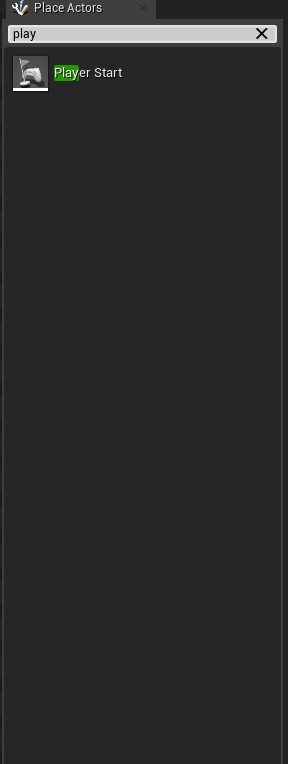 plush yew
Hello, I was wondering, can we apply skeleton from animation montage character into a character that only have default bone?
 sinful plover
is it okay if i used unreal free modules to make a game as a starter ?
fluid lance
@ember prawn That is not where player controller used to be at all. Right click in content browser, new blueprint - player controller
ember prawn
There we go, I knew it had to be something very simple, thank you.
 uncut ember
what does Append node do
from what i understood is like make vector node it creates R,G from two scalars
stuck scarab

What is the Material: Append Vector Node in Unreal Engine 4
Source Files: https://github.com/MWadstein/wtf-hdi-files
old mortar
Hey guys, does anyone use Newtek Ndi library in UE?
shut glen
I am using the 3rd person controller and i want my player to get pushed by physics objects
how can i do that?
 ancient kayak
is there a bug on 4.23?
fierce tulip
probably
ancient kayak
question: everytime i import my Mesh for example
SM_Mesh, UCX_SM_Mesh - and when I go to the viewer my UCX is gone and it doesn't show off
fierce tulip
no version is bug free
 sleek spear
so, my derived data cache disk if full, what do i do?
ancient kayak
@sleek spear you can delete that and move your derived to another location that has more space and you can change that in your project settings.
sleek spear
@ancient kayak thanks, i editor settings i have the same filder for local and shared derived data cache. this doesnt mean it creates both local and shared caches, right? also are those caches compressed by default?
ancient kayak
sleek spear
<@!673801318120292353> thanks, i editor settings i have the same filder for loca...
I'm not sure if it is compressed but my DDC is almost the same or double of my project file size that is why
sleek spear
i have the derived data cache on an ssd that i only use for temp files and pagefiles etc is there any point in doing that or should i put it on a larger hdd?
fierce tulip
@sleek spear it loads em a little faster, but generally those files (since they get accessed a lot) might be better off on a hdd
proud narwhal
Is there any way to select all objects in the world that would not be visible by the player for example a box clipped inside a wall.
sleek spear
ok cool, one last thing. @fierce tulip @ancient kayak shall i avoid having derived data cache on the same hdd as the project files to avoid simultaneous reads and writes? or do the project files get loaded and then the cache is calculated and written? any info on that?
fierce tulip
no clue, i just store those on my ssd.
but i have one ssd that can be trashed when its burned out
sleek spear
@fierce tulip yes i do that too, but that ssd is full. so im thinking of placing them on the same hdd as the project files
pseudo pulsar
@sleek spear Idk if this is very helpful or not, but I have mine on the same hdd.
sleek spear
@pseudo pulsar ok cool and did you check to see if you have simultaneous reads and writes? im just curious because this would slow down things and stress hdd thats all
 frozen pond
Hi, is there any way to make everything gray(in grayscale) expect for one actor ?
pseudo pulsar
@sleek spear Ahh!! I wasn't sure that was what the issue was, or if you were worried about crashing or something. I didn't end up checking prior to moving it so I can't really say. Personally I didn't notice much of a difference speed-wise, but I don't wanna give u misinformation if it does do it simultaneously.
distant sedge
light thunder
<@!422118753380335626> you might have accidentally opened the project twice (two...
how do i check if i did that and how do i avoid it
sleek spear
ok cool, thanks @pseudo pulsar im going to try now
@distant sedge if that happened you will have two editor windows open
distant sedge
yea so that isnt the case
im not opening 2 instances
i checked task manager as well
autumn grail
I have a problem when i spam the swordSlash input it break the anim BP transitions
please help
the transition is basic
ancient kayak
@sleek spear I moved my ddc in my ssd the ueproject will automatically generate it for you so it's still safe.
 sullen rain
Does anyone have any idea how to implement the drag and drop function in plugins(slate) for eg - A cube from slate dragged and dropped into the world. Just like how the editor and place actor tabs work [ Ufactory class has that information, but dont know how to implement it in slate]
stuck scarab
@sullen rain I learned that by following a small youtube series from Mathew I believe, hold on a sec
@sullen rain yeah its 4 episodes and you will learn everything you need to archive that. Starts here: https://www.youtube.com/watch?v=WfF3fb0WaoY&t=812s

An example showing the basics of how Drag and Drop operations work in UE4. This is a super simple right to the point on how to use it and more advanced examples are covered in other videos.
in one of the episodes he drags items into the world. Should be what you are looking for. I highly recommend to go through all of them tho to understand the system
 humble sparrow
Anyone know how to solve this problem ?? I cant watch the unreal online learning course as this error comes out...
 vale root
lets say that I've accidentally deleted my scene's sky sphere and possibly it's blueprint as well
is there anything I could do to get it back?
 grim juniper
It's probably somewhere in Engine Content in the Content Browser. Might have to show engine content using the eye filter thing
vale root
grim juniper
It's probably somewhere in Engine Content in the Content Browser. Might have to ...
I've already tried that though I can't find the Engine Content folder
plush yew
can i disable the source panel folder collapsing ?
grim juniper
vale root
I've already tried that though I can't find the Engine Content folder
I found this, they say search for "bp_sky" https://answers.unrealengine.com/questions/125216/bp-sky-sphere.html
vale root
vale root
I've already tried that though I can't find the Engine Content folder
nevermind all I had to do is press the folder icon for it to show up
thanks for the help though
grim juniper
👍
plush yew
hellou ??
 candid grail
Should projectiles be using blocking or overlapping collision - is there any "standards" or preferable choice (if yes, why)?
 mint onyx
candid grail
Should projectiles be using blocking or overlapping collision - is there any "st...
mint onyx
candid grail
Should projectiles be using blocking or overlapping collision - is there any "st...
I think that generaly the projectile should use overlap and the hitted actor should use block if you want to generate a overlap colision. If you just want to block the projectile, set both to block. Check: https://docs.unrealengine.com/en-US/Engine/Physics/Collision/Overview/index.html
An overview of how Collision and Collision Responses operate in Unreal Engine 4.
 daring gazelle


 autumn grail
Anyone can help me? i'm sure this is easy to fix
candid grail
mint onyx
I think that generaly the projectile should use overlap and the hitted actor sho...
Wouldn't that cause problems at high speeds?
Both would but how is it usually solved?
I suppose i could do a trace between the current position and position on the previous frame.
mint onyx
Yeah but we have a config in physics that should solve that. UE4 sometimes do calculations to save some performance and this mess with your systems. Try to check "Use CCD"(idk if is in physics or collision settings) and see if this solve your problem.
candid grail
mint onyx
Yeah but we have a config in physics that should solve that. UE4 sometimes do ca...
Handy, thx!